02四隅ハンドルで行う比率固定のサイズ調整
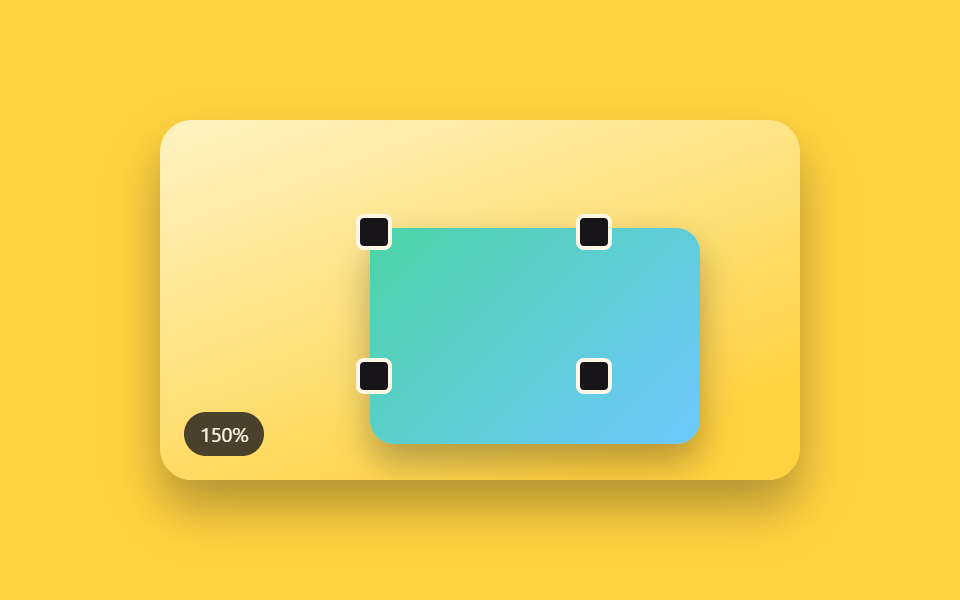
選択ボックスの四隅に小さな正方形ハンドルが付き、そのうち1つを引くと反対側の角を基点に縦横比を保ったまま拡大・縮小する(250のpanel-corner-resize-grip — レイアウトパネル自体の幅と高さを変えるグリップ — とは異なる実演 — こちらはパネルではなくキャンバス上のオブジェクト1つの境界ハンドルである)。
使いどころムードボード・名刺案での画像オブジェクトのサイズ合わせ
applyScalecornerAnchorRecthopScale
<main class="stage">
<div class="scene is-demo" id="scene">
  <div class="frame" id="frame" tabindex="0" aria-label="サイズ調整フレーム、隅のハンドルを引くと比率を保ったまま拡大縮小する">
    <div class="subjectShape"></div>
    <div class="handle handle--tl" data-corner="tl" tabindex="0" role="slider" aria-label="左上の角ハンドル" aria-valuemin="50" aria-valuemax="180" aria-valuenow="100"></div>
    <div class="handle handle--tr" data-corner="tr" tabindex="0" role="slider" aria-label="右上の角ハンドル" aria-valuemin="50" aria-valuemax="180" aria-valuenow="100"></div>
    <div class="handle handle--bl" data-corner="bl" tabindex="0" role="slider" aria-label="左下の角ハンドル" aria-valuemin="50" aria-valuemax="180" aria-valuenow="100"></div>
    <div class="handle handle--br" data-corner="br" tabindex="0" role="slider" aria-label="右下の角ハンドル" aria-valuemin="50" aria-valuemax="180" aria-valuenow="100"></div>
  </div>
  <div class="readout" id="readout" aria-hidden="true"><span id="rp">100</span>%</div>
</div>
</main>
@use "../../../../site/static/demo-tokens" as *;
// 변수 3개
$duration: $dur-enter;
$easing: $ease-out;
$color: $subject-sky;
// 계산 겹: index.html 의 applyScale() 이 앵커(대각선 반대 모서리)→포인터 거리비로 균일 scale() 을
// 만들고 transform-origin 을 앵커 좌표에 둔다 — 앵커는 어떤 배율에서도 화면에서 움직이지 않는다.
@include stage($stage-yellow);
.scene {
position: relative;
width: 320px;
height: 180px;
border-radius: $r-card;
overflow: hidden;
box-shadow: $shadow-raised;
background: linear-gradient(160deg, #fff3c4, $stage-yellow 85%);
}
.frame {
position: absolute;
top: 50%;
left: 50%;
width: 110px;
height: 72px;
margin-top: -36px;
margin-left: -55px;
&:focus-visible { outline: 2px solid $color; outline-offset: 6px; }
}
.subjectShape {
width: 100%;
height: 100%;
border-radius: $r-sm;
background: linear-gradient(135deg, $subject-mint, $subject-sky);
box-shadow: $shadow-press;
will-change: transform;
}
.handle {
position: absolute;
width: 14px;
height: 14px;
margin: -7px;
border-radius: $r-xs;
background: $subject-ink;
border: 2px solid $subject-cream;
cursor: nwse-resize;
touch-action: none;
&--tl { top: 0; left: 0; }
&--tr { top: 0; left: 100%; cursor: nesw-resize; }
&--bl { top: 100%; left: 0; cursor: nesw-resize; }
&--br { top: 100%; left: 100%; }
&.isActive, &:focus-visible { background: $color; }
}
.readout {
position: absolute;
left: $sp-3;
bottom: $sp-3;
padding: $sp-1 $sp-2;
border-radius: $r-pill;
background: rgba($subject-ink, .78);
color: $subject-cream;
font-size: 10px;
font-variant-numeric: tabular-nums;
}
@media (max-width: 340px) {
.scene { width: 220px; height: 124px; }
.frame { width: 78px; height: 52px; margin-top: -26px; margin-left: -39px; }
.handle { width: 12px; height: 12px; margin: -6px; }
.readout { font-size: 9px; }
}
@media (prefers-reduced-motion: reduce) {
// 실사용 경로 적용 — 핸들 드래그·키보드는 index.html 이 트윈 없이 즉시 반영한다.
// scss 만: 핸들 색 전환만 꺼서 잔여 트랜지션을 없앤다.
.handle { transition: none; }
}html, body {
margin: 0;
overflow: hidden;
}
.stage {
box-sizing: border-box;
min-height: 100vh;
display: grid;
place-items: center;
margin: 0;
background: #ffd23f;
font-family: -apple-system, "Segoe UI", "Noto Sans KR", sans-serif;
padding: clamp(8px, 4vw, 24px);
}
.scene {
position: relative;
width: 320px;
height: 180px;
border-radius: 16px;
overflow: hidden;
box-shadow: 0 14px 24px rgba(23, 20, 26, 0.32);
background: linear-gradient(160deg, #fff3c4, #ffd23f 85%);
}
.frame {
position: absolute;
top: 50%;
left: 50%;
width: 110px;
height: 72px;
margin-top: -36px;
margin-left: -55px;
}
.frame:focus-visible {
outline: 2px solid #6ec8ff;
outline-offset: 6px;
}
.subjectShape {
width: 100%;
height: 100%;
border-radius: 8px;
background: linear-gradient(135deg, #4cd4a6, #6ec8ff);
box-shadow: 0 6px 12px rgba(23, 20, 26, 0.32);
will-change: transform;
}
.handle {
position: absolute;
width: 14px;
height: 14px;
margin: -7px;
border-radius: 4px;
background: #17141a;
border: 2px solid #fff7e6;
cursor: nwse-resize;
touch-action: none;
}
.handle--tl {
top: 0;
left: 0;
}
.handle--tr {
top: 0;
left: 100%;
cursor: nesw-resize;
}
.handle--bl {
top: 100%;
left: 0;
cursor: nesw-resize;
}
.handle--br {
top: 100%;
left: 100%;
}
.handle.isActive, .handle:focus-visible {
background: #6ec8ff;
}
.readout {
position: absolute;
left: 12px;
bottom: 12px;
padding: 4px 8px;
border-radius: 999px;
background: rgba(23, 20, 26, 0.78);
color: #fff7e6;
font-size: 10px;
font-variant-numeric: tabular-nums;
}
@media (max-width: 340px) {
.scene {
width: 220px;
height: 124px;
}
.frame {
width: 78px;
height: 52px;
margin-top: -26px;
margin-left: -39px;
}
.handle {
width: 12px;
height: 12px;
margin: -6px;
}
.readout {
font-size: 9px;
}
}
@media (prefers-reduced-motion: reduce) {
.handle {
transition: none;
}
}(function () {
var MIN_SCALE = 0.55;
var MAX_SCALE = 1.75;
var LOOP_SEQUENCE = [1.5, 0.7, 1];
var HOP_MS = 620;
var HOLD_MS = 340;
var scene = document.getElementById('scene');
var frame = document.getElementById('frame');
var subject = frame.querySelector('.subjectShape');
var handles = [].slice.call(frame.querySelectorAll('.handle'));
var rp = document.getElementById('rp');
var reduce = window.matchMedia('(prefers-reduced-motion: reduce)').matches;
// 앵커 고정 비율 산술: 드래그하는 모서리의 대각선 반대쪽을 앵커로 고정하고, 앵커→포인터 거리의
// 비로 균일 스케일을 만든다. transform-origin 을 앵커 좌표에 두면 그 점은 화면에서 움직이지 않는다.
var ORIGIN_BY_CORNER = {
tl: '100% 100%',
tr: '0% 100%',
bl: '100% 0%',
br: '0% 0%'
};
var scale = 1;
var dragCorner = null;
var anchorX = 0, anchorY = 0, d0 = 1, s0 = 1;
var timers = [];
function clamp(v, lo, hi) { return Math.min(hi, Math.max(lo, v)); }
function easeOutCubic(t) { return 1 - Math.pow(1 - t, 3); }
function dist(x1, y1, x2, y2) { return Math.hypot(x2 - x1, y2 - y1); }
function applyScale(corner, s) {
scale = clamp(s, MIN_SCALE, MAX_SCALE);
subject.style.transformOrigin = ORIGIN_BY_CORNER[corner];
subject.style.transform = 'scale(' + scale.toFixed(3) + ')';
rp.textContent = Math.round(scale * 100);
handles.forEach(function (h) { h.setAttribute('aria-valuenow', String(Math.round(scale * 100))); });
}
function human() {
if (scene.classList.contains('is-demo')) {
scene.classList.remove('is-demo');
timers.forEach(function (t) { clearTimeout(t); clearInterval(t); });
timers = [];
}
}
function cornerAnchorRect(corner) {
var r = frame.getBoundingClientRect();
switch (corner) {
case 'tl': return { x: r.right, y: r.bottom };
case 'tr': return { x: r.left, y: r.bottom };
case 'bl': return { x: r.right, y: r.top };
default: return { x: r.left, y: r.top };
}
}
handles.forEach(function (h) {
h.addEventListener('pointerdown', function (e) {
human();
dragCorner = h.dataset.corner;
h.setPointerCapture(e.pointerId);
var a = cornerAnchorRect(dragCorner);
anchorX = a.x; anchorY = a.y;
d0 = Math.max(1, dist(anchorX, anchorY, e.clientX, e.clientY));
s0 = scale;
h.classList.add('isActive');
});
h.addEventListener('pointermove', function (e) {
if (dragCorner !== h.dataset.corner) return;
var d1 = dist(anchorX, anchorY, e.clientX, e.clientY);
applyScale(dragCorner, s0 * (d1 / d0));
});
function end(e) {
if (dragCorner !== h.dataset.corner) return;
dragCorner = null;
h.classList.remove('isActive');
try { h.releasePointerCapture(e.pointerId); } catch (err) {}
}
h.addEventListener('pointerup', end);
h.addEventListener('pointercancel', end);
h.addEventListener('keydown', function (e) {
var corner = h.dataset.corner;
if (e.key === 'ArrowUp' || e.key === 'ArrowRight') { human(); applyScale(corner, scale + 0.08); e.preventDefault(); }
else if (e.key === 'ArrowDown' || e.key === 'ArrowLeft') { human(); applyScale(corner, scale - 0.08); e.preventDefault(); }
});
});
// reduce: 실사용 경로 적용 — 핸들 pointer·keydown 은 위에서 트윈 없이 즉시 반영한다.
// 아래 hopScale()·cycle() 은 시연 게이트만 — reduce 에서는 돌지 않는다.
function hopScale(corner, target, onDone) {
var from = scale;
var start = performance.now();
function frame(now) {
if (!scene.classList.contains('is-demo')) return;
var p = clamp((now - start) / HOP_MS, 0, 1);
applyScale(corner, from + (target - from) * easeOutCubic(p));
if (p < 1) requestAnimationFrame(frame);
else if (onDone) onDone();
}
requestAnimationFrame(frame);
}
function cycle(i) {
if (!scene.classList.contains('is-demo')) return;
var target = LOOP_SEQUENCE[i % LOOP_SEQUENCE.length];
hopScale('br', target, function () {
timers.push(setTimeout(function () { cycle(i + 1); }, HOLD_MS));
});
}
if (!reduce) {
cycle(0);
}
})();import { useEffect, useRef } from 'react';
import styles from './XfCornerScale.module.scss';
const MIN_SCALE = 0.55;
const MAX_SCALE = 1.75;
const KEY_STEP = 0.08;
const HOP_MS = 560;
const HOLD_MS = 340;
const LOOP_SEQUENCE = [1.5, 0.7, 1];
const ORIGIN_BY_CORNER: Record<string, string> = {
tl: '100% 100%',
tr: '0% 100%',
bl: '100% 0%',
br: '0% 0%'
};
export default function XfCornerScale() {
const sceneRef = useRef<HTMLDivElement>(null);
useEffect(() => {
const scene0 = sceneRef.current;
if (!scene0) return undefined;
const scene = scene0;
const frame0 = scene.querySelector<HTMLDivElement>('.' + styles.frame);
const subject0 = scene.querySelector<HTMLDivElement>('#subject');
const rp0 = scene.querySelector<HTMLSpanElement>('#rp');
const handles = Array.from(scene.querySelectorAll<HTMLDivElement>('.' + styles.handle));
if (!frame0 || !subject0 || !rp0 || handles.length === 0) return undefined;
const frame = frame0;
const subject = subject0;
const rp = rp0;
const reduce = window.matchMedia('(prefers-reduced-motion: reduce)').matches;
let scale = 1;
let rafId = 0;
let timers: number[] = [];
const dragByCorner: Record<string, boolean> = {};
const originByCorner: Record<string, { x: number; y: number }> = {};
function clamp(v: number, lo: number, hi: number) { return Math.min(hi, Math.max(lo, v)); }
function easeOutCubic(t: number) { return 1 - Math.pow(1 - t, 3); }
// 앵커 고정 비율 산술: 드래그하는 모서리의 대각선 반대쪽을 앵커로 고정하고(transformOrigin),
// 앵커→포인터 거리의 비로 균일 스케일을 만든다.
function cornerAnchorRect(corner: string) {
const r = frame.getBoundingClientRect();
const ax = corner === 'tl' || corner === 'bl' ? r.right : r.left;
const ay = corner === 'tl' || corner === 'tr' ? r.bottom : r.top;
return { x: ax, y: ay };
}
function applyScale(corner: string, s: number) {
scale = clamp(s, MIN_SCALE, MAX_SCALE);
subject.style.transformOrigin = ORIGIN_BY_CORNER[corner] || '50% 50%';
subject.style.transform = 'scale(' + scale.toFixed(3) + ')';
rp.textContent = String(Math.round(scale * 100));
handles.forEach((h) => h.setAttribute('aria-valuenow', String(Math.round(scale * 100))));
}
function human() {
if (scene.classList.contains(styles['is-demo'])) {
scene.classList.remove(styles['is-demo']);
timers.forEach((t) => window.clearTimeout(t));
timers = [];
}
}
function bindHandle(handle: HTMLDivElement) {
const corner = handle.dataset.corner || 'br';
function onDown(e: PointerEvent) {
human();
dragByCorner[corner] = true;
handle.setPointerCapture(e.pointerId);
const anchor = cornerAnchorRect(corner);
originByCorner[corner] = { x: e.clientX - anchor.x, y: e.clientY - anchor.y };
}
function onMove(e: PointerEvent) {
if (!dragByCorner[corner]) return;
const anchor = cornerAnchorRect(corner);
const dx = e.clientX - anchor.x;
const dy = e.clientY - anchor.y;
const dNow = Math.hypot(dx, dy);
const d0 = Math.hypot(originByCorner[corner].x, originByCorner[corner].y);
if (d0 === 0) return;
applyScale(corner, scale * (dNow / d0));
originByCorner[corner] = { x: dx, y: dy };
}
function onUp(e: PointerEvent) {
if (!dragByCorner[corner]) return;
dragByCorner[corner] = false;
try { handle.releasePointerCapture(e.pointerId); } catch { /* 캡처가 이미 풀린 경우 */ }
}
function onKey(e: KeyboardEvent) {
if (e.key === 'ArrowUp' || e.key === 'ArrowRight') { human(); applyScale(corner, scale + KEY_STEP); e.preventDefault(); }
else if (e.key === 'ArrowDown' || e.key === 'ArrowLeft') { human(); applyScale(corner, scale - KEY_STEP); e.preventDefault(); }
}
handle.addEventListener('pointerdown', onDown);
handle.addEventListener('pointermove', onMove);
handle.addEventListener('pointerup', onUp);
handle.addEventListener('pointercancel', onUp);
handle.addEventListener('keydown', onKey);
cleanups.push(() => {
handle.removeEventListener('pointerdown', onDown);
handle.removeEventListener('pointermove', onMove);
handle.removeEventListener('pointerup', onUp);
handle.removeEventListener('pointercancel', onUp);
handle.removeEventListener('keydown', onKey);
});
}
const cleanups: Array<() => void> = [];
handles.forEach(bindHandle);
applyScale('br', 1);
// reduce: 실사용 경로 적용 — 핸들 드래그·키보드는 위에서 즉시 반영한다.
// 아래 자동 루프는 시연 게이트만 — reduce 에서는 돌지 않는다.
function hopScale(corner: string, target: number, onDone: () => void) {
const from = scale;
const start = performance.now();
function frame(now: number) {
if (!scene.classList.contains(styles['is-demo'])) return;
const p = clamp((now - start) / HOP_MS, 0, 1);
applyScale(corner, from + (target - from) * easeOutCubic(p));
if (p < 1) rafId = requestAnimationFrame(frame);
else onDone();
}
rafId = requestAnimationFrame(frame);
}
function cycle(i: number) {
if (!scene.classList.contains(styles['is-demo'])) return;
const target = LOOP_SEQUENCE[i % LOOP_SEQUENCE.length];
hopScale('br', target, () => {
timers.push(window.setTimeout(() => cycle(i + 1), HOLD_MS));
});
}
if (!reduce) {
cycle(0);
}
return () => {
cleanups.forEach((fn) => fn());
timers.forEach((t) => window.clearTimeout(t));
cancelAnimationFrame(rafId);
};
}, []);
return (
<main className={styles.stage}>
<div className={styles.scene + ' ' + styles['is-demo']} ref={sceneRef}>
<div className={styles.frame} tabIndex={0} aria-label="크기 조절 프레임, 모서리 핸들을 드래그">
<div id="subject" className={styles.subjectShape}></div>
<div className={styles.handle} data-corner="tl" role="slider" tabIndex={0} aria-label="왼쪽 위 모서리 핸들" aria-valuemin={50} aria-valuemax={180} aria-valuenow={100}></div>
<div className={styles.handle} data-corner="tr" role="slider" tabIndex={0} aria-label="오른쪽 위 모서리 핸들" aria-valuemin={50} aria-valuemax={180} aria-valuenow={100}></div>
<div className={styles.handle} data-corner="bl" role="slider" tabIndex={0} aria-label="왼쪽 아래 모서리 핸들" aria-valuemin={50} aria-valuemax={180} aria-valuenow={100}></div>
<div className={styles.handle} data-corner="br" role="slider" tabIndex={0} aria-label="오른쪽 아래 모서리 핸들" aria-valuemin={50} aria-valuemax={180} aria-valuenow={100}></div>
</div>
<div className={styles.readout} aria-hidden="true"><span id="rp">100</span>%</div>
</div>
</main>
);
}02 四隅ハンドルで行う比率固定のサイズ調整 — 計測 累積面積 14.389% · 動いたフレーム 16/23GODRICH オリジナル · SCSS と React は zip に同梱 · ドラッグ ハンドル 9種 — キャンバスの自由変形ツールキット
このデモが属する記事
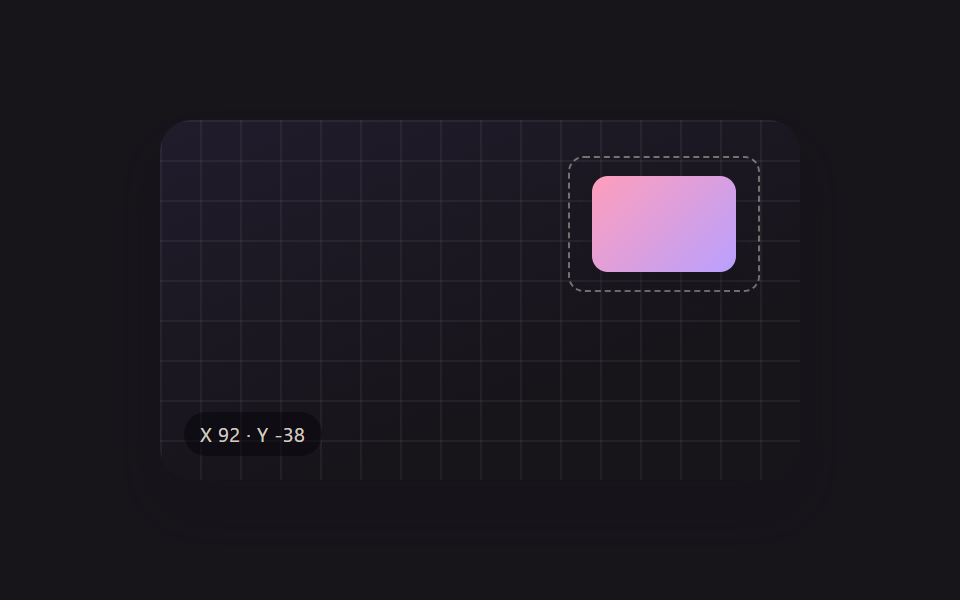 ドラッグ ハンドル 9種 — キャンバスの自由変形ツールキット9種のドラッグ ハンドルのうち、1つは回転ハンドルを弧を描いて引くと選択ボックスの中心を軸にオブジェクトごと回転し、1つは散らばったアイコンをワンクリックでグリッドへ一斉に整列させ、1つは方向キーを押し続けるほど移動幅が徐々に大きくなります この記事のデモをすべて見る