06散らばったオブジェクトを一括でグリッド整列
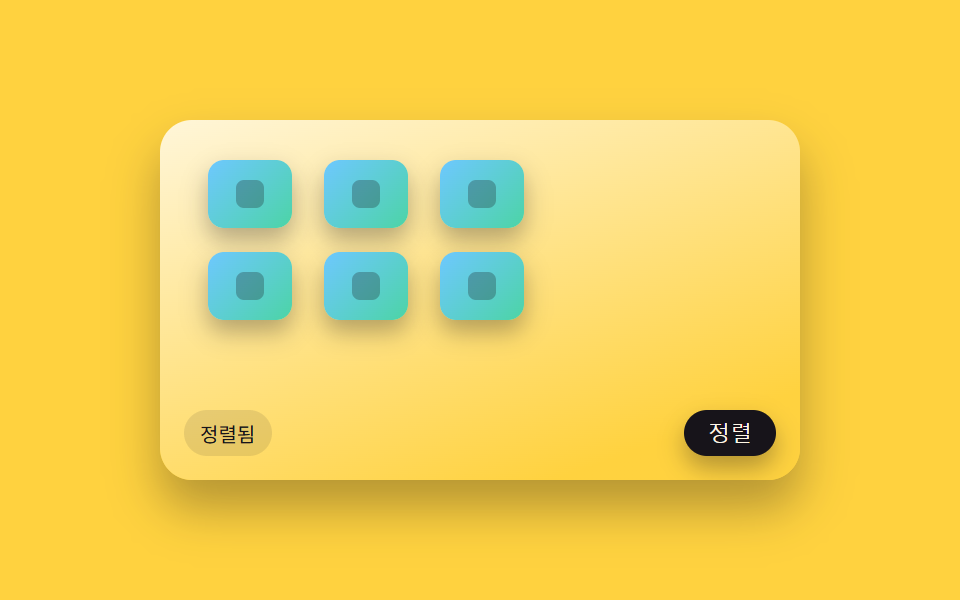
ボタンを1つ押すと、画面のあちこちに散らばっていたオブジェクトがそれぞれの位置から同時に動き出し、行と列のそろったグリッドの位置へ滑るように移動して整列する。
使いどころムードボードに散らしたアイコンを発表直前に整理
gridTargetanimateTotoggleArrange
<main class="stage">
<div class="scene is-demo" id="scene">
  <div class="frame" id="frame">
    <div class="chip" data-i="0"><span class="chipGlyph"></span></div>
    <div class="chip" data-i="1"><span class="chipGlyph"></span></div>
    <div class="chip" data-i="2"><span class="chipGlyph"></span></div>
    <div class="chip" data-i="3"><span class="chipGlyph"></span></div>
    <div class="chip" data-i="4"><span class="chipGlyph"></span></div>
    <div class="chip" data-i="5"><span class="chipGlyph"></span></div>
  </div>
  <button type="button" class="arrangeBtn" id="arrangeBtn">整列</button>
  <div class="status" id="status" aria-live="polite">散らばり</div>
</div>
</main>
@use "../../../../site/static/demo-tokens" as *;
// 변수 3개
$duration: $dur-enter;
$easing: $ease-out;
$color: $subject-sky;
// 계산 겹: index.html 의 gridTarget() 이 칩 인덱스를 col=i%GRID_COLS, row=floor(i/GRID_COLS) 로
// 나누고 그 자리의 실좌표를 산술로 구해, 버튼 클릭마다 모든 칩을 동시에 그 좌표까지 트윈한다.
@include stage($stage-yellow);
.scene {
position: relative;
width: 320px;
height: 180px;
border-radius: $r-card;
overflow: hidden;
box-shadow: $shadow-raised;
background: linear-gradient(160deg, #fff6d9, $stage-yellow 85%);
}
.frame {
position: absolute;
left: 14px;
top: 8px;
width: 234px;
height: 156px;
}
.chip {
position: absolute;
width: 42px;
height: 34px;
border-radius: $r-sm;
background: linear-gradient(135deg, $subject-sky, $subject-mint);
box-shadow: $shadow-press;
will-change: transform;
display: flex;
align-items: center;
justify-content: center;
}
.chipGlyph {
width: 14px;
height: 14px;
border-radius: $r-xs;
background: rgba($subject-ink, .28);
}
.arrangeBtn {
position: absolute;
right: $sp-3;
bottom: $sp-3;
padding: $sp-1 $sp-3;
border: none;
border-radius: $r-control;
background: $subject-ink;
color: $subject-cream;
font-size: 11px;
cursor: pointer;
box-shadow: $shadow-press;
&:focus-visible { outline: 2px solid $color; outline-offset: 2px; }
&:active { transform: translateY(1px); }
}
.status {
position: absolute;
left: $sp-3;
bottom: $sp-3;
padding: $sp-1 $sp-2;
border-radius: $r-pill;
background: rgba($subject-ink, .1);
color: $subject-ink;
font-size: 10px;
}
@media (max-width: 340px) {
.scene { width: 220px; height: 124px; }
.frame { left: 8px; top: 6px; width: 160px; height: 104px; }
.chip { width: 30px; height: 24px; }
.chipGlyph { width: 10px; height: 10px; }
.arrangeBtn, .status { font-size: 9px; }
}
@media (prefers-reduced-motion: reduce) {
// 실사용 경로 적용 — 버튼 클릭 시 좌표 전환은 index.html 트윈 로직이 그대로 담당한다(끄지 않음).
// scss 만: 버튼 눌림·포커스 전환만 꺼서 잔여 트랜지션을 없앤다.
.arrangeBtn { transition: none; }
}html, body {
margin: 0;
overflow: hidden;
}
.stage {
box-sizing: border-box;
min-height: 100vh;
display: grid;
place-items: center;
margin: 0;
background: #ffd23f;
font-family: -apple-system, "Segoe UI", "Noto Sans KR", sans-serif;
padding: clamp(8px, 4vw, 24px);
}
.scene {
position: relative;
width: 320px;
height: 180px;
border-radius: 16px;
overflow: hidden;
box-shadow: 0 14px 24px rgba(23, 20, 26, 0.32);
background: linear-gradient(160deg, #fff6d9, #ffd23f 85%);
}
.frame {
position: absolute;
left: 14px;
top: 8px;
width: 234px;
height: 156px;
}
.chip {
position: absolute;
width: 42px;
height: 34px;
border-radius: 8px;
background: linear-gradient(135deg, #6ec8ff, #4cd4a6);
box-shadow: 0 6px 12px rgba(23, 20, 26, 0.32);
will-change: transform;
display: flex;
align-items: center;
justify-content: center;
}
.chipGlyph {
width: 14px;
height: 14px;
border-radius: 4px;
background: rgba(23, 20, 26, 0.28);
}
.arrangeBtn {
position: absolute;
right: 12px;
bottom: 12px;
padding: 4px 12px;
border: none;
border-radius: 12px;
background: #17141a;
color: #fff7e6;
font-size: 11px;
cursor: pointer;
box-shadow: 0 6px 12px rgba(23, 20, 26, 0.32);
}
.arrangeBtn:focus-visible {
outline: 2px solid #6ec8ff;
outline-offset: 2px;
}
.arrangeBtn:active {
transform: translateY(1px);
}
.status {
position: absolute;
left: 12px;
bottom: 12px;
padding: 4px 8px;
border-radius: 999px;
background: rgba(23, 20, 26, 0.1);
color: #17141a;
font-size: 10px;
}
@media (max-width: 340px) {
.scene {
width: 220px;
height: 124px;
}
.frame {
left: 8px;
top: 6px;
width: 160px;
height: 104px;
}
.chip {
width: 30px;
height: 24px;
}
.chipGlyph {
width: 10px;
height: 10px;
}
.arrangeBtn, .status {
font-size: 9px;
}
}
@media (prefers-reduced-motion: reduce) {
.arrangeBtn {
transition: none;
}
}(function () {
var GRID_COLS = 3;
var CELL_W = 58;
var CELL_H = 46;
var ORIGIN_X = 10;
var ORIGIN_Y = 12;
var HOP_MS = 480;
var HOLD_MS = 900;
var SCATTER = [
{ x: 6, y: 6 }, { x: 138, y: 16 }, { x: 62, y: 66 },
{ x: 168, y: 58 }, { x: 24, y: 100 }, { x: 150, y: 104 }
];
var scene = document.getElementById('scene');
var frame = document.getElementById('frame');
var chips = Array.prototype.slice.call(document.querySelectorAll('.chip'));
var btn = document.getElementById('arrangeBtn');
var status = document.getElementById('status');
var reduce = window.matchMedia('(prefers-reduced-motion: reduce)').matches;
var arranged = false;
var current = SCATTER.map(function (p) { return { x: p.x, y: p.y }; });
var timers = [];
function easeOutCubic(t) { return 1 - Math.pow(1 - t, 3); }
// 격자 인덱스 → 좌표: col = i % GRID_COLS, row = floor(i / GRID_COLS), 그 위치에
// ORIGIN + col*CELL_W / row*CELL_H 를 더해 칩 하나하나의 목표 좌표를 산술로 얻는다.
function gridTarget(i) {
var col = i % GRID_COLS;
var row = Math.floor(i / GRID_COLS);
return { x: ORIGIN_X + col * CELL_W, y: ORIGIN_Y + row * CELL_H };
}
function paint() {
chips.forEach(function (chip, i) {
chip.style.transform = 'matrix(1,0,0,1,' + current[i].x.toFixed(1) + ',' + current[i].y.toFixed(1) + ')';
});
}
function animateTo(targets, onDone) {
var from = current.map(function (p) { return { x: p.x, y: p.y }; });
var start = performance.now();
function step(now) {
var p = Math.min(1, (now - start) / HOP_MS);
var e = easeOutCubic(p);
for (var i = 0; i < chips.length; i++) {
current[i].x = from[i].x + (targets[i].x - from[i].x) * e;
current[i].y = from[i].y + (targets[i].y - from[i].y) * e;
}
paint();
if (p < 1) requestAnimationFrame(step);
else if (onDone) onDone();
}
requestAnimationFrame(step);
}
function toggleArrange() {
arranged = !arranged;
var targets = arranged ? chips.map(function (_, i) { return gridTarget(i); }) : SCATTER;
status.textContent = arranged ? '整列済み' : '散らばり';
btn.setAttribute('aria-pressed', String(arranged));
animateTo(targets);
}
function human() {
if (scene.classList.contains('is-demo')) {
scene.classList.remove('is-demo');
timers.forEach(function (t) { clearTimeout(t); clearInterval(t); });
timers = [];
}
}
btn.setAttribute('aria-pressed', 'false');
btn.addEventListener('click', function () {
human();
toggleArrange();
});
paint();
// reduce: 실사용 경로 적용 — 버튼 클릭은 위 toggleArrange() 가 트윈으로 즉시 목표 좌표까지 움직인다.
// 아래 자동 루프는 시연 게이트만 — 散らばり↔정렬을 스스로 반복하며 reduce 에서는 돌지 않는다.
function loop() {
if (!scene.classList.contains('is-demo')) return;
toggleArrange();
timers.push(setTimeout(loop, HOP_MS + HOLD_MS));
}
if (!reduce) {
timers.push(setTimeout(loop, HOLD_MS));
}
})();import { useEffect, useRef } from 'react';
import styles from './XfIconGridArrange.module.scss';
const GRID_COLS = 3;
const CELL_W = 58;
const CELL_H = 46;
const ORIGIN_X = 10;
const ORIGIN_Y = 12;
const HOP_MS = 480;
const HOLD_MS = 900;
const SCATTER = [
{ x: 6, y: 6 }, { x: 138, y: 16 }, { x: 62, y: 66 },
{ x: 168, y: 58 }, { x: 24, y: 100 }, { x: 150, y: 104 }
];
export default function XfIconGridArrange() {
const sceneRef = useRef<HTMLDivElement>(null);
useEffect(() => {
const scene0 = sceneRef.current;
if (!scene0) return undefined;
const scene = scene0;
const chips = Array.from(scene.querySelectorAll<HTMLDivElement>('.' + styles.chip));
const btn0 = scene.querySelector<HTMLButtonElement>('.' + styles.arrangeBtn);
const status0 = scene.querySelector<HTMLDivElement>('.' + styles.status);
if (chips.length === 0 || !btn0 || !status0) return undefined;
const btn = btn0;
const status = status0;
const reduce = window.matchMedia('(prefers-reduced-motion: reduce)').matches;
let arranged = false;
let current = SCATTER.map((p) => ({ x: p.x, y: p.y }));
let rafId = 0;
let timers: number[] = [];
function easeOutCubic(t: number) { return 1 - Math.pow(1 - t, 3); }
// 격자 인덱스 → 좌표: col = i % GRID_COLS, row = floor(i / GRID_COLS), 그 위치에
// ORIGIN + col*CELL_W / row*CELL_H 를 더해 칩 하나하나의 목표 좌표를 산술로 얻는다.
function gridTarget(i: number) {
const col = i % GRID_COLS;
const row = Math.floor(i / GRID_COLS);
return { x: ORIGIN_X + col * CELL_W, y: ORIGIN_Y + row * CELL_H };
}
function paint() {
chips.forEach((chip, i) => {
chip.style.transform = 'matrix(1,0,0,1,' + current[i].x.toFixed(1) + ',' + current[i].y.toFixed(1) + ')';
});
}
function animateTo(targets: Array<{ x: number; y: number }>, onDone?: () => void) {
const from = current.map((p) => ({ x: p.x, y: p.y }));
const start = performance.now();
function step(now: number) {
const p = Math.min(1, (now - start) / HOP_MS);
const e = easeOutCubic(p);
for (let i = 0; i < chips.length; i++) {
current[i] = {
x: from[i].x + (targets[i].x - from[i].x) * e,
y: from[i].y + (targets[i].y - from[i].y) * e
};
}
paint();
if (p < 1) rafId = requestAnimationFrame(step);
else if (onDone) onDone();
}
rafId = requestAnimationFrame(step);
}
function toggleArrange() {
arranged = !arranged;
const targets = arranged ? chips.map((_, i) => gridTarget(i)) : SCATTER;
status.textContent = arranged ? '정렬됨' : '흩어짐';
btn.setAttribute('aria-pressed', String(arranged));
animateTo(targets);
}
function human() {
if (scene.classList.contains(styles['is-demo'])) {
scene.classList.remove(styles['is-demo']);
timers.forEach((t) => window.clearTimeout(t));
timers = [];
}
}
function onClick() {
human();
toggleArrange();
}
btn.setAttribute('aria-pressed', 'false');
btn.addEventListener('click', onClick);
paint();
// reduce: 실사용 경로 적용 — 버튼 클릭은 위 toggleArrange() 가 트윈으로 즉시 목표 좌표까지 움직인다.
// 아래 자동 루프는 시연 게이트만 — 흩어짐↔정렬을 스스로 반복하며 reduce 에서는 돌지 않는다.
function loop() {
if (!scene.classList.contains(styles['is-demo'])) return;
toggleArrange();
timers.push(window.setTimeout(loop, HOP_MS + HOLD_MS));
}
if (!reduce) {
timers.push(window.setTimeout(loop, HOLD_MS));
}
return () => {
btn.removeEventListener('click', onClick);
timers.forEach((t) => window.clearTimeout(t));
cancelAnimationFrame(rafId);
};
}, []);
return (
<main className={styles.stage}>
<div className={styles.scene + ' ' + styles['is-demo']} ref={sceneRef}>
<div className={styles.frame}>
<div className={styles.chip} data-i="0"><span className={styles.chipGlyph}></span></div>
<div className={styles.chip} data-i="1"><span className={styles.chipGlyph}></span></div>
<div className={styles.chip} data-i="2"><span className={styles.chipGlyph}></span></div>
<div className={styles.chip} data-i="3"><span className={styles.chipGlyph}></span></div>
<div className={styles.chip} data-i="4"><span className={styles.chipGlyph}></span></div>
<div className={styles.chip} data-i="5"><span className={styles.chipGlyph}></span></div>
</div>
<button type="button" className={styles.arrangeBtn}>정렬</button>
<div className={styles.status} aria-live="polite">흩어짐</div>
</div>
</main>
);
}06 散らばったオブジェクトを一括でグリッド整列 — 計測 累積面積 14.908% · 動いたフレーム 8/23GODRICH オリジナル · SCSS と React は zip に同梱 · ドラッグ ハンドル 9種 — キャンバスの自由変形ツールキット
このデモが属する記事
 ドラッグ ハンドル 9種 — キャンバスの自由変形ツールキット9種のドラッグ ハンドルのうち、1つは回転ハンドルを弧を描いて引くと選択ボックスの中心を軸にオブジェクトごと回転し、1つは散らばったアイコンをワンクリックでグリッドへ一斉に整列させ、1つは方向キーを押し続けるほど移動幅が徐々に大きくなります この記事のデモをすべて見る