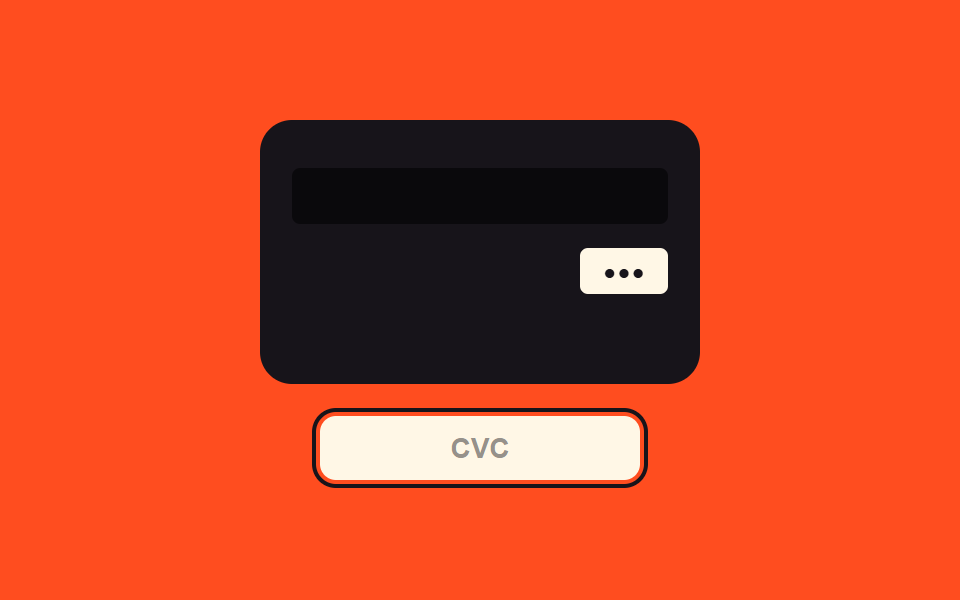
03セキュリティコード焦点値切替 — セキュリティコード欄の焦点値がオンになるとカードの裏面を見せる値に画面が変わる方式
セキュリティコード欄の焦点値がオンになるとカードの表面値が裏面値に変わって見え、焦点値がオフになると再び表面値に戻ります。
使いどころ決済フォームのCVC入力欄、カード登録画面のセキュリティコード案内
setFlippedcv__input--focus$ease-lerp-settle
<main class="stage">
<div class="cv is-demo" id="cv">
  <div class="cv__scene">
    <div class="cv__card" id="cvCard">
      <div class="cv__face cv__face--front">
        <span class="cv__chipIcon"></span>
        <span class="cv__num">9999 99•• •••• 9995</span>
        <span class="cv__exp">12/29</span>
      </div>
      <div class="cv__face cv__face--back">
        <span class="cv__strip"></span>
        <span class="cv__cvcRow"><span class="cv__cvcBox" id="cvBox">•••</span></span>
      </div>
    </div>
  </div>
  <label class="cv__field">
    <input class="cv__input" id="cvInput" type="text" inputmode="numeric" autocomplete="off" spellcheck="false" maxlength="3" placeholder="CVC">
  </label>
</div>
</main>
@use "../../../../site/static/demo-tokens" as *;
// 계산 겹: 초점 값 on/off → 3D 회전 각 값이 스프링 곡선을 타고 넘겼다가 정착한다(index.html).
@include stage($stage-orange);
.cv {
width: 100%;
max-width: 300px;
display: grid;
gap: $sp-4;
justify-items: center;
}
.cv__scene {
width: 220px;
height: 132px;
perspective: 800px;
}
.cv__card {
position: relative;
width: 100%;
height: 100%;
transform-style: preserve-3d;
transform: rotateY(0deg);
transition: transform $dur-enter $ease-lerp-settle;
}
.cv__card--flipped { transform: rotateY(180deg); }
.cv__face {
position: absolute;
inset: 0;
box-sizing: border-box;
border-radius: $r-card;
backface-visibility: hidden;
padding: $sp-4;
display: grid;
color: $subject-cream;
}
.cv__face--front {
background: $subject-ink;
align-content: space-between;
}
.cv__face--back {
background: $subject-ink;
transform: rotateY(180deg);
align-content: start;
gap: $sp-3;
}
.cv__chipIcon {
width: 28px;
height: 20px;
border-radius: $r-xs;
background: rgba($subject-cream, .7);
}
.cv__num {
font-family: "SFMono-Regular", Consolas, monospace;
font-weight: 600;
font-size: 15px;
letter-spacing: .05em;
}
.cv__exp {
font-family: "SFMono-Regular", Consolas, monospace;
font-weight: 600;
font-size: 12px;
color: rgba($subject-cream, .7);
}
.cv__strip {
display: block;
width: 100%;
height: 28px;
margin-top: $sp-2;
background: rgba(0, 0, 0, .55);
border-radius: $r-xs;
}
.cv__cvcRow { display: flex; justify-content: flex-end; }
.cv__cvcBox {
min-width: 44px;
box-sizing: border-box;
padding: $sp-1 $sp-2;
border-radius: $r-xs;
background: $subject-cream;
color: $subject-ink;
font-family: "SFMono-Regular", Consolas, monospace;
font-weight: 700;
font-size: 13px;
text-align: center;
}
.cv__field { width: 100%; max-width: 160px; }
.cv__input {
width: 100%;
box-sizing: border-box;
padding: $sp-2 $sp-3;
border-radius: $r-sm;
border: 0;
background: $subject-cream;
color: $subject-ink;
font-weight: 600;
font-size: 14px;
text-align: center;
&::placeholder { color: rgba($subject-ink, .45); }
&:focus, &.cv__input--focus { outline: 2px solid $subject-ink; outline-offset: 2px; }
}
@media (max-width: 340px) {
.cv__scene { width: 190px; height: 114px; }
}
@media (prefers-reduced-motion: reduce) {
.cv__card { transition: none; }
}html, body {
margin: 0;
overflow: hidden;
}
.stage {
box-sizing: border-box;
min-height: 100vh;
display: grid;
place-items: center;
margin: 0;
background: #ff4d1f;
font-family: -apple-system, "Segoe UI", "Noto Sans KR", sans-serif;
padding: clamp(8px, 4vw, 24px);
}
.cv {
width: 100%;
max-width: 300px;
display: grid;
gap: 16px;
justify-items: center;
}
.cv__scene {
width: 220px;
height: 132px;
perspective: 800px;
}
.cv__card {
position: relative;
width: 100%;
height: 100%;
transform-style: preserve-3d;
transform: rotateY(0deg);
transition: transform 600ms linear(0, 0.051, 0.176, 0.341, 0.518, 0.685, 0.831, 0.947, 1.032, 1.087, 1.117, 1.126, 1.121, 1.105, 1.085, 1.062, 1.041, 1.022, 1.008, 0.997, 1);
}
.cv__card--flipped {
transform: rotateY(180deg);
}
.cv__face {
position: absolute;
inset: 0;
box-sizing: border-box;
border-radius: 16px;
backface-visibility: hidden;
padding: 16px;
display: grid;
color: #fff7e6;
}
.cv__face--front {
background: #17141a;
align-content: space-between;
}
.cv__face--back {
background: #17141a;
transform: rotateY(180deg);
align-content: start;
gap: 12px;
}
.cv__chipIcon {
width: 28px;
height: 20px;
border-radius: 4px;
background: rgba(255, 247, 230, 0.7);
}
.cv__num {
font-family: "SFMono-Regular", Consolas, monospace;
font-weight: 600;
font-size: 15px;
letter-spacing: 0.05em;
}
.cv__exp {
font-family: "SFMono-Regular", Consolas, monospace;
font-weight: 600;
font-size: 12px;
color: rgba(255, 247, 230, 0.7);
}
.cv__strip {
display: block;
width: 100%;
height: 28px;
margin-top: 8px;
background: rgba(0, 0, 0, 0.55);
border-radius: 4px;
}
.cv__cvcRow {
display: flex;
justify-content: flex-end;
}
.cv__cvcBox {
min-width: 44px;
box-sizing: border-box;
padding: 4px 8px;
border-radius: 4px;
background: #fff7e6;
color: #17141a;
font-family: "SFMono-Regular", Consolas, monospace;
font-weight: 700;
font-size: 13px;
text-align: center;
}
.cv__field {
width: 100%;
max-width: 160px;
}
.cv__input {
width: 100%;
box-sizing: border-box;
padding: 8px 12px;
border-radius: 8px;
border: 0;
background: #fff7e6;
color: #17141a;
font-weight: 600;
font-size: 14px;
text-align: center;
}
.cv__input::placeholder {
color: rgba(23, 20, 26, 0.45);
}
.cv__input:focus, .cv__input.cv__input--focus {
outline: 2px solid #17141a;
outline-offset: 2px;
}
@media (max-width: 340px) {
.cv__scene {
width: 190px;
height: 114px;
}
}
@media (prefers-reduced-motion: reduce) {
.cv__card {
transition: none;
}
}(function () {
var root = document.getElementById('cv');
var input = document.getElementById('cvInput');
var card = document.getElementById('cvCard');
var box = document.getElementById('cvBox');
// 계산 겹: 초점 값 on/off 에 따라 카드의 3D 회전 각 값이 스프링 곡선($ease-lerp-settle)을
// 타고 180deg 를 넘겼다가 되돌아와 정착한다 — 등속 회전이 아니라 관성 있는 회전.
function setFlipped(on) { card.classList.toggle('cv__card--flipped', on); }
input.addEventListener('focus', function () { root.classList.remove('is-demo'); stopAutoplay(); setFlipped(true); });
input.addEventListener('blur', function () { setFlipped(false); });
input.addEventListener('input', function () {
box.textContent = (input.value.replace(/\D/g, '').slice(0, 3) || '').padEnd(3, '•');
});
// 자동 루프: 초점 on/off 를 시드 간격으로 오간다.
var SEQ = [true, true, false, false];
var si = 0;
var autoTimer = null;
function autoTick() {
var on = SEQ[si];
setFlipped(on);
input.classList.toggle('cv__input--focus', on);
si = (si + 1) % SEQ.length;
}
function stopAutoplay() { if (autoTimer) { clearInterval(autoTimer); autoTimer = null; } }
var reduce = window.matchMedia('(prefers-reduced-motion: reduce)').matches;
if (!reduce) { autoTimer = setInterval(autoTick, 900); autoTick(); }
})();import { useEffect, useRef } from "react";
import styles from "./CvcFlipReveal.module.scss";
type Box<T> = { current: T };
export default function CvcFlipReveal() {
const rootRef = useRef(null) as unknown as Box<HTMLDivElement | null>;
useEffect(() => {
const root = rootRef.current;
if (!root) return;
const input = root.querySelector(`.${styles.input}`) as HTMLInputElement | null;
const card = root.querySelector(`.${styles.card}`) as HTMLElement | null;
const box = root.querySelector(`.${styles.cvcBox}`) as HTMLElement | null;
if (!input || !card || !box) return;
// 계산 겹: 초점 값 on/off 에 따라 카드의 3D 회전 각 값이 스프링 곡선($ease-lerp-settle)을
// 타고 180deg 를 넘겼다가 되돌아와 정착한다 — 등속 회전이 아니라 관성 있는 회전.
function setFlipped(on: boolean) { card!.classList.toggle(styles["card--flipped"], on); }
function onFocus() { root!.classList.remove(styles["is-demo"]); stopAutoplay(); setFlipped(true); }
function onBlur() { setFlipped(false); }
function onInput() {
box!.textContent = (input!.value.replace(/\D/g, "").slice(0, 3) || "").padEnd(3, "•");
}
input.addEventListener("focus", onFocus);
input.addEventListener("blur", onBlur);
input.addEventListener("input", onInput);
// 자동 루프: 초점 on/off 를 시드 간격으로 오간다.
const SEQ = [true, true, false, false];
let si = 0;
let autoTimer: number | null = null;
function autoTick() {
const on = SEQ[si];
setFlipped(on);
input!.classList.toggle(styles["input--focus"], on);
si = (si + 1) % SEQ.length;
}
function stopAutoplay() {
if (autoTimer !== null) { window.clearInterval(autoTimer); autoTimer = null; }
}
const reduce = window.matchMedia("(prefers-reduced-motion: reduce)").matches;
if (!reduce) { autoTimer = window.setInterval(autoTick, 900); autoTick(); }
return () => {
stopAutoplay();
input.removeEventListener("focus", onFocus);
input.removeEventListener("blur", onBlur);
input.removeEventListener("input", onInput);
};
}, []);
return (
<div ref={rootRef} className={`${styles.stage} ${styles.cv} ${styles["is-demo"]}`}>
<div className={styles.scene}>
<div className={styles.card}>
<div className={`${styles.face} ${styles["face--front"]}`}>
<span className={styles.chipIcon} />
<span className={styles.num}>9999 99•• •••• 9995</span>
<span className={styles.exp}>12/29</span>
</div>
<div className={`${styles.face} ${styles["face--back"]}`}>
<span className={styles.strip} />
<span className={styles.cvcRow}><span className={styles.cvcBox}>•••</span></span>
</div>
</div>
</div>
<label className={styles.field}>
<input className={styles.input} type="text" inputMode="numeric" autoComplete="off" spellCheck={false} maxLength={3} placeholder="CVC" />
</label>
</div>
);
}03 セキュリティコード焦点値切替 — セキュリティコード欄の焦点値がオンになるとカードの裏面を見せる値に画面が変わる方式 — 計測 累積面積 17.101% · 動いたフレーム 6/23GODRICH オリジナル · SCSS と React は zip に同梱 · カード番号 入力 UI 9選 — 桁ごとに反応が変わる9つの方式
このデモが属する記事
 カード番号 入力 UI 9選 — 桁ごとに反応が変わる9つの方式カード番号 入力 UI:9つのうち1つは入力された数字値が4桁に達するたびその間の間隔値が自動的に生まれ、1つは桁の値が埋まるたびに番号全体の有効性値が再計算されて表示値が変わり、もう1つはポインターの位置の値が変わるとカードの絵の傾きの値 この記事のデモをすべて見る