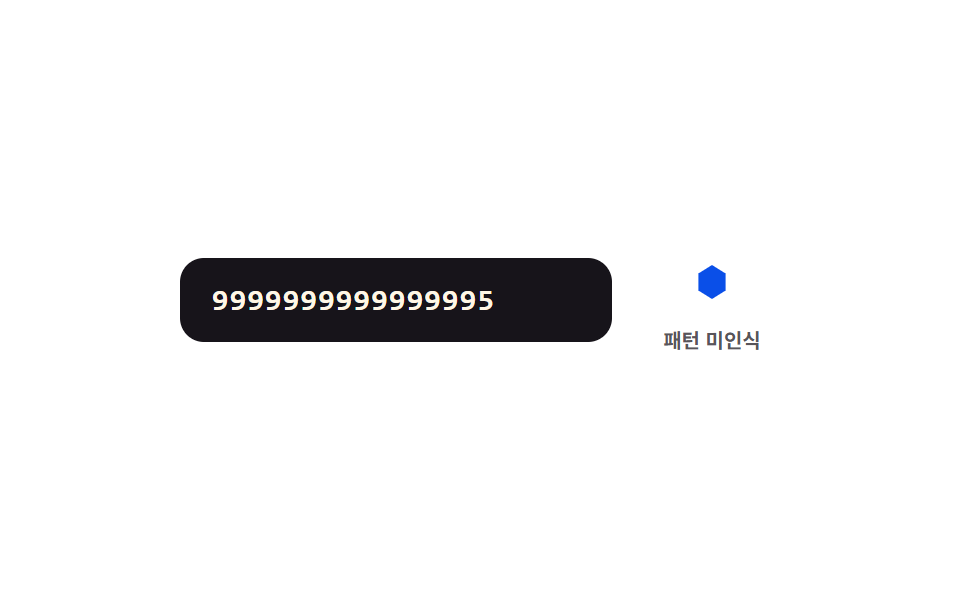
08パターン一致値切替 — 先頭の数字値が決まったパターンの値に合うと横の図形値が別の形へなめらかに変わる方式
先頭の数字値が決まったパターンの値に合うと、横の図形の値がなめらかに別の形へ変わります。
使いどころカード番号でカード種別を見分けて見せるフォーム、決済フォームのリアルタイム判別表示
MORPH_MSPREFIX_MAPSHAPES
<main class="stage">
<div class="cn is-demo" id="cn">
  <label class="cn__field">
    <input class="cn__input" id="cnInput" type="text" inputmode="numeric" autocomplete="off" spellcheck="false" maxlength="16" value="">
  </label>
  <div class="cn__shapeBox">
    <svg viewBox="0 0 40 40" width="34" height="34" aria-hidden="true">
      <polygon class="cn__poly" id="cnPoly" points="20,10 28,15 28,25 20,30 12,25 12,15"/>
    </svg>
    <span class="cn__tag" id="cnTag">パターン未認識</span>
  </div>
</div>
</main>
@use "../../../../site/static/demo-tokens" as *;
// 계산 겹: 앞자리 패턴 값 → 가상 도형 A/B/C 점 배열을 rAF 로 보간한다(index.html, 6점 폴리곤).
@include stage($stage-paper);
.cn {
width: 100%;
max-width: 300px;
display: flex;
align-items: center;
gap: $sp-4;
}
.cn__field { flex: 1; display: block; }
.cn__input {
width: 100%;
box-sizing: border-box;
padding: $sp-3 $sp-4;
border-radius: $r-control;
border: 0;
background: $subject-ink;
color: $subject-cream;
font-family: "SFMono-Regular", Consolas, monospace;
font-weight: 600;
font-size: 15px;
letter-spacing: .04em;
&:focus { outline: 2px solid $subject-ink; outline-offset: 2px; }
}
.cn__shapeBox {
display: grid;
justify-items: center;
gap: $sp-1;
width: 68px;
}
.cn__poly { fill: $subject-blue-deep; }
.cn__tag {
font-weight: 700;
font-size: 10px;
color: rgba($subject-ink, .72);
white-space: nowrap;
}
@media (max-width: 340px) {
.cn { gap: $sp-2; }
.cn__input { padding: $sp-2 $sp-3; font-size: 13px; }
.cn__shapeBox { width: 56px; }
}
@media (prefers-reduced-motion: reduce) {
// 도형 보간은 JS rAF 로 계산되므로 reduce 시 매 프레임 목표값으로 즉시 스냅한다(index.html MORPH_MS 분기 없음 — 코멘트 유지용)
.cn__poly { transition: none; }
}html, body {
margin: 0;
overflow: hidden;
}
.stage {
box-sizing: border-box;
min-height: 100vh;
display: grid;
place-items: center;
margin: 0;
background: #ffffff;
font-family: -apple-system, "Segoe UI", "Noto Sans KR", sans-serif;
padding: clamp(8px, 4vw, 24px);
}
.cn {
width: 100%;
max-width: 300px;
display: flex;
align-items: center;
gap: 16px;
}
.cn__field {
flex: 1;
display: block;
}
.cn__input {
width: 100%;
box-sizing: border-box;
padding: 12px 16px;
border-radius: 12px;
border: 0;
background: #17141a;
color: #fff7e6;
font-family: "SFMono-Regular", Consolas, monospace;
font-weight: 600;
font-size: 15px;
letter-spacing: 0.04em;
}
.cn__input:focus {
outline: 2px solid #17141a;
outline-offset: 2px;
}
.cn__shapeBox {
display: grid;
justify-items: center;
gap: 4px;
width: 68px;
}
.cn__poly {
fill: #0a4fe8;
}
.cn__tag {
font-weight: 700;
font-size: 10px;
color: rgba(23, 20, 26, 0.72);
white-space: nowrap;
}
@media (max-width: 340px) {
.cn {
gap: 8px;
}
.cn__input {
padding: 8px 12px;
font-size: 13px;
}
.cn__shapeBox {
width: 56px;
}
}
@media (prefers-reduced-motion: reduce) {
.cn__poly {
transition: none;
}
}(function () {
var root = document.getElementById('cn');
var input = document.getElementById('cnInput');
var poly = document.getElementById('cnPoly');
var tag = document.getElementById('cnTag');
var MORPH_MS = 420; // 계산 겹: 앞자리 パターン 값이 바뀔 때 도형 점을 이만큼 동안 보간한다
// 가상 도형 3종(A/B/C) — 실제 카드사 로고·BIN 범위와 무관한 중립 라벨.
var SHAPES = {
A: [[20, 4], [33.9, 12], [33.9, 28], [20, 36], [6.1, 28], [6.1, 12]],
B: [[29, 4.4], [33, 20], [29, 35.6], [13.5, 31.3], [2, 20], [13.5, 8.7]],
C: [[20, 1], [26.9, 16], [36.5, 29.5], [20, 28], [3.5, 29.5], [13.1, 16]],
N: [[20, 10], [28, 15], [28, 25], [20, 30], [12, 25], [12, 15]]
};
var PREFIX_MAP = { '3': 'C', '4': 'A', '5': 'B' };
var current = SHAPES.N.map(function (p) { return p.slice(); });
var raf = null;
function easeOut(t) { return 1 - Math.pow(1 - t, 3); }
function morphTo(key) {
var target = SHAPES[key];
var start = current.map(function (p) { return p.slice(); });
var t0 = performance.now();
if (raf) cancelAnimationFrame(raf);
function step(now) {
var t = Math.min((now - t0) / MORPH_MS, 1);
var e = easeOut(t);
var pts = start.map(function (p, i) {
var x = p[0] + (target[i][0] - p[0]) * e;
var y = p[1] + (target[i][1] - p[1]) * e;
return x.toFixed(1) + ',' + y.toFixed(1);
});
poly.setAttribute('points', pts.join(' '));
if (t < 1) { raf = requestAnimationFrame(step); }
else { current = target.map(function (p) { return p.slice(); }); }
}
raf = requestAnimationFrame(step);
}
var lastKey = 'N';
function paint(value) {
var lead = value.charAt(0);
var key = PREFIX_MAP[lead] || 'N';
if (key !== lastKey) {
morphTo(key);
lastKey = key;
}
tag.textContent = key === 'N' ? 'パターン未認識' : ('パターン ' + key);
}
input.addEventListener('input', function () {
root.classList.remove('is-demo');
stopAutoplay();
input.value = input.value.replace(/\D/g, '').slice(0, 16);
paint(input.value);
});
// 자동 루프: 앞자리 값을 바꿔가며 세 패턴을 순서대로 보여준다.
var SEQ = ['', '9999999999999995', '5399148803436467', '3739148803436', '', '9999999999999995'];
var si = 0;
var autoTimer = null;
function autoTick() {
input.value = SEQ[si];
paint(SEQ[si]);
si = (si + 1) % SEQ.length;
}
function stopAutoplay() { if (autoTimer) { clearInterval(autoTimer); autoTimer = null; } if (raf) { cancelAnimationFrame(raf); raf = null; } }
var reduce = window.matchMedia('(prefers-reduced-motion: reduce)').matches;
if (!reduce) { autoTimer = setInterval(autoTick, 1100); autoTick(); }
else { input.value = SEQ[1]; paint(SEQ[1]); }
})();import { useEffect, useRef } from "react";
import styles from "./NetworkIconMorph.module.scss";
type Box<T> = { current: T };
const MORPH_MS = 420; // 계산 겹: 앞자리 패턴 값이 바뀔 때 도형 점을 이만큼 동안 보간한다
// 가상 도형 3종(A/B/C) — 실제 카드사 로고·BIN 범위와 무관한 중립 라벨.
const SHAPES: Record<string, number[][]> = {
A: [[20, 4], [33.9, 12], [33.9, 28], [20, 36], [6.1, 28], [6.1, 12]],
B: [[29, 4.4], [33, 20], [29, 35.6], [13.5, 31.3], [2, 20], [13.5, 8.7]],
C: [[20, 1], [26.9, 16], [36.5, 29.5], [20, 28], [3.5, 29.5], [13.1, 16]],
N: [[20, 10], [28, 15], [28, 25], [20, 30], [12, 25], [12, 15]],
};
const PREFIX_MAP: Record<string, string> = { "3": "C", "4": "A", "5": "B" };
export default function NetworkIconMorph() {
const rootRef = useRef(null) as unknown as Box<HTMLDivElement | null>;
useEffect(() => {
const root = rootRef.current;
if (!root) return;
const input = root.querySelector(`.${styles.input}`) as HTMLInputElement | null;
const poly = root.querySelector(`.${styles.poly}`) as SVGPolygonElement | null;
const tag = root.querySelector(`.${styles.tag}`) as HTMLElement | null;
if (!input || !poly || !tag) return;
let current = SHAPES.N.map((p) => p.slice());
let raf: number | null = null;
function easeOut(t: number) { return 1 - Math.pow(1 - t, 3); }
function morphTo(key: string) {
const target = SHAPES[key];
const start = current.map((p) => p.slice());
const t0 = performance.now();
if (raf !== null) cancelAnimationFrame(raf);
function step(now: number) {
const t = Math.min((now - t0) / MORPH_MS, 1);
const e = easeOut(t);
const pts = start.map((p, i) => {
const x = p[0] + (target[i][0] - p[0]) * e;
const y = p[1] + (target[i][1] - p[1]) * e;
return x.toFixed(1) + "," + y.toFixed(1);
});
poly!.setAttribute("points", pts.join(" "));
if (t < 1) { raf = requestAnimationFrame(step); }
else { current = target.map((p) => p.slice()); }
}
raf = requestAnimationFrame(step);
}
let lastKey = "N";
function paint(value: string) {
const lead = value.charAt(0);
const key = PREFIX_MAP[lead] || "N";
if (key !== lastKey) {
morphTo(key);
lastKey = key;
}
tag!.textContent = key === "N" ? "패턴 미인식" : "패턴 " + key;
}
function onInput() {
root!.classList.remove(styles["is-demo"]);
stopAutoplay();
input!.value = input!.value.replace(/\D/g, "").slice(0, 16);
paint(input!.value);
}
input.addEventListener("input", onInput);
// 자동 루프: 앞자리 값을 바꿔가며 세 패턴을 순서대로 보여준다.
const SEQ = ["", "9999999999999995", "5399148803436467", "3739148803436", "", "9999999999999995"];
let si = 0;
let autoTimer: number | null = null;
function autoTick() {
input!.value = SEQ[si];
paint(SEQ[si]);
si = (si + 1) % SEQ.length;
}
function stopAutoplay() {
if (autoTimer !== null) { window.clearInterval(autoTimer); autoTimer = null; }
if (raf !== null) { cancelAnimationFrame(raf); raf = null; }
}
const reduce = window.matchMedia("(prefers-reduced-motion: reduce)").matches;
if (!reduce) { autoTimer = window.setInterval(autoTick, 1100); autoTick(); }
else { input.value = SEQ[1]; paint(SEQ[1]); }
return () => {
stopAutoplay();
input.removeEventListener("input", onInput);
};
}, []);
return (
<div ref={rootRef} className={`${styles.stage} ${styles.cn} ${styles["is-demo"]}`}>
<label className={styles.field}>
<input className={styles.input} type="text" inputMode="numeric" autoComplete="off" spellCheck={false} maxLength={16} defaultValue="" />
</label>
<div className={styles.shapeBox}>
<svg viewBox="0 0 40 40" width="34" height="34" aria-hidden="true">
<polygon className={styles.poly} points="20,10 28,15 28,25 20,30 12,25 12,15" />
</svg>
<span className={styles.tag}>패턴 미인식</span>
</div>
</div>
);
}08 パターン一致値切替 — 先頭の数字値が決まったパターンの値に合うと横の図形値が別の形へなめらかに変わる方式 — 計測 累積面積 1.34% · 動いたフレーム 6/23GODRICH オリジナル · SCSS と React は zip に同梱 · カード番号 入力 UI 9選 — 桁ごとに反応が変わる9つの方式
このデモが属する記事
 カード番号 入力 UI 9選 — 桁ごとに反応が変わる9つの方式カード番号 入力 UI:9つのうち1つは入力された数字値が4桁に達するたびその間の間隔値が自動的に生まれ、1つは桁の値が埋まるたびに番号全体の有効性値が再計算されて表示値が変わり、もう1つはポインターの位置の値が変わるとカードの絵の傾きの値 この記事のデモをすべて見る