03セグメントリング(ステップ式)
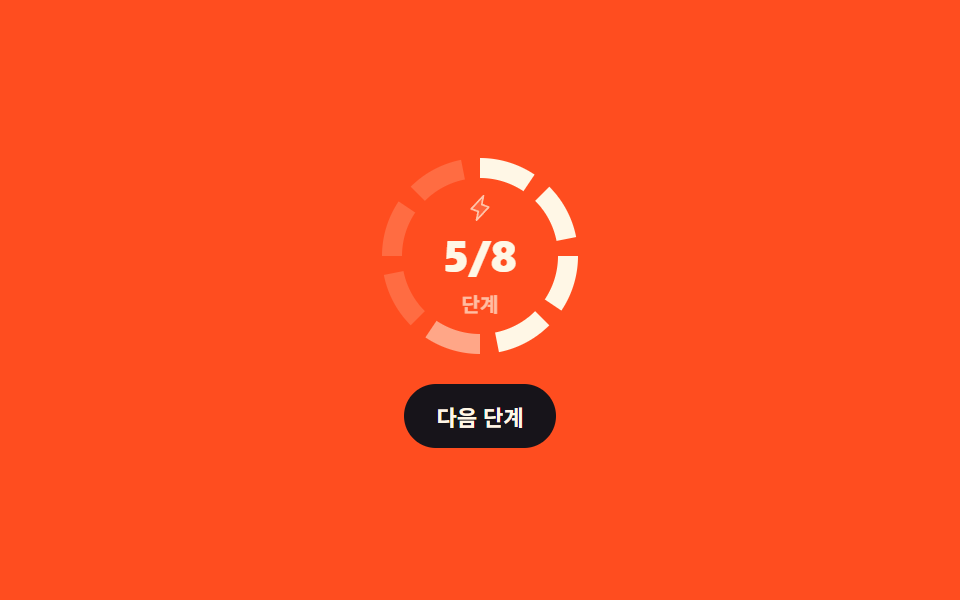
リングが8つに区切られていて「次へ」を押すたびに実際に1つずつ点灯し、中央の3/8のような分数も一緒に変わります。
使いどころオンボーディング8ステップ・週間目標7日のように数えられる段階をリングで見せるとき
stroke-dasharrayrotateclick
<main class="stage">
  <div class="sg is-demo">
    <div class="sg__dial">
      <svg class="sg__svg" viewBox="0 0 104 104" width="104" height="104" aria-hidden="true">
        <g class="sg__segs">
          <circle class="sg__seg" style="--i:0" cx="52" cy="52" r="44"/>
          <circle class="sg__seg" style="--i:1" cx="52" cy="52" r="44"/>
          <circle class="sg__seg" style="--i:2" cx="52" cy="52" r="44"/>
          <circle class="sg__seg" style="--i:3" cx="52" cy="52" r="44"/>
          <circle class="sg__seg" style="--i:4" cx="52" cy="52" r="44"/>
          <circle class="sg__seg" style="--i:5" cx="52" cy="52" r="44"/>
          <circle class="sg__seg" style="--i:6" cx="52" cy="52" r="44"/>
          <circle class="sg__seg" style="--i:7" cx="52" cy="52" r="44"/>
        </g>
      </svg>
      <div class="sg__center">
        <span class="sg__ic" aria-hidden="true"><svg viewBox="0 0 256 256" width="14" height="14"><g fill="currentColor"><path d="m96 240l16-80l-64-24L160 16l-16 80l64 24Z" opacity=".2"/><path d="M215.79 118.17a8 8 0 0 0-5-5.66L153.18 90.9l14.66-73.33a8 8 0 0 0-13.69-7l-112 120a8 8 0 0 0 3 13l57.63 21.61l-14.62 73.25a8 8 0 0 0 13.69 7l112-120a8 8 0 0 0 1.94-7.26M109.37 214l10.47-52.38a8 8 0 0 0-5-9.06L62 132.71l84.62-90.66l-10.46 52.38a8 8 0 0 0 5 9.06l52.8 19.8Z"/></g></svg></span>
        <span class="sg__frac" role="status" aria-label="完了したステップ"></span>
        <span class="sg__cap">ステップ</span>
      </div>
    </div>
    <button class="sg__btn" type="button">次へ</button>
  </div>
</main>
@use "../../../../site/static/demo-tokens" as *;
$duration: $dur-loop;
$easing: $ease-out;
$color: $subject-cream;
@include stage($stage-orange);
@property --n {
syntax: "<integer>";
inherits: true;
initial-value: 0;
}
// 한 칸의 몫: C = 2π × 44 = 276.460 → 8칸이면 34.5575. 그중 26 을 칠하고 8.5575 를 비운다
$C: 276.460;
$slot: 34.5575;
$dash: 26;
.sg {
--n: 0;
box-sizing: border-box;
display: grid;
justify-items: center;
gap: $sp-3;
color: $color;
font-family: -apple-system, "Segoe UI", "Noto Sans KR", sans-serif;
}
.sg__dial { position: relative; display: grid; place-items: center; }
.sg__svg {
width: clamp(92px, 28vw, 104px);
height: clamp(92px, 28vw, 104px);
transform: rotate(-90deg);
}
.sg__seg {
fill: none;
stroke: $color;
stroke-width: 10;
stroke-linecap: butt;
stroke-dasharray: $dash ($C - $dash);
stroke-dashoffset: calc(var(--i) * -#{$slot});
opacity: .18;
transition: opacity $dur-quick $easing;
}
.sg__seg.is-on { opacity: 1; }
.sg__center { position: absolute; display: grid; justify-items: center; gap: $sp-1; pointer-events: none; }
.sg__ic { display: inline-flex; opacity: .7; }
.sg__frac {
font-size: clamp(18px, 6vw, 22px);
font-weight: 800;
font-variant-numeric: tabular-nums;
line-height: 1.1;
}
.sg__frac::after {
counter-reset: n var(--n);
content: counter(n) "/8";
}
.sg__cap { font-size: 10px; font-weight: 700; opacity: .66; }
.sg__btn {
border: 0;
border-radius: $r-pill;
background: $stage-ink;
color: $color;
font-family: inherit;
font-size: 11px;
font-weight: 700;
padding: $sp-2 $sp-4;
cursor: pointer;
transition: transform $dur-quick $ease-pop;
}
.sg__btn:hover, .sg__btn:focus-visible { transform: translateY(-2px); }
// ── 자동 루프: 한 칸씩 켜졌다가 켜진 역순으로 꺼진다. 8칸이 한꺼번에 꺼지지 않는다 ──
.sg.is-demo .sg__seg { animation: $duration linear infinite; }
@for $i from 0 through 7 {
$on: $i * 5;
$off: 50 + (7 - $i) * 5;
.sg.is-demo .sg__seg:nth-child(#{$i + 1}) { animation-name: sg-seg-#{$i}; }
@keyframes sg-seg-#{$i} {
0% { opacity: .18; }
@if $on > 0 {
#{$on}% { opacity: .18; }
}
#{$on + 2}% { opacity: 1; }
#{$off}% { opacity: 1; }
#{$off + 2}% { opacity: .18; }
100% { opacity: .18; }
}
}
.sg.is-demo { animation: sg-count $duration linear infinite; }
// 분수는 칸이 켜지고 꺼지는 일정(마지막 칸 37% 점등 · 첫 칸 87% 소등)에 맞춘다.
// 45/55 로 두면 되감기 구간에서 켜진 칸 수와 가운데 숫자가 어긋난다
@keyframes sg-count {
0% { --n: 0; }
37%, 50% { --n: 8; }
87%, 100% { --n: 0; }
}
@media (max-width: 340px) {
.sg__cap { font-size: 9px; }
}
@media (prefers-reduced-motion: reduce) {
.sg.is-demo, .sg.is-demo .sg__seg { animation: none !important; }
.sg.is-demo { --n: 5; }
.sg.is-demo .sg__seg:nth-child(-n + 5) { opacity: 1; }
.sg__seg, .sg__btn { transition: none; }
}html, body {
margin: 0;
overflow: hidden;
}
.stage {
box-sizing: border-box;
min-height: 100vh;
display: grid;
place-items: center;
margin: 0;
background: #ff4d1f;
font-family: -apple-system, "Segoe UI", "Noto Sans KR", sans-serif;
padding: clamp(8px, 4vw, 24px);
}
@property --n {
syntax: "<integer>";
inherits: true;
initial-value: 0;
}
.sg {
--n: 0;
box-sizing: border-box;
display: grid;
justify-items: center;
gap: 12px;
color: #fff7e6;
font-family: -apple-system, "Segoe UI", "Noto Sans KR", sans-serif;
}
.sg__dial {
position: relative;
display: grid;
place-items: center;
}
.sg__svg {
width: clamp(92px, 28vw, 104px);
height: clamp(92px, 28vw, 104px);
transform: rotate(-90deg);
}
.sg__seg {
fill: none;
stroke: #fff7e6;
stroke-width: 10;
stroke-linecap: butt;
stroke-dasharray: 26 250.46;
stroke-dashoffset: calc(var(--i) * -34.5575);
opacity: 0.18;
transition: opacity 220ms ease-out;
}
.sg__seg.is-on {
opacity: 1;
}
.sg__center {
position: absolute;
display: grid;
justify-items: center;
gap: 4px;
pointer-events: none;
}
.sg__ic {
display: inline-flex;
opacity: 0.7;
}
.sg__frac {
font-size: clamp(18px, 6vw, 22px);
font-weight: 800;
font-variant-numeric: tabular-nums;
line-height: 1.1;
}
.sg__frac::after {
counter-reset: n var(--n);
content: counter(n) "/8";
}
.sg__cap {
font-size: 10px;
font-weight: 700;
opacity: 0.66;
}
.sg__btn {
border: 0;
border-radius: 999px;
background: #17141a;
color: #fff7e6;
font-family: inherit;
font-size: 11px;
font-weight: 700;
padding: 8px 16px;
cursor: pointer;
transition: transform 220ms cubic-bezier(0.2, 1.4, 0.4, 1);
}
.sg__btn:hover, .sg__btn:focus-visible {
transform: translateY(-2px);
}
.sg.is-demo .sg__seg {
animation: 2s linear infinite;
}
.sg.is-demo .sg__seg:nth-child(1) {
animation-name: sg-seg-0;
}
@keyframes sg-seg-0 {
0% {
opacity: 0.18;
}
2% {
opacity: 1;
}
85% {
opacity: 1;
}
87% {
opacity: 0.18;
}
100% {
opacity: 0.18;
}
}
.sg.is-demo .sg__seg:nth-child(2) {
animation-name: sg-seg-1;
}
@keyframes sg-seg-1 {
0% {
opacity: 0.18;
}
5% {
opacity: 0.18;
}
7% {
opacity: 1;
}
80% {
opacity: 1;
}
82% {
opacity: 0.18;
}
100% {
opacity: 0.18;
}
}
.sg.is-demo .sg__seg:nth-child(3) {
animation-name: sg-seg-2;
}
@keyframes sg-seg-2 {
0% {
opacity: 0.18;
}
10% {
opacity: 0.18;
}
12% {
opacity: 1;
}
75% {
opacity: 1;
}
77% {
opacity: 0.18;
}
100% {
opacity: 0.18;
}
}
.sg.is-demo .sg__seg:nth-child(4) {
animation-name: sg-seg-3;
}
@keyframes sg-seg-3 {
0% {
opacity: 0.18;
}
15% {
opacity: 0.18;
}
17% {
opacity: 1;
}
70% {
opacity: 1;
}
72% {
opacity: 0.18;
}
100% {
opacity: 0.18;
}
}
.sg.is-demo .sg__seg:nth-child(5) {
animation-name: sg-seg-4;
}
@keyframes sg-seg-4 {
0% {
opacity: 0.18;
}
20% {
opacity: 0.18;
}
22% {
opacity: 1;
}
65% {
opacity: 1;
}
67% {
opacity: 0.18;
}
100% {
opacity: 0.18;
}
}
.sg.is-demo .sg__seg:nth-child(6) {
animation-name: sg-seg-5;
}
@keyframes sg-seg-5 {
0% {
opacity: 0.18;
}
25% {
opacity: 0.18;
}
27% {
opacity: 1;
}
60% {
opacity: 1;
}
62% {
opacity: 0.18;
}
100% {
opacity: 0.18;
}
}
.sg.is-demo .sg__seg:nth-child(7) {
animation-name: sg-seg-6;
}
@keyframes sg-seg-6 {
0% {
opacity: 0.18;
}
30% {
opacity: 0.18;
}
32% {
opacity: 1;
}
55% {
opacity: 1;
}
57% {
opacity: 0.18;
}
100% {
opacity: 0.18;
}
}
.sg.is-demo .sg__seg:nth-child(8) {
animation-name: sg-seg-7;
}
@keyframes sg-seg-7 {
0% {
opacity: 0.18;
}
35% {
opacity: 0.18;
}
37% {
opacity: 1;
}
50% {
opacity: 1;
}
52% {
opacity: 0.18;
}
100% {
opacity: 0.18;
}
}
.sg.is-demo {
animation: sg-count 2s linear infinite;
}
@keyframes sg-count {
0% {
--n: 0;
}
37%, 50% {
--n: 8;
}
87%, 100% {
--n: 0;
}
}
@media (max-width: 340px) {
.sg__cap {
font-size: 9px;
}
}
@media (prefers-reduced-motion: reduce) {
.sg.is-demo, .sg.is-demo .sg__seg {
animation: none !important;
}
.sg.is-demo {
--n: 5;
}
.sg.is-demo .sg__seg:nth-child(-n+5) {
opacity: 1;
}
.sg__seg, .sg__btn {
transition: none;
}
}// 실제 동작: 누를 때마다 칸 하나를 더 켜고 가운데 분수를 바꾼다. 8칸을 다 채우면 처음으로 되돌린다.
var sg = document.querySelector('.sg');
var segs = sg.querySelectorAll('.sg__seg');
var n = 0;
sg.querySelector('.sg__btn').addEventListener('click', function () {
sg.classList.remove('is-demo');
n = n >= segs.length ? 0 : n + 1;
for (var i = 0; i < segs.length; i++) segs[i].classList.toggle('is-on', i < n);
sg.style.setProperty('--n', String(n));
});import { useState } from "react";
import type { CSSProperties } from "react";
import styles from "./SegmentedStepRing.module.scss";
export type SegmentedStepRingProps = {
duration?: number;
easing?: string;
color?: string;
};
type Vars = CSSProperties & {
"--duration"?: string;
"--easing"?: string;
"--color"?: string;
"--n"?: number;
};
type SegVars = CSSProperties & { "--i"?: number };
const TOTAL = 8;
const SEGS = [0, 1, 2, 3, 4, 5, 6, 7];
export default function SegmentedStepRing({
duration = 220,
easing = "ease-out",
color = "#fff7e6",
}: SegmentedStepRingProps) {
const [n, setN] = useState(0);
const vars: Vars = {
"--duration": `${duration}ms`,
"--easing": easing,
"--color": color,
"--n": n,
};
return (
<div className={styles.sg} style={vars}>
<div className={styles.dial}>
<svg className={styles.svg} viewBox="0 0 104 104" width="104" height="104" aria-hidden="true">
<g>
{SEGS.map((i) => {
const seg: SegVars = { "--i": i };
return (
<circle
key={i}
className={`${styles.seg} ${i < n ? styles.on : ""}`}
style={seg}
cx="52"
cy="52"
r="44"
/>
);
})}
</g>
</svg>
<div className={styles.center}>
<span className={styles.ic} aria-hidden="true">
<svg viewBox="0 0 256 256" width="14" height="14">
<g fill="currentColor">
<path d="m96 240l16-80l-64-24L160 16l-16 80l64 24Z" opacity=".2" />
<path d="M215.79 118.17a8 8 0 0 0-5-5.66L153.18 90.9l14.66-73.33a8 8 0 0 0-13.69-7l-112 120a8 8 0 0 0 3 13l57.63 21.61l-14.62 73.25a8 8 0 0 0 13.69 7l112-120a8 8 0 0 0 1.94-7.26M109.37 214l10.47-52.38a8 8 0 0 0-5-9.06L62 132.71l84.62-90.66l-10.46 52.38a8 8 0 0 0 5 9.06l52.8 19.8Z" />
</g>
</svg>
</span>
<span className={styles.frac} role="status" aria-label="Completed steps" />
<span className={styles.cap}>Steps</span>
</div>
</div>
<button
type="button"
className={styles.btn}
onClick={() => setN((v) => (v >= TOTAL ? 0 : v + 1))}
>
Next step
</button>
</div>
);
}03 セグメントリング(ステップ式) — 計測 累積面積 1.895% · 動いたフレーム 18/23GODRICH オリジナル · SCSS と React は zip に同梱 · 円形プログレスバー css スタットリング9選 — 数値も実際に動く
このデモが属する記事
 円形プログレスバー css スタットリング9選 — 数値も実際に動く円形プログレスバー css とは、棒の代わりに円に沿って値の分だけ埋めていく進捗表示で、SVGの円ひとつに stroke-dasharray と stroke-dashoffset の二つを与えるだけで作れます。九つとも、ボタンやスライダー この記事のデモをすべて見る