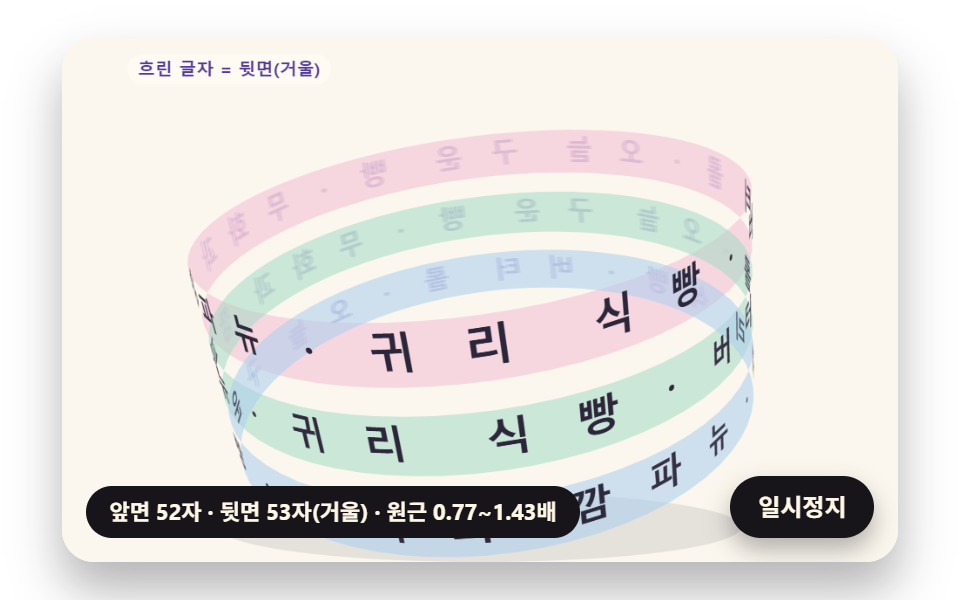
04円筒に巻きついて回る帯の文字
文字を傾いた円筒のまわりに置いて遠近で画面に写し、遠い文字から描くので、奥の文字は鏡のように裏返って薄くなり、手前の文字は大きくなりながら帯がゆっくり回ります。
使いどころ新商品の詳細ページで回る帯のキャッチコピー
FOCALTILTBACK_ALPHA
<main class="stage">
<div class="cf is-demo" id="cf">
  <canvas class="cf__canvas" data-role="canvas" width="480" height="300" aria-hidden="true"></canvas>
  <p class="cf__sr">今日焼いたパン・いちじくのカンパーニュ・オーツ食パン・バターロール</p>
  <p class="cf__status" data-role="status" aria-live="off">円筒を回しています</p>
  <button class="cf__pause" data-role="pause" type="button" aria-pressed="false">一時停止</button>
</div>
</main>
@use "../../../../site/static/demo-tokens" as *;
@include stage($stage-paper);
.cf {
position: relative;
width: min(92vw, calc(160vh - 12.8vw));
aspect-ratio: 480 / 300;
margin: 0 auto;
border-radius: $r-card;
overflow: hidden;
box-shadow: $shadow-raised;
background: $subject-cream;
}
.cf__canvas {
position: absolute;
inset: 0;
display: block;
width: 100%;
height: 100%;
}
.cf__pause {
position: absolute;
right: $sp-3;
bottom: $sp-3;
padding: $sp-1 $sp-3;
border: 2px solid $subject-ink;
border-radius: $r-pill;
background: $subject-ink;
color: $subject-cream;
font-family: inherit;
font-weight: 700;
font-size: 12px;
line-height: 1.6;
cursor: pointer;
box-shadow: $shadow-press;
transition: transform $dur-quick $ease-spring;
}
// 눌린 상태(멈춤) — 바탕과 글자색을 뒤집어 aria-pressed 가 눈에도 보이게
.cf__pause[aria-pressed="true"] {
background: $subject-cream;
color: $subject-ink;
}
.cf__pause:hover {
transform: translateY(-2px);
}
.cf__pause:active {
transform: translateY(1px);
}
.cf__pause:focus-visible {
outline: 3px solid $subject-ink;
outline-offset: 3px;
}
// 상태 줄 — 지금 고리에서 무슨 계산이 일어났는지 글자로. 시연 중에는 aria-live off, 사람이 처음 손대면 polite
.cf__status {
position: absolute;
left: $sp-3;
bottom: $sp-3;
max-width: calc(100% - 120px);
margin: 0;
padding: $sp-1 $sp-3;
border-radius: $r-pill;
background: $subject-ink;
color: $subject-cream;
font-weight: 700;
font-size: 11px;
line-height: 1.6;
white-space: nowrap;
overflow: hidden;
text-overflow: ellipsis;
pointer-events: none;
}
// 낭독용 원문 한 줄 — 화면에서는 숨기고 낭독기에만 읽힌다(원 위 글자는 캔버스라 aria-hidden)
.cf__sr {
position: absolute;
width: 1px;
height: 1px;
margin: -1px;
padding: 0;
overflow: hidden;
clip-path: inset(50%);
white-space: nowrap;
border: 0;
}
@media (max-width: 340px) {
.cf__pause,
.cf__status { font-size: 10px; padding: $sp-1 $sp-2; }
}
// 동작 줄이기 — 장면은 스크립트가 최종 배치 한 장으로 멈춘다. 버튼도 떠오르지 않게
@media (prefers-reduced-motion: reduce) {
.cf__pause { transition: none !important; }
.cf__pause:hover,
.cf__pause:active { transform: none !important; }
}html, body {
margin: 0;
overflow: hidden;
}
.stage {
box-sizing: border-box;
min-height: 100vh;
display: grid;
place-items: center;
margin: 0;
background: #ffffff;
font-family: -apple-system, "Segoe UI", "Noto Sans KR", sans-serif;
padding: clamp(8px, 4vw, 24px);
}
.cf {
position: relative;
width: min(92vw, 160vh - 12.8vw);
aspect-ratio: 480/300;
margin: 0 auto;
border-radius: 16px;
overflow: hidden;
box-shadow: 0 14px 24px rgba(23, 20, 26, 0.32);
background: #fff7e6;
}
.cf__canvas {
position: absolute;
inset: 0;
display: block;
width: 100%;
height: 100%;
}
.cf__pause {
position: absolute;
right: 12px;
bottom: 12px;
padding: 4px 12px;
border: 2px solid #17141a;
border-radius: 999px;
background: #17141a;
color: #fff7e6;
font-family: inherit;
font-weight: 700;
font-size: 12px;
line-height: 1.6;
cursor: pointer;
box-shadow: 0 6px 12px rgba(23, 20, 26, 0.32);
transition: transform 220ms cubic-bezier(0.2, 0.8, 0.2, 1);
}
.cf__pause[aria-pressed=true] {
background: #fff7e6;
color: #17141a;
}
.cf__pause:hover {
transform: translateY(-2px);
}
.cf__pause:active {
transform: translateY(1px);
}
.cf__pause:focus-visible {
outline: 3px solid #17141a;
outline-offset: 3px;
}
.cf__status {
position: absolute;
left: 12px;
bottom: 12px;
max-width: calc(100% - 120px);
margin: 0;
padding: 4px 12px;
border-radius: 999px;
background: #17141a;
color: #fff7e6;
font-weight: 700;
font-size: 11px;
line-height: 1.6;
white-space: nowrap;
overflow: hidden;
text-overflow: ellipsis;
pointer-events: none;
}
.cf__sr {
position: absolute;
width: 1px;
height: 1px;
margin: -1px;
padding: 0;
overflow: hidden;
clip-path: inset(50%);
white-space: nowrap;
border: 0;
}
@media (max-width: 340px) {
.cf__pause,
.cf__status {
font-size: 10px;
padding: 4px 8px;
}
}
@media (prefers-reduced-motion: reduce) {
.cf__pause {
transition: none !important;
}
.cf__pause:hover,
.cf__pause:active {
transform: none !important;
}
}(function () {
const root = document.getElementById("cf");
if (!root) return;
// 판 좌표 — 캔버스 안은 늘 480×300. 화면에 보이는 크기와 상관없이 계산은 이 좌표로 한다
const W = 480;
const H = 300;
const TAU = Math.PI * 2;
function clamp(v, lo, hi) { return v < lo ? lo : (v > hi ? hi : v); }
function lerp(a, b, k) { return a + (b - a) * k; }
function smooth(x) { const c = clamp(x, 0, 1); return c * c * (3 - 2 * c); }
// 따라가기 비율 — 1 − e^(−rate·dt). 프레임 시간이 달라도 1초에 같은 만큼 다가간다
function follow(rate, dt) { return 1 - Math.exp(-rate * dt); }
// 1/60초마다 ease 만큼 다가가는 비율을 dt 초로 환산 — 1 − (1 − ease)^(dt × 60)
function easeStep(ease, dt) { return 1 - Math.pow(1 - ease, dt * 60); }
// 시드 고정 난수 — 같은 시드면 같은 시연이 다시 나온다 (32비트 정수 섞기)
function makeRng(seed) {
let s = seed >>> 0;
return function () {
s = (s + 0x6d2b79f5) >>> 0;
let t = s;
t = Math.imul(t ^ (t >>> 15), t | 1);
t ^= t + Math.imul(t ^ (t >>> 7), t | 61);
return ((t ^ (t >>> 14)) >>> 0) / 4294967296;
};
}
function deg(rad) { return rad * 180 / Math.PI; }
function makeSpring(x) { return { x: x, v: 0, to: x }; }
const SPRING_SUBSTEP = 1 / 240;
function stepSpring(s, stiffness, damping, dt) {
let left = dt;
while (left > 1e-9) {
const h = Math.min(SPRING_SUBSTEP, left);
s.v += (stiffness * (s.to - s.x) - damping * s.v) * h;
s.x += s.v * h;
left -= h;
}
}
function snapSpring(s, x) { s.x = x; s.v = 0; s.to = x; }
function roughWidth(ch, px, weight) {
const wide = ch.charCodeAt(0) >= 0x1100;
const base = ch === ' ' ? 0.28 : (wide ? 0.95 : 0.6);
return px * base * (weight >= 700 ? 1.06 : 1);
}
// 글꼴이 다 온 뒤 잰 폭
let glyphWidth = roughWidth;
// 대체 글꼴로 잰 폭 — 09 가 「글꼴이 오기 전에 잰 폭」 을 흉내 낼 때만 쓴다
let fallbackWidth = roughWidth;
// 글자 나누기 — 한 글자씩(서로게이트 쌍도 한 글자)
function glyphsOf(s) { return Array.from(s); }
function widthsOf(gs, px, weight, m) {
return gs.map(function (g) { return m(g, px, weight); });
}
function sum(xs) { let s = 0; for (const x of xs) {
s += x;
} return s; }
function arcTotal(ws, tracking) { return sum(ws) + tracking * Math.max(0, ws.length - 1); }
// 글꼴 축소 몫 — 줄이지 않아도 들어가면 1
function arcScale(ws, px, tracking, r, inner, span) {
const total = arcTotal(ws, tracking);
const need = total / Math.max(1, r - inner * px);
return need > span ? span * r / (total + span * inner * px) : 1;
}
function fitArc(ws, px, tracking, r, inner, span, center, dir, allowShrink) {
return placeArc(ws, px, tracking, r, inner, allowShrink ? arcScale(ws, px, tracking, r, inner, span) : 1, center, dir);
}
// 정한 축소 몫으로 놓기 — 위·아래 반원이 같은 글꼴 크기를 쓰도록 둘 중 작은 몫을 넘겨받는다
function placeArc(ws, px, tracking, r, inner, scale, center, dir) {
const n = ws.length;
const total = arcTotal(ws, tracking);
const need = total / Math.max(1, r - inner * px);
const layR = Math.max(1, r - inner * px * scale);
const theta = [];
let acc = 0;
for (let i = 0; i < n; i += 1) {
theta.push(center + dir * (acc + ws[i] / 2 - total / 2) * scale / layR);
acc += ws[i] + tracking;
}
return { theta: theta, px: px * scale, scale: scale, total: total, layR: layR, need: need };
}
// 같은 각도로 놓기(비교판) — 폭은 보지 않고 전체 각을 글자 수로 똑같이 나눈다
function equalArc(n, spanUsed, center, dir) {
const out = [];
const step = spanUsed / Math.max(1, n);
for (let i = 0; i < n; i += 1) {
out.push(center + dir * (i + 0.5 - n / 2) * step);
}
return out;
}
// 이웃 두 글자가 글자 아래 모서리(반지름 r − 0.5·글자 높이)에서 겹친 길이(px). 양수면 부딪힌다.
// 각 간격 × 아래 모서리 반지름 − 두 글자 반폭 합 이 음수인 만큼이 겹침
const GLYPH_DROP = 0.5;
function innerOverlaps(theta, ws, scale, r, px) {
const rin = r - GLYPH_DROP * px;
const out = [];
for (let i = 0; i + 1 < theta.length; i += 1) {
const room = Math.abs(theta[i + 1] - theta[i]) * rin;
out.push((ws[i] + ws[i + 1]) / 2 * scale - room);
}
return out;
}
function arcTable(rf, drf, th0, th1, step) {
const th = [th0];
const s = [0];
let acc = 0;
const n = Math.max(1, Math.ceil((th1 - th0) / step));
const h = (th1 - th0) / n;
for (let i = 0; i < n; i += 1) {
// 걸음 가운데의 값으로 더한다 — 걸음 끝 값보다 같은 걸음에서 오차가 작다
const m = th0 + (i + 0.5) * h;
const r = rf(m);
const dr = drf(m);
acc += Math.sqrt(r * r + dr * dr) * h;
th.push(th0 + (i + 1) * h);
s.push(acc);
}
return { th: th, s: s };
}
function thetaAt(t, s) {
const last = t.s.length - 1;
if (s <= 0) {
return t.th[0];
}
if (s >= t.s[last]) {
return t.th[last];
}
let lo = 0;
let hi = last;
while (hi - lo > 1) {
const mid = (lo + hi) >> 1;
if (t.s[mid] <= s) {
lo = mid;
}
else {
hi = mid;
}
}
const k = (s - t.s[lo]) / Math.max(1e-9, t.s[hi] - t.s[lo]);
return lerp(t.th[lo], t.th[hi], k);
}
function arcLength(t) { return t.s[t.s.length - 1]; }
// 극좌표 곡선의 접선 각(화면 좌표, y 아래) — 점 (r cosθ, r sinθ) 을 θ 로 미분한 방향
function tangentAngle(r, dr, th) {
return Math.atan2(dr * Math.sin(th) + r * Math.cos(th), dr * Math.cos(th) - r * Math.sin(th));
}
// 장면 시계(秒)와 상태 줄 글자 — 장면 계산이 고치고, 화면 쪽이 읽어 그린다
let sceneT = 0;
let simStatus = '';
// 파스텔 팔레트 — 크림 바탕 위 라벤더·민트·버터·산호. 글자는 진한 쪽으로 명도 차를 둔다
const PAPER = [251, 247, 238];
const PAPER_DIM = [241, 234, 220];
const INK = [44, 38, 58];
const INK_SOFT = [112, 104, 126];
const CREAM = [255, 251, 242];
const LAVENDER = [196, 182, 238];
const MINT = [164, 218, 196];
const BUTTER = [246, 224, 150];
const CORAL = [244, 170, 152];
const SKY = [170, 206, 238];
const PINK = [244, 190, 212];
const MINT_DEEP = [36, 116, 90];
const CORAL_DEEP = [178, 66, 52];
const VIOLET_DEEP = [84, 58, 160];
const BROWN_DEEP = [104, 62, 40];
function mix(a, b, k) { return [lerp(a[0], b[0], k), lerp(a[1], b[1], k), lerp(a[2], b[2], k)]; }
function rgba(c, a) {
return 'rgba(' + Math.round(clamp(c[0], 0, 255)) + ',' + Math.round(clamp(c[1], 0, 255)) + ',' + Math.round(clamp(c[2], 0, 255)) + ',' + clamp(a, 0, 1).toFixed(3) + ')';
}
const canvasEl = root.querySelector('[data-role="canvas"]');
const pauseEl = root.querySelector('[data-role="pause"]');
const statusEl = root.querySelector('[data-role="status"]');
const ctxRaw = canvasEl ? canvasEl.getContext('2d') : null;
if (!canvasEl || !ctxRaw || !pauseEl) {
return;
}
const cv = canvasEl;
const ctx = ctxRaw;
const pauseBtn = pauseEl;
// 외부 웹폰트는 부르지 않는다 — 기기에 있는 글꼴 목록만
const FONT_STACK = 'system-ui, -apple-system, "Segoe UI", "Noto Sans KR", sans-serif';
// 대체 글꼴 — 09 가 「글꼴이 오기 전에 잰 폭」 을 흉내 낼 때만 쓴다
const FALLBACK_STACK = 'monospace';
// 잰 폭은 100px 기준으로 한 번만 재 두고 크기에 비례해 쓴다. 글꼴이 새로 오면 통째로 비운다
const widthCache = {};
function measureWith(stack) {
return function (ch, px, weight) {
const key = stack + '|' + weight + '|' + ch;
let w = widthCache[key];
if (w === undefined) {
ctx.font = weight + ' 100px ' + stack;
w = ctx.measureText(ch).width;
widthCache[key] = w;
}
return w * px / 100;
};
}
function remeasure() {
for (const k of Object.keys(widthCache)) {
delete widthCache[k];
}
glyphWidth = measureWith(FONT_STACK);
fallbackWidth = measureWith(FALLBACK_STACK);
relayout();
}
function fitCanvas() {
// 배율은 2 에서 자른다 — 배율 3 기기에서 화소가 2.25배로 늘어 프레임마다 일이 그만큼 커지지 않게
const dpr = Math.min(window.devicePixelRatio || 1, 2);
cv.width = Math.round(W * dpr);
cv.height = Math.round(H * dpr);
ctx.setTransform(dpr, 0, 0, dpr, 0, 0);
}
function clearStage(c) {
ctx.fillStyle = rgba(c, 1);
ctx.fillRect(0, 0, W, H);
}
function setFont(px, weight, stack) {
ctx.font = weight + ' ' + px.toFixed(2) + 'px ' + stack;
}
function label(s, x, y, c, a, px, weight, align) {
setFont(px, weight, FONT_STACK);
ctx.textAlign = align;
ctx.textBaseline = 'middle';
ctx.fillStyle = rgba(c, a);
ctx.fillText(s, x, y);
}
// 글자 하나를 (x, y) 가운데에 rot 라디안 돌려 찍는다. sx·sy 는 가로·세로 배율(음수 sx 는 거울)
function glyphAt(ch, x, y, rot, px, weight, c, a, sx, sy) {
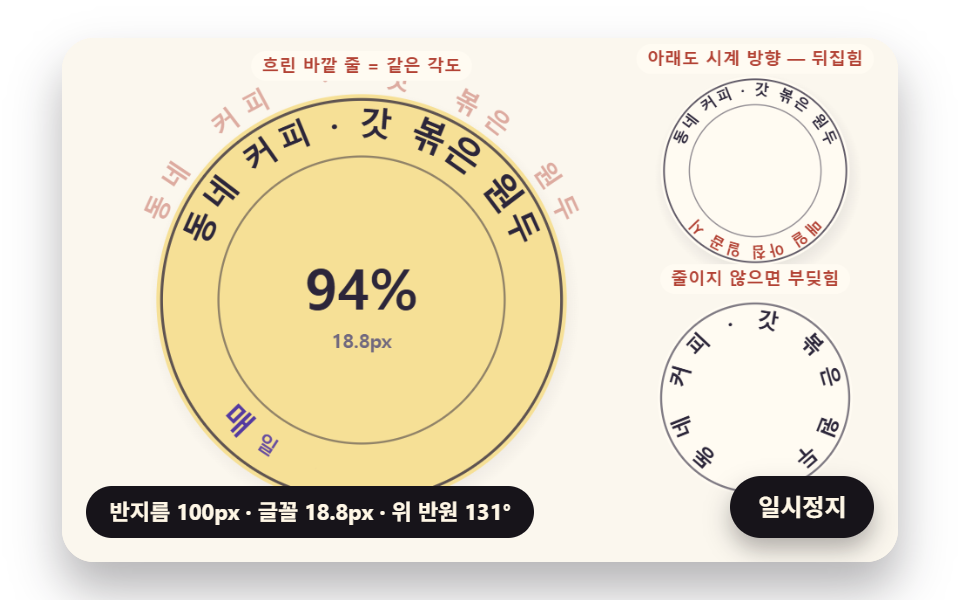
if (a <= 0.01 || px < 0.5) {
return;
}
ctx.save();
ctx.translate(x, y);
ctx.rotate(rot);
ctx.scale(sx, sy);
setFont(px, weight, FONT_STACK);
ctx.textAlign = 'center';
ctx.textBaseline = 'middle';
ctx.fillStyle = rgba(c, a);
ctx.fillText(ch, 0, 0);
ctx.restore();
}
// 기울인 글자 — 글자 자기 좌표에서 가로로 skew(라디안)만큼 민다(윗부분이 앞으로)
function glyphLean(ch, x, y, rot, px, weight, c, a, skew) {
if (a <= 0.01 || px < 0.5) {
return;
}
ctx.save();
ctx.translate(x, y);
ctx.rotate(rot);
ctx.transform(1, 0, -Math.tan(skew), 1, 0, 0);
setFont(px, weight, FONT_STACK);
ctx.textAlign = 'center';
ctx.textBaseline = 'middle';
ctx.fillStyle = rgba(c, a);
ctx.fillText(ch, 0, 0);
ctx.restore();
}
// 원 위 글자 — 중심 (cx, cy), 반지름 r, 각 th. turn 은 글자를 원에 맞춰 세우는 각(위 반원 +π/2, 아래 반원 −π/2)
function ringGlyph(ch, cx, cy, r, th, turn, px, weight, c, a) {
glyphAt(ch, cx + r * Math.cos(th), cy + r * Math.sin(th), th + turn, px, weight, c, a, 1, 1);
}
function roundRectPath(x, y, w, h, r) {
const rr = Math.max(0, Math.min(r, w / 2, h / 2));
ctx.beginPath();
ctx.moveTo(x + rr, y);
ctx.lineTo(x + w - rr, y);
ctx.arcTo(x + w, y, x + w, y + rr, rr);
ctx.lineTo(x + w, y + h - rr);
ctx.arcTo(x + w, y + h, x + w - rr, y + h, rr);
ctx.lineTo(x + rr, y + h);
ctx.arcTo(x, y + h, x, y + h - rr, rr);
ctx.lineTo(x, y + rr);
ctx.arcTo(x, y, x + rr, y, rr);
ctx.closePath();
}
function fillRound(x, y, w, h, r, c, a) {
if (w <= 0.2 || h <= 0.2 || a <= 0) {
return;
}
roundRectPath(x, y, w, h, r);
ctx.fillStyle = rgba(c, a);
ctx.fill();
}
function disc(x, y, r, c, a) {
if (r <= 0.2 || a <= 0) {
return;
}
ctx.beginPath();
ctx.arc(x, y, r, 0, TAU);
ctx.fillStyle = rgba(c, a);
ctx.fill();
}
function ring(x, y, r, width, c, a) {
if (r <= 0.2 || a <= 0) {
return;
}
ctx.beginPath();
ctx.arc(x, y, r, 0, TAU);
ctx.lineWidth = width;
ctx.strokeStyle = rgba(c, a);
ctx.stroke();
}
// 그림자 — 떠 있는 높이 lift(0~1)가 클수록 멀리·흐리게·넓게 떨어진다
function softShadow(x, y, r, lift) {
const off = 4 + 14 * lift;
const g = ctx.createRadialGradient(x + off * 0.4, y + off, r * 0.6, x + off * 0.4, y + off, r * (1.05 + 0.25 * lift));
g.addColorStop(0, rgba(INK, 0.26 - 0.14 * lift));
g.addColorStop(1, rgba(INK, 0));
ctx.fillStyle = g;
ctx.beginPath();
ctx.arc(x + off * 0.4, y + off, r * (1.05 + 0.25 * lift), 0, TAU);
ctx.fill();
}
// 작은 알약 이름표
function pill(s, x, y, bg, fg, a, px) {
setFont(px, 700, FONT_STACK);
const w = ctx.measureText(s).width + px * 1.2;
fillRound(x - w / 2, y - px * 0.85, w, px * 1.7, px * 0.85, bg, a);
label(s, x, y + 0.5, fg, a, px, 700, 'center');
}
// 상태 줄 — 바뀔 때만 글자를 고친다
let shownStatus = '';
function pushStatus() {
if (!statusEl || simStatus === shownStatus) {
return;
}
shownStatus = simStatus;
statusEl.textContent = simStatus;
}
// 04 — 원통을 감고 도는 띠 문구. 글자 자리 (R cos a, y, R sin a) 를 원통 축 기울기(x 축 둘레 TILT, 화면 둘레 ROLL)로 돌린 뒤
// 원근 투영 s = FOCAL / (FOCAL + z) 로 화면에 놓는다. 먼 글자부터 그리고(깊이 z 큰 것 먼저),
// 바깥 법선이 화면 반대쪽을 보는 뒷면 글자는 좌우가 뒤집혀(거울) 보이므로 흐리게 그린다
const BAND_TEXT = '今日焼いたパン・いちじくのカンパーニュ・オーツ食パン・バターロール・ ';
const BAND_PX = 20;
const BAND_WEIGHT = 800;
const CYL_R = 150;
const FOCAL = 520;
const TILT = 0.34;
const TILT_SWAY = 0.12;
const TILT_SWAY_HZ = 0.5;
const ROLL = -0.14;
// 띠 세 줄 — 원통 축 방향 높이(px)와 각속도(rad/s, 음수는 반대 방향)
const BAND_ROWS = [[-44, 0.75], [0, -0.55], [44, 0.95]];
const BACK_ALPHA = 0.32;
const LOOP_S = 6;
const STATUS_BAND = '表 {f}字・裏 {b}字(鏡)・遠近 {n}〜{x}倍';
const bandGlyphs04 = glyphsOf(BAND_TEXT);
let bandWidths04 = [];
let bandRepeat04 = 1;
let bandAngles04 = [];
let spinT04 = 0;
function relayout() {
bandWidths04 = widthsOf(bandGlyphs04, BAND_PX, BAND_WEIGHT, glyphWidth);
// 둘레에 문구를 되풀이해 채우고 남는 길이는 글자 사이에 고르게 — 글자 i 의 가운데 각
bandRepeat04 = Math.max(1, Math.floor(TAU * CYL_R / sum(bandWidths04)));
const total = sum(bandWidths04) * bandRepeat04;
bandAngles04 = [];
let acc = 0;
for (let k = 0; k < bandGlyphs04.length * bandRepeat04; k += 1) {
const w = bandWidths04[k % bandGlyphs04.length];
bandAngles04.push((acc + w / 2) / total * TAU);
acc += w;
}
}
// 원통 좌표 → 돌린 공간 좌표(화면 가운데 원점, y 아래, z 화면 안쪽)
function cylPoint(a, y, tilt) {
const x = CYL_R * Math.cos(a);
const z = CYL_R * Math.sin(a);
const y1 = y * Math.cos(tilt) - z * Math.sin(tilt);
const z1 = y * Math.sin(tilt) + z * Math.cos(tilt);
return [x * Math.cos(ROLL) - y1 * Math.sin(ROLL), x * Math.sin(ROLL) + y1 * Math.cos(ROLL), z1];
}
// 원근 투영 — 화면 (240 + x·s, 150 + y·s), s = FOCAL / (FOCAL + z)
function project04(p) {
const s = FOCAL / (FOCAL + p[2]);
return [240 + p[0] * s, 150 + p[1] * s, s];
}
function tiltAt04(t) { return TILT + TILT_SWAY * Math.sin(TAU * TILT_SWAY_HZ * t); }
// 이번 장면의 글자 전부 — 깊이 큰(먼) 것부터 정렬해 돌려준다
function bandGlyphs(t) {
const tilt = tiltAt04(t);
const out = [];
const n = bandGlyphs04.length;
BAND_ROWS.forEach(function (row, ri) {
const turn = row[1] * spinT04 + ri * 0.7;
bandAngles04.forEach(function (a0, k) {
const a = a0 + turn;
const p = cylPoint(a, row[0], tilt);
const sp = project04(p);
// 글자 가로 = 원통 둘레 방향 1px 이 화면에서 가는 벡터, 세로 = 축 방향 1px 이 가는 벡터
const pa = project04(cylPoint(a + 1 / CYL_R, row[0], tilt));
const py = project04(cylPoint(a, row[0] + 1, tilt));
// 바깥 법선 (cos a, 0, sin a) 을 같은 기울기로 돌린 z — 0 보다 크면 화면 반대쪽을 본다(뒷면)
const nz = Math.sin(a) * Math.cos(tilt);
out.push({ ch: bandGlyphs04[k % n], x: sp[0], y: sp[1], z: p[2], s: sp[2], tx: pa[0] - sp[0], ty: pa[1] - sp[1], ux: py[0] - sp[0], uy: py[1] - sp[1], back: nz > 0, row: ri });
});
});
out.sort(function (p, q) { return q.z - p.z; });
return out;
}
let front04 = 0;
let back04 = 0;
let sMin04 = 1;
let sMax04 = 1;
function statusFor04(gs) {
front04 = 0;
back04 = 0;
sMin04 = 9;
sMax04 = 0;
for (const g of gs) {
if (g.back) {
back04 += 1;
}
else {
front04 += 1;
}
sMin04 = Math.min(sMin04, g.s);
sMax04 = Math.max(sMax04, g.s);
}
simStatus = STATUS_BAND.replace('{f}', String(front04)).replace('{b}', String(back04)).replace('{n}', sMin04.toFixed(2)).replace('{x}', sMax04.toFixed(2));
}
function reset() { spinT04 = 0; }
function update(dt) {
spinT04 += dt;
statusFor04(bandGlyphs(sceneT));
}
function restPose() {
spinT04 = 0;
statusFor04(bandGlyphs(0));
}
// 04 화면 — 원통 몸통(줄마다 투영한 띠 바탕)을 먼저 깔고, 글자를 먼 것부터 차례로 그린다.
// 글자 하나 = 둘레 방향 벡터(가로)와 축 방향 벡터(세로)로 만든 기울어진 판 — 뒷면에서는 가로 벡터가 거꾸로라 저절로 거울이 된다
const ROW_FILLS = [PINK, MINT, SKY];
const LABEL_BACK = '薄い文字 = 裏側(鏡)';
function bindInput(signal) { void signal; }
// 띠 바탕 — 줄 높이 ±BAND_PX·0.75 의 두 테두리를 투영해 잇는다. 뒷면 쪽은 옅게
function bandBody(row, tilt, c) {
const y = BAND_ROWS[row][0];
const steps = 72;
ctx.beginPath();
for (let k = 0; k <= steps; k += 1) {
const p = project04(cylPoint(k / steps * TAU, y - BAND_PX * 0.75, tilt));
if (k === 0) {
ctx.moveTo(p[0], p[1]);
}
else {
ctx.lineTo(p[0], p[1]);
}
}
for (let k = steps; k >= 0; k -= 1) {
const p = project04(cylPoint(k / steps * TAU, y + BAND_PX * 0.75, tilt));
ctx.lineTo(p[0], p[1]);
}
ctx.closePath();
ctx.fillStyle = rgba(c, 0.55);
ctx.fill('evenodd');
}
function bandGlyph(g, c, a, dx) {
ctx.save();
ctx.transform(g.tx, g.ty, g.ux, g.uy, g.x + dx, g.y);
setFont(BAND_PX, BAND_WEIGHT, FONT_STACK);
ctx.textAlign = 'center';
ctx.textBaseline = 'middle';
ctx.fillStyle = rgba(c, a);
ctx.fillText(g.ch, 0, 0);
ctx.restore();
}
function draw() {
clearStage(PAPER);
const tilt = tiltAt04(sceneT);
// 원통 그림자 — 기울기가 클수록 바닥 타원이 납작해진다
ctx.beginPath();
ctx.ellipse(240, 280, 150, 12 + 20 * Math.sin(tilt), 0, 0, TAU);
ctx.fillStyle = rgba(INK, 0.1);
ctx.fill();
const gs = bandGlyphs(sceneT);
// 뒷면 글자 → 반투명 띠 몸통 → 앞면 글자 순서. 먼 것부터 그리므로 앞면 띠가 뒷면 글자를 덮는다
for (const g of gs) {
if (g.back) {
// 뒷면 — 흐림 대신 좌우로 0.8px 어긋난 두 장을 옅게 겹친다(필터 없이 번진 느낌)
bandGlyph(g, VIOLET_DEEP, BACK_ALPHA * 0.6, -0.8);
bandGlyph(g, VIOLET_DEEP, BACK_ALPHA * 0.6, 0.8);
}
}
for (let r = 0; r < BAND_ROWS.length; r += 1) {
bandBody(r, tilt, ROW_FILLS[r]);
}
for (const g of gs) {
if (!g.back) {
// 앞면 — 가까울수록(투영 배율 큼) 진하게
bandGlyph(g, INK, clamp(0.55 + (g.s - 0.8) * 0.9, 0.55, 1), 0);
}
}
pill(LABEL_BACK, 96, 18, CREAM, VIOLET_DEEP, 1, 10);
}
let paused = false;
const reduceQuery = window.matchMedia('(prefers-reduced-motion: reduce)');
// 페이지를 연 채 동작 줄이기 설정을 바꿔도 change 리스너가 이 값을 다시 읽는다
let still = reduceQuery.matches;
// 자동 시연 중인가 — 사람이 처음 손대면 시연 표시를 떼고 상태 줄을 polite 로 켠다
let demo = root.classList.contains('is-demo');
// 리스너는 한 묶음으로 달고 정리할 때 한 번에 뗀다
const off = new AbortController();
function wake() {
if (!demo) {
return;
}
demo = false;
root.classList.remove('is-demo');
if (statusEl) {
statusEl.setAttribute('aria-live', 'polite');
}
}
// 한 프레임에 넘기는 시간 상한(秒) — 탭을 오래 숨겼다 돌아온 첫 프레임에도 50ms 까지만 계산에 넣는다
const DT_MAX = 0.05;
// 장면 시계를 dt 만큼 — 한 바퀴(LOOP_S)를 넘으면 처음 배치로 되돌려 다시 시연한다
function advance(dt) {
sceneT += dt;
if (sceneT >= LOOP_S) {
sceneT -= LOOP_S;
reset();
}
update(dt);
}
let rafId = 0;
let lastTs = -1;
function frame(ts) {
if (still || paused) {
rafId = 0;
return;
}
if (lastTs < 0) {
lastTs = ts;
}
const dt = Math.min((ts - lastTs) / 1000, DT_MAX);
lastTs = ts;
if (dt > 0) {
advance(dt);
}
draw();
pushStatus();
rafId = window.requestAnimationFrame(frame);
}
function startLoop() {
if (rafId) {
return;
}
// 시계 다시 맞추기 — 멈췄던 사이의 시간을 첫 프레임 dt 로 넘기지 않는다
lastTs = -1;
rafId = window.requestAnimationFrame(frame);
}
function stopLoop() {
if (rafId) {
window.cancelAnimationFrame(rafId);
rafId = 0;
}
}
// 동작 줄이기 — 루프를 돌리지 않고 시연이 끝난 최종 배치 한 장만 그린다
function showRest() {
stopLoop();
sceneT = 0;
reset();
restPose();
draw();
pushStatus();
}
function play() {
sceneT = 0;
reset();
draw();
pushStatus();
if (!paused) {
startLoop();
}
}
pauseBtn.addEventListener('click', function () {
paused = !paused;
pauseBtn.setAttribute('aria-pressed', paused ? 'true' : 'false');
wake();
if (paused) {
stopLoop();
}
else if (!still) {
startLoop();
}
}, { signal: off.signal });
// 탭이 숨으면 루프를 멈추고, 돌아오면 시계를 다시 맞춰 시작한다 — 숨은 동안의 몇 초가 한 프레임에 몰리지 않게
document.addEventListener('visibilitychange', function () {
if (document.hidden) {
stopLoop();
}
else if (!paused && !still && fontsReady) {
startLoop();
}
}, { signal: off.signal });
// 설정이 페이지를 연 채 바뀌면 — 켜지면 최종 배치로 멈추고, 꺼지면 시연을 처음부터
reduceQuery.addEventListener('change', function () {
still = reduceQuery.matches;
if (still) {
showRest();
}
else {
play();
}
}, { signal: off.signal });
window.addEventListener('resize', function () {
fitCanvas();
draw();
}, { signal: off.signal });
bindInput(off.signal);
fitCanvas();
// 글자 폭은 글꼴이 다 온 뒤에 잰다 — 그 전에 잰 폭은 대체 글꼴의 폭이라 글꼴이 바뀌는 순간 자리가 틀어진다.
// 나중에 다른 글꼴이 더 오면(loadingdone) 다시 잰다
let fontsReady = false;
document.fonts.addEventListener('loadingdone', function () {
if (!fontsReady) {
return;
}
remeasure();
draw();
}, { signal: off.signal });
document.fonts.ready.then(function () {
if (off.signal.aborted) {
return;
}
fontsReady = true;
remeasure();
if (still) {
showRest();
}
else {
play();
}
});
return function () {
stopLoop();
off.abort();
};
})();// CylinderBandText - 같은 항목 vanilla 판 index.html 의 React 포트. 같은 계산을 useEffect 안에서 돌린다.
import { useEffect, useRef } from "react";
import styles from "./CylinderBandText.module.scss";
const cx = (s: string): string => s.split(" ").map((n) => styles[n] ?? n).join(" ");
export default function CylinderBandText() {
const rootRef = useRef<HTMLDivElement | null>(null);
useEffect(() => {
const rootEl = rootRef.current;
if (!rootEl) return;
const root: HTMLElement = rootEl;
type RGB = [number, number, number];
// 판 좌표 — 캔버스 안은 늘 480×300. 화면에 보이는 크기와 상관없이 계산은 이 좌표로 한다
const W = 480;
const H = 300;
const TAU = Math.PI * 2;
function clamp(v: number, lo: number, hi: number): number { return v < lo ? lo : (v > hi ? hi : v); }
function lerp(a: number, b: number, k: number): number { return a + (b - a) * k; }
function smooth(x: number): number { const c = clamp(x, 0, 1); return c * c * (3 - 2 * c); }
// 따라가기 비율 — 1 − e^(−rate·dt). 프레임 시간이 달라도 1초에 같은 만큼 다가간다
function follow(rate: number, dt: number): number { return 1 - Math.exp(-rate * dt); }
// 1/60초마다 ease 만큼 다가가는 비율을 dt 초로 환산 — 1 − (1 − ease)^(dt × 60)
function easeStep(ease: number, dt: number): number { return 1 - Math.pow(1 - ease, dt * 60); }
// 시드 고정 난수 — 같은 시드면 같은 시연이 다시 나온다 (32비트 정수 섞기)
function makeRng(seed: number): () => number {
let s = seed >>> 0;
return function (): number {
s = (s + 0x6d2b79f5) >>> 0;
let t = s;
t = Math.imul(t ^ (t >>> 15), t | 1);
t ^= t + Math.imul(t ^ (t >>> 7), t | 61);
return ((t ^ (t >>> 14)) >>> 0) / 4294967296;
};
}
function deg(rad: number): number { return rad * 180 / Math.PI; }
// ── 감쇠 스프링 ──────────────────────────────────────────────
// 가속 = 단단함 × (목표 − 위치) − 감쇠 × 속도. 속도를 먼저 고친 뒤 위치를 옮기는 적분을 1/240초 잔걸음으로 나눠 돌린다
type Spring = { x: number; v: number; to: number };
function makeSpring(x: number): Spring { return { x: x, v: 0, to: x }; }
const SPRING_SUBSTEP = 1 / 240;
function stepSpring(s: Spring, stiffness: number, damping: number, dt: number): void {
let left = dt;
while (left > 1e-9) {
const h = Math.min(SPRING_SUBSTEP, left);
s.v += (stiffness * (s.to - s.x) - damping * s.v) * h;
s.x += s.v * h;
left -= h;
}
}
function snapSpring(s: Spring, x: number): void { s.x = x; s.v = 0; s.to = x; }
// ── 글자 폭 ──────────────────────────────────────────────────
// 글자 하나의 가로 폭(px) — 글꼴 크기 px, 굵기 weight. 화면에서는 캔버스 measureText 로 잰 값으로 바뀐다(dom 쪽).
// 아래 대략 모형은 재기 전 자리 채움일 뿐 — 글자 폭은 반드시 글꼴이 다 온 뒤 다시 잰다
type Measure = (ch: string, px: number, weight: number) => number;
function roughWidth(ch: string, px: number, weight: number): number {
const wide = ch.charCodeAt(0) >= 0x1100;
const base = ch === ' ' ? 0.28 : (wide ? 0.95 : 0.6);
return px * base * (weight >= 700 ? 1.06 : 1);
}
// 글꼴이 다 온 뒤 잰 폭
let glyphWidth: Measure = roughWidth;
// 대체 글꼴로 잰 폭 — 09 가 「글꼴이 오기 전에 잰 폭」 을 흉내 낼 때만 쓴다
let fallbackWidth: Measure = roughWidth;
// 글자 나누기 — 한 글자씩(서로게이트 쌍도 한 글자)
function glyphsOf(s: string): string[] { return Array.from(s); }
function widthsOf(gs: string[], px: number, weight: number, m: Measure): number[] {
return gs.map(function (g: string): number { return m(g, px, weight); });
}
function sum(xs: number[]): number { let s = 0; for (const x of xs) { s += x; } return s; }
// ── 원 위에 글자 놓기 ────────────────────────────────────────
// 글자 i 의 각 = 가운데 각 + 방향 × (앞 글자 폭 합 + 자기 폭/2 − 전체/2) × 축소 / 놓는 반지름.
// 놓는 반지름은 글자 높이의 inner 몫만큼 안쪽 — 글자 아래 모서리(원 중심 쪽)에서 폭이 맞으면 바깥은 저절로 벌어진다.
// 전체 각이 span 을 넘으면 글꼴을 줄인다. 줄이면 글자 높이도 줄어 놓는 반지름이 커지므로
// 축소 = span·r / (전체 폭 + span·inner·px) 로 한 번에 푼다 (전체 폭 × 축소 = span × (r − inner·px·축소))
type ArcFit = { theta: number[]; px: number; scale: number; total: number; layR: number; need: number };
function arcTotal(ws: number[], tracking: number): number { return sum(ws) + tracking * Math.max(0, ws.length - 1); }
// 글꼴 축소 몫 — 줄이지 않아도 들어가면 1
function arcScale(ws: number[], px: number, tracking: number, r: number, inner: number, span: number): number {
const total = arcTotal(ws, tracking);
const need = total / Math.max(1, r - inner * px);
return need > span ? span * r / (total + span * inner * px) : 1;
}
function fitArc(ws: number[], px: number, tracking: number, r: number, inner: number, span: number, center: number, dir: number, allowShrink: boolean): ArcFit {
return placeArc(ws, px, tracking, r, inner, allowShrink ? arcScale(ws, px, tracking, r, inner, span) : 1, center, dir);
}
// 정한 축소 몫으로 놓기 — 위·아래 반원이 같은 글꼴 크기를 쓰도록 둘 중 작은 몫을 넘겨받는다
function placeArc(ws: number[], px: number, tracking: number, r: number, inner: number, scale: number, center: number, dir: number): ArcFit {
const n = ws.length;
const total = arcTotal(ws, tracking);
const need = total / Math.max(1, r - inner * px);
const layR = Math.max(1, r - inner * px * scale);
const theta: number[] = [];
let acc = 0;
for (let i = 0; i < n; i += 1) {
theta.push(center + dir * (acc + ws[i] / 2 - total / 2) * scale / layR);
acc += ws[i] + tracking;
}
return { theta: theta, px: px * scale, scale: scale, total: total, layR: layR, need: need };
}
// 같은 각도로 놓기(비교판) — 폭은 보지 않고 전체 각을 글자 수로 똑같이 나눈다
function equalArc(n: number, spanUsed: number, center: number, dir: number): number[] {
const out: number[] = [];
const step = spanUsed / Math.max(1, n);
for (let i = 0; i < n; i += 1) { out.push(center + dir * (i + 0.5 - n / 2) * step); }
return out;
}
// 이웃 두 글자가 글자 아래 모서리(반지름 r − 0.5·글자 높이)에서 겹친 길이(px). 양수면 부딪힌다.
// 각 간격 × 아래 모서리 반지름 − 두 글자 반폭 합 이 음수인 만큼이 겹침
const GLYPH_DROP = 0.5;
function innerOverlaps(theta: number[], ws: number[], scale: number, r: number, px: number): number[] {
const rin = r - GLYPH_DROP * px;
const out: number[] = [];
for (let i = 0; i + 1 < theta.length; i += 1) {
const room = Math.abs(theta[i + 1] - theta[i]) * rin;
out.push((ws[i] + ws[i + 1]) / 2 * scale - room);
}
return out;
}
// ── 곡선의 호 길이 표 ────────────────────────────────────────
// 극좌표 곡선 r(θ) 의 호 길이 ds = √(r² + (dr/dθ)²) dθ 를 θ 의 작은 걸음 step 으로 더해 누적표를 만든다.
// 거꾸로 「호 길이 s 인 자리의 θ」 는 표를 둘로 나눠 찾고 두 칸 사이를 곧게 잇는다
type ArcTable = { th: number[]; s: number[] };
function arcTable(rf: (th: number) => number, drf: (th: number) => number, th0: number, th1: number, step: number): ArcTable {
const th: number[] = [th0];
const s: number[] = [0];
let acc = 0;
const n = Math.max(1, Math.ceil((th1 - th0) / step));
const h = (th1 - th0) / n;
for (let i = 0; i < n; i += 1) {
// 걸음 가운데의 값으로 더한다 — 걸음 끝 값보다 같은 걸음에서 오차가 작다
const m = th0 + (i + 0.5) * h;
const r = rf(m);
const dr = drf(m);
acc += Math.sqrt(r * r + dr * dr) * h;
th.push(th0 + (i + 1) * h);
s.push(acc);
}
return { th: th, s: s };
}
function thetaAt(t: ArcTable, s: number): number {
const last = t.s.length - 1;
if (s <= 0) { return t.th[0]; }
if (s >= t.s[last]) { return t.th[last]; }
let lo = 0;
let hi = last;
while (hi - lo > 1) {
const mid = (lo + hi) >> 1;
if (t.s[mid] <= s) { lo = mid; } else { hi = mid; }
}
const k = (s - t.s[lo]) / Math.max(1e-9, t.s[hi] - t.s[lo]);
return lerp(t.th[lo], t.th[hi], k);
}
function arcLength(t: ArcTable): number { return t.s[t.s.length - 1]; }
// 극좌표 곡선의 접선 각(화면 좌표, y 아래) — 점 (r cosθ, r sinθ) 을 θ 로 미분한 방향
function tangentAngle(r: number, dr: number, th: number): number {
return Math.atan2(dr * Math.sin(th) + r * Math.cos(th), dr * Math.cos(th) - r * Math.sin(th));
}
// 장면 시계(초)와 상태 줄 글자 — 장면 계산이 고치고, 화면 쪽이 읽어 그린다
let sceneT = 0;
let simStatus = '';
// 파스텔 팔레트 — 크림 바탕 위 라벤더·민트·버터·산호. 글자는 진한 쪽으로 명도 차를 둔다
const PAPER: RGB = [251, 247, 238];
const PAPER_DIM: RGB = [241, 234, 220];
const INK: RGB = [44, 38, 58];
const INK_SOFT: RGB = [112, 104, 126];
const CREAM: RGB = [255, 251, 242];
const LAVENDER: RGB = [196, 182, 238];
const MINT: RGB = [164, 218, 196];
const BUTTER: RGB = [246, 224, 150];
const CORAL: RGB = [244, 170, 152];
const SKY: RGB = [170, 206, 238];
const PINK: RGB = [244, 190, 212];
const MINT_DEEP: RGB = [36, 116, 90];
const CORAL_DEEP: RGB = [178, 66, 52];
const VIOLET_DEEP: RGB = [84, 58, 160];
const BROWN_DEEP: RGB = [104, 62, 40];
function mix(a: RGB, b: RGB, k: number): RGB { return [lerp(a[0], b[0], k), lerp(a[1], b[1], k), lerp(a[2], b[2], k)]; }
function rgba(c: RGB, a: number): string {
return 'rgba(' + Math.round(clamp(c[0], 0, 255)) + ',' + Math.round(clamp(c[1], 0, 255)) + ',' + Math.round(clamp(c[2], 0, 255)) + ',' + clamp(a, 0, 1).toFixed(3) + ')';
}
const canvasEl = root.querySelector('[data-role="canvas"]') as HTMLCanvasElement | null;
const pauseEl = root.querySelector('[data-role="pause"]') as HTMLButtonElement | null;
const statusEl = root.querySelector('[data-role="status"]') as HTMLElement | null;
const ctxRaw = canvasEl ? canvasEl.getContext('2d') : null;
if (!canvasEl || !ctxRaw || !pauseEl) { return; }
const cv: HTMLCanvasElement = canvasEl;
const ctx: CanvasRenderingContext2D = ctxRaw;
const pauseBtn: HTMLButtonElement = pauseEl;
// 외부 웹폰트는 부르지 않는다 — 기기에 있는 글꼴 목록만
const FONT_STACK = 'system-ui, -apple-system, "Segoe UI", "Noto Sans KR", sans-serif';
// 대체 글꼴 — 09 가 「글꼴이 오기 전에 잰 폭」 을 흉내 낼 때만 쓴다
const FALLBACK_STACK = 'monospace';
// 잰 폭은 100px 기준으로 한 번만 재 두고 크기에 비례해 쓴다. 글꼴이 새로 오면 통째로 비운다
const widthCache: { [key: string]: number } = {};
function measureWith(stack: string): Measure {
return function (ch: string, px: number, weight: number): number {
const key = stack + '|' + weight + '|' + ch;
let w = widthCache[key];
if (w === undefined) {
ctx.font = weight + ' 100px ' + stack;
w = ctx.measureText(ch).width;
widthCache[key] = w;
}
return w * px / 100;
};
}
function remeasure(): void {
for (const k of Object.keys(widthCache)) { delete widthCache[k]; }
glyphWidth = measureWith(FONT_STACK);
fallbackWidth = measureWith(FALLBACK_STACK);
relayout();
}
function fitCanvas(): void {
// 배율은 2 에서 자른다 — 배율 3 기기에서 화소가 2.25배로 늘어 프레임마다 일이 그만큼 커지지 않게
const dpr = Math.min(window.devicePixelRatio || 1, 2);
cv.width = Math.round(W * dpr);
cv.height = Math.round(H * dpr);
ctx.setTransform(dpr, 0, 0, dpr, 0, 0);
}
function clearStage(c: RGB): void {
ctx.fillStyle = rgba(c, 1);
ctx.fillRect(0, 0, W, H);
}
function setFont(px: number, weight: number, stack: string): void {
ctx.font = weight + ' ' + px.toFixed(2) + 'px ' + stack;
}
function label(s: string, x: number, y: number, c: RGB, a: number, px: number, weight: number, align: CanvasTextAlign): void {
setFont(px, weight, FONT_STACK);
ctx.textAlign = align;
ctx.textBaseline = 'middle';
ctx.fillStyle = rgba(c, a);
ctx.fillText(s, x, y);
}
// 글자 하나를 (x, y) 가운데에 rot 라디안 돌려 찍는다. sx·sy 는 가로·세로 배율(음수 sx 는 거울)
function glyphAt(ch: string, x: number, y: number, rot: number, px: number, weight: number, c: RGB, a: number, sx: number, sy: number): void {
if (a <= 0.01 || px < 0.5) { return; }
ctx.save();
ctx.translate(x, y);
ctx.rotate(rot);
ctx.scale(sx, sy);
setFont(px, weight, FONT_STACK);
ctx.textAlign = 'center';
ctx.textBaseline = 'middle';
ctx.fillStyle = rgba(c, a);
ctx.fillText(ch, 0, 0);
ctx.restore();
}
// 기울인 글자 — 글자 자기 좌표에서 가로로 skew(라디안)만큼 민다(윗부분이 앞으로)
function glyphLean(ch: string, x: number, y: number, rot: number, px: number, weight: number, c: RGB, a: number, skew: number): void {
if (a <= 0.01 || px < 0.5) { return; }
ctx.save();
ctx.translate(x, y);
ctx.rotate(rot);
ctx.transform(1, 0, -Math.tan(skew), 1, 0, 0);
setFont(px, weight, FONT_STACK);
ctx.textAlign = 'center';
ctx.textBaseline = 'middle';
ctx.fillStyle = rgba(c, a);
ctx.fillText(ch, 0, 0);
ctx.restore();
}
// 원 위 글자 — 중심 (cx, cy), 반지름 r, 각 th. turn 은 글자를 원에 맞춰 세우는 각(위 반원 +π/2, 아래 반원 −π/2)
function ringGlyph(ch: string, cx: number, cy: number, r: number, th: number, turn: number, px: number, weight: number, c: RGB, a: number): void {
glyphAt(ch, cx + r * Math.cos(th), cy + r * Math.sin(th), th + turn, px, weight, c, a, 1, 1);
}
function roundRectPath(x: number, y: number, w: number, h: number, r: number): void {
const rr = Math.max(0, Math.min(r, w / 2, h / 2));
ctx.beginPath();
ctx.moveTo(x + rr, y);
ctx.lineTo(x + w - rr, y);
ctx.arcTo(x + w, y, x + w, y + rr, rr);
ctx.lineTo(x + w, y + h - rr);
ctx.arcTo(x + w, y + h, x + w - rr, y + h, rr);
ctx.lineTo(x + rr, y + h);
ctx.arcTo(x, y + h, x, y + h - rr, rr);
ctx.lineTo(x, y + rr);
ctx.arcTo(x, y, x + rr, y, rr);
ctx.closePath();
}
function fillRound(x: number, y: number, w: number, h: number, r: number, c: RGB, a: number): void {
if (w <= 0.2 || h <= 0.2 || a <= 0) { return; }
roundRectPath(x, y, w, h, r);
ctx.fillStyle = rgba(c, a);
ctx.fill();
}
function disc(x: number, y: number, r: number, c: RGB, a: number): void {
if (r <= 0.2 || a <= 0) { return; }
ctx.beginPath();
ctx.arc(x, y, r, 0, TAU);
ctx.fillStyle = rgba(c, a);
ctx.fill();
}
function ring(x: number, y: number, r: number, width: number, c: RGB, a: number): void {
if (r <= 0.2 || a <= 0) { return; }
ctx.beginPath();
ctx.arc(x, y, r, 0, TAU);
ctx.lineWidth = width;
ctx.strokeStyle = rgba(c, a);
ctx.stroke();
}
// 그림자 — 떠 있는 높이 lift(0~1)가 클수록 멀리·흐리게·넓게 떨어진다
function softShadow(x: number, y: number, r: number, lift: number): void {
const off = 4 + 14 * lift;
const g = ctx.createRadialGradient(x + off * 0.4, y + off, r * 0.6, x + off * 0.4, y + off, r * (1.05 + 0.25 * lift));
g.addColorStop(0, rgba(INK, 0.26 - 0.14 * lift));
g.addColorStop(1, rgba(INK, 0));
ctx.fillStyle = g;
ctx.beginPath();
ctx.arc(x + off * 0.4, y + off, r * (1.05 + 0.25 * lift), 0, TAU);
ctx.fill();
}
// 작은 알약 이름표
function pill(s: string, x: number, y: number, bg: RGB, fg: RGB, a: number, px: number): void {
setFont(px, 700, FONT_STACK);
const w = ctx.measureText(s).width + px * 1.2;
fillRound(x - w / 2, y - px * 0.85, w, px * 1.7, px * 0.85, bg, a);
label(s, x, y + 0.5, fg, a, px, 700, 'center');
}
// 상태 줄 — 바뀔 때만 글자를 고친다
let shownStatus = '';
function pushStatus(): void {
if (!statusEl || simStatus === shownStatus) { return; }
shownStatus = simStatus;
statusEl.textContent = simStatus;
}
// 04 — 원통을 감고 도는 띠 문구. 글자 자리 (R cos a, y, R sin a) 를 원통 축 기울기(x 축 둘레 TILT, 화면 둘레 ROLL)로 돌린 뒤
// 원근 투영 s = FOCAL / (FOCAL + z) 로 화면에 놓는다. 먼 글자부터 그리고(깊이 z 큰 것 먼저),
// 바깥 법선이 화면 반대쪽을 보는 뒷면 글자는 좌우가 뒤집혀(거울) 보이므로 흐리게 그린다
const BAND_TEXT = '오늘 구운 빵 · 무화과 깜파뉴 · 귀리 식빵 · 버터 롤 · ';
const BAND_PX = 20;
const BAND_WEIGHT = 800;
const CYL_R = 150;
const FOCAL = 520;
const TILT = 0.34;
const TILT_SWAY = 0.12;
const TILT_SWAY_HZ = 0.5;
const ROLL = -0.14;
// 띠 세 줄 — 원통 축 방향 높이(px)와 각속도(rad/s, 음수는 반대 방향)
const BAND_ROWS: [number, number][] = [[-44, 0.75], [0, -0.55], [44, 0.95]];
const BACK_ALPHA = 0.32;
const LOOP_S = 6;
const STATUS_BAND = '앞면 {f}자 · 뒷면 {b}자(거울) · 원근 {n}~{x}배';
const bandGlyphs04 = glyphsOf(BAND_TEXT);
let bandWidths04: number[] = [];
let bandRepeat04 = 1;
let bandAngles04: number[] = [];
let spinT04 = 0;
function relayout(): void {
bandWidths04 = widthsOf(bandGlyphs04, BAND_PX, BAND_WEIGHT, glyphWidth);
// 둘레에 문구를 되풀이해 채우고 남는 길이는 글자 사이에 고르게 — 글자 i 의 가운데 각
bandRepeat04 = Math.max(1, Math.floor(TAU * CYL_R / sum(bandWidths04)));
const total = sum(bandWidths04) * bandRepeat04;
bandAngles04 = [];
let acc = 0;
for (let k = 0; k < bandGlyphs04.length * bandRepeat04; k += 1) {
const w = bandWidths04[k % bandGlyphs04.length];
bandAngles04.push((acc + w / 2) / total * TAU);
acc += w;
}
}
type P3 = [number, number, number];
// 원통 좌표 → 돌린 공간 좌표(화면 가운데 원점, y 아래, z 화면 안쪽)
function cylPoint(a: number, y: number, tilt: number): P3 {
const x = CYL_R * Math.cos(a);
const z = CYL_R * Math.sin(a);
const y1 = y * Math.cos(tilt) - z * Math.sin(tilt);
const z1 = y * Math.sin(tilt) + z * Math.cos(tilt);
return [x * Math.cos(ROLL) - y1 * Math.sin(ROLL), x * Math.sin(ROLL) + y1 * Math.cos(ROLL), z1];
}
// 원근 투영 — 화면 (240 + x·s, 150 + y·s), s = FOCAL / (FOCAL + z)
function project04(p: P3): P3 {
const s = FOCAL / (FOCAL + p[2]);
return [240 + p[0] * s, 150 + p[1] * s, s];
}
type BandGlyph = { ch: string; x: number; y: number; z: number; s: number; tx: number; ty: number; ux: number; uy: number; back: boolean; row: number };
function tiltAt04(t: number): number { return TILT + TILT_SWAY * Math.sin(TAU * TILT_SWAY_HZ * t); }
// 이번 장면의 글자 전부 — 깊이 큰(먼) 것부터 정렬해 돌려준다
function bandGlyphs(t: number): BandGlyph[] {
const tilt = tiltAt04(t);
const out: BandGlyph[] = [];
const n = bandGlyphs04.length;
BAND_ROWS.forEach(function (row: [number, number], ri: number): void {
const turn = row[1] * spinT04 + ri * 0.7;
bandAngles04.forEach(function (a0: number, k: number): void {
const a = a0 + turn;
const p = cylPoint(a, row[0], tilt);
const sp = project04(p);
// 글자 가로 = 원통 둘레 방향 1px 이 화면에서 가는 벡터, 세로 = 축 방향 1px 이 가는 벡터
const pa = project04(cylPoint(a + 1 / CYL_R, row[0], tilt));
const py = project04(cylPoint(a, row[0] + 1, tilt));
// 바깥 법선 (cos a, 0, sin a) 을 같은 기울기로 돌린 z — 0 보다 크면 화면 반대쪽을 본다(뒷면)
const nz = Math.sin(a) * Math.cos(tilt);
out.push({ ch: bandGlyphs04[k % n], x: sp[0], y: sp[1], z: p[2], s: sp[2], tx: pa[0] - sp[0], ty: pa[1] - sp[1], ux: py[0] - sp[0], uy: py[1] - sp[1], back: nz > 0, row: ri });
});
});
out.sort(function (p: BandGlyph, q: BandGlyph): number { return q.z - p.z; });
return out;
}
let front04 = 0;
let back04 = 0;
let sMin04 = 1;
let sMax04 = 1;
function statusFor04(gs: BandGlyph[]): void {
front04 = 0; back04 = 0; sMin04 = 9; sMax04 = 0;
for (const g of gs) {
if (g.back) { back04 += 1; } else { front04 += 1; }
sMin04 = Math.min(sMin04, g.s);
sMax04 = Math.max(sMax04, g.s);
}
simStatus = STATUS_BAND.replace('{f}', String(front04)).replace('{b}', String(back04)).replace('{n}', sMin04.toFixed(2)).replace('{x}', sMax04.toFixed(2));
}
function reset(): void { spinT04 = 0; }
function update(dt: number): void {
spinT04 += dt;
statusFor04(bandGlyphs(sceneT));
}
function restPose(): void {
spinT04 = 0;
statusFor04(bandGlyphs(0));
}
// 04 화면 — 원통 몸통(줄마다 투영한 띠 바탕)을 먼저 깔고, 글자를 먼 것부터 차례로 그린다.
// 글자 하나 = 둘레 방향 벡터(가로)와 축 방향 벡터(세로)로 만든 기울어진 판 — 뒷면에서는 가로 벡터가 거꾸로라 저절로 거울이 된다
const ROW_FILLS: RGB[] = [PINK, MINT, SKY];
const LABEL_BACK = '흐린 글자 = 뒷면(거울)';
function bindInput(signal: AbortSignal): void { void signal; }
// 띠 바탕 — 줄 높이 ±BAND_PX·0.75 의 두 테두리를 투영해 잇는다. 뒷면 쪽은 옅게
function bandBody(row: number, tilt: number, c: RGB): void {
const y = BAND_ROWS[row][0];
const steps = 72;
ctx.beginPath();
for (let k = 0; k <= steps; k += 1) {
const p = project04(cylPoint(k / steps * TAU, y - BAND_PX * 0.75, tilt));
if (k === 0) { ctx.moveTo(p[0], p[1]); } else { ctx.lineTo(p[0], p[1]); }
}
for (let k = steps; k >= 0; k -= 1) {
const p = project04(cylPoint(k / steps * TAU, y + BAND_PX * 0.75, tilt));
ctx.lineTo(p[0], p[1]);
}
ctx.closePath();
ctx.fillStyle = rgba(c, 0.55);
ctx.fill('evenodd');
}
function bandGlyph(g: BandGlyph, c: RGB, a: number, dx: number): void {
ctx.save();
ctx.transform(g.tx, g.ty, g.ux, g.uy, g.x + dx, g.y);
setFont(BAND_PX, BAND_WEIGHT, FONT_STACK);
ctx.textAlign = 'center';
ctx.textBaseline = 'middle';
ctx.fillStyle = rgba(c, a);
ctx.fillText(g.ch, 0, 0);
ctx.restore();
}
function draw(): void {
clearStage(PAPER);
const tilt = tiltAt04(sceneT);
// 원통 그림자 — 기울기가 클수록 바닥 타원이 납작해진다
ctx.beginPath();
ctx.ellipse(240, 280, 150, 12 + 20 * Math.sin(tilt), 0, 0, TAU);
ctx.fillStyle = rgba(INK, 0.1);
ctx.fill();
const gs = bandGlyphs(sceneT);
// 뒷면 글자 → 반투명 띠 몸통 → 앞면 글자 순서. 먼 것부터 그리므로 앞면 띠가 뒷면 글자를 덮는다
for (const g of gs) {
if (g.back) {
// 뒷면 — 흐림 대신 좌우로 0.8px 어긋난 두 장을 옅게 겹친다(필터 없이 번진 느낌)
bandGlyph(g, VIOLET_DEEP, BACK_ALPHA * 0.6, -0.8);
bandGlyph(g, VIOLET_DEEP, BACK_ALPHA * 0.6, 0.8);
}
}
for (let r = 0; r < BAND_ROWS.length; r += 1) { bandBody(r, tilt, ROW_FILLS[r]); }
for (const g of gs) {
if (!g.back) {
// 앞면 — 가까울수록(투영 배율 큼) 진하게
bandGlyph(g, INK, clamp(0.55 + (g.s - 0.8) * 0.9, 0.55, 1), 0);
}
}
pill(LABEL_BACK, 96, 18, CREAM, VIOLET_DEEP, 1, 10);
}
let paused = false;
const reduceQuery = window.matchMedia('(prefers-reduced-motion: reduce)');
// 페이지를 연 채 동작 줄이기 설정을 바꿔도 change 리스너가 이 값을 다시 읽는다
let still = reduceQuery.matches;
// 자동 시연 중인가 — 사람이 처음 손대면 시연 표시를 떼고 상태 줄을 polite 로 켠다
let demo = root.classList.contains('is-demo');
// 리스너는 한 묶음으로 달고 정리할 때 한 번에 뗀다
const off = new AbortController();
function wake(): void {
if (!demo) { return; }
demo = false;
root.classList.remove('is-demo');
if (statusEl) { statusEl.setAttribute('aria-live', 'polite'); }
}
// 한 프레임에 넘기는 시간 상한(초) — 탭을 오래 숨겼다 돌아온 첫 프레임에도 50ms 까지만 계산에 넣는다
const DT_MAX = 0.05;
// 장면 시계를 dt 만큼 — 한 바퀴(LOOP_S)를 넘으면 처음 배치로 되돌려 다시 시연한다
function advance(dt: number): void {
sceneT += dt;
if (sceneT >= LOOP_S) {
sceneT -= LOOP_S;
reset();
}
update(dt);
}
let rafId = 0;
let lastTs = -1;
function frame(ts: number): void {
if (still || paused) { rafId = 0; return; }
if (lastTs < 0) { lastTs = ts; }
const dt = Math.min((ts - lastTs) / 1000, DT_MAX);
lastTs = ts;
if (dt > 0) { advance(dt); }
draw();
pushStatus();
rafId = window.requestAnimationFrame(frame);
}
function startLoop(): void {
if (rafId) { return; }
// 시계 다시 맞추기 — 멈췄던 사이의 시간을 첫 프레임 dt 로 넘기지 않는다
lastTs = -1;
rafId = window.requestAnimationFrame(frame);
}
function stopLoop(): void {
if (rafId) { window.cancelAnimationFrame(rafId); rafId = 0; }
}
// 동작 줄이기 — 루프를 돌리지 않고 시연이 끝난 최종 배치 한 장만 그린다
function showRest(): void {
stopLoop();
sceneT = 0;
reset();
restPose();
draw();
pushStatus();
}
function play(): void {
sceneT = 0;
reset();
draw();
pushStatus();
if (!paused) { startLoop(); }
}
pauseBtn.addEventListener('click', function (): void {
paused = !paused;
pauseBtn.setAttribute('aria-pressed', paused ? 'true' : 'false');
wake();
if (paused) { stopLoop(); } else if (!still) { startLoop(); }
}, { signal: off.signal });
// 탭이 숨으면 루프를 멈추고, 돌아오면 시계를 다시 맞춰 시작한다 — 숨은 동안의 몇 초가 한 프레임에 몰리지 않게
document.addEventListener('visibilitychange', function (): void {
if (document.hidden) { stopLoop(); } else if (!paused && !still && fontsReady) { startLoop(); }
}, { signal: off.signal });
// 설정이 페이지를 연 채 바뀌면 — 켜지면 최종 배치로 멈추고, 꺼지면 시연을 처음부터
reduceQuery.addEventListener('change', function (): void {
still = reduceQuery.matches;
if (still) { showRest(); } else { play(); }
}, { signal: off.signal });
window.addEventListener('resize', function (): void {
fitCanvas();
draw();
}, { signal: off.signal });
bindInput(off.signal);
fitCanvas();
// 글자 폭은 글꼴이 다 온 뒤에 잰다 — 그 전에 잰 폭은 대체 글꼴의 폭이라 글꼴이 바뀌는 순간 자리가 틀어진다.
// 나중에 다른 글꼴이 더 오면(loadingdone) 다시 잰다
let fontsReady = false;
document.fonts.addEventListener('loadingdone', function (): void {
if (!fontsReady) { return; }
remeasure();
draw();
}, { signal: off.signal });
document.fonts.ready.then(function (): void {
if (off.signal.aborted) { return; }
fontsReady = true;
remeasure();
if (still) { showRest(); } else { play(); }
});
return function (): void {
stopLoop();
off.abort();
};
}, []);
return (
<div className={cx("cf") + " is-demo"} ref={rootRef}>
<canvas className={cx("cf__canvas")} data-role="canvas" width={480} height={300} aria-hidden={true}></canvas>
<p className={cx("cf__sr")}>{'오늘 구운 빵 · 무화과 깜파뉴 · 귀리 식빵 · 버터 롤'}</p>
<p className={cx("cf__status")} data-role="status" aria-live="off">{'원통을 돌리는 중'}</p>
<button className={cx("cf__pause")} data-role="pause" type="button" aria-pressed="false">{'일시정지'}</button>
</div>
);
}04 円筒に巻きついて回る帯の文字 — 計測 累積面積 33.824% · 動いたフレーム 23/23GODRICH オリジナル · SCSS と React は zip に同梱 · 文字 円形 配置 9種 — 円形 文字 デザインを文字幅で計算
このデモが属する記事
 文字 円形 配置 9種 — 円形 文字 デザインを文字幅で計算文字 円形 配置とは、文字を円の線に沿って一つずつ並べ、輪の形のまま読ませる作り方です。十二文字を30度ずつ置くと、iの横は空き、Wの横は詰まります。だから01番は文字幅÷半径で角度を決め、03番は長さを保ったまま直線を輪に丸め、05番は半 この記事のデモをすべて見る