文字 円形 配置 9種 — 円形 文字 デザインを文字幅で計算
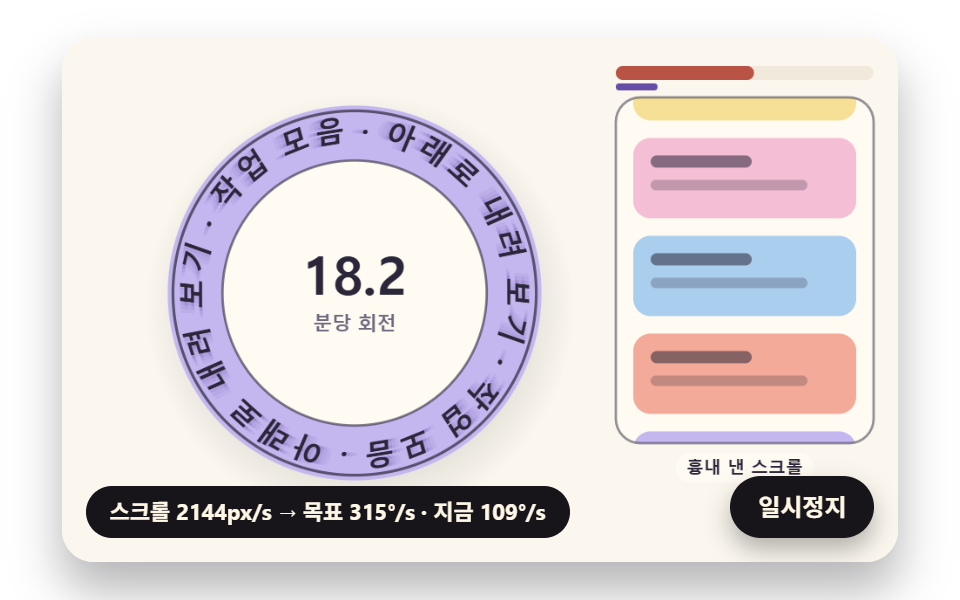
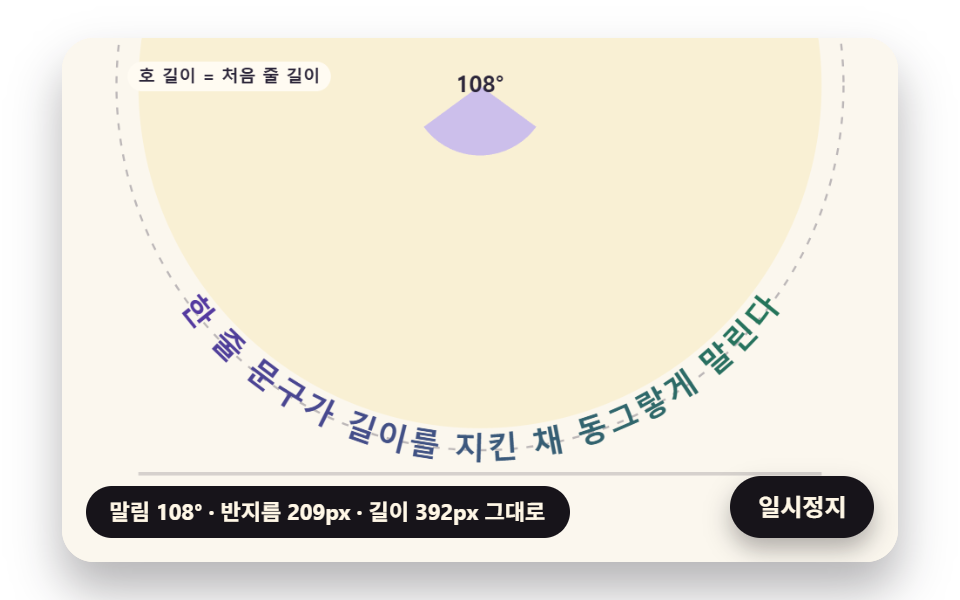
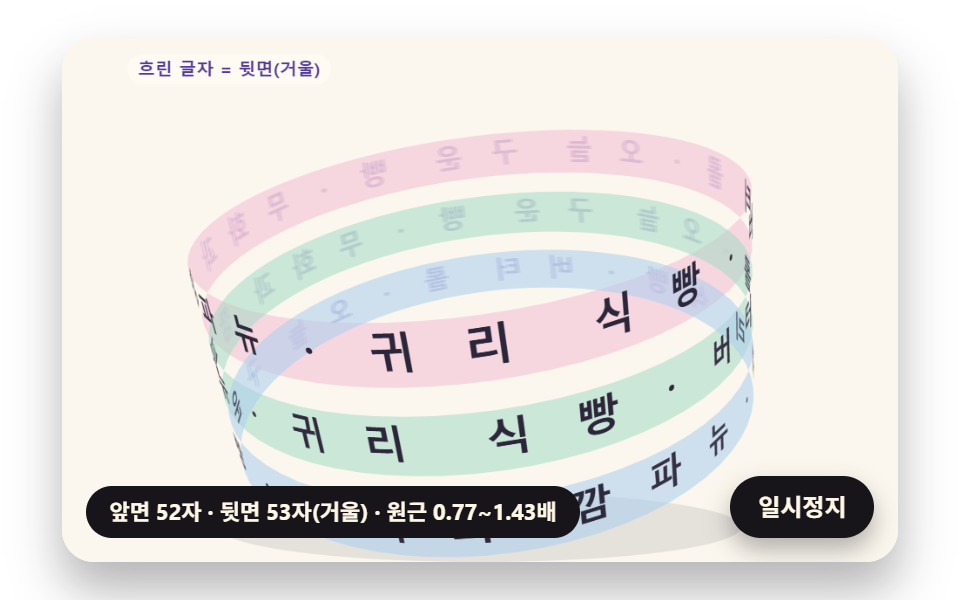
文字 円形 配置とは、文字を円の線に沿って一つずつ並べ、輪の形のまま読ませる作り方です。十二文字を30度ずつ置くと、iの横は空き、Wの横は詰まります。だから01番は文字幅÷半径で角度を決め、03番は長さを保ったまま直線を輪に丸め、05番は半径ごとに角速度を変えて二つの輪をかみ合わせます。
同じ角度で並べると字間がばらつきます — 円形の文字を決めるのは文字幅と半径です
 01 circtx-glyph-width-angle-badge
 02 circtx-scroll-velocity-spin-badge
 03 circtx-line-curl-constant-length
 04 circtx-cylinder-band-depth-mirror
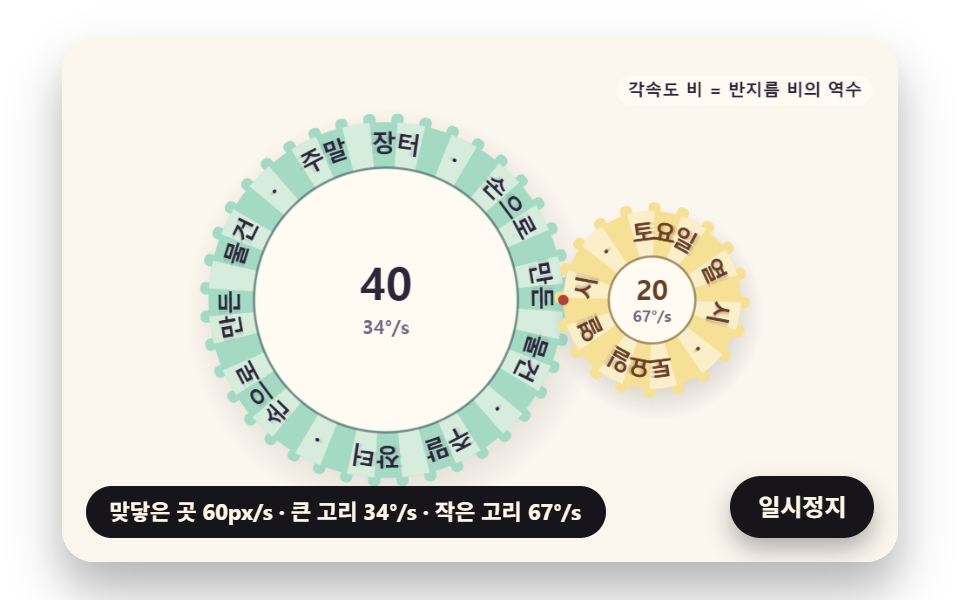 05 circtx-tangent-rings-gear-mesh
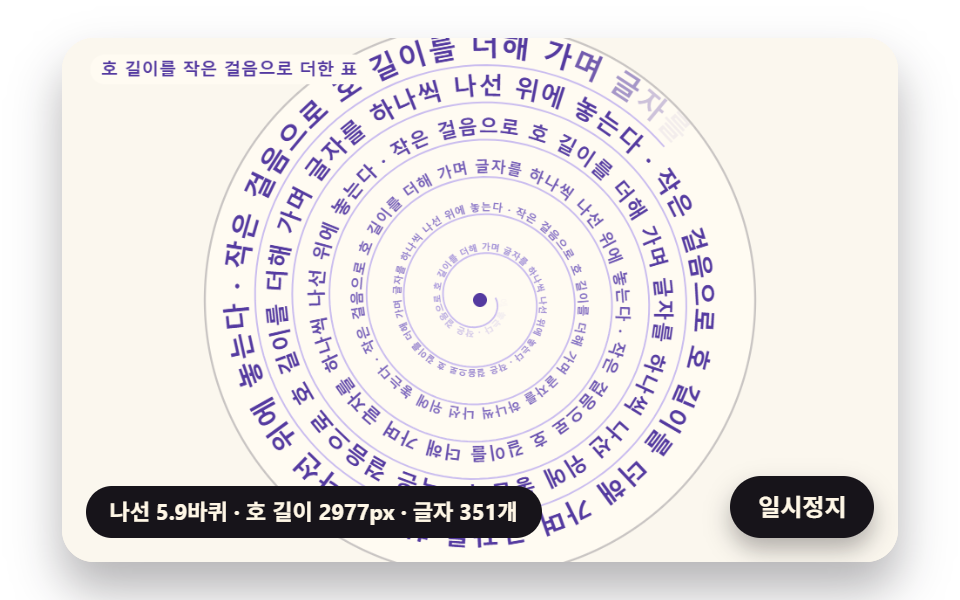 06 circtx-spiral-arclength-flow
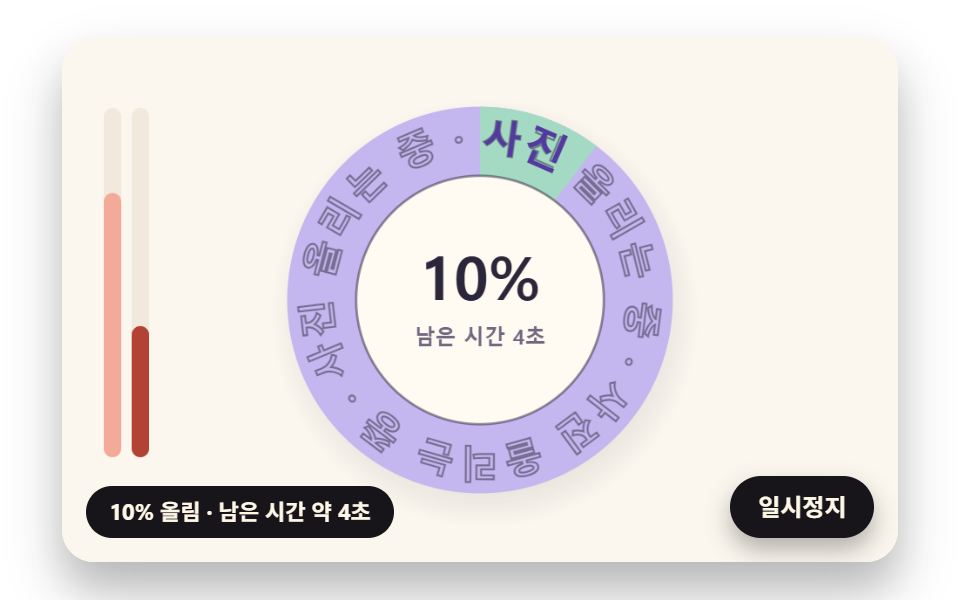 07 circtx-progress-ring-partial-letter-fill
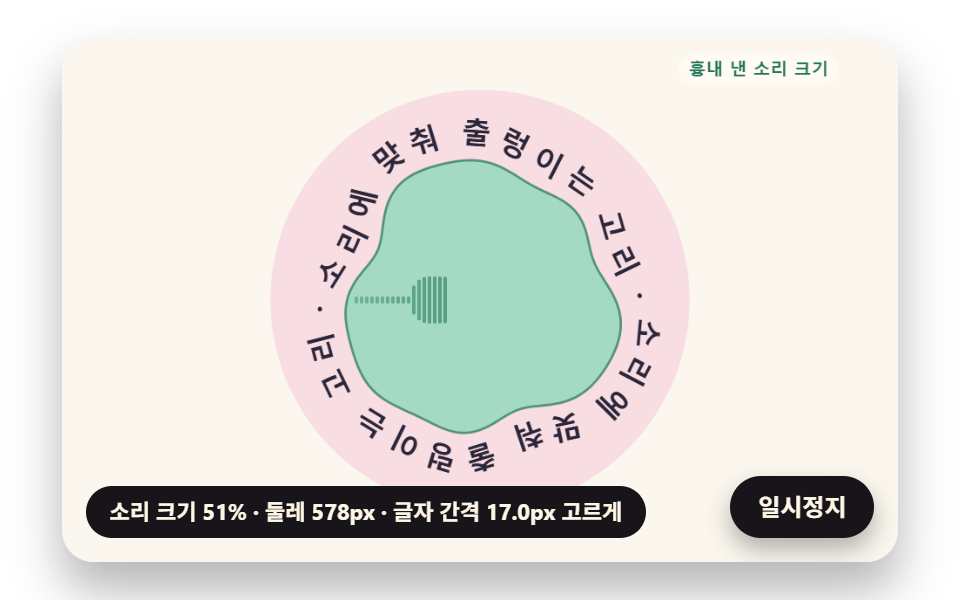 08 circtx-sound-ripple-normal-letters
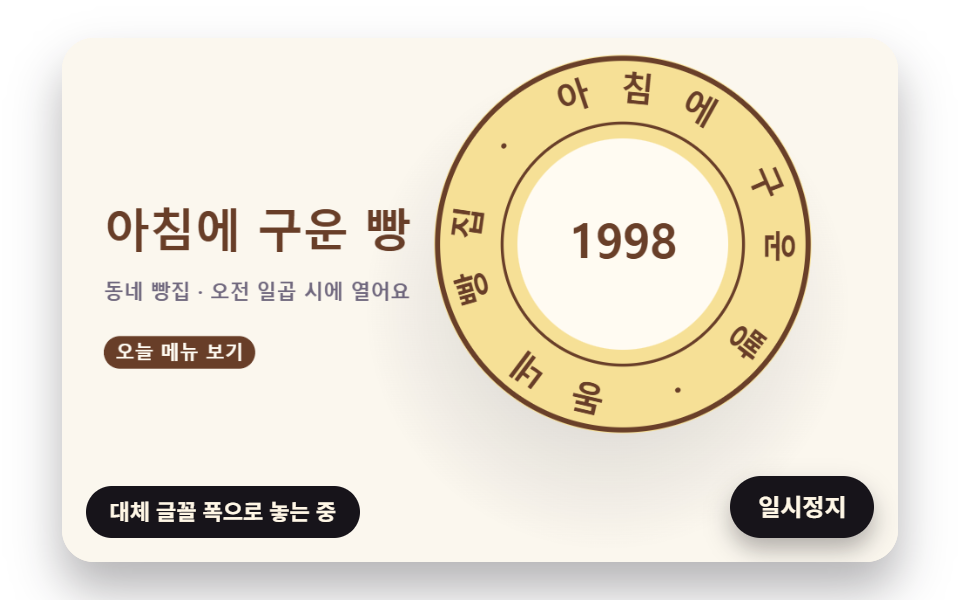 09 circtx-hero-seal-stamp-scene
自動再生 · タイルを押すとその項目へ · すべて1つのzip
- 01 文字幅で角度を割りふる円形バッジ
- 02 スクロールの速さに合わせて速くなる回転バッジ
- 03 長さを保ったまま輪に丸まる一行の文字
- 04 円筒に巻きついて回る帯の文字
- 05 接して歯車のように回る二つの文字の輪
- 06 弧の長さで文字を置くらせんの文字
- 07 進み具合のぶん文字が満ちていく円形の進捗リング
- 08 音の大きさで波打つ輪と法線に沿う文字
- 09 ベーカリーのファーストビューの判子の場面
丸いバッジが仕上がって見えるのは、となり合う文字のすき間が一周どこでも同じに見えるときで、円を字数で等分しただけではそうなりません。字は一字ごとに幅が違うので、一字が必要とする弧は、その字の幅と、その字が座る半径の二つで決まります。九つの場面はどれも JavaScript で計算して描くキャンバスで、SCSS は舞台・カード・影の大きさを受け持ち、キャンバスはカードの中で 480×300 の固定座標を使い、画素の倍率は 2 で頭打ちにしています。
同じ角度の版と幅に合わせた版の字間
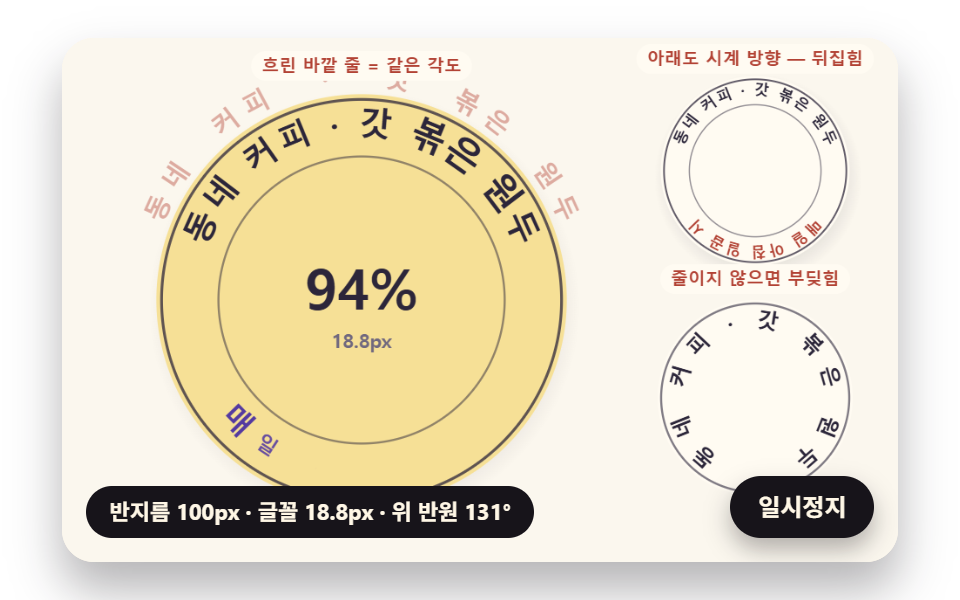
01 の上の半円を半径 100px で比べると、韓国語版の文言では、等分した角度で並べた版の字間が −2.4px(二字が重なる)から 10.6px までばらつき、幅÷半径で角度を配った版は 2.15〜3.5px に収まります。一字あたりの位置の差は韓国語版で最大 5.8°、英語版で 4.9° ですが、日本語版の「まちのコーヒー」は字の幅がそろっているため、二つの版が同じ位置に重なって差は 0° です。デモの外側に薄く出ている列がこの等分版で、内側の幅合わせの輪と見比べられるように描いてあります。
半径を小さくすると字も縮めなければならない理由
立てた字は下の端が真ん中より円の中心に近く、小さな輪ではその下の端から先に場所が足りなくなります。01 は字の高さの半分だけ内側の半径(INNER_FIT 0.5)で幅を合わせ、上の文言が 2.5 rad の持ち分を超えるとフォントを縮めます。半径 58px では韓国語版が 54.4%(10.89px)、英語版が 71.8%(14.35px)、日本語版が 83.3% まで縮み、言語ごとに率が違うのは、それぞれの言語版のデモがその言語の文言をその字の幅で並べ直すからです。
角度は幅÷半径、角速度は半径に反比例、らせんは弧の長さで求めます — 円の上の文字を支える計算
九つの場面を支える式は三つで、どれも目分量の刻みを、測った長さに置き換えるためのものです。
幅÷半径が角度になる理由
ラジアンで表した角度は弧の長さを半径で割った値なので、幅 w ピクセルの字は半径 r の上で w / r ラジアンを使います。placeArc は字 i より前の字幅を足し、自分の幅の半分を加え、文言全体の半分を引いて弧の中央にそろえ、置く半径で割ります。i も W もその幅が求めるぶんだけの弧をもらうので、見た目のすき間が同じになります。「css 文字 曲線」で見つかる作例の多くはスタイルシートで一字ずつ決まった刻みで回していますが、ここでの回転も同じ動きで、刻みだけが測った幅から来ています。
接した二つの輪の角速度
二つの輪が接する点では両方の表面が同じ速さ v で動くので、それぞれの輪は v / r で回ります。05 では接点の速さが 60px/s、韓国語版の文言で大きな輪の半径が 101.86px、小さな輪が 50.93px なので、33.8°/s と 67.5°/s、比はちょうど 2.000 になり、一組の歯車のように逆向きに回ります。
らせんの弧の長さを小さな歩幅で足していく
一定の幅で広がる渦巻き r = a + bθ には、字を置くのに使える手ごろな長さの式がないので、06 は表を作ります。一歩ごとに歩幅の真ん中で ds = √(r² + (dr/dθ)²) dθ をとって累計に足し、その表で長さを引けば各字の θ が返ってきます。らせんが外へ開いていっても、曲線に沿ったとなりの字との距離は一字の幅のままです。
文字 円形 配置 9種 — 幅合わせの円形バッジ・スクロール速度で回るバッジ・輪に丸まる一行・円筒の帯・かみ合って回る二つの輪・らせん文字・文字の進捗リング・波打つ輪・ベーカリーの判子の場面
下の表の数値は、九つとも同じ条件の録画から取っています。480×300 のキャンバスを 2 秒間・24 枚で記録したので、数えるフレーム間の差は 23 個です。
480×300 のキャンバスで 2 秒のあいだに動いたもの
| 場面 | 動いた面積 | 動いたフレーム | 強さの平均 |
|---|---|---|---|
| 01 幅合わせの円形バッジ | 25.6% | 23/23 | 58.0 |
| 02 スクロール速度で回るバッジ | 22.1% | 23/23 | 79.1 |
| 03 輪に丸まる一行 | 39.9% | 23/23 | 66.5 |
| 04 円筒の帯 | 33.8% | 23/23 | 57.0 |
| 05 かみ合って回る二つの輪 | 15.2% | 23/23 | 58.9 |
| 06 らせん文字 | 28.3% | 23/23 | 74.9 |
| 07 文字の進捗リング | 15.0% | 23/23 | 67.9 |
| 08 波打つ輪 | 20.6% | 23/23 | 71.3 |
| 09 ベーカリーの判子の場面 | 30.0% | 23/23 | 79.2 |
画面をいちばん広く塗り替えたのは 03 の 39.9% で、一行が平らな形から閉じた輪まで掃いていくためです。いちばん狭いのは 07 の 15.0% と 05 の 15.2% で、変わるのが文字の輪一つか細い帯二本だけだからです。止まっていた場面はなく、九つとも 23 のすき間のうち 23 で絵が変わりました。
01文字幅で角度を割りふる円形バッジ
「円形 文字 ロゴ」として街のコーヒー店に置く想定で、「まちのコーヒー」が上を時計回りに、「毎朝7時」が下を反時計回りに走ってどちらも正立して読め、半径はばね(硬さ 70・減衰 11)で 100px から 0.95 秒に 58px へ、2.6 秒に 100px へ戻ります。badgeAt は弧ごとに arcScale を一度呼び、二つの率の小さいほうを残して上下の文字サイズを一つにそろえてから placeArc に渡しますが、下のコード片にある fitArc はファイルの中で定義されているだけで、どこからも呼ばれていません。右側には失敗例が二つあり、右上の「下も時計回り — 逆さま」は下の弧を時計回りのままにして逆さに出る版、右下の「縮めないとぶつかる」はいまの半径の 0.44 倍の輪に縮めないまま字を置き、ぶつかった場所にコーラル色の点を打った版です。
<main class="stage">
<div class="cf is-demo" id="cf">
  <canvas class="cf__canvas" data-role="canvas" width="480" height="300" aria-hidden="true"></canvas>
  <p class="cf__sr">まちのコーヒー — 毎朝7時</p>
  <p class="cf__status" data-role="status" aria-live="off">文字幅を測っています</p>
  <button class="cf__pause" data-role="pause" type="button" aria-pressed="false">一時停止</button>
</div>
</main>
@use "../../../../site/static/demo-tokens" as *;
@include stage($stage-paper);
.cf {
position: relative;
width: min(92vw, calc(160vh - 12.8vw));
aspect-ratio: 480 / 300;
margin: 0 auto;
border-radius: $r-card;
overflow: hidden;
box-shadow: $shadow-raised;
background: $subject-cream;
}
.cf__canvas {
position: absolute;
inset: 0;
display: block;
width: 100%;
height: 100%;
}
.cf__pause {
position: absolute;
right: $sp-3;
bottom: $sp-3;
padding: $sp-1 $sp-3;
border: 2px solid $subject-ink;
border-radius: $r-pill;
background: $subject-ink;
color: $subject-cream;
font-family: inherit;
font-weight: 700;
font-size: 12px;
line-height: 1.6;
cursor: pointer;
box-shadow: $shadow-press;
transition: transform $dur-quick $ease-spring;
}
// 눌린 상태(멈춤) — 바탕과 글자색을 뒤집어 aria-pressed 가 눈에도 보이게
.cf__pause[aria-pressed="true"] {
background: $subject-cream;
color: $subject-ink;
}
.cf__pause:hover {
transform: translateY(-2px);
}
.cf__pause:active {
transform: translateY(1px);
}
.cf__pause:focus-visible {
outline: 3px solid $subject-ink;
outline-offset: 3px;
}
// 상태 줄 — 지금 고리에서 무슨 계산이 일어났는지 글자로. 시연 중에는 aria-live off, 사람이 처음 손대면 polite
.cf__status {
position: absolute;
left: $sp-3;
bottom: $sp-3;
max-width: calc(100% - 120px);
margin: 0;
padding: $sp-1 $sp-3;
border-radius: $r-pill;
background: $subject-ink;
color: $subject-cream;
font-weight: 700;
font-size: 11px;
line-height: 1.6;
white-space: nowrap;
overflow: hidden;
text-overflow: ellipsis;
pointer-events: none;
}
// 낭독용 원문 한 줄 — 화면에서는 숨기고 낭독기에만 읽힌다(원 위 글자는 캔버스라 aria-hidden)
.cf__sr {
position: absolute;
width: 1px;
height: 1px;
margin: -1px;
padding: 0;
overflow: hidden;
clip-path: inset(50%);
white-space: nowrap;
border: 0;
}
@media (max-width: 340px) {
.cf__pause,
.cf__status { font-size: 10px; padding: $sp-1 $sp-2; }
}
// 동작 줄이기 — 장면은 스크립트가 최종 배치 한 장으로 멈춘다. 버튼도 떠오르지 않게
@media (prefers-reduced-motion: reduce) {
.cf__pause { transition: none !important; }
.cf__pause:hover,
.cf__pause:active { transform: none !important; }
}html, body {
margin: 0;
overflow: hidden;
}
.stage {
box-sizing: border-box;
min-height: 100vh;
display: grid;
place-items: center;
margin: 0;
background: #ffffff;
font-family: -apple-system, "Segoe UI", "Noto Sans KR", sans-serif;
padding: clamp(8px, 4vw, 24px);
}
.cf {
position: relative;
width: min(92vw, 160vh - 12.8vw);
aspect-ratio: 480/300;
margin: 0 auto;
border-radius: 16px;
overflow: hidden;
box-shadow: 0 14px 24px rgba(23, 20, 26, 0.32);
background: #fff7e6;
}
.cf__canvas {
position: absolute;
inset: 0;
display: block;
width: 100%;
height: 100%;
}
.cf__pause {
position: absolute;
right: 12px;
bottom: 12px;
padding: 4px 12px;
border: 2px solid #17141a;
border-radius: 999px;
background: #17141a;
color: #fff7e6;
font-family: inherit;
font-weight: 700;
font-size: 12px;
line-height: 1.6;
cursor: pointer;
box-shadow: 0 6px 12px rgba(23, 20, 26, 0.32);
transition: transform 220ms cubic-bezier(0.2, 0.8, 0.2, 1);
}
.cf__pause[aria-pressed=true] {
background: #fff7e6;
color: #17141a;
}
.cf__pause:hover {
transform: translateY(-2px);
}
.cf__pause:active {
transform: translateY(1px);
}
.cf__pause:focus-visible {
outline: 3px solid #17141a;
outline-offset: 3px;
}
.cf__status {
position: absolute;
left: 12px;
bottom: 12px;
max-width: calc(100% - 120px);
margin: 0;
padding: 4px 12px;
border-radius: 999px;
background: #17141a;
color: #fff7e6;
font-weight: 700;
font-size: 11px;
line-height: 1.6;
white-space: nowrap;
overflow: hidden;
text-overflow: ellipsis;
pointer-events: none;
}
.cf__sr {
position: absolute;
width: 1px;
height: 1px;
margin: -1px;
padding: 0;
overflow: hidden;
clip-path: inset(50%);
white-space: nowrap;
border: 0;
}
@media (max-width: 340px) {
.cf__pause,
.cf__status {
font-size: 10px;
padding: 4px 8px;
}
}
@media (prefers-reduced-motion: reduce) {
.cf__pause {
transition: none !important;
}
.cf__pause:hover,
.cf__pause:active {
transform: none !important;
}
}(function () {
const root = document.getElementById("cf");
if (!root) return;
// 판 좌표 — 캔버스 안은 늘 480×300. 화면에 보이는 크기와 상관없이 계산은 이 좌표로 한다
const W = 480;
const H = 300;
const TAU = Math.PI * 2;
function clamp(v, lo, hi) { return v < lo ? lo : (v > hi ? hi : v); }
function lerp(a, b, k) { return a + (b - a) * k; }
function smooth(x) { const c = clamp(x, 0, 1); return c * c * (3 - 2 * c); }
// 따라가기 비율 — 1 − e^(−rate·dt). 프레임 시간이 달라도 1초에 같은 만큼 다가간다
function follow(rate, dt) { return 1 - Math.exp(-rate * dt); }
// 1/60초마다 ease 만큼 다가가는 비율을 dt 초로 환산 — 1 − (1 − ease)^(dt × 60)
function easeStep(ease, dt) { return 1 - Math.pow(1 - ease, dt * 60); }
// 시드 고정 난수 — 같은 시드면 같은 시연이 다시 나온다 (32비트 정수 섞기)
function makeRng(seed) {
let s = seed >>> 0;
return function () {
s = (s + 0x6d2b79f5) >>> 0;
let t = s;
t = Math.imul(t ^ (t >>> 15), t | 1);
t ^= t + Math.imul(t ^ (t >>> 7), t | 61);
return ((t ^ (t >>> 14)) >>> 0) / 4294967296;
};
}
function deg(rad) { return rad * 180 / Math.PI; }
function makeSpring(x) { return { x: x, v: 0, to: x }; }
const SPRING_SUBSTEP = 1 / 240;
function stepSpring(s, stiffness, damping, dt) {
let left = dt;
while (left > 1e-9) {
const h = Math.min(SPRING_SUBSTEP, left);
s.v += (stiffness * (s.to - s.x) - damping * s.v) * h;
s.x += s.v * h;
left -= h;
}
}
function snapSpring(s, x) { s.x = x; s.v = 0; s.to = x; }
function roughWidth(ch, px, weight) {
const wide = ch.charCodeAt(0) >= 0x1100;
const base = ch === ' ' ? 0.28 : (wide ? 0.95 : 0.6);
return px * base * (weight >= 700 ? 1.06 : 1);
}
// 글꼴이 다 온 뒤 잰 폭
let glyphWidth = roughWidth;
// 대체 글꼴로 잰 폭 — 09 가 「글꼴이 오기 전에 잰 폭」 을 흉내 낼 때만 쓴다
let fallbackWidth = roughWidth;
// 글자 나누기 — 한 글자씩(서로게이트 쌍도 한 글자)
function glyphsOf(s) { return Array.from(s); }
function widthsOf(gs, px, weight, m) {
return gs.map(function (g) { return m(g, px, weight); });
}
function sum(xs) { let s = 0; for (const x of xs) {
s += x;
} return s; }
function arcTotal(ws, tracking) { return sum(ws) + tracking * Math.max(0, ws.length - 1); }
// 글꼴 축소 몫 — 줄이지 않아도 들어가면 1
function arcScale(ws, px, tracking, r, inner, span) {
const total = arcTotal(ws, tracking);
const need = total / Math.max(1, r - inner * px);
return need > span ? span * r / (total + span * inner * px) : 1;
}
function fitArc(ws, px, tracking, r, inner, span, center, dir, allowShrink) {
return placeArc(ws, px, tracking, r, inner, allowShrink ? arcScale(ws, px, tracking, r, inner, span) : 1, center, dir);
}
// 정한 축소 몫으로 놓기 — 위·아래 반원이 같은 글꼴 크기를 쓰도록 둘 중 작은 몫을 넘겨받는다
function placeArc(ws, px, tracking, r, inner, scale, center, dir) {
const n = ws.length;
const total = arcTotal(ws, tracking);
const need = total / Math.max(1, r - inner * px);
const layR = Math.max(1, r - inner * px * scale);
const theta = [];
let acc = 0;
for (let i = 0; i < n; i += 1) {
theta.push(center + dir * (acc + ws[i] / 2 - total / 2) * scale / layR);
acc += ws[i] + tracking;
}
return { theta: theta, px: px * scale, scale: scale, total: total, layR: layR, need: need };
}
// 같은 각도로 놓기(비교판) — 폭은 보지 않고 전체 각을 글자 수로 똑같이 나눈다
function equalArc(n, spanUsed, center, dir) {
const out = [];
const step = spanUsed / Math.max(1, n);
for (let i = 0; i < n; i += 1) {
out.push(center + dir * (i + 0.5 - n / 2) * step);
}
return out;
}
// 이웃 두 글자가 글자 아래 모서리(반지름 r − 0.5·글자 높이)에서 겹친 길이(px). 양수면 부딪힌다.
// 각 간격 × 아래 모서리 반지름 − 두 글자 반폭 합 이 음수인 만큼이 겹침
const GLYPH_DROP = 0.5;
function innerOverlaps(theta, ws, scale, r, px) {
const rin = r - GLYPH_DROP * px;
const out = [];
for (let i = 0; i + 1 < theta.length; i += 1) {
const room = Math.abs(theta[i + 1] - theta[i]) * rin;
out.push((ws[i] + ws[i + 1]) / 2 * scale - room);
}
return out;
}
function arcTable(rf, drf, th0, th1, step) {
const th = [th0];
const s = [0];
let acc = 0;
const n = Math.max(1, Math.ceil((th1 - th0) / step));
const h = (th1 - th0) / n;
for (let i = 0; i < n; i += 1) {
// 걸음 가운데의 값으로 더한다 — 걸음 끝 값보다 같은 걸음에서 오차가 작다
const m = th0 + (i + 0.5) * h;
const r = rf(m);
const dr = drf(m);
acc += Math.sqrt(r * r + dr * dr) * h;
th.push(th0 + (i + 1) * h);
s.push(acc);
}
return { th: th, s: s };
}
function thetaAt(t, s) {
const last = t.s.length - 1;
if (s <= 0) {
return t.th[0];
}
if (s >= t.s[last]) {
return t.th[last];
}
let lo = 0;
let hi = last;
while (hi - lo > 1) {
const mid = (lo + hi) >> 1;
if (t.s[mid] <= s) {
lo = mid;
}
else {
hi = mid;
}
}
const k = (s - t.s[lo]) / Math.max(1e-9, t.s[hi] - t.s[lo]);
return lerp(t.th[lo], t.th[hi], k);
}
function arcLength(t) { return t.s[t.s.length - 1]; }
// 극좌표 곡선의 접선 각(화면 좌표, y 아래) — 점 (r cosθ, r sinθ) 을 θ 로 미분한 방향
function tangentAngle(r, dr, th) {
return Math.atan2(dr * Math.sin(th) + r * Math.cos(th), dr * Math.cos(th) - r * Math.sin(th));
}
// 장면 시계(秒)와 상태 줄 글자 — 장면 계산이 고치고, 화면 쪽이 읽어 그린다
let sceneT = 0;
let simStatus = '';
// 파스텔 팔레트 — 크림 바탕 위 라벤더·민트·버터·산호. 글자는 진한 쪽으로 명도 차를 둔다
const PAPER = [251, 247, 238];
const PAPER_DIM = [241, 234, 220];
const INK = [44, 38, 58];
const INK_SOFT = [112, 104, 126];
const CREAM = [255, 251, 242];
const LAVENDER = [196, 182, 238];
const MINT = [164, 218, 196];
const BUTTER = [246, 224, 150];
const CORAL = [244, 170, 152];
const SKY = [170, 206, 238];
const PINK = [244, 190, 212];
const MINT_DEEP = [36, 116, 90];
const CORAL_DEEP = [178, 66, 52];
const VIOLET_DEEP = [84, 58, 160];
const BROWN_DEEP = [104, 62, 40];
function mix(a, b, k) { return [lerp(a[0], b[0], k), lerp(a[1], b[1], k), lerp(a[2], b[2], k)]; }
function rgba(c, a) {
return 'rgba(' + Math.round(clamp(c[0], 0, 255)) + ',' + Math.round(clamp(c[1], 0, 255)) + ',' + Math.round(clamp(c[2], 0, 255)) + ',' + clamp(a, 0, 1).toFixed(3) + ')';
}
const canvasEl = root.querySelector('[data-role="canvas"]');
const pauseEl = root.querySelector('[data-role="pause"]');
const statusEl = root.querySelector('[data-role="status"]');
const ctxRaw = canvasEl ? canvasEl.getContext('2d') : null;
if (!canvasEl || !ctxRaw || !pauseEl) {
return;
}
const cv = canvasEl;
const ctx = ctxRaw;
const pauseBtn = pauseEl;
// 외부 웹폰트는 부르지 않는다 — 기기에 있는 글꼴 목록만
const FONT_STACK = 'system-ui, -apple-system, "Segoe UI", "Noto Sans KR", sans-serif';
// 대체 글꼴 — 09 가 「글꼴이 오기 전에 잰 폭」 을 흉내 낼 때만 쓴다
const FALLBACK_STACK = 'monospace';
// 잰 폭은 100px 기준으로 한 번만 재 두고 크기에 비례해 쓴다. 글꼴이 새로 오면 통째로 비운다
const widthCache = {};
function measureWith(stack) {
return function (ch, px, weight) {
const key = stack + '|' + weight + '|' + ch;
let w = widthCache[key];
if (w === undefined) {
ctx.font = weight + ' 100px ' + stack;
w = ctx.measureText(ch).width;
widthCache[key] = w;
}
return w * px / 100;
};
}
function remeasure() {
for (const k of Object.keys(widthCache)) {
delete widthCache[k];
}
glyphWidth = measureWith(FONT_STACK);
fallbackWidth = measureWith(FALLBACK_STACK);
relayout();
}
function fitCanvas() {
// 배율은 2 에서 자른다 — 배율 3 기기에서 화소가 2.25배로 늘어 프레임마다 일이 그만큼 커지지 않게
const dpr = Math.min(window.devicePixelRatio || 1, 2);
cv.width = Math.round(W * dpr);
cv.height = Math.round(H * dpr);
ctx.setTransform(dpr, 0, 0, dpr, 0, 0);
}
function clearStage(c) {
ctx.fillStyle = rgba(c, 1);
ctx.fillRect(0, 0, W, H);
}
function setFont(px, weight, stack) {
ctx.font = weight + ' ' + px.toFixed(2) + 'px ' + stack;
}
function label(s, x, y, c, a, px, weight, align) {
setFont(px, weight, FONT_STACK);
ctx.textAlign = align;
ctx.textBaseline = 'middle';
ctx.fillStyle = rgba(c, a);
ctx.fillText(s, x, y);
}
// 글자 하나를 (x, y) 가운데에 rot 라디안 돌려 찍는다. sx·sy 는 가로·세로 배율(음수 sx 는 거울)
function glyphAt(ch, x, y, rot, px, weight, c, a, sx, sy) {
if (a <= 0.01 || px < 0.5) {
return;
}
ctx.save();
ctx.translate(x, y);
ctx.rotate(rot);
ctx.scale(sx, sy);
setFont(px, weight, FONT_STACK);
ctx.textAlign = 'center';
ctx.textBaseline = 'middle';
ctx.fillStyle = rgba(c, a);
ctx.fillText(ch, 0, 0);
ctx.restore();
}
// 기울인 글자 — 글자 자기 좌표에서 가로로 skew(라디안)만큼 민다(윗부분이 앞으로)
function glyphLean(ch, x, y, rot, px, weight, c, a, skew) {
if (a <= 0.01 || px < 0.5) {
return;
}
ctx.save();
ctx.translate(x, y);
ctx.rotate(rot);
ctx.transform(1, 0, -Math.tan(skew), 1, 0, 0);
setFont(px, weight, FONT_STACK);
ctx.textAlign = 'center';
ctx.textBaseline = 'middle';
ctx.fillStyle = rgba(c, a);
ctx.fillText(ch, 0, 0);
ctx.restore();
}
// 원 위 글자 — 중심 (cx, cy), 반지름 r, 각 th. turn 은 글자를 원에 맞춰 세우는 각(위 반원 +π/2, 아래 반원 −π/2)
function ringGlyph(ch, cx, cy, r, th, turn, px, weight, c, a) {
glyphAt(ch, cx + r * Math.cos(th), cy + r * Math.sin(th), th + turn, px, weight, c, a, 1, 1);
}
function roundRectPath(x, y, w, h, r) {
const rr = Math.max(0, Math.min(r, w / 2, h / 2));
ctx.beginPath();
ctx.moveTo(x + rr, y);
ctx.lineTo(x + w - rr, y);
ctx.arcTo(x + w, y, x + w, y + rr, rr);
ctx.lineTo(x + w, y + h - rr);
ctx.arcTo(x + w, y + h, x + w - rr, y + h, rr);
ctx.lineTo(x + rr, y + h);
ctx.arcTo(x, y + h, x, y + h - rr, rr);
ctx.lineTo(x, y + rr);
ctx.arcTo(x, y, x + rr, y, rr);
ctx.closePath();
}
function fillRound(x, y, w, h, r, c, a) {
if (w <= 0.2 || h <= 0.2 || a <= 0) {
return;
}
roundRectPath(x, y, w, h, r);
ctx.fillStyle = rgba(c, a);
ctx.fill();
}
function disc(x, y, r, c, a) {
if (r <= 0.2 || a <= 0) {
return;
}
ctx.beginPath();
ctx.arc(x, y, r, 0, TAU);
ctx.fillStyle = rgba(c, a);
ctx.fill();
}
function ring(x, y, r, width, c, a) {
if (r <= 0.2 || a <= 0) {
return;
}
ctx.beginPath();
ctx.arc(x, y, r, 0, TAU);
ctx.lineWidth = width;
ctx.strokeStyle = rgba(c, a);
ctx.stroke();
}
// 그림자 — 떠 있는 높이 lift(0~1)가 클수록 멀리·흐리게·넓게 떨어진다
function softShadow(x, y, r, lift) {
const off = 4 + 14 * lift;
const g = ctx.createRadialGradient(x + off * 0.4, y + off, r * 0.6, x + off * 0.4, y + off, r * (1.05 + 0.25 * lift));
g.addColorStop(0, rgba(INK, 0.26 - 0.14 * lift));
g.addColorStop(1, rgba(INK, 0));
ctx.fillStyle = g;
ctx.beginPath();
ctx.arc(x + off * 0.4, y + off, r * (1.05 + 0.25 * lift), 0, TAU);
ctx.fill();
}
// 작은 알약 이름표
function pill(s, x, y, bg, fg, a, px) {
setFont(px, 700, FONT_STACK);
const w = ctx.measureText(s).width + px * 1.2;
fillRound(x - w / 2, y - px * 0.85, w, px * 1.7, px * 0.85, bg, a);
label(s, x, y + 0.5, fg, a, px, 700, 'center');
}
// 상태 줄 — 바뀔 때만 글자를 고친다
let shownStatus = '';
function pushStatus() {
if (!statusEl || simStatus === shownStatus) {
return;
}
shownStatus = simStatus;
statusEl.textContent = simStatus;
}
// 01 — 글자 폭으로 각도를 나누는 원형 배지. 위 반원은 시계 방향, 아래 반원은 반대 방향으로 놓아 둘 다 바로 읽힌다.
// 배지 반지름이 좁아지면(좁은 칸에 들어간 배지) 글자 아래 모서리가 부딪히기 전에 글꼴을 줄인다
const TOP_TEXT = 'まちのコーヒー';
const BOTTOM_TEXT = '毎朝7時';
const BADGE_PX = 20;
const BADGE_WEIGHT = 800;
const TRACKING = 1.5;
// 글자 높이 가운데 이만큼 안쪽(원 중심 쪽) 반지름에서 폭을 맞춘다
const INNER_FIT = 0.5;
// 위·아래 반원이 쓸 수 있는 가장 큰 각(라디안) — 둘 사이에 남는 틈이 양옆 여백
const TOP_SPAN = 2.5;
const BOTTOM_SPAN = 1.9;
const RADIUS_WIDE = 100;
const RADIUS_NARROW = 58;
const RADIUS_STIFFNESS = 70;
const RADIUS_DAMPING = 11;
const NARROW_AT_S = 0.95;
const WIDE_AT_S = 2.6;
const LOOP_S = 3.8;
// 글자가 하나씩 튀어 오르는 간격과 스프링
const POP_START_S = 0.2;
const POP_STAGGER_S = 0.03;
const POP_STIFFNESS = 300;
const POP_DAMPING = 16;
const STATUS_FIT = '半径 {r}px・文字 {p}px・上の半円 {a}°';
const topGlyphs = glyphsOf(TOP_TEXT);
const bottomGlyphs = glyphsOf(BOTTOM_TEXT);
let topWidths = [];
let bottomWidths = [];
const radius01 = makeSpring(RADIUS_WIDE);
const pops01 = topGlyphs.concat(bottomGlyphs).map(function () { return makeSpring(0); });
function relayout() {
topWidths = widthsOf(topGlyphs, BADGE_PX, BADGE_WEIGHT, glyphWidth);
bottomWidths = widthsOf(bottomGlyphs, BADGE_PX, BADGE_WEIGHT, glyphWidth);
}
function badgeAt(r) {
const s = Math.min(arcScale(topWidths, BADGE_PX, TRACKING, r, INNER_FIT, TOP_SPAN), arcScale(bottomWidths, BADGE_PX, TRACKING, r, INNER_FIT, BOTTOM_SPAN));
return {
top: placeArc(topWidths, BADGE_PX, TRACKING, r, INNER_FIT, s, -Math.PI / 2, 1),
bottom: placeArc(bottomWidths, BADGE_PX, TRACKING, r, INNER_FIT, s, Math.PI / 2, -1),
scale: s
};
}
function radiusTarget01(t) { return t >= NARROW_AT_S && t < WIDE_AT_S ? RADIUS_NARROW : RADIUS_WIDE; }
function reset() {
snapSpring(radius01, RADIUS_WIDE);
for (const p of pops01) {
snapSpring(p, 0);
}
}
function statusFor01() {
const b = badgeAt(radius01.x);
const a = b.top.theta.length ? deg(b.top.theta[b.top.theta.length - 1] - b.top.theta[0]) : 0;
simStatus = STATUS_FIT.replace('{r}', String(Math.round(radius01.x))).replace('{p}', (BADGE_PX * b.scale).toFixed(1)).replace('{a}', String(Math.round(a)));
}
function update(dt) {
radius01.to = radiusTarget01(sceneT);
stepSpring(radius01, RADIUS_STIFFNESS, RADIUS_DAMPING, dt);
pops01.forEach(function (p, i) {
p.to = sceneT >= POP_START_S + i * POP_STAGGER_S ? 1 : 0;
stepSpring(p, POP_STIFFNESS, POP_DAMPING, dt);
});
statusFor01();
}
function restPose() {
snapSpring(radius01, RADIUS_WIDE);
for (const p of pops01) {
snapSpring(p, 1);
}
statusFor01();
}
// 01 화면 — 왼쪽 큰 배지(바깥 흐린 줄 = 같은 각도로 놓은 비교판), 오른쪽 위 = 아래 반원도 시계 방향으로 이어 놓은 실패판(뒤집힘),
// 오른쪽 아래 = 좁은 고리에서 줄이지 않고 놓은 실패판(글자 아래 모서리가 부딪힌 자리에 산호 점)
const B_CX = 172;
const B_CY = 150;
const LABEL_EQUAL = '薄い外側の列 = 同じ角度';
const LABEL_FLIP = '下も時計回り — 逆さま';
const LABEL_CLASH = '縮めないとぶつかる';
function bindInput(signal) { void signal; }
function drawBadgeText(cx, cy, r, b, popBase, flipBottom) {
const px = BADGE_PX * b.scale;
b.top.theta.forEach(function (th, i) {
const k = popBase >= 0 ? pops01[i].x : 1;
const rr = b.top.layR + INNER_FIT * px;
glyphAt(topGlyphs[i], cx + rr * Math.cos(th), cy + rr * Math.sin(th), th + Math.PI / 2, px, BADGE_WEIGHT, INK, clamp(k * 1.4, 0, 1), k, k);
});
b.bottom.theta.forEach(function (th, i) {
const k = popBase >= 0 ? pops01[topGlyphs.length + i].x : 1;
const rr = b.bottom.layR + INNER_FIT * px;
// 아래 반원 — 글자 머리를 원 중심 쪽으로(−π/2). 실패판은 위 반원처럼 +π/2 로 돌려 거꾸로 선다
const th2 = flipBottom ? Math.PI - th : th;
glyphAt(bottomGlyphs[i], cx + rr * Math.cos(th2), cy + rr * Math.sin(th2), th2 + (flipBottom ? Math.PI / 2 : -Math.PI / 2), px, BADGE_WEIGHT, flipBottom ? CORAL_DEEP : VIOLET_DEEP, clamp(k * 1.4, 0, 1), k, k);
});
}
function badgeDisc(cx, cy, r, px, lift, face) {
const outer = r + px * 0.95;
softShadow(cx, cy, outer, lift);
disc(cx, cy, outer, face, 1);
ring(cx, cy, outer - 3, 1.6, INK, 0.75);
ring(cx, cy, r - px * 0.95, 1.2, INK, 0.5);
}
function draw() {
clearStage(PAPER);
const r = radius01.x;
const b = badgeAt(r);
const px = BADGE_PX * b.scale;
// 반지름이 움직이는 빠르기만큼 배지가 떠오른다 — 그림자가 멀어지고 흐려진다
badgeDisc(B_CX, B_CY, r, px, clamp(Math.abs(radius01.v) / 260, 0, 1), BUTTER);
// 같은 각도 비교판 — 위 반원과 같은 전체 각을 글자 수로 똑같이 나눠 바깥 줄에 흐리게
const used = b.top.theta.length > 1 ? (b.top.theta[b.top.theta.length - 1] - b.top.theta[0]) * topGlyphs.length / (topGlyphs.length - 1) : 0;
const eq = equalArc(topGlyphs.length, used, -Math.PI / 2, 1);
eq.forEach(function (th, i) {
ringGlyph(topGlyphs[i], B_CX, B_CY, r + px * 1.45, th, Math.PI / 2, px * 0.8, 700, CORAL_DEEP, 0.42 * clamp(pops01[i].x, 0, 1));
});
drawBadgeText(B_CX, B_CY, r, b, 0, false);
label(Math.round(b.scale * 100) + '%', B_CX, B_CY - 4, INK, 1, clamp(r * 0.36, 14, 32), 800, 'center');
label(px.toFixed(1) + 'px', B_CX, B_CY + clamp(r * 0.26, 12, 24), INK_SOFT, 1, 11, 700, 'center');
// 실패판 1 — 아래 반원도 위처럼 시계 방향
const mr = 46;
const fb = (function () {
const s = Math.min(arcScale(topWidths, BADGE_PX, TRACKING, mr / 0.62, INNER_FIT, TOP_SPAN), arcScale(bottomWidths, BADGE_PX, TRACKING, mr / 0.62, INNER_FIT, BOTTOM_SPAN));
return { top: placeArc(topWidths, BADGE_PX, TRACKING, mr / 0.62, INNER_FIT, s, -Math.PI / 2, 1), bottom: placeArc(bottomWidths, BADGE_PX, TRACKING, mr / 0.62, INNER_FIT, s, Math.PI / 2, -1), scale: s };
})();
ctx.save();
ctx.translate(398, 76);
ctx.scale(0.62, 0.62);
badgeDisc(0, 0, mr / 0.62, BADGE_PX * fb.scale, 0.2, CREAM);
drawBadgeText(0, 0, mr / 0.62, fb, -1, true);
ctx.restore();
pill(LABEL_FLIP, 398, 12, CREAM, CORAL_DEEP, 1, 10);
// 실패판 2 — 지금 반지름의 0.44배 고리에 줄이지 않고, 폭도 글자 가운데 반지름에서 맞춘 판
const cr = r * 0.44;
const ctop = placeArc(topWidths, BADGE_PX * 0.62, TRACKING * 0.62, cr, 0, 1, -Math.PI / 2, 1);
const cws = topWidths.map(function (w) { return w * 0.62; });
disc(398, 206, cr + 12, CREAM, 1);
ring(398, 206, cr + 10, 1.2, INK, 0.6);
ctop.theta.forEach(function (th, i) {
ringGlyph(topGlyphs[i], 398, 206, cr, th, Math.PI / 2, BADGE_PX * 0.62, BADGE_WEIGHT, INK, clamp(pops01[i].x * 1.4, 0, 1));
});
innerOverlaps(ctop.theta, cws, 1, cr, BADGE_PX * 0.62).forEach(function (o, i) {
if (o <= 0) {
return;
}
const th = (ctop.theta[i] + ctop.theta[i + 1]) / 2;
const rin = cr - GLYPH_DROP * BADGE_PX * 0.62;
disc(398 + rin * Math.cos(th), 206 + rin * Math.sin(th), clamp(1.5 + o, 1.5, 4), CORAL_DEEP, 0.9);
});
pill(LABEL_CLASH, 398, 138, CREAM, CORAL_DEEP, 1, 10);
pill(LABEL_EQUAL, B_CX, 16, CREAM, CORAL_DEEP, 1, 10);
}
let paused = false;
const reduceQuery = window.matchMedia('(prefers-reduced-motion: reduce)');
// 페이지를 연 채 동작 줄이기 설정을 바꿔도 change 리스너가 이 값을 다시 읽는다
let still = reduceQuery.matches;
// 자동 시연 중인가 — 사람이 처음 손대면 시연 표시를 떼고 상태 줄을 polite 로 켠다
let demo = root.classList.contains('is-demo');
// 리스너는 한 묶음으로 달고 정리할 때 한 번에 뗀다
const off = new AbortController();
function wake() {
if (!demo) {
return;
}
demo = false;
root.classList.remove('is-demo');
if (statusEl) {
statusEl.setAttribute('aria-live', 'polite');
}
}
// 한 프레임에 넘기는 시간 상한(秒) — 탭을 오래 숨겼다 돌아온 첫 프레임에도 50ms 까지만 계산에 넣는다
const DT_MAX = 0.05;
// 장면 시계를 dt 만큼 — 한 바퀴(LOOP_S)를 넘으면 처음 배치로 되돌려 다시 시연한다
function advance(dt) {
sceneT += dt;
if (sceneT >= LOOP_S) {
sceneT -= LOOP_S;
reset();
}
update(dt);
}
let rafId = 0;
let lastTs = -1;
function frame(ts) {
if (still || paused) {
rafId = 0;
return;
}
if (lastTs < 0) {
lastTs = ts;
}
const dt = Math.min((ts - lastTs) / 1000, DT_MAX);
lastTs = ts;
if (dt > 0) {
advance(dt);
}
draw();
pushStatus();
rafId = window.requestAnimationFrame(frame);
}
function startLoop() {
if (rafId) {
return;
}
// 시계 다시 맞추기 — 멈췄던 사이의 시간을 첫 프레임 dt 로 넘기지 않는다
lastTs = -1;
rafId = window.requestAnimationFrame(frame);
}
function stopLoop() {
if (rafId) {
window.cancelAnimationFrame(rafId);
rafId = 0;
}
}
// 동작 줄이기 — 루프를 돌리지 않고 시연이 끝난 최종 배치 한 장만 그린다
function showRest() {
stopLoop();
sceneT = 0;
reset();
restPose();
draw();
pushStatus();
}
function play() {
sceneT = 0;
reset();
draw();
pushStatus();
if (!paused) {
startLoop();
}
}
pauseBtn.addEventListener('click', function () {
paused = !paused;
pauseBtn.setAttribute('aria-pressed', paused ? 'true' : 'false');
wake();
if (paused) {
stopLoop();
}
else if (!still) {
startLoop();
}
}, { signal: off.signal });
// 탭이 숨으면 루프를 멈추고, 돌아오면 시계를 다시 맞춰 시작한다 — 숨은 동안의 몇 초가 한 프레임에 몰리지 않게
document.addEventListener('visibilitychange', function () {
if (document.hidden) {
stopLoop();
}
else if (!paused && !still && fontsReady) {
startLoop();
}
}, { signal: off.signal });
// 설정이 페이지를 연 채 바뀌면 — 켜지면 최종 배치로 멈추고, 꺼지면 시연을 처음부터
reduceQuery.addEventListener('change', function () {
still = reduceQuery.matches;
if (still) {
showRest();
}
else {
play();
}
}, { signal: off.signal });
window.addEventListener('resize', function () {
fitCanvas();
draw();
}, { signal: off.signal });
bindInput(off.signal);
fitCanvas();
// 글자 폭은 글꼴이 다 온 뒤에 잰다 — 그 전에 잰 폭은 대체 글꼴의 폭이라 글꼴이 바뀌는 순간 자리가 틀어진다.
// 나중에 다른 글꼴이 더 오면(loadingdone) 다시 잰다
let fontsReady = false;
document.fonts.addEventListener('loadingdone', function () {
if (!fontsReady) {
return;
}
remeasure();
draw();
}, { signal: off.signal });
document.fonts.ready.then(function () {
if (off.signal.aborted) {
return;
}
fontsReady = true;
remeasure();
if (still) {
showRest();
}
else {
play();
}
});
return function () {
stopLoop();
off.abort();
};
})();// GlyphWidthBadge - 같은 항목 vanilla 판 index.html 의 React 포트. 같은 계산을 useEffect 안에서 돌린다.
import { useEffect, useRef } from "react";
import styles from "./GlyphWidthBadge.module.scss";
const cx = (s: string): string => s.split(" ").map((n) => styles[n] ?? n).join(" ");
export default function GlyphWidthBadge() {
const rootRef = useRef<HTMLDivElement | null>(null);
useEffect(() => {
const rootEl = rootRef.current;
if (!rootEl) return;
const root: HTMLElement = rootEl;
type RGB = [number, number, number];
// 판 좌표 — 캔버스 안은 늘 480×300. 화면에 보이는 크기와 상관없이 계산은 이 좌표로 한다
const W = 480;
const H = 300;
const TAU = Math.PI * 2;
function clamp(v: number, lo: number, hi: number): number { return v < lo ? lo : (v > hi ? hi : v); }
function lerp(a: number, b: number, k: number): number { return a + (b - a) * k; }
function smooth(x: number): number { const c = clamp(x, 0, 1); return c * c * (3 - 2 * c); }
// 따라가기 비율 — 1 − e^(−rate·dt). 프레임 시간이 달라도 1초에 같은 만큼 다가간다
function follow(rate: number, dt: number): number { return 1 - Math.exp(-rate * dt); }
// 1/60초마다 ease 만큼 다가가는 비율을 dt 초로 환산 — 1 − (1 − ease)^(dt × 60)
function easeStep(ease: number, dt: number): number { return 1 - Math.pow(1 - ease, dt * 60); }
// 시드 고정 난수 — 같은 시드면 같은 시연이 다시 나온다 (32비트 정수 섞기)
function makeRng(seed: number): () => number {
let s = seed >>> 0;
return function (): number {
s = (s + 0x6d2b79f5) >>> 0;
let t = s;
t = Math.imul(t ^ (t >>> 15), t | 1);
t ^= t + Math.imul(t ^ (t >>> 7), t | 61);
return ((t ^ (t >>> 14)) >>> 0) / 4294967296;
};
}
function deg(rad: number): number { return rad * 180 / Math.PI; }
// ── 감쇠 스프링 ──────────────────────────────────────────────
// 가속 = 단단함 × (목표 − 위치) − 감쇠 × 속도. 속도를 먼저 고친 뒤 위치를 옮기는 적분을 1/240초 잔걸음으로 나눠 돌린다
type Spring = { x: number; v: number; to: number };
function makeSpring(x: number): Spring { return { x: x, v: 0, to: x }; }
const SPRING_SUBSTEP = 1 / 240;
function stepSpring(s: Spring, stiffness: number, damping: number, dt: number): void {
let left = dt;
while (left > 1e-9) {
const h = Math.min(SPRING_SUBSTEP, left);
s.v += (stiffness * (s.to - s.x) - damping * s.v) * h;
s.x += s.v * h;
left -= h;
}
}
function snapSpring(s: Spring, x: number): void { s.x = x; s.v = 0; s.to = x; }
// ── 글자 폭 ──────────────────────────────────────────────────
// 글자 하나의 가로 폭(px) — 글꼴 크기 px, 굵기 weight. 화면에서는 캔버스 measureText 로 잰 값으로 바뀐다(dom 쪽).
// 아래 대략 모형은 재기 전 자리 채움일 뿐 — 글자 폭은 반드시 글꼴이 다 온 뒤 다시 잰다
type Measure = (ch: string, px: number, weight: number) => number;
function roughWidth(ch: string, px: number, weight: number): number {
const wide = ch.charCodeAt(0) >= 0x1100;
const base = ch === ' ' ? 0.28 : (wide ? 0.95 : 0.6);
return px * base * (weight >= 700 ? 1.06 : 1);
}
// 글꼴이 다 온 뒤 잰 폭
let glyphWidth: Measure = roughWidth;
// 대체 글꼴로 잰 폭 — 09 가 「글꼴이 오기 전에 잰 폭」 을 흉내 낼 때만 쓴다
let fallbackWidth: Measure = roughWidth;
// 글자 나누기 — 한 글자씩(서로게이트 쌍도 한 글자)
function glyphsOf(s: string): string[] { return Array.from(s); }
function widthsOf(gs: string[], px: number, weight: number, m: Measure): number[] {
return gs.map(function (g: string): number { return m(g, px, weight); });
}
function sum(xs: number[]): number { let s = 0; for (const x of xs) { s += x; } return s; }
// ── 원 위에 글자 놓기 ────────────────────────────────────────
// 글자 i 의 각 = 가운데 각 + 방향 × (앞 글자 폭 합 + 자기 폭/2 − 전체/2) × 축소 / 놓는 반지름.
// 놓는 반지름은 글자 높이의 inner 몫만큼 안쪽 — 글자 아래 모서리(원 중심 쪽)에서 폭이 맞으면 바깥은 저절로 벌어진다.
// 전체 각이 span 을 넘으면 글꼴을 줄인다. 줄이면 글자 높이도 줄어 놓는 반지름이 커지므로
// 축소 = span·r / (전체 폭 + span·inner·px) 로 한 번에 푼다 (전체 폭 × 축소 = span × (r − inner·px·축소))
type ArcFit = { theta: number[]; px: number; scale: number; total: number; layR: number; need: number };
function arcTotal(ws: number[], tracking: number): number { return sum(ws) + tracking * Math.max(0, ws.length - 1); }
// 글꼴 축소 몫 — 줄이지 않아도 들어가면 1
function arcScale(ws: number[], px: number, tracking: number, r: number, inner: number, span: number): number {
const total = arcTotal(ws, tracking);
const need = total / Math.max(1, r - inner * px);
return need > span ? span * r / (total + span * inner * px) : 1;
}
function fitArc(ws: number[], px: number, tracking: number, r: number, inner: number, span: number, center: number, dir: number, allowShrink: boolean): ArcFit {
return placeArc(ws, px, tracking, r, inner, allowShrink ? arcScale(ws, px, tracking, r, inner, span) : 1, center, dir);
}
// 정한 축소 몫으로 놓기 — 위·아래 반원이 같은 글꼴 크기를 쓰도록 둘 중 작은 몫을 넘겨받는다
function placeArc(ws: number[], px: number, tracking: number, r: number, inner: number, scale: number, center: number, dir: number): ArcFit {
const n = ws.length;
const total = arcTotal(ws, tracking);
const need = total / Math.max(1, r - inner * px);
const layR = Math.max(1, r - inner * px * scale);
const theta: number[] = [];
let acc = 0;
for (let i = 0; i < n; i += 1) {
theta.push(center + dir * (acc + ws[i] / 2 - total / 2) * scale / layR);
acc += ws[i] + tracking;
}
return { theta: theta, px: px * scale, scale: scale, total: total, layR: layR, need: need };
}
// 같은 각도로 놓기(비교판) — 폭은 보지 않고 전체 각을 글자 수로 똑같이 나눈다
function equalArc(n: number, spanUsed: number, center: number, dir: number): number[] {
const out: number[] = [];
const step = spanUsed / Math.max(1, n);
for (let i = 0; i < n; i += 1) { out.push(center + dir * (i + 0.5 - n / 2) * step); }
return out;
}
// 이웃 두 글자가 글자 아래 모서리(반지름 r − 0.5·글자 높이)에서 겹친 길이(px). 양수면 부딪힌다.
// 각 간격 × 아래 모서리 반지름 − 두 글자 반폭 합 이 음수인 만큼이 겹침
const GLYPH_DROP = 0.5;
function innerOverlaps(theta: number[], ws: number[], scale: number, r: number, px: number): number[] {
const rin = r - GLYPH_DROP * px;
const out: number[] = [];
for (let i = 0; i + 1 < theta.length; i += 1) {
const room = Math.abs(theta[i + 1] - theta[i]) * rin;
out.push((ws[i] + ws[i + 1]) / 2 * scale - room);
}
return out;
}
// ── 곡선의 호 길이 표 ────────────────────────────────────────
// 극좌표 곡선 r(θ) 의 호 길이 ds = √(r² + (dr/dθ)²) dθ 를 θ 의 작은 걸음 step 으로 더해 누적표를 만든다.
// 거꾸로 「호 길이 s 인 자리의 θ」 는 표를 둘로 나눠 찾고 두 칸 사이를 곧게 잇는다
type ArcTable = { th: number[]; s: number[] };
function arcTable(rf: (th: number) => number, drf: (th: number) => number, th0: number, th1: number, step: number): ArcTable {
const th: number[] = [th0];
const s: number[] = [0];
let acc = 0;
const n = Math.max(1, Math.ceil((th1 - th0) / step));
const h = (th1 - th0) / n;
for (let i = 0; i < n; i += 1) {
// 걸음 가운데의 값으로 더한다 — 걸음 끝 값보다 같은 걸음에서 오차가 작다
const m = th0 + (i + 0.5) * h;
const r = rf(m);
const dr = drf(m);
acc += Math.sqrt(r * r + dr * dr) * h;
th.push(th0 + (i + 1) * h);
s.push(acc);
}
return { th: th, s: s };
}
function thetaAt(t: ArcTable, s: number): number {
const last = t.s.length - 1;
if (s <= 0) { return t.th[0]; }
if (s >= t.s[last]) { return t.th[last]; }
let lo = 0;
let hi = last;
while (hi - lo > 1) {
const mid = (lo + hi) >> 1;
if (t.s[mid] <= s) { lo = mid; } else { hi = mid; }
}
const k = (s - t.s[lo]) / Math.max(1e-9, t.s[hi] - t.s[lo]);
return lerp(t.th[lo], t.th[hi], k);
}
function arcLength(t: ArcTable): number { return t.s[t.s.length - 1]; }
// 극좌표 곡선의 접선 각(화면 좌표, y 아래) — 점 (r cosθ, r sinθ) 을 θ 로 미분한 방향
function tangentAngle(r: number, dr: number, th: number): number {
return Math.atan2(dr * Math.sin(th) + r * Math.cos(th), dr * Math.cos(th) - r * Math.sin(th));
}
// 장면 시계(초)와 상태 줄 글자 — 장면 계산이 고치고, 화면 쪽이 읽어 그린다
let sceneT = 0;
let simStatus = '';
// 파스텔 팔레트 — 크림 바탕 위 라벤더·민트·버터·산호. 글자는 진한 쪽으로 명도 차를 둔다
const PAPER: RGB = [251, 247, 238];
const PAPER_DIM: RGB = [241, 234, 220];
const INK: RGB = [44, 38, 58];
const INK_SOFT: RGB = [112, 104, 126];
const CREAM: RGB = [255, 251, 242];
const LAVENDER: RGB = [196, 182, 238];
const MINT: RGB = [164, 218, 196];
const BUTTER: RGB = [246, 224, 150];
const CORAL: RGB = [244, 170, 152];
const SKY: RGB = [170, 206, 238];
const PINK: RGB = [244, 190, 212];
const MINT_DEEP: RGB = [36, 116, 90];
const CORAL_DEEP: RGB = [178, 66, 52];
const VIOLET_DEEP: RGB = [84, 58, 160];
const BROWN_DEEP: RGB = [104, 62, 40];
function mix(a: RGB, b: RGB, k: number): RGB { return [lerp(a[0], b[0], k), lerp(a[1], b[1], k), lerp(a[2], b[2], k)]; }
function rgba(c: RGB, a: number): string {
return 'rgba(' + Math.round(clamp(c[0], 0, 255)) + ',' + Math.round(clamp(c[1], 0, 255)) + ',' + Math.round(clamp(c[2], 0, 255)) + ',' + clamp(a, 0, 1).toFixed(3) + ')';
}
const canvasEl = root.querySelector('[data-role="canvas"]') as HTMLCanvasElement | null;
const pauseEl = root.querySelector('[data-role="pause"]') as HTMLButtonElement | null;
const statusEl = root.querySelector('[data-role="status"]') as HTMLElement | null;
const ctxRaw = canvasEl ? canvasEl.getContext('2d') : null;
if (!canvasEl || !ctxRaw || !pauseEl) { return; }
const cv: HTMLCanvasElement = canvasEl;
const ctx: CanvasRenderingContext2D = ctxRaw;
const pauseBtn: HTMLButtonElement = pauseEl;
// 외부 웹폰트는 부르지 않는다 — 기기에 있는 글꼴 목록만
const FONT_STACK = 'system-ui, -apple-system, "Segoe UI", "Noto Sans KR", sans-serif';
// 대체 글꼴 — 09 가 「글꼴이 오기 전에 잰 폭」 을 흉내 낼 때만 쓴다
const FALLBACK_STACK = 'monospace';
// 잰 폭은 100px 기준으로 한 번만 재 두고 크기에 비례해 쓴다. 글꼴이 새로 오면 통째로 비운다
const widthCache: { [key: string]: number } = {};
function measureWith(stack: string): Measure {
return function (ch: string, px: number, weight: number): number {
const key = stack + '|' + weight + '|' + ch;
let w = widthCache[key];
if (w === undefined) {
ctx.font = weight + ' 100px ' + stack;
w = ctx.measureText(ch).width;
widthCache[key] = w;
}
return w * px / 100;
};
}
function remeasure(): void {
for (const k of Object.keys(widthCache)) { delete widthCache[k]; }
glyphWidth = measureWith(FONT_STACK);
fallbackWidth = measureWith(FALLBACK_STACK);
relayout();
}
function fitCanvas(): void {
// 배율은 2 에서 자른다 — 배율 3 기기에서 화소가 2.25배로 늘어 프레임마다 일이 그만큼 커지지 않게
const dpr = Math.min(window.devicePixelRatio || 1, 2);
cv.width = Math.round(W * dpr);
cv.height = Math.round(H * dpr);
ctx.setTransform(dpr, 0, 0, dpr, 0, 0);
}
function clearStage(c: RGB): void {
ctx.fillStyle = rgba(c, 1);
ctx.fillRect(0, 0, W, H);
}
function setFont(px: number, weight: number, stack: string): void {
ctx.font = weight + ' ' + px.toFixed(2) + 'px ' + stack;
}
function label(s: string, x: number, y: number, c: RGB, a: number, px: number, weight: number, align: CanvasTextAlign): void {
setFont(px, weight, FONT_STACK);
ctx.textAlign = align;
ctx.textBaseline = 'middle';
ctx.fillStyle = rgba(c, a);
ctx.fillText(s, x, y);
}
// 글자 하나를 (x, y) 가운데에 rot 라디안 돌려 찍는다. sx·sy 는 가로·세로 배율(음수 sx 는 거울)
function glyphAt(ch: string, x: number, y: number, rot: number, px: number, weight: number, c: RGB, a: number, sx: number, sy: number): void {
if (a <= 0.01 || px < 0.5) { return; }
ctx.save();
ctx.translate(x, y);
ctx.rotate(rot);
ctx.scale(sx, sy);
setFont(px, weight, FONT_STACK);
ctx.textAlign = 'center';
ctx.textBaseline = 'middle';
ctx.fillStyle = rgba(c, a);
ctx.fillText(ch, 0, 0);
ctx.restore();
}
// 기울인 글자 — 글자 자기 좌표에서 가로로 skew(라디안)만큼 민다(윗부분이 앞으로)
function glyphLean(ch: string, x: number, y: number, rot: number, px: number, weight: number, c: RGB, a: number, skew: number): void {
if (a <= 0.01 || px < 0.5) { return; }
ctx.save();
ctx.translate(x, y);
ctx.rotate(rot);
ctx.transform(1, 0, -Math.tan(skew), 1, 0, 0);
setFont(px, weight, FONT_STACK);
ctx.textAlign = 'center';
ctx.textBaseline = 'middle';
ctx.fillStyle = rgba(c, a);
ctx.fillText(ch, 0, 0);
ctx.restore();
}
// 원 위 글자 — 중심 (cx, cy), 반지름 r, 각 th. turn 은 글자를 원에 맞춰 세우는 각(위 반원 +π/2, 아래 반원 −π/2)
function ringGlyph(ch: string, cx: number, cy: number, r: number, th: number, turn: number, px: number, weight: number, c: RGB, a: number): void {
glyphAt(ch, cx + r * Math.cos(th), cy + r * Math.sin(th), th + turn, px, weight, c, a, 1, 1);
}
function roundRectPath(x: number, y: number, w: number, h: number, r: number): void {
const rr = Math.max(0, Math.min(r, w / 2, h / 2));
ctx.beginPath();
ctx.moveTo(x + rr, y);
ctx.lineTo(x + w - rr, y);
ctx.arcTo(x + w, y, x + w, y + rr, rr);
ctx.lineTo(x + w, y + h - rr);
ctx.arcTo(x + w, y + h, x + w - rr, y + h, rr);
ctx.lineTo(x + rr, y + h);
ctx.arcTo(x, y + h, x, y + h - rr, rr);
ctx.lineTo(x, y + rr);
ctx.arcTo(x, y, x + rr, y, rr);
ctx.closePath();
}
function fillRound(x: number, y: number, w: number, h: number, r: number, c: RGB, a: number): void {
if (w <= 0.2 || h <= 0.2 || a <= 0) { return; }
roundRectPath(x, y, w, h, r);
ctx.fillStyle = rgba(c, a);
ctx.fill();
}
function disc(x: number, y: number, r: number, c: RGB, a: number): void {
if (r <= 0.2 || a <= 0) { return; }
ctx.beginPath();
ctx.arc(x, y, r, 0, TAU);
ctx.fillStyle = rgba(c, a);
ctx.fill();
}
function ring(x: number, y: number, r: number, width: number, c: RGB, a: number): void {
if (r <= 0.2 || a <= 0) { return; }
ctx.beginPath();
ctx.arc(x, y, r, 0, TAU);
ctx.lineWidth = width;
ctx.strokeStyle = rgba(c, a);
ctx.stroke();
}
// 그림자 — 떠 있는 높이 lift(0~1)가 클수록 멀리·흐리게·넓게 떨어진다
function softShadow(x: number, y: number, r: number, lift: number): void {
const off = 4 + 14 * lift;
const g = ctx.createRadialGradient(x + off * 0.4, y + off, r * 0.6, x + off * 0.4, y + off, r * (1.05 + 0.25 * lift));
g.addColorStop(0, rgba(INK, 0.26 - 0.14 * lift));
g.addColorStop(1, rgba(INK, 0));
ctx.fillStyle = g;
ctx.beginPath();
ctx.arc(x + off * 0.4, y + off, r * (1.05 + 0.25 * lift), 0, TAU);
ctx.fill();
}
// 작은 알약 이름표
function pill(s: string, x: number, y: number, bg: RGB, fg: RGB, a: number, px: number): void {
setFont(px, 700, FONT_STACK);
const w = ctx.measureText(s).width + px * 1.2;
fillRound(x - w / 2, y - px * 0.85, w, px * 1.7, px * 0.85, bg, a);
label(s, x, y + 0.5, fg, a, px, 700, 'center');
}
// 상태 줄 — 바뀔 때만 글자를 고친다
let shownStatus = '';
function pushStatus(): void {
if (!statusEl || simStatus === shownStatus) { return; }
shownStatus = simStatus;
statusEl.textContent = simStatus;
}
// 01 — 글자 폭으로 각도를 나누는 원형 배지. 위 반원은 시계 방향, 아래 반원은 반대 방향으로 놓아 둘 다 바로 읽힌다.
// 배지 반지름이 좁아지면(좁은 칸에 들어간 배지) 글자 아래 모서리가 부딪히기 전에 글꼴을 줄인다
const TOP_TEXT = '동네 커피 · 갓 볶은 원두';
const BOTTOM_TEXT = '매일 아침 일곱 시';
const BADGE_PX = 20;
const BADGE_WEIGHT = 800;
const TRACKING = 1.5;
// 글자 높이 가운데 이만큼 안쪽(원 중심 쪽) 반지름에서 폭을 맞춘다
const INNER_FIT = 0.5;
// 위·아래 반원이 쓸 수 있는 가장 큰 각(라디안) — 둘 사이에 남는 틈이 양옆 여백
const TOP_SPAN = 2.5;
const BOTTOM_SPAN = 1.9;
const RADIUS_WIDE = 100;
const RADIUS_NARROW = 58;
const RADIUS_STIFFNESS = 70;
const RADIUS_DAMPING = 11;
const NARROW_AT_S = 0.95;
const WIDE_AT_S = 2.6;
const LOOP_S = 3.8;
// 글자가 하나씩 튀어 오르는 간격과 스프링
const POP_START_S = 0.2;
const POP_STAGGER_S = 0.03;
const POP_STIFFNESS = 300;
const POP_DAMPING = 16;
const STATUS_FIT = '반지름 {r}px · 글꼴 {p}px · 위 반원 {a}°';
const topGlyphs = glyphsOf(TOP_TEXT);
const bottomGlyphs = glyphsOf(BOTTOM_TEXT);
let topWidths: number[] = [];
let bottomWidths: number[] = [];
const radius01 = makeSpring(RADIUS_WIDE);
const pops01: Spring[] = topGlyphs.concat(bottomGlyphs).map(function (): Spring { return makeSpring(0); });
function relayout(): void {
topWidths = widthsOf(topGlyphs, BADGE_PX, BADGE_WEIGHT, glyphWidth);
bottomWidths = widthsOf(bottomGlyphs, BADGE_PX, BADGE_WEIGHT, glyphWidth);
}
// 배지 배치 — 위·아래 중 더 많이 줄여야 하는 쪽의 몫을 둘 다 쓴다(한 배지 안 글꼴 크기는 하나)
type Badge = { top: ArcFit; bottom: ArcFit; scale: number };
function badgeAt(r: number): Badge {
const s = Math.min(arcScale(topWidths, BADGE_PX, TRACKING, r, INNER_FIT, TOP_SPAN), arcScale(bottomWidths, BADGE_PX, TRACKING, r, INNER_FIT, BOTTOM_SPAN));
return {
top: placeArc(topWidths, BADGE_PX, TRACKING, r, INNER_FIT, s, -Math.PI / 2, 1),
bottom: placeArc(bottomWidths, BADGE_PX, TRACKING, r, INNER_FIT, s, Math.PI / 2, -1),
scale: s
};
}
function radiusTarget01(t: number): number { return t >= NARROW_AT_S && t < WIDE_AT_S ? RADIUS_NARROW : RADIUS_WIDE; }
function reset(): void {
snapSpring(radius01, RADIUS_WIDE);
for (const p of pops01) { snapSpring(p, 0); }
}
function statusFor01(): void {
const b = badgeAt(radius01.x);
const a = b.top.theta.length ? deg(b.top.theta[b.top.theta.length - 1] - b.top.theta[0]) : 0;
simStatus = STATUS_FIT.replace('{r}', String(Math.round(radius01.x))).replace('{p}', (BADGE_PX * b.scale).toFixed(1)).replace('{a}', String(Math.round(a)));
}
function update(dt: number): void {
radius01.to = radiusTarget01(sceneT);
stepSpring(radius01, RADIUS_STIFFNESS, RADIUS_DAMPING, dt);
pops01.forEach(function (p: Spring, i: number): void {
p.to = sceneT >= POP_START_S + i * POP_STAGGER_S ? 1 : 0;
stepSpring(p, POP_STIFFNESS, POP_DAMPING, dt);
});
statusFor01();
}
function restPose(): void {
snapSpring(radius01, RADIUS_WIDE);
for (const p of pops01) { snapSpring(p, 1); }
statusFor01();
}
// 01 화면 — 왼쪽 큰 배지(바깥 흐린 줄 = 같은 각도로 놓은 비교판), 오른쪽 위 = 아래 반원도 시계 방향으로 이어 놓은 실패판(뒤집힘),
// 오른쪽 아래 = 좁은 고리에서 줄이지 않고 놓은 실패판(글자 아래 모서리가 부딪힌 자리에 산호 점)
const B_CX = 172;
const B_CY = 150;
const LABEL_EQUAL = '흐린 바깥 줄 = 같은 각도';
const LABEL_FLIP = '아래도 시계 방향 — 뒤집힘';
const LABEL_CLASH = '줄이지 않으면 부딪힘';
function bindInput(signal: AbortSignal): void { void signal; }
function drawBadgeText(cx: number, cy: number, r: number, b: Badge, popBase: number, flipBottom: boolean): void {
const px = BADGE_PX * b.scale;
b.top.theta.forEach(function (th: number, i: number): void {
const k = popBase >= 0 ? pops01[i].x : 1;
const rr = b.top.layR + INNER_FIT * px;
glyphAt(topGlyphs[i], cx + rr * Math.cos(th), cy + rr * Math.sin(th), th + Math.PI / 2, px, BADGE_WEIGHT, INK, clamp(k * 1.4, 0, 1), k, k);
});
b.bottom.theta.forEach(function (th: number, i: number): void {
const k = popBase >= 0 ? pops01[topGlyphs.length + i].x : 1;
const rr = b.bottom.layR + INNER_FIT * px;
// 아래 반원 — 글자 머리를 원 중심 쪽으로(−π/2). 실패판은 위 반원처럼 +π/2 로 돌려 거꾸로 선다
const th2 = flipBottom ? Math.PI - th : th;
glyphAt(bottomGlyphs[i], cx + rr * Math.cos(th2), cy + rr * Math.sin(th2), th2 + (flipBottom ? Math.PI / 2 : -Math.PI / 2), px, BADGE_WEIGHT, flipBottom ? CORAL_DEEP : VIOLET_DEEP, clamp(k * 1.4, 0, 1), k, k);
});
}
function badgeDisc(cx: number, cy: number, r: number, px: number, lift: number, face: RGB): void {
const outer = r + px * 0.95;
softShadow(cx, cy, outer, lift);
disc(cx, cy, outer, face, 1);
ring(cx, cy, outer - 3, 1.6, INK, 0.75);
ring(cx, cy, r - px * 0.95, 1.2, INK, 0.5);
}
function draw(): void {
clearStage(PAPER);
const r = radius01.x;
const b = badgeAt(r);
const px = BADGE_PX * b.scale;
// 반지름이 움직이는 빠르기만큼 배지가 떠오른다 — 그림자가 멀어지고 흐려진다
badgeDisc(B_CX, B_CY, r, px, clamp(Math.abs(radius01.v) / 260, 0, 1), BUTTER);
// 같은 각도 비교판 — 위 반원과 같은 전체 각을 글자 수로 똑같이 나눠 바깥 줄에 흐리게
const used = b.top.theta.length > 1 ? (b.top.theta[b.top.theta.length - 1] - b.top.theta[0]) * topGlyphs.length / (topGlyphs.length - 1) : 0;
const eq = equalArc(topGlyphs.length, used, -Math.PI / 2, 1);
eq.forEach(function (th: number, i: number): void {
ringGlyph(topGlyphs[i], B_CX, B_CY, r + px * 1.45, th, Math.PI / 2, px * 0.8, 700, CORAL_DEEP, 0.42 * clamp(pops01[i].x, 0, 1));
});
drawBadgeText(B_CX, B_CY, r, b, 0, false);
label(Math.round(b.scale * 100) + '%', B_CX, B_CY - 4, INK, 1, clamp(r * 0.36, 14, 32), 800, 'center');
label(px.toFixed(1) + 'px', B_CX, B_CY + clamp(r * 0.26, 12, 24), INK_SOFT, 1, 11, 700, 'center');
// 실패판 1 — 아래 반원도 위처럼 시계 방향
const mr = 46;
const fb = (function (): Badge {
const s = Math.min(arcScale(topWidths, BADGE_PX, TRACKING, mr / 0.62, INNER_FIT, TOP_SPAN), arcScale(bottomWidths, BADGE_PX, TRACKING, mr / 0.62, INNER_FIT, BOTTOM_SPAN));
return { top: placeArc(topWidths, BADGE_PX, TRACKING, mr / 0.62, INNER_FIT, s, -Math.PI / 2, 1), bottom: placeArc(bottomWidths, BADGE_PX, TRACKING, mr / 0.62, INNER_FIT, s, Math.PI / 2, -1), scale: s };
})();
ctx.save();
ctx.translate(398, 76);
ctx.scale(0.62, 0.62);
badgeDisc(0, 0, mr / 0.62, BADGE_PX * fb.scale, 0.2, CREAM);
drawBadgeText(0, 0, mr / 0.62, fb, -1, true);
ctx.restore();
pill(LABEL_FLIP, 398, 12, CREAM, CORAL_DEEP, 1, 10);
// 실패판 2 — 지금 반지름의 0.44배 고리에 줄이지 않고, 폭도 글자 가운데 반지름에서 맞춘 판
const cr = r * 0.44;
const ctop = placeArc(topWidths, BADGE_PX * 0.62, TRACKING * 0.62, cr, 0, 1, -Math.PI / 2, 1);
const cws = topWidths.map(function (w: number): number { return w * 0.62; });
disc(398, 206, cr + 12, CREAM, 1);
ring(398, 206, cr + 10, 1.2, INK, 0.6);
ctop.theta.forEach(function (th: number, i: number): void {
ringGlyph(topGlyphs[i], 398, 206, cr, th, Math.PI / 2, BADGE_PX * 0.62, BADGE_WEIGHT, INK, clamp(pops01[i].x * 1.4, 0, 1));
});
innerOverlaps(ctop.theta, cws, 1, cr, BADGE_PX * 0.62).forEach(function (o: number, i: number): void {
if (o <= 0) { return; }
const th = (ctop.theta[i] + ctop.theta[i + 1]) / 2;
const rin = cr - GLYPH_DROP * BADGE_PX * 0.62;
disc(398 + rin * Math.cos(th), 206 + rin * Math.sin(th), clamp(1.5 + o, 1.5, 4), CORAL_DEEP, 0.9);
});
pill(LABEL_CLASH, 398, 138, CREAM, CORAL_DEEP, 1, 10);
pill(LABEL_EQUAL, B_CX, 16, CREAM, CORAL_DEEP, 1, 10);
}
let paused = false;
const reduceQuery = window.matchMedia('(prefers-reduced-motion: reduce)');
// 페이지를 연 채 동작 줄이기 설정을 바꿔도 change 리스너가 이 값을 다시 읽는다
let still = reduceQuery.matches;
// 자동 시연 중인가 — 사람이 처음 손대면 시연 표시를 떼고 상태 줄을 polite 로 켠다
let demo = root.classList.contains('is-demo');
// 리스너는 한 묶음으로 달고 정리할 때 한 번에 뗀다
const off = new AbortController();
function wake(): void {
if (!demo) { return; }
demo = false;
root.classList.remove('is-demo');
if (statusEl) { statusEl.setAttribute('aria-live', 'polite'); }
}
// 한 프레임에 넘기는 시간 상한(초) — 탭을 오래 숨겼다 돌아온 첫 프레임에도 50ms 까지만 계산에 넣는다
const DT_MAX = 0.05;
// 장면 시계를 dt 만큼 — 한 바퀴(LOOP_S)를 넘으면 처음 배치로 되돌려 다시 시연한다
function advance(dt: number): void {
sceneT += dt;
if (sceneT >= LOOP_S) {
sceneT -= LOOP_S;
reset();
}
update(dt);
}
let rafId = 0;
let lastTs = -1;
function frame(ts: number): void {
if (still || paused) { rafId = 0; return; }
if (lastTs < 0) { lastTs = ts; }
const dt = Math.min((ts - lastTs) / 1000, DT_MAX);
lastTs = ts;
if (dt > 0) { advance(dt); }
draw();
pushStatus();
rafId = window.requestAnimationFrame(frame);
}
function startLoop(): void {
if (rafId) { return; }
// 시계 다시 맞추기 — 멈췄던 사이의 시간을 첫 프레임 dt 로 넘기지 않는다
lastTs = -1;
rafId = window.requestAnimationFrame(frame);
}
function stopLoop(): void {
if (rafId) { window.cancelAnimationFrame(rafId); rafId = 0; }
}
// 동작 줄이기 — 루프를 돌리지 않고 시연이 끝난 최종 배치 한 장만 그린다
function showRest(): void {
stopLoop();
sceneT = 0;
reset();
restPose();
draw();
pushStatus();
}
function play(): void {
sceneT = 0;
reset();
draw();
pushStatus();
if (!paused) { startLoop(); }
}
pauseBtn.addEventListener('click', function (): void {
paused = !paused;
pauseBtn.setAttribute('aria-pressed', paused ? 'true' : 'false');
wake();
if (paused) { stopLoop(); } else if (!still) { startLoop(); }
}, { signal: off.signal });
// 탭이 숨으면 루프를 멈추고, 돌아오면 시계를 다시 맞춰 시작한다 — 숨은 동안의 몇 초가 한 프레임에 몰리지 않게
document.addEventListener('visibilitychange', function (): void {
if (document.hidden) { stopLoop(); } else if (!paused && !still && fontsReady) { startLoop(); }
}, { signal: off.signal });
// 설정이 페이지를 연 채 바뀌면 — 켜지면 최종 배치로 멈추고, 꺼지면 시연을 처음부터
reduceQuery.addEventListener('change', function (): void {
still = reduceQuery.matches;
if (still) { showRest(); } else { play(); }
}, { signal: off.signal });
window.addEventListener('resize', function (): void {
fitCanvas();
draw();
}, { signal: off.signal });
bindInput(off.signal);
fitCanvas();
// 글자 폭은 글꼴이 다 온 뒤에 잰다 — 그 전에 잰 폭은 대체 글꼴의 폭이라 글꼴이 바뀌는 순간 자리가 틀어진다.
// 나중에 다른 글꼴이 더 오면(loadingdone) 다시 잰다
let fontsReady = false;
document.fonts.addEventListener('loadingdone', function (): void {
if (!fontsReady) { return; }
remeasure();
draw();
}, { signal: off.signal });
document.fonts.ready.then(function (): void {
if (off.signal.aborted) { return; }
fontsReady = true;
remeasure();
if (still) { showRest(); } else { play(); }
});
return function (): void {
stopLoop();
off.abort();
};
}, []);
return (
<div className={cx("cf") + " is-demo"} ref={rootRef}>
<canvas className={cx("cf__canvas")} data-role="canvas" width={480} height={300} aria-hidden={true}></canvas>
<p className={cx("cf__sr")}>{'동네 커피 · 갓 볶은 원두 — 매일 아침 일곱 시'}</p>
<p className={cx("cf__status")} data-role="status" aria-live="off">{'글자 폭을 재는 중'}</p>
<button className={cx("cf__pause")} data-role="pause" type="button" aria-pressed="false">{'일시정지'}</button>
</div>
);
}01 · 文字幅で角度を割りふる円形バッジ — 計測 累積面積 25.592% · 動いたフレーム 23/23GODRICH オリジナル · SCSS と React は zip に同梱 · パスワードを見る
    // フォントの縮小率 — 縮めずに収まれば 1
    function arcScale(ws, px, tracking, r, inner, span) {
        const total = arcTotal(ws, tracking);
        const need = total / Math.max(1, r - inner * px);
        return need > span ? span * r / (total + span * inner * px) : 1;
    }
    function fitArc(ws, px, tracking, r, inner, span, center, dir, allowShrink) {
        return placeArc(ws, px, tracking, r, inner, allowShrink ? arcScale(ws, px, tracking, r, inner, span) : 1, center, dir);
    }
    // 決めた縮小率で置く — 上下の半円が同じ文字サイズを使えるよう、二つのうち小さいほうの率を受け取る
    function placeArc(ws, px, tracking, r, inner, scale, center, dir) {
        const n = ws.length;
        const total = arcTotal(ws, tracking);
        const need = total / Math.max(1, r - inner * px);
        const layR = Math.max(1, r - inner * px * scale);
        const theta = [];
        let acc = 0;
        for (let i = 0; i < n; i += 1) {
            theta.push(center + dir * (acc + ws[i] / 2 - total / 2) * scale / layR);
            acc += ws[i] + tracking;
        }
        return { theta: theta, px: px * scale, scale: scale, total: total, layR: layR, need: need };
    }
02スクロールの速さに合わせて速くなる回転バッジ
ポートフォリオの最初の画面に置く回転バッジで、まねたスクロールの速さから目標を 0.35 rad/s + 0.0024 × 速さで決め、いまの角速度は 1/60 秒ごとに差の 8% を詰め(SPIN_EASE)、スクロールの速さは e^(−2.6t) で落ちていきます(SCROLL_FRICTION)。0.25・0.9・1.4・2.9 秒の四回のはじきで角速度は 1.625 秒に最高 306.4°/s(目標の最高は 530.5°/s)に達し、最初のはじきから 0.1 秒後に目標の 47%、0.25 秒後に 96% まで追いつき、休むと 20.1°/s に戻ります。字は角速度 × 0.06 だけ傾き(上限 24.1°)、最高のときには 18.4° 傾いています。
<main class="stage">
<div class="cf is-demo" id="cf">
  <canvas class="cf__canvas" data-role="canvas" width="480" height="300" aria-hidden="true"></canvas>
  <p class="cf__sr">下へスクロール・作品集</p>
  <p class="cf__status" data-role="status" aria-live="off">スクロールを待っています</p>
  <button class="cf__pause" data-role="pause" type="button" aria-pressed="false">一時停止</button>
</div>
</main>
@use "../../../../site/static/demo-tokens" as *;
@include stage($stage-paper);
.cf {
position: relative;
width: min(92vw, calc(160vh - 12.8vw));
aspect-ratio: 480 / 300;
margin: 0 auto;
border-radius: $r-card;
overflow: hidden;
box-shadow: $shadow-raised;
background: $subject-cream;
}
.cf__canvas {
position: absolute;
inset: 0;
display: block;
width: 100%;
height: 100%;
}
.cf__pause {
position: absolute;
right: $sp-3;
bottom: $sp-3;
padding: $sp-1 $sp-3;
border: 2px solid $subject-ink;
border-radius: $r-pill;
background: $subject-ink;
color: $subject-cream;
font-family: inherit;
font-weight: 700;
font-size: 12px;
line-height: 1.6;
cursor: pointer;
box-shadow: $shadow-press;
transition: transform $dur-quick $ease-spring;
}
// 눌린 상태(멈춤) — 바탕과 글자색을 뒤집어 aria-pressed 가 눈에도 보이게
.cf__pause[aria-pressed="true"] {
background: $subject-cream;
color: $subject-ink;
}
.cf__pause:hover {
transform: translateY(-2px);
}
.cf__pause:active {
transform: translateY(1px);
}
.cf__pause:focus-visible {
outline: 3px solid $subject-ink;
outline-offset: 3px;
}
// 상태 줄 — 지금 고리에서 무슨 계산이 일어났는지 글자로. 시연 중에는 aria-live off, 사람이 처음 손대면 polite
.cf__status {
position: absolute;
left: $sp-3;
bottom: $sp-3;
max-width: calc(100% - 120px);
margin: 0;
padding: $sp-1 $sp-3;
border-radius: $r-pill;
background: $subject-ink;
color: $subject-cream;
font-weight: 700;
font-size: 11px;
line-height: 1.6;
white-space: nowrap;
overflow: hidden;
text-overflow: ellipsis;
pointer-events: none;
}
// 낭독용 원문 한 줄 — 화면에서는 숨기고 낭독기에만 읽힌다(원 위 글자는 캔버스라 aria-hidden)
.cf__sr {
position: absolute;
width: 1px;
height: 1px;
margin: -1px;
padding: 0;
overflow: hidden;
clip-path: inset(50%);
white-space: nowrap;
border: 0;
}
@media (max-width: 340px) {
.cf__pause,
.cf__status { font-size: 10px; padding: $sp-1 $sp-2; }
}
// 동작 줄이기 — 장면은 스크립트가 최종 배치 한 장으로 멈춘다. 버튼도 떠오르지 않게
@media (prefers-reduced-motion: reduce) {
.cf__pause { transition: none !important; }
.cf__pause:hover,
.cf__pause:active { transform: none !important; }
}html, body {
margin: 0;
overflow: hidden;
}
.stage {
box-sizing: border-box;
min-height: 100vh;
display: grid;
place-items: center;
margin: 0;
background: #ffffff;
font-family: -apple-system, "Segoe UI", "Noto Sans KR", sans-serif;
padding: clamp(8px, 4vw, 24px);
}
.cf {
position: relative;
width: min(92vw, 160vh - 12.8vw);
aspect-ratio: 480/300;
margin: 0 auto;
border-radius: 16px;
overflow: hidden;
box-shadow: 0 14px 24px rgba(23, 20, 26, 0.32);
background: #fff7e6;
}
.cf__canvas {
position: absolute;
inset: 0;
display: block;
width: 100%;
height: 100%;
}
.cf__pause {
position: absolute;
right: 12px;
bottom: 12px;
padding: 4px 12px;
border: 2px solid #17141a;
border-radius: 999px;
background: #17141a;
color: #fff7e6;
font-family: inherit;
font-weight: 700;
font-size: 12px;
line-height: 1.6;
cursor: pointer;
box-shadow: 0 6px 12px rgba(23, 20, 26, 0.32);
transition: transform 220ms cubic-bezier(0.2, 0.8, 0.2, 1);
}
.cf__pause[aria-pressed=true] {
background: #fff7e6;
color: #17141a;
}
.cf__pause:hover {
transform: translateY(-2px);
}
.cf__pause:active {
transform: translateY(1px);
}
.cf__pause:focus-visible {
outline: 3px solid #17141a;
outline-offset: 3px;
}
.cf__status {
position: absolute;
left: 12px;
bottom: 12px;
max-width: calc(100% - 120px);
margin: 0;
padding: 4px 12px;
border-radius: 999px;
background: #17141a;
color: #fff7e6;
font-weight: 700;
font-size: 11px;
line-height: 1.6;
white-space: nowrap;
overflow: hidden;
text-overflow: ellipsis;
pointer-events: none;
}
.cf__sr {
position: absolute;
width: 1px;
height: 1px;
margin: -1px;
padding: 0;
overflow: hidden;
clip-path: inset(50%);
white-space: nowrap;
border: 0;
}
@media (max-width: 340px) {
.cf__pause,
.cf__status {
font-size: 10px;
padding: 4px 8px;
}
}
@media (prefers-reduced-motion: reduce) {
.cf__pause {
transition: none !important;
}
.cf__pause:hover,
.cf__pause:active {
transform: none !important;
}
}(function () {
const root = document.getElementById("cf");
if (!root) return;
// 판 좌표 — 캔버스 안은 늘 480×300. 화면에 보이는 크기와 상관없이 계산은 이 좌표로 한다
const W = 480;
const H = 300;
const TAU = Math.PI * 2;
function clamp(v, lo, hi) { return v < lo ? lo : (v > hi ? hi : v); }
function lerp(a, b, k) { return a + (b - a) * k; }
function smooth(x) { const c = clamp(x, 0, 1); return c * c * (3 - 2 * c); }
// 따라가기 비율 — 1 − e^(−rate·dt). 프레임 시간이 달라도 1초에 같은 만큼 다가간다
function follow(rate, dt) { return 1 - Math.exp(-rate * dt); }
// 1/60초마다 ease 만큼 다가가는 비율을 dt 초로 환산 — 1 − (1 − ease)^(dt × 60)
function easeStep(ease, dt) { return 1 - Math.pow(1 - ease, dt * 60); }
// 시드 고정 난수 — 같은 시드면 같은 시연이 다시 나온다 (32비트 정수 섞기)
function makeRng(seed) {
let s = seed >>> 0;
return function () {
s = (s + 0x6d2b79f5) >>> 0;
let t = s;
t = Math.imul(t ^ (t >>> 15), t | 1);
t ^= t + Math.imul(t ^ (t >>> 7), t | 61);
return ((t ^ (t >>> 14)) >>> 0) / 4294967296;
};
}
function deg(rad) { return rad * 180 / Math.PI; }
function makeSpring(x) { return { x: x, v: 0, to: x }; }
const SPRING_SUBSTEP = 1 / 240;
function stepSpring(s, stiffness, damping, dt) {
let left = dt;
while (left > 1e-9) {
const h = Math.min(SPRING_SUBSTEP, left);
s.v += (stiffness * (s.to - s.x) - damping * s.v) * h;
s.x += s.v * h;
left -= h;
}
}
function snapSpring(s, x) { s.x = x; s.v = 0; s.to = x; }
function roughWidth(ch, px, weight) {
const wide = ch.charCodeAt(0) >= 0x1100;
const base = ch === ' ' ? 0.28 : (wide ? 0.95 : 0.6);
return px * base * (weight >= 700 ? 1.06 : 1);
}
// 글꼴이 다 온 뒤 잰 폭
let glyphWidth = roughWidth;
// 대체 글꼴로 잰 폭 — 09 가 「글꼴이 오기 전에 잰 폭」 을 흉내 낼 때만 쓴다
let fallbackWidth = roughWidth;
// 글자 나누기 — 한 글자씩(서로게이트 쌍도 한 글자)
function glyphsOf(s) { return Array.from(s); }
function widthsOf(gs, px, weight, m) {
return gs.map(function (g) { return m(g, px, weight); });
}
function sum(xs) { let s = 0; for (const x of xs) {
s += x;
} return s; }
function arcTotal(ws, tracking) { return sum(ws) + tracking * Math.max(0, ws.length - 1); }
// 글꼴 축소 몫 — 줄이지 않아도 들어가면 1
function arcScale(ws, px, tracking, r, inner, span) {
const total = arcTotal(ws, tracking);
const need = total / Math.max(1, r - inner * px);
return need > span ? span * r / (total + span * inner * px) : 1;
}
function fitArc(ws, px, tracking, r, inner, span, center, dir, allowShrink) {
return placeArc(ws, px, tracking, r, inner, allowShrink ? arcScale(ws, px, tracking, r, inner, span) : 1, center, dir);
}
// 정한 축소 몫으로 놓기 — 위·아래 반원이 같은 글꼴 크기를 쓰도록 둘 중 작은 몫을 넘겨받는다
function placeArc(ws, px, tracking, r, inner, scale, center, dir) {
const n = ws.length;
const total = arcTotal(ws, tracking);
const need = total / Math.max(1, r - inner * px);
const layR = Math.max(1, r - inner * px * scale);
const theta = [];
let acc = 0;
for (let i = 0; i < n; i += 1) {
theta.push(center + dir * (acc + ws[i] / 2 - total / 2) * scale / layR);
acc += ws[i] + tracking;
}
return { theta: theta, px: px * scale, scale: scale, total: total, layR: layR, need: need };
}
// 같은 각도로 놓기(비교판) — 폭은 보지 않고 전체 각을 글자 수로 똑같이 나눈다
function equalArc(n, spanUsed, center, dir) {
const out = [];
const step = spanUsed / Math.max(1, n);
for (let i = 0; i < n; i += 1) {
out.push(center + dir * (i + 0.5 - n / 2) * step);
}
return out;
}
// 이웃 두 글자가 글자 아래 모서리(반지름 r − 0.5·글자 높이)에서 겹친 길이(px). 양수면 부딪힌다.
// 각 간격 × 아래 모서리 반지름 − 두 글자 반폭 합 이 음수인 만큼이 겹침
const GLYPH_DROP = 0.5;
function innerOverlaps(theta, ws, scale, r, px) {
const rin = r - GLYPH_DROP * px;
const out = [];
for (let i = 0; i + 1 < theta.length; i += 1) {
const room = Math.abs(theta[i + 1] - theta[i]) * rin;
out.push((ws[i] + ws[i + 1]) / 2 * scale - room);
}
return out;
}
function arcTable(rf, drf, th0, th1, step) {
const th = [th0];
const s = [0];
let acc = 0;
const n = Math.max(1, Math.ceil((th1 - th0) / step));
const h = (th1 - th0) / n;
for (let i = 0; i < n; i += 1) {
// 걸음 가운데의 값으로 더한다 — 걸음 끝 값보다 같은 걸음에서 오차가 작다
const m = th0 + (i + 0.5) * h;
const r = rf(m);
const dr = drf(m);
acc += Math.sqrt(r * r + dr * dr) * h;
th.push(th0 + (i + 1) * h);
s.push(acc);
}
return { th: th, s: s };
}
function thetaAt(t, s) {
const last = t.s.length - 1;
if (s <= 0) {
return t.th[0];
}
if (s >= t.s[last]) {
return t.th[last];
}
let lo = 0;
let hi = last;
while (hi - lo > 1) {
const mid = (lo + hi) >> 1;
if (t.s[mid] <= s) {
lo = mid;
}
else {
hi = mid;
}
}
const k = (s - t.s[lo]) / Math.max(1e-9, t.s[hi] - t.s[lo]);
return lerp(t.th[lo], t.th[hi], k);
}
function arcLength(t) { return t.s[t.s.length - 1]; }
// 극좌표 곡선의 접선 각(화면 좌표, y 아래) — 점 (r cosθ, r sinθ) 을 θ 로 미분한 방향
function tangentAngle(r, dr, th) {
return Math.atan2(dr * Math.sin(th) + r * Math.cos(th), dr * Math.cos(th) - r * Math.sin(th));
}
// 장면 시계(秒)와 상태 줄 글자 — 장면 계산이 고치고, 화면 쪽이 읽어 그린다
let sceneT = 0;
let simStatus = '';
// 파스텔 팔레트 — 크림 바탕 위 라벤더·민트·버터·산호. 글자는 진한 쪽으로 명도 차를 둔다
const PAPER = [251, 247, 238];
const PAPER_DIM = [241, 234, 220];
const INK = [44, 38, 58];
const INK_SOFT = [112, 104, 126];
const CREAM = [255, 251, 242];
const LAVENDER = [196, 182, 238];
const MINT = [164, 218, 196];
const BUTTER = [246, 224, 150];
const CORAL = [244, 170, 152];
const SKY = [170, 206, 238];
const PINK = [244, 190, 212];
const MINT_DEEP = [36, 116, 90];
const CORAL_DEEP = [178, 66, 52];
const VIOLET_DEEP = [84, 58, 160];
const BROWN_DEEP = [104, 62, 40];
function mix(a, b, k) { return [lerp(a[0], b[0], k), lerp(a[1], b[1], k), lerp(a[2], b[2], k)]; }
function rgba(c, a) {
return 'rgba(' + Math.round(clamp(c[0], 0, 255)) + ',' + Math.round(clamp(c[1], 0, 255)) + ',' + Math.round(clamp(c[2], 0, 255)) + ',' + clamp(a, 0, 1).toFixed(3) + ')';
}
const canvasEl = root.querySelector('[data-role="canvas"]');
const pauseEl = root.querySelector('[data-role="pause"]');
const statusEl = root.querySelector('[data-role="status"]');
const ctxRaw = canvasEl ? canvasEl.getContext('2d') : null;
if (!canvasEl || !ctxRaw || !pauseEl) {
return;
}
const cv = canvasEl;
const ctx = ctxRaw;
const pauseBtn = pauseEl;
// 외부 웹폰트는 부르지 않는다 — 기기에 있는 글꼴 목록만
const FONT_STACK = 'system-ui, -apple-system, "Segoe UI", "Noto Sans KR", sans-serif';
// 대체 글꼴 — 09 가 「글꼴이 오기 전에 잰 폭」 을 흉내 낼 때만 쓴다
const FALLBACK_STACK = 'monospace';
// 잰 폭은 100px 기준으로 한 번만 재 두고 크기에 비례해 쓴다. 글꼴이 새로 오면 통째로 비운다
const widthCache = {};
function measureWith(stack) {
return function (ch, px, weight) {
const key = stack + '|' + weight + '|' + ch;
let w = widthCache[key];
if (w === undefined) {
ctx.font = weight + ' 100px ' + stack;
w = ctx.measureText(ch).width;
widthCache[key] = w;
}
return w * px / 100;
};
}
function remeasure() {
for (const k of Object.keys(widthCache)) {
delete widthCache[k];
}
glyphWidth = measureWith(FONT_STACK);
fallbackWidth = measureWith(FALLBACK_STACK);
relayout();
}
function fitCanvas() {
// 배율은 2 에서 자른다 — 배율 3 기기에서 화소가 2.25배로 늘어 프레임마다 일이 그만큼 커지지 않게
const dpr = Math.min(window.devicePixelRatio || 1, 2);
cv.width = Math.round(W * dpr);
cv.height = Math.round(H * dpr);
ctx.setTransform(dpr, 0, 0, dpr, 0, 0);
}
function clearStage(c) {
ctx.fillStyle = rgba(c, 1);
ctx.fillRect(0, 0, W, H);
}
function setFont(px, weight, stack) {
ctx.font = weight + ' ' + px.toFixed(2) + 'px ' + stack;
}
function label(s, x, y, c, a, px, weight, align) {
setFont(px, weight, FONT_STACK);
ctx.textAlign = align;
ctx.textBaseline = 'middle';
ctx.fillStyle = rgba(c, a);
ctx.fillText(s, x, y);
}
// 글자 하나를 (x, y) 가운데에 rot 라디안 돌려 찍는다. sx·sy 는 가로·세로 배율(음수 sx 는 거울)
function glyphAt(ch, x, y, rot, px, weight, c, a, sx, sy) {
if (a <= 0.01 || px < 0.5) {
return;
}
ctx.save();
ctx.translate(x, y);
ctx.rotate(rot);
ctx.scale(sx, sy);
setFont(px, weight, FONT_STACK);
ctx.textAlign = 'center';
ctx.textBaseline = 'middle';
ctx.fillStyle = rgba(c, a);
ctx.fillText(ch, 0, 0);
ctx.restore();
}
// 기울인 글자 — 글자 자기 좌표에서 가로로 skew(라디안)만큼 민다(윗부분이 앞으로)
function glyphLean(ch, x, y, rot, px, weight, c, a, skew) {
if (a <= 0.01 || px < 0.5) {
return;
}
ctx.save();
ctx.translate(x, y);
ctx.rotate(rot);
ctx.transform(1, 0, -Math.tan(skew), 1, 0, 0);
setFont(px, weight, FONT_STACK);
ctx.textAlign = 'center';
ctx.textBaseline = 'middle';
ctx.fillStyle = rgba(c, a);
ctx.fillText(ch, 0, 0);
ctx.restore();
}
// 원 위 글자 — 중심 (cx, cy), 반지름 r, 각 th. turn 은 글자를 원에 맞춰 세우는 각(위 반원 +π/2, 아래 반원 −π/2)
function ringGlyph(ch, cx, cy, r, th, turn, px, weight, c, a) {
glyphAt(ch, cx + r * Math.cos(th), cy + r * Math.sin(th), th + turn, px, weight, c, a, 1, 1);
}
function roundRectPath(x, y, w, h, r) {
const rr = Math.max(0, Math.min(r, w / 2, h / 2));
ctx.beginPath();
ctx.moveTo(x + rr, y);
ctx.lineTo(x + w - rr, y);
ctx.arcTo(x + w, y, x + w, y + rr, rr);
ctx.lineTo(x + w, y + h - rr);
ctx.arcTo(x + w, y + h, x + w - rr, y + h, rr);
ctx.lineTo(x + rr, y + h);
ctx.arcTo(x, y + h, x, y + h - rr, rr);
ctx.lineTo(x, y + rr);
ctx.arcTo(x, y, x + rr, y, rr);
ctx.closePath();
}
function fillRound(x, y, w, h, r, c, a) {
if (w <= 0.2 || h <= 0.2 || a <= 0) {
return;
}
roundRectPath(x, y, w, h, r);
ctx.fillStyle = rgba(c, a);
ctx.fill();
}
function disc(x, y, r, c, a) {
if (r <= 0.2 || a <= 0) {
return;
}
ctx.beginPath();
ctx.arc(x, y, r, 0, TAU);
ctx.fillStyle = rgba(c, a);
ctx.fill();
}
function ring(x, y, r, width, c, a) {
if (r <= 0.2 || a <= 0) {
return;
}
ctx.beginPath();
ctx.arc(x, y, r, 0, TAU);
ctx.lineWidth = width;
ctx.strokeStyle = rgba(c, a);
ctx.stroke();
}
// 그림자 — 떠 있는 높이 lift(0~1)가 클수록 멀리·흐리게·넓게 떨어진다
function softShadow(x, y, r, lift) {
const off = 4 + 14 * lift;
const g = ctx.createRadialGradient(x + off * 0.4, y + off, r * 0.6, x + off * 0.4, y + off, r * (1.05 + 0.25 * lift));
g.addColorStop(0, rgba(INK, 0.26 - 0.14 * lift));
g.addColorStop(1, rgba(INK, 0));
ctx.fillStyle = g;
ctx.beginPath();
ctx.arc(x + off * 0.4, y + off, r * (1.05 + 0.25 * lift), 0, TAU);
ctx.fill();
}
// 작은 알약 이름표
function pill(s, x, y, bg, fg, a, px) {
setFont(px, 700, FONT_STACK);
const w = ctx.measureText(s).width + px * 1.2;
fillRound(x - w / 2, y - px * 0.85, w, px * 1.7, px * 0.85, bg, a);
label(s, x, y + 0.5, fg, a, px, 700, 'center');
}
// 상태 줄 — 바뀔 때만 글자를 고친다
let shownStatus = '';
function pushStatus() {
if (!statusEl || simStatus === shownStatus) {
return;
}
shownStatus = simStatus;
statusEl.textContent = simStatus;
}
// 02 — 스크롤 속도만큼 빨라지는 회전 배지. 무대 안에서 まねたスクロール 속도 v 를 목표 각속도 ω* = IDLE_SPIN + SPIN_GAIN·v 로 바꾸고,
// 지금 각속도 ω 가 1/60초마다 남은 차이의 SPIN_EASE 만큼 따라붙는다. 스크롤이 멎으면 v 가 마찰로 줄어 ω 도 관성으로 잦아든다.
// 페이지 스크롤은 가로채지 않는다 — 시연은 시드 일정표, 사람 입력은 무대 위 휠(passive)만 더한다
const RING_TEXT = '下へスクロール・作品集・ ';
const RING_PX = 17;
const RING_WEIGHT = 800;
const RING_R = 92;
const INNER_FIT = 0.5;
const IDLE_SPIN = 0.35;
// 스크롤 1px/s 가 보태는 각속도(rad/s)
const SPIN_GAIN = 0.0024;
const SPIN_EASE = 0.08;
// 튕긴 스크롤 속도가 1초에 줄어드는 몫 — v(t) = v0 · e^(−SCROLL_FRICTION·t)
const SCROLL_FRICTION = 2.6;
// 글자 기울기 — 각속도 1rad/s 마다 이만큼(라디안) 앞으로 숙인다, 상한 LEAN_MAX
const LEAN_PER_SPIN = 0.06;
const LEAN_MAX = 0.42;
const WHEEL_GAIN = 9;
// 시연 일정표 — [시각(秒), 튕긴 속도(px/s)]. 시드 난수로 속도만 조금 흔든다
const FLICK_PLAN = [[0.25, 2600], [0.9, 1500], [1.4, 3200], [2.9, 1100]];
const FLICK_SEED = 485;
const LOOP_S = 5;
const STATUS_SPIN = 'スクロール {v}px/s → 目標 {t}°/s・いま {w}°/s';
const ringGlyphs02 = glyphsOf(RING_TEXT);
let ringWidths02 = [];
let repeat02 = 1;
let flicks02 = [];
let flickNext02 = 0;
let scrollV02 = 0;
let scrollY02 = 0;
let spin02 = IDLE_SPIN;
let angle02 = 0;
function relayout() {
ringWidths02 = widthsOf(ringGlyphs02, RING_PX, RING_WEIGHT, glyphWidth);
// 둘레를 문구 길이로 나눈 몫만큼 되풀이 — 남는 길이는 글자 사이에 고르게 나눈다(아래 ringAngles02)
const layR = RING_R - INNER_FIT * RING_PX;
repeat02 = Math.max(1, Math.floor(TAU * layR / sum(ringWidths02)));
}
// 되풀이한 글자 i 의 각 — 폭 누적을 둘레에 정확히 닫히게 늘린다
function ringAngles02() {
const n = ringGlyphs02.length;
const total = sum(ringWidths02) * repeat02;
const out = [];
let acc = 0;
for (let k = 0; k < n * repeat02; k += 1) {
const w = ringWidths02[k % n];
out.push(-Math.PI / 2 + angle02 + (acc + w / 2) / total * TAU);
acc += w;
}
return out;
}
function plan02() {
const rng = makeRng(FLICK_SEED);
return FLICK_PLAN.map(function (f) { return [f[0], f[1] * (0.85 + 0.3 * rng())]; });
}
function reset() {
flicks02 = plan02();
flickNext02 = 0;
scrollV02 = 0;
scrollY02 = 0;
spin02 = IDLE_SPIN;
angle02 = 0;
}
    function flick02(v0) { scrollV02 += v0; }
    function spinTarget02() { return IDLE_SPIN + SPIN_GAIN * scrollV02; }
    function lean02() { return clamp(spin02 * LEAN_PER_SPIN, -LEAN_MAX, LEAN_MAX); }
    function statusFor02() {
        simStatus = STATUS_SPIN.replace('{v}', String(Math.round(scrollV02))).replace('{t}', String(Math.round(deg(spinTarget02())))).replace('{w}', String(Math.round(deg(spin02))));
    }
    function update(dt) {
        while (flickNext02 < flicks02.length && sceneT >= flicks02[flickNext02][0]) {
            flick02(flicks02[flickNext02][1]);
            flickNext02 += 1;
        }
        scrollV02 *= Math.exp(-SCROLL_FRICTION * dt);
        if (Math.abs(scrollV02) < 1) {
            scrollV02 = 0;
        }
        scrollY02 += scrollV02 * dt;
        spin02 += (spinTarget02() - spin02) * easeStep(SPIN_EASE, dt);
        angle02 += spin02 * dt;
        statusFor02();
    }
function restPose() {
scrollV02 = 0;
spin02 = IDLE_SPIN;
angle02 = 0;
statusFor02();
}
// 02 화면 — 왼쪽 회전 배지(가운데 = 지금 분당 회전수), 오른쪽 = 흉내 낸 스크롤로 올라가는 작업 목록과 속도 막대.
// 빨리 돌수록 글자가 기울고 지나온 자리에 잔상이 남는다(잔상 간격 = 각속도 × 12ms)
const S_CX = 168;
const S_CY = 146;
const LIST_X = 318;
const LIST_W = 148;
const CARD_H = 46;
const CARD_GAP = 10;
const CARD_COLORS = [LAVENDER, MINT, BUTTER, PINK, SKY, CORAL];
const LABEL_RPM = '毎分の回転';
const LABEL_SCROLL = 'まねたスクロール';
function bindInput(signal) {
// 무대 위 휠 — passive 라 페이지 스크롤을 막지 않는다. 휠 한 칸이 그만큼 튕긴 스크롤 속도가 된다
cv.addEventListener('wheel', function (e) {
wake();
if (still) {
angle02 += e.deltaY * 0.002;
draw();
return;
}
flick02(e.deltaY * WHEEL_GAIN);
}, { passive: true, signal: signal });
}
function draw() {
clearStage(PAPER);
const lean = lean02();
const lift = clamp(spin02 / 6, 0, 1);
softShadow(S_CX, S_CY, RING_R + RING_PX, lift);
disc(S_CX, S_CY, RING_R + RING_PX * 0.9, LAVENDER, 1);
ring(S_CX, S_CY, RING_R + RING_PX * 0.9 - 3, 1.6, INK, 0.7);
disc(S_CX, S_CY, RING_R - RING_PX * 0.95, CREAM, 1);
ring(S_CX, S_CY, RING_R - RING_PX * 0.95, 1.4, INK, 0.6);
const th = ringAngles02();
const n = ringGlyphs02.length;
// 잔상 — 지나온 각에 흐린 사본 셋
for (let g = 3; g >= 0; g -= 1) {
const back = g * spin02 * 0.012;
const a = g === 0 ? 1 : clamp(spin02 / 8, 0, 0.5) * (1 - g / 4);
if (a <= 0.02) {
continue;
}
th.forEach(function (t, k) {
const tt = t - back;
glyphLean(ringGlyphs02[k % n], S_CX + RING_R * Math.cos(tt), S_CY + RING_R * Math.sin(tt), tt + Math.PI / 2, RING_PX, RING_WEIGHT, g === 0 ? INK : VIOLET_DEEP, a, lean);
});
}
const rpm = spin02 / TAU * 60;
label(rpm.toFixed(1), S_CX, S_CY - 8, INK, 1, 30, 800, 'center');
label(LABEL_RPM, S_CX, S_CY + 18, INK_SOFT, 1, 11, 700, 'center');
// 작업 목록 — 흉내 낸 스크롤만큼 위로 올라간다(한 장 높이 단위로 되풀이)
ctx.save();
roundRectPath(LIST_X, 34, LIST_W, 198, 14);
ctx.fillStyle = rgba(CREAM, 1);
ctx.fill();
ctx.clip();
const step = CARD_H + CARD_GAP;
const offset = scrollY02 % (step * CARD_COLORS.length);
for (let k = -1; k < 6; k += 1) {
const y = 42 + k * step - (offset % step);
const idx = (Math.floor(offset / step) + k + CARD_COLORS.length * 4) % CARD_COLORS.length;
fillRound(LIST_X + 10, y, LIST_W - 20, CARD_H, 10, CARD_COLORS[idx], 1);
fillRound(LIST_X + 20, y + 10, 58, 7, 3.5, INK, 0.55);
fillRound(LIST_X + 20, y + 24, 90, 6, 3, INK, 0.25);
}
ctx.restore();
roundRectPath(LIST_X, 34, LIST_W, 198, 14);
ctx.lineWidth = 1.4;
ctx.strokeStyle = rgba(INK, 0.5);
ctx.stroke();
// 속도 막대 — 지금 스크롤 속도(위 굵은 막대, 산호)와 각속도가 따라간 정도(아래 가는 막대, 보라)
const vk = clamp(scrollV02 / 4000, 0, 1);
const wk = clamp((spin02 - IDLE_SPIN) / (SPIN_GAIN * 4000), 0, 1);
fillRound(LIST_X, 16, LIST_W, 8, 4, PAPER_DIM, 1);
fillRound(LIST_X, 16, LIST_W * vk, 8, 4, CORAL_DEEP, 0.9);
fillRound(LIST_X, 26, LIST_W * wk, 4, 2, VIOLET_DEEP, 0.9);
pill(LABEL_SCROLL, LIST_X + LIST_W / 2, 246, CREAM, INK, 1, 10);
}
let paused = false;
const reduceQuery = window.matchMedia('(prefers-reduced-motion: reduce)');
// 페이지를 연 채 동작 줄이기 설정을 바꿔도 change 리스너가 이 값을 다시 읽는다
let still = reduceQuery.matches;
// 자동 시연 중인가 — 사람이 처음 손대면 시연 표시를 떼고 상태 줄을 polite 로 켠다
let demo = root.classList.contains('is-demo');
// 리스너는 한 묶음으로 달고 정리할 때 한 번에 뗀다
const off = new AbortController();
function wake() {
if (!demo) {
return;
}
demo = false;
root.classList.remove('is-demo');
if (statusEl) {
statusEl.setAttribute('aria-live', 'polite');
}
}
// 한 프레임에 넘기는 시간 상한(秒) — 탭을 오래 숨겼다 돌아온 첫 프레임에도 50ms 까지만 계산에 넣는다
const DT_MAX = 0.05;
// 장면 시계를 dt 만큼 — 한 바퀴(LOOP_S)를 넘으면 처음 배치로 되돌려 다시 시연한다
function advance(dt) {
sceneT += dt;
if (sceneT >= LOOP_S) {
sceneT -= LOOP_S;
reset();
}
update(dt);
}
let rafId = 0;
let lastTs = -1;
function frame(ts) {
if (still || paused) {
rafId = 0;
return;
}
if (lastTs < 0) {
lastTs = ts;
}
const dt = Math.min((ts - lastTs) / 1000, DT_MAX);
lastTs = ts;
if (dt > 0) {
advance(dt);
}
draw();
pushStatus();
rafId = window.requestAnimationFrame(frame);
}
function startLoop() {
if (rafId) {
return;
}
// 시계 다시 맞추기 — 멈췄던 사이의 시간을 첫 프레임 dt 로 넘기지 않는다
lastTs = -1;
rafId = window.requestAnimationFrame(frame);
}
function stopLoop() {
if (rafId) {
window.cancelAnimationFrame(rafId);
rafId = 0;
}
}
// 동작 줄이기 — 루프를 돌리지 않고 시연이 끝난 최종 배치 한 장만 그린다
function showRest() {
stopLoop();
sceneT = 0;
reset();
restPose();
draw();
pushStatus();
}
function play() {
sceneT = 0;
reset();
draw();
pushStatus();
if (!paused) {
startLoop();
}
}
pauseBtn.addEventListener('click', function () {
paused = !paused;
pauseBtn.setAttribute('aria-pressed', paused ? 'true' : 'false');
wake();
if (paused) {
stopLoop();
}
else if (!still) {
startLoop();
}
}, { signal: off.signal });
// 탭이 숨으면 루프를 멈추고, 돌아오면 시계를 다시 맞춰 시작한다 — 숨은 동안의 몇 초가 한 프레임에 몰리지 않게
document.addEventListener('visibilitychange', function () {
if (document.hidden) {
stopLoop();
}
else if (!paused && !still && fontsReady) {
startLoop();
}
}, { signal: off.signal });
// 설정이 페이지를 연 채 바뀌면 — 켜지면 최종 배치로 멈추고, 꺼지면 시연을 처음부터
reduceQuery.addEventListener('change', function () {
still = reduceQuery.matches;
if (still) {
showRest();
}
else {
play();
}
}, { signal: off.signal });
window.addEventListener('resize', function () {
fitCanvas();
draw();
}, { signal: off.signal });
bindInput(off.signal);
fitCanvas();
// 글자 폭은 글꼴이 다 온 뒤에 잰다 — 그 전에 잰 폭은 대체 글꼴의 폭이라 글꼴이 바뀌는 순간 자리가 틀어진다.
// 나중에 다른 글꼴이 더 오면(loadingdone) 다시 잰다
let fontsReady = false;
document.fonts.addEventListener('loadingdone', function () {
if (!fontsReady) {
return;
}
remeasure();
draw();
}, { signal: off.signal });
document.fonts.ready.then(function () {
if (off.signal.aborted) {
return;
}
fontsReady = true;
remeasure();
if (still) {
showRest();
}
else {
play();
}
});
return function () {
stopLoop();
off.abort();
};
})();// ScrollSpinBadge - 같은 항목 vanilla 판 index.html 의 React 포트. 같은 계산을 useEffect 안에서 돌린다.
import { useEffect, useRef } from "react";
import styles from "./ScrollSpinBadge.module.scss";
const cx = (s: string): string => s.split(" ").map((n) => styles[n] ?? n).join(" ");
export default function ScrollSpinBadge() {
const rootRef = useRef<HTMLDivElement | null>(null);
useEffect(() => {
const rootEl = rootRef.current;
if (!rootEl) return;
const root: HTMLElement = rootEl;
type RGB = [number, number, number];
// 판 좌표 — 캔버스 안은 늘 480×300. 화면에 보이는 크기와 상관없이 계산은 이 좌표로 한다
const W = 480;
const H = 300;
const TAU = Math.PI * 2;
function clamp(v: number, lo: number, hi: number): number { return v < lo ? lo : (v > hi ? hi : v); }
function lerp(a: number, b: number, k: number): number { return a + (b - a) * k; }
function smooth(x: number): number { const c = clamp(x, 0, 1); return c * c * (3 - 2 * c); }
// 따라가기 비율 — 1 − e^(−rate·dt). 프레임 시간이 달라도 1초에 같은 만큼 다가간다
function follow(rate: number, dt: number): number { return 1 - Math.exp(-rate * dt); }
// 1/60초마다 ease 만큼 다가가는 비율을 dt 초로 환산 — 1 − (1 − ease)^(dt × 60)
function easeStep(ease: number, dt: number): number { return 1 - Math.pow(1 - ease, dt * 60); }
// 시드 고정 난수 — 같은 시드면 같은 시연이 다시 나온다 (32비트 정수 섞기)
function makeRng(seed: number): () => number {
let s = seed >>> 0;
return function (): number {
s = (s + 0x6d2b79f5) >>> 0;
let t = s;
t = Math.imul(t ^ (t >>> 15), t | 1);
t ^= t + Math.imul(t ^ (t >>> 7), t | 61);
return ((t ^ (t >>> 14)) >>> 0) / 4294967296;
};
}
function deg(rad: number): number { return rad * 180 / Math.PI; }
// ── 감쇠 스프링 ──────────────────────────────────────────────
// 가속 = 단단함 × (목표 − 위치) − 감쇠 × 속도. 속도를 먼저 고친 뒤 위치를 옮기는 적분을 1/240초 잔걸음으로 나눠 돌린다
type Spring = { x: number; v: number; to: number };
function makeSpring(x: number): Spring { return { x: x, v: 0, to: x }; }
const SPRING_SUBSTEP = 1 / 240;
function stepSpring(s: Spring, stiffness: number, damping: number, dt: number): void {
let left = dt;
while (left > 1e-9) {
const h = Math.min(SPRING_SUBSTEP, left);
s.v += (stiffness * (s.to - s.x) - damping * s.v) * h;
s.x += s.v * h;
left -= h;
}
}
function snapSpring(s: Spring, x: number): void { s.x = x; s.v = 0; s.to = x; }
// ── 글자 폭 ──────────────────────────────────────────────────
// 글자 하나의 가로 폭(px) — 글꼴 크기 px, 굵기 weight. 화면에서는 캔버스 measureText 로 잰 값으로 바뀐다(dom 쪽).
// 아래 대략 모형은 재기 전 자리 채움일 뿐 — 글자 폭은 반드시 글꼴이 다 온 뒤 다시 잰다
type Measure = (ch: string, px: number, weight: number) => number;
function roughWidth(ch: string, px: number, weight: number): number {
const wide = ch.charCodeAt(0) >= 0x1100;
const base = ch === ' ' ? 0.28 : (wide ? 0.95 : 0.6);
return px * base * (weight >= 700 ? 1.06 : 1);
}
// 글꼴이 다 온 뒤 잰 폭
let glyphWidth: Measure = roughWidth;
// 대체 글꼴로 잰 폭 — 09 가 「글꼴이 오기 전에 잰 폭」 을 흉내 낼 때만 쓴다
let fallbackWidth: Measure = roughWidth;
// 글자 나누기 — 한 글자씩(서로게이트 쌍도 한 글자)
function glyphsOf(s: string): string[] { return Array.from(s); }
function widthsOf(gs: string[], px: number, weight: number, m: Measure): number[] {
return gs.map(function (g: string): number { return m(g, px, weight); });
}
function sum(xs: number[]): number { let s = 0; for (const x of xs) { s += x; } return s; }
// ── 원 위에 글자 놓기 ────────────────────────────────────────
// 글자 i 의 각 = 가운데 각 + 방향 × (앞 글자 폭 합 + 자기 폭/2 − 전체/2) × 축소 / 놓는 반지름.
// 놓는 반지름은 글자 높이의 inner 몫만큼 안쪽 — 글자 아래 모서리(원 중심 쪽)에서 폭이 맞으면 바깥은 저절로 벌어진다.
// 전체 각이 span 을 넘으면 글꼴을 줄인다. 줄이면 글자 높이도 줄어 놓는 반지름이 커지므로
// 축소 = span·r / (전체 폭 + span·inner·px) 로 한 번에 푼다 (전체 폭 × 축소 = span × (r − inner·px·축소))
type ArcFit = { theta: number[]; px: number; scale: number; total: number; layR: number; need: number };
function arcTotal(ws: number[], tracking: number): number { return sum(ws) + tracking * Math.max(0, ws.length - 1); }
// 글꼴 축소 몫 — 줄이지 않아도 들어가면 1
function arcScale(ws: number[], px: number, tracking: number, r: number, inner: number, span: number): number {
const total = arcTotal(ws, tracking);
const need = total / Math.max(1, r - inner * px);
return need > span ? span * r / (total + span * inner * px) : 1;
}
function fitArc(ws: number[], px: number, tracking: number, r: number, inner: number, span: number, center: number, dir: number, allowShrink: boolean): ArcFit {
return placeArc(ws, px, tracking, r, inner, allowShrink ? arcScale(ws, px, tracking, r, inner, span) : 1, center, dir);
}
// 정한 축소 몫으로 놓기 — 위·아래 반원이 같은 글꼴 크기를 쓰도록 둘 중 작은 몫을 넘겨받는다
function placeArc(ws: number[], px: number, tracking: number, r: number, inner: number, scale: number, center: number, dir: number): ArcFit {
const n = ws.length;
const total = arcTotal(ws, tracking);
const need = total / Math.max(1, r - inner * px);
const layR = Math.max(1, r - inner * px * scale);
const theta: number[] = [];
let acc = 0;
for (let i = 0; i < n; i += 1) {
theta.push(center + dir * (acc + ws[i] / 2 - total / 2) * scale / layR);
acc += ws[i] + tracking;
}
return { theta: theta, px: px * scale, scale: scale, total: total, layR: layR, need: need };
}
// 같은 각도로 놓기(비교판) — 폭은 보지 않고 전체 각을 글자 수로 똑같이 나눈다
function equalArc(n: number, spanUsed: number, center: number, dir: number): number[] {
const out: number[] = [];
const step = spanUsed / Math.max(1, n);
for (let i = 0; i < n; i += 1) { out.push(center + dir * (i + 0.5 - n / 2) * step); }
return out;
}
// 이웃 두 글자가 글자 아래 모서리(반지름 r − 0.5·글자 높이)에서 겹친 길이(px). 양수면 부딪힌다.
// 각 간격 × 아래 모서리 반지름 − 두 글자 반폭 합 이 음수인 만큼이 겹침
const GLYPH_DROP = 0.5;
function innerOverlaps(theta: number[], ws: number[], scale: number, r: number, px: number): number[] {
const rin = r - GLYPH_DROP * px;
const out: number[] = [];
for (let i = 0; i + 1 < theta.length; i += 1) {
const room = Math.abs(theta[i + 1] - theta[i]) * rin;
out.push((ws[i] + ws[i + 1]) / 2 * scale - room);
}
return out;
}
// ── 곡선의 호 길이 표 ────────────────────────────────────────
// 극좌표 곡선 r(θ) 의 호 길이 ds = √(r² + (dr/dθ)²) dθ 를 θ 의 작은 걸음 step 으로 더해 누적표를 만든다.
// 거꾸로 「호 길이 s 인 자리의 θ」 는 표를 둘로 나눠 찾고 두 칸 사이를 곧게 잇는다
type ArcTable = { th: number[]; s: number[] };
function arcTable(rf: (th: number) => number, drf: (th: number) => number, th0: number, th1: number, step: number): ArcTable {
const th: number[] = [th0];
const s: number[] = [0];
let acc = 0;
const n = Math.max(1, Math.ceil((th1 - th0) / step));
const h = (th1 - th0) / n;
for (let i = 0; i < n; i += 1) {
// 걸음 가운데의 값으로 더한다 — 걸음 끝 값보다 같은 걸음에서 오차가 작다
const m = th0 + (i + 0.5) * h;
const r = rf(m);
const dr = drf(m);
acc += Math.sqrt(r * r + dr * dr) * h;
th.push(th0 + (i + 1) * h);
s.push(acc);
}
return { th: th, s: s };
}
function thetaAt(t: ArcTable, s: number): number {
const last = t.s.length - 1;
if (s <= 0) { return t.th[0]; }
if (s >= t.s[last]) { return t.th[last]; }
let lo = 0;
let hi = last;
while (hi - lo > 1) {
const mid = (lo + hi) >> 1;
if (t.s[mid] <= s) { lo = mid; } else { hi = mid; }
}
const k = (s - t.s[lo]) / Math.max(1e-9, t.s[hi] - t.s[lo]);
return lerp(t.th[lo], t.th[hi], k);
}
function arcLength(t: ArcTable): number { return t.s[t.s.length - 1]; }
// 극좌표 곡선의 접선 각(화면 좌표, y 아래) — 점 (r cosθ, r sinθ) 을 θ 로 미분한 방향
function tangentAngle(r: number, dr: number, th: number): number {
return Math.atan2(dr * Math.sin(th) + r * Math.cos(th), dr * Math.cos(th) - r * Math.sin(th));
}
// 장면 시계(초)와 상태 줄 글자 — 장면 계산이 고치고, 화면 쪽이 읽어 그린다
let sceneT = 0;
let simStatus = '';
// 파스텔 팔레트 — 크림 바탕 위 라벤더·민트·버터·산호. 글자는 진한 쪽으로 명도 차를 둔다
const PAPER: RGB = [251, 247, 238];
const PAPER_DIM: RGB = [241, 234, 220];
const INK: RGB = [44, 38, 58];
const INK_SOFT: RGB = [112, 104, 126];
const CREAM: RGB = [255, 251, 242];
const LAVENDER: RGB = [196, 182, 238];
const MINT: RGB = [164, 218, 196];
const BUTTER: RGB = [246, 224, 150];
const CORAL: RGB = [244, 170, 152];
const SKY: RGB = [170, 206, 238];
const PINK: RGB = [244, 190, 212];
const MINT_DEEP: RGB = [36, 116, 90];
const CORAL_DEEP: RGB = [178, 66, 52];
const VIOLET_DEEP: RGB = [84, 58, 160];
const BROWN_DEEP: RGB = [104, 62, 40];
function mix(a: RGB, b: RGB, k: number): RGB { return [lerp(a[0], b[0], k), lerp(a[1], b[1], k), lerp(a[2], b[2], k)]; }
function rgba(c: RGB, a: number): string {
return 'rgba(' + Math.round(clamp(c[0], 0, 255)) + ',' + Math.round(clamp(c[1], 0, 255)) + ',' + Math.round(clamp(c[2], 0, 255)) + ',' + clamp(a, 0, 1).toFixed(3) + ')';
}
const canvasEl = root.querySelector('[data-role="canvas"]') as HTMLCanvasElement | null;
const pauseEl = root.querySelector('[data-role="pause"]') as HTMLButtonElement | null;
const statusEl = root.querySelector('[data-role="status"]') as HTMLElement | null;
const ctxRaw = canvasEl ? canvasEl.getContext('2d') : null;
if (!canvasEl || !ctxRaw || !pauseEl) { return; }
const cv: HTMLCanvasElement = canvasEl;
const ctx: CanvasRenderingContext2D = ctxRaw;
const pauseBtn: HTMLButtonElement = pauseEl;
// 외부 웹폰트는 부르지 않는다 — 기기에 있는 글꼴 목록만
const FONT_STACK = 'system-ui, -apple-system, "Segoe UI", "Noto Sans KR", sans-serif';
// 대체 글꼴 — 09 가 「글꼴이 오기 전에 잰 폭」 을 흉내 낼 때만 쓴다
const FALLBACK_STACK = 'monospace';
// 잰 폭은 100px 기준으로 한 번만 재 두고 크기에 비례해 쓴다. 글꼴이 새로 오면 통째로 비운다
const widthCache: { [key: string]: number } = {};
function measureWith(stack: string): Measure {
return function (ch: string, px: number, weight: number): number {
const key = stack + '|' + weight + '|' + ch;
let w = widthCache[key];
if (w === undefined) {
ctx.font = weight + ' 100px ' + stack;
w = ctx.measureText(ch).width;
widthCache[key] = w;
}
return w * px / 100;
};
}
function remeasure(): void {
for (const k of Object.keys(widthCache)) { delete widthCache[k]; }
glyphWidth = measureWith(FONT_STACK);
fallbackWidth = measureWith(FALLBACK_STACK);
relayout();
}
function fitCanvas(): void {
// 배율은 2 에서 자른다 — 배율 3 기기에서 화소가 2.25배로 늘어 프레임마다 일이 그만큼 커지지 않게
const dpr = Math.min(window.devicePixelRatio || 1, 2);
cv.width = Math.round(W * dpr);
cv.height = Math.round(H * dpr);
ctx.setTransform(dpr, 0, 0, dpr, 0, 0);
}
function clearStage(c: RGB): void {
ctx.fillStyle = rgba(c, 1);
ctx.fillRect(0, 0, W, H);
}
function setFont(px: number, weight: number, stack: string): void {
ctx.font = weight + ' ' + px.toFixed(2) + 'px ' + stack;
}
function label(s: string, x: number, y: number, c: RGB, a: number, px: number, weight: number, align: CanvasTextAlign): void {
setFont(px, weight, FONT_STACK);
ctx.textAlign = align;
ctx.textBaseline = 'middle';
ctx.fillStyle = rgba(c, a);
ctx.fillText(s, x, y);
}
// 글자 하나를 (x, y) 가운데에 rot 라디안 돌려 찍는다. sx·sy 는 가로·세로 배율(음수 sx 는 거울)
function glyphAt(ch: string, x: number, y: number, rot: number, px: number, weight: number, c: RGB, a: number, sx: number, sy: number): void {
if (a <= 0.01 || px < 0.5) { return; }
ctx.save();
ctx.translate(x, y);
ctx.rotate(rot);
ctx.scale(sx, sy);
setFont(px, weight, FONT_STACK);
ctx.textAlign = 'center';
ctx.textBaseline = 'middle';
ctx.fillStyle = rgba(c, a);
ctx.fillText(ch, 0, 0);
ctx.restore();
}
// 기울인 글자 — 글자 자기 좌표에서 가로로 skew(라디안)만큼 민다(윗부분이 앞으로)
function glyphLean(ch: string, x: number, y: number, rot: number, px: number, weight: number, c: RGB, a: number, skew: number): void {
if (a <= 0.01 || px < 0.5) { return; }
ctx.save();
ctx.translate(x, y);
ctx.rotate(rot);
ctx.transform(1, 0, -Math.tan(skew), 1, 0, 0);
setFont(px, weight, FONT_STACK);
ctx.textAlign = 'center';
ctx.textBaseline = 'middle';
ctx.fillStyle = rgba(c, a);
ctx.fillText(ch, 0, 0);
ctx.restore();
}
// 원 위 글자 — 중심 (cx, cy), 반지름 r, 각 th. turn 은 글자를 원에 맞춰 세우는 각(위 반원 +π/2, 아래 반원 −π/2)
function ringGlyph(ch: string, cx: number, cy: number, r: number, th: number, turn: number, px: number, weight: number, c: RGB, a: number): void {
glyphAt(ch, cx + r * Math.cos(th), cy + r * Math.sin(th), th + turn, px, weight, c, a, 1, 1);
}
function roundRectPath(x: number, y: number, w: number, h: number, r: number): void {
const rr = Math.max(0, Math.min(r, w / 2, h / 2));
ctx.beginPath();
ctx.moveTo(x + rr, y);
ctx.lineTo(x + w - rr, y);
ctx.arcTo(x + w, y, x + w, y + rr, rr);
ctx.lineTo(x + w, y + h - rr);
ctx.arcTo(x + w, y + h, x + w - rr, y + h, rr);
ctx.lineTo(x + rr, y + h);
ctx.arcTo(x, y + h, x, y + h - rr, rr);
ctx.lineTo(x, y + rr);
ctx.arcTo(x, y, x + rr, y, rr);
ctx.closePath();
}
function fillRound(x: number, y: number, w: number, h: number, r: number, c: RGB, a: number): void {
if (w <= 0.2 || h <= 0.2 || a <= 0) { return; }
roundRectPath(x, y, w, h, r);
ctx.fillStyle = rgba(c, a);
ctx.fill();
}
function disc(x: number, y: number, r: number, c: RGB, a: number): void {
if (r <= 0.2 || a <= 0) { return; }
ctx.beginPath();
ctx.arc(x, y, r, 0, TAU);
ctx.fillStyle = rgba(c, a);
ctx.fill();
}
function ring(x: number, y: number, r: number, width: number, c: RGB, a: number): void {
if (r <= 0.2 || a <= 0) { return; }
ctx.beginPath();
ctx.arc(x, y, r, 0, TAU);
ctx.lineWidth = width;
ctx.strokeStyle = rgba(c, a);
ctx.stroke();
}
// 그림자 — 떠 있는 높이 lift(0~1)가 클수록 멀리·흐리게·넓게 떨어진다
function softShadow(x: number, y: number, r: number, lift: number): void {
const off = 4 + 14 * lift;
const g = ctx.createRadialGradient(x + off * 0.4, y + off, r * 0.6, x + off * 0.4, y + off, r * (1.05 + 0.25 * lift));
g.addColorStop(0, rgba(INK, 0.26 - 0.14 * lift));
g.addColorStop(1, rgba(INK, 0));
ctx.fillStyle = g;
ctx.beginPath();
ctx.arc(x + off * 0.4, y + off, r * (1.05 + 0.25 * lift), 0, TAU);
ctx.fill();
}
// 작은 알약 이름표
function pill(s: string, x: number, y: number, bg: RGB, fg: RGB, a: number, px: number): void {
setFont(px, 700, FONT_STACK);
const w = ctx.measureText(s).width + px * 1.2;
fillRound(x - w / 2, y - px * 0.85, w, px * 1.7, px * 0.85, bg, a);
label(s, x, y + 0.5, fg, a, px, 700, 'center');
}
// 상태 줄 — 바뀔 때만 글자를 고친다
let shownStatus = '';
function pushStatus(): void {
if (!statusEl || simStatus === shownStatus) { return; }
shownStatus = simStatus;
statusEl.textContent = simStatus;
}
// 02 — 스크롤 속도만큼 빨라지는 회전 배지. 무대 안에서 흉내 낸 스크롤 속도 v 를 목표 각속도 ω* = IDLE_SPIN + SPIN_GAIN·v 로 바꾸고,
// 지금 각속도 ω 가 1/60초마다 남은 차이의 SPIN_EASE 만큼 따라붙는다. 스크롤이 멎으면 v 가 마찰로 줄어 ω 도 관성으로 잦아든다.
// 페이지 스크롤은 가로채지 않는다 — 시연은 시드 일정표, 사람 입력은 무대 위 휠(passive)만 더한다
const RING_TEXT = '아래로 내려 보기 · 작업 모음 · ';
const RING_PX = 17;
const RING_WEIGHT = 800;
const RING_R = 92;
const INNER_FIT = 0.5;
const IDLE_SPIN = 0.35;
// 스크롤 1px/s 가 보태는 각속도(rad/s)
const SPIN_GAIN = 0.0024;
const SPIN_EASE = 0.08;
// 튕긴 스크롤 속도가 1초에 줄어드는 몫 — v(t) = v0 · e^(−SCROLL_FRICTION·t)
const SCROLL_FRICTION = 2.6;
// 글자 기울기 — 각속도 1rad/s 마다 이만큼(라디안) 앞으로 숙인다, 상한 LEAN_MAX
const LEAN_PER_SPIN = 0.06;
const LEAN_MAX = 0.42;
const WHEEL_GAIN = 9;
// 시연 일정표 — [시각(초), 튕긴 속도(px/s)]. 시드 난수로 속도만 조금 흔든다
const FLICK_PLAN: [number, number][] = [[0.25, 2600], [0.9, 1500], [1.4, 3200], [2.9, 1100]];
const FLICK_SEED = 485;
const LOOP_S = 5;
const STATUS_SPIN = '스크롤 {v}px/s → 목표 {t}°/s · 지금 {w}°/s';
const ringGlyphs02 = glyphsOf(RING_TEXT);
let ringWidths02: number[] = [];
let repeat02 = 1;
let flicks02: [number, number][] = [];
let flickNext02 = 0;
let scrollV02 = 0;
let scrollY02 = 0;
let spin02 = IDLE_SPIN;
let angle02 = 0;
function relayout(): void {
ringWidths02 = widthsOf(ringGlyphs02, RING_PX, RING_WEIGHT, glyphWidth);
// 둘레를 문구 길이로 나눈 몫만큼 되풀이 — 남는 길이는 글자 사이에 고르게 나눈다(아래 ringAngles02)
const layR = RING_R - INNER_FIT * RING_PX;
repeat02 = Math.max(1, Math.floor(TAU * layR / sum(ringWidths02)));
}
// 되풀이한 글자 i 의 각 — 폭 누적을 둘레에 정확히 닫히게 늘린다
function ringAngles02(): number[] {
const n = ringGlyphs02.length;
const total = sum(ringWidths02) * repeat02;
const out: number[] = [];
let acc = 0;
for (let k = 0; k < n * repeat02; k += 1) {
const w = ringWidths02[k % n];
out.push(-Math.PI / 2 + angle02 + (acc + w / 2) / total * TAU);
acc += w;
}
return out;
}
function plan02(): [number, number][] {
const rng = makeRng(FLICK_SEED);
return FLICK_PLAN.map(function (f: [number, number]): [number, number] { return [f[0], f[1] * (0.85 + 0.3 * rng())]; });
}
function reset(): void {
flicks02 = plan02();
flickNext02 = 0;
scrollV02 = 0;
scrollY02 = 0;
spin02 = IDLE_SPIN;
angle02 = 0;
}
function flick02(v0: number): void { scrollV02 += v0; }
function spinTarget02(): number { return IDLE_SPIN + SPIN_GAIN * scrollV02; }
function lean02(): number { return clamp(spin02 * LEAN_PER_SPIN, -LEAN_MAX, LEAN_MAX); }
function statusFor02(): void {
simStatus = STATUS_SPIN.replace('{v}', String(Math.round(scrollV02))).replace('{t}', String(Math.round(deg(spinTarget02())))).replace('{w}', String(Math.round(deg(spin02))));
}
function update(dt: number): void {
while (flickNext02 < flicks02.length && sceneT >= flicks02[flickNext02][0]) {
flick02(flicks02[flickNext02][1]);
flickNext02 += 1;
}
scrollV02 *= Math.exp(-SCROLL_FRICTION * dt);
if (Math.abs(scrollV02) < 1) { scrollV02 = 0; }
scrollY02 += scrollV02 * dt;
spin02 += (spinTarget02() - spin02) * easeStep(SPIN_EASE, dt);
angle02 += spin02 * dt;
statusFor02();
}
function restPose(): void {
scrollV02 = 0;
spin02 = IDLE_SPIN;
angle02 = 0;
statusFor02();
}
// 02 화면 — 왼쪽 회전 배지(가운데 = 지금 분당 회전수), 오른쪽 = 흉내 낸 스크롤로 올라가는 작업 목록과 속도 막대.
// 빨리 돌수록 글자가 기울고 지나온 자리에 잔상이 남는다(잔상 간격 = 각속도 × 12ms)
const S_CX = 168;
const S_CY = 146;
const LIST_X = 318;
const LIST_W = 148;
const CARD_H = 46;
const CARD_GAP = 10;
const CARD_COLORS: RGB[] = [LAVENDER, MINT, BUTTER, PINK, SKY, CORAL];
const LABEL_RPM = '분당 회전';
const LABEL_SCROLL = '흉내 낸 스크롤';
function bindInput(signal: AbortSignal): void {
// 무대 위 휠 — passive 라 페이지 스크롤을 막지 않는다. 휠 한 칸이 그만큼 튕긴 스크롤 속도가 된다
cv.addEventListener('wheel', function (e: WheelEvent): void {
wake();
if (still) {
angle02 += e.deltaY * 0.002;
draw();
return;
}
flick02(e.deltaY * WHEEL_GAIN);
}, { passive: true, signal: signal });
}
function draw(): void {
clearStage(PAPER);
const lean = lean02();
const lift = clamp(spin02 / 6, 0, 1);
softShadow(S_CX, S_CY, RING_R + RING_PX, lift);
disc(S_CX, S_CY, RING_R + RING_PX * 0.9, LAVENDER, 1);
ring(S_CX, S_CY, RING_R + RING_PX * 0.9 - 3, 1.6, INK, 0.7);
disc(S_CX, S_CY, RING_R - RING_PX * 0.95, CREAM, 1);
ring(S_CX, S_CY, RING_R - RING_PX * 0.95, 1.4, INK, 0.6);
const th = ringAngles02();
const n = ringGlyphs02.length;
// 잔상 — 지나온 각에 흐린 사본 셋
for (let g = 3; g >= 0; g -= 1) {
const back = g * spin02 * 0.012;
const a = g === 0 ? 1 : clamp(spin02 / 8, 0, 0.5) * (1 - g / 4);
if (a <= 0.02) { continue; }
th.forEach(function (t: number, k: number): void {
const tt = t - back;
glyphLean(ringGlyphs02[k % n], S_CX + RING_R * Math.cos(tt), S_CY + RING_R * Math.sin(tt), tt + Math.PI / 2, RING_PX, RING_WEIGHT, g === 0 ? INK : VIOLET_DEEP, a, lean);
});
}
const rpm = spin02 / TAU * 60;
label(rpm.toFixed(1), S_CX, S_CY - 8, INK, 1, 30, 800, 'center');
label(LABEL_RPM, S_CX, S_CY + 18, INK_SOFT, 1, 11, 700, 'center');
// 작업 목록 — 흉내 낸 스크롤만큼 위로 올라간다(한 장 높이 단위로 되풀이)
ctx.save();
roundRectPath(LIST_X, 34, LIST_W, 198, 14);
ctx.fillStyle = rgba(CREAM, 1);
ctx.fill();
ctx.clip();
const step = CARD_H + CARD_GAP;
const offset = scrollY02 % (step * CARD_COLORS.length);
for (let k = -1; k < 6; k += 1) {
const y = 42 + k * step - (offset % step);
const idx = (Math.floor(offset / step) + k + CARD_COLORS.length * 4) % CARD_COLORS.length;
fillRound(LIST_X + 10, y, LIST_W - 20, CARD_H, 10, CARD_COLORS[idx], 1);
fillRound(LIST_X + 20, y + 10, 58, 7, 3.5, INK, 0.55);
fillRound(LIST_X + 20, y + 24, 90, 6, 3, INK, 0.25);
}
ctx.restore();
roundRectPath(LIST_X, 34, LIST_W, 198, 14);
ctx.lineWidth = 1.4;
ctx.strokeStyle = rgba(INK, 0.5);
ctx.stroke();
// 속도 막대 — 지금 스크롤 속도(위 굵은 막대, 산호)와 각속도가 따라간 정도(아래 가는 막대, 보라)
const vk = clamp(scrollV02 / 4000, 0, 1);
const wk = clamp((spin02 - IDLE_SPIN) / (SPIN_GAIN * 4000), 0, 1);
fillRound(LIST_X, 16, LIST_W, 8, 4, PAPER_DIM, 1);
fillRound(LIST_X, 16, LIST_W * vk, 8, 4, CORAL_DEEP, 0.9);
fillRound(LIST_X, 26, LIST_W * wk, 4, 2, VIOLET_DEEP, 0.9);
pill(LABEL_SCROLL, LIST_X + LIST_W / 2, 246, CREAM, INK, 1, 10);
}
let paused = false;
const reduceQuery = window.matchMedia('(prefers-reduced-motion: reduce)');
// 페이지를 연 채 동작 줄이기 설정을 바꿔도 change 리스너가 이 값을 다시 읽는다
let still = reduceQuery.matches;
// 자동 시연 중인가 — 사람이 처음 손대면 시연 표시를 떼고 상태 줄을 polite 로 켠다
let demo = root.classList.contains('is-demo');
// 리스너는 한 묶음으로 달고 정리할 때 한 번에 뗀다
const off = new AbortController();
function wake(): void {
if (!demo) { return; }
demo = false;
root.classList.remove('is-demo');
if (statusEl) { statusEl.setAttribute('aria-live', 'polite'); }
}
// 한 프레임에 넘기는 시간 상한(초) — 탭을 오래 숨겼다 돌아온 첫 프레임에도 50ms 까지만 계산에 넣는다
const DT_MAX = 0.05;
// 장면 시계를 dt 만큼 — 한 바퀴(LOOP_S)를 넘으면 처음 배치로 되돌려 다시 시연한다
function advance(dt: number): void {
sceneT += dt;
if (sceneT >= LOOP_S) {
sceneT -= LOOP_S;
reset();
}
update(dt);
}
let rafId = 0;
let lastTs = -1;
function frame(ts: number): void {
if (still || paused) { rafId = 0; return; }
if (lastTs < 0) { lastTs = ts; }
const dt = Math.min((ts - lastTs) / 1000, DT_MAX);
lastTs = ts;
if (dt > 0) { advance(dt); }
draw();
pushStatus();
rafId = window.requestAnimationFrame(frame);
}
function startLoop(): void {
if (rafId) { return; }
// 시계 다시 맞추기 — 멈췄던 사이의 시간을 첫 프레임 dt 로 넘기지 않는다
lastTs = -1;
rafId = window.requestAnimationFrame(frame);
}
function stopLoop(): void {
if (rafId) { window.cancelAnimationFrame(rafId); rafId = 0; }
}
// 동작 줄이기 — 루프를 돌리지 않고 시연이 끝난 최종 배치 한 장만 그린다
function showRest(): void {
stopLoop();
sceneT = 0;
reset();
restPose();
draw();
pushStatus();
}
function play(): void {
sceneT = 0;
reset();
draw();
pushStatus();
if (!paused) { startLoop(); }
}
pauseBtn.addEventListener('click', function (): void {
paused = !paused;
pauseBtn.setAttribute('aria-pressed', paused ? 'true' : 'false');
wake();
if (paused) { stopLoop(); } else if (!still) { startLoop(); }
}, { signal: off.signal });
// 탭이 숨으면 루프를 멈추고, 돌아오면 시계를 다시 맞춰 시작한다 — 숨은 동안의 몇 초가 한 프레임에 몰리지 않게
document.addEventListener('visibilitychange', function (): void {
if (document.hidden) { stopLoop(); } else if (!paused && !still && fontsReady) { startLoop(); }
}, { signal: off.signal });
// 설정이 페이지를 연 채 바뀌면 — 켜지면 최종 배치로 멈추고, 꺼지면 시연을 처음부터
reduceQuery.addEventListener('change', function (): void {
still = reduceQuery.matches;
if (still) { showRest(); } else { play(); }
}, { signal: off.signal });
window.addEventListener('resize', function (): void {
fitCanvas();
draw();
}, { signal: off.signal });
bindInput(off.signal);
fitCanvas();
// 글자 폭은 글꼴이 다 온 뒤에 잰다 — 그 전에 잰 폭은 대체 글꼴의 폭이라 글꼴이 바뀌는 순간 자리가 틀어진다.
// 나중에 다른 글꼴이 더 오면(loadingdone) 다시 잰다
let fontsReady = false;
document.fonts.addEventListener('loadingdone', function (): void {
if (!fontsReady) { return; }
remeasure();
draw();
}, { signal: off.signal });
document.fonts.ready.then(function (): void {
if (off.signal.aborted) { return; }
fontsReady = true;
remeasure();
if (still) { showRest(); } else { play(); }
});
return function (): void {
stopLoop();
off.abort();
};
}, []);
return (
<div className={cx("cf") + " is-demo"} ref={rootRef}>
<canvas className={cx("cf__canvas")} data-role="canvas" width={480} height={300} aria-hidden={true}></canvas>
<p className={cx("cf__sr")}>{'아래로 내려 보기 · 작업 모음'}</p>
<p className={cx("cf__status")} data-role="status" aria-live="off">{'스크롤을 기다리는 중'}</p>
<button className={cx("cf__pause")} data-role="pause" type="button" aria-pressed="false">{'일시정지'}</button>
</div>
);
}02 · スクロールの速さに合わせて速くなる回転バッジ — 計測 累積面積 22.098% · 動いたフレーム 23/23GODRICH オリジナル · SCSS と React は zip に同梱 · パスワードを見る
function flick02(v0) { scrollV02 += v0; }
function spinTarget02() { return IDLE_SPIN + SPIN_GAIN * scrollV02; }
function lean02() { return clamp(spin02 * LEAN_PER_SPIN, -LEAN_MAX, LEAN_MAX); }
function statusFor02() {
simStatus = STATUS_SPIN.replace('{v}', String(Math.round(scrollV02))).replace('{t}', String(Math.round(deg(spinTarget02())))).replace('{w}', String(Math.round(deg(spin02))));
}
function update(dt) {
while (flickNext02 < flicks02.length && sceneT >= flicks02[flickNext02][0]) {
flick02(flicks02[flickNext02][1]);
flickNext02 += 1;
}
scrollV02 *= Math.exp(-SCROLL_FRICTION * dt);
if (Math.abs(scrollV02) < 1) {
scrollV02 = 0;
}
scrollY02 += scrollV02 * dt;
spin02 += (spinTarget02() - spin02) * easeStep(SPIN_EASE, dt);
angle02 += spin02 * dt;
statusFor02();
}
03長さを保ったまま輪に丸まる一行の文字
ブランド紹介ページのロゴの登場に向いた場面で、一行が 0.2 秒から 331.2°(0.92 周)に向かってばねで丸まり、1.9 秒にほどけて 3.2 秒で繰り返し、curlPoint が半径を「長さ ÷ 丸まりの角」で計算し直すので字間は変わりません。韓国語版の文言では一行の長さが 392.3px、閉じたときの半径が 67.9px で、最初と最後の字の中心どうしの弧の長さはまっすぐでも半周でも 331° でも 374.3px のままで、丸まりは 410.3° まで行き過ぎて両端が一瞬重なってから落ち着きます。角が STRAIGHT_EPS(0.001)より小さいときは、ほぼ 0 の角で割らずにまっすぐな行を返します。
<main class="stage">
<div class="cf is-demo" id="cf">
  <canvas class="cf__canvas" data-role="canvas" width="480" height="300" aria-hidden="true"></canvas>
  <p class="cf__sr">一行の文字が長さを保ったまま丸まる</p>
  <p class="cf__status" data-role="status" aria-live="off">一行を丸めています</p>
  <button class="cf__pause" data-role="pause" type="button" aria-pressed="false">一時停止</button>
</div>
</main>
@use "../../../../site/static/demo-tokens" as *;
@include stage($stage-paper);
.cf {
position: relative;
width: min(92vw, calc(160vh - 12.8vw));
aspect-ratio: 480 / 300;
margin: 0 auto;
border-radius: $r-card;
overflow: hidden;
box-shadow: $shadow-raised;
background: $subject-cream;
}
.cf__canvas {
position: absolute;
inset: 0;
display: block;
width: 100%;
height: 100%;
}
.cf__pause {
position: absolute;
right: $sp-3;
bottom: $sp-3;
padding: $sp-1 $sp-3;
border: 2px solid $subject-ink;
border-radius: $r-pill;
background: $subject-ink;
color: $subject-cream;
font-family: inherit;
font-weight: 700;
font-size: 12px;
line-height: 1.6;
cursor: pointer;
box-shadow: $shadow-press;
transition: transform $dur-quick $ease-spring;
}
// 눌린 상태(멈춤) — 바탕과 글자색을 뒤집어 aria-pressed 가 눈에도 보이게
.cf__pause[aria-pressed="true"] {
background: $subject-cream;
color: $subject-ink;
}
.cf__pause:hover {
transform: translateY(-2px);
}
.cf__pause:active {
transform: translateY(1px);
}
.cf__pause:focus-visible {
outline: 3px solid $subject-ink;
outline-offset: 3px;
}
// 상태 줄 — 지금 고리에서 무슨 계산이 일어났는지 글자로. 시연 중에는 aria-live off, 사람이 처음 손대면 polite
.cf__status {
position: absolute;
left: $sp-3;
bottom: $sp-3;
max-width: calc(100% - 120px);
margin: 0;
padding: $sp-1 $sp-3;
border-radius: $r-pill;
background: $subject-ink;
color: $subject-cream;
font-weight: 700;
font-size: 11px;
line-height: 1.6;
white-space: nowrap;
overflow: hidden;
text-overflow: ellipsis;
pointer-events: none;
}
// 낭독용 원문 한 줄 — 화면에서는 숨기고 낭독기에만 읽힌다(원 위 글자는 캔버스라 aria-hidden)
.cf__sr {
position: absolute;
width: 1px;
height: 1px;
margin: -1px;
padding: 0;
overflow: hidden;
clip-path: inset(50%);
white-space: nowrap;
border: 0;
}
@media (max-width: 340px) {
.cf__pause,
.cf__status { font-size: 10px; padding: $sp-1 $sp-2; }
}
// 동작 줄이기 — 장면은 스크립트가 최종 배치 한 장으로 멈춘다. 버튼도 떠오르지 않게
@media (prefers-reduced-motion: reduce) {
.cf__pause { transition: none !important; }
.cf__pause:hover,
.cf__pause:active { transform: none !important; }
}html, body {
margin: 0;
overflow: hidden;
}
.stage {
box-sizing: border-box;
min-height: 100vh;
display: grid;
place-items: center;
margin: 0;
background: #ffffff;
font-family: -apple-system, "Segoe UI", "Noto Sans KR", sans-serif;
padding: clamp(8px, 4vw, 24px);
}
.cf {
position: relative;
width: min(92vw, 160vh - 12.8vw);
aspect-ratio: 480/300;
margin: 0 auto;
border-radius: 16px;
overflow: hidden;
box-shadow: 0 14px 24px rgba(23, 20, 26, 0.32);
background: #fff7e6;
}
.cf__canvas {
position: absolute;
inset: 0;
display: block;
width: 100%;
height: 100%;
}
.cf__pause {
position: absolute;
right: 12px;
bottom: 12px;
padding: 4px 12px;
border: 2px solid #17141a;
border-radius: 999px;
background: #17141a;
color: #fff7e6;
font-family: inherit;
font-weight: 700;
font-size: 12px;
line-height: 1.6;
cursor: pointer;
box-shadow: 0 6px 12px rgba(23, 20, 26, 0.32);
transition: transform 220ms cubic-bezier(0.2, 0.8, 0.2, 1);
}
.cf__pause[aria-pressed=true] {
background: #fff7e6;
color: #17141a;
}
.cf__pause:hover {
transform: translateY(-2px);
}
.cf__pause:active {
transform: translateY(1px);
}
.cf__pause:focus-visible {
outline: 3px solid #17141a;
outline-offset: 3px;
}
.cf__status {
position: absolute;
left: 12px;
bottom: 12px;
max-width: calc(100% - 120px);
margin: 0;
padding: 4px 12px;
border-radius: 999px;
background: #17141a;
color: #fff7e6;
font-weight: 700;
font-size: 11px;
line-height: 1.6;
white-space: nowrap;
overflow: hidden;
text-overflow: ellipsis;
pointer-events: none;
}
.cf__sr {
position: absolute;
width: 1px;
height: 1px;
margin: -1px;
padding: 0;
overflow: hidden;
clip-path: inset(50%);
white-space: nowrap;
border: 0;
}
@media (max-width: 340px) {
.cf__pause,
.cf__status {
font-size: 10px;
padding: 4px 8px;
}
}
@media (prefers-reduced-motion: reduce) {
.cf__pause {
transition: none !important;
}
.cf__pause:hover,
.cf__pause:active {
transform: none !important;
}
}(function () {
const root = document.getElementById("cf");
if (!root) return;
// 판 좌표 — 캔버스 안은 늘 480×300. 화면에 보이는 크기와 상관없이 계산은 이 좌표로 한다
const W = 480;
const H = 300;
const TAU = Math.PI * 2;
function clamp(v, lo, hi) { return v < lo ? lo : (v > hi ? hi : v); }
function lerp(a, b, k) { return a + (b - a) * k; }
function smooth(x) { const c = clamp(x, 0, 1); return c * c * (3 - 2 * c); }
// 따라가기 비율 — 1 − e^(−rate·dt). 프레임 시간이 달라도 1초에 같은 만큼 다가간다
function follow(rate, dt) { return 1 - Math.exp(-rate * dt); }
// 1/60초마다 ease 만큼 다가가는 비율을 dt 초로 환산 — 1 − (1 − ease)^(dt × 60)
function easeStep(ease, dt) { return 1 - Math.pow(1 - ease, dt * 60); }
// 시드 고정 난수 — 같은 시드면 같은 시연이 다시 나온다 (32비트 정수 섞기)
function makeRng(seed) {
let s = seed >>> 0;
return function () {
s = (s + 0x6d2b79f5) >>> 0;
let t = s;
t = Math.imul(t ^ (t >>> 15), t | 1);
t ^= t + Math.imul(t ^ (t >>> 7), t | 61);
return ((t ^ (t >>> 14)) >>> 0) / 4294967296;
};
}
function deg(rad) { return rad * 180 / Math.PI; }
function makeSpring(x) { return { x: x, v: 0, to: x }; }
const SPRING_SUBSTEP = 1 / 240;
function stepSpring(s, stiffness, damping, dt) {
let left = dt;
while (left > 1e-9) {
const h = Math.min(SPRING_SUBSTEP, left);
s.v += (stiffness * (s.to - s.x) - damping * s.v) * h;
s.x += s.v * h;
left -= h;
}
}
function snapSpring(s, x) { s.x = x; s.v = 0; s.to = x; }
function roughWidth(ch, px, weight) {
const wide = ch.charCodeAt(0) >= 0x1100;
const base = ch === ' ' ? 0.28 : (wide ? 0.95 : 0.6);
return px * base * (weight >= 700 ? 1.06 : 1);
}
// 글꼴이 다 온 뒤 잰 폭
let glyphWidth = roughWidth;
// 대체 글꼴로 잰 폭 — 09 가 「글꼴이 오기 전에 잰 폭」 을 흉내 낼 때만 쓴다
let fallbackWidth = roughWidth;
// 글자 나누기 — 한 글자씩(서로게이트 쌍도 한 글자)
function glyphsOf(s) { return Array.from(s); }
function widthsOf(gs, px, weight, m) {
return gs.map(function (g) { return m(g, px, weight); });
}
function sum(xs) { let s = 0; for (const x of xs) {
s += x;
} return s; }
function arcTotal(ws, tracking) { return sum(ws) + tracking * Math.max(0, ws.length - 1); }
// 글꼴 축소 몫 — 줄이지 않아도 들어가면 1
function arcScale(ws, px, tracking, r, inner, span) {
const total = arcTotal(ws, tracking);
const need = total / Math.max(1, r - inner * px);
return need > span ? span * r / (total + span * inner * px) : 1;
}
function fitArc(ws, px, tracking, r, inner, span, center, dir, allowShrink) {
return placeArc(ws, px, tracking, r, inner, allowShrink ? arcScale(ws, px, tracking, r, inner, span) : 1, center, dir);
}
// 정한 축소 몫으로 놓기 — 위·아래 반원이 같은 글꼴 크기를 쓰도록 둘 중 작은 몫을 넘겨받는다
function placeArc(ws, px, tracking, r, inner, scale, center, dir) {
const n = ws.length;
const total = arcTotal(ws, tracking);
const need = total / Math.max(1, r - inner * px);
const layR = Math.max(1, r - inner * px * scale);
const theta = [];
let acc = 0;
for (let i = 0; i < n; i += 1) {
theta.push(center + dir * (acc + ws[i] / 2 - total / 2) * scale / layR);
acc += ws[i] + tracking;
}
return { theta: theta, px: px * scale, scale: scale, total: total, layR: layR, need: need };
}
// 같은 각도로 놓기(비교판) — 폭은 보지 않고 전체 각을 글자 수로 똑같이 나눈다
function equalArc(n, spanUsed, center, dir) {
const out = [];
const step = spanUsed / Math.max(1, n);
for (let i = 0; i < n; i += 1) {
out.push(center + dir * (i + 0.5 - n / 2) * step);
}
return out;
}
// 이웃 두 글자가 글자 아래 모서리(반지름 r − 0.5·글자 높이)에서 겹친 길이(px). 양수면 부딪힌다.
// 각 간격 × 아래 모서리 반지름 − 두 글자 반폭 합 이 음수인 만큼이 겹침
const GLYPH_DROP = 0.5;
function innerOverlaps(theta, ws, scale, r, px) {
const rin = r - GLYPH_DROP * px;
const out = [];
for (let i = 0; i + 1 < theta.length; i += 1) {
const room = Math.abs(theta[i + 1] - theta[i]) * rin;
out.push((ws[i] + ws[i + 1]) / 2 * scale - room);
}
return out;
}
function arcTable(rf, drf, th0, th1, step) {
const th = [th0];
const s = [0];
let acc = 0;
const n = Math.max(1, Math.ceil((th1 - th0) / step));
const h = (th1 - th0) / n;
for (let i = 0; i < n; i += 1) {
// 걸음 가운데의 값으로 더한다 — 걸음 끝 값보다 같은 걸음에서 오차가 작다
const m = th0 + (i + 0.5) * h;
const r = rf(m);
const dr = drf(m);
acc += Math.sqrt(r * r + dr * dr) * h;
th.push(th0 + (i + 1) * h);
s.push(acc);
}
return { th: th, s: s };
}
function thetaAt(t, s) {
const last = t.s.length - 1;
if (s <= 0) {
return t.th[0];
}
if (s >= t.s[last]) {
return t.th[last];
}
let lo = 0;
let hi = last;
while (hi - lo > 1) {
const mid = (lo + hi) >> 1;
if (t.s[mid] <= s) {
lo = mid;
}
else {
hi = mid;
}
}
const k = (s - t.s[lo]) / Math.max(1e-9, t.s[hi] - t.s[lo]);
return lerp(t.th[lo], t.th[hi], k);
}
function arcLength(t) { return t.s[t.s.length - 1]; }
// 극좌표 곡선의 접선 각(화면 좌표, y 아래) — 점 (r cosθ, r sinθ) 을 θ 로 미분한 방향
function tangentAngle(r, dr, th) {
return Math.atan2(dr * Math.sin(th) + r * Math.cos(th), dr * Math.cos(th) - r * Math.sin(th));
}
// 장면 시계(秒)와 상태 줄 글자 — 장면 계산이 고치고, 화면 쪽이 읽어 그린다
let sceneT = 0;
let simStatus = '';
// 파스텔 팔레트 — 크림 바탕 위 라벤더·민트·버터·산호. 글자는 진한 쪽으로 명도 차를 둔다
const PAPER = [251, 247, 238];
const PAPER_DIM = [241, 234, 220];
const INK = [44, 38, 58];
const INK_SOFT = [112, 104, 126];
const CREAM = [255, 251, 242];
const LAVENDER = [196, 182, 238];
const MINT = [164, 218, 196];
const BUTTER = [246, 224, 150];
const CORAL = [244, 170, 152];
const SKY = [170, 206, 238];
const PINK = [244, 190, 212];
const MINT_DEEP = [36, 116, 90];
const CORAL_DEEP = [178, 66, 52];
const VIOLET_DEEP = [84, 58, 160];
const BROWN_DEEP = [104, 62, 40];
function mix(a, b, k) { return [lerp(a[0], b[0], k), lerp(a[1], b[1], k), lerp(a[2], b[2], k)]; }
function rgba(c, a) {
return 'rgba(' + Math.round(clamp(c[0], 0, 255)) + ',' + Math.round(clamp(c[1], 0, 255)) + ',' + Math.round(clamp(c[2], 0, 255)) + ',' + clamp(a, 0, 1).toFixed(3) + ')';
}
const canvasEl = root.querySelector('[data-role="canvas"]');
const pauseEl = root.querySelector('[data-role="pause"]');
const statusEl = root.querySelector('[data-role="status"]');
const ctxRaw = canvasEl ? canvasEl.getContext('2d') : null;
if (!canvasEl || !ctxRaw || !pauseEl) {
return;
}
const cv = canvasEl;
const ctx = ctxRaw;
const pauseBtn = pauseEl;
// 외부 웹폰트는 부르지 않는다 — 기기에 있는 글꼴 목록만
const FONT_STACK = 'system-ui, -apple-system, "Segoe UI", "Noto Sans KR", sans-serif';
// 대체 글꼴 — 09 가 「글꼴이 오기 전에 잰 폭」 을 흉내 낼 때만 쓴다
const FALLBACK_STACK = 'monospace';
// 잰 폭은 100px 기준으로 한 번만 재 두고 크기에 비례해 쓴다. 글꼴이 새로 오면 통째로 비운다
const widthCache = {};
function measureWith(stack) {
return function (ch, px, weight) {
const key = stack + '|' + weight + '|' + ch;
let w = widthCache[key];
if (w === undefined) {
ctx.font = weight + ' 100px ' + stack;
w = ctx.measureText(ch).width;
widthCache[key] = w;
}
return w * px / 100;
};
}
function remeasure() {
for (const k of Object.keys(widthCache)) {
delete widthCache[k];
}
glyphWidth = measureWith(FONT_STACK);
fallbackWidth = measureWith(FALLBACK_STACK);
relayout();
}
function fitCanvas() {
// 배율은 2 에서 자른다 — 배율 3 기기에서 화소가 2.25배로 늘어 프레임마다 일이 그만큼 커지지 않게
const dpr = Math.min(window.devicePixelRatio || 1, 2);
cv.width = Math.round(W * dpr);
cv.height = Math.round(H * dpr);
ctx.setTransform(dpr, 0, 0, dpr, 0, 0);
}
function clearStage(c) {
ctx.fillStyle = rgba(c, 1);
ctx.fillRect(0, 0, W, H);
}
function setFont(px, weight, stack) {
ctx.font = weight + ' ' + px.toFixed(2) + 'px ' + stack;
}
function label(s, x, y, c, a, px, weight, align) {
setFont(px, weight, FONT_STACK);
ctx.textAlign = align;
ctx.textBaseline = 'middle';
ctx.fillStyle = rgba(c, a);
ctx.fillText(s, x, y);
}
// 글자 하나를 (x, y) 가운데에 rot 라디안 돌려 찍는다. sx·sy 는 가로·세로 배율(음수 sx 는 거울)
function glyphAt(ch, x, y, rot, px, weight, c, a, sx, sy) {
if (a <= 0.01 || px < 0.5) {
return;
}
ctx.save();
ctx.translate(x, y);
ctx.rotate(rot);
ctx.scale(sx, sy);
setFont(px, weight, FONT_STACK);
ctx.textAlign = 'center';
ctx.textBaseline = 'middle';
ctx.fillStyle = rgba(c, a);
ctx.fillText(ch, 0, 0);
ctx.restore();
}
// 기울인 글자 — 글자 자기 좌표에서 가로로 skew(라디안)만큼 민다(윗부분이 앞으로)
function glyphLean(ch, x, y, rot, px, weight, c, a, skew) {
if (a <= 0.01 || px < 0.5) {
return;
}
ctx.save();
ctx.translate(x, y);
ctx.rotate(rot);
ctx.transform(1, 0, -Math.tan(skew), 1, 0, 0);
setFont(px, weight, FONT_STACK);
ctx.textAlign = 'center';
ctx.textBaseline = 'middle';
ctx.fillStyle = rgba(c, a);
ctx.fillText(ch, 0, 0);
ctx.restore();
}
// 원 위 글자 — 중심 (cx, cy), 반지름 r, 각 th. turn 은 글자를 원에 맞춰 세우는 각(위 반원 +π/2, 아래 반원 −π/2)
function ringGlyph(ch, cx, cy, r, th, turn, px, weight, c, a) {
glyphAt(ch, cx + r * Math.cos(th), cy + r * Math.sin(th), th + turn, px, weight, c, a, 1, 1);
}
function roundRectPath(x, y, w, h, r) {
const rr = Math.max(0, Math.min(r, w / 2, h / 2));
ctx.beginPath();
ctx.moveTo(x + rr, y);
ctx.lineTo(x + w - rr, y);
ctx.arcTo(x + w, y, x + w, y + rr, rr);
ctx.lineTo(x + w, y + h - rr);
ctx.arcTo(x + w, y + h, x + w - rr, y + h, rr);
ctx.lineTo(x + rr, y + h);
ctx.arcTo(x, y + h, x, y + h - rr, rr);
ctx.lineTo(x, y + rr);
ctx.arcTo(x, y, x + rr, y, rr);
ctx.closePath();
}
function fillRound(x, y, w, h, r, c, a) {
if (w <= 0.2 || h <= 0.2 || a <= 0) {
return;
}
roundRectPath(x, y, w, h, r);
ctx.fillStyle = rgba(c, a);
ctx.fill();
}
function disc(x, y, r, c, a) {
if (r <= 0.2 || a <= 0) {
return;
}
ctx.beginPath();
ctx.arc(x, y, r, 0, TAU);
ctx.fillStyle = rgba(c, a);
ctx.fill();
}
function ring(x, y, r, width, c, a) {
if (r <= 0.2 || a <= 0) {
return;
}
ctx.beginPath();
ctx.arc(x, y, r, 0, TAU);
ctx.lineWidth = width;
ctx.strokeStyle = rgba(c, a);
ctx.stroke();
}
// 그림자 — 떠 있는 높이 lift(0~1)가 클수록 멀리·흐리게·넓게 떨어진다
function softShadow(x, y, r, lift) {
const off = 4 + 14 * lift;
const g = ctx.createRadialGradient(x + off * 0.4, y + off, r * 0.6, x + off * 0.4, y + off, r * (1.05 + 0.25 * lift));
g.addColorStop(0, rgba(INK, 0.26 - 0.14 * lift));
g.addColorStop(1, rgba(INK, 0));
ctx.fillStyle = g;
ctx.beginPath();
ctx.arc(x + off * 0.4, y + off, r * (1.05 + 0.25 * lift), 0, TAU);
ctx.fill();
}
// 작은 알약 이름표
function pill(s, x, y, bg, fg, a, px) {
setFont(px, 700, FONT_STACK);
const w = ctx.measureText(s).width + px * 1.2;
fillRound(x - w / 2, y - px * 0.85, w, px * 1.7, px * 0.85, bg, a);
label(s, x, y + 0.5, fg, a, px, 700, 'center');
}
// 상태 줄 — 바뀔 때만 글자를 고친다
let shownStatus = '';
function pushStatus() {
if (!statusEl || simStatus === shownStatus) {
return;
}
shownStatus = simStatus;
statusEl.textContent = simStatus;
}
// 03 — 길이를 지킨 채 원으로 말리는 한 줄. 말림 각 φ 가 스프링으로 0 → CURL_TARGET 으로 가고, 반지름 R = 문구 길이 L / φ 라
// 어느 순간에도 호 길이가 L 그대로다. 원 중심은 문구 가운데 점의 위쪽 법선 위 R 거리.
// φ 가 STRAIGHT_EPS 보다 작으면 R 이 무한대로 커지므로 0 으로 나누지 않고 곧은 줄로 그린다
const LINE_TEXT = '一行の文字が長さを保ったまま丸まる';
const LINE_PX = 18;
const LINE_WEIGHT = 800;
const LINE_TRACKING = 1;
const LINE_CX = 240;
const LINE_Y = 236;
const CURL_TARGET = TAU * 0.92;
const CURL_STIFFNESS = 120;
const CURL_DAMPING = 9;
const STRAIGHT_EPS = 1e-3;
const CURL_AT_S = 0.2;
const UNCURL_AT_S = 1.9;
const LOOP_S = 3.2;
const STATUS_CURL = '丸まり {p}°・半径 {r}px・長さ {l}px のまま';
const lineGlyphs03 = glyphsOf(LINE_TEXT);
let lineWidths03 = [];
let lineLen03 = 1;
// 글자 i 의 가운데가 문구 가운데에서 떨어진 호 길이
let lineS03 = [];
const curl03 = makeSpring(0);
function relayout() {
lineWidths03 = widthsOf(lineGlyphs03, LINE_PX, LINE_WEIGHT, glyphWidth);
lineLen03 = arcTotal(lineWidths03, LINE_TRACKING);
lineS03 = [];
let acc = 0;
for (const w of lineWidths03) {
lineS03.push(acc + w / 2 - lineLen03 / 2);
acc += w + LINE_TRACKING;
}
}
// 호 길이 s 인 자리 — 곧은 줄이면 (가운데 + s, 바닥 줄), 말렸으면 반지름 R 원 위 각 α = s / R 자리
function curlPoint(s, phi, len, cx, y0) {
if (Math.abs(phi) < STRAIGHT_EPS) {
return { x: cx + s, y: y0, rot: 0 };
}
const r = len / phi;
const a = s / r;
return { x: cx + r * Math.sin(a), y: y0 - r + r * Math.cos(a), rot: -a };
}
function curlTarget03(t) { return t >= CURL_AT_S && t < UNCURL_AT_S ? CURL_TARGET : 0; }
function reset() { snapSpring(curl03, 0); }
function statusFor03() {
const phi = curl03.x;
const r = Math.abs(phi) < STRAIGHT_EPS ? 0 : lineLen03 / phi;
simStatus = STATUS_CURL.replace('{p}', String(Math.round(deg(phi)))).replace('{r}', r ? String(Math.round(r)) : '∞').replace('{l}', String(Math.round(lineLen03)));
}
function update(dt) {
curl03.to = curlTarget03(sceneT);
stepSpring(curl03, CURL_STIFFNESS, CURL_DAMPING, dt);
statusFor03();
}
function restPose() {
snapSpring(curl03, CURL_TARGET);
statusFor03();
}
// 03 화면 — 흐린 곧은 줄(처음 자리)과 지금 반지름의 안내 원, 가운데 말림 각 부채꼴. 글자 색은 문구 앞에서 뒤로 보라 → 초록
const LABEL_SAME = '弧の長さ = 元の一行';
function bindInput(signal) { void signal; }
function draw() {
clearStage(PAPER);
const phi = curl03.x;
// 처음 자리 — 곧은 줄의 흐린 바닥 선
ctx.beginPath();
ctx.moveTo(LINE_CX - lineLen03 / 2, LINE_Y + LINE_PX * 0.75);
ctx.lineTo(LINE_CX + lineLen03 / 2, LINE_Y + LINE_PX * 0.75);
ctx.lineWidth = 2;
ctx.strokeStyle = rgba(INK, 0.18);
ctx.stroke();
if (Math.abs(phi) > 0.15) {
const r = lineLen03 / phi;
const cy = LINE_Y - r;
// 안내 원 — 말린 문구가 그 위에 놓이는 원. 반지름이 줄수록 안쪽 면이 진해진다
disc(LINE_CX, cy, Math.abs(r) - LINE_PX * 0.7, BUTTER, clamp(Math.abs(phi) / CURL_TARGET, 0, 1) * 0.9);
ctx.setLineDash([4, 5]);
ring(LINE_CX, cy, Math.abs(r), 1.2, INK, 0.3);
ctx.setLineDash([]);
// 말림 각 부채꼴 — 원 중심에서 문구 양 끝까지
const a0 = Math.PI / 2 - phi / 2;
ctx.beginPath();
ctx.moveTo(LINE_CX, cy);
ctx.arc(LINE_CX, cy, clamp(Math.abs(r) * 0.42, 10, 40), phi > 0 ? a0 : a0 + phi, phi > 0 ? a0 + phi : a0);
ctx.closePath();
ctx.fillStyle = rgba(LAVENDER, 0.85);
ctx.fill();
label(Math.round(deg(phi)) + '°', LINE_CX, cy, INK, 1, 13, 800, 'center');
}
const n = lineGlyphs03.length;
lineGlyphs03.forEach(function (g, i) {
const p = curlPoint(lineS03[i], phi, lineLen03, LINE_CX, LINE_Y);
glyphAt(g, p.x, p.y, p.rot, LINE_PX, LINE_WEIGHT, mix(VIOLET_DEEP, MINT_DEEP, i / Math.max(1, n - 1)), 1, 1, 1);
});
pill(LABEL_SAME, 96, 22, CREAM, INK, 1, 10);
}
let paused = false;
const reduceQuery = window.matchMedia('(prefers-reduced-motion: reduce)');
// 페이지를 연 채 동작 줄이기 설정을 바꿔도 change 리스너가 이 값을 다시 읽는다
let still = reduceQuery.matches;
// 자동 시연 중인가 — 사람이 처음 손대면 시연 표시를 떼고 상태 줄을 polite 로 켠다
let demo = root.classList.contains('is-demo');
// 리스너는 한 묶음으로 달고 정리할 때 한 번에 뗀다
const off = new AbortController();
function wake() {
if (!demo) {
return;
}
demo = false;
root.classList.remove('is-demo');
if (statusEl) {
statusEl.setAttribute('aria-live', 'polite');
}
}
// 한 프레임에 넘기는 시간 상한(秒) — 탭을 오래 숨겼다 돌아온 첫 프레임에도 50ms 까지만 계산에 넣는다
const DT_MAX = 0.05;
// 장면 시계를 dt 만큼 — 한 바퀴(LOOP_S)를 넘으면 처음 배치로 되돌려 다시 시연한다
function advance(dt) {
sceneT += dt;
if (sceneT >= LOOP_S) {
sceneT -= LOOP_S;
reset();
}
update(dt);
}
let rafId = 0;
let lastTs = -1;
function frame(ts) {
if (still || paused) {
rafId = 0;
return;
}
if (lastTs < 0) {
lastTs = ts;
}
const dt = Math.min((ts - lastTs) / 1000, DT_MAX);
lastTs = ts;
if (dt > 0) {
advance(dt);
}
draw();
pushStatus();
rafId = window.requestAnimationFrame(frame);
}
function startLoop() {
if (rafId) {
return;
}
// 시계 다시 맞추기 — 멈췄던 사이의 시간을 첫 프레임 dt 로 넘기지 않는다
lastTs = -1;
rafId = window.requestAnimationFrame(frame);
}
function stopLoop() {
if (rafId) {
window.cancelAnimationFrame(rafId);
rafId = 0;
}
}
// 동작 줄이기 — 루프를 돌리지 않고 시연이 끝난 최종 배치 한 장만 그린다
function showRest() {
stopLoop();
sceneT = 0;
reset();
restPose();
draw();
pushStatus();
}
function play() {
sceneT = 0;
reset();
draw();
pushStatus();
if (!paused) {
startLoop();
}
}
pauseBtn.addEventListener('click', function () {
paused = !paused;
pauseBtn.setAttribute('aria-pressed', paused ? 'true' : 'false');
wake();
if (paused) {
stopLoop();
}
else if (!still) {
startLoop();
}
}, { signal: off.signal });
// 탭이 숨으면 루프를 멈추고, 돌아오면 시계를 다시 맞춰 시작한다 — 숨은 동안의 몇 초가 한 프레임에 몰리지 않게
document.addEventListener('visibilitychange', function () {
if (document.hidden) {
stopLoop();
}
else if (!paused && !still && fontsReady) {
startLoop();
}
}, { signal: off.signal });
// 설정이 페이지를 연 채 바뀌면 — 켜지면 최종 배치로 멈추고, 꺼지면 시연을 처음부터
reduceQuery.addEventListener('change', function () {
still = reduceQuery.matches;
if (still) {
showRest();
}
else {
play();
}
}, { signal: off.signal });
window.addEventListener('resize', function () {
fitCanvas();
draw();
}, { signal: off.signal });
bindInput(off.signal);
fitCanvas();
// 글자 폭은 글꼴이 다 온 뒤에 잰다 — 그 전에 잰 폭은 대체 글꼴의 폭이라 글꼴이 바뀌는 순간 자리가 틀어진다.
// 나중에 다른 글꼴이 더 오면(loadingdone) 다시 잰다
let fontsReady = false;
document.fonts.addEventListener('loadingdone', function () {
if (!fontsReady) {
return;
}
remeasure();
draw();
}, { signal: off.signal });
document.fonts.ready.then(function () {
if (off.signal.aborted) {
return;
}
fontsReady = true;
remeasure();
if (still) {
showRest();
}
else {
play();
}
});
return function () {
stopLoop();
off.abort();
};
})();// LineCurlRing - 같은 항목 vanilla 판 index.html 의 React 포트. 같은 계산을 useEffect 안에서 돌린다.
import { useEffect, useRef } from "react";
import styles from "./LineCurlRing.module.scss";
const cx = (s: string): string => s.split(" ").map((n) => styles[n] ?? n).join(" ");
export default function LineCurlRing() {
const rootRef = useRef<HTMLDivElement | null>(null);
useEffect(() => {
const rootEl = rootRef.current;
if (!rootEl) return;
const root: HTMLElement = rootEl;
type RGB = [number, number, number];
// 판 좌표 — 캔버스 안은 늘 480×300. 화면에 보이는 크기와 상관없이 계산은 이 좌표로 한다
const W = 480;
const H = 300;
const TAU = Math.PI * 2;
function clamp(v: number, lo: number, hi: number): number { return v < lo ? lo : (v > hi ? hi : v); }
function lerp(a: number, b: number, k: number): number { return a + (b - a) * k; }
function smooth(x: number): number { const c = clamp(x, 0, 1); return c * c * (3 - 2 * c); }
// 따라가기 비율 — 1 − e^(−rate·dt). 프레임 시간이 달라도 1초에 같은 만큼 다가간다
function follow(rate: number, dt: number): number { return 1 - Math.exp(-rate * dt); }
// 1/60초마다 ease 만큼 다가가는 비율을 dt 초로 환산 — 1 − (1 − ease)^(dt × 60)
function easeStep(ease: number, dt: number): number { return 1 - Math.pow(1 - ease, dt * 60); }
// 시드 고정 난수 — 같은 시드면 같은 시연이 다시 나온다 (32비트 정수 섞기)
function makeRng(seed: number): () => number {
let s = seed >>> 0;
return function (): number {
s = (s + 0x6d2b79f5) >>> 0;
let t = s;
t = Math.imul(t ^ (t >>> 15), t | 1);
t ^= t + Math.imul(t ^ (t >>> 7), t | 61);
return ((t ^ (t >>> 14)) >>> 0) / 4294967296;
};
}
function deg(rad: number): number { return rad * 180 / Math.PI; }
// ── 감쇠 스프링 ──────────────────────────────────────────────
// 가속 = 단단함 × (목표 − 위치) − 감쇠 × 속도. 속도를 먼저 고친 뒤 위치를 옮기는 적분을 1/240초 잔걸음으로 나눠 돌린다
type Spring = { x: number; v: number; to: number };
function makeSpring(x: number): Spring { return { x: x, v: 0, to: x }; }
const SPRING_SUBSTEP = 1 / 240;
function stepSpring(s: Spring, stiffness: number, damping: number, dt: number): void {
let left = dt;
while (left > 1e-9) {
const h = Math.min(SPRING_SUBSTEP, left);
s.v += (stiffness * (s.to - s.x) - damping * s.v) * h;
s.x += s.v * h;
left -= h;
}
}
function snapSpring(s: Spring, x: number): void { s.x = x; s.v = 0; s.to = x; }
// ── 글자 폭 ──────────────────────────────────────────────────
// 글자 하나의 가로 폭(px) — 글꼴 크기 px, 굵기 weight. 화면에서는 캔버스 measureText 로 잰 값으로 바뀐다(dom 쪽).
// 아래 대략 모형은 재기 전 자리 채움일 뿐 — 글자 폭은 반드시 글꼴이 다 온 뒤 다시 잰다
type Measure = (ch: string, px: number, weight: number) => number;
function roughWidth(ch: string, px: number, weight: number): number {
const wide = ch.charCodeAt(0) >= 0x1100;
const base = ch === ' ' ? 0.28 : (wide ? 0.95 : 0.6);
return px * base * (weight >= 700 ? 1.06 : 1);
}
// 글꼴이 다 온 뒤 잰 폭
let glyphWidth: Measure = roughWidth;
// 대체 글꼴로 잰 폭 — 09 가 「글꼴이 오기 전에 잰 폭」 을 흉내 낼 때만 쓴다
let fallbackWidth: Measure = roughWidth;
// 글자 나누기 — 한 글자씩(서로게이트 쌍도 한 글자)
function glyphsOf(s: string): string[] { return Array.from(s); }
function widthsOf(gs: string[], px: number, weight: number, m: Measure): number[] {
return gs.map(function (g: string): number { return m(g, px, weight); });
}
function sum(xs: number[]): number { let s = 0; for (const x of xs) { s += x; } return s; }
// ── 원 위에 글자 놓기 ────────────────────────────────────────
// 글자 i 의 각 = 가운데 각 + 방향 × (앞 글자 폭 합 + 자기 폭/2 − 전체/2) × 축소 / 놓는 반지름.
// 놓는 반지름은 글자 높이의 inner 몫만큼 안쪽 — 글자 아래 모서리(원 중심 쪽)에서 폭이 맞으면 바깥은 저절로 벌어진다.
// 전체 각이 span 을 넘으면 글꼴을 줄인다. 줄이면 글자 높이도 줄어 놓는 반지름이 커지므로
// 축소 = span·r / (전체 폭 + span·inner·px) 로 한 번에 푼다 (전체 폭 × 축소 = span × (r − inner·px·축소))
type ArcFit = { theta: number[]; px: number; scale: number; total: number; layR: number; need: number };
function arcTotal(ws: number[], tracking: number): number { return sum(ws) + tracking * Math.max(0, ws.length - 1); }
// 글꼴 축소 몫 — 줄이지 않아도 들어가면 1
function arcScale(ws: number[], px: number, tracking: number, r: number, inner: number, span: number): number {
const total = arcTotal(ws, tracking);
const need = total / Math.max(1, r - inner * px);
return need > span ? span * r / (total + span * inner * px) : 1;
}
function fitArc(ws: number[], px: number, tracking: number, r: number, inner: number, span: number, center: number, dir: number, allowShrink: boolean): ArcFit {
return placeArc(ws, px, tracking, r, inner, allowShrink ? arcScale(ws, px, tracking, r, inner, span) : 1, center, dir);
}
// 정한 축소 몫으로 놓기 — 위·아래 반원이 같은 글꼴 크기를 쓰도록 둘 중 작은 몫을 넘겨받는다
function placeArc(ws: number[], px: number, tracking: number, r: number, inner: number, scale: number, center: number, dir: number): ArcFit {
const n = ws.length;
const total = arcTotal(ws, tracking);
const need = total / Math.max(1, r - inner * px);
const layR = Math.max(1, r - inner * px * scale);
const theta: number[] = [];
let acc = 0;
for (let i = 0; i < n; i += 1) {
theta.push(center + dir * (acc + ws[i] / 2 - total / 2) * scale / layR);
acc += ws[i] + tracking;
}
return { theta: theta, px: px * scale, scale: scale, total: total, layR: layR, need: need };
}
// 같은 각도로 놓기(비교판) — 폭은 보지 않고 전체 각을 글자 수로 똑같이 나눈다
function equalArc(n: number, spanUsed: number, center: number, dir: number): number[] {
const out: number[] = [];
const step = spanUsed / Math.max(1, n);
for (let i = 0; i < n; i += 1) { out.push(center + dir * (i + 0.5 - n / 2) * step); }
return out;
}
// 이웃 두 글자가 글자 아래 모서리(반지름 r − 0.5·글자 높이)에서 겹친 길이(px). 양수면 부딪힌다.
// 각 간격 × 아래 모서리 반지름 − 두 글자 반폭 합 이 음수인 만큼이 겹침
const GLYPH_DROP = 0.5;
function innerOverlaps(theta: number[], ws: number[], scale: number, r: number, px: number): number[] {
const rin = r - GLYPH_DROP * px;
const out: number[] = [];
for (let i = 0; i + 1 < theta.length; i += 1) {
const room = Math.abs(theta[i + 1] - theta[i]) * rin;
out.push((ws[i] + ws[i + 1]) / 2 * scale - room);
}
return out;
}
// ── 곡선의 호 길이 표 ────────────────────────────────────────
// 극좌표 곡선 r(θ) 의 호 길이 ds = √(r² + (dr/dθ)²) dθ 를 θ 의 작은 걸음 step 으로 더해 누적표를 만든다.
// 거꾸로 「호 길이 s 인 자리의 θ」 는 표를 둘로 나눠 찾고 두 칸 사이를 곧게 잇는다
type ArcTable = { th: number[]; s: number[] };
function arcTable(rf: (th: number) => number, drf: (th: number) => number, th0: number, th1: number, step: number): ArcTable {
const th: number[] = [th0];
const s: number[] = [0];
let acc = 0;
const n = Math.max(1, Math.ceil((th1 - th0) / step));
const h = (th1 - th0) / n;
for (let i = 0; i < n; i += 1) {
// 걸음 가운데의 값으로 더한다 — 걸음 끝 값보다 같은 걸음에서 오차가 작다
const m = th0 + (i + 0.5) * h;
const r = rf(m);
const dr = drf(m);
acc += Math.sqrt(r * r + dr * dr) * h;
th.push(th0 + (i + 1) * h);
s.push(acc);
}
return { th: th, s: s };
}
function thetaAt(t: ArcTable, s: number): number {
const last = t.s.length - 1;
if (s <= 0) { return t.th[0]; }
if (s >= t.s[last]) { return t.th[last]; }
let lo = 0;
let hi = last;
while (hi - lo > 1) {
const mid = (lo + hi) >> 1;
if (t.s[mid] <= s) { lo = mid; } else { hi = mid; }
}
const k = (s - t.s[lo]) / Math.max(1e-9, t.s[hi] - t.s[lo]);
return lerp(t.th[lo], t.th[hi], k);
}
function arcLength(t: ArcTable): number { return t.s[t.s.length - 1]; }
// 극좌표 곡선의 접선 각(화면 좌표, y 아래) — 점 (r cosθ, r sinθ) 을 θ 로 미분한 방향
function tangentAngle(r: number, dr: number, th: number): number {
return Math.atan2(dr * Math.sin(th) + r * Math.cos(th), dr * Math.cos(th) - r * Math.sin(th));
}
// 장면 시계(초)와 상태 줄 글자 — 장면 계산이 고치고, 화면 쪽이 읽어 그린다
let sceneT = 0;
let simStatus = '';
// 파스텔 팔레트 — 크림 바탕 위 라벤더·민트·버터·산호. 글자는 진한 쪽으로 명도 차를 둔다
const PAPER: RGB = [251, 247, 238];
const PAPER_DIM: RGB = [241, 234, 220];
const INK: RGB = [44, 38, 58];
const INK_SOFT: RGB = [112, 104, 126];
const CREAM: RGB = [255, 251, 242];
const LAVENDER: RGB = [196, 182, 238];
const MINT: RGB = [164, 218, 196];
const BUTTER: RGB = [246, 224, 150];
const CORAL: RGB = [244, 170, 152];
const SKY: RGB = [170, 206, 238];
const PINK: RGB = [244, 190, 212];
const MINT_DEEP: RGB = [36, 116, 90];
const CORAL_DEEP: RGB = [178, 66, 52];
const VIOLET_DEEP: RGB = [84, 58, 160];
const BROWN_DEEP: RGB = [104, 62, 40];
function mix(a: RGB, b: RGB, k: number): RGB { return [lerp(a[0], b[0], k), lerp(a[1], b[1], k), lerp(a[2], b[2], k)]; }
function rgba(c: RGB, a: number): string {
return 'rgba(' + Math.round(clamp(c[0], 0, 255)) + ',' + Math.round(clamp(c[1], 0, 255)) + ',' + Math.round(clamp(c[2], 0, 255)) + ',' + clamp(a, 0, 1).toFixed(3) + ')';
}
const canvasEl = root.querySelector('[data-role="canvas"]') as HTMLCanvasElement | null;
const pauseEl = root.querySelector('[data-role="pause"]') as HTMLButtonElement | null;
const statusEl = root.querySelector('[data-role="status"]') as HTMLElement | null;
const ctxRaw = canvasEl ? canvasEl.getContext('2d') : null;
if (!canvasEl || !ctxRaw || !pauseEl) { return; }
const cv: HTMLCanvasElement = canvasEl;
const ctx: CanvasRenderingContext2D = ctxRaw;
const pauseBtn: HTMLButtonElement = pauseEl;
// 외부 웹폰트는 부르지 않는다 — 기기에 있는 글꼴 목록만
const FONT_STACK = 'system-ui, -apple-system, "Segoe UI", "Noto Sans KR", sans-serif';
// 대체 글꼴 — 09 가 「글꼴이 오기 전에 잰 폭」 을 흉내 낼 때만 쓴다
const FALLBACK_STACK = 'monospace';
// 잰 폭은 100px 기준으로 한 번만 재 두고 크기에 비례해 쓴다. 글꼴이 새로 오면 통째로 비운다
const widthCache: { [key: string]: number } = {};
function measureWith(stack: string): Measure {
return function (ch: string, px: number, weight: number): number {
const key = stack + '|' + weight + '|' + ch;
let w = widthCache[key];
if (w === undefined) {
ctx.font = weight + ' 100px ' + stack;
w = ctx.measureText(ch).width;
widthCache[key] = w;
}
return w * px / 100;
};
}
function remeasure(): void {
for (const k of Object.keys(widthCache)) { delete widthCache[k]; }
glyphWidth = measureWith(FONT_STACK);
fallbackWidth = measureWith(FALLBACK_STACK);
relayout();
}
function fitCanvas(): void {
// 배율은 2 에서 자른다 — 배율 3 기기에서 화소가 2.25배로 늘어 프레임마다 일이 그만큼 커지지 않게
const dpr = Math.min(window.devicePixelRatio || 1, 2);
cv.width = Math.round(W * dpr);
cv.height = Math.round(H * dpr);
ctx.setTransform(dpr, 0, 0, dpr, 0, 0);
}
function clearStage(c: RGB): void {
ctx.fillStyle = rgba(c, 1);
ctx.fillRect(0, 0, W, H);
}
function setFont(px: number, weight: number, stack: string): void {
ctx.font = weight + ' ' + px.toFixed(2) + 'px ' + stack;
}
function label(s: string, x: number, y: number, c: RGB, a: number, px: number, weight: number, align: CanvasTextAlign): void {
setFont(px, weight, FONT_STACK);
ctx.textAlign = align;
ctx.textBaseline = 'middle';
ctx.fillStyle = rgba(c, a);
ctx.fillText(s, x, y);
}
// 글자 하나를 (x, y) 가운데에 rot 라디안 돌려 찍는다. sx·sy 는 가로·세로 배율(음수 sx 는 거울)
function glyphAt(ch: string, x: number, y: number, rot: number, px: number, weight: number, c: RGB, a: number, sx: number, sy: number): void {
if (a <= 0.01 || px < 0.5) { return; }
ctx.save();
ctx.translate(x, y);
ctx.rotate(rot);
ctx.scale(sx, sy);
setFont(px, weight, FONT_STACK);
ctx.textAlign = 'center';
ctx.textBaseline = 'middle';
ctx.fillStyle = rgba(c, a);
ctx.fillText(ch, 0, 0);
ctx.restore();
}
// 기울인 글자 — 글자 자기 좌표에서 가로로 skew(라디안)만큼 민다(윗부분이 앞으로)
function glyphLean(ch: string, x: number, y: number, rot: number, px: number, weight: number, c: RGB, a: number, skew: number): void {
if (a <= 0.01 || px < 0.5) { return; }
ctx.save();
ctx.translate(x, y);
ctx.rotate(rot);
ctx.transform(1, 0, -Math.tan(skew), 1, 0, 0);
setFont(px, weight, FONT_STACK);
ctx.textAlign = 'center';
ctx.textBaseline = 'middle';
ctx.fillStyle = rgba(c, a);
ctx.fillText(ch, 0, 0);
ctx.restore();
}
// 원 위 글자 — 중심 (cx, cy), 반지름 r, 각 th. turn 은 글자를 원에 맞춰 세우는 각(위 반원 +π/2, 아래 반원 −π/2)
function ringGlyph(ch: string, cx: number, cy: number, r: number, th: number, turn: number, px: number, weight: number, c: RGB, a: number): void {
glyphAt(ch, cx + r * Math.cos(th), cy + r * Math.sin(th), th + turn, px, weight, c, a, 1, 1);
}
function roundRectPath(x: number, y: number, w: number, h: number, r: number): void {
const rr = Math.max(0, Math.min(r, w / 2, h / 2));
ctx.beginPath();
ctx.moveTo(x + rr, y);
ctx.lineTo(x + w - rr, y);
ctx.arcTo(x + w, y, x + w, y + rr, rr);
ctx.lineTo(x + w, y + h - rr);
ctx.arcTo(x + w, y + h, x + w - rr, y + h, rr);
ctx.lineTo(x + rr, y + h);
ctx.arcTo(x, y + h, x, y + h - rr, rr);
ctx.lineTo(x, y + rr);
ctx.arcTo(x, y, x + rr, y, rr);
ctx.closePath();
}
function fillRound(x: number, y: number, w: number, h: number, r: number, c: RGB, a: number): void {
if (w <= 0.2 || h <= 0.2 || a <= 0) { return; }
roundRectPath(x, y, w, h, r);
ctx.fillStyle = rgba(c, a);
ctx.fill();
}
function disc(x: number, y: number, r: number, c: RGB, a: number): void {
if (r <= 0.2 || a <= 0) { return; }
ctx.beginPath();
ctx.arc(x, y, r, 0, TAU);
ctx.fillStyle = rgba(c, a);
ctx.fill();
}
function ring(x: number, y: number, r: number, width: number, c: RGB, a: number): void {
if (r <= 0.2 || a <= 0) { return; }
ctx.beginPath();
ctx.arc(x, y, r, 0, TAU);
ctx.lineWidth = width;
ctx.strokeStyle = rgba(c, a);
ctx.stroke();
}
// 그림자 — 떠 있는 높이 lift(0~1)가 클수록 멀리·흐리게·넓게 떨어진다
function softShadow(x: number, y: number, r: number, lift: number): void {
const off = 4 + 14 * lift;
const g = ctx.createRadialGradient(x + off * 0.4, y + off, r * 0.6, x + off * 0.4, y + off, r * (1.05 + 0.25 * lift));
g.addColorStop(0, rgba(INK, 0.26 - 0.14 * lift));
g.addColorStop(1, rgba(INK, 0));
ctx.fillStyle = g;
ctx.beginPath();
ctx.arc(x + off * 0.4, y + off, r * (1.05 + 0.25 * lift), 0, TAU);
ctx.fill();
}
// 작은 알약 이름표
function pill(s: string, x: number, y: number, bg: RGB, fg: RGB, a: number, px: number): void {
setFont(px, 700, FONT_STACK);
const w = ctx.measureText(s).width + px * 1.2;
fillRound(x - w / 2, y - px * 0.85, w, px * 1.7, px * 0.85, bg, a);
label(s, x, y + 0.5, fg, a, px, 700, 'center');
}
// 상태 줄 — 바뀔 때만 글자를 고친다
let shownStatus = '';
function pushStatus(): void {
if (!statusEl || simStatus === shownStatus) { return; }
shownStatus = simStatus;
statusEl.textContent = simStatus;
}
// 03 — 길이를 지킨 채 원으로 말리는 한 줄. 말림 각 φ 가 스프링으로 0 → CURL_TARGET 으로 가고, 반지름 R = 문구 길이 L / φ 라
// 어느 순간에도 호 길이가 L 그대로다. 원 중심은 문구 가운데 점의 위쪽 법선 위 R 거리.
// φ 가 STRAIGHT_EPS 보다 작으면 R 이 무한대로 커지므로 0 으로 나누지 않고 곧은 줄로 그린다
const LINE_TEXT = '한 줄 문구가 길이를 지킨 채 동그랗게 말린다';
const LINE_PX = 18;
const LINE_WEIGHT = 800;
const LINE_TRACKING = 1;
const LINE_CX = 240;
const LINE_Y = 236;
const CURL_TARGET = TAU * 0.92;
const CURL_STIFFNESS = 120;
const CURL_DAMPING = 9;
const STRAIGHT_EPS = 1e-3;
const CURL_AT_S = 0.2;
const UNCURL_AT_S = 1.9;
const LOOP_S = 3.2;
const STATUS_CURL = '말림 {p}° · 반지름 {r}px · 길이 {l}px 그대로';
const lineGlyphs03 = glyphsOf(LINE_TEXT);
let lineWidths03: number[] = [];
let lineLen03 = 1;
// 글자 i 의 가운데가 문구 가운데에서 떨어진 호 길이
let lineS03: number[] = [];
const curl03 = makeSpring(0);
function relayout(): void {
lineWidths03 = widthsOf(lineGlyphs03, LINE_PX, LINE_WEIGHT, glyphWidth);
lineLen03 = arcTotal(lineWidths03, LINE_TRACKING);
lineS03 = [];
let acc = 0;
for (const w of lineWidths03) {
lineS03.push(acc + w / 2 - lineLen03 / 2);
acc += w + LINE_TRACKING;
}
}
type Placed = { x: number; y: number; rot: number };
// 호 길이 s 인 자리 — 곧은 줄이면 (가운데 + s, 바닥 줄), 말렸으면 반지름 R 원 위 각 α = s / R 자리
function curlPoint(s: number, phi: number, len: number, cx: number, y0: number): Placed {
if (Math.abs(phi) < STRAIGHT_EPS) { return { x: cx + s, y: y0, rot: 0 }; }
const r = len / phi;
const a = s / r;
return { x: cx + r * Math.sin(a), y: y0 - r + r * Math.cos(a), rot: -a };
}
function curlTarget03(t: number): number { return t >= CURL_AT_S && t < UNCURL_AT_S ? CURL_TARGET : 0; }
function reset(): void { snapSpring(curl03, 0); }
function statusFor03(): void {
const phi = curl03.x;
const r = Math.abs(phi) < STRAIGHT_EPS ? 0 : lineLen03 / phi;
simStatus = STATUS_CURL.replace('{p}', String(Math.round(deg(phi)))).replace('{r}', r ? String(Math.round(r)) : '∞').replace('{l}', String(Math.round(lineLen03)));
}
function update(dt: number): void {
curl03.to = curlTarget03(sceneT);
stepSpring(curl03, CURL_STIFFNESS, CURL_DAMPING, dt);
statusFor03();
}
function restPose(): void {
snapSpring(curl03, CURL_TARGET);
statusFor03();
}
// 03 화면 — 흐린 곧은 줄(처음 자리)과 지금 반지름의 안내 원, 가운데 말림 각 부채꼴. 글자 색은 문구 앞에서 뒤로 보라 → 초록
const LABEL_SAME = '호 길이 = 처음 줄 길이';
function bindInput(signal: AbortSignal): void { void signal; }
function draw(): void {
clearStage(PAPER);
const phi = curl03.x;
// 처음 자리 — 곧은 줄의 흐린 바닥 선
ctx.beginPath();
ctx.moveTo(LINE_CX - lineLen03 / 2, LINE_Y + LINE_PX * 0.75);
ctx.lineTo(LINE_CX + lineLen03 / 2, LINE_Y + LINE_PX * 0.75);
ctx.lineWidth = 2;
ctx.strokeStyle = rgba(INK, 0.18);
ctx.stroke();
if (Math.abs(phi) > 0.15) {
const r = lineLen03 / phi;
const cy = LINE_Y - r;
// 안내 원 — 말린 문구가 그 위에 놓이는 원. 반지름이 줄수록 안쪽 면이 진해진다
disc(LINE_CX, cy, Math.abs(r) - LINE_PX * 0.7, BUTTER, clamp(Math.abs(phi) / CURL_TARGET, 0, 1) * 0.9);
ctx.setLineDash([4, 5]);
ring(LINE_CX, cy, Math.abs(r), 1.2, INK, 0.3);
ctx.setLineDash([]);
// 말림 각 부채꼴 — 원 중심에서 문구 양 끝까지
const a0 = Math.PI / 2 - phi / 2;
ctx.beginPath();
ctx.moveTo(LINE_CX, cy);
ctx.arc(LINE_CX, cy, clamp(Math.abs(r) * 0.42, 10, 40), phi > 0 ? a0 : a0 + phi, phi > 0 ? a0 + phi : a0);
ctx.closePath();
ctx.fillStyle = rgba(LAVENDER, 0.85);
ctx.fill();
label(Math.round(deg(phi)) + '°', LINE_CX, cy, INK, 1, 13, 800, 'center');
}
const n = lineGlyphs03.length;
lineGlyphs03.forEach(function (g: string, i: number): void {
const p = curlPoint(lineS03[i], phi, lineLen03, LINE_CX, LINE_Y);
glyphAt(g, p.x, p.y, p.rot, LINE_PX, LINE_WEIGHT, mix(VIOLET_DEEP, MINT_DEEP, i / Math.max(1, n - 1)), 1, 1, 1);
});
pill(LABEL_SAME, 96, 22, CREAM, INK, 1, 10);
}
let paused = false;
const reduceQuery = window.matchMedia('(prefers-reduced-motion: reduce)');
// 페이지를 연 채 동작 줄이기 설정을 바꿔도 change 리스너가 이 값을 다시 읽는다
let still = reduceQuery.matches;
// 자동 시연 중인가 — 사람이 처음 손대면 시연 표시를 떼고 상태 줄을 polite 로 켠다
let demo = root.classList.contains('is-demo');
// 리스너는 한 묶음으로 달고 정리할 때 한 번에 뗀다
const off = new AbortController();
function wake(): void {
if (!demo) { return; }
demo = false;
root.classList.remove('is-demo');
if (statusEl) { statusEl.setAttribute('aria-live', 'polite'); }
}
// 한 프레임에 넘기는 시간 상한(초) — 탭을 오래 숨겼다 돌아온 첫 프레임에도 50ms 까지만 계산에 넣는다
const DT_MAX = 0.05;
// 장면 시계를 dt 만큼 — 한 바퀴(LOOP_S)를 넘으면 처음 배치로 되돌려 다시 시연한다
function advance(dt: number): void {
sceneT += dt;
if (sceneT >= LOOP_S) {
sceneT -= LOOP_S;
reset();
}
update(dt);
}
let rafId = 0;
let lastTs = -1;
function frame(ts: number): void {
if (still || paused) { rafId = 0; return; }
if (lastTs < 0) { lastTs = ts; }
const dt = Math.min((ts - lastTs) / 1000, DT_MAX);
lastTs = ts;
if (dt > 0) { advance(dt); }
draw();
pushStatus();
rafId = window.requestAnimationFrame(frame);
}
function startLoop(): void {
if (rafId) { return; }
// 시계 다시 맞추기 — 멈췄던 사이의 시간을 첫 프레임 dt 로 넘기지 않는다
lastTs = -1;
rafId = window.requestAnimationFrame(frame);
}
function stopLoop(): void {
if (rafId) { window.cancelAnimationFrame(rafId); rafId = 0; }
}
// 동작 줄이기 — 루프를 돌리지 않고 시연이 끝난 최종 배치 한 장만 그린다
function showRest(): void {
stopLoop();
sceneT = 0;
reset();
restPose();
draw();
pushStatus();
}
function play(): void {
sceneT = 0;
reset();
draw();
pushStatus();
if (!paused) { startLoop(); }
}
pauseBtn.addEventListener('click', function (): void {
paused = !paused;
pauseBtn.setAttribute('aria-pressed', paused ? 'true' : 'false');
wake();
if (paused) { stopLoop(); } else if (!still) { startLoop(); }
}, { signal: off.signal });
// 탭이 숨으면 루프를 멈추고, 돌아오면 시계를 다시 맞춰 시작한다 — 숨은 동안의 몇 초가 한 프레임에 몰리지 않게
document.addEventListener('visibilitychange', function (): void {
if (document.hidden) { stopLoop(); } else if (!paused && !still && fontsReady) { startLoop(); }
}, { signal: off.signal });
// 설정이 페이지를 연 채 바뀌면 — 켜지면 최종 배치로 멈추고, 꺼지면 시연을 처음부터
reduceQuery.addEventListener('change', function (): void {
still = reduceQuery.matches;
if (still) { showRest(); } else { play(); }
}, { signal: off.signal });
window.addEventListener('resize', function (): void {
fitCanvas();
draw();
}, { signal: off.signal });
bindInput(off.signal);
fitCanvas();
// 글자 폭은 글꼴이 다 온 뒤에 잰다 — 그 전에 잰 폭은 대체 글꼴의 폭이라 글꼴이 바뀌는 순간 자리가 틀어진다.
// 나중에 다른 글꼴이 더 오면(loadingdone) 다시 잰다
let fontsReady = false;
document.fonts.addEventListener('loadingdone', function (): void {
if (!fontsReady) { return; }
remeasure();
draw();
}, { signal: off.signal });
document.fonts.ready.then(function (): void {
if (off.signal.aborted) { return; }
fontsReady = true;
remeasure();
if (still) { showRest(); } else { play(); }
});
return function (): void {
stopLoop();
off.abort();
};
}, []);
return (
<div className={cx("cf") + " is-demo"} ref={rootRef}>
<canvas className={cx("cf__canvas")} data-role="canvas" width={480} height={300} aria-hidden={true}></canvas>
<p className={cx("cf__sr")}>{'한 줄 문구가 길이를 지킨 채 동그랗게 말린다'}</p>
<p className={cx("cf__status")} data-role="status" aria-live="off">{'한 줄을 마는 중'}</p>
<button className={cx("cf__pause")} data-role="pause" type="button" aria-pressed="false">{'일시정지'}</button>
</div>
);
}03 · 長さを保ったまま輪に丸まる一行の文字 — 計測 累積面積 39.885% · 動いたフレーム 23/23GODRICH オリジナル · SCSS と React は zip に同梱 · パスワードを見る
    // 弧の長さ s の位置 — まっすぐなら (中央 + s, ベースライン)、丸まったら半径 R の円の上で角 α = s / R の位置
    function curlPoint(s, phi, len, cx, y0) {
        if (Math.abs(phi) < STRAIGHT_EPS) {
            return { x: cx + s, y: y0, rot: 0 };
        }
        const r = len / phi;
        const a = s / r;
        return { x: cx + r * Math.sin(a), y: y0 - r + r * Math.cos(a), rot: -a };
    }
    function curlTarget03(t) { return t >= CURL_AT_S && t < UNCURL_AT_S ? CURL_TARGET : 0; }
04円筒に巻きついて回る帯の文字
商品詳細ページで回るスローガンを想定し、高さ −44・0・44 の三列の字が半径 150px の円筒を 0.75・−0.55・0.95 rad/s で回り、傾きは 12.6°〜26.4° のあいだを揺れ、520 / (520 + z) の倍率で投影されます。一字ずつ、円周方向の 1px と軸方向の 1px が画面のどこへ行くかという二つのベクトルで小さな枠を組んで描くので、奥側の字は鏡に映ったように反転し、裏側の字は 0.8px ずらした薄い二枚として半透明の帯の本体より奥に描かれます。韓国語版の文言では 0 秒の時点で 105 字のうち表が 51 字・裏が 54 字で、裏の 54 字は 54 字とも枠の面積が負(鏡)になり、並べ替えは遠いものから近いものへの順で、倍率は 0.77〜1.43 でした。
<main class="stage">
<div class="cf is-demo" id="cf">
  <canvas class="cf__canvas" data-role="canvas" width="480" height="300" aria-hidden="true"></canvas>
  <p class="cf__sr">今日焼いたパン・いちじくのカンパーニュ・オーツ食パン・バターロール</p>
  <p class="cf__status" data-role="status" aria-live="off">円筒を回しています</p>
  <button class="cf__pause" data-role="pause" type="button" aria-pressed="false">一時停止</button>
</div>
</main>
@use "../../../../site/static/demo-tokens" as *;
@include stage($stage-paper);
.cf {
position: relative;
width: min(92vw, calc(160vh - 12.8vw));
aspect-ratio: 480 / 300;
margin: 0 auto;
border-radius: $r-card;
overflow: hidden;
box-shadow: $shadow-raised;
background: $subject-cream;
}
.cf__canvas {
position: absolute;
inset: 0;
display: block;
width: 100%;
height: 100%;
}
.cf__pause {
position: absolute;
right: $sp-3;
bottom: $sp-3;
padding: $sp-1 $sp-3;
border: 2px solid $subject-ink;
border-radius: $r-pill;
background: $subject-ink;
color: $subject-cream;
font-family: inherit;
font-weight: 700;
font-size: 12px;
line-height: 1.6;
cursor: pointer;
box-shadow: $shadow-press;
transition: transform $dur-quick $ease-spring;
}
// 눌린 상태(멈춤) — 바탕과 글자색을 뒤집어 aria-pressed 가 눈에도 보이게
.cf__pause[aria-pressed="true"] {
background: $subject-cream;
color: $subject-ink;
}
.cf__pause:hover {
transform: translateY(-2px);
}
.cf__pause:active {
transform: translateY(1px);
}
.cf__pause:focus-visible {
outline: 3px solid $subject-ink;
outline-offset: 3px;
}
// 상태 줄 — 지금 고리에서 무슨 계산이 일어났는지 글자로. 시연 중에는 aria-live off, 사람이 처음 손대면 polite
.cf__status {
position: absolute;
left: $sp-3;
bottom: $sp-3;
max-width: calc(100% - 120px);
margin: 0;
padding: $sp-1 $sp-3;
border-radius: $r-pill;
background: $subject-ink;
color: $subject-cream;
font-weight: 700;
font-size: 11px;
line-height: 1.6;
white-space: nowrap;
overflow: hidden;
text-overflow: ellipsis;
pointer-events: none;
}
// 낭독용 원문 한 줄 — 화면에서는 숨기고 낭독기에만 읽힌다(원 위 글자는 캔버스라 aria-hidden)
.cf__sr {
position: absolute;
width: 1px;
height: 1px;
margin: -1px;
padding: 0;
overflow: hidden;
clip-path: inset(50%);
white-space: nowrap;
border: 0;
}
@media (max-width: 340px) {
.cf__pause,
.cf__status { font-size: 10px; padding: $sp-1 $sp-2; }
}
// 동작 줄이기 — 장면은 스크립트가 최종 배치 한 장으로 멈춘다. 버튼도 떠오르지 않게
@media (prefers-reduced-motion: reduce) {
.cf__pause { transition: none !important; }
.cf__pause:hover,
.cf__pause:active { transform: none !important; }
}html, body {
margin: 0;
overflow: hidden;
}
.stage {
box-sizing: border-box;
min-height: 100vh;
display: grid;
place-items: center;
margin: 0;
background: #ffffff;
font-family: -apple-system, "Segoe UI", "Noto Sans KR", sans-serif;
padding: clamp(8px, 4vw, 24px);
}
.cf {
position: relative;
width: min(92vw, 160vh - 12.8vw);
aspect-ratio: 480/300;
margin: 0 auto;
border-radius: 16px;
overflow: hidden;
box-shadow: 0 14px 24px rgba(23, 20, 26, 0.32);
background: #fff7e6;
}
.cf__canvas {
position: absolute;
inset: 0;
display: block;
width: 100%;
height: 100%;
}
.cf__pause {
position: absolute;
right: 12px;
bottom: 12px;
padding: 4px 12px;
border: 2px solid #17141a;
border-radius: 999px;
background: #17141a;
color: #fff7e6;
font-family: inherit;
font-weight: 700;
font-size: 12px;
line-height: 1.6;
cursor: pointer;
box-shadow: 0 6px 12px rgba(23, 20, 26, 0.32);
transition: transform 220ms cubic-bezier(0.2, 0.8, 0.2, 1);
}
.cf__pause[aria-pressed=true] {
background: #fff7e6;
color: #17141a;
}
.cf__pause:hover {
transform: translateY(-2px);
}
.cf__pause:active {
transform: translateY(1px);
}
.cf__pause:focus-visible {
outline: 3px solid #17141a;
outline-offset: 3px;
}
.cf__status {
position: absolute;
left: 12px;
bottom: 12px;
max-width: calc(100% - 120px);
margin: 0;
padding: 4px 12px;
border-radius: 999px;
background: #17141a;
color: #fff7e6;
font-weight: 700;
font-size: 11px;
line-height: 1.6;
white-space: nowrap;
overflow: hidden;
text-overflow: ellipsis;
pointer-events: none;
}
.cf__sr {
position: absolute;
width: 1px;
height: 1px;
margin: -1px;
padding: 0;
overflow: hidden;
clip-path: inset(50%);
white-space: nowrap;
border: 0;
}
@media (max-width: 340px) {
.cf__pause,
.cf__status {
font-size: 10px;
padding: 4px 8px;
}
}
@media (prefers-reduced-motion: reduce) {
.cf__pause {
transition: none !important;
}
.cf__pause:hover,
.cf__pause:active {
transform: none !important;
}
}(function () {
const root = document.getElementById("cf");
if (!root) return;
// 판 좌표 — 캔버스 안은 늘 480×300. 화면에 보이는 크기와 상관없이 계산은 이 좌표로 한다
const W = 480;
const H = 300;
const TAU = Math.PI * 2;
function clamp(v, lo, hi) { return v < lo ? lo : (v > hi ? hi : v); }
function lerp(a, b, k) { return a + (b - a) * k; }
function smooth(x) { const c = clamp(x, 0, 1); return c * c * (3 - 2 * c); }
// 따라가기 비율 — 1 − e^(−rate·dt). 프레임 시간이 달라도 1초에 같은 만큼 다가간다
function follow(rate, dt) { return 1 - Math.exp(-rate * dt); }
// 1/60초마다 ease 만큼 다가가는 비율을 dt 초로 환산 — 1 − (1 − ease)^(dt × 60)
function easeStep(ease, dt) { return 1 - Math.pow(1 - ease, dt * 60); }
// 시드 고정 난수 — 같은 시드면 같은 시연이 다시 나온다 (32비트 정수 섞기)
function makeRng(seed) {
let s = seed >>> 0;
return function () {
s = (s + 0x6d2b79f5) >>> 0;
let t = s;
t = Math.imul(t ^ (t >>> 15), t | 1);
t ^= t + Math.imul(t ^ (t >>> 7), t | 61);
return ((t ^ (t >>> 14)) >>> 0) / 4294967296;
};
}
function deg(rad) { return rad * 180 / Math.PI; }
function makeSpring(x) { return { x: x, v: 0, to: x }; }
const SPRING_SUBSTEP = 1 / 240;
function stepSpring(s, stiffness, damping, dt) {
let left = dt;
while (left > 1e-9) {
const h = Math.min(SPRING_SUBSTEP, left);
s.v += (stiffness * (s.to - s.x) - damping * s.v) * h;
s.x += s.v * h;
left -= h;
}
}
function snapSpring(s, x) { s.x = x; s.v = 0; s.to = x; }
function roughWidth(ch, px, weight) {
const wide = ch.charCodeAt(0) >= 0x1100;
const base = ch === ' ' ? 0.28 : (wide ? 0.95 : 0.6);
return px * base * (weight >= 700 ? 1.06 : 1);
}
// 글꼴이 다 온 뒤 잰 폭
let glyphWidth = roughWidth;
// 대체 글꼴로 잰 폭 — 09 가 「글꼴이 오기 전에 잰 폭」 을 흉내 낼 때만 쓴다
let fallbackWidth = roughWidth;
// 글자 나누기 — 한 글자씩(서로게이트 쌍도 한 글자)
function glyphsOf(s) { return Array.from(s); }
function widthsOf(gs, px, weight, m) {
return gs.map(function (g) { return m(g, px, weight); });
}
function sum(xs) { let s = 0; for (const x of xs) {
s += x;
} return s; }
function arcTotal(ws, tracking) { return sum(ws) + tracking * Math.max(0, ws.length - 1); }
// 글꼴 축소 몫 — 줄이지 않아도 들어가면 1
function arcScale(ws, px, tracking, r, inner, span) {
const total = arcTotal(ws, tracking);
const need = total / Math.max(1, r - inner * px);
return need > span ? span * r / (total + span * inner * px) : 1;
}
function fitArc(ws, px, tracking, r, inner, span, center, dir, allowShrink) {
return placeArc(ws, px, tracking, r, inner, allowShrink ? arcScale(ws, px, tracking, r, inner, span) : 1, center, dir);
}
// 정한 축소 몫으로 놓기 — 위·아래 반원이 같은 글꼴 크기를 쓰도록 둘 중 작은 몫을 넘겨받는다
function placeArc(ws, px, tracking, r, inner, scale, center, dir) {
const n = ws.length;
const total = arcTotal(ws, tracking);
const need = total / Math.max(1, r - inner * px);
const layR = Math.max(1, r - inner * px * scale);
const theta = [];
let acc = 0;
for (let i = 0; i < n; i += 1) {
theta.push(center + dir * (acc + ws[i] / 2 - total / 2) * scale / layR);
acc += ws[i] + tracking;
}
return { theta: theta, px: px * scale, scale: scale, total: total, layR: layR, need: need };
}
// 같은 각도로 놓기(비교판) — 폭은 보지 않고 전체 각을 글자 수로 똑같이 나눈다
function equalArc(n, spanUsed, center, dir) {
const out = [];
const step = spanUsed / Math.max(1, n);
for (let i = 0; i < n; i += 1) {
out.push(center + dir * (i + 0.5 - n / 2) * step);
}
return out;
}
// 이웃 두 글자가 글자 아래 모서리(반지름 r − 0.5·글자 높이)에서 겹친 길이(px). 양수면 부딪힌다.
// 각 간격 × 아래 모서리 반지름 − 두 글자 반폭 합 이 음수인 만큼이 겹침
const GLYPH_DROP = 0.5;
function innerOverlaps(theta, ws, scale, r, px) {
const rin = r - GLYPH_DROP * px;
const out = [];
for (let i = 0; i + 1 < theta.length; i += 1) {
const room = Math.abs(theta[i + 1] - theta[i]) * rin;
out.push((ws[i] + ws[i + 1]) / 2 * scale - room);
}
return out;
}
function arcTable(rf, drf, th0, th1, step) {
const th = [th0];
const s = [0];
let acc = 0;
const n = Math.max(1, Math.ceil((th1 - th0) / step));
const h = (th1 - th0) / n;
for (let i = 0; i < n; i += 1) {
// 걸음 가운데의 값으로 더한다 — 걸음 끝 값보다 같은 걸음에서 오차가 작다
const m = th0 + (i + 0.5) * h;
const r = rf(m);
const dr = drf(m);
acc += Math.sqrt(r * r + dr * dr) * h;
th.push(th0 + (i + 1) * h);
s.push(acc);
}
return { th: th, s: s };
}
function thetaAt(t, s) {
const last = t.s.length - 1;
if (s <= 0) {
return t.th[0];
}
if (s >= t.s[last]) {
return t.th[last];
}
let lo = 0;
let hi = last;
while (hi - lo > 1) {
const mid = (lo + hi) >> 1;
if (t.s[mid] <= s) {
lo = mid;
}
else {
hi = mid;
}
}
const k = (s - t.s[lo]) / Math.max(1e-9, t.s[hi] - t.s[lo]);
return lerp(t.th[lo], t.th[hi], k);
}
function arcLength(t) { return t.s[t.s.length - 1]; }
// 극좌표 곡선의 접선 각(화면 좌표, y 아래) — 점 (r cosθ, r sinθ) 을 θ 로 미분한 방향
function tangentAngle(r, dr, th) {
return Math.atan2(dr * Math.sin(th) + r * Math.cos(th), dr * Math.cos(th) - r * Math.sin(th));
}
// 장면 시계(秒)와 상태 줄 글자 — 장면 계산이 고치고, 화면 쪽이 읽어 그린다
let sceneT = 0;
let simStatus = '';
// 파스텔 팔레트 — 크림 바탕 위 라벤더·민트·버터·산호. 글자는 진한 쪽으로 명도 차를 둔다
const PAPER = [251, 247, 238];
const PAPER_DIM = [241, 234, 220];
const INK = [44, 38, 58];
const INK_SOFT = [112, 104, 126];
const CREAM = [255, 251, 242];
const LAVENDER = [196, 182, 238];
const MINT = [164, 218, 196];
const BUTTER = [246, 224, 150];
const CORAL = [244, 170, 152];
const SKY = [170, 206, 238];
const PINK = [244, 190, 212];
const MINT_DEEP = [36, 116, 90];
const CORAL_DEEP = [178, 66, 52];
const VIOLET_DEEP = [84, 58, 160];
const BROWN_DEEP = [104, 62, 40];
function mix(a, b, k) { return [lerp(a[0], b[0], k), lerp(a[1], b[1], k), lerp(a[2], b[2], k)]; }
function rgba(c, a) {
return 'rgba(' + Math.round(clamp(c[0], 0, 255)) + ',' + Math.round(clamp(c[1], 0, 255)) + ',' + Math.round(clamp(c[2], 0, 255)) + ',' + clamp(a, 0, 1).toFixed(3) + ')';
}
const canvasEl = root.querySelector('[data-role="canvas"]');
const pauseEl = root.querySelector('[data-role="pause"]');
const statusEl = root.querySelector('[data-role="status"]');
const ctxRaw = canvasEl ? canvasEl.getContext('2d') : null;
if (!canvasEl || !ctxRaw || !pauseEl) {
return;
}
const cv = canvasEl;
const ctx = ctxRaw;
const pauseBtn = pauseEl;
// 외부 웹폰트는 부르지 않는다 — 기기에 있는 글꼴 목록만
const FONT_STACK = 'system-ui, -apple-system, "Segoe UI", "Noto Sans KR", sans-serif';
// 대체 글꼴 — 09 가 「글꼴이 오기 전에 잰 폭」 을 흉내 낼 때만 쓴다
const FALLBACK_STACK = 'monospace';
// 잰 폭은 100px 기준으로 한 번만 재 두고 크기에 비례해 쓴다. 글꼴이 새로 오면 통째로 비운다
const widthCache = {};
function measureWith(stack) {
return function (ch, px, weight) {
const key = stack + '|' + weight + '|' + ch;
let w = widthCache[key];
if (w === undefined) {
ctx.font = weight + ' 100px ' + stack;
w = ctx.measureText(ch).width;
widthCache[key] = w;
}
return w * px / 100;
};
}
function remeasure() {
for (const k of Object.keys(widthCache)) {
delete widthCache[k];
}
glyphWidth = measureWith(FONT_STACK);
fallbackWidth = measureWith(FALLBACK_STACK);
relayout();
}
function fitCanvas() {
// 배율은 2 에서 자른다 — 배율 3 기기에서 화소가 2.25배로 늘어 프레임마다 일이 그만큼 커지지 않게
const dpr = Math.min(window.devicePixelRatio || 1, 2);
cv.width = Math.round(W * dpr);
cv.height = Math.round(H * dpr);
ctx.setTransform(dpr, 0, 0, dpr, 0, 0);
}
function clearStage(c) {
ctx.fillStyle = rgba(c, 1);
ctx.fillRect(0, 0, W, H);
}
function setFont(px, weight, stack) {
ctx.font = weight + ' ' + px.toFixed(2) + 'px ' + stack;
}
function label(s, x, y, c, a, px, weight, align) {
setFont(px, weight, FONT_STACK);
ctx.textAlign = align;
ctx.textBaseline = 'middle';
ctx.fillStyle = rgba(c, a);
ctx.fillText(s, x, y);
}
// 글자 하나를 (x, y) 가운데에 rot 라디안 돌려 찍는다. sx·sy 는 가로·세로 배율(음수 sx 는 거울)
function glyphAt(ch, x, y, rot, px, weight, c, a, sx, sy) {
if (a <= 0.01 || px < 0.5) {
return;
}
ctx.save();
ctx.translate(x, y);
ctx.rotate(rot);
ctx.scale(sx, sy);
setFont(px, weight, FONT_STACK);
ctx.textAlign = 'center';
ctx.textBaseline = 'middle';
ctx.fillStyle = rgba(c, a);
ctx.fillText(ch, 0, 0);
ctx.restore();
}
// 기울인 글자 — 글자 자기 좌표에서 가로로 skew(라디안)만큼 민다(윗부분이 앞으로)
function glyphLean(ch, x, y, rot, px, weight, c, a, skew) {
if (a <= 0.01 || px < 0.5) {
return;
}
ctx.save();
ctx.translate(x, y);
ctx.rotate(rot);
ctx.transform(1, 0, -Math.tan(skew), 1, 0, 0);
setFont(px, weight, FONT_STACK);
ctx.textAlign = 'center';
ctx.textBaseline = 'middle';
ctx.fillStyle = rgba(c, a);
ctx.fillText(ch, 0, 0);
ctx.restore();
}
// 원 위 글자 — 중심 (cx, cy), 반지름 r, 각 th. turn 은 글자를 원에 맞춰 세우는 각(위 반원 +π/2, 아래 반원 −π/2)
function ringGlyph(ch, cx, cy, r, th, turn, px, weight, c, a) {
glyphAt(ch, cx + r * Math.cos(th), cy + r * Math.sin(th), th + turn, px, weight, c, a, 1, 1);
}
function roundRectPath(x, y, w, h, r) {
const rr = Math.max(0, Math.min(r, w / 2, h / 2));
ctx.beginPath();
ctx.moveTo(x + rr, y);
ctx.lineTo(x + w - rr, y);
ctx.arcTo(x + w, y, x + w, y + rr, rr);
ctx.lineTo(x + w, y + h - rr);
ctx.arcTo(x + w, y + h, x + w - rr, y + h, rr);
ctx.lineTo(x + rr, y + h);
ctx.arcTo(x, y + h, x, y + h - rr, rr);
ctx.lineTo(x, y + rr);
ctx.arcTo(x, y, x + rr, y, rr);
ctx.closePath();
}
function fillRound(x, y, w, h, r, c, a) {
if (w <= 0.2 || h <= 0.2 || a <= 0) {
return;
}
roundRectPath(x, y, w, h, r);
ctx.fillStyle = rgba(c, a);
ctx.fill();
}
function disc(x, y, r, c, a) {
if (r <= 0.2 || a <= 0) {
return;
}
ctx.beginPath();
ctx.arc(x, y, r, 0, TAU);
ctx.fillStyle = rgba(c, a);
ctx.fill();
}
function ring(x, y, r, width, c, a) {
if (r <= 0.2 || a <= 0) {
return;
}
ctx.beginPath();
ctx.arc(x, y, r, 0, TAU);
ctx.lineWidth = width;
ctx.strokeStyle = rgba(c, a);
ctx.stroke();
}
// 그림자 — 떠 있는 높이 lift(0~1)가 클수록 멀리·흐리게·넓게 떨어진다
function softShadow(x, y, r, lift) {
const off = 4 + 14 * lift;
const g = ctx.createRadialGradient(x + off * 0.4, y + off, r * 0.6, x + off * 0.4, y + off, r * (1.05 + 0.25 * lift));
g.addColorStop(0, rgba(INK, 0.26 - 0.14 * lift));
g.addColorStop(1, rgba(INK, 0));
ctx.fillStyle = g;
ctx.beginPath();
ctx.arc(x + off * 0.4, y + off, r * (1.05 + 0.25 * lift), 0, TAU);
ctx.fill();
}
// 작은 알약 이름표
function pill(s, x, y, bg, fg, a, px) {
setFont(px, 700, FONT_STACK);
const w = ctx.measureText(s).width + px * 1.2;
fillRound(x - w / 2, y - px * 0.85, w, px * 1.7, px * 0.85, bg, a);
label(s, x, y + 0.5, fg, a, px, 700, 'center');
}
// 상태 줄 — 바뀔 때만 글자를 고친다
let shownStatus = '';
function pushStatus() {
if (!statusEl || simStatus === shownStatus) {
return;
}
shownStatus = simStatus;
statusEl.textContent = simStatus;
}
// 04 — 원통을 감고 도는 띠 문구. 글자 자리 (R cos a, y, R sin a) 를 원통 축 기울기(x 축 둘레 TILT, 화면 둘레 ROLL)로 돌린 뒤
// 원근 투영 s = FOCAL / (FOCAL + z) 로 화면에 놓는다. 먼 글자부터 그리고(깊이 z 큰 것 먼저),
// 바깥 법선이 화면 반대쪽을 보는 뒷면 글자는 좌우가 뒤집혀(거울) 보이므로 흐리게 그린다
const BAND_TEXT = '今日焼いたパン・いちじくのカンパーニュ・オーツ食パン・バターロール・ ';
const BAND_PX = 20;
const BAND_WEIGHT = 800;
const CYL_R = 150;
const FOCAL = 520;
const TILT = 0.34;
const TILT_SWAY = 0.12;
const TILT_SWAY_HZ = 0.5;
const ROLL = -0.14;
// 띠 세 줄 — 원통 축 방향 높이(px)와 각속도(rad/s, 음수는 반대 방향)
const BAND_ROWS = [[-44, 0.75], [0, -0.55], [44, 0.95]];
const BACK_ALPHA = 0.32;
const LOOP_S = 6;
const STATUS_BAND = '表 {f}字・裏 {b}字(鏡)・遠近 {n}〜{x}倍';
const bandGlyphs04 = glyphsOf(BAND_TEXT);
let bandWidths04 = [];
let bandRepeat04 = 1;
let bandAngles04 = [];
let spinT04 = 0;
function relayout() {
bandWidths04 = widthsOf(bandGlyphs04, BAND_PX, BAND_WEIGHT, glyphWidth);
// 둘레에 문구를 되풀이해 채우고 남는 길이는 글자 사이에 고르게 — 글자 i 의 가운데 각
bandRepeat04 = Math.max(1, Math.floor(TAU * CYL_R / sum(bandWidths04)));
const total = sum(bandWidths04) * bandRepeat04;
bandAngles04 = [];
let acc = 0;
for (let k = 0; k < bandGlyphs04.length * bandRepeat04; k += 1) {
const w = bandWidths04[k % bandGlyphs04.length];
bandAngles04.push((acc + w / 2) / total * TAU);
acc += w;
}
}
// 원통 좌표 → 돌린 공간 좌표(화면 가운데 원점, y 아래, z 화면 안쪽)
function cylPoint(a, y, tilt) {
const x = CYL_R * Math.cos(a);
const z = CYL_R * Math.sin(a);
const y1 = y * Math.cos(tilt) - z * Math.sin(tilt);
const z1 = y * Math.sin(tilt) + z * Math.cos(tilt);
return [x * Math.cos(ROLL) - y1 * Math.sin(ROLL), x * Math.sin(ROLL) + y1 * Math.cos(ROLL), z1];
}
// 원근 투영 — 화면 (240 + x·s, 150 + y·s), s = FOCAL / (FOCAL + z)
function project04(p) {
const s = FOCAL / (FOCAL + p[2]);
return [240 + p[0] * s, 150 + p[1] * s, s];
}
function tiltAt04(t) { return TILT + TILT_SWAY * Math.sin(TAU * TILT_SWAY_HZ * t); }
// 이번 장면의 글자 전부 — 깊이 큰(먼) 것부터 정렬해 돌려준다
function bandGlyphs(t) {
const tilt = tiltAt04(t);
const out = [];
const n = bandGlyphs04.length;
BAND_ROWS.forEach(function (row, ri) {
const turn = row[1] * spinT04 + ri * 0.7;
bandAngles04.forEach(function (a0, k) {
const a = a0 + turn;
const p = cylPoint(a, row[0], tilt);
const sp = project04(p);
// 글자 가로 = 원통 둘레 방향 1px 이 화면에서 가는 벡터, 세로 = 축 방향 1px 이 가는 벡터
const pa = project04(cylPoint(a + 1 / CYL_R, row[0], tilt));
const py = project04(cylPoint(a, row[0] + 1, tilt));
// 바깥 법선 (cos a, 0, sin a) 을 같은 기울기로 돌린 z — 0 보다 크면 화면 반대쪽을 본다(뒷면)
const nz = Math.sin(a) * Math.cos(tilt);
out.push({ ch: bandGlyphs04[k % n], x: sp[0], y: sp[1], z: p[2], s: sp[2], tx: pa[0] - sp[0], ty: pa[1] - sp[1], ux: py[0] - sp[0], uy: py[1] - sp[1], back: nz > 0, row: ri });
});
});
out.sort(function (p, q) { return q.z - p.z; });
return out;
}
let front04 = 0;
let back04 = 0;
let sMin04 = 1;
let sMax04 = 1;
function statusFor04(gs) {
front04 = 0;
back04 = 0;
sMin04 = 9;
sMax04 = 0;
for (const g of gs) {
if (g.back) {
back04 += 1;
}
else {
front04 += 1;
}
sMin04 = Math.min(sMin04, g.s);
sMax04 = Math.max(sMax04, g.s);
}
simStatus = STATUS_BAND.replace('{f}', String(front04)).replace('{b}', String(back04)).replace('{n}', sMin04.toFixed(2)).replace('{x}', sMax04.toFixed(2));
}
function reset() { spinT04 = 0; }
function update(dt) {
spinT04 += dt;
statusFor04(bandGlyphs(sceneT));
}
function restPose() {
spinT04 = 0;
statusFor04(bandGlyphs(0));
}
// 04 화면 — 원통 몸통(줄마다 투영한 띠 바탕)을 먼저 깔고, 글자를 먼 것부터 차례로 그린다.
// 글자 하나 = 둘레 방향 벡터(가로)와 축 방향 벡터(세로)로 만든 기울어진 판 — 뒷면에서는 가로 벡터가 거꾸로라 저절로 거울이 된다
const ROW_FILLS = [PINK, MINT, SKY];
const LABEL_BACK = '薄い文字 = 裏側(鏡)';
function bindInput(signal) { void signal; }
// 띠 바탕 — 줄 높이 ±BAND_PX·0.75 의 두 테두리를 투영해 잇는다. 뒷면 쪽은 옅게
function bandBody(row, tilt, c) {
const y = BAND_ROWS[row][0];
const steps = 72;
ctx.beginPath();
for (let k = 0; k <= steps; k += 1) {
const p = project04(cylPoint(k / steps * TAU, y - BAND_PX * 0.75, tilt));
if (k === 0) {
ctx.moveTo(p[0], p[1]);
}
else {
ctx.lineTo(p[0], p[1]);
}
}
for (let k = steps; k >= 0; k -= 1) {
const p = project04(cylPoint(k / steps * TAU, y + BAND_PX * 0.75, tilt));
ctx.lineTo(p[0], p[1]);
}
ctx.closePath();
ctx.fillStyle = rgba(c, 0.55);
ctx.fill('evenodd');
}
function bandGlyph(g, c, a, dx) {
ctx.save();
ctx.transform(g.tx, g.ty, g.ux, g.uy, g.x + dx, g.y);
setFont(BAND_PX, BAND_WEIGHT, FONT_STACK);
ctx.textAlign = 'center';
ctx.textBaseline = 'middle';
ctx.fillStyle = rgba(c, a);
ctx.fillText(g.ch, 0, 0);
ctx.restore();
}
function draw() {
clearStage(PAPER);
const tilt = tiltAt04(sceneT);
// 원통 그림자 — 기울기가 클수록 바닥 타원이 납작해진다
ctx.beginPath();
ctx.ellipse(240, 280, 150, 12 + 20 * Math.sin(tilt), 0, 0, TAU);
ctx.fillStyle = rgba(INK, 0.1);
ctx.fill();
const gs = bandGlyphs(sceneT);
// 뒷면 글자 → 반투명 띠 몸통 → 앞면 글자 순서. 먼 것부터 그리므로 앞면 띠가 뒷면 글자를 덮는다
for (const g of gs) {
if (g.back) {
// 뒷면 — 흐림 대신 좌우로 0.8px 어긋난 두 장을 옅게 겹친다(필터 없이 번진 느낌)
bandGlyph(g, VIOLET_DEEP, BACK_ALPHA * 0.6, -0.8);
bandGlyph(g, VIOLET_DEEP, BACK_ALPHA * 0.6, 0.8);
}
}
for (let r = 0; r < BAND_ROWS.length; r += 1) {
bandBody(r, tilt, ROW_FILLS[r]);
}
for (const g of gs) {
if (!g.back) {
// 앞면 — 가까울수록(투영 배율 큼) 진하게
bandGlyph(g, INK, clamp(0.55 + (g.s - 0.8) * 0.9, 0.55, 1), 0);
}
}
pill(LABEL_BACK, 96, 18, CREAM, VIOLET_DEEP, 1, 10);
}
let paused = false;
const reduceQuery = window.matchMedia('(prefers-reduced-motion: reduce)');
// 페이지를 연 채 동작 줄이기 설정을 바꿔도 change 리스너가 이 값을 다시 읽는다
let still = reduceQuery.matches;
// 자동 시연 중인가 — 사람이 처음 손대면 시연 표시를 떼고 상태 줄을 polite 로 켠다
let demo = root.classList.contains('is-demo');
// 리스너는 한 묶음으로 달고 정리할 때 한 번에 뗀다
const off = new AbortController();
function wake() {
if (!demo) {
return;
}
demo = false;
root.classList.remove('is-demo');
if (statusEl) {
statusEl.setAttribute('aria-live', 'polite');
}
}
// 한 프레임에 넘기는 시간 상한(秒) — 탭을 오래 숨겼다 돌아온 첫 프레임에도 50ms 까지만 계산에 넣는다
const DT_MAX = 0.05;
// 장면 시계를 dt 만큼 — 한 바퀴(LOOP_S)를 넘으면 처음 배치로 되돌려 다시 시연한다
function advance(dt) {
sceneT += dt;
if (sceneT >= LOOP_S) {
sceneT -= LOOP_S;
reset();
}
update(dt);
}
let rafId = 0;
let lastTs = -1;
function frame(ts) {
if (still || paused) {
rafId = 0;
return;
}
if (lastTs < 0) {
lastTs = ts;
}
const dt = Math.min((ts - lastTs) / 1000, DT_MAX);
lastTs = ts;
if (dt > 0) {
advance(dt);
}
draw();
pushStatus();
rafId = window.requestAnimationFrame(frame);
}
function startLoop() {
if (rafId) {
return;
}
// 시계 다시 맞추기 — 멈췄던 사이의 시간을 첫 프레임 dt 로 넘기지 않는다
lastTs = -1;
rafId = window.requestAnimationFrame(frame);
}
function stopLoop() {
if (rafId) {
window.cancelAnimationFrame(rafId);
rafId = 0;
}
}
// 동작 줄이기 — 루프를 돌리지 않고 시연이 끝난 최종 배치 한 장만 그린다
function showRest() {
stopLoop();
sceneT = 0;
reset();
restPose();
draw();
pushStatus();
}
function play() {
sceneT = 0;
reset();
draw();
pushStatus();
if (!paused) {
startLoop();
}
}
pauseBtn.addEventListener('click', function () {
paused = !paused;
pauseBtn.setAttribute('aria-pressed', paused ? 'true' : 'false');
wake();
if (paused) {
stopLoop();
}
else if (!still) {
startLoop();
}
}, { signal: off.signal });
// 탭이 숨으면 루프를 멈추고, 돌아오면 시계를 다시 맞춰 시작한다 — 숨은 동안의 몇 초가 한 프레임에 몰리지 않게
document.addEventListener('visibilitychange', function () {
if (document.hidden) {
stopLoop();
}
else if (!paused && !still && fontsReady) {
startLoop();
}
}, { signal: off.signal });
// 설정이 페이지를 연 채 바뀌면 — 켜지면 최종 배치로 멈추고, 꺼지면 시연을 처음부터
reduceQuery.addEventListener('change', function () {
still = reduceQuery.matches;
if (still) {
showRest();
}
else {
play();
}
}, { signal: off.signal });
window.addEventListener('resize', function () {
fitCanvas();
draw();
}, { signal: off.signal });
bindInput(off.signal);
fitCanvas();
// 글자 폭은 글꼴이 다 온 뒤에 잰다 — 그 전에 잰 폭은 대체 글꼴의 폭이라 글꼴이 바뀌는 순간 자리가 틀어진다.
// 나중에 다른 글꼴이 더 오면(loadingdone) 다시 잰다
let fontsReady = false;
document.fonts.addEventListener('loadingdone', function () {
if (!fontsReady) {
return;
}
remeasure();
draw();
}, { signal: off.signal });
document.fonts.ready.then(function () {
if (off.signal.aborted) {
return;
}
fontsReady = true;
remeasure();
if (still) {
showRest();
}
else {
play();
}
});
return function () {
stopLoop();
off.abort();
};
})();// CylinderBandText - 같은 항목 vanilla 판 index.html 의 React 포트. 같은 계산을 useEffect 안에서 돌린다.
import { useEffect, useRef } from "react";
import styles from "./CylinderBandText.module.scss";
const cx = (s: string): string => s.split(" ").map((n) => styles[n] ?? n).join(" ");
export default function CylinderBandText() {
const rootRef = useRef<HTMLDivElement | null>(null);
useEffect(() => {
const rootEl = rootRef.current;
if (!rootEl) return;
const root: HTMLElement = rootEl;
type RGB = [number, number, number];
// 판 좌표 — 캔버스 안은 늘 480×300. 화면에 보이는 크기와 상관없이 계산은 이 좌표로 한다
const W = 480;
const H = 300;
const TAU = Math.PI * 2;
function clamp(v: number, lo: number, hi: number): number { return v < lo ? lo : (v > hi ? hi : v); }
function lerp(a: number, b: number, k: number): number { return a + (b - a) * k; }
function smooth(x: number): number { const c = clamp(x, 0, 1); return c * c * (3 - 2 * c); }
// 따라가기 비율 — 1 − e^(−rate·dt). 프레임 시간이 달라도 1초에 같은 만큼 다가간다
function follow(rate: number, dt: number): number { return 1 - Math.exp(-rate * dt); }
// 1/60초마다 ease 만큼 다가가는 비율을 dt 초로 환산 — 1 − (1 − ease)^(dt × 60)
function easeStep(ease: number, dt: number): number { return 1 - Math.pow(1 - ease, dt * 60); }
// 시드 고정 난수 — 같은 시드면 같은 시연이 다시 나온다 (32비트 정수 섞기)
function makeRng(seed: number): () => number {
let s = seed >>> 0;
return function (): number {
s = (s + 0x6d2b79f5) >>> 0;
let t = s;
t = Math.imul(t ^ (t >>> 15), t | 1);
t ^= t + Math.imul(t ^ (t >>> 7), t | 61);
return ((t ^ (t >>> 14)) >>> 0) / 4294967296;
};
}
function deg(rad: number): number { return rad * 180 / Math.PI; }
// ── 감쇠 스프링 ──────────────────────────────────────────────
// 가속 = 단단함 × (목표 − 위치) − 감쇠 × 속도. 속도를 먼저 고친 뒤 위치를 옮기는 적분을 1/240초 잔걸음으로 나눠 돌린다
type Spring = { x: number; v: number; to: number };
function makeSpring(x: number): Spring { return { x: x, v: 0, to: x }; }
const SPRING_SUBSTEP = 1 / 240;
function stepSpring(s: Spring, stiffness: number, damping: number, dt: number): void {
let left = dt;
while (left > 1e-9) {
const h = Math.min(SPRING_SUBSTEP, left);
s.v += (stiffness * (s.to - s.x) - damping * s.v) * h;
s.x += s.v * h;
left -= h;
}
}
function snapSpring(s: Spring, x: number): void { s.x = x; s.v = 0; s.to = x; }
// ── 글자 폭 ──────────────────────────────────────────────────
// 글자 하나의 가로 폭(px) — 글꼴 크기 px, 굵기 weight. 화면에서는 캔버스 measureText 로 잰 값으로 바뀐다(dom 쪽).
// 아래 대략 모형은 재기 전 자리 채움일 뿐 — 글자 폭은 반드시 글꼴이 다 온 뒤 다시 잰다
type Measure = (ch: string, px: number, weight: number) => number;
function roughWidth(ch: string, px: number, weight: number): number {
const wide = ch.charCodeAt(0) >= 0x1100;
const base = ch === ' ' ? 0.28 : (wide ? 0.95 : 0.6);
return px * base * (weight >= 700 ? 1.06 : 1);
}
// 글꼴이 다 온 뒤 잰 폭
let glyphWidth: Measure = roughWidth;
// 대체 글꼴로 잰 폭 — 09 가 「글꼴이 오기 전에 잰 폭」 을 흉내 낼 때만 쓴다
let fallbackWidth: Measure = roughWidth;
// 글자 나누기 — 한 글자씩(서로게이트 쌍도 한 글자)
function glyphsOf(s: string): string[] { return Array.from(s); }
function widthsOf(gs: string[], px: number, weight: number, m: Measure): number[] {
return gs.map(function (g: string): number { return m(g, px, weight); });
}
function sum(xs: number[]): number { let s = 0; for (const x of xs) { s += x; } return s; }
// ── 원 위에 글자 놓기 ────────────────────────────────────────
// 글자 i 의 각 = 가운데 각 + 방향 × (앞 글자 폭 합 + 자기 폭/2 − 전체/2) × 축소 / 놓는 반지름.
// 놓는 반지름은 글자 높이의 inner 몫만큼 안쪽 — 글자 아래 모서리(원 중심 쪽)에서 폭이 맞으면 바깥은 저절로 벌어진다.
// 전체 각이 span 을 넘으면 글꼴을 줄인다. 줄이면 글자 높이도 줄어 놓는 반지름이 커지므로
// 축소 = span·r / (전체 폭 + span·inner·px) 로 한 번에 푼다 (전체 폭 × 축소 = span × (r − inner·px·축소))
type ArcFit = { theta: number[]; px: number; scale: number; total: number; layR: number; need: number };
function arcTotal(ws: number[], tracking: number): number { return sum(ws) + tracking * Math.max(0, ws.length - 1); }
// 글꼴 축소 몫 — 줄이지 않아도 들어가면 1
function arcScale(ws: number[], px: number, tracking: number, r: number, inner: number, span: number): number {
const total = arcTotal(ws, tracking);
const need = total / Math.max(1, r - inner * px);
return need > span ? span * r / (total + span * inner * px) : 1;
}
function fitArc(ws: number[], px: number, tracking: number, r: number, inner: number, span: number, center: number, dir: number, allowShrink: boolean): ArcFit {
return placeArc(ws, px, tracking, r, inner, allowShrink ? arcScale(ws, px, tracking, r, inner, span) : 1, center, dir);
}
// 정한 축소 몫으로 놓기 — 위·아래 반원이 같은 글꼴 크기를 쓰도록 둘 중 작은 몫을 넘겨받는다
function placeArc(ws: number[], px: number, tracking: number, r: number, inner: number, scale: number, center: number, dir: number): ArcFit {
const n = ws.length;
const total = arcTotal(ws, tracking);
const need = total / Math.max(1, r - inner * px);
const layR = Math.max(1, r - inner * px * scale);
const theta: number[] = [];
let acc = 0;
for (let i = 0; i < n; i += 1) {
theta.push(center + dir * (acc + ws[i] / 2 - total / 2) * scale / layR);
acc += ws[i] + tracking;
}
return { theta: theta, px: px * scale, scale: scale, total: total, layR: layR, need: need };
}
// 같은 각도로 놓기(비교판) — 폭은 보지 않고 전체 각을 글자 수로 똑같이 나눈다
function equalArc(n: number, spanUsed: number, center: number, dir: number): number[] {
const out: number[] = [];
const step = spanUsed / Math.max(1, n);
for (let i = 0; i < n; i += 1) { out.push(center + dir * (i + 0.5 - n / 2) * step); }
return out;
}
// 이웃 두 글자가 글자 아래 모서리(반지름 r − 0.5·글자 높이)에서 겹친 길이(px). 양수면 부딪힌다.
// 각 간격 × 아래 모서리 반지름 − 두 글자 반폭 합 이 음수인 만큼이 겹침
const GLYPH_DROP = 0.5;
function innerOverlaps(theta: number[], ws: number[], scale: number, r: number, px: number): number[] {
const rin = r - GLYPH_DROP * px;
const out: number[] = [];
for (let i = 0; i + 1 < theta.length; i += 1) {
const room = Math.abs(theta[i + 1] - theta[i]) * rin;
out.push((ws[i] + ws[i + 1]) / 2 * scale - room);
}
return out;
}
// ── 곡선의 호 길이 표 ────────────────────────────────────────
// 극좌표 곡선 r(θ) 의 호 길이 ds = √(r² + (dr/dθ)²) dθ 를 θ 의 작은 걸음 step 으로 더해 누적표를 만든다.
// 거꾸로 「호 길이 s 인 자리의 θ」 는 표를 둘로 나눠 찾고 두 칸 사이를 곧게 잇는다
type ArcTable = { th: number[]; s: number[] };
function arcTable(rf: (th: number) => number, drf: (th: number) => number, th0: number, th1: number, step: number): ArcTable {
const th: number[] = [th0];
const s: number[] = [0];
let acc = 0;
const n = Math.max(1, Math.ceil((th1 - th0) / step));
const h = (th1 - th0) / n;
for (let i = 0; i < n; i += 1) {
// 걸음 가운데의 값으로 더한다 — 걸음 끝 값보다 같은 걸음에서 오차가 작다
const m = th0 + (i + 0.5) * h;
const r = rf(m);
const dr = drf(m);
acc += Math.sqrt(r * r + dr * dr) * h;
th.push(th0 + (i + 1) * h);
s.push(acc);
}
return { th: th, s: s };
}
function thetaAt(t: ArcTable, s: number): number {
const last = t.s.length - 1;
if (s <= 0) { return t.th[0]; }
if (s >= t.s[last]) { return t.th[last]; }
let lo = 0;
let hi = last;
while (hi - lo > 1) {
const mid = (lo + hi) >> 1;
if (t.s[mid] <= s) { lo = mid; } else { hi = mid; }
}
const k = (s - t.s[lo]) / Math.max(1e-9, t.s[hi] - t.s[lo]);
return lerp(t.th[lo], t.th[hi], k);
}
function arcLength(t: ArcTable): number { return t.s[t.s.length - 1]; }
// 극좌표 곡선의 접선 각(화면 좌표, y 아래) — 점 (r cosθ, r sinθ) 을 θ 로 미분한 방향
function tangentAngle(r: number, dr: number, th: number): number {
return Math.atan2(dr * Math.sin(th) + r * Math.cos(th), dr * Math.cos(th) - r * Math.sin(th));
}
// 장면 시계(초)와 상태 줄 글자 — 장면 계산이 고치고, 화면 쪽이 읽어 그린다
let sceneT = 0;
let simStatus = '';
// 파스텔 팔레트 — 크림 바탕 위 라벤더·민트·버터·산호. 글자는 진한 쪽으로 명도 차를 둔다
const PAPER: RGB = [251, 247, 238];
const PAPER_DIM: RGB = [241, 234, 220];
const INK: RGB = [44, 38, 58];
const INK_SOFT: RGB = [112, 104, 126];
const CREAM: RGB = [255, 251, 242];
const LAVENDER: RGB = [196, 182, 238];
const MINT: RGB = [164, 218, 196];
const BUTTER: RGB = [246, 224, 150];
const CORAL: RGB = [244, 170, 152];
const SKY: RGB = [170, 206, 238];
const PINK: RGB = [244, 190, 212];
const MINT_DEEP: RGB = [36, 116, 90];
const CORAL_DEEP: RGB = [178, 66, 52];
const VIOLET_DEEP: RGB = [84, 58, 160];
const BROWN_DEEP: RGB = [104, 62, 40];
function mix(a: RGB, b: RGB, k: number): RGB { return [lerp(a[0], b[0], k), lerp(a[1], b[1], k), lerp(a[2], b[2], k)]; }
function rgba(c: RGB, a: number): string {
return 'rgba(' + Math.round(clamp(c[0], 0, 255)) + ',' + Math.round(clamp(c[1], 0, 255)) + ',' + Math.round(clamp(c[2], 0, 255)) + ',' + clamp(a, 0, 1).toFixed(3) + ')';
}
const canvasEl = root.querySelector('[data-role="canvas"]') as HTMLCanvasElement | null;
const pauseEl = root.querySelector('[data-role="pause"]') as HTMLButtonElement | null;
const statusEl = root.querySelector('[data-role="status"]') as HTMLElement | null;
const ctxRaw = canvasEl ? canvasEl.getContext('2d') : null;
if (!canvasEl || !ctxRaw || !pauseEl) { return; }
const cv: HTMLCanvasElement = canvasEl;
const ctx: CanvasRenderingContext2D = ctxRaw;
const pauseBtn: HTMLButtonElement = pauseEl;
// 외부 웹폰트는 부르지 않는다 — 기기에 있는 글꼴 목록만
const FONT_STACK = 'system-ui, -apple-system, "Segoe UI", "Noto Sans KR", sans-serif';
// 대체 글꼴 — 09 가 「글꼴이 오기 전에 잰 폭」 을 흉내 낼 때만 쓴다
const FALLBACK_STACK = 'monospace';
// 잰 폭은 100px 기준으로 한 번만 재 두고 크기에 비례해 쓴다. 글꼴이 새로 오면 통째로 비운다
const widthCache: { [key: string]: number } = {};
function measureWith(stack: string): Measure {
return function (ch: string, px: number, weight: number): number {
const key = stack + '|' + weight + '|' + ch;
let w = widthCache[key];
if (w === undefined) {
ctx.font = weight + ' 100px ' + stack;
w = ctx.measureText(ch).width;
widthCache[key] = w;
}
return w * px / 100;
};
}
function remeasure(): void {
for (const k of Object.keys(widthCache)) { delete widthCache[k]; }
glyphWidth = measureWith(FONT_STACK);
fallbackWidth = measureWith(FALLBACK_STACK);
relayout();
}
function fitCanvas(): void {
// 배율은 2 에서 자른다 — 배율 3 기기에서 화소가 2.25배로 늘어 프레임마다 일이 그만큼 커지지 않게
const dpr = Math.min(window.devicePixelRatio || 1, 2);
cv.width = Math.round(W * dpr);
cv.height = Math.round(H * dpr);
ctx.setTransform(dpr, 0, 0, dpr, 0, 0);
}
function clearStage(c: RGB): void {
ctx.fillStyle = rgba(c, 1);
ctx.fillRect(0, 0, W, H);
}
function setFont(px: number, weight: number, stack: string): void {
ctx.font = weight + ' ' + px.toFixed(2) + 'px ' + stack;
}
function label(s: string, x: number, y: number, c: RGB, a: number, px: number, weight: number, align: CanvasTextAlign): void {
setFont(px, weight, FONT_STACK);
ctx.textAlign = align;
ctx.textBaseline = 'middle';
ctx.fillStyle = rgba(c, a);
ctx.fillText(s, x, y);
}
// 글자 하나를 (x, y) 가운데에 rot 라디안 돌려 찍는다. sx·sy 는 가로·세로 배율(음수 sx 는 거울)
function glyphAt(ch: string, x: number, y: number, rot: number, px: number, weight: number, c: RGB, a: number, sx: number, sy: number): void {
if (a <= 0.01 || px < 0.5) { return; }
ctx.save();
ctx.translate(x, y);
ctx.rotate(rot);
ctx.scale(sx, sy);
setFont(px, weight, FONT_STACK);
ctx.textAlign = 'center';
ctx.textBaseline = 'middle';
ctx.fillStyle = rgba(c, a);
ctx.fillText(ch, 0, 0);
ctx.restore();
}
// 기울인 글자 — 글자 자기 좌표에서 가로로 skew(라디안)만큼 민다(윗부분이 앞으로)
function glyphLean(ch: string, x: number, y: number, rot: number, px: number, weight: number, c: RGB, a: number, skew: number): void {
if (a <= 0.01 || px < 0.5) { return; }
ctx.save();
ctx.translate(x, y);
ctx.rotate(rot);
ctx.transform(1, 0, -Math.tan(skew), 1, 0, 0);
setFont(px, weight, FONT_STACK);
ctx.textAlign = 'center';
ctx.textBaseline = 'middle';
ctx.fillStyle = rgba(c, a);
ctx.fillText(ch, 0, 0);
ctx.restore();
}
// 원 위 글자 — 중심 (cx, cy), 반지름 r, 각 th. turn 은 글자를 원에 맞춰 세우는 각(위 반원 +π/2, 아래 반원 −π/2)
function ringGlyph(ch: string, cx: number, cy: number, r: number, th: number, turn: number, px: number, weight: number, c: RGB, a: number): void {
glyphAt(ch, cx + r * Math.cos(th), cy + r * Math.sin(th), th + turn, px, weight, c, a, 1, 1);
}
function roundRectPath(x: number, y: number, w: number, h: number, r: number): void {
const rr = Math.max(0, Math.min(r, w / 2, h / 2));
ctx.beginPath();
ctx.moveTo(x + rr, y);
ctx.lineTo(x + w - rr, y);
ctx.arcTo(x + w, y, x + w, y + rr, rr);
ctx.lineTo(x + w, y + h - rr);
ctx.arcTo(x + w, y + h, x + w - rr, y + h, rr);
ctx.lineTo(x + rr, y + h);
ctx.arcTo(x, y + h, x, y + h - rr, rr);
ctx.lineTo(x, y + rr);
ctx.arcTo(x, y, x + rr, y, rr);
ctx.closePath();
}
function fillRound(x: number, y: number, w: number, h: number, r: number, c: RGB, a: number): void {
if (w <= 0.2 || h <= 0.2 || a <= 0) { return; }
roundRectPath(x, y, w, h, r);
ctx.fillStyle = rgba(c, a);
ctx.fill();
}
function disc(x: number, y: number, r: number, c: RGB, a: number): void {
if (r <= 0.2 || a <= 0) { return; }
ctx.beginPath();
ctx.arc(x, y, r, 0, TAU);
ctx.fillStyle = rgba(c, a);
ctx.fill();
}
function ring(x: number, y: number, r: number, width: number, c: RGB, a: number): void {
if (r <= 0.2 || a <= 0) { return; }
ctx.beginPath();
ctx.arc(x, y, r, 0, TAU);
ctx.lineWidth = width;
ctx.strokeStyle = rgba(c, a);
ctx.stroke();
}
// 그림자 — 떠 있는 높이 lift(0~1)가 클수록 멀리·흐리게·넓게 떨어진다
function softShadow(x: number, y: number, r: number, lift: number): void {
const off = 4 + 14 * lift;
const g = ctx.createRadialGradient(x + off * 0.4, y + off, r * 0.6, x + off * 0.4, y + off, r * (1.05 + 0.25 * lift));
g.addColorStop(0, rgba(INK, 0.26 - 0.14 * lift));
g.addColorStop(1, rgba(INK, 0));
ctx.fillStyle = g;
ctx.beginPath();
ctx.arc(x + off * 0.4, y + off, r * (1.05 + 0.25 * lift), 0, TAU);
ctx.fill();
}
// 작은 알약 이름표
function pill(s: string, x: number, y: number, bg: RGB, fg: RGB, a: number, px: number): void {
setFont(px, 700, FONT_STACK);
const w = ctx.measureText(s).width + px * 1.2;
fillRound(x - w / 2, y - px * 0.85, w, px * 1.7, px * 0.85, bg, a);
label(s, x, y + 0.5, fg, a, px, 700, 'center');
}
// 상태 줄 — 바뀔 때만 글자를 고친다
let shownStatus = '';
function pushStatus(): void {
if (!statusEl || simStatus === shownStatus) { return; }
shownStatus = simStatus;
statusEl.textContent = simStatus;
}
// 04 — 원통을 감고 도는 띠 문구. 글자 자리 (R cos a, y, R sin a) 를 원통 축 기울기(x 축 둘레 TILT, 화면 둘레 ROLL)로 돌린 뒤
// 원근 투영 s = FOCAL / (FOCAL + z) 로 화면에 놓는다. 먼 글자부터 그리고(깊이 z 큰 것 먼저),
// 바깥 법선이 화면 반대쪽을 보는 뒷면 글자는 좌우가 뒤집혀(거울) 보이므로 흐리게 그린다
const BAND_TEXT = '오늘 구운 빵 · 무화과 깜파뉴 · 귀리 식빵 · 버터 롤 · ';
const BAND_PX = 20;
const BAND_WEIGHT = 800;
const CYL_R = 150;
const FOCAL = 520;
const TILT = 0.34;
const TILT_SWAY = 0.12;
const TILT_SWAY_HZ = 0.5;
const ROLL = -0.14;
// 띠 세 줄 — 원통 축 방향 높이(px)와 각속도(rad/s, 음수는 반대 방향)
const BAND_ROWS: [number, number][] = [[-44, 0.75], [0, -0.55], [44, 0.95]];
const BACK_ALPHA = 0.32;
const LOOP_S = 6;
const STATUS_BAND = '앞면 {f}자 · 뒷면 {b}자(거울) · 원근 {n}~{x}배';
const bandGlyphs04 = glyphsOf(BAND_TEXT);
let bandWidths04: number[] = [];
let bandRepeat04 = 1;
let bandAngles04: number[] = [];
let spinT04 = 0;
function relayout(): void {
bandWidths04 = widthsOf(bandGlyphs04, BAND_PX, BAND_WEIGHT, glyphWidth);
// 둘레에 문구를 되풀이해 채우고 남는 길이는 글자 사이에 고르게 — 글자 i 의 가운데 각
bandRepeat04 = Math.max(1, Math.floor(TAU * CYL_R / sum(bandWidths04)));
const total = sum(bandWidths04) * bandRepeat04;
bandAngles04 = [];
let acc = 0;
for (let k = 0; k < bandGlyphs04.length * bandRepeat04; k += 1) {
const w = bandWidths04[k % bandGlyphs04.length];
bandAngles04.push((acc + w / 2) / total * TAU);
acc += w;
}
}
type P3 = [number, number, number];
// 원통 좌표 → 돌린 공간 좌표(화면 가운데 원점, y 아래, z 화면 안쪽)
function cylPoint(a: number, y: number, tilt: number): P3 {
const x = CYL_R * Math.cos(a);
const z = CYL_R * Math.sin(a);
const y1 = y * Math.cos(tilt) - z * Math.sin(tilt);
const z1 = y * Math.sin(tilt) + z * Math.cos(tilt);
return [x * Math.cos(ROLL) - y1 * Math.sin(ROLL), x * Math.sin(ROLL) + y1 * Math.cos(ROLL), z1];
}
// 원근 투영 — 화면 (240 + x·s, 150 + y·s), s = FOCAL / (FOCAL + z)
function project04(p: P3): P3 {
const s = FOCAL / (FOCAL + p[2]);
return [240 + p[0] * s, 150 + p[1] * s, s];
}
type BandGlyph = { ch: string; x: number; y: number; z: number; s: number; tx: number; ty: number; ux: number; uy: number; back: boolean; row: number };
function tiltAt04(t: number): number { return TILT + TILT_SWAY * Math.sin(TAU * TILT_SWAY_HZ * t); }
// 이번 장면의 글자 전부 — 깊이 큰(먼) 것부터 정렬해 돌려준다
function bandGlyphs(t: number): BandGlyph[] {
const tilt = tiltAt04(t);
const out: BandGlyph[] = [];
const n = bandGlyphs04.length;
BAND_ROWS.forEach(function (row: [number, number], ri: number): void {
const turn = row[1] * spinT04 + ri * 0.7;
bandAngles04.forEach(function (a0: number, k: number): void {
const a = a0 + turn;
const p = cylPoint(a, row[0], tilt);
const sp = project04(p);
// 글자 가로 = 원통 둘레 방향 1px 이 화면에서 가는 벡터, 세로 = 축 방향 1px 이 가는 벡터
const pa = project04(cylPoint(a + 1 / CYL_R, row[0], tilt));
const py = project04(cylPoint(a, row[0] + 1, tilt));
// 바깥 법선 (cos a, 0, sin a) 을 같은 기울기로 돌린 z — 0 보다 크면 화면 반대쪽을 본다(뒷면)
const nz = Math.sin(a) * Math.cos(tilt);
out.push({ ch: bandGlyphs04[k % n], x: sp[0], y: sp[1], z: p[2], s: sp[2], tx: pa[0] - sp[0], ty: pa[1] - sp[1], ux: py[0] - sp[0], uy: py[1] - sp[1], back: nz > 0, row: ri });
});
});
out.sort(function (p: BandGlyph, q: BandGlyph): number { return q.z - p.z; });
return out;
}
let front04 = 0;
let back04 = 0;
let sMin04 = 1;
let sMax04 = 1;
function statusFor04(gs: BandGlyph[]): void {
front04 = 0; back04 = 0; sMin04 = 9; sMax04 = 0;
for (const g of gs) {
if (g.back) { back04 += 1; } else { front04 += 1; }
sMin04 = Math.min(sMin04, g.s);
sMax04 = Math.max(sMax04, g.s);
}
simStatus = STATUS_BAND.replace('{f}', String(front04)).replace('{b}', String(back04)).replace('{n}', sMin04.toFixed(2)).replace('{x}', sMax04.toFixed(2));
}
function reset(): void { spinT04 = 0; }
function update(dt: number): void {
spinT04 += dt;
statusFor04(bandGlyphs(sceneT));
}
function restPose(): void {
spinT04 = 0;
statusFor04(bandGlyphs(0));
}
// 04 화면 — 원통 몸통(줄마다 투영한 띠 바탕)을 먼저 깔고, 글자를 먼 것부터 차례로 그린다.
// 글자 하나 = 둘레 방향 벡터(가로)와 축 방향 벡터(세로)로 만든 기울어진 판 — 뒷면에서는 가로 벡터가 거꾸로라 저절로 거울이 된다
const ROW_FILLS: RGB[] = [PINK, MINT, SKY];
const LABEL_BACK = '흐린 글자 = 뒷면(거울)';
function bindInput(signal: AbortSignal): void { void signal; }
// 띠 바탕 — 줄 높이 ±BAND_PX·0.75 의 두 테두리를 투영해 잇는다. 뒷면 쪽은 옅게
function bandBody(row: number, tilt: number, c: RGB): void {
const y = BAND_ROWS[row][0];
const steps = 72;
ctx.beginPath();
for (let k = 0; k <= steps; k += 1) {
const p = project04(cylPoint(k / steps * TAU, y - BAND_PX * 0.75, tilt));
if (k === 0) { ctx.moveTo(p[0], p[1]); } else { ctx.lineTo(p[0], p[1]); }
}
for (let k = steps; k >= 0; k -= 1) {
const p = project04(cylPoint(k / steps * TAU, y + BAND_PX * 0.75, tilt));
ctx.lineTo(p[0], p[1]);
}
ctx.closePath();
ctx.fillStyle = rgba(c, 0.55);
ctx.fill('evenodd');
}
function bandGlyph(g: BandGlyph, c: RGB, a: number, dx: number): void {
ctx.save();
ctx.transform(g.tx, g.ty, g.ux, g.uy, g.x + dx, g.y);
setFont(BAND_PX, BAND_WEIGHT, FONT_STACK);
ctx.textAlign = 'center';
ctx.textBaseline = 'middle';
ctx.fillStyle = rgba(c, a);
ctx.fillText(g.ch, 0, 0);
ctx.restore();
}
function draw(): void {
clearStage(PAPER);
const tilt = tiltAt04(sceneT);
// 원통 그림자 — 기울기가 클수록 바닥 타원이 납작해진다
ctx.beginPath();
ctx.ellipse(240, 280, 150, 12 + 20 * Math.sin(tilt), 0, 0, TAU);
ctx.fillStyle = rgba(INK, 0.1);
ctx.fill();
const gs = bandGlyphs(sceneT);
// 뒷면 글자 → 반투명 띠 몸통 → 앞면 글자 순서. 먼 것부터 그리므로 앞면 띠가 뒷면 글자를 덮는다
for (const g of gs) {
if (g.back) {
// 뒷면 — 흐림 대신 좌우로 0.8px 어긋난 두 장을 옅게 겹친다(필터 없이 번진 느낌)
bandGlyph(g, VIOLET_DEEP, BACK_ALPHA * 0.6, -0.8);
bandGlyph(g, VIOLET_DEEP, BACK_ALPHA * 0.6, 0.8);
}
}
for (let r = 0; r < BAND_ROWS.length; r += 1) { bandBody(r, tilt, ROW_FILLS[r]); }
for (const g of gs) {
if (!g.back) {
// 앞면 — 가까울수록(투영 배율 큼) 진하게
bandGlyph(g, INK, clamp(0.55 + (g.s - 0.8) * 0.9, 0.55, 1), 0);
}
}
pill(LABEL_BACK, 96, 18, CREAM, VIOLET_DEEP, 1, 10);
}
let paused = false;
const reduceQuery = window.matchMedia('(prefers-reduced-motion: reduce)');
// 페이지를 연 채 동작 줄이기 설정을 바꿔도 change 리스너가 이 값을 다시 읽는다
let still = reduceQuery.matches;
// 자동 시연 중인가 — 사람이 처음 손대면 시연 표시를 떼고 상태 줄을 polite 로 켠다
let demo = root.classList.contains('is-demo');
// 리스너는 한 묶음으로 달고 정리할 때 한 번에 뗀다
const off = new AbortController();
function wake(): void {
if (!demo) { return; }
demo = false;
root.classList.remove('is-demo');
if (statusEl) { statusEl.setAttribute('aria-live', 'polite'); }
}
// 한 프레임에 넘기는 시간 상한(초) — 탭을 오래 숨겼다 돌아온 첫 프레임에도 50ms 까지만 계산에 넣는다
const DT_MAX = 0.05;
// 장면 시계를 dt 만큼 — 한 바퀴(LOOP_S)를 넘으면 처음 배치로 되돌려 다시 시연한다
function advance(dt: number): void {
sceneT += dt;
if (sceneT >= LOOP_S) {
sceneT -= LOOP_S;
reset();
}
update(dt);
}
let rafId = 0;
let lastTs = -1;
function frame(ts: number): void {
if (still || paused) { rafId = 0; return; }
if (lastTs < 0) { lastTs = ts; }
const dt = Math.min((ts - lastTs) / 1000, DT_MAX);
lastTs = ts;
if (dt > 0) { advance(dt); }
draw();
pushStatus();
rafId = window.requestAnimationFrame(frame);
}
function startLoop(): void {
if (rafId) { return; }
// 시계 다시 맞추기 — 멈췄던 사이의 시간을 첫 프레임 dt 로 넘기지 않는다
lastTs = -1;
rafId = window.requestAnimationFrame(frame);
}
function stopLoop(): void {
if (rafId) { window.cancelAnimationFrame(rafId); rafId = 0; }
}
// 동작 줄이기 — 루프를 돌리지 않고 시연이 끝난 최종 배치 한 장만 그린다
function showRest(): void {
stopLoop();
sceneT = 0;
reset();
restPose();
draw();
pushStatus();
}
function play(): void {
sceneT = 0;
reset();
draw();
pushStatus();
if (!paused) { startLoop(); }
}
pauseBtn.addEventListener('click', function (): void {
paused = !paused;
pauseBtn.setAttribute('aria-pressed', paused ? 'true' : 'false');
wake();
if (paused) { stopLoop(); } else if (!still) { startLoop(); }
}, { signal: off.signal });
// 탭이 숨으면 루프를 멈추고, 돌아오면 시계를 다시 맞춰 시작한다 — 숨은 동안의 몇 초가 한 프레임에 몰리지 않게
document.addEventListener('visibilitychange', function (): void {
if (document.hidden) { stopLoop(); } else if (!paused && !still && fontsReady) { startLoop(); }
}, { signal: off.signal });
// 설정이 페이지를 연 채 바뀌면 — 켜지면 최종 배치로 멈추고, 꺼지면 시연을 처음부터
reduceQuery.addEventListener('change', function (): void {
still = reduceQuery.matches;
if (still) { showRest(); } else { play(); }
}, { signal: off.signal });
window.addEventListener('resize', function (): void {
fitCanvas();
draw();
}, { signal: off.signal });
bindInput(off.signal);
fitCanvas();
// 글자 폭은 글꼴이 다 온 뒤에 잰다 — 그 전에 잰 폭은 대체 글꼴의 폭이라 글꼴이 바뀌는 순간 자리가 틀어진다.
// 나중에 다른 글꼴이 더 오면(loadingdone) 다시 잰다
let fontsReady = false;
document.fonts.addEventListener('loadingdone', function (): void {
if (!fontsReady) { return; }
remeasure();
draw();
}, { signal: off.signal });
document.fonts.ready.then(function (): void {
if (off.signal.aborted) { return; }
fontsReady = true;
remeasure();
if (still) { showRest(); } else { play(); }
});
return function (): void {
stopLoop();
off.abort();
};
}, []);
return (
<div className={cx("cf") + " is-demo"} ref={rootRef}>
<canvas className={cx("cf__canvas")} data-role="canvas" width={480} height={300} aria-hidden={true}></canvas>
<p className={cx("cf__sr")}>{'오늘 구운 빵 · 무화과 깜파뉴 · 귀리 식빵 · 버터 롤'}</p>
<p className={cx("cf__status")} data-role="status" aria-live="off">{'원통을 돌리는 중'}</p>
<button className={cx("cf__pause")} data-role="pause" type="button" aria-pressed="false">{'일시정지'}</button>
</div>
);
}04 · 円筒に巻きついて回る帯の文字 — 計測 累積面積 33.824% · 動いたフレーム 23/23GODRICH オリジナル · SCSS と React は zip に同梱 · パスワードを見る
    // この場面の文字すべて — 奥行きの大きい(遠い)ものから並べて返す
    function bandGlyphs(t) {
        const tilt = tiltAt04(t);
        const out = [];
        const n = bandGlyphs04.length;
        BAND_ROWS.forEach(function (row, ri) {
            const turn = row[1] * spinT04 + ri * 0.7;
            bandAngles04.forEach(function (a0, k) {
                const a = a0 + turn;
                const p = cylPoint(a, row[0], tilt);
                const sp = project04(p);
                // 文字の横 = 円筒の周方向 1px が画面で向かうベクトル、縦 = 軸方向 1px が向かうベクトル
                const pa = project04(cylPoint(a + 1 / CYL_R, row[0], tilt));
                const py = project04(cylPoint(a, row[0] + 1, tilt));
                // 外向きの法線 (cos a, 0, sin a) を同じ傾きで回した z — 0 より大きければ画面の反対側を向く(裏側)
                const nz = Math.sin(a) * Math.cos(tilt);
                out.push({ ch: bandGlyphs04[k % n], x: sp[0], y: sp[1], z: p[2], s: sp[2], tx: pa[0] - sp[0], ty: pa[1] - sp[1], ux: py[0] - sp[0], uy: py[1] - sp[1], back: nz > 0, row: ri });
            });
        });
        out.sort(function (p, q) { return q.z - p.z; });
        return out;
    }
05接して歯車のように回る二つの文字の輪
手づくり市のバナーを想定し、二つの輪はどちらも 16px のマス(TOOTH_PITCH)を使い、マス数は文言の字数に、周長が望む半径に近くなる繰り返し数を掛けたもので、韓国語版の文言では 40 マスと 20 マス、半径 101.86px と 50.93px、中心距離はその和の 152.79px です。接点の速さは 0.2 秒からばねで 60px/s まで上がり、小さな輪は π + π/20 から始まるので接点では大きな輪のマスの境目が小さな輪のマスの真ん中に当たり、2.5 秒後の位相は 0.719 と 0.219 マスでちょうど半マスずれ、接点ではどちらの表面も下向きに 60px/s で動いています。残像は 1.5 フレームで回る角ずつ後ろへずらした二枚で(omega / 60 * 1.5)、1.5 フレーム後ろと 3 フレーム後ろに並びます。
<main class="stage">
<div class="cf is-demo" id="cf">
  <canvas class="cf__canvas" data-role="canvas" width="480" height="300" aria-hidden="true"></canvas>
  <p class="cf__sr">週末マーケット・手づくりの品 — 土曜10時</p>
  <p class="cf__status" data-role="status" aria-live="off">二つの輪をかみ合わせています</p>
  <button class="cf__pause" data-role="pause" type="button" aria-pressed="false">一時停止</button>
</div>
</main>
@use "../../../../site/static/demo-tokens" as *;
@include stage($stage-paper);
.cf {
position: relative;
width: min(92vw, calc(160vh - 12.8vw));
aspect-ratio: 480 / 300;
margin: 0 auto;
border-radius: $r-card;
overflow: hidden;
box-shadow: $shadow-raised;
background: $subject-cream;
}
.cf__canvas {
position: absolute;
inset: 0;
display: block;
width: 100%;
height: 100%;
}
.cf__pause {
position: absolute;
right: $sp-3;
bottom: $sp-3;
padding: $sp-1 $sp-3;
border: 2px solid $subject-ink;
border-radius: $r-pill;
background: $subject-ink;
color: $subject-cream;
font-family: inherit;
font-weight: 700;
font-size: 12px;
line-height: 1.6;
cursor: pointer;
box-shadow: $shadow-press;
transition: transform $dur-quick $ease-spring;
}
// 눌린 상태(멈춤) — 바탕과 글자색을 뒤집어 aria-pressed 가 눈에도 보이게
.cf__pause[aria-pressed="true"] {
background: $subject-cream;
color: $subject-ink;
}
.cf__pause:hover {
transform: translateY(-2px);
}
.cf__pause:active {
transform: translateY(1px);
}
.cf__pause:focus-visible {
outline: 3px solid $subject-ink;
outline-offset: 3px;
}
// 상태 줄 — 지금 고리에서 무슨 계산이 일어났는지 글자로. 시연 중에는 aria-live off, 사람이 처음 손대면 polite
.cf__status {
position: absolute;
left: $sp-3;
bottom: $sp-3;
max-width: calc(100% - 120px);
margin: 0;
padding: $sp-1 $sp-3;
border-radius: $r-pill;
background: $subject-ink;
color: $subject-cream;
font-weight: 700;
font-size: 11px;
line-height: 1.6;
white-space: nowrap;
overflow: hidden;
text-overflow: ellipsis;
pointer-events: none;
}
// 낭독용 원문 한 줄 — 화면에서는 숨기고 낭독기에만 읽힌다(원 위 글자는 캔버스라 aria-hidden)
.cf__sr {
position: absolute;
width: 1px;
height: 1px;
margin: -1px;
padding: 0;
overflow: hidden;
clip-path: inset(50%);
white-space: nowrap;
border: 0;
}
@media (max-width: 340px) {
.cf__pause,
.cf__status { font-size: 10px; padding: $sp-1 $sp-2; }
}
// 동작 줄이기 — 장면은 스크립트가 최종 배치 한 장으로 멈춘다. 버튼도 떠오르지 않게
@media (prefers-reduced-motion: reduce) {
.cf__pause { transition: none !important; }
.cf__pause:hover,
.cf__pause:active { transform: none !important; }
}html, body {
margin: 0;
overflow: hidden;
}
.stage {
box-sizing: border-box;
min-height: 100vh;
display: grid;
place-items: center;
margin: 0;
background: #ffffff;
font-family: -apple-system, "Segoe UI", "Noto Sans KR", sans-serif;
padding: clamp(8px, 4vw, 24px);
}
.cf {
position: relative;
width: min(92vw, 160vh - 12.8vw);
aspect-ratio: 480/300;
margin: 0 auto;
border-radius: 16px;
overflow: hidden;
box-shadow: 0 14px 24px rgba(23, 20, 26, 0.32);
background: #fff7e6;
}
.cf__canvas {
position: absolute;
inset: 0;
display: block;
width: 100%;
height: 100%;
}
.cf__pause {
position: absolute;
right: 12px;
bottom: 12px;
padding: 4px 12px;
border: 2px solid #17141a;
border-radius: 999px;
background: #17141a;
color: #fff7e6;
font-family: inherit;
font-weight: 700;
font-size: 12px;
line-height: 1.6;
cursor: pointer;
box-shadow: 0 6px 12px rgba(23, 20, 26, 0.32);
transition: transform 220ms cubic-bezier(0.2, 0.8, 0.2, 1);
}
.cf__pause[aria-pressed=true] {
background: #fff7e6;
color: #17141a;
}
.cf__pause:hover {
transform: translateY(-2px);
}
.cf__pause:active {
transform: translateY(1px);
}
.cf__pause:focus-visible {
outline: 3px solid #17141a;
outline-offset: 3px;
}
.cf__status {
position: absolute;
left: 12px;
bottom: 12px;
max-width: calc(100% - 120px);
margin: 0;
padding: 4px 12px;
border-radius: 999px;
background: #17141a;
color: #fff7e6;
font-weight: 700;
font-size: 11px;
line-height: 1.6;
white-space: nowrap;
overflow: hidden;
text-overflow: ellipsis;
pointer-events: none;
}
.cf__sr {
position: absolute;
width: 1px;
height: 1px;
margin: -1px;
padding: 0;
overflow: hidden;
clip-path: inset(50%);
white-space: nowrap;
border: 0;
}
@media (max-width: 340px) {
.cf__pause,
.cf__status {
font-size: 10px;
padding: 4px 8px;
}
}
@media (prefers-reduced-motion: reduce) {
.cf__pause {
transition: none !important;
}
.cf__pause:hover,
.cf__pause:active {
transform: none !important;
}
}(function () {
const root = document.getElementById("cf");
if (!root) return;
// 판 좌표 — 캔버스 안은 늘 480×300. 화면에 보이는 크기와 상관없이 계산은 이 좌표로 한다
const W = 480;
const H = 300;
const TAU = Math.PI * 2;
function clamp(v, lo, hi) { return v < lo ? lo : (v > hi ? hi : v); }
function lerp(a, b, k) { return a + (b - a) * k; }
function smooth(x) { const c = clamp(x, 0, 1); return c * c * (3 - 2 * c); }
// 따라가기 비율 — 1 − e^(−rate·dt). 프레임 시간이 달라도 1초에 같은 만큼 다가간다
function follow(rate, dt) { return 1 - Math.exp(-rate * dt); }
// 1/60초마다 ease 만큼 다가가는 비율을 dt 초로 환산 — 1 − (1 − ease)^(dt × 60)
function easeStep(ease, dt) { return 1 - Math.pow(1 - ease, dt * 60); }
// 시드 고정 난수 — 같은 시드면 같은 시연이 다시 나온다 (32비트 정수 섞기)
function makeRng(seed) {
let s = seed >>> 0;
return function () {
s = (s + 0x6d2b79f5) >>> 0;
let t = s;
t = Math.imul(t ^ (t >>> 15), t | 1);
t ^= t + Math.imul(t ^ (t >>> 7), t | 61);
return ((t ^ (t >>> 14)) >>> 0) / 4294967296;
};
}
function deg(rad) { return rad * 180 / Math.PI; }
function makeSpring(x) { return { x: x, v: 0, to: x }; }
const SPRING_SUBSTEP = 1 / 240;
function stepSpring(s, stiffness, damping, dt) {
let left = dt;
while (left > 1e-9) {
const h = Math.min(SPRING_SUBSTEP, left);
s.v += (stiffness * (s.to - s.x) - damping * s.v) * h;
s.x += s.v * h;
left -= h;
}
}
function snapSpring(s, x) { s.x = x; s.v = 0; s.to = x; }
function roughWidth(ch, px, weight) {
const wide = ch.charCodeAt(0) >= 0x1100;
const base = ch === ' ' ? 0.28 : (wide ? 0.95 : 0.6);
return px * base * (weight >= 700 ? 1.06 : 1);
}
// 글꼴이 다 온 뒤 잰 폭
let glyphWidth = roughWidth;
// 대체 글꼴로 잰 폭 — 09 가 「글꼴이 오기 전에 잰 폭」 을 흉내 낼 때만 쓴다
let fallbackWidth = roughWidth;
// 글자 나누기 — 한 글자씩(서로게이트 쌍도 한 글자)
function glyphsOf(s) { return Array.from(s); }
function widthsOf(gs, px, weight, m) {
return gs.map(function (g) { return m(g, px, weight); });
}
function sum(xs) { let s = 0; for (const x of xs) {
s += x;
} return s; }
function arcTotal(ws, tracking) { return sum(ws) + tracking * Math.max(0, ws.length - 1); }
// 글꼴 축소 몫 — 줄이지 않아도 들어가면 1
function arcScale(ws, px, tracking, r, inner, span) {
const total = arcTotal(ws, tracking);
const need = total / Math.max(1, r - inner * px);
return need > span ? span * r / (total + span * inner * px) : 1;
}
function fitArc(ws, px, tracking, r, inner, span, center, dir, allowShrink) {
return placeArc(ws, px, tracking, r, inner, allowShrink ? arcScale(ws, px, tracking, r, inner, span) : 1, center, dir);
}
// 정한 축소 몫으로 놓기 — 위·아래 반원이 같은 글꼴 크기를 쓰도록 둘 중 작은 몫을 넘겨받는다
function placeArc(ws, px, tracking, r, inner, scale, center, dir) {
const n = ws.length;
const total = arcTotal(ws, tracking);
const need = total / Math.max(1, r - inner * px);
const layR = Math.max(1, r - inner * px * scale);
const theta = [];
let acc = 0;
for (let i = 0; i < n; i += 1) {
theta.push(center + dir * (acc + ws[i] / 2 - total / 2) * scale / layR);
acc += ws[i] + tracking;
}
return { theta: theta, px: px * scale, scale: scale, total: total, layR: layR, need: need };
}
// 같은 각도로 놓기(비교판) — 폭은 보지 않고 전체 각을 글자 수로 똑같이 나눈다
function equalArc(n, spanUsed, center, dir) {
const out = [];
const step = spanUsed / Math.max(1, n);
for (let i = 0; i < n; i += 1) {
out.push(center + dir * (i + 0.5 - n / 2) * step);
}
return out;
}
// 이웃 두 글자가 글자 아래 모서리(반지름 r − 0.5·글자 높이)에서 겹친 길이(px). 양수면 부딪힌다.
// 각 간격 × 아래 모서리 반지름 − 두 글자 반폭 합 이 음수인 만큼이 겹침
const GLYPH_DROP = 0.5;
function innerOverlaps(theta, ws, scale, r, px) {
const rin = r - GLYPH_DROP * px;
const out = [];
for (let i = 0; i + 1 < theta.length; i += 1) {
const room = Math.abs(theta[i + 1] - theta[i]) * rin;
out.push((ws[i] + ws[i + 1]) / 2 * scale - room);
}
return out;
}
function arcTable(rf, drf, th0, th1, step) {
const th = [th0];
const s = [0];
let acc = 0;
const n = Math.max(1, Math.ceil((th1 - th0) / step));
const h = (th1 - th0) / n;
for (let i = 0; i < n; i += 1) {
// 걸음 가운데의 값으로 더한다 — 걸음 끝 값보다 같은 걸음에서 오차가 작다
const m = th0 + (i + 0.5) * h;
const r = rf(m);
const dr = drf(m);
acc += Math.sqrt(r * r + dr * dr) * h;
th.push(th0 + (i + 1) * h);
s.push(acc);
}
return { th: th, s: s };
}
function thetaAt(t, s) {
const last = t.s.length - 1;
if (s <= 0) {
return t.th[0];
}
if (s >= t.s[last]) {
return t.th[last];
}
let lo = 0;
let hi = last;
while (hi - lo > 1) {
const mid = (lo + hi) >> 1;
if (t.s[mid] <= s) {
lo = mid;
}
else {
hi = mid;
}
}
const k = (s - t.s[lo]) / Math.max(1e-9, t.s[hi] - t.s[lo]);
return lerp(t.th[lo], t.th[hi], k);
}
function arcLength(t) { return t.s[t.s.length - 1]; }
// 극좌표 곡선의 접선 각(화면 좌표, y 아래) — 점 (r cosθ, r sinθ) 을 θ 로 미분한 방향
function tangentAngle(r, dr, th) {
return Math.atan2(dr * Math.sin(th) + r * Math.cos(th), dr * Math.cos(th) - r * Math.sin(th));
}
// 장면 시계(秒)와 상태 줄 글자 — 장면 계산이 고치고, 화면 쪽이 읽어 그린다
let sceneT = 0;
let simStatus = '';
// 파스텔 팔레트 — 크림 바탕 위 라벤더·민트·버터·산호. 글자는 진한 쪽으로 명도 차를 둔다
const PAPER = [251, 247, 238];
const PAPER_DIM = [241, 234, 220];
const INK = [44, 38, 58];
const INK_SOFT = [112, 104, 126];
const CREAM = [255, 251, 242];
const LAVENDER = [196, 182, 238];
const MINT = [164, 218, 196];
const BUTTER = [246, 224, 150];
const CORAL = [244, 170, 152];
const SKY = [170, 206, 238];
const PINK = [244, 190, 212];
const MINT_DEEP = [36, 116, 90];
const CORAL_DEEP = [178, 66, 52];
const VIOLET_DEEP = [84, 58, 160];
const BROWN_DEEP = [104, 62, 40];
function mix(a, b, k) { return [lerp(a[0], b[0], k), lerp(a[1], b[1], k), lerp(a[2], b[2], k)]; }
function rgba(c, a) {
return 'rgba(' + Math.round(clamp(c[0], 0, 255)) + ',' + Math.round(clamp(c[1], 0, 255)) + ',' + Math.round(clamp(c[2], 0, 255)) + ',' + clamp(a, 0, 1).toFixed(3) + ')';
}
const canvasEl = root.querySelector('[data-role="canvas"]');
const pauseEl = root.querySelector('[data-role="pause"]');
const statusEl = root.querySelector('[data-role="status"]');
const ctxRaw = canvasEl ? canvasEl.getContext('2d') : null;
if (!canvasEl || !ctxRaw || !pauseEl) {
return;
}
const cv = canvasEl;
const ctx = ctxRaw;
const pauseBtn = pauseEl;
// 외부 웹폰트는 부르지 않는다 — 기기에 있는 글꼴 목록만
const FONT_STACK = 'system-ui, -apple-system, "Segoe UI", "Noto Sans KR", sans-serif';
// 대체 글꼴 — 09 가 「글꼴이 오기 전에 잰 폭」 을 흉내 낼 때만 쓴다
const FALLBACK_STACK = 'monospace';
// 잰 폭은 100px 기준으로 한 번만 재 두고 크기에 비례해 쓴다. 글꼴이 새로 오면 통째로 비운다
const widthCache = {};
function measureWith(stack) {
return function (ch, px, weight) {
const key = stack + '|' + weight + '|' + ch;
let w = widthCache[key];
if (w === undefined) {
ctx.font = weight + ' 100px ' + stack;
w = ctx.measureText(ch).width;
widthCache[key] = w;
}
return w * px / 100;
};
}
function remeasure() {
for (const k of Object.keys(widthCache)) {
delete widthCache[k];
}
glyphWidth = measureWith(FONT_STACK);
fallbackWidth = measureWith(FALLBACK_STACK);
relayout();
}
function fitCanvas() {
// 배율은 2 에서 자른다 — 배율 3 기기에서 화소가 2.25배로 늘어 프레임마다 일이 그만큼 커지지 않게
const dpr = Math.min(window.devicePixelRatio || 1, 2);
cv.width = Math.round(W * dpr);
cv.height = Math.round(H * dpr);
ctx.setTransform(dpr, 0, 0, dpr, 0, 0);
}
function clearStage(c) {
ctx.fillStyle = rgba(c, 1);
ctx.fillRect(0, 0, W, H);
}
function setFont(px, weight, stack) {
ctx.font = weight + ' ' + px.toFixed(2) + 'px ' + stack;
}
function label(s, x, y, c, a, px, weight, align) {
setFont(px, weight, FONT_STACK);
ctx.textAlign = align;
ctx.textBaseline = 'middle';
ctx.fillStyle = rgba(c, a);
ctx.fillText(s, x, y);
}
// 글자 하나를 (x, y) 가운데에 rot 라디안 돌려 찍는다. sx·sy 는 가로·세로 배율(음수 sx 는 거울)
function glyphAt(ch, x, y, rot, px, weight, c, a, sx, sy) {
if (a <= 0.01 || px < 0.5) {
return;
}
ctx.save();
ctx.translate(x, y);
ctx.rotate(rot);
ctx.scale(sx, sy);
setFont(px, weight, FONT_STACK);
ctx.textAlign = 'center';
ctx.textBaseline = 'middle';
ctx.fillStyle = rgba(c, a);
ctx.fillText(ch, 0, 0);
ctx.restore();
}
// 기울인 글자 — 글자 자기 좌표에서 가로로 skew(라디안)만큼 민다(윗부분이 앞으로)
function glyphLean(ch, x, y, rot, px, weight, c, a, skew) {
if (a <= 0.01 || px < 0.5) {
return;
}
ctx.save();
ctx.translate(x, y);
ctx.rotate(rot);
ctx.transform(1, 0, -Math.tan(skew), 1, 0, 0);
setFont(px, weight, FONT_STACK);
ctx.textAlign = 'center';
ctx.textBaseline = 'middle';
ctx.fillStyle = rgba(c, a);
ctx.fillText(ch, 0, 0);
ctx.restore();
}
// 원 위 글자 — 중심 (cx, cy), 반지름 r, 각 th. turn 은 글자를 원에 맞춰 세우는 각(위 반원 +π/2, 아래 반원 −π/2)
function ringGlyph(ch, cx, cy, r, th, turn, px, weight, c, a) {
glyphAt(ch, cx + r * Math.cos(th), cy + r * Math.sin(th), th + turn, px, weight, c, a, 1, 1);
}
function roundRectPath(x, y, w, h, r) {
const rr = Math.max(0, Math.min(r, w / 2, h / 2));
ctx.beginPath();
ctx.moveTo(x + rr, y);
ctx.lineTo(x + w - rr, y);
ctx.arcTo(x + w, y, x + w, y + rr, rr);
ctx.lineTo(x + w, y + h - rr);
ctx.arcTo(x + w, y + h, x + w - rr, y + h, rr);
ctx.lineTo(x + rr, y + h);
ctx.arcTo(x, y + h, x, y + h - rr, rr);
ctx.lineTo(x, y + rr);
ctx.arcTo(x, y, x + rr, y, rr);
ctx.closePath();
}
function fillRound(x, y, w, h, r, c, a) {
if (w <= 0.2 || h <= 0.2 || a <= 0) {
return;
}
roundRectPath(x, y, w, h, r);
ctx.fillStyle = rgba(c, a);
ctx.fill();
}
function disc(x, y, r, c, a) {
if (r <= 0.2 || a <= 0) {
return;
}
ctx.beginPath();
ctx.arc(x, y, r, 0, TAU);
ctx.fillStyle = rgba(c, a);
ctx.fill();
}
function ring(x, y, r, width, c, a) {
if (r <= 0.2 || a <= 0) {
return;
}
ctx.beginPath();
ctx.arc(x, y, r, 0, TAU);
ctx.lineWidth = width;
ctx.strokeStyle = rgba(c, a);
ctx.stroke();
}
// 그림자 — 떠 있는 높이 lift(0~1)가 클수록 멀리·흐리게·넓게 떨어진다
function softShadow(x, y, r, lift) {
const off = 4 + 14 * lift;
const g = ctx.createRadialGradient(x + off * 0.4, y + off, r * 0.6, x + off * 0.4, y + off, r * (1.05 + 0.25 * lift));
g.addColorStop(0, rgba(INK, 0.26 - 0.14 * lift));
g.addColorStop(1, rgba(INK, 0));
ctx.fillStyle = g;
ctx.beginPath();
ctx.arc(x + off * 0.4, y + off, r * (1.05 + 0.25 * lift), 0, TAU);
ctx.fill();
}
// 작은 알약 이름표
function pill(s, x, y, bg, fg, a, px) {
setFont(px, 700, FONT_STACK);
const w = ctx.measureText(s).width + px * 1.2;
fillRound(x - w / 2, y - px * 0.85, w, px * 1.7, px * 0.85, bg, a);
label(s, x, y + 0.5, fg, a, px, 700, 'center');
}
// 상태 줄 — 바뀔 때만 글자를 고친다
let shownStatus = '';
function pushStatus() {
if (!statusEl || simStatus === shownStatus) {
return;
}
shownStatus = simStatus;
statusEl.textContent = simStatus;
}
// 05 — 맞닿아 톱니처럼 도는 두 글자 고리. 두 고리의 맞닿은 원(피치원)이 미끄러지지 않으려면 맞닿은 곳의 빠르기가 같아야 한다:
// ω1·R1 = ω2·R2 = EDGE_SPEED, 방향은 반대. 글자는 이 한 칸(TOOTH_PITCH)에 하나 — 칸 수 n ≈ 2πR / TOOTH_PITCH 를 문구 글자 수의 배수로 정하고
// 반지름을 n·TOOTH_PITCH / 2π 로 고쳐 두 고리의 칸 길이를 똑같이 맞춘다. 작은 고리는 맞닿은 곳에 이가 아니라 틈이 오도록 반 칸 돌려 둔다
const BIG_TEXT = '週末マーケット・手づくりの品・ ';
const SMALL_TEXT = '土曜10時・ ';
const MESH_PX = 14;
const MESH_WEIGHT = 800;
const TOOTH_PITCH = 16;
// 피치원 바로 안쪽에 글자 줄 — 피치원에서 글자 가운데까지
const TEXT_INSET = 13;
const BIG_R_WANT = 96;
const SMALL_R_WANT = 54;
const EDGE_SPEED = 60;
const EDGE_STIFFNESS = 40;
const EDGE_DAMPING = 10;
const SPIN_UP_S = 0.2;
const LOOP_S = 6;
const STATUS_MESH = '接点 {v}px/s・大きな輪 {a}°/s・小さな輪 {b}°/s';
// 칸 수 = 문구 글자 수 × 되풀이 수(둘레가 바라는 반지름에 가장 가깝게) — 문구가 고리를 딱 맞게 한 바퀴 이상 돈다.
// 반지름은 칸 수 × TOOTH_PITCH / 2π 로 고친다(두 고리의 칸 길이가 같아야 이가 맞물린다)
function meshRing(text, rWant) {
const src = glyphsOf(text);
const reps = Math.max(1, Math.round(TAU * rWant / (TOOTH_PITCH * src.length)));
const slots = src.length * reps;
const gs = [];
for (let k = 0; k < slots; k += 1) {
gs.push(src[k % src.length]);
}
return { slots: slots, r: slots * TOOTH_PITCH / TAU, glyphs: gs, turn: 0 };
}
const bigRing05 = meshRing(BIG_TEXT, BIG_R_WANT);
const smallRing05 = meshRing(SMALL_TEXT, SMALL_R_WANT);
const edge05 = makeSpring(0);
// 큰 고리 중심과 작은 고리 중심 — 두 피치원이 맞닿게 중심 거리 = R1 + R2
const BIG_CX = 186;
const BIG_CY = 150;
const SMALL_CX = BIG_CX + bigRing05.r + smallRing05.r;
const SMALL_CY = BIG_CY;
// 작은 고리의 처음 각 — 맞닿은 곳(각 π)에 칸 경계가 아니라 칸 가운데가 오게
const SMALL_PHASE = Math.PI + Math.PI / smallRing05.slots;
// 칸에 한 글자씩 가운데 맞춰 놓는다 — 칸 길이가 곧 글자 간격. 칸의 SLOT_FILL 몫보다 넓은 글자(영문 W·M 류)만 가로로 눌러 담는다
const SLOT_FILL = 0.9;
let bigSquash05 = [];
let smallSquash05 = [];
function squashOf(gs) {
return gs.map(function (g) { return Math.min(1, TOOTH_PITCH * SLOT_FILL / Math.max(0.01, glyphWidth(g, MESH_PX, MESH_WEIGHT))); });
}
function relayout() {
bigSquash05 = squashOf(bigRing05.glyphs);
smallSquash05 = squashOf(smallRing05.glyphs);
}
function omegas05(v) { return [v / bigRing05.r, v / smallRing05.r]; }
function reset() {
snapSpring(edge05, 0);
bigRing05.turn = 0;
smallRing05.turn = SMALL_PHASE;
}
function statusFor05() {
const w = omegas05(edge05.x);
simStatus = STATUS_MESH.replace('{v}', String(Math.round(edge05.x))).replace('{a}', String(Math.round(deg(w[0])))).replace('{b}', String(Math.round(deg(w[1]))));
}
function update(dt) {
edge05.to = sceneT >= SPIN_UP_S ? EDGE_SPEED : 0;
stepSpring(edge05, EDGE_STIFFNESS, EDGE_DAMPING, dt);
const w = omegas05(edge05.x);
// 큰 고리는 시계 방향(+), 작은 고리는 반대(−) — 맞닿은 곳 두 표면이 같은 쪽(아래)으로 간다
bigRing05.turn += w[0] * dt;
smallRing05.turn -= w[1] * dt;
statusFor05();
}
function restPose() {
snapSpring(edge05, 0);
bigRing05.turn = 0;
smallRing05.turn = SMALL_PHASE;
statusFor05();
}
// 05 화면 — 두 고리 바탕, 피치원 바깥의 이(칸 경계마다 둥근 돌기), 칸마다 글자 하나. 빨리 도는 쪽일수록 지나온 각에 잔상이 남는다
const LABEL_RATIO = '角速度の比 = 半径の比の逆数';
function bindInput(signal) { void signal; }
function meshDraw(m, cx, cy, face, ink, squash, omega, dir) {
const slotA = TAU / m.slots;
softShadow(cx, cy, m.r + 4, 0.25);
disc(cx, cy, m.r, face, 1);
// 이 — 칸 경계마다 피치원 밖으로 둥근 돌기
for (let k = 0; k < m.slots; k += 1) {
const a = m.turn + k * slotA;
ctx.save();
ctx.translate(cx + m.r * Math.cos(a), cy + m.r * Math.sin(a));
ctx.rotate(a);
fillRound(-2, -TOOTH_PITCH * 0.22, 7, TOOTH_PITCH * 0.44, 3, face, 1);
ctx.restore();
}
// 칸마다 번갈아 옅은 띠 — 칸이 곧 이 하나라 도는 모습이 띠 전체에 보인다
for (let k = 0; k < m.slots; k += 2) {
const a = m.turn + k * slotA;
ctx.beginPath();
ctx.arc(cx, cy, m.r, a, a + slotA);
ctx.arc(cx, cy, m.r - TEXT_INSET * 2, a + slotA, a, true);
ctx.closePath();
ctx.fillStyle = rgba(CREAM, 0.55);
ctx.fill();
}
ring(cx, cy, m.r - TEXT_INSET * 2, 1.2, INK, 0.45);
disc(cx, cy, m.r - TEXT_INSET * 2 - 1, CREAM, 1);
const tr = m.r - TEXT_INSET;
// 잔상 — 1.5 프레임(1.5/60秒)에 도는 각씩 뒤로 두 장(1.5 · 3 프레임 뒤)
for (let g = 2; g >= 0; g -= 1) {
const back = -dir * g * omega / 60 * 1.5;
const a = g === 0 ? 1 : clamp(omega * 0.25, 0, 0.45) * (1 - g / 3);
if (a <= 0.02) {
continue;
}
m.glyphs.forEach(function (ch, k) {
const th = m.turn + (k + 0.5) * slotA + back;
glyphAt(ch, cx + tr * Math.cos(th), cy + tr * Math.sin(th), th + Math.PI / 2, MESH_PX, MESH_WEIGHT, ink, a, squash[k] || 1, 1);
});
}
}
function draw() {
clearStage(PAPER);
const w = omegas05(edge05.x);
meshDraw(bigRing05, BIG_CX, BIG_CY, MINT, INK, bigSquash05, w[0], 1);
meshDraw(smallRing05, SMALL_CX, SMALL_CY, BUTTER, BROWN_DEEP, smallSquash05, w[1], -1);
label(bigRing05.slots + '', BIG_CX, BIG_CY - 8, INK, 1, 26, 800, 'center');
label(Math.round(deg(w[0])) + '°/s', BIG_CX, BIG_CY + 16, INK_SOFT, 1, 11, 700, 'center');
label(smallRing05.slots + '', SMALL_CX, SMALL_CY - 5, BROWN_DEEP, 1, 16, 800, 'center');
label(Math.round(deg(w[1])) + '°/s', SMALL_CX, SMALL_CY + 10, INK_SOFT, 1, 9, 700, 'center');
// 맞닿은 곳 — 두 표면이 같은 빠르기로 아래로 지나간다는 표시
const cx = BIG_CX + bigRing05.r;
disc(cx, BIG_CY, 3, CORAL_DEEP, 1);
pill(LABEL_RATIO, 392, 30, CREAM, INK, 1, 10);
}
let paused = false;
const reduceQuery = window.matchMedia('(prefers-reduced-motion: reduce)');
// 페이지를 연 채 동작 줄이기 설정을 바꿔도 change 리스너가 이 값을 다시 읽는다
let still = reduceQuery.matches;
// 자동 시연 중인가 — 사람이 처음 손대면 시연 표시를 떼고 상태 줄을 polite 로 켠다
let demo = root.classList.contains('is-demo');
// 리스너는 한 묶음으로 달고 정리할 때 한 번에 뗀다
const off = new AbortController();
function wake() {
if (!demo) {
return;
}
demo = false;
root.classList.remove('is-demo');
if (statusEl) {
statusEl.setAttribute('aria-live', 'polite');
}
}
// 한 프레임에 넘기는 시간 상한(秒) — 탭을 오래 숨겼다 돌아온 첫 프레임에도 50ms 까지만 계산에 넣는다
const DT_MAX = 0.05;
// 장면 시계를 dt 만큼 — 한 바퀴(LOOP_S)를 넘으면 처음 배치로 되돌려 다시 시연한다
function advance(dt) {
sceneT += dt;
if (sceneT >= LOOP_S) {
sceneT -= LOOP_S;
reset();
}
update(dt);
}
let rafId = 0;
let lastTs = -1;
function frame(ts) {
if (still || paused) {
rafId = 0;
return;
}
if (lastTs < 0) {
lastTs = ts;
}
const dt = Math.min((ts - lastTs) / 1000, DT_MAX);
lastTs = ts;
if (dt > 0) {
advance(dt);
}
draw();
pushStatus();
rafId = window.requestAnimationFrame(frame);
}
function startLoop() {
if (rafId) {
return;
}
// 시계 다시 맞추기 — 멈췄던 사이의 시간을 첫 프레임 dt 로 넘기지 않는다
lastTs = -1;
rafId = window.requestAnimationFrame(frame);
}
function stopLoop() {
if (rafId) {
window.cancelAnimationFrame(rafId);
rafId = 0;
}
}
// 동작 줄이기 — 루프를 돌리지 않고 시연이 끝난 최종 배치 한 장만 그린다
function showRest() {
stopLoop();
sceneT = 0;
reset();
restPose();
draw();
pushStatus();
}
function play() {
sceneT = 0;
reset();
draw();
pushStatus();
if (!paused) {
startLoop();
}
}
pauseBtn.addEventListener('click', function () {
paused = !paused;
pauseBtn.setAttribute('aria-pressed', paused ? 'true' : 'false');
wake();
if (paused) {
stopLoop();
}
else if (!still) {
startLoop();
}
}, { signal: off.signal });
// 탭이 숨으면 루프를 멈추고, 돌아오면 시계를 다시 맞춰 시작한다 — 숨은 동안의 몇 초가 한 프레임에 몰리지 않게
document.addEventListener('visibilitychange', function () {
if (document.hidden) {
stopLoop();
}
else if (!paused && !still && fontsReady) {
startLoop();
}
}, { signal: off.signal });
// 설정이 페이지를 연 채 바뀌면 — 켜지면 최종 배치로 멈추고, 꺼지면 시연을 처음부터
reduceQuery.addEventListener('change', function () {
still = reduceQuery.matches;
if (still) {
showRest();
}
else {
play();
}
}, { signal: off.signal });
window.addEventListener('resize', function () {
fitCanvas();
draw();
}, { signal: off.signal });
bindInput(off.signal);
fitCanvas();
// 글자 폭은 글꼴이 다 온 뒤에 잰다 — 그 전에 잰 폭은 대체 글꼴의 폭이라 글꼴이 바뀌는 순간 자리가 틀어진다.
// 나중에 다른 글꼴이 더 오면(loadingdone) 다시 잰다
let fontsReady = false;
document.fonts.addEventListener('loadingdone', function () {
if (!fontsReady) {
return;
}
remeasure();
draw();
}, { signal: off.signal });
document.fonts.ready.then(function () {
if (off.signal.aborted) {
return;
}
fontsReady = true;
remeasure();
if (still) {
showRest();
}
else {
play();
}
});
return function () {
stopLoop();
off.abort();
};
})();// MeshingTextRings - 같은 항목 vanilla 판 index.html 의 React 포트. 같은 계산을 useEffect 안에서 돌린다.
import { useEffect, useRef } from "react";
import styles from "./MeshingTextRings.module.scss";
const cx = (s: string): string => s.split(" ").map((n) => styles[n] ?? n).join(" ");
export default function MeshingTextRings() {
const rootRef = useRef<HTMLDivElement | null>(null);
useEffect(() => {
const rootEl = rootRef.current;
if (!rootEl) return;
const root: HTMLElement = rootEl;
type RGB = [number, number, number];
// 판 좌표 — 캔버스 안은 늘 480×300. 화면에 보이는 크기와 상관없이 계산은 이 좌표로 한다
const W = 480;
const H = 300;
const TAU = Math.PI * 2;
function clamp(v: number, lo: number, hi: number): number { return v < lo ? lo : (v > hi ? hi : v); }
function lerp(a: number, b: number, k: number): number { return a + (b - a) * k; }
function smooth(x: number): number { const c = clamp(x, 0, 1); return c * c * (3 - 2 * c); }
// 따라가기 비율 — 1 − e^(−rate·dt). 프레임 시간이 달라도 1초에 같은 만큼 다가간다
function follow(rate: number, dt: number): number { return 1 - Math.exp(-rate * dt); }
// 1/60초마다 ease 만큼 다가가는 비율을 dt 초로 환산 — 1 − (1 − ease)^(dt × 60)
function easeStep(ease: number, dt: number): number { return 1 - Math.pow(1 - ease, dt * 60); }
// 시드 고정 난수 — 같은 시드면 같은 시연이 다시 나온다 (32비트 정수 섞기)
function makeRng(seed: number): () => number {
let s = seed >>> 0;
return function (): number {
s = (s + 0x6d2b79f5) >>> 0;
let t = s;
t = Math.imul(t ^ (t >>> 15), t | 1);
t ^= t + Math.imul(t ^ (t >>> 7), t | 61);
return ((t ^ (t >>> 14)) >>> 0) / 4294967296;
};
}
function deg(rad: number): number { return rad * 180 / Math.PI; }
// ── 감쇠 스프링 ──────────────────────────────────────────────
// 가속 = 단단함 × (목표 − 위치) − 감쇠 × 속도. 속도를 먼저 고친 뒤 위치를 옮기는 적분을 1/240초 잔걸음으로 나눠 돌린다
type Spring = { x: number; v: number; to: number };
function makeSpring(x: number): Spring { return { x: x, v: 0, to: x }; }
const SPRING_SUBSTEP = 1 / 240;
function stepSpring(s: Spring, stiffness: number, damping: number, dt: number): void {
let left = dt;
while (left > 1e-9) {
const h = Math.min(SPRING_SUBSTEP, left);
s.v += (stiffness * (s.to - s.x) - damping * s.v) * h;
s.x += s.v * h;
left -= h;
}
}
function snapSpring(s: Spring, x: number): void { s.x = x; s.v = 0; s.to = x; }
// ── 글자 폭 ──────────────────────────────────────────────────
// 글자 하나의 가로 폭(px) — 글꼴 크기 px, 굵기 weight. 화면에서는 캔버스 measureText 로 잰 값으로 바뀐다(dom 쪽).
// 아래 대략 모형은 재기 전 자리 채움일 뿐 — 글자 폭은 반드시 글꼴이 다 온 뒤 다시 잰다
type Measure = (ch: string, px: number, weight: number) => number;
function roughWidth(ch: string, px: number, weight: number): number {
const wide = ch.charCodeAt(0) >= 0x1100;
const base = ch === ' ' ? 0.28 : (wide ? 0.95 : 0.6);
return px * base * (weight >= 700 ? 1.06 : 1);
}
// 글꼴이 다 온 뒤 잰 폭
let glyphWidth: Measure = roughWidth;
// 대체 글꼴로 잰 폭 — 09 가 「글꼴이 오기 전에 잰 폭」 을 흉내 낼 때만 쓴다
let fallbackWidth: Measure = roughWidth;
// 글자 나누기 — 한 글자씩(서로게이트 쌍도 한 글자)
function glyphsOf(s: string): string[] { return Array.from(s); }
function widthsOf(gs: string[], px: number, weight: number, m: Measure): number[] {
return gs.map(function (g: string): number { return m(g, px, weight); });
}
function sum(xs: number[]): number { let s = 0; for (const x of xs) { s += x; } return s; }
// ── 원 위에 글자 놓기 ────────────────────────────────────────
// 글자 i 의 각 = 가운데 각 + 방향 × (앞 글자 폭 합 + 자기 폭/2 − 전체/2) × 축소 / 놓는 반지름.
// 놓는 반지름은 글자 높이의 inner 몫만큼 안쪽 — 글자 아래 모서리(원 중심 쪽)에서 폭이 맞으면 바깥은 저절로 벌어진다.
// 전체 각이 span 을 넘으면 글꼴을 줄인다. 줄이면 글자 높이도 줄어 놓는 반지름이 커지므로
// 축소 = span·r / (전체 폭 + span·inner·px) 로 한 번에 푼다 (전체 폭 × 축소 = span × (r − inner·px·축소))
type ArcFit = { theta: number[]; px: number; scale: number; total: number; layR: number; need: number };
function arcTotal(ws: number[], tracking: number): number { return sum(ws) + tracking * Math.max(0, ws.length - 1); }
// 글꼴 축소 몫 — 줄이지 않아도 들어가면 1
function arcScale(ws: number[], px: number, tracking: number, r: number, inner: number, span: number): number {
const total = arcTotal(ws, tracking);
const need = total / Math.max(1, r - inner * px);
return need > span ? span * r / (total + span * inner * px) : 1;
}
function fitArc(ws: number[], px: number, tracking: number, r: number, inner: number, span: number, center: number, dir: number, allowShrink: boolean): ArcFit {
return placeArc(ws, px, tracking, r, inner, allowShrink ? arcScale(ws, px, tracking, r, inner, span) : 1, center, dir);
}
// 정한 축소 몫으로 놓기 — 위·아래 반원이 같은 글꼴 크기를 쓰도록 둘 중 작은 몫을 넘겨받는다
function placeArc(ws: number[], px: number, tracking: number, r: number, inner: number, scale: number, center: number, dir: number): ArcFit {
const n = ws.length;
const total = arcTotal(ws, tracking);
const need = total / Math.max(1, r - inner * px);
const layR = Math.max(1, r - inner * px * scale);
const theta: number[] = [];
let acc = 0;
for (let i = 0; i < n; i += 1) {
theta.push(center + dir * (acc + ws[i] / 2 - total / 2) * scale / layR);
acc += ws[i] + tracking;
}
return { theta: theta, px: px * scale, scale: scale, total: total, layR: layR, need: need };
}
// 같은 각도로 놓기(비교판) — 폭은 보지 않고 전체 각을 글자 수로 똑같이 나눈다
function equalArc(n: number, spanUsed: number, center: number, dir: number): number[] {
const out: number[] = [];
const step = spanUsed / Math.max(1, n);
for (let i = 0; i < n; i += 1) { out.push(center + dir * (i + 0.5 - n / 2) * step); }
return out;
}
// 이웃 두 글자가 글자 아래 모서리(반지름 r − 0.5·글자 높이)에서 겹친 길이(px). 양수면 부딪힌다.
// 각 간격 × 아래 모서리 반지름 − 두 글자 반폭 합 이 음수인 만큼이 겹침
const GLYPH_DROP = 0.5;
function innerOverlaps(theta: number[], ws: number[], scale: number, r: number, px: number): number[] {
const rin = r - GLYPH_DROP * px;
const out: number[] = [];
for (let i = 0; i + 1 < theta.length; i += 1) {
const room = Math.abs(theta[i + 1] - theta[i]) * rin;
out.push((ws[i] + ws[i + 1]) / 2 * scale - room);
}
return out;
}
// ── 곡선의 호 길이 표 ────────────────────────────────────────
// 극좌표 곡선 r(θ) 의 호 길이 ds = √(r² + (dr/dθ)²) dθ 를 θ 의 작은 걸음 step 으로 더해 누적표를 만든다.
// 거꾸로 「호 길이 s 인 자리의 θ」 는 표를 둘로 나눠 찾고 두 칸 사이를 곧게 잇는다
type ArcTable = { th: number[]; s: number[] };
function arcTable(rf: (th: number) => number, drf: (th: number) => number, th0: number, th1: number, step: number): ArcTable {
const th: number[] = [th0];
const s: number[] = [0];
let acc = 0;
const n = Math.max(1, Math.ceil((th1 - th0) / step));
const h = (th1 - th0) / n;
for (let i = 0; i < n; i += 1) {
// 걸음 가운데의 값으로 더한다 — 걸음 끝 값보다 같은 걸음에서 오차가 작다
const m = th0 + (i + 0.5) * h;
const r = rf(m);
const dr = drf(m);
acc += Math.sqrt(r * r + dr * dr) * h;
th.push(th0 + (i + 1) * h);
s.push(acc);
}
return { th: th, s: s };
}
function thetaAt(t: ArcTable, s: number): number {
const last = t.s.length - 1;
if (s <= 0) { return t.th[0]; }
if (s >= t.s[last]) { return t.th[last]; }
let lo = 0;
let hi = last;
while (hi - lo > 1) {
const mid = (lo + hi) >> 1;
if (t.s[mid] <= s) { lo = mid; } else { hi = mid; }
}
const k = (s - t.s[lo]) / Math.max(1e-9, t.s[hi] - t.s[lo]);
return lerp(t.th[lo], t.th[hi], k);
}
function arcLength(t: ArcTable): number { return t.s[t.s.length - 1]; }
// 극좌표 곡선의 접선 각(화면 좌표, y 아래) — 점 (r cosθ, r sinθ) 을 θ 로 미분한 방향
function tangentAngle(r: number, dr: number, th: number): number {
return Math.atan2(dr * Math.sin(th) + r * Math.cos(th), dr * Math.cos(th) - r * Math.sin(th));
}
// 장면 시계(초)와 상태 줄 글자 — 장면 계산이 고치고, 화면 쪽이 읽어 그린다
let sceneT = 0;
let simStatus = '';
// 파스텔 팔레트 — 크림 바탕 위 라벤더·민트·버터·산호. 글자는 진한 쪽으로 명도 차를 둔다
const PAPER: RGB = [251, 247, 238];
const PAPER_DIM: RGB = [241, 234, 220];
const INK: RGB = [44, 38, 58];
const INK_SOFT: RGB = [112, 104, 126];
const CREAM: RGB = [255, 251, 242];
const LAVENDER: RGB = [196, 182, 238];
const MINT: RGB = [164, 218, 196];
const BUTTER: RGB = [246, 224, 150];
const CORAL: RGB = [244, 170, 152];
const SKY: RGB = [170, 206, 238];
const PINK: RGB = [244, 190, 212];
const MINT_DEEP: RGB = [36, 116, 90];
const CORAL_DEEP: RGB = [178, 66, 52];
const VIOLET_DEEP: RGB = [84, 58, 160];
const BROWN_DEEP: RGB = [104, 62, 40];
function mix(a: RGB, b: RGB, k: number): RGB { return [lerp(a[0], b[0], k), lerp(a[1], b[1], k), lerp(a[2], b[2], k)]; }
function rgba(c: RGB, a: number): string {
return 'rgba(' + Math.round(clamp(c[0], 0, 255)) + ',' + Math.round(clamp(c[1], 0, 255)) + ',' + Math.round(clamp(c[2], 0, 255)) + ',' + clamp(a, 0, 1).toFixed(3) + ')';
}
const canvasEl = root.querySelector('[data-role="canvas"]') as HTMLCanvasElement | null;
const pauseEl = root.querySelector('[data-role="pause"]') as HTMLButtonElement | null;
const statusEl = root.querySelector('[data-role="status"]') as HTMLElement | null;
const ctxRaw = canvasEl ? canvasEl.getContext('2d') : null;
if (!canvasEl || !ctxRaw || !pauseEl) { return; }
const cv: HTMLCanvasElement = canvasEl;
const ctx: CanvasRenderingContext2D = ctxRaw;
const pauseBtn: HTMLButtonElement = pauseEl;
// 외부 웹폰트는 부르지 않는다 — 기기에 있는 글꼴 목록만
const FONT_STACK = 'system-ui, -apple-system, "Segoe UI", "Noto Sans KR", sans-serif';
// 대체 글꼴 — 09 가 「글꼴이 오기 전에 잰 폭」 을 흉내 낼 때만 쓴다
const FALLBACK_STACK = 'monospace';
// 잰 폭은 100px 기준으로 한 번만 재 두고 크기에 비례해 쓴다. 글꼴이 새로 오면 통째로 비운다
const widthCache: { [key: string]: number } = {};
function measureWith(stack: string): Measure {
return function (ch: string, px: number, weight: number): number {
const key = stack + '|' + weight + '|' + ch;
let w = widthCache[key];
if (w === undefined) {
ctx.font = weight + ' 100px ' + stack;
w = ctx.measureText(ch).width;
widthCache[key] = w;
}
return w * px / 100;
};
}
function remeasure(): void {
for (const k of Object.keys(widthCache)) { delete widthCache[k]; }
glyphWidth = measureWith(FONT_STACK);
fallbackWidth = measureWith(FALLBACK_STACK);
relayout();
}
function fitCanvas(): void {
// 배율은 2 에서 자른다 — 배율 3 기기에서 화소가 2.25배로 늘어 프레임마다 일이 그만큼 커지지 않게
const dpr = Math.min(window.devicePixelRatio || 1, 2);
cv.width = Math.round(W * dpr);
cv.height = Math.round(H * dpr);
ctx.setTransform(dpr, 0, 0, dpr, 0, 0);
}
function clearStage(c: RGB): void {
ctx.fillStyle = rgba(c, 1);
ctx.fillRect(0, 0, W, H);
}
function setFont(px: number, weight: number, stack: string): void {
ctx.font = weight + ' ' + px.toFixed(2) + 'px ' + stack;
}
function label(s: string, x: number, y: number, c: RGB, a: number, px: number, weight: number, align: CanvasTextAlign): void {
setFont(px, weight, FONT_STACK);
ctx.textAlign = align;
ctx.textBaseline = 'middle';
ctx.fillStyle = rgba(c, a);
ctx.fillText(s, x, y);
}
// 글자 하나를 (x, y) 가운데에 rot 라디안 돌려 찍는다. sx·sy 는 가로·세로 배율(음수 sx 는 거울)
function glyphAt(ch: string, x: number, y: number, rot: number, px: number, weight: number, c: RGB, a: number, sx: number, sy: number): void {
if (a <= 0.01 || px < 0.5) { return; }
ctx.save();
ctx.translate(x, y);
ctx.rotate(rot);
ctx.scale(sx, sy);
setFont(px, weight, FONT_STACK);
ctx.textAlign = 'center';
ctx.textBaseline = 'middle';
ctx.fillStyle = rgba(c, a);
ctx.fillText(ch, 0, 0);
ctx.restore();
}
// 기울인 글자 — 글자 자기 좌표에서 가로로 skew(라디안)만큼 민다(윗부분이 앞으로)
function glyphLean(ch: string, x: number, y: number, rot: number, px: number, weight: number, c: RGB, a: number, skew: number): void {
if (a <= 0.01 || px < 0.5) { return; }
ctx.save();
ctx.translate(x, y);
ctx.rotate(rot);
ctx.transform(1, 0, -Math.tan(skew), 1, 0, 0);
setFont(px, weight, FONT_STACK);
ctx.textAlign = 'center';
ctx.textBaseline = 'middle';
ctx.fillStyle = rgba(c, a);
ctx.fillText(ch, 0, 0);
ctx.restore();
}
// 원 위 글자 — 중심 (cx, cy), 반지름 r, 각 th. turn 은 글자를 원에 맞춰 세우는 각(위 반원 +π/2, 아래 반원 −π/2)
function ringGlyph(ch: string, cx: number, cy: number, r: number, th: number, turn: number, px: number, weight: number, c: RGB, a: number): void {
glyphAt(ch, cx + r * Math.cos(th), cy + r * Math.sin(th), th + turn, px, weight, c, a, 1, 1);
}
function roundRectPath(x: number, y: number, w: number, h: number, r: number): void {
const rr = Math.max(0, Math.min(r, w / 2, h / 2));
ctx.beginPath();
ctx.moveTo(x + rr, y);
ctx.lineTo(x + w - rr, y);
ctx.arcTo(x + w, y, x + w, y + rr, rr);
ctx.lineTo(x + w, y + h - rr);
ctx.arcTo(x + w, y + h, x + w - rr, y + h, rr);
ctx.lineTo(x + rr, y + h);
ctx.arcTo(x, y + h, x, y + h - rr, rr);
ctx.lineTo(x, y + rr);
ctx.arcTo(x, y, x + rr, y, rr);
ctx.closePath();
}
function fillRound(x: number, y: number, w: number, h: number, r: number, c: RGB, a: number): void {
if (w <= 0.2 || h <= 0.2 || a <= 0) { return; }
roundRectPath(x, y, w, h, r);
ctx.fillStyle = rgba(c, a);
ctx.fill();
}
function disc(x: number, y: number, r: number, c: RGB, a: number): void {
if (r <= 0.2 || a <= 0) { return; }
ctx.beginPath();
ctx.arc(x, y, r, 0, TAU);
ctx.fillStyle = rgba(c, a);
ctx.fill();
}
function ring(x: number, y: number, r: number, width: number, c: RGB, a: number): void {
if (r <= 0.2 || a <= 0) { return; }
ctx.beginPath();
ctx.arc(x, y, r, 0, TAU);
ctx.lineWidth = width;
ctx.strokeStyle = rgba(c, a);
ctx.stroke();
}
// 그림자 — 떠 있는 높이 lift(0~1)가 클수록 멀리·흐리게·넓게 떨어진다
function softShadow(x: number, y: number, r: number, lift: number): void {
const off = 4 + 14 * lift;
const g = ctx.createRadialGradient(x + off * 0.4, y + off, r * 0.6, x + off * 0.4, y + off, r * (1.05 + 0.25 * lift));
g.addColorStop(0, rgba(INK, 0.26 - 0.14 * lift));
g.addColorStop(1, rgba(INK, 0));
ctx.fillStyle = g;
ctx.beginPath();
ctx.arc(x + off * 0.4, y + off, r * (1.05 + 0.25 * lift), 0, TAU);
ctx.fill();
}
// 작은 알약 이름표
function pill(s: string, x: number, y: number, bg: RGB, fg: RGB, a: number, px: number): void {
setFont(px, 700, FONT_STACK);
const w = ctx.measureText(s).width + px * 1.2;
fillRound(x - w / 2, y - px * 0.85, w, px * 1.7, px * 0.85, bg, a);
label(s, x, y + 0.5, fg, a, px, 700, 'center');
}
// 상태 줄 — 바뀔 때만 글자를 고친다
let shownStatus = '';
function pushStatus(): void {
if (!statusEl || simStatus === shownStatus) { return; }
shownStatus = simStatus;
statusEl.textContent = simStatus;
}
// 05 — 맞닿아 톱니처럼 도는 두 글자 고리. 두 고리의 맞닿은 원(피치원)이 미끄러지지 않으려면 맞닿은 곳의 빠르기가 같아야 한다:
// ω1·R1 = ω2·R2 = EDGE_SPEED, 방향은 반대. 글자는 이 한 칸(TOOTH_PITCH)에 하나 — 칸 수 n ≈ 2πR / TOOTH_PITCH 를 문구 글자 수의 배수로 정하고
// 반지름을 n·TOOTH_PITCH / 2π 로 고쳐 두 고리의 칸 길이를 똑같이 맞춘다. 작은 고리는 맞닿은 곳에 이가 아니라 틈이 오도록 반 칸 돌려 둔다
const BIG_TEXT = '주말 장터 · 손으로 만든 물건 · ';
const SMALL_TEXT = '토요일 열 시 · ';
const MESH_PX = 14;
const MESH_WEIGHT = 800;
const TOOTH_PITCH = 16;
// 피치원 바로 안쪽에 글자 줄 — 피치원에서 글자 가운데까지
const TEXT_INSET = 13;
const BIG_R_WANT = 96;
const SMALL_R_WANT = 54;
const EDGE_SPEED = 60;
const EDGE_STIFFNESS = 40;
const EDGE_DAMPING = 10;
const SPIN_UP_S = 0.2;
const LOOP_S = 6;
const STATUS_MESH = '맞닿은 곳 {v}px/s · 큰 고리 {a}°/s · 작은 고리 {b}°/s';
type MeshRing = { slots: number; r: number; glyphs: string[]; turn: number };
// 칸 수 = 문구 글자 수 × 되풀이 수(둘레가 바라는 반지름에 가장 가깝게) — 문구가 고리를 딱 맞게 한 바퀴 이상 돈다.
// 반지름은 칸 수 × TOOTH_PITCH / 2π 로 고친다(두 고리의 칸 길이가 같아야 이가 맞물린다)
function meshRing(text: string, rWant: number): MeshRing {
const src = glyphsOf(text);
const reps = Math.max(1, Math.round(TAU * rWant / (TOOTH_PITCH * src.length)));
const slots = src.length * reps;
const gs: string[] = [];
for (let k = 0; k < slots; k += 1) { gs.push(src[k % src.length]); }
return { slots: slots, r: slots * TOOTH_PITCH / TAU, glyphs: gs, turn: 0 };
}
const bigRing05 = meshRing(BIG_TEXT, BIG_R_WANT);
const smallRing05 = meshRing(SMALL_TEXT, SMALL_R_WANT);
const edge05 = makeSpring(0);
// 큰 고리 중심과 작은 고리 중심 — 두 피치원이 맞닿게 중심 거리 = R1 + R2
const BIG_CX = 186;
const BIG_CY = 150;
const SMALL_CX = BIG_CX + bigRing05.r + smallRing05.r;
const SMALL_CY = BIG_CY;
// 작은 고리의 처음 각 — 맞닿은 곳(각 π)에 칸 경계가 아니라 칸 가운데가 오게
const SMALL_PHASE = Math.PI + Math.PI / smallRing05.slots;
// 칸에 한 글자씩 가운데 맞춰 놓는다 — 칸 길이가 곧 글자 간격. 칸의 SLOT_FILL 몫보다 넓은 글자(영문 W·M 류)만 가로로 눌러 담는다
const SLOT_FILL = 0.9;
let bigSquash05: number[] = [];
let smallSquash05: number[] = [];
function squashOf(gs: string[]): number[] {
return gs.map(function (g: string): number { return Math.min(1, TOOTH_PITCH * SLOT_FILL / Math.max(0.01, glyphWidth(g, MESH_PX, MESH_WEIGHT))); });
}
function relayout(): void {
bigSquash05 = squashOf(bigRing05.glyphs);
smallSquash05 = squashOf(smallRing05.glyphs);
}
function omegas05(v: number): [number, number] { return [v / bigRing05.r, v / smallRing05.r]; }
function reset(): void {
snapSpring(edge05, 0);
bigRing05.turn = 0;
smallRing05.turn = SMALL_PHASE;
}
function statusFor05(): void {
const w = omegas05(edge05.x);
simStatus = STATUS_MESH.replace('{v}', String(Math.round(edge05.x))).replace('{a}', String(Math.round(deg(w[0])))).replace('{b}', String(Math.round(deg(w[1]))));
}
function update(dt: number): void {
edge05.to = sceneT >= SPIN_UP_S ? EDGE_SPEED : 0;
stepSpring(edge05, EDGE_STIFFNESS, EDGE_DAMPING, dt);
const w = omegas05(edge05.x);
// 큰 고리는 시계 방향(+), 작은 고리는 반대(−) — 맞닿은 곳 두 표면이 같은 쪽(아래)으로 간다
bigRing05.turn += w[0] * dt;
smallRing05.turn -= w[1] * dt;
statusFor05();
}
function restPose(): void {
snapSpring(edge05, 0);
bigRing05.turn = 0;
smallRing05.turn = SMALL_PHASE;
statusFor05();
}
// 05 화면 — 두 고리 바탕, 피치원 바깥의 이(칸 경계마다 둥근 돌기), 칸마다 글자 하나. 빨리 도는 쪽일수록 지나온 각에 잔상이 남는다
const LABEL_RATIO = '각속도 비 = 반지름 비의 역수';
function bindInput(signal: AbortSignal): void { void signal; }
function meshDraw(m: MeshRing, cx: number, cy: number, face: RGB, ink: RGB, squash: number[], omega: number, dir: number): void {
const slotA = TAU / m.slots;
softShadow(cx, cy, m.r + 4, 0.25);
disc(cx, cy, m.r, face, 1);
// 이 — 칸 경계마다 피치원 밖으로 둥근 돌기
for (let k = 0; k < m.slots; k += 1) {
const a = m.turn + k * slotA;
ctx.save();
ctx.translate(cx + m.r * Math.cos(a), cy + m.r * Math.sin(a));
ctx.rotate(a);
fillRound(-2, -TOOTH_PITCH * 0.22, 7, TOOTH_PITCH * 0.44, 3, face, 1);
ctx.restore();
}
// 칸마다 번갈아 옅은 띠 — 칸이 곧 이 하나라 도는 모습이 띠 전체에 보인다
for (let k = 0; k < m.slots; k += 2) {
const a = m.turn + k * slotA;
ctx.beginPath();
ctx.arc(cx, cy, m.r, a, a + slotA);
ctx.arc(cx, cy, m.r - TEXT_INSET * 2, a + slotA, a, true);
ctx.closePath();
ctx.fillStyle = rgba(CREAM, 0.55);
ctx.fill();
}
ring(cx, cy, m.r - TEXT_INSET * 2, 1.2, INK, 0.45);
disc(cx, cy, m.r - TEXT_INSET * 2 - 1, CREAM, 1);
const tr = m.r - TEXT_INSET;
// 잔상 — 1.5 프레임(1.5/60초)에 도는 각씩 뒤로 두 장(1.5 · 3 프레임 뒤)
for (let g = 2; g >= 0; g -= 1) {
const back = -dir * g * omega / 60 * 1.5;
const a = g === 0 ? 1 : clamp(omega * 0.25, 0, 0.45) * (1 - g / 3);
if (a <= 0.02) { continue; }
m.glyphs.forEach(function (ch: string, k: number): void {
const th = m.turn + (k + 0.5) * slotA + back;
glyphAt(ch, cx + tr * Math.cos(th), cy + tr * Math.sin(th), th + Math.PI / 2, MESH_PX, MESH_WEIGHT, ink, a, squash[k] || 1, 1);
});
}
}
function draw(): void {
clearStage(PAPER);
const w = omegas05(edge05.x);
meshDraw(bigRing05, BIG_CX, BIG_CY, MINT, INK, bigSquash05, w[0], 1);
meshDraw(smallRing05, SMALL_CX, SMALL_CY, BUTTER, BROWN_DEEP, smallSquash05, w[1], -1);
label(bigRing05.slots + '', BIG_CX, BIG_CY - 8, INK, 1, 26, 800, 'center');
label(Math.round(deg(w[0])) + '°/s', BIG_CX, BIG_CY + 16, INK_SOFT, 1, 11, 700, 'center');
label(smallRing05.slots + '', SMALL_CX, SMALL_CY - 5, BROWN_DEEP, 1, 16, 800, 'center');
label(Math.round(deg(w[1])) + '°/s', SMALL_CX, SMALL_CY + 10, INK_SOFT, 1, 9, 700, 'center');
// 맞닿은 곳 — 두 표면이 같은 빠르기로 아래로 지나간다는 표시
const cx = BIG_CX + bigRing05.r;
disc(cx, BIG_CY, 3, CORAL_DEEP, 1);
pill(LABEL_RATIO, 392, 30, CREAM, INK, 1, 10);
}
let paused = false;
const reduceQuery = window.matchMedia('(prefers-reduced-motion: reduce)');
// 페이지를 연 채 동작 줄이기 설정을 바꿔도 change 리스너가 이 값을 다시 읽는다
let still = reduceQuery.matches;
// 자동 시연 중인가 — 사람이 처음 손대면 시연 표시를 떼고 상태 줄을 polite 로 켠다
let demo = root.classList.contains('is-demo');
// 리스너는 한 묶음으로 달고 정리할 때 한 번에 뗀다
const off = new AbortController();
function wake(): void {
if (!demo) { return; }
demo = false;
root.classList.remove('is-demo');
if (statusEl) { statusEl.setAttribute('aria-live', 'polite'); }
}
// 한 프레임에 넘기는 시간 상한(초) — 탭을 오래 숨겼다 돌아온 첫 프레임에도 50ms 까지만 계산에 넣는다
const DT_MAX = 0.05;
// 장면 시계를 dt 만큼 — 한 바퀴(LOOP_S)를 넘으면 처음 배치로 되돌려 다시 시연한다
function advance(dt: number): void {
sceneT += dt;
if (sceneT >= LOOP_S) {
sceneT -= LOOP_S;
reset();
}
update(dt);
}
let rafId = 0;
let lastTs = -1;
function frame(ts: number): void {
if (still || paused) { rafId = 0; return; }
if (lastTs < 0) { lastTs = ts; }
const dt = Math.min((ts - lastTs) / 1000, DT_MAX);
lastTs = ts;
if (dt > 0) { advance(dt); }
draw();
pushStatus();
rafId = window.requestAnimationFrame(frame);
}
function startLoop(): void {
if (rafId) { return; }
// 시계 다시 맞추기 — 멈췄던 사이의 시간을 첫 프레임 dt 로 넘기지 않는다
lastTs = -1;
rafId = window.requestAnimationFrame(frame);
}
function stopLoop(): void {
if (rafId) { window.cancelAnimationFrame(rafId); rafId = 0; }
}
// 동작 줄이기 — 루프를 돌리지 않고 시연이 끝난 최종 배치 한 장만 그린다
function showRest(): void {
stopLoop();
sceneT = 0;
reset();
restPose();
draw();
pushStatus();
}
function play(): void {
sceneT = 0;
reset();
draw();
pushStatus();
if (!paused) { startLoop(); }
}
pauseBtn.addEventListener('click', function (): void {
paused = !paused;
pauseBtn.setAttribute('aria-pressed', paused ? 'true' : 'false');
wake();
if (paused) { stopLoop(); } else if (!still) { startLoop(); }
}, { signal: off.signal });
// 탭이 숨으면 루프를 멈추고, 돌아오면 시계를 다시 맞춰 시작한다 — 숨은 동안의 몇 초가 한 프레임에 몰리지 않게
document.addEventListener('visibilitychange', function (): void {
if (document.hidden) { stopLoop(); } else if (!paused && !still && fontsReady) { startLoop(); }
}, { signal: off.signal });
// 설정이 페이지를 연 채 바뀌면 — 켜지면 최종 배치로 멈추고, 꺼지면 시연을 처음부터
reduceQuery.addEventListener('change', function (): void {
still = reduceQuery.matches;
if (still) { showRest(); } else { play(); }
}, { signal: off.signal });
window.addEventListener('resize', function (): void {
fitCanvas();
draw();
}, { signal: off.signal });
bindInput(off.signal);
fitCanvas();
// 글자 폭은 글꼴이 다 온 뒤에 잰다 — 그 전에 잰 폭은 대체 글꼴의 폭이라 글꼴이 바뀌는 순간 자리가 틀어진다.
// 나중에 다른 글꼴이 더 오면(loadingdone) 다시 잰다
let fontsReady = false;
document.fonts.addEventListener('loadingdone', function (): void {
if (!fontsReady) { return; }
remeasure();
draw();
}, { signal: off.signal });
document.fonts.ready.then(function (): void {
if (off.signal.aborted) { return; }
fontsReady = true;
remeasure();
if (still) { showRest(); } else { play(); }
});
return function (): void {
stopLoop();
off.abort();
};
}, []);
return (
<div className={cx("cf") + " is-demo"} ref={rootRef}>
<canvas className={cx("cf__canvas")} data-role="canvas" width={480} height={300} aria-hidden={true}></canvas>
<p className={cx("cf__sr")}>{'주말 장터 · 손으로 만든 물건 — 토요일 열 시'}</p>
<p className={cx("cf__status")} data-role="status" aria-live="off">{'두 고리를 맞물리는 중'}</p>
<button className={cx("cf__pause")} data-role="pause" type="button" aria-pressed="false">{'일시정지'}</button>
</div>
);
}05 · 接して歯車のように回る二つの文字の輪 — 計測 累積面積 15.189% · 動いたフレーム 23/23GODRICH オリジナル · SCSS と React は zip に同梱 · パスワードを見る
    // マス数 = 文言の文字数 × 繰り返し数(周長が望む半径にいちばん近くなるように) — 文言が輪をきっちり一周以上する。
    // 半径はマス数 × TOOTH_PITCH / 2π に直す(二つの輪のマスの長さが同じでないと歯がかみ合わない)
    function meshRing(text, rWant) {
        const src = glyphsOf(text);
        const reps = Math.max(1, Math.round(TAU * rWant / (TOOTH_PITCH * src.length)));
        const slots = src.length * reps;
        const gs = [];
        for (let k = 0; k < slots; k += 1) {
            gs.push(src[k % src.length]);
        }
        return { slots: slots, r: slots * TOOTH_PITCH / TAU, glyphs: gs, turn: 0 };
    }
    const bigRing05 = meshRing(BIG_TEXT, BIG_R_WANT);
    const smallRing05 = meshRing(SMALL_TEXT, SMALL_R_WANT);
    const edge05 = makeSpring(0);
    // 大きな輪の中心と小さな輪の中心 — 二つのピッチ円が接するよう中心距離 = R1 + R2
    const BIG_CX = 186;
    const BIG_CY = 150;
    const SMALL_CX = BIG_CX + bigRing05.r + smallRing05.r;
    const SMALL_CY = BIG_CY;
    // 小さな輪の最初の角 — 接点(角 π)にマスの境目ではなくマスの中央が来るように
    const SMALL_PHASE = Math.PI + Math.PI / smallRing05.slots;
06弧の長さで文字を置くらせんの文字
音楽アルバムのページで歌詞を渦に流す場面で、r = 12 + bθ の渦巻きは一周で 23px ずつ開き(b = 23 / 2π)、半径 148px まで 37.1 rad、5.91 周あり、arcTable が 0.004 rad の歩幅で 9,289 区間を足して全長 2,976.8px を出します。字の大きさは半径に比例し(r の 0.115 倍、最小 5px なので 5〜16.99px)、大きさごとに幅を測り直し、文言は 46px/s で外へ流れて一字ぶんのすき間が開くたびに次の字が差し込まれ、外の端に着いた字はらせんの外へ流れ出ていき、らせん全体は −0.22 rad/s で回り、韓国語版の文言では画面に 350 字が乗ります。各歩幅で真ん中の値を使うので 0.0002 rad の歩幅との差は 0.000px、歩幅を 0.5 rad まで広げても 0.002px しかずれず、根号の中の b² を落とすと 2,972.22px と 4.6px 短くなります。
<main class="stage">
<div class="cf is-demo" id="cf">
  <canvas class="cf__canvas" data-role="canvas" width="480" height="300" aria-hidden="true"></canvas>
  <p class="cf__sr">小さな歩幅で弧の長さを足しながら文字を一つずつらせんに置く</p>
  <p class="cf__status" data-role="status" aria-live="off">らせんの長さを測っています</p>
  <button class="cf__pause" data-role="pause" type="button" aria-pressed="false">一時停止</button>
</div>
</main>
@use "../../../../site/static/demo-tokens" as *;
@include stage($stage-paper);
.cf {
position: relative;
width: min(92vw, calc(160vh - 12.8vw));
aspect-ratio: 480 / 300;
margin: 0 auto;
border-radius: $r-card;
overflow: hidden;
box-shadow: $shadow-raised;
background: $subject-cream;
}
.cf__canvas {
position: absolute;
inset: 0;
display: block;
width: 100%;
height: 100%;
}
.cf__pause {
position: absolute;
right: $sp-3;
bottom: $sp-3;
padding: $sp-1 $sp-3;
border: 2px solid $subject-ink;
border-radius: $r-pill;
background: $subject-ink;
color: $subject-cream;
font-family: inherit;
font-weight: 700;
font-size: 12px;
line-height: 1.6;
cursor: pointer;
box-shadow: $shadow-press;
transition: transform $dur-quick $ease-spring;
}
// 눌린 상태(멈춤) — 바탕과 글자색을 뒤집어 aria-pressed 가 눈에도 보이게
.cf__pause[aria-pressed="true"] {
background: $subject-cream;
color: $subject-ink;
}
.cf__pause:hover {
transform: translateY(-2px);
}
.cf__pause:active {
transform: translateY(1px);
}
.cf__pause:focus-visible {
outline: 3px solid $subject-ink;
outline-offset: 3px;
}
// 상태 줄 — 지금 고리에서 무슨 계산이 일어났는지 글자로. 시연 중에는 aria-live off, 사람이 처음 손대면 polite
.cf__status {
position: absolute;
left: $sp-3;
bottom: $sp-3;
max-width: calc(100% - 120px);
margin: 0;
padding: $sp-1 $sp-3;
border-radius: $r-pill;
background: $subject-ink;
color: $subject-cream;
font-weight: 700;
font-size: 11px;
line-height: 1.6;
white-space: nowrap;
overflow: hidden;
text-overflow: ellipsis;
pointer-events: none;
}
// 낭독용 원문 한 줄 — 화면에서는 숨기고 낭독기에만 읽힌다(원 위 글자는 캔버스라 aria-hidden)
.cf__sr {
position: absolute;
width: 1px;
height: 1px;
margin: -1px;
padding: 0;
overflow: hidden;
clip-path: inset(50%);
white-space: nowrap;
border: 0;
}
@media (max-width: 340px) {
.cf__pause,
.cf__status { font-size: 10px; padding: $sp-1 $sp-2; }
}
// 동작 줄이기 — 장면은 스크립트가 최종 배치 한 장으로 멈춘다. 버튼도 떠오르지 않게
@media (prefers-reduced-motion: reduce) {
.cf__pause { transition: none !important; }
.cf__pause:hover,
.cf__pause:active { transform: none !important; }
}html, body {
margin: 0;
overflow: hidden;
}
.stage {
box-sizing: border-box;
min-height: 100vh;
display: grid;
place-items: center;
margin: 0;
background: #ffffff;
font-family: -apple-system, "Segoe UI", "Noto Sans KR", sans-serif;
padding: clamp(8px, 4vw, 24px);
}
.cf {
position: relative;
width: min(92vw, 160vh - 12.8vw);
aspect-ratio: 480/300;
margin: 0 auto;
border-radius: 16px;
overflow: hidden;
box-shadow: 0 14px 24px rgba(23, 20, 26, 0.32);
background: #fff7e6;
}
.cf__canvas {
position: absolute;
inset: 0;
display: block;
width: 100%;
height: 100%;
}
.cf__pause {
position: absolute;
right: 12px;
bottom: 12px;
padding: 4px 12px;
border: 2px solid #17141a;
border-radius: 999px;
background: #17141a;
color: #fff7e6;
font-family: inherit;
font-weight: 700;
font-size: 12px;
line-height: 1.6;
cursor: pointer;
box-shadow: 0 6px 12px rgba(23, 20, 26, 0.32);
transition: transform 220ms cubic-bezier(0.2, 0.8, 0.2, 1);
}
.cf__pause[aria-pressed=true] {
background: #fff7e6;
color: #17141a;
}
.cf__pause:hover {
transform: translateY(-2px);
}
.cf__pause:active {
transform: translateY(1px);
}
.cf__pause:focus-visible {
outline: 3px solid #17141a;
outline-offset: 3px;
}
.cf__status {
position: absolute;
left: 12px;
bottom: 12px;
max-width: calc(100% - 120px);
margin: 0;
padding: 4px 12px;
border-radius: 999px;
background: #17141a;
color: #fff7e6;
font-weight: 700;
font-size: 11px;
line-height: 1.6;
white-space: nowrap;
overflow: hidden;
text-overflow: ellipsis;
pointer-events: none;
}
.cf__sr {
position: absolute;
width: 1px;
height: 1px;
margin: -1px;
padding: 0;
overflow: hidden;
clip-path: inset(50%);
white-space: nowrap;
border: 0;
}
@media (max-width: 340px) {
.cf__pause,
.cf__status {
font-size: 10px;
padding: 4px 8px;
}
}
@media (prefers-reduced-motion: reduce) {
.cf__pause {
transition: none !important;
}
.cf__pause:hover,
.cf__pause:active {
transform: none !important;
}
}(function () {
const root = document.getElementById("cf");
if (!root) return;
// 판 좌표 — 캔버스 안은 늘 480×300. 화면에 보이는 크기와 상관없이 계산은 이 좌표로 한다
const W = 480;
const H = 300;
const TAU = Math.PI * 2;
function clamp(v, lo, hi) { return v < lo ? lo : (v > hi ? hi : v); }
function lerp(a, b, k) { return a + (b - a) * k; }
function smooth(x) { const c = clamp(x, 0, 1); return c * c * (3 - 2 * c); }
// 따라가기 비율 — 1 − e^(−rate·dt). 프레임 시간이 달라도 1초에 같은 만큼 다가간다
function follow(rate, dt) { return 1 - Math.exp(-rate * dt); }
// 1/60초마다 ease 만큼 다가가는 비율을 dt 초로 환산 — 1 − (1 − ease)^(dt × 60)
function easeStep(ease, dt) { return 1 - Math.pow(1 - ease, dt * 60); }
// 시드 고정 난수 — 같은 시드면 같은 시연이 다시 나온다 (32비트 정수 섞기)
function makeRng(seed) {
let s = seed >>> 0;
return function () {
s = (s + 0x6d2b79f5) >>> 0;
let t = s;
t = Math.imul(t ^ (t >>> 15), t | 1);
t ^= t + Math.imul(t ^ (t >>> 7), t | 61);
return ((t ^ (t >>> 14)) >>> 0) / 4294967296;
};
}
function deg(rad) { return rad * 180 / Math.PI; }
function makeSpring(x) { return { x: x, v: 0, to: x }; }
const SPRING_SUBSTEP = 1 / 240;
function stepSpring(s, stiffness, damping, dt) {
let left = dt;
while (left > 1e-9) {
const h = Math.min(SPRING_SUBSTEP, left);
s.v += (stiffness * (s.to - s.x) - damping * s.v) * h;
s.x += s.v * h;
left -= h;
}
}
function snapSpring(s, x) { s.x = x; s.v = 0; s.to = x; }
function roughWidth(ch, px, weight) {
const wide = ch.charCodeAt(0) >= 0x1100;
const base = ch === ' ' ? 0.28 : (wide ? 0.95 : 0.6);
return px * base * (weight >= 700 ? 1.06 : 1);
}
// 글꼴이 다 온 뒤 잰 폭
let glyphWidth = roughWidth;
// 대체 글꼴로 잰 폭 — 09 가 「글꼴이 오기 전에 잰 폭」 을 흉내 낼 때만 쓴다
let fallbackWidth = roughWidth;
// 글자 나누기 — 한 글자씩(서로게이트 쌍도 한 글자)
function glyphsOf(s) { return Array.from(s); }
function widthsOf(gs, px, weight, m) {
return gs.map(function (g) { return m(g, px, weight); });
}
function sum(xs) { let s = 0; for (const x of xs) {
s += x;
} return s; }
function arcTotal(ws, tracking) { return sum(ws) + tracking * Math.max(0, ws.length - 1); }
// 글꼴 축소 몫 — 줄이지 않아도 들어가면 1
function arcScale(ws, px, tracking, r, inner, span) {
const total = arcTotal(ws, tracking);
const need = total / Math.max(1, r - inner * px);
return need > span ? span * r / (total + span * inner * px) : 1;
}
function fitArc(ws, px, tracking, r, inner, span, center, dir, allowShrink) {
return placeArc(ws, px, tracking, r, inner, allowShrink ? arcScale(ws, px, tracking, r, inner, span) : 1, center, dir);
}
// 정한 축소 몫으로 놓기 — 위·아래 반원이 같은 글꼴 크기를 쓰도록 둘 중 작은 몫을 넘겨받는다
function placeArc(ws, px, tracking, r, inner, scale, center, dir) {
const n = ws.length;
const total = arcTotal(ws, tracking);
const need = total / Math.max(1, r - inner * px);
const layR = Math.max(1, r - inner * px * scale);
const theta = [];
let acc = 0;
for (let i = 0; i < n; i += 1) {
theta.push(center + dir * (acc + ws[i] / 2 - total / 2) * scale / layR);
acc += ws[i] + tracking;
}
return { theta: theta, px: px * scale, scale: scale, total: total, layR: layR, need: need };
}
// 같은 각도로 놓기(비교판) — 폭은 보지 않고 전체 각을 글자 수로 똑같이 나눈다
function equalArc(n, spanUsed, center, dir) {
const out = [];
const step = spanUsed / Math.max(1, n);
for (let i = 0; i < n; i += 1) {
out.push(center + dir * (i + 0.5 - n / 2) * step);
}
return out;
}
// 이웃 두 글자가 글자 아래 모서리(반지름 r − 0.5·글자 높이)에서 겹친 길이(px). 양수면 부딪힌다.
// 각 간격 × 아래 모서리 반지름 − 두 글자 반폭 합 이 음수인 만큼이 겹침
const GLYPH_DROP = 0.5;
function innerOverlaps(theta, ws, scale, r, px) {
const rin = r - GLYPH_DROP * px;
const out = [];
for (let i = 0; i + 1 < theta.length; i += 1) {
const room = Math.abs(theta[i + 1] - theta[i]) * rin;
out.push((ws[i] + ws[i + 1]) / 2 * scale - room);
}
return out;
}
function arcTable(rf, drf, th0, th1, step) {
const th = [th0];
const s = [0];
let acc = 0;
const n = Math.max(1, Math.ceil((th1 - th0) / step));
const h = (th1 - th0) / n;
for (let i = 0; i < n; i += 1) {
// 걸음 가운데의 값으로 더한다 — 걸음 끝 값보다 같은 걸음에서 오차가 작다
const m = th0 + (i + 0.5) * h;
const r = rf(m);
const dr = drf(m);
acc += Math.sqrt(r * r + dr * dr) * h;
th.push(th0 + (i + 1) * h);
s.push(acc);
}
return { th: th, s: s };
}
function thetaAt(t, s) {
const last = t.s.length - 1;
if (s <= 0) {
return t.th[0];
}
if (s >= t.s[last]) {
return t.th[last];
}
let lo = 0;
let hi = last;
while (hi - lo > 1) {
const mid = (lo + hi) >> 1;
if (t.s[mid] <= s) {
lo = mid;
}
else {
hi = mid;
}
}
const k = (s - t.s[lo]) / Math.max(1e-9, t.s[hi] - t.s[lo]);
return lerp(t.th[lo], t.th[hi], k);
}
function arcLength(t) { return t.s[t.s.length - 1]; }
// 극좌표 곡선의 접선 각(화면 좌표, y 아래) — 점 (r cosθ, r sinθ) 을 θ 로 미분한 방향
function tangentAngle(r, dr, th) {
return Math.atan2(dr * Math.sin(th) + r * Math.cos(th), dr * Math.cos(th) - r * Math.sin(th));
}
// 장면 시계(秒)와 상태 줄 글자 — 장면 계산이 고치고, 화면 쪽이 읽어 그린다
let sceneT = 0;
let simStatus = '';
// 파스텔 팔레트 — 크림 바탕 위 라벤더·민트·버터·산호. 글자는 진한 쪽으로 명도 차를 둔다
const PAPER = [251, 247, 238];
const PAPER_DIM = [241, 234, 220];
const INK = [44, 38, 58];
const INK_SOFT = [112, 104, 126];
const CREAM = [255, 251, 242];
const LAVENDER = [196, 182, 238];
const MINT = [164, 218, 196];
const BUTTER = [246, 224, 150];
const CORAL = [244, 170, 152];
const SKY = [170, 206, 238];
const PINK = [244, 190, 212];
const MINT_DEEP = [36, 116, 90];
const CORAL_DEEP = [178, 66, 52];
const VIOLET_DEEP = [84, 58, 160];
const BROWN_DEEP = [104, 62, 40];
function mix(a, b, k) { return [lerp(a[0], b[0], k), lerp(a[1], b[1], k), lerp(a[2], b[2], k)]; }
function rgba(c, a) {
return 'rgba(' + Math.round(clamp(c[0], 0, 255)) + ',' + Math.round(clamp(c[1], 0, 255)) + ',' + Math.round(clamp(c[2], 0, 255)) + ',' + clamp(a, 0, 1).toFixed(3) + ')';
}
const canvasEl = root.querySelector('[data-role="canvas"]');
const pauseEl = root.querySelector('[data-role="pause"]');
const statusEl = root.querySelector('[data-role="status"]');
const ctxRaw = canvasEl ? canvasEl.getContext('2d') : null;
if (!canvasEl || !ctxRaw || !pauseEl) {
return;
}
const cv = canvasEl;
const ctx = ctxRaw;
const pauseBtn = pauseEl;
// 외부 웹폰트는 부르지 않는다 — 기기에 있는 글꼴 목록만
const FONT_STACK = 'system-ui, -apple-system, "Segoe UI", "Noto Sans KR", sans-serif';
// 대체 글꼴 — 09 가 「글꼴이 오기 전에 잰 폭」 을 흉내 낼 때만 쓴다
const FALLBACK_STACK = 'monospace';
// 잰 폭은 100px 기준으로 한 번만 재 두고 크기에 비례해 쓴다. 글꼴이 새로 오면 통째로 비운다
const widthCache = {};
function measureWith(stack) {
return function (ch, px, weight) {
const key = stack + '|' + weight + '|' + ch;
let w = widthCache[key];
if (w === undefined) {
ctx.font = weight + ' 100px ' + stack;
w = ctx.measureText(ch).width;
widthCache[key] = w;
}
return w * px / 100;
};
}
function remeasure() {
for (const k of Object.keys(widthCache)) {
delete widthCache[k];
}
glyphWidth = measureWith(FONT_STACK);
fallbackWidth = measureWith(FALLBACK_STACK);
relayout();
}
function fitCanvas() {
// 배율은 2 에서 자른다 — 배율 3 기기에서 화소가 2.25배로 늘어 프레임마다 일이 그만큼 커지지 않게
const dpr = Math.min(window.devicePixelRatio || 1, 2);
cv.width = Math.round(W * dpr);
cv.height = Math.round(H * dpr);
ctx.setTransform(dpr, 0, 0, dpr, 0, 0);
}
function clearStage(c) {
ctx.fillStyle = rgba(c, 1);
ctx.fillRect(0, 0, W, H);
}
function setFont(px, weight, stack) {
ctx.font = weight + ' ' + px.toFixed(2) + 'px ' + stack;
}
function label(s, x, y, c, a, px, weight, align) {
setFont(px, weight, FONT_STACK);
ctx.textAlign = align;
ctx.textBaseline = 'middle';
ctx.fillStyle = rgba(c, a);
ctx.fillText(s, x, y);
}
// 글자 하나를 (x, y) 가운데에 rot 라디안 돌려 찍는다. sx·sy 는 가로·세로 배율(음수 sx 는 거울)
function glyphAt(ch, x, y, rot, px, weight, c, a, sx, sy) {
if (a <= 0.01 || px < 0.5) {
return;
}
ctx.save();
ctx.translate(x, y);
ctx.rotate(rot);
ctx.scale(sx, sy);
setFont(px, weight, FONT_STACK);
ctx.textAlign = 'center';
ctx.textBaseline = 'middle';
ctx.fillStyle = rgba(c, a);
ctx.fillText(ch, 0, 0);
ctx.restore();
}
// 기울인 글자 — 글자 자기 좌표에서 가로로 skew(라디안)만큼 민다(윗부분이 앞으로)
function glyphLean(ch, x, y, rot, px, weight, c, a, skew) {
if (a <= 0.01 || px < 0.5) {
return;
}
ctx.save();
ctx.translate(x, y);
ctx.rotate(rot);
ctx.transform(1, 0, -Math.tan(skew), 1, 0, 0);
setFont(px, weight, FONT_STACK);
ctx.textAlign = 'center';
ctx.textBaseline = 'middle';
ctx.fillStyle = rgba(c, a);
ctx.fillText(ch, 0, 0);
ctx.restore();
}
// 원 위 글자 — 중심 (cx, cy), 반지름 r, 각 th. turn 은 글자를 원에 맞춰 세우는 각(위 반원 +π/2, 아래 반원 −π/2)
function ringGlyph(ch, cx, cy, r, th, turn, px, weight, c, a) {
glyphAt(ch, cx + r * Math.cos(th), cy + r * Math.sin(th), th + turn, px, weight, c, a, 1, 1);
}
function roundRectPath(x, y, w, h, r) {
const rr = Math.max(0, Math.min(r, w / 2, h / 2));
ctx.beginPath();
ctx.moveTo(x + rr, y);
ctx.lineTo(x + w - rr, y);
ctx.arcTo(x + w, y, x + w, y + rr, rr);
ctx.lineTo(x + w, y + h - rr);
ctx.arcTo(x + w, y + h, x + w - rr, y + h, rr);
ctx.lineTo(x + rr, y + h);
ctx.arcTo(x, y + h, x, y + h - rr, rr);
ctx.lineTo(x, y + rr);
ctx.arcTo(x, y, x + rr, y, rr);
ctx.closePath();
}
function fillRound(x, y, w, h, r, c, a) {
if (w <= 0.2 || h <= 0.2 || a <= 0) {
return;
}
roundRectPath(x, y, w, h, r);
ctx.fillStyle = rgba(c, a);
ctx.fill();
}
function disc(x, y, r, c, a) {
if (r <= 0.2 || a <= 0) {
return;
}
ctx.beginPath();
ctx.arc(x, y, r, 0, TAU);
ctx.fillStyle = rgba(c, a);
ctx.fill();
}
function ring(x, y, r, width, c, a) {
if (r <= 0.2 || a <= 0) {
return;
}
ctx.beginPath();
ctx.arc(x, y, r, 0, TAU);
ctx.lineWidth = width;
ctx.strokeStyle = rgba(c, a);
ctx.stroke();
}
// 그림자 — 떠 있는 높이 lift(0~1)가 클수록 멀리·흐리게·넓게 떨어진다
function softShadow(x, y, r, lift) {
const off = 4 + 14 * lift;
const g = ctx.createRadialGradient(x + off * 0.4, y + off, r * 0.6, x + off * 0.4, y + off, r * (1.05 + 0.25 * lift));
g.addColorStop(0, rgba(INK, 0.26 - 0.14 * lift));
g.addColorStop(1, rgba(INK, 0));
ctx.fillStyle = g;
ctx.beginPath();
ctx.arc(x + off * 0.4, y + off, r * (1.05 + 0.25 * lift), 0, TAU);
ctx.fill();
}
// 작은 알약 이름표
function pill(s, x, y, bg, fg, a, px) {
setFont(px, 700, FONT_STACK);
const w = ctx.measureText(s).width + px * 1.2;
fillRound(x - w / 2, y - px * 0.85, w, px * 1.7, px * 0.85, bg, a);
label(s, x, y + 0.5, fg, a, px, 700, 'center');
}
// 상태 줄 — 바뀔 때만 글자를 고친다
let shownStatus = '';
function pushStatus() {
if (!statusEl || simStatus === shownStatus) {
return;
}
shownStatus = simStatus;
statusEl.textContent = simStatus;
}
// 06 — 호 길이로 글자를 놓는 나선 문구. 일정하게 벌어지는 나선 r = SPIRAL_A + bθ (한 바퀴마다 SPIRAL_GAP px 씩 벌어진다, b = GAP / 2π).
// 같은 각도로 놓으면 안쪽은 글자가 겹치고 바깥은 벌어진다 — 그래서 호 길이 ds = √(r² + b²) dθ 를 SPIRAL_STEP 라디안의 작은 걸음으로 더한 표를 만들고,
// 글자마다 「앞 글자 끝 + 자기 폭/2」 호 길이 자리의 θ 를 표에서 찾는다. 글자 크기는 반지름에 비례 — 안쪽은 작게, 바깥은 크게
const SPIRAL_TEXT = '小さな歩幅で弧の長さを足しながら文字を一つずつらせんに置く・ ';
const SPIRAL_A = 12;
const SPIRAL_GAP = 23;
const SPIRAL_B = SPIRAL_GAP / TAU;
const SPIRAL_R_MAX = 148;
const SPIRAL_STEP = 0.004;
const SIZE_PER_R = 0.115;
const SIZE_MIN = 5;
const SPIRAL_WEIGHT = 700;
// 글자가 나선을 따라 바깥으로 흘러가는 빠르기(px/秒, 호 길이)
const FLOW_SPEED = 46;
const SPIN_RATE = -0.22;
const SPIRAL_CX = 240;
const SPIRAL_CY = 150;
const LOOP_S = 8;
const STATUS_SPIRAL = 'らせん {t}周・弧の長さ {l}px・文字 {n}個';
const spiralGlyphs06 = glyphsOf(SPIRAL_TEXT);
const SPIRAL_TH_MAX = (SPIRAL_R_MAX - SPIRAL_A) / SPIRAL_B;
const spiralTable06 = arcTable(function (th) { return SPIRAL_A + SPIRAL_B * th; }, function () { return SPIRAL_B; }, 0, SPIRAL_TH_MAX, SPIRAL_STEP);
function relayout() { }
function sizeAt(r) { return Math.max(SIZE_MIN, r * SIZE_PER_R); }
// 맨 안쪽(머리) 글자의 호 길이 자리와 문구 속 번호 — 머리가 FLOW_SPEED 로 밀려 나가다 그 앞에 한 글자가 들어갈 틈이 생기면 앞 글자를 끼운다
let headS06 = 0;
let headIdx06 = 0;
let spin06 = 0;
function placeSpiral() {
const out = [];
const total = arcLength(spiralTable06);
let s = headS06;
let k = headIdx06;
while (s < total) {
const ch = spiralGlyphs06[k % spiralGlyphs06.length];
// 글자 크기는 글자 시작 자리의 반지름으로
const px = sizeAt(SPIRAL_A + SPIRAL_B * thetaAt(spiralTable06, s));
const w = glyphWidth(ch, px, SPIRAL_WEIGHT) + px * 0.06;
const mid = s + w / 2;
if (mid > total) {
break;
}
const th = thetaAt(spiralTable06, mid);
const r = SPIRAL_A + SPIRAL_B * th;
const a = th + spin06;
out.push({ ch: ch, s: mid, th: th, r: r, px: px, x: SPIRAL_CX + r * Math.cos(a), y: SPIRAL_CY + r * Math.sin(a), rot: tangentAngle(r, SPIRAL_B, a) });
s += w;
k += 1;
}
return out;
}
function flow06(ds) {
headS06 += ds;
// 머리 앞에 한 글자 넣을 틈이 생겼는가 — 앞 글자(문구 번호 −1)의 폭을 머리 자리 크기로 잰다
for (let guard = 0; guard < 8; guard += 1) {
const prev = (headIdx06 - 1 + spiralGlyphs06.length) % spiralGlyphs06.length;
const px = sizeAt(SPIRAL_A + SPIRAL_B * thetaAt(spiralTable06, headS06));
const w = glyphWidth(spiralGlyphs06[prev], px, SPIRAL_WEIGHT) + px * 0.06;
if (headS06 < w) {
break;
}
headS06 -= w;
headIdx06 = prev;
}
}
let count06 = 0;
function statusFor06() {
simStatus = STATUS_SPIRAL.replace('{t}', (SPIRAL_TH_MAX / TAU).toFixed(1)).replace('{l}', String(Math.round(arcLength(spiralTable06)))).replace('{n}', String(count06));
}
function reset() {
headS06 = 0;
headIdx06 = 0;
spin06 = 0;
count06 = placeSpiral().length;
}
function update(dt) {
flow06(FLOW_SPEED * dt);
spin06 += SPIN_RATE * dt;
count06 = placeSpiral().length;
statusFor06();
}
function restPose() {
reset();
statusFor06();
}
// 06 화면 — 흐린 나선 안내선과 글자. 글자 색은 안쪽 라벤더 → 바깥 진한 보라, 양 끝은 옅게 들고 난다
const LABEL_STEP = '弧の長さを小さな歩幅で足した表';
function bindInput(signal) { void signal; }
function draw() {
clearStage(PAPER);
// 바탕 원 — 나선 바깥 끝까지
disc(SPIRAL_CX, SPIRAL_CY, SPIRAL_R_MAX + 10, CREAM, 1);
ring(SPIRAL_CX, SPIRAL_CY, SPIRAL_R_MAX + 10, 1.2, INK, 0.25);
// 안내선 — 표의 θ 를 따라 그린 나선(글자 아래쪽 가장자리)
ctx.beginPath();
for (let th = 0; th <= SPIRAL_TH_MAX; th += 0.05) {
const r = SPIRAL_A + SPIRAL_B * th - sizeAt(SPIRAL_A + SPIRAL_B * th) * 0.62;
const a = th + spin06;
const x = SPIRAL_CX + r * Math.cos(a);
const y = SPIRAL_CY + r * Math.sin(a);
if (th === 0) {
ctx.moveTo(x, y);
}
else {
ctx.lineTo(x, y);
}
}
ctx.lineWidth = 1;
ctx.strokeStyle = rgba(LAVENDER, 0.9);
ctx.stroke();
const total = arcLength(spiralTable06);
for (const g of placeSpiral()) {
const k = g.r / SPIRAL_R_MAX;
const fade = clamp(g.s / 60, 0, 1) * clamp((total - g.s) / 80, 0, 1);
glyphAt(g.ch, g.x, g.y, g.rot, g.px, SPIRAL_WEIGHT, mix(LAVENDER, VIOLET_DEEP, clamp(k * 1.4, 0, 1)), fade, 1, 1);
}
disc(SPIRAL_CX, SPIRAL_CY, 4, VIOLET_DEEP, 1);
pill(LABEL_STEP, 96, 18, CREAM, VIOLET_DEEP, 1, 10);
}
let paused = false;
const reduceQuery = window.matchMedia('(prefers-reduced-motion: reduce)');
// 페이지를 연 채 동작 줄이기 설정을 바꿔도 change 리스너가 이 값을 다시 읽는다
let still = reduceQuery.matches;
// 자동 시연 중인가 — 사람이 처음 손대면 시연 표시를 떼고 상태 줄을 polite 로 켠다
let demo = root.classList.contains('is-demo');
// 리스너는 한 묶음으로 달고 정리할 때 한 번에 뗀다
const off = new AbortController();
function wake() {
if (!demo) {
return;
}
demo = false;
root.classList.remove('is-demo');
if (statusEl) {
statusEl.setAttribute('aria-live', 'polite');
}
}
// 한 프레임에 넘기는 시간 상한(秒) — 탭을 오래 숨겼다 돌아온 첫 프레임에도 50ms 까지만 계산에 넣는다
const DT_MAX = 0.05;
// 장면 시계를 dt 만큼 — 한 바퀴(LOOP_S)를 넘으면 처음 배치로 되돌려 다시 시연한다
function advance(dt) {
sceneT += dt;
if (sceneT >= LOOP_S) {
sceneT -= LOOP_S;
reset();
}
update(dt);
}
let rafId = 0;
let lastTs = -1;
function frame(ts) {
if (still || paused) {
rafId = 0;
return;
}
if (lastTs < 0) {
lastTs = ts;
}
const dt = Math.min((ts - lastTs) / 1000, DT_MAX);
lastTs = ts;
if (dt > 0) {
advance(dt);
}
draw();
pushStatus();
rafId = window.requestAnimationFrame(frame);
}
function startLoop() {
if (rafId) {
return;
}
// 시계 다시 맞추기 — 멈췄던 사이의 시간을 첫 프레임 dt 로 넘기지 않는다
lastTs = -1;
rafId = window.requestAnimationFrame(frame);
}
function stopLoop() {
if (rafId) {
window.cancelAnimationFrame(rafId);
rafId = 0;
}
}
// 동작 줄이기 — 루프를 돌리지 않고 시연이 끝난 최종 배치 한 장만 그린다
function showRest() {
stopLoop();
sceneT = 0;
reset();
restPose();
draw();
pushStatus();
}
function play() {
sceneT = 0;
reset();
draw();
pushStatus();
if (!paused) {
startLoop();
}
}
pauseBtn.addEventListener('click', function () {
paused = !paused;
pauseBtn.setAttribute('aria-pressed', paused ? 'true' : 'false');
wake();
if (paused) {
stopLoop();
}
else if (!still) {
startLoop();
}
}, { signal: off.signal });
// 탭이 숨으면 루프를 멈추고, 돌아오면 시계를 다시 맞춰 시작한다 — 숨은 동안의 몇 초가 한 프레임에 몰리지 않게
document.addEventListener('visibilitychange', function () {
if (document.hidden) {
stopLoop();
}
else if (!paused && !still && fontsReady) {
startLoop();
}
}, { signal: off.signal });
// 설정이 페이지를 연 채 바뀌면 — 켜지면 최종 배치로 멈추고, 꺼지면 시연을 처음부터
reduceQuery.addEventListener('change', function () {
still = reduceQuery.matches;
if (still) {
showRest();
}
else {
play();
}
}, { signal: off.signal });
window.addEventListener('resize', function () {
fitCanvas();
draw();
}, { signal: off.signal });
bindInput(off.signal);
fitCanvas();
// 글자 폭은 글꼴이 다 온 뒤에 잰다 — 그 전에 잰 폭은 대체 글꼴의 폭이라 글꼴이 바뀌는 순간 자리가 틀어진다.
// 나중에 다른 글꼴이 더 오면(loadingdone) 다시 잰다
let fontsReady = false;
document.fonts.addEventListener('loadingdone', function () {
if (!fontsReady) {
return;
}
remeasure();
draw();
}, { signal: off.signal });
document.fonts.ready.then(function () {
if (off.signal.aborted) {
return;
}
fontsReady = true;
remeasure();
if (still) {
showRest();
}
else {
play();
}
});
return function () {
stopLoop();
off.abort();
};
})();// SpiralArcText - 같은 항목 vanilla 판 index.html 의 React 포트. 같은 계산을 useEffect 안에서 돌린다.
import { useEffect, useRef } from "react";
import styles from "./SpiralArcText.module.scss";
const cx = (s: string): string => s.split(" ").map((n) => styles[n] ?? n).join(" ");
export default function SpiralArcText() {
const rootRef = useRef<HTMLDivElement | null>(null);
useEffect(() => {
const rootEl = rootRef.current;
if (!rootEl) return;
const root: HTMLElement = rootEl;
type RGB = [number, number, number];
// 판 좌표 — 캔버스 안은 늘 480×300. 화면에 보이는 크기와 상관없이 계산은 이 좌표로 한다
const W = 480;
const H = 300;
const TAU = Math.PI * 2;
function clamp(v: number, lo: number, hi: number): number { return v < lo ? lo : (v > hi ? hi : v); }
function lerp(a: number, b: number, k: number): number { return a + (b - a) * k; }
function smooth(x: number): number { const c = clamp(x, 0, 1); return c * c * (3 - 2 * c); }
// 따라가기 비율 — 1 − e^(−rate·dt). 프레임 시간이 달라도 1초에 같은 만큼 다가간다
function follow(rate: number, dt: number): number { return 1 - Math.exp(-rate * dt); }
// 1/60초마다 ease 만큼 다가가는 비율을 dt 초로 환산 — 1 − (1 − ease)^(dt × 60)
function easeStep(ease: number, dt: number): number { return 1 - Math.pow(1 - ease, dt * 60); }
// 시드 고정 난수 — 같은 시드면 같은 시연이 다시 나온다 (32비트 정수 섞기)
function makeRng(seed: number): () => number {
let s = seed >>> 0;
return function (): number {
s = (s + 0x6d2b79f5) >>> 0;
let t = s;
t = Math.imul(t ^ (t >>> 15), t | 1);
t ^= t + Math.imul(t ^ (t >>> 7), t | 61);
return ((t ^ (t >>> 14)) >>> 0) / 4294967296;
};
}
function deg(rad: number): number { return rad * 180 / Math.PI; }
// ── 감쇠 스프링 ──────────────────────────────────────────────
// 가속 = 단단함 × (목표 − 위치) − 감쇠 × 속도. 속도를 먼저 고친 뒤 위치를 옮기는 적분을 1/240초 잔걸음으로 나눠 돌린다
type Spring = { x: number; v: number; to: number };
function makeSpring(x: number): Spring { return { x: x, v: 0, to: x }; }
const SPRING_SUBSTEP = 1 / 240;
function stepSpring(s: Spring, stiffness: number, damping: number, dt: number): void {
let left = dt;
while (left > 1e-9) {
const h = Math.min(SPRING_SUBSTEP, left);
s.v += (stiffness * (s.to - s.x) - damping * s.v) * h;
s.x += s.v * h;
left -= h;
}
}
function snapSpring(s: Spring, x: number): void { s.x = x; s.v = 0; s.to = x; }
// ── 글자 폭 ──────────────────────────────────────────────────
// 글자 하나의 가로 폭(px) — 글꼴 크기 px, 굵기 weight. 화면에서는 캔버스 measureText 로 잰 값으로 바뀐다(dom 쪽).
// 아래 대략 모형은 재기 전 자리 채움일 뿐 — 글자 폭은 반드시 글꼴이 다 온 뒤 다시 잰다
type Measure = (ch: string, px: number, weight: number) => number;
function roughWidth(ch: string, px: number, weight: number): number {
const wide = ch.charCodeAt(0) >= 0x1100;
const base = ch === ' ' ? 0.28 : (wide ? 0.95 : 0.6);
return px * base * (weight >= 700 ? 1.06 : 1);
}
// 글꼴이 다 온 뒤 잰 폭
let glyphWidth: Measure = roughWidth;
// 대체 글꼴로 잰 폭 — 09 가 「글꼴이 오기 전에 잰 폭」 을 흉내 낼 때만 쓴다
let fallbackWidth: Measure = roughWidth;
// 글자 나누기 — 한 글자씩(서로게이트 쌍도 한 글자)
function glyphsOf(s: string): string[] { return Array.from(s); }
function widthsOf(gs: string[], px: number, weight: number, m: Measure): number[] {
return gs.map(function (g: string): number { return m(g, px, weight); });
}
function sum(xs: number[]): number { let s = 0; for (const x of xs) { s += x; } return s; }
// ── 원 위에 글자 놓기 ────────────────────────────────────────
// 글자 i 의 각 = 가운데 각 + 방향 × (앞 글자 폭 합 + 자기 폭/2 − 전체/2) × 축소 / 놓는 반지름.
// 놓는 반지름은 글자 높이의 inner 몫만큼 안쪽 — 글자 아래 모서리(원 중심 쪽)에서 폭이 맞으면 바깥은 저절로 벌어진다.
// 전체 각이 span 을 넘으면 글꼴을 줄인다. 줄이면 글자 높이도 줄어 놓는 반지름이 커지므로
// 축소 = span·r / (전체 폭 + span·inner·px) 로 한 번에 푼다 (전체 폭 × 축소 = span × (r − inner·px·축소))
type ArcFit = { theta: number[]; px: number; scale: number; total: number; layR: number; need: number };
function arcTotal(ws: number[], tracking: number): number { return sum(ws) + tracking * Math.max(0, ws.length - 1); }
// 글꼴 축소 몫 — 줄이지 않아도 들어가면 1
function arcScale(ws: number[], px: number, tracking: number, r: number, inner: number, span: number): number {
const total = arcTotal(ws, tracking);
const need = total / Math.max(1, r - inner * px);
return need > span ? span * r / (total + span * inner * px) : 1;
}
function fitArc(ws: number[], px: number, tracking: number, r: number, inner: number, span: number, center: number, dir: number, allowShrink: boolean): ArcFit {
return placeArc(ws, px, tracking, r, inner, allowShrink ? arcScale(ws, px, tracking, r, inner, span) : 1, center, dir);
}
// 정한 축소 몫으로 놓기 — 위·아래 반원이 같은 글꼴 크기를 쓰도록 둘 중 작은 몫을 넘겨받는다
function placeArc(ws: number[], px: number, tracking: number, r: number, inner: number, scale: number, center: number, dir: number): ArcFit {
const n = ws.length;
const total = arcTotal(ws, tracking);
const need = total / Math.max(1, r - inner * px);
const layR = Math.max(1, r - inner * px * scale);
const theta: number[] = [];
let acc = 0;
for (let i = 0; i < n; i += 1) {
theta.push(center + dir * (acc + ws[i] / 2 - total / 2) * scale / layR);
acc += ws[i] + tracking;
}
return { theta: theta, px: px * scale, scale: scale, total: total, layR: layR, need: need };
}
// 같은 각도로 놓기(비교판) — 폭은 보지 않고 전체 각을 글자 수로 똑같이 나눈다
function equalArc(n: number, spanUsed: number, center: number, dir: number): number[] {
const out: number[] = [];
const step = spanUsed / Math.max(1, n);
for (let i = 0; i < n; i += 1) { out.push(center + dir * (i + 0.5 - n / 2) * step); }
return out;
}
// 이웃 두 글자가 글자 아래 모서리(반지름 r − 0.5·글자 높이)에서 겹친 길이(px). 양수면 부딪힌다.
// 각 간격 × 아래 모서리 반지름 − 두 글자 반폭 합 이 음수인 만큼이 겹침
const GLYPH_DROP = 0.5;
function innerOverlaps(theta: number[], ws: number[], scale: number, r: number, px: number): number[] {
const rin = r - GLYPH_DROP * px;
const out: number[] = [];
for (let i = 0; i + 1 < theta.length; i += 1) {
const room = Math.abs(theta[i + 1] - theta[i]) * rin;
out.push((ws[i] + ws[i + 1]) / 2 * scale - room);
}
return out;
}
// ── 곡선의 호 길이 표 ────────────────────────────────────────
// 극좌표 곡선 r(θ) 의 호 길이 ds = √(r² + (dr/dθ)²) dθ 를 θ 의 작은 걸음 step 으로 더해 누적표를 만든다.
// 거꾸로 「호 길이 s 인 자리의 θ」 는 표를 둘로 나눠 찾고 두 칸 사이를 곧게 잇는다
type ArcTable = { th: number[]; s: number[] };
function arcTable(rf: (th: number) => number, drf: (th: number) => number, th0: number, th1: number, step: number): ArcTable {
const th: number[] = [th0];
const s: number[] = [0];
let acc = 0;
const n = Math.max(1, Math.ceil((th1 - th0) / step));
const h = (th1 - th0) / n;
for (let i = 0; i < n; i += 1) {
// 걸음 가운데의 값으로 더한다 — 걸음 끝 값보다 같은 걸음에서 오차가 작다
const m = th0 + (i + 0.5) * h;
const r = rf(m);
const dr = drf(m);
acc += Math.sqrt(r * r + dr * dr) * h;
th.push(th0 + (i + 1) * h);
s.push(acc);
}
return { th: th, s: s };
}
function thetaAt(t: ArcTable, s: number): number {
const last = t.s.length - 1;
if (s <= 0) { return t.th[0]; }
if (s >= t.s[last]) { return t.th[last]; }
let lo = 0;
let hi = last;
while (hi - lo > 1) {
const mid = (lo + hi) >> 1;
if (t.s[mid] <= s) { lo = mid; } else { hi = mid; }
}
const k = (s - t.s[lo]) / Math.max(1e-9, t.s[hi] - t.s[lo]);
return lerp(t.th[lo], t.th[hi], k);
}
function arcLength(t: ArcTable): number { return t.s[t.s.length - 1]; }
// 극좌표 곡선의 접선 각(화면 좌표, y 아래) — 점 (r cosθ, r sinθ) 을 θ 로 미분한 방향
function tangentAngle(r: number, dr: number, th: number): number {
return Math.atan2(dr * Math.sin(th) + r * Math.cos(th), dr * Math.cos(th) - r * Math.sin(th));
}
// 장면 시계(초)와 상태 줄 글자 — 장면 계산이 고치고, 화면 쪽이 읽어 그린다
let sceneT = 0;
let simStatus = '';
// 파스텔 팔레트 — 크림 바탕 위 라벤더·민트·버터·산호. 글자는 진한 쪽으로 명도 차를 둔다
const PAPER: RGB = [251, 247, 238];
const PAPER_DIM: RGB = [241, 234, 220];
const INK: RGB = [44, 38, 58];
const INK_SOFT: RGB = [112, 104, 126];
const CREAM: RGB = [255, 251, 242];
const LAVENDER: RGB = [196, 182, 238];
const MINT: RGB = [164, 218, 196];
const BUTTER: RGB = [246, 224, 150];
const CORAL: RGB = [244, 170, 152];
const SKY: RGB = [170, 206, 238];
const PINK: RGB = [244, 190, 212];
const MINT_DEEP: RGB = [36, 116, 90];
const CORAL_DEEP: RGB = [178, 66, 52];
const VIOLET_DEEP: RGB = [84, 58, 160];
const BROWN_DEEP: RGB = [104, 62, 40];
function mix(a: RGB, b: RGB, k: number): RGB { return [lerp(a[0], b[0], k), lerp(a[1], b[1], k), lerp(a[2], b[2], k)]; }
function rgba(c: RGB, a: number): string {
return 'rgba(' + Math.round(clamp(c[0], 0, 255)) + ',' + Math.round(clamp(c[1], 0, 255)) + ',' + Math.round(clamp(c[2], 0, 255)) + ',' + clamp(a, 0, 1).toFixed(3) + ')';
}
const canvasEl = root.querySelector('[data-role="canvas"]') as HTMLCanvasElement | null;
const pauseEl = root.querySelector('[data-role="pause"]') as HTMLButtonElement | null;
const statusEl = root.querySelector('[data-role="status"]') as HTMLElement | null;
const ctxRaw = canvasEl ? canvasEl.getContext('2d') : null;
if (!canvasEl || !ctxRaw || !pauseEl) { return; }
const cv: HTMLCanvasElement = canvasEl;
const ctx: CanvasRenderingContext2D = ctxRaw;
const pauseBtn: HTMLButtonElement = pauseEl;
// 외부 웹폰트는 부르지 않는다 — 기기에 있는 글꼴 목록만
const FONT_STACK = 'system-ui, -apple-system, "Segoe UI", "Noto Sans KR", sans-serif';
// 대체 글꼴 — 09 가 「글꼴이 오기 전에 잰 폭」 을 흉내 낼 때만 쓴다
const FALLBACK_STACK = 'monospace';
// 잰 폭은 100px 기준으로 한 번만 재 두고 크기에 비례해 쓴다. 글꼴이 새로 오면 통째로 비운다
const widthCache: { [key: string]: number } = {};
function measureWith(stack: string): Measure {
return function (ch: string, px: number, weight: number): number {
const key = stack + '|' + weight + '|' + ch;
let w = widthCache[key];
if (w === undefined) {
ctx.font = weight + ' 100px ' + stack;
w = ctx.measureText(ch).width;
widthCache[key] = w;
}
return w * px / 100;
};
}
function remeasure(): void {
for (const k of Object.keys(widthCache)) { delete widthCache[k]; }
glyphWidth = measureWith(FONT_STACK);
fallbackWidth = measureWith(FALLBACK_STACK);
relayout();
}
function fitCanvas(): void {
// 배율은 2 에서 자른다 — 배율 3 기기에서 화소가 2.25배로 늘어 프레임마다 일이 그만큼 커지지 않게
const dpr = Math.min(window.devicePixelRatio || 1, 2);
cv.width = Math.round(W * dpr);
cv.height = Math.round(H * dpr);
ctx.setTransform(dpr, 0, 0, dpr, 0, 0);
}
function clearStage(c: RGB): void {
ctx.fillStyle = rgba(c, 1);
ctx.fillRect(0, 0, W, H);
}
function setFont(px: number, weight: number, stack: string): void {
ctx.font = weight + ' ' + px.toFixed(2) + 'px ' + stack;
}
function label(s: string, x: number, y: number, c: RGB, a: number, px: number, weight: number, align: CanvasTextAlign): void {
setFont(px, weight, FONT_STACK);
ctx.textAlign = align;
ctx.textBaseline = 'middle';
ctx.fillStyle = rgba(c, a);
ctx.fillText(s, x, y);
}
// 글자 하나를 (x, y) 가운데에 rot 라디안 돌려 찍는다. sx·sy 는 가로·세로 배율(음수 sx 는 거울)
function glyphAt(ch: string, x: number, y: number, rot: number, px: number, weight: number, c: RGB, a: number, sx: number, sy: number): void {
if (a <= 0.01 || px < 0.5) { return; }
ctx.save();
ctx.translate(x, y);
ctx.rotate(rot);
ctx.scale(sx, sy);
setFont(px, weight, FONT_STACK);
ctx.textAlign = 'center';
ctx.textBaseline = 'middle';
ctx.fillStyle = rgba(c, a);
ctx.fillText(ch, 0, 0);
ctx.restore();
}
// 기울인 글자 — 글자 자기 좌표에서 가로로 skew(라디안)만큼 민다(윗부분이 앞으로)
function glyphLean(ch: string, x: number, y: number, rot: number, px: number, weight: number, c: RGB, a: number, skew: number): void {
if (a <= 0.01 || px < 0.5) { return; }
ctx.save();
ctx.translate(x, y);
ctx.rotate(rot);
ctx.transform(1, 0, -Math.tan(skew), 1, 0, 0);
setFont(px, weight, FONT_STACK);
ctx.textAlign = 'center';
ctx.textBaseline = 'middle';
ctx.fillStyle = rgba(c, a);
ctx.fillText(ch, 0, 0);
ctx.restore();
}
// 원 위 글자 — 중심 (cx, cy), 반지름 r, 각 th. turn 은 글자를 원에 맞춰 세우는 각(위 반원 +π/2, 아래 반원 −π/2)
function ringGlyph(ch: string, cx: number, cy: number, r: number, th: number, turn: number, px: number, weight: number, c: RGB, a: number): void {
glyphAt(ch, cx + r * Math.cos(th), cy + r * Math.sin(th), th + turn, px, weight, c, a, 1, 1);
}
function roundRectPath(x: number, y: number, w: number, h: number, r: number): void {
const rr = Math.max(0, Math.min(r, w / 2, h / 2));
ctx.beginPath();
ctx.moveTo(x + rr, y);
ctx.lineTo(x + w - rr, y);
ctx.arcTo(x + w, y, x + w, y + rr, rr);
ctx.lineTo(x + w, y + h - rr);
ctx.arcTo(x + w, y + h, x + w - rr, y + h, rr);
ctx.lineTo(x + rr, y + h);
ctx.arcTo(x, y + h, x, y + h - rr, rr);
ctx.lineTo(x, y + rr);
ctx.arcTo(x, y, x + rr, y, rr);
ctx.closePath();
}
function fillRound(x: number, y: number, w: number, h: number, r: number, c: RGB, a: number): void {
if (w <= 0.2 || h <= 0.2 || a <= 0) { return; }
roundRectPath(x, y, w, h, r);
ctx.fillStyle = rgba(c, a);
ctx.fill();
}
function disc(x: number, y: number, r: number, c: RGB, a: number): void {
if (r <= 0.2 || a <= 0) { return; }
ctx.beginPath();
ctx.arc(x, y, r, 0, TAU);
ctx.fillStyle = rgba(c, a);
ctx.fill();
}
function ring(x: number, y: number, r: number, width: number, c: RGB, a: number): void {
if (r <= 0.2 || a <= 0) { return; }
ctx.beginPath();
ctx.arc(x, y, r, 0, TAU);
ctx.lineWidth = width;
ctx.strokeStyle = rgba(c, a);
ctx.stroke();
}
// 그림자 — 떠 있는 높이 lift(0~1)가 클수록 멀리·흐리게·넓게 떨어진다
function softShadow(x: number, y: number, r: number, lift: number): void {
const off = 4 + 14 * lift;
const g = ctx.createRadialGradient(x + off * 0.4, y + off, r * 0.6, x + off * 0.4, y + off, r * (1.05 + 0.25 * lift));
g.addColorStop(0, rgba(INK, 0.26 - 0.14 * lift));
g.addColorStop(1, rgba(INK, 0));
ctx.fillStyle = g;
ctx.beginPath();
ctx.arc(x + off * 0.4, y + off, r * (1.05 + 0.25 * lift), 0, TAU);
ctx.fill();
}
// 작은 알약 이름표
function pill(s: string, x: number, y: number, bg: RGB, fg: RGB, a: number, px: number): void {
setFont(px, 700, FONT_STACK);
const w = ctx.measureText(s).width + px * 1.2;
fillRound(x - w / 2, y - px * 0.85, w, px * 1.7, px * 0.85, bg, a);
label(s, x, y + 0.5, fg, a, px, 700, 'center');
}
// 상태 줄 — 바뀔 때만 글자를 고친다
let shownStatus = '';
function pushStatus(): void {
if (!statusEl || simStatus === shownStatus) { return; }
shownStatus = simStatus;
statusEl.textContent = simStatus;
}
// 06 — 호 길이로 글자를 놓는 나선 문구. 일정하게 벌어지는 나선 r = SPIRAL_A + bθ (한 바퀴마다 SPIRAL_GAP px 씩 벌어진다, b = GAP / 2π).
// 같은 각도로 놓으면 안쪽은 글자가 겹치고 바깥은 벌어진다 — 그래서 호 길이 ds = √(r² + b²) dθ 를 SPIRAL_STEP 라디안의 작은 걸음으로 더한 표를 만들고,
// 글자마다 「앞 글자 끝 + 자기 폭/2」 호 길이 자리의 θ 를 표에서 찾는다. 글자 크기는 반지름에 비례 — 안쪽은 작게, 바깥은 크게
const SPIRAL_TEXT = '작은 걸음으로 호 길이를 더해 가며 글자를 하나씩 나선 위에 놓는다 · ';
const SPIRAL_A = 12;
const SPIRAL_GAP = 23;
const SPIRAL_B = SPIRAL_GAP / TAU;
const SPIRAL_R_MAX = 148;
const SPIRAL_STEP = 0.004;
const SIZE_PER_R = 0.115;
const SIZE_MIN = 5;
const SPIRAL_WEIGHT = 700;
// 글자가 나선을 따라 바깥으로 흘러가는 빠르기(px/초, 호 길이)
const FLOW_SPEED = 46;
const SPIN_RATE = -0.22;
const SPIRAL_CX = 240;
const SPIRAL_CY = 150;
const LOOP_S = 8;
const STATUS_SPIRAL = '나선 {t}바퀴 · 호 길이 {l}px · 글자 {n}개';
const spiralGlyphs06 = glyphsOf(SPIRAL_TEXT);
const SPIRAL_TH_MAX = (SPIRAL_R_MAX - SPIRAL_A) / SPIRAL_B;
const spiralTable06 = arcTable(function (th: number): number { return SPIRAL_A + SPIRAL_B * th; }, function (): number { return SPIRAL_B; }, 0, SPIRAL_TH_MAX, SPIRAL_STEP);
function relayout(): void { /* 글자 폭은 크기마다 다르므로 놓을 때마다 glyphWidth 로 잰다(잰 값은 100px 기준 표에서 비례) */ }
function sizeAt(r: number): number { return Math.max(SIZE_MIN, r * SIZE_PER_R); }
// 맨 안쪽(머리) 글자의 호 길이 자리와 문구 속 번호 — 머리가 FLOW_SPEED 로 밀려 나가다 그 앞에 한 글자가 들어갈 틈이 생기면 앞 글자를 끼운다
let headS06 = 0;
let headIdx06 = 0;
let spin06 = 0;
type SpiralGlyph = { ch: string; s: number; th: number; r: number; px: number; x: number; y: number; rot: number };
function placeSpiral(): SpiralGlyph[] {
const out: SpiralGlyph[] = [];
const total = arcLength(spiralTable06);
let s = headS06;
let k = headIdx06;
while (s < total) {
const ch = spiralGlyphs06[k % spiralGlyphs06.length];
// 글자 크기는 글자 시작 자리의 반지름으로
const px = sizeAt(SPIRAL_A + SPIRAL_B * thetaAt(spiralTable06, s));
const w = glyphWidth(ch, px, SPIRAL_WEIGHT) + px * 0.06;
const mid = s + w / 2;
if (mid > total) { break; }
const th = thetaAt(spiralTable06, mid);
const r = SPIRAL_A + SPIRAL_B * th;
const a = th + spin06;
out.push({ ch: ch, s: mid, th: th, r: r, px: px, x: SPIRAL_CX + r * Math.cos(a), y: SPIRAL_CY + r * Math.sin(a), rot: tangentAngle(r, SPIRAL_B, a) });
s += w;
k += 1;
}
return out;
}
function flow06(ds: number): void {
headS06 += ds;
// 머리 앞에 한 글자 넣을 틈이 생겼는가 — 앞 글자(문구 번호 −1)의 폭을 머리 자리 크기로 잰다
for (let guard = 0; guard < 8; guard += 1) {
const prev = (headIdx06 - 1 + spiralGlyphs06.length) % spiralGlyphs06.length;
const px = sizeAt(SPIRAL_A + SPIRAL_B * thetaAt(spiralTable06, headS06));
const w = glyphWidth(spiralGlyphs06[prev], px, SPIRAL_WEIGHT) + px * 0.06;
if (headS06 < w) { break; }
headS06 -= w;
headIdx06 = prev;
}
}
let count06 = 0;
function statusFor06(): void {
simStatus = STATUS_SPIRAL.replace('{t}', (SPIRAL_TH_MAX / TAU).toFixed(1)).replace('{l}', String(Math.round(arcLength(spiralTable06)))).replace('{n}', String(count06));
}
function reset(): void {
headS06 = 0;
headIdx06 = 0;
spin06 = 0;
count06 = placeSpiral().length;
}
function update(dt: number): void {
flow06(FLOW_SPEED * dt);
spin06 += SPIN_RATE * dt;
count06 = placeSpiral().length;
statusFor06();
}
function restPose(): void {
reset();
statusFor06();
}
// 06 화면 — 흐린 나선 안내선과 글자. 글자 색은 안쪽 라벤더 → 바깥 진한 보라, 양 끝은 옅게 들고 난다
const LABEL_STEP = '호 길이를 작은 걸음으로 더한 표';
function bindInput(signal: AbortSignal): void { void signal; }
function draw(): void {
clearStage(PAPER);
// 바탕 원 — 나선 바깥 끝까지
disc(SPIRAL_CX, SPIRAL_CY, SPIRAL_R_MAX + 10, CREAM, 1);
ring(SPIRAL_CX, SPIRAL_CY, SPIRAL_R_MAX + 10, 1.2, INK, 0.25);
// 안내선 — 표의 θ 를 따라 그린 나선(글자 아래쪽 가장자리)
ctx.beginPath();
for (let th = 0; th <= SPIRAL_TH_MAX; th += 0.05) {
const r = SPIRAL_A + SPIRAL_B * th - sizeAt(SPIRAL_A + SPIRAL_B * th) * 0.62;
const a = th + spin06;
const x = SPIRAL_CX + r * Math.cos(a);
const y = SPIRAL_CY + r * Math.sin(a);
if (th === 0) { ctx.moveTo(x, y); } else { ctx.lineTo(x, y); }
}
ctx.lineWidth = 1;
ctx.strokeStyle = rgba(LAVENDER, 0.9);
ctx.stroke();
const total = arcLength(spiralTable06);
for (const g of placeSpiral()) {
const k = g.r / SPIRAL_R_MAX;
const fade = clamp(g.s / 60, 0, 1) * clamp((total - g.s) / 80, 0, 1);
glyphAt(g.ch, g.x, g.y, g.rot, g.px, SPIRAL_WEIGHT, mix(LAVENDER, VIOLET_DEEP, clamp(k * 1.4, 0, 1)), fade, 1, 1);
}
disc(SPIRAL_CX, SPIRAL_CY, 4, VIOLET_DEEP, 1);
pill(LABEL_STEP, 96, 18, CREAM, VIOLET_DEEP, 1, 10);
}
let paused = false;
const reduceQuery = window.matchMedia('(prefers-reduced-motion: reduce)');
// 페이지를 연 채 동작 줄이기 설정을 바꿔도 change 리스너가 이 값을 다시 읽는다
let still = reduceQuery.matches;
// 자동 시연 중인가 — 사람이 처음 손대면 시연 표시를 떼고 상태 줄을 polite 로 켠다
let demo = root.classList.contains('is-demo');
// 리스너는 한 묶음으로 달고 정리할 때 한 번에 뗀다
const off = new AbortController();
function wake(): void {
if (!demo) { return; }
demo = false;
root.classList.remove('is-demo');
if (statusEl) { statusEl.setAttribute('aria-live', 'polite'); }
}
// 한 프레임에 넘기는 시간 상한(초) — 탭을 오래 숨겼다 돌아온 첫 프레임에도 50ms 까지만 계산에 넣는다
const DT_MAX = 0.05;
// 장면 시계를 dt 만큼 — 한 바퀴(LOOP_S)를 넘으면 처음 배치로 되돌려 다시 시연한다
function advance(dt: number): void {
sceneT += dt;
if (sceneT >= LOOP_S) {
sceneT -= LOOP_S;
reset();
}
update(dt);
}
let rafId = 0;
let lastTs = -1;
function frame(ts: number): void {
if (still || paused) { rafId = 0; return; }
if (lastTs < 0) { lastTs = ts; }
const dt = Math.min((ts - lastTs) / 1000, DT_MAX);
lastTs = ts;
if (dt > 0) { advance(dt); }
draw();
pushStatus();
rafId = window.requestAnimationFrame(frame);
}
function startLoop(): void {
if (rafId) { return; }
// 시계 다시 맞추기 — 멈췄던 사이의 시간을 첫 프레임 dt 로 넘기지 않는다
lastTs = -1;
rafId = window.requestAnimationFrame(frame);
}
function stopLoop(): void {
if (rafId) { window.cancelAnimationFrame(rafId); rafId = 0; }
}
// 동작 줄이기 — 루프를 돌리지 않고 시연이 끝난 최종 배치 한 장만 그린다
function showRest(): void {
stopLoop();
sceneT = 0;
reset();
restPose();
draw();
pushStatus();
}
function play(): void {
sceneT = 0;
reset();
draw();
pushStatus();
if (!paused) { startLoop(); }
}
pauseBtn.addEventListener('click', function (): void {
paused = !paused;
pauseBtn.setAttribute('aria-pressed', paused ? 'true' : 'false');
wake();
if (paused) { stopLoop(); } else if (!still) { startLoop(); }
}, { signal: off.signal });
// 탭이 숨으면 루프를 멈추고, 돌아오면 시계를 다시 맞춰 시작한다 — 숨은 동안의 몇 초가 한 프레임에 몰리지 않게
document.addEventListener('visibilitychange', function (): void {
if (document.hidden) { stopLoop(); } else if (!paused && !still && fontsReady) { startLoop(); }
}, { signal: off.signal });
// 설정이 페이지를 연 채 바뀌면 — 켜지면 최종 배치로 멈추고, 꺼지면 시연을 처음부터
reduceQuery.addEventListener('change', function (): void {
still = reduceQuery.matches;
if (still) { showRest(); } else { play(); }
}, { signal: off.signal });
window.addEventListener('resize', function (): void {
fitCanvas();
draw();
}, { signal: off.signal });
bindInput(off.signal);
fitCanvas();
// 글자 폭은 글꼴이 다 온 뒤에 잰다 — 그 전에 잰 폭은 대체 글꼴의 폭이라 글꼴이 바뀌는 순간 자리가 틀어진다.
// 나중에 다른 글꼴이 더 오면(loadingdone) 다시 잰다
let fontsReady = false;
document.fonts.addEventListener('loadingdone', function (): void {
if (!fontsReady) { return; }
remeasure();
draw();
}, { signal: off.signal });
document.fonts.ready.then(function (): void {
if (off.signal.aborted) { return; }
fontsReady = true;
remeasure();
if (still) { showRest(); } else { play(); }
});
return function (): void {
stopLoop();
off.abort();
};
}, []);
return (
<div className={cx("cf") + " is-demo"} ref={rootRef}>
<canvas className={cx("cf__canvas")} data-role="canvas" width={480} height={300} aria-hidden={true}></canvas>
<p className={cx("cf__sr")}>{'작은 걸음으로 호 길이를 더해 가며 글자를 하나씩 나선 위에 놓는다'}</p>
<p className={cx("cf__status")} data-role="status" aria-live="off">{'나선 길이를 재는 중'}</p>
<button className={cx("cf__pause")} data-role="pause" type="button" aria-pressed="false">{'일시정지'}</button>
</div>
);
}06 · 弧の長さで文字を置くらせんの文字 — 計測 累積面積 28.308% · 動いたフレーム 23/23GODRICH オリジナル · SCSS と React は zip に同梱 · パスワードを見る
    function arcTable(rf, drf, th0, th1, step) {
        const th = [th0];
        const s = [0];
        let acc = 0;
        const n = Math.max(1, Math.ceil((th1 - th0) / step));
        const h = (th1 - th0) / n;
        for (let i = 0; i < n; i += 1) {
            // 歩幅の真ん中の値で足す — 歩幅の端の値より、同じ歩幅で誤差が小さい
            const m = th0 + (i + 0.5) * h;
            const r = rf(m);
            const dr = drf(m);
            acc += Math.sqrt(r * r + dr * dr) * h;
            th.push(th0 + (i + 1) * h);
            s.push(acc);
        }
        return { th: th, s: s };
    }
07進み具合のぶん文字が満ちていく円形の進捗リング
写真のアップロード表示を想定し、まねた速さ 8.5MB/s ± 55%(7% の確率でその瞬間だけ 4 分の 1 に落ちる、シード 7)で 24MB のファイルを満たし、残り時間は残量を、1/60 秒ごとに新しい値を 6% ずつ取り込む指数平均で割って出します。各字の角の区間は幅の累計 ÷ 全体の幅 × 2π で決めてありますが、cover07 はどの字に色を入れるかを選ぶだけで、塗りは輪の中心から真上(−π/2)〜進み具合の角 Θ の扇形で切り抜いた内側に描かれるので、塗りと空の境目は半径の向きに走って境目の字は一部だけ色がつき、満ちたばかりの字はその先 0.25 rad のあいだ最大 16% ふくらみます。場面の時計では 3.1 秒に終わり、始まりが 0.2 秒(START_S)なので実際に上がっている時間は計算で約 2.9 秒、瞬間の速さが 1.01〜13.16MB/s と揺れても平均は 1.1〜8.72MB/s に収まるので、残り時間の数字は 1 秒あたり平均 8.4 しか動かず、瞬間の値で出していたら 232.7 動くところでした。
<main class="stage">
<div class="cf is-demo" id="cf">
  <canvas class="cf__canvas" data-role="canvas" width="480" height="300" aria-hidden="true"></canvas>
  <p class="cf__sr">写真をアップロード中</p>
  <p class="cf__status" data-role="status" aria-live="off">アップロード準備</p>
  <button class="cf__pause" data-role="pause" type="button" aria-pressed="false">一時停止</button>
</div>
</main>
@use "../../../../site/static/demo-tokens" as *;
@include stage($stage-paper);
.cf {
position: relative;
width: min(92vw, calc(160vh - 12.8vw));
aspect-ratio: 480 / 300;
margin: 0 auto;
border-radius: $r-card;
overflow: hidden;
box-shadow: $shadow-raised;
background: $subject-cream;
}
.cf__canvas {
position: absolute;
inset: 0;
display: block;
width: 100%;
height: 100%;
}
.cf__pause {
position: absolute;
right: $sp-3;
bottom: $sp-3;
padding: $sp-1 $sp-3;
border: 2px solid $subject-ink;
border-radius: $r-pill;
background: $subject-ink;
color: $subject-cream;
font-family: inherit;
font-weight: 700;
font-size: 12px;
line-height: 1.6;
cursor: pointer;
box-shadow: $shadow-press;
transition: transform $dur-quick $ease-spring;
}
// 눌린 상태(멈춤) — 바탕과 글자색을 뒤집어 aria-pressed 가 눈에도 보이게
.cf__pause[aria-pressed="true"] {
background: $subject-cream;
color: $subject-ink;
}
.cf__pause:hover {
transform: translateY(-2px);
}
.cf__pause:active {
transform: translateY(1px);
}
.cf__pause:focus-visible {
outline: 3px solid $subject-ink;
outline-offset: 3px;
}
// 상태 줄 — 지금 고리에서 무슨 계산이 일어났는지 글자로. 시연 중에는 aria-live off, 사람이 처음 손대면 polite
.cf__status {
position: absolute;
left: $sp-3;
bottom: $sp-3;
max-width: calc(100% - 120px);
margin: 0;
padding: $sp-1 $sp-3;
border-radius: $r-pill;
background: $subject-ink;
color: $subject-cream;
font-weight: 700;
font-size: 11px;
line-height: 1.6;
white-space: nowrap;
overflow: hidden;
text-overflow: ellipsis;
pointer-events: none;
}
// 낭독용 원문 한 줄 — 화면에서는 숨기고 낭독기에만 읽힌다(원 위 글자는 캔버스라 aria-hidden)
.cf__sr {
position: absolute;
width: 1px;
height: 1px;
margin: -1px;
padding: 0;
overflow: hidden;
clip-path: inset(50%);
white-space: nowrap;
border: 0;
}
@media (max-width: 340px) {
.cf__pause,
.cf__status { font-size: 10px; padding: $sp-1 $sp-2; }
}
// 동작 줄이기 — 장면은 스크립트가 최종 배치 한 장으로 멈춘다. 버튼도 떠오르지 않게
@media (prefers-reduced-motion: reduce) {
.cf__pause { transition: none !important; }
.cf__pause:hover,
.cf__pause:active { transform: none !important; }
}html, body {
margin: 0;
overflow: hidden;
}
.stage {
box-sizing: border-box;
min-height: 100vh;
display: grid;
place-items: center;
margin: 0;
background: #ffffff;
font-family: -apple-system, "Segoe UI", "Noto Sans KR", sans-serif;
padding: clamp(8px, 4vw, 24px);
}
.cf {
position: relative;
width: min(92vw, 160vh - 12.8vw);
aspect-ratio: 480/300;
margin: 0 auto;
border-radius: 16px;
overflow: hidden;
box-shadow: 0 14px 24px rgba(23, 20, 26, 0.32);
background: #fff7e6;
}
.cf__canvas {
position: absolute;
inset: 0;
display: block;
width: 100%;
height: 100%;
}
.cf__pause {
position: absolute;
right: 12px;
bottom: 12px;
padding: 4px 12px;
border: 2px solid #17141a;
border-radius: 999px;
background: #17141a;
color: #fff7e6;
font-family: inherit;
font-weight: 700;
font-size: 12px;
line-height: 1.6;
cursor: pointer;
box-shadow: 0 6px 12px rgba(23, 20, 26, 0.32);
transition: transform 220ms cubic-bezier(0.2, 0.8, 0.2, 1);
}
.cf__pause[aria-pressed=true] {
background: #fff7e6;
color: #17141a;
}
.cf__pause:hover {
transform: translateY(-2px);
}
.cf__pause:active {
transform: translateY(1px);
}
.cf__pause:focus-visible {
outline: 3px solid #17141a;
outline-offset: 3px;
}
.cf__status {
position: absolute;
left: 12px;
bottom: 12px;
max-width: calc(100% - 120px);
margin: 0;
padding: 4px 12px;
border-radius: 999px;
background: #17141a;
color: #fff7e6;
font-weight: 700;
font-size: 11px;
line-height: 1.6;
white-space: nowrap;
overflow: hidden;
text-overflow: ellipsis;
pointer-events: none;
}
.cf__sr {
position: absolute;
width: 1px;
height: 1px;
margin: -1px;
padding: 0;
overflow: hidden;
clip-path: inset(50%);
white-space: nowrap;
border: 0;
}
@media (max-width: 340px) {
.cf__pause,
.cf__status {
font-size: 10px;
padding: 4px 8px;
}
}
@media (prefers-reduced-motion: reduce) {
.cf__pause {
transition: none !important;
}
.cf__pause:hover,
.cf__pause:active {
transform: none !important;
}
}(function () {
const root = document.getElementById("cf");
if (!root) return;
// 판 좌표 — 캔버스 안은 늘 480×300. 화면에 보이는 크기와 상관없이 계산은 이 좌표로 한다
const W = 480;
const H = 300;
const TAU = Math.PI * 2;
function clamp(v, lo, hi) { return v < lo ? lo : (v > hi ? hi : v); }
function lerp(a, b, k) { return a + (b - a) * k; }
function smooth(x) { const c = clamp(x, 0, 1); return c * c * (3 - 2 * c); }
// 따라가기 비율 — 1 − e^(−rate·dt). 프레임 시간이 달라도 1초에 같은 만큼 다가간다
function follow(rate, dt) { return 1 - Math.exp(-rate * dt); }
// 1/60초마다 ease 만큼 다가가는 비율을 dt 초로 환산 — 1 − (1 − ease)^(dt × 60)
function easeStep(ease, dt) { return 1 - Math.pow(1 - ease, dt * 60); }
// 시드 고정 난수 — 같은 시드면 같은 시연이 다시 나온다 (32비트 정수 섞기)
function makeRng(seed) {
let s = seed >>> 0;
return function () {
s = (s + 0x6d2b79f5) >>> 0;
let t = s;
t = Math.imul(t ^ (t >>> 15), t | 1);
t ^= t + Math.imul(t ^ (t >>> 7), t | 61);
return ((t ^ (t >>> 14)) >>> 0) / 4294967296;
};
}
function deg(rad) { return rad * 180 / Math.PI; }
function makeSpring(x) { return { x: x, v: 0, to: x }; }
const SPRING_SUBSTEP = 1 / 240;
function stepSpring(s, stiffness, damping, dt) {
let left = dt;
while (left > 1e-9) {
const h = Math.min(SPRING_SUBSTEP, left);
s.v += (stiffness * (s.to - s.x) - damping * s.v) * h;
s.x += s.v * h;
left -= h;
}
}
function snapSpring(s, x) { s.x = x; s.v = 0; s.to = x; }
function roughWidth(ch, px, weight) {
const wide = ch.charCodeAt(0) >= 0x1100;
const base = ch === ' ' ? 0.28 : (wide ? 0.95 : 0.6);
return px * base * (weight >= 700 ? 1.06 : 1);
}
// 글꼴이 다 온 뒤 잰 폭
let glyphWidth = roughWidth;
// 대체 글꼴로 잰 폭 — 09 가 「글꼴이 오기 전에 잰 폭」 을 흉내 낼 때만 쓴다
let fallbackWidth = roughWidth;
// 글자 나누기 — 한 글자씩(서로게이트 쌍도 한 글자)
function glyphsOf(s) { return Array.from(s); }
function widthsOf(gs, px, weight, m) {
return gs.map(function (g) { return m(g, px, weight); });
}
function sum(xs) { let s = 0; for (const x of xs) {
s += x;
} return s; }
function arcTotal(ws, tracking) { return sum(ws) + tracking * Math.max(0, ws.length - 1); }
// 글꼴 축소 몫 — 줄이지 않아도 들어가면 1
function arcScale(ws, px, tracking, r, inner, span) {
const total = arcTotal(ws, tracking);
const need = total / Math.max(1, r - inner * px);
return need > span ? span * r / (total + span * inner * px) : 1;
}
function fitArc(ws, px, tracking, r, inner, span, center, dir, allowShrink) {
return placeArc(ws, px, tracking, r, inner, allowShrink ? arcScale(ws, px, tracking, r, inner, span) : 1, center, dir);
}
// 정한 축소 몫으로 놓기 — 위·아래 반원이 같은 글꼴 크기를 쓰도록 둘 중 작은 몫을 넘겨받는다
function placeArc(ws, px, tracking, r, inner, scale, center, dir) {
const n = ws.length;
const total = arcTotal(ws, tracking);
const need = total / Math.max(1, r - inner * px);
const layR = Math.max(1, r - inner * px * scale);
const theta = [];
let acc = 0;
for (let i = 0; i < n; i += 1) {
theta.push(center + dir * (acc + ws[i] / 2 - total / 2) * scale / layR);
acc += ws[i] + tracking;
}
return { theta: theta, px: px * scale, scale: scale, total: total, layR: layR, need: need };
}
// 같은 각도로 놓기(비교판) — 폭은 보지 않고 전체 각을 글자 수로 똑같이 나눈다
function equalArc(n, spanUsed, center, dir) {
const out = [];
const step = spanUsed / Math.max(1, n);
for (let i = 0; i < n; i += 1) {
out.push(center + dir * (i + 0.5 - n / 2) * step);
}
return out;
}
// 이웃 두 글자가 글자 아래 모서리(반지름 r − 0.5·글자 높이)에서 겹친 길이(px). 양수면 부딪힌다.
// 각 간격 × 아래 모서리 반지름 − 두 글자 반폭 합 이 음수인 만큼이 겹침
const GLYPH_DROP = 0.5;
function innerOverlaps(theta, ws, scale, r, px) {
const rin = r - GLYPH_DROP * px;
const out = [];
for (let i = 0; i + 1 < theta.length; i += 1) {
const room = Math.abs(theta[i + 1] - theta[i]) * rin;
out.push((ws[i] + ws[i + 1]) / 2 * scale - room);
}
return out;
}
function arcTable(rf, drf, th0, th1, step) {
const th = [th0];
const s = [0];
let acc = 0;
const n = Math.max(1, Math.ceil((th1 - th0) / step));
const h = (th1 - th0) / n;
for (let i = 0; i < n; i += 1) {
// 걸음 가운데의 값으로 더한다 — 걸음 끝 값보다 같은 걸음에서 오차가 작다
const m = th0 + (i + 0.5) * h;
const r = rf(m);
const dr = drf(m);
acc += Math.sqrt(r * r + dr * dr) * h;
th.push(th0 + (i + 1) * h);
s.push(acc);
}
return { th: th, s: s };
}
function thetaAt(t, s) {
const last = t.s.length - 1;
if (s <= 0) {
return t.th[0];
}
if (s >= t.s[last]) {
return t.th[last];
}
let lo = 0;
let hi = last;
while (hi - lo > 1) {
const mid = (lo + hi) >> 1;
if (t.s[mid] <= s) {
lo = mid;
}
else {
hi = mid;
}
}
const k = (s - t.s[lo]) / Math.max(1e-9, t.s[hi] - t.s[lo]);
return lerp(t.th[lo], t.th[hi], k);
}
function arcLength(t) { return t.s[t.s.length - 1]; }
// 극좌표 곡선의 접선 각(화면 좌표, y 아래) — 점 (r cosθ, r sinθ) 을 θ 로 미분한 방향
function tangentAngle(r, dr, th) {
return Math.atan2(dr * Math.sin(th) + r * Math.cos(th), dr * Math.cos(th) - r * Math.sin(th));
}
// 장면 시계(秒)와 상태 줄 글자 — 장면 계산이 고치고, 화면 쪽이 읽어 그린다
let sceneT = 0;
let simStatus = '';
// 파스텔 팔레트 — 크림 바탕 위 라벤더·민트·버터·산호. 글자는 진한 쪽으로 명도 차를 둔다
const PAPER = [251, 247, 238];
const PAPER_DIM = [241, 234, 220];
const INK = [44, 38, 58];
const INK_SOFT = [112, 104, 126];
const CREAM = [255, 251, 242];
const LAVENDER = [196, 182, 238];
const MINT = [164, 218, 196];
const BUTTER = [246, 224, 150];
const CORAL = [244, 170, 152];
const SKY = [170, 206, 238];
const PINK = [244, 190, 212];
const MINT_DEEP = [36, 116, 90];
const CORAL_DEEP = [178, 66, 52];
const VIOLET_DEEP = [84, 58, 160];
const BROWN_DEEP = [104, 62, 40];
function mix(a, b, k) { return [lerp(a[0], b[0], k), lerp(a[1], b[1], k), lerp(a[2], b[2], k)]; }
function rgba(c, a) {
return 'rgba(' + Math.round(clamp(c[0], 0, 255)) + ',' + Math.round(clamp(c[1], 0, 255)) + ',' + Math.round(clamp(c[2], 0, 255)) + ',' + clamp(a, 0, 1).toFixed(3) + ')';
}
const canvasEl = root.querySelector('[data-role="canvas"]');
const pauseEl = root.querySelector('[data-role="pause"]');
const statusEl = root.querySelector('[data-role="status"]');
const ctxRaw = canvasEl ? canvasEl.getContext('2d') : null;
if (!canvasEl || !ctxRaw || !pauseEl) {
return;
}
const cv = canvasEl;
const ctx = ctxRaw;
const pauseBtn = pauseEl;
// 외부 웹폰트는 부르지 않는다 — 기기에 있는 글꼴 목록만
const FONT_STACK = 'system-ui, -apple-system, "Segoe UI", "Noto Sans KR", sans-serif';
// 대체 글꼴 — 09 가 「글꼴이 오기 전에 잰 폭」 을 흉내 낼 때만 쓴다
const FALLBACK_STACK = 'monospace';
// 잰 폭은 100px 기준으로 한 번만 재 두고 크기에 비례해 쓴다. 글꼴이 새로 오면 통째로 비운다
const widthCache = {};
function measureWith(stack) {
return function (ch, px, weight) {
const key = stack + '|' + weight + '|' + ch;
let w = widthCache[key];
if (w === undefined) {
ctx.font = weight + ' 100px ' + stack;
w = ctx.measureText(ch).width;
widthCache[key] = w;
}
return w * px / 100;
};
}
function remeasure() {
for (const k of Object.keys(widthCache)) {
delete widthCache[k];
}
glyphWidth = measureWith(FONT_STACK);
fallbackWidth = measureWith(FALLBACK_STACK);
relayout();
}
function fitCanvas() {
// 배율은 2 에서 자른다 — 배율 3 기기에서 화소가 2.25배로 늘어 프레임마다 일이 그만큼 커지지 않게
const dpr = Math.min(window.devicePixelRatio || 1, 2);
cv.width = Math.round(W * dpr);
cv.height = Math.round(H * dpr);
ctx.setTransform(dpr, 0, 0, dpr, 0, 0);
}
function clearStage(c) {
ctx.fillStyle = rgba(c, 1);
ctx.fillRect(0, 0, W, H);
}
function setFont(px, weight, stack) {
ctx.font = weight + ' ' + px.toFixed(2) + 'px ' + stack;
}
function label(s, x, y, c, a, px, weight, align) {
setFont(px, weight, FONT_STACK);
ctx.textAlign = align;
ctx.textBaseline = 'middle';
ctx.fillStyle = rgba(c, a);
ctx.fillText(s, x, y);
}
// 글자 하나를 (x, y) 가운데에 rot 라디안 돌려 찍는다. sx·sy 는 가로·세로 배율(음수 sx 는 거울)
function glyphAt(ch, x, y, rot, px, weight, c, a, sx, sy) {
if (a <= 0.01 || px < 0.5) {
return;
}
ctx.save();
ctx.translate(x, y);
ctx.rotate(rot);
ctx.scale(sx, sy);
setFont(px, weight, FONT_STACK);
ctx.textAlign = 'center';
ctx.textBaseline = 'middle';
ctx.fillStyle = rgba(c, a);
ctx.fillText(ch, 0, 0);
ctx.restore();
}
// 기울인 글자 — 글자 자기 좌표에서 가로로 skew(라디안)만큼 민다(윗부분이 앞으로)
function glyphLean(ch, x, y, rot, px, weight, c, a, skew) {
if (a <= 0.01 || px < 0.5) {
return;
}
ctx.save();
ctx.translate(x, y);
ctx.rotate(rot);
ctx.transform(1, 0, -Math.tan(skew), 1, 0, 0);
setFont(px, weight, FONT_STACK);
ctx.textAlign = 'center';
ctx.textBaseline = 'middle';
ctx.fillStyle = rgba(c, a);
ctx.fillText(ch, 0, 0);
ctx.restore();
}
// 원 위 글자 — 중심 (cx, cy), 반지름 r, 각 th. turn 은 글자를 원에 맞춰 세우는 각(위 반원 +π/2, 아래 반원 −π/2)
function ringGlyph(ch, cx, cy, r, th, turn, px, weight, c, a) {
glyphAt(ch, cx + r * Math.cos(th), cy + r * Math.sin(th), th + turn, px, weight, c, a, 1, 1);
}
function roundRectPath(x, y, w, h, r) {
const rr = Math.max(0, Math.min(r, w / 2, h / 2));
ctx.beginPath();
ctx.moveTo(x + rr, y);
ctx.lineTo(x + w - rr, y);
ctx.arcTo(x + w, y, x + w, y + rr, rr);
ctx.lineTo(x + w, y + h - rr);
ctx.arcTo(x + w, y + h, x + w - rr, y + h, rr);
ctx.lineTo(x + rr, y + h);
ctx.arcTo(x, y + h, x, y + h - rr, rr);
ctx.lineTo(x, y + rr);
ctx.arcTo(x, y, x + rr, y, rr);
ctx.closePath();
}
function fillRound(x, y, w, h, r, c, a) {
if (w <= 0.2 || h <= 0.2 || a <= 0) {
return;
}
roundRectPath(x, y, w, h, r);
ctx.fillStyle = rgba(c, a);
ctx.fill();
}
function disc(x, y, r, c, a) {
if (r <= 0.2 || a <= 0) {
return;
}
ctx.beginPath();
ctx.arc(x, y, r, 0, TAU);
ctx.fillStyle = rgba(c, a);
ctx.fill();
}
function ring(x, y, r, width, c, a) {
if (r <= 0.2 || a <= 0) {
return;
}
ctx.beginPath();
ctx.arc(x, y, r, 0, TAU);
ctx.lineWidth = width;
ctx.strokeStyle = rgba(c, a);
ctx.stroke();
}
// 그림자 — 떠 있는 높이 lift(0~1)가 클수록 멀리·흐리게·넓게 떨어진다
function softShadow(x, y, r, lift) {
const off = 4 + 14 * lift;
const g = ctx.createRadialGradient(x + off * 0.4, y + off, r * 0.6, x + off * 0.4, y + off, r * (1.05 + 0.25 * lift));
g.addColorStop(0, rgba(INK, 0.26 - 0.14 * lift));
g.addColorStop(1, rgba(INK, 0));
ctx.fillStyle = g;
ctx.beginPath();
ctx.arc(x + off * 0.4, y + off, r * (1.05 + 0.25 * lift), 0, TAU);
ctx.fill();
}
// 작은 알약 이름표
function pill(s, x, y, bg, fg, a, px) {
setFont(px, 700, FONT_STACK);
const w = ctx.measureText(s).width + px * 1.2;
fillRound(x - w / 2, y - px * 0.85, w, px * 1.7, px * 0.85, bg, a);
label(s, x, y + 0.5, fg, a, px, 700, 'center');
}
// 상태 줄 — 바뀔 때만 글자를 고친다
let shownStatus = '';
function pushStatus() {
if (!statusEl || simStatus === shownStatus) {
return;
}
shownStatus = simStatus;
statusEl.textContent = simStatus;
}
// 07 — 진행률만큼 글자가 차오르는 원형 진행 고리. 흉내 낸 올리기 속도(시드 난수로 흔들림)를 지수 평균으로 다듬어 남은 시간을 내고,
// 진행 각 Θ = 2π·p 가 글자 i 의 각 구간 [a_i, b_i] 를 덮은 비율 clamp((Θ − a_i) / (b_i − a_i), 0, 1) 로 그 글자를 채울지 고르고(0 이면 건너뜀),
// 실제 채움은 원 중심에서 맨 위(−π/2) ~ Θ 부채꼴로 자른(clip) 안쪽만 칠한다 — 경계는 반지름 방향 선
const PROG_TEXT = '写真をアップロード中・ ';
const PROG_PX = 22;
const PROG_WEIGHT = 800;
const PROG_R = 92;
const INNER_FIT = 0.5;
const FILE_MB = 24;
// 올리기 속도(MB/秒)의 평균과 흔들림 몫, 지수 평균 몫(1/60초마다 새 값 쪽으로 다가가는 비율)
const RATE_MEAN = 8.5;
const RATE_JITTER = 0.55;
const SPEED_SMOOTH = 0.06;
const RATE_SEED = 7;
const START_S = 0.2;
const LOOP_S = 5.4;
const STATUS_STEP = 10;
const STATUS_PROG = '{p}% 完了・残り約 {s} 秒';
const STATUS_DONE = 'アップロード完了 — 100%';
const progGlyphs07 = glyphsOf(PROG_TEXT);
let progRepeat07 = 1;
// 글자 i 의 각 구간 — 고리 맨 위(−π/2)에서 시계 방향으로 잰 시작·끝 각
let progA07 = [];
let progB07 = [];
let progAll07 = [];
let rng07 = makeRng(RATE_SEED);
let done07 = 0;
let speed07 = 0;
let raw07 = 0;
let doneAt07 = -1;
function relayout() {
const ws = widthsOf(progGlyphs07, PROG_PX, PROG_WEIGHT, glyphWidth);
const layR = PROG_R - INNER_FIT * PROG_PX;
progRepeat07 = Math.max(1, Math.floor(TAU * layR / sum(ws)));
const total = sum(ws) * progRepeat07;
progA07 = [];
progB07 = [];
progAll07 = [];
let acc = 0;
for (let k = 0; k < progGlyphs07.length * progRepeat07; k += 1) {
const w = ws[k % progGlyphs07.length];
progA07.push(acc / total * TAU);
progB07.push((acc + w) / total * TAU);
progAll07.push(progGlyphs07[k % progGlyphs07.length]);
acc += w;
}
}
function progress07() { return clamp(done07 / FILE_MB, 0, 1); }
function cover07(i, theta) { return clamp((theta - progA07[i]) / Math.max(1e-6, progB07[i] - progA07[i]), 0, 1); }
function remain07() { return speed07 > 0.01 ? (FILE_MB - done07) / speed07 : 0; }
// 상태 줄은 10% 단위가 바뀔 때만 새로 쓴다 — 남은 시간도 그 순간 값으로 굳혀 낭독기가 프레임마다 숫자를 읽지 않게
let statusStep07 = -1;
function statusFor07() {
const p = progress07();
if (p >= 1) {
simStatus = STATUS_DONE;
statusStep07 = 100;
return;
}
const step = Math.floor(p * 100 / STATUS_STEP) * STATUS_STEP;
if (step === statusStep07) {
return;
}
statusStep07 = step;
simStatus = STATUS_PROG.replace('{p}', String(step)).replace('{s}', String(Math.ceil(remain07())));
}
function reset() {
statusStep07 = -1;
rng07 = makeRng(RATE_SEED);
done07 = 0;
speed07 = 0;
raw07 = 0;
doneAt07 = -1;
}
function update(dt) {
if (sceneT >= START_S && done07 < FILE_MB) {
// 새 순간 속도 — 평균 둘레로 흔들리고, 가끔(난수 0.07 미만) 한 박자 크게 떨어진다
const u = rng07();
raw07 = RATE_MEAN * (1 + RATE_JITTER * (rng07() - 0.5) * 2) * (u < 0.07 ? 0.25 : 1);
speed07 = speed07 <= 0 ? raw07 : speed07 + (raw07 - speed07) * easeStep(SPEED_SMOOTH, dt);
done07 = Math.min(FILE_MB, done07 + raw07 * dt);
if (done07 >= FILE_MB && doneAt07 < 0) {
doneAt07 = sceneT;
}
}
statusFor07();
}
function restPose() {
done07 = FILE_MB;
speed07 = RATE_MEAN;
statusFor07();
}
// 07 화면 — 글자 윤곽(빈 글자) 위로 진행 각까지의 부채꼴 안만 채운 글자를 겹친다. 부채꼴 경계는 원 중심에서 뻗은 선이라
// 한 글자 안에서도 경계가 반지름 방향으로 지나간다. 글자 하나가 다 차면 그 글자만 잠깐 부풀었다 돌아온다
const LABEL_LEFT = '残り時間';
const LABEL_SEC = '秒';
const P_CX = 240;
const P_CY = 150;
function bindInput(signal) { void signal; }
function progGlyph(i, filled, bump) {
const px = PROG_PX;
const layR = PROG_R - INNER_FIT * px;
const mid = -Math.PI / 2 + (progA07[i] + progB07[i]) / 2;
const rr = layR + INNER_FIT * px;
const x = P_CX + rr * Math.cos(mid);
const y = P_CY + rr * Math.sin(mid);
ctx.save();
ctx.translate(x, y);
ctx.rotate(mid + Math.PI / 2);
ctx.scale(1 + bump, 1 + bump);
setFont(px, PROG_WEIGHT, FONT_STACK);
ctx.textAlign = 'center';
ctx.textBaseline = 'middle';
if (filled) {
ctx.fillStyle = rgba(VIOLET_DEEP, 1);
ctx.fillText(progAll07[i], 0, 0);
}
else {
ctx.lineWidth = 1.1;
ctx.strokeStyle = rgba(INK, 0.5);
ctx.strokeText(progAll07[i], 0, 0);
}
ctx.restore();
}
function draw() {
clearStage(PAPER);
const p = progress07();
const theta = TAU * p;
const rOut = PROG_R + PROG_PX * 0.85;
const rIn = PROG_R - PROG_PX * 0.95;
softShadow(P_CX, P_CY, rOut, 0.2 + 0.5 * p);
disc(P_CX, P_CY, rOut, LAVENDER, 1);
// 진행 띠 — 맨 위에서 Θ 까지
if (theta > 0.001) {
ctx.beginPath();
ctx.arc(P_CX, P_CY, rOut, -Math.PI / 2, -Math.PI / 2 + theta);
ctx.arc(P_CX, P_CY, rIn, -Math.PI / 2 + theta, -Math.PI / 2, true);
ctx.closePath();
ctx.fillStyle = rgba(MINT, 1);
ctx.fill();
}
disc(P_CX, P_CY, rIn, CREAM, 1);
ring(P_CX, P_CY, rIn, 1.4, INK, 0.5);
for (let i = 0; i < progAll07.length; i += 1) {
progGlyph(i, false, 0);
}
// 부채꼴로 자른 안쪽에만 채운 글자
ctx.save();
ctx.beginPath();
ctx.moveTo(P_CX, P_CY);
ctx.arc(P_CX, P_CY, rOut + 4, -Math.PI / 2, -Math.PI / 2 + theta);
ctx.closePath();
ctx.clip();
for (let i = 0; i < progAll07.length; i += 1) {
if (cover07(i, theta) <= 0) {
continue;
}
// 다 찬 직후 0.25 라디안 동안 부풀었다 돌아온다
const bump = 0.16 * Math.sin(Math.PI * clamp((theta - progB07[i]) / 0.25, 0, 1));
progGlyph(i, true, bump);
}
ctx.restore();
label(Math.floor(p * 100) + '%', P_CX, P_CY - 10, INK, 1, 34, 800, 'center');
label(LABEL_LEFT + ' ' + Math.ceil(remain07()) + LABEL_SEC, P_CX, P_CY + 22, INK_SOFT, 1, 12, 700, 'center');
// 순간 속도(흐린 막대)와 지수 평균(진한 막대) — 남은 시간은 진한 쪽으로 낸다
fillRound(24, 40, 10, 200, 5, PAPER_DIM, 1);
fillRound(24, 240 - 200 * clamp(raw07 / (RATE_MEAN * 2), 0, 1), 10, 200 * clamp(raw07 / (RATE_MEAN * 2), 0, 1), 5, CORAL, 1);
fillRound(40, 40, 10, 200, 5, PAPER_DIM, 1);
fillRound(40, 240 - 200 * clamp(speed07 / (RATE_MEAN * 2), 0, 1), 10, 200 * clamp(speed07 / (RATE_MEAN * 2), 0, 1), 5, CORAL_DEEP, 1);
}
let paused = false;
const reduceQuery = window.matchMedia('(prefers-reduced-motion: reduce)');
// 페이지를 연 채 동작 줄이기 설정을 바꿔도 change 리스너가 이 값을 다시 읽는다
let still = reduceQuery.matches;
// 자동 시연 중인가 — 사람이 처음 손대면 시연 표시를 떼고 상태 줄을 polite 로 켠다
let demo = root.classList.contains('is-demo');
// 리스너는 한 묶음으로 달고 정리할 때 한 번에 뗀다
const off = new AbortController();
function wake() {
if (!demo) {
return;
}
demo = false;
root.classList.remove('is-demo');
if (statusEl) {
statusEl.setAttribute('aria-live', 'polite');
}
}
// 한 프레임에 넘기는 시간 상한(秒) — 탭을 오래 숨겼다 돌아온 첫 프레임에도 50ms 까지만 계산에 넣는다
const DT_MAX = 0.05;
// 장면 시계를 dt 만큼 — 한 바퀴(LOOP_S)를 넘으면 처음 배치로 되돌려 다시 시연한다
function advance(dt) {
sceneT += dt;
if (sceneT >= LOOP_S) {
sceneT -= LOOP_S;
reset();
}
update(dt);
}
let rafId = 0;
let lastTs = -1;
function frame(ts) {
if (still || paused) {
rafId = 0;
return;
}
if (lastTs < 0) {
lastTs = ts;
}
const dt = Math.min((ts - lastTs) / 1000, DT_MAX);
lastTs = ts;
if (dt > 0) {
advance(dt);
}
draw();
pushStatus();
rafId = window.requestAnimationFrame(frame);
}
function startLoop() {
if (rafId) {
return;
}
// 시계 다시 맞추기 — 멈췄던 사이의 시간을 첫 프레임 dt 로 넘기지 않는다
lastTs = -1;
rafId = window.requestAnimationFrame(frame);
}
function stopLoop() {
if (rafId) {
window.cancelAnimationFrame(rafId);
rafId = 0;
}
}
// 동작 줄이기 — 루프를 돌리지 않고 시연이 끝난 최종 배치 한 장만 그린다
function showRest() {
stopLoop();
sceneT = 0;
reset();
restPose();
draw();
pushStatus();
}
function play() {
sceneT = 0;
reset();
draw();
pushStatus();
if (!paused) {
startLoop();
}
}
pauseBtn.addEventListener('click', function () {
paused = !paused;
pauseBtn.setAttribute('aria-pressed', paused ? 'true' : 'false');
wake();
if (paused) {
stopLoop();
}
else if (!still) {
startLoop();
}
}, { signal: off.signal });
// 탭이 숨으면 루프를 멈추고, 돌아오면 시계를 다시 맞춰 시작한다 — 숨은 동안의 몇 초가 한 프레임에 몰리지 않게
document.addEventListener('visibilitychange', function () {
if (document.hidden) {
stopLoop();
}
else if (!paused && !still && fontsReady) {
startLoop();
}
}, { signal: off.signal });
// 설정이 페이지를 연 채 바뀌면 — 켜지면 최종 배치로 멈추고, 꺼지면 시연을 처음부터
reduceQuery.addEventListener('change', function () {
still = reduceQuery.matches;
if (still) {
showRest();
}
else {
play();
}
}, { signal: off.signal });
window.addEventListener('resize', function () {
fitCanvas();
draw();
}, { signal: off.signal });
bindInput(off.signal);
fitCanvas();
// 글자 폭은 글꼴이 다 온 뒤에 잰다 — 그 전에 잰 폭은 대체 글꼴의 폭이라 글꼴이 바뀌는 순간 자리가 틀어진다.
// 나중에 다른 글꼴이 더 오면(loadingdone) 다시 잰다
let fontsReady = false;
document.fonts.addEventListener('loadingdone', function () {
if (!fontsReady) {
return;
}
remeasure();
draw();
}, { signal: off.signal });
document.fonts.ready.then(function () {
if (off.signal.aborted) {
return;
}
fontsReady = true;
remeasure();
if (still) {
showRest();
}
else {
play();
}
});
return function () {
stopLoop();
off.abort();
};
})();// LetterProgressRing - 같은 항목 vanilla 판 index.html 의 React 포트. 같은 계산을 useEffect 안에서 돌린다.
import { useEffect, useRef } from "react";
import styles from "./LetterProgressRing.module.scss";
const cx = (s: string): string => s.split(" ").map((n) => styles[n] ?? n).join(" ");
export default function LetterProgressRing() {
const rootRef = useRef<HTMLDivElement | null>(null);
useEffect(() => {
const rootEl = rootRef.current;
if (!rootEl) return;
const root: HTMLElement = rootEl;
type RGB = [number, number, number];
// 판 좌표 — 캔버스 안은 늘 480×300. 화면에 보이는 크기와 상관없이 계산은 이 좌표로 한다
const W = 480;
const H = 300;
const TAU = Math.PI * 2;
function clamp(v: number, lo: number, hi: number): number { return v < lo ? lo : (v > hi ? hi : v); }
function lerp(a: number, b: number, k: number): number { return a + (b - a) * k; }
function smooth(x: number): number { const c = clamp(x, 0, 1); return c * c * (3 - 2 * c); }
// 따라가기 비율 — 1 − e^(−rate·dt). 프레임 시간이 달라도 1초에 같은 만큼 다가간다
function follow(rate: number, dt: number): number { return 1 - Math.exp(-rate * dt); }
// 1/60초마다 ease 만큼 다가가는 비율을 dt 초로 환산 — 1 − (1 − ease)^(dt × 60)
function easeStep(ease: number, dt: number): number { return 1 - Math.pow(1 - ease, dt * 60); }
// 시드 고정 난수 — 같은 시드면 같은 시연이 다시 나온다 (32비트 정수 섞기)
function makeRng(seed: number): () => number {
let s = seed >>> 0;
return function (): number {
s = (s + 0x6d2b79f5) >>> 0;
let t = s;
t = Math.imul(t ^ (t >>> 15), t | 1);
t ^= t + Math.imul(t ^ (t >>> 7), t | 61);
return ((t ^ (t >>> 14)) >>> 0) / 4294967296;
};
}
function deg(rad: number): number { return rad * 180 / Math.PI; }
// ── 감쇠 스프링 ──────────────────────────────────────────────
// 가속 = 단단함 × (목표 − 위치) − 감쇠 × 속도. 속도를 먼저 고친 뒤 위치를 옮기는 적분을 1/240초 잔걸음으로 나눠 돌린다
type Spring = { x: number; v: number; to: number };
function makeSpring(x: number): Spring { return { x: x, v: 0, to: x }; }
const SPRING_SUBSTEP = 1 / 240;
function stepSpring(s: Spring, stiffness: number, damping: number, dt: number): void {
let left = dt;
while (left > 1e-9) {
const h = Math.min(SPRING_SUBSTEP, left);
s.v += (stiffness * (s.to - s.x) - damping * s.v) * h;
s.x += s.v * h;
left -= h;
}
}
function snapSpring(s: Spring, x: number): void { s.x = x; s.v = 0; s.to = x; }
// ── 글자 폭 ──────────────────────────────────────────────────
// 글자 하나의 가로 폭(px) — 글꼴 크기 px, 굵기 weight. 화면에서는 캔버스 measureText 로 잰 값으로 바뀐다(dom 쪽).
// 아래 대략 모형은 재기 전 자리 채움일 뿐 — 글자 폭은 반드시 글꼴이 다 온 뒤 다시 잰다
type Measure = (ch: string, px: number, weight: number) => number;
function roughWidth(ch: string, px: number, weight: number): number {
const wide = ch.charCodeAt(0) >= 0x1100;
const base = ch === ' ' ? 0.28 : (wide ? 0.95 : 0.6);
return px * base * (weight >= 700 ? 1.06 : 1);
}
// 글꼴이 다 온 뒤 잰 폭
let glyphWidth: Measure = roughWidth;
// 대체 글꼴로 잰 폭 — 09 가 「글꼴이 오기 전에 잰 폭」 을 흉내 낼 때만 쓴다
let fallbackWidth: Measure = roughWidth;
// 글자 나누기 — 한 글자씩(서로게이트 쌍도 한 글자)
function glyphsOf(s: string): string[] { return Array.from(s); }
function widthsOf(gs: string[], px: number, weight: number, m: Measure): number[] {
return gs.map(function (g: string): number { return m(g, px, weight); });
}
function sum(xs: number[]): number { let s = 0; for (const x of xs) { s += x; } return s; }
// ── 원 위에 글자 놓기 ────────────────────────────────────────
// 글자 i 의 각 = 가운데 각 + 방향 × (앞 글자 폭 합 + 자기 폭/2 − 전체/2) × 축소 / 놓는 반지름.
// 놓는 반지름은 글자 높이의 inner 몫만큼 안쪽 — 글자 아래 모서리(원 중심 쪽)에서 폭이 맞으면 바깥은 저절로 벌어진다.
// 전체 각이 span 을 넘으면 글꼴을 줄인다. 줄이면 글자 높이도 줄어 놓는 반지름이 커지므로
// 축소 = span·r / (전체 폭 + span·inner·px) 로 한 번에 푼다 (전체 폭 × 축소 = span × (r − inner·px·축소))
type ArcFit = { theta: number[]; px: number; scale: number; total: number; layR: number; need: number };
function arcTotal(ws: number[], tracking: number): number { return sum(ws) + tracking * Math.max(0, ws.length - 1); }
// 글꼴 축소 몫 — 줄이지 않아도 들어가면 1
function arcScale(ws: number[], px: number, tracking: number, r: number, inner: number, span: number): number {
const total = arcTotal(ws, tracking);
const need = total / Math.max(1, r - inner * px);
return need > span ? span * r / (total + span * inner * px) : 1;
}
function fitArc(ws: number[], px: number, tracking: number, r: number, inner: number, span: number, center: number, dir: number, allowShrink: boolean): ArcFit {
return placeArc(ws, px, tracking, r, inner, allowShrink ? arcScale(ws, px, tracking, r, inner, span) : 1, center, dir);
}
// 정한 축소 몫으로 놓기 — 위·아래 반원이 같은 글꼴 크기를 쓰도록 둘 중 작은 몫을 넘겨받는다
function placeArc(ws: number[], px: number, tracking: number, r: number, inner: number, scale: number, center: number, dir: number): ArcFit {
const n = ws.length;
const total = arcTotal(ws, tracking);
const need = total / Math.max(1, r - inner * px);
const layR = Math.max(1, r - inner * px * scale);
const theta: number[] = [];
let acc = 0;
for (let i = 0; i < n; i += 1) {
theta.push(center + dir * (acc + ws[i] / 2 - total / 2) * scale / layR);
acc += ws[i] + tracking;
}
return { theta: theta, px: px * scale, scale: scale, total: total, layR: layR, need: need };
}
// 같은 각도로 놓기(비교판) — 폭은 보지 않고 전체 각을 글자 수로 똑같이 나눈다
function equalArc(n: number, spanUsed: number, center: number, dir: number): number[] {
const out: number[] = [];
const step = spanUsed / Math.max(1, n);
for (let i = 0; i < n; i += 1) { out.push(center + dir * (i + 0.5 - n / 2) * step); }
return out;
}
// 이웃 두 글자가 글자 아래 모서리(반지름 r − 0.5·글자 높이)에서 겹친 길이(px). 양수면 부딪힌다.
// 각 간격 × 아래 모서리 반지름 − 두 글자 반폭 합 이 음수인 만큼이 겹침
const GLYPH_DROP = 0.5;
function innerOverlaps(theta: number[], ws: number[], scale: number, r: number, px: number): number[] {
const rin = r - GLYPH_DROP * px;
const out: number[] = [];
for (let i = 0; i + 1 < theta.length; i += 1) {
const room = Math.abs(theta[i + 1] - theta[i]) * rin;
out.push((ws[i] + ws[i + 1]) / 2 * scale - room);
}
return out;
}
// ── 곡선의 호 길이 표 ────────────────────────────────────────
// 극좌표 곡선 r(θ) 의 호 길이 ds = √(r² + (dr/dθ)²) dθ 를 θ 의 작은 걸음 step 으로 더해 누적표를 만든다.
// 거꾸로 「호 길이 s 인 자리의 θ」 는 표를 둘로 나눠 찾고 두 칸 사이를 곧게 잇는다
type ArcTable = { th: number[]; s: number[] };
function arcTable(rf: (th: number) => number, drf: (th: number) => number, th0: number, th1: number, step: number): ArcTable {
const th: number[] = [th0];
const s: number[] = [0];
let acc = 0;
const n = Math.max(1, Math.ceil((th1 - th0) / step));
const h = (th1 - th0) / n;
for (let i = 0; i < n; i += 1) {
// 걸음 가운데의 값으로 더한다 — 걸음 끝 값보다 같은 걸음에서 오차가 작다
const m = th0 + (i + 0.5) * h;
const r = rf(m);
const dr = drf(m);
acc += Math.sqrt(r * r + dr * dr) * h;
th.push(th0 + (i + 1) * h);
s.push(acc);
}
return { th: th, s: s };
}
function thetaAt(t: ArcTable, s: number): number {
const last = t.s.length - 1;
if (s <= 0) { return t.th[0]; }
if (s >= t.s[last]) { return t.th[last]; }
let lo = 0;
let hi = last;
while (hi - lo > 1) {
const mid = (lo + hi) >> 1;
if (t.s[mid] <= s) { lo = mid; } else { hi = mid; }
}
const k = (s - t.s[lo]) / Math.max(1e-9, t.s[hi] - t.s[lo]);
return lerp(t.th[lo], t.th[hi], k);
}
function arcLength(t: ArcTable): number { return t.s[t.s.length - 1]; }
// 극좌표 곡선의 접선 각(화면 좌표, y 아래) — 점 (r cosθ, r sinθ) 을 θ 로 미분한 방향
function tangentAngle(r: number, dr: number, th: number): number {
return Math.atan2(dr * Math.sin(th) + r * Math.cos(th), dr * Math.cos(th) - r * Math.sin(th));
}
// 장면 시계(초)와 상태 줄 글자 — 장면 계산이 고치고, 화면 쪽이 읽어 그린다
let sceneT = 0;
let simStatus = '';
// 파스텔 팔레트 — 크림 바탕 위 라벤더·민트·버터·산호. 글자는 진한 쪽으로 명도 차를 둔다
const PAPER: RGB = [251, 247, 238];
const PAPER_DIM: RGB = [241, 234, 220];
const INK: RGB = [44, 38, 58];
const INK_SOFT: RGB = [112, 104, 126];
const CREAM: RGB = [255, 251, 242];
const LAVENDER: RGB = [196, 182, 238];
const MINT: RGB = [164, 218, 196];
const BUTTER: RGB = [246, 224, 150];
const CORAL: RGB = [244, 170, 152];
const SKY: RGB = [170, 206, 238];
const PINK: RGB = [244, 190, 212];
const MINT_DEEP: RGB = [36, 116, 90];
const CORAL_DEEP: RGB = [178, 66, 52];
const VIOLET_DEEP: RGB = [84, 58, 160];
const BROWN_DEEP: RGB = [104, 62, 40];
function mix(a: RGB, b: RGB, k: number): RGB { return [lerp(a[0], b[0], k), lerp(a[1], b[1], k), lerp(a[2], b[2], k)]; }
function rgba(c: RGB, a: number): string {
return 'rgba(' + Math.round(clamp(c[0], 0, 255)) + ',' + Math.round(clamp(c[1], 0, 255)) + ',' + Math.round(clamp(c[2], 0, 255)) + ',' + clamp(a, 0, 1).toFixed(3) + ')';
}
const canvasEl = root.querySelector('[data-role="canvas"]') as HTMLCanvasElement | null;
const pauseEl = root.querySelector('[data-role="pause"]') as HTMLButtonElement | null;
const statusEl = root.querySelector('[data-role="status"]') as HTMLElement | null;
const ctxRaw = canvasEl ? canvasEl.getContext('2d') : null;
if (!canvasEl || !ctxRaw || !pauseEl) { return; }
const cv: HTMLCanvasElement = canvasEl;
const ctx: CanvasRenderingContext2D = ctxRaw;
const pauseBtn: HTMLButtonElement = pauseEl;
// 외부 웹폰트는 부르지 않는다 — 기기에 있는 글꼴 목록만
const FONT_STACK = 'system-ui, -apple-system, "Segoe UI", "Noto Sans KR", sans-serif';
// 대체 글꼴 — 09 가 「글꼴이 오기 전에 잰 폭」 을 흉내 낼 때만 쓴다
const FALLBACK_STACK = 'monospace';
// 잰 폭은 100px 기준으로 한 번만 재 두고 크기에 비례해 쓴다. 글꼴이 새로 오면 통째로 비운다
const widthCache: { [key: string]: number } = {};
function measureWith(stack: string): Measure {
return function (ch: string, px: number, weight: number): number {
const key = stack + '|' + weight + '|' + ch;
let w = widthCache[key];
if (w === undefined) {
ctx.font = weight + ' 100px ' + stack;
w = ctx.measureText(ch).width;
widthCache[key] = w;
}
return w * px / 100;
};
}
function remeasure(): void {
for (const k of Object.keys(widthCache)) { delete widthCache[k]; }
glyphWidth = measureWith(FONT_STACK);
fallbackWidth = measureWith(FALLBACK_STACK);
relayout();
}
function fitCanvas(): void {
// 배율은 2 에서 자른다 — 배율 3 기기에서 화소가 2.25배로 늘어 프레임마다 일이 그만큼 커지지 않게
const dpr = Math.min(window.devicePixelRatio || 1, 2);
cv.width = Math.round(W * dpr);
cv.height = Math.round(H * dpr);
ctx.setTransform(dpr, 0, 0, dpr, 0, 0);
}
function clearStage(c: RGB): void {
ctx.fillStyle = rgba(c, 1);
ctx.fillRect(0, 0, W, H);
}
function setFont(px: number, weight: number, stack: string): void {
ctx.font = weight + ' ' + px.toFixed(2) + 'px ' + stack;
}
function label(s: string, x: number, y: number, c: RGB, a: number, px: number, weight: number, align: CanvasTextAlign): void {
setFont(px, weight, FONT_STACK);
ctx.textAlign = align;
ctx.textBaseline = 'middle';
ctx.fillStyle = rgba(c, a);
ctx.fillText(s, x, y);
}
// 글자 하나를 (x, y) 가운데에 rot 라디안 돌려 찍는다. sx·sy 는 가로·세로 배율(음수 sx 는 거울)
function glyphAt(ch: string, x: number, y: number, rot: number, px: number, weight: number, c: RGB, a: number, sx: number, sy: number): void {
if (a <= 0.01 || px < 0.5) { return; }
ctx.save();
ctx.translate(x, y);
ctx.rotate(rot);
ctx.scale(sx, sy);
setFont(px, weight, FONT_STACK);
ctx.textAlign = 'center';
ctx.textBaseline = 'middle';
ctx.fillStyle = rgba(c, a);
ctx.fillText(ch, 0, 0);
ctx.restore();
}
// 기울인 글자 — 글자 자기 좌표에서 가로로 skew(라디안)만큼 민다(윗부분이 앞으로)
function glyphLean(ch: string, x: number, y: number, rot: number, px: number, weight: number, c: RGB, a: number, skew: number): void {
if (a <= 0.01 || px < 0.5) { return; }
ctx.save();
ctx.translate(x, y);
ctx.rotate(rot);
ctx.transform(1, 0, -Math.tan(skew), 1, 0, 0);
setFont(px, weight, FONT_STACK);
ctx.textAlign = 'center';
ctx.textBaseline = 'middle';
ctx.fillStyle = rgba(c, a);
ctx.fillText(ch, 0, 0);
ctx.restore();
}
// 원 위 글자 — 중심 (cx, cy), 반지름 r, 각 th. turn 은 글자를 원에 맞춰 세우는 각(위 반원 +π/2, 아래 반원 −π/2)
function ringGlyph(ch: string, cx: number, cy: number, r: number, th: number, turn: number, px: number, weight: number, c: RGB, a: number): void {
glyphAt(ch, cx + r * Math.cos(th), cy + r * Math.sin(th), th + turn, px, weight, c, a, 1, 1);
}
function roundRectPath(x: number, y: number, w: number, h: number, r: number): void {
const rr = Math.max(0, Math.min(r, w / 2, h / 2));
ctx.beginPath();
ctx.moveTo(x + rr, y);
ctx.lineTo(x + w - rr, y);
ctx.arcTo(x + w, y, x + w, y + rr, rr);
ctx.lineTo(x + w, y + h - rr);
ctx.arcTo(x + w, y + h, x + w - rr, y + h, rr);
ctx.lineTo(x + rr, y + h);
ctx.arcTo(x, y + h, x, y + h - rr, rr);
ctx.lineTo(x, y + rr);
ctx.arcTo(x, y, x + rr, y, rr);
ctx.closePath();
}
function fillRound(x: number, y: number, w: number, h: number, r: number, c: RGB, a: number): void {
if (w <= 0.2 || h <= 0.2 || a <= 0) { return; }
roundRectPath(x, y, w, h, r);
ctx.fillStyle = rgba(c, a);
ctx.fill();
}
function disc(x: number, y: number, r: number, c: RGB, a: number): void {
if (r <= 0.2 || a <= 0) { return; }
ctx.beginPath();
ctx.arc(x, y, r, 0, TAU);
ctx.fillStyle = rgba(c, a);
ctx.fill();
}
function ring(x: number, y: number, r: number, width: number, c: RGB, a: number): void {
if (r <= 0.2 || a <= 0) { return; }
ctx.beginPath();
ctx.arc(x, y, r, 0, TAU);
ctx.lineWidth = width;
ctx.strokeStyle = rgba(c, a);
ctx.stroke();
}
// 그림자 — 떠 있는 높이 lift(0~1)가 클수록 멀리·흐리게·넓게 떨어진다
function softShadow(x: number, y: number, r: number, lift: number): void {
const off = 4 + 14 * lift;
const g = ctx.createRadialGradient(x + off * 0.4, y + off, r * 0.6, x + off * 0.4, y + off, r * (1.05 + 0.25 * lift));
g.addColorStop(0, rgba(INK, 0.26 - 0.14 * lift));
g.addColorStop(1, rgba(INK, 0));
ctx.fillStyle = g;
ctx.beginPath();
ctx.arc(x + off * 0.4, y + off, r * (1.05 + 0.25 * lift), 0, TAU);
ctx.fill();
}
// 작은 알약 이름표
function pill(s: string, x: number, y: number, bg: RGB, fg: RGB, a: number, px: number): void {
setFont(px, 700, FONT_STACK);
const w = ctx.measureText(s).width + px * 1.2;
fillRound(x - w / 2, y - px * 0.85, w, px * 1.7, px * 0.85, bg, a);
label(s, x, y + 0.5, fg, a, px, 700, 'center');
}
// 상태 줄 — 바뀔 때만 글자를 고친다
let shownStatus = '';
function pushStatus(): void {
if (!statusEl || simStatus === shownStatus) { return; }
shownStatus = simStatus;
statusEl.textContent = simStatus;
}
// 07 — 진행률만큼 글자가 차오르는 원형 진행 고리. 흉내 낸 올리기 속도(시드 난수로 흔들림)를 지수 평균으로 다듬어 남은 시간을 내고,
// 진행 각 Θ = 2π·p 가 글자 i 의 각 구간 [a_i, b_i] 를 덮은 비율 clamp((Θ − a_i) / (b_i − a_i), 0, 1) 로 그 글자를 채울지 고르고(0 이면 건너뜀),
// 실제 채움은 원 중심에서 맨 위(−π/2) ~ Θ 부채꼴로 자른(clip) 안쪽만 칠한다 — 경계는 반지름 방향 선
const PROG_TEXT = '사진 올리는 중 · ';
const PROG_PX = 22;
const PROG_WEIGHT = 800;
const PROG_R = 92;
const INNER_FIT = 0.5;
const FILE_MB = 24;
// 올리기 속도(MB/초)의 평균과 흔들림 몫, 지수 평균 몫(1/60초마다 새 값 쪽으로 다가가는 비율)
const RATE_MEAN = 8.5;
const RATE_JITTER = 0.55;
const SPEED_SMOOTH = 0.06;
const RATE_SEED = 7;
const START_S = 0.2;
const LOOP_S = 5.4;
const STATUS_STEP = 10;
const STATUS_PROG = '{p}% 올림 · 남은 시간 약 {s}초';
const STATUS_DONE = '올리기 끝 — 100%';
const progGlyphs07 = glyphsOf(PROG_TEXT);
let progRepeat07 = 1;
// 글자 i 의 각 구간 — 고리 맨 위(−π/2)에서 시계 방향으로 잰 시작·끝 각
let progA07: number[] = [];
let progB07: number[] = [];
let progAll07: string[] = [];
let rng07 = makeRng(RATE_SEED);
let done07 = 0;
let speed07 = 0;
let raw07 = 0;
let doneAt07 = -1;
function relayout(): void {
const ws = widthsOf(progGlyphs07, PROG_PX, PROG_WEIGHT, glyphWidth);
const layR = PROG_R - INNER_FIT * PROG_PX;
progRepeat07 = Math.max(1, Math.floor(TAU * layR / sum(ws)));
const total = sum(ws) * progRepeat07;
progA07 = [];
progB07 = [];
progAll07 = [];
let acc = 0;
for (let k = 0; k < progGlyphs07.length * progRepeat07; k += 1) {
const w = ws[k % progGlyphs07.length];
progA07.push(acc / total * TAU);
progB07.push((acc + w) / total * TAU);
progAll07.push(progGlyphs07[k % progGlyphs07.length]);
acc += w;
}
}
function progress07(): number { return clamp(done07 / FILE_MB, 0, 1); }
function cover07(i: number, theta: number): number { return clamp((theta - progA07[i]) / Math.max(1e-6, progB07[i] - progA07[i]), 0, 1); }
function remain07(): number { return speed07 > 0.01 ? (FILE_MB - done07) / speed07 : 0; }
// 상태 줄은 10% 단위가 바뀔 때만 새로 쓴다 — 남은 시간도 그 순간 값으로 굳혀 낭독기가 프레임마다 숫자를 읽지 않게
let statusStep07 = -1;
function statusFor07(): void {
const p = progress07();
if (p >= 1) { simStatus = STATUS_DONE; statusStep07 = 100; return; }
const step = Math.floor(p * 100 / STATUS_STEP) * STATUS_STEP;
if (step === statusStep07) { return; }
statusStep07 = step;
simStatus = STATUS_PROG.replace('{p}', String(step)).replace('{s}', String(Math.ceil(remain07())));
}
function reset(): void {
statusStep07 = -1;
rng07 = makeRng(RATE_SEED);
done07 = 0;
speed07 = 0;
raw07 = 0;
doneAt07 = -1;
}
function update(dt: number): void {
if (sceneT >= START_S && done07 < FILE_MB) {
// 새 순간 속도 — 평균 둘레로 흔들리고, 가끔(난수 0.07 미만) 한 박자 크게 떨어진다
const u = rng07();
raw07 = RATE_MEAN * (1 + RATE_JITTER * (rng07() - 0.5) * 2) * (u < 0.07 ? 0.25 : 1);
speed07 = speed07 <= 0 ? raw07 : speed07 + (raw07 - speed07) * easeStep(SPEED_SMOOTH, dt);
done07 = Math.min(FILE_MB, done07 + raw07 * dt);
if (done07 >= FILE_MB && doneAt07 < 0) { doneAt07 = sceneT; }
}
statusFor07();
}
function restPose(): void {
done07 = FILE_MB;
speed07 = RATE_MEAN;
statusFor07();
}
// 07 화면 — 글자 윤곽(빈 글자) 위로 진행 각까지의 부채꼴 안만 채운 글자를 겹친다. 부채꼴 경계는 원 중심에서 뻗은 선이라
// 한 글자 안에서도 경계가 반지름 방향으로 지나간다. 글자 하나가 다 차면 그 글자만 잠깐 부풀었다 돌아온다
const LABEL_LEFT = '남은 시간';
const LABEL_SEC = '초';
const P_CX = 240;
const P_CY = 150;
function bindInput(signal: AbortSignal): void { void signal; }
function progGlyph(i: number, filled: boolean, bump: number): void {
const px = PROG_PX;
const layR = PROG_R - INNER_FIT * px;
const mid = -Math.PI / 2 + (progA07[i] + progB07[i]) / 2;
const rr = layR + INNER_FIT * px;
const x = P_CX + rr * Math.cos(mid);
const y = P_CY + rr * Math.sin(mid);
ctx.save();
ctx.translate(x, y);
ctx.rotate(mid + Math.PI / 2);
ctx.scale(1 + bump, 1 + bump);
setFont(px, PROG_WEIGHT, FONT_STACK);
ctx.textAlign = 'center';
ctx.textBaseline = 'middle';
if (filled) {
ctx.fillStyle = rgba(VIOLET_DEEP, 1);
ctx.fillText(progAll07[i], 0, 0);
} else {
ctx.lineWidth = 1.1;
ctx.strokeStyle = rgba(INK, 0.5);
ctx.strokeText(progAll07[i], 0, 0);
}
ctx.restore();
}
function draw(): void {
clearStage(PAPER);
const p = progress07();
const theta = TAU * p;
const rOut = PROG_R + PROG_PX * 0.85;
const rIn = PROG_R - PROG_PX * 0.95;
softShadow(P_CX, P_CY, rOut, 0.2 + 0.5 * p);
disc(P_CX, P_CY, rOut, LAVENDER, 1);
// 진행 띠 — 맨 위에서 Θ 까지
if (theta > 0.001) {
ctx.beginPath();
ctx.arc(P_CX, P_CY, rOut, -Math.PI / 2, -Math.PI / 2 + theta);
ctx.arc(P_CX, P_CY, rIn, -Math.PI / 2 + theta, -Math.PI / 2, true);
ctx.closePath();
ctx.fillStyle = rgba(MINT, 1);
ctx.fill();
}
disc(P_CX, P_CY, rIn, CREAM, 1);
ring(P_CX, P_CY, rIn, 1.4, INK, 0.5);
for (let i = 0; i < progAll07.length; i += 1) { progGlyph(i, false, 0); }
// 부채꼴로 자른 안쪽에만 채운 글자
ctx.save();
ctx.beginPath();
ctx.moveTo(P_CX, P_CY);
ctx.arc(P_CX, P_CY, rOut + 4, -Math.PI / 2, -Math.PI / 2 + theta);
ctx.closePath();
ctx.clip();
for (let i = 0; i < progAll07.length; i += 1) {
if (cover07(i, theta) <= 0) { continue; }
// 다 찬 직후 0.25 라디안 동안 부풀었다 돌아온다
const bump = 0.16 * Math.sin(Math.PI * clamp((theta - progB07[i]) / 0.25, 0, 1));
progGlyph(i, true, bump);
}
ctx.restore();
label(Math.floor(p * 100) + '%', P_CX, P_CY - 10, INK, 1, 34, 800, 'center');
label(LABEL_LEFT + ' ' + Math.ceil(remain07()) + LABEL_SEC, P_CX, P_CY + 22, INK_SOFT, 1, 12, 700, 'center');
// 순간 속도(흐린 막대)와 지수 평균(진한 막대) — 남은 시간은 진한 쪽으로 낸다
fillRound(24, 40, 10, 200, 5, PAPER_DIM, 1);
fillRound(24, 240 - 200 * clamp(raw07 / (RATE_MEAN * 2), 0, 1), 10, 200 * clamp(raw07 / (RATE_MEAN * 2), 0, 1), 5, CORAL, 1);
fillRound(40, 40, 10, 200, 5, PAPER_DIM, 1);
fillRound(40, 240 - 200 * clamp(speed07 / (RATE_MEAN * 2), 0, 1), 10, 200 * clamp(speed07 / (RATE_MEAN * 2), 0, 1), 5, CORAL_DEEP, 1);
}
let paused = false;
const reduceQuery = window.matchMedia('(prefers-reduced-motion: reduce)');
// 페이지를 연 채 동작 줄이기 설정을 바꿔도 change 리스너가 이 값을 다시 읽는다
let still = reduceQuery.matches;
// 자동 시연 중인가 — 사람이 처음 손대면 시연 표시를 떼고 상태 줄을 polite 로 켠다
let demo = root.classList.contains('is-demo');
// 리스너는 한 묶음으로 달고 정리할 때 한 번에 뗀다
const off = new AbortController();
function wake(): void {
if (!demo) { return; }
demo = false;
root.classList.remove('is-demo');
if (statusEl) { statusEl.setAttribute('aria-live', 'polite'); }
}
// 한 프레임에 넘기는 시간 상한(초) — 탭을 오래 숨겼다 돌아온 첫 프레임에도 50ms 까지만 계산에 넣는다
const DT_MAX = 0.05;
// 장면 시계를 dt 만큼 — 한 바퀴(LOOP_S)를 넘으면 처음 배치로 되돌려 다시 시연한다
function advance(dt: number): void {
sceneT += dt;
if (sceneT >= LOOP_S) {
sceneT -= LOOP_S;
reset();
}
update(dt);
}
let rafId = 0;
let lastTs = -1;
function frame(ts: number): void {
if (still || paused) { rafId = 0; return; }
if (lastTs < 0) { lastTs = ts; }
const dt = Math.min((ts - lastTs) / 1000, DT_MAX);
lastTs = ts;
if (dt > 0) { advance(dt); }
draw();
pushStatus();
rafId = window.requestAnimationFrame(frame);
}
function startLoop(): void {
if (rafId) { return; }
// 시계 다시 맞추기 — 멈췄던 사이의 시간을 첫 프레임 dt 로 넘기지 않는다
lastTs = -1;
rafId = window.requestAnimationFrame(frame);
}
function stopLoop(): void {
if (rafId) { window.cancelAnimationFrame(rafId); rafId = 0; }
}
// 동작 줄이기 — 루프를 돌리지 않고 시연이 끝난 최종 배치 한 장만 그린다
function showRest(): void {
stopLoop();
sceneT = 0;
reset();
restPose();
draw();
pushStatus();
}
function play(): void {
sceneT = 0;
reset();
draw();
pushStatus();
if (!paused) { startLoop(); }
}
pauseBtn.addEventListener('click', function (): void {
paused = !paused;
pauseBtn.setAttribute('aria-pressed', paused ? 'true' : 'false');
wake();
if (paused) { stopLoop(); } else if (!still) { startLoop(); }
}, { signal: off.signal });
// 탭이 숨으면 루프를 멈추고, 돌아오면 시계를 다시 맞춰 시작한다 — 숨은 동안의 몇 초가 한 프레임에 몰리지 않게
document.addEventListener('visibilitychange', function (): void {
if (document.hidden) { stopLoop(); } else if (!paused && !still && fontsReady) { startLoop(); }
}, { signal: off.signal });
// 설정이 페이지를 연 채 바뀌면 — 켜지면 최종 배치로 멈추고, 꺼지면 시연을 처음부터
reduceQuery.addEventListener('change', function (): void {
still = reduceQuery.matches;
if (still) { showRest(); } else { play(); }
}, { signal: off.signal });
window.addEventListener('resize', function (): void {
fitCanvas();
draw();
}, { signal: off.signal });
bindInput(off.signal);
fitCanvas();
// 글자 폭은 글꼴이 다 온 뒤에 잰다 — 그 전에 잰 폭은 대체 글꼴의 폭이라 글꼴이 바뀌는 순간 자리가 틀어진다.
// 나중에 다른 글꼴이 더 오면(loadingdone) 다시 잰다
let fontsReady = false;
document.fonts.addEventListener('loadingdone', function (): void {
if (!fontsReady) { return; }
remeasure();
draw();
}, { signal: off.signal });
document.fonts.ready.then(function (): void {
if (off.signal.aborted) { return; }
fontsReady = true;
remeasure();
if (still) { showRest(); } else { play(); }
});
return function (): void {
stopLoop();
off.abort();
};
}, []);
return (
<div className={cx("cf") + " is-demo"} ref={rootRef}>
<canvas className={cx("cf__canvas")} data-role="canvas" width={480} height={300} aria-hidden={true}></canvas>
<p className={cx("cf__sr")}>{'사진 올리는 중'}</p>
<p className={cx("cf__status")} data-role="status" aria-live="off">{'올리기 준비'}</p>
<button className={cx("cf__pause")} data-role="pause" type="button" aria-pressed="false">{'일시정지'}</button>
</div>
);
}07 · 進み具合のぶん文字が満ちていく円形の進捗リング — 計測 累積面積 14.951% · 動いたフレーム 23/23GODRICH オリジナル · SCSS と React は zip に同梱 · パスワードを見る
    function progress07() { return clamp(done07 / FILE_MB, 0, 1); }
    function cover07(i, theta) { return clamp((theta - progA07[i]) / Math.max(1e-6, progB07[i] - progA07[i]), 0, 1); }
    function remain07() { return speed07 > 0.01 ? (FILE_MB - done07) / speed07 : 0; }
    // 状態の行は 10% 刻みが変わったときだけ書き直す — 残り時間もその瞬間の値で固め、読み上げ機能がフレームごとに数字を読まないように
    let statusStep07 = -1;
    function statusFor07() {
        const p = progress07();
        if (p >= 1) {
            simStatus = STATUS_DONE;
            statusStep07 = 100;
            return;
        }
        const step = Math.floor(p * 100 / STATUS_STEP) * STATUS_STEP;
        if (step === statusStep07) {
            return;
        }
        statusStep07 = step;
        simStatus = STATUS_PROG.replace('{p}', String(step)).replace('{s}', String(Math.ceil(remain07())));
    }
08音の大きさで波打つ輪と法線に沿う文字
ボイスメモの録音ボタンを囲むラベルを想定し、半径は 90px に三つの正弦波(倍音 3・5・8、振幅 11・6・3.5px)をまねた音の大きさで掛けて足したもので、フレームごとに 0.01 rad の弧の長さの表を作り直し、繰り返した文言の幅をいまの周長に合わせて引き伸ばしてから thetaAt が各字の θ を探します。音の大きさは約 0.4 秒おきの拍(±25%、強さ 0.45〜1、シード 11)を、上がるときは速さ 30、下がるときは 4 で追い、オーディオの API は使わず、各字は tangentAngle で曲線そのものの接線に向くので、ただの円の接線から最大 30.8° 傾きます。4 秒のあいだに拍は 10 回、音の大きさの最高は 67% で、周長は 565.5px(静かなときの 2π × 90)から 586.1px まで揺れましたが、字間は 16.63〜17.24px にそろっていました。
<main class="stage">
<div class="cf is-demo" id="cf">
  <canvas class="cf__canvas" data-role="canvas" width="480" height="300" aria-hidden="true"></canvas>
  <p class="cf__sr">音に合わせて波打つ輪</p>
  <p class="cf__status" data-role="status" aria-live="off">音を待っています</p>
  <button class="cf__pause" data-role="pause" type="button" aria-pressed="false">一時停止</button>
</div>
</main>
@use "../../../../site/static/demo-tokens" as *;
@include stage($stage-paper);
.cf {
position: relative;
width: min(92vw, calc(160vh - 12.8vw));
aspect-ratio: 480 / 300;
margin: 0 auto;
border-radius: $r-card;
overflow: hidden;
box-shadow: $shadow-raised;
background: $subject-cream;
}
.cf__canvas {
position: absolute;
inset: 0;
display: block;
width: 100%;
height: 100%;
}
.cf__pause {
position: absolute;
right: $sp-3;
bottom: $sp-3;
padding: $sp-1 $sp-3;
border: 2px solid $subject-ink;
border-radius: $r-pill;
background: $subject-ink;
color: $subject-cream;
font-family: inherit;
font-weight: 700;
font-size: 12px;
line-height: 1.6;
cursor: pointer;
box-shadow: $shadow-press;
transition: transform $dur-quick $ease-spring;
}
// 눌린 상태(멈춤) — 바탕과 글자색을 뒤집어 aria-pressed 가 눈에도 보이게
.cf__pause[aria-pressed="true"] {
background: $subject-cream;
color: $subject-ink;
}
.cf__pause:hover {
transform: translateY(-2px);
}
.cf__pause:active {
transform: translateY(1px);
}
.cf__pause:focus-visible {
outline: 3px solid $subject-ink;
outline-offset: 3px;
}
// 상태 줄 — 지금 고리에서 무슨 계산이 일어났는지 글자로. 시연 중에는 aria-live off, 사람이 처음 손대면 polite
.cf__status {
position: absolute;
left: $sp-3;
bottom: $sp-3;
max-width: calc(100% - 120px);
margin: 0;
padding: $sp-1 $sp-3;
border-radius: $r-pill;
background: $subject-ink;
color: $subject-cream;
font-weight: 700;
font-size: 11px;
line-height: 1.6;
white-space: nowrap;
overflow: hidden;
text-overflow: ellipsis;
pointer-events: none;
}
// 낭독용 원문 한 줄 — 화면에서는 숨기고 낭독기에만 읽힌다(원 위 글자는 캔버스라 aria-hidden)
.cf__sr {
position: absolute;
width: 1px;
height: 1px;
margin: -1px;
padding: 0;
overflow: hidden;
clip-path: inset(50%);
white-space: nowrap;
border: 0;
}
@media (max-width: 340px) {
.cf__pause,
.cf__status { font-size: 10px; padding: $sp-1 $sp-2; }
}
// 동작 줄이기 — 장면은 스크립트가 최종 배치 한 장으로 멈춘다. 버튼도 떠오르지 않게
@media (prefers-reduced-motion: reduce) {
.cf__pause { transition: none !important; }
.cf__pause:hover,
.cf__pause:active { transform: none !important; }
}html, body {
margin: 0;
overflow: hidden;
}
.stage {
box-sizing: border-box;
min-height: 100vh;
display: grid;
place-items: center;
margin: 0;
background: #ffffff;
font-family: -apple-system, "Segoe UI", "Noto Sans KR", sans-serif;
padding: clamp(8px, 4vw, 24px);
}
.cf {
position: relative;
width: min(92vw, 160vh - 12.8vw);
aspect-ratio: 480/300;
margin: 0 auto;
border-radius: 16px;
overflow: hidden;
box-shadow: 0 14px 24px rgba(23, 20, 26, 0.32);
background: #fff7e6;
}
.cf__canvas {
position: absolute;
inset: 0;
display: block;
width: 100%;
height: 100%;
}
.cf__pause {
position: absolute;
right: 12px;
bottom: 12px;
padding: 4px 12px;
border: 2px solid #17141a;
border-radius: 999px;
background: #17141a;
color: #fff7e6;
font-family: inherit;
font-weight: 700;
font-size: 12px;
line-height: 1.6;
cursor: pointer;
box-shadow: 0 6px 12px rgba(23, 20, 26, 0.32);
transition: transform 220ms cubic-bezier(0.2, 0.8, 0.2, 1);
}
.cf__pause[aria-pressed=true] {
background: #fff7e6;
color: #17141a;
}
.cf__pause:hover {
transform: translateY(-2px);
}
.cf__pause:active {
transform: translateY(1px);
}
.cf__pause:focus-visible {
outline: 3px solid #17141a;
outline-offset: 3px;
}
.cf__status {
position: absolute;
left: 12px;
bottom: 12px;
max-width: calc(100% - 120px);
margin: 0;
padding: 4px 12px;
border-radius: 999px;
background: #17141a;
color: #fff7e6;
font-weight: 700;
font-size: 11px;
line-height: 1.6;
white-space: nowrap;
overflow: hidden;
text-overflow: ellipsis;
pointer-events: none;
}
.cf__sr {
position: absolute;
width: 1px;
height: 1px;
margin: -1px;
padding: 0;
overflow: hidden;
clip-path: inset(50%);
white-space: nowrap;
border: 0;
}
@media (max-width: 340px) {
.cf__pause,
.cf__status {
font-size: 10px;
padding: 4px 8px;
}
}
@media (prefers-reduced-motion: reduce) {
.cf__pause {
transition: none !important;
}
.cf__pause:hover,
.cf__pause:active {
transform: none !important;
}
}(function () {
const root = document.getElementById("cf");
if (!root) return;
// 판 좌표 — 캔버스 안은 늘 480×300. 화면에 보이는 크기와 상관없이 계산은 이 좌표로 한다
const W = 480;
const H = 300;
const TAU = Math.PI * 2;
function clamp(v, lo, hi) { return v < lo ? lo : (v > hi ? hi : v); }
function lerp(a, b, k) { return a + (b - a) * k; }
function smooth(x) { const c = clamp(x, 0, 1); return c * c * (3 - 2 * c); }
// 따라가기 비율 — 1 − e^(−rate·dt). 프레임 시간이 달라도 1초에 같은 만큼 다가간다
function follow(rate, dt) { return 1 - Math.exp(-rate * dt); }
// 1/60초마다 ease 만큼 다가가는 비율을 dt 초로 환산 — 1 − (1 − ease)^(dt × 60)
function easeStep(ease, dt) { return 1 - Math.pow(1 - ease, dt * 60); }
// 시드 고정 난수 — 같은 시드면 같은 시연이 다시 나온다 (32비트 정수 섞기)
function makeRng(seed) {
let s = seed >>> 0;
return function () {
s = (s + 0x6d2b79f5) >>> 0;
let t = s;
t = Math.imul(t ^ (t >>> 15), t | 1);
t ^= t + Math.imul(t ^ (t >>> 7), t | 61);
return ((t ^ (t >>> 14)) >>> 0) / 4294967296;
};
}
function deg(rad) { return rad * 180 / Math.PI; }
function makeSpring(x) { return { x: x, v: 0, to: x }; }
const SPRING_SUBSTEP = 1 / 240;
function stepSpring(s, stiffness, damping, dt) {
let left = dt;
while (left > 1e-9) {
const h = Math.min(SPRING_SUBSTEP, left);
s.v += (stiffness * (s.to - s.x) - damping * s.v) * h;
s.x += s.v * h;
left -= h;
}
}
function snapSpring(s, x) { s.x = x; s.v = 0; s.to = x; }
function roughWidth(ch, px, weight) {
const wide = ch.charCodeAt(0) >= 0x1100;
const base = ch === ' ' ? 0.28 : (wide ? 0.95 : 0.6);
return px * base * (weight >= 700 ? 1.06 : 1);
}
// 글꼴이 다 온 뒤 잰 폭
let glyphWidth = roughWidth;
// 대체 글꼴로 잰 폭 — 09 가 「글꼴이 오기 전에 잰 폭」 을 흉내 낼 때만 쓴다
let fallbackWidth = roughWidth;
// 글자 나누기 — 한 글자씩(서로게이트 쌍도 한 글자)
function glyphsOf(s) { return Array.from(s); }
function widthsOf(gs, px, weight, m) {
return gs.map(function (g) { return m(g, px, weight); });
}
function sum(xs) { let s = 0; for (const x of xs) {
s += x;
} return s; }
function arcTotal(ws, tracking) { return sum(ws) + tracking * Math.max(0, ws.length - 1); }
// 글꼴 축소 몫 — 줄이지 않아도 들어가면 1
function arcScale(ws, px, tracking, r, inner, span) {
const total = arcTotal(ws, tracking);
const need = total / Math.max(1, r - inner * px);
return need > span ? span * r / (total + span * inner * px) : 1;
}
function fitArc(ws, px, tracking, r, inner, span, center, dir, allowShrink) {
return placeArc(ws, px, tracking, r, inner, allowShrink ? arcScale(ws, px, tracking, r, inner, span) : 1, center, dir);
}
// 정한 축소 몫으로 놓기 — 위·아래 반원이 같은 글꼴 크기를 쓰도록 둘 중 작은 몫을 넘겨받는다
function placeArc(ws, px, tracking, r, inner, scale, center, dir) {
const n = ws.length;
const total = arcTotal(ws, tracking);
const need = total / Math.max(1, r - inner * px);
const layR = Math.max(1, r - inner * px * scale);
const theta = [];
let acc = 0;
for (let i = 0; i < n; i += 1) {
theta.push(center + dir * (acc + ws[i] / 2 - total / 2) * scale / layR);
acc += ws[i] + tracking;
}
return { theta: theta, px: px * scale, scale: scale, total: total, layR: layR, need: need };
}
// 같은 각도로 놓기(비교판) — 폭은 보지 않고 전체 각을 글자 수로 똑같이 나눈다
function equalArc(n, spanUsed, center, dir) {
const out = [];
const step = spanUsed / Math.max(1, n);
for (let i = 0; i < n; i += 1) {
out.push(center + dir * (i + 0.5 - n / 2) * step);
}
return out;
}
// 이웃 두 글자가 글자 아래 모서리(반지름 r − 0.5·글자 높이)에서 겹친 길이(px). 양수면 부딪힌다.
// 각 간격 × 아래 모서리 반지름 − 두 글자 반폭 합 이 음수인 만큼이 겹침
const GLYPH_DROP = 0.5;
function innerOverlaps(theta, ws, scale, r, px) {
const rin = r - GLYPH_DROP * px;
const out = [];
for (let i = 0; i + 1 < theta.length; i += 1) {
const room = Math.abs(theta[i + 1] - theta[i]) * rin;
out.push((ws[i] + ws[i + 1]) / 2 * scale - room);
}
return out;
}
function arcTable(rf, drf, th0, th1, step) {
const th = [th0];
const s = [0];
let acc = 0;
const n = Math.max(1, Math.ceil((th1 - th0) / step));
const h = (th1 - th0) / n;
for (let i = 0; i < n; i += 1) {
// 걸음 가운데의 값으로 더한다 — 걸음 끝 값보다 같은 걸음에서 오차가 작다
const m = th0 + (i + 0.5) * h;
const r = rf(m);
const dr = drf(m);
acc += Math.sqrt(r * r + dr * dr) * h;
th.push(th0 + (i + 1) * h);
s.push(acc);
}
return { th: th, s: s };
}
function thetaAt(t, s) {
const last = t.s.length - 1;
if (s <= 0) {
return t.th[0];
}
if (s >= t.s[last]) {
return t.th[last];
}
let lo = 0;
let hi = last;
while (hi - lo > 1) {
const mid = (lo + hi) >> 1;
if (t.s[mid] <= s) {
lo = mid;
}
else {
hi = mid;
}
}
const k = (s - t.s[lo]) / Math.max(1e-9, t.s[hi] - t.s[lo]);
return lerp(t.th[lo], t.th[hi], k);
}
function arcLength(t) { return t.s[t.s.length - 1]; }
// 극좌표 곡선의 접선 각(화면 좌표, y 아래) — 점 (r cosθ, r sinθ) 을 θ 로 미분한 방향
function tangentAngle(r, dr, th) {
return Math.atan2(dr * Math.sin(th) + r * Math.cos(th), dr * Math.cos(th) - r * Math.sin(th));
}
// 장면 시계(秒)와 상태 줄 글자 — 장면 계산이 고치고, 화면 쪽이 읽어 그린다
let sceneT = 0;
let simStatus = '';
// 파스텔 팔레트 — 크림 바탕 위 라벤더·민트·버터·산호. 글자는 진한 쪽으로 명도 차를 둔다
const PAPER = [251, 247, 238];
const PAPER_DIM = [241, 234, 220];
const INK = [44, 38, 58];
const INK_SOFT = [112, 104, 126];
const CREAM = [255, 251, 242];
const LAVENDER = [196, 182, 238];
const MINT = [164, 218, 196];
const BUTTER = [246, 224, 150];
const CORAL = [244, 170, 152];
const SKY = [170, 206, 238];
const PINK = [244, 190, 212];
const MINT_DEEP = [36, 116, 90];
const CORAL_DEEP = [178, 66, 52];
const VIOLET_DEEP = [84, 58, 160];
const BROWN_DEEP = [104, 62, 40];
function mix(a, b, k) { return [lerp(a[0], b[0], k), lerp(a[1], b[1], k), lerp(a[2], b[2], k)]; }
function rgba(c, a) {
return 'rgba(' + Math.round(clamp(c[0], 0, 255)) + ',' + Math.round(clamp(c[1], 0, 255)) + ',' + Math.round(clamp(c[2], 0, 255)) + ',' + clamp(a, 0, 1).toFixed(3) + ')';
}
const canvasEl = root.querySelector('[data-role="canvas"]');
const pauseEl = root.querySelector('[data-role="pause"]');
const statusEl = root.querySelector('[data-role="status"]');
const ctxRaw = canvasEl ? canvasEl.getContext('2d') : null;
if (!canvasEl || !ctxRaw || !pauseEl) {
return;
}
const cv = canvasEl;
const ctx = ctxRaw;
const pauseBtn = pauseEl;
// 외부 웹폰트는 부르지 않는다 — 기기에 있는 글꼴 목록만
const FONT_STACK = 'system-ui, -apple-system, "Segoe UI", "Noto Sans KR", sans-serif';
// 대체 글꼴 — 09 가 「글꼴이 오기 전에 잰 폭」 을 흉내 낼 때만 쓴다
const FALLBACK_STACK = 'monospace';
// 잰 폭은 100px 기준으로 한 번만 재 두고 크기에 비례해 쓴다. 글꼴이 새로 오면 통째로 비운다
const widthCache = {};
function measureWith(stack) {
return function (ch, px, weight) {
const key = stack + '|' + weight + '|' + ch;
let w = widthCache[key];
if (w === undefined) {
ctx.font = weight + ' 100px ' + stack;
w = ctx.measureText(ch).width;
widthCache[key] = w;
}
return w * px / 100;
};
}
function remeasure() {
for (const k of Object.keys(widthCache)) {
delete widthCache[k];
}
glyphWidth = measureWith(FONT_STACK);
fallbackWidth = measureWith(FALLBACK_STACK);
relayout();
}
function fitCanvas() {
// 배율은 2 에서 자른다 — 배율 3 기기에서 화소가 2.25배로 늘어 프레임마다 일이 그만큼 커지지 않게
const dpr = Math.min(window.devicePixelRatio || 1, 2);
cv.width = Math.round(W * dpr);
cv.height = Math.round(H * dpr);
ctx.setTransform(dpr, 0, 0, dpr, 0, 0);
}
function clearStage(c) {
ctx.fillStyle = rgba(c, 1);
ctx.fillRect(0, 0, W, H);
}
function setFont(px, weight, stack) {
ctx.font = weight + ' ' + px.toFixed(2) + 'px ' + stack;
}
function label(s, x, y, c, a, px, weight, align) {
setFont(px, weight, FONT_STACK);
ctx.textAlign = align;
ctx.textBaseline = 'middle';
ctx.fillStyle = rgba(c, a);
ctx.fillText(s, x, y);
}
// 글자 하나를 (x, y) 가운데에 rot 라디안 돌려 찍는다. sx·sy 는 가로·세로 배율(음수 sx 는 거울)
function glyphAt(ch, x, y, rot, px, weight, c, a, sx, sy) {
if (a <= 0.01 || px < 0.5) {
return;
}
ctx.save();
ctx.translate(x, y);
ctx.rotate(rot);
ctx.scale(sx, sy);
setFont(px, weight, FONT_STACK);
ctx.textAlign = 'center';
ctx.textBaseline = 'middle';
ctx.fillStyle = rgba(c, a);
ctx.fillText(ch, 0, 0);
ctx.restore();
}
// 기울인 글자 — 글자 자기 좌표에서 가로로 skew(라디안)만큼 민다(윗부분이 앞으로)
function glyphLean(ch, x, y, rot, px, weight, c, a, skew) {
if (a <= 0.01 || px < 0.5) {
return;
}
ctx.save();
ctx.translate(x, y);
ctx.rotate(rot);
ctx.transform(1, 0, -Math.tan(skew), 1, 0, 0);
setFont(px, weight, FONT_STACK);
ctx.textAlign = 'center';
ctx.textBaseline = 'middle';
ctx.fillStyle = rgba(c, a);
ctx.fillText(ch, 0, 0);
ctx.restore();
}
// 원 위 글자 — 중심 (cx, cy), 반지름 r, 각 th. turn 은 글자를 원에 맞춰 세우는 각(위 반원 +π/2, 아래 반원 −π/2)
function ringGlyph(ch, cx, cy, r, th, turn, px, weight, c, a) {
glyphAt(ch, cx + r * Math.cos(th), cy + r * Math.sin(th), th + turn, px, weight, c, a, 1, 1);
}
function roundRectPath(x, y, w, h, r) {
const rr = Math.max(0, Math.min(r, w / 2, h / 2));
ctx.beginPath();
ctx.moveTo(x + rr, y);
ctx.lineTo(x + w - rr, y);
ctx.arcTo(x + w, y, x + w, y + rr, rr);
ctx.lineTo(x + w, y + h - rr);
ctx.arcTo(x + w, y + h, x + w - rr, y + h, rr);
ctx.lineTo(x + rr, y + h);
ctx.arcTo(x, y + h, x, y + h - rr, rr);
ctx.lineTo(x, y + rr);
ctx.arcTo(x, y, x + rr, y, rr);
ctx.closePath();
}
function fillRound(x, y, w, h, r, c, a) {
if (w <= 0.2 || h <= 0.2 || a <= 0) {
return;
}
roundRectPath(x, y, w, h, r);
ctx.fillStyle = rgba(c, a);
ctx.fill();
}
function disc(x, y, r, c, a) {
if (r <= 0.2 || a <= 0) {
return;
}
ctx.beginPath();
ctx.arc(x, y, r, 0, TAU);
ctx.fillStyle = rgba(c, a);
ctx.fill();
}
function ring(x, y, r, width, c, a) {
if (r <= 0.2 || a <= 0) {
return;
}
ctx.beginPath();
ctx.arc(x, y, r, 0, TAU);
ctx.lineWidth = width;
ctx.strokeStyle = rgba(c, a);
ctx.stroke();
}
// 그림자 — 떠 있는 높이 lift(0~1)가 클수록 멀리·흐리게·넓게 떨어진다
function softShadow(x, y, r, lift) {
const off = 4 + 14 * lift;
const g = ctx.createRadialGradient(x + off * 0.4, y + off, r * 0.6, x + off * 0.4, y + off, r * (1.05 + 0.25 * lift));
g.addColorStop(0, rgba(INK, 0.26 - 0.14 * lift));
g.addColorStop(1, rgba(INK, 0));
ctx.fillStyle = g;
ctx.beginPath();
ctx.arc(x + off * 0.4, y + off, r * (1.05 + 0.25 * lift), 0, TAU);
ctx.fill();
}
// 작은 알약 이름표
function pill(s, x, y, bg, fg, a, px) {
setFont(px, 700, FONT_STACK);
const w = ctx.measureText(s).width + px * 1.2;
fillRound(x - w / 2, y - px * 0.85, w, px * 1.7, px * 0.85, bg, a);
label(s, x, y + 0.5, fg, a, px, 700, 'center');
}
// 상태 줄 — 바뀔 때만 글자를 고친다
let shownStatus = '';
function pushStatus() {
if (!statusEl || simStatus === shownStatus) {
return;
}
shownStatus = simStatus;
statusEl.textContent = simStatus;
}
// 08 — 소리 크기에 출렁이는 고리와 법선을 따르는 글자. 반지름 r(θ) = RIPPLE_R + Σ A_k·level·sin(kθ + ω_k·t) 에서
// dr/dθ = Σ A_k·level·k·cos(kθ + ω_k·t) 로 접선(그리고 그에 수직인 법선) 각을 내고, 글자는 그 법선을 머리 방향으로 선다.
// 고리가 출렁이면 둘레가 늘었다 줄었다 하므로 호 길이 누적표를 매 장면 다시 만들어 글자 간격을 둘레에 고르게 다시 나눈다.
// 소리는 마이크가 아니라 흉내 낸 박자(시드 난수 세기) — 오디오 API 를 쓰지 않는다
const RIPPLE_TEXT = '音に合わせて波打つ輪・ ';
const RIPPLE_PX = 17;
const RIPPLE_WEIGHT = 800;
const RIPPLE_R = 90;
const RIPPLE_HARMONICS = [3, 5, 8];
const RIPPLE_AMPS = [11, 6, 3.5];
const RIPPLE_SPEEDS = [1.7, -2.4, 3.3];
const TABLE_STEP = 0.01;
const BEAT_S = 0.4;
const BEAT_DECAY = 5.5;
const BEAT_SEED = 11;
// 소리 크기를 따라가는 비율 — 올라갈 때는 빠르게, 내려갈 때는 천천히(1/秒)
const LEVEL_ATTACK = 30;
const LEVEL_RELEASE = 4;
const RIPPLE_SPIN = 0.3;
const R_CX = 240;
const R_CY = 150;
const LOOP_S = 6.4;
const HISTORY = 48;
const STATUS_RIPPLE = '音の大きさ {l}%・周長 {c}px・字間 {g}px でそろえる';
const rippleGlyphs08 = glyphsOf(RIPPLE_TEXT);
let rippleWidths08 = [];
let rippleRepeat08 = 1;
let level08 = 0;
let spin08 = 0;
let rngBeat08 = makeRng(BEAT_SEED);
let beatAmp08 = 0;
let beatAt08 = -1;
let nextBeat08 = 0;
const history08 = [];
function relayout() {
rippleWidths08 = widthsOf(rippleGlyphs08, RIPPLE_PX, RIPPLE_WEIGHT, glyphWidth);
rippleRepeat08 = Math.max(1, Math.floor(TAU * RIPPLE_R / sum(rippleWidths08)));
}
function rippleR(th, t, lv) {
let r = RIPPLE_R;
for (let k = 0; k < RIPPLE_HARMONICS.length; k += 1) {
r += RIPPLE_AMPS[k] * lv * Math.sin(RIPPLE_HARMONICS[k] * th + RIPPLE_SPEEDS[k] * t);
}
return r;
}
function rippleDr(th, t, lv) {
let d = 0;
for (let k = 0; k < RIPPLE_HARMONICS.length; k += 1) {
d += RIPPLE_AMPS[k] * lv * RIPPLE_HARMONICS[k] * Math.cos(RIPPLE_HARMONICS[k] * th + RIPPLE_SPEEDS[k] * t);
}
return d;
}
function rippleTable(t, lv) {
return arcTable(function (th) { return rippleR(th, t, lv); }, function (th) { return rippleDr(th, t, lv); }, 0, TAU, TABLE_STEP);
}
// 글자 자리 — 되풀이한 문구의 폭 누적을 지금 둘레에 맞게 늘이거나 줄여(간격 재분배) 표에서 θ 를 찾는다
function placeRipple(t, lv) {
const tab = rippleTable(t, lv);
const len = arcLength(tab);
const n = rippleGlyphs08.length;
const natural = sum(rippleWidths08) * rippleRepeat08;
const k = len / natural;
const gs = [];
let acc = 0;
const shift = (spin08 / TAU) * len;
for (let i = 0; i < n * rippleRepeat08; i += 1) {
const w = rippleWidths08[i % n];
let s = (acc + w / 2) * k + shift;
s = ((s % len) + len) % len;
const th = thetaAt(tab, s);
const r = rippleR(th, t, lv);
const dr = rippleDr(th, t, lv);
gs.push({ ch: rippleGlyphs08[i % n], x: R_CX + r * Math.cos(th), y: R_CY + r * Math.sin(th), rot: tangentAngle(r, dr, th), th: th });
acc += w;
}
return { gs: gs, len: len, gap: (natural / (n * rippleRepeat08)) * k };
}
function beatLevel08(t) { return beatAt08 < 0 ? 0 : beatAmp08 * Math.exp(-(t - beatAt08) * BEAT_DECAY); }
let len08 = 0;
let gap08 = 0;
function statusFor08() {
simStatus = STATUS_RIPPLE.replace('{l}', String(Math.round(level08 * 100))).replace('{c}', String(Math.round(len08))).replace('{g}', gap08.toFixed(1));
}
function reset() {
rngBeat08 = makeRng(BEAT_SEED);
level08 = 0;
spin08 = 0;
beatAmp08 = 0;
beatAt08 = -1;
nextBeat08 = 0.2;
history08.length = 0;
}
function update(dt) {
if (sceneT >= nextBeat08) {
beatAt08 = nextBeat08;
beatAmp08 = 0.45 + 0.55 * rngBeat08();
nextBeat08 += BEAT_S * (0.75 + 0.5 * rngBeat08());
}
const want = beatLevel08(sceneT);
level08 += (want - level08) * follow(want > level08 ? LEVEL_ATTACK : LEVEL_RELEASE, dt);
spin08 += RIPPLE_SPIN * dt;
history08.push(level08);
if (history08.length > HISTORY) {
history08.shift();
}
const p = placeRipple(sceneT, level08);
len08 = p.len;
gap08 = p.gap;
statusFor08();
}
function restPose() {
level08 = 0;
spin08 = 0;
const p = placeRipple(0, 0);
len08 = p.len;
gap08 = p.gap;
statusFor08();
}
// 08 화면 — 출렁이는 고리 안쪽 면(글자 바로 안쪽 곡선)과 글자, 가운데에 지난 소리 크기 막대
const LABEL_LEVEL = 'まねた音の大きさ';
function bindInput(signal) { void signal; }
function draw() {
clearStage(PAPER);
const t = sceneT;
const lv = level08;
// 바깥 번짐 — 소리가 클수록 넓고 진하게
disc(R_CX, R_CY, RIPPLE_R + RIPPLE_PX + 26 * lv, PINK, 0.25 + 0.35 * lv);
// 안쪽 면 — 같은 r(θ) 를 글자 높이만큼 안으로
ctx.beginPath();
for (let k = 0; k <= 180; k += 1) {
const th = k / 180 * TAU;
const r = rippleR(th, t, lv) - RIPPLE_PX * 0.85;
const x = R_CX + r * Math.cos(th);
const y = R_CY + r * Math.sin(th);
if (k === 0) {
ctx.moveTo(x, y);
}
else {
ctx.lineTo(x, y);
}
}
ctx.closePath();
ctx.fillStyle = rgba(MINT, 1);
ctx.fill();
ctx.lineWidth = 1.4;
ctx.strokeStyle = rgba(MINT_DEEP, 0.7);
ctx.stroke();
const p = placeRipple(t, lv);
for (const g of p.gs) {
glyphAt(g.ch, g.x, g.y, g.rot, RIPPLE_PX, RIPPLE_WEIGHT, INK, 1, 1, 1);
}
// 지난 소리 크기 — 가운데 막대
const bw = 2;
const x0 = R_CX - HISTORY * (bw + 1) / 2;
history08.forEach(function (v, i) {
const h = 4 + 44 * v;
fillRound(x0 + i * (bw + 1), R_CY - h / 2, bw, h, 1, MINT_DEEP, 0.4 + 0.6 * (i / HISTORY));
});
pill(LABEL_LEVEL, 400, 18, CREAM, MINT_DEEP, 1, 10);
}
let paused = false;
const reduceQuery = window.matchMedia('(prefers-reduced-motion: reduce)');
// 페이지를 연 채 동작 줄이기 설정을 바꿔도 change 리스너가 이 값을 다시 읽는다
let still = reduceQuery.matches;
// 자동 시연 중인가 — 사람이 처음 손대면 시연 표시를 떼고 상태 줄을 polite 로 켠다
let demo = root.classList.contains('is-demo');
// 리스너는 한 묶음으로 달고 정리할 때 한 번에 뗀다
const off = new AbortController();
function wake() {
if (!demo) {
return;
}
demo = false;
root.classList.remove('is-demo');
if (statusEl) {
statusEl.setAttribute('aria-live', 'polite');
}
}
// 한 프레임에 넘기는 시간 상한(秒) — 탭을 오래 숨겼다 돌아온 첫 프레임에도 50ms 까지만 계산에 넣는다
const DT_MAX = 0.05;
// 장면 시계를 dt 만큼 — 한 바퀴(LOOP_S)를 넘으면 처음 배치로 되돌려 다시 시연한다
function advance(dt) {
sceneT += dt;
if (sceneT >= LOOP_S) {
sceneT -= LOOP_S;
reset();
}
update(dt);
}
let rafId = 0;
let lastTs = -1;
function frame(ts) {
if (still || paused) {
rafId = 0;
return;
}
if (lastTs < 0) {
lastTs = ts;
}
const dt = Math.min((ts - lastTs) / 1000, DT_MAX);
lastTs = ts;
if (dt > 0) {
advance(dt);
}
draw();
pushStatus();
rafId = window.requestAnimationFrame(frame);
}
function startLoop() {
if (rafId) {
return;
}
// 시계 다시 맞추기 — 멈췄던 사이의 시간을 첫 프레임 dt 로 넘기지 않는다
lastTs = -1;
rafId = window.requestAnimationFrame(frame);
}
function stopLoop() {
if (rafId) {
window.cancelAnimationFrame(rafId);
rafId = 0;
}
}
// 동작 줄이기 — 루프를 돌리지 않고 시연이 끝난 최종 배치 한 장만 그린다
function showRest() {
stopLoop();
sceneT = 0;
reset();
restPose();
draw();
pushStatus();
}
function play() {
sceneT = 0;
reset();
draw();
pushStatus();
if (!paused) {
startLoop();
}
}
pauseBtn.addEventListener('click', function () {
paused = !paused;
pauseBtn.setAttribute('aria-pressed', paused ? 'true' : 'false');
wake();
if (paused) {
stopLoop();
}
else if (!still) {
startLoop();
}
}, { signal: off.signal });
// 탭이 숨으면 루프를 멈추고, 돌아오면 시계를 다시 맞춰 시작한다 — 숨은 동안의 몇 초가 한 프레임에 몰리지 않게
document.addEventListener('visibilitychange', function () {
if (document.hidden) {
stopLoop();
}
else if (!paused && !still && fontsReady) {
startLoop();
}
}, { signal: off.signal });
// 설정이 페이지를 연 채 바뀌면 — 켜지면 최종 배치로 멈추고, 꺼지면 시연을 처음부터
reduceQuery.addEventListener('change', function () {
still = reduceQuery.matches;
if (still) {
showRest();
}
else {
play();
}
}, { signal: off.signal });
window.addEventListener('resize', function () {
fitCanvas();
draw();
}, { signal: off.signal });
bindInput(off.signal);
fitCanvas();
// 글자 폭은 글꼴이 다 온 뒤에 잰다 — 그 전에 잰 폭은 대체 글꼴의 폭이라 글꼴이 바뀌는 순간 자리가 틀어진다.
// 나중에 다른 글꼴이 더 오면(loadingdone) 다시 잰다
let fontsReady = false;
document.fonts.addEventListener('loadingdone', function () {
if (!fontsReady) {
return;
}
remeasure();
draw();
}, { signal: off.signal });
document.fonts.ready.then(function () {
if (off.signal.aborted) {
return;
}
fontsReady = true;
remeasure();
if (still) {
showRest();
}
else {
play();
}
});
return function () {
stopLoop();
off.abort();
};
})();// RippleRingText - 같은 항목 vanilla 판 index.html 의 React 포트. 같은 계산을 useEffect 안에서 돌린다.
import { useEffect, useRef } from "react";
import styles from "./RippleRingText.module.scss";
const cx = (s: string): string => s.split(" ").map((n) => styles[n] ?? n).join(" ");
export default function RippleRingText() {
const rootRef = useRef<HTMLDivElement | null>(null);
useEffect(() => {
const rootEl = rootRef.current;
if (!rootEl) return;
const root: HTMLElement = rootEl;
type RGB = [number, number, number];
// 판 좌표 — 캔버스 안은 늘 480×300. 화면에 보이는 크기와 상관없이 계산은 이 좌표로 한다
const W = 480;
const H = 300;
const TAU = Math.PI * 2;
function clamp(v: number, lo: number, hi: number): number { return v < lo ? lo : (v > hi ? hi : v); }
function lerp(a: number, b: number, k: number): number { return a + (b - a) * k; }
function smooth(x: number): number { const c = clamp(x, 0, 1); return c * c * (3 - 2 * c); }
// 따라가기 비율 — 1 − e^(−rate·dt). 프레임 시간이 달라도 1초에 같은 만큼 다가간다
function follow(rate: number, dt: number): number { return 1 - Math.exp(-rate * dt); }
// 1/60초마다 ease 만큼 다가가는 비율을 dt 초로 환산 — 1 − (1 − ease)^(dt × 60)
function easeStep(ease: number, dt: number): number { return 1 - Math.pow(1 - ease, dt * 60); }
// 시드 고정 난수 — 같은 시드면 같은 시연이 다시 나온다 (32비트 정수 섞기)
function makeRng(seed: number): () => number {
let s = seed >>> 0;
return function (): number {
s = (s + 0x6d2b79f5) >>> 0;
let t = s;
t = Math.imul(t ^ (t >>> 15), t | 1);
t ^= t + Math.imul(t ^ (t >>> 7), t | 61);
return ((t ^ (t >>> 14)) >>> 0) / 4294967296;
};
}
function deg(rad: number): number { return rad * 180 / Math.PI; }
// ── 감쇠 스프링 ──────────────────────────────────────────────
// 가속 = 단단함 × (목표 − 위치) − 감쇠 × 속도. 속도를 먼저 고친 뒤 위치를 옮기는 적분을 1/240초 잔걸음으로 나눠 돌린다
type Spring = { x: number; v: number; to: number };
function makeSpring(x: number): Spring { return { x: x, v: 0, to: x }; }
const SPRING_SUBSTEP = 1 / 240;
function stepSpring(s: Spring, stiffness: number, damping: number, dt: number): void {
let left = dt;
while (left > 1e-9) {
const h = Math.min(SPRING_SUBSTEP, left);
s.v += (stiffness * (s.to - s.x) - damping * s.v) * h;
s.x += s.v * h;
left -= h;
}
}
function snapSpring(s: Spring, x: number): void { s.x = x; s.v = 0; s.to = x; }
// ── 글자 폭 ──────────────────────────────────────────────────
// 글자 하나의 가로 폭(px) — 글꼴 크기 px, 굵기 weight. 화면에서는 캔버스 measureText 로 잰 값으로 바뀐다(dom 쪽).
// 아래 대략 모형은 재기 전 자리 채움일 뿐 — 글자 폭은 반드시 글꼴이 다 온 뒤 다시 잰다
type Measure = (ch: string, px: number, weight: number) => number;
function roughWidth(ch: string, px: number, weight: number): number {
const wide = ch.charCodeAt(0) >= 0x1100;
const base = ch === ' ' ? 0.28 : (wide ? 0.95 : 0.6);
return px * base * (weight >= 700 ? 1.06 : 1);
}
// 글꼴이 다 온 뒤 잰 폭
let glyphWidth: Measure = roughWidth;
// 대체 글꼴로 잰 폭 — 09 가 「글꼴이 오기 전에 잰 폭」 을 흉내 낼 때만 쓴다
let fallbackWidth: Measure = roughWidth;
// 글자 나누기 — 한 글자씩(서로게이트 쌍도 한 글자)
function glyphsOf(s: string): string[] { return Array.from(s); }
function widthsOf(gs: string[], px: number, weight: number, m: Measure): number[] {
return gs.map(function (g: string): number { return m(g, px, weight); });
}
function sum(xs: number[]): number { let s = 0; for (const x of xs) { s += x; } return s; }
// ── 원 위에 글자 놓기 ────────────────────────────────────────
// 글자 i 의 각 = 가운데 각 + 방향 × (앞 글자 폭 합 + 자기 폭/2 − 전체/2) × 축소 / 놓는 반지름.
// 놓는 반지름은 글자 높이의 inner 몫만큼 안쪽 — 글자 아래 모서리(원 중심 쪽)에서 폭이 맞으면 바깥은 저절로 벌어진다.
// 전체 각이 span 을 넘으면 글꼴을 줄인다. 줄이면 글자 높이도 줄어 놓는 반지름이 커지므로
// 축소 = span·r / (전체 폭 + span·inner·px) 로 한 번에 푼다 (전체 폭 × 축소 = span × (r − inner·px·축소))
type ArcFit = { theta: number[]; px: number; scale: number; total: number; layR: number; need: number };
function arcTotal(ws: number[], tracking: number): number { return sum(ws) + tracking * Math.max(0, ws.length - 1); }
// 글꼴 축소 몫 — 줄이지 않아도 들어가면 1
function arcScale(ws: number[], px: number, tracking: number, r: number, inner: number, span: number): number {
const total = arcTotal(ws, tracking);
const need = total / Math.max(1, r - inner * px);
return need > span ? span * r / (total + span * inner * px) : 1;
}
function fitArc(ws: number[], px: number, tracking: number, r: number, inner: number, span: number, center: number, dir: number, allowShrink: boolean): ArcFit {
return placeArc(ws, px, tracking, r, inner, allowShrink ? arcScale(ws, px, tracking, r, inner, span) : 1, center, dir);
}
// 정한 축소 몫으로 놓기 — 위·아래 반원이 같은 글꼴 크기를 쓰도록 둘 중 작은 몫을 넘겨받는다
function placeArc(ws: number[], px: number, tracking: number, r: number, inner: number, scale: number, center: number, dir: number): ArcFit {
const n = ws.length;
const total = arcTotal(ws, tracking);
const need = total / Math.max(1, r - inner * px);
const layR = Math.max(1, r - inner * px * scale);
const theta: number[] = [];
let acc = 0;
for (let i = 0; i < n; i += 1) {
theta.push(center + dir * (acc + ws[i] / 2 - total / 2) * scale / layR);
acc += ws[i] + tracking;
}
return { theta: theta, px: px * scale, scale: scale, total: total, layR: layR, need: need };
}
// 같은 각도로 놓기(비교판) — 폭은 보지 않고 전체 각을 글자 수로 똑같이 나눈다
function equalArc(n: number, spanUsed: number, center: number, dir: number): number[] {
const out: number[] = [];
const step = spanUsed / Math.max(1, n);
for (let i = 0; i < n; i += 1) { out.push(center + dir * (i + 0.5 - n / 2) * step); }
return out;
}
// 이웃 두 글자가 글자 아래 모서리(반지름 r − 0.5·글자 높이)에서 겹친 길이(px). 양수면 부딪힌다.
// 각 간격 × 아래 모서리 반지름 − 두 글자 반폭 합 이 음수인 만큼이 겹침
const GLYPH_DROP = 0.5;
function innerOverlaps(theta: number[], ws: number[], scale: number, r: number, px: number): number[] {
const rin = r - GLYPH_DROP * px;
const out: number[] = [];
for (let i = 0; i + 1 < theta.length; i += 1) {
const room = Math.abs(theta[i + 1] - theta[i]) * rin;
out.push((ws[i] + ws[i + 1]) / 2 * scale - room);
}
return out;
}
// ── 곡선의 호 길이 표 ────────────────────────────────────────
// 극좌표 곡선 r(θ) 의 호 길이 ds = √(r² + (dr/dθ)²) dθ 를 θ 의 작은 걸음 step 으로 더해 누적표를 만든다.
// 거꾸로 「호 길이 s 인 자리의 θ」 는 표를 둘로 나눠 찾고 두 칸 사이를 곧게 잇는다
type ArcTable = { th: number[]; s: number[] };
function arcTable(rf: (th: number) => number, drf: (th: number) => number, th0: number, th1: number, step: number): ArcTable {
const th: number[] = [th0];
const s: number[] = [0];
let acc = 0;
const n = Math.max(1, Math.ceil((th1 - th0) / step));
const h = (th1 - th0) / n;
for (let i = 0; i < n; i += 1) {
// 걸음 가운데의 값으로 더한다 — 걸음 끝 값보다 같은 걸음에서 오차가 작다
const m = th0 + (i + 0.5) * h;
const r = rf(m);
const dr = drf(m);
acc += Math.sqrt(r * r + dr * dr) * h;
th.push(th0 + (i + 1) * h);
s.push(acc);
}
return { th: th, s: s };
}
function thetaAt(t: ArcTable, s: number): number {
const last = t.s.length - 1;
if (s <= 0) { return t.th[0]; }
if (s >= t.s[last]) { return t.th[last]; }
let lo = 0;
let hi = last;
while (hi - lo > 1) {
const mid = (lo + hi) >> 1;
if (t.s[mid] <= s) { lo = mid; } else { hi = mid; }
}
const k = (s - t.s[lo]) / Math.max(1e-9, t.s[hi] - t.s[lo]);
return lerp(t.th[lo], t.th[hi], k);
}
function arcLength(t: ArcTable): number { return t.s[t.s.length - 1]; }
// 극좌표 곡선의 접선 각(화면 좌표, y 아래) — 점 (r cosθ, r sinθ) 을 θ 로 미분한 방향
function tangentAngle(r: number, dr: number, th: number): number {
return Math.atan2(dr * Math.sin(th) + r * Math.cos(th), dr * Math.cos(th) - r * Math.sin(th));
}
// 장면 시계(초)와 상태 줄 글자 — 장면 계산이 고치고, 화면 쪽이 읽어 그린다
let sceneT = 0;
let simStatus = '';
// 파스텔 팔레트 — 크림 바탕 위 라벤더·민트·버터·산호. 글자는 진한 쪽으로 명도 차를 둔다
const PAPER: RGB = [251, 247, 238];
const PAPER_DIM: RGB = [241, 234, 220];
const INK: RGB = [44, 38, 58];
const INK_SOFT: RGB = [112, 104, 126];
const CREAM: RGB = [255, 251, 242];
const LAVENDER: RGB = [196, 182, 238];
const MINT: RGB = [164, 218, 196];
const BUTTER: RGB = [246, 224, 150];
const CORAL: RGB = [244, 170, 152];
const SKY: RGB = [170, 206, 238];
const PINK: RGB = [244, 190, 212];
const MINT_DEEP: RGB = [36, 116, 90];
const CORAL_DEEP: RGB = [178, 66, 52];
const VIOLET_DEEP: RGB = [84, 58, 160];
const BROWN_DEEP: RGB = [104, 62, 40];
function mix(a: RGB, b: RGB, k: number): RGB { return [lerp(a[0], b[0], k), lerp(a[1], b[1], k), lerp(a[2], b[2], k)]; }
function rgba(c: RGB, a: number): string {
return 'rgba(' + Math.round(clamp(c[0], 0, 255)) + ',' + Math.round(clamp(c[1], 0, 255)) + ',' + Math.round(clamp(c[2], 0, 255)) + ',' + clamp(a, 0, 1).toFixed(3) + ')';
}
const canvasEl = root.querySelector('[data-role="canvas"]') as HTMLCanvasElement | null;
const pauseEl = root.querySelector('[data-role="pause"]') as HTMLButtonElement | null;
const statusEl = root.querySelector('[data-role="status"]') as HTMLElement | null;
const ctxRaw = canvasEl ? canvasEl.getContext('2d') : null;
if (!canvasEl || !ctxRaw || !pauseEl) { return; }
const cv: HTMLCanvasElement = canvasEl;
const ctx: CanvasRenderingContext2D = ctxRaw;
const pauseBtn: HTMLButtonElement = pauseEl;
// 외부 웹폰트는 부르지 않는다 — 기기에 있는 글꼴 목록만
const FONT_STACK = 'system-ui, -apple-system, "Segoe UI", "Noto Sans KR", sans-serif';
// 대체 글꼴 — 09 가 「글꼴이 오기 전에 잰 폭」 을 흉내 낼 때만 쓴다
const FALLBACK_STACK = 'monospace';
// 잰 폭은 100px 기준으로 한 번만 재 두고 크기에 비례해 쓴다. 글꼴이 새로 오면 통째로 비운다
const widthCache: { [key: string]: number } = {};
function measureWith(stack: string): Measure {
return function (ch: string, px: number, weight: number): number {
const key = stack + '|' + weight + '|' + ch;
let w = widthCache[key];
if (w === undefined) {
ctx.font = weight + ' 100px ' + stack;
w = ctx.measureText(ch).width;
widthCache[key] = w;
}
return w * px / 100;
};
}
function remeasure(): void {
for (const k of Object.keys(widthCache)) { delete widthCache[k]; }
glyphWidth = measureWith(FONT_STACK);
fallbackWidth = measureWith(FALLBACK_STACK);
relayout();
}
function fitCanvas(): void {
// 배율은 2 에서 자른다 — 배율 3 기기에서 화소가 2.25배로 늘어 프레임마다 일이 그만큼 커지지 않게
const dpr = Math.min(window.devicePixelRatio || 1, 2);
cv.width = Math.round(W * dpr);
cv.height = Math.round(H * dpr);
ctx.setTransform(dpr, 0, 0, dpr, 0, 0);
}
function clearStage(c: RGB): void {
ctx.fillStyle = rgba(c, 1);
ctx.fillRect(0, 0, W, H);
}
function setFont(px: number, weight: number, stack: string): void {
ctx.font = weight + ' ' + px.toFixed(2) + 'px ' + stack;
}
function label(s: string, x: number, y: number, c: RGB, a: number, px: number, weight: number, align: CanvasTextAlign): void {
setFont(px, weight, FONT_STACK);
ctx.textAlign = align;
ctx.textBaseline = 'middle';
ctx.fillStyle = rgba(c, a);
ctx.fillText(s, x, y);
}
// 글자 하나를 (x, y) 가운데에 rot 라디안 돌려 찍는다. sx·sy 는 가로·세로 배율(음수 sx 는 거울)
function glyphAt(ch: string, x: number, y: number, rot: number, px: number, weight: number, c: RGB, a: number, sx: number, sy: number): void {
if (a <= 0.01 || px < 0.5) { return; }
ctx.save();
ctx.translate(x, y);
ctx.rotate(rot);
ctx.scale(sx, sy);
setFont(px, weight, FONT_STACK);
ctx.textAlign = 'center';
ctx.textBaseline = 'middle';
ctx.fillStyle = rgba(c, a);
ctx.fillText(ch, 0, 0);
ctx.restore();
}
// 기울인 글자 — 글자 자기 좌표에서 가로로 skew(라디안)만큼 민다(윗부분이 앞으로)
function glyphLean(ch: string, x: number, y: number, rot: number, px: number, weight: number, c: RGB, a: number, skew: number): void {
if (a <= 0.01 || px < 0.5) { return; }
ctx.save();
ctx.translate(x, y);
ctx.rotate(rot);
ctx.transform(1, 0, -Math.tan(skew), 1, 0, 0);
setFont(px, weight, FONT_STACK);
ctx.textAlign = 'center';
ctx.textBaseline = 'middle';
ctx.fillStyle = rgba(c, a);
ctx.fillText(ch, 0, 0);
ctx.restore();
}
// 원 위 글자 — 중심 (cx, cy), 반지름 r, 각 th. turn 은 글자를 원에 맞춰 세우는 각(위 반원 +π/2, 아래 반원 −π/2)
function ringGlyph(ch: string, cx: number, cy: number, r: number, th: number, turn: number, px: number, weight: number, c: RGB, a: number): void {
glyphAt(ch, cx + r * Math.cos(th), cy + r * Math.sin(th), th + turn, px, weight, c, a, 1, 1);
}
function roundRectPath(x: number, y: number, w: number, h: number, r: number): void {
const rr = Math.max(0, Math.min(r, w / 2, h / 2));
ctx.beginPath();
ctx.moveTo(x + rr, y);
ctx.lineTo(x + w - rr, y);
ctx.arcTo(x + w, y, x + w, y + rr, rr);
ctx.lineTo(x + w, y + h - rr);
ctx.arcTo(x + w, y + h, x + w - rr, y + h, rr);
ctx.lineTo(x + rr, y + h);
ctx.arcTo(x, y + h, x, y + h - rr, rr);
ctx.lineTo(x, y + rr);
ctx.arcTo(x, y, x + rr, y, rr);
ctx.closePath();
}
function fillRound(x: number, y: number, w: number, h: number, r: number, c: RGB, a: number): void {
if (w <= 0.2 || h <= 0.2 || a <= 0) { return; }
roundRectPath(x, y, w, h, r);
ctx.fillStyle = rgba(c, a);
ctx.fill();
}
function disc(x: number, y: number, r: number, c: RGB, a: number): void {
if (r <= 0.2 || a <= 0) { return; }
ctx.beginPath();
ctx.arc(x, y, r, 0, TAU);
ctx.fillStyle = rgba(c, a);
ctx.fill();
}
function ring(x: number, y: number, r: number, width: number, c: RGB, a: number): void {
if (r <= 0.2 || a <= 0) { return; }
ctx.beginPath();
ctx.arc(x, y, r, 0, TAU);
ctx.lineWidth = width;
ctx.strokeStyle = rgba(c, a);
ctx.stroke();
}
// 그림자 — 떠 있는 높이 lift(0~1)가 클수록 멀리·흐리게·넓게 떨어진다
function softShadow(x: number, y: number, r: number, lift: number): void {
const off = 4 + 14 * lift;
const g = ctx.createRadialGradient(x + off * 0.4, y + off, r * 0.6, x + off * 0.4, y + off, r * (1.05 + 0.25 * lift));
g.addColorStop(0, rgba(INK, 0.26 - 0.14 * lift));
g.addColorStop(1, rgba(INK, 0));
ctx.fillStyle = g;
ctx.beginPath();
ctx.arc(x + off * 0.4, y + off, r * (1.05 + 0.25 * lift), 0, TAU);
ctx.fill();
}
// 작은 알약 이름표
function pill(s: string, x: number, y: number, bg: RGB, fg: RGB, a: number, px: number): void {
setFont(px, 700, FONT_STACK);
const w = ctx.measureText(s).width + px * 1.2;
fillRound(x - w / 2, y - px * 0.85, w, px * 1.7, px * 0.85, bg, a);
label(s, x, y + 0.5, fg, a, px, 700, 'center');
}
// 상태 줄 — 바뀔 때만 글자를 고친다
let shownStatus = '';
function pushStatus(): void {
if (!statusEl || simStatus === shownStatus) { return; }
shownStatus = simStatus;
statusEl.textContent = simStatus;
}
// 08 — 소리 크기에 출렁이는 고리와 법선을 따르는 글자. 반지름 r(θ) = RIPPLE_R + Σ A_k·level·sin(kθ + ω_k·t) 에서
// dr/dθ = Σ A_k·level·k·cos(kθ + ω_k·t) 로 접선(그리고 그에 수직인 법선) 각을 내고, 글자는 그 법선을 머리 방향으로 선다.
// 고리가 출렁이면 둘레가 늘었다 줄었다 하므로 호 길이 누적표를 매 장면 다시 만들어 글자 간격을 둘레에 고르게 다시 나눈다.
// 소리는 마이크가 아니라 흉내 낸 박자(시드 난수 세기) — 오디오 API 를 쓰지 않는다
const RIPPLE_TEXT = '소리에 맞춰 출렁이는 고리 · ';
const RIPPLE_PX = 17;
const RIPPLE_WEIGHT = 800;
const RIPPLE_R = 90;
const RIPPLE_HARMONICS = [3, 5, 8];
const RIPPLE_AMPS = [11, 6, 3.5];
const RIPPLE_SPEEDS = [1.7, -2.4, 3.3];
const TABLE_STEP = 0.01;
const BEAT_S = 0.4;
const BEAT_DECAY = 5.5;
const BEAT_SEED = 11;
// 소리 크기를 따라가는 비율 — 올라갈 때는 빠르게, 내려갈 때는 천천히(1/초)
const LEVEL_ATTACK = 30;
const LEVEL_RELEASE = 4;
const RIPPLE_SPIN = 0.3;
const R_CX = 240;
const R_CY = 150;
const LOOP_S = 6.4;
const HISTORY = 48;
const STATUS_RIPPLE = '소리 크기 {l}% · 둘레 {c}px · 글자 간격 {g}px 고르게';
const rippleGlyphs08 = glyphsOf(RIPPLE_TEXT);
let rippleWidths08: number[] = [];
let rippleRepeat08 = 1;
let level08 = 0;
let spin08 = 0;
let rngBeat08 = makeRng(BEAT_SEED);
let beatAmp08 = 0;
let beatAt08 = -1;
let nextBeat08 = 0;
const history08: number[] = [];
function relayout(): void {
rippleWidths08 = widthsOf(rippleGlyphs08, RIPPLE_PX, RIPPLE_WEIGHT, glyphWidth);
rippleRepeat08 = Math.max(1, Math.floor(TAU * RIPPLE_R / sum(rippleWidths08)));
}
function rippleR(th: number, t: number, lv: number): number {
let r = RIPPLE_R;
for (let k = 0; k < RIPPLE_HARMONICS.length; k += 1) { r += RIPPLE_AMPS[k] * lv * Math.sin(RIPPLE_HARMONICS[k] * th + RIPPLE_SPEEDS[k] * t); }
return r;
}
function rippleDr(th: number, t: number, lv: number): number {
let d = 0;
for (let k = 0; k < RIPPLE_HARMONICS.length; k += 1) { d += RIPPLE_AMPS[k] * lv * RIPPLE_HARMONICS[k] * Math.cos(RIPPLE_HARMONICS[k] * th + RIPPLE_SPEEDS[k] * t); }
return d;
}
function rippleTable(t: number, lv: number): ArcTable {
return arcTable(function (th: number): number { return rippleR(th, t, lv); }, function (th: number): number { return rippleDr(th, t, lv); }, 0, TAU, TABLE_STEP);
}
type RippleGlyph = { ch: string; x: number; y: number; rot: number; th: number };
// 글자 자리 — 되풀이한 문구의 폭 누적을 지금 둘레에 맞게 늘이거나 줄여(간격 재분배) 표에서 θ 를 찾는다
function placeRipple(t: number, lv: number): { gs: RippleGlyph[]; len: number; gap: number } {
const tab = rippleTable(t, lv);
const len = arcLength(tab);
const n = rippleGlyphs08.length;
const natural = sum(rippleWidths08) * rippleRepeat08;
const k = len / natural;
const gs: RippleGlyph[] = [];
let acc = 0;
const shift = (spin08 / TAU) * len;
for (let i = 0; i < n * rippleRepeat08; i += 1) {
const w = rippleWidths08[i % n];
let s = (acc + w / 2) * k + shift;
s = ((s % len) + len) % len;
const th = thetaAt(tab, s);
const r = rippleR(th, t, lv);
const dr = rippleDr(th, t, lv);
gs.push({ ch: rippleGlyphs08[i % n], x: R_CX + r * Math.cos(th), y: R_CY + r * Math.sin(th), rot: tangentAngle(r, dr, th), th: th });
acc += w;
}
return { gs: gs, len: len, gap: (natural / (n * rippleRepeat08)) * k };
}
function beatLevel08(t: number): number { return beatAt08 < 0 ? 0 : beatAmp08 * Math.exp(-(t - beatAt08) * BEAT_DECAY); }
let len08 = 0;
let gap08 = 0;
function statusFor08(): void {
simStatus = STATUS_RIPPLE.replace('{l}', String(Math.round(level08 * 100))).replace('{c}', String(Math.round(len08))).replace('{g}', gap08.toFixed(1));
}
function reset(): void {
rngBeat08 = makeRng(BEAT_SEED);
level08 = 0;
spin08 = 0;
beatAmp08 = 0;
beatAt08 = -1;
nextBeat08 = 0.2;
history08.length = 0;
}
function update(dt: number): void {
if (sceneT >= nextBeat08) {
beatAt08 = nextBeat08;
beatAmp08 = 0.45 + 0.55 * rngBeat08();
nextBeat08 += BEAT_S * (0.75 + 0.5 * rngBeat08());
}
const want = beatLevel08(sceneT);
level08 += (want - level08) * follow(want > level08 ? LEVEL_ATTACK : LEVEL_RELEASE, dt);
spin08 += RIPPLE_SPIN * dt;
history08.push(level08);
if (history08.length > HISTORY) { history08.shift(); }
const p = placeRipple(sceneT, level08);
len08 = p.len;
gap08 = p.gap;
statusFor08();
}
function restPose(): void {
level08 = 0;
spin08 = 0;
const p = placeRipple(0, 0);
len08 = p.len;
gap08 = p.gap;
statusFor08();
}
// 08 화면 — 출렁이는 고리 안쪽 면(글자 바로 안쪽 곡선)과 글자, 가운데에 지난 소리 크기 막대
const LABEL_LEVEL = '흉내 낸 소리 크기';
function bindInput(signal: AbortSignal): void { void signal; }
function draw(): void {
clearStage(PAPER);
const t = sceneT;
const lv = level08;
// 바깥 번짐 — 소리가 클수록 넓고 진하게
disc(R_CX, R_CY, RIPPLE_R + RIPPLE_PX + 26 * lv, PINK, 0.25 + 0.35 * lv);
// 안쪽 면 — 같은 r(θ) 를 글자 높이만큼 안으로
ctx.beginPath();
for (let k = 0; k <= 180; k += 1) {
const th = k / 180 * TAU;
const r = rippleR(th, t, lv) - RIPPLE_PX * 0.85;
const x = R_CX + r * Math.cos(th);
const y = R_CY + r * Math.sin(th);
if (k === 0) { ctx.moveTo(x, y); } else { ctx.lineTo(x, y); }
}
ctx.closePath();
ctx.fillStyle = rgba(MINT, 1);
ctx.fill();
ctx.lineWidth = 1.4;
ctx.strokeStyle = rgba(MINT_DEEP, 0.7);
ctx.stroke();
const p = placeRipple(t, lv);
for (const g of p.gs) { glyphAt(g.ch, g.x, g.y, g.rot, RIPPLE_PX, RIPPLE_WEIGHT, INK, 1, 1, 1); }
// 지난 소리 크기 — 가운데 막대
const bw = 2;
const x0 = R_CX - HISTORY * (bw + 1) / 2;
history08.forEach(function (v: number, i: number): void {
const h = 4 + 44 * v;
fillRound(x0 + i * (bw + 1), R_CY - h / 2, bw, h, 1, MINT_DEEP, 0.4 + 0.6 * (i / HISTORY));
});
pill(LABEL_LEVEL, 400, 18, CREAM, MINT_DEEP, 1, 10);
}
let paused = false;
const reduceQuery = window.matchMedia('(prefers-reduced-motion: reduce)');
// 페이지를 연 채 동작 줄이기 설정을 바꿔도 change 리스너가 이 값을 다시 읽는다
let still = reduceQuery.matches;
// 자동 시연 중인가 — 사람이 처음 손대면 시연 표시를 떼고 상태 줄을 polite 로 켠다
let demo = root.classList.contains('is-demo');
// 리스너는 한 묶음으로 달고 정리할 때 한 번에 뗀다
const off = new AbortController();
function wake(): void {
if (!demo) { return; }
demo = false;
root.classList.remove('is-demo');
if (statusEl) { statusEl.setAttribute('aria-live', 'polite'); }
}
// 한 프레임에 넘기는 시간 상한(초) — 탭을 오래 숨겼다 돌아온 첫 프레임에도 50ms 까지만 계산에 넣는다
const DT_MAX = 0.05;
// 장면 시계를 dt 만큼 — 한 바퀴(LOOP_S)를 넘으면 처음 배치로 되돌려 다시 시연한다
function advance(dt: number): void {
sceneT += dt;
if (sceneT >= LOOP_S) {
sceneT -= LOOP_S;
reset();
}
update(dt);
}
let rafId = 0;
let lastTs = -1;
function frame(ts: number): void {
if (still || paused) { rafId = 0; return; }
if (lastTs < 0) { lastTs = ts; }
const dt = Math.min((ts - lastTs) / 1000, DT_MAX);
lastTs = ts;
if (dt > 0) { advance(dt); }
draw();
pushStatus();
rafId = window.requestAnimationFrame(frame);
}
function startLoop(): void {
if (rafId) { return; }
// 시계 다시 맞추기 — 멈췄던 사이의 시간을 첫 프레임 dt 로 넘기지 않는다
lastTs = -1;
rafId = window.requestAnimationFrame(frame);
}
function stopLoop(): void {
if (rafId) { window.cancelAnimationFrame(rafId); rafId = 0; }
}
// 동작 줄이기 — 루프를 돌리지 않고 시연이 끝난 최종 배치 한 장만 그린다
function showRest(): void {
stopLoop();
sceneT = 0;
reset();
restPose();
draw();
pushStatus();
}
function play(): void {
sceneT = 0;
reset();
draw();
pushStatus();
if (!paused) { startLoop(); }
}
pauseBtn.addEventListener('click', function (): void {
paused = !paused;
pauseBtn.setAttribute('aria-pressed', paused ? 'true' : 'false');
wake();
if (paused) { stopLoop(); } else if (!still) { startLoop(); }
}, { signal: off.signal });
// 탭이 숨으면 루프를 멈추고, 돌아오면 시계를 다시 맞춰 시작한다 — 숨은 동안의 몇 초가 한 프레임에 몰리지 않게
document.addEventListener('visibilitychange', function (): void {
if (document.hidden) { stopLoop(); } else if (!paused && !still && fontsReady) { startLoop(); }
}, { signal: off.signal });
// 설정이 페이지를 연 채 바뀌면 — 켜지면 최종 배치로 멈추고, 꺼지면 시연을 처음부터
reduceQuery.addEventListener('change', function (): void {
still = reduceQuery.matches;
if (still) { showRest(); } else { play(); }
}, { signal: off.signal });
window.addEventListener('resize', function (): void {
fitCanvas();
draw();
}, { signal: off.signal });
bindInput(off.signal);
fitCanvas();
// 글자 폭은 글꼴이 다 온 뒤에 잰다 — 그 전에 잰 폭은 대체 글꼴의 폭이라 글꼴이 바뀌는 순간 자리가 틀어진다.
// 나중에 다른 글꼴이 더 오면(loadingdone) 다시 잰다
let fontsReady = false;
document.fonts.addEventListener('loadingdone', function (): void {
if (!fontsReady) { return; }
remeasure();
draw();
}, { signal: off.signal });
document.fonts.ready.then(function (): void {
if (off.signal.aborted) { return; }
fontsReady = true;
remeasure();
if (still) { showRest(); } else { play(); }
});
return function (): void {
stopLoop();
off.abort();
};
}, []);
return (
<div className={cx("cf") + " is-demo"} ref={rootRef}>
<canvas className={cx("cf__canvas")} data-role="canvas" width={480} height={300} aria-hidden={true}></canvas>
<p className={cx("cf__sr")}>{'소리에 맞춰 출렁이는 고리'}</p>
<p className={cx("cf__status")} data-role="status" aria-live="off">{'소리를 기다리는 중'}</p>
<button className={cx("cf__pause")} data-role="pause" type="button" aria-pressed="false">{'일시정지'}</button>
</div>
);
}08 · 音の大きさで波打つ輪と法線に沿う文字 — 計測 累積面積 20.627% · 動いたフレーム 23/23GODRICH オリジナル · SCSS と React は zip に同梱 · パスワードを見る
    // 文字の位置 — 繰り返した文言の幅の累積をいまの周長に合わせて伸ばすか縮め(間隔の再配分)、表から θ を探す
    function placeRipple(t, lv) {
        const tab = rippleTable(t, lv);
        const len = arcLength(tab);
        const n = rippleGlyphs08.length;
        const natural = sum(rippleWidths08) * rippleRepeat08;
        const k = len / natural;
        const gs = [];
        let acc = 0;
        const shift = (spin08 / TAU) * len;
        for (let i = 0; i < n * rippleRepeat08; i += 1) {
            const w = rippleWidths08[i % n];
            let s = (acc + w / 2) * k + shift;
            s = ((s % len) + len) % len;
            const th = thetaAt(tab, s);
            const r = rippleR(th, t, lv);
            const dr = rippleDr(th, t, lv);
            gs.push({ ch: rippleGlyphs08[i % n], x: R_CX + r * Math.cos(th), y: R_CY + r * Math.sin(th), rot: tangentAngle(r, dr, th), th: th });
            acc += w;
        }
        return { gs: gs, len: len, gap: (natural / (n * rippleRepeat08)) * k };
    }
09ベーカリーのファーストビューの判子の場面
パン屋のランディングページを想定し、「まちのパン屋・朝焼いたパン・」が 0.2 秒から 2.6 rad のアーチの形を 03 と同じ丸め方で閉じて半径 72px の判子の輪になり、字は初め monospace の代わりのフォントで測った位置に座り、場面がフォントの到着とみなす 0.75 秒に、測り直した位置へ一字ずつばね(硬さ 180・減衰 14)で移ります。1.15 秒に高さのばね(260・13)が判子を 1 から 0 へ落とし、大きさは 1 + 0.22 × 高さで、高さが 0.05 を下回った 1.275 秒に紙へ跡を残してから、いちばん深く押されたときの −0.245(5.4% つぶれる)まで沈み、接してから 0.512 秒後には ±0.02 に収まります。1.75 秒に 0.35(大きさ 1.077 倍)まで浮いて 28.6°/s で回り、接する「焼きたて・」の輪は 05 と同じく接点で速さがそろうよう、逆向きに 68.7°/s で回ります。
<main class="stage">
<div class="cf is-demo" id="cf">
  <canvas class="cf__canvas" data-role="canvas" width="480" height="300" aria-hidden="true"></canvas>
  <p class="cf__sr">まちのパン屋・朝焼いたパン — 焼きたて</p>
  <p class="cf__status" data-role="status" aria-live="off">判子を準備しています</p>
  <button class="cf__pause" data-role="pause" type="button" aria-pressed="false">一時停止</button>
</div>
</main>
@use "../../../../site/static/demo-tokens" as *;
@include stage($stage-paper);
.cf {
position: relative;
width: min(92vw, calc(160vh - 12.8vw));
aspect-ratio: 480 / 300;
margin: 0 auto;
border-radius: $r-card;
overflow: hidden;
box-shadow: $shadow-raised;
background: $subject-cream;
}
.cf__canvas {
position: absolute;
inset: 0;
display: block;
width: 100%;
height: 100%;
}
.cf__pause {
position: absolute;
right: $sp-3;
bottom: $sp-3;
padding: $sp-1 $sp-3;
border: 2px solid $subject-ink;
border-radius: $r-pill;
background: $subject-ink;
color: $subject-cream;
font-family: inherit;
font-weight: 700;
font-size: 12px;
line-height: 1.6;
cursor: pointer;
box-shadow: $shadow-press;
transition: transform $dur-quick $ease-spring;
}
// 눌린 상태(멈춤) — 바탕과 글자색을 뒤집어 aria-pressed 가 눈에도 보이게
.cf__pause[aria-pressed="true"] {
background: $subject-cream;
color: $subject-ink;
}
.cf__pause:hover {
transform: translateY(-2px);
}
.cf__pause:active {
transform: translateY(1px);
}
.cf__pause:focus-visible {
outline: 3px solid $subject-ink;
outline-offset: 3px;
}
// 상태 줄 — 지금 고리에서 무슨 계산이 일어났는지 글자로. 시연 중에는 aria-live off, 사람이 처음 손대면 polite
.cf__status {
position: absolute;
left: $sp-3;
bottom: $sp-3;
max-width: calc(100% - 120px);
margin: 0;
padding: $sp-1 $sp-3;
border-radius: $r-pill;
background: $subject-ink;
color: $subject-cream;
font-weight: 700;
font-size: 11px;
line-height: 1.6;
white-space: nowrap;
overflow: hidden;
text-overflow: ellipsis;
pointer-events: none;
}
// 낭독용 원문 한 줄 — 화면에서는 숨기고 낭독기에만 읽힌다(원 위 글자는 캔버스라 aria-hidden)
.cf__sr {
position: absolute;
width: 1px;
height: 1px;
margin: -1px;
padding: 0;
overflow: hidden;
clip-path: inset(50%);
white-space: nowrap;
border: 0;
}
@media (max-width: 340px) {
.cf__pause,
.cf__status { font-size: 10px; padding: $sp-1 $sp-2; }
}
// 동작 줄이기 — 장면은 스크립트가 최종 배치 한 장으로 멈춘다. 버튼도 떠오르지 않게
@media (prefers-reduced-motion: reduce) {
.cf__pause { transition: none !important; }
.cf__pause:hover,
.cf__pause:active { transform: none !important; }
}html, body {
margin: 0;
overflow: hidden;
}
.stage {
box-sizing: border-box;
min-height: 100vh;
display: grid;
place-items: center;
margin: 0;
background: #ffffff;
font-family: -apple-system, "Segoe UI", "Noto Sans KR", sans-serif;
padding: clamp(8px, 4vw, 24px);
}
.cf {
position: relative;
width: min(92vw, 160vh - 12.8vw);
aspect-ratio: 480/300;
margin: 0 auto;
border-radius: 16px;
overflow: hidden;
box-shadow: 0 14px 24px rgba(23, 20, 26, 0.32);
background: #fff7e6;
}
.cf__canvas {
position: absolute;
inset: 0;
display: block;
width: 100%;
height: 100%;
}
.cf__pause {
position: absolute;
right: 12px;
bottom: 12px;
padding: 4px 12px;
border: 2px solid #17141a;
border-radius: 999px;
background: #17141a;
color: #fff7e6;
font-family: inherit;
font-weight: 700;
font-size: 12px;
line-height: 1.6;
cursor: pointer;
box-shadow: 0 6px 12px rgba(23, 20, 26, 0.32);
transition: transform 220ms cubic-bezier(0.2, 0.8, 0.2, 1);
}
.cf__pause[aria-pressed=true] {
background: #fff7e6;
color: #17141a;
}
.cf__pause:hover {
transform: translateY(-2px);
}
.cf__pause:active {
transform: translateY(1px);
}
.cf__pause:focus-visible {
outline: 3px solid #17141a;
outline-offset: 3px;
}
.cf__status {
position: absolute;
left: 12px;
bottom: 12px;
max-width: calc(100% - 120px);
margin: 0;
padding: 4px 12px;
border-radius: 999px;
background: #17141a;
color: #fff7e6;
font-weight: 700;
font-size: 11px;
line-height: 1.6;
white-space: nowrap;
overflow: hidden;
text-overflow: ellipsis;
pointer-events: none;
}
.cf__sr {
position: absolute;
width: 1px;
height: 1px;
margin: -1px;
padding: 0;
overflow: hidden;
clip-path: inset(50%);
white-space: nowrap;
border: 0;
}
@media (max-width: 340px) {
.cf__pause,
.cf__status {
font-size: 10px;
padding: 4px 8px;
}
}
@media (prefers-reduced-motion: reduce) {
.cf__pause {
transition: none !important;
}
.cf__pause:hover,
.cf__pause:active {
transform: none !important;
}
}(function () {
const root = document.getElementById("cf");
if (!root) return;
// 판 좌표 — 캔버스 안은 늘 480×300. 화면에 보이는 크기와 상관없이 계산은 이 좌표로 한다
const W = 480;
const H = 300;
const TAU = Math.PI * 2;
function clamp(v, lo, hi) { return v < lo ? lo : (v > hi ? hi : v); }
function lerp(a, b, k) { return a + (b - a) * k; }
function smooth(x) { const c = clamp(x, 0, 1); return c * c * (3 - 2 * c); }
// 따라가기 비율 — 1 − e^(−rate·dt). 프레임 시간이 달라도 1초에 같은 만큼 다가간다
function follow(rate, dt) { return 1 - Math.exp(-rate * dt); }
// 1/60초마다 ease 만큼 다가가는 비율을 dt 초로 환산 — 1 − (1 − ease)^(dt × 60)
function easeStep(ease, dt) { return 1 - Math.pow(1 - ease, dt * 60); }
// 시드 고정 난수 — 같은 시드면 같은 시연이 다시 나온다 (32비트 정수 섞기)
function makeRng(seed) {
let s = seed >>> 0;
return function () {
s = (s + 0x6d2b79f5) >>> 0;
let t = s;
t = Math.imul(t ^ (t >>> 15), t | 1);
t ^= t + Math.imul(t ^ (t >>> 7), t | 61);
return ((t ^ (t >>> 14)) >>> 0) / 4294967296;
};
}
function deg(rad) { return rad * 180 / Math.PI; }
function makeSpring(x) { return { x: x, v: 0, to: x }; }
const SPRING_SUBSTEP = 1 / 240;
function stepSpring(s, stiffness, damping, dt) {
let left = dt;
while (left > 1e-9) {
const h = Math.min(SPRING_SUBSTEP, left);
s.v += (stiffness * (s.to - s.x) - damping * s.v) * h;
s.x += s.v * h;
left -= h;
}
}
function snapSpring(s, x) { s.x = x; s.v = 0; s.to = x; }
function roughWidth(ch, px, weight) {
const wide = ch.charCodeAt(0) >= 0x1100;
const base = ch === ' ' ? 0.28 : (wide ? 0.95 : 0.6);
return px * base * (weight >= 700 ? 1.06 : 1);
}
// 글꼴이 다 온 뒤 잰 폭
let glyphWidth = roughWidth;
// 대체 글꼴로 잰 폭 — 09 가 「글꼴이 오기 전에 잰 폭」 을 흉내 낼 때만 쓴다
let fallbackWidth = roughWidth;
// 글자 나누기 — 한 글자씩(서로게이트 쌍도 한 글자)
function glyphsOf(s) { return Array.from(s); }
function widthsOf(gs, px, weight, m) {
return gs.map(function (g) { return m(g, px, weight); });
}
function sum(xs) { let s = 0; for (const x of xs) {
s += x;
} return s; }
function arcTotal(ws, tracking) { return sum(ws) + tracking * Math.max(0, ws.length - 1); }
// 글꼴 축소 몫 — 줄이지 않아도 들어가면 1
function arcScale(ws, px, tracking, r, inner, span) {
const total = arcTotal(ws, tracking);
const need = total / Math.max(1, r - inner * px);
return need > span ? span * r / (total + span * inner * px) : 1;
}
function fitArc(ws, px, tracking, r, inner, span, center, dir, allowShrink) {
return placeArc(ws, px, tracking, r, inner, allowShrink ? arcScale(ws, px, tracking, r, inner, span) : 1, center, dir);
}
// 정한 축소 몫으로 놓기 — 위·아래 반원이 같은 글꼴 크기를 쓰도록 둘 중 작은 몫을 넘겨받는다
function placeArc(ws, px, tracking, r, inner, scale, center, dir) {
const n = ws.length;
const total = arcTotal(ws, tracking);
const need = total / Math.max(1, r - inner * px);
const layR = Math.max(1, r - inner * px * scale);
const theta = [];
let acc = 0;
for (let i = 0; i < n; i += 1) {
theta.push(center + dir * (acc + ws[i] / 2 - total / 2) * scale / layR);
acc += ws[i] + tracking;
}
return { theta: theta, px: px * scale, scale: scale, total: total, layR: layR, need: need };
}
// 같은 각도로 놓기(비교판) — 폭은 보지 않고 전체 각을 글자 수로 똑같이 나눈다
function equalArc(n, spanUsed, center, dir) {
const out = [];
const step = spanUsed / Math.max(1, n);
for (let i = 0; i < n; i += 1) {
out.push(center + dir * (i + 0.5 - n / 2) * step);
}
return out;
}
// 이웃 두 글자가 글자 아래 모서리(반지름 r − 0.5·글자 높이)에서 겹친 길이(px). 양수면 부딪힌다.
// 각 간격 × 아래 모서리 반지름 − 두 글자 반폭 합 이 음수인 만큼이 겹침
const GLYPH_DROP = 0.5;
function innerOverlaps(theta, ws, scale, r, px) {
const rin = r - GLYPH_DROP * px;
const out = [];
for (let i = 0; i + 1 < theta.length; i += 1) {
const room = Math.abs(theta[i + 1] - theta[i]) * rin;
out.push((ws[i] + ws[i + 1]) / 2 * scale - room);
}
return out;
}
function arcTable(rf, drf, th0, th1, step) {
const th = [th0];
const s = [0];
let acc = 0;
const n = Math.max(1, Math.ceil((th1 - th0) / step));
const h = (th1 - th0) / n;
for (let i = 0; i < n; i += 1) {
// 걸음 가운데의 값으로 더한다 — 걸음 끝 값보다 같은 걸음에서 오차가 작다
const m = th0 + (i + 0.5) * h;
const r = rf(m);
const dr = drf(m);
acc += Math.sqrt(r * r + dr * dr) * h;
th.push(th0 + (i + 1) * h);
s.push(acc);
}
return { th: th, s: s };
}
function thetaAt(t, s) {
const last = t.s.length - 1;
if (s <= 0) {
return t.th[0];
}
if (s >= t.s[last]) {
return t.th[last];
}
let lo = 0;
let hi = last;
while (hi - lo > 1) {
const mid = (lo + hi) >> 1;
if (t.s[mid] <= s) {
lo = mid;
}
else {
hi = mid;
}
}
const k = (s - t.s[lo]) / Math.max(1e-9, t.s[hi] - t.s[lo]);
return lerp(t.th[lo], t.th[hi], k);
}
function arcLength(t) { return t.s[t.s.length - 1]; }
// 극좌표 곡선의 접선 각(화면 좌표, y 아래) — 점 (r cosθ, r sinθ) 을 θ 로 미분한 방향
function tangentAngle(r, dr, th) {
return Math.atan2(dr * Math.sin(th) + r * Math.cos(th), dr * Math.cos(th) - r * Math.sin(th));
}
// 장면 시계(秒)와 상태 줄 글자 — 장면 계산이 고치고, 화면 쪽이 읽어 그린다
let sceneT = 0;
let simStatus = '';
// 파스텔 팔레트 — 크림 바탕 위 라벤더·민트·버터·산호. 글자는 진한 쪽으로 명도 차를 둔다
const PAPER = [251, 247, 238];
const PAPER_DIM = [241, 234, 220];
const INK = [44, 38, 58];
const INK_SOFT = [112, 104, 126];
const CREAM = [255, 251, 242];
const LAVENDER = [196, 182, 238];
const MINT = [164, 218, 196];
const BUTTER = [246, 224, 150];
const CORAL = [244, 170, 152];
const SKY = [170, 206, 238];
const PINK = [244, 190, 212];
const MINT_DEEP = [36, 116, 90];
const CORAL_DEEP = [178, 66, 52];
const VIOLET_DEEP = [84, 58, 160];
const BROWN_DEEP = [104, 62, 40];
function mix(a, b, k) { return [lerp(a[0], b[0], k), lerp(a[1], b[1], k), lerp(a[2], b[2], k)]; }
function rgba(c, a) {
return 'rgba(' + Math.round(clamp(c[0], 0, 255)) + ',' + Math.round(clamp(c[1], 0, 255)) + ',' + Math.round(clamp(c[2], 0, 255)) + ',' + clamp(a, 0, 1).toFixed(3) + ')';
}
const canvasEl = root.querySelector('[data-role="canvas"]');
const pauseEl = root.querySelector('[data-role="pause"]');
const statusEl = root.querySelector('[data-role="status"]');
const ctxRaw = canvasEl ? canvasEl.getContext('2d') : null;
if (!canvasEl || !ctxRaw || !pauseEl) {
return;
}
const cv = canvasEl;
const ctx = ctxRaw;
const pauseBtn = pauseEl;
// 외부 웹폰트는 부르지 않는다 — 기기에 있는 글꼴 목록만
const FONT_STACK = 'system-ui, -apple-system, "Segoe UI", "Noto Sans KR", sans-serif';
// 대체 글꼴 — 09 가 「글꼴이 오기 전에 잰 폭」 을 흉내 낼 때만 쓴다
const FALLBACK_STACK = 'monospace';
// 잰 폭은 100px 기준으로 한 번만 재 두고 크기에 비례해 쓴다. 글꼴이 새로 오면 통째로 비운다
const widthCache = {};
function measureWith(stack) {
return function (ch, px, weight) {
const key = stack + '|' + weight + '|' + ch;
let w = widthCache[key];
if (w === undefined) {
ctx.font = weight + ' 100px ' + stack;
w = ctx.measureText(ch).width;
widthCache[key] = w;
}
return w * px / 100;
};
}
function remeasure() {
for (const k of Object.keys(widthCache)) {
delete widthCache[k];
}
glyphWidth = measureWith(FONT_STACK);
fallbackWidth = measureWith(FALLBACK_STACK);
relayout();
}
function fitCanvas() {
// 배율은 2 에서 자른다 — 배율 3 기기에서 화소가 2.25배로 늘어 프레임마다 일이 그만큼 커지지 않게
const dpr = Math.min(window.devicePixelRatio || 1, 2);
cv.width = Math.round(W * dpr);
cv.height = Math.round(H * dpr);
ctx.setTransform(dpr, 0, 0, dpr, 0, 0);
}
function clearStage(c) {
ctx.fillStyle = rgba(c, 1);
ctx.fillRect(0, 0, W, H);
}
function setFont(px, weight, stack) {
ctx.font = weight + ' ' + px.toFixed(2) + 'px ' + stack;
}
function label(s, x, y, c, a, px, weight, align) {
setFont(px, weight, FONT_STACK);
ctx.textAlign = align;
ctx.textBaseline = 'middle';
ctx.fillStyle = rgba(c, a);
ctx.fillText(s, x, y);
}
// 글자 하나를 (x, y) 가운데에 rot 라디안 돌려 찍는다. sx·sy 는 가로·세로 배율(음수 sx 는 거울)
function glyphAt(ch, x, y, rot, px, weight, c, a, sx, sy) {
if (a <= 0.01 || px < 0.5) {
return;
}
ctx.save();
ctx.translate(x, y);
ctx.rotate(rot);
ctx.scale(sx, sy);
setFont(px, weight, FONT_STACK);
ctx.textAlign = 'center';
ctx.textBaseline = 'middle';
ctx.fillStyle = rgba(c, a);
ctx.fillText(ch, 0, 0);
ctx.restore();
}
// 기울인 글자 — 글자 자기 좌표에서 가로로 skew(라디안)만큼 민다(윗부분이 앞으로)
function glyphLean(ch, x, y, rot, px, weight, c, a, skew) {
if (a <= 0.01 || px < 0.5) {
return;
}
ctx.save();
ctx.translate(x, y);
ctx.rotate(rot);
ctx.transform(1, 0, -Math.tan(skew), 1, 0, 0);
setFont(px, weight, FONT_STACK);
ctx.textAlign = 'center';
ctx.textBaseline = 'middle';
ctx.fillStyle = rgba(c, a);
ctx.fillText(ch, 0, 0);
ctx.restore();
}
// 원 위 글자 — 중심 (cx, cy), 반지름 r, 각 th. turn 은 글자를 원에 맞춰 세우는 각(위 반원 +π/2, 아래 반원 −π/2)
function ringGlyph(ch, cx, cy, r, th, turn, px, weight, c, a) {
glyphAt(ch, cx + r * Math.cos(th), cy + r * Math.sin(th), th + turn, px, weight, c, a, 1, 1);
}
function roundRectPath(x, y, w, h, r) {
const rr = Math.max(0, Math.min(r, w / 2, h / 2));
ctx.beginPath();
ctx.moveTo(x + rr, y);
ctx.lineTo(x + w - rr, y);
ctx.arcTo(x + w, y, x + w, y + rr, rr);
ctx.lineTo(x + w, y + h - rr);
ctx.arcTo(x + w, y + h, x + w - rr, y + h, rr);
ctx.lineTo(x + rr, y + h);
ctx.arcTo(x, y + h, x, y + h - rr, rr);
ctx.lineTo(x, y + rr);
ctx.arcTo(x, y, x + rr, y, rr);
ctx.closePath();
}
function fillRound(x, y, w, h, r, c, a) {
if (w <= 0.2 || h <= 0.2 || a <= 0) {
return;
}
roundRectPath(x, y, w, h, r);
ctx.fillStyle = rgba(c, a);
ctx.fill();
}
function disc(x, y, r, c, a) {
if (r <= 0.2 || a <= 0) {
return;
}
ctx.beginPath();
ctx.arc(x, y, r, 0, TAU);
ctx.fillStyle = rgba(c, a);
ctx.fill();
}
function ring(x, y, r, width, c, a) {
if (r <= 0.2 || a <= 0) {
return;
}
ctx.beginPath();
ctx.arc(x, y, r, 0, TAU);
ctx.lineWidth = width;
ctx.strokeStyle = rgba(c, a);
ctx.stroke();
}
// 그림자 — 떠 있는 높이 lift(0~1)가 클수록 멀리·흐리게·넓게 떨어진다
function softShadow(x, y, r, lift) {
const off = 4 + 14 * lift;
const g = ctx.createRadialGradient(x + off * 0.4, y + off, r * 0.6, x + off * 0.4, y + off, r * (1.05 + 0.25 * lift));
g.addColorStop(0, rgba(INK, 0.26 - 0.14 * lift));
g.addColorStop(1, rgba(INK, 0));
ctx.fillStyle = g;
ctx.beginPath();
ctx.arc(x + off * 0.4, y + off, r * (1.05 + 0.25 * lift), 0, TAU);
ctx.fill();
}
// 작은 알약 이름표
function pill(s, x, y, bg, fg, a, px) {
setFont(px, 700, FONT_STACK);
const w = ctx.measureText(s).width + px * 1.2;
fillRound(x - w / 2, y - px * 0.85, w, px * 1.7, px * 0.85, bg, a);
label(s, x, y + 0.5, fg, a, px, 700, 'center');
}
// 상태 줄 — 바뀔 때만 글자를 고친다
let shownStatus = '';
function pushStatus() {
if (!statusEl || simStatus === shownStatus) {
return;
}
shownStatus = simStatus;
statusEl.textContent = simStatus;
}
// 09 — 베이커리 첫 화면의 도장 장면. 03 말림 → 01 폭 맞춤 → 도장 스프링 → 05 작은 고리 순서.
// ① 곧은 한 줄이 φ 스프링으로 말려 도장 테두리 고리가 된다(호 길이 = 문구 길이)
// ② 그 사이 글자 폭은 대체 글꼴로 잰 값 — FONT_ARRIVE_S 에 「글꼴이 도착」 하면 다시 재고, 글자마다 각이 새 폭 자리로 스프링으로 옮겨 간다(늦게 온 글꼴 함정)
// ③ 도장이 높이 z 스프링으로 내려와 눌린다 — 크기는 1 + STAMP_LIFT_SCALE·z, 그림자는 z 가 클수록 멀고 흐리다. 처음 닿은 순간 종이에 찍힌 자국이 남는다
// ④ 도장이 조금 떠오르면 옆의 작은 고리가 맞닿은 곳 빠르기를 같게(ω·R 같음) 반대로 돈다
const SEAL_TEXT = 'まちのパン屋・朝焼いたパン・ ';
const BADGE_TEXT = '焼きたて・ ';
const SEAL_PX = 16;
const SEAL_WEIGHT = 800;
const SEAL_R = 72;
const SEAL_CX = 306;
const SEAL_CY = 136;
const CURL_STIFFNESS = 140;
const CURL_DAMPING = 12;
const STRAIGHT_EPS = 1e-3;
// 첫 장면은 곧은 줄이 아니라 이미 조금 휜 아치(φ = CURL_START) — 둘레 길이만 한 곧은 줄은 무대 폭을 넘는다
const CURL_START = 2.6;
const CURL_AT_S = 0.2;
const FONT_ARRIVE_S = 0.75;
const FONT_FIX_STIFFNESS = 180;
const FONT_FIX_DAMPING = 14;
const STAMP_AT_S = 1.15;
const LIFT_AT_S = 1.75;
const STAMP_STIFFNESS = 260;
const STAMP_DAMPING = 13;
const STAMP_LIFT_SCALE = 0.22;
const SEAL_SPIN = 0.5;
const BADGE_PX = 11;
const BADGE_R = 30;
// 도장 바깥 테두리와 작은 고리 바깥 테두리 — 맞닿는 두 원
const SEAL_OUTER = SEAL_R + SEAL_PX * 1.05;
const BADGE_OUTER = BADGE_R + BADGE_PX * 0.9;
const LOOP_S = 4.4;
const STATUS_FALLBACK = '代わりのフォントの幅で配置中';
const STATUS_ARRIVE = 'フォント到着 — 測り直した幅で {d}° 移動';
const STATUS_STAMP = '判子の高さ {z}・影 {s}px';
const STATUS_RING = '小さな輪 {b}°/s・判子 {a}°/s — 接点は同じ速さ';
const sealGlyphs09 = glyphsOf(SEAL_TEXT);
const badgeGlyphs09 = glyphsOf(BADGE_TEXT);
let fallbackS09 = [];
let realS09 = [];
let fallbackLen09 = 1;
let realLen09 = 1;
// 글자마다 고리 위 자리(문구 가운데에서 잰 호 길이를 고리 둘레 몫으로) — 대체 폭 자리에서 진짜 폭 자리로 옮겨 가는 스프링
let slots09 = [];
const curl09 = makeSpring(0);
const stampZ09 = makeSpring(1);
let arrived09 = false;
let imprint09 = 0;
let spin09 = 0;
let maxShift09 = 0;
function centersOf(ws) {
const total = sum(ws);
const out = [];
let acc = 0;
for (const w of ws) {
out.push((acc + w / 2) / total - 0.5);
acc += w;
}
return [out, total];
}
function relayout() {
const a = centersOf(widthsOf(sealGlyphs09, SEAL_PX, SEAL_WEIGHT, fallbackWidth));
const b = centersOf(widthsOf(sealGlyphs09, SEAL_PX, SEAL_WEIGHT, glyphWidth));
fallbackS09 = a[0];
fallbackLen09 = a[1];
realS09 = b[0];
realLen09 = b[1];
maxShift09 = 0;
for (let i = 0; i < realS09.length; i += 1) {
maxShift09 = Math.max(maxShift09, Math.abs(realS09[i] - fallbackS09[i]) * 360);
}
slots09 = fallbackS09.map(function (v, i) { const s = makeSpring(arrived09 ? realS09[i] : v); s.to = arrived09 ? realS09[i] : v; return s; });
}
function sealPlace(i) {
const phi = curl09.x;
const ringLen = TAU * SEAL_R;
const s = slots09[i].x * ringLen;
const y0 = SEAL_CY - SEAL_R;
if (Math.abs(phi) < STRAIGHT_EPS) {
return { x: SEAL_CX + s, y: y0, rot: 0 };
}
const r = ringLen / phi;
const a = s / r;
return { x: SEAL_CX + r * Math.sin(a), y: y0 + r - r * Math.cos(a), rot: a };
}
// 작은 고리 각속도 = 도장 각속도 × 도장 바깥 반지름(떠 있는 배율 포함) / 작은 고리 바깥 반지름
function sealScale09() { return 1 + STAMP_LIFT_SCALE * stampZ09.x; }
function badgeOmega09() { return SEAL_SPIN * SEAL_OUTER * sealScale09() / BADGE_OUTER; }
function reset() {
snapSpring(curl09, CURL_START);
snapSpring(stampZ09, 1);
arrived09 = false;
imprint09 = 0;
spin09 = 0;
relayout();
}
function statusFor09() {
if (!arrived09) {
simStatus = STATUS_FALLBACK;
return;
}
if (sceneT < STAMP_AT_S) {
simStatus = STATUS_ARRIVE.replace('{d}', maxShift09.toFixed(1));
return;
}
if (sceneT < LIFT_AT_S + 0.2) {
simStatus = STATUS_STAMP.replace('{z}', stampZ09.x.toFixed(2)).replace('{s}', String(Math.round(4 + 14 * clamp(stampZ09.x, 0, 1))));
return;
}
simStatus = STATUS_RING.replace('{b}', String(Math.round(deg(badgeOmega09())))).replace('{a}', String(Math.round(deg(SEAL_SPIN))));
}
function update(dt) {
curl09.to = sceneT >= CURL_AT_S ? TAU : CURL_START;
stepSpring(curl09, CURL_STIFFNESS, CURL_DAMPING, dt);
if (!arrived09 && sceneT >= FONT_ARRIVE_S) {
arrived09 = true;
slots09.forEach(function (s, i) { s.to = realS09[i]; });
}
for (const s of slots09) {
stepSpring(s, FONT_FIX_STIFFNESS, FONT_FIX_DAMPING, dt);
}
stampZ09.to = sceneT >= LIFT_AT_S ? 0.35 : (sceneT >= STAMP_AT_S ? 0 : 1);
stepSpring(stampZ09, STAMP_STIFFNESS, STAMP_DAMPING, dt);
if (sceneT >= STAMP_AT_S && stampZ09.x < 0.05) {
imprint09 = 1;
}
if (sceneT >= LIFT_AT_S) {
spin09 += SEAL_SPIN * dt;
}
statusFor09();
}
function restPose() {
snapSpring(curl09, TAU);
arrived09 = true;
relayout();
snapSpring(stampZ09, 0.35);
imprint09 = 1;
spin09 = 0;
sceneT = LIFT_AT_S + 1;
statusFor09();
}
// 09 화면 — 왼쪽 머리글(폭이 HEAD_MAX_W 를 넘으면 글꼴을 줄여 맞춘다), 오른쪽 도장. 도장은 높이 z 만큼 위·오른쪽으로 떠 있고
// 크기·그림자가 z 를 따른다. 처음 닿은 순간의 자국은 종이에 남아 도장이 떠오르면 드러난다
const HEAD_TEXT = '朝焼いたパン';
const SUB_TEXT = 'まちのパン屋・朝7時に開店';
const CTA_TEXT = '今日のメニュー';
const HEAD_PX = 28;
const HEAD_MAX_W = 176;
const HEAD_X = 24;
function bindInput(signal) { void signal; }
function fitLabel(s, x, y, px, maxW, weight, c) {
setFont(px, weight, FONT_STACK);
const w = ctx.measureText(s).width;
label(s, x, y, c, 1, w > maxW ? px * maxW / w : px, weight, 'left');
}
function sealText(cx, cy, c, a, spin) {
for (let i = 0; i < sealGlyphs09.length; i += 1) {
const g = sealPlace(i);
// 도장 중심 둘레로 spin 만큼 돌린다
const dx = g.x - SEAL_CX;
const dy = g.y - SEAL_CY;
const cs = Math.cos(spin);
const sn = Math.sin(spin);
glyphAt(sealGlyphs09[i], cx + dx * cs - dy * sn, cy + dx * sn + dy * cs, g.rot + spin, SEAL_PX, SEAL_WEIGHT, c, a, 1, 1);
}
}
function draw() {
clearStage(PAPER);
fitLabel(HEAD_TEXT, HEAD_X, 112, HEAD_PX, HEAD_MAX_W, 800, BROWN_DEEP);
fitLabel(SUB_TEXT, HEAD_X, 146, 12, HEAD_MAX_W, 700, INK_SOFT);
setFont(11, 700, FONT_STACK);
pill(CTA_TEXT, HEAD_X + (ctx.measureText(CTA_TEXT).width + 13.2) / 2, 180, BROWN_DEEP, CREAM, 1, 11);
const z = stampZ09.x;
const closed = smooth((curl09.x - 4.6) / (TAU - 4.6));
// 종이에 찍힌 자국 — 도장이 닿은 자리(높이 0)에 산호빛으로
if (imprint09 > 0) {
ring(SEAL_CX, SEAL_CY, SEAL_R + SEAL_PX * 0.95, 3, CORAL_DEEP, 0.45);
ring(SEAL_CX, SEAL_CY, SEAL_R - SEAL_PX * 0.95, 1.6, CORAL_DEEP, 0.45);
sealText(SEAL_CX, SEAL_CY, CORAL_DEEP, 0.5, 0);
}
// 도장 — 높이 z 만큼 위·오른쪽으로 떠 있고 1 + STAMP_LIFT_SCALE·z 배로 크다
const ox = SEAL_CX + 16 * z;
const oy = SEAL_CY - 18 * z;
const k = sealScale09();
softShadow(ox - 16 * z, oy + 18 * z, (SEAL_R + SEAL_PX) * k, clamp(z, 0, 1));
ctx.save();
ctx.translate(ox, oy);
ctx.scale(k, k);
ctx.translate(-SEAL_CX, -SEAL_CY);
disc(SEAL_CX, SEAL_CY, SEAL_OUTER, BUTTER, closed);
ring(SEAL_CX, SEAL_CY, SEAL_R + SEAL_PX * 0.95, 2.4, BROWN_DEEP, closed);
ring(SEAL_CX, SEAL_CY, SEAL_R - SEAL_PX * 0.95, 1.4, BROWN_DEEP, closed);
disc(SEAL_CX, SEAL_CY, SEAL_R - SEAL_PX * 1.4, CREAM, closed);
label('1998', SEAL_CX, SEAL_CY, BROWN_DEEP, closed, 22, 800, 'center');
sealText(SEAL_CX, SEAL_CY, BROWN_DEEP, 1, spin09);
ctx.restore();
// 작은 고리 — 도장 오른쪽 아래에 맞닿아 반대로 돈다. 맞닿은 곳 빠르기가 같으려면 각속도 = 도장 각속도 × 도장 바깥 반지름 / 작은 고리 반지름
const ba = smooth((sceneT - LIFT_AT_S) / 0.3);
if (ba > 0) {
const d = SEAL_OUTER * k + BADGE_OUTER;
const bx = ox + d * Math.cos(0.62);
const by = oy + d * Math.sin(0.62);
const turn = -spin09 * SEAL_OUTER * k / BADGE_OUTER;
disc(bx, by, BADGE_OUTER, PINK, ba);
ring(bx, by, BADGE_OUTER, 1.4, BROWN_DEEP, ba);
const n = badgeGlyphs09.length;
const ws = widthsOf(badgeGlyphs09, BADGE_PX, 800, glyphWidth);
const reps = Math.max(1, Math.floor(TAU * BADGE_R / sum(ws)));
const total = sum(ws) * reps;
let acc = 0;
for (let i = 0; i < n * reps; i += 1) {
const w = ws[i % n];
const th = -Math.PI / 2 + turn + (acc + w / 2) / total * TAU;
ringGlyph(badgeGlyphs09[i % n], bx, by, BADGE_R, th, Math.PI / 2, BADGE_PX, 800, BROWN_DEEP, ba);
acc += w;
}
}
}
let paused = false;
const reduceQuery = window.matchMedia('(prefers-reduced-motion: reduce)');
// 페이지를 연 채 동작 줄이기 설정을 바꿔도 change 리스너가 이 값을 다시 읽는다
let still = reduceQuery.matches;
// 자동 시연 중인가 — 사람이 처음 손대면 시연 표시를 떼고 상태 줄을 polite 로 켠다
let demo = root.classList.contains('is-demo');
// 리스너는 한 묶음으로 달고 정리할 때 한 번에 뗀다
const off = new AbortController();
function wake() {
if (!demo) {
return;
}
demo = false;
root.classList.remove('is-demo');
if (statusEl) {
statusEl.setAttribute('aria-live', 'polite');
}
}
// 한 프레임에 넘기는 시간 상한(秒) — 탭을 오래 숨겼다 돌아온 첫 프레임에도 50ms 까지만 계산에 넣는다
const DT_MAX = 0.05;
// 장면 시계를 dt 만큼 — 한 바퀴(LOOP_S)를 넘으면 처음 배치로 되돌려 다시 시연한다
function advance(dt) {
sceneT += dt;
if (sceneT >= LOOP_S) {
sceneT -= LOOP_S;
reset();
}
update(dt);
}
let rafId = 0;
let lastTs = -1;
function frame(ts) {
if (still || paused) {
rafId = 0;
return;
}
if (lastTs < 0) {
lastTs = ts;
}
const dt = Math.min((ts - lastTs) / 1000, DT_MAX);
lastTs = ts;
if (dt > 0) {
advance(dt);
}
draw();
pushStatus();
rafId = window.requestAnimationFrame(frame);
}
function startLoop() {
if (rafId) {
return;
}
// 시계 다시 맞추기 — 멈췄던 사이의 시간을 첫 프레임 dt 로 넘기지 않는다
lastTs = -1;
rafId = window.requestAnimationFrame(frame);
}
function stopLoop() {
if (rafId) {
window.cancelAnimationFrame(rafId);
rafId = 0;
}
}
// 동작 줄이기 — 루프를 돌리지 않고 시연이 끝난 최종 배치 한 장만 그린다
function showRest() {
stopLoop();
sceneT = 0;
reset();
restPose();
draw();
pushStatus();
}
function play() {
sceneT = 0;
reset();
draw();
pushStatus();
if (!paused) {
startLoop();
}
}
pauseBtn.addEventListener('click', function () {
paused = !paused;
pauseBtn.setAttribute('aria-pressed', paused ? 'true' : 'false');
wake();
if (paused) {
stopLoop();
}
else if (!still) {
startLoop();
}
}, { signal: off.signal });
// 탭이 숨으면 루프를 멈추고, 돌아오면 시계를 다시 맞춰 시작한다 — 숨은 동안의 몇 초가 한 프레임에 몰리지 않게
document.addEventListener('visibilitychange', function () {
if (document.hidden) {
stopLoop();
}
else if (!paused && !still && fontsReady) {
startLoop();
}
}, { signal: off.signal });
// 설정이 페이지를 연 채 바뀌면 — 켜지면 최종 배치로 멈추고, 꺼지면 시연을 처음부터
reduceQuery.addEventListener('change', function () {
still = reduceQuery.matches;
if (still) {
showRest();
}
else {
play();
}
}, { signal: off.signal });
window.addEventListener('resize', function () {
fitCanvas();
draw();
}, { signal: off.signal });
bindInput(off.signal);
fitCanvas();
// 글자 폭은 글꼴이 다 온 뒤에 잰다 — 그 전에 잰 폭은 대체 글꼴의 폭이라 글꼴이 바뀌는 순간 자리가 틀어진다.
// 나중에 다른 글꼴이 더 오면(loadingdone) 다시 잰다
let fontsReady = false;
document.fonts.addEventListener('loadingdone', function () {
if (!fontsReady) {
return;
}
remeasure();
draw();
}, { signal: off.signal });
document.fonts.ready.then(function () {
if (off.signal.aborted) {
return;
}
fontsReady = true;
remeasure();
if (still) {
showRest();
}
else {
play();
}
});
return function () {
stopLoop();
off.abort();
};
})();// BakerySealHero - 같은 항목 vanilla 판 index.html 의 React 포트. 같은 계산을 useEffect 안에서 돌린다.
import { useEffect, useRef } from "react";
import styles from "./BakerySealHero.module.scss";
const cx = (s: string): string => s.split(" ").map((n) => styles[n] ?? n).join(" ");
export default function BakerySealHero() {
const rootRef = useRef<HTMLDivElement | null>(null);
useEffect(() => {
const rootEl = rootRef.current;
if (!rootEl) return;
const root: HTMLElement = rootEl;
type RGB = [number, number, number];
// 판 좌표 — 캔버스 안은 늘 480×300. 화면에 보이는 크기와 상관없이 계산은 이 좌표로 한다
const W = 480;
const H = 300;
const TAU = Math.PI * 2;
function clamp(v: number, lo: number, hi: number): number { return v < lo ? lo : (v > hi ? hi : v); }
function lerp(a: number, b: number, k: number): number { return a + (b - a) * k; }
function smooth(x: number): number { const c = clamp(x, 0, 1); return c * c * (3 - 2 * c); }
// 따라가기 비율 — 1 − e^(−rate·dt). 프레임 시간이 달라도 1초에 같은 만큼 다가간다
function follow(rate: number, dt: number): number { return 1 - Math.exp(-rate * dt); }
// 1/60초마다 ease 만큼 다가가는 비율을 dt 초로 환산 — 1 − (1 − ease)^(dt × 60)
function easeStep(ease: number, dt: number): number { return 1 - Math.pow(1 - ease, dt * 60); }
// 시드 고정 난수 — 같은 시드면 같은 시연이 다시 나온다 (32비트 정수 섞기)
function makeRng(seed: number): () => number {
let s = seed >>> 0;
return function (): number {
s = (s + 0x6d2b79f5) >>> 0;
let t = s;
t = Math.imul(t ^ (t >>> 15), t | 1);
t ^= t + Math.imul(t ^ (t >>> 7), t | 61);
return ((t ^ (t >>> 14)) >>> 0) / 4294967296;
};
}
function deg(rad: number): number { return rad * 180 / Math.PI; }
// ── 감쇠 스프링 ──────────────────────────────────────────────
// 가속 = 단단함 × (목표 − 위치) − 감쇠 × 속도. 속도를 먼저 고친 뒤 위치를 옮기는 적분을 1/240초 잔걸음으로 나눠 돌린다
type Spring = { x: number; v: number; to: number };
function makeSpring(x: number): Spring { return { x: x, v: 0, to: x }; }
const SPRING_SUBSTEP = 1 / 240;
function stepSpring(s: Spring, stiffness: number, damping: number, dt: number): void {
let left = dt;
while (left > 1e-9) {
const h = Math.min(SPRING_SUBSTEP, left);
s.v += (stiffness * (s.to - s.x) - damping * s.v) * h;
s.x += s.v * h;
left -= h;
}
}
function snapSpring(s: Spring, x: number): void { s.x = x; s.v = 0; s.to = x; }
// ── 글자 폭 ──────────────────────────────────────────────────
// 글자 하나의 가로 폭(px) — 글꼴 크기 px, 굵기 weight. 화면에서는 캔버스 measureText 로 잰 값으로 바뀐다(dom 쪽).
// 아래 대략 모형은 재기 전 자리 채움일 뿐 — 글자 폭은 반드시 글꼴이 다 온 뒤 다시 잰다
type Measure = (ch: string, px: number, weight: number) => number;
function roughWidth(ch: string, px: number, weight: number): number {
const wide = ch.charCodeAt(0) >= 0x1100;
const base = ch === ' ' ? 0.28 : (wide ? 0.95 : 0.6);
return px * base * (weight >= 700 ? 1.06 : 1);
}
// 글꼴이 다 온 뒤 잰 폭
let glyphWidth: Measure = roughWidth;
// 대체 글꼴로 잰 폭 — 09 가 「글꼴이 오기 전에 잰 폭」 을 흉내 낼 때만 쓴다
let fallbackWidth: Measure = roughWidth;
// 글자 나누기 — 한 글자씩(서로게이트 쌍도 한 글자)
function glyphsOf(s: string): string[] { return Array.from(s); }
function widthsOf(gs: string[], px: number, weight: number, m: Measure): number[] {
return gs.map(function (g: string): number { return m(g, px, weight); });
}
function sum(xs: number[]): number { let s = 0; for (const x of xs) { s += x; } return s; }
// ── 원 위에 글자 놓기 ────────────────────────────────────────
// 글자 i 의 각 = 가운데 각 + 방향 × (앞 글자 폭 합 + 자기 폭/2 − 전체/2) × 축소 / 놓는 반지름.
// 놓는 반지름은 글자 높이의 inner 몫만큼 안쪽 — 글자 아래 모서리(원 중심 쪽)에서 폭이 맞으면 바깥은 저절로 벌어진다.
// 전체 각이 span 을 넘으면 글꼴을 줄인다. 줄이면 글자 높이도 줄어 놓는 반지름이 커지므로
// 축소 = span·r / (전체 폭 + span·inner·px) 로 한 번에 푼다 (전체 폭 × 축소 = span × (r − inner·px·축소))
type ArcFit = { theta: number[]; px: number; scale: number; total: number; layR: number; need: number };
function arcTotal(ws: number[], tracking: number): number { return sum(ws) + tracking * Math.max(0, ws.length - 1); }
// 글꼴 축소 몫 — 줄이지 않아도 들어가면 1
function arcScale(ws: number[], px: number, tracking: number, r: number, inner: number, span: number): number {
const total = arcTotal(ws, tracking);
const need = total / Math.max(1, r - inner * px);
return need > span ? span * r / (total + span * inner * px) : 1;
}
function fitArc(ws: number[], px: number, tracking: number, r: number, inner: number, span: number, center: number, dir: number, allowShrink: boolean): ArcFit {
return placeArc(ws, px, tracking, r, inner, allowShrink ? arcScale(ws, px, tracking, r, inner, span) : 1, center, dir);
}
// 정한 축소 몫으로 놓기 — 위·아래 반원이 같은 글꼴 크기를 쓰도록 둘 중 작은 몫을 넘겨받는다
function placeArc(ws: number[], px: number, tracking: number, r: number, inner: number, scale: number, center: number, dir: number): ArcFit {
const n = ws.length;
const total = arcTotal(ws, tracking);
const need = total / Math.max(1, r - inner * px);
const layR = Math.max(1, r - inner * px * scale);
const theta: number[] = [];
let acc = 0;
for (let i = 0; i < n; i += 1) {
theta.push(center + dir * (acc + ws[i] / 2 - total / 2) * scale / layR);
acc += ws[i] + tracking;
}
return { theta: theta, px: px * scale, scale: scale, total: total, layR: layR, need: need };
}
// 같은 각도로 놓기(비교판) — 폭은 보지 않고 전체 각을 글자 수로 똑같이 나눈다
function equalArc(n: number, spanUsed: number, center: number, dir: number): number[] {
const out: number[] = [];
const step = spanUsed / Math.max(1, n);
for (let i = 0; i < n; i += 1) { out.push(center + dir * (i + 0.5 - n / 2) * step); }
return out;
}
// 이웃 두 글자가 글자 아래 모서리(반지름 r − 0.5·글자 높이)에서 겹친 길이(px). 양수면 부딪힌다.
// 각 간격 × 아래 모서리 반지름 − 두 글자 반폭 합 이 음수인 만큼이 겹침
const GLYPH_DROP = 0.5;
function innerOverlaps(theta: number[], ws: number[], scale: number, r: number, px: number): number[] {
const rin = r - GLYPH_DROP * px;
const out: number[] = [];
for (let i = 0; i + 1 < theta.length; i += 1) {
const room = Math.abs(theta[i + 1] - theta[i]) * rin;
out.push((ws[i] + ws[i + 1]) / 2 * scale - room);
}
return out;
}
// ── 곡선의 호 길이 표 ────────────────────────────────────────
// 극좌표 곡선 r(θ) 의 호 길이 ds = √(r² + (dr/dθ)²) dθ 를 θ 의 작은 걸음 step 으로 더해 누적표를 만든다.
// 거꾸로 「호 길이 s 인 자리의 θ」 는 표를 둘로 나눠 찾고 두 칸 사이를 곧게 잇는다
type ArcTable = { th: number[]; s: number[] };
function arcTable(rf: (th: number) => number, drf: (th: number) => number, th0: number, th1: number, step: number): ArcTable {
const th: number[] = [th0];
const s: number[] = [0];
let acc = 0;
const n = Math.max(1, Math.ceil((th1 - th0) / step));
const h = (th1 - th0) / n;
for (let i = 0; i < n; i += 1) {
// 걸음 가운데의 값으로 더한다 — 걸음 끝 값보다 같은 걸음에서 오차가 작다
const m = th0 + (i + 0.5) * h;
const r = rf(m);
const dr = drf(m);
acc += Math.sqrt(r * r + dr * dr) * h;
th.push(th0 + (i + 1) * h);
s.push(acc);
}
return { th: th, s: s };
}
function thetaAt(t: ArcTable, s: number): number {
const last = t.s.length - 1;
if (s <= 0) { return t.th[0]; }
if (s >= t.s[last]) { return t.th[last]; }
let lo = 0;
let hi = last;
while (hi - lo > 1) {
const mid = (lo + hi) >> 1;
if (t.s[mid] <= s) { lo = mid; } else { hi = mid; }
}
const k = (s - t.s[lo]) / Math.max(1e-9, t.s[hi] - t.s[lo]);
return lerp(t.th[lo], t.th[hi], k);
}
function arcLength(t: ArcTable): number { return t.s[t.s.length - 1]; }
// 극좌표 곡선의 접선 각(화면 좌표, y 아래) — 점 (r cosθ, r sinθ) 을 θ 로 미분한 방향
function tangentAngle(r: number, dr: number, th: number): number {
return Math.atan2(dr * Math.sin(th) + r * Math.cos(th), dr * Math.cos(th) - r * Math.sin(th));
}
// 장면 시계(초)와 상태 줄 글자 — 장면 계산이 고치고, 화면 쪽이 읽어 그린다
let sceneT = 0;
let simStatus = '';
// 파스텔 팔레트 — 크림 바탕 위 라벤더·민트·버터·산호. 글자는 진한 쪽으로 명도 차를 둔다
const PAPER: RGB = [251, 247, 238];
const PAPER_DIM: RGB = [241, 234, 220];
const INK: RGB = [44, 38, 58];
const INK_SOFT: RGB = [112, 104, 126];
const CREAM: RGB = [255, 251, 242];
const LAVENDER: RGB = [196, 182, 238];
const MINT: RGB = [164, 218, 196];
const BUTTER: RGB = [246, 224, 150];
const CORAL: RGB = [244, 170, 152];
const SKY: RGB = [170, 206, 238];
const PINK: RGB = [244, 190, 212];
const MINT_DEEP: RGB = [36, 116, 90];
const CORAL_DEEP: RGB = [178, 66, 52];
const VIOLET_DEEP: RGB = [84, 58, 160];
const BROWN_DEEP: RGB = [104, 62, 40];
function mix(a: RGB, b: RGB, k: number): RGB { return [lerp(a[0], b[0], k), lerp(a[1], b[1], k), lerp(a[2], b[2], k)]; }
function rgba(c: RGB, a: number): string {
return 'rgba(' + Math.round(clamp(c[0], 0, 255)) + ',' + Math.round(clamp(c[1], 0, 255)) + ',' + Math.round(clamp(c[2], 0, 255)) + ',' + clamp(a, 0, 1).toFixed(3) + ')';
}
const canvasEl = root.querySelector('[data-role="canvas"]') as HTMLCanvasElement | null;
const pauseEl = root.querySelector('[data-role="pause"]') as HTMLButtonElement | null;
const statusEl = root.querySelector('[data-role="status"]') as HTMLElement | null;
const ctxRaw = canvasEl ? canvasEl.getContext('2d') : null;
if (!canvasEl || !ctxRaw || !pauseEl) { return; }
const cv: HTMLCanvasElement = canvasEl;
const ctx: CanvasRenderingContext2D = ctxRaw;
const pauseBtn: HTMLButtonElement = pauseEl;
// 외부 웹폰트는 부르지 않는다 — 기기에 있는 글꼴 목록만
const FONT_STACK = 'system-ui, -apple-system, "Segoe UI", "Noto Sans KR", sans-serif';
// 대체 글꼴 — 09 가 「글꼴이 오기 전에 잰 폭」 을 흉내 낼 때만 쓴다
const FALLBACK_STACK = 'monospace';
// 잰 폭은 100px 기준으로 한 번만 재 두고 크기에 비례해 쓴다. 글꼴이 새로 오면 통째로 비운다
const widthCache: { [key: string]: number } = {};
function measureWith(stack: string): Measure {
return function (ch: string, px: number, weight: number): number {
const key = stack + '|' + weight + '|' + ch;
let w = widthCache[key];
if (w === undefined) {
ctx.font = weight + ' 100px ' + stack;
w = ctx.measureText(ch).width;
widthCache[key] = w;
}
return w * px / 100;
};
}
function remeasure(): void {
for (const k of Object.keys(widthCache)) { delete widthCache[k]; }
glyphWidth = measureWith(FONT_STACK);
fallbackWidth = measureWith(FALLBACK_STACK);
relayout();
}
function fitCanvas(): void {
// 배율은 2 에서 자른다 — 배율 3 기기에서 화소가 2.25배로 늘어 프레임마다 일이 그만큼 커지지 않게
const dpr = Math.min(window.devicePixelRatio || 1, 2);
cv.width = Math.round(W * dpr);
cv.height = Math.round(H * dpr);
ctx.setTransform(dpr, 0, 0, dpr, 0, 0);
}
function clearStage(c: RGB): void {
ctx.fillStyle = rgba(c, 1);
ctx.fillRect(0, 0, W, H);
}
function setFont(px: number, weight: number, stack: string): void {
ctx.font = weight + ' ' + px.toFixed(2) + 'px ' + stack;
}
function label(s: string, x: number, y: number, c: RGB, a: number, px: number, weight: number, align: CanvasTextAlign): void {
setFont(px, weight, FONT_STACK);
ctx.textAlign = align;
ctx.textBaseline = 'middle';
ctx.fillStyle = rgba(c, a);
ctx.fillText(s, x, y);
}
// 글자 하나를 (x, y) 가운데에 rot 라디안 돌려 찍는다. sx·sy 는 가로·세로 배율(음수 sx 는 거울)
function glyphAt(ch: string, x: number, y: number, rot: number, px: number, weight: number, c: RGB, a: number, sx: number, sy: number): void {
if (a <= 0.01 || px < 0.5) { return; }
ctx.save();
ctx.translate(x, y);
ctx.rotate(rot);
ctx.scale(sx, sy);
setFont(px, weight, FONT_STACK);
ctx.textAlign = 'center';
ctx.textBaseline = 'middle';
ctx.fillStyle = rgba(c, a);
ctx.fillText(ch, 0, 0);
ctx.restore();
}
// 기울인 글자 — 글자 자기 좌표에서 가로로 skew(라디안)만큼 민다(윗부분이 앞으로)
function glyphLean(ch: string, x: number, y: number, rot: number, px: number, weight: number, c: RGB, a: number, skew: number): void {
if (a <= 0.01 || px < 0.5) { return; }
ctx.save();
ctx.translate(x, y);
ctx.rotate(rot);
ctx.transform(1, 0, -Math.tan(skew), 1, 0, 0);
setFont(px, weight, FONT_STACK);
ctx.textAlign = 'center';
ctx.textBaseline = 'middle';
ctx.fillStyle = rgba(c, a);
ctx.fillText(ch, 0, 0);
ctx.restore();
}
// 원 위 글자 — 중심 (cx, cy), 반지름 r, 각 th. turn 은 글자를 원에 맞춰 세우는 각(위 반원 +π/2, 아래 반원 −π/2)
function ringGlyph(ch: string, cx: number, cy: number, r: number, th: number, turn: number, px: number, weight: number, c: RGB, a: number): void {
glyphAt(ch, cx + r * Math.cos(th), cy + r * Math.sin(th), th + turn, px, weight, c, a, 1, 1);
}
function roundRectPath(x: number, y: number, w: number, h: number, r: number): void {
const rr = Math.max(0, Math.min(r, w / 2, h / 2));
ctx.beginPath();
ctx.moveTo(x + rr, y);
ctx.lineTo(x + w - rr, y);
ctx.arcTo(x + w, y, x + w, y + rr, rr);
ctx.lineTo(x + w, y + h - rr);
ctx.arcTo(x + w, y + h, x + w - rr, y + h, rr);
ctx.lineTo(x + rr, y + h);
ctx.arcTo(x, y + h, x, y + h - rr, rr);
ctx.lineTo(x, y + rr);
ctx.arcTo(x, y, x + rr, y, rr);
ctx.closePath();
}
function fillRound(x: number, y: number, w: number, h: number, r: number, c: RGB, a: number): void {
if (w <= 0.2 || h <= 0.2 || a <= 0) { return; }
roundRectPath(x, y, w, h, r);
ctx.fillStyle = rgba(c, a);
ctx.fill();
}
function disc(x: number, y: number, r: number, c: RGB, a: number): void {
if (r <= 0.2 || a <= 0) { return; }
ctx.beginPath();
ctx.arc(x, y, r, 0, TAU);
ctx.fillStyle = rgba(c, a);
ctx.fill();
}
function ring(x: number, y: number, r: number, width: number, c: RGB, a: number): void {
if (r <= 0.2 || a <= 0) { return; }
ctx.beginPath();
ctx.arc(x, y, r, 0, TAU);
ctx.lineWidth = width;
ctx.strokeStyle = rgba(c, a);
ctx.stroke();
}
// 그림자 — 떠 있는 높이 lift(0~1)가 클수록 멀리·흐리게·넓게 떨어진다
function softShadow(x: number, y: number, r: number, lift: number): void {
const off = 4 + 14 * lift;
const g = ctx.createRadialGradient(x + off * 0.4, y + off, r * 0.6, x + off * 0.4, y + off, r * (1.05 + 0.25 * lift));
g.addColorStop(0, rgba(INK, 0.26 - 0.14 * lift));
g.addColorStop(1, rgba(INK, 0));
ctx.fillStyle = g;
ctx.beginPath();
ctx.arc(x + off * 0.4, y + off, r * (1.05 + 0.25 * lift), 0, TAU);
ctx.fill();
}
// 작은 알약 이름표
function pill(s: string, x: number, y: number, bg: RGB, fg: RGB, a: number, px: number): void {
setFont(px, 700, FONT_STACK);
const w = ctx.measureText(s).width + px * 1.2;
fillRound(x - w / 2, y - px * 0.85, w, px * 1.7, px * 0.85, bg, a);
label(s, x, y + 0.5, fg, a, px, 700, 'center');
}
// 상태 줄 — 바뀔 때만 글자를 고친다
let shownStatus = '';
function pushStatus(): void {
if (!statusEl || simStatus === shownStatus) { return; }
shownStatus = simStatus;
statusEl.textContent = simStatus;
}
// 09 — 베이커리 첫 화면의 도장 장면. 03 말림 → 01 폭 맞춤 → 도장 스프링 → 05 작은 고리 순서.
// ① 곧은 한 줄이 φ 스프링으로 말려 도장 테두리 고리가 된다(호 길이 = 문구 길이)
// ② 그 사이 글자 폭은 대체 글꼴로 잰 값 — FONT_ARRIVE_S 에 「글꼴이 도착」 하면 다시 재고, 글자마다 각이 새 폭 자리로 스프링으로 옮겨 간다(늦게 온 글꼴 함정)
// ③ 도장이 높이 z 스프링으로 내려와 눌린다 — 크기는 1 + STAMP_LIFT_SCALE·z, 그림자는 z 가 클수록 멀고 흐리다. 처음 닿은 순간 종이에 찍힌 자국이 남는다
// ④ 도장이 조금 떠오르면 옆의 작은 고리가 맞닿은 곳 빠르기를 같게(ω·R 같음) 반대로 돈다
const SEAL_TEXT = '동네 빵집 · 아침에 구운 빵 · ';
const BADGE_TEXT = '갓 구움 · ';
const SEAL_PX = 16;
const SEAL_WEIGHT = 800;
const SEAL_R = 72;
const SEAL_CX = 306;
const SEAL_CY = 136;
const CURL_STIFFNESS = 140;
const CURL_DAMPING = 12;
const STRAIGHT_EPS = 1e-3;
// 첫 장면은 곧은 줄이 아니라 이미 조금 휜 아치(φ = CURL_START) — 둘레 길이만 한 곧은 줄은 무대 폭을 넘는다
const CURL_START = 2.6;
const CURL_AT_S = 0.2;
const FONT_ARRIVE_S = 0.75;
const FONT_FIX_STIFFNESS = 180;
const FONT_FIX_DAMPING = 14;
const STAMP_AT_S = 1.15;
const LIFT_AT_S = 1.75;
const STAMP_STIFFNESS = 260;
const STAMP_DAMPING = 13;
const STAMP_LIFT_SCALE = 0.22;
const SEAL_SPIN = 0.5;
const BADGE_PX = 11;
const BADGE_R = 30;
// 도장 바깥 테두리와 작은 고리 바깥 테두리 — 맞닿는 두 원
const SEAL_OUTER = SEAL_R + SEAL_PX * 1.05;
const BADGE_OUTER = BADGE_R + BADGE_PX * 0.9;
const LOOP_S = 4.4;
const STATUS_FALLBACK = '대체 글꼴 폭으로 놓는 중';
const STATUS_ARRIVE = '글꼴 도착 — 다시 잰 폭으로 {d}° 옮김';
const STATUS_STAMP = '도장 높이 {z} · 그림자 {s}px';
const STATUS_RING = '작은 고리 {b}°/s · 도장 {a}°/s — 맞닿은 곳 같은 빠르기';
const sealGlyphs09 = glyphsOf(SEAL_TEXT);
const badgeGlyphs09 = glyphsOf(BADGE_TEXT);
let fallbackS09: number[] = [];
let realS09: number[] = [];
let fallbackLen09 = 1;
let realLen09 = 1;
// 글자마다 고리 위 자리(문구 가운데에서 잰 호 길이를 고리 둘레 몫으로) — 대체 폭 자리에서 진짜 폭 자리로 옮겨 가는 스프링
let slots09: Spring[] = [];
const curl09 = makeSpring(0);
const stampZ09 = makeSpring(1);
let arrived09 = false;
let imprint09 = 0;
let spin09 = 0;
let maxShift09 = 0;
function centersOf(ws: number[]): [number[], number] {
const total = sum(ws);
const out: number[] = [];
let acc = 0;
for (const w of ws) { out.push((acc + w / 2) / total - 0.5); acc += w; }
return [out, total];
}
function relayout(): void {
const a = centersOf(widthsOf(sealGlyphs09, SEAL_PX, SEAL_WEIGHT, fallbackWidth));
const b = centersOf(widthsOf(sealGlyphs09, SEAL_PX, SEAL_WEIGHT, glyphWidth));
fallbackS09 = a[0];
fallbackLen09 = a[1];
realS09 = b[0];
realLen09 = b[1];
maxShift09 = 0;
for (let i = 0; i < realS09.length; i += 1) { maxShift09 = Math.max(maxShift09, Math.abs(realS09[i] - fallbackS09[i]) * 360); }
slots09 = fallbackS09.map(function (v: number, i: number): Spring { const s = makeSpring(arrived09 ? realS09[i] : v); s.to = arrived09 ? realS09[i] : v; return s; });
}
// 글자 i 가 놓일 자리 — 도장 맨 위 점에서 아래로 말린다: 원 중심은 문구 가운데 점(도장 위 끝)에서 아래쪽 법선 위 r = 둘레 길이 / φ.
// φ = 2π 이면 r = SEAL_R 이라 중심이 도장 중심과 같다. 글자 머리는 원 바깥을 본다(도장 글씨)
type SealGlyph = { x: number; y: number; rot: number };
function sealPlace(i: number): SealGlyph {
const phi = curl09.x;
const ringLen = TAU * SEAL_R;
const s = slots09[i].x * ringLen;
const y0 = SEAL_CY - SEAL_R;
if (Math.abs(phi) < STRAIGHT_EPS) { return { x: SEAL_CX + s, y: y0, rot: 0 }; }
const r = ringLen / phi;
const a = s / r;
return { x: SEAL_CX + r * Math.sin(a), y: y0 + r - r * Math.cos(a), rot: a };
}
// 작은 고리 각속도 = 도장 각속도 × 도장 바깥 반지름(떠 있는 배율 포함) / 작은 고리 바깥 반지름
function sealScale09(): number { return 1 + STAMP_LIFT_SCALE * stampZ09.x; }
function badgeOmega09(): number { return SEAL_SPIN * SEAL_OUTER * sealScale09() / BADGE_OUTER; }
function reset(): void {
snapSpring(curl09, CURL_START);
snapSpring(stampZ09, 1);
arrived09 = false;
imprint09 = 0;
spin09 = 0;
relayout();
}
function statusFor09(): void {
if (!arrived09) { simStatus = STATUS_FALLBACK; return; }
if (sceneT < STAMP_AT_S) { simStatus = STATUS_ARRIVE.replace('{d}', maxShift09.toFixed(1)); return; }
if (sceneT < LIFT_AT_S + 0.2) { simStatus = STATUS_STAMP.replace('{z}', stampZ09.x.toFixed(2)).replace('{s}', String(Math.round(4 + 14 * clamp(stampZ09.x, 0, 1)))); return; }
simStatus = STATUS_RING.replace('{b}', String(Math.round(deg(badgeOmega09())))).replace('{a}', String(Math.round(deg(SEAL_SPIN))));
}
function update(dt: number): void {
curl09.to = sceneT >= CURL_AT_S ? TAU : CURL_START;
stepSpring(curl09, CURL_STIFFNESS, CURL_DAMPING, dt);
if (!arrived09 && sceneT >= FONT_ARRIVE_S) {
arrived09 = true;
slots09.forEach(function (s: Spring, i: number): void { s.to = realS09[i]; });
}
for (const s of slots09) { stepSpring(s, FONT_FIX_STIFFNESS, FONT_FIX_DAMPING, dt); }
stampZ09.to = sceneT >= LIFT_AT_S ? 0.35 : (sceneT >= STAMP_AT_S ? 0 : 1);
stepSpring(stampZ09, STAMP_STIFFNESS, STAMP_DAMPING, dt);
if (sceneT >= STAMP_AT_S && stampZ09.x < 0.05) { imprint09 = 1; }
if (sceneT >= LIFT_AT_S) { spin09 += SEAL_SPIN * dt; }
statusFor09();
}
function restPose(): void {
snapSpring(curl09, TAU);
arrived09 = true;
relayout();
snapSpring(stampZ09, 0.35);
imprint09 = 1;
spin09 = 0;
sceneT = LIFT_AT_S + 1;
statusFor09();
}
// 09 화면 — 왼쪽 머리글(폭이 HEAD_MAX_W 를 넘으면 글꼴을 줄여 맞춘다), 오른쪽 도장. 도장은 높이 z 만큼 위·오른쪽으로 떠 있고
// 크기·그림자가 z 를 따른다. 처음 닿은 순간의 자국은 종이에 남아 도장이 떠오르면 드러난다
const HEAD_TEXT = '아침에 구운 빵';
const SUB_TEXT = '동네 빵집 · 오전 일곱 시에 열어요';
const CTA_TEXT = '오늘 메뉴 보기';
const HEAD_PX = 28;
const HEAD_MAX_W = 176;
const HEAD_X = 24;
function bindInput(signal: AbortSignal): void { void signal; }
function fitLabel(s: string, x: number, y: number, px: number, maxW: number, weight: number, c: RGB): void {
setFont(px, weight, FONT_STACK);
const w = ctx.measureText(s).width;
label(s, x, y, c, 1, w > maxW ? px * maxW / w : px, weight, 'left');
}
function sealText(cx: number, cy: number, c: RGB, a: number, spin: number): void {
for (let i = 0; i < sealGlyphs09.length; i += 1) {
const g = sealPlace(i);
// 도장 중심 둘레로 spin 만큼 돌린다
const dx = g.x - SEAL_CX;
const dy = g.y - SEAL_CY;
const cs = Math.cos(spin);
const sn = Math.sin(spin);
glyphAt(sealGlyphs09[i], cx + dx * cs - dy * sn, cy + dx * sn + dy * cs, g.rot + spin, SEAL_PX, SEAL_WEIGHT, c, a, 1, 1);
}
}
function draw(): void {
clearStage(PAPER);
fitLabel(HEAD_TEXT, HEAD_X, 112, HEAD_PX, HEAD_MAX_W, 800, BROWN_DEEP);
fitLabel(SUB_TEXT, HEAD_X, 146, 12, HEAD_MAX_W, 700, INK_SOFT);
setFont(11, 700, FONT_STACK);
pill(CTA_TEXT, HEAD_X + (ctx.measureText(CTA_TEXT).width + 13.2) / 2, 180, BROWN_DEEP, CREAM, 1, 11);
const z = stampZ09.x;
const closed = smooth((curl09.x - 4.6) / (TAU - 4.6));
// 종이에 찍힌 자국 — 도장이 닿은 자리(높이 0)에 산호빛으로
if (imprint09 > 0) {
ring(SEAL_CX, SEAL_CY, SEAL_R + SEAL_PX * 0.95, 3, CORAL_DEEP, 0.45);
ring(SEAL_CX, SEAL_CY, SEAL_R - SEAL_PX * 0.95, 1.6, CORAL_DEEP, 0.45);
sealText(SEAL_CX, SEAL_CY, CORAL_DEEP, 0.5, 0);
}
// 도장 — 높이 z 만큼 위·오른쪽으로 떠 있고 1 + STAMP_LIFT_SCALE·z 배로 크다
const ox = SEAL_CX + 16 * z;
const oy = SEAL_CY - 18 * z;
const k = sealScale09();
softShadow(ox - 16 * z, oy + 18 * z, (SEAL_R + SEAL_PX) * k, clamp(z, 0, 1));
ctx.save();
ctx.translate(ox, oy);
ctx.scale(k, k);
ctx.translate(-SEAL_CX, -SEAL_CY);
disc(SEAL_CX, SEAL_CY, SEAL_OUTER, BUTTER, closed);
ring(SEAL_CX, SEAL_CY, SEAL_R + SEAL_PX * 0.95, 2.4, BROWN_DEEP, closed);
ring(SEAL_CX, SEAL_CY, SEAL_R - SEAL_PX * 0.95, 1.4, BROWN_DEEP, closed);
disc(SEAL_CX, SEAL_CY, SEAL_R - SEAL_PX * 1.4, CREAM, closed);
label('1998', SEAL_CX, SEAL_CY, BROWN_DEEP, closed, 22, 800, 'center');
sealText(SEAL_CX, SEAL_CY, BROWN_DEEP, 1, spin09);
ctx.restore();
// 작은 고리 — 도장 오른쪽 아래에 맞닿아 반대로 돈다. 맞닿은 곳 빠르기가 같으려면 각속도 = 도장 각속도 × 도장 바깥 반지름 / 작은 고리 반지름
const ba = smooth((sceneT - LIFT_AT_S) / 0.3);
if (ba > 0) {
const d = SEAL_OUTER * k + BADGE_OUTER;
const bx = ox + d * Math.cos(0.62);
const by = oy + d * Math.sin(0.62);
const turn = -spin09 * SEAL_OUTER * k / BADGE_OUTER;
disc(bx, by, BADGE_OUTER, PINK, ba);
ring(bx, by, BADGE_OUTER, 1.4, BROWN_DEEP, ba);
const n = badgeGlyphs09.length;
const ws = widthsOf(badgeGlyphs09, BADGE_PX, 800, glyphWidth);
const reps = Math.max(1, Math.floor(TAU * BADGE_R / sum(ws)));
const total = sum(ws) * reps;
let acc = 0;
for (let i = 0; i < n * reps; i += 1) {
const w = ws[i % n];
const th = -Math.PI / 2 + turn + (acc + w / 2) / total * TAU;
ringGlyph(badgeGlyphs09[i % n], bx, by, BADGE_R, th, Math.PI / 2, BADGE_PX, 800, BROWN_DEEP, ba);
acc += w;
}
}
}
let paused = false;
const reduceQuery = window.matchMedia('(prefers-reduced-motion: reduce)');
// 페이지를 연 채 동작 줄이기 설정을 바꿔도 change 리스너가 이 값을 다시 읽는다
let still = reduceQuery.matches;
// 자동 시연 중인가 — 사람이 처음 손대면 시연 표시를 떼고 상태 줄을 polite 로 켠다
let demo = root.classList.contains('is-demo');
// 리스너는 한 묶음으로 달고 정리할 때 한 번에 뗀다
const off = new AbortController();
function wake(): void {
if (!demo) { return; }
demo = false;
root.classList.remove('is-demo');
if (statusEl) { statusEl.setAttribute('aria-live', 'polite'); }
}
// 한 프레임에 넘기는 시간 상한(초) — 탭을 오래 숨겼다 돌아온 첫 프레임에도 50ms 까지만 계산에 넣는다
const DT_MAX = 0.05;
// 장면 시계를 dt 만큼 — 한 바퀴(LOOP_S)를 넘으면 처음 배치로 되돌려 다시 시연한다
function advance(dt: number): void {
sceneT += dt;
if (sceneT >= LOOP_S) {
sceneT -= LOOP_S;
reset();
}
update(dt);
}
let rafId = 0;
let lastTs = -1;
function frame(ts: number): void {
if (still || paused) { rafId = 0; return; }
if (lastTs < 0) { lastTs = ts; }
const dt = Math.min((ts - lastTs) / 1000, DT_MAX);
lastTs = ts;
if (dt > 0) { advance(dt); }
draw();
pushStatus();
rafId = window.requestAnimationFrame(frame);
}
function startLoop(): void {
if (rafId) { return; }
// 시계 다시 맞추기 — 멈췄던 사이의 시간을 첫 프레임 dt 로 넘기지 않는다
lastTs = -1;
rafId = window.requestAnimationFrame(frame);
}
function stopLoop(): void {
if (rafId) { window.cancelAnimationFrame(rafId); rafId = 0; }
}
// 동작 줄이기 — 루프를 돌리지 않고 시연이 끝난 최종 배치 한 장만 그린다
function showRest(): void {
stopLoop();
sceneT = 0;
reset();
restPose();
draw();
pushStatus();
}
function play(): void {
sceneT = 0;
reset();
draw();
pushStatus();
if (!paused) { startLoop(); }
}
pauseBtn.addEventListener('click', function (): void {
paused = !paused;
pauseBtn.setAttribute('aria-pressed', paused ? 'true' : 'false');
wake();
if (paused) { stopLoop(); } else if (!still) { startLoop(); }
}, { signal: off.signal });
// 탭이 숨으면 루프를 멈추고, 돌아오면 시계를 다시 맞춰 시작한다 — 숨은 동안의 몇 초가 한 프레임에 몰리지 않게
document.addEventListener('visibilitychange', function (): void {
if (document.hidden) { stopLoop(); } else if (!paused && !still && fontsReady) { startLoop(); }
}, { signal: off.signal });
// 설정이 페이지를 연 채 바뀌면 — 켜지면 최종 배치로 멈추고, 꺼지면 시연을 처음부터
reduceQuery.addEventListener('change', function (): void {
still = reduceQuery.matches;
if (still) { showRest(); } else { play(); }
}, { signal: off.signal });
window.addEventListener('resize', function (): void {
fitCanvas();
draw();
}, { signal: off.signal });
bindInput(off.signal);
fitCanvas();
// 글자 폭은 글꼴이 다 온 뒤에 잰다 — 그 전에 잰 폭은 대체 글꼴의 폭이라 글꼴이 바뀌는 순간 자리가 틀어진다.
// 나중에 다른 글꼴이 더 오면(loadingdone) 다시 잰다
let fontsReady = false;
document.fonts.addEventListener('loadingdone', function (): void {
if (!fontsReady) { return; }
remeasure();
draw();
}, { signal: off.signal });
document.fonts.ready.then(function (): void {
if (off.signal.aborted) { return; }
fontsReady = true;
remeasure();
if (still) { showRest(); } else { play(); }
});
return function (): void {
stopLoop();
off.abort();
};
}, []);
return (
<div className={cx("cf") + " is-demo"} ref={rootRef}>
<canvas className={cx("cf__canvas")} data-role="canvas" width={480} height={300} aria-hidden={true}></canvas>
<p className={cx("cf__sr")}>{'동네 빵집 · 아침에 구운 빵 — 갓 구움'}</p>
<p className={cx("cf__status")} data-role="status" aria-live="off">{'도장을 준비하는 중'}</p>
<button className={cx("cf__pause")} data-role="pause" type="button" aria-pressed="false">{'일시정지'}</button>
</div>
);
}09 · ベーカリーのファーストビューの判子の場面 — 計測 累積面積 30.042% · 動いたフレーム 23/23GODRICH オリジナル · SCSS と React は zip に同梱 · パスワードを見る
    function sealPlace(i) {
        const phi = curl09.x;
        const ringLen = TAU * SEAL_R;
        const s = slots09[i].x * ringLen;
        const y0 = SEAL_CY - SEAL_R;
        if (Math.abs(phi) < STRAIGHT_EPS) {
            return { x: SEAL_CX + s, y: y0, rot: 0 };
        }
        const r = ringLen / phi;
        const a = s / r;
        return { x: SEAL_CX + r * Math.sin(a), y: y0 + r - r * Math.cos(a), rot: a };
    }
    // 小さな輪の角速度 = 判子の角速度 × 判子の外半径(浮いている倍率を含む) / 小さな輪の外半径
    function sealScale09() { return 1 + STAMP_LIFT_SCALE * stampZ09.x; }
    function badgeOmega09() { return SEAL_SPIN * SEAL_OUTER * sealScale09() / BADGE_OUTER; }
css テキスト 円形を実現するには、何を計算すればよいのでしょうか?
本物のページで円の上に字を置く仕事は三つに分かれます。長さの決まっていない文言を決まった弧に収めること、実際の値に結びついた速さで回すこと、そして輪を目で追わない人にも言葉として届くようにしておくことです。
コーヒー店のバッジとパン屋の判子
店主が店名を変えても、だれも角度を手で直さずにバッジが持ちこたえる必要があり、それを受け持つのが 01 の arcScale です。09 はもう半分の問題、最初に並べたあとで届くフォントへの備えを足しています。貼り付けてすぐ使える CSS を探して来た方へお伝えすると、ここのファイルの字はスタイルシートではなくキャンバスの上で曲がっていて、まわりのカードは素の SCSS なので、計算に触れずに見た目だけを変えられます。
アップロードの輪と音に応える輪
07 と 08 は、一秒に何度も変わる数字に字を結びつけています。07 はアップロードの速さを残り時間の表示に渡す前にならし、08 は周長が音の大きさで伸び縮みするのでフレームごとに字を均等に並べ直します。どちらの入力もシードを固定した乱数から作っているので、ファイルもマイクもなしでデモが動きます。
となりの文字の効果との違い
曲線に沿って横に滑りながら傾きに合わせて回る字の帯は横スクロールの慣性を扱った記事の 09、ポインターをよけてばねで戻る字は物理演算で文字を落とす記事の 04 にあります。らせんに沿って空いた場所へ単語を一つずつ落としていく配置はワードクラウドの作り方の記事の 02 です。この記事は閉じた輪にとどまり、文言がきっちり決まった周長を分け合う場面だけを扱います。
円形の文字が壊れやすい場面 — 下半分で逆さになる文字・Webフォントが届く前に測った幅・小さな輪でぶつかる太字
輪を作っているあいだに三つの失敗に出会い、どの失敗版もデモのどこかに描き込んであります。
下の弧で逆立ちする文字
下の文言も上と同じく時計回り(向き +1、回転 θ + π/2)で続けると、韓国語版の文言では下の中央の字の回転が 196.4° になって逆さに読め、反時計回り(向き −1、回転 θ − π/2)にすると −16.4° で、差はちょうど 180° です。直す場所は placeArc(bottomWidths, BADGE_PX, TRACKING, r, INNER_FIT, s, Math.PI / 2, -1) の呼び出し一つと字の回転の −π/2 で、01 の右上の版がその逆さの形を正しいバッジのとなりに見せています。時計回りの形(−1 と −π/2 の代わりに 1 と +π/2)を自分で試し、バッジと同じ大きさで下の弧がひっくり返るのを確かめたいときは、zip のパスワードに b68yeu36 を入れて開き、01 フォルダの index.html を書き換えてください。
遅れて届いたフォントで押し出される判子の文言
09 は最初の 0.75 秒、monospace の代わりのフォントで測った幅で字を置きます。100px で測ると韓国語の字はどちらのフォントでも同じ幅ですが、空白は 35.2 ではなく 55.0、中黒は 26.2 ではなく 55.0 になり、ラテン文字はもっと大きく振れて W は 101.0 が 55.0 に、i は 27.4 が 55.0 になります。日本語版の判子の文言「まちのパン屋・朝焼いたパン・」は代わりのフォントで 233.1px、端末のフォントで 229.9px と差が小さく、輪の上で字が動くのは最大 4.6° ですが、韓国語版は代わりのフォントで 15.1% 広く(239.2px と 207.7px)11.2°(輪に沿って約 14.1px)、英語版は 4.7% 狭く(325.5px と 341.6px)11.7° 動きます。同じ測り方で 01 の上の文言を調べると、日本語版は 0°、韓国語版は 7.3°、英語版は 17.4° でした。
デモは外部の Web フォントを一つも読み込まず、キャンバスは system-ui から始まり sans-serif で終わる端末のフォント一覧で描いていますが、下の守りは九つの場面すべてで動いています。幅を測るのは document.fonts.ready が解決したあとだけで、それより前にデモのループは始まらず、あとから loadingdone が届いたら remeasure() と draw() をもう一度呼びます。
    // 文字幅はフォントが届いてから測る — それより前に測った幅は代わりのフォントの幅なので、フォントが替わった瞬間に位置がずれる。
    // あとで別のフォントが届いたら(loadingdone)測り直す
    let fontsReady = false;
    document.fonts.addEventListener('loadingdone', function () {
        if (!fontsReady) {
            return;
        }
        remeasure();
        draw();
    }, { signal: off.signal });
    document.fonts.ready.then(function () {
        if (off.signal.aborted) {
            return;
        }
        fontsReady = true;
        remeasure();
        if (still) {
            showRest();
        }
        else {
            play();
        }
    });
字の幅は measureText で 100px のときの一字ずつを測ってキャッシュに置き、使う大きさに比例させています。remeasure() はそのキャッシュを空にしてから、各場面の relayout() を呼び直します。
小さな輪でぶつかる太字
韓国語版のバッジ(太さ 800)を字の中心の半径で縮めずに合わせると、半径 100px では上の弧のとなり合う 14 組のうち 12 組が下の端で最大 0.65px 重なり、58px では重なりが 2.21px に達し、二つの文言で 410.9° と一周を超えるので上と下がぶつかります。INNER_FIT 0.5 の半径で合わせて arcScale で縮めると、58px の輪は 54.4%(10.89px)になり、いちばん詰まった組でも 0.82px のすき間が残ります。英語版も 58px で 12 組の 12 組とも最大 1.26px 重なり、同じ縮め方で 71.8% にすると解消し、01 の右下の版は縮めない輪を描いて、ぶつかる場所ごとにコーラル色の点を打っています。
回転を軽く、輪を速く、丸まりを固くすると — 定数一つで変わる円形の文字
どの行も定数を一つだけ変え、数値は同じ関数を新しい値でもう一度呼んで出したものです。05 の行は韓国語版の文言の輪の大きさで計算しています。
| 名前 | 変えた値 | 変わること |
|---|---|---|
| 回転を軽く | 02 SPIN_EASE 0.08 → 0.2 |
差の半減 138.5 → 51.8ms、最初のはじきから 0.1 秒後に目標の 47 → 85%、最高 306.4 → 379.0°/s。最後のはじきのあと休みの速さの 1.1 倍以内に戻る時間は 1.90 → 1.78 秒とわずかしか縮まず、その尾は SCROLL_FRICTION が決めています |
| 輪を速く | 05 EDGE_SPEED 60 → 140 |
大きな輪 33.8 → 78.8°/s、小さな輪 67.5 → 157.5°/s で比は 2.000 のまま。一周 10.67・5.33 秒 → 4.57・2.29 秒、接点の字は 1 フレームに 1 → 2.33px 進むので、残像が長く濃くなります |
| 丸まりを固く | 03 CURL_STIFFNESS 120 → 320 |
331.2° への最初の到達 0.196 → 0.100 秒、行き過ぎ 79.1 → 145.2°、目標を越える回数 5 → 9、±2° 以内に落ち着くまで 1.054 → 1.108 秒。減衰は 9 のままなので、減衰比は 0.411 → 0.252 に下がります。減衰比を保つには減衰も √(320 ÷ 120) ≈ 1.63 倍の約 14.7 に上げます(計算) |
意外なのは丸まりを固くした行で、輪は半分の時間で閉じるのに、止まるのはかえって遅くなります。同じ減衰のまま、より多くのエネルギーをためたばねを静めなければならなくなるためと考えられます。
読める円形の文字 — 読み上げ用の一行・一時停止ボタン・動きを減らす設定のアクセシビリティ
読み上げ用の一行
キャンバスには九つの場面すべてで aria-hidden="true" がついているので輪は一字ずつ読み上げられず、目には見えない <p class="cf__sr">(1px、clip-path: inset(50%))が同じ文言を普通の文として一度だけ持っています。状態の行は aria-live="off" で始まって最初の入力のあとに polite へ切り替わり、07 は進み具合が新しい 10% の刻みを越えたときだけ書き直すので、一回の再生で書き直しは 11 回、読み上げ機能には毎フレームの数字ではなく「{p}% 完了・残り約 {s} 秒」の形の一文が届きます。
一時停止ボタンと動きを減らす設定
各場面には一時停止のための本物の <button type="button" aria-pressed="false"> があり、:focus-visible で 3px の輪郭線が出ます。Enter と Space はボタンの既定の動作で効き、keydown のハンドラーはなく、押すと aria-pressed が true になります。動きを減らす設定では showRest() がループを止め、restPose() の最終配置を字がすべて定位置にある一枚として描くので、0.4 秒と 1.2 秒の撮影の差は九つの場面すべてで 0 画素で、設定を外すとまた動き出します。入力があるのは 02 だけで、そのホイールのリスナーは passive で preventDefault を呼ばないのでページのスクロールはそのまま続き、動きを減らしているあいだはホイールを回したぶんだけバッジを回して一度だけ描き直します。どの場面もタブが隠れているあいだは止まり、戻ってくると再開します。
円形の文字をWebで作るときのよくある質問
円形 文字 デザインを SVG の textPath で作ってもかまいませんか
動かないバッジなら作れます。SVG の textPath は円の道筋に沿って字を長さで流すので、01 のような止まったバッジはまかなえます。03 の丸まり、07 の半分だけ塗られた字、05 のかみ合わせのように、毎フレーム各字の位置と角度が要る場面は、ここで使っている直接の計算のほうが扱いやすくなります。
01 のバッジを自分の店名にするにはどの行を変えますか
01 フォルダの TOP_TEXT と BOTTOM_TEXT を変えます。日本語版のファイルでは「まちのコーヒー」と「毎朝7時」です。長い名前が TOP_SPAN の 2.5 rad を超えると arcScale が収まるまでフォントを縮め、バッジは二つの弧の小さいほうの率をとるので、上下は同じ大きさのままです。
文言が長いと字が小さくなりすぎませんか
58px の輪では 20px のフォントが、英語版で 14.35px、15 字の韓国語版で 10.89px まで小さくなり、日本語版は 83.3% なので計算で約 16.7px です。それより小さくなるなら文言を短くするか、06 のように長さを足してください。らせんなら韓国語版の文言で 350 字が一画面に収まります。
こんな記事もどうぞ
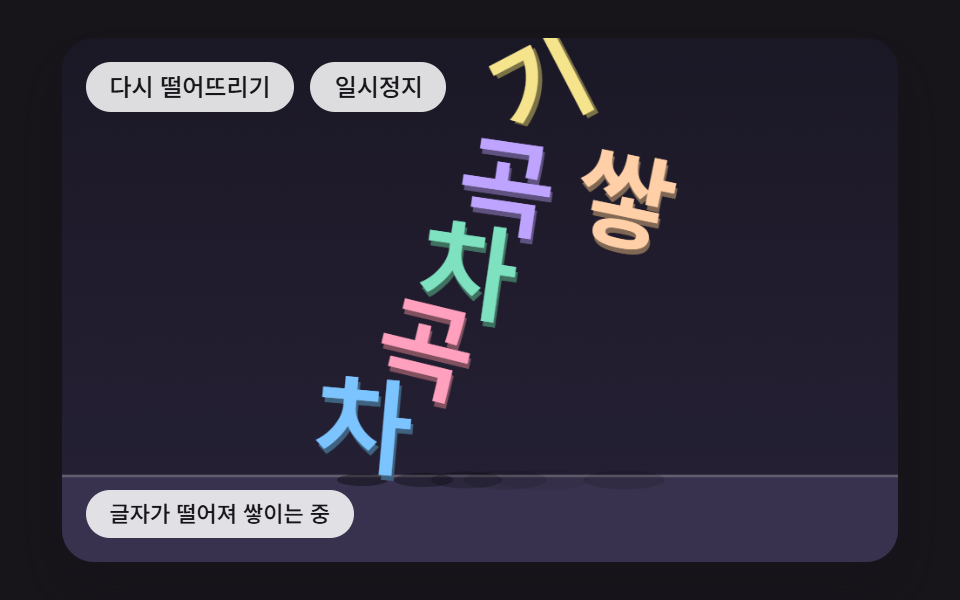 フィードバック文字 物理 演算 9種 — 落ちて積もり揺れる文字をコードで
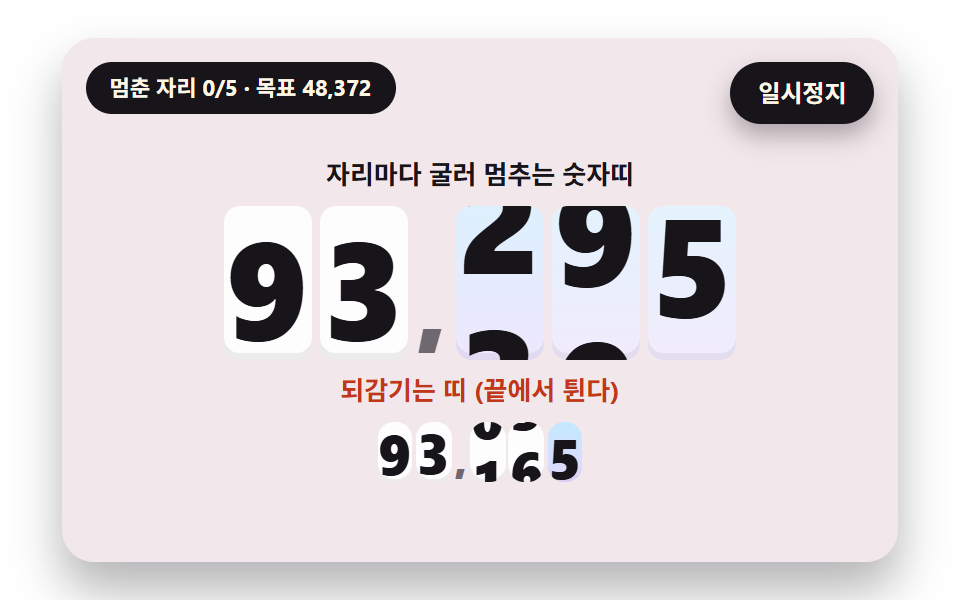 フィードバックカウントアップ アニメーション css 9種 — 転がって止まる計数器から桁上がりが続く掲示板まで
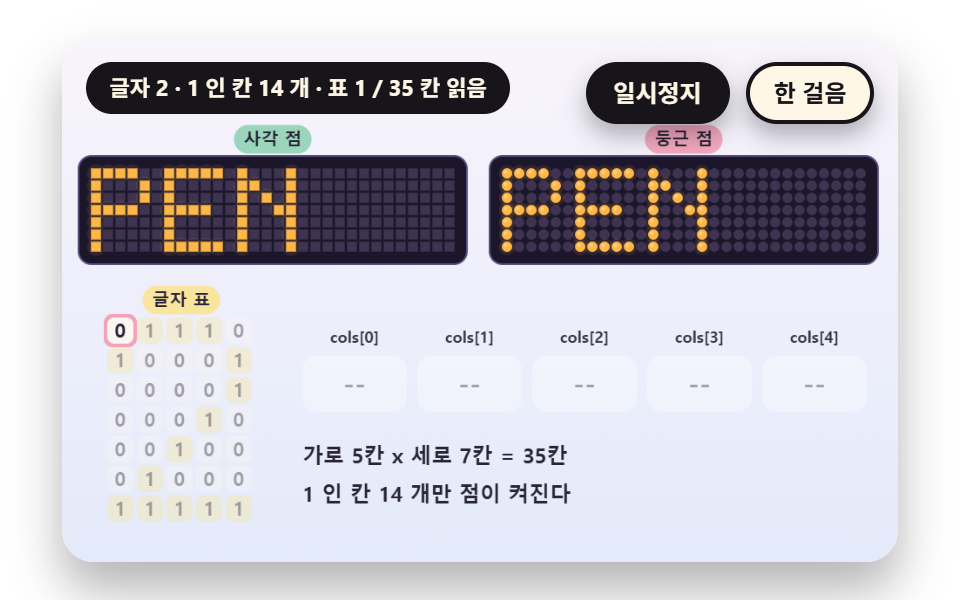 フィードバック電光掲示板 9種 — 5x7のドット文字から残光と行の走査まで
 フィードバックCSS 背景 アニメーション 9選 — 一行でコピペOK
 フィードバック一行でコピペOK ― CSS カード ホバー アニメーション9選
 フィードバックCSS テキスト グラデーション アニメーション 9選 — 一行でコピペOK
 フィードバック【一行でコピペOK】CSS 3D アニメーション9選
 フィードバックCSS 背景アニメーション 星 9選 — 一行でコピペOK
 フィードバッククッキー同意バナーUI 9選 — コピペで使う同意管理コード
 フィードバックトースト通知 UI 9選 — 積み上がるスタック実装