02実測した高さまでスプリングで伸びる返信の折りたたみ
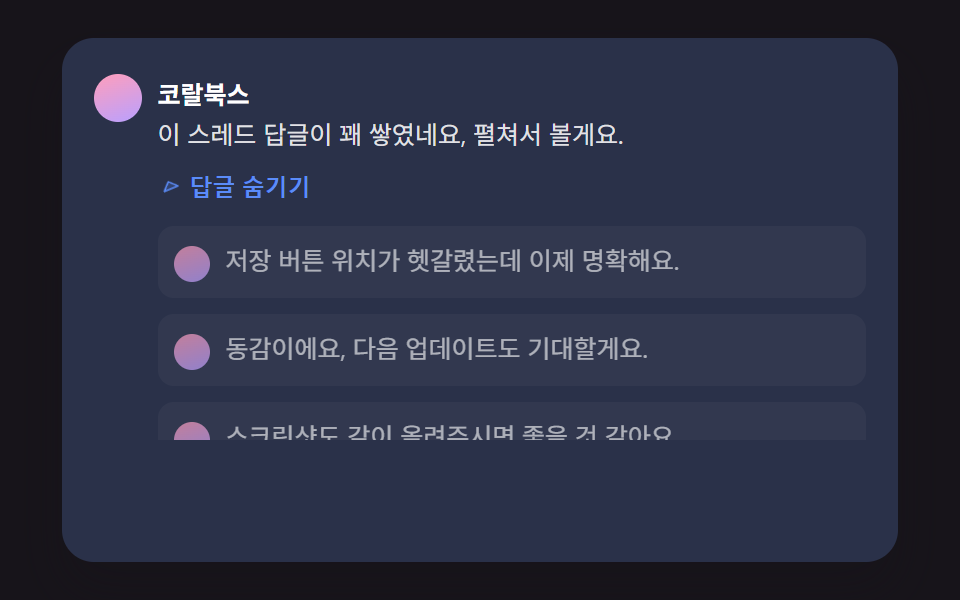
展開する返信の実際の高さを測ってそれを目標にスプリング減衰で伸び、少し行き過ぎてから静止し、矢印アイコンは展開比率ぶん回転する。
使いどころ長い返信スレッドの折りたたみトグル
SPRING_SETTLE_EASINGch__panelsetOpen
<main class="stage">
<div class="ch is-demo" id="chRoot">
  <div class="ch__card">
    <div class="ch__row">
      <span class="ch__avatar" aria-hidden="true"></span>
      <div class="ch__body">
        <p class="ch__meta"><strong class="ch__name">コーラルブックス</strong></p>
        <p class="ch__text">このスレッドは返信がだいぶ溜まってますね、展開して読みます。</p>
        <button type="button" class="ch__toggle" id="chToggle" aria-expanded="false" aria-controls="chPanel">
          <svg class="ch__toggleIcon" id="chIcon" viewBox="0 0 256 256" aria-hidden="true"><g fill="currentColor"><path d="m208 96l-80 80l-80-80Z" opacity=".2"/><path d="M215.39 92.94A8 8 0 0 0 208 88H48a8 8 0 0 0-5.66 13.66l80 80a8 8 0 0 0 11.32 0l80-80a8 8 0 0 0 1.73-8.72M128 164.69L67.31 104h121.38Z"/></g></svg>
          <span class="ch__toggleLabel">返信3件を見る</span>
        </button>
      </div>
    </div>
    <div class="ch__panel" id="chPanel">
      <div class="ch__panelInner" id="chPanelInner">
        <div class="ch__reply">
          <span class="ch__avatar ch__avatar--sm" aria-hidden="true"></span>
          <p class="ch__text">保存ボタンの場所が分かりにくかったけど、これで明確になりました。</p>
        </div>
        <div class="ch__reply">
          <span class="ch__avatar ch__avatar--sm" aria-hidden="true"></span>
          <p class="ch__text">同感です、次のアップデートも楽しみにしてます。</p>
        </div>
        <div class="ch__reply">
          <span class="ch__avatar ch__avatar--sm" aria-hidden="true"></span>
          <p class="ch__text">スクリーンショットも一緒に載せてもらえるといいですね。</p>
        </div>
      </div>
    </div>
  </div>
  <p class="ch__sr" id="chStatus" aria-live="polite"></p>
</div>
</main>@use "../../../../site/static/demo-tokens" as *;
@include stage($stage-ink);
.ch {
position: relative;
width: min(92vw, calc(160vh - 12.8vw));
aspect-ratio: 480 / 300;
margin: 0 auto;
border-radius: $r-card;
overflow: hidden;
box-shadow: $shadow-raised;
background: $tick-panel;
font-family: -apple-system, "Segoe UI", "Noto Sans KR", sans-serif;
}
.ch__card {
padding: $sp-4;
box-sizing: border-box;
height: 100%;
overflow: hidden;
}
.ch__row { display: flex; align-items: flex-start; gap: $sp-2; }
.ch__avatar {
flex: none;
width: 24px;
height: 24px;
border-radius: 50%;
background: linear-gradient(160deg, $subject-pink, $subject-lilac);
margin-top: 4px;
&--sm { width: 18px; height: 18px; }
}
.ch__body { min-width: 0; }
.ch__meta { margin: 0 0 4px; }
.ch__name { color: #fff; font-size: 12.5px; font-weight: 700; }
.ch__text { margin: 0 0 4px; color: rgba(255, 255, 255, .86); font-size: 12.5px; line-height: 1.5; }
.ch__toggle {
display: inline-flex;
align-items: center;
gap: 4px;
border: 0;
background: transparent;
color: $subject-blue-light;
font-size: 11.5px;
font-weight: 600;
padding: $sp-1 $sp-2 $sp-1 0;
cursor: pointer;
border-radius: $r-xs;
}
.ch__toggle:focus-visible { outline: 2px solid $subject-blue-light; outline-offset: 2px; }
.ch__toggleIcon { width: 12px; height: 12px; transform-origin: center; }
.ch__panel {
overflow: hidden;
margin-left: 32px;
}
.ch__panelInner {
display: flex;
flex-direction: column;
gap: $sp-2;
padding-top: $sp-2;
}
.ch__reply {
display: flex;
align-items: flex-start;
gap: $sp-2;
padding: $sp-2;
background: rgba(255, 255, 255, .05);
border-radius: $r-sm;
.ch__text { margin: 0; }
}
.ch__sr {
position: absolute;
width: 1px; height: 1px;
overflow: hidden;
clip: rect(0 0 0 0);
white-space: nowrap;
}
@media (max-width: 340px) {
.ch__card { padding: $sp-3; }
.ch__text, .ch__name { font-size: 11.5px; }
}
@media (prefers-reduced-motion: reduce) {
.ch__panel, .ch__toggleIcon { transition: none !important; }
}html, body {
margin: 0;
overflow: hidden;
}
.stage {
box-sizing: border-box;
min-height: 100vh;
display: grid;
place-items: center;
margin: 0;
background: #17141a;
font-family: -apple-system, "Segoe UI", "Noto Sans KR", sans-serif;
padding: clamp(8px, 4vw, 24px);
}
.ch {
position: relative;
width: min(92vw, 160vh - 12.8vw);
aspect-ratio: 480/300;
margin: 0 auto;
border-radius: 16px;
overflow: hidden;
box-shadow: 0 14px 24px rgba(23, 20, 26, 0.32);
background: #231f28;
font-family: -apple-system, "Segoe UI", "Noto Sans KR", sans-serif;
}
.ch__card {
padding: 16px;
box-sizing: border-box;
height: 100%;
overflow: hidden;
}
.ch__row {
display: flex;
align-items: flex-start;
gap: 8px;
}
.ch__avatar {
flex: none;
width: 24px;
height: 24px;
border-radius: 50%;
background: linear-gradient(160deg, #ff9ebb, #b9a0ff);
margin-top: 2px;
}
.ch__avatar--sm {
width: 18px;
height: 18px;
}
.ch__body {
min-width: 0;
}
.ch__meta {
margin: 0 0 2px;
}
.ch__name {
color: #fff;
font-size: 12.5px;
font-weight: 700;
}
.ch__text {
margin: 0 0 4px;
color: rgba(255, 255, 255, 0.86);
font-size: 12.5px;
line-height: 1.5;
}
.ch__toggle {
display: inline-flex;
align-items: center;
gap: 4px;
border: 0;
background: transparent;
color: #5b8cf8;
font-size: 11.5px;
font-weight: 600;
padding: 4px 8px 4px 0;
cursor: pointer;
border-radius: 4px;
}
.ch__toggle:focus-visible {
outline: 2px solid #5b8cf8;
outline-offset: 2px;
}
.ch__toggleIcon {
width: 12px;
height: 12px;
transform-origin: center;
}
.ch__panel {
overflow: hidden;
margin-left: 32px;
}
.ch__panelInner {
display: flex;
flex-direction: column;
gap: 8px;
padding-top: 8px;
}
.ch__reply {
display: flex;
align-items: flex-start;
gap: 8px;
padding: 8px;
background: rgba(255, 255, 255, 0.05);
border-radius: 8px;
}
.ch__reply .ch__text {
margin: 0;
}
.ch__sr {
position: absolute;
width: 1px;
height: 1px;
overflow: hidden;
clip: rect(0 0 0 0);
white-space: nowrap;
}
@media (max-width: 340px) {
.ch__card {
padding: 12px;
}
.ch__text, .ch__name {
font-size: 11.5px;
}
}
@media (prefers-reduced-motion: reduce) {
.ch__panel, .ch__toggleIcon {
transition: none !important;
}
}(function () {
// 기법: 패널을 height:0 으로 접어 두고 펼칠 때 height:auto 로 잠깐 바꿔 scrollHeight 를
// 실측한 뒤(레이아웃은 그 순간 한 번만 재계산), 그 실측값을 목표로 스프링 이징(선형 샘플
// 곡선, 100% 를 살짝 넘겼다가 되돌아오는 값들)으로 height 를 직접 움직인다. 같은 이징·같은
// 진행률로 화살표를 0→180도 회전시켜 "펼침 비율만큼 회전"을 구현한다.
var root = document.getElementById('chRoot');
var toggle = document.getElementById('chToggle');
var icon = document.getElementById('chIcon');
var panel = document.getElementById('chPanel');
var inner = document.getElementById('chPanelInner');
var status = document.getElementById('chStatus');
var label = toggle.querySelector('.ch__toggleLabel');
// $ease-lerp-settle 곡선(site/static/demo-tokens.scss)과 같은 샘플 — 1 을 넘겼다가(최대 1.126) 되돌아온다.
var SPRING_SETTLE_EASING = 'linear(0.0, 0.051, 0.176, 0.341, 0.518, 0.685, 0.831, 0.947, 1.032, 1.087, 1.117, 1.126, 1.121, 1.105, 1.085, 1.062, 1.041, 1.022, 1.008, 0.997, 1)';
var reduce = window.matchMedia('(prefers-reduced-motion: reduce)').matches;
if (reduce) root.classList.remove('is-demo');
var open = false;
var panelAnim = null;
var innerAnim = null;
var iconAnim = null;
var bgAnim = null;
function measure() {
panel.style.height = 'auto';
inner.style.opacity = '1';
var h = panel.scrollHeight;
return h;
}
function setOpen(next, animate, delayMs) {
open = next;
toggle.setAttribute('aria-expanded', String(open));
label.textContent = open ? '返信を隠す' : '返信3件を見る';
status.textContent = open ? '返信3件が展開されました。' : '返信が折りたたまれました。';
if (panelAnim) panelAnim.cancel();
if (innerAnim) innerAnim.cancel();
if (iconAnim) iconAnim.cancel();
if (bgAnim) bgAnim.cancel();
var target = measure();
var from = open ? 0 : target;
var to = open ? target : 0;
panel.style.height = from + 'px';
inner.style.opacity = open ? '0' : '1';
if (!animate || reduce) {
panel.style.height = to + 'px';
inner.style.opacity = open ? '1' : '0';
icon.style.transform = 'rotate(' + (open ? 180 : 0) + 'deg)';
return;
}
// 계산: 패널이 실측한 픽셀 높이가 클수록 늘어나는 데 걸리는 시간도 조금 더 길게 잡는다.
var dur = Math.max(320, Math.min(680, 300 + target * 0.9));
panelAnim = panel.animate(
[{ height: from + 'px' }, { height: to + 'px' }],
{ duration: dur, delay: delayMs || 0, easing: SPRING_SETTLE_EASING, fill: 'forwards' }
);
innerAnim = inner.animate(
[{ opacity: open ? 0 : 1 }, { opacity: open ? 1 : 0 }],
{ duration: Math.round(dur * 0.6), delay: delayMs || 0, easing: 'ease-out', fill: 'forwards' }
);
iconAnim = icon.animate(
[{ transform: 'rotate(' + (open ? 0 : 180) + 'deg)' }, { transform: 'rotate(' + (open ? 180 : 0) + 'deg)' }],
{ duration: dur, delay: delayMs || 0, easing: SPRING_SETTLE_EASING, fill: 'forwards' }
);
// 계산: 펼침 비율이 0→1(또는 반대)로 진행되는 같은 구간 동안, 패널 전체(카드 바탕)에도
// 옅은 색 변화를 얹어 화살표·패널 경계 바깥까지 값을 전파한다(넓은 면적의 근거 있는 변화).
bgAnim = root.animate(
[{ backgroundColor: '#231f28' }, { backgroundColor: '#2b3550' }, { backgroundColor: '#231f28' }],
{ duration: Math.round(dur * 1.15), delay: delayMs || 0, easing: 'ease-out' }
);
}
panel.style.height = '0px';
inner.style.opacity = '0';
toggle.addEventListener('click', function () {
root.classList.remove('is-demo');
setOpen(!open, true, 0);
});
toggle.addEventListener('keydown', function (e) {
if (e.key === 'Enter' || e.key === ' ') { e.preventDefault(); toggle.click(); }
});
var seqTimer = null;
function playSequence() {
if (seqTimer) { window.clearTimeout(seqTimer); seqTimer = null; }
setOpen(false, false, 0);
setOpen(true, true, 200);
seqTimer = window.setTimeout(function () {
setOpen(false, true, 0);
}, 1080);
}
if (reduce) {
setOpen(true, false, 0);
} else {
playSequence();
window.setInterval(function () {
if (!root.classList.contains('is-demo')) return;
playSequence();
}, 2600);
}
})();import { useEffect, useRef } from "react";
import styles from "./CommentThreadCollapseHeightSpring.module.scss";
// $ease-lerp-settle 곡선(site/static/demo-tokens.scss)과 같은 샘플 — 1 을 넘겼다가(최대 1.126) 되돌아온다.
const SPRING_SETTLE_EASING =
"linear(0.0, 0.051, 0.176, 0.341, 0.518, 0.685, 0.831, 0.947, 1.032, 1.087, 1.117, 1.126, 1.121, 1.105, 1.085, 1.062, 1.041, 1.022, 1.008, 0.997, 1)";
export default function CommentThreadCollapseHeightSpring() {
const rootRef = useRef<HTMLDivElement>(null);
const toggleRef = useRef<HTMLButtonElement>(null);
const iconRef = useRef<SVGSVGElement>(null);
const panelRef = useRef<HTMLDivElement>(null);
const innerRef = useRef<HTMLDivElement>(null);
const labelRef = useRef<HTMLSpanElement>(null);
const statusRef = useRef<HTMLParagraphElement>(null);
useEffect(() => {
const root = rootRef.current;
const toggle = toggleRef.current;
const icon = iconRef.current;
const panel = panelRef.current;
const inner = innerRef.current;
const label = labelRef.current;
const status = statusRef.current;
if (!root || !toggle || !icon || !panel || !inner || !label || !status) return;
const reduce = window.matchMedia("(prefers-reduced-motion: reduce)").matches;
if (reduce) root.classList.remove("is-demo");
let open = false;
let panelAnim: Animation | null = null;
let innerAnim: Animation | null = null;
let iconAnim: Animation | null = null;
let bgAnim: Animation | null = null;
function measure() {
panel!.style.height = "auto";
inner!.style.opacity = "1";
return panel!.scrollHeight;
}
function setOpen(next: boolean, animate: boolean, delayMs: number) {
open = next;
toggle!.setAttribute("aria-expanded", String(open));
label!.textContent = open ? "답글 숨기기" : "답글 3개 보기";
status!.textContent = open ? "답글 3개가 펼쳐졌습니다." : "답글이 접혔습니다.";
if (panelAnim) panelAnim.cancel();
if (innerAnim) innerAnim.cancel();
if (iconAnim) iconAnim.cancel();
if (bgAnim) bgAnim.cancel();
const target = measure();
const from = open ? 0 : target;
const to = open ? target : 0;
panel!.style.height = from + "px";
inner!.style.opacity = open ? "0" : "1";
if (!animate || reduce) {
panel!.style.height = to + "px";
inner!.style.opacity = open ? "1" : "0";
icon!.style.transform = `rotate(${open ? 180 : 0}deg)`;
return;
}
const dur = Math.max(320, Math.min(680, 300 + target * 0.9));
panelAnim = panel!.animate(
[{ height: from + "px" }, { height: to + "px" }],
{ duration: dur, delay: delayMs, easing: SPRING_SETTLE_EASING, fill: "forwards" }
);
innerAnim = inner!.animate(
[{ opacity: open ? 0 : 1 }, { opacity: open ? 1 : 0 }],
{ duration: Math.round(dur * 0.6), delay: delayMs, easing: "ease-out", fill: "forwards" }
);
iconAnim = icon!.animate(
[{ transform: `rotate(${open ? 0 : 180}deg)` }, { transform: `rotate(${open ? 180 : 0}deg)` }],
{ duration: dur, delay: delayMs, easing: SPRING_SETTLE_EASING, fill: "forwards" }
);
// 계산: 펼침 비율이 0→1(또는 반대)로 진행되는 같은 구간 동안, 패널 전체(카드 바탕)에도
// 옅은 색 변화를 얹어 화살표·패널 경계 바깥까지 값을 전파한다(넓은 면적의 근거 있는 변화).
bgAnim = root!.animate(
[{ backgroundColor: "#231f28" }, { backgroundColor: "#2b3550" }, { backgroundColor: "#231f28" }],
{ duration: Math.round(dur * 1.15), delay: delayMs, easing: "ease-out" }
);
}
panel.style.height = "0px";
inner.style.opacity = "0";
const onActivate = () => { root.classList.remove("is-demo"); setOpen(!open, true, 0); };
toggle.addEventListener("click", onActivate);
toggle.addEventListener("keydown", (e) => {
if (e.key === "Enter" || e.key === " ") { e.preventDefault(); onActivate(); }
});
let seqTimer: number | undefined;
function playSequence() {
if (seqTimer) { window.clearTimeout(seqTimer); seqTimer = undefined; }
setOpen(false, false, 0);
setOpen(true, true, 200);
seqTimer = window.setTimeout(() => { setOpen(false, true, 0); }, 1080);
}
let timer: number | undefined;
if (reduce) {
setOpen(true, false, 0);
} else {
playSequence();
timer = window.setInterval(() => {
if (!root.classList.contains("is-demo")) return;
playSequence();
}, 2600);
}
return () => { if (timer) window.clearInterval(timer); if (seqTimer) window.clearTimeout(seqTimer); };
}, []);
return (
<main className={styles.stage}>
<div className={`${styles.ch} is-demo`} ref={rootRef}>
<div className={styles.ch__card}>
<div className={styles.ch__row}>
<span className={styles.ch__avatar} aria-hidden="true" />
<div className={styles.ch__body}>
<p className={styles.ch__meta}><strong className={styles.ch__name}>코랄북스</strong></p>
<p className={styles.ch__text}>이 스레드 답글이 꽤 쌓였네요, 펼쳐서 볼게요.</p>
<button type="button" className={styles.ch__toggle} ref={toggleRef} aria-expanded="false" aria-controls="chPanel">
<svg className={styles.ch__toggleIcon} ref={iconRef} viewBox="0 0 256 256" aria-hidden="true">
<g fill="currentColor">
<path d="m208 96l-80 80l-80-80Z" opacity=".2" />
<path d="M215.39 92.94A8 8 0 0 0 208 88H48a8 8 0 0 0-5.66 13.66l80 80a8 8 0 0 0 11.32 0l80-80a8 8 0 0 0 1.73-8.72M128 164.69L67.31 104h121.38Z" />
</g>
</svg>
<span ref={labelRef}>답글 3개 보기</span>
</button>
</div>
</div>
<div className={styles.ch__panel} id="chPanel" ref={panelRef}>
<div className={styles.ch__panelInner} ref={innerRef}>
<div className={styles.ch__reply}>
<span className={`${styles.ch__avatar} ${styles["ch__avatar--sm"]}`} aria-hidden="true" />
<p className={styles.ch__text}>저장 버튼 위치가 헷갈렸는데 이제 명확해요.</p>
</div>
<div className={styles.ch__reply}>
<span className={`${styles.ch__avatar} ${styles["ch__avatar--sm"]}`} aria-hidden="true" />
<p className={styles.ch__text}>동감이에요, 다음 업데이트도 기대할게요.</p>
</div>
<div className={styles.ch__reply}>
<span className={`${styles.ch__avatar} ${styles["ch__avatar--sm"]}`} aria-hidden="true" />
<p className={styles.ch__text}>스크린샷도 같이 올려주시면 좋을 것 같아요.</p>
</div>
</div>
</div>
</div>
<p className={styles.ch__sr} ref={statusRef} aria-live="polite" />
</div>
</main>
);
}02 実測した高さまでスプリングで伸びる返信の折りたたみ — 計測 累積面積 74.878% · 動いたフレーム 8/23GODRICH オリジナル · SCSS と React は zip に同梱 · コメント欄 css 実装9パターン — 深さから削除後の詰めまで計算するリスト
このデモが属する記事
 コメント欄 css 実装9パターン — 深さから削除後の詰めまで計算するリストコメント欄 css は、返信の深さ・行の高さ・経過時間を計算して動かすコメントリストの実装です。消えたコメントが占めていたピクセル値がそのまま下のコメントが上がる距離になり、返信のインデントは深さの段数から、固定コメントの光は固定されてから この記事のデモをすべて見る