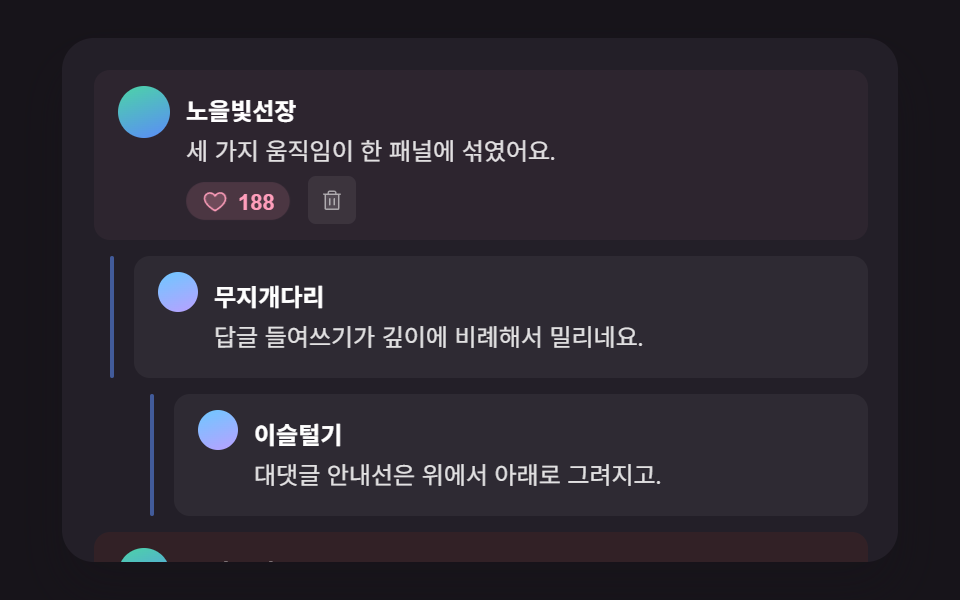
09複数の計算を一つのパネルに集めたコメント欄ヒーロー場面
01の返信インデント・04のいいねカウントポップ・07の削除シフトを一つのパネル上に同時に配置し、返信を開いていいねして削除する完成場面を作る。
使いどころブログ記事詳細ページのコメントセクション
HERO_REPLY_INDENT_STEP_PXHERO_DELETE_SHIFT_SPRING_STIFFNESShero__guide
<main class="stage">
<div class="hero is-demo" id="heroRoot">
  <ul class="hero__list" role="list" id="heroList">
    <li class="hero__cmt" data-depth="0" data-id="h1">
      <span class="hero__avatar" aria-hidden="true"></span>
      <div class="hero__body">
        <p class="hero__meta"><strong class="hero__name">夕焼けの船長</strong></p>
        <p class="hero__text">3つの動きがひとつのパネルに混ざっています。</p>
        <button type="button" class="hero__likeBtn" id="heroLike1" aria-pressed="false" aria-label="いいね">
          <svg class="hero__heart" viewBox="0 0 256 256" aria-hidden="true"><g fill="currentColor"><path d="M232 102c0 66-104 122-104 122S24 168 24 102a54 54 0 0 1 54-54c22.59 0 41.94 12.31 50 32c8.06-19.69 27.41-32 50-32a54 54 0 0 1 54 54" opacity=".2"/><path d="M178 40c-20.65 0-38.73 8.88-50 23.89C116.73 48.88 98.65 40 78 40a62.07 62.07 0 0 0-62 62c0 70 103.79 126.66 108.21 129a8 8 0 0 0 7.58 0C136.21 228.66 240 172 240 102a62.07 62.07 0 0 0-62-62m-50 174.8c-18.26-10.64-96-59.11-96-112.8a46.06 46.06 0 0 1 46-46c19.45 0 35.78 10.36 42.6 27a8 8 0 0 0 14.8 0c6.82-16.67 23.15-27 42.6-27a46.06 46.06 0 0 1 46 46c0 53.61-77.76 102.15-96 112.8"/></g></svg>
          <span class="hero__count" id="heroCount1">187</span>
        </button>
        <button type="button" class="hero__delBtn" id="heroDel1" aria-label="コメントを削除">
          <svg class="hero__icon" viewBox="0 0 256 256" aria-hidden="true"><g fill="currentColor"><path d="M200 56v152a8 8 0 0 1-8 8H64a8 8 0 0 1-8-8V56Z" opacity=".2"/><path d="M216 48h-40v-8a24 24 0 0 0-24-24h-48a24 24 0 0 0-24 24v8H40a8 8 0 0 0 0 16h8v144a16 16 0 0 0 16 16h128a16 16 0 0 0 16-16V64h8a8 8 0 0 0 0-16M96 40a8 8 0 0 1 8-8h48a8 8 0 0 1 8 8v8H96Zm96 168H64V64h128Zm-80-104v64a8 8 0 0 1-16 0v-64a8 8 0 0 1 16 0m48 0v64a8 8 0 0 1-16 0v-64a8 8 0 0 1 16 0"/></g></svg>
        </button>
      </div>
    </li>
    <li class="hero__cmt" data-depth="1" data-id="h2">
      <span class="hero__guide" aria-hidden="true"></span>
      <span class="hero__avatar hero__avatar--sm" aria-hidden="true"></span>
      <div class="hero__body">
        <p class="hero__meta"><strong class="hero__name">虹の橋</strong></p>
        <p class="hero__text">返信のインデントが深さに比例してずれますね。</p>
      </div>
    </li>
    <li class="hero__cmt" data-depth="2" data-id="h3">
      <span class="hero__guide" aria-hidden="true"></span>
      <span class="hero__avatar hero__avatar--sm" aria-hidden="true"></span>
      <div class="hero__body">
        <p class="hero__meta"><strong class="hero__name">露払い</strong></p>
        <p class="hero__text">返信のガイド線は上から下に引かれます。</p>
      </div>
    </li>
    <li class="hero__cmt" data-depth="0" data-id="h4">
      <span class="hero__avatar" aria-hidden="true"></span>
      <div class="hero__body">
        <p class="hero__meta"><strong class="hero__name">岩の隙間</strong></p>
        <p class="hero__text">このコメントを削除すると下がスプリングで上がってきます。</p>
        <button type="button" class="hero__likeBtn" id="heroLike4" aria-pressed="false" aria-label="いいね">
          <svg class="hero__heart" viewBox="0 0 256 256" aria-hidden="true"><g fill="currentColor"><path d="M232 102c0 66-104 122-104 122S24 168 24 102a54 54 0 0 1 54-54c22.59 0 41.94 12.31 50 32c8.06-19.69 27.41-32 50-32a54 54 0 0 1 54 54" opacity=".2"/><path d="M178 40c-20.65 0-38.73 8.88-50 23.89C116.73 48.88 98.65 40 78 40a62.07 62.07 0 0 0-62 62c0 70 103.79 126.66 108.21 129a8 8 0 0 0 7.58 0C136.21 228.66 240 172 240 102a62.07 62.07 0 0 0-62-62m-50 174.8c-18.26-10.64-96-59.11-96-112.8a46.06 46.06 0 0 1 46-46c19.45 0 35.78 10.36 42.6 27a8 8 0 0 0 14.8 0c6.82-16.67 23.15-27 42.6-27a46.06 46.06 0 0 1 46 46c0 53.61-77.76 102.15-96 112.8"/></g></svg>
          <span class="hero__count" id="heroCount4">94</span>
        </button>
        <button type="button" class="hero__delBtn" id="heroDel4" aria-label="コメントを削除">
          <svg class="hero__icon" viewBox="0 0 256 256" aria-hidden="true"><g fill="currentColor"><path d="M200 56v152a8 8 0 0 1-8 8H64a8 8 0 0 1-8-8V56Z" opacity=".2"/><path d="M216 48h-40v-8a24 24 0 0 0-24-24h-48a24 24 0 0 0-24 24v8H40a8 8 0 0 0 0 16h8v144a16 16 0 0 0 16 16h128a16 16 0 0 0 16-16V64h8a8 8 0 0 0 0-16M96 40a8 8 0 0 1 8-8h48a8 8 0 0 1 8 8v8H96Zm96 168H64V64h128Zm-80-104v64a8 8 0 0 1-16 0v-64a8 8 0 0 1 16 0m48 0v64a8 8 0 0 1-16 0v-64a8 8 0 0 1 16 0"/></g></svg>
        </button>
      </div>
    </li>
  </ul>
  <button type="button" class="hero__resetBtn" id="heroReset">元に戻す</button>
  <p class="hero__sr" id="heroStatus" aria-live="polite"></p>
</div>
</main>@use "../../../../site/static/demo-tokens" as *;
@include stage($stage-ink);
.hero {
position: relative;
width: min(92vw, calc(160vh - 12.8vw));
aspect-ratio: 480 / 300;
margin: 0 auto;
border-radius: $r-card;
overflow: hidden;
box-shadow: $shadow-raised;
background: $tick-panel;
font-family: -apple-system, "Segoe UI", "Noto Sans KR", sans-serif;
box-sizing: border-box;
padding: $sp-4;
display: flex;
flex-direction: column;
gap: $sp-2;
}
.hero__list {
list-style: none;
margin: 0;
padding: 0;
display: flex;
flex-direction: column;
gap: $sp-2;
flex: 1;
}
.hero__cmt {
position: relative;
display: flex;
align-items: flex-start;
gap: $sp-2;
padding: $sp-2 $sp-3;
background: rgba(255, 255, 255, .05);
border-radius: $r-sm;
will-change: transform, height;
}
.hero__guide {
position: absolute;
left: -12px;
top: 0;
width: 2px;
height: 100%;
background: $subject-blue-light;
opacity: .55;
border-radius: $r-pill;
transform: scaleY(0);
transform-origin: top;
}
.hero__avatar {
flex: none;
width: 26px;
height: 26px;
border-radius: 50%;
background: linear-gradient(160deg, $subject-mint, $subject-blue-light);
&--sm {
width: 20px;
height: 20px;
background: linear-gradient(160deg, $subject-sky, $subject-lilac);
}
}
.hero__body { min-width: 0; flex: 1; }
.hero__meta { margin: 0 0 4px; }
.hero__name { color: #fff; font-size: 12px; font-weight: 700; }
.hero__text { margin: 0 0 $sp-1; color: rgba(255, 255, 255, .86); font-size: 12px; line-height: 1.5; }
.hero__likeBtn {
display: inline-flex;
align-items: center;
gap: 8px;
border: 0;
background: rgba(255, 255, 255, .06);
color: rgba(255, 255, 255, .7);
padding: 4px $sp-2;
border-radius: $r-pill;
font-size: 11px;
font-weight: 700;
cursor: pointer;
margin-right: $sp-1;
&:focus-visible { outline: 2px solid $subject-blue-light; outline-offset: 2px; }
&.is-liked {
color: $subject-pink;
background: rgba(255, 158, 187, .14);
}
}
.hero__heart { width: 13px; height: 13px; }
.hero__count { font-variant-numeric: tabular-nums; }
.hero__delBtn {
display: inline-flex;
align-items: center;
justify-content: center;
border: 0;
background: rgba(255, 255, 255, .07);
color: rgba(255, 255, 255, .55);
width: 24px;
height: 24px;
border-radius: $r-xs;
cursor: pointer;
&:hover { color: $error; background: rgba(194, 54, 26, .14); }
&:focus-visible { outline: 2px solid $subject-blue-light; outline-offset: 2px; }
}
.hero__icon { width: 13px; height: 13px; }
.hero__resetBtn {
align-self: flex-end;
border: 0;
background: rgba(255, 255, 255, .07);
color: $subject-blue-light;
font-size: 11.5px;
font-weight: 600;
padding: $sp-1 $sp-3;
border-radius: $r-pill;
cursor: pointer;
&:focus-visible { outline: 2px solid $subject-blue-light; outline-offset: 2px; }
}
.hero__sr {
position: absolute;
width: 1px; height: 1px;
overflow: hidden;
clip: rect(0 0 0 0);
white-space: nowrap;
}
@media (max-width: 340px) {
.hero { padding: $sp-3; }
.hero__text, .hero__name { font-size: 11px; }
}
@media (prefers-reduced-motion: reduce) {
.hero__guide, .hero__cmt { transition: none !important; }
}html, body {
margin: 0;
overflow: hidden;
}
.stage {
box-sizing: border-box;
min-height: 100vh;
display: grid;
place-items: center;
margin: 0;
background: #17141a;
font-family: -apple-system, "Segoe UI", "Noto Sans KR", sans-serif;
padding: clamp(8px, 4vw, 24px);
}
.hero {
position: relative;
width: min(92vw, 160vh - 12.8vw);
aspect-ratio: 480/300;
margin: 0 auto;
border-radius: 16px;
overflow: hidden;
box-shadow: 0 14px 24px rgba(23, 20, 26, 0.32);
background: #231f28;
font-family: -apple-system, "Segoe UI", "Noto Sans KR", sans-serif;
box-sizing: border-box;
padding: 16px;
display: flex;
flex-direction: column;
gap: 8px;
}
.hero__list {
list-style: none;
margin: 0;
padding: 0;
display: flex;
flex-direction: column;
gap: 8px;
flex: 1;
}
.hero__cmt {
position: relative;
display: flex;
align-items: flex-start;
gap: 8px;
padding: 8px 12px;
background: rgba(255, 255, 255, 0.05);
border-radius: 8px;
will-change: transform, height;
}
.hero__guide {
position: absolute;
left: -12px;
top: 0;
width: 2px;
height: 100%;
background: #5b8cf8;
opacity: 0.55;
border-radius: 999px;
transform: scaleY(0);
transform-origin: top;
}
.hero__avatar {
flex: none;
width: 26px;
height: 26px;
border-radius: 50%;
background: linear-gradient(160deg, #4cd4a6, #5b8cf8);
}
.hero__avatar--sm {
width: 20px;
height: 20px;
background: linear-gradient(160deg, #6ec8ff, #b9a0ff);
}
.hero__body {
min-width: 0;
flex: 1;
}
.hero__meta {
margin: 0 0 2px;
}
.hero__name {
color: #fff;
font-size: 12px;
font-weight: 700;
}
.hero__text {
margin: 0 0 4px;
color: rgba(255, 255, 255, 0.86);
font-size: 12px;
line-height: 1.5;
}
.hero__likeBtn {
display: inline-flex;
align-items: center;
gap: 5px;
border: 0;
background: rgba(255, 255, 255, 0.06);
color: rgba(255, 255, 255, 0.7);
padding: 3px 8px;
border-radius: 999px;
font-size: 11px;
font-weight: 700;
cursor: pointer;
margin-right: 4px;
}
.hero__likeBtn:focus-visible {
outline: 2px solid #5b8cf8;
outline-offset: 2px;
}
.hero__likeBtn.is-liked {
color: #ff9ebb;
background: rgba(255, 158, 187, 0.14);
}
.hero__heart {
width: 13px;
height: 13px;
}
.hero__count {
font-variant-numeric: tabular-nums;
}
.hero__delBtn {
display: inline-flex;
align-items: center;
justify-content: center;
border: 0;
background: rgba(255, 255, 255, 0.07);
color: rgba(255, 255, 255, 0.55);
width: 24px;
height: 24px;
border-radius: 4px;
cursor: pointer;
}
.hero__delBtn:hover {
color: #c2361a;
background: rgba(194, 54, 26, 0.14);
}
.hero__delBtn:focus-visible {
outline: 2px solid #5b8cf8;
outline-offset: 2px;
}
.hero__icon {
width: 13px;
height: 13px;
}
.hero__resetBtn {
align-self: flex-end;
border: 0;
background: rgba(255, 255, 255, 0.07);
color: #5b8cf8;
font-size: 11.5px;
font-weight: 600;
padding: 4px 12px;
border-radius: 999px;
cursor: pointer;
}
.hero__resetBtn:focus-visible {
outline: 2px solid #5b8cf8;
outline-offset: 2px;
}
.hero__sr {
position: absolute;
width: 1px;
height: 1px;
overflow: hidden;
clip: rect(0 0 0 0);
white-space: nowrap;
}
@media (max-width: 340px) {
.hero {
padding: 12px;
}
.hero__text, .hero__name {
font-size: 11px;
}
}
@media (prefers-reduced-motion: reduce) {
.hero__guide, .hero__cmt {
transition: none !important;
}
}(function () {
// 기법: 하나의 패널에 세 계산이 겹친다. ① 들여쓰기 — data-depth × HERO_REPLY_INDENT_STEP_PX
// 로 margin-left 를 계산하고 안내선은 scaleY(0→1) 로 위에서 아래로 그린다.
// ② いいね — 이전/이후 개수 diff 로 자릿수 굴림 방향과 탄성 튐 폭을 계산한다.
// ③ 삭제 — 행 높이를 실측해 그만큼 접고, 아래 행은 빈 거리를 HERO 스프링 강성으로 메운다.
var HERO_REPLY_INDENT_STEP_PX = 20;
var HERO_DELETE_SHIFT_SPRING_STIFFNESS = 220;
var HERO_LIKE_POP_AMPLITUDE = 1.16;
// $ease-lerp-settle 곡선(site/static/demo-tokens.scss)과 같은 샘플 — 1 을 넘겼다가(최대 1.126) 되독아온다.
var SPRING_SETTLE_EASING = 'linear(0.0, 0.051, 0.176, 0.341, 0.518, 0.685, 0.831, 0.947, 1.032, 1.087, 1.117, 1.126, 1.121, 1.105, 1.085, 1.062, 1.041, 1.022, 1.008, 0.997, 1)';
var root = document.getElementById('heroRoot');
var list = document.getElementById('heroList');
var status = document.getElementById('heroStatus');
var reduce = window.matchMedia('(prefers-reduced-motion: reduce)').matches;
if (reduce) root.classList.remove('is-demo');
// ① 들여쓰기 계산
function applyIndents() {
var rows = list.querySelectorAll('.hero__cmt');
for (var i = 0; i < rows.length; i += 1) {
var depth = parseInt(rows[i].getAttribute('data-depth'), 10);
rows[i].style.marginLeft = (depth * HERO_REPLY_INDENT_STEP_PX) + 'px';
}
}
function drawGuides(animate, baseDelay) {
var guides = list.querySelectorAll('.hero__guide');
for (var i = 0; i < guides.length; i += 1) {
if (!animate || reduce) {
guides[i].style.transform = 'scaleY(1)';
continue;
}
guides[i].animate(
[{ transform: 'scaleY(0)' }, { transform: 'scaleY(1)' }],
{ duration: 440, delay: baseDelay + i * 180, easing: 'ease-out', fill: 'forwards' }
);
}
}
// ② いいね 자릿수 굴림 + 탄성 튐
function like(btnId, countId, animate, delayMs) {
var btn = document.getElementById(btnId);
var countEl = document.getElementById(countId);
var liked = btn.getAttribute('aria-pressed') === 'true';
var oldV = parseInt(countEl.textContent, 10);
var newV = liked ? oldV - 1 : oldV + 1;
var diff = newV - oldV;
btn.setAttribute('aria-pressed', String(!liked));
btn.classList.toggle('is-liked', !liked);
countEl.textContent = String(newV);
status.textContent = (!liked ? 'いいねしました。いいね ' : 'いいねを取り消しました。いいね ') + newV + '件';
if (!animate || reduce) return;
countEl.animate(
[
{ transform: 'translateY(0)', opacity: 1 },
{ transform: 'translateY(' + (diff > 0 ? '-70%' : '70%') + ')', opacity: 0 },
{ transform: 'translateY(' + (diff > 0 ? '70%' : '-70%') + ')', opacity: 0, offset: 0.5 },
{ transform: 'translateY(0)', opacity: 1 }
],
{ duration: 340, delay: delayMs || 0, easing: 'ease-out' }
);
btn.animate(
[
{ transform: 'scale(1)' },
{ transform: 'scale(' + HERO_LIKE_POP_AMPLITUDE + ')' },
{ transform: 'scale(0.95)' },
{ transform: 'scale(1)' }
],
{ duration: 400, delay: delayMs || 0, easing: 'ease-out' }
);
// 계산: いいね 행 전체에도 diff 크기만큼 옅은 배경 펄스를 얹어 버튼 주변을 넘어선
// 면적으로 값을 전파한다(item 04 like-pop 의 rowPulse 와 같은 원리).
var likeRow = btn.closest('.hero__cmt');
if (likeRow) {
var pulseAmp = Math.min(0.2, 0.08 + Math.abs(diff) * 0.04);
likeRow.animate(
[
{ backgroundColor: 'rgba(255,158,187,0)' },
{ backgroundColor: 'rgba(255,158,187,' + pulseAmp + ')' },
{ backgroundColor: 'rgba(255,158,187,0)' }
],
{ duration: 560, delay: delayMs || 0, easing: 'ease-out' }
);
}
}
// ③ 삭제 접기 + 아래 행 스프링 시프트
function heroShiftDuration(gapPx) {
return Math.round(60 + 100000 / HERO_DELETE_SHIFT_SPRING_STIFFNESS + Math.min(220, gapPx * 0.5));
}
function removeRow(id, animate, delayMs) {
var row = list.querySelector('.hero__cmt[data-id="' + id + '"]');
if (!row || row.getBoundingClientRect().height === 0) return;
var all = list.querySelectorAll('.hero__cmt');
var seen = false;
var below = [];
for (var i = 0; i < all.length; i += 1) {
if (all[i] === row) { seen = true; continue; }
if (seen && all[i].getBoundingClientRect().height > 0) below.push(all[i]);
}
var gap = row.offsetHeight + 6;
if (!animate || reduce) {
row.style.display = 'none';
status.textContent = 'コメントを削除しました。';
return;
}
var h = row.offsetHeight;
row.style.height = h + 'px';
row.style.overflow = 'hidden';
row.style.boxSizing = 'border-box';
row.animate(
[
{ height: h + 'px', opacity: 1, backgroundColor: 'rgba(194,54,26,0)' },
{ height: h + 'px', opacity: 1, backgroundColor: 'rgba(194,54,26,.16)', offset: 0.4 },
{ height: '0px', opacity: 0, backgroundColor: 'rgba(194,54,26,0)' }
],
{ duration: 240, delay: delayMs || 0, easing: 'ease-in', fill: 'forwards' }
).onfinish = function () { row.style.display = 'none'; };
var dur = heroShiftDuration(gap);
below.forEach(function (el) {
el.animate(
[
{ transform: 'translateY(0px)' },
{ transform: 'translateY(' + gap + 'px)' },
{ transform: 'translateY(0px)' }
],
{ duration: dur, delay: (delayMs || 0) + 240, easing: SPRING_SETTLE_EASING, fill: 'both' }
);
// 계산: 스프링으로 밀려 올라오는 행에도 빈 거리(gap)에 비례한 옅은 배경 결이
// 같은 시간 동안 함께 지나가 "채워졌다"는 느낌을 면적으로도 보여준다.
el.animate(
[
{ backgroundColor: 'rgba(94,234,212,0)' },
{ backgroundColor: 'rgba(94,234,212,' + Math.min(0.18, gap * 0.002) + ')' },
{ backgroundColor: 'rgba(94,234,212,0)' }
],
{ duration: dur, delay: (delayMs || 0) + 240, easing: 'ease-out' }
);
});
status.textContent = 'コメントを削除しました。';
}
function restoreRows() {
var rows = list.querySelectorAll('.hero__cmt');
for (var i = 0; i < rows.length; i += 1) {
rows[i].getAnimations().forEach(function (a) { a.cancel(); });
rows[i].style.display = '';
rows[i].style.height = '';
rows[i].style.overflow = '';
}
status.textContent = '元に戻しました。';
}
function bindLike(btnId, countId) {
var btn = document.getElementById(btnId);
btn.addEventListener('click', function () {
root.classList.remove('is-demo');
like(btnId, countId, true, 0);
});
btn.addEventListener('keydown', function (e) {
if (e.key === 'Enter' || e.key === ' ') { e.preventDefault(); btn.click(); }
});
}
function bindDelete(btnId, targetId) {
var btn = document.getElementById(btnId);
btn.addEventListener('click', function () {
root.classList.remove('is-demo');
removeRow(targetId, true, 0);
});
btn.addEventListener('keydown', function (e) {
if (e.key === 'Enter' || e.key === ' ') { e.preventDefault(); btn.click(); }
});
}
bindLike('heroLike1', 'heroCount1');
bindLike('heroLike4', 'heroCount4');
bindDelete('heroDel1', 'h1');
bindDelete('heroDel4', 'h4');
var reset = document.getElementById('heroReset');
reset.addEventListener('click', function () {
root.classList.remove('is-demo');
restoreRows();
});
reset.addEventListener('keydown', function (e) {
if (e.key === 'Enter' || e.key === ' ') { e.preventDefault(); reset.click(); }
});
applyIndents();
if (reduce) {
drawGuides(false, 0);
} else {
// 데모 시퀀스: 안내선 그리기(220ms~) → いいね 튐(900ms~) → 삭제 접힘(1150ms~, 스프링까지 2s 안에 담기게)
drawGuides(true, 220);
like('heroLike1', 'heroCount1', true, 900);
removeRow('h4', true, 1150);
}
})();import { useEffect, useRef } from "react";
import styles from "./CommentThreadHeroPanelScene.module.scss";
// 기법: 하나의 패널에 세 계산이 겹친다. ① 들여쓰기 — data-depth × HERO_REPLY_INDENT_STEP_PX
// 로 margin-left 를 계산하고 안내선은 scaleY(0→1) 로 위에서 아래로 그린다.
// ② 좋아요 — 이전/이후 개수 diff 로 자릿수 굴림 방향과 탄성 튐 폭을 계산한다.
// ③ 삭제 — 행 높이를 실측해 그만큼 접고, 아래 행은 빈 거리를 HERO 스프링 강성으로 메운다.
const HERO_REPLY_INDENT_STEP_PX = 20;
const HERO_DELETE_SHIFT_SPRING_STIFFNESS = 220;
const HERO_LIKE_POP_AMPLITUDE = 1.16;
// $ease-lerp-settle 곡선(site/static/demo-tokens.scss)과 같은 샘플 — 1 을 넘겼다가(최대 1.126) 되독아온다.
const SPRING_SETTLE_EASING =
"linear(0.0, 0.051, 0.176, 0.341, 0.518, 0.685, 0.831, 0.947, 1.032, 1.087, 1.117, 1.126, 1.121, 1.105, 1.085, 1.062, 1.041, 1.022, 1.008, 0.997, 1)";
const HEART_SVG = (
<svg className={styles.hero__heart} viewBox="0 0 256 256" aria-hidden="true">
<g fill="currentColor">
<path d="M232 102c0 66-104 122-104 122S24 168 24 102a54 54 0 0 1 54-54c22.59 0 41.94 12.31 50 32c8.06-19.69 27.41-32 50-32a54 54 0 0 1 54 54" opacity=".2" />
<path d="M178 40c-20.65 0-38.73 8.88-50 23.89C116.73 48.88 98.65 40 78 40a62.07 62.07 0 0 0-62 62c0 70 103.79 126.66 108.21 129a8 8 0 0 0 7.58 0C136.21 228.66 240 172 240 102a62.07 62.07 0 0 0-62-62m-50 174.8c-18.26-10.64-96-59.11-96-112.8a46.06 46.06 0 0 1 46-46c19.45 0 35.78 10.36 42.6 27a8 8 0 0 0 14.8 0c6.82-16.67 23.15-27 42.6-27a46.06 46.06 0 0 1 46 46c0 53.61-77.76 102.15-96 112.8" />
</g>
</svg>
);
const TRASH_SVG = (
<svg className={styles.hero__icon} viewBox="0 0 256 256" aria-hidden="true">
<g fill="currentColor">
<path d="M200 56v152a8 8 0 0 1-8 8H64a8 8 0 0 1-8-8V56Z" opacity=".2" />
<path d="M216 48h-40v-8a24 24 0 0 0-24-24h-48a24 24 0 0 0-24 24v8H40a8 8 0 0 0 0 16h8v144a16 16 0 0 0 16 16h128a16 16 0 0 0 16-16V64h8a8 8 0 0 0 0-16M96 40a8 8 0 0 1 8-8h48a8 8 0 0 1 8 8v8H96Zm96 168H64V64h128Zm-80-104v64a8 8 0 0 1-16 0v-64a8 8 0 0 1 16 0m48 0v64a8 8 0 0 1-16 0v-64a8 8 0 0 1 16 0" />
</g>
</svg>
);
export default function CommentThreadHeroPanelScene() {
const rootRef = useRef<HTMLDivElement>(null);
const listRef = useRef<HTMLUListElement>(null);
const statusRef = useRef<HTMLParagraphElement>(null);
const likeRefs = useRef<Record<string, HTMLButtonElement | null>>({});
const countRefs = useRef<Record<string, HTMLSpanElement | null>>({});
useEffect(() => {
const root = rootRef.current;
const list = listRef.current;
const status = statusRef.current;
if (!root || !list || !status) return;
const reduce = window.matchMedia("(prefers-reduced-motion: reduce)").matches;
if (reduce) root.classList.remove("is-demo");
function applyIndents() {
const rows = list!.querySelectorAll<HTMLElement>(".hero__cmt");
rows.forEach((row) => {
const depth = parseInt(row.getAttribute("data-depth")!, 10);
row.style.marginLeft = `${depth * HERO_REPLY_INDENT_STEP_PX}px`;
});
}
function drawGuides(animate: boolean, baseDelay: number) {
const guides = list!.querySelectorAll<HTMLElement>(".hero__guide");
guides.forEach((g, i) => {
if (!animate || reduce) {
g.style.transform = "scaleY(1)";
return;
}
g.animate(
[{ transform: "scaleY(0)" }, { transform: "scaleY(1)" }],
{ duration: 440, delay: baseDelay + i * 180, easing: "ease-out", fill: "forwards" }
);
});
}
function like(key: string, animate: boolean, delayMs: number) {
const btn = likeRefs.current![key];
const countEl = countRefs.current![key];
if (!btn || !countEl) return;
const liked = btn.getAttribute("aria-pressed") === "true";
const oldV = parseInt(countEl.textContent!, 10);
const newV = liked ? oldV - 1 : oldV + 1;
const diff = newV - oldV;
btn.setAttribute("aria-pressed", String(!liked));
btn.classList.toggle("is-liked", !liked);
countEl.textContent = String(newV);
status!.textContent = (!liked ? "좋아요를 눌렀습니다. 좋아요 " : "좋아요를 취소했습니다. 좋아요 ") + newV + "개";
if (!animate || reduce) return;
countEl.animate(
[
{ transform: "translateY(0)", opacity: 1 },
{ transform: `translateY(${diff > 0 ? "-70%" : "70%"})`, opacity: 0 },
{ transform: `translateY(${diff > 0 ? "70%" : "-70%"})`, opacity: 0, offset: 0.5 },
{ transform: "translateY(0)", opacity: 1 },
],
{ duration: 340, delay: delayMs, easing: "ease-out" }
);
btn.animate(
[
{ transform: "scale(1)" },
{ transform: `scale(${HERO_LIKE_POP_AMPLITUDE})` },
{ transform: "scale(0.95)" },
{ transform: "scale(1)" },
],
{ duration: 400, delay: delayMs, easing: "ease-out" }
);
// 계산: 좋아요 행 전체에도 diff 크기만큼 옅은 배경 펄스를 얹어 버튼 주변을 넘어선
// 면적으로 값을 전파한다(item 04 like-pop 의 rowPulse 와 같은 원리).
const likeRow = btn.closest<HTMLElement>(".hero__cmt");
if (likeRow) {
const pulseAmp = Math.min(0.2, 0.08 + Math.abs(diff) * 0.04);
likeRow.animate(
[
{ backgroundColor: "rgba(255,158,187,0)" },
{ backgroundColor: `rgba(255,158,187,${pulseAmp})` },
{ backgroundColor: "rgba(255,158,187,0)" },
],
{ duration: 560, delay: delayMs, easing: "ease-out" }
);
}
}
function heroShiftDuration(gapPx: number): number {
return Math.round(60 + 100000 / HERO_DELETE_SHIFT_SPRING_STIFFNESS + Math.min(220, gapPx * 0.5));
}
function removeRow(id: string, animate: boolean, delayMs: number) {
const row = list!.querySelector<HTMLElement>(`.hero__cmt[data-id="${id}"]`);
if (!row || row.getBoundingClientRect().height === 0) return;
const all = Array.from(list!.querySelectorAll<HTMLElement>(".hero__cmt"));
const seen = all.indexOf(row);
const below = all.slice(seen + 1).filter((el) => el.getBoundingClientRect().height > 0);
const gap = row.offsetHeight + 6;
if (!animate || reduce) {
row.style.display = "none";
status!.textContent = "댓글을 삭제했습니다.";
return;
}
const h = row.offsetHeight;
row.style.height = h + "px";
row.style.overflow = "hidden";
row.style.boxSizing = "border-box";
const collapse = row.animate(
[
{ height: h + "px", opacity: 1, backgroundColor: "rgba(194,54,26,0)" },
{ height: h + "px", opacity: 1, backgroundColor: "rgba(194,54,26,.16)", offset: 0.4 },
{ height: "0px", opacity: 0, backgroundColor: "rgba(194,54,26,0)" },
],
{ duration: 240, delay: delayMs, easing: "ease-in", fill: "forwards" }
);
collapse.onfinish = () => { row.style.display = "none"; };
const dur = heroShiftDuration(gap);
below.forEach((el) => {
el.animate(
[
{ transform: "translateY(0px)" },
{ transform: `translateY(${gap}px)` },
{ transform: "translateY(0px)" },
],
{ duration: dur, delay: delayMs + 240, easing: SPRING_SETTLE_EASING, fill: "both" }
);
// 계산: 스프링으로 밀려 올라오는 행에도 빈 거리(gap)에 비례한 옅은 배경 결이
// 같은 시간 동안 함께 지나가 "채워졌다"는 느낌을 면적으로도 보여준다.
el.animate(
[
{ backgroundColor: "rgba(94,234,212,0)" },
{ backgroundColor: `rgba(94,234,212,${Math.min(0.18, gap * 0.002)})` },
{ backgroundColor: "rgba(94,234,212,0)" },
],
{ duration: dur, delay: delayMs + 240, easing: "ease-out" }
);
});
status!.textContent = "댓글을 삭제했습니다.";
}
function restoreRows() {
const rows = list!.querySelectorAll<HTMLElement>(".hero__cmt");
rows.forEach((row) => {
row.getAnimations().forEach((a) => a.cancel());
row.style.display = "";
row.style.height = "";
row.style.overflow = "";
});
status!.textContent = "되돌렸습니다.";
}
function bindLike(key: string) {
const btn = likeRefs.current![key];
if (!btn) return;
const onActivate = () => { root!.classList.remove("is-demo"); like(key, true, 0); };
btn.addEventListener("click", onActivate);
btn.addEventListener("keydown", (e) => {
if (e.key === "Enter" || e.key === " ") { e.preventDefault(); onActivate(); }
});
}
function bindDelete(btnId: string, targetId: string) {
const btn = document.getElementById(btnId);
if (!btn) return;
const onActivate = () => { root!.classList.remove("is-demo"); removeRow(targetId, true, 0); };
btn.addEventListener("click", onActivate);
btn.addEventListener("keydown", (e) => {
if (e.key === "Enter" || e.key === " ") { e.preventDefault(); onActivate(); }
});
}
bindLike("h1");
bindLike("h4");
bindDelete("heroDel1", "h1");
bindDelete("heroDel4", "h4");
const reset = document.getElementById("heroReset");
const onReset = () => { root!.classList.remove("is-demo"); restoreRows(); };
reset?.addEventListener("click", onReset);
reset?.addEventListener("keydown", (e) => {
if (e.key === "Enter" || e.key === " ") { e.preventDefault(); onReset(); }
});
applyIndents();
if (reduce) {
drawGuides(false, 0);
} else {
drawGuides(true, 220);
like("h1", true, 900);
removeRow("h4", true, 1150);
}
}, []);
return (
<main className={styles.stage}>
<div className={`${styles.hero} is-demo`} ref={rootRef}>
<ul className={styles.hero__list} role="list" ref={listRef}>
<li className={`hero__cmt ${styles.hero__cmt}`} data-depth="0" data-id="h1">
<span className={styles.hero__avatar} aria-hidden="true" />
<div className={styles.hero__body}>
<p className={styles.hero__meta}><strong className={styles.hero__name}>노을빛선장</strong></p>
<p className={styles.hero__text}>세 가지 움직임이 한 패널에 섞였어요.</p>
<button type="button" className={`hero__likeBtn ${styles.hero__likeBtn}`} ref={(el: HTMLButtonElement | null) => { likeRefs.current!["h1"] = el; }} aria-pressed="false" aria-label="좋아요">
{HEART_SVG}
<span className={styles.hero__count} ref={(el: HTMLSpanElement | null) => { countRefs.current!["h1"] = el; }}>187</span>
</button>
<button type="button" className={`hero__delBtn ${styles.hero__delBtn}`} id="heroDel1" aria-label="댓글 삭제">
{TRASH_SVG}
</button>
</div>
</li>
<li className={`hero__cmt ${styles.hero__cmt}`} data-depth="1" data-id="h2">
<span className={`hero__guide ${styles.hero__guide}`} aria-hidden="true" />
<span className={`${styles.hero__avatar} ${styles["hero__avatar--sm"]}`} aria-hidden="true" />
<div className={styles.hero__body}>
<p className={styles.hero__meta}><strong className={styles.hero__name}>무지개다리</strong></p>
<p className={styles.hero__text}>답글 들여쓰기가 깊이에 비례해서 밀리네요.</p>
</div>
</li>
<li className={`hero__cmt ${styles.hero__cmt}`} data-depth="2" data-id="h3">
<span className={`hero__guide ${styles.hero__guide}`} aria-hidden="true" />
<span className={`${styles.hero__avatar} ${styles["hero__avatar--sm"]}`} aria-hidden="true" />
<div className={styles.hero__body}>
<p className={styles.hero__meta}><strong className={styles.hero__name}>이슬털기</strong></p>
<p className={styles.hero__text}>대댓글 안내선은 위에서 아래로 그려지고.</p>
</div>
</li>
<li className={`hero__cmt ${styles.hero__cmt}`} data-depth="0" data-id="h4">
<span className={styles.hero__avatar} aria-hidden="true" />
<div className={styles.hero__body}>
<p className={styles.hero__meta}><strong className={styles.hero__name}>바위틈새</strong></p>
<p className={styles.hero__text}>이 댓글을 삭제하면 아래가 스프링으로 올라와요.</p>
<button type="button" className={`hero__likeBtn ${styles.hero__likeBtn}`} ref={(el: HTMLButtonElement | null) => { likeRefs.current!["h4"] = el; }} aria-pressed="false" aria-label="좋아요">
{HEART_SVG}
<span className={styles.hero__count} ref={(el: HTMLSpanElement | null) => { countRefs.current!["h4"] = el; }}>94</span>
</button>
<button type="button" className={`hero__delBtn ${styles.hero__delBtn}`} id="heroDel4" aria-label="댓글 삭제">
{TRASH_SVG}
</button>
</div>
</li>
</ul>
<button type="button" className={styles.hero__resetBtn} id="heroReset">되돌리기</button>
<p className={styles.hero__sr} ref={statusRef} aria-live="polite" />
</div>
</main>
);
}09 複数の計算を一つのパネルに集めたコメント欄ヒーロー場面 — 計測 累積面積 25.116% · 動いたフレーム 15/23GODRICH オリジナル · SCSS と React は zip に同梱 · コメント欄 css 実装9パターン — 深さから削除後の詰めまで計算するリスト
このデモが属する記事
 コメント欄 css 実装9パターン — 深さから削除後の詰めまで計算するリストコメント欄 css は、返信の深さ・行の高さ・経過時間を計算して動かすコメントリストの実装です。消えたコメントが占めていたピクセル値がそのまま下のコメントが上がる距離になり、返信のインデントは深さの段数から、固定コメントの光は固定されてから この記事のデモをすべて見る