04タブで切り替える自己紹介カード
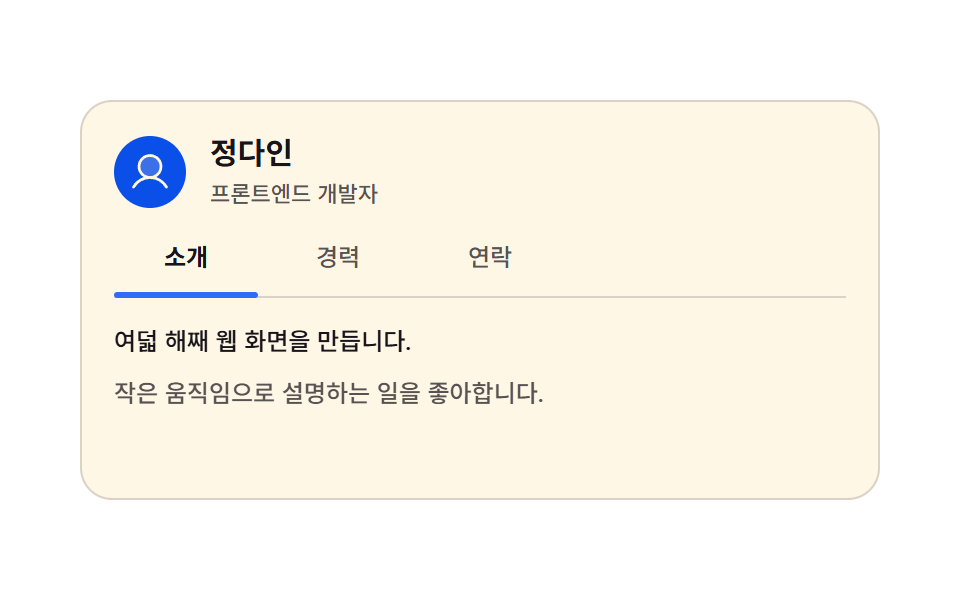
紹介・経歴・連絡の3つのタブを押すと本文が1フレームで入れ替わり、下線はラジオ入力だけでそのタブへ滑ります。
使いどころ個人の自己紹介ページ、講師・フリーランスのプロフィール
steps(1, end)hastranslate
<main class="stage">
<div class="ab is-demo" id="ab">
  <div class="ab__head">
    <span class="ab__face" aria-hidden="true"><svg xmlns="http://www.w3.org/2000/svg" width="1em" height="1em" viewBox="0 0 256 256"><g fill="currentColor"><path d="M192 96a64 64 0 1 1-64-64a64 64 0 0 1 64 64" opacity=".2"/><path d="M230.92 212c-15.23-26.33-38.7-45.21-66.09-54.16a72 72 0 1 0-73.66 0c-27.39 8.94-50.86 27.82-66.09 54.16a8 8 0 1 0 13.85 8c18.84-32.56 52.14-52 89.07-52s70.23 19.44 89.07 52a8 8 0 1 0 13.85-8M72 96a56 56 0 1 1 56 56a56.06 56.06 0 0 1-56-56"/></g></svg></span>
    <span class="ab__who">
      <span class="ab__name">チョン・ダイン</span>
      <span class="ab__role">フロントエンドエンジニア</span>
    </span>
  </div>

  <div class="ab__tabs">
    <input class="ab__radio" type="radio" name="abTab" id="abT1" checked>
    <label class="ab__tab" for="abT1">紹介</label>
    <input class="ab__radio" type="radio" name="abTab" id="abT2">
    <label class="ab__tab" for="abT2">経歴</label>
    <input class="ab__radio" type="radio" name="abTab" id="abT3">
    <label class="ab__tab" for="abT3">連絡</label>
    <span class="ab__ink" aria-hidden="true"></span>
  </div>

  <div class="ab__body">
    <div class="ab__panel ab__panel--a">
      <p class="ab__line">8年目のウェブ画面づくりです。</p>
      <p class="ab__line ab__line--dim">小さな動きで説明するのが好きです。</p>
    </div>

    <div class="ab__panel ab__panel--b">
      <p class="ab__row"><b class="ab__year">2021 — 現在</b><span class="ab__job">Studio On · フロントエンドリード</span></p>
      <p class="ab__row"><b class="ab__year">2018 — 2021</b><span class="ab__job">Lightup · UI開発</span></p>
    </div>

    <div class="ab__panel ab__panel--c">
      <a class="ab__mail" href="#dain-mail">
        <span class="ab__ico" aria-hidden="true"><svg xmlns="http://www.w3.org/2000/svg" width="1em" height="1em" viewBox="0 0 256 256"><g fill="currentColor"><path d="m224 56l-96 88l-96-88Z" opacity=".2"/><path d="M224 48H32a8 8 0 0 0-8 8v136a16 16 0 0 0 16 16h176a16 16 0 0 0 16-16V56a8 8 0 0 0-8-8m-20.57 16L128 133.15L52.57 64ZM216 192H40V74.19l82.59 75.71a8 8 0 0 0 10.82 0L216 74.19z"/></g></svg></span>
        チョン・ダインにメールを送る
      </a>
      <p class="ab__line ab__line--dim">平日の日中がいちばん返信が早いです。</p>
    </div>
  </div>
</div>
</main>@use "../../../../site/static/demo-tokens" as *;
// 탭으로 넘기는 자기소개 카드 — 라디오 입력 세 개가 상태를 들고 있고, 카드는 :has() 로 그 상태를 읽는다.
// 본문 세 장은 한 격자 칸에 포개 두어 어느 장이 보이든 카드 높이가 변하지 않는다.
// 본문 교체는 한 프레임에 컷(steps(1, end))하고, 프레임을 채우는 움직임은 밑줄의 translate 하나뿐이다 —
// 투명도 교차를 쓰면 중간 프레임이 두 장 겹친 유령이 된다.
// 탭 폭은 짐작하지 않는다: 라벨이 언어마다 길어져도 자리가 안 밀리도록 칸 폭을 72px 로 못 박고
// 실제 렌더 폭을 Playwright getBoundingClientRect 로 확인했다 (run/081/_probeB).
$duration: $dur-enter;
$easing: $ease-spring;
$color: $subject-blue;
$tab-w: 72px; // 탭 한 칸의 고정 폭 — 밑줄 폭과 같은 값
$tab-gap: $sp-1; // 칸 사이 간격
$step: $tab-w + $tab-gap; // 밑줄이 한 칸 옮겨 가는 거리 76px
$dim: rgba($subject-ink, .72);
$hair: rgba($subject-ink, .16);
// 크림 글자를 얹는 파란 면은 한 단계 진한 쪽이다 — $subject-blue 위 크림은 4.25:1 로 AA 미달,
// 이 면 위 크림은 실측 5.98:1 (run/081/_대비실측.B.json). 별칭으로 두는 건 ~BD25-정적 의
// 부분일치 오탐($subject-blue 가 $subject-blue-deep 의 앞부분이다)을 피하려는 이유도 있다
$face-blue: $subject-blue-deep;
@include stage($stage-paper);
.ab {
box-sizing: border-box; width: min(100%, 400px);
display: flex; flex-direction: column; gap: $sp-3;
padding: $sp-4; border: 1px solid $hair; border-radius: $r-card;
background: $subject-cream;
}
// ── 머리 줄
.ab__head { display: flex; align-items: center; gap: $sp-3; }
.ab__face {
flex: 0 0 auto; display: grid; place-items: center;
width: 36px; height: 36px; border-radius: 50%;
background: $face-blue; color: $subject-cream; font-size: 22px;
}
.ab__who { display: flex; flex-direction: column; gap: $sp-1; min-width: 0; }
.ab__name { color: $subject-ink; font-weight: 700; font-size: 15px; line-height: 1.3; }
.ab__role { color: $dim; font-weight: 500; font-size: 11px; line-height: 1.3; }
// ── 탭 줄. 라디오는 화면에서 숨기되 초점은 받는다 (키보드 좌우 이동이 그대로 산다)
.ab__tabs {
position: relative; display: flex; gap: $tab-gap;
padding-bottom: $sp-2; border-bottom: 1px solid $hair;
}
.ab__radio {
position: absolute; top: 0; left: 0;
width: 1px; height: 1px; margin: 0; opacity: 0; pointer-events: none;
}
.ab__tab {
flex: 0 0 auto; width: $tab-w;
padding-top: $sp-1; padding-bottom: $sp-1;
color: $dim; font-weight: 500; font-size: 12px; line-height: 1.3;
text-align: center; cursor: pointer;
}
.ab__radio:checked + .ab__tab { color: $subject-ink; font-weight: 700; }
.ab__radio:focus-visible + .ab__tab {
outline: 2px solid $subject-blue-deep; outline-offset: 2px; border-radius: $r-xs;
}
.ab__ink {
position: absolute; left: 0; bottom: -1px;
width: $tab-w; height: 3px; border-radius: $r-pill;
background: $color;
translate: 0 0;
transition: translate $duration $easing;
}
// 상태는 라디오가 들고 있고 카드가 :has() 로 읽는다 — JS 없이 밑줄과 본문이 같은 값을 따른다
.ab:has(#abT2:checked) .ab__ink { translate: $step 0; }
.ab:has(#abT3:checked) .ab__ink { translate: $step * 2 0; }
// ── 본문 세 장을 한 칸에 포갠다
.ab__body { display: grid; min-height: 72px; }
.ab__body > * { grid-area: 1 / 1; }
.ab__panel {
display: flex; flex-direction: column; gap: $sp-2;
opacity: 0; visibility: hidden;
}
.ab:has(#abT1:checked) .ab__panel--a,
.ab:has(#abT2:checked) .ab__panel--b,
.ab:has(#abT3:checked) .ab__panel--c { opacity: 1; visibility: visible; }
.ab__line { margin: 0; color: $subject-ink; font-weight: 500; font-size: 12px; line-height: 1.5; }
.ab__line--dim { color: $dim; }
.ab__row { display: flex; align-items: baseline; gap: $sp-2; margin: 0; }
.ab__year { flex: 0 0 auto; color: $subject-ink; font-weight: 700; font-size: 11px; line-height: 1.5; }
.ab__job { color: $dim; font-weight: 500; font-size: 11px; line-height: 1.5; }
// 링크에 목적지 이름이 들어 있다 — 카드 전체를 클릭 영역으로 만들지 않는다
.ab__mail {
align-self: flex-start; display: inline-flex; align-items: center; gap: $sp-2;
padding: $sp-2 $sp-3; border-radius: $r-pill;
background: $face-blue; color: $subject-cream;
font-weight: 700; font-size: 12px; line-height: 1.2; text-decoration: none;
}
.ab__mail:focus-visible { outline: 2px solid $subject-ink; outline-offset: 2px; }
.ab__ico { display: grid; place-items: center; font-size: 14px; }
// ── 격자 미리보기: 사람이 누르지 않아도 세 탭을 한 바퀴 돈다
// 본문은 컷(steps), 밑줄은 미끄러짐 — 컷만 있으면 움직인 프레임이 두세 장으로 떨어진다
.ab.is-demo .ab__ink {
animation-name: abInk;
animation-duration: $dur-loop;
animation-timing-function: $easing;
animation-iteration-count: infinite;
}
.ab.is-demo .ab__panel,
.ab.is-demo .ab__tab {
animation-duration: $dur-loop;
animation-timing-function: steps(1, end);
animation-iteration-count: infinite;
}
.ab.is-demo .ab__panel--a { animation-name: abCutA; }
.ab.is-demo .ab__panel--b { animation-name: abCutB; }
.ab.is-demo .ab__panel--c { animation-name: abCutC; }
.ab.is-demo .ab__tab[for="abT1"] { animation-name: abTabA; }
.ab.is-demo .ab__tab[for="abT2"] { animation-name: abTabB; }
.ab.is-demo .ab__tab[for="abT3"] { animation-name: abTabC; }
// 밑줄이 **다음 탭에 닿아 선 뒤에** 본문·굵기가 컷된다 — 컷 지점(33·66·91%)이 곧 미끄러짐의 끝이다.
// 컷을 미끄러짐 **앞**에 두면(첫 판) 대표 이미지가 늘 "밑줄은 가는 중, 본문은 이전 탭" 으로 어긋난다:
// 24프레임 중 프레임당 변화가 가장 큰 장이 poster 인데 그게 이동 중간 장이었다.
// 이제 가장 크게 달라지는 장은 본문이 통째로 바뀌는 컷 프레임이고, 그 순간 밑줄은 이미 서 있다.
// 미끄러짐 구간은 한 번에 8% (160ms) 로 짧게 둬 어긋난 프레임이 한두 장을 넘지 않게 했다.
@keyframes abInk {
0%, 25% { translate: 0 0; }
33%, 58% { translate: $step 0; }
66%, 83% { translate: $step * 2 0; }
91%, 100% { translate: 0 0; }
}
@keyframes abCutA {
0% { opacity: 1; visibility: visible; }
33% { opacity: 0; visibility: hidden; }
66% { opacity: 0; visibility: hidden; }
91% { opacity: 1; visibility: visible; }
100% { opacity: 1; visibility: visible; }
}
@keyframes abCutB {
0% { opacity: 0; visibility: hidden; }
33% { opacity: 1; visibility: visible; }
66% { opacity: 0; visibility: hidden; }
100% { opacity: 0; visibility: hidden; }
}
@keyframes abCutC {
0% { opacity: 0; visibility: hidden; }
66% { opacity: 1; visibility: visible; }
91% { opacity: 0; visibility: hidden; }
100% { opacity: 0; visibility: hidden; }
}
@keyframes abTabA {
0% { color: $subject-ink; font-weight: 700; }
33% { color: $dim; font-weight: 500; }
91% { color: $subject-ink; font-weight: 700; }
100% { color: $subject-ink; font-weight: 700; }
}
@keyframes abTabB {
0% { color: $dim; font-weight: 500; }
33% { color: $subject-ink; font-weight: 700; }
66% { color: $dim; font-weight: 500; }
100% { color: $dim; font-weight: 500; }
}
@keyframes abTabC {
0% { color: $dim; font-weight: 500; }
66% { color: $subject-ink; font-weight: 700; }
91% { color: $dim; font-weight: 500; }
100% { color: $dim; font-weight: 500; }
}
// ── 좁은 화면: 여백과 글자를 줄여 320×200 안에 들어오게 한다
@media (max-width: 340px) {
.ab { gap: $sp-2; padding: $sp-2; }
.ab__head { gap: $sp-2; }
.ab__face { width: 28px; height: 28px; font-size: 17px; }
.ab__name { font-size: 13px; }
.ab__role { font-size: 10px; }
.ab__tabs { padding-bottom: $sp-1; }
.ab__tab { padding-top: 0; padding-bottom: 0; font-size: 11px; }
.ab__body { min-height: 56px; }
.ab__panel { gap: $sp-1; }
.ab__line { font-size: 11px; }
.ab__year, .ab__job { font-size: 10px; }
.ab__mail { padding: $sp-1 $sp-2; font-size: 11px; }
}
@media (prefers-reduced-motion: reduce) {
.ab.is-demo .ab__ink,
.ab.is-demo .ab__panel,
.ab.is-demo .ab__tab {
animation: none !important;
transition: none !important;
}
}html, body {
margin: 0;
overflow: hidden;
}
.stage {
box-sizing: border-box;
min-height: 100vh;
display: grid;
place-items: center;
margin: 0;
background: #ffffff;
font-family: -apple-system, "Segoe UI", "Noto Sans KR", sans-serif;
padding: clamp(8px, 4vw, 24px);
}
.ab {
box-sizing: border-box;
width: min(100%, 400px);
display: flex;
flex-direction: column;
gap: 12px;
padding: 16px;
border: 1px solid rgba(23, 20, 26, 0.16);
border-radius: 16px;
background: #fff7e6;
}
.ab__head {
display: flex;
align-items: center;
gap: 12px;
}
.ab__face {
flex: 0 0 auto;
display: grid;
place-items: center;
width: 36px;
height: 36px;
border-radius: 50%;
background: #0a4fe8;
color: #fff7e6;
font-size: 22px;
}
.ab__who {
display: flex;
flex-direction: column;
gap: 4px;
min-width: 0;
}
.ab__name {
color: #17141a;
font-weight: 700;
font-size: 15px;
line-height: 1.3;
}
.ab__role {
color: rgba(23, 20, 26, 0.72);
font-weight: 500;
font-size: 11px;
line-height: 1.3;
}
.ab__tabs {
position: relative;
display: flex;
gap: 4px;
padding-bottom: 8px;
border-bottom: 1px solid rgba(23, 20, 26, 0.16);
}
.ab__radio {
position: absolute;
top: 0;
left: 0;
width: 1px;
height: 1px;
margin: 0;
opacity: 0;
pointer-events: none;
}
.ab__tab {
flex: 0 0 auto;
width: 72px;
padding-top: 4px;
padding-bottom: 4px;
color: rgba(23, 20, 26, 0.72);
font-weight: 500;
font-size: 12px;
line-height: 1.3;
text-align: center;
cursor: pointer;
}
.ab__radio:checked + .ab__tab {
color: #17141a;
font-weight: 700;
}
.ab__radio:focus-visible + .ab__tab {
outline: 2px solid #0a4fe8;
outline-offset: 2px;
border-radius: 4px;
}
.ab__ink {
position: absolute;
left: 0;
bottom: -1px;
width: 72px;
height: 3px;
border-radius: 999px;
background: #2f6df6;
translate: 0 0;
transition: translate 600ms cubic-bezier(0.2, 0.8, 0.2, 1);
}
.ab:has(#abT2:checked) .ab__ink {
translate: 76px 0;
}
.ab:has(#abT3:checked) .ab__ink {
translate: 152px 0;
}
.ab__body {
display: grid;
min-height: 72px;
}
.ab__body > * {
grid-area: 1/1;
}
.ab__panel {
display: flex;
flex-direction: column;
gap: 8px;
opacity: 0;
visibility: hidden;
}
.ab:has(#abT1:checked) .ab__panel--a,
.ab:has(#abT2:checked) .ab__panel--b,
.ab:has(#abT3:checked) .ab__panel--c {
opacity: 1;
visibility: visible;
}
.ab__line {
margin: 0;
color: #17141a;
font-weight: 500;
font-size: 12px;
line-height: 1.5;
}
.ab__line--dim {
color: rgba(23, 20, 26, 0.72);
}
.ab__row {
display: flex;
align-items: baseline;
gap: 8px;
margin: 0;
}
.ab__year {
flex: 0 0 auto;
color: #17141a;
font-weight: 700;
font-size: 11px;
line-height: 1.5;
}
.ab__job {
color: rgba(23, 20, 26, 0.72);
font-weight: 500;
font-size: 11px;
line-height: 1.5;
}
.ab__mail {
align-self: flex-start;
display: inline-flex;
align-items: center;
gap: 8px;
padding: 8px 12px;
border-radius: 999px;
background: #0a4fe8;
color: #fff7e6;
font-weight: 700;
font-size: 12px;
line-height: 1.2;
text-decoration: none;
}
.ab__mail:focus-visible {
outline: 2px solid #17141a;
outline-offset: 2px;
}
.ab__ico {
display: grid;
place-items: center;
font-size: 14px;
}
.ab.is-demo .ab__ink {
animation-name: abInk;
animation-duration: 2s;
animation-timing-function: cubic-bezier(0.2, 0.8, 0.2, 1);
animation-iteration-count: infinite;
}
.ab.is-demo .ab__panel,
.ab.is-demo .ab__tab {
animation-duration: 2s;
animation-timing-function: steps(1, end);
animation-iteration-count: infinite;
}
.ab.is-demo .ab__panel--a {
animation-name: abCutA;
}
.ab.is-demo .ab__panel--b {
animation-name: abCutB;
}
.ab.is-demo .ab__panel--c {
animation-name: abCutC;
}
.ab.is-demo .ab__tab[for=abT1] {
animation-name: abTabA;
}
.ab.is-demo .ab__tab[for=abT2] {
animation-name: abTabB;
}
.ab.is-demo .ab__tab[for=abT3] {
animation-name: abTabC;
}
@keyframes abInk {
0%, 25% {
translate: 0 0;
}
33%, 58% {
translate: 76px 0;
}
66%, 83% {
translate: 152px 0;
}
91%, 100% {
translate: 0 0;
}
}
@keyframes abCutA {
0% {
opacity: 1;
visibility: visible;
}
33% {
opacity: 0;
visibility: hidden;
}
66% {
opacity: 0;
visibility: hidden;
}
91% {
opacity: 1;
visibility: visible;
}
100% {
opacity: 1;
visibility: visible;
}
}
@keyframes abCutB {
0% {
opacity: 0;
visibility: hidden;
}
33% {
opacity: 1;
visibility: visible;
}
66% {
opacity: 0;
visibility: hidden;
}
100% {
opacity: 0;
visibility: hidden;
}
}
@keyframes abCutC {
0% {
opacity: 0;
visibility: hidden;
}
66% {
opacity: 1;
visibility: visible;
}
91% {
opacity: 0;
visibility: hidden;
}
100% {
opacity: 0;
visibility: hidden;
}
}
@keyframes abTabA {
0% {
color: #17141a;
font-weight: 700;
}
33% {
color: rgba(23, 20, 26, 0.72);
font-weight: 500;
}
91% {
color: #17141a;
font-weight: 700;
}
100% {
color: #17141a;
font-weight: 700;
}
}
@keyframes abTabB {
0% {
color: rgba(23, 20, 26, 0.72);
font-weight: 500;
}
33% {
color: #17141a;
font-weight: 700;
}
66% {
color: rgba(23, 20, 26, 0.72);
font-weight: 500;
}
100% {
color: rgba(23, 20, 26, 0.72);
font-weight: 500;
}
}
@keyframes abTabC {
0% {
color: rgba(23, 20, 26, 0.72);
font-weight: 500;
}
66% {
color: #17141a;
font-weight: 700;
}
91% {
color: rgba(23, 20, 26, 0.72);
font-weight: 500;
}
100% {
color: rgba(23, 20, 26, 0.72);
font-weight: 500;
}
}
@media (max-width: 340px) {
.ab {
gap: 8px;
padding: 8px;
}
.ab__head {
gap: 8px;
}
.ab__face {
width: 28px;
height: 28px;
font-size: 17px;
}
.ab__name {
font-size: 13px;
}
.ab__role {
font-size: 10px;
}
.ab__tabs {
padding-bottom: 4px;
}
.ab__tab {
padding-top: 0;
padding-bottom: 0;
font-size: 11px;
}
.ab__body {
min-height: 56px;
}
.ab__panel {
gap: 4px;
}
.ab__line {
font-size: 11px;
}
.ab__year, .ab__job {
font-size: 10px;
}
.ab__mail {
padding: 4px 8px;
font-size: 11px;
}
}
@media (prefers-reduced-motion: reduce) {
.ab.is-demo .ab__ink,
.ab.is-demo .ab__panel,
.ab.is-demo .ab__tab {
animation: none !important;
transition: none !important;
}
}// 사람이 탭을 만지면 미리보기 루프를 끄고 라디오 입력의 :checked 경로로 넘긴다.
var ab = document.getElementById('ab');
function abHand() { ab.classList.remove('is-demo'); }
ab.addEventListener('pointerdown', abHand);
ab.addEventListener('keydown', abHand);
ab.addEventListener('change', abHand);
ab.addEventListener('focusin', abHand);// AboutTabsCard — vanilla 판(run/081/demo/04-content-card-about-tabs/index.html) 의 React 포트.
// 바닐라는 라디오 입력의 :checked 를 카드가 :has() 로 읽어 상태를 잡는다. React 판은 그 상태를
// useState 하나로 들고, 밑줄의 자리는 CSS 변수 --tab(0·1·2)에 넘겨 같은 $step 값으로 계산한다.
// 미리보기 루프(@keyframes)는 vanilla 와 같은 글자다 (값을 다시 타이핑하지 않는다).
import { useState } from "react";
import type { CSSProperties } from "react";
import styles from "./AboutTabsCard.module.scss";
export type AboutTabsCardProps = {
duration?: number;
easing?: string;
color?: string;
};
type Vars = CSSProperties & {
"--duration"?: string;
"--easing"?: string;
"--color"?: string;
"--tab"?: string;
};
const NAME = "정다인";
const ROLE = "프론트엔드 개발자";
const TABS = ["소개", "경력", "연락"];
const INTRO = ["여덟 해째 웹 화면을 만듭니다.", "작은 움직임으로 설명하는 일을 좋아합니다."];
const CAREER = [
{ year: "2021 — 지금", job: "Studio On · 프론트엔드 리드" },
{ year: "2018 — 2021", job: "Lightup · UI 개발" },
];
const MAIL = "정다인에게 메일 보내기";
const REPLY = "평일 낮에 가장 빨리 답합니다.";
export default function AboutTabsCard({
duration = 600,
easing = "cubic-bezier(.2, .8, .2, 1)",
color = "#2f6df6",
}: AboutTabsCardProps) {
const [tab, setTab] = useState(0);
const [preview, setPreview] = useState(true);
const vars: Vars = {
"--duration": duration + "ms",
"--easing": easing,
"--color": color,
"--tab": String(tab),
};
const pick = (i: number) => {
setPreview(false);
setTab(i);
};
const panelClass = (i: number) => styles.panel + (tab === i ? " " + styles.isOn : "");
return (
<main className={styles.stage}>
<div className={styles.card + (preview ? " " + styles.isDemo : "")} style={vars}>
<div className={styles.head}>
<span className={styles.face} aria-hidden="true">
<svg xmlns="http://www.w3.org/2000/svg" width="1em" height="1em" viewBox="0 0 256 256">
<g fill="currentColor">
<path d="M192 96a64 64 0 1 1-64-64a64 64 0 0 1 64 64" opacity=".2" />
<path d="M230.92 212c-15.23-26.33-38.7-45.21-66.09-54.16a72 72 0 1 0-73.66 0c-27.39 8.94-50.86 27.82-66.09 54.16a8 8 0 1 0 13.85 8c18.84-32.56 52.14-52 89.07-52s70.23 19.44 89.07 52a8 8 0 1 0 13.85-8M72 96a56 56 0 1 1 56 56a56.06 56.06 0 0 1-56-56" />
</g>
</svg>
</span>
<span className={styles.who}>
<span className={styles.name}>{NAME}</span>
<span className={styles.role}>{ROLE}</span>
</span>
</div>
<div className={styles.tabs}>
{TABS.map((label, i) => (
<span className={styles.slot} key={label}>
<input
className={styles.radio}
type="radio"
name="aboutTab"
id={"aboutTab" + i}
checked={tab === i}
onChange={() => pick(i)}
/>
<label className={styles.tab + (tab === i ? " " + styles.isPick : "")} htmlFor={"aboutTab" + i}>
{label}
</label>
</span>
))}
<span className={styles.ink} aria-hidden="true" />
</div>
<div className={styles.body}>
<div className={panelClass(0) + " " + styles.panelA}>
<p className={styles.line}>{INTRO[0]}</p>
<p className={styles.line + " " + styles.lineDim}>{INTRO[1]}</p>
</div>
<div className={panelClass(1) + " " + styles.panelB}>
{CAREER.map((row) => (
<p className={styles.row} key={row.year}>
<b className={styles.year}>{row.year}</b>
<span className={styles.job}>{row.job}</span>
</p>
))}
</div>
<div className={panelClass(2) + " " + styles.panelC}>
<a className={styles.mail} href="#dain-mail">
<span className={styles.ico} aria-hidden="true">
<svg xmlns="http://www.w3.org/2000/svg" width="1em" height="1em" viewBox="0 0 256 256">
<g fill="currentColor">
<path d="m224 56l-96 88l-96-88Z" opacity=".2" />
<path d="M224 48H32a8 8 0 0 0-8 8v136a16 16 0 0 0 16 16h176a16 16 0 0 0 16-16V56a8 8 0 0 0-8-8m-20.57 16L128 133.15L52.57 64ZM216 192H40V74.19l82.59 75.71a8 8 0 0 0 10.82 0L216 74.19z" />
</g>
</svg>
</span>
{MAIL}
</a>
<p className={styles.line + " " + styles.lineDim}>{REPLY}</p>
</div>
</div>
</div>
</main>
);
}04 タブで切り替える自己紹介カード — 計測 累積面積 5.933% · 動いたフレーム 8/23GODRICH オリジナル · SCSS と React は zip に同梱 · css カード デザイン 9種 — 街・チーム・ショートカット
このデモが属する記事
 css カード デザイン 9種 — 街・チーム・ショートカットcss カード デザインとは、画面に内容を載せて並べるための最も基本的な容器を組む仕事です。この記事の原則は、クリックをカード全体ではなくリンクに任せることです。街紹介・チーム・ショートカット・自己紹介タブ・レビュー・スペック・イベント・イ この記事のデモをすべて見る