05ピンボード型レビューカード
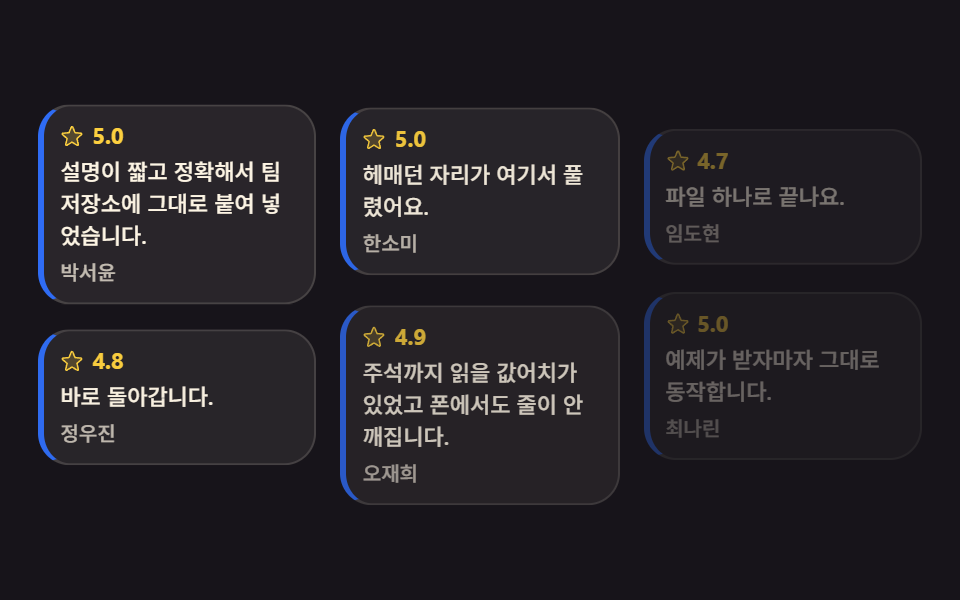
長さがまちまちのレビューカードが column-count で流し込まれ、1枚ずつ収まって隙間のない壁を作ります。
使いどころレビュー一覧ページ、コミュニティ掲示板のプレビュー
column-countbreak-insideanimation-delay
<main class="stage">
<svg class="pin__defs" aria-hidden="true" xmlns="http://www.w3.org/2000/svg"><symbol id="pinStar" viewBox="0 0 256 256"><g fill="currentColor"><path d="m229.06 108.79l-48.7 42l14.88 62.79a8.4 8.4 0 0 1-12.52 9.17L128 189.09l-54.72 33.65a8.4 8.4 0 0 1-12.52-9.17l14.88-62.79l-48.7-42A8.46 8.46 0 0 1 31.73 94l63.91-5.2l24.62-59.6a8.36 8.36 0 0 1 15.48 0l24.62 59.6l63.91 5.2a8.46 8.46 0 0 1 4.79 14.79" opacity=".2"/><path d="M239.18 97.26A16.38 16.38 0 0 0 224.92 86l-59-4.76l-22.78-55.09a16.36 16.36 0 0 0-30.27 0L90.11 81.23L31.08 86a16.46 16.46 0 0 0-9.37 28.86l45 38.83L53 211.75a16.38 16.38 0 0 0 24.5 17.82l50.5-31.08l50.53 31.08A16.4 16.4 0 0 0 203 211.75l-13.76-58.07l45-38.83a16.43 16.43 0 0 0 4.94-17.59m-15.34 5.47l-48.7 42a8 8 0 0 0-2.56 7.91l14.88 62.8a.37.37 0 0 1-.17.48c-.18.14-.23.11-.38 0l-54.72-33.65a8 8 0 0 0-8.38 0l-54.72 33.67c-.15.09-.19.12-.38 0a.37.37 0 0 1-.17-.48l14.88-62.8a8 8 0 0 0-2.56-7.91l-48.7-42c-.12-.1-.23-.19-.13-.5s.18-.27.33-.29l63.92-5.16a8 8 0 0 0 6.72-4.94l24.62-59.61c.08-.17.11-.25.35-.25s.27.08.35.25L153 91.86a8 8 0 0 0 6.75 4.92l63.92 5.16c.15 0 .24 0 .33.29s0 .4-.16.5"/></g></symbol></svg>

<div class="pin is-demo" id="pin">
  <article class="pin__card">
    <p class="pin__top"><svg class="pin__star" aria-hidden="true"><use href="#pinStar"/></svg><b class="pin__rate">5.0</b></p>
    <p class="pin__say">説明が短く正確で、そのままリポジトリに貼りました。</p>
    <p class="pin__by">パク・ソユン</p>
  </article>
  <article class="pin__card">
    <p class="pin__top"><svg class="pin__star" aria-hidden="true"><use href="#pinStar"/></svg><b class="pin__rate">4.8</b></p>
    <p class="pin__say">すぐ動きました。</p>
    <p class="pin__by">チョン・ウジン</p>
  </article>
  <article class="pin__card">
    <p class="pin__top"><svg class="pin__star" aria-hidden="true"><use href="#pinStar"/></svg><b class="pin__rate">5.0</b></p>
    <p class="pin__say">つまずいていた所がここで解けました。</p>
    <p class="pin__by">ハン・ソミ</p>
  </article>
  <article class="pin__card">
    <p class="pin__top"><svg class="pin__star" aria-hidden="true"><use href="#pinStar"/></svg><b class="pin__rate">4.9</b></p>
    <p class="pin__say">コメントまで読む価値があり、スマホでも崩れません。</p>
    <p class="pin__by">オ・ジェヒ</p>
  </article>
  <article class="pin__card">
    <p class="pin__top"><svg class="pin__star" aria-hidden="true"><use href="#pinStar"/></svg><b class="pin__rate">4.7</b></p>
    <p class="pin__say">ファイル1つで済みます。</p>
    <p class="pin__by">イム・ドヒョン</p>
  </article>
  <article class="pin__card">
    <p class="pin__top"><svg class="pin__star" aria-hidden="true"><use href="#pinStar"/></svg><b class="pin__rate">5.0</b></p>
    <p class="pin__say">サンプルがそのまま動きます。</p>
    <p class="pin__by">チェ・ナリン</p>
  </article>
</div>
</main>@use "../../../../site/static/demo-tokens" as *;
// 핀 보드 후기 카드 — 길이가 제각각인 카드를 column-count 로 흘려 붙인다.
// 다단은 글줄을 칸에서 칸으로 넘기는 조판이라, 아무것도 안 하면 카드 한 장이 두 칸에 걸쳐 잘린다.
// break-inside: avoid 가 "이 상자는 쪼개지 말라"는 한 줄이고, 그래서 카드가 통째로 다음 칸으로 넘어간다.
// 자리를 잡는 순서는 animation-delay 의 시차 — 지연 구간에도 시작 상태가 보이도록
// animation-fill-mode: backwards 를 반드시 함께 쓴다(없으면 첫 프레임에 완성 상태가 한 번 번쩍인다).
// 카드는 흐려질 뿐 사라지지 않는다 — 루프 어느 순간에도 벽에 구멍이 없어야 poster 가 성립한다.
$duration: $dur-enter;
$easing: $ease-spring;
$color: $subject-blue;
$stagger: 100ms; // 카드 한 장씩의 시차
$card-bg: rgba($subject-cream, .08);
$card-line: rgba($subject-cream, .14);
$dim: rgba($subject-cream, .72);
@include stage($stage-ink);
.pin__defs { position: absolute; width: 0; height: 0; }
.pin {
box-sizing: border-box; width: 100%;
column-count: 3;
column-gap: $sp-3;
}
.pin__card {
// 카드가 칸 경계에서 잘리지 않게 — 다단 조판의 핵심 한 줄
break-inside: avoid;
box-sizing: border-box;
margin-top: 0; margin-bottom: $sp-3;
padding: $sp-2;
border: 1px solid $card-line;
border-left: 3px solid $color;
border-radius: $r-card;
background: $card-bg;
}
.pin__top { display: flex; align-items: center; gap: $sp-1; margin: 0; }
.pin__star { width: 12px; height: 12px; color: $stage-yellow; }
.pin__rate { color: $stage-yellow; font-weight: 700; font-size: 11px; line-height: 1.2; }
.pin__say {
margin-top: $sp-1; margin-bottom: $sp-1;
color: $subject-cream; font-weight: 500; font-size: 11px; line-height: 1.45;
}
.pin__by { margin: 0; color: $dim; font-weight: 500; font-size: 10px; line-height: 1.3; }
// ── 격자 미리보기: 카드가 한 장씩 시차로 자리를 잡는다
// 등장 구간은 $duration(600ms) = 2초 루프의 30% 다 — 키프레임 퍼센트와 토큰이 같은 값을 가리킨다
.pin.is-demo .pin__card {
animation-name: pinRise;
animation-duration: $dur-loop;
animation-timing-function: $easing;
animation-iteration-count: infinite;
animation-fill-mode: backwards;
}
.pin.is-demo .pin__card:nth-child(1) { animation-delay: 0ms; }
.pin.is-demo .pin__card:nth-child(2) { animation-delay: $stagger; }
.pin.is-demo .pin__card:nth-child(3) { animation-delay: $stagger * 2; }
.pin.is-demo .pin__card:nth-child(4) { animation-delay: $stagger * 3; }
.pin.is-demo .pin__card:nth-child(5) { animation-delay: $stagger * 4; }
.pin.is-demo .pin__card:nth-child(6) { animation-delay: $stagger * 5; }
@keyframes pinRise {
0% { opacity: .35; translate: 0 14px; }
30% { opacity: 1; translate: 0 0; }
100% { opacity: 1; translate: 0 0; }
}
// ── 좁은 화면: 칸은 그대로 셋, 글자와 여백만 줄인다
@media (max-width: 340px) {
.pin { column-gap: $sp-2; }
// en 사본은 ko 보다 줄이 길어져 칸 높이가 3px 넘쳤다 (실측) — 좁은 화면에서는 카드 사이를 4px 로
.pin__card { margin-bottom: $sp-1; padding: $sp-1; }
.pin__star { width: 10px; height: 10px; }
.pin__rate { font-size: 10px; }
.pin__say { font-size: 9px; line-height: 1.35; }
.pin__by { font-size: 9px; }
}
@media (prefers-reduced-motion: reduce) {
.pin.is-demo .pin__card {
animation: none !important;
opacity: 1 !important;
translate: none !important;
}
}html, body {
margin: 0;
overflow: hidden;
}
.stage {
box-sizing: border-box;
min-height: 100vh;
display: grid;
place-items: center;
margin: 0;
background: #17141a;
font-family: -apple-system, "Segoe UI", "Noto Sans KR", sans-serif;
padding: clamp(8px, 4vw, 24px);
}
.pin__defs {
position: absolute;
width: 0;
height: 0;
}
.pin {
box-sizing: border-box;
width: 100%;
column-count: 3;
column-gap: 12px;
}
.pin__card {
break-inside: avoid;
box-sizing: border-box;
margin-top: 0;
margin-bottom: 12px;
padding: 8px;
border: 1px solid rgba(255, 247, 230, 0.14);
border-left: 3px solid #2f6df6;
border-radius: 16px;
background: rgba(255, 247, 230, 0.08);
}
.pin__top {
display: flex;
align-items: center;
gap: 4px;
margin: 0;
}
.pin__star {
width: 12px;
height: 12px;
color: #ffd23f;
}
.pin__rate {
color: #ffd23f;
font-weight: 700;
font-size: 11px;
line-height: 1.2;
}
.pin__say {
margin-top: 4px;
margin-bottom: 4px;
color: #fff7e6;
font-weight: 500;
font-size: 11px;
line-height: 1.45;
}
.pin__by {
margin: 0;
color: rgba(255, 247, 230, 0.72);
font-weight: 500;
font-size: 10px;
line-height: 1.3;
}
.pin.is-demo .pin__card {
animation-name: pinRise;
animation-duration: 2s;
animation-timing-function: cubic-bezier(0.2, 0.8, 0.2, 1);
animation-iteration-count: infinite;
animation-fill-mode: backwards;
}
.pin.is-demo .pin__card:nth-child(1) {
animation-delay: 0ms;
}
.pin.is-demo .pin__card:nth-child(2) {
animation-delay: 100ms;
}
.pin.is-demo .pin__card:nth-child(3) {
animation-delay: 200ms;
}
.pin.is-demo .pin__card:nth-child(4) {
animation-delay: 300ms;
}
.pin.is-demo .pin__card:nth-child(5) {
animation-delay: 400ms;
}
.pin.is-demo .pin__card:nth-child(6) {
animation-delay: 500ms;
}
@keyframes pinRise {
0% {
opacity: 0.35;
translate: 0 14px;
}
30% {
opacity: 1;
translate: 0 0;
}
100% {
opacity: 1;
translate: 0 0;
}
}
@media (max-width: 340px) {
.pin {
column-gap: 8px;
}
.pin__card {
margin-bottom: 4px;
padding: 4px;
}
.pin__star {
width: 10px;
height: 10px;
}
.pin__rate {
font-size: 10px;
}
.pin__say {
font-size: 9px;
line-height: 1.35;
}
.pin__by {
font-size: 9px;
}
}
@media (prefers-reduced-motion: reduce) {
.pin.is-demo .pin__card {
animation: none !important;
opacity: 1 !important;
translate: none !important;
}
}// 사람이 보드를 만지면 시차 루프를 끄고 다 자리 잡은 정적 상태로 남긴다.
var pin = document.getElementById('pin');
function pinHand() { pin.classList.remove('is-demo'); }
pin.addEventListener('pointerdown', pinHand);
pin.addEventListener('focusin', pinHand);// ReviewPinboard — vanilla 판(run/081/demo/05-content-card-review-pinboard/index.html) 의 React 포트.
// 다단(column-count)에 길이가 제각각인 카드를 흘려 넣고, break-inside: avoid 로 칸 경계에서 안 잘리게 한다.
// 자리를 잡는 순서는 animation-delay 의 시차 — 지연 구간에도 시작 상태가 보이도록 fill-mode: backwards.
// @keyframes 본문은 vanilla 와 같은 글자다 (값을 다시 타이핑하지 않는다).
import { useState } from "react";
import type { CSSProperties } from "react";
import styles from "./ReviewPinboard.module.scss";
export type ReviewPinboardProps = {
duration?: number;
easing?: string;
color?: string;
};
type Vars = CSSProperties & {
"--duration"?: string;
"--easing"?: string;
"--color"?: string;
};
type Review = { rate: string; say: string; by: string };
const REVIEWS: Review[] = [
{ rate: "5.0", say: "설명이 짧고 정확해서 팀 저장소에 그대로 붙여 넣었습니다.", by: "박서윤" },
{ rate: "4.8", say: "바로 돌아갑니다.", by: "정우진" },
{ rate: "5.0", say: "헤매던 자리가 여기서 풀렸어요.", by: "한소미" },
{ rate: "4.9", say: "주석까지 읽을 값어치가 있었고 폰에서도 줄이 안 깨집니다.", by: "오재희" },
{ rate: "4.7", say: "파일 하나로 끝나요.", by: "임도현" },
{ rate: "5.0", say: "예제가 받자마자 그대로 동작합니다.", by: "최나린" },
];
const STAGGER = [styles.d0, styles.d1, styles.d2, styles.d3, styles.d4, styles.d5];
export default function ReviewPinboard({
duration = 600,
easing = "cubic-bezier(.2, .8, .2, 1)",
color = "#2f6df6",
}: ReviewPinboardProps) {
const [preview, setPreview] = useState(true);
const vars: Vars = {
"--duration": duration + "ms",
"--easing": easing,
"--color": color,
};
return (
<main className={styles.stage}>
<svg className={styles.defs} aria-hidden="true" xmlns="http://www.w3.org/2000/svg">
<symbol id="pinStar" viewBox="0 0 256 256">
<g fill="currentColor">
<path d="m229.06 108.79l-48.7 42l14.88 62.79a8.4 8.4 0 0 1-12.52 9.17L128 189.09l-54.72 33.65a8.4 8.4 0 0 1-12.52-9.17l14.88-62.79l-48.7-42A8.46 8.46 0 0 1 31.73 94l63.91-5.2l24.62-59.6a8.36 8.36 0 0 1 15.48 0l24.62 59.6l63.91 5.2a8.46 8.46 0 0 1 4.79 14.79" opacity=".2" />
<path d="M239.18 97.26A16.38 16.38 0 0 0 224.92 86l-59-4.76l-22.78-55.09a16.36 16.36 0 0 0-30.27 0L90.11 81.23L31.08 86a16.46 16.46 0 0 0-9.37 28.86l45 38.83L53 211.75a16.38 16.38 0 0 0 24.5 17.82l50.5-31.08l50.53 31.08A16.4 16.4 0 0 0 203 211.75l-13.76-58.07l45-38.83a16.43 16.43 0 0 0 4.94-17.59m-15.34 5.47l-48.7 42a8 8 0 0 0-2.56 7.91l14.88 62.8a.37.37 0 0 1-.17.48c-.18.14-.23.11-.38 0l-54.72-33.65a8 8 0 0 0-8.38 0l-54.72 33.67c-.15.09-.19.12-.38 0a.37.37 0 0 1-.17-.48l14.88-62.8a8 8 0 0 0-2.56-7.91l-48.7-42c-.12-.1-.23-.19-.13-.5s.18-.27.33-.29l63.92-5.16a8 8 0 0 0 6.72-4.94l24.62-59.61c.08-.17.11-.25.35-.25s.27.08.35.25L153 91.86a8 8 0 0 0 6.75 4.92l63.92 5.16c.15 0 .24 0 .33.29s0 .4-.16.5" />
</g>
</symbol>
</svg>
<div
className={styles.board + (preview ? " " + styles.isDemo : "")}
style={vars}
onPointerDown={() => setPreview(false)}
>
{REVIEWS.map((r, i) => (
<article className={styles.card + " " + STAGGER[i]} key={r.by}>
<p className={styles.top}>
<svg className={styles.star} aria-hidden="true">
<use href="#pinStar" />
</svg>
<b className={styles.rate}>{r.rate}</b>
</p>
<p className={styles.say}>{r.say}</p>
<p className={styles.by}>{r.by}</p>
</article>
))}
</div>
</main>
);
}05 ピンボード型レビューカード — 計測 累積面積 28.106% · 動いたフレーム 12/23GODRICH オリジナル · SCSS と React は zip に同梱 · css カード デザイン 9種 — 街・チーム・ショートカット
このデモが属する記事
 css カード デザイン 9種 — 街・チーム・ショートカットcss カード デザインとは、画面に内容を載せて並べるための最も基本的な容器を組む仕事です。この記事の原則は、クリックをカード全体ではなくリンクに任せることです。街紹介・チーム・ショートカット・自己紹介タブ・レビュー・スペック・イベント・イ この記事のデモをすべて見る