07砕けるクッキーアイコン
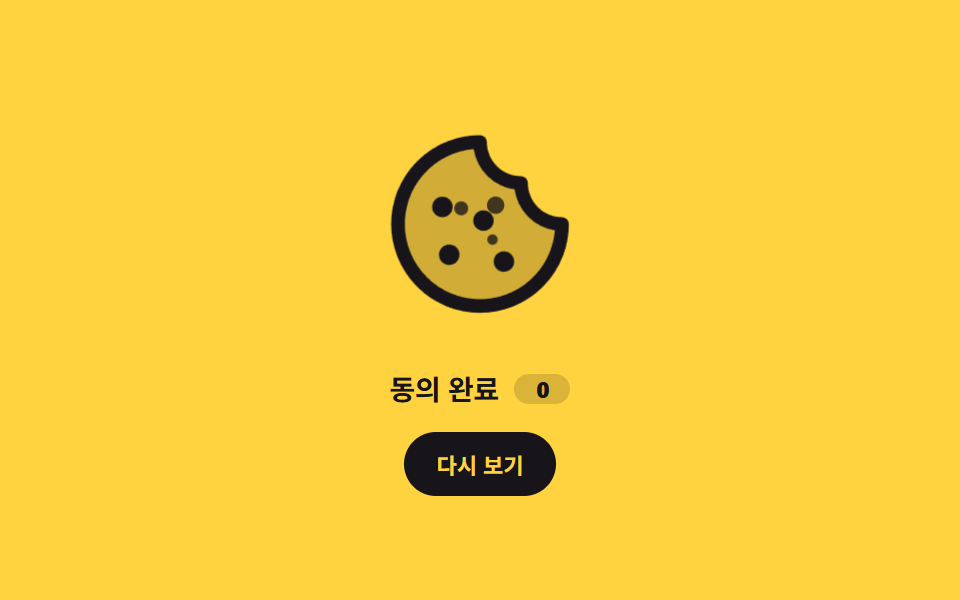
クッキーアイコンが一度沈んでから膨らむ間に、3つのかけらが別々の角度に飛び出し、同じ道を戻ってくっつきます。
使いどころ同意が完了した瞬間の確認モーション、クッキー設定ボタンのホバー反応
scale .88→1.08부스러기 3개 왕복radius 50%
<main class="stage">
  <div class="ck is-demo">
    <div class="ck__art">
      <span class="ck__icon" aria-hidden="true"><svg viewBox="0 0 256 256" width="120" height="120"><g fill="currentColor"><path d="M224 128a96 96 0 1 1-96-96a48 48 0 0 0 48 48a48 48 0 0 0 48 48" opacity=".2"/><path d="M164.49 163.51a12 12 0 1 1-17 0a12 12 0 0 1 17 0m-81-8a12 12 0 1 0 17 0a12 12 0 0 0-16.98 0Zm9-39a12 12 0 1 0-17 0a12 12 0 0 0 17-.02Zm48-1a12 12 0 1 0 0 17a12 12 0 0 0 0-17M232 128A104 104 0 1 1 128 24a8 8 0 0 1 8 8a40 40 0 0 0 40 40a8 8 0 0 1 8 8a40 40 0 0 0 40 40a8 8 0 0 1 8 8m-16.31 7.39A56.13 56.13 0 0 1 168.5 87.5a56.13 56.13 0 0 1-47.89-47.19a88 88 0 1 0 95.08 95.08"/></g></svg></span>
      <i class="ck__crumb ck__crumb--a" aria-hidden="true"></i>
      <i class="ck__crumb ck__crumb--b" aria-hidden="true"></i>
      <i class="ck__crumb ck__crumb--c" aria-hidden="true"></i>
    </div>
    <p class="ck__label">同意を保存しました<b class="ck__count">0</b></p>
    <button class="ck__btn" type="button">もう一度</button>
  </div>
</main>
@use "../../../../site/static/demo-tokens" as *;
$duration: $dur-loop;
$easing: $ease-spring;
$color: $subject-ink;
@include stage($stage-yellow);
.ck {
box-sizing: border-box;
display: grid;
justify-items: center;
gap: $sp-3;
color: $color;
font-family: -apple-system, "Segoe UI", "Noto Sans KR", sans-serif;
}
// 부스러기가 튀어 나갈 자리 — 아이콘 상자 안이라 480×300 · 320×200 둘 다 안 넘친다
.ck__art {
position: relative;
width: clamp(96px, 26vw, 120px);
height: clamp(96px, 26vw, 120px);
}
.ck__icon {
display: block;
width: 100%;
height: 100%;
color: $color;
}
.ck__icon svg { display: block; width: 100%; height: 100%; }
.ck__crumb {
position: absolute;
border-radius: 50%;
background: $color;
opacity: 0;
}
// left/top 으로 가운데에 붙인다 — margin 음수를 쓰면 4px 격자(BD17)를 벗어난다
.ck__crumb--a { width: 8px; height: 8px; left: calc(50% - 4px); top: calc(50% - 4px); }
.ck__crumb--b { width: 10px; height: 10px; left: calc(50% - 5px); top: calc(50% - 5px); }
.ck__crumb--c { width: 6px; height: 6px; left: calc(50% - 3px); top: calc(50% - 3px); }
.ck__label {
display: flex;
align-items: center;
gap: $sp-2;
margin: 0;
font-size: clamp(12px, 3.2vw, 14px);
font-weight: 700;
letter-spacing: -.01em;
}
.ck__count {
display: inline-grid;
place-items: center;
min-width: 20px;
padding: 0 $sp-1;
border-radius: $r-pill;
background: rgba(23, 20, 26, .16);
font-size: 11px;
font-variant-numeric: tabular-nums;
}
.ck__btn {
border: 0;
border-radius: $r-pill;
background: $color;
color: $stage-yellow;
font-family: inherit;
font-size: 11px;
font-weight: 700;
padding: $sp-2 $sp-4;
cursor: pointer;
transition: transform $dur-quick $ease-out, opacity $dur-quick $ease-out;
}
.ck__btn:hover { opacity: .84; }
.ck__btn:focus-visible { outline: 2px solid $color; outline-offset: 2px; }
.ck__btn:active { transform: scale(.96); }
// ── 한 사이클: 쿠키가 눌렸다 튀어오르고, 부스러기 셋이 각자 다른 각도로 나갔다 돌아온다 ──
.ck.is-demo .ck__icon,
.ck.is-burst .ck__icon { animation: ck-pop $duration $easing infinite; }
.ck.is-demo .ck__crumb--a,
.ck.is-burst .ck__crumb--a { animation: ck-crumb-a $duration $easing infinite; }
.ck.is-demo .ck__crumb--b,
.ck.is-burst .ck__crumb--b { animation: ck-crumb-b $duration $easing infinite; }
.ck.is-demo .ck__crumb--c,
.ck.is-burst .ck__crumb--c { animation: ck-crumb-c $duration $easing infinite; }
// 버튼으로 켜는 한 번짜리 — 뒤에 와서 반복 횟수만 덮는다
.ck.is-burst .ck__icon,
.ck.is-burst .ck__crumb { animation-iteration-count: 1; }
@keyframes ck-pop {
0% { transform: scale(1); }
18% { transform: scale(.88); }
44% { transform: scale(1.08); }
70% { transform: scale(1); }
100% { transform: scale(1); }
}
@keyframes ck-crumb-a {
0% { transform: translate(0, 0) scale(.4); opacity: 0; }
16% { transform: translate(-12px, -10px) scale(1); opacity: 1; }
46% { transform: translate(-34px, -26px) scale(1); opacity: 1; }
78% { transform: translate(-10px, -8px) scale(.7); opacity: .5; }
100% { transform: translate(0, 0) scale(.4); opacity: 0; }
}
@keyframes ck-crumb-b {
0% { transform: translate(0, 0) scale(.4); opacity: 0; }
16% { transform: translate(10px, -12px) scale(1); opacity: 1; }
46% { transform: translate(30px, -32px) scale(1); opacity: 1; }
78% { transform: translate(8px, -10px) scale(.7); opacity: .5; }
100% { transform: translate(0, 0) scale(.4); opacity: 0; }
}
@keyframes ck-crumb-c {
0% { transform: translate(0, 0) scale(.4); opacity: 0; }
16% { transform: translate(8px, 10px) scale(1); opacity: 1; }
46% { transform: translate(24px, 28px) scale(1); opacity: 1; }
78% { transform: translate(6px, 8px) scale(.7); opacity: .5; }
100% { transform: translate(0, 0) scale(.4); opacity: 0; }
}
@media (max-width: 340px) {
.ck { gap: $sp-2; }
.ck__btn { padding: $sp-1 $sp-3; }
.ck__count { min-width: 16px; }
}
@media (prefers-reduced-motion: reduce) {
.ck.is-demo .ck__icon, .ck.is-burst .ck__icon,
.ck.is-demo .ck__crumb, .ck.is-burst .ck__crumb { animation: none !important; }
// 루프는 끄고 "부서진 뒤" 상태는 남긴다
.ck__crumb { opacity: 1; }
.ck__crumb--a { transform: translate(-34px, -26px); }
.ck__crumb--b { transform: translate(30px, -32px); }
.ck__crumb--c { transform: translate(24px, 28px); }
.ck__btn { transition: none; }
}html, body {
margin: 0;
overflow: hidden;
}
.stage {
box-sizing: border-box;
min-height: 100vh;
display: grid;
place-items: center;
margin: 0;
background: #ffd23f;
font-family: -apple-system, "Segoe UI", "Noto Sans KR", sans-serif;
padding: clamp(8px, 4vw, 24px);
}
.ck {
box-sizing: border-box;
display: grid;
justify-items: center;
gap: 12px;
color: #17141a;
font-family: -apple-system, "Segoe UI", "Noto Sans KR", sans-serif;
}
.ck__art {
position: relative;
width: clamp(96px, 26vw, 120px);
height: clamp(96px, 26vw, 120px);
}
.ck__icon {
display: block;
width: 100%;
height: 100%;
color: #17141a;
}
.ck__icon svg {
display: block;
width: 100%;
height: 100%;
}
.ck__crumb {
position: absolute;
border-radius: 50%;
background: #17141a;
opacity: 0;
}
.ck__crumb--a {
width: 8px;
height: 8px;
left: calc(50% - 4px);
top: calc(50% - 4px);
}
.ck__crumb--b {
width: 10px;
height: 10px;
left: calc(50% - 5px);
top: calc(50% - 5px);
}
.ck__crumb--c {
width: 6px;
height: 6px;
left: calc(50% - 3px);
top: calc(50% - 3px);
}
.ck__label {
display: flex;
align-items: center;
gap: 8px;
margin: 0;
font-size: clamp(12px, 3.2vw, 14px);
font-weight: 700;
letter-spacing: -0.01em;
}
.ck__count {
display: inline-grid;
place-items: center;
min-width: 20px;
padding: 0 4px;
border-radius: 999px;
background: rgba(23, 20, 26, 0.16);
font-size: 11px;
font-variant-numeric: tabular-nums;
}
.ck__btn {
border: 0;
border-radius: 999px;
background: #17141a;
color: #ffd23f;
font-family: inherit;
font-size: 11px;
font-weight: 700;
padding: 8px 16px;
cursor: pointer;
transition: transform 220ms ease-out, opacity 220ms ease-out;
}
.ck__btn:hover {
opacity: 0.84;
}
.ck__btn:focus-visible {
outline: 2px solid #17141a;
outline-offset: 2px;
}
.ck__btn:active {
transform: scale(0.96);
}
.ck.is-demo .ck__icon,
.ck.is-burst .ck__icon {
animation: ck-pop 2s cubic-bezier(0.2, 0.8, 0.2, 1) infinite;
}
.ck.is-demo .ck__crumb--a,
.ck.is-burst .ck__crumb--a {
animation: ck-crumb-a 2s cubic-bezier(0.2, 0.8, 0.2, 1) infinite;
}
.ck.is-demo .ck__crumb--b,
.ck.is-burst .ck__crumb--b {
animation: ck-crumb-b 2s cubic-bezier(0.2, 0.8, 0.2, 1) infinite;
}
.ck.is-demo .ck__crumb--c,
.ck.is-burst .ck__crumb--c {
animation: ck-crumb-c 2s cubic-bezier(0.2, 0.8, 0.2, 1) infinite;
}
.ck.is-burst .ck__icon,
.ck.is-burst .ck__crumb {
animation-iteration-count: 1;
}
@keyframes ck-pop {
0% {
transform: scale(1);
}
18% {
transform: scale(0.88);
}
44% {
transform: scale(1.08);
}
70% {
transform: scale(1);
}
100% {
transform: scale(1);
}
}
@keyframes ck-crumb-a {
0% {
transform: translate(0, 0) scale(0.4);
opacity: 0;
}
16% {
transform: translate(-12px, -10px) scale(1);
opacity: 1;
}
46% {
transform: translate(-34px, -26px) scale(1);
opacity: 1;
}
78% {
transform: translate(-10px, -8px) scale(0.7);
opacity: 0.5;
}
100% {
transform: translate(0, 0) scale(0.4);
opacity: 0;
}
}
@keyframes ck-crumb-b {
0% {
transform: translate(0, 0) scale(0.4);
opacity: 0;
}
16% {
transform: translate(10px, -12px) scale(1);
opacity: 1;
}
46% {
transform: translate(30px, -32px) scale(1);
opacity: 1;
}
78% {
transform: translate(8px, -10px) scale(0.7);
opacity: 0.5;
}
100% {
transform: translate(0, 0) scale(0.4);
opacity: 0;
}
}
@keyframes ck-crumb-c {
0% {
transform: translate(0, 0) scale(0.4);
opacity: 0;
}
16% {
transform: translate(8px, 10px) scale(1);
opacity: 1;
}
46% {
transform: translate(24px, 28px) scale(1);
opacity: 1;
}
78% {
transform: translate(6px, 8px) scale(0.7);
opacity: 0.5;
}
100% {
transform: translate(0, 0) scale(0.4);
opacity: 0;
}
}
@media (max-width: 340px) {
.ck {
gap: 8px;
}
.ck__btn {
padding: 4px 12px;
}
.ck__count {
min-width: 16px;
}
}
@media (prefers-reduced-motion: reduce) {
.ck.is-demo .ck__icon, .ck.is-burst .ck__icon,
.ck.is-demo .ck__crumb, .ck.is-burst .ck__crumb {
animation: none !important;
}
.ck__crumb {
opacity: 1;
}
.ck__crumb--a {
transform: translate(-34px, -26px);
}
.ck__crumb--b {
transform: translate(30px, -32px);
}
.ck__crumb--c {
transform: translate(24px, 28px);
}
.ck__btn {
transition: none;
}
}// 실제 동작: 버튼을 누르면 자동 루프를 끄고 한 번만 부서졌다 붙는다. 누른 횟수는 localStorage 에 남는다.
var ck = document.querySelector('.ck');
var ckIcon = ck.querySelector('.ck__icon');
var ckCount = ck.querySelector('.ck__count');
var ckN = 0;
try { ckN = parseInt(localStorage.getItem('gd-consent-07'), 10) || 0; } catch (e) {}
ckCount.textContent = String(ckN);
ckIcon.addEventListener('animationend', function () {
ck.classList.remove('is-burst');
});
ck.querySelector('.ck__btn').addEventListener('click', function () {
ck.classList.remove('is-demo');
ck.classList.remove('is-burst');
void ck.offsetWidth; // 연타해도 다시 재생되게 리플로를 강제한다
ck.classList.add('is-burst');
ckN = ckN + 1;
ckCount.textContent = String(ckN);
try { localStorage.setItem('gd-consent-07', String(ckN)); } catch (e) {}
});import { useEffect, useState } from "react";
import type { CSSProperties } from "react";
import styles from "./CookieCrumbleIcon.module.scss";
export type CookieCrumbleIconProps = {
duration?: number;
easing?: string;
color?: string;
};
type Vars = CSSProperties & {
"--duration"?: string;
"--easing"?: string;
"--color"?: string;
};
const KEY = "gd-consent-07";
export default function CookieCrumbleIcon({
duration = 2000,
easing = "cubic-bezier(.2,.8,.2,1)",
color = "#17141a",
}: CookieCrumbleIconProps) {
const [count, setCount] = useState(0);
// 0 이면 자동 루프, 1 이상이면 그 번째 한 번짜리 재생 (key 로 갈아끼워 애니메이션을 되감는다)
const [runId, setRunId] = useState(0);
useEffect(() => {
try {
const raw = localStorage.getItem(KEY);
if (raw) {
setCount(parseInt(raw, 10) || 0);
}
} catch {
/* 샌드박스에서 던질 수 있다 */
}
}, []);
const vars: Vars = {
"--duration": `${duration}ms`,
"--easing": easing,
"--color": color,
};
const demo = runId === 0;
function replay() {
const next = count + 1;
setCount(next);
try {
localStorage.setItem(KEY, String(next));
} catch {
/* 무시 */
}
setRunId(runId + 1);
}
return (
<div className={`${styles.ck} ${demo ? styles.isDemo : styles.isBurst}`} style={vars}>
<div className={styles.art} key={runId}>
<span className={styles.icon} aria-hidden="true">
<svg viewBox="0 0 256 256" width="120" height="120">
<g fill="currentColor">
<path
d="M224 128a96 96 0 1 1-96-96a48 48 0 0 0 48 48a48 48 0 0 0 48 48"
opacity=".2"
/>
<path d="M164.49 163.51a12 12 0 1 1-17 0a12 12 0 0 1 17 0m-81-8a12 12 0 1 0 17 0a12 12 0 0 0-16.98 0Zm9-39a12 12 0 1 0-17 0a12 12 0 0 0 17-.02Zm48-1a12 12 0 1 0 0 17a12 12 0 0 0 0-17M232 128A104 104 0 1 1 128 24a8 8 0 0 1 8 8a40 40 0 0 0 40 40a8 8 0 0 1 8 8a40 40 0 0 0 40 40a8 8 0 0 1 8 8m-16.31 7.39A56.13 56.13 0 0 1 168.5 87.5a56.13 56.13 0 0 1-47.89-47.19a88 88 0 1 0 95.08 95.08" />
</g>
</svg>
</span>
<i className={`${styles.crumb} ${styles.crumbA}`} aria-hidden="true" />
<i className={`${styles.crumb} ${styles.crumbB}`} aria-hidden="true" />
<i className={`${styles.crumb} ${styles.crumbC}`} aria-hidden="true" />
</div>
<p className={styles.label}>
Consent saved<b className={styles.count}>{count}</b>
</p>
<button type="button" className={styles.btn} onClick={replay}>
Replay
</button>
</div>
);
}07 砕けるクッキーアイコン — 計測 累積面積 3.951% · 動いたフレーム 20/23GODRICH オリジナル · SCSS と React は zip に同梱 · クッキー同意バナーUI 9選 — コピペで使う同意管理コード
このデモが属する記事
 クッキー同意バナーUI 9選 — コピペで使う同意管理コードクッキー同意バナーとは、サイトがCookieを使うことを訪問者に知らせ、その選択を受け取るUIで、ここにある9つはバナー・パネル・モーダル・トーストのすべてを実際に押せる状態で作ったものです。そのうち1つは、規約を最後まで読まないとボタンが この記事のデモをすべて見る