08権限ゲートカード — 権限の状態と残り待ち時間を濃度に乗せる案内板
読み取り権限を得ていない状態になると、案内板が待機カードに変わり、権限の状態値と残り待ち時間の比率だけ濃度と案内文を変えます。
使いどころ貼り付け欄のある入力画面、セキュリティ案内が必要な設定ページ
setProperty--tintdataset.state
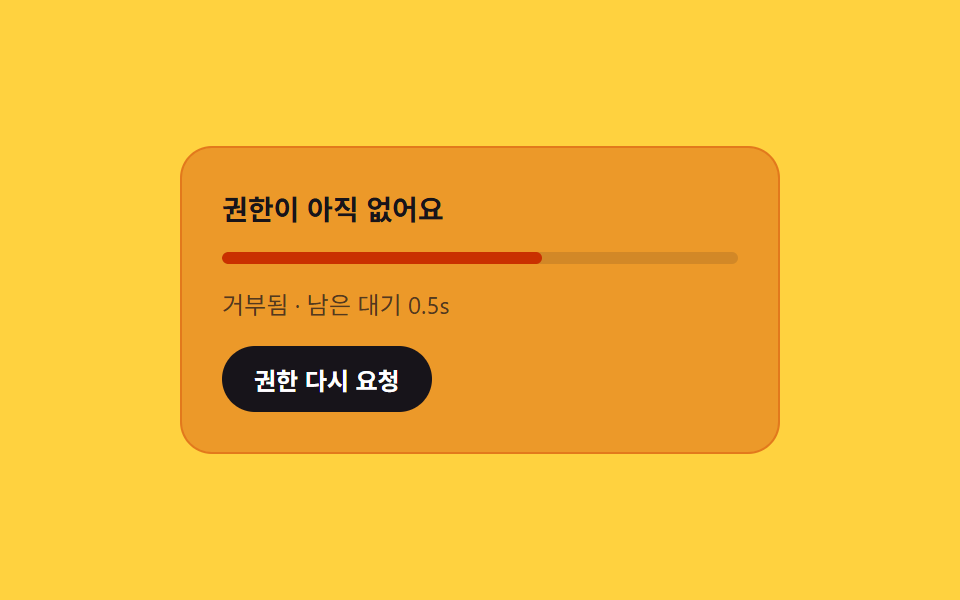
<main class="stage">
<section class="card" id="card">
  <p class="title" id="title">貼り付け権限を確認中</p>
  <div class="track" id="track">
    <div class="fill" id="fill"></div>
  </div>
  <p class="msg" id="msg">権限の状態を確認しています</p>
  <button class="retryBtn" id="retryBtn" type="button">権限を再リクエスト</button>
</section>
</main>
@use "../../../../site/static/demo-tokens" as *;
@include stage($stage-yellow);
.card {
--tint: 0.14;
box-sizing: border-box;
width: 300px;
display: flex;
flex-direction: column;
align-items: stretch;
gap: $sp-3;
background: rgba($subject-orange-deep, var(--tint));
border: 1px solid rgba($subject-orange-deep, .3);
border-radius: $r-card;
padding: $sp-5;
transition: background-color $dur-quick $ease-out;
}
.title {
margin: 0;
color: $subject-ink;
font-family: -apple-system, "Segoe UI", "Noto Sans KR", sans-serif;
font-weight: 700;
font-size: 14px;
}
.track {
width: 100%;
height: 6px;
border-radius: $r-pill;
background: rgba($subject-ink, .12);
overflow: hidden;
}
.fill {
height: 100%;
width: 0%;
border-radius: $r-pill;
background: $subject-orange-deep;
transition: width $dur-instant linear;
}
.msg {
margin: 0;
color: rgba($subject-ink, .72);
font-family: -apple-system, "Segoe UI", "Noto Sans KR", sans-serif;
font-size: 12px;
line-height: 1.4;
}
.retryBtn {
align-self: flex-start;
border: 0;
border-radius: $r-pill;
padding: $sp-2 $sp-4;
background: $subject-ink;
color: $stage-paper;
font-family: -apple-system, "Segoe UI", "Noto Sans KR", sans-serif;
font-weight: 600;
font-size: 12px;
cursor: pointer;
}
@media (max-width: 340px) {
.card {
width: 260px;
padding: $sp-4;
}
}
@media (prefers-reduced-motion: reduce) {
.card, .fill {
transition: none;
}
}html, body {
margin: 0;
overflow: hidden;
}
.stage {
box-sizing: border-box;
min-height: 100vh;
display: grid;
place-items: center;
margin: 0;
background: #ffd23f;
font-family: -apple-system, "Segoe UI", "Noto Sans KR", sans-serif;
padding: clamp(8px, 4vw, 24px);
}
.card {
--tint: 0.14;
box-sizing: border-box;
width: 300px;
display: flex;
flex-direction: column;
align-items: stretch;
gap: 12px;
background: rgba(201, 48, 0, var(--tint));
border: 1px solid rgba(201, 48, 0, 0.3);
border-radius: 16px;
padding: 20px;
transition: background-color 220ms ease-out;
}
.title {
margin: 0;
color: #17141a;
font-family: -apple-system, "Segoe UI", "Noto Sans KR", sans-serif;
font-weight: 700;
font-size: 14px;
}
.track {
width: 100%;
height: 6px;
border-radius: 999px;
background: rgba(23, 20, 26, 0.12);
overflow: hidden;
}
.fill {
height: 100%;
width: 0%;
border-radius: 999px;
background: #c93000;
transition: width 140ms linear;
}
.msg {
margin: 0;
color: rgba(23, 20, 26, 0.72);
font-family: -apple-system, "Segoe UI", "Noto Sans KR", sans-serif;
font-size: 12px;
line-height: 1.4;
}
.retryBtn {
align-self: flex-start;
border: 0;
border-radius: 999px;
padding: 8px 16px;
background: #17141a;
color: #ffffff;
font-family: -apple-system, "Segoe UI", "Noto Sans KR", sans-serif;
font-weight: 600;
font-size: 12px;
cursor: pointer;
}
@media (max-width: 340px) {
.card {
width: 260px;
padding: 16px;
}
}
@media (prefers-reduced-motion: reduce) {
.card, .fill {
transition: none;
}
}// 권한 대기 카드 — 읽기 권한을 얻지 못한 상태가 되면 안내판이 대기 카드로 바뀌고,
// 권한 상태 값(denied)と 남은 대기 시간의 비율만큼 카드 농도·안내 문구를 바꾼다.
// 계산 겹: 경과시간 → 남은 대기 비율(0~1) → 카드 배경 알파·진행바 폭 재계산.
// 실사용자 리스너 있음(権限を再リクエスト 버튼). 실 클립보드 API/Permissions API 호출 없음 — 상태는 시뮬레이션.
(function () {
var card = document.getElementById('card');
var title = document.getElementById('title');
var track = document.getElementById('track');
var fill = document.getElementById('fill');
var msg = document.getElementById('msg');
var retryBtn = document.getElementById('retryBtn');
if (!card || !title || !track || !fill || !msg || !retryBtn) return;
var CHECK_MS = 500;
var WAIT_MS = 1600;
var CYCLE_MS = CHECK_MS + WAIT_MS;
function applyChecking() {
card.dataset.state = 'checking';
title.textContent = '貼り付け権限を確認中';
msg.textContent = '権限の状態を確認しています';
fill.style.width = '0%';
card.style.setProperty('--tint', '0.14');
}
function applyWaiting(elapsed) {
card.dataset.state = 'waiting';
var remain = Math.max(WAIT_MS - elapsed, 0);
var ratio = remain / WAIT_MS;
title.textContent = '権限がまだありません';
msg.textContent = '拒否済み · 残り待機 ' + (remain / 1000).toFixed(1) + 's';
fill.style.width = ((1 - ratio) * 100).toFixed(1) + '%';
card.style.setProperty('--tint', (0.14 + (1 - ratio) * 0.34).toFixed(3));
}
function setPhase(t) {
if (t < CHECK_MS) {
applyChecking();
} else {
applyWaiting(t - CHECK_MS);
}
}
setPhase(0);
var reduce = window.matchMedia('(prefers-reduced-motion: reduce)').matches;
var start = null;
var autoRaf = 0;
function autoLoop(ts) {
if (start === null) start = ts;
var t = (ts - start) % CYCLE_MS;
setPhase(t);
autoRaf = requestAnimationFrame(autoLoop);
}
if (!reduce) autoRaf = requestAnimationFrame(autoLoop);
retryBtn.addEventListener('click', function () {
if (autoRaf) { cancelAnimationFrame(autoRaf); autoRaf = 0; }
var clickStart = null;
function userLoop(ts) {
if (clickStart === null) clickStart = ts;
var t = ts - clickStart;
if (t < CYCLE_MS) {
setPhase(t);
requestAnimationFrame(userLoop);
} else {
setPhase(0);
}
}
requestAnimationFrame(userLoop);
});
})();import { useEffect, useRef } from "react";
import styles from "./CopyPermissionGateCard.module.scss";
// 권한 대기 카드 — 읽기 권한을 얻지 못한 상태가 되면 안내판이 대기 카드로 바뀌고,
// 권한 상태 값(denied)과 남은 대기 시간의 비율만큼 카드 농도·안내 문구를 바꾼다.
// 계산 겹: 경과시간 → 남은 대기 비율(0~1) → 카드 배경 알파·진행바 폭 재계산.
// 실사용자 리스너 있음(권한 다시 요청 버튼). 실 클립보드 API/Permissions API 호출 없음 — 상태는 시뮬레이션.
const CHECK_MS = 500;
const WAIT_MS = 1600;
const CYCLE_MS = CHECK_MS + WAIT_MS;
export default function CopyPermissionGateCard() {
const cardRef = useRef<HTMLDivElement>(null);
const titleRef = useRef<HTMLParagraphElement>(null);
const fillRef = useRef<HTMLDivElement>(null);
const msgRef = useRef<HTMLParagraphElement>(null);
const retryRef = useRef<HTMLButtonElement>(null);
useEffect(() => {
const card = cardRef.current;
const title = titleRef.current;
const fill = fillRef.current;
const msg = msgRef.current;
const retryBtn = retryRef.current;
if (!card || !title || !fill || !msg || !retryBtn) return;
function applyChecking() {
card!.dataset.state = "checking";
title!.textContent = "붙여넣기 권한 확인 중";
msg!.textContent = "권한 상태를 확인하고 있어요";
fill!.style.width = "0%";
card!.style.setProperty("--tint", "0.14");
}
function applyWaiting(elapsed: number) {
card!.dataset.state = "waiting";
const remain = Math.max(WAIT_MS - elapsed, 0);
const ratio = remain / WAIT_MS;
title!.textContent = "권한이 아직 없어요";
msg!.textContent = `거부됨 · 남은 대기 ${(remain / 1000).toFixed(1)}s`;
fill!.style.width = `${((1 - ratio) * 100).toFixed(1)}%`;
card!.style.setProperty("--tint", (0.14 + (1 - ratio) * 0.34).toFixed(3));
}
function setPhase(t: number) {
if (t < CHECK_MS) {
applyChecking();
} else {
applyWaiting(t - CHECK_MS);
}
}
setPhase(0);
const reduce = window.matchMedia("(prefers-reduced-motion: reduce)").matches;
let start: number | null = null;
let autoRaf = 0;
function autoLoop(ts: number) {
if (start === null) start = ts;
const t = (ts - start) % CYCLE_MS;
setPhase(t);
autoRaf = requestAnimationFrame(autoLoop);
}
if (!reduce) autoRaf = requestAnimationFrame(autoLoop);
function onRetry() {
if (autoRaf) {
cancelAnimationFrame(autoRaf);
autoRaf = 0;
}
let clickStart: number | null = null;
function userLoop(ts: number) {
if (clickStart === null) clickStart = ts;
const t = ts - clickStart;
if (t < CYCLE_MS) {
setPhase(t);
requestAnimationFrame(userLoop);
} else {
setPhase(0);
}
}
requestAnimationFrame(userLoop);
}
retryBtn.addEventListener("click", onRetry);
return () => {
if (autoRaf) cancelAnimationFrame(autoRaf);
retryBtn.removeEventListener("click", onRetry);
};
}, []);
return (
<div className={styles.stage}>
<section ref={cardRef} className={styles.card}>
<p ref={titleRef} className={styles.title}>붙여넣기 권한 확인 중</p>
<div className={styles.track}>
<div ref={fillRef} className={styles.fill} />
</div>
<p ref={msgRef} className={styles.msg}>권한 상태를 확인하고 있어요</p>
<button ref={retryRef} className={styles.retryBtn} type="button">권한 다시 요청</button>
</section>
</div>
);
}08 権限ゲートカード — 権限の状態と残り待ち時間を濃度に乗せる案内板 — 計測 累積面積 29.676% · 動いたフレーム 19/23GODRICH オリジナル · SCSS と React は zip に同梱 · コピー ボタン html UI 9選 — コード・URL・テキストのフィードバックまで
このデモが属する記事
 コピー ボタン html UI 9選 — コード・URL・テキストのフィードバックまで「コピー ボタン html」9選 — 9つのうち1つはコピー結果を2つのボタンが分けて持ち、1つはコピーした文字数だけ表示を埋め、もう1つは失敗したコピーの復帰時間を自ら計ります。 この記事のデモをすべて見る