コピー ボタン html UI 9選 — コード・URL・テキストのフィードバックまで
「コピー ボタン html」9選 — 9つのうち1つはコピー結果を2つのボタンが分けて持ち、1つはコピーした文字数だけ表示を埋め、もう1つは失敗したコピーの復帰時間を自ら計ります。
「コピー ボタン html」で検索すると装飾だけを整えたボタン集がまず出てきますが、この記事が示すのはその装飾の手前で動く計算の層です。実際のnavigator.clipboard.writeText・readTextの呼び出しはどこにもなく、コピーの成功・失敗・権限の状態は名前付き定数で定めた仮のクリップボード状態機械だけで表現しています(実サービスに組み込む際はその状態遷移の場所に実際のwriteText呼び出しを入れるという案内コメントを残しています)。9項目のうち01・05・06・07はrequestAnimationFrameの固定周期による自動再生だけで実演し、02・03・04・08・09の5項目だけに実際のクリックリスナーが付いています。
 01 copy-icon-morph-check
 02 copy-char-count-fill
 03 copy-fallback-select
 04 copy-two-button-split
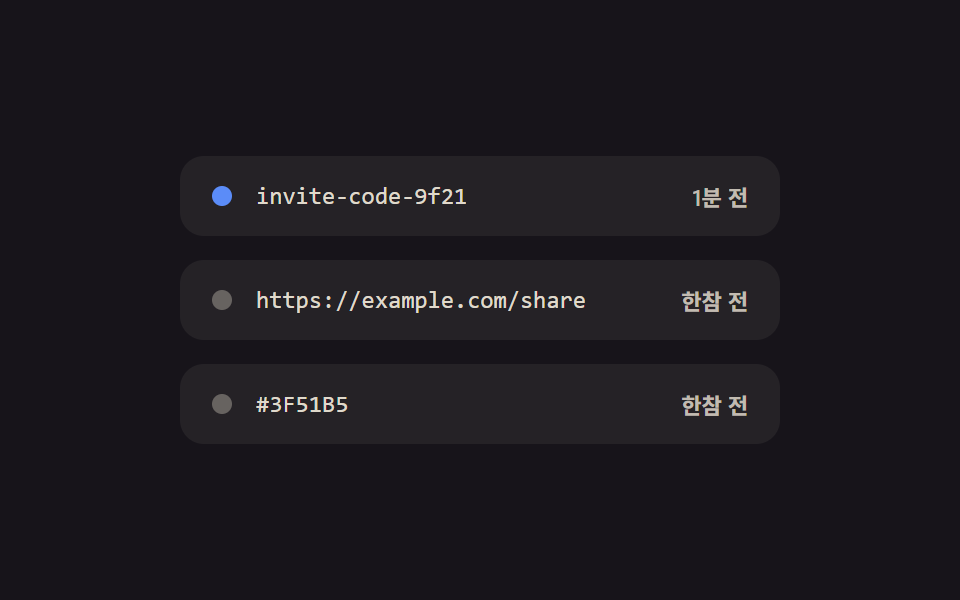 05 copy-queue-histories
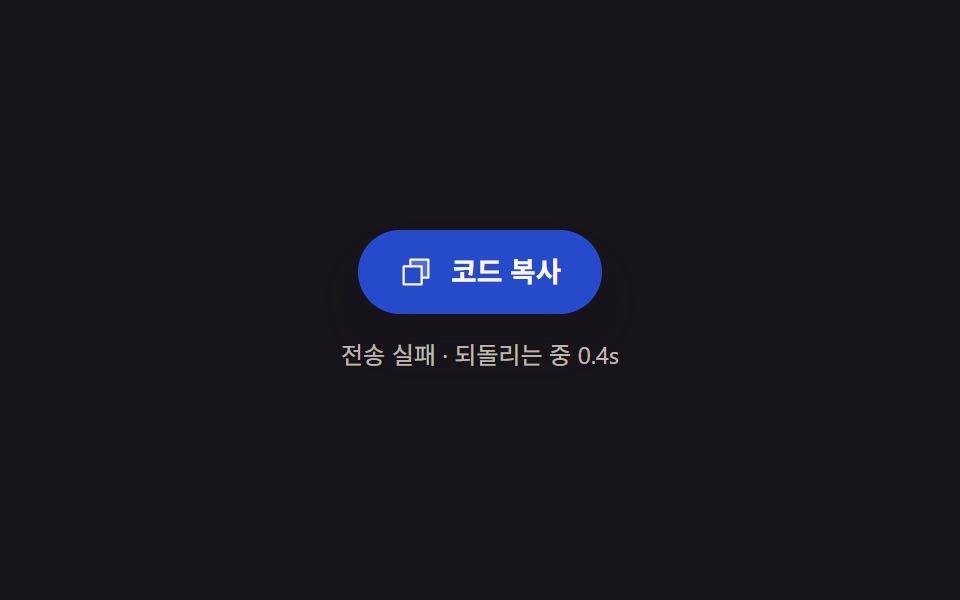 06 copy-fail-retry-countdown
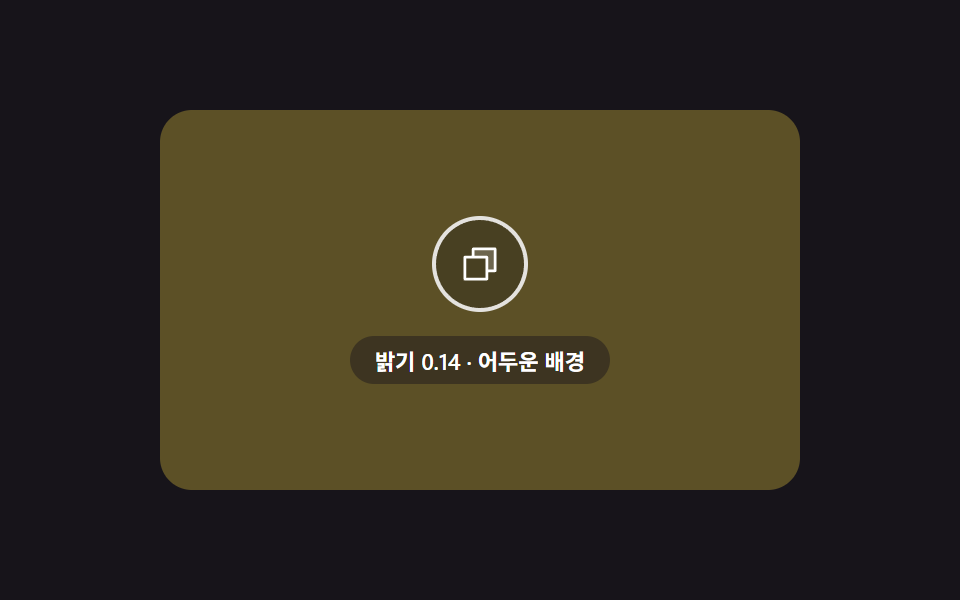 07 copy-contrast-icon-swap
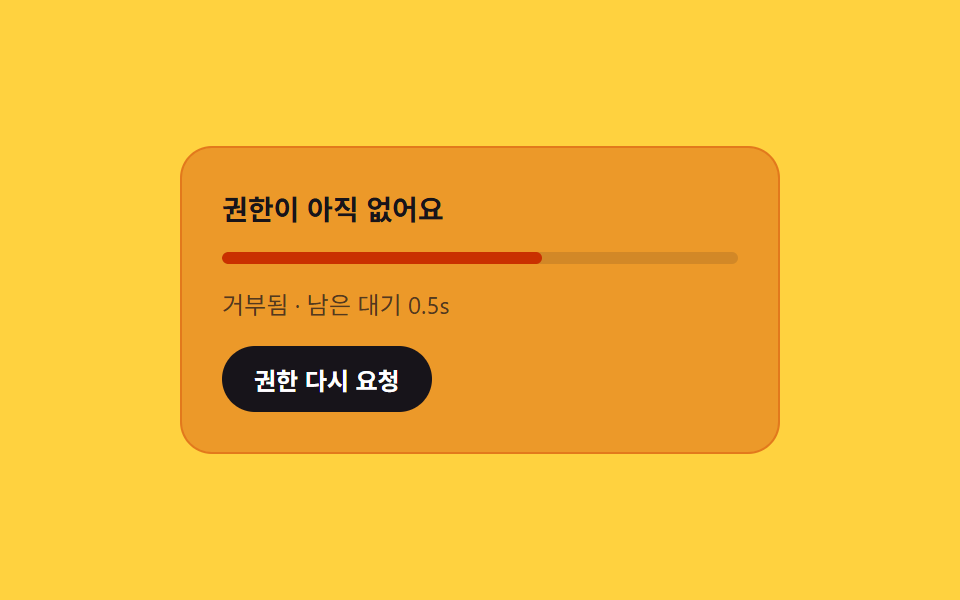 08 copy-permission-gate-card
 09 copy-rich-text-toast
自動再生 · タイルを押すとその項目へ · すべて1つのzip
- 01 アイコンモーフィックチェック — 成功を1本の線で描いて見せるボタン
- 02 文字数フィル — コピーした文字数だけ表示が満ちるボタン
- 03 フォールバック選択 — 速い道が失敗した時に手動の道を残すカード
- 04 2ボタン分割 — 成功状態を主と補助が時間差で分け持つ行
- 05 キューヒストリー — 最近のコピーの時間差を相対時刻で書き直すリスト
- 06 失敗の回復 — 失敗後の経過時間を数えて濃度を元へ補間するボタン
- 07 コントラストスワップ — 背景の明るさに合わせてアイコン色を求め直す重ねボタン
- 08 権限ゲートカード — 権限の状態と残り待ち時間を濃度に乗せる案内板
- 09 リッチテキストトースト — 書式の種類数だけラベル幅を計算し直す通知
デモ
9項目とも「見た目の演出そのものではなく、線の実測長・コピーした文字数・選択範囲の実測幅・ボタン間の距離・基準経過時間・失敗後の経過時間・背景の相対輝度・残り待ち時間の比率・書式の種類数という値を毎フレーム求め直し、ストロークの描画量・充填比率・レイアウト・時間差・相対時刻ラベル・色の補間・アイコンの配色・カードの濃度・トーストの幅に反映する」という同じ前提を共有しています。実測値は次のとおりです。
| 番号 | 項目 | 累積面積 | 強度平均 | 動いたフレーム |
|---|---|---|---|---|
| 01 | アイコンモーフィックチェック | 1.29% | 144.5 | 13/23 |
| 02 | 文字数フィル | 2.33% | 161.2 | 16/23 |
| 03 | フォールバック選択 | 15.44% | 87.9 | 14/23 |
| 04 | 2ボタン分割 | 3.33% | 73.0 | 11/23 |
| 05 | キューヒストリー | 0.40% | 39.7 | 18/23 |
| 06 | 失敗の回復 | 4.01% | 116.7 | 21/23 |
| 07 | コントラストスワップ | 42.09% | 29.3 | 23/23 |
| 08 | 権限ゲート | 29.68% | 86.6 | 19/23 |
| 09 | リッチテキストトースト | 10.36% | 159.7 | 10/23 |
累積面積は07コントラストスワップが42.09%でもっとも広く、08権限ゲート29.68%・03フォールバック選択15.44%・09リッチテキストトースト10.36%・06失敗の回復4.01%・04 2ボタン分割3.33%・02文字数フィル2.33%・01アイコンモーフィック1.29%・05キューヒストリー0.40%の順です。01アイコンモーフィックと05キューヒストリーの面積が9項目中もっとも小さいのは、チェックの線やヒストリーの点・ラベルのように画面上で実際に占めるピクセルの場所自体が小さい要素だからで、欠陥ではありません。24フレームキャプチャ(デルタ23個)のうち動いたフレームは10(09)〜23(07)の間にあり、強度平均は29.3(07、最も低い)〜161.2(02、最も高い)の間で、9項目とも画面が動き続ける下限値に十分な余裕を持って収まっています。
コピーボタンの解剖 — 9つの画面が計算するもの
コピーボタンは押された瞬間に成功・失敗のどちらかを表示するだけの部品に見えますが、この9項目はその表示に至るまでの値の求め直しを見せています。チェックの線の長さ・コピーした文字数・選択範囲の幅・ボタン間の距離・経過時間・背景の明るさ・待ち時間の比率・書式の種類数という8種類の値が、毎フレームあるいは押された瞬間に読み直され、描画・充填・レイアウト・時間差・色・濃度・幅という画面上の変化に変換されています。
入力と出力 — 何を計算して何に変えるか
入力はSVGポリラインの実測長(getTotalLength)、コピー対象の文字数、Range.getBoundingClientRectで測った選択範囲の幅、2つのボタンの中心間距離、基準経過時間に仮の時計倍速を掛けた値、失敗してからの経過時間、背景RGBのガンマ補正済み相対輝度、権限確認後の残り待ち時間の比率、DOMから数えた書式タグの種類数という9種類です。出力はSVGのstrokeDashoffset、CSSカスタムプロパティ--fill・--tint、classListの切り替え、aria-pressed・data-state・dataset.stateといった属性、要素のtextContentとインラインスタイルの幅で、キーフレームアニメーションは一つも使っていません。
01・05・06・07は自動再生、02・03・04・08・09に実際のリスナー
9項目のうち01(アイコンモーフィックチェック)・05(キューヒストリー)・06(失敗の回復)・07(コントラストスワップ)はrequestAnimationFrameの固定周期による自動再生だけで実演されており、実際のクリック・ドラッグ・ポインターのリスナーは一つも付いていません。02(文字数フィル)・03(フォールバック選択)・04(2ボタン分割)・08(権限ゲート)・09(リッチテキストトースト)の5項目だけに実際のクリックリスナーが付いていて、押された瞬間を基準に同じ計算式が最初から再生し直されます。
仮のクリップボード状態機械とは何か
このデモはどの項目もnavigator.clipboard.writeText・readText・Permissions APIを一切呼び出しません。コピーの成功・失敗・権限の状態は名前付き定数で定めた仮の状態機械だけで進み、実サービスに組み込む場合はその状態遷移が起きる場所に実際のwriteText呼び出しを1行差し込むという案内コメントだけをソースに残しています。すべての項目のデータ(文字列の長さ・基準時刻など)は固定値なので、再生のたびに同じ場面が再現され、ランダムな要素はありません。
画面別コード
「html コード コピー ボタン」を探す人の多くはコードブロック右上に置く1個のボタンを求めていますが、この9項目はコード・URL・テキスト・書式付き文章という異なるコピー対象ごとに、実測すべき値も変わることを示しています。項目名にある「モーフィック」「フォールバック」「トースト」という言葉は見た目の系統を指す説明的な参照で、特定のライブラリのコンポーネント名を指すものではありません。似た計算の考え方は、押した瞬間の状態遷移を扱うcssボタン 押したら変わる9選の状態管理にも共通しています。
01アイコンモーフィックチェック — 成功を1本の線で描いて見せるボタン
コピーが成功した状態になると、アイコンが書類からチェックへ切り替わります。このときgetTotalLengthでチェックのポリラインの実際の長さを測ってstrokeDasharrayとして固定し、経過比率だけstrokeDashoffsetを0まで求め直して線を描きます。コード・インストールコマンドの右上に置く定番の位置を想定しています。
<main class="stage">
<section class="panel">
  <button class="copyBtn" id="copyBtn" type="button" aria-pressed="false" aria-label="コードをコピー">
    <span class="iconSlot" id="iconSlot">
      <svg class="icon icon--sheet" id="sheetIcon" viewBox="0 0 256 256" aria-hidden="true"><g fill="currentColor"><path d="M216 40v128h-48V88H88V40Z" opacity=".2"/><path d="M216 32H88a8 8 0 0 0-8 8v40H40a8 8 0 0 0-8 8v128a8 8 0 0 0 8 8h128a8 8 0 0 0 8-8v-40h40a8 8 0 0 0 8-8V40a8 8 0 0 0-8-8m-56 176H48V96h112Zm48-48h-32V88a8 8 0 0 0-8-8H96V48h112Z"/></g></svg>
      <svg class="icon icon--check" id="checkIcon" viewBox="0 0 24 24" aria-hidden="true">
        <polyline id="checkStroke" points="4,13 9.5,18.5 20,6"></polyline>
      </svg>
    </span>
    <span class="label" id="label">コードをコピー</span>
  </button>
  <span class="sr" id="live" role="status" aria-live="polite"></span>
</section>
</main>
@use "../../../../site/static/demo-tokens" as *;
@include stage($stage-ink);
.panel {
display: flex;
flex-direction: column;
align-items: center;
gap: $sp-4;
}
.copyBtn {
display: inline-flex;
align-items: center;
gap: $sp-2;
padding: $sp-3 $sp-5;
border: 0;
border-radius: $r-pill;
background: $subject-blue-deep;
color: $subject-cream;
font-family: -apple-system, "Segoe UI", "Noto Sans KR", sans-serif;
font-weight: 600;
font-size: 15px;
line-height: 1.3;
cursor: pointer;
box-shadow: $shadow-raised;
}
.iconSlot {
position: relative;
width: 22px;
height: 22px;
flex: none;
}
.icon {
position: absolute;
inset: 0;
width: 100%;
height: 100%;
}
.icon--sheet {
color: $subject-cream;
}
.icon--check {
opacity: 0;
fill: none;
stroke: $subject-cream;
stroke-width: 2.6;
stroke-linecap: round;
stroke-linejoin: round;
}
.label {
white-space: nowrap;
}
.sr {
position: absolute;
width: 1px;
height: 1px;
padding: 0;
margin: -1px;
overflow: hidden;
clip: rect(0, 0, 0, 0);
white-space: nowrap;
border: 0;
}
@media (max-width: 340px) {
.copyBtn {
padding: $sp-2 $sp-4;
font-size: 13px;
}
.iconSlot {
width: 18px;
height: 18px;
}
}
@media (prefers-reduced-motion: reduce) {
.copyBtn * {
transition: none;
}
}html, body {
margin: 0;
overflow: hidden;
}
.stage {
box-sizing: border-box;
min-height: 100vh;
display: grid;
place-items: center;
margin: 0;
background: #17141a;
font-family: -apple-system, "Segoe UI", "Noto Sans KR", sans-serif;
padding: clamp(8px, 4vw, 24px);
}
.panel {
display: flex;
flex-direction: column;
align-items: center;
gap: 16px;
}
.copyBtn {
display: inline-flex;
align-items: center;
gap: 8px;
padding: 12px 20px;
border: 0;
border-radius: 999px;
background: #0a4fe8;
color: #fff7e6;
font-family: -apple-system, "Segoe UI", "Noto Sans KR", sans-serif;
font-weight: 600;
font-size: 15px;
line-height: 1.3;
cursor: pointer;
box-shadow: 0 14px 24px rgba(23, 20, 26, 0.32);
}
.iconSlot {
position: relative;
width: 22px;
height: 22px;
flex: none;
}
.icon {
position: absolute;
inset: 0;
width: 100%;
height: 100%;
}
.icon--sheet {
color: #fff7e6;
}
.icon--check {
opacity: 0;
fill: none;
stroke: #fff7e6;
stroke-width: 2.6;
stroke-linecap: round;
stroke-linejoin: round;
}
.label {
white-space: nowrap;
}
.sr {
position: absolute;
width: 1px;
height: 1px;
padding: 0;
margin: -1px;
overflow: hidden;
clip: rect(0, 0, 0, 0);
white-space: nowrap;
border: 0;
}
@media (max-width: 340px) {
.copyBtn {
padding: 8px 16px;
font-size: 13px;
}
.iconSlot {
width: 18px;
height: 18px;
}
}
@media (prefers-reduced-motion: reduce) {
.copyBtn * {
transition: none;
}
}// 아이콘 모핑 체크 — 서류 아이콘이 사라지고 체크 폴리라인이 stroke-dashoffset 으로 그려진다.
// 체크 선의 실제 길이는 getTotalLength 로 재고, 그 길이만큼 오프셋을 0 까지 줄이며 그린다.
// 계산 겹: 선 길이 실측 → 경과 비율 → 오프셋 재계산. 자동 재생만, 실사용자 리스너 없음.
(function () {
var sheet = document.getElementById('sheetIcon');
var check = document.getElementById('checkIcon');
var stroke = document.getElementById('checkStroke');
var label = document.getElementById('label');
var live = document.getElementById('live');
if (!sheet || !check || !stroke || !label || !live) return;
  var length = stroke.getTotalLength();
  stroke.style.strokeDasharray = length.toFixed(2);

  var LABEL_IDLE = 'コードをコピー';
  var LABEL_DONE = 'コピー済み';
  var CYCLE_MS = 2000;
  var TRIGGER_AT = 0.08;
  var DRAW_MS = 640;
  var REVERT_AT = 0.62;

  function apply(t) {
    var drawStart = TRIGGER_AT * CYCLE_MS;
    var drawEnd = drawStart + DRAW_MS;
    var revertAt = REVERT_AT * CYCLE_MS;
    var success = t >= drawStart && t < revertAt;
    var drawT = Math.min(Math.max((t - drawStart) / DRAW_MS, 0), 1);
    var offset = success ? length * (1 - drawT) : length;
    stroke.style.strokeDashoffset = offset.toFixed(2);
    sheet.style.opacity = success ? '0' : '1';
    check.style.opacity = success ? '1' : '0';
    var done = success && drawT >= 1;
    label.textContent = done ? LABEL_DONE : LABEL_IDLE;
    live.textContent = done ? LABEL_DONE : '';
  }
apply(0);
var reduce = window.matchMedia('(prefers-reduced-motion: reduce)').matches;
if (reduce) return;
var start = null;
function loop(ts) {
if (start === null) start = ts;
var t = (ts - start) % CYCLE_MS;
apply(t);
requestAnimationFrame(loop);
}
requestAnimationFrame(loop);
})();import { useEffect, useRef } from "react";
import styles from "./CopyIconMorphCheck.module.scss";
// 아이콘 모핑 체크 — 서류 아이콘이 사라지고 체크 폴리라인이 stroke-dashoffset 으로 그려진다.
// 체크 선의 실제 길이는 getTotalLength 로 재고, 그 길이만큼 오프셋을 0 까지 줄이며 그린다.
// 계산 겹: 선 길이 실측 → 경과 비율 → 오프셋 재계산. 자동 재생만, 실사용자 리스너 없음.
const LABEL_IDLE = "코드 복사";
const LABEL_DONE = "복사됨";
const CYCLE_MS = 2000;
const TRIGGER_AT = 0.08;
const DRAW_MS = 640;
const REVERT_AT = 0.62;
export default function CopyIconMorphCheck() {
const sheetRef = useRef<SVGSVGElement>(null);
const checkRef = useRef<SVGSVGElement>(null);
const strokeRef = useRef<SVGPolylineElement>(null);
const labelRef = useRef<HTMLSpanElement>(null);
const liveRef = useRef<HTMLSpanElement>(null);
useEffect(() => {
const sheet = sheetRef.current;
const check = checkRef.current;
const stroke = strokeRef.current;
const label = labelRef.current;
const live = liveRef.current;
if (!sheet || !check || !stroke || !label || !live) return;
const length = stroke.getTotalLength();
stroke.style.strokeDasharray = length.toFixed(2);
function apply(t: number) {
const drawStart = TRIGGER_AT * CYCLE_MS;
const revertAt = REVERT_AT * CYCLE_MS;
const success = t >= drawStart && t < revertAt;
const drawT = Math.min(Math.max((t - drawStart) / DRAW_MS, 0), 1);
const offset = success ? length * (1 - drawT) : length;
stroke!.style.strokeDashoffset = offset.toFixed(2);
sheet!.style.opacity = success ? "0" : "1";
check!.style.opacity = success ? "1" : "0";
const done = success && drawT >= 1;
label!.textContent = done ? LABEL_DONE : LABEL_IDLE;
live!.textContent = done ? LABEL_DONE : "";
}
apply(0);
const reduce = window.matchMedia("(prefers-reduced-motion: reduce)").matches;
if (reduce) return;
let start: number | null = null;
let raf = 0;
function loop(ts: number) {
if (start === null) start = ts;
const t = (ts - start) % CYCLE_MS;
apply(t);
raf = requestAnimationFrame(loop);
}
raf = requestAnimationFrame(loop);
return () => cancelAnimationFrame(raf);
}, []);
return (
<div className={styles.stage}>
<section className={styles.panel}>
<button className={styles.copyBtn} type="button" aria-pressed="false" aria-label="코드 복사">
<span className={styles.iconSlot}>
<svg ref={sheetRef} className={`${styles.icon} ${styles.iconSheet}`} viewBox="0 0 256 256" aria-hidden="true">
<g fill="currentColor">
<path d="M216 40v128h-48V88H88V40Z" opacity=".2" />
<path d="M216 32H88a8 8 0 0 0-8 8v40H40a8 8 0 0 0-8 8v128a8 8 0 0 0 8 8h128a8 8 0 0 0 8-8v-40h40a8 8 0 0 0 8-8V40a8 8 0 0 0-8-8m-56 176H48V96h112Zm48-48h-32V88a8 8 0 0 0-8-8H96V48h112Z" />
</g>
</svg>
<svg ref={checkRef} className={`${styles.icon} ${styles.iconCheck}`} viewBox="0 0 24 24" aria-hidden="true">
<polyline ref={strokeRef} points="4,13 9.5,18.5 20,6" />
</svg>
</span>
<span ref={labelRef} className={styles.label}>코드 복사</span>
</button>
<span ref={liveRef} className={styles.sr} role="status" aria-live="polite" />
</section>
</div>
);
}01 · アイコンモーフィックチェック — 成功を1本の線で描いて見せるボタン — 計測 累積面積 1.288% · 動いたフレーム 13/23GODRICH オリジナル · SCSS と React は zip に同梱 · パスワードを見る
getTotalLengthで測った線の長さがstrokeDashoffsetを求め直す
CYCLE_MS2000msの周期のうちTRIGGER_AT0.08の位置で成功状態が始まり、DRAW_MS640msの間だけdrawTが0から1へ進んでoffset = length * (1 - drawT)が0へ向かい、REVERT_AT0.62の位置で書類アイコンへ戻ります。線の長さを実測せず固定のdasharray値を使うと、アイコンのサイズが変わったときに線がずれたり途中で切れて描かれたりします。
var length = stroke.getTotalLength();
stroke.style.strokeDasharray = length.toFixed(2);
var LABEL_IDLE = 'コードをコピー';
var LABEL_DONE = 'コピー済み';
var CYCLE_MS = 2000;
var TRIGGER_AT = 0.08;
var DRAW_MS = 640;
var REVERT_AT = 0.62;
function apply(t) {
var drawStart = TRIGGER_AT * CYCLE_MS;
var drawEnd = drawStart + DRAW_MS;
var revertAt = REVERT_AT * CYCLE_MS;
var success = t >= drawStart && t < revertAt;
var drawT = Math.min(Math.max((t - drawStart) / DRAW_MS, 0), 1);
var offset = success ? length * (1 - drawT) : length;
stroke.style.strokeDashoffset = offset.toFixed(2);
sheet.style.opacity = success ? '0' : '1';
check.style.opacity = success ? '1' : '0';
var done = success && drawT >= 1;
label.textContent = done ? LABEL_DONE : LABEL_IDLE;
live.textContent = done ? LABEL_DONE : '';
}
02文字数フィル — コピーした文字数だけ表示が満ちるボタン
コピーされた文の文字数を数え、その値をボタン内進行表示の充填比率に変え、充填が終わると数字がアイコンとともに一瞬浮かんで戻ります。長い案内文やライセンス全文のコピー、引用の持ち帰りのような、量そのものを伝えたい場面を想定しています。
<main class="stage">
<section class="panel">
  <div class="card">
    <p class="preview" id="preview">これは招待カードの下に自動で入る案内用のサンプルテキストです。</p>
    <button class="copyBtn" id="copyBtn" type="button" aria-label="文言をコピー">
      <span class="fillTrack" aria-hidden="true"><span class="fillBar" id="fillBar"></span></span>
      <span class="iconSlot">
        <svg class="icon" id="icon" viewBox="0 0 256 256" aria-hidden="true"><g fill="currentColor"><path d="M232 56v144a16 16 0 0 1-16 16H40a16 16 0 0 1-16-16V56a16 16 0 0 1 16-16h176a16 16 0 0 1 16 16" opacity=".2"/><path d="m205.66 85.66l-96 96a8 8 0 0 1-11.32 0l-40-40a8 8 0 0 1 11.32-11.32L104 164.69l90.34-90.35a8 8 0 0 1 11.32 11.32"/></g></svg>
      </span>
      <span class="count" id="count">0</span>
    </button>
  </div>
  <span class="sr" id="live" role="status" aria-live="polite"></span>
</section>
</main>
@use "../../../../site/static/demo-tokens" as *;
@include stage($stage-yellow);
.panel {
display: flex;
flex-direction: column;
align-items: center;
gap: $sp-4;
}
.card {
display: flex;
flex-direction: column;
align-items: center;
gap: $sp-4;
background: $subject-cream;
border-radius: $r-card;
padding: $sp-5 $sp-6;
box-shadow: $shadow-raised;
max-width: 380px;
}
.preview {
margin: 0;
color: $subject-ink;
font-family: -apple-system, "Segoe UI", "Noto Sans KR", sans-serif;
font-weight: 500;
font-size: 13px;
line-height: 1.5;
text-align: center;
}
.copyBtn {
position: relative;
display: inline-flex;
align-items: center;
gap: $sp-2;
padding: $sp-3 $sp-5;
border: 0;
border-radius: $r-pill;
background: $subject-ink;
color: $subject-cream;
font-family: -apple-system, "Segoe UI", "Noto Sans KR", sans-serif;
font-weight: 600;
font-size: 14px;
line-height: 1.3;
cursor: pointer;
overflow: hidden;
isolation: isolate;
}
.fillTrack {
position: absolute;
inset: 0;
z-index: 0;
}
.fillBar {
--fill: 0;
position: absolute;
inset: 0;
transform: scaleX(var(--fill));
transform-origin: left center;
background: $subject-blue-deep;
}
.iconSlot {
position: relative;
z-index: 1;
width: 18px;
height: 18px;
flex: none;
}
.icon {
position: absolute;
inset: 0;
width: 100%;
height: 100%;
opacity: 0;
}
.count {
position: relative;
z-index: 1;
min-width: 1.4em;
text-align: right;
font-variant-numeric: tabular-nums;
}
.sr {
position: absolute;
width: 1px;
height: 1px;
padding: 0;
margin: -1px;
overflow: hidden;
clip: rect(0, 0, 0, 0);
white-space: nowrap;
border: 0;
}
@media (max-width: 340px) {
.card {
padding: $sp-4 $sp-5;
}
.preview {
font-size: 12px;
}
}
@media (prefers-reduced-motion: reduce) {
.copyBtn * {
transition: none;
}
}html, body {
margin: 0;
overflow: hidden;
}
.stage {
box-sizing: border-box;
min-height: 100vh;
display: grid;
place-items: center;
margin: 0;
background: #ffd23f;
font-family: -apple-system, "Segoe UI", "Noto Sans KR", sans-serif;
padding: clamp(8px, 4vw, 24px);
}
.panel {
display: flex;
flex-direction: column;
align-items: center;
gap: 16px;
}
.card {
display: flex;
flex-direction: column;
align-items: center;
gap: 16px;
background: #fff7e6;
border-radius: 16px;
padding: 20px 24px;
box-shadow: 0 14px 24px rgba(23, 20, 26, 0.32);
max-width: 380px;
}
.preview {
margin: 0;
color: #17141a;
font-family: -apple-system, "Segoe UI", "Noto Sans KR", sans-serif;
font-weight: 500;
font-size: 13px;
line-height: 1.5;
text-align: center;
}
.copyBtn {
position: relative;
display: inline-flex;
align-items: center;
gap: 8px;
padding: 12px 20px;
border: 0;
border-radius: 999px;
background: #17141a;
color: #fff7e6;
font-family: -apple-system, "Segoe UI", "Noto Sans KR", sans-serif;
font-weight: 600;
font-size: 14px;
line-height: 1.3;
cursor: pointer;
overflow: hidden;
isolation: isolate;
}
.fillTrack {
position: absolute;
inset: 0;
z-index: 0;
}
.fillBar {
--fill: 0;
position: absolute;
inset: 0;
transform: scaleX(var(--fill));
transform-origin: left center;
background: #0a4fe8;
}
.iconSlot {
position: relative;
z-index: 1;
width: 18px;
height: 18px;
flex: none;
}
.icon {
position: absolute;
inset: 0;
width: 100%;
height: 100%;
opacity: 0;
}
.count {
position: relative;
z-index: 1;
min-width: 1.4em;
text-align: right;
font-variant-numeric: tabular-nums;
}
.sr {
position: absolute;
width: 1px;
height: 1px;
padding: 0;
margin: -1px;
overflow: hidden;
clip: rect(0, 0, 0, 0);
white-space: nowrap;
border: 0;
}
@media (max-width: 340px) {
.card {
padding: 16px 20px;
}
.preview {
font-size: 12px;
}
}
@media (prefers-reduced-motion: reduce) {
.copyBtn * {
transition: none;
}
}// 글자 수 채움 — 복사한 문장의 글자 수(preview 실측 length)를 채움 비율로 바꾸고,
// 채움이 끝나면 아이콘·숫자가 짧게 떠올랐다 정착한다(translateY 보간, 이차 감쇠).
// 계산 겹: 글자 수 실측 → 진행률 → 오프셋(--fill) 재계산. 실사용자 리스너 있음(버튼 클릭).
// 실 클립보드 API 호출 없음 — 상태는 전부 시뮬레이션.
(function () {
var preview = document.getElementById('preview');
var btn = document.getElementById('copyBtn');
var fillBar = document.getElementById('fillBar');
var icon = document.getElementById('icon');
var count = document.getElementById('count');
var live = document.getElementById('live');
if (!preview || !btn || !fillBar || !icon || !count || !live) return;
  var CHAR_COUNT = preview.textContent.trim().length;
  var FILL_MS_PER_CHAR = 18;
  var FILL_MS = CHAR_COUNT * FILL_MS_PER_CHAR;
  var BOUNCE_MS = 260;
  var IDLE_MS = 140;

  function bounceEase(p) {
    if (p < 0.5) return p / 0.5;
    var q = (p - 0.5) / 0.5;
    return 1 - q * q;
  }

  function render(ratio, lift) {
    fillBar.style.setProperty('--fill', ratio.toFixed(4));
    count.textContent = String(Math.round(ratio * CHAR_COUNT));
    icon.style.opacity = ratio >= 1 ? '1' : '0';
    var y = -lift * 6;
    var t = 'translateY(' + y.toFixed(2) + 'px)';
    icon.style.transform = t;
    count.style.transform = t;
  }
function sequence(t) {
if (t < FILL_MS) {
render(t / FILL_MS, 0);
live.textContent = '';
} else if (t < FILL_MS + BOUNCE_MS) {
render(1, bounceEase((t - FILL_MS) / BOUNCE_MS));
live.textContent = CHAR_COUNT + '文字コピー済み';
} else {
render(1, 0);
live.textContent = CHAR_COUNT + '文字コピー済み';
}
}
render(0, 0);
var CYCLE_MS = 2000;
var reduce = window.matchMedia('(prefers-reduced-motion: reduce)').matches;
var autoStart = null;
var autoRaf = 0;
function autoLoop(ts) {
if (autoStart === null) autoStart = ts;
var t = (ts - autoStart) % CYCLE_MS;
if (t < IDLE_MS) { render(0, 0); live.textContent = ''; }
else sequence(t - IDLE_MS);
autoRaf = requestAnimationFrame(autoLoop);
}
if (!reduce) autoRaf = requestAnimationFrame(autoLoop);
btn.addEventListener('click', function () {
if (autoRaf) { cancelAnimationFrame(autoRaf); autoRaf = 0; }
render(0, 0);
var clickStart = null;
function userLoop(ts) {
if (clickStart === null) clickStart = ts;
var t = ts - clickStart;
sequence(t);
if (t < FILL_MS + BOUNCE_MS + 20) requestAnimationFrame(userLoop);
}
requestAnimationFrame(userLoop);
});
})();import { useEffect, useRef } from "react";
import styles from "./CopyCharCountFill.module.scss";
// 글자 수 채움 — 복사한 문장의 글자 수(preview 실측 length)를 채움 비율로 바꾸고,
// 채움이 끝나면 아이콘·숫자가 짧게 떠올랐다 정착한다(translateY 보간, 이차 감쇠).
// 계산 겹: 글자 수 실측 → 진행률 → 오프셋(--fill) 재계산. 실사용자 리스너 있음(버튼 클릭).
// 실 클립보드 API 호출 없음 — 상태는 전부 시뮬레이션.
const FILL_MS_PER_CHAR = 18;
const BOUNCE_MS = 260;
const IDLE_MS = 140;
const CYCLE_MS = 2000;
const PREVIEW_TEXT = "이 문구는 초대장 카드 아래 자동으로 채워지는 안내용 예시 텍스트입니다.";
function bounceEase(p: number) {
if (p < 0.5) return p / 0.5;
const q = (p - 0.5) / 0.5;
return 1 - q * q;
}
export default function CopyCharCountFill() {
const fillBarRef = useRef<HTMLSpanElement>(null);
const iconRef = useRef<SVGSVGElement>(null);
const countRef = useRef<HTMLSpanElement>(null);
const liveRef = useRef<HTMLSpanElement>(null);
const btnRef = useRef<HTMLButtonElement>(null);
useEffect(() => {
const fillBar = fillBarRef.current;
const icon = iconRef.current;
const count = countRef.current;
const live = liveRef.current;
const btn = btnRef.current;
if (!fillBar || !icon || !count || !live || !btn) return;
const CHAR_COUNT = PREVIEW_TEXT.trim().length;
const FILL_MS = CHAR_COUNT * FILL_MS_PER_CHAR;
function render(ratio: number, lift: number) {
fillBar!.style.setProperty("--fill", ratio.toFixed(4));
count!.textContent = String(Math.round(ratio * CHAR_COUNT));
icon!.style.opacity = ratio >= 1 ? "1" : "0";
const y = -lift * 6;
const t = `translateY(${y.toFixed(2)}px)`;
icon!.style.transform = t;
count!.style.transform = t;
}
function sequence(t: number) {
if (t < FILL_MS) {
render(t / FILL_MS, 0);
live!.textContent = "";
} else if (t < FILL_MS + BOUNCE_MS) {
render(1, bounceEase((t - FILL_MS) / BOUNCE_MS));
live!.textContent = `${CHAR_COUNT}자 복사됨`;
} else {
render(1, 0);
live!.textContent = `${CHAR_COUNT}자 복사됨`;
}
}
render(0, 0);
const reduce = window.matchMedia("(prefers-reduced-motion: reduce)").matches;
let autoStart: number | null = null;
let autoRaf = 0;
function autoLoop(ts: number) {
if (autoStart === null) autoStart = ts;
const t = (ts - autoStart) % CYCLE_MS;
if (t < IDLE_MS) {
render(0, 0);
live!.textContent = "";
} else {
sequence(t - IDLE_MS);
}
autoRaf = requestAnimationFrame(autoLoop);
}
if (!reduce) autoRaf = requestAnimationFrame(autoLoop);
function onClick() {
if (autoRaf) {
cancelAnimationFrame(autoRaf);
autoRaf = 0;
}
render(0, 0);
let clickStart: number | null = null;
function userLoop(ts: number) {
if (clickStart === null) clickStart = ts;
const t = ts - clickStart;
sequence(t);
if (t < FILL_MS + BOUNCE_MS + 20) requestAnimationFrame(userLoop);
}
requestAnimationFrame(userLoop);
}
btn.addEventListener("click", onClick);
return () => {
if (autoRaf) cancelAnimationFrame(autoRaf);
btn.removeEventListener("click", onClick);
};
}, []);
return (
<div className={styles.stage}>
<section className={styles.panel}>
<div className={styles.card}>
<p className={styles.preview}>{PREVIEW_TEXT}</p>
<button ref={btnRef} className={styles.copyBtn} type="button" aria-label="문구 복사">
<span className={styles.fillTrack} aria-hidden="true">
<span ref={fillBarRef} className={styles.fillBar} />
</span>
<span className={styles.iconSlot}>
<svg ref={iconRef} className={styles.icon} viewBox="0 0 256 256" aria-hidden="true">
<g fill="currentColor">
<path d="M232 56v144a16 16 0 0 1-16 16H40a16 16 0 0 1-16-16V56a16 16 0 0 1 16-16h176a16 16 0 0 1 16 16" opacity=".2" />
<path d="m205.66 85.66l-96 96a8 8 0 0 1-11.32 0l-40-40a8 8 0 0 1 11.32-11.32L104 164.69l90.34-90.35a8 8 0 0 1 11.32 11.32" />
</g>
</svg>
</span>
<span ref={countRef} className={styles.count}>0</span>
</button>
</div>
<span ref={liveRef} className={styles.sr} role="status" aria-live="polite" />
</section>
</div>
);
}02 · 文字数フィル — コピーした文字数だけ表示が満ちるボタン — 計測 累積面積 2.329% · 動いたフレーム 16/23GODRICH オリジナル · SCSS と React は zip に同梱 · パスワードを見る
文字数×FILL_MS_PER_CHARが充填の合計時間を求め直す
コピー対象の文字数(preview.textContent.trim().length)をCHAR_COUNTとして数え、1文字あたりの充填時間の定数FILL_MS_PER_CHAR18msを掛けたFILL_MSの中で進行比率t / FILL_MSを求め直し、--fillカスタムプロパティに反映します。文字数を数えず充填時間を固定値のままにすると、コピー量による体感差が消えてこのフィル型の存在意義がなくなります。
var CHAR_COUNT = preview.textContent.trim().length;
var FILL_MS_PER_CHAR = 18;
var FILL_MS = CHAR_COUNT * FILL_MS_PER_CHAR;
var BOUNCE_MS = 260;
var IDLE_MS = 140;
function bounceEase(p) {
if (p < 0.5) return p / 0.5;
var q = (p - 0.5) / 0.5;
return 1 - q * q;
}
function render(ratio, lift) {
fillBar.style.setProperty('--fill', ratio.toFixed(4));
count.textContent = String(Math.round(ratio * CHAR_COUNT));
icon.style.opacity = ratio >= 1 ? '1' : '0';
var y = -lift * 6;
var t = 'translateY(' + y.toFixed(2) + 'px)';
icon.style.transform = t;
count.style.transform = t;
}
03フォールバック選択 — 速い道が失敗した時に手動の道を残すカード
高速なコピー経路が開けない状態になると、カードが2段階に切り替わり、案内文をあらかじめ範囲選択して手動の道を残します。範囲の幅を測り、案内文が1行に収まるかを計算します。古いブラウザに備えた共有カードや、保険が必要な決済案内での利用を想定しています。
<main class="stage">
<section class="card" id="card">
  <div class="statusRow">
    <p class="status" id="status">高速コピー経路を確認中</p>
    <span class="spinner" id="spinner" aria-hidden="true">
      <span class="dot" data-dot></span>
      <span class="dot" data-dot></span>
      <span class="dot" data-dot></span>
    </span>
  </div>
  <div class="field" id="field">
    <span class="text" id="selText">example.com/invite/9f21c</span>
  </div>
  <p class="notice" id="notice">この文言はすでに選択されています — Ctrl+Cでコピーしてください</p>
  <button class="retryBtn" id="retryBtn" type="button">再試行</button>
</section>
</main>
@use "../../../../site/static/demo-tokens" as *;
@include stage($stage-orange);
.card {
display: flex;
flex-direction: column;
align-items: stretch;
gap: $sp-3;
width: 300px;
background: $stage-paper;
border-radius: $r-card;
padding: $sp-5;
box-shadow: $shadow-raised;
}
.statusRow {
display: flex;
align-items: center;
justify-content: space-between;
gap: $sp-2;
}
.status {
margin: 0;
color: $subject-ink;
font-family: -apple-system, "Segoe UI", "Noto Sans KR", sans-serif;
font-weight: 600;
font-size: 13px;
line-height: 1.4;
}
.spinner {
display: inline-flex;
align-items: center;
gap: $sp-1;
flex: none;
}
.spinner .dot {
width: 6px;
height: 6px;
border-radius: $r-pill;
background: $subject-orange-deep;
}
.field {
box-sizing: border-box;
width: 100%;
overflow: hidden;
border-radius: $r-sm;
border: 1px solid rgba($subject-ink, .16);
padding: $sp-2 $sp-3;
background: rgba($subject-ink, .04);
}
.text {
display: block;
max-width: 100%;
font-family: "SFMono-Regular", Consolas, monospace;
font-size: 12px;
color: $subject-ink;
white-space: nowrap;
overflow: hidden;
text-overflow: ellipsis;
}
.notice {
margin: 0;
color: rgba($subject-ink, .72);
font-family: -apple-system, "Segoe UI", "Noto Sans KR", sans-serif;
font-size: 12px;
line-height: 1.4;
white-space: pre-line;
opacity: 0;
transform: translateY(4px);
transition: opacity $dur-quick $ease-out, transform $dur-quick $ease-out;
}
.card.stack .notice {
white-space: pre-line;
}
.card.inline .notice {
white-space: nowrap;
overflow: hidden;
text-overflow: ellipsis;
}
.retryBtn {
align-self: flex-start;
border: 0;
border-radius: $r-pill;
padding: $sp-2 $sp-4;
background: $subject-orange-deep;
color: $subject-cream;
font-family: -apple-system, "Segoe UI", "Noto Sans KR", sans-serif;
font-weight: 600;
font-size: 12px;
cursor: pointer;
}
@media (max-width: 340px) {
.card {
width: 260px;
padding: $sp-4;
gap: $sp-2;
}
}
@media (prefers-reduced-motion: reduce) {
.card * {
transition: none;
}
}html, body {
margin: 0;
overflow: hidden;
}
.stage {
box-sizing: border-box;
min-height: 100vh;
display: grid;
place-items: center;
margin: 0;
background: #ff4d1f;
font-family: -apple-system, "Segoe UI", "Noto Sans KR", sans-serif;
padding: clamp(8px, 4vw, 24px);
}
.card {
display: flex;
flex-direction: column;
align-items: stretch;
gap: 12px;
width: 300px;
background: #ffffff;
border-radius: 16px;
padding: 20px;
box-shadow: 0 14px 24px rgba(23, 20, 26, 0.32);
}
.statusRow {
display: flex;
align-items: center;
justify-content: space-between;
gap: 8px;
}
.status {
margin: 0;
color: #17141a;
font-family: -apple-system, "Segoe UI", "Noto Sans KR", sans-serif;
font-weight: 600;
font-size: 13px;
line-height: 1.4;
}
.spinner {
display: inline-flex;
align-items: center;
gap: 4px;
flex: none;
}
.spinner .dot {
width: 6px;
height: 6px;
border-radius: 999px;
background: #c93000;
}
.field {
box-sizing: border-box;
width: 100%;
overflow: hidden;
border-radius: 8px;
border: 1px solid rgba(23, 20, 26, 0.16);
padding: 8px 12px;
background: rgba(23, 20, 26, 0.04);
}
.text {
display: block;
max-width: 100%;
font-family: "SFMono-Regular", Consolas, monospace;
font-size: 12px;
color: #17141a;
white-space: nowrap;
overflow: hidden;
text-overflow: ellipsis;
}
.notice {
margin: 0;
color: rgba(23, 20, 26, 0.72);
font-family: -apple-system, "Segoe UI", "Noto Sans KR", sans-serif;
font-size: 12px;
line-height: 1.4;
white-space: pre-line;
opacity: 0;
transform: translateY(4px);
transition: opacity 220ms ease-out, transform 220ms ease-out;
}
.card.stack .notice {
white-space: pre-line;
}
.card.inline .notice {
white-space: nowrap;
overflow: hidden;
text-overflow: ellipsis;
}
.retryBtn {
align-self: flex-start;
border: 0;
border-radius: 999px;
padding: 8px 16px;
background: #c93000;
color: #fff7e6;
font-family: -apple-system, "Segoe UI", "Noto Sans KR", sans-serif;
font-weight: 600;
font-size: 12px;
cursor: pointer;
}
@media (max-width: 340px) {
.card {
width: 260px;
padding: 16px;
gap: 8px;
}
}
@media (prefers-reduced-motion: reduce) {
.card * {
transition: none;
}
}// 폴백 선택 안내 — 빠른 복사 길이 막히면 안내 문구를 미리 범위로 선택해 두고,
// 선택 영역의 실측 폭과 안내 문구의 실측 폭을 더해 카드 너비 안에 들어가는지 계산해
// 한 줄(inline)·두 줄(stack) 레이아웃을 고른다. 확인 중에는 점 3개가 매 프레임 위상을
// 다시 계산해(사인파) 파동으로 움직이고, 전환은 CSS 트랜지션으로 이어 붙인다.
// 계산 겹: 매 프레임 사인파 위상 재계산(스피너) + Range.getBoundingClientRect 로 선택 폭
// 실측 → 안내문 폭 실측 → 합산 비교(레이아웃). 실사용자 리스너 있음(再試行 버튼).
// 실 클립보드 API 호출 없음 — Selection API 만 사용.
(function () {
var card = document.getElementById('card');
var status = document.getElementById('status');
var dots = Array.prototype.slice.call(document.querySelectorAll('[data-dot]'));
var field = document.getElementById('field');
var selText = document.getElementById('selText');
var notice = document.getElementById('notice');
var retryBtn = document.getElementById('retryBtn');
if (!card || !status || !dots.length || !field || !selText || !notice || !retryBtn) return;
var SPIN_PERIOD_MS = 900;
function spin(t) {
for (var i = 0; i < dots.length; i++) {
var phase = (t / SPIN_PERIOD_MS + i / dots.length) * Math.PI * 2;
var wave = Math.abs(Math.sin(phase));
dots[i].style.opacity = (0.32 + wave * 0.68).toFixed(3);
dots[i].style.transform = 'translateY(' + (-wave * 3).toFixed(2) + 'px)';
}
}
  function selectRangeWidth() {
    var range = document.createRange();
    range.selectNodeContents(selText);
    var sel = window.getSelection();
    if (sel) {
      sel.removeAllRanges();
      sel.addRange(range);
    }
    var rect = range.getBoundingClientRect();
    return rect.width;
  }

  function layoutFallback() {
    var rangeWidth = selectRangeWidth();
    var noticeWidth = notice.scrollWidth;
    var containerWidth = field.clientWidth;
    var fits = rangeWidth <= containerWidth && noticeWidth <= containerWidth;
    card.classList.toggle('stack', !fits);
    card.classList.toggle('inline', fits);
    return fits;
  }
function setPhase(phase) {
card.dataset.phase = phase;
if (phase === 'checking') {
status.textContent = '高速コピー経路を確認中';
notice.style.opacity = '0';
notice.style.transform = 'translateY(4px)';
} else if (phase === 'fallback') {
status.textContent = '高速コピー経路が開きませんでした';
var fits = layoutFallback();
notice.style.opacity = '1';
notice.style.transform = 'translateY(0)';
notice.textContent = fits
? 'この文言はすでに選択されています — Ctrl+Cでコピーしてください'
: '文言が選択されています' + String.fromCharCode(10) + 'Ctrl+Cでコピーしてください';
}
}
setPhase('checking');
var CYCLE_MS = 2000;
var CHECK_MS = 650;
var reduce = window.matchMedia('(prefers-reduced-motion: reduce)').matches;
var start = null;
function autoLoop(ts) {
if (start === null) start = ts;
var t = (ts - start) % CYCLE_MS;
var phase = t < CHECK_MS ? 'checking' : 'fallback';
if (card.dataset.phase !== phase) setPhase(phase);
if (phase === 'checking') spin(t);
requestAnimationFrame(autoLoop);
}
var autoRaf = 0;
if (!reduce) autoRaf = requestAnimationFrame(autoLoop);
retryBtn.addEventListener('click', function () {
if (autoRaf) { cancelAnimationFrame(autoRaf); autoRaf = 0; }
setPhase('checking');
var clickStart = null;
function userSpin(ts) {
if (clickStart === null) clickStart = ts;
var t = ts - clickStart;
if (t < CHECK_MS) {
spin(t);
requestAnimationFrame(userSpin);
} else {
setPhase('fallback');
}
}
requestAnimationFrame(userSpin);
});
})();import { useEffect, useRef } from "react";
import styles from "./CopyFallbackSelect.module.scss";
// 폴백 선택 안내 — 빠른 복사 길이 막히면 안내 문구를 미리 범위로 선택해 두고,
// 선택 영역의 실측 폭과 안내 문구의 실측 폭을 더해 카드 너비 안에 들어가는지 계산해
// 한 줄(inline)·두 줄(stack) 레이아웃을 고른다. 확인 중에는 점 3개가 매 프레임 위상을
// 다시 계산해(사인파) 파동으로 움직이고, 전환은 CSS 트랜지션으로 이어 붙인다.
// 계산 겹: 매 프레임 사인파 위상 재계산(스피너) + Range.getBoundingClientRect 로 선택 폭
// 실측 → 안내문 폭 실측 → 합산 비교(레이아웃). 실사용자 리스너 있음(다시 시도 버튼).
// 실 클립보드 API 호출 없음 — Selection API 만 사용.
const CYCLE_MS = 2000;
const CHECK_MS = 650;
const SPIN_PERIOD_MS = 900;
const NOTICE_FIT = "이 문구가 이미 선택돼 있어요 — Ctrl+C 로 복사하세요";
const NOTICE_STACK = "문구가 선택돼 있어요\nCtrl+C 로 복사하세요";
// ambient 가 얇아 배열 ref 의 "possibly null" 을 못 좁힌다 — 로컬 Box 로 우회
type Box<T> = { current: T };
type Phase = "checking" | "fallback";
export default function CopyFallbackSelect() {
const cardRef = useRef<HTMLDivElement>(null);
const statusRef = useRef<HTMLParagraphElement>(null);
const dotRefs = useRef<(HTMLSpanElement | null)[]>([]) as unknown as Box<(HTMLSpanElement | null)[]>;
const fieldRef = useRef<HTMLDivElement>(null);
const selTextRef = useRef<HTMLSpanElement>(null);
const noticeRef = useRef<HTMLParagraphElement>(null);
const retryRef = useRef<HTMLButtonElement>(null);
useEffect(() => {
const card = cardRef.current;
const status = statusRef.current;
const field = fieldRef.current;
const selText = selTextRef.current;
const notice = noticeRef.current;
const retryBtn = retryRef.current;
if (!card || !status || !field || !selText || !notice || !retryBtn) return;
function spin(t: number) {
dotRefs.current.forEach((dot, i) => {
if (!dot) return;
const phase = (t / SPIN_PERIOD_MS + i / dotRefs.current.length) * Math.PI * 2;
const wave = Math.abs(Math.sin(phase));
dot.style.opacity = (0.32 + wave * 0.68).toFixed(3);
dot.style.transform = `translateY(${(-wave * 3).toFixed(2)}px)`;
});
}
function selectRangeWidth() {
const range = document.createRange();
range.selectNodeContents(selText!);
const sel = window.getSelection();
if (sel) {
sel.removeAllRanges();
sel.addRange(range);
}
return range.getBoundingClientRect().width;
}
function layoutFallback() {
const rangeWidth = selectRangeWidth();
const noticeWidth = notice!.scrollWidth;
const containerWidth = field!.clientWidth;
const fits = rangeWidth <= containerWidth && noticeWidth <= containerWidth;
card!.classList.toggle(styles.stack, !fits);
card!.classList.toggle(styles.inline, fits);
return fits;
}
let phase: Phase = "checking";
function setPhase(next: Phase) {
phase = next;
card!.dataset.phase = next;
if (next === "checking") {
status!.textContent = "빠른 복사 길 확인 중";
notice!.style.opacity = "0";
notice!.style.transform = "translateY(4px)";
} else {
status!.textContent = "빠른 복사 길이 열리지 않았어요";
const fits = layoutFallback();
notice!.style.opacity = "1";
notice!.style.transform = "translateY(0)";
notice!.textContent = fits ? NOTICE_FIT : NOTICE_STACK;
}
}
setPhase("checking");
const reduce = window.matchMedia("(prefers-reduced-motion: reduce)").matches;
let start: number | null = null;
let autoRaf = 0;
function autoLoop(ts: number) {
if (start === null) start = ts;
const t = (ts - start) % CYCLE_MS;
const next: Phase = t < CHECK_MS ? "checking" : "fallback";
if (phase !== next) setPhase(next);
if (next === "checking") spin(t);
autoRaf = requestAnimationFrame(autoLoop);
}
if (!reduce) autoRaf = requestAnimationFrame(autoLoop);
function onRetry() {
if (autoRaf) {
cancelAnimationFrame(autoRaf);
autoRaf = 0;
}
setPhase("checking");
let clickStart: number | null = null;
function userSpin(ts: number) {
if (clickStart === null) clickStart = ts;
const t = ts - clickStart;
if (t < CHECK_MS) {
spin(t);
requestAnimationFrame(userSpin);
} else {
setPhase("fallback");
}
}
requestAnimationFrame(userSpin);
}
retryBtn.addEventListener("click", onRetry);
return () => {
if (autoRaf) cancelAnimationFrame(autoRaf);
retryBtn.removeEventListener("click", onRetry);
};
}, []);
return (
<div className={styles.stage}>
<section ref={cardRef} className={styles.card}>
<div className={styles.statusRow}>
<p ref={statusRef} className={styles.status}>빠른 복사 길 확인 중</p>
<span className={styles.spinner} aria-hidden="true">
{[0, 1, 2].map((i) => (
<span
key={i}
ref={(el: HTMLSpanElement | null) => {
dotRefs.current[i] = el;
}}
className={styles.dot}
/>
))}
</span>
</div>
<div ref={fieldRef} className={styles.field}>
<span ref={selTextRef} className={styles.text}>example.com/invite/9f21c</span>
</div>
<p ref={noticeRef} className={styles.notice}>이 문구가 이미 선택돼 있어요 — Ctrl+C 로 복사하세요</p>
<button ref={retryRef} className={styles.retryBtn} type="button">다시 시도</button>
</section>
</div>
);
}03 · フォールバック選択 — 速い道が失敗した時に手動の道を残すカード — 計測 累積面積 15.438% · 動いたフレーム 14/23GODRICH オリジナル · SCSS と React は zip に同梱 · パスワードを見る
Rangeの実測幅とscrollWidthがinline・stackのレイアウトを選ぶ
Range.getBoundingClientRectで実際の選択範囲の幅を、notice.scrollWidthで案内文の幅をそれぞれ実測し、コンテナ幅(field.clientWidth)と比較したfits = rangeWidth <= containerWidth && noticeWidth <= containerWidthが真のときだけ1行(inline)のレイアウトを選び、偽なら2行(stack)に切り替えます。選択範囲・案内文の幅を実測せず常に1行のレイアウトにすると、狭い画面で案内文が切れたりボタンと重なったりします。
function selectRangeWidth() {
var range = document.createRange();
range.selectNodeContents(selText);
var sel = window.getSelection();
if (sel) {
sel.removeAllRanges();
sel.addRange(range);
}
var rect = range.getBoundingClientRect();
return rect.width;
}
function layoutFallback() {
var rangeWidth = selectRangeWidth();
var noticeWidth = notice.scrollWidth;
var containerWidth = field.clientWidth;
var fits = rangeWidth <= containerWidth && noticeWidth <= containerWidth;
card.classList.toggle('stack', !fits);
card.classList.toggle('inline', fits);
return fits;
}
042ボタン分割 — 成功状態を主と補助が時間差で分け持つ行
コピーが成功した状態になると、主ボタンはチェックに、補助ボタンは案内文に、決めた時間差だけずれて切り替わり、時間差の値は2つのボタン間の距離から改めて求められます。リンクとコードを並べて渡す共有行や、招待画面での利用を想定しています。
<main class="stage">
<section class="row" id="row">
  <button class="btn primary" id="primaryBtn" type="button" aria-pressed="false" aria-label="リンクをコピー">
    <svg class="icon iconCopy" id="copyIcon" viewBox="0 0 256 256" aria-hidden="true"><g fill="currentColor"><path d="M216 40v128h-48V88H88V40Z" opacity=".2"/><path d="M216 32H88a8 8 0 0 0-8 8v40H40a8 8 0 0 0-8 8v128a8 8 0 0 0 8 8h128a8 8 0 0 0 8-8v-40h40a8 8 0 0 0 8-8V40a8 8 0 0 0-8-8m-56 176H48V96h112Zm48-48h-32V88a8 8 0 0 0-8-8H96V48h112Z"/></g></svg>
    <svg class="icon iconCheck" id="checkIcon" viewBox="0 0 256 256" aria-hidden="true"><g fill="currentColor"><path d="M232 56v144a16 16 0 0 1-16 16H40a16 16 0 0 1-16-16V56a16 16 0 0 1 16-16h176a16 16 0 0 1 16 16" opacity=".2"/><path d="m205.66 85.66l-96 96a8 8 0 0 1-11.32 0l-40-40a8 8 0 0 1 11.32-11.32L104 164.69l90.34-90.35a8 8 0 0 1 11.32 11.32"/></g></svg>
    <span class="label" id="primaryLabel">リンクをコピー</span>
  </button>
  <button class="btn secondary" id="secondaryBtn" type="button" aria-label="招待状を共有">
    <span class="label" id="secondaryLabel">招待状を共有</span>
  </button>
</section>
<span class="sr" id="live" role="status" aria-live="polite"></span>
</main>
@use "../../../../site/static/demo-tokens" as *;
@include stage($stage-ink);
.row {
display: flex;
align-items: center;
gap: $sp-5;
}
.btn {
position: relative;
display: inline-flex;
align-items: center;
gap: $sp-2;
border: 0;
border-radius: $r-pill;
padding: $sp-3 $sp-5;
font-family: -apple-system, "Segoe UI", "Noto Sans KR", sans-serif;
font-weight: 600;
font-size: 14px;
line-height: 1.3;
cursor: pointer;
box-shadow: $shadow-raised;
}
.primary {
background: $subject-blue-deep;
color: $subject-cream;
}
.secondary {
background: transparent;
border: 1px solid rgba($subject-cream, .4);
color: rgba($subject-cream, .86);
box-shadow: none;
transition: background $dur-quick $ease-out, border-color $dur-quick $ease-out;
}
.secondary.is-done {
background: $subject-blue-deep;
border-color: $subject-blue-deep;
color: $subject-cream;
}
.icon {
width: 18px;
height: 18px;
flex: none;
}
.iconCheck {
opacity: 0;
}
.label {
white-space: nowrap;
}
.sr {
position: absolute;
width: 1px;
height: 1px;
padding: 0;
margin: -1px;
overflow: hidden;
clip: rect(0, 0, 0, 0);
white-space: nowrap;
border: 0;
}
@media (max-width: 340px) {
.row {
gap: $sp-3;
}
.btn {
padding: $sp-2 $sp-4;
font-size: 12px;
}
}
@media (prefers-reduced-motion: reduce) {
.secondary {
transition: none;
}
}html, body {
margin: 0;
overflow: hidden;
}
.stage {
box-sizing: border-box;
min-height: 100vh;
display: grid;
place-items: center;
margin: 0;
background: #17141a;
font-family: -apple-system, "Segoe UI", "Noto Sans KR", sans-serif;
padding: clamp(8px, 4vw, 24px);
}
.row {
display: flex;
align-items: center;
gap: 20px;
}
.btn {
position: relative;
display: inline-flex;
align-items: center;
gap: 8px;
border: 0;
border-radius: 999px;
padding: 12px 20px;
font-family: -apple-system, "Segoe UI", "Noto Sans KR", sans-serif;
font-weight: 600;
font-size: 14px;
line-height: 1.3;
cursor: pointer;
box-shadow: 0 14px 24px rgba(23, 20, 26, 0.32);
}
.primary {
background: #0a4fe8;
color: #fff7e6;
}
.secondary {
background: transparent;
border: 1px solid rgba(255, 247, 230, 0.4);
color: rgba(255, 247, 230, 0.86);
box-shadow: none;
transition: background 220ms ease-out, border-color 220ms ease-out;
}
.secondary.is-done {
background: #0a4fe8;
border-color: #0a4fe8;
color: #fff7e6;
}
.icon {
width: 18px;
height: 18px;
flex: none;
}
.iconCheck {
opacity: 0;
}
.label {
white-space: nowrap;
}
.sr {
position: absolute;
width: 1px;
height: 1px;
padding: 0;
margin: -1px;
overflow: hidden;
clip: rect(0, 0, 0, 0);
white-space: nowrap;
border: 0;
}
@media (max-width: 340px) {
.row {
gap: 12px;
}
.btn {
padding: 8px 16px;
font-size: 12px;
}
}
@media (prefers-reduced-motion: reduce) {
.secondary {
transition: none;
}
}// 두 버튼 분할 — 복사가 성공하면 주 버튼은 체크로 바뀌고, 보조 버튼은 안내 문구로
// 시간차를 두고 뒤따라 바뀐다. 그 시간차는 두 버튼 사이의 실측 거리에서 다시 구한다.
// 계산 겹: getBoundingClientRect 로 두 버튼 중심 거리 실측 → 거리×상수 = 시간차.
// 실사용자 리스너 있음(주 버튼 클릭). 실 클립보드 API 호출 없음 — 상태는 시뮬레이션.
(function () {
var row = document.getElementById('row');
var primaryBtn = document.getElementById('primaryBtn');
var copyIcon = document.getElementById('copyIcon');
var checkIcon = document.getElementById('checkIcon');
var secondaryBtn = document.getElementById('secondaryBtn');
var secondaryLabel = document.getElementById('secondaryLabel');
var live = document.getElementById('live');
if (!row || !primaryBtn || !copyIcon || !checkIcon || !secondaryBtn || !secondaryLabel || !live) return;
var STAGGER_MS_PER_PX = 0.9;
var HOLD_MS = 700;
var SECONDARY_TEXT = '招待状を共有';
var SECONDARY_DONE = '一緒に送信済み';
  function measureStagger() {
    var a = primaryBtn.getBoundingClientRect();
    var b = secondaryBtn.getBoundingClientRect();
    var ax = a.left + a.width / 2;
    var bx = b.left + b.width / 2;
    var distance = Math.abs(bx - ax);
    return distance * STAGGER_MS_PER_PX;
  }

  function apply(t, stagger) {
    var success = t >= 0;
    copyIcon.style.opacity = success ? '0' : '1';
    checkIcon.style.opacity = success ? '1' : '0';
    primaryBtn.setAttribute('aria-pressed', success ? 'true' : 'false');
    var secondaryOn = t >= stagger;
    secondaryLabel.textContent = secondaryOn ? SECONDARY_DONE : SECONDARY_TEXT;
    secondaryBtn.classList.toggle('is-done', secondaryOn);
    if (success && secondaryOn && live.textContent !== SECONDARY_DONE) {
      live.textContent = SECONDARY_DONE;
    } else if (!success) {
      live.textContent = '';
    }
  }
apply(-1, 0);
var CYCLE_MS = 2000;
var TRIGGER_AT_MS = 300;
var reduce = window.matchMedia('(prefers-reduced-motion: reduce)').matches;
var start = null;
var stagger = measureStagger();
function autoLoop(ts) {
if (start === null) start = ts;
var t = (ts - start) % CYCLE_MS;
apply(t - TRIGGER_AT_MS, stagger);
requestAnimationFrame(autoLoop);
}
var autoRaf = 0;
if (!reduce) autoRaf = requestAnimationFrame(autoLoop);
primaryBtn.addEventListener('click', function () {
if (autoRaf) { cancelAnimationFrame(autoRaf); autoRaf = 0; }
stagger = measureStagger();
apply(-1, stagger);
var clickStart = null;
function userLoop(ts) {
if (clickStart === null) clickStart = ts;
var t = ts - clickStart;
apply(t, stagger);
if (t < stagger + HOLD_MS) requestAnimationFrame(userLoop);
}
requestAnimationFrame(userLoop);
});
})();import { useEffect, useRef } from "react";
import styles from "./CopyTwoButtonSplit.module.scss";
// 두 버튼 분할 — 복사가 성공하면 주 버튼은 체크로 바뀌고, 보조 버튼은 안내 문구로
// 시간차를 두고 뒤따라 바뀐다. 그 시간차는 두 버튼 사이의 실측 거리에서 다시 구한다.
// 계산 겹: getBoundingClientRect 로 두 버튼 중심 거리 실측 → 거리×상수 = 시간차.
// 실사용자 리스너 있음(주 버튼 클릭). 실 클립보드 API 호출 없음 — 상태는 시뮬레이션.
const STAGGER_MS_PER_PX = 0.9;
const HOLD_MS = 700;
const CYCLE_MS = 2000;
const TRIGGER_AT_MS = 300;
const SECONDARY_TEXT = "초대장 공유";
const SECONDARY_DONE = "함께 전달됨";
export default function CopyTwoButtonSplit() {
const primaryRef = useRef<HTMLButtonElement>(null);
const copyIconRef = useRef<SVGSVGElement>(null);
const checkIconRef = useRef<SVGSVGElement>(null);
const secondaryRef = useRef<HTMLButtonElement>(null);
const secondaryLabelRef = useRef<HTMLSpanElement>(null);
const liveRef = useRef<HTMLSpanElement>(null);
useEffect(() => {
const primaryBtn = primaryRef.current;
const copyIcon = copyIconRef.current;
const checkIcon = checkIconRef.current;
const secondaryBtn = secondaryRef.current;
const secondaryLabel = secondaryLabelRef.current;
const live = liveRef.current;
if (!primaryBtn || !copyIcon || !checkIcon || !secondaryBtn || !secondaryLabel || !live) return;
function measureStagger() {
const a = primaryBtn!.getBoundingClientRect();
const b = secondaryBtn!.getBoundingClientRect();
const ax = a.left + a.width / 2;
const bx = b.left + b.width / 2;
return Math.abs(bx - ax) * STAGGER_MS_PER_PX;
}
function apply(t: number, stagger: number) {
const success = t >= 0;
copyIcon!.style.opacity = success ? "0" : "1";
checkIcon!.style.opacity = success ? "1" : "0";
primaryBtn!.setAttribute("aria-pressed", success ? "true" : "false");
const secondaryOn = t >= stagger;
secondaryLabel!.textContent = secondaryOn ? SECONDARY_DONE : SECONDARY_TEXT;
secondaryBtn!.classList.toggle(styles.isDone, secondaryOn);
if (success && secondaryOn) {
live!.textContent = SECONDARY_DONE;
} else if (!success) {
live!.textContent = "";
}
}
apply(-1, 0);
const reduce = window.matchMedia("(prefers-reduced-motion: reduce)").matches;
let start: number | null = null;
let stagger = measureStagger();
let autoRaf = 0;
function autoLoop(ts: number) {
if (start === null) start = ts;
const t = (ts - start) % CYCLE_MS;
apply(t - TRIGGER_AT_MS, stagger);
autoRaf = requestAnimationFrame(autoLoop);
}
if (!reduce) autoRaf = requestAnimationFrame(autoLoop);
function onClick() {
if (autoRaf) {
cancelAnimationFrame(autoRaf);
autoRaf = 0;
}
stagger = measureStagger();
apply(-1, stagger);
let clickStart: number | null = null;
function userLoop(ts: number) {
if (clickStart === null) clickStart = ts;
const t = ts - clickStart;
apply(t, stagger);
if (t < stagger + HOLD_MS) requestAnimationFrame(userLoop);
}
requestAnimationFrame(userLoop);
}
primaryBtn.addEventListener("click", onClick);
return () => {
if (autoRaf) cancelAnimationFrame(autoRaf);
primaryBtn.removeEventListener("click", onClick);
};
}, []);
return (
<div className={styles.stage}>
<section className={styles.row}>
<button ref={primaryRef} className={`${styles.btn} ${styles.primary}`} type="button" aria-pressed="false" aria-label="링크 복사">
<svg ref={copyIconRef} className={styles.icon} viewBox="0 0 256 256" aria-hidden="true">
<g fill="currentColor">
<path d="M216 40v128h-48V88H88V40Z" opacity=".2" />
<path d="M216 32H88a8 8 0 0 0-8 8v40H40a8 8 0 0 0-8 8v128a8 8 0 0 0 8 8h128a8 8 0 0 0 8-8v-40h40a8 8 0 0 0 8-8V40a8 8 0 0 0-8-8m-56 176H48V96h112Zm48-48h-32V88a8 8 0 0 0-8-8H96V48h112Z" />
</g>
</svg>
<svg ref={checkIconRef} className={`${styles.icon} ${styles.iconCheck}`} viewBox="0 0 256 256" aria-hidden="true">
<g fill="currentColor">
<path d="M232 56v144a16 16 0 0 1-16 16H40a16 16 0 0 1-16-16V56a16 16 0 0 1 16-16h176a16 16 0 0 1 16 16" opacity=".2" />
<path d="m205.66 85.66l-96 96a8 8 0 0 1-11.32 0l-40-40a8 8 0 0 1 11.32-11.32L104 164.69l90.34-90.35a8 8 0 0 1 11.32 11.32" />
</g>
</svg>
<span className={styles.label}>링크 복사</span>
</button>
<button ref={secondaryRef} className={`${styles.btn} ${styles.secondary}`} type="button" aria-label="초대장 공유">
<span ref={secondaryLabelRef} className={styles.label}>초대장 공유</span>
</button>
</section>
<span ref={liveRef} className={styles.sr} role="status" aria-live="polite" />
</div>
);
}04 · 2ボタン分割 — 成功状態を主と補助が時間差で分け持つ行 — 計測 累積面積 3.328% · 動いたフレーム 11/23GODRICH オリジナル · SCSS と React は zip に同梱 · パスワードを見る
getBoundingClientRectで測った距離×比例定数が時間差を求め直す
2つのボタンの中心座標をgetBoundingClientRectでそれぞれ実測し、その距離(px)に比例定数STAGGER_MS_PER_PX0.9を掛けた値をstaggerとして、主ボタン→補助ボタンの順に状態遷移へ適用します。2つのボタン間の距離を測らず固定の遅延で状態を変えると、ボタンの配置が変わったときに時間差が不自然になり、分割の意味が失われます。
function measureStagger() {
var a = primaryBtn.getBoundingClientRect();
var b = secondaryBtn.getBoundingClientRect();
var ax = a.left + a.width / 2;
var bx = b.left + b.width / 2;
var distance = Math.abs(bx - ax);
return distance * STAGGER_MS_PER_PX;
}
function apply(t, stagger) {
var success = t >= 0;
copyIcon.style.opacity = success ? '0' : '1';
checkIcon.style.opacity = success ? '1' : '0';
primaryBtn.setAttribute('aria-pressed', success ? 'true' : 'false');
var secondaryOn = t >= stagger;
secondaryLabel.textContent = secondaryOn ? SECONDARY_DONE : SECONDARY_TEXT;
secondaryBtn.classList.toggle('is-done', secondaryOn);
if (success && secondaryOn && live.textContent !== SECONDARY_DONE) {
live.textContent = SECONDARY_DONE;
} else if (!success) {
live.textContent = '';
}
}
05キューヒストリー — 最近のコピーの時間差を相対時刻で書き直すリスト
最近のコピーが並ぶリストで、今から各コピーまでの時間差を測り続け、「たった今・1分前・しばらく前」のラベルが時間の経過だけで自動更新されます。一時保存パネルや、複数スニペットを行き来する作業画面での利用を想定しています。
<main class="stage">
<ul class="list" id="list">
  <li class="row" data-base="0">
    <span class="dot" data-dot></span>
    <span class="text">invite-code-9f21</span>
    <span class="label" data-label>たった今</span>
  </li>
  <li class="row" data-base="50000">
    <span class="dot" data-dot></span>
    <span class="text">https://example.com/share</span>
    <span class="label" data-label>1分前</span>
  </li>
  <li class="row" data-base="170000">
    <span class="dot" data-dot></span>
    <span class="text">#3F51B5</span>
    <span class="label" data-label>しばらく前</span>
  </li>
</ul>
</main>
@use "../../../../site/static/demo-tokens" as *;
@include stage($stage-ink);
.list {
list-style: none;
margin: 0;
padding: 0;
display: flex;
flex-direction: column;
gap: $sp-3;
width: 300px;
}
.row {
display: flex;
align-items: center;
gap: $sp-3;
background: rgba($subject-cream, .06);
border-radius: $r-control;
padding: $sp-3 $sp-4;
}
.dot {
width: 10px;
height: 10px;
border-radius: $r-pill;
flex: none;
background: rgba($subject-cream, .3);
transition: background $dur-quick $ease-out;
}
.dot[data-state="now"] {
background: $subject-blue;
}
.dot[data-state="minute"] {
background: $subject-blue-light;
}
.dot[data-state="old"] {
background: rgba($subject-cream, .3);
}
.text {
flex: 1;
min-width: 0;
overflow: hidden;
text-overflow: ellipsis;
white-space: nowrap;
font-family: "SFMono-Regular", Consolas, monospace;
font-size: 12px;
color: rgba($subject-cream, .86);
}
.label {
flex: none;
font-family: -apple-system, "Segoe UI", "Noto Sans KR", sans-serif;
font-size: 11px;
font-weight: 600;
color: rgba($subject-cream, .72);
}
@media (max-width: 340px) {
.list {
width: 260px;
}
.text {
font-size: 11px;
}
}
@media (prefers-reduced-motion: reduce) {
.dot {
transition: none;
}
}html, body {
margin: 0;
overflow: hidden;
}
.stage {
box-sizing: border-box;
min-height: 100vh;
display: grid;
place-items: center;
margin: 0;
background: #17141a;
font-family: -apple-system, "Segoe UI", "Noto Sans KR", sans-serif;
padding: clamp(8px, 4vw, 24px);
}
.list {
list-style: none;
margin: 0;
padding: 0;
display: flex;
flex-direction: column;
gap: 12px;
width: 300px;
}
.row {
display: flex;
align-items: center;
gap: 12px;
background: rgba(255, 247, 230, 0.06);
border-radius: 12px;
padding: 12px 16px;
}
.dot {
width: 10px;
height: 10px;
border-radius: 999px;
flex: none;
background: rgba(255, 247, 230, 0.3);
transition: background 220ms ease-out;
}
.dot[data-state=now] {
background: #2f6df6;
}
.dot[data-state=minute] {
background: #5b8cf8;
}
.dot[data-state=old] {
background: rgba(255, 247, 230, 0.3);
}
.text {
flex: 1;
min-width: 0;
overflow: hidden;
text-overflow: ellipsis;
white-space: nowrap;
font-family: "SFMono-Regular", Consolas, monospace;
font-size: 12px;
color: rgba(255, 247, 230, 0.86);
}
.label {
flex: none;
font-family: -apple-system, "Segoe UI", "Noto Sans KR", sans-serif;
font-size: 11px;
font-weight: 600;
color: rgba(255, 247, 230, 0.72);
}
@media (max-width: 340px) {
.list {
width: 260px;
}
.text {
font-size: 11px;
}
}
@media (prefers-reduced-motion: reduce) {
.dot {
transition: none;
}
}// 대기줄 히스토리 — 최근 복사 3건이 줄을 이루고, 지금으로부터 각 항목까지의 시간 차를
// 매 프레임 다시 재어 'たった今·1分前·しばらく前' 라벨과 점 색을 시간 흐름만으로 갱신한다.
// 데모 캡처 시간이 짧아 가짜 시계 배속(TIME_SCALE)으로 몇 분이 몇 초 안에 흐르게 만든다.
// 계산 겹: 항목별 기준 경과시간 + 배속×경과 실시간 = 가짜 경과시간 → 라벨 재계산.
// 자동 시연만, 실사용자 리스너 없음. 실 클립보드 API 호출 없음 — 상태는 시뮬레이션.
(function () {
var rows = Array.prototype.slice.call(document.querySelectorAll('#list .row'));
if (!rows.length) return;
var items = rows.map(function (row) {
return {
row: row,
base: parseInt(row.getAttribute('data-base'), 10) || 0,
dot: row.querySelector('[data-dot]'),
label: row.querySelector('[data-label]')
};
});
  var TIME_SCALE = 60;
  var JUST_NOW_MS = 15000;
  var A_MINUTE_MS = 120000;

  function bucket(ms) {
    if (ms < JUST_NOW_MS) return 'now';
    if (ms < A_MINUTE_MS) return 'minute';
    return 'old';
  }

  function labelFor(b) {
    if (b === 'now') return 'たった今';
    if (b === 'minute') return '1分前';
    return 'しばらく前';
  }

  function apply(elapsedRealMs) {
    items.forEach(function (item) {
      var fake = item.base + elapsedRealMs * TIME_SCALE;
      var b = bucket(fake);
      item.label.textContent = labelFor(b);
      item.dot.setAttribute('data-state', b);
    });
  }
apply(0);
var CYCLE_MS = 2000;
var reduce = window.matchMedia('(prefers-reduced-motion: reduce)').matches;
if (reduce) return;
var start = null;
function loop(ts) {
if (start === null) start = ts;
var t = (ts - start) % CYCLE_MS;
apply(t);
requestAnimationFrame(loop);
}
requestAnimationFrame(loop);
})();import { useEffect, useRef } from "react";
import styles from "./CopyQueueHistories.module.scss";
// 대기줄 히스토리 — 최근 복사 3건이 줄을 이루고, 지금으로부터 각 항목까지의 시간 차를
// 매 프레임 다시 재어 '방금·1분 전·한참 전' 라벨과 점 색을 시간 흐름만으로 갱신한다.
// 데모 캡처 시간이 짧아 가짜 시계 배속(TIME_SCALE)으로 몇 분이 몇 초 안에 흐르게 만든다.
// 계산 겹: 항목별 기준 경과시간 + 배속×경과 실시간 = 가짜 경과시간 → 라벨 재계산.
// 자동 시연만, 실사용자 리스너 없음. 실 클립보드 API 호출 없음 — 상태는 시뮬레이션.
const TIME_SCALE = 60;
const JUST_NOW_MS = 15000;
const A_MINUTE_MS = 120000;
const CYCLE_MS = 2000;
// ambient 가 얇아 배열 ref 의 "possibly null" 을 못 좁힌다 — 로컬 Box 로 우회
type Box<T> = { current: T };
type Bucket = "now" | "minute" | "old";
const ENTRIES: { base: number; text: string }[] = [
{ base: 0, text: "invite-code-9f21" },
{ base: 50000, text: "https://example.com/share" },
{ base: 170000, text: "#3F51B5" },
];
function bucket(ms: number): Bucket {
if (ms < JUST_NOW_MS) return "now";
if (ms < A_MINUTE_MS) return "minute";
return "old";
}
function labelFor(b: Bucket) {
if (b === "now") return "방금";
if (b === "minute") return "1분 전";
return "한참 전";
}
export default function CopyQueueHistories() {
const dotRefs = useRef<(HTMLSpanElement | null)[]>([]) as unknown as Box<(HTMLSpanElement | null)[]>;
const labelRefs = useRef<(HTMLSpanElement | null)[]>([]) as unknown as Box<(HTMLSpanElement | null)[]>;
useEffect(() => {
function apply(elapsedRealMs: number) {
ENTRIES.forEach((entry, i) => {
const dot = dotRefs.current[i];
const label = labelRefs.current[i];
if (!dot || !label) return;
const fake = entry.base + elapsedRealMs * TIME_SCALE;
const b = bucket(fake);
label.textContent = labelFor(b);
dot.setAttribute("data-state", b);
});
}
apply(0);
const reduce = window.matchMedia("(prefers-reduced-motion: reduce)").matches;
if (reduce) return;
let start: number | null = null;
let raf = 0;
function loop(ts: number) {
if (start === null) start = ts;
const t = (ts - start) % CYCLE_MS;
apply(t);
raf = requestAnimationFrame(loop);
}
raf = requestAnimationFrame(loop);
return () => cancelAnimationFrame(raf);
}, []);
return (
<div className={styles.stage}>
<ul className={styles.list}>
{ENTRIES.map((entry, i) => (
<li key={entry.text} className={styles.row}>
<span
ref={(el: HTMLSpanElement | null) => {
dotRefs.current[i] = el;
}}
className={styles.dot}
/>
<span className={styles.text}>{entry.text}</span>
<span
ref={(el: HTMLSpanElement | null) => {
labelRefs.current[i] = el;
}}
className={styles.label}
>
{labelFor(bucket(entry.base))}
</span>
</li>
))}
</ul>
</div>
);
}05 · キューヒストリー — 最近のコピーの時間差を相対時刻で書き直すリスト — 計測 累積面積 0.401% · 動いたフレーム 18/23GODRICH オリジナル · SCSS と React は zip に同梱 · パスワードを見る
基準経過時間(data-base)×時計倍速が相対時刻ラベルを求め直す
3つの項目はそれぞれdata-base属性に0・50000・170000msという基準経過時間を持ち、実時間の経過に仮の時計倍速TIME_SCALE60を掛けた値を足したfakeを毎フレーム求め直し、JUST_NOW_MS15000ms未満なら「たった今」、A_MINUTE_MS120000ms未満なら「1分前」、それ以上なら「しばらく前」というラベルと点の色に変換します。実時間の経過を測らず相対時刻ラベルを固定文字列のままにすると、時間が経ってもラベルが「たった今」のまま止まり、ヒストリーの意味が失われます。
var TIME_SCALE = 60;
var JUST_NOW_MS = 15000;
var A_MINUTE_MS = 120000;
function bucket(ms) {
if (ms < JUST_NOW_MS) return 'now';
if (ms < A_MINUTE_MS) return 'minute';
return 'old';
}
function labelFor(b) {
if (b === 'now') return 'たった今';
if (b === 'minute') return '1分前';
return 'しばらく前';
}
function apply(elapsedRealMs) {
items.forEach(function (item) {
var fake = item.base + elapsedRealMs * TIME_SCALE;
var b = bucket(fake);
item.label.textContent = labelFor(b);
item.dot.setAttribute('data-state', b);
});
}
06失敗の回復 — 失敗後の経過時間を数えて濃度を元へ補間するボタン
コピーが失敗した状態になるとボタンが失敗色に染まり、失敗後の経過時間を基準に濃度を元の値まで少しずつ補間し、時間とともに自ら回復します。セキュリティが厳しい管理画面のコピーボタンでの利用を想定しています。
<main class="stage">
<section class="panel">
  <button class="copyBtn" id="copyBtn" type="button" aria-label="コードをコピー">
    <svg class="icon" viewBox="0 0 256 256" aria-hidden="true"><g fill="currentColor"><path d="M216 40v128h-48V88H88V40Z" opacity=".2"/><path d="M216 32H88a8 8 0 0 0-8 8v40H40a8 8 0 0 0-8 8v128a8 8 0 0 0 8 8h128a8 8 0 0 0 8-8v-40h40a8 8 0 0 0 8-8V40a8 8 0 0 0-8-8m-56 176H48V96h112Zm48-48h-32V88a8 8 0 0 0-8-8H96V48h112Z"/></g></svg>
    <span class="label">コードをコピー</span>
  </button>
  <p class="hint" id="hint">送信失敗 · 復元中 2.4秒</p>
</section>
</main>
@use "../../../../site/static/demo-tokens" as *;
@include stage($stage-ink);
.panel {
display: flex;
flex-direction: column;
align-items: center;
gap: $sp-3;
}
.copyBtn {
display: inline-flex;
align-items: center;
gap: $sp-2;
border: 0;
border-radius: $r-pill;
padding: $sp-3 $sp-5;
background: $error;
color: $subject-cream;
font-family: -apple-system, "Segoe UI", "Noto Sans KR", sans-serif;
font-weight: 600;
font-size: 14px;
line-height: 1.3;
cursor: pointer;
box-shadow: $shadow-raised;
}
.icon {
width: 18px;
height: 18px;
flex: none;
}
.label {
white-space: nowrap;
}
.hint {
margin: 0;
color: rgba($subject-cream, .72);
font-family: -apple-system, "Segoe UI", "Noto Sans KR", sans-serif;
font-size: 12px;
line-height: 1.4;
}
.hint.is-ok {
color: $subject-mint;
}
@media (max-width: 340px) {
.copyBtn {
padding: $sp-2 $sp-4;
font-size: 12px;
}
}
@media (prefers-reduced-motion: reduce) {
.copyBtn {
transition: none;
}
}html, body {
margin: 0;
overflow: hidden;
}
.stage {
box-sizing: border-box;
min-height: 100vh;
display: grid;
place-items: center;
margin: 0;
background: #17141a;
font-family: -apple-system, "Segoe UI", "Noto Sans KR", sans-serif;
padding: clamp(8px, 4vw, 24px);
}
.panel {
display: flex;
flex-direction: column;
align-items: center;
gap: 12px;
}
.copyBtn {
display: inline-flex;
align-items: center;
gap: 8px;
border: 0;
border-radius: 999px;
padding: 12px 20px;
background: #c2361a;
color: #fff7e6;
font-family: -apple-system, "Segoe UI", "Noto Sans KR", sans-serif;
font-weight: 600;
font-size: 14px;
line-height: 1.3;
cursor: pointer;
box-shadow: 0 14px 24px rgba(23, 20, 26, 0.32);
}
.icon {
width: 18px;
height: 18px;
flex: none;
}
.label {
white-space: nowrap;
}
.hint {
margin: 0;
color: rgba(255, 247, 230, 0.72);
font-family: -apple-system, "Segoe UI", "Noto Sans KR", sans-serif;
font-size: 12px;
line-height: 1.4;
}
.hint.is-ok {
color: #4cd4a6;
}
@media (max-width: 340px) {
.copyBtn {
padding: 8px 16px;
font-size: 12px;
}
}
@media (prefers-reduced-motion: reduce) {
.copyBtn {
transition: none;
}
}// 실패 되돌리기 — 복사가 실패하면 버튼이 오류 빛으로 물들고, 실패 뒤 흐른 시간을 기준으로
// 농도를 원래 색까지 조금씩 보간해 저절로 되돌아간다. 되돌리기 시간은 RECOVER_MS.
// 계산 겹: 경과시간 → 보간 비율(0~1) → RGB 채널별 lerp → backgroundColor 재계산.
// 자동 시연만, 실사용자 리스너 없음. 실 클립보드 API 호출 없음 — 상태는 시뮬레이션.
(function () {
var btn = document.getElementById('copyBtn');
var hint = document.getElementById('hint');
if (!btn || !hint) return;
var RECOVER_MS = 2400;
var ERROR_RGB = [194, 54, 26];
var NORMAL_RGB = [10, 79, 232];
function lerp(a, b, p) {
return Math.round(a + (b - a) * p);
}
function apply(t) {
var ratio = Math.min(Math.max(t / RECOVER_MS, 0), 1);
var r = lerp(ERROR_RGB[0], NORMAL_RGB[0], ratio);
var g = lerp(ERROR_RGB[1], NORMAL_RGB[1], ratio);
var b = lerp(ERROR_RGB[2], NORMAL_RGB[2], ratio);
btn.style.backgroundColor = 'rgb(' + r + ',' + g + ',' + b + ')';
if (ratio < 1) {
var remain = ((1 - ratio) * RECOVER_MS / 1000).toFixed(1);
hint.textContent = '送信失敗 · 復元中 ' + remain + 's';
hint.classList.remove('is-ok');
} else {
hint.textContent = 'もう一度コピーできます';
hint.classList.add('is-ok');
}
}
apply(0);
var HOLD_MS = 400;
var CYCLE_MS = RECOVER_MS + HOLD_MS;
var reduce = window.matchMedia('(prefers-reduced-motion: reduce)').matches;
if (reduce) return;
var start = null;
function loop(ts) {
if (start === null) start = ts;
var t = (ts - start) % CYCLE_MS;
apply(t);
requestAnimationFrame(loop);
}
requestAnimationFrame(loop);
})();import { useEffect, useRef } from "react";
import styles from "./CopyFailRetryCountdown.module.scss";
// 실패 되돌리기 — 복사가 실패하면 버튼이 오류 빛으로 물들고, 실패 뒤 흐른 시간을 기준으로
// 농도를 원래 색까지 조금씩 보간해 저절로 되돌아간다. 되돌리기 시간은 RECOVER_MS.
// 계산 겹: 경과시간 → 보간 비율(0~1) → RGB 채널별 lerp → backgroundColor 재계산.
// 자동 시연만, 실사용자 리스너 없음. 실 클립보드 API 호출 없음 — 상태는 시뮬레이션.
const RECOVER_MS = 2400;
const HOLD_MS = 400;
const CYCLE_MS = RECOVER_MS + HOLD_MS;
const ERROR_RGB: [number, number, number] = [194, 54, 26];
const NORMAL_RGB: [number, number, number] = [10, 79, 232];
function lerp(a: number, b: number, p: number) {
return Math.round(a + (b - a) * p);
}
export default function CopyFailRetryCountdown() {
const btnRef = useRef<HTMLButtonElement>(null);
const hintRef = useRef<HTMLParagraphElement>(null);
useEffect(() => {
const btn = btnRef.current;
const hint = hintRef.current;
if (!btn || !hint) return;
function apply(t: number) {
const ratio = Math.min(Math.max(t / RECOVER_MS, 0), 1);
const r = lerp(ERROR_RGB[0], NORMAL_RGB[0], ratio);
const g = lerp(ERROR_RGB[1], NORMAL_RGB[1], ratio);
const b = lerp(ERROR_RGB[2], NORMAL_RGB[2], ratio);
btn!.style.backgroundColor = `rgb(${r},${g},${b})`;
if (ratio < 1) {
const remain = (((1 - ratio) * RECOVER_MS) / 1000).toFixed(1);
hint!.textContent = `전송 실패 · 되돌리는 중 ${remain}s`;
hint!.classList.remove(styles.isOk);
} else {
hint!.textContent = "다시 복사할 수 있어요";
hint!.classList.add(styles.isOk);
}
}
apply(0);
const reduce = window.matchMedia("(prefers-reduced-motion: reduce)").matches;
if (reduce) return;
let start: number | null = null;
let raf = 0;
function loop(ts: number) {
if (start === null) start = ts;
const t = (ts - start) % CYCLE_MS;
apply(t);
raf = requestAnimationFrame(loop);
}
raf = requestAnimationFrame(loop);
return () => cancelAnimationFrame(raf);
}, []);
return (
<div className={styles.stage}>
<section className={styles.panel}>
<button ref={btnRef} className={styles.copyBtn} type="button" aria-label="코드 복사">
<svg className={styles.icon} viewBox="0 0 256 256" aria-hidden="true">
<g fill="currentColor">
<path d="M216 40v128h-48V88H88V40Z" opacity=".2" />
<path d="M216 32H88a8 8 0 0 0-8 8v40H40a8 8 0 0 0-8 8v128a8 8 0 0 0 8 8h128a8 8 0 0 0 8-8v-40h40a8 8 0 0 0 8-8V40a8 8 0 0 0-8-8m-56 176H48V96h112Zm48-48h-32V88a8 8 0 0 0-8-8H96V48h112Z" />
</g>
</svg>
<span className={styles.label}>코드 복사</span>
</button>
<p ref={hintRef} className={styles.hint}>전송 실패 · 되돌리는 중 2.4s</p>
</section>
</div>
);
}06 · 失敗の回復 — 失敗後の経過時間を数えて濃度を元へ補間するボタン — 計測 累積面積 4.012% · 動いたフレーム 21/23GODRICH オリジナル · SCSS と React は zip に同梱 · パスワードを見る
RECOVER_MSで割った比率がエラー色から元の色へのRGB補間比率になる
失敗した時点から流れた時間を回復時間の定数RECOVER_MS2400msで割った比率(0〜1に丸め込み)を毎フレーム求め直し、その比率だけERROR_RGB(194,54,26)からNORMAL_RGB(10,79,232)までチャンネルごとにRGBを補間してbackgroundColorに反映します。失敗後の経過時間を測らずエラー色をすぐ元に戻すと、利用者が失敗そのものを見逃しやすくなります。
  var RECOVER_MS = 2400;
  var ERROR_RGB = [194, 54, 26];
  var NORMAL_RGB = [10, 79, 232];

  function lerp(a, b, p) {
    return Math.round(a + (b - a) * p);
  }

  function apply(t) {
    var ratio = Math.min(Math.max(t / RECOVER_MS, 0), 1);
    var r = lerp(ERROR_RGB[0], NORMAL_RGB[0], ratio);
    var g = lerp(ERROR_RGB[1], NORMAL_RGB[1], ratio);
    var b = lerp(ERROR_RGB[2], NORMAL_RGB[2], ratio);
    btn.style.backgroundColor = 'rgb(' + r + ',' + g + ',' + b + ')';
    if (ratio < 1) {
      var remain = ((1 - ratio) * RECOVER_MS / 1000).toFixed(1);
      hint.textContent = '送信失敗 · 復元中 ' + remain + '秒';
      hint.classList.remove('is-ok');
    } else {
      hint.textContent = 'もう一度コピーできます';
      hint.classList.add('is-ok');
    }
  }
07コントラストスワップ — 背景の明るさに合わせてアイコン色を求め直す重ねボタン
ボタンが画像や動画の上に重なる時、下の背景の明るさ値を読み、明るければ暗いアイコン・暗ければ明るいアイコンに分けて、輪郭のコントラストを一定以上に保ちます。ギャラリー画像上のスニペットコピーや、動画サムネイル上のリンクボタンでの利用を想定しています。
<main class="stage">
<div class="backdrop" id="backdrop">
  <button class="copyBtn" id="copyBtn" type="button" aria-label="画像の上でコピー">
    <svg class="icon" id="icon" viewBox="0 0 256 256" aria-hidden="true">
      <g fill="currentColor">
        <path d="M216 40v128h-48V88H88V40Z" opacity=".2" />
        <path d="M216 32H88a8 8 0 0 0-8 8v40H40a8 8 0 0 0-8 8v128a8 8 0 0 0 8 8h128a8 8 0 0 0 8-8v-40h40a8 8 0 0 0 8-8V40a8 8 0 0 0-8-8m-56 176H48V96h112Zm48-48h-32V88a8 8 0 0 0-8-8H96V48h112Z" />
      </g>
    </svg>
  </button>
  <p class="hint" id="hint">明るさ 0.00 · 暗い背景</p>
</div>
</main>
@use "../../../../site/static/demo-tokens" as *;
@include stage($stage-ink);
.backdrop {
position: relative;
box-sizing: border-box;
width: 320px;
height: 190px;
display: flex;
flex-direction: column;
align-items: center;
justify-content: center;
gap: $sp-3;
border-radius: $r-card;
overflow: hidden;
background: $subject-ink;
transition: background-color $dur-base $ease-out;
}
.copyBtn {
display: inline-flex;
align-items: center;
justify-content: center;
width: 48px;
height: 48px;
border-radius: $r-pill;
border: 2px solid rgba(255, 255, 255, .85);
background: rgba(23, 20, 26, .28);
cursor: pointer;
transition: color $dur-quick $ease-out, border-color $dur-quick $ease-out, background-color $dur-quick $ease-out;
}
.icon {
width: 22px;
height: 22px;
color: $stage-paper;
}
.backdrop.is-light .copyBtn {
border-color: rgba(23, 20, 26, .78);
background: rgba(255, 255, 255, .34);
}
.backdrop.is-light .icon {
color: $subject-ink;
}
.hint {
margin: 0;
padding: $sp-1 $sp-3;
border-radius: $r-pill;
background: rgba(23, 20, 26, .46);
color: $stage-paper;
font-family: -apple-system, "Segoe UI", "Noto Sans KR", sans-serif;
font-size: 11px;
font-weight: 600;
transition: background-color $dur-quick $ease-out, color $dur-quick $ease-out;
}
.backdrop.is-light .hint {
background: rgba(255, 255, 255, .58);
color: $subject-ink;
}
@media (max-width: 340px) {
.backdrop {
width: 260px;
height: 170px;
}
}
@media (prefers-reduced-motion: reduce) {
.backdrop, .copyBtn, .hint {
transition: none;
}
}html, body {
margin: 0;
overflow: hidden;
}
.stage {
box-sizing: border-box;
min-height: 100vh;
display: grid;
place-items: center;
margin: 0;
background: #17141a;
font-family: -apple-system, "Segoe UI", "Noto Sans KR", sans-serif;
padding: clamp(8px, 4vw, 24px);
}
.backdrop {
position: relative;
box-sizing: border-box;
width: 320px;
height: 190px;
display: flex;
flex-direction: column;
align-items: center;
justify-content: center;
gap: 12px;
border-radius: 16px;
overflow: hidden;
background: #17141a;
transition: background-color 300ms ease-out;
}
.copyBtn {
display: inline-flex;
align-items: center;
justify-content: center;
width: 48px;
height: 48px;
border-radius: 999px;
border: 2px solid rgba(255, 255, 255, 0.85);
background: rgba(23, 20, 26, 0.28);
cursor: pointer;
transition: color 220ms ease-out, border-color 220ms ease-out, background-color 220ms ease-out;
}
.icon {
width: 22px;
height: 22px;
color: #ffffff;
}
.backdrop.is-light .copyBtn {
border-color: rgba(23, 20, 26, 0.78);
background: rgba(255, 255, 255, 0.34);
}
.backdrop.is-light .icon {
color: #17141a;
}
.hint {
margin: 0;
padding: 4px 12px;
border-radius: 999px;
background: rgba(23, 20, 26, 0.46);
color: #ffffff;
font-family: -apple-system, "Segoe UI", "Noto Sans KR", sans-serif;
font-size: 11px;
font-weight: 600;
transition: background-color 220ms ease-out, color 220ms ease-out;
}
.backdrop.is-light .hint {
background: rgba(255, 255, 255, 0.58);
color: #17141a;
}
@media (max-width: 340px) {
.backdrop {
width: 260px;
height: 170px;
}
}
@media (prefers-reduced-motion: reduce) {
.backdrop, .copyBtn, .hint {
transition: none;
}
}// 대비 아이콘 전환 — 버튼이 사진/영상 배경 위에 겹칠 때, 배경색의 상대 휘도를 계산해
// 밝으면 어두운 아이콘 · 어두우면 밝은 아이콘으로 가르고 테두리 대비를 유지한다.
// 계산 겹: 배경 색상 보간(장면 전환) → RGB → 상대휘도(WCAG 근사) → 임계 비교 → 아이콘/테두리 재계산.
// 자동 시연만, 실사용자 리스너 없음. 실 클립보드 API 호출 없음 — 상태는 시뮬레이션.
(function () {
var backdrop = document.getElementById('backdrop');
var icon = document.getElementById('icon');
var btn = document.getElementById('copyBtn');
var hint = document.getElementById('hint');
if (!backdrop || !icon || !btn || !hint) return;
var BRIGHTNESS_THRESHOLD = 0.55;
var CYCLE_MS = 2000;
// 장면 전환 — 사진/영상이 바뀌는 상황을 색 보간으로 흉내낸다 (연출용 색상, 임의 변경 금지)
var SCENES = [
[17, 20, 26],
[255, 210, 63],
[10, 79, 232],
[255, 247, 230]
];
function lerp(a, b, p) { return a + (b - a) * p; }
function sceneRgb(t) {
var span = CYCLE_MS / SCENES.length;
var idx = Math.floor(t / span) % SCENES.length;
var next = (idx + 1) % SCENES.length;
var p = (t % span) / span;
var a = SCENES[idx];
var b = SCENES[next];
return [
Math.round(lerp(a[0], b[0], p)),
Math.round(lerp(a[1], b[1], p)),
Math.round(lerp(a[2], b[2], p))
];
}
  function channelLin(c) {
    var v = c / 255;
    return v <= 0.03928 ? v / 12.92 : Math.pow((v + 0.055) / 1.055, 2.4);
  }

  function relativeLuminance(rgb) {
    var r = channelLin(rgb[0]);
    var g = channelLin(rgb[1]);
    var b = channelLin(rgb[2]);
    return 0.2126 * r + 0.7152 * g + 0.0722 * b;
  }

  function apply(t) {
    var rgb = sceneRgb(t);
    var bg = 'rgb(' + rgb[0] + ',' + rgb[1] + ',' + rgb[2] + ')';
    backdrop.style.backgroundColor = bg;
    var brightness = relativeLuminance(rgb);
    var isLight = brightness >= BRIGHTNESS_THRESHOLD;
    backdrop.classList.toggle('is-light', isLight);
    backdrop.classList.toggle('is-dark', !isLight);
    hint.textContent = '明るさ ' + brightness.toFixed(2) + ' · ' + (isLight ? '明るい背景' : '暗い背景');
  }
apply(0);
var reduce = window.matchMedia('(prefers-reduced-motion: reduce)').matches;
if (reduce) return;
var start = null;
function loop(ts) {
if (start === null) start = ts;
var t = (ts - start) % CYCLE_MS;
apply(t);
requestAnimationFrame(loop);
}
requestAnimationFrame(loop);
})();import { useEffect, useRef } from "react";
import styles from "./CopyContrastIconSwap.module.scss";
// 대비 아이콘 전환 — 버튼이 사진/영상 배경 위에 겹칠 때, 배경색의 상대 휘도를 계산해
// 밝으면 어두운 아이콘 · 어두우면 밝은 아이콘으로 가르고 테두리 대비를 유지한다.
// 계산 겹: 배경 색상 보간(장면 전환) → RGB → 상대휘도(WCAG 근사) → 임계 비교 → 아이콘/테두리 재계산.
// 자동 시연만, 실사용자 리스너 없음. 실 클립보드 API 호출 없음 — 상태는 시뮬레이션.
const BRIGHTNESS_THRESHOLD = 0.55;
const CYCLE_MS = 2000;
const SCENES: [number, number, number][] = [
[17, 20, 26],
[255, 210, 63],
[10, 79, 232],
[255, 247, 230],
];
function lerp(a: number, b: number, p: number) {
return a + (b - a) * p;
}
function sceneRgb(t: number): [number, number, number] {
const span = CYCLE_MS / SCENES.length;
const idx = Math.floor(t / span) % SCENES.length;
const next = (idx + 1) % SCENES.length;
const p = (t % span) / span;
const a = SCENES[idx];
const b = SCENES[next];
return [
Math.round(lerp(a[0], b[0], p)),
Math.round(lerp(a[1], b[1], p)),
Math.round(lerp(a[2], b[2], p)),
];
}
function channelLin(c: number) {
const v = c / 255;
return v <= 0.03928 ? v / 12.92 : Math.pow((v + 0.055) / 1.055, 2.4);
}
function relativeLuminance(rgb: [number, number, number]) {
const r = channelLin(rgb[0]);
const g = channelLin(rgb[1]);
const b = channelLin(rgb[2]);
return 0.2126 * r + 0.7152 * g + 0.0722 * b;
}
export default function CopyContrastIconSwap() {
const backdropRef = useRef<HTMLDivElement>(null);
const hintRef = useRef<HTMLParagraphElement>(null);
useEffect(() => {
const backdrop = backdropRef.current;
const hint = hintRef.current;
if (!backdrop || !hint) return;
function apply(t: number) {
const rgb = sceneRgb(t);
backdrop!.style.backgroundColor = `rgb(${rgb[0]},${rgb[1]},${rgb[2]})`;
const brightness = relativeLuminance(rgb);
const isLight = brightness >= BRIGHTNESS_THRESHOLD;
backdrop!.classList.toggle(styles.isLight, isLight);
backdrop!.classList.toggle(styles.isDark, !isLight);
hint!.textContent = `밝기 ${brightness.toFixed(2)} · ${isLight ? "밝은 배경" : "어두운 배경"}`;
}
apply(0);
const reduce = window.matchMedia("(prefers-reduced-motion: reduce)").matches;
if (reduce) return;
let start: number | null = null;
let raf = 0;
function loop(ts: number) {
if (start === null) start = ts;
const t = (ts - start) % CYCLE_MS;
apply(t);
raf = requestAnimationFrame(loop);
}
raf = requestAnimationFrame(loop);
return () => cancelAnimationFrame(raf);
}, []);
return (
<div className={styles.stage}>
<div ref={backdropRef} className={styles.backdrop}>
<button className={styles.copyBtn} type="button" aria-label="이미지 위 복사">
<svg className={styles.icon} viewBox="0 0 256 256" aria-hidden="true">
<g fill="currentColor">
<path d="M216 40v128h-48V88H88V40Z" opacity=".2" />
<path d="M216 32H88a8 8 0 0 0-8 8v40H40a8 8 0 0 0-8 8v128a8 8 0 0 0 8 8h128a8 8 0 0 0 8-8v-40h40a8 8 0 0 0 8-8V40a8 8 0 0 0-8-8m-56 176H48V96h112Zm48-48h-32V88a8 8 0 0 0-8-8H96V48h112Z" />
</g>
</svg>
</button>
<p ref={hintRef} className={styles.hint}>밝기 0.00 · 어두운 배경</p>
</div>
</div>
);
}07 · コントラストスワップ — 背景の明るさに合わせてアイコン色を求め直す重ねボタン — 計測 累積面積 42.094% · 動いたフレーム 23/23GODRICH オリジナル · SCSS と React は zip に同梱 · パスワードを見る
relativeLuminanceの式とBRIGHTNESS_THRESHOLDがアイコンの明暗を分ける
背景のRGB値をチャンネルごとにガンマ補正した相対輝度の式0.2126*R + 0.7152*G + 0.0722*B(relativeLuminance)に変換し、その値が閾値BRIGHTNESS_THRESHOLD0.55を超えるかどうかでアイコンを明るい背景用・暗い背景用に分けます。背景の明るさを計算せずアイコンの色を固定すると、背景が変わったときにコントラストが崩れ、アイコンが見えなくなることがあります。
function channelLin(c) {
var v = c / 255;
return v <= 0.03928 ? v / 12.92 : Math.pow((v + 0.055) / 1.055, 2.4);
}
function relativeLuminance(rgb) {
var r = channelLin(rgb[0]);
var g = channelLin(rgb[1]);
var b = channelLin(rgb[2]);
return 0.2126 * r + 0.7152 * g + 0.0722 * b;
}
function apply(t) {
var rgb = sceneRgb(t);
var bg = 'rgb(' + rgb[0] + ',' + rgb[1] + ',' + rgb[2] + ')';
backdrop.style.backgroundColor = bg;
var brightness = relativeLuminance(rgb);
var isLight = brightness >= BRIGHTNESS_THRESHOLD;
backdrop.classList.toggle('is-light', isLight);
backdrop.classList.toggle('is-dark', !isLight);
hint.textContent = '明るさ ' + brightness.toFixed(2) + ' · ' + (isLight ? '明るい背景' : '暗い背景');
}
08権限ゲートカード — 権限の状態と残り待ち時間を濃度に乗せる案内板
読み取り権限を得ていない状態になると、案内板が待機カードに変わり、権限の状態値と残り待ち時間の比率だけ濃度と案内文を変えます。貼り付け欄のある入力画面や、セキュリティ案内が必要な設定ページでの利用を想定しています。
<main class="stage">
<section class="card" id="card">
  <p class="title" id="title">貼り付け権限を確認中</p>
  <div class="track" id="track">
    <div class="fill" id="fill"></div>
  </div>
  <p class="msg" id="msg">権限の状態を確認しています</p>
  <button class="retryBtn" id="retryBtn" type="button">権限を再リクエスト</button>
</section>
</main>
@use "../../../../site/static/demo-tokens" as *;
@include stage($stage-yellow);
.card {
--tint: 0.14;
box-sizing: border-box;
width: 300px;
display: flex;
flex-direction: column;
align-items: stretch;
gap: $sp-3;
background: rgba($subject-orange-deep, var(--tint));
border: 1px solid rgba($subject-orange-deep, .3);
border-radius: $r-card;
padding: $sp-5;
transition: background-color $dur-quick $ease-out;
}
.title {
margin: 0;
color: $subject-ink;
font-family: -apple-system, "Segoe UI", "Noto Sans KR", sans-serif;
font-weight: 700;
font-size: 14px;
}
.track {
width: 100%;
height: 6px;
border-radius: $r-pill;
background: rgba($subject-ink, .12);
overflow: hidden;
}
.fill {
height: 100%;
width: 0%;
border-radius: $r-pill;
background: $subject-orange-deep;
transition: width $dur-instant linear;
}
.msg {
margin: 0;
color: rgba($subject-ink, .72);
font-family: -apple-system, "Segoe UI", "Noto Sans KR", sans-serif;
font-size: 12px;
line-height: 1.4;
}
.retryBtn {
align-self: flex-start;
border: 0;
border-radius: $r-pill;
padding: $sp-2 $sp-4;
background: $subject-ink;
color: $stage-paper;
font-family: -apple-system, "Segoe UI", "Noto Sans KR", sans-serif;
font-weight: 600;
font-size: 12px;
cursor: pointer;
}
@media (max-width: 340px) {
.card {
width: 260px;
padding: $sp-4;
}
}
@media (prefers-reduced-motion: reduce) {
.card, .fill {
transition: none;
}
}html, body {
margin: 0;
overflow: hidden;
}
.stage {
box-sizing: border-box;
min-height: 100vh;
display: grid;
place-items: center;
margin: 0;
background: #ffd23f;
font-family: -apple-system, "Segoe UI", "Noto Sans KR", sans-serif;
padding: clamp(8px, 4vw, 24px);
}
.card {
--tint: 0.14;
box-sizing: border-box;
width: 300px;
display: flex;
flex-direction: column;
align-items: stretch;
gap: 12px;
background: rgba(201, 48, 0, var(--tint));
border: 1px solid rgba(201, 48, 0, 0.3);
border-radius: 16px;
padding: 20px;
transition: background-color 220ms ease-out;
}
.title {
margin: 0;
color: #17141a;
font-family: -apple-system, "Segoe UI", "Noto Sans KR", sans-serif;
font-weight: 700;
font-size: 14px;
}
.track {
width: 100%;
height: 6px;
border-radius: 999px;
background: rgba(23, 20, 26, 0.12);
overflow: hidden;
}
.fill {
height: 100%;
width: 0%;
border-radius: 999px;
background: #c93000;
transition: width 140ms linear;
}
.msg {
margin: 0;
color: rgba(23, 20, 26, 0.72);
font-family: -apple-system, "Segoe UI", "Noto Sans KR", sans-serif;
font-size: 12px;
line-height: 1.4;
}
.retryBtn {
align-self: flex-start;
border: 0;
border-radius: 999px;
padding: 8px 16px;
background: #17141a;
color: #ffffff;
font-family: -apple-system, "Segoe UI", "Noto Sans KR", sans-serif;
font-weight: 600;
font-size: 12px;
cursor: pointer;
}
@media (max-width: 340px) {
.card {
width: 260px;
padding: 16px;
}
}
@media (prefers-reduced-motion: reduce) {
.card, .fill {
transition: none;
}
}// 권한 대기 카드 — 읽기 권한을 얻지 못한 상태가 되면 안내판이 대기 카드로 바뀌고,
// 권한 상태 값(denied)と 남은 대기 시간의 비율만큼 카드 농도·안내 문구를 바꾼다.
// 계산 겹: 경과시간 → 남은 대기 비율(0~1) → 카드 배경 알파·진행바 폭 재계산.
// 실사용자 리스너 있음(権限を再リクエスト 버튼). 실 클립보드 API/Permissions API 호출 없음 — 상태는 시뮬레이션.
(function () {
var card = document.getElementById('card');
var title = document.getElementById('title');
var track = document.getElementById('track');
var fill = document.getElementById('fill');
var msg = document.getElementById('msg');
var retryBtn = document.getElementById('retryBtn');
if (!card || !title || !track || !fill || !msg || !retryBtn) return;
var CHECK_MS = 500;
var WAIT_MS = 1600;
var CYCLE_MS = CHECK_MS + WAIT_MS;
function applyChecking() {
card.dataset.state = 'checking';
title.textContent = '貼り付け権限を確認中';
msg.textContent = '権限の状態を確認しています';
fill.style.width = '0%';
card.style.setProperty('--tint', '0.14');
}
function applyWaiting(elapsed) {
card.dataset.state = 'waiting';
var remain = Math.max(WAIT_MS - elapsed, 0);
var ratio = remain / WAIT_MS;
title.textContent = '権限がまだありません';
msg.textContent = '拒否済み · 残り待機 ' + (remain / 1000).toFixed(1) + 's';
fill.style.width = ((1 - ratio) * 100).toFixed(1) + '%';
card.style.setProperty('--tint', (0.14 + (1 - ratio) * 0.34).toFixed(3));
}
function setPhase(t) {
if (t < CHECK_MS) {
applyChecking();
} else {
applyWaiting(t - CHECK_MS);
}
}
setPhase(0);
var reduce = window.matchMedia('(prefers-reduced-motion: reduce)').matches;
var start = null;
var autoRaf = 0;
function autoLoop(ts) {
if (start === null) start = ts;
var t = (ts - start) % CYCLE_MS;
setPhase(t);
autoRaf = requestAnimationFrame(autoLoop);
}
if (!reduce) autoRaf = requestAnimationFrame(autoLoop);
retryBtn.addEventListener('click', function () {
if (autoRaf) { cancelAnimationFrame(autoRaf); autoRaf = 0; }
var clickStart = null;
function userLoop(ts) {
if (clickStart === null) clickStart = ts;
var t = ts - clickStart;
if (t < CYCLE_MS) {
setPhase(t);
requestAnimationFrame(userLoop);
} else {
setPhase(0);
}
}
requestAnimationFrame(userLoop);
});
})();import { useEffect, useRef } from "react";
import styles from "./CopyPermissionGateCard.module.scss";
// 권한 대기 카드 — 읽기 권한을 얻지 못한 상태가 되면 안내판이 대기 카드로 바뀌고,
// 권한 상태 값(denied)과 남은 대기 시간의 비율만큼 카드 농도·안내 문구를 바꾼다.
// 계산 겹: 경과시간 → 남은 대기 비율(0~1) → 카드 배경 알파·진행바 폭 재계산.
// 실사용자 리스너 있음(권한 다시 요청 버튼). 실 클립보드 API/Permissions API 호출 없음 — 상태는 시뮬레이션.
const CHECK_MS = 500;
const WAIT_MS = 1600;
const CYCLE_MS = CHECK_MS + WAIT_MS;
export default function CopyPermissionGateCard() {
const cardRef = useRef<HTMLDivElement>(null);
const titleRef = useRef<HTMLParagraphElement>(null);
const fillRef = useRef<HTMLDivElement>(null);
const msgRef = useRef<HTMLParagraphElement>(null);
const retryRef = useRef<HTMLButtonElement>(null);
useEffect(() => {
const card = cardRef.current;
const title = titleRef.current;
const fill = fillRef.current;
const msg = msgRef.current;
const retryBtn = retryRef.current;
if (!card || !title || !fill || !msg || !retryBtn) return;
function applyChecking() {
card!.dataset.state = "checking";
title!.textContent = "붙여넣기 권한 확인 중";
msg!.textContent = "권한 상태를 확인하고 있어요";
fill!.style.width = "0%";
card!.style.setProperty("--tint", "0.14");
}
function applyWaiting(elapsed: number) {
card!.dataset.state = "waiting";
const remain = Math.max(WAIT_MS - elapsed, 0);
const ratio = remain / WAIT_MS;
title!.textContent = "권한이 아직 없어요";
msg!.textContent = `거부됨 · 남은 대기 ${(remain / 1000).toFixed(1)}s`;
fill!.style.width = `${((1 - ratio) * 100).toFixed(1)}%`;
card!.style.setProperty("--tint", (0.14 + (1 - ratio) * 0.34).toFixed(3));
}
function setPhase(t: number) {
if (t < CHECK_MS) {
applyChecking();
} else {
applyWaiting(t - CHECK_MS);
}
}
setPhase(0);
const reduce = window.matchMedia("(prefers-reduced-motion: reduce)").matches;
let start: number | null = null;
let autoRaf = 0;
function autoLoop(ts: number) {
if (start === null) start = ts;
const t = (ts - start) % CYCLE_MS;
setPhase(t);
autoRaf = requestAnimationFrame(autoLoop);
}
if (!reduce) autoRaf = requestAnimationFrame(autoLoop);
function onRetry() {
if (autoRaf) {
cancelAnimationFrame(autoRaf);
autoRaf = 0;
}
let clickStart: number | null = null;
function userLoop(ts: number) {
if (clickStart === null) clickStart = ts;
const t = ts - clickStart;
if (t < CYCLE_MS) {
setPhase(t);
requestAnimationFrame(userLoop);
} else {
setPhase(0);
}
}
requestAnimationFrame(userLoop);
}
retryBtn.addEventListener("click", onRetry);
return () => {
if (autoRaf) cancelAnimationFrame(autoRaf);
retryBtn.removeEventListener("click", onRetry);
};
}, []);
return (
<div className={styles.stage}>
<section ref={cardRef} className={styles.card}>
<p ref={titleRef} className={styles.title}>붙여넣기 권한 확인 중</p>
<div className={styles.track}>
<div ref={fillRef} className={styles.fill} />
</div>
<p ref={msgRef} className={styles.msg}>권한 상태를 확인하고 있어요</p>
<button ref={retryRef} className={styles.retryBtn} type="button">권한 다시 요청</button>
</section>
</div>
);
}08 · 権限ゲートカード — 権限の状態と残り待ち時間を濃度に乗せる案内板 — 計測 累積面積 29.676% · 動いたフレーム 19/23GODRICH オリジナル · SCSS と React は zip に同梱 · パスワードを見る
remain/WAIT_MSの比率がカードの--tintと進行表示の幅を一緒に動かす
権限確認後の残り待ち時間の比率remain / WAIT_MS(WAIT_MS1600ms)を毎フレーム求め直し、tint = 0.14 + (1 - ratio) * 0.34でカードの背景濃度(--tint)を、(1 - ratio) * 100で進行表示の幅を同時に変えます。権限が確認中のCHECK_MS500msの間はこの計算に入らず、待機カードの表示だけになります。
  function applyWaiting(elapsed) {
    card.dataset.state = 'waiting';
    var remain = Math.max(WAIT_MS - elapsed, 0);
    var ratio = remain / WAIT_MS;
    title.textContent = '権限がまだありません';
    msg.textContent = '拒否済み · 残り待機 ' + (remain / 1000).toFixed(1) + '秒';
    fill.style.width = ((1 - ratio) * 100).toFixed(1) + '%';
    card.style.setProperty('--tint', (0.14 + (1 - ratio) * 0.34).toFixed(3));
  }

  function setPhase(t) {
    if (t < CHECK_MS) {
      applyChecking();
    } else {
      applyWaiting(t - CHECK_MS);
    }
  }
09リッチテキストトースト — 書式の種類数だけラベル幅を計算し直す通知
コピーされた内容に混ざる書式の種類(太字・斜体・コードなど)を数え、その数だけトーストのラベル幅を計算し直して広げ、種類バッジが順に並びます。エディタの書式コピー確認や、メール下書きの持ち運びでの利用を想定しています。
<main class="stage">
<section class="panel">
  <p class="preview" id="preview">
    この段落には<strong>太字</strong>と<em>斜体</em>と<code>コード</code>が混ざっています
  </p>
  <button class="copyBtn" id="copyBtn" type="button">書式ごとコピー</button>
  <div class="toast" id="toast">
    <span class="toastLabel" id="toastLabel">書式0種コピー済み</span>
    <span class="badges" id="badges"></span>
  </div>
</section>
</main>
@use "../../../../site/static/demo-tokens" as *;
@include stage($stage-orange);
.panel {
box-sizing: border-box;
width: 320px;
display: flex;
flex-direction: column;
align-items: stretch;
gap: $sp-4;
background: $stage-paper;
border-radius: $r-card;
padding: $sp-5;
box-shadow: $shadow-raised;
}
.preview {
margin: 0;
color: $subject-ink;
font-family: -apple-system, "Segoe UI", "Noto Sans KR", sans-serif;
font-size: 13px;
line-height: 1.6;
strong { color: $subject-blue-deep; }
em { color: $subject-orange-deep; }
code {
font-family: "SFMono-Regular", Consolas, monospace;
background: rgba($subject-ink, .08);
border-radius: $r-xs;
padding: 4px 4px;
}
}
.copyBtn {
align-self: flex-start;
border: 0;
border-radius: $r-pill;
padding: $sp-2 $sp-4;
background: $subject-blue-deep;
color: $subject-cream;
font-family: -apple-system, "Segoe UI", "Noto Sans KR", sans-serif;
font-weight: 600;
font-size: 12px;
cursor: pointer;
}
.toast {
box-sizing: border-box;
display: flex;
align-items: center;
gap: $sp-2;
min-width: 140px;
width: fit-content;
max-width: 100%;
padding: $sp-2 $sp-3;
border-radius: $r-pill;
background: $subject-ink;
opacity: 0;
transition: min-width $dur-quick $ease-out, opacity $dur-quick $ease-out;
}
.toast.is-visible {
opacity: 1;
}
.toastLabel {
color: $stage-paper;
font-family: -apple-system, "Segoe UI", "Noto Sans KR", sans-serif;
font-size: 12px;
font-weight: 600;
white-space: nowrap;
}
.badges {
display: inline-flex;
gap: $sp-1;
}
.badge {
display: inline-flex;
align-items: center;
padding: 4px $sp-2;
border-radius: $r-xs;
background: $subject-blue-light;
color: $subject-ink;
font-family: -apple-system, "Segoe UI", "Noto Sans KR", sans-serif;
font-size: 10px;
font-weight: 700;
white-space: nowrap;
}
@media (max-width: 340px) {
.panel {
width: 260px;
padding: $sp-4;
}
}
@media (prefers-reduced-motion: reduce) {
.toast {
transition: none;
}
}html, body {
margin: 0;
overflow: hidden;
}
.stage {
box-sizing: border-box;
min-height: 100vh;
display: grid;
place-items: center;
margin: 0;
background: #ff4d1f;
font-family: -apple-system, "Segoe UI", "Noto Sans KR", sans-serif;
padding: clamp(8px, 4vw, 24px);
}
.panel {
box-sizing: border-box;
width: 320px;
display: flex;
flex-direction: column;
align-items: stretch;
gap: 16px;
background: #ffffff;
border-radius: 16px;
padding: 20px;
box-shadow: 0 14px 24px rgba(23, 20, 26, 0.32);
}
.preview {
margin: 0;
color: #17141a;
font-family: -apple-system, "Segoe UI", "Noto Sans KR", sans-serif;
font-size: 13px;
line-height: 1.6;
}
.preview strong {
color: #0a4fe8;
}
.preview em {
color: #c93000;
}
.preview code {
font-family: "SFMono-Regular", Consolas, monospace;
background: rgba(23, 20, 26, 0.08);
border-radius: 4px;
padding: 4px 4px;
}
.copyBtn {
align-self: flex-start;
border: 0;
border-radius: 999px;
padding: 8px 16px;
background: #0a4fe8;
color: #fff7e6;
font-family: -apple-system, "Segoe UI", "Noto Sans KR", sans-serif;
font-weight: 600;
font-size: 12px;
cursor: pointer;
}
.toast {
box-sizing: border-box;
display: flex;
align-items: center;
gap: 8px;
min-width: 140px;
width: fit-content;
max-width: 100%;
padding: 8px 12px;
border-radius: 999px;
background: #17141a;
opacity: 0;
transition: min-width 220ms ease-out, opacity 220ms ease-out;
}
.toast.is-visible {
opacity: 1;
}
.toastLabel {
color: #ffffff;
font-family: -apple-system, "Segoe UI", "Noto Sans KR", sans-serif;
font-size: 12px;
font-weight: 600;
white-space: nowrap;
}
.badges {
display: inline-flex;
gap: 4px;
}
.badge {
display: inline-flex;
align-items: center;
padding: 4px 8px;
border-radius: 4px;
background: #5b8cf8;
color: #17141a;
font-family: -apple-system, "Segoe UI", "Noto Sans KR", sans-serif;
font-size: 10px;
font-weight: 700;
white-space: nowrap;
}
@media (max-width: 340px) {
.panel {
width: 260px;
padding: 16px;
}
}
@media (prefers-reduced-motion: reduce) {
.toast {
transition: none;
}
}// 書式 종류 토스트 — 복사된 내용에 서식이 몇 종류 섞였는지 세어(太字·斜体·コード)
// 그 수만큼 토스트의 라벨 폭을 다시 계산해 늘리고 종류 뱃지가 순서대로 붙는다.
// 계산 겹: DOM 태그 종류 카운트 → 라벨 실측 scrollWidth → 뱃지 폭 합산 → 토스트 min-width 재계산.
// 실사용자 리스너 있음(書式ごとコピー 버튼). 실 클립보드 API 호출 없음 — 상태는 시뮬레이션.
(function () {
var preview = document.getElementById('preview');
var copyBtn = document.getElementById('copyBtn');
var toast = document.getElementById('toast');
var toastLabel = document.getElementById('toastLabel');
var badgesEl = document.getElementById('badges');
if (!preview || !copyBtn || !toast || !toastLabel || !badgesEl) return;
var KIND_LABELS = { strong: '太字', em: '斜体', code: 'コード' };
var BADGE_STAGGER_MS = 160;
// 붙여넣는 문단이 바뀌는 상황을 흉내낸다 — 書式 종류 수가 1·2·3 종으로 달라진다
var SAMPLES = [
'この段落には<strong>太字</strong>だけがあります',
'この段落には<strong>太字</strong>と<em>斜体</em>が混ざっています',
'この段落には<strong>太字</strong>と<em>斜体</em>と<code>コード</code>が混ざっています'
];
var SAMPLE_MS = 660;
var CYCLE_MS = SAMPLE_MS * SAMPLES.length;
  function countKinds() {
    var found = [];
    var tags = ['strong', 'em', 'code'];
    for (var i = 0; i < tags.length; i++) {
      if (preview.querySelector(tags[i])) found.push(tags[i]);
    }
    return found;
  }

  function measureAndSize(count) {
    var labelWidth = toastLabel.scrollWidth;
    var badgeWidth = count * 46;
    var total = labelWidth + badgeWidth + 40;
    toast.style.minWidth = total + 'px';
  }
var badgeTimers = [];
function clearBadgeTimers() {
for (var i = 0; i < badgeTimers.length; i++) clearTimeout(badgeTimers[i]);
badgeTimers = [];
}
function showToast(sampleIndex) {
preview.innerHTML = SAMPLES[sampleIndex];
var kinds = countKinds();
clearBadgeTimers();
toastLabel.textContent = '書式 ' + kinds.length + '種コピー済み';
badgesEl.innerHTML = '';
measureAndSize(0);
toast.classList.add('is-visible');
for (var i = 0; i < kinds.length; i++) {
(function (kind, index) {
var timer = setTimeout(function () {
var b = document.createElement('span');
b.className = 'badge';
b.textContent = KIND_LABELS[kind];
badgesEl.appendChild(b);
measureAndSize(index + 1);
}, index * BADGE_STAGGER_MS);
badgeTimers.push(timer);
})(kinds[i], i);
}
}
showToast(0);
var reduce = window.matchMedia('(prefers-reduced-motion: reduce)').matches;
if (reduce) return;
var start = null;
var lastSample = -1;
function autoLoop(ts) {
if (start === null) start = ts;
var elapsed = ts - start;
var t = elapsed % CYCLE_MS;
var sampleIndex = Math.floor(t / SAMPLE_MS) % SAMPLES.length;
if (sampleIndex !== lastSample) {
lastSample = sampleIndex;
showToast(sampleIndex);
}
requestAnimationFrame(autoLoop);
}
requestAnimationFrame(autoLoop);
copyBtn.addEventListener('click', function () {
lastSample = -1;
showToast(0);
});
})();import { useEffect, useRef } from "react";
import styles from "./CopyRichTextToast.module.scss";
// 서식 종류 토스트 — 복사된 내용에 서식이 몇 종류 섞였는지 세어(굵게·기울임·코드)
// 그 수만큼 토스트의 라벨 폭을 다시 계산해 늘리고 종류 뱃지가 순서대로 붙는다.
// 계산 겹: DOM 태그 종류 카운트 → 라벨 실측 scrollWidth → 뱃지 폭 합산 → 토스트 min-width 재계산.
// 실사용자 리스너 있음(서식째 복사 버튼). 실 클립보드 API 호출 없음 — 상태는 시뮬레이션.
const KIND_LABELS: Record<string, string> = { strong: "굵게", em: "기울임", code: "코드" };
const BADGE_STAGGER_MS = 160;
const SAMPLES = [
'이 문단은 <strong>굵게</strong>만 있어요',
'이 문단은 <strong>굵게</strong>와 <em>기울임</em>이 섞여 있어요',
'이 문단은 <strong>굵게</strong>와 <em>기울임</em>과 <code>코드</code>가 섞여 있어요',
];
const SAMPLE_MS = 660;
const CYCLE_MS = SAMPLE_MS * SAMPLES.length;
export default function CopyRichTextToast() {
const previewRef = useRef<HTMLParagraphElement>(null);
const copyBtnRef = useRef<HTMLButtonElement>(null);
const toastRef = useRef<HTMLDivElement>(null);
const toastLabelRef = useRef<HTMLSpanElement>(null);
const badgesRef = useRef<HTMLSpanElement>(null);
useEffect(() => {
const preview = previewRef.current;
const copyBtn = copyBtnRef.current;
const toast = toastRef.current;
const toastLabel = toastLabelRef.current;
const badgesEl = badgesRef.current;
if (!preview || !copyBtn || !toast || !toastLabel || !badgesEl) return;
let badgeTimers: number[] = [];
function clearBadgeTimers() {
badgeTimers.forEach((id) => clearTimeout(id));
badgeTimers = [];
}
function countKinds() {
const found: string[] = [];
["strong", "em", "code"].forEach((tag) => {
if (preview!.querySelector(tag)) found.push(tag);
});
return found;
}
function measureAndSize(count: number) {
const labelWidth = toastLabel!.scrollWidth;
const badgeWidth = count * 46;
const total = labelWidth + badgeWidth + 40;
toast!.style.minWidth = `${total}px`;
}
function showToast(sampleIndex: number) {
preview!.innerHTML = SAMPLES[sampleIndex];
const kinds = countKinds();
clearBadgeTimers();
toastLabel!.textContent = `서식 ${kinds.length}종 복사됨`;
badgesEl!.innerHTML = "";
measureAndSize(0);
toast!.classList.add(styles.isVisible);
kinds.forEach((kind, index) => {
const timer = window.setTimeout(() => {
const b = document.createElement("span");
b.className = styles.badge;
b.textContent = KIND_LABELS[kind];
badgesEl!.appendChild(b);
measureAndSize(index + 1);
}, index * BADGE_STAGGER_MS);
badgeTimers.push(timer);
});
}
showToast(0);
const reduce = window.matchMedia("(prefers-reduced-motion: reduce)").matches;
let raf = 0;
if (!reduce) {
let start: number | null = null;
let lastSample = -1;
const autoLoop = (ts: number) => {
if (start === null) start = ts;
const elapsed = ts - start;
const t = elapsed % CYCLE_MS;
const sampleIndex = Math.floor(t / SAMPLE_MS) % SAMPLES.length;
if (sampleIndex !== lastSample) {
lastSample = sampleIndex;
showToast(sampleIndex);
}
raf = requestAnimationFrame(autoLoop);
};
raf = requestAnimationFrame(autoLoop);
}
function onCopy() {
showToast(0);
}
copyBtn.addEventListener("click", onCopy);
return () => {
if (raf) cancelAnimationFrame(raf);
clearBadgeTimers();
copyBtn.removeEventListener("click", onCopy);
};
}, []);
return (
<div className={styles.stage}>
<section className={styles.panel}>
<p ref={previewRef} className={styles.preview}>
이 문단은 <strong>굵게</strong>와 <em>기울임</em>과 <code>코드</code>가 섞여 있어요
</p>
<button ref={copyBtnRef} className={styles.copyBtn} type="button">서식째 복사</button>
<div ref={toastRef} className={styles.toast}>
<span ref={toastLabelRef} className={styles.toastLabel}>서식 0종 복사됨</span>
<span ref={badgesRef} className={styles.badges} />
</div>
</section>
</div>
);
}09 · リッチテキストトースト — 書式の種類数だけラベル幅を計算し直す通知 — 計測 累積面積 10.36% · 動いたフレーム 10/23GODRICH オリジナル · SCSS と React は zip に同梱 · パスワードを見る
DOMから数えた書式の種類数がトーストのmin-widthを求め直す
コピー対象の中に実際に存在する書式タグの種類数(strong・em・code)をquerySelectorでDOMから数え、ラベルの実測幅(toastLabel.scrollWidth)と種類数×バッジ幅46pxを足したtotal = labelWidth + count * 46 + 40でトースト全体の幅を求め直します。書式の種類数を数えずトーストの幅を固定値のままにすると、書式が増えたときにバッジが切れたり重なったりします。
function countKinds() {
var found = [];
var tags = ['strong', 'em', 'code'];
for (var i = 0; i < tags.length; i++) {
if (preview.querySelector(tags[i])) found.push(tags[i]);
}
return found;
}
function measureAndSize(count) {
var labelWidth = toastLabel.scrollWidth;
var badgeWidth = count * 46;
var total = labelWidth + badgeWidth + 40;
toast.style.minWidth = total + 'px';
}
数値が画面を変える場所 — 文字数・経過時間・コントラスト
9項目の計算は見た目こそ違いますが、値を実測して比率に変え、その比率をスタイルへ書き戻すという同じ形をしています。「テキスト コピー ボタン」を実装するときも、この3種類の値がどこで画面を動かしているかを押さえておくと調整がしやすくなります。
文字数が充填時間に変わる場所
02文字数フィルはCHAR_COUNT * FILL_MS_PER_CHAR(1文字18ms)で充填の合計時間FILL_MSを求め、進行比率t / FILL_MSを--fillに反映します。09リッチテキストトーストも同じ「数えた個数を幅や時間に変える」考え方で、書式の種類数をcount * 46のバッジ幅に変えています。
経過時間が色・濃度・ラベルに変わる場所
06失敗の回復は失敗後の経過時間をRECOVER_MS2400msで割った比率でRGBを補間し、08権限ゲートは経過時間をWAIT_MS1600msで割った比率でカードの--tintを、05キューヒストリーは経過時間にTIME_SCALE60を掛けた仮の時計で相対時刻ラベルを、それぞれ求め直しています。3項目とも実時間そのものではなく、実時間から求め直した比率や仮の経過時間をスタイルに渡している点が共通しています。
背景の明るさがアイコン色に変わる場所
07コントラストスワップは背景RGBをガンマ補正した相対輝度の式0.2126*R + 0.7152*G + 0.0722*Bに変換し、閾値BRIGHTNESS_THRESHOLD0.55と比較してアイコンの明暗を分けます。背景が画像や動画のように変わり続ける場面では、この式を毎フレーム呼び直すことでアイコンの色も自動で追従します。
どこで壊れるか — 権限拒否・連続コピー・フォーカス移動
「html url コピー ボタン」を共有リンクに使う場面では、権限が拒否されたままの状態や、連続してコピーされる操作、コピー中にフォーカスが移動する状況が実際に起こります。
権限が拒否されたままだとどうなるか
08権限ゲートは権限が拒否された状態が続く限り、remain / WAIT_MSの比率を毎フレーム求め直して待機カードの濃度と進行表示を動かし続けます。WAIT_MS1600msが経過して比率が0になった後は、実サービスであれば権限を再要求する操作へ案内文を切り替える設計です。
連続して複数回コピーするとどうなるか
01アイコンモーフィックチェックと06失敗の回復はどちらも状態が確定するまでのDRAW_MS640ms・RECOVER_MS2400msという幅を持っているので、その幅の途中でもう一度同じ状態が呼ばれると、tの基準点が置き直されて計算がその時点からやり直されます。04 2ボタン分割はstaggerをボタン間の距離から毎回測り直すため、レイアウトが変わった直後に連続でコピーしても時間差の値が古いままになりません。
フォーカスが移動した状態でコピーするとどうなるか
03フォールバック選択はRange.getBoundingClientRectで選択範囲の幅を実測してレイアウトを選ぶため、フォーカスが別の要素へ移動して選択が解除されると幅の実測値が0に近づき、fitsの判定が変わることがあります。実サービスに組み込む際は、選択が解除された状態も含めてlayoutFallbackを呼び直す設計にしておく必要があります。
3つのバリエーションとアクセシビリティ
9種のコピーボタンUIはすべてfjdfnyzgで開くzipにまとめられており、vanillaフォルダには9項目それぞれのindex.htmlが、reactフォルダには同じ計算をコンポーネント化したtsxファイルが入っています。
| 名前 | 値 | 感じ方 |
|---|---|---|
| 失敗の回復時間 | 06 RECOVER_MS 2400ms → 5200ms |
2400msに短くすると、失敗色が消える前に元の色へ戻ってしまい失敗を見逃しやすく、5200msに延ばすと、すでに回復したボタンがまだ失敗中に見えます |
| 文字数フィルの速度 | 02 FILL_MS_PER_CHAR 18ms → 42ms |
18msだと進行表示が一瞬で満ちてしまい文字数が多いという感覚が伝わらず、42msに延ばすと充填自体が一つのリズムとして見え、コピー量が目に入ります |
| コントラストスワップの閾値 | 07 BRIGHTNESS_THRESHOLD 0.55 → 0.72 |
0.55だと中間の明るさの背景でも明るい側のアイコンが選ばれて灰色トーンの上でわずかに違和感が出て、0.72に上げると暗い側が多く選ばれ、明るい背景の上でも安定して見えます |
prefers-reduced-motionをどう扱うか
9項目ともwindow.matchMedia('(prefers-reduced-motion: reduce)')の結果を検知し、01・05・06・07の繰り返し再生(自動ループ)だけを止めます。オフセット・充填比率・レイアウト・時間差・相対時刻・色の補間・アイコン色・カード濃度・トースト幅というその時点の計算結果はそのまま画面に残り、値の計算そのものを消すことはありません。
なぜ実際のclipboard APIを呼ばないのか
実際のnavigator.clipboard.writeText・readText・Permissions APIの呼び出しが一つでも入ると、このデモは特定のブラウザ・特定の権限状態への対応を検証する別の性質のものに変わってしまいます。9項目が見せたいのは状態遷移の計算そのものなので、コピーの成功・失敗・権限の状態は名前付き定数で定めた仮の状態機械だけで表現し、実際のAPI呼び出しを差し込む場所だけを案内コメントとして残しています。
FAQ
このデモは実際にクリップボードにコピーしていますか
いいえ。9項目とも実際のnavigator.clipboard.writeText・readTextの呼び出しはどこにもなく、コピーの成功・失敗は名前付き定数で定めた仮のクリップボード状態機械で代用しています。実サービスに組み込む際は、その状態遷移が起きる場所に実際のwriteText呼び出しを1行差し込むという案内コメントだけをソースに残しています。
09リッチテキストトーストの書式判定はどんな仕組みですか
コピー対象のDOMをquerySelectorで調べ、strong・em・codeという3種類のタグが実際に存在するかどうかを数えているだけで、任意の書式を解析する汎用パーサーではありません。見つかった種類数がそのままラベル幅の計算とバッジの数に反映されます。
html クリップボード コピー ボタンのような実装にこの9種をそのまま使えますか
この9種はクリップボードへの実際の書き込みそのものではなく、コピー前後で動く計算層(線の実測・文字数・選択幅・距離・経過時間・明るさ・待ち時間の比率・書式の種類数)を再現したものです。html・css・jsの3つのタブに分けたコードをそのまま自分のページに貼り付け、案内コメントの場所に実際のwriteText呼び出しを差し込む使い方に向いています。
もっと読む
こんな記事もどうぞ
 インタラクションショートカットキー 表示 UI 9選 — キーキャップからヘルプシートまで
 インタラクションcss キャラクター アニメーション 9選 — 挨拶から居眠りまで
 インタラクションマイクロインタラクション UIパターン9選 — トーストからスクロールスパイまで
 インタラクション画面分割 css レイアウト9選 — ドラッグで幅が変わる
 インタラクションパンくずリスト 9選 — 階層が深くても崩れない
 インタラクションシェアボタン デザイン パターン9選 — コピペで動く
 インタラクションタッチパネル 注文 画面のUI 9選 — 指の大きさで作る
 インタラクションカード スワイプ ui 9パターン — 物理計算で仕上げる
 インタラクションcss popover 9パターン — アンカーから開き端で反転するポップオーバー
 インタラクションcss fireworks 9パターン — 打ち上がり・尾を引き・水面に映る花火の場面