タッチパネル 注文 画面のUI 9選 — 指の大きさで作る
タッチパネル 注文 の画面は、立ったままの客が指一本で最後まで進めるように組む画面です。ここに並べた九つは、待つ・選ぶ・迷う・受け取るの流れをそのまま九枚に割り、押す枠を先に指の大きさで決めてから中身を詰めました。
 01 kiosk-attract-idle-loop
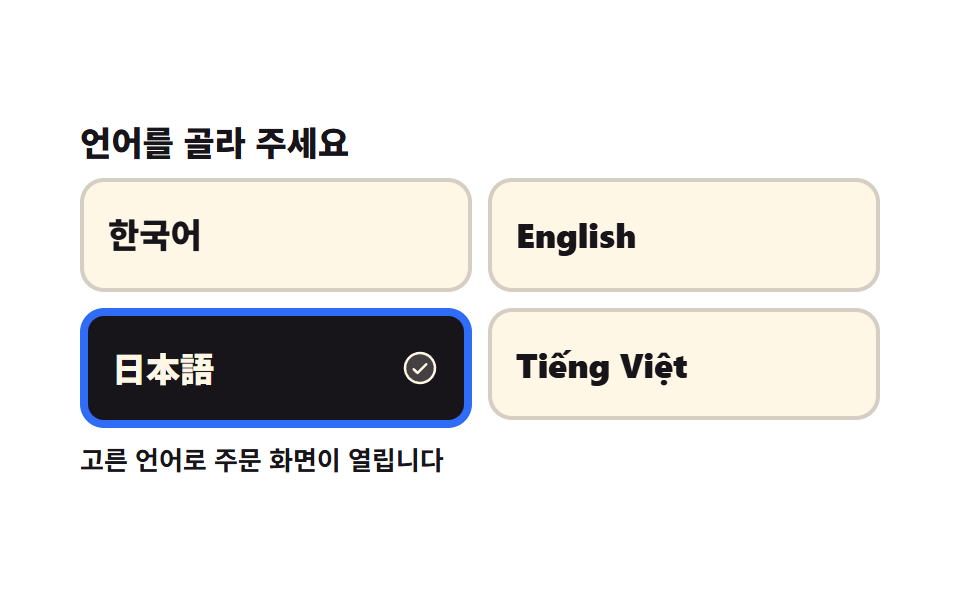 02 kiosk-language-first-choice
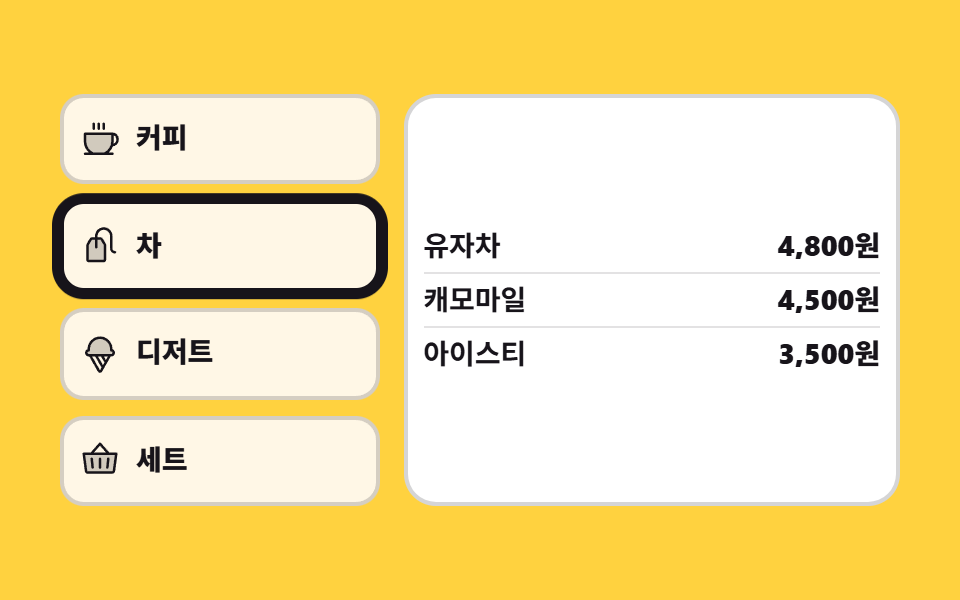 03 kiosk-category-rail-vertical
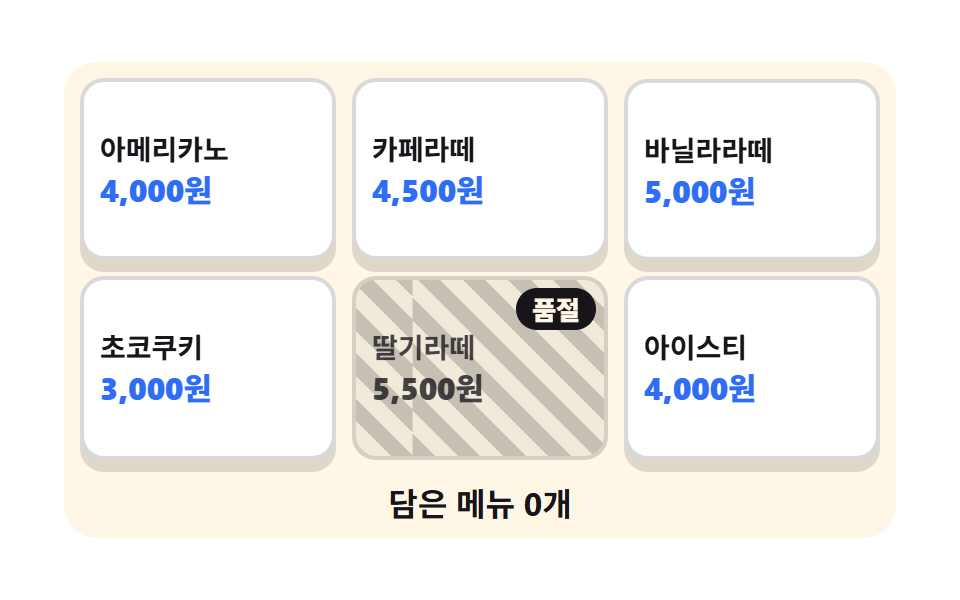 04 kiosk-menu-tile-soldout
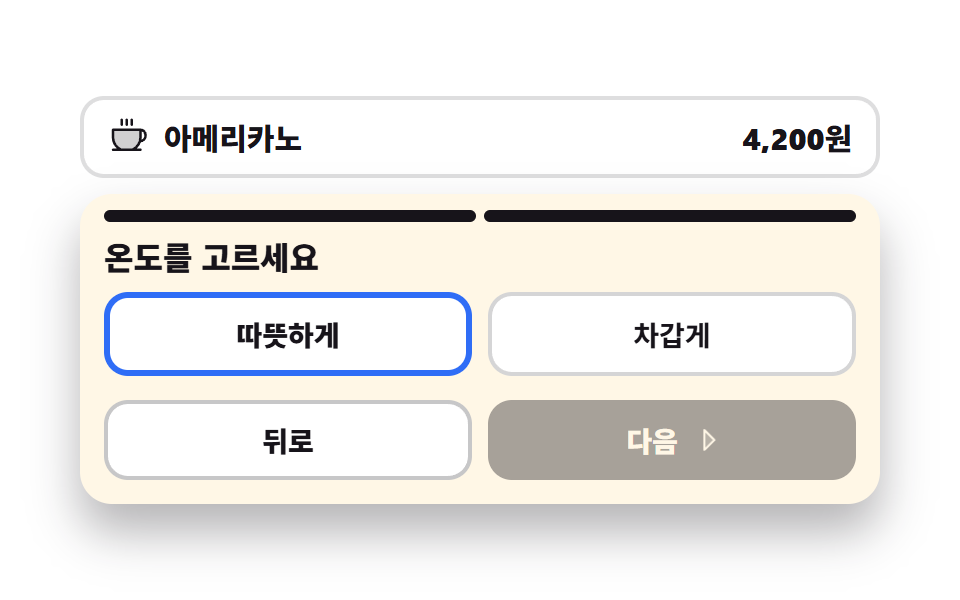 05 kiosk-option-sheet-step
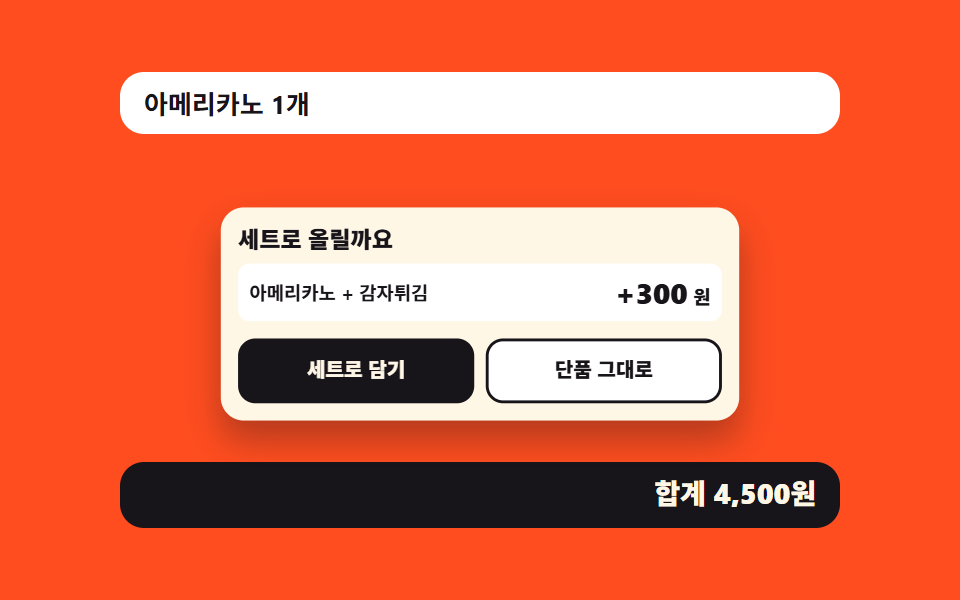 06 kiosk-combo-upsell-sheet
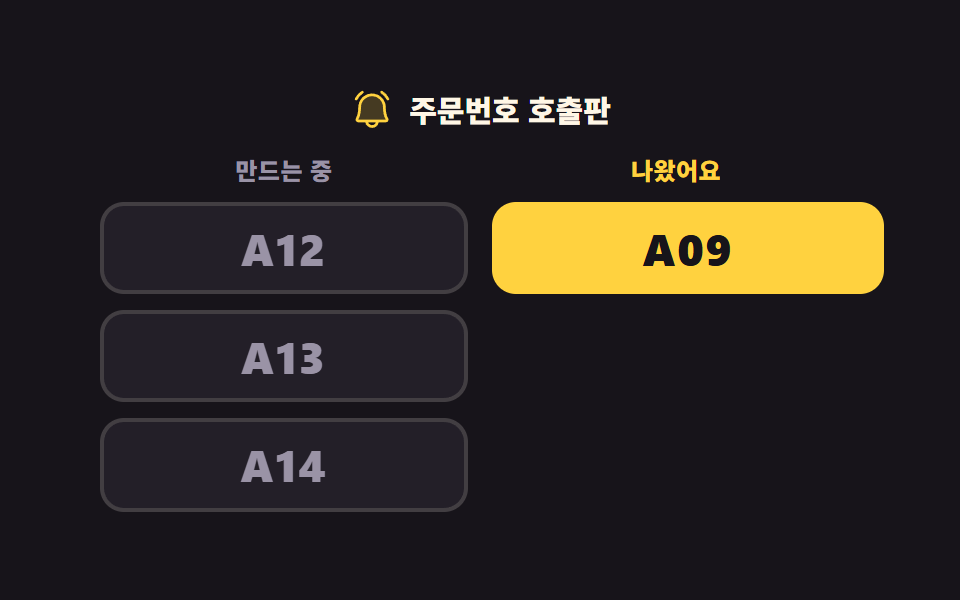 07 kiosk-order-number-board
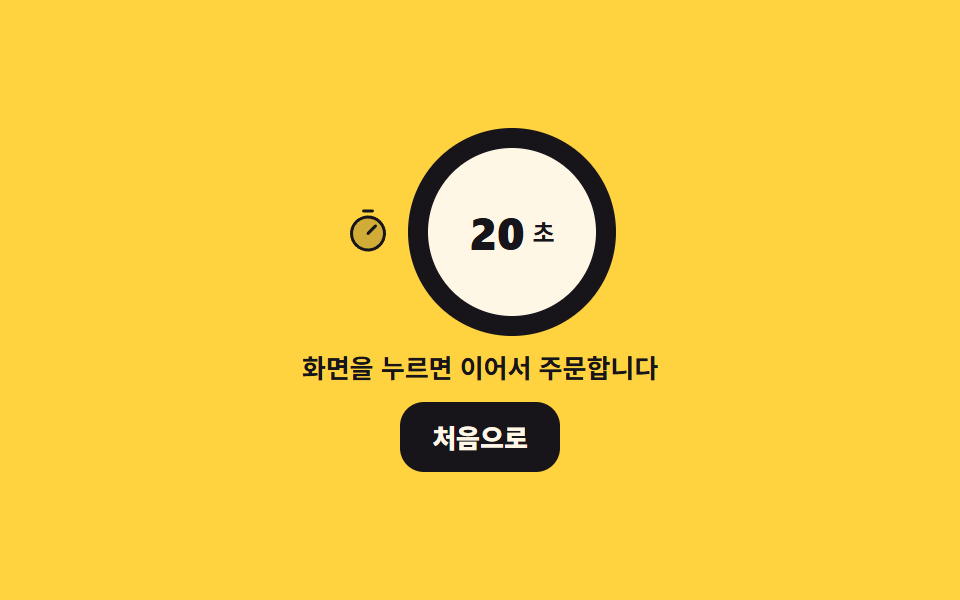 08 kiosk-timeout-return-home
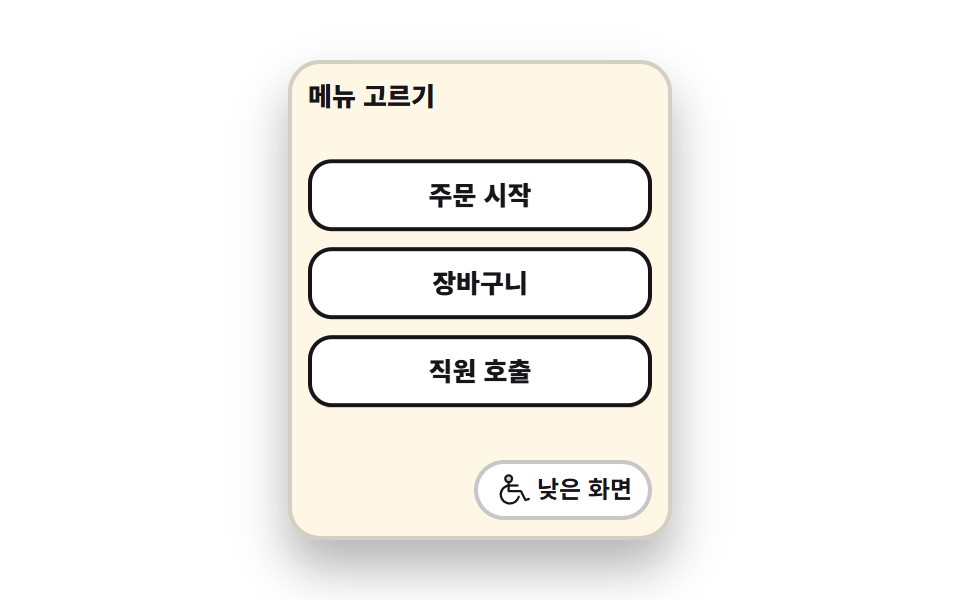 09 kiosk-low-reach-mode
自動再生 · タイルを押すとその項目へ · すべて1つのzip
- 01 待機画面
- 02 言語を選ぶ最初の画面
- 03 縦のカテゴリーレール
- 04 メニュータイルと売り切れ枠
- 05 段階で選ぶ大きなシート
- 06 セットのおすすめ枠
- 07 呼び出し番号板
- 08 手を離すと最初へ
- 09 低い画面モード
九つの並びは機能の派手さではなく、店の端末の前で一人の客がたどる順番です。誰もいない待機画面(01)から始まり、言語を選び(02)、左に立てた縦のレールで分類を選び(03)、タイルからメニューを選びます(04)。その先は迷う時間で、サイズと温度を二つの歩みに分ける大きなシート(05)、単品かセットかを尋ねる枠(06)と続きます。最後の三枚は受け取りと後始末で、番号板(07)、放置したときに最初へ戻す仕組み(08)、車いすの目線に合わせて全部を下げる低い画面(09)で締めます。ウェブの買い物かごと支払いは軸がまるで違うので決済画面 デザイン 9選 — カートから支払いまでコピペOKに分けてあり、押した瞬間の手応えだけを見たいときはCSS タップ エフェクト 9選 — 一行でコピペOKのほうが近い話です。同じinteraction柱で指の代わりにマウスが主役になるとマウス 追従 アニメーション css で作る3D場面9選になり、01 の待機画面にキャラクターを立たせたいときはcss キャラクター アニメーション 9選に九つの表情があります。
01待機画面
画面で起きること
誰も触らないあいだは三枚の広告が steps(1, end) のカットで切り替わり、下の残り時間バーが scaleX で三度伸びます。画面を押すと広告が止まり、幅 400 × 高さ 206px の注文画面が開いて、フォーカスは見出しへ移ります。
<main class="stage">
<div class="ka is-demo" id="ka">
  <button type="button" class="ka__attract" id="attract" aria-label="画面を押して注文を始めてください">
    <span class="ka__promo" aria-hidden="true">
      <span class="ka__slide ka__slide--a"><b class="ka__big">20%</b><i class="ka__sub">本日のコーヒー割引</i></span>
      <span class="ka__slide ka__slide--b"><b class="ka__big">NEW</b><i class="ka__sub">季節のラテが登場</i></span>
      <span class="ka__slide ka__slide--c"><b class="ka__big">TO GO</b><i class="ka__sub">テイクアウトもここで</i></span>
    </span>
    <span class="ka__bar" aria-hidden="true"><i class="ka__fill"></i></span>
    <span class="ka__cta">
      <svg xmlns="http://www.w3.org/2000/svg" viewBox="0 0 256 256" fill="currentColor" class="ka__ico" aria-hidden="true"><path d="M216,148v36c0,24-8,40-8,40H72L42.68,174a20,20,0,0,1,34.64-20L96,184V76a20,20,0,0,1,40,0v56a20,20,0,0,1,40,0v16a20,20,0,0,1,40,0Z" opacity="0.2"/><path d="M56,76a60,60,0,0,1,120,0,8,8,0,0,1-16,0,44,44,0,0,0-88,0,8,8,0,1,1-16,0Zm140,44a27.9,27.9,0,0,0-13.36,3.39A28,28,0,0,0,144,106.7V76a28,28,0,0,0-56,0v80l-3.82-6.13a28,28,0,0,0-48.41,28.17l29.32,50A8,8,0,1,0,78.89,220L49.6,170a12,12,0,1,1,20.78-12l.14.23,18.68,30A8,8,0,0,0,104,184V76a12,12,0,0,1,24,0v68a8,8,0,1,0,16,0V132a12,12,0,0,1,24,0v20a8,8,0,0,0,16,0v-4a12,12,0,0,1,24,0v36c0,21.61-7.1,36.3-7.16,36.42a8,8,0,0,0,3.58,10.73A7.9,7.9,0,0,0,208,232a8,8,0,0,0,7.16-4.42c.37-.73,8.85-18,8.85-43.58V148A28,28,0,0,0,196,120Z"/></svg>
      <span class="ka__ctaText">画面を押して注文を始めてください</span>
    </span>
  </button>
  <div class="ka__order" id="order" hidden>
    <p class="ka__head" id="head" tabindex="-1">何になさいますか</p>
    <ul class="ka__tiles">
      <li><button type="button" class="ka__tile">コーヒー</button></li>
      <li><button type="button" class="ka__tile">紅茶</button></li>
      <li><button type="button" class="ka__tile">デザート</button></li>
      <li><button type="button" class="ka__tile">セット</button></li>
    </ul>
    <button type="button" class="ka__back" id="back">最初の画面へ</button>
  </div>
</div>
</main>@use "../../../../site/static/demo-tokens" as *;
// 유휴 화면 — 아무도 안 만지는 동안 광고가 스스로 돌고, 손이 닿으면 주문 화면으로 넘어간다.
// 슬라이드 교체는 steps(1, end) 컷이다. opacity 로 서서히 교차하면 24장 표본의 중간 프레임이
// 두 광고가 반투명하게 겹친 유령이 되고 그 장이 poster 로 뽑힌다.
// 컷만 있으면 움직인 프레임이 두세 장으로 떨어지므로, 남은 시간을 알리는 막대(scaleX)와
// 손 아이콘의 위아래 흔들림을 같은 2초 시계에 붙여 칸을 채운다.
$duration: $dur-loop;
$easing: $ease-spring;
$color: $subject-blue;
@include stage($stage-ink);
.ka { width: 100%; max-width: 400px; }
.ka__attract {
display: block; width: 100%; padding: $sp-3; margin: 0; cursor: pointer;
border: 0; border-radius: $r-card; background: $subject-cream; text-align: left;
font-family: inherit; color: $subject-ink; box-shadow: $shadow-raised;
}
.ka__attract:focus-visible { outline: 3px solid $color; outline-offset: 3px; }
// display 를 준 요소는 UA 의 [hidden]{display:none} 을 이긴다 — 두 화면이 겹쳐 서는 것을 여기서 막는다
.ka [hidden] { display: none; }
.ka__promo {
position: relative; display: block; overflow: hidden;
height: clamp(64px, 22vw, 112px); border-radius: $r-sm;
}
.ka__slide {
position: absolute; inset: 0; display: grid; place-content: center; gap: $sp-1;
text-align: center; opacity: 0; color: $subject-ink;
}
.ka__slide--a { background: $stage-yellow; opacity: 1; }
.ka__slide--b { background: $subject-mint; }
.ka__slide--c { background: $stage-orange; }
.ka__big { font-weight: 800; font-size: clamp(20px, 7vw, 34px); line-height: 1; font-style: normal; }
.ka__sub { font-weight: 700; font-size: clamp(11px, 3vw, 14px); line-height: 1.2; font-style: normal; }
.ka__bar {
display: block; height: 6px; margin: $sp-2 0; border-radius: $r-pill;
background: rgba(23, 20, 26, .16); overflow: hidden;
}
// 채움 막대는 왼쪽 변이 시작점이라 transform-origin 을 왼쪽에 둔다 (붙는 지점이 있는 요소)
.ka__fill {
display: block; height: 100%; border-radius: $r-pill; background: $color;
transform: scaleX(0); transform-origin: left center;
}
.ka__cta {
display: flex; align-items: center; justify-content: center; gap: $sp-2;
padding: $sp-3 $sp-2; border-radius: $r-control;
background: $subject-ink; color: $subject-cream;
font-weight: 800; font-size: clamp(12px, 3.2vw, 15px);
}
.ka__ico { width: clamp(18px, 5vw, 24px); height: clamp(18px, 5vw, 24px); flex: 0 0 auto; }
.ka__ctaText { line-height: 1.2; }
.ka__order { padding: $sp-3; border-radius: $r-card; background: $subject-cream; box-shadow: $shadow-raised; }
.ka__head {
margin: 0 0 $sp-2; font-weight: 800; font-size: clamp(13px, 3.6vw, 17px); color: $subject-ink;
}
.ka__head:focus-visible { outline: 3px solid $color; outline-offset: 2px; }
.ka__tiles {
display: grid; grid-template-columns: repeat(2, 1fr); gap: $sp-2;
margin: 0 0 $sp-2; padding: 0; list-style: none;
}
// 버튼 격자는 width:100% 를 못 박는다 — 버튼은 fit-content 라 1fr 칸이 내용 폭으로 접힌다
.ka__tile {
width: 100%; padding: $sp-3 $sp-2; cursor: pointer;
border: 2px solid rgba(23, 20, 26, .18); border-radius: $r-control;
background: $stage-paper; color: $subject-ink;
font-family: inherit; font-weight: 800; font-size: clamp(12px, 3.2vw, 15px);
}
.ka__tile:focus-visible { outline: 3px solid $color; outline-offset: 2px; }
.ka__back {
width: 100%; padding: $sp-2; cursor: pointer; border: 0; border-radius: $r-control;
background: $subject-ink; color: $subject-cream;
font-family: inherit; font-weight: 700; font-size: clamp(11px, 3vw, 13px);
}
.ka__back:focus-visible { outline: 3px solid $color; outline-offset: 2px; }
// ── 미리보기 루프 ────────────────────────────────────────────────
// 광고 세 장이 2초를 3등분해 컷으로 갈린다. 세 애니메이션이 같은 2초 시계를 쓰므로 어긋나지 않는다.
.ka.is-demo .ka__slide {
animation-name: kaSlide; animation-duration: $duration;
animation-timing-function: steps(1, end); animation-iteration-count: infinite;
animation-fill-mode: backwards;
}
.ka.is-demo .ka__slide--b { animation-delay: calc(#{$duration} / -3 * 2); }
.ka.is-demo .ka__slide--c { animation-delay: calc(#{$duration} / -3); }
@keyframes kaSlide {
0% { opacity: 1; }
33.34%, 100% { opacity: 0; }
}
.ka.is-demo .ka__fill {
animation-name: kaFill; animation-duration: $duration;
animation-timing-function: linear; animation-iteration-count: infinite;
}
@keyframes kaFill {
0% { transform: scaleX(0); }
33.33% { transform: scaleX(1); }
33.34% { transform: scaleX(0); }
66.66% { transform: scaleX(1); }
66.67% { transform: scaleX(0); }
100% { transform: scaleX(1); }
}
// 아이콘은 자기 중심에서 흔들린다 — 누르라는 손짓이라 위아래로만 움직인다
.ka.is-demo .ka__ico {
animation-name: kaTap; animation-duration: $duration;
animation-timing-function: $easing; animation-iteration-count: infinite;
}
@keyframes kaTap {
0%, 100% { transform: translateY(0); }
16% { transform: translateY(5px); }
32% { transform: translateY(0); }
48% { transform: translateY(5px); }
64% { transform: translateY(0); }
}
// 폰 폭에서 쓸 수 있는 세로는 174px 남짓이다. 주문 칸(머리말 + 타일 네 칸 + 되돌아가기)이
// 그 안에 들어오도록 간격과 안쪽 여백만 줄인다 — 누르는 칸의 가로 폭은 그대로 둔다
@media (max-width: 340px) {
.ka__attract, .ka__order { padding: $sp-2; }
.ka__cta { padding: $sp-2; }
.ka__head { margin-bottom: $sp-1; }
.ka__tiles { gap: $sp-1; margin-bottom: $sp-1; }
.ka__tile { padding: $sp-2 $sp-1; }
}
@media (prefers-reduced-motion: reduce) {
.ka.is-demo .ka__slide,
.ka.is-demo .ka__fill,
.ka.is-demo .ka__ico { animation: none !important; }
// 움직임 없이 첫 광고와 3분의 1쯤 찬 막대를 세워 둔다
.ka.is-demo .ka__slide--a { opacity: 1 !important; }
.ka.is-demo .ka__slide--b,
.ka.is-demo .ka__slide--c { opacity: 0 !important; }
.ka.is-demo .ka__fill { transform: scaleX(.34) !important; }
}html, body {
margin: 0;
overflow: hidden;
}
.stage {
box-sizing: border-box;
min-height: 100vh;
display: grid;
place-items: center;
margin: 0;
background: #17141a;
font-family: -apple-system, "Segoe UI", "Noto Sans KR", sans-serif;
padding: clamp(8px, 4vw, 24px);
}
.ka {
width: 100%;
max-width: 400px;
}
.ka__attract {
display: block;
width: 100%;
padding: 12px;
margin: 0;
cursor: pointer;
border: 0;
border-radius: 16px;
background: #fff7e6;
text-align: left;
font-family: inherit;
color: #17141a;
box-shadow: 0 14px 24px rgba(23, 20, 26, 0.32);
}
.ka__attract:focus-visible {
outline: 3px solid #2f6df6;
outline-offset: 3px;
}
.ka [hidden] {
display: none;
}
.ka__promo {
position: relative;
display: block;
overflow: hidden;
height: clamp(64px, 22vw, 112px);
border-radius: 8px;
}
.ka__slide {
position: absolute;
inset: 0;
display: grid;
place-content: center;
gap: 4px;
text-align: center;
opacity: 0;
color: #17141a;
}
.ka__slide--a {
background: #ffd23f;
opacity: 1;
}
.ka__slide--b {
background: #4cd4a6;
}
.ka__slide--c {
background: #ff4d1f;
}
.ka__big {
font-weight: 800;
font-size: clamp(20px, 7vw, 34px);
line-height: 1;
font-style: normal;
}
.ka__sub {
font-weight: 700;
font-size: clamp(11px, 3vw, 14px);
line-height: 1.2;
font-style: normal;
}
.ka__bar {
display: block;
height: 6px;
margin: 8px 0;
border-radius: 999px;
background: rgba(23, 20, 26, 0.16);
overflow: hidden;
}
.ka__fill {
display: block;
height: 100%;
border-radius: 999px;
background: #2f6df6;
transform: scaleX(0);
transform-origin: left center;
}
.ka__cta {
display: flex;
align-items: center;
justify-content: center;
gap: 8px;
padding: 12px 8px;
border-radius: 12px;
background: #17141a;
color: #fff7e6;
font-weight: 800;
font-size: clamp(12px, 3.2vw, 15px);
}
.ka__ico {
width: clamp(18px, 5vw, 24px);
height: clamp(18px, 5vw, 24px);
flex: 0 0 auto;
}
.ka__ctaText {
line-height: 1.2;
}
.ka__order {
padding: 12px;
border-radius: 16px;
background: #fff7e6;
box-shadow: 0 14px 24px rgba(23, 20, 26, 0.32);
}
.ka__head {
margin: 0 0 8px;
font-weight: 800;
font-size: clamp(13px, 3.6vw, 17px);
color: #17141a;
}
.ka__head:focus-visible {
outline: 3px solid #2f6df6;
outline-offset: 2px;
}
.ka__tiles {
display: grid;
grid-template-columns: repeat(2, 1fr);
gap: 8px;
margin: 0 0 8px;
padding: 0;
list-style: none;
}
.ka__tile {
width: 100%;
padding: 12px 8px;
cursor: pointer;
border: 2px solid rgba(23, 20, 26, 0.18);
border-radius: 12px;
background: #ffffff;
color: #17141a;
font-family: inherit;
font-weight: 800;
font-size: clamp(12px, 3.2vw, 15px);
}
.ka__tile:focus-visible {
outline: 3px solid #2f6df6;
outline-offset: 2px;
}
.ka__back {
width: 100%;
padding: 8px;
cursor: pointer;
border: 0;
border-radius: 12px;
background: #17141a;
color: #fff7e6;
font-family: inherit;
font-weight: 700;
font-size: clamp(11px, 3vw, 13px);
}
.ka__back:focus-visible {
outline: 3px solid #2f6df6;
outline-offset: 2px;
}
.ka.is-demo .ka__slide {
animation-name: kaSlide;
animation-duration: 2s;
animation-timing-function: steps(1, end);
animation-iteration-count: infinite;
animation-fill-mode: backwards;
}
.ka.is-demo .ka__slide--b {
animation-delay: calc(2s / -3 * 2);
}
.ka.is-demo .ka__slide--c {
animation-delay: calc(2s / -3);
}
@keyframes kaSlide {
0% {
opacity: 1;
}
33.34%, 100% {
opacity: 0;
}
}
.ka.is-demo .ka__fill {
animation-name: kaFill;
animation-duration: 2s;
animation-timing-function: linear;
animation-iteration-count: infinite;
}
@keyframes kaFill {
0% {
transform: scaleX(0);
}
33.33% {
transform: scaleX(1);
}
33.34% {
transform: scaleX(0);
}
66.66% {
transform: scaleX(1);
}
66.67% {
transform: scaleX(0);
}
100% {
transform: scaleX(1);
}
}
.ka.is-demo .ka__ico {
animation-name: kaTap;
animation-duration: 2s;
animation-timing-function: cubic-bezier(0.2, 0.8, 0.2, 1);
animation-iteration-count: infinite;
}
@keyframes kaTap {
0%, 100% {
transform: translateY(0);
}
16% {
transform: translateY(5px);
}
32% {
transform: translateY(0);
}
48% {
transform: translateY(5px);
}
64% {
transform: translateY(0);
}
}
@media (max-width: 340px) {
.ka__attract, .ka__order {
padding: 8px;
}
.ka__cta {
padding: 8px;
}
.ka__head {
margin-bottom: 4px;
}
.ka__tiles {
gap: 4px;
margin-bottom: 4px;
}
.ka__tile {
padding: 8px 4px;
}
}
@media (prefers-reduced-motion: reduce) {
.ka.is-demo .ka__slide,
.ka.is-demo .ka__fill,
.ka.is-demo .ka__ico {
animation: none !important;
}
.ka.is-demo .ka__slide--a {
opacity: 1 !important;
}
.ka.is-demo .ka__slide--b,
.ka.is-demo .ka__slide--c {
opacity: 0 !important;
}
.ka.is-demo .ka__fill {
transform: scaleX(0.34) !important;
}
}var ka = document.getElementById('ka');
var attract = document.getElementById('attract');
var order = document.getElementById('order');
var back = document.getElementById('back');
var head = document.getElementById('head');
// 유휴 화면은 "아무도 안 만질 때 스스로 도는 화면"이다. 손이 닿는 순간 광고를 멈추고 주문 화면으로 넘긴다.
// 미리보기 루프(.is-demo)는 CSS 키프레임이 돌리고, 사람이 누르면 여기서 루프를 떼고 화면을 바꾼다.
function start() {
ka.classList.remove('is-demo');
attract.hidden = true;
order.hidden = false;
head.focus({ preventScroll: true });
}
function home() {
order.hidden = true;
attract.hidden = false;
attract.focus({ preventScroll: true });
}
attract.addEventListener('click', start);
back.addEventListener('click', function (e) { e.stopPropagation(); home(); });// AttractIdleScreen — vanilla 판(run/298/demo/01-kiosk-attract-idle-loop/index.html) 의 React 포트.
// 유휴 화면은 "아무도 안 만질 때 스스로 도는 화면"이다. 손이 닿는 순간 광고를 멈추고 주문 화면으로 넘긴다.
// 미리보기 루프(.isDemo)는 CSS 키프레임이 돌리고, 사람이 누르면 여기서 루프를 떼고 화면을 바꾼다.
// 두 화면은 hidden 속성 하나로 갈린다 — 모듈의 `.root [hidden] { display: none; }` 이
// display 를 준 요소에서도 UA 기본값을 이겨 준다(안 그러면 두 화면이 겹쳐 선다). 값·수치는 vanilla 와 같다.
import { useEffect, useRef, useState } from "react";
import type { CSSProperties } from "react";
import styles from "./AttractIdleScreen.module.scss";
export type AttractIdleScreenProps = {
duration?: number;
easing?: string;
color?: string;
};
type Vars = CSSProperties & {
"--duration"?: string;
"--easing"?: string;
"--color"?: string;
};
// ambient 타입에는 React 이벤트 제네릭이 없다 — 핸들러가 실제로 쓰는 것만 지역 타입으로 적는다
type StopEvt = { stopPropagation(): void };
const CTA_LABEL = "화면을 눌러 주문을 시작하세요";
const ORDER_HEAD = "무엇을 드릴까요";
const BACK_LABEL = "처음 화면으로";
const SLIDES: { cls: string; big: string; sub: string }[] = [
{ cls: "slideA", big: "20%", sub: "오늘의 커피 할인" },
{ cls: "slideB", big: "NEW", sub: "시즌 라떼 나왔어요" },
{ cls: "slideC", big: "TO GO", sub: "포장 주문도 여기서" },
];
const TILES: string[] = ["커피", "홍차", "디저트", "세트"];
export default function AttractIdleScreen({
duration = 2000,
easing = "cubic-bezier(.2, .8, .2, 1)",
color = "#2f6df6",
}: AttractIdleScreenProps) {
const attractRef = useRef<HTMLButtonElement | null>(null);
const headRef = useRef<HTMLParagraphElement | null>(null);
// 첫 렌더에는 초점을 옮기지 않는다 — 사람이 만진 뒤부터가 화면 전환이다
const touchedRef = useRef<boolean>(false);
const [ordering, setOrdering] = useState(false);
const [demo, setDemo] = useState(true);
const vars: Vars = { "--duration": `${duration}ms`, "--easing": easing, "--color": color };
useEffect(() => {
if (!touchedRef.current) return;
const target = ordering ? headRef.current : attractRef.current;
if (target) target.focus({ preventScroll: true });
}, [ordering]);
function start(): void {
touchedRef.current = true;
setDemo(false);
setOrdering(true);
}
function home(event: StopEvt): void {
event.stopPropagation();
touchedRef.current = true;
setOrdering(false);
}
const cls = [styles.root, demo ? styles.isDemo : ""].filter(Boolean).join(" ");
return (
<main className={styles.stage}>
<div className={cls} style={vars}>
<button
type="button"
className={styles.attract}
ref={attractRef}
hidden={ordering}
aria-label={CTA_LABEL}
onClick={start}
>
<span className={styles.promo} aria-hidden="true">
{SLIDES.map((slide) => (
<span key={slide.cls} className={`${styles.slide} ${styles[slide.cls]}`}>
<b className={styles.big}>{slide.big}</b>
<i className={styles.sub}>{slide.sub}</i>
</span>
))}
</span>
<span className={styles.bar} aria-hidden="true"><i className={styles.fill}></i></span>
<span className={styles.cta}>
<svg xmlns="http://www.w3.org/2000/svg" viewBox="0 0 256 256" fill="currentColor" className={styles.ico} aria-hidden="true"><path d="M216,148v36c0,24-8,40-8,40H72L42.68,174a20,20,0,0,1,34.64-20L96,184V76a20,20,0,0,1,40,0v56a20,20,0,0,1,40,0v16a20,20,0,0,1,40,0Z" opacity="0.2"/><path d="M56,76a60,60,0,0,1,120,0,8,8,0,0,1-16,0,44,44,0,0,0-88,0,8,8,0,1,1-16,0Zm140,44a27.9,27.9,0,0,0-13.36,3.39A28,28,0,0,0,144,106.7V76a28,28,0,0,0-56,0v80l-3.82-6.13a28,28,0,0,0-48.41,28.17l29.32,50A8,8,0,1,0,78.89,220L49.6,170a12,12,0,1,1,20.78-12l.14.23,18.68,30A8,8,0,0,0,104,184V76a12,12,0,0,1,24,0v68a8,8,0,1,0,16,0V132a12,12,0,0,1,24,0v20a8,8,0,0,0,16,0v-4a12,12,0,0,1,24,0v36c0,21.61-7.1,36.3-7.16,36.42a8,8,0,0,0,3.58,10.73A7.9,7.9,0,0,0,208,232a8,8,0,0,0,7.16-4.42c.37-.73,8.85-18,8.85-43.58V148A28,28,0,0,0,196,120Z"/></svg>
<span className={styles.ctaText}>{CTA_LABEL}</span>
</span>
</button>
<div className={styles.order} hidden={!ordering}>
<p className={styles.head} ref={headRef} tabIndex={-1}>{ORDER_HEAD}</p>
<ul className={styles.tiles}>
{TILES.map((tile) => (
<li key={tile}><button type="button" className={styles.tile}>{tile}</button></li>
))}
</ul>
<button type="button" className={styles.back} onClick={home}>{BACK_LABEL}</button>
</div>
</div>
</main>
);
}01 · 待機画面 — 計測 累積面積 29.122% · 動いたフレーム 23/23GODRICH オリジナル · SCSS と React は zip に同梱 · パスワードを見る
コードのどこを見るか
プレビューは累積面積 29.122%・強度 149.3 を記録し、動いたフレームは 23/23 で、全部のコマが動きました。
// 待機画面は「誰も触らないあいだ自分で回る画面」です。手が触れた瞬間に広告を止め、注文画面へ渡します。
// プレビューのループ(.is-demo)は CSS のキーフレームが回し、人が押したらここでループを外して画面を変えます。
function start() {
  ka.classList.remove('is-demo');
  attract.hidden = true;
  order.hidden = false;
  head.focus({ preventScroll: true });
}

function home() {
  order.hidden = true;
  attract.hidden = false;
  attract.focus({ preventScroll: true });
}
02言語を選ぶ最初の画面
何が見えるか
四つの言語ボタンが順に浮かび、押した枠だけが aria-pressed="true" になって枠線が 2px から 4px に太くなり、チェックが不透明度 1 で現れます。下の案内一行も同じ瞬間にその言語の文へ入れ替わります。
<main class="stage">
<div class="kl is-demo" id="kl">
  <p class="kl__head">言語をお選びください</p>
  <div class="kl__grid" role="group" aria-label="画面の言語">
    <!-- _의도적한국어: 언어 이름은 그 언어 표기가 정석이라 번역하지 않는다. 문구 사전이 걷어 가지 않도록 data-name 에 두고 CSS content 로 그린다 -->
    <div class="kl__cell kl__cell--1">
      <button type="button" class="kl__opt" data-lang="ko" aria-pressed="true">
        <span class="kl__name" data-name="한국어"></span>
        <svg xmlns="http://www.w3.org/2000/svg" viewBox="0 0 256 256" fill="currentColor" class="kl__check" aria-hidden="true"><path d="M224,128a96,96,0,1,1-96-96A96,96,0,0,1,224,128Z" opacity="0.2"/><path d="M173.66,98.34a8,8,0,0,1,0,11.32l-56,56a8,8,0,0,1-11.32,0l-24-24a8,8,0,0,1,11.32-11.32L112,148.69l50.34-50.35A8,8,0,0,1,173.66,98.34ZM232,128A104,104,0,1,1,128,24,104.11,104.11,0,0,1,232,128Zm-16,0a88,88,0,1,0-88,88A88.1,88.1,0,0,0,216,128Z"/></svg>
      </button>
    </div>
    <div class="kl__cell kl__cell--2">
      <button type="button" class="kl__opt" data-lang="en" aria-pressed="false">
        <span class="kl__name" data-name="English"></span>
        <svg xmlns="http://www.w3.org/2000/svg" viewBox="0 0 256 256" fill="currentColor" class="kl__check" aria-hidden="true"><path d="M224,128a96,96,0,1,1-96-96A96,96,0,0,1,224,128Z" opacity="0.2"/><path d="M173.66,98.34a8,8,0,0,1,0,11.32l-56,56a8,8,0,0,1-11.32,0l-24-24a8,8,0,0,1,11.32-11.32L112,148.69l50.34-50.35A8,8,0,0,1,173.66,98.34ZM232,128A104,104,0,1,1,128,24,104.11,104.11,0,0,1,232,128Zm-16,0a88,88,0,1,0-88,88A88.1,88.1,0,0,0,216,128Z"/></svg>
      </button>
    </div>
    <div class="kl__cell kl__cell--3">
      <button type="button" class="kl__opt" data-lang="ja" aria-pressed="false">
        <span class="kl__name" data-name="日本語"></span>
        <svg xmlns="http://www.w3.org/2000/svg" viewBox="0 0 256 256" fill="currentColor" class="kl__check" aria-hidden="true"><path d="M224,128a96,96,0,1,1-96-96A96,96,0,0,1,224,128Z" opacity="0.2"/><path d="M173.66,98.34a8,8,0,0,1,0,11.32l-56,56a8,8,0,0,1-11.32,0l-24-24a8,8,0,0,1,11.32-11.32L112,148.69l50.34-50.35A8,8,0,0,1,173.66,98.34ZM232,128A104,104,0,1,1,128,24,104.11,104.11,0,0,1,232,128Zm-16,0a88,88,0,1,0-88,88A88.1,88.1,0,0,0,216,128Z"/></svg>
      </button>
    </div>
    <div class="kl__cell kl__cell--4">
      <button type="button" class="kl__opt" data-lang="vi" aria-pressed="false">
        <span class="kl__name" data-name="Tiếng Việt"></span>
        <svg xmlns="http://www.w3.org/2000/svg" viewBox="0 0 256 256" fill="currentColor" class="kl__check" aria-hidden="true"><path d="M224,128a96,96,0,1,1-96-96A96,96,0,0,1,224,128Z" opacity="0.2"/><path d="M173.66,98.34a8,8,0,0,1,0,11.32l-56,56a8,8,0,0,1-11.32,0l-24-24a8,8,0,0,1,11.32-11.32L112,148.69l50.34-50.35A8,8,0,0,1,173.66,98.34ZM232,128A104,104,0,1,1,128,24,104.11,104.11,0,0,1,232,128Zm-16,0a88,88,0,1,0-88,88A88.1,88.1,0,0,0,216,128Z"/></svg>
      </button>
    </div>
  </div>
  <p class="kl__hint" id="klHint">選んだ言語で注文画面が開きます</p>
</div>
</main>@use "../../../../site/static/demo-tokens" as *;
// 언어 고르는 첫 화면 — 큰 칸 네 개로 언어를 고르고, 고른 칸에만 체크가 붙는다.
// 선택 표시(굵은 테두리 · 먹 배경 · 체크 아이콘)는 전부 같은 steps(1, end) 시각표 위에 있다.
// opacity 로 서서히 교차하면 24장 표본의 중간 프레임이 두 칸이 반쯤 켜진 유령이 되고 그 장이 poster 로 뽑힌다.
// 컷만 있으면 움직인 프레임이 두세 장으로 떨어지므로, 네 칸이 차례로 떠오르는 translateY 를
// 같은 2초 시계에 계속 돌려 칸을 채운다.
$duration: $dur-loop;
$easing: $ease-spring;
$color: $subject-blue;
@include stage($stage-paper);
.kl { width: 100%; max-width: 400px; }
.kl__head {
margin: 0 0 $sp-2; font-weight: 800; font-size: clamp(13px, 3.6vw, 17px);
line-height: 1.2; color: $subject-ink;
}
.kl__grid { display: grid; grid-template-columns: repeat(2, 1fr); gap: $sp-2; }
// 칸(떠오름)과 버튼(선택 컷)을 나눠 둔다 — 둘의 animation-delay 가 다르기 때문이다
.kl__cell { display: block; }
// 버튼 격자는 width:100% 를 못 박는다 — 버튼은 fit-content 라 1fr 칸이 내용 폭으로 접힌다
.kl__opt {
box-sizing: border-box; width: 100%;
display: flex; align-items: center; justify-content: space-between; gap: $sp-2;
padding: $sp-4 $sp-3; cursor: pointer;
border: 2px solid rgba(23, 20, 26, .18); border-radius: $r-control;
background: $subject-cream; color: $subject-ink;
font-family: inherit; font-weight: 800; font-size: clamp(12px, 3.6vw, 17px);
line-height: 1.2; text-align: left;
}
.kl__opt:focus-visible { outline: 3px solid $color; outline-offset: 2px; }
// 언어 이름은 번역하지 않는 값이라 data-name 에 두고 여기서 그린다 (index.html 의 _의도적한국어 주석 참고)
.kl__name::after { content: attr(data-name); }
// 체크는 안 고른 칸에서도 자리를 차지한다 — 고를 때 글자가 밀리지 않는다
.kl__check {
width: clamp(14px, 4.4vw, 20px); height: clamp(14px, 4.4vw, 20px);
flex: 0 0 auto; opacity: 0;
}
// 고른 칸 — 정적 경로. 손이 닿으면 JS 가 aria-pressed 를 옮기고 이 규칙이 그대로 그린다
.kl__opt[aria-pressed="true"] {
border-width: 4px; border-color: $color;
background: $subject-ink; color: $subject-cream;
}
.kl__opt[aria-pressed="true"] .kl__check { opacity: 1; }
.kl__hint {
margin: $sp-2 0 0; font-weight: 700; font-size: clamp(11px, 3vw, 13px);
line-height: 1.3; color: $subject-ink;
}
// ── 미리보기 루프 ────────────────────────────────────────────────
// 네 칸이 2초를 4등분해 차례로 켜진다. 테두리·배경·글자색·체크가 같은 시각표라 한 프레임에 갈린다.
.kl.is-demo .kl__opt {
animation-name: klSel; animation-duration: $duration;
animation-timing-function: steps(1, end); animation-iteration-count: infinite;
}
.kl.is-demo .kl__check {
animation-name: klCheck; animation-duration: $duration;
animation-timing-function: steps(1, end); animation-iteration-count: infinite;
}
.kl.is-demo .kl__cell--2 .kl__opt,
.kl.is-demo .kl__cell--2 .kl__check { animation-delay: calc(#{$duration} / -4 * 3); }
.kl.is-demo .kl__cell--3 .kl__opt,
.kl.is-demo .kl__cell--3 .kl__check { animation-delay: calc(#{$duration} / -2); }
.kl.is-demo .kl__cell--4 .kl__opt,
.kl.is-demo .kl__cell--4 .kl__check { animation-delay: calc(#{$duration} / -4); }
@keyframes klSel {
0% { border-width: 4px; border-color: $color; background: $subject-ink; color: $subject-cream; }
25%, 100% { border-width: 2px; border-color: rgba(23, 20, 26, .18); background: $subject-cream; color: $subject-ink; }
}
@keyframes klCheck {
0% { opacity: 1; }
25%, 100% { opacity: 0; }
}
// 떠오름 — 컷 옆에 붙이는 작은 움직임. 반투명이 안 생기는 transform 이라 유령 프레임을 만들지 않는다.
// 지연이 걸린 루프라 fill-mode: backwards 가 없으면 0프레임에 완성 상태가 한 번 번쩍인다.
.kl.is-demo .kl__cell {
animation-name: klRise; animation-duration: $duration;
animation-timing-function: $easing; animation-iteration-count: infinite;
animation-fill-mode: backwards;
}
.kl.is-demo .kl__cell--2 { animation-delay: 80ms; }
.kl.is-demo .kl__cell--3 { animation-delay: 160ms; }
.kl.is-demo .kl__cell--4 { animation-delay: 240ms; }
@keyframes klRise {
0% { transform: translateY(8px); }
22%, 74% { transform: translateY(0); }
88%, 100% { transform: translateY(8px); }
}
@media (max-width: 340px) {
.kl__opt { padding: $sp-2; }
.kl__hint { margin-top: $sp-1; }
}
@media (prefers-reduced-motion: reduce) {
.kl.is-demo .kl__opt,
.kl.is-demo .kl__check,
.kl.is-demo .kl__cell { animation: none !important; }
// 움직임 없이 첫 칸이 고른 상태로 서 있게 값을 못 박는다
.kl.is-demo .kl__cell { transform: translateY(0) !important; }
}html, body {
margin: 0;
overflow: hidden;
}
.stage {
box-sizing: border-box;
min-height: 100vh;
display: grid;
place-items: center;
margin: 0;
background: #ffffff;
font-family: -apple-system, "Segoe UI", "Noto Sans KR", sans-serif;
padding: clamp(8px, 4vw, 24px);
}
.kl {
width: 100%;
max-width: 400px;
}
.kl__head {
margin: 0 0 8px;
font-weight: 800;
font-size: clamp(13px, 3.6vw, 17px);
line-height: 1.2;
color: #17141a;
}
.kl__grid {
display: grid;
grid-template-columns: repeat(2, 1fr);
gap: 8px;
}
.kl__cell {
display: block;
}
.kl__opt {
box-sizing: border-box;
width: 100%;
display: flex;
align-items: center;
justify-content: space-between;
gap: 8px;
padding: 16px 12px;
cursor: pointer;
border: 2px solid rgba(23, 20, 26, 0.18);
border-radius: 12px;
background: #fff7e6;
color: #17141a;
font-family: inherit;
font-weight: 800;
font-size: clamp(12px, 3.6vw, 17px);
line-height: 1.2;
text-align: left;
}
.kl__opt:focus-visible {
outline: 3px solid #2f6df6;
outline-offset: 2px;
}
.kl__name::after {
content: attr(data-name);
}
.kl__check {
width: clamp(14px, 4.4vw, 20px);
height: clamp(14px, 4.4vw, 20px);
flex: 0 0 auto;
opacity: 0;
}
.kl__opt[aria-pressed=true] {
border-width: 4px;
border-color: #2f6df6;
background: #17141a;
color: #fff7e6;
}
.kl__opt[aria-pressed=true] .kl__check {
opacity: 1;
}
.kl__hint {
margin: 8px 0 0;
font-weight: 700;
font-size: clamp(11px, 3vw, 13px);
line-height: 1.3;
color: #17141a;
}
.kl.is-demo .kl__opt {
animation-name: klSel;
animation-duration: 2s;
animation-timing-function: steps(1, end);
animation-iteration-count: infinite;
}
.kl.is-demo .kl__check {
animation-name: klCheck;
animation-duration: 2s;
animation-timing-function: steps(1, end);
animation-iteration-count: infinite;
}
.kl.is-demo .kl__cell--2 .kl__opt,
.kl.is-demo .kl__cell--2 .kl__check {
animation-delay: calc(2s / -4 * 3);
}
.kl.is-demo .kl__cell--3 .kl__opt,
.kl.is-demo .kl__cell--3 .kl__check {
animation-delay: calc(2s / -2);
}
.kl.is-demo .kl__cell--4 .kl__opt,
.kl.is-demo .kl__cell--4 .kl__check {
animation-delay: calc(2s / -4);
}
@keyframes klSel {
0% {
border-width: 4px;
border-color: #2f6df6;
background: #17141a;
color: #fff7e6;
}
25%, 100% {
border-width: 2px;
border-color: rgba(23, 20, 26, 0.18);
background: #fff7e6;
color: #17141a;
}
}
@keyframes klCheck {
0% {
opacity: 1;
}
25%, 100% {
opacity: 0;
}
}
.kl.is-demo .kl__cell {
animation-name: klRise;
animation-duration: 2s;
animation-timing-function: cubic-bezier(0.2, 0.8, 0.2, 1);
animation-iteration-count: infinite;
animation-fill-mode: backwards;
}
.kl.is-demo .kl__cell--2 {
animation-delay: 80ms;
}
.kl.is-demo .kl__cell--3 {
animation-delay: 160ms;
}
.kl.is-demo .kl__cell--4 {
animation-delay: 240ms;
}
@keyframes klRise {
0% {
transform: translateY(8px);
}
22%, 74% {
transform: translateY(0);
}
88%, 100% {
transform: translateY(8px);
}
}
@media (max-width: 340px) {
.kl__opt {
padding: 8px;
}
.kl__hint {
margin-top: 4px;
}
}
@media (prefers-reduced-motion: reduce) {
.kl.is-demo .kl__opt,
.kl.is-demo .kl__check,
.kl.is-demo .kl__cell {
animation: none !important;
}
.kl.is-demo .kl__cell {
transform: translateY(0) !important;
}
}var kl = document.getElementById('kl');
var klHint = document.getElementById('klHint');
var klOpts = [].slice.call(document.querySelectorAll('.kl__opt'));
// 언어 고르기 첫 화면. 고른 칸만 aria-pressed="true" 가 되고, 아래 안내 한 줄이 **고른 언어로** 바뀐다.
// 안내문 한 벌을 상수로 둔다 — 화면 언어가 바뀌는 것을 보여 주는 게 이 데모의 주제라서,
// ko 말고 en·ja·vi 문장은 번역 대상이 아니라 그 자체가 데모 데이터다.
var LANG_HINT = {
ko: '韓国語で注文画面が開きます',
en: 'The order screen opens in English',
ja: '日本語で注文画面が開きます',
vi: 'Màn hình đặt món sẽ mở bằng tiếng Việt'
};
// 미리보기 루프(.is-demo)는 CSS 키프레임이 돌린다. 손이 닿는 순간 루프를 떼고 진짜 선택으로 넘긴다.
function klPick(btn) {
kl.classList.remove('is-demo');
for (var i = 0; i < klOpts.length; i++) {
klOpts[i].setAttribute('aria-pressed', klOpts[i] === btn ? 'true' : 'false');
}
var text = LANG_HINT[btn.getAttribute('data-lang')];
if (text) { klHint.textContent = text; }
}
// <button> 은 Enter·Space 를 브라우저가 click 으로 바꿔 준다 — 키 핸들러를 따로 두지 않는다.
for (var i = 0; i < klOpts.length; i++) {
klOpts[i].addEventListener('click', function (e) { klPick(e.currentTarget); });
}// LanguageFirstChoice — vanilla 판(run/298/demo/02-kiosk-language-first-choice/index.html) 의 React 포트.
// 언어 고르기 첫 화면. 고른 칸만 aria-pressed="true" 가 되고, 아래 안내 한 줄이 **고른 언어로** 바뀐다.
// 미리보기 루프(.isDemo)는 CSS 키프레임이 돌린다. 손이 닿는 순간 루프를 떼고 진짜 선택으로 넘긴다.
// <button> 은 Enter·Space 를 브라우저가 click 으로 바꿔 준다 — 키 핸들러를 따로 두지 않는다.
// 값·수치는 vanilla 와 같다.
import { useState } from "react";
import type { CSSProperties } from "react";
import styles from "./LanguageFirstChoice.module.scss";
export type LanguageFirstChoiceProps = {
duration?: number;
easing?: string;
color?: string;
};
type Vars = CSSProperties & {
"--duration"?: string;
"--easing"?: string;
"--color"?: string;
};
type Lang = { code: string; name: string; cell: string };
// _의도적한국어: 언어 이름은 그 언어 표기가 정석이라 번역하지 않는다.
// 문구 사전이 걷어 가지 않도록 data-name 에 두고 CSS content 로 그린다.
const LANGS: Lang[] = [
{ code: "ko", name: "한국어", cell: "cell1" },
{ code: "en", name: "English", cell: "cell2" },
{ code: "ja", name: "日本語", cell: "cell3" },
{ code: "vi", name: "Tiếng Việt", cell: "cell4" },
];
// 안내문 한 벌을 상수로 둔다 — 화면 언어가 바뀌는 것을 보여 주는 게 이 데모의 주제라서,
// ko 말고 en·ja·vi 문장은 번역 대상이 아니라 그 자체가 데모 데이터다.
const LANG_HINT: { [k: string]: string } = {
ko: "한국어로 주문 화면이 열립니다",
en: "The order screen opens in English",
ja: "日本語で注文画面が開きます",
vi: "Màn hình đặt món sẽ mở bằng tiếng Việt",
};
// CSS 모듈은 규칙이 없는 이름을 undefined 로 돌려준다 — vanilla 에서 스타일이 안 붙은 이름
// (첫 칸 .kl__cell--1 은 지연이 없어 규칙이 없다)까지 구조 그대로 옮기려고 빈 값을 걸러 낸다
function cx(...names: (string | undefined)[]): string {
return names.filter(Boolean).join(" ");
}
const HEAD = "언어를 골라 주세요";
const GROUP_LABEL = "화면 언어";
const FIRST_HINT = "고른 언어로 주문 화면이 열립니다";
// 체크 아이콘 넷이 같은 그림이라 한 군데서만 그린다
function CheckMark({ cls }: { cls: string }) {
return (
<svg xmlns="http://www.w3.org/2000/svg" viewBox="0 0 256 256" fill="currentColor" className={cls} aria-hidden="true"><path d="M224,128a96,96,0,1,1-96-96A96,96,0,0,1,224,128Z" opacity="0.2"/><path d="M173.66,98.34a8,8,0,0,1,0,11.32l-56,56a8,8,0,0,1-11.32,0l-24-24a8,8,0,0,1,11.32-11.32L112,148.69l50.34-50.35A8,8,0,0,1,173.66,98.34ZM232,128A104,104,0,1,1,128,24,104.11,104.11,0,0,1,232,128Zm-16,0a88,88,0,1,0-88,88A88.1,88.1,0,0,0,216,128Z"/></svg>
);
}
export default function LanguageFirstChoice({
duration = 2000,
easing = "cubic-bezier(.2, .8, .2, 1)",
color = "#2f6df6",
}: LanguageFirstChoiceProps) {
const [picked, setPicked] = useState("ko");
const [hint, setHint] = useState(FIRST_HINT);
const [demo, setDemo] = useState(true);
const vars: Vars = { "--duration": `${duration}ms`, "--easing": easing, "--color": color };
function pick(code: string): void {
setDemo(false);
setPicked(code);
const text = LANG_HINT[code];
if (text) { setHint(text); }
}
const cls = cx(styles.root, demo ? styles.isDemo : "");
return (
<main className={styles.stage}>
<div className={cls} style={vars}>
<p className={styles.head}>{HEAD}</p>
<div className={styles.grid} role="group" aria-label={GROUP_LABEL}>
{LANGS.map((lang) => (
<div key={lang.code} className={cx(styles.cell, styles[lang.cell])}>
<button
type="button"
className={styles.opt}
data-lang={lang.code}
aria-pressed={picked === lang.code ? "true" : "false"}
onClick={() => pick(lang.code)}
>
<span className={styles.name} data-name={lang.name}></span>
<CheckMark cls={styles.check} />
</button>
</div>
))}
</div>
<p className={styles.hint}>{hint}</p>
</div>
</main>
);
}02 · 言語を選ぶ最初の画面 — 計測 累積面積 35.997% · 動いたフレーム 15/23GODRICH オリジナル · SCSS と React は zip に同梱 · パスワードを見る
押した後に残るもの
どの枠を押しても aria-pressed が true の枠はつねにちょうど一つで、言語名だけは各国語の表記(한국어・English・日本語・Tiếng Việt)のまま翻訳しません(累積面積 35.997%・強度 103.6・15/23)。
// 言語選択の最初の画面。選んだ枠だけが aria-pressed="true" になり、下の案内一行がその言語の文に変わります。
// プレビューのループ(.is-demo)は CSS のキーフレームが回します。手が触れた瞬間にループを外し、本当の選択に渡します。
function klPick(btn) {
  kl.classList.remove('is-demo');
  for (var i = 0; i < klOpts.length; i++) {
    klOpts[i].setAttribute('aria-pressed', klOpts[i] === btn ? 'true' : 'false');
  }
  var text = LANG_HINT[btn.getAttribute('data-lang')];
  if (text) { klHint.textContent = text; }
}

// <button> は Enter・Space をブラウザーが click に変えてくれます — キーのハンドラーを別に置きません。
for (var i = 0; i < klOpts.length; i++) {
  klOpts[i].addEventListener('click', function (e) { klPick(e.currentTarget); });
}
03縦のカテゴリーレール
券売機 ui と同じ縦の置きかた
左のレールは role="tablist" に aria-orientation="vertical" を付けた縦のタブで、選択ブロックが枠の上を滑って移動し、右のメニュー枠が同じ拍子で入れ替わります。動くのは細いブロックと数行の文字だけなので、累積面積は 4.647% に収まり、強度は 178.4 と九つでいちばん高い数字になりました。
<main class="stage">
<div class="kr is-demo" id="kr" data-sel="1">
  <div class="kr__rail">
    <span class="kr__mark" aria-hidden="true"></span>
    <div class="kr__tabs" role="tablist" aria-orientation="vertical" aria-label="メニューの分類" id="krTabs">
      <button type="button" role="tab" class="kr__tab" id="krTab1" aria-selected="true" aria-controls="krPanel1" tabindex="0" data-sel="1">
        <svg xmlns="http://www.w3.org/2000/svg" viewBox="0 0 256 256" fill="currentColor" class="kr__ico" aria-hidden="true"><path d="M208,88v48a88,88,0,0,1-51.3,80H83.3A88,88,0,0,1,32,136V88Z" opacity="0.2"/><path d="M80,56V24a8,8,0,0,1,16,0V56a8,8,0,0,1-16,0Zm40,8a8,8,0,0,0,8-8V24a8,8,0,0,0-16,0V56A8,8,0,0,0,120,64Zm32,0a8,8,0,0,0,8-8V24a8,8,0,0,0-16,0V56A8,8,0,0,0,152,64Zm96,56v8a40,40,0,0,1-37.51,39.91,96.59,96.59,0,0,1-27,40.09H208a8,8,0,0,1,0,16H32a8,8,0,0,1,0-16H56.54A96.3,96.3,0,0,1,24,136V88a8,8,0,0,1,8-8H208A40,40,0,0,1,248,120ZM200,96H40v40a80.27,80.27,0,0,0,45.12,72h69.76A80.27,80.27,0,0,0,200,136Zm32,24a24,24,0,0,0-16-22.62V136a95.78,95.78,0,0,1-1.2,15A24,24,0,0,0,232,128Z"/></svg>
        <span class="kr__label">コーヒー</span>
      </button>
      <button type="button" role="tab" class="kr__tab" id="krTab2" aria-selected="false" aria-controls="krPanel2" tabindex="-1" data-sel="2">
        <svg xmlns="http://www.w3.org/2000/svg" viewBox="0 0 256 256" fill="currentColor" class="kr__ico" aria-hidden="true"><path d="M160,122.22V216a8,8,0,0,1-8,8H56a8,8,0,0,1-8-8V122.22a8,8,0,0,1,1.14-4.12L69.67,83.88A8,8,0,0,1,76.53,80h54.94a8,8,0,0,1,6.86,3.88l20.53,34.22A8,8,0,0,1,160,122.22Z" opacity="0.2"/><path d="M224,160a16,16,0,0,1-16-16V64A56,56,0,0,0,96,64v8H76.53a16.09,16.09,0,0,0-13.72,7.77L42.28,114A16.06,16.06,0,0,0,40,122.22V216a16,16,0,0,0,16,16h96a16,16,0,0,0,16-16V122.22a16.06,16.06,0,0,0-2.28-8.24L145.19,79.77A16.09,16.09,0,0,0,131.47,72H112V64a40,40,0,0,1,80,0v80a32,32,0,0,0,32,32,8,8,0,0,0,0-16ZM131.47,88,152,122.22V216H56V122.22L76.53,88H96v48a8,8,0,0,0,16,0V88Z"/></svg>
        <span class="kr__label">お茶</span>
      </button>
      <button type="button" role="tab" class="kr__tab" id="krTab3" aria-selected="false" aria-controls="krPanel3" tabindex="-1" data-sel="3">
        <svg xmlns="http://www.w3.org/2000/svg" viewBox="0 0 256 256" fill="currentColor" class="kr__ico" aria-hidden="true"><path d="M216,120a16,16,0,0,1-16,16H56a16,16,0,0,1,0-32V96a72,72,0,0,1,144,0v8A16,16,0,0,1,216,120Z" opacity="0.2"/><path d="M208,97.37V96A80,80,0,0,0,48,96v1.37A24,24,0,0,0,56,144h3.29l54.82,95.94a16,16,0,0,0,27.78,0L196.71,144H200a24,24,0,0,0,8-46.63ZM77.71,144H97.07l40.61,71.06L128,232Zm57.08,0,21.75,38.06-9.65,16.88L115.5,144Zm31,21.94L153.21,144h25.08ZM200,128H56a8,8,0,0,1,0-16,8,8,0,0,0,8-8V96a64,64,0,0,1,128,0v8a8,8,0,0,0,8,8,8,8,0,0,1,0,16Z"/></svg>
        <span class="kr__label">デザート</span>
      </button>
      <button type="button" role="tab" class="kr__tab" id="krTab4" aria-selected="false" aria-controls="krPanel4" tabindex="-1" data-sel="4">
        <svg xmlns="http://www.w3.org/2000/svg" viewBox="0 0 256 256" fill="currentColor" class="kr__ico" aria-hidden="true"><path d="M232,88,216.93,201.06A8,8,0,0,1,209,208H47a8,8,0,0,1-7.93-6.94L24,88Z" opacity="0.2"/><path d="M136,120v56a8,8,0,0,1-16,0V120a8,8,0,0,1,16,0Zm36.84-.8-5.6,56A8,8,0,0,0,174.4,184a7.32,7.32,0,0,0,.81,0,8,8,0,0,0,7.95-7.2l5.6-56a8,8,0,0,0-15.92-1.6Zm-89.68,0a8,8,0,0,0-15.92,1.6l5.6,56a8,8,0,0,0,8,7.2,7.32,7.32,0,0,0,.81,0,8,8,0,0,0,7.16-8.76ZM239.93,89.06,224.86,202.12A16.06,16.06,0,0,1,209,216H47a16.06,16.06,0,0,1-15.86-13.88L16.07,89.06A8,8,0,0,1,24,80H68.37L122,18.73a8,8,0,0,1,12,0L187.63,80H232a8,8,0,0,1,7.93,9.06ZM89.63,80h76.74L128,36.15ZM222.86,96H33.14L47,200H209Z"/></svg>
        <span class="kr__label">セット</span>
      </button>
    </div>
  </div>
  <div class="kr__panels">
    <div class="kr__panel kr__panel--1" role="tabpanel" id="krPanel1" aria-labelledby="krTab1" tabindex="0">
      <p class="kr__row"><span class="kr__menu">アメリカーノ</span><b class="kr__price">3,000円</b></p>
      <p class="kr__row"><span class="kr__menu">カフェラテ</span><b class="kr__price">4,000円</b></p>
      <p class="kr__row"><span class="kr__menu">コールドブリュー</span><b class="kr__price">4,500円</b></p>
    </div>
    <div class="kr__panel kr__panel--2" role="tabpanel" id="krPanel2" aria-labelledby="krTab2" tabindex="0">
      <p class="kr__row"><span class="kr__menu">ゆず茶</span><b class="kr__price">4,800円</b></p>
      <p class="kr__row"><span class="kr__menu">カモミール</span><b class="kr__price">4,500円</b></p>
      <p class="kr__row"><span class="kr__menu">アイスティー</span><b class="kr__price">3,500円</b></p>
    </div>
    <div class="kr__panel kr__panel--3" role="tabpanel" id="krPanel3" aria-labelledby="krTab3" tabindex="0">
      <p class="kr__row"><span class="kr__menu">チーズケーキ</span><b class="kr__price">5,500円</b></p>
      <p class="kr__row"><span class="kr__menu">マカロン</span><b class="kr__price">2,500円</b></p>
      <p class="kr__row"><span class="kr__menu">ブラウニー</span><b class="kr__price">4,200円</b></p>
    </div>
    <div class="kr__panel kr__panel--4" role="tabpanel" id="krPanel4" aria-labelledby="krTab4" tabindex="0">
      <p class="kr__row"><span class="kr__menu">モーニングセット</span><b class="kr__price">6,500円</b></p>
      <p class="kr__row"><span class="kr__menu">アフタヌーンセット</span><b class="kr__price">7,500円</b></p>
      <p class="kr__row"><span class="kr__menu">シェアセット</span><b class="kr__price">12,000円</b></p>
    </div>
  </div>
</div>
</main>@use "../../../../site/static/demo-tokens" as *;
// 세로 카테고리 레일 — 서 있는 사람 손이 닿는 왼쪽 아래에 레일을 붙이고, 오른쪽에 그 분류의 메뉴를 편다.
// 선택 표시는 레일 칸 **뒤에** 깔린 먹 블록이다. 칸 자체는 크림색이라 블록이 4px 씩 삐져나와
// 테두리처럼 보이고, 글자는 언제나 크림 위 먹이라 미끄러지는 동안에도 읽힌다.
// 블록은 translateY 로 미끄러지고(연속 움직임) 오른쪽 패널은 블록이 **닿은 뒤** steps(1, end) 로 갈린다 —
// 이동 중에 패널을 바꾸면 그 프레임이 poster 로 뽑혀 "블록은 1번, 패널은 2번" 인 장면이 대표 이미지가 된다.
// 칸이 넷이라도 2초에 두 칸만 오간다. 넷을 다 돌면 한 칸에 0.5초라 어디에 섰는지 안 보인다.
$duration: $dur-loop;
$easing: $ease-spring;
$color: $subject-ink;
@include stage($stage-yellow);
.kr {
--cell: clamp(30px, 9.5vw, 52px);
width: 100%; max-width: 420px;
display: grid; grid-template-columns: minmax(88px, 38%) 1fr; gap: $sp-3;
align-items: stretch;
}
// 레일을 아래에 붙인다 — 키오스크 앞에 선 손이 닿는 높이
.kr__rail { position: relative; align-self: end; }
// 선택 블록 — 칸보다 4px 씩 크게 깔려 테두리처럼 보인다. left/top 은 간격이 아니라 위치 오프셋이다
.kr__mark {
position: absolute; left: -4px; right: -4px; top: -4px;
height: calc(var(--cell) + 8px);
border-radius: $r-card; background: $color;
transition: transform $dur-quick $easing;
}
.kr__tabs {
position: relative; display: grid; grid-template-rows: repeat(4, var(--cell)); gap: $sp-2;
}
.kr__tab {
box-sizing: border-box; width: 100%; height: 100%;
display: flex; align-items: center; gap: $sp-2;
padding: 0 $sp-2; cursor: pointer;
border: 2px solid rgba(23, 20, 26, .18); border-radius: $r-control;
background: $subject-cream; color: $subject-ink;
font-family: inherit; font-weight: 800; font-size: clamp(11px, 3vw, 14px);
line-height: 1.2; text-align: left;
}
.kr__tab:focus-visible { outline: 3px solid $subject-blue; outline-offset: 4px; }
.kr__tab[aria-selected="true"] { border-color: $color; }
.kr__ico { width: clamp(14px, 4.4vw, 20px); height: clamp(14px, 4.4vw, 20px); flex: 0 0 auto; }
// 패널 넷을 같은 격자 칸에 겹쳐 둔다 — 절대배치가 아니라서 높이는 가장 긴 패널이 정한다 (BD8 안전)
.kr__panels { display: grid; }
.kr__panel {
grid-area: 1 / 1;
box-sizing: border-box; padding: $sp-2;
display: flex; flex-direction: column; justify-content: center;
border: 2px solid rgba(23, 20, 26, .18); border-radius: $r-card;
background: $stage-paper; color: $subject-ink;
opacity: 0; visibility: hidden;
}
.kr__panel:focus-visible { outline: 3px solid $subject-blue; outline-offset: 2px; }
.kr[data-sel="1"] .kr__panel--1,
.kr[data-sel="2"] .kr__panel--2,
.kr[data-sel="3"] .kr__panel--3,
.kr[data-sel="4"] .kr__panel--4 { opacity: 1; visibility: visible; }
// 선택 블록의 정지 위치도 data-sel 한 곳이 정한다. 한 칸의 이동거리 = 칸 높이 + 칸 사이 간격
.kr[data-sel="2"] .kr__mark { transform: translateY(calc(var(--cell) + #{$sp-2})); }
.kr[data-sel="3"] .kr__mark { transform: translateY(calc((var(--cell) + #{$sp-2}) * 2)); }
.kr[data-sel="4"] .kr__mark { transform: translateY(calc((var(--cell) + #{$sp-2}) * 3)); }
.kr__row {
display: flex; align-items: baseline; justify-content: space-between; gap: $sp-2;
margin: 0; padding: $sp-1 0;
font-weight: 700; font-size: clamp(11px, 3vw, 14px); line-height: 1.3;
}
.kr__row + .kr__row { border-top: 1px solid rgba(23, 20, 26, .12); }
.kr__price { font-weight: 800; font-style: normal; white-space: nowrap; }
// ── 미리보기 루프 ────────────────────────────────────────────────
// 블록은 25~40% 에 내려가고 65~80% 에 돌아온다 (복귀는 90% 안에 끝난다 — 24장의 끝은 95.8% 지점이다)
.kr.is-demo .kr__mark {
animation-name: krMark; animation-duration: $duration;
animation-timing-function: $easing; animation-iteration-count: infinite;
}
@keyframes krMark {
0%, 25% { transform: translateY(0); }
40%, 65% { transform: translateY(calc(var(--cell) + #{$sp-2})); }
80%, 100% { transform: translateY(0); }
}
// 패널 교체는 블록이 닿은 프레임(40% · 80%)에 컷으로. 두 패널이 반투명하게 겹치는 프레임을 만들지 않는다
.kr.is-demo .kr__panel--1 {
animation-name: krPanelA; animation-duration: $duration;
animation-timing-function: steps(1, end); animation-iteration-count: infinite;
}
.kr.is-demo .kr__panel--2 {
animation-name: krPanelB; animation-duration: $duration;
animation-timing-function: steps(1, end); animation-iteration-count: infinite;
}
@keyframes krPanelA {
0% { opacity: 1; visibility: visible; }
40% { opacity: 0; visibility: hidden; }
80%, 100% { opacity: 1; visibility: visible; }
}
@keyframes krPanelB {
0% { opacity: 0; visibility: hidden; }
40% { opacity: 1; visibility: visible; }
80%, 100% { opacity: 0; visibility: hidden; }
}
// 고른 칸의 테두리도 같은 시각표에 올린다 — 블록이 닿는 프레임에 함께 갈린다
.kr.is-demo .kr__tab {
animation-name: krTabEdge; animation-duration: $duration;
animation-timing-function: steps(1, end); animation-iteration-count: infinite;
}
.kr.is-demo .kr__tab:nth-child(2) { animation-name: krTabEdge2; }
.kr.is-demo .kr__tab:nth-child(3),
.kr.is-demo .kr__tab:nth-child(4) { animation-name: none; }
@keyframes krTabEdge {
0% { border-color: $color; }
40% { border-color: rgba(23, 20, 26, .18); }
80%, 100% { border-color: $color; }
}
@keyframes krTabEdge2 {
0% { border-color: rgba(23, 20, 26, .18); }
40% { border-color: $color; }
80%, 100% { border-color: rgba(23, 20, 26, .18); }
}
@media (max-width: 340px) {
.kr { gap: $sp-2; }
.kr__tabs { gap: $sp-1; }
.kr[data-sel="2"] .kr__mark { transform: translateY(calc(var(--cell) + #{$sp-1})); }
.kr[data-sel="3"] .kr__mark { transform: translateY(calc((var(--cell) + #{$sp-1}) * 2)); }
.kr[data-sel="4"] .kr__mark { transform: translateY(calc((var(--cell) + #{$sp-1}) * 3)); }
@keyframes krMark {
0%, 25% { transform: translateY(0); }
40%, 65% { transform: translateY(calc(var(--cell) + #{$sp-1})); }
80%, 100% { transform: translateY(0); }
}
}
@media (prefers-reduced-motion: reduce) {
.kr.is-demo .kr__mark,
.kr.is-demo .kr__panel--1,
.kr.is-demo .kr__panel--2,
.kr.is-demo .kr__tab { animation: none !important; }
// 움직임 없이 첫 칸이 고른 상태로 서 있게 값을 못 박는다
.kr.is-demo .kr__mark { transform: translateY(0) !important; }
.kr.is-demo .kr__panel--1 { opacity: 1 !important; visibility: visible !important; }
.kr.is-demo .kr__panel--2 { opacity: 0 !important; visibility: hidden !important; }
}html, body {
margin: 0;
overflow: hidden;
}
.stage {
box-sizing: border-box;
min-height: 100vh;
display: grid;
place-items: center;
margin: 0;
background: #ffd23f;
font-family: -apple-system, "Segoe UI", "Noto Sans KR", sans-serif;
padding: clamp(8px, 4vw, 24px);
}
.kr {
--cell: clamp(30px, 9.5vw, 52px);
width: 100%;
max-width: 420px;
display: grid;
grid-template-columns: minmax(88px, 38%) 1fr;
gap: 12px;
align-items: stretch;
}
.kr__rail {
position: relative;
align-self: end;
}
.kr__mark {
position: absolute;
left: -4px;
right: -4px;
top: -4px;
height: calc(var(--cell) + 8px);
border-radius: 16px;
background: #17141a;
transition: transform 220ms cubic-bezier(0.2, 0.8, 0.2, 1);
}
.kr__tabs {
position: relative;
display: grid;
grid-template-rows: repeat(4, var(--cell));
gap: 8px;
}
.kr__tab {
box-sizing: border-box;
width: 100%;
height: 100%;
display: flex;
align-items: center;
gap: 8px;
padding: 0 8px;
cursor: pointer;
border: 2px solid rgba(23, 20, 26, 0.18);
border-radius: 12px;
background: #fff7e6;
color: #17141a;
font-family: inherit;
font-weight: 800;
font-size: clamp(11px, 3vw, 14px);
line-height: 1.2;
text-align: left;
}
.kr__tab:focus-visible {
outline: 3px solid #2f6df6;
outline-offset: 4px;
}
.kr__tab[aria-selected=true] {
border-color: #17141a;
}
.kr__ico {
width: clamp(14px, 4.4vw, 20px);
height: clamp(14px, 4.4vw, 20px);
flex: 0 0 auto;
}
.kr__panels {
display: grid;
}
.kr__panel {
grid-area: 1/1;
box-sizing: border-box;
padding: 8px;
display: flex;
flex-direction: column;
justify-content: center;
border: 2px solid rgba(23, 20, 26, 0.18);
border-radius: 16px;
background: #ffffff;
color: #17141a;
opacity: 0;
visibility: hidden;
}
.kr__panel:focus-visible {
outline: 3px solid #2f6df6;
outline-offset: 2px;
}
.kr[data-sel="1"] .kr__panel--1,
.kr[data-sel="2"] .kr__panel--2,
.kr[data-sel="3"] .kr__panel--3,
.kr[data-sel="4"] .kr__panel--4 {
opacity: 1;
visibility: visible;
}
.kr[data-sel="2"] .kr__mark {
transform: translateY(calc(var(--cell) + 8px));
}
.kr[data-sel="3"] .kr__mark {
transform: translateY(calc((var(--cell) + 8px) * 2));
}
.kr[data-sel="4"] .kr__mark {
transform: translateY(calc((var(--cell) + 8px) * 3));
}
.kr__row {
display: flex;
align-items: baseline;
justify-content: space-between;
gap: 8px;
margin: 0;
padding: 4px 0;
font-weight: 700;
font-size: clamp(11px, 3vw, 14px);
line-height: 1.3;
}
.kr__row + .kr__row {
border-top: 1px solid rgba(23, 20, 26, 0.12);
}
.kr__price {
font-weight: 800;
font-style: normal;
white-space: nowrap;
}
.kr.is-demo .kr__mark {
animation-name: krMark;
animation-duration: 2s;
animation-timing-function: cubic-bezier(0.2, 0.8, 0.2, 1);
animation-iteration-count: infinite;
}
@keyframes krMark {
0%, 25% {
transform: translateY(0);
}
40%, 65% {
transform: translateY(calc(var(--cell) + 8px));
}
80%, 100% {
transform: translateY(0);
}
}
.kr.is-demo .kr__panel--1 {
animation-name: krPanelA;
animation-duration: 2s;
animation-timing-function: steps(1, end);
animation-iteration-count: infinite;
}
.kr.is-demo .kr__panel--2 {
animation-name: krPanelB;
animation-duration: 2s;
animation-timing-function: steps(1, end);
animation-iteration-count: infinite;
}
@keyframes krPanelA {
0% {
opacity: 1;
visibility: visible;
}
40% {
opacity: 0;
visibility: hidden;
}
80%, 100% {
opacity: 1;
visibility: visible;
}
}
@keyframes krPanelB {
0% {
opacity: 0;
visibility: hidden;
}
40% {
opacity: 1;
visibility: visible;
}
80%, 100% {
opacity: 0;
visibility: hidden;
}
}
.kr.is-demo .kr__tab {
animation-name: krTabEdge;
animation-duration: 2s;
animation-timing-function: steps(1, end);
animation-iteration-count: infinite;
}
.kr.is-demo .kr__tab:nth-child(2) {
animation-name: krTabEdge2;
}
.kr.is-demo .kr__tab:nth-child(3),
.kr.is-demo .kr__tab:nth-child(4) {
animation-name: none;
}
@keyframes krTabEdge {
0% {
border-color: #17141a;
}
40% {
border-color: rgba(23, 20, 26, 0.18);
}
80%, 100% {
border-color: #17141a;
}
}
@keyframes krTabEdge2 {
0% {
border-color: rgba(23, 20, 26, 0.18);
}
40% {
border-color: #17141a;
}
80%, 100% {
border-color: rgba(23, 20, 26, 0.18);
}
}
@media (max-width: 340px) {
.kr {
gap: 8px;
}
.kr__tabs {
gap: 4px;
}
.kr[data-sel="2"] .kr__mark {
transform: translateY(calc(var(--cell) + 4px));
}
.kr[data-sel="3"] .kr__mark {
transform: translateY(calc((var(--cell) + 4px) * 2));
}
.kr[data-sel="4"] .kr__mark {
transform: translateY(calc((var(--cell) + 4px) * 3));
}
@keyframes krMark {
0%, 25% {
transform: translateY(0);
}
40%, 65% {
transform: translateY(calc(var(--cell) + 4px));
}
80%, 100% {
transform: translateY(0);
}
}
}
@media (prefers-reduced-motion: reduce) {
.kr.is-demo .kr__mark,
.kr.is-demo .kr__panel--1,
.kr.is-demo .kr__panel--2,
.kr.is-demo .kr__tab {
animation: none !important;
}
.kr.is-demo .kr__mark {
transform: translateY(0) !important;
}
.kr.is-demo .kr__panel--1 {
opacity: 1 !important;
visibility: visible !important;
}
.kr.is-demo .kr__panel--2 {
opacity: 0 !important;
visibility: hidden !important;
}
}var kr = document.getElementById('kr');
var krTabs = [].slice.call(document.querySelectorAll('.kr__tab'));
// 세로 카테고리 레일. 고른 칸은 data-sel 한 곳으로 표시하고, 선택 블록의 위치와 오른쪽 패널은
// 그 값 하나를 보고 CSS 가 그린다 (미리보기 루프 .is-demo 는 같은 자리를 키프레임으로 돌린다).
// 레일은 role="tablist" aria-orientation="vertical" 이라 위아래 화살표가 표준 조작이다.
function krSelect(idx, moveFocus) {
kr.classList.remove('is-demo');
kr.setAttribute('data-sel', String(idx + 1));
for (var i = 0; i < krTabs.length; i++) {
var on = i === idx;
krTabs[i].setAttribute('aria-selected', on ? 'true' : 'false');
// 로빙 탭인덱스 — 레일 전체가 Tab 한 번에 들어오고, 안에서는 화살표로 옮긴다
krTabs[i].setAttribute('tabindex', on ? '0' : '-1');
}
if (moveFocus) { krTabs[idx].focus({ preventScroll: true }); }
}
for (var i = 0; i < krTabs.length; i++) {
krTabs[i].addEventListener('click', function (e) {
krSelect(krTabs.indexOf(e.currentTarget), false);
});
}
document.getElementById('krTabs').addEventListener('keydown', function (e) {
var at = krTabs.indexOf(e.target);
if (at < 0) { return; }
var to = at;
if (e.key === 'ArrowDown') { to = (at + 1) % krTabs.length; }
else if (e.key === 'ArrowUp') { to = (at - 1 + krTabs.length) % krTabs.length; }
else if (e.key === 'Home') { to = 0; }
else if (e.key === 'End') { to = krTabs.length - 1; }
else { return; }
e.preventDefault();
krSelect(to, true);
});// CategoryRailVertical — vanilla 판(run/298/demo/03-kiosk-category-rail-vertical/index.html) 의 React 포트.
// 세로 카테고리 레일. 고른 칸은 data-sel 한 곳으로 표시하고, 선택 블록의 위치와 오른쪽 패널은
// 그 값 하나를 보고 CSS 가 그린다 (미리보기 루프 .isDemo 는 같은 자리를 키프레임으로 돌린다).
// 레일은 role="tablist" aria-orientation="vertical" 이라 위아래 화살표가 표준 조작이다.
// 키 핸들러는 vanilla 가 레일 통째에 걸었지만 여기서는 칸마다 건다 — 초점이 있는 칸이 곧 이벤트의
// 주인이라 같은 동작이고, target 에서 자리를 되찾을 필요가 없다. 값·수치는 vanilla 와 같다.
import { useRef, useState } from "react";
import type { CSSProperties } from "react";
import styles from "./CategoryRailVertical.module.scss";
export type CategoryRailVerticalProps = {
duration?: number;
easing?: string;
color?: string;
};
type Vars = CSSProperties & {
"--duration"?: string;
"--easing"?: string;
"--color"?: string;
};
// ambient 타입에는 React 이벤트 제네릭이 없다 — 키 핸들러가 실제로 쓰는 것만 지역 타입으로 적는다
type KeyEvt = { key: string; preventDefault(): void };
// useRef 는 T | null 을 돌려준다. 처음부터 값이 있고 절대 비지 않는 상자는 이렇게 좁혀 쓴다
type Box<T> = { current: T };
type Tab = { label: string; bg: string; fg: string };
type Row = { menu: string; price: string };
// CSS 모듈은 규칙이 없는 이름을 undefined 로 돌려준다 — vanilla 에서 스타일이 안 붙은 이름
// (.kr__label · .kr__menu 는 규칙 없이 의미만 나른다)까지 구조 그대로 옮기려고 빈 값을 걸러 낸다
function cx(...names: (string | undefined)[]): string {
return names.filter(Boolean).join(" ");
}
const RAIL_LABEL = "메뉴 분류";
const TABS: Tab[] = [
{
label: "커피",
bg: "M208,88v48a88,88,0,0,1-51.3,80H83.3A88,88,0,0,1,32,136V88Z",
fg: "M80,56V24a8,8,0,0,1,16,0V56a8,8,0,0,1-16,0Zm40,8a8,8,0,0,0,8-8V24a8,8,0,0,0-16,0V56A8,8,0,0,0,120,64Zm32,0a8,8,0,0,0,8-8V24a8,8,0,0,0-16,0V56A8,8,0,0,0,152,64Zm96,56v8a40,40,0,0,1-37.51,39.91,96.59,96.59,0,0,1-27,40.09H208a8,8,0,0,1,0,16H32a8,8,0,0,1,0-16H56.54A96.3,96.3,0,0,1,24,136V88a8,8,0,0,1,8-8H208A40,40,0,0,1,248,120ZM200,96H40v40a80.27,80.27,0,0,0,45.12,72h69.76A80.27,80.27,0,0,0,200,136Zm32,24a24,24,0,0,0-16-22.62V136a95.78,95.78,0,0,1-1.2,15A24,24,0,0,0,232,128Z",
},
{
label: "차",
bg: "M160,122.22V216a8,8,0,0,1-8,8H56a8,8,0,0,1-8-8V122.22a8,8,0,0,1,1.14-4.12L69.67,83.88A8,8,0,0,1,76.53,80h54.94a8,8,0,0,1,6.86,3.88l20.53,34.22A8,8,0,0,1,160,122.22Z",
fg: "M224,160a16,16,0,0,1-16-16V64A56,56,0,0,0,96,64v8H76.53a16.09,16.09,0,0,0-13.72,7.77L42.28,114A16.06,16.06,0,0,0,40,122.22V216a16,16,0,0,0,16,16h96a16,16,0,0,0,16-16V122.22a16.06,16.06,0,0,0-2.28-8.24L145.19,79.77A16.09,16.09,0,0,0,131.47,72H112V64a40,40,0,0,1,80,0v80a32,32,0,0,0,32,32,8,8,0,0,0,0-16ZM131.47,88,152,122.22V216H56V122.22L76.53,88H96v48a8,8,0,0,0,16,0V88Z",
},
{
label: "디저트",
bg: "M216,120a16,16,0,0,1-16,16H56a16,16,0,0,1,0-32V96a72,72,0,0,1,144,0v8A16,16,0,0,1,216,120Z",
fg: "M208,97.37V96A80,80,0,0,0,48,96v1.37A24,24,0,0,0,56,144h3.29l54.82,95.94a16,16,0,0,0,27.78,0L196.71,144H200a24,24,0,0,0,8-46.63ZM77.71,144H97.07l40.61,71.06L128,232Zm57.08,0,21.75,38.06-9.65,16.88L115.5,144Zm31,21.94L153.21,144h25.08ZM200,128H56a8,8,0,0,1,0-16,8,8,0,0,0,8-8V96a64,64,0,0,1,128,0v8a8,8,0,0,0,8,8,8,8,0,0,1,0,16Z",
},
{
label: "세트",
bg: "M232,88,216.93,201.06A8,8,0,0,1,209,208H47a8,8,0,0,1-7.93-6.94L24,88Z",
fg: "M136,120v56a8,8,0,0,1-16,0V120a8,8,0,0,1,16,0Zm36.84-.8-5.6,56A8,8,0,0,0,174.4,184a7.32,7.32,0,0,0,.81,0,8,8,0,0,0,7.95-7.2l5.6-56a8,8,0,0,0-15.92-1.6Zm-89.68,0a8,8,0,0,0-15.92,1.6l5.6,56a8,8,0,0,0,8,7.2,7.32,7.32,0,0,0,.81,0,8,8,0,0,0,7.16-8.76ZM239.93,89.06,224.86,202.12A16.06,16.06,0,0,1,209,216H47a16.06,16.06,0,0,1-15.86-13.88L16.07,89.06A8,8,0,0,1,24,80H68.37L122,18.73a8,8,0,0,1,12,0L187.63,80H232a8,8,0,0,1,7.93,9.06ZM89.63,80h76.74L128,36.15ZM222.86,96H33.14L47,200H209Z",
},
];
const PANELS: Row[][] = [
[
{ menu: "아메리카노", price: "3,000원" },
{ menu: "카페라떼", price: "4,000원" },
{ menu: "콜드브루", price: "4,500원" },
],
[
{ menu: "유자차", price: "4,800원" },
{ menu: "캐모마일", price: "4,500원" },
{ menu: "아이스티", price: "3,500원" },
],
[
{ menu: "치즈케이크", price: "5,500원" },
{ menu: "마카롱", price: "2,500원" },
{ menu: "브라우니", price: "4,200원" },
],
[
{ menu: "모닝 세트", price: "6,500원" },
{ menu: "오후 세트", price: "7,500원" },
{ menu: "나눔 세트", price: "12,000원" },
],
];
const PANEL_CLS: string[] = ["panel1", "panel2", "panel3", "panel4"];
export default function CategoryRailVertical({
duration = 2000,
easing = "cubic-bezier(.2, .8, .2, 1)",
color = "#17141a",
}: CategoryRailVerticalProps) {
const tabsRef = useRef<HTMLButtonElement[]>([]) as Box<HTMLButtonElement[]>;
const [sel, setSel] = useState(0);
const [demo, setDemo] = useState(true);
const vars: Vars = { "--duration": `${duration}ms`, "--easing": easing, "--color": color };
// 로빙 탭인덱스 — 레일 전체가 Tab 한 번에 들어오고, 안에서는 화살표로 옮긴다.
// 선택된 칸만 tabindex="0" 이라 그 처리는 아래 JSX 의 tabIndex 한 줄이 맡는다
function select(idx: number, moveFocus: boolean): void {
setDemo(false);
setSel(idx);
const target = tabsRef.current[idx];
if (moveFocus && target) { target.focus({ preventScroll: true }); }
}
function onTabKey(event: KeyEvt, at: number): void {
let to = at;
if (event.key === "ArrowDown") { to = (at + 1) % TABS.length; }
else if (event.key === "ArrowUp") { to = (at - 1 + TABS.length) % TABS.length; }
else if (event.key === "Home") { to = 0; }
else if (event.key === "End") { to = TABS.length - 1; }
else { return; }
event.preventDefault();
select(to, true);
}
const cls = cx(styles.root, demo ? styles.isDemo : "");
return (
<main className={styles.stage}>
<div className={cls} style={vars} data-sel={String(sel + 1)}>
<div className={styles.rail}>
<span className={styles.mark} aria-hidden="true"></span>
<div className={styles.tabs} role="tablist" aria-orientation="vertical" aria-label={RAIL_LABEL}>
{TABS.map((tab, i) => (
<button
key={tab.label}
type="button"
role="tab"
className={styles.tab}
id={`krTab${i + 1}`}
aria-selected={sel === i ? "true" : "false"}
aria-controls={`krPanel${i + 1}`}
tabIndex={sel === i ? 0 : -1}
ref={(el: HTMLButtonElement | null) => { if (el) { tabsRef.current[i] = el; } }}
onClick={() => select(i, false)}
onKeyDown={(event: KeyEvt) => onTabKey(event, i)}
>
<svg xmlns="http://www.w3.org/2000/svg" viewBox="0 0 256 256" fill="currentColor" className={styles.ico} aria-hidden="true">
<path d={tab.bg} opacity="0.2"/>
<path d={tab.fg}/>
</svg>
<span className={cx(styles.label)}>{tab.label}</span>
</button>
))}
</div>
</div>
<div className={styles.panels}>
{PANELS.map((rows, i) => (
<div
key={PANEL_CLS[i]}
className={cx(styles.panel, styles[PANEL_CLS[i]])}
role="tabpanel"
id={`krPanel${i + 1}`}
aria-labelledby={`krTab${i + 1}`}
tabIndex={0}
>
{rows.map((row) => (
<p key={row.menu} className={styles.row}>
<span className={cx(styles.menu)}>{row.menu}</span>
<b className={styles.price}>{row.price}</b>
</p>
))}
</div>
))}
</div>
</div>
</main>
);
}03 · 縦のカテゴリーレール — 計測 累積面積 4.647% · 動いたフレーム 9/23GODRICH オリジナル · SCSS と React は zip に同梱 · パスワードを見る
キーボードでの動き
ArrowUp・ArrowDown・Home・End を全部実測したところ、選択ブロックの top はどの枠でもその上端よりちょうど 4px 上(43 → 150 → 204 → 96 → 43)に立ち、動いたフレームは 9/23 でした。
// 縦のカテゴリーレール。選んだ枠は data-sel 一か所で示し、選択ブロックの位置と右のパネルは
// その値ひとつを見て CSS が描きます(プレビューのループ .is-demo は同じ場所をキーフレームで回します)。
// レールは role="tablist" aria-orientation="vertical" なので、上下の矢印が標準の操作です。
function krSelect(idx, moveFocus) {
  kr.classList.remove('is-demo');
  kr.setAttribute('data-sel', String(idx + 1));
  for (var i = 0; i < krTabs.length; i++) {
    var on = i === idx;
    krTabs[i].setAttribute('aria-selected', on ? 'true' : 'false');
    // ロービングタブインデックス — レール全体が Tab 一回で入り、中では矢印で移ります
    krTabs[i].setAttribute('tabindex', on ? '0' : '-1');
  }
  if (moveFocus) { krTabs[idx].focus({ preventScroll: true }); }
}
04メニュータイルと売り切れ枠
売り切れ枠の振る舞い
六枚の大きなタイルのうち一枚だけが薄くなり、斜めの帯と売り切れの文字が重なります。その枠はクリックでも Enter でも Space でもカゴの点数が 2 のまま動かず、それでいて Tab では飛ばされずフォーカスが当たります。
<main class="stage">
<div class="mt is-demo" id="mt">
  <ul class="mt__grid" aria-label="メニューを選ぶ">
    <li class="mt__cell"><button type="button" class="mt__tile mt__tile--1">
      <span class="mt__name">アメリカーノ</span><span class="mt__price">4,000円</span>
    </button></li>
    <li class="mt__cell"><button type="button" class="mt__tile mt__tile--2">
      <span class="mt__name">カフェラテ</span><span class="mt__price">4,500円</span>
    </button></li>
    <li class="mt__cell"><button type="button" class="mt__tile mt__tile--3">
      <span class="mt__name">バニララテ</span><span class="mt__price">5,000円</span>
    </button></li>
    <li class="mt__cell"><button type="button" class="mt__tile mt__tile--4">
      <span class="mt__name">チョコクッキー</span><span class="mt__price">3,000円</span>
    </button></li>
    <li class="mt__cell"><button type="button" class="mt__tile mt__tile--out" id="out" aria-disabled="true">
      <span class="mt__band" aria-hidden="true"></span>
      <span class="mt__name">いちごラテ</span><span class="mt__price">5,500円</span>
      <span class="mt__stamp">売り切れ</span>
    </button></li>
    <li class="mt__cell"><button type="button" class="mt__tile mt__tile--6">
      <span class="mt__name">アイスティー</span><span class="mt__price">4,000円</span>
    </button></li>
  </ul>
  <p class="mt__bag" id="bag" aria-live="polite">カゴに0点</p>
</div>
</main>@use "../../../../site/static/demo-tokens" as *;
// 메뉴 타일과 품절 칸 — 여섯 칸 중 한 칸만 재고가 떨어졌다.
// 미리보기 루프가 보여 주는 것은 "눌림이 칸에서 칸으로 옮겨가다가 품절 칸만 건너뛴다" 는 사실이다.
// 그래서 눌림 애니메이션은 품절 칸(.mt__tile--out)에 아예 걸지 않고, 그 자리에서는 사선 띠만 흐른다.
// 띠의 흐름이 24장 내내 이어지는 연속 움직임이라 컷 없이도 움직인 프레임이 채워진다.
// 눌림은 6px 내려앉는 transform 이라 반투명 유령이 안 생긴다 — opacity 로 깜빡이지 않는 이유다.
$duration: $dur-loop;
$easing: $ease-spring;
$color: $subject-blue;
// 다섯 칸이 2초를 나눠 쓴다. 마지막 칸(1.28s)의 눌림이 1.58s = 79% 에 끝나 루프 복귀가 90% 안에 든다.
$press-step: 320ms;
@include stage($stage-paper);
// 무대가 흰색이라 타일도 흰색이면 경계가 죽는다. 크림 판 위에 흰 타일을 얹어 층을 만든다 —
// 덤으로 파랑 가격표가 흰 바탕 위에 놓여 대비 4.53:1 로 AA 를 넘는다 (크림 위에서는 4.25:1 로 미달).
.mt {
width: 100%; max-width: 400px;
padding: $sp-2; border-radius: $r-card; background: $subject-cream;
}
.mt__grid {
display: grid; grid-template-columns: repeat(3, 1fr); gap: $sp-2;
margin: 0; padding: 0; list-style: none;
}
.mt__cell { display: flex; }
// 버튼 격자는 width:100% 를 못 박는다 — 버튼은 fit-content 라 1fr 칸이 내용 폭으로 접힌다
.mt__tile {
position: relative; overflow: hidden; width: 100%; cursor: pointer;
display: flex; flex-direction: column; align-items: flex-start; justify-content: center; gap: $sp-1;
min-height: clamp(56px, 19vw, 92px); padding: $sp-2; margin: 0;
border: 2px solid rgba($subject-ink, .16); border-radius: $r-control;
background: $stage-paper; color: $subject-ink; text-align: left;
font-family: inherit;
box-shadow: 0 6px 0 rgba($subject-ink, .14);
}
.mt__tile:focus-visible { outline: 3px solid $color; outline-offset: 2px; }
// 사람이 실제로 누른 자리의 피드백. 미리보기 루프(.is-demo)와 별개 경로라 여기에도 눌림을 둔다.
.mt__tile.is-tapped { transform: translateY(6px); box-shadow: 0 0 0 rgba($subject-ink, .14); }
.mt__name {
font-weight: 700; font-size: clamp(11px, 3vw, 14px); line-height: 1.25;
}
.mt__price {
font-weight: 800; font-size: clamp(12px, 3.2vw, 16px); line-height: 1.1; color: $color;
}
// ── 품절 칸 ──────────────────────────────────────────────────
// 흐리게 보이되 글자 대비는 지킨다. 사선 띠 위에서도 4.5:1 을 넘도록 먹을 .78 까지만 흐린다
// (run/298/_probe/대비.04.json 에 실측값).
.mt__tile--out {
cursor: not-allowed; border-color: rgba($subject-ink, .12);
background: rgba($subject-ink, .06); box-shadow: none;
}
.mt__tile--out .mt__name,
.mt__tile--out .mt__price { color: rgba($subject-ink, .78); }
// 사선 띠. 한 주기는 45° 축 방향으로 16px 이고, 가로로는 16 × √2 = 22.627px 마다 같은 무늬가 된다.
// 2초에 세 주기(67.882px)를 흘려 매 프레임 2.8px 씩 움직이게 했다 — 이음매 없는 루프다.
.mt__band {
position: absolute; inset: 0; pointer-events: none;
background-image: repeating-linear-gradient(45deg,
rgba($subject-ink, .2) 0 8px, rgba($subject-ink, 0) 8px 16px);
}
.mt__stamp {
position: absolute; top: $sp-1; right: $sp-1;
padding: $sp-1 $sp-2; border-radius: $r-pill;
background: $subject-ink; color: $subject-cream;
font-weight: 800; font-size: clamp(10px, 2.8vw, 13px); line-height: 1;
}
.mt__bag {
margin: $sp-3 0 0; text-align: center;
font-weight: 700; font-size: clamp(12px, 3.4vw, 16px); line-height: 1.2; color: $subject-ink;
}
// ── 미리보기 루프 ────────────────────────────────────────────────
// animation 단축을 쓰면 animation-delay 가 0s 로 리셋돼 다섯 칸이 동시에 눌린다 — 낱개 속성으로만 쓴다.
// 지연이 걸린 칸은 fill-mode: backwards 가 없으면 0프레임에 눌린 상태가 한 번 번쩍인다.
.mt.is-demo .mt__tile--1,
.mt.is-demo .mt__tile--2,
.mt.is-demo .mt__tile--3,
.mt.is-demo .mt__tile--4,
.mt.is-demo .mt__tile--6 {
animation-name: mtPress;
animation-duration: $duration;
animation-timing-function: $easing;
animation-iteration-count: infinite;
animation-fill-mode: backwards;
}
.mt.is-demo .mt__tile--2 { animation-delay: $press-step; }
.mt.is-demo .mt__tile--3 { animation-delay: $press-step * 2; }
.mt.is-demo .mt__tile--4 { animation-delay: $press-step * 3; }
// 5번 칸(품절)은 건너뛴다. 6번 칸이 네 번째 순서를 이어받는 것이 이 데모의 주제다.
.mt.is-demo .mt__tile--6 { animation-delay: $press-step * 4; }
@keyframes mtPress {
0%, 100% { transform: translateY(0); box-shadow: 0 6px 0 rgba($subject-ink, .14); }
6% { transform: translateY(6px); box-shadow: 0 0 0 rgba($subject-ink, .14); }
14% { transform: translateY(0); box-shadow: 0 6px 0 rgba($subject-ink, .14); }
}
.mt.is-demo .mt__band {
animation-name: mtBand;
animation-duration: $duration;
animation-timing-function: linear;
animation-iteration-count: infinite;
}
@keyframes mtBand {
0% { background-position: 0 0; }
100% { background-position: 67.882px 0; }
}
// 320px 에서는 간격을 올리지 않고 내린다 — 폰의 세로 여유는 174px 뿐이다
@media (max-width: 340px) {
.mt { padding: $sp-1; }
.mt__grid { gap: $sp-1; }
.mt__tile { min-height: 48px; padding: $sp-1; }
.mt__bag { margin-top: $sp-1; }
}
@media (prefers-reduced-motion: reduce) {
// @media 안의 선언은 .mt.is-demo .mt__tile--1 특이도에 지므로 !important 로 이긴다
.mt.is-demo .mt__tile--1,
.mt.is-demo .mt__tile--2,
.mt.is-demo .mt__tile--3,
.mt.is-demo .mt__tile--4,
.mt.is-demo .mt__tile--6,
.mt.is-demo .mt__band { animation: none !important; }
// 움직임을 껐어도 "지금 눌린 칸" 이 하나는 보이게 첫 칸을 내려앉힌 채로 둔다
.mt.is-demo .mt__tile--1 {
transform: translateY(6px) !important;
box-shadow: 0 0 0 rgba($subject-ink, .14) !important;
}
}html, body {
margin: 0;
overflow: hidden;
}
.stage {
box-sizing: border-box;
min-height: 100vh;
display: grid;
place-items: center;
margin: 0;
background: #ffffff;
font-family: -apple-system, "Segoe UI", "Noto Sans KR", sans-serif;
padding: clamp(8px, 4vw, 24px);
}
.mt {
width: 100%;
max-width: 400px;
padding: 8px;
border-radius: 16px;
background: #fff7e6;
}
.mt__grid {
display: grid;
grid-template-columns: repeat(3, 1fr);
gap: 8px;
margin: 0;
padding: 0;
list-style: none;
}
.mt__cell {
display: flex;
}
.mt__tile {
position: relative;
overflow: hidden;
width: 100%;
cursor: pointer;
display: flex;
flex-direction: column;
align-items: flex-start;
justify-content: center;
gap: 4px;
min-height: clamp(56px, 19vw, 92px);
padding: 8px;
margin: 0;
border: 2px solid rgba(23, 20, 26, 0.16);
border-radius: 12px;
background: #ffffff;
color: #17141a;
text-align: left;
font-family: inherit;
box-shadow: 0 6px 0 rgba(23, 20, 26, 0.14);
}
.mt__tile:focus-visible {
outline: 3px solid #2f6df6;
outline-offset: 2px;
}
.mt__tile.is-tapped {
transform: translateY(6px);
box-shadow: 0 0 0 rgba(23, 20, 26, 0.14);
}
.mt__name {
font-weight: 700;
font-size: clamp(11px, 3vw, 14px);
line-height: 1.25;
}
.mt__price {
font-weight: 800;
font-size: clamp(12px, 3.2vw, 16px);
line-height: 1.1;
color: #2f6df6;
}
.mt__tile--out {
cursor: not-allowed;
border-color: rgba(23, 20, 26, 0.12);
background: rgba(23, 20, 26, 0.06);
box-shadow: none;
}
.mt__tile--out .mt__name,
.mt__tile--out .mt__price {
color: rgba(23, 20, 26, 0.78);
}
.mt__band {
position: absolute;
inset: 0;
pointer-events: none;
background-image: repeating-linear-gradient(45deg, rgba(23, 20, 26, 0.2) 0 8px, rgba(23, 20, 26, 0) 8px 16px);
}
.mt__stamp {
position: absolute;
top: 4px;
right: 4px;
padding: 4px 8px;
border-radius: 999px;
background: #17141a;
color: #fff7e6;
font-weight: 800;
font-size: clamp(10px, 2.8vw, 13px);
line-height: 1;
}
.mt__bag {
margin: 12px 0 0;
text-align: center;
font-weight: 700;
font-size: clamp(12px, 3.4vw, 16px);
line-height: 1.2;
color: #17141a;
}
.mt.is-demo .mt__tile--1,
.mt.is-demo .mt__tile--2,
.mt.is-demo .mt__tile--3,
.mt.is-demo .mt__tile--4,
.mt.is-demo .mt__tile--6 {
animation-name: mtPress;
animation-duration: 2s;
animation-timing-function: cubic-bezier(0.2, 0.8, 0.2, 1);
animation-iteration-count: infinite;
animation-fill-mode: backwards;
}
.mt.is-demo .mt__tile--2 {
animation-delay: 320ms;
}
.mt.is-demo .mt__tile--3 {
animation-delay: 640ms;
}
.mt.is-demo .mt__tile--4 {
animation-delay: 960ms;
}
.mt.is-demo .mt__tile--6 {
animation-delay: 1280ms;
}
@keyframes mtPress {
0%, 100% {
transform: translateY(0);
box-shadow: 0 6px 0 rgba(23, 20, 26, 0.14);
}
6% {
transform: translateY(6px);
box-shadow: 0 0 0 rgba(23, 20, 26, 0.14);
}
14% {
transform: translateY(0);
box-shadow: 0 6px 0 rgba(23, 20, 26, 0.14);
}
}
.mt.is-demo .mt__band {
animation-name: mtBand;
animation-duration: 2s;
animation-timing-function: linear;
animation-iteration-count: infinite;
}
@keyframes mtBand {
0% {
background-position: 0 0;
}
100% {
background-position: 67.882px 0;
}
}
@media (max-width: 340px) {
.mt {
padding: 4px;
}
.mt__grid {
gap: 4px;
}
.mt__tile {
min-height: 48px;
padding: 4px;
}
.mt__bag {
margin-top: 4px;
}
}
@media (prefers-reduced-motion: reduce) {
.mt.is-demo .mt__tile--1,
.mt.is-demo .mt__tile--2,
.mt.is-demo .mt__tile--3,
.mt.is-demo .mt__tile--4,
.mt.is-demo .mt__tile--6,
.mt.is-demo .mt__band {
animation: none !important;
}
.mt.is-demo .mt__tile--1 {
transform: translateY(6px) !important;
box-shadow: 0 0 0 rgba(23, 20, 26, 0.14) !important;
}
}var mt = document.getElementById('mt');
var bag = document.getElementById('bag');
var tiles = [].slice.call(document.querySelectorAll('.mt__tile'));
var BAG_LABEL = 'カゴに{n}点';
var picked = 0;
// 売り切れ 칸은 disabled 속성 대신 aria-disabled 로 표시한다. disabled 를 주면 Tab 이 그 칸을 건너뛰어
// "왜 못 누르는지" 를 읽어 줄 기회가 사라진다 — 포커스는 남기고 담기만 여기 한 줄로 막는다.
function add(tile) {
if (tile.getAttribute('aria-disabled') === 'true') return;
mt.classList.remove('is-demo');
picked += 1;
bag.textContent = BAG_LABEL.replace('{n}', picked);
tile.classList.add('is-tapped');
setTimeout(function () { tile.classList.remove('is-tapped'); }, 180);
}
tiles.forEach(function (tile) {
// 버튼이라 Enter·Space 도 click 으로 들어온다 — 키보드 경로를 따로 만들지 않는다.
tile.addEventListener('click', function () { add(tile); });
});// MenuTileSoldOut — vanilla 판(run/298/demo/04-kiosk-menu-tile-soldout/index.html) 의 React 포트.
// 여섯 칸 중 한 칸만 재고가 떨어졌다. 그 칸은 `disabled` 가 아니라 `aria-disabled="true"` 다 —
// disabled 를 주면 Tab 이 그 칸을 건너뛰어 "왜 못 누르는지" 를 읽어 줄 기회가 사라진다.
// 그래서 초점은 남기고 담기만 add() 한 줄에서 막는다. 눌러도 담은 개수가 안 오르는 것이 이 부품의 핵심이다.
// 미리보기 루프(.isDemo)는 CSS 키프레임이 돌리고, 사람이 누르면 여기서 루프를 뗀다. 값·수치는 vanilla 와 같다.
import { useEffect, useRef, useState } from "react";
import type { CSSProperties } from "react";
import styles from "./MenuTileSoldOut.module.scss";
export type MenuTileSoldOutProps = {
duration?: number;
easing?: string;
color?: string;
};
type Vars = CSSProperties & {
"--duration"?: string;
"--easing"?: string;
"--color"?: string;
};
// useRef 는 T | null 을 돌려준다. 처음부터 값이 있고 절대 비지 않는 상자는 이렇게 좁혀 쓴다
type Box<T> = { current: T };
const GRID_LABEL = "메뉴 고르기";
const BAG_LABEL = "담은 메뉴 {n}개";
const STAMP = "품절";
const TAP_MS = 180; // 사람이 누른 자리의 눌림이 남는 시간
type Tile = { cls: string; name: string; price: string; out: boolean };
const TILES: Tile[] = [
{ cls: "tile1", name: "아메리카노", price: "4,000원", out: false },
{ cls: "tile2", name: "카페라떼", price: "4,500원", out: false },
{ cls: "tile3", name: "바닐라라떼", price: "5,000원", out: false },
{ cls: "tile4", name: "초코쿠키", price: "3,000원", out: false },
{ cls: "tileOut", name: "딸기라떼", price: "5,500원", out: true },
{ cls: "tile6", name: "아이스티", price: "4,000원", out: false },
];
export default function MenuTileSoldOut({
duration = 2000,
easing = "cubic-bezier(.2, .8, .2, 1)",
color = "#2f6df6",
}: MenuTileSoldOutProps) {
const timerRef = useRef<number>(0) as Box<number>;
const [picked, setPicked] = useState(0);
const [tapped, setTapped] = useState("");
const [demo, setDemo] = useState(true);
const vars: Vars = { "--duration": `${duration}ms`, "--easing": easing, "--color": color };
useEffect(() => {
return () => { if (timerRef.current) window.clearTimeout(timerRef.current); };
}, []);
// 품절 칸은 여기서 되돌아간다 — 초점도 가고 눌리기도 하지만 담은 개수는 오르지 않는다
function add(tile: Tile): void {
if (tile.out) return;
setDemo(false);
setPicked((n) => n + 1);
setTapped(tile.cls);
if (timerRef.current) window.clearTimeout(timerRef.current);
timerRef.current = window.setTimeout(() => { setTapped(""); }, TAP_MS);
}
const cls = [styles.root, demo ? styles.isDemo : ""].filter(Boolean).join(" ");
return (
<main className={styles.stage}>
<div className={cls} style={vars}>
<ul className={styles.grid} aria-label={GRID_LABEL}>
{TILES.map((tile) => (
<li className={styles.cell} key={tile.cls}>
{/* 버튼이라 Enter·Space 도 click 으로 들어온다 — 키보드 경로를 따로 만들지 않는다 */}
<button
type="button"
className={[styles.tile, styles[tile.cls], tapped === tile.cls ? styles.isTapped : ""].filter(Boolean).join(" ")}
aria-disabled={tile.out ? "true" : undefined}
onClick={() => add(tile)}
>
{tile.out ? <span className={styles.band} aria-hidden="true"></span> : null}
<span className={styles.name}>{tile.name}</span>
<span className={styles.price}>{tile.price}</span>
{tile.out ? <span className={styles.stamp}>{STAMP}</span> : null}
</button>
</li>
))}
</ul>
<p className={styles.bag} aria-live="polite">{BAG_LABEL.replace("{n}", String(picked))}</p>
</div>
</main>
);
}04 · メニュータイルと売り切れ枠 — 計測 累積面積 18.788% · 動いたフレーム 23/23GODRICH オリジナル · SCSS と React は zip に同梱 · パスワードを見る
コードの一行
disabled ではなく aria-disabled を選んだのはそのためで、押せない理由を読み上げる機会を残したまま、カゴに入れる処理だけを関数の先頭一行で止めています(累積面積 18.788%・強度 47.1・23/23)。
var BAG_LABEL = 'カゴに{n}点';
var picked = 0;

// 売り切れ枠は disabled 属性ではなく aria-disabled で示します。disabled を付けると Tab がその枠を飛ばし、
// 「なぜ押せないのか」を読み上げる機会が消えます — フォーカスは残し、カゴに入れる処理だけをここの一行で止めます。
function add(tile) {
  if (tile.getAttribute('aria-disabled') === 'true') return;
  mt.classList.remove('is-demo');
  picked += 1;
  bag.textContent = BAG_LABEL.replace('{n}', picked);
  tile.classList.add('is-tapped');
  setTimeout(function () { tile.classList.remove('is-tapped'); }, 180);
}
05段階で選ぶ大きなシート
二つの歩みの分けかた
大きなシートがサイズと温度を二つの歩みに分けて見せ、歩みが進むと上の段の表示が一つ埋まり、戻るボタンと次へボタンの disabled が入れ替わります。どちらの歩みでも aria-checked="true" の枠はちょうど一つだけです。
<main class="stage">
<div class="ko is-demo" id="ko">
  <p class="ko__menu">
    <svg xmlns="http://www.w3.org/2000/svg" viewBox="0 0 256 256" fill="currentColor" class="ko__ico" aria-hidden="true"><path d="M208,88v48a88,88,0,0,1-51.3,80H83.3A88,88,0,0,1,32,136V88Z" opacity="0.2"/><path d="M80,56V24a8,8,0,0,1,16,0V56a8,8,0,0,1-16,0Zm40,8a8,8,0,0,0,8-8V24a8,8,0,0,0-16,0V56A8,8,0,0,0,120,64Zm32,0a8,8,0,0,0,8-8V24a8,8,0,0,0-16,0V56A8,8,0,0,0,152,64Zm96,56v8a40,40,0,0,1-37.51,39.91,96.59,96.59,0,0,1-27,40.09H208a8,8,0,0,1,0,16H32a8,8,0,0,1,0-16H56.54A96.3,96.3,0,0,1,24,136V88a8,8,0,0,1,8-8H208A40,40,0,0,1,248,120ZM200,96H40v40a80.27,80.27,0,0,0,45.12,72h69.76A80.27,80.27,0,0,0,200,136Zm32,24a24,24,0,0,0-16-22.62V136a95.78,95.78,0,0,1-1.2,15A24,24,0,0,0,232,128Z"/></svg>
    <span class="ko__name">アメリカーノ</span>
    <b class="ko__price">4,200円</b>
  </p>

  <div class="ko__sheet" id="sheet">
    <span class="ko__steps" aria-hidden="true">
      <i class="ko__seg ko__seg--1"></i>
      <i class="ko__seg ko__seg--2"></i>
    </span>

    <div class="ko__panes">
      <section class="ko__pane ko__pane--1" id="pane1">
        <h2 class="ko__title">サイズをお選びください</h2>
        <div class="ko__opts" role="radiogroup" aria-label="サイズ" data-group="size">
          <button type="button" class="ko__opt" role="radio" aria-checked="false" data-v="S">S</button>
          <button type="button" class="ko__opt is-on" role="radio" aria-checked="true" data-v="M">M</button>
          <button type="button" class="ko__opt" role="radio" aria-checked="false" data-v="L">L</button>
        </div>
      </section>
      <section class="ko__pane ko__pane--2" id="pane2">
        <h2 class="ko__title">温度をお選びください</h2>
        <div class="ko__opts" role="radiogroup" aria-label="温度" data-group="temp">
          <button type="button" class="ko__opt is-on" role="radio" aria-checked="true" data-v="ホット">ホット</button>
          <button type="button" class="ko__opt" role="radio" aria-checked="false" data-v="アイス">アイス</button>
        </div>
      </section>
    </div>

    <div class="ko__nav">
      <button type="button" class="ko__back" id="back">戻る</button>
      <button type="button" class="ko__next" id="next">
        <span>次へ</span>
        <svg xmlns="http://www.w3.org/2000/svg" viewBox="0 0 256 256" fill="currentColor" class="ko__caret" aria-hidden="true"><path d="M176,128,96,208V48Z" opacity="0.2"/><path d="M181.66,122.34l-80-80A8,8,0,0,0,88,48V208a8,8,0,0,0,13.66,5.66l80-80A8,8,0,0,0,181.66,122.34ZM104,188.69V67.31L164.69,128Z"/></svg>
      </button>
    </div>
  </div>
</div>
</main>@use "../../../../site/static/demo-tokens" as *;
// 옵션 고르는 큰 시트 — 한 화면에 다 늘어놓지 않고 크기·온도 두 걸음으로 나눈다.
// 걸음 교체는 steps(1, end) 컷이다. 두 판을 opacity 로 겹쳐 교차하면 24장 표본의 중간 프레임이
// 두 걸음이 반투명하게 겹친 유령이 되고 그 장이 poster 로 뽑힌다 (237·248 계열).
// 걸음 표시·제목·옵션 줄이 전부 같은 컷 시각표에 올라가야 「굵어진 걸음 표시 + 옛 제목」 같은 어긋난 장면이 안 생긴다.
// 컷만 있으면 움직인 프레임이 두세 장으로 떨어지므로, 「다음」의 꺾쇠가 오른쪽으로 밀렸다 돌아오는 움직임을 같은 2초 시계에 붙인다.
// 시트를 아래에서 끌어올리는 연출은 쓰지 않는다 — 루프가 이어붙는 지점에서 시트가 한 번에 다시 내려가 튄다.
$duration: $dur-loop;
$easing: $ease-spring;
$color: $subject-blue;
@include stage($stage-paper);
.ko { display: grid; gap: $sp-2; width: 100%; max-width: 400px; }
.ko__menu {
display: flex; align-items: center; gap: $sp-2; margin: 0;
padding: $sp-2 $sp-3; border: 2px solid rgba(23, 20, 26, .14); border-radius: $r-control;
background: $stage-paper; color: $subject-ink;
}
.ko__ico { width: clamp(16px, 4.4vw, 20px); height: clamp(16px, 4.4vw, 20px); flex: 0 0 auto; }
.ko__name { flex: 1 1 auto; font-weight: 800; font-size: clamp(12px, 3.2vw, 15px); }
.ko__price { font-weight: 800; font-size: clamp(12px, 3.2vw, 15px); }
.ko__sheet {
padding: $sp-2 $sp-3 $sp-3; border-radius: $r-card;
background: $subject-cream; box-shadow: $shadow-raised;
}
.ko__steps { display: grid; grid-template-columns: repeat(2, 1fr); gap: $sp-1; margin-bottom: $sp-2; }
.ko__seg { display: block; height: 6px; border-radius: $r-pill; background: rgba(23, 20, 26, .16); }
.ko__seg--1 { background: $subject-ink; }
.ko.is-step2 .ko__seg--2 { background: $subject-ink; }
// 두 걸음 판을 같은 격자 칸에 겹쳐 둔다 — 높이가 큰 쪽으로 고정돼 걸음이 바뀔 때 시트가 들썩이지 않는다
.ko__panes { display: grid; }
.ko__pane { grid-area: 1 / 1; }
.ko:not(.is-step2) .ko__pane--2,
.ko.is-step2 .ko__pane--1 { visibility: hidden; opacity: 0; }
.ko__title {
margin: 0 0 $sp-2; font-weight: 800; font-size: clamp(13px, 3.6vw, 16px); line-height: 1.2;
color: $subject-ink;
}
.ko__opts { display: grid; grid-auto-flow: column; grid-auto-columns: 1fr; gap: $sp-2; }
// 버튼 격자는 width:100% 를 못 박는다 — 버튼은 fit-content 라 1fr 칸이 내용 폭으로 접힌다
.ko__opt {
width: 100%; padding: $sp-2 $sp-1; cursor: pointer;
border: 2px solid rgba(23, 20, 26, .18); border-radius: $r-control;
background: $stage-paper; color: $subject-ink;
font-family: inherit; font-weight: 700; font-size: clamp(11px, 3vw, 14px);
}
// 고른 칸은 흰 바탕에 파란 테두리다. 파랑을 바탕으로 깔고 크림 글자를 얹으면 4.25:1 로 AA 에 못 미친다
.ko__opt.is-on { border-color: $color; border-width: 3px; font-weight: 800; }
.ko__opt:focus-visible { outline: 3px solid $color; outline-offset: 2px; }
.ko__nav { display: grid; grid-template-columns: repeat(2, 1fr); gap: $sp-2; margin-top: $sp-3; }
.ko__back, .ko__next {
width: 100%; padding: $sp-2; cursor: pointer; border-radius: $r-control;
font-family: inherit; font-weight: 800; font-size: clamp(11px, 3vw, 14px);
}
.ko__back { border: 2px solid rgba(23, 20, 26, .24); background: $stage-paper; color: $subject-ink; }
.ko__next {
display: flex; align-items: center; justify-content: center; gap: $sp-1;
border: 0; background: $subject-ink; color: $subject-cream;
}
.ko__back:disabled, .ko__next:disabled { opacity: .38; cursor: default; }
.ko__back:focus-visible, .ko__next:focus-visible { outline: 3px solid $color; outline-offset: 2px; }
.ko__caret { width: clamp(13px, 3.4vw, 16px); height: clamp(13px, 3.4vw, 16px); flex: 0 0 auto; }
// ── 미리보기 루프 ────────────────────────────────────────────────
// 1걸음 → 2걸음 → 1걸음. 세 컷이 전부 같은 2초 시계를 쓰므로 제목·옵션·걸음 표시가 한 프레임에 함께 간다.
.ko.is-demo .ko__pane--1,
.ko.is-demo .ko__pane--2 {
animation-duration: $duration; animation-timing-function: steps(1, end);
animation-iteration-count: infinite; animation-fill-mode: backwards;
}
.ko.is-demo .ko__pane--1 { animation-name: koPane1; }
.ko.is-demo .ko__pane--2 { animation-name: koPane2; }
@keyframes koPane1 {
0%, 46% { visibility: visible; opacity: 1; }
50%, 82% { visibility: hidden; opacity: 0; }
86%, 100% { visibility: visible; opacity: 1; }
}
@keyframes koPane2 {
0%, 46% { visibility: hidden; opacity: 0; }
50%, 82% { visibility: visible; opacity: 1; }
86%, 100% { visibility: hidden; opacity: 0; }
}
.ko.is-demo .ko__seg--2 {
animation-name: koSeg; animation-duration: $duration;
animation-timing-function: steps(1, end); animation-iteration-count: infinite;
animation-fill-mode: backwards;
}
@keyframes koSeg {
0%, 46% { background: rgba(23, 20, 26, .16); }
50%, 82% { background: $subject-ink; }
86%, 100% { background: rgba(23, 20, 26, .16); }
}
// 걸음이 바뀌면 쓸 수 있는 버튼도 바뀐다 — 1걸음에서는 「뒤로」가, 2걸음에서는 「다음」이 흐리다.
// 이것도 같은 컷 시각표에 올려야 「2걸음 판인데 뒤로가 흐린」 어긋난 장면이 대표 이미지로 뽑히지 않는다
// (`disabled` 속성은 CSS 가 못 바꾸므로 미리보기에서는 흐림만 같은 시각표로 흉내 낸다)
.ko.is-demo .ko__back,
.ko.is-demo .ko__next {
animation-duration: $duration; animation-timing-function: steps(1, end);
animation-iteration-count: infinite; animation-fill-mode: backwards;
}
.ko.is-demo .ko__back { animation-name: koBack; }
.ko.is-demo .ko__next { animation-name: koNext; }
@keyframes koBack {
0%, 46% { opacity: .38; }
50%, 82% { opacity: 1; }
86%, 100% { opacity: .38; }
}
@keyframes koNext {
0%, 46% { opacity: 1; }
50%, 82% { opacity: .38; }
86%, 100% { opacity: 1; }
}
// 꺾쇠는 자기 중심에서 오른쪽으로 밀렸다 돌아온다 — 컷 사이의 빈 칸을 이 움직임이 채운다
.ko.is-demo .ko__caret {
animation-name: koCaret; animation-duration: $duration;
animation-timing-function: $easing; animation-iteration-count: infinite;
}
@keyframes koCaret {
0%, 100% { transform: translateX(0); }
22% { transform: translateX(4px); }
44% { transform: translateX(0); }
66% { transform: translateX(4px); }
88% { transform: translateX(0); }
}
@media (max-width: 340px) {
.ko__menu { padding: $sp-1 $sp-2; }
.ko__sheet { padding: $sp-2; }
.ko__title { margin-bottom: $sp-1; }
.ko__nav { margin-top: $sp-2; }
}
@media (prefers-reduced-motion: reduce) {
.ko.is-demo .ko__pane--1,
.ko.is-demo .ko__pane--2,
.ko.is-demo .ko__seg--2,
.ko.is-demo .ko__back,
.ko.is-demo .ko__next,
.ko.is-demo .ko__caret { animation: none !important; }
.ko.is-demo .ko__back { opacity: 1 !important; }
.ko.is-demo .ko__next { opacity: .38 !important; }
// 움직임 없이 2걸음이 열린 자리에 세워 둔다
.ko.is-demo .ko__pane--1 { visibility: hidden !important; opacity: 0 !important; }
.ko.is-demo .ko__pane--2 { visibility: visible !important; opacity: 1 !important; }
.ko.is-demo .ko__seg--2 { background: $subject-ink !important; }
}html, body {
margin: 0;
overflow: hidden;
}
.stage {
box-sizing: border-box;
min-height: 100vh;
display: grid;
place-items: center;
margin: 0;
background: #ffffff;
font-family: -apple-system, "Segoe UI", "Noto Sans KR", sans-serif;
padding: clamp(8px, 4vw, 24px);
}
.ko {
display: grid;
gap: 8px;
width: 100%;
max-width: 400px;
}
.ko__menu {
display: flex;
align-items: center;
gap: 8px;
margin: 0;
padding: 8px 12px;
border: 2px solid rgba(23, 20, 26, 0.14);
border-radius: 12px;
background: #ffffff;
color: #17141a;
}
.ko__ico {
width: clamp(16px, 4.4vw, 20px);
height: clamp(16px, 4.4vw, 20px);
flex: 0 0 auto;
}
.ko__name {
flex: 1 1 auto;
font-weight: 800;
font-size: clamp(12px, 3.2vw, 15px);
}
.ko__price {
font-weight: 800;
font-size: clamp(12px, 3.2vw, 15px);
}
.ko__sheet {
padding: 8px 12px 12px;
border-radius: 16px;
background: #fff7e6;
box-shadow: 0 14px 24px rgba(23, 20, 26, 0.32);
}
.ko__steps {
display: grid;
grid-template-columns: repeat(2, 1fr);
gap: 4px;
margin-bottom: 8px;
}
.ko__seg {
display: block;
height: 6px;
border-radius: 999px;
background: rgba(23, 20, 26, 0.16);
}
.ko__seg--1 {
background: #17141a;
}
.ko.is-step2 .ko__seg--2 {
background: #17141a;
}
.ko__panes {
display: grid;
}
.ko__pane {
grid-area: 1/1;
}
.ko:not(.is-step2) .ko__pane--2,
.ko.is-step2 .ko__pane--1 {
visibility: hidden;
opacity: 0;
}
.ko__title {
margin: 0 0 8px;
font-weight: 800;
font-size: clamp(13px, 3.6vw, 16px);
line-height: 1.2;
color: #17141a;
}
.ko__opts {
display: grid;
grid-auto-flow: column;
grid-auto-columns: 1fr;
gap: 8px;
}
.ko__opt {
width: 100%;
padding: 8px 4px;
cursor: pointer;
border: 2px solid rgba(23, 20, 26, 0.18);
border-radius: 12px;
background: #ffffff;
color: #17141a;
font-family: inherit;
font-weight: 700;
font-size: clamp(11px, 3vw, 14px);
}
.ko__opt.is-on {
border-color: #2f6df6;
border-width: 3px;
font-weight: 800;
}
.ko__opt:focus-visible {
outline: 3px solid #2f6df6;
outline-offset: 2px;
}
.ko__nav {
display: grid;
grid-template-columns: repeat(2, 1fr);
gap: 8px;
margin-top: 12px;
}
.ko__back, .ko__next {
width: 100%;
padding: 8px;
cursor: pointer;
border-radius: 12px;
font-family: inherit;
font-weight: 800;
font-size: clamp(11px, 3vw, 14px);
}
.ko__back {
border: 2px solid rgba(23, 20, 26, 0.24);
background: #ffffff;
color: #17141a;
}
.ko__next {
display: flex;
align-items: center;
justify-content: center;
gap: 4px;
border: 0;
background: #17141a;
color: #fff7e6;
}
.ko__back:disabled, .ko__next:disabled {
opacity: 0.38;
cursor: default;
}
.ko__back:focus-visible, .ko__next:focus-visible {
outline: 3px solid #2f6df6;
outline-offset: 2px;
}
.ko__caret {
width: clamp(13px, 3.4vw, 16px);
height: clamp(13px, 3.4vw, 16px);
flex: 0 0 auto;
}
.ko.is-demo .ko__pane--1,
.ko.is-demo .ko__pane--2 {
animation-duration: 2s;
animation-timing-function: steps(1, end);
animation-iteration-count: infinite;
animation-fill-mode: backwards;
}
.ko.is-demo .ko__pane--1 {
animation-name: koPane1;
}
.ko.is-demo .ko__pane--2 {
animation-name: koPane2;
}
@keyframes koPane1 {
0%, 46% {
visibility: visible;
opacity: 1;
}
50%, 82% {
visibility: hidden;
opacity: 0;
}
86%, 100% {
visibility: visible;
opacity: 1;
}
}
@keyframes koPane2 {
0%, 46% {
visibility: hidden;
opacity: 0;
}
50%, 82% {
visibility: visible;
opacity: 1;
}
86%, 100% {
visibility: hidden;
opacity: 0;
}
}
.ko.is-demo .ko__seg--2 {
animation-name: koSeg;
animation-duration: 2s;
animation-timing-function: steps(1, end);
animation-iteration-count: infinite;
animation-fill-mode: backwards;
}
@keyframes koSeg {
0%, 46% {
background: rgba(23, 20, 26, 0.16);
}
50%, 82% {
background: #17141a;
}
86%, 100% {
background: rgba(23, 20, 26, 0.16);
}
}
.ko.is-demo .ko__back,
.ko.is-demo .ko__next {
animation-duration: 2s;
animation-timing-function: steps(1, end);
animation-iteration-count: infinite;
animation-fill-mode: backwards;
}
.ko.is-demo .ko__back {
animation-name: koBack;
}
.ko.is-demo .ko__next {
animation-name: koNext;
}
@keyframes koBack {
0%, 46% {
opacity: 0.38;
}
50%, 82% {
opacity: 1;
}
86%, 100% {
opacity: 0.38;
}
}
@keyframes koNext {
0%, 46% {
opacity: 1;
}
50%, 82% {
opacity: 0.38;
}
86%, 100% {
opacity: 1;
}
}
.ko.is-demo .ko__caret {
animation-name: koCaret;
animation-duration: 2s;
animation-timing-function: cubic-bezier(0.2, 0.8, 0.2, 1);
animation-iteration-count: infinite;
}
@keyframes koCaret {
0%, 100% {
transform: translateX(0);
}
22% {
transform: translateX(4px);
}
44% {
transform: translateX(0);
}
66% {
transform: translateX(4px);
}
88% {
transform: translateX(0);
}
}
@media (max-width: 340px) {
.ko__menu {
padding: 4px 8px;
}
.ko__sheet {
padding: 8px;
}
.ko__title {
margin-bottom: 4px;
}
.ko__nav {
margin-top: 8px;
}
}
@media (prefers-reduced-motion: reduce) {
.ko.is-demo .ko__pane--1,
.ko.is-demo .ko__pane--2,
.ko.is-demo .ko__seg--2,
.ko.is-demo .ko__back,
.ko.is-demo .ko__next,
.ko.is-demo .ko__caret {
animation: none !important;
}
.ko.is-demo .ko__back {
opacity: 1 !important;
}
.ko.is-demo .ko__next {
opacity: 0.38 !important;
}
.ko.is-demo .ko__pane--1 {
visibility: hidden !important;
opacity: 0 !important;
}
.ko.is-demo .ko__pane--2 {
visibility: visible !important;
opacity: 1 !important;
}
.ko.is-demo .ko__seg--2 {
background: #17141a !important;
}
}var ko = document.getElementById('ko');
var back = document.getElementById('back');
var next = document.getElementById('next');
var panes = [document.getElementById('pane1'), document.getElementById('pane2')];
var step = 0;
// 시트는 걸음마다 옵션 줄만 갈아 끼운다. 고른 값은 걸음을 오가도 버리지 않는다 —
// 라디오 상태를 DOM 에 그대로 두고 보이는 칸만 바꾸기 때문이다.
var picks = { size: 'M', temp: 'ホット' };
function paint() {
ko.classList.toggle('is-step2', step === 1);
for (var i = 0; i < panes.length; i++) {
panes[i].setAttribute('aria-hidden', i === step ? 'false' : 'true');
}
back.disabled = step === 0;
next.disabled = step === panes.length - 1;
}
function go(to) {
  ko.classList.remove('is-demo');
  step = Math.max(0, Math.min(panes.length - 1, to));
  paint();
  var first = panes[step].querySelector('[aria-checked="true"]') || panes[step].querySelector('.ko__opt');
  if (first) { first.focus({ preventScroll: true }); }
}

function pick(group, btn) {
  ko.classList.remove('is-demo');
  var opts = btn.parentNode.querySelectorAll('.ko__opt');
  for (var i = 0; i < opts.length; i++) {
    var on = opts[i] === btn;
    opts[i].setAttribute('aria-checked', on ? 'true' : 'false');
    opts[i].classList.toggle('is-on', on);
    opts[i].tabIndex = on ? 0 : -1;
  }
  picks[group] = btn.getAttribute('data-v');
}
var groups = ko.querySelectorAll('.ko__opts');
for (var g = 0; g < groups.length; g++) {
(function (box) {
var group = box.getAttribute('data-group');
var opts = box.querySelectorAll('.ko__opt');
for (var i = 0; i < opts.length; i++) {
opts[i].tabIndex = opts[i].getAttribute('aria-checked') === 'true' ? 0 : -1;
opts[i].addEventListener('click', function () { pick(group, this); });
}
// 라디오 묶음은 화살표로 옮겨 다닌다 — Tab 은 묶음 하나에 한 번만 들어온다
box.addEventListener('keydown', function (e) {
var list = Array.prototype.slice.call(opts);
var at = list.indexOf(document.activeElement);
var d = 0;
if (e.key === 'ArrowRight' || e.key === 'ArrowDown') { d = 1; }
else if (e.key === 'ArrowLeft' || e.key === 'ArrowUp') { d = -1; }
else { return; }
e.preventDefault();
var to = list[(at + d + list.length) % list.length];
pick(group, to);
to.focus({ preventScroll: true });
});
})(groups[g]);
}
back.addEventListener('click', function () { go(step - 1); });
next.addEventListener('click', function () { go(step + 1); });
paint();// OptionSheetStep — vanilla 판(run/298/demo/05-kiosk-option-sheet-step/index.html) 의 React 포트.
// 옵션을 한 화면에 다 늘어놓지 않고 크기·온도 두 걸음으로 나눈다. 두 판은 같은 격자 칸(grid-area: 1 / 1)에
// 겹쳐 서고 visibility + opacity 로만 갈린다 — 높이가 큰 쪽으로 고정돼 걸음이 바뀔 때 시트가 들썩이지 않는다.
// 고른 값은 걸음을 오가도 버리지 않는다. 라디오 상태를 DOM 에 그대로 두고 보이는 칸만 바꾸기 때문이다.
// 라디오 묶음은 Tab 이 한 번만 들어오는 로빙 tabindex 다 — 안에서는 화살표로 옮겨 다닌다.
// 미리보기 루프(.isDemo)는 CSS 키프레임이 돌리고, 사람이 만지면 여기서 루프를 뗀다. 값·수치는 vanilla 와 같다.
import { useEffect, useRef, useState } from "react";
import type { CSSProperties } from "react";
import styles from "./OptionSheetStep.module.scss";
export type OptionSheetStepProps = {
duration?: number;
easing?: string;
color?: string;
};
type Vars = CSSProperties & {
"--duration"?: string;
"--easing"?: string;
"--color"?: string;
};
// ambient 타입에는 React 이벤트 제네릭이 없다 — 핸들러가 실제로 쓰는 것만 지역 타입으로 적는다
type KeyEvt = { key: string; preventDefault(): void };
// useRef 는 T | null 을 돌려준다. 처음부터 값이 있고 절대 비지 않는 상자는 이렇게 좁혀 쓴다
type Box<T> = { current: T };
const MENU_NAME = "아메리카노";
const MENU_PRICE = "4,200원";
const BACK_LABEL = "뒤로";
const NEXT_LABEL = "다음";
type Group = { pane: string; title: string; label: string; opts: string[] };
const GROUPS: Group[] = [
{ pane: "pane1", title: "크기를 고르세요", label: "크기 고르기", opts: ["작게", "보통", "크게"] },
{ pane: "pane2", title: "온도를 고르세요", label: "온도 고르기", opts: ["따뜻하게", "차갑게"] },
];
const FIRST_PICKS: string[] = ["보통", "따뜻하게"];
export default function OptionSheetStep({
duration = 2000,
easing = "cubic-bezier(.2, .8, .2, 1)",
color = "#2f6df6",
}: OptionSheetStepProps) {
const box1 = useRef<HTMLDivElement | null>(null);
const box2 = useRef<HTMLDivElement | null>(null);
const boxes = [box1, box2];
// 첫 렌더에는 초점을 옮기지 않는다 — 사람이 만진 뒤부터가 걸음 이동이다
const touchedRef = useRef<boolean>(false) as Box<boolean>;
const [step, setStep] = useState(0);
const [picks, setPicks] = useState(FIRST_PICKS);
const [demo, setDemo] = useState(true);
const vars: Vars = { "--duration": `${duration}ms`, "--easing": easing, "--color": color };
useEffect(() => {
if (!touchedRef.current) return;
const box = boxes[step].current;
if (!box) return;
// 걸음을 옮기면 그 판에서 이미 고른 칸으로 초점이 간다 (없으면 첫 칸)
const on = box.querySelector('[aria-checked="true"]') as HTMLButtonElement | null;
const first = on || (box.querySelector("button") as HTMLButtonElement | null);
if (first) first.focus({ preventScroll: true });
}, [step]);
function go(to: number): void {
touchedRef.current = true;
setDemo(false);
setStep(Math.max(0, Math.min(GROUPS.length - 1, to)));
}
function pick(gi: number, value: string): void {
setDemo(false);
setPicks((prev) => prev.map((v, i) => (i === gi ? value : v)));
}
// 라디오 묶음은 화살표로 옮겨 다닌다 — 로빙 tabindex 라 초점은 늘 고른 칸에 있다
function keys(gi: number, event: KeyEvt): void {
let d = 0;
if (event.key === "ArrowRight" || event.key === "ArrowDown") d = 1;
else if (event.key === "ArrowLeft" || event.key === "ArrowUp") d = -1;
else return;
event.preventDefault();
const opts = GROUPS[gi].opts;
const at = opts.indexOf(picks[gi]);
const next = (at + d + opts.length) % opts.length;
pick(gi, opts[next]);
const box = boxes[gi].current;
if (!box) return;
const btn = box.querySelectorAll("button")[next] as HTMLButtonElement | undefined;
if (btn) btn.focus({ preventScroll: true });
}
const cls = [styles.root, demo ? styles.isDemo : "", step === 1 ? styles.isStep2 : ""].filter(Boolean).join(" ");
return (
<main className={styles.stage}>
<div className={cls} style={vars}>
<p className={styles.menu}>
<svg xmlns="http://www.w3.org/2000/svg" viewBox="0 0 256 256" fill="currentColor" className={styles.ico} aria-hidden="true"><path d="M208,88v48a88,88,0,0,1-51.3,80H83.3A88,88,0,0,1,32,136V88Z" opacity="0.2"/><path d="M80,56V24a8,8,0,0,1,16,0V56a8,8,0,0,1-16,0Zm40,8a8,8,0,0,0,8-8V24a8,8,0,0,0-16,0V56A8,8,0,0,0,120,64Zm32,0a8,8,0,0,0,8-8V24a8,8,0,0,0-16,0V56A8,8,0,0,0,152,64Zm96,56v8a40,40,0,0,1-37.51,39.91,96.59,96.59,0,0,1-27,40.09H208a8,8,0,0,1,0,16H32a8,8,0,0,1,0-16H56.54A96.3,96.3,0,0,1,24,136V88a8,8,0,0,1,8-8H208A40,40,0,0,1,248,120ZM200,96H40v40a80.27,80.27,0,0,0,45.12,72h69.76A80.27,80.27,0,0,0,200,136Zm32,24a24,24,0,0,0-16-22.62V136a95.78,95.78,0,0,1-1.2,15A24,24,0,0,0,232,128Z"/></svg>
<span className={styles.name}>{MENU_NAME}</span>
<b className={styles.price}>{MENU_PRICE}</b>
</p>
<div className={styles.sheet}>
<span className={styles.steps} aria-hidden="true">
<i className={`${styles.seg} ${styles.seg1}`}></i>
<i className={`${styles.seg} ${styles.seg2}`}></i>
</span>
<div className={styles.panes}>
{GROUPS.map((group, gi) => (
<section className={`${styles.pane} ${styles[group.pane]}`} key={group.pane} aria-hidden={gi === step ? "false" : "true"}>
<h2 className={styles.title}>{group.title}</h2>
<div
className={styles.opts}
role="radiogroup"
aria-label={group.label}
ref={boxes[gi]}
onKeyDown={(event: KeyEvt) => keys(gi, event)}
>
{group.opts.map((opt) => {
const on = picks[gi] === opt;
return (
<button
type="button"
key={opt}
className={[styles.opt, on ? styles.isOn : ""].filter(Boolean).join(" ")}
role="radio"
aria-checked={on ? "true" : "false"}
tabIndex={on ? 0 : -1}
onClick={() => pick(gi, opt)}
>
{opt}
</button>
);
})}
</div>
</section>
))}
</div>
<div className={styles.nav}>
<button type="button" className={styles.back} disabled={step === 0} onClick={() => go(step - 1)}>{BACK_LABEL}</button>
<button type="button" className={styles.next} disabled={step === GROUPS.length - 1} onClick={() => go(step + 1)}>
<span>{NEXT_LABEL}</span>
<svg xmlns="http://www.w3.org/2000/svg" viewBox="0 0 256 256" fill="currentColor" className={styles.caret} aria-hidden="true"><path d="M176,128,96,208V48Z" opacity="0.2"/><path d="M181.66,122.34l-80-80A8,8,0,0,0,88,48V208a8,8,0,0,0,13.66,5.66l80-80A8,8,0,0,0,181.66,122.34ZM104,188.69V67.31L164.69,128Z"/></svg>
</button>
</div>
</div>
</div>
</main>
);
}05 · 段階で選ぶ大きなシート — 計測 累積面積 14.037% · 動いたフレーム 17/23GODRICH オリジナル · SCSS と React は zip に同梱 · パスワードを見る
戻ったときに残るもの
サイズを「L」にしてから次へ進み、温度を「アイス」に変えてから戻っても、サイズは選んだまま残りました(累積面積 14.037%・強度 52.2・17/23)。
function go(to) {
ko.classList.remove('is-demo');
step = Math.max(0, Math.min(panes.length - 1, to));
paint();
var first = panes[step].querySelector('[aria-checked="true"]') || panes[step].querySelector('.ko__opt');
if (first) { first.focus({ preventScroll: true }); }
}
function pick(group, btn) {
ko.classList.remove('is-demo');
var opts = btn.parentNode.querySelectorAll('.ko__opt');
for (var i = 0; i < opts.length; i++) {
var on = opts[i] === btn;
opts[i].setAttribute('aria-checked', on ? 'true' : 'false');
opts[i].classList.toggle('is-on', on);
opts[i].tabIndex = on ? 0 : -1;
}
picks[group] = btn.getAttribute('data-v');
}
06セットのおすすめ枠
二つのボタンの大きさ
単品を選んだ後にセットのカードが跳ね上がり、差額の数字が枠の中を回って上がります。「セットにする」と「単品のまま」は同じ 1fr の列に width:100% で立つので、実測した幅の差は 0px(153 × 42px、画面幅 320px では 133 × 37px)でした。
<main class="stage">
<div class="ku is-demo" id="ku">
  <p class="ku__order" id="orderLine">アメリカーノ 1点</p>
  <div class="ku__sheet" id="sheet">
    <p class="ku__title">セットにしますか</p>
    <div class="ku__combo">
      <span class="ku__items">アメリカーノ + フライドポテト</span>
      <span class="ku__diff" aria-label="セット差額 +1,500円">
        <span class="ku__odo" aria-hidden="true"><span class="ku__roll"><b>+300</b><b>+600</b><b>+900</b><b>+1,200</b><b>+1,500</b></span></span>
        <b class="ku__won" aria-hidden="true">円</b>
      </span>
    </div>
    <div class="ku__btns">
      <button type="button" class="ku__btn ku__btn--yes" id="yes">セットにする</button>
      <button type="button" class="ku__btn ku__btn--no" id="no">単品のまま</button>
    </div>
  </div>
  <p class="ku__sum" id="sum" tabindex="-1" aria-live="polite">合計 4,500円</p>
</div>
</main>
@use "../../../../site/static/demo-tokens" as *;
// 세트 권유 칸 — 단품을 고른 뒤 뜨는 권유 카드. 거절 버튼을 작게 만들지 않는 것이 이 부품의 주장이라
// 두 버튼은 repeat(2, 1fr) 격자에 width:100% 로 선다 (버튼은 fit-content 라 100% 를 못 박지 않으면 칸이 접힌다).
//
// 무대가 오렌지라 크림 작은 글자는 AA 에 못 미친다. 그래서 카드·주문 줄은 크림/흰 바탕을 깔고 그 위에 먹 글자를 쓴다
// (대비 실측은 run/298/_probe/대비.06.json).
//
// 미리보기 루프는 등장(팝)과 차액 숫자의 굴림만 돌린다. 카드가 닫히는 것은 이 부품의 주제이지만
// 루프에서 퇴장을 재현하면 poster 가 빈 화면이 된다 — 닫기는 사람이 눌렀을 때 JS 가 한다.
$duration: $dur-loop;
$easing: $ease-pop;
$color: $subject-ink;
@include stage($stage-orange);
.ku { width: 100%; max-width: 360px; display: grid; gap: $sp-2; }
// display 를 지정한 요소는 UA 기본 [hidden]{display:none} 을 이긴다 — 닫은 카드가 자리를 그대로 차지한다
.ku [hidden] { display: none; }
.ku__order {
margin: 0; padding: $sp-2 $sp-3; border-radius: $r-control;
background: $stage-paper; color: $subject-ink;
font-weight: 700; font-size: clamp(11px, 3vw, 13px); line-height: 1.2;
}
.ku__sheet {
padding: clamp(8px, 3.4vw, 12px); border-radius: $r-card;
background: $subject-cream; color: $subject-ink; box-shadow: $shadow-raised;
// 카드는 자기 중심에서 튀어오른다 — transform-origin 기본값(50% 50%)
transform-origin: 50% 50%;
}
.ku__title {
margin: 0 0 $sp-2; font-weight: 800; font-size: clamp(13px, 3.6vw, 16px); line-height: 1.2;
}
.ku__combo {
display: flex; align-items: center; justify-content: space-between; gap: $sp-2;
margin: 0 0 $sp-3; padding: clamp(4px, 2.4vw, 8px); border-radius: $r-sm;
background: $stage-paper;
}
.ku__items { font-weight: 700; font-size: clamp(11px, 3vw, 13px); line-height: 1.2; }
.ku__diff {
display: flex; align-items: baseline; flex: 0 0 auto;
font-weight: 800; font-size: clamp(15px, 4.4vw, 20px); line-height: 1.2; color: $subject-ink;
}
.ku__won { padding-left: $sp-1; font-weight: 800; font-size: clamp(11px, 3vw, 13px); }
// 오도미터 — 숫자 칸 높이만큼만 열린 창을 두고, 세로로 쌓은 금액 줄을 translateY 로 밀어 올린다.
// 창 높이(1.2em)와 줄 높이(1.2)가 같아야 한 줄만 보인다. 다섯 줄이므로 -80% 가 마지막 줄(1,500)이다.
.ku__odo { display: block; overflow: hidden; height: 1.2em; }
.ku__roll { display: block; transform: translateY(-80%); }
// 줄마다 자릿수가 다르다(300 · 1,500) — 오른쪽에 맞춰야 굴리는 동안 단위(원)와 사이가 벌어지지 않는다
.ku__roll b { display: block; text-align: right; font-weight: 800; line-height: 1.2; }
.ku__btns { display: grid; grid-template-columns: repeat(2, 1fr); gap: $sp-2; }
// 버튼 격자는 width:100% 를 못 박는다 — 두 칸의 넓이가 같아야 "거절도 같은 크기" 라는 주장이 성립한다
.ku__btn {
width: 100%; padding: clamp(8px, 3vw, 12px) $sp-2; cursor: pointer;
border: 2px solid $subject-ink; border-radius: $r-control;
font-family: inherit; font-weight: 800; font-size: clamp(11px, 3.2vw, 14px); line-height: 1.2;
}
.ku__btn--yes { background: $subject-ink; color: $subject-cream; }
.ku__btn--no { background: $stage-paper; color: $subject-ink; }
.ku__btn:focus-visible { outline: 3px solid $stage-paper; outline-offset: 3px; }
.ku__sum {
margin: 0; padding: $sp-2 $sp-3; border-radius: $r-control;
background: $subject-ink; color: $subject-cream; text-align: right;
font-weight: 800; font-size: clamp(12px, 3.2vw, 14px); line-height: 1.2;
}
.ku__sum:focus-visible { outline: 3px solid $stage-paper; outline-offset: 2px; }
// ── 미리보기 루프 ────────────────────────────────────────────────
// ① 카드가 $ease-pop 으로 자기 중심에서 튀어오른다 ② 차액 숫자가 숫자 칸을 굴려 올라간다.
// 복귀(86%)는 steps(1, end) 컷이다 — 되돌아가는 움직임을 보여 주면 "값이 다시 내려간다" 로 읽힌다.
// 마지막 프레임이 2초의 95.8% 지점이므로 복귀는 90% 안에 끝낸다.
.ku.is-demo .ku__sheet {
animation-name: kuPop; animation-duration: $duration;
animation-timing-function: $easing; animation-iteration-count: infinite;
animation-fill-mode: backwards;
}
@keyframes kuPop {
0% { transform: translateY(8px) scale(.72); animation-timing-function: $ease-pop; }
26% { transform: translateY(0) scale(1); animation-timing-function: steps(1, end); }
86% { transform: translateY(8px) scale(.72); }
100% { transform: translateY(8px) scale(.72); }
}
.ku.is-demo .ku__roll {
animation-name: kuRoll; animation-duration: $duration;
animation-timing-function: $ease-out; animation-iteration-count: infinite;
animation-fill-mode: backwards;
}
@keyframes kuRoll {
0% { transform: translateY(0); }
24% { transform: translateY(0); animation-timing-function: $ease-out; }
64% { transform: translateY(-80%); animation-timing-function: steps(1, end); }
86% { transform: translateY(0); }
100% { transform: translateY(0); }
}
@media (max-width: 340px) {
// 폰에서 쓸 수 있는 세로는 174px 남짓이다 — 좁은 화면에서는 간격을 올리지 않고 내린다
.ku { gap: $sp-1; }
.ku__order, .ku__sum { padding: $sp-1 $sp-2; }
.ku__title { margin: 0 0 $sp-1; }
.ku__combo { margin: 0 0 $sp-2; }
}
@media (prefers-reduced-motion: reduce) {
.ku.is-demo .ku__sheet,
.ku.is-demo .ku__roll { animation: none !important; }
// 움직임 없이 다 펼쳐진 카드와 최종 차액(1,500)을 세워 둔다
.ku.is-demo .ku__sheet { transform: translateY(0) scale(1) !important; }
.ku.is-demo .ku__roll { transform: translateY(-80%) !important; }
}html, body {
margin: 0;
overflow: hidden;
}
.stage {
box-sizing: border-box;
min-height: 100vh;
display: grid;
place-items: center;
margin: 0;
background: #ff4d1f;
font-family: -apple-system, "Segoe UI", "Noto Sans KR", sans-serif;
padding: clamp(8px, 4vw, 24px);
}
.ku {
width: 100%;
max-width: 360px;
display: grid;
gap: 8px;
}
.ku [hidden] {
display: none;
}
.ku__order {
margin: 0;
padding: 8px 12px;
border-radius: 12px;
background: #ffffff;
color: #17141a;
font-weight: 700;
font-size: clamp(11px, 3vw, 13px);
line-height: 1.2;
}
.ku__sheet {
padding: clamp(8px, 3.4vw, 12px);
border-radius: 16px;
background: #fff7e6;
color: #17141a;
box-shadow: 0 14px 24px rgba(23, 20, 26, 0.32);
transform-origin: 50% 50%;
}
.ku__title {
margin: 0 0 8px;
font-weight: 800;
font-size: clamp(13px, 3.6vw, 16px);
line-height: 1.2;
}
.ku__combo {
display: flex;
align-items: center;
justify-content: space-between;
gap: 8px;
margin: 0 0 12px;
padding: clamp(4px, 2.4vw, 8px);
border-radius: 8px;
background: #ffffff;
}
.ku__items {
font-weight: 700;
font-size: clamp(11px, 3vw, 13px);
line-height: 1.2;
}
.ku__diff {
display: flex;
align-items: baseline;
flex: 0 0 auto;
font-weight: 800;
font-size: clamp(15px, 4.4vw, 20px);
line-height: 1.2;
color: #17141a;
}
.ku__won {
padding-left: 4px;
font-weight: 800;
font-size: clamp(11px, 3vw, 13px);
}
.ku__odo {
display: block;
overflow: hidden;
height: 1.2em;
}
.ku__roll {
display: block;
transform: translateY(-80%);
}
.ku__roll b {
display: block;
text-align: right;
font-weight: 800;
line-height: 1.2;
}
.ku__btns {
display: grid;
grid-template-columns: repeat(2, 1fr);
gap: 8px;
}
.ku__btn {
width: 100%;
padding: clamp(8px, 3vw, 12px) 8px;
cursor: pointer;
border: 2px solid #17141a;
border-radius: 12px;
font-family: inherit;
font-weight: 800;
font-size: clamp(11px, 3.2vw, 14px);
line-height: 1.2;
}
.ku__btn--yes {
background: #17141a;
color: #fff7e6;
}
.ku__btn--no {
background: #ffffff;
color: #17141a;
}
.ku__btn:focus-visible {
outline: 3px solid #ffffff;
outline-offset: 3px;
}
.ku__sum {
margin: 0;
padding: 8px 12px;
border-radius: 12px;
background: #17141a;
color: #fff7e6;
text-align: right;
font-weight: 800;
font-size: clamp(12px, 3.2vw, 14px);
line-height: 1.2;
}
.ku__sum:focus-visible {
outline: 3px solid #ffffff;
outline-offset: 2px;
}
.ku.is-demo .ku__sheet {
animation-name: kuPop;
animation-duration: 2s;
animation-timing-function: cubic-bezier(0.2, 1.4, 0.4, 1);
animation-iteration-count: infinite;
animation-fill-mode: backwards;
}
@keyframes kuPop {
0% {
transform: translateY(8px) scale(0.72);
animation-timing-function: cubic-bezier(0.2, 1.4, 0.4, 1);
}
26% {
transform: translateY(0) scale(1);
animation-timing-function: steps(1, end);
}
86% {
transform: translateY(8px) scale(0.72);
}
100% {
transform: translateY(8px) scale(0.72);
}
}
.ku.is-demo .ku__roll {
animation-name: kuRoll;
animation-duration: 2s;
animation-timing-function: ease-out;
animation-iteration-count: infinite;
animation-fill-mode: backwards;
}
@keyframes kuRoll {
0% {
transform: translateY(0);
}
24% {
transform: translateY(0);
animation-timing-function: ease-out;
}
64% {
transform: translateY(-80%);
animation-timing-function: steps(1, end);
}
86% {
transform: translateY(0);
}
100% {
transform: translateY(0);
}
}
@media (max-width: 340px) {
.ku {
gap: 4px;
}
.ku__order, .ku__sum {
padding: 4px 8px;
}
.ku__title {
margin: 0 0 4px;
}
.ku__combo {
margin: 0 0 8px;
}
}
@media (prefers-reduced-motion: reduce) {
.ku.is-demo .ku__sheet,
.ku.is-demo .ku__roll {
animation: none !important;
}
.ku.is-demo .ku__sheet {
transform: translateY(0) scale(1) !important;
}
.ku.is-demo .ku__roll {
transform: translateY(-80%) !important;
}
}var ku = document.getElementById('ku');
var sheet = document.getElementById('sheet');
var orderLine = document.getElementById('orderLine');
var sum = document.getElementById('sum');
var yes = document.getElementById('yes');
var no = document.getElementById('no');
// 권유 칸의 주장은 "거절 버튼을 S 만들지 않는다" 다. 두 버튼은 같은 1fr 칸에 width:100% 로 서므로
// 어느 쪽을 고르든 손가락이 닿는 넓이가 같다. 고르고 나면 카드만 닫히고 주문 줄과 합계는 남는다.
var SUM_LABEL = '合計 {n}円';
var SINGLE_LINE = 'アメリカーノ 1点';
var COMBO_LINE = 'アメリカーノセット 1点';
var BASE = 4500;
var DIFF = 1500;
function money(n) {
return String(n).replace(/\B(?=(\d{3})+$)/g, ',');
}
function settle(add) {
ku.classList.remove('is-demo');
var total = BASE + (add ? DIFF : 0);
orderLine.textContent = add ? COMBO_LINE : SINGLE_LINE;
sum.textContent = SUM_LABEL.replace('{n}', money(total));
sheet.hidden = true;
sum.focus({ preventScroll: true });
}
yes.addEventListener('click', function () { settle(true); });
no.addEventListener('click', function () { settle(false); });// ComboUpsellSheet — vanilla 판(run/298/demo/06-kiosk-combo-upsell-sheet/index.html) 의 React 포트.
// 권유 칸의 주장은 "거절 버튼을 작게 만들지 않는다" 다. 두 버튼은 같은 1fr 칸에 width:100% 로 서므로
// 어느 쪽을 고르든 손가락이 닿는 넓이가 같다. 고르고 나면 카드만 닫히고 주문 줄과 합계는 남는다.
// 닫기는 hidden 속성이고, 짝 scss 의 `.root [hidden] { display: none }` 이 UA 기본을 대신한다 —
// 그 규칙이 없으면 display 를 지정한 카드가 닫힌 뒤에도 자리를 그대로 차지한다.
import { useRef, useState } from "react";
import type { CSSProperties } from "react";
import styles from "./ComboUpsellSheet.module.scss";
export type ComboUpsellSheetProps = {
duration?: number;
easing?: string;
color?: string;
};
type Vars = CSSProperties & {
"--duration"?: string;
"--easing"?: string;
"--color"?: string;
};
const SUM_LABEL = "합계 {n}원";
const SINGLE_LINE = "아메리카노 1개";
const COMBO_LINE = "아메리카노 세트 1개";
const SHEET_TITLE = "세트로 올릴까요";
const ITEMS_LINE = "아메리카노 + 감자튀김";
const DIFF_LABEL = "세트 차액 +1,500원";
const WON = "원";
const YES_LABEL = "세트로 담기";
const NO_LABEL = "단품 그대로";
const ROLL_STEPS = ["+300", "+600", "+900", "+1,200", "+1,500"];
const BASE = 4500;
const DIFF = 1500;
function money(n: number): string {
return String(n).replace(/\B(?=(\d{3})+$)/g, ",");
}
export default function ComboUpsellSheet({
duration = 2000,
easing = "cubic-bezier(.2, 1.4, .4, 1)",
color = "#17141a",
}: ComboUpsellSheetProps) {
const sumRef = useRef<HTMLParagraphElement | null>(null);
const [demo, setDemo] = useState(true);
const [closed, setClosed] = useState(false);
const [combo, setCombo] = useState(false);
const [total, setTotal] = useState(BASE);
const vars: Vars = { "--duration": `${duration}ms`, "--easing": easing, "--color": color };
function settle(add: boolean): void {
setDemo(false);
setCombo(add);
setTotal(BASE + (add ? DIFF : 0));
setClosed(true);
const sum = sumRef.current;
if (sum) sum.focus({ preventScroll: true });
}
const cls = [styles.root, demo ? styles.isDemo : ""].filter(Boolean).join(" ");
return (
<main className={styles.stage}>
<div className={cls} style={vars}>
<p className={styles.order}>{combo ? COMBO_LINE : SINGLE_LINE}</p>
<div className={styles.sheet} hidden={closed}>
<p className={styles.title}>{SHEET_TITLE}</p>
<div className={styles.combo}>
<span className={styles.items}>{ITEMS_LINE}</span>
<span className={styles.diff} aria-label={DIFF_LABEL}>
<span className={styles.odo} aria-hidden="true">
<span className={styles.roll}>
{ROLL_STEPS.map((step) => (
<b key={step}>{step}</b>
))}
</span>
</span>
<b className={styles.won} aria-hidden="true">{WON}</b>
</span>
</div>
<div className={styles.btns}>
<button type="button" className={`${styles.btn} ${styles.btnYes}`} onClick={() => settle(true)}>{YES_LABEL}</button>
<button type="button" className={`${styles.btn} ${styles.btnNo}`} onClick={() => settle(false)}>{NO_LABEL}</button>
</div>
</div>
<p className={styles.sum} ref={sumRef} tabIndex={-1} aria-live="polite">
{SUM_LABEL.replace("{n}", money(total))}
</p>
</div>
</main>
);
}06 · セットのおすすめ枠 — 計測 累積面積 34.771% · 動いたフレーム 17/23GODRICH オリジナル · SCSS と React は zip に同梱 · パスワードを見る
合計が変わる場所
セットのボタンを押すと注文の行と合計が 4,500円 から 6,000円(+1,500)に変わり、カードだけが閉じて 0 × 0 になります(累積面積 34.771%・強度 123.9・17/23)。
// おすすめ枠の主張は「断るボタンを小さくしない」ことです。二つのボタンは同じ 1fr の列に width:100% で立つので、
// どちらを選んでも指の当たる広さが同じです。選んだ後はカードだけが閉じ、注文の行と合計は残ります。
var SUM_LABEL = '合計 {n}円';
var SINGLE_LINE = 'アメリカーノ 1点';
var COMBO_LINE = 'アメリカーノセット 1点';
var BASE = 4500;
var DIFF = 1500;

function money(n) {
  return String(n).replace(/\B(?=(\d{3})+$)/g, ',');
}

function settle(add) {
  ku.classList.remove('is-demo');
  var total = BASE + (add ? DIFF : 0);
  orderLine.textContent = add ? COMBO_LINE : SINGLE_LINE;
  sum.textContent = SUM_LABEL.replace('{n}', money(total));
  sheet.hidden = true;
  sum.focus({ preventScroll: true });
}
07呼び出し番号板
番号が渡るとき
A12 を押すと準備中の列が [A12, A13, A14] から [A13, A14] に減り、受け取りの列が [A09] から [A12, A09] に増えて、aria-live が読み上げる文も一緒に変わります。残った番号は空いた場所を詰めて上に上がり、フォーカスは次の番号 A13 へ移ります。
<main class="stage">
<div class="kb is-demo" id="kb">
  <p class="kb__title">
    <svg xmlns="http://www.w3.org/2000/svg" viewBox="0 0 256 256" fill="currentColor" class="kb__ico" aria-hidden="true"><path d="M208,192H48a8,8,0,0,1-6.88-12C47.71,168.6,56,147.81,56,112a72,72,0,0,1,144,0c0,35.82,8.3,56.6,14.9,68A8,8,0,0,1,208,192Z" opacity="0.2"/><path d="M224,71.1a8,8,0,0,1-10.78-3.42,94.13,94.13,0,0,0-33.46-36.91,8,8,0,1,1,8.54-13.54,111.46,111.46,0,0,1,39.12,43.09A8,8,0,0,1,224,71.1ZM35.71,72a8,8,0,0,0,7.1-4.32A94.13,94.13,0,0,1,76.27,30.77a8,8,0,1,0-8.54-13.54A111.46,111.46,0,0,0,28.61,60.32,8,8,0,0,0,35.71,72Zm186.1,103.94A16,16,0,0,1,208,200H167.2a40,40,0,0,1-78.4,0H48a16,16,0,0,1-13.79-24.06C43.22,160.39,48,138.28,48,112a80,80,0,0,1,160,0C208,138.27,212.78,160.38,221.81,175.94ZM150.62,200H105.38a24,24,0,0,0,45.24,0ZM208,184c-10.64-18.27-16-42.49-16-72a64,64,0,0,0-128,0c0,29.52-5.38,53.74-16,72Z"/></svg>
    <span class="kb__titleText">呼び出し番号ボード</span>
  </p>
  <div class="kb__cols">
    <section class="kb__col">
      <h2 class="kb__head kb__head--making">準備中</h2>
      <ul class="kb__list" id="making">
        <li><button type="button" class="kb__num kb__num--making kb__num--go">A12</button></li>
        <li><button type="button" class="kb__num kb__num--making kb__num--up1">A13</button></li>
        <li><button type="button" class="kb__num kb__num--making kb__num--up2">A14</button></li>
      </ul>
    </section>
    <section class="kb__col">
      <h2 class="kb__head kb__head--ready">できました</h2>
      <ul class="kb__list" id="ready" aria-live="polite">
        <li><span class="kb__num kb__num--ready kb__num--down">A09</span></li>
      </ul>
    </section>
  </div>
</div>
</main>
@use "../../../../site/static/demo-tokens" as *;
// 주문번호 호출판 — 왼쪽 「만드는 중」, 오른쪽 「나왔어요」. 어두운 무대라 번호를 밝게 쓰되
// 오른쪽(나온 번호)은 노랑으로 눈에 띄게, 왼쪽(아직 만드는 번호)은 한 단계 낮은 밝기로 둔다
// (대비 실측은 run/298/_probe/대비.07.json — 작은 글자는 전부 4.5:1 이상).
//
// 미리보기 루프는 번호 하나가 왼쪽에서 오른쪽으로 건너가고, 도착한 번호만 두 번 깜빡이고,
// 남은 번호들이 빈자리를 메우며 올라선다. 깜빡임은 steps(1, end) 컷이다 —
// opacity 페이드로 하면 24장 표본의 중간 프레임이 반투명 유령이 되고 그 장이 poster 로 뽑힌다.
$duration: $dur-loop;
$easing: $ease-spring;
$color: $stage-yellow;
@include stage($stage-ink);
.kb { width: 100%; max-width: 380px; }
.kb__title {
display: flex; align-items: center; justify-content: center; gap: $sp-2;
margin: 0 0 $sp-3; color: $subject-cream;
font-weight: 800; font-size: clamp(12px, 3.4vw, 15px); line-height: 1.2;
}
.kb__ico { width: clamp(16px, 5vw, 22px); height: clamp(16px, 5vw, 22px); flex: 0 0 auto; color: $color; }
.kb__titleText { line-height: 1.2; }
.kb__cols { display: grid; grid-template-columns: repeat(2, 1fr); gap: $sp-3; align-items: start; }
.kb__col { min-width: 0; }
.kb__head {
margin: 0 0 $sp-2; text-align: center;
font-weight: 800; font-size: clamp(10px, 3vw, 12px); line-height: 1.2; letter-spacing: .02em;
}
.kb__head--making { color: $tick-mute; }
.kb__head--ready { color: $color; }
.kb__list { display: grid; gap: $sp-2; margin: 0; padding: 0; list-style: none; }
.kb__num {
display: block; width: 100%; margin: 0; padding: clamp(4px, 2.4vw, 8px) $sp-1;
border-radius: $r-control; text-align: center; font-family: inherit;
font-weight: 800; font-size: clamp(15px, 4.6vw, 22px); line-height: 1.2; letter-spacing: .04em;
}
.kb__num--making {
border: 2px solid rgba(255, 247, 230, .14); background: $tick-panel; color: $tick-mute; cursor: pointer;
}
.kb__num--ready {
border: 2px solid $color; background: $color; color: $subject-ink; cursor: default;
}
.kb__num:focus-visible { outline: 3px solid $subject-cream; outline-offset: 3px; }
// ── 미리보기 루프 ────────────────────────────────────────────────
// 순서가 있다. ① 오른쪽 칸이 8~24% 에 한 줄 내려가 자리를 비우고 ② 번호가 26~52% 에 건너가고
// ③ 남은 번호가 34~58% 에 올라선다. 겹쳐 돌리면 건너가는 번호가 노란 조각 위를 지나가고,
// 그 프레임(어두운 조각 위에 노랑)이 가장 크게 달라져 poster 로 뽑힌다 (298-07 실측).
// 복귀는 88% 컷 — 마지막 프레임이 2초의 95.8% 지점이라 90% 를 넘기면 아예 안 찍힌다.
// 되돌아가는 움직임을 보여 주면 "나온 번호가 다시 들어간다" 로 읽히므로 컷으로 끊는다.
.kb.is-demo .kb__num--go {
animation-name: kbGo, kbArrive;
animation-duration: $duration, $duration;
animation-timing-function: $easing, steps(1, end);
animation-iteration-count: infinite, infinite;
animation-fill-mode: backwards, backwards;
}
// 100% 는 자기 폭이고 $sp-3 은 두 칸 사이 간격이라, 둘을 더하면 정확히 오른쪽 칸의 같은 줄이다
@keyframes kbGo {
0% { transform: translateX(0); animation-timing-function: $ease-spring; }
26% { transform: translateX(0); animation-timing-function: $ease-spring; }
52% { transform: translateX(calc(100% + #{$sp-3})); animation-timing-function: steps(1, end); }
88% { transform: translateX(0); }
100% { transform: translateX(0); }
}
// 도착한 번호만 두 번 깜빡인다. 색을 바꾸는 컷이라 사라지는 프레임이 없다
@keyframes kbArrive {
0% { border-color: rgba(255, 247, 230, .14); background: $tick-panel; color: $tick-mute; }
52% { border-color: $stage-yellow; background: $stage-yellow; color: $subject-ink; }
58% { border-color: $subject-cream; background: $subject-cream; color: $subject-ink; }
66% { border-color: $stage-yellow; background: $stage-yellow; color: $subject-ink; }
70% { border-color: $subject-cream; background: $subject-cream; color: $subject-ink; }
78% { border-color: $stage-yellow; background: $stage-yellow; color: $subject-ink; }
88% { border-color: rgba(255, 247, 230, .14); background: $tick-panel; color: $tick-mute; }
100% { border-color: rgba(255, 247, 230, .14); background: $tick-panel; color: $tick-mute; }
}
.kb.is-demo .kb__num--up1,
.kb.is-demo .kb__num--up2 {
animation-name: kbUp; animation-duration: $duration;
animation-timing-function: $easing; animation-iteration-count: infinite;
animation-fill-mode: backwards;
}
// 한 줄 = 자기 높이 + 줄 간격($sp-2)
@keyframes kbUp {
0% { transform: translateY(0); animation-timing-function: $ease-spring; }
34% { transform: translateY(0); animation-timing-function: $ease-spring; }
58% { transform: translateY(calc(-100% - #{$sp-2})); animation-timing-function: steps(1, end); }
88% { transform: translateY(0); }
100% { transform: translateY(0); }
}
.kb.is-demo .kb__num--down {
animation-name: kbDown; animation-duration: $duration;
animation-timing-function: $easing; animation-iteration-count: infinite;
animation-fill-mode: backwards;
}
@keyframes kbDown {
0% { transform: translateY(0); animation-timing-function: $ease-spring; }
8% { transform: translateY(0); animation-timing-function: $ease-spring; }
24% { transform: translateY(calc(100% + #{$sp-2})); animation-timing-function: steps(1, end); }
88% { transform: translateY(0); }
100% { transform: translateY(0); }
}
@media (max-width: 340px) {
// 폰에서 쓸 수 있는 세로는 174px 남짓이다 — 좁은 화면에서는 간격을 올리지 않고 내린다
.kb__title { margin: 0 0 $sp-2; }
.kb__head { margin: 0 0 $sp-1; }
}
@media (prefers-reduced-motion: reduce) {
.kb.is-demo .kb__num--go,
.kb.is-demo .kb__num--up1,
.kb.is-demo .kb__num--up2,
.kb.is-demo .kb__num--down { animation: none !important; }
// 움직임 없이 두 칸이 각자 제자리에 선 호출판을 세워 둔다
.kb.is-demo .kb__num { transform: none !important; }
}html, body {
margin: 0;
overflow: hidden;
}
.stage {
box-sizing: border-box;
min-height: 100vh;
display: grid;
place-items: center;
margin: 0;
background: #17141a;
font-family: -apple-system, "Segoe UI", "Noto Sans KR", sans-serif;
padding: clamp(8px, 4vw, 24px);
}
.kb {
width: 100%;
max-width: 380px;
}
.kb__title {
display: flex;
align-items: center;
justify-content: center;
gap: 8px;
margin: 0 0 12px;
color: #fff7e6;
font-weight: 800;
font-size: clamp(12px, 3.4vw, 15px);
line-height: 1.2;
}
.kb__ico {
width: clamp(16px, 5vw, 22px);
height: clamp(16px, 5vw, 22px);
flex: 0 0 auto;
color: #ffd23f;
}
.kb__titleText {
line-height: 1.2;
}
.kb__cols {
display: grid;
grid-template-columns: repeat(2, 1fr);
gap: 12px;
align-items: start;
}
.kb__col {
min-width: 0;
}
.kb__head {
margin: 0 0 8px;
text-align: center;
font-weight: 800;
font-size: clamp(10px, 3vw, 12px);
line-height: 1.2;
letter-spacing: 0.02em;
}
.kb__head--making {
color: #9a93a6;
}
.kb__head--ready {
color: #ffd23f;
}
.kb__list {
display: grid;
gap: 8px;
margin: 0;
padding: 0;
list-style: none;
}
.kb__num {
display: block;
width: 100%;
margin: 0;
padding: clamp(4px, 2.4vw, 8px) 4px;
border-radius: 12px;
text-align: center;
font-family: inherit;
font-weight: 800;
font-size: clamp(15px, 4.6vw, 22px);
line-height: 1.2;
letter-spacing: 0.04em;
}
.kb__num--making {
border: 2px solid rgba(255, 247, 230, 0.14);
background: #231f28;
color: #9a93a6;
cursor: pointer;
}
.kb__num--ready {
border: 2px solid #ffd23f;
background: #ffd23f;
color: #17141a;
cursor: default;
}
.kb__num:focus-visible {
outline: 3px solid #fff7e6;
outline-offset: 3px;
}
.kb.is-demo .kb__num--go {
animation-name: kbGo, kbArrive;
animation-duration: 2s, 2s;
animation-timing-function: cubic-bezier(0.2, 0.8, 0.2, 1), steps(1, end);
animation-iteration-count: infinite, infinite;
animation-fill-mode: backwards, backwards;
}
@keyframes kbGo {
0% {
transform: translateX(0);
animation-timing-function: cubic-bezier(0.2, 0.8, 0.2, 1);
}
26% {
transform: translateX(0);
animation-timing-function: cubic-bezier(0.2, 0.8, 0.2, 1);
}
52% {
transform: translateX(calc(100% + 12px));
animation-timing-function: steps(1, end);
}
88% {
transform: translateX(0);
}
100% {
transform: translateX(0);
}
}
@keyframes kbArrive {
0% {
border-color: rgba(255, 247, 230, 0.14);
background: #231f28;
color: #9a93a6;
}
52% {
border-color: #ffd23f;
background: #ffd23f;
color: #17141a;
}
58% {
border-color: #fff7e6;
background: #fff7e6;
color: #17141a;
}
66% {
border-color: #ffd23f;
background: #ffd23f;
color: #17141a;
}
70% {
border-color: #fff7e6;
background: #fff7e6;
color: #17141a;
}
78% {
border-color: #ffd23f;
background: #ffd23f;
color: #17141a;
}
88% {
border-color: rgba(255, 247, 230, 0.14);
background: #231f28;
color: #9a93a6;
}
100% {
border-color: rgba(255, 247, 230, 0.14);
background: #231f28;
color: #9a93a6;
}
}
.kb.is-demo .kb__num--up1,
.kb.is-demo .kb__num--up2 {
animation-name: kbUp;
animation-duration: 2s;
animation-timing-function: cubic-bezier(0.2, 0.8, 0.2, 1);
animation-iteration-count: infinite;
animation-fill-mode: backwards;
}
@keyframes kbUp {
0% {
transform: translateY(0);
animation-timing-function: cubic-bezier(0.2, 0.8, 0.2, 1);
}
34% {
transform: translateY(0);
animation-timing-function: cubic-bezier(0.2, 0.8, 0.2, 1);
}
58% {
transform: translateY(calc(-100% - 8px));
animation-timing-function: steps(1, end);
}
88% {
transform: translateY(0);
}
100% {
transform: translateY(0);
}
}
.kb.is-demo .kb__num--down {
animation-name: kbDown;
animation-duration: 2s;
animation-timing-function: cubic-bezier(0.2, 0.8, 0.2, 1);
animation-iteration-count: infinite;
animation-fill-mode: backwards;
}
@keyframes kbDown {
0% {
transform: translateY(0);
animation-timing-function: cubic-bezier(0.2, 0.8, 0.2, 1);
}
8% {
transform: translateY(0);
animation-timing-function: cubic-bezier(0.2, 0.8, 0.2, 1);
}
24% {
transform: translateY(calc(100% + 8px));
animation-timing-function: steps(1, end);
}
88% {
transform: translateY(0);
}
100% {
transform: translateY(0);
}
}
@media (max-width: 340px) {
.kb__title {
margin: 0 0 8px;
}
.kb__head {
margin: 0 0 4px;
}
}
@media (prefers-reduced-motion: reduce) {
.kb.is-demo .kb__num--go,
.kb.is-demo .kb__num--up1,
.kb.is-demo .kb__num--up2,
.kb.is-demo .kb__num--down {
animation: none !important;
}
.kb.is-demo .kb__num {
transform: none !important;
}
}var kb = document.getElementById('kb');
var making = document.getElementById('making');
var ready = document.getElementById('ready');
var MAX_READY = 3;
// 「準備中」의 번호를 누르면(Enter 도 같다 — 네이티브 button) 그 조각이 「できました」 칸 맨 위로 옮겨간다.
// 옮겨 간 칸에 aria-live="polite" 가 붙어 있어 화면을 못 보는 사람도 새로 나온 번호를 듣는다.
// 미리보기 루프(.is-demo)는 CSS 키프레임이고 여기는 실제 DOM 이동이라 둘은 별개 코드다.
making.addEventListener('click', function (e) {
var btn = e.target.closest('.kb__num');
if (!btn || btn.disabled) return;
kb.classList.remove('is-demo');
var row = btn.parentNode;
btn.className = 'kb__num kb__num--ready';
btn.disabled = true;
ready.insertBefore(row, ready.firstChild);
// 호출판은 최근 MAX_READY 건만 남긴다. 무한히 쌓으면 칸이 화면 밖으로 자란다
// (298-07 실측: 네 칸이 되자 320×200 에서 문서높이 239px — 조작 전만 재는 BD9 는 이걸 못 본다)
while (ready.children.length > MAX_READY) ready.removeChild(ready.lastElementChild);
var next = making.querySelector('.kb__num');
if (next) next.focus({ preventScroll: true });
});// OrderNumberBoard — vanilla 판(run/298/demo/07-kiosk-order-number-board/index.html) 의 React 포트.
// 「만드는 중」의 번호를 누르면(Enter 도 같다 — 네이티브 button) 그 조각이 「나왔어요」 칸 맨 위로 옮겨간다.
// 옮겨 간 칸에 aria-live="polite" 가 붙어 있어 화면을 못 보는 사람도 새로 나온 번호를 듣는다.
// 미리보기 루프(.isDemo)는 CSS 키프레임이고 여기는 실제 목록 이동이라 둘은 별개 코드다.
import { useEffect, useRef, useState } from "react";
import type { CSSProperties } from "react";
import styles from "./OrderNumberBoard.module.scss";
export type OrderNumberBoardProps = {
duration?: number;
easing?: string;
color?: string;
};
type Vars = CSSProperties & {
"--duration"?: string;
"--easing"?: string;
"--color"?: string;
};
// useRef 는 T | null 을 돌려준다. 처음부터 값이 있고 절대 비지 않는 상자는 이렇게 좁혀 쓴다
type Box<T> = { current: T };
// 나온 번호 한 줄 — moved 는 사람이 눌러 건너온 조각인지(그러면 disabled 버튼이다)
type Ready = { num: string; moved: boolean };
const BOARD_TITLE = "주문번호 호출판";
const HEAD_MAKING = "만드는 중";
const HEAD_READY = "나왔어요";
// 호출판은 최근 MAX_READY 건만 남긴다. 무한히 쌓으면 칸이 화면 밖으로 자란다
// (298-07 실측: 네 칸이 되자 320×200 에서 문서높이 239px — 조작 전만 재는 BD9 는 이걸 못 본다)
const MAX_READY = 3;
const FIRST_MAKING = ["A12", "A13", "A14"];
const FIRST_READY: Ready[] = [{ num: "A09", moved: false }];
// 왼쪽 칸의 자리마다 붙는 미리보기 클래스 — 맨 위는 건너가고 아래 둘은 빈자리를 메우며 올라선다
const MAKING_ANIM = ["numGo", "numUp1", "numUp2"];
export default function OrderNumberBoard({
duration = 2000,
easing = "cubic-bezier(.2, .8, .2, 1)",
color = "#ffd23f",
}: OrderNumberBoardProps) {
const makingRef = useRef<HTMLUListElement | null>(null);
const wantFocusRef = useRef<boolean>(false) as Box<boolean>;
const [demo, setDemo] = useState(true);
const [making, setMaking] = useState<string[]>(FIRST_MAKING);
const [ready, setReady] = useState<Ready[]>(FIRST_READY);
const vars: Vars = { "--duration": `${duration}ms`, "--easing": easing, "--color": color };
// 옮긴 뒤 남은 줄의 맨 위로 초점을 넘긴다 — 목록이 다시 그려진 다음이라야 그 버튼이 있다
useEffect(() => {
if (!wantFocusRef.current) return;
wantFocusRef.current = false;
const list = makingRef.current;
if (!list) return;
const next = list.querySelector("button");
if (next) next.focus({ preventScroll: true });
}, [making]);
function call(num: string): void {
setDemo(false);
setMaking(making.filter((item) => item !== num));
setReady([{ num: num, moved: true }].concat(ready).slice(0, MAX_READY));
wantFocusRef.current = true;
}
const cls = [styles.root, demo ? styles.isDemo : ""].filter(Boolean).join(" ");
return (
<main className={styles.stage}>
<div className={cls} style={vars}>
<p className={styles.title}>
<svg xmlns="http://www.w3.org/2000/svg" viewBox="0 0 256 256" fill="currentColor" className={styles.ico} aria-hidden="true"><path d="M208,192H48a8,8,0,0,1-6.88-12C47.71,168.6,56,147.81,56,112a72,72,0,0,1,144,0c0,35.82,8.3,56.6,14.9,68A8,8,0,0,1,208,192Z" opacity="0.2"/><path d="M224,71.1a8,8,0,0,1-10.78-3.42,94.13,94.13,0,0,0-33.46-36.91,8,8,0,1,1,8.54-13.54,111.46,111.46,0,0,1,39.12,43.09A8,8,0,0,1,224,71.1ZM35.71,72a8,8,0,0,0,7.1-4.32A94.13,94.13,0,0,1,76.27,30.77a8,8,0,1,0-8.54-13.54A111.46,111.46,0,0,0,28.61,60.32,8,8,0,0,0,35.71,72Zm186.1,103.94A16,16,0,0,1,208,200H167.2a40,40,0,0,1-78.4,0H48a16,16,0,0,1-13.79-24.06C43.22,160.39,48,138.28,48,112a80,80,0,0,1,160,0C208,138.27,212.78,160.38,221.81,175.94ZM150.62,200H105.38a24,24,0,0,0,45.24,0ZM208,184c-10.64-18.27-16-42.49-16-72a64,64,0,0,0-128,0c0,29.52-5.38,53.74-16,72Z"/></svg>
<span className={styles.titleText}>{BOARD_TITLE}</span>
</p>
<div className={styles.cols}>
<section className={styles.col}>
<h2 className={`${styles.head} ${styles.headMaking}`}>{HEAD_MAKING}</h2>
<ul className={styles.list} ref={makingRef}>
{making.map((num, i) => (
<li key={num}>
<button
type="button"
className={`${styles.num} ${styles.numMaking} ${styles[MAKING_ANIM[i]] || ""}`}
onClick={() => call(num)}
>{num}</button>
</li>
))}
</ul>
</section>
<section className={styles.col}>
<h2 className={`${styles.head} ${styles.headReady}`}>{HEAD_READY}</h2>
<ul className={styles.list} aria-live="polite">
{ready.map((item) => (
<li key={item.num}>
{item.moved ? (
<button type="button" className={`${styles.num} ${styles.numReady}`} disabled>{item.num}</button>
) : (
<span className={`${styles.num} ${styles.numReady} ${styles.numDown}`}>{item.num}</span>
)}
</li>
))}
</ul>
</section>
</div>
</div>
</main>
);
}07 · 呼び出し番号板 — 計測 累積面積 31.229% · 動いたフレーム 17/23GODRICH オリジナル · SCSS と React は zip に同梱 · パスワードを見る
溢れを止める一行
受け取りの列が四枠に伸びたとき 320 × 200 の舞台で文書の高さが 239px まで溢れたので、MAX_READY を 3 に決めて古い枠から捨てています(累積面積 31.229%・強度 114.4・17/23)。
var MAX_READY = 3;

// 「準備中」の番号を押すと(Enter も同じ — ネイティブの button)、その枠が「できました」の列の先頭へ移ります。
// 移った先に aria-live="polite" が付いているので、画面が見えない人も新しく出た番号を聞けます。
// プレビューのループ(.is-demo)は CSS のキーフレーム、こちらは実際の DOM 移動なので、二つは別のコードです。
making.addEventListener('click', function (e) {
  var btn = e.target.closest('.kb__num');
  if (!btn || btn.disabled) return;
  kb.classList.remove('is-demo');
  var row = btn.parentNode;
  btn.className = 'kb__num kb__num--ready';
  btn.disabled = true;
  ready.insertBefore(row, ready.firstChild);
  // 呼び出し板は直近 MAX_READY 件だけを残します。無限に積むと枠が画面の外へ伸びます
  // (298-07 実測: 四枠になった途端 320×200 で文書の高さが 239px — 操作前しか測らない BD9 はこれを見られません)
  while (ready.children.length > MAX_READY) ready.removeChild(ready.lastElementChild);
  var next = making.querySelector('.kb__num');
  if (next) next.focus({ preventScroll: true });
});
08手を離すと最初へ
残り時間の見せかた
リングは conic-gradient 一枚で、角度は @property に inherits: false で登録した --sweep が動かし、数字は 0 から 20 までを縦に積んだ列を窓ひとつでのぞく作りです。
<main class="stage">
<div class="kt is-demo" id="kt">
  <div class="kt__top">
    <svg xmlns="http://www.w3.org/2000/svg" viewBox="0 0 256 256" fill="currentColor" class="kt__ico" aria-hidden="true"><path d="M216,136a88,88,0,1,1-88-88A88,88,0,0,1,216,136Z" opacity="0.2"/><path d="M128,40a96,96,0,1,0,96,96A96.11,96.11,0,0,0,128,40Zm0,176a80,80,0,1,1,80-80A80.09,80.09,0,0,1,128,216ZM173.66,90.34a8,8,0,0,1,0,11.32l-40,40a8,8,0,0,1-11.32-11.32l40-40A8,8,0,0,1,173.66,90.34ZM96,16a8,8,0,0,1,8-8h48a8,8,0,0,1,0,16H104A8,8,0,0,1,96,16Z"/></svg>
    <div class="kt__ring" id="ring" role="img">
      <div class="kt__face">
        <span class="kt__win"><span class="kt__nums" id="nums"><i class="kt__num">20</i><i class="kt__num">19</i><i class="kt__num">18</i><i class="kt__num">17</i><i class="kt__num">16</i><i class="kt__num">15</i><i class="kt__num">14</i><i class="kt__num">13</i><i class="kt__num">12</i><i class="kt__num">11</i><i class="kt__num">10</i><i class="kt__num">9</i><i class="kt__num">8</i><i class="kt__num">7</i><i class="kt__num">6</i><i class="kt__num">5</i><i class="kt__num">4</i><i class="kt__num">3</i><i class="kt__num">2</i><i class="kt__num">1</i><i class="kt__num">0</i></span></span>
        <i class="kt__unit">秒</i>
      </div>
    </div>
  </div>
  <p class="kt__note" id="note">画面を押すと注文を続けられます</p>
  <button type="button" class="kt__home" id="home">最初に戻る</button>
</div>
</main>
@use "../../../../site/static/demo-tokens" as *;
// 손을 떼면 처음으로 — 남은 시간 고리가 닳고 그 안의 숫자가 한 칸씩 떨어진다.
// 고리는 conic-gradient 한 장이고 각도는 @property 로 등록한 --sweep 이 움직인다.
// inherits: false 로 등록했으니 값은 그 고리 요소 자신에 놓는다 (부모나 트랙에 걸면 아무 일도 안 일어난다).
// 숫자는 0 부터 20 까지를 세로로 쌓은 줄을 창 하나로 들여다보는 방식이라, 남은 초 --left 만 바꾸면
// 줄이 그만큼 밀린다. 미리보기에서는 그 밀림을 steps(1, end) 컷으로 해서 초가 "떨어지게" 보이고,
// 사람이 만진 뒤에는 JS 가 같은 --left 에 1초마다 값을 놓는다 — 표시하는 코드는 한 벌이다.
// 고리(연속)와 숫자(컷)가 같은 2초 시계를 쓰고, 다 닳은 장면을 보여 준 뒤 87.5% 에 되돌아온다
// (24장 표본의 마지막은 95.8% 지점이라 복귀는 90% 안에 끝나야 찍힌다).
$duration: $dur-loop;
$easing: $ease-spring;
$color: $subject-ink;
$ring-size: clamp(76px, 26vw, 104px);
$ring-band: 10px; // 고리 두께 (안쪽 원의 inset)
$digit-h: clamp(24px, 8vw, 32px); // 숫자 한 칸 높이 = 창 높이. 둘이 어긋나면 줄이 반 칸씩 선다
$total: 20; // 처음 남은 초. JS 의 TOTAL 과 같은 값
@include stage($stage-yellow);
// 노랑 무대 위 글자는 먹이다. 크림·흰 글자는 노랑 위에서 AA(4.5:1) 에 한참 못 미친다
@property --sweep {
syntax: "<angle>";
inherits: false;
initial-value: 360deg;
}
@property --left {
syntax: "<integer>";
inherits: false;
initial-value: 20;
}
.kt { display: grid; justify-items: center; gap: $sp-2; width: 100%; max-width: 400px; }
.kt__top { display: flex; align-items: center; gap: $sp-2; }
.kt__ico { width: clamp(20px, 5vw, 24px); height: clamp(20px, 5vw, 24px); flex: 0 0 auto; color: $color; }
.kt__ring {
position: relative; flex: 0 0 auto;
width: $ring-size; height: $ring-size; border-radius: 50%;
background: conic-gradient($color var(--sweep), rgba(23, 20, 26, .16) 0);
}
.kt__face {
position: absolute; inset: $ring-band; border-radius: 50%;
display: flex; align-items: center; justify-content: center; gap: $sp-1;
background: $subject-cream;
}
.kt__win { display: block; height: $digit-h; overflow: hidden; }
// 0 부터 20 까지 스물한 칸이 쌓인 줄. 남은 초가 줄면 그만큼 위로 밀린다
.kt__nums { display: block; transform: translateY(calc((#{$total} - var(--left)) * -100% / 21)); }
.kt__num {
display: block; height: $digit-h; line-height: $digit-h; text-align: center;
font-style: normal; font-weight: 800; font-size: clamp(17px, 5.6vw, 23px); color: $subject-ink;
}
.kt__unit {
font-style: normal; font-weight: 700; font-size: clamp(10px, 3vw, 12px); line-height: 1;
color: $subject-ink;
}
.kt__note {
margin: 0; text-align: center;
font-weight: 700; font-size: clamp(11px, 3.2vw, 13px); line-height: 1.3; color: $subject-ink;
}
.kt__home {
padding: $sp-2 $sp-4; cursor: pointer; border: 0; border-radius: $r-control;
background: $subject-ink; color: $subject-cream;
font-family: inherit; font-weight: 800; font-size: clamp(11px, 3vw, 13px);
transition: transform $dur-quick $easing;
}
.kt__home:active { transform: translateY(2px); }
.kt__home:focus-visible { outline: 3px solid $color; outline-offset: 3px; }
// ── 미리보기 루프 ────────────────────────────────────────────────
// 고리는 연속으로 닳는다 (0 → 60%), 다 닳은 자리를 잠깐 보여 주고 (60 → 75%), 87.5% 에 다시 찬다.
.kt.is-demo .kt__ring {
animation-name: ktSweep; animation-duration: $duration;
animation-timing-function: linear; animation-iteration-count: infinite;
}
@keyframes ktSweep {
0% { --sweep: 360deg; }
60% { --sweep: 0deg; }
75% { --sweep: 0deg; }
87.5% { --sweep: 360deg; }
100% { --sweep: 360deg; }
}
// 숫자는 컷이다. 20 → 15 → 10 → 5 → 0 이 한 프레임에 갈린다 — 보간하면 중간 프레임에 반 칸이 선다
.kt.is-demo .kt__nums {
animation-name: ktLeft; animation-duration: $duration;
animation-timing-function: steps(1, end); animation-iteration-count: infinite;
}
@keyframes ktLeft {
0% { --left: 20; }
15% { --left: 15; }
30% { --left: 10; }
45% { --left: 5; }
60% { --left: 0; }
87.5% { --left: 20; }
100% { --left: 20; }
}
@media (max-width: 340px) {
.kt { gap: $sp-1; }
.kt__home { padding: $sp-1 $sp-3; }
}
@media (prefers-reduced-motion: reduce) {
.kt.is-demo .kt__ring,
.kt.is-demo .kt__nums { animation: none !important; }
// 움직임 없이 일곱 칸쯤 닳은 고리와 그 숫자를 세워 둔다
.kt.is-demo .kt__ring { --sweep: 234deg !important; }
.kt.is-demo .kt__nums { --left: 13 !important; }
}html, body {
margin: 0;
overflow: hidden;
}
.stage {
box-sizing: border-box;
min-height: 100vh;
display: grid;
place-items: center;
margin: 0;
background: #ffd23f;
font-family: -apple-system, "Segoe UI", "Noto Sans KR", sans-serif;
padding: clamp(8px, 4vw, 24px);
}
@property --sweep {
syntax: "<angle>";
inherits: false;
initial-value: 360deg;
}
@property --left {
syntax: "<integer>";
inherits: false;
initial-value: 20;
}
.kt {
display: grid;
justify-items: center;
gap: 8px;
width: 100%;
max-width: 400px;
}
.kt__top {
display: flex;
align-items: center;
gap: 8px;
}
.kt__ico {
width: clamp(20px, 5vw, 24px);
height: clamp(20px, 5vw, 24px);
flex: 0 0 auto;
color: #17141a;
}
.kt__ring {
position: relative;
flex: 0 0 auto;
width: clamp(76px, 26vw, 104px);
height: clamp(76px, 26vw, 104px);
border-radius: 50%;
background: conic-gradient(#17141a var(--sweep), rgba(23, 20, 26, 0.16) 0);
}
.kt__face {
position: absolute;
inset: 10px;
border-radius: 50%;
display: flex;
align-items: center;
justify-content: center;
gap: 4px;
background: #fff7e6;
}
.kt__win {
display: block;
height: clamp(24px, 8vw, 32px);
overflow: hidden;
}
.kt__nums {
display: block;
transform: translateY(calc((20 - var(--left)) * -100% / 21));
}
.kt__num {
display: block;
height: clamp(24px, 8vw, 32px);
line-height: clamp(24px, 8vw, 32px);
text-align: center;
font-style: normal;
font-weight: 800;
font-size: clamp(17px, 5.6vw, 23px);
color: #17141a;
}
.kt__unit {
font-style: normal;
font-weight: 700;
font-size: clamp(10px, 3vw, 12px);
line-height: 1;
color: #17141a;
}
.kt__note {
margin: 0;
text-align: center;
font-weight: 700;
font-size: clamp(11px, 3.2vw, 13px);
line-height: 1.3;
color: #17141a;
}
.kt__home {
padding: 8px 16px;
cursor: pointer;
border: 0;
border-radius: 12px;
background: #17141a;
color: #fff7e6;
font-family: inherit;
font-weight: 800;
font-size: clamp(11px, 3vw, 13px);
transition: transform 220ms cubic-bezier(0.2, 0.8, 0.2, 1);
}
.kt__home:active {
transform: translateY(2px);
}
.kt__home:focus-visible {
outline: 3px solid #17141a;
outline-offset: 3px;
}
.kt.is-demo .kt__ring {
animation-name: ktSweep;
animation-duration: 2s;
animation-timing-function: linear;
animation-iteration-count: infinite;
}
@keyframes ktSweep {
0% {
--sweep: 360deg;
}
60% {
--sweep: 0deg;
}
75% {
--sweep: 0deg;
}
87.5% {
--sweep: 360deg;
}
100% {
--sweep: 360deg;
}
}
.kt.is-demo .kt__nums {
animation-name: ktLeft;
animation-duration: 2s;
animation-timing-function: steps(1, end);
animation-iteration-count: infinite;
}
@keyframes ktLeft {
0% {
--left: 20;
}
15% {
--left: 15;
}
30% {
--left: 10;
}
45% {
--left: 5;
}
60% {
--left: 0;
}
87.5% {
--left: 20;
}
100% {
--left: 20;
}
}
@media (max-width: 340px) {
.kt {
gap: 4px;
}
.kt__home {
padding: 4px 12px;
}
}
@media (prefers-reduced-motion: reduce) {
.kt.is-demo .kt__ring,
.kt.is-demo .kt__nums {
animation: none !important;
}
.kt.is-demo .kt__ring {
--sweep: 234deg !important;
}
.kt.is-demo .kt__nums {
--left: 13 !important;
}
}// 손을 떼면 最初に戻る — 아무도 안 만지면 남은 시간 고리가 닳고 숫자가 한 칸씩 떨어진다.
// 미리보기 루프(.is-demo)는 CSS 키프레임이고 여기 카운트다운은 setInterval 이다. 둘은 별개 코드다 —
// 사람이 화면을 만지는 순간 루프를 떼고, 그때부터 보이는 값은 전부 이 코드가 놓는다.
// --sweep(고리 각도)과 --left(남은 秒)는 @property 에 inherits: false 로 등록했다.
// 상속을 끊었으니 값은 부모가 아니라 그 값을 쓰는 요소 자신에 놓아야 한다.
var TOTAL = 20; // 처음 남은 秒. 고리 한 바퀴가 이 값이다
var TICK = 1000; // 1초마다 한 칸
var RING_LABEL = '残り{n}秒';
var NOTE_IDLE = '画面を押すと注文を続けられます';
var NOTE_RESET = '選んだ内容を消して最初の画面に戻りました';
var kt = document.getElementById('kt');
var ring = document.getElementById('ring');
var nums = document.getElementById('nums');
var note = document.getElementById('note');
var home = document.getElementById('home');
var left = TOTAL;
function paint() {
ring.style.setProperty('--sweep', (360 * left / TOTAL) + 'deg');
nums.style.setProperty('--left', String(left));
ring.setAttribute('aria-label', RING_LABEL.replace('{n}', String(left)));
}
function reset(text) {
left = TOTAL;
note.textContent = text;
paint();
}
function tick() {
left = left - 1;
if (left <= 0) { reset(NOTE_RESET); return; } // 다 닳으면 고른 것을 버리고 첫 화면 상태로
paint();
}
function touch() {
kt.classList.remove('is-demo'); // 사람이 만지면 미리보기 루프를 뗀다
reset(NOTE_IDLE);
}
paint();
setInterval(tick, TICK);
document.addEventListener('pointerdown', touch);
document.addEventListener('keydown', touch);
home.addEventListener('click', function () { reset(NOTE_RESET); });// TimeoutReturnHome — vanilla 판(run/298/demo/08-kiosk-timeout-return-home/index.html) 의 React 포트.
// 아무도 안 만지면 남은 시간 고리가 닳고 숫자가 한 칸씩 떨어진다.
// 미리보기 루프(.isDemo)는 CSS 키프레임이고 여기 카운트다운은 setInterval 이다. 둘은 별개 코드다 —
// 사람이 화면을 만지는 순간 루프를 떼고, 그때부터 보이는 값은 전부 이 코드가 놓는다.
// --sweep(고리 각도)과 --left(남은 초)는 짝 scss 에서 @property 에 inherits: false 로 등록했다.
// 상속을 끊었으니 값은 부모가 아니라 그 값을 쓰는 요소 자신에 놓는다 (고리에 --sweep, 숫자 줄에 --left).
import { useEffect, useRef, useState } from "react";
import type { CSSProperties } from "react";
import styles from "./TimeoutReturnHome.module.scss";
export type TimeoutReturnHomeProps = {
duration?: number;
easing?: string;
color?: string;
};
type Vars = CSSProperties & {
"--duration"?: string;
"--easing"?: string;
"--color"?: string;
};
type RingVars = CSSProperties & { "--sweep"?: string };
type NumsVars = CSSProperties & { "--left"?: string };
// useRef 는 T | null 을 돌려준다. 처음부터 값이 있고 절대 비지 않는 상자는 이렇게 좁혀 쓴다
type Box<T> = { current: T };
const TOTAL = 20; // 처음 남은 초. 고리 한 바퀴가 이 값이다
const TICK = 1000; // 1초마다 한 칸
const RING_LABEL = "남은 시간 {n}초";
const NOTE_IDLE = "화면을 누르면 이어서 주문합니다";
const NOTE_RESET = "고른 것을 지우고 첫 화면으로 돌아갔습니다";
const HOME_LABEL = "처음으로";
const UNIT = "초";
// 20 부터 0 까지 쌓아 둔 스물한 칸. 창 하나로 그중 한 칸만 들여다본다
const DIGITS: number[] = [];
for (let n = TOTAL; n >= 0; n--) DIGITS.push(n);
export default function TimeoutReturnHome({
duration = 2000,
easing = "cubic-bezier(.2, .8, .2, 1)",
color = "#17141a",
}: TimeoutReturnHomeProps) {
const leftRef = useRef<number>(TOTAL) as Box<number>;
const [left, setLeft] = useState(TOTAL);
const [note, setNote] = useState(NOTE_IDLE);
const [demo, setDemo] = useState(true);
const vars: Vars = { "--duration": `${duration}ms`, "--easing": easing, "--color": color };
const ringVars: RingVars = { "--sweep": `${360 * left / TOTAL}deg` };
const numsVars: NumsVars = { "--left": String(left) };
function reset(text: string): void {
leftRef.current = TOTAL;
setLeft(TOTAL);
setNote(text);
}
function touch(): void {
setDemo(false); // 사람이 만지면 미리보기 루프를 뗀다
reset(NOTE_IDLE);
}
useEffect(() => {
const id = setInterval(() => {
const next = leftRef.current - 1;
if (next <= 0) { reset(NOTE_RESET); return; } // 다 닳으면 고른 것을 버리고 첫 화면 상태로
leftRef.current = next;
setLeft(next);
}, TICK);
document.addEventListener("pointerdown", touch);
document.addEventListener("keydown", touch);
return () => {
clearInterval(id);
document.removeEventListener("pointerdown", touch);
document.removeEventListener("keydown", touch);
};
}, []);
const cls = [styles.root, demo ? styles.isDemo : ""].filter(Boolean).join(" ");
return (
<main className={styles.stage}>
<div className={cls} style={vars}>
<div className={styles.top}>
<svg xmlns="http://www.w3.org/2000/svg" viewBox="0 0 256 256" fill="currentColor" className={styles.ico} aria-hidden="true"><path d="M216,136a88,88,0,1,1-88-88A88,88,0,0,1,216,136Z" opacity="0.2"/><path d="M128,40a96,96,0,1,0,96,96A96.11,96.11,0,0,0,128,40Zm0,176a80,80,0,1,1,80-80A80.09,80.09,0,0,1,128,216ZM173.66,90.34a8,8,0,0,1,0,11.32l-40,40a8,8,0,0,1-11.32-11.32l40-40A8,8,0,0,1,173.66,90.34ZM96,16a8,8,0,0,1,8-8h48a8,8,0,0,1,0,16H104A8,8,0,0,1,96,16Z"/></svg>
<div className={styles.ring} role="img" aria-label={RING_LABEL.replace("{n}", String(left))} style={ringVars}>
<div className={styles.face}>
<span className={styles.win}>
<span className={styles.nums} style={numsVars}>
{DIGITS.map((n) => (
<i className={styles.num} key={n}>{n}</i>
))}
</span>
</span>
<i className={styles.unit}>{UNIT}</i>
</div>
</div>
</div>
<p className={styles.note}>{note}</p>
<button type="button" className={styles.home} onClick={() => reset(NOTE_RESET)}>{HOME_LABEL}</button>
</div>
</main>
);
}08 · 手を離すと最初へ — 計測 累積面積 2.486% · 動いたフレーム 18/23GODRICH オリジナル · SCSS と React は zip に同梱 · パスワードを見る
実測した値
3.2 秒放置すると残り秒が 20 から 17、リングが 360deg から 306deg、数字の列が translateY 0 から -96px へ動き、0 になると案内文とともに最初へ戻りました。動く面積は 2.486% と九つでいちばん小さいのに、強度は 177.9 まで上がっています(18/23)。
function paint() {
  ring.style.setProperty('--sweep', (360 * left / TOTAL) + 'deg');
  nums.style.setProperty('--left', String(left));
  ring.setAttribute('aria-label', RING_LABEL.replace('{n}', String(left)));
}

function reset(text) {
  left = TOTAL;
  note.textContent = text;
  paint();
}

function tick() {
  left = left - 1;
  if (left <= 0) { reset(NOTE_RESET); return; }   // 尽きたら選んだ内容を捨てて最初の画面の状態へ
  paint();
}

function touch() {
  kt.classList.remove('is-demo');                 // 人が触れたらプレビューのループを外します
  reset(NOTE_IDLE);
}
09低い画面モード
タッチパネル 注文 高齢者 にも効く文字の段
切り替えボタンを押すとボタンのまとまりが top 64px から 97.6px へ 33.6px 沈み、ラベルは 13px から 16px へ一段階大きくなります(累積面積 20.542%・強度 98.8・15/23)。
<main class="stage">
<div class="lr is-demo" id="lr">
  <div class="lr__frame">
    <p class="lr__title">メニューを選ぶ</p>
    <div class="lr__body">
      <ul class="lr__group" id="group">
        <li><button type="button" class="lr__btn"><span class="lr__label">注文する</span></button></li>
        <li><button type="button" class="lr__btn"><span class="lr__label">カート</span></button></li>
        <li><button type="button" class="lr__btn"><span class="lr__label">スタッフを呼ぶ</span></button></li>
      </ul>
    </div>
    <div class="lr__foot">
      <button type="button" class="lr__toggle" id="toggle" aria-pressed="false">
        <svg xmlns="http://www.w3.org/2000/svg" viewBox="0 0 256 256" fill="currentColor" class="lr__ico" aria-hidden="true"><path d="M128,48a24,24,0,1,1-24-24A24,24,0,0,1,128,48Z" opacity="0.2"/><path d="M255.59,189.47a8,8,0,0,0-10.12-5.06l-17.42,5.81-28.9-57.8A8,8,0,0,0,192,128H112V104h56a8,8,0,0,0,0-16H112V79a32,32,0,1,0-16,0V89.81A72,72,0,0,0,112,232c33.52,0,63.69-22.71,71.75-54a8,8,0,1,0-15.5-4C162.09,198,137.91,216,112,216A56,56,0,0,1,96,106.34V136a8,8,0,0,0,8,8h83.05l29.79,59.58a8,8,0,0,0,9.69,4l24-8A8,8,0,0,0,255.59,189.47ZM88,48a16,16,0,1,1,16,16A16,16,0,0,1,88,48Z"/></svg>
        <span class="lr__toggleLabel">低い画面</span>
      </button>
    </div>
  </div>
</div>
</main>
@use "../../../../site/static/demo-tokens" as *;
// 낮은 화면 모드 — 세로로 긴 키오스크 틀 안에서 버튼 묶음이 위쪽에서 아래쪽으로 통째로 내려앉는다.
// 내려앉는 거리는 $drop 한 값이다. 묶음 아래에 같은 값만큼 자리를 미리 비워 두었으므로
// translateY($drop) 이면 묶음이 정확히 바닥에 닿는다 (레이아웃을 다시 계산하지 않는다).
// 글자 크기는 보간이 애매해서 steps(1, end) 컷으로 갈리고, 전환 버튼의 눌림 표시도 같은 시각표에 올린다.
// 누르는 칸의 높이($btn-h)는 두 모드에서 같다 — 앉은 눈높이로 내리는 것이지 칸을 줄이는 것이 아니다.
// 실제 조작은 transition 이 맡고 미리보기 루프만 키프레임이라, 두 경로가 같은 자리에서 만나게
// 눌림 표시를 mixin 하나로 묶어 둔다.
$duration: $dur-loop;
$easing: $ease-spring;
$color: $subject-blue;
$drop: clamp(20px, 7vw, 36px); // 묶음이 내려앉는 거리 = 묶음 아래 비워 둔 자리
$btn-h: clamp(24px, 8vw, 36px); // 누르는 칸 높이. 모드가 바뀌어도 이 값은 그대로다
$label-sm: clamp(11px, 3.2vw, 13px); // 기본 글자
$label-lg: clamp(13px, 3.8vw, 16px); // 낮은 화면 모드의 한 단계 큰 글자
@include stage($stage-paper);
@mixin toggle-off {
border-color: rgba(23, 20, 26, .24);
background: $stage-paper;
color: $subject-ink;
}
@mixin toggle-on {
border-color: $subject-ink;
background: $subject-ink;
color: $subject-cream;
}
.lr { display: grid; place-items: center; width: 100%; }
// 세로로 긴 틀. 높이는 내용이 정한다 — 묶음 + 비워 둔 자리 + 전환 줄
.lr__frame {
box-sizing: border-box; width: clamp(152px, 42vw, 192px);
display: grid; gap: $sp-2;
padding: $sp-2; border: 2px solid rgba(23, 20, 26, .18); border-radius: $r-card;
background: $subject-cream; box-shadow: $shadow-raised;
}
.lr__title {
margin: 0; font-weight: 800; font-size: clamp(11px, 3.2vw, 13px); line-height: 1.2; color: $subject-ink;
}
.lr__body { padding-bottom: $drop; }
.lr__group {
display: grid; gap: $sp-2; margin: 0; padding: 0; list-style: none;
transform: translateY(0); transition: transform $dur-base $easing;
}
.lr.is-low .lr__group { transform: translateY($drop); }
.lr__btn {
display: flex; align-items: center; justify-content: center;
width: 100%; min-height: $btn-h; padding: $sp-1 $sp-2; cursor: pointer;
border: 2px solid $subject-ink; border-radius: $r-control;
background: $stage-paper; color: $subject-ink; font-family: inherit;
}
.lr__btn:focus-visible { outline: 3px solid $color; outline-offset: 2px; }
.lr__label { font-weight: 800; font-size: $label-sm; line-height: 1.1; }
.lr.is-low .lr__label { font-size: $label-lg; }
.lr__foot { display: flex; justify-content: flex-end; }
.lr__toggle {
display: inline-flex; align-items: center; gap: $sp-1;
padding: $sp-1 $sp-2; cursor: pointer; border-width: 2px; border-style: solid; border-radius: $r-pill;
font-family: inherit; font-weight: 700; font-size: clamp(10px, 2.8vw, 12px); line-height: 1.2;
@include toggle-off;
}
.lr__toggle[aria-pressed="true"] { @include toggle-on; }
.lr__toggle:focus-visible { outline: 3px solid $color; outline-offset: 2px; }
.lr__ico { width: clamp(14px, 4vw, 18px); height: clamp(14px, 4vw, 18px); flex: 0 0 auto; }
// ── 미리보기 루프 ────────────────────────────────────────────────
// 묶음이 8 → 44% 동안 내려앉고, **바닥에 닿은 44% 에** 글자와 눌림 표시가 한 프레임에 갈린다.
// 컷을 내려앉기 전에 두면 poster(앞 장과 가장 크게 달라진 장)가 "켜졌는데 아직 위에 있는" 어중간한
// 장면으로 뽑힌다 — 상태 교체는 움직임이 끝난 뒤로 미룬다 (242-06 과 같은 계열).
// 바닥에 선 자리를 68% 까지 보여 주고 88% 에 원래 자리로 돌아온다 — 복귀는 90% 안이다.
.lr.is-demo .lr__group {
animation-name: lrDrop; animation-duration: $duration;
animation-timing-function: $easing; animation-iteration-count: infinite;
}
@keyframes lrDrop {
0%, 8% { transform: translateY(0); }
44%, 68% { transform: translateY($drop); }
88%, 100% { transform: translateY(0); }
}
.lr.is-demo .lr__label {
animation-name: lrLabel; animation-duration: $duration;
animation-timing-function: steps(1, end); animation-iteration-count: infinite;
}
@keyframes lrLabel {
0% { font-size: $label-sm; }
44% { font-size: $label-lg; }
68%, 100% { font-size: $label-sm; }
}
.lr.is-demo .lr__toggle {
animation-name: lrToggle; animation-duration: $duration;
animation-timing-function: steps(1, end); animation-iteration-count: infinite;
}
@keyframes lrToggle {
0% { @include toggle-off; }
44% { @include toggle-on; }
68%, 100% { @include toggle-off; }
}
@media (max-width: 340px) {
// 좁은 화면에서는 간격을 올리지 않는다 — 320×200 의 세로 여유는 174px 뿐이다
.lr__frame { gap: $sp-1; padding: $sp-1; }
.lr__group { gap: $sp-1; }
}
@media (prefers-reduced-motion: reduce) {
.lr.is-demo .lr__group,
.lr.is-demo .lr__label,
.lr.is-demo .lr__toggle { animation: none !important; }
// 움직임 없이 낮은 배치로 내려앉은 상태를 세워 둔다 — 이 데모가 주장하는 자리다
.lr.is-demo .lr__group { transform: translateY($drop) !important; }
.lr.is-demo .lr__label { font-size: $label-lg !important; }
.lr.is-demo .lr__toggle {
border-color: $subject-ink !important; background: $subject-ink !important; color: $subject-cream !important;
}
}html, body {
margin: 0;
overflow: hidden;
}
.stage {
box-sizing: border-box;
min-height: 100vh;
display: grid;
place-items: center;
margin: 0;
background: #ffffff;
font-family: -apple-system, "Segoe UI", "Noto Sans KR", sans-serif;
padding: clamp(8px, 4vw, 24px);
}
.lr {
display: grid;
place-items: center;
width: 100%;
}
.lr__frame {
box-sizing: border-box;
width: clamp(152px, 42vw, 192px);
display: grid;
gap: 8px;
padding: 8px;
border: 2px solid rgba(23, 20, 26, 0.18);
border-radius: 16px;
background: #fff7e6;
box-shadow: 0 14px 24px rgba(23, 20, 26, 0.32);
}
.lr__title {
margin: 0;
font-weight: 800;
font-size: clamp(11px, 3.2vw, 13px);
line-height: 1.2;
color: #17141a;
}
.lr__body {
padding-bottom: clamp(20px, 7vw, 36px);
}
.lr__group {
display: grid;
gap: 8px;
margin: 0;
padding: 0;
list-style: none;
transform: translateY(0);
transition: transform 300ms cubic-bezier(0.2, 0.8, 0.2, 1);
}
.lr.is-low .lr__group {
transform: translateY(clamp(20px, 7vw, 36px));
}
.lr__btn {
display: flex;
align-items: center;
justify-content: center;
width: 100%;
min-height: clamp(24px, 8vw, 36px);
padding: 4px 8px;
cursor: pointer;
border: 2px solid #17141a;
border-radius: 12px;
background: #ffffff;
color: #17141a;
font-family: inherit;
}
.lr__btn:focus-visible {
outline: 3px solid #2f6df6;
outline-offset: 2px;
}
.lr__label {
font-weight: 800;
font-size: clamp(11px, 3.2vw, 13px);
line-height: 1.1;
}
.lr.is-low .lr__label {
font-size: clamp(13px, 3.8vw, 16px);
}
.lr__foot {
display: flex;
justify-content: flex-end;
}
.lr__toggle {
display: inline-flex;
align-items: center;
gap: 4px;
padding: 4px 8px;
cursor: pointer;
border-width: 2px;
border-style: solid;
border-radius: 999px;
font-family: inherit;
font-weight: 700;
font-size: clamp(10px, 2.8vw, 12px);
line-height: 1.2;
border-color: rgba(23, 20, 26, 0.24);
background: #ffffff;
color: #17141a;
}
.lr__toggle[aria-pressed=true] {
border-color: #17141a;
background: #17141a;
color: #fff7e6;
}
.lr__toggle:focus-visible {
outline: 3px solid #2f6df6;
outline-offset: 2px;
}
.lr__ico {
width: clamp(14px, 4vw, 18px);
height: clamp(14px, 4vw, 18px);
flex: 0 0 auto;
}
.lr.is-demo .lr__group {
animation-name: lrDrop;
animation-duration: 2s;
animation-timing-function: cubic-bezier(0.2, 0.8, 0.2, 1);
animation-iteration-count: infinite;
}
@keyframes lrDrop {
0%, 8% {
transform: translateY(0);
}
44%, 68% {
transform: translateY(clamp(20px, 7vw, 36px));
}
88%, 100% {
transform: translateY(0);
}
}
.lr.is-demo .lr__label {
animation-name: lrLabel;
animation-duration: 2s;
animation-timing-function: steps(1, end);
animation-iteration-count: infinite;
}
@keyframes lrLabel {
0% {
font-size: clamp(11px, 3.2vw, 13px);
}
44% {
font-size: clamp(13px, 3.8vw, 16px);
}
68%, 100% {
font-size: clamp(11px, 3.2vw, 13px);
}
}
.lr.is-demo .lr__toggle {
animation-name: lrToggle;
animation-duration: 2s;
animation-timing-function: steps(1, end);
animation-iteration-count: infinite;
}
@keyframes lrToggle {
0% {
border-color: rgba(23, 20, 26, 0.24);
background: #ffffff;
color: #17141a;
}
44% {
border-color: #17141a;
background: #17141a;
color: #fff7e6;
}
68%, 100% {
border-color: rgba(23, 20, 26, 0.24);
background: #ffffff;
color: #17141a;
}
}
@media (max-width: 340px) {
.lr__frame {
gap: 4px;
padding: 4px;
}
.lr__group {
gap: 4px;
}
}
@media (prefers-reduced-motion: reduce) {
.lr.is-demo .lr__group,
.lr.is-demo .lr__label,
.lr.is-demo .lr__toggle {
animation: none !important;
}
.lr.is-demo .lr__group {
transform: translateY(clamp(20px, 7vw, 36px)) !important;
}
.lr.is-demo .lr__label {
font-size: clamp(13px, 3.8vw, 16px) !important;
}
.lr.is-demo .lr__toggle {
border-color: #17141a !important;
background: #17141a !important;
color: #fff7e6 !important;
}
}// 低い画面 모드 — 버튼 묶음이 화면 위쪽에서 아래쪽으로 통째로 내려앉고 글자가 한 단계 커진다.
// 앉은 눈높이에 맞추는 것이 목적이라 누르는 칸의 높이는 그대로 둔다 (글자만 커진다).
// 미리보기 루프(.is-demo)는 CSS 키프레임이고, 사람이 전환 버튼을 누르면 여기서 루프를 떼고
// is-low 클래스와 aria-pressed 를 뒤집는다 — 내려앉는 움직임은 그때부터 transition 이 맡는다.
var lr = document.getElementById('lr');
var toggle = document.getElementById('toggle');
function setLow(on) {
lr.classList.remove('is-demo');
lr.classList.toggle('is-low', on);
toggle.setAttribute('aria-pressed', on ? 'true' : 'false');
}
// <button> 은 클릭과 Enter·Space 가 모두 click 으로 온다 — 키보드 경로를 따로 둘 필요가 없다
toggle.addEventListener('click', function () {
setLow(toggle.getAttribute('aria-pressed') !== 'true');
});// LowReachMode — vanilla 판(run/298/demo/09-kiosk-low-reach-mode/index.html) 의 React 포트.
// 버튼 묶음이 화면 위쪽에서 아래쪽으로 통째로 내려앉고 글자가 한 단계 커진다.
// 앉은 눈높이에 맞추는 것이 목적이라 누르는 칸의 높이는 그대로 둔다 (글자만 커진다).
// 미리보기 루프(.isDemo)는 CSS 키프레임이고, 사람이 전환 버튼을 누르면 여기서 루프를 떼고
// isLow 클래스와 aria-pressed 를 뒤집는다 — 내려앉는 움직임은 그때부터 transition 이 맡는다.
import { useState } from "react";
import type { CSSProperties } from "react";
import styles from "./LowReachMode.module.scss";
export type LowReachModeProps = {
duration?: number;
easing?: string;
color?: string;
};
type Vars = CSSProperties & {
"--duration"?: string;
"--easing"?: string;
"--color"?: string;
};
const FRAME_TITLE = "메뉴 고르기";
const TOGGLE_LABEL = "낮은 화면";
const MENU = ["주문 시작", "장바구니", "직원 호출"];
export default function LowReachMode({
duration = 2000,
easing = "cubic-bezier(.2, .8, .2, 1)",
color = "#2f6df6",
}: LowReachModeProps) {
const [demo, setDemo] = useState(true);
const [low, setLow] = useState(false);
const vars: Vars = { "--duration": `${duration}ms`, "--easing": easing, "--color": color };
// <button> 은 클릭과 Enter·Space 가 모두 click 으로 온다 — 키보드 경로를 따로 둘 필요가 없다
function onToggle(): void {
setDemo(false);
setLow(!low);
}
const cls = [styles.root, demo ? styles.isDemo : "", low ? styles.isLow : ""].filter(Boolean).join(" ");
return (
<main className={styles.stage}>
<div className={cls} style={vars}>
<div className={styles.frame}>
<p className={styles.title}>{FRAME_TITLE}</p>
<div className={styles.body}>
<ul className={styles.group}>
{MENU.map((item) => (
<li key={item}>
<button type="button" className={styles.btn}><span className={styles.label}>{item}</span></button>
</li>
))}
</ul>
</div>
<div className={styles.foot}>
<button type="button" className={styles.toggle} aria-pressed={low ? "true" : "false"} onClick={onToggle}>
<svg xmlns="http://www.w3.org/2000/svg" viewBox="0 0 256 256" fill="currentColor" className={styles.ico} aria-hidden="true"><path d="M128,48a24,24,0,1,1-24-24A24,24,0,0,1,128,48Z" opacity="0.2"/><path d="M255.59,189.47a8,8,0,0,0-10.12-5.06l-17.42,5.81-28.9-57.8A8,8,0,0,0,192,128H112V104h56a8,8,0,0,0,0-16H112V79a32,32,0,1,0-16,0V89.81A72,72,0,0,0,112,232c33.52,0,63.69-22.71,71.75-54a8,8,0,1,0-15.5-4C162.09,198,137.91,216,112,216A56,56,0,0,1,96,106.34V136a8,8,0,0,0,8,8h83.05l29.79,59.58a8,8,0,0,0,9.69,4l24-8A8,8,0,0,0,255.59,189.47ZM88,48a16,16,0,1,1,16,16A16,16,0,0,1,88,48Z"/></svg>
<span className={styles.toggleLabel}>{TOGGLE_LABEL}</span>
</button>
</div>
</div>
</div>
</main>
);
}09 · 低い画面モード — 計測 累積面積 20.542% · 動いたフレーム 15/23GODRICH オリジナル · SCSS と React は zip に同梱 · パスワードを見る
枠の高さは変えない
同じ操作でボタンの高さは 36/36/36px のまま動かず、aria-pressed だけが false から true に変わります。目線を下げることと押す枠を小さくすることは別の話だからです。
$drop: clamp(20px, 7vw, 36px);              // まとまりが降りる距離 = まとまりの下に空けておいた場所
$btn-h: clamp(24px, 8vw, 36px);             // 押す枠の高さ。モードが変わってもこの値は変わりません
$label-sm: clamp(11px, 3.2vw, 13px);        // 基本の文字
$label-lg: clamp(13px, 3.8vw, 16px);        // 低い画面モードの一段階大きい文字
.lr__group {
  display: grid; gap: $sp-2; margin: 0; padding: 0; list-style: none;
  transform: translateY(0); transition: transform $dur-base $easing;
}
.lr.is-low .lr__group { transform: translateY($drop); }

.lr__btn {
  display: flex; align-items: center; justify-content: center;
  width: 100%; min-height: $btn-h; padding: $sp-1 $sp-2; cursor: pointer;
  border: 2px solid $subject-ink; border-radius: $r-control;
  background: $stage-paper; color: $subject-ink; font-family: inherit;
}
.lr__btn:focus-visible { outline: 3px solid $color; outline-offset: 2px; }
.lr__label { font-weight: 800; font-size: $label-sm; line-height: 1.1; }
.lr.is-low .lr__label { font-size: $label-lg; }
どこで壊れるか — 落とし穴
この編でいちばん静かに壊れたのは 01 でした。待機画面と注文画面は hidden 属性で切り替えるつもりだったのに、押した後も二つの画面が重なって立ちます。原因は地味なところにあって、display を自分で指定した要素は UA スタイルシートの [hidden] { display: none; } に勝ってしまうからです。.ka [hidden] { display: none; } の一行を足し、この編の中だけは属性のほうが勝つようにしました。
二つ目は 07 で、人が操作した後にしか出てきませんでした。準備中の番号を受け取りの列へ移していくと列が四枠に伸び、320 × 200 の舞台で文書の高さが 239px まで溢れます。渡す前の画面しか測らない自動チェックは黙って通過したので、MAX_READY を 3 に決めて古い枠から捨てる一行で止めました。
三つ目は測りかたの落とし穴です。04 の売り切れ枠を Playwright の page.click() で押そうとすると、aria-disabled="true" の要素を「まだ有効になっていない」と見なして待ち続け、30 秒でタイムアウトして落ちます。押しても何も起きないことを確かめたいのに押せなくて落ちる、という妙な形なので、実測のスクリプトは枠の中心の座標を取って mouse.click() で直に押す書き方に変えました。
四つ目は色です。メニューの価格に使った青 #2f6df6 はクリーム色の背景 #fff7e6 の上では 4.25:1 で AA に届かないので、白いタイル #ffffff の上へ移して 4.53:1 にしました。九項目の文字を全部測って不合格は 0 件で、06 はオレンジの舞台に文字を直接置かず、クリームのカードと墨色の文字にしたので最悪でも 17.11:1 です。段階を枠ではなく線でつなぐ画面が必要なときはフローチャート デザイン 9種がその役を引き受けます。九つの画面をまとめて受け取る zip の鍵は 3abh2hs9 で、開くと項目番号ごとに素の HTML 版と React 版が同じ名前で並んでいます。
| 事故 | 出た場所 | 何が起きたか | 直しかた |
|---|---|---|---|
[hidden] が効かない |
01 | display 指定が UA の [hidden] に勝ち、二つの画面が重なる |
.ka [hidden] { display: none; } を一行 |
| 舞台からの溢れ | 07 | 受け取りが四枠になり、320 × 200 で文書の高さ 239px | MAX_READY を 3 にして古い枠から捨てる |
| 計測が落ちる | 04 | page.click() が aria-disabled を待ち、30 秒でタイムアウト |
枠の中心座標に mouse.click() を直に投げる |
| 文字が沈む | 04 | 青 #2f6df6 はクリーム #fff7e6 の上で 4.25:1 |
白いタイル #ffffff に移して 4.53:1 |
アクセシビリティ
九つのプレビューは prefers-reduced-motion: reduce でループを !important で止め、それぞれの画面がいちばん見せたい一枚を残します。01 は一枚目の広告と 34% 進んだバー、02 と 03 は最初の枠を選んだ状態、04 は一枚だけ沈んだタイル、05 は二歩目が開いたシート、06 は開ききったカードと差額 +1,500、07 は二つの番号が各自の場所に立った板、08 は 234deg まで減ったリングと残り 13 秒、09 は低い配置へ降りたまとまりと一段階大きいラベルです。読み上げ側の仕掛けは四つあります。03 のレールはロービングタブインデックス(選ばれた枠だけ tabindex="0"、残りは -1)なので Tab 一回で入って中は矢印で移り、04 の売り切れ枠は disabled ではなく aria-disabled なのでフォーカスが残り、07 の受け取りの列は aria-live="polite" で新しく出た番号を読み、09 の切り替えは aria-pressed で今どちらのモードかを伝えます。押す枠の大きさは WCAG 2.2 のターゲットサイズを下限に置き、動きを止める条件は MDN の prefers-reduced-motion に合わせています。
FAQ
タッチパネル 注文 飲食店 の画面をこのままコピーして使えますか
使えます。九つとも素の HTML と SCSS だけで、外部のライブラリを一つも読み込みません。zip には項目番号ごとに素の HTML 版と React 版が同じ名前で入っているので、メニュー名と価格を自分の店のものに差し替えるところから始められます。ただし在庫と決済の仕組みは入っていないので、そこは手元の POS につなぐ前提です。
画面の大きさは何を基準に決めればいいですか
幅ではなく、指が当たる面積から決めます。このデモは 320 × 200 の舞台で測っていて、02 の言語ボタンは幅 196px、01 のメニュー枠は幅 184px、09 のボタンは clamp(24px, 8vw, 36px) で高さの下限を切らないようにしてあります。画面が小さくなっても押す枠だけは縮ませない、という一点を守れば、あとは余白のほうから削れます。選ぶ枠を横一列で並べたいときはセグメントコントロールUI 9選 — コピペOKの型が近いです。02 のように最初の一枚で人を迎えるカードの骨組みは、ログイン画面 デザイン 9選のカードと同じ問題を解いています。
タッチ専用ですか、キーボードでも動きますか
九つとも、マウス・指・キーボードの三つで同じ結果になることを実測しました。03 は矢印と Home・End、05 のラジオ枠は左右の矢印、04・06・07・09 は Tab で移って Enter か Space で押せます。番号を全部渡し終えて空になった列に何を出すかはエンプティステート デザイン 9選 — CSSだけで描くのほうで扱っています。
こんな記事もどうぞ
 インタラクションパンくずリスト 9選 — 階層が深くても崩れない
 インタラクションショートカットキー 表示 UI 9選 — キーキャップからヘルプシートまで
 インタラクションマイクロインタラクション UIパターン9選 — トーストからスクロールスパイまで
 インタラクションcss popover 9パターン — アンカーから開き端で反転するポップオーバー
 インタラクションシェアボタン デザイン パターン9選 — コピペで動く
 インタラクションマウス 追従 アニメーション css で作る3D場面9選
 インタラクションcss キャラクター アニメーション 9選 — 挨拶から居眠りまで
 インタラクションマウス 追従 エフェクト 9選 — マウスストーカーの作り方
 インタラクションcss 3d アニメーション で作る マウス追従の立体シーン9選
 インタラクションアイソメトリック デザイン — 陰影計算で組む3Dジオラマシーン9種