エンプティステート デザイン 9選 — CSSだけで描く
エンプティステート デザインは、一覧に出すデータが1件もないときに、その空いた場所を代わりに埋める画面です。ここにある9つのうち1つは、データがないからではなく見る権限がないから空いていて、その違いは南京錠1つで見分けられます。
 01 empty-inbox-zero-float
 02 empty-search-no-result-sweep
 03 empty-upload-dropzone-drop
 04 empty-offline-retry-spin
 05 empty-cart-roll-in
 06 empty-filter-chips-clear
 07 empty-404-compass-wander
 08 empty-permission-lock-shake
 09 empty-all-done-confetti
自動再生 · タイルを押すとその項目へ · すべて1つのzip
- 01 受信箱ゼロの浮遊カード
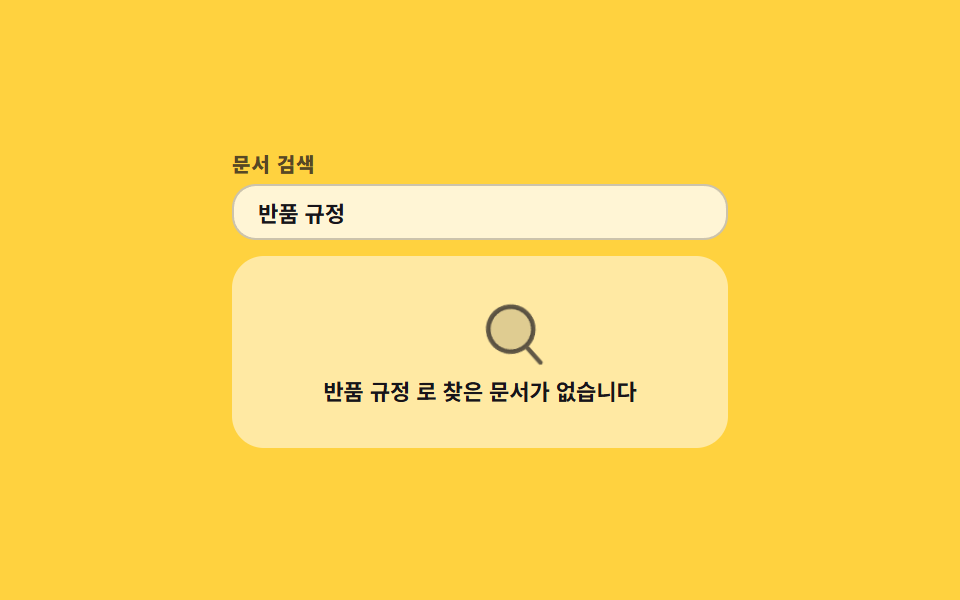
- 02 なぞって通る検索0件
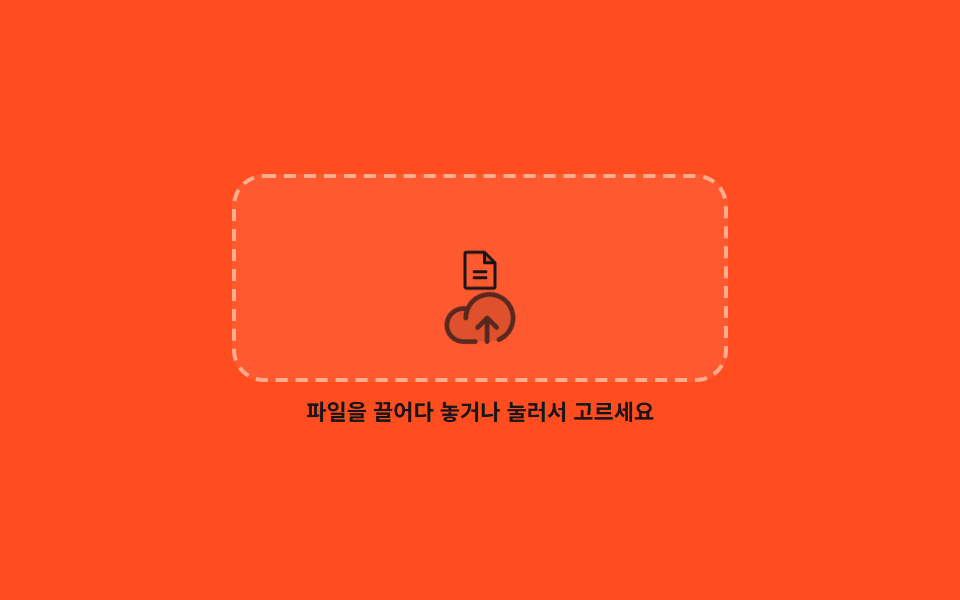
- 03 ファイルが落ちる破線ドロップゾーン
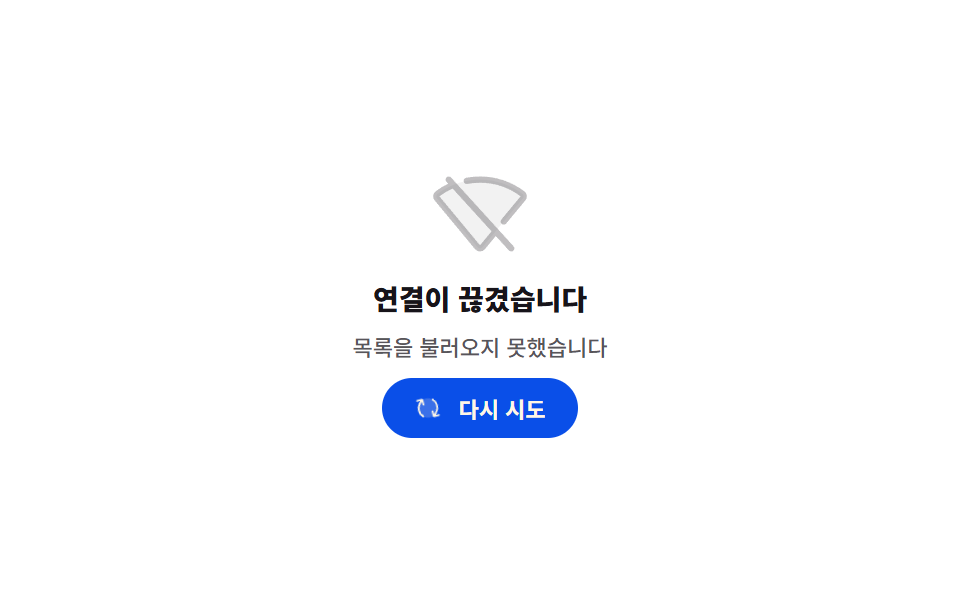
- 04 再試行の矢印が回るオフライン
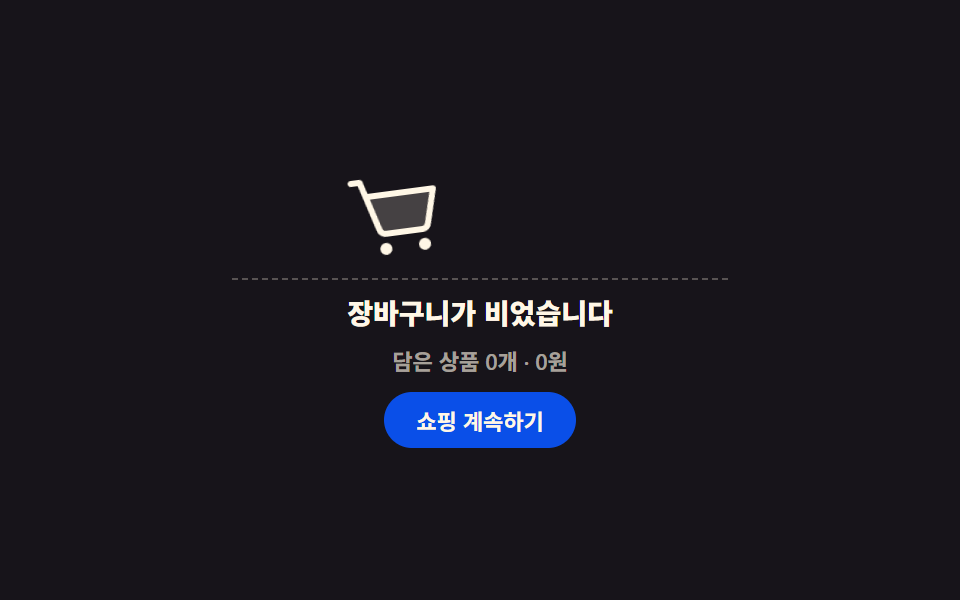
- 05 転がって入る空のカート
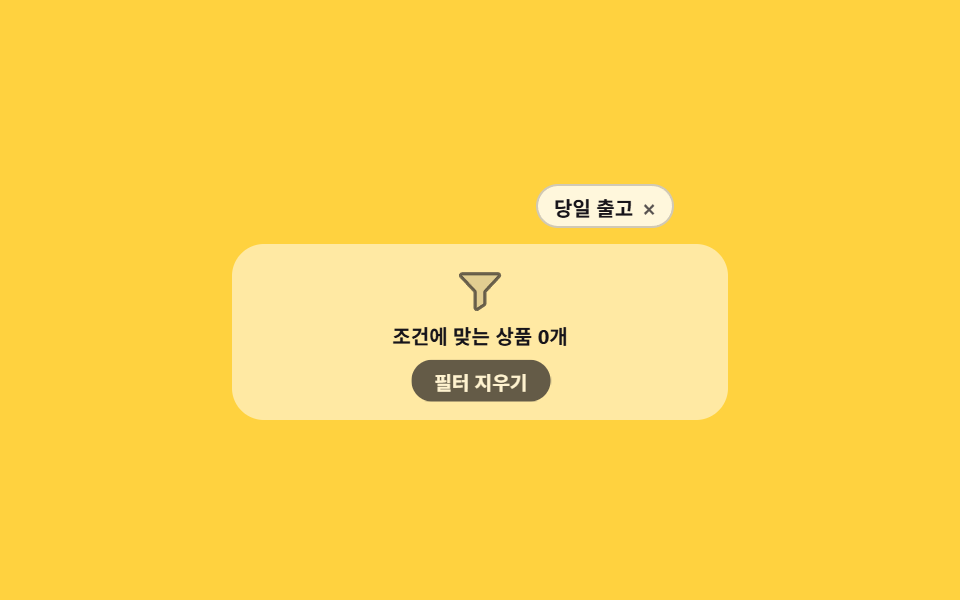
- 06 フィルタチップが1つずつ消える0件
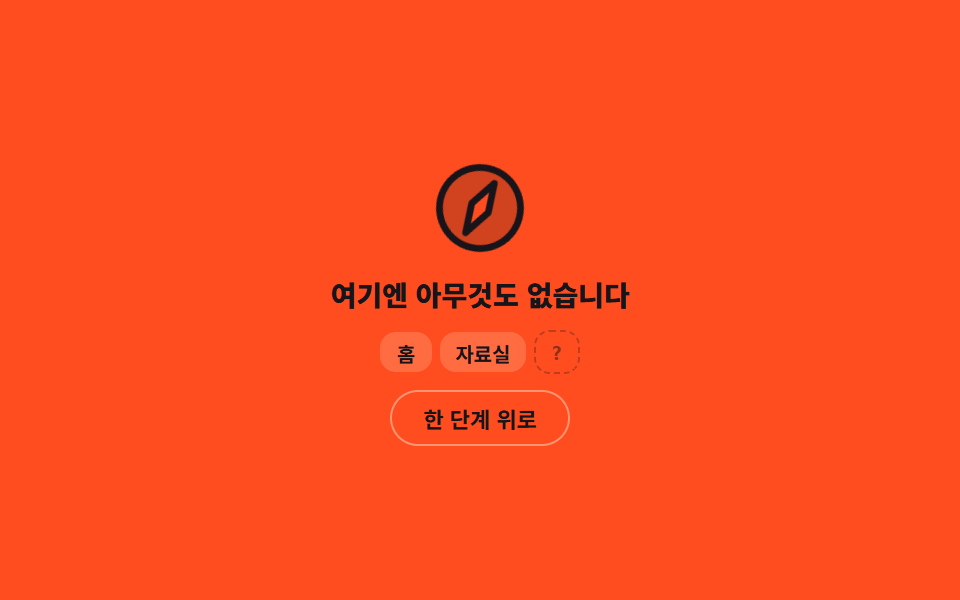
- 07 針が迷う404カード
- 08 南京錠が一度跳ねる権限ロック
- 09 紙吹雪が上がるタスク完了
9つは見た目の順ではなく、画面が空になる理由の順に並べてあります。最初の3つはユーザーが何も間違えていない場合です。まだ何もない(01)、検索語に合うものがない(02)、入れるべきなのにまだ入れていない(03)。真ん中の3つはユーザーが自分で戻せる場合です。接続が切れた(04)、カートに何も入っていない(05)、フィルタをかけすぎた(06)。最後の3つはシステムが答える番です。アドレスが違う(07)、権限がない(08)、そして09は空であること自体が目標だった画面です。9つとも、ボタンか入力欄が実際に動き、状態が変わる行には aria-live="polite" が付いているので、画面が見えない人にも変わった文が読み上げられます。アイコンは手で描かず、Phosphor Duotone の SVG をそのまま HTML に埋め込んでいるため、エンプティステートの読み込み時の外部リクエストは0件です。空ではなく溢れて折る画面はアコーディオンリスト UIへ、空だった棚が埋まっていく過程を見せる画面はファイルツリー 作成へと続きます。この順だから前半の三つはそれぞれ別の言い訳になり、後半の三つは別の招待状になります。空の理由を三つに分けたのは文面を書く人に「なぜ空か」を選ばせるためで、選んだ理由によって図柄とボタンの役割が変わります。図柄はどれもCSSの図形だけで描いています。
01受信箱ゼロの浮遊カード
エンプティステート とは何が見えるものか
トレイのアイコンが14px浮かんでは沈み、足元の楕円の影が同じリズムで細くなります。
<main class="stage">
  <section class="ez is-demo" aria-labelledby="ez-t">
    <div class="ez__art">
      <span class="ez__icon" aria-hidden="true"><svg viewBox="0 0 256 256" width="1em" height="1em"><g fill="currentColor"><path d="M216 48v112h-36.69a8 8 0 0 0-5.66 2.34l-19.31 19.32a8 8 0 0 1-5.66 2.34h-41.37a8 8 0 0 1-5.66-2.34l-19.31-19.32a8 8 0 0 0-5.66-2.34H40V48a8 8 0 0 1 8-8h160a8 8 0 0 1 8 8" opacity=".2"/><path d="M208 32H48a16 16 0 0 0-16 16v160a16 16 0 0 0 16 16h160a16 16 0 0 0 16-16V48a16 16 0 0 0-16-16m0 16v104h-28.7a15.86 15.86 0 0 0-11.3 4.69L148.69 176h-41.38L88 156.68A15.9 15.9 0 0 0 76.69 152H48V48Zm0 160H48v-40h28.69L96 187.32a15.9 15.9 0 0 0 11.31 4.68h41.38a15.86 15.86 0 0 0 11.31-4.69L179.31 168H208z"/></g></svg></span>
      <span class="ez__shadow" aria-hidden="true"></span>
    </div>
    <h2 class="ez__title" id="ez-t">受信箱は空です</h2>
    <p class="ez__sub" id="ez-s" data-busy="確認中" data-done="未読メール0件・確認{n}回" aria-live="polite">未読メール0件</p>
    <button class="ez__btn" type="button" id="ez-b">再読み込み</button>
  </section>
</main>
@use "../../../../site/static/demo-tokens" as *;
$duration: $dur-loop;
$easing: ease-in-out;
$color: $subject-cream;
@include stage($stage-ink);
.ez {
box-sizing: border-box;
width: min(248px, 86vw);
display: flex;
flex-direction: column;
align-items: center;
gap: $sp-2;
font-family: -apple-system, "Segoe UI", "Noto Sans KR", sans-serif;
text-align: center;
color: $color;
}
.ez__art {
display: flex;
flex-direction: column;
align-items: center;
gap: $sp-1;
}
.ez__icon {
display: block;
font-size: clamp(40px, 13vw, 56px);
line-height: 0;
color: $color;
}
.ez__shadow {
display: block;
width: 36px;
height: 6px;
border-radius: 50%;
background: rgba(255, 255, 255, .18);
}
.ez__title {
margin: 0;
font-size: clamp(12px, 4vw, 14px);
line-height: 1.3;
font-weight: 800;
}
.ez__sub {
margin: 0;
min-height: 14px;
font-size: 11px;
line-height: 14px;
font-weight: 500;
color: rgba(255, 247, 230, .62);
}
.ez__btn {
height: 28px;
margin: 0;
padding: 0 $sp-4;
border: 1px solid rgba(255, 255, 255, .2);
border-radius: $r-pill;
background: rgba(255, 255, 255, .08);
color: $color;
font-family: inherit;
font-size: 11px;
font-weight: 700;
cursor: pointer;
transition: background $dur-quick $ease-out;
}
.ez__btn:hover { background: rgba(255, 255, 255, .16); }
.ez__btn:disabled { opacity: .5; cursor: default; }
.ez__btn:focus-visible { outline: 2px solid $subject-blue; outline-offset: 2px; }
// ── 자동 루프: 떠올랐다 내려앉는다. 0% 와 100% 가 같은 자리라 이어 붙어도 튀지 않는다 ──
.ez.is-demo .ez__icon { animation: ez-float $duration $easing infinite; }
.ez.is-demo .ez__shadow { animation: ez-cast $duration $easing infinite; }
@keyframes ez-float {
  0%, 100% { transform: translateY(0); }
  50%      { transform: translateY(-14px); }
}
@keyframes ez-cast {
  0%, 100% { transform: scaleX(1); opacity: .18; }
  50%      { transform: scaleX(.68); opacity: .1; }
}
@media (prefers-reduced-motion: reduce) {
.ez.is-demo .ez__icon,
.ez.is-demo .ez__shadow { animation: none !important; }
.ez__btn { transition: none; }
}html, body {
margin: 0;
overflow: hidden;
}
.stage {
box-sizing: border-box;
min-height: 100vh;
display: grid;
place-items: center;
margin: 0;
background: #17141a;
font-family: -apple-system, "Segoe UI", "Noto Sans KR", sans-serif;
padding: clamp(8px, 4vw, 24px);
}
.ez {
box-sizing: border-box;
width: min(248px, 86vw);
display: flex;
flex-direction: column;
align-items: center;
gap: 8px;
font-family: -apple-system, "Segoe UI", "Noto Sans KR", sans-serif;
text-align: center;
color: #fff7e6;
}
.ez__art {
display: flex;
flex-direction: column;
align-items: center;
gap: 4px;
}
.ez__icon {
display: block;
font-size: clamp(40px, 13vw, 56px);
line-height: 0;
color: #fff7e6;
}
.ez__shadow {
display: block;
width: 36px;
height: 6px;
border-radius: 50%;
background: rgba(255, 255, 255, 0.18);
}
.ez__title {
margin: 0;
font-size: clamp(12px, 4vw, 14px);
line-height: 1.3;
font-weight: 800;
}
.ez__sub {
margin: 0;
min-height: 14px;
font-size: 11px;
line-height: 14px;
font-weight: 500;
color: rgba(255, 247, 230, 0.62);
}
.ez__btn {
height: 28px;
margin: 0;
padding: 0 16px;
border: 1px solid rgba(255, 255, 255, 0.2);
border-radius: 999px;
background: rgba(255, 255, 255, 0.08);
color: #fff7e6;
font-family: inherit;
font-size: 11px;
font-weight: 700;
cursor: pointer;
transition: background 220ms ease-out;
}
.ez__btn:hover {
background: rgba(255, 255, 255, 0.16);
}
.ez__btn:disabled {
opacity: 0.5;
cursor: default;
}
.ez__btn:focus-visible {
outline: 2px solid #2f6df6;
outline-offset: 2px;
}
.ez.is-demo .ez__icon {
animation: ez-float 2s ease-in-out infinite;
}
.ez.is-demo .ez__shadow {
animation: ez-cast 2s ease-in-out infinite;
}
@keyframes ez-float {
0%, 100% {
transform: translateY(0);
}
50% {
transform: translateY(-14px);
}
}
@keyframes ez-cast {
0%, 100% {
transform: scaleX(1);
opacity: 0.18;
}
50% {
transform: scaleX(0.68);
opacity: 0.1;
}
}
@media (prefers-reduced-motion: reduce) {
.ez.is-demo .ez__icon,
.ez.is-demo .ez__shadow {
animation: none !important;
}
.ez__btn {
transition: none;
}
}// 실제 동작: 새로 고침을 누르면 확인 중 상태로 바뀌었다가 확인 횟수와 함께 다시 빈 상태로 돌아온다.
var card = document.querySelector('.ez');
var btn = document.getElementById('ez-b');
var sub = document.getElementById('ez-s');
var n = 0;
btn.addEventListener('click', function () {
card.classList.remove('is-demo');
if (btn.disabled) return;
btn.disabled = true;
sub.textContent = sub.dataset.busy;
window.setTimeout(function () {
n += 1;
sub.textContent = sub.dataset.done.replace('{n}', n);
btn.disabled = false;
}, 700);
});import { useState } from "react";
import type { CSSProperties } from "react";
import styles from "./InboxZeroCard.module.scss";
export type InboxZeroCardProps = {
title?: string;
idle?: string;
busy?: string;
done?: string;
action?: string;
duration?: number;
easing?: string;
color?: string;
};
type Vars = CSSProperties & { "--duration"?: string; "--easing"?: string; "--color"?: string };
export default function InboxZeroCard({
title = "Your inbox is empty",
idle = "0 unread messages",
busy = "Checking",
done = "0 unread · checked {n}x",
action = "Refresh",
duration = 2000,
easing = "ease-in-out",
color = "#fff7e6",
}: InboxZeroCardProps) {
const [sub, setSub] = useState(idle);
const [loop, setLoop] = useState(true);
const [busyNow, setBusyNow] = useState(false);
const [count, setCount] = useState(0);
const vars: Vars = { "--duration": `${duration}ms`, "--easing": easing, "--color": color };
function refresh() {
if (busyNow) return;
setLoop(false);
setBusyNow(true);
setSub(busy);
window.setTimeout(() => {
const n = count + 1;
setCount(n);
setSub(done.replace("{n}", String(n)));
setBusyNow(false);
}, 700);
}
return (
<section className={`${styles.ez} ${loop ? styles.isDemo : ""}`} style={vars}>
<div className={styles.art}>
<span className={styles.icon} aria-hidden="true">
<svg viewBox="0 0 256 256" width="1em" height="1em">
<g fill="currentColor">
<path d="M216 48v112h-36.69a8 8 0 0 0-5.66 2.34l-19.31 19.32a8 8 0 0 1-5.66 2.34h-41.37a8 8 0 0 1-5.66-2.34l-19.31-19.32a8 8 0 0 0-5.66-2.34H40V48a8 8 0 0 1 8-8h160a8 8 0 0 1 8 8" opacity=".2" />
<path d="M208 32H48a16 16 0 0 0-16 16v160a16 16 0 0 0 16 16h160a16 16 0 0 0 16-16V48a16 16 0 0 0-16-16m0 16v104h-28.7a15.86 15.86 0 0 0-11.3 4.69L148.69 176h-41.38L88 156.68A15.9 15.9 0 0 0 76.69 152H48V48Zm0 160H48v-40h28.69L96 187.32a15.9 15.9 0 0 0 11.31 4.68h41.38a15.86 15.86 0 0 0 11.31-4.69L179.31 168H208z" />
</g>
</svg>
</span>
<span className={styles.shadow} aria-hidden="true" />
</div>
<h2 className={styles.title}>{title}</h2>
<p className={styles.sub} aria-live="polite">{sub}</p>
<button className={styles.btn} type="button" onClick={refresh} disabled={busyNow}>{action}</button>
</section>
);
}01 · 受信箱ゼロの浮遊カード — 計測 累積面積 1.28% · 動いたフレーム 23/23GODRICH オリジナル · SCSS と React は zip に同梱 · パスワードを見る
コードのどこを見るか
影を一緒に縮めるのが浮いて見えるコツで、アイコンだけを動かすと浮遊ではなく上下の揺れに見えてしまいます。
.ez.is-demo .ez__icon { animation: ez-float $duration $easing infinite; }
.ez.is-demo .ez__shadow { animation: ez-cast $duration $easing infinite; }
@keyframes ez-float {
0%, 100% { transform: translateY(0); }
50% { transform: translateY(-14px); }
}
@keyframes ez-cast {
0%, 100% { transform: scaleX(1); opacity: .18; }
50% { transform: scaleX(.68); opacity: .1; }
}
02なぞって通る検索0件
画面で起きること
入力欄に文字を打ち込むと下の3行が実際に絞り込まれ、残る行が1つもないときだけ虫眼鏡のカードがその場所を覆います。
<main class="stage">
  <section class="sw is-demo">
    <label class="sw__label" for="sw-q">ドキュメント検索</label>
    <input class="sw__input" id="sw-q" type="search" value="返品規定" autocomplete="off">
    <div class="sw__panel">
      <ul class="sw__rows" id="sw-rows">
        <li class="sw__row" data-name="配送ポリシー">配送ポリシー</li>
        <li class="sw__row" data-name="交換のご案内">交換のご案内</li>
        <li class="sw__row" data-name="支払い方法">支払い方法</li>
      </ul>
      <div class="sw__empty" id="sw-empty">
        <span class="sw__lens" aria-hidden="true"><svg viewBox="0 0 256 256" width="1em" height="1em"><g fill="currentColor"><path d="M192 112a80 80 0 1 1-80-80a80 80 0 0 1 80 80" opacity=".2"/><path d="m229.66 218.34l-50.06-50.06a88.21 88.21 0 1 0-11.32 11.31l50.06 50.07a8 8 0 0 0 11.32-11.32M40 112a72 72 0 1 1 72 72a72.08 72.08 0 0 1-72-72"/></g></svg></span>
        <p class="sw__msg" id="sw-msg" data-hit="{q} に一致する文書がありません" aria-live="polite">該当する文書がありません</p>
      </div>
    </div>
  </section>
</main>
@use "../../../../site/static/demo-tokens" as *;
$duration: $dur-loop;
$easing: ease-in-out;
$color: $subject-ink;
@include stage($stage-yellow);
.sw {
box-sizing: border-box;
width: min(248px, 86vw);
display: flex;
flex-direction: column;
gap: $sp-1;
font-family: -apple-system, "Segoe UI", "Noto Sans KR", sans-serif;
color: $color;
}
.sw__label {
font-size: 10px;
line-height: 12px;
font-weight: 800;
letter-spacing: .04em;
color: rgba(23, 20, 26, .72); // AA 4.5 (blog-design)
}
.sw__input {
box-sizing: border-box;
width: 100%;
height: 28px;
margin: 0;
padding: 0 $sp-3;
border: 1px solid rgba(23, 20, 26, .22);
border-radius: $r-control;
background: rgba(255, 255, 255, .78);
color: $color;
font-family: inherit;
font-size: 11px;
font-weight: 600;
}
.sw__input:focus-visible { outline: 2px solid $color; outline-offset: 1px; }
.sw__panel {
position: relative;
box-sizing: border-box;
height: 96px;
margin-top: $sp-1;
padding: $sp-2;
border-radius: $r-card;
background: rgba(255, 255, 255, .52);
overflow: hidden;
}
.sw__rows {
margin: 0;
padding: 0;
list-style: none;
display: flex;
flex-direction: column;
gap: $sp-2;
}
.sw__row[hidden] { display: none; }
.sw__row {
height: 20px;
padding: 0 $sp-2;
display: flex;
align-items: center;
border-radius: $r-sm;
background: rgba(255, 255, 255, .82);
font-size: 11px;
font-weight: 600;
}
.sw__empty {
position: absolute;
inset: 0;
display: flex;
flex-direction: column;
align-items: center;
justify-content: center;
gap: $sp-1;
}
.sw__empty[hidden] { display: none; }
.sw__lens {
display: block;
font-size: 36px;
line-height: 0;
color: rgba(23, 20, 26, .68);
}
.sw__msg {
margin: 0;
padding: 0 $sp-2;
font-size: 11px;
line-height: 14px;
font-weight: 700;
text-align: center;
}
// ── 자동 루프: 렌즈가 오른쪽 끝까지 훑고 같은 길로 되돌아온다. 끝 프레임이 첫 프레임과 같다 ──
.sw.is-demo .sw__lens { animation: sw-sweep $duration $easing infinite; }
@keyframes sw-sweep {
0%, 100% { transform: translateX(-62px) rotate(-12deg); }
50% { transform: translateX(62px) rotate(12deg); }
}
@media (prefers-reduced-motion: reduce) {
.sw.is-demo .sw__lens { animation: none !important; }
}html, body {
margin: 0;
overflow: hidden;
}
.stage {
box-sizing: border-box;
min-height: 100vh;
display: grid;
place-items: center;
margin: 0;
background: #ffd23f;
font-family: -apple-system, "Segoe UI", "Noto Sans KR", sans-serif;
padding: clamp(8px, 4vw, 24px);
}
.sw {
box-sizing: border-box;
width: min(248px, 86vw);
display: flex;
flex-direction: column;
gap: 4px;
font-family: -apple-system, "Segoe UI", "Noto Sans KR", sans-serif;
color: #17141a;
}
.sw__label {
font-size: 10px;
line-height: 12px;
font-weight: 800;
letter-spacing: 0.04em;
color: rgba(23, 20, 26, 0.72);
}
.sw__input {
box-sizing: border-box;
width: 100%;
height: 28px;
margin: 0;
padding: 0 12px;
border: 1px solid rgba(23, 20, 26, 0.22);
border-radius: 12px;
background: rgba(255, 255, 255, 0.78);
color: #17141a;
font-family: inherit;
font-size: 11px;
font-weight: 600;
}
.sw__input:focus-visible {
outline: 2px solid #17141a;
outline-offset: 1px;
}
.sw__panel {
position: relative;
box-sizing: border-box;
height: 96px;
margin-top: 4px;
padding: 8px;
border-radius: 16px;
background: rgba(255, 255, 255, 0.52);
overflow: hidden;
}
.sw__rows {
margin: 0;
padding: 0;
list-style: none;
display: flex;
flex-direction: column;
gap: 8px;
}
.sw__row[hidden] {
display: none;
}
.sw__row {
height: 20px;
padding: 0 8px;
display: flex;
align-items: center;
border-radius: 8px;
background: rgba(255, 255, 255, 0.82);
font-size: 11px;
font-weight: 600;
}
.sw__empty {
position: absolute;
inset: 0;
display: flex;
flex-direction: column;
align-items: center;
justify-content: center;
gap: 4px;
}
.sw__empty[hidden] {
display: none;
}
.sw__lens {
display: block;
font-size: 36px;
line-height: 0;
color: rgba(23, 20, 26, 0.68);
}
.sw__msg {
margin: 0;
padding: 0 8px;
font-size: 11px;
line-height: 14px;
font-weight: 700;
text-align: center;
}
.sw.is-demo .sw__lens {
animation: sw-sweep 2s ease-in-out infinite;
}
@keyframes sw-sweep {
0%, 100% {
transform: translateX(-62px) rotate(-12deg);
}
50% {
transform: translateX(62px) rotate(12deg);
}
}
@media (prefers-reduced-motion: reduce) {
.sw.is-demo .sw__lens {
animation: none !important;
}
}// 실제 동작: 입력한 글자로 세 줄을 거른다. 남는 줄이 없으면 빈 상태 카드가 대신 나온다.
var card = document.querySelector('.sw');
var q = document.getElementById('sw-q');
var rows = [].slice.call(document.querySelectorAll('.sw__row'));
var empty = document.getElementById('sw-empty');
var msg = document.getElementById('sw-msg');
var NONE = msg.textContent;
function render() {
  var v = q.value.trim();
  var hit = 0;
  rows.forEach(function (r) {
    var on = !v || r.dataset.name.indexOf(v) >= 0;
    r.hidden = !on;
    if (on) hit += 1;
  });
  empty.hidden = hit > 0;
  msg.textContent = v ? msg.dataset.hit.replace('{q}', v) : NONE;
}
q.addEventListener('input', function () { card.classList.remove('is-demo'); render(); });
render();import { useState } from "react";
import type { CSSProperties } from "react";
import styles from "./NoResultsCard.module.scss";
export type NoResultsCardProps = {
label?: string;
rows?: string[];
initialQuery?: string;
none?: string;
noneFor?: string;
duration?: number;
easing?: string;
color?: string;
};
type Vars = CSSProperties & { "--duration"?: string; "--easing"?: string; "--color"?: string };
type ChangeEvt = { target: { value: string } };
export default function NoResultsCard({
label = "Search docs",
rows = ["Shipping policy", "Exchange guide", "Payment methods"],
initialQuery = "return policy",
none = "No documents found",
noneFor = "No documents found for {q}",
duration = 2000,
easing = "ease-in-out",
color = "#17141a",
}: NoResultsCardProps) {
const [q, setQ] = useState(initialQuery);
const [loop, setLoop] = useState(true);
const vars: Vars = { "--duration": `${duration}ms`, "--easing": easing, "--color": color };
const term = q.trim();
const hits = rows.filter((r) => !term || r.toLowerCase().indexOf(term.toLowerCase()) >= 0);
function onInput(e: ChangeEvt) {
setLoop(false);
setQ(e.target.value);
}
return (
<section className={`${styles.sw} ${loop ? styles.isDemo : ""}`} style={vars}>
<label className={styles.label} htmlFor="sw-q">{label}</label>
<input className={styles.input} id="sw-q" type="search" value={q} onChange={onInput} autoComplete="off" />
<div className={styles.panel}>
<ul className={styles.rows}>
{hits.map((r) => <li className={styles.row} key={r}>{r}</li>)}
</ul>
{hits.length === 0 && (
<div className={styles.empty}>
<span className={styles.lens} aria-hidden="true">
<svg viewBox="0 0 256 256" width="1em" height="1em">
<g fill="currentColor">
<path d="M192 112a80 80 0 1 1-80-80a80 80 0 0 1 80 80" opacity=".2" />
<path d="m229.66 218.34l-50.06-50.06a88.21 88.21 0 1 0-11.32 11.31l50.06 50.07a8 8 0 0 0 11.32-11.32M40 112a72 72 0 1 1 72 72a72.08 72.08 0 0 1-72-72" />
</g>
</svg>
</span>
<p className={styles.msg} aria-live="polite">{term ? noneFor.replace("{q}", term) : none}</p>
</div>
)}
</div>
</section>
);
}02 · なぞって通る検索0件 — 計測 累積面積 2.691% · 動いたフレーム 23/23GODRICH オリジナル · SCSS と React は zip に同梱 · パスワードを見る
コードの読み方
虫眼鏡は左右に動きながら角度も傾くので、止まっているのではなく「まだ探している」ように見えます。
function render() {
var v = q.value.trim();
var hit = 0;
rows.forEach(function (r) {
var on = !v || r.dataset.name.indexOf(v) >= 0;
r.hidden = !on;
if (on) hit += 1;
});
empty.hidden = hit > 0;
msg.textContent = v ? msg.dataset.hit.replace('{q}', v) : NONE;
}
03ファイルが落ちる破線ドロップゾーン
どんな動きか
破線の枠にファイルが落ちて、62%の地点で下の雲が1.1倍にふくらみ、ファイルは70%と70.1%の間の1フレームで消えます。
<main class="stage">
  <section class="dz is-demo">
    <div class="dz__zone" id="dz-zone" role="button" tabindex="0" aria-describedby="dz-msg">
      <span class="dz__file" aria-hidden="true"><svg viewBox="0 0 256 256" width="1em" height="1em"><g fill="currentColor"><path d="M208 88h-56V32Z" opacity=".2"/><path d="m213.66 82.34l-56-56A8 8 0 0 0 152 24H56a16 16 0 0 0-16 16v176a16 16 0 0 0 16 16h144a16 16 0 0 0 16-16V88a8 8 0 0 0-2.34-5.66M160 51.31L188.69 80H160ZM200 216H56V40h88v48a8 8 0 0 0 8 8h48zm-32-80a8 8 0 0 1-8 8H96a8 8 0 0 1 0-16h64a8 8 0 0 1 8 8m0 32a8 8 0 0 1-8 8H96a8 8 0 0 1 0-16h64a8 8 0 0 1 8 8"/></g></svg></span>
      <span class="dz__cloud" aria-hidden="true"><svg viewBox="0 0 256 256" width="1em" height="1em"><g fill="currentColor"><path d="M240 128a80 80 0 0 1-80 80H72A56 56 0 1 1 85.92 97.74v.1A80 80 0 0 1 240 128" opacity=".2"/><path d="M178.34 165.66L160 147.31V208a8 8 0 0 1-16 0v-60.69l-18.34 18.35a8 8 0 0 1-11.32-11.32l32-32a8 8 0 0 1 11.32 0l32 32a8 8 0 0 1-11.32 11.32M160 40a88.08 88.08 0 0 0-78.71 48.68A64 64 0 1 0 72 216h40a8 8 0 0 0 0-16H72a48 48 0 0 1 0-96c1.1 0 2.2 0 3.29.12A88 88 0 0 0 72 128a8 8 0 0 0 16 0a72 72 0 1 1 100.8 66a8 8 0 0 0 3.2 15.34a7.9 7.9 0 0 0 3.2-.68A88 88 0 0 0 160 40"/></g></svg></span>
    </div>
    <p class="dz__msg" id="dz-msg" data-got="{f} を受け取りました" aria-live="polite">ファイルをドロップするか、クリックして選んでください</p>
    <input class="dz__input" id="dz-input" type="file" hidden>
  </section>
</main>
@use "../../../../site/static/demo-tokens" as *;
$duration: $dur-loop;
$easing: $ease-spring;
$color: $subject-cream;
@include stage($stage-orange);
.dz {
box-sizing: border-box;
width: min(248px, 86vw);
display: flex;
flex-direction: column;
align-items: center;
gap: $sp-2;
font-family: -apple-system, "Segoe UI", "Noto Sans KR", sans-serif;
color: $subject-ink; // AA 4.5: cream on orange 3.11 -> ink 5.50
}
.dz__zone {
position: relative;
box-sizing: border-box;
width: 100%;
height: 104px;
padding-bottom: $sp-3;
display: flex;
align-items: flex-end;
justify-content: center;
border: 2px dashed rgba(255, 247, 230, .52);
border-radius: $r-card;
background: rgba(255, 247, 230, .08);
cursor: pointer;
overflow: hidden;
transition: border-color $dur-quick $ease-out, background $dur-quick $ease-out;
}
.dz__zone:hover,
.dz__zone.is-over { border-color: $color; background: rgba(255, 247, 230, .18); }
.dz__zone:focus-visible { outline: 2px solid $color; outline-offset: 2px; }
.dz__cloud {
display: block;
font-size: 36px;
line-height: 0;
color: rgba(23, 20, 26, .78);
}
.dz__file {
position: absolute;
left: 50%;
top: $sp-2;
margin-left: -12px;
font-size: 24px;
line-height: 0;
color: $subject-ink; // AA 4.5: cream on orange 3.11 -> ink 5.50
opacity: 0;
}
.dz__msg {
margin: 0;
font-size: 11px;
line-height: 14px;
font-weight: 700;
text-align: center;
}
// ── 자동 루프: 파일이 떨어져 닿으면 steps(1,end) 로 한 프레임에 사라진다 (반투명 겹침 없음) ──
.dz.is-demo .dz__file { animation: dz-fall $duration $easing infinite; }
@keyframes dz-fall {
  0%   { transform: translateY(-28px) scale(.82); opacity: 0; }
  16%  { transform: translateY(-28px) scale(.82); opacity: 1; }
  62%  { transform: translateY(30px) scale(1); opacity: 1; }
  70%  { transform: translateY(26px) scale(1); opacity: 1; }
  70.1%, 100% { transform: translateY(-28px) scale(.82); opacity: 0; }
}
.dz.is-demo .dz__cloud { animation: dz-lift $duration $easing infinite; }
@keyframes dz-lift {
0%, 100% { transform: scale(1); opacity: .78; }
62% { transform: scale(1.1); opacity: 1; }
}
@media (prefers-reduced-motion: reduce) {
.dz.is-demo .dz__file,
.dz.is-demo .dz__cloud { animation: none !important; }
.dz__zone { transition: none; }
}html, body {
margin: 0;
overflow: hidden;
}
.stage {
box-sizing: border-box;
min-height: 100vh;
display: grid;
place-items: center;
margin: 0;
background: #ff4d1f;
font-family: -apple-system, "Segoe UI", "Noto Sans KR", sans-serif;
padding: clamp(8px, 4vw, 24px);
}
.dz {
box-sizing: border-box;
width: min(248px, 86vw);
display: flex;
flex-direction: column;
align-items: center;
gap: 8px;
font-family: -apple-system, "Segoe UI", "Noto Sans KR", sans-serif;
color: #17141a;
}
.dz__zone {
position: relative;
box-sizing: border-box;
width: 100%;
height: 104px;
padding-bottom: 12px;
display: flex;
align-items: flex-end;
justify-content: center;
border: 2px dashed rgba(255, 247, 230, 0.52);
border-radius: 16px;
background: rgba(255, 247, 230, 0.08);
cursor: pointer;
overflow: hidden;
transition: border-color 220ms ease-out, background 220ms ease-out;
}
.dz__zone:hover,
.dz__zone.is-over {
border-color: #fff7e6;
background: rgba(255, 247, 230, 0.18);
}
.dz__zone:focus-visible {
outline: 2px solid #fff7e6;
outline-offset: 2px;
}
.dz__cloud {
display: block;
font-size: 36px;
line-height: 0;
color: rgba(23, 20, 26, 0.78);
}
.dz__file {
position: absolute;
left: 50%;
top: 8px;
margin-left: -12px;
font-size: 24px;
line-height: 0;
color: #17141a;
opacity: 0;
}
.dz__msg {
margin: 0;
font-size: 11px;
line-height: 14px;
font-weight: 700;
text-align: center;
}
.dz.is-demo .dz__file {
animation: dz-fall 2s cubic-bezier(0.2, 0.8, 0.2, 1) infinite;
}
@keyframes dz-fall {
0% {
transform: translateY(-28px) scale(0.82);
opacity: 0;
}
16% {
transform: translateY(-28px) scale(0.82);
opacity: 1;
}
62% {
transform: translateY(30px) scale(1);
opacity: 1;
}
70% {
transform: translateY(26px) scale(1);
opacity: 1;
}
70.1%, 100% {
transform: translateY(-28px) scale(0.82);
opacity: 0;
}
}
.dz.is-demo .dz__cloud {
animation: dz-lift 2s cubic-bezier(0.2, 0.8, 0.2, 1) infinite;
}
@keyframes dz-lift {
0%, 100% {
transform: scale(1);
opacity: 0.78;
}
62% {
transform: scale(1.1);
opacity: 1;
}
}
@media (prefers-reduced-motion: reduce) {
.dz.is-demo .dz__file,
.dz.is-demo .dz__cloud {
animation: none !important;
}
.dz__zone {
transition: none;
}
}// 실제 동작: 끌어다 놓기와 누르기 둘 다 받는다. 파일이 들어오면 이름이 안내 줄을 대신한다.
var card = document.querySelector('.dz');
var zone = document.getElementById('dz-zone');
var input = document.getElementById('dz-input');
var msg = document.getElementById('dz-msg');
var IDLE = msg.textContent;
function took(name) {
card.classList.remove('is-demo');
zone.classList.remove('is-over');
msg.textContent = name ? msg.dataset.got.replace('{f}', name) : IDLE;
}
zone.addEventListener('click', function () { input.click(); });
zone.addEventListener('keydown', function (e) {
if (e.key === 'Enter' || e.key === ' ') { input.click(); e.preventDefault(); }
});
zone.addEventListener('dragover', function (e) { e.preventDefault(); zone.classList.add('is-over'); });
zone.addEventListener('dragleave', function () { zone.classList.remove('is-over'); });
zone.addEventListener('drop', function (e) {
e.preventDefault();
took(e.dataTransfer && e.dataTransfer.files[0] ? e.dataTransfer.files[0].name : '');
});
input.addEventListener('change', function () { took(input.files[0] ? input.files[0].name : ''); });import { useRef, useState } from "react";
import type { CSSProperties } from "react";
import styles from "./DropzoneCard.module.scss";
export type DropzoneCardProps = {
idle?: string;
got?: string;
duration?: number;
easing?: string;
color?: string;
};
type Vars = CSSProperties & { "--duration"?: string; "--easing"?: string; "--color"?: string };
type KeyEvt = { key: string; preventDefault: () => void };
type DropEvt = { preventDefault: () => void; dataTransfer: { files: { name: string }[] } | null };
type FileEvt = { target: { files: { name: string }[] | null } };
export default function DropzoneCard({
idle = "Drop a file here, or click to choose one",
got = "Got {f}",
duration = 2000,
easing = "cubic-bezier(.2,.8,.2,1)",
color = "#fff7e6",
}: DropzoneCardProps) {
const [msg, setMsg] = useState(idle);
const [over, setOver] = useState(false);
const [loop, setLoop] = useState(true);
const inputRef = useRef<HTMLInputElement>(null);
const vars: Vars = { "--duration": `${duration}ms`, "--easing": easing, "--color": color };
function took(name: string) {
setLoop(false);
setOver(false);
setMsg(name ? got.replace("{f}", name) : idle);
}
return (
<section className={`${styles.dz} ${loop ? styles.isDemo : ""}`} style={vars}>
<div
className={`${styles.zone} ${over ? styles.isOver : ""}`}
role="button"
tabIndex={0}
onClick={() => inputRef.current?.click()}
onKeyDown={(e: KeyEvt) => {
if (e.key === "Enter" || e.key === " ") { inputRef.current?.click(); e.preventDefault(); }
}}
onDragOver={(e: DropEvt) => { e.preventDefault(); setOver(true); }}
onDragLeave={() => setOver(false)}
onDrop={(e: DropEvt) => {
e.preventDefault();
took(e.dataTransfer && e.dataTransfer.files[0] ? e.dataTransfer.files[0].name : "");
}}
>
<span className={styles.file} aria-hidden="true">
<svg viewBox="0 0 256 256" width="1em" height="1em">
<g fill="currentColor">
<path d="M208 88h-56V32Z" opacity=".2" />
<path d="m213.66 82.34l-56-56A8 8 0 0 0 152 24H56a16 16 0 0 0-16 16v176a16 16 0 0 0 16 16h144a16 16 0 0 0 16-16V88a8 8 0 0 0-2.34-5.66M160 51.31L188.69 80H160ZM200 216H56V40h88v48a8 8 0 0 0 8 8h48zm-32-80a8 8 0 0 1-8 8H96a8 8 0 0 1 0-16h64a8 8 0 0 1 8 8m0 32a8 8 0 0 1-8 8H96a8 8 0 0 1 0-16h64a8 8 0 0 1 8 8" />
</g>
</svg>
</span>
<span className={styles.cloud} aria-hidden="true">
<svg viewBox="0 0 256 256" width="1em" height="1em">
<g fill="currentColor">
<path d="M240 128a80 80 0 0 1-80 80H72A56 56 0 1 1 85.92 97.74v.1A80 80 0 0 1 240 128" opacity=".2" />
<path d="M178.34 165.66L160 147.31V208a8 8 0 0 1-16 0v-60.69l-18.34 18.35a8 8 0 0 1-11.32-11.32l32-32a8 8 0 0 1 11.32 0l32 32a8 8 0 0 1-11.32 11.32M160 40a88.08 88.08 0 0 0-78.71 48.68A64 64 0 1 0 72 216h40a8 8 0 0 0 0-16H72a48 48 0 0 1 0-96c1.1 0 2.2 0 3.29.12A88 88 0 0 0 72 128a8 8 0 0 0 16 0a72 72 0 1 1 100.8 66a8 8 0 0 0 3.2 15.34a7.9 7.9 0 0 0 3.2-.68A88 88 0 0 0 160 40" />
</g>
</svg>
</span>
</div>
<p className={styles.msg} aria-live="polite">{msg}</p>
<input
className={styles.input}
ref={inputRef}
type="file"
hidden
onChange={(e: FileEvt) => took(e.target.files && e.target.files[0] ? e.target.files[0].name : "")}
/>
</section>
);
}03 · ファイルが落ちる破線ドロップゾーン — 計測 累積面積 0.929% · 動いたフレーム 19/23GODRICH オリジナル · SCSS と React は zip に同梱 · パスワードを見る
どこを変えるか
2枚を重ねてゆっくり入れ替えると両方が半透明になったフレームが残ってしまうので、消える瞬間だけはカットで切ります。
@keyframes dz-fall {
0% { transform: translateY(-28px) scale(.82); opacity: 0; }
16% { transform: translateY(-28px) scale(.82); opacity: 1; }
62% { transform: translateY(30px) scale(1); opacity: 1; }
70% { transform: translateY(26px) scale(1); opacity: 1; }
70.1%, 100% { transform: translateY(-28px) scale(.82); opacity: 0; }
}
04再試行の矢印が回るオフライン
何が見えるか
矢印は0degから360degまで一方向にだけ回るので、最後のフレームが最初のフレームと同じ見た目になり、巻き戻る瞬間がありません。
<main class="stage">
  <section class="of is-demo" aria-labelledby="of-t">
    <span class="of__icon" aria-hidden="true"><svg viewBox="0 0 256 256" width="1em" height="1em"><g fill="currentColor"><path d="m238.2 87.69l-104 125.43a8 8 0 0 1-12.3 0L17.8 87.69a7.79 7.79 0 0 1 1.31-11.21a180.75 180.75 0 0 1 217.78 0a7.79 7.79 0 0 1 1.31 11.21" opacity=".2"/><path d="M53.92 34.62a8 8 0 1 0-11.84 10.76l4.55 5A188 188 0 0 0 14.28 70.1a15.93 15.93 0 0 0-6.17 10.81a15.65 15.65 0 0 0 3.54 11.89l104 125.43A15.93 15.93 0 0 0 128 224a15.93 15.93 0 0 0 12.31-5.77l28.1-33.88l33.67 37a8 8 0 1 0 11.84-10.76ZM128 208L24.09 82.74a171.5 171.5 0 0 1 33.82-19.95l99.63 109.6ZM244.35 92.8l-49.42 59.58a8 8 0 0 1-12.32-10.21l49.3-59.43A170.76 170.76 0 0 0 128 48a175 175 0 0 0-32.39 3a8 8 0 1 1-3-15.72A190.6 190.6 0 0 1 128 32a186.67 186.67 0 0 1 113.72 38.1a15.93 15.93 0 0 1 6.17 10.81a15.65 15.65 0 0 1-3.54 11.89"/></g></svg></span>
    <h2 class="of__title" id="of-t">接続が切れました</h2>
    <p class="of__sub" id="of-s" data-busy="接続を確認中" data-again="まだ接続できません・試行{n}回" aria-live="polite">一覧を読み込めませんでした</p>
    <button class="of__btn" type="button" id="of-b">
      <span class="of__arrow" aria-hidden="true"><svg viewBox="0 0 256 256" width="1em" height="1em"><g fill="currentColor"><path d="M216 128a88 88 0 1 1-88-88a88 88 0 0 1 88 88" opacity=".2"/><path d="M224 48v48a8 8 0 0 1-8 8h-48a8 8 0 0 1 0-16h28.69l-14.63-14.63a79.56 79.56 0 0 0-56.13-23.43h-.45a79.52 79.52 0 0 0-55.89 22.77a8 8 0 0 1-11.18-11.44a96 96 0 0 1 135 .79L208 76.69V48a8 8 0 0 1 16 0m-37.59 135.29a80 80 0 0 1-112.47-.66L59.31 168H88a8 8 0 0 0 0-16H40a8 8 0 0 0-8 8v48a8 8 0 0 0 16 0v-28.69l14.63 14.63A95.43 95.43 0 0 0 130 222.06h.53a95.36 95.36 0 0 0 67.07-27.33a8 8 0 0 0-11.18-11.44Z"/></g></svg></span>
      <span class="of__btn-t">再試行</span>
    </button>
  </section>
</main>
@use "../../../../site/static/demo-tokens" as *;
$duration: $dur-loop;
$easing: linear;
$color: $subject-blue-deep;
@include stage($stage-paper);
.of {
box-sizing: border-box;
width: min(248px, 86vw);
display: flex;
flex-direction: column;
align-items: center;
gap: $sp-2;
font-family: -apple-system, "Segoe UI", "Noto Sans KR", sans-serif;
text-align: center;
color: $subject-ink;
}
.of__icon {
display: block;
font-size: clamp(38px, 12vw, 52px);
line-height: 0;
color: rgba(23, 20, 26, .42);
}
.of__title {
margin: 0;
font-size: clamp(12px, 4vw, 14px);
line-height: 1.3;
font-weight: 800;
}
.of__sub {
margin: 0;
min-height: 14px;
font-size: 11px;
line-height: 14px;
font-weight: 500;
color: rgba(23, 20, 26, .72); // AA 4.5 (blog-design)
}
.of__btn {
height: 30px;
margin: 0;
padding: 0 $sp-4;
display: inline-flex;
align-items: center;
gap: $sp-2;
border: 0;
border-radius: $r-pill;
background: $color;
color: $subject-cream;
font-family: inherit;
font-size: 11px;
font-weight: 700;
cursor: pointer;
}
.of__btn:disabled { opacity: .64; cursor: default; }
.of__btn:focus-visible { outline: 2px solid $subject-ink; outline-offset: 2px; }
.of__arrow {
display: block;
font-size: 14px;
line-height: 0;
}
.of__btn-t { line-height: 1; }
// ── 자동 루프: 화살표가 한 방향으로만 돈다. 360deg 끝이 0deg 와 같은 그림이라 되감기가 없다 ──
.of.is-demo .of__arrow,
.of.is-trying .of__arrow { animation: of-turn $duration $easing infinite; }
@keyframes of-turn {
  from { transform: rotate(0deg); }
  to   { transform: rotate(360deg); }
}
.of.is-demo .of__icon { animation: of-dim $duration ease-in-out infinite; }
@keyframes of-dim {
0%, 100% { opacity: 1; transform: scale(1); }
50% { opacity: .46; transform: scale(.94); }
}
@media (prefers-reduced-motion: reduce) {
.of.is-demo .of__arrow,
.of.is-trying .of__arrow,
.of.is-demo .of__icon { animation: none !important; }
}html, body {
margin: 0;
overflow: hidden;
}
.stage {
box-sizing: border-box;
min-height: 100vh;
display: grid;
place-items: center;
margin: 0;
background: #ffffff;
font-family: -apple-system, "Segoe UI", "Noto Sans KR", sans-serif;
padding: clamp(8px, 4vw, 24px);
}
.of {
box-sizing: border-box;
width: min(248px, 86vw);
display: flex;
flex-direction: column;
align-items: center;
gap: 8px;
font-family: -apple-system, "Segoe UI", "Noto Sans KR", sans-serif;
text-align: center;
color: #17141a;
}
.of__icon {
display: block;
font-size: clamp(38px, 12vw, 52px);
line-height: 0;
color: rgba(23, 20, 26, 0.42);
}
.of__title {
margin: 0;
font-size: clamp(12px, 4vw, 14px);
line-height: 1.3;
font-weight: 800;
}
.of__sub {
margin: 0;
min-height: 14px;
font-size: 11px;
line-height: 14px;
font-weight: 500;
color: rgba(23, 20, 26, 0.72);
}
.of__btn {
height: 30px;
margin: 0;
padding: 0 16px;
display: inline-flex;
align-items: center;
gap: 8px;
border: 0;
border-radius: 999px;
background: #0a4fe8;
color: #fff7e6;
font-family: inherit;
font-size: 11px;
font-weight: 700;
cursor: pointer;
}
.of__btn:disabled {
opacity: 0.64;
cursor: default;
}
.of__btn:focus-visible {
outline: 2px solid #17141a;
outline-offset: 2px;
}
.of__arrow {
display: block;
font-size: 14px;
line-height: 0;
}
.of__btn-t {
line-height: 1;
}
.of.is-demo .of__arrow,
.of.is-trying .of__arrow {
animation: of-turn 2s linear infinite;
}
@keyframes of-turn {
from {
transform: rotate(0deg);
}
to {
transform: rotate(360deg);
}
}
.of.is-demo .of__icon {
animation: of-dim 2s ease-in-out infinite;
}
@keyframes of-dim {
0%, 100% {
opacity: 1;
transform: scale(1);
}
50% {
opacity: 0.46;
transform: scale(0.94);
}
}
@media (prefers-reduced-motion: reduce) {
.of.is-demo .of__arrow,
.of.is-trying .of__arrow,
.of.is-demo .of__icon {
animation: none !important;
}
}// 실제 동작: 다시 시도를 누르면 확인 중으로 바뀌고, 시도 횟수를 세어 다시 오프라인 상태로 돌아온다.
var card = document.querySelector('.of');
var btn = document.getElementById('of-b');
var sub = document.getElementById('of-s');
var tries = 0;
btn.addEventListener('click', function () {
card.classList.remove('is-demo');
if (btn.disabled) return;
btn.disabled = true;
card.classList.add('is-trying');
sub.textContent = sub.dataset.busy;
window.setTimeout(function () {
tries += 1;
card.classList.remove('is-trying');
sub.textContent = sub.dataset.again.replace('{n}', tries);
btn.disabled = false;
}, 900);
});import { useState } from "react";
import type { CSSProperties } from "react";
import styles from "./OfflineCard.module.scss";
export type OfflineCardProps = {
title?: string;
idle?: string;
busy?: string;
again?: string;
action?: string;
duration?: number;
easing?: string;
color?: string;
};
type Vars = CSSProperties & { "--duration"?: string; "--easing"?: string; "--color"?: string };
export default function OfflineCard({
title = "You are offline",
idle = "Could not load the list",
busy = "Checking the connection",
again = "Still offline · {n} tries",
action = "Try again",
duration = 2000,
easing = "linear",
color = "#0a4fe8",
}: OfflineCardProps) {
const [sub, setSub] = useState(idle);
const [trying, setTrying] = useState(false);
const [loop, setLoop] = useState(true);
const [tries, setTries] = useState(0);
const vars: Vars = { "--duration": `${duration}ms`, "--easing": easing, "--color": color };
function retry() {
if (trying) return;
setLoop(false);
setTrying(true);
setSub(busy);
window.setTimeout(() => {
const n = tries + 1;
setTries(n);
setTrying(false);
setSub(again.replace("{n}", String(n)));
}, 900);
}
const cls = [styles.of, loop ? styles.isDemo : "", trying ? styles.isTrying : ""].join(" ");
return (
<section className={cls} style={vars}>
<span className={styles.icon} aria-hidden="true">
<svg viewBox="0 0 256 256" width="1em" height="1em">
<g fill="currentColor">
<path d="m238.2 87.69l-104 125.43a8 8 0 0 1-12.3 0L17.8 87.69a7.79 7.79 0 0 1 1.31-11.21a180.75 180.75 0 0 1 217.78 0a7.79 7.79 0 0 1 1.31 11.21" opacity=".2" />
<path d="M53.92 34.62a8 8 0 1 0-11.84 10.76l4.55 5A188 188 0 0 0 14.28 70.1a15.93 15.93 0 0 0-6.17 10.81a15.65 15.65 0 0 0 3.54 11.89l104 125.43A15.93 15.93 0 0 0 128 224a15.93 15.93 0 0 0 12.31-5.77l28.1-33.88l33.67 37a8 8 0 1 0 11.84-10.76ZM128 208L24.09 82.74a171.5 171.5 0 0 1 33.82-19.95l99.63 109.6ZM244.35 92.8l-49.42 59.58a8 8 0 0 1-12.32-10.21l49.3-59.43A170.76 170.76 0 0 0 128 48a175 175 0 0 0-32.39 3a8 8 0 1 1-3-15.72A190.6 190.6 0 0 1 128 32a186.67 186.67 0 0 1 113.72 38.1a15.93 15.93 0 0 1 6.17 10.81a15.65 15.65 0 0 1-3.54 11.89" />
</g>
</svg>
</span>
<h2 className={styles.title}>{title}</h2>
<p className={styles.sub} aria-live="polite">{sub}</p>
<button className={styles.btn} type="button" onClick={retry} disabled={trying}>
<span className={styles.arrow} aria-hidden="true">
<svg viewBox="0 0 256 256" width="1em" height="1em">
<g fill="currentColor">
<path d="M216 128a88 88 0 1 1-88-88a88 88 0 0 1 88 88" opacity=".2" />
<path d="M224 48v48a8 8 0 0 1-8 8h-48a8 8 0 0 1 0-16h28.69l-14.63-14.63a79.56 79.56 0 0 0-56.13-23.43h-.45a79.52 79.52 0 0 0-55.89 22.77a8 8 0 0 1-11.18-11.44a96 96 0 0 1 135 .79L208 76.69V48a8 8 0 0 1 16 0m-37.59 135.29a80 80 0 0 1-112.47-.66L59.31 168H88a8 8 0 0 0 0-16H40a8 8 0 0 0-8 8v48a8 8 0 0 0 16 0v-28.69l14.63 14.63A95.43 95.43 0 0 0 130 222.06h.53a95.36 95.36 0 0 0 67.07-27.33a8 8 0 0 0-11.18-11.44Z" />
</g>
</svg>
</span>
<span className={styles.btnT}>{action}</span>
</button>
</section>
);
}04 · 再試行の矢印が回るオフライン — 計測 累積面積 0.574% · 動いたフレーム 23/23GODRICH オリジナル · SCSS と React は zip に同梱 · パスワードを見る
コードのどこを見るか
ボタンを実際に押すと900ミリ秒だけロックされ、試行回数が案内文にたまっていきます。
.of.is-demo .of__arrow,
.of.is-trying .of__arrow { animation: of-turn $duration $easing infinite; }
@keyframes of-turn {
from { transform: rotate(0deg); }
to { transform: rotate(360deg); }
}
05転がって入る空のカート
画面で起きること
カートは左端の74px外側から転がって入り、38%の地点で止まり、一度傾いて、来た道をそのまま戻っていきます。
<main class="stage">
  <section class="ct is-demo" aria-labelledby="ct-t">
    <div class="ct__track">
      <span class="ct__cart" aria-hidden="true"><svg viewBox="0 0 256 256" width="1em" height="1em"><g fill="currentColor"><path d="m232 72l-25.63 92.28A16 16 0 0 1 191 176H92.16a16 16 0 0 1-15.41-11.72L51.11 72Z" opacity=".2"/><path d="M104 216a16 16 0 1 1-16-16a16 16 0 0 1 16 16m88-16a16 16 0 1 0 16 16a16 16 0 0 0-16-16m47.71-125.86l-25.64 92.28A24.06 24.06 0 0 1 191 184H92.16A24.06 24.06 0 0 1 69 166.42L33.92 40H16a8 8 0 0 1 0-16h24a8 8 0 0 1 7.71 5.86L57.19 64H232a8 8 0 0 1 7.71 10.14M221.47 80H61.64l22.81 82.14a8 8 0 0 0 7.71 5.86H191a8 8 0 0 0 7.71-5.86Z"/></g></svg></span>
    </div>
    <h2 class="ct__title" id="ct-t">カートは空です</h2>
    <p class="ct__sub" id="ct-s" data-fmt="商品{n}点・{won}ウォン" aria-live="polite">商品0点・0ウォン</p>
    <button class="ct__btn" type="button" id="ct-b" data-more="もう1つ追加">買い物を続ける</button>
  </section>
</main>
@use "../../../../site/static/demo-tokens" as *;
$duration: $dur-loop;
$easing: $ease-spring;
$color: $subject-cream;
@include stage($stage-ink);
.ct {
box-sizing: border-box;
width: min(248px, 86vw);
display: flex;
flex-direction: column;
align-items: center;
gap: $sp-2;
font-family: -apple-system, "Segoe UI", "Noto Sans KR", sans-serif;
text-align: center;
color: $color;
}
.ct__track {
box-sizing: border-box;
width: 100%;
height: 64px;
display: grid;
place-items: center;
border-bottom: 1px dashed rgba(255, 247, 230, .28);
overflow: hidden;
}
.ct__cart {
display: block;
font-size: clamp(36px, 11vw, 48px);
line-height: 0;
color: $color;
transform-origin: 50% 78%; // 규칙8: 수레 바퀴점 피벗
}
.ct__title {
margin: 0;
font-size: clamp(12px, 4vw, 14px);
line-height: 1.3;
font-weight: 800;
}
.ct__sub {
margin: 0;
min-height: 14px;
font-size: 11px;
line-height: 14px;
font-weight: 600;
color: rgba(255, 247, 230, .62);
}
.ct.is-filled .ct__sub { color: $color; }
.ct__btn {
height: 28px;
margin: 0;
padding: 0 $sp-4;
border: 0;
border-radius: $r-pill;
background: $subject-blue-deep;
color: $color;
font-family: inherit;
font-size: 11px;
font-weight: 700;
cursor: pointer;
}
.ct__btn:focus-visible { outline: 2px solid $color; outline-offset: 2px; }
// ── 자동 루프: 왼쪽에서 굴러 들어와 한 번 기울었다가 같은 길로 굴러 나간다. 0% 와 100% 가 같은 자리 ──
.ct.is-demo .ct__cart { animation: ct-roll $duration $easing infinite; }
@keyframes ct-roll {
0%, 100% { transform: translateX(-74px) rotate(-14deg); }
38% { transform: translateX(0) rotate(0deg); }
52% { transform: translateX(0) rotate(-9deg); }
66% { transform: translateX(0) rotate(0deg); }
}
@media (prefers-reduced-motion: reduce) {
.ct.is-demo .ct__cart { animation: none !important; transform: translateX(0); }
}html, body {
margin: 0;
overflow: hidden;
}
.stage {
box-sizing: border-box;
min-height: 100vh;
display: grid;
place-items: center;
margin: 0;
background: #17141a;
font-family: -apple-system, "Segoe UI", "Noto Sans KR", sans-serif;
padding: clamp(8px, 4vw, 24px);
}
.ct {
box-sizing: border-box;
width: min(248px, 86vw);
display: flex;
flex-direction: column;
align-items: center;
gap: 8px;
font-family: -apple-system, "Segoe UI", "Noto Sans KR", sans-serif;
text-align: center;
color: #fff7e6;
}
.ct__track {
box-sizing: border-box;
width: 100%;
height: 64px;
display: grid;
place-items: center;
border-bottom: 1px dashed rgba(255, 247, 230, 0.28);
overflow: hidden;
}
.ct__cart {
display: block;
font-size: clamp(36px, 11vw, 48px);
line-height: 0;
color: #fff7e6;
transform-origin: 50% 78%;
}
.ct__title {
margin: 0;
font-size: clamp(12px, 4vw, 14px);
line-height: 1.3;
font-weight: 800;
}
.ct__sub {
margin: 0;
min-height: 14px;
font-size: 11px;
line-height: 14px;
font-weight: 600;
color: rgba(255, 247, 230, 0.62);
}
.ct.is-filled .ct__sub {
color: #fff7e6;
}
.ct__btn {
height: 28px;
margin: 0;
padding: 0 16px;
border: 0;
border-radius: 999px;
background: #0a4fe8;
color: #fff7e6;
font-family: inherit;
font-size: 11px;
font-weight: 700;
cursor: pointer;
}
.ct__btn:focus-visible {
outline: 2px solid #fff7e6;
outline-offset: 2px;
}
.ct.is-demo .ct__cart {
animation: ct-roll 2s cubic-bezier(0.2, 0.8, 0.2, 1) infinite;
}
@keyframes ct-roll {
0%, 100% {
transform: translateX(-74px) rotate(-14deg);
}
38% {
transform: translateX(0) rotate(0deg);
}
52% {
transform: translateX(0) rotate(-9deg);
}
66% {
transform: translateX(0) rotate(0deg);
}
}
@media (prefers-reduced-motion: reduce) {
.ct.is-demo .ct__cart {
animation: none !important;
transform: translateX(0);
}
}// 실제 동작: 버튼을 누를 때마다 상품 하나가 실제로 담기고 합계가 다시 계산된다.
var card = document.querySelector('.ct');
var btn = document.getElementById('ct-b');
var sub = document.getElementById('ct-s');
var items = 0;
btn.addEventListener('click', function () {
card.classList.remove('is-demo');
items += 1;
card.classList.toggle('is-filled', items > 0);
sub.textContent = sub.dataset.fmt.replace('{n}', items).replace('{won}', (items * 12000).toLocaleString());
btn.textContent = btn.dataset.more;
});import { useState } from "react";
import type { CSSProperties } from "react";
import styles from "./EmptyCartCard.module.scss";
export type EmptyCartCardProps = {
title?: string;
fmt?: string;
action?: string;
more?: string;
unitPrice?: number;
duration?: number;
easing?: string;
color?: string;
};
type Vars = CSSProperties & { "--duration"?: string; "--easing"?: string; "--color"?: string };
export default function EmptyCartCard({
title = "Your cart is empty",
fmt = "{n} items · {won} KRW",
action = "Keep shopping",
more = "Add one more",
unitPrice = 12000,
duration = 2000,
easing = "cubic-bezier(.2,.8,.2,1)",
color = "#fff7e6",
}: EmptyCartCardProps) {
const [items, setItems] = useState(0);
const [loop, setLoop] = useState(true);
const vars: Vars = { "--duration": `${duration}ms`, "--easing": easing, "--color": color };
const sub = fmt.replace("{n}", String(items)).replace("{won}", (items * unitPrice).toLocaleString());
const cls = [styles.ct, loop ? styles.isDemo : "", items > 0 ? styles.isFilled : ""].join(" ");
return (
<section className={cls} style={vars}>
<div className={styles.track}>
<span className={styles.cart} aria-hidden="true">
<svg viewBox="0 0 256 256" width="1em" height="1em">
<g fill="currentColor">
<path d="m232 72l-25.63 92.28A16 16 0 0 1 191 176H92.16a16 16 0 0 1-15.41-11.72L51.11 72Z" opacity=".2" />
<path d="M104 216a16 16 0 1 1-16-16a16 16 0 0 1 16 16m88-16a16 16 0 1 0 16 16a16 16 0 0 0-16-16m47.71-125.86l-25.64 92.28A24.06 24.06 0 0 1 191 184H92.16A24.06 24.06 0 0 1 69 166.42L33.92 40H16a8 8 0 0 1 0-16h24a8 8 0 0 1 7.71 5.86L57.19 64H232a8 8 0 0 1 7.71 10.14M221.47 80H61.64l22.81 82.14a8 8 0 0 0 7.71 5.86H191a8 8 0 0 0 7.71-5.86Z" />
</g>
</svg>
</span>
</div>
<h2 className={styles.title}>{title}</h2>
<p className={styles.sub} aria-live="polite">{sub}</p>
<button
className={styles.btn}
type="button"
onClick={() => { setLoop(false); setItems(items + 1); }}
>
{items > 0 ? more : action}
</button>
</section>
);
}05 · 転がって入る空のカート — 計測 累積面積 2.624% · 動いたフレーム 23/23GODRICH オリジナル · SCSS と React は zip に同梱 · パスワードを見る
コードの読み方
transform-origin を車輪の高さである 50% 78% に指定すると、かごではなく車輪を軸にして傾きます。
.ct__cart { transform-origin: 50% 78%; }
.ct.is-demo .ct__cart { animation: ct-roll $duration $easing infinite; }
@keyframes ct-roll {
  0%, 100% { transform: translateX(-74px) rotate(-14deg); }
  38%      { transform: translateX(0) rotate(0deg); }
  52%      { transform: translateX(0) rotate(-9deg); }
  66%      { transform: translateX(0) rotate(0deg); }
}
06フィルタチップが1つずつ消える0件
どんな動きか
チップ3つが180ミリ秒ずつずれて消え、steps(1, end) なので途中の大きさが1フレームも残りません。
<main class="stage">
  <section class="fc is-demo">
    <ul class="fc__chips" id="fc-chips">
      <li><button class="fc__chip" type="button" data-chip="1">送料無料<span class="fc__x" aria-hidden="true">×</span><span class="fc__sr">フィルタを外す</span></button></li>
      <li><button class="fc__chip" type="button" data-chip="2">5万ウォン以下<span class="fc__x" aria-hidden="true">×</span><span class="fc__sr">フィルタを外す</span></button></li>
      <li><button class="fc__chip" type="button" data-chip="3">当日出荷<span class="fc__x" aria-hidden="true">×</span><span class="fc__sr">フィルタを外す</span></button></li>
    </ul>
    <div class="fc__panel">
      <ul class="fc__rows" id="fc-rows" hidden>
        <li class="fc__row">キャンドルホルダー</li>
        <li class="fc__row">リネンカーテン</li>
        <li class="fc__row">木製トレー</li>
      </ul>
      <div class="fc__empty" id="fc-empty">
        <span class="fc__icon" aria-hidden="true"><svg viewBox="0 0 256 256" width="1em" height="1em"><g fill="currentColor"><path d="M221.9 61.38L152 136v58.65a8 8 0 0 1-3.56 6.66l-32 21.33A8 8 0 0 1 104 216v-80L34.1 61.38A8 8 0 0 1 40 48h176a8 8 0 0 1 5.9 13.38" opacity=".2"/><path d="M230.6 49.53A15.81 15.81 0 0 0 216 40H40a16 16 0 0 0-11.81 26.76l.08.09L96 139.17V216a16 16 0 0 0 24.87 13.32l32-21.34a16 16 0 0 0 7.13-13.32v-55.49l67.74-72.32l.08-.09a15.8 15.8 0 0 0 2.78-17.23m-84.42 81.05A8 8 0 0 0 144 136v58.66L112 216v-80a8 8 0 0 0-2.16-5.47L40 56h176Z"/></g></svg></span>
        <p class="fc__msg" id="fc-msg" data-fmt="条件{n}件・該当商品0件" aria-live="polite">条件に合う商品0件</p>
        <button class="fc__clear" type="button" id="fc-clear">フィルタを消す</button>
      </div>
    </div>
  </section>
</main>
@use "../../../../site/static/demo-tokens" as *;
$duration: $dur-loop;
$easing: $ease-pop;
$color: $subject-ink;
@include stage($stage-yellow);
.fc {
box-sizing: border-box;
width: min(248px, 86vw);
display: flex;
flex-direction: column;
gap: $sp-2;
font-family: -apple-system, "Segoe UI", "Noto Sans KR", sans-serif;
color: $color;
}
.fc__chips {
margin: 0;
padding: 0;
list-style: none;
display: flex;
flex-wrap: wrap;
gap: $sp-1;
min-height: 22px;
}
.fc__chips li[hidden] { display: none; }
.fc__chip {
position: relative;
height: 22px;
margin: 0;
padding: 0 $sp-2;
display: inline-flex;
align-items: center;
gap: $sp-1;
border: 1px solid rgba(23, 20, 26, .2);
border-radius: $r-pill;
background: rgba(255, 255, 255, .82);
color: $color;
font-family: inherit;
font-size: 10px;
font-weight: 700;
cursor: pointer;
transform-origin: left center; // 규칙8: 칩 left변으로 꺼짐
}
.fc__chip:focus-visible { outline: 2px solid $color; outline-offset: 2px; }
.fc__x {
font-size: 11px;
line-height: 1;
color: rgba(23, 20, 26, .72); // AA 4.5 (blog-design)
}
.fc__sr {
position: absolute;
width: 1px;
height: 1px;
overflow: hidden;
clip-path: inset(50%);
white-space: nowrap;
}
.fc__panel {
position: relative;
box-sizing: border-box;
height: 88px;
padding: $sp-2;
border-radius: $r-card;
background: rgba(255, 255, 255, .52);
overflow: hidden;
}
.fc__rows {
margin: 0;
padding: 0;
list-style: none;
display: flex;
flex-direction: column;
gap: $sp-2;
}
.fc__rows[hidden] { display: none; }
.fc__row {
height: 20px;
padding: 0 $sp-2;
display: flex;
align-items: center;
border-radius: $r-sm;
background: rgba(255, 255, 255, .86);
font-size: 11px;
font-weight: 600;
}
.fc__empty {
position: absolute;
inset: 0;
display: flex;
flex-direction: column;
align-items: center;
justify-content: center;
gap: $sp-1;
}
.fc__empty[hidden] { display: none; }
.fc__icon {
display: block;
font-size: 26px;
line-height: 0;
color: rgba(23, 20, 26, .62);
}
.fc__msg {
margin: 0;
font-size: 10px;
line-height: 12px;
font-weight: 700;
}
.fc__clear {
height: 22px;
margin: 0;
padding: 0 $sp-3;
border: 0;
border-radius: $r-pill;
background: $color;
color: $subject-cream;
font-family: inherit;
font-size: 10px;
font-weight: 700;
cursor: pointer;
}
.fc__clear:focus-visible { outline: 2px solid $color; outline-offset: 2px; }
// ── 자동 루프: 칩이 왼쪽부터 차례로 꺼졌다 켜진다. 사라짐은 steps(1,end) 로 한 프레임에 컷 ──
.fc.is-demo .fc__chip { animation: fc-off $duration steps(1, end) infinite; }
.fc.is-demo li:nth-child(2) .fc__chip { animation-delay: 180ms; }
.fc.is-demo li:nth-child(3) .fc__chip { animation-delay: 360ms; }
@keyframes fc-off {
  0%, 32%   { opacity: 1; transform: scaleX(1); }
  33%, 74%  { opacity: 0; transform: scaleX(.2); }
  75%, 100% { opacity: 1; transform: scaleX(1); }
}
.fc.is-demo .fc__clear { animation: fc-call $duration $easing infinite; }
@keyframes fc-call {
0%, 44% { transform: translateY(4px) scale(.86); opacity: 0; }
58%, 70% { transform: translateY(0) scale(1); opacity: 1; }
84%, 100% { transform: translateY(4px) scale(.86); opacity: 0; }
}
@media (prefers-reduced-motion: reduce) {
.fc.is-demo .fc__chip,
.fc.is-demo .fc__clear { animation: none !important; }
}html, body {
margin: 0;
overflow: hidden;
}
.stage {
box-sizing: border-box;
min-height: 100vh;
display: grid;
place-items: center;
margin: 0;
background: #ffd23f;
font-family: -apple-system, "Segoe UI", "Noto Sans KR", sans-serif;
padding: clamp(8px, 4vw, 24px);
}
.fc {
box-sizing: border-box;
width: min(248px, 86vw);
display: flex;
flex-direction: column;
gap: 8px;
font-family: -apple-system, "Segoe UI", "Noto Sans KR", sans-serif;
color: #17141a;
}
.fc__chips {
margin: 0;
padding: 0;
list-style: none;
display: flex;
flex-wrap: wrap;
gap: 4px;
min-height: 22px;
}
.fc__chips li[hidden] {
display: none;
}
.fc__chip {
position: relative;
height: 22px;
margin: 0;
padding: 0 8px;
display: inline-flex;
align-items: center;
gap: 4px;
border: 1px solid rgba(23, 20, 26, 0.2);
border-radius: 999px;
background: rgba(255, 255, 255, 0.82);
color: #17141a;
font-family: inherit;
font-size: 10px;
font-weight: 700;
cursor: pointer;
transform-origin: left center;
}
.fc__chip:focus-visible {
outline: 2px solid #17141a;
outline-offset: 2px;
}
.fc__x {
font-size: 11px;
line-height: 1;
color: rgba(23, 20, 26, 0.72);
}
.fc__sr {
position: absolute;
width: 1px;
height: 1px;
overflow: hidden;
clip-path: inset(50%);
white-space: nowrap;
}
.fc__panel {
position: relative;
box-sizing: border-box;
height: 88px;
padding: 8px;
border-radius: 16px;
background: rgba(255, 255, 255, 0.52);
overflow: hidden;
}
.fc__rows {
margin: 0;
padding: 0;
list-style: none;
display: flex;
flex-direction: column;
gap: 8px;
}
.fc__rows[hidden] {
display: none;
}
.fc__row {
height: 20px;
padding: 0 8px;
display: flex;
align-items: center;
border-radius: 8px;
background: rgba(255, 255, 255, 0.86);
font-size: 11px;
font-weight: 600;
}
.fc__empty {
position: absolute;
inset: 0;
display: flex;
flex-direction: column;
align-items: center;
justify-content: center;
gap: 4px;
}
.fc__empty[hidden] {
display: none;
}
.fc__icon {
display: block;
font-size: 26px;
line-height: 0;
color: rgba(23, 20, 26, 0.62);
}
.fc__msg {
margin: 0;
font-size: 10px;
line-height: 12px;
font-weight: 700;
}
.fc__clear {
height: 22px;
margin: 0;
padding: 0 12px;
border: 0;
border-radius: 999px;
background: #17141a;
color: #fff7e6;
font-family: inherit;
font-size: 10px;
font-weight: 700;
cursor: pointer;
}
.fc__clear:focus-visible {
outline: 2px solid #17141a;
outline-offset: 2px;
}
.fc.is-demo .fc__chip {
animation: fc-off 2s steps(1, end) infinite;
}
.fc.is-demo li:nth-child(2) .fc__chip {
animation-delay: 180ms;
}
.fc.is-demo li:nth-child(3) .fc__chip {
animation-delay: 360ms;
}
@keyframes fc-off {
0%, 32% {
opacity: 1;
transform: scaleX(1);
}
33%, 74% {
opacity: 0;
transform: scaleX(0.2);
}
75%, 100% {
opacity: 1;
transform: scaleX(1);
}
}
.fc.is-demo .fc__clear {
animation: fc-call 2s cubic-bezier(0.2, 1.4, 0.4, 1) infinite;
}
@keyframes fc-call {
0%, 44% {
transform: translateY(4px) scale(0.86);
opacity: 0;
}
58%, 70% {
transform: translateY(0) scale(1);
opacity: 1;
}
84%, 100% {
transform: translateY(4px) scale(0.86);
opacity: 0;
}
}
@media (prefers-reduced-motion: reduce) {
.fc.is-demo .fc__chip,
.fc.is-demo .fc__clear {
animation: none !important;
}
}// 실제 동작: 칩의 x 로 조건을 하나씩 뗀다. 셋 다 떼면 목록이 돌아오고, 남아 있으면 0건 카드가 나온다.
var card = document.querySelector('.fc');
var chips = [].slice.call(document.querySelectorAll('.fc__chip'));
var rows = document.getElementById('fc-rows');
var empty = document.getElementById('fc-empty');
var msg = document.getElementById('fc-msg');
var clear = document.getElementById('fc-clear');
function paint() {
var left = chips.filter(function (c) { return !c.parentElement.hidden; }).length;
rows.hidden = left > 0;
empty.hidden = left === 0;
msg.textContent = msg.dataset.fmt.replace('{n}', left);
}
chips.forEach(function (c) {
c.addEventListener('click', function () {
card.classList.remove('is-demo');
c.parentElement.hidden = true;
paint();
});
});
clear.addEventListener('click', function () {
card.classList.remove('is-demo');
chips.forEach(function (c) { c.parentElement.hidden = false; });
paint();
});import { useState } from "react";
import type { CSSProperties } from "react";
import styles from "./FilterClearedCard.module.scss";
export type FilterClearedCardProps = {
filters?: string[];
rows?: string[];
removeLabel?: string;
fmt?: string;
clearLabel?: string;
duration?: number;
easing?: string;
color?: string;
};
type Vars = CSSProperties & { "--duration"?: string; "--easing"?: string; "--color"?: string };
export default function FilterClearedCard({
filters = ["Free shipping", "Under 50,000 KRW", "Ships today"],
rows = ["Candle holder", "Linen curtain", "Wooden tray"],
removeLabel = "Remove filter",
fmt = "{n} filters · 0 items match",
clearLabel = "Clear filters",
duration = 2000,
easing = "cubic-bezier(.2,1.4,.4,1)",
color = "#17141a",
}: FilterClearedCardProps) {
const [on, setOn] = useState(filters.map(() => true));
const [loop, setLoop] = useState(true);
const vars: Vars = { "--duration": `${duration}ms`, "--easing": easing, "--color": color };
const left = on.filter(Boolean).length;
function drop(i: number) {
setLoop(false);
setOn(on.map((v, k) => (k === i ? false : v)));
}
return (
<section className={`${styles.fc} ${loop ? styles.isDemo : ""}`} style={vars}>
<ul className={styles.chips}>
{filters.map((f, i) => on[i] && (
<li key={f}>
<button className={styles.chip} type="button" onClick={() => drop(i)}>
{f}
<span className={styles.x} aria-hidden="true">×</span>
<span className={styles.sr}>{removeLabel}</span>
</button>
</li>
))}
</ul>
<div className={styles.panel}>
{left === 0 ? (
<ul className={styles.rows}>
{rows.map((r) => <li className={styles.row} key={r}>{r}</li>)}
</ul>
) : (
<div className={styles.empty}>
<span className={styles.icon} aria-hidden="true">
<svg viewBox="0 0 256 256" width="1em" height="1em">
<g fill="currentColor">
<path d="M221.9 61.38L152 136v58.65a8 8 0 0 1-3.56 6.66l-32 21.33A8 8 0 0 1 104 216v-80L34.1 61.38A8 8 0 0 1 40 48h176a8 8 0 0 1 5.9 13.38" opacity=".2" />
<path d="M230.6 49.53A15.81 15.81 0 0 0 216 40H40a16 16 0 0 0-11.81 26.76l.08.09L96 139.17V216a16 16 0 0 0 24.87 13.32l32-21.34a16 16 0 0 0 7.13-13.32v-55.49l67.74-72.32l.08-.09a15.8 15.8 0 0 0 2.78-17.23m-84.42 81.05A8 8 0 0 0 144 136v58.66L112 216v-80a8 8 0 0 0-2.16-5.47L40 56h176Z" />
</g>
</svg>
</span>
<p className={styles.msg} aria-live="polite">{fmt.replace("{n}", String(left))}</p>
<button
className={styles.clear}
type="button"
onClick={() => { setLoop(false); setOn(filters.map(() => false)); }}
>
{clearLabel}
</button>
</div>
)}
</div>
</section>
);
}06 · フィルタチップが1つずつ消える0件 — 計測 累積面積 4.229% · 動いたフレーム 9/23GODRICH オリジナル · SCSS と React は zip に同梱 · パスワードを見る
どこを変えるか
チップの x を実際に押すとその条件だけが外れ、残った条件の数が数え直されます。
.fc.is-demo .fc__chip { animation: fc-off $duration steps(1, end) infinite; }
.fc.is-demo li:nth-child(2) .fc__chip { animation-delay: 180ms; }
.fc.is-demo li:nth-child(3) .fc__chip { animation-delay: 360ms; }
@keyframes fc-off {
0%, 32% { opacity: 1; transform: scaleX(1); }
33%, 74% { opacity: 0; transform: scaleX(.2); }
75%, 100% { opacity: 1; transform: scaleX(1); }
}
07針が迷う404カード
何が見えるか
コンパスは-26deg、22deg、-14deg、10degと振れ幅を狭めながら揺れます。
<main class="stage">
  <section class="nf is-demo" aria-labelledby="nf-t">
    <span class="nf__icon" aria-hidden="true"><svg viewBox="0 0 256 256" width="1em" height="1em"><g fill="currentColor"><path d="M128 32a96 96 0 1 0 96 96a96 96 0 0 0-96-96m16 112l-64 32l32-64l64-32Z" opacity=".2"/><path d="M128 24a104 104 0 1 0 104 104A104.11 104.11 0 0 0 128 24m0 192a88 88 0 1 1 88-88a88.1 88.1 0 0 1-88 88m44.42-143.16l-64 32a8.05 8.05 0 0 0-3.58 3.58l-32 64A8 8 0 0 0 80 184a8.1 8.1 0 0 0 3.58-.84l64-32a8.05 8.05 0 0 0 3.58-3.58l32-64a8 8 0 0 0-10.74-10.74M138 138l-40.11 20.11L118 118l40.15-20.07Z"/></g></svg></span>
    <h2 class="nf__title" id="nf-t">ここには何もありません</h2>
    <ol class="nf__path" id="nf-path" aria-live="polite">
      <li class="nf__seg">ホーム</li>
      <li class="nf__seg">資料室</li>
      <li class="nf__seg is-gone">?</li>
    </ol>
    <button class="nf__btn" type="button" id="nf-b" data-home="ここがホームです">1つ上へ</button>
  </section>
</main>
@use "../../../../site/static/demo-tokens" as *;
$duration: $dur-loop;
$easing: $ease-out;
$color: $subject-cream;
@include stage($stage-orange);
.nf {
box-sizing: border-box;
width: min(248px, 86vw);
display: flex;
flex-direction: column;
align-items: center;
gap: $sp-2;
font-family: -apple-system, "Segoe UI", "Noto Sans KR", sans-serif;
text-align: center;
color: $subject-ink; // AA 4.5: cream on orange 3.11 -> ink 5.50
}
.nf__icon {
display: block;
font-size: clamp(40px, 13vw, 54px);
line-height: 0;
color: $subject-ink;
}
.nf__title {
margin: 0;
font-size: clamp(12px, 4vw, 14px);
line-height: 1.3;
font-weight: 800;
}
.nf__path {
margin: 0;
padding: 0;
list-style: none;
display: flex;
align-items: center;
gap: $sp-1;
}
.nf__seg {
height: 20px;
padding: 0 $sp-2;
display: flex;
align-items: center;
border-radius: $r-sm;
background: rgba(255, 247, 230, .18);
color: $subject-ink;
font-size: 10px;
font-weight: 700;
}
.nf__seg.is-gone {
border: 1px dashed rgba(23, 20, 26, .55);
background: none;
color: $subject-ink;
}
.nf__btn {
height: 28px;
margin: 0;
padding: 0 $sp-4;
border: 1px solid rgba(255, 247, 230, .42);
border-radius: $r-pill;
background: none;
color: $subject-ink;
font-family: inherit;
font-size: 11px;
font-weight: 700;
cursor: pointer;
transition: background $dur-quick $ease-out;
}
.nf__btn:hover { background: rgba(255, 247, 230, .16); }
.nf__btn:disabled { opacity: .5; cursor: default; }
.nf__btn:focus-visible { outline: 2px solid $color; outline-offset: 2px; }
// ── 자동 루프: 바늘이 한 바퀴를 못 돌고 좌우로 헤맨다. 0% 와 100% 가 같은 각도 ──
.nf.is-demo .nf__icon { animation: nf-wander $duration $easing infinite; }
@keyframes nf-wander {
  0%, 100% { transform: rotate(-26deg); }
  28%      { transform: rotate(22deg); }
  54%      { transform: rotate(-14deg); }
  78%      { transform: rotate(10deg); }
}
.nf.is-demo .nf__seg.is-gone { animation: nf-blink $duration $easing infinite; }
@keyframes nf-blink {
0%, 100% { opacity: .42; }
50% { opacity: 1; }
}
@media (prefers-reduced-motion: reduce) {
.nf.is-demo .nf__icon,
.nf.is-demo .nf__seg.is-gone { animation: none !important; }
.nf__btn { transition: none; }
}html, body {
margin: 0;
overflow: hidden;
}
.stage {
box-sizing: border-box;
min-height: 100vh;
display: grid;
place-items: center;
margin: 0;
background: #ff4d1f;
font-family: -apple-system, "Segoe UI", "Noto Sans KR", sans-serif;
padding: clamp(8px, 4vw, 24px);
}
.nf {
box-sizing: border-box;
width: min(248px, 86vw);
display: flex;
flex-direction: column;
align-items: center;
gap: 8px;
font-family: -apple-system, "Segoe UI", "Noto Sans KR", sans-serif;
text-align: center;
color: #17141a;
}
.nf__icon {
display: block;
font-size: clamp(40px, 13vw, 54px);
line-height: 0;
color: #17141a;
}
.nf__title {
margin: 0;
font-size: clamp(12px, 4vw, 14px);
line-height: 1.3;
font-weight: 800;
}
.nf__path {
margin: 0;
padding: 0;
list-style: none;
display: flex;
align-items: center;
gap: 4px;
}
.nf__seg {
height: 20px;
padding: 0 8px;
display: flex;
align-items: center;
border-radius: 8px;
background: rgba(255, 247, 230, 0.18);
color: #17141a;
font-size: 10px;
font-weight: 700;
}
.nf__seg.is-gone {
border: 1px dashed rgba(23, 20, 26, 0.55);
background: none;
color: #17141a;
}
.nf__btn {
height: 28px;
margin: 0;
padding: 0 16px;
border: 1px solid rgba(255, 247, 230, 0.42);
border-radius: 999px;
background: none;
color: #17141a;
font-family: inherit;
font-size: 11px;
font-weight: 700;
cursor: pointer;
transition: background 220ms ease-out;
}
.nf__btn:hover {
background: rgba(255, 247, 230, 0.16);
}
.nf__btn:disabled {
opacity: 0.5;
cursor: default;
}
.nf__btn:focus-visible {
outline: 2px solid #fff7e6;
outline-offset: 2px;
}
.nf.is-demo .nf__icon {
animation: nf-wander 2s ease-out infinite;
}
@keyframes nf-wander {
0%, 100% {
transform: rotate(-26deg);
}
28% {
transform: rotate(22deg);
}
54% {
transform: rotate(-14deg);
}
78% {
transform: rotate(10deg);
}
}
.nf.is-demo .nf__seg.is-gone {
animation: nf-blink 2s ease-out infinite;
}
@keyframes nf-blink {
0%, 100% {
opacity: 0.42;
}
50% {
opacity: 1;
}
}
@media (prefers-reduced-motion: reduce) {
.nf.is-demo .nf__icon,
.nf.is-demo .nf__seg.is-gone {
animation: none !important;
}
.nf__btn {
transition: none;
}
}// 실제 동작: 한 단계 위로를 누를 때마다 주소 조각이 실제로 하나씩 지워지고, 홈만 남으면 버튼이 잠긴다.
var card = document.querySelector('.nf');
var path = document.getElementById('nf-path');
var btn = document.getElementById('nf-b');
btn.addEventListener('click', function () {
card.classList.remove('is-demo');
var segs = [].slice.call(path.querySelectorAll('.nf__seg'));
if (segs.length > 1) path.removeChild(segs[segs.length - 1]);
if (path.querySelectorAll('.nf__seg').length <= 1) {
btn.disabled = true;
btn.textContent = btn.dataset.home;
}
});import { useState } from "react";
import type { CSSProperties } from "react";
import styles from "./NotFoundCard.module.scss";
export type NotFoundCardProps = {
title?: string;
path?: string[];
action?: string;
homeLabel?: string;
duration?: number;
easing?: string;
color?: string;
};
type Vars = CSSProperties & { "--duration"?: string; "--easing"?: string; "--color"?: string };
export default function NotFoundCard({
title = "There is nothing here",
path = ["Home", "Files", "?"],
action = "Up one level",
homeLabel = "This is home",
duration = 2000,
easing = "ease-out",
color = "#fff7e6",
}: NotFoundCardProps) {
const [segs, setSegs] = useState(path);
const [loop, setLoop] = useState(true);
const vars: Vars = { "--duration": `${duration}ms`, "--easing": easing, "--color": color };
const atHome = segs.length <= 1;
return (
<section className={`${styles.nf} ${loop ? styles.isDemo : ""}`} style={vars}>
<span className={styles.icon} aria-hidden="true">
<svg viewBox="0 0 256 256" width="1em" height="1em">
<g fill="currentColor">
<path d="M128 32a96 96 0 1 0 96 96a96 96 0 0 0-96-96m16 112l-64 32l32-64l64-32Z" opacity=".2" />
<path d="M128 24a104 104 0 1 0 104 104A104.11 104.11 0 0 0 128 24m0 192a88 88 0 1 1 88-88a88.1 88.1 0 0 1-88 88m44.42-143.16l-64 32a8.05 8.05 0 0 0-3.58 3.58l-32 64A8 8 0 0 0 80 184a8.1 8.1 0 0 0 3.58-.84l64-32a8.05 8.05 0 0 0 3.58-3.58l32-64a8 8 0 0 0-10.74-10.74M138 138l-40.11 20.11L118 118l40.15-20.07Z" />
</g>
</svg>
</span>
<h2 className={styles.title}>{title}</h2>
<ol className={styles.path} aria-live="polite">
{segs.map((s, i) => (
<li className={`${styles.seg} ${i === segs.length - 1 && segs.length === path.length ? styles.isGone : ""}`} key={s}>{s}</li>
))}
</ol>
<button
className={styles.btn}
type="button"
disabled={atHome}
onClick={() => { setLoop(false); setSegs(segs.slice(0, -1)); }}
>
{atHome ? homeLabel : action}
</button>
</section>
);
}07 · 針が迷う404カード — 計測 累積面積 0.709% · 動いたフレーム 23/23GODRICH オリジナル · SCSS と React は zip に同梱 · パスワードを見る
コードのどこを見るか
一周させると「見つけた」ように見え、同じ角度で往復させるとメトロノームに見えてしまうので、だんだん小さくなる振れ幅が道に迷う感じに一番近いものでした。
.nf.is-demo .nf__icon { animation: nf-wander $duration $easing infinite; }
@keyframes nf-wander {
0%, 100% { transform: rotate(-26deg); }
28% { transform: rotate(22deg); }
54% { transform: rotate(-14deg); }
78% { transform: rotate(10deg); }
}
08南京錠が一度跳ねる権限ロック
画面で起きること
後ろの行は消さず、ぼかしが3pxから6pxまで強まって戻るだけです。
<main class="stage">
  <section class="pm is-demo">
    <div class="pm__panel">
      <ul class="pm__rows" aria-hidden="true">
        <li class="pm__row"></li>
        <li class="pm__row"></li>
        <li class="pm__row"></li>
      </ul>
      <div class="pm__gate">
        <span class="pm__lock" aria-hidden="true"><svg viewBox="0 0 256 256" width="1em" height="1em"><g fill="currentColor"><path d="M208 88H48a8 8 0 0 0-8 8v112a8 8 0 0 0 8 8h160a8 8 0 0 0 8-8V96a8 8 0 0 0-8-8m-80 72a20 20 0 1 1 20-20a20 20 0 0 1-20 20" opacity=".2"/><path d="M208 80h-32V56a48 48 0 0 0-96 0v24H48a16 16 0 0 0-16 16v112a16 16 0 0 0 16 16h160a16 16 0 0 0 16-16V96a16 16 0 0 0-16-16M96 56a32 32 0 0 1 64 0v24H96Zm112 152H48V96h160zm-80-96a28 28 0 0 0-8 54.83V184a8 8 0 0 0 16 0v-17.17a28 28 0 0 0-8-54.83m0 40a12 12 0 1 1 12-12a12 12 0 0 1-12 12"/></g></svg></span>
        <p class="pm__msg" id="pm-msg" data-wait="管理者の承認待ちです" aria-live="polite">閲覧権限がありません</p>
      </div>
    </div>
    <button class="pm__btn" type="button" id="pm-b" data-sent="リクエストを送信しました">アクセス権をリクエスト</button>
  </section>
</main>
@use "../../../../site/static/demo-tokens" as *;
$duration: $dur-loop;
$easing: $ease-pop;
$color: $subject-blue-deep;
@include stage($stage-paper);
.pm {
box-sizing: border-box;
width: min(248px, 86vw);
display: flex;
flex-direction: column;
align-items: center;
gap: $sp-3;
font-family: -apple-system, "Segoe UI", "Noto Sans KR", sans-serif;
color: $subject-ink;
}
.pm__panel {
position: relative;
box-sizing: border-box;
width: 100%;
height: 96px;
padding: $sp-3;
border: 1px solid rgba(23, 20, 26, .12);
border-radius: $r-card;
overflow: hidden;
}
.pm__rows {
margin: 0;
padding: 0;
list-style: none;
display: flex;
flex-direction: column;
gap: $sp-3;
filter: blur(3px);
}
.pm__row {
height: 12px;
border-radius: $r-xs;
background: rgba(23, 20, 26, .26);
}
.pm__row:nth-child(2) { width: 78%; }
.pm__row:nth-child(3) { width: 56%; }
.pm__gate {
position: absolute;
inset: 0;
display: flex;
flex-direction: column;
align-items: center;
justify-content: center;
gap: $sp-1;
background: rgba(255, 255, 255, .62);
}
.pm__lock {
display: block;
font-size: 32px;
line-height: 0;
color: rgba(23, 20, 26, .74);
}
.pm__msg {
margin: 0;
padding: 0 $sp-2;
font-size: 11px;
line-height: 14px;
font-weight: 700;
text-align: center;
}
.pm__btn {
height: 28px;
margin: 0;
padding: 0 $sp-4;
border: 0;
border-radius: $r-pill;
background: $color;
color: $subject-cream;
font-family: inherit;
font-size: 11px;
font-weight: 700;
cursor: pointer;
}
.pm__btn:disabled { opacity: .56; cursor: default; }
.pm__btn:focus-visible { outline: 2px solid $subject-ink; outline-offset: 2px; }
// ── 자동 루프: 자물쇠가 한 번 커졌다 제자리로. 0% 와 100% 가 같은 크기라 되감기가 없다 ──
.pm.is-demo .pm__lock { animation: pm-knock $duration $easing infinite; }
@keyframes pm-knock {
0%, 100% { transform: scale(1) translateY(0); }
30% { transform: scale(1.22) translateY(-4px); }
46% { transform: scale(1) translateY(0); }
58% { transform: scale(1.1) translateY(-2px); }
}
.pm.is-demo .pm__rows { animation: pm-veil $duration ease-in-out infinite; }
@keyframes pm-veil {
0%, 100% { filter: blur(3px); opacity: 1; }
50% { filter: blur(6px); opacity: .6; }
}
@media (prefers-reduced-motion: reduce) {
.pm.is-demo .pm__lock,
.pm.is-demo .pm__rows { animation: none !important; }
}html, body {
margin: 0;
overflow: hidden;
}
.stage {
box-sizing: border-box;
min-height: 100vh;
display: grid;
place-items: center;
margin: 0;
background: #ffffff;
font-family: -apple-system, "Segoe UI", "Noto Sans KR", sans-serif;
padding: clamp(8px, 4vw, 24px);
}
.pm {
box-sizing: border-box;
width: min(248px, 86vw);
display: flex;
flex-direction: column;
align-items: center;
gap: 12px;
font-family: -apple-system, "Segoe UI", "Noto Sans KR", sans-serif;
color: #17141a;
}
.pm__panel {
position: relative;
box-sizing: border-box;
width: 100%;
height: 96px;
padding: 12px;
border: 1px solid rgba(23, 20, 26, 0.12);
border-radius: 16px;
overflow: hidden;
}
.pm__rows {
margin: 0;
padding: 0;
list-style: none;
display: flex;
flex-direction: column;
gap: 12px;
filter: blur(3px);
}
.pm__row {
height: 12px;
border-radius: 4px;
background: rgba(23, 20, 26, 0.26);
}
.pm__row:nth-child(2) {
width: 78%;
}
.pm__row:nth-child(3) {
width: 56%;
}
.pm__gate {
position: absolute;
inset: 0;
display: flex;
flex-direction: column;
align-items: center;
justify-content: center;
gap: 4px;
background: rgba(255, 255, 255, 0.62);
}
.pm__lock {
display: block;
font-size: 32px;
line-height: 0;
color: rgba(23, 20, 26, 0.74);
}
.pm__msg {
margin: 0;
padding: 0 8px;
font-size: 11px;
line-height: 14px;
font-weight: 700;
text-align: center;
}
.pm__btn {
height: 28px;
margin: 0;
padding: 0 16px;
border: 0;
border-radius: 999px;
background: #0a4fe8;
color: #fff7e6;
font-family: inherit;
font-size: 11px;
font-weight: 700;
cursor: pointer;
}
.pm__btn:disabled {
opacity: 0.56;
cursor: default;
}
.pm__btn:focus-visible {
outline: 2px solid #17141a;
outline-offset: 2px;
}
.pm.is-demo .pm__lock {
animation: pm-knock 2s cubic-bezier(0.2, 1.4, 0.4, 1) infinite;
}
@keyframes pm-knock {
0%, 100% {
transform: scale(1) translateY(0);
}
30% {
transform: scale(1.22) translateY(-4px);
}
46% {
transform: scale(1) translateY(0);
}
58% {
transform: scale(1.1) translateY(-2px);
}
}
.pm.is-demo .pm__rows {
animation: pm-veil 2s ease-in-out infinite;
}
@keyframes pm-veil {
0%, 100% {
filter: blur(3px);
opacity: 1;
}
50% {
filter: blur(6px);
opacity: 0.6;
}
}
@media (prefers-reduced-motion: reduce) {
.pm.is-demo .pm__lock,
.pm.is-demo .pm__rows {
animation: none !important;
}
}// 실제 동작: 요청을 보내면 버튼이 잠기고 안내 줄이 대기 상태로 바뀐다. 한 번 더 누를 수 없다.
var card = document.querySelector('.pm');
var btn = document.getElementById('pm-b');
var msg = document.getElementById('pm-msg');
btn.addEventListener('click', function () {
card.classList.remove('is-demo');
btn.disabled = true;
btn.textContent = btn.dataset.sent;
msg.textContent = msg.dataset.wait;
card.classList.add('is-asked');
});import { useState } from "react";
import type { CSSProperties } from "react";
import styles from "./PermissionCard.module.scss";
export type PermissionCardProps = {
denied?: string;
waiting?: string;
action?: string;
sent?: string;
duration?: number;
easing?: string;
color?: string;
};
type Vars = CSSProperties & { "--duration"?: string; "--easing"?: string; "--color"?: string };
export default function PermissionCard({
denied = "You do not have access",
waiting = "Waiting for an admin to approve",
action = "Request access",
sent = "Request sent",
duration = 2000,
easing = "cubic-bezier(.2,1.4,.4,1)",
color = "#0a4fe8",
}: PermissionCardProps) {
const [asked, setAsked] = useState(false);
const [loop, setLoop] = useState(true);
const vars: Vars = { "--duration": `${duration}ms`, "--easing": easing, "--color": color };
return (
<section className={`${styles.pm} ${loop ? styles.isDemo : ""}`} style={vars}>
<div className={styles.panel}>
<ul className={styles.rows} aria-hidden="true">
<li className={styles.row} />
<li className={styles.row} />
<li className={styles.row} />
</ul>
<div className={styles.gate}>
<span className={styles.lock} aria-hidden="true">
<svg viewBox="0 0 256 256" width="1em" height="1em">
<g fill="currentColor">
<path d="M208 88H48a8 8 0 0 0-8 8v112a8 8 0 0 0 8 8h160a8 8 0 0 0 8-8V96a8 8 0 0 0-8-8m-80 72a20 20 0 1 1 20-20a20 20 0 0 1-20 20" opacity=".2" />
<path d="M208 80h-32V56a48 48 0 0 0-96 0v24H48a16 16 0 0 0-16 16v112a16 16 0 0 0 16 16h160a16 16 0 0 0 16-16V96a16 16 0 0 0-16-16M96 56a32 32 0 0 1 64 0v24H96Zm112 152H48V96h160zm-80-96a28 28 0 0 0-8 54.83V184a8 8 0 0 0 16 0v-17.17a28 28 0 0 0-8-54.83m0 40a12 12 0 1 1 12-12a12 12 0 0 1-12 12" />
</g>
</svg>
</span>
<p className={styles.msg} aria-live="polite">{asked ? waiting : denied}</p>
</div>
</div>
<button
className={styles.btn}
type="button"
disabled={asked}
onClick={() => { setLoop(false); setAsked(true); }}
>
{asked ? sent : action}
</button>
</section>
);
}08 · 南京錠が一度跳ねる権限ロック — 計測 累積面積 0.776% · 動いたフレーム 22/23GODRICH オリジナル · SCSS と React は zip に同梱 · パスワードを見る
コードの読み方
「ない」ではなく「隠されている」を絵1枚で伝える方法で、行の幅を78%と56%のように変えておかないと文章ではなく棒に見えてしまいます。
.pm__rows { filter: blur(3px); }
.pm.is-demo .pm__rows { animation: pm-veil $duration ease-in-out infinite; }
@keyframes pm-veil {
  0%, 100% { filter: blur(3px); opacity: 1; }
  50%      { filter: blur(6px); opacity: .6; }
}
09紙吹雪が上がるタスク完了
どんな動きか
紙片6枚が240ミリ秒ずつずれて上がるので、前の紙片が薄くなるころには次の紙片がもう中ほどまで来ています。
<main class="stage">
  <section class="ad is-demo" aria-labelledby="ad-t">
    <div class="ad__art">
      <span class="ad__bit" aria-hidden="true"></span>
      <span class="ad__bit" aria-hidden="true"></span>
      <span class="ad__bit" aria-hidden="true"></span>
      <span class="ad__bit" aria-hidden="true"></span>
      <span class="ad__bit" aria-hidden="true"></span>
      <span class="ad__bit" aria-hidden="true"></span>
      <span class="ad__icon" aria-hidden="true"><svg viewBox="0 0 256 256" width="1em" height="1em"><g fill="currentColor"><path d="m58.89 154.89l42.22 42.22l-50.63 18.4a7.79 7.79 0 0 1-10-10Zm138.82-4.72l-91.88-91.88A7.79 7.79 0 0 0 93 61.14l-14.9 41l75.82 75.82l41-14.9a7.79 7.79 0 0 0 2.79-12.89" opacity=".2"/><path d="M111.49 52.63a15.8 15.8 0 0 0-26 5.77L33 202.78A15.83 15.83 0 0 0 47.76 224a16 16 0 0 0 5.46-1l144.37-52.5a15.8 15.8 0 0 0 5.78-26Zm-8.33 135.21l-35-35l13.16-36.21l58.05 58.05Zm-55 20l14-38.41l24.45 24.45ZM156 168.64L87.36 100l13-35.87l91.43 91.43ZM160 72a37.8 37.8 0 0 1 3.84-15.58C169.14 45.83 179.14 40 192 40c6.7 0 11-2.29 13.65-7.21a22 22 0 0 0 2.35-8.85a8 8 0 0 1 16 .06c0 12.86-8.52 32-32 32c-6.7 0-11 2.29-13.65 7.21a22 22 0 0 0-2.35 8.85a8 8 0 0 1-16-.06m-24-32V16a8 8 0 0 1 16 0v24a8 8 0 0 1-16 0m101.66 82.34a8 8 0 1 1-11.32 11.31l-16-16a8 8 0 0 1 11.32-11.32Zm4.87-42.75l-24 8a8 8 0 0 1-5.06-15.18l24-8a8 8 0 0 1 5.06 15.18"/></g></svg></span>
    </div>
    <h2 class="ad__title" id="ad-t">やることは全部終わりました</h2>
    <p class="ad__sub" id="ad-s" data-fmt="残りのタスク{n}件" aria-live="polite">残りのタスク0件</p>
    <button class="ad__btn" type="button" id="ad-b" data-none="戻せるものがありません">直前の1件を戻す</button>
  </section>
</main>
@use "../../../../site/static/demo-tokens" as *;
$duration: $dur-loop;
$easing: ease-in-out;
$color: $subject-cream;
@include stage($stage-ink);
.ad {
box-sizing: border-box;
width: min(248px, 86vw);
display: flex;
flex-direction: column;
align-items: center;
gap: $sp-2;
font-family: -apple-system, "Segoe UI", "Noto Sans KR", sans-serif;
text-align: center;
color: $color;
}
.ad__art {
position: relative;
box-sizing: border-box;
width: 100%;
height: 72px;
display: grid;
place-items: center;
overflow: hidden;
}
.ad__icon {
grid-area: 1 / 1;
font-size: clamp(36px, 11vw, 46px);
line-height: 0;
color: $color;
}
.ad__bit {
position: absolute;
left: 50%;
bottom: 4px;
width: 6px;
height: 6px;
border-radius: $r-xs;
background: $subject-pink;
opacity: 0;
}
.ad__bit:nth-child(2) { background: $subject-mint; }
.ad__bit:nth-child(3) { background: $subject-lilac; }
.ad__bit:nth-child(4) { background: $subject-sky; }
.ad__bit:nth-child(5) { background: $subject-pink; }
.ad__bit:nth-child(6) { background: $subject-mint; }
.ad__title {
margin: 0;
font-size: clamp(12px, 4vw, 14px);
line-height: 1.3;
font-weight: 800;
}
.ad__sub {
margin: 0;
min-height: 14px;
font-size: 11px;
line-height: 14px;
font-weight: 600;
color: rgba(255, 247, 230, .62);
}
.ad.is-back .ad__sub { color: $subject-pink; }
.ad__btn {
height: 28px;
margin: 0;
padding: 0 $sp-4;
border: 1px solid rgba(255, 255, 255, .2);
border-radius: $r-pill;
background: rgba(255, 255, 255, .08);
color: $color;
font-family: inherit;
font-size: 11px;
font-weight: 700;
cursor: pointer;
}
.ad__btn:disabled { opacity: .5; cursor: default; }
.ad__btn:focus-visible { outline: 2px solid $subject-sky; outline-offset: 2px; }
// ── 자동 루프: 조각마다 시작 시각이 달라 한 조각이 사라질 때 다음 조각이 이미 올라와 있다 ──
.ad.is-demo .ad__bit { animation: ad-pop $duration $easing infinite; }
.ad.is-demo .ad__bit:nth-child(1) { animation-delay: 0ms; --x: -46px; --r: 180deg; }
.ad.is-demo .ad__bit:nth-child(2) { animation-delay: 240ms; --x: -26px; --r: -150deg; }
.ad.is-demo .ad__bit:nth-child(3) { animation-delay: 480ms; --x: -8px; --r: 210deg; }
.ad.is-demo .ad__bit:nth-child(4) { animation-delay: 720ms; --x: 10px; --r: -190deg; }
.ad.is-demo .ad__bit:nth-child(5) { animation-delay: 960ms; --x: 28px; --r: 160deg; }
.ad.is-demo .ad__bit:nth-child(6) { animation-delay: 1200ms; --x: 48px; --r: -220deg; }
@keyframes ad-pop {
0% { transform: translate(var(--x, 0), 0) rotate(0deg) scale(.6); opacity: 0; }
16% { opacity: 1; }
70% { opacity: 1; }
100% { transform: translate(var(--x, 0), -58px) rotate(var(--r, 180deg)) scale(1); opacity: 0; }
}
.ad.is-demo .ad__icon { animation: ad-beat $duration $easing infinite; }
@keyframes ad-beat {
0%, 100% { transform: rotate(-6deg) scale(1); }
50% { transform: rotate(6deg) scale(1.06); }
}
@media (prefers-reduced-motion: reduce) {
.ad.is-demo .ad__bit,
.ad.is-demo .ad__icon { animation: none !important; }
}html, body {
margin: 0;
overflow: hidden;
}
.stage {
box-sizing: border-box;
min-height: 100vh;
display: grid;
place-items: center;
margin: 0;
background: #17141a;
font-family: -apple-system, "Segoe UI", "Noto Sans KR", sans-serif;
padding: clamp(8px, 4vw, 24px);
}
.ad {
box-sizing: border-box;
width: min(248px, 86vw);
display: flex;
flex-direction: column;
align-items: center;
gap: 8px;
font-family: -apple-system, "Segoe UI", "Noto Sans KR", sans-serif;
text-align: center;
color: #fff7e6;
}
.ad__art {
position: relative;
box-sizing: border-box;
width: 100%;
height: 72px;
display: grid;
place-items: center;
overflow: hidden;
}
.ad__icon {
grid-area: 1/1;
font-size: clamp(36px, 11vw, 46px);
line-height: 0;
color: #fff7e6;
}
.ad__bit {
position: absolute;
left: 50%;
bottom: 4px;
width: 6px;
height: 6px;
border-radius: 4px;
background: #ff9ebb;
opacity: 0;
}
.ad__bit:nth-child(2) {
background: #4cd4a6;
}
.ad__bit:nth-child(3) {
background: #b9a0ff;
}
.ad__bit:nth-child(4) {
background: #6ec8ff;
}
.ad__bit:nth-child(5) {
background: #ff9ebb;
}
.ad__bit:nth-child(6) {
background: #4cd4a6;
}
.ad__title {
margin: 0;
font-size: clamp(12px, 4vw, 14px);
line-height: 1.3;
font-weight: 800;
}
.ad__sub {
margin: 0;
min-height: 14px;
font-size: 11px;
line-height: 14px;
font-weight: 600;
color: rgba(255, 247, 230, 0.62);
}
.ad.is-back .ad__sub {
color: #ff9ebb;
}
.ad__btn {
height: 28px;
margin: 0;
padding: 0 16px;
border: 1px solid rgba(255, 255, 255, 0.2);
border-radius: 999px;
background: rgba(255, 255, 255, 0.08);
color: #fff7e6;
font-family: inherit;
font-size: 11px;
font-weight: 700;
cursor: pointer;
}
.ad__btn:disabled {
opacity: 0.5;
cursor: default;
}
.ad__btn:focus-visible {
outline: 2px solid #6ec8ff;
outline-offset: 2px;
}
.ad.is-demo .ad__bit {
animation: ad-pop 2s ease-in-out infinite;
}
.ad.is-demo .ad__bit:nth-child(1) {
animation-delay: 0ms;
--x: -46px;
--r: 180deg;
}
.ad.is-demo .ad__bit:nth-child(2) {
animation-delay: 240ms;
--x: -26px;
--r: -150deg;
}
.ad.is-demo .ad__bit:nth-child(3) {
animation-delay: 480ms;
--x: -8px;
--r: 210deg;
}
.ad.is-demo .ad__bit:nth-child(4) {
animation-delay: 720ms;
--x: 10px;
--r: -190deg;
}
.ad.is-demo .ad__bit:nth-child(5) {
animation-delay: 960ms;
--x: 28px;
--r: 160deg;
}
.ad.is-demo .ad__bit:nth-child(6) {
animation-delay: 1200ms;
--x: 48px;
--r: -220deg;
}
@keyframes ad-pop {
0% {
transform: translate(var(--x, 0), 0) rotate(0deg) scale(0.6);
opacity: 0;
}
16% {
opacity: 1;
}
70% {
opacity: 1;
}
100% {
transform: translate(var(--x, 0), -58px) rotate(var(--r, 180deg)) scale(1);
opacity: 0;
}
}
.ad.is-demo .ad__icon {
animation: ad-beat 2s ease-in-out infinite;
}
@keyframes ad-beat {
0%, 100% {
transform: rotate(-6deg) scale(1);
}
50% {
transform: rotate(6deg) scale(1.06);
}
}
@media (prefers-reduced-motion: reduce) {
.ad.is-demo .ad__bit,
.ad.is-demo .ad__icon {
animation: none !important;
}
}// 실제 동작: 되돌리기를 누르면 할 일이 실제로 하나씩 되살아나고, 0개가 아니면 축하 문구가 내려간다.
var card = document.querySelector('.ad');
var btn = document.getElementById('ad-b');
var sub = document.getElementById('ad-s');
var left = 0;
btn.addEventListener('click', function () {
card.classList.remove('is-demo');
left += 1;
card.classList.add('is-back');
sub.textContent = sub.dataset.fmt.replace('{n}', left);
if (left >= 3) {
btn.disabled = true;
btn.textContent = btn.dataset.none;
}
});import { useState } from "react";
import type { CSSProperties } from "react";
import styles from "./AllDoneCard.module.scss";
export type AllDoneCardProps = {
title?: string;
fmt?: string;
action?: string;
none?: string;
maxUndo?: number;
duration?: number;
easing?: string;
color?: string;
};
type Vars = CSSProperties & { "--duration"?: string; "--easing"?: string; "--color"?: string };
type BitVars = CSSProperties & { "--x"?: string; "--r"?: string; animationDelay?: string };
const BITS: BitVars[] = [
{ "--x": "-46px", "--r": "180deg", animationDelay: "0ms" },
{ "--x": "-26px", "--r": "-150deg", animationDelay: "240ms" },
{ "--x": "-8px", "--r": "210deg", animationDelay: "480ms" },
{ "--x": "10px", "--r": "-190deg", animationDelay: "720ms" },
{ "--x": "28px", "--r": "160deg", animationDelay: "960ms" },
{ "--x": "48px", "--r": "-220deg", animationDelay: "1200ms" },
];
export default function AllDoneCard({
title = "Everything is done",
fmt = "{n} tasks left",
action = "Undo the last one",
none = "Nothing left to undo",
maxUndo = 3,
duration = 2000,
easing = "ease-in-out",
color = "#fff7e6",
}: AllDoneCardProps) {
const [left, setLeft] = useState(0);
const [loop, setLoop] = useState(true);
const vars: Vars = { "--duration": `${duration}ms`, "--easing": easing, "--color": color };
const full = left >= maxUndo;
const cls = [styles.ad, loop ? styles.isDemo : "", left > 0 ? styles.isBack : ""].join(" ");
return (
<section className={cls} style={vars}>
<div className={styles.art}>
{BITS.map((b, i) => <span className={styles.bit} style={b} key={i} aria-hidden="true" />)}
<span className={styles.icon} aria-hidden="true">
<svg viewBox="0 0 256 256" width="1em" height="1em">
<g fill="currentColor">
<path d="m58.89 154.89l42.22 42.22l-50.63 18.4a7.79 7.79 0 0 1-10-10Zm138.82-4.72l-91.88-91.88A7.79 7.79 0 0 0 93 61.14l-14.9 41l75.82 75.82l41-14.9a7.79 7.79 0 0 0 2.79-12.89" opacity=".2" />
<path d="M111.49 52.63a15.8 15.8 0 0 0-26 5.77L33 202.78A15.83 15.83 0 0 0 47.76 224a16 16 0 0 0 5.46-1l144.37-52.5a15.8 15.8 0 0 0 5.78-26Zm-8.33 135.21l-35-35l13.16-36.21l58.05 58.05Zm-55 20l14-38.41l24.45 24.45ZM156 168.64L87.36 100l13-35.87l91.43 91.43ZM160 72a37.8 37.8 0 0 1 3.84-15.58C169.14 45.83 179.14 40 192 40c6.7 0 11-2.29 13.65-7.21a22 22 0 0 0 2.35-8.85a8 8 0 0 1 16 .06c0 12.86-8.52 32-32 32c-6.7 0-11 2.29-13.65 7.21a22 22 0 0 0-2.35 8.85a8 8 0 0 1-16-.06m-24-32V16a8 8 0 0 1 16 0v24a8 8 0 0 1-16 0m101.66 82.34a8 8 0 1 1-11.32 11.31l-16-16a8 8 0 0 1 11.32-11.32Zm4.87-42.75l-24 8a8 8 0 0 1-5.06-15.18l24-8a8 8 0 0 1 5.06 15.18" />
</g>
</svg>
</span>
</div>
<h2 className={styles.title}>{title}</h2>
<p className={styles.sub} aria-live="polite">{fmt.replace("{n}", String(left))}</p>
<button
className={styles.btn}
type="button"
disabled={full}
onClick={() => { setLoop(false); setLeft(left + 1); }}
>
{full ? none : action}
</button>
</section>
);
}09 · 紙吹雪が上がるタスク完了 — 計測 累積面積 1.54% · 動いたフレーム 23/23GODRICH オリジナル · SCSS と React は zip に同梱 · パスワードを見る
どこを変えるか
横位置と回転角を --x・--r の2つの変数で紙片ごとに変えれば、キーフレームは1つのままで6通りに散ります。
.ad.is-demo .ad__bit:nth-child(1) { animation-delay: 0ms;   --x: -46px; --r: 180deg; }
.ad.is-demo .ad__bit:nth-child(2) { animation-delay: 240ms; --x: -26px; --r: -150deg; }
@keyframes ad-pop {
  0%   { transform: translate(var(--x, 0), 0) rotate(0deg) scale(.6); opacity: 0; }
  16%  { opacity: 1; }
  70%  { opacity: 1; }
  100% { transform: translate(var(--x, 0), -58px) rotate(var(--r, 180deg)) scale(1); opacity: 0; }
}
どこで壊れるか — 落とし穴
空の状態のカードは、たいてい一覧があった場所にそのまま入ります。つまり行を隠すコードとカードを出すコードが同じ瞬間に動くということです。02番で引っかかったのがまさにそこでした。スクリプトは r.hidden = !on で合わない行をきちんと消していたのに、スタイルシートには .sw__row { display: flex; } が書いてありました。ブラウザが [hidden] に与える display: none は UA スタイルシートにある値なので、自分で書いた宣言1行に負けます。結果は、3行が画面に残ったまま、その上に「該当する文書がありません」のカードが半透明で重なった状態でした。レンダリングの測定値は通っていました。動き自体は正常だったからです。最初のポスターを実際に開いてみて、はじめて分かりました。直しは .sw__row[hidden] { display: none; } の1行で、display を指定する部品ごとに同じ行が必要です。
2つ目は自動再生のループを自分の手で止めてしまう失敗です。02番の render() の中に card.classList.remove('is-demo') が入っていて、この関数は初期化のときにも一度呼ばれていました。誰も何も触っていないのにグリッド用のループが止まっていて、測定値は累積面積0.00%・強度0.0・アニメーション0個でした。ループを止める行は render() の中ではなく input のイベントハンドラ側に置いてください。無いものを見せるカードに絵を埋める方法は画像 拡大 表示 UIで写真ファイルなしの手段として再利用します。9つ分の完成ソースと React 版は、圧縮パスワード ydp2zjcw を入れると開く zip に入っていて、この2行もすでに直した状態で入っています。
| 症状 | 原因 | 直し方 |
|---|---|---|
| 絞り込んだ行が消えない | .row { display: flex } が UA の [hidden] に勝つ |
.row[hidden] { display: none } を一緒に書く |
| グリッドで動かない | 初期化の関数が .is-demo を外している |
ループ解除はイベントハンドラの中だけに |
| 状態が変わったことが伝わらない | 文だけ入れ替えている | その行に aria-live="polite" を付ける |
アクセシビリティ
prefers-reduced-motion: reduce が有効な画面では9つのループがすべて止まりますが、カードが伝えたかった内容は1つも消えません。05番はカートを舞台の外に置き去りにせず transform: translateX(0) で中央に固定し、08番はぼかしを3px固定で残して「隠されている」という事実だけを伝えます。状態が変わる案内文には aria-live="polite" を付けてあるので、再試行ボタンを押したあとに「接続を確認中」へ変わった文は、画面を見ていない人にも読み上げられます。aria-live の3つの値がそれぞれいつ読み上げられるかは MDN の aria-live のページにまとまっています。03番のドロップゾーンには role="button" と tabindex="0" を一緒に付けてあるため、マウスでドラッグしない人も Enter と Space でファイル選択ダイアログを開けます。
同じ場所で一緒に使うローディング表示はローディングカテゴリに、管理画面の部品はダッシュボードカテゴリにまとめてあります。
FAQ
エンプティステート ui にイラストは必ず必要ですか
イラストを入れること自体が目的なら、入れないほうがよいです。ここにある9つがアイコンを使うのは飾りではなく、空になった理由を一目で見分けるためです。南京錠と切れた Wi-Fi と空のカートは、文字を読む前からすでに別の状況だと伝えています。空になる理由が1つしかない画面なら、文1行とボタン1つで十分です。空の理由を指で説明する現場向け画面ならタッチパネル 注文 画面のUIがその口調を整えます。
画像ファイルなしでアイコンだけでも足りますか
9つとも画像ファイルは0個です。Phosphor Duotone の SVG を HTML に直接埋め込んでいるので追加のリクエストは発生せず、color の1行だけで舞台に合わせて色が変わります。SVG は 1em のままにして、包む要素の font-size だけを clamp() で調整すれば、スマホの画面でも同じ比率で小さくなります。
空の状態とローディングを同じカードで使ってもよいですか
使わないでください。ローディングは「もうすぐ何か出る」で、空の状態は「出るものがない」です。同じカードにすると、ユーザーは待てばよいのか行動すればよいのか分からなくなります。04番がちょうどその境目で、一覧は空でも原因はデータがないことではなくリクエストの失敗なので、案内文もボタンも別にします。
こんな記事もどうぞ
 リスト・テーブルUIスワイプ削除リストUI 9選 — ページネーションまで
 リスト・テーブルUIアコーディオンリスト UI 9選 — チェックリストまで
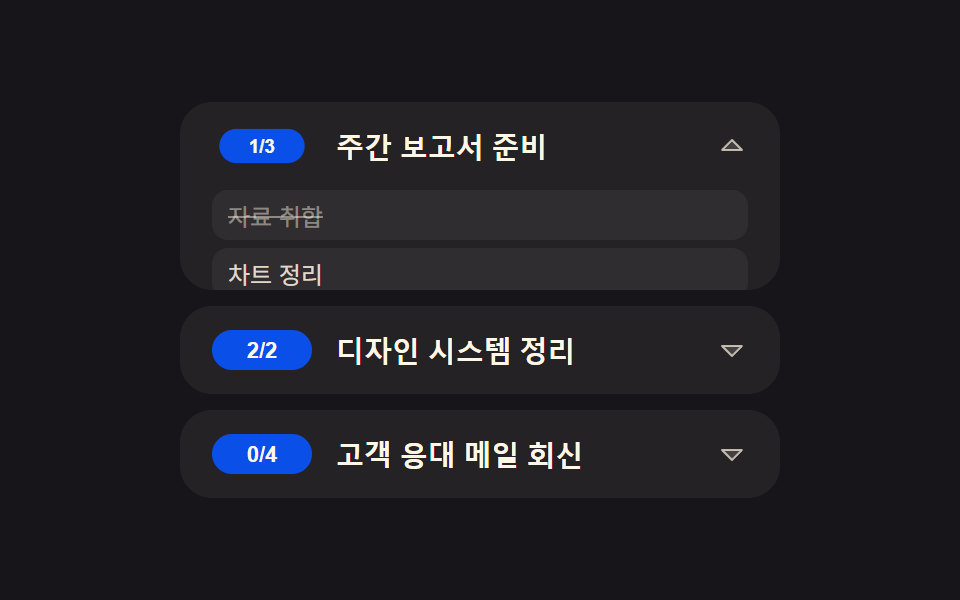 リスト・テーブルUItodo リスト ui 9パターン — 進捗ゲージから巻き戻しまで一気に整理
 リスト・テーブルUIテーブル UI デザイン 9選 — 列幅ドラッグと範囲選択まで
 リスト・テーブルUIcss リスト デザイン 9選 — マーカーが計算で動く箇条書きの装飾
 リスト・テーブルUIファイルツリー 作成 9選 — フォルダが実際に開くツリービュー
 リスト・テーブルUI無限スクロール 実装 9種 — リスト・テーブルUI基本パターン集
 リスト・テーブルUIランキング デザイン css 9パターン — 順位表 デザインも同じ仕組み
 リスト・テーブルUIcss receipt 9パターン — 一行ずつ印字・切り取り線・バーコード読み取り・割り勘の場面
 リスト・テーブルUIコメント欄 css 実装9パターン — 深さから削除後の詰めまで計算するリスト