css 3d アニメーション で作る マウス追従の立体シーン9選
css 3d アニメーション は、マウスの位置を角度に変えて観覧車や地形、橋のミニチュアを回す演出です。Three.jsなしで、キャンバス2D の上に座標計算だけで組み立てました。
 01 scene3d-ferris-wheel
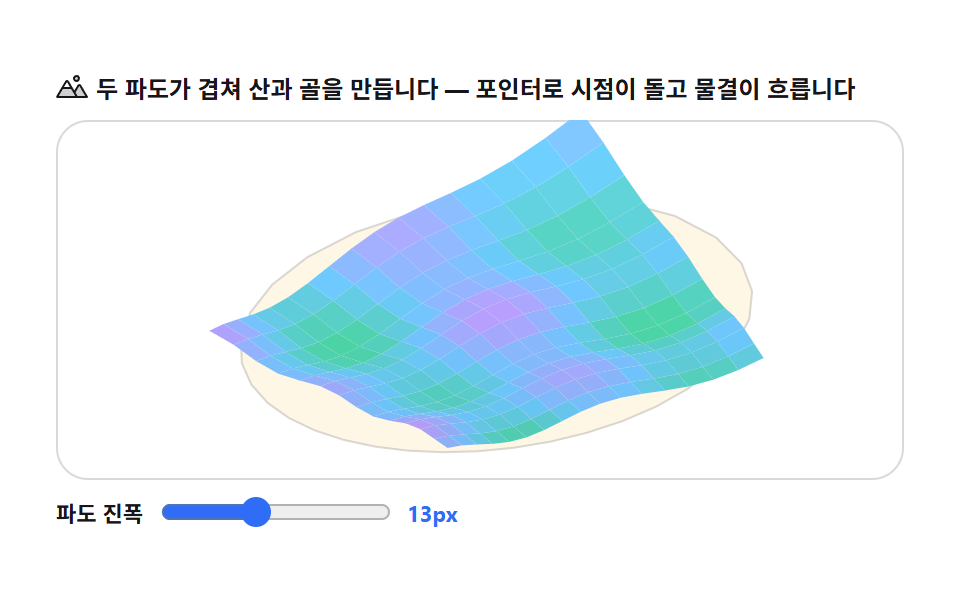 02 scene3d-heightfield-terrain
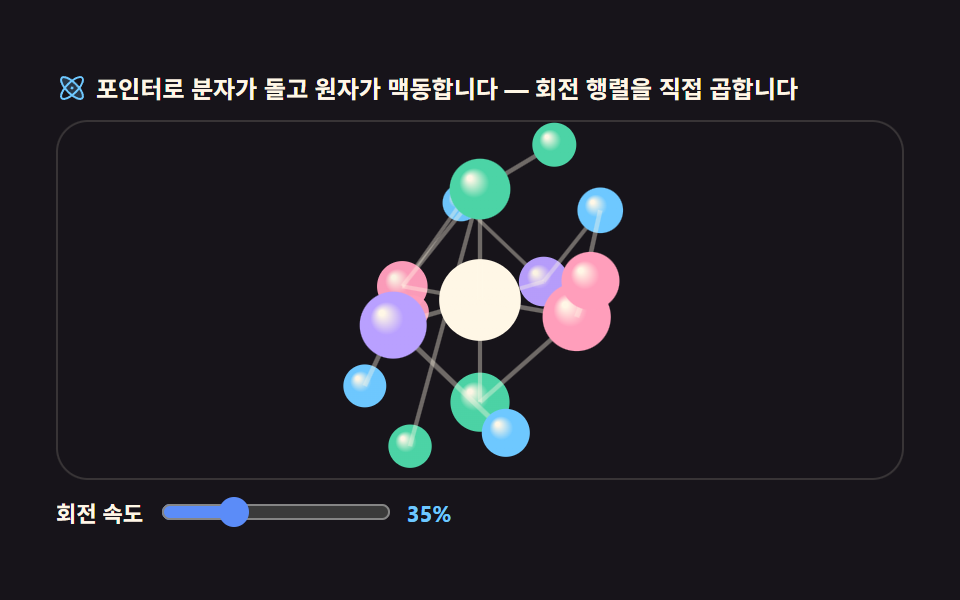 03 scene3d-molecule-assembler
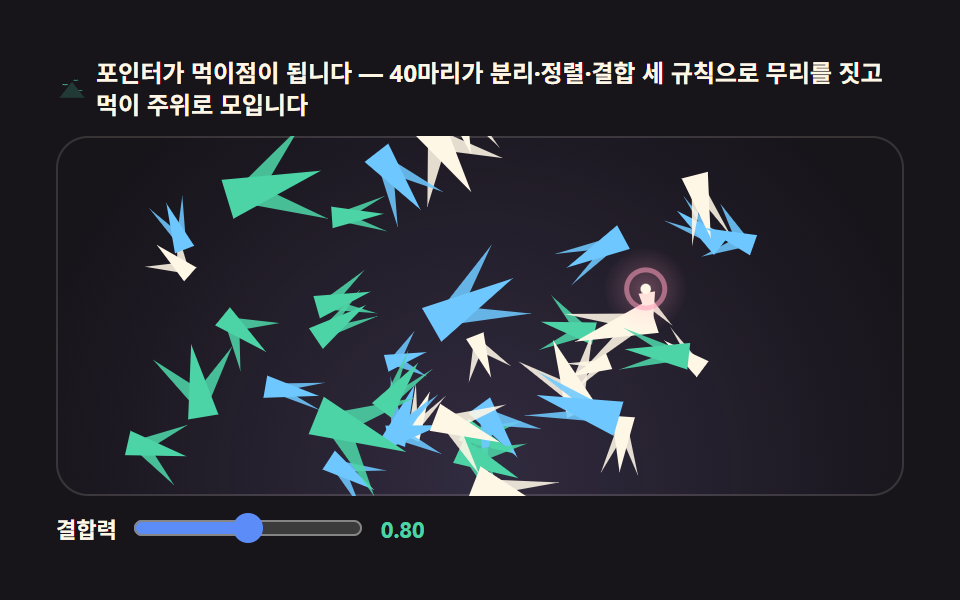 04 scene3d-boids-flock
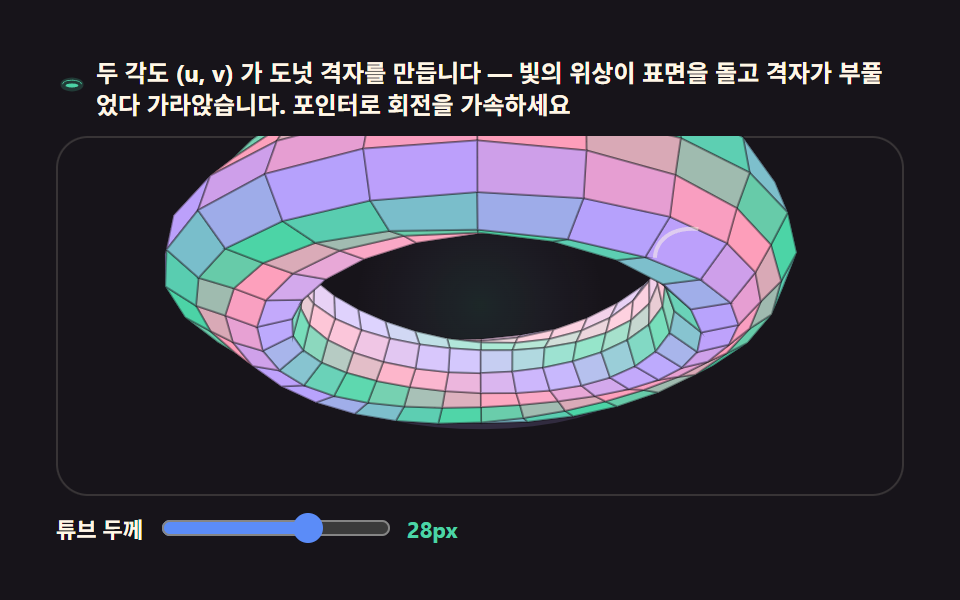 05 scene3d-torus-lattice
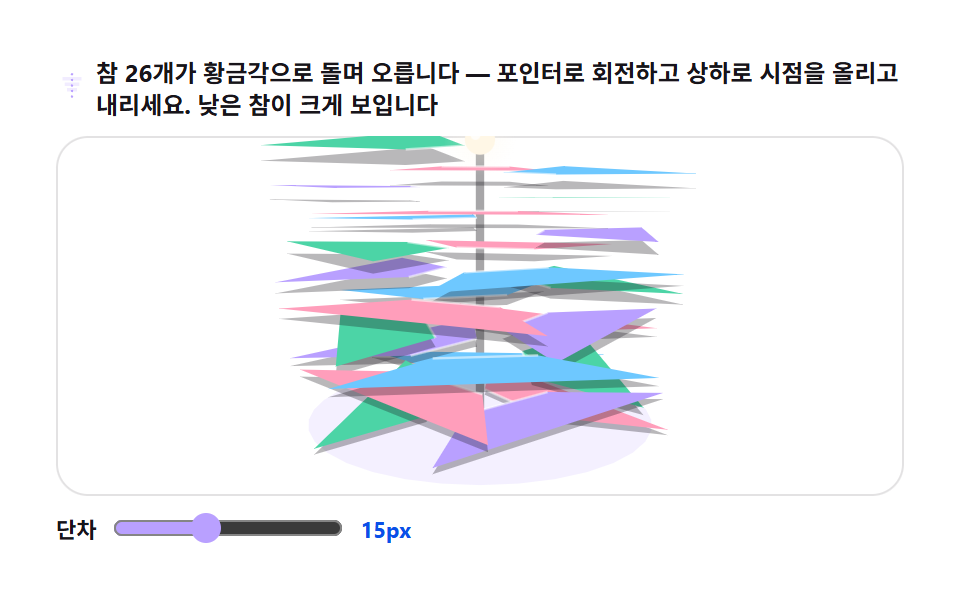 06 scene3d-spiral-stairs
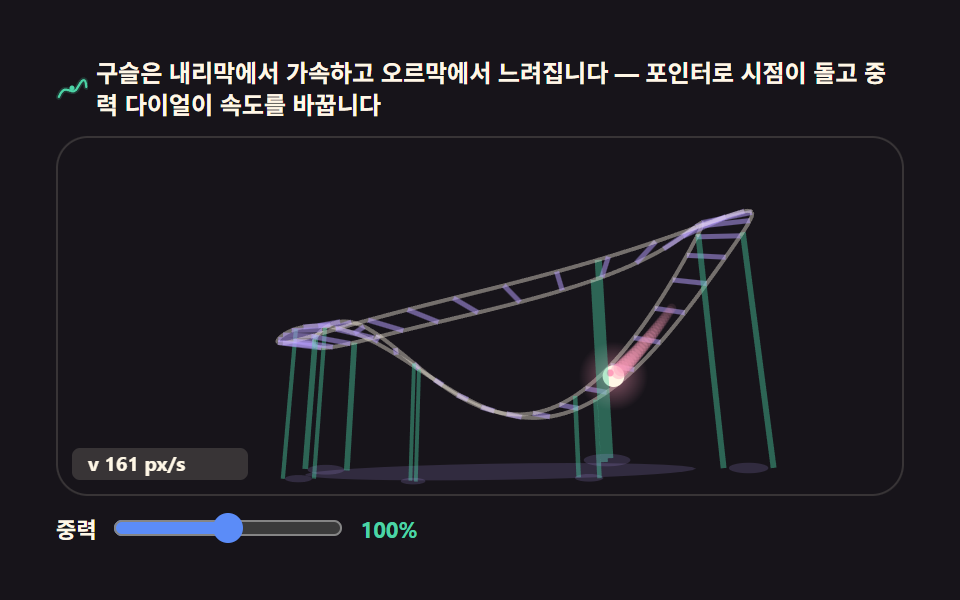 07 scene3d-coaster-track
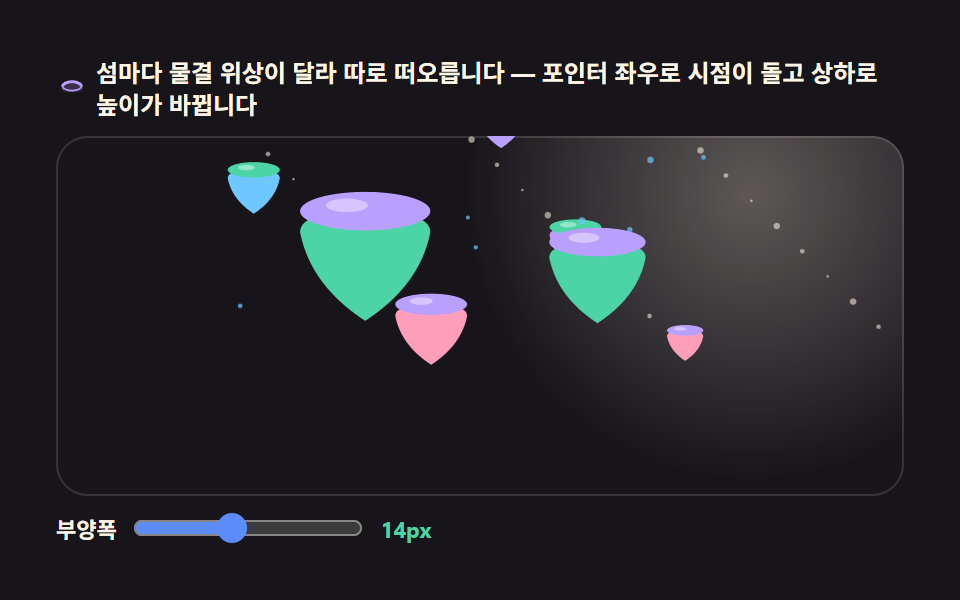 08 scene3d-floating-islands
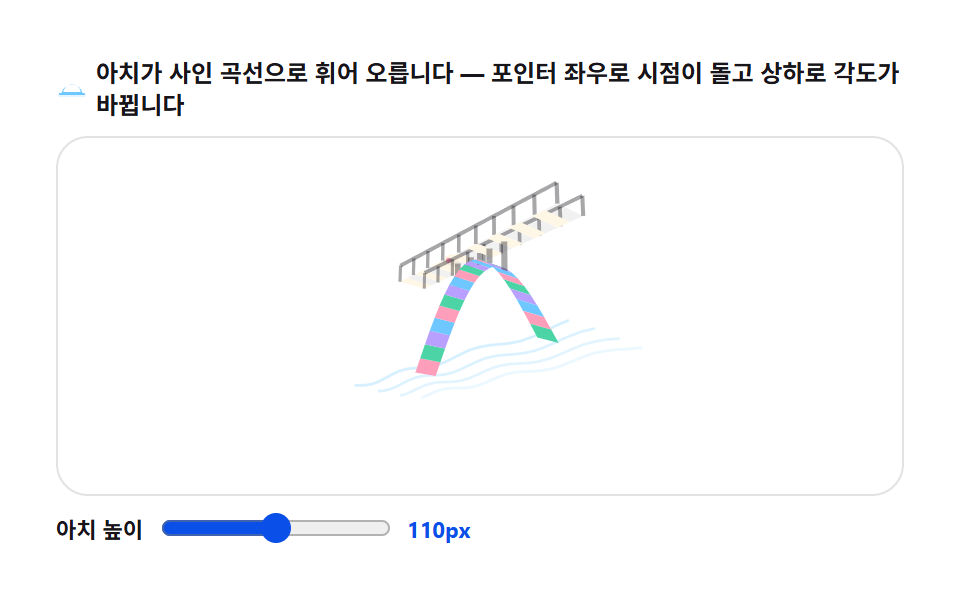 09 scene3d-arch-bridge
自動再生 · タイルを押すとその項目へ · すべて1つのzip
- 01 観覧車シーン — 遠近で近づく16本のスポーク
- 02 ハイトフィールド地形 — マウスで回るさざ波の丘
- 03 分子模型シーン — 原子が結合する場面
- 04 鳥の群れシーン — 3つのルールで保つ群れ
- 05 トーラス格子 — ドーナツ格子上を流れる光
- 06 螺旋階段シーン — 上りながら回る踊り場
- 07 ジェットコースター軌道 — 曲線を走る光の玉
- 08 浮遊島シーン — 波の上に浮かぶ島々
- 09 アーチ橋シーン — マウス角度でなぞる橋
9つの並び順は派手さではなく、遠近計算が積み重なる順番で決めています。まず点ひとつを回して画面に投影する最も単純な形が土台になり(01・02)、そこに回転行列と群れの規則が重なって複数の点が一緒に動きます(03・04)。続いて格子や螺旋のように点が曲面上の規則に従い(05・06)、最後に物理と波が場面全体の流れを作ります(07〜09)。css 3d perspective を手計算で再現しているという点は、9項目すべてに共通しています。
01観覧車シーン
見えるもの
遊園地・イベント紹介のランディングヒーローに使う、16本のスポークが遠近で近づいてくる回転観覧車のミニチュアです。
<main class="stage">
<div class="fw is-demo" id="fwRoot">
  <p class="fw__hint">
    <svg class="fw__ico" viewBox="0 0 256 256" aria-hidden="true"><g fill="currentColor"><path d="M224 128a96 96 0 1 1-96-96a96 96 0 0 1 96 96" opacity=".2"/><path d="M96.26 37a8 8 0 0 1 5.74-9.71a104.1 104.1 0 0 1 52 0a8 8 0 0 1-2 15.75a8.2 8.2 0 0 1-2-.26a88.1 88.1 0 0 0-44 0A8 8 0 0 1 96.26 37M53.79 55.14a104 104 0 0 0-26 45a8 8 0 1 0 15.42 4.26a87.9 87.9 0 0 1 22-38.08a8 8 0 0 0-11.42-11.18m-10.58 96.41a8 8 0 1 0-15.42 4.28a104 104 0 0 0 26 45a8 8 0 1 0 11.41-11.21a88.14 88.14 0 0 1-21.99-38.07M150 213.22a88 88 0 0 1-44 0a8 8 0 1 0-4 15.49a104.1 104.1 0 0 0 52 0a8 8 0 0 0-4-15.49M222.65 146a8 8 0 0 0-9.85 5.57a87.9 87.9 0 0 1-22 38.09a8 8 0 1 0 11.42 11.21a104.05 104.05 0 0 0 26-45a8 8 0 0 0-5.57-9.87m-9.86-41.54a8 8 0 0 0 15.42-4.28a104 104 0 0 0-26-45a8 8 0 1 0-11.41 11.21a88.14 88.14 0 0 1 21.99 38.06Z"/></g></svg>
    <span>ポインターを左右で回転速度、上下でカメラが傾きます — ゴンドラは常に下向きにぶら下がります</span>
  </p>
  <div class="fw__field" id="fwField" role="application" aria-label="観覧車遠近実験盤" tabindex="0">
    <canvas class="fw__cv" id="fwCv"></canvas>
  </div>
  <div class="fw__bar">
    <label class="fw__dial">焦点距離
      <input type="range" id="fwFocal" min="140" max="520" step="20" value="240" aria-label="焦点距離">
      <b class="fw__val" id="fwFocalVal">240px</b>
    </label>
  </div>
</div>
</main>
@use "../../../../site/static/demo-tokens" as *;
// 관람차 미니어처 — 움직임은 전부 캔버스 rAF 루프 안에 있다. CSS 는 무대·판·다이얼만.
// @keyframes 를 두지 않는다 — CSS 애니메이션이 0개여야 렌더러가 시계를 고정하지 않고 실시간 24장을 찍는다.
// 캔버스에 내려보내는 색은 전부 토큰에서 커스텀 프로퍼티로(값은 토큰 한 곳에만).
$duration: $dur-loop; // 변형 축: 시간
$easing: $ease-spring;
$color: $subject-pink;
@include stage($stage-ink);
.fw {
--fw-pink: #{$subject-pink};
--fw-mint: #{$subject-mint};
--fw-lilac: #{$subject-lilac};
--fw-sky: #{$subject-sky};
--fw-cream: #{$subject-cream};
--fw-rim: rgba(#{red($subject-cream)}, #{green($subject-cream)}, #{blue($subject-cream)}, .34);
--fw-shadow: rgba(#{red($subject-lilac)}, #{green($subject-lilac)}, #{blue($subject-lilac)}, .16);
display: flex; flex-direction: column; gap: $sp-2;
width: 100%; max-width: 424px;
}
.fw__hint {
display: flex; align-items: center; gap: $sp-1; margin: 0;
font-weight: 700; font-size: clamp(10px, 2.8vw, 12px); line-height: 1.35;
color: $subject-cream;
}
.fw__ico { width: 16px; height: 16px; flex: 0 0 auto; color: $subject-mint; }
.fw__field {
position: relative; height: 180px;
border-radius: $r-card; overflow: hidden;
background: $stage-ink;
box-shadow: inset 0 0 0 1px rgba($subject-cream, .14);
cursor: crosshair; touch-action: none;
}
.fw__field:focus-visible { outline: 2px solid $subject-mint; outline-offset: 2px; }
.fw__cv { display: block; width: 100%; height: 100%; }
.fw__bar { display: flex; align-items: center; gap: $sp-3; }
.fw__dial {
display: flex; align-items: center; gap: $sp-2;
font-weight: 700; font-size: 11px; color: $subject-cream;
}
.fw__dial input { width: 116px; margin: 0; accent-color: $subject-blue-light; }
.fw__val { color: $subject-mint; font-size: 11px; font-weight: 700; }
@media (max-width: 340px) {
.fw { gap: $sp-1; }
.fw__field { height: 100px; }
.fw__dial { gap: $sp-1; }
.fw__dial input { width: 68px; }
.fw__hint { font-size: 10px; }
}
// reduce — 루프가 아예 안 돌므로 끄고 말 게 없다. 멈춘 한 장이 남으니 커서 신호만 거둔다.
@media (prefers-reduced-motion: reduce) {
.fw.is-still .fw__field { cursor: default !important; }
}html, body {
margin: 0;
overflow: hidden;
}
.stage {
box-sizing: border-box;
min-height: 100vh;
display: grid;
place-items: center;
margin: 0;
background: #17141a;
font-family: -apple-system, "Segoe UI", "Noto Sans KR", sans-serif;
padding: clamp(8px, 4vw, 24px);
}
.fw {
--fw-pink: #ff9ebb;
--fw-mint: #4cd4a6;
--fw-lilac: #b9a0ff;
--fw-sky: #6ec8ff;
--fw-cream: #fff7e6;
--fw-rim: rgba(255, 247, 230, .34);
--fw-shadow: rgba(185, 160, 255, .16);
display: flex;
flex-direction: column;
gap: 8px;
width: 100%;
max-width: 424px;
}
.fw__hint {
display: flex;
align-items: center;
gap: 4px;
margin: 0;
font-weight: 700;
font-size: clamp(10px, 2.8vw, 12px);
line-height: 1.35;
color: #fff7e6;
}
.fw__ico {
width: 16px;
height: 16px;
flex: 0 0 auto;
color: #4cd4a6;
}
.fw__field {
position: relative;
height: 180px;
border-radius: 16px;
overflow: hidden;
background: #17141a;
box-shadow: inset 0 0 0 1px rgba(255, 247, 230, 0.14);
cursor: crosshair;
touch-action: none;
}
.fw__field:focus-visible {
outline: 2px solid #4cd4a6;
outline-offset: 2px;
}
.fw__cv {
display: block;
width: 100%;
height: 100%;
}
.fw__bar {
display: flex;
align-items: center;
gap: 12px;
}
.fw__dial {
display: flex;
align-items: center;
gap: 8px;
font-weight: 700;
font-size: 11px;
color: #fff7e6;
}
.fw__dial input {
width: 116px;
margin: 0;
accent-color: #5b8cf8;
}
.fw__val {
color: #4cd4a6;
font-size: 11px;
font-weight: 700;
}
@media (max-width: 340px) {
.fw {
gap: 4px;
}
.fw__field {
height: 100px;
}
.fw__dial {
gap: 4px;
}
.fw__dial input {
width: 68px;
}
.fw__hint {
font-size: 10px;
}
}
@media (prefers-reduced-motion: reduce) {
.fw.is-still .fw__field {
cursor: default !important;
}
}// 관람차 미니어처 — 바퀴살 16개·곤돌라 8개를 원 주위 점 (cos, sin, 0) 에서 출발해
// x축 기울기로 바퀴면을 뒤로 눕히고 y축으로 틀어 원판이 화면을 향하지 않게 만든다.
// 살마다 z 가 생기므로 z 내림차순(화가 알고리즘) 한 번으로 겹침이 정리된다.
// 곤돌라는 매달린 점 아래 重力 방향(하단 정렬) — 바퀴가 돌아도 몸통은 늘 아래를 향한다.
(function () {
// ── 변형 상수 블록 — 아래 값 하나만 바꿔 변형 3종을 만든다 ──
var SPEED = 0.55; // 바퀴 회전 기본 속도(라디안/초) — 포인터 좌우로 배율이 변한다
var TILT = 0.46; // 바퀴면의 x축 기울기(라디안) — 누울수록 원이 타원으로 납작해진다
var SWAY = 1.0; // 곤돌라 진자 흔들림 배율
var LOOP_MS = 2000; // 미리보기 가상 포인터의 주기
// ────────────────────────────────────────────────────
var root = document.getElementById('fwRoot');
var field = document.getElementById('fwField');
var cv = document.getElementById('fwCv');
var ctx = cv.getContext('2d');
var focalIn = document.getElementById('fwFocal');
var focalOut = document.getElementById('fwFocalVal');
var css = getComputedStyle(root);
function tok(name) { return css.getPropertyValue(name).trim(); }
var PAL = [tok('--fw-pink'), tok('--fw-mint'), tok('--fw-lilac')]; // 곤돌라 캔디 순환
var CREAM = tok('--fw-cream');
var SKY = tok('--fw-sky');
var RIM = tok('--fw-rim');
var SHADOW = tok('--fw-shadow');
var SPEAKS = 16, CARS = 8, TAU = Math.PI * 2;
var YAW = 0.62; // 바퀴면의 y축 틀어짐 — 원판이 화면을 비스듬히 벗어난다
var reduce = window.matchMedia('(prefers-reduced-motion: reduce)').matches;
var W = 0, H = 0, dpr = 1;
var focal = Number(focalIn.value);
var spin = 0;
var px01 = 0.5, py01 = 0.5; // 포인터 위치 비율(0~1) — 자동재생 중엔 가상 경로가 채운다
var camTilt = 0;
var manual = false;
var last = 0, raf = 0, t0 = -1;
function fit() {
var r = field.getBoundingClientRect();
dpr = window.devicePixelRatio || 1;
W = r.width; H = r.height;
cv.width = Math.round(W * dpr);
cv.height = Math.round(H * dpr);
ctx.setTransform(dpr, 0, 0, dpr, 0, 0);
}
// 바퀴 위 한 점 — 자전 θ 를 원에 얹고 x축 기울기 → y축 틀기 순서로 바퀴면을 배치한다
function wheelPoint(theta, radius) {
var x = Math.cos(theta) * radius;
var y = Math.sin(theta) * radius;
var z = 0;
var ct = Math.cos(TILT), st = Math.sin(TILT); // x축 기울기 — 바퀴를 뒤로 눕힌다
var y1 = y * ct, z1 = y * st;
var ca = Math.cos(YAW), sa = Math.sin(YAW); // y축 틀기 — 원판이 화면을 향하지 않는다
return { x: x * ca + z1 * sa, y: y1, z: -x * sa + z1 * ca };
}
// 카메라 기울기(포인터 상하) — 장면 전체를 x축으로 추가 회전
function camRotate(p) {
var a = camTilt;
var ca = Math.cos(a), sa = Math.sin(a);
return { x: p.x, y: p.y * ca - p.z * sa, z: p.y * sa + p.z * ca };
}
function project(p) { // 원근 투영 — 이 한 줄이 전부다
var s = focal / (focal + p.z);
return { sx: W * 0.5 + p.x * s, sy: H * 0.56 - p.y * s, s: s };
}
function step(dt, now) {
var speedMul = 0.25 + 2.1 * px01; // 포인터 좌우 = 回転速度
spin += SPEED * speedMul * dt;
var aimTilt = (py01 - 0.5) * 0.5; // 포인터 상하 = 카메라 기울기
camTilt += (aimTilt - camTilt) * 0.1;
}
function draw(now) {
ctx.clearRect(0, 0, W, H);
var R = Math.min(H * 0.56, W * 0.32); // 바퀴 반경 — 화면이 씬이다
var hubW = { x: 0, y: R * 0.62, z: 0 }; // 바퀴 중심(월드)
var hub = project(camRotate(hubW));
// ── 지면: 바닥 타원 스케일 힌트 + 바퀴 그림자 ──
var ground = [];
for (var g = 0; g <= 40; g++) {
var ga = g / 40 * TAU;
ground.push(project(camRotate({ x: Math.cos(ga) * R * 1.28, y: 0, z: Math.sin(ga) * R * 1.28 })));
}
ctx.beginPath();
ctx.moveTo(ground[0].sx, ground[0].sy);
for (var gi = 1; gi < ground.length; gi++) ctx.lineTo(ground[gi].sx, ground[gi].sy);
ctx.closePath();
ctx.fillStyle = SHADOW;
ctx.fill();
// ── 그릴 아이템을 모아 z 내림차순(먼 것 먼저) — 화가 알고리즘 ──
var items = [];
// 받침 기둥 — A자 두 짝(앞뒤). 허브까지 4선
var legSpread = R * 0.55;
[[1, legSpread], [1, -legSpread], [-1, legSpread], [-1, -legSpread]].forEach(function (leg) {
var foot = project(camRotate({ x: leg[0] * legSpread * 0.72, y: 0, z: leg[1] }));
items.push({ z: camRotate({ x: 0, y: R * 0.62, z: leg[1] }).z, fn: function () {
ctx.strokeStyle = RIM;
ctx.lineWidth = Math.max(1.5, 4 * foot.s);
ctx.beginPath();
ctx.moveTo(foot.sx, foot.sy);
ctx.lineTo(hub.sx, hub.sy);
ctx.stroke();
}});
});
// 바퀴 살 16개 — 중심에서 테까지
for (var s2 = 0; s2 < SPEAKS; s2++) {
(function (idx) {
var th = spin + idx / SPEAKS * TAU;
var pw = camRotate(wheelPoint(th, R));
var tip = project(pw);
items.push({ z: pw.z, fn: function () {
ctx.strokeStyle = RIM;
ctx.lineWidth = 1.25;
ctx.beginPath();
ctx.moveTo(hub.sx, hub.sy);
ctx.lineTo(tip.sx, tip.sy);
ctx.stroke();
}});
})(s2);
}
// 바퀴 테두리 — 원을 40분해한 폴리라인(살과 같은 회전)
(function () {
var ring = [];
var ringZ = 0;
for (var r2 = 0; r2 <= 40; r2++) {
var th = spin + r2 / 40 * TAU;
var pw = camRotate(wheelPoint(th, R));
ring.push(project(pw));
ringZ += pw.z;
}
items.push({ z: ringZ / 41, fn: function () {
ctx.strokeStyle = RIM;
ctx.lineWidth = 2;
ctx.beginPath();
ctx.moveTo(ring[0].sx, ring[0].sy);
for (var k = 1; k < ring.length; k++) ctx.lineTo(ring[k].sx, ring[k].sy);
ctx.stroke();
}});
})();
// 곤돌라 8개 — 매달린 점 아래 重力 방향(하단 정렬) + 진자 흔들림
for (var c = 0; c < CARS; c++) {
(function (idx) {
var th = spin + idx / CARS * TAU;
var pw = camRotate(wheelPoint(th, R));
var hang = project(pw);
var swayAng = Math.sin(now / 900 + idx * 1.7) * 0.09 * SWAY;
var bodyW = R * 0.44 * hang.s;
var bodyH = R * 0.40 * hang.s;
var cx = hang.sx + Math.sin(swayAng) * bodyH * 1.5;
var cy = hang.sy + Math.cos(swayAng) * bodyH * 1.5 + bodyH * 0.1;
items.push({ z: pw.z - 0.5, fn: function () {
var col = PAL[idx % PAL.length];
// 링크 — 매달린 점과 몸통을 잇는 짧은 막대
ctx.strokeStyle = RIM;
ctx.lineWidth = 1.25;
ctx.beginPath();
ctx.moveTo(hang.sx, hang.sy);
ctx.lineTo(cx, cy - bodyH * 0.55);
ctx.stroke();
// 몸통 — 아래가 살짝 넓은 캡슐
ctx.beginPath();
ctx.moveTo(cx - bodyW * 0.5, cy - bodyH * 0.45);
ctx.lineTo(cx + bodyW * 0.5, cy - bodyH * 0.45);
ctx.lineTo(cx + bodyW * 0.62, cy + bodyH * 0.55);
ctx.quadraticCurveTo(cx, cy + bodyH * 0.78, cx - bodyW * 0.62, cy + bodyH * 0.55);
ctx.closePath();
ctx.fillStyle = col;
ctx.fill();
// 창 두 줄 — 크림 반점으로 캔디 무늬
ctx.fillStyle = CREAM;
ctx.beginPath();
ctx.arc(cx - bodyW * 0.22, cy + bodyH * 0.05, bodyW * 0.11, 0, TAU);
ctx.arc(cx + bodyW * 0.22, cy + bodyH * 0.05, bodyW * 0.11, 0, TAU);
ctx.fill();
}});
})(c);
}
// 허브 — 중심 크림 구슬(가장 나중에 그려도 안 가려지게 z 를 앞으로)
items.push({ z: camRotate(hubW).z - 1, fn: function () {
ctx.beginPath();
ctx.arc(hub.sx, hub.sy, 5.5 * hub.s, 0, TAU);
ctx.fillStyle = CREAM;
ctx.fill();
ctx.beginPath();
ctx.arc(hub.sx - 1.6 * hub.s, hub.sy - 1.6 * hub.s, 1.8 * hub.s, 0, TAU);
ctx.fillStyle = SKY;
ctx.fill();
}});
items.sort(function (a, b) { return b.z - a.z; });
for (var q = 0; q < items.length; q++) items[q].fn();
}
function frame(now) {
if (t0 < 0) t0 = now;
var dt = last ? Math.min((now - last) / 1000, 0.05) : 0.016;
last = now;
if (!manual) {
// 미리보기 가상 포인터 — 시드 고정 Lissajous. 표 영역을 벗어난 자연스러운 경로
var ph = ((now - t0) % LOOP_MS) / LOOP_MS * TAU;
px01 = 0.5 + 0.38 * Math.sin(ph);
py01 = 0.5 + 0.32 * Math.sin(2 * ph + 1.05);
}
step(dt, now);
draw(now);
raf = requestAnimationFrame(frame);
}
function setFocal(v) {
focal = Number(v);
focalOut.textContent = focal + 'px';
if (reduce) draw(t0 < 0 ? 0 : last);
}
focalIn.addEventListener('input', function () { setFocal(focalIn.value); });
field.addEventListener('pointermove', function (e) {
var r = field.getBoundingClientRect();
px01 = Math.min(1, Math.max(0, (e.clientX - r.left) / r.width));
py01 = Math.min(1, Math.max(0, (e.clientY - r.top) / r.height));
if (!manual) { manual = true; root.classList.remove('is-demo'); }
if (reduce) { step(0, last); draw(last); }
});
field.addEventListener('pointerleave', function () {
if (manual) { px01 = 0.5; py01 = 0.5; }
});
field.addEventListener('keydown', function (e) {
var d = { ArrowLeft: [-0.08, 0], ArrowRight: [0.08, 0], ArrowUp: [0, -0.08], ArrowDown: [0, 0.08] }[e.key];
if (!d) return;
e.preventDefault();
if (!manual) { manual = true; root.classList.remove('is-demo'); }
px01 = Math.max(0, Math.min(1, px01 + d[0]));
py01 = Math.max(0, Math.min(1, py01 + d[1]));
if (reduce) { step(0, last); draw(last); }
});
window.addEventListener('resize', function () { fit(); if (reduce) draw(last); });
fit();
if (reduce) {
// reduce — 루프 없이 곤돌라가 둘러앉은 한 장만 남는다(빈 화면이 아니다)
px01 = 0.62; py01 = 0.4;
step(0, 0);
draw(0);
root.classList.add('is-still');
} else {
raf = requestAnimationFrame(frame);
}
})();// FerrisWheel — vanilla 판(run/307/demo/01-scene3d-ferris-wheel/index.html) 의 React 포트.
// 바퀴살 16개·곤돌라 8개를 원 주위 점 (cos, sin, 0) 에서 출발해 x축 기울기로 바퀴면을 뒤로
// 눕히고 y축으로 틀어 원판이 화면을 향하지 않게 만든다. 살마다 z 가 생기므로 z 내림차순
// (화가 알고리즘) 한 번으로 겹침이 정리된다. 곤돌라는 매달린 점 아래 중력 방향(하단 정렬)
// — 바퀴가 돌아도 몸통은 늘 아래를 향한다. 3D 라이브러리·행렬 라이브러리 없이 sin/cos 뿐이다.
// 포인터 좌우 = 회전 속도, 상하 = 카메라 기울기. 미리보기는 시드 고정 Lissajous 로 자동 재생한다.
import { useEffect, useRef, useState } from "react";
import type { CSSProperties } from "react";
import styles from "./FerrisWheel.module.scss";
export type FerrisWheelProps = {
duration?: string;
easing?: string;
color?: string;
};
type Vars = CSSProperties & { "--duration"?: string; "--easing"?: string; "--color"?: string };
// useRef 는 T | null 을 돌려준다. 처음부터 값이 있고 절대 비지 않는 상자는 이렇게 좁혀 쓴다
type Box<T> = { current: T };
// React 의 이벤트 제네릭이 없는 환경이라 필요한 것만 로컬로 선언한다
type PointerEvt = { clientX: number; clientY: number };
type KeyEvt = { key: string; preventDefault(): void };
type InputEvt = { target: { value: string } };
type Pt3 = { x: number; y: number; z: number };
type Proj = { sx: number; sy: number; s: number };
type Item = { z: number; fn: () => void };
type Colors = { pal: string[]; cream: string; sky: string; rim: string; shadow: string };
type Size = { w: number; h: number; dpr: number };
const SPEED = 0.55; // 바퀴 회전 기본 속도(라디안/초) — 포인터 좌우로 배율이 변한다
const TILT = 0.46; // 바퀴면의 x축 기울기(라디안) — 누울수록 원이 타원으로 납작해진다
const SWAY = 1.0; // 곤돌라 진자 흔들림 배율
const LOOP_MS = 2000; // 미리보기 가상 포인터의 주기
const SPEAKS = 16, CARS = 8, TAU = Math.PI * 2;
const YAW = 0.62; // 바퀴면의 y축 틀어짐 — 원판이 화면을 비스듬히 벗어난다
const FIELD_LABEL = "관람차 원근 실험판";
export default function FerrisWheel({
duration = "2s",
easing = "cubic-bezier(.2, .8, .2, 1)",
color = "#ff9ebb",
}: FerrisWheelProps) {
const rootRef = useRef<HTMLDivElement | null>(null);
const fieldRef = useRef<HTMLDivElement | null>(null);
const cvRef = useRef<HTMLCanvasElement | null>(null);
const ctxRef = useRef<CanvasRenderingContext2D | null>(null);
const sizeRef = useRef({ w: 0, h: 0, dpr: 1 }) as Box<Size>;
const colRef = useRef<Colors | null>(null);
const focalRef = useRef(240) as Box<number>;
const spinRef = useRef(0) as Box<number>;
const pxRef = useRef(0.5) as Box<number>;
const pyRef = useRef(0.5) as Box<number>;
const camTiltRef = useRef(0) as Box<number>;
const manualRef = useRef(false) as Box<boolean>;
const lastRef = useRef(0) as Box<number>;
const t0Ref = useRef(-1) as Box<number>;
const rafRef = useRef(0) as Box<number>;
const [focal, setFocal] = useState(240);
const [still, setStill] = useState(false);
const vars: Vars = { "--duration": duration, "--easing": easing, "--color": color };
function reduced(): boolean {
return window.matchMedia("(prefers-reduced-motion: reduce)").matches;
}
function fit(): void {
const field = fieldRef.current;
const cv = cvRef.current;
if (!field || !cv) return;
const ctx = cv.getContext("2d");
if (!ctx) return;
const size = sizeRef.current;
const r = field.getBoundingClientRect();
size.dpr = window.devicePixelRatio || 1;
size.w = r.width;
size.h = r.height;
cv.width = Math.round(size.w * size.dpr);
cv.height = Math.round(size.h * size.dpr);
ctx.setTransform(size.dpr, 0, 0, size.dpr, 0, 0);
ctxRef.current = ctx;
}
// 바퀴 위 한 점 — 자전 θ 를 원에 얹고 x축 기울기 → y축 틀기 순서로 바퀴면을 배치한다
function wheelPoint(theta: number, radius: number): Pt3 {
const x = Math.cos(theta) * radius;
const y = Math.sin(theta) * radius;
const ct = Math.cos(TILT), st = Math.sin(TILT); // x축 기울기 — 바퀴를 뒤로 눕힌다
const y1 = y * ct, z1 = y * st;
const ca = Math.cos(YAW), sa = Math.sin(YAW); // y축 틀기 — 원판이 화면을 향하지 않는다
return { x: x * ca + z1 * sa, y: y1, z: -x * sa + z1 * ca };
}
// 카메라 기울기(포인터 상하) — 장면 전체를 x축으로 추가 회전
function camRotate(p: Pt3): Pt3 {
const a = camTiltRef.current;
const ca = Math.cos(a), sa = Math.sin(a);
return { x: p.x, y: p.y * ca - p.z * sa, z: p.y * sa + p.z * ca };
}
function project(p: Pt3): Proj { // 원근 투영 — 이 한 줄이 전부다
const size = sizeRef.current;
const s = focalRef.current / (focalRef.current + p.z);
return { sx: size.w * 0.5 + p.x * s, sy: size.h * 0.56 - p.y * s, s };
}
function step(dt: number): void {
const speedMul = 0.25 + 2.1 * pxRef.current; // 포인터 좌우 = 회전 속도
spinRef.current += SPEED * speedMul * dt;
const aimTilt = (pyRef.current - 0.5) * 0.5; // 포인터 상하 = 카메라 기울기
camTiltRef.current += (aimTilt - camTiltRef.current) * 0.1;
}
function draw(now: number): void {
const ctx = ctxRef.current;
const col = colRef.current;
if (!ctx || !col) return;
const size = sizeRef.current;
const W = size.w, H = size.h;
ctx.clearRect(0, 0, W, H);
const R = Math.min(H * 0.56, W * 0.32); // 바퀴 반경 — 화면이 씬이다
const hubW: Pt3 = { x: 0, y: R * 0.62, z: 0 }; // 바퀴 중심(월드)
const hub = project(camRotate(hubW));
// ── 지면: 바닥 타원 스케일 힌트 + 바퀴 그림자 ──
const ground: Proj[] = [];
for (let g = 0; g <= 40; g++) {
const ga = (g / 40) * TAU;
ground.push(project(camRotate({ x: Math.cos(ga) * R * 1.28, y: 0, z: Math.sin(ga) * R * 1.28 })));
}
ctx.beginPath();
ctx.moveTo(ground[0].sx, ground[0].sy);
for (let gi = 1; gi < ground.length; gi++) ctx.lineTo(ground[gi].sx, ground[gi].sy);
ctx.closePath();
ctx.fillStyle = col.shadow;
ctx.fill();
// ── 그릴 아이템을 모아 z 내림차순(먼 것 먼저) — 화가 알고리즘 ──
const items: Item[] = [];
// 받침 기둥 — A자 두 짝(앞뒤). 허브까지 4선
const legSpread = R * 0.55;
const legs: [number, number][] = [[1, legSpread], [1, -legSpread], [-1, legSpread], [-1, -legSpread]];
legs.forEach((leg) => {
const foot = project(camRotate({ x: leg[0] * legSpread * 0.72, y: 0, z: leg[1] }));
items.push({
z: camRotate({ x: 0, y: R * 0.62, z: leg[1] }).z,
fn: () => {
ctx.strokeStyle = col.rim;
ctx.lineWidth = Math.max(1.5, 4 * foot.s);
ctx.beginPath();
ctx.moveTo(foot.sx, foot.sy);
ctx.lineTo(hub.sx, hub.sy);
ctx.stroke();
},
});
});
// 바퀴 살 16개 — 중심에서 테까지
for (let s2 = 0; s2 < SPEAKS; s2++) {
const th = spinRef.current + (s2 / SPEAKS) * TAU;
const pw = camRotate(wheelPoint(th, R));
const tip = project(pw);
items.push({
z: pw.z,
fn: () => {
ctx.strokeStyle = col.rim;
ctx.lineWidth = 1.25;
ctx.beginPath();
ctx.moveTo(hub.sx, hub.sy);
ctx.lineTo(tip.sx, tip.sy);
ctx.stroke();
},
});
}
// 바퀴 테두리 — 원을 40분해한 폴리라인(살과 같은 회전)
{
const ring: Proj[] = [];
let ringZ = 0;
for (let r2 = 0; r2 <= 40; r2++) {
const th = spinRef.current + (r2 / 40) * TAU;
const pw = camRotate(wheelPoint(th, R));
ring.push(project(pw));
ringZ += pw.z;
}
items.push({
z: ringZ / 41,
fn: () => {
ctx.strokeStyle = col.rim;
ctx.lineWidth = 2;
ctx.beginPath();
ctx.moveTo(ring[0].sx, ring[0].sy);
for (let k = 1; k < ring.length; k++) ctx.lineTo(ring[k].sx, ring[k].sy);
ctx.stroke();
},
});
}
// 곤돌라 8개 — 매달린 점 아래 중력 방향(하단 정렬) + 진자 흔들림
for (let c = 0; c < CARS; c++) {
const idx = c;
const th = spinRef.current + (idx / CARS) * TAU;
const pw = camRotate(wheelPoint(th, R));
const hang = project(pw);
const swayAng = Math.sin(now / 900 + idx * 1.7) * 0.09 * SWAY;
const bodyW = R * 0.44 * hang.s;
const bodyH = R * 0.4 * hang.s;
const cx = hang.sx + Math.sin(swayAng) * bodyH * 1.5;
const cy = hang.sy + Math.cos(swayAng) * bodyH * 1.5 + bodyH * 0.1;
items.push({
z: pw.z - 0.5,
fn: () => {
const carCol = col.pal[idx % col.pal.length];
// 링크 — 매달린 점과 몸통을 잇는 짧은 막대
ctx.strokeStyle = col.rim;
ctx.lineWidth = 1.25;
ctx.beginPath();
ctx.moveTo(hang.sx, hang.sy);
ctx.lineTo(cx, cy - bodyH * 0.55);
ctx.stroke();
// 몸통 — 아래가 살짝 넓은 캡슐
ctx.beginPath();
ctx.moveTo(cx - bodyW * 0.5, cy - bodyH * 0.45);
ctx.lineTo(cx + bodyW * 0.5, cy - bodyH * 0.45);
ctx.lineTo(cx + bodyW * 0.62, cy + bodyH * 0.55);
ctx.quadraticCurveTo(cx, cy + bodyH * 0.78, cx - bodyW * 0.62, cy + bodyH * 0.55);
ctx.closePath();
ctx.fillStyle = carCol;
ctx.fill();
// 창 두 줄 — 크림 반점으로 캔디 무늬
ctx.fillStyle = col.cream;
ctx.beginPath();
ctx.arc(cx - bodyW * 0.22, cy + bodyH * 0.05, bodyW * 0.11, 0, TAU);
ctx.arc(cx + bodyW * 0.22, cy + bodyH * 0.05, bodyW * 0.11, 0, TAU);
ctx.fill();
},
});
}
// 허브 — 중심 크림 구슬(가장 나중에 그려도 안 가려지게 z 를 앞으로)
items.push({
z: camRotate(hubW).z - 1,
fn: () => {
ctx.beginPath();
ctx.arc(hub.sx, hub.sy, 5.5 * hub.s, 0, TAU);
ctx.fillStyle = col.cream;
ctx.fill();
ctx.beginPath();
ctx.arc(hub.sx - 1.6 * hub.s, hub.sy - 1.6 * hub.s, 1.8 * hub.s, 0, TAU);
ctx.fillStyle = col.sky;
ctx.fill();
},
});
items.sort((a, b) => b.z - a.z);
for (let q = 0; q < items.length; q++) items[q].fn();
}
function frame(now: number): void {
if (t0Ref.current < 0) t0Ref.current = now;
const dt = lastRef.current ? Math.min((now - lastRef.current) / 1000, 0.05) : 0.016;
lastRef.current = now;
if (!manualRef.current) {
// 미리보기 가상 포인터 — 시드 고정 Lissajous. 표 영역을 벗어난 자연스러운 경로
const ph = (((now - t0Ref.current) % LOOP_MS) / LOOP_MS) * TAU;
pxRef.current = 0.5 + 0.38 * Math.sin(ph);
pyRef.current = 0.5 + 0.32 * Math.sin(2 * ph + 1.05);
}
step(dt);
draw(now);
rafRef.current = requestAnimationFrame(frame);
}
function setFocalVal(v: string): void {
const val = Number(v);
focalRef.current = val;
setFocal(val);
if (reduced()) draw(t0Ref.current < 0 ? 0 : lastRef.current);
}
function onFocalChange(e: InputEvt): void {
setFocalVal(e.target.value);
}
function onPoint(e: PointerEvt): void {
const field = fieldRef.current;
if (!field) return;
const r = field.getBoundingClientRect();
pxRef.current = Math.min(1, Math.max(0, (e.clientX - r.left) / r.width));
pyRef.current = Math.min(1, Math.max(0, (e.clientY - r.top) / r.height));
if (!manualRef.current) manualRef.current = true;
if (reduced()) { step(0); draw(lastRef.current); }
}
function onLeave(): void {
if (manualRef.current) { pxRef.current = 0.5; pyRef.current = 0.5; }
}
function onKeyDown(e: KeyEvt): void {
const deltas: Record<string, [number, number]> = {
ArrowLeft: [-0.08, 0], ArrowRight: [0.08, 0], ArrowUp: [0, -0.08], ArrowDown: [0, 0.08],
};
const d = deltas[e.key];
if (!d) return;
e.preventDefault();
if (!manualRef.current) manualRef.current = true;
pxRef.current = Math.max(0, Math.min(1, pxRef.current + d[0]));
pyRef.current = Math.max(0, Math.min(1, pyRef.current + d[1]));
if (reduced()) { step(0); draw(lastRef.current); }
}
useEffect(() => {
const root = rootRef.current;
const cv = cvRef.current;
if (!root || !cv) return;
const cssv = (n: string) => getComputedStyle(root).getPropertyValue(n).trim();
colRef.current = {
pal: [cssv("--fw-pink"), cssv("--fw-mint"), cssv("--fw-lilac")],
cream: cssv("--fw-cream"),
sky: cssv("--fw-sky"),
rim: cssv("--fw-rim"),
shadow: cssv("--fw-shadow"),
};
fit();
function onResize(): void {
fit();
if (reduced()) draw(lastRef.current);
}
window.addEventListener("resize", onResize);
if (reduced()) {
// reduce — 루프 없이 곤돌라가 둘러앉은 한 장만 남는다(빈 화면이 아니다)
pxRef.current = 0.62; pyRef.current = 0.4;
step(0);
draw(0);
setStill(true);
} else {
rafRef.current = requestAnimationFrame(frame);
}
return () => {
window.removeEventListener("resize", onResize);
cancelAnimationFrame(rafRef.current);
};
// eslint-disable-next-line react-hooks/exhaustive-deps
}, []);
const rootCls = still ? `${styles.root} ${styles.isStill}` : styles.root;
return (
<main className={styles.stage}>
<div className={rootCls} ref={rootRef} style={vars}>
<p className={styles.hint}>
<svg className={styles.ico} viewBox="0 0 256 256" aria-hidden="true"><g fill="currentColor"><path d="M224 128a96 96 0 1 1-96-96a96 96 0 0 1 96 96" opacity=".2"/><path d="M96.26 37a8 8 0 0 1 5.74-9.71a104.1 104.1 0 0 1 52 0a8 8 0 0 1-2 15.75a8.2 8.2 0 0 1-2-.26a88.1 88.1 0 0 0-44 0A8 8 0 0 1 96.26 37M53.79 55.14a104 104 0 0 0-26 45a8 8 0 1 0 15.42 4.26a87.9 87.9 0 0 1 22-38.08a8 8 0 0 0-11.42-11.18m-10.58 96.41a8 8 0 1 0-15.42 4.28a104 104 0 0 0 26 45a8 8 0 1 0 11.41-11.21a88.14 88.14 0 0 1-21.99-38.07M150 213.22a88 88 0 0 1-44 0a8 8 0 1 0-4 15.49a104.1 104.1 0 0 0 52 0a8 8 0 0 0-4-15.49M222.65 146a8 8 0 0 0-9.85 5.57a87.9 87.9 0 0 1-22 38.09a8 8 0 1 0 11.42 11.21a104.05 104.05 0 0 0 26-45a8 8 0 0 0-5.57-9.87m-9.86-41.54a8 8 0 0 0 15.42-4.28a104 104 0 0 0-26-45a8 8 0 1 0-11.41 11.21a88.14 88.14 0 0 1 21.99 38.06Z"/></g></svg>
<span>포인터 좌우로 회전 속도, 상하로 카메라가 기울어집니다 — 곤돌라는 늘 아래로 매달립니다</span>
</p>
<div
className={styles.field}
ref={fieldRef}
role="application"
aria-label={FIELD_LABEL}
tabIndex={0}
onPointerMove={onPoint}
onPointerLeave={onLeave}
onKeyDown={onKeyDown}
>
<canvas className={styles.cv} ref={cvRef}></canvas>
</div>
<div className={styles.bar}>
<label className={styles.dial}>초점거리
<input
type="range" min="140" max="520" step="20" value={focal} aria-label="초점거리"
onChange={onFocalChange}
/>
<b className={styles.val}>{focal}px</b>
</label>
</div>
</div>
</main>
);
}01 · 観覧車シーン — 遠近で近づく16本のスポーク — 計測 累積面積 23.298% · 動いたフレーム 23/23GODRICH オリジナル · SCSS と React は zip に同梱 · パスワードを見る
二回転で生まれる奥行き
function wheelPoint(theta: number, radius: number): Pt3 {
  const x = Math.cos(theta) * radius;
  const y = Math.sin(theta) * radius;
  const ct = Math.cos(TILT), st = Math.sin(TILT);          // x軸の傾き — ホイールを後ろに倒す
  const y1 = y * ct, z1 = y * st;
  const ca = Math.cos(YAW), sa = Math.sin(YAW);            // y軸のひねり — 円盤が正面を向かないようにする
  return { x: x * ca + z1 * sa, y: y1, z: -x * sa + z1 * ca };
}

function project(p: Pt3): Proj {                          // 遠近投影 — この一行がすべて
  const size = sizeRef.current;
  const s = focalRef.current / (focalRef.current + p.z);
  return { sx: size.w * 0.5 + p.x * s, sy: size.h * 0.56 - p.y * s, s };
}
円周上の点をx軸で一度倒し、y軸でもう一度ひねって初めて平らな円盤がホイールらしく見えます。焦点距離をz値で割る一行が近いゴンドラを大きく描く仕組みです(実測: 累積面積23.298パーセント、最大フレーム変化11.328パーセント、23/24フレームで動きました)。
02ハイトフィールド地形
見えるもの
ゲーム・地図サービスの紹介に使う、格子点の高さを2つのサイン波で計算し、マウス角度で回るさざ波の丘です。
<main class="stage">
<div class="tf is-demo" id="tfRoot">
  <p class="tf__hint">
    <svg class="tf__ico" viewBox="0 0 256 256" aria-hidden="true"><g fill="currentColor"><path d="M144 52a20 20 0 1 1 20 20a20 20 0 0 1-20-20m49.44 55.92a8 8 0 0 0-13.77 0l-33 55.75l-21-35.67H50.35L8 200h240Z" opacity=".2"/><path d="M164 80a28 28 0 1 0-28-28a28 28 0 0 0 28 28m0-40a12 12 0 1 1-12 12a12 12 0 0 1 12-12m90.88 155.92l-54.56-92.08A15.87 15.87 0 0 0 186.55 96a15.85 15.85 0 0 0-13.76 7.84L146.63 148l-44.84-76.1a16 16 0 0 0-27.58 0L1.11 195.94A8 8 0 0 0 8 208h240a8 8 0 0 0 6.88-12.08M88 80l23.57 40H64.43ZM22 192l33-56h66l33 56Zm150.57 0l-16.66-28.28L186.55 112L234 192Z"/></g></svg>
    <span>二つの波が重なって山と谷を作ります — ポインターで視点が回り、波が流れ続けます</span>
  </p>
  <div class="tf__field" id="tfField" role="application" aria-label="地形遠近実験盤" tabindex="0">
    <canvas class="tf__cv" id="tfCv"></canvas>
  </div>
  <div class="tf__bar">
    <label class="tf__dial">波の振幅
      <input type="range" id="tfAmp" min="4" max="26" step="1" value="13" aria-label="波の振幅">
      <b class="tf__val" id="tfAmpVal">13px</b>
    </label>
  </div>
</div>
</main>
@use "../../../../site/static/demo-tokens" as *;
// 지형 높이맵 미니어처 — 캔버스 rAF 루프만 움직인다. CSS 는 무대·판·다이얼.
// $stage-paper 위 파스텔 지형(mint→sky→lilac 보간) — 어두운 무대 대비 밝은 톤.
$duration: $dur-loop;
$easing: $ease-spring;
$color: $subject-mint;
@include stage($stage-paper);
.tf {
--tf-mint: #{$subject-mint};
--tf-sky: #{$subject-sky};
--tf-lilac: #{$subject-lilac};
--tf-cream: #{$subject-cream};
--tf-paper: #{$stage-paper};
--tf-line: rgba(#{red($subject-ink)}, #{green($subject-ink)}, #{blue($subject-ink)}, .16);
display: flex; flex-direction: column; gap: $sp-2;
width: 100%; max-width: 424px;
}
.tf__hint {
display: flex; align-items: center; gap: $sp-1; margin: 0;
font-weight: 700; font-size: clamp(10px, 2.8vw, 12px); line-height: 1.35;
color: $subject-ink;
}
.tf__ico { width: 16px; height: 16px; flex: 0 0 auto; color: $subject-ink; }
.tf__field {
position: relative; height: 180px;
border-radius: $r-card; overflow: hidden;
background: $stage-paper;
box-shadow: inset 0 0 0 1px rgba($subject-ink, .16);
cursor: crosshair; touch-action: none;
}
.tf__field:focus-visible { outline: 2px solid $subject-blue; outline-offset: 2px; }
.tf__cv { display: block; width: 100%; height: 100%; }
.tf__bar { display: flex; align-items: center; gap: $sp-3; }
.tf__dial {
display: flex; align-items: center; gap: $sp-2;
font-weight: 700; font-size: 11px; color: $subject-ink;
}
.tf__dial input { width: 116px; margin: 0; accent-color: $subject-blue; }
.tf__val { color: $subject-blue; font-size: 11px; font-weight: 700; }
@media (max-width: 340px) {
.tf { gap: $sp-1; }
.tf__field { height: 100px; }
.tf__dial { gap: $sp-1; }
.tf__dial input { width: 68px; }
.tf__hint { font-size: 10px; }
}
// reduce — 멈춘 한 장이 남는다. 커서 신호만 거둔다.
@media (prefers-reduced-motion: reduce) {
.tf.is-still .tf__field { cursor: default !important; }
}html, body {
margin: 0;
overflow: hidden;
}
.stage {
box-sizing: border-box;
min-height: 100vh;
display: grid;
place-items: center;
margin: 0;
background: #ffffff;
font-family: -apple-system, "Segoe UI", "Noto Sans KR", sans-serif;
padding: clamp(8px, 4vw, 24px);
}
.tf {
--tf-mint: #4cd4a6;
--tf-sky: #6ec8ff;
--tf-lilac: #b9a0ff;
--tf-cream: #fff7e6;
--tf-paper: #ffffff;
--tf-line: rgba(23, 20, 26, .16);
display: flex;
flex-direction: column;
gap: 8px;
width: 100%;
max-width: 424px;
}
.tf__hint {
display: flex;
align-items: center;
gap: 4px;
margin: 0;
font-weight: 700;
font-size: clamp(10px, 2.8vw, 12px);
line-height: 1.35;
color: #17141a;
}
.tf__ico {
width: 16px;
height: 16px;
flex: 0 0 auto;
color: #17141a;
}
.tf__field {
position: relative;
height: 180px;
border-radius: 16px;
overflow: hidden;
background: #ffffff;
box-shadow: inset 0 0 0 1px rgba(23, 20, 26, 0.16);
cursor: crosshair;
touch-action: none;
}
.tf__field:focus-visible {
outline: 2px solid #2f6df6;
outline-offset: 2px;
}
.tf__cv {
display: block;
width: 100%;
height: 100%;
}
.tf__bar {
display: flex;
align-items: center;
gap: 12px;
}
.tf__dial {
display: flex;
align-items: center;
gap: 8px;
font-weight: 700;
font-size: 11px;
color: #17141a;
}
.tf__dial input {
width: 116px;
margin: 0;
accent-color: #2f6df6;
}
.tf__val {
color: #2f6df6;
font-size: 11px;
font-weight: 700;
}
@media (max-width: 340px) {
.tf {
gap: 4px;
}
.tf__field {
height: 100px;
}
.tf__dial {
gap: 4px;
}
.tf__dial input {
width: 68px;
}
.tf__hint {
font-size: 10px;
}
}
@media (prefers-reduced-motion: reduce) {
.tf.is-still .tf__field {
cursor: default !important;
}
}// 지형 높이맵 미니어처 — 17×13 격자의 높이를 두 사인파의 합으로 계산하고(계산으로 움직인다),
// 셀을 사다리꼴 리본(채운 면)으로 그린다. 선만 그리면 면적이 안 나오므로 반드시 fill.
// 카메라는 고정 고도각, 포인터 좌우로 편요(pan)·상하로 약간의 상하(pitch).
(function () {
// ── 변형 상수 블록 — 아래 값 하나만 바꿔 변형 3종을 만든다 ──
var AMP = 13; // 파도 기본 진폭(월드 단위) — 다이얼로도 움직인다
var F1 = 1.7; // x 방향 파도 주파수
var F2 = 2.3; // y 방향 파도 주파수
var LOOP_MS = 2000; // 미리보기 가상 포인터 주기
// ────────────────────────────────────────────────────
var root = document.getElementById('tfRoot');
var field = document.getElementById('tfField');
var cv = document.getElementById('tfCv');
var ctx = cv.getContext('2d');
var ampIn = document.getElementById('tfAmp');
var ampOut = document.getElementById('tfAmpVal');
var css = getComputedStyle(root);
function tok(name) { return css.getPropertyValue(name).trim(); }
var C_MINT = tok('--tf-mint');
var C_SKY = tok('--tf-sky');
var C_LILAC = tok('--tf-lilac');
var C_CREAM = tok('--tf-cream');
var C_PAPER = tok('--tf-paper');
var C_LINE = tok('--tf-line');
var COLS = 17, ROWS = 13, TAU = Math.PI * 2;
var ALT = 0.62; // 카메라 고도각(라디안) — 내려다보는 각
var reduce = window.matchMedia('(prefers-reduced-motion: reduce)').matches;
var W = 0, H = 0, dpr = 1;
var amp = Number(ampIn.value);
var heading = 0; // 편요(라디안) — 포인터 좌우
var pitch = 0; // 추가 상하(라디안) — 포인터 상하 ±0.14
var px01 = 0.5, py01 = 0.5;
var manual = false;
var last = 0, raf = 0, t0 = -1;
function fit() {
var r = field.getBoundingClientRect();
dpr = window.devicePixelRatio || 1;
W = r.width; H = r.height;
cv.width = Math.round(W * dpr);
cv.height = Math.round(H * dpr);
ctx.setTransform(dpr, 0, 0, dpr, 0, 0);
}
function height(i, j, t) {
var x = i / (COLS - 1) * TAU; // 0..TAU
var y = j / (ROWS - 1) * TAU;
return Math.sin(x * F1 + t) * 0.62 + Math.sin(y * F2 + t * 0.8) * 0.38
+ Math.sin((x + y) * 0.9 + t * 1.3) * 0.18;
}
// 셀 (i,j) 네 모서리의 월드 좌표 → 회전 → 투영
function corner(i, j, t) {
var wx = (i / (COLS - 1) - 0.5) * 430;
var wz = (j / (ROWS - 1) - 0.5) * 340;
var wy = height(i, j, t) * amp;
var ch = Math.cos(heading), sh = Math.sin(heading);
var x1 = wx * ch - wz * sh;
var z1 = wx * sh + wz * ch;
// 카메라 고도각 ALT + pitch — x축 회전으로 들여다본다
var a = ALT + pitch;
var ca = Math.cos(a), sa = Math.sin(a);
var y2 = wy * ca - z1 * sa;
var z2 = wy * sa + z1 * ca;
var focal = 300;
var s = focal / (focal + z2 + 300);
return { sx: W * 0.5 + x1 * s, sy: H * 0.62 - y2 * s, s: s, h: wy };
}
// 높이 → 색: mint → sky → lilac 파스텔 보간
function shade(h, s) {
var u = Math.max(0, Math.min(1, (h / amp) * 0.5 + 0.5)); // 0..1
function lerp(a, b, t) { return Math.round(a + (b - a) * t); }
function mix(c1, c2, t) {
return [lerp(c1[0], c2[0], t), lerp(c1[1], c2[1], t), lerp(c1[2], c2[2], t)];
}
var mint = [76, 212, 166], sky = [110, 200, 255], lilac = [185, 160, 255];
var c = u < 0.5 ? mix(mint, sky, u * 2) : mix(sky, lilac, (u - 0.5) * 2);
// 셀 방향 음영 — 북쪽 면(위 = j 작은 쪽)을 밝게, 아래를 어둡게(입체감 한 겹)
var lit = 0.9 + 0.18 * s;
return 'rgb(' + Math.round(c[0] * lit) + ',' + Math.round(c[1] * lit) + ',' + Math.round(c[2] * lit) + ')';
}
function draw(t) {
ctx.clearRect(0, 0, W, H);
var focal = 300;
// 바닥 받침 판 — 지형보다 한 단계 아래 얇은 크림 베이스(모형 받침)
var base = [];
for (var b = 0; b <= 32; b++) {
var ga = b / 32 * TAU - Math.PI / 2;
var wx = Math.cos(ga) * 252, wz = Math.sin(ga) * 208;
var ch = Math.cos(heading), sh = Math.sin(heading);
var x1 = wx * ch - wz * sh, z1 = wx * sh + wz * ch;
var a = ALT + pitch, ca = Math.cos(a), sa = Math.sin(a);
var y2 = -26 * ca - z1 * sa;
var z2 = -26 * sa + z1 * ca;
var sc = focal / (focal + z2 + 300);
base.push({ sx: W * 0.5 + x1 * sc, sy: H * 0.62 - y2 * sc });
}
ctx.beginPath();
ctx.moveTo(base[0].sx, base[0].sy);
for (var bi = 1; bi < base.length; bi++) ctx.lineTo(base[bi].sx, base[bi].sy);
ctx.closePath();
ctx.fillStyle = C_CREAM;
ctx.fill();
ctx.strokeStyle = C_LINE;
ctx.lineWidth = 1;
ctx.stroke();
// 지형 리본 — 뒤(먼 z) 행부터 앞으로. 셀마다 사다리꼴 fill(선이 아니라 면).
var count = 0;
for (var j = ROWS - 1; j >= 0; j--) {
for (var i = 0; i < COLS - 1; i++) {
var p00 = corner(i, j, t), p10 = corner(i + 1, j, t);
var p01c = corner(i, j + 1, t), p11 = corner(i + 1, j + 1, t);
ctx.beginPath();
ctx.moveTo(p00.sx, p00.sy);
ctx.lineTo(p10.sx, p10.sy);
ctx.lineTo(p11.sx, p11.sy);
ctx.lineTo(p01c.sx, p01c.sy);
ctx.closePath();
var hAvg = (p00.h + p10.h + p01c.h + p11.h) / 4;
var sAvg = (p00.s + p11.s) / 2;
ctx.fillStyle = shade(hAvg, sAvg);
ctx.fill();
count++;
}
}
// 정상 봉우리 표식 — 가장 높은 셀 위 크림 점(지도 핀 느낌)
var best = null;
for (var jj = 0; jj < ROWS; jj++) {
for (var ii = 0; ii < COLS; ii++) {
var hh = height(ii, jj, t);
if (!best || hh > best.h) best = { i: ii, j: jj, h: hh };
}
}
var pk = corner(best.i, best.j, t);
ctx.beginPath();
ctx.arc(pk.sx, pk.sy - 3, 2.6, 0, TAU);
ctx.fillStyle = C_PAPER;
ctx.fill();
}
function frame(now) {
if (t0 < 0) t0 = now;
var dt = last ? Math.min((now - last) / 1000, 0.05) : 0.016;
last = now;
var t = (now - t0) / 1000;
if (!manual) {
// 미리보기 가상 포인터 — 시드 고정 Lissajous(표 밖 자연 경로)
var ph = ((now - t0) % LOOP_MS) / LOOP_MS * TAU;
px01 = 0.5 + 0.4 * Math.sin(ph);
py01 = 0.5 + 0.34 * Math.sin(2 * ph + 0.7);
}
heading += ((px01 - 0.5) * 1.9 - heading) * 0.1;
pitch += ((py01 - 0.5) * 0.28 - pitch) * 0.1;
draw(t);
raf = requestAnimationFrame(frame);
}
function setAmp(v) {
amp = Number(v);
ampOut.textContent = amp + 'px';
if (reduce) draw(0.6);
}
ampIn.addEventListener('input', function () { setAmp(ampIn.value); });
field.addEventListener('pointermove', function (e) {
var r = field.getBoundingClientRect();
px01 = Math.min(1, Math.max(0, (e.clientX - r.left) / r.width));
py01 = Math.min(1, Math.max(0, (e.clientY - r.top) / r.height));
if (!manual) { manual = true; root.classList.remove('is-demo'); }
if (reduce) { heading = (px01 - 0.5) * 1.9; pitch = (py01 - 0.5) * 0.28; draw(0.6); }
});
field.addEventListener('pointerleave', function () {
if (manual) { px01 = 0.5; py01 = 0.5; }
});
field.addEventListener('keydown', function (e) {
var d = { ArrowLeft: [-0.07, 0], ArrowRight: [0.07, 0], ArrowUp: [0, -0.06], ArrowDown: [0, 0.06] }[e.key];
if (!d) return;
e.preventDefault();
if (!manual) { manual = true; root.classList.remove('is-demo'); }
px01 = Math.max(0, Math.min(1, px01 + d[0]));
py01 = Math.max(0, Math.min(1, py01 + d[1]));
if (reduce) { heading = (px01 - 0.5) * 1.9; pitch = (py01 - 0.5) * 0.28; draw(0.6); }
});
window.addEventListener('resize', function () { fit(); if (reduce) draw(0.6); });
fit();
if (reduce) {
// reduce — 파도가 멈춘 한 장. 봉우리가 읽히는 각도로 고정
heading = 0.5; pitch = -0.05;
draw(0.6);
root.classList.add('is-still');
} else {
raf = requestAnimationFrame(frame);
}
})();// HeightfieldTerrain — vanilla 판(run/307/demo/02-scene3d-heightfield-terrain/index.html) 의 React 포트.
// 17×13 격자의 높이를 두 사인파의 합으로 계산하고(계산으로 움직인다), 셀을 사다리꼴 리본(채운 면)으로
// 그린다. 선만 그리면 면적이 안 나오므로 반드시 fill. 카메라는 고정 고도각, 포인터 좌우로 편요(pan)
// ·상하로 약간의 상하(pitch). 미리보기는 시드 고정 Lissajous 로 자동 재생한다.
import { useEffect, useRef, useState } from "react";
import type { CSSProperties } from "react";
import styles from "./HeightfieldTerrain.module.scss";
export type HeightfieldTerrainProps = {
duration?: string;
easing?: string;
color?: string;
};
type Vars = CSSProperties & { "--duration"?: string; "--easing"?: string; "--color"?: string };
// useRef 는 T | null 을 돌려준다. 처음부터 값이 있고 절대 비지 않는 상자는 이렇게 좁혀 쓴다
type Box<T> = { current: T };
// React 의 이벤트 제네릭이 없는 환경이라 필요한 것만 로컬로 선언한다
type PointerEvt = { clientX: number; clientY: number };
type KeyEvt = { key: string; preventDefault(): void };
type InputEvt = { target: { value: string } };
type Corner = { sx: number; sy: number; s: number; h: number };
type Colors = { cream: string; paper: string; line: string };
type Size = { w: number; h: number; dpr: number };
const AMP = 13; // 파도 기본 진폭(월드 단위) — 다이얼로도 움직인다
const F1 = 1.7; // x 방향 파도 주파수
const F2 = 2.3; // y 방향 파도 주파수
const LOOP_MS = 2000; // 미리보기 가상 포인터 주기
const COLS = 17, ROWS = 13, TAU = Math.PI * 2;
const ALT = 0.62; // 카메라 고도각(라디안) — 내려다보는 각
const FOCAL = 300;
const FIELD_LABEL = "지형 원근 실험판";
const STILL_T = 0.6; // reduce 에서 그리는 파동 시각 — 봉우리가 읽히는 각도의 한 장
export default function HeightfieldTerrain({
duration = "2s",
easing = "cubic-bezier(.2, .8, .2, 1)",
color = "#4cd4a6",
}: HeightfieldTerrainProps) {
const rootRef = useRef<HTMLDivElement | null>(null);
const fieldRef = useRef<HTMLDivElement | null>(null);
const cvRef = useRef<HTMLCanvasElement | null>(null);
const ctxRef = useRef<CanvasRenderingContext2D | null>(null);
const sizeRef = useRef({ w: 0, h: 0, dpr: 1 }) as Box<Size>;
const colRef = useRef<Colors | null>(null);
const ampRef = useRef(AMP) as Box<number>;
const headingRef = useRef(0) as Box<number>; // 편요(라디안) — 포인터 좌우
const pitchRef = useRef(0) as Box<number>; // 추가 상하(라디안) — 포인터 상하 ±0.14
const pxRef = useRef(0.5) as Box<number>;
const pyRef = useRef(0.5) as Box<number>;
const manualRef = useRef(false) as Box<boolean>;
const lastRef = useRef(0) as Box<number>;
const t0Ref = useRef(-1) as Box<number>;
const rafRef = useRef(0) as Box<number>;
const [amp, setAmp] = useState(AMP);
const [still, setStill] = useState(false);
const vars: Vars = { "--duration": duration, "--easing": easing, "--color": color };
function reduced(): boolean {
return window.matchMedia("(prefers-reduced-motion: reduce)").matches;
}
function fit(): void {
const field = fieldRef.current;
const cv = cvRef.current;
if (!field || !cv) return;
const ctx = cv.getContext("2d");
if (!ctx) return;
const size = sizeRef.current;
const r = field.getBoundingClientRect();
size.dpr = window.devicePixelRatio || 1;
size.w = r.width;
size.h = r.height;
cv.width = Math.round(size.w * size.dpr);
cv.height = Math.round(size.h * size.dpr);
ctx.setTransform(size.dpr, 0, 0, size.dpr, 0, 0);
ctxRef.current = ctx;
}
function height(i: number, j: number, t: number): number {
const x = (i / (COLS - 1)) * TAU; // 0..TAU
const y = (j / (ROWS - 1)) * TAU;
return Math.sin(x * F1 + t) * 0.62 + Math.sin(y * F2 + t * 0.8) * 0.38
+ Math.sin((x + y) * 0.9 + t * 1.3) * 0.18;
}
// 셀 (i,j) 네 모서리의 월드 좌표 → 회전 → 투영
function corner(i: number, j: number, t: number): Corner {
const size = sizeRef.current;
const heading = headingRef.current, pitch = pitchRef.current, amp = ampRef.current;
const wx = (i / (COLS - 1) - 0.5) * 430;
const wz = (j / (ROWS - 1) - 0.5) * 340;
const wy = height(i, j, t) * amp;
const ch = Math.cos(heading), sh = Math.sin(heading);
const x1 = wx * ch - wz * sh;
const z1 = wx * sh + wz * ch;
// 카메라 고도각 ALT + pitch — x축 회전으로 들여다본다
const a = ALT + pitch;
const ca = Math.cos(a), sa = Math.sin(a);
const y2 = wy * ca - z1 * sa;
const z2 = wy * sa + z1 * ca;
const s = FOCAL / (FOCAL + z2 + 300);
return { sx: size.w * 0.5 + x1 * s, sy: size.h * 0.62 - y2 * s, s, h: wy };
}
// 높이 → 색: mint → sky → lilac 파스텔 보간
function shade(h: number, s: number): string {
const u = Math.max(0, Math.min(1, (h / ampRef.current) * 0.5 + 0.5)); // 0..1
const lerp = (a: number, b: number, t: number) => Math.round(a + (b - a) * t);
const mix = (c1: number[], c2: number[], t: number) =>
[lerp(c1[0], c2[0], t), lerp(c1[1], c2[1], t), lerp(c1[2], c2[2], t)];
const mint = [76, 212, 166], sky = [110, 200, 255], lilac = [185, 160, 255];
const c = u < 0.5 ? mix(mint, sky, u * 2) : mix(sky, lilac, (u - 0.5) * 2);
// 셀 방향 음영 — 북쪽 면(위 = j 작은 쪽)을 밝게, 아래를 어둡게(입체감 한 겹)
const lit = 0.9 + 0.18 * s;
return "rgb(" + Math.round(c[0] * lit) + "," + Math.round(c[1] * lit) + "," + Math.round(c[2] * lit) + ")";
}
function draw(t: number): void {
const ctx = ctxRef.current;
const col = colRef.current;
if (!ctx || !col) return;
const size = sizeRef.current;
ctx.clearRect(0, 0, size.w, size.h);
const heading = headingRef.current, pitch = pitchRef.current;
// 바닥 받침 판 — 지형보다 한 단계 아래 얇은 크림 베이스(모형 받침)
const base: { sx: number; sy: number }[] = [];
for (let b = 0; b <= 32; b++) {
const ga = (b / 32) * TAU - Math.PI / 2;
const wx = Math.cos(ga) * 252, wz = Math.sin(ga) * 208;
const ch = Math.cos(heading), sh = Math.sin(heading);
const x1 = wx * ch - wz * sh, z1 = wx * sh + wz * ch;
const a = ALT + pitch, ca = Math.cos(a), sa = Math.sin(a);
const y2 = -26 * ca - z1 * sa;
const z2 = -26 * sa + z1 * ca;
const sc = FOCAL / (FOCAL + z2 + 300);
base.push({ sx: size.w * 0.5 + x1 * sc, sy: size.h * 0.62 - y2 * sc });
}
ctx.beginPath();
ctx.moveTo(base[0].sx, base[0].sy);
for (let bi = 1; bi < base.length; bi++) ctx.lineTo(base[bi].sx, base[bi].sy);
ctx.closePath();
ctx.fillStyle = col.cream;
ctx.fill();
ctx.strokeStyle = col.line;
ctx.lineWidth = 1;
ctx.stroke();
// 지형 리본 — 뒤(먼 z) 행부터 앞으로. 셀마다 사다리꼴 fill(선이 아니라 면).
for (let j = ROWS - 1; j >= 0; j--) {
for (let i = 0; i < COLS - 1; i++) {
const p00 = corner(i, j, t), p10 = corner(i + 1, j, t);
const p01c = corner(i, j + 1, t), p11 = corner(i + 1, j + 1, t);
ctx.beginPath();
ctx.moveTo(p00.sx, p00.sy);
ctx.lineTo(p10.sx, p10.sy);
ctx.lineTo(p11.sx, p11.sy);
ctx.lineTo(p01c.sx, p01c.sy);
ctx.closePath();
const hAvg = (p00.h + p10.h + p01c.h + p11.h) / 4;
const sAvg = (p00.s + p11.s) / 2;
ctx.fillStyle = shade(hAvg, sAvg);
ctx.fill();
}
}
// 정상 봉우리 표식 — 가장 높은 셀 위 크림 점(지도 핀 느낌)
let best: { i: number; j: number; h: number } | null = null;
for (let jj = 0; jj < ROWS; jj++) {
for (let ii = 0; ii < COLS; ii++) {
const hh = height(ii, jj, t);
if (!best || hh > best.h) best = { i: ii, j: jj, h: hh };
}
}
if (best) {
const pk = corner(best.i, best.j, t);
ctx.beginPath();
ctx.arc(pk.sx, pk.sy - 3, 2.6, 0, TAU);
ctx.fillStyle = col.paper;
ctx.fill();
}
}
function frame(now: number): void {
if (t0Ref.current < 0) t0Ref.current = now;
const dt = lastRef.current ? Math.min((now - lastRef.current) / 1000, 0.05) : 0.016;
lastRef.current = now;
const t = (now - t0Ref.current) / 1000;
if (!manualRef.current) {
// 미리보기 가상 포인터 — 시드 고정 Lissajous(표 밖 자연 경로)
const ph = (((now - t0Ref.current) % LOOP_MS) / LOOP_MS) * TAU;
pxRef.current = 0.5 + 0.4 * Math.sin(ph);
pyRef.current = 0.5 + 0.34 * Math.sin(2 * ph + 0.7);
}
const aimHeading = (pxRef.current - 0.5) * 1.9;
const aimPitch = (pyRef.current - 0.5) * 0.28;
headingRef.current += (aimHeading - headingRef.current) * 0.1;
pitchRef.current += (aimPitch - pitchRef.current) * 0.1;
draw(t);
rafRef.current = requestAnimationFrame(frame);
}
function setAmpVal(v: string): void {
const val = Number(v);
ampRef.current = val;
setAmp(val);
if (reduced()) draw(STILL_T);
}
function onAmpChange(e: InputEvt): void {
setAmpVal(e.target.value);
}
function onPoint(e: PointerEvt): void {
const field = fieldRef.current;
if (!field) return;
const r = field.getBoundingClientRect();
pxRef.current = Math.min(1, Math.max(0, (e.clientX - r.left) / r.width));
pyRef.current = Math.min(1, Math.max(0, (e.clientY - r.top) / r.height));
if (!manualRef.current) manualRef.current = true;
if (reduced()) {
headingRef.current = (pxRef.current - 0.5) * 1.9;
pitchRef.current = (pyRef.current - 0.5) * 0.28;
draw(STILL_T);
}
}
function onLeave(): void {
if (manualRef.current) { pxRef.current = 0.5; pyRef.current = 0.5; }
}
function onKeyDown(e: KeyEvt): void {
const deltas: Record<string, [number, number]> = {
ArrowLeft: [-0.07, 0], ArrowRight: [0.07, 0], ArrowUp: [0, -0.06], ArrowDown: [0, 0.06],
};
const d = deltas[e.key];
if (!d) return;
e.preventDefault();
if (!manualRef.current) manualRef.current = true;
pxRef.current = Math.max(0, Math.min(1, pxRef.current + d[0]));
pyRef.current = Math.max(0, Math.min(1, pyRef.current + d[1]));
if (reduced()) {
headingRef.current = (pxRef.current - 0.5) * 1.9;
pitchRef.current = (pyRef.current - 0.5) * 0.28;
draw(STILL_T);
}
}
useEffect(() => {
const root = rootRef.current;
const cv = cvRef.current;
if (!root || !cv) return;
const cssv = (n: string) => getComputedStyle(root).getPropertyValue(n).trim();
colRef.current = {
cream: cssv("--tf-cream"),
paper: cssv("--tf-paper"),
line: cssv("--tf-line"),
};
fit();
function onResize(): void {
fit();
if (reduced()) draw(STILL_T);
}
window.addEventListener("resize", onResize);
if (reduced()) {
// reduce — 파도가 멈춘 한 장. 봉우리가 읽히는 각도로 고정
headingRef.current = 0.5; pitchRef.current = -0.05;
draw(STILL_T);
setStill(true);
} else {
rafRef.current = requestAnimationFrame(frame);
}
return () => {
window.removeEventListener("resize", onResize);
cancelAnimationFrame(rafRef.current);
};
// eslint-disable-next-line react-hooks/exhaustive-deps
}, []);
const rootCls = still ? `${styles.root} ${styles.isStill}` : styles.root;
return (
<main className={styles.stage}>
<div className={rootCls} ref={rootRef} style={vars}>
<p className={styles.hint}>
<svg className={styles.ico} viewBox="0 0 256 256" aria-hidden="true"><g fill="currentColor"><path d="M144 52a20 20 0 1 1 20 20a20 20 0 0 1-20-20m49.44 55.92a8 8 0 0 0-13.77 0l-33 55.75l-21-35.67H50.35L8 200h240Z" opacity=".2"/><path d="M164 80a28 28 0 1 0-28-28a28 28 0 0 0 28 28m0-40a12 12 0 1 1-12 12a12 12 0 0 1 12-12m90.88 155.92l-54.56-92.08A15.87 15.87 0 0 0 186.55 96a15.85 15.85 0 0 0-13.76 7.84L146.63 148l-44.84-76.1a16 16 0 0 0-27.58 0L1.11 195.94A8 8 0 0 0 8 208h240a8 8 0 0 0 6.88-12.08M88 80l23.57 40H64.43ZM22 192l33-56h66l33 56Zm150.57 0l-16.66-28.28L186.55 112L234 192Z"/></g></svg>
<span>두 파도가 겹쳐 산과 골을 만듭니다 — 포인터로 시점이 돌고 물결이 흐릅니다</span>
</p>
<div
className={styles.field}
ref={fieldRef}
role="application"
aria-label={FIELD_LABEL}
tabIndex={0}
onPointerMove={onPoint}
onPointerLeave={onLeave}
onKeyDown={onKeyDown}
>
<canvas className={styles.cv} ref={cvRef}></canvas>
</div>
<div className={styles.bar}>
<label className={styles.dial}>파도 진폭
<input
type="range" min="4" max="26" step="1" value={amp} aria-label="파도 진폭"
onChange={onAmpChange}
/>
<b className={styles.val}>{amp}px</b>
</label>
</div>
</div>
</main>
);
}02 · ハイトフィールド地形 — マウスで回るさざ波の丘 — 計測 累積面積 28.832% · 動いたフレーム 23/23GODRICH オリジナル · SCSS と React は zip に同梱 · パスワードを見る
三つの波が丘を作る
function height(i: number, j: number, t: number): number {
  const x = (i / (COLS - 1)) * TAU;      // 0..TAU
  const y = (j / (ROWS - 1)) * TAU;
  return Math.sin(x * F1 + t) * 0.62 + Math.sin(y * F2 + t * 0.8) * 0.38
       + Math.sin((x + y) * 0.9 + t * 1.3) * 0.18;
}

function corner(i: number, j: number, t: number): Corner {
  const size = sizeRef.current;
  const heading = headingRef.current, pitch = pitchRef.current, amp = ampRef.current;
  const wx = (i / (COLS - 1) - 0.5) * 430;
  const wz = (j / (ROWS - 1) - 0.5) * 340;
  const wy = height(i, j, t) * amp;
  const ch = Math.cos(heading), sh = Math.sin(heading);
  const x1 = wx * ch - wz * sh;
  const z1 = wx * sh + wz * ch;
  const a = ALT + pitch;
  const ca = Math.cos(a), sa = Math.sin(a);
  const y2 = wy * ca - z1 * sa;
  const z2 = wy * sa + z1 * ca;
  const s = FOCAL / (FOCAL + z2 + 300);
  return { sx: size.w * 0.5 + x1 * s, sy: size.h * 0.62 - y2 * s, s, h: wy };
}
格子点ごとに3つのサイン波を足して高さを決め、その高さをカメラの高度角でもう一度回すことで、波が横に流れるのではなく山の尾根が寝返るように見えます(実測: 累積面積28.832パーセント、23/24フレームで動きました)。
03分子模型シーン
見えるもの
科学・教育サービスの紹介に使う、原子15個が回転行列で回りながら結合していく分子模型です。
<main class="stage">
<div class="mol is-demo" id="molRoot">
  <p class="mol__hint">
    <svg class="mol__ico" viewBox="0 0 256 256" aria-hidden="true"><g fill="currentColor"><path d="M210.26 210.26c-17.23 17.23-68-5.63-113.46-51.06S28.51 63 45.74 45.74s68 5.63 113.46 51.06s68.29 96.2 51.06 113.46" opacity=".2"/><path d="M196.12 128c24.65-34.61 37.22-70.38 19.74-87.86S162.61 35.23 128 59.88C93.39 35.23 57.62 22.66 40.14 40.14S35.23 93.39 59.88 128c-24.65 34.61-37.22 70.38-19.74 87.86c5.63 5.63 13.15 8.14 21.91 8.14c18.48 0 42.48-11.17 66-27.88C151.47 212.83 175.47 224 194 224c8.76 0 16.29-2.52 21.91-8.14c17.43-17.48 4.86-53.25-19.79-87.86m8.43-76.55c7.64 7.64 2.48 32.4-18.52 63.28a300 300 0 0 0-21.19-23.57A300 300 0 0 0 141.27 70c30.88-21 55.64-26.2 63.28-18.55M176.29 128a289 289 0 0 1-22.76 25.53A289 289 0 0 1 128 176.29a289 289 0 0 1-25.53-22.76A289 289 0 0 1 79.71 128A298.6 298.6 0 0 1 128 79.71a289 289 0 0 1 25.53 22.76A289 289 0 0 1 176.29 128M51.45 51.45c2.2-2.21 5.83-3.35 10.62-3.35c11.82 0 30.69 6.9 52.65 21.9a304 304 0 0 0-23.56 21.16A300 300 0 0 0 70 114.73C49 83.85 43.81 59.09 51.45 51.45m0 153.1c-7.64-7.64-2.45-32.4 18.55-63.28a300 300 0 0 0 21.19 23.57A304 304 0 0 0 114.73 186c-30.88 21-55.64 26.2-63.28 18.55m153.1 0c-7.64 7.65-32.4 2.48-63.28-18.52a304 304 0 0 0 23.57-21.19A300 300 0 0 0 186 141.27c21 30.88 26.19 55.64 18.55 63.28M140 128a12 12 0 1 1-12-12a12 12 0 0 1 12 12"/></g></svg>
    <span>ポインターで分子が回り、原子が脈動します — 回転行列を直接掛け算します</span>
  </p>
  <div class="mol__field" id="molField" role="application" aria-label="分子遠近実験盤" tabindex="0">
    <canvas class="mol__cv" id="molCv"></canvas>
  </div>
  <div class="mol__bar">
    <label class="mol__dial">回転速度
      <input type="range" id="molSpin" min="0" max="120" step="5" value="35" aria-label="回転速度">
      <b class="mol__val" id="molSpinVal">35%</b>
    </label>
  </div>
</div>
</main>
@use "../../../../site/static/demo-tokens" as *;
// 분자 모형 미니어처 — 캔버스 rAF 루프만 움직인다. CSS 는 무대·판·다이얼.
// 무대 $stage-ink 위 파스텔 원자(pink/mint/lilac/sky) + 크림 하이라이트.
$duration: $dur-loop;
$easing: $ease-spring;
$color: $subject-lilac;
@include stage($stage-ink);
.mol {
--mol-pink: #{$subject-pink};
--mol-mint: #{$subject-mint};
--mol-lilac: #{$subject-lilac};
--mol-sky: #{$subject-sky};
--mol-cream: #{$subject-cream};
--mol-bond: rgba(#{red($subject-cream)}, #{green($subject-cream)}, #{blue($subject-cream)}, .38);
display: flex; flex-direction: column; gap: $sp-2;
width: 100%; max-width: 424px;
}
.mol__hint {
display: flex; align-items: center; gap: $sp-1; margin: 0;
font-weight: 700; font-size: clamp(10px, 2.8vw, 12px); line-height: 1.35;
color: $subject-cream;
}
.mol__ico { width: 16px; height: 16px; flex: 0 0 auto; color: $subject-sky; }
.mol__field {
position: relative; height: 180px;
border-radius: $r-card; overflow: hidden;
background: $stage-ink;
box-shadow: inset 0 0 0 1px rgba($subject-cream, .14);
cursor: crosshair; touch-action: none;
}
.mol__field:focus-visible { outline: 2px solid $subject-sky; outline-offset: 2px; }
.mol__cv { display: block; width: 100%; height: 100%; }
.mol__bar { display: flex; align-items: center; gap: $sp-3; }
.mol__dial {
display: flex; align-items: center; gap: $sp-2;
font-weight: 700; font-size: 11px; color: $subject-cream;
}
.mol__dial input { width: 116px; margin: 0; accent-color: $subject-blue-light; }
.mol__val { color: $subject-sky; font-size: 11px; font-weight: 700; }
@media (max-width: 340px) {
.mol { gap: $sp-1; }
.mol__field { height: 100px; }
.mol__dial { gap: $sp-1; }
.mol__dial input { width: 68px; }
.mol__hint { font-size: 10px; }
}
// reduce — 멈춘 한 장이 남는다. 커서 신호만 거둔다.
@media (prefers-reduced-motion: reduce) {
.mol.is-still .mol__field { cursor: default !important; }
}html, body {
margin: 0;
overflow: hidden;
}
.stage {
box-sizing: border-box;
min-height: 100vh;
display: grid;
place-items: center;
margin: 0;
background: #17141a;
font-family: -apple-system, "Segoe UI", "Noto Sans KR", sans-serif;
padding: clamp(8px, 4vw, 24px);
}
.mol {
--mol-pink: #ff9ebb;
--mol-mint: #4cd4a6;
--mol-lilac: #b9a0ff;
--mol-sky: #6ec8ff;
--mol-cream: #fff7e6;
--mol-bond: rgba(255, 247, 230, .38);
display: flex;
flex-direction: column;
gap: 8px;
width: 100%;
max-width: 424px;
}
.mol__hint {
display: flex;
align-items: center;
gap: 4px;
margin: 0;
font-weight: 700;
font-size: clamp(10px, 2.8vw, 12px);
line-height: 1.35;
color: #fff7e6;
}
.mol__ico {
width: 16px;
height: 16px;
flex: 0 0 auto;
color: #6ec8ff;
}
.mol__field {
position: relative;
height: 180px;
border-radius: 16px;
overflow: hidden;
background: #17141a;
box-shadow: inset 0 0 0 1px rgba(255, 247, 230, 0.14);
cursor: crosshair;
touch-action: none;
}
.mol__field:focus-visible {
outline: 2px solid #6ec8ff;
outline-offset: 2px;
}
.mol__cv {
display: block;
width: 100%;
height: 100%;
}
.mol__bar {
display: flex;
align-items: center;
gap: 12px;
}
.mol__dial {
display: flex;
align-items: center;
gap: 8px;
font-weight: 700;
font-size: 11px;
color: #fff7e6;
}
.mol__dial input {
width: 116px;
margin: 0;
accent-color: #5b8cf8;
}
.mol__val {
color: #6ec8ff;
font-size: 11px;
font-weight: 700;
}
@media (max-width: 340px) {
.mol {
gap: 4px;
}
.mol__field {
height: 100px;
}
.mol__dial {
gap: 4px;
}
.mol__dial input {
width: 68px;
}
.mol__hint {
font-size: 10px;
}
}
@media (prefers-reduced-motion: reduce) {
.mol.is-still .mol__field {
cursor: default !important;
}
}// 분자 모형 미니어처 — 원자 15개(구)와 결합선을 회전 행렬 rotY·rotX 직접 곱셈으로 돌린다.
// 원자는 파동 위상으로 반경 ±5% 맥동하고, 결합선은 원자와 같은 z 정렬(화가 알고리즘)에 태운다.
// 3D 라이브러리·행렬 라이브러리 없이 sin/cos 곱셈 세 번으로 전부다.
(function () {
// ── 변형 상수 블록 — 아래 값 하나만 바꿔 변형 3종을 만든다 ──
var AUTOSPIN = 0.35; // 기본 자전 속도(라디안/초 배율) — 다이얼로 배율이 변한다
var PULSE = 0.05; // 원자 맥동 진폭(반경 ±5%)
var LOOP_MS = 2000; // 미리보기 가상 포인터 주기
// ────────────────────────────────────────────────────
var root = document.getElementById('molRoot');
var field = document.getElementById('molField');
var cv = document.getElementById('molCv');
var ctx = cv.getContext('2d');
var spinIn = document.getElementById('molSpin');
var spinOut = document.getElementById('molSpinVal');
var css = getComputedStyle(root);
function tok(name) { return css.getPropertyValue(name).trim(); }
var C_PINK = tok('--mol-pink');
var C_MINT = tok('--mol-mint');
var C_LILAC = tok('--mol-lilac');
var C_SKY = tok('--mol-sky');
var C_CREAM = tok('--mol-cream');
var C_BOND = tok('--mol-bond');
var TAU = Math.PI * 2;
var reduce = window.matchMedia('(prefers-reduced-motion: reduce)').matches;
var W = 0, H = 0, dpr = 1;
var spinMul = Number(spinIn.value) / 100;
var baseY = 0.4; // 자전 누적각 — 미리보기에서만 쌓인다
var angY = 0.4, angX = -0.18; // 표시 회전각(라디안) — rot() 가 쓴다
var px01 = 0.5, py01 = 0.5;
var manual = false;
var last = 0, raf = 0, t0 = -1;
var focal = 300;
// 원자 배치 — 중심 1 + 주변 14. 씨앗 고정(변형끼리 같은 분자여야 비교가 된다)
var SCALE = 1.95; // 좌표 배율 — 분자가 화면 대부분을 차지하게(피사체 크기가 면적이다)
function atom(x, y, z, r, col) { return { x: x * SCALE, y: y * SCALE, z: z * SCALE, r: r, col: col }; }
var atoms = [
atom(0, 0, 0, 30, C_CREAM),
atom(42, 0, 0, 22, C_PINK),
atom(-42, 0, 0, 22, C_PINK),
atom(0, 42, 0, 22, C_MINT),
atom(0, -42, 0, 22, C_MINT),
atom(0, 0, 46, 22, C_LILAC),
atom(0, 0, -46, 22, C_LILAC),
atom(34, 34, 30, 16, C_SKY),
atom(-34, 34, 30, 16, C_SKY),
atom(34, -34, -30, 16, C_SKY),
atom(-34, -34, -30, 16, C_SKY),
atom(58, 18, -22, 16, C_PINK),
atom(-58, -18, 22, 16, C_PINK),
atom(18, 58, 22, 16, C_MINT),
atom(-18, -58, -22, 16, C_MINT)
];
var bonds = [
[0, 1], [0, 2], [0, 3], [0, 4], [0, 5], [0, 6],
[1, 7], [1, 11], [2, 8], [2, 12], [3, 13], [3, 14],
[5, 7], [5, 8], [6, 9], [6, 10], [1, 4], [2, 3]
];
function fit() {
var r = field.getBoundingClientRect();
dpr = window.devicePixelRatio || 1;
W = r.width; H = r.height;
cv.width = Math.round(W * dpr);
cv.height = Math.round(H * dpr);
ctx.setTransform(dpr, 0, 0, dpr, 0, 0);
}
// 회전 행렬 직접 곱셈 — rotY 다음 rotX. 두 번의 sin/cos 로 전부다
function rot(p) {
var cy = Math.cos(angY), sy = Math.sin(angY);
var x1 = p.x * cy + p.z * sy;
var z1 = -p.x * sy + p.z * cy;
var cx = Math.cos(angX), sx = Math.sin(angX);
var y2 = p.y * cx - z1 * sx;
var z2 = p.y * sx + z1 * cx;
return { x: x1, y: y2, z: z2 };
}
function project(p) {
var s = focal / (focal + p.z + 150); // 원근 투영 — 이 한 줄이 전부다(가까이 붙어 크게)
return { sx: W * 0.5 + p.x * s, sy: H * 0.5 - p.y * s, s: s };
}
function draw(t) {
ctx.clearRect(0, 0, W, H);
var items = [];
// 원자 — 구(원). 맥동: 반경 ±5% 사인파, 원자마다 위상이 다르다
for (var i = 0; i < atoms.length; i++) {
(function (idx) {
var a = atoms[idx];
var pw = rot(a);
var pr = project(pw);
var pulseR = a.r * (1 + Math.sin(t / 700 + idx * 1.9) * PULSE);
var r = pulseR * pr.s;
items.push({ z: pw.z, fn: function () {
var g = ctx.createRadialGradient(pr.sx - r * 0.34, pr.sy - r * 0.36, r * 0.08, pr.sx, pr.sy, r);
g.addColorStop(0, C_CREAM);
g.addColorStop(0.45, a.col);
g.addColorStop(1, a.col);
ctx.fillStyle = g;
ctx.globalAlpha = 0.82 + 0.18 * Math.min(1, pr.s * 1.5);
ctx.beginPath();
ctx.arc(pr.sx, pr.sy, r, 0, TAU);
ctx.fill();
ctx.globalAlpha = 1;
}});
})(i);
}
// 결합선 — 원자 사이. z 정렬에 같이 태운다(두 끝 z 평균)
for (var b = 0; b < bonds.length; b++) {
(function (bi) {
var bd = bonds[bi];
var p1 = rot(atoms[bd[0]]), p2 = rot(atoms[bd[1]]);
var q1 = project(p1), q2 = project(p2);
items.push({ z: (p1.z + p2.z) / 2 + 3, fn: function () {
ctx.strokeStyle = C_BOND;
ctx.lineWidth = 3.2 * ((q1.s + q2.s) / 2);
ctx.beginPath();
ctx.moveTo(q1.sx, q1.sy);
ctx.lineTo(q2.sx, q2.sy);
ctx.stroke();
}});
})(b);
}
items.sort(function (a, b2) { return b2.z - a.z; });
for (var q = 0; q < items.length; q++) items[q].fn();
}
function frame(now) {
if (t0 < 0) t0 = now;
var dt = last ? Math.min((now - last) / 1000, 0.05) : 0.016;
last = now;
var t = now;
var pxOffset = 0, pyOffset = 0;
if (!manual) {
// 미리보기 가상 포인터 — 시드 고정 Lissajous. 자전이 기본이고 포인터가 각도를 살짝 가감
var ph = ((now - t0) % LOOP_MS) / LOOP_MS * TAU;
px01 = 0.5 + 0.36 * Math.sin(ph);
py01 = 0.5 + 0.3 * Math.sin(2 * ph + 2.1);
baseY += AUTOSPIN * spinMul * 3 * dt; // 자전 — 다이얼 배율
}
pxOffset = (px01 - 0.5) * 0.5;
pyOffset = (py01 - 0.5) * 0.7;
angY = baseY + pxOffset; // 매끄럽게 따라가는 대상을 그대로 쓴다
angX += ((-0.18 + pyOffset) - angX) * 0.12;
draw(t);
raf = requestAnimationFrame(frame);
}
function setSpin(v) {
spinMul = Number(v) / 100;
spinOut.textContent = v + '%';
}
spinIn.addEventListener('input', function () { setSpin(spinIn.value); });
field.addEventListener('pointermove', function (e) {
var r = field.getBoundingClientRect();
px01 = Math.min(1, Math.max(0, (e.clientX - r.left) / r.width));
py01 = Math.min(1, Math.max(0, (e.clientY - r.top) / r.height));
if (!manual) { manual = true; root.classList.remove('is-demo'); }
if (reduce) { baseY = 0.9; angY = 0.9 + (px01 - 0.5) * 0.5; angX = -0.18 + (py01 - 0.5) * 0.7; draw(last); }
});
field.addEventListener('keydown', function (e) {
var d = { ArrowLeft: [-0.12, 0], ArrowRight: [0.12, 0], ArrowUp: [0, -0.1], ArrowDown: [0, 0.1] }[e.key];
if (!d) return;
e.preventDefault();
if (!manual) { manual = true; root.classList.remove('is-demo'); }
baseY += d[0]; angY = baseY;
angX = Math.max(-1.1, Math.min(1.1, angX + d[1]));
if (reduce) draw(last);
});
window.addEventListener('resize', function () { fit(); if (reduce) draw(last); });
fit();
if (reduce) {
// reduce — 맥동·자전 없이 원자가 겹치지 않는 한 각도의 한 장
baseY = 0.9; angY = 0.9; angX = -0.18;
draw(0);
root.classList.add('is-still');
} else {
raf = requestAnimationFrame(frame);
}
})();// MoleculeAssembler — vanilla 판(run/307/demo/03-scene3d-molecule-assembler/index.html) 의 React 포트.
// 원자 15개(구)와 결합선을 회전 행렬 rotY·rotX 직접 곱셈으로 돌린다. 원자는 파동 위상으로
// 반경 ±5% 맥동하고, 결합선은 원자와 같은 z 정렬(화가 알고리즘)에 태운다.
// 3D 라이브러리·행렬 라이브러리 없이 sin/cos 곱셈 세 번으로 전부다.
// 포인터가 각도를 살짝 가감하고 자전이 기본이다. 미리보기는 시드 고정 Lissajous 로 자동 재생한다.
import { useEffect, useRef, useState } from "react";
import type { CSSProperties } from "react";
import styles from "./MoleculeAssembler.module.scss";
export type MoleculeAssemblerProps = {
duration?: string;
easing?: string;
color?: string;
};
type Vars = CSSProperties & { "--duration"?: string; "--easing"?: string; "--color"?: string };
// useRef 는 T | null 을 돌려준다. 처음부터 값이 있고 절대 비지 않는 상자는 이렇게 좁혀 쓴다
type Box<T> = { current: T };
// React 의 이벤트 제네릭이 없는 환경이라 필요한 것만 로컬로 선언한다
type PointerEvt = { clientX: number; clientY: number };
type KeyEvt = { key: string; preventDefault(): void };
type InputEvt = { target: { value: string } };
type Pt3 = { x: number; y: number; z: number };
type Proj = { sx: number; sy: number; s: number };
type Item = { z: number; fn: () => void };
type Atom = Pt3 & { r: number; col: string };
type Colors = { pink: string; mint: string; lilac: string; sky: string; cream: string; bond: string };
type Size = { w: number; h: number; dpr: number };
const AUTOSPIN = 0.35; // 기본 자전 속도(라디안/초 배율) — 다이얼로 배율이 변한다
const PULSE = 0.05; // 원자 맥동 진폭(반경 ±5%)
const LOOP_MS = 2000; // 미리보기 가상 포인터 주기
const TAU = Math.PI * 2;
const FOCAL = 300;
const SCALE = 1.95; // 좌표 배율 — 분자가 화면 대부분을 차지하게(피사체 크기가 면적이다)
const FIELD_LABEL = "분자 원근 실험판";
export default function MoleculeAssembler({
duration = "2s",
easing = "cubic-bezier(.2, .8, .2, 1)",
color = "#b9a0ff",
}: MoleculeAssemblerProps) {
const rootRef = useRef<HTMLDivElement | null>(null);
const fieldRef = useRef<HTMLDivElement | null>(null);
const cvRef = useRef<HTMLCanvasElement | null>(null);
const ctxRef = useRef<CanvasRenderingContext2D | null>(null);
const sizeRef = useRef({ w: 0, h: 0, dpr: 1 }) as Box<Size>;
const colRef = useRef<Colors | null>(null);
const atomsRef = useRef<Atom[] | null>(null);
const spinMulRef = useRef(0.35) as Box<number>;
const baseYRef = useRef(0.4) as Box<number>; // 자전 누적각 — 미리보기에서만 쌓인다
const angYRef = useRef(0.4) as Box<number>; // 표시 회전각(라디안) — rot() 가 쓴다
const angXRef = useRef(-0.18) as Box<number>;
const pxRef = useRef(0.5) as Box<number>;
const pyRef = useRef(0.5) as Box<number>;
const manualRef = useRef(false) as Box<boolean>;
const lastRef = useRef(0) as Box<number>;
const t0Ref = useRef(-1) as Box<number>;
const rafRef = useRef(0) as Box<number>;
const [spin, setSpin] = useState(35);
const [still, setStill] = useState(false);
const vars: Vars = { "--duration": duration, "--easing": easing, "--color": color };
function reduced(): boolean {
return window.matchMedia("(prefers-reduced-motion: reduce)").matches;
}
function fit(): void {
const field = fieldRef.current;
const cv = cvRef.current;
if (!field || !cv) return;
const ctx = cv.getContext("2d");
if (!ctx) return;
const size = sizeRef.current;
const r = field.getBoundingClientRect();
size.dpr = window.devicePixelRatio || 1;
size.w = r.width;
size.h = r.height;
cv.width = Math.round(size.w * size.dpr);
cv.height = Math.round(size.h * size.dpr);
ctx.setTransform(size.dpr, 0, 0, size.dpr, 0, 0);
ctxRef.current = ctx;
}
function buildAtoms(c: Colors): Atom[] {
// 원자 배치 — 중심 1 + 주변 14. 씨앗 고정(변형끼리 같은 분자여야 비교가 된다)
const atom = (x: number, y: number, z: number, r: number, col: string): Atom =>
({ x: x * SCALE, y: y * SCALE, z: z * SCALE, r, col });
return [
atom(0, 0, 0, 30, c.cream),
atom(42, 0, 0, 22, c.pink),
atom(-42, 0, 0, 22, c.pink),
atom(0, 42, 0, 22, c.mint),
atom(0, -42, 0, 22, c.mint),
atom(0, 0, 46, 22, c.lilac),
atom(0, 0, -46, 22, c.lilac),
atom(34, 34, 30, 16, c.sky),
atom(-34, 34, 30, 16, c.sky),
atom(34, -34, -30, 16, c.sky),
atom(-34, -34, -30, 16, c.sky),
atom(58, 18, -22, 16, c.pink),
atom(-58, -18, 22, 16, c.pink),
atom(18, 58, 22, 16, c.mint),
atom(-18, -58, -22, 16, c.mint),
];
}
const BONDS: [number, number][] = [
[0, 1], [0, 2], [0, 3], [0, 4], [0, 5], [0, 6],
[1, 7], [1, 11], [2, 8], [2, 12], [3, 13], [3, 14],
[5, 7], [5, 8], [6, 9], [6, 10], [1, 4], [2, 3],
];
// 회전 행렬 직접 곱셈 — rotY 다음 rotX. 두 번의 sin/cos 로 전부다
function rot(p: Pt3): Pt3 {
const cy = Math.cos(angYRef.current), sy = Math.sin(angYRef.current);
const x1 = p.x * cy + p.z * sy;
const z1 = -p.x * sy + p.z * cy;
const cx = Math.cos(angXRef.current), sx = Math.sin(angXRef.current);
const y2 = p.y * cx - z1 * sx;
const z2 = p.y * sx + z1 * cx;
return { x: x1, y: y2, z: z2 };
}
function project(p: Pt3): Proj {
const size = sizeRef.current;
const s = FOCAL / (FOCAL + p.z + 150); // 원근 투영 — 이 한 줄이 전부다(가까이 붙어 크게)
return { sx: size.w * 0.5 + p.x * s, sy: size.h * 0.5 - p.y * s, s };
}
function draw(t: number): void {
const ctx = ctxRef.current;
const atoms = atomsRef.current;
const col = colRef.current;
if (!ctx || !atoms || !col) return;
ctx.clearRect(0, 0, sizeRef.current.w, sizeRef.current.h);
const items: Item[] = [];
// 원자 — 구(원). 맥동: 반경 ±5% 사인파, 원자마다 위상이 다르다
for (let i = 0; i < atoms.length; i++) {
const a = atoms[i];
const pw = rot(a);
const pr = project(pw);
const pulseR = a.r * (1 + Math.sin(t / 700 + i * 1.9) * PULSE);
const r = pulseR * pr.s;
items.push({
z: pw.z,
fn: () => {
const g = ctx.createRadialGradient(pr.sx - r * 0.34, pr.sy - r * 0.36, r * 0.08, pr.sx, pr.sy, r);
g.addColorStop(0, col.cream);
g.addColorStop(0.45, a.col);
g.addColorStop(1, a.col);
ctx.fillStyle = g;
ctx.globalAlpha = 0.82 + 0.18 * Math.min(1, pr.s * 1.5);
ctx.beginPath();
ctx.arc(pr.sx, pr.sy, r, 0, TAU);
ctx.fill();
ctx.globalAlpha = 1;
},
});
}
// 결합선 — 원자 사이. z 정렬에 같이 태운다(두 끝 z 평균)
for (let b = 0; b < BONDS.length; b++) {
const bd = BONDS[b];
const p1 = rot(atoms[bd[0]]), p2 = rot(atoms[bd[1]]);
const q1 = project(p1), q2 = project(p2);
items.push({
z: (p1.z + p2.z) / 2 + 3,
fn: () => {
ctx.strokeStyle = col.bond;
ctx.lineWidth = 3.2 * ((q1.s + q2.s) / 2);
ctx.beginPath();
ctx.moveTo(q1.sx, q1.sy);
ctx.lineTo(q2.sx, q2.sy);
ctx.stroke();
},
});
}
items.sort((a, b2) => b2.z - a.z);
for (let q = 0; q < items.length; q++) items[q].fn();
}
function frame(now: number): void {
if (t0Ref.current < 0) t0Ref.current = now;
const dt = lastRef.current ? Math.min((now - lastRef.current) / 1000, 0.05) : 0.016;
lastRef.current = now;
const t = now;
let pxOffset = 0, pyOffset = 0;
if (!manualRef.current) {
// 미리보기 가상 포인터 — 시드 고정 Lissajous. 자전이 기본이고 포인터가 각도를 살짝 가감
const ph = (((now - t0Ref.current) % LOOP_MS) / LOOP_MS) * TAU;
pxRef.current = 0.5 + 0.36 * Math.sin(ph);
pyRef.current = 0.5 + 0.3 * Math.sin(2 * ph + 2.1);
baseYRef.current += AUTOSPIN * spinMulRef.current * 3 * dt; // 자전 — 다이얼 배율
}
pxOffset = (pxRef.current - 0.5) * 0.5;
pyOffset = (pyRef.current - 0.5) * 0.7;
angYRef.current = baseYRef.current + pxOffset; // 매끄럽게 따라가는 대상을 그대로 쓴다
angXRef.current += ((-0.18 + pyOffset) - angXRef.current) * 0.12;
draw(t);
rafRef.current = requestAnimationFrame(frame);
}
function setSpinVal(v: string): void {
const val = Number(v);
spinMulRef.current = val / 100;
setSpin(val);
}
function onSpinChange(e: InputEvt): void {
setSpinVal(e.target.value);
}
function onPoint(e: PointerEvt): void {
const field = fieldRef.current;
if (!field) return;
const r = field.getBoundingClientRect();
pxRef.current = Math.min(1, Math.max(0, (e.clientX - r.left) / r.width));
pyRef.current = Math.min(1, Math.max(0, (e.clientY - r.top) / r.height));
if (!manualRef.current) manualRef.current = true;
if (reduced()) {
baseYRef.current = 0.9;
angYRef.current = 0.9 + (pxRef.current - 0.5) * 0.5;
angXRef.current = -0.18 + (pyRef.current - 0.5) * 0.7;
draw(lastRef.current);
}
}
function onKeyDown(e: KeyEvt): void {
const deltas: Record<string, [number, number]> = {
ArrowLeft: [-0.12, 0], ArrowRight: [0.12, 0], ArrowUp: [0, -0.1], ArrowDown: [0, 0.1],
};
const d = deltas[e.key];
if (!d) return;
e.preventDefault();
if (!manualRef.current) manualRef.current = true;
baseYRef.current += d[0];
angYRef.current = baseYRef.current;
angXRef.current = Math.max(-1.1, Math.min(1.1, angXRef.current + d[1]));
if (reduced()) draw(lastRef.current);
}
useEffect(() => {
const root = rootRef.current;
const cv = cvRef.current;
if (!root || !cv) return;
const cssv = (n: string) => getComputedStyle(root).getPropertyValue(n).trim();
colRef.current = {
pink: cssv("--mol-pink"),
mint: cssv("--mol-mint"),
lilac: cssv("--mol-lilac"),
sky: cssv("--mol-sky"),
cream: cssv("--mol-cream"),
bond: cssv("--mol-bond"),
};
atomsRef.current = buildAtoms(colRef.current);
fit();
function onResize(): void {
fit();
if (reduced()) draw(lastRef.current);
}
window.addEventListener("resize", onResize);
if (reduced()) {
// reduce — 맥동·자전 없이 원자가 겹치지 않는 한 각도의 한 장
baseYRef.current = 0.9; angYRef.current = 0.9; angXRef.current = -0.18;
draw(0);
setStill(true);
} else {
rafRef.current = requestAnimationFrame(frame);
}
return () => {
window.removeEventListener("resize", onResize);
cancelAnimationFrame(rafRef.current);
};
// eslint-disable-next-line react-hooks/exhaustive-deps
}, []);
const rootCls = still ? `${styles.root} ${styles.isStill}` : styles.root;
return (
<main className={styles.stage}>
<div className={rootCls} ref={rootRef} style={vars}>
<p className={styles.hint}>
<svg className={styles.ico} viewBox="0 0 256 256" aria-hidden="true"><g fill="currentColor"><path d="M210.26 210.26c-17.23 17.23-68-5.63-113.46-51.06S28.51 63 45.74 45.74s68 5.63 113.46 51.06s68.29 96.2 51.06 113.46" opacity=".2"/><path d="M196.12 128c24.65-34.61 37.22-70.38 19.74-87.86S162.61 35.23 128 59.88C93.39 35.23 57.62 22.66 40.14 40.14S35.23 93.39 59.88 128c-24.65 34.61-37.22 70.38-19.74 87.86c5.63 5.63 13.15 8.14 21.91 8.14c18.48 0 42.48-11.17 66-27.88C151.47 212.83 175.47 224 194 224c8.76 0 16.29-2.52 21.91-8.14c17.43-17.48 4.86-53.25-19.79-87.86m8.43-76.55c7.64 7.64 2.48 32.4-18.52 63.28a300 300 0 0 0-21.19-23.57A300 300 0 0 0 141.27 70c30.88-21 55.64-26.2 63.28-18.55M176.29 128a289 289 0 0 1-22.76 25.53A289 289 0 0 1 128 176.29a289 289 0 0 1-25.53-22.76A289 289 0 0 1 79.71 128A298.6 298.6 0 0 1 128 79.71a289 289 0 0 1 25.53 22.76A289 289 0 0 1 176.29 128M51.45 51.45c2.2-2.21 5.83-3.35 10.62-3.35c11.82 0 30.69 6.9 52.65 21.9a304 304 0 0 0-23.56 21.16A300 300 0 0 0 70 114.73C49 83.85 43.81 59.09 51.45 51.45m0 153.1c-7.64-7.64-2.45-32.4 18.55-63.28a300 300 0 0 0 21.19 23.57A304 304 0 0 0 114.73 186c-30.88 21-55.64 26.2-63.28 18.55m153.1 0c-7.64 7.65-32.4 2.48-63.28-18.52a304 304 0 0 0 23.57-21.19A300 300 0 0 0 186 141.27c21 30.88 26.19 55.64 18.55 63.28M140 128a12 12 0 1 1-12-12a12 12 0 0 1 12 12"/></g></svg>
<span>포인터로 분자가 돌고 원자가 맥동합니다 — 회전 행렬을 직접 곱합니다</span>
</p>
<div
className={styles.field}
ref={fieldRef}
role="application"
aria-label={FIELD_LABEL}
tabIndex={0}
onPointerMove={onPoint}
onKeyDown={onKeyDown}
>
<canvas className={styles.cv} ref={cvRef}></canvas>
</div>
<div className={styles.bar}>
<label className={styles.dial}>회전 속도
<input
type="range" min="0" max="120" step="5" value={spin} aria-label="회전 속도"
onChange={onSpinChange}
/>
<b className={styles.val}>{spin}%</b>
</label>
</div>
</div>
</main>
);
}03 · 分子模型シーン — 原子が結合する場面 — 計測 累積面積 10.773% · 動いたフレーム 23/23GODRICH オリジナル · SCSS と React は zip に同梱 · パスワードを見る
回転行列は二行で足りる
function rot(p: Pt3): Pt3 {
  const cy = Math.cos(angYRef.current), sy = Math.sin(angYRef.current);
  const x1 = p.x * cy + p.z * sy;
  const z1 = -p.x * sy + p.z * cy;
  const cx = Math.cos(angXRef.current), sx = Math.sin(angXRef.current);
  const y2 = p.y * cx - z1 * sx;
  const z2 = p.y * sx + z1 * cx;
  return { x: x1, y: y2, z: z2 };
}

function project(p: Pt3): Proj {
  const size = sizeRef.current;
  const s = FOCAL / (FOCAL + p.z + 150);      // 遠近投影 — この一行がすべて(近いほど大きく)
  return { sx: size.w * 0.5 + p.x * s, sy: size.h * 0.5 - p.y * s, s };
}
y軸回転を一度、x軸回転をもう一度つなげるだけで任意の方向に回せます。原子ごとに半径を±5パーセントの脈動で揺らすと、結合が呼吸しているように見える工夫です(実測: 累積面積10.773パーセント、23/24フレームで動きました)。
04鳥の群れシーン
見えるもの
自然・環境キャンペーンページに使う、分離・整列・結合の3つのルールで40羽が群れを保つシーンです。
<main class="stage">
<div class="bd is-demo" id="bdRoot">
  <p class="bd__hint">
    <svg class="bd__ico" viewBox="0 0 256 256" aria-hidden="true"><g fill="currentColor"><path opacity=".2" d="M28 206h200L128 78z"/><path transform="translate(72 102) scale(1.2)" d="M-22 4Q-12 -10 0 -2Q12 -10 22 4Q10 -2 0 4Q-10 -2 -22 4Z"/><path transform="translate(158 66)" d="M-22 4Q-12 -10 0 -2Q12 -10 22 4Q10 -2 0 4Q-10 -2 -22 4Z"/><path transform="translate(196 148) scale(0.85)" d="M-22 4Q-12 -10 0 -2Q12 -10 22 4Q10 -2 0 4Q-10 -2 -22 4Z"/></g></svg>
    <span>ポインターが餌ポイントになります — 40羽が分離・整列・結合の三規則で群れをなし、餌の周りに集まります</span>
  </p>
  <div class="bd__field" id="bdField" role="application" aria-label="鳥の群れ遠近実験盤" tabindex="0">
    <canvas class="bd__cv" id="bdCv"></canvas>
  </div>
  <div class="bd__bar">
    <label class="bd__dial">結合力
      <input type="range" id="bdCoh" min="0.2" max="1.4" step="0.05" value="0.8" aria-label="結合力">
      <b class="bd__val" id="bdCohVal">0.80</b>
    </label>
  </div>
</div>
</main>
@use "../../../../site/static/demo-tokens" as *;
// 새떼 보이드 — 움직임은 전부 캔버스 rAF 루프 안에 있다. CSS 는 무대·판·다이얼만.
// @keyframes 를 두지 않는다 — 렌더러가 실시간 24장을 찍는다.
// 캔버스에 내려보내는 색은 전부 토큰에서 커스텀 프로퍼티로(값은 토큰 한 곳에만).
$duration: $dur-loop; // 변형 축: 시간
$easing: $ease-spring;
$color: $subject-mint;
@include stage($stage-ink);
.bd {
--bd-pink: #{$subject-pink};
--bd-mint: #{$subject-mint};
--bd-lilac: #{$subject-lilac};
--bd-sky: #{$subject-sky};
--bd-cream: #{$subject-cream};
--bd-shadow: rgba(#{red($subject-lilac)}, #{green($subject-lilac)}, #{blue($subject-lilac)}, .18);
display: flex; flex-direction: column; gap: $sp-2;
width: 100%; max-width: 424px;
}
.bd__hint {
display: flex; align-items: center; gap: $sp-1; margin: 0;
font-weight: 700; font-size: clamp(10px, 2.8vw, 12px); line-height: 1.35;
color: $subject-cream;
}
.bd__ico { width: 16px; height: 16px; flex: 0 0 auto; color: $subject-mint; }
.bd__field {
position: relative; height: 180px;
border-radius: $r-card; overflow: hidden;
background: $stage-ink;
box-shadow: inset 0 0 0 1px rgba($subject-cream, .14);
cursor: crosshair; touch-action: none;
}
.bd__field:focus-visible { outline: 2px solid $subject-mint; outline-offset: 2px; }
.bd__cv { display: block; width: 100%; height: 100%; }
.bd__bar { display: flex; align-items: center; gap: $sp-3; }
.bd__dial {
display: flex; align-items: center; gap: $sp-2;
font-weight: 700; font-size: 11px; color: $subject-cream;
}
.bd__dial input { width: 116px; margin: 0; accent-color: $subject-blue-light; }
.bd__val { color: $subject-mint; font-size: 11px; font-weight: 700; }
@media (max-width: 340px) {
.bd { gap: $sp-1; }
.bd__field { height: 100px; }
.bd__dial { gap: $sp-1; }
.bd__dial input { width: 68px; }
.bd__hint { font-size: 10px; }
}
// reduce — 루프가 아예 안 돌므로 끄고 말 게 없다. 멈춘 한 장이 남으니 커서 신호만 거둔다.
@media (prefers-reduced-motion: reduce) {
.bd.is-still .bd__field { cursor: default !important; }
}html, body {
margin: 0;
overflow: hidden;
}
.stage {
box-sizing: border-box;
min-height: 100vh;
display: grid;
place-items: center;
margin: 0;
background: #17141a;
font-family: -apple-system, "Segoe UI", "Noto Sans KR", sans-serif;
padding: clamp(8px, 4vw, 24px);
}
.bd {
--bd-pink: #ff9ebb;
--bd-mint: #4cd4a6;
--bd-lilac: #b9a0ff;
--bd-sky: #6ec8ff;
--bd-cream: #fff7e6;
--bd-shadow: rgba(185, 160, 255, .18);
display: flex;
flex-direction: column;
gap: 8px;
width: 100%;
max-width: 424px;
}
.bd__hint {
display: flex;
align-items: center;
gap: 4px;
margin: 0;
font-weight: 700;
font-size: clamp(10px, 2.8vw, 12px);
line-height: 1.35;
color: #fff7e6;
}
.bd__ico {
width: 16px;
height: 16px;
flex: 0 0 auto;
color: #4cd4a6;
}
.bd__field {
position: relative;
height: 180px;
border-radius: 16px;
overflow: hidden;
background: #17141a;
box-shadow: inset 0 0 0 1px rgba(255, 247, 230, 0.14);
cursor: crosshair;
touch-action: none;
}
.bd__field:focus-visible {
outline: 2px solid #4cd4a6;
outline-offset: 2px;
}
.bd__cv {
display: block;
width: 100%;
height: 100%;
}
.bd__bar {
display: flex;
align-items: center;
gap: 12px;
}
.bd__dial {
display: flex;
align-items: center;
gap: 8px;
font-weight: 700;
font-size: 11px;
color: #fff7e6;
}
.bd__dial input {
width: 116px;
margin: 0;
accent-color: #5b8cf8;
}
.bd__val {
color: #4cd4a6;
font-size: 11px;
font-weight: 700;
}
@media (max-width: 340px) {
.bd {
gap: 4px;
}
.bd__field {
height: 100px;
}
.bd__dial {
gap: 4px;
}
.bd__dial input {
width: 68px;
}
.bd__hint {
font-size: 10px;
}
}
@media (prefers-reduced-motion: reduce) {
.bd.is-still .bd__field {
cursor: default !important;
}
}// 새떼 보이드 — 새 40마리의 3D 위치에서 매 프레임 분리·정렬·결합 세 규칙을 직접 계산한다.
// 포인터는 씬 한 점의 먹이 — 떼가 그 주위로 유인된다. z 는 원근 스케일(s = focal/(focal+z))로만 들어온다.
// 새는 채워진 삼각형 세 개(몸통+날개 두 짝) — 날개 각도가 매 프레임 펄럭인다.
(function () {
// ── 변형 상수 블록 — 아래 값 하나만 바꿔 변형 3종을 만든다 ──
var COUNT = 40; // 새 마릿수
var TILT = 0.34; // 카메라 x축 기울기 — 지면이 살짝 보여 깊이가 읽힌다
var FOOD_GAIN = 0.6; // 먹이 유인 배율
var LOOP_MS = 2600; // 미리보기 가상 포인터의 주기
// ────────────────────────────────────────────────────
var root = document.getElementById('bdRoot');
var field = document.getElementById('bdField');
var cv = document.getElementById('bdCv');
var ctx = cv.getContext('2d');
var cohIn = document.getElementById('bdCoh');
var cohOut = document.getElementById('bdCohVal');
var css = getComputedStyle(root);
function tok(name) { return css.getPropertyValue(name).trim(); }
var PAL = [tok('--bd-cream'), tok('--bd-mint'), tok('--bd-sky')]; // 새 깃 색 순환
var PINK = tok('--bd-pink');
var LILAC_RGB = [185, 160, 255];
var PINK_RGB = [255, 158, 187];
var SHADOW = tok('--bd-shadow');
var TAU = Math.PI * 2;
var reduce = window.matchMedia('(prefers-reduced-motion: reduce)').matches;
var W = 0, H = 0, dpr = 1;
var FOCAL = 300;
var BX = 190, BY = 90, BZ = 116; // 떼가 도는 상자의 절반 폭
var GROUND = -BY - 16; // 지면 높이(월드)
var VIEW = 34, SEP = 15; // 시야 반경 · 밀림 반경
var VR2 = VIEW * VIEW, SR2 = SEP * SEP;
var SPD_MIN = 34, SPD_MAX = 62; // 속도 하한·상한(px/s) — 하한이 있어 떼는 절대 멈추지 않는다
var FX = 118, FY = 60; // 먹이점이 도는 범위
var px01 = 0.5, py01 = 0.5;
var manual = false;
var last = 0, raf = 0, t0 = -1;
var food = { x: 0, y: 0, z: 0 };
// 시드 고정 난수 — 포스터가 매번 같은 떼에서 출발한다
var seed = 30704;
function rnd() { seed = (seed * 1103515245 + 12345) & 0x7fffffff; return seed / 0x7fffffff; }
var birds = [];
for (var i = 0; i < COUNT; i++) {
var a = rnd() * TAU, b2 = (rnd() - 0.5) * Math.PI;
birds.push({
x: (rnd() * 2 - 1) * BX * 0.8, y: (rnd() * 2 - 1) * BY * 0.8, z: (rnd() * 2 - 1) * BZ * 0.8,
vx: Math.cos(a) * Math.cos(b2) * 46, vy: Math.sin(b2) * 46, vz: Math.sin(a) * Math.cos(b2) * 46,
ph: rnd() * TAU, sz: 0.78 + 0.5 * rnd(), col: i % 3
});
}
var ct = Math.cos(TILT), st = Math.sin(TILT);
function camRot(p) { return { x: p.x, y: p.y * ct - p.z * st, z: p.y * st + p.z * ct }; }
function project(p) { var s = FOCAL / (FOCAL + p.z); return { sx: W * 0.5 + p.x * s, sy: H * 0.52 - p.y * s, s: s }; }
function fit() {
var r = field.getBoundingClientRect();
dpr = window.devicePixelRatio || 1;
W = r.width; H = r.height;
cv.width = Math.round(W * dpr);
cv.height = Math.round(H * dpr);
ctx.setTransform(dpr, 0, 0, dpr, 0, 0);
}
function step(dt, now) {
var coh = Number(cohIn.value);
food.x = (px01 - 0.5) * 2 * FX;
food.y = (0.5 - py01) * 2 * FY;
food.z = Math.sin(now / 1200) * 24;
for (var k = 0; k < COUNT; k++) {
var b = birds[k];
var ax = 0, ay = 0, az = 0;
var cn = 0, cxs = 0, cys = 0, czs = 0, vxs = 0, vys = 0, vzs = 0, sxs = 0, sys = 0, szs = 0;
for (var j = 0; j < COUNT; j++) {
if (j === k) continue;
var o = birds[j];
var dx = o.x - b.x, dy = o.y - b.y, dz = o.z - b.z;
var d2 = dx * dx + dy * dy + dz * dz;
if (d2 > VR2) continue;
cn++; cxs += o.x; cys += o.y; czs += o.z; vxs += o.vx; vys += o.vy; vzs += o.vz;
if (d2 < SR2 && d2 > 0.01) { var inv = 1 / d2; sxs -= dx * inv; sys -= dy * inv; szs -= dz * inv; }
}
if (cn > 0) {
ax += (cxs / cn - b.x) * coh * 1.1; ay += (cys / cn - b.y) * coh * 1.1; az += (czs / cn - b.z) * coh * 1.1; // 결합
ax += (vxs / cn - b.vx) * 1.1; ay += (vys / cn - b.vy) * 1.1; az += (vzs / cn - b.vz) * 1.1; // 정렬
}
ax += sxs * 260; ay += sys * 260; az += szs * 260; // 분리
ax += (food.x - b.x) * FOOD_GAIN * coh; ay += (food.y - b.y) * FOOD_GAIN * coh; az += (food.z - b.z) * FOOD_GAIN * coh; // 먹이 유인
if (b.x < -BX) ax += (-BX - b.x) * 2.4; if (b.x > BX) ax += (BX - b.x) * 2.4;
if (b.y < -BY) ay += (-BY - b.y) * 2.4; if (b.y > BY) ay += (BY - b.y) * 2.4;
if (b.z < -BZ) az += (-BZ - b.z) * 2.4; if (b.z > BZ) az += (BZ - b.z) * 2.4;
b.vx += ax * dt; b.vy += ay * dt; b.vz += az * dt;
var sp = Math.sqrt(b.vx * b.vx + b.vy * b.vy + b.vz * b.vz) || 1;
var cl = sp > SPD_MAX ? SPD_MAX / sp : (sp < SPD_MIN ? SPD_MIN / sp : 1);
b.vx *= cl; b.vy *= cl; b.vz *= cl;
b.x += b.vx * dt; b.y += b.vy * dt; b.z += b.vz * dt;
b.ph += (6.2 + sp * 0.05) * dt;
}
}
function draw(now) {
ctx.clearRect(0, 0, W, H);
// 지면 안개 — 아래쪽 라일락빛 깊이 단서
var haze = ctx.createRadialGradient(W * 0.5, H * 0.94, 8, W * 0.5, H * 0.94, W * 0.55);
haze.addColorStop(0, 'rgba(' + LILAC_RGB[0] + ',' + LILAC_RGB[1] + ',' + LILAC_RGB[2] + ',0.16)');
haze.addColorStop(1, 'rgba(' + LILAC_RGB[0] + ',' + LILAC_RGB[1] + ',' + LILAC_RGB[2] + ',0)');
ctx.fillStyle = haze;
ctx.fillRect(0, 0, W, H);
// 지면 그림자 — 높이가 높으면 작아지고 옅어진다
for (var k = 0; k < COUNT; k++) {
var b = birds[k];
var g = project(camRot({ x: b.x, y: GROUND, z: b.z }));
var hgt = (b.y - GROUND) / 160;
var kk = Math.max(0.2, 1 - hgt);
ctx.globalAlpha = 0.24 * kk;
ctx.fillStyle = SHADOW;
ctx.beginPath();
ctx.ellipse(g.sx, g.sy + 2, 15 * g.s * kk + 2, 5.2 * g.s * kk + 1, 0, 0, TAU);
ctx.fill();
}
ctx.globalAlpha = 1;
// 새 — z 내림차순(화가 알고리즘). 몸통+날개는 전부 채워진 삼각형
var order = [];
for (var q = 0; q < COUNT; q++) order.push({ b: birds[q], z: camRot(birds[q]).z });
order.sort(function (a, b2) { return b2.z - a.z; });
for (var w = 0; w < order.length; w++) {
b = order[w].b;
var p = camRot(b);
var sc0 = project(p);
var sc1 = project(camRot({ x: b.x + b.vx * 0.1, y: b.y + b.vy * 0.1, z: b.z + b.vz * 0.1 }));
var ang = Math.atan2(sc1.sy - sc0.sy, sc1.sx - sc0.sx);
var sc = sc0.s * b.sz;
var L = 16 * sc, Wd = 6 * sc, Wl = 21 * sc;
var wa = 0.36 + 0.52 * (0.5 + 0.5 * Math.sin(b.ph)); // 날개 펄럭임 각도
var tx = -L * 0.1 + Math.cos(wa) * Wl, ty = Math.sin(wa) * Wl;
ctx.save();
ctx.translate(sc0.sx, sc0.sy);
ctx.rotate(ang);
ctx.fillStyle = PAL[b.col];
ctx.globalAlpha = 0.88;
ctx.beginPath();
ctx.moveTo(-L * 0.1, 0); ctx.lineTo(-L * 0.55, -Wd * 0.4); ctx.lineTo(tx, -ty); ctx.closePath(); ctx.fill();
ctx.beginPath();
ctx.moveTo(-L * 0.1, 0); ctx.lineTo(-L * 0.55, Wd * 0.4); ctx.lineTo(tx, ty); ctx.closePath(); ctx.fill();
ctx.globalAlpha = 1;
ctx.beginPath();
ctx.moveTo(L, 0); ctx.lineTo(-L * 0.8, Wd); ctx.lineTo(-L * 0.8, -Wd); ctx.closePath(); ctx.fill();
ctx.restore();
}
// 먹이점 — 핑크 맥동 고리 + 빛 무리 + 크림 씨앗
var fp = project(camRot(food));
var pulse = 0.5 + 0.5 * Math.sin(now / 240);
var glowR = 15 + 7 * pulse;
var glow = ctx.createRadialGradient(fp.sx, fp.sy, 0, fp.sx, fp.sy, glowR);
glow.addColorStop(0, 'rgba(' + PINK_RGB[0] + ',' + PINK_RGB[1] + ',' + PINK_RGB[2] + ',0.30)');
glow.addColorStop(1, 'rgba(' + PINK_RGB[0] + ',' + PINK_RGB[1] + ',' + PINK_RGB[2] + ',0)');
ctx.fillStyle = glow;
ctx.beginPath(); ctx.arc(fp.sx, fp.sy, glowR, 0, TAU); ctx.fill();
ctx.strokeStyle = PINK;
ctx.globalAlpha = 0.55;
ctx.lineWidth = 2.5;
ctx.beginPath(); ctx.arc(fp.sx, fp.sy, 7 + 3 * pulse, 0, TAU); ctx.stroke();
ctx.globalAlpha = 1;
ctx.fillStyle = PAL[0];
ctx.beginPath(); ctx.arc(fp.sx, fp.sy, 2.6, 0, TAU); ctx.fill();
}
function frame(now) {
if (t0 < 0) t0 = now;
var dt = last ? Math.min((now - last) / 1000, 0.05) : 0.016;
last = now;
if (!manual) {
var ph = ((now - t0) % LOOP_MS) / LOOP_MS * TAU;
px01 = 0.5 + 0.38 * Math.sin(ph);
py01 = 0.5 + 0.32 * Math.sin(2 * ph + 1.05);
}
step(dt, now);
draw(now);
raf = requestAnimationFrame(frame);
}
function setCoh(v) { cohOut.textContent = Number(v).toFixed(2); }
cohIn.addEventListener('input', function () { setCoh(cohIn.value); });
field.addEventListener('pointermove', function (e) {
var r = field.getBoundingClientRect();
px01 = Math.min(1, Math.max(0, (e.clientX - r.left) / r.width));
py01 = Math.min(1, Math.max(0, (e.clientY - r.top) / r.height));
if (!manual) { manual = true; root.classList.remove('is-demo'); }
if (reduce) { step(0.016, last); draw(last); }
});
field.addEventListener('pointerleave', function () {
if (manual) { px01 = 0.5; py01 = 0.5; }
});
field.addEventListener('keydown', function (e) {
var d = { ArrowLeft: [-0.08, 0], ArrowRight: [0.08, 0], ArrowUp: [0, -0.08], ArrowDown: [0, 0.08] }[e.key];
if (!d) return;
e.preventDefault();
if (!manual) { manual = true; root.classList.remove('is-demo'); }
px01 = Math.max(0, Math.min(1, px01 + d[0]));
py01 = Math.max(0, Math.min(1, py01 + d[1]));
if (reduce) { step(0.016, last); draw(last); }
});
window.addEventListener('resize', function () { fit(); if (reduce) draw(last); });
fit();
if (reduce) {
// reduce — 루프 없이 먹이 주위에 떼가 둘러앉은 한 장만 남는다
px01 = 0.6; py01 = 0.42;
for (var warm = 0; warm < 240; warm++) step(0.016, warm * 16);
draw(0);
root.classList.add('is-still');
} else {
raf = requestAnimationFrame(frame);
}
})();// BoidsFlock — vanilla 판(run/307/demo/04-scene3d-boids-flock/index.html) 의 React 포트.
// 새 40마리의 3D 위치에서 매 프레임 분리·정렬·결합 세 규칙을 직접 계산한다.
// 포인터는 씬 한 점의 먹이 — 떼가 그 주위로 유인된다. z 는 원근 스케일(s = focal/(focal+z))로만 들어온다.
// 새는 채워진 삼각형 세 개(몸통+날개 두 짝) — 날개 각도가 매 프레임 펄럭인다.
// 값·수치는 vanilla 와 같다. 라이브러리·WebGL 없이 순수 canvas 2D 계산.
import { useEffect, useRef } from "react";
import type { CSSProperties } from "react";
import styles from "./BoidsFlock.module.scss";
export type BoidsFlockProps = {
duration?: string;
easing?: string;
color?: string;
};
type Vars = CSSProperties & { "--duration"?: string; "--easing"?: string; "--color"?: string };
type Box<T> = { current: T };
// React 이벤트 제네릭이 없는 환경이라 필요한 것만 로컬로 선언한다
type RngEvt = { target: { value: string } };
type PtrEvt = { clientX: number; clientY: number };
type KeyEvt = { key: string; preventDefault(): void };
// ── 변형 상수 블록 — 아래 값 하나만 바꿔 변형 3종을 만든다 ──
const COUNT = 40; // 새 마릿수
const TILT = 0.34; // 카메라 x축 기울기 — 지면이 살짝 보여 깊이가 읽힌다
const FOOD_GAIN = 0.6; // 먹이 유인 배율
const LOOP_MS = 2600; // 미리보기 가상 포인터의 주기
const TAU = Math.PI * 2;
// ────────────────────────────────────────────────────
const FOCAL = 300;
const BX = 190, BY = 90, BZ = 116; // 떼가 도는 상자의 절반 폭
const GROUND = -BY - 16; // 지면 높이(월드)
const VIEW = 34, SEP = 15; // 시야 반경 · 밀림 반경
const VR2 = VIEW * VIEW, SR2 = SEP * SEP;
const SPD_MIN = 34, SPD_MAX = 62; // 속도 하한·상한(px/s) — 하한이 있어 떼는 절대 멈추지 않는다
const FX = 118, FY = 60; // 먹이점이 도는 범위
const COH_LABEL = "결합력";
const FIELD_LABEL = "새떼 원근 실험판";
const HINT = "포인터가 먹이점이 됩니다 — 40마리가 분리·정렬·결합 세 규칙으로 무리를 짓고 먹이 주위로 모입니다";
const BASE_COH = "0.8";
type P3 = { x: number; y: number; z: number };
type Bird = { x: number; y: number; z: number; vx: number; vy: number; vz: number; ph: number; sz: number; col: number };
type Proj = { sx: number; sy: number; s: number };
const ARROWS: Record<string, [number, number]> = {
ArrowLeft: [-0.08, 0], ArrowRight: [0.08, 0], ArrowUp: [0, -0.08], ArrowDown: [0, 0.08]
};
const CT = Math.cos(TILT), ST = Math.sin(TILT);
export default function BoidsFlock({
duration = "2s", // vanilla $duration: $dur-loop
easing = "cubic-bezier(.2, .8, .2, 1)", // vanilla $easing: $ease-spring
color = "#4cd4a6", // vanilla $color: $subject-mint
}: BoidsFlockProps) {
const rootRef = useRef<HTMLDivElement | null>(null);
const fieldRef = useRef<HTMLDivElement | null>(null);
const cvRef = useRef<HTMLCanvasElement | null>(null);
const ctxRef = useRef<CanvasRenderingContext2D | null>(null);
const cohOutRef = useRef<HTMLElement | null>(null);
const cohValRef = useRef(0.8) as Box<number>;
const stateRef = useRef({
W: 0, H: 0,
px01: 0.5, py01: 0.5, // 포인터 위치 비율(0~1) — 자동재생 중엔 가상 경로가 채운다
manual: false,
last: 0, t0: -1,
food: { x: 0, y: 0, z: 0 } as P3
}) as Box<{ W: number; H: number; px01: number; py01: number; manual: boolean; last: number; t0: number; food: P3 }>;
const birdsRef = useRef<Bird[]>([]) as Box<Bird[]>;
const rafRef = useRef(0) as Box<number>;
const vars: Vars = { "--duration": duration, "--easing": easing, "--color": color };
function reduced(): boolean {
return window.matchMedia("(prefers-reduced-motion: reduce)").matches;
}
// 새 떼 초기 배치 — 시드 고정 난수로 포스터가 매번 같은 떼에서 출발한다(vanilla 와 같은 글자)
function buildFlock(): void {
let seed = 30704;
function rnd(): number { seed = (seed * 1103515245 + 12345) & 0x7fffffff; return seed / 0x7fffffff; }
const birds: Bird[] = [];
for (let i = 0; i < COUNT; i++) {
const a = rnd() * TAU, b2 = (rnd() - 0.5) * Math.PI;
birds.push({
x: (rnd() * 2 - 1) * BX * 0.8, y: (rnd() * 2 - 1) * BY * 0.8, z: (rnd() * 2 - 1) * BZ * 0.8,
vx: Math.cos(a) * Math.cos(b2) * 46, vy: Math.sin(b2) * 46, vz: Math.sin(a) * Math.cos(b2) * 46,
ph: rnd() * TAU, sz: 0.78 + 0.5 * rnd(), col: i % 3
});
}
birdsRef.current = birds;
}
function camRot(p: P3): P3 { return { x: p.x, y: p.y * CT - p.z * ST, z: p.y * ST + p.z * CT }; }
function project(p: P3): Proj {
const st = stateRef.current;
const s = FOCAL / (FOCAL + p.z);
return { sx: st.W * 0.5 + p.x * s, sy: st.H * 0.52 - p.y * s, s: s };
}
function fit(): void {
const field = fieldRef.current;
const cv = cvRef.current;
const ctx = ctxRef.current;
if (!field || !cv || !ctx) return;
const r = field.getBoundingClientRect();
const dpr = window.devicePixelRatio || 1;
stateRef.current.W = r.width;
stateRef.current.H = r.height;
cv.width = Math.round(r.width * dpr);
cv.height = Math.round(r.height * dpr);
ctx.setTransform(dpr, 0, 0, dpr, 0, 0);
}
function step(dt: number, now: number): void {
const st = stateRef.current;
const birds = birdsRef.current;
const coh = cohValRef.current;
st.food.x = (st.px01 - 0.5) * 2 * FX;
st.food.y = (0.5 - st.py01) * 2 * FY;
st.food.z = Math.sin(now / 1200) * 24;
for (let k = 0; k < COUNT; k++) {
const b = birds[k];
let ax = 0, ay = 0, az = 0;
let cn = 0, cxs = 0, cys = 0, czs = 0, vxs = 0, vys = 0, vzs = 0, sxs = 0, sys = 0, szs = 0;
for (let j = 0; j < COUNT; j++) {
if (j === k) continue;
const o = birds[j];
const dx = o.x - b.x, dy = o.y - b.y, dz = o.z - b.z;
const d2 = dx * dx + dy * dy + dz * dz;
if (d2 > VR2) continue;
cn++; cxs += o.x; cys += o.y; czs += o.z; vxs += o.vx; vys += o.vy; vzs += o.vz;
if (d2 < SR2 && d2 > 0.01) { const inv = 1 / d2; sxs -= dx * inv; sys -= dy * inv; szs -= dz * inv; }
}
if (cn > 0) {
ax += (cxs / cn - b.x) * coh * 1.1; ay += (cys / cn - b.y) * coh * 1.1; az += (czs / cn - b.z) * coh * 1.1; // 결합
ax += (vxs / cn - b.vx) * 1.1; ay += (vys / cn - b.vy) * 1.1; az += (vzs / cn - b.vz) * 1.1; // 정렬
}
ax += sxs * 260; ay += sys * 260; az += szs * 260; // 분리
ax += (st.food.x - b.x) * FOOD_GAIN * coh; ay += (st.food.y - b.y) * FOOD_GAIN * coh; az += (st.food.z - b.z) * FOOD_GAIN * coh; // 먹이 유인
if (b.x < -BX) ax += (-BX - b.x) * 2.4; if (b.x > BX) ax += (BX - b.x) * 2.4;
if (b.y < -BY) ay += (-BY - b.y) * 2.4; if (b.y > BY) ay += (BY - b.y) * 2.4;
if (b.z < -BZ) az += (-BZ - b.z) * 2.4; if (b.z > BZ) az += (BZ - b.z) * 2.4;
b.vx += ax * dt; b.vy += ay * dt; b.vz += az * dt;
const sp = Math.sqrt(b.vx * b.vx + b.vy * b.vy + b.vz * b.vz) || 1;
const cl = sp > SPD_MAX ? SPD_MAX / sp : (sp < SPD_MIN ? SPD_MIN / sp : 1);
b.vx *= cl; b.vy *= cl; b.vz *= cl;
b.x += b.vx * dt; b.y += b.vy * dt; b.z += b.vz * dt;
b.ph += (6.2 + sp * 0.05) * dt;
}
}
function draw(now: number): void {
const ctx = ctxRef.current;
const root = rootRef.current;
const st = stateRef.current;
if (!ctx || !root) return;
const birds = birdsRef.current;
const W = st.W, H = st.H;
const cssv = (n: string) => getComputedStyle(root).getPropertyValue(n).trim();
const PAL = [cssv("--bd-cream"), cssv("--bd-mint"), cssv("--bd-sky")]; // 새 깈 색 순환
const PINK = cssv("--bd-pink");
const LILAC_RGB = [185, 160, 255];
const PINK_RGB = [255, 158, 187];
const SHADOW = cssv("--bd-shadow");
ctx.clearRect(0, 0, W, H);
// 지면 안개 — 아래쪽 라일락빛 깊이 단서
const haze = ctx.createRadialGradient(W * 0.5, H * 0.94, 8, W * 0.5, H * 0.94, W * 0.55);
haze.addColorStop(0, 'rgba(' + LILAC_RGB[0] + ',' + LILAC_RGB[1] + ',' + LILAC_RGB[2] + ',0.16)');
haze.addColorStop(1, 'rgba(' + LILAC_RGB[0] + ',' + LILAC_RGB[1] + ',' + LILAC_RGB[2] + ',0)');
ctx.fillStyle = haze;
ctx.fillRect(0, 0, W, H);
// 지면 그림자 — 높이가 높으면 작아지고 옅어진다
for (let k = 0; k < COUNT; k++) {
const b = birds[k];
const g = project(camRot({ x: b.x, y: GROUND, z: b.z }));
const hgt = (b.y - GROUND) / 160;
const kk = Math.max(0.2, 1 - hgt);
ctx.globalAlpha = 0.24 * kk;
ctx.fillStyle = SHADOW;
ctx.beginPath();
ctx.ellipse(g.sx, g.sy + 2, 15 * g.s * kk + 2, 5.2 * g.s * kk + 1, 0, 0, TAU);
ctx.fill();
}
ctx.globalAlpha = 1;
// 새 — z 내림차순(화가 알고리즘). 몸통+날개는 전부 채워진 삼각형
const order: { b: Bird; z: number }[] = [];
for (let q = 0; q < COUNT; q++) order.push({ b: birds[q], z: camRot(birds[q]).z });
order.sort(function (a, b2) { return b2.z - a.z; });
for (let w = 0; w < order.length; w++) {
const b = order[w].b;
const p = camRot(b);
const sc0 = project(p);
const sc1 = project(camRot({ x: b.x + b.vx * 0.1, y: b.y + b.vy * 0.1, z: b.z + b.vz * 0.1 }));
const ang = Math.atan2(sc1.sy - sc0.sy, sc1.sx - sc0.sx);
const sc = sc0.s * b.sz;
const L = 16 * sc, Wd = 6 * sc, Wl = 21 * sc;
const wa = 0.36 + 0.52 * (0.5 + 0.5 * Math.sin(b.ph)); // 날개 펄럭임 각도
const tx = -L * 0.1 + Math.cos(wa) * Wl, ty = Math.sin(wa) * Wl;
ctx.save();
ctx.translate(sc0.sx, sc0.sy);
ctx.rotate(ang);
ctx.fillStyle = PAL[b.col];
ctx.globalAlpha = 0.88;
ctx.beginPath();
ctx.moveTo(-L * 0.1, 0); ctx.lineTo(-L * 0.55, -Wd * 0.4); ctx.lineTo(tx, -ty); ctx.closePath(); ctx.fill();
ctx.beginPath();
ctx.moveTo(-L * 0.1, 0); ctx.lineTo(-L * 0.55, Wd * 0.4); ctx.lineTo(tx, ty); ctx.closePath(); ctx.fill();
ctx.globalAlpha = 1;
ctx.beginPath();
ctx.moveTo(L, 0); ctx.lineTo(-L * 0.8, Wd); ctx.lineTo(-L * 0.8, -Wd); ctx.closePath(); ctx.fill();
ctx.restore();
}
// 먹이점 — 핑크 맥동 고리 + 빛 무리 + 크림 씨앗
const fp = project(camRot(st.food));
const pulse = 0.5 + 0.5 * Math.sin(now / 240);
const glowR = 15 + 7 * pulse;
const glow = ctx.createRadialGradient(fp.sx, fp.sy, 0, fp.sx, fp.sy, glowR);
glow.addColorStop(0, 'rgba(' + PINK_RGB[0] + ',' + PINK_RGB[1] + ',' + PINK_RGB[2] + ',0.30)');
glow.addColorStop(1, 'rgba(' + PINK_RGB[0] + ',' + PINK_RGB[1] + ',' + PINK_RGB[2] + ',0)');
ctx.fillStyle = glow;
ctx.beginPath(); ctx.arc(fp.sx, fp.sy, glowR, 0, TAU); ctx.fill();
ctx.strokeStyle = PINK;
ctx.globalAlpha = 0.55;
ctx.lineWidth = 2.5;
ctx.beginPath(); ctx.arc(fp.sx, fp.sy, 7 + 3 * pulse, 0, TAU); ctx.stroke();
ctx.globalAlpha = 1;
ctx.fillStyle = PAL[0];
ctx.beginPath(); ctx.arc(fp.sx, fp.sy, 2.6, 0, TAU); ctx.fill();
}
function frame(now: number): void {
const st = stateRef.current;
if (st.t0 < 0) st.t0 = now;
const dt = st.last ? Math.min((now - st.last) / 1000, 0.05) : 0.016;
st.last = now;
if (!st.manual) {
// 미리보기 가상 포인터 — 시드 고정 Lissajous. 표 영역을 벗어난 자연스러운 경로
const ph = ((now - st.t0) % LOOP_MS) / LOOP_MS * TAU;
st.px01 = 0.5 + 0.38 * Math.sin(ph);
st.py01 = 0.5 + 0.32 * Math.sin(2 * ph + 1.05);
}
step(dt, now);
draw(now);
rafRef.current = requestAnimationFrame(frame);
}
function setCoh(v: string): void {
cohValRef.current = Number(v);
if (cohOutRef.current) cohOutRef.current.textContent = Number(v).toFixed(2);
}
function onRange(e: RngEvt): void {
setCoh(e.target.value);
}
function takeManual(): void {
const st = stateRef.current;
if (!st.manual) {
st.manual = true;
rootRef.current?.classList.remove("is-demo");
}
}
function onPointerMove(e: PtrEvt): void {
const field = fieldRef.current;
if (!field) return;
const st = stateRef.current;
const r = field.getBoundingClientRect();
st.px01 = Math.min(1, Math.max(0, (e.clientX - r.left) / r.width));
st.py01 = Math.min(1, Math.max(0, (e.clientY - r.top) / r.height));
takeManual();
if (reduced()) { step(0.016, st.last); draw(st.last); }
}
function onPointerLeave(): void {
const st = stateRef.current;
if (st.manual) { st.px01 = 0.5; st.py01 = 0.5; }
}
// 키보드 경로 — 화살표로 먹이를 움직인다(vanilla keydown 과 같은 값)
function onKeyDown(e: KeyEvt): void {
const d = ARROWS[e.key];
if (!d) return;
e.preventDefault();
takeManual();
const st = stateRef.current;
st.px01 = Math.max(0, Math.min(1, st.px01 + d[0]));
st.py01 = Math.max(0, Math.min(1, st.py01 + d[1]));
if (reduced()) { step(0.016, st.last); draw(st.last); }
}
function onResize(): void {
fit();
if (reduced()) draw(stateRef.current.last);
}
useEffect(() => {
const cv = cvRef.current;
if (!cv) return;
ctxRef.current = cv.getContext("2d");
if (!ctxRef.current) return;
buildFlock();
fit();
if (reduced()) {
// reduce — 루프 없이 먹이 주위에 떼가 둘러앉은 한 장만 남는다
const st = stateRef.current;
st.px01 = 0.6; st.py01 = 0.42;
for (let warm = 0; warm < 240; warm++) step(0.016, warm * 16);
draw(0);
rootRef.current?.classList.add("is-still");
} else {
rafRef.current = requestAnimationFrame(frame);
}
window.addEventListener("resize", onResize);
return () => {
window.removeEventListener("resize", onResize);
cancelAnimationFrame(rafRef.current);
};
}, []);
return (
<main className={styles.stage}>
<div className={`${styles.root} ${styles.isDemo}`} ref={rootRef} style={vars}>
<p className={styles.hint}>
<svg className={styles.ico} viewBox="0 0 256 256" aria-hidden="true"><g fill="currentColor"><path opacity=".2" d="M28 206h200L128 78z"/><path transform="translate(72 102) scale(1.2)" d="M-22 4Q-12 -10 0 -2Q12 -10 22 4Q10 -2 0 4Q-10 -2 -22 4Z"/><path transform="translate(158 66)" d="M-22 4Q-12 -10 0 -2Q12 -10 22 4Q10 -2 0 4Q-10 -2 -22 4Z"/><path transform="translate(196 148) scale(0.85)" d="M-22 4Q-12 -10 0 -2Q12 -10 22 4Q10 -2 0 4Q-10 -2 -22 4Z"/></g></svg>
<span>{HINT}</span>
</p>
<div
className={styles.field}
ref={fieldRef}
role="application"
aria-label={FIELD_LABEL}
tabIndex={0}
onPointerMove={onPointerMove}
onPointerLeave={onPointerLeave}
onKeyDown={onKeyDown}
>
<canvas className={styles.cv} ref={cvRef}></canvas>
</div>
<div className={styles.bar}>
<label className={styles.dial}>{COH_LABEL}
<input type="range" min="0.2" max="1.4" step="0.05" defaultValue={BASE_COH} aria-label={COH_LABEL} onChange={onRange}></input>
<b className={styles.val} ref={cohOutRef}>0.80</b>
</label>
</div>
</div>
</main>
);
}04 · 鳥の群れシーン — 3つのルールで保つ群れ — 計測 累積面積 28.538% · 動いたフレーム 23/23GODRICH オリジナル · SCSS と React は zip に同梱 · パスワードを見る
三つのルールが一フレームで混ざる
if (cn > 0) {
  ax += (cxs / cn - b.x) * coh * 1.1; ay += (cys / cn - b.y) * coh * 1.1; az += (czs / cn - b.z) * coh * 1.1;  // 結合
  ax += (vxs / cn - b.vx) * 1.1; ay += (vys / cn - b.vy) * 1.1; az += (vzs / cn - b.vz) * 1.1;                  // 整列
}
ax += sxs * 260; ay += sys * 260; az += szs * 260;                                                              // 分離
ax += (st.food.x - b.x) * FOOD_GAIN * coh; ay += (st.food.y - b.y) * FOOD_GAIN * coh; az += (st.food.z - b.z) * FOOD_GAIN * coh;
b.vx += ax * dt; b.vy += ay * dt; b.vz += az * dt;
const sp = Math.sqrt(b.vx * b.vx + b.vy * b.vy + b.vz * b.vz) || 1;
const cl = sp > SPD_MAX ? SPD_MAX / sp : (sp < SPD_MIN ? SPD_MIN / sp : 1);
b.vx *= cl; b.vy *= cl; b.vz *= cl;
近くの鳥の平均位置・平均速度と、近すぎる鳥を押し返す力を毎フレーム足したあと速度を上限と下限で挟むことで、群れが一塊に固まりすぎず散らばりすぎもしません(実測: 累積面積28.538パーセント、最大フレーム変化9.444パーセント)。
05トーラス格子
見えるもの
製品・テックブランドのヒーローに使う、トーラス格子点に沿って波の位相が流れる光の結晶シーンです。
<main class="stage">
<div class="tl is-demo" id="tlRoot">
  <p class="tl__hint">
    <svg class="tl__ico" viewBox="0 0 256 256" aria-hidden="true"><g fill="currentColor"><path opacity=".2" d="M128 44c52 0 92 24 92 56s-40 56-92 56-92-24-92-56 40-56 92-56Z"/><path d="M128 92c30 0 52 8 52 16s-22 16-52 16-52-8-52-16 22-16 52-16Zm0-24c-38 0-72 12-72 28 0 4-6 4-6 0 0-19 36-34 78-34s78 15 78 34c0 4-6 4-6 0 0-16-34-28-72-28Z"/></g></svg>
    <span>二つの角 (u, v) がドーナツ格子を作ります — 光の位相が表面を巡り、格子が膨らんだり沈んだりします。ポインターで回転を加速しましょう</span>
  </p>
  <div class="tl__field" id="tlField" role="application" aria-label="トーラス結晶実験盤" tabindex="0">
    <canvas class="tl__cv" id="tlCv"></canvas>
  </div>
  <div class="tl__bar">
    <label class="tl__dial">チューブの太さ
      <input type="range" id="tlTube" min="12" max="36" step="1" value="28" aria-label="チューブの太さ">
      <b class="tl__val" id="tlTubeVal">28px</b>
    </label>
  </div>
</div>
</main>
@use "../../../../site/static/demo-tokens" as *;
// 토러스 결정 — 움직임은 전부 캔버스 rAF 루프 안에 있다. CSS 는 무대·판·다이얼만.
// @keyframes 를 두지 않는다 — 렌더러가 실시간 24장을 찍는다.
$duration: $dur-loop; // 변형 축: 시간
$easing: $ease-spring;
$color: $subject-lilac;
@include stage($stage-ink);
.tl {
--tl-pink: #{$subject-pink};
--tl-mint: #{$subject-mint};
--tl-lilac: #{$subject-lilac};
--tl-sky: #{$subject-sky};
--tl-cream: #{$subject-cream};
--tl-rim: rgba(#{red($subject-cream)}, #{green($subject-cream)}, #{blue($subject-cream)}, .34);
--tl-shadow: rgba(#{red($subject-lilac)}, #{green($subject-lilac)}, #{blue($subject-lilac)}, .16);
--tl-glow: rgba(#{red($subject-mint)}, #{green($subject-mint)}, #{blue($subject-mint)}, .10);
display: flex; flex-direction: column; gap: $sp-2;
width: 100%; max-width: 424px;
}
.tl__hint {
display: flex; align-items: center; gap: $sp-1; margin: 0;
font-weight: 700; font-size: clamp(10px, 2.8vw, 12px); line-height: 1.35;
color: $subject-cream;
}
.tl__ico { width: 16px; height: 16px; flex: 0 0 auto; color: $subject-mint; }
.tl__field {
position: relative; height: 180px;
border-radius: $r-card; overflow: hidden;
background: $stage-ink;
box-shadow: inset 0 0 0 1px rgba($subject-cream, .14);
cursor: crosshair; touch-action: none;
}
.tl__field:focus-visible { outline: 2px solid $subject-mint; outline-offset: 2px; }
.tl__cv { display: block; width: 100%; height: 100%; }
.tl__bar { display: flex; align-items: center; gap: $sp-3; }
.tl__dial {
display: flex; align-items: center; gap: $sp-2;
font-weight: 700; font-size: 11px; color: $subject-cream;
}
.tl__dial input { width: 116px; margin: 0; accent-color: $subject-blue-light; }
.tl__val { color: $subject-mint; font-size: 11px; font-weight: 700; }
@media (max-width: 340px) {
.tl { gap: $sp-1; }
.tl__field { height: 100px; }
.tl__dial { gap: $sp-1; }
.tl__dial input { width: 68px; }
.tl__hint { font-size: 10px; }
}
// reduce — 루프가 아예 안 돌므로 끄고 말 게 없다. 멈춘 한 장이 남으니 커서 신호만 거둔다.
@media (prefers-reduced-motion: reduce) {
.tl.is-still .tl__field { cursor: default !important; }
}html, body {
margin: 0;
overflow: hidden;
}
.stage {
box-sizing: border-box;
min-height: 100vh;
display: grid;
place-items: center;
margin: 0;
background: #17141a;
font-family: -apple-system, "Segoe UI", "Noto Sans KR", sans-serif;
padding: clamp(8px, 4vw, 24px);
}
.tl {
--tl-pink: #ff9ebb;
--tl-mint: #4cd4a6;
--tl-lilac: #b9a0ff;
--tl-sky: #6ec8ff;
--tl-cream: #fff7e6;
--tl-rim: rgba(255, 247, 230, .34);
--tl-shadow: rgba(185, 160, 255, .16);
--tl-glow: rgba(76, 212, 166, .10);
display: flex;
flex-direction: column;
gap: 8px;
width: 100%;
max-width: 424px;
}
.tl__hint {
display: flex;
align-items: center;
gap: 4px;
margin: 0;
font-weight: 700;
font-size: clamp(10px, 2.8vw, 12px);
line-height: 1.35;
color: #fff7e6;
}
.tl__ico {
width: 16px;
height: 16px;
flex: 0 0 auto;
color: #4cd4a6;
}
.tl__field {
position: relative;
height: 180px;
border-radius: 16px;
overflow: hidden;
background: #17141a;
box-shadow: inset 0 0 0 1px rgba(255, 247, 230, 0.14);
cursor: crosshair;
touch-action: none;
}
.tl__field:focus-visible {
outline: 2px solid #4cd4a6;
outline-offset: 2px;
}
.tl__cv {
display: block;
width: 100%;
height: 100%;
}
.tl__bar {
display: flex;
align-items: center;
gap: 12px;
}
.tl__dial {
display: flex;
align-items: center;
gap: 8px;
font-weight: 700;
font-size: 11px;
color: #fff7e6;
}
.tl__dial input {
width: 116px;
margin: 0;
accent-color: #5b8cf8;
}
.tl__val {
color: #4cd4a6;
font-size: 11px;
font-weight: 700;
}
@media (max-width: 340px) {
.tl {
gap: 4px;
}
.tl__field {
height: 100px;
}
.tl__dial {
gap: 4px;
}
.tl__dial input {
width: 68px;
}
.tl__hint {
font-size: 10px;
}
}
@media (prefers-reduced-motion: reduce) {
.tl.is-still .tl__field {
cursor: default !important;
}
}// 토러스 결정 — 격자점을 두 각도로 계산한다: x=(R+r·cos v)·cos u, y=(R+r·cos v)·sin u, z=r·sin v.
// 파동 위상이 격자을 흘러가며(빛이 도넛 표면을 돈다) 각 셀의 밝기와 튜브 반경을 바꾼다.
// 셀은 채워진 사각 쿼드 4모서리 투영 — z 내림차순 화가 알고리즘으로 겹침을 정리한다.
(function () {
// ── 변형 상수 블록 — 아래 값 하나만 바꿔 변형 3종을 만든다 ──
var UDIV = 26; // 큰 원 방향 분할
var VDIV = 13; // 튜브 둘레 분할
var WAVE_GAIN = 4.2; // 격자 부풀림 진폭(px)
var LOOP_MS = 2200; // 미리보기 가상 포인터의 주기
// ────────────────────────────────────────────────────
var root = document.getElementById('tlRoot');
var field = document.getElementById('tlField');
var cv = document.getElementById('tlCv');
var ctx = cv.getContext('2d');
var tubeIn = document.getElementById('tlTube');
var tubeOut = document.getElementById('tlTubeVal');
var css = getComputedStyle(root);
function tok(name) { return css.getPropertyValue(name).trim(); }
var MINT = [76, 212, 166]; // $subject-mint
var LILAC = [185, 160, 255]; // $subject-lilac
var PINK = [255, 158, 187]; // $subject-pink
var CREAM = tok('--tl-cream');
var RIM = tok('--tl-rim');
var SHADOW = tok('--tl-shadow');
var GLOW = tok('--tl-glow');
var TAU = Math.PI * 2;
var reduce = window.matchMedia('(prefers-reduced-motion: reduce)').matches;
var W = 0, H = 0, dpr = 1;
var FOCAL = 300;
var yaw = 0.4, pitch = 0.42;
var spin = 0;
var px01 = 0.5, py01 = 0.5;
var manual = false;
var last = 0, raf = 0, t0 = -1;
function fit() {
var r = field.getBoundingClientRect();
dpr = window.devicePixelRatio || 1;
W = r.width; H = r.height;
cv.width = Math.round(W * dpr);
cv.height = Math.round(H * dpr);
ctx.setTransform(dpr, 0, 0, dpr, 0, 0);
}
// 튜브 반경 — 파동 위상이 격자점을 부풀렸다 가라앉힌다
function tubeR(u, v, tube, now) {
var ph = (u / TAU) * 2 + (v / TAU) * 3 + now / 1300;
return tube + Math.sin(ph * TAU) * WAVE_GAIN;
}
// 토러스 한 점 — 두 각도 (u, v) 에서 직접 계산
function torusPoint(u, v, tube, now) {
var rr = tubeR(u, v, tube, now);
var ring = 112 + Math.cos(v) * rr;
return { x: ring * Math.cos(u), y: Math.sin(v) * rr, z: ring * Math.sin(u) };
}
// 카메라 — yaw(y축) 뒤 pitch(x축). 도넛을 내려다본다
function camRot(p) {
var ca = Math.cos(yaw), sa = Math.sin(yaw);
var x1 = p.x * ca + p.z * sa, z1 = -p.x * sa + p.z * ca;
var cb = Math.cos(pitch), sb = Math.sin(pitch);
return { x: x1, y: p.y * cb - z1 * sb, z: p.y * sb + z1 * cb };
}
function project(p) { var s = FOCAL / (FOCAL + p.z); return { sx: W * 0.5 + p.x * s, sy: H * 0.47 - p.y * s, s: s }; }
function step(dt, now) {
spin += (0.25 + 2.3 * px01) * dt; // 포인터 좌우 = 회전 가속
yaw = spin;
pitch = 0.42 + (0.5 - py01) * 0.42; // 포인터 상하 = 내려다보는 각도
}
// 위상 → 민트·라일락·핑크 순환 보간
function phaseColor(u, v, now, lift) {
var ph = ((u / TAU) * 2 + (v / TAU) * 3 + now / 1300) % 1;
var t = ph * 3;
var a, b2, f;
if (t < 1) { a = MINT; b2 = LILAC; f = t; }
else if (t < 2) { a = LILAC; b2 = PINK; f = t - 1; }
else { a = PINK; b2 = MINT; f = t - 2; }
f = f * f * (3 - 2 * f); // smoothstep — 색이 부드럽게 이어진다
var lift2 = lift * lift;
var r = a[0] + (b2[0] - a[0]) * f;
var g = a[1] + (b2[1] - a[1]) * f;
var b3 = a[2] + (b2[2] - a[2]) * f;
r = r + (255 - r) * lift2 * 0.55;
g = g + (255 - g) * lift2 * 0.55;
b3 = b3 + (255 - b3) * lift2 * 0.55;
return 'rgb(' + (r | 0) + ',' + (g | 0) + ',' + (b3 | 0) + ')';
}
function draw(now) {
ctx.clearRect(0, 0, W, H);
var tube = Number(tubeIn.value);
var scale = Math.min(W / 480, H / 300);
var hub = project(camRot({ x: 0, y: 0, z: 0 }));
// 바닥 그림자 — 도넛 아래 타원
var shadowPts = [];
for (var g = 0; g <= 30; g++) {
var ga = g / 30 * TAU;
shadowPts.push(project(camRot({ x: Math.cos(ga) * 112 * scale, y: -46, z: Math.sin(ga) * 112 * scale })));
}
ctx.beginPath();
ctx.moveTo(shadowPts[0].sx, shadowPts[0].sy);
for (var gi = 1; gi < shadowPts.length; gi++) ctx.lineTo(shadowPts[gi].sx, shadowPts[gi].sy);
ctx.closePath();
ctx.fillStyle = SHADOW;
ctx.fill();
// 중심 발광 — 결정 심장의 은은한 빛
var glowR = 104 * scale;
var glow = ctx.createRadialGradient(hub.sx, hub.sy, 0, hub.sx, hub.sy, glowR);
glow.addColorStop(0, GLOW);
glow.addColorStop(1, 'rgba(185,160,255,0)');
ctx.fillStyle = glow;
ctx.beginPath(); ctx.arc(hub.sx, hub.sy, glowR, 0, TAU); ctx.fill();
// 격자 셀 — 채워진 사각 쿼드. 빛 각도는 시간에 따라 표면을 돈다
var lightA = now / 2600 * TAU;
var items = [];
for (var iu = 0; iu < UDIV; iu++) {
var u0 = iu / UDIV * TAU, u1 = (iu + 1) / UDIV * TAU;
for (var iv = 0; iv < VDIV; iv++) {
var v0 = iv / VDIV * TAU, v1 = (iv + 1) / VDIV * TAU;
var p00 = torusPoint(u0, v0, tube, now), p10 = torusPoint(u1, v0, tube, now);
var p11 = torusPoint(u1, v1, tube, now), p01 = torusPoint(u0, v1, tube, now);
var c = { x: (p00.x + p11.x) / 4 + (p10.x + p01.x) / 4, y: (p00.y + p11.y) / 4 + (p10.y + p01.y) / 4, z: (p00.z + p11.z) / 4 + (p10.z + p01.z) / 4 };
var pc = camRot(c);
// 빛 위상 — 셀 중심 각도와 흐르는 빛 각도의 각거리
var cellA = Math.atan2(c.y, Math.sqrt(c.x * c.x + c.z * c.z));
var lift = 0.5 + 0.5 * Math.cos((v0 / TAU) * TAU - lightA);
(function (q00, q10, q11, q01, zc, uu, vv, lf) {
items.push({ z: zc, fn: function () {
var s00 = project(camRot(q00)), s10 = project(camRot(q10));
var s11 = project(camRot(q11)), s01 = project(camRot(q01));
ctx.beginPath();
ctx.moveTo(s00.sx, s00.sy); ctx.lineTo(s10.sx, s10.sy);
ctx.lineTo(s11.sx, s11.sy); ctx.lineTo(s01.sx, s01.sy);
ctx.closePath();
ctx.fillStyle = phaseColor(uu, vv, now, lf);
ctx.fill();
ctx.strokeStyle = 'rgba(23,20,26,0.38)'; // 셀 틈 — 무대색 라인으로 결정을 읽게
ctx.lineWidth = 1;
ctx.stroke();
}});
})(p00, p10, p11, p01, pc.z, (u0 + u1) / 2, (v0 + v1) / 2, lift);
}
}
items.sort(function (a, b2) { return b2.z - a.z; });
for (var q = 0; q < items.length; q++) items[q].fn();
// 구멍 속 하이라이트 링 — 빛이 도는 방향을 알려주는 크림 테두리
var hl = [];
var hlA = lightA;
for (var h = 0; h <= 20; h++) {
var hv = hlA + (h / 20 - 0.5) * 0.9;
var hp = torusPoint(Math.PI * 0.5, hv, tube, now);
var hpj = project(camRot(hp));
hl.push(hpj);
}
ctx.strokeStyle = 'rgba(255,247,230,0.5)';
ctx.lineWidth = 2;
ctx.beginPath();
ctx.moveTo(hl[0].sx, hl[0].sy);
for (var k = 1; k < hl.length; k++) ctx.lineTo(hl[k].sx, hl[k].sy);
ctx.stroke();
}
function frame(now) {
if (t0 < 0) t0 = now;
var dt = last ? Math.min((now - last) / 1000, 0.05) : 0.016;
last = now;
if (!manual) {
var ph = ((now - t0) % LOOP_MS) / LOOP_MS * TAU;
px01 = 0.5 + 0.38 * Math.sin(ph);
py01 = 0.5 + 0.32 * Math.sin(2 * ph + 1.05);
}
step(dt, now);
draw(now);
raf = requestAnimationFrame(frame);
}
function setTube(v) { tubeOut.textContent = v + 'px'; if (reduce) draw(last); }
tubeIn.addEventListener('input', function () { setTube(tubeIn.value); });
field.addEventListener('pointermove', function (e) {
var r = field.getBoundingClientRect();
px01 = Math.min(1, Math.max(0, (e.clientX - r.left) / r.width));
py01 = Math.min(1, Math.max(0, (e.clientY - r.top) / r.height));
if (!manual) { manual = true; root.classList.remove('is-demo'); }
if (reduce) { draw(last); }
});
field.addEventListener('pointerleave', function () {
if (manual) { px01 = 0.5; py01 = 0.5; }
});
field.addEventListener('keydown', function (e) {
var d = { ArrowLeft: [-0.08, 0], ArrowRight: [0.08, 0], ArrowUp: [0, -0.08], ArrowDown: [0, 0.08] }[e.key];
if (!d) return;
e.preventDefault();
if (!manual) { manual = true; root.classList.remove('is-demo'); }
px01 = Math.max(0, Math.min(1, px01 + d[0]));
py01 = Math.max(0, Math.min(1, py01 + d[1]));
if (reduce) draw(last);
});
window.addEventListener('resize', function () { fit(); if (reduce) draw(last); });
fit();
if (reduce) {
// reduce — 루프 없이 결정이 다 굳은 한 장만 남는다
px01 = 0.55; py01 = 0.42;
step(0, 0);
draw(900);
root.classList.add('is-still');
} else {
raf = requestAnimationFrame(frame);
}
})();// TorusLattice — vanilla 판(run/307/demo/05-scene3d-torus-lattice/index.html) 의 React 포트.
// 격자점을 두 각도로 계산한다: x=(R+r·cos v)·cos u, y=(R+r·cos v)·sin u, z=r·sin v.
// 파동 위상이 격자을 흘러가며(빛이 도넛 표면을 돈다) 각 셀의 밝기와 튜브 반경을 바꾼다.
// 셀은 채워진 사각 쿼드 4모서리 투영 — z 내림차순 화가 알고리즘으로 겹침을 정리한다.
// 값·수치는 vanilla 와 같다. 라이브러리·WebGL 없이 순수 canvas 2D 계산.
import { useEffect, useRef } from "react";
import type { CSSProperties } from "react";
import styles from "./TorusLattice.module.scss";
export type TorusLatticeProps = {
duration?: string;
easing?: string;
color?: string;
};
type Vars = CSSProperties & { "--duration"?: string; "--easing"?: string; "--color"?: string };
type Box<T> = { current: T };
// React 이벤트 제네릭이 없는 환경이라 필요한 것만 로컬로 선언한다
type RngEvt = { target: { value: string } };
type PtrEvt = { clientX: number; clientY: number };
type KeyEvt = { key: string; preventDefault(): void };
// ── 변형 상수 블록 — 아래 값 하나만 바꿔 변형 3종을 만든다 ──
const UDIV = 26; // 큰 원 방향 분할
const VDIV = 13; // 튜브 둘레 분할
const WAVE_GAIN = 4.2; // 격자 부풀림 진폭(px)
const LOOP_MS = 2200; // 미리보기 가상 포인터의 주기
const TAU = Math.PI * 2;
// ────────────────────────────────────────────────────
const FOCAL = 300;
const TUBE_LABEL = "튜브 두께";
const FIELD_LABEL = "토러스 결정 실험판";
const HINT = "두 각도 (u, v) 가 도넛 격자를 만듭니다 — 빛의 위상이 표면을 돌고 격자가 부풀었다 가라앉습니다. 포인터로 회전을 가속하세요";
const BASE_TUBE = "28";
const MINT = [76, 212, 166]; // $subject-mint
const LILAC = [185, 160, 255]; // $subject-lilac
const PINK = [255, 158, 187]; // $subject-pink
type P3 = { x: number; y: number; z: number };
type Proj = { sx: number; sy: number; s: number };
type Item = { z: number; fn: () => void };
const ARROWS: Record<string, [number, number]> = {
ArrowLeft: [-0.08, 0], ArrowRight: [0.08, 0], ArrowUp: [0, -0.08], ArrowDown: [0, 0.08]
};
export default function TorusLattice({
duration = "2s", // vanilla $duration: $dur-loop
easing = "cubic-bezier(.2, .8, .2, 1)", // vanilla $easing: $ease-spring
color = "#b9a0ff", // vanilla $color: $subject-lilac
}: TorusLatticeProps) {
const rootRef = useRef<HTMLDivElement | null>(null);
const fieldRef = useRef<HTMLDivElement | null>(null);
const cvRef = useRef<HTMLCanvasElement | null>(null);
const ctxRef = useRef<CanvasRenderingContext2D | null>(null);
const tubeOutRef = useRef<HTMLElement | null>(null);
const tubeValRef = useRef(28) as Box<number>;
const stateRef = useRef({
W: 0, H: 0,
yaw: 0.4, pitch: 0.42,
spin: 0,
px01: 0.5, py01: 0.5, // 포인터 위치 비율(0~1) — 자동재생 중엔 가상 경로가 채운다
manual: false,
last: 0, t0: -1
}) as Box<{ W: number; H: number; yaw: number; pitch: number; spin: number; px01: number; py01: number; manual: boolean; last: number; t0: number }>;
const rafRef = useRef(0) as Box<number>;
const vars: Vars = { "--duration": duration, "--easing": easing, "--color": color };
function reduced(): boolean {
return window.matchMedia("(prefers-reduced-motion: reduce)").matches;
}
function fit(): void {
const field = fieldRef.current;
const cv = cvRef.current;
const ctx = ctxRef.current;
if (!field || !cv || !ctx) return;
const r = field.getBoundingClientRect();
const dpr = window.devicePixelRatio || 1;
stateRef.current.W = r.width;
stateRef.current.H = r.height;
cv.width = Math.round(r.width * dpr);
cv.height = Math.round(r.height * dpr);
ctx.setTransform(dpr, 0, 0, dpr, 0, 0);
}
// 튜브 반경 — 파동 위상이 격자점을 부풀렸다 가라앉힌다
function tubeR(u: number, v: number, tube: number, now: number): number {
const ph = (u / TAU) * 2 + (v / TAU) * 3 + now / 1300;
return tube + Math.sin(ph * TAU) * WAVE_GAIN;
}
// 토러스 한 점 — 두 각도 (u, v) 에서 직접 계산
function torusPoint(u: number, v: number, tube: number, now: number): P3 {
const rr = tubeR(u, v, tube, now);
const ring = 112 + Math.cos(v) * rr;
return { x: ring * Math.cos(u), y: Math.sin(v) * rr, z: ring * Math.sin(u) };
}
// 카메라 — yaw(y축) 뒤 pitch(x축). 도넛을 내려다본다
function camRot(p: P3): P3 {
const st = stateRef.current;
const ca = Math.cos(st.yaw), sa = Math.sin(st.yaw);
const x1 = p.x * ca + p.z * sa, z1 = -p.x * sa + p.z * ca;
const cb = Math.cos(st.pitch), sb = Math.sin(st.pitch);
return { x: x1, y: p.y * cb - z1 * sb, z: p.y * sb + z1 * cb };
}
function project(p: P3): Proj {
const st = stateRef.current;
const s = FOCAL / (FOCAL + p.z);
return { sx: st.W * 0.5 + p.x * s, sy: st.H * 0.47 - p.y * s, s: s };
}
function step(dt: number): void {
const st = stateRef.current;
st.spin += (0.25 + 2.3 * st.px01) * dt; // 포인터 좌우 = 회전 가속
st.yaw = st.spin;
st.pitch = 0.42 + (0.5 - st.py01) * 0.42; // 포인터 상하 = 내려다보는 각도
}
// 위상 → 민트·라일락·핑크 순환 보간
function phaseColor(u: number, v: number, now: number, lift: number): string {
const ph = ((u / TAU) * 2 + (v / TAU) * 3 + now / 1300) % 1;
const t = ph * 3;
let a: number[], b2: number[], f: number;
if (t < 1) { a = MINT; b2 = LILAC; f = t; }
else if (t < 2) { a = LILAC; b2 = PINK; f = t - 1; }
else { a = PINK; b2 = MINT; f = t - 2; }
f = f * f * (3 - 2 * f); // smoothstep — 색이 부드럽게 이어진다
const lift2 = lift * lift;
let r = a[0] + (b2[0] - a[0]) * f;
let g = a[1] + (b2[1] - a[1]) * f;
let b3 = a[2] + (b2[2] - a[2]) * f;
r = r + (255 - r) * lift2 * 0.55;
g = g + (255 - g) * lift2 * 0.55;
b3 = b3 + (255 - b3) * lift2 * 0.55;
return 'rgb(' + (r | 0) + ',' + (g | 0) + ',' + (b3 | 0) + ')';
}
function draw(now: number): void {
const ctx = ctxRef.current;
const root = rootRef.current;
const st = stateRef.current;
if (!ctx || !root) return;
const W = st.W, H = st.H;
const cssv = (n: string) => getComputedStyle(root).getPropertyValue(n).trim();
const CREAM = cssv("--tl-cream");
const SHADOW = cssv("--tl-shadow");
const GLOW = cssv("--tl-glow");
const tube = tubeValRef.current;
ctx.clearRect(0, 0, W, H);
const scale = Math.min(W / 480, H / 300);
const hub = project(camRot({ x: 0, y: 0, z: 0 }));
// 바닥 그림자 — 도넛 아래 타원
const shadowPts: Proj[] = [];
for (let g = 0; g <= 30; g++) {
const ga = g / 30 * TAU;
shadowPts.push(project(camRot({ x: Math.cos(ga) * 112 * scale, y: -46, z: Math.sin(ga) * 112 * scale })));
}
ctx.beginPath();
ctx.moveTo(shadowPts[0].sx, shadowPts[0].sy);
for (let gi = 1; gi < shadowPts.length; gi++) ctx.lineTo(shadowPts[gi].sx, shadowPts[gi].sy);
ctx.closePath();
ctx.fillStyle = SHADOW;
ctx.fill();
// 중심 발광 — 결정 심장의 은은한 빛
const glowR = 104 * scale;
const glow = ctx.createRadialGradient(hub.sx, hub.sy, 0, hub.sx, hub.sy, glowR);
glow.addColorStop(0, GLOW);
glow.addColorStop(1, 'rgba(185,160,255,0)');
ctx.fillStyle = glow;
ctx.beginPath(); ctx.arc(hub.sx, hub.sy, glowR, 0, TAU); ctx.fill();
// 격자 셀 — 채워진 사각 쿼드. 빛 각도는 시간에 따라 표면을 돈다
const lightA = now / 2600 * TAU;
const items: Item[] = [];
for (let iu = 0; iu < UDIV; iu++) {
const u0 = iu / UDIV * TAU, u1 = (iu + 1) / UDIV * TAU;
for (let iv = 0; iv < VDIV; iv++) {
const v0 = iv / VDIV * TAU, v1 = (iv + 1) / VDIV * TAU;
const p00 = torusPoint(u0, v0, tube, now), p10 = torusPoint(u1, v0, tube, now);
const p11 = torusPoint(u1, v1, tube, now), p01 = torusPoint(u0, v1, tube, now);
const c = { x: (p00.x + p11.x) / 4 + (p10.x + p01.x) / 4, y: (p00.y + p11.y) / 4 + (p10.y + p01.y) / 4, z: (p00.z + p11.z) / 4 + (p10.z + p01.z) / 4 };
const pc = camRot(c);
// 빛 위상 — 셀 중심 각도와 흐르는 빛 각도의 각거리
const lift = 0.5 + 0.5 * Math.cos((v0 / TAU) * TAU - lightA);
items.push({ z: pc.z, fn: function () {
const s00 = project(camRot(p00)), s10 = project(camRot(p10));
const s11 = project(camRot(p11)), s01 = project(camRot(p01));
ctx.beginPath();
ctx.moveTo(s00.sx, s00.sy); ctx.lineTo(s10.sx, s10.sy);
ctx.lineTo(s11.sx, s11.sy); ctx.lineTo(s01.sx, s01.sy);
ctx.closePath();
ctx.fillStyle = phaseColor((u0 + u1) / 2, (v0 + v1) / 2, now, lift);
ctx.fill();
ctx.strokeStyle = 'rgba(23,20,26,0.38)'; // 셀 틈 — 무대색 라인으로 결정을 읽게
ctx.lineWidth = 1;
ctx.stroke();
}});
}
}
items.sort(function (a, b2) { return b2.z - a.z; });
for (let q = 0; q < items.length; q++) items[q].fn();
// 구멍 속 하이라이트 링 — 빛이 도는 방향을 알려주는 크림 테두리
const hl: Proj[] = [];
const hlA = lightA;
for (let h = 0; h <= 20; h++) {
const hv = hlA + (h / 20 - 0.5) * 0.9;
const hp = torusPoint(Math.PI * 0.5, hv, tube, now);
const hpj = project(camRot(hp));
hl.push(hpj);
}
ctx.strokeStyle = 'rgba(255,247,230,0.5)';
ctx.lineWidth = 2;
ctx.beginPath();
ctx.moveTo(hl[0].sx, hl[0].sy);
for (let k = 1; k < hl.length; k++) ctx.lineTo(hl[k].sx, hl[k].sy);
ctx.stroke();
}
function frame(now: number): void {
const st = stateRef.current;
if (st.t0 < 0) st.t0 = now;
const dt = st.last ? Math.min((now - st.last) / 1000, 0.05) : 0.016;
st.last = now;
if (!st.manual) {
// 미리보기 가상 포인터 — 시드 고정 Lissajous. 표 영역을 벗어난 자연스러운 경로
const ph = ((now - st.t0) % LOOP_MS) / LOOP_MS * TAU;
st.px01 = 0.5 + 0.38 * Math.sin(ph);
st.py01 = 0.5 + 0.32 * Math.sin(2 * ph + 1.05);
}
step(dt);
draw(now);
rafRef.current = requestAnimationFrame(frame);
}
function setTube(v: string): void {
tubeValRef.current = Number(v);
if (tubeOutRef.current) tubeOutRef.current.textContent = v + 'px';
if (reduced()) draw(stateRef.current.last);
}
function onRange(e: RngEvt): void {
setTube(e.target.value);
}
function takeManual(): void {
const st = stateRef.current;
if (!st.manual) {
st.manual = true;
rootRef.current?.classList.remove("is-demo");
}
}
function onPointerMove(e: PtrEvt): void {
const field = fieldRef.current;
if (!field) return;
const st = stateRef.current;
const r = field.getBoundingClientRect();
st.px01 = Math.min(1, Math.max(0, (e.clientX - r.left) / r.width));
st.py01 = Math.min(1, Math.max(0, (e.clientY - r.top) / r.height));
takeManual();
if (reduced()) { draw(st.last); }
}
function onPointerLeave(): void {
const st = stateRef.current;
if (st.manual) { st.px01 = 0.5; st.py01 = 0.5; }
}
// 키보드 경로 — 화살표로 시점을 움직인다(vanilla keydown 과 같은 값)
function onKeyDown(e: KeyEvt): void {
const d = ARROWS[e.key];
if (!d) return;
e.preventDefault();
takeManual();
const st = stateRef.current;
st.px01 = Math.max(0, Math.min(1, st.px01 + d[0]));
st.py01 = Math.max(0, Math.min(1, st.py01 + d[1]));
if (reduced()) draw(st.last);
}
function onResize(): void {
fit();
if (reduced()) draw(stateRef.current.last);
}
useEffect(() => {
const cv = cvRef.current;
if (!cv) return;
ctxRef.current = cv.getContext("2d");
if (!ctxRef.current) return;
fit();
if (reduced()) {
// reduce — 루프 없이 결정이 다 굳은 한 장만 남는다
const st = stateRef.current;
st.px01 = 0.55; st.py01 = 0.42;
step(0);
draw(900);
rootRef.current?.classList.add("is-still");
} else {
rafRef.current = requestAnimationFrame(frame);
}
window.addEventListener("resize", onResize);
return () => {
window.removeEventListener("resize", onResize);
cancelAnimationFrame(rafRef.current);
};
}, []);
return (
<main className={styles.stage}>
<div className={`${styles.root} ${styles.isDemo}`} ref={rootRef} style={vars}>
<p className={styles.hint}>
<svg className={styles.ico} viewBox="0 0 256 256" aria-hidden="true"><g fill="currentColor"><path opacity=".2" d="M128 44c52 0 92 24 92 56s-40 56-92 56-92-24-92-56 40-56 92-56Z"/><path d="M128 92c30 0 52 8 52 16s-22 16-52 16-52-8-52-16 22-16 52-16Zm0-24c-38 0-72 12-72 28 0 4-6 4-6 0 0-19 36-34 78-34s78 15 78 34c0 4-6 4-6 0 0-16-34-28-72-28Z"/></g></svg>
<span>{HINT}</span>
</p>
<div
className={styles.field}
ref={fieldRef}
role="application"
aria-label={FIELD_LABEL}
tabIndex={0}
onPointerMove={onPointerMove}
onPointerLeave={onPointerLeave}
onKeyDown={onKeyDown}
>
<canvas className={styles.cv} ref={cvRef}></canvas>
</div>
<div className={styles.bar}>
<label className={styles.dial}>{TUBE_LABEL}
<input type="range" min="12" max="36" step="1" defaultValue={BASE_TUBE} aria-label={TUBE_LABEL} onChange={onRange}></input>
<b className={styles.val} ref={tubeOutRef}>28px</b>
</label>
</div>
</div>
</main>
);
}05 · トーラス格子 — ドーナツ格子上を流れる光 — 計測 累積面積 29.176% · 動いたフレーム 23/23GODRICH オリジナル · SCSS と React は zip に同梱 · パスワードを見る
波がチューブ半径そのものを揺らす
function tubeR(u: number, v: number, tube: number, now: number): number {
  const ph = (u / TAU) * 2 + (v / TAU) * 3 + now / 1300;
  return tube + Math.sin(ph * TAU) * WAVE_GAIN;
}

function torusPoint(u: number, v: number, tube: number, now: number): P3 {
  const rr = tubeR(u, v, tube, now);
  const ring = 112 + Math.cos(v) * rr;
  return { x: ring * Math.cos(u), y: Math.sin(v) * rr, z: ring * Math.sin(u) };
}
チューブ半径そのものを時間で波打つ値に変えると、表面は固定されたドーナツではなく光が通り過ぎる結晶のように明るさが移動して見えます(実測: 累積面積29.176パーセント、最大フレーム変化25.398パーセント — 9項目中もっとも広く動きました)。
06螺旋階段シーン
見えるもの
建築・空間紹介ページに使う、踊り場26段を角度と高さで積み上げて見上げる螺旋階段のシーンです。
<main class="stage">
<div class="ss is-demo" id="ssRoot">
  <p class="ss__hint">
    <svg class="ss__ico" viewBox="0 0 256 256" aria-hidden="true"><g fill="currentColor"><path opacity=".2" d="M52 40h152v28H52zM70 84h116v28H70zM88 128h80v28H88z"/><path d="M128 8a10 10 0 1 1 0 20 10 10 0 0 1 0-20Zm0 46a10 10 0 1 1 0 20 10 10 0 0 1 0-20Zm0 44a10 10 0 1 1 0 20 10 10 0 0 1 0-20Zm0 44a10 10 0 1 1 0 20 10 10 0 0 1 0-20Zm0 44a10 10 0 1 1 0 20 10 10 0 0 1 0-20Z"/></g></svg>
    <span>26段の蹴上げが黄金角で回りながら登ります — ポインターで回転し、上下で視点を上げ下げします。低い段が大きく見えます</span>
  </p>
  <div class="ss__field" id="ssField" role="application" aria-label="螺旋階段遠近実験盤" tabindex="0">
    <canvas class="ss__cv" id="ssCv"></canvas>
  </div>
  <div class="ss__bar">
    <label class="ss__dial">段差
      <input type="range" id="ssRise" min="8" max="26" step="1" value="15" aria-label="段差">
      <b class="ss__val" id="ssRiseVal">15px</b>
    </label>
  </div>
</div>
</main>
@use "../../../../site/static/demo-tokens" as *;
// 나선 계단 — 무대는 밝은 종이. 움직임은 전부 캔버스 rAF 루프 안에 있다.
// @keyframes 를 두지 않는다 — 렌더러가 실시간 24장을 찍는다.
$duration: $dur-loop; // 변형 축: 시간
$easing: $ease-spring;
$color: $subject-pink;
@include stage($stage-paper);
.ss {
--ss-pink: #{$subject-pink};
--ss-mint: #{$subject-mint};
--ss-lilac: #{$subject-lilac};
--ss-sky: #{$subject-sky};
--ss-cream: #{$subject-cream};
--ss-ink: #{$subject-ink};
--ss-rail: rgba(#{red($subject-ink)}, #{green($subject-ink)}, #{blue($subject-ink)}, .38);
--ss-shadow: rgba(#{red($subject-lilac)}, #{green($subject-lilac)}, #{blue($subject-lilac)}, .16);
display: flex; flex-direction: column; gap: $sp-2;
width: 100%; max-width: 424px;
}
.ss__hint {
display: flex; align-items: center; gap: $sp-1; margin: 0;
font-weight: 700; font-size: clamp(10px, 2.8vw, 12px); line-height: 1.35;
color: $subject-ink;
}
.ss__ico { width: 16px; height: 16px; flex: 0 0 auto; color: $subject-lilac; }
.ss__field {
position: relative; height: 180px;
border-radius: $r-card; overflow: hidden;
background: $stage-paper;
box-shadow: inset 0 0 0 1px rgba($subject-ink, .12);
cursor: crosshair; touch-action: none;
}
.ss__field:focus-visible { outline: 2px solid $subject-lilac; outline-offset: 2px; }
.ss__cv { display: block; width: 100%; height: 100%; }
.ss__bar { display: flex; align-items: center; gap: $sp-3; }
.ss__dial {
display: flex; align-items: center; gap: $sp-2;
font-weight: 700; font-size: 11px; color: $subject-ink;
}
.ss__dial input { width: 116px; margin: 0; accent-color: $subject-lilac; }
.ss__val { color: $subject-blue-deep; font-size: 11px; font-weight: 700; }
@media (max-width: 340px) {
.ss { gap: $sp-1; }
.ss__field { height: 100px; }
.ss__dial { gap: $sp-1; }
.ss__dial input { width: 68px; }
.ss__hint { font-size: 10px; }
}
// reduce — 루프가 아예 안 돌므로 끄고 말 게 없다. 멈춘 한 장이 남으니 커서 신호만 거둔다.
@media (prefers-reduced-motion: reduce) {
.ss.is-still .ss__field { cursor: default !important; }
}html, body {
margin: 0;
overflow: hidden;
}
.stage {
box-sizing: border-box;
min-height: 100vh;
display: grid;
place-items: center;
margin: 0;
background: #ffffff;
font-family: -apple-system, "Segoe UI", "Noto Sans KR", sans-serif;
padding: clamp(8px, 4vw, 24px);
}
.ss {
--ss-pink: #ff9ebb;
--ss-mint: #4cd4a6;
--ss-lilac: #b9a0ff;
--ss-sky: #6ec8ff;
--ss-cream: #fff7e6;
--ss-ink: #17141a;
--ss-rail: rgba(23, 20, 26, .38);
--ss-shadow: rgba(185, 160, 255, .16);
display: flex;
flex-direction: column;
gap: 8px;
width: 100%;
max-width: 424px;
}
.ss__hint {
display: flex;
align-items: center;
gap: 4px;
margin: 0;
font-weight: 700;
font-size: clamp(10px, 2.8vw, 12px);
line-height: 1.35;
color: #17141a;
}
.ss__ico {
width: 16px;
height: 16px;
flex: 0 0 auto;
color: #b9a0ff;
}
.ss__field {
position: relative;
height: 180px;
border-radius: 16px;
overflow: hidden;
background: #ffffff;
box-shadow: inset 0 0 0 1px rgba(23, 20, 26, 0.12);
cursor: crosshair;
touch-action: none;
}
.ss__field:focus-visible {
outline: 2px solid #b9a0ff;
outline-offset: 2px;
}
.ss__cv {
display: block;
width: 100%;
height: 100%;
}
.ss__bar {
display: flex;
align-items: center;
gap: 12px;
}
.ss__dial {
display: flex;
align-items: center;
gap: 8px;
font-weight: 700;
font-size: 11px;
color: #17141a;
}
.ss__dial input {
width: 116px;
margin: 0;
accent-color: #b9a0ff;
}
.ss__val {
color: #0a4fe8;
font-size: 11px;
font-weight: 700;
}
@media (max-width: 340px) {
.ss {
gap: 4px;
}
.ss__field {
height: 100px;
}
.ss__dial {
gap: 4px;
}
.ss__dial input {
width: 68px;
}
.ss__hint {
font-size: 10px;
}
}
@media (prefers-reduced-motion: reduce) {
.ss.is-still .ss__field {
cursor: default !important;
}
}// 나선 계단 — 참 26개. 각 참의 각도는 황금각(2.39996…) 근처 누적, 높이는 i·段差.
// 참은 사다리꼴 채움: 앞변(안쪽 반지름 작음)·뒷변(바깥 반지름 큼)을 원근 스케일로 그린다.
// 카메라는 아래에서 올려다본다 — 높이가 낮은 참이 가깝고 크다.
(function () {
// ── 변형 상수 블록 — 아래 값 하나만 바꿔 변형 3종을 만든다 ──
var STEPS = 26; // 참 개수
var GOLD = 2.39996; // 황금각(라디안) 근처 — 참마다 돌아가는 각
var RIN = 40, ROUT = 108; // 참 안쪽·바깥쪽 반지름(px)
var RISE_K = 0.38; // 다이얼 段差 → 월드 높이 감쇠(26칸을 패널 안에 다 담는다)
var BACK = 60; // 카메라 후퇴 — 위 참의 원근 소실을 완만하게
var LOOP_MS = 2400; // 미리보기 가상 포인터의 주기
// ────────────────────────────────────────────────────
var root = document.getElementById('ssRoot');
var field = document.getElementById('ssField');
var cv = document.getElementById('ssCv');
var ctx = cv.getContext('2d');
var riseIn = document.getElementById('ssRise');
var riseOut = document.getElementById('ssRiseVal');
var css = getComputedStyle(root);
function tok(name) { return css.getPropertyValue(name).trim(); }
var PAL = [tok('--ss-pink'), tok('--ss-mint'), tok('--ss-lilac'), tok('--ss-sky')]; // 참 색 순환
var INK = tok('--ss-ink');
var CREAM = tok('--ss-cream');
var RAIL = tok('--ss-rail');
var SHADOW = tok('--ss-shadow');
var TAU = Math.PI * 2;
var reduce = window.matchMedia('(prefers-reduced-motion: reduce)').matches;
var W = 0, H = 0, dpr = 1;
var FOCAL = 300;
var yaw = 0;
var pitch = -0.46; // 올려다보기 — 음수 x축 회전(완만하게 두어 꼭대기까지 보이게)
var spin = 0;
var px01 = 0.5, py01 = 0.5;
var manual = false;
var last = 0, raf = 0, t0 = -1;
function fit() {
var r = field.getBoundingClientRect();
dpr = window.devicePixelRatio || 1;
W = r.width; H = r.height;
cv.width = Math.round(W * dpr);
cv.height = Math.round(H * dpr);
ctx.setTransform(dpr, 0, 0, dpr, 0, 0);
}
// 카메라 — yaw(y축) 뒤 pitch(x축). pitch 가 음수면 위를 올려다본다
function camRot(p) {
var ca = Math.cos(yaw), sa = Math.sin(yaw);
var x1 = p.x * ca + p.z * sa, z1 = -p.x * sa + p.z * ca;
var cb = Math.cos(pitch), sb = Math.sin(pitch);
return { x: x1, y: p.y * cb - z1 * sb, z: p.y * sb + z1 * cb };
}
function project(p) { var s = FOCAL / (FOCAL + p.z + BACK); return { sx: W * 0.5 + p.x * s, sy: H * 0.76 - p.y * s, s: s }; }
// 참 네 모서리(월드) — 사다리꼴의 폭이 두께·원근으로 벌어진다
function treadCorners(i, rise) {
var ang = i * GOLD + spin;
var y = i * rise * RISE_K;
var wide = 0.9 - i / STEPS * 0.42; // 낮은 참일수록 시야를 넓게 차지하는 각폭
var a0 = ang - wide, a1 = ang + wide;
return {
inA: { x: Math.cos(a0) * RIN, y: y, z: Math.sin(a0) * RIN },
inB: { x: Math.cos(a1) * RIN, y: y, z: Math.sin(a1) * RIN },
outA: { x: Math.cos(a0) * ROUT, y: y, z: Math.sin(a0) * ROUT },
outB: { x: Math.cos(a1) * ROUT, y: y, z: Math.sin(a1) * ROUT }
};
}
function step(dt, now) {
spin += (0.12 + 1.5 * px01) * dt; // 포인터 좌우 = 회전
var aim = -0.28 - (py01 - 0.5) * 0.72; // 포인터 상하 = 올려보는 각도
pitch += (aim - pitch) * 0.08;
}
function draw(now) {
ctx.clearRect(0, 0, W, H);
var rise = Number(riseIn.value);
var scale = Math.min(W / 480, H / 300);
// 바닥 원 — 계단이 시작하는 자리
var floor = [];
for (var g = 0; g <= 36; g++) {
var ga = g / 36 * TAU;
floor.push(project(camRot({ x: Math.cos(ga) * (ROUT + 58) * scale, y: 0, z: Math.sin(ga) * (ROUT + 58) * scale })));
}
ctx.beginPath();
ctx.moveTo(floor[0].sx, floor[0].sy);
for (var gi = 1; gi < floor.length; gi++) ctx.lineTo(floor[gi].sx, floor[gi].sy);
ctx.closePath();
ctx.fillStyle = SHADOW;
ctx.fill();
// 중심 기둥 — 얇은 잉크 원통(위로 갈수록 가늘어 보이는 투영)
var axis = [];
for (var h = 0; h <= 10; h++) {
axis.push(project(camRot({ x: 0, y: h / 10 * STEPS * rise * RISE_K, z: 0 })));
}
ctx.strokeStyle = RAIL;
ctx.lineWidth = 7 * scale;
ctx.lineCap = 'round';
ctx.beginPath();
ctx.moveTo(axis[0].sx, axis[0].sy);
for (var ai = 1; ai < axis.length; ai++) ctx.lineTo(axis[ai].sx, axis[ai].sy);
ctx.stroke();
ctx.lineCap = 'butt';
// 참 — z 내림차순 화가 알고리즘. 사다리꼴 윗면 + 앞단면(두께) 채움
var items = [];
for (var i = 0; i < STEPS; i++) {
(function (idx) {
var c = treadCorners(idx, rise);
var pc = camRot({ x: (c.inA.x + c.outB.x) / 2, y: idx * rise * RISE_K, z: (c.inA.z + c.outB.z) / 2 });
var thick = (4.5 + idx * 0.34) * scale; // 위 참일수록 두껍게 — 올려다보는 각도에서 밑면이 드러난다
var col = PAL[idx % 4];
items.push({ z: pc.z, fn: function () {
var A = project(camRot(c.inA)), B = project(camRot(c.inB));
var C = project(camRot(c.outB)), D = project(camRot(c.outA));
// 앞단면(두께) — 참 아래쪽 어두운 사다리꼴
ctx.beginPath();
ctx.moveTo(A.sx, A.sy + thick); ctx.lineTo(B.sx, B.sy + thick);
ctx.lineTo(C.sx, C.sy + thick); ctx.lineTo(D.sx, D.sy + thick);
ctx.closePath();
ctx.fillStyle = 'rgba(23,20,26,0.30)';
ctx.fill();
// 윗면 — 파스텔 사다리꼴 채움
ctx.beginPath();
ctx.moveTo(A.sx, A.sy); ctx.lineTo(B.sx, B.sy);
ctx.lineTo(C.sx, C.sy); ctx.lineTo(D.sx, D.sy);
ctx.closePath();
ctx.fillStyle = col;
ctx.fill();
// 안쪽 가장자리 하이라이트
ctx.strokeStyle = 'rgba(255,255,255,0.55)';
ctx.lineWidth = 1.2;
ctx.beginPath();
ctx.moveTo(A.sx, A.sy); ctx.lineTo(B.sx, B.sy);
ctx.stroke();
}});
})(i);
}
items.sort(function (a, b2) { return b2.z - a.z; });
for (var q = 0; q < items.length; q++) items[q].fn();
// 꼭대기 랜턴 — 마지막 참 위 크림 등불(은은한 빛)
var top = project(camRot({ x: 0, y: STEPS * rise * RISE_K, z: 0 }));
var lr = 13 * top.s * scale;
var lampGlow = ctx.createRadialGradient(top.sx, top.sy, 0, top.sx, top.sy, lr * 2.4);
lampGlow.addColorStop(0, 'rgba(255,247,230,0.34)');
lampGlow.addColorStop(1, 'rgba(255,247,230,0)');
ctx.fillStyle = lampGlow;
ctx.beginPath(); ctx.arc(top.sx, top.sy, lr * 2.4, 0, TAU); ctx.fill();
ctx.beginPath(); ctx.arc(top.sx, top.sy, lr, 0, TAU);
ctx.fillStyle = CREAM;
ctx.fill();
ctx.beginPath(); ctx.arc(top.sx - lr * 0.3, top.sy - lr * 0.3, lr * 0.32, 0, TAU);
ctx.fillStyle = 'rgba(255,255,255,0.75)';
ctx.fill();
}
function frame(now) {
if (t0 < 0) t0 = now;
var dt = last ? Math.min((now - last) / 1000, 0.05) : 0.016;
last = now;
if (!manual) {
var ph = ((now - t0) % LOOP_MS) / LOOP_MS * TAU;
px01 = 0.5 + 0.38 * Math.sin(ph);
py01 = 0.5 + 0.32 * Math.sin(2 * ph + 1.05);
}
step(dt, now);
draw(now);
raf = requestAnimationFrame(frame);
}
function setRise(v) { riseOut.textContent = v + 'px'; if (reduce) draw(last); }
riseIn.addEventListener('input', function () { setRise(riseIn.value); });
field.addEventListener('pointermove', function (e) {
var r = field.getBoundingClientRect();
px01 = Math.min(1, Math.max(0, (e.clientX - r.left) / r.width));
py01 = Math.min(1, Math.max(0, (e.clientY - r.top) / r.height));
if (!manual) { manual = true; root.classList.remove('is-demo'); }
if (reduce) { step(0, last); draw(last); }
});
field.addEventListener('pointerleave', function () {
if (manual) { px01 = 0.5; py01 = 0.5; }
});
field.addEventListener('keydown', function (e) {
var d = { ArrowLeft: [-0.08, 0], ArrowRight: [0.08, 0], ArrowUp: [0, -0.08], ArrowDown: [0, 0.08] }[e.key];
if (!d) return;
e.preventDefault();
if (!manual) { manual = true; root.classList.remove('is-demo'); }
px01 = Math.max(0, Math.min(1, px01 + d[0]));
py01 = Math.max(0, Math.min(1, py01 + d[1]));
if (reduce) { step(0, last); draw(last); }
});
window.addEventListener('resize', function () { fit(); if (reduce) draw(last); });
fit();
if (reduce) {
// reduce — 루프 없이 계단이 다 놓인 한 장만 남는다
px01 = 0.55; py01 = 0.4;
step(0, 0);
draw(0);
root.classList.add('is-still');
} else {
raf = requestAnimationFrame(frame);
}
})();// SpiralStairs — vanilla 판(run/307/demo/06-scene3d-spiral-stairs/index.html) 의 React 포트.
// 참 26개. 각 참의 각도는 황금각(2.39996…) 근처 누적, 높이는 i·단차.
// 참은 사다리꼴 채움: 앞변(안쪽 반지름 작음)·뒷변(바깥 반지름 큼)을 원근 스케일로 그린다.
// 카메라는 아래에서 올려다본다 — 높이가 낮은 참이 가깝고 크다.
// 값·수치는 vanilla 와 같다. 라이브러리·WebGL 없이 순수 canvas 2D 계산.
import { useEffect, useRef } from "react";
import type { CSSProperties } from "react";
import styles from "./SpiralStairs.module.scss";
export type SpiralStairsProps = {
duration?: string;
easing?: string;
color?: string;
};
type Vars = CSSProperties & { "--duration"?: string; "--easing"?: string; "--color"?: string };
type Box<T> = { current: T };
// React 이벤트 제네릭이 없는 환경이라 필요한 것만 로컬로 선언한다
type RngEvt = { target: { value: string } };
type PtrEvt = { clientX: number; clientY: number };
type KeyEvt = { key: string; preventDefault(): void };
// ── 변형 상수 블록 — 아래 값 하나만 바꿔 변형 3종을 만든다 ──
const STEPS = 26; // 참 개수
const GOLD = 2.39996; // 황금각(라디안) 근처 — 참마다 돌아가는 각
const RIN = 40, ROUT = 108; // 참 안쪽·바깥쪽 반지름(px)
const RISE_K = 0.38; // 다이얼 단차 → 월드 높이 감쇠(26칸을 패널 안에 다 담는다)
const BACK = 60; // 카메라 후퇴 — 위 참의 원근 소실을 완만하게
const LOOP_MS = 2400; // 미리보기 가상 포인터의 주기
const TAU = Math.PI * 2;
// ────────────────────────────────────────────────────
const FOCAL = 300;
const RISE_LABEL = "단차";
const FIELD_LABEL = "나선 계단 원근 실험판";
const HINT = "참 26개가 황금각으로 돌며 오릅니다 — 포인터로 회전하고 상하로 시점을 올리고 내리세요. 낮은 참이 크게 보입니다";
const BASE_RISE = "15";
type P3 = { x: number; y: number; z: number };
type Proj = { sx: number; sy: number; s: number };
type Item = { z: number; fn: () => void };
const ARROWS: Record<string, [number, number]> = {
ArrowLeft: [-0.08, 0], ArrowRight: [0.08, 0], ArrowUp: [0, -0.08], ArrowDown: [0, 0.08]
};
export default function SpiralStairs({
duration = "2s", // vanilla $duration: $dur-loop
easing = "cubic-bezier(.2, .8, .2, 1)", // vanilla $easing: $ease-spring
color = "#ff9ebb", // vanilla $color: $subject-pink
}: SpiralStairsProps) {
const rootRef = useRef<HTMLDivElement | null>(null);
const fieldRef = useRef<HTMLDivElement | null>(null);
const cvRef = useRef<HTMLCanvasElement | null>(null);
const ctxRef = useRef<CanvasRenderingContext2D | null>(null);
const riseOutRef = useRef<HTMLElement | null>(null);
const riseValRef = useRef(15) as Box<number>;
const stateRef = useRef({
W: 0, H: 0,
yaw: 0,
pitch: -0.46, // 올려다보기 — 음수 x축 회전(완만하게 두어 꼭대기까지 보이게)
spin: 0,
px01: 0.5, py01: 0.5, // 포인터 위치 비율(0~1) — 자동재생 중엔 가상 경로가 채운다
manual: false,
last: 0, t0: -1
}) as Box<{ W: number; H: number; yaw: number; pitch: number; spin: number; px01: number; py01: number; manual: boolean; last: number; t0: number }>;
const rafRef = useRef(0) as Box<number>;
const vars: Vars = { "--duration": duration, "--easing": easing, "--color": color };
function reduced(): boolean {
return window.matchMedia("(prefers-reduced-motion: reduce)").matches;
}
function fit(): void {
const field = fieldRef.current;
const cv = cvRef.current;
const ctx = ctxRef.current;
if (!field || !cv || !ctx) return;
const r = field.getBoundingClientRect();
const dpr = window.devicePixelRatio || 1;
stateRef.current.W = r.width;
stateRef.current.H = r.height;
cv.width = Math.round(r.width * dpr);
cv.height = Math.round(r.height * dpr);
ctx.setTransform(dpr, 0, 0, dpr, 0, 0);
}
// 카메라 — yaw(y축) 뒤 pitch(x축). pitch 가 음수면 위를 올려다본다
function camRot(p: P3): P3 {
const st = stateRef.current;
const ca = Math.cos(st.yaw), sa = Math.sin(st.yaw);
const x1 = p.x * ca + p.z * sa, z1 = -p.x * sa + p.z * ca;
const cb = Math.cos(st.pitch), sb = Math.sin(st.pitch);
return { x: x1, y: p.y * cb - z1 * sb, z: p.y * sb + z1 * cb };
}
function project(p: P3): Proj {
const st = stateRef.current;
const s = FOCAL / (FOCAL + p.z + BACK);
return { sx: st.W * 0.5 + p.x * s, sy: st.H * 0.76 - p.y * s, s: s };
}
// 참 네 모서리(월드) — 사다리꼴의 폭이 두께·원근으로 벌어진다
function treadCorners(i: number, rise: number): { inA: P3; inB: P3; outA: P3; outB: P3 } {
const st = stateRef.current;
const ang = i * GOLD + st.spin;
const y = i * rise * RISE_K;
const wide = 0.9 - i / STEPS * 0.42; // 낮은 참일수록 시야를 넓게 차지하는 각폭
const a0 = ang - wide, a1 = ang + wide;
return {
inA: { x: Math.cos(a0) * RIN, y: y, z: Math.sin(a0) * RIN },
inB: { x: Math.cos(a1) * RIN, y: y, z: Math.sin(a1) * RIN },
outA: { x: Math.cos(a0) * ROUT, y: y, z: Math.sin(a0) * ROUT },
outB: { x: Math.cos(a1) * ROUT, y: y, z: Math.sin(a1) * ROUT }
};
}
function step(dt: number): void {
const st = stateRef.current;
st.spin += (0.12 + 1.5 * st.px01) * dt; // 포인터 좌우 = 회전
const aim = -0.28 - (st.py01 - 0.5) * 0.72; // 포인터 상하 = 올려보는 각도
st.pitch += (aim - st.pitch) * 0.08;
}
function draw(): void {
const ctx = ctxRef.current;
const root = rootRef.current;
const st = stateRef.current;
if (!ctx || !root) return;
const W = st.W, H = st.H;
const cssv = (n: string) => getComputedStyle(root).getPropertyValue(n).trim();
const PAL = [cssv("--ss-pink"), cssv("--ss-mint"), cssv("--ss-lilac"), cssv("--ss-sky")]; // 참 색 순환
const CREAM = cssv("--ss-cream");
const RAIL = cssv("--ss-rail");
const SHADOW = cssv("--ss-shadow");
const rise = riseValRef.current;
ctx.clearRect(0, 0, W, H);
const scale = Math.min(W / 480, H / 300);
// 바닥 원 — 계단이 시작하는 자리
const floor: Proj[] = [];
for (let g = 0; g <= 36; g++) {
const ga = g / 36 * TAU;
floor.push(project(camRot({ x: Math.cos(ga) * (ROUT + 58) * scale, y: 0, z: Math.sin(ga) * (ROUT + 58) * scale })));
}
ctx.beginPath();
ctx.moveTo(floor[0].sx, floor[0].sy);
for (let gi = 1; gi < floor.length; gi++) ctx.lineTo(floor[gi].sx, floor[gi].sy);
ctx.closePath();
ctx.fillStyle = SHADOW;
ctx.fill();
// 중심 기둥 — 얇은 잉크 원통(위로 갈수록 가늘어 보이는 투영)
const axis: Proj[] = [];
for (let h = 0; h <= 10; h++) {
axis.push(project(camRot({ x: 0, y: h / 10 * STEPS * rise * RISE_K, z: 0 })));
}
ctx.strokeStyle = RAIL;
ctx.lineWidth = 7 * scale;
ctx.lineCap = 'round';
ctx.beginPath();
ctx.moveTo(axis[0].sx, axis[0].sy);
for (let ai = 1; ai < axis.length; ai++) ctx.lineTo(axis[ai].sx, axis[ai].sy);
ctx.stroke();
ctx.lineCap = 'butt';
// 참 — z 내림차순 화가 알고리즘. 사다리꼴 윗면 + 앞단면(두께) 채움
const items: Item[] = [];
for (let i = 0; i < STEPS; i++) {
const idx = i;
const c = treadCorners(idx, rise);
const pc = camRot({ x: (c.inA.x + c.outB.x) / 2, y: idx * rise * RISE_K, z: (c.inA.z + c.outB.z) / 2 });
const thick = (4.5 + idx * 0.34) * scale; // 위 참일수록 두껍게 — 올려다보는 각도에서 밑면이 드러난다
const col = PAL[idx % 4];
items.push({ z: pc.z, fn: function () {
const A = project(camRot(c.inA)), B = project(camRot(c.inB));
const C = project(camRot(c.outB)), D = project(camRot(c.outA));
// 앞단면(두께) — 참 아래쪽 어두운 사다리꼴
ctx.beginPath();
ctx.moveTo(A.sx, A.sy + thick); ctx.lineTo(B.sx, B.sy + thick);
ctx.lineTo(C.sx, C.sy + thick); ctx.lineTo(D.sx, D.sy + thick);
ctx.closePath();
ctx.fillStyle = 'rgba(23,20,26,0.30)';
ctx.fill();
// 윗면 — 파스텔 사다리꼴 채움
ctx.beginPath();
ctx.moveTo(A.sx, A.sy); ctx.lineTo(B.sx, B.sy);
ctx.lineTo(C.sx, C.sy); ctx.lineTo(D.sx, D.sy);
ctx.closePath();
ctx.fillStyle = col;
ctx.fill();
// 안쪽 가장자리 하이라이트
ctx.strokeStyle = 'rgba(255,255,255,0.55)';
ctx.lineWidth = 1.2;
ctx.beginPath();
ctx.moveTo(A.sx, A.sy); ctx.lineTo(B.sx, B.sy);
ctx.stroke();
}});
}
items.sort(function (a, b2) { return b2.z - a.z; });
for (let q = 0; q < items.length; q++) items[q].fn();
// 꼭대기 랜턴 — 마지막 참 위 크림 등불(은은한 빛)
const top = project(camRot({ x: 0, y: STEPS * rise * RISE_K, z: 0 }));
const lr = 13 * top.s * scale;
const lampGlow = ctx.createRadialGradient(top.sx, top.sy, 0, top.sx, top.sy, lr * 2.4);
lampGlow.addColorStop(0, 'rgba(255,247,230,0.34)');
lampGlow.addColorStop(1, 'rgba(255,247,230,0)');
ctx.fillStyle = lampGlow;
ctx.beginPath(); ctx.arc(top.sx, top.sy, lr * 2.4, 0, TAU); ctx.fill();
ctx.beginPath(); ctx.arc(top.sx, top.sy, lr, 0, TAU);
ctx.fillStyle = CREAM;
ctx.fill();
ctx.beginPath(); ctx.arc(top.sx - lr * 0.3, top.sy - lr * 0.3, lr * 0.32, 0, TAU);
ctx.fillStyle = 'rgba(255,255,255,0.75)';
ctx.fill();
}
function frame(now: number): void {
const st = stateRef.current;
if (st.t0 < 0) st.t0 = now;
const dt = st.last ? Math.min((now - st.last) / 1000, 0.05) : 0.016;
st.last = now;
if (!st.manual) {
// 미리보기 가상 포인터 — 시드 고정 Lissajous. 표 영역을 벗어난 자연스러운 경로
const ph = ((now - st.t0) % LOOP_MS) / LOOP_MS * TAU;
st.px01 = 0.5 + 0.38 * Math.sin(ph);
st.py01 = 0.5 + 0.32 * Math.sin(2 * ph + 1.05);
}
step(dt);
draw();
rafRef.current = requestAnimationFrame(frame);
}
function setRise(v: string): void {
riseValRef.current = Number(v);
if (riseOutRef.current) riseOutRef.current.textContent = v + 'px';
if (reduced()) draw();
}
function onRange(e: RngEvt): void {
setRise(e.target.value);
}
function takeManual(): void {
const st = stateRef.current;
if (!st.manual) {
st.manual = true;
rootRef.current?.classList.remove("is-demo");
}
}
function onPointerMove(e: PtrEvt): void {
const field = fieldRef.current;
if (!field) return;
const st = stateRef.current;
const r = field.getBoundingClientRect();
st.px01 = Math.min(1, Math.max(0, (e.clientX - r.left) / r.width));
st.py01 = Math.min(1, Math.max(0, (e.clientY - r.top) / r.height));
takeManual();
if (reduced()) { step(0); draw(); }
}
function onPointerLeave(): void {
const st = stateRef.current;
if (st.manual) { st.px01 = 0.5; st.py01 = 0.5; }
}
// 키보드 경로 — 화살표로 시점을 움직인다(vanilla keydown 과 같은 값)
function onKeyDown(e: KeyEvt): void {
const d = ARROWS[e.key];
if (!d) return;
e.preventDefault();
takeManual();
const st = stateRef.current;
st.px01 = Math.max(0, Math.min(1, st.px01 + d[0]));
st.py01 = Math.max(0, Math.min(1, st.py01 + d[1]));
if (reduced()) { step(0); draw(); }
}
function onResize(): void {
fit();
if (reduced()) draw();
}
useEffect(() => {
const cv = cvRef.current;
if (!cv) return;
ctxRef.current = cv.getContext("2d");
if (!ctxRef.current) return;
fit();
if (reduced()) {
// reduce — 루프 없이 계단이 다 놓인 한 장만 남는다
const st = stateRef.current;
st.px01 = 0.55; st.py01 = 0.4;
step(0);
draw();
rootRef.current?.classList.add("is-still");
} else {
rafRef.current = requestAnimationFrame(frame);
}
window.addEventListener("resize", onResize);
return () => {
window.removeEventListener("resize", onResize);
cancelAnimationFrame(rafRef.current);
};
}, []);
return (
<main className={styles.stage}>
<div className={`${styles.root} ${styles.isDemo}`} ref={rootRef} style={vars}>
<p className={styles.hint}>
<svg className={styles.ico} viewBox="0 0 256 256" aria-hidden="true"><g fill="currentColor"><path opacity=".2" d="M52 40h152v28H52zM70 84h116v28H70zM88 128h80v28H88z"/><path d="M128 8a10 10 0 1 1 0 20 10 10 0 0 1 0-20Zm0 46a10 10 0 1 1 0 20 10 10 0 0 1 0-20Zm0 44a10 10 0 1 1 0 20 10 10 0 0 1 0-20Zm0 44a10 10 0 1 1 0 20 10 10 0 0 1 0-20Zm0 44a10 10 0 1 1 0 20 10 10 0 0 1 0-20Z"/></g></svg>
<span>{HINT}</span>
</p>
<div
className={styles.field}
ref={fieldRef}
role="application"
aria-label={FIELD_LABEL}
tabIndex={0}
onPointerMove={onPointerMove}
onPointerLeave={onPointerLeave}
onKeyDown={onKeyDown}
>
<canvas className={styles.cv} ref={cvRef}></canvas>
</div>
<div className={styles.bar}>
<label className={styles.dial}>{RISE_LABEL}
<input type="range" min="8" max="26" step="1" defaultValue={BASE_RISE} aria-label={RISE_LABEL} onChange={onRange}></input>
<b className={styles.val} ref={riseOutRef}>15px</b>
</label>
</div>
</div>
</main>
);
}06 · 螺旋階段シーン — 上りながら回る踊り場 — 計測 累積面積 24.083% · 動いたフレーム 23/23GODRICH オリジナル · SCSS と React は zip に同梱 · パスワードを見る
黄金角で踊り場をずらす
function treadCorners(i: number, rise: number): { inA: P3; inB: P3; outA: P3; outB: P3 } {
  const st = stateRef.current;
  const ang = i * GOLD + st.spin;
  const y = i * rise * RISE_K;
  const wide = 0.9 - i / STEPS * 0.42;    // 低い段ほど視界を広く占める角幅
  const a0 = ang - wide, a1 = ang + wide;
  return {
    inA: { x: Math.cos(a0) * RIN, y: y, z: Math.sin(a0) * RIN },
    inB: { x: Math.cos(a1) * RIN, y: y, z: Math.sin(a1) * RIN },
    outA: { x: Math.cos(a0) * ROUT, y: y, z: Math.sin(a0) * ROUT },
    outB: { x: Math.cos(a1) * ROUT, y: y, z: Math.sin(a1) * ROUT }
  };
}
踊り場ごとに角度を黄金角だけずらして積むと層が重なって見えません。低い段ほど角幅を広げることで、見上げたときの遠近が自然に狭まる効果も得られます(実測: 累積面積24.083パーセント、23/24フレームで動きました)。
07ジェットコースター軌道
見えるもの
ゲーム・体験型キャンペーンに使う、曲線の軌道に沿って光の玉が加速・減速しながら走るシーンです。
<main class="stage">
<div class="ct is-demo" id="ctRoot">
  <p class="ct__hint">
    <svg class="ct__ico" viewBox="0 0 256 256" aria-hidden="true"><g fill="none" stroke="currentColor" stroke-linecap="round"><path opacity=".2" stroke-width="44" d="M22 200 C 80 64, 126 218, 176 120 S 240 76, 242 120"/><path stroke-width="18" d="M22 200 C 80 64, 126 218, 176 120 S 240 76, 242 120"/></g><circle cx="128" cy="128" r="20" fill="currentColor"/></svg>
    <span>玉は下り坂で加速し、上り坂で減速します — ポインターで視点が回り、重力ダイヤルで速度が変わります</span>
  </p>
  <div class="ct__field" id="ctField" role="application" aria-label="ジェットコースター遠近実験盤" tabindex="0">
    <canvas class="ct__cv" id="ctCv"></canvas>
  </div>
  <div class="ct__bar">
    <label class="ct__dial">重力
      <input type="range" id="ctGrav" min="40" max="160" step="5" value="100" aria-label="重力">
      <b class="ct__val" id="ctGravVal">100%</b>
    </label>
  </div>
</div>
</main>
@use "../../../../site/static/demo-tokens" as *;
// 롤러코스터 트랙 — 물리 적분까지 전부 캔버스 rAF 루프 안에 있다. CSS 는 무대·판·다이얼만.
// @keyframes 를 두지 않는다 — CSS 애니메이션이 0개여야 렌더러가 시계를 고정하지 않고 실시간 24장을 찍는다.
// 캔버스에 내려보내는 색은 전부 토큰에서 커스텀 프로퍼티로(값은 토큰 한 곳에만).
$duration: $dur-loop; // 변형 축: 시간
$easing: $ease-spring;
$color: $subject-pink;
@include stage($stage-ink);
.ct {
--ct-pink: #{$subject-pink};
--ct-mint: #{$subject-mint};
--ct-lilac: #{$subject-lilac};
--ct-sky: #{$subject-sky};
--ct-cream: #{$subject-cream};
--ct-rail: rgba(#{red($subject-cream)}, #{green($subject-cream)}, #{blue($subject-cream)}, .40);
--ct-tie: rgba(#{red($subject-lilac)}, #{green($subject-lilac)}, #{blue($subject-lilac)}, .52);
--ct-post: rgba(#{red($subject-mint)}, #{green($subject-mint)}, #{blue($subject-mint)}, .42);
--ct-shadow: rgba(#{red($subject-lilac)}, #{green($subject-lilac)}, #{blue($subject-lilac)}, .16);
display: flex; flex-direction: column; gap: $sp-2;
width: 100%; max-width: 424px;
}
.ct__hint {
display: flex; align-items: center; gap: $sp-1; margin: 0;
font-weight: 700; font-size: clamp(10px, 2.8vw, 12px); line-height: 1.35;
color: $subject-cream;
}
.ct__ico { width: 16px; height: 16px; flex: 0 0 auto; color: $subject-mint; }
.ct__field {
position: relative; height: 180px;
border-radius: $r-card; overflow: hidden;
background: $stage-ink;
box-shadow: inset 0 0 0 1px rgba($subject-cream, .14);
cursor: crosshair; touch-action: none;
}
.ct__field:focus-visible { outline: 2px solid $subject-mint; outline-offset: 2px; }
.ct__cv { display: block; width: 100%; height: 100%; }
.ct__bar { display: flex; align-items: center; gap: $sp-3; }
.ct__dial {
display: flex; align-items: center; gap: $sp-2;
font-weight: 700; font-size: 11px; color: $subject-cream;
}
.ct__dial input { width: 116px; margin: 0; accent-color: $subject-blue-light; }
.ct__val { color: $subject-mint; font-size: 11px; font-weight: 700; }
@media (max-width: 340px) {
.ct { gap: $sp-1; }
.ct__field { height: 100px; }
.ct__dial { gap: $sp-1; }
.ct__dial input { width: 68px; }
.ct__hint { font-size: 10px; }
}
// reduce — 루프가 아예 안 돌므로 끄고 말 게 없다. 멈춘 한 장이 남으니 커서 신호만 거둔다.
@media (prefers-reduced-motion: reduce) {
.ct.is-still .ct__field { cursor: default !important; }
}html, body {
margin: 0;
overflow: hidden;
}
.stage {
box-sizing: border-box;
min-height: 100vh;
display: grid;
place-items: center;
margin: 0;
background: #17141a;
font-family: -apple-system, "Segoe UI", "Noto Sans KR", sans-serif;
padding: clamp(8px, 4vw, 24px);
}
.ct {
--ct-pink: #ff9ebb;
--ct-mint: #4cd4a6;
--ct-lilac: #b9a0ff;
--ct-sky: #6ec8ff;
--ct-cream: #fff7e6;
--ct-rail: rgba(255, 247, 230, .40);
--ct-tie: rgba(185, 160, 255, .52);
--ct-post: rgba(76, 212, 166, .42);
--ct-shadow: rgba(185, 160, 255, .16);
display: flex;
flex-direction: column;
gap: 8px;
width: 100%;
max-width: 424px;
}
.ct__hint {
display: flex;
align-items: center;
gap: 4px;
margin: 0;
font-weight: 700;
font-size: clamp(10px, 2.8vw, 12px);
line-height: 1.35;
color: #fff7e6;
}
.ct__ico {
width: 16px;
height: 16px;
flex: 0 0 auto;
color: #4cd4a6;
}
.ct__field {
position: relative;
height: 180px;
border-radius: 16px;
overflow: hidden;
background: #17141a;
box-shadow: inset 0 0 0 1px rgba(255, 247, 230, 0.14);
cursor: crosshair;
touch-action: none;
}
.ct__field:focus-visible {
outline: 2px solid #4cd4a6;
outline-offset: 2px;
}
.ct__cv {
display: block;
width: 100%;
height: 100%;
}
.ct__bar {
display: flex;
align-items: center;
gap: 12px;
}
.ct__dial {
display: flex;
align-items: center;
gap: 8px;
font-weight: 700;
font-size: 11px;
color: #fff7e6;
}
.ct__dial input {
width: 116px;
margin: 0;
accent-color: #5b8cf8;
}
.ct__val {
color: #4cd4a6;
font-size: 11px;
font-weight: 700;
}
@media (max-width: 340px) {
.ct {
gap: 4px;
}
.ct__field {
height: 100px;
}
.ct__dial {
gap: 4px;
}
.ct__dial input {
width: 68px;
}
.ct__hint {
font-size: 10px;
}
}
@media (prefers-reduced-motion: reduce) {
.ct.is-still .ct__field {
cursor: default !important;
}
}// 롤러코스터 트랙 — 닫힌 궤적을 매개변수 a(=t) 로 표본 200개에 새워 누적 거리표를 만든다.
// 구슬은 매 프레임 궤적 접선의 기울기(sin θ 근사)로 重力 가속도를 속도에 적분한다 —
// 내리막에서 얻은 속도로 오르막을 오르는 에너지 보존의 1차 근사. 레일은 표본 사이를
// 이차 곡선(quadraticCurveTo)로 잇고, 레일 조각·침목·기둥·구슬을 한 바구니에 모아
// z 내림차순(화가 알고리즘)으로 그린다. 라이브러리·WebGL 없이 sin/cos 곱셈뿐이다.
(function () {
// ── 변형 상수 블록 — 아래 값 하나만 바꿔 변형 3종을 만든다 ──
var SAMPLES = 200; // 궤적 표본 수
var RX = 148, RZ = 88; // 궤적 평면 반경(타원)
var H1 = 30, H2 = 10; // 언덕 높이(큰 것·잔물결)
var GAUGE = 11; // 레일 간격(반)
var CHUNK = 5; // 한 번에 그리는 표본 수 — 레일 조각의 길이
var GROUND = -84; // 지면 높이(기둥이 닿는 곳)
var VMIN = 60; // 최저 속도(px/s) — 마찰로 다 잃으면 이 값으로 다시 미끄러진다
var LOOP_MS = 2600; // 미리보기 가상 포인터의 주기
// ────────────────────────────────────────────────────
var root = document.getElementById('ctRoot');
var field = document.getElementById('ctField');
var cv = document.getElementById('ctCv');
var ctx = cv.getContext('2d');
var gravIn = document.getElementById('ctGrav');
var gravOut = document.getElementById('ctGravVal');
var css = getComputedStyle(root);
function tok(name) { return css.getPropertyValue(name).trim(); }
var CREAM = tok('--ct-cream');
var PINK = tok('--ct-pink');
var RAIL = tok('--ct-rail');
var TIE = tok('--ct-tie');
var POST = tok('--ct-post');
var SHADOW = tok('--ct-shadow');
var TAU = Math.PI * 2;
var reduce = window.matchMedia('(prefers-reduced-motion: reduce)').matches;
var W = 0, H = 0, dpr = 1;
var FOCAL = 300, BACK = 60;
var yaw = 0.4, pitch = 0.18;
var px01 = 0.5, py01 = 0.5; // 포인터 위치 비율(0~1) — 자동재생 중엔 가상 경로가 채운다
var manual = false;
var last = 0, raf = 0, t0 = -1;
var track = []; // 궤적 중심점 { x, y, z } — 매개변수 a 로 계산된 결과
var rails = []; // 좌우 레일 점 { lx, y, lz, rx, rz }
var cum = [0]; // 누적 거리표 — 거리 s 로 표본 구간을 찾는다
var segIdx = 0; // 구슬이 속한 표본 구간
var beadS = 0, beadV = 105; // 구슬의 거리·속도 — 가속도가 속도에 쌓인다
var trail = []; // 구슬 잔상(월드 좌표)
(function buildTrack() {
for (var i = 0; i < SAMPLES; i++) {
var a = i / SAMPLES * TAU;
track.push({
x: Math.cos(a) * RX,
y: H1 * Math.sin(2 * a + 1.2) + H2 * Math.sin(3 * a - 0.6),
z: Math.sin(a) * RZ
});
}
for (var j = 0; j < SAMPLES; j++) {
var pn = track[(j + 1) % SAMPLES], pp = track[(j - 1 + SAMPLES) % SAMPLES];
var dx = pn.x - pp.x, dz = pn.z - pp.z;
var dl = Math.sqrt(dx * dx + dz * dz) || 1;
rails.push({
lx: track[j].x - dz / dl * GAUGE, lz: track[j].z + dx / dl * GAUGE,
rx: track[j].x + dz / dl * GAUGE, rz: track[j].z - dx / dl * GAUGE,
y: track[j].y
});
}
for (var k = 1; k <= SAMPLES; k++) {
var a2 = track[k % SAMPLES], b2 = track[k - 1];
cum.push(cum[k - 1] + Math.sqrt(
(a2.x - b2.x) * (a2.x - b2.x) + (a2.y - b2.y) * (a2.y - b2.y) + (a2.z - b2.z) * (a2.z - b2.z)));
}
})();
function fit() {
var r = field.getBoundingClientRect();
dpr = window.devicePixelRatio || 1;
W = r.width; H = r.height;
cv.width = Math.round(W * dpr);
cv.height = Math.round(H * dpr);
ctx.setTransform(dpr, 0, 0, dpr, 0, 0);
}
// 카메라 — yaw(y축) 뒤 pitch(x축)
function camRot(p) {
var ca = Math.cos(yaw), sa = Math.sin(yaw);
var x1 = p.x * ca + p.z * sa, z1 = -p.x * sa + p.z * ca;
var cb = Math.cos(pitch), sb = Math.sin(pitch);
return { x: x1, y: p.y * cb - z1 * sb, z: p.y * sb + z1 * cb };
}
function project(p) { var s = FOCAL / (FOCAL + p.z + BACK); return { sx: W * 0.5 + p.x * s, sy: H * 0.54 - p.y * s, s: s }; }
// 구슬의 월드 좌표 — 누적 거리 s 를 표본 구간에서 선형 보간
function beadWorld() {
var i0 = segIdx, i1 = (i0 + 1) % SAMPLES;
var f = (beadS - cum[i0]) / (cum[i0 + 1] - cum[i0]);
return {
x: track[i0].x + (track[i1].x - track[i0].x) * f,
y: track[i0].y + (track[i1].y - track[i0].y) * f,
z: track[i0].z + (track[i1].z - track[i0].z) * f
};
}
function step(dt) {
// 물리 — 접선 기울기로 중력을 속도에 적분(사선 운동 1차 근사) + 마찰
var p0 = track[segIdx], p1 = track[(segIdx + 1) % SAMPLES];
var segLen = cum[segIdx + 1] - cum[segIdx];
var slope = (p1.y - p0.y) / segLen; // 내리막(−)에서 가속
var g = Number(gravIn.value) * 2; // 다이얼 % → px/s²
beadV += -g * slope * dt;
beadV *= 1 - 0.05 * dt;
if (beadV < VMIN) beadV = VMIN;
beadS += beadV * dt;
var L = cum[SAMPLES];
while (beadS >= L) { beadS -= L; segIdx = 0; }
while (cum[segIdx + 1] <= beadS) segIdx = (segIdx + 1) % SAMPLES;
if (trail.length > 26) trail.shift();
trail.push(beadWorld());
// 카메라 — 포인터 좌우로 궤적을 돌리고 상하로 시점 높이를 바꾼다
yaw += (0.07 + (px01 - 0.5) * 0.9) * dt;
pitch += (0.18 + (py01 - 0.5) * 0.4 - pitch) * 0.09;
}
// 표본 투영점 사이를 이차 곡선으로 잇는다 — 부드러운 레일
function railPath(pts) {
ctx.beginPath();
ctx.moveTo(pts[0].sx, pts[0].sy);
for (var q = 1; q < pts.length - 1; q++) {
var mx = (pts[q].sx + pts[q + 1].sx) / 2, my = (pts[q].sy + pts[q + 1].sy) / 2;
ctx.quadraticCurveTo(pts[q].sx, pts[q].sy, mx, my);
}
ctx.lineTo(pts[pts.length - 1].sx, pts[pts.length - 1].sy);
ctx.stroke();
}
function roundRect(x, y, w, h, r) {
ctx.beginPath();
ctx.moveTo(x + r, y);
ctx.arcTo(x + w, y, x + w, y + h, r);
ctx.arcTo(x + w, y + h, x, y + h, r);
ctx.arcTo(x, y + h, x, y, r);
ctx.arcTo(x, y, x + w, y, r);
ctx.closePath();
}
function draw(now) {
ctx.clearRect(0, 0, W, H);
var scale = Math.min(W / 480, H / 300);
// 지면 — 궤적 아래 타원 받침(그림자)
var ground = [];
for (var g = 0; g <= 40; g++) {
var ga = g / 40 * TAU;
ground.push(project(camRot({ x: Math.cos(ga) * (RX + 52) * scale, y: GROUND, z: Math.sin(ga) * (RZ + 52) * scale })));
}
ctx.beginPath();
ctx.moveTo(ground[0].sx, ground[0].sy);
for (var gi = 1; gi < ground.length; gi++) ctx.lineTo(ground[gi].sx, ground[gi].sy);
ctx.closePath();
ctx.fillStyle = SHADOW;
ctx.fill();
// ── 그릴 아이템을 모아 z 내림차순(먼 것 먼저) — 화가 알고리즘 ──
var items = [];
// 레일 조각 + 침목 — CHUNK 표본마다 한 조각, z 는 조각 가운데 표본
for (var c = 0; c < SAMPLES; c += CHUNK) {
(function (i0) {
var mid = track[(i0 + (CHUNK >> 1)) % SAMPLES];
items.push({ z: camRot(mid).z, fn: function () {
var L = [], R = [];
for (var k = 0; k <= CHUNK; k++) {
var r2 = rails[(i0 + k) % SAMPLES];
L.push(project(camRot({ x: r2.lx, y: r2.y, z: r2.lz })));
R.push(project(camRot({ x: r2.rx, y: r2.y, z: r2.rz })));
}
ctx.strokeStyle = RAIL;
ctx.lineWidth = 2;
railPath(L); railPath(R);
// 침목 — 조각 시작점에서 좌우 레일을 잇는 짧은 침
ctx.strokeStyle = TIE;
ctx.lineWidth = 2.5;
ctx.beginPath();
ctx.moveTo(L[0].sx, L[0].sy);
ctx.lineTo(R[0].sx, R[0].sy);
ctx.stroke();
}});
})(c);
}
// 지지 기둥 — 여섯 곳에서 좌우 레일을 지면까지 내린다
[14, 47, 80, 113, 146, 179].forEach(function (i) {
var r3 = rails[i];
items.push({ z: camRot({ x: r3.lx, y: r3.y, z: r3.lz }).z, fn: function () {
var a = project(camRot({ x: r3.lx, y: r3.y, z: r3.lz }));
var b = project(camRot({ x: r3.lx, y: GROUND, z: r3.lz }));
var a2 = project(camRot({ x: r3.rx, y: r3.y, z: r3.rz }));
var b2 = project(camRot({ x: r3.rx, y: GROUND, z: r3.rz }));
ctx.strokeStyle = POST;
ctx.lineWidth = Math.max(1.2, 3 * a.s);
ctx.beginPath();
ctx.moveTo(a.sx, a.sy); ctx.lineTo(b.sx, b.sy);
ctx.moveTo(a2.sx, a2.sy); ctx.lineTo(b2.sx, b2.sy);
ctx.stroke();
ctx.beginPath();
ctx.ellipse((b.sx + b2.sx) / 2, (b.sy + b2.sy) / 2, 9 * b.s, 2.4 * b.s, 0, 0, TAU);
ctx.fillStyle = SHADOW;
ctx.fill();
}});
});
// 잔상 — 구슬이 방금 지나온 자리(오래될수록 작고 연하다)
for (var t2 = 0; t2 < trail.length; t2++) {
(function (idx) {
var pw = camRot(trail[idx]);
items.push({ z: pw.z - 0.2, fn: function () {
var pr = project(pw);
var fade = idx / trail.length;
ctx.beginPath();
ctx.arc(pr.sx, pr.sy, 2.2 + 2.6 * fade * pr.s, 0, TAU);
ctx.fillStyle = 'rgba(255,158,187,' + (0.10 + 0.34 * fade).toFixed(3) + ')';
ctx.fill();
}});
})(t2);
}
// 구슬 — 궤적 위 빛나는 점(arc). 속도가 붙으면 잔광이 길어진다
var pb = camRot(beadWorld());
items.push({ z: pb.z - 2, fn: function () {
var pr = project(pb);
var rr = 7 * pr.s;
var glow = ctx.createRadialGradient(pr.sx, pr.sy, 0, pr.sx, pr.sy, rr * 3.2);
glow.addColorStop(0, 'rgba(255,158,187,0.5)');
glow.addColorStop(1, 'rgba(255,158,187,0)');
ctx.fillStyle = glow;
ctx.beginPath(); ctx.arc(pr.sx, pr.sy, rr * 3.2, 0, TAU); ctx.fill();
ctx.beginPath(); ctx.arc(pr.sx, pr.sy, rr, 0, TAU);
ctx.fillStyle = CREAM; ctx.fill();
ctx.beginPath(); ctx.arc(pr.sx - rr * 0.3, pr.sy - rr * 0.3, rr * 0.32, 0, TAU);
ctx.fillStyle = PINK; ctx.fill();
}});
items.sort(function (a, b2) { return b2.z - a.z; });
for (var q2 = 0; q2 < items.length; q2++) items[q2].fn();
// 속도 계기 — 적분 결과를 그대로 읽는다
ctx.fillStyle = 'rgba(255,247,230,0.14)';
roundRect(8, H - 24, 88, 16, 4);
ctx.fill();
ctx.fillStyle = CREAM;
ctx.font = '700 10px -apple-system, "Segoe UI", sans-serif';
ctx.textBaseline = 'middle';
ctx.fillText('v ' + Math.round(beadV) + ' px/s', 16, H - 15.5);
ctx.textBaseline = 'alphabetic';
}
function frame(now) {
if (t0 < 0) t0 = now;
var dt = last ? Math.min((now - last) / 1000, 0.05) : 0.016;
last = now;
if (!manual) {
// 미리보기 가상 포인터 — 시드 고정 Lissajous. 표 영역을 벗어난 자연스러운 경로
var ph = ((now - t0) % LOOP_MS) / LOOP_MS * TAU;
px01 = 0.5 + 0.38 * Math.sin(ph);
py01 = 0.5 + 0.32 * Math.sin(2 * ph + 1.05);
}
step(dt);
draw(now);
raf = requestAnimationFrame(frame);
}
function setGrav(v) { gravOut.textContent = v + '%'; if (reduce) draw(last); }
gravIn.addEventListener('input', function () { setGrav(gravIn.value); });
field.addEventListener('pointermove', function (e) {
var r = field.getBoundingClientRect();
px01 = Math.min(1, Math.max(0, (e.clientX - r.left) / r.width));
py01 = Math.min(1, Math.max(0, (e.clientY - r.top) / r.height));
if (!manual) { manual = true; root.classList.remove('is-demo'); }
if (reduce) { step(0); draw(last); }
});
field.addEventListener('pointerleave', function () {
if (manual) { px01 = 0.5; py01 = 0.5; }
});
field.addEventListener('keydown', function (e) {
var d = { ArrowLeft: [-0.08, 0], ArrowRight: [0.08, 0], ArrowUp: [0, -0.08], ArrowDown: [0, 0.08] }[e.key];
if (!d) return;
e.preventDefault();
if (!manual) { manual = true; root.classList.remove('is-demo'); }
px01 = Math.max(0, Math.min(1, px01 + d[0]));
py01 = Math.max(0, Math.min(1, py01 + d[1]));
if (reduce) { step(0); draw(last); }
});
window.addEventListener('resize', function () { fit(); if (reduce) draw(last); });
fit();
if (reduce) {
// reduce — 루프 없이 구슬이 언덕에 걸친 한 장만 남는다(빈 화면이 아니다)
px01 = 0.55; py01 = 0.4;
step(0);
draw(0);
root.classList.add('is-still');
} else {
raf = requestAnimationFrame(frame);
}
})();// CoasterTrack — vanilla 판(run/307/demo/07-scene3d-coaster-track/index.html) 의 React 포트.
// 닫힌 궤적을 매개변수 a(=t) 로 표본 200개에 새워 누적 거리표를 만들고, 구슬은 매 프레임
// 궤적 접선의 기울기(sin θ 근사)로 중력 가속도를 속도에 적분한다 — 내리막에서 얻은 속도로
// 오르막을 오르는 에너지 보존의 1차 근사. 레일은 표본 사이를 이차 곡선(quadraticCurveTo)로
// 잇고, 레일 조각·침목·기둥·구슬을 한 바구니에 모아 z 내림차순(화가 알고리즘)으로 그린다.
// 라이브러리·WebGL 없이 sin/cos 곱셈뿐. 값·수치는 vanilla 와 같다.
import { useEffect, useRef } from "react";
import type { CSSProperties } from "react";
import styles from "./CoasterTrack.module.scss";
export type CoasterTrackProps = {
duration?: string;
easing?: string;
color?: string;
};
type Vars = CSSProperties & { "--duration"?: string; "--easing"?: string; "--color"?: string };
type Box<T> = { current: T };
// React 이벤트 제네릭이 없는 환경이라 필요한 것만 로컬로 선언한다
type RngEvt = { target: { value: string } };
type PtrEvt = { clientX: number; clientY: number };
type KeyEvt = { key: string; preventDefault(): void };
// ── 변형 상수 블록 — 아래 값 하나만 바꿔 변형 3종을 만든다 ──
const SAMPLES = 200; // 궤적 표본 수
const RX = 148, RZ = 88; // 궤적 평면 반경(타원)
const H1 = 30, H2 = 10; // 언덕 높이(큰 것·잔물결)
const GAUGE = 11; // 레일 간격(반)
const CHUNK = 5; // 한 번에 그리는 표본 수 — 레일 조각의 길이
const GROUND = -84; // 지면 높이(기둥이 닿는 곳)
const VMIN = 60; // 최저 속도(px/s) — 마찰로 다 잃으면 이 값으로 다시 미끄러진다
const LOOP_MS = 2600; // 미리보기 가상 포인터의 주기
const TAU = Math.PI * 2;
// ────────────────────────────────────────────────────
const GRAV_LABEL = "중력";
const FIELD_LABEL = "롤러코스터 원근 실험판";
const HINT = "구슬은 내리막에서 가속하고 오르막에서 느려집니다 — 포인터로 시점이 돌고 중력 다이얼이 속도를 바꿉니다";
const POSTS = [14, 47, 80, 113, 146, 179]; // 지지 기둥을 세우는 표본 인덱스
type P3 = { x: number; y: number; z: number };
type Proj = { sx: number; sy: number; s: number };
type Item = { z: number; fn: () => void };
const ARROWS: Record<string, [number, number]> = {
ArrowLeft: [-0.08, 0], ArrowRight: [0.08, 0], ArrowUp: [0, -0.08], ArrowDown: [0, 0.08]
};
export default function CoasterTrack({
duration = "2s", // vanilla $duration: $dur-loop
easing = "cubic-bezier(.2, .8, .2, 1)", // vanilla $easing: $ease-spring
color = "#ff9ebb", // vanilla $color: $subject-pink
}: CoasterTrackProps) {
const rootRef = useRef<HTMLDivElement | null>(null);
const fieldRef = useRef<HTMLDivElement | null>(null);
const cvRef = useRef<HTMLCanvasElement | null>(null);
const ctxRef = useRef<CanvasRenderingContext2D | null>(null);
const gravOutRef = useRef<HTMLElement | null>(null);
const gravValRef = useRef<number>(100) as Box<number>;
const stateRef = useRef({
W: 0, H: 0,
yaw: 0.4, pitch: 0.18,
px01: 0.5, py01: 0.5, // 포인터 위치 비율(0~1) — 자동재생 중엔 가상 경로가 채운다
manual: false,
last: 0, t0: -1,
segIdx: 0,
beadS: 0, beadV: 105, // 구슬의 거리·속도 — 가속도가 속도에 쌓인다
trail: [] as P3[] // 구슬 잔상(월드 좌표)
}) as Box<{ W: number; H: number; yaw: number; pitch: number; px01: number; py01: number; manual: boolean; last: number; t0: number; segIdx: number; beadS: number; beadV: number; trail: P3[] }>;
const trackRef = useRef<P3[]>([]) as Box<P3[]>; // 궤적 중심점
const railsRef = useRef<{ lx: number; y: number; lz: number; rx: number; rz: number }[]>([]) as Box<{ lx: number; y: number; lz: number; rx: number; rz: number }[]>;
const cumRef = useRef<number[]>([]) as Box<number[]>; // 누적 거리표
const rafRef = useRef(0) as Box<number>;
const vars: Vars = { "--duration": duration, "--easing": easing, "--color": color };
function reduced(): boolean {
return window.matchMedia("(prefers-reduced-motion: reduce)").matches;
}
// 궤적·레일·누적 거리표 — 마운트 때 한 번 (vanilla buildTrack 과 같은 글자)
function buildTrack(): void {
const track: P3[] = [];
for (let i = 0; i < SAMPLES; i++) {
const a = i / SAMPLES * TAU;
track.push({
x: Math.cos(a) * RX,
y: H1 * Math.sin(2 * a + 1.2) + H2 * Math.sin(3 * a - 0.6),
z: Math.sin(a) * RZ
});
}
const rails: { lx: number; y: number; lz: number; rx: number; rz: number }[] = [];
for (let j = 0; j < SAMPLES; j++) {
const pn = track[(j + 1) % SAMPLES], pp = track[(j - 1 + SAMPLES) % SAMPLES];
const dx = pn.x - pp.x, dz = pn.z - pp.z;
const dl = Math.sqrt(dx * dx + dz * dz) || 1;
rails.push({
lx: track[j].x - dz / dl * GAUGE, lz: track[j].z + dx / dl * GAUGE,
rx: track[j].x + dz / dl * GAUGE, rz: track[j].z - dx / dl * GAUGE,
y: track[j].y
});
}
const cum: number[] = [0];
for (let k = 1; k <= SAMPLES; k++) {
const a2 = track[k % SAMPLES], b2 = track[k - 1];
cum.push(cum[k - 1] + Math.sqrt(
(a2.x - b2.x) * (a2.x - b2.x) + (a2.y - b2.y) * (a2.y - b2.y) + (a2.z - b2.z) * (a2.z - b2.z)));
}
trackRef.current = track;
railsRef.current = rails;
cumRef.current = cum;
}
function fit(): void {
const field = fieldRef.current;
const cv = cvRef.current;
const ctx = ctxRef.current;
if (!field || !cv || !ctx) return;
const r = field.getBoundingClientRect();
const dpr = window.devicePixelRatio || 1;
stateRef.current.W = r.width;
stateRef.current.H = r.height;
cv.width = Math.round(r.width * dpr);
cv.height = Math.round(r.height * dpr);
ctx.setTransform(dpr, 0, 0, dpr, 0, 0);
}
// 카메라 — yaw(y축) 뒤 pitch(x축)
function camRot(p: P3): P3 {
const st = stateRef.current;
const ca = Math.cos(st.yaw), sa = Math.sin(st.yaw);
const x1 = p.x * ca + p.z * sa, z1 = -p.x * sa + p.z * ca;
const cb = Math.cos(st.pitch), sb = Math.sin(st.pitch);
return { x: x1, y: p.y * cb - z1 * sb, z: p.y * sb + z1 * cb };
}
function project(p: P3): Proj {
const st = stateRef.current;
const s = 300 / (300 + p.z + 60); // FOCAL=300, BACK=60
return { sx: st.W * 0.5 + p.x * s, sy: st.H * 0.54 - p.y * s, s: s };
}
// 구슬의 월드 좌표 — 누적 거리 s 를 표본 구간에서 선형 보간
function beadWorld(): P3 {
const st = stateRef.current;
const track = trackRef.current, cum = cumRef.current;
const i0 = st.segIdx, i1 = (i0 + 1) % SAMPLES;
const f = (st.beadS - cum[i0]) / (cum[i0 + 1] - cum[i0]);
return {
x: track[i0].x + (track[i1].x - track[i0].x) * f,
y: track[i0].y + (track[i1].y - track[i0].y) * f,
z: track[i0].z + (track[i1].z - track[i0].z) * f
};
}
function step(dt: number): void {
const st = stateRef.current;
const track = trackRef.current, cum = cumRef.current;
// 물리 — 접선 기울기로 중력을 속도에 적분(사선 운동 1차 근사) + 마찰
const p0 = track[st.segIdx], p1 = track[(st.segIdx + 1) % SAMPLES];
const segLen = cum[st.segIdx + 1] - cum[st.segIdx];
const slope = (p1.y - p0.y) / segLen; // 내리막(−)에서 가속
const g = gravValRef.current * 2; // 다이얼 % → px/s²
st.beadV += -g * slope * dt;
st.beadV *= 1 - 0.05 * dt;
if (st.beadV < VMIN) st.beadV = VMIN;
st.beadS += st.beadV * dt;
const L = cum[SAMPLES];
while (st.beadS >= L) { st.beadS -= L; st.segIdx = 0; }
while (cum[st.segIdx + 1] <= st.beadS) st.segIdx = (st.segIdx + 1) % SAMPLES;
if (st.trail.length > 26) st.trail.shift();
st.trail.push(beadWorld());
// 카메라 — 포인터 좌우로 궤적을 돌리고 상하로 시점 높이를 바꾼다
st.yaw += (0.07 + (st.px01 - 0.5) * 0.9) * dt;
st.pitch += (0.18 + (st.py01 - 0.5) * 0.4 - st.pitch) * 0.09;
}
// 표본 투영점 사이를 이차 곡선으로 잇는다 — 부드러운 레일
function railPath(pts: Proj[]): void {
const ctx = ctxRef.current;
if (!ctx) return;
ctx.beginPath();
ctx.moveTo(pts[0].sx, pts[0].sy);
for (let q = 1; q < pts.length - 1; q++) {
const mx = (pts[q].sx + pts[q + 1].sx) / 2, my = (pts[q].sy + pts[q + 1].sy) / 2;
ctx.quadraticCurveTo(pts[q].sx, pts[q].sy, mx, my);
}
ctx.lineTo(pts[pts.length - 1].sx, pts[pts.length - 1].sy);
ctx.stroke();
}
function roundRect(x: number, y: number, w: number, h: number, r: number): void {
const ctx = ctxRef.current;
if (!ctx) return;
ctx.beginPath();
ctx.moveTo(x + r, y);
ctx.arcTo(x + w, y, x + w, y + h, r);
ctx.arcTo(x + w, y + h, x, y + h, r);
ctx.arcTo(x, y + h, x, y, r);
ctx.arcTo(x, y, x + w, y, r);
ctx.closePath();
}
function draw(): void {
const ctx = ctxRef.current;
const root = rootRef.current;
const st = stateRef.current;
if (!ctx || !root) return;
const track = trackRef.current, rails = railsRef.current;
const W = st.W, H = st.H;
const cssv = (n: string) => getComputedStyle(root).getPropertyValue(n).trim();
const CREAM = cssv("--ct-cream");
const PINK = cssv("--ct-pink");
const RAIL = cssv("--ct-rail");
const TIE = cssv("--ct-tie");
const POST = cssv("--ct-post");
const SHADOW = cssv("--ct-shadow");
ctx.clearRect(0, 0, W, H);
const scale = Math.min(W / 480, H / 300);
// 지면 — 궤적 아래 타원 받침(그림자)
const ground: Proj[] = [];
for (let g = 0; g <= 40; g++) {
const ga = g / 40 * TAU;
ground.push(project(camRot({ x: Math.cos(ga) * (RX + 52) * scale, y: GROUND, z: Math.sin(ga) * (RZ + 52) * scale })));
}
ctx.beginPath();
ctx.moveTo(ground[0].sx, ground[0].sy);
for (let gi = 1; gi < ground.length; gi++) ctx.lineTo(ground[gi].sx, ground[gi].sy);
ctx.closePath();
ctx.fillStyle = SHADOW;
ctx.fill();
// ── 그릴 아이템을 모아 z 내림차순(먼 것 먼저) — 화가 알고리즘 ──
const items: Item[] = [];
// 레일 조각 + 침목 — CHUNK 표본마다 한 조각, z 는 조각 가운데 표본
for (let c = 0; c < SAMPLES; c += CHUNK) {
const i0 = c;
const mid = track[(i0 + (CHUNK >> 1)) % SAMPLES];
items.push({ z: camRot(mid).z, fn: function () {
const L: Proj[] = [], R: Proj[] = [];
for (let k = 0; k <= CHUNK; k++) {
const r2 = rails[(i0 + k) % SAMPLES];
L.push(project(camRot({ x: r2.lx, y: r2.y, z: r2.lz })));
R.push(project(camRot({ x: r2.rx, y: r2.y, z: r2.rz })));
}
ctx.strokeStyle = RAIL;
ctx.lineWidth = 2;
railPath(L); railPath(R);
// 침목 — 조각 시작점에서 좌우 레일을 잇는 짧은 침
ctx.strokeStyle = TIE;
ctx.lineWidth = 2.5;
ctx.beginPath();
ctx.moveTo(L[0].sx, L[0].sy);
ctx.lineTo(R[0].sx, R[0].sy);
ctx.stroke();
}});
}
// 지지 기둥 — 여섯 곳에서 좌우 레일을 지면까지 내린다
for (const i of POSTS) {
const r3 = rails[i];
items.push({ z: camRot({ x: r3.lx, y: r3.y, z: r3.lz }).z, fn: function () {
const a = project(camRot({ x: r3.lx, y: r3.y, z: r3.lz }));
const b = project(camRot({ x: r3.lx, y: GROUND, z: r3.lz }));
const a2 = project(camRot({ x: r3.rx, y: r3.y, z: r3.rz }));
const b2 = project(camRot({ x: r3.rx, y: GROUND, z: r3.rz }));
ctx.strokeStyle = POST;
ctx.lineWidth = Math.max(1.2, 3 * a.s);
ctx.beginPath();
ctx.moveTo(a.sx, a.sy); ctx.lineTo(b.sx, b.sy);
ctx.moveTo(a2.sx, a2.sy); ctx.lineTo(b2.sx, b2.sy);
ctx.stroke();
ctx.beginPath();
ctx.ellipse((b.sx + b2.sx) / 2, (b.sy + b2.sy) / 2, 9 * b.s, 2.4 * b.s, 0, 0, TAU);
ctx.fillStyle = SHADOW;
ctx.fill();
}});
}
// 잔상 — 구슬이 방금 지나온 자리(오래될수록 작고 연하다)
const trail = st.trail.slice();
for (let t2 = 0; t2 < trail.length; t2++) {
const idx = t2;
const pw = camRot(trail[idx]);
items.push({ z: pw.z - 0.2, fn: function () {
const pr = project(pw);
const fade = idx / trail.length;
ctx.beginPath();
ctx.arc(pr.sx, pr.sy, 2.2 + 2.6 * fade * pr.s, 0, TAU);
ctx.fillStyle = 'rgba(255,158,187,' + (0.10 + 0.34 * fade).toFixed(3) + ')';
ctx.fill();
}});
}
// 구슬 — 궤적 위 빛나는 점(arc). 속도가 붙으면 잔광이 길어진다
const pb = camRot(beadWorld());
items.push({ z: pb.z - 2, fn: function () {
const pr = project(pb);
const rr = 7 * pr.s;
const glow = ctx.createRadialGradient(pr.sx, pr.sy, 0, pr.sx, pr.sy, rr * 3.2);
glow.addColorStop(0, 'rgba(255,158,187,0.5)');
glow.addColorStop(1, 'rgba(255,158,187,0)');
ctx.fillStyle = glow;
ctx.beginPath(); ctx.arc(pr.sx, pr.sy, rr * 3.2, 0, TAU); ctx.fill();
ctx.beginPath(); ctx.arc(pr.sx, pr.sy, rr, 0, TAU);
ctx.fillStyle = CREAM; ctx.fill();
ctx.beginPath(); ctx.arc(pr.sx - rr * 0.3, pr.sy - rr * 0.3, rr * 0.32, 0, TAU);
ctx.fillStyle = PINK; ctx.fill();
}});
items.sort(function (a, b2) { return b2.z - a.z; });
for (let q2 = 0; q2 < items.length; q2++) items[q2].fn();
// 속도 계기 — 적분 결과를 그대로 읽는다
ctx.fillStyle = 'rgba(255,247,230,0.14)';
roundRect(8, H - 24, 88, 16, 4);
ctx.fill();
ctx.fillStyle = CREAM;
ctx.font = '700 10px -apple-system, "Segoe UI", sans-serif';
ctx.textBaseline = 'middle';
ctx.fillText('v ' + Math.round(st.beadV) + ' px/s', 16, H - 15.5);
ctx.textBaseline = 'alphabetic';
}
function frame(now: number): void {
const st = stateRef.current;
if (st.t0 < 0) st.t0 = now;
const dt = st.last ? Math.min((now - st.last) / 1000, 0.05) : 0.016;
st.last = now;
if (!st.manual) {
// 미리보기 가상 포인터 — 시드 고정 Lissajous. 표 영역을 벗어난 자연스러운 경로
const ph = ((now - st.t0) % LOOP_MS) / LOOP_MS * TAU;
st.px01 = 0.5 + 0.38 * Math.sin(ph);
st.py01 = 0.5 + 0.32 * Math.sin(2 * ph + 1.05);
}
step(dt);
draw();
rafRef.current = requestAnimationFrame(frame);
}
function setGrav(v: string): void {
gravValRef.current = Number(v);
if (gravOutRef.current) gravOutRef.current.textContent = v + '%';
if (reduced()) draw();
}
function onRange(e: RngEvt): void {
setGrav(e.target.value);
}
function takeManual(): void {
const st = stateRef.current;
if (!st.manual) {
st.manual = true;
rootRef.current?.classList.remove("is-demo");
}
}
function onPointerMove(e: PtrEvt): void {
const field = fieldRef.current;
if (!field) return;
const st = stateRef.current;
const r = field.getBoundingClientRect();
st.px01 = Math.min(1, Math.max(0, (e.clientX - r.left) / r.width));
st.py01 = Math.min(1, Math.max(0, (e.clientY - r.top) / r.height));
takeManual();
if (reduced()) { step(0); draw(); }
}
function onPointerLeave(): void {
const st = stateRef.current;
if (st.manual) { st.px01 = 0.5; st.py01 = 0.5; }
}
// 키보드 경로 — 화살표로 시점을 움직인다(vanilla keydown 과 같은 값)
function onKeyDown(e: KeyEvt): void {
const d = ARROWS[e.key];
if (!d) return;
e.preventDefault();
takeManual();
const st = stateRef.current;
st.px01 = Math.max(0, Math.min(1, st.px01 + d[0]));
st.py01 = Math.max(0, Math.min(1, st.py01 + d[1]));
if (reduced()) { step(0); draw(); }
}
function onResize(): void {
fit();
if (reduced()) draw();
}
useEffect(() => {
const cv = cvRef.current;
if (!cv) return;
ctxRef.current = cv.getContext("2d");
if (!ctxRef.current) return;
buildTrack();
fit();
const st = stateRef.current;
if (reduced()) {
// reduce — 루프 없이 구슬이 언덕에 걸친 한 장만 남는다(빈 화면이 아니다)
st.px01 = 0.55; st.py01 = 0.4;
step(0);
draw();
rootRef.current?.classList.add("is-still");
} else {
rafRef.current = requestAnimationFrame(frame);
}
window.addEventListener("resize", onResize);
return () => {
window.removeEventListener("resize", onResize);
cancelAnimationFrame(rafRef.current);
};
}, []);
return (
<main className={styles.stage}>
<div className={`${styles.root} ${styles.isDemo}`} ref={rootRef} style={vars}>
<p className={styles.hint}>
<svg className={styles.ico} viewBox="0 0 256 256" aria-hidden="true"><g fill="none" stroke="currentColor" stroke-linecap="round"><path opacity=".2" stroke-width="44" d="M22 200 C 80 64, 126 218, 176 120 S 240 76, 242 120"/><path stroke-width="18" d="M22 200 C 80 64, 126 218, 176 120 S 240 76, 242 120"/></g><circle cx="128" cy="128" r="20" fill="currentColor"/></svg>
<span>{HINT}</span>
</p>
<div
className={styles.field}
ref={fieldRef}
role="application"
aria-label={FIELD_LABEL}
tabIndex={0}
onPointerMove={onPointerMove}
onPointerLeave={onPointerLeave}
onKeyDown={onKeyDown}
>
<canvas className={styles.cv} ref={cvRef}></canvas>
</div>
<div className={styles.bar}>
<label className={styles.dial}>{GRAV_LABEL}
<input type="range" min="40" max="160" step="5" defaultValue="100" aria-label={GRAV_LABEL} onChange={onRange}></input>
<b className={styles.val} ref={gravOutRef}>100%</b>
</label>
</div>
</div>
</main>
);
}07 · ジェットコースター軌道 — 曲線を走る光の玉 — 計測 累積面積 18.396% · 動いたフレーム 23/23GODRICH オリジナル · SCSS と React は zip に同梱 · パスワードを見る
傾きがそのまま加速度になる
function step(dt: number): void {
  const st = stateRef.current;
  const track = trackRef.current, cum = cumRef.current;
  const p0 = track[st.segIdx], p1 = track[(st.segIdx + 1) % SAMPLES];
  const segLen = cum[st.segIdx + 1] - cum[st.segIdx];
  const slope = (p1.y - p0.y) / segLen;              // 下り(−)で加速
  const g = gravValRef.current * 2;                  // ダイヤル% → px/s²
  st.beadV += -g * slope * dt;
  st.beadV *= 1 - 0.05 * dt;
  if (st.beadV < VMIN) st.beadV = VMIN;
  st.beadS += st.beadV * dt;
}
軌道上2点の高低差を区間の長さで割った傾きに重力値を掛けて速度に足すだけで、上りで遅くなり下りで速くなる動きがアニメーションではなく計算から自然に生まれます(実測: 累積面積18.396パーセント、最大フレーム変化6.998パーセント)。
08浮遊島シーン
見えるもの
ファンタジー・ゲームのランディングに使う、島7つがそれぞれ違う位相で波の上に浮かぶシーンです。
<main class="stage">
<div class="fi is-demo" id="fiRoot">
  <p class="fi__hint">
    <svg class="fi__ico" viewBox="0 0 256 256" aria-hidden="true"><g fill="currentColor"><path opacity=".2" d="M40 132c0-22 40-36 88-36s88 14 88 36-40 30-88 30-88-8-88-30Z"/><path d="M214 106c-8-24-46-40-86-40s-78 16-86 40a10 10 0 0 0 4 12c4 22 44 38 82 38s78-16 82-38a10 10 0 0 0 4-12ZM60 118c8-16 38-28 68-28s60 12 68 28c-6 14-36 24-68 24s-62-10-68-24Z"/></g></svg>
    <span>島ごとに波の位相が違うので別々に浮かびます — ポインター左右で視点が回り、上下で高さが変わります</span>
  </p>
  <div class="fi__field" id="fiField" role="application" aria-label="浮遊島遠近実験盤" tabindex="0">
    <canvas class="fi__cv" id="fiCv"></canvas>
  </div>
  <div class="fi__bar">
    <label class="fi__dial">浮遊幅
      <input type="range" id="fiAmp" min="4" max="28" step="2" value="14" aria-label="浮遊幅">
      <b class="fi__val" id="fiAmpVal">14px</b>
    </label>
  </div>
</div>
</main>
@use "../../../../site/static/demo-tokens" as *;
// 뜬 섬 — 움직임은 전부 캔버스 rAF 루프 안에 있다. CSS 는 무대·판·다이얼만.
// @keyframes 를 두지 않는다 — CSS 애니메이션이 0개여야 렌더러가 시계를 고정하지 않고 실시간 24장을 찍는다.
// 캔버스에 내려보내는 색은 전부 토큰에서 커스텀 프로퍼티로(값은 토큰 한 곳에만).
$duration: $dur-loop; // 변형 축: 시간
$easing: $ease-spring;
$color: $subject-lilac;
@include stage($stage-ink);
.fi {
--fi-pink: #{$subject-pink};
--fi-mint: #{$subject-mint};
--fi-lilac: #{$subject-lilac};
--fi-sky: #{$subject-sky};
--fi-cream: #{$subject-cream};
display: flex; flex-direction: column; gap: $sp-2;
width: 100%; max-width: 424px;
}
.fi__hint {
display: flex; align-items: center; gap: $sp-1; margin: 0;
font-weight: 700; font-size: clamp(10px, 2.8vw, 12px); line-height: 1.35;
color: $subject-cream;
}
.fi__ico { width: 16px; height: 16px; flex: 0 0 auto; color: $subject-lilac; }
.fi__field {
position: relative; height: 180px;
border-radius: $r-card; overflow: hidden;
background: $stage-ink;
box-shadow: inset 0 0 0 1px rgba($subject-cream, .14);
cursor: crosshair; touch-action: none;
}
.fi__field:focus-visible { outline: 2px solid $subject-lilac; outline-offset: 2px; }
.fi__cv { display: block; width: 100%; height: 100%; }
.fi__bar { display: flex; align-items: center; gap: $sp-3; }
.fi__dial {
display: flex; align-items: center; gap: $sp-2;
font-weight: 700; font-size: 11px; color: $subject-cream;
}
.fi__dial input { width: 116px; margin: 0; accent-color: $subject-blue-light; }
.fi__val { color: $subject-mint; font-size: 11px; font-weight: 700; }
@media (max-width: 340px) {
.fi { gap: $sp-1; }
.fi__field { height: 100px; }
.fi__dial { gap: $sp-1; }
.fi__dial input { width: 68px; }
.fi__hint { font-size: 10px; }
}
// reduce — 루프가 아예 안 돌므로 끄고 말 게 없다. 멈춘 한 장이 남으니 커서 신호만 거둔다.
@media (prefers-reduced-motion: reduce) {
.fi.is-still .fi__field { cursor: default !important; }
}html, body {
margin: 0;
overflow: hidden;
}
.stage {
box-sizing: border-box;
min-height: 100vh;
display: grid;
place-items: center;
margin: 0;
background: #17141a;
font-family: -apple-system, "Segoe UI", "Noto Sans KR", sans-serif;
padding: clamp(8px, 4vw, 24px);
}
.fi {
--fi-pink: #ff9ebb;
--fi-mint: #4cd4a6;
--fi-lilac: #b9a0ff;
--fi-sky: #6ec8ff;
--fi-cream: #fff7e6;
display: flex;
flex-direction: column;
gap: 8px;
width: 100%;
max-width: 424px;
}
.fi__hint {
display: flex;
align-items: center;
gap: 4px;
margin: 0;
font-weight: 700;
font-size: clamp(10px, 2.8vw, 12px);
line-height: 1.35;
color: #fff7e6;
}
.fi__ico {
width: 16px;
height: 16px;
flex: 0 0 auto;
color: #b9a0ff;
}
.fi__field {
position: relative;
height: 180px;
border-radius: 16px;
overflow: hidden;
background: #17141a;
box-shadow: inset 0 0 0 1px rgba(255, 247, 230, 0.14);
cursor: crosshair;
touch-action: none;
}
.fi__field:focus-visible {
outline: 2px solid #b9a0ff;
outline-offset: 2px;
}
.fi__cv {
display: block;
width: 100%;
height: 100%;
}
.fi__bar {
display: flex;
align-items: center;
gap: 12px;
}
.fi__dial {
display: flex;
align-items: center;
gap: 8px;
font-weight: 700;
font-size: 11px;
color: #fff7e6;
}
.fi__dial input {
width: 116px;
margin: 0;
accent-color: #5b8cf8;
}
.fi__val {
color: #4cd4a6;
font-size: 11px;
font-weight: 700;
}
@media (max-width: 340px) {
.fi {
gap: 4px;
}
.fi__field {
height: 100px;
}
.fi__dial {
gap: 4px;
}
.fi__dial input {
width: 68px;
}
.fi__hint {
font-size: 10px;
}
}
@media (prefers-reduced-motion: reduce) {
.fi.is-still .fi__field {
cursor: default !important;
}
}// 뜬 섬 — 섬 7개를 극좌표(각도·반지름)로 흩뿌려 3D 위치(x,y,z)로 옮긴다(translate3d).
// 원근 투영 배율 s 를 크기에 곱해(scale) 먼 섬은 작게, 가까운 섬은 크게 보이게 하고,
// 섬마다 다른 위상의 sin 파동으로 높이를 흔들어 따로 떠 있는 것처럼 만든다.
// 반딧불 입자도 같은 좌표계에 얹어 z 정렬(화가 알고리즘) 한 바구니로 함께 그린다.
(function () {
// ── 변형 상수 블록 — 아래 값 하나만 바꿔 변형 3종을 만든다 ──
var FLOAT_SPEED = 0.55; // 부양 파동 기본 속도
var STAR_N = 26; // 배경 별 개수
var PARTICLE_N = 12; // 반딧불 입자 개수
var LOOP_MS = 2800; // 미리보기 가상 포인터의 주기
// ────────────────────────────────────────────────────
var root = document.getElementById('fiRoot');
var field = document.getElementById('fiField');
var cv = document.getElementById('fiCv');
var ctx = cv.getContext('2d');
var ampIn = document.getElementById('fiAmp');
var ampOut = document.getElementById('fiAmpVal');
var css = getComputedStyle(root);
function tok(name) { return css.getPropertyValue(name).trim(); }
var CREAM = tok('--fi-cream');
var PAL = [tok('--fi-mint'), tok('--fi-lilac'), tok('--fi-pink'), tok('--fi-sky')]; // 섬 흙 색 순환
var GRASS = [tok('--fi-lilac'), tok('--fi-mint')];
var GLOW = tok('--fi-sky');
var TAU = Math.PI * 2;
var reduce = window.matchMedia('(prefers-reduced-motion: reduce)').matches;
var W = 0, H = 0, dpr = 1;
var FOCAL = 320, BACK = 40;
var spin = 0.3, pitch = 0.12;
var px01 = 0.5, py01 = 0.5; // 포인터 위치 비율(0~1) — 자동재생 중엔 가상 경로가 채운다
var manual = false;
var last = 0, raf = 0, t0 = -1;
// 섬 배치 — 각도·반지름·크기 배율·기준 높이·파동 위상(고정 표)
var ISL = [
{ ang: 0.20, r: 66, size: 1.15, baseY: 30, phase: 0.0, speedK: 1.0 },
{ ang: 1.35, r: 118, size: 0.82, baseY: 66, phase: 1.1, speedK: 0.8 },
{ ang: 2.55, r: 58, size: 1.0, baseY: 6, phase: 2.3, speedK: 1.2 },
{ ang: 3.55, r: 132, size: 0.66, baseY: 92, phase: 3.4, speedK: 0.7 },
{ ang: 4.45, r: 86, size: 1.32, baseY: 46, phase: 4.2, speedK: 0.9 },
{ ang: 5.35, r: 48, size: 0.58, baseY: 112, phase: 5.1, speedK: 1.35 },
{ ang: 0.85, r: 150, size: 0.52, baseY: 4, phase: 5.9, speedK: 0.6 }
];
var stars = [];
for (var si = 0; si < STAR_N; si++) {
stars.push({ x: (si * 97) % 100 / 100, y: (si * 53) % 60 / 100, r: 0.6 + (si % 3) * 0.5 });
}
var particles = [];
for (var pi = 0; pi < PARTICLE_N; pi++) {
var host = ISL[pi % ISL.length];
particles.push({ ang: host.ang + 0.4 + pi * 0.31, r: host.r + 20 + (pi % 4) * 9, baseY: host.baseY + 24 + (pi % 3) * 10, phase: pi * 0.9 });
}
function fit() {
var r = field.getBoundingClientRect();
dpr = window.devicePixelRatio || 1;
W = r.width; H = r.height;
cv.width = Math.round(W * dpr);
cv.height = Math.round(H * dpr);
ctx.setTransform(dpr, 0, 0, dpr, 0, 0);
}
// 카메라 — yaw(y축, spin) 뒤 pitch(x축)
function camRot(p) {
var ca = Math.cos(spin), sa = Math.sin(spin);
var x1 = p.x * ca + p.z * sa, z1 = -p.x * sa + p.z * ca;
var cb = Math.cos(pitch), sb = Math.sin(pitch);
return { x: x1, y: p.y * cb - z1 * sb, z: p.y * sb + z1 * cb };
}
function project(p) { var s = FOCAL / (FOCAL + p.z + BACK); return { sx: W * 0.5 + p.x * s, sy: H * 0.52 - p.y * s, s: s }; }
// 섬의 3D 위치 — 극좌표를 x,y,z 로 옮기고(translate3d) 물결 위상으로 y 를 흔든다(sin)
function islandWorld(isl, now) {
var amp = Number(ampIn.value);
var by = isl.baseY + Math.sin(now / 1000 * FLOAT_SPEED * isl.speedK + isl.phase) * amp;
return { x: Math.cos(isl.ang) * isl.r, y: by, z: Math.sin(isl.ang) * isl.r };
}
function particleWorld(p2, now) {
var by = p2.baseY + Math.sin(now / 1000 * 0.9 + p2.phase) * 10;
var wob = Math.cos(now / 1000 * 0.6 + p2.phase) * 6;
return { x: Math.cos(p2.ang) * p2.r + wob, y: by, z: Math.sin(p2.ang) * p2.r };
}
function step(dt) {
spin += (0.05 + (px01 - 0.5) * 0.7) * dt;
var aim = 0.12 + (py01 - 0.5) * 0.5;
pitch += (aim - pitch) * 0.08;
}
// 섬 하나 — 아래로 갈수록 좁아지는 바위(quadraticCurveTo 로 매끄러운 실루엣) + 잔디 윗면
function drawIsland(cx, cy, s, size, col, grass) {
var w = 46 * size * s, h = 34 * size * s;
ctx.beginPath();
ctx.moveTo(cx - w * 0.5, cy);
ctx.quadraticCurveTo(cx - w * 0.42, cy + h * 0.55, cx, cy + h * 0.92);
ctx.quadraticCurveTo(cx + w * 0.42, cy + h * 0.55, cx + w * 0.5, cy);
ctx.quadraticCurveTo(cx + w * 0.5, cy - h * 0.22, cx, cy - h * 0.22);
ctx.quadraticCurveTo(cx - w * 0.5, cy - h * 0.22, cx - w * 0.5, cy);
ctx.closePath();
ctx.fillStyle = col;
ctx.fill();
ctx.beginPath();
ctx.ellipse(cx, cy - h * 0.22, w * 0.5, h * 0.2, 0, 0, TAU);
ctx.fillStyle = grass;
ctx.fill();
ctx.beginPath();
ctx.ellipse(cx - w * 0.14, cy - h * 0.28, w * 0.16, h * 0.07, 0, 0, TAU);
ctx.fillStyle = 'rgba(255,255,255,0.4)';
ctx.fill();
}
function draw(now) {
ctx.clearRect(0, 0, W, H);
// 배경 — 별(고정 위치) + 은은한 달빛
for (var si = 0; si < stars.length; si++) {
var st = stars[si];
ctx.beginPath();
ctx.arc(st.x * W, st.y * H, st.r, 0, TAU);
ctx.fillStyle = 'rgba(255,247,230,0.55)';
ctx.fill();
}
var moonGlow = ctx.createRadialGradient(W * 0.82, H * 0.16, 0, W * 0.82, H * 0.16, W * 0.34);
moonGlow.addColorStop(0, 'rgba(255,247,230,0.30)');
moonGlow.addColorStop(1, 'rgba(255,247,230,0)');
ctx.fillStyle = moonGlow;
ctx.beginPath(); ctx.arc(W * 0.82, H * 0.16, W * 0.34, 0, TAU); ctx.fill();
// ── 그릴 아이템을 모아 z 내림차순(먼 것 먼저) — 화가 알고리즘 ──
var items = [];
for (var i = 0; i < ISL.length; i++) {
(function (isl, idx) {
var pw = camRot(islandWorld(isl, now));
items.push({ z: pw.z, fn: function () {
var pr = project(pw);
drawIsland(pr.sx, pr.sy, pr.s, isl.size, PAL[idx % PAL.length], GRASS[idx % GRASS.length]);
}});
})(ISL[i], i);
}
for (var p2 = 0; p2 < particles.length; p2++) {
(function (pt) {
var pw = camRot(particleWorld(pt, now));
items.push({ z: pw.z + 0.5, fn: function () {
var pr = project(pw);
ctx.beginPath();
ctx.arc(pr.sx, pr.sy, 1.6 * pr.s, 0, TAU);
ctx.fillStyle = GLOW;
ctx.globalAlpha = 0.7;
ctx.fill();
ctx.globalAlpha = 1;
}});
})(particles[p2]);
}
items.sort(function (a, b) { return b.z - a.z; });
for (var q = 0; q < items.length; q++) items[q].fn();
}
function frame(now) {
if (t0 < 0) t0 = now;
var dt = last ? Math.min((now - last) / 1000, 0.05) : 0.016;
last = now;
if (!manual) {
// 미리보기 가상 포인터 — 시드 고정 Lissajous. 표 영역을 벗어난 자연스러운 경로
var ph = ((now - t0) % LOOP_MS) / LOOP_MS * TAU;
px01 = 0.5 + 0.38 * Math.sin(ph);
py01 = 0.5 + 0.32 * Math.sin(2 * ph + 1.05);
}
step(dt);
draw(now);
raf = requestAnimationFrame(frame);
}
function setAmp(v) { ampOut.textContent = v + 'px'; if (reduce) draw(t0 < 0 ? 0 : last); }
ampIn.addEventListener('input', function () { setAmp(ampIn.value); });
field.addEventListener('pointermove', function (e) {
var r = field.getBoundingClientRect();
px01 = Math.min(1, Math.max(0, (e.clientX - r.left) / r.width));
py01 = Math.min(1, Math.max(0, (e.clientY - r.top) / r.height));
if (!manual) { manual = true; root.classList.remove('is-demo'); }
if (reduce) { step(0); draw(last); }
});
field.addEventListener('pointerleave', function () {
if (manual) { px01 = 0.5; py01 = 0.5; }
});
field.addEventListener('keydown', function (e) {
var d = { ArrowLeft: [-0.08, 0], ArrowRight: [0.08, 0], ArrowUp: [0, -0.08], ArrowDown: [0, 0.08] }[e.key];
if (!d) return;
e.preventDefault();
if (!manual) { manual = true; root.classList.remove('is-demo'); }
px01 = Math.max(0, Math.min(1, px01 + d[0]));
py01 = Math.max(0, Math.min(1, py01 + d[1]));
if (reduce) { step(0); draw(last); }
});
window.addEventListener('resize', function () { fit(); if (reduce) draw(last); });
fit();
if (reduce) {
// reduce — 루프 없이 섬들이 각자 자리에 뜬 한 장만 남는다(빈 화면이 아니다)
px01 = 0.6; py01 = 0.42;
step(0);
draw(0);
root.classList.add('is-still');
} else {
raf = requestAnimationFrame(frame);
}
})();// FloatingIslands — vanilla 판(run/307/demo/08-scene3d-floating-islands/index.html) 의 React 포트.
// 섬 7개를 극좌표(각도·반지름)로 흩뿌려 3D 위치(x,y,z)로 옮긴다(translate3d).
// 원근 투영 배율 s 를 크기에 곱해(scale) 먼 섬은 작게, 가까운 섬은 크게 보이게 하고,
// 섬마다 다른 위상의 sin 파동으로 높이를 흔들어 따로 떠 있는 것처럼 만든다.
// 반딧불 입자도 같은 좌표계에 얹어 z 정렬(화가 알고리즘) 한 바구니로 함께 그린다.
// 값·수치는 vanilla 와 같다.
import { useEffect, useRef } from "react";
import type { CSSProperties } from "react";
import styles from "./FloatingIslands.module.scss";
export type FloatingIslandsProps = {
duration?: string;
easing?: string;
color?: string;
};
type Vars = CSSProperties & { "--duration"?: string; "--easing"?: string; "--color"?: string };
type Box<T> = { current: T };
// React 이벤트 제네릭이 없는 환경이라 필요한 것만 로컬로 선언한다
type RngEvt = { target: { value: string } };
type PtrEvt = { clientX: number; clientY: number };
type KeyEvt = { key: string; preventDefault(): void };
// ── 변형 상수 블록 — 아래 값 하나만 바꿔 변형 3종을 만든다 ──
const FLOAT_SPEED = 0.55; // 부양 파동 기본 속도
const STAR_N = 26; // 배경 별 개수
const PARTICLE_N = 12; // 반딧불 입자 개수
const LOOP_MS = 2800; // 미리보기 가상 포인터의 주기
const TAU = Math.PI * 2;
// ────────────────────────────────────────────────────
const AMP_LABEL = "부양폭";
const FIELD_LABEL = "공중 섬 원근 실험판";
const HINT = "섬마다 물결 위상이 달라 따로 떠오릅니다 — 포인터 좌우로 시점이 돌고 상하로 높이가 바뀝니다";
type P3 = { x: number; y: number; z: number };
type Proj = { sx: number; sy: number; s: number };
type Item = { z: number; fn: () => void };
// 섬 배치 — 각도·반지름·크기 배율·기준 높이·파동 위상(고정 표)
const ISL: { ang: number; r: number; size: number; baseY: number; phase: number; speedK: number }[] = [
{ ang: 0.20, r: 66, size: 1.15, baseY: 30, phase: 0.0, speedK: 1.0 },
{ ang: 1.35, r: 118, size: 0.82, baseY: 66, phase: 1.1, speedK: 0.8 },
{ ang: 2.55, r: 58, size: 1.0, baseY: 6, phase: 2.3, speedK: 1.2 },
{ ang: 3.55, r: 132, size: 0.66, baseY: 92, phase: 3.4, speedK: 0.7 },
{ ang: 4.45, r: 86, size: 1.32, baseY: 46, phase: 4.2, speedK: 0.9 },
{ ang: 5.35, r: 48, size: 0.58, baseY: 112, phase: 5.1, speedK: 1.35 },
{ ang: 0.85, r: 150, size: 0.52, baseY: 4, phase: 5.9, speedK: 0.6 }
];
const STARS: { x: number; y: number; r: number }[] = [];
for (let si = 0; si < STAR_N; si++) {
STARS.push({ x: (si * 97) % 100 / 100, y: (si * 53) % 60 / 100, r: 0.6 + (si % 3) * 0.5 });
}
const PARTICLES: { ang: number; r: number; baseY: number; phase: number }[] = [];
for (let pi = 0; pi < PARTICLE_N; pi++) {
const host = ISL[pi % ISL.length];
PARTICLES.push({ ang: host.ang + 0.4 + pi * 0.31, r: host.r + 20 + (pi % 4) * 9, baseY: host.baseY + 24 + (pi % 3) * 10, phase: pi * 0.9 });
}
const ARROWS: Record<string, [number, number]> = {
ArrowLeft: [-0.08, 0], ArrowRight: [0.08, 0], ArrowUp: [0, -0.08], ArrowDown: [0, 0.08]
};
export default function FloatingIslands({
duration = "2s", // vanilla $duration: $dur-loop
easing = "cubic-bezier(.2, .8, .2, 1)", // vanilla $easing: $ease-spring
color = "#b9a0ff", // vanilla $color: $subject-lilac
}: FloatingIslandsProps) {
const rootRef = useRef<HTMLDivElement | null>(null);
const fieldRef = useRef<HTMLDivElement | null>(null);
const cvRef = useRef<HTMLCanvasElement | null>(null);
const ctxRef = useRef<CanvasRenderingContext2D | null>(null);
const ampOutRef = useRef<HTMLElement | null>(null);
const ampValRef = useRef<number>(14) as Box<number>;
const stateRef = useRef({
W: 0, H: 0,
spin: 0.3, pitch: 0.12,
px01: 0.5, py01: 0.5, // 포인터 위치 비율(0~1) — 자동재생 중엔 가상 경로가 채운다
manual: false,
last: 0, t0: -1
}) as Box<{ W: number; H: number; spin: number; pitch: number; px01: number; py01: number; manual: boolean; last: number; t0: number }>;
const rafRef = useRef(0) as Box<number>;
const vars: Vars = { "--duration": duration, "--easing": easing, "--color": color };
function reduced(): boolean {
return window.matchMedia("(prefers-reduced-motion: reduce)").matches;
}
function fit(): void {
const field = fieldRef.current;
const cv = cvRef.current;
const ctx = ctxRef.current;
if (!field || !cv || !ctx) return;
const r = field.getBoundingClientRect();
const dpr = window.devicePixelRatio || 1;
stateRef.current.W = r.width;
stateRef.current.H = r.height;
cv.width = Math.round(r.width * dpr);
cv.height = Math.round(r.height * dpr);
ctx.setTransform(dpr, 0, 0, dpr, 0, 0);
}
// 카메라 — yaw(y축, spin) 뒤 pitch(x축)
function camRot(p: P3): P3 {
const st = stateRef.current;
const ca = Math.cos(st.spin), sa = Math.sin(st.spin);
const x1 = p.x * ca + p.z * sa, z1 = -p.x * sa + p.z * ca;
const cb = Math.cos(st.pitch), sb = Math.sin(st.pitch);
return { x: x1, y: p.y * cb - z1 * sb, z: p.y * sb + z1 * cb };
}
function project(p: P3): Proj {
const st = stateRef.current;
const s = 320 / (320 + p.z + 40); // FOCAL=320, BACK=40
return { sx: st.W * 0.5 + p.x * s, sy: st.H * 0.52 - p.y * s, s: s };
}
// 섬의 3D 위치 — 극좌표를 x,y,z 로 옮기고(translate3d) 물결 위상으로 y 를 흔든다(sin)
function islandWorld(isl: { baseY: number; phase: number; speedK: number; ang: number; r: number }, now: number): P3 {
const amp = ampValRef.current;
const by = isl.baseY + Math.sin(now / 1000 * FLOAT_SPEED * isl.speedK + isl.phase) * amp;
return { x: Math.cos(isl.ang) * isl.r, y: by, z: Math.sin(isl.ang) * isl.r };
}
function particleWorld(p2: { baseY: number; phase: number; ang: number; r: number }, now: number): P3 {
const by = p2.baseY + Math.sin(now / 1000 * 0.9 + p2.phase) * 10;
const wob = Math.cos(now / 1000 * 0.6 + p2.phase) * 6;
return { x: Math.cos(p2.ang) * p2.r + wob, y: by, z: Math.sin(p2.ang) * p2.r };
}
function step(dt: number): void {
const st = stateRef.current;
st.spin += (0.05 + (st.px01 - 0.5) * 0.7) * dt;
const aim = 0.12 + (st.py01 - 0.5) * 0.5;
st.pitch += (aim - st.pitch) * 0.08;
}
// 섬 하나 — 아래로 갈수록 좁아지는 바위(quadraticCurveTo 로 매끄러운 실루엣) + 잔디 윗면
function drawIsland(cx: number, cy: number, s: number, size: number, col: string, grass: string): void {
const ctx = ctxRef.current;
if (!ctx) return;
const w = 46 * size * s, h = 34 * size * s;
ctx.beginPath();
ctx.moveTo(cx - w * 0.5, cy);
ctx.quadraticCurveTo(cx - w * 0.42, cy + h * 0.55, cx, cy + h * 0.92);
ctx.quadraticCurveTo(cx + w * 0.42, cy + h * 0.55, cx + w * 0.5, cy);
ctx.quadraticCurveTo(cx + w * 0.5, cy - h * 0.22, cx, cy - h * 0.22);
ctx.quadraticCurveTo(cx - w * 0.5, cy - h * 0.22, cx - w * 0.5, cy);
ctx.closePath();
ctx.fillStyle = col;
ctx.fill();
ctx.beginPath();
ctx.ellipse(cx, cy - h * 0.22, w * 0.5, h * 0.2, 0, 0, TAU);
ctx.fillStyle = grass;
ctx.fill();
ctx.beginPath();
ctx.ellipse(cx - w * 0.14, cy - h * 0.28, w * 0.16, h * 0.07, 0, 0, TAU);
ctx.fillStyle = 'rgba(255,255,255,0.4)';
ctx.fill();
}
function draw(now: number): void {
const ctx = ctxRef.current;
const root = rootRef.current;
const st = stateRef.current;
if (!ctx || !root) return;
const W = st.W, H = st.H;
const cssv = (n: string) => getComputedStyle(root).getPropertyValue(n).trim();
const PAL = [cssv("--fi-mint"), cssv("--fi-lilac"), cssv("--fi-pink"), cssv("--fi-sky")]; // 섬 흙 색 순환
const GRASS = [cssv("--fi-lilac"), cssv("--fi-mint")];
const GLOW = cssv("--fi-sky");
ctx.clearRect(0, 0, W, H);
// 배경 — 별(고정 위치) + 은은한 달빛
for (let si = 0; si < STARS.length; si++) {
const st2 = STARS[si];
ctx.beginPath();
ctx.arc(st2.x * W, st2.y * H, st2.r, 0, TAU);
ctx.fillStyle = 'rgba(255,247,230,0.55)';
ctx.fill();
}
const moonGlow = ctx.createRadialGradient(W * 0.82, H * 0.16, 0, W * 0.82, H * 0.16, W * 0.34);
moonGlow.addColorStop(0, 'rgba(255,247,230,0.30)');
moonGlow.addColorStop(1, 'rgba(255,247,230,0)');
ctx.fillStyle = moonGlow;
ctx.beginPath(); ctx.arc(W * 0.82, H * 0.16, W * 0.34, 0, TAU); ctx.fill();
// ── 그릴 아이템을 모아 z 내림차순(먼 것 먼저) — 화가 알고리즘 ──
const items: Item[] = [];
for (let i = 0; i < ISL.length; i++) {
const isl = ISL[i], idx = i;
const pw = camRot(islandWorld(isl, now));
items.push({ z: pw.z, fn: function () {
const pr = project(pw);
drawIsland(pr.sx, pr.sy, pr.s, isl.size, PAL[idx % PAL.length], GRASS[idx % GRASS.length]);
}});
}
for (let p2 = 0; p2 < PARTICLES.length; p2++) {
const pt = PARTICLES[p2];
const pw = camRot(particleWorld(pt, now));
items.push({ z: pw.z + 0.5, fn: function () {
const pr = project(pw);
ctx.beginPath();
ctx.arc(pr.sx, pr.sy, 1.6 * pr.s, 0, TAU);
ctx.fillStyle = GLOW;
ctx.globalAlpha = 0.7;
ctx.fill();
ctx.globalAlpha = 1;
}});
}
items.sort(function (a, b) { return b.z - a.z; });
for (let q = 0; q < items.length; q++) items[q].fn();
}
function frame(now: number): void {
const st = stateRef.current;
if (st.t0 < 0) st.t0 = now;
const dt = st.last ? Math.min((now - st.last) / 1000, 0.05) : 0.016;
st.last = now;
if (!st.manual) {
// 미리보기 가상 포인터 — 시드 고정 Lissajous. 표 영역을 벗어난 자연스러운 경로
const ph = ((now - st.t0) % LOOP_MS) / LOOP_MS * TAU;
st.px01 = 0.5 + 0.38 * Math.sin(ph);
st.py01 = 0.5 + 0.32 * Math.sin(2 * ph + 1.05);
}
step(dt);
draw(now);
rafRef.current = requestAnimationFrame(frame);
}
function setAmp(v: string): void {
ampValRef.current = Number(v);
if (ampOutRef.current) ampOutRef.current.textContent = v + 'px';
if (reduced()) draw(stateRef.current.t0 < 0 ? 0 : stateRef.current.last);
}
function onRange(e: RngEvt): void {
setAmp(e.target.value);
}
function takeManual(): void {
const st = stateRef.current;
if (!st.manual) {
st.manual = true;
rootRef.current?.classList.remove("is-demo");
}
}
function onPointerMove(e: PtrEvt): void {
const field = fieldRef.current;
if (!field) return;
const st = stateRef.current;
const r = field.getBoundingClientRect();
st.px01 = Math.min(1, Math.max(0, (e.clientX - r.left) / r.width));
st.py01 = Math.min(1, Math.max(0, (e.clientY - r.top) / r.height));
takeManual();
if (reduced()) { step(0); draw(st.last); }
}
function onPointerLeave(): void {
const st = stateRef.current;
if (st.manual) { st.px01 = 0.5; st.py01 = 0.5; }
}
// 키보드 경로 — 화살표로 시점을 움직인다(vanilla keydown 과 같은 값)
function onKeyDown(e: KeyEvt): void {
const d = ARROWS[e.key];
if (!d) return;
e.preventDefault();
takeManual();
const st = stateRef.current;
st.px01 = Math.max(0, Math.min(1, st.px01 + d[0]));
st.py01 = Math.max(0, Math.min(1, st.py01 + d[1]));
if (reduced()) { step(0); draw(st.last); }
}
function onResize(): void {
fit();
if (reduced()) draw(stateRef.current.last);
}
useEffect(() => {
const cv = cvRef.current;
if (!cv) return;
ctxRef.current = cv.getContext("2d");
if (!ctxRef.current) return;
fit();
const st = stateRef.current;
if (reduced()) {
// reduce — 루프 없이 섬들이 각자 자리에 뜬 한 장만 남는다(빈 화면이 아니다)
st.px01 = 0.6; st.py01 = 0.42;
step(0);
draw(0);
rootRef.current?.classList.add("is-still");
} else {
rafRef.current = requestAnimationFrame(frame);
}
window.addEventListener("resize", onResize);
return () => {
window.removeEventListener("resize", onResize);
cancelAnimationFrame(rafRef.current);
};
}, []);
return (
<main className={styles.stage}>
<div className={`${styles.root} ${styles.isDemo}`} ref={rootRef} style={vars}>
<p className={styles.hint}>
<svg className={styles.ico} viewBox="0 0 256 256" aria-hidden="true"><g fill="currentColor"><path opacity=".2" d="M40 132c0-22 40-36 88-36s88 14 88 36-40 30-88 30-88-8-88-30Z"/><path d="M214 106c-8-24-46-40-86-40s-78 16-86 40a10 10 0 0 0 4 12c4 22 44 38 82 38s78-16 82-38a10 10 0 0 0 4-12ZM60 118c8-16 38-28 68-28s60 12 68 28c-6 14-36 24-68 24s-62-10-68-24Z"/></g></svg>
<span>{HINT}</span>
</p>
<div
className={styles.field}
ref={fieldRef}
role="application"
aria-label={FIELD_LABEL}
tabIndex={0}
onPointerMove={onPointerMove}
onPointerLeave={onPointerLeave}
onKeyDown={onKeyDown}
>
<canvas className={styles.cv} ref={cvRef}></canvas>
</div>
<div className={styles.bar}>
<label className={styles.dial}>{AMP_LABEL}
<input type="range" min="4" max="28" step="2" defaultValue="14" aria-label={AMP_LABEL} onChange={onRange}></input>
<b className={styles.val} ref={ampOutRef}>14px</b>
</label>
</div>
</div>
</main>
);
}08 · 浮遊島シーン — 波の上に浮かぶ島々 — 計測 累積面積 8.134% · 動いたフレーム 23/23GODRICH オリジナル · SCSS と React は zip に同梱 · パスワードを見る
島ごとに位相がずれてこそ浮く
function project(p: P3): Proj {
  const st = stateRef.current;
  const s = 320 / (320 + p.z + 40);   // FOCAL=320, BACK=40
  return { sx: st.W * 0.5 + p.x * s, sy: st.H * 0.52 - p.y * s, s: s };
}

function islandWorld(isl: { baseY: number; phase: number; speedK: number; ang: number; r: number }, now: number): P3 {
  const amp = ampValRef.current;
  const by = isl.baseY + Math.sin(now / 1000 * FLOAT_SPEED * isl.speedK + isl.phase) * amp;
  return { x: Math.cos(isl.ang) * isl.r, y: by, z: Math.sin(isl.ang) * isl.r };
}
極座標で配置した島ごとに異なる位相値をサイン関数に入れることで、同じリズムで一斉に上下せず、島ごとにばらばらに浮いているように見えます(実測: 累積面積8.134パーセント、最大フレーム変化1.866パーセント)。
09アーチ橋シーン
見えるもの
インフラ・都市紹介ページに使う、アーチの区間をサイン曲線で計算し、マウス角度でなぞる橋のシーンです。
<main class="stage">
<div class="ab is-demo" id="abRoot">
  <p class="ab__hint">
    <svg class="ab__ico" viewBox="0 0 256 256" aria-hidden="true"><g fill="currentColor"><path opacity=".2" d="M20 180h216v20H20z"/><path d="M226 168h-14a86 86 0 0 0-168 0H30a8 8 0 0 0 0 16h196a8 8 0 0 0 0-16Zm-98-70a70.08 70.08 0 0 1 69.4 62H58.6A70.08 70.08 0 0 1 128 98Z"/></g></svg>
    <span>アーチがサインカーブで弧を描いて上がります — ポインター左右で視点が回り、上下で角度が変わります</span>
  </p>
  <div class="ab__field" id="abField" role="application" aria-label="アーチ橋遠近実験盤" tabindex="0">
    <canvas class="ab__cv" id="abCv"></canvas>
  </div>
  <div class="ab__bar">
    <label class="ab__dial">アーチの高さ
      <input type="range" id="abHeight" min="60" max="160" step="10" value="110" aria-label="アーチの高さ">
      <b class="ab__val" id="abHeightVal">110px</b>
    </label>
  </div>
</div>
</main>
@use "../../../../site/static/demo-tokens" as *;
// 아치 교량 — 무대는 밝은 종이. 움직임은 전부 캔버스 rAF 루프 안에 있다.
// @keyframes 를 두지 않는다 — 렌더러가 실시간 24장을 찍는다.
$duration: $dur-loop; // 변형 축: 시간
$easing: $ease-spring;
$color: $subject-sky;
@include stage($stage-paper);
.ab {
--ab-pink: #{$subject-pink};
--ab-mint: #{$subject-mint};
--ab-lilac: #{$subject-lilac};
--ab-sky: #{$subject-sky};
--ab-cream: #{$subject-cream};
--ab-ink: #{$subject-ink};
--ab-deck: #{rgba($subject-ink, .06)};
--ab-rail: #{rgba($subject-ink, .38)};
--ab-water: #{rgba($subject-sky, .55)};
display: flex; flex-direction: column; gap: $sp-2;
width: 100%; max-width: 424px;
}
.ab__hint {
display: flex; align-items: center; gap: $sp-1; margin: 0;
font-weight: 700; font-size: clamp(10px, 2.8vw, 12px); line-height: 1.35;
color: $subject-ink;
}
.ab__ico { width: 16px; height: 16px; flex: 0 0 auto; color: $subject-sky; }
.ab__field {
position: relative; height: 180px;
border-radius: $r-card; overflow: hidden;
background: $stage-paper;
box-shadow: inset 0 0 0 1px rgba($subject-ink, .12);
cursor: crosshair; touch-action: none;
}
.ab__field:focus-visible { outline: 2px solid $subject-sky; outline-offset: 2px; }
.ab__cv { display: block; width: 100%; height: 100%; }
.ab__bar { display: flex; align-items: center; gap: $sp-3; }
.ab__dial {
display: flex; align-items: center; gap: $sp-2;
font-weight: 700; font-size: 11px; color: $subject-ink;
}
.ab__dial input { width: 116px; margin: 0; accent-color: $subject-blue-deep; }
.ab__val { color: $subject-blue-deep; font-size: 11px; font-weight: 700; }
@media (max-width: 340px) {
.ab { gap: $sp-1; }
.ab__field { height: 100px; }
.ab__dial { gap: $sp-1; }
.ab__dial input { width: 68px; }
.ab__hint { font-size: 10px; }
}
// reduce — 루프가 아예 안 돌므로 끄고 말 게 없다. 멈춘 한 장이 남으니 커서 신호만 거둔다.
@media (prefers-reduced-motion: reduce) {
.ab.is-still .ab__field { cursor: default !important; }
}html, body {
margin: 0;
overflow: hidden;
}
.stage {
box-sizing: border-box;
min-height: 100vh;
display: grid;
place-items: center;
margin: 0;
background: #ffffff;
font-family: -apple-system, "Segoe UI", "Noto Sans KR", sans-serif;
padding: clamp(8px, 4vw, 24px);
}
.ab {
--ab-pink: #ff9ebb;
--ab-mint: #4cd4a6;
--ab-lilac: #b9a0ff;
--ab-sky: #6ec8ff;
--ab-cream: #fff7e6;
--ab-ink: #17141a;
--ab-deck: rgba(23, 20, 26, 0.06);
--ab-rail: rgba(23, 20, 26, 0.38);
--ab-water: rgba(110, 200, 255, 0.55);
display: flex;
flex-direction: column;
gap: 8px;
width: 100%;
max-width: 424px;
}
.ab__hint {
display: flex;
align-items: center;
gap: 4px;
margin: 0;
font-weight: 700;
font-size: clamp(10px, 2.8vw, 12px);
line-height: 1.35;
color: #17141a;
}
.ab__ico {
width: 16px;
height: 16px;
flex: 0 0 auto;
color: #6ec8ff;
}
.ab__field {
position: relative;
height: 180px;
border-radius: 16px;
overflow: hidden;
background: #ffffff;
box-shadow: inset 0 0 0 1px rgba(23, 20, 26, 0.12);
cursor: crosshair;
touch-action: none;
}
.ab__field:focus-visible {
outline: 2px solid #6ec8ff;
outline-offset: 2px;
}
.ab__cv {
display: block;
width: 100%;
height: 100%;
}
.ab__bar {
display: flex;
align-items: center;
gap: 12px;
}
.ab__dial {
display: flex;
align-items: center;
gap: 8px;
font-weight: 700;
font-size: 11px;
color: #17141a;
}
.ab__dial input {
width: 116px;
margin: 0;
accent-color: #0a4fe8;
}
.ab__val {
color: #0a4fe8;
font-size: 11px;
font-weight: 700;
}
@media (max-width: 340px) {
.ab {
gap: 4px;
}
.ab__field {
height: 100px;
}
.ab__dial {
gap: 4px;
}
.ab__dial input {
width: 68px;
}
.ab__hint {
font-size: 10px;
}
}
@media (prefers-reduced-motion: reduce) {
.ab.is-still .ab__field {
cursor: default !important;
}
}// 아치 교량 — 아치 단면 높이를 sin(t·π) 로 계산해(t는 0~1) 돌 블록 22개를 앞·뒤 립 두 겹으로
// lineTo 사각형으로 채운다. 상판·난간·기둥도 같은 좌표계에 얹어 z 내림차순(화가 알고리즘)으로
// 정렬해 그린다. 카메라는 포인터로 yaw·pitch 를 직접 회전시켜 돈다. 라이브러리·WebGL 없음.
(function () {
// ── 변형 상수 블록 — 아래 값 하나만 바꿔 변형 3종을 만든다 ──
var SEG = 22; // 아치 블록 개수
var SPAN = 200; // 아치 경간(스팬)
var ARCH_HALF_D = 15; // 아치 앞·뒤 립 사이 반깊이
var DECK_HALF_Z = 19; // 상판 반너비(z)
var DECK_MARGIN = 34; // 상판이 아치보다 더 뻗는 접근로 길이
var PLANK_N = 16; // 상판 널빤지 개수
var POST_N = 9; // 난간 기둥 개수
var RAIL_H = 22; // 난간 높이
var CART_MS = 2600; // 건너가는 카트의 왕복 주기
var LOOP_MS = 2700; // 미리보기 가상 포인터의 주기
// ────────────────────────────────────────────────────
var root = document.getElementById('abRoot');
var field = document.getElementById('abField');
var cv = document.getElementById('abCv');
var ctx = cv.getContext('2d');
var heightIn = document.getElementById('abHeight');
var heightOut = document.getElementById('abHeightVal');
var css = getComputedStyle(root);
function tok(name) { return css.getPropertyValue(name).trim(); }
var STONE = [tok('--ab-pink'), tok('--ab-mint'), tok('--ab-lilac'), tok('--ab-sky')]; // 돌 블록 순환
var CREAM = tok('--ab-cream');
var DECKC = tok('--ab-deck');
var RAIL = tok('--ab-rail');
var WATER = tok('--ab-water');
var INK = tok('--ab-ink');
var TAU = Math.PI * 2;
var reduce = window.matchMedia('(prefers-reduced-motion: reduce)').matches;
var W = 0, H = 0, dpr = 1;
var FOCAL = 300, BACK = 90;
var yaw = 0.55, pitch = 0.16;
var px01 = 0.5, py01 = 0.5; // 포인터 위치 비율(0~1) — 자동재생 중엔 가상 경로가 채운다
var manual = false;
var last = 0, raf = 0, t0 = -1;
function fit() {
var r = field.getBoundingClientRect();
dpr = window.devicePixelRatio || 1;
W = r.width; H = r.height;
cv.width = Math.round(W * dpr);
cv.height = Math.round(H * dpr);
ctx.setTransform(dpr, 0, 0, dpr, 0, 0);
}
// 카메라 — yaw(y축) 뒤 pitch(x축). 둘 다 포인터로 직접 회전한다
function camRot(p) {
var ca = Math.cos(yaw), sa = Math.sin(yaw);
var x1 = p.x * ca + p.z * sa, z1 = -p.x * sa + p.z * ca;
var cb = Math.cos(pitch), sb = Math.sin(pitch);
return { x: x1, y: p.y * cb - z1 * sb, z: p.y * sb + z1 * cb };
}
function project(p) { var s = FOCAL / (FOCAL + p.z + BACK); return { sx: W * 0.5 + p.x * s, sy: H * 0.62 - p.y * s, s: s }; }
// 아치 단면 — t(0~1) 를 사인 곡선으로 높이로 바꾼다. 경간 양끝에서 0, 정점에서 height
function archY(t, height) { return Math.sin(t * Math.PI) * height; }
function archX(t) { return (t - 0.5) * SPAN; }
function step(dt) {
yaw += (0.045 + (px01 - 0.5) * 0.75) * dt;
var aim = 0.16 + (py01 - 0.5) * 0.46;
pitch += (aim - pitch) * 0.08;
}
function quad(A, B, C, D, fill) {
ctx.beginPath();
ctx.moveTo(A.sx, A.sy);
ctx.lineTo(B.sx, B.sy);
ctx.lineTo(C.sx, C.sy);
ctx.lineTo(D.sx, D.sy);
ctx.closePath();
ctx.fillStyle = fill;
ctx.fill();
}
function draw(now) {
ctx.clearRect(0, 0, W, H);
var height = Number(heightIn.value);
var deckY = height + 14;
var scale = Math.min(W / 480, H / 300);
// 강물 — 배경 평면. 가로줄 몇 겹을 sin 물결로 흔들며 lineTo 로 잇는다(늘 가장 뒤에 그린다)
var WATER_HALF_Z = ARCH_HALF_D * 3.4;
for (var row = 0; row < 4; row++) {
var wz = -WATER_HALF_Z + row * (WATER_HALF_Z * 2 / 3);
ctx.beginPath();
var first = true;
for (var wx = -SPAN * 0.9; wx <= SPAN * 0.9; wx += 14) {
var wy = -10 - 3 * Math.sin(wx * 0.05 + now / 700 + row);
var pw = project(camRot({ x: wx * scale, y: wy * scale, z: wz * scale }));
if (first) { ctx.moveTo(pw.sx, pw.sy); first = false; } else { ctx.lineTo(pw.sx, pw.sy); }
}
ctx.strokeStyle = WATER;
ctx.lineWidth = 1.4;
ctx.globalAlpha = 0.5 - row * 0.08;
ctx.stroke();
ctx.globalAlpha = 1;
}
// ── 그릴 아이템을 모아 z 내림차순(먼 것 먼저) — 화가 알고리즘 ──
var items = [];
// 아치 블록 — 앞 립 z=+d, 뒤 립 z=-d 인 사각 블록을 lineTo 사각형으로 채운다
for (var i = 0; i < SEG; i++) {
(function (idx) {
var t0v = idx / SEG, t1v = (idx + 1) / SEG;
var y0 = archY(t0v, height), y1 = archY(t1v, height);
var x0 = archX(t0v), x1 = archX(t1v);
var w0 = camRot({ x: x0 * scale, y: y0 * scale, z: ARCH_HALF_D * scale });
var w1 = camRot({ x: x0 * scale, y: y0 * scale, z: -ARCH_HALF_D * scale });
var w2 = camRot({ x: x1 * scale, y: y1 * scale, z: -ARCH_HALF_D * scale });
var w3 = camRot({ x: x1 * scale, y: y1 * scale, z: ARCH_HALF_D * scale });
var zAvg = (w0.z + w1.z + w2.z + w3.z) / 4;
items.push({ z: zAvg, fn: function () {
quad(project(w0), project(w1), project(w2), project(w3), STONE[idx % STONE.length]);
}});
})(i);
}
// 교각(스팬드럴 기둥) — 아치 중앙부에서 상판까지 다섯 곳
[0.30, 0.42, 0.5, 0.58, 0.70].forEach(function (t) {
var y = archY(t, height);
var x = archX(t);
var wTop = camRot({ x: x * scale, y: deckY * scale, z: 0 });
var wBot = camRot({ x: x * scale, y: y * scale, z: 0 });
items.push({ z: (wTop.z + wBot.z) / 2, fn: function () {
var a = project(wTop), b = project(wBot);
ctx.strokeStyle = RAIL;
ctx.lineWidth = Math.max(1.4, 4 * a.s);
ctx.beginPath();
ctx.moveTo(a.sx, a.sy);
ctx.lineTo(b.sx, b.sy);
ctx.stroke();
}});
});
// 상판 — 널빤지 PLANK_N 개. z 는 거의 같아 순서 영향이 적지만 같은 방식으로 정렬한다
for (var p2 = 0; p2 < PLANK_N; p2++) {
(function (idx) {
var fx0 = -SPAN / 2 - DECK_MARGIN + (SPAN + DECK_MARGIN * 2) * (idx / PLANK_N);
var fx1 = -SPAN / 2 - DECK_MARGIN + (SPAN + DECK_MARGIN * 2) * ((idx + 1) / PLANK_N);
var w0 = camRot({ x: fx0 * scale, y: deckY * scale, z: -DECK_HALF_Z * scale });
var w1 = camRot({ x: fx1 * scale, y: deckY * scale, z: -DECK_HALF_Z * scale });
var w2 = camRot({ x: fx1 * scale, y: deckY * scale, z: DECK_HALF_Z * scale });
var w3 = camRot({ x: fx0 * scale, y: deckY * scale, z: DECK_HALF_Z * scale });
var zAvg = (w0.z + w1.z + w2.z + w3.z) / 4;
items.push({ z: zAvg + 1, fn: function () {
quad(project(w0), project(w1), project(w2), project(w3), idx % 2 ? DECKC : CREAM);
}});
})(p2);
}
// 난간 — 좌우 두 줄. 기둥을 세우고(lineTo) 꼭대기를 한 줄로 잇는다
[-1, 1].forEach(function (side) {
var z = side * DECK_HALF_Z;
var wRef = camRot({ x: 0, y: deckY * scale, z: z * scale });
items.push({ z: wRef.z - 0.5, fn: function () {
var tops = [];
for (var pIdx = 0; pIdx <= POST_N; pIdx++) {
var fx = -SPAN / 2 - DECK_MARGIN + (SPAN + DECK_MARGIN * 2) * (pIdx / POST_N);
var base = project(camRot({ x: fx * scale, y: deckY * scale, z: z * scale }));
var top = project(camRot({ x: fx * scale, y: (deckY + RAIL_H) * scale, z: z * scale }));
tops.push(top);
ctx.strokeStyle = RAIL;
ctx.lineWidth = Math.max(1, 2.4 * base.s);
ctx.beginPath();
ctx.moveTo(base.sx, base.sy);
ctx.lineTo(top.sx, top.sy);
ctx.stroke();
}
ctx.beginPath();
ctx.moveTo(tops[0].sx, tops[0].sy);
for (var k = 1; k < tops.length; k++) ctx.lineTo(tops[k].sx, tops[k].sy);
ctx.lineWidth = Math.max(1.4, 3 * tops[0].s);
ctx.stroke();
}});
});
// 건너가는 카트 — 삼각파로 왕복(t2). 상판 위에 얹혀 다닌다
var ph2 = (now % CART_MS) / CART_MS;
var t2 = Math.abs(ph2 * 2 - 1); // 0→1→0 삼각파
var cx = -SPAN * 0.36 + SPAN * 0.72 * t2;
var wc = camRot({ x: cx * scale, y: (deckY + 5) * scale, z: 0 });
items.push({ z: wc.z - 1, fn: function () {
var pr = project(wc);
var rr = 6 * pr.s;
ctx.beginPath();
ctx.arc(pr.sx, pr.sy, rr, 0, TAU);
ctx.fillStyle = CREAM;
ctx.fill();
ctx.beginPath();
ctx.arc(pr.sx - rr * 0.3, pr.sy - rr * 0.3, rr * 0.32, 0, TAU);
ctx.fillStyle = STONE[0];
ctx.fill();
}});
items.sort(function (a, b) { return b.z - a.z; });
for (var q = 0; q < items.length; q++) items[q].fn();
}
function frame(now) {
if (t0 < 0) t0 = now;
var dt = last ? Math.min((now - last) / 1000, 0.05) : 0.016;
last = now;
if (!manual) {
// 미리보기 가상 포인터 — 시드 고정 Lissajous. 표 영역을 벗어난 자연스러운 경로
var ph = ((now - t0) % LOOP_MS) / LOOP_MS * TAU;
px01 = 0.5 + 0.38 * Math.sin(ph);
py01 = 0.5 + 0.32 * Math.sin(2 * ph + 1.05);
}
step(dt);
draw(now);
raf = requestAnimationFrame(frame);
}
function setHeight(v) { heightOut.textContent = v + 'px'; if (reduce) draw(t0 < 0 ? 0 : last); }
heightIn.addEventListener('input', function () { setHeight(heightIn.value); });
field.addEventListener('pointermove', function (e) {
var r = field.getBoundingClientRect();
px01 = Math.min(1, Math.max(0, (e.clientX - r.left) / r.width));
py01 = Math.min(1, Math.max(0, (e.clientY - r.top) / r.height));
if (!manual) { manual = true; root.classList.remove('is-demo'); }
if (reduce) { step(0); draw(last); }
});
field.addEventListener('pointerleave', function () {
if (manual) { px01 = 0.5; py01 = 0.5; }
});
field.addEventListener('keydown', function (e) {
var d = { ArrowLeft: [-0.08, 0], ArrowRight: [0.08, 0], ArrowUp: [0, -0.08], ArrowDown: [0, 0.08] }[e.key];
if (!d) return;
e.preventDefault();
if (!manual) { manual = true; root.classList.remove('is-demo'); }
px01 = Math.max(0, Math.min(1, px01 + d[0]));
py01 = Math.max(0, Math.min(1, py01 + d[1]));
if (reduce) { step(0); draw(last); }
});
window.addEventListener('resize', function () { fit(); if (reduce) draw(last); });
fit();
if (reduce) {
// reduce — 루프 없이 다리가 놓인 한 장만 남는다(빈 화면이 아니다)
px01 = 0.58; py01 = 0.4;
step(0);
draw(0);
root.classList.add('is-still');
} else {
raf = requestAnimationFrame(frame);
}
})();// ArchBridge — vanilla 판(run/307/demo/09-scene3d-arch-bridge/index.html) 의 React 포트.
// 아치 단면 높이를 sin(t·π) 로 계산해(t는 0~1) 돌 블록 22개를 앞·뒤 립 두 겹으로
// lineTo 사각형으로 채운다. 상판·난간·기둥도 같은 좌표계에 얹어 z 내림차순(화가 알고리즘)으로
// 정렬해 그린다. 카메라는 포인터로 yaw·pitch 를 직접 회전시켜 돈다. 라이브러리·WebGL 없음.
// 값·수치는 vanilla 와 같다.
import { useEffect, useRef } from "react";
import type { CSSProperties } from "react";
import styles from "./ArchBridge.module.scss";
export type ArchBridgeProps = {
duration?: string;
easing?: string;
color?: string;
};
type Vars = CSSProperties & { "--duration"?: string; "--easing"?: string; "--color"?: string };
type Box<T> = { current: T };
// React 이벤트 제네릭이 없는 환경이라 필요한 것만 로컬로 선언한다
type RngEvt = { target: { value: string } };
type PtrEvt = { clientX: number; clientY: number };
type KeyEvt = { key: string; preventDefault(): void };
// ── 변형 상스 블록 — 아래 값 하나만 바꿔 변형 3종을 만든다 ──
const SEG = 22; // 아치 블록 개수
const SPAN = 200; // 아치 경간(스팬)
const ARCH_HALF_D = 15; // 아치 앞·뒤 립 사이 반깊이
const DECK_HALF_Z = 19; // 상판 반너비(z)
const DECK_MARGIN = 34; // 상판이 아치보다 더 뻗는 접근로 길이
const PLANK_N = 16; // 상판 널빤지 개수
const POST_N = 9; // 난간 기둥 개수
const RAIL_H = 22; // 난간 높이
const CART_MS = 2600; // 건너가는 카트의 왕복 주기
const LOOP_MS = 2700; // 미리보기 가상 포인터의 주기
const TAU = Math.PI * 2;
// ────────────────────────────────────────────────────
const HEIGHT_LABEL = "아치 높이";
const FIELD_LABEL = "아치 교량 원근 실험판";
const HINT = "아치가 사인 곡선으로 휘어 오릅니다 — 포인터 좌우로 시점이 돌고 상하로 각도가 바뀝니다";
const SPANDRELS = [0.30, 0.42, 0.5, 0.58, 0.70]; // 교량(스팬드럴 기둥) 위치 t
type P3 = { x: number; y: number; z: number };
type Proj = { sx: number; sy: number; s: number };
type Item = { z: number; fn: () => void };
const ARROWS: Record<string, [number, number]> = {
ArrowLeft: [-0.08, 0], ArrowRight: [0.08, 0], ArrowUp: [0, -0.08], ArrowDown: [0, 0.08]
};
export default function ArchBridge({
duration = "2s", // vanilla $duration: $dur-loop
easing = "cubic-bezier(.2, .8, .2, 1)", // vanilla $easing: $ease-spring
color = "#6ec8ff", // vanilla $color: $subject-sky
}: ArchBridgeProps) {
const rootRef = useRef<HTMLDivElement | null>(null);
const fieldRef = useRef<HTMLDivElement | null>(null);
const cvRef = useRef<HTMLCanvasElement | null>(null);
const ctxRef = useRef<CanvasRenderingContext2D | null>(null);
const heightOutRef = useRef<HTMLElement | null>(null);
const heightValRef = useRef<number>(110) as Box<number>;
const stateRef = useRef({
W: 0, H: 0,
yaw: 0.55, pitch: 0.16,
px01: 0.5, py01: 0.5, // 포인터 위치 비율(0~1) — 자동재생 중엔 가상 경로가 채운다
manual: false,
last: 0, t0: -1
}) as Box<{ W: number; H: number; yaw: number; pitch: number; px01: number; py01: number; manual: boolean; last: number; t0: number }>;
const rafRef = useRef(0) as Box<number>;
const vars: Vars = { "--duration": duration, "--easing": easing, "--color": color };
function reduced(): boolean {
return window.matchMedia("(prefers-reduced-motion: reduce)").matches;
}
function fit(): void {
const field = fieldRef.current;
const cv = cvRef.current;
const ctx = ctxRef.current;
if (!field || !cv || !ctx) return;
const r = field.getBoundingClientRect();
const dpr = window.devicePixelRatio || 1;
stateRef.current.W = r.width;
stateRef.current.H = r.height;
cv.width = Math.round(r.width * dpr);
cv.height = Math.round(r.height * dpr);
ctx.setTransform(dpr, 0, 0, dpr, 0, 0);
}
// 카메라 — yaw(y축) 뒤 pitch(x축). 둘 다 포인터로 직접 회전한다
function camRot(p: P3): P3 {
const st = stateRef.current;
const ca = Math.cos(st.yaw), sa = Math.sin(st.yaw);
const x1 = p.x * ca + p.z * sa, z1 = -p.x * sa + p.z * ca;
const cb = Math.cos(st.pitch), sb = Math.sin(st.pitch);
return { x: x1, y: p.y * cb - z1 * sb, z: p.y * sb + z1 * cb };
}
function project(p: P3): Proj {
const st = stateRef.current;
const s = 300 / (300 + p.z + 90); // FOCAL=300, BACK=90
return { sx: st.W * 0.5 + p.x * s, sy: st.H * 0.62 - p.y * s, s: s };
}
// 아치 단면 — t(0~1) 를 사인 곡선으로 높이로 바꾼다. 경간 양끝에서 0, 정점에서 height
function archY(t: number, height: number): number { return Math.sin(t * Math.PI) * height; }
function archX(t: number): number { return (t - 0.5) * SPAN; }
function step(dt: number): void {
const st = stateRef.current;
st.yaw += (0.045 + (st.px01 - 0.5) * 0.75) * dt;
const aim = 0.16 + (st.py01 - 0.5) * 0.46;
st.pitch += (aim - st.pitch) * 0.08;
}
function quad(A: Proj, B: Proj, C: Proj, D: Proj, fill: string): void {
const ctx = ctxRef.current;
if (!ctx) return;
ctx.beginPath();
ctx.moveTo(A.sx, A.sy);
ctx.lineTo(B.sx, B.sy);
ctx.lineTo(C.sx, C.sy);
ctx.lineTo(D.sx, D.sy);
ctx.closePath();
ctx.fillStyle = fill;
ctx.fill();
}
function draw(now: number): void {
const ctx = ctxRef.current;
const root = rootRef.current;
const st = stateRef.current;
if (!ctx || !root) return;
const W = st.W, H = st.H;
const cssv = (n: string) => getComputedStyle(root).getPropertyValue(n).trim();
const STONE = [cssv("--ab-pink"), cssv("--ab-mint"), cssv("--ab-lilac"), cssv("--ab-sky")]; // 돌 블록 순환
const CREAM = cssv("--ab-cream");
const DECKC = cssv("--ab-deck");
const RAIL = cssv("--ab-rail");
const WATER = cssv("--ab-water");
ctx.clearRect(0, 0, W, H);
const height = heightValRef.current;
const deckY = height + 14;
const scale = Math.min(W / 480, H / 300);
// 강물 — 배경 평면. 가로줄 몇 겹을 sin 물결로 흔들며 lineTo 로 잇는다(늘 가장 뒤에 그린다)
const WATER_HALF_Z = ARCH_HALF_D * 3.4;
for (let row = 0; row < 4; row++) {
const wz = -WATER_HALF_Z + row * (WATER_HALF_Z * 2 / 3);
ctx.beginPath();
let first = true;
for (let wx = -SPAN * 0.9; wx <= SPAN * 0.9; wx += 14) {
const wy = -10 - 3 * Math.sin(wx * 0.05 + now / 700 + row);
const pw = project(camRot({ x: wx * scale, y: wy * scale, z: wz * scale }));
if (first) { ctx.moveTo(pw.sx, pw.sy); first = false; } else { ctx.lineTo(pw.sx, pw.sy); }
}
ctx.strokeStyle = WATER;
ctx.lineWidth = 1.4;
ctx.globalAlpha = 0.5 - row * 0.08;
ctx.stroke();
ctx.globalAlpha = 1;
}
// ── 그릴 아이템을 모아 z 내림차순(먼 것 먼저) — 화가 알고리즘 ──
const items: Item[] = [];
// 아치 블록 — 앞 립 z=+d, 뒤 립 z=-d 인 사각 블록을 lineTo 사각형으로 채운다
for (let i = 0; i < SEG; i++) {
const idx = i;
const t0v = idx / SEG, t1v = (idx + 1) / SEG;
const y0 = archY(t0v, height), y1 = archY(t1v, height);
const x0 = archX(t0v), x1 = archX(t1v);
const w0 = camRot({ x: x0 * scale, y: y0 * scale, z: ARCH_HALF_D * scale });
const w1 = camRot({ x: x0 * scale, y: y0 * scale, z: -ARCH_HALF_D * scale });
const w2 = camRot({ x: x1 * scale, y: y1 * scale, z: -ARCH_HALF_D * scale });
const w3 = camRot({ x: x1 * scale, y: y1 * scale, z: ARCH_HALF_D * scale });
const zAvg = (w0.z + w1.z + w2.z + w3.z) / 4;
items.push({ z: zAvg, fn: function () {
quad(project(w0), project(w1), project(w2), project(w3), STONE[idx % STONE.length]);
}});
}
// 교각(스팬드럴 기둥) — 아치 중앙부에서 상판까지 다섯 곳
for (const t of SPANDRELS) {
const y = archY(t, height);
const x = archX(t);
const wTop = camRot({ x: x * scale, y: deckY * scale, z: 0 });
const wBot = camRot({ x: x * scale, y: y * scale, z: 0 });
items.push({ z: (wTop.z + wBot.z) / 2, fn: function () {
const a = project(wTop), b = project(wBot);
ctx.strokeStyle = RAIL;
ctx.lineWidth = Math.max(1.4, 4 * a.s);
ctx.beginPath();
ctx.moveTo(a.sx, a.sy);
ctx.lineTo(b.sx, b.sy);
ctx.stroke();
}});
}
// 상판 — 널빤지 PLANK_N 개. z 는 거의 같아 순서 영향이 적지만 같은 방식으로 정렬한다
for (let p2 = 0; p2 < PLANK_N; p2++) {
const idx = p2;
const fx0 = -SPAN / 2 - DECK_MARGIN + (SPAN + DECK_MARGIN * 2) * (idx / PLANK_N);
const fx1 = -SPAN / 2 - DECK_MARGIN + (SPAN + DECK_MARGIN * 2) * ((idx + 1) / PLANK_N);
const w0 = camRot({ x: fx0 * scale, y: deckY * scale, z: -DECK_HALF_Z * scale });
const w1 = camRot({ x: fx1 * scale, y: deckY * scale, z: -DECK_HALF_Z * scale });
const w2 = camRot({ x: fx1 * scale, y: deckY * scale, z: DECK_HALF_Z * scale });
const w3 = camRot({ x: fx0 * scale, y: deckY * scale, z: DECK_HALF_Z * scale });
const zAvg = (w0.z + w1.z + w2.z + w3.z) / 4;
items.push({ z: zAvg + 1, fn: function () {
quad(project(w0), project(w1), project(w2), project(w3), idx % 2 ? DECKC : CREAM);
}});
}
// 난간 — 좌우 두 줄. 기둥을 세우고(lineTo) 꼭대기를 한 줄로 잇는다
for (const side of [-1, 1]) {
const z = side * DECK_HALF_Z;
const wRef = camRot({ x: 0, y: deckY * scale, z: z * scale });
items.push({ z: wRef.z - 0.5, fn: function () {
const tops: Proj[] = [];
for (let pIdx = 0; pIdx <= POST_N; pIdx++) {
const fx = -SPAN / 2 - DECK_MARGIN + (SPAN + DECK_MARGIN * 2) * (pIdx / POST_N);
const base = project(camRot({ x: fx * scale, y: deckY * scale, z: z * scale }));
const top = project(camRot({ x: fx * scale, y: (deckY + RAIL_H) * scale, z: z * scale }));
tops.push(top);
ctx.strokeStyle = RAIL;
ctx.lineWidth = Math.max(1, 2.4 * base.s);
ctx.beginPath();
ctx.moveTo(base.sx, base.sy);
ctx.lineTo(top.sx, top.sy);
ctx.stroke();
}
ctx.beginPath();
ctx.moveTo(tops[0].sx, tops[0].sy);
for (let k = 1; k < tops.length; k++) ctx.lineTo(tops[k].sx, tops[k].sy);
ctx.lineWidth = Math.max(1.4, 3 * tops[0].s);
ctx.stroke();
}});
}
// 건너가는 카트 — 삼각파로 왕복(t2). 상판 위에 얹혀 다닌다
const ph2 = (now % CART_MS) / CART_MS;
const t2 = Math.abs(ph2 * 2 - 1); // 0→1→0 삼각파
const cx = -SPAN * 0.36 + SPAN * 0.72 * t2;
const wc = camRot({ x: cx * scale, y: (deckY + 5) * scale, z: 0 });
items.push({ z: wc.z - 1, fn: function () {
const pr = project(wc);
const rr = 6 * pr.s;
ctx.beginPath();
ctx.arc(pr.sx, pr.sy, rr, 0, TAU);
ctx.fillStyle = CREAM;
ctx.fill();
ctx.beginPath();
ctx.arc(pr.sx - rr * 0.3, pr.sy - rr * 0.3, rr * 0.32, 0, TAU);
ctx.fillStyle = STONE[0];
ctx.fill();
}});
items.sort(function (a, b) { return b.z - a.z; });
for (let q = 0; q < items.length; q++) items[q].fn();
}
function frame(now: number): void {
const st = stateRef.current;
if (st.t0 < 0) st.t0 = now;
const dt = st.last ? Math.min((now - st.last) / 1000, 0.05) : 0.016;
st.last = now;
if (!st.manual) {
// 미리보기 가상 포인터 — 시드 고정 Lissajous. 표 영역을 벗어난 자연스러운 경로
const ph = ((now - st.t0) % LOOP_MS) / LOOP_MS * TAU;
st.px01 = 0.5 + 0.38 * Math.sin(ph);
st.py01 = 0.5 + 0.32 * Math.sin(2 * ph + 1.05);
}
step(dt);
draw(now);
rafRef.current = requestAnimationFrame(frame);
}
function setHeight(v: string): void {
heightValRef.current = Number(v);
if (heightOutRef.current) heightOutRef.current.textContent = v + 'px';
if (reduced()) draw(stateRef.current.t0 < 0 ? 0 : stateRef.current.last);
}
function onRange(e: RngEvt): void {
setHeight(e.target.value);
}
function takeManual(): void {
const st = stateRef.current;
if (!st.manual) {
st.manual = true;
rootRef.current?.classList.remove("is-demo");
}
}
function onPointerMove(e: PtrEvt): void {
const field = fieldRef.current;
if (!field) return;
const st = stateRef.current;
const r = field.getBoundingClientRect();
st.px01 = Math.min(1, Math.max(0, (e.clientX - r.left) / r.width));
st.py01 = Math.min(1, Math.max(0, (e.clientY - r.top) / r.height));
takeManual();
if (reduced()) { step(0); draw(st.last); }
}
function onPointerLeave(): void {
const st = stateRef.current;
if (st.manual) { st.px01 = 0.5; st.py01 = 0.5; }
}
// 키보드 경로 — 화살표로 시점을 움직인다(vanilla keydown 과 같은 값)
function onKeyDown(e: KeyEvt): void {
const d = ARROWS[e.key];
if (!d) return;
e.preventDefault();
takeManual();
const st = stateRef.current;
st.px01 = Math.max(0, Math.min(1, st.px01 + d[0]));
st.py01 = Math.max(0, Math.min(1, st.py01 + d[1]));
if (reduced()) { step(0); draw(st.last); }
}
function onResize(): void {
fit();
if (reduced()) draw(stateRef.current.last);
}
useEffect(() => {
const cv = cvRef.current;
if (!cv) return;
ctxRef.current = cv.getContext("2d");
if (!ctxRef.current) return;
fit();
const st = stateRef.current;
if (reduced()) {
// reduce — 루프 없이 다리가 놓인 한 장만 남는다(빈 화면이 아니다)
st.px01 = 0.58; st.py01 = 0.4;
step(0);
draw(0);
rootRef.current?.classList.add("is-still");
} else {
rafRef.current = requestAnimationFrame(frame);
}
window.addEventListener("resize", onResize);
return () => {
window.removeEventListener("resize", onResize);
cancelAnimationFrame(rafRef.current);
};
}, []);
return (
<main className={styles.stage}>
<div className={`${styles.root} ${styles.isDemo}`} ref={rootRef} style={vars}>
<p className={styles.hint}>
<svg className={styles.ico} viewBox="0 0 256 256" aria-hidden="true"><g fill="currentColor"><path opacity=".2" d="M20 180h216v20H20z"/><path d="M226 168h-14a86 86 0 0 0-168 0H30a8 8 0 0 0 0 16h196a8 8 0 0 0 0-16Zm-98-70a70.08 70.08 0 0 1 69.4 62H58.6A70.08 70.08 0 0 1 128 98Z"/></g></svg>
<span>{HINT}</span>
</p>
<div
className={styles.field}
ref={fieldRef}
role="application"
aria-label={FIELD_LABEL}
tabIndex={0}
onPointerMove={onPointerMove}
onPointerLeave={onPointerLeave}
onKeyDown={onKeyDown}
>
<canvas className={styles.cv} ref={cvRef}></canvas>
</div>
<div className={styles.bar}>
<label className={styles.dial}>{HEIGHT_LABEL}
<input type="range" min="60" max="160" step="10" defaultValue="110" aria-label={HEIGHT_LABEL} onChange={onRange}></input>
<b className={styles.val} ref={heightOutRef}>110px</b>
</label>
</div>
</div>
</main>
);
}09 · アーチ橋シーン — マウス角度でなぞる橋 — 計測 累積面積 4.622% · 動いたフレーム 23/23GODRICH オリジナル · SCSS と React は zip に同梱 · パスワードを見る
サイン一つで橋の曲線ができる
function archY(t: number, height: number): number { return Math.sin(t * Math.PI) * height; }
function archX(t: number): number { return (t - 0.5) * SPAN; }

function project(p: P3): Proj {
  const st = stateRef.current;
  const s = 300 / (300 + p.z + 90);   // FOCAL=300, BACK=90
  return { sx: st.W * 0.5 + p.x * s, sy: st.H * 0.62 - p.y * s, s: s };
}
橋の進行率t(0から1まで)をサイン曲線ひとつに入れると、両端で0、中央で最大高さになるアーチ形状がそのまま得られます。石ブロック22個をこの曲線上にz順で積むだけで橋が完成します(実測: 累積面積4.622パーセント、最大フレーム変化1.909パーセントで9項目中もっとも小さく動きましたが、キーフレーム0個でも静止カードではありません)。
どこで壊れるか — 落とし穴
回転が一回だと平たい楕円になる
もっとも多い落とし穴は、回転を一回しかさせないことです。01観覧車のように円盤ひとつをx軸だけで倒すと画面上ではまだ平たい楕円のままです。y軸回転を加えて円盤がカメラを正面から見ないようにひねって初めて、css 3d transform と呼べる立体感が生まれます。04鳥の群れのように複数の点が一緒に動くシーンでは順序の問題も付いてきます。z値でソートせず配列の順のまま描くと、奥にいるはずの鳥が手前の鳥を覆ってしまいます。
z ソートがないとブロックが橋を突き抜ける
09アーチ橋は最初、石ブロックをzソートせずに配列の先頭から描いていましたが、マウスで角度を回すと奥のブロックが時々手前を突き抜けて見えました。毎フレームブロックのz値を計算し直してソートしてから、画家アルゴリズムの通り遠いものから塗ることで重なりが消えました。
波の振幅が大きすぎると面が内側に折れる
05トーラスのように css アニメーション 回転 3d を手計算で再現する波の値が大きくなりすぎると、チューブ半径が負に反転して面が内側に折れ込むのも実測中に見たエラーです。9つのシーンの完成ソースとReact版は本文下の暗号zipに入っていて、開く暗号はafcdc6hjです。
アクセシビリティ
すべてのシーンは role="application" と tabindex="0" を持つキャンバスの上で動作し、フォーカスが来るとアウトラインで示されます。prefers-reduced-motion: reduce が有効な場合、01・05・08・09は最後に見えていた角度のまま一枚だけ描いて回転を止めます。02地形は波がもっとも読み取りやすい固定時刻(0.6)の一枚で止まり、03分子はポインターを動かしたその瞬間の角度で固定されます。06階段と07軌道、04群れも同じ方式で、要求があればrequestAnimationFrameループを回さずに静止画一枚だけを描きます。詳しい値はWCAGの動作軽減の解説を参照してください。
FAQ
css 3d perspective を使わずにこの立体シーンを作ったのですか?
はい、CSSのperspectiveプロパティではなく、キャンバス2Dの上で座標を直接回転・投影する計算で作りました。focal / (focal + z)という一行が遠近縮小の役割を果たし、その値にx・yを掛けて画面座標を求めます。
9つのシーンはすべてマウスだけで操作しますか?
はい、キャンバス上でポインターのx・y比率を読み取り、回転速度やカメラの傾きに変換しています。タッチ画面では指の座標を同じ形で受け取り、同じように動作します。
css アニメーション 回転 3d のコードをそのまま自分のプロジェクトに貼ってもいいですか?
はい、ライブラリやCDNへの依存なしに純粋なキャンバス計算だけを使っているので、各項目のコードブロックをそのまま移せば動作します。zipの中にはindex.html・style.scssの原本とReact移植版が一緒に入っています。
関連してキャンバス特殊効果9種も同じ方式のピクセル計算を扱っています。DOMトランスフォームで回るマウスに追従するCSS 3D回転シーン、球面座標を扱う3D地球儀キャンバスシーンも合わせて参考になります。
こんな記事もどうぞ
 インタラクションマウス 追従 アニメーション css で作る3D場面9選
 インタラクションマウス 追従 エフェクト 9選 — マウスストーカーの作り方
 インタラクションアイソメトリック デザイン — 陰影計算で組む3Dジオラマシーン9種
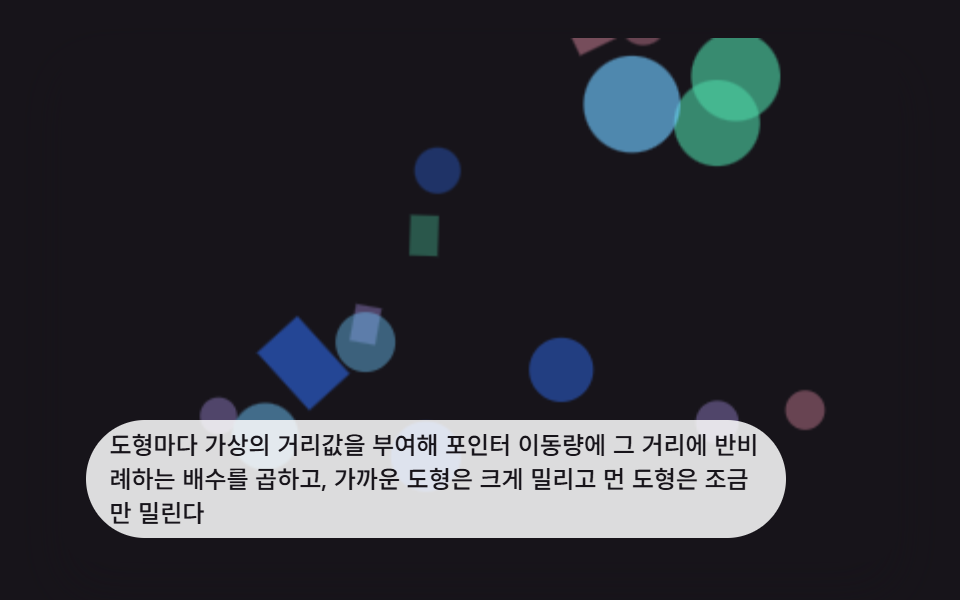 インタラクションcss パララックス 背景 9選 — 奥行き3Dシーン
 インタラクションシャボン玉 アニメーション 9種 — 膜の虹色と割れる瞬間
 インタラクションjavascript 3dアニメーション 9種 — マウスに向く立体模型
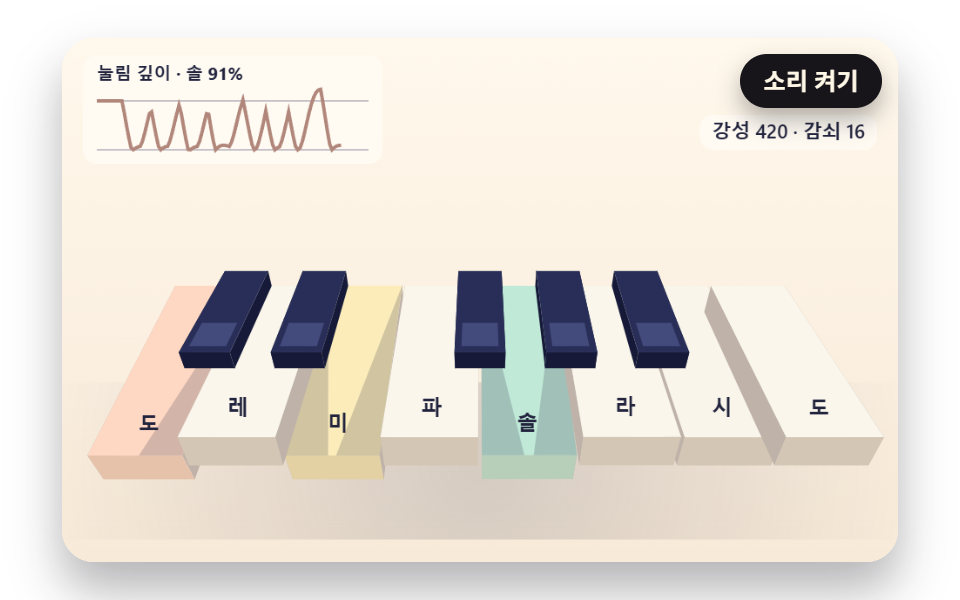 インタラクションブラウザ ピアノ 9種 — ばねの鍵盤・ハンマー・弦の倍音・自動演奏
 インタラクションマウス 追従 js で動く生き物 9種 — 蛇・鯉・トカゲ・タコを計算で
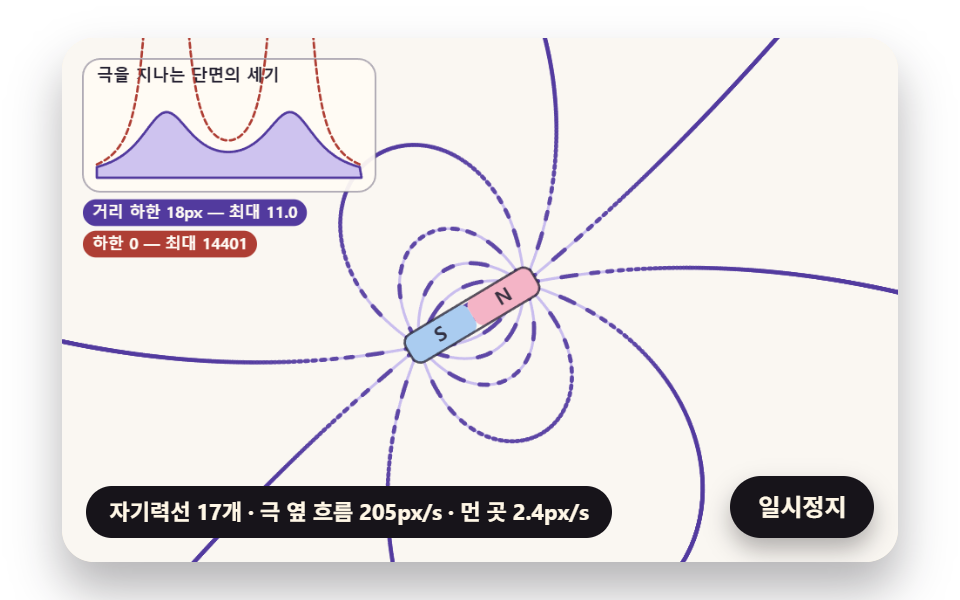 インタラクション磁性流体 シミュレーション 9種 — 立つトゲから時計まで
 インタラクションマウス カーソル エフェクト 9選 — コピペOK