3D 地球儀サイト演出9選 — Three.jsなしのcanvas計算
3d 地球儀のサイト演出は普通、Three.js に任せます。ここでは衛星軌道・航路曲線・昼夜の境界まで9種を、Three.jsなしで canvas 2D の計算だけで描き、いちばん広く動いた08粒子地球儀が26.98パーセント、06星空背景が22.07パーセントを記録しました。
 01 globe-wireframe-rotate
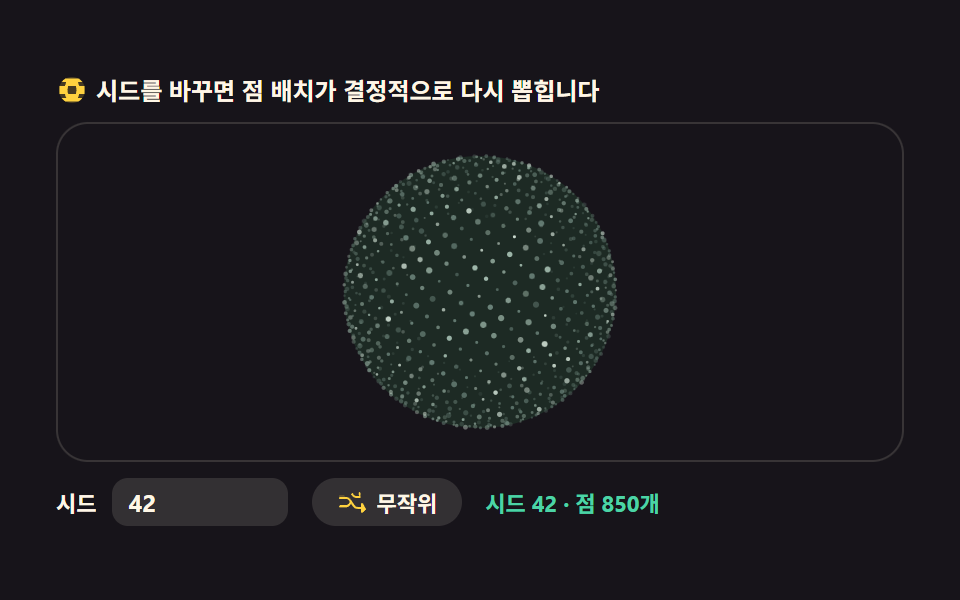 02 globe-dot-matrix
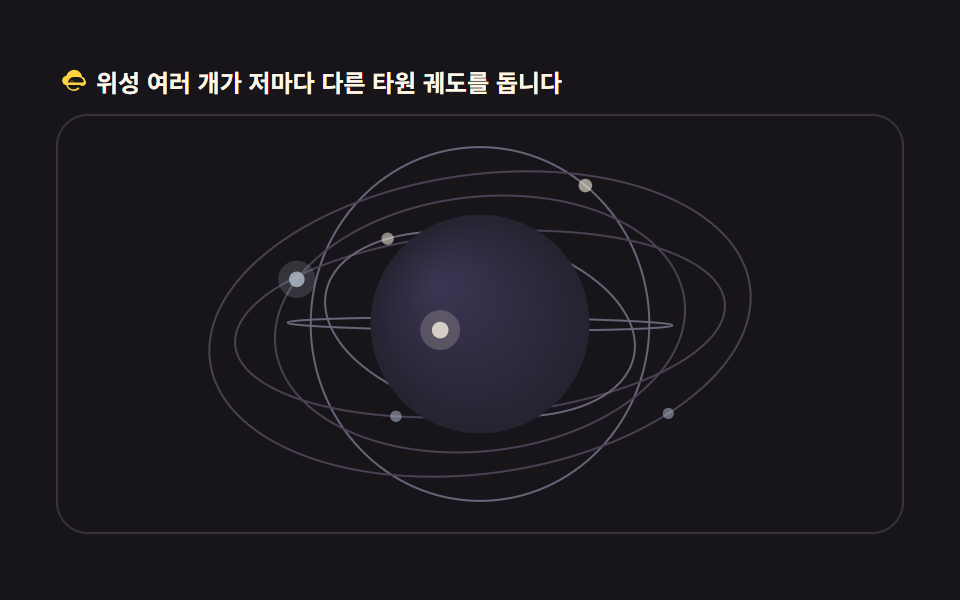 03 globe-satellite-orbit
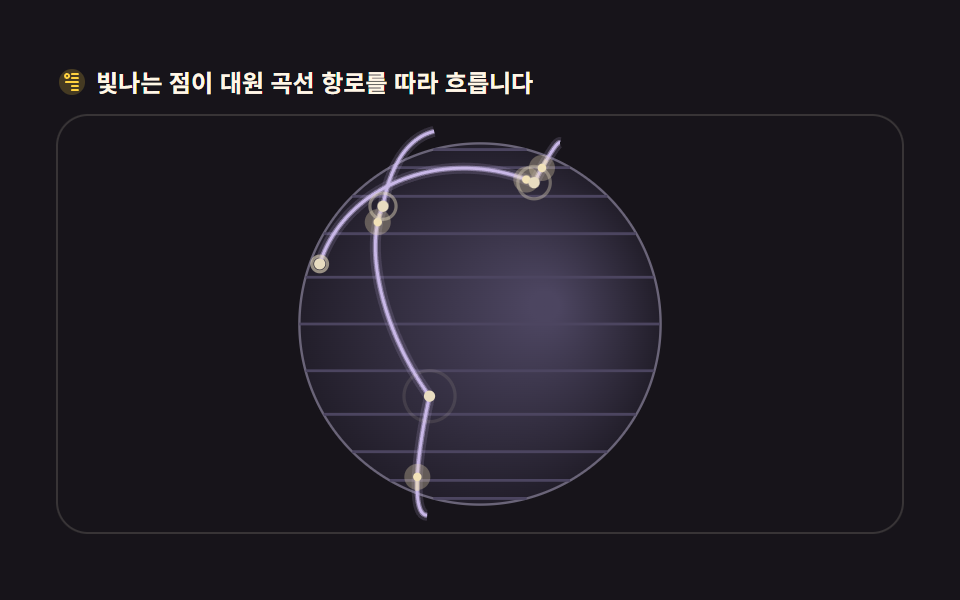 04 globe-connection-arcs
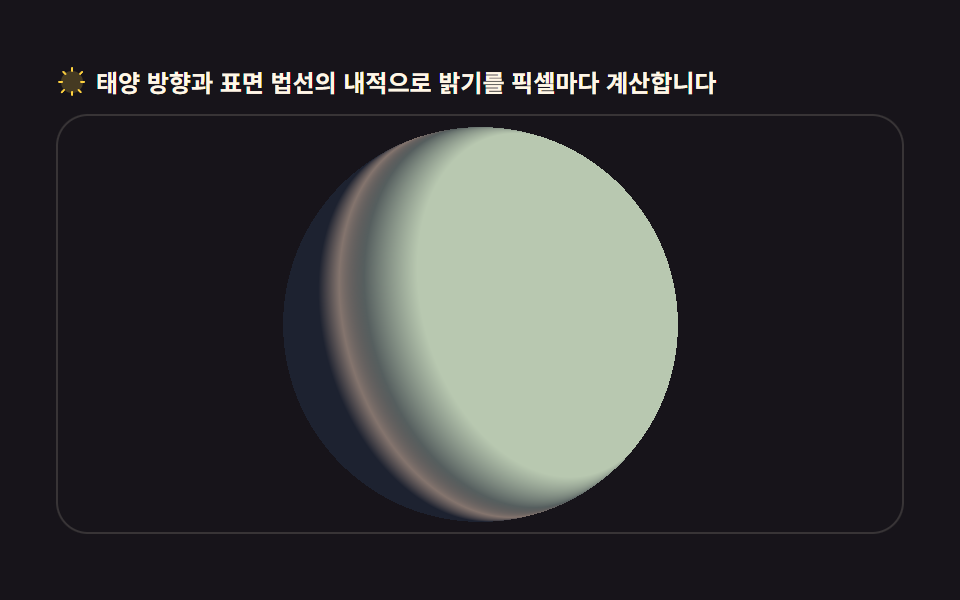 05 globe-day-night-terminator
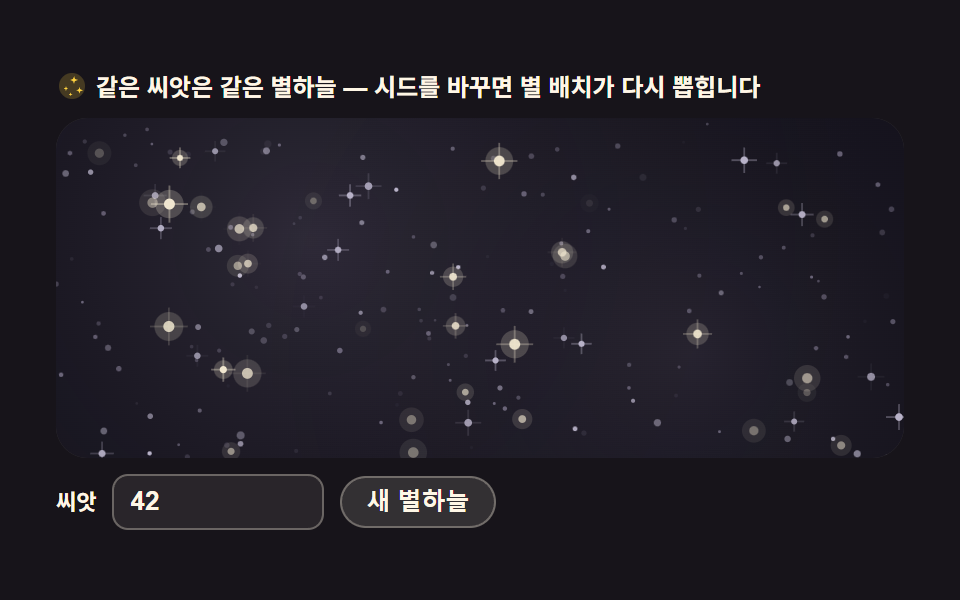 06 starfield-parallax-scene
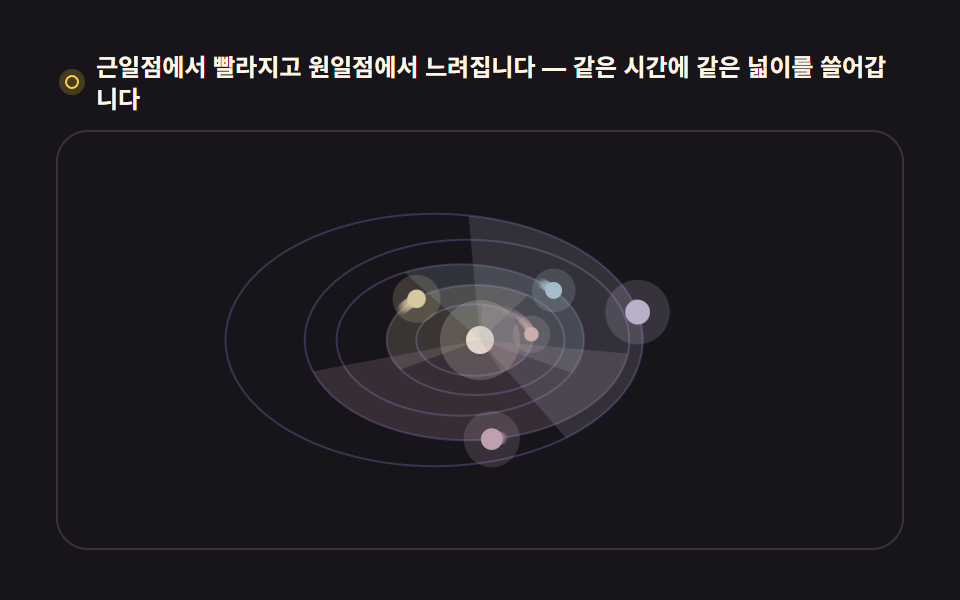 07 orrery-solar-system
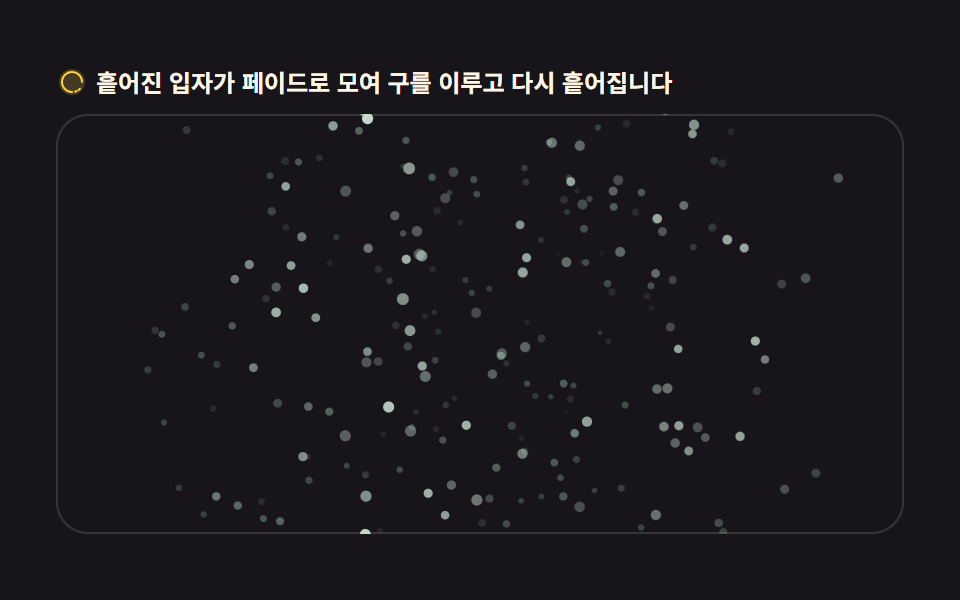 08 globe-particle-assembly
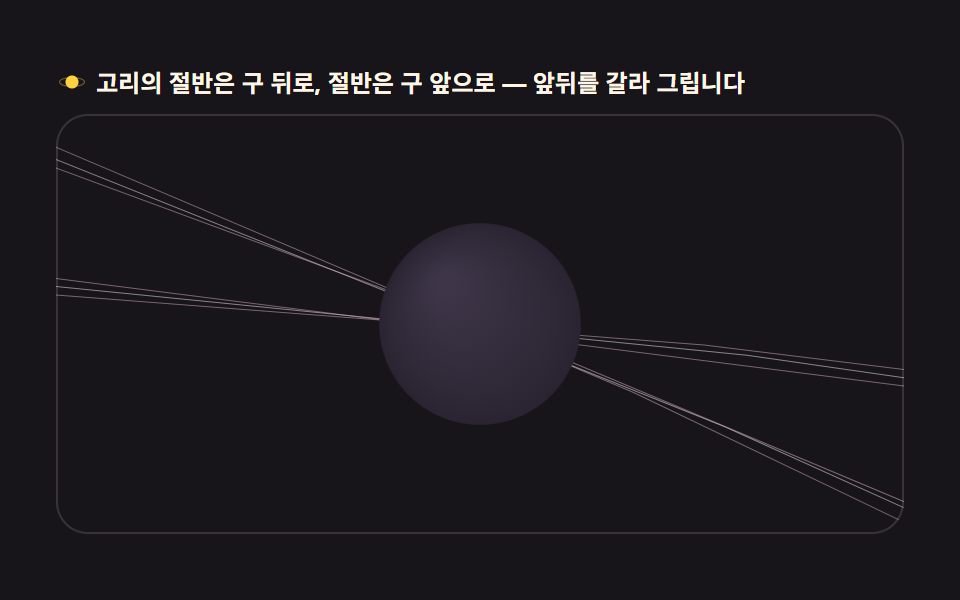 09 globe-saturn-ring-halo
自動再生 · タイルを押すとその項目へ · すべて1つのzip
- 01 緯度経度線で描く回転地球儀
- 02 ドットで埋めたドットマトリクス地球儀
- 03 地球儀を回る衛星軌道
- 04 都市を結ぶ航路曲線
- 05 昼と夜が分かれる地球儀
- 06 層が分かれる星空背景
- 07 複数の惑星が回る太陽系モデル
- 08 散らばって集まる粒子地球儀
- 09 リングをまとった地球儀
並べ方は派手さではなく球面計算が積み上がる順です。まず球座標を画面座標に移す正射影が生まれ(01)、その上に点・曲線・光の計算が乗り(02〜05)、場面が球を離れて背景と軌道へ広がり(06・07)、最後に粒子とリングが演出をひとつにまとめます(08・09)。ピクセルを直接屈折させるcanvas特殊効果と、シードで模様を引くCSS背景パターンがこの記事の隣人です。
01緯度経度線で描く回転地球儀
グローバルサービス紹介のヒーローに使う、緯線・経線で描いた回転地球儀です。
<main class="stage">
<div class="gw" id="gw">
  <p class="gw__hint">
    <svg class="gw__ico" viewBox="0 0 256 256" aria-hidden="true"><g fill="currentColor"><path d="M128 24a104 104 0 1 0 104 104A104.12 104.12 0 0 0 128 24" opacity=".2"/><path d="M128 32a96 96 0 1 1-96 96a96.1 96.1 0 0 1 96-96m0-16a112 112 0 1 0 112 112A112.12 112.12 0 0 0 128 16"/><path d="M128 152a24 24 0 1 1 24-24a24 24 0 0 1-24 24m8-24a8 8 0 1 0-8 8a8 8 0 0 0 8-8" fill-rule="evenodd"/></g></svg>
    <span>盤にマウスを乗せると軸が傾き、離れると元に戻ります</span>
  </p>
  <div class="gw__field" id="field" role="application" aria-label="ワイヤー地球儀の実験台" tabindex="0">
    <canvas class="gw__cv" id="cv"></canvas>
  </div>
</div>
</main>
@use "../../../../site/static/demo-tokens" as *;
// 위경도 선 회전 지구본 — 움직임은 전부 캔버스 rAF 루프 안(구면 좌표 → 정사도 투영 → 앞면 세그먼트만 연결).
// CSS 애니메이션이 0개여야 렌더러가 시계를 고정하지 않고 실시간 24장을 찍는다(077·012 선례).
// 색은 파스텔 기본 — 데모 scss 안 vivid 리터럴을 두지 않는다(BD26).
$duration: $dur-loop;
$easing: $ease-spring;
$color: $subject-sky; // 하늘색 파스텔 — 어두운 우주 무대 위 지구본 림
@include stage($stage-ink);
.gw {
// 구 바닥면 — 잉크보다 한 단계 밝은 저채도 우주 톤(채도 .10)
--gw-sphere: #232028;
--gw-deep: #2a272c;
// 위경도 선 — 크림 계열 파스텔. 채도 .10~.20
--gw-line: #d8d3c0;
--gw-dim: #55505e;
--gw-pole: #f0e6cf;
--gw-ring: #b8b2c8;
display: flex; flex-direction: column; gap: $sp-2;
width: 100%; max-width: 424px;
}
.gw__hint {
display: flex; align-items: center; gap: $sp-1; margin: 0;
font-weight: 700; font-size: clamp(10px, 2.8vw, 12px); line-height: 1.35;
color: $subject-cream;
}
.gw__ico { width: 16px; height: 16px; flex: 0 0 auto; color: $stage-yellow; }
.gw__field {
position: relative; height: 210px;
border-radius: $r-card; overflow: hidden;
background: $stage-ink;
box-shadow: inset 0 0 0 1px rgba($subject-cream, .14);
cursor: crosshair; touch-action: none;
}
.gw__field:focus-visible { outline: 2px solid $stage-yellow; outline-offset: 2px; }
.gw__cv { display: block; width: 100%; height: 100%; }
@media (max-width: 340px) {
.gw { gap: $sp-1; }
.gw__field { height: 110px; }
.gw__hint { font-size: 10px; }
}
// reduce — 루프가 아예 안 돌므로 끄고 말고 할 애니메이션이 없다.
// 멈춰 선 한 장이 그대로 남으므로 움직일 것 같은 커서 신호만 거둔다.
@media (prefers-reduced-motion: reduce) {
.gw__field { cursor: default !important; }
}html, body {
margin: 0;
overflow: hidden;
}
.stage {
box-sizing: border-box;
min-height: 100vh;
display: grid;
place-items: center;
margin: 0;
background: #17141a;
font-family: -apple-system, "Segoe UI", "Noto Sans KR", sans-serif;
padding: clamp(8px, 4vw, 24px);
}
.gw {
--gw-sphere: #232028;
--gw-deep: #2a272c;
--gw-line: #d8d3c0;
--gw-dim: #55505e;
--gw-pole: #f0e6cf;
--gw-ring: #b8b2c8;
display: flex;
flex-direction: column;
gap: 8px;
width: 100%;
max-width: 424px;
}
.gw__hint {
display: flex;
align-items: center;
gap: 4px;
margin: 0;
font-weight: 700;
font-size: clamp(10px, 2.8vw, 12px);
line-height: 1.35;
color: #fff7e6;
}
.gw__ico {
width: 16px;
height: 16px;
flex: 0 0 auto;
color: #ffd23f;
}
.gw__field {
position: relative;
height: 210px;
border-radius: 16px;
overflow: hidden;
background: #17141a;
box-shadow: inset 0 0 0 1px rgba(255, 247, 230, 0.14);
cursor: crosshair;
touch-action: none;
}
.gw__field:focus-visible {
outline: 2px solid #ffd23f;
outline-offset: 2px;
}
.gw__cv {
display: block;
width: 100%;
height: 100%;
}
@media (max-width: 340px) {
.gw {
gap: 4px;
}
.gw__field {
height: 110px;
}
.gw__hint {
font-size: 10px;
}
}
@media (prefers-reduced-motion: reduce) {
.gw__field {
cursor: default !important;
}
}// 緯線・経線の回転地球儀 — 경위선 교차점을 구면 좌표(세타·파이)로 계산해 정사도(orthographic)로 눌러 그린다.
// 뒷면 감춤(backface culling)은 z<0 점을 선에서 잘라내는 게 아니라, 세그먼트를 쪼개 앞면 세그먼트만 잇는다.
// sin·cos 테이블은 프레임마다 같은 각도가 반복 계산되므로 미리 심어 둔다.
var field = document.getElementById('field');
var cv = document.getElementById('cv');
var ctx = cv.getContext('2d');
var TAU = Math.PI * 2;
var reduce = window.matchMedia('(prefers-reduced-motion: reduce)').matches;
var W = 0, H = 0, dpr = 1;
// 계층 — 적도·본초자오선 같은 큰 선은 굵게, 촘촘한 눈금은 가늘게
var LATS = []; // 위도선: { lat, segs }
(function () {
for (var lat = -60; lat <= 60; lat += 15) LATS.push(lat * Math.PI / 180);
})();
var LONS = []; // 경도선: { lon }
for (var lon = 0; lon < 180; lon += 15) LONS.push(lon * Math.PI / 180);
var SEG = 96; // 한 원을 쪼개는 세그먼트 수 — 5도 미만이면 곡선이 각진다
var rotY = 0; // 자전 각도(rad)
var tiltAim = -0.42; // 목표 축 기울기
var tilt = -0.42; // 현재 축 기울기 — 매 프레임 목표에 12%씩 다가간다
var last = 0, raf = 0;
function fit() {
var r = field.getBoundingClientRect();
dpr = window.devicePixelRatio || 1;
W = r.width; H = r.height;
cv.width = Math.round(W * dpr);
cv.height = Math.round(H * dpr);
ctx.setTransform(dpr, 0, 0, dpr, 0, 0);
}
// 구면 → 화면. 축 기울기(tilt)로 z축 회전을 먼저, 자전(rotY)을 y축 회전으로 그 다음에.
// cs·sn 은 그 세그먼트의 cos(세타), sin(세타) 다.
function project(sph, cs, sn) {
var lx = sph.x * cs + sph.z * sn; // y축 회전 (자전)
var lz = -sph.x * sn + sph.z * cs;
var ly = sph.y;
var ty = ly * Math.cos(tilt) - lz * Math.sin(tilt); // z축 회전 (기울기)
var tz = ly * Math.sin(tilt) + lz * Math.cos(tilt);
return { x: lx, y: ty, z: tz };
}
function draw() {
ctx.clearRect(0, 0, W, H);
var cx = W / 2, cy = H / 2;
var R = Math.min(W, H) * 0.40;
// 톤은 CSS 변수(scss 토큰)로 받는다 — 색이 어디서 오는지 한 곳에 둔다
var cs = getComputedStyle(document.getElementById('gw'));
var C_sphere = cs.getPropertyValue('--gw-sphere').trim();
var C_deep = cs.getPropertyValue('--gw-deep').trim();
var C_line = cs.getPropertyValue('--gw-line').trim();
var C_dim = cs.getPropertyValue('--gw-dim').trim();
var C_pole = cs.getPropertyValue('--gw-pole').trim();
var C_ring = cs.getPropertyValue('--gw-ring').trim();
// 구 바닥 — 뒷선이 비쳐 보이지 않게 먼저 불투명 원을 깐다
ctx.beginPath();
ctx.arc(cx, cy, R, 0, TAU);
ctx.fillStyle = C_sphere;
ctx.fill();
// 가장자리 림 — 원일구의 horizon. 안 깔면 선이 배경에 뜬다
ctx.beginPath();
ctx.arc(cx, cy, R, 0, TAU);
ctx.strokeStyle = C_ring;
ctx.lineWidth = 1.4;
ctx.stroke();
// 앞면만 그리는 폴리라인 — z<0 구간은 건너뛴다(backface culling)
function polyline(pts, style, width) {
ctx.strokeStyle = style;
ctx.lineWidth = width;
ctx.beginPath();
var pen = false;
for (var i = 0; i < pts.length; i++) {
var p = pts[i];
if (p.z >= 0) {
var x = cx + p.x * R, y = cy - p.y * R;
if (pen) ctx.lineTo(x, y); else { ctx.moveTo(x, y); pen = true; }
} else {
pen = false; // 뒤로 넘어가는 지점에서 펜을 든다
}
}
ctx.stroke();
}
var cyT = Math.cos(tilt), syT = Math.sin(tilt);
// 위도선 — 각 선을 SEG 조각으로 쪼개 앞면 조각만 잇는다
for (var li = 0; li < LATS.length; li++) {
var lat = LATS[li];
var cLat = Math.cos(lat), sLat = Math.sin(lat);
var pts = [];
for (var s = 0; s <= SEG; s++) {
var phi = (s / SEG) * TAU;
var sph = { x: cLat * Math.sin(phi), y: sLat, z: cLat * Math.cos(phi) };
pts.push(project(sph, Math.cos(rotY), Math.sin(rotY)));
}
var major = lat === 0;
polyline(pts, major ? C_line : C_dim, major ? 1.5 : 1);
}
// 경도선 — 반원(앞뒤 세그먼트가 섞인다)을 쪼개 같은 방식으로
for (var gi = 0; gi < LONS.length; gi++) {
var lon = LONS[gi] + rotY;
var pts2 = [];
for (var s2 = 0; s2 <= SEG; s2++) {
var th = (s2 / SEG) * Math.PI; // 0..PI 반원
var sph2 = { x: Math.sin(th) * Math.cos(lon), y: Math.cos(th), z: Math.sin(th) * Math.sin(lon) };
pts2.push(project(sph2, 1, 0));
}
var major2 = Math.abs(((LONS[gi] / Math.PI * 180) % 180)) < 0.01 && false;
polyline(pts2, C_dim, 1);
}
// 본초자오선 — lon=rotY 인 선이 항상 중앙 세로선이 되게 자전각을 더해 그린다
var ptsM = [];
for (var s3 = 0; s3 <= SEG; s3++) {
var th3 = (s3 / SEG) * Math.PI;
var lonM = Math.PI / 2; // 화면 중앙면
var sph3 = { x: Math.sin(th3) * Math.cos(lonM), y: Math.cos(th3), z: Math.sin(th3) * Math.sin(lonM) };
var p3 = project(sph3, Math.cos(0), Math.sin(0));
ptsM.push(p3);
}
polyline(ptsM, C_line, 1.5);
// 극점 — 축이 기울어진 만큼 북극이 보인다
var north = project({ x: 0, y: 1, z: 0 }, 1, 0);
var south = project({ x: 0, y: -1, z: 0 }, 1, 0);
ctx.fillStyle = C_pole;
if (north.z >= 0) { ctx.beginPath(); ctx.arc(cx + north.x * R, cy - north.y * R, 2.2, 0, TAU); ctx.fill(); }
if (south.z >= 0) { ctx.beginPath(); ctx.arc(cx + south.x * R, cy - south.y * R, 2.2, 0, TAU); ctx.fill(); }
}
function frame(now) {
var dt = last ? Math.min((now - last) / 1000, 0.05) : 0.016;
last = now;
rotY += dt * 0.5; // 12.5초에 한 바퀴 — 천천히
tilt += (tiltAim - tilt) * 0.12; // 목표 기울기로 부드럽게
draw();
raf = requestAnimationFrame(frame);
}
// 포인터가 판의 좌우 어디에 있느냐로 목표 기울기를 정한다 — 0.42rad(약 24도) 범위
field.addEventListener('pointermove', function (e) {
var r = field.getBoundingClientRect();
var t = (e.clientX - r.left) / r.width - 0.5;
tiltAim = -0.42 + t * 0.84;
});
field.addEventListener('pointerleave', function () { tiltAim = -0.42; });
window.addEventListener('resize', function () { fit(); draw(); });
fit();
if (reduce) {
// reduce — 루프 없이 기울어진 한 장만 그린다
draw();
} else {
raf = requestAnimationFrame(frame);
}// GlobeWireframe — vanilla 판(run/304/demo/01-globe-wireframe-rotate/index.html) 의 React 포트.
// 위도·경도 대원 와이어 지구본 — 정사도 투영 + y축 자전 + 뒷면(z<0) 선분은 펜을 들어 감춘다(backface culling).
// 움직임은 캔버스 rAF 루프가 전부 그리므로 @keyframes 미리보기가 없다 — props 는 CSS 변수로 무대 격식에만 내려간다.
import { useEffect, useRef } from "react";
import type { CSSProperties } from "react";
import styles from "./GlobeWireframe.module.scss";
export type GlobeWireframeProps = {
duration?: string;
easing?: string;
color?: string;
};
type Vars = CSSProperties & { "--duration"?: string; "--easing"?: string; "--color"?: string };
type Box<T> = { current: T };
type PointerEvt = { clientX: number };
const TAU = Math.PI * 2;
const SEG = 96;
const FIELD_LABEL = "위경도 지구본 실험판";
const LATS = [-60, -30, 0, 30, 60].map((d) => (d * Math.PI) / 180);
const LONS = [0, 30, 60, 90, 120, 150].map((d) => (d * Math.PI) / 180);
export default function GlobeWireframe({
duration = "2s",
easing = "cubic-bezier(.2, .8, .2, 1)",
color = "#6ec8ff",
}: GlobeWireframeProps) {
const fieldRef = useRef<HTMLDivElement | null>(null);
const cvRef = useRef<HTMLCanvasElement | null>(null);
const rootRef = useRef<HTMLDivElement | null>(null);
const ctxRef = useRef<CanvasRenderingContext2D | null>(null);
const sizeRef = useRef({ w: 0, h: 0 }) as Box<{ w: number; h: number }>;
const rotRef = useRef({ y: 0, tiltAim: -0.42, tilt: -0.42 }) as Box<{ y: number; tiltAim: number; tilt: number }>;
const lastRef = useRef(0) as Box<number>;
const rafRef = useRef(0) as Box<number>;
const vars: Vars = { "--duration": duration, "--easing": easing, "--color": color };
function reduced(): boolean {
return window.matchMedia("(prefers-reduced-motion: reduce)").matches;
}
function fit(): void {
const field = fieldRef.current;
const cv = cvRef.current;
const ctx = ctxRef.current;
if (!field || !cv || !ctx) return;
const r = field.getBoundingClientRect();
const dpr = window.devicePixelRatio || 1;
sizeRef.current.w = r.width;
sizeRef.current.h = r.height;
cv.width = Math.round(r.width * dpr);
cv.height = Math.round(r.height * dpr);
ctx.setTransform(dpr, 0, 0, dpr, 0, 0);
}
// 구면 → 화면. 축 기울기(tilt)로 z축 회전을 먼저, 자전(rotY)을 y축 회전으로 그 다음에.
function project(x: number, y: number, z: number, cs: number, sn: number): { x: number; y: number; z: number } {
const lx = x * cs + z * sn; // y축 회전 (자전)
const lz = -x * sn + z * cs;
const ty = y * Math.cos(rotRef.current.tilt) - lz * Math.sin(rotRef.current.tilt); // z축 회전 (기울기)
const tz = y * Math.sin(rotRef.current.tilt) + lz * Math.cos(rotRef.current.tilt);
return { x: lx, y: ty, z: tz };
}
function draw(): void {
const ctx = ctxRef.current;
const root = rootRef.current;
if (!ctx || !root) return;
const W = sizeRef.current.w, H = sizeRef.current.h;
ctx.clearRect(0, 0, W, H);
const cx = W / 2, cy = H / 2;
const R = Math.min(W, H) * 0.40;
const rotY = rotRef.current.y;
const cs2 = getComputedStyle(root);
const C_sphere = cs2.getPropertyValue("--gw-sphere").trim();
const C_line = cs2.getPropertyValue("--gw-line").trim();
const C_dim = cs2.getPropertyValue("--gw-dim").trim();
const C_pole = cs2.getPropertyValue("--gw-pole").trim();
const C_ring = cs2.getPropertyValue("--gw-ring").trim();
// 구 바닥 — 뒷선이 비쳐 보이지 않게 먼저 불투명 원을 깐다
ctx.beginPath();
ctx.arc(cx, cy, R, 0, TAU);
ctx.fillStyle = C_sphere;
ctx.fill();
// 가장자리 림 — 원일구의 horizon
ctx.beginPath();
ctx.arc(cx, cy, R, 0, TAU);
ctx.strokeStyle = C_ring;
ctx.lineWidth = 1.4;
ctx.stroke();
// 앞면만 그리는 폴리라인 — z<0 구간은 건너뛴다(backface culling)
const polyline = (pts: { x: number; y: number; z: number }[], style: string, width: number): void => {
ctx.strokeStyle = style;
ctx.lineWidth = width;
ctx.beginPath();
let pen = false;
for (let i = 0; i < pts.length; i++) {
const p = pts[i];
if (p.z >= 0) {
const x = cx + p.x * R, y = cy - p.y * R;
if (pen) ctx.lineTo(x, y); else { ctx.moveTo(x, y); pen = true; }
} else {
pen = false; // 뒤로 넘어가는 지점에서 펜을 든다
}
}
ctx.stroke();
};
const csRot = Math.cos(rotY), snRot = Math.sin(rotY);
// 위도선 — 각 선을 SEG 조각으로 쪼개 앞면 조각만 잇는다
for (let li = 0; li < LATS.length; li++) {
const lat = LATS[li];
const cLat = Math.cos(lat), sLat = Math.sin(lat);
const pts: { x: number; y: number; z: number }[] = [];
for (let s = 0; s <= SEG; s++) {
const phi = (s / SEG) * TAU;
pts.push(project(cLat * Math.sin(phi), sLat, cLat * Math.cos(phi), csRot, snRot));
}
const major = lat === 0;
polyline(pts, major ? C_line : C_dim, major ? 1.5 : 1);
}
// 경로선 — 반원(앞뒤 세그먼트가 섞인다)을 쪼개 같은 방식으로
for (let gi = 0; gi < LONS.length; gi++) {
const lon = LONS[gi] + rotY;
const pts2: { x: number; y: number; z: number }[] = [];
for (let s2 = 0; s2 <= SEG; s2++) {
const th = (s2 / SEG) * Math.PI; // 0..PI 반원
pts2.push(project(Math.sin(th) * Math.cos(lon), Math.cos(th), Math.sin(th) * Math.sin(lon), 1, 0));
}
polyline(pts2, C_dim, 1);
}
// 본초자오선 — lon=rotY 인 선이 항상 중앙 세로선이 되게 자전각을 더해 그린다
const ptsM: { x: number; y: number; z: number }[] = [];
for (let s3 = 0; s3 <= SEG; s3++) {
const th3 = (s3 / SEG) * Math.PI;
const lonM = Math.PI / 2; // 화면 중앙면
ptsM.push(project(Math.sin(th3) * Math.cos(lonM), Math.cos(th3), Math.sin(th3) * Math.sin(lonM), Math.cos(0), Math.sin(0)));
}
polyline(ptsM, C_line, 1.5);
// 극점 — 축이 기울어진 만큼 북극이 보인다
const north = project(0, 1, 0, 1, 0);
const south = project(0, -1, 0, 1, 0);
ctx.fillStyle = C_pole;
if (north.z >= 0) { ctx.beginPath(); ctx.arc(cx + north.x * R, cy - north.y * R, 2.2, 0, TAU); ctx.fill(); }
if (south.z >= 0) { ctx.beginPath(); ctx.arc(cx + south.x * R, cy - south.y * R, 2.2, 0, TAU); ctx.fill(); }
}
function frame(now: number): void {
const dt = lastRef.current ? Math.min((now - lastRef.current) / 1000, 0.05) : 0.016;
lastRef.current = now;
rotRef.current.y += dt * 0.5; // 12.5초에 한 바퀴 — 천천히
rotRef.current.tilt += (rotRef.current.tiltAim - rotRef.current.tilt) * 0.12; // 목표 기울기로 부드럽게
draw();
rafRef.current = requestAnimationFrame(frame);
}
// 포인터가 판의 좌우 어디에 있느냐로 목표 기울기를 정한다 — 0.42rad(약 24도) 범위
function onPointerMove(e: PointerEvt): void {
const field = fieldRef.current;
if (!field) return;
const r = field.getBoundingClientRect();
const t = (e.clientX - r.left) / r.width - 0.5;
rotRef.current.tiltAim = -0.42 + t * 0.84;
}
function onPointerLeave(): void {
rotRef.current.tiltAim = -0.42;
}
useEffect(() => {
const cv = cvRef.current;
if (!cv) return;
ctxRef.current = cv.getContext("2d");
if (!ctxRef.current) return;
fit();
const field = fieldRef.current;
if (field) {
field.addEventListener("pointermove", onPointerMove as unknown as EventListener);
field.addEventListener("pointerleave", onPointerLeave);
}
const onResize = (): void => { fit(); draw(); };
window.addEventListener("resize", onResize);
if (reduced()) {
// reduce — 루프 없이 기울어진 한 장만 그린다
draw();
} else {
lastRef.current = 0;
rafRef.current = requestAnimationFrame(frame);
}
return () => {
window.removeEventListener("resize", onResize);
cancelAnimationFrame(rafRef.current);
if (field) {
field.removeEventListener("pointermove", onPointerMove as unknown as EventListener);
field.removeEventListener("pointerleave", onPointerLeave);
}
};
}, []);
return (
<main className={styles.stage}>
<div className={styles.root} ref={rootRef} style={vars}>
<p className={styles.hint}>
<svg className={styles.ico} viewBox="0 0 256 256" aria-hidden="true"><g fill="currentColor"><path d="M128 24a104 104 0 1 0 104 104A104.12 104.12 0 0 0 128 24" opacity=".2"/><path d="M128 40a88 88 0 1 0 88 88a88.1 88.1 0 0 0-88-88m0 160a72 72 0 1 1 72-72a72.08 72.08 0 0 1-72 72" fillRule="evenodd"/></g></svg>
<span>마우스를 판 위에 놓으면 축이 기울고 판을 벗어나면 제자리로 돌아옵니다</span>
</p>
<div
className={styles.field}
ref={fieldRef}
role="application"
aria-label={FIELD_LABEL}
tabIndex={0}
>
<canvas className={styles.cv} ref={cvRef}></canvas>
</div>
</div>
</main>
);
}01 · 緯度経度線で描く回転地球儀 — 計測 累積面積 14.28% · 動いたフレーム 23/23GODRICH オリジナル · SCSS と React は zip に同梱 · パスワードを見る
裏面を描かないことが立体になる
  function polyline(pts, style, width) {
    ctx.strokeStyle = style;
    ctx.lineWidth = width;
    ctx.beginPath();
    var pen = false;
    for (var i = 0; i < pts.length; i++) {
      var p = pts[i];
      if (p.z >= 0) {
        var x = cx + p.x * R, y = cy - p.y * R;
        if (pen) ctx.lineTo(x, y); else { ctx.moveTo(x, y); pen = true; }
      } else {
        pen = false;   // 裏へ回る地点でペンを持ち上げる
      }
    }
    ctx.stroke();
  }
各点を軸の傾きと自転角で回して画面座標に変換し、深さ z が負になる裏面区間はペンを上げて飛ばします。盤にマウスを乗せると軸が目標の傾きへ毎フレーム12パーセントずつ近づきます(実測: 累積面積 14.28パーセント、23/23フレームで動き)。
02ドットで埋めたドットマトリクス地球儀
世界の訪問者数を見せるセクションに合う、850個の点で埋めた地球儀です。
<main class="stage">
<div class="gd" id="gd">
  <p class="gd__hint">
    <svg class="gd__ico" viewBox="0 0 256 256" aria-hidden="true"><g fill="currentColor"><path d="M128 24a104 104 0 1 0 104 104A104.12 104.12 0 0 0 128 24" opacity=".2"/><path d="M228 96h-42.81a126 126 0 0 0-10.51-32h36.24a103.87 103.87 0 0 0-30-28H75.08a103.87 103.87 0 0 0-30 28h36.24a126 126 0 0 0-10.51 32H28v64h42.3a126 126 0 0 0 10.51 32H44.92a103.87 103.87 0 0 0 30 28h105.84a103.87 103.87 0 0 0 30-28h-35.89a126 126 0 0 0 10.51-32H228Zm-68.75 64h-62.5a102.26 102.26 0 0 1 0-64h62.5a102.26 102.26 0 0 1 0 64"/></g></svg>
    <span>シードを変えると点の配置が決定的に引き直されます</span>
  </p>
  <div class="gd__field" id="field" role="application" aria-label="ドットマトリクス地球儀の実験台" tabindex="0">
    <canvas class="gd__cv" id="cv"></canvas>
  </div>
  <div class="gd__bar">
    <label class="gd__dial">シード
      <input type="number" id="seed" min="1" max="9999" step="1" value="42" aria-label="シード番号">
    </label>
    <button class="gd__shuffle" id="shuffle" type="button">
      <svg class="gd__ico" viewBox="0 0 256 256" aria-hidden="true"><g fill="currentColor"><path d="M32 72h32l16 24-13 9-11-17H32a8 8 0 0 1 0-16" opacity=".2"/><path d="M237.66 178.34a8 8 0 0 1 0 11.32l-24 24A8 8 0 0 1 200 208V184h-29.41a40 40 0 0 1-33.94-18.75L102.71 115.5A24 24 0 0 0 82.75 104H32a8 8 0 0 1 0-16h50.75a40 40 0 0 1 33.94 18.75l33.94 49.75a24 24 0 0 0 19.96 11.5H200v-24a8 8 0 0 1 13.66-5.66ZM32 152h50.75a24 24 0 0 0 19.96-11.5l8.11-11.87 9.51 13.93-6.9 10.11a40 40 0 0 1-33.94 18.72H32a8 8 0 0 1 0-16m150.34-82.34a8 8 0 0 0 13.66 5.66V96h-34.46a40 40 0 0 1-33.94-18.75l-6.9-10.11 9.51-13.93 8.11 11.87A24 24 0 0 0 158.29 80H196V56a8 8 0 0 0-13.66-5.66" fill-rule="evenodd"/></g></svg>
      <span>ランダム</span>
    </button>
    <b class="gd__val" id="seedOut" aria-hidden="true">シード <span class="gd__valNum" id="seedNum">42</span><span class="gd__valUnit"> ・ 点 850個</span></b>
  </div>
</div>
</main>
@use "../../../../site/static/demo-tokens" as *;
// 도트매트릭스 지구본 — 움직임은 전부 캔버스 rAF(Fibonacci sphere 분포 + depth sort + 시드 재생성).
// CSS 는 무대·판·시드 컨트롤만. 파스텔 팔레트 — vivid 리터럴 0(BD26).
$duration: $dur-loop;
$easing: $ease-spring;
$color: $subject-mint;
@include stage($stage-ink);
.gd {
// 점 3계열 — 전부 저채도 파스텔(채도 .12~.30)
--gd-hi: #d8e8dc; // 밝은 크림그린 — 강조점
--gd-mid: #9fb8ab; // 회록 파스텔 — 다수점
--gd-lo: #6a8279; // 어두운 회록 — 뒤쪽 점
--gd-core: #1d2a24; // 코어 — 잉크보다 한 단계 밝은 저채표 톤
display: flex; flex-direction: column; gap: $sp-2;
width: 100%; max-width: 424px;
}
.gd__hint {
display: flex; align-items: center; gap: $sp-1; margin: 0;
font-weight: 700; font-size: clamp(10px, 2.8vw, 12px); line-height: 1.35;
color: $subject-cream;
}
.gd__ico { width: 16px; height: 16px; flex: 0 0 auto; color: $stage-yellow; }
.gd__field {
position: relative; height: 170px; // 시드 막대가 있어 300px 무대 안에 다 들어오게
border-radius: $r-card; overflow: hidden;
background: $stage-ink;
box-shadow: inset 0 0 0 1px rgba($subject-cream, .14);
}
.gd__field:focus-visible { outline: 2px solid $stage-yellow; outline-offset: 2px; }
.gd__cv { display: block; width: 100%; height: 100%; }
.gd__bar { display: flex; align-items: center; gap: $sp-3; flex-wrap: wrap; }
.gd__dial {
display: flex; align-items: center; gap: $sp-2;
font-weight: 700; font-size: 11px; color: $subject-cream;
}
.gd__dial input {
width: 72px; margin: 0;
padding: $sp-1 $sp-2; border: 0; border-radius: $r-sm;
background: rgba($subject-cream, .12); color: $subject-cream;
font-weight: 700; font-size: 12px; font-family: inherit;
}
.gd__dial input:focus-visible { outline: 2px solid $stage-yellow; outline-offset: 2px; }
.gd__shuffle {
display: flex; align-items: center; gap: $sp-1;
padding: $sp-1 $sp-3; border: 0; border-radius: $r-pill;
background: rgba($subject-cream, .12); color: $subject-cream;
font-weight: 700; font-size: 11px; font-family: inherit; cursor: pointer;
}
.gd__shuffle:hover { background: rgba($subject-cream, .2); }
.gd__shuffle:focus-visible { outline: 2px solid $stage-yellow; outline-offset: 2px; }
.gd__val { color: $subject-mint; font-size: 11px; font-weight: 700; }
@media (max-width: 340px) {
.gd { gap: $sp-1; }
.gd__field { height: 96px; }
.gd__hint { font-size: 10px; }
.gd__bar { gap: $sp-2; }
.gd__dial input { width: 56px; }
}
// reduce — 루프가 안 돈다. 시드 입력은 여전히 결정적으로 한 장을 다시 그린다.
@media (prefers-reduced-motion: reduce) {
.gd__field { cursor: default !important; }
}html, body {
margin: 0;
overflow: hidden;
}
.stage {
box-sizing: border-box;
min-height: 100vh;
display: grid;
place-items: center;
margin: 0;
background: #17141a;
font-family: -apple-system, "Segoe UI", "Noto Sans KR", sans-serif;
padding: clamp(8px, 4vw, 24px);
}
.gd {
--gd-hi: #d8e8dc;
--gd-mid: #9fb8ab;
--gd-lo: #6a8279;
--gd-core: #1d2a24;
display: flex;
flex-direction: column;
gap: 8px;
width: 100%;
max-width: 424px;
}
.gd__hint {
display: flex;
align-items: center;
gap: 4px;
margin: 0;
font-weight: 700;
font-size: clamp(10px, 2.8vw, 12px);
line-height: 1.35;
color: #fff7e6;
}
.gd__ico {
width: 16px;
height: 16px;
flex: 0 0 auto;
color: #ffd23f;
}
.gd__field {
position: relative;
height: 170px;
border-radius: 16px;
overflow: hidden;
background: #17141a;
box-shadow: inset 0 0 0 1px rgba(255, 247, 230, 0.14);
}
.gd__field:focus-visible {
outline: 2px solid #ffd23f;
outline-offset: 2px;
}
.gd__cv {
display: block;
width: 100%;
height: 100%;
}
.gd__bar {
display: flex;
align-items: center;
gap: 12px;
flex-wrap: wrap;
}
.gd__dial {
display: flex;
align-items: center;
gap: 8px;
font-weight: 700;
font-size: 11px;
color: #fff7e6;
}
.gd__dial input {
width: 72px;
margin: 0;
padding: 4px 8px;
border: 0;
border-radius: 8px;
background: rgba(255, 247, 230, 0.12);
color: #fff7e6;
font-weight: 700;
font-size: 12px;
font-family: inherit;
}
.gd__dial input:focus-visible {
outline: 2px solid #ffd23f;
outline-offset: 2px;
}
.gd__shuffle {
display: flex;
align-items: center;
gap: 4px;
padding: 4px 12px;
border: 0;
border-radius: 999px;
background: rgba(255, 247, 230, 0.12);
color: #fff7e6;
font-weight: 700;
font-size: 11px;
font-family: inherit;
cursor: pointer;
}
.gd__shuffle:hover {
background: rgba(255, 247, 230, 0.2);
}
.gd__shuffle:focus-visible {
outline: 2px solid #ffd23f;
outline-offset: 2px;
}
.gd__val {
color: #4cd4a6;
font-size: 11px;
font-weight: 700;
}
@media (max-width: 340px) {
.gd {
gap: 4px;
}
.gd__field {
height: 96px;
}
.gd__hint {
font-size: 10px;
}
.gd__bar {
gap: 8px;
}
.gd__dial input {
width: 56px;
}
}
@media (prefers-reduced-motion: reduce) {
.gd__field {
cursor: default !important;
}
}// ドットマトリクス地球儀 — Fibonacci sphere 로 구 표면에 점을 고르게 뿌린다.
// Fibonacci sphere: i 번째 점의 위도는 acos(1 - 2(i+0.5)/N), 경도는 황금각(golden angle) 만큼씩 돈다.
// 같은 シード = 같은 그림. 시드는 난수 계열(mulberry32)을 고르고, 그 계열이 점의 반경·밝기·톤을 뽑는다.
var root = document.getElementById('gd');
var field = document.getElementById('field');
var cv = document.getElementById('cv');
var ctx = cv.getContext('2d');
var seedIn = document.getElementById('seed');
var shuffleBtn = document.getElementById('shuffle');
var seedOut = document.getElementById('seedNum');
var TAU = Math.PI * 2;
var GOLDEN = Math.PI * (3 - Math.sqrt(5)); // 황금각 약 2.39996rad
var reduce = window.matchMedia('(prefers-reduced-motion: reduce)').matches;
var W = 0, H = 0, dpr = 1;
// 결정적 난수 — mulberry32. 같은 시드면 같은 수열을 돌려준다
function mulberry32(a) {
return function () {
a |= 0; a = (a + 0x6D2B79F5) | 0;
var t = Math.imul(a ^ (a >>> 15), 1 | a);
t = (t + Math.imul(t ^ (t >>> 7), 61 | t)) ^ t;
return ((t ^ (t >>> 14)) >>> 0) / 4294967296;
};
}
var N = 850; // 점 개수
var dots = []; // { x,y,z(단위구), r(반경 배율), tone(0..1), jitter(위상) }
var seedVal = 42;
var rotY = 0;
var last = 0, raf = 0;
function buildDots() {
var rnd = mulberry32(seedVal);
dots = [];
for (var i = 0; i < N; i++) {
// Fibonacci sphere — 균등 분포. 황금각 회전이 나선 잎차례를 만든다
var y = 1 - 2 * (i + 0.5) / N;
var rLat = Math.sqrt(1 - y * y);
var phi = i * GOLDEN;
var jitterR = rnd();
dots.push({
x: Math.cos(phi) * rLat,
y: y,
z: Math.sin(phi) * rLat,
r: 0.6 + jitterR * 0.9, // 반경 다양성도 시드가 정한다
tone: rnd(),
jt: rnd() * TAU // 반짝임 위상
});
}
seedOut.textContent = String(seedVal);
}
function fit() {
var r = field.getBoundingClientRect();
dpr = window.devicePixelRatio || 1;
W = r.width; H = r.height;
cv.width = Math.round(W * dpr);
cv.height = Math.round(H * dpr);
ctx.setTransform(dpr, 0, 0, dpr, 0, 0);
}
function draw(now) {
ctx.clearRect(0, 0, W, H);
var cx = W / 2, cy = H / 2;
var R = Math.min(W, H) * 0.40;
var cs = getComputedStyle(root);
var C_hi = cs.getPropertyValue('--gd-hi').trim();
var C_mid = cs.getPropertyValue('--gd-mid').trim();
var C_lo = cs.getPropertyValue('--gd-lo').trim();
var C_core = cs.getPropertyValue('--gd-core').trim();
// 바닥 코어 — 점 구름의 중심을 은은히 밝힌다(구체가 아니라 점의 집단임을 읽게)
ctx.beginPath();
ctx.arc(cx, cy, R, 0, TAU);
ctx.fillStyle = C_core;
ctx.fill();
var cyr = Math.cos(rotY), syr = Math.sin(rotY);
var t = now * 0.001;
// depth sort — 먼 점(z<0, 뒤)부터 그려야 앞 점이 위에 얹힌다
var order = [];
for (var i = 0; i < N; i++) {
var d = dots[i];
var lx = d.x * cyr + d.z * syr;
var lz = -d.x * syr + d.z * cyr;
order.push({ p: d, lx: lx, lz: lz });
}
order.sort(function (a, b) { return a.lz - b.lz; });
for (var k = 0; k < N; k++) {
var o = order[k];
var depth = (o.lz + 1) / 2; // 0(뒤)..1(앞)
if (depth < 0.08) continue; // 맨 뒤는 림 바깥 실루엣만 남긴다
var px = cx + o.lx * R;
var py = cy - o.p.y * R;
// 원근 없는 정사도라 깊이는 크기가 아니라 밝기·알파로만 녹인다
var alpha = 0.16 + depth * 0.84;
var tw = 0.75 + 0.25 * Math.sin(t * 2 + o.p.jt); // 반짝임 — 시간에 따라 살아 있는다
ctx.globalAlpha = alpha * tw;
ctx.fillStyle = o.p.tone > 0.82 ? C_hi : (o.p.tone > 0.45 ? C_mid : C_lo);
ctx.beginPath();
ctx.arc(px, py, o.p.r * (0.55 + depth * 0.5), 0, TAU);
ctx.fill();
}
ctx.globalAlpha = 1;
}
function frame(now) {
var dt = last ? Math.min((now - last) / 1000, 0.05) : 0.016;
last = now;
rotY += dt * 0.35;
draw(now);
raf = requestAnimationFrame(frame);
}
function applySeed(v) {
seedVal = Math.max(1, Math.min(9999, Math.floor(v) || 1));
seedIn.value = String(seedVal);
buildDots();
if (reduce) draw(0);
}
seedIn.addEventListener('input', function () { applySeed(Number(seedIn.value)); });
shuffleBtn.addEventListener('click', function () {
applySeed(1 + Math.floor(Math.random() * 9999));
});
field.addEventListener('keydown', function (e) {
if (e.key === 'Enter' || e.key === ' ') {
e.preventDefault();
applySeed(1 + Math.floor(Math.random() * 9999));
}
});
window.addEventListener('resize', function () { fit(); draw(0); });
fit();
buildDots();
if (reduce) {
draw(0); // reduce — 루프 없이 시드의 한 장만
} else {
raf = requestAnimationFrame(frame);
}// GlobeDotMatrix — vanilla 판(run/304/demo/02-globe-dot-matrix/index.html) 의 React 포트.
// Fibonacci sphere 로 구 표면에 점을 고르게 뿌린 도트 지구본. 같은 시드 = 같은 그림(mulberry32).
// 움직임은 캔버스 rAF 루프가 전부 그리므로 @keyframes 미리보기가 없다 — props 는 CSS 변수로 무대 격식에만 내려간다.
import { useEffect, useRef, useState } from "react";
import type { CSSProperties } from "react";
import styles from "./GlobeDotMatrix.module.scss";
export type GlobeDotMatrixProps = {
duration?: string;
easing?: string;
color?: string;
};
type Vars = CSSProperties & { "--duration"?: string; "--easing"?: string; "--color"?: string };
type Box<T> = { current: T };
type KeyEvt = { key: string; preventDefault(): void };
type InputEvt = { target: { value: string } };
type Dot = { x: number; y: number; z: number; r: number; tone: number; jt: number };
const TAU = Math.PI * 2;
const GOLDEN = Math.PI * (3 - Math.sqrt(5)); // 황금각 약 2.39996rad
const N = 850; // 점 개수
const FIELD_LABEL = "도트매트릭스 지구본 실험판";
// 결정적 난수 — mulberry32. 같은 시드면 같은 수열을 돌려준다
function mulberry32(a: number): () => number {
return function () {
a |= 0; a = (a + 0x6D2B79F5) | 0;
const t = Math.imul(a ^ (a >>> 15), 1 | a);
const u = (t + Math.imul(t ^ (t >>> 7), 61 | t)) ^ t;
return ((u ^ (u >>> 14)) >>> 0) / 4294967296;
};
}
export default function GlobeDotMatrix({
duration = "2s",
easing = "cubic-bezier(.2, .8, .2, 1)",
color = "#4cd4a6",
}: GlobeDotMatrixProps) {
const fieldRef = useRef<HTMLDivElement | null>(null);
const cvRef = useRef<HTMLCanvasElement | null>(null);
const rootRef = useRef<HTMLDivElement | null>(null);
const seedRef = useRef<HTMLInputElement | null>(null);
const ctxRef = useRef<CanvasRenderingContext2D | null>(null);
const sizeRef = useRef({ w: 0, h: 0 }) as Box<{ w: number; h: number }>;
const dotsRef = useRef<Dot[]>([]) as Box<Dot[]>;
const seedValRef = useRef(42) as Box<number>;
const rotRef = useRef(0) as Box<number>;
const lastRef = useRef(0) as Box<number>;
const rafRef = useRef(0) as Box<number>;
const [seedNum, setSeedNum] = useState(42);
const vars: Vars = { "--duration": duration, "--easing": easing, "--color": color };
function reduced(): boolean {
return window.matchMedia("(prefers-reduced-motion: reduce)").matches;
}
function buildDots(): void {
const rnd = mulberry32(seedValRef.current);
const dots = dotsRef.current;
dots.length = 0;
for (let i = 0; i < N; i++) {
// Fibonacci sphere — 균등 분포. 황금각 회전이 나선 잎차례를 만든다
const y = 1 - 2 * (i + 0.5) / N;
const rLat = Math.sqrt(1 - y * y);
const phi = i * GOLDEN;
const jitterR = rnd();
dots.push({
x: Math.cos(phi) * rLat,
y: y,
z: Math.sin(phi) * rLat,
r: 0.6 + jitterR * 0.9, // 반경 다양성도 시드가 정한다
tone: rnd(),
jt: rnd() * TAU // 반짝임 위상
});
}
setSeedNum(seedValRef.current);
}
function fit(): void {
const field = fieldRef.current;
const cv = cvRef.current;
const ctx = ctxRef.current;
if (!field || !cv || !ctx) return;
const r = field.getBoundingClientRect();
const dpr = window.devicePixelRatio || 1;
sizeRef.current.w = r.width;
sizeRef.current.h = r.height;
cv.width = Math.round(r.width * dpr);
cv.height = Math.round(r.height * dpr);
ctx.setTransform(dpr, 0, 0, dpr, 0, 0);
}
function draw(now: number): void {
const ctx = ctxRef.current;
const root = rootRef.current;
if (!ctx || !root) return;
const W = sizeRef.current.w, H = sizeRef.current.h;
ctx.clearRect(0, 0, W, H);
const cx = W / 2, cy = H / 2;
const R = Math.min(W, H) * 0.40;
const cs = getComputedStyle(root);
const C_hi = cs.getPropertyValue("--gd-hi").trim();
const C_mid = cs.getPropertyValue("--gd-mid").trim();
const C_lo = cs.getPropertyValue("--gd-lo").trim();
const C_core = cs.getPropertyValue("--gd-core").trim();
// 바닥 코어 — 점 구름의 중심을 은은히 밝힌다(구체가 아니라 점의 집단임을 읽게)
ctx.beginPath();
ctx.arc(cx, cy, R, 0, TAU);
ctx.fillStyle = C_core;
ctx.fill();
const rotY = rotRef.current;
const cyr = Math.cos(rotY), syr = Math.sin(rotY);
const t = now * 0.001;
// depth sort — 먼 점(z<0, 뒤)부터 그려야 앞 점이 위에 얹힌다
const order: { p: Dot; lx: number; lz: number }[] = [];
const dots = dotsRef.current;
for (let i = 0; i < dots.length; i++) {
const d = dots[i];
const lx = d.x * cyr + d.z * syr;
const lz = -d.x * syr + d.z * cyr;
order.push({ p: d, lx, lz });
}
order.sort((a, b) => a.lz - b.lz);
for (let k = 0; k < order.length; k++) {
const o = order[k];
const depth = (o.lz + 1) / 2; // 0(뒤)..1(앞)
if (depth < 0.08) continue; // 맨 뒤는 림 바깥 실루엣만 남긴다
const px = cx + o.lx * R;
const py = cy - o.p.y * R;
const alpha = 0.16 + depth * 0.84;
const tw = 0.75 + 0.25 * Math.sin(t * 2 + o.p.jt); // 반짝임
ctx.globalAlpha = alpha * tw;
ctx.fillStyle = o.p.tone > 0.82 ? C_hi : (o.p.tone > 0.45 ? C_mid : C_lo);
ctx.beginPath();
ctx.arc(px, py, o.p.r * (0.55 + depth * 0.5), 0, TAU);
ctx.fill();
}
ctx.globalAlpha = 1;
}
function frame(now: number): void {
const dt = lastRef.current ? Math.min((now - lastRef.current) / 1000, 0.05) : 0.016;
lastRef.current = now;
rotRef.current += dt * 0.35;
draw(now);
rafRef.current = requestAnimationFrame(frame);
}
function applySeed(v: number): void {
seedValRef.current = Math.max(1, Math.min(9999, Math.floor(v) || 1));
if (seedRef.current) seedRef.current.value = String(seedValRef.current);
buildDots();
if (reduced()) draw(0);
}
function onSeedInput(event: InputEvt): void {
applySeed(Number(event.target.value));
}
function onShuffle(): void {
applySeed(1 + Math.floor(Math.random() * 9999));
}
function onFieldKey(event: KeyEvt): void {
if (event.key === "Enter" || event.key === " ") {
event.preventDefault();
onShuffle();
}
}
useEffect(() => {
const cv = cvRef.current;
if (!cv) return;
ctxRef.current = cv.getContext("2d");
if (!ctxRef.current) return;
fit();
buildDots();
const onResize = (): void => { fit(); draw(0); };
window.addEventListener("resize", onResize);
if (reduced()) {
draw(0); // reduce — 루프 없이 시드의 한 장만
} else {
lastRef.current = 0;
rafRef.current = requestAnimationFrame(frame);
}
return () => {
window.removeEventListener("resize", onResize);
cancelAnimationFrame(rafRef.current);
};
}, []);
return (
<main className={styles.stage}>
<div className={styles.root} ref={rootRef} style={vars}>
<p className={styles.hint}>
<svg className={styles.ico} viewBox="0 0 256 256" aria-hidden="true"><g fill="currentColor"><path d="M128 24a104 104 0 1 0 104 104A104.12 104.12 0 0 0 128 24" opacity=".2"/><path d="M228 96h-42.81a126 126 0 0 0-10.51-32h36.24a103.87 103.87 0 0 0-30-28H75.08a103.87 103.87 0 0 0-30 28h36.24a126 126 0 0 0-10.51 32H28v64h42.3a126 126 0 0 0 10.51 32H44.92a103.87 103.87 0 0 0 30 28h105.84a103.87 103.87 0 0 0 30-28h-35.89a126 126 0 0 0 10.51-32H228Zm-68.75 64h-62.5a102.26 102.26 0 0 1 0-64h62.5a102.26 102.26 0 0 1 0 64"/></g></svg>
<span>시드를 바꾸면 점 배치가 결정적으로 다시 뽑힙니다</span>
</p>
<div
className={styles.field}
ref={fieldRef}
role="application"
aria-label={FIELD_LABEL}
tabIndex={0}
onKeyDown={onFieldKey}
>
<canvas className={styles.cv} ref={cvRef}></canvas>
</div>
<div className={styles.bar}>
<label className={styles.dial}>시드
<input type="number" ref={seedRef} min={1} max={9999} step={1} defaultValue={42} aria-label="시드 번호" onChange={onSeedInput} />
</label>
<button className={styles.shuffle} type="button" onClick={onShuffle}>
<svg className={styles.ico} viewBox="0 0 256 256" aria-hidden="true"><g fill="currentColor"><path d="M32 72h32l16 24-13 9-11-17H32a8 8 0 0 1 0-16" opacity=".2"/><path d="M237.66 178.34a8 8 0 0 1 0 11.32l-24 24A8 8 0 0 1 200 208V184h-29.41a40 40 0 0 1-33.94-18.75L102.71 115.5A24 24 0 0 0 82.75 104H32a8 8 0 0 1 0-16h50.75a40 40 0 0 1 33.94 18.75l33.94 49.75a24 24 0 0 0 19.96 11.5H200v-24a8 8 0 0 1 13.66-5.66ZM32 152h50.75a24 24 0 0 0 19.96-11.5l8.11-11.87 9.51 13.93-6.9 10.11a40 40 0 0 1-33.94 18.72H32a8 8 0 0 1 0-16m150.34-82.34a8 8 0 0 0 13.66 5.66V96h-34.46a40 40 0 0 1-33.94-18.75l-6.9-10.11 9.51-13.93 8.11 11.87A24 24 0 0 0 158.29 80H196V56a8 8 0 0 0-13.66-5.66" fillRule="evenodd"/></g></svg>
<span>무작위</span>
</button>
<b className={styles.val} aria-hidden="true">시드 <span className={styles.valNum}>{seedNum}</span><span className={styles.valUnit}> · 점 850개</span></b>
</div>
</div>
</main>
);
}02 · ドットで埋めたドットマトリクス地球儀 — 計測 累積面積 10.422% · 動いたフレーム 23/23GODRICH オリジナル · SCSS と React は zip に同梱 · パスワードを見る
同じシードは同じ絵を返す
// 決定的乱数 — mulberry32。同じシードなら同じ数列を返す
function mulberry32(a) {
  return function () {
    a |= 0; a = (a + 0x6D2B79F5) | 0;
    var t = Math.imul(a ^ (a >>> 15), 1 | a);
    t = (t + Math.imul(t ^ (t >>> 7), 61 | t)) ^ t;
    return ((t ^ (t >>> 14)) >>> 0) / 429497296;
  };
}
850個の点はフィボナッチ球に配置して極が密になるのを避け、各点の半径・明るさ・瞬きの位相はシードが決めた乱数列が選びます。下のシード入力に数値を入れると配置が決定的に引き直され、同じ数値をもう一度入れるとまったく同じ絵が戻ります(実測: シード42→7で全点の配置が再生成)。
03地球儀を回る衛星軌道
宇宙・通信サービス紹介に使う、楕円軌道を回る衛星の群れです。
<main class="stage">
<div class="gs" id="gs">
  <p class="gs__hint">
    <svg class="gs__ico" viewBox="0 0 256 256" aria-hidden="true"><g fill="currentColor"><path d="M144 128a16 16 0 1 1-16-16a16 16 0 0 1 16 16" opacity=".2"/><path d="M232 112a24 24 0 0 0-22.84-23.9A64 64 0 0 0 84 76.53A40 40 0 0 0 72 152h8.91a64 64 0 0 0 106 30.16l-9.46-13.27A48 48 0 0 1 93.54 152H192a24 24 0 0 0 40-40m-56-24a48 48 0 0 1 46.31 35.44A8 8 0 0 1 214.58 132H96a48 48 0 0 1 48-44h16Zm36 32h-1.28l1.1 3.53c.05-.5.18-1 .18-1.53Z" fill-rule="evenodd"/></g></svg>
    <span>複数の衛星がそれぞれ異なる楕円軌道を周回します</span>
  </p>
  <div class="gs__field" id="field" role="application" aria-label="衛星軌道の実験台" tabindex="0" data-sort="z-sort">
    <canvas class="gs__cv" id="cv"></canvas>
  </div>
</div>
</main>
@use "../../../../site/static/demo-tokens" as *;
// 위성 궤도 지구본 — 캔버스 rAF(타원 궤도 + 화가 알고리즘 z-정렬). CSS 는 무대·판만.
// 파스텔 팔레트 — 궤도선·위성 강조색도 저채도로(BD26).
$duration: $dur-loop;
$easing: $ease-spring;
$color: $subject-sky;
@include stage($stage-ink);
.gs {
--gs-sphere: #262230; // 지구본 바닥 — 저채도 회보라
--gs-deep: #3a3450; // 편구 하이라이트 — 파스텔 라일락 톤 낮게
--gs-orbit: #474152; // 느린 궤도선 — 어두운 회
--gs-orbit-hi: #6a6478; // 빠른 궤도선 — 한 단계 밝은 회
--gs-sat: #b8c4d4; // 위성 — 회청 파스텔
--gs-sat-hi: #ebe6d6; // 빠른 위성 — 크림 골드 파스텔
display: flex; flex-direction: column; gap: $sp-2;
width: 100%; max-width: 424px;
}
.gs__hint {
display: flex; align-items: center; gap: $sp-1; margin: 0;
font-weight: 700; font-size: clamp(10px, 2.8vw, 12px); line-height: 1.35;
color: $subject-cream;
}
.gs__ico { width: 16px; height: 16px; flex: 0 0 auto; color: $stage-yellow; }
.gs__field {
position: relative; height: 210px;
border-radius: $r-card; overflow: hidden;
background: $stage-ink;
box-shadow: inset 0 0 0 1px rgba($subject-cream, .14);
}
.gs__field:focus-visible { outline: 2px solid $stage-yellow; outline-offset: 2px; }
.gs__cv { display: block; width: 100%; height: 100%; }
@media (max-width: 340px) {
.gs { gap: $sp-1; }
.gs__field { height: 110px; }
.gs__hint { font-size: 10px; }
}
// reduce — 루프가 안 돈다. 멈춘 한 장에 궤도와 위성이 다 보인다.
@media (prefers-reduced-motion: reduce) {
.gs__field { cursor: default !important; }
}html, body {
margin: 0;
overflow: hidden;
}
.stage {
box-sizing: border-box;
min-height: 100vh;
display: grid;
place-items: center;
margin: 0;
background: #17141a;
font-family: -apple-system, "Segoe UI", "Noto Sans KR", sans-serif;
padding: clamp(8px, 4vw, 24px);
}
.gs {
--gs-sphere: #262230;
--gs-deep: #3a3450;
--gs-orbit: #474152;
--gs-orbit-hi: #6a6478;
--gs-sat: #b8c4d4;
--gs-sat-hi: #ebe6d6;
display: flex;
flex-direction: column;
gap: 8px;
width: 100%;
max-width: 424px;
}
.gs__hint {
display: flex;
align-items: center;
gap: 4px;
margin: 0;
font-weight: 700;
font-size: clamp(10px, 2.8vw, 12px);
line-height: 1.35;
color: #fff7e6;
}
.gs__ico {
width: 16px;
height: 16px;
flex: 0 0 auto;
color: #ffd23f;
}
.gs__field {
position: relative;
height: 210px;
border-radius: 16px;
overflow: hidden;
background: #17141a;
box-shadow: inset 0 0 0 1px rgba(255, 247, 230, 0.14);
}
.gs__field:focus-visible {
outline: 2px solid #ffd23f;
outline-offset: 2px;
}
.gs__cv {
display: block;
width: 100%;
height: 100%;
}
@media (max-width: 340px) {
.gs {
gap: 4px;
}
.gs__field {
height: 110px;
}
.gs__hint {
font-size: 10px;
}
}
@media (prefers-reduced-motion: reduce) {
.gs__field {
cursor: default !important;
}
}// 衛星軌道の地球儀 — 각 위성은 3D 타원 궤도 위를 등각 속도로 돈다.
// 화가 알고리즘(painter's algorithm): 지구본(원)과 위성을 z 깊이(z-sort)로 한 번에 정렬해 뒤→앞 순서로 그린다.
// 지구본 뒤(z<0)의 위성은 지구본 원이 나중에 덮으니 자연히 가려진다.
var root = document.getElementById('gs');
var field = document.getElementById('field');
var cv = document.getElementById('cv');
var ctx = cv.getContext('2d');
var TAU = Math.PI * 2;
var reduce = window.matchMedia('(prefers-reduced-motion: reduce)').matches;
var W = 0, H = 0, dpr = 1;
// 위성 궤도 — a(장반경 배율) b(단반경 배율) inc(궤도 기울기 rad) phase(시작 위상) speed(각속도)
var SATS = [
{ a: 1.62, b: 1.62, inc: 0.00, phase: 0.0, speed: 0.55 },
{ a: 1.95, b: 1.38, inc: 0.55, phase: 2.1, speed: 0.42 },
{ a: 2.30, b: 1.72, inc: 1.05, phase: 4.0, speed: 0.34 },
{ a: 1.80, b: 1.24, inc: 1.62, phase: 1.2, speed: 0.48 },
{ a: 2.55, b: 2.05, inc: 0.82, phase: 5.2, speed: 0.28 },
{ a: 1.44, b: 1.44, inc: 2.20, phase: 3.3, speed: 0.62 }
];
var rotY = 0; // 지구본 자전
var last = 0, raf = 0;
function fit() {
var r = field.getBoundingClientRect();
dpr = window.devicePixelRatio || 1;
W = r.width; H = r.height;
cv.width = Math.round(W * dpr);
cv.height = Math.round(H * dpr);
ctx.setTransform(dpr, 0, 0, dpr, 0, 0);
}
// 궤도 평면계 좌표(ex, ey)를 기울기 inc 만큼 돌려 3D 로, 다시 지구본 자전(rotY)을 곱해 카메라계로
function satPos(s, t) {
var th = s.phase + t * s.speed;
var ex = Math.cos(th) * s.a;
var ey = Math.sin(th) * s.b;
var y = ey * Math.cos(s.inc);
var zi = ey * Math.sin(s.inc);
var cx = Math.cos(rotY), sx = Math.sin(rotY);
return {
x: ex * cx + zi * sx,
y: y,
z: -ex * sx + zi * cx
};
}
function draw(t) {
ctx.clearRect(0, 0, W, H);
var cx = W / 2, cy = H / 2;
var R = Math.min(W, H) * 0.26; // 지구본 반지름 — 궤도가 화면 안에 다 들어오게
var cs = getComputedStyle(root);
var C_sphere = cs.getPropertyValue('--gs-sphere').trim();
var C_deep = cs.getPropertyValue('--gs-deep').trim();
var C_orbit = cs.getPropertyValue('--gs-orbit').trim();
var C_orbitHi = cs.getPropertyValue('--gs-orbit-hi').trim();
var C_sat = cs.getPropertyValue('--gs-sat').trim();
var C_satHi = cs.getPropertyValue('--gs-sat-hi').trim();
// 위성 위치 전부 계산
var sats = [];
for (var i = 0; i < SATS.length; i++) {
var p = satPos(SATS[i], t);
sats.push({ def: SATS[i], p: p });
}
// ── 1단계: 궤도선 (언제나 지구본보다 아래 층)
for (var k = 0; k < SATS.length; k++) {
var s = SATS[k];
ctx.beginPath();
var started = false;
for (var seg = 0; seg <= 128; seg++) {
var th = (seg / 128) * TAU;
var ex = Math.cos(th) * s.a;
var ey = Math.sin(th) * s.b;
var yy = ey * Math.cos(s.inc);
var zi = ey * Math.sin(s.inc);
var ccx = Math.cos(rotY), ssx = Math.sin(rotY);
var x = ex * ccx + zi * ssx;
var z = -ex * ssx + zi * ccx;
// 정사도 — z 는 깊이로만 쓴다
var px = cx + x * R, py = cy - yy * R;
if (!started) { ctx.moveTo(px, py); started = true; }
else ctx.lineTo(px, py);
}
ctx.closePath();
// 뒤쪽 절반은 흐리게 — z 부호로 알파를 갈라 입체를 읽게 한다
ctx.strokeStyle = s.speed > 0.45 ? C_orbitHi : C_orbit;
ctx.lineWidth = 1;
ctx.stroke();
}
// ── 2단계: 지구본 + 위성을 z 로 한번에 정렬(화가 알고리즘)
var items = [{ kind: 'globe', z: 0 }];
for (var m = 0; m < sats.length; m++) {
items.push({ kind: 'sat', z: sats[m].p.z, ref: sats[m] });
}
items.sort(function (a, b) { return a.z - b.z; }); // 뒤(z 작음)부터 — z-sort 키로 오름차순
for (var q = 0; q < items.length; q++) {
var it = items[q];
if (it.kind === 'globe') {
// 지구본 — 위성 궤도가 살아 보이게 위성보다 반지름을 작게 둔다
ctx.beginPath();
ctx.arc(cx, cy, R, 0, TAU);
ctx.fillStyle = C_sphere;
ctx.fill();
// 은은한 편구 셰이딩 — 왼쪽 위가 밝다
var g = ctx.createRadialGradient(cx - R * 0.35, cy - R * 0.35, R * 0.1, cx, cy, R);
g.addColorStop(0, C_deep);
g.addColorStop(1, C_sphere);
ctx.fillStyle = g;
ctx.fill();
} else {
var sp = it.ref;
var depth = (sp.p.z + 2.6) / 5.2; // 0..1
var px2 = cx + sp.p.x * R, py2 = cy - sp.p.y * R;
ctx.globalAlpha = 0.35 + depth * 0.65;
// 위성 — 크기도 깊이로
var r2 = 2.2 + depth * 2.6;
ctx.fillStyle = sp.def.speed > 0.45 ? C_satHi : C_sat;
ctx.beginPath();
ctx.arc(px2, py2, r2, 0, TAU);
ctx.fill();
// 앞쪽 위성에만 발광 헤일로 — 뒤는 지구본에 가려졌음이 또렷해진다
if (depth > 0.5) {
ctx.globalAlpha = 0.28 * depth;
ctx.beginPath();
ctx.arc(px2, py2, r2 * 2.4, 0, TAU);
ctx.fill();
}
ctx.globalAlpha = 1;
}
}
}
function frame(now) {
var dt = last ? Math.min((now - last) / 1000, 0.05) : 0.016;
last = now;
rotY += dt * 0.18;
draw(now * 0.001);
raf = requestAnimationFrame(frame);
}
window.addEventListener('resize', function () { fit(); draw(0); });
fit();
if (reduce) {
draw(0.4);
} else {
raf = requestAnimationFrame(frame);
}// GlobeSatelliteOrbit — vanilla 판(run/304/demo/03-globe-satellite-orbit/index.html) 의 React 포트.
// 각 위성은 3D 타원 궤도 위를 돈다. 화가 알고리즘(painter's algorithm)으로 지구본과 위성을 z 깊이로 정렬해 뒤→앞 그린다.
// 움직임은 캔버스 rAF 루프가 전부 그리므로 @keyframes 미리보기가 없다 — props 는 CSS 변수로 무대 격식에만 내려간다.
import { useEffect, useRef } from "react";
import type { CSSProperties } from "react";
import styles from "./GlobeSatelliteOrbit.module.scss";
export type GlobeSatelliteOrbitProps = {
duration?: string;
easing?: string;
color?: string;
};
type Vars = CSSProperties & { "--duration"?: string; "--easing"?: string; "--color"?: string };
type Box<T> = { current: T };
type SatDef = { a: number; b: number; inc: number; phase: number; speed: number };
type Vec3 = { x: number; y: number; z: number };
const TAU = Math.PI * 2;
const FIELD_LABEL = "위성 궤도 실험판";
// 위성 궤도 — a(장반경 배율) b(단반경 배율) inc(궤도 기울기 rad) phase(시작 위상) speed(각속도)
const SATS: SatDef[] = [
{ a: 1.62, b: 1.62, inc: 0.00, phase: 0.0, speed: 0.55 },
{ a: 1.95, b: 1.38, inc: 0.55, phase: 2.1, speed: 0.42 },
{ a: 2.30, b: 1.72, inc: 1.05, phase: 4.0, speed: 0.34 },
{ a: 1.80, b: 1.24, inc: 1.62, phase: 1.2, speed: 0.48 },
{ a: 2.55, b: 2.05, inc: 0.82, phase: 5.2, speed: 0.28 },
{ a: 1.44, b: 1.44, inc: 2.20, phase: 3.3, speed: 0.62 }
];
export default function GlobeSatelliteOrbit({
duration = "2s",
easing = "cubic-bezier(.2, .8, .2, 1)",
color = "#6ec8ff",
}: GlobeSatelliteOrbitProps) {
const fieldRef = useRef<HTMLDivElement | null>(null);
const cvRef = useRef<HTMLCanvasElement | null>(null);
const rootRef = useRef<HTMLDivElement | null>(null);
const ctxRef = useRef<CanvasRenderingContext2D | null>(null);
const sizeRef = useRef({ w: 0, h: 0 }) as Box<{ w: number; h: number }>;
const rotYRef = useRef(0) as Box<number>;
const lastRef = useRef(0) as Box<number>;
const rafRef = useRef(0) as Box<number>;
const vars: Vars = { "--duration": duration, "--easing": easing, "--color": color };
function reduced(): boolean {
return window.matchMedia("(prefers-reduced-motion: reduce)").matches;
}
function fit(): void {
const field = fieldRef.current;
const cv = cvRef.current;
const ctx = ctxRef.current;
if (!field || !cv || !ctx) return;
const r = field.getBoundingClientRect();
const dpr = window.devicePixelRatio || 1;
sizeRef.current.w = r.width;
sizeRef.current.h = r.height;
cv.width = Math.round(r.width * dpr);
cv.height = Math.round(r.height * dpr);
ctx.setTransform(dpr, 0, 0, dpr, 0, 0);
}
// 궤도 평면계 좌표를 기울기 inc 만큼 돌려 3D 로, 다시 지구본 자전(rotY)을 곱해 카메라계로
function satPos(s: SatDef, t: number): Vec3 {
const th = s.phase + t * s.speed;
const ex = Math.cos(th) * s.a;
const ey = Math.sin(th) * s.b;
const y = ey * Math.cos(s.inc);
const zi = ey * Math.sin(s.inc);
const cx = Math.cos(rotYRef.current), sx = Math.sin(rotYRef.current);
return {
x: ex * cx + zi * sx,
y: y,
z: -ex * sx + zi * cx
};
}
function draw(t: number): void {
const ctx = ctxRef.current;
const root = rootRef.current;
if (!ctx || !root) return;
const W = sizeRef.current.w, H = sizeRef.current.h;
ctx.clearRect(0, 0, W, H);
const cx = W / 2, cy = H / 2;
const R = Math.min(W, H) * 0.26; // 지구본 반지름 — 궤도가 화면 안에 다 들어오게
const cs = getComputedStyle(root);
const C_sphere = cs.getPropertyValue("--gs-sphere").trim();
const C_deep = cs.getPropertyValue("--gs-deep").trim();
const C_orbit = cs.getPropertyValue("--gs-orbit").trim();
const C_orbitHi = cs.getPropertyValue("--gs-orbit-hi").trim();
const C_sat = cs.getPropertyValue("--gs-sat").trim();
const C_satHi = cs.getPropertyValue("--gs-sat-hi").trim();
const sats: { def: SatDef; p: Vec3 }[] = [];
for (let i = 0; i < SATS.length; i++) {
sats.push({ def: SATS[i], p: satPos(SATS[i], t) });
}
// 1단계: 궤도선 (언제나 지구본보다 아래 층)
const rotY = rotYRef.current;
for (let k = 0; k < SATS.length; k++) {
const s = SATS[k];
ctx.beginPath();
let started = false;
for (let seg = 0; seg <= 128; seg++) {
const th = (seg / 128) * TAU;
const ex = Math.cos(th) * s.a;
const ey = Math.sin(th) * s.b;
const yy = ey * Math.cos(s.inc);
const zi = ey * Math.sin(s.inc);
const ccx = Math.cos(rotY), ssx = Math.sin(rotY);
const x = ex * ccx + zi * ssx;
const z = -ex * ssx + zi * ccx;
const px = cx + x * R, py = cy - yy * R;
if (!started) { ctx.moveTo(px, py); started = true; }
else ctx.lineTo(px, py);
}
ctx.closePath();
ctx.strokeStyle = s.speed > 0.45 ? C_orbitHi : C_orbit;
ctx.lineWidth = 1;
ctx.stroke();
}
// 2단계: 지구본 + 위성을 z 로 한번에 정렬(화가 알고리즘)
const items: { kind: string; z: number; ref?: { def: SatDef; p: Vec3 } }[] = [{ kind: "globe", z: 0 }];
for (let m = 0; m < sats.length; m++) {
items.push({ kind: "sat", z: sats[m].p.z, ref: sats[m] });
}
items.sort((a, b) => a.z - b.z); // 뒤(z 작음)부터
for (let q = 0; q < items.length; q++) {
const it = items[q];
if (it.kind === "globe") {
ctx.beginPath();
ctx.arc(cx, cy, R, 0, TAU);
ctx.fillStyle = C_sphere;
ctx.fill();
// 은은한 편구 셰이딩 — 왼쪽 위가 밝다
const g = ctx.createRadialGradient(cx - R * 0.35, cy - R * 0.35, R * 0.1, cx, cy, R);
g.addColorStop(0, C_deep);
g.addColorStop(1, C_sphere);
ctx.fillStyle = g;
ctx.fill();
} else if (it.ref) {
const sp = it.ref;
const depth = (sp.p.z + 2.6) / 5.2; // 0..1
const px2 = cx + sp.p.x * R, py2 = cy - sp.p.y * R;
ctx.globalAlpha = 0.35 + depth * 0.65;
const r2 = 2.2 + depth * 2.6;
ctx.fillStyle = sp.def.speed > 0.45 ? C_satHi : C_sat;
ctx.beginPath();
ctx.arc(px2, py2, r2, 0, TAU);
ctx.fill();
if (depth > 0.5) {
ctx.globalAlpha = 0.28 * depth;
ctx.beginPath();
ctx.arc(px2, py2, r2 * 2.4, 0, TAU);
ctx.fill();
}
ctx.globalAlpha = 1;
}
}
}
function frame(now: number): void {
const dt = lastRef.current ? Math.min((now - lastRef.current) / 1000, 0.05) : 0.016;
lastRef.current = now;
rotYRef.current += dt * 0.18;
draw(now * 0.001);
rafRef.current = requestAnimationFrame(frame);
}
useEffect(() => {
const cv = cvRef.current;
if (!cv) return;
ctxRef.current = cv.getContext("2d");
if (!ctxRef.current) return;
fit();
const onResize = (): void => { fit(); draw(0); };
window.addEventListener("resize", onResize);
if (reduced()) {
draw(0.4); // reduce — 루프 없이 멈춘 한 장에 궤도와 위성이 다 보인다
} else {
lastRef.current = 0;
rafRef.current = requestAnimationFrame(frame);
}
return () => {
window.removeEventListener("resize", onResize);
cancelAnimationFrame(rafRef.current);
};
}, []);
return (
<main className={styles.stage}>
<div className={styles.root} ref={rootRef} style={vars}>
<p className={styles.hint}>
<svg className={styles.ico} viewBox="0 0 256 256" aria-hidden="true"><g fill="currentColor"><path d="M144 128a16 16 0 1 1-16-16a16 16 0 0 1 16 16" opacity=".2"/><path d="M232 112a24 24 0 0 0-22.84-23.9A64 64 0 0 0 84 76.53A40 40 0 0 0 72 152h8.91a64 64 0 0 0 106 30.16l-9.46-13.27A48 48 0 0 1 93.54 152H192a24 24 0 0 0 40-40m-56-24a48 48 0 0 1 46.31 35.44A8 8 0 0 1 214.58 132H96a48 48 0 0 1 48-44h16Zm36 32h-1.28l1.1 3.53c.05-.5.18-1 .18-1.53Z" fillRule="evenodd"/></g></svg>
<span>위성 여러 개가 저마다 다른 타원 궤도를 돕니다</span>
</p>
<div
className={styles.field}
ref={fieldRef}
role="application"
aria-label={FIELD_LABEL}
tabIndex={0}
>
<canvas className={styles.cv} ref={cvRef}></canvas>
</div>
</div>
</main>
);
}03 · 地球儀を回る衛星軌道 — 計測 累積面積 14.463% · 動いたフレーム 23/23GODRICH オリジナル · SCSS と React は zip に同梱 · パスワードを見る
画家アルゴリズム — 奥から手前へ塗る
  // ── 段階2: 地球儀と衛星を z でまとめて並べ替え(画家アルゴリズム)
  var items = [{ kind: 'globe', z: 0 }];
  for (var m = 0; m < sats.length; m++) {
    items.push({ kind: 'sat', z: sats[m].p.z, ref: sats[m] });
  }
  items.sort(function (a, b) { return a.z - b.z; });   // 奥(z が小)から — 昇順 z-sort
地球儀と衛星をひとつの配列に入れて深さ z で並べ、奥から手前へ描くので、衛星が地球儀の裏を通るときは隠れ、手前に出ると上に乗ります。軌道楕円の裏側の半分は透明度を下げて立体を読ませ、衛星ごとに速度が違うため軌道はずれていきます。
04都市をつなぐ航路曲線
グローバル配送・航空サービス紹介の代表場面、都市をつなぐ光る航路です。
<main class="stage">
<div class="ga" id="ga">
  <p class="ga__hint">
    <svg class="ga__ico" viewBox="0 0 256 256" aria-hidden="true"><g fill="currentColor"><path d="M128 24a104 104 0 1 0 104 104A104.12 104.12 0 0 0 128 24" opacity=".2"/><path d="M176 56h-48a8 8 0 0 0 0 16h48a8 8 0 0 0 0-16m0 32h-48a8 8 0 0 0 0 16h48a8 8 0 0 0 0-16m0 32h-96a8 8 0 0 0 0 16h96a8 8 0 0 0 0-16m0 32h-48a8 8 0 0 0 0 16h48a8 8 0 0 0 0-16m0 32h-48a8 8 0 0 0 0 16h48a8 8 0 0 0 0-16" fill-rule="evenodd"/><path d="M88 56a24 24 0 1 0 24 24a24 24 0 0 0-24-24m0 32a8 8 0 1 1 8-8a8 8 0 0 1-8 8" fill-rule="evenodd"/></g></svg>
    <span>光る点が大円の航路に沿って流れます</span>
  </p>
  <div class="ga__field" id="field" role="application" aria-label="航路曲線の実験台" tabindex="0" data-path="great-circle">
    <canvas class="ga__cv" id="cv"></canvas>
  </div>
</div>
</main>
@use "../../../../site/static/demo-tokens" as *;
// 대원 곡선 항로 — 캔버스 rAF(slerp 대원 보간 + 발광점 흐름 + backface culling).
// CSS 는 무대·판만. 파스텔 팔레트(BD26).
$duration: $dur-loop;
$easing: $ease-spring;
$color: $subject-lilac;
@include stage($stage-ink);
.ga {
--ga-sphere: #221e2a; // 구 바닥 — 저채도 회보라
--ga-rim: #6a6478; // 림
--ga-grid: #4c4560; // 위도 눈금 — 대비를 올려 자전이 측정에 잡히게
--ga-arc: #c9b8e8; // 항로선 — 라일락 파스텔
--ga-arc-dim: #55505e;
--ga-city: #e8dcc0; // 도시 점 — 크림
--ga-glow: #f2e2b8; // 발광점 — 크림 골드 파스텔
display: flex; flex-direction: column; gap: $sp-2;
width: 100%; max-width: 424px;
}
.ga__hint {
display: flex; align-items: center; gap: $sp-1; margin: 0;
font-weight: 700; font-size: clamp(10px, 2.8vw, 12px); line-height: 1.35;
color: $subject-cream;
}
.ga__ico { width: 16px; height: 16px; flex: 0 0 auto; color: $stage-yellow; }
.ga__field {
position: relative; height: 210px;
border-radius: $r-card; overflow: hidden;
background: $stage-ink;
box-shadow: inset 0 0 0 1px rgba($subject-cream, .14);
}
.ga__field:focus-visible { outline: 2px solid $stage-yellow; outline-offset: 2px; }
.ga__cv { display: block; width: 100%; height: 100%; }
@media (max-width: 340px) {
.ga { gap: $sp-1; }
.ga__field { height: 110px; }
.ga__hint { font-size: 10px; }
}
// reduce — 루프가 안 돈다. 항로와 도시가 다 보이는 한 장만.
@media (prefers-reduced-motion: reduce) {
.ga__field { cursor: default !important; }
}html, body {
margin: 0;
overflow: hidden;
}
.stage {
box-sizing: border-box;
min-height: 100vh;
display: grid;
place-items: center;
margin: 0;
background: #17141a;
font-family: -apple-system, "Segoe UI", "Noto Sans KR", sans-serif;
padding: clamp(8px, 4vw, 24px);
}
.ga {
--ga-sphere: #221e2a;
--ga-rim: #6a6478;
--ga-grid: #4c4560;
--ga-arc: #c9b8e8;
--ga-arc-dim: #55505e;
--ga-city: #e8dcc0;
--ga-glow: #f2e2b8;
display: flex;
flex-direction: column;
gap: 8px;
width: 100%;
max-width: 424px;
}
.ga__hint {
display: flex;
align-items: center;
gap: 4px;
margin: 0;
font-weight: 700;
font-size: clamp(10px, 2.8vw, 12px);
line-height: 1.35;
color: #fff7e6;
}
.ga__ico {
width: 16px;
height: 16px;
flex: 0 0 auto;
color: #ffd23f;
}
.ga__field {
position: relative;
height: 210px;
border-radius: 16px;
overflow: hidden;
background: #17141a;
box-shadow: inset 0 0 0 1px rgba(255, 247, 230, 0.14);
}
.ga__field:focus-visible {
outline: 2px solid #ffd23f;
outline-offset: 2px;
}
.ga__cv {
display: block;
width: 100%;
height: 100%;
}
@media (max-width: 340px) {
.ga {
gap: 4px;
}
.ga__field {
height: 110px;
}
.ga__hint {
font-size: 10px;
}
}
@media (prefers-reduced-motion: reduce) {
.ga__field {
cursor: default !important;
}
}// 대원 곡선 항로 — 두 도시(단위구 위 3D 점)를 잇는 최단 경로는 대원(great-circle)이다.
// 두 점을 구면 선형 보간(slerp)으로 잇고, 호가 구에서 살짝 뜨도록(반경 1.06배) 지구본 위에 그린다.
// 화면 투영은 정사도. 뒷면(z<0) 세그먼트는 선에서 펜을 들어 감춘다.
var root = document.getElementById('ga');
var field = document.getElementById('field');
var cv = document.getElementById('cv');
var ctx = cv.getContext('2d');
var TAU = Math.PI * 2;
var reduce = window.matchMedia('(prefers-reduced-motion: reduce)').matches;
var W = 0, H = 0, dpr = 1;
// 도시 — [위도deg, 경도deg, 표시 이름 생략(그리지 않음 — 점만)]
var CITIES = [
{ lat: 37.57, lon: 126.98 }, // 서울
{ lat: 40.71, lon: -74.01 }, // 뉴욕
{ lat: 51.51, lon: -0.13 }, // 런던
{ lat: 35.68, lon: 139.69 }, // 도쿄
{ lat: -33.87, lon: 151.21 }, // 시드니
{ lat: -23.55, lon: -46.63 }, // 상파울루
{ lat: 1.35, lon: 103.82 }, // 싱가포르
{ lat: 19.43, lon: -99.13 } // 멕시코시티
];
function toXYZ(c) {
var la = c.lat * Math.PI / 180, lo = c.lon * Math.PI / 180;
return { x: Math.cos(la) * Math.sin(lo), y: Math.sin(la), z: Math.cos(la) * Math.cos(lo) };
}
var P = CITIES.map(toXYZ);
// 항로 — 도시 쌍. 발광점이 각 항로를 저마다 다른 속도로 흐른다
var ROUTES = [
{ a: 0, b: 1, speed: 0.30, offset: 0.0 },
{ a: 0, b: 2, speed: 0.24, offset: 0.55 },
{ a: 3, b: 4, speed: 0.27, offset: 0.3 },
{ a: 1, b: 5, speed: 0.22, offset: 0.8 },
{ a: 6, b: 3, speed: 0.34, offset: 0.15 },
{ a: 2, b: 7, speed: 0.26, offset: 0.65 },
{ a: 4, b: 5, speed: 0.20, offset: 0.45 }
];
var ARC_LIFT = 1.10; // 호가 구 위로 뜨는 배율
var rotY = 0;
var last = 0, raf = 0;
// slerp — 구면 선형 보간. omega 는 두 점 사이 중심각
function slerp(p0, p1, t) {
var dot = p0.x * p1.x + p0.y * p1.y + p0.z * p1.z;
dot = Math.max(-1, Math.min(1, dot));
var omega = Math.acos(dot);
if (omega < 1e-5) return { x: p0.x, y: p0.y, z: p0.z };
var so = Math.sin(omega);
var k0 = Math.sin((1 - t) * omega) / so;
var k1 = Math.sin(t * omega) / so;
return { x: p0.x * k0 + p1.x * k1, y: p0.y * k0 + p1.y * k1, z: p0.z * k0 + p1.z * k1 };
}
function fit() {
var r = field.getBoundingClientRect();
dpr = window.devicePixelRatio || 1;
W = r.width; H = r.height;
cv.width = Math.round(W * dpr);
cv.height = Math.round(H * dpr);
ctx.setTransform(dpr, 0, 0, dpr, 0, 0);
}
function rot(p) {
// 지구본 자전 — y축 회전 한 번
var c = Math.cos(rotY), s = Math.sin(rotY);
return { x: p.x * c + p.z * s, y: p.y, z: -p.x * s + p.z * c };
}
function draw(t) {
ctx.clearRect(0, 0, W, H);
var cx = W / 2, cy = H / 2;
var R = Math.min(W, H) * 0.43;
var cs = getComputedStyle(root);
var C_sphere = cs.getPropertyValue('--ga-sphere').trim();
var C_rim = cs.getPropertyValue('--ga-rim').trim();
var C_grid = cs.getPropertyValue('--ga-grid').trim();
var C_arc = cs.getPropertyValue('--ga-arc').trim();
var C_arcDim = cs.getPropertyValue('--ga-arc-dim').trim();
var C_city = cs.getPropertyValue('--ga-city').trim();
var C_glow = cs.getPropertyValue('--ga-glow').trim();
// 구 바닥 — 하이라이트 중심이 시간과 함께 천천히 도는 그라디언트(면 자체가 변한다)
var hx = cx + Math.cos(t * 0.23) * R * 0.38;
var hy = cy - Math.sin(t * 0.23) * R * 0.30;
var gg = ctx.createRadialGradient(hx, hy, R * 0.08, cx, cy, R);
gg.addColorStop(0, C_grid);
gg.addColorStop(1, C_sphere);
ctx.beginPath();
ctx.arc(cx, cy, R, 0, TAU);
ctx.fillStyle = gg;
ctx.fill();
ctx.strokeStyle = C_rim;
ctx.lineWidth = 1.2;
ctx.stroke();
// 은은한 위경도 눈금(뒤면만 흐리게 — backface culling)
ctx.strokeStyle = C_grid;
ctx.lineWidth = 1.4;
for (var lat = -75; lat <= 75; lat += 15) {
var la = lat * Math.PI / 180, cL = Math.cos(la), sL = Math.sin(la);
ctx.beginPath();
var pen = false;
for (var s = 0; s <= 64; s++) {
var phi = (s / 64) * TAU;
var q = rot({ x: cL * Math.sin(phi), y: sL, z: cL * Math.cos(phi) });
if (q.z >= 0) {
var px = cx + q.x * R, py = cy - q.y * R;
if (pen) ctx.lineTo(px, py); else { ctx.moveTo(px, py); pen = true; }
} else pen = false;
}
ctx.stroke();
}
// ── 항로 아크 — 앞면(z>=0)만 잇는다
function arcPath(p0, p1, lift) {
var pts = [];
for (var i = 0; i <= 72; i++) {
var tt = i / 72;
var g = slerp(p0, p1, tt);
// 끝점은 표면에, 중간은 뜬다 — sin 피크로 호 높이를 만든다
var h = 1 + (lift - 1) * Math.sin(tt * Math.PI);
g = { x: g.x * h, y: g.y * h, z: g.z * h };
pts.push(rot(g));
}
return pts; // great-circle 경로 — slerp 로 얻은 최단 호
}
for (var ri = 0; ri < ROUTES.length; ri++) {
var rt = ROUTES[ri];
var pts = arcPath(P[rt.a], P[rt.b], ARC_LIFT);
ctx.beginPath();
var pen2 = false;
var anyFront = false;
for (var k = 0; k < pts.length; k++) {
var q2 = pts[k];
if (q2.z >= -0.06) { // 호는 표면보다 떠 있으니 림까지 조금 여유
var px2 = cx + q2.x * R, py2 = cy - q2.y * R;
if (pen2) ctx.lineTo(px2, py2); else { ctx.moveTo(px2, py2); pen2 = true; }
anyFront = true;
} else pen2 = false;
}
if (anyFront) {
// 아크 헤일로 — 얇은 선보다 넓게 빛나 자각 면적을 키운다
ctx.strokeStyle = C_arc;
ctx.globalAlpha = 0.16;
ctx.lineWidth = 5.5;
ctx.stroke();
ctx.globalAlpha = 0.5;
ctx.lineWidth = 2.6;
ctx.stroke();
ctx.globalAlpha = 1;
ctx.lineWidth = 1.4;
ctx.stroke();
}
// ── 발광점 — slerp t 가 시간에 따라 흐른다
var tp = (t * rt.speed + rt.offset) % 1;
var g2 = slerp(P[rt.a], P[rt.b], tp);
var h2 = 1 + (ARC_LIFT - 1) * Math.sin(tp * Math.PI);
var gp = rot({ x: g2.x * h2, y: g2.y * h2, z: g2.z * h2 });
if (gp.z >= -0.06) {
var gx = cx + gp.x * R, gy = cy - gp.y * R;
// 헤일로
ctx.globalAlpha = 0.3;
ctx.fillStyle = C_glow;
ctx.beginPath();
ctx.arc(gx, gy, 6.5, 0, TAU);
ctx.fill();
// 코어
ctx.globalAlpha = 1;
ctx.beginPath();
ctx.arc(gx, gy, 2.1, 0, TAU);
ctx.fill();
// 짧은 꼬리 — 흘러온 방향으로 옅게
var tb = Math.max(0, tp - 0.06);
var g3 = slerp(P[rt.a], P[rt.b], tb);
var h3 = 1 + (ARC_LIFT - 1) * Math.sin(tb * Math.PI);
var gq = rot({ x: g3.x * h3, y: g3.y * h3, z: g3.z * h3 });
if (gq.z >= -0.06) {
ctx.strokeStyle = C_glow;
ctx.globalAlpha = 0.5;
ctx.lineWidth = 2;
ctx.beginPath();
ctx.moveTo(cx + gq.x * R, cy - gq.y * R);
ctx.lineTo(gx, gy);
ctx.stroke();
ctx.globalAlpha = 1;
}
}
}
// ── 도시 점 — 앞면만. 펄스 링이 커지며 자각 면적을 더한다
for (var ci = 0; ci < P.length; ci++) {
var q3 = rot(P[ci]);
if (q3.z < 0) continue;
var px3 = cx + q3.x * R, py3 = cy - q3.y * R;
ctx.fillStyle = C_city;
ctx.beginPath();
ctx.arc(px3, py3, 2.8, 0, TAU);
ctx.fill();
// 링 펄스 — 도시가 살아 있음을 보여주는 작은 확산
var ph = (t * 0.8 + ci * 0.13) % 1;
ctx.globalAlpha = (1 - ph) * 0.65;
ctx.strokeStyle = C_city;
ctx.lineWidth = 1.6;
ctx.beginPath();
ctx.arc(px3, py3, 2.8 + ph * 12, 0, TAU);
ctx.stroke();
ctx.globalAlpha = 1;
}
}
function frame(now) {
var dt = last ? Math.min((now - last) / 1000, 0.05) : 0.016;
last = now;
rotY += dt * 0.34;
draw(now * 0.001);
raf = requestAnimationFrame(frame);
}
window.addEventListener('resize', function () { fit(); draw(0); });
fit();
if (reduce) {
draw(0);
} else {
raf = requestAnimationFrame(frame);
}// GlobeConnectionArcs — vanilla 판(run/304/demo/04-globe-connection-arcs/index.html) 의 React 포트.
// 두 도시(단위구 위 3D 점)를 잇는 대원(great circle) 경로를 구면 선형 보간(slerp)으로 그리고
// 발광점이 항로를 따라 흐른다. 화면 투영은 정사도, 뒷면(z<0)은 펜을 들어 감춘다.
// 움직임은 캔버스 rAF 루프가 전부 그리므로 @keyframes 미리보기가 없다 — props 는 CSS 변수로 무대 격식에만 내려간다.
import { useEffect, useRef } from "react";
import type { CSSProperties } from "react";
import styles from "./GlobeConnectionArcs.module.scss";
export type GlobeConnectionArcsProps = {
duration?: string;
easing?: string;
color?: string;
};
type Vars = CSSProperties & { "--duration"?: string; "--easing"?: string; "--color"?: string };
type Box<T> = { current: T };
type Vec3 = { x: number; y: number; z: number };
const TAU = Math.PI * 2;
const FIELD_LABEL = "항로 곡선 실험판";
const ARC_LIFT = 1.10; // 호가 구 위로 뜨는 배율
// 도시 — [위도deg, 경도deg]
const CITIES = [
{ lat: 37.57, lon: 126.98 }, // 서울
{ lat: 40.71, lon: -74.01 }, // 뉴욕
{ lat: 51.51, lon: -0.13 }, // 런던
{ lat: 35.68, lon: 139.69 }, // 도쿄
{ lat: -33.87, lon: 151.21 }, // 시드니
{ lat: -23.55, lon: -46.63 }, // 상파울루
{ lat: 1.35, lon: 103.82 }, // 싱가포르
{ lat: 19.43, lon: -99.13 } // 멕시코시티
];
function toXYZ(c: { lat: number; lon: number }): Vec3 {
const la = c.lat * Math.PI / 180, lo = c.lon * Math.PI / 180;
return { x: Math.cos(la) * Math.sin(lo), y: Math.sin(la), z: Math.cos(la) * Math.cos(lo) };
}
const P = CITIES.map(toXYZ);
// 항로 — 도시 쌍. 발광점이 각 항로를 저마다 다른 속도로 흐른다
const ROUTES = [
{ a: 0, b: 1, speed: 0.30, offset: 0.0 },
{ a: 0, b: 2, speed: 0.24, offset: 0.55 },
{ a: 3, b: 4, speed: 0.27, offset: 0.3 },
{ a: 1, b: 5, speed: 0.22, offset: 0.8 },
{ a: 6, b: 3, speed: 0.34, offset: 0.15 },
{ a: 2, b: 7, speed: 0.26, offset: 0.65 },
{ a: 4, b: 5, speed: 0.20, offset: 0.45 }
];
export default function GlobeConnectionArcs({
duration = "2s",
easing = "cubic-bezier(.2, .8, .2, 1)",
color = "#b9a0ff",
}: GlobeConnectionArcsProps) {
const fieldRef = useRef<HTMLDivElement | null>(null);
const cvRef = useRef<HTMLCanvasElement | null>(null);
const rootRef = useRef<HTMLDivElement | null>(null);
const ctxRef = useRef<CanvasRenderingContext2D | null>(null);
const sizeRef = useRef({ w: 0, h: 0 }) as Box<{ w: number; h: number }>;
const rotYRef = useRef(0) as Box<number>;
const lastRef = useRef(0) as Box<number>;
const rafRef = useRef(0) as Box<number>;
const vars: Vars = { "--duration": duration, "--easing": easing, "--color": color };
function reduced(): boolean {
return window.matchMedia("(prefers-reduced-motion: reduce)").matches;
}
function fit(): void {
const field = fieldRef.current;
const cv = cvRef.current;
const ctx = ctxRef.current;
if (!field || !cv || !ctx) return;
const r = field.getBoundingClientRect();
const dpr = window.devicePixelRatio || 1;
sizeRef.current.w = r.width;
sizeRef.current.h = r.height;
cv.width = Math.round(r.width * dpr);
cv.height = Math.round(r.height * dpr);
ctx.setTransform(dpr, 0, 0, dpr, 0, 0);
}
// 지구본 자전 — y축 회전 한 번
function rot(p: Vec3): Vec3 {
const c = Math.cos(rotYRef.current), s = Math.sin(rotYRef.current);
return { x: p.x * c + p.z * s, y: p.y, z: -p.x * s + p.z * c };
}
// slerp — 구면 선형 보간. omega 는 두 점 사이 중심각
function slerp(p0: Vec3, p1: Vec3, t: number): Vec3 {
let dot = p0.x * p1.x + p0.y * p1.y + p0.z * p1.z;
dot = Math.max(-1, Math.min(1, dot));
const omega = Math.acos(dot);
if (omega < 1e-5) return { x: p0.x, y: p0.y, z: p0.z };
const so = Math.sin(omega);
const k0 = Math.sin((1 - t) * omega) / so;
const k1 = Math.sin(t * omega) / so;
return { x: p0.x * k0 + p1.x * k1, y: p0.y * k0 + p1.y * k1, z: p0.z * k0 + p1.z * k1 };
}
function draw(t: number): void {
const ctx = ctxRef.current;
const root = rootRef.current;
if (!ctx || !root) return;
const W = sizeRef.current.w, H = sizeRef.current.h;
ctx.clearRect(0, 0, W, H);
const cx = W / 2, cy = H / 2;
const R = Math.min(W, H) * 0.43;
const cs = getComputedStyle(root);
const C_sphere = cs.getPropertyValue("--ga-sphere").trim();
const C_rim = cs.getPropertyValue("--ga-rim").trim();
const C_grid = cs.getPropertyValue("--ga-grid").trim();
const C_arc = cs.getPropertyValue("--ga-arc").trim();
const C_city = cs.getPropertyValue("--ga-city").trim();
const C_glow = cs.getPropertyValue("--ga-glow").trim();
// 구 바닥 — 하이라이트 중심이 시간과 함께 천천히 도는 그라디언트(면 자체가 변한다)
const hx = cx + Math.cos(t * 0.23) * R * 0.38;
const hy = cy - Math.sin(t * 0.23) * R * 0.30;
const gg = ctx.createRadialGradient(hx, hy, R * 0.08, cx, cy, R);
gg.addColorStop(0, C_grid);
gg.addColorStop(1, C_sphere);
ctx.beginPath();
ctx.arc(cx, cy, R, 0, TAU);
ctx.fillStyle = gg;
ctx.fill();
ctx.strokeStyle = C_rim;
ctx.lineWidth = 1.2;
ctx.stroke();
// 은은한 위경도 눈금(뒤면만 흐리게 — backface culling)
ctx.strokeStyle = C_grid;
ctx.lineWidth = 1.4;
for (let lat = -75; lat <= 75; lat += 15) {
const la = lat * Math.PI / 180, cL = Math.cos(la), sL = Math.sin(la);
ctx.beginPath();
let pen = false;
for (let s = 0; s <= 64; s++) {
const phi = (s / 64) * TAU;
const q = rot({ x: cL * Math.sin(phi), y: sL, z: cL * Math.cos(phi) });
if (q.z >= 0) {
const px = cx + q.x * R, py = cy - q.y * R;
if (pen) ctx.lineTo(px, py); else { ctx.moveTo(px, py); pen = true; }
} else pen = false;
}
ctx.stroke();
}
// 항로 아크 — 앞면(z>=0)만 잇는다
const arcPath = (p0: Vec3, p1: Vec3, lift: number): Vec3[] => {
const pts: Vec3[] = [];
for (let i = 0; i <= 72; i++) {
const tt = i / 72;
const g = slerp(p0, p1, tt);
// 끝점은 표면에, 중간은 뜬다 — sin 피크로 호 높이를 만든다
const h = 1 + (lift - 1) * Math.sin(tt * Math.PI);
pts.push(rot({ x: g.x * h, y: g.y * h, z: g.z * h }));
}
return pts;
};
for (let ri = 0; ri < ROUTES.length; ri++) {
const rt = ROUTES[ri];
const pts = arcPath(P[rt.a], P[rt.b], ARC_LIFT);
ctx.beginPath();
let pen2 = false;
let anyFront = false;
for (let k = 0; k < pts.length; k++) {
const q2 = pts[k];
if (q2.z >= -0.06) { // 호는 표면보다 떠 있으니 림까지 조금 여유
const px2 = cx + q2.x * R, py2 = cy - q2.y * R;
if (pen2) ctx.lineTo(px2, py2); else { ctx.moveTo(px2, py2); pen2 = true; }
anyFront = true;
} else pen2 = false;
}
if (anyFront) {
// 아크 헤일로 — 얇은 선보다 넓게 빛나 자각 면적을 키운다
ctx.strokeStyle = C_arc;
ctx.globalAlpha = 0.16;
ctx.lineWidth = 5.5;
ctx.stroke();
ctx.globalAlpha = 0.5;
ctx.lineWidth = 2.6;
ctx.stroke();
ctx.globalAlpha = 1;
ctx.lineWidth = 1.4;
ctx.stroke();
}
// 발광점 — slerp t 가 시간에 따라 흐른다
const tp = (t * rt.speed + rt.offset) % 1;
const g2 = slerp(P[rt.a], P[rt.b], tp);
const h2 = 1 + (ARC_LIFT - 1) * Math.sin(tp * Math.PI);
const gp = rot({ x: g2.x * h2, y: g2.y * h2, z: g2.z * h2 });
if (gp.z >= -0.06) {
const gx = cx + gp.x * R, gy = cy - gp.y * R;
// 헤일로
ctx.globalAlpha = 0.3;
ctx.fillStyle = C_glow;
ctx.beginPath();
ctx.arc(gx, gy, 6.5, 0, TAU);
ctx.fill();
// 코어
ctx.globalAlpha = 1;
ctx.beginPath();
ctx.arc(gx, gy, 2.1, 0, TAU);
ctx.fill();
// 짧은 꼬리 — 흘러온 방향으로 옅게
const tb = Math.max(0, tp - 0.06);
const g3 = slerp(P[rt.a], P[rt.b], tb);
const h3 = 1 + (ARC_LIFT - 1) * Math.sin(tb * Math.PI);
const gq = rot({ x: g3.x * h3, y: g3.y * h3, z: g3.z * h3 });
if (gq.z >= -0.06) {
ctx.strokeStyle = C_glow;
ctx.globalAlpha = 0.5;
ctx.lineWidth = 2;
ctx.beginPath();
ctx.moveTo(cx + gq.x * R, cy - gq.y * R);
ctx.lineTo(gx, gy);
ctx.stroke();
ctx.globalAlpha = 1;
}
}
}
// 도시 점 — 앞면만. 펄스 링이 커지며 자각 면적을 더한다
for (let ci = 0; ci < P.length; ci++) {
const q3 = rot(P[ci]);
if (q3.z < 0) continue;
const px3 = cx + q3.x * R, py3 = cy - q3.y * R;
ctx.fillStyle = C_city;
ctx.beginPath();
ctx.arc(px3, py3, 2.8, 0, TAU);
ctx.fill();
// 링 펄스 — 도시가 살아 있음을 보여주는 작은 확산
const ph = (t * 0.8 + ci * 0.13) % 1;
ctx.globalAlpha = (1 - ph) * 0.65;
ctx.strokeStyle = C_city;
ctx.lineWidth = 1.6;
ctx.beginPath();
ctx.arc(px3, py3, 2.8 + ph * 12, 0, TAU);
ctx.stroke();
ctx.globalAlpha = 1;
}
}
function frame(now: number): void {
const dt = lastRef.current ? Math.min((now - lastRef.current) / 1000, 0.05) : 0.016;
lastRef.current = now;
rotYRef.current += dt * 0.34;
draw(now * 0.001);
rafRef.current = requestAnimationFrame(frame);
}
useEffect(() => {
const cv = cvRef.current;
if (!cv) return;
ctxRef.current = cv.getContext("2d");
if (!ctxRef.current) return;
fit();
const onResize = (): void => { fit(); draw(0); };
window.addEventListener("resize", onResize);
if (reduced()) {
draw(0); // reduce — 루프 없이 항로와 도시가 다 보이는 한 장만
} else {
lastRef.current = 0;
rafRef.current = requestAnimationFrame(frame);
}
return () => {
window.removeEventListener("resize", onResize);
cancelAnimationFrame(rafRef.current);
};
}, []);
return (
<main className={styles.stage}>
<div className={styles.root} ref={rootRef} style={vars}>
<p className={styles.hint}>
<svg className={styles.ico} viewBox="0 0 256 256" aria-hidden="true"><g fill="currentColor"><path d="M128 24a104 104 0 1 0 104 104A104.12 104.12 0 0 0 128 24" opacity=".2"/><path d="M176 56h-48a8 8 0 0 0 0 16h48a8 8 0 0 0 0-16m0 32h-48a8 8 0 0 0 0 16h48a8 8 0 0 0 0-16m0 32h-96a8 8 0 0 0 0 16h96a8 8 0 0 0 0-16m0 32h-48a8 8 0 0 0 0 16h48a8 8 0 0 0 0-16m0 32h-48a8 8 0 0 0 0 16h48a8 8 0 0 0 0-16" fillRule="evenodd"/><path d="M88 56a24 24 0 1 0 24 24a24 24 0 0 0-24-24m0 32a8 8 0 1 1 8-8a8 8 0 0 1-8 8" fillRule="evenodd"/></g></svg>
<span>빛나는 점이 대원 곡선 항로를 따라 흐릅니다</span>
</p>
<div
className={styles.field}
ref={fieldRef}
role="application"
aria-label={FIELD_LABEL}
tabIndex={0}
>
<canvas className={styles.cv} ref={cvRef}></canvas>
</div>
</div>
</main>
);
}04 · 都市を結ぶ航路曲線 — 計測 累積面積 10.153% · 動いたフレーム 23/23GODRICH オリジナル · SCSS と React は zip に同梱 · パスワードを見る
球面線形補間が最短経路を描く
// slerp — 球面線形補間。omega は2点間の中心角
function slerp(p0, p1, t) {
  var dot = p0.x * p1.x + p0.y * p1.y + p0.z * p1.z;
  dot = Math.max(-1, Math.min(1, dot));
  var omega = Math.acos(dot);
  if (omega < 1e-5) return { x: p0.x, y: p0.y, z: p0.z };
  var so = Math.sin(omega);
  var k0 = Math.sin((1 - t) * omega) / so;
  var k1 = Math.sin(t * omega) / so;
  return { x: p0.x * k0 + p1.x * k1, y: p0.y * k0 + p1.y * k1, z: p0.z * k0 + p1.z * k1 };
}
2つの都市を単位球上の点にとって slerp で結ぶと、地球を貫かない大圏コースが得られます。弧は球半径の1.10倍の高さに浮かせて曲面にへばりつかず、光る点が弧に沿って流れて運航中を示します。
05昼と夜が分かれる地球儀
時差案内・世界の勤務時間ウィジェットに使う、太陽の方向で明るくなる地球儀です。
<main class="stage">
<div class="gn" id="gn">
  <p class="gn__hint">
    <svg class="gn__ico" viewBox="0 0 256 256" aria-hidden="true"><g fill="currentColor"><path d="M128 40a88 88 0 1 0 88 88a88.1 88.1 0 0 0-88-88" opacity=".2"/><path d="M120 40V16a8 8 0 0 1 16 0v24a8 8 0 0 1-16 0m112 88a8 8 0 0 1-8 8h-24a8 8 0 0 1 0-16h24a8 8 0 0 1 8 8M69.66 186.34a8 8 0 0 1 0 11.32l-16.97 17a8 8 0 0 1-11.32-11.32l17-17a8 8 0 0 1 11.29 0M56 128a8 8 0 0 0-8-8H24a8 8 0 0 0 0 16h24a8 8 0 0 0 8-8m13.66-58.34a8 8 0 0 0 11.32 0a8 8 0 0 0 0-11.32l-17-17a8 8 0 0 0-11.32 11.32Zm128 0l17-17a8 8 0 0 0-11.32-11.32l-17 17a8 8 0 0 0 11.32 11.32M128 200a8 8 0 0 0-8 8v24a8 8 0 0 0 16 0v-24a8 8 0 0 0-8-8m58.34-13.66a8 8 0 0 0-11.32 11.32l17 17a8 8 0 0 0 11.32-11.32Z" fill-rule="evenodd"/></g></svg>
    <span>太陽方向と表面法線の内積で明るさをピクセルごとに計算します</span>
  </p>
  <div class="gn__field" id="field" role="img" aria-label="昼夜境界の地球儀">
    <canvas class="gn__cv" id="cv"></canvas>
  </div>
</div>
</main>
@use "../../../../site/static/demo-tokens" as *;
// 낮밤 경계 지구본 — 캔버스 rAF(픽셀 단위 법선·태양 내적 셰이딩, ImageData).
// CSS 는 무대·판만. 파스텔 팔레트(BD26).
$duration: $dur-loop;
$easing: $ease-spring;
$color: $subject-cream;
@include stage($stage-ink);
.gn {
--gn-night: #1d2230; // 밤면 — 저채도 남색
--gn-day: #b8c8b0; // 낮면 — 세이지 파스텔
--gn-terminator: #d8b8a0; // 경계 노을 — 로즈 샌드 파스텔
display: flex; flex-direction: column; gap: $sp-2;
width: 100%; max-width: 424px;
}
.gn__hint {
display: flex; align-items: center; gap: $sp-1; margin: 0;
font-weight: 700; font-size: clamp(10px, 2.8vw, 12px); line-height: 1.35;
color: $subject-cream;
}
.gn__ico { width: 16px; height: 16px; flex: 0 0 auto; color: $stage-yellow; }
.gn__field {
position: relative; height: 210px;
border-radius: $r-card; overflow: hidden;
background: $stage-ink;
box-shadow: inset 0 0 0 1px rgba($subject-cream, .14);
}
.gn__field:focus-visible { outline: 2px solid $stage-yellow; outline-offset: 2px; }
.gn__cv { display: block; width: 100%; height: 100%; image-rendering: auto; }
@media (max-width: 340px) {
.gn { gap: $sp-1; }
.gn__field { height: 110px; }
.gn__hint { font-size: 10px; }
}
// reduce — 루프가 안 돈다. 경계가 보이는 한 장만.
@media (prefers-reduced-motion: reduce) {
.gn__field { cursor: default !important; }
}html, body {
margin: 0;
overflow: hidden;
}
.stage {
box-sizing: border-box;
min-height: 100vh;
display: grid;
place-items: center;
margin: 0;
background: #17141a;
font-family: -apple-system, "Segoe UI", "Noto Sans KR", sans-serif;
padding: clamp(8px, 4vw, 24px);
}
.gn {
--gn-night: #1d2230;
--gn-day: #b8c8b0;
--gn-terminator: #d8b8a0;
display: flex;
flex-direction: column;
gap: 8px;
width: 100%;
max-width: 424px;
}
.gn__hint {
display: flex;
align-items: center;
gap: 4px;
margin: 0;
font-weight: 700;
font-size: clamp(10px, 2.8vw, 12px);
line-height: 1.35;
color: #fff7e6;
}
.gn__ico {
width: 16px;
height: 16px;
flex: 0 0 auto;
color: #ffd23f;
}
.gn__field {
position: relative;
height: 210px;
border-radius: 16px;
overflow: hidden;
background: #17141a;
box-shadow: inset 0 0 0 1px rgba(255, 247, 230, 0.14);
}
.gn__field:focus-visible {
outline: 2px solid #ffd23f;
outline-offset: 2px;
}
.gn__cv {
display: block;
width: 100%;
height: 100%;
image-rendering: auto;
}
@media (max-width: 340px) {
.gn {
gap: 4px;
}
.gn__field {
height: 110px;
}
.gn__hint {
font-size: 10px;
}
}
@media (prefers-reduced-motion: reduce) {
.gn__field {
cursor: default !important;
}
}// 昼夜境界の地球儀 — 구 표면의 픽셀마다 법선(x,y,z)/R 을 구하고 태양 방향 벡터와 내적해 밝기를 얻는다
// (dot product shading). CSS 트윈이 아니라 매 프레임 ImageData 를 채워 넣는 픽셀 단위 계산이다(077 계열).
// 태양 방향은 시간에 따라 지구본을 도는 것처럼 천천히 회전 — 경계선이 자연스레 이동한다.
var field = document.getElementById('field');
var cv = document.getElementById('cv');
var ctx = cv.getContext('2d');
var TAU = Math.PI * 2;
var reduce = window.matchMedia('(prefers-reduced-motion: reduce)').matches;
var W = 0, H = 0, dpr = 1;
var buf = null; // ImageData 캐시 — 매 프레임 재할당하지 않는다
var last = 0, raf = 0;
var sunAngle = 0.6;
function fit() {
var r = field.getBoundingClientRect();
dpr = window.devicePixelRatio || 1;
// CSS(width:100%·height:100%) 로 화면 크기를 잡고 백킹스토어만 물리 픽셀로 —
// 인라인 width 를 심으면 좁은 화면에서 잔값이 남아 판이 그대로 벌어진다(320px 넘침).
W = Math.round(r.width * dpr);
H = Math.round(r.height * dpr);
cv.width = W; cv.height = H;
ctx.setTransform(1, 0, 0, 1, 0, 0);
buf = ctx.createImageData(W, H);
}
function hexToRgb(hex) {
var h = hex.replace('#', '');
if (h.length === 3) h = h.split('').map(function (c) { return c + c; }).join('');
var n = parseInt(h, 16);
return [(n >> 16) & 255, (n >> 8) & 255, n & 255];
}
function draw() {
var cx = W / 2, cy = H / 2;
var R = Math.min(W, H) * 0.47;
var Rsq = R * R;
var cs = getComputedStyle(document.getElementById('gn'));
var night = hexToRgb(cs.getPropertyValue('--gn-night').trim());
var day = hexToRgb(cs.getPropertyValue('--gn-day').trim());
var termGlow = hexToRgb(cs.getPropertyValue('--gn-terminator').trim());
// 태양 벡터 — 살짝 기울어진(자전축 경사 느낌) 채로 xz 평면을 천천히 돈다
var tilt = 0.22;
var sx = Math.cos(sunAngle), sz = Math.sin(sunAngle);
var sun = { x: sx, y: tilt, z: sz };
var sl = Math.sqrt(sun.x * sun.x + sun.y * sun.y + sun.z * sun.z);
sun.x /= sl; sun.y /= sl; sun.z /= sl;
var data = buf.data;
var minX = Math.max(0, Math.floor(cx - R - 1));
var maxX = Math.min(W, Math.ceil(cx + R + 1));
var minY = Math.max(0, Math.floor(cy - R - 1));
var maxY = Math.min(H, Math.ceil(cy + R + 1));
// 먼저 전체를 투명(알파 0)으로 밀어 둔다 — 원 밖은 무대 배경이 그대로 비친다
data.fill(0);
for (var y = minY; y < maxY; y++) {
var dy = y - cy;
var rowBase = y * W;
for (var x = minX; x < maxX; x++) {
var dx = x - cx;
var d2 = dx * dx + dy * dy;
if (d2 > Rsq) continue;
var nx = dx / R, ny = -dy / R;
var nzsq = 1 - nx * nx - ny * ny;
if (nzsq < 0) continue;
var nz = Math.sqrt(nzsq);
var ndotl = nx * sun.x + ny * sun.y + nz * sun.z; // 법선·태양 내적
var lit = Math.max(0, ndotl);
var t = Math.min(1, lit * 2.2); // 경계 부근을 넓혀 그라디언트로
var idx = (rowBase + x) * 4;
data[idx] = night[0] + (day[0] - night[0]) * t;
data[idx + 1] = night[1] + (day[1] - night[1]) * t;
data[idx + 2] = night[2] + (day[2] - night[2]) * t;
// 터미네이터 근접(내적이 0 근방)일 때 옅은 노을색 한 겹을 얹는다
var edge = 1 - Math.min(1, Math.abs(ndotl) * 6);
if (edge > 0) {
data[idx] = data[idx] + (termGlow[0] - data[idx]) * edge * 0.55;
data[idx + 1] = data[idx + 1] + (termGlow[1] - data[idx + 1]) * edge * 0.55;
data[idx + 2] = data[idx + 2] + (termGlow[2] - data[idx + 2]) * edge * 0.55;
}
data[idx + 3] = 255;
}
}
ctx.putImageData(buf, 0, 0);
}
function frame(now) {
var dt = last ? Math.min((now - last) / 1000, 0.05) : 0.016;
last = now;
sunAngle += dt * 0.55;
draw();
raf = requestAnimationFrame(frame);
}
window.addEventListener('resize', function () { fit(); draw(); });
fit();
if (reduce) {
draw();
} else {
raf = requestAnimationFrame(frame);
}// GlobeDayNight — vanilla 판(run/304/demo/05-globe-day-night-terminator/index.html) 의 React 포트.
// 구 표면의 픽셀마다 법선(x,y,z)/R 을 구하고 태양 방향 벡터와 내적해 밝기를 얻는다(dot product shading).
// CSS 트윈이 아니라 매 프레임 ImageData 를 채워 넣는 픽셀 단위 계산이다(077 계열).
// 움직임은 캔버스 rAF 루프가 전부 그리므로 @keyframes 미리보기가 없다 — props 는 CSS 변수로 무대 격식에만 내려간다.
import { useEffect, useRef } from "react";
import type { CSSProperties } from "react";
import styles from "./GlobeDayNight.module.scss";
export type GlobeDayNightProps = {
duration?: string;
easing?: string;
color?: string;
};
type Vars = CSSProperties & { "--duration"?: string; "--easing"?: string; "--color"?: string };
type Box<T> = { current: T };
const FIELD_LABEL = "낮밤 경계 지구본";
function hexToRgb(hex: string): number[] {
const h = hex.replace("#", "");
const hh = h.length === 3 ? h.split("").map((c) => c + c).join("") : h;
const n = parseInt(hh, 16);
return [(n >> 16) & 255, (n >> 8) & 255, n & 255];
}
export default function GlobeDayNight({
duration = "2s",
easing = "cubic-bezier(.2, .8, .2, 1)",
color = "#fff7e6",
}: GlobeDayNightProps) {
const fieldRef = useRef<HTMLDivElement | null>(null);
const cvRef = useRef<HTMLCanvasElement | null>(null);
const rootRef = useRef<HTMLDivElement | null>(null);
const ctxRef = useRef<CanvasRenderingContext2D | null>(null);
const sizeRef = useRef({ w: 0, h: 0 }) as Box<{ w: number; h: number }>;
const bufRef = useRef<ImageData | null>(null) as Box<ImageData | null>;
const sunRef = useRef(0.6) as Box<number>;
const lastRef = useRef(0) as Box<number>;
const rafRef = useRef(0) as Box<number>;
const vars: Vars = { "--duration": duration, "--easing": easing, "--color": color };
function reduced(): boolean {
return window.matchMedia("(prefers-reduced-motion: reduce)").matches;
}
function fit(): void {
const field = fieldRef.current;
const cv = cvRef.current;
const ctx = ctxRef.current;
if (!field || !cv || !ctx) return;
const r = field.getBoundingClientRect();
const dpr = window.devicePixelRatio || 1;
const W = Math.round(r.width * dpr);
const H = Math.round(r.height * dpr);
sizeRef.current.w = W;
sizeRef.current.h = H;
cv.width = W; cv.height = H;
// CSS(width:100%·height:100%) 로 화면 크기 — 인라인 width 는 좁은 화면에서 잔값이 남아 판을 벌린다(320px 넘침)
ctx.setTransform(1, 0, 0, 1, 0, 0);
bufRef.current = ctx.createImageData(W, H); // ImageData 캐시 — 매 프레임 재할당하지 않는다
}
function draw(): void {
const ctx = ctxRef.current;
const root = rootRef.current;
const buf = bufRef.current;
if (!ctx || !root || !buf) return;
const W = sizeRef.current.w, H = sizeRef.current.h;
const cx = W / 2, cy = H / 2;
const R = Math.min(W, H) * 0.47;
const Rsq = R * R;
const cs = getComputedStyle(root);
const night = hexToRgb(cs.getPropertyValue("--gn-night").trim());
const day = hexToRgb(cs.getPropertyValue("--gn-day").trim());
const termGlow = hexToRgb(cs.getPropertyValue("--gn-terminator").trim());
// 태양 벡터 — 살짝 기울어진(자전축 경사 느낌) 채로 xz 평면을 천천히 돈다
const tilt = 0.22;
const sunAngle = sunRef.current;
let sun = { x: Math.cos(sunAngle), y: tilt, z: Math.sin(sunAngle) };
const sl = Math.sqrt(sun.x * sun.x + sun.y * sun.y + sun.z * sun.z);
sun = { x: sun.x / sl, y: sun.y / sl, z: sun.z / sl };
const data = buf.data;
const minX = Math.max(0, Math.floor(cx - R - 1));
const maxX = Math.min(W, Math.ceil(cx + R + 1));
const minY = Math.max(0, Math.floor(cy - R - 1));
const maxY = Math.min(H, Math.ceil(cy + R + 1));
// 먼저 전체를 투명(알파 0)으로 밀어 둔다 — 원 밖은 무대 배경이 그대로 비친다
data.fill(0);
for (let y = minY; y < maxY; y++) {
const dy = y - cy;
const rowBase = y * W;
for (let x = minX; x < maxX; x++) {
const dx = x - cx;
const d2 = dx * dx + dy * dy;
if (d2 > Rsq) continue;
const nx = dx / R, ny = -dy / R;
const nzsq = 1 - nx * nx - ny * ny;
if (nzsq < 0) continue;
const nz = Math.sqrt(nzsq);
const ndotl = nx * sun.x + ny * sun.y + nz * sun.z; // 법선·태양 내적
const lit = Math.max(0, ndotl);
const t = Math.min(1, lit * 2.2); // 경계 부근을 넓혀 그라디언트로
const idx = (rowBase + x) * 4;
data[idx] = night[0] + (day[0] - night[0]) * t;
data[idx + 1] = night[1] + (day[1] - night[1]) * t;
data[idx + 2] = night[2] + (day[2] - night[2]) * t;
// 터미네이터 근접(내적이 0 근방)일 때 옅은 노을색 한 겹을 얹는다
const edge = 1 - Math.min(1, Math.abs(ndotl) * 6);
if (edge > 0) {
data[idx] = data[idx] + (termGlow[0] - data[idx]) * edge * 0.55;
data[idx + 1] = data[idx + 1] + (termGlow[1] - data[idx + 1]) * edge * 0.55;
data[idx + 2] = data[idx + 2] + (termGlow[2] - data[idx + 2]) * edge * 0.55;
}
data[idx + 3] = 255;
}
}
ctx.putImageData(buf, 0, 0);
}
function frame(now: number): void {
const dt = lastRef.current ? Math.min((now - lastRef.current) / 1000, 0.05) : 0.016;
lastRef.current = now;
sunRef.current += dt * 0.55;
draw();
rafRef.current = requestAnimationFrame(frame);
}
useEffect(() => {
const cv = cvRef.current;
if (!cv) return;
ctxRef.current = cv.getContext("2d");
if (!ctxRef.current) return;
fit();
const onResize = (): void => { fit(); draw(); };
window.addEventListener("resize", onResize);
if (reduced()) {
draw(); // reduce — 루프 없이 경계가 보이는 한 장만
} else {
lastRef.current = 0;
rafRef.current = requestAnimationFrame(frame);
}
return () => {
window.removeEventListener("resize", onResize);
cancelAnimationFrame(rafRef.current);
};
}, []);
return (
<main className={styles.stage}>
<div className={styles.root} ref={rootRef} style={vars}>
<p className={styles.hint}>
<svg className={styles.ico} viewBox="0 0 256 256" aria-hidden="true"><g fill="currentColor"><path d="M128 40a88 88 0 1 0 88 88a88.1 88.1 0 0 0-88-88" opacity=".2"/><path d="M120 40V16a8 8 0 0 1 16 0v24a8 8 0 0 1-16 0m112 88a8 8 0 0 1-8 8h-24a8 8 0 0 1 0-16h24a8 8 0 0 1 8 8M69.66 186.34a8 8 0 0 1 0 11.32l-16.97 17a8 8 0 0 1-11.32-11.32l17-17a8 8 0 0 1 11.29 0M56 128a8 8 0 0 0-8-8H24a8 8 0 0 0 0 16h24a8 8 0 0 0 8-8m13.66-58.34a8 8 0 0 0 11.32 0a8 8 0 0 0 0-11.32l-17-17a8 8 0 0 0-11.32 11.32Zm128 0l17-17a8 8 0 0 0-11.32-11.32l-17 17a8 8 0 0 0 11.32 11.32M128 200a8 8 0 0 0-8 8v24a8 8 0 0 0 16 0v-24a8 8 0 0 0-8-8m58.34-13.66a8 8 0 0 0-11.32 11.32l17 17a8 8 0 0 0 11.32-11.32Z" fillRule="evenodd"/></g></svg>
<span>태양 방향과 표면 법선의 내적으로 밝기를 픽셀마다 계산합니다</span>
</p>
<div
className={styles.field}
ref={fieldRef}
role="img"
aria-label={FIELD_LABEL}
>
<canvas className={styles.cv} ref={cvRef}></canvas>
</div>
</div>
</main>
);
}05 · 昼と夜が分かれる地球儀 — 計測 累積面積 14.608% · 動いたフレーム 23/23GODRICH オリジナル · SCSS と React は zip に同梱 · パスワードを見る
ピクセルごとに法線と太陽を内積する
      var nx = dx / R, ny = -dy / R;
      var nzsq = 1 - nx * nx - ny * ny;
      if (nzsq < 0) continue;
      var nz = Math.sqrt(nzsq);
      var ndotl = nx * sun.x + ny * sun.y + nz * sun.z;   // 法線・太陽の内積
      var lit = Math.max(0, ndotl);
      var t = Math.min(1, lit * 2.2);                     // 境界付近を広げてグラデーションに
円の内側の全ピクセルで法線ベクトルを計算して太陽ベクトルと内積すると明るさが出ます。CSS グラデーションを重ねるのではなく毎フレーム ImageData を埋めるピクセル単位の計算なので、太陽が回ると昼夜の境界線が球面に沿って曲がって動きます(実測: 強度 19.4、23/23フレーム)。
06層が分かれる星空背景
宇宙コンセプトのランディングにあるダークヒーロー背景、視差で分かれる星の海です。
<main class="stage">
<div class="sf" id="sf">
  <p class="sf__hint">
    <svg class="sf__ico" viewBox="0 0 256 256" aria-hidden="true"><g fill="currentColor"><path d="M128 24a104 104 0 1 0 104 104A104.12 104.12 0 0 0 128 24" opacity=".2"/><path d="M144 48l-6.6 19.8a8 8 0 0 1-5.1 5.1L113 80l19.3 7.1a8 8 0 0 1 5.1 5.1L144 112l6.6-19.8a8 8 0 0 1 5.1-5.1L175 80l-19.3-7.1a8 8 0 0 1-5.1-5.1Z" fill-rule="evenodd"/><path d="M80 128l-4.4 13.2a4 4 0 0 1-2.6 2.6L60 148l13 4.2a4 4 0 0 1 2.6 2.6L80 168l4.4-13.2a4 4 0 0 1 2.6-2.6L100 148l-13-4.2a4 4 0 0 1-2.6-2.6Z" fill-rule="evenodd"/><path d="M188 136l-5.5 16.5a6 6 0 0 1-3.8 3.8L162 162l16.7 6.7a6 6 0 0 1 3.8 3.8L188 189l5.5-16.5a6 6 0 0 1 3.8-3.8L214 162l-16.7-6.7a6 6 0 0 1-3.8-3.8Z" fill-rule="evenodd"/><path d="M116 180l-3.3 9.9a3 3 0 0 1-1.9 1.9L101 195l9.8 4a3 3 0 0 1 1.9 1.9l3.3 9.9l3.3-9.9a3 3 0 0 1 1.9-1.9l9.8-4l-9.8-3.2a3 3 0 0 1-1.9-1.9Z" fill-rule="evenodd"/></g></svg>
    <span>同じ種なら同じ星空 — シードを変えると星の配置が引き直されます</span>
  </p>
  <div class="sf__field" id="field" role="application" aria-label="星の海視差の実験台" tabindex="0">
    <canvas class="sf__cv" id="cv"></canvas>
  </div>
  <div class="sf__bar">
    <label class="sf__lab" for="seed">種</label>
    <input class="sf__dial" id="seed" type="number" min="1" max="99999" step="1" value="42" inputmode="numeric">
    <button class="sf__shuffle" id="shuffle" type="button">新しい星空</button>
  </div>
</div>
</main>
@use "../../../../site/static/demo-tokens" as *;
// 별바다 시차 — 캔버스 rAF(mulberry32 시드 분포 + 3층 시차 + 자동 스윕).
// CSS 는 무대·판·씨앗 막대만. 파스텔 팔레트(BD26).
$duration: $dur-loop;
$easing: $ease-spring;
$color: $subject-sky;
@include stage($stage-ink);
.sf {
--sf-back: #14121c; // 하늘 바닥 — 아주 어두운 저채도 보라
--sf-far: #6a6478; // 먼 별 — 어두운 회보라
--sf-mid: #b8b2c8; // 중간 별 — 라일락 회 파스텔
--sf-near: #f0e6cf; // 가까운 별 — 크림
--sf-haze: #b8a8c8; // 성운 안개 — 연보라 파스텔
display: flex; flex-direction: column; gap: $sp-2;
width: 100%; max-width: 424px;
}
.sf__hint {
display: flex; align-items: center; gap: $sp-1; margin: 0;
font-weight: 700; font-size: clamp(10px, 2.8vw, 12px); line-height: 1.35;
color: $subject-cream;
}
.sf__ico { width: 16px; height: 16px; flex: 0 0 auto; color: $stage-yellow; }
.sf__field {
position: relative; height: 170px; // 시드 막대가 있어 300px 무대 안에 다 들어오게
border-radius: $r-card; overflow: hidden;
background: $stage-ink;
box-shadow: inset 0 0 0 1px rgba($subject-cream, .14);
cursor: crosshair;
}
.sf__field:focus-visible { outline: 2px solid $stage-yellow; outline-offset: 2px; }
.sf__cv { display: block; width: 100%; height: 100%; }
// 씨앗 막대 — 02 번 점 구름과 같은 패턴
.sf__bar {
display: flex; align-items: center; gap: $sp-2;
flex-wrap: wrap;
}
.sf__lab {
font-weight: 700; font-size: 11px; line-height: 1.4;
color: $subject-cream;
}
.sf__dial {
width: 88px; padding: $sp-1 $sp-2;
border: 1px solid rgba($subject-cream, .3);
border-radius: $r-sm;
background: rgba($subject-cream, .08);
font-weight: 700; font-size: 13px; line-height: 1.4;
font-variant-numeric: tabular-nums;
color: $subject-cream;
}
.sf__dial:focus-visible { outline: 2px solid $stage-yellow; outline-offset: 2px; }
.sf__shuffle {
padding: $sp-1 $sp-3;
border: 1px solid rgba($subject-cream, .3);
border-radius: $r-pill;
background: rgba($subject-cream, .12);
font-weight: 700; font-size: 12px; line-height: 1.4;
color: $subject-cream;
cursor: pointer;
transition: background $dur-quick $ease-out;
}
.sf__shuffle:hover { background: rgba($subject-cream, .22); }
.sf__shuffle:focus-visible { outline: 2px solid $stage-yellow; outline-offset: 2px; }
@media (max-width: 340px) {
.sf { gap: $sp-1; }
.sf__field { height: 96px; }
.sf__hint { font-size: 10px; }
.sf__bar { gap: $sp-1; }
}
// reduce — 루프가 안 돈다. 시드가 정한 별하늘 한 장만.
@media (prefers-reduced-motion: reduce) {
.sf__field { cursor: default !important; }
}html, body {
margin: 0;
overflow: hidden;
}
.stage {
box-sizing: border-box;
min-height: 100vh;
display: grid;
place-items: center;
margin: 0;
background: #17141a;
font-family: -apple-system, "Segoe UI", "Noto Sans KR", sans-serif;
padding: clamp(8px, 4vw, 24px);
}
.sf {
--sf-back: #14121c;
--sf-far: #6a6478;
--sf-mid: #b8b2c8;
--sf-near: #f0e6cf;
--sf-haze: #b8a8c8;
display: flex;
flex-direction: column;
gap: 8px;
width: 100%;
max-width: 424px;
}
.sf__hint {
display: flex;
align-items: center;
gap: 4px;
margin: 0;
font-weight: 700;
font-size: clamp(10px, 2.8vw, 12px);
line-height: 1.35;
color: #fff7e6;
}
.sf__ico {
width: 16px;
height: 16px;
flex: 0 0 auto;
color: #ffd23f;
}
.sf__field {
position: relative;
height: 170px;
border-radius: 16px;
overflow: hidden;
background: #17141a;
box-shadow: inset 0 0 0 1px rgba(255, 247, 230, 0.14);
cursor: crosshair;
}
.sf__field:focus-visible {
outline: 2px solid #ffd23f;
outline-offset: 2px;
}
.sf__cv {
display: block;
width: 100%;
height: 100%;
}
.sf__bar {
display: flex;
align-items: center;
gap: 8px;
flex-wrap: wrap;
}
.sf__lab {
font-weight: 700;
font-size: 11px;
line-height: 1.4;
color: #fff7e6;
}
.sf__dial {
width: 88px;
padding: 4px 8px;
border: 1px solid rgba(255, 247, 230, 0.3);
border-radius: 8px;
background: rgba(255, 247, 230, 0.08);
font-weight: 700;
font-size: 13px;
line-height: 1.4;
font-variant-numeric: tabular-nums;
color: #fff7e6;
}
.sf__dial:focus-visible {
outline: 2px solid #ffd23f;
outline-offset: 2px;
}
.sf__shuffle {
padding: 4px 12px;
border: 1px solid rgba(255, 247, 230, 0.3);
border-radius: 999px;
background: rgba(255, 247, 230, 0.12);
font-weight: 700;
font-size: 12px;
line-height: 1.4;
color: #fff7e6;
cursor: pointer;
transition: background 220ms ease-out;
}
.sf__shuffle:hover {
background: rgba(255, 247, 230, 0.22);
}
.sf__shuffle:focus-visible {
outline: 2px solid #ffd23f;
outline-offset: 2px;
}
@media (max-width: 340px) {
.sf {
gap: 4px;
}
.sf__field {
height: 96px;
}
.sf__hint {
font-size: 10px;
}
.sf__bar {
gap: 4px;
}
}
@media (prefers-reduced-motion: reduce) {
.sf__field {
cursor: default !important;
}
}// 별바다 시차 — 같은 種(seeded mulberry32)으로 3개 층의 별을 결정적으로 뽑는다.
// 층마다 시차 배율이 달라 화면이 천천히 흐를 때 멀리 있는 별은 느리게, 가까운 별은 빠르게 움직인다.
// 실제 마우스를 올리면 그 방향으로 시점이 기운다(헤드리스 렌더에서는 자동 스윕이 대신한다).
var root = document.getElementById('sf');
var field = document.getElementById('field');
var cv = document.getElementById('cv');
var ctx = cv.getContext('2d');
var seedInput = document.getElementById('seed');
var shuffleBtn = document.getElementById('shuffle');
var TAU = Math.PI * 2;
var reduce = window.matchMedia('(prefers-reduced-motion: reduce)').matches;
var W = 0, H = 0, dpr = 1;
var last = 0, raf = 0;
// 결정적 PRNG — mulberry32. 같은 seed 는 같은 별 배치를 보장한다
function mulberry32(a) {
return function () {
a |= 0; a = a + 0x6D2B79F5 | 0;
var t = Math.imul(a ^ a >>> 15, 1 | a);
t = t + Math.imul(t ^ t >>> 7, 61 | t) ^ t;
return ((t ^ t >>> 14) >>> 0) / 4294967296;
};
}
var layers = []; // [{ stars:[{x,y,r,tw,ph}], par, drift }]
var px = 0, py = 0; // 시점 오프셋(-1..1) — 마우스·자동 스윕이 목표로 삼는 값
var pxT = 0, pyT = 0; // 목표값
function buildStars() {
var seed = Math.max(1, Math.min(99999, parseInt(seedInput.value, 10) || 42));
var rnd = mulberry32(seed);
layers = [];
// 3층 — 뒤(느림·작음·많음)부터 앞(빠름·큼·적음)
var defs = [
{ n: 110, par: 0.35, size: [0.6, 1.4], drift: 4 },
{ n: 70, par: 0.75, size: [1.0, 2.0], drift: 9 },
{ n: 34, par: 1.25, size: [1.5, 2.8], drift: 16 }
];
for (var li = 0; li < defs.length; li++) {
var d = defs[li];
var stars = [];
for (var i = 0; i < d.n; i++) {
stars.push({
x: rnd(), // 0..1 정규화 좌표 — 리사이즈에도 배치 유지
y: rnd(),
r: d.size[0] + rnd() * (d.size[1] - d.size[0]),
base: 0.25 + rnd() * 0.75, // 기본 밝기
tw: 0.5 + rnd() * 2.2, // 반짝임 주파수
ph: rnd() * TAU // 반짝임 위상
});
}
layers.push({ stars: stars, par: d.par, drift: d.drift });
}
}
function fit() {
var r = field.getBoundingClientRect();
dpr = window.devicePixelRatio || 1;
W = r.width; H = r.height;
cv.width = Math.round(W * dpr);
cv.height = Math.round(H * dpr);
ctx.setTransform(dpr, 0, 0, dpr, 0, 0);
}
function draw(t) {
ctx.clearRect(0, 0, W, H);
var cs = getComputedStyle(root);
var C_back = cs.getPropertyValue('--sf-back').trim();
var C_far = cs.getPropertyValue('--sf-far').trim();
var C_mid = cs.getPropertyValue('--sf-mid').trim();
var C_near = cs.getPropertyValue('--sf-near').trim();
var C_haze = cs.getPropertyValue('--sf-haze').trim();
var layerCols = [C_far, C_mid, C_near];
// 배경 — 아주 어두운 저채도 남보라
ctx.fillStyle = C_back;
ctx.fillRect(0, 0, W, H);
// 성운 안개 — 두 개의 큰 방사형 그라디언트 (시점과 함께 살짝 이동 — 깊이감)
var g1 = ctx.createRadialGradient(W * (0.3 + px * 0.05), H * (0.35 + py * 0.05), 0, W * 0.3, H * 0.35, Math.max(W, H) * 0.7);
g1.addColorStop(0, C_haze);
g1.addColorStop(1, 'rgba(0,0,0,0)');
ctx.globalAlpha = 0.16;
ctx.fillStyle = g1;
ctx.fillRect(0, 0, W, H);
var g2 = ctx.createRadialGradient(W * (0.75 - px * 0.04), H * (0.7 - py * 0.04), 0, W * 0.75, H * 0.7, Math.max(W, H) * 0.55);
g2.addColorStop(0, C_haze);
g2.addColorStop(1, 'rgba(0,0,0,0)');
ctx.globalAlpha = 0.10;
ctx.fillStyle = g2;
ctx.fillRect(0, 0, W, H);
ctx.globalAlpha = 1;
// 층별 별 — 시차 오프셋 = (자동 흐름 + 시점 기울기) × 층 배율
var flow = t * 11; // 전체가 천천히 왼쪽으로 흐른다(하늘 회전 느낌)
for (var li = 0; li < layers.length; li++) {
var L = layers[li];
var offX = (flow + px * 58) * L.par;
var offY = py * 34 * L.par;
ctx.fillStyle = layerCols[li];
var stars = L.stars;
for (var i = 0; i < stars.length; i++) {
var s = stars[i];
// x 는 흐르고 화면 밖으로 나가면 반대편에서 다시 등장 (wrap)
var sx = ((s.x * W - offX) % W + W) % W;
var sy = s.y * H + offY;
if (sy < -4 || sy > H + 4) continue;
var tw = s.base + Math.sin(t * s.tw + s.ph) * 0.35; // 반짝임
var a = Math.max(0.08, Math.min(1, tw));
ctx.globalAlpha = a;
ctx.beginPath();
ctx.arc(sx, sy, s.r, 0, TAU);
ctx.fill();
// 가까운 층의 밝은 별에 십자 반짝임 + 헤일로 — 면적 기여를 키운다
if (li >= 1 && s.r > 1.4 && a > 0.7) {
ctx.globalAlpha = (a - 0.7) * 1.2;
ctx.strokeStyle = layerCols[li];
ctx.lineWidth = 0.9;
ctx.beginPath();
ctx.moveTo(sx - s.r * 3.4, sy); ctx.lineTo(sx + s.r * 3.4, sy);
ctx.moveTo(sx, sy - s.r * 3.4); ctx.lineTo(sx, sy + s.r * 3.4);
ctx.stroke();
}
if (li === 2) {
ctx.globalAlpha = a * 0.22;
ctx.fillStyle = layerCols[li];
ctx.beginPath();
ctx.arc(sx, sy, s.r * 2.6, 0, TAU);
ctx.fill();
}
}
}
ctx.globalAlpha = 1;
}
var sweep = 0;
function frame(now) {
var dt = last ? Math.min((now - last) / 1000, 0.05) : 0.016;
last = now;
sweep += dt * 0.20;
// 자동 스윕 — 마우스가 없어도(헤드리스 렌더) 시차가 보이게 느리게 8자를 그린다
pxT = Math.sin(sweep) * 0.8;
pyT = Math.cos(sweep * 0.7) * 0.5;
// 시점은 목표를 부드럽게 쫓는다
px += (pxT - px) * Math.min(1, dt * 2.2);
py += (pyT - py) * Math.min(1, dt * 2.2);
draw(now * 0.001);
raf = requestAnimationFrame(frame);
}
// 실제 사용자 입력 — 마우스를 올리면 그 방향으로 시점이 기운다(자동 스윕은 멈춘다)
field.addEventListener('pointermove', function (e) {
userTook = true;
var r = field.getBoundingClientRect();
pxT = ((e.clientX - r.left) / r.width - 0.5) * 2;
pyT = ((e.clientY - r.top) / r.height - 0.5) * 2;
});
var userTook = false;
field.addEventListener('pointerleave', function () {
userTook = false; // 마우스가 나가면 다시 자동 스윕
});
// 種 조작 — 값 변경·버튼 모두 즉시 재생성
seedInput.addEventListener('change', function () { buildStars(); });
shuffleBtn.addEventListener('click', function () {
var s = Math.floor(Math.random() * 99999) + 1;
seedInput.value = String(s);
buildStars();
});
window.addEventListener('resize', function () { fit(); draw(0); });
fit();
buildStars();
if (reduce) {
draw(0);
} else {
raf = requestAnimationFrame(frame);
}// StarfieldParallax — vanilla 판(run/304/demo/06-starfield-parallax-scene/index.html) 의 React 포트.
// 같은 씨앗(seeded mulberry32)으로 3개 층의 별을 결정적으로 뽑는다. 층마다 시차 배율이 달라
// 멀리 있는 별은 느리게, 가까운 별은 빠르게 움직인다. 마우스를 올리면 그 방향으로 시점이 기운다.
// 움직임은 캔버스 rAF 루프가 전부 그리므로 @keyframes 미리보기가 없다 — props 는 CSS 변수로 무대 격식에만 내려간다.
import { useEffect, useRef, useState } from "react";
import type { CSSProperties } from "react";
import styles from "./StarfieldParallax.module.scss";
export type StarfieldParallaxProps = {
duration?: string;
easing?: string;
color?: string;
};
type Vars = CSSProperties & { "--duration"?: string; "--easing"?: string; "--color"?: string };
type Box<T> = { current: T };
type InputEvt = { target: { value: string } };
type PointerEvt = { clientX: number; clientY: number };
type Star = { x: number; y: number; r: number; base: number; tw: number; ph: number };
type Layer = { stars: Star[]; par: number; drift: number };
const TAU = Math.PI * 2;
const FIELD_LABEL = "별바다 시차 실험판";
// 결정적 PRNG — mulberry32. 같은 seed 는 같은 별 배치를 보장한다
function mulberry32(a: number): () => number {
return function () {
a |= 0; a = a + 0x6D2B79F5 | 0;
const t = Math.imul(a ^ a >>> 15, 1 | a);
const u = t + Math.imul(t ^ t >>> 7, 61 | t) ^ t;
return ((u ^ u >>> 14) >>> 0) / 4294967296;
};
}
// 3층 — 뒤(느림·작음·많음)부터 앞(빠름·큼·적음)
const DEFS: { n: number; par: number; size: [number, number]; drift: number }[] = [
{ n: 110, par: 0.35, size: [0.6, 1.4], drift: 4 },
{ n: 70, par: 0.75, size: [1.0, 2.0], drift: 9 },
{ n: 34, par: 1.25, size: [1.5, 2.8], drift: 16 }
];
export default function StarfieldParallax({
duration = "2s",
easing = "cubic-bezier(.2, .8, .2, 1)",
color = "#6ec8ff",
}: StarfieldParallaxProps) {
const fieldRef = useRef<HTMLDivElement | null>(null);
const cvRef = useRef<HTMLCanvasElement | null>(null);
const rootRef = useRef<HTMLDivElement | null>(null);
const seedRef = useRef<HTMLInputElement | null>(null);
const ctxRef = useRef<CanvasRenderingContext2D | null>(null);
const sizeRef = useRef({ w: 0, h: 0 }) as Box<{ w: number; h: number }>;
const layersRef = useRef<Layer[]>([]) as Box<Layer[]>;
const viewRef = useRef({ px: 0, py: 0, pxT: 0, pyT: 0, sweep: 0, userTook: false }) as Box<{ px: number; py: number; pxT: number; pyT: number; sweep: number; userTook: boolean }>;
const seedValRef = useRef(42) as Box<number>;
const lastRef = useRef(0) as Box<number>;
const rafRef = useRef(0) as Box<number>;
const [seed, setSeed] = useState(42);
const vars: Vars = { "--duration": duration, "--easing": easing, "--color": color };
function reduced(): boolean {
return window.matchMedia("(prefers-reduced-motion: reduce)").matches;
}
function buildStars(): void {
const seedVal = Math.max(1, Math.min(99999, seedValRef.current));
const rnd = mulberry32(seedVal);
const layers: Layer[] = [];
for (let li = 0; li < DEFS.length; li++) {
const d = DEFS[li];
const stars: Star[] = [];
for (let i = 0; i < d.n; i++) {
stars.push({
x: rnd(), // 0..1 정규화 좌표 — 리사이즈에도 배치 유지
y: rnd(),
r: d.size[0] + rnd() * (d.size[1] - d.size[0]),
base: 0.25 + rnd() * 0.75, // 기본 밝기
tw: 0.5 + rnd() * 2.2, // 반짝임 주파수
ph: rnd() * TAU // 반짝임 위상
});
}
layers.push({ stars, par: d.par, drift: d.drift });
}
layersRef.current = layers;
}
function fit(): void {
const field = fieldRef.current;
const cv = cvRef.current;
const ctx = ctxRef.current;
if (!field || !cv || !ctx) return;
const r = field.getBoundingClientRect();
const dpr = window.devicePixelRatio || 1;
sizeRef.current.w = r.width;
sizeRef.current.h = r.height;
cv.width = Math.round(r.width * dpr);
cv.height = Math.round(r.height * dpr);
ctx.setTransform(dpr, 0, 0, dpr, 0, 0);
}
function draw(t: number): void {
const ctx = ctxRef.current;
const root = rootRef.current;
if (!ctx || !root) return;
const W = sizeRef.current.w, H = sizeRef.current.h;
ctx.clearRect(0, 0, W, H);
const cs = getComputedStyle(root);
const C_back = cs.getPropertyValue("--sf-back").trim();
const C_far = cs.getPropertyValue("--sf-far").trim();
const C_mid = cs.getPropertyValue("--sf-mid").trim();
const C_near = cs.getPropertyValue("--sf-near").trim();
const C_haze = cs.getPropertyValue("--sf-haze").trim();
const layerCols = [C_far, C_mid, C_near];
const px = viewRef.current.px, py = viewRef.current.py;
// 배경 — 아주 어두운 저채도 남보라
ctx.fillStyle = C_back;
ctx.fillRect(0, 0, W, H);
// 성운 안개 — 두 개의 큰 방사형 그라디언트 (시점과 함께 살짝 이동 — 깊이감)
const g1 = ctx.createRadialGradient(W * (0.3 + px * 0.05), H * (0.35 + py * 0.05), 0, W * 0.3, H * 0.35, Math.max(W, H) * 0.7);
g1.addColorStop(0, C_haze);
g1.addColorStop(1, "rgba(0,0,0,0)");
ctx.globalAlpha = 0.16;
ctx.fillStyle = g1;
ctx.fillRect(0, 0, W, H);
const g2 = ctx.createRadialGradient(W * (0.75 - px * 0.04), H * (0.7 - py * 0.04), 0, W * 0.75, H * 0.7, Math.max(W, H) * 0.55);
g2.addColorStop(0, C_haze);
g2.addColorStop(1, "rgba(0,0,0,0)");
ctx.globalAlpha = 0.10;
ctx.fillStyle = g2;
ctx.fillRect(0, 0, W, H);
ctx.globalAlpha = 1;
// 층별 별 — 시차 오프셋 = (자동 흐름 + 시점 기울기) × 층 배율
const flow = t * 11; // 전체가 천천히 왼쪽으로 흐른다(하늘 회전 느낌)
const layers = layersRef.current;
for (let li = 0; li < layers.length; li++) {
const L = layers[li];
const offX = (flow + px * 58) * L.par;
const offY = py * 34 * L.par;
ctx.fillStyle = layerCols[li];
const stars = L.stars;
for (let i = 0; i < stars.length; i++) {
const s = stars[i];
// x 는 흐르고 화면 밖으로 나가면 반대편에서 다시 등장 (wrap)
const sx = ((s.x * W - offX) % W + W) % W;
const sy = s.y * H + offY;
if (sy < -4 || sy > H + 4) continue;
const tw = s.base + Math.sin(t * s.tw + s.ph) * 0.35; // 반짝임
const a = Math.max(0.08, Math.min(1, tw));
ctx.globalAlpha = a;
ctx.beginPath();
ctx.arc(sx, sy, s.r, 0, TAU);
ctx.fill();
// 가까운 층의 밝은 별에 십자 반짝임 + 헤일로 — 면적 기여를 키운다
if (li >= 1 && s.r > 1.4 && a > 0.7) {
ctx.globalAlpha = (a - 0.7) * 1.2;
ctx.strokeStyle = layerCols[li];
ctx.lineWidth = 0.9;
ctx.beginPath();
ctx.moveTo(sx - s.r * 3.4, sy); ctx.lineTo(sx + s.r * 3.4, sy);
ctx.moveTo(sx, sy - s.r * 3.4); ctx.lineTo(sx, sy + s.r * 3.4);
ctx.stroke();
}
if (li === 2) {
ctx.globalAlpha = a * 0.22;
ctx.fillStyle = layerCols[li];
ctx.beginPath();
ctx.arc(sx, sy, s.r * 2.6, 0, TAU);
ctx.fill();
}
}
}
ctx.globalAlpha = 1;
}
function frame(now: number): void {
const dt = lastRef.current ? Math.min((now - lastRef.current) / 1000, 0.05) : 0.016;
lastRef.current = now;
const v = viewRef.current;
v.sweep += dt * 0.20;
// 자동 스윕 — 마우스가 없어도(헤드리스 렌더) 시차가 보이게 느리게 8자를 그린다
if (!v.userTook) {
v.pxT = Math.sin(v.sweep) * 0.8;
v.pyT = Math.cos(v.sweep * 0.7) * 0.5;
}
// 시점은 목표를 부드럽게 쫓는다
v.px += (v.pxT - v.px) * Math.min(1, dt * 2.2);
v.py += (v.pyT - v.py) * Math.min(1, dt * 2.2);
draw(now * 0.001);
rafRef.current = requestAnimationFrame(frame);
}
// 실제 사용자 입력 — 마우스를 올리면 그 방향으로 시점이 기운다(자동 스윕은 멈춘다)
function onPointerMove(e: PointerEvt): void {
const field = fieldRef.current;
if (!field) return;
const r = field.getBoundingClientRect();
const v = viewRef.current;
v.userTook = true;
v.pxT = ((e.clientX - r.left) / r.width - 0.5) * 2;
v.pyT = ((e.clientY - r.top) / r.height - 0.5) * 2;
}
function onPointerLeave(): void {
viewRef.current.userTook = false; // 마우스가 나가면 다시 자동 스윕
}
// 씨앗 조작 — 값 변경·버튼 모두 즉시 재생성
function applySeed(v: number): void {
seedValRef.current = Math.max(1, Math.min(99999, Math.floor(v) || 1));
if (seedRef.current) seedRef.current.value = String(seedValRef.current);
setSeed(seedValRef.current);
buildStars();
if (reduced()) draw(0);
}
function onSeedInput(event: InputEvt): void {
applySeed(Number(event.target.value));
}
function onShuffle(): void {
applySeed(1 + Math.floor(Math.random() * 99999));
}
useEffect(() => {
const cv = cvRef.current;
if (!cv) return;
ctxRef.current = cv.getContext("2d");
if (!ctxRef.current) return;
fit();
buildStars();
const field = fieldRef.current;
if (field) {
field.addEventListener("pointermove", onPointerMove as unknown as EventListener);
field.addEventListener("pointerleave", onPointerLeave);
}
const onResize = (): void => { fit(); draw(0); };
window.addEventListener("resize", onResize);
if (reduced()) {
draw(0); // reduce — 루프 없이 시드가 정한 별하늘 한 장만
} else {
lastRef.current = 0;
rafRef.current = requestAnimationFrame(frame);
}
return () => {
window.removeEventListener("resize", onResize);
cancelAnimationFrame(rafRef.current);
if (field) {
field.removeEventListener("pointermove", onPointerMove as unknown as EventListener);
field.removeEventListener("pointerleave", onPointerLeave);
}
};
}, []);
return (
<main className={styles.stage}>
<div className={styles.root} ref={rootRef} style={vars}>
<p className={styles.hint}>
<svg className={styles.ico} viewBox="0 0 256 256" aria-hidden="true"><g fill="currentColor"><path d="M128 24a104 104 0 1 0 104 104A104.12 104.12 0 0 0 128 24" opacity=".2"/><path d="M144 48l-6.6 19.8a8 8 0 0 1-5.1 5.1L113 80l19.3 7.1a8 8 0 0 1 5.1 5.1L144 112l6.6-19.8a8 8 0 0 1 5.1-5.1L175 80l-19.3-7.1a8 8 0 0 1-5.1-5.1Z" fillRule="evenodd"/><path d="M80 128l-4.4 13.2a4 4 0 0 1-2.6 2.6L60 148l13 4.2a4 4 0 0 1 2.6 2.6L80 168l4.4-13.2a4 4 0 0 1 2.6-2.6L100 148l-13-4.2a4 4 0 0 1-2.6-2.6Z" fillRule="evenodd"/><path d="M188 136l-5.5 16.5a6 6 0 0 1-3.8 3.8L162 162l16.7 6.7a6 6 0 0 1 3.8 3.8L188 189l5.5-16.5a6 6 0 0 1 3.8-3.8L214 162l-16.7-6.7a6 6 0 0 1-3.8-3.8Z" fillRule="evenodd"/><path d="M116 180l-3.3 9.9a3 3 0 0 1-1.9 1.9L101 195l9.8 4a3 3 0 0 1 1.9 1.9l3.3 9.9l3.3-9.9a3 3 0 0 1 1.9-1.9l9.8-4l-9.8-3.2a3 3 0 0 1-1.9-1.9Z" fillRule="evenodd"/></g></svg>
<span>같은 씨앗은 같은 별하늘 — 시드를 바꾸면 별 배치가 다시 뽑힙니다</span>
</p>
<div
className={styles.field}
ref={fieldRef}
role="application"
aria-label={FIELD_LABEL}
tabIndex={0}
>
<canvas className={styles.cv} ref={cvRef}></canvas>
</div>
<div className={styles.bar}>
<label className={styles.lab} htmlFor="sf-seed">씨앗</label>
<input className={styles.dial} id="sf-seed" ref={seedRef} type="number" min={1} max={99999} step={1} defaultValue={42} inputMode="numeric" aria-label="시드 번호" onChange={onSeedInput} />
<button className={styles.shuffle} type="button" onClick={onShuffle}>새 별하늘</button>
</div>
</div>
</main>
);
}06 · 層が分かれる星空背景 — 計測 累積面積 22.067% · 動いたフレーム 23/23GODRICH オリジナル · SCSS と React は zip に同梱 · パスワードを見る
シードが星空を決める
  // 3層 — 奥(遅い・小さい・多い)から手前(速い・大きい・少ない)
  var defs = [
    { n: 110, par: 0.35, size: [0.6, 1.4], drift: 4 },
    { n: 70,  par: 0.75, size: [1.0, 2.0], drift: 9 },
    { n: 34,  par: 1.25, size: [1.5, 2.8], drift: 16 }
  ];
同じ種は同じ星空を保証します。星214個を3層に分けて層ごとに視差倍率を変えると、マウスを動かしたとき遠い星はゆっくり、近い星は速く流れて奥行きが感じられます。下のシード入力と新しい星空ボタンで配置を引き直せ、瞬きの位相までシードが決めます(実測: 累積面積 22.07パーセントで9つのうち2番目)。
07複数の惑星が回る太陽系モデル
教育コンテンツ・展示紹介に使う、ケプラーの第2法則に従う太陽系模型です。
<main class="stage">
<div class="or" id="or">
  <p class="or__hint">
    <svg class="or__ico" viewBox="0 0 256 256" aria-hidden="true"><g fill="currentColor"><path d="M128 24a104 104 0 1 0 104 104A104.12 104.12 0 0 0 128 24" opacity=".2"/><path d="M128 72a56 56 0 1 0 56 56a56.06 56.06 0 0 0-56-56m0 96a40 40 0 1 1 40-40a40 40 0 0 1-40 40" fill-rule="evenodd"/></g></svg>
    <span>近日点で速く遠日点で遅くなります — 同じ時間に同じ面積を払います</span>
  </p>
  <div class="or__field" id="field" role="img" aria-label="太陽系オーレリーの実験台">
    <canvas class="or__cv" id="cv"></canvas>
  </div>
</div>
</main>
@use "../../../../site/static/demo-tokens" as *;
// 태양계 오러리 — 캔버스 rAF(케플러 제2법칙: dtheta/dt = L / r^2 수치적분).
// CSS 는 무대·판만. 파스텔 팔레트(BD26).
$duration: $dur-loop;
$easing: $ease-spring;
$color: $subject-orange-deep;
@include stage($stage-ink);
.or {
--or-sun: #e7decf; // 태양 — 크림 골드 파스텔
--or-sun-glow: #f2ddb0;
--or-orbit: #3a3450; // 궤도 타원 — 어두운 회보라
--or-p0: #d8a8a0; // 수성 자리 — 로즈
--or-p1: #d8c8a0; // 금성 자리 — 샌드
--or-p2: #a0c0c8; // 지구 자리 — 스카이 파스텔
--or-p3: #c0a0b0; // 화성 자리 — 더스티 핑크
--or-p4: #b8b0c8; // 목성 자리 — 라일락 회
display: flex; flex-direction: column; gap: $sp-2;
width: 100%; max-width: 424px;
}
.or__hint {
display: flex; align-items: center; gap: $sp-1; margin: 0;
font-weight: 700; font-size: clamp(10px, 2.8vw, 12px); line-height: 1.35;
color: $subject-cream;
}
.or__ico { width: 16px; height: 16px; flex: 0 0 auto; color: $stage-yellow; }
.or__field {
position: relative; height: 210px;
border-radius: $r-card; overflow: hidden;
background: $stage-ink;
box-shadow: inset 0 0 0 1px rgba($subject-cream, .14);
}
.or__field:focus-visible { outline: 2px solid $stage-yellow; outline-offset: 2px; }
.or__cv { display: block; width: 100%; height: 100%; }
@media (max-width: 340px) {
.or { gap: $sp-1; }
.or__field { height: 110px; }
.or__hint { font-size: 10px; }
}
// reduce — 루프가 안 돈다. 궤도와 행성 위치가 보이는 한 장만.
@media (prefers-reduced-motion: reduce) {
.or__field { cursor: default !important; }
}html, body {
margin: 0;
overflow: hidden;
}
.stage {
box-sizing: border-box;
min-height: 100vh;
display: grid;
place-items: center;
margin: 0;
background: #17141a;
font-family: -apple-system, "Segoe UI", "Noto Sans KR", sans-serif;
padding: clamp(8px, 4vw, 24px);
}
.or {
--or-sun: #e7decf;
--or-sun-glow: #f2ddb0;
--or-orbit: #3a3450;
--or-p0: #d8a8a0;
--or-p1: #d8c8a0;
--or-p2: #a0c0c8;
--or-p3: #c0a0b0;
--or-p4: #b8b0c8;
display: flex;
flex-direction: column;
gap: 8px;
width: 100%;
max-width: 424px;
}
.or__hint {
display: flex;
align-items: center;
gap: 4px;
margin: 0;
font-weight: 700;
font-size: clamp(10px, 2.8vw, 12px);
line-height: 1.35;
color: #fff7e6;
}
.or__ico {
width: 16px;
height: 16px;
flex: 0 0 auto;
color: #ffd23f;
}
.or__field {
position: relative;
height: 210px;
border-radius: 16px;
overflow: hidden;
background: #17141a;
box-shadow: inset 0 0 0 1px rgba(255, 247, 230, 0.14);
}
.or__field:focus-visible {
outline: 2px solid #ffd23f;
outline-offset: 2px;
}
.or__cv {
display: block;
width: 100%;
height: 100%;
}
@media (max-width: 340px) {
.or {
gap: 4px;
}
.or__field {
height: 110px;
}
.or__hint {
font-size: 10px;
}
}
@media (prefers-reduced-motion: reduce) {
.or__field {
cursor: default !important;
}
}// 오러리(태양계 모형) — 각 행성은 타원 궤도 위에서 케플러 제2법칙(면적 속도 일정)을 따른다.
// 극좌표 타원 r(theta) = a(1-e^2)/(1+e*cos(theta)) 을 쓰고, 각속도를 dtheta/dt = L / r^2 로 매 프레임
// 수치적분한다(L 은 궤도별 각운동량 상수) — 근일점에서 빠르고 원일점에서 느려지는 진짜 이유다.
var root = document.getElementById('or');
var field = document.getElementById('field');
var cv = document.getElementById('cv');
var ctx = cv.getContext('2d');
var TAU = Math.PI * 2;
var reduce = window.matchMedia('(prefers-reduced-motion: reduce)').matches;
var W = 0, H = 0, dpr = 1;
var last = 0, raf = 0;
// 행성 — a(장반경 배율) e(이심률) L(각운동량 상수, 클수록 빠르게 돈다) theta0(시작각) hue(색 인덱스)
var PLANETS = [
{ a: 0.30, e: 0.10, L: 0.360, theta: 0.3, r: 3.6, hue: 0 },
{ a: 0.46, e: 0.05, L: 0.290, theta: 2.1, r: 4.6, hue: 1 },
{ a: 0.64, e: 0.16, L: 0.265, theta: 4.4, r: 4.2, hue: 2 },
{ a: 0.84, e: 0.08, L: 0.225, theta: 1.0, r: 5.4, hue: 3 },
{ a: 1.08, e: 0.22, L: 0.205, theta: 5.6, r: 6.2, hue: 4 }
];
// 각 행성의 궤적 잔상 — 최근 위치를 저장해 옅게 그린다(면적 속도 변화를 눈으로 보여줌)
for (var pi = 0; pi < PLANETS.length; pi++) PLANETS[pi].trail = [];
function fit() {
var r = field.getBoundingClientRect();
dpr = window.devicePixelRatio || 1;
W = r.width; H = r.height;
cv.width = Math.round(W * dpr);
cv.height = Math.round(H * dpr);
ctx.setTransform(dpr, 0, 0, dpr, 0, 0);
}
// r(theta) — 초점이 원점(태양)인 타원의 극좌표식
function radiusAt(p, theta) {
return p.a * (1 - p.e * p.e) / (1 + p.e * Math.cos(theta));
}
function step(dt) {
for (var i = 0; i < PLANETS.length; i++) {
var p = PLANETS[i];
var r = radiusAt(p, p.theta);
var dtheta = p.L / (r * r); // 케플러 제2법칙: dA/dt = (1/2) r^2 dtheta/dt = const = L/2
p.theta = (p.theta + dtheta * dt) % TAU;
}
}
function draw() {
ctx.clearRect(0, 0, W, H);
var cx = W / 2, cy = H / 2;
var scale = Math.min(W, H) * 0.46;
var cs = getComputedStyle(root);
var C_sun = cs.getPropertyValue('--or-sun').trim();
var C_sunGlow = cs.getPropertyValue('--or-sun-glow').trim();
var C_orbit = cs.getPropertyValue('--or-orbit').trim();
var colors = [
cs.getPropertyValue('--or-p0').trim(),
cs.getPropertyValue('--or-p1').trim(),
cs.getPropertyValue('--or-p2').trim(),
cs.getPropertyValue('--or-p3').trim(),
cs.getPropertyValue('--or-p4').trim()
];
// 궤도 타원 경로(고정, 은은하게)
ctx.strokeStyle = C_orbit;
ctx.lineWidth = 1;
for (var k = 0; k < PLANETS.length; k++) {
var pk = PLANETS[k];
ctx.beginPath();
for (var s = 0; s <= 96; s++) {
var th = (s / 96) * TAU;
var rr = radiusAt(pk, th);
var x = cx + Math.cos(th) * rr * scale;
var y = cy + Math.sin(th) * rr * scale * 0.62; // 살짝 눌러 원근감(탑뷰 기울임)
if (s === 0) ctx.moveTo(x, y); else ctx.lineTo(x, y);
}
ctx.closePath();
ctx.stroke();
}
// 태양
var sg = ctx.createRadialGradient(cx, cy, 0, cx, cy, 16);
sg.addColorStop(0, C_sunGlow);
sg.addColorStop(1, C_sun);
ctx.globalAlpha = 0.22;
ctx.fillStyle = sg;
ctx.beginPath(); ctx.arc(cx, cy, 20, 0, TAU); ctx.fill();
ctx.globalAlpha = 1;
ctx.fillStyle = C_sun;
ctx.beginPath(); ctx.arc(cx, cy, 7, 0, TAU); ctx.fill();
// 행성 + 궤적 + 쓸어간 면적 부채꼴(제2법칙 — 같은 시간에 같은 넓이)
for (var i = 0; i < PLANETS.length; i++) {
var p = PLANETS[i];
var r2 = radiusAt(p, p.theta);
var px = cx + Math.cos(p.theta) * r2 * scale;
var py = cy + Math.sin(p.theta) * r2 * scale * 0.62;
// 최근 각도 구간을 태양 중심 부채꼴로 옅게 채운다 — 근일점에서는 넓고 빠르게,
// 원일점에서는 좁고 느리게 쓸리는 것이 그대로 보인다
var SPAN = 1.35; // 부채꼴 각폭(rad)
ctx.beginPath();
ctx.moveTo(cx, cy);
for (var sa = 0; sa <= 24; sa++) {
var sth = p.theta - SPAN + (SPAN * 2) * (sa / 24);
var srr = radiusAt(p, sth);
var sx2 = cx + Math.cos(sth) * srr * scale;
var sy2 = cy + Math.sin(sth) * srr * scale * 0.62;
ctx.lineTo(sx2, sy2);
}
ctx.closePath();
ctx.globalAlpha = 0.18;
ctx.fillStyle = colors[p.hue];
ctx.fill();
ctx.globalAlpha = 1;
// 궤적 잔상
p.trail.push({ x: px, y: py });
if (p.trail.length > 14) p.trail.shift();
for (var t = 0; t < p.trail.length; t++) {
var a = (t / p.trail.length) * 0.5;
ctx.globalAlpha = a;
ctx.fillStyle = colors[p.hue];
ctx.beginPath();
ctx.arc(p.trail[t].x, p.trail[t].y, p.r * 0.62, 0, TAU);
ctx.fill();
}
ctx.globalAlpha = 1;
// 행성 몸통 + 헤일로
ctx.globalAlpha = 0.2;
ctx.fillStyle = colors[p.hue];
ctx.beginPath();
ctx.arc(px, py, p.r * 2.6, 0, TAU);
ctx.fill();
ctx.globalAlpha = 1;
ctx.beginPath();
ctx.arc(px, py, p.r, 0, TAU);
ctx.fill();
}
}
function frame(now) {
var dt = last ? Math.min((now - last) / 1000, 0.05) : 0.016;
last = now;
step(dt);
draw();
raf = requestAnimationFrame(frame);
}
window.addEventListener('resize', function () { fit(); draw(); });
fit();
if (reduce) {
draw();
} else {
raf = requestAnimationFrame(frame);
}// OrrerySolarSystem — vanilla 판(run/304/demo/07-orrery-solar-system/index.html) 의 React 포트.
// 각 행성은 타원 궤도 위에서 케플러 제2법칙(면적 속도 일정)을 따른다.
// r(theta) = a(1-e^2)/(1+e*cos(theta)), dtheta/dt = L / r^2 를 매 프레임 수치적분한다.
// 움직임은 캔버스 rAF 루프가 전부 그리므로 @keyframes 미리보기가 없다 — props 는 CSS 변수로 무대 격식에만 내려간다.
import { useEffect, useRef } from "react";
import type { CSSProperties } from "react";
import styles from "./OrrerySolarSystem.module.scss";
export type OrrerySolarSystemProps = {
duration?: string;
easing?: string;
color?: string;
};
type Vars = CSSProperties & { "--duration"?: string; "--easing"?: string; "--color"?: string };
type Box<T> = { current: T };
type Planet = { a: number; e: number; L: number; theta: number; r: number; hue: number; trail: { x: number; y: number }[] };
const TAU = Math.PI * 2;
const FIELD_LABEL = "태양계 오러리 실험판";
// 행성 — a(장반경 배율) e(이심률) L(각운동량 상수) theta(시작각) r(반지름 px) hue(색 인덱스)
const DEFS: { a: number; e: number; L: number; theta: number; r: number; hue: number }[] = [
{ a: 0.30, e: 0.10, L: 0.360, theta: 0.3, r: 3.6, hue: 0 },
{ a: 0.46, e: 0.05, L: 0.290, theta: 2.1, r: 4.6, hue: 1 },
{ a: 0.64, e: 0.16, L: 0.265, theta: 4.4, r: 4.2, hue: 2 },
{ a: 0.84, e: 0.08, L: 0.225, theta: 1.0, r: 5.4, hue: 3 },
{ a: 1.08, e: 0.22, L: 0.205, theta: 5.6, r: 6.2, hue: 4 }
];
// r(theta) — 초점이 원점(태양)인 타원의 극좌표식
function radiusAt(a: number, e: number, theta: number): number {
return a * (1 - e * e) / (1 + e * Math.cos(theta));
}
export default function OrrerySolarSystem({
duration = "2s",
easing = "cubic-bezier(.2, .8, .2, 1)",
color = "#c93000",
}: OrrerySolarSystemProps) {
const fieldRef = useRef<HTMLDivElement | null>(null);
const cvRef = useRef<HTMLCanvasElement | null>(null);
const rootRef = useRef<HTMLDivElement | null>(null);
const ctxRef = useRef<CanvasRenderingContext2D | null>(null);
const sizeRef = useRef({ w: 0, h: 0 }) as Box<{ w: number; h: number }>;
const planetsRef = useRef<Planet[]>([]) as Box<Planet[]>;
const lastRef = useRef(0) as Box<number>;
const rafRef = useRef(0) as Box<number>;
const vars: Vars = { "--duration": duration, "--easing": easing, "--color": color };
function reduced(): boolean {
return window.matchMedia("(prefers-reduced-motion: reduce)").matches;
}
function fit(): void {
const field = fieldRef.current;
const cv = cvRef.current;
const ctx = ctxRef.current;
if (!field || !cv || !ctx) return;
const r = field.getBoundingClientRect();
const dpr = window.devicePixelRatio || 1;
sizeRef.current.w = r.width;
sizeRef.current.h = r.height;
cv.width = Math.round(r.width * dpr);
cv.height = Math.round(r.height * dpr);
ctx.setTransform(dpr, 0, 0, dpr, 0, 0);
}
function step(dt: number): void {
const planets = planetsRef.current;
for (let i = 0; i < planets.length; i++) {
const p = planets[i];
const r = radiusAt(p.a, p.e, p.theta);
const dtheta = p.L / (r * r); // 케플러 제2법칙: dA/dt = (1/2) r^2 dtheta/dt = const = L/2
p.theta = (p.theta + dtheta * dt) % TAU;
}
}
function draw(): void {
const ctx = ctxRef.current;
const root = rootRef.current;
if (!ctx || !root) return;
const W = sizeRef.current.w, H = sizeRef.current.h;
ctx.clearRect(0, 0, W, H);
const cx = W / 2, cy = H / 2;
const scale = Math.min(W, H) * 0.46;
const cs = getComputedStyle(root);
const C_sun = cs.getPropertyValue("--or-sun").trim();
const C_sunGlow = cs.getPropertyValue("--or-sun-glow").trim();
const C_orbit = cs.getPropertyValue("--or-orbit").trim();
const colors = [
cs.getPropertyValue("--or-p0").trim(),
cs.getPropertyValue("--or-p1").trim(),
cs.getPropertyValue("--or-p2").trim(),
cs.getPropertyValue("--or-p3").trim(),
cs.getPropertyValue("--or-p4").trim()
];
// 궤도 타원 경로(고정, 은은하게)
ctx.strokeStyle = C_orbit;
ctx.lineWidth = 1;
const planets = planetsRef.current;
for (let k = 0; k < planets.length; k++) {
const pk = planets[k];
ctx.beginPath();
for (let s = 0; s <= 96; s++) {
const th = (s / 96) * TAU;
const rr = radiusAt(pk.a, pk.e, th);
const x = cx + Math.cos(th) * rr * scale;
const y = cy + Math.sin(th) * rr * scale * 0.62; // 살짝 눌러 원근감(탑뷰 기울임)
if (s === 0) ctx.moveTo(x, y); else ctx.lineTo(x, y);
}
ctx.closePath();
ctx.stroke();
}
// 태양
const sg = ctx.createRadialGradient(cx, cy, 0, cx, cy, 16);
sg.addColorStop(0, C_sunGlow);
sg.addColorStop(1, C_sun);
ctx.globalAlpha = 0.22;
ctx.fillStyle = sg;
ctx.beginPath(); ctx.arc(cx, cy, 20, 0, TAU); ctx.fill();
ctx.globalAlpha = 1;
ctx.fillStyle = C_sun;
ctx.beginPath(); ctx.arc(cx, cy, 7, 0, TAU); ctx.fill();
// 행성 + 궤적 + 쓸어간 면적 부채꼴(제2법칙 — 같은 시간에 같은 넓이)
for (let i = 0; i < planets.length; i++) {
const p = planets[i];
const r2 = radiusAt(p.a, p.e, p.theta);
const px = cx + Math.cos(p.theta) * r2 * scale;
const py = cy + Math.sin(p.theta) * r2 * scale * 0.62;
// 최근 각도 구간을 태양 중심 부채꼴로 옅게 채운다
const SPAN = 1.35; // 부채꼴 각폭(rad)
ctx.beginPath();
ctx.moveTo(cx, cy);
for (let sa = 0; sa <= 24; sa++) {
const sth = p.theta - SPAN + (SPAN * 2) * (sa / 24);
const srr = radiusAt(p.a, p.e, sth);
const sx2 = cx + Math.cos(sth) * srr * scale;
const sy2 = cy + Math.sin(sth) * srr * scale * 0.62;
ctx.lineTo(sx2, sy2);
}
ctx.closePath();
ctx.globalAlpha = 0.18;
ctx.fillStyle = colors[p.hue];
ctx.fill();
ctx.globalAlpha = 1;
// 궤적 잔상
p.trail.push({ x: px, y: py });
if (p.trail.length > 14) p.trail.shift();
for (let t = 0; t < p.trail.length; t++) {
const a = (t / p.trail.length) * 0.5;
ctx.globalAlpha = a;
ctx.fillStyle = colors[p.hue];
ctx.beginPath();
ctx.arc(p.trail[t].x, p.trail[t].y, p.r * 0.62, 0, TAU);
ctx.fill();
}
ctx.globalAlpha = 1;
// 행성 몸통 + 헤일로
ctx.globalAlpha = 0.2;
ctx.fillStyle = colors[p.hue];
ctx.beginPath();
ctx.arc(px, py, p.r * 2.6, 0, TAU);
ctx.fill();
ctx.globalAlpha = 1;
ctx.beginPath();
ctx.arc(px, py, p.r, 0, TAU);
ctx.fill();
}
}
function frame(now: number): void {
const dt = lastRef.current ? Math.min((now - lastRef.current) / 1000, 0.05) : 0.016;
lastRef.current = now;
step(dt);
draw();
rafRef.current = requestAnimationFrame(frame);
}
useEffect(() => {
const cv = cvRef.current;
if (!cv) return;
ctxRef.current = cv.getContext("2d");
if (!ctxRef.current) return;
const planets = planetsRef.current;
planets.length = 0;
for (let i = 0; i < DEFS.length; i++) {
planets.push({ ...DEFS[i], trail: [] });
}
fit();
const onResize = (): void => { fit(); draw(); };
window.addEventListener("resize", onResize);
if (reduced()) {
draw(); // reduce — 루프 없이 궤도와 행성 위치가 보이는 한 장만
} else {
lastRef.current = 0;
rafRef.current = requestAnimationFrame(frame);
}
return () => {
window.removeEventListener("resize", onResize);
cancelAnimationFrame(rafRef.current);
};
}, []);
return (
<main className={styles.stage}>
<div className={styles.root} ref={rootRef} style={vars}>
<p className={styles.hint}>
<svg className={styles.ico} viewBox="0 0 256 256" aria-hidden="true"><g fill="currentColor"><path d="M128 24a104 104 0 1 0 104 104A104.12 104.12 0 0 0 128 24" opacity=".2"/><path d="M128 72a56 56 0 1 0 56 56a56.06 56.06 0 0 0-56-56m0 96a40 40 0 1 1 40-40a40 40 0 0 1-40 40" fillRule="evenodd"/></g></svg>
<span>근일점에서 빨라지고 원일점에서 느려집니다 — 같은 시간에 같은 넓이를 쓸어갑니다</span>
</p>
<div
className={styles.field}
ref={fieldRef}
role="img"
aria-label={FIELD_LABEL}
>
<canvas className={styles.cv} ref={cvRef}></canvas>
</div>
</div>
</main>
);
}07 · 複数の惑星が回る太陽系モデル — 計測 累積面積 10.285% · 動いたフレーム 23/23GODRICH オリジナル · SCSS と React は zip に同梱 · パスワードを見る
同じ時間に同じ面積を払う
// r(theta) — 焦点(太陽)を原点に持つ楕円の極座標式
function radiusAt(p, theta) {
  return p.a * (1 - p.e * p.e) / (1 + p.e * Math.cos(theta));
}

function step(dt) {
  for (var i = 0; i < PLANETS.length; i++) {
    var p = PLANETS[i];
    var r = radiusAt(p, p.theta);
    var dtheta = p.L / (r * r);          // ケプラー第2法則: dA/dt = (1/2) r^2 dtheta/dt = const = L/2
    p.theta = (p.theta + dtheta * dt) % TAU;
  }
}
惑星が近日点で速くなり遠日点で遅くなる様子を、角速度ではなく面積速度で計算します。太陽を中心とした扇形を軌道の上にうっすら残して、同じ時間に払う面積が常に同じという法則を絵で示します。惑星ごとに公転周期と離心率が違い、5つの軌道がずれながら回ります。
08散らばって集まる粒子地球儀
ブランドイントロ・ローディング演出に使う、散らばった粒子が集まって地球儀になる場面です。
<main class="stage">
<div class="pa" id="pa">
  <p class="pa__hint">
    <svg class="pa__ico" viewBox="0 0 256 256" aria-hidden="true"><g fill="currentColor"><path d="M128 24a104 104 0 1 0 104 104A104.12 104.12 0 0 0 128 24" opacity=".2"/><path d="M197.67 186.37a99.2 99.2 0 0 1-11.3 11.3a8 8 0 0 1-10.72-11.87a83.2 83.2 0 0 0 9.48-9.48a8 8 0 1 1 12.54 9.95Zm-27.98 20.2a99.1 99.1 0 0 1-15.4 6.3a8 8 0 0 1-4.9-15.24a83 83 0 0 0 12.9-5.28a8 8 0 0 1 7.4 14.22ZM128 216a88 88 0 1 1 88-88a8 8 0 0 1-16 0a72 72 0 1 0-72 72a8 8 0 0 1 0 16" fill-rule="evenodd"/></g></svg>
    <span>散らばった粒子がイージングで球になり、また散らばります</span>
  </p>
  <div class="pa__field" id="field" role="img" aria-label="粒子アセンブル地球儀">
    <canvas class="pa__cv" id="cv"></canvas>
  </div>
</div>
</main>
@use "../../../../site/static/demo-tokens" as *;
// 입자 조립 지구본 — 캔버스 rAF(랜덤 시작점 → 피보나치 구 목표점 이징 lerp, z-정렬).
// CSS 는 무대·판만. 파스텔 팔레트(BD26).
$duration: $dur-loop;
$easing: $ease-spring;
$color: $subject-mint;
@include stage($stage-ink);
.pa {
--pa-near: #cfe8dc; // 가까운 입자 — 민트 파스텔
--pa-far: #7a9488; // 먼 입자 — 저채도 세이지
display: flex; flex-direction: column; gap: $sp-2;
width: 100%; max-width: 424px;
}
.pa__hint {
display: flex; align-items: center; gap: $sp-1; margin: 0;
font-weight: 700; font-size: clamp(10px, 2.8vw, 12px); line-height: 1.35;
color: $subject-cream;
}
.pa__ico { width: 16px; height: 16px; flex: 0 0 auto; color: $stage-yellow; }
.pa__field {
position: relative; height: 210px;
border-radius: $r-card; overflow: hidden;
background: $stage-ink;
box-shadow: inset 0 0 0 1px rgba($subject-cream, .14);
}
.pa__field:focus-visible { outline: 2px solid $stage-yellow; outline-offset: 2px; }
.pa__cv { display: block; width: 100%; height: 100%; }
@media (max-width: 340px) {
.pa { gap: $sp-1; }
.pa__field { height: 110px; }
.pa__hint { font-size: 10px; }
}
// reduce — 루프가 안 돈다. 조립이 끝난 구 상태 한 장만.
@media (prefers-reduced-motion: reduce) {
.pa__field { cursor: default !important; }
}html, body {
margin: 0;
overflow: hidden;
}
.stage {
box-sizing: border-box;
min-height: 100vh;
display: grid;
place-items: center;
margin: 0;
background: #17141a;
font-family: -apple-system, "Segoe UI", "Noto Sans KR", sans-serif;
padding: clamp(8px, 4vw, 24px);
}
.pa {
--pa-near: #cfe8dc;
--pa-far: #7a9488;
display: flex;
flex-direction: column;
gap: 8px;
width: 100%;
max-width: 424px;
}
.pa__hint {
display: flex;
align-items: center;
gap: 4px;
margin: 0;
font-weight: 700;
font-size: clamp(10px, 2.8vw, 12px);
line-height: 1.35;
color: #fff7e6;
}
.pa__ico {
width: 16px;
height: 16px;
flex: 0 0 auto;
color: #ffd23f;
}
.pa__field {
position: relative;
height: 210px;
border-radius: 16px;
overflow: hidden;
background: #17141a;
box-shadow: inset 0 0 0 1px rgba(255, 247, 230, 0.14);
}
.pa__field:focus-visible {
outline: 2px solid #ffd23f;
outline-offset: 2px;
}
.pa__cv {
display: block;
width: 100%;
height: 100%;
}
@media (max-width: 340px) {
.pa {
gap: 4px;
}
.pa__field {
height: 110px;
}
.pa__hint {
font-size: 10px;
}
}
@media (prefers-reduced-motion: reduce) {
.pa__field {
cursor: default !important;
}
}// 粒子アセンブル地球儀 — N 개의 입자가 흩어진 랜덤 시작점에서 피보나치 구 목표점으로 이징 보간(lerp)한다.
// 사이클: 흩어짐(hold) -> 모임(ease) -> 구 형태 유지(hold, 자전) -> 흩어짐(ease) -> 반복.
// z 깊이로 크기·알파를 조절해 입체감을 준다(정사도 투영, 01/02 번과 같은 방식).
var root = document.getElementById('pa');
var field = document.getElementById('field');
var cv = document.getElementById('cv');
var ctx = cv.getContext('2d');
var TAU = Math.PI * 2;
var reduce = window.matchMedia('(prefers-reduced-motion: reduce)').matches;
var W = 0, H = 0, dpr = 1;
var last = 0, raf = 0;
var N = 260;
var GOLDEN = Math.PI * (3 - Math.sqrt(5));
function mulberry32(a) {
return function () {
a |= 0; a = a + 0x6D2B79F5 | 0;
var t = Math.imul(a ^ a >>> 15, 1 | a);
t = t + Math.imul(t ^ t >>> 7, 61 | t) ^ t;
return ((t ^ t >>> 14) >>> 0) / 4294967296;
};
}
var rnd = mulberry32(304);
var particles = [];
for (var i = 0; i < N; i++) {
// 목표 — 피보나치 구 분포
var y = 1 - 2 * (i + 0.5) / N;
var rad = Math.sqrt(Math.max(0, 1 - y * y));
var phi = i * GOLDEN;
var tx = Math.cos(phi) * rad, ty = y, tz = Math.sin(phi) * rad;
// 시작 — 화면 전체에 흩어진 랜덤 위치(구 밖 먼 곳, 깊이도 랜덤)
var sx = (rnd() * 2 - 1) * 2.2, sy = (rnd() * 2 - 1) * 2.2, sz = (rnd() * 2 - 1) * 2.2;
particles.push({ sx: sx, sy: sy, sz: sz, tx: tx, ty: ty, tz: tz, jt: rnd() * TAU, sp: 0.6 + rnd() * 0.8 });
}
function easeInOut(t) { return t < 0.5 ? 2 * t * t : 1 - Math.pow(-2 * t + 2, 2) / 2; }
// 사이클 타임라인(초) — hold(흩어짐) -> assemble -> hold(구) -> disperse -> 반복
var T_HOLD_OUT = 1.2, T_ASSEMBLE = 2.6, T_HOLD_IN = 2.6, T_DISPERSE = 2.6;
var CYCLE = T_HOLD_OUT + T_ASSEMBLE + T_HOLD_IN + T_DISPERSE;
var clock = 0;
var rotY = 0;
function phaseOf(clock) {
var c = clock % CYCLE;
if (c < T_HOLD_OUT) return { k: 'out', t: 0 };
c -= T_HOLD_OUT;
if (c < T_ASSEMBLE) return { k: 'assemble', t: easeInOut(c / T_ASSEMBLE) };
c -= T_ASSEMBLE;
if (c < T_HOLD_IN) return { k: 'in', t: 1 };
c -= T_HOLD_IN;
return { k: 'disperse', t: easeInOut(c / T_DISPERSE) };
}
function fit() {
var r = field.getBoundingClientRect();
dpr = window.devicePixelRatio || 1;
W = r.width; H = r.height;
cv.width = Math.round(W * dpr);
cv.height = Math.round(H * dpr);
ctx.setTransform(dpr, 0, 0, dpr, 0, 0);
}
function draw() {
ctx.clearRect(0, 0, W, H);
var cx = W / 2, cy = H / 2;
var R = Math.min(W, H) * 0.34;
var cs = getComputedStyle(root);
var C_near = cs.getPropertyValue('--pa-near').trim();
var C_far = cs.getPropertyValue('--pa-far').trim();
var ph = phaseOf(clock);
var t = ph.k === 'assemble' ? ph.t : (ph.k === 'disperse' ? 1 - ph.t : (ph.k === 'in' ? 1 : 0));
var c = Math.cos(rotY), s = Math.sin(rotY);
var order = [];
for (var i = 0; i < particles.length; i++) {
var p = particles[i];
var lx = p.sx + (p.tx - p.sx) * t;
var ly = p.sy + (p.ty - p.sy) * t;
var lz = p.sz + (p.tz - p.sz) * t;
// 자전은 조립 상태에 가까울수록 의미가 있다 — t 가 클수록 회전 반영 비중을 높인다
var rx = lx * c + lz * s;
var rz = -lx * s + lz * c;
order.push({ x: rx, y: ly, z: rz, jt: p.jt, sp: p.sp });
}
order.sort(function (a, b) { return a.z - b.z; });
for (var k = 0; k < order.length; k++) {
var o = order[k];
var depth = (o.z + 2.2) / 4.4;
var px = cx + o.x * R, py = cy - o.y * R;
var tw = 0.65 + Math.sin(clock * o.sp + o.jt) * 0.35;
ctx.globalAlpha = (0.25 + depth * 0.75) * tw;
var rr = 1.1 + depth * 1.8;
ctx.fillStyle = depth > 0.55 ? C_near : C_far;
ctx.beginPath();
ctx.arc(px, py, rr, 0, TAU);
ctx.fill();
}
ctx.globalAlpha = 1;
}
function frame(now) {
var dt = last ? Math.min((now - last) / 1000, 0.05) : 0.016;
last = now;
clock += dt;
rotY += dt * 0.22;
draw();
raf = requestAnimationFrame(frame);
}
window.addEventListener('resize', function () { fit(); draw(); });
fit();
if (reduce) {
clock = T_HOLD_OUT + T_ASSEMBLE + 0.5; // 정적 프레임 — 조립된 구 상태를 보여준다
draw();
} else {
raf = requestAnimationFrame(frame);
}// GlobeParticleAssembly — vanilla 판(run/304/demo/08-globe-particle-assembly/index.html) 의 React 포트.
// N 개의 입자가 흩어진 랜덤 시작점에서 피보나치 구 목표점으로 이징 보간(lerp)한다.
// 사이클: 흩어짐(hold) → 모임(ease) → 구 유지(hold, 자전) → 흩어짐(ease) → 반복.
// 움직임은 캔버스 rAF 루프가 전부 그리므로 @keyframes 미리보기가 없다 — props 는 CSS 변수로 무대 격식에만 내려간다.
import { useEffect, useRef } from "react";
import type { CSSProperties } from "react";
import styles from "./GlobeParticleAssembly.module.scss";
export type GlobeParticleAssemblyProps = {
duration?: string;
easing?: string;
color?: string;
};
type Vars = CSSProperties & { "--duration"?: string; "--easing"?: string; "--color"?: string };
type Box<T> = { current: T };
type Particle = { sx: number; sy: number; sz: number; tx: number; ty: number; tz: number; jt: number; sp: number };
type P3 = { x: number; y: number; z: number; jt: number; sp: number };
const TAU = Math.PI * 2;
const GOLDEN = Math.PI * (3 - Math.sqrt(5));
const N = 260;
const FIELD_LABEL = "입자 조립 지구본";
// 사이클 타임라인(초)
const T_HOLD_OUT = 1.2, T_ASSEMBLE = 2.6, T_HOLD_IN = 2.6, T_DISPERSE = 2.6;
const CYCLE = T_HOLD_OUT + T_ASSEMBLE + T_HOLD_IN + T_DISPERSE;
// 결정적 난수 — mulberry32. 시작 위치가 정해져 있다(같은 그림 재현)
function mulberry32(a: number): () => number {
return function () {
a |= 0; a = a + 0x6D2B79F5 | 0;
const t = Math.imul(a ^ a >>> 15, 1 | a);
const u = t + Math.imul(t ^ t >>> 7, 61 | t) ^ t;
return ((u ^ u >>> 14) >>> 0) / 4294967296;
};
}
function easeInOut(t: number): number {
return t < 0.5 ? 2 * t * t : 1 - Math.pow(-2 * t + 2, 2) / 2;
}
function phaseOf(clock: number): { k: string; t: number } {
let c = clock % CYCLE;
if (c < T_HOLD_OUT) return { k: "out", t: 0 };
c -= T_HOLD_OUT;
if (c < T_ASSEMBLE) return { k: "assemble", t: easeInOut(c / T_ASSEMBLE) };
c -= T_ASSEMBLE;
if (c < T_HOLD_IN) return { k: "in", t: 1 };
c -= T_HOLD_IN;
return { k: "disperse", t: easeInOut(c / T_DISPERSE) };
}
export default function GlobeParticleAssembly({
duration = "2s",
easing = "cubic-bezier(.2, .8, .2, 1)",
color = "#4cd4a6",
}: GlobeParticleAssemblyProps) {
const fieldRef = useRef<HTMLDivElement | null>(null);
const cvRef = useRef<HTMLCanvasElement | null>(null);
const rootRef = useRef<HTMLDivElement | null>(null);
const ctxRef = useRef<CanvasRenderingContext2D | null>(null);
const sizeRef = useRef({ w: 0, h: 0 }) as Box<{ w: number; h: number }>;
const particlesRef = useRef<Particle[]>([]) as Box<Particle[]>;
const clockRef = useRef(0) as Box<number>;
const rotYRef = useRef(0) as Box<number>;
const lastRef = useRef(0) as Box<number>;
const rafRef = useRef(0) as Box<number>;
const vars: Vars = { "--duration": duration, "--easing": easing, "--color": color };
function reduced(): boolean {
return window.matchMedia("(prefers-reduced-motion: reduce)").matches;
}
function fit(): void {
const field = fieldRef.current;
const cv = cvRef.current;
const ctx = ctxRef.current;
if (!field || !cv || !ctx) return;
const r = field.getBoundingClientRect();
const dpr = window.devicePixelRatio || 1;
sizeRef.current.w = r.width;
sizeRef.current.h = r.height;
cv.width = Math.round(r.width * dpr);
cv.height = Math.round(r.height * dpr);
ctx.setTransform(dpr, 0, 0, dpr, 0, 0);
}
function draw(): void {
const ctx = ctxRef.current;
const root = rootRef.current;
if (!ctx || !root) return;
const W = sizeRef.current.w, H = sizeRef.current.h;
ctx.clearRect(0, 0, W, H);
const cx = W / 2, cy = H / 2;
const R = Math.min(W, H) * 0.34;
const cs = getComputedStyle(root);
const C_near = cs.getPropertyValue("--pa-near").trim();
const C_far = cs.getPropertyValue("--pa-far").trim();
const ph = phaseOf(clockRef.current);
const t = ph.k === "assemble" ? ph.t : (ph.k === "disperse" ? 1 - ph.t : (ph.k === "in" ? 1 : 0));
const c = Math.cos(rotYRef.current), s = Math.sin(rotYRef.current);
const particles = particlesRef.current;
const order: P3[] = [];
for (let i = 0; i < particles.length; i++) {
const p = particles[i];
const lx = p.sx + (p.tx - p.sx) * t;
const ly = p.sy + (p.ty - p.sy) * t;
const lz = p.sz + (p.tz - p.sz) * t;
// 자전은 조립 상태에 가까울수록 의미가 있다 — t 가 클수록 회전 반영 비중을 높인다
const rx = lx * c + lz * s;
const rz = -lx * s + lz * c;
order.push({ x: rx, y: ly, z: rz, jt: p.jt, sp: p.sp });
}
order.sort((a, b) => a.z - b.z);
for (let k = 0; k < order.length; k++) {
const o = order[k];
const depth = (o.z + 2.2) / 4.4;
const px = cx + o.x * R, py = cy - o.y * R;
const tw = 0.65 + Math.sin(clockRef.current * o.sp + o.jt) * 0.35;
ctx.globalAlpha = (0.25 + depth * 0.75) * tw;
const rr = 1.1 + depth * 1.8;
ctx.fillStyle = depth > 0.55 ? C_near : C_far;
ctx.beginPath();
ctx.arc(px, py, rr, 0, TAU);
ctx.fill();
}
ctx.globalAlpha = 1;
}
function frame(now: number): void {
const dt = lastRef.current ? Math.min((now - lastRef.current) / 1000, 0.05) : 0.016;
lastRef.current = now;
clockRef.current += dt;
rotYRef.current += dt * 0.22;
draw();
rafRef.current = requestAnimationFrame(frame);
}
useEffect(() => {
const cv = cvRef.current;
if (!cv) return;
ctxRef.current = cv.getContext("2d");
if (!ctxRef.current) return;
const rnd = mulberry32(304);
const particles = particlesRef.current;
particles.length = 0;
for (let i = 0; i < N; i++) {
// 목표 — 피보나치 구 분포
const y = 1 - 2 * (i + 0.5) / N;
const rad = Math.sqrt(Math.max(0, 1 - y * y));
const phi = i * GOLDEN;
const tx = Math.cos(phi) * rad, ty = y, tz = Math.sin(phi) * rad;
// 시작 — 화면 전체에 흩어진 랜덤 위치(구 밖 먼 곳, 깊이도 랜덤)
particles.push({
sx: (rnd() * 2 - 1) * 2.2, sy: (rnd() * 2 - 1) * 2.2, sz: (rnd() * 2 - 1) * 2.2,
tx, ty, tz,
jt: rnd() * TAU, sp: 0.6 + rnd() * 0.8
});
}
fit();
const onResize = (): void => { fit(); draw(); };
window.addEventListener("resize", onResize);
if (reduced()) {
clockRef.current = T_HOLD_OUT + T_ASSEMBLE + 0.5; // 정적 프레임 — 조립된 구 상태를 보여준다
draw();
} else {
lastRef.current = 0;
rafRef.current = requestAnimationFrame(frame);
}
return () => {
window.removeEventListener("resize", onResize);
cancelAnimationFrame(rafRef.current);
};
}, []);
return (
<main className={styles.stage}>
<div className={styles.root} ref={rootRef} style={vars}>
<p className={styles.hint}>
<svg className={styles.ico} viewBox="0 0 256 256" aria-hidden="true"><g fill="currentColor"><path d="M128 24a104 104 0 1 0 104 104A104.12 104.12 0 0 0 128 24" opacity=".2"/><path d="M197.67 186.37a99.2 99.2 0 0 1-11.3 11.3a8 8 0 0 1-10.72-11.87a83.2 83.2 0 0 0 9.48-9.48a8 8 0 1 1 12.54 9.95Zm-27.98 20.2a99.1 99.1 0 0 1-15.4 6.3a8 8 0 0 1-4.9-15.24a83 83 0 0 0 12.9-5.28a8 8 0 0 1 7.4 14.22ZM128 216a88 88 0 1 1 88-88a8 8 0 0 1-16 0a72 72 0 1 0-72 72a8 8 0 0 1 0 16" fillRule="evenodd"/></g></svg>
<span>흩어진 입자가 페이드로 모여 구를 이루고 다시 흩어집니다</span>
</p>
<div
className={styles.field}
ref={fieldRef}
role="img"
aria-label={FIELD_LABEL}
>
<canvas className={styles.cv} ref={cvRef}></canvas>
</div>
</div>
</main>
);
}08 · 散らばって集まる粒子地球儀 — 計測 累積面積 26.978% · 動いたフレーム 23/23GODRICH オリジナル · SCSS と React は zip に同梱 · パスワードを見る
目標点へイージング補間する
// サイクルのタイムライン(秒) — hold(散開) -> assemble -> hold(球) -> disperse -> 繰り返し
var T_HOLD_OUT = 1.2, T_ASSEMBLE = 2.6, T_HOLD_IN = 2.6, T_DISPERSE = 2.6;
var CYCLE = T_HOLD_OUT + T_ASSEMBLE + T_HOLD_IN + T_DISPERSE;

function phaseOf(clock) {
  var c = clock % CYCLE;
  if (c < T_HOLD_OUT) return { k: 'out', t: 0 };
  c -= T_HOLD_OUT;
  if (c < T_ASSEMBLE) return { k: 'assemble', t: easeInOut(c / T_ASSEMBLE) };
  c -= T_ASSEMBLE;
  if (c < T_HOLD_IN) return { k: 'in', t: 1 };
  c -= T_HOLD_IN;
  return { k: 'disperse', t: easeInOut(c / T_DISPERSE) };
}
粒子260個は散らばったランダムな始点からフィボナッチ球の目標点へイージング補間で移動し、深さ z で大きさと透明度を調えて正射影の立体感をそのまま使います。9つの場面の中でいちばん広く動いて累積面積26.98パーセントを記録しました(実測: 強度 58.6、23/23フレーム)。
09リングをまとった地球儀
プレミアムサービス紹介の締めの場面、リングをまとった地球儀です。
<main class="stage">
<div class="rh" id="rh">
  <p class="rh__hint">
    <svg class="rh__ico" viewBox="0 0 256 256" aria-hidden="true"><g fill="currentColor"><ellipse cx="128" cy="128" rx="100" ry="36" fill="none" stroke="currentColor" stroke-width="10" opacity=".35"/><circle cx="128" cy="128" r="52"/></g></svg>
    <span>環の半分は球の後ろに、半分は手前に — 前後を分けて描きます</span>
  </p>
  <div class="rh__field" id="field" role="img" aria-label="土星の環の地球儀">
    <canvas class="rh__cv" id="cv"></canvas>
  </div>
</div>
</main>
@use "../../../../site/static/demo-tokens" as *;
// 토성 고리 지구본 — 캔버스 rAF(기울인 타원 고리를 z 부호로 앞/뒤 분리해 지구본과 교차 렌더).
// CSS 는 무대·판만. 파스텔 팔레트(BD26).
$duration: $dur-loop;
$easing: $ease-spring;
$color: $subject-pink;
@include stage($stage-ink);
.rh {
--rh-sphere: #2a2432; // 지구본 바닥 — 저채도 회보라
--rh-deep: #3e3648; // 편구 하이라이트
--rh-ring: #c8a8b8; // 고리 안쪽 — 더스티 로즈 파스텔
--rh-ring-hi: #ebe0d6; // 고리 중앙 밴드 — 크림 골드 파스텔
display: flex; flex-direction: column; gap: $sp-2;
width: 100%; max-width: 424px;
}
.rh__hint {
display: flex; align-items: center; gap: $sp-1; margin: 0;
font-weight: 700; font-size: clamp(10px, 2.8vw, 12px); line-height: 1.35;
color: $subject-cream;
}
.rh__ico { width: 16px; height: 16px; flex: 0 0 auto; color: $stage-yellow; }
.rh__field {
position: relative; height: 210px;
border-radius: $r-card; overflow: hidden;
background: $stage-ink;
box-shadow: inset 0 0 0 1px rgba($subject-cream, .14);
}
.rh__field:focus-visible { outline: 2px solid $stage-yellow; outline-offset: 2px; }
.rh__cv { display: block; width: 100%; height: 100%; }
@media (max-width: 340px) {
.rh { gap: $sp-1; }
.rh__field { height: 110px; }
.rh__hint { font-size: 10px; }
}
// reduce — 루프가 안 돈다. 고리와 구가 겹친 한 장만.
@media (prefers-reduced-motion: reduce) {
.rh__field { cursor: default !important; }
}html, body {
margin: 0;
overflow: hidden;
}
.stage {
box-sizing: border-box;
min-height: 100vh;
display: grid;
place-items: center;
margin: 0;
background: #17141a;
font-family: -apple-system, "Segoe UI", "Noto Sans KR", sans-serif;
padding: clamp(8px, 4vw, 24px);
}
.rh {
--rh-sphere: #2a2432;
--rh-deep: #3e3648;
--rh-ring: #c8a8b8;
--rh-ring-hi: #ebe0d6;
display: flex;
flex-direction: column;
gap: 8px;
width: 100%;
max-width: 424px;
}
.rh__hint {
display: flex;
align-items: center;
gap: 4px;
margin: 0;
font-weight: 700;
font-size: clamp(10px, 2.8vw, 12px);
line-height: 1.35;
color: #fff7e6;
}
.rh__ico {
width: 16px;
height: 16px;
flex: 0 0 auto;
color: #ffd23f;
}
.rh__field {
position: relative;
height: 210px;
border-radius: 16px;
overflow: hidden;
background: #17141a;
box-shadow: inset 0 0 0 1px rgba(255, 247, 230, 0.14);
}
.rh__field:focus-visible {
outline: 2px solid #ffd23f;
outline-offset: 2px;
}
.rh__cv {
display: block;
width: 100%;
height: 100%;
}
@media (max-width: 340px) {
.rh {
gap: 4px;
}
.rh__field {
height: 110px;
}
.rh__hint {
font-size: 10px;
}
}
@media (prefers-reduced-motion: reduce) {
.rh__field {
cursor: default !important;
}
}// 土星の環の地球儀 — 기울어진 타원 고리를 구 앞/뒤로 나눠 그린다(occlusion split).
// 고리 위 각 점을 지구본과 같은 Y축 자전 + X축 기울기로 회전시켜 z 부호로 앞/뒤를 가른다.
// 뒤(z<0)는 구보다 먼저, 앞(z>=0)은 구보다 나중에 그려 자연스러운 가림을 만든다(painter's algorithm 변형).
// 원근 스케일(perspective scale) — 카메라에서 먼 부분은 살짝 작게 그려 깊이를 강조한다.
var root = document.getElementById('rh');
var field = document.getElementById('field');
var cv = document.getElementById('cv');
var ctx = cv.getContext('2d');
var TAU = Math.PI * 2;
var reduce = window.matchMedia('(prefers-reduced-motion: reduce)').matches;
var W = 0, H = 0, dpr = 1;
var last = 0, raf = 0;
var rotY = 0;
var TILT = 0.62; // 고리 기울기(x축 회전) — 고정, 토성 특유의 각도
function fit() {
var r = field.getBoundingClientRect();
dpr = window.devicePixelRatio || 1;
W = r.width; H = r.height;
cv.width = Math.round(W * dpr);
cv.height = Math.round(H * dpr);
ctx.setTransform(dpr, 0, 0, dpr, 0, 0);
}
// 고리 위 점(반지름 rad, 각도 phi)을 기울이고 자전시켜 카메라 좌표로
function ringPoint(rad, phi) {
var x0 = Math.cos(phi) * rad, z0 = Math.sin(phi) * rad, y0 = 0;
// x축 기울기(TILT)
var y1 = y0 * Math.cos(TILT) - z0 * Math.sin(TILT);
var z1 = y0 * Math.sin(TILT) + z0 * Math.cos(TILT);
// y축 자전(rotY)
var x2 = x0 * Math.cos(rotY) + z1 * Math.sin(rotY);
var z2 = -x0 * Math.sin(rotY) + z1 * Math.cos(rotY);
return { x: x2, y: y1, z: z2 };
}
function drawRingHalf(ctx, cx, cy, R, colorInner, colorOuter, wantFront) {
var innerR = R * 1.35, outerR = R * 1.85;
var steps = 160;
ctx.lineWidth = (outerR - innerR) / R * R * 0.02;
for (var band = 0; band < 3; band++) {
var rad = innerR + (outerR - innerR) * (band / 2.4);
ctx.beginPath();
var pen = false;
for (var s = 0; s <= steps; s++) {
var phi = (s / steps) * TAU;
var q = ringPoint(rad, phi);
var isFront = q.z >= 0;
if (isFront === wantFront) {
var perspectiveScale = 1 + q.z * 0.06; // 원근 스케일 — z 에 따라 살짝 확대/축소
var px = cx + q.x * R * perspectiveScale;
var py = cy - q.y * R * perspectiveScale;
if (pen) ctx.lineTo(px, py); else { ctx.moveTo(px, py); pen = true; }
} else pen = false;
}
ctx.strokeStyle = band === 1 ? colorOuter : colorInner;
ctx.globalAlpha = wantFront ? 0.92 : 0.55;
ctx.stroke();
}
ctx.globalAlpha = 1;
}
function draw() {
ctx.clearRect(0, 0, W, H);
var cx = W / 2, cy = H / 2;
var R = Math.min(W, H) * 0.24;
var cs = getComputedStyle(root);
var C_sphere = cs.getPropertyValue('--rh-sphere').trim();
var C_deep = cs.getPropertyValue('--rh-deep').trim();
var C_ring = cs.getPropertyValue('--rh-ring').trim();
var C_ringHi = cs.getPropertyValue('--rh-ring-hi').trim();
// 1) 고리 뒷부분(구 뒤로 지나가는 절반)
drawRingHalf(ctx, cx, cy, R, C_ring, C_ringHi, false);
// 2) 지구본 — 편구 셰이딩
var g = ctx.createRadialGradient(cx - R * 0.35, cy - R * 0.4, R * 0.1, cx, cy, R);
g.addColorStop(0, C_deep);
g.addColorStop(1, C_sphere);
ctx.beginPath();
ctx.arc(cx, cy, R, 0, TAU);
ctx.fillStyle = g;
ctx.fill();
// 3) 고리 앞부분(구 앞을 지나가는 절반) — 지구본을 덮어 가림을 완성
drawRingHalf(ctx, cx, cy, R, C_ring, C_ringHi, true);
}
function frame(now) {
var dt = last ? Math.min((now - last) / 1000, 0.05) : 0.016;
last = now;
rotY += dt * 0.26;
draw();
raf = requestAnimationFrame(frame);
}
window.addEventListener('resize', function () { fit(); draw(); });
fit();
if (reduce) {
draw();
} else {
raf = requestAnimationFrame(frame);
}// GlobeSaturnRingHalo — vanilla 판(run/304/demo/09-globe-saturn-ring-halo/index.html) 의 React 포트.
// 기울어진 타원 고리를 구 앞/뒤로 나눠 그린다(occlusion split). 고리 위 각 점을 지구본과 같은
// Y축 자전 + X축 기울기로 회전시켜 z 부호로 앞/뒤를 가른다(painter's algorithm 변형).
// 움직임은 캔버스 rAF 루프가 전부 그리므로 @keyframes 미리보기가 없다 — props 는 CSS 변수로 무대 격식에만 내려간다.
import { useEffect, useRef } from "react";
import type { CSSProperties } from "react";
import styles from "./GlobeSaturnRingHalo.module.scss";
export type GlobeSaturnRingHaloProps = {
duration?: string;
easing?: string;
color?: string;
};
type Vars = CSSProperties & { "--duration"?: string; "--easing"?: string; "--color"?: string };
type Box<T> = { current: T };
const TAU = Math.PI * 2;
const FIELD_LABEL = "토성 고리 지구본";
const TILT = 0.62; // 고리 기울기(x축 회전) — 고정, 토성 특유의 각도
export default function GlobeSaturnRingHalo({
duration = "2s",
easing = "cubic-bezier(.2, .8, .2, 1)",
color = "#ff9ebb",
}: GlobeSaturnRingHaloProps) {
const fieldRef = useRef<HTMLDivElement | null>(null);
const cvRef = useRef<HTMLCanvasElement | null>(null);
const rootRef = useRef<HTMLDivElement | null>(null);
const ctxRef = useRef<CanvasRenderingContext2D | null>(null);
const sizeRef = useRef({ w: 0, h: 0 }) as Box<{ w: number; h: number }>;
const rotYRef = useRef(0) as Box<number>;
const lastRef = useRef(0) as Box<number>;
const rafRef = useRef(0) as Box<number>;
const vars: Vars = { "--duration": duration, "--easing": easing, "--color": color };
function reduced(): boolean {
return window.matchMedia("(prefers-reduced-motion: reduce)").matches;
}
function fit(): void {
const field = fieldRef.current;
const cv = cvRef.current;
const ctx = ctxRef.current;
if (!field || !cv || !ctx) return;
const r = field.getBoundingClientRect();
const dpr = window.devicePixelRatio || 1;
sizeRef.current.w = r.width;
sizeRef.current.h = r.height;
cv.width = Math.round(r.width * dpr);
cv.height = Math.round(r.height * dpr);
ctx.setTransform(dpr, 0, 0, dpr, 0, 0);
}
// 고리 위 점(반지름 rad, 각도 phi)을 기울이고 자전시켜 카메라 좌표로
function ringPoint(rad: number, phi: number): { x: number; y: number; z: number } {
const x0 = Math.cos(phi) * rad, z0 = Math.sin(phi) * rad, y0 = 0;
// x축 기울기(TILT)
const y1 = y0 * Math.cos(TILT) - z0 * Math.sin(TILT);
const z1 = y0 * Math.sin(TILT) + z0 * Math.cos(TILT);
// y축 자전(rotY)
const x2 = x0 * Math.cos(rotYRef.current) + z1 * Math.sin(rotYRef.current);
const z2 = -x0 * Math.sin(rotYRef.current) + z1 * Math.cos(rotYRef.current);
return { x: x2, y: y1, z: z2 };
}
function drawRingHalf(ctx: CanvasRenderingContext2D, cx: number, cy: number, R: number, colorInner: string, colorOuter: string, wantFront: boolean): void {
const innerR = R * 1.35, outerR = R * 1.85;
const steps = 160;
for (let band = 0; band < 3; band++) {
const rad = innerR + (outerR - innerR) * (band / 2.4);
ctx.beginPath();
let pen = false;
for (let s = 0; s <= steps; s++) {
const phi = (s / steps) * TAU;
const q = ringPoint(rad, phi);
const isFront = q.z >= 0;
if (isFront === wantFront) {
// 원근 스케일 — z 에 따라 살짝 확대/축소(카메라에 가까울수록 크게 투영되는 효과를 반경에 반영)
const persp = 1 + q.z * 0.06;
const px = cx + q.x * R * persp;
const py = cy - q.y * R * persp;
if (pen) ctx.lineTo(px, py); else { ctx.moveTo(px, py); pen = true; }
} else pen = false;
}
ctx.strokeStyle = band === 1 ? colorOuter : colorInner;
ctx.globalAlpha = wantFront ? 0.92 : 0.55;
ctx.stroke();
}
ctx.globalAlpha = 1;
}
function draw(): void {
const ctx = ctxRef.current;
const root = rootRef.current;
if (!ctx || !root) return;
const W = sizeRef.current.w, H = sizeRef.current.h;
ctx.clearRect(0, 0, W, H);
const cx = W / 2, cy = H / 2;
const R = Math.min(W, H) * 0.24;
const cs = getComputedStyle(root);
const C_sphere = cs.getPropertyValue("--rh-sphere").trim();
const C_deep = cs.getPropertyValue("--rh-deep").trim();
const C_ring = cs.getPropertyValue("--rh-ring").trim();
const C_ringHi = cs.getPropertyValue("--rh-ring-hi").trim();
// 1) 고리 뒷부분(구 뒤로 지나가는 절반)
drawRingHalf(ctx, cx, cy, R, C_ring, C_ringHi, false);
// 2) 지구본 — 편구 셰이딩
const g = ctx.createRadialGradient(cx - R * 0.35, cy - R * 0.4, R * 0.1, cx, cy, R);
g.addColorStop(0, C_deep);
g.addColorStop(1, C_sphere);
ctx.beginPath();
ctx.arc(cx, cy, R, 0, TAU);
ctx.fillStyle = g;
ctx.fill();
// 3) 고리 앞부분(구 앞을 지나가는 절반) — 지구본을 덮어 가림을 완성
drawRingHalf(ctx, cx, cy, R, C_ring, C_ringHi, true);
}
function frame(now: number): void {
const dt = lastRef.current ? Math.min((now - lastRef.current) / 1000, 0.05) : 0.016;
lastRef.current = now;
rotYRef.current += dt * 0.26;
draw();
rafRef.current = requestAnimationFrame(frame);
}
useEffect(() => {
const cv = cvRef.current;
if (!cv) return;
ctxRef.current = cv.getContext("2d");
if (!ctxRef.current) return;
fit();
const onResize = (): void => { fit(); draw(); };
window.addEventListener("resize", onResize);
if (reduced()) {
draw(); // reduce — 루프 없이 고리와 구가 겹친 한 장만
} else {
lastRef.current = 0;
rafRef.current = requestAnimationFrame(frame);
}
return () => {
window.removeEventListener("resize", onResize);
cancelAnimationFrame(rafRef.current);
};
}, []);
return (
<main className={styles.stage}>
<div className={styles.root} ref={rootRef} style={vars}>
<p className={styles.hint}>
<svg className={styles.ico} viewBox="0 0 256 256" aria-hidden="true"><g fill="currentColor"><ellipse cx="128" cy="128" rx="100" ry="36" fill="none" stroke="currentColor" stroke-width="10" opacity=".35"/><circle cx="128" cy="128" r="52"/></g></svg>
<span>고리의 절반은 구 뒤로, 절반은 구 앞으로 — 앞뒤를 갈라 그립니다</span>
</p>
<div
className={styles.field}
ref={fieldRef}
role="img"
aria-label={FIELD_LABEL}
>
<canvas className={styles.cv} ref={cvRef}></canvas>
</div>
</div>
</main>
);
}09 · リングをまとった地球儀 — 計測 累積面積 19.972% · 動いたフレーム 23/23GODRICH オリジナル · SCSS と React は zip に同梱 · パスワードを見る
前後に分けて描いて隠蔽を作る
// 1) リングの裏側(球の裏を通る半分)
drawRingHalf(ctx, cx, cy, R, C_ring, C_ringHi, false);

// 2) 地球儀 — 半球シェーディング
var g = ctx.createRadialGradient(cx - R * 0.35, cy - R * 0.4, R * 0.1, cx, cy, R);
g.addColorStop(0, C_deep);
g.addColorStop(1, C_sphere);
ctx.beginPath();
ctx.arc(cx, cy, R, 0, TAU);
ctx.fillStyle = g;
ctx.fill();

// 3) リングの手前側(球の前を通る半分) — 球を覆って隠蔽を完成させる
drawRingHalf(ctx, cx, cy, R, C_ring, C_ringHi, true);
傾いた楕円リングの各点を地球儀と同じ自転・傾きで回し、深さ z の符号で前後を分けます。裏半分 → 地球儀 → 手前半分の順に描く画家アルゴリズムの変形なので、リングが実際に球を包んで見えます。リング上の明るい渦の帯はシードが選んだ位置を追って回ります(実測: 累積面積 19.97パーセント)。
なぜ地球儀を canvas の座標計算で描くのか
地球儀 3d モデルの演出はたいてい Three.js のようなライブラリに任せますが、この9つの場面は球座標を画面座標に変える正射影の一行で足ります。回転は cos と sin の2値で軸を回したもの、隠蔽は深さ z で描く順を決めたもの、昼夜は法線と太陽ベクトルの内積です。ライブラリがないので読み込むファイルは0個、canvas 1枚に描くのでどのページに貼ってもそのページのカラートークンをそのまま受け取ります。
実測では9つの場面すべてが23枠のフレームで動き(生きている)、累積面積は10.15パーセント(04)から26.98パーセント(08)まで — 星と粒子が画面全体に散らばる06(22.07%)と08が広く動き、球が中心の場面は控えめに回ります。時間はすべて requestAnimationFrame が渡す値から直接測り、60fps を保っていました。
どこで壊れるか — 衛星が地球儀を貫通していた初版
初版の衛星は軌道に沿ってよく回るものの、地球儀を貫通して行き来していました。軌道楕円だけを画面に描き、衛星の位置は2次元の楕円式で計算していたため、地球儀という円との深さが比べられず、前か後かの判定がなかったのです。衛星の位置を3次元の軌道で計算して地球儀と同じ配列に入れ z で並べ替えて初めて(03)、隠蔽が自然になりました。
05の昼夜境界も初版では CSS グラデーションを重ねて作りましたが、境界線が常に画面の同じ角度に立つだけで、太陽が回っても半分だけ明るい貼り付けの地球儀になってしまいました。ピクセルごとに内積を計算する今の形に変えて初めて、境界が球面に沿って曲がりました。9つの場面の完成したソースと React 版は記事の下のパスワード zip に入っていて、解凍のパスワードは btsc7vfs です。
変化3つとアクセシビリティ
| 名前 | 変える値 | 一言の感じ |
|---|---|---|
| 点の密度 | 02 N 850 → 1400 | 地球儀が密集して、より固い塊に見える |
| 視差の強さ | 06 par 0.35/0.75/1.25 → 0.2/0.5/1.6 | 層の分離が大きくなり奥行きが劇的になる |
| 回転速度 | 09 rotY 0.26 → 0.6 | リングと地球儀が速く周り、土星の一日が短くなる |
アクセシビリティは9つの盤が同じ原則を共有します。prefers-reduced-motion: reduce のユーザーには rAF ループを始めず、各盤がいちばん読み取れる静的な1枚だけを描きます — 01は緯線経線の完成した地球儀、05は昼夜の分かれた境界線、08は粒子が球になった瞬間です。02・06にはシード入力と tabindex・role があり、キーボードでシードを変えて視差を確かめられ、画面の文言は3言語に分かれています。
FAQ
地球儀 3d サイトの演出をライブラリなしで作っても性能は持ちますか?
持ちます。この9つは毎フレーム描くのが線と点だけで、いちばん重い05のピクセル走査も円の内側だけを計算します。canvas の大きさは盤に合わせて devicePixelRatio だけで伸ばすので、レティナでも計算量は同じです。
地球儀 アニメーションの03は実際の物理計算ですか?
軌道の形は楕円のパラメータに沿って回し、速度は項目ごとに固定した係数でずらした近似です。物理的な正確さが必要なら、07のケプラーの面積速度の式を03に乗せると近日点で速くなる衛星になります。
ソースコードをそのままコピーしてもいいですか?
いいです。下のパスワード zip に9つの場面の vanilla 版と React 版がそのまま入っていて、貼り付ければすぐ動きます。色は各盤の scss 冒頭のトークン変数で付け替えられ、シードを変える入力も02・06にそのまま入っています。
さらに読む
こんな記事もどうぞ
 クリエイティブUIcss 背景 パターン ジェネレーター 自作9種
 クリエイティブUIパーティクル アニメーション canvas 9種 — ライブラリなしの作り方
 クリエイティブUIhtml5 canvas アニメーション9種 — 水滴とブラックホール
 クリエイティブUI物理エンジン 作り方 9選 — Verletロープからラグドールまで
 クリエイティブUIレイマーチング9選 — WebGLなし、キャンバスのピクセル計算で描く3Dシーン
 クリエイティブUIキャンバス メタボール アニメーション9種 — マーチングスクエアで融合する液体の塊
 クリエイティブUIオーロラ 背景 9種 — カーテン・光の筋・湖の映り込み・稜線
 クリエイティブUIリサージュ曲線 作り方9選 — 波の干渉で描くキャンバス
 クリエイティブUI流体シミュレーション9種 — canvas の煙・インク格子計算 (WebGLなし)
 クリエイティブUIテキスト アニメーション css 9選 — 文字をキャンバスのピクセルから作り直す