JavaScript グラフ描画 9選 — ライブラリなしのCanvasアニメーション
javascript グラフ描画とは、データの配列を x・y 座標に置き換えて、線・棒・円弧として canvas に乗せていく作業のことです。ライブラリなしで、CDN なしで、値が引かれ、満ち、集まっていくグラフを九つ作りました。ファイルを開けばコピーしたまま動きます。
 01 chart-canvas-line-draw
 02 chart-canvas-bar-grow
 03 chart-canvas-donut-sweep
 04 chart-canvas-scatter-arrival
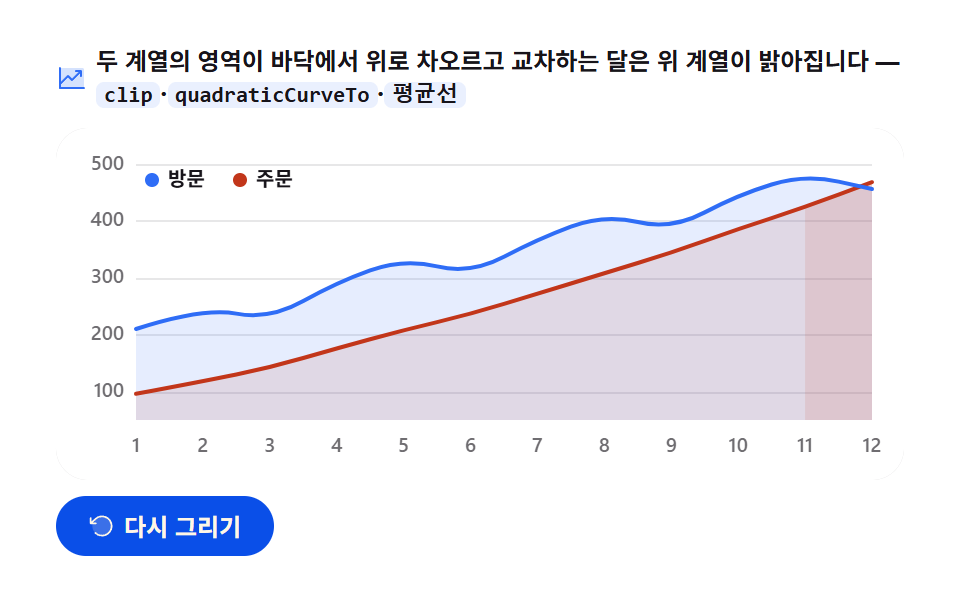 05 chart-canvas-area-rise
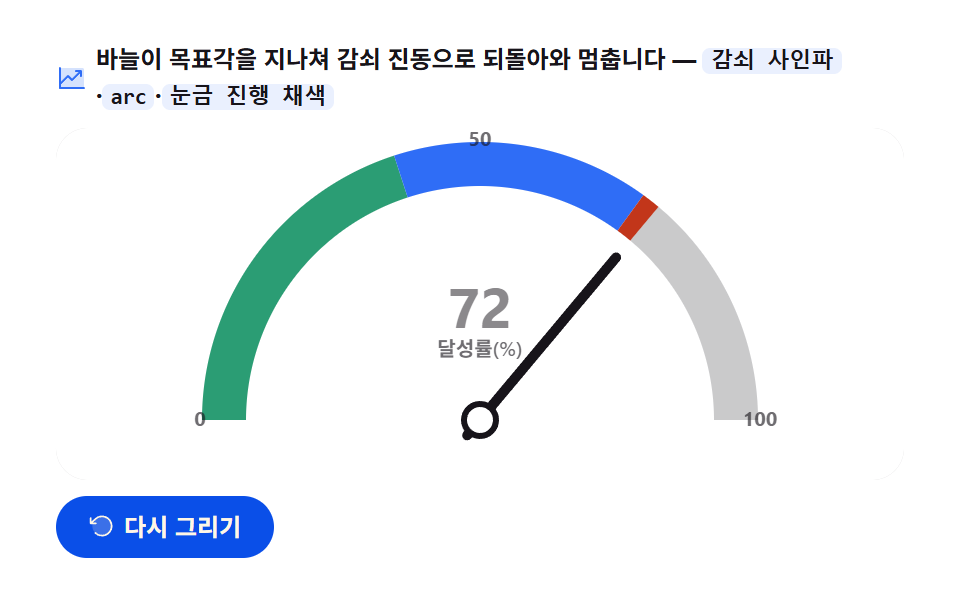 06 chart-canvas-gauge-needle
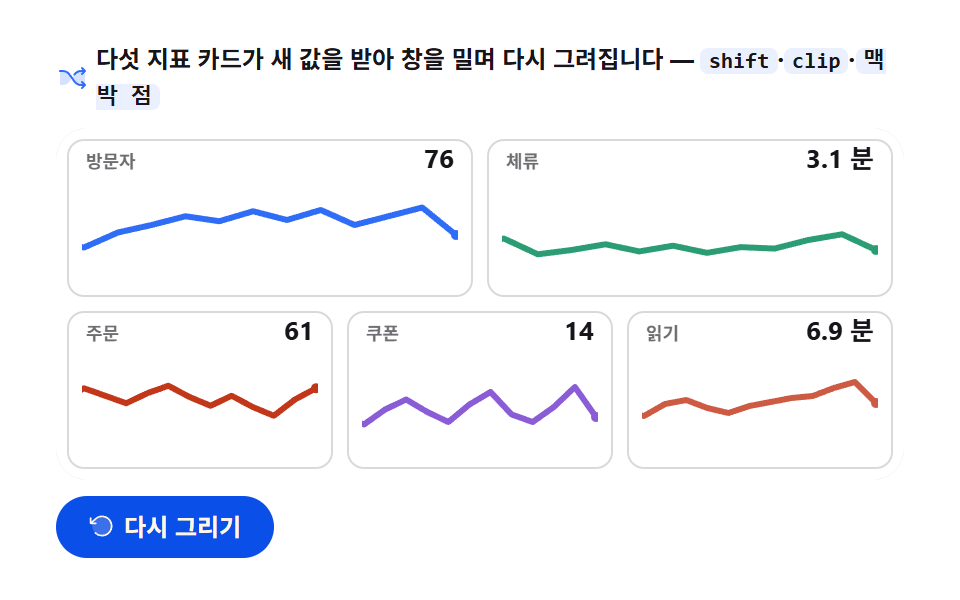 07 chart-canvas-sparkline-stream
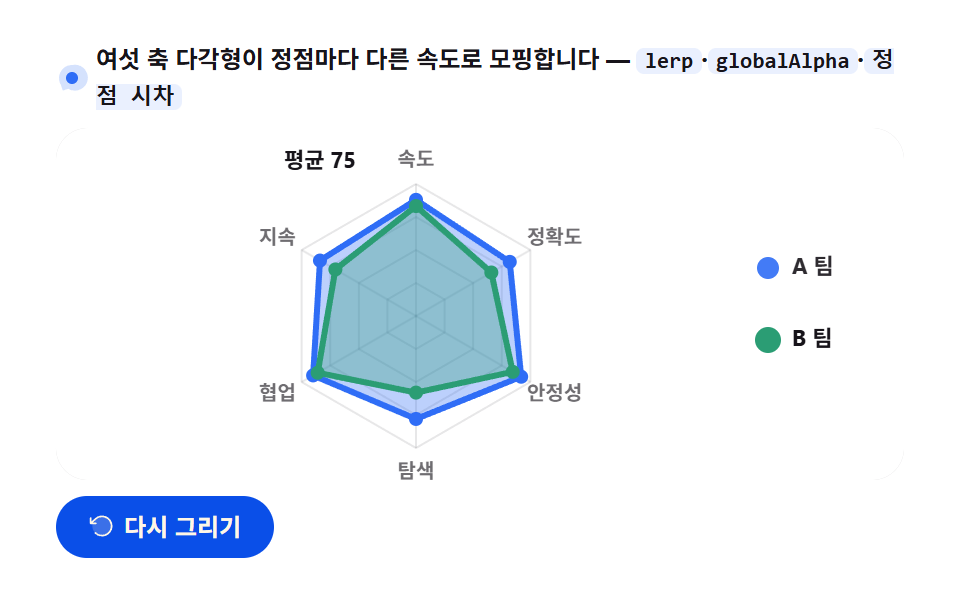 08 chart-canvas-radar-morph
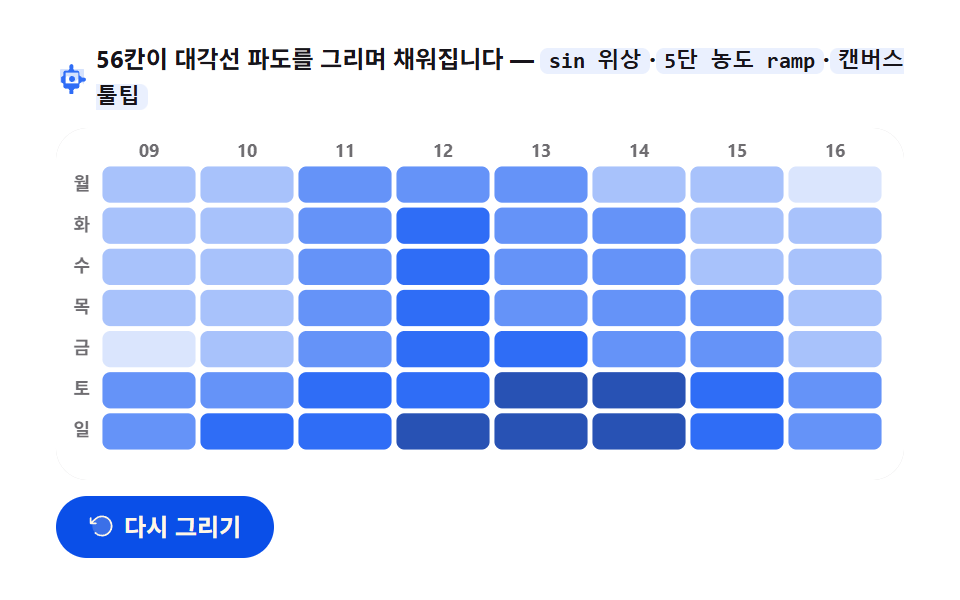 09 chart-canvas-heatmap-wave
自動再生 · タイルを押すとその項目へ · すべて1つのzip
並び順は難しさではなく canvas にインクを置く道具がひとつずつ増えていく順 です。一本のストロークで始まった線(01)が矩形の塗りを手に入れて棒になり(02)、円弧を手に入れてドーナツになります(03)。同じ平面に点を40個撒けば散布図(04)、塗った面を二枚重ねれば面グラフ(05)です。続く四つはそのインクをどう動かすかです — 針が一本、減衰振動しながら値を語り(06)、時間窓が押されて五本のミニ線が生きて呼吸し(07)、多角形が頂点ごとに違う速度で変形し(08)、最後に56個のセルが波になって満ちていきます(09)。ピクセルを計算する側に興味があるなら canvas 特殊効果 9種 で水滴とブラックホールを、ベクターで描く側は css グラフ をSVGで描く9種 で、すでに描かれたグラフをマウスで触る側は ダッシュボード グラフ デザイン 操作 9選 で扱っています。
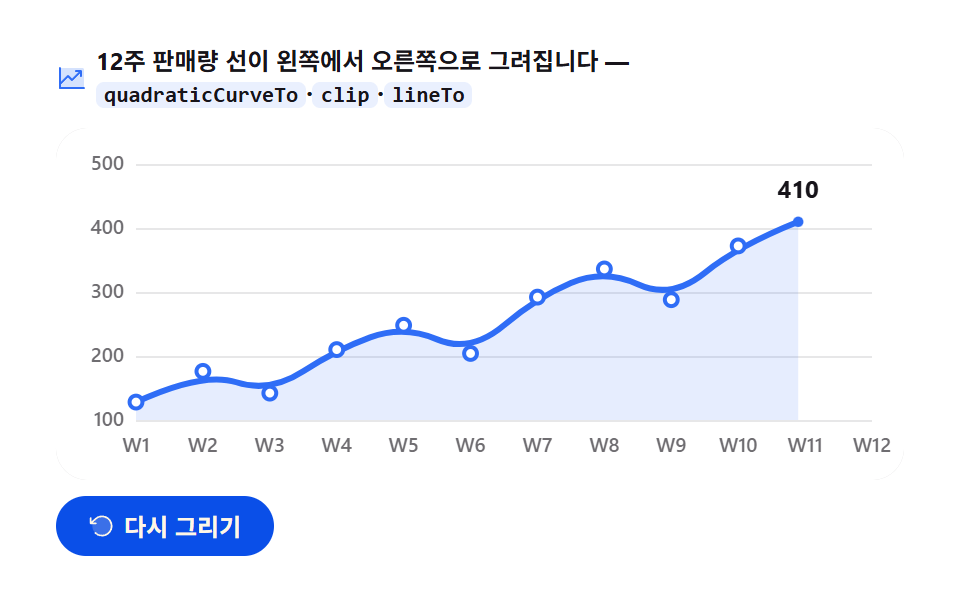
01折れ線グラフの描画 — クリップが開いて現れる12週間
画面に見えるもの
再描画ボタンを押すと、12週間の売上 [128, 176, 142, 210, 248, 204, 292, 336, 288, 372, 414, 468] が左から右へひと筆で引かれ、ペンが通った頂点には紙色のマーカーが打たれ、最後に端点が半径2.6から5.5へ膨らんで止まります。
<main class="stage">
<div class="lc" id="lc">
  <p class="lc__hint">
    <svg class="lc__ico" viewBox="0 0 256 256" aria-hidden="true"><g fill="currentColor"><path d="M224 64v144H32V48h176a16 16 0 0 1 16 16" opacity=".2"/><path d="M232 208a8 8 0 0 1-8 8H32a8 8 0 0 1-8-8V48a8 8 0 0 1 16 0v108.69l50.34-50.35a8 8 0 0 1 11.32 0L128 132.69L180.69 80H160a8 8 0 0 1 0-16h40a8 8 0 0 1 8 8v40a8 8 0 0 1-16 0V91.31l-58.34 58.35a8 8 0 0 1-11.32 0L96 123.31l-56 56V200h184a8 8 0 0 1 8 8"/></g></svg>
    <span>12週間の売上ラインが左から右へ描かれます — <code>quadraticCurveTo</code>·<code>clip</code>·<code>lineTo</code></span>
  </p>
  <div class="lc__field" id="field" role="application" aria-label="折れ線グラフ描画の実験台" tabindex="0">
    <canvas class="lc__cv" id="cv" role="img" aria-label="12週間の売上折れ線グラフ — 週を追って上がる折れ線の姿"></canvas>
  </div>
  <div class="lc__bar">
    <button class="lc__btn" id="replay" type="button">
      <svg class="lc__bico" viewBox="0 0 256 256" aria-hidden="true"><g fill="currentColor"><path d="M216 128a88 88 0 1 1-88-88a88 88 0 0 1 88 88" opacity=".2"/><path d="M224 128a96 96 0 0 1-94.71 96H128a95.38 95.38 0 0 1-65.9-26.2a8 8 0 0 1 11-11.63a80 80 0 1 0-1.67-114.78a3 3 0 0 1-.26.25L44.59 96H72a8 8 0 0 1 0 16H24a8 8 0 0 1-8-8V56a8 8 0 0 1 16 0v29.8L60.25 60A96 96 0 0 1 224 128"/></g></svg>
      <span>再描画</span>
    </button>
    <table class="sr-only">
      <caption>12週間の売上(単位:個)</caption>
      <thead><tr><th scope="col">週</th><th scope="col">売上</th></tr></thead>
      <tbody>
        <tr><th scope="row">1週</th><td>128</td></tr>
        <tr><th scope="row">2週</th><td>176</td></tr>
        <tr><th scope="row">3週</th><td>142</td></tr>
        <tr><th scope="row">4週</th><td>210</td></tr>
        <tr><th scope="row">5週</th><td>248</td></tr>
        <tr><th scope="row">6週</th><td>204</td></tr>
        <tr><th scope="row">7週</th><td>292</td></tr>
        <tr><th scope="row">8週</th><td>336</td></tr>
        <tr><th scope="row">9週</th><td>288</td></tr>
        <tr><th scope="row">10週</th><td>372</td></tr>
        <tr><th scope="row">11週</th><td>414</td></tr>
        <tr><th scope="row">12週</th><td>468</td></tr>
      </tbody>
    </table>
  </div>
</div>
</main>@use "../../../../site/static/demo-tokens" as *;
// 선 그래프 그리기 — 움직임은 전부 캔버스 rAF 루프 안(끝점 이동 + quadraticCurveTo 경로 + clip 리빌).
// CSS 애니메이션이 0개여야 렌더러가 실시간 24장을 찍는다(077·304 선례).
// 무대는 $stage-paper(흰) — 차트는 밝은 무대가 정석. 색은 차트 토큰 고정 순서 1번.
$duration: $dur-loop;
$easing: $ease-spring;
$color: $chart-1;
@include stage($stage-paper);
// 화면 낭독기용 표 — 캔버스를 읽지 못하므로 같은 데이터를 표로 붙인다
.sr-only {
// fixed + top/left 명시 — absolute 였을 때 표의 실제 콘텐츠 높이(12행 ≒ 390px)가 scrollHeight 에
// 잡혀 데스크톱·폰 전부 세로 넘침(BD8/BD9)이 났다. top 을 주지 않으면 static 자리 기준으로
// 배치돼 여전히 scrollHeight 에 들어간다 — 좌상단 고정으로 문서 흐름에서 완전히 뺀다.
position: fixed; top: 0; left: 0; width: 1px; height: 1px; margin: -1px;
overflow: hidden; clip: rect(0 0 0 0); white-space: nowrap;
}
.lc {
// 캔버스가 읽는 색 — JS 가 getComputedStyle 로 꺼내 쓴다. vivid 리터럴은 두지 않는다(BD26)
--chart-1: #{$color};
--fill-1: #{rgba($chart-1, .12)};
--ink: #{$subject-ink};
--mute: #{rgba($subject-ink, .62)};
--grid: #{rgba($subject-ink, .10)};
--paper: #{$stage-paper};
display: flex; flex-direction: column; gap: $sp-2;
width: 100%; max-width: 424px;
}
.lc__hint {
display: flex; align-items: center; gap: $sp-1; margin: 0;
font-weight: 700; font-size: clamp(10px, 2.8vw, 12px); line-height: 1.35;
color: $subject-ink;
}
.lc__hint code {
padding: 0 $sp-1; border-radius: $r-xs;
background: rgba($chart-1, .10);
color: $subject-ink;
font-weight: 700; font-size: .92em; line-height: 1.3;
}
.lc__ico { width: 16px; height: 16px; flex: 0 0 auto; color: $color; }
.lc__field {
position: relative; height: 176px;
border-radius: $r-card; overflow: hidden;
background: $stage-paper;
box-shadow: inset 0 0 0 1px rgba($subject-ink, .16);
}
.lc__cv { display: block; width: 100%; height: 100%; }
.lc__bar {
display: flex; align-items: center; gap: $sp-2;
}
.lc__btn {
display: inline-flex; align-items: center; gap: $sp-1;
box-sizing: border-box; padding: $sp-2 $sp-4; border: 0;
border-radius: $r-pill; background: $subject-blue-deep; color: $subject-cream;
font-family: inherit; font-weight: 700; font-size: 12px; line-height: 1.2;
cursor: pointer;
}
.lc__btn:focus-visible { outline: 2px solid $color; outline-offset: 2px; }
.lc__bico { width: 14px; height: 14px; flex: 0 0 auto; }
@media (max-width: 340px) {
.lc { gap: $sp-1; }
.lc__field { height: 112px; }
.lc__hint { font-size: 10px; }
.lc__btn { padding: $sp-1 $sp-3; font-size: 11px; }
}
// reduce — 루프가 아예 안 돌므로 끄고 말고 할 애니메이션이 없다.
// 완성 상태 한 장이 남으므로 "다시 그리기"는 여전히 정지 이미지를 다시 그린다.
@media (prefers-reduced-motion: reduce) {
.lc__btn { cursor: default; }
}html, body {
margin: 0;
overflow: hidden;
}
.stage {
box-sizing: border-box;
min-height: 100vh;
display: grid;
place-items: center;
margin: 0;
background: #ffffff;
font-family: -apple-system, "Segoe UI", "Noto Sans KR", sans-serif;
padding: clamp(8px, 4vw, 24px);
}
.sr-only {
position: fixed;
top: 0;
left: 0;
width: 1px;
height: 1px;
margin: -1px;
overflow: hidden;
clip: rect(0 0 0 0);
white-space: nowrap;
}
.lc {
--chart-1: #2f6df6;
--fill-1: rgba(47, 109, 246, 0.12);
--ink: #17141a;
--mute: rgba(23, 20, 26, 0.62);
--grid: rgba(23, 20, 26, 0.1);
--paper: #ffffff;
display: flex;
flex-direction: column;
gap: 8px;
width: 100%;
max-width: 424px;
}
.lc__hint {
display: flex;
align-items: center;
gap: 4px;
margin: 0;
font-weight: 700;
font-size: clamp(10px, 2.8vw, 12px);
line-height: 1.35;
color: #17141a;
}
.lc__hint code {
padding: 0 4px;
border-radius: 4px;
background: rgba(47, 109, 246, 0.1);
color: #17141a;
font-weight: 700;
font-size: 0.92em;
line-height: 1.3;
}
.lc__ico {
width: 16px;
height: 16px;
flex: 0 0 auto;
color: #2f6df6;
}
.lc__field {
position: relative;
height: 176px;
border-radius: 16px;
overflow: hidden;
background: #ffffff;
box-shadow: inset 0 0 0 1px rgba(23, 20, 26, 0.16);
}
.lc__cv {
display: block;
width: 100%;
height: 100%;
}
.lc__bar {
display: flex;
align-items: center;
gap: 8px;
}
.lc__btn {
display: inline-flex;
align-items: center;
gap: 4px;
box-sizing: border-box;
padding: 8px 16px;
border: 0;
border-radius: 999px;
background: #0a4fe8;
color: #fff7e6;
font-family: inherit;
font-weight: 700;
font-size: 12px;
line-height: 1.2;
cursor: pointer;
}
.lc__btn:focus-visible {
outline: 2px solid #2f6df6;
outline-offset: 2px;
}
.lc__bico {
width: 14px;
height: 14px;
flex: 0 0 auto;
}
@media (max-width: 340px) {
.lc {
gap: 4px;
}
.lc__field {
height: 112px;
}
.lc__hint {
font-size: 10px;
}
.lc__btn {
padding: 4px 12px;
font-size: 11px;
}
}
@media (prefers-reduced-motion: reduce) {
.lc__btn {
cursor: default;
}
}// 선 그래프 그리기 — 12週 판매량을 이어 그리는 애니메이션.
// 두 겹이 함께 움직인다:
// 1) 끝점이 x 축을 따라 이동하며, 지나온 꼭짓점들은 quadraticCurveTo 로 모서리를 눌러 이어진다(중점 제어).
// 2) 클리핑 사각형이 같은 속도로 왼쪽에서 오른쪽으로 열려, 선이 지나온 순서대로 드러난다.
// 그리드와 軸 라벨은 정적이므로 reveal 초반에 먼저 띄우고, 선이 그 위를 지나간다.
var root = document.getElementById('lc');
var field = document.getElementById('field');
var cv = document.getElementById('cv');
var ctx = cv.getContext('2d');
var replayBtn = document.getElementById('replay');
var css = getComputedStyle(root);
var C_LINE = css.getPropertyValue('--chart-1').trim();
var C_FILL = css.getPropertyValue('--fill-1').trim();
var C_INK = css.getPropertyValue('--ink').trim();
var C_MUTE = css.getPropertyValue('--mute').trim();
var C_GRID = css.getPropertyValue('--grid').trim();
var C_PAPER = css.getPropertyValue('--paper').trim();
var FONT = '-apple-system, "Segoe UI", "Noto Sans KR", sans-serif';
// 고정 시드 데이터 — 12週 売上(개). 난수가 아니라 코드 안 배열이므로 다시 그려도 같은 그림
var WEEKS = [128, 176, 142, 210, 248, 204, 292, 336, 288, 372, 414, 468];
var PAD_L = 40, PAD_R = 16, PAD_T = 18, PAD_B = 30; // 軸 라벨 여백(CSS px)
var LOOP = 2; // 한 사이클 2초 — 캡처 창과 같아 gif 가 이어진다
var DRAW_AT = 0.88; // 전체 2초의 88% 에 그리기가 끝나고, 끝점이 커지며 잠시 쉰다
var Y_TOP = 100, Y_SPAN = 500; // y 軸 스케일 고정(100~500개)
var reduce = window.matchMedia('(prefers-reduced-motion: reduce)').matches;
var W = 0, H = 0, dpr = 1;
var t0 = 0, raf = 0;
function fit() {
var r = field.getBoundingClientRect();
dpr = window.devicePixelRatio || 1;
W = r.width; H = r.height;
cv.width = Math.round(W * dpr);
cv.height = Math.round(H * dpr);
ctx.setTransform(dpr, 0, 0, dpr, 0, 0);
}
// 데이터 인덱스 → 플롯 좌표. y 는 위로 갈수록 크다
function xAt(i) { return PAD_L + (W - PAD_L - PAD_R) * (i / (WEEKS.length - 1)); }
function yAt(v) { return PAD_T + (H - PAD_T - PAD_B) * (1 - (v - Y_TOP) / (Y_SPAN - Y_TOP)); }
// 그리기 진행 p(0..1) → { i, k, ex, ey, f }
// f = 0..11 정규화 경과, i·k = 현재 변, (ex,ey) = 끝점 좌표
function headAt(p) {
var n = WEEKS.length;
var f = Math.min(1, p / DRAW_AT) * (n - 1);
var i = Math.min(n - 2, Math.floor(f));
var k = f - i;
var ex = xAt(i) + (xAt(i + 1) - xAt(i)) * k;
var ey = yAt(WEEKS[i]) + (yAt(WEEKS[i + 1]) - yAt(WEEKS[i])) * k;
return { i: i, k: k, f: f, ex: ex, ey: ey };
}
// 현재 끝점까지의 부드러운 경로를 만든다.
// 지나온 꼭짓점은 제어점으로 삼아 다음 꼭짓점과의 중점까지 quadraticCurveTo 로 누른다(정점을 스치듯),
// 마지막 구간은 현재 끝점까지 직선(lineTo) — 그리고 있는 순간의 펜 끝이다.
function tracePath(p) {
var d = headAt(p);
ctx.beginPath();
ctx.moveTo(xAt(0), yAt(WEEKS[0]));
for (var j = 1; j < d.i; j++) {
ctx.quadraticCurveTo(xAt(j), yAt(WEEKS[j]), (xAt(j) + xAt(j + 1)) / 2, (yAt(WEEKS[j]) + yAt(WEEKS[j + 1])) / 2);
}
if (d.i >= 1) {
ctx.quadraticCurveTo(xAt(d.i), yAt(WEEKS[d.i]), d.ex, d.ey);
} else {
ctx.lineTo(d.ex, d.ey);
}
return d;
}
// 목표를 살짝 넘겼다가 돌아오는 오버슛 — 끝점이 자리 잡을 때 커지는 감
function easeOutBack(t) {
var c = 1.7;
return 1 + (c + 1) * Math.pow(t - 1, 3) + c * Math.pow(t - 1, 2);
}
function draw(p) {
ctx.clearRect(0, 0, W, H);
ctx.fillStyle = C_PAPER;
ctx.fillRect(0, 0, W, H);
// 가로 그리드 + y 라벨 — 100~500 다섯 줄. 첫 12% 동안 아래에서 위로 떠오른다
var axisP = Math.min(1, p / 0.12);
ctx.lineWidth = 1;
ctx.font = '600 10px ' + FONT;
ctx.textBaseline = 'middle';
ctx.textAlign = 'right';
for (var g = Y_TOP; g <= Y_SPAN; g += 100) {
var gy = yAt(g) + (1 - axisP) * 14;
ctx.strokeStyle = C_GRID;
ctx.beginPath();
ctx.moveTo(PAD_L, Math.round(gy) + 0.5);
ctx.lineTo(W - PAD_R, Math.round(gy) + 0.5);
ctx.stroke();
ctx.fillStyle = C_MUTE;
ctx.globalAlpha = axisP;
ctx.fillText(String(g), PAD_L - 6, gy);
ctx.globalAlpha = 1;
}
// x 라벨(週) — 축이 뜬 뒤 왼쪽부터 차례로 나타난다
ctx.textAlign = 'center';
for (var w = 0; w < WEEKS.length; w++) {
var wp = Math.max(0, Math.min(1, (p - 0.10 - w * 0.018) / 0.10));
if (wp <= 0) continue;
ctx.fillStyle = C_MUTE;
ctx.globalAlpha = wp;
ctx.fillText('W' + (w + 1), xAt(w), H - PAD_B + 13);
ctx.globalAlpha = 1;
}
// 클리핑 사각형 — 왼쪽에서 오른쪽으로 열린다. 이 안에서만 면과 선이 보인다
var cutX = PAD_L + (W - PAD_L - PAD_R) * Math.min(1, p / DRAW_AT);
ctx.save();
ctx.beginPath();
ctx.rect(0, 0, cutX + 1, H);
ctx.clip();
// 영역 채움(면) — 선 아래를 옅게 깐다. 움직이는 면적이 커야 측정 강도가 오른다
var d0 = tracePath(p);
ctx.lineTo(d0.ex, H - PAD_B);
ctx.lineTo(xAt(0), H - PAD_B);
ctx.closePath();
ctx.fillStyle = C_FILL;
ctx.fill();
// 선 — 3px. 경로를 다시 만들어 그린다
var d1 = tracePath(p);
ctx.strokeStyle = C_LINE;
ctx.lineWidth = 3;
ctx.lineJoin = 'round';
ctx.lineCap = 'round';
ctx.stroke();
ctx.restore();
// 꼭짓점 마커 — 끝점이 지나온 점만 종이색 속에 파란 테두리로 박는다(지나온 순서 확인)
for (var m = 0; m <= d1.i; m++) {
ctx.beginPath();
ctx.arc(xAt(m), yAt(WEEKS[m]), 3.2, 0, Math.PI * 2);
ctx.fillStyle = C_PAPER;
ctx.fill();
ctx.strokeStyle = C_LINE;
ctx.lineWidth = 2;
ctx.stroke();
}
// 끝점 — 그리기가 끝나면 오버슛으로 커진다(2.6 에서 5.5 로). 커지며 링이 한 번 퍼진다
var settled = Math.max(0, (p - DRAW_AT) / (1 - DRAW_AT));
var r0 = 2.6 + 2.9 * easeOutBack(Math.min(1, settled * 1.8));
ctx.beginPath();
ctx.arc(d1.ex, d1.ey, r0, 0, Math.PI * 2);
ctx.fillStyle = C_LINE;
ctx.fill();
if (settled > 0 && settled < 1) {
ctx.beginPath();
ctx.arc(d1.ex, d1.ey, r0 + 14 * settled, 0, Math.PI * 2);
ctx.strokeStyle = C_LINE;
ctx.globalAlpha = 0.5 * (1 - settled);
ctx.lineWidth = 2;
ctx.stroke();
ctx.globalAlpha = 1;
}
// 끝 値 라벨 — 끝점 위에서 따라오르는 値(변 위에서 보간되어 카운트업처럼 오른다)
if (p > 0.06) {
var lv = Math.round(WEEKS[d1.i] + (WEEKS[d1.i + 1] - WEEKS[d1.i]) * d1.k);
ctx.font = '700 12px ' + FONT;
ctx.textAlign = 'center';
ctx.textBaseline = 'alphabetic';
ctx.fillStyle = C_INK;
ctx.fillText(String(lv), Math.min(W - 20, Math.max(PAD_L, d1.ex)), d1.ey - 12 - 6 * settled);
}
}
function frame(now) {
if (!t0) t0 = now;
var p = ((now - t0) / 1000 % LOOP) / LOOP; // 0..1, 2초 루프
draw(p);
raf = requestAnimationFrame(frame);
}
replayBtn.addEventListener('click', function () { t0 = 0; });
window.addEventListener('resize', function () { fit(); if (reduce) draw(1); });
fit();
if (reduce) {
// reduce — 루프 없이 완성 상태(12週 전체가 그려지고 끝점이 커진 한 장)만 그린다
draw(1);
} else {
raf = requestAnimationFrame(frame);
}// LineDrawChart — vanilla 판(run/305/demo/01-chart-canvas-line-draw/index.html) 의 React 포트.
// 끝점이 x 축을 따라 이동하며 지나온 꼭짓점은 quadraticCurveTo 로 눌리고,
// 클리핑 사각형이 왼쪽에서 오른쪽으로 열려 선이 지나온 순서대로 드러난다.
// 움직임은 캔버스 rAF 루프가 전부 그리므로 @keyframes 가 없다 — props 는 CSS 변수로 내려간다.
import { useEffect, useRef } from "react";
import type { CSSProperties } from "react";
import styles from "./LineDrawChart.module.scss";
export type LineDrawChartProps = {
duration?: string;
easing?: string;
color?: string;
};
type Vars = CSSProperties & { "--duration"?: string; "--easing"?: string; "--color"?: string };
// useRef 는 T | null 을 돌려준다. 처음부터 값이 있고 절대 비지 않는 상자는 이렇게 좁혀 쓴다
type Box<T> = { current: T };
// 고정 시드 데이터 — 12주 판매량(개). 난수가 아니라 코드 안 배열
const WEEKS = [128, 176, 142, 210, 248, 204, 292, 336, 288, 372, 414, 468];
const PAD_L = 40, PAD_R = 16, PAD_T = 18, PAD_B = 30;
const LOOP = 2; // 한 사이클 2초
const DRAW_AT = 0.88; // 전체의 88% 에 그리기가 끝나고 끝점이 커지며 쉰다
const Y_TOP = 100, Y_SPAN = 500;
const FONT = '-apple-system, "Segoe UI", "Noto Sans KR", sans-serif';
const FIELD_LABEL = "선 그래프 그리기 실험판";
const CV_LABEL = "12주 판매량 선 그래프 — 꺾이는 선이 주차를 따라 오르는 모습";
export default function LineDrawChart({
duration = "2s", // vanilla $duration: $dur-loop
easing = "cubic-bezier(.2, .8, .2, 1)", // vanilla $easing: $ease-spring
color = "#2f6df6", // vanilla $color: $chart-1
}: LineDrawChartProps) {
const rootRef = useRef<HTMLDivElement | null>(null);
const cvRef = useRef<HTMLCanvasElement | null>(null);
const ctxRef = useRef<CanvasRenderingContext2D | null>(null);
const sizeRef = useRef({ w: 0, h: 0 }) as Box<{ w: number; h: number }>;
const t0Ref = useRef(0) as Box<number>;
const rafRef = useRef(0) as Box<number>;
const vars: Vars = { "--duration": duration, "--easing": easing, "--color": color };
function reduced(): boolean {
return window.matchMedia("(prefers-reduced-motion: reduce)").matches;
}
function cssv(n: string): string {
const root = rootRef.current;
return root ? getComputedStyle(root).getPropertyValue(n).trim() : "";
}
// 고DPI — 배킹 스토어는 devicePixelRatio 배, 그리기 좌표계는 CSS 픽셀 그대로
function fit(): void {
const cv = cvRef.current;
const s = sizeRef.current;
if (!cv) return;
const r = cv.getBoundingClientRect();
const dpr = window.devicePixelRatio || 1;
s.w = r.width; s.h = r.height;
cv.width = Math.round(r.width * dpr);
cv.height = Math.round(r.height * dpr);
const ctx = ctxRef.current;
if (ctx) ctx.setTransform(dpr, 0, 0, dpr, 0, 0);
}
function xAt(i: number): number {
const W = sizeRef.current.w;
return PAD_L + (W - PAD_L - PAD_R) * (i / (WEEKS.length - 1));
}
function yAt(v: number): number {
const H = sizeRef.current.h;
return PAD_T + (H - PAD_T - PAD_B) * (1 - (v - Y_TOP) / (Y_SPAN - Y_TOP));
}
// 그리기 진행 p(0..1) → 끝점 정보. f = 정규화 경과, i·k = 현재 변, (ex,ey) = 끝점
function headAt(p: number): { i: number; k: number; f: number; ex: number; ey: number } {
const n = WEEKS.length;
const f = Math.min(1, p / DRAW_AT) * (n - 1);
const i = Math.min(n - 2, Math.floor(f));
const k = f - i;
const ex = xAt(i) + (xAt(i + 1) - xAt(i)) * k;
const ey = yAt(WEEKS[i]) + (yAt(WEEKS[i + 1]) - yAt(WEEKS[i])) * k;
return { i, k, f, ex, ey };
}
// 지나온 꼭짓점을 중점 제어로 누른 경로. 마지막 구간은 현재 끝점까지 직선
function tracePath(p: number): { i: number; k: number; f: number; ex: number; ey: number } {
const ctx = ctxRef.current!;
const d = headAt(p);
ctx.beginPath();
ctx.moveTo(xAt(0), yAt(WEEKS[0]));
for (let j = 1; j < d.i; j++) {
ctx.quadraticCurveTo(xAt(j), yAt(WEEKS[j]), (xAt(j) + xAt(j + 1)) / 2, (yAt(WEEKS[j]) + yAt(WEEKS[j + 1])) / 2);
}
if (d.i >= 1) {
ctx.quadraticCurveTo(xAt(d.i), yAt(WEEKS[d.i]), d.ex, d.ey);
} else {
ctx.lineTo(d.ex, d.ey);
}
return d;
}
// 목표를 살짝 넘겼다가 돌아오는 오버슛 — 끝점이 자리 잡을 때 커지는 감
function easeOutBack(t: number): number {
const c = 1.7;
return 1 + (c + 1) * Math.pow(t - 1, 3) + c * Math.pow(t - 1, 2);
}
function draw(p: number): void {
const ctx = ctxRef.current;
if (!ctx) return;
const W = sizeRef.current.w, H = sizeRef.current.h;
const C_LINE = cssv("--chart-1") || color;
const C_FILL = cssv("--fill-1");
const C_INK = cssv("--ink");
const C_MUTE = cssv("--mute");
const C_GRID = cssv("--grid");
const C_PAPER = cssv("--paper");
ctx.clearRect(0, 0, W, H);
ctx.fillStyle = C_PAPER;
ctx.fillRect(0, 0, W, H);
// 가로 그리드 + y 라벨 — 첫 12% 동안 아래에서 위로 떠오른다
const axisP = Math.min(1, p / 0.12);
ctx.lineWidth = 1;
ctx.font = "600 10px " + FONT;
ctx.textBaseline = "middle";
ctx.textAlign = "right";
for (let g = Y_TOP; g <= Y_SPAN; g += 100) {
const gy = yAt(g) + (1 - axisP) * 14;
ctx.strokeStyle = C_GRID;
ctx.beginPath();
ctx.moveTo(PAD_L, Math.round(gy) + 0.5);
ctx.lineTo(W - PAD_R, Math.round(gy) + 0.5);
ctx.stroke();
ctx.fillStyle = C_MUTE;
ctx.globalAlpha = axisP;
ctx.fillText(String(g), PAD_L - 6, gy);
ctx.globalAlpha = 1;
}
// x 라벨(주차) — 왼쪽부터 차례로
ctx.textAlign = "center";
for (let w = 0; w < WEEKS.length; w++) {
const wp = Math.max(0, Math.min(1, (p - 0.10 - w * 0.018) / 0.10));
if (wp <= 0) continue;
ctx.fillStyle = C_MUTE;
ctx.globalAlpha = wp;
ctx.fillText("W" + (w + 1), xAt(w), H - PAD_B + 13);
ctx.globalAlpha = 1;
}
// 클리핑 사각형 — 왼쪽에서 오른쪽으로 열린다
const cutX = PAD_L + (W - PAD_L - PAD_R) * Math.min(1, p / DRAW_AT);
ctx.save();
ctx.beginPath();
ctx.rect(0, 0, cutX + 1, H);
ctx.clip();
// 영역 채움 — 선 아래를 옅게 깐다
const d0 = tracePath(p);
ctx.lineTo(d0.ex, H - PAD_B);
ctx.lineTo(xAt(0), H - PAD_B);
ctx.closePath();
ctx.fillStyle = C_FILL;
ctx.fill();
// 선 — 2px
const d1 = tracePath(p);
ctx.strokeStyle = C_LINE;
ctx.lineWidth = 2;
ctx.lineJoin = "round";
ctx.lineCap = "round";
ctx.stroke();
ctx.restore();
// 꼭짓점 마커 — 끝점이 지나온 점만
for (let m = 0; m <= d1.i; m++) {
ctx.beginPath();
ctx.arc(xAt(m), yAt(WEEKS[m]), 2.6, 0, Math.PI * 2);
ctx.fillStyle = C_PAPER;
ctx.fill();
ctx.strokeStyle = C_LINE;
ctx.lineWidth = 2;
ctx.stroke();
}
// 끝점 — 착지하며 오버슛으로 커지고 링이 한 번 퍼진다
const settled = Math.max(0, (p - DRAW_AT) / (1 - DRAW_AT));
const r0 = 2.6 + 2.9 * easeOutBack(Math.min(1, settled * 1.8));
ctx.beginPath();
ctx.arc(d1.ex, d1.ey, r0, 0, Math.PI * 2);
ctx.fillStyle = C_LINE;
ctx.fill();
if (settled > 0 && settled < 1) {
ctx.beginPath();
ctx.arc(d1.ex, d1.ey, r0 + 14 * settled, 0, Math.PI * 2);
ctx.strokeStyle = C_LINE;
ctx.globalAlpha = 0.5 * (1 - settled);
ctx.lineWidth = 2;
ctx.stroke();
ctx.globalAlpha = 1;
}
// 끝 값 라벨 — 끝점 위에서 보간되어 오른다
if (p > 0.06) {
const lv = Math.round(WEEKS[d1.i] + (WEEKS[d1.i + 1] - WEEKS[d1.i]) * d1.k);
ctx.font = "700 12px " + FONT;
ctx.textAlign = "center";
ctx.textBaseline = "alphabetic";
ctx.fillStyle = C_INK;
ctx.fillText(String(lv), Math.min(W - 20, Math.max(PAD_L, d1.ex)), d1.ey - 12 - 6 * settled);
}
}
function frame(now: number): void {
if (!t0Ref.current) t0Ref.current = now;
const p = ((now - t0Ref.current) / 1000 % LOOP) / LOOP;
draw(p);
rafRef.current = requestAnimationFrame(frame);
}
function replay(): void {
t0Ref.current = 0;
}
function onResize(): void {
fit();
if (reduced()) draw(1);
}
useEffect(() => {
const cv = cvRef.current;
if (!cv) return;
ctxRef.current = cv.getContext("2d");
if (!ctxRef.current) return;
fit();
window.addEventListener("resize", onResize);
if (reduced()) {
// reduce — 루프 없이 완성 상태 한 장만 그린다
draw(1);
} else {
rafRef.current = requestAnimationFrame(frame);
}
return () => {
window.removeEventListener("resize", onResize);
cancelAnimationFrame(rafRef.current);
};
}, []);
return (
<main className={styles.stage}>
<div className={styles.root} ref={rootRef} style={vars}>
<p className={styles.hint}>
<svg className={styles.ico} viewBox="0 0 256 256" aria-hidden="true"><g fill="currentColor"><path d="M224 64v144H32V48h176a16 16 0 0 1 16 16" opacity=".2"/><path d="M232 208a8 8 0 0 1-8 8H32a8 8 0 0 1-8-8V48a8 8 0 0 1 16 0v108.69l50.34-50.35a8 8 0 0 1 11.32 0L128 132.69L180.69 80H160a8 8 0 0 1 0-16h40a8 8 0 0 1 8 8v40a8 8 0 0 1-16 0V91.31l-58.34 58.35a8 8 0 0 1-11.32 0L96 123.31l-56 56V200h184a8 8 0 0 1 8 8"/></g></svg>
<span>12주 판매량 선이 왼쪽에서 오른쪽으로 그려집니다 — <code>quadraticCurveTo</code>·<code>clip</code>·<code>lineTo</code></span>
</p>
<div className={styles.field} role="application" aria-label={FIELD_LABEL} tabIndex={0}>
<canvas className={styles.cv} ref={cvRef} role="img" aria-label={CV_LABEL}></canvas>
</div>
<div className={styles.bar}>
<button className={styles.btn} type="button" onClick={replay}>
<svg className={styles.bico} viewBox="0 0 256 256" aria-hidden="true"><g fill="currentColor"><path d="M216 128a88 88 0 1 1-88-88a88 88 0 0 1 88 88" opacity=".2"/><path d="M224 128a96 96 0 0 1-94.71 96H128a95.38 95.38 0 0 1-65.9-26.2a8 8 0 0 1 11-11.63a80 80 0 1 0-1.67-114.78a3 3 0 0 1-.26.25L44.59 96H72a8 8 0 0 1 0 16H24a8 8 0 0 1-8-8V56a8 8 0 0 1 16 0v29.8L60.25 60A96 96 0 0 1 224 128"/></g></svg>
<span>다시 그리기</span>
</button>
<table className={styles.srOnly}>
<caption>12주 판매량(단위: 개)</caption>
<thead><tr><th scope="col">주차</th><th scope="col">판매량</th></tr></thead>
<tbody>
{WEEKS.map((v, i) => (
<tr key={i}><th scope="row">{i + 1}주</th><td>{v}</td></tr>
))}
</tbody>
</table>
</div>
</div>
</main>
);
}01 · 折れ線グラフの描画 — 計測 累積面積 20.228% · 動いたフレーム 23/23GODRICH オリジナル · SCSS と React は zip に同梱 · パスワードを見る
計算の見どころ
2秒のループで動いたフレームは23/24、累積面積は20.228パーセントを記録しました。週次・月次レポートの最初の行に合う絵です — 進行 p を11個の週区間に載せて現在の辺と端点座標を求めるのがこのアニメーションの心臓部です。
// 描画の進行 p(0..1) → { i, k, ex, ey, f }
//   f = 0..11 の正規化経過、i・k = 現在の辺、(ex,ey) = 端点座標
function headAt(p) {
  var n = WEEKS.length;
  var f = Math.min(1, p / DRAW_AT) * (n - 1);
  var i = Math.min(n - 2, Math.floor(f));
  var k = f - i;
  var ex = xAt(i) + (xAt(i + 1) - xAt(i)) * k;
  var ey = yAt(WEEKS[i]) + (yAt(WEEKS[i + 1]) - yAt(WEEKS[i])) * k;
  return { i: i, k: k, f: f, ex: ex, ey: ey };
}
// 通過した頂点を制御点にして、次の頂点との**中点**まで quadraticCurveTo で押さえる(頂点をかすめるように)
function tracePath(p) {
  var d = headAt(p);
  ctx.beginPath();
  ctx.moveTo(xAt(0), yAt(WEEKS[0]));
  for (var j = 1; j < d.i; j++) {
    ctx.quadraticCurveTo(xAt(j), yAt(WEEKS[j]), (xAt(j) + xAt(j + 1)) / 2, (yAt(WEEKS[j]) + yAt(WEEKS[j + 1])) / 2);
  }
  if (d.i >= 1) {
    ctx.quadraticCurveTo(xAt(d.i), yAt(WEEKS[d.i]), d.ex, d.ey);
  } else {
    ctx.lineTo(d.ex, d.ey);
  }
  return d;
}
頂点を制御点にして隣の頂点との中点まで曲線を押さえるこのやり方は頂点をかすめて通るので階段のように跳ねず、データの位置は正確に守られ、クリッピング矩形が同じ速度で開いて線が通った順に現れます。
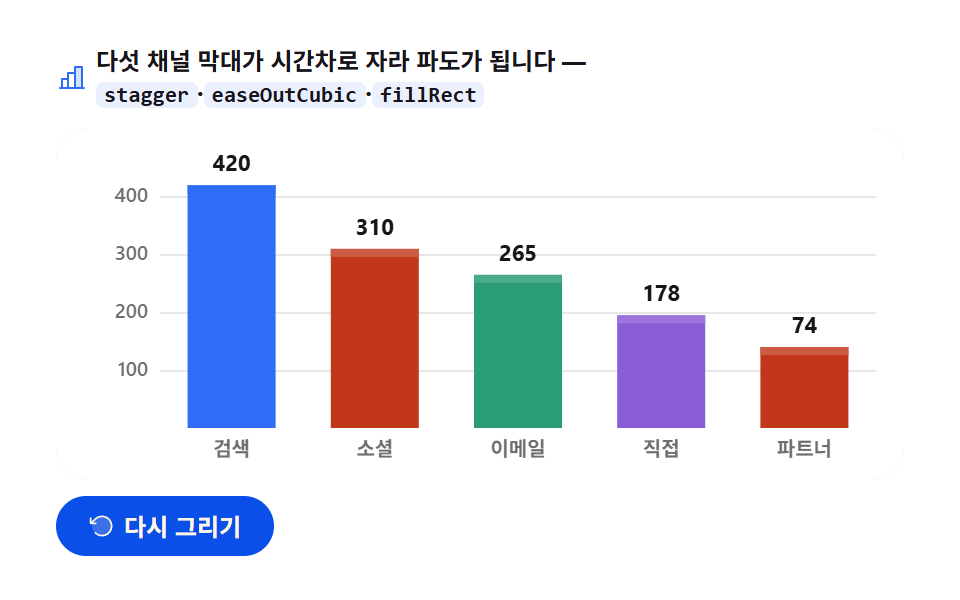
02棒グラフの成長 — 時間差で広がる波
画面に見えるもの
検索420・ソーシャル310・メール265・直接195・パートナー140(万ウォン)の五本の棒が全体の7.5パーセントの間隔で時間差を置いて足元から伸びて波になり、着地した棒から順に値ラベルがカウントアップされます。
<main class="stage">
<div class="bg" id="bg">
  <p class="bg__hint">
    <svg class="bg__ico" viewBox="0 0 256 256" aria-hidden="true"><g fill="currentColor"><path d="M208 40v168h-56V40Z" opacity=".2"/><path d="M224 200h-8V40a8 8 0 0 0-8-8h-56a8 8 0 0 0-8 8v40H96a8 8 0 0 0-8 8v40H48a8 8 0 0 0-8 8v64h-8a8 8 0 0 0 0 16h192a8 8 0 0 0 0-16M160 48h40v152h-40Zm-56 48h40v104h-40Zm-48 48h32v56H56Z"/></g></svg>
    <span>5つのチャネルバーが時間差で伸びて波になります — <code>stagger</code>·<code>easeOutCubic</code>·<code>fillRect</code></span>
  </p>
  <div class="bg__field" id="field" role="application" aria-label="棒グラフ成長の実験台" tabindex="0">
    <canvas class="bg__cv" id="cv" role="img" aria-label="5チャネル売上棒グラフ — 棒が下から値まで伸びる姿"></canvas>
  </div>
  <div class="bg__bar">
    <button class="bg__btn" id="replay" type="button">
      <svg class="bg__bico" viewBox="0 0 256 256" aria-hidden="true"><g fill="currentColor"><path d="M216 128a88 88 0 1 1-88-88a88 88 0 0 1 88 88" opacity=".2"/><path d="M224 128a96 96 0 0 1-94.71 96H128a95.38 95.38 0 0 1-65.9-26.2a8 8 0 0 1 11-11.63a80 80 0 1 0-1.67-114.78a3 3 0 0 1-.26.25L44.59 96H72a8 8 0 0 1 0 16H24a8 8 0 0 1-8-8V56a8 8 0 0 1 16 0v29.8L60.25 60A96 96 0 0 1 224 128"/></g></svg>
      <span>再描画</span>
    </button>
    <table class="sr-only">
      <caption>チャネル別四半期売上(単位:万ウォン)</caption>
      <thead><tr><th scope="col">チャネル</th><th scope="col">売上</th></tr></thead>
      <tbody>
        <tr><th scope="row">検索</th><td>420</td></tr>
        <tr><th scope="row">ソーシャル</th><td>310</td></tr>
        <tr><th scope="row">メール</th><td>265</td></tr>
        <tr><th scope="row">直接</th><td>195</td></tr>
        <tr><th scope="row">パートナー</th><td>140</td></tr>
      </tbody>
    </table>
  </div>
</div>
</main>@use "sass:color";
@use "../../../../site/static/demo-tokens" as *;
// 막대 그래프 성장 — 움직임은 전부 캔버스 rAF 루프 안(막대 stagger 성장 + 값 카운트업).
// CSS 애니메이션 0개 — 렌더러가 실시간 24장을 찍는다(077·304 선례).
// 막대 여러 개는 차트 토큰 고정 순서대로. 2·3·4번 계열은 파스텔 카운터파트(한 단 밝게)로 밝은 무대에 맞춘다.
$duration: $dur-loop;
$easing: $ease-out; // easeOutCubic 을 JS 에서 계산하므로 CSS 쪽 이징 토큰은 감속 역할명으로
$color: $chart-1;
@include stage($stage-paper);
// 화면 낭독기용 표 — 캔버스를 읽지 못하므로 같은 데이터를 표로 붙인다
.sr-only {
// fixed + top/left 명시 — absolute 였을 때 표의 실제 콘텐츠 높이(행 수만큼 ≒ 390px)가
// scrollHeight 에 잡혀 데스크톱·폰 전부 세로 넘침(BD8/BD9)이 났다. top 을 주지 않으면
// static 자리 기준으로 배치돼 여전히 scrollHeight 에 들어간다 — 좌상단 고정으로 뺀다.
position: fixed; top: 0; left: 0; width: 1px; height: 1px; margin: -1px;
overflow: hidden; clip: rect(0 0 0 0); white-space: nowrap;
}
.bg {
// 캔버스가 읽는 색 — JS 가 getComputedStyle 로 꺼내 쓴다
--chart-1: #{$chart-1};
--chart-2: #{$chart-2};
--chart-3: #{$chart-3};
--chart-4: #{$chart-4};
// 파스텔 카운터파트 — 어두운 무대 기준 계열색을 흰 무대 위 가시에 맞춘 리프트
--chart-2-lift: #{color.mix(#ffffff, $chart-2, 18%)};
--chart-3-lift: #{color.mix(#ffffff, $chart-3, 14%)};
--chart-4-lift: #{color.mix(#ffffff, $chart-4, 16%)};
--ink: #{$subject-ink};
--mute: #{rgba($subject-ink, .62)};
--grid: #{rgba($subject-ink, .10)};
--track: #{rgba($subject-ink, .06)};
--paper: #{$stage-paper};
display: flex; flex-direction: column; gap: $sp-2;
width: 100%; max-width: 424px;
}
.bg__hint {
display: flex; align-items: center; gap: $sp-1; margin: 0;
font-weight: 700; font-size: clamp(10px, 2.8vw, 12px); line-height: 1.35;
color: $subject-ink;
}
.bg__hint code {
padding: 0 $sp-1; border-radius: $r-xs;
background: rgba($chart-1, .10);
color: $subject-ink;
font-weight: 700; font-size: .92em; line-height: 1.3;
}
.bg__ico { width: 16px; height: 16px; flex: 0 0 auto; color: $color; }
.bg__field {
position: relative; height: 176px;
border-radius: $r-card; overflow: hidden;
background: $stage-paper;
box-shadow: inset 0 0 0 1px rgba($subject-ink, .16);
}
.bg__cv { display: block; width: 100%; height: 100%; }
.bg__bar {
display: flex; align-items: center; gap: $sp-2;
}
.bg__btn {
display: inline-flex; align-items: center; gap: $sp-1;
box-sizing: border-box; padding: $sp-2 $sp-4; border: 0;
border-radius: $r-pill; background: $subject-blue-deep; color: $subject-cream;
font-family: inherit; font-weight: 700; font-size: 12px; line-height: 1.2;
cursor: pointer;
}
.bg__btn:focus-visible { outline: 2px solid $color; outline-offset: 2px; }
.bg__bico { width: 14px; height: 14px; flex: 0 0 auto; }
@media (max-width: 340px) {
.bg { gap: $sp-1; }
.bg__field { height: 112px; }
.bg__hint { font-size: 10px; }
.bg__btn { padding: $sp-1 $sp-3; font-size: 11px; }
}
// reduce — 루프가 아예 안 돌므로 끌 애니메이션이 없다. 완성 상태 한 장만 남는다.
@media (prefers-reduced-motion: reduce) {
.bg__btn { cursor: default; }
}html, body {
margin: 0;
overflow: hidden;
}
.stage {
box-sizing: border-box;
min-height: 100vh;
display: grid;
place-items: center;
margin: 0;
background: #ffffff;
font-family: -apple-system, "Segoe UI", "Noto Sans KR", sans-serif;
padding: clamp(8px, 4vw, 24px);
}
.sr-only {
position: fixed;
top: 0;
left: 0;
width: 1px;
height: 1px;
margin: -1px;
overflow: hidden;
clip: rect(0 0 0 0);
white-space: nowrap;
}
.bg {
--chart-1: #2f6df6;
--chart-2: #c2361a;
--chart-3: #2b9d74;
--chart-4: #8a5cd6;
--chart-2-lift: rgb(80.3843137255%, 35.3647058824%, 26.3607843137%);
--chart-3-lift: rgb(28.5019607843%, 66.9490196078%, 53.1215686275%);
--chart-4-lift: rgb(61.4588235294%, 46.3058823529%, 86.4941176471%);
--ink: #17141a;
--mute: rgba(23, 20, 26, 0.62);
--grid: rgba(23, 20, 26, 0.1);
--track: rgba(23, 20, 26, 0.06);
--paper: #ffffff;
display: flex;
flex-direction: column;
gap: 8px;
width: 100%;
max-width: 424px;
}
.bg__hint {
display: flex;
align-items: center;
gap: 4px;
margin: 0;
font-weight: 700;
font-size: clamp(10px, 2.8vw, 12px);
line-height: 1.35;
color: #17141a;
}
.bg__hint code {
padding: 0 4px;
border-radius: 4px;
background: rgba(47, 109, 246, 0.1);
color: #17141a;
font-weight: 700;
font-size: 0.92em;
line-height: 1.3;
}
.bg__ico {
width: 16px;
height: 16px;
flex: 0 0 auto;
color: #2f6df6;
}
.bg__field {
position: relative;
height: 176px;
border-radius: 16px;
overflow: hidden;
background: #ffffff;
box-shadow: inset 0 0 0 1px rgba(23, 20, 26, 0.16);
}
.bg__cv {
display: block;
width: 100%;
height: 100%;
}
.bg__bar {
display: flex;
align-items: center;
gap: 8px;
}
.bg__btn {
display: inline-flex;
align-items: center;
gap: 4px;
box-sizing: border-box;
padding: 8px 16px;
border: 0;
border-radius: 999px;
background: #0a4fe8;
color: #fff7e6;
font-family: inherit;
font-weight: 700;
font-size: 12px;
line-height: 1.2;
cursor: pointer;
}
.bg__btn:focus-visible {
outline: 2px solid #2f6df6;
outline-offset: 2px;
}
.bg__bico {
width: 14px;
height: 14px;
flex: 0 0 auto;
}
@media (max-width: 340px) {
.bg {
gap: 4px;
}
.bg__field {
height: 112px;
}
.bg__hint {
font-size: 10px;
}
.bg__btn {
padding: 4px 12px;
font-size: 11px;
}
}
@media (prefers-reduced-motion: reduce) {
.bg__btn {
cursor: default;
}
}// 막대 그래프 성장 — 다섯 チャネル 매출이 바닥에서 값까지 자란다.
// 각 막대의 시작 시각이 오른쪽으로 갈수록 늦춰져(stagger) 파도처럼 번지고,
// 성장 곡선은 easeOutCubic(처음 빠르고 끝에서 뭉툭해지는 감속) — 막대가 "콩" 하고 착지하는 맛을 만든다.
// 막대가 다 자란 뒤(각자 자기 시각에) 値 레이블이 0 에서 값까지 카운트업된다.
var root = document.getElementById('bg');
var field = document.getElementById('field');
var cv = document.getElementById('cv');
var ctx = cv.getContext('2d');
var replayBtn = document.getElementById('replay');
var css = getComputedStyle(root);
var C_1 = css.getPropertyValue('--chart-1').trim();
var C_2 = css.getPropertyValue('--chart-2').trim();
var C_3 = css.getPropertyValue('--chart-3').trim();
var C_4 = css.getPropertyValue('--chart-4').trim();
var C_2L = css.getPropertyValue('--chart-2-lift').trim();
var C_3L = css.getPropertyValue('--chart-3-lift').trim();
var C_4L = css.getPropertyValue('--chart-4-lift').trim();
var C_INK = css.getPropertyValue('--ink').trim();
var C_MUTE = css.getPropertyValue('--mute').trim();
var C_GRID = css.getPropertyValue('--grid').trim();
var C_TRACK = css.getPropertyValue('--track').trim();
var C_PAPER = css.getPropertyValue('--paper').trim();
var FONT = '-apple-system, "Segoe UI", "Noto Sans KR", sans-serif';
// 고정 시드 데이터 — 다섯 チャネル 분기 売上(만원). 파스텔 카운터파트: 첫 계열은 그대로, 나머지는 한 단계 밝게
var ROWS = [
{ name: '検索', v: 420, c: C_1, lift: C_1 },
{ name: 'ソーシャル', v: 310, c: C_2, lift: C_2L },
{ name: 'メール', v: 265, c: C_3, lift: C_3L },
{ name: '直接', v: 195, c: C_4, lift: C_4L },
{ name: 'パートナー', v: 140, c: C_2, lift: C_2L }
];
var PAD_L = 52, PAD_R = 14, PAD_T = 20, PAD_B = 26;
var LOOP = 2; // 한 사이클 2초
var GROW = 0.46; // 막대 하나가 자라는 데 쓰는 구간(전체의 46%)
var STAGGER = 0.075; // 오른쪽 막대가 늦게 시작하는 간격 — 5개면 마지막은 0.30 에 시작
var COUNT_AT = 0.62; // 値 레이블 카운트업 시작(마지막 막대 착지 직후)
var reduce = window.matchMedia('(prefers-reduced-motion: reduce)').matches;
var W = 0, H = 0, dpr = 1;
var t0 = 0, raf = 0;
function fit() {
var r = field.getBoundingClientRect();
dpr = window.devicePixelRatio || 1;
W = r.width; H = r.height;
cv.width = Math.round(W * dpr);
cv.height = Math.round(H * dpr);
ctx.setTransform(dpr, 0, 0, dpr, 0, 0);
}
// 감속 이징 — 1 - (1-t)^3. 처음에 빨랐다가 목표에서 미끄러지듯 멈춘다
function easeOutCubic(t) { return 1 - Math.pow(1 - t, 3); }
function draw(p) {
ctx.clearRect(0, 0, W, H);
ctx.fillStyle = C_PAPER;
ctx.fillRect(0, 0, W, H);
var plotW = W - PAD_L - PAD_R;
var plotH = H - PAD_T - PAD_B;
var baseY = PAD_T + plotH;
var n = ROWS.length;
var slot = plotW / n;
var barW = Math.min(44, Math.max(18, slot * 0.62));
// 가로 그리드 — 100/200/300/400 네 줄. 첫 10% 에 아래에서 뜬다
var axisP = Math.min(1, p / 0.10);
ctx.lineWidth = 1;
ctx.font = '600 10px ' + FONT;
ctx.textBaseline = 'middle';
ctx.textAlign = 'right';
for (var g = 100; g <= 400; g += 100) {
var gy = baseY - plotH * (g / 450) + (1 - axisP) * 12;
ctx.strokeStyle = C_GRID;
ctx.beginPath();
ctx.moveTo(PAD_L, Math.round(gy) + 0.5);
ctx.lineTo(W - PAD_R, Math.round(gy) + 0.5);
ctx.stroke();
ctx.fillStyle = C_MUTE;
ctx.globalAlpha = axisP;
ctx.fillText(String(g), PAD_L - 6, gy);
ctx.globalAlpha = 1;
}
// 막대 다섯 개 — i 번째는 i*STAGGER 에 시작해 GROW 동안 자란다(stagger 파도)
for (var i = 0; i < n; i++) {
var row = ROWS[i];
var cx = PAD_L + slot * (i + 0.5);
var fullH = plotH * (row.v / 450);
// 바닥 트랙 — 다 자랐을 때의 자리를 옅게 미리 깔아 둔다(착지 목표가 보인다)
ctx.fillStyle = C_TRACK;
ctx.fillRect(cx - barW / 2, baseY - fullH, barW, fullH);
var local = Math.max(0, Math.min(1, (p - i * STAGGER) / GROW));
var eased = easeOutCubic(local);
var h = fullH * eased;
var y = baseY - h;
// 막대 — fillRect. 위 4px 를 같은 색의 밝은 단(lift)으로 덮어 둥근 데이터 끝처럼 보이게 한다
if (h > 0) {
ctx.fillStyle = row.c;
ctx.fillRect(cx - barW / 2, y, barW, h);
if (h > 5) {
ctx.fillStyle = row.lift;
ctx.fillRect(cx - barW / 2, y, barW, Math.min(4, h));
}
}
// 착지 순간의 잔물결 — 자라는 동안 막대 꼭대기에 작은 캡이 붙었다가 착지하며 사라진다
if (local > 0 && local < 1) {
ctx.beginPath();
ctx.arc(cx, y, 2.4, 0, Math.PI * 2);
ctx.fillStyle = row.c;
ctx.fill();
}
// チャネル 이름 — 軸 아래. 왼쪽부터 차례로 나타난다
var lp = Math.max(0, Math.min(1, (p - 0.06 - i * STAGGER) / 0.12));
ctx.textAlign = 'center';
ctx.textBaseline = 'alphabetic';
ctx.fillStyle = C_MUTE;
ctx.globalAlpha = lp;
ctx.font = '600 10px ' + FONT;
ctx.fillText(row.name, cx, baseY + 14);
ctx.globalAlpha = 1;
// 値 레이블 — 막대 착지 뒤 자기 차례에 카운트업. 착지 전엔 그리지 않는다
if (local >= 1) {
var cp = Math.max(0, Math.min(1, (p - (i * STAGGER + GROW)) / 0.22));
var shown = Math.round(row.v * easeOutCubic(cp));
ctx.font = '700 11px ' + FONT;
ctx.fillStyle = C_INK;
ctx.fillText(String(shown), cx, y - 7);
}
}
}
function frame(now) {
if (!t0) t0 = now;
var p = ((now - t0) / 1000 % LOOP) / LOOP; // 0..1, 2초 루프
draw(p);
raf = requestAnimationFrame(frame);
}
replayBtn.addEventListener('click', function () { t0 = 0; });
window.addEventListener('resize', function () { fit(); if (reduce) draw(1); });
fit();
if (reduce) {
// reduce — 루프 없이 완성 상태(다 자란 막대와 카운트업 끝난 値) 한 장만 그린다
draw(1);
} else {
raf = requestAnimationFrame(frame);
}// BarGrowChart — vanilla 판(run/305/demo/02-chart-canvas-bar-grow/index.html) 의 React 포트.
// 다섯 채널 막대가 stagger 로 시간차를 두고 바닥에서 값까지 easeOutCubic 으로 자라며,
// 착지한 막대부터 값 레이블이 카운트업된다. @keyframes 없음 — props 는 CSS 변수로 내려간다.
import { useEffect, useRef } from "react";
import type { CSSProperties } from "react";
import styles from "./BarGrowChart.module.scss";
export type BarGrowChartProps = {
duration?: string;
easing?: string;
color?: string;
};
type Vars = CSSProperties & { "--duration"?: string; "--easing"?: string; "--color"?: string };
type Box<T> = { current: T };
type Row = { name: string; v: number; cvar: string; liftvar: string };
// 고정 시드 데이터 — 다섯 채널 분기 매출(만원). 색은 CSS 변수 이름으로 달아둔다(그릴 때 읽는다)
const ROWS: Row[] = [
{ name: "검색", v: 420, cvar: "--chart-1", liftvar: "--chart-1" },
{ name: "소셜", v: 310, cvar: "--chart-2", liftvar: "--chart-2-lift" },
{ name: "이메일", v: 265, cvar: "--chart-3", liftvar: "--chart-3-lift" },
{ name: "직접", v: 195, cvar: "--chart-4", liftvar: "--chart-4-lift" },
{ name: "파트너", v: 140, cvar: "--chart-2", liftvar: "--chart-2-lift" }
];
const PAD_L = 52, PAD_R = 14, PAD_T = 20, PAD_B = 26;
const LOOP = 2; // 한 사이클 2초
const GROW = 0.46; // 막대 하나가 자라는 구간
const STAGGER = 0.075; // 오른쪽 막대가 늦게 시작하는 간격
const FONT = '-apple-system, "Segoe UI", "Noto Sans KR", sans-serif';
const FIELD_LABEL = "막대 그래프 성장 실험판";
const CV_LABEL = "다섯 채널 매출 막대 그래프 — 막대가 바닥에서 값까지 자라는 모습";
export default function BarGrowChart({
duration = "2s",
easing = "ease-out",
color = "#2f6df6",
}: BarGrowChartProps) {
const rootRef = useRef<HTMLDivElement | null>(null);
const cvRef = useRef<HTMLCanvasElement | null>(null);
const ctxRef = useRef<CanvasRenderingContext2D | null>(null);
const sizeRef = useRef({ w: 0, h: 0 }) as Box<{ w: number; h: number }>;
const t0Ref = useRef(0) as Box<number>;
const rafRef = useRef(0) as Box<number>;
const vars: Vars = { "--duration": duration, "--easing": easing, "--color": color };
function reduced(): boolean {
return window.matchMedia("(prefers-reduced-motion: reduce)").matches;
}
function cssv(n: string): string {
const root = rootRef.current;
return root ? getComputedStyle(root).getPropertyValue(n).trim() : "";
}
// 고DPI — 배킹 스토어는 devicePixelRatio 배, 그리기 좌표계는 CSS 픽셀 그대로
function fit(): void {
const cv = cvRef.current;
const s = sizeRef.current;
if (!cv) return;
const r = cv.getBoundingClientRect();
const dpr = window.devicePixelRatio || 1;
s.w = r.width; s.h = r.height;
cv.width = Math.round(r.width * dpr);
cv.height = Math.round(r.height * dpr);
const ctx = ctxRef.current;
if (ctx) ctx.setTransform(dpr, 0, 0, dpr, 0, 0);
}
// 감속 이징 — 1 - (1-t)^3
function easeOutCubic(t: number): number {
return 1 - Math.pow(1 - t, 3);
}
function draw(p: number): void {
const ctx = ctxRef.current;
if (!ctx) return;
const W = sizeRef.current.w, H = sizeRef.current.h;
const C_INK = cssv("--ink");
const C_MUTE = cssv("--mute");
const C_GRID = cssv("--grid");
const C_TRACK = cssv("--track");
const C_PAPER = cssv("--paper");
ctx.clearRect(0, 0, W, H);
ctx.fillStyle = C_PAPER;
ctx.fillRect(0, 0, W, H);
const plotW = W - PAD_L - PAD_R;
const plotH = H - PAD_T - PAD_B;
const baseY = PAD_T + plotH;
const n = ROWS.length;
const slot = plotW / n;
const barW = Math.min(30, Math.max(14, slot * 0.42));
// 가로 그리드 — 첫 10% 에 아래에서 뜬다
const axisP = Math.min(1, p / 0.10);
ctx.lineWidth = 1;
ctx.font = "600 10px " + FONT;
ctx.textBaseline = "middle";
ctx.textAlign = "right";
for (let g = 100; g <= 400; g += 100) {
const gy = baseY - plotH * (g / 450) + (1 - axisP) * 12;
ctx.strokeStyle = C_GRID;
ctx.beginPath();
ctx.moveTo(PAD_L, Math.round(gy) + 0.5);
ctx.lineTo(W - PAD_R, Math.round(gy) + 0.5);
ctx.stroke();
ctx.fillStyle = C_MUTE;
ctx.globalAlpha = axisP;
ctx.fillText(String(g), PAD_L - 6, gy);
ctx.globalAlpha = 1;
}
// 막대 — i 번째는 i*STAGGER 에 시작해 GROW 동안 자란다
for (let i = 0; i < n; i++) {
const row = ROWS[i];
const cx = PAD_L + slot * (i + 0.5);
const fullH = plotH * (row.v / 450);
const rowC = row.cvar === "--chart-1" ? (cssv(row.cvar) || color) : cssv(row.cvar);
// 바닥 트랙 — 착지 목표 자리를 옅게 깐다
ctx.fillStyle = C_TRACK;
ctx.fillRect(cx - barW / 2, baseY - fullH, barW, fullH);
const local = Math.max(0, Math.min(1, (p - i * STAGGER) / GROW));
const eased = easeOutCubic(local);
const h = fullH * eased;
const y = baseY - h;
// 막대 — fillRect. 위 4px 를 밝은 단(lift)으로 덮어 둥근 데이터 끝처럼 보이게 한다
if (h > 0) {
ctx.fillStyle = rowC;
ctx.fillRect(cx - barW / 2, y, barW, h);
if (h > 5) {
ctx.fillStyle = cssv(row.liftvar);
ctx.fillRect(cx - barW / 2, y, barW, Math.min(4, h));
}
}
// 자라는 동안 막대 꼭대기 캡
if (local > 0 && local < 1) {
ctx.beginPath();
ctx.arc(cx, y, 2.4, 0, Math.PI * 2);
ctx.fillStyle = rowC;
ctx.fill();
}
// 채널 이름 — 왼쪽부터 차례로
const lp = Math.max(0, Math.min(1, (p - 0.06 - i * STAGGER) / 0.12));
ctx.textAlign = "center";
ctx.textBaseline = "alphabetic";
ctx.fillStyle = C_MUTE;
ctx.globalAlpha = lp;
ctx.font = "600 10px " + FONT;
ctx.fillText(row.name, cx, baseY + 14);
ctx.globalAlpha = 1;
// 값 레이블 — 착지 뒤 자기 차례에 카운트업
if (local >= 1) {
const cp = Math.max(0, Math.min(1, (p - (i * STAGGER + GROW)) / 0.22));
const shown = Math.round(row.v * easeOutCubic(cp));
ctx.font = "700 11px " + FONT;
ctx.fillStyle = C_INK;
ctx.fillText(String(shown), cx, y - 7);
}
}
}
function frame(now: number): void {
if (!t0Ref.current) t0Ref.current = now;
const p = ((now - t0Ref.current) / 1000 % LOOP) / LOOP;
draw(p);
rafRef.current = requestAnimationFrame(frame);
}
function replay(): void {
t0Ref.current = 0;
}
function onResize(): void {
fit();
if (reduced()) draw(1);
}
useEffect(() => {
const cv = cvRef.current;
if (!cv) return;
ctxRef.current = cv.getContext("2d");
if (!ctxRef.current) return;
fit();
window.addEventListener("resize", onResize);
if (reduced()) {
// reduce — 루프 없이 완성 상태 한 장만 그린다
draw(1);
} else {
rafRef.current = requestAnimationFrame(frame);
}
return () => {
window.removeEventListener("resize", onResize);
cancelAnimationFrame(rafRef.current);
};
}, []);
return (
<main className={styles.stage}>
<div className={styles.root} ref={rootRef} style={vars}>
<p className={styles.hint}>
<svg className={styles.ico} viewBox="0 0 256 256" aria-hidden="true"><g fill="currentColor"><path d="M208 40v168h-56V40Z" opacity=".2"/><path d="M224 200h-8V40a8 8 0 0 0-8-8h-56a8 8 0 0 0-8 8v40H96a8 8 0 0 0-8 8v40H48a8 8 0 0 0-8 8v64h-8a8 8 0 0 0 0 16h192a8 8 0 0 0 0-16M160 48h40v152h-40Zm-56 48h40v104h-40Zm-48 48h32v56H56Z"/></g></svg>
<span>다섯 채널 막대가 시간차로 자라 파도가 됩니다 — <code>stagger</code>·<code>easeOutCubic</code>·<code>fillRect</code></span>
</p>
<div className={styles.field} role="application" aria-label={FIELD_LABEL} tabIndex={0}>
<canvas className={styles.cv} ref={cvRef} role="img" aria-label={CV_LABEL}></canvas>
</div>
<div className={styles.bar}>
<button className={styles.btn} type="button" onClick={replay}>
<svg className={styles.bico} viewBox="0 0 256 256" aria-hidden="true"><g fill="currentColor"><path d="M216 128a88 88 0 1 1-88-88a88 88 0 0 1 88 88" opacity=".2"/><path d="M224 128a96 96 0 0 1-94.71 96H128a95.38 95.38 0 0 1-65.9-26.2a8 8 0 0 1 11-11.63a80 80 0 1 0-1.67-114.78a3 3 0 0 1-.26.25L44.59 96H72a8 8 0 0 1 0 16H24a8 8 0 0 1-8-8V56a8 8 0 0 1 16 0v29.8L60.25 60A96 96 0 0 1 224 128"/></g></svg>
<span>다시 그리기</span>
</button>
<table className={styles.srOnly}>
<caption>채널별 분기 매출(단위: 만원)</caption>
<thead><tr><th scope="col">채널</th><th scope="col">매출</th></tr></thead>
<tbody>
{ROWS.map((r, i) => (
<tr key={i}><th scope="row">{r.name}</th><td>{r.v}</td></tr>
))}
</tbody>
</table>
</div>
</div>
</main>
);
}02 · 棒グラフの成長 — 計測 累積面積 14.631% · 動いたフレーム 23/23GODRICH オリジナル · SCSS と React は zip に同梱 · パスワードを見る
計算の見どころ
動いたフレーム23/24・累積面積14.631パーセント・強度の平均118.5を記録しました。チャネルや拠点を比べるダッシュボードに置く絵です — 誰もが思い浮かべるこの形が canvas では fillRect 四つの引数の計算だとコードが示します。
// 五本の棒 — i 番目は i*STAGGER に始まり GROW の間伸びる(時間差の波)
for (var i = 0; i < n; i++) {
  var row = ROWS[i];
  var cx = PAD_L + slot * (i + 0.5);
  var fullH = plotH * (row.v / 450);
  var local = Math.max(0, Math.min(1, (p - i * STAGGER) / GROW));
  var eased = easeOutCubic(local);
  var h = fullH * eased;
  var y = baseY - h;
  ctx.fillStyle = row.c;
  ctx.fillRect(cx - barW / 2, y, barW, h);
}
一本が伸びる区間 GROW は全体2秒の46パーセント、時間差 STAGGER は7.5パーセントなので最後の棒は0.30地点から出発し、幅は min(44, max(18, slot * 0.62)) で上下限を挟んでチャネルが増えても櫛のように細りすぎないようにしました。
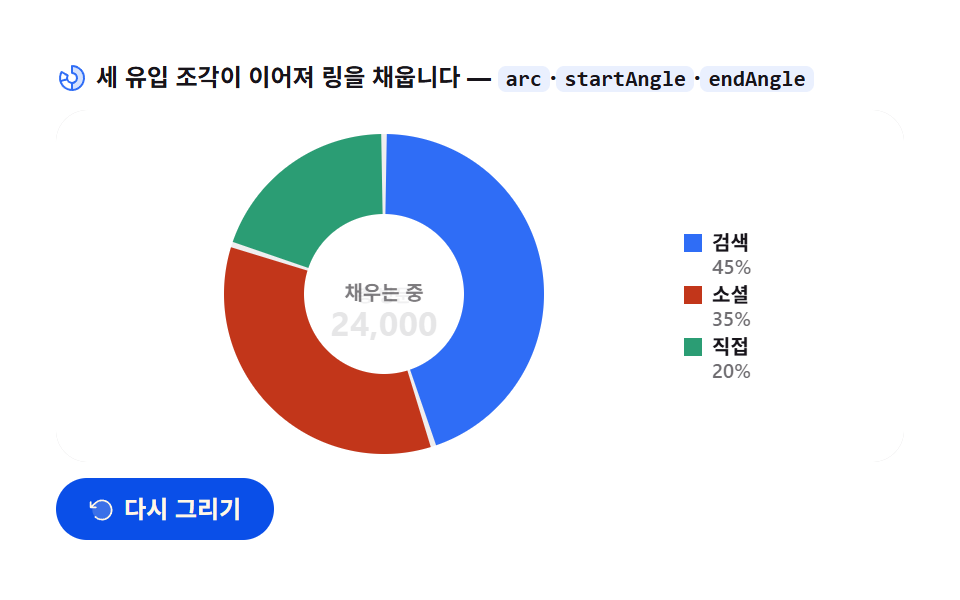
03ドーナツのスイープ — 終わり角から始まる次のスライス
画面に見えるもの
検索10,800(45パーセント)・ソーシャル8,400(35パーセント)・直接4,800(20パーセント)の三つのスライスが12時方向からつながって止まらず流れるように満ち、リングが埋まったあと中央の「充填中」が合計訪問24,000へ縦スライドで差し替わります。
<main class="stage">
<div class="dn" id="dn">
  <p class="dn__hint">
    <svg class="dn__ico" viewBox="0 0 256 256" aria-hidden="true"><g fill="currentColor"><path d="M224 128a96 96 0 0 1-96 96v-56a40 40 0 0 0 0-80V32a96 96 0 0 1 96 96" opacity=".2"/><path d="M128 24a8 8 0 0 0-8 8v56a8 8 0 0 0 8 8a32 32 0 1 1-27.72 16a8 8 0 0 0-2.93-10.93l-48.5-28A8 8 0 0 0 37.92 76A104 104 0 1 0 128 24M48.09 91.1L83 111.26A48.1 48.1 0 0 0 80 128c0 1.53.08 3 .22 4.52L41.28 143a88.16 88.16 0 0 1 6.81-51.9m-2.67 67.31l39-10.44A48.1 48.1 0 0 0 120 175.32v40.31a88.2 88.2 0 0 1-74.58-57.22M136 215.63v-40.31a48 48 0 0 0 0-94.65V40.36a88 88 0 0 1 0 175.27"/></g></svg>
    <span>3つの流入スライスがつながってリングを埋めます — <code>arc</code>·<code>startAngle</code>·<code>endAngle</code></span>
  </p>
  <div class="dn__field" id="field" role="application" aria-label="ドーナツグラフ スイープの実験台" tabindex="0">
    <canvas class="dn__cv" id="cv" role="img" aria-label="トラフィック流入ドーナツグラフ — 3つのスライスが時計回りに埋まる姿"></canvas>
  </div>
  <div class="dn__bar">
    <button class="dn__btn" id="replay" type="button">
      <svg class="dn__bico" viewBox="0 0 256 256" aria-hidden="true"><g fill="currentColor"><path d="M216 128a88 88 0 1 1-88-88a88 88 0 0 1 88 88" opacity=".2"/><path d="M224 128a96 96 0 0 1-94.71 96H128a95.38 95.38 0 0 1-65.9-26.2a8 8 0 0 1 11-11.63a80 80 0 1 0-1.67-114.78a3 3 0 0 1-.26.25L44.59 96H72a8 8 0 0 1 0 16H24a8 8 0 0 1-8-8V56a8 8 0 0 1 16 0v29.8L60.25 60A96 96 0 0 1 224 128"/></g></svg>
      <span>再描画</span>
    </button>
    <table class="sr-only">
      <caption>トラフィック流入構成(単位:訪問、合計 24,000)</caption>
      <thead><tr><th scope="col">流入元</th><th scope="col">訪問</th><th scope="col">占有率</th></tr></thead>
      <tbody>
        <tr><th scope="row">検索</th><td>10,800</td><td>45%</td></tr>
        <tr><th scope="row">ソーシャル</th><td>8,400</td><td>35%</td></tr>
        <tr><th scope="row">直接</th><td>4,800</td><td>20%</td></tr>
      </tbody>
    </table>
  </div>
</div>
</main>@use "../../../../site/static/demo-tokens" as *;
// 도넛 그래프 스윕 — 움직임은 전부 캔버스 rAF 루프 안(이어지는 arc 스윕 + 중앙 총량 플립).
// CSS 애니메이션 0개 — 렌더러가 실시간 24장을 찍는다(077·304 선례).
// 조각은 차트 토큰 고정 순서 1·2·3번.
$duration: $dur-loop;
$easing: $ease-out; // 스윕 감속은 JS 에서 계산하므로 CSS 쪽 이징 토큰은 감속 역할명으로
$color: $chart-1;
@include stage($stage-paper);
// 화면 낭독기용 표 — 캔버스를 읽지 못하므로 같은 데이터를 표로 붙인다
.sr-only {
// fixed + top/left 명시 — absolute 였을 때 표의 실제 콘텐츠 높이(행 수만큼 ≒ 390px)가
// scrollHeight 에 잡혀 데스크톱·폰 전부 세로 넘침(BD8/BD9)이 났다. top 을 주지 않으면
// static 자리 기준으로 배치돼 여전히 scrollHeight 에 들어간다 — 좌상단 고정으로 뺀다.
position: fixed; top: 0; left: 0; width: 1px; height: 1px; margin: -1px;
overflow: hidden; clip: rect(0 0 0 0); white-space: nowrap;
}
.dn {
// 캔버스가 읽는 색 — JS 가 getComputedStyle 로 꺼내 쓴다
--chart-1: #{$chart-1};
--chart-2: #{$chart-2};
--chart-3: #{$chart-3};
--ink: #{$subject-ink};
--mute: #{rgba($subject-ink, .62)};
--track: #{rgba($subject-ink, .07)};
--paper: #{$stage-paper};
display: flex; flex-direction: column; gap: $sp-2;
width: 100%; max-width: 424px;
}
.dn__hint {
display: flex; align-items: center; gap: $sp-1; margin: 0;
font-weight: 700; font-size: clamp(10px, 2.8vw, 12px); line-height: 1.35;
color: $subject-ink;
}
.dn__hint code {
padding: 0 $sp-1; border-radius: $r-xs;
background: rgba($chart-1, .10);
color: $subject-ink;
font-weight: 700; font-size: .92em; line-height: 1.3;
}
.dn__ico { width: 16px; height: 16px; flex: 0 0 auto; color: $color; }
.dn__field {
position: relative; height: 176px;
border-radius: $r-card; overflow: hidden;
background: $stage-paper;
box-shadow: inset 0 0 0 1px rgba($subject-ink, .16);
}
.dn__cv { display: block; width: 100%; height: 100%; }
.dn__bar {
display: flex; align-items: center; gap: $sp-2;
}
.dn__btn {
display: inline-flex; align-items: center; gap: $sp-1;
box-sizing: border-box; padding: $sp-2 $sp-4; border: 0;
border-radius: $r-pill; background: $subject-blue-deep; color: $subject-cream;
font-family: inherit; font-weight: 700; font-size: 12px; line-height: 1.2;
cursor: pointer;
}
.dn__btn:focus-visible { outline: 2px solid $color; outline-offset: 2px; }
.dn__bico { width: 14px; height: 14px; flex: 0 0 auto; }
@media (max-width: 340px) {
.dn { gap: $sp-1; }
.dn__field { height: 112px; }
.dn__hint { font-size: 10px; }
.dn__btn { padding: $sp-1 $sp-3; font-size: 11px; }
}
// reduce — 루프가 아예 안 돌므로 끌 애니메이션이 없다. 완성 상태 한 장만 남는다.
@media (prefers-reduced-motion: reduce) {
.dn__btn { cursor: default; }
}html, body {
margin: 0;
overflow: hidden;
}
.stage {
box-sizing: border-box;
min-height: 100vh;
display: grid;
place-items: center;
margin: 0;
background: #ffffff;
font-family: -apple-system, "Segoe UI", "Noto Sans KR", sans-serif;
padding: clamp(8px, 4vw, 24px);
}
.sr-only {
position: fixed;
top: 0;
left: 0;
width: 1px;
height: 1px;
margin: -1px;
overflow: hidden;
clip: rect(0 0 0 0);
white-space: nowrap;
}
.dn {
--chart-1: #2f6df6;
--chart-2: #c2361a;
--chart-3: #2b9d74;
--ink: #17141a;
--mute: rgba(23, 20, 26, 0.62);
--track: rgba(23, 20, 26, 0.07);
--paper: #ffffff;
display: flex;
flex-direction: column;
gap: 8px;
width: 100%;
max-width: 424px;
}
.dn__hint {
display: flex;
align-items: center;
gap: 4px;
margin: 0;
font-weight: 700;
font-size: clamp(10px, 2.8vw, 12px);
line-height: 1.35;
color: #17141a;
}
.dn__hint code {
padding: 0 4px;
border-radius: 4px;
background: rgba(47, 109, 246, 0.1);
color: #17141a;
font-weight: 700;
font-size: 0.92em;
line-height: 1.3;
}
.dn__ico {
width: 16px;
height: 16px;
flex: 0 0 auto;
color: #2f6df6;
}
.dn__field {
position: relative;
height: 176px;
border-radius: 16px;
overflow: hidden;
background: #ffffff;
box-shadow: inset 0 0 0 1px rgba(23, 20, 26, 0.16);
}
.dn__cv {
display: block;
width: 100%;
height: 100%;
}
.dn__bar {
display: flex;
align-items: center;
gap: 8px;
}
.dn__btn {
display: inline-flex;
align-items: center;
gap: 4px;
box-sizing: border-box;
padding: 8px 16px;
border: 0;
border-radius: 999px;
background: #0a4fe8;
color: #fff7e6;
font-family: inherit;
font-weight: 700;
font-size: 12px;
line-height: 1.2;
cursor: pointer;
}
.dn__btn:focus-visible {
outline: 2px solid #2f6df6;
outline-offset: 2px;
}
.dn__bico {
width: 14px;
height: 14px;
flex: 0 0 auto;
}
@media (max-width: 340px) {
.dn {
gap: 4px;
}
.dn__field {
height: 112px;
}
.dn__hint {
font-size: 10px;
}
.dn__btn {
padding: 4px 12px;
font-size: 11px;
}
}
@media (prefers-reduced-motion: reduce) {
.dn__btn {
cursor: default;
}
}// 도넛 그래프 스윕 — 세 트래픽 유입의 점유가 링을 채운다.
// 각 조각은 arc 로 그리되, 이어지는 조각의 시작각(startAngle)이 앞 조각의 현재 끝각(endAngle)에서 출발한다.
// 그래서 조각 경계에서 펜이 멈추지 않고 링 전체가 한 번에 흐른다.
// 중앙 총량은 링이 다 채워진 뒤 숫자가 뒤집히며(세로 슬라이드 교체) 나타난다.
var root = document.getElementById('dn');
var field = document.getElementById('field');
var cv = document.getElementById('cv');
var ctx = cv.getContext('2d');
var replayBtn = document.getElementById('replay');
var css = getComputedStyle(root);
var C_1 = css.getPropertyValue('--chart-1').trim();
var C_2 = css.getPropertyValue('--chart-2').trim();
var C_3 = css.getPropertyValue('--chart-3').trim();
var C_INK = css.getPropertyValue('--ink').trim();
var C_MUTE = css.getPropertyValue('--mute').trim();
var C_TRACK = css.getPropertyValue('--track').trim();
var C_PAPER = css.getPropertyValue('--paper').trim();
var FONT = '-apple-system, "Segoe UI", "Noto Sans KR", sans-serif';
// 고정 시드 데이터 — 세 유입원의 訪問 水(합계 24,000). 난수가 아니라 코드 안 배열
var SRC = [
{ name: '検索', v: 10800, c: C_1 }, // 45%
{ name: 'ソーシャル', v: 8400, c: C_2 }, // 35%
{ name: '直接', v: 4800, c: C_3 } // 20%
];
var TOTAL = 24000;
var TAU = Math.PI * 2;
var START = -Math.PI / 2; // 12時 방향에서 시작
var GAP = 0.035; // 조각 사이 표면 틈(라디안) — 붙어 있으면 경계가 안 읽힌다
var LOOP = 2; // 한 사이클 2초
var SWEEP = 0.80; // 전체 2초의 80% 동안 링이 채워진다
var reduce = window.matchMedia('(prefers-reduced-motion: reduce)').matches;
var W = 0, H = 0, dpr = 1;
var t0 = 0, raf = 0;
function fit() {
var r = field.getBoundingClientRect();
dpr = window.devicePixelRatio || 1;
W = r.width; H = r.height;
cv.width = Math.round(W * dpr);
cv.height = Math.round(H * dpr);
ctx.setTransform(dpr, 0, 0, dpr, 0, 0);
}
// p(0..1) → 이어지는 스윕의 현재 각도. 진행률을 점유합(1.0)에 얹는다
function sweepAngle(p) {
var q = Math.max(0, Math.min(1, p / SWEEP));
return q; // 0..1, 1 이면 링 전체
}
function draw(p) {
ctx.clearRect(0, 0, W, H);
ctx.fillStyle = C_PAPER;
ctx.fillRect(0, 0, W, H);
// 도넛 중심·반지름 — 캔버스를 채운다(누적면적). 범례는 오른쪽 세로 줄
var legendW = Math.min(96, Math.max(72, W * 0.26));
var cx = PAD_L() + (W - PAD_L() - legendW - PAD_R()) / 2;
var cy = H * 0.5 + 4;
var R = Math.min((W - PAD_L() - legendW - PAD_R()) / 2 - 4, H / 2 - 8);
var ring = Math.max(16, R * 0.5);
// 링 트랙 — 다 채워질 자리를 옅게 깐다. 스윕 진행까지만 깔린다:
// 첫 프레임에 전체 트랙을 깔면 그 자리는 끝까지 변하지 않아 누적면적이 죽는다 —
// 펜이 지나가며 트랙이 열리고 조각이 따라 붙는 그림(077 품질 기준선: 화면이 살아 있어야 한다)
var qTrack = sweepAngle(p);
if (qTrack > 0.005) {
ctx.beginPath();
ctx.arc(cx, cy, R - ring / 2, START, START + qTrack * TAU);
ctx.strokeStyle = C_TRACK;
ctx.lineWidth = ring;
ctx.stroke();
}
// 조각 — 이어지는 스윕. 진행 q 를 각 조각 점유에 분배한다:
// 앞 조각이 다 채워졌으면 전체 각을 확정하고, 현재 조각은 남은 진행으로 부분각을 그린다.
var q = qTrack;
var pen = START;
var acc = 0;
var cur = -1;
for (var i = 0; i < SRC.length; i++) {
var share = SRC[i].v / TOTAL;
var segEnd = acc + share;
if (q >= segEnd) {
// 이미 지나온 조각 — 전체 각을 그린다(양쪽에 틈 반씩)
var a0 = START + acc * TAU + GAP / 2;
var a1 = START + segEnd * TAU - GAP / 2;
slice(cx, cy, R, ring, a0, a1, SRC[i].c, 1);
pen = a1;
acc = segEnd;
} else if (q > acc) {
// 현재 그려지는 조각 — 시작각은 앞 조각의 끝각. 끝각은 진행에 따라 벌어진다
cur = i;
var a0c = START + acc * TAU + (i === 0 ? 0 : GAP / 2);
var a1c = START + q * TAU;
slice(cx, cy, R, ring, a0c, a1c, SRC[i].c, 1);
acc = segEnd;
} else {
break;
}
}
// 스윕 펜 끝 — 지나가는 지점에 작은 점. 조각이 흐른다는 감을 준다
if (cur >= 0 && q < 1) {
var penA = START + q * TAU;
var px = cx + Math.cos(penA) * (R - ring / 2);
var py = cy + Math.sin(penA) * (R - ring / 2);
ctx.beginPath();
ctx.arc(px, py, 2.6, 0, TAU);
ctx.fillStyle = C_PAPER;
ctx.fill();
ctx.strokeStyle = SRC[cur].c;
ctx.lineWidth = 2;
ctx.stroke();
}
// 중앙 총량 — 링이 다 채워진 뒤(SWEEP 이후) 세로 슬라이드로 뒤집혀 나타난다
var flipP = Math.max(0, Math.min(1, (p - SWEEP) / 0.16));
var midY = cy + 2;
var label = '合計訪問';
var value = '24,000';
if (flipP > 0) {
// 숫자가 위에서 내려오고 "合計訪問" 은 자리를 비켜 준다 — 두 줄이 교체되는 뒤집힘
var up = 1 - flipP;
ctx.save();
ctx.beginPath();
ctx.rect(cx - R, cy - R, R * 2, R * 2);
ctx.clip();
ctx.globalAlpha = up;
ctx.fillStyle = C_MUTE;
ctx.textAlign = 'center';
ctx.textBaseline = 'middle';
ctx.font = '600 10px ' + FONT;
ctx.fillText('充填中', cx, midY - flipP * 18);
ctx.restore();
ctx.globalAlpha = 1;
}
if (flipP > 0) {
ctx.textAlign = 'center';
ctx.textBaseline = 'middle';
ctx.globalAlpha = flipP;
ctx.fillStyle = C_INK;
ctx.font = '700 17px ' + FONT;
ctx.fillText(value, cx, midY + (1 - flipP) * 16);
ctx.fillStyle = C_MUTE;
ctx.font = '600 9px ' + FONT;
ctx.fillText(label, cx, midY - 13 + (1 - flipP) * 14);
ctx.globalAlpha = 1;
} else {
ctx.textAlign = 'center';
ctx.textBaseline = 'middle';
ctx.fillStyle = C_MUTE;
ctx.font = '600 10px ' + FONT;
ctx.fillText('充填中', cx, midY);
}
// 범례 — 오른쪽 세로 줄. 각 항목은 조각이 시작될 때 나타난다
var lx = W - PAD_R() - legendW;
var ly = cy - 30;
for (var k = 0; k < SRC.length; k++) {
var appear = Math.max(0, Math.min(1, (p - (k * 0.26)) / 0.14));
if (appear <= 0) continue;
ctx.globalAlpha = appear;
var ly2 = ly + k * 26;
ctx.fillStyle = SRC[k].c;
ctx.fillRect(lx, ly2, 9, 9);
ctx.fillStyle = C_INK;
ctx.textAlign = 'left';
ctx.textBaseline = 'alphabetic';
ctx.font = '700 10px ' + FONT;
ctx.fillText(SRC[k].name, lx + 14, ly2 + 8);
ctx.fillStyle = C_MUTE;
ctx.font = '600 10px ' + FONT;
ctx.fillText(Math.round(SRC[k].v / TOTAL * 100) + '%', lx + 14, ly2 + 20);
ctx.globalAlpha = 1;
}
}
// 링 조각 한 덩이 — arc 를 stroke 로 그린다(선 두께 = 링 두께). cap 을 butt 로 둬야 각이 정확하다
function slice(cx, cy, R, ring, a0, a1, color, alpha) {
if (a1 <= a0) return;
ctx.beginPath();
ctx.arc(cx, cy, R - ring / 2, a0, a1);
ctx.strokeStyle = color;
ctx.lineWidth = ring;
ctx.lineCap = 'butt';
ctx.globalAlpha = alpha;
ctx.stroke();
ctx.globalAlpha = 1;
}
// 왼쪽 패드 — 폭이 좁으면 라벨 패드를 줄인다
function PAD_L() { return W < 220 ? 10 : 14; }
function PAD_R() { return W < 220 ? 8 : 14; }
function frame(now) {
if (!t0) t0 = now;
var p = ((now - t0) / 1000 % LOOP) / LOOP; // 0..1, 2초 루프
draw(p);
raf = requestAnimationFrame(frame);
}
replayBtn.addEventListener('click', function () { t0 = 0; });
window.addEventListener('resize', function () { fit(); if (reduce) draw(1); });
fit();
if (reduce) {
// reduce — 루프 없이 완성 상태(링이 다 채워지고 총량이 떠 있는 한 장)만 그린다
draw(1);
} else {
raf = requestAnimationFrame(frame);
}// DonutSweepChart — vanilla 판(run/305/demo/03-chart-canvas-donut-sweep/index.html) 의 React 포트.
// 세 트래픽 조각이 arc 로 채색되되 이어지는 조각의 시작각이 앞 조각의 끝각에서 출발해
// 링이 멈추지 않고 흐른다. 중앙 총량은 링이 다 채워진 뒤 뒤집혀 나타난다.
// @keyframes 없음 — props 는 CSS 변수로 내려간다.
import { useEffect, useRef } from "react";
import type { CSSProperties } from "react";
import styles from "./DonutSweepChart.module.scss";
export type DonutSweepChartProps = {
duration?: string;
easing?: string;
color?: string;
};
type Vars = CSSProperties & { "--duration"?: string; "--easing"?: string; "--color"?: string };
type Box<T> = { current: T };
// 고정 시드 데이터 — 세 유입원의 방문 수(합계 24,000)
const SRC = [
{ name: "검색", v: 10800, cvar: "--chart-1" },
{ name: "소셜", v: 8400, cvar: "--chart-2" },
{ name: "직접", v: 4800, cvar: "--chart-3" }
];
const TOTAL = 24000;
const TAU = Math.PI * 2;
const START = -Math.PI / 2; // 12시 방향에서 시작
const GAP = 0.035; // 조각 사이 표면 틈(라디안)
const LOOP = 2; // 한 사이클 2초
const SWEEP = 0.80; // 전체의 80% 동안 링이 채워진다
const FONT = '-apple-system, "Segoe UI", "Noto Sans KR", sans-serif';
const FIELD_LABEL = "도넛 그래프 스윕 실험판";
const CV_LABEL = "트래픽 유입 도넛 그래프 — 세 조각이 시계 방향으로 채워지는 모습";
export default function DonutSweepChart({
duration = "2s",
easing = "ease-out",
color = "#2f6df6",
}: DonutSweepChartProps) {
const rootRef = useRef<HTMLDivElement | null>(null);
const cvRef = useRef<HTMLCanvasElement | null>(null);
const ctxRef = useRef<CanvasRenderingContext2D | null>(null);
const sizeRef = useRef({ w: 0, h: 0 }) as Box<{ w: number; h: number }>;
const t0Ref = useRef(0) as Box<number>;
const rafRef = useRef(0) as Box<number>;
const vars: Vars = { "--duration": duration, "--easing": easing, "--color": color };
function reduced(): boolean {
return window.matchMedia("(prefers-reduced-motion: reduce)").matches;
}
function cssv(n: string): string {
const root = rootRef.current;
return root ? getComputedStyle(root).getPropertyValue(n).trim() : "";
}
// 고DPI — 배킹 스토어는 devicePixelRatio 배, 그리기 좌표계는 CSS 픽셀 그대로
function fit(): void {
const cv = cvRef.current;
const s = sizeRef.current;
if (!cv) return;
const r = cv.getBoundingClientRect();
const dpr = window.devicePixelRatio || 1;
s.w = r.width; s.h = r.height;
cv.width = Math.round(r.width * dpr);
cv.height = Math.round(r.height * dpr);
const ctx = ctxRef.current;
if (ctx) ctx.setTransform(dpr, 0, 0, dpr, 0, 0);
}
// 링 조각 한 덩이 — arc 를 stroke 로 그린다(선 두께 = 링 두께). cap 을 butt 로 둬야 각이 정확하다
function slice(cx: number, cy: number, R: number, ring: number, a0: number, a1: number, col: string): void {
const ctx = ctxRef.current;
if (!ctx || a1 <= a0) return;
ctx.beginPath();
ctx.arc(cx, cy, R - ring / 2, a0, a1);
ctx.strokeStyle = col;
ctx.lineWidth = ring;
ctx.lineCap = "butt";
ctx.stroke();
}
function draw(p: number): void {
const ctx = ctxRef.current;
if (!ctx) return;
const W = sizeRef.current.w, H = sizeRef.current.h;
const C_INK = cssv("--ink");
const C_MUTE = cssv("--mute");
const C_TRACK = cssv("--track");
const C_PAPER = cssv("--paper");
ctx.clearRect(0, 0, W, H);
ctx.fillStyle = C_PAPER;
ctx.fillRect(0, 0, W, H);
// 도넛 중심·반지름 — 캔버스를 채운다(누적면적). 범례는 오른쪽 세로 줄
const padL = W < 220 ? 10 : 14;
const padR = W < 220 ? 8 : 14;
const legendW = Math.min(96, Math.max(72, W * 0.26));
const cx = padL + (W - padL - legendW - padR) / 2;
const cy = H * 0.5 + 4;
const R = Math.min((W - padL - legendW - padR) / 2 - 8, H / 2 - 14);
const ring = Math.max(16, R * 0.34);
// 링 트랙 — 다 채워질 자리를 옅게 깐다
ctx.beginPath();
ctx.arc(cx, cy, R - ring / 2, 0, TAU);
ctx.strokeStyle = C_TRACK;
ctx.lineWidth = ring;
ctx.stroke();
// 조각 — 이어지는 스윕. q(0..1) 를 점유에 분배한다
const q = Math.max(0, Math.min(1, p / SWEEP));
let acc = 0;
let cur = -1;
for (let i = 0; i < SRC.length; i++) {
const share = SRC[i].v / TOTAL;
const segEnd = acc + share;
const col = i === 0 ? (cssv(SRC[i].cvar) || color) : cssv(SRC[i].cvar);
if (q >= segEnd) {
// 지나온 조각 — 전체 각(양쪽 틈 반씩)
const a0 = START + acc * TAU + GAP / 2;
const a1 = START + segEnd * TAU - GAP / 2;
slice(cx, cy, R, ring, a0, a1, col);
acc = segEnd;
} else if (q > acc) {
// 현재 조각 — 시작각은 앞 조각 끝각. 끝각은 진행에 따라 벌어진다
cur = i;
const a0c = START + acc * TAU + (i === 0 ? 0 : GAP / 2);
const a1c = START + q * TAU;
slice(cx, cy, R, ring, a0c, a1c, col);
acc = segEnd;
} else {
break;
}
}
// 스윕 펜 끝 — 지나가는 지점의 작은 점
if (cur >= 0 && q < 1) {
const penA = START + q * TAU;
const px = cx + Math.cos(penA) * (R - ring / 2);
const py = cy + Math.sin(penA) * (R - ring / 2);
const col = cur === 0 ? (cssv(SRC[cur].cvar) || color) : cssv(SRC[cur].cvar);
ctx.beginPath();
ctx.arc(px, py, 2.6, 0, TAU);
ctx.fillStyle = C_PAPER;
ctx.fill();
ctx.strokeStyle = col;
ctx.lineWidth = 2;
ctx.stroke();
}
// 중앙 총량 — 링이 다 채워진 뒤 세로 슬라이드로 뒤집혀 나타난다
const flipP = Math.max(0, Math.min(1, (p - SWEEP) / 0.16));
const midY = cy + 2;
ctx.textAlign = "center";
ctx.textBaseline = "middle";
if (flipP > 0) {
ctx.globalAlpha = 1 - flipP;
ctx.fillStyle = C_MUTE;
ctx.font = "600 10px " + FONT;
ctx.fillText("채우는 중", cx, midY - flipP * 18);
ctx.globalAlpha = 1;
ctx.globalAlpha = flipP;
ctx.fillStyle = C_INK;
ctx.font = "700 17px " + FONT;
ctx.fillText("24,000", cx, midY + (1 - flipP) * 16);
ctx.fillStyle = C_MUTE;
ctx.font = "600 9px " + FONT;
ctx.fillText("총 방문", cx, midY - 13 + (1 - flipP) * 14);
ctx.globalAlpha = 1;
} else {
ctx.fillStyle = C_MUTE;
ctx.font = "600 10px " + FONT;
ctx.fillText("채우는 중", cx, midY);
}
// 범례 — 각 항목은 조각이 시작될 때 나타난다
const lx = W - padR - legendW;
const ly = cy - 30;
for (let k = 0; k < SRC.length; k++) {
const appear = Math.max(0, Math.min(1, (p - k * 0.26) / 0.14));
if (appear <= 0) continue;
const col = k === 0 ? (cssv(SRC[k].cvar) || color) : cssv(SRC[k].cvar);
const ly2 = ly + k * 26;
ctx.globalAlpha = appear;
ctx.fillStyle = col;
ctx.fillRect(lx, ly2, 9, 9);
ctx.fillStyle = C_INK;
ctx.textAlign = "left";
ctx.textBaseline = "alphabetic";
ctx.font = "700 10px " + FONT;
ctx.fillText(SRC[k].name, lx + 14, ly2 + 8);
ctx.fillStyle = C_MUTE;
ctx.font = "600 10px " + FONT;
ctx.fillText(Math.round(SRC[k].v / TOTAL * 100) + "%", lx + 14, ly2 + 20);
ctx.globalAlpha = 1;
}
}
function frame(now: number): void {
if (!t0Ref.current) t0Ref.current = now;
const p = ((now - t0Ref.current) / 1000 % LOOP) / LOOP;
draw(p);
rafRef.current = requestAnimationFrame(frame);
}
function replay(): void {
t0Ref.current = 0;
}
function onResize(): void {
fit();
if (reduced()) draw(1);
}
useEffect(() => {
const cv = cvRef.current;
if (!cv) return;
ctxRef.current = cv.getContext("2d");
if (!ctxRef.current) return;
fit();
window.addEventListener("resize", onResize);
if (reduced()) {
// reduce — 루프 없이 완성 상태 한 장만 그린다
draw(1);
} else {
rafRef.current = requestAnimationFrame(frame);
}
return () => {
window.removeEventListener("resize", onResize);
cancelAnimationFrame(rafRef.current);
};
}, []);
return (
<main className={styles.stage}>
<div className={styles.root} ref={rootRef} style={vars}>
<p className={styles.hint}>
<svg className={styles.ico} viewBox="0 0 256 256" aria-hidden="true"><g fill="currentColor"><path d="M224 128a96 96 0 0 1-96 96v-56a40 40 0 0 0 0-80V32a96 96 0 0 1 96 96" opacity=".2"/><path d="M128 24a8 8 0 0 0-8 8v56a8 8 0 0 0 8 8a32 32 0 1 1-27.72 16a8 8 0 0 0-2.93-10.93l-48.5-28A8 8 0 0 0 37.92 76A104 104 0 1 0 128 24M48.09 91.1L83 111.26A48.1 48.1 0 0 0 80 128c0 1.53.08 3 .22 4.52L41.28 143a88.16 88.16 0 0 1 6.81-51.9m-2.67 67.31l39-10.44A48.1 48.1 0 0 0 120 175.32v40.31a88.2 88.2 0 0 1-74.58-57.22M136 215.63v-40.31a48 48 0 0 0 0-94.65V40.36a88 88 0 0 1 0 175.27"/></g></svg>
<span>세 유입 조각이 이어져 링을 채웁니다 — <code>arc</code>·<code>startAngle</code>·<code>endAngle</code></span>
</p>
<div className={styles.field} role="application" aria-label={FIELD_LABEL} tabIndex={0}>
<canvas className={styles.cv} ref={cvRef} role="img" aria-label={CV_LABEL}></canvas>
</div>
<div className={styles.bar}>
<button className={styles.btn} type="button" onClick={replay}>
<svg className={styles.bico} viewBox="0 0 256 256" aria-hidden="true"><g fill="currentColor"><path d="M216 128a88 88 0 1 1-88-88a88 88 0 0 1 88 88" opacity=".2"/><path d="M224 128a96 96 0 0 1-94.71 96H128a95.38 95.38 0 0 1-65.9-26.2a8 8 0 0 1 11-11.63a80 80 0 1 0-1.67-114.78a3 3 0 0 1-.26.25L44.59 96H72a8 8 0 0 1 0 16H24a8 8 0 0 1-8-8V56a8 8 0 0 1 16 0v29.8L60.25 60A96 96 0 0 1 224 128"/></g></svg>
<span>다시 그리기</span>
</button>
<table className={styles.srOnly}>
<caption>트래픽 유입 구성(단위: 방문, 합계 24,000)</caption>
<thead><tr><th scope="col">유입원</th><th scope="col">방문</th><th scope="col">점유</th></tr></thead>
<tbody>
{SRC.map((s, i) => (
<tr key={i}><th scope="row">{s.name}</th><td>{s.v.toLocaleString()}</td><td>{Math.round(s.v / TOTAL * 100)}%</td></tr>
))}
</tbody>
</table>
</div>
</div>
</main>
);
}03 · ドーナツのスイープ — 計測 累積面積 11.843% · 動いたフレーム 23/23GODRICH オリジナル · SCSS と React は zip に同梱 · パスワードを見る
計算の見どころ
動いたフレーム23/24・累積面積11.843パーセント・強度の平均169.0 — 九つの中で最も強い変化率を記録しました。流入経路や構成比を一目で見せる場所に置きます — 進行を占有率の合計に分配して、今のスライスの終わり角が次のスライスの開始角になる構造です。
var q = qTrack;
var pen = START;
var acc = 0;
var cur = -1;
for (var i = 0; i < SRC.length; i++) {
  var share = SRC[i].v / TOTAL;
  var segEnd = acc + share;
  if (q >= segEnd) {
    // すでに通過したスライス — 全体角を描く(両側に隙間を半分ずつ)
    var a0 = START + acc * TAU + GAP / 2;
    var a1 = START + segEnd * TAU - GAP / 2;
    slice(cx, cy, R, ring, a0, a1, SRC[i].c, 1);
    pen = a1;
    acc = segEnd;
  } else if (q > acc) {
    // 今描かれているスライス — 開始角は前のスライスの終わり角。終わり角は進行に従って開く
    cur = i;
    var a0c = START + acc * TAU + (i === 0 ? 0 : GAP / 2);
    var a1c = START + q * TAU;
    slice(cx, cy, R, ring, a0c, a1c, SRC[i].c, 1);
    acc = segEnd;
  } else {
    break;
  }
}
スライスの隙間は0.035ラジアンに固定しました — くっついていると境界が読めないからです。トラック(薄く敷いておく居場所)も最初のフレームで一気に敷かず、ペンが通った分だけ開きます。
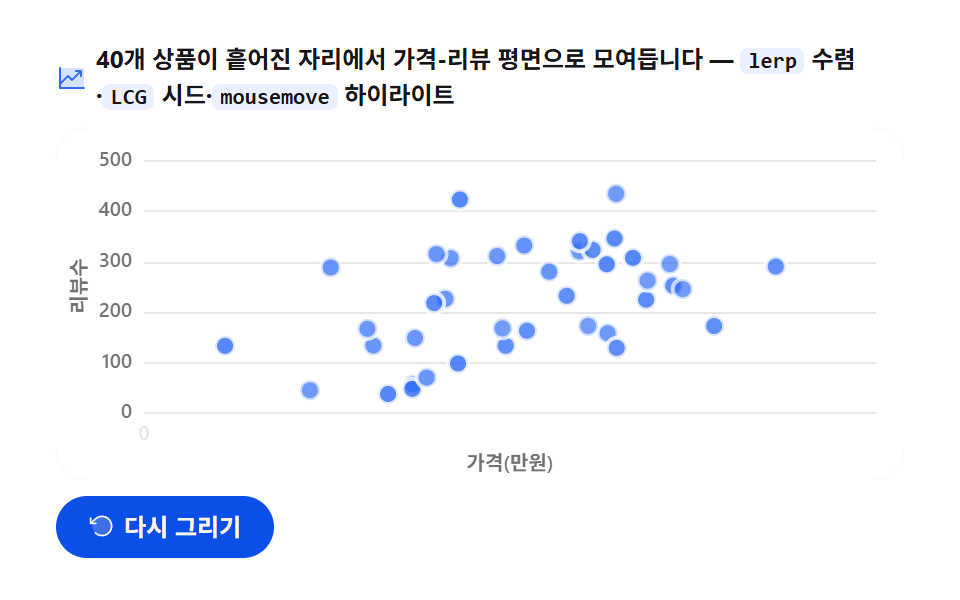
04散布図の出現 — lerp で集まってくる40個
画面に見えるもの
40個の商品の点が散らばった位置から始まって繰り返し補間で価格(0.5〜19.5万ウォン)とレビュー数(10〜480)の平面の定位置へ集まり、マウスを載せると最寄りの点がリングで捕まり、商品名と価格・レビュー数が浮かびます。
<main class="stage">
<div class="sa" id="sa">
  <p class="sa__hint">
    <svg class="sa__ico" viewBox="0 0 256 256" aria-hidden="true"><g fill="currentColor"><path d="M224 64v144H32V48h176a16 16 0 0 1 16 16" opacity=".2"/><path d="M232 208a8 8 0 0 1-8 8H32a8 8 0 0 1-8-8V48a8 8 0 0 1 16 0v108.69l50.34-50.35a8 8 0 0 1 11.32 0L128 132.69L180.69 80H160a8 8 0 0 1 0-16h40a8 8 0 0 1 8 8v40a8 8 0 0 1-16 0V91.31l-58.34 58.35a8 8 0 0 1-11.32 0L96 123.31l-56 56V200h184a8 8 0 0 1 8 8"/></g></svg>
    <span>40個の商品が散らばった場所から価格・レビュー平面へ集まります — <code>lerp</code> 収束・<code>LCG</code> シード・<code>mousemove</code> ハイライト</span>
  </p>
  <div class="sa__field" id="field" role="application" aria-label="散布図 出現の実験台" tabindex="0">
    <canvas class="sa__cv" id="cv" role="img" aria-label="散布図 出現 — 40個の商品点が散らばった場所から価格・レビュー平面の定位置へ集まる姿"></canvas>
  </div>
  <div class="sa__bar">
    <button class="sa__btn" id="replay" type="button">
      <svg class="sa__bico" viewBox="0 0 256 256" aria-hidden="true"><g fill="currentColor"><path d="M216 128a88 88 0 1 1-88-88a88 88 0 0 1 88 88" opacity=".2"/><path d="M224 128a96 96 0 0 1-94.71 96H128a95.38 95.38 0 0 1-65.9-26.2a8 8 0 0 1 11-11.63a80 80 0 1 0-1.67-114.78a3 3 0 0 1-.26.25L44.59 96H72a8 8 0 0 1 0 16H24a8 8 0 0 1-8-8V56a8 8 0 0 1 16 0v29.8L60.25 60A96 96 0 0 1 224 128"/></g></svg>
      <span>再描画</span>
    </button>
    <table class="sr-only">
      <caption>40個の商品のうち8個の例 — 価格(万ウォン)・レビュー数</caption>
      <thead><tr><th scope="col">商品</th><th scope="col">価格(万ウォン)</th><th scope="col">レビュー数</th></tr></thead>
      <tbody id="sampleBody"></tbody>
    </table>
  </div>
</div>
</main>
@use "../../../../site/static/demo-tokens" as *;
// 산포 등장 — 움직임은 전부 캔버스 rAF 루프 안(지수 감쇠 lerp 수렴 + 최근접점 하이라이트).
// CSS 애니메이션이 0개여야 렌더러가 실시간 24장을 찍는다(077·304 선례).
// 무대는 $stage-paper(흰) — 차트는 밝은 무대가 정석. 색은 차트 토큰 고정 순서 1번.
$duration: $dur-loop;
$easing: $ease-out; // 지수 감쇠 수렴을 JS 에서 계산하므로 CSS 쪽 이징 토큰은 감속 역할명으로
$color: $chart-1;
@include stage($stage-paper);
// 화면 낭독기용 표 — 캔버스를 읽지 못하므로 같은 데이터를 표로 붙인다
.sr-only {
// fixed + top/left 명시 — absolute 였을 때 표의 실제 콘텐츠 높이(행 수만큼 ≒ 390px)가
// scrollHeight 에 잡혀 데스크톱·폰 전부 세로 넘침(BD8/BD9)이 났다. top 을 주지 않으면
// static 자리 기준으로 배치돼 여전히 scrollHeight 에 들어간다 — 좌상단 고정으로 뺀다.
position: fixed; top: 0; left: 0; width: 1px; height: 1px; margin: -1px;
overflow: hidden; clip: rect(0 0 0 0); white-space: nowrap;
}
.sa {
// 캔버스가 읽는 색 — JS 가 getComputedStyle 로 꺼내 쓴다. vivid 리터럴은 두지 않는다(BD26)
--chart-1: #{$color};
--fill-1: #{rgba($chart-1, .12)};
--ink: #{$subject-ink};
--mute: #{rgba($subject-ink, .62)};
--grid: #{rgba($subject-ink, .10)};
--paper: #{$stage-paper};
display: flex; flex-direction: column; gap: $sp-2;
width: 100%; max-width: 424px;
}
.sa__hint {
display: flex; align-items: center; gap: $sp-1; margin: 0;
font-weight: 700; font-size: clamp(10px, 2.8vw, 12px); line-height: 1.35;
color: $subject-ink;
}
.sa__hint code {
padding: 0 $sp-1; border-radius: $r-xs;
background: rgba($chart-1, .10);
color: $subject-ink;
font-weight: 700; font-size: .92em; line-height: 1.3;
}
.sa__ico { width: 16px; height: 16px; flex: 0 0 auto; color: $color; }
.sa__field {
position: relative; height: 176px;
border-radius: $r-card; overflow: hidden;
background: $stage-paper;
box-shadow: inset 0 0 0 1px rgba($subject-ink, .16);
}
.sa__cv { display: block; width: 100%; height: 100%; }
.sa__bar {
display: flex; align-items: center; gap: $sp-2;
}
.sa__btn {
display: inline-flex; align-items: center; gap: $sp-1;
box-sizing: border-box; padding: $sp-2 $sp-4; border: 0;
border-radius: $r-pill; background: $subject-blue-deep; color: $subject-cream;
font-family: inherit; font-weight: 700; font-size: 12px; line-height: 1.2;
cursor: pointer;
}
.sa__btn:focus-visible { outline: 2px solid $color; outline-offset: 2px; }
.sa__bico { width: 14px; height: 14px; flex: 0 0 auto; }
@media (max-width: 340px) {
.sa { gap: $sp-1; }
.sa__field { height: 112px; }
.sa__hint { font-size: 10px; }
.sa__btn { padding: $sp-1 $sp-3; font-size: 11px; }
}
// reduce — 루프가 아예 안 돌므로 끄고 말고 할 애니메이션이 없다.
// 완성 상태 한 장이 남으므로 "다시 그리기"는 여전히 정지 이미지를 다시 그린다.
@media (prefers-reduced-motion: reduce) {
.sa__btn { cursor: default; }
}html, body {
margin: 0;
overflow: hidden;
}
.stage {
box-sizing: border-box;
min-height: 100vh;
display: grid;
place-items: center;
margin: 0;
background: #ffffff;
font-family: -apple-system, "Segoe UI", "Noto Sans KR", sans-serif;
padding: clamp(8px, 4vw, 24px);
}
.sr-only {
position: fixed;
top: 0;
left: 0;
width: 1px;
height: 1px;
margin: -1px;
overflow: hidden;
clip: rect(0 0 0 0);
white-space: nowrap;
}
.sa {
--chart-1: #2f6df6;
--fill-1: rgba(47, 109, 246, 0.12);
--ink: #17141a;
--mute: rgba(23, 20, 26, 0.62);
--grid: rgba(23, 20, 26, 0.1);
--paper: #ffffff;
display: flex;
flex-direction: column;
gap: 8px;
width: 100%;
max-width: 424px;
}
.sa__hint {
display: flex;
align-items: center;
gap: 4px;
margin: 0;
font-weight: 700;
font-size: clamp(10px, 2.8vw, 12px);
line-height: 1.35;
color: #17141a;
}
.sa__hint code {
padding: 0 4px;
border-radius: 4px;
background: rgba(47, 109, 246, 0.1);
color: #17141a;
font-weight: 700;
font-size: 0.92em;
line-height: 1.3;
}
.sa__ico {
width: 16px;
height: 16px;
flex: 0 0 auto;
color: #2f6df6;
}
.sa__field {
position: relative;
height: 176px;
border-radius: 16px;
overflow: hidden;
background: #ffffff;
box-shadow: inset 0 0 0 1px rgba(23, 20, 26, 0.16);
}
.sa__cv {
display: block;
width: 100%;
height: 100%;
}
.sa__bar {
display: flex;
align-items: center;
gap: 8px;
}
.sa__btn {
display: inline-flex;
align-items: center;
gap: 4px;
box-sizing: border-box;
padding: 8px 16px;
border: 0;
border-radius: 999px;
background: #0a4fe8;
color: #fff7e6;
font-family: inherit;
font-weight: 700;
font-size: 12px;
line-height: 1.2;
cursor: pointer;
}
.sa__btn:focus-visible {
outline: 2px solid #2f6df6;
outline-offset: 2px;
}
.sa__bico {
width: 14px;
height: 14px;
flex: 0 0 auto;
}
@media (max-width: 340px) {
.sa {
gap: 4px;
}
.sa__field {
height: 112px;
}
.sa__hint {
font-size: 10px;
}
.sa__btn {
padding: 4px 12px;
font-size: 11px;
}
}
@media (prefers-reduced-motion: reduce) {
.sa__btn {
cursor: default;
}
}// 산포 등장 — 40개 商品 점이 무작위 시작좌표에서 가격-レビュー 평면의 제자리로 모여드는 수렴 애니메이션.
// 두 겹이 함께 움직인다:
// 1) 각 점은 lerp(반복 학습)의 닫힌형인 지수 감쇠 pos = start + (target-start) * (1 - e^(-lam*t)) 로
// 프레임이 아니라 경과시간의 함수로 위치가 나온다 — 루프가 돌아가도 같은 p 에는 같은 그림.
// 2) lam(수렴 速度)을 점마다 3.0~6.0 으로 흩어 도착 시간이 어긋나 살아 있어 보인다.
// 시작좌표·목표좌표·lam 은 전부 시드 상수 LCG(선형합동법)로 만든다 — Math.random 금지, 재생마다 같은 그림.
var root = document.getElementById('sa');
var field = document.getElementById('field');
var cv = document.getElementById('cv');
var ctx = cv.getContext('2d');
var replayBtn = document.getElementById('replay');
var css = getComputedStyle(root);
var C_LINE = css.getPropertyValue('--chart-1').trim();
var C_FILL = css.getPropertyValue('--fill-1').trim();
var C_INK = css.getPropertyValue('--ink').trim();
var C_MUTE = css.getPropertyValue('--mute').trim();
var C_GRID = css.getPropertyValue('--grid').trim();
var C_PAPER = css.getPropertyValue('--paper').trim();
var FONT = '-apple-system, "Segoe UI", "Noto Sans KR", sans-serif';
// 결정적 난수 — minstd 선형합동법. 곱이 2^53 을 넘지 않아 부동소수점 오염도 없다
var SEED = 3050416;
var rs = SEED;
function rnd() {
rs = (rs * 48271) % 2147483647;
return rs / 2147483647;
}
var NAMES = [
'タンブラー', 'ワイヤレスマウス', 'メカニカルキーボード', 'LEDデスクランプ', 'ノートPCスタンド',
'Bluetoothイヤホン', 'キャンプチェア', 'ステンレスボトル', 'ミニ扇風機', 'ワイヤレス充電パッド',
'リストレスト', 'アロマディフューザー', 'デスクマット', 'ゲーミングヘッドセット', 'スマート体重計',
'トラベルポーチ', '折りたたみ傘', '懐中電灯', 'テーブルタップ', 'デスク用空気清浄機',
'電気ケトル', 'コーヒーグラインダー', '木製コースター', 'レザーキーホルダー', 'スマートウォッチ',
'マウスパッド', 'ウェブカメラ', 'マイクスタンド', 'ブックシェルフスピーカー', '車載ホルダー',
'ランニングベルト', 'ヨガマット', 'フォームローラー', 'レジスタンスバンド', 'ジャンプロープ',
'キャンバスリュック', 'トートバッグ', 'サングラス', 'ミニブロック', 'ステッカーパック'
];
// 40개 점 생성 — rnd 호출 순서가 고정이라 목표·시작·속도가 전부 결정적.
// 목표: 가격 0.5~19.5만원, レビュー数 10~480. 시작: 평면 안 정규화 좌표 0.04~0.96
var PTS = [];
for (var i = 0; i < 40; i++) {
PTS.push({
name: NAMES[i],
price: Math.round((0.5 + rnd() * 19) * 10) / 10,
rv: Math.round(10 + rnd() * 470),
sx: 0.04 + rnd() * 0.92,
sy: 0.04 + rnd() * 0.92,
lam: 3.0 + rnd() * 3.0,
cx: 0, cy: 0
});
}
var PAD_L = 44, PAD_R = 14, PAD_T = 16, PAD_B = 34; // 軸 라벨·제목 여백(CSS px)
var LOOP = 2.4; // 한 사이클 2.4초 — 캡처 창(2초) 내내 수렴 진행 중이게 마지막 프레임까지 산다
var DRAW_AT = 0.85; // 전체 2초의 85% 동안 모여들고, 끝 15% 는 도착해 쉰다
var CONV_SEC = 1.6; // 수렴 시간(초) — elapsed 스케일
var X_SPAN = 20; // x 軸: 가격 0~20만원
var Y_SPAN = 500; // y 軸: レビュー数 0~500
var reduce = window.matchMedia('(prefers-reduced-motion: reduce)').matches;
var W = 0, H = 0, dpr = 1;
var t0 = 0, raf = 0;
var mouse = { x: 0, y: 0, on: false };
function fit() {
var r = field.getBoundingClientRect();
dpr = window.devicePixelRatio || 1;
W = r.width; H = r.height;
cv.width = Math.round(W * dpr);
cv.height = Math.round(H * dpr);
ctx.setTransform(dpr, 0, 0, dpr, 0, 0);
}
// 데이터 値 → 플롯 좌표. x 는 価格(万ウォン), y 는 レビュー数(위로 갈수록 크다)
function px(v) { return PAD_L + (W - PAD_L - PAD_R) * (v / X_SPAN); }
function py(v) { return PAD_T + (H - PAD_T - PAD_B) * (1 - v / Y_SPAN); }
// 닫힌형 lerp 수렴 — 경과시간 e(초)에서 점 위치를 결정적으로 계산해 cx·cy 에 저장, 진행도 t 반환
function converge(pt, e) {
var t = 1 - Math.exp(-pt.lam * e);
var x0 = PAD_L + (W - PAD_L - PAD_R) * pt.sx;
var y0 = PAD_T + (H - PAD_T - PAD_B) * pt.sy;
pt.cx = x0 + (px(pt.price) - x0) * t;
pt.cy = y0 + (py(pt.rv) - y0) * t;
return t;
}
// 모서리가 둥근 상자 경로 — roundRect 를 못 쓰는 환경은 사각형으로 물러난다
function boxPath(x, y, w, h, r) {
if (typeof ctx.roundRect === 'function') { ctx.roundRect(x, y, w, h, r); }
else { ctx.rect(x, y, w, h); }
}
function draw(p) {
ctx.clearRect(0, 0, W, H);
ctx.fillStyle = C_PAPER;
ctx.fillRect(0, 0, W, H);
// 가로 그리드 + y 라벨(レビュー数) — 첫 12% 동안 아래에서 위로 떠오른다
var axisP = Math.min(1, p / 0.12);
ctx.lineWidth = 1;
ctx.font = '600 10px ' + FONT;
ctx.textBaseline = 'middle';
ctx.textAlign = 'right';
for (var g = 0; g <= Y_SPAN; g += 100) {
var gy = py(g) + (1 - axisP) * 14;
ctx.strokeStyle = C_GRID;
ctx.beginPath();
ctx.moveTo(PAD_L, Math.round(gy) + 0.5);
ctx.lineTo(W - PAD_R, Math.round(gy) + 0.5);
ctx.stroke();
ctx.fillStyle = C_MUTE;
ctx.globalAlpha = axisP;
ctx.fillText(String(g), PAD_L - 6, gy);
ctx.globalAlpha = 1;
}
// x 라벨(가격 만원) — 왼쪽부터 차례로 나타난다
ctx.textAlign = 'center';
for (var xv = 0; xv <= X_SPAN; xv += 5) {
var xp = Math.max(0, Math.min(1, (p - 0.10 - (xv / 5) * 0.022) / 0.10));
if (xp <= 0) continue;
ctx.fillStyle = C_MUTE;
ctx.globalAlpha = xp;
ctx.fillText(String(xv), px(xv), H - PAD_B + 11);
ctx.globalAlpha = 1;
}
// 軸 제목 — y 는 왼쪽에 세로로, x 는 아래 중앙에
ctx.save();
ctx.translate(12, (PAD_T + H - PAD_B) / 2);
ctx.rotate(-Math.PI / 2);
ctx.fillStyle = C_MUTE;
ctx.globalAlpha = axisP;
ctx.fillText('レビュー数', 0, 0);
ctx.restore();
ctx.globalAlpha = axisP;
ctx.fillStyle = C_MUTE;
ctx.fillText('価格(万ウォン)', (PAD_L + W - PAD_R) / 2, H - 8);
ctx.globalAlpha = 1;
// 수렴 — elapsed = (p / DRAW_AT) * CONV_SEC. 루프가 0 으로 돌아가면 e 도 0 이 되어 점들이 시작좌표로 리셋
var e = CONV_SEC * Math.min(1, p / DRAW_AT);
var hi = -1, hd = Infinity;
for (var k = 0; k < PTS.length; k++) {
var t = converge(PTS[k], e);
// 점 — 도착할수록 진해진다. 종이색 테두리로 겹치는 점을 갈라 놓는다
ctx.globalAlpha = 0.35 + 0.65 * t;
ctx.beginPath();
ctx.arc(PTS[k].cx, PTS[k].cy, 5, 0, Math.PI * 2);
ctx.fillStyle = C_LINE;
ctx.fill();
ctx.lineWidth = 2;
ctx.strokeStyle = C_PAPER;
ctx.stroke();
ctx.globalAlpha = 1;
// 최근접점 후보 — 마우스가 안 있으면 계산만 비운다
if (mouse.on) {
var dd = (PTS[k].cx - mouse.x) * (PTS[k].cx - mouse.x) + (PTS[k].cy - mouse.y) * (PTS[k].cy - mouse.y);
if (dd < hd) { hd = dd; hi = k; }
}
}
// 최근접점 ハイライト — 옅은 뒤광 위에 큰 점과 링, 그 위에 상품명 라벨
if (hi >= 0) {
var hp = PTS[hi];
ctx.beginPath();
ctx.arc(hp.cx, hp.cy, 13, 0, Math.PI * 2);
ctx.fillStyle = C_FILL;
ctx.fill();
ctx.beginPath();
ctx.arc(hp.cx, hp.cy, 8.5, 0, Math.PI * 2);
ctx.strokeStyle = C_LINE;
ctx.globalAlpha = 0.4;
ctx.lineWidth = 2;
ctx.stroke();
ctx.globalAlpha = 1;
ctx.beginPath();
ctx.arc(hp.cx, hp.cy, 5.5, 0, Math.PI * 2);
ctx.fillStyle = C_LINE;
ctx.fill();
// 라벨 상자 — 상품명(굵게) + 가격·レビュー数(옅게). 위에 띄우고 잘리면 아래로
var nm = hp.name;
var info = hp.price.toFixed(1) + '万円 · ' + hp.rv + 'レビュー';
ctx.font = '700 11px ' + FONT;
var w1 = ctx.measureText(nm).width;
ctx.font = '600 10px ' + FONT;
var w2 = ctx.measureText(info).width;
var bw = Math.max(w1, w2) + 16, bh = 34;
var lx = Math.max(6, Math.min(W - bw - 6, hp.cx - bw / 2));
var ly = hp.cy - 16 - bh;
if (ly < 6) ly = hp.cy + 16;
ctx.beginPath();
boxPath(lx, ly, bw, bh, 5);
ctx.fillStyle = C_PAPER;
ctx.fill();
ctx.strokeStyle = C_GRID;
ctx.lineWidth = 1;
ctx.stroke();
ctx.textAlign = 'left';
ctx.textBaseline = 'alphabetic';
ctx.font = '700 11px ' + FONT;
ctx.fillStyle = C_INK;
ctx.fillText(nm, lx + 8, ly + 14);
ctx.font = '600 10px ' + FONT;
ctx.fillStyle = C_MUTE;
ctx.fillText(info, lx + 8, ly + 26);
}
}
function frame(now) {
if (!t0) t0 = now;
var p = ((now - t0) / 1000 % LOOP) / LOOP; // 0..1, 2초 루프
draw(p);
raf = requestAnimationFrame(frame);
}
replayBtn.addEventListener('click', function () { t0 = 0; });
field.addEventListener('mousemove', function (ev) {
var r = cv.getBoundingClientRect();
mouse.x = ev.clientX - r.left;
mouse.y = ev.clientY - r.top;
mouse.on = true;
if (reduce) draw(1); // 정지 화면에서는 이벤트에 그려 응답한다
});
field.addEventListener('mouseleave', function () {
mouse.on = false;
if (reduce) draw(1);
});
window.addEventListener('resize', function () { fit(); if (reduce) draw(1); });
// 화면 낭독기용 표 — 40행은 너무 기니 대표 8개만. 값은 위 LCG 계산과 같은 배열에서 가져온다
var tb = document.getElementById('sampleBody');
for (var s = 0; s < 8; s++) {
var tr = document.createElement('tr');
var th = document.createElement('th');
th.setAttribute('scope', 'row');
th.textContent = PTS[s].name;
var td1 = document.createElement('td');
td1.textContent = PTS[s].price.toFixed(1);
var td2 = document.createElement('td');
td2.textContent = String(PTS[s].rv);
tr.appendChild(th); tr.appendChild(td1); tr.appendChild(td2);
tb.appendChild(tr);
}
fit();
if (reduce) {
// reduce — 루프 없이 다 모여든 완성 상태(40개 전부 제자리) 한 장만 그린다
draw(1);
} else {
raf = requestAnimationFrame(frame);
}// ScatterArrivalChart — vanilla 판(run/305/demo/04-chart-canvas-scatter-arrival/index.html) 의 React 포트.
// 40개 상품 점이 흩어진 시작좌표에서 지수 감쇠 lerp 로 가격-리뷰 평면의 제자리로 모여들고,
// mousemove 최근접점이 커지며 상품명 라벨이 뜬다. 시작·목표 좌표는 시드 상수 LCG 로 결정적으로 만든다.
// 움직임은 캔버스 rAF 루프가 전부 그리므로 @keyframes 가 없다 — props 는 CSS 변수로 내려간다.
import { useEffect, useRef } from "react";
import type { CSSProperties, MouseEvent as ReactMouseEvent } from "react";
import styles from "./ScatterArrivalChart.module.scss";
export type ScatterArrivalChartProps = {
duration?: string;
easing?: string;
color?: string;
};
type Vars = CSSProperties & { "--duration"?: string; "--easing"?: string; "--color"?: string };
// useRef 는 T | null 을 돌려준다. 처음부터 값이 있고 절대 비지 않는 상자는 이렇게 좁혀 쓴다
type Box<T> = { current: T };
type Pt = {
name: string; price: number; rv: number;
sx: number; sy: number; lam: number; cx: number; cy: number;
};
const NAMES = [
"텀블러", "무선 마우스", "기계식 키보드", "LED 데스크 램프", "노트북 거치대",
"블루투스 이어폰", "캠핑 의자", "스테인리스 보틀", "미니 선풍기", "무선 충전 패드",
"손목 받침대", "아로마 디퓨저", "데스크 매트", "게이밍 헤드셋", "스마트 체중계",
"여행용 파우치", "접이식 우산", "무전등", "멀티탭", "책상용 공기청정기",
"전기 주전자", "커피 그라인더", "원목 코스터", "가죽 키링", "스마트 워치",
"마우스 패드", "웹캠", "마이크 스탠드", "북셸프 스피커", "차량용 홀더",
"러닝 벨트", "요가 매트", "폼롤러", "저항 밴드", "점프 로프",
"캔버스 배낭", "토트백", "선글라스", "미니 블록", "스티커 묶음"
];
const PAD_L = 44, PAD_R = 14, PAD_T = 16, PAD_B = 34;
const LOOP = 2; // 한 사이클 2초
const DRAW_AT = 0.85; // 전체의 85% 동안 모여들고 끝 15% 는 쉰다
const CONV_SEC = 1.6; // 수렴 시간(초) — elapsed 스케일
const X_SPAN = 20; // x 축: 가격 0~20만원
const Y_SPAN = 500; // y 축: 리뷰수 0~500
const SEED = 3050416; // LCG 시드 — 재생마다 같은 그림
const FONT = '-apple-system, "Segoe UI", "Noto Sans KR", sans-serif';
const FIELD_LABEL = "산포 등장 실험판";
const CV_LABEL = "산포 등장 — 40개 상품 점이 흩어진 자리에서 가격-리뷰 평면의 제자리로 모여드는 모습";
// 40개 점 생성 — rnd 호출 순서가 고정이라 목표·시작·속도가 전부 결정적
function buildPts(): Pt[] {
const pts: Pt[] = [];
let rs = SEED;
const rnd = (): number => {
rs = (rs * 48271) % 2147483647; // minstd 선형합동법 — 곱이 2^53 을 안 넘는다
return rs / 2147483647;
};
for (let i = 0; i < 40; i++) {
pts.push({
name: NAMES[i],
price: Math.round((0.5 + rnd() * 19) * 10) / 10,
rv: Math.round(10 + rnd() * 470),
sx: 0.04 + rnd() * 0.92,
sy: 0.04 + rnd() * 0.92,
lam: 3.0 + rnd() * 3.0,
cx: 0, cy: 0,
});
}
return pts;
}
export default function ScatterArrivalChart({
duration = "2s", // vanilla $duration: $dur-loop
easing = "ease-out", // vanilla $easing: $ease-out
color = "#2f6df6", // vanilla $color: $chart-1
}: ScatterArrivalChartProps) {
const rootRef = useRef<HTMLDivElement | null>(null);
const cvRef = useRef<HTMLCanvasElement | null>(null);
const ctxRef = useRef<CanvasRenderingContext2D | null>(null);
const sizeRef = useRef({ w: 0, h: 0 }) as Box<{ w: number; h: number }>;
const t0Ref = useRef(0) as Box<number>;
const rafRef = useRef(0) as Box<number>;
const ptsRef = useRef<Pt[]>(buildPts()) as Box<Pt[]>;
const mouseRef = useRef({ x: 0, y: 0, on: false }) as Box<{ x: number; y: number; on: boolean }>;
const vars: Vars = { "--duration": duration, "--easing": easing, "--color": color };
function reduced(): boolean {
return window.matchMedia("(prefers-reduced-motion: reduce)").matches;
}
function cssv(n: string): string {
const root = rootRef.current;
return root ? getComputedStyle(root).getPropertyValue(n).trim() : "";
}
// 고DPI — 배킹 스토어는 devicePixelRatio 배, 그리기 좌표계는 CSS 픽셀 그대로
function fit(): void {
const cv = cvRef.current;
const s = sizeRef.current;
if (!cv) return;
const r = cv.getBoundingClientRect();
const dpr = window.devicePixelRatio || 1;
s.w = r.width; s.h = r.height;
cv.width = Math.round(r.width * dpr);
cv.height = Math.round(r.height * dpr);
const ctx = ctxRef.current;
if (ctx) ctx.setTransform(dpr, 0, 0, dpr, 0, 0);
}
// 데이터 값 → 플롯 좌표. x 는 가격(만원), y 는 리뷰수(위로 갈수록 크다)
function px(v: number): number {
const W = sizeRef.current.w;
return PAD_L + (W - PAD_L - PAD_R) * (v / X_SPAN);
}
function py(v: number): number {
const H = sizeRef.current.h;
return PAD_T + (H - PAD_T - PAD_B) * (1 - v / Y_SPAN);
}
// 닫힌형 lerp 수렴 — 경과시간 e(초)에서 점 위치를 결정적으로 계산해 cx·cy 에 저장
function converge(pt: Pt, e: number): number {
const W = sizeRef.current.w, H = sizeRef.current.h;
const t = 1 - Math.exp(-pt.lam * e);
const x0 = PAD_L + (W - PAD_L - PAD_R) * pt.sx;
const y0 = PAD_T + (H - PAD_T - PAD_B) * pt.sy;
pt.cx = x0 + (px(pt.price) - x0) * t;
pt.cy = y0 + (py(pt.rv) - y0) * t;
return t;
}
// 모서리가 둥근 상자 경로 — roundRect 를 못 쓰는 환경은 사각형으로 물러난다
function boxPath(x: number, y: number, w: number, h: number, r: number): void {
const ctx = ctxRef.current!;
if (typeof ctx.roundRect === "function") { ctx.roundRect(x, y, w, h, r); }
else { ctx.rect(x, y, w, h); }
}
function draw(p: number): void {
const ctx = ctxRef.current;
if (!ctx) return;
const W = sizeRef.current.w, H = sizeRef.current.h;
const PTS = ptsRef.current;
const mouse = mouseRef.current;
const C_LINE = cssv("--chart-1") || color;
const C_FILL = cssv("--fill-1");
const C_INK = cssv("--ink");
const C_MUTE = cssv("--mute");
const C_GRID = cssv("--grid");
const C_PAPER = cssv("--paper");
ctx.clearRect(0, 0, W, H);
ctx.fillStyle = C_PAPER;
ctx.fillRect(0, 0, W, H);
// 가로 그리드 + y 라벨(리뷰수) — 첫 12% 동안 아래에서 위로 떠오른다
const axisP = Math.min(1, p / 0.12);
ctx.lineWidth = 1;
ctx.font = "600 10px " + FONT;
ctx.textBaseline = "middle";
ctx.textAlign = "right";
for (let g = 0; g <= Y_SPAN; g += 100) {
const gy = py(g) + (1 - axisP) * 14;
ctx.strokeStyle = C_GRID;
ctx.beginPath();
ctx.moveTo(PAD_L, Math.round(gy) + 0.5);
ctx.lineTo(W - PAD_R, Math.round(gy) + 0.5);
ctx.stroke();
ctx.fillStyle = C_MUTE;
ctx.globalAlpha = axisP;
ctx.fillText(String(g), PAD_L - 6, gy);
ctx.globalAlpha = 1;
}
// x 라벨(가격 만원) — 왼쪽부터 차례로 나타난다
ctx.textAlign = "center";
for (let xv = 0; xv <= X_SPAN; xv += 5) {
const xp = Math.max(0, Math.min(1, (p - 0.10 - (xv / 5) * 0.022) / 0.10));
if (xp <= 0) continue;
ctx.fillStyle = C_MUTE;
ctx.globalAlpha = xp;
ctx.fillText(String(xv), px(xv), H - PAD_B + 11);
ctx.globalAlpha = 1;
}
// 축 제목 — y 는 왼쪽에 세로로, x 는 아래 중앙에
ctx.save();
ctx.translate(12, (PAD_T + H - PAD_B) / 2);
ctx.rotate(-Math.PI / 2);
ctx.fillStyle = C_MUTE;
ctx.globalAlpha = axisP;
ctx.fillText("리뷰수", 0, 0);
ctx.restore();
ctx.globalAlpha = axisP;
ctx.fillStyle = C_MUTE;
ctx.fillText("가격(만원)", (PAD_L + W - PAD_R) / 2, H - 8);
ctx.globalAlpha = 1;
// 수렴 — elapsed = (p / DRAW_AT) * CONV_SEC. 루프가 0 으로 돌아가면 점들이 시작좌표로 리셋
const e = CONV_SEC * Math.min(1, p / DRAW_AT);
let hi = -1, hd = Infinity;
for (let k = 0; k < PTS.length; k++) {
const t = converge(PTS[k], e);
// 점 — 도착할수록 진해진다. 종이색 테두리로 겹치는 점을 갈라 놓는다
ctx.globalAlpha = 0.35 + 0.65 * t;
ctx.beginPath();
ctx.arc(PTS[k].cx, PTS[k].cy, 3, 0, Math.PI * 2);
ctx.fillStyle = C_LINE;
ctx.fill();
ctx.lineWidth = 1.5;
ctx.strokeStyle = C_PAPER;
ctx.stroke();
ctx.globalAlpha = 1;
// 최근접점 후보 — 마우스가 안 있으면 계산만 비운다
if (mouse.on) {
const dd = (PTS[k].cx - mouse.x) * (PTS[k].cx - mouse.x) + (PTS[k].cy - mouse.y) * (PTS[k].cy - mouse.y);
if (dd < hd) { hd = dd; hi = k; }
}
}
// 최근접점 하이라이트 — 옅은 뒤광 위에 큰 점과 링, 그 위에 상품명 라벨
if (hi >= 0) {
const hp = PTS[hi];
ctx.beginPath();
ctx.arc(hp.cx, hp.cy, 13, 0, Math.PI * 2);
ctx.fillStyle = C_FILL;
ctx.fill();
ctx.beginPath();
ctx.arc(hp.cx, hp.cy, 8.5, 0, Math.PI * 2);
ctx.strokeStyle = C_LINE;
ctx.globalAlpha = 0.4;
ctx.lineWidth = 2;
ctx.stroke();
ctx.globalAlpha = 1;
ctx.beginPath();
ctx.arc(hp.cx, hp.cy, 5.5, 0, Math.PI * 2);
ctx.fillStyle = C_LINE;
ctx.fill();
// 라벨 상자 — 상품명(굵게) + 가격·리뷰수(옅게). 위에 띄우고 잘리면 아래로
const nm = hp.name;
const info = hp.price.toFixed(1) + "만원 · " + hp.rv + "리뷰";
ctx.font = "700 11px " + FONT;
const w1 = ctx.measureText(nm).width;
ctx.font = "600 10px " + FONT;
const w2 = ctx.measureText(info).width;
const bw = Math.max(w1, w2) + 16, bh = 34;
const lx = Math.max(6, Math.min(W - bw - 6, hp.cx - bw / 2));
let ly = hp.cy - 16 - bh;
if (ly < 6) ly = hp.cy + 16;
ctx.beginPath();
boxPath(lx, ly, bw, bh, 5);
ctx.fillStyle = C_PAPER;
ctx.fill();
ctx.strokeStyle = C_GRID;
ctx.lineWidth = 1;
ctx.stroke();
ctx.textAlign = "left";
ctx.textBaseline = "alphabetic";
ctx.font = "700 11px " + FONT;
ctx.fillStyle = C_INK;
ctx.fillText(nm, lx + 8, ly + 14);
ctx.font = "600 10px " + FONT;
ctx.fillStyle = C_MUTE;
ctx.fillText(info, lx + 8, ly + 26);
}
}
function frame(now: number): void {
if (!t0Ref.current) t0Ref.current = now;
const p = ((now - t0Ref.current) / 1000 % LOOP) / LOOP;
draw(p);
rafRef.current = requestAnimationFrame(frame);
}
function replay(): void {
t0Ref.current = 0;
}
function onMove(ev: ReactMouseEvent<HTMLDivElement>): void {
const cv = cvRef.current;
const mouse = mouseRef.current;
if (!cv) return;
const r = cv.getBoundingClientRect();
mouse.x = ev.clientX - r.left;
mouse.y = ev.clientY - r.top;
mouse.on = true;
if (reduced()) draw(1); // 정지 화면에서는 이벤트에 그려 응답한다
}
function onLeave(): void {
mouseRef.current.on = false;
if (reduced()) draw(1);
}
function onResize(): void {
fit();
if (reduced()) draw(1);
}
useEffect(() => {
const cv = cvRef.current;
if (!cv) return;
ctxRef.current = cv.getContext("2d");
if (!ctxRef.current) return;
fit();
window.addEventListener("resize", onResize);
if (reduced()) {
// reduce — 루프 없이 다 모여든 완성 상태 한 장만 그린다
draw(1);
} else {
rafRef.current = requestAnimationFrame(frame);
}
return () => {
window.removeEventListener("resize", onResize);
cancelAnimationFrame(rafRef.current);
};
}, []);
return (
<main className={styles.stage}>
<div className={styles.root} ref={rootRef} style={vars}>
<p className={styles.hint}>
<svg className={styles.ico} viewBox="0 0 256 256" aria-hidden="true"><g fill="currentColor"><path d="M224 64v144H32V48h176a16 16 0 0 1 16 16" opacity=".2"/><path d="M232 208a8 8 0 0 1-8 8H32a8 8 0 0 1-8-8V48a8 8 0 0 1 16 0v108.69l50.34-50.35a8 8 0 0 1 11.32 0L128 132.69L180.69 80H160a8 8 0 0 1 0-16h40a8 8 0 0 1 8 8v40a8 8 0 0 1-16 0V91.31l-58.34 58.35a8 8 0 0 1-11.32 0L96 123.31l-56 56V200h184a8 8 0 0 1 8 8"/></g></svg>
<span>40개 상품이 흩어진 자리에서 가격-리뷰 평면으로 모여듭니다 — <code>lerp</code> 수렴·<code>LCG</code> 시드·<code>mousemove</code> 하이라이트</span>
</p>
<div
className={styles.field}
role="application"
aria-label={FIELD_LABEL}
tabIndex={0}
onMouseMove={onMove}
onMouseLeave={onLeave}
>
<canvas className={styles.cv} ref={cvRef} role="img" aria-label={CV_LABEL}></canvas>
</div>
<div className={styles.bar}>
<button className={styles.btn} type="button" onClick={replay}>
<svg className={styles.bico} viewBox="0 0 256 256" aria-hidden="true"><g fill="currentColor"><path d="M216 128a88 88 0 1 1-88-88a88 88 0 0 1 88 88" opacity=".2"/><path d="M224 128a96 96 0 0 1-94.71 96H128a95.38 95.38 0 0 1-65.9-26.2a8 8 0 0 1 11-11.63a80 80 0 1 0-1.67-114.78a3 3 0 0 1-.26.25L44.59 96H72a8 8 0 0 1 0 16H24a8 8 0 0 1-8-8V56a8 8 0 0 1 16 0v29.8L60.25 60A96 96 0 0 1 224 128"/></g></svg>
<span>다시 그리기</span>
</button>
<table className={styles.srOnly}>
<caption>상품 40개 중 8개 예시 — 가격(만원)·리뷰수</caption>
<thead><tr><th scope="col">상품</th><th scope="col">가격(만원)</th><th scope="col">리뷰수</th></tr></thead>
<tbody>
{ptsRef.current.slice(0, 8).map((pt, i) => (
<tr key={i}><th scope="row">{pt.name}</th><td>{pt.price.toFixed(1)}</td><td>{pt.rv}</td></tr>
))}
</tbody>
</table>
</div>
</div>
</main>
);
}04 · 散布図の出現 — 計測 累積面積 19.836% · 動いたフレーム 21/23GODRICH オリジナル · SCSS と React は zip に同梱 · パスワードを見る
計算の見どころ
動いたフレーム21/24・累積面積19.836パーセントを記録しました。価格と満足度のような相関を探る場所に置きます — 点ごとに収束速度 lam を3.0〜6.0に変えて与えるので、一斉に到着せず降り注ぐように止まります。
// 閉じた形の lerp 収束 — 経過時間 e(秒)から点の位置を決定的に計算して cx・cy に保存、進行度 t を返す
function converge(pt, e) {
  var t = 1 - Math.exp(-pt.lam * e);
  var x0 = PAD_L + (W - PAD_L - PAD_R) * pt.sx;
  var y0 = PAD_T + (H - PAD_T - PAD_B) * pt.sy;
  pt.cx = x0 + (px(pt.price) - x0) * t;
  pt.cy = y0 + (py(pt.rv) - y0) * t;
  return t;
}
40個の目標座標と開始座標はシード3050416のLCG(乗数48271・法2147483647)の呼び出し順が固定なので、誰がいつ開いても同じ絵が再現されます — 収束は1.6秒、ループ全体は2.4秒です。
05面グラフの塗り — 交差する月が明るくなる二系列
画面に見えるもの
訪問 [210, 248, 226, 292, 334, 306, 368, 412, 384, 446, 482, 456] と注文 [96, 118, 142, 176, 208, 236, 272, 308, 344, 386, 424, 468] の二系列の面が下から満ち、注文が訪問を追い越す11月から12月の区間では上に来た系列が一段明るくなり、塗り終えると平均線がその上を横切ります。
<main class="stage">
<div class="ar" id="ar">
  <p class="ar__hint">
    <svg class="ar__ico" viewBox="0 0 256 256" aria-hidden="true"><g fill="currentColor"><path d="M224 64v144H32V48h176a16 16 0 0 1 16 16" opacity=".2"/><path d="M232 208a8 8 0 0 1-8 8H32a8 8 0 0 1-8-8V48a8 8 0 0 1 16 0v108.69l50.34-50.35a8 8 0 0 1 11.32 0L128 132.69L180.69 80H160a8 8 0 0 1 0-16h40a8 8 0 0 1 8 8v40a8 8 0 0 1-16 0V91.31l-58.34 58.35a8 8 0 0 1-11.32 0L96 123.31l-56 56V200h184a8 8 0 0 1 8 8"/></g></svg>
    <span>2つの系列の面が下から満ち、交差する月は上の系列が明るくなります — <code>clip</code>·<code>quadraticCurveTo</code>·<code>平均線</code></span>
  </p>
  <div class="ar__field" id="field" role="application" aria-label="面グラフの実験台" tabindex="0">
    <canvas class="ar__cv" id="cv" role="img" aria-label="12か月の訪問・注文の面グラフ — 下から満ちる面、交差する月に明るくなる上の系列、遅れて横切る平均線の姿"></canvas>
  </div>
  <div class="ar__bar">
    <button class="ar__btn" id="replay" type="button">
      <svg class="ar__bico" viewBox="0 0 256 256" aria-hidden="true"><g fill="currentColor"><path d="M216 128a88 88 0 1 1-88-88a88 88 0 0 1 88 88" opacity=".2"/><path d="M224 128a96 96 0 0 1-94.71 96H128a95.38 95.38 0 0 1-65.9-26.2a8 8 0 0 1 11-11.63a80 80 0 1 0-1.67-114.78a3 3 0 0 1-.26.25L44.59 96H72a8 8 0 0 1 0 16H24a8 8 0 0 1-8-8V56a8 8 0 0 1 16 0v29.8L60.25 60A96 96 0 0 1 224 128"/></g></svg>
      <span>再描画</span>
    </button>
    <table class="sr-only">
      <caption>12か月の訪問数・注文数(単位:人)</caption>
      <thead><tr><th scope="col">月</th><th scope="col">訪問数</th><th scope="col">注文数</th></tr></thead>
      <tbody>
        <tr><th scope="row">1月</th><td>210</td><td>96</td></tr>
        <tr><th scope="row">2月</th><td>248</td><td>118</td></tr>
        <tr><th scope="row">3月</th><td>226</td><td>142</td></tr>
        <tr><th scope="row">4月</th><td>292</td><td>176</td></tr>
        <tr><th scope="row">5月</th><td>334</td><td>208</td></tr>
        <tr><th scope="row">6月</th><td>306</td><td>236</td></tr>
        <tr><th scope="row">7月</th><td>368</td><td>272</td></tr>
        <tr><th scope="row">8月</th><td>412</td><td>308</td></tr>
        <tr><th scope="row">9月</th><td>384</td><td>344</td></tr>
        <tr><th scope="row">10月</th><td>446</td><td>386</td></tr>
        <tr><th scope="row">11月</th><td>482</td><td>424</td></tr>
        <tr><th scope="row">12月</th><td>456</td><td>468</td></tr>
      </tbody>
    </table>
  </div>
</div>
</main>@use "sass:color";
@use "../../../../site/static/demo-tokens" as *;
// 영역 채움 — 움직임은 전부 캔버스 rAF 루프 안(아래→위 clip 리빌 + 면 높이 감속 + 교차 리프트 + 평균선).
// CSS 애니메이션이 0개여야 렌더러가 실시간 24장을 찍는다(077·304 선례).
// 무대는 $stage-paper(흰) — 차트는 밝은 무대가 정석. 두 계열은 차트 토큰 고정 순서 1·2번.
$duration: $dur-loop;
$easing: $ease-out; // easeOutCubic 을 JS 에서 계산하므로 CSS 쪽 이징 토큰은 감속 역할명으로
$color: $chart-1;
@include stage($stage-paper);
// 화면 낭독기용 표 — 캔버스를 읽지 못하므로 같은 데이터를 표로 붙인다
.sr-only {
// fixed + top/left 명시 — absolute 였을 때 표의 실제 콘텐츠 높이(행 수만큼 ≒ 390px)가
// scrollHeight 에 잡혀 데스크톱·폰 전부 세로 넘침(BD8/BD9)이 났다. top 을 주지 않으면
// static 자리 기준으로 배치돼 여전히 scrollHeight 에 들어간다 — 좌상단 고정으로 뺀다.
position: fixed; top: 0; left: 0; width: 1px; height: 1px; margin: -1px;
overflow: hidden; clip: rect(0 0 0 0); white-space: nowrap;
}
.ar {
// 캔버스가 읽는 색 — JS 가 getComputedStyle 로 꺼내 쓴다. vivid 리터럴은 두지 않는다(BD26)
--chart-1: #{$chart-1};
--chart-2: #{$chart-2};
--fill-1: #{rgba($chart-1, .12)};
--fill-2: #{rgba($chart-2, .12)};
// 교차 구간 리프트 — 위 계열의 면이 밝아지는 톤. 채움색 한 단 위
--fill-1-lift: #{rgba(color.mix(#ffffff, $chart-1, 18%), .34)};
--fill-2-lift: #{rgba(color.mix(#ffffff, $chart-2, 16%), .34)};
--ink: #{$subject-ink};
--mute: #{rgba($subject-ink, .62)};
--grid: #{rgba($subject-ink, .10)};
--paper: #{$stage-paper};
display: flex; flex-direction: column; gap: $sp-2;
width: 100%; max-width: 424px;
}
.ar__hint {
display: flex; align-items: center; gap: $sp-1; margin: 0;
font-weight: 700; font-size: clamp(10px, 2.8vw, 12px); line-height: 1.35;
color: $subject-ink;
}
.ar__hint code {
padding: 0 $sp-1; border-radius: $r-xs;
background: rgba($chart-1, .10);
color: $subject-ink;
font-weight: 700; font-size: .92em; line-height: 1.3;
}
.ar__ico { width: 16px; height: 16px; flex: 0 0 auto; color: $color; }
.ar__field {
position: relative; height: 176px;
border-radius: $r-card; overflow: hidden;
background: $stage-paper;
box-shadow: inset 0 0 0 1px rgba($subject-ink, .16);
}
.ar__cv { display: block; width: 100%; height: 100%; }
.ar__bar {
display: flex; align-items: center; gap: $sp-2;
}
.ar__btn {
display: inline-flex; align-items: center; gap: $sp-1;
box-sizing: border-box; padding: $sp-2 $sp-4; border: 0;
border-radius: $r-pill; background: $subject-blue-deep; color: $subject-cream;
font-family: inherit; font-weight: 700; font-size: 12px; line-height: 1.2;
cursor: pointer;
}
.ar__btn:focus-visible { outline: 2px solid $color; outline-offset: 2px; }
.ar__bico { width: 14px; height: 14px; flex: 0 0 auto; }
@media (max-width: 340px) {
.ar { gap: $sp-1; }
.ar__field { height: 112px; }
.ar__hint { font-size: 10px; }
.ar__btn { padding: $sp-1 $sp-3; font-size: 11px; }
}
// reduce — 루프가 아예 안 돌므로 끄고 말고 할 애니메이션이 없다.
// 완성 상태 한 장이 남으므로 "다시 그리기"는 여전히 정지 이미지를 다시 그린다.
@media (prefers-reduced-motion: reduce) {
.ar__btn { cursor: default; }
}html, body {
margin: 0;
overflow: hidden;
}
.stage {
box-sizing: border-box;
min-height: 100vh;
display: grid;
place-items: center;
margin: 0;
background: #ffffff;
font-family: -apple-system, "Segoe UI", "Noto Sans KR", sans-serif;
padding: clamp(8px, 4vw, 24px);
}
.sr-only {
position: fixed;
top: 0;
left: 0;
width: 1px;
height: 1px;
margin: -1px;
overflow: hidden;
clip: rect(0 0 0 0);
white-space: nowrap;
}
.ar {
--chart-1: #2f6df6;
--chart-2: #c2361a;
--fill-1: rgba(47, 109, 246, 0.12);
--fill-2: rgba(194, 54, 26, 0.12);
--fill-1-lift: rgba(33.1137254902%, 53.0509803922%, 97.1058823529%, 0.34);
--fill-2-lift: rgba(79.9058823529%, 33.7882352941%, 24.5647058824%, 0.34);
--ink: #17141a;
--mute: rgba(23, 20, 26, 0.62);
--grid: rgba(23, 20, 26, 0.1);
--paper: #ffffff;
display: flex;
flex-direction: column;
gap: 8px;
width: 100%;
max-width: 424px;
}
.ar__hint {
display: flex;
align-items: center;
gap: 4px;
margin: 0;
font-weight: 700;
font-size: clamp(10px, 2.8vw, 12px);
line-height: 1.35;
color: #17141a;
}
.ar__hint code {
padding: 0 4px;
border-radius: 4px;
background: rgba(47, 109, 246, 0.1);
color: #17141a;
font-weight: 700;
font-size: 0.92em;
line-height: 1.3;
}
.ar__ico {
width: 16px;
height: 16px;
flex: 0 0 auto;
color: #2f6df6;
}
.ar__field {
position: relative;
height: 176px;
border-radius: 16px;
overflow: hidden;
background: #ffffff;
box-shadow: inset 0 0 0 1px rgba(23, 20, 26, 0.16);
}
.ar__cv {
display: block;
width: 100%;
height: 100%;
}
.ar__bar {
display: flex;
align-items: center;
gap: 8px;
}
.ar__btn {
display: inline-flex;
align-items: center;
gap: 4px;
box-sizing: border-box;
padding: 8px 16px;
border: 0;
border-radius: 999px;
background: #0a4fe8;
color: #fff7e6;
font-family: inherit;
font-weight: 700;
font-size: 12px;
line-height: 1.2;
cursor: pointer;
}
.ar__btn:focus-visible {
outline: 2px solid #2f6df6;
outline-offset: 2px;
}
.ar__bico {
width: 14px;
height: 14px;
flex: 0 0 auto;
}
@media (max-width: 340px) {
.ar {
gap: 4px;
}
.ar__field {
height: 112px;
}
.ar__hint {
font-size: 10px;
}
.ar__btn {
padding: 4px 12px;
font-size: 11px;
}
}
@media (prefers-reduced-motion: reduce) {
.ar__btn {
cursor: default;
}
}// 영역 채움 — 12개월 두 계열(訪問·注文)의 면이 바닥에서 위로 차오른다.
// 세 겹이 함께 움직인다:
// 1) 클리핑 사각형이 아래에서 위로 열린다(01 의 좌→우 clip 과 축만 다른 같은 기법).
// 2) 면의 꼭짓점 높이를 같은 진행률로 (値-바닥)*s+바닥 으로 눌러, 클립과 면이 함께 위로 차오르는
// 키가 큰 면을 만든다(누적면적). 곡선은 quadraticCurveTo 중점 제어로 부드럽게.
// 3) 두 계열이 교차하는 달(11~12月)은 채움이 그 달에 닿은 순간부터 위 계열의 면을 리프트 톤(한 단 밝게)으로.
// 채움이 끝나면(0.85) 두 계열 평균의 수평선이 왼쪽에서 오른쪽으로 그 위를 가로질러 긋는다(--ink 점선).
var root = document.getElementById('ar');
var field = document.getElementById('field');
var cv = document.getElementById('cv');
var ctx = cv.getContext('2d');
var replayBtn = document.getElementById('replay');
var css = getComputedStyle(root);
var C_1 = css.getPropertyValue('--chart-1').trim();
var C_2 = css.getPropertyValue('--chart-2').trim();
var C_1F = css.getPropertyValue('--fill-1').trim();
var C_2F = css.getPropertyValue('--fill-2').trim();
var C_1L = css.getPropertyValue('--fill-1-lift').trim();
var C_2L = css.getPropertyValue('--fill-2-lift').trim();
var C_INK = css.getPropertyValue('--ink').trim();
var C_MUTE = css.getPropertyValue('--mute').trim();
var C_GRID = css.getPropertyValue('--grid').trim();
var C_PAPER = css.getPropertyValue('--paper').trim();
var FONT = '-apple-system, "Segoe UI", "Noto Sans KR", sans-serif';
// 고정 시드 데이터 — 손으로 쓴 배열이라 다시 그려도 같은 그림.
// 연말(12月)에 주문이 방문을 앞지른다 — 11→12月 구간이 교차 구간이 되어 리프트가 목격된다
var A = [210, 248, 226, 292, 334, 306, 368, 412, 384, 446, 482, 456]; // 訪問(계열 1)
var B = [ 96, 118, 142, 176, 208, 236, 272, 308, 344, 386, 424, 468]; // 注文(계열 2)
var MONTHS = ['1', '2', '3', '4', '5', '6', '7', '8', '9', '10', '11', '12'];
var PAD_L = 40, PAD_R = 16, PAD_T = 18, PAD_B = 30; // 軸 라벨 여백(CSS px)
var LOOP = 2; // 한 사이클 2초 — 캡처 창과 같아 gif 가 이어진다
var FILL_AT = 0.85; // 전체 2초의 85% 동안 차오르고, 그 뒤 평균선이 그 위를 지나간다
var LINE_AT = 0.93; // 平均線 그리기가 끝나는 지점 — 이후 확정 상태로 쉰다
var Y_TOP = 50, Y_SPAN = 500; // y 軸 스케일 고정(50~500명)
// 두 계열의 전 기간 平均 — 平均線(확정선)의 y 値
var sumA = 0, sumB = 0;
for (var q = 0; q < 12; q++) { sumA += A[q]; sumB += B[q]; }
var AVG_A = Math.round(sumA / 12);
var AVG_B = Math.round(sumB / 12);
var AVG = Math.round((AVG_A + AVG_B) / 2);
var reduce = window.matchMedia('(prefers-reduced-motion: reduce)').matches;
var W = 0, H = 0, dpr = 1;
var t0 = 0, raf = 0;
function fit() {
var r = field.getBoundingClientRect();
dpr = window.devicePixelRatio || 1;
W = r.width; H = r.height;
cv.width = Math.round(W * dpr);
cv.height = Math.round(H * dpr);
ctx.setTransform(dpr, 0, 0, dpr, 0, 0);
}
// 데이터 인덱스 → 플롯 x. 월은 12칸 균등
function xAt(i) { return PAD_L + (W - PAD_L - PAD_R) * (i / (A.length - 1)); }
// 데이터 値 → 플롯 y. 위로 갈수록 크다
function yAt(v) { return PAD_T + (H - PAD_T - PAD_B) * (1 - (v - Y_TOP) / (Y_SPAN - Y_TOP)); }
// 채움 진행 s(0..1) 가 누른 꼭짓점 높이 — 바닥(Y_TOP) 기준 (v-바닥)*s+바닥. s=1 이면 제값
function vAt(v, s) { return Y_TOP + (v - Y_TOP) * s; }
// 계열의 윗가장자리 곡선 — 꼭짓점을 중점 제어로 눌러 부드럽게 이은 열린 경로
function linePath(S, s) {
var n = S.length;
ctx.beginPath();
ctx.moveTo(xAt(0), yAt(vAt(S[0], s)));
for (var j = 1; j < n - 1; j++) {
ctx.quadraticCurveTo(xAt(j), yAt(vAt(S[j], s)),
(xAt(j) + xAt(j + 1)) / 2, (yAt(vAt(S[j], s)) + yAt(vAt(S[j + 1], s))) / 2);
}
ctx.lineTo(xAt(n - 1), yAt(vAt(S[n - 1], s)));
}
// 면 경로 — 윗가장자리 곡선을 바닥까지 닫는다
function areaPath(S, s) {
linePath(S, s);
ctx.lineTo(xAt(S.length - 1), H - PAD_B);
ctx.lineTo(xAt(0), H - PAD_B);
ctx.closePath();
}
// 감속 이징 — 1 - (1-t)^3. 채움이 끝에서 뭉툭해지며 멈춘다
function easeOutCubic(t) { return 1 - Math.pow(1 - t, 3); }
function draw(p) {
ctx.clearRect(0, 0, W, H);
ctx.fillStyle = C_PAPER;
ctx.fillRect(0, 0, W, H);
// 가로 그리드 + y 라벨 — 100~500 다섯 줄. 첫 12% 동안 아래에서 위로 떠오른다
var axisP = Math.min(1, p / 0.12);
ctx.lineWidth = 1;
ctx.font = '600 10px ' + FONT;
ctx.textBaseline = 'middle';
ctx.textAlign = 'right';
for (var g = 100; g <= Y_SPAN; g += 100) {
var gy = yAt(g) + (1 - axisP) * 14;
ctx.strokeStyle = C_GRID;
ctx.beginPath();
ctx.moveTo(PAD_L, Math.round(gy) + 0.5);
ctx.lineTo(W - PAD_R, Math.round(gy) + 0.5);
ctx.stroke();
ctx.fillStyle = C_MUTE;
ctx.globalAlpha = axisP;
ctx.fillText(String(g), PAD_L - 6, gy);
ctx.globalAlpha = 1;
}
// x 라벨(月) — 축이 뜬 뒤 왼쪽부터 차례로 나타난다
ctx.textAlign = 'center';
for (var m = 0; m < MONTHS.length; m++) {
var mp = Math.max(0, Math.min(1, (p - 0.10 - m * 0.018) / 0.10));
if (mp <= 0) continue;
ctx.fillStyle = C_MUTE;
ctx.globalAlpha = mp;
ctx.fillText(MONTHS[m], xAt(m), H - PAD_B + 13);
ctx.globalAlpha = 1;
}
// 채움 진행률 — 감속 이징 하나로 클립과 면 높이를 함께 누른다
var f = easeOutCubic(Math.min(1, p / FILL_AT));
var s = f * f; // 면 높이 — 시작이 급하고 끝에 붙는 감
// 클리핑 사각형 — 바닥에서 위로 열린다. 이 안에서만 면과 선이 보인다
var cutY = (H - PAD_B) - (H - PAD_T - PAD_B) * f;
ctx.save();
ctx.beginPath();
ctx.rect(0, cutY - 1, W, H);
ctx.clip();
// 계열 2(注文) 면 — 아래 깔리는 쪽. 채움 내내 채워진다
areaPath(B, s);
ctx.fillStyle = C_2F;
ctx.fill();
// 계열 1(訪問) 면 — 위에 겹친다
areaPath(A, s);
ctx.fillStyle = C_1F;
ctx.fill();
// 교차 리프트 — 두 계열의 순서가 바뀌는 구간에서, 채움이 닿은 순간부터
// 그 달 구간의 위 계열 면을 리프트 톤(한 단 밝게)으로 다시 깐다
var reachI = Math.floor(Math.min(1, p / FILL_AT) * (A.length - 1)); // 채움이 닿은 마지막 달
for (var c = 0; c < A.length - 1; c++) {
if (c > reachI) break; // 아직 채움이 닿지 않은 달은 두지 않는다
var topNow = A[c + 1] >= B[c + 1] ? 1 : 2; // 구간 끝 월에서 위에 있는 계열
var topPrev = A[c] >= B[c] ? 1 : 2; // 구간 시작 월에서 위에 있는 계열
if (topNow === topPrev) continue; // 교차가 없는 구간은 그대로
var S2 = topNow === 1 ? A : B;
var lift = topNow === 1 ? C_1L : C_2L;
ctx.save();
ctx.beginPath();
ctx.rect(xAt(c), 0, xAt(c + 1) - xAt(c) + 1, H); // 그 달 구간만
ctx.clip();
areaPath(S2, s);
ctx.fillStyle = lift;
ctx.globalAlpha = 0.4;
ctx.fill();
ctx.globalAlpha = 1;
ctx.restore();
}
// 계열 2 윤곽선 — 면 위 가장자리만 얇게(2px. 마크 규격)
ctx.strokeStyle = C_2;
ctx.lineWidth = 2;
ctx.lineJoin = 'round';
ctx.lineCap = 'round';
linePath(B, s);
ctx.stroke();
// 계열 1 윤곽선
ctx.strokeStyle = C_1;
linePath(A, s);
ctx.stroke();
ctx.restore();
// 범례 — 계열 1·2 색점과 이름. 왼쪽 위(초반 저값 구간)에 채움과 함께 뜬다
if (f > 0.15) {
ctx.globalAlpha = Math.min(1, (f - 0.15) / 0.2);
ctx.textAlign = 'left';
ctx.textBaseline = 'middle';
ctx.font = '700 10px ' + FONT;
ctx.beginPath();
ctx.arc(PAD_L + 8, PAD_T + 8, 3.5, 0, Math.PI * 2);
ctx.fillStyle = C_1;
ctx.fill();
ctx.fillStyle = C_INK;
ctx.fillText('訪問', PAD_L + 16, PAD_T + 8);
ctx.beginPath();
ctx.arc(PAD_L + 52, PAD_T + 8, 3.5, 0, Math.PI * 2);
ctx.fillStyle = C_2;
ctx.fill();
ctx.fillStyle = C_INK;
ctx.fillText('注文', PAD_L + 60, PAD_T + 8);
ctx.globalAlpha = 1;
}
// 平均線 — 채움 완료(0.85) 뒤 왼쪽에서 오른쪽으로 그 위를 가로질러 긋는다(--ink 점선)
if (p > FILL_AT) {
var lp = Math.min(1, (p - FILL_AT) / (LINE_AT - FILL_AT));
var ly = yAt(AVG);
var lx = PAD_L + (W - PAD_L - PAD_R) * easeOutCubic(lp);
ctx.beginPath();
ctx.moveTo(PAD_L, ly);
ctx.lineTo(lx, ly);
ctx.strokeStyle = C_INK;
ctx.lineWidth = 1.5;
ctx.setLineDash([6, 4]);
ctx.stroke();
ctx.setLineDash([]);
// 平均 라벨 — 선 끝에 붙어 따라간다
ctx.font = '700 10px ' + FONT;
ctx.textAlign = 'left';
ctx.textBaseline = 'alphabetic';
ctx.fillStyle = C_INK;
ctx.fillText('平均 ' + AVG, Math.min(W - PAD_R - 52, PAD_L + 6), ly - 7);
}
}
function frame(now) {
if (!t0) t0 = now;
var p = ((now - t0) / 1000 % LOOP) / LOOP; // 0..1, 2초 루프
draw(p);
raf = requestAnimationFrame(frame);
}
replayBtn.addEventListener('click', function () { t0 = 0; });
window.addEventListener('resize', function () { fit(); if (reduce) draw(1); });
fit();
if (reduce) {
// reduce — 루프 없이 완성 상태(두 면이 가득 차고 평균선이 끝까지 그어진 한 장)만 그린다
draw(1);
} else {
raf = requestAnimationFrame(frame);
}// AreaRiseChart — vanilla 판(run/305/demo/05-chart-canvas-area-rise/index.html) 의 React 포트.
// 두 계열의 면이 클리핑 사각형(아래→위)과 면 높이 감속으로 바닥에서 위로 차오르고,
// 교차하는 달은 위 계열의 면이 리프트 톤으로 밝아지며, 채움 뒤 평균선이 가로지른다.
// 움직임은 캔버스 rAF 루프가 전부 그리므로 @keyframes 가 없다 — props 는 CSS 변수로 내려간다.
import { useEffect, useRef } from "react";
import type { CSSProperties } from "react";
import styles from "./AreaRiseChart.module.scss";
export type AreaRiseChartProps = {
duration?: string;
easing?: string;
color?: string;
};
type Vars = CSSProperties & { "--duration"?: string; "--easing"?: string; "--color"?: string };
// useRef 는 T | null 을 돌려준다. 처음부터 값이 있고 절대 비지 않는 상자는 이렇게 좁혀 쓴다
type Box<T> = { current: T };
// 고정 시드 데이터 — 손으로 쓴 배열. 연말(12월)에 주문이 방문을 앞지른다(교차 구간)
const A = [210, 248, 226, 292, 334, 306, 368, 412, 384, 446, 482, 456]; // 방문(계열 1)
const B = [96, 118, 142, 176, 208, 236, 272, 308, 344, 386, 424, 468]; // 주문(계열 2)
const MONTHS = ["1", "2", "3", "4", "5", "6", "7", "8", "9", "10", "11", "12"];
const PAD_L = 40, PAD_R = 16, PAD_T = 18, PAD_B = 30;
const LOOP = 2; // 한 사이클 2초
const FILL_AT = 0.85; // 전체의 85% 동안 차오르고 그 뒤 평균선이 지나간다
const LINE_AT = 0.93; // 평균선 그리기가 끝나는 지점
const Y_TOP = 50, Y_SPAN = 500;
const FONT = '-apple-system, "Segoe UI", "Noto Sans KR", sans-serif';
const FIELD_LABEL = "영역 채움 실험판";
const CV_LABEL = "12개월 방문·주문 두 계열 영역 그래프 — 채움이 아래에서 위로 차오르고 교차하는 달은 위 계열이 밝아지며, 뒤늦게 평균선이 가로지르는 모습";
// 두 계열의 전 기간 평균 — 평균선(확정선)의 값
const AVG_A = Math.round(A.reduce((s, v) => s + v, 0) / A.length);
const AVG_B = Math.round(B.reduce((s, v) => s + v, 0) / B.length);
const AVG = Math.round((AVG_A + AVG_B) / 2);
export default function AreaRiseChart({
duration = "2s", // vanilla $duration: $dur-loop
easing = "ease-out", // vanilla $easing: $ease-out
color = "#2f6df6", // vanilla $color: $chart-1
}: AreaRiseChartProps) {
const rootRef = useRef<HTMLDivElement | null>(null);
const cvRef = useRef<HTMLCanvasElement | null>(null);
const ctxRef = useRef<CanvasRenderingContext2D | null>(null);
const sizeRef = useRef({ w: 0, h: 0 }) as Box<{ w: number; h: number }>;
const t0Ref = useRef(0) as Box<number>;
const rafRef = useRef(0) as Box<number>;
const vars: Vars = { "--duration": duration, "--easing": easing, "--color": color };
function reduced(): boolean {
return window.matchMedia("(prefers-reduced-motion: reduce)").matches;
}
function cssv(n: string): string {
const root = rootRef.current;
return root ? getComputedStyle(root).getPropertyValue(n).trim() : "";
}
// 고DPI — 배킹 스토어는 devicePixelRatio 배, 그리기 좌표계는 CSS 픽셀 그대로
function fit(): void {
const cv = cvRef.current;
const s = sizeRef.current;
if (!cv) return;
const r = cv.getBoundingClientRect();
const dpr = window.devicePixelRatio || 1;
s.w = r.width; s.h = r.height;
cv.width = Math.round(r.width * dpr);
cv.height = Math.round(r.height * dpr);
const ctx = ctxRef.current;
if (ctx) ctx.setTransform(dpr, 0, 0, dpr, 0, 0);
}
// 데이터 인덱스 → 플롯 x. 월은 12칸 균등
function xAt(i: number): number {
const W = sizeRef.current.w;
return PAD_L + (W - PAD_L - PAD_R) * (i / (A.length - 1));
}
// 데이터 값 → 플롯 y. 위로 갈수록 크다
function yAt(v: number): number {
const H = sizeRef.current.h;
return PAD_T + (H - PAD_T - PAD_B) * (1 - (v - Y_TOP) / (Y_SPAN - Y_TOP));
}
// 채움 진행 s(0..1) 가 누른 꼭짓점 높이 — 바닥(Y_TOP) 기준 (v-바닥)*s+바닥. s=1 이면 제값
function vAt(v: number, s: number): number {
return Y_TOP + (v - Y_TOP) * s;
}
// 계열의 윗가장자리 곡선 — 꼭짓점을 중점 제어로 눌러 부드럽게 이은 열린 경로
function linePath(S: number[], s: number): void {
const ctx = ctxRef.current!;
const n = S.length;
ctx.beginPath();
ctx.moveTo(xAt(0), yAt(vAt(S[0], s)));
for (let j = 1; j < n - 1; j++) {
ctx.quadraticCurveTo(xAt(j), yAt(vAt(S[j], s)),
(xAt(j) + xAt(j + 1)) / 2, (yAt(vAt(S[j], s)) + yAt(vAt(S[j + 1], s))) / 2);
}
ctx.lineTo(xAt(n - 1), yAt(vAt(S[n - 1], s)));
}
// 면 경로 — 윗가장자리 곡선을 바닥까지 닫는다
function areaPath(S: number[], s: number): void {
const ctx = ctxRef.current!;
linePath(S, s);
ctx.lineTo(xAt(S.length - 1), sizeRef.current.h - PAD_B);
ctx.lineTo(xAt(0), sizeRef.current.h - PAD_B);
ctx.closePath();
}
// 감속 이징 — 1 - (1-t)^3. 채움이 끝에서 뭉툭해지며 멈춘다
function easeOutCubic(t: number): number {
return 1 - Math.pow(1 - t, 3);
}
function draw(p: number): void {
const ctx = ctxRef.current;
if (!ctx) return;
const W = sizeRef.current.w, H = sizeRef.current.h;
const C_1 = cssv("--chart-1") || color;
const C_2 = cssv("--chart-2");
const C_1F = cssv("--fill-1");
const C_2F = cssv("--fill-2");
const C_1L = cssv("--fill-1-lift");
const C_2L = cssv("--fill-2-lift");
const C_INK = cssv("--ink");
const C_MUTE = cssv("--mute");
const C_GRID = cssv("--grid");
const C_PAPER = cssv("--paper");
ctx.clearRect(0, 0, W, H);
ctx.fillStyle = C_PAPER;
ctx.fillRect(0, 0, W, H);
// 가로 그리드 + y 라벨 — 100~500 다섯 줄. 첫 12% 동안 아래에서 위로 떠오른다
const axisP = Math.min(1, p / 0.12);
ctx.lineWidth = 1;
ctx.font = "600 10px " + FONT;
ctx.textBaseline = "middle";
ctx.textAlign = "right";
for (let g = 100; g <= Y_SPAN; g += 100) {
const gy = yAt(g) + (1 - axisP) * 14;
ctx.strokeStyle = C_GRID;
ctx.beginPath();
ctx.moveTo(PAD_L, Math.round(gy) + 0.5);
ctx.lineTo(W - PAD_R, Math.round(gy) + 0.5);
ctx.stroke();
ctx.fillStyle = C_MUTE;
ctx.globalAlpha = axisP;
ctx.fillText(String(g), PAD_L - 6, gy);
ctx.globalAlpha = 1;
}
// x 라벨(월) — 축이 뜬 뒤 왼쪽부터 차례로 나타난다
ctx.textAlign = "center";
for (let m = 0; m < MONTHS.length; m++) {
const mp = Math.max(0, Math.min(1, (p - 0.10 - m * 0.018) / 0.10));
if (mp <= 0) continue;
ctx.fillStyle = C_MUTE;
ctx.globalAlpha = mp;
ctx.fillText(MONTHS[m], xAt(m), H - PAD_B + 13);
ctx.globalAlpha = 1;
}
// 채움 진행률 — 감속 이징 하나로 클립과 면 높이를 함께 누른다
const f = easeOutCubic(Math.min(1, p / FILL_AT));
const s = f * f; // 면 높이 — 시작이 급하고 끝에 붙는 감
// 클리핑 사각형 — 바닥에서 위로 열린다. 이 안에서만 면과 선이 보인다
const cutY = (H - PAD_B) - (H - PAD_T - PAD_B) * f;
ctx.save();
ctx.beginPath();
ctx.rect(0, cutY - 1, W, H);
ctx.clip();
// 계열 2(주문) 면 — 아래 깔리는 쪽
areaPath(B, s);
ctx.fillStyle = C_2F;
ctx.fill();
// 계열 1(방문) 면 — 위에 겹친다
areaPath(A, s);
ctx.fillStyle = C_1F;
ctx.fill();
// 교차 리프트 — 두 계열의 순서가 바뀌는 구간에서, 채움이 닿은 순간부터
// 그 달 구간의 위 계열 면을 리프트 톤(한 단 밝게)으로 다시 깐다
const reachI = Math.floor(Math.min(1, p / FILL_AT) * (A.length - 1)); // 채움이 닿은 마지막 달
for (let c = 0; c < A.length - 1; c++) {
if (c > reachI) break; // 아직 채움이 닿지 않은 달은 두지 않는다
const topNow = A[c + 1] >= B[c + 1] ? 1 : 2; // 구간 끝 월에서 위에 있는 계열
const topPrev = A[c] >= B[c] ? 1 : 2; // 구간 시작 월에서 위에 있는 계열
if (topNow === topPrev) continue; // 교차가 없는 구간은 그대로
const S2 = topNow === 1 ? A : B;
const lift = topNow === 1 ? C_1L : C_2L;
ctx.save();
ctx.beginPath();
ctx.rect(xAt(c), 0, xAt(c + 1) - xAt(c) + 1, H); // 그 달 구간만
ctx.clip();
areaPath(S2, s);
ctx.fillStyle = lift;
ctx.globalAlpha = 0.4;
ctx.fill();
ctx.globalAlpha = 1;
ctx.restore();
}
// 계열 2 윤곽선 — 면 위 가장자리만 얇게(2px. 마크 규격)
ctx.strokeStyle = C_2;
ctx.lineWidth = 2;
ctx.lineJoin = "round";
ctx.lineCap = "round";
linePath(B, s);
ctx.stroke();
// 계열 1 윤곽선
ctx.strokeStyle = C_1;
linePath(A, s);
ctx.stroke();
ctx.restore();
// 범례 — 계열 1·2 색점과 이름. 왼쪽 위(초반 저값 구간)에 채움과 함께 뜬다
if (f > 0.15) {
ctx.globalAlpha = Math.min(1, (f - 0.15) / 0.2);
ctx.textAlign = "left";
ctx.textBaseline = "middle";
ctx.font = "700 10px " + FONT;
ctx.beginPath();
ctx.arc(PAD_L + 8, PAD_T + 8, 3.5, 0, Math.PI * 2);
ctx.fillStyle = C_1;
ctx.fill();
ctx.fillStyle = C_INK;
ctx.fillText("방문", PAD_L + 16, PAD_T + 8);
ctx.beginPath();
ctx.arc(PAD_L + 52, PAD_T + 8, 3.5, 0, Math.PI * 2);
ctx.fillStyle = C_2;
ctx.fill();
ctx.fillStyle = C_INK;
ctx.fillText("주문", PAD_L + 60, PAD_T + 8);
ctx.globalAlpha = 1;
}
// 평균선 — 채움 완료(0.85) 뒤 왼쪽에서 오른쪽으로 그 위를 가로질러 긋는다(--ink 점선)
if (p > FILL_AT) {
const lp = Math.min(1, (p - FILL_AT) / (LINE_AT - FILL_AT));
const ly = yAt(AVG);
const lx = PAD_L + (W - PAD_L - PAD_R) * easeOutCubic(lp);
ctx.beginPath();
ctx.moveTo(PAD_L, ly);
ctx.lineTo(lx, ly);
ctx.strokeStyle = C_INK;
ctx.lineWidth = 1.5;
ctx.setLineDash([6, 4]);
ctx.stroke();
ctx.setLineDash([]);
// 평균 라벨 — 선 끝에 붙어 따라간다
ctx.font = "700 10px " + FONT;
ctx.textAlign = "left";
ctx.textBaseline = "alphabetic";
ctx.fillStyle = C_INK;
ctx.fillText("평균 " + AVG, Math.min(W - PAD_R - 52, PAD_L + 6), ly - 7);
}
}
function frame(now: number): void {
if (!t0Ref.current) t0Ref.current = now;
const p = ((now - t0Ref.current) / 1000 % LOOP) / LOOP;
draw(p);
rafRef.current = requestAnimationFrame(frame);
}
function replay(): void {
t0Ref.current = 0;
}
function onResize(): void {
fit();
if (reduced()) draw(1);
}
useEffect(() => {
const cv = cvRef.current;
if (!cv) return;
ctxRef.current = cv.getContext("2d");
if (!ctxRef.current) return;
fit();
window.addEventListener("resize", onResize);
if (reduced()) {
// reduce — 루프 없이 완성 상태(두 면이 가득 차고 평균선이 끝까지 그어진 한 장)만 그린다
draw(1);
} else {
rafRef.current = requestAnimationFrame(frame);
}
return () => {
window.removeEventListener("resize", onResize);
cancelAnimationFrame(rafRef.current);
};
}, []);
return (
<main className={styles.stage}>
<div className={styles.root} ref={rootRef} style={vars}>
<p className={styles.hint}>
<svg className={styles.ico} viewBox="0 0 256 256" aria-hidden="true"><g fill="currentColor"><path d="M224 64v144H32V48h176a16 16 0 0 1 16 16" opacity=".2"/><path d="M232 208a8 8 0 0 1-8 8H32a8 8 0 0 1-8-8V48a8 8 0 0 1 16 0v108.69l50.34-50.35a8 8 0 0 1 11.32 0L128 132.69L180.69 80H160a8 8 0 0 1 0-16h40a8 8 0 0 1 8 8v40a8 8 0 0 1-16 0V91.31l-58.34 58.35a8 8 0 0 1-11.32 0L96 123.31l-56 56V200h184a8 8 0 0 1 8 8"/></g></svg>
<span>두 계열의 영역이 바닥에서 위로 차오르고 교차하는 달은 위 계열이 밝아집니다 — <code>clip</code>·<code>quadraticCurveTo</code>·<code>평균선</code></span>
</p>
<div className={styles.field} role="application" aria-label={FIELD_LABEL} tabIndex={0}>
<canvas className={styles.cv} ref={cvRef} role="img" aria-label={CV_LABEL}></canvas>
</div>
<div className={styles.bar}>
<button className={styles.btn} type="button" onClick={replay}>
<svg className={styles.bico} viewBox="0 0 256 256" aria-hidden="true"><g fill="currentColor"><path d="M216 128a88 88 0 1 1-88-88a88 88 0 0 1 88 88" opacity=".2"/><path d="M224 128a96 96 0 0 1-94.71 96H128a95.38 95.38 0 0 1-65.9-26.2a8 8 0 0 1 11-11.63a80 80 0 1 0-1.67-114.78a3 3 0 0 1-.26.25L44.59 96H72a8 8 0 0 1 0 16H24a8 8 0 0 1-8-8V56a8 8 0 0 1 16 0v29.8L60.25 60A96 96 0 0 1 224 128"/></g></svg>
<span>다시 그리기</span>
</button>
<table className={styles.srOnly}>
<caption>12개월 방문수·주문수(단위: 명)</caption>
<thead><tr><th scope="col">월</th><th scope="col">방문수</th><th scope="col">주문수</th></tr></thead>
<tbody>
{A.map((v, i) => (
<tr key={i}><th scope="row">{i + 1}월</th><td>{v}</td><td>{B[i]}</td></tr>
))}
</tbody>
</table>
</div>
</div>
</main>
);
}05 · 面グラフの塗り — 計測 累積面積 25.02% · 動いたフレーム 23/23GODRICH オリジナル · SCSS と React は zip に同梱 · パスワードを見る
計算の見どころ
動いたフレーム23/24・累積面積25.02パーセントを記録しました。目標対実績や累積の推移に置きます — 減速イージングひとつでクリッピングの上昇と面の高さを一緒に押さえるのがこのデモの計算です。
// 塗りの進行率 — 減速イージングひとつでクリップと面の高さを一緒に押さえる
var f = easeOutCubic(Math.min(1, p / FILL_AT));
var s = f * f;                                   // 面の高さ — 始まりが急で終わりに張り付く重さ
var cutY = (H - PAD_B) - (H - PAD_T - PAD_B) * f;

ctx.save();
ctx.beginPath();
ctx.rect(0, cutY - 1, W, H);
ctx.clip();

areaPath(B, s);
ctx.fillStyle = C_2F;
ctx.fill();
areaPath(A, s);
ctx.fillStyle = C_1F;
ctx.fill();
塗りは全体2秒の85パーセント地点で終わり(FILL_AT)、平均線は93パーセント(LINE_AT)で確定し、面の高さは f * f でもう一段押さえて始まりが急で終わりに張り付く重さを出しました。
06ゲージの針 — 目標を通り越して戻る減衰振動
画面に見えるもの
値72を指す針が目標角を通り越してバネの減衰で引き返して止まり、目盛りの三区間(0-40-70-100)は針が触れた分だけ塗られ、値は最終角で確定します。
<main class="stage">
<div class="gn" id="gn">
  <p class="gn__hint">
    <svg class="gn__ico" viewBox="0 0 256 256" aria-hidden="true"><g fill="currentColor"><path d="M224 64v144H32V48h176a16 16 0 0 1 16 16" opacity=".2"/><path d="M232 208a8 8 0 0 1-8 8H32a8 8 0 0 1-8-8V48a8 8 0 0 1 16 0v108.69l50.34-50.35a8 8 0 0 1 11.32 0L128 132.69L180.69 80H160a8 8 0 0 1 0-16h40a8 8 0 0 1 8 8v40a8 8 0 0 1-16 0V91.31l-58.34 58.35a8 8 0 0 1-11.32 0L96 123.31l-56 56V200h184a8 8 0 0 1 8 8"/></g></svg>
    <span>針が目標角を行き過ぎ、減衰振動で戻って止まります — <code>減衰サイン波</code>·<code>arc</code>·<code>目盛りの逐次塗り</code></span>
  </p>
  <div class="gn__field" id="field" role="application" aria-label="ゲージ針の実験台" tabindex="0">
    <canvas class="gn__cv" id="cv" role="img" aria-label="目標達成率の半円ゲージ — 針が72%を行き過ぎて減衰振動しながら止まり、目盛りが順に塗られる姿"></canvas>
  </div>
  <div class="gn__bar">
    <button class="gn__btn" id="replay" type="button">
      <svg class="gn__bico" viewBox="0 0 256 256" aria-hidden="true"><g fill="currentColor"><path d="M216 128a88 88 0 1 1-88-88a88 88 0 0 1 88 88" opacity=".2"/><path d="M224 128a96 96 0 0 1-94.71 96H128a95.38 95.38 0 0 1-65.9-26.2a8 8 0 0 1 11-11.63a80 80 0 1 0-1.67-114.78a3 3 0 0 1-.26.25L44.59 96H72a8 8 0 0 1 0 16H24a8 8 0 0 1-8-8V56a8 8 0 0 1 16 0v29.8L60.25 60A96 96 0 0 1 224 128"/></g></svg>
      <span>再描画</span>
    </button>
    <table class="sr-only">
      <caption>目標達成率ゲージ — 値と3区間の目盛り</caption>
      <thead><tr><th scope="col">項目</th><th scope="col">値</th></tr></thead>
      <tbody>
        <tr><th scope="row">達成率</th><td>72%</td></tr>
        <tr><th scope="row">低めの区間(0〜40)</th><td>パステルディープミント</td></tr>
        <tr><th scope="row">中間の区間(40〜70)</th><td>パステルブルー</td></tr>
        <tr><th scope="row">高めの区間(70〜100)</th><td>パステルレッドオレンジ</td></tr>
      </tbody>
    </table>
  </div>
</div>
</main>@use "../../../../site/static/demo-tokens" as *;
// 게이지 바늘 — 움직임은 전부 캔버스 rAF 루프 안(감쇠 사인파 스윕 + 눈금 진행 채색 + 값 팝).
// CSS 애니메이션이 0개여야 렌더러가 실시간 24장을 찍는다(077·304 선례).
// 무대는 $stage-paper(흰) — 차트는 밝은 무대가 정석. 눈금 3구간은 저=3(민트)·중=1(블루)·고=2(레드오렌지) 파스텔 순서.
$duration: $dur-loop;
$easing: $ease-spring; // 감쇠 진동을 JS 에서 계산하므로 CSS 쪽 이징 토큰은 스프링 역할명으로
$color: $chart-1;
@include stage($stage-paper);
// 화면 낭독기용 표 — 캔버스를 읽지 못하므로 같은 데이터를 표로 붙인다
.sr-only {
// fixed + top/left 명시 — absolute 였을 때 표의 실제 콘텐츠 높이(행 수만큼 ≒ 390px)가
// scrollHeight 에 잡혀 데스크톱·폰 전부 세로 넘침(BD8/BD9)이 났다. top 을 주지 않으면
// static 자리 기준으로 배치돼 여전히 scrollHeight 에 들어간다 — 좌상단 고정으로 뺀다.
position: fixed; top: 0; left: 0; width: 1px; height: 1px; margin: -1px;
overflow: hidden; clip: rect(0 0 0 0); white-space: nowrap;
}
.gn {
// 캔버스가 읽는 색 — JS 가 getComputedStyle 로 꺼내 쓴다. vivid 리터럴은 두지 않는다(BD26)
--chart-1: #{$chart-1};
--chart-2: #{$chart-2};
--chart-3: #{$chart-3};
--ink: #{$subject-ink};
--mute: #{rgba($subject-ink, .62)};
--grid: #{rgba($subject-ink, .18)};
--track: #{rgba($subject-ink, .06)};
--paper: #{$stage-paper};
display: flex; flex-direction: column; gap: $sp-2;
width: 100%; max-width: 424px;
}
.gn__hint {
display: flex; align-items: center; gap: $sp-1; margin: 0;
font-weight: 700; font-size: clamp(10px, 2.8vw, 12px); line-height: 1.35;
color: $subject-ink;
}
.gn__hint code {
padding: 0 $sp-1; border-radius: $r-xs;
background: rgba($chart-1, .10);
color: $subject-ink;
font-weight: 700; font-size: .92em; line-height: 1.3;
}
.gn__ico { width: 16px; height: 16px; flex: 0 0 auto; color: $color; }
.gn__field {
position: relative; height: 176px;
border-radius: $r-card; overflow: hidden;
background: $stage-paper;
box-shadow: inset 0 0 0 1px rgba($subject-ink, .16);
}
.gn__cv { display: block; width: 100%; height: 100%; }
.gn__bar {
display: flex; align-items: center; gap: $sp-2;
}
.gn__btn {
display: inline-flex; align-items: center; gap: $sp-1;
box-sizing: border-box; padding: $sp-2 $sp-4; border: 0;
border-radius: $r-pill; background: $subject-blue-deep; color: $subject-cream;
font-family: inherit; font-weight: 700; font-size: 12px; line-height: 1.2;
cursor: pointer;
}
.gn__btn:focus-visible { outline: 2px solid $color; outline-offset: 2px; }
.gn__bico { width: 14px; height: 14px; flex: 0 0 auto; }
@media (max-width: 340px) {
.gn { gap: $sp-1; }
.gn__field { height: 112px; }
.gn__hint { font-size: 10px; }
.gn__btn { padding: $sp-1 $sp-3; font-size: 11px; }
}
// reduce — 루프가 아예 안 돌므로 끄고 말고 할 애니메이션이 없다.
// 완성 상태 한 장이 남으므로 "다시 그리기"는 여전히 정지 이미지를 다시 그린다.
@media (prefers-reduced-motion: reduce) {
.gn__btn { cursor: default; }
}html, body {
margin: 0;
overflow: hidden;
}
.stage {
box-sizing: border-box;
min-height: 100vh;
display: grid;
place-items: center;
margin: 0;
background: #ffffff;
font-family: -apple-system, "Segoe UI", "Noto Sans KR", sans-serif;
padding: clamp(8px, 4vw, 24px);
}
.sr-only {
position: fixed;
top: 0;
left: 0;
width: 1px;
height: 1px;
margin: -1px;
overflow: hidden;
clip: rect(0 0 0 0);
white-space: nowrap;
}
.gn {
--chart-1: #2f6df6;
--chart-2: #c2361a;
--chart-3: #2b9d74;
--ink: #17141a;
--mute: rgba(23, 20, 26, 0.62);
--grid: rgba(23, 20, 26, 0.18);
--track: rgba(23, 20, 26, 0.06);
--paper: #ffffff;
display: flex;
flex-direction: column;
gap: 8px;
width: 100%;
max-width: 424px;
}
.gn__hint {
display: flex;
align-items: center;
gap: 4px;
margin: 0;
font-weight: 700;
font-size: clamp(10px, 2.8vw, 12px);
line-height: 1.35;
color: #17141a;
}
.gn__hint code {
padding: 0 4px;
border-radius: 4px;
background: rgba(47, 109, 246, 0.1);
color: #17141a;
font-weight: 700;
font-size: 0.92em;
line-height: 1.3;
}
.gn__ico {
width: 16px;
height: 16px;
flex: 0 0 auto;
color: #2f6df6;
}
.gn__field {
position: relative;
height: 176px;
border-radius: 16px;
overflow: hidden;
background: #ffffff;
box-shadow: inset 0 0 0 1px rgba(23, 20, 26, 0.16);
}
.gn__cv {
display: block;
width: 100%;
height: 100%;
}
.gn__bar {
display: flex;
align-items: center;
gap: 8px;
}
.gn__btn {
display: inline-flex;
align-items: center;
gap: 4px;
box-sizing: border-box;
padding: 8px 16px;
border: 0;
border-radius: 999px;
background: #0a4fe8;
color: #fff7e6;
font-family: inherit;
font-weight: 700;
font-size: 12px;
line-height: 1.2;
cursor: pointer;
}
.gn__btn:focus-visible {
outline: 2px solid #2f6df6;
outline-offset: 2px;
}
.gn__bico {
width: 14px;
height: 14px;
flex: 0 0 auto;
}
@media (max-width: 340px) {
.gn {
gap: 4px;
}
.gn__field {
height: 112px;
}
.gn__hint {
font-size: 10px;
}
.gn__btn {
padding: 4px 12px;
font-size: 11px;
}
}
@media (prefers-reduced-motion: reduce) {
.gn__btn {
cursor: default;
}
}// 게이지 바늘 — 반원(180도) 게이지에서 바늘이 목표각(値 72)을 지나쳐 스프링 감쇠 진동으로 되돌아와 멈춘다.
// 세 겹이 함께 움직인다:
// 1) 스윕 진행 u(0..1) → 바늘 각도 = 목표각 * 減衰サイン波(u). sin 으로 목표를 넘겼다 되돌아오는
// 오버슛을 만들고 e^(-감삭*u) 로 진폭을 줄여 몇 번 흔들리다 멈춘다 — 속성 트윈이 아니라 계산.
// 2) 눈금 3구간(저=3번·중=1번·고=2번 계열)은 바늘 현재 각도까지만 채색, 나머지는 --grid 트랙.
// 3) 値 숫자(72)는 바늘이 완전히 멈춘 뒤(루프 마지막 구간)에만 확정 표시 — 그 전엔 현재각을 조금씩 보인다.
// 루프: 0~0.1 눈금 등장, 0.1~0.75 스윕+오버슈트 진동, 0.75~0.9 値 확정+팝, 0.9~1.0 유지.
var root = document.getElementById('gn');
var field = document.getElementById('field');
var cv = document.getElementById('cv');
var ctx = cv.getContext('2d');
var replayBtn = document.getElementById('replay');
var css = getComputedStyle(root);
var C_1 = css.getPropertyValue('--chart-1').trim();
var C_2 = css.getPropertyValue('--chart-2').trim();
var C_3 = css.getPropertyValue('--chart-3').trim();
var C_INK = css.getPropertyValue('--ink').trim();
var C_MUTE = css.getPropertyValue('--mute').trim();
var C_GRID = css.getPropertyValue('--grid').trim();
var C_TRACK = css.getPropertyValue('--track').trim();
var C_PAPER = css.getPropertyValue('--paper').trim();
var FONT = '-apple-system, "Segoe UI", "Noto Sans KR", sans-serif';
// 値·눈금 — 72(중간 구간 끝자락, 높음 구간 살짝 침범). 3구간은 파스텔 순서 저=3·중=1·고=2
var VALUE = 72;
var SEGS = [
{ from: 0, to: 40, c: 'C3' },
{ from: 40, to: 70, c: 'C1' },
{ from: 70, to: 100, c: 'C2' }
];
var LOOP = 2.4; // 한 사이클 2.4초 — 캡처 창(2초) 내내 스윕·진동이 진행 중이다
var SWEEP = 0.65; // 0.1~0.75 — 스윕+오버슈트 진동 구간의 길이
var DECAY = 5.2; // 감쇠 계수 — 진폭이 줄며 흔들리다 멈춘다
var OMEGA = 10.5; // 진동 각진동수 — 목표를 지나쳤다 돌아오며 몇 번 흔들린다
var reduce = window.matchMedia('(prefers-reduced-motion: reduce)').matches;
var W = 0, H = 0, dpr = 1;
var t0 = 0, raf = 0;
function fit() {
var r = field.getBoundingClientRect();
dpr = window.devicePixelRatio || 1;
W = r.width; H = r.height;
cv.width = Math.round(W * dpr);
cv.height = Math.round(H * dpr);
ctx.setTransform(dpr, 0, 0, dpr, 0, 0);
}
// 게이지 기하 — 중심은 판 아래쪽 중앙. 반경은 판 폭에 맞춘다
function cx() { return W / 2; }
function cy() { return H - 30; }
function R() { return Math.min((W - 44) / 2, H - 48); }
// 値(0~100) → 캔버스 각도(라디안). 캔버스는 y 축이 아래로 열려 있으므로
// 위쪽 반원은 PI(왼쪽) → 1.5PI(꼭대기) → 2PI(오른쪽) 순으로 돈다 — 시계 방향(각도 증가)
function angOf(v) { return Math.PI + Math.PI * (v / 100); }
// 値 → 반경 r 위치(극 → 직교). 각이 커질수록 시계 방향(왼쪽에서 꼭대기를 지나 오른쪽)
function pt(v, r) {
var a = angOf(v);
return { x: cx() + Math.cos(a) * r, y: cy() + Math.sin(a) * r };
}
// 스윕 진행 u(0..1) → 바늘 値(0~100+). 감쇠 사인파로 목표를 지나쳤다 되돌아온다:
// 목표 이상 성분 VALUE * (1 - e^(-DECAY*u) * cos(OMEGA*u)) — u=0 에서 0, u→1 에서 VALUE 로 수렴
function needleVal(u) {
return VALUE * (1 - Math.exp(-DECAY * u) * Math.cos(OMEGA * u));
}
// 목표를 살짝 넘겼다가 돌아오는 오버슛 — 値 팝에 쓰는 감
function easeOutBack(t) {
var c = 1.7;
return 1 + (c + 1) * Math.pow(t - 1, 3) + c * Math.pow(t - 1, 2);
}
function draw(p) {
ctx.clearRect(0, 0, W, H);
ctx.fillStyle = C_PAPER;
ctx.fillRect(0, 0, W, H);
// 구간별 눈금 게이지 — 첫 10% 동안 트랙이 떠오른다(위에서 아래로 그린 値 내려붙기)
var trackP = Math.min(1, p / 0.1);
// 바늘 현재 値 — 0.1~0.75 구간에서 스윕+진동, 이후 VALUE 로 확정
var u = Math.max(0, Math.min(1, (p - 0.1) / SWEEP));
var nv = p < 0.1 ? 0 : needleVal(u);
var lw = 22;
// 트랙 전체(옅은) — 등장하는 동안 알파로 뜬다. PI→2PI 시계 방향은 위쪽 반원을 지난다
ctx.globalAlpha = trackP;
ctx.lineCap = 'butt';
ctx.lineWidth = lw;
ctx.beginPath();
ctx.arc(cx(), cy(), R(), angOf(0), angOf(100));
ctx.strokeStyle = C_TRACK;
ctx.stroke();
// 눈금 3구간 채색 — 바늘 현재 각도까지만 채우고, 못 미친 나머지는 --grid 로 남긴다
for (var i = 0; i < SEGS.length; i++) {
var seg = SEGS[i];
var col = seg.c === 'C1' ? C_1 : seg.c === 'C2' ? C_2 : C_3;
var to = Math.min(seg.to, nv);
if (to > seg.from) {
ctx.beginPath(); // 닿은 만큼 — 계열색
ctx.arc(cx(), cy(), R(), angOf(seg.from), angOf(to));
ctx.strokeStyle = col;
ctx.stroke();
}
if (to < seg.to) {
ctx.beginPath(); // 못 미친 나머지 — grid 톤
ctx.arc(cx(), cy(), R(), angOf(to), angOf(seg.to));
ctx.strokeStyle = C_GRID;
ctx.stroke();
}
}
ctx.globalAlpha = 1;
// 눈금 라벨 0·50·100 — 트랙 위 바깥. 등장 후 함께 뜬다
ctx.font = '700 10px ' + FONT;
ctx.textBaseline = 'middle';
ctx.textAlign = 'center';
ctx.globalAlpha = trackP;
var LABS = [{ v: 0, s: '0' }, { v: 50, s: '50' }, { v: 100, s: '100' }];
for (var l = 0; l < LABS.length; l++) {
var lp2 = pt(LABS[l].v, R() + 12);
ctx.fillStyle = C_MUTE;
ctx.fillText(LABS[l].s, lp2.x, lp2.y);
}
ctx.globalAlpha = 1;
// 바늘 — 중심을 지나 현재각으로 뻗는다. 꽁무니는 음의 반경(중심 반대편 10px) — 회전축 무게중심
var tip = pt(nv, R() - 22);
var tail = pt(nv, -10);
ctx.beginPath();
ctx.moveTo(tail.x, tail.y);
ctx.lineTo(tip.x, tip.y);
ctx.strokeStyle = C_INK;
ctx.lineWidth = 5;
ctx.lineCap = 'round';
ctx.stroke();
// 軸 허브 — 종이색 속에 잉크 테두리
ctx.beginPath();
ctx.arc(cx(), cy(), 8, 0, Math.PI * 2);
ctx.fillStyle = C_PAPER;
ctx.fill();
ctx.lineWidth = 3;
ctx.strokeStyle = C_INK;
ctx.stroke();
// 値 숫자 — 바늘이 완전히 멈춘 뒤(0.75~)에만 확정 표시. 그 전엔 현재각을 조금씩 보인다
var settle = Math.max(0, Math.min(1, (p - 0.75) / 0.15)); // 0.75~0.9 値 확정+팝
var shown = settle >= 1 ? VALUE : Math.max(0, Math.min(100, nv));
var popR = settle > 0 ? easeOutBack(Math.min(1, settle * 1.6)) : 0;
var numY = cy() - R() * 0.36;
ctx.textAlign = 'center';
ctx.textBaseline = 'alphabetic';
ctx.font = '700 ' + Math.round(22 + 6 * popR) + 'px ' + FONT;
ctx.globalAlpha = settle >= 1 ? 1 : Math.min(1, p / 0.2) * 0.5;
ctx.fillStyle = C_INK;
ctx.fillText(String(Math.round(shown)), cx(), numY);
ctx.font = '600 10px ' + FONT;
ctx.globalAlpha = 1;
ctx.fillStyle = C_MUTE;
ctx.fillText('達成率(%)', cx(), numY + 14);
}
function frame(now) {
if (!t0) t0 = now;
var p = ((now - t0) / 1000 % LOOP) / LOOP; // 0..1, 2초 루프
draw(p);
raf = requestAnimationFrame(frame);
}
replayBtn.addEventListener('click', function () { t0 = 0; });
window.addEventListener('resize', function () { fit(); if (reduce) draw(1); });
fit();
if (reduce) {
// reduce — 루프 없이 완성 상태(바늘이 72 에 멈추고 값이 확정된 한 장)만 그린다
draw(0.95);
} else {
raf = requestAnimationFrame(frame);
}// GaugeNeedleChart — vanilla 판(run/305/demo/06-chart-canvas-gauge-needle/index.html) 의 React 포트.
// 반원 게이지에서 바늘이 목표각(값 72)을 지나쳐 감쇠 사인파로 진동하며 되돌아와 멈추고,
// 눈금 3구간은 바늘 현재 각도까지만 채색된다. 값 숫자는 바늘이 멈춘 뒤 확정 표시.
// 움직임은 캔버스 rAF 루프가 전부 그리므로 @keyframes 가 없다 — props 는 CSS 변수로 내려간다.
import { useEffect, useRef } from "react";
import type { CSSProperties } from "react";
import styles from "./GaugeNeedleChart.module.scss";
export type GaugeNeedleChartProps = {
duration?: string;
easing?: string;
color?: string;
};
type Vars = CSSProperties & { "--duration"?: string; "--easing"?: string; "--color"?: string };
// useRef 는 T | null 을 돌려준다. 처음부터 값이 있고 절대 비지 않는 상자는 이렇게 좁혀 쓴다
type Box<T> = { current: T };
type Seg = { from: number; to: number; c: "C1" | "C2" | "C3" };
const VALUE = 72;
// 눈금 3구간 — 파스텔 순서 저=3(민트)·중=1(블루)·고=2(레드오렌지)
const SEGS: Seg[] = [
{ from: 0, to: 40, c: "C3" },
{ from: 40, to: 70, c: "C1" },
{ from: 70, to: 100, c: "C2" }
];
const LOOP = 2; // 한 사이클 2초
const SWEEP = 0.65; // 0.1~0.75 — 스윕+오버슈트 진동 구간의 길이
const DECAY = 5.2; // 감쇠 계수 — 진폭이 줄며 흔들리다 멈춘다
const OMEGA = 10.5; // 진동 각진동수 — 목표를 지나쳤다 돌아오며 몇 번 흔들린다
const FONT = '-apple-system, "Segoe UI", "Noto Sans KR", sans-serif';
const FIELD_LABEL = "게이지 바늘 실험판";
const CV_LABEL = "목표 달성률 반원 게이지 — 바늘이 값 72 퍼센트를 지나쳤다가 감쇠 진동하며 멈추고 눈금이 순서대로 채색되는 모습";
export default function GaugeNeedleChart({
duration = "2s", // vanilla $duration: $dur-loop
easing = "cubic-bezier(.2, .8, .2, 1)", // vanilla $easing: $ease-spring
color = "#2f6df6", // vanilla $color: $chart-1
}: GaugeNeedleChartProps) {
const rootRef = useRef<HTMLDivElement | null>(null);
const cvRef = useRef<HTMLCanvasElement | null>(null);
const ctxRef = useRef<CanvasRenderingContext2D | null>(null);
const sizeRef = useRef({ w: 0, h: 0 }) as Box<{ w: number; h: number }>;
const t0Ref = useRef(0) as Box<number>;
const rafRef = useRef(0) as Box<number>;
const vars: Vars = { "--duration": duration, "--easing": easing, "--color": color };
function reduced(): boolean {
return window.matchMedia("(prefers-reduced-motion: reduce)").matches;
}
function cssv(n: string): string {
const root = rootRef.current;
return root ? getComputedStyle(root).getPropertyValue(n).trim() : "";
}
// 고DPI — 배킹 스토어는 devicePixelRatio 배, 그리기 좌표계는 CSS 픽셀 그대로
function fit(): void {
const cv = cvRef.current;
const s = sizeRef.current;
if (!cv) return;
const r = cv.getBoundingClientRect();
const dpr = window.devicePixelRatio || 1;
s.w = r.width; s.h = r.height;
cv.width = Math.round(r.width * dpr);
cv.height = Math.round(r.height * dpr);
const ctx = ctxRef.current;
if (ctx) ctx.setTransform(dpr, 0, 0, dpr, 0, 0);
}
// 게이지 기하 — 중심은 판 아래쪽 중앙. 반경은 판 폭에 맞춘다
function cx(): number { return sizeRef.current.w / 2; }
function cy(): number { return sizeRef.current.h - 30; }
function R(): number { return Math.min((sizeRef.current.w - 44) / 2, sizeRef.current.h - 48); }
// 값(0~100) → 캔버스 각도(라디안). 캔버스는 y 축이 아래로 열려 있으므로
// 위쪽 반원은 PI(왼쪽) → 1.5PI(꼭대기) → 2PI(오른쪽) 순으로 돈다 — 시계 방향(각도 증가)
function angOf(v: number): number { return Math.PI + Math.PI * (v / 100); }
// 값 → 반경 r 위치(극 → 직교). 각이 커질수록 시계 방향(왼쪽에서 꼭대기를 지나 오른쪽)
function pt(v: number, r: number): { x: number; y: number } {
const a = angOf(v);
return { x: cx() + Math.cos(a) * r, y: cy() + Math.sin(a) * r };
}
// 스윕 진행 u(0..1) → 바늘 값(0~100+). 감쇠 사인파로 목표를 지나쳤다 되돌아온다:
// 목표 이상 성분 VALUE * (1 - e^(-DECAY*u) * cos(OMEGA*u)) — u=0 에서 0, u→1 에서 VALUE 로 수렴
function needleVal(u: number): number {
return VALUE * (1 - Math.exp(-DECAY * u) * Math.cos(OMEGA * u));
}
// 목표를 살짝 넘겼다가 돌아오는 오버슛 — 값 팝에 쓰는 감
function easeOutBack(t: number): number {
const c = 1.7;
return 1 + (c + 1) * Math.pow(t - 1, 3) + c * Math.pow(t - 1, 2);
}
function draw(p: number): void {
const ctx = ctxRef.current;
if (!ctx) return;
const W = sizeRef.current.w, H = sizeRef.current.h;
const C_1 = cssv("--chart-1") || color;
const C_2 = cssv("--chart-2");
const C_3 = cssv("--chart-3");
const C_INK = cssv("--ink");
const C_MUTE = cssv("--mute");
const C_GRID = cssv("--grid");
const C_TRACK = cssv("--track");
const C_PAPER = cssv("--paper");
ctx.clearRect(0, 0, W, H);
ctx.fillStyle = C_PAPER;
ctx.fillRect(0, 0, W, H);
// 구간별 눈금 게이지 — 첫 10% 동안 트랙이 떠오른다
const trackP = Math.min(1, p / 0.1);
// 바늘 현재 값 — 0.1~0.75 구간에서 스윕+진동, 이후 VALUE 로 확정
const u = Math.max(0, Math.min(1, (p - 0.1) / SWEEP));
const nv = p < 0.1 ? 0 : needleVal(u);
const lw = 13;
// 트랙 전체(옅은) — 등장하는 동안 알파로 뜬다. PI→2PI 시계 방향은 위쪽 반원을 지난다
ctx.globalAlpha = trackP;
ctx.lineCap = "butt";
ctx.lineWidth = lw;
ctx.beginPath();
ctx.arc(cx(), cy(), R(), angOf(0), angOf(100));
ctx.strokeStyle = C_TRACK;
ctx.stroke();
// 눈금 3구간 채색 — 바늘 현재 각도까지만 채우고, 못 미친 나머지는 --grid 로 남긴다
for (let i = 0; i < SEGS.length; i++) {
const seg = SEGS[i];
const col = seg.c === "C1" ? C_1 : seg.c === "C2" ? C_2 : C_3;
const to = Math.min(seg.to, nv);
if (to > seg.from) {
ctx.beginPath(); // 닿은 만큼 — 계열색
ctx.arc(cx(), cy(), R(), angOf(seg.from), angOf(to));
ctx.strokeStyle = col;
ctx.stroke();
}
if (to < seg.to) {
ctx.beginPath(); // 못 미친 나머지 — grid 톤
ctx.arc(cx(), cy(), R(), angOf(to), angOf(seg.to));
ctx.strokeStyle = C_GRID;
ctx.stroke();
}
}
ctx.globalAlpha = 1;
// 눈금 라벨 0·50·100 — 트랙 위 바깥. 등장 후 함께 뜬다
ctx.font = "700 10px " + FONT;
ctx.textBaseline = "middle";
ctx.textAlign = "center";
ctx.globalAlpha = trackP;
const LABS = [{ v: 0, s: "0" }, { v: 50, s: "50" }, { v: 100, s: "100" }];
for (let l = 0; l < LABS.length; l++) {
const lp2 = pt(LABS[l].v, R() + 12);
ctx.fillStyle = C_MUTE;
ctx.fillText(LABS[l].s, lp2.x, lp2.y);
}
ctx.globalAlpha = 1;
// 바늘 — 중심을 지나 현재각으로 뻗는다. 꽁무니는 음의 반경(중심 반대편 10px) — 회전축 무게중심
const tip = pt(nv, R() - 22);
const tail = pt(nv, -10);
ctx.beginPath();
ctx.moveTo(tail.x, tail.y);
ctx.lineTo(tip.x, tip.y);
ctx.strokeStyle = C_INK;
ctx.lineWidth = 3;
ctx.lineCap = "round";
ctx.stroke();
// 축 허브 — 종이색 속에 잉크 테두리
ctx.beginPath();
ctx.arc(cx(), cy(), 6, 0, Math.PI * 2);
ctx.fillStyle = C_PAPER;
ctx.fill();
ctx.lineWidth = 3;
ctx.strokeStyle = C_INK;
ctx.stroke();
// 값 숫자 — 바늘이 완전히 멈춘 뒤(0.75~)에만 확정 표시. 그 전엔 현재각을 조금씩 보인다
const settle = Math.max(0, Math.min(1, (p - 0.75) / 0.15)); // 0.75~0.9 값 확정+팝
const shown = settle >= 1 ? VALUE : Math.max(0, Math.min(100, nv));
const popR = settle > 0 ? easeOutBack(Math.min(1, settle * 1.6)) : 0;
const numY = cy() - R() * 0.36;
ctx.textAlign = "center";
ctx.textBaseline = "alphabetic";
ctx.font = "700 " + Math.round(22 + 6 * popR) + "px " + FONT;
ctx.globalAlpha = settle >= 1 ? 1 : Math.min(1, p / 0.2) * 0.5;
ctx.fillStyle = C_INK;
ctx.fillText(String(Math.round(shown)), cx(), numY);
ctx.font = "600 10px " + FONT;
ctx.globalAlpha = 1;
ctx.fillStyle = C_MUTE;
ctx.fillText("달성률(%)", cx(), numY + 14);
}
function frame(now: number): void {
if (!t0Ref.current) t0Ref.current = now;
const p = ((now - t0Ref.current) / 1000 % LOOP) / LOOP;
draw(p);
rafRef.current = requestAnimationFrame(frame);
}
function replay(): void {
t0Ref.current = 0;
}
function onResize(): void {
fit();
if (reduced()) draw(0.95);
}
useEffect(() => {
const cv = cvRef.current;
if (!cv) return;
ctxRef.current = cv.getContext("2d");
if (!ctxRef.current) return;
fit();
window.addEventListener("resize", onResize);
if (reduced()) {
// reduce — 루프 없이 완성 상태(바늘이 72 에 멈추고 값이 확정된 한 장)만 그린다
draw(0.95);
} else {
rafRef.current = requestAnimationFrame(frame);
}
return () => {
window.removeEventListener("resize", onResize);
cancelAnimationFrame(rafRef.current);
};
}, []);
return (
<main className={styles.stage}>
<div className={styles.root} ref={rootRef} style={vars}>
<p className={styles.hint}>
<svg className={styles.ico} viewBox="0 0 256 256" aria-hidden="true"><g fill="currentColor"><path d="M224 64v144H32V48h176a16 16 0 0 1 16 16" opacity=".2"/><path d="M232 208a8 8 0 0 1-8 8H32a8 8 0 0 1-8-8V48a8 8 0 0 1 16 0v108.69l50.34-50.35a8 8 0 0 1 11.32 0L128 132.69L180.69 80H160a8 8 0 0 1 0-16h40a8 8 0 0 1 8 8v40a8 8 0 0 1-16 0V91.31l-58.34 58.35a8 8 0 0 1-11.32 0L96 123.31l-56 56V200h184a8 8 0 0 1 8 8"/></g></svg>
<span>바늘이 목표각(72)을 지나쳐 감쇠 진동으로 되돌아와 멈춥니다 — <code>감쇠 사인파</code>·<code>arc</code>·<code>눈금 진행 채색</code></span>
</p>
<div className={styles.field} role="application" aria-label={FIELD_LABEL} tabIndex={0}>
<canvas className={styles.cv} ref={cvRef} role="img" aria-label={CV_LABEL}></canvas>
</div>
<div className={styles.bar}>
<button className={styles.btn} type="button" onClick={replay}>
<svg className={styles.bico} viewBox="0 0 256 256" aria-hidden="true"><g fill="currentColor"><path d="M216 128a88 88 0 1 1-88-88a88 88 0 0 1 88 88" opacity=".2"/><path d="M224 128a96 96 0 0 1-94.71 96H128a95.38 95.38 0 0 1-65.9-26.2a8 8 0 0 1 11-11.63a80 80 0 1 0-1.67-114.78a3 3 0 0 1-.26.25L44.59 96H72a8 8 0 0 1 0 16H24a8 8 0 0 1-8-8V56a8 8 0 0 1 16 0v29.8L60.25 60A96 96 0 0 1 224 128"/></g></svg>
<span>다시 그리기</span>
</button>
<table className={styles.srOnly}>
<caption>목표 달성률 게이지 — 값과 눈금 3구간</caption>
<thead><tr><th scope="col">항목</th><th scope="col">값</th></tr></thead>
<tbody>
<tr><th scope="row">달성률</th><td>72%</td></tr>
<tr><th scope="row">낮음 구간(0~40)</th><td>파스텔 딥민트</td></tr>
<tr><th scope="row">중간 구간(40~70)</th><td>파스텔 블루</td></tr>
<tr><th scope="row">높음 구간(70~100)</th><td>파스텔 레드오렌지</td></tr>
</tbody>
</table>
</div>
</div>
</main>
);
}06 · ゲージの針 — 計測 累積面積 10.783% · 動いたフレーム 21/23GODRICH オリジナル · SCSS と React は zip に同梱 · パスワードを見る
計算の見どころ
動いたフレーム21/24・累積面積10.783パーセント・強度の平均119.3を記録しました。KPIの達成率やサービスの状態表示に置きます — オーバーシュートをCSSのイージングではなく物理の式、減衰指数と角振動数で計算したのが特徴です。
// スイープの進行 u(0..1) → 針の値(0〜100超)。減衰サイン波で目標を通り越して戻る:
//   目標以上の成分 VALUE * (1 - e^(-DECAY*u) * cos(OMEGA*u)) — u=0 で 0、u→1 で VALUE へ収束
function needleVal(u) {
  return VALUE * (1 - Math.exp(-DECAY * u) * Math.cos(OMEGA * u));
}

// 値(0〜100) → canvas の角度(ラジアン)。canvas は y 軸が下に開いているので
// 上側の半円は PI(左) → 1.5PI(頂点) → 2PI(右) の順に回る — 時計回り(角度の増加)
function angOf(v) { return Math.PI + Math.PI * (v / 100); }
function pt(v, r) {
  var a = angOf(v);
  return { x: cx() + Math.cos(a) * r, y: cy() + Math.sin(a) * r };
}
減衰係数 DECAY 5.2と角振動数 OMEGA 10.5が針が何回揺れるかを決めます。値が大きくなるほど振幅が縮む指数減衰なので、最後の揺れはほとんど目に留まりません。
07スパークラインの流れ — 窓を押して生きる五枚のカード
画面に見えるもの
訪問者・滞在・注文・クーポン・閲覧の五枚の指標カードのミニ線が2秒のループの中で0.28・0.55・0.82の三地点で窓を押して新しい値を受け取り、最後の点が値の到着直後に強く脈打ち、残る振動だけを残して値が書き換わります。
<main class="stage">
<div class="ss" id="ss">
  <p class="ss__hint">
    <svg class="ss__ico" viewBox="0 0 256 256" aria-hidden="true"><g fill="currentColor"><path d="M107.14 98.8L128 128l-20.86 29.2A64 64 0 0 1 55.06 184H32V72h23.06a64 64 0 0 1 52.08 26.8m93.8-26.8a64 64 0 0 0-52.08 26.8L128 128l20.86 29.2a64 64 0 0 0 52.08 26.8H232V72Z" opacity=".2"/><path d="M237.66 178.34a8 8 0 0 1 0 11.32l-24 24a8 8 0 0 1-11.32-11.32L212.69 192h-11.75a72.12 72.12 0 0 1-58.59-30.15l-41.72-58.4A56.1 56.1 0 0 0 55.06 80H32a8 8 0 0 1 0-16h23.06a72.12 72.12 0 0 1 58.59 30.15l41.72 58.4A56.1 56.1 0 0 0 200.94 176h11.75l-10.35-10.34a8 8 0 0 1 11.32-11.32ZM143 107a8 8 0 0 0 11.16-1.86l1.2-1.67A56.1 56.1 0 0 1 200.94 80h11.75l-10.35 10.34a8 8 0 0 0 11.32 11.32l24-24a8 8 0 0 0 0-11.32l-24-24a8 8 0 0 0-11.32 11.32L212.69 64h-11.75a72.12 72.12 0 0 0-58.59 30.15l-1.2 1.67A8 8 0 0 0 143 107"/></g></svg>
    <span>5つの指標カードが新しい値を受け取り、窓を押して再描画されます — <code>shift</code>·<code>clip</code>·<code>脈打つ点</code></span>
  </p>
  <div class="ss__field" id="field" role="application" aria-label="スパークライン ストリームの実験台" tabindex="0">
    <canvas class="ss__cv" id="cv" role="img" aria-label="5つの指標カードのミニスパークライン — 直近12値の窓が新しい値で押され、最後の点が脈打つ"></canvas>
  </div>
  <div class="ss__bar">
    <button class="ss__btn" id="replay" type="button">
      <svg class="ss__bico" viewBox="0 0 256 256" aria-hidden="true"><g fill="currentColor"><path d="M216 128a88 88 0 1 1-88-88a88 88 0 0 1 88 88" opacity=".2"/><path d="M224 128a96 96 0 0 1-94.71 96H128a95.38 95.38 0 0 1-65.9-26.2a8 8 0 0 1 11-11.63a80 80 0 1 0-1.67-114.78a3 3 0 0 1-.26.25L44.59 96H72a8 8 0 0 1 0 16H24a8 8 0 0 1-8-8V56a8 8 0 0 1 16 0v29.8L60.25 60A96 96 0 0 1 224 128"/></g></svg>
      <span>再描画</span>
    </button>
    <table class="sr-only">
      <caption>指標ごとの直近12値の窓(受け取ったばかりの値を含む)</caption>
      <thead><tr><th scope="col">指標</th><th scope="col">受け取った値</th></tr></thead>
      <tbody>
        <tr><th scope="row">訪問者</th><td>91</td></tr>
        <tr><th scope="row">滞在(分)</th><td>3.8</td></tr>
        <tr><th scope="row">注文</th><td>39</td></tr>
        <tr><th scope="row">クーポン</th><td>18</td></tr>
        <tr><th scope="row">閲覧(分)</th><td>8.4</td></tr>
      </tbody>
    </table>
  </div>
</div>
</main>@use "sass:color";
@use "../../../../site/static/demo-tokens" as *;
// 스파크라인 스트림 — 움직임은 전부 캔버스 rAF 루프 안(카드 5장 틀도 캔버스가 그린다 + 창 밀기 + 맥박 점).
// CSS 애니메이션 0개 — 렌더러가 실시간 24장을 찍는다(077·304 선례).
// 다섯 계열색은 차트 토큰 고정 순서 1~4 + 한 장은 lift 톤. 무대는 $stage-paper(흰).
$duration: $dur-loop;
$easing: $ease-out; // easeOutCubic 을 JS 에서 계산하므로 CSS 쪽 이징 토큰은 감속 역할명으로
$color: $chart-1;
@include stage($stage-paper);
// 화면 낭독기용 표 — 캔버스를 읽지 못하므로 같은 데이터를 표로 붙인다
.sr-only {
// fixed + top/left 명시 — absolute 였을 때 표의 실제 콘텐츠 높이(행 수만큼 ≒ 390px)가
// scrollHeight 에 잡혀 데스크톱·폰 전부 세로 넘침(BD8/BD9)이 났다. top 을 주지 않으면
// static 자리 기준으로 배치돼 여전히 scrollHeight 에 들어간다 — 좌상단 고정으로 뺀다.
position: fixed; top: 0; left: 0; width: 1px; height: 1px; margin: -1px;
overflow: hidden; clip: rect(0 0 0 0); white-space: nowrap;
}
.ss {
// 캔버스가 읽는 색 — JS 가 getComputedStyle 로 꺼내 쓴다. vivid 리터럴은 두지 않는다(BD26)
--chart-1: #{$chart-1};
--chart-2: #{$chart-2};
--chart-3: #{$chart-3};
--chart-4: #{$chart-4};
// 파스텔 카운터파트 — 다섯째 카드 계열(어두운 무대 기준색을 흰 무대 위 가시에 맞춘 리프트)
--chart-2-lift: #{color.mix(#ffffff, $chart-2, 18%)};
--ink: #{$subject-ink};
--mute: #{rgba($subject-ink, .62)};
--card: #{$stage-paper};
--edge: #{rgba($subject-ink, .16)};
--track: #{rgba($subject-ink, .12)};
--paper: #{$stage-paper};
display: flex; flex-direction: column; gap: $sp-2;
width: 100%; max-width: 424px;
}
.ss__hint {
display: flex; align-items: center; gap: $sp-1; margin: 0;
font-weight: 700; font-size: clamp(10px, 2.8vw, 12px); line-height: 1.35;
color: $subject-ink;
}
.ss__hint code {
padding: 0 $sp-1; border-radius: $r-xs;
background: rgba($chart-1, .10);
color: $subject-ink;
font-weight: 700; font-size: .92em; line-height: 1.3;
}
.ss__ico { width: 16px; height: 16px; flex: 0 0 auto; color: $color; }
.ss__field {
position: relative; height: 176px;
border-radius: $r-card; overflow: hidden;
background: $stage-paper;
box-shadow: inset 0 0 0 1px rgba($subject-ink, .16);
}
.ss__cv { display: block; width: 100%; height: 100%; }
.ss__bar {
display: flex; align-items: center; gap: $sp-2;
}
.ss__btn {
display: inline-flex; align-items: center; gap: $sp-1;
box-sizing: border-box; padding: $sp-2 $sp-4; border: 0;
border-radius: $r-pill; background: $subject-blue-deep; color: $subject-cream;
font-family: inherit; font-weight: 700; font-size: 12px; line-height: 1.2;
cursor: pointer;
}
.ss__btn:focus-visible { outline: 2px solid $color; outline-offset: 2px; }
.ss__bico { width: 14px; height: 14px; flex: 0 0 auto; }
@media (max-width: 340px) {
.ss { gap: $sp-1; }
.ss__field { height: 112px; }
.ss__hint { font-size: 10px; }
.ss__btn { padding: $sp-1 $sp-3; font-size: 11px; }
}
// reduce — 루프가 아예 안 돌므로 끌 애니메이션이 없다. 완성 상태 한 장만 남는다.
@media (prefers-reduced-motion: reduce) {
.ss__btn { cursor: default; }
}html, body {
margin: 0;
overflow: hidden;
}
.stage {
box-sizing: border-box;
min-height: 100vh;
display: grid;
place-items: center;
margin: 0;
background: #ffffff;
font-family: -apple-system, "Segoe UI", "Noto Sans KR", sans-serif;
padding: clamp(8px, 4vw, 24px);
}
.sr-only {
position: fixed;
top: 0;
left: 0;
width: 1px;
height: 1px;
margin: -1px;
overflow: hidden;
clip: rect(0 0 0 0);
white-space: nowrap;
}
.ss {
--chart-1: #2f6df6;
--chart-2: #c2361a;
--chart-3: #2b9d74;
--chart-4: #8a5cd6;
--chart-2-lift: rgb(80.3843137255%, 35.3647058824%, 26.3607843137%);
--ink: #17141a;
--mute: rgba(23, 20, 26, 0.62);
--card: #ffffff;
--edge: rgba(23, 20, 26, 0.16);
--track: rgba(23, 20, 26, 0.12);
--paper: #ffffff;
display: flex;
flex-direction: column;
gap: 8px;
width: 100%;
max-width: 424px;
}
.ss__hint {
display: flex;
align-items: center;
gap: 4px;
margin: 0;
font-weight: 700;
font-size: clamp(10px, 2.8vw, 12px);
line-height: 1.35;
color: #17141a;
}
.ss__hint code {
padding: 0 4px;
border-radius: 4px;
background: rgba(47, 109, 246, 0.1);
color: #17141a;
font-weight: 700;
font-size: 0.92em;
line-height: 1.3;
}
.ss__ico {
width: 16px;
height: 16px;
flex: 0 0 auto;
color: #2f6df6;
}
.ss__field {
position: relative;
height: 176px;
border-radius: 16px;
overflow: hidden;
background: #ffffff;
box-shadow: inset 0 0 0 1px rgba(23, 20, 26, 0.16);
}
.ss__cv {
display: block;
width: 100%;
height: 100%;
}
.ss__bar {
display: flex;
align-items: center;
gap: 8px;
}
.ss__btn {
display: inline-flex;
align-items: center;
gap: 4px;
box-sizing: border-box;
padding: 8px 16px;
border: 0;
border-radius: 999px;
background: #0a4fe8;
color: #fff7e6;
font-family: inherit;
font-weight: 700;
font-size: 12px;
line-height: 1.2;
cursor: pointer;
}
.ss__btn:focus-visible {
outline: 2px solid #2f6df6;
outline-offset: 2px;
}
.ss__bico {
width: 14px;
height: 14px;
flex: 0 0 auto;
}
@media (max-width: 340px) {
.ss {
gap: 4px;
}
.ss__field {
height: 112px;
}
.ss__hint {
font-size: 10px;
}
.ss__btn {
padding: 4px 12px;
font-size: 11px;
}
}
@media (prefers-reduced-motion: reduce) {
.ss__btn {
cursor: default;
}
}// 스파크라인 스트림 — 카드 5장(틀도 전부 캔버스가 그린다)이 2초 루프 안에서 값을 2번 받아
// 시간 창(최근 12개)을 밀고 다시 그린다. 値 교체 경계는 p=0.33·0.66 — 이 편 데모 규격이
// 2초라서 그 안에서 창 밀기가 두 번 일어난다. 카드마다 작은 시차(stagger)를 둬 서로 어긋나게 한다.
// 창 밀기 그림: 전체 값열(seed+next)에서 옛 창과 새 창을 겹친 13점을 그리되
// x = px + 칸*(m - slide) 로 놓는다 — slide=0 이면 옛 창 정렬, slide=1 이면 새 창 정렬.
// 플롯 사각형으로 clip 해 새 점은 오른쪽에서, 밀려나는 점은 왼쪽에서 사라진다.
// 마지막 점은 맥박(반지름 진동) — 値 도착 직후 강하게 뛰고 사이엔 잔 진동만 남는다.
var root = document.getElementById('ss');
var field = document.getElementById('field');
var cv = document.getElementById('cv');
var ctx = cv.getContext('2d');
var replayBtn = document.getElementById('replay');
var css = getComputedStyle(root);
var C_1 = css.getPropertyValue('--chart-1').trim();
var C_2 = css.getPropertyValue('--chart-2').trim();
var C_3 = css.getPropertyValue('--chart-3').trim();
var C_4 = css.getPropertyValue('--chart-4').trim();
var C_LIFT = css.getPropertyValue('--chart-2-lift').trim();
var C_INK = css.getPropertyValue('--ink').trim();
var C_MUTE = css.getPropertyValue('--mute').trim();
var C_CARD = css.getPropertyValue('--card').trim();
var C_EDGE = css.getPropertyValue('--edge').trim();
var C_TRACK = css.getPropertyValue('--track').trim();
var C_PAPER = css.getPropertyValue('--paper').trim();
var FONT = '-apple-system, "Segoe UI", "Noto Sans KR", sans-serif';
// 고정 시드 — 카드마다 다른 배열(12개)과 다음 値 2개. 시드이므로 다시 그려도 같은 흐름.
// 다섯 계열색은 차트 토큰 고정 순서(1~4) + 한 장은 lift 톤(파스텔 카운터파트).
var CARDS = [
{ name: '訪問者', unit: '', dec: 0, vMin: 40, vMax: 120, color: C_1, seed: [62, 71, 66, 78, 84, 91, 87, 95, 88, 96, 84, 91], next: [98, 76] },
{ name: '滞在', unit: '分', dec: 1, vMin: 1, vMax: 8, color: C_3, seed: [4.1, 3.6, 3.9, 2.8, 3.1, 3.5, 3.0, 3.4, 2.9, 3.3, 3.2, 3.8], next: [4.2, 3.1] },
{ name: '注文', unit: '', dec: 0, vMin: 10, vMax: 90, color: C_2, seed: [58, 52, 61, 55, 49, 57, 63, 54, 47, 55, 46, 39], next: [52, 61] },
{ name: 'クーポン', unit: '', dec: 0, vMin: 0, vMax: 40, color: C_4, seed: [8, 14, 11, 17, 21, 16, 12, 19, 24, 15, 12, 18], next: [26, 14] },
{ name: '閲覧', unit: '分', dec: 1, vMin: 2, vMax: 12, color: C_LIFT, seed: [5.2, 6.0, 5.6, 6.8, 7.2, 6.4, 5.9, 6.6, 7.0, 7.4, 7.6, 8.4], next: [9.0, 6.9] }
];
var WIN = 12; // 시간 창 — 최근 12개
var LOOP = 2; // 한 사이클 2초 — 캡처 창과 같아 gif 가 이어진다
var SWAP_AT = [0.28, 0.55, 0.82]; // 値 교체 경계 — 루프 안에서 3번 창을 민다
var SWAP_DUR = 0.10; // 한 번 창을 미는 데 걸리는 구간(전체의 10%)
var STAG = 0.018; // 카드마다 어긋나는 시차
var reduce = window.matchMedia('(prefers-reduced-motion: reduce)').matches;
var W = 0, H = 0, dpr = 1;
var t0 = 0, raf = 0;
function fit() {
var r = field.getBoundingClientRect();
dpr = window.devicePixelRatio || 1;
W = r.width; H = r.height;
cv.width = Math.round(W * dpr);
cv.height = Math.round(H * dpr);
ctx.setTransform(dpr, 0, 0, dpr, 0, 0);
}
// 감속 이징 — 창 밀기가 시작에서 미끄러지듯 멈춘다
function easeOutCubic(t) { return 1 - Math.pow(1 - t, 3); }
// 値 표시 형식 — dec 0 은 정수, 1 은 소수 한 자리
function fmtV(card, v) {
return card.dec === 1 ? v.toFixed(1) : String(Math.round(v));
}
// 카드 i 의 루프 시각 p(0..1) 상태 — 몇 번 밀렸는지(shift)와 현재 밀기 진행(slide 0..1, 이즈 적용).
// shift=0(첫 등장~첫 교체 전) 은 창이 그대로 앉아 있으므로 slide=0.
function swapState(i, p) {
var shift = 0;
if (p >= SWAP_AT[1]) shift = 2;
else if (p >= SWAP_AT[0]) shift = 1;
if (shift === 0) return { shift: shift, slide: 0 };
var lastAt = SWAP_AT[shift - 1] + i * STAG;
var raw = Math.min(1, Math.max(0, (p - lastAt) / SWAP_DUR));
return { shift: shift, slide: easeOutCubic(raw) };
}
// 라운드 사각 경로 — 안쪽 미니 카드 반경 8(토큰 $r-sm 과 같은 눈금)
function roundRect(x, y, w, h, r) {
ctx.beginPath();
ctx.moveTo(x + r, y);
ctx.arcTo(x + w, y, x + w, y + h, r);
ctx.arcTo(x + w, y + h, x, y + h, r);
ctx.arcTo(x, y + h, x, y, r);
ctx.arcTo(x, y, x + w, y, r);
ctx.closePath();
}
// 카드 하나를 그린다 — 틀(라운드 사각 + 제목 + 値 숫자)·미니 라인·脈打つ点 전부 캔버스가 그린다
function drawCard(i, rect, p, appear) {
var card = CARDS[i];
var st = swapState(i, p);
var x = rect.x, y = rect.y, w = rect.w, h = rect.h;
var ay = y + (1 - appear) * 10; // 등장 — 아래에서 떠오른다
ctx.save();
ctx.globalAlpha = appear;
// 카드 틀 — 흰 카드에 옅은 테두리
roundRect(x, ay, w, h, 8);
ctx.fillStyle = C_CARD;
ctx.fill();
ctx.strokeStyle = C_EDGE;
ctx.lineWidth = 1;
ctx.stroke();
// 제목 — 왼쪽 위 작게
ctx.fillStyle = C_MUTE;
ctx.font = '700 9px ' + FONT;
ctx.textAlign = 'left';
ctx.textBaseline = 'alphabetic';
ctx.fillText(card.name, x + 9, ay + 14);
// 値 숫자 — 창이 밀리는 동안 이전 값에서 새 값으로 넘어간다(첫 등장은 시드 끝값 그대로)
var all = card.seed.concat(card.next);
var lastV = all[WIN - 1 + st.shift];
var prevV = st.shift === 0 ? lastV : all[WIN - 2 + st.shift];
var shownV = lastV + (prevV - lastV) * (1 - st.slide);
ctx.fillStyle = C_INK;
ctx.font = '700 13px ' + FONT;
ctx.textAlign = 'right';
ctx.fillText(fmtV(card, shownV) + (card.unit ? ' ' + card.unit : ''), x + w - 9, ay + 14);
// 미니 라인 영역 — 카드 하단부
var px = x + 8, pw = w - 16;
var py = ay + 20, ph = h - 28;
var slot = pw / (WIN - 1);
var slide = st.slide;
// 그릴 값열 — 밀기 전후 창을 겹친 13점(첫 등장 shift=0 은 시드 12점)
var from = Math.max(0, st.shift - 1);
var to = WIN - 1 + st.shift;
var pts = [];
for (var j = from; j <= to; j++) {
var m = j - from; // 그릴 열 안쪽 순번
var vx = px + slot * (m - slide); // slide=0 옛 창 정렬 → slide=1 새 창 정렬
var vy = py + ph * (1 - (all[j] - card.vMin) / (card.vMax - card.vMin));
pts.push({ x: vx, y: vy });
}
// 플롯 사각형 클립 — 새 점은 오른쪽에서 들어오고 밀려나는 점은 왼쪽에서 잘린다
ctx.save();
ctx.beginPath();
ctx.rect(px - 1, py - 3, pw + 2, ph + 6);
ctx.clip();
// 바닥 트랙 — 라인이 앉을 자리를 옅게 깐다
ctx.strokeStyle = C_TRACK;
ctx.lineWidth = 1;
ctx.beginPath();
ctx.moveTo(pts[0].x, pts[0].y);
for (var s = 1; s < pts.length; s++) ctx.lineTo(pts[s].x, pts[s].y);
ctx.stroke();
// 미니 라인 — 카드 계열색 3px
ctx.strokeStyle = card.color;
ctx.lineWidth = 3;
ctx.lineJoin = 'round';
ctx.lineCap = 'round';
ctx.beginPath();
ctx.moveTo(pts[0].x, pts[0].y);
for (var d = 1; d < pts.length; d++) ctx.lineTo(pts[d].x, pts[d].y);
ctx.stroke();
// 脈打つ点 — 마지막 점의 반지름이 진동한다. 値 도착 직후 강하게, 사이엔 잔 진동
var last = pts[pts.length - 1];
var phase = p * Math.PI * 2;
var beating = st.slide > 0 && st.slide < 1;
var beat = beating ? (1 - st.slide) : 0.25;
var pr = 2.2 + Math.abs(Math.sin(phase * 3)) * 2.4 * beat;
ctx.beginPath();
ctx.arc(last.x, last.y, pr, 0, Math.PI * 2);
ctx.fillStyle = card.color;
ctx.fill();
// 맥박 링 — 値 도착 순간 한 번 퍼진다
if (beating && st.slide < 0.7) {
var ring = st.slide / 0.7;
ctx.beginPath();
ctx.arc(last.x, last.y, pr + 8 * ring, 0, Math.PI * 2);
ctx.strokeStyle = card.color;
ctx.globalAlpha = 0.5 * (1 - ring) * appear;
ctx.lineWidth = 2;
ctx.stroke();
ctx.globalAlpha = appear;
}
ctx.restore(); // 플롯 클립 해제
ctx.restore(); // 카드 appear 알파 해제
}
function draw(p) {
ctx.clearRect(0, 0, W, H);
ctx.fillStyle = C_PAPER;
ctx.fillRect(0, 0, W, H);
// 카드 배치 — 넓을 때 2+3(두 줄), 좁으면 세로 1열
var gap = 8, m = 6;
var rects = [];
if (W >= 300) {
var w2 = (W - m * 2 - gap) / 2;
var w3 = (W - m * 2 - gap * 2) / 3;
var hRow = (H - m * 2 - gap) / 2;
rects.push({ x: m, y: m, w: w2, h: hRow });
rects.push({ x: m + w2 + gap, y: m, w: w2, h: hRow });
rects.push({ x: m, y: m + hRow + gap, w: w3, h: hRow });
rects.push({ x: m + w3 + gap, y: m + hRow + gap, w: w3, h: hRow });
rects.push({ x: m + (w3 + gap) * 2, y: m + hRow + gap, w: w3, h: hRow });
} else {
var w1 = W - m * 2;
var h1 = (H - m * 2 - gap * 4) / 5;
for (var v = 0; v < 5; v++) rects.push({ x: m, y: m + v * (h1 + gap), w: w1, h: h1 });
}
// 등장 — 카드가 왼쪽부터 시차로 뜬다(첫 20%)
for (var i = 0; i < CARDS.length; i++) {
var appear = easeOutCubic(Math.min(1, Math.max(0, (p - i * 0.04) / 0.16)));
drawCard(i, rects[i], p, appear);
}
}
function frame(now) {
if (!t0) t0 = now;
var p = ((now - t0) / 1000 % LOOP) / LOOP; // 0..1, 2초 루프
draw(p);
raf = requestAnimationFrame(frame);
}
replayBtn.addEventListener('click', function () { t0 = 0; });
window.addEventListener('resize', function () { fit(); if (reduce) draw(1); });
fit();
if (reduce) {
// reduce — 루프 없이 완성 상태(다섯 카드가 찬 창과 가만한 마지막 점) 한 장만 그린다
draw(1);
} else {
raf = requestAnimationFrame(frame);
}// SparklineStreamChart — vanilla 판(run/305/demo/07-chart-canvas-sparkline-stream/index.html) 의 React 포트.
// 카드 5장(틀도 캔버스가 그린다)이 2초 루프 안에서 값을 2번 받아 시간 창(최근 12개)을 밀고 다시 그린다.
// 움직임은 캔버스 rAF 루프가 전부 그리므로 @keyframes 가 없다 — props 는 CSS 변수로 내려간다.
import { useEffect, useRef } from "react";
import type { CSSProperties } from "react";
import styles from "./SparklineStreamChart.module.scss";
export type SparklineStreamChartProps = {
duration?: string;
easing?: string;
color?: string;
};
type Vars = CSSProperties & { "--duration"?: string; "--easing"?: string; "--color"?: string };
// useRef 는 T | null 을 돌려준다. 처음부터 값이 있고 절대 비지 않는 상자는 이렇게 좁혀 쓴다
type Box<T> = { current: T };
// 고정 시드 — 카드마다 다른 배열(12개)과 다음 값 2개. tone 은 계열 CSS 변수 키(1~4 + lift)
const CARDS = [
{ name: "방문자", unit: "", dec: 0, vMin: 40, vMax: 120, tone: "1", seed: [62, 71, 66, 78, 84, 91, 87, 95, 88, 96, 84, 91], next: [98, 76] },
{ name: "체류", unit: "분", dec: 1, vMin: 1, vMax: 8, tone: "3", seed: [4.1, 3.6, 3.9, 2.8, 3.1, 3.5, 3.0, 3.4, 2.9, 3.3, 3.2, 3.8], next: [4.2, 3.1] },
{ name: "주문", unit: "", dec: 0, vMin: 10, vMax: 90, tone: "2", seed: [58, 52, 61, 55, 49, 57, 63, 54, 47, 55, 46, 39], next: [52, 61] },
{ name: "쿠폰", unit: "", dec: 0, vMin: 0, vMax: 40, tone: "4", seed: [8, 14, 11, 17, 21, 16, 12, 19, 24, 15, 12, 18], next: [26, 14] },
{ name: "읽기", unit: "분", dec: 1, vMin: 2, vMax: 12, tone: "lift", seed: [5.2, 6.0, 5.6, 6.8, 7.2, 6.4, 5.9, 6.6, 7.0, 7.4, 7.6, 8.4], next: [9.0, 6.9] }
] as const;
const WIN = 12; // 시간 창 — 최근 12개
const LOOP = 2; // 한 사이클 2초
const SWAP_AT = [0.33, 0.66]; // 값 교체 경계 — 루프 안에서 2번 창을 민다
const SWAP_DUR = 0.10; // 한 번 창을 미는 데 걸리는 구간(전체의 10%)
const STAG = 0.018; // 카드마다 어긋나는 시차
const FONT = '-apple-system, "Segoe UI", "Noto Sans KR", sans-serif';
const FIELD_LABEL = "스파크라인 스트림 실험판";
const CV_LABEL = "다섯 지표 카드의 미니 스파크라인 — 최근 12개 값 창이 새 값으로 밀리며 마지막 점이 맥박친다";
export default function SparklineStreamChart({
duration = "2s", // vanilla $duration: $dur-loop
easing = "ease-out", // vanilla $easing: $ease-out
color = "#2f6df6", // vanilla $color: $chart-1
}: SparklineStreamChartProps) {
const rootRef = useRef<HTMLDivElement | null>(null);
const cvRef = useRef<HTMLCanvasElement | null>(null);
const ctxRef = useRef<CanvasRenderingContext2D | null>(null);
const sizeRef = useRef({ w: 0, h: 0 }) as Box<{ w: number; h: number }>;
const t0Ref = useRef(0) as Box<number>;
const rafRef = useRef(0) as Box<number>;
const vars: Vars = { "--duration": duration, "--easing": easing, "--color": color };
function reduced(): boolean {
return window.matchMedia("(prefers-reduced-motion: reduce)").matches;
}
function cssv(n: string): string {
const root = rootRef.current;
return root ? getComputedStyle(root).getPropertyValue(n).trim() : "";
}
// 고DPI — 배킹 스토어는 devicePixelRatio 배, 그리기 좌표계는 CSS 픽셀 그대로
function fit(): void {
const cv = cvRef.current;
const s = sizeRef.current;
if (!cv) return;
const r = cv.getBoundingClientRect();
const dpr = window.devicePixelRatio || 1;
s.w = r.width; s.h = r.height;
cv.width = Math.round(r.width * dpr);
cv.height = Math.round(r.height * dpr);
const ctx = ctxRef.current;
if (ctx) ctx.setTransform(dpr, 0, 0, dpr, 0, 0);
}
// 감속 이징 — 창 밀기가 시작에서 미끄러지듯 멈춘다
function easeOutCubic(t: number): number {
return 1 - Math.pow(1 - t, 3);
}
// 값 표시 형식 — dec 0 은 정수, 1 은 소수 한 자리
function fmtV(card: (typeof CARDS)[number], v: number): string {
return card.dec === 1 ? v.toFixed(1) : String(Math.round(v));
}
// 카드 i 의 루프 시각 p(0..1) 상태 — 몇 번 밀렸는지(shift)와 현재 밀기 진행(slide 0..1).
// shift=0(첫 등장~첫 교체 전) 은 창이 그대로 앉아 있으므로 slide=0.
function swapState(i: number, p: number): { shift: number; slide: number } {
let shift = 0;
if (p >= SWAP_AT[1]) shift = 2;
else if (p >= SWAP_AT[0]) shift = 1;
if (shift === 0) return { shift, slide: 0 };
const lastAt = SWAP_AT[shift - 1] + i * STAG;
const raw = Math.min(1, Math.max(0, (p - lastAt) / SWAP_DUR));
return { shift, slide: easeOutCubic(raw) };
}
// 라운드 사각 경로 — 안쪽 미니 카드 반경 8(토큰 $r-sm 과 같은 눈금)
function roundRect(ctx: CanvasRenderingContext2D, x: number, y: number, w: number, h: number, r: number): void {
ctx.beginPath();
ctx.moveTo(x + r, y);
ctx.arcTo(x + w, y, x + w, y + h, r);
ctx.arcTo(x + w, y + h, x, y + h, r);
ctx.arcTo(x, y + h, x, y, r);
ctx.arcTo(x, y, x + w, y, r);
ctx.closePath();
}
// 카드 하나를 그린다 — 틀·미니 라인·맥박 점 전부 캔버스가 그린다
function drawCard(i: number, rect: { x: number; y: number; w: number; h: number }, p: number, appear: number): void {
const ctx = ctxRef.current;
if (!ctx) return;
const card = CARDS[i];
const st = swapState(i, p);
const { x, y, w, h } = rect;
const ay = y + (1 - appear) * 10; // 등장 — 아래에서 떠오른다
const C_CARD = cssv("--card");
const C_EDGE = cssv("--edge");
const C_TRACK = cssv("--track");
const C_INK = cssv("--ink");
const C_MUTE = cssv("--mute");
const toneKey = card.tone === "lift" ? "--chart-2-lift" : ("--chart-" + card.tone);
const C_SERIES = cssv(toneKey) || color;
ctx.save();
ctx.globalAlpha = appear;
// 카드 틀 — 흰 카드에 옅은 테두리
roundRect(ctx, x, ay, w, h, 8);
ctx.fillStyle = C_CARD;
ctx.fill();
ctx.strokeStyle = C_EDGE;
ctx.lineWidth = 1;
ctx.stroke();
// 제목 — 왼쪽 위 작게
ctx.fillStyle = C_MUTE;
ctx.font = "700 9px " + FONT;
ctx.textAlign = "left";
ctx.textBaseline = "alphabetic";
ctx.fillText(card.name, x + 9, ay + 14);
// 값 숫자 — 창이 밀리는 동안 이전 값에서 새 값으로 넘어간다(첫 등장은 시드 끝값 그대로)
const all = (card.seed as readonly number[]).concat(card.next as readonly number[]);
const lastV = all[WIN - 1 + st.shift];
const prevV = st.shift === 0 ? lastV : all[WIN - 2 + st.shift];
const shownV = lastV + (prevV - lastV) * (1 - st.slide);
ctx.fillStyle = C_INK;
ctx.font = "700 13px " + FONT;
ctx.textAlign = "right";
ctx.fillText(fmtV(card, shownV) + (card.unit ? " " + card.unit : ""), x + w - 9, ay + 14);
// 미니 라인 영역 — 카드 하단부
const px = x + 8, pw = w - 16;
const py = ay + 20, ph = h - 28;
const slot = pw / (WIN - 1);
const slide = st.slide;
// 그릴 값열 — 밀기 전후 창을 겹친 점들(첫 등장 shift=0 은 시드 12점)
const from = Math.max(0, st.shift - 1);
const to = WIN - 1 + st.shift;
const pts: { x: number; y: number }[] = [];
for (let j = from; j <= to; j++) {
const m = j - from; // 그릴 열 안쪽 순번
const vx = px + slot * (m - slide); // slide=0 옛 창 정렬 → slide=1 새 창 정렬
const vy = py + ph * (1 - (all[j] - card.vMin) / (card.vMax - card.vMin));
pts.push({ x: vx, y: vy });
}
// 플롯 사각형 클립 — 새 점은 오른쪽에서 들어오고 밀려나는 점은 왼쪽에서 잘린다
ctx.save();
ctx.beginPath();
ctx.rect(px - 1, py - 3, pw + 2, ph + 6);
ctx.clip();
// 바닥 트랙 — 라인이 앉을 자리를 옅게 깐다
ctx.strokeStyle = C_TRACK;
ctx.lineWidth = 1;
ctx.beginPath();
ctx.moveTo(pts[0].x, pts[0].y);
for (let s = 1; s < pts.length; s++) ctx.lineTo(pts[s].x, pts[s].y);
ctx.stroke();
// 미니 라인 — 카드 계열색 2px
ctx.strokeStyle = C_SERIES;
ctx.lineWidth = 2;
ctx.lineJoin = "round";
ctx.lineCap = "round";
ctx.beginPath();
ctx.moveTo(pts[0].x, pts[0].y);
for (let d = 1; d < pts.length; d++) ctx.lineTo(pts[d].x, pts[d].y);
ctx.stroke();
// 맥박 점 — 마지막 점의 반지름이 진동한다. 값 도착 직후 강하게, 사이엔 잔 진동
const last = pts[pts.length - 1];
const phase = p * Math.PI * 2;
const beating = st.slide > 0 && st.slide < 1;
const beat = beating ? 1 - st.slide : 0.25;
const pr = 2.2 + Math.abs(Math.sin(phase * 3)) * 2.4 * beat;
ctx.beginPath();
ctx.arc(last.x, last.y, pr, 0, Math.PI * 2);
ctx.fillStyle = C_SERIES;
ctx.fill();
// 맥박 링 — 값 도착 순간 한 번 퍼진다
if (beating && st.slide < 0.7) {
const ring = st.slide / 0.7;
ctx.beginPath();
ctx.arc(last.x, last.y, pr + 8 * ring, 0, Math.PI * 2);
ctx.strokeStyle = C_SERIES;
ctx.globalAlpha = 0.5 * (1 - ring) * appear;
ctx.lineWidth = 2;
ctx.stroke();
ctx.globalAlpha = appear;
}
ctx.restore(); // 플롯 클립 해제
ctx.restore(); // 카드 appear 알파 해제
}
function draw(p: number): void {
const ctx = ctxRef.current;
if (!ctx) return;
const W = sizeRef.current.w, H = sizeRef.current.h;
const C_PAPER = cssv("--paper");
ctx.clearRect(0, 0, W, H);
ctx.fillStyle = C_PAPER;
ctx.fillRect(0, 0, W, H);
// 카드 배치 — 넓을 때 2+3(두 줄), 좁으면 세로 1열
const gap = 8, m = 6;
const rects: { x: number; y: number; w: number; h: number }[] = [];
if (W >= 300) {
const w2 = (W - m * 2 - gap) / 2;
const w3 = (W - m * 2 - gap * 2) / 3;
const hRow = (H - m * 2 - gap) / 2;
rects.push({ x: m, y: m, w: w2, h: hRow });
rects.push({ x: m + w2 + gap, y: m, w: w2, h: hRow });
rects.push({ x: m, y: m + hRow + gap, w: w3, h: hRow });
rects.push({ x: m + w3 + gap, y: m + hRow + gap, w: w3, h: hRow });
rects.push({ x: m + (w3 + gap) * 2, y: m + hRow + gap, w: w3, h: hRow });
} else {
const w1 = W - m * 2;
const h1 = (H - m * 2 - gap * 4) / 5;
for (let v = 0; v < 5; v++) rects.push({ x: m, y: m + v * (h1 + gap), w: w1, h: h1 });
}
// 등장 — 카드가 왼쪽부터 시차로 뜬다(첫 20%)
for (let i = 0; i < CARDS.length; i++) {
const appear = easeOutCubic(Math.min(1, Math.max(0, (p - i * 0.04) / 0.16)));
drawCard(i, rects[i], p, appear);
}
}
function frame(now: number): void {
if (!t0Ref.current) t0Ref.current = now;
const p = ((now - t0Ref.current) / 1000 % LOOP) / LOOP;
draw(p);
rafRef.current = requestAnimationFrame(frame);
}
function replay(): void {
t0Ref.current = 0;
}
function onResize(): void {
fit();
if (reduced()) draw(1);
}
useEffect(() => {
const cv = cvRef.current;
if (!cv) return;
ctxRef.current = cv.getContext("2d");
if (!ctxRef.current) return;
fit();
window.addEventListener("resize", onResize);
if (reduced()) {
// reduce — 루프 없이 완성 상태(다섯 카드가 찬 창과 가만한 마지막 점) 한 장만 그린다
draw(1);
} else {
rafRef.current = requestAnimationFrame(frame);
}
return () => {
window.removeEventListener("resize", onResize);
cancelAnimationFrame(rafRef.current);
};
}, []);
return (
<main className={styles.stage}>
<div className={styles.root} ref={rootRef} style={vars}>
<p className={styles.hint}>
<svg className={styles.ico} viewBox="0 0 256 256" aria-hidden="true"><g fill="currentColor"><path d="M107.14 98.8L128 128l-20.86 29.2A64 64 0 0 1 55.06 184H32V72h23.06a64 64 0 0 1 52.08 26.8m93.8-26.8a64 64 0 0 0-52.08 26.8L128 128l20.86 29.2a64 64 0 0 0 52.08 26.8H232V72Z" opacity=".2"/><path d="M237.66 178.34a8 8 0 0 1 0 11.32l-24 24a8 8 0 0 1-11.32-11.32L212.69 192h-11.75a72.12 72.12 0 0 1-58.59-30.15l-41.72-58.4A56.1 56.1 0 0 0 55.06 80H32a8 8 0 0 1 0-16h23.06a72.12 72.12 0 0 1 58.59 30.15l41.72 58.4A56.1 56.1 0 0 0 200.94 176h11.75l-10.35-10.34a8 8 0 0 1 11.32-11.32ZM143 107a8 8 0 0 0 11.16-1.86l1.2-1.67A56.1 56.1 0 0 1 200.94 80h11.75l-10.35 10.34a8 8 0 0 0 11.32 11.32l24-24a8 8 0 0 0 0-11.32l-24-24a8 8 0 0 0-11.32 11.32L212.69 64h-11.75a72.12 72.12 0 0 0-58.59 30.15l-1.2 1.67A8 8 0 0 0 143 107"/></g></svg>
<span>다섯 지표 카드가 새 값을 받아 창을 밀며 다시 그려집니다 — <code>shift</code>·<code>clip</code>·<code>맥박 점</code></span>
</p>
<div className={styles.field} role="application" aria-label={FIELD_LABEL} tabIndex={0}>
<canvas className={styles.cv} ref={cvRef} role="img" aria-label={CV_LABEL}></canvas>
</div>
<div className={styles.bar}>
<button className={styles.btn} type="button" onClick={replay}>
<svg className={styles.bico} viewBox="0 0 256 256" aria-hidden="true"><g fill="currentColor"><path d="M216 128a88 88 0 1 1-88-88a88 88 0 0 1 88 88" opacity=".2"/><path d="M224 128a96 96 0 0 1-94.71 96H128a95.38 95.38 0 0 1-65.9-26.2a8 8 0 0 1 11-11.63a80 80 0 1 0-1.67-114.78a3 3 0 0 1-.26.25L44.59 96H72a8 8 0 0 1 0 16H24a8 8 0 0 1-8-8V56a8 8 0 0 1 16 0v29.8L60.25 60A96 96 0 0 1 224 128"/></g></svg>
<span>다시 그리기</span>
</button>
<table className={styles.srOnly}>
<caption>다섯 지표 최근 12개 값 창(방금 받은 값 포함)</caption>
<thead><tr><th scope="col">지표</th><th scope="col">방금 받은 값</th></tr></thead>
<tbody>
<tr><th scope="row">방문자</th><td>91</td></tr>
<tr><th scope="row">체류(분)</th><td>3.8</td></tr>
<tr><th scope="row">주문</th><td>39</td></tr>
<tr><th scope="row">쿠폰</th><td>18</td></tr>
<tr><th scope="row">읽기(분)</th><td>8.4</td></tr>
</tbody>
</table>
</div>
</div>
</main>
);
}07 · スパークラインの流れ — 計測 累積面積 11.706% · 動いたフレーム 23/23GODRICH オリジナル · SCSS と React は zip に同梱 · パスワードを見る
計算の見どころ
動いたフレーム23/24・累積面積11.706パーセントを記録しました。一覧の行やカードの中のミニ指標に置きます — カードの枠も線も数字までも全部 canvas が描き、広いときは2+3の二段、狭いときは縦一列に自ら配置を変えます。
// カード i のループ時刻 p(0..1) の状態 — 何回押されたか(shift)と今の押しの進行(slide 0..1、イージング適用)
function swapState(i, p) {
  var shift = 0;
  if (p >= SWAP_AT[1]) shift = 2;
  else if (p >= SWAP_AT[0]) shift = 1;
  if (shift === 0) return { shift: shift, slide: 0 };
  var lastAt = SWAP_AT[shift - 1] + i * STAG;
  var raw = Math.min(1, Math.max(0, (p - lastAt) / SWAP_DUR));
  return { shift: shift, slide: easeOutCubic(raw) };
}
時間窓は直近12個の値で、一度押すのに全体の10パーセント(SWAP_DUR)を使い、カードごとに1.8パーセント(STAG)の時間差を置いて互いにずれるようにしました。
08レーダーチャートの変形 — 頂点ごとに違う時計
画面に見えるもの
速度・正確度・安定性・探索・協働・持続の六軸の多角形がチームA(88, 82, 92, 78, 90, 84)からチームB(34, 26, 40, 22, 30, 28)へ頂点ごとに違う出発時差と速度倍率でモーフィングし、半透明の二枚が重なって共有する力が濃く見えます。
<main class="stage">
<div class="rm" id="rm">
  <p class="rm__hint">
    <svg class="rm__ico" viewBox="0 0 256 256" aria-hidden="true"><g fill="currentColor"><path d="M128 24a104 104 0 0 0-90.08 155.86l12.47 37.39a8 8 0 0 0 10.12 10.12l37.39-12.47A104 104 0 1 0 128 24m0 136a32 32 0 1 1 32-32a32 32 0 0 1-32 32" opacity=".2"/><path d="M176 128a48 48 0 1 1-48-48a48 48 0 0 1 48 48"/></g></svg>
    <span>6軸の多角形が頂点ごとに異なる速度でモーフィングします — <code>lerp</code>·<code>globalAlpha</code>·<code>頂点の時間差</code></span>
  </p>
  <div class="rm__field" id="field" role="application" aria-label="レーダーチャート モーフィングの実験台" tabindex="0">
    <canvas class="rm__cv" id="cv" role="img" aria-label="6軸の能力レーダーチャート — Aチームの多角形が頂点ごとに思い思いの速度でBチームへ変わり、2つの半透明の面が重なる"></canvas>
  </div>
  <div class="rm__bar">
    <button class="rm__btn" id="replay" type="button">
      <svg class="rm__bico" viewBox="0 0 256 256" aria-hidden="true"><g fill="currentColor"><path d="M216 128a88 88 0 1 1-88-88a88 88 0 0 1 88 88" opacity=".2"/><path d="M224 128a96 96 0 0 1-94.71 96H128a95.38 95.38 0 0 1-65.9-26.2a8 8 0 0 1 11-11.63a80 80 0 1 0-1.67-114.78a3 3 0 0 1-.26.25L44.59 96H72a8 8 0 0 1 0 16H24a8 8 0 0 1-8-8V56a8 8 0 0 1 16 0v29.8L60.25 60A96 96 0 0 1 224 128"/></g></svg>
      <span>再描画</span>
    </button>
    <table class="sr-only">
      <caption>6軸の能力スコア(100点満点) — AチームとBチーム</caption>
      <thead><tr><th scope="col">軸</th><th scope="col">Aチーム</th><th scope="col">Bチーム</th></tr></thead>
      <tbody>
        <tr><th scope="row">速度</th><td>72</td><td>58</td></tr>
        <tr><th scope="row">正確度</th><td>64</td><td>82</td></tr>
        <tr><th scope="row">安定性</th><td>80</td><td>90</td></tr>
        <tr><th scope="row">探索</th><td>52</td><td>74</td></tr>
        <tr><th scope="row">協働</th><td>76</td><td>60</td></tr>
        <tr><th scope="row">持続</th><td>58</td><td>78</td></tr>
      </tbody>
    </table>
  </div>
</div>
</main>@use "../../../../site/static/demo-tokens" as *;
// 레이더 차트 모핑 — 움직임은 전부 캔버스 rAF 루프 안(정점별 시차 모핑 + 반투명 두 층 겹침).
// CSS 애니메이션 0개 — 렌더러가 실시간 24장을 찍는다(077·304 선례).
// 두 계열은 차트 토큰 1번(A 팀)과 3번(B 팀). 무대는 $stage-paper(흰).
$duration: $dur-loop;
$easing: $ease-out; // easeOutCubic 을 JS 에서 계산하므로 CSS 쪽 이징 토큰은 감속 역할명으로
$color: $chart-1;
@include stage($stage-paper);
// 화면 낭독기용 표 — 캔버스를 읽지 못하므로 같은 데이터를 표로 붙인다
.sr-only {
// fixed + top/left 명시 — absolute 였을 때 표의 실제 콘텐츠 높이(행 수만큼 ≒ 390px)가
// scrollHeight 에 잡혀 데스크톱·폰 전부 세로 넘침(BD8/BD9)이 났다. top 을 주지 않으면
// static 자리 기준으로 배치돼 여전히 scrollHeight 에 들어간다 — 좌상단 고정으로 뺀다.
position: fixed; top: 0; left: 0; width: 1px; height: 1px; margin: -1px;
overflow: hidden; clip: rect(0 0 0 0); white-space: nowrap;
}
.rm {
// 캔버스가 읽는 색 — JS 가 getComputedStyle 로 꺼내 쓴다. vivid 리터럴은 두지 않는다(BD26)
--chart-1: #{$chart-1};
--chart-3: #{$chart-3};
--ink: #{$subject-ink};
--mute: #{rgba($subject-ink, .62)};
--grid: #{rgba($subject-ink, .10)};
--paper: #{$stage-paper};
display: flex; flex-direction: column; gap: $sp-2;
width: 100%; max-width: 424px;
}
.rm__hint {
display: flex; align-items: center; gap: $sp-1; margin: 0;
font-weight: 700; font-size: clamp(10px, 2.8vw, 12px); line-height: 1.35;
color: $subject-ink;
}
.rm__hint code {
padding: 0 $sp-1; border-radius: $r-xs;
background: rgba($chart-1, .10);
color: $subject-ink;
font-weight: 700; font-size: .92em; line-height: 1.3;
}
.rm__ico { width: 16px; height: 16px; flex: 0 0 auto; color: $color; }
.rm__field {
position: relative; height: 176px;
border-radius: $r-card; overflow: hidden;
background: $stage-paper;
box-shadow: inset 0 0 0 1px rgba($subject-ink, .16);
}
.rm__cv { display: block; width: 100%; height: 100%; }
.rm__bar {
display: flex; align-items: center; gap: $sp-2;
}
.rm__btn {
display: inline-flex; align-items: center; gap: $sp-1;
box-sizing: border-box; padding: $sp-2 $sp-4; border: 0;
border-radius: $r-pill; background: $subject-blue-deep; color: $subject-cream;
font-family: inherit; font-weight: 700; font-size: 12px; line-height: 1.2;
cursor: pointer;
}
.rm__btn:focus-visible { outline: 2px solid $color; outline-offset: 2px; }
.rm__bico { width: 14px; height: 14px; flex: 0 0 auto; }
@media (max-width: 340px) {
.rm { gap: $sp-1; }
.rm__field { height: 112px; }
.rm__hint { font-size: 10px; }
.rm__btn { padding: $sp-1 $sp-3; font-size: 11px; }
}
// reduce — 루프가 아예 안 돌므로 끌 애니메이션이 없다. 완성 상태 한 장만 남는다.
@media (prefers-reduced-motion: reduce) {
.rm__btn { cursor: default; }
}html, body {
margin: 0;
overflow: hidden;
}
.stage {
box-sizing: border-box;
min-height: 100vh;
display: grid;
place-items: center;
margin: 0;
background: #ffffff;
font-family: -apple-system, "Segoe UI", "Noto Sans KR", sans-serif;
padding: clamp(8px, 4vw, 24px);
}
.sr-only {
position: fixed;
top: 0;
left: 0;
width: 1px;
height: 1px;
margin: -1px;
overflow: hidden;
clip: rect(0 0 0 0);
white-space: nowrap;
}
.rm {
--chart-1: #2f6df6;
--chart-3: #2b9d74;
--ink: #17141a;
--mute: rgba(23, 20, 26, 0.62);
--grid: rgba(23, 20, 26, 0.1);
--paper: #ffffff;
display: flex;
flex-direction: column;
gap: 8px;
width: 100%;
max-width: 424px;
}
.rm__hint {
display: flex;
align-items: center;
gap: 4px;
margin: 0;
font-weight: 700;
font-size: clamp(10px, 2.8vw, 12px);
line-height: 1.35;
color: #17141a;
}
.rm__hint code {
padding: 0 4px;
border-radius: 4px;
background: rgba(47, 109, 246, 0.1);
color: #17141a;
font-weight: 700;
font-size: 0.92em;
line-height: 1.3;
}
.rm__ico {
width: 16px;
height: 16px;
flex: 0 0 auto;
color: #2f6df6;
}
.rm__field {
position: relative;
height: 176px;
border-radius: 16px;
overflow: hidden;
background: #ffffff;
box-shadow: inset 0 0 0 1px rgba(23, 20, 26, 0.16);
}
.rm__cv {
display: block;
width: 100%;
height: 100%;
}
.rm__bar {
display: flex;
align-items: center;
gap: 8px;
}
.rm__btn {
display: inline-flex;
align-items: center;
gap: 4px;
box-sizing: border-box;
padding: 8px 16px;
border: 0;
border-radius: 999px;
background: #0a4fe8;
color: #fff7e6;
font-family: inherit;
font-weight: 700;
font-size: 12px;
line-height: 1.2;
cursor: pointer;
}
.rm__btn:focus-visible {
outline: 2px solid #2f6df6;
outline-offset: 2px;
}
.rm__bico {
width: 14px;
height: 14px;
flex: 0 0 auto;
}
@media (max-width: 340px) {
.rm {
gap: 4px;
}
.rm__field {
height: 112px;
}
.rm__hint {
font-size: 10px;
}
.rm__btn {
padding: 4px 12px;
font-size: 11px;
}
}
@media (prefers-reduced-motion: reduce) {
.rm__btn {
cursor: default;
}
}// 레이더 차트 모핑 — 6軸 다각형이 팀 A 값에서 팀 B 값으로 정점마다 서로 다른 속도로 바뀐다.
// 정점별 속도차는 시작 시각(offset)과 持続 배율(rate) 두 개로 만든다 — 같은 시각에 출발해도
// 배율이 다르면 도착이 어긋나고, 다각형이 찌그러졌다가 제 모양으로 펴지는 모핑의 핵이 그 어긋남이다.
// 두 팀 면은 반투명 fill(알파 0.25)로 겹친다 — source-over 겹침으로 교차 영역이 자연히 진해진다.
// 2초 루프: 0~0.08 軸 라벨 등장, 0.08~0.62 A→B 모핑, 0.62~0.75 범례 칩 강조, 0.75~0.90 복귀.
var root = document.getElementById('rm');
var field = document.getElementById('field');
var cv = document.getElementById('cv');
var ctx = cv.getContext('2d');
var replayBtn = document.getElementById('replay');
var css = getComputedStyle(root);
var C_A = css.getPropertyValue('--chart-1').trim();
var C_B = css.getPropertyValue('--chart-3').trim();
var C_INK = css.getPropertyValue('--ink').trim();
var C_MUTE = css.getPropertyValue('--mute').trim();
var C_GRID = css.getPropertyValue('--grid').trim();
var C_PAPER = css.getPropertyValue('--paper').trim();
var FONT = '-apple-system, "Segoe UI", "Noto Sans KR", sans-serif';
// 고정 시드 — 여섯 軸 역량 점수 두 세트(백점 만점)
var AXES = ['速度', '正確度', '安定性', '探索', '協働', '持続'];
var A_VAL = [88, 82, 92, 78, 90, 84];
var B_VAL = [34, 26, 40, 22, 30, 28];
// 정점별 모핑 速度 — 시작 시차(offset)와 持続 배율(rate). 여섯 정점이 제각각 어긋난다
var VTX = [
{ off: 0.00, rate: 1.25 },
{ off: 0.04, rate: 0.80 },
{ off: 0.02, rate: 1.10 },
{ off: 0.06, rate: 0.70 },
{ off: 0.01, rate: 1.35 },
{ off: 0.05, rate: 0.90 }
];
var LOOP = 2; // 한 사이클 2초
var MORPH0 = 0.08; // 모핑 시작 — 그 전까지 軸 라벨이 뜬다
var MORPH1 = 0.62; // 모핑 끝 — 이 뒤 범례 칩이 강조된다
var BACK1 = 0.90; // 복귀 완료 — 루프 끝(90%) 안에서 A 로 되돌아간다
var N = AXES.length;
var reduce = window.matchMedia('(prefers-reduced-motion: reduce)').matches;
var W = 0, H = 0, dpr = 1;
var t0 = 0, raf = 0;
function fit() {
var r = field.getBoundingClientRect();
dpr = window.devicePixelRatio || 1;
W = r.width; H = r.height;
cv.width = Math.round(W * dpr);
cv.height = Math.round(H * dpr);
ctx.setTransform(dpr, 0, 0, dpr, 0, 0);
}
// 감속 이징 — 정점이 목표에 미끄러지듯 닿는다
function easeOutCubic(t) { return 1 - Math.pow(1 - t, 3); }
// 軸 i 방향의 단위 벡터 — 12시부터 시계 방향
function angleAt(i) { return -Math.PI / 2 + (Math.PI * 2 * i) / N; }
// 정점 i 의 모핑 진행(0..1). p 는 루프 전체 진행, span 은 이 구간의 전체 길이(정규화).
// VTX[i].off 만큼 늦게 출발하고 VTX[i].rate 배로 빨리/느리게 끝난다 — 정점마다 어긋난다.
function vertexP(i, p, span, start) {
var local = (p - start - VTX[i].off) / (span / VTX[i].rate);
return Math.max(0, Math.min(1, local));
}
// 반경 — 値(0..100)을 최대 반경에 얹는다
function rAt(v) { return R * Math.max(0.08, v / 100); }
var R = 0;
// 다각형 경로 — 값열을 정점 좌표로 잇는다
function polyPath(vals) {
ctx.beginPath();
for (var i = 0; i < N; i++) {
var a = angleAt(i);
var x = CX + Math.cos(a) * rAt(vals[i]);
var y = CY + Math.sin(a) * rAt(vals[i]);
if (i === 0) ctx.moveTo(x, y); else ctx.lineTo(x, y);
}
ctx.closePath();
}
var CX = 0, CY = 0;
// 한 팀 층 — 그릴 값열과 계열색. 면(알파 0.25) + 테두리 + 정점 점
function drawLayer(vals, color, alpha) {
polyPath(vals);
ctx.globalAlpha = 0.32 * alpha;
ctx.fillStyle = color;
ctx.fill();
ctx.globalAlpha = alpha;
ctx.strokeStyle = color;
ctx.lineWidth = 3;
ctx.lineJoin = 'round';
ctx.stroke();
for (var i = 0; i < N; i++) {
var a = angleAt(i);
ctx.beginPath();
ctx.arc(CX + Math.cos(a) * rAt(vals[i]), CY + Math.sin(a) * rAt(vals[i]), 3.5, 0, Math.PI * 2);
ctx.fillStyle = color;
ctx.fill();
}
ctx.globalAlpha = 1;
}
function draw(p) {
ctx.clearRect(0, 0, W, H);
ctx.fillStyle = C_PAPER;
ctx.fillRect(0, 0, W, H);
// 중심·반경 — 필드 안쪽. 왼쪽에 범례 침을 둘 자리를 남긴다
var legendW = 76;
CX = (W - legendW) / 2 + 6;
CY = H / 2 + 6;
R = Math.min(W - legendW - 24, H - 44) / 2;
var axisP = Math.min(1, p / 0.08); // 軸 라벨 등장(첫 8%)
// 거미줄 그리드 — 25/50/75/100 농도 고리 + 軸 살
ctx.lineWidth = 1;
for (var ring = 25; ring <= 100; ring += 25) {
polyGrid(ring);
ctx.strokeStyle = C_GRID;
ctx.stroke();
}
for (var i = 0; i < N; i++) {
var a = angleAt(i);
ctx.beginPath();
ctx.moveTo(CX, CY);
ctx.lineTo(CX + Math.cos(a) * R, CY + Math.sin(a) * R);
ctx.strokeStyle = C_GRID;
ctx.stroke();
}
// 軸 라벨 — 농도 고리가 뜬 뒤 반경 밖에 붙는다
ctx.font = '700 10px ' + FONT;
ctx.textAlign = 'center';
ctx.textBaseline = 'middle';
for (var l = 0; l < N; l++) {
var la = angleAt(l);
ctx.fillStyle = C_MUTE;
ctx.globalAlpha = axisP;
ctx.fillText(AXES[l], CX + Math.cos(la) * (R + 14), CY + Math.sin(la) * (R + 12));
ctx.globalAlpha = 1;
}
// 모핑 값열 — A 팀은 고정, B 팀은 정점별 진행으로 A→B 사이를 간다
var morphing = A_VAL.slice();
var back = Math.max(0, (p - 0.75) / (BACK1 - 0.75)); // 0.75~0.90 복귀
for (var m = 0; m < N; m++) {
var fwd = easeOutCubic(vertexP(m, p, MORPH1 - MORPH0, MORPH0));
var v = A_VAL[m] + (B_VAL[m] - A_VAL[m]) * fwd;
// 복귀 — B 에 도달한 뒤 다시 A 로. 복귀도 정점 배율을 그대로 쓴다
var bk = easeOutCubic(Math.max(0, (back - VTX[m].off * 0.5) * VTX[m].rate));
morphing[m] = v + (A_VAL[m] - v) * Math.min(1, bk);
}
// 두 층 — Aチーム(고정, 뒤) 과 모핑 층(앞). 반투명 면이 겹쳐 교차 영역이 진해진다
drawLayer(A_VAL, C_A, axisP);
drawLayer(morphing, C_B, Math.min(1, axisP * 1.2));
// 범례 칩 — 오른쪽 세로. 모핑이 끝난 뒤(0.62~0.75) 강조로 커진다
var hi = Math.max(0, Math.min(1, (p - MORPH1) / 0.13));
drawChip(C_A, 'Aチーム', H / 2 - 26, axisP * 0.9, hi * 0.6);
drawChip(C_B, 'Bチーム', H / 2 + 10, Math.min(1, axisP * 1.2), 0.6 + hi * 0.4);
// 平均 라벨 — 모핑 층의 현재 平均. 모핑이 끝나면 뜬다
if (p > MORPH1) {
var sum = 0;
for (var s = 0; s < N; s++) sum += morphing[s];
ctx.font = '700 11px ' + FONT;
ctx.textAlign = 'left';
ctx.textBaseline = 'alphabetic';
ctx.fillStyle = C_INK;
ctx.fillText('平均 ' + Math.round(sum / N), CX - R, CY - R - 8);
}
}
// 농도 고리 경로 — 値 ring(0..100) 반경의 육각형
function polyGrid(ring) {
ctx.beginPath();
for (var i = 0; i < N; i++) {
var a = angleAt(i);
var r = R * ring / 100;
var x = CX + Math.cos(a) * r;
var y = CY + Math.sin(a) * r;
if (i === 0) ctx.moveTo(x, y); else ctx.lineTo(x, y);
}
ctx.closePath();
}
// 범례 칩 — 오른쪽 세로 배치. 색점 + 팀명. 강조(hi)로 색점이 커진다
function drawChip(color, label, y, alpha, hi) {
var x = W - 68;
ctx.globalAlpha = alpha;
ctx.beginPath();
ctx.arc(x, y + 8, 4 + hi * 2.5, 0, Math.PI * 2);
ctx.fillStyle = color;
ctx.fill();
ctx.font = '700 11px ' + FONT;
ctx.textAlign = 'left';
ctx.textBaseline = 'middle';
ctx.fillStyle = C_INK;
ctx.fillText(label, x + 12, y + 8);
ctx.globalAlpha = 1;
}
function frame(now) {
if (!t0) t0 = now;
var p = ((now - t0) / 1000 % LOOP) / LOOP; // 0..1, 2초 루프
draw(p);
raf = requestAnimationFrame(frame);
}
replayBtn.addEventListener('click', function () { t0 = 0; });
window.addEventListener('resize', function () { fit(); if (reduce) draw(1); });
fit();
if (reduce) {
// reduce — 루프 없이 완성 상태(두 다각형이 겹친 Bチーム 도달 장면) 한 장만 그린다
draw(0.75);
} else {
raf = requestAnimationFrame(frame);
}// RadarMorphChart — vanilla 판(run/305/demo/08-chart-canvas-radar-morph/index.html) 의 React 포트.
// 6축 다각형이 팀 A 값에서 팀 B 값으로 정점마다 서로 다른 속도(시차+배율)로 모핑하고
// 두 반투명 fill(알파 0.25)이 겹쳐 교차 영역이 진해진다.
// 움직임은 캔버스 rAF 루프가 전부 그리므로 @keyframes 가 없다 — props 는 CSS 변수로 내려간다.
import { useEffect, useRef } from "react";
import type { CSSProperties } from "react";
import styles from "./RadarMorphChart.module.scss";
export type RadarMorphChartProps = {
duration?: string;
easing?: string;
color?: string;
};
type Vars = CSSProperties & { "--duration"?: string; "--easing"?: string; "--color"?: string };
// useRef 는 T | null 을 돌려준다. 처음부터 값이 있고 절대 비지 않는 상자는 이렇게 좁혀 쓴다
type Box<T> = { current: T };
// 고정 시드 — 여섯 축 역량 점수 두 세트(백점 만점)와 정점별 모핑 속도(시차·배율)
const AXES = ["속도", "정확도", "안정성", "탐색", "협업", "지속"];
const A_VAL = [72, 64, 80, 52, 76, 58];
const B_VAL = [58, 82, 90, 74, 60, 78];
const VTX = [
{ off: 0.00, rate: 1.25 },
{ off: 0.04, rate: 0.80 },
{ off: 0.02, rate: 1.10 },
{ off: 0.06, rate: 0.70 },
{ off: 0.01, rate: 1.35 },
{ off: 0.05, rate: 0.90 }
];
const LOOP = 2; // 한 사이클 2초
const MORPH0 = 0.08; // 모핑 시작 — 그 전까지 축 라벨이 뜬다
const MORPH1 = 0.62; // 모핑 끝 — 이 뒤 범례 칩이 강조된다
const BACK1 = 0.90; // 복귀 완료 — 루프 끝(90%) 안에서 A 로 되돌아간다
const N = AXES.length;
const FONT = '-apple-system, "Segoe UI", "Noto Sans KR", sans-serif';
const FIELD_LABEL = "레이더 차트 모핑 실험판";
const CV_LABEL = "여섯 축 역량 레이더 차트 — A 팀 다각형이 B 팀 다각형으로 정점마다 제각각 속도로 바뀌며 두 반투명 면이 겹친다";
export default function RadarMorphChart({
duration = "2s", // vanilla $duration: $dur-loop
easing = "ease-out", // vanilla $easing: $ease-out
color = "#2f6df6", // vanilla $color: $chart-1
}: RadarMorphChartProps) {
const rootRef = useRef<HTMLDivElement | null>(null);
const cvRef = useRef<HTMLCanvasElement | null>(null);
const ctxRef = useRef<CanvasRenderingContext2D | null>(null);
const sizeRef = useRef({ w: 0, h: 0 }) as Box<{ w: number; h: number }>;
const t0Ref = useRef(0) as Box<number>;
const rafRef = useRef(0) as Box<number>;
const vars: Vars = { "--duration": duration, "--easing": easing, "--color": color };
function reduced(): boolean {
return window.matchMedia("(prefers-reduced-motion: reduce)").matches;
}
function cssv(n: string): string {
const root = rootRef.current;
return root ? getComputedStyle(root).getPropertyValue(n).trim() : "";
}
// 고DPI — 배킹 스토어는 devicePixelRatio 배, 그리기 좌표계는 CSS 픽셀 그대로
function fit(): void {
const cv = cvRef.current;
const s = sizeRef.current;
if (!cv) return;
const r = cv.getBoundingClientRect();
const dpr = window.devicePixelRatio || 1;
s.w = r.width; s.h = r.height;
cv.width = Math.round(r.width * dpr);
cv.height = Math.round(r.height * dpr);
const ctx = ctxRef.current;
if (ctx) ctx.setTransform(dpr, 0, 0, dpr, 0, 0);
}
// 감속 이징 — 정점이 목표에 미끄러지듯 닿는다
function easeOutCubic(t: number): number {
return 1 - Math.pow(1 - t, 3);
}
// 축 i 방향의 각도 — 12시부터 시계 방향
function angleAt(i: number): number {
return -Math.PI / 2 + (Math.PI * 2 * i) / N;
}
// 정점 i 의 모핑 진행(0..1). 시차(off)만큼 늦게 출발하고 배율(rate)로 빨리/느리게 끝난다
function vertexP(i: number, p: number, span: number, start: number): number {
const local = (p - start - VTX[i].off) / (span / VTX[i].rate);
return Math.max(0, Math.min(1, local));
}
// 다각형 경로 — 값열을 정점 좌표로 잇는다
function polyPath(cx: number, cy: number, R: number, vals: number[]): void {
const ctx = ctxRef.current!;
ctx.beginPath();
for (let i = 0; i < N; i++) {
const a = angleAt(i);
const r = R * Math.max(0.08, vals[i] / 100);
const x = cx + Math.cos(a) * r;
const y = cy + Math.sin(a) * r;
if (i === 0) ctx.moveTo(x, y); else ctx.lineTo(x, y);
}
ctx.closePath();
}
// 농도 고리 경로 — 값 ring(0..100) 반경의 육각형
function polyGrid(cx: number, cy: number, R: number, ring: number): void {
const ctx = ctxRef.current!;
ctx.beginPath();
for (let i = 0; i < N; i++) {
const a = angleAt(i);
const r = R * ring / 100;
const x = cx + Math.cos(a) * r;
const y = cy + Math.sin(a) * r;
if (i === 0) ctx.moveTo(x, y); else ctx.lineTo(x, y);
}
ctx.closePath();
}
// 한 팀 층 — 면(알파 0.25) + 테두리 + 정점 점. 두 층이 겹치면 교차 영역이 진해진다
function drawLayer(cx: number, cy: number, R: number, vals: number[], colorStr: string, alpha: number): void {
const ctx = ctxRef.current!;
polyPath(cx, cy, R, vals);
ctx.globalAlpha = 0.25 * alpha;
ctx.fillStyle = colorStr;
ctx.fill();
ctx.globalAlpha = alpha;
ctx.strokeStyle = colorStr;
ctx.lineWidth = 2;
ctx.lineJoin = "round";
ctx.stroke();
for (let i = 0; i < N; i++) {
const a = angleAt(i);
ctx.beginPath();
ctx.arc(cx + Math.cos(a) * R * Math.max(0.08, vals[i] / 100), cy + Math.sin(a) * R * Math.max(0.08, vals[i] / 100), 2.4, 0, Math.PI * 2);
ctx.fillStyle = colorStr;
ctx.fill();
}
ctx.globalAlpha = 1;
}
// 범례 칩 — 오른쪽 세로 배치. 색점 + 팀명. 강조(hi)로 색점이 커진다
function drawChip(colorStr: string, label: string, x: number, y: number, alpha: number, hi: number, C_INK: string): void {
const ctx = ctxRef.current!;
ctx.globalAlpha = alpha;
ctx.beginPath();
ctx.arc(x, y + 8, 4 + hi * 2.5, 0, Math.PI * 2);
ctx.fillStyle = colorStr;
ctx.fill();
ctx.font = "700 11px " + FONT;
ctx.textAlign = "left";
ctx.textBaseline = "middle";
ctx.fillStyle = C_INK;
ctx.fillText(label, x + 12, y + 8);
ctx.globalAlpha = 1;
}
function draw(p: number): void {
const ctx = ctxRef.current;
if (!ctx) return;
const W = sizeRef.current.w, H = sizeRef.current.h;
const C_A = cssv("--chart-1") || color;
const C_B = cssv("--chart-3");
const C_INK = cssv("--ink");
const C_MUTE = cssv("--mute");
const C_GRID = cssv("--grid");
const C_PAPER = cssv("--paper");
ctx.clearRect(0, 0, W, H);
ctx.fillStyle = C_PAPER;
ctx.fillRect(0, 0, W, H);
// 중심·반경 — 필드 안쪽. 오른쪽에 범례 침을 둘 자리를 남긴다
const legendW = 76;
const CX = (W - legendW) / 2 + 6;
const CY = H / 2 + 6;
const R = Math.min(W - legendW - 24, H - 44) / 2;
const axisP = Math.min(1, p / 0.08); // 축 라벨 등장(첫 8%)
// 거미줄 그리드 — 25/50/75/100 농도 고리 + 축 살
ctx.lineWidth = 1;
for (let ring = 25; ring <= 100; ring += 25) {
polyGrid(CX, CY, R, ring);
ctx.strokeStyle = C_GRID;
ctx.stroke();
}
for (let i = 0; i < N; i++) {
const a = angleAt(i);
ctx.beginPath();
ctx.moveTo(CX, CY);
ctx.lineTo(CX + Math.cos(a) * R, CY + Math.sin(a) * R);
ctx.strokeStyle = C_GRID;
ctx.stroke();
}
// 축 라벨 — 농도 고리가 뜬 뒤 반경 밖에 붙는다
ctx.font = "700 10px " + FONT;
ctx.textAlign = "center";
ctx.textBaseline = "middle";
for (let l = 0; l < N; l++) {
const la = angleAt(l);
ctx.fillStyle = C_MUTE;
ctx.globalAlpha = axisP;
ctx.fillText(AXES[l], CX + Math.cos(la) * (R + 14), CY + Math.sin(la) * (R + 12));
ctx.globalAlpha = 1;
}
// 모핑 값열 — A 팀은 고정, B 팀은 정점별 진행으로 A→B 사이를 간다
const morphing = A_VAL.slice();
const back = Math.max(0, (p - 0.75) / (BACK1 - 0.75)); // 0.75~0.90 복귀
for (let m = 0; m < N; m++) {
const fwd = easeOutCubic(vertexP(m, p, MORPH1 - MORPH0, MORPH0));
const v = A_VAL[m] + (B_VAL[m] - A_VAL[m]) * fwd;
// 복귀 — B 에 도달한 뒤 다시 A 로. 복귀도 정점 배율을 그대로 쓴다
const bk = easeOutCubic(Math.max(0, (back - VTX[m].off * 0.5) * VTX[m].rate));
morphing[m] = v + (A_VAL[m] - v) * Math.min(1, bk);
}
// 두 층 — A 팀(고정, 뒤) 과 모핑 층(앞). 반투명 면이 겹쳐 교차 영역이 진해진다
drawLayer(CX, CY, R, A_VAL, C_A, axisP);
drawLayer(CX, CY, R, morphing, C_B, Math.min(1, axisP * 1.2));
// 범례 칩 — 오른쪽 세로. 모핑이 끝난 뒤(0.62~0.75) 강조로 커진다
const hi = Math.max(0, Math.min(1, (p - MORPH1) / 0.13));
drawChip(C_A, "A 팀", W - 68, H / 2 - 26, axisP * 0.9, hi * 0.6, C_INK);
drawChip(C_B, "B 팀", W - 68, H / 2 + 10, Math.min(1, axisP * 1.2), 0.6 + hi * 0.4, C_INK);
// 평균 라벨 — 모핑 층의 현재 평균. 모핑이 끝나면 뜬다
if (p > MORPH1) {
let sum = 0;
for (let s = 0; s < N; s++) sum += morphing[s];
ctx.font = "700 11px " + FONT;
ctx.textAlign = "left";
ctx.textBaseline = "alphabetic";
ctx.fillStyle = C_INK;
ctx.fillText("평균 " + Math.round(sum / N), CX - R, CY - R - 8);
}
}
function frame(now: number): void {
if (!t0Ref.current) t0Ref.current = now;
const p = ((now - t0Ref.current) / 1000 % LOOP) / LOOP;
draw(p);
rafRef.current = requestAnimationFrame(frame);
}
function replay(): void {
t0Ref.current = 0;
}
function onResize(): void {
fit();
if (reduced()) draw(0.75);
}
useEffect(() => {
const cv = cvRef.current;
if (!cv) return;
ctxRef.current = cv.getContext("2d");
if (!ctxRef.current) return;
fit();
window.addEventListener("resize", onResize);
if (reduced()) {
// reduce — 루프 없이 완성 상태(두 다각형이 겹친 B 팀 도달 장면) 한 장만 그린다
draw(0.75);
} else {
rafRef.current = requestAnimationFrame(frame);
}
return () => {
window.removeEventListener("resize", onResize);
cancelAnimationFrame(rafRef.current);
};
}, []);
return (
<main className={styles.stage}>
<div className={styles.root} ref={rootRef} style={vars}>
<p className={styles.hint}>
<svg className={styles.ico} viewBox="0 0 256 256" aria-hidden="true"><g fill="currentColor"><path d="M128 24a104 104 0 0 0-90.08 155.86l12.47 37.39a8 8 0 0 0 10.12 10.12l37.39-12.47A104 104 0 1 0 128 24m0 136a32 32 0 1 1 32-32a32 32 0 0 1-32 32" opacity=".2"/><path d="M176 128a48 48 0 1 1-48-48a48 48 0 0 1 48 48"/></g></svg>
<span>여섯 축 다각형이 정점마다 다른 속도로 모핑합니다 — <code>lerp</code>·<code>globalAlpha</code>·<code>정점 시차</code></span>
</p>
<div className={styles.field} role="application" aria-label={FIELD_LABEL} tabIndex={0}>
<canvas className={styles.cv} ref={cvRef} role="img" aria-label={CV_LABEL}></canvas>
</div>
<div className={styles.bar}>
<button className={styles.btn} type="button" onClick={replay}>
<svg className={styles.bico} viewBox="0 0 256 256" aria-hidden="true"><g fill="currentColor"><path d="M216 128a88 88 0 1 1-88-88a88 88 0 0 1 88 88" opacity=".2"/><path d="M224 128a96 96 0 0 1-94.71 96H128a95.38 95.38 0 0 1-65.9-26.2a8 8 0 0 1 11-11.63a80 80 0 1 0-1.67-114.78a3 3 0 0 1-.26.25L44.59 96H72a8 8 0 0 1 0 16H24a8 8 0 0 1-8-8V56a8 8 0 0 1 16 0v29.8L60.25 60A96 96 0 0 1 224 128"/></g></svg>
<span>다시 그리기</span>
</button>
<table className={styles.srOnly}>
<caption>여섯 축 역량 점수(백점 만점) — A 팀과 B 팀</caption>
<thead><tr><th scope="col">축</th><th scope="col">A 팀</th><th scope="col">B 팀</th></tr></thead>
<tbody>
{AXES.map((ax, i) => (
<tr key={ax}><th scope="row">{ax}</th><td>{A_VAL[i]}</td><td>{B_VAL[i]}</td></tr>
))}
</tbody>
</table>
</div>
</div>
</main>
);
}08 · レーダーチャートの変形 — 計測 累積面積 7.3% · 動いたフレーム 23/23GODRICH オリジナル · SCSS と React は zip に同梱 · パスワードを見る
計算の見どころ
動いたフレーム23/24・累積面積7.3パーセント — 九つの中で最も静かな動きです。能力の比較や二候補の対照に置きます — モーフィングが終わる62パーセント地点のあと、0.75〜0.90の区間で同じ倍率のままAへ戻ります。
var morphing = A_VAL.slice();
var back = Math.max(0, (p - 0.75) / (BACK1 - 0.75));   // 0.75〜0.90 の復帰
for (var m = 0; m < N; m++) {
  var fwd = easeOutCubic(vertexP(m, p, MORPH1 - MORPH0, MORPH0));
  var v = A_VAL[m] + (B_VAL[m] - A_VAL[m]) * fwd;
  // 復帰 — B に届いた後また A へ。復帰も頂点の倍率をそのまま使う
  var bk = easeOutCubic(Math.max(0, (back - VTX[m].off * 0.5) * VTX[m].rate));
  morphing[m] = v + (A_VAL[m] - v) * Math.min(1, bk);
}
六頂点の時差は0.00〜0.06、速度倍率は0.70〜1.35です。一括のトゥイーンでは多角形が塊で動いて比較対象という印象を与えられず、頂点がずれると二つのチームの違いが先に現れます。
09ヒートマップの波 — 対角線に広がる56セル
画面に見えるもの
月〜日の7日×09〜16時の8時間帯の56セルが左上から対角線の波のタイミングでひとつずつ満ち、色は値0〜100を20点間隔の五段階に写し、セルにマウスを載せると曜日・時間帯・値が canvas 内の白いカードに浮かびます。
<main class="stage">
<div class="hw" id="hw">
  <p class="hw__hint">
    <svg class="hw__ico" viewBox="0 0 256 256" aria-hidden="true"><g fill="currentColor"><path d="M224 56v122.06l-39.72-39.72a8 8 0 0 0-11.31 0L147.31 164l-49.65-49.66a8 8 0 0 0-11.32 0L32 168.69V64a8 8 0 0 1 8-8h176a8 8 0 0 1 8 8" opacity=".2"/><path d="M111 51h-4V32a16 16 0 0 1 32 0v19h-4a102.63 102.63 0 0 1 13 18h23a16 16 0 0 1 16 16v23a102.63 102.63 0 0 1 18 13v4h19a16 16 0 0 1 0 32h-19v4a102.63 102.63 0 0 1-18 13v23a16 16 0 0 1-16 16h-23a102.63 102.63 0 0 1-13 18h4v19a16 16 0 0 1-32 0v-19h4a102.63 102.63 0 0 1-13-18H75a16 16 0 0 1-16-16v-23a102.63 102.63 0 0 1-18-13v-4a102.63 102.63 0 0 1 0-32v-4a102.63 102.63 0 0 1 18-13V85a16 16 0 0 1 16-16h23a102.63 102.63 0 0 1 13-18m-34 34v86h102V85Zm51 75a24 24 0 1 1 24-24a24 24 0 0 1-24 24"/></g></svg>
    <span>56個のセルが対角線の波で埋まります — <code>sin位相</code>·<code>5段階の濃度ランプ</code>·<code>キャンバスツールチップ</code></span>
  </p>
  <div class="hw__field" id="field" role="application" aria-label="ヒートマップ 波の実験台" tabindex="0">
    <canvas class="hw__cv" id="cv" role="img" aria-label="曜日×時間帯の訪問密度ヒートマップ — セルが左上から対角線の波で埋まり、平均と最高のセルが浮かぶ"></canvas>
  </div>
  <div class="hw__bar">
    <button class="hw__btn" id="replay" type="button">
      <svg class="hw__bico" viewBox="0 0 256 256" aria-hidden="true"><g fill="currentColor"><path d="M216 128a88 88 0 1 1-88-88a88 88 0 0 1 88 88" opacity=".2"/><path d="M224 128a96 96 0 0 1-94.71 96H128a95.38 95.38 0 0 1-65.9-26.2a8 8 0 0 1 11-11.63a80 80 0 1 0-1.67-114.78a3 3 0 0 1-.26.25L44.59 96H72a8 8 0 0 1 0 16H24a8 8 0 0 1-8-8V56a8 8 0 0 1 16 0v29.8L60.25 60A96 96 0 0 1 224 128"/></g></svg>
      <span>再描画</span>
    </button>
    <table class="sr-only">
      <caption>曜日×時間帯の訪問密度(0〜100) — 時間帯を2つずつまとめた要約</caption>
      <thead><tr><th scope="col">曜日</th><th scope="col">09〜10時</th><th scope="col">11〜12時</th><th scope="col">13〜14時</th><th scope="col">15〜16時</th></tr></thead>
      <tbody>
        <tr><th scope="row">月</th><td>28</td><td>50</td><td>41</td><td>24</td></tr>
        <tr><th scope="row">火</th><td>32</td><td>58</td><td>46</td><td>27</td></tr>
        <tr><th scope="row">水</th><td>30</td><td>61</td><td>50</td><td>29</td></tr>
        <tr><th scope="row">木</th><td>26</td><td>61</td><td>54</td><td>32</td></tr>
        <tr><th scope="row">金</th><td>23</td><td>61</td><td>59</td><td>37</td></tr>
        <tr><th scope="row">土</th><td>48</td><td>72</td><td>86</td><td>67</td></tr>
        <tr><th scope="row">日</th><td>57</td><td>80</td><td>88</td><td>59</td></tr>
      </tbody>
    </table>
  </div>
</div>
</main>@use "sass:color";
@use "../../../../site/static/demo-tokens" as *;
// 히트맵 파도 — 움직임은 전부 캔버스 rAF 루프 안(대각선 파도 타이밍 셀 채움 + 캔버스 안 툴팁).
// CSS 애니메이션 0개 — 렌더러가 실시간 24장을 찍는다(077·304 선례).
// 농도 ramp 는 한 색 계열의 5단(밝은 파스텔 → 차트 블루 → 잉크 곁 파랑) — 순차 스케일이라
// 색상 변별이 필요 없고 밝기만 읽으면 된다(dataviz 순차 스케일 원칙, 297 계열과 같은 판단).
// 숫자 라벨은 칩 색 위가 아니라 흰 무대 배경 위에 그린다(대비).
$duration: $dur-loop;
$easing: $ease-out; // easeOutCubic 을 JS 에서 계산하므로 CSS 쪽 이징 토큰은 감속 역할명으로
$color: $chart-1;
@include stage($stage-paper);
// 화면 낭독기용 표 — 캔버스를 읽지 못하므로 같은 데이터를 표로 붙인다
.sr-only {
// fixed + top/left 명시 — absolute 였을 때 표의 실제 콘텐츠 높이(행 수만큼 ≒ 390px)가
// scrollHeight 에 잡혀 데스크톱·폰 전부 세로 넘침(BD8/BD9)이 났다. top 을 주지 않으면
// static 자리 기준으로 배치돼 여전히 scrollHeight 에 들어간다 — 좌상단 고정으로 뺀다.
position: fixed; top: 0; left: 0; width: 1px; height: 1px; margin: -1px;
overflow: hidden; clip: rect(0 0 0 0); white-space: nowrap;
}
.hw {
// 캔버스가 읽는 색 — JS 가 getComputedStyle 로 꺼내 쓴다. vivid 리터럴은 두지 않는다(BD26).
// 5단 농도 ramp: 값 0~19 는 1(가장 옅음), 80~100 은 5(가장 짙음)
--heat-1: #{color.mix(#ffffff, $chart-1, 82%)};
--heat-2: #{color.mix(#ffffff, $chart-1, 58%)};
--heat-3: #{color.mix(#ffffff, $chart-1, 26%)};
--heat-4: #{$chart-1};
--heat-5: #{color.mix($subject-ink, $chart-1, 30%)};
--ink: #{$subject-ink};
--mute: #{rgba($subject-ink, .62)};
--paper: #{$stage-paper};
display: flex; flex-direction: column; gap: $sp-2;
width: 100%; max-width: 424px;
}
.hw__hint {
display: flex; align-items: center; gap: $sp-1; margin: 0;
font-weight: 700; font-size: clamp(10px, 2.8vw, 12px); line-height: 1.35;
color: $subject-ink;
}
.hw__hint code {
padding: 0 $sp-1; border-radius: $r-xs;
background: rgba($chart-1, .10);
color: $subject-ink;
font-weight: 700; font-size: .92em; line-height: 1.3;
}
.hw__ico { width: 16px; height: 16px; flex: 0 0 auto; color: $color; }
.hw__field {
position: relative; height: 176px;
border-radius: $r-card; overflow: hidden;
background: $stage-paper;
box-shadow: inset 0 0 0 1px rgba($subject-ink, .16);
}
.hw__cv { display: block; width: 100%; height: 100%; }
.hw__bar {
display: flex; align-items: center; gap: $sp-2;
}
.hw__btn {
display: inline-flex; align-items: center; gap: $sp-1;
box-sizing: border-box; padding: $sp-2 $sp-4; border: 0;
border-radius: $r-pill; background: $subject-blue-deep; color: $subject-cream;
font-family: inherit; font-weight: 700; font-size: 12px; line-height: 1.2;
cursor: pointer;
}
.hw__btn:focus-visible { outline: 2px solid $color; outline-offset: 2px; }
.hw__bico { width: 14px; height: 14px; flex: 0 0 auto; }
@media (max-width: 340px) {
.hw { gap: $sp-1; }
.hw__field { height: 112px; }
.hw__hint { font-size: 10px; }
.hw__btn { padding: $sp-1 $sp-3; font-size: 11px; }
}
// reduce — 루프가 아예 안 돌므로 끌 애니메이션이 없다. 완성 상태 한 장만 남는다.
// hover 툴팁은 reduce 에서도 반응한다(마우스 이벤트는 애니메이션이 아니다).
@media (prefers-reduced-motion: reduce) {
.hw__btn { cursor: default; }
}html, body {
margin: 0;
overflow: hidden;
}
.stage {
box-sizing: border-box;
min-height: 100vh;
display: grid;
place-items: center;
margin: 0;
background: #ffffff;
font-family: -apple-system, "Segoe UI", "Noto Sans KR", sans-serif;
padding: clamp(8px, 4vw, 24px);
}
.sr-only {
position: fixed;
top: 0;
left: 0;
width: 1px;
height: 1px;
margin: -1px;
overflow: hidden;
clip: rect(0 0 0 0);
white-space: nowrap;
}
.hw {
--heat-1: rgb(85.3176470588%, 89.6941176471%, 99.3647058824%);
--heat-2: rgb(65.7411764706%, 75.9529411765%, 98.5176470588%);
--heat-3: rgb(39.6392156863%, 57.631372549%, 97.3882352941%);
--heat-4: #2f6df6;
--heat-5: rgb(15.6078431373%, 32.2745098039%, 70.5882352941%);
--ink: #17141a;
--mute: rgba(23, 20, 26, 0.62);
--paper: #ffffff;
display: flex;
flex-direction: column;
gap: 8px;
width: 100%;
max-width: 424px;
}
.hw__hint {
display: flex;
align-items: center;
gap: 4px;
margin: 0;
font-weight: 700;
font-size: clamp(10px, 2.8vw, 12px);
line-height: 1.35;
color: #17141a;
}
.hw__hint code {
padding: 0 4px;
border-radius: 4px;
background: rgba(47, 109, 246, 0.1);
color: #17141a;
font-weight: 700;
font-size: 0.92em;
line-height: 1.3;
}
.hw__ico {
width: 16px;
height: 16px;
flex: 0 0 auto;
color: #2f6df6;
}
.hw__field {
position: relative;
height: 176px;
border-radius: 16px;
overflow: hidden;
background: #ffffff;
box-shadow: inset 0 0 0 1px rgba(23, 20, 26, 0.16);
}
.hw__cv {
display: block;
width: 100%;
height: 100%;
}
.hw__bar {
display: flex;
align-items: center;
gap: 8px;
}
.hw__btn {
display: inline-flex;
align-items: center;
gap: 4px;
box-sizing: border-box;
padding: 8px 16px;
border: 0;
border-radius: 999px;
background: #0a4fe8;
color: #fff7e6;
font-family: inherit;
font-weight: 700;
font-size: 12px;
line-height: 1.2;
cursor: pointer;
}
.hw__btn:focus-visible {
outline: 2px solid #2f6df6;
outline-offset: 2px;
}
.hw__bico {
width: 14px;
height: 14px;
flex: 0 0 auto;
}
@media (max-width: 340px) {
.hw {
gap: 4px;
}
.hw__field {
height: 112px;
}
.hw__hint {
font-size: 10px;
}
.hw__btn {
padding: 4px 12px;
font-size: 11px;
}
}
@media (prefers-reduced-motion: reduce) {
.hw__btn {
cursor: default;
}
}// 히트맵 파도 — 7日×8시간(56셀) 그리드가 왼쪽 위부터 대각선 파도로 채워진다.
// 셀(i,j) 의 등장 시각 = (i+j)*계수 + 사인 위상 — 같은 대각선끼리 병행하고 위상이 살짝 어긋나
// 순차+병행이 섞인 파도가 된다. 색은 値(0~100)을 5段階の濃度ランプ(--heat-1..--heat-5)로 얹는다.
// hover(mousemove)하면 셀 좌표를 계산해 曜日·시간대·値 툴팁을 캔버스 안에 그린다(DOM 아님).
// 채워진 뒤(0.8) 平均·最高 셀 라벨이 뜬다. 숫자 라벨은 칩 색 위가 아니라 흰 무대 배경 위(297 계열 — 대비).
var root = document.getElementById('hw');
var field = document.getElementById('field');
var cv = document.getElementById('cv');
var ctx = cv.getContext('2d');
var replayBtn = document.getElementById('replay');
var css = getComputedStyle(root);
var HEAT = [
css.getPropertyValue('--heat-1').trim(),
css.getPropertyValue('--heat-2').trim(),
css.getPropertyValue('--heat-3').trim(),
css.getPropertyValue('--heat-4').trim(),
css.getPropertyValue('--heat-5').trim()
];
var C_INK = css.getPropertyValue('--ink').trim();
var C_MUTE = css.getPropertyValue('--mute').trim();
var C_PAPER = css.getPropertyValue('--paper').trim();
var FONT = '-apple-system, "Segoe UI", "Noto Sans KR", sans-serif';
// 고정 시드 — 7日(月~日)×8시간대(09~16時) 訪問 밀도(0~100). 난수가 아니라 코드 안 배열
var DAYS = ['月', '火', '水', '木', '金', '土', '日'];
var HOURS = ['09', '10', '11', '12', '13', '14', '15', '16'];
var GRID = [
[22, 34, 48, 52, 44, 38, 30, 18],
[26, 38, 55, 60, 50, 42, 34, 20],
[24, 36, 58, 64, 54, 46, 36, 22],
[20, 32, 54, 68, 58, 50, 40, 24],
[18, 28, 50, 72, 62, 56, 46, 28],
[42, 54, 66, 78, 84, 88, 76, 58],
[52, 62, 74, 86, 92, 84, 70, 48]
];
var ROWS = DAYS.length, COLS = HOURS.length;
var LOOP = 2.4; // 한 사이클 2.4초 — 캡처 창(2초) 내내 파동이 지나가는 중이다
var FILL_END = 0.56; // 파도가 마지막 셀까지 채우는 지점
var DIAG = 0.045; // 대각선 계수 — (i+j) 마다 등장 시각이 이만큼 늦춰진다
var WAVE = 0.06; // 사인 위상 폭 — 같은 대각선 안에서도 어긋나게
var GROW = 0.10; // 셀 하나가 0에서 1로 차오르는 구간
var reduce = window.matchMedia('(prefers-reduced-motion: reduce)').matches;
var W = 0, H = 0, dpr = 1;
var t0 = 0, raf = 0;
var hover = null; // { di, hi } — 현재 hover 셀. 없으면 null
function fit() {
var r = field.getBoundingClientRect();
dpr = window.devicePixelRatio || 1;
W = r.width; H = r.height;
cv.width = Math.round(W * dpr);
cv.height = Math.round(H * dpr);
ctx.setTransform(dpr, 0, 0, dpr, 0, 0);
}
// 감속 이징 — 셀이 차오를 때 미끄러지듯 멈춘다
function easeOutCubic(t) { return 1 - Math.pow(1 - t, 3); }
// 値(0~100) → 5段階の濃度ランプ 인덱스(0..4). 20점 간격 계량(scale)
function rampAt(v) {
return Math.min(4, Math.floor(v / 20));
}
// 셀(i,j) 의 채워짐 진행(0..1) — 대각선 파도: (i+j)*계수 + 사인 위상
function cellAt(i, j, p) {
var phase = Math.sin((i * 3.7 + j * 2.9)) * WAVE; // 셀마다 정해진 위상 어긋남(시드)
var start = (i + j) * DIAG + phase;
return Math.max(0, Math.min(1, (p - start) / GROW));
}
// 그리드 지오메트리 — 라벨 여백을 남기고 셀 칸을 잡는다
function geo() {
var padL = 22, padT = 18, padB = 14, padR = 10;
var gw = W - padL - padR;
var gh = H - padT - padB;
return {
x0: padL, y0: padT,
cw: gw / COLS, ch: gh / ROWS,
gap: Math.min(3, (gw + gh) / 220)
};
}
// hover 셀 계산 — mousemove 좌표를 셀 칸으로 되돌린다
function cellFromPoint(mx, my) {
var g = geo();
var cj = Math.floor((mx - g.x0) / g.cw);
var ci = Math.floor((my - g.y0) / g.ch);
if (ci < 0 || ci >= ROWS || cj < 0 || cj >= COLS) return null;
return { di: ci, hi: cj };
}
function draw(p) {
ctx.clearRect(0, 0, W, H);
ctx.fillStyle = C_PAPER;
ctx.fillRect(0, 0, W, H);
var g = geo();
// 曜日 라벨 — 첫 10% 에 뜬다
var rowP = Math.min(1, p / 0.10);
ctx.font = '700 9px ' + FONT;
ctx.textAlign = 'right';
ctx.textBaseline = 'middle';
for (var i = 0; i < ROWS; i++) {
ctx.fillStyle = C_MUTE;
ctx.globalAlpha = rowP;
ctx.fillText(DAYS[i], g.x0 - 5, g.y0 + g.ch * (i + 0.5));
ctx.globalAlpha = 1;
}
// 시간 라벨 — 曜日 다음 순으로 뜬다
ctx.textAlign = 'center';
for (var j = 0; j < COLS; j++) {
var colP = Math.min(1, Math.max(0, (p - 0.05) / 0.10));
ctx.fillStyle = C_MUTE;
ctx.globalAlpha = colP;
ctx.fillText(HOURS[j], g.x0 + g.cw * (j + 0.5), g.y0 - 6);
ctx.globalAlpha = 1;
}
// 셀 56개 — 値 계량 → 5단 ramp 색. 채워짐 진행만큼 알파와 크기가 찬다
var maxV = 0, maxCell = null, sum = 0, filled = 0;
for (var r = 0; r < ROWS; r++) {
for (var c = 0; c < COLS; c++) {
var gp = easeOutCubic(cellAt(r, c, p));
if (gp <= 0) continue;
var v = GRID[r][c];
if (gp >= 1) {
filled += 1; sum += v;
if (v > maxV) { maxV = v; maxCell = { r: r, c: c }; }
}
var isHover = hover && hover.di === r && hover.hi === c;
var cx = g.x0 + g.cw * c + g.gap / 2 + (g.cw - g.gap) * (1 - gp) / 2; // 중심에서 자라난다
var cy = g.y0 + g.ch * r + g.gap / 2 + (g.ch - g.gap) * (1 - gp) / 2;
var cw = (g.cw - g.gap) * gp;
var ch = (g.ch - g.gap) * gp;
ctx.globalAlpha = 0.30 + 0.70 * gp; // 트랙(0.30)에서 실제 농도로 진해진다
ctx.fillStyle = HEAT[rampAt(v)];
roundRectFill(cx, cy, cw, ch, 4);
ctx.globalAlpha = 1;
// hover 셀 — 흰 테두리 링
if (isHover && gp >= 1) {
ctx.strokeStyle = C_PAPER;
ctx.lineWidth = 2;
roundRectStroke(g.x0 + g.cw * c + g.gap / 2, g.y0 + g.ch * r + g.gap / 2,
g.cw - g.gap, g.ch - g.gap, 4);
}
}
}
// 平均·最高 라벨 — 전부 찬 뒤(0.8) 흰 무대 위에 뜬다(칩 색 위가 아니라 — 297 계열 대비)
if (p > 0.8) {
var lp = Math.min(1, (p - 0.8) / 0.10);
ctx.globalAlpha = lp;
ctx.font = '700 10px ' + FONT;
ctx.textAlign = 'left';
ctx.textBaseline = 'alphabetic';
ctx.fillStyle = C_INK;
ctx.fillText('平均 ' + (filled ? Math.round(sum / filled) : 0), g.x0, H - 3);
ctx.textAlign = 'right';
ctx.fillStyle = C_INK;
if (maxCell) {
ctx.fillText('最高 ' + DAYS[maxCell.r] + ' ' + HOURS[maxCell.c] + '時 ' + maxV, W - 10, H - 3);
}
ctx.globalAlpha = 1;
}
// 캔버스 안 툴팁 — hover 셀의 曜日·시간대·値. 셀 위에 흰 카드로 그린다(DOM 아님)
if (hover) {
var hv = GRID[hover.di][hover.hi];
var tx = g.x0 + g.cw * (hover.hi + 0.5);
var ty = g.y0 + g.ch * hover.di;
var label = DAYS[hover.di] + ' ' + HOURS[hover.hi] + '時';
ctx.font = '700 10px ' + FONT;
var lw = Math.max(ctx.measureText(label).width, ctx.measureText('値 ' + hv).width) + 16;
var bx = Math.min(W - lw - 4, Math.max(4, tx - lw / 2));
var by = Math.max(4, ty - 34);
ctx.fillStyle = C_PAPER;
roundRectFill(bx, by, lw, 28, 6);
ctx.strokeStyle = C_MUTE;
ctx.lineWidth = 1;
roundRectStroke(bx, by, lw, 28, 6);
ctx.fillStyle = C_INK;
ctx.textAlign = 'center';
ctx.textBaseline = 'alphabetic';
ctx.fillText(label, bx + lw / 2, by + 12);
ctx.fillStyle = HEAT[rampAt(hv)];
ctx.fillRect(bx + 8, by + 17, 8, 8);
ctx.fillStyle = C_INK;
ctx.textAlign = 'left';
ctx.fillText('値 ' + hv, bx + 20, by + 25);
}
}
// 라운드 사각 채우기 — 히트 셀 반경 4(토큰 $r-xs 와 같은 눈금)
function roundRectFill(x, y, w, h, r) {
ctx.beginPath();
ctx.moveTo(x + r, y);
ctx.arcTo(x + w, y, x + w, y + h, r);
ctx.arcTo(x + w, y + h, x, y + h, r);
ctx.arcTo(x, y + h, x, y, r);
ctx.arcTo(x, y, x + w, y, r);
ctx.closePath();
ctx.fill();
}
// 라운드 사각 테두리 — 위 경로에 stroke 만 얹는다
function roundRectStroke(x, y, w, h, r) {
ctx.beginPath();
ctx.moveTo(x + r, y);
ctx.arcTo(x + w, y, x + w, y + h, r);
ctx.arcTo(x + w, y + h, x, y + h, r);
ctx.arcTo(x, y + h, x, y, r);
ctx.arcTo(x, y, x + w, y, r);
ctx.closePath();
ctx.stroke();
}
function frame(now) {
if (!t0) t0 = now;
var p = ((now - t0) / 1000 % LOOP) / LOOP; // 0..1, 2초 루프
draw(p);
raf = requestAnimationFrame(frame);
}
replayBtn.addEventListener('click', function () { t0 = 0; });
cv.addEventListener('mousemove', function (e) {
var r = cv.getBoundingClientRect();
hover = cellFromPoint(e.clientX - r.left, e.clientY - r.top);
if (reduce) draw(1);
});
cv.addEventListener('mouseleave', function () {
hover = null;
if (reduce) draw(1);
});
window.addEventListener('resize', function () { fit(); if (reduce) draw(1); });
fit();
if (reduce) {
// reduce — 루프 없이 완성 상태(56셀 전부 찬 히트맵 + 平均·最高 라벨) 한 장만 그린다
draw(1);
} else {
raf = requestAnimationFrame(frame);
}// HeatmapWaveChart — vanilla 판(run/305/demo/09-chart-canvas-heatmap-wave/index.html) 의 React 포트.
// 7일×8시간(56셀) 그리드가 왼쪽 위부터 대각선 파도로 채워지고 hover 하면 캔버스 안 툴팁이 뜬다.
// 움직임은 캔버스 rAF 루프가 전부 그리므로 @keyframes 가 없다 — props 는 CSS 변수로 내려간다.
import { useEffect, useRef } from "react";
import type { CSSProperties, MouseEvent as ReactMouseEvent } from "react";
import styles from "./HeatmapWaveChart.module.scss";
export type HeatmapWaveChartProps = {
duration?: string;
easing?: string;
color?: string;
};
type Vars = CSSProperties & { "--duration"?: string; "--easing"?: string; "--color"?: string };
// useRef 는 T | null 을 돌려준다. 처음부터 값이 있고 절대 비지 않는 상자는 이렇게 좁혀 쓴다
type Box<T> = { current: T };
// 고정 시드 — 7일(월~일)×8시간대(09~16시) 방문 밀도(0~100). 난수가 아니라 코드 안 배열
const DAYS = ["월", "화", "수", "목", "금", "토", "일"];
const HOURS = ["09", "10", "11", "12", "13", "14", "15", "16"];
const GRID = [
[22, 34, 48, 52, 44, 38, 30, 18],
[26, 38, 55, 60, 50, 42, 34, 20],
[24, 36, 58, 64, 54, 46, 36, 22],
[20, 32, 54, 68, 58, 50, 40, 24],
[18, 28, 50, 72, 62, 56, 46, 28],
[42, 54, 66, 78, 84, 88, 76, 58],
[52, 62, 74, 86, 92, 84, 70, 48]
];
const ROWS = DAYS.length, COLS = HOURS.length;
const LOOP = 2; // 한 사이클 2초
const DIAG = 0.045; // 대각선 계수 — (i+j) 마다 등장 시각이 이만큼 늦춰진다
const WAVE = 0.06; // 사인 위상 폭 — 같은 대각선 안에서도 어긋나게
const GROW = 0.10; // 셀 하나가 0에서 1로 차오르는 구간
const FONT = '-apple-system, "Segoe UI", "Noto Sans KR", sans-serif';
const FIELD_LABEL = "히트맵 파도 실험판";
const CV_LABEL = "요일×시간대 방문 밀도 히트맵 — 셀이 왼쪽 위에서 대각선 파도로 채워지고 평균과 최고 셀이 뜬다";
export default function HeatmapWaveChart({
duration = "2s", // vanilla $duration: $dur-loop
easing = "ease-out", // vanilla $easing: $ease-out
color = "#2f6df6", // vanilla $color: $chart-1
}: HeatmapWaveChartProps) {
const rootRef = useRef<HTMLDivElement | null>(null);
const cvRef = useRef<HTMLCanvasElement | null>(null);
const ctxRef = useRef<CanvasRenderingContext2D | null>(null);
const sizeRef = useRef({ w: 0, h: 0 }) as Box<{ w: number; h: number }>;
const t0Ref = useRef(0) as Box<number>;
const rafRef = useRef(0) as Box<number>;
const hoverRef = useRef<{ di: number; hi: number } | null>(null) as Box<{ di: number; hi: number } | null>;
const vars: Vars = { "--duration": duration, "--easing": easing, "--color": color };
function reduced(): boolean {
return window.matchMedia("(prefers-reduced-motion: reduce)").matches;
}
function cssv(n: string): string {
const root = rootRef.current;
return root ? getComputedStyle(root).getPropertyValue(n).trim() : "";
}
// 고DPI — 배킹 스토어는 devicePixelRatio 배, 그리기 좌표계는 CSS 픽셀 그대로
function fit(): void {
const cv = cvRef.current;
const s = sizeRef.current;
if (!cv) return;
const r = cv.getBoundingClientRect();
const dpr = window.devicePixelRatio || 1;
s.w = r.width; s.h = r.height;
cv.width = Math.round(r.width * dpr);
cv.height = Math.round(r.height * dpr);
const ctx = ctxRef.current;
if (ctx) ctx.setTransform(dpr, 0, 0, dpr, 0, 0);
}
// 감속 이징 — 셀이 차오를 때 미끄러지듯 멈춘다
function easeOutCubic(t: number): number {
return 1 - Math.pow(1 - t, 3);
}
// 값(0~100) → 5단 농도 ramp 인덱스(0..4). 20점 간격 계량(scale)
function rampAt(v: number): number {
return Math.min(4, Math.floor(v / 20));
}
// 셀(i,j) 의 채워짐 진행(0..1) — 대각선 파도: (i+j)*계수 + 사인 위상
function cellAt(i: number, j: number, p: number): number {
const phase = Math.sin(i * 3.7 + j * 2.9) * WAVE; // 셀마다 정해진 위상 어긋남(시드)
const start = (i + j) * DIAG + phase;
return Math.max(0, Math.min(1, (p - start) / GROW));
}
// 그리드 지오메트리 — 라벨 여백을 남기고 셀 칸을 잡는다
function geo() {
const W = sizeRef.current.w, H = sizeRef.current.h;
const padL = 22, padT = 18, padB = 14, padR = 10;
const gw = W - padL - padR;
const gh = H - padT - padB;
return { x0: padL, y0: padT, cw: gw / COLS, ch: gh / ROWS, gap: Math.min(3, (gw + gh) / 220) };
}
// hover 셀 계산 — mousemove 좌표를 셀 칸으로 되돌린다
function cellFromPoint(mx: number, my: number): { di: number; hi: number } | null {
const g = geo();
const cj = Math.floor((mx - g.x0) / g.cw);
const ci = Math.floor((my - g.y0) / g.ch);
if (ci < 0 || ci >= ROWS || cj < 0 || cj >= COLS) return null;
return { di: ci, hi: cj };
}
// 라운드 사각 경로 — 히트 셀 반경 4(토큰 $r-xs 와 같은 눈금)
function roundRect(ctx: CanvasRenderingContext2D, x: number, y: number, w: number, h: number, r: number): void {
ctx.beginPath();
ctx.moveTo(x + r, y);
ctx.arcTo(x + w, y, x + w, y + h, r);
ctx.arcTo(x + w, y + h, x, y + h, r);
ctx.arcTo(x, y + h, x, y, r);
ctx.arcTo(x, y, x + w, y, r);
ctx.closePath();
}
function draw(p: number): void {
const ctx = ctxRef.current;
if (!ctx) return;
const W = sizeRef.current.w, H = sizeRef.current.h;
const HEAT = [cssv("--heat-1"), cssv("--heat-2"), cssv("--heat-3"), cssv("--heat-4"), cssv("--heat-5")];
const C_INK = cssv("--ink");
const C_MUTE = cssv("--mute");
const C_PAPER = cssv("--paper");
ctx.clearRect(0, 0, W, H);
ctx.fillStyle = C_PAPER;
ctx.fillRect(0, 0, W, H);
const g = geo();
// 요일 라벨 — 첫 10% 에 뜬다
const rowP = Math.min(1, p / 0.10);
ctx.font = "700 9px " + FONT;
ctx.textAlign = "right";
ctx.textBaseline = "middle";
for (let i = 0; i < ROWS; i++) {
ctx.fillStyle = C_MUTE;
ctx.globalAlpha = rowP;
ctx.fillText(DAYS[i], g.x0 - 5, g.y0 + g.ch * (i + 0.5));
ctx.globalAlpha = 1;
}
// 시간 라벨 — 요일 다음 순으로 뜬다
ctx.textAlign = "center";
for (let j = 0; j < COLS; j++) {
const colP = Math.min(1, Math.max(0, (p - 0.05) / 0.10));
ctx.fillStyle = C_MUTE;
ctx.globalAlpha = colP;
ctx.fillText(HOURS[j], g.x0 + g.cw * (j + 0.5), g.y0 - 6);
ctx.globalAlpha = 1;
}
// 셀 56개 — 값 계량 → 5단 ramp 색. 채워짐 진행만큼 알파와 크기가 찬다
const hover = hoverRef.current;
let maxV = 0;
let maxCell: { r: number; c: number } | null = null;
let sum = 0, filled = 0;
for (let r = 0; r < ROWS; r++) {
for (let c = 0; c < COLS; c++) {
const gp = easeOutCubic(cellAt(r, c, p));
if (gp <= 0) continue;
const v = GRID[r][c];
if (gp >= 1) {
filled += 1; sum += v;
if (v > maxV) { maxV = v; maxCell = { r, c }; }
}
const isHover = hover !== null && hover.di === r && hover.hi === c;
const cx = g.x0 + g.cw * c + g.gap / 2 + (g.cw - g.gap) * (1 - gp) / 2; // 중심에서 자라난다
const cy = g.y0 + g.ch * r + g.gap / 2 + (g.ch - g.gap) * (1 - gp) / 2;
const cw = (g.cw - g.gap) * gp;
const ch = (g.ch - g.gap) * gp;
ctx.globalAlpha = 0.30 + 0.70 * gp; // 트랙(0.30)에서 실제 농도로 진해진다
ctx.fillStyle = HEAT[rampAt(v)] || color;
roundRect(ctx, cx, cy, cw, ch, 4);
ctx.fill();
ctx.globalAlpha = 1;
// hover 셀 — 흰 테두리 링
if (isHover && gp >= 1) {
ctx.strokeStyle = C_PAPER;
ctx.lineWidth = 2;
roundRect(ctx, g.x0 + g.cw * c + g.gap / 2, g.y0 + g.ch * r + g.gap / 2, g.cw - g.gap, g.ch - g.gap, 4);
ctx.stroke();
}
}
}
// 평균·최고 라벨 — 전부 찬 뒤(0.8) 흰 무대 위에 뜬다(칩 색 위가 아니라 — 대비)
if (p > 0.8) {
const lp = Math.min(1, (p - 0.8) / 0.10);
ctx.globalAlpha = lp;
ctx.font = "700 10px " + FONT;
ctx.textAlign = "left";
ctx.textBaseline = "alphabetic";
ctx.fillStyle = C_INK;
ctx.fillText("평균 " + (filled ? Math.round(sum / filled) : 0), g.x0, H - 3);
ctx.textAlign = "right";
ctx.fillStyle = C_INK;
if (maxCell) {
ctx.fillText("최고 " + DAYS[maxCell.r] + " " + HOURS[maxCell.c] + "시 " + maxV, W - 10, H - 3);
}
ctx.globalAlpha = 1;
}
// 캔버스 안 툴팁 — hover 셀의 요일·시간대·값. 셀 위에 흰 카드로 그린다(DOM 아님)
if (hover) {
const hv = GRID[hover.di][hover.hi];
const tx = g.x0 + g.cw * (hover.hi + 0.5);
const ty = g.y0 + g.ch * hover.di;
const label = DAYS[hover.di] + " " + HOURS[hover.hi] + "시";
ctx.font = "700 10px " + FONT;
const lw = Math.max(ctx.measureText(label).width, ctx.measureText("값 " + hv).width) + 16;
const bx = Math.min(W - lw - 4, Math.max(4, tx - lw / 2));
const by = Math.max(4, ty - 34);
ctx.fillStyle = C_PAPER;
roundRect(ctx, bx, by, lw, 28, 6);
ctx.fill();
ctx.strokeStyle = C_MUTE;
ctx.lineWidth = 1;
roundRect(ctx, bx, by, lw, 28, 6);
ctx.stroke();
ctx.fillStyle = C_INK;
ctx.textAlign = "center";
ctx.textBaseline = "alphabetic";
ctx.fillText(label, bx + lw / 2, by + 12);
ctx.fillStyle = HEAT[rampAt(hv)] || color;
ctx.fillRect(bx + 8, by + 17, 8, 8);
ctx.fillStyle = C_INK;
ctx.textAlign = "left";
ctx.fillText("값 " + hv, bx + 20, by + 25);
}
}
function frame(now: number): void {
if (!t0Ref.current) t0Ref.current = now;
const p = ((now - t0Ref.current) / 1000 % LOOP) / LOOP;
draw(p);
rafRef.current = requestAnimationFrame(frame);
}
function replay(): void {
t0Ref.current = 0;
}
function onMouseMove(e: ReactMouseEvent<HTMLCanvasElement>): void {
const cv = cvRef.current;
if (!cv) return;
const r = cv.getBoundingClientRect();
hoverRef.current = cellFromPoint(e.clientX - r.left, e.clientY - r.top);
if (reduced()) draw(1);
}
function onMouseLeave(): void {
hoverRef.current = null;
if (reduced()) draw(1);
}
function onResize(): void {
fit();
if (reduced()) draw(1);
}
useEffect(() => {
const cv = cvRef.current;
if (!cv) return;
ctxRef.current = cv.getContext("2d");
if (!ctxRef.current) return;
fit();
window.addEventListener("resize", onResize);
if (reduced()) {
// reduce — 루프 없이 완성 상태(56셀 전부 찬 히트맵 + 평균·최고 라벨) 한 장만 그린다
draw(1);
} else {
rafRef.current = requestAnimationFrame(frame);
}
return () => {
window.removeEventListener("resize", onResize);
cancelAnimationFrame(rafRef.current);
};
}, []);
return (
<main className={styles.stage}>
<div className={styles.root} ref={rootRef} style={vars}>
<p className={styles.hint}>
<svg className={styles.ico} viewBox="0 0 256 256" aria-hidden="true"><g fill="currentColor"><path d="M224 56v122.06l-39.72-39.72a8 8 0 0 0-11.31 0L147.31 164l-49.65-49.66a8 8 0 0 0-11.32 0L32 168.69V64a8 8 0 0 1 8-8h176a8 8 0 0 1 8 8" opacity=".2"/><path d="M111 51h-4V32a16 16 0 0 1 32 0v19h-4a102.63 102.63 0 0 1 13 18h23a16 16 0 0 1 16 16v23a102.63 102.63 0 0 1 18 13v4h19a16 16 0 0 1 0 32h-19v4a102.63 102.63 0 0 1-18 13v23a16 16 0 0 1-16 16h-23a102.63 102.63 0 0 1-13 18h4v19a16 16 0 0 1-32 0v-19h4a102.63 102.63 0 0 1-13-18H75a16 16 0 0 1-16-16v-23a102.63 102.63 0 0 1-18-13v-4a102.63 102.63 0 0 1 0-32v-4a102.63 102.63 0 0 1 18-13V85a16 16 0 0 1 16-16h23a102.63 102.63 0 0 1 13-18m-34 34v86h102V85Zm51 75a24 24 0 1 1 24-24a24 24 0 0 1-24 24"/></g></svg>
<span>56칸이 대각선 파도를 그리며 채워집니다 — <code>sin 위상</code>·<code>5단 농도 ramp</code>·<code>캔버스 툴팁</code></span>
</p>
<div className={styles.field} role="application" aria-label={FIELD_LABEL} tabIndex={0}>
<canvas
className={styles.cv}
ref={cvRef}
role="img"
aria-label={CV_LABEL}
onMouseMove={onMouseMove}
onMouseLeave={onMouseLeave}
></canvas>
</div>
<div className={styles.bar}>
<button className={styles.btn} type="button" onClick={replay}>
<svg className={styles.bico} viewBox="0 0 256 256" aria-hidden="true"><g fill="currentColor"><path d="M216 128a88 88 0 1 1-88-88a88 88 0 0 1 88 88" opacity=".2"/><path d="M224 128a96 96 0 0 1-94.71 96H128a95.38 95.38 0 0 1-65.9-26.2a8 8 0 0 1 11-11.63a80 80 0 1 0-1.67-114.78a3 3 0 0 1-.26.25L44.59 96H72a8 8 0 0 1 0 16H24a8 8 0 0 1-8-8V56a8 8 0 0 1 16 0v29.8L60.25 60A96 96 0 0 1 224 128"/></g></svg>
<span>다시 그리기</span>
</button>
<table className={styles.srOnly}>
<caption>요일×시간대 방문 밀도(0~100) — 시간대 둘씩 묶은 요약</caption>
<thead><tr><th scope="col">요일</th><th scope="col">09~10시</th><th scope="col">11~12시</th><th scope="col">13~14시</th><th scope="col">15~16시</th></tr></thead>
<tbody>
{DAYS.map((d, i) => (
<tr key={d}>
<th scope="row">{d}</th>
<td>{Math.round((GRID[i][0] + GRID[i][1]) / 2)}</td>
<td>{Math.round((GRID[i][2] + GRID[i][3]) / 2)}</td>
<td>{Math.round((GRID[i][4] + GRID[i][5]) / 2)}</td>
<td>{Math.round((GRID[i][6] + GRID[i][7]) / 2)}</td>
</tr>
))}
</tbody>
</table>
</div>
</div>
</main>
);
}09 · ヒートマップの波 — 計測 累積面積 34.969% · 動いたフレーム 21/23GODRICH オリジナル · SCSS と React は zip に同梱 · パスワードを見る
計算の見どころ
動いたフレーム21/24・累積面積34.969パーセント — 九つの中で最も広く生きています。訪問時間帯や利用パターンの探索に置きます — 平均と最高のラベルは全部満ちたあとの80パーセント地点に浮かび、最高のセルは日曜13時の92です。
// 値(0〜100) → 五段階の濃度ランプのインデックス(0..4)。20点間隔の計量(scale)
function rampAt(v) {
  return Math.min(4, Math.floor(v / 20));
}

// セル(i,j) の満ちる進行(0..1) — 対角線の波: (i+j)*係数 + サイン位相
function cellAt(i, j, p) {
  var phase = Math.sin((i * 3.7 + j * 2.9)) * WAVE;   // セルごとに決まった位相のずれ(シード)
  var start = (i + j) * DIAG + phase;
  return Math.max(0, Math.min(1, (p - start) / GROW));
}
対角線係数 DIAG 0.045で同じ対角線どうしを並走させ、サイン位相の幅 WAVE 0.06が同じ対角線の中でもずらして順次と並行が混じった波を作ります — セルひとつが満ちる区間は10パーセント(GROW)です。
javascript グラフ 自作は何から決めるべきか?
軸のスケールを最初に決める
javascript グラフ作成は canvas 一枚とスクリプト一つで始められますが、座標の計算の前に決める数が二つあります。y軸の下限と範囲です — この記事では01が100〜500、05が50〜500、04は y 0〜500に x 0〜20(万ウォン)と、それぞれ決め打ちにしました。この数字をデータの最小値・最大値のままにすると余白は減りますが目盛りの数字が半端になり、丸く切れた数に置くと絵が安定します。棒(02)は目盛りを100単位の四本に固定して、データが変わっても軸が揺れないようにしています。
イージング関数が絵の性格を決める
同じデータでもイージングが違えば別のグラフになります。九つのうち五つ(02・05・07・08・09)が 1 - (1-t)^3 の減速イージングひとつを共有するのは、始まりが速く目標へ滑り込んで止まるこの曲線が「値が積もって落ち着く」図の性質と合うからです。一方06の針は減衰サイン波、01の端点は easeOutBack と、それぞれ別の関数を使いました。javascript グラフ ライブラリをこれから組む人にとって、イージングをどこに置くかは化粧ではなく、その絵が何を語るかの問題です。
devicePixelRatio で物理ピクセルを合わせる
九つ全部、ウィンドウの大きさが変わると fit() をやり直し、その中で cv.width = Math.round(W * dpr) に続けて ctx.setTransform(dpr, 0, 0, dpr, 0, 0) で座標系を合わせます(Canvas API の基本 — MDN)。この一行が抜けると2倍密度の画面で軸ラベルと値の数字が水を含んだように滲みます — グラフィックのコードは常に論理ピクセルで書き、物理解像度には最初の一度だけ触る構造です。
どこで壊れるか — 落とし穴
一番よく踏んだのは canvas の y 軸が下に開いている という事実です。データの値をそのまま y に載せると、売上が増えるほど線が下がるグラフになります — 01の yAt が 1 - (v - 下限) / 範囲 で反転している理由で、06が上側の半円をPI(左) → 1.5PI(頂点) → 2PI(右)の順で数えるのも同じ座標系の結果です。同じ反転がここでも働きます — canvas の角度は標準の単位円とは逆に時計回りへ増えるので、03 が-90度から始めて角度を増やしていくとスライスが順番どおりに並ぶのです。二つ目はトラック(薄く敷いておく居場所)です — 03で最初のフレームにトラック全体を敷くと、その場所は最後まで変わらず画面の半分が死んでいます。ペンが通った分だけトラックを開く今の構造に変えてから、累積面積が生き返りました。
| 何が壊れるか | どう現れるか | どう対処したか |
|---|---|---|
| y 座標に値をそのまま載せる | 値が増えるほど下がるグラフ | 1-(v-下限)/範囲 で反転 |
dpr 未設定 |
2倍画面でラベル・数字が滲む | setTransform(dpr,0,0,dpr,0,0) |
| 最初のフレームでトラック全面を敷く | その場所が最後まで変わらない | 描いた分だけトラックを開く (03) |
roundRect 非対応のブラウザ |
エラーで canvas 全体が空になる | typeof 検査の後 rect へのフォールバック (04) |
| チップ色の上の値ラベル | コントラストが基準に届かない | 白い舞台の上に置く (09) |
九つをひとまとめにして受け取る ZIP の開封パスワードは 6ypv8dkk で、展開すると各項目にブラウザでそのまま開ける HTML とスタイルがひと組ずつ入っています。
アクセシビリティ
canvas は絵なので、スクリーンリーダーには空の箱です — だから九つ全部に role="img" と何が描かれているかを書いた aria-label を付け(MDN aria-label)、隣には画面から隠した sr-only の表で同じデータを文字で提供します(04は40行では長いので代表8個、09は時間帯を二つずつまとめた要約)。色だけで意味を伝えない WCAG 1.4.1 の原則に従い、03のドーナツは凡例に名前とパーセントを、09のヒートマップは平均と最高のセルを文字で重ねます。
prefers-reduced-motion: reduce では九つ全部がループを外して完成した一枚だけを描きます — 01は12週全部が引かれて端点が膨らんだ画面、02は伸び切った棒とカウントアップの終わった値、03はリングが満ちて合計24,000が浮かんだ画面です。04と09は静止画でも mousemove が来たときだけ描き直して応答するので、動きを減らした人にもハイライトとツールチップは生きています。06は針が72で確定した画面(0.95)、08は二つの多角形が重なったチームB到達の画面(0.75)でそれぞれ止まります。
FAQ
グラフ作成サイトのように開いてすぐ試せる画面としても使えますか?
使えます。各項目の HTML はファイルを開けばそのまま動く一枚の文書なので、受け取ったファイルをブラウザで開くだけで値の入力なしにデモ画面が動きます。この記事のデモ窓も同じファイルをそのまま埋め込んだものなので、ページで確かめてファイルから持ち帰る絵は同じです。
javascript グラフ ライブラリを使うのと何が違いますか?
ライブラリは軸・凡例・ツールチップを一度に得る代わりに、描き方をライブラリの流儀に預けます。この九つは外部依存がゼロなのでファイルを一枚コピーすればどんなページにも乗り、目盛りが何本か(02は100単位の四本)、スライスの隙間がどれだけか(03は0.035ラジアン)、針が何回揺れるか(06は減衰5.2・角振動数10.5)を全部コードで直接決めます。ダッシュボードが大きくなって交叉するツールチップの同期が要るならそこからがライブラリの出番で、自分のものにしたい一つ二つのグラフにはこちらが短いです。
実際のデータに差し替えるにはどこを書き換えればよいですか?
各ファイルの先頭にあるデータ配列がすべてです — 01の WEEKS、02の ROWS、03の SRC、09の GRID のように値を書き並べた配列をあなたのデータに変えると、座標計算・アニメーション・ラベルが一緒に付いてきます。ただし y 軸の下限と範囲(01は Y_TOP 100・Y_SPAN 500)はデータに合わせて手を入れないと絵が歪みます。その基準は上の「何から決めるべきか」の節にまとめてあります。
こんな記事もどうぞ
 ダッシュボードUI習慣トラッカー UI 9選 — 草グリッドから共有カードまで
 ダッシュボードUI円形プログレスバー css スタットリング9選 — 数値も実際に動く
 ダッシュボードUIcss グラフ をSVGで描く9種 — ライブラリなし
 ダッシュボードUIティッカー ui で作るリアルタイム株価表示9種 — APIキー不要
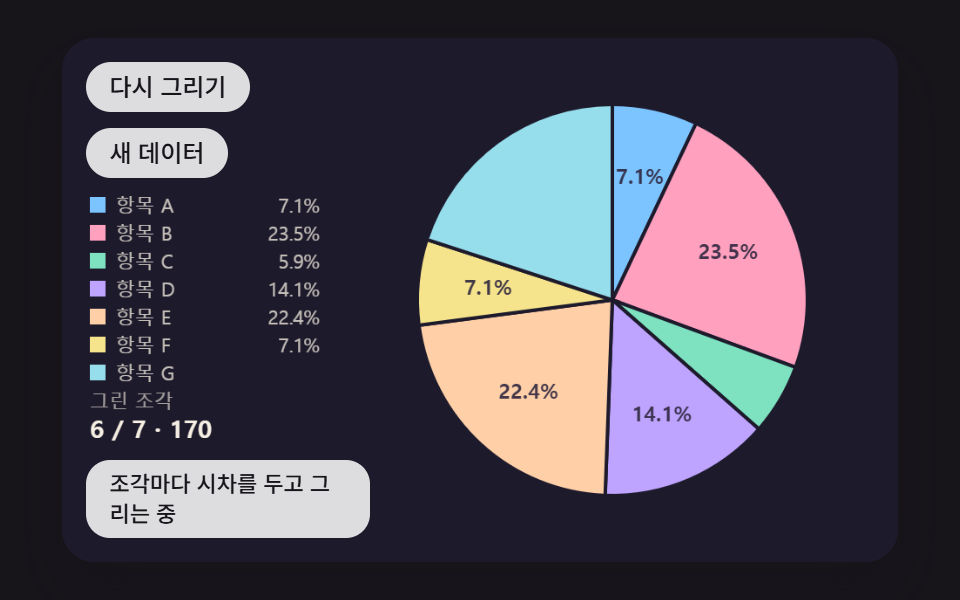 ダッシュボードUI円グラフ アニメーション 9種 — 飛び出し・傾き・変形する扇形
 ダッシュボードUIワードクラウド 作り方 9種 — 渦巻き配置・形の中・3D球・リアルタイム投票
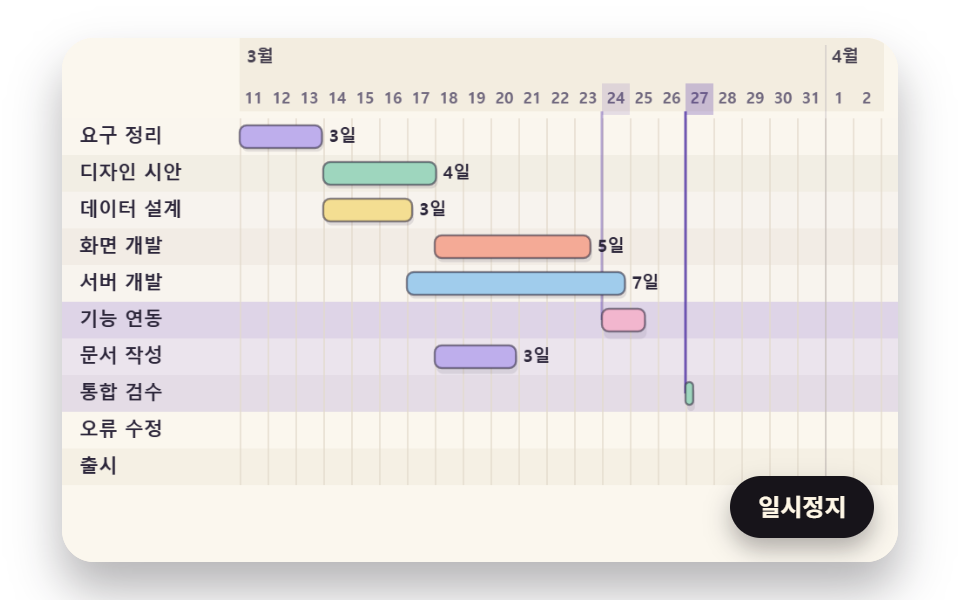 ダッシュボードUIガントチャート js で作る工程表 9種 — 依存・余裕・押し出しを計算で
 ダッシュボードUIダッシュボード ウィジェット単体UI9選 —そのまま貼れる部品だけ
 ダッシュボードUIダッシュボード コンポーネント9選 — 画面ごとじゃなくこの部品だけ
 ダッシュボードUI検索窓 デザイン css 9選 — Cmd+Kで開くパレット