ダッシュボード グラフ デザイン 操作9選 — 触ると数字が変わる
ダッシュボード グラフ デザインで本当に働くのは描かれた線ではなく、その上で手がすることです。9 つはすべてチャートライブラリなしで CSS の棒とインライン SVG の上に素の JS だけを載せ、触ると数字が変わるものだけを選びました。
 01 chart-ia-crosshair-tooltip
 02 chart-ia-legend-toggle
 03 chart-ia-brush-range
 04 chart-ia-bar-drilldown
 05 chart-ia-period-segment
 06 chart-ia-stack-group-switch
 07 chart-ia-goal-line-drag
 08 chart-ia-compare-pin
 09 chart-ia-sparkline-row-expand
自動再生 · タイルを押すとその項目へ · すべて1つのzip
- 01 マウスを追って一番近い点に吸い付く
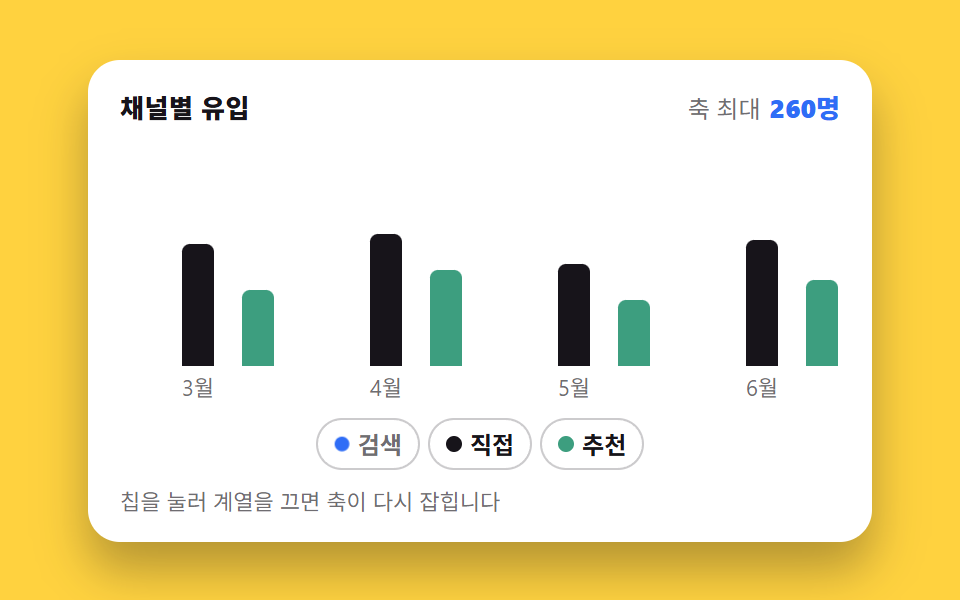
- 02 凡例を消すと残りの棒が伸び直す
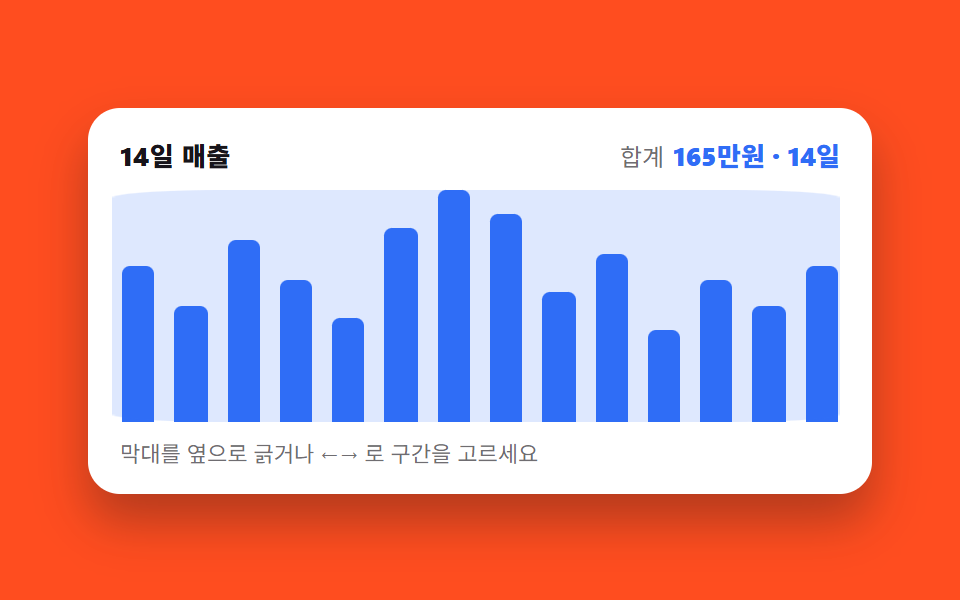
- 03 ドラッグで区間を選ぶと合計が変わる
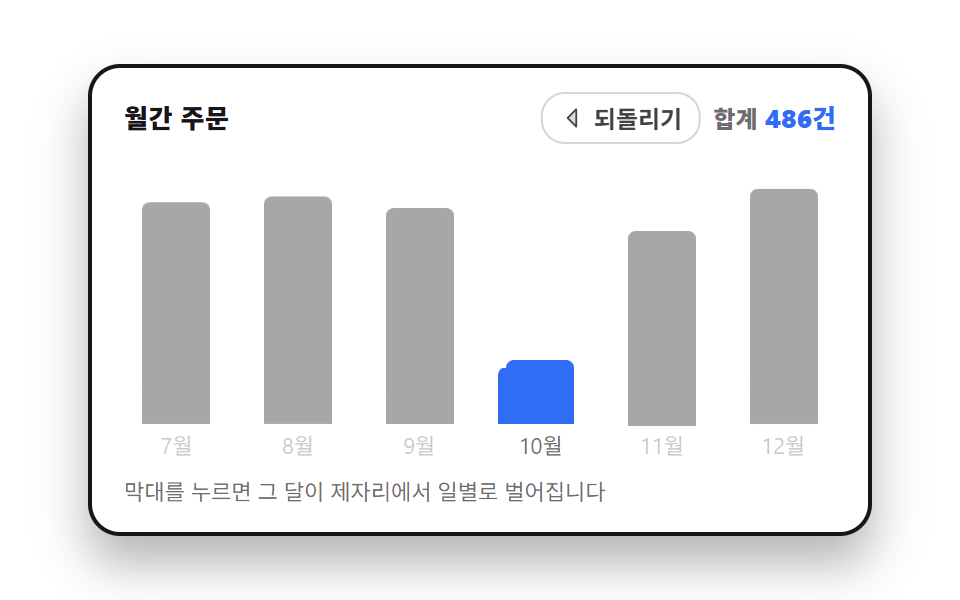
- 04 月の棒を押すとその場で日別に割れる
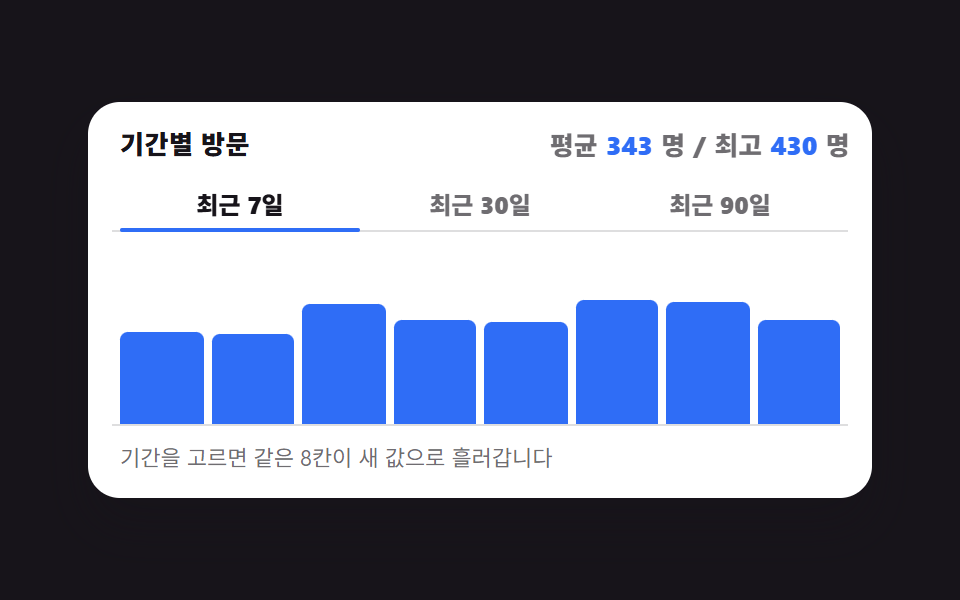
- 05 7日・30日・90日で棒が入れ替わる
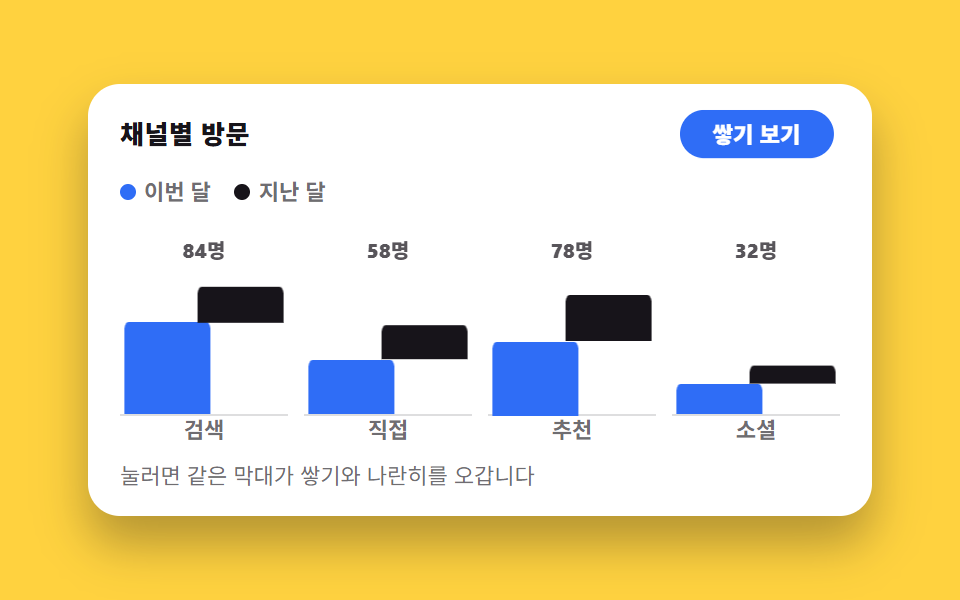
- 06 積み上げと横並びを行き来する
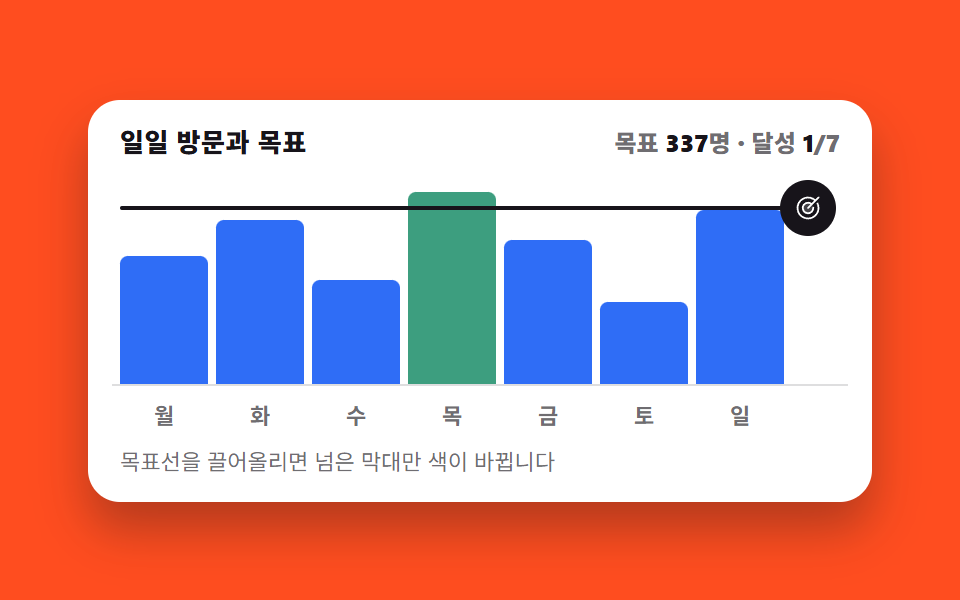
- 07 目標線を動かすと超えた棒だけ色が変わる
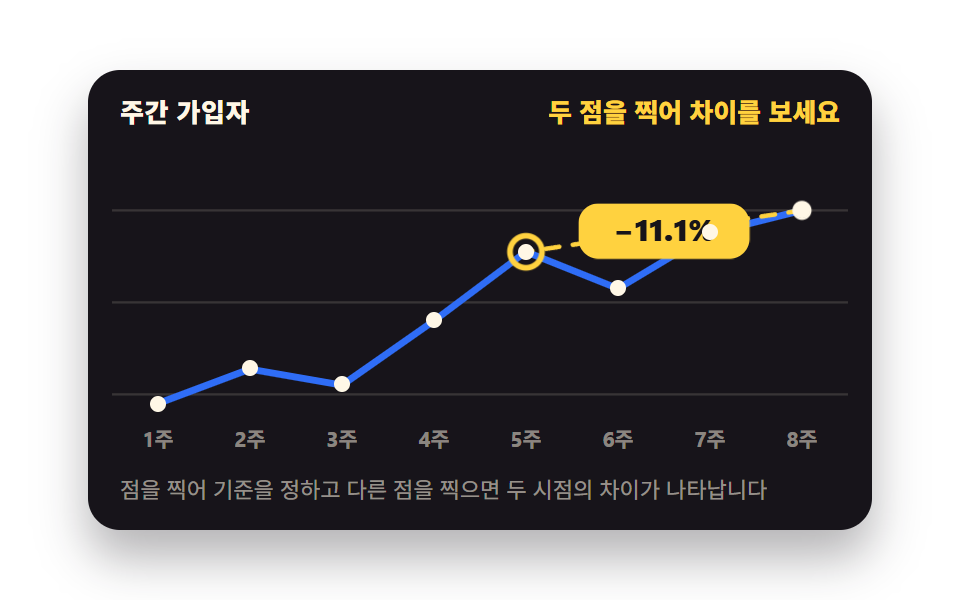
- 08 2点を留めると差が出る
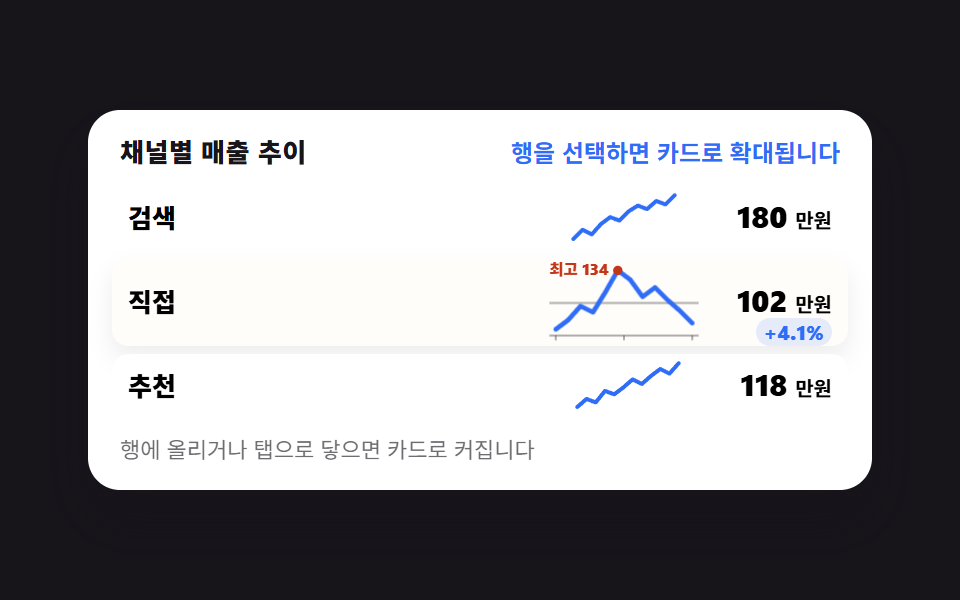
- 09 表の中の小さな線がカードに広がる
並び順は、人がグラフを読んでいく順です。まず値を 1 つ確かめ(01)、見る系列を絞り(02)、期間を手でなぞって決めます(03)。次は掘り下げる段階です。1 か月を押して日別に割り(04)、用意された期間に入れ替え(05)、同じ値を積み上げと横並びでひっくり返して見ます(06)。最後の 3 つは判断する段階です。目標線を自分で動かして達成本数を数え(07)、2 つの時点を留めて差を読み(08)、表の 1 行を広げてそのチャネルだけを覗きます(09)。9 つをひとつに束ねる約束があります。目に見える変化はすべて @property で登録したカスタムプロパティと aria-*・data-* 属性だけに入り、JavaScript はその値を書き換えるだけで、描くのは CSS に任せます。そうして初めて、自動再生のプレビューと人が実際に触ったときが同じ値を共有します。グラフ デザイン 見やすい かどうかは飾りの多さではなく、値がどこに書かれているかで決まります。同じダッシュボードで窓を開く側はCmd+Kで開くパレットで、グラフ自体を描く側はcss グラフ をSVGで描くが担います。凡例を切った後に残る棒は、切った瞬間ではなく120ms後に広がり始めます。値は張り付いた時点の順位で並べ、ドラッグで選んだ区間の要約は指を離したときだけ書き換わります。横軸は掴んだ位置を中心に伸び、離すと近いきりの幅へ吸い付きます。要約の数字は四捨五入で丸めず区間の実値をそのまま見せ、凡例の順番は消した系列があった場所を記憶して戻します。
01マウスを追って一番近い点に吸い付く
何が見えるか
線の上でポインタを動かすと、縦の点線が点と点の間に中途半端に立たず、一番近い日付の枠へ引き寄せられます。マウスの x を枠の比率に直して四捨五入した整数 1 つが吸い付きのすべてで、残りはその整数を読んだ CSS が描きます。
<main class="stage">
  <figure class="ch is-demo" id="ch">
    <figcaption class="ch__head">
      <span class="ch__title">週間の訪問</span>
      <span class="ch__val" aria-live="polite" id="ch-val">5日 · 398人</span>
    </figcaption>
    <div class="ch__plot">
      <svg class="ch__svg" viewBox="0 0 320 132" role="img" aria-label="12日間の訪問者推移の折れ線。5日の398人と12日の401人が高い山です">
        <g class="ch__grid" aria-hidden="true">
          <line x1="0" y1="24" x2="320" y2="24"/><line x1="0" y1="60" x2="320" y2="60"/><line x1="0" y1="96" x2="320" y2="96"/>
        </g>
        <polyline class="ch__line" points="14,66 40,54 66,58 92,47 118,27 144,39 170,53 196,42 222,29 248,45 274,36 300,25"/>
        <g class="ch__dots" aria-hidden="true">
          <circle cx="14" cy="66" r="3"/><circle cx="40" cy="54" r="3"/><circle cx="66" cy="58" r="3"/><circle cx="92" cy="47" r="3"/><circle cx="118" cy="27" r="3"/><circle cx="144" cy="39" r="3"/><circle cx="170" cy="53" r="3"/><circle cx="196" cy="42" r="3"/><circle cx="222" cy="29" r="3"/><circle cx="248" cy="45" r="3"/><circle cx="274" cy="36" r="3"/><circle cx="300" cy="25" r="3"/>
        </g>
        <g class="ch__cursor" aria-hidden="true">
          <line class="ch__x" x1="0" y1="6" x2="0" y2="112"/>
          <g class="ch__mark"><circle class="ch__ring" r="7"/></g>
          <g class="ch__tip"><g class="ch__tipbox"><rect x="-31" y="-32" width="62" height="24" rx="6"/><text x="0" y="-15" text-anchor="middle">398人</text></g></g>
        </g>
      </svg>
      <button class="ch__hot" type="button" id="ch-hot" aria-label="折れ線の上を移動して日ごとの値を読む"></button>
    </div>
    <p class="ch__hint">線の上を動かすと一番近い日に吸い付きます</p>
    <div class="sr"><table>
      <caption>12日間の訪問者数</caption>
      <tbody><tr><th>1日</th><td>220</td></tr><tr><th>2日</th><td>268</td></tr><tr><th>3日</th><td>254</td></tr><tr><th>4日</th><td>305</td></tr><tr><th>5日</th><td>398</td></tr><tr><th>6日</th><td>342</td></tr><tr><th>7日</th><td>287</td></tr><tr><th>8日</th><td>331</td></tr><tr><th>9日</th><td>376</td></tr><tr><th>10日</th><td>309</td></tr><tr><th>11日</th><td>352</td></tr><tr><th>12日</th><td>401</td></tr></tbody>
    </table></div>
  </figure>
</main>@use "../../../../site/static/demo-tokens" as *;
// 칸 번호와 그 점의 높이를 등록한다. <integer>·<length> 로 등록해야
// 두 값이 타입을 갖고, 정적 경로의 transition 이 칸 사이를 부드럽게 이어 준다.
// 등록하지 않으면 문자열이라 보간이 아예 일어나지 않는다
@property --i {
syntax: "<integer>";
initial-value: 4;
inherits: true;
}
@property --y {
syntax: "<length>";
initial-value: 27px;
inherits: true;
}
$duration: $dur-quick;
$easing: $ease-out;
$color: $subject-blue;
$step: 26px; // 칸 간격 = (300 - 14) / 11, viewBox 단위
@include stage($stage-ink);
.sr {
position: absolute;
width: 1px;
height: 1px;
overflow: hidden;
clip-path: inset(50%);
white-space: nowrap;
}
.ch {
--i: 4;
--y: 27px;
box-sizing: border-box;
width: min(392px, 88vw);
display: flex;
flex-direction: column;
gap: $sp-2;
margin: 0;
padding: $sp-3;
border-radius: $r-card;
background: $stage-paper;
box-shadow: $shadow-raised;
color: $subject-ink;
font-family: -apple-system, "Segoe UI", "Noto Sans KR", sans-serif;
}
.ch__head {
display: flex;
align-items: baseline;
justify-content: space-between;
gap: $sp-2;
padding: 0 $sp-1;
}
.ch__title { font-size: 13px; line-height: 18px; font-weight: 800; letter-spacing: .02em; }
.ch__val { font-size: 13px; line-height: 18px; font-weight: 800; color: $color; font-variant-numeric: tabular-nums; }
.ch__plot { position: relative; }
.ch__svg { display: block; width: 100%; height: auto; }
.ch__grid line { stroke: rgba(23, 20, 26, .14); stroke-width: 1; }
.ch__line {
fill: none;
stroke: $color;
stroke-width: 3;
stroke-linecap: round;
stroke-linejoin: round;
}
.ch__dots circle { fill: $stage-paper; stroke: $color; stroke-width: 2; }
// ── 커서 한 덩어리 ──
// 세로선·고리·툴팁을 **한 그룹** 안에 넣고 그룹만 옮긴다. 셋을 각자 옮기면
// 이징이 조금만 달라도 툴팁이 선을 앞질러 날아간다 (첫 판 실측)
.ch__cursor {
transform: translateX(calc(var(--i) * #{$step} + 14px));
opacity: 0;
}
.ch__x {
stroke: $subject-ink;
stroke-width: 1.5;
stroke-dasharray: 3 4;
}
.ch__mark { transform: translateY(var(--y)); }
.ch__ring {
fill: none;
stroke: $subject-ink;
stroke-width: 2.5;
}
// 툴팁은 커서 그룹 안에서 점 높이만 따라간다. 좌우 위치는 그룹이 이미 정했다
.ch__tip { transform: translateY(var(--y)); }
.ch__tipbox {
transform-box: fill-box;
transform-origin: center;
}
.ch__tipbox rect { fill: $subject-ink; }
.ch__tipbox text { fill: $stage-paper; font-size: 12px; font-weight: 800; }
.ch__hot {
position: absolute;
inset: 0;
margin: 0;
padding: 0;
border: 0;
border-radius: $r-sm;
background: transparent;
cursor: crosshair;
}
.ch__hot:focus-visible { outline: 2px solid $color; outline-offset: -2px; }
.ch__hint { margin: 0; padding: 0 $sp-1; font-size: 11px; line-height: 16px; color: rgba(23, 20, 26, .62); }
// ── 사람이 만진 뒤(정적 경로) — 커서가 보이고 칸 사이를 짧게 미끄러진다 ──
.ch:not(.is-demo) .ch__cursor {
opacity: 1;
transition-property: transform;
transition-duration: $duration;
transition-timing-function: $easing;
}
.ch:not(.is-demo) .ch__mark,
.ch:not(.is-demo) .ch__tip {
transition-property: transform;
transition-duration: $duration;
transition-timing-function: $easing;
}
// ── 자동 루프(2초): 5일 → 9일 → 12일 → 5일 칸을 짚는다 ──
// 칸 이동은 steps(1, end) 컷이다. 사람 손은 칸을 "건너뛰지" 않으므로
// 중간 프레임에 선이 점 사이에 떠 있으면 그 자체가 거짓말이 된다
.ch.is-demo .ch__cursor {
animation-name: ch-x;
animation-duration: $dur-loop;
animation-timing-function: steps(1, end);
animation-iteration-count: infinite;
opacity: 1;
}
@keyframes ch-x {
0% { transform: translateX(calc(4 * #{$step} + 14px)); }
28% { transform: translateX(calc(8 * #{$step} + 14px)); }
56% { transform: translateX(calc(11 * #{$step} + 14px)); }
84% { transform: translateX(calc(4 * #{$step} + 14px)); }
100% { transform: translateX(calc(4 * #{$step} + 14px)); }
}
.ch.is-demo .ch__mark,
.ch.is-demo .ch__tip {
animation-name: ch-y;
animation-duration: $dur-loop;
animation-timing-function: steps(1, end);
animation-iteration-count: infinite;
}
@keyframes ch-y {
0% { transform: translateY(27px); }
28% { transform: translateY(29px); }
56% { transform: translateY(25px); }
84% { transform: translateY(27px); }
100% { transform: translateY(27px); }
}
// 컷 옆에 **반투명이 안 생기는** 움직임을 붙여 프레임을 채운다 — 둘 다 transform 이다
.ch.is-demo .ch__ring {
animation-name: ch-ring;
animation-duration: $dur-loop;
animation-timing-function: $ease-pop;
animation-iteration-count: infinite;
}
@keyframes ch-ring {
0%, 28%, 56%, 84% { transform: scale(.45); }
14%, 42%, 70%, 96% { transform: scale(1.12); }
22%, 50%, 78%, 100% { transform: scale(1); }
}
.ch.is-demo .ch__tipbox {
animation-name: ch-tipbox;
animation-duration: $dur-loop;
animation-timing-function: $ease-pop;
animation-iteration-count: infinite;
}
@keyframes ch-tipbox {
0%, 28%, 56%, 84% { transform: translateY(7px) scale(.8); }
16%, 44%, 72%, 98% { transform: translateY(0) scale(1.04); }
24%, 52%, 80%, 100% { transform: translateY(0) scale(1); }
}
@media (max-width: 340px) {
.ch { padding: $sp-2; gap: $sp-1; }
.ch__hint { display: none; }
.ch__title, .ch__val { font-size: 12px; line-height: 16px; }
}
@media (prefers-reduced-motion: reduce) {
.ch.is-demo .ch__cursor,
.ch.is-demo .ch__mark,
.ch.is-demo .ch__tip,
.ch.is-demo .ch__ring,
.ch.is-demo .ch__tipbox { animation: none !important; }
.ch:not(.is-demo) .ch__cursor,
.ch:not(.is-demo) .ch__mark,
.ch:not(.is-demo) .ch__tip { transition: none !important; }
.ch.is-demo .ch__cursor { opacity: 1; transform: translateX(calc(4 * #{$step} + 14px)); }
.ch.is-demo .ch__mark,
.ch.is-demo .ch__tip { transform: translateY(27px); }
}@property --i {
syntax: "<integer>";
initial-value: 4;
inherits: true;
}
@property --y {
syntax: "<length>";
initial-value: 27px;
inherits: true;
}
html, body {
margin: 0;
overflow: hidden;
}
.stage {
box-sizing: border-box;
min-height: 100vh;
display: grid;
place-items: center;
margin: 0;
background: #17141a;
font-family: -apple-system, "Segoe UI", "Noto Sans KR", sans-serif;
padding: clamp(8px, 4vw, 24px);
}
.sr {
position: absolute;
width: 1px;
height: 1px;
overflow: hidden;
clip-path: inset(50%);
white-space: nowrap;
}
.ch {
--i: 4;
--y: 27px;
box-sizing: border-box;
width: min(392px, 88vw);
display: flex;
flex-direction: column;
gap: 8px;
margin: 0;
padding: 12px;
border-radius: 16px;
background: #ffffff;
box-shadow: 0 14px 24px rgba(23, 20, 26, 0.32);
color: #17141a;
font-family: -apple-system, "Segoe UI", "Noto Sans KR", sans-serif;
}
.ch__head {
display: flex;
align-items: baseline;
justify-content: space-between;
gap: 8px;
padding: 0 4px;
}
.ch__title {
font-size: 13px;
line-height: 18px;
font-weight: 800;
letter-spacing: 0.02em;
}
.ch__val {
font-size: 13px;
line-height: 18px;
font-weight: 800;
color: #2f6df6;
font-variant-numeric: tabular-nums;
}
.ch__plot {
position: relative;
}
.ch__svg {
display: block;
width: 100%;
height: auto;
}
.ch__grid line {
stroke: rgba(23, 20, 26, 0.14);
stroke-width: 1;
}
.ch__line {
fill: none;
stroke: #2f6df6;
stroke-width: 3;
stroke-linecap: round;
stroke-linejoin: round;
}
.ch__dots circle {
fill: #ffffff;
stroke: #2f6df6;
stroke-width: 2;
}
.ch__cursor {
transform: translateX(calc(var(--i) * 26px + 14px));
opacity: 0;
}
.ch__x {
stroke: #17141a;
stroke-width: 1.5;
stroke-dasharray: 3 4;
}
.ch__mark {
transform: translateY(var(--y));
}
.ch__ring {
fill: none;
stroke: #17141a;
stroke-width: 2.5;
}
.ch__tip {
transform: translateY(var(--y));
}
.ch__tipbox {
transform-box: fill-box;
transform-origin: center;
}
.ch__tipbox rect {
fill: #17141a;
}
.ch__tipbox text {
fill: #ffffff;
font-size: 12px;
font-weight: 800;
}
.ch__hot {
position: absolute;
inset: 0;
margin: 0;
padding: 0;
border: 0;
border-radius: 8px;
background: transparent;
cursor: crosshair;
}
.ch__hot:focus-visible {
outline: 2px solid #2f6df6;
outline-offset: -2px;
}
.ch__hint {
margin: 0;
padding: 0 4px;
font-size: 11px;
line-height: 16px;
color: rgba(23, 20, 26, 0.62);
}
.ch:not(.is-demo) .ch__cursor {
opacity: 1;
transition-property: transform;
transition-duration: 220ms;
transition-timing-function: ease-out;
}
.ch:not(.is-demo) .ch__mark,
.ch:not(.is-demo) .ch__tip {
transition-property: transform;
transition-duration: 220ms;
transition-timing-function: ease-out;
}
.ch.is-demo .ch__cursor {
animation-name: ch-x;
animation-duration: 2s;
animation-timing-function: steps(1, end);
animation-iteration-count: infinite;
opacity: 1;
}
@keyframes ch-x {
0% {
transform: translateX(calc(4 * 26px + 14px));
}
28% {
transform: translateX(calc(8 * 26px + 14px));
}
56% {
transform: translateX(calc(11 * 26px + 14px));
}
84% {
transform: translateX(calc(4 * 26px + 14px));
}
100% {
transform: translateX(calc(4 * 26px + 14px));
}
}
.ch.is-demo .ch__mark,
.ch.is-demo .ch__tip {
animation-name: ch-y;
animation-duration: 2s;
animation-timing-function: steps(1, end);
animation-iteration-count: infinite;
}
@keyframes ch-y {
0% {
transform: translateY(27px);
}
28% {
transform: translateY(29px);
}
56% {
transform: translateY(25px);
}
84% {
transform: translateY(27px);
}
100% {
transform: translateY(27px);
}
}
.ch.is-demo .ch__ring {
animation-name: ch-ring;
animation-duration: 2s;
animation-timing-function: cubic-bezier(0.2, 1.4, 0.4, 1);
animation-iteration-count: infinite;
}
@keyframes ch-ring {
0%, 28%, 56%, 84% {
transform: scale(0.45);
}
14%, 42%, 70%, 96% {
transform: scale(1.12);
}
22%, 50%, 78%, 100% {
transform: scale(1);
}
}
.ch.is-demo .ch__tipbox {
animation-name: ch-tipbox;
animation-duration: 2s;
animation-timing-function: cubic-bezier(0.2, 1.4, 0.4, 1);
animation-iteration-count: infinite;
}
@keyframes ch-tipbox {
0%, 28%, 56%, 84% {
transform: translateY(7px) scale(0.8);
}
16%, 44%, 72%, 98% {
transform: translateY(0) scale(1.04);
}
24%, 52%, 80%, 100% {
transform: translateY(0) scale(1);
}
}
@media (max-width: 340px) {
.ch {
padding: 8px;
gap: 4px;
}
.ch__hint {
display: none;
}
.ch__title, .ch__val {
font-size: 12px;
line-height: 16px;
}
}
@media (prefers-reduced-motion: reduce) {
.ch.is-demo .ch__cursor,
.ch.is-demo .ch__mark,
.ch.is-demo .ch__tip,
.ch.is-demo .ch__ring,
.ch.is-demo .ch__tipbox {
animation: none !important;
}
.ch:not(.is-demo) .ch__cursor,
.ch:not(.is-demo) .ch__mark,
.ch:not(.is-demo) .ch__tip {
transition: none !important;
}
.ch.is-demo .ch__cursor {
opacity: 1;
transform: translateX(calc(4 * 26px + 14px));
}
.ch.is-demo .ch__mark,
.ch.is-demo .ch__tip {
transform: translateY(27px);
}
}// 실제 동작: pointermove 의 x 를 12칸 중 가장 가까운 칸으로 반올림해 **스냅**한다.
// 결과는 커스텀 속성 두 개(--i 칸 번호, --y 그 점의 높이)로만 나가고,
// 세로선·고리·툴팁은 전부 그 두 값을 읽는 같은 그룹 안에 있다 — 그래서 절대 어긋나지 않는다.
var N = 12;
var ch = document.getElementById('ch');
var hot = document.getElementById('ch-hot');
var val = document.getElementById('ch-val');
var tip = ch.querySelector('.ch__tip text');
var ys = [66, 54, 58, 47, 27, 39, 53, 42, 29, 45, 36, 25];
var nums = [220, 268, 254, 305, 398, 342, 287, 331, 376, 309, 352, 401];
var cur = 4;
function snap(i) {
cur = Math.min(Math.max(i, 0), N - 1);
ch.classList.remove('is-demo');
ch.style.setProperty('--i', String(cur));
ch.style.setProperty('--y', ys[cur] + 'px');
tip.textContent = nums[cur] + '人';
val.textContent = (cur + 1) + '日 · ' + nums[cur] + '人';
}
hot.addEventListener('pointermove', function (e) {
var r = hot.getBoundingClientRect();
var t = Math.min(Math.max((e.clientX - r.left) / r.width, 0), 1);
snap(Math.round(t * (N - 1)));
});
hot.addEventListener('keydown', function (e) {
var d = e.key === 'ArrowRight' ? 1 : e.key === 'ArrowLeft' ? -1 : 0;
if (d) { e.preventDefault(); snap(cur + d); hot.focus({ preventScroll: true }); }
if (e.key === 'Home' || e.key === 'End') { e.preventDefault(); snap(e.key === 'Home' ? 0 : N - 1); }
});import { useState } from "react";
import type { CSSProperties } from "react";
import styles from "./CrosshairTooltip.module.scss";
export type CrosshairTooltipProps = {
title?: string;
hint?: string;
unit?: string;
dayLabel?: (i: number) => string;
chartLabel?: string;
hotLabel?: string;
tableCaption?: string;
duration?: number;
easing?: string;
color?: string;
};
type Vars = CSSProperties & {
"--duration"?: string;
"--easing"?: string;
"--color"?: string;
"--i"?: string;
"--y"?: string;
};
// ambient 타입에 React 이벤트 제네릭이 없어 필요한 모양만 직접 적는다
type PointerLike = { clientX: number; currentTarget: { getBoundingClientRect(): DOMRect } };
type KeyEvt = { key: string; preventDefault(): void };
const XS = [14, 40, 66, 92, 118, 144, 170, 196, 222, 248, 274, 300];
const YS = [66, 54, 58, 47, 27, 39, 53, 42, 29, 45, 36, 25];
const NUMS = [220, 268, 254, 305, 398, 342, 287, 331, 376, 309, 352, 401];
const N = NUMS.length;
export default function CrosshairTooltip({
title = "Weekly visits",
hint = "Move across the line and it snaps to the nearest day",
unit = "",
dayLabel = (i: number) => `Day ${i + 1}`,
chartLabel = "Visitor trend over 12 days. Day 5 at 398 and day 12 at 401 are the peaks",
hotLabel = "Move across the line to read each day",
tableCaption = "Visitors over 12 days",
duration = 220,
easing = "ease-out",
color = "#2f6df6",
}: CrosshairTooltipProps) {
const [demo, setDemo] = useState(true);
const [i, setI] = useState(4);
// 칸 번호와 그 점의 높이 두 값만 CSS 로 내보낸다 — 세로선·고리·툴팁이 같은 그룹 안에서 그 값을 읽는다
const vars: Vars = {
"--duration": `${duration}ms`,
"--easing": easing,
"--color": color,
"--i": String(i),
"--y": `${YS[i]}px`,
};
function snap(next: number) {
setDemo(false);
setI(Math.min(Math.max(next, 0), N - 1));
}
function onMove(e: PointerLike) {
const r = e.currentTarget.getBoundingClientRect();
const t = Math.min(Math.max((e.clientX - r.left) / r.width, 0), 1);
snap(Math.round(t * (N - 1)));
}
function onKey(e: KeyEvt) {
if (e.key === "ArrowRight") { e.preventDefault(); snap(i + 1); }
if (e.key === "ArrowLeft") { e.preventDefault(); snap(i - 1); }
if (e.key === "Home") { e.preventDefault(); snap(0); }
if (e.key === "End") { e.preventDefault(); snap(N - 1); }
}
const points = XS.map((x, k) => `${x},${YS[k]}`).join(" ");
return (
<figure className={`${styles.ch} ${demo ? styles.isDemo : ""}`} style={vars}>
<figcaption className={styles.head}>
<span className={styles.title}>{title}</span>
<span className={styles.val} aria-live="polite">
{dayLabel(i)} · {NUMS[i]}{unit}
</span>
</figcaption>
<div className={styles.plot}>
<svg className={styles.svg} viewBox="0 0 320 132" role="img" aria-label={chartLabel}>
<g className={styles.grid} aria-hidden="true">
<line x1="0" y1="24" x2="320" y2="24" /><line x1="0" y1="60" x2="320" y2="60" /><line x1="0" y1="96" x2="320" y2="96" />
</g>
<polyline className={styles.line} points={points} />
<g className={styles.dots} aria-hidden="true">
{XS.map((x, k) => <circle key={x} cx={x} cy={YS[k]} r="3" />)}
</g>
<g className={styles.cursor} aria-hidden="true">
<line className={styles.x} x1="0" y1="6" x2="0" y2="112" />
<g className={styles.mark}><circle className={styles.ring} r="7" /></g>
<g className={styles.tip}>
<g className={styles.tipbox}>
<rect x="-31" y="-32" width="62" height="24" rx="6" />
<text x="0" y="-15" textAnchor="middle">{NUMS[i]}{unit}</text>
</g>
</g>
</g>
</svg>
<button className={styles.hot} type="button" aria-label={hotLabel} onPointerMove={onMove} onKeyDown={onKey} />
</div>
<p className={styles.hint}>{hint}</p>
<div className={styles.sr}>
<table>
<caption>{tableCaption}</caption>
<tbody>
{NUMS.map((n, k) => <tr key={n + "-" + k}><th>{dayLabel(k)}</th><td>{n}</td></tr>)}
</tbody>
</table>
</div>
</figure>
);
}01 · マウスを追って一番近い点に吸い付く — 計測 累積面積 4.833% · 動いたフレーム 23/23GODRICH オリジナル · SCSS と React は zip に同梱 · パスワードを見る
コードのどこを見るか
24 フレームのレンダリングで動いたフレームは 23 枚、累積面積は 4.833% です。
var N = 12;
function snap(i) {
  cur = Math.min(Math.max(i, 0), N - 1);
  ch.classList.remove('is-demo');
  ch.style.setProperty('--i', String(cur));
  ch.style.setProperty('--y', ys[cur] + 'px');
  tip.textContent = nums[cur] + '人';
  val.textContent = (cur + 1) + '日 · ' + nums[cur] + '人';
}
hot.addEventListener('pointermove', function (e) {
  var r = hot.getBoundingClientRect();
  var t = Math.min(Math.max((e.clientX - r.left) / r.width, 0), 1);
  snap(Math.round(t * (N - 1)));
});
02凡例を消すと残りの棒が伸び直す
チャート ui で凡例を消すと画面で何が変わるか
凡例のチップを押すとその系列が底まで畳まれ、残った系列の最大値で軸が取り直されて、ほかの棒がすべて高く伸びます。
<main class="stage">
  <figure class="lg is-demo" id="lg">
    <figcaption class="lg__head">
      <span class="lg__title">チャネル別流入</span>
      <span class="lg__sum"><span class="lg__lab">軸の最大</span> <span class="lg__val" aria-hidden="true"><i class="lg__n"></i>人</span></span>
    </figcaption>
    <div class="lg__plot" role="img" aria-label="チャネル別流入の棒グラフ。検索が最も高く5月の460人が最大、直接は最大260人、紹介は最大190人">
      <div class="lg__groups">
        <div class="lg__group">
          <i class="lg__bar" data-s="0" data-m="0" style="--b:91.3%"></i>
          <i class="lg__bar" data-s="1" data-m="0" style="--b:52.2%"></i>
          <i class="lg__bar" data-s="2" data-m="0" style="--b:32.6%"></i>
        </div>
        <div class="lg__group">
          <i class="lg__bar" data-s="0" data-m="1" style="--b:82.6%"></i>
          <i class="lg__bar" data-s="1" data-m="1" style="--b:56.5%"></i>
          <i class="lg__bar" data-s="2" data-m="1" style="--b:41.3%"></i>
        </div>
        <div class="lg__group">
          <i class="lg__bar" data-s="0" data-m="2" style="--b:100%"></i>
          <i class="lg__bar" data-s="1" data-m="2" style="--b:43.5%"></i>
          <i class="lg__bar" data-s="2" data-m="2" style="--b:28.3%"></i>
        </div>
        <div class="lg__group">
          <i class="lg__bar" data-s="0" data-m="3" style="--b:95.7%"></i>
          <i class="lg__bar" data-s="1" data-m="3" style="--b:54.3%"></i>
          <i class="lg__bar" data-s="2" data-m="3" style="--b:37%"></i>
        </div>
      </div>
      <div class="lg__axis" aria-hidden="true">
        <span>3月</span><span>4月</span><span>5月</span><span>6月</span>
      </div>
    </div>
    <div class="lg__chips" role="group" aria-label="表示する系列を選ぶ">
      <button class="lg__chip" type="button" data-s="0" aria-pressed="true"><i class="lg__dot" aria-hidden="true"></i>検索</button>
      <button class="lg__chip" type="button" data-s="1" aria-pressed="true"><i class="lg__dot" aria-hidden="true"></i>直接</button>
      <button class="lg__chip" type="button" data-s="2" aria-pressed="true"><i class="lg__dot" aria-hidden="true"></i>紹介</button>
    </div>
    <p class="lg__hint">チップを押して系列を消すと軸が引き直されます</p>
    <span class="sr" aria-live="polite" id="lg-live">軸の最大 460</span>
    <div class="sr"><table>
      <caption>チャネル別の月間流入</caption>
      <thead><tr><th>月</th><th>検索</th><th>直接</th><th>紹介</th></tr></thead>
      <tbody>
        <tr><th>3月</th><td>420</td><td>240</td><td>150</td></tr>
        <tr><th>4月</th><td>380</td><td>260</td><td>190</td></tr>
        <tr><th>5月</th><td>460</td><td>200</td><td>130</td></tr>
        <tr><th>6月</th><td>440</td><td>250</td><td>170</td></tr>
      </tbody>
    </table></div>
  </figure>
</main>@use "../../../../site/static/demo-tokens" as *;
// 막대 높이를 <percentage> 로 등록한다. 등록해야만 --h 가 "값"이 되어
// transition 이 숫자를 보간한다 — 등록 안 된 커스텀 속성은 문자열 토큰이라
// 값이 바뀌면 그냥 뛰어넘는다 (이 데모의 주제).
@property --h {
syntax: "<percentage>";
initial-value: 0%;
inherits: false;
}
// 자동 루프가 굴리는 축 배율. 계승되어 모든 막대의 --h 계산에 들어간다.
// 루프에서도 정적 경로와 같은 원리(--h 보간)로 막대가 자란다.
@property --g {
syntax: "<number>";
initial-value: 1;
inherits: true;
}
// 축 최대값. 글자로 두면 루프에서 갈아 끼울 수 없어 「검색을 껐는데 축은 460」 같은
// 프레임이 남는다 — 정수로 등록해 카운터로 그린다
@property --mx {
syntax: "<integer>";
initial-value: 460;
inherits: true;
}
$duration: $dur-base;
$easing: $ease-spring;
$color: $subject-blue;
// 흰 카드 위의 막대는 $subject-mint 그대로는 흰 바탕과 1.86:1 이라
// WCAG 1.4.11(비텍스트 3:1)에 못 미친다. 토큰 두 개를 섞어 3.28:1 로 내린 판을 쓴다
$mint-bar: mix($subject-mint, $subject-ink, 72%);
$axis-max: 460; // 켜진 계열 전체의 최댓값
$axis-next: 260; // 검색을 뺐을 때 남은 계열의 최댓값
$axis-scale: 1.7692; // 460 / 260 — 축이 다시 잡히는 배율 (calc 안에서는 변수 치환이 안 되니 밖에서 계산해 둔다)
@include stage($stage-yellow);
.sr {
position: absolute;
width: 1px;
height: 1px;
overflow: hidden;
clip-path: inset(50%);
white-space: nowrap;
}
.lg {
--g: 1;
--mx: 460;
box-sizing: border-box;
width: min(392px, 88vw);
display: flex;
flex-direction: column;
gap: $sp-2;
margin: 0;
padding: $sp-3;
border-radius: $r-card;
background: $stage-paper;
box-shadow: $shadow-raised;
color: $subject-ink;
font-family: -apple-system, "Segoe UI", "Noto Sans KR", sans-serif;
}
.lg__head {
display: flex;
align-items: baseline;
justify-content: space-between;
gap: $sp-2;
padding: 0 $sp-1;
}
.lg__title { font-size: 13px; line-height: 18px; font-weight: 800; letter-spacing: .02em; }
.lg__lab { font-size: 12px; line-height: 18px; color: rgba(23, 20, 26, .62); }
.lg__n { font-style: normal; counter-reset: mx var(--mx); }
.lg__n::after { content: counter(mx); }
.lg__val { font-size: 13px; line-height: 18px; font-weight: 800; color: $color; font-variant-numeric: tabular-nums; }
.lg__plot { display: flex; flex-direction: column; gap: $sp-1; }
// 칸 배분은 flex 가 아니라 grid 균등 분할 — scaleX 인디케이터 오탐(BD19) 회피이자
// 칸 폭이 정확히 균등해지는 정답
.lg__groups {
display: grid;
grid-template-columns: repeat(4, 1fr);
gap: $sp-2;
height: 112px;
}
.lg__group {
display: grid;
grid-template-columns: repeat(3, 1fr);
gap: $sp-1;
align-items: end;
}
.lg__bar {
--h: var(--b); // 기본 높이 = 축 최댓값(460) 기준 백분율
justify-self: center;
width: 64%;
height: var(--h);
border-radius: $r-xs $r-xs 0 0;
background: $color;
transform-origin: 50% 100%; // 바닥 고정 — 접히면 아래로 사라진다
}
.lg__bar[data-s="1"] { background: $subject-ink; }
.lg__bar[data-s="2"] { background: $mint-bar; }
// 꺼진 계열: 숨기는 게 아니라 바닥으로 접는다 — transform 이라 레이아웃 재계산 없음
.lg__bar[data-fold="1"] { transform: scaleY(0); }
.lg__axis {
display: grid;
grid-template-columns: repeat(4, 1fr);
gap: $sp-2;
}
.lg__axis span { text-align: center; font-size: 11px; line-height: 14px; color: rgba(23, 20, 26, .62); }
.lg__chips {
display: flex;
flex-wrap: wrap;
justify-content: center;
gap: $sp-1;
padding: 0 $sp-1;
}
.lg__chip {
display: inline-flex;
align-items: center;
gap: $sp-1;
margin: 0;
padding: $sp-1 $sp-2;
border: 1.5px solid rgba(23, 20, 26, .22);
border-radius: $r-pill;
background: $stage-paper;
color: $subject-ink;
font-family: inherit;
font-size: 12px;
line-height: 16px;
font-weight: 700;
cursor: pointer;
}
.lg__chip:focus-visible { outline: 2px solid $color; outline-offset: 1px; }
.lg__dot { width: 8px; height: 8px; border-radius: 50%; background: $color; }
.lg__chip[data-s="1"] .lg__dot { background: $subject-ink; }
.lg__chip[data-s="2"] .lg__dot { background: $mint-bar; }
.lg__chip[aria-pressed="false"] { color: rgba(23, 20, 26, .62); }
.lg__chip[aria-pressed="false"] .lg__dot { transform: scale(.55); }
.lg__hint { margin: 0; padding: 0 $sp-1; font-size: 11px; line-height: 16px; color: rgba(23, 20, 26, .62); }
// ── 사람이 만진 뒤(정적 경로) ──
// --h 를 transition 대상에 넣는 게 핵심이다. 등록된 커스텀 속성이라
// 값 자체가 보간되고, height 는 var(--h) 를 매 프레임 따라간다.
.lg:not(.is-demo) .lg__bar {
transition-property: --h, transform;
transition-duration: $duration;
transition-timing-function: $easing;
}
.lg:not(.is-demo) .lg__dot {
transition-property: transform;
transition-duration: $dur-quick;
transition-timing-function: $easing;
}
// ── 자동 루프(2초): 검색을 끄면 남은 막대가 다시 자란다 ──
// --g 는 축 배율(460/260). 루프에서 막대의 --h 는 원본 백분율 × 배율로 계산되고,
// --g 가 부드럽게 굴러가므로 정적 경로와 같은 보간으로 막대가 자란다.
.lg.is-demo .lg__bar { --h: calc(var(--b) * var(--g)); }
.lg.is-demo,
.lg.is-demo .lg__bar[data-s="0"] {
animation-duration: $dur-loop;
animation-iteration-count: infinite;
}
// 키프레임 안의 커스텀 속성에는 sass 변수가 그대로 새겨지지 않는다 — #{} 로 치환해야 한다
@keyframes lg-grow {
0%, 12% { --g: 1; }
30%, 68% { --g: #{$axis-scale}; }
84%, 100% { --g: 1; }
}
// 검색 막대의 접힘/복귀는 컷 — 반쯤 접힌 막대는 거짓말이다
.lg.is-demo .lg__bar[data-s="0"] {
animation-name: lg-fold;
animation-timing-function: steps(1, end);
}
@keyframes lg-fold {
0%, 11.99% { transform: scaleY(1); }
12%, 83.99% { transform: scaleY(0); }
84%, 100% { transform: scaleY(1); }
}
// 칩도 같은 박자로: 점은 컷과 별개로 부드럽게 줄어들며 프레임을 채운다
.lg.is-demo .lg__chip[data-s="0"] {
animation-name: lg-chip;
animation-duration: $dur-loop;
animation-timing-function: steps(1, end);
animation-iteration-count: infinite;
}
// 축 최대 숫자도 칩과 **같은 박자**의 컷 — 상태는 누른 순간 바뀌고 막대가 따라 자란다.
// 숫자만 막대 도착 시각에 두면 「축은 아직 460인데 막대는 260 기준」 프레임이 생긴다
.lg.is-demo { animation-name: lg-grow, lg-mx; animation-timing-function: $ease-out, steps(1, end); }
@keyframes lg-mx {
0%, 11.99% { --mx: #{$axis-max}; }
12%, 83.99% { --mx: #{$axis-next}; }
84%, 100% { --mx: #{$axis-max}; }
}
@keyframes lg-chip {
0%, 11.99% { color: $subject-ink; }
12%, 83.99% { color: rgba(23, 20, 26, .62); }
84%, 100% { color: $subject-ink; }
}
.lg.is-demo .lg__chip[data-s="0"] .lg__dot {
animation-name: lg-dot;
animation-duration: $dur-loop;
animation-timing-function: $ease-pop;
animation-iteration-count: infinite;
}
@keyframes lg-dot {
0%, 12% { transform: scale(1); }
30%, 68% { transform: scale(.55); }
84%, 100% { transform: scale(1); }
}
@media (max-width: 340px) {
.lg { padding: $sp-2; gap: $sp-1; }
.lg__groups { height: 84px; gap: $sp-1; }
.lg__title, .lg__val { font-size: 12px; line-height: 16px; }
.lg__lab { font-size: 11px; line-height: 16px; }
.lg__chip { padding: $sp-1; font-size: 11px; line-height: 14px; }
.lg__hint { display: none; }
}
@media (prefers-reduced-motion: reduce) {
.lg.is-demo,
.lg.is-demo .lg__bar[data-s="0"],
.lg.is-demo .lg__chip[data-s="0"],
.lg.is-demo .lg__chip[data-s="0"] .lg__dot { animation: none !important; }
.lg:not(.is-demo) .lg__bar,
.lg:not(.is-demo) .lg__dot { transition: none !important; }
}@property --h {
syntax: "<percentage>";
initial-value: 0%;
inherits: false;
}
@property --g {
syntax: "<number>";
initial-value: 1;
inherits: true;
}
@property --mx {
syntax: "<integer>";
initial-value: 460;
inherits: true;
}
html, body {
margin: 0;
overflow: hidden;
}
.stage {
box-sizing: border-box;
min-height: 100vh;
display: grid;
place-items: center;
margin: 0;
background: #ffd23f;
font-family: -apple-system, "Segoe UI", "Noto Sans KR", sans-serif;
padding: clamp(8px, 4vw, 24px);
}
.sr {
position: absolute;
width: 1px;
height: 1px;
overflow: hidden;
clip-path: inset(50%);
white-space: nowrap;
}
.lg {
--g: 1;
--mx: 460;
box-sizing: border-box;
width: min(392px, 88vw);
display: flex;
flex-direction: column;
gap: 8px;
margin: 0;
padding: 12px;
border-radius: 16px;
background: #ffffff;
box-shadow: 0 14px 24px rgba(23, 20, 26, 0.32);
color: #17141a;
font-family: -apple-system, "Segoe UI", "Noto Sans KR", sans-serif;
}
.lg__head {
display: flex;
align-items: baseline;
justify-content: space-between;
gap: 8px;
padding: 0 4px;
}
.lg__title {
font-size: 13px;
line-height: 18px;
font-weight: 800;
letter-spacing: 0.02em;
}
.lg__lab {
font-size: 12px;
line-height: 18px;
color: rgba(23, 20, 26, 0.62);
}
.lg__n {
font-style: normal;
counter-reset: mx var(--mx);
}
.lg__n::after {
content: counter(mx);
}
.lg__val {
font-size: 13px;
line-height: 18px;
font-weight: 800;
color: #2f6df6;
font-variant-numeric: tabular-nums;
}
.lg__plot {
display: flex;
flex-direction: column;
gap: 4px;
}
.lg__groups {
display: grid;
grid-template-columns: repeat(4, 1fr);
gap: 8px;
height: 112px;
}
.lg__group {
display: grid;
grid-template-columns: repeat(3, 1fr);
gap: 4px;
align-items: end;
}
.lg__bar {
--h: var(--b);
justify-self: center;
width: 64%;
height: var(--h);
border-radius: 4px 4px 0 0;
background: #2f6df6;
transform-origin: 50% 100%;
}
.lg__bar[data-s="1"] {
background: #17141a;
}
.lg__bar[data-s="2"] {
background: rgb(23.9843137255%, 62.0549019608%, 49.7254901961%);
}
.lg__bar[data-fold="1"] {
transform: scaleY(0);
}
.lg__axis {
display: grid;
grid-template-columns: repeat(4, 1fr);
gap: 8px;
}
.lg__axis span {
text-align: center;
font-size: 11px;
line-height: 14px;
color: rgba(23, 20, 26, 0.62);
}
.lg__chips {
display: flex;
flex-wrap: wrap;
justify-content: center;
gap: 4px;
padding: 0 4px;
}
.lg__chip {
display: inline-flex;
align-items: center;
gap: 4px;
margin: 0;
padding: 4px 8px;
border: 1.5px solid rgba(23, 20, 26, 0.22);
border-radius: 999px;
background: #ffffff;
color: #17141a;
font-family: inherit;
font-size: 12px;
line-height: 16px;
font-weight: 700;
cursor: pointer;
}
.lg__chip:focus-visible {
outline: 2px solid #2f6df6;
outline-offset: 1px;
}
.lg__dot {
width: 8px;
height: 8px;
border-radius: 50%;
background: #2f6df6;
}
.lg__chip[data-s="1"] .lg__dot {
background: #17141a;
}
.lg__chip[data-s="2"] .lg__dot {
background: rgb(23.9843137255%, 62.0549019608%, 49.7254901961%);
}
.lg__chip[aria-pressed=false] {
color: rgba(23, 20, 26, 0.62);
}
.lg__chip[aria-pressed=false] .lg__dot {
transform: scale(0.55);
}
.lg__hint {
margin: 0;
padding: 0 4px;
font-size: 11px;
line-height: 16px;
color: rgba(23, 20, 26, 0.62);
}
.lg:not(.is-demo) .lg__bar {
transition-property: --h, transform;
transition-duration: 300ms;
transition-timing-function: cubic-bezier(0.2, 0.8, 0.2, 1);
}
.lg:not(.is-demo) .lg__dot {
transition-property: transform;
transition-duration: 220ms;
transition-timing-function: cubic-bezier(0.2, 0.8, 0.2, 1);
}
.lg.is-demo .lg__bar {
--h: calc(var(--b) * var(--g));
}
.lg.is-demo,
.lg.is-demo .lg__bar[data-s="0"] {
animation-duration: 2s;
animation-iteration-count: infinite;
}
@keyframes lg-grow {
0%, 12% {
--g: 1;
}
30%, 68% {
--g: 1.7692;
}
84%, 100% {
--g: 1;
}
}
.lg.is-demo .lg__bar[data-s="0"] {
animation-name: lg-fold;
animation-timing-function: steps(1, end);
}
@keyframes lg-fold {
0%, 11.99% {
transform: scaleY(1);
}
12%, 83.99% {
transform: scaleY(0);
}
84%, 100% {
transform: scaleY(1);
}
}
.lg.is-demo .lg__chip[data-s="0"] {
animation-name: lg-chip;
animation-duration: 2s;
animation-timing-function: steps(1, end);
animation-iteration-count: infinite;
}
.lg.is-demo {
animation-name: lg-grow, lg-mx;
animation-timing-function: ease-out, steps(1, end);
}
@keyframes lg-mx {
0%, 11.99% {
--mx: 460;
}
12%, 83.99% {
--mx: 260;
}
84%, 100% {
--mx: 460;
}
}
@keyframes lg-chip {
0%, 11.99% {
color: #17141a;
}
12%, 83.99% {
color: rgba(23, 20, 26, 0.62);
}
84%, 100% {
color: #17141a;
}
}
.lg.is-demo .lg__chip[data-s="0"] .lg__dot {
animation-name: lg-dot;
animation-duration: 2s;
animation-timing-function: cubic-bezier(0.2, 1.4, 0.4, 1);
animation-iteration-count: infinite;
}
@keyframes lg-dot {
0%, 12% {
transform: scale(1);
}
30%, 68% {
transform: scale(0.55);
}
84%, 100% {
transform: scale(1);
}
}
@media (max-width: 340px) {
.lg {
padding: 8px;
gap: 4px;
}
.lg__groups {
height: 84px;
gap: 4px;
}
.lg__title, .lg__val {
font-size: 12px;
line-height: 16px;
}
.lg__lab {
font-size: 11px;
line-height: 16px;
}
.lg__chip {
padding: 4px;
font-size: 11px;
line-height: 14px;
}
.lg__hint {
display: none;
}
}
@media (prefers-reduced-motion: reduce) {
.lg.is-demo,
.lg.is-demo .lg__bar[data-s="0"],
.lg.is-demo .lg__chip[data-s="0"],
.lg.is-demo .lg__chip[data-s="0"] .lg__dot {
animation: none !important;
}
.lg:not(.is-demo) .lg__bar,
.lg:not(.is-demo) .lg__dot {
transition: none !important;
}
}// 범례 토글의 핵심은 "숨기기"가 아니라 "축 다시 잡기"다.
// 칩을 끄면 (1) 그 계열 막대는 scaleY(0) 로 바닥에 접히고(transform-origin: bottom),
// (2) 남은 계열의 최댓값으로 축을 다시 계산해 각 막대의 --h 를 다시 쓴다.
// --h 는 @property 로 등록한 <percentage> 라 transition 이 값을 보간한다 —
// 등록 안 된 커스텀 속성은 문자열이라 값이 바뀌어도 뛰어넘는다.
var lg = document.getElementById('lg');
var live = document.getElementById('lg-live');
var bars = lg.querySelectorAll('.lg__bar');
var chips = lg.querySelectorAll('.lg__chip');
var V = [[420, 380, 460, 440], [240, 260, 200, 250], [150, 190, 130, 170]];
function apply() {
  lg.classList.remove('is-demo');
  var on = [], max = 0;
  for (var k = 0; k < 3; k++) if (chips[k].getAttribute('aria-pressed') === 'true') on.push(k);
  on.forEach(function (k) { V[k].forEach(function (v) { if (v > max) max = v; }); });
  for (var i = 0; i < bars.length; i++) {
    var b = bars[i], s = +b.getAttribute('data-s');
    if (on.indexOf(s) < 0) { b.setAttribute('data-fold', '1'); }
    else {
      b.removeAttribute('data-fold');
      b.style.setProperty('--h', (max ? V[s][+b.getAttribute('data-m')] / max * 100 : 0).toFixed(1) + '%');
    }
  }
  lg.style.setProperty('--mx', String(max));
  live.textContent = '軸の最大 ' + max + '人';
}
chips.forEach(function (c) {
c.addEventListener('click', function () {
c.setAttribute('aria-pressed', String(c.getAttribute('aria-pressed') !== 'true'));
apply();
});
});import { useState } from "react";
import type { CSSProperties } from "react";
import styles from "./LegendToggle.module.scss";
// 범례 토글 React 판 — vanilla(run/264/demo/02) 와 같은 동작.
// 상태는 pressed 배열 하나뿐: 파생값(축 최댓값·막대 높이)은 전부 렌더마다 다시 계산한다.
export type LegendToggleProps = {
title?: string;
axisLabel?: string;
unit?: string;
seriesLabels?: string[];
monthLabels?: string[];
values?: number[][]; // [계열][달]
duration?: number; // ms — --duration 으로 transition 에 전달
easing?: string;
color?: string;
};
type Vars = CSSProperties & { "--duration"?: string; "--easing"?: string; "--color"?: string };
type BarVars = CSSProperties & { "--b"?: string; "--h"?: string };
export default function LegendToggle({
title = "채널별 유입",
axisLabel = "축 최대",
unit = "명",
seriesLabels = ["검색", "직접", "추천"],
monthLabels = ["3월", "4월", "5월", "6월"],
values = [[420, 380, 460, 440], [240, 260, 200, 250], [150, 190, 130, 170]],
duration = 300,
easing = "cubic-bezier(.2,.8,.2,1)",
color = "#2f6df6",
}: LegendToggleProps) {
const [demo, setDemo] = useState(true);
const [pressed, setPressed] = useState<boolean[]>([true, true, true]);
const onIdx = pressed.map((p, k) => (p ? k : -1)).filter((k) => k >= 0);
const axisMax = onIdx.length
? Math.max(...onIdx.flatMap((k) => values[k]))
: 0; // 전부 꺼면 0 — 막대는 바닥(0%)으로
const fullMax = Math.max(...values.flat()); // 처음 축(전 계열 최댓값) 기준 백분율
const vars: Vars = { "--duration": `${duration}ms`, "--easing": easing, "--color": color };
function toggle(i: number) {
setDemo(false);
setPressed((prev) => prev.map((p, k) => (k === i ? !p : p)));
}
return (
<figure className={`${styles.lg} ${demo ? styles.isDemo : ""}`} style={vars}>
<figcaption className={styles.head}>
<span className={styles.title}>{title}</span>
<span className={styles.sum}>
<span className={styles.lab}>{axisLabel}</span>{" "}
<span className={styles.val} aria-live="polite">
{axisMax}
{unit}
</span>
</span>
</figcaption>
<div
className={styles.plot}
role="img"
aria-label="채널별 유입 막대 그래프. 검색이 가장 높고 5월 460명이 최대, 직접은 최대 260명, 추천은 최대 190명"
>
<div className={styles.groups}>
{monthLabels.map((m, mi) => (
<div className={styles.group} key={m}>
{seriesLabels.map((s, si) => {
const folded = !pressed[si];
const barVars: BarVars = {
"--b": `${((values[si][mi] / fullMax) * 100).toFixed(1)}%`,
"--h": axisMax ? `${((values[si][mi] / axisMax) * 100).toFixed(1)}%` : "0%",
};
return (
<i
className={styles.bar}
key={s}
data-s={si}
data-fold={folded ? "1" : undefined}
style={barVars}
/>
);
})}
</div>
))}
</div>
<div className={styles.axis} aria-hidden="true">
{monthLabels.map((m) => <span key={m}>{m}</span>)}
</div>
</div>
<div className={styles.chips} role="group" aria-label="보일 계열 고르기">
{seriesLabels.map((s, si) => (
<button
key={s}
type="button"
className={styles.chip}
data-s={si}
aria-pressed={pressed[si]}
onClick={() => toggle(si)}
>
<i className={styles.dot} aria-hidden="true" />
{s}
</button>
))}
</div>
<p className={styles.hint}>칩을 눌러 계열을 끄면 축이 다시 잡힙니다</p>
</figure>
);
}02 · 凡例を消すと残りの棒が伸び直す — 計測 累積面積 8.599% · 動いたフレーム 11/23GODRICH オリジナル · SCSS と React は zip に同梱 · パスワードを見る
コードの読み方
隠しているのではなく軸を測り直しているので、カードの見出しも合計ではなく軸の最大を 460 から 260 へ書き換えて見せます。
function apply() {
lg.classList.remove('is-demo');
var on = [], max = 0;
for (var k = 0; k < 3; k++) if (chips[k].getAttribute('aria-pressed') === 'true') on.push(k);
on.forEach(function (k) { V[k].forEach(function (v) { if (v > max) max = v; }); });
for (var i = 0; i < bars.length; i++) {
var b = bars[i], s = +b.getAttribute('data-s');
if (on.indexOf(s) < 0) { b.setAttribute('data-fold', '1'); }
else {
b.removeAttribute('data-fold');
b.style.setProperty('--h', (max ? V[s][+b.getAttribute('data-m')] / max * 100 : 0).toFixed(1) + '%');
}
}
lg.style.setProperty('--mx', String(max));
live.textContent = '軸の最大 ' + max + '人';
}
03ドラッグで区間を選ぶと合計が変わる
どんな動きか
14 本の棒の上を横になぞると、その区間だけが明るく残って外側は沈み、見出しの合計と日数が指を離す前から数え直されます。
<main class="stage">
  <figure class="br is-demo" id="br">
    <figcaption class="br__head">
      <span class="br__title">14日間の売上</span>
      <span class="br__sum"><span class="br__lab">合計</span> <span class="br__val" aria-hidden="true"><i class="br__n"></i><span class="br__u">万円</span> · <i class="br__d"></i><span class="br__u">日</span></span></span>
    </figcaption>
    <div class="br__plot" role="img" aria-label="14日間の売上の棒グラフ。7日目の18万円が最も高く、11日目の7万円が最も低い">
      <div class="br__track">
        <i class="br__bar" data-far="1" data-in="0" style="--b:66.7%"></i>
        <i class="br__bar" data-far="1" data-in="0" style="--b:50%"></i>
        <i class="br__bar" data-far="1" data-in="0" style="--b:77.8%"></i>
        <i class="br__bar" data-far="1" data-in="0" style="--b:61.1%"></i>
        <i class="br__bar" data-in="1" style="--b:44.4%"></i>
        <i class="br__bar" data-in="1" style="--b:83.3%"></i>
        <i class="br__bar" data-in="1" style="--b:100%"></i>
        <i class="br__bar" data-in="1" style="--b:88.9%"></i>
        <i class="br__bar" data-in="1" style="--b:55.6%"></i>
        <i class="br__bar" data-far="1" data-in="0" style="--b:72.2%"></i>
        <i class="br__bar" data-far="1" data-in="0" style="--b:38.9%"></i>
        <i class="br__bar" data-far="1" data-in="0" style="--b:61.1%"></i>
        <i class="br__bar" data-far="1" data-in="0" style="--b:50%"></i>
        <i class="br__bar" data-far="1" data-in="0" style="--b:66.7%"></i>
      </div>
      <i class="br__band" aria-hidden="true"></i>
      <button class="br__hot" type="button" id="br-hot" aria-label="区間をなぞる — 終点は←→ · 始点はShift+←→"></button>
    </div>
    <p class="br__hint">横になぞるか←→で区間を選んでください</p>
    <span class="sr" aria-live="polite" id="br-live">67万円 · 5日</span>
    <div class="sr"><table>
      <caption>14日間の日別売上</caption>
      <thead><tr><th>日付</th><th>売上</th></tr></thead>
      <tbody>
        <tr><th>1</th><td>12</td></tr><tr><th>2</th><td>9</td></tr><tr><th>3</th><td>14</td></tr><tr><th>4</th><td>11</td></tr>
        <tr><th>5</th><td>8</td></tr><tr><th>6</th><td>15</td></tr><tr><th>7</th><td>18</td></tr><tr><th>8</th><td>16</td></tr>
        <tr><th>9</th><td>10</td></tr><tr><th>10</th><td>13</td></tr><tr><th>11</th><td>7</td></tr><tr><th>12</th><td>11</td></tr>
        <tr><th>13</th><td>9</td></tr><tr><th>14</th><td>12</td></tr>
      </tbody>
    </table></div>
  </figure>
</main>@use "../../../../site/static/demo-tokens" as *;
// 브러시의 상태는 등록된 정수 네 개다. 등록해야 (1) 값이 교체돼도 transition 대상이 되고
// (2) 자동 루프의 keyframes 가 값을 컷으로 갈아끼울 수 있다.
@property --s { syntax: "<integer>"; initial-value: 4; inherits: true; } // 구간 시작칸
@property --e { syntax: "<integer>"; initial-value: 8; inherits: true; } // 구간 끝칸
@property --n { syntax: "<integer>"; initial-value: 67; inherits: true; } // 구간 합계(만원)
@property --d { syntax: "<integer>"; initial-value: 5; inherits: true; } // 구간 일수
$duration: $dur-quick;
$easing: $ease-out;
$color: $subject-blue;
$cell: 14; // 막대(칸) 수 — 띠 계산의 분모
@include stage($stage-orange);
.sr {
position: absolute;
width: 1px;
height: 1px;
overflow: hidden;
clip-path: inset(50%);
white-space: nowrap;
}
.br {
--s: 4;
--e: 8;
box-sizing: border-box;
width: min(392px, 88vw);
display: flex;
flex-direction: column;
gap: $sp-2;
margin: 0;
padding: $sp-3;
border-radius: $r-card;
background: $stage-paper;
box-shadow: $shadow-raised;
color: $subject-ink;
font-family: -apple-system, "Segoe UI", "Noto Sans KR", sans-serif;
}
.br__head {
display: flex;
align-items: baseline;
justify-content: space-between;
gap: $sp-2;
padding: 0 $sp-1;
}
.br__title { font-size: 13px; line-height: 18px; font-weight: 800; letter-spacing: .02em; }
.br__lab { font-size: 12px; line-height: 18px; color: rgba(23, 20, 26, .62); }
.br__val { font-size: 13px; line-height: 18px; font-weight: 800; color: $color; font-variant-numeric: tabular-nums; }
// 숫자는 텍스트가 아니라 카운터 — 루프에서도 --n 이 컷으로 갈아끼워지면 글자가 따라 바뀐다.
// 화면용 숫자라 aria-hidden 하고, 실제 알림은 아래 sr 낱말(aria-live)이 맡는다
.br__n { font-style: normal; counter-reset: n var(--n); }
.br__n::after { content: counter(n); }
.br__d { font-style: normal; counter-reset: d var(--d); }
.br__d::after { content: counter(d); }
.br__u { font-style: normal; }
// plot 은 1×1 격자 — 막대 트랙·밝은 띠·글기 버튼 세 겹을 같은 칸에 explicit 으로 겹친다.
// auto 배치로 두면 띠·버튼이 한 칸을 차지해 막대가 안 보이는 암시적 줄로 밀려난다 (실측)
.br__plot {
display: grid;
height: 116px;
}
.br__track,
.br__band,
.br__hot { grid-area: 1 / 1; }
// 칸 배분은 grid 균등 분할(flex 아님) — 칸 폭이 정확히 1/14 이어야 띠 계산이 맞는다
.br__track {
display: grid;
grid-template-columns: repeat($cell, 1fr);
grid-template-rows: 1fr;
}
.br__bar {
align-self: end;
justify-self: center;
width: 62%;
height: var(--b);
border-radius: $r-xs $r-xs 0 0;
background: $color;
}
// 구간 밖 막대는 가라앉는다 — 상태는 data-in 속성에만 있다
.br__bar[data-in="0"] { opacity: .3; }
// 밝은 띠: 절대배치가 아니라 그리드 칸 위의 겹침 요소. 폭 = 칸 하나 × scaleX(칸 수),
// 위치 = translateX(시작칸 × 칸 폭) — 둘 다 % 라 칸 폭이 몇 px 든 수식이 그대로 맞는다
.br__band {
display: block;
height: 100%;
width: calc(100% / $cell);
border-radius: $r-xs;
background: rgba(47, 109, 246, .16);
transform-origin: left center; // 규칙8: 칸수 scaleX 수식 계산
transform: translateX(calc(var(--s) * 100%)) scaleX(calc(var(--e) - var(--s) + 1));
}
.br__hot {
border: 0;
border-radius: $r-sm;
background: transparent;
cursor: col-resize;
}
.br__hot:focus-visible { outline: 2px solid $color; outline-offset: -2px; }
.br__hint { margin: 0; padding: 0 $sp-1; font-size: 11px; line-height: 16px; color: rgba(23, 20, 26, .62); }
// ── 사람이 만진 뒤(정적 경로): 띠는 짧게 쫓아가고 막대는 살짝 가라앉는다 ──
.br:not(.is-demo) .br__band {
transition-property: transform;
transition-duration: $duration;
transition-timing-function: $easing;
}
.br:not(.is-demo) .br__bar {
transition-property: opacity;
transition-duration: $dur-instant;
transition-timing-function: $easing;
}
// ── 자동 루프(2초): 좁은 구간[5~9일째] ↔ 전체 14일. 복귀는 88% 에 끝난다 ──
// 띠의 폭만 scaleX 로 부드럽게 늘어나고, 바깥 막대의 밝아짐과 합계 숫자는
// 띠가 **다 도착한 시각(40%)** 에 함께 컷 한다 — 세 가지 중 하나라도 시각이 어긋나면
// 「띠는 5칸인데 합계는 14일」 같은 프레임이 그대로 대표 이미지가 된다 (첫 판 실측)
.br.is-demo .br__band {
animation-name: br-band;
animation-duration: $dur-loop;
animation-timing-function: $easing;
animation-iteration-count: infinite;
}
@keyframes br-band {
0%, 15% { transform: translateX(calc(4 * 100%)) scaleX(5); }
40%, 70% { transform: translateX(0) scaleX(#{$cell}); }
88%, 100% { transform: translateX(calc(4 * 100%)) scaleX(5); }
}
// data-far 은 루프 연출용으로 미리 적어둔 표시(초기 구간[4,8] 밖의 막대) —
// 사람이 조작하면 data-in 이 진짜 상태고 이 애니메이션은 .is-demo 를 떼며 사라진다
.br.is-demo .br__bar[data-far="1"] {
animation-name: br-far;
animation-duration: $dur-loop;
animation-timing-function: steps(1, end);
animation-iteration-count: infinite;
}
@keyframes br-far {
0%, 39.99% { opacity: .3; }
40%, 87.99% { opacity: 1; }
88%, 100% { opacity: .3; }
}
// 합계·일수 카운터도 같은 박자의 컷 — 루프의 어느 장면이든 숫자는 그 장면과 맞는 값
.br.is-demo {
animation-name: br-nums;
animation-duration: $dur-loop;
animation-timing-function: steps(1, end);
animation-iteration-count: infinite;
}
@keyframes br-nums {
0%, 39.99% { --n: 67; --d: 5; }
40%, 87.99% { --n: 165; --d: #{$cell}; }
88%, 100% { --n: 67; --d: 5; }
}
@media (max-width: 340px) {
.br { padding: $sp-2; gap: $sp-1; }
.br__plot { height: 88px; }
.br__title, .br__val { font-size: 12px; line-height: 16px; }
.br__lab { font-size: 11px; line-height: 16px; }
.br__hint { display: none; }
}
@media (prefers-reduced-motion: reduce) {
.br.is-demo,
.br.is-demo .br__band,
.br.is-demo .br__bar[data-far="1"] { animation: none !important; }
.br:not(.is-demo) .br__band,
.br:not(.is-demo) .br__bar { transition: none !important; }
}@property --s {
syntax: "<integer>";
initial-value: 4;
inherits: true;
}
@property --e {
syntax: "<integer>";
initial-value: 8;
inherits: true;
}
@property --n {
syntax: "<integer>";
initial-value: 67;
inherits: true;
}
@property --d {
syntax: "<integer>";
initial-value: 5;
inherits: true;
}
html, body {
margin: 0;
overflow: hidden;
}
.stage {
box-sizing: border-box;
min-height: 100vh;
display: grid;
place-items: center;
margin: 0;
background: #ff4d1f;
font-family: -apple-system, "Segoe UI", "Noto Sans KR", sans-serif;
padding: clamp(8px, 4vw, 24px);
}
.sr {
position: absolute;
width: 1px;
height: 1px;
overflow: hidden;
clip-path: inset(50%);
white-space: nowrap;
}
.br {
--s: 4;
--e: 8;
box-sizing: border-box;
width: min(392px, 88vw);
display: flex;
flex-direction: column;
gap: 8px;
margin: 0;
padding: 12px;
border-radius: 16px;
background: #ffffff;
box-shadow: 0 14px 24px rgba(23, 20, 26, 0.32);
color: #17141a;
font-family: -apple-system, "Segoe UI", "Noto Sans KR", sans-serif;
}
.br__head {
display: flex;
align-items: baseline;
justify-content: space-between;
gap: 8px;
padding: 0 4px;
}
.br__title {
font-size: 13px;
line-height: 18px;
font-weight: 800;
letter-spacing: 0.02em;
}
.br__lab {
font-size: 12px;
line-height: 18px;
color: rgba(23, 20, 26, 0.62);
}
.br__val {
font-size: 13px;
line-height: 18px;
font-weight: 800;
color: #2f6df6;
font-variant-numeric: tabular-nums;
}
.br__n {
font-style: normal;
counter-reset: n var(--n);
}
.br__n::after {
content: counter(n);
}
.br__d {
font-style: normal;
counter-reset: d var(--d);
}
.br__d::after {
content: counter(d);
}
.br__u {
font-style: normal;
}
.br__plot {
display: grid;
height: 116px;
}
.br__track,
.br__band,
.br__hot {
grid-area: 1/1;
}
.br__track {
display: grid;
grid-template-columns: repeat(14, 1fr);
grid-template-rows: 1fr;
}
.br__bar {
align-self: end;
justify-self: center;
width: 62%;
height: var(--b);
border-radius: 4px 4px 0 0;
background: #2f6df6;
}
.br__bar[data-in="0"] {
opacity: 0.3;
}
.br__band {
display: block;
height: 100%;
width: 7.1428571429%;
border-radius: 4px;
background: rgba(47, 109, 246, 0.16);
transform-origin: left center;
transform: translateX(calc(var(--s) * 100%)) scaleX(calc(var(--e) - var(--s) + 1));
}
.br__hot {
border: 0;
border-radius: 8px;
background: transparent;
cursor: col-resize;
}
.br__hot:focus-visible {
outline: 2px solid #2f6df6;
outline-offset: -2px;
}
.br__hint {
margin: 0;
padding: 0 4px;
font-size: 11px;
line-height: 16px;
color: rgba(23, 20, 26, 0.62);
}
.br:not(.is-demo) .br__band {
transition-property: transform;
transition-duration: 220ms;
transition-timing-function: ease-out;
}
.br:not(.is-demo) .br__bar {
transition-property: opacity;
transition-duration: 140ms;
transition-timing-function: ease-out;
}
.br.is-demo .br__band {
animation-name: br-band;
animation-duration: 2s;
animation-timing-function: ease-out;
animation-iteration-count: infinite;
}
@keyframes br-band {
0%, 15% {
transform: translateX(400%) scaleX(5);
}
40%, 70% {
transform: translateX(0) scaleX(14);
}
88%, 100% {
transform: translateX(400%) scaleX(5);
}
}
.br.is-demo .br__bar[data-far="1"] {
animation-name: br-far;
animation-duration: 2s;
animation-timing-function: steps(1, end);
animation-iteration-count: infinite;
}
@keyframes br-far {
0%, 39.99% {
opacity: 0.3;
}
40%, 87.99% {
opacity: 1;
}
88%, 100% {
opacity: 0.3;
}
}
.br.is-demo {
animation-name: br-nums;
animation-duration: 2s;
animation-timing-function: steps(1, end);
animation-iteration-count: infinite;
}
@keyframes br-nums {
0%, 39.99% {
--n: 67;
--d: 5;
}
40%, 87.99% {
--n: 165;
--d: 14;
}
88%, 100% {
--n: 67;
--d: 5;
}
}
@media (max-width: 340px) {
.br {
padding: 8px;
gap: 4px;
}
.br__plot {
height: 88px;
}
.br__title, .br__val {
font-size: 12px;
line-height: 16px;
}
.br__lab {
font-size: 11px;
line-height: 16px;
}
.br__hint {
display: none;
}
}
@media (prefers-reduced-motion: reduce) {
.br.is-demo,
.br.is-demo .br__band,
.br.is-demo .br__bar[data-far="1"] {
animation: none !important;
}
.br:not(.is-demo) .br__band,
.br:not(.is-demo) .br__bar {
transition: none !important;
}
}// 브러시의 상태는 정수 두 개(--s 시작칸, --e 끝칸)뿐이다.
// 밝은 띠의 위치·폭은 CSS 가 이 두 값을 transform 으로 계산하고,
// 각 막대의 안팎은 data-in 속성만 읽어 칠한다 — JS 가 스타일을 直接 만지지 않는다.
var br = document.getElementById('br');
var hot = document.getElementById('br-hot');
var live = document.getElementById('br-live');
var bars = br.querySelectorAll('.br__bar');
var V = [12, 9, 14, 11, 8, 15, 18, 16, 10, 13, 7, 11, 9, 12];
var N = 14, s = 4, e = 8;
function idx(x) {
var r = hot.getBoundingClientRect();
var t = Math.min(Math.max((x - r.left) / r.width, 0), 1);
return Math.min(Math.max(Math.round(t * (N - 1)), 0), N - 1);
}
function apply() {
var sum = 0;
for (var i = 0; i < N; i++) {
var inn = i >= s && i <= e;
bars[i].setAttribute('data-in', inn ? '1' : '0');
if (inn) sum += V[i];
}
br.style.setProperty('--s', String(s));
br.style.setProperty('--e', String(e));
br.style.setProperty('--n', String(sum));
br.style.setProperty('--d', String(e - s + 1));
live.textContent = sum + '万円 · ' + (e - s + 1) + '日';
}
// 마우스·터치 공용: 누른 점을 붙잡고(pointer capture) 옆으로 긁는다
hot.addEventListener('pointerdown', function (ev) {
br.classList.remove('is-demo');
hot.setPointerCapture(ev.pointerId);
var a = idx(ev.clientX);
function move(m) { s = Math.min(a, idx(m.clientX)); e = Math.max(a, idx(m.clientX)); apply(); }
function up() { hot.removeEventListener('pointermove', move); hot.removeEventListener('pointerup', up); }
hot.addEventListener('pointermove', move);
hot.addEventListener('pointerup', up);
move(ev);
});
// 키보드: ←→ 는 끝점, Shift+←→ 는 시작점 — 벗어난 쪽이 반대편을 넘지 못하게 붙잡는다
hot.addEventListener('keydown', function (ev) {
var d = ev.key === 'ArrowRight' ? 1 : ev.key === 'ArrowLeft' ? -1 : 0;
if (!d) { if (ev.key === 'Home' || ev.key === 'End') { ev.preventDefault(); s = e = ev.key === 'Home' ? 0 : N - 1; apply(); } return; }
ev.preventDefault();
if (ev.shiftKey) { s = Math.min(Math.max(s + d, 0), e); } else { e = Math.min(Math.max(e + d, s), N - 1); }
apply();
hot.focus({ preventScroll: true });
});import { useState } from "react";
import type { CSSProperties } from "react";
import styles from "./BrushRange.module.scss";
// 브러시 구간 React 판 — vanilla(run/264/demo/03) 와 같은 동작.
// 상태는 정수 두 개(s, e). 띠의 위치·폭은 CSS 가 --s/--e 로 transform 계산하고,
// 막대의 안팎은 data-in 속성으로만 전달한다.
export type BrushRangeProps = {
title?: string;
totalLabel?: string;
unit?: string;
dayWord?: string;
values?: number[];
initS?: number;
initE?: number;
duration?: number;
easing?: string;
color?: string;
};
// ambient 타입이 빽약하다 — 이벤트는 파일 안에서 로컬 타입으로 선언
type PointerTarget = {
getBoundingClientRect(): DOMRect;
setPointerCapture(id: number): void;
addEventListener(t: string, f: EventListener): void;
removeEventListener(t: string, f: EventListener): void;
};
type PointerLike = {
clientX: number;
pointerId: number;
currentTarget: PointerTarget;
};
type KeyEvt = { key: string; shiftKey: boolean; preventDefault(): void };
type Vars = CSSProperties & {
"--duration"?: string;
"--easing"?: string;
"--color"?: string;
"--s"?: string;
"--e"?: string;
"--n"?: string;
"--d"?: string;
};
type BarVars = CSSProperties & { "--b"?: string };
export default function BrushRange({
title = "14일 매출",
totalLabel = "합계",
unit = "만원",
dayWord = "일",
values = [12, 9, 14, 11, 8, 15, 18, 16, 10, 13, 7, 11, 9, 12],
initS = 4,
initE = 8,
duration = 220,
easing = "ease-out",
color = "#2f6df6",
}: BrushRangeProps) {
const N = values.length;
const maxV = Math.max(...values);
const [demo, setDemo] = useState(true);
const [s, setS] = useState(initS);
const [e, setE] = useState(initE);
const sum = values.reduce((a, v, i) => a + (i >= s && i <= e ? v : 0), 0);
const days = e - s + 1;
const vars: Vars = {
"--duration": `${duration}ms`,
"--easing": easing,
"--color": color,
"--s": String(s),
"--e": String(e),
"--n": String(sum),
"--d": String(days),
};
function idx(clientX: number, r: DOMRect) {
const t = Math.min(Math.max((clientX - r.left) / r.width, 0), 1);
return Math.min(Math.max(Math.round(t * (N - 1)), 0), N - 1);
}
function onDown(ev: PointerLike) {
setDemo(false);
ev.currentTarget.setPointerCapture(ev.pointerId); // 마우스·터치 공용 붙잡기
const r = ev.currentTarget.getBoundingClientRect();
const a = idx(ev.clientX, r);
const move = (m: PointerLike) => {
const c = idx(m.clientX, r);
setS(Math.min(a, c));
setE(Math.max(a, c));
};
const target = ev.currentTarget;
const up = () => {
target.removeEventListener("pointermove", move as unknown as EventListener);
target.removeEventListener("pointerup", up as unknown as EventListener);
};
target.addEventListener("pointermove", move as unknown as EventListener);
target.addEventListener("pointerup", up as unknown as EventListener);
move(ev);
}
function onKey(ev: KeyEvt) {
const d = ev.key === "ArrowRight" ? 1 : ev.key === "ArrowLeft" ? -1 : 0;
if (!d) {
if (ev.key === "Home" || ev.key === "End") {
ev.preventDefault();
setS(ev.key === "Home" ? 0 : N - 1);
setE(ev.key === "Home" ? 0 : N - 1);
}
return;
}
ev.preventDefault();
setDemo(false);
if (ev.shiftKey) setS((v) => Math.min(Math.max(v + d, 0), e));
else setE((v) => Math.min(Math.max(v + d, s), N - 1));
}
return (
<figure className={`${styles.br} ${demo ? styles.isDemo : ""}`} style={vars}>
<figcaption className={styles.head}>
<span className={styles.title}>{title}</span>
<span className={styles.sum}>
<span className={styles.lab}>{totalLabel}</span>{" "}
<span className={styles.val} aria-hidden="true">
<i className={styles.n} />
<span className={styles.u}>{unit}</span> · <i className={styles.d} />
<span className={styles.u}>{dayWord}</span>
</span>
</span>
</figcaption>
<div
className={styles.plot}
role="img"
aria-label="14일 매출 막대 그래프. 7일째 18만원이 가장 높고 11일째 7만원이 가장 낮다"
>
<div className={styles.track}>
{values.map((v, i) => (
<i
className={styles.bar}
key={i}
data-far={i < initS || i > initE ? "1" : undefined}
data-in={i >= s && i <= e ? "1" : "0"}
style={{ "--b": `${((v / maxV) * 100).toFixed(1)}%` } as BarVars}
/>
))}
</div>
<i className={styles.band} aria-hidden="true" />
<button
type="button"
className={styles.hot}
aria-label="구간 긁기 — 끝점은 ←→ · 시작점은 Shift+←→"
onPointerDown={onDown}
onKeyDown={onKey}
/>
</div>
<p className={styles.hint}>막대를 옆으로 긁거나 ←→ 로 구간을 고르세요</p>
<span className={styles.sr} aria-live="polite">
{sum}
{unit} · {days}
{dayWord}
</span>
</figure>
);
}03 · ドラッグで区間を選ぶと合計が変わる — 計測 累積面積 19.367% · 動いたフレーム 13/23GODRICH オリジナル · SCSS と React は zip に同梱 · パスワードを見る
どこを変えるか
明るい帯は絶対配置ではなく、枠 1 つ分の幅を開始枠の分だけずらし、枠の数の分だけ引き伸ばしたものなので、枠が何 px でも式がそのまま合います。
.br__band {
  display: block;
  height: 100%;
  width: calc(100% / $cell);
  border-radius: $r-xs;
  background: rgba(47, 109, 246, .16);
  transform-origin: left center;
  transform: translateX(calc(var(--s) * 100%)) scaleX(calc(var(--e) - var(--s) + 1));
}
04月の棒を押すとその場で日別に割れる
何が見えるか
月の棒を押しても画面は入れ替わらず、その棒が立っていた場所で日別の棒 5 本に割れます。5 本は最初から同じ枠に重なっていて、月の棒が退くとそれぞれの位置へ滑り出します。
<main class="stage">
  <figure class="dd is-demo" id="dd">
    <figcaption class="dd__head">
      <span class="dd__title">月間の注文</span>
      <span class="dd__right">
        <button class="dd__back" type="button" id="dd-back" aria-label="戻る" disabled>
          <svg class="dd__bic" viewBox="0 0 256 256" aria-hidden="true" focusable="false"><g fill="currentColor"><path d="M160 48v160l-80-80Z" opacity=".2"/><path d="M163.06 40.61a8 8 0 0 0-8.72 1.73l-80 80a8 8 0 0 0 0 11.32l80 80A8 8 0 0 0 168 208V48a8 8 0 0 0-4.94-7.39M152 188.69L91.31 128L152 67.31Z"/></g></svg>
          <span class="dd__btext">戻る</span>
        </button>
        <span class="dd__val"><span class="dd__lab">合計</span> <span aria-live="polite" id="dd-num">486件</span></span>
      </span>
    </figcaption>
    <div class="dd__plot" role="img" aria-label="月間注文の棒グラフ。10月の91件が最も高く、11月の70件が最も低い">
      <div class="dd__cols">
        <button class="dd__col" type="button" data-m="0" aria-expanded="false">
          <span class="dd__spot">
            <i class="dd__day" style="--h:15.4%; --i:0"></i>
            <i class="dd__day" style="--h:19.8%; --i:1"></i>
            <i class="dd__day" style="--h:13.2%; --i:2"></i>
            <i class="dd__day" style="--h:22%; --i:3"></i>
            <i class="dd__day" style="--h:17.6%; --i:4"></i>
            <i class="dd__month" style="--h:87.9%"></i>
          </span>
          <span class="dd__mlab">7月</span>
        </button>
        <button class="dd__col" type="button" data-m="1" aria-expanded="false">
          <span class="dd__spot">
            <i class="dd__day" style="--h:17.6%; --i:0"></i>
            <i class="dd__day" style="--h:15.4%; --i:1"></i>
            <i class="dd__day" style="--h:20.9%; --i:2"></i>
            <i class="dd__day" style="--h:16.5%; --i:3"></i>
            <i class="dd__day" style="--h:19.8%; --i:4"></i>
            <i class="dd__month" style="--h:90.1%"></i>
          </span>
          <span class="dd__mlab">8月</span>
        </button>
        <button class="dd__col" type="button" data-m="2" aria-expanded="false">
          <span class="dd__spot">
            <i class="dd__day" style="--h:13.2%; --i:0"></i>
            <i class="dd__day" style="--h:18.7%; --i:1"></i>
            <i class="dd__day" style="--h:23.1%; --i:2"></i>
            <i class="dd__day" style="--h:14.3%; --i:3"></i>
            <i class="dd__day" style="--h:16.5%; --i:4"></i>
            <i class="dd__month" style="--h:85.7%"></i>
          </span>
          <span class="dd__mlab">9月</span>
        </button>
        <button class="dd__col" type="button" data-m="3" aria-expanded="false">
          <span class="dd__spot">
            <i class="dd__day" style="--h:20.9%; --i:0"></i>
            <i class="dd__day" style="--h:16.5%; --i:1"></i>
            <i class="dd__day" style="--h:18.7%; --i:2"></i>
            <i class="dd__day" style="--h:24.2%; --i:3"></i>
            <i class="dd__day" style="--h:19.8%; --i:4"></i>
            <i class="dd__month" style="--h:100%"></i>
          </span>
          <span class="dd__mlab">10月</span>
        </button>
        <button class="dd__col" type="button" data-m="4" aria-expanded="false">
          <span class="dd__spot">
            <i class="dd__day" style="--h:16.5%; --i:0"></i>
            <i class="dd__day" style="--h:13.2%; --i:1"></i>
            <i class="dd__day" style="--h:17.6%; --i:2"></i>
            <i class="dd__day" style="--h:15.4%; --i:3"></i>
            <i class="dd__day" style="--h:14.3%; --i:4"></i>
            <i class="dd__month" style="--h:76.9%"></i>
          </span>
          <span class="dd__mlab">11月</span>
        </button>
        <button class="dd__col" type="button" data-m="5" aria-expanded="false">
          <span class="dd__spot">
            <i class="dd__day" style="--h:18.7%; --i:0"></i>
            <i class="dd__day" style="--h:22%; --i:1"></i>
            <i class="dd__day" style="--h:15.4%; --i:2"></i>
            <i class="dd__day" style="--h:19.8%; --i:3"></i>
            <i class="dd__day" style="--h:17.6%; --i:4"></i>
            <i class="dd__month" style="--h:93.4%"></i>
          </span>
          <span class="dd__mlab">12月</span>
        </button>
      </div>
    </div>
    <p class="dd__hint">棒を押すとその月が立っていた場所で日別に広がります</p>
    <div class="sr"><table>
      <caption>月間の注文合計</caption>
      <thead><tr><th>月</th><th>注文</th></tr></thead>
      <tbody>
        <tr><th>7月</th><td>80</td></tr>
        <tr><th>8月</th><td>82</td></tr>
        <tr><th>9月</th><td>78</td></tr>
        <tr><th>10月</th><td>91</td></tr>
        <tr><th>11月</th><td>70</td></tr>
        <tr><th>12月</th><td>85</td></tr>
      </tbody>
    </table></div>
  </figure>
</main>@use "../../../../site/static/demo-tokens" as *;
$duration: $dur-base;
$easing: $ease-spring;
$color: $subject-blue;
$demo-month: 3; // 자동 루프가 쪼개 보이는 달(10월)의 data-m 값
// 페이퍼 무대 — 잉크 테두리 흰 카드
@include stage($stage-paper);
.sr {
position: absolute;
width: 1px;
height: 1px;
overflow: hidden;
clip-path: inset(50%);
white-space: nowrap;
}
.dd {
box-sizing: border-box;
width: min(392px, 88vw);
display: flex;
flex-direction: column;
gap: $sp-2;
margin: 0;
padding: $sp-3;
border: 2px solid $subject-ink;
border-radius: $r-card;
background: $stage-paper;
box-shadow: $shadow-raised;
color: $subject-ink;
font-family: -apple-system, "Segoe UI", "Noto Sans KR", sans-serif;
}
.dd__head {
display: flex;
align-items: center;
justify-content: space-between;
gap: $sp-2;
padding: 0 $sp-1;
}
.dd__title { font-size: 13px; line-height: 18px; font-weight: 800; letter-spacing: .02em; }
.dd__right { display: flex; align-items: center; gap: $sp-2; }
.dd__lab { font-size: 12px; line-height: 18px; color: rgba(23, 20, 26, .62); }
.dd__val { font-size: 13px; line-height: 18px; font-weight: 800; color: $color; font-variant-numeric: tabular-nums; }
// 되돌리기 — 닫혀 있을 땐 어둡게 붙어 있다가 열리면 살아난다
.dd__back {
display: inline-flex;
align-items: center;
gap: $sp-1;
margin: 0;
padding: $sp-1 $sp-2;
border: 1.5px solid rgba(23, 20, 26, .22);
border-radius: $r-control;
background: $stage-paper;
color: $subject-ink;
font-family: inherit;
font-size: 12px;
line-height: 16px;
font-weight: 700;
cursor: pointer;
opacity: .45;
}
.dd__back:not([disabled]) { opacity: 1; }
.dd__back:focus-visible { outline: 2px solid $color; outline-offset: 1px; }
.dd__bic { width: 14px; height: 14px; }
// 칸 배분은 grid 근등 분할 (BD19 오탐 회피)
.dd__cols {
display: grid;
grid-template-columns: repeat(6, 1fr);
}
.dd__col {
display: flex;
flex-direction: column;
gap: $sp-1;
align-items: stretch;
margin: 0;
padding: 0;
border: 0;
background: transparent;
font-family: inherit;
cursor: pointer;
}
.dd__col:focus-visible { outline: 2px solid $color; outline-offset: 2px; border-radius: $r-xs; }
.dd__spot { position: relative; display: block; height: 132px; }
// 일별 5개: 월 막대와 같은 자리에 겹쳐 둔다(DOM 이 앞이라 월 막대가 가린다).
// 접힘 기본값 = translateX(0) scaleX(1) — transform-origin 이 아래 중간이라
// 벌어질 때 아래가 붙은 채 옆으로만 펴진다
.dd__day {
position: absolute;
inset-inline: 22%;
bottom: 0;
height: var(--h);
border-radius: $r-xs $r-xs 0 0;
background: $color;
transform-origin: 50% 100%; // 규칙8: 일 막대 바닥 고정 벌림
transform: translateX(0) scaleX(1);
}
// 월 막대: 일별 5개를 덮는 뚜껑. 열리면 scaleY(0) 으로 바닥에 흡수된다
.dd__month {
position: absolute;
inset-inline: 22%;
bottom: 0;
height: var(--h);
border-radius: $r-xs $r-xs 0 0;
background: $subject-ink;
transform-origin: 50% 100%; // 규칙8: 월 막대 바닥으로 접힘
}
.dd__mlab { text-align: center; font-size: 11px; line-height: 14px; color: rgba(23, 20, 26, .62); }
.dd__hint { margin: 0; padding: 0 $sp-1; font-size: 11px; line-height: 16px; color: rgba(23, 20, 26, .62); }
// ── 열림 상태(정적): 그 자리에서 5개로 벌어진다 — 레이아웃 재계산 없이 transform 만 ──
.dd__col[aria-expanded="true"] .dd__day {
transform: translateX(calc((var(--i) - 2) * 30%)) scaleX(.3);
}
.dd__col[aria-expanded="true"] .dd__month { transform: scaleY(0); opacity: 0; }
// 다른 달은 완전히 사라지지 않고 뒤로 물러난다 — 포스터가 비면 안 된다
.dd[data-open] .dd__col[aria-expanded="false"] { opacity: .38; }
.dd[data-open] .dd__col[aria-expanded="false"] .dd__month { transform: scaleY(.72); }
.dd:not(.is-demo) .dd__day {
transition-property: transform;
transition-duration: $duration;
transition-timing-function: $easing;
transition-delay: calc(var(--i) * 40ms); // 한 개씩 시차
}
.dd:not(.is-demo) .dd__month {
transition-property: transform, opacity;
transition-duration: $dur-quick;
transition-timing-function: $easing;
}
.dd:not(.is-demo) .dd__col {
transition-property: opacity;
transition-duration: $dur-quick;
transition-timing-function: $easing;
}
// ── 자동 루프(2초): 접힘 → 펼침(시차) → 다시 접힘. 10월(data-m=3)으로 시연 ──
// 열린 달의 월 막대는 컷으로 사라진다 — 반쯤 스러진 막대는 유령이 된다
.dd.is-demo .dd__col[data-m="#{$demo-month}"] .dd__month {
animation-name: dd-vanish;
animation-duration: $dur-loop;
animation-timing-function: steps(1, end);
animation-iteration-count: infinite;
}
@keyframes dd-vanish {
0%, 14.99% { transform: scaleY(1); opacity: 1; }
15%, 83.99% { transform: scaleY(0); opacity: 0; }
84%, 100% { transform: scaleY(1); opacity: 1; }
}
// 일별 벌어짐: keyframes 안의 var(--i) 은 "이 애니메이션을 타는 요소" 기준으로 풀린다 —
// 같은 키프레임 하나가 5개 막대를 각각 제 자리로 보낸다.
// animation-delay 로 시차를 줬으므로 animation-fill-mode: backwards 가 없으면
// 지연 구간에 기본 상태가 프레임 0 에 한 번 번쩍인다 (252-08 실측)
.dd.is-demo .dd__col[data-m="#{$demo-month}"] .dd__day {
  animation-name: dd-day;
  animation-duration: $dur-loop;
  animation-timing-function: $easing;
  animation-iteration-count: infinite;
  animation-delay: calc(var(--i) * 40ms);
  animation-fill-mode: backwards;
}
@keyframes dd-day {
  0%, 14% { transform: translateX(0) scaleX(1); }
  36%, 58% { transform: translateX(calc((var(--i) - 2) * 30%)) scaleX(.3); }
  78%, 100% { transform: translateX(0) scaleX(1); }
}
// 다른 달: 컷으로 물러났다가(sat) 막대는 부드럽게 낮아진다
.dd.is-demo .dd__col:not([data-m="#{$demo-month}"]) {
animation-name: dd-rest;
animation-duration: $dur-loop;
animation-timing-function: steps(1, end);
animation-iteration-count: infinite;
}
@keyframes dd-rest {
0%, 14.99% { opacity: 1; }
15%, 83.99% { opacity: .38; }
84%, 100% { opacity: 1; }
}
.dd.is-demo .dd__col:not([data-m="#{$demo-month}"]) .dd__month {
animation-name: dd-restbar;
animation-duration: $dur-loop;
animation-timing-function: $ease-out;
animation-iteration-count: infinite;
}
@keyframes dd-restbar {
0%, 15% { transform: scaleY(1); }
32%, 60% { transform: scaleY(.72); }
82%, 100% { transform: scaleY(1); }
}
// 되돌리기 버튼: 컷이 아니라 살짝 밀려나며 살아난다(컷 옆의 보조 움직임)
.dd.is-demo .dd__back {
animation-name: dd-back;
animation-duration: $dur-loop;
animation-timing-function: $easing;
animation-iteration-count: infinite;
}
@keyframes dd-back {
0%, 15% { opacity: .45; transform: translateX(4px); }
24%, 80% { opacity: 1; transform: translateX(0); }
86%, 100% { opacity: .45; transform: translateX(4px); }
}
@media (max-width: 340px) {
.dd { padding: $sp-2; gap: $sp-1; }
.dd__spot { height: 96px; }
.dd__title, .dd__val { font-size: 12px; line-height: 16px; }
.dd__lab { font-size: 11px; line-height: 16px; }
.dd__back { padding: $sp-1; }
.dd__btext { display: none; } // 좁은 화면에선 아이콘만 — 이름은 aria-label 이 유지한다
.dd__mlab { font-size: 10px; line-height: 12px; }
.dd__hint { display: none; }
}
@media (prefers-reduced-motion: reduce) {
.dd.is-demo .dd__col[data-m="#{$demo-month}"] .dd__month,
.dd.is-demo .dd__col[data-m="#{$demo-month}"] .dd__day,
.dd.is-demo .dd__col:not([data-m="#{$demo-month}"]),
.dd.is-demo .dd__col:not([data-m="#{$demo-month}"]) .dd__month,
.dd.is-demo .dd__back { animation: none !important; }
.dd:not(.is-demo) .dd__day,
.dd:not(.is-demo) .dd__month,
.dd:not(.is-demo) .dd__col { transition: none !important; }
}html, body {
margin: 0;
overflow: hidden;
}
.stage {
box-sizing: border-box;
min-height: 100vh;
display: grid;
place-items: center;
margin: 0;
background: #ffffff;
font-family: -apple-system, "Segoe UI", "Noto Sans KR", sans-serif;
padding: clamp(8px, 4vw, 24px);
}
.sr {
position: absolute;
width: 1px;
height: 1px;
overflow: hidden;
clip-path: inset(50%);
white-space: nowrap;
}
.dd {
box-sizing: border-box;
width: min(392px, 88vw);
display: flex;
flex-direction: column;
gap: 8px;
margin: 0;
padding: 12px;
border: 2px solid #17141a;
border-radius: 16px;
background: #ffffff;
box-shadow: 0 14px 24px rgba(23, 20, 26, 0.32);
color: #17141a;
font-family: -apple-system, "Segoe UI", "Noto Sans KR", sans-serif;
}
.dd__head {
display: flex;
align-items: center;
justify-content: space-between;
gap: 8px;
padding: 0 4px;
}
.dd__title {
font-size: 13px;
line-height: 18px;
font-weight: 800;
letter-spacing: 0.02em;
}
.dd__right {
display: flex;
align-items: center;
gap: 8px;
}
.dd__lab {
font-size: 12px;
line-height: 18px;
color: rgba(23, 20, 26, 0.62);
}
.dd__val {
font-size: 13px;
line-height: 18px;
font-weight: 800;
color: #2f6df6;
font-variant-numeric: tabular-nums;
}
.dd__back {
display: inline-flex;
align-items: center;
gap: 4px;
margin: 0;
padding: 4px 8px;
border: 1.5px solid rgba(23, 20, 26, 0.22);
border-radius: 12px;
background: #ffffff;
color: #17141a;
font-family: inherit;
font-size: 12px;
line-height: 16px;
font-weight: 700;
cursor: pointer;
opacity: 0.45;
}
.dd__back:not([disabled]) {
opacity: 1;
}
.dd__back:focus-visible {
outline: 2px solid #2f6df6;
outline-offset: 1px;
}
.dd__bic {
width: 14px;
height: 14px;
}
.dd__cols {
display: grid;
grid-template-columns: repeat(6, 1fr);
}
.dd__col {
display: flex;
flex-direction: column;
gap: 4px;
align-items: stretch;
margin: 0;
padding: 0;
border: 0;
background: transparent;
font-family: inherit;
cursor: pointer;
}
.dd__col:focus-visible {
outline: 2px solid #2f6df6;
outline-offset: 2px;
border-radius: 4px;
}
.dd__spot {
position: relative;
display: block;
height: 132px;
}
.dd__day {
position: absolute;
inset-inline: 22%;
bottom: 0;
height: var(--h);
border-radius: 4px 4px 0 0;
background: #2f6df6;
transform-origin: 50% 100%;
transform: translateX(0) scaleX(1);
}
.dd__month {
position: absolute;
inset-inline: 22%;
bottom: 0;
height: var(--h);
border-radius: 4px 4px 0 0;
background: #17141a;
transform-origin: 50% 100%;
}
.dd__mlab {
text-align: center;
font-size: 11px;
line-height: 14px;
color: rgba(23, 20, 26, 0.62);
}
.dd__hint {
margin: 0;
padding: 0 4px;
font-size: 11px;
line-height: 16px;
color: rgba(23, 20, 26, 0.62);
}
.dd__col[aria-expanded=true] .dd__day {
transform: translateX(calc((var(--i) - 2) * 30%)) scaleX(0.3);
}
.dd__col[aria-expanded=true] .dd__month {
transform: scaleY(0);
opacity: 0;
}
.dd[data-open] .dd__col[aria-expanded=false] {
opacity: 0.38;
}
.dd[data-open] .dd__col[aria-expanded=false] .dd__month {
transform: scaleY(0.72);
}
.dd:not(.is-demo) .dd__day {
transition-property: transform;
transition-duration: 300ms;
transition-timing-function: cubic-bezier(0.2, 0.8, 0.2, 1);
transition-delay: calc(var(--i) * 40ms);
}
.dd:not(.is-demo) .dd__month {
transition-property: transform, opacity;
transition-duration: 220ms;
transition-timing-function: cubic-bezier(0.2, 0.8, 0.2, 1);
}
.dd:not(.is-demo) .dd__col {
transition-property: opacity;
transition-duration: 220ms;
transition-timing-function: cubic-bezier(0.2, 0.8, 0.2, 1);
}
.dd.is-demo .dd__col[data-m="3"] .dd__month {
animation-name: dd-vanish;
animation-duration: 2s;
animation-timing-function: steps(1, end);
animation-iteration-count: infinite;
}
@keyframes dd-vanish {
0%, 14.99% {
transform: scaleY(1);
opacity: 1;
}
15%, 83.99% {
transform: scaleY(0);
opacity: 0;
}
84%, 100% {
transform: scaleY(1);
opacity: 1;
}
}
.dd.is-demo .dd__col[data-m="3"] .dd__day {
animation-name: dd-day;
animation-duration: 2s;
animation-timing-function: cubic-bezier(0.2, 0.8, 0.2, 1);
animation-iteration-count: infinite;
animation-delay: calc(var(--i) * 40ms);
animation-fill-mode: backwards;
}
@keyframes dd-day {
0%, 14% {
transform: translateX(0) scaleX(1);
}
36%, 58% {
transform: translateX(calc((var(--i) - 2) * 30%)) scaleX(0.3);
}
78%, 100% {
transform: translateX(0) scaleX(1);
}
}
.dd.is-demo .dd__col:not([data-m="3"]) {
animation-name: dd-rest;
animation-duration: 2s;
animation-timing-function: steps(1, end);
animation-iteration-count: infinite;
}
@keyframes dd-rest {
0%, 14.99% {
opacity: 1;
}
15%, 83.99% {
opacity: 0.38;
}
84%, 100% {
opacity: 1;
}
}
.dd.is-demo .dd__col:not([data-m="3"]) .dd__month {
animation-name: dd-restbar;
animation-duration: 2s;
animation-timing-function: ease-out;
animation-iteration-count: infinite;
}
@keyframes dd-restbar {
0%, 15% {
transform: scaleY(1);
}
32%, 60% {
transform: scaleY(0.72);
}
82%, 100% {
transform: scaleY(1);
}
}
.dd.is-demo .dd__back {
animation-name: dd-back;
animation-duration: 2s;
animation-timing-function: cubic-bezier(0.2, 0.8, 0.2, 1);
animation-iteration-count: infinite;
}
@keyframes dd-back {
0%, 15% {
opacity: 0.45;
transform: translateX(4px);
}
24%, 80% {
opacity: 1;
transform: translateX(0);
}
86%, 100% {
opacity: 0.45;
transform: translateX(4px);
}
}
@media (max-width: 340px) {
.dd {
padding: 8px;
gap: 4px;
}
.dd__spot {
height: 96px;
}
.dd__title, .dd__val {
font-size: 12px;
line-height: 16px;
}
.dd__lab {
font-size: 11px;
line-height: 16px;
}
.dd__back {
padding: 4px;
}
.dd__btext {
display: none;
}
.dd__mlab {
font-size: 10px;
line-height: 12px;
}
.dd__hint {
display: none;
}
}
@media (prefers-reduced-motion: reduce) {
.dd.is-demo .dd__col[data-m="3"] .dd__month,
.dd.is-demo .dd__col[data-m="3"] .dd__day,
.dd.is-demo .dd__col:not([data-m="3"]),
.dd.is-demo .dd__col:not([data-m="3"]) .dd__month,
.dd.is-demo .dd__back {
animation: none !important;
}
.dd:not(.is-demo) .dd__day,
.dd:not(.is-demo) .dd__month,
.dd:not(.is-demo) .dd__col {
transition: none !important;
}
}// 드릴다운은 화면 교체가 아니라 같은 자리의 변형이다.
// 일별 막대 5개는 처음부터 月 막대와 같은 자리에 겹쳐 있다(月 막대가 위에 얹혀 가려 둔다).
// 열면 月 막대가 scaleY(0) 으로 비켜나고(--origin: bottom) 일별이 translateX+scaleX 로 벌어진다.
var dd = document.getElementById('dd');
var cols = dd.querySelectorAll('.dd__col');
var back = document.getElementById('dd-back');
var num = document.getElementById('dd-num');
var M = [80, 82, 78, 91, 70, 85];
var LAB = ['7月', '8月', '9月', '10月', '11月', '12月'];
var open = -1;
function setOpen(i) {
dd.classList.remove('is-demo');
open = i;
if (i < 0) {
dd.removeAttribute('data-open');
num.textContent = '486件';
} else {
dd.setAttribute('data-open', String(i));
num.textContent = LAB[i] + ' · ' + M[i] + '件';
}
for (var k = 0; k < cols.length; k++) cols[k].setAttribute('aria-expanded', String(k === i));
back.disabled = i < 0;
}
for (var j = 0; j < cols.length; j++) {
(function (k) {
cols[k].addEventListener('click', function () { setOpen(open === k ? -1 : k); });
})(j);
}
back.addEventListener('click', function () {
setOpen(-1);
back.focus({ preventScroll: true });
});import { useState } from "react";
import type { CSSProperties } from "react";
import styles from "./BarDrilldown.module.scss";
// 월 막대 드릴다운 React 판 — vanilla(run/264/demo/04) 와 같은 동작.
// 화면을 갈아 끼우지 않는다: 일별 5개는 처음부터 월 막대 자리에 겹쳐 있고
// 열림은 aria-expanded 하나로 CSS transform 만 갈아끼운다.
export type BarDrilldownProps = {
title?: string;
totalLabel?: string;
unit?: string;
backLabel?: string;
monthLabels?: string[];
monthTotals?: number[];
dayValues?: number[][]; // [달][일]
duration?: number;
easing?: string;
color?: string;
};
type Vars = CSSProperties & {
"--duration"?: string;
"--easing"?: string;
"--color"?: string;
};
type DayVars = CSSProperties & { "--h"?: string; "--i"?: string };
type BarVars = CSSProperties & { "--h"?: string };
export default function BarDrilldown({
title = "월간 주문",
totalLabel = "합계",
unit = "건",
backLabel = "되돌리기",
monthLabels = ["7월", "8월", "9월", "10월", "11월", "12월"],
monthTotals = [80, 82, 78, 91, 70, 85],
dayValues = [
[14, 18, 12, 20, 16],
[16, 14, 19, 15, 18],
[12, 17, 21, 13, 15],
[19, 15, 17, 22, 18],
[15, 12, 16, 14, 13],
[17, 20, 14, 18, 16],
],
duration = 300,
easing = "cubic-bezier(.2,.8,.2,1)",
color = "#2f6df6",
}: BarDrilldownProps) {
const [demo, setDemo] = useState(true);
const [open, setOpen] = useState(-1);
const axisMax = Math.max(...monthTotals);
const grand = monthTotals.reduce((a, b) => a + b, 0);
const vars: Vars = { "--duration": `${duration}ms`, "--easing": easing, "--color": color };
function pick(i: number) {
setDemo(false);
setOpen((cur) => (cur === i ? -1 : i));
}
return (
<figure
className={`${styles.dd} ${demo ? styles.isDemo : ""}`}
data-open={open >= 0 ? String(open) : undefined}
style={vars}
>
<figcaption className={styles.head}>
<span className={styles.title}>{title}</span>
<span className={styles.right}>
<button
type="button"
className={styles.back}
aria-label={backLabel}
disabled={open < 0}
onClick={() => {
setDemo(false);
setOpen(-1);
}}
>
<svg className={styles.bic} viewBox="0 0 256 256" aria-hidden="true" focusable="false">
<g fill="currentColor">
<path d="M160 48v160l-80-80Z" opacity=".2" />
<path d="M163.06 40.61a8 8 0 0 0-8.72 1.73l-80 80a8 8 0 0 0 0 11.32l80 80A8 8 0 0 0 168 208V48a8 8 0 0 0-4.94-7.39M152 188.69L91.31 128L152 67.31Z" />
</g>
</svg>
<span className={styles.btext}>{backLabel}</span>
</button>
<span className={styles.val}>
<span className={styles.lab}>{totalLabel}</span>{" "}
<span aria-live="polite">
{open < 0 ? `${grand}${unit}` : `${monthLabels[open]} · ${monthTotals[open]}${unit}`}
</span>
</span>
</span>
</figcaption>
<div
className={styles.plot}
role="img"
aria-label="월간 주문 막대 그래프. 10월 91건이 가장 높고 11월 70건이 가장 낮다"
>
<div className={styles.cols}>
{monthLabels.map((m, mi) => (
<button
key={m}
type="button"
className={styles.col}
data-m={mi}
aria-expanded={mi === open}
onClick={() => pick(mi)}
>
<span className={styles.spot}>
{dayValues[mi].map((d, di) => (
<i
key={di}
className={styles.day}
style={{ "--h": `${((d / axisMax) * 100).toFixed(1)}%`, "--i": String(di) } as DayVars}
/>
))}
<i
className={styles.month}
style={{ "--h": `${((monthTotals[mi] / axisMax) * 100).toFixed(1)}%` } as BarVars}
/>
</span>
<span className={styles.mlab}>{m}</span>
</button>
))}
</div>
</div>
<p className={styles.hint}>막대를 누르면 그 달이 제자리에서 일별로 벌어집니다</p>
</figure>
);
}04 · 月の棒を押すとその場で日別に割れる — 計測 累積面積 17.915% · 動いたフレーム 15/23GODRICH オリジナル · SCSS と React は zip に同梱 · パスワードを見る
コードのどこを見るか
キーフレームの中の var(--i) はそのアニメーションを受ける要素ごとに解決されるので、規則 1 つで 5 本を別々の場所へ送れます。
.dd.is-demo .dd__col[data-m="#{$demo-month}"] .dd__day {
animation-name: dd-day;
animation-duration: $dur-loop;
animation-timing-function: $easing;
animation-iteration-count: infinite;
animation-delay: calc(var(--i) * 40ms);
animation-fill-mode: backwards;
}
@keyframes dd-day {
0%, 14% { transform: translateX(0) scaleX(1); }
36%, 58% { transform: translateX(calc((var(--i) - 2) * 30%)) scaleX(.3); }
78%, 100% { transform: translateX(0) scaleX(1); }
}
057日・30日・90日で棒が入れ替わる
画面で起きること
期間を変えても棒は 8 本のままで、高さだけが新しい値へ流れます。
<main class="stage">
  <figure class="pg is-demo" id="pg" data-period="7">
    <figcaption class="pg__head">
      <span class="pg__title">期間ごとの訪問</span>
      <span class="pg__sum">
        <span class="pg__k">平均</span><span class="pg__n pg__n--avg" aria-hidden="true"></span><span class="pg__u">人</span>
        <span class="pg__slash" aria-hidden="true">/</span>
        <span class="pg__k">最高</span><span class="pg__n pg__n--max" aria-hidden="true"></span><span class="pg__u">人</span>
      </span>
    </figcaption>

    <div class="pg__seg" role="tablist" aria-label="期間を選ぶ">
      <span class="pg__ind" aria-hidden="true"></span>
      <button class="pg__tab" type="button" role="tab" aria-selected="true" tabindex="0">7日間</button>
      <button class="pg__tab" type="button" role="tab" aria-selected="false" tabindex="-1">30日間</button>
      <button class="pg__tab" type="button" role="tab" aria-selected="false" tabindex="-1">90日間</button>
    </div>

    <div class="pg__plot" role="img" aria-label="8区間の訪問バー。7日間平均343人、最高430人">
      <span class="pg__bar"></span><span class="pg__bar"></span><span class="pg__bar"></span><span class="pg__bar"></span>
      <span class="pg__bar"></span><span class="pg__bar"></span><span class="pg__bar"></span><span class="pg__bar"></span>
    </div>

    <p class="pg__hint">期間を選ぶと同じ8マスが新しい値に流れ変わります</p>

    <div class="sr">
      <span aria-live="polite" id="pg-live"></span>
      <table>
        <caption>8区間の訪問者数</caption>
        <thead><tr><th>区間</th><th>7日間</th><th>30日間</th><th>90日間</th></tr></thead>
        <tbody>
          <tr><th>1</th><td>312</td><td>258</td><td>198</td></tr>
          <tr><th>2</th><td>268</td><td>296</td><td>235</td></tr>
          <tr><th>3</th><td>401</td><td>221</td><td>262</td></tr>
          <tr><th>4</th><td>355</td><td>340</td><td>214</td></tr>
          <tr><th>5</th><td>289</td><td>372</td><td>289</td></tr>
          <tr><th>6</th><td>430</td><td>305</td><td>246</td></tr>
          <tr><th>7</th><td>372</td><td>264</td><td>310</td></tr>
          <tr><th>8</th><td>317</td><td>288</td><td>270</td></tr>
        </tbody>
      </table>
    </div>
  </figure>
</main>@use "../../../../site/static/demo-tokens" as *;
// 등록하지 않은 커스텀 속성은 문자열이라 보간이 아예 일어나지 않는다.
// 막대 높이(%)·밑줄 칸 번호·요약 숫자 셋 다 애니메이션 대상이라 전부 등록한다.
@property --h {
syntax: "<percentage>";
initial-value: 50%;
inherits: false;
}
@property --seg {
syntax: "<integer>";
initial-value: 0;
inherits: true;
}
@property --avg {
syntax: "<integer>";
initial-value: 343;
inherits: true;
}
@property --max {
syntax: "<integer>";
initial-value: 430;
inherits: true;
}
$duration: $dur-quick;
$easing: $ease-out;
$color: $subject-blue;
// 여덟 칸의 높이 = 그 구간 방문자 수 ÷ 5 (세로 축 상한 500명). 표의 숫자와 같은 값이다
$d7: 62.4% 53.6% 80.2% 71% 57.8% 86% 74.4% 63.4%;
$d30: 51.6% 59.2% 44.2% 68% 74.4% 61% 52.8% 57.6%;
$d90: 39.6% 47% 52.4% 42.8% 57.8% 49.2% 62% 54%;
$plot: 88px;
@include stage($stage-ink);
.sr {
position: absolute;
width: 1px;
height: 1px;
overflow: hidden;
clip-path: inset(50%);
white-space: nowrap;
}
.pg {
box-sizing: border-box;
width: min(392px, 88vw);
display: flex;
flex-direction: column;
gap: $sp-2;
margin: 0;
padding: $sp-3;
border-radius: $r-card;
background: $stage-paper;
box-shadow: $shadow-raised;
color: $subject-ink;
font-family: -apple-system, "Segoe UI", "Noto Sans KR", sans-serif;
}
.pg__head {
display: flex;
align-items: baseline;
justify-content: space-between;
gap: $sp-2;
padding: 0 $sp-1;
}
.pg__title { font-size: 13px; line-height: 18px; font-weight: 800; letter-spacing: .02em; }
// 요약 숫자는 글자가 아니라 카운터다 — --avg·--max 가 바뀌면 그 정수가 그대로 글자가 된다.
// 덕분에 자동 루프(CSS 만 도는 동안)에도 숫자가 기간을 따라 바뀐다
.pg__sum {
display: inline-flex;
align-items: baseline;
gap: $sp-1;
font-size: 12px;
line-height: 18px;
font-weight: 800;
font-variant-numeric: tabular-nums;
}
.pg__k { color: rgba(23, 20, 26, .62); }
.pg__u { color: rgba(23, 20, 26, .62); }
.pg__slash { color: rgba(23, 20, 26, .62); }
.pg__n { color: $color; }
.pg__n--avg { counter-reset: a var(--avg); }
.pg__n--avg::after { content: counter(a); }
.pg__n--max { counter-reset: m var(--max); }
.pg__n--max::after { content: counter(m); }
// ── 세그먼트 컨트롤 ──
// 세 칸은 grid repeat(3, 1fr) 로 정확히 3등분하고, 밑줄은 자기 폭(=1/3)의
// 배수만큼 translateX 한다. 고정 px 을 짐작하지 않으니 글자 길이가 바뀌어도 안 어긋난다
.pg__seg {
position: relative;
display: grid;
grid-template-columns: repeat(3, 1fr);
padding: 0 $sp-1;
border-bottom: 1px solid rgba(23, 20, 26, .14);
}
.pg__tab {
margin: 0;
padding: $sp-1 0;
border: 0;
border-radius: $r-xs;
background: transparent;
color: rgba(23, 20, 26, .62);
font-family: inherit;
font-size: 12px;
line-height: 18px;
font-weight: 800;
cursor: pointer;
}
.pg__tab[aria-selected="true"] { color: $subject-ink; }
.pg__tab:focus-visible { outline: 2px solid $color; outline-offset: -2px; }
.pg__ind {
position: absolute;
left: $sp-1;
bottom: -1px;
height: 2px;
width: calc((100% - 2 * #{$sp-1}) / 3);
border-radius: $r-pill;
background: $color;
transform: translateX(calc(var(--seg) * 100%));
}
// ── 막대 여덟 칸 ──
.pg__plot {
display: grid;
grid-template-columns: repeat(8, 1fr);
grid-template-rows: $plot;
align-items: end;
gap: $sp-1;
padding: 0 $sp-1;
border-bottom: 1px solid rgba(23, 20, 26, .14);
}
.pg__bar {
height: var(--h);
min-height: 2px;
border-radius: $r-xs $r-xs 0 0;
background: $color;
}
.pg__hint { margin: 0; padding: 0 $sp-1; font-size: 11px; line-height: 16px; color: rgba(23, 20, 26, .62); }
// ── 정적 경로(사람이 만진 뒤). 여기서 이미 완성된 화면이 나와야 한다 ──
.pg[data-period="7"] { --seg: 0; --avg: 343; --max: 430; }
.pg[data-period="30"] { --seg: 1; --avg: 293; --max: 372; }
.pg[data-period="90"] { --seg: 2; --avg: 253; --max: 310; }
@each $p, $d in ("7": $d7, "30": $d30, "90": $d90) {
@for $i from 1 through 8 {
.pg[data-period="#{$p}"] .pg__bar:nth-child(#{$i}) { --h: #{nth($d, $i)}; }
}
}
// 막대는 개수가 아니라 **높이**만 바뀐다. 등록된 <percentage> 라서 --h 하나만
// transition 에 걸면 height 가 따라온다
.pg:not(.is-demo) .pg__bar {
transition-property: --h;
transition-duration: $duration;
transition-timing-function: $easing;
}
.pg:not(.is-demo) .pg__ind {
transition-property: transform;
transition-duration: $duration;
transition-timing-function: $easing;
}
// ── 자동 루프(2초): 7일 → 30일 → 90일 → 7일 ──
// 높이와 밑줄은 보간(부드럽게), 고른 칸 강조와 요약 숫자는 steps(1, end) 컷.
// 컷과 보간을 한 요소에 섞으면 둘 중 하나가 반드시 거짓말이 된다.
// 컷은 **움직임이 시작되는 순간**(20·48·76%)에 둔다 — 라벨이 먼저 바뀌고 막대가
// 따라오는 게 실제 탭 UI 이고, 중간 프레임도 "저 기간으로 가는 중"으로 읽힌다.
// 컷을 움직임 끝에 두면 막대는 이미 새 값인데 라벨만 옛 기간인 장면이 poster 에 찍힌다(실측)
@for $i from 1 through 8 {
@keyframes pg-h#{$i} {
0%, 20% { --h: #{nth($d7, $i)}; }
28%, 48% { --h: #{nth($d30, $i)}; }
56%, 76% { --h: #{nth($d90, $i)}; }
84%, 100% { --h: #{nth($d7, $i)}; }
}
.pg.is-demo .pg__bar:nth-child(#{$i}) {
animation-name: pg-h#{$i};
animation-duration: $dur-loop;
animation-timing-function: $easing;
animation-iteration-count: infinite;
}
}
.pg.is-demo .pg__ind {
animation-name: pg-ind;
animation-duration: $dur-loop;
animation-timing-function: $easing;
animation-iteration-count: infinite;
}
// 밑줄은 막대(8%)보다 **짧은 3%** 안에 자리를 잡는다. 24프레임 표본에서 한 칸은 4.17% 라
// 창이 넓으면 poster 로 뽑히는 "가장 크게 변한 프레임"이 늘 밑줄이 뜬 순간이 된다(실측:
// 밑줄이 30일 밑에 있는데 강조는 7일인 장면이 카드 이미지로 나왔다)
@keyframes pg-ind {
0%, 20% { transform: translateX(0); }
23%, 48% { transform: translateX(100%); }
51%, 76% { transform: translateX(200%); }
79%, 100% { transform: translateX(0); }
}
// 요약 숫자 — 88% 전에 첫 기간으로 돌아온다(루프가 튀지 않게)
.pg.is-demo {
animation-name: pg-sum;
animation-duration: $dur-loop;
animation-timing-function: steps(1, end);
animation-iteration-count: infinite;
}
@keyframes pg-sum {
0% { --avg: 343; --max: 430; }
20% { --avg: 293; --max: 372; }
48% { --avg: 253; --max: 310; }
76%, 100% { --avg: 343; --max: 430; }
}
// 고른 칸 강조도 컷. 색이 서서히 섞이면 두 칸이 동시에 켜진 장면이 poster 에 찍힌다
.pg.is-demo .pg__tab:nth-of-type(1) {
animation-name: pg-t1;
animation-duration: $dur-loop;
animation-timing-function: steps(1, end);
animation-iteration-count: infinite;
}
@keyframes pg-t1 {
0% { color: $subject-ink; }
20% { color: rgba(23, 20, 26, .62); }
76%, 100% { color: $subject-ink; }
}
.pg.is-demo .pg__tab:nth-of-type(2) {
animation-name: pg-t2;
animation-duration: $dur-loop;
animation-timing-function: steps(1, end);
animation-iteration-count: infinite;
}
@keyframes pg-t2 {
0% { color: rgba(23, 20, 26, .62); }
20% { color: $subject-ink; }
48%, 100% { color: rgba(23, 20, 26, .62); }
}
.pg.is-demo .pg__tab:nth-of-type(3) {
animation-name: pg-t3;
animation-duration: $dur-loop;
animation-timing-function: steps(1, end);
animation-iteration-count: infinite;
}
@keyframes pg-t3 {
0% { color: rgba(23, 20, 26, .62); }
48% { color: $subject-ink; }
76%, 100% { color: rgba(23, 20, 26, .62); }
}
// 컷 옆의 보조 움직임은 transform 이어야 한다 — 페이드로 채우면 중간 프레임이 유령이 된다
.pg.is-demo .pg__sum {
animation-name: pg-pop;
animation-duration: $dur-loop;
animation-timing-function: $ease-pop;
animation-iteration-count: infinite;
}
@keyframes pg-pop {
0%, 20%, 48%, 76% { transform: scale(1); }
4%, 24%, 52%, 80% { transform: scale(1.07); }
10%, 30%, 58%, 86% { transform: scale(1); }
}
@media (max-width: 340px) {
.pg { padding: $sp-2; gap: $sp-1; }
.pg__hint { display: none; }
.pg__title, .pg__sum { font-size: 11px; line-height: 16px; }
.pg__plot { grid-template-rows: 64px; }
}
@media (prefers-reduced-motion: reduce) {
.pg.is-demo,
.pg.is-demo .pg__bar,
.pg.is-demo .pg__ind,
.pg.is-demo .pg__sum,
.pg.is-demo .pg__tab { animation: none !important; }
.pg:not(.is-demo) .pg__bar,
.pg:not(.is-demo) .pg__ind { transition: none !important; }
}@property --h {
syntax: "<percentage>";
initial-value: 50%;
inherits: false;
}
@property --seg {
syntax: "<integer>";
initial-value: 0;
inherits: true;
}
@property --avg {
syntax: "<integer>";
initial-value: 343;
inherits: true;
}
@property --max {
syntax: "<integer>";
initial-value: 430;
inherits: true;
}
html, body {
margin: 0;
overflow: hidden;
}
.stage {
box-sizing: border-box;
min-height: 100vh;
display: grid;
place-items: center;
margin: 0;
background: #17141a;
font-family: -apple-system, "Segoe UI", "Noto Sans KR", sans-serif;
padding: clamp(8px, 4vw, 24px);
}
.sr {
position: absolute;
width: 1px;
height: 1px;
overflow: hidden;
clip-path: inset(50%);
white-space: nowrap;
}
.pg {
box-sizing: border-box;
width: min(392px, 88vw);
display: flex;
flex-direction: column;
gap: 8px;
margin: 0;
padding: 12px;
border-radius: 16px;
background: #ffffff;
box-shadow: 0 14px 24px rgba(23, 20, 26, 0.32);
color: #17141a;
font-family: -apple-system, "Segoe UI", "Noto Sans KR", sans-serif;
}
.pg__head {
display: flex;
align-items: baseline;
justify-content: space-between;
gap: 8px;
padding: 0 4px;
}
.pg__title {
font-size: 13px;
line-height: 18px;
font-weight: 800;
letter-spacing: 0.02em;
}
.pg__sum {
display: inline-flex;
align-items: baseline;
gap: 4px;
font-size: 12px;
line-height: 18px;
font-weight: 800;
font-variant-numeric: tabular-nums;
}
.pg__k {
color: rgba(23, 20, 26, 0.62);
}
.pg__u {
color: rgba(23, 20, 26, 0.62);
}
.pg__slash {
color: rgba(23, 20, 26, 0.62);
}
.pg__n {
color: #2f6df6;
}
.pg__n--avg {
counter-reset: a var(--avg);
}
.pg__n--avg::after {
content: counter(a);
}
.pg__n--max {
counter-reset: m var(--max);
}
.pg__n--max::after {
content: counter(m);
}
.pg__seg {
position: relative;
display: grid;
grid-template-columns: repeat(3, 1fr);
padding: 0 4px;
border-bottom: 1px solid rgba(23, 20, 26, 0.14);
}
.pg__tab {
margin: 0;
padding: 4px 0;
border: 0;
border-radius: 4px;
background: transparent;
color: rgba(23, 20, 26, 0.62);
font-family: inherit;
font-size: 12px;
line-height: 18px;
font-weight: 800;
cursor: pointer;
}
.pg__tab[aria-selected=true] {
color: #17141a;
}
.pg__tab:focus-visible {
outline: 2px solid #2f6df6;
outline-offset: -2px;
}
.pg__ind {
position: absolute;
left: 4px;
bottom: -1px;
height: 2px;
width: calc((100% - 2 * 4px) / 3);
border-radius: 999px;
background: #2f6df6;
transform: translateX(calc(var(--seg) * 100%));
}
.pg__plot {
display: grid;
grid-template-columns: repeat(8, 1fr);
grid-template-rows: 88px;
align-items: end;
gap: 4px;
padding: 0 4px;
border-bottom: 1px solid rgba(23, 20, 26, 0.14);
}
.pg__bar {
height: var(--h);
min-height: 2px;
border-radius: 4px 4px 0 0;
background: #2f6df6;
}
.pg__hint {
margin: 0;
padding: 0 4px;
font-size: 11px;
line-height: 16px;
color: rgba(23, 20, 26, 0.62);
}
.pg[data-period="7"] {
--seg: 0;
--avg: 343;
--max: 430;
}
.pg[data-period="30"] {
--seg: 1;
--avg: 293;
--max: 372;
}
.pg[data-period="90"] {
--seg: 2;
--avg: 253;
--max: 310;
}
.pg[data-period="7"] .pg__bar:nth-child(1) {
--h: 62.4%;
}
.pg[data-period="7"] .pg__bar:nth-child(2) {
--h: 53.6%;
}
.pg[data-period="7"] .pg__bar:nth-child(3) {
--h: 80.2%;
}
.pg[data-period="7"] .pg__bar:nth-child(4) {
--h: 71%;
}
.pg[data-period="7"] .pg__bar:nth-child(5) {
--h: 57.8%;
}
.pg[data-period="7"] .pg__bar:nth-child(6) {
--h: 86%;
}
.pg[data-period="7"] .pg__bar:nth-child(7) {
--h: 74.4%;
}
.pg[data-period="7"] .pg__bar:nth-child(8) {
--h: 63.4%;
}
.pg[data-period="30"] .pg__bar:nth-child(1) {
--h: 51.6%;
}
.pg[data-period="30"] .pg__bar:nth-child(2) {
--h: 59.2%;
}
.pg[data-period="30"] .pg__bar:nth-child(3) {
--h: 44.2%;
}
.pg[data-period="30"] .pg__bar:nth-child(4) {
--h: 68%;
}
.pg[data-period="30"] .pg__bar:nth-child(5) {
--h: 74.4%;
}
.pg[data-period="30"] .pg__bar:nth-child(6) {
--h: 61%;
}
.pg[data-period="30"] .pg__bar:nth-child(7) {
--h: 52.8%;
}
.pg[data-period="30"] .pg__bar:nth-child(8) {
--h: 57.6%;
}
.pg[data-period="90"] .pg__bar:nth-child(1) {
--h: 39.6%;
}
.pg[data-period="90"] .pg__bar:nth-child(2) {
--h: 47%;
}
.pg[data-period="90"] .pg__bar:nth-child(3) {
--h: 52.4%;
}
.pg[data-period="90"] .pg__bar:nth-child(4) {
--h: 42.8%;
}
.pg[data-period="90"] .pg__bar:nth-child(5) {
--h: 57.8%;
}
.pg[data-period="90"] .pg__bar:nth-child(6) {
--h: 49.2%;
}
.pg[data-period="90"] .pg__bar:nth-child(7) {
--h: 62%;
}
.pg[data-period="90"] .pg__bar:nth-child(8) {
--h: 54%;
}
.pg:not(.is-demo) .pg__bar {
transition-property: --h;
transition-duration: 220ms;
transition-timing-function: ease-out;
}
.pg:not(.is-demo) .pg__ind {
transition-property: transform;
transition-duration: 220ms;
transition-timing-function: ease-out;
}
@keyframes pg-h1 {
0%, 20% {
--h: 62.4%;
}
28%, 48% {
--h: 51.6%;
}
56%, 76% {
--h: 39.6%;
}
84%, 100% {
--h: 62.4%;
}
}
.pg.is-demo .pg__bar:nth-child(1) {
animation-name: pg-h1;
animation-duration: 2s;
animation-timing-function: ease-out;
animation-iteration-count: infinite;
}
@keyframes pg-h2 {
0%, 20% {
--h: 53.6%;
}
28%, 48% {
--h: 59.2%;
}
56%, 76% {
--h: 47%;
}
84%, 100% {
--h: 53.6%;
}
}
.pg.is-demo .pg__bar:nth-child(2) {
animation-name: pg-h2;
animation-duration: 2s;
animation-timing-function: ease-out;
animation-iteration-count: infinite;
}
@keyframes pg-h3 {
0%, 20% {
--h: 80.2%;
}
28%, 48% {
--h: 44.2%;
}
56%, 76% {
--h: 52.4%;
}
84%, 100% {
--h: 80.2%;
}
}
.pg.is-demo .pg__bar:nth-child(3) {
animation-name: pg-h3;
animation-duration: 2s;
animation-timing-function: ease-out;
animation-iteration-count: infinite;
}
@keyframes pg-h4 {
0%, 20% {
--h: 71%;
}
28%, 48% {
--h: 68%;
}
56%, 76% {
--h: 42.8%;
}
84%, 100% {
--h: 71%;
}
}
.pg.is-demo .pg__bar:nth-child(4) {
animation-name: pg-h4;
animation-duration: 2s;
animation-timing-function: ease-out;
animation-iteration-count: infinite;
}
@keyframes pg-h5 {
0%, 20% {
--h: 57.8%;
}
28%, 48% {
--h: 74.4%;
}
56%, 76% {
--h: 57.8%;
}
84%, 100% {
--h: 57.8%;
}
}
.pg.is-demo .pg__bar:nth-child(5) {
animation-name: pg-h5;
animation-duration: 2s;
animation-timing-function: ease-out;
animation-iteration-count: infinite;
}
@keyframes pg-h6 {
0%, 20% {
--h: 86%;
}
28%, 48% {
--h: 61%;
}
56%, 76% {
--h: 49.2%;
}
84%, 100% {
--h: 86%;
}
}
.pg.is-demo .pg__bar:nth-child(6) {
animation-name: pg-h6;
animation-duration: 2s;
animation-timing-function: ease-out;
animation-iteration-count: infinite;
}
@keyframes pg-h7 {
0%, 20% {
--h: 74.4%;
}
28%, 48% {
--h: 52.8%;
}
56%, 76% {
--h: 62%;
}
84%, 100% {
--h: 74.4%;
}
}
.pg.is-demo .pg__bar:nth-child(7) {
animation-name: pg-h7;
animation-duration: 2s;
animation-timing-function: ease-out;
animation-iteration-count: infinite;
}
@keyframes pg-h8 {
0%, 20% {
--h: 63.4%;
}
28%, 48% {
--h: 57.6%;
}
56%, 76% {
--h: 54%;
}
84%, 100% {
--h: 63.4%;
}
}
.pg.is-demo .pg__bar:nth-child(8) {
animation-name: pg-h8;
animation-duration: 2s;
animation-timing-function: ease-out;
animation-iteration-count: infinite;
}
.pg.is-demo .pg__ind {
animation-name: pg-ind;
animation-duration: 2s;
animation-timing-function: ease-out;
animation-iteration-count: infinite;
}
@keyframes pg-ind {
0%, 20% {
transform: translateX(0);
}
23%, 48% {
transform: translateX(100%);
}
51%, 76% {
transform: translateX(200%);
}
79%, 100% {
transform: translateX(0);
}
}
.pg.is-demo {
animation-name: pg-sum;
animation-duration: 2s;
animation-timing-function: steps(1, end);
animation-iteration-count: infinite;
}
@keyframes pg-sum {
0% {
--avg: 343;
--max: 430;
}
20% {
--avg: 293;
--max: 372;
}
48% {
--avg: 253;
--max: 310;
}
76%, 100% {
--avg: 343;
--max: 430;
}
}
.pg.is-demo .pg__tab:nth-of-type(1) {
animation-name: pg-t1;
animation-duration: 2s;
animation-timing-function: steps(1, end);
animation-iteration-count: infinite;
}
@keyframes pg-t1 {
0% {
color: #17141a;
}
20% {
color: rgba(23, 20, 26, 0.62);
}
76%, 100% {
color: #17141a;
}
}
.pg.is-demo .pg__tab:nth-of-type(2) {
animation-name: pg-t2;
animation-duration: 2s;
animation-timing-function: steps(1, end);
animation-iteration-count: infinite;
}
@keyframes pg-t2 {
0% {
color: rgba(23, 20, 26, 0.62);
}
20% {
color: #17141a;
}
48%, 100% {
color: rgba(23, 20, 26, 0.62);
}
}
.pg.is-demo .pg__tab:nth-of-type(3) {
animation-name: pg-t3;
animation-duration: 2s;
animation-timing-function: steps(1, end);
animation-iteration-count: infinite;
}
@keyframes pg-t3 {
0% {
color: rgba(23, 20, 26, 0.62);
}
48% {
color: #17141a;
}
76%, 100% {
color: rgba(23, 20, 26, 0.62);
}
}
.pg.is-demo .pg__sum {
animation-name: pg-pop;
animation-duration: 2s;
animation-timing-function: cubic-bezier(0.2, 1.4, 0.4, 1);
animation-iteration-count: infinite;
}
@keyframes pg-pop {
0%, 20%, 48%, 76% {
transform: scale(1);
}
4%, 24%, 52%, 80% {
transform: scale(1.07);
}
10%, 30%, 58%, 86% {
transform: scale(1);
}
}
@media (max-width: 340px) {
.pg {
padding: 8px;
gap: 4px;
}
.pg__hint {
display: none;
}
.pg__title, .pg__sum {
font-size: 11px;
line-height: 16px;
}
.pg__plot {
grid-template-rows: 64px;
}
}
@media (prefers-reduced-motion: reduce) {
.pg.is-demo,
.pg.is-demo .pg__bar,
.pg.is-demo .pg__ind,
.pg.is-demo .pg__sum,
.pg.is-demo .pg__tab {
animation: none !important;
}
.pg:not(.is-demo) .pg__bar,
.pg:not(.is-demo) .pg__ind {
transition: none !important;
}
}// 실제 동작: JS 는 고른 칸을 data-period 와 aria-selected 에만 적는다.
// 막대 8칸의 높이(--h)·밑줄 위치(--seg)·요약 숫자(--avg --max)는 전부 CSS 가
// data-period 를 읽어 정한다 — 그래서 화면과 보조기술이 갈라질 자리가 없다.
var pg = document.getElementById('pg');
var live = document.getElementById('pg-live');
var tabs = [].slice.call(pg.querySelectorAll('.pg__tab'));
var KEY = ['7', '30', '90']; // data-period 값 (번역 대상이 아니다)
var AVG = [343, 293, 253]; // 표의 여덟 값 平均 — 2744/8 · 2344/8 · 2024/8
var MAX = [430, 372, 310]; // 표의 여덟 값 중 최댓값
var cur = 0;
function pick(i) {
cur = (i + 3) % 3;
pg.classList.remove('is-demo');
pg.dataset.period = KEY[cur];
tabs.forEach(function (t, k) {
t.setAttribute('aria-selected', k === cur ? 'true' : 'false');
t.tabIndex = k === cur ? 0 : -1;
});
live.textContent = tabs[cur].textContent + ' 平均 ' + AVG[cur] + '人、最高 ' + MAX[cur] + '人';
}
tabs.forEach(function (t, i) {
t.addEventListener('click', function () { pick(i); });
t.addEventListener('keydown', function (e) {
var d = e.key === 'ArrowRight' ? 1 : e.key === 'ArrowLeft' ? -1 : 0;
if (!d) { return; }
e.preventDefault();
pick(i + d);
tabs[cur].focus({ preventScroll: true });
});
});import { useState } from "react";
import type { CSSProperties } from "react";
import styles from "./PeriodSegment.module.scss";
export type PeriodSegmentProps = {
title?: string;
avgLabel?: string;
maxLabel?: string;
unit?: string;
tabs?: string[];
hint?: string;
chartLabel?: string;
periodGroupLabel?: string;
live7?: string;
live30?: string;
live90?: string;
duration?: number;
easing?: string;
color?: string;
};
// ambient 타입이 빈약해 이벤트는 파일 안 로컬 타입으로만 다룬다
type KeyEvt = { key: string; preventDefault(): void };
type Vars = CSSProperties & {
"--duration"?: string;
"--easing"?: string;
"--color"?: string;
};
// 표와 같은 여덟 값 — 높이는 ÷5 (세로 축 상한 500명)
const COLS = [312, 268, 401, 355, 289, 430, 372, 317];
const D7 = COLS.map((v) => v / 5);
const D30 = [258, 296, 221, 340, 372, 305, 264, 288].map((v) => v / 5);
const D90 = [198, 235, 262, 214, 289, 246, 310, 270].map((v) => v / 5);
const SETS = [D7, D30, D90];
// 평균·최대 — 표의 값에서 직접 계산해 소수를 버린다 (2744/8 · 2344/8 · 2024/8)
const AVG = [343, 293, 253];
const MAX = [430, 372, 310];
const KEYS = ["7", "30", "90"];
export default function PeriodSegment({
title = "기간별 방문",
avgLabel = "평균",
maxLabel = "최고",
unit = "명",
tabs = ["최근 7일", "최근 30일", "최근 90일"],
hint = "기간을 고르면 같은 8칸이 새 값으로 흘러갑니다",
chartLabel = "8구간 방문 막대. 7일 평균 343명, 최고 430명",
periodGroupLabel = "기간 고르기",
live7 = "7일 평균 343명, 최고 430명",
live30 = "30일 평균 293명, 최고 372명",
live90 = "90일 평균 253명, 최고 310명",
duration = 220,
easing = "ease-out",
color = "#2f6df6",
}: PeriodSegmentProps) {
const [demo, setDemo] = useState(true);
const [cur, setCur] = useState(0);
const vars: Vars = { "--duration": `${duration}ms`, "--easing": easing, "--color": color };
const live = [live7, live30, live90][cur];
function pick(i: number) {
setDemo(false);
setCur(((i % 3) + 3) % 3);
}
function onKey(e: KeyEvt, i: number) {
const d = e.key === "ArrowRight" ? 1 : e.key === "ArrowLeft" ? -1 : 0;
if (!d) return;
e.preventDefault();
pick(i + d);
}
return (
<div
className={`${styles.pg} ${demo ? styles.isDemo : ""}`}
data-period={KEYS[cur]}
style={vars}
>
<div className={styles.head}>
<span className={styles.title}>{title}</span>
<span className={styles.sum}>
<span className={styles.k}>{avgLabel}</span>
<span className={styles.nAvg} aria-hidden="true" />
<span className={styles.u}>{unit}</span>
<span className={styles.slash} aria-hidden="true">/</span>
<span className={styles.k}>{maxLabel}</span>
<span className={styles.nMax} aria-hidden="true" />
<span className={styles.u}>{unit}</span>
</span>
</div>
<div className={styles.seg} role="tablist" aria-label={periodGroupLabel}>
<span className={styles.ind} aria-hidden="true" />
{tabs.map((t, i) => (
<button
key={t}
type="button"
role="tab"
className={styles.tab}
aria-selected={cur === i}
tabIndex={cur === i ? 0 : -1}
onClick={() => pick(i)}
onKeyDown={(e: KeyEvt) => onKey(e, i)}
>
{t}
</button>
))}
</div>
<div className={styles.plot} role="img" aria-label={chartLabel}>
{SETS[cur].map((h, i) => (
<span key={i} className={styles.bar} style={{ "--h": `${h}%` } as CSSProperties} />
))}
</div>
<p className={styles.hint}>{hint}</p>
<div className={styles.sr}>
<span aria-live="polite">{live}</span>
<table>
<caption>8구간 방문자 수</caption>
<thead>
<tr><th>구간</th><th>7일</th><th>30일</th><th>90일</th></tr>
</thead>
<tbody>
{COLS.map((v, i) => (
<tr key={i}>
<th>{i + 1}</th>
<td>{v}</td>
<td>{Math.round(D30[i] * 5)}</td>
<td>{Math.round(D90[i] * 5)}</td>
</tr>
))}
</tbody>
</table>
</div>
</div>
);
}05 · 7日・30日・90日で棒が入れ替わる — 計測 累積面積 6.915% · 動いたフレーム 12/23GODRICH オリジナル · SCSS と React は zip に同梱 · パスワードを見る
コードの読み方
JavaScript がするのは data-period と aria-selected を書き換えることだけで、8 本の高さも下線の位置も平均・最高の数字も、すべて data-period を読むセレクタから分かれます。
.pg[data-period="7"]  { --seg: 0; --avg: 343; --max: 430; }
.pg[data-period="30"] { --seg: 1; --avg: 293; --max: 372; }
.pg[data-period="90"] { --seg: 2; --avg: 253; --max: 310; }

@each $p, $d in (7: $d7, 30: $d30, 90: $d90) {
  @for $i from 1 through 8 {
    .pg[data-period="#{$p}"] .pg__bar:nth-child(#{$i}) { --h: #{nth($d, $i)}; }
  }
}
06積み上げと横並びを行き来する
どんな動きか
トグル 1 つで同じデータが積み上げの棒と横並びの棒に分かれます。先月の系列は先に横へ退いてから降り、戻るときは逆の順をたどります。
<main class="stage">
  <figure class="sk is-demo" id="sk" data-mode="stack">
    <figcaption class="sk__head">
      <span class="sk__title">チャネル別の訪問</span>
      <button class="sk__btn" type="button" id="sk-btn" aria-pressed="false" aria-label="バーの並びを変える">
        <span class="sk__lab sk__lab--side">並べて表示</span>
        <span class="sk__lab sk__lab--stack">積み上げて表示</span>
      </button>
    </figcaption>

    <div class="sk__legend" aria-hidden="true">
      <span class="sk__key"><i class="sk__dot sk__dot--a"></i>今月</span>
      <span class="sk__key"><i class="sk__dot sk__dot--b"></i>先月</span>
    </div>

    <div class="sk__plot" role="img" aria-label="4チャネルの今月・先月の訪問バー。検索60・24、直接36・22、紹介48・30、ソーシャル20・12">
      <div class="sk__col">
        <span class="sk__tot">84人</span>
        <span class="sk__b sk__b--a"></span><span class="sk__b sk__b--b"></span>
      </div>
      <div class="sk__col">
        <span class="sk__tot">58人</span>
        <span class="sk__b sk__b--a"></span><span class="sk__b sk__b--b"></span>
      </div>
      <div class="sk__col">
        <span class="sk__tot">78人</span>
        <span class="sk__b sk__b--a"></span><span class="sk__b sk__b--b"></span>
      </div>
      <div class="sk__col">
        <span class="sk__tot">32人</span>
        <span class="sk__b sk__b--a"></span><span class="sk__b sk__b--b"></span>
      </div>
      <span class="sk__x">検索</span><span class="sk__x">直接</span><span class="sk__x">紹介</span><span class="sk__x">ソーシャル</span>
    </div>

    <p class="sk__hint">押すと同じバーが積み上げと並列を行き来します</p>

    <div class="sr">
      <span aria-live="polite" id="sk-live"></span>
      <table>
        <caption>チャネル別の訪問者数</caption>
        <thead><tr><th>チャネル</th><th>今月</th><th>先月</th><th>合計</th></tr></thead>
        <tbody>
          <tr><th>検索</th><td>60</td><td>24</td><td>84</td></tr>
          <tr><th>直接</th><td>36</td><td>22</td><td>58</td></tr>
          <tr><th>紹介</th><td>48</td><td>30</td><td>78</td></tr>
          <tr><th>ソーシャル</th><td>20</td><td>12</td><td>32</td></tr>
        </tbody>
      </table>
    </div>
  </figure>
</main>@use "../../../../site/static/demo-tokens" as *;
// 두 계열의 높이(px). 막대 구역이 76px 고정이라 값/100×76 로 정한다 — 84·58·78·32.
// 합계 라벨(84명…)도 이 값에서 나온다. 소수는 그대로 둔다(76px 안에서만 쓰인다)
$ha: 45.6px 27.4px 36.5px 15.2px; // 이번 달 60·36·48·20
$hb: 18.2px 16.7px 22.8px 9.1px; // 지난 달 24·22·30·12
$duration: $dur-quick;
$easing: $ease-spring;
$color: $subject-blue;
@include stage($stage-yellow);
.sr {
position: absolute;
width: 1px;
height: 1px;
overflow: hidden;
clip-path: inset(50%);
white-space: nowrap;
}
.sk {
box-sizing: border-box;
width: min(392px, 88vw);
display: flex;
flex-direction: column;
gap: $sp-2;
margin: 0;
padding: $sp-3;
border-radius: $r-card;
background: $stage-paper;
box-shadow: $shadow-raised;
color: $subject-ink;
font-family: -apple-system, "Segoe UI", "Noto Sans KR", sans-serif;
}
.sk__head {
display: flex;
align-items: center;
justify-content: space-between;
gap: $sp-2;
padding: 0 $sp-1;
}
.sk__title { font-size: 13px; line-height: 18px; font-weight: 800; letter-spacing: .02em; }
// 토글 — aria-pressed 로 눌림을 알린다. 두 라벨을 한 칸에 겹쳐 놓고
// data-mode 가 보여 줄 쪽만 딱 바꾼다(교체지 페이드가 아니다)
.sk__btn {
position: relative;
display: grid;
place-items: center;
margin: 0;
padding: $sp-1 $sp-3;
border: 0;
border-radius: $r-pill;
background: $color;
color: $stage-paper;
font-family: inherit;
font-size: 12px;
line-height: 18px;
font-weight: 800;
cursor: pointer;
}
.sk__btn[aria-pressed="true"] { background: $subject-ink; }
.sk__btn:focus-visible { outline: 2px solid $subject-ink; outline-offset: 2px; }
.sk__lab { grid-area: 1 / 1; white-space: nowrap; }
.sk[data-mode="stack"] .sk__lab--stack,
.sk[data-mode="side"] .sk__lab--side { visibility: hidden; }
.sk__legend {
display: flex;
gap: $sp-3;
padding: 0 $sp-1;
font-size: 11px;
line-height: 16px;
font-weight: 700;
color: rgba(23, 20, 26, .62);
}
.sk__key { display: inline-flex; align-items: center; gap: $sp-1; }
.sk__dot { width: 8px; height: 8px; border-radius: $r-xs; }
.sk__dot--a { background: $color; }
.sk__dot--b { background: $subject-ink; }
// ── 차트: 카테고리 4칸 grid, 아래 축 라벨이 같은 grid 의 둘째 줄 ──
.sk__plot {
display: grid;
grid-template-columns: repeat(4, 1fr);
grid-template-rows: 96px 14px;
column-gap: $sp-2;
padding: 0 $sp-1;
}
.sk__x {
grid-row: 2;
text-align: center;
font-size: 11px;
line-height: 14px;
font-weight: 700;
color: rgba(23, 20, 26, .62);
}
// 칸 하나 — 안은 다시 2열 grid. 막대 둘은 **같은 칸(grid-column: 1 / -1)에 겹쳐** 놓고
// 쌓기/나란히를 전부 transform 으로 갈아입는다. grid 칸 배치를 모드마다 바꾸면
// transition 이 안 되고 레이아웃이 점프한다 — 그래서 칸은 고정, transform 이 움직인다
.sk__col {
grid-row: 1;
display: grid;
grid-template-columns: repeat(2, 1fr);
grid-template-rows: 20px 1fr;
align-items: end;
border-bottom: 1px solid rgba(23, 20, 26, .14);
}
// 합계 라벨은 모드에 따라 자리가 달라진다 — 쌓기에서는 두 계열을 덮는 한 줄,
// 나란히에서는 위 칸 반쪽(grid-column: 1)으로 물러난 뒤 감춘다. 어차피 컷으로
// 사라지니 점프는 보이지 않는다
.sk__tot {
grid-row: 1;
grid-column: 1 / -1;
align-self: end;
justify-self: center;
font-size: 10px;
line-height: 14px;
font-weight: 800;
font-variant-numeric: tabular-nums;
color: rgba(23, 20, 26, .72);
}
.sk[data-mode="side"] .sk__tot { grid-column: 1; grid-row: 2; justify-self: start; visibility: hidden; }
.sk__b {
grid-row: 2;
grid-column: 1 / -1;
align-self: end;
transform-origin: 0 100%; // 왼쪽 아래 고정 — scaleX 로 폭을 줄여도 바닥은 그대로
border-radius: $r-xs $r-xs 0 0;
}
.sk__b--a { background: $color; }
.sk__b--b { background: $subject-ink; }
@for $i from 1 through 4 {
.sk__col:nth-child(#{$i}) .sk__b--a { height: nth($ha, $i); }
.sk__col:nth-child(#{$i}) .sk__b--b { height: nth($hb, $i); }
}
// ── 정적 경로(사람이 만진 뒤). 쌓기 ↔ 나란히 전부 transform ──
// 나란히: 두 계열이 각자 반쪽으로 폭을 줄고(sX .44) 좌우로 벌어진다(tX 3%·53%).
// 쌓기: b 계열이 a 위로 올라탄다(tY −a높이). 함수 목록 순서는 언제나 동일해야 보간된다
.sk[data-mode="side"] .sk__b--a { transform: translateX(3%) scaleX(.44); }
.sk[data-mode="side"] .sk__b--b { transform: translateX(53%) translateY(0) scaleX(.44); }
.sk[data-mode="stack"] .sk__b--a { transform: translateX(0) scaleX(1); }
@for $i from 1 through 4 {
.sk[data-mode="stack"] .sk__col:nth-child(#{$i}) .sk__b--b {
transform: translateX(0) translateY(#{-1 * nth($ha, $i)}) scaleX(1);
}
}
.sk:not(.is-demo) .sk__b {
transition-property: transform;
transition-duration: $duration;
transition-timing-function: $easing;
}
.sk__hint { margin: 0; padding: 0 $sp-1; font-size: 11px; line-height: 16px; color: rgba(23, 20, 26, .62); }
// ── 자동 루프(2초): 쌓기 → 나란히 → 쌓기. 복귀는 88% 안에 끝난다 ──
// 막대는 부드러운 transform, 라벨 교체는 steps(1, end) 컷(움직임 시작점에서 갈아입는다)
@for $i from 1 through 4 {
@keyframes sk-a#{$i} {
0%, 34% { transform: translateX(0) scaleX(1); }
44%, 76% { transform: translateX(3%) scaleX(.44); }
86%, 100% { transform: translateX(0) scaleX(1); }
}
// 지난 달 계열은 **가로로 먼저 비켜난 뒤에** 내려앉는다(그 반대로 올라탄다).
// 가로·세로를 한꺼번에 보간하면 검은 막대가 파란 막대를 대각선으로 뚫고 지나가
// 두 계열이 겹친 프레임이 생기고, 그 장이 곧 대표 이미지가 된다 (첫 판 실측)
@keyframes sk-b#{$i} {
  0%, 34%   { transform: translateX(0) translateY(#{-1 * nth($ha, $i)}) scaleX(1); }
  44%       { transform: translateX(53%) translateY(#{-1 * nth($ha, $i)}) scaleX(.44); }
  52%, 76%  { transform: translateX(53%) translateY(0) scaleX(.44); }
  82%       { transform: translateX(53%) translateY(#{-1 * nth($ha, $i)}) scaleX(.44); }
  86%, 100% { transform: translateX(0) translateY(#{-1 * nth($ha, $i)}) scaleX(1); }
}
.sk.is-demo .sk__col:nth-child(#{$i}) .sk__b--a {
animation-name: sk-a#{$i};
animation-duration: $dur-loop;
animation-timing-function: $easing;
animation-iteration-count: infinite;
}
.sk.is-demo .sk__col:nth-child(#{$i}) .sk__b--b {
animation-name: sk-b#{$i};
animation-duration: $dur-loop;
animation-timing-function: $easing;
animation-iteration-count: infinite;
}
}
// 합계 라벨 — 쌓기에서만 보인다(컷). 컷은 막대가 움직이기 시작하는 36% 가 아니라
// **다 도착한 52%**(복귀는 86%)에 둔다. 시작에 두면 막대가 아직 겹쳐 미끄러지는 중인
// 프레임이 「가장 크게 달라진 장」이 되어 대표 이미지로 뽑힌다 (첫 판 실측)
.sk.is-demo .sk__tot {
animation-name: sk-tot;
animation-duration: $dur-loop;
animation-timing-function: steps(1, end);
animation-iteration-count: infinite;
}
@keyframes sk-tot {
0% { opacity: 1; }
52% { opacity: 0; }
86%, 100% { opacity: 1; }
}
// 버튼 라벨도 같은 박자의 컷 — 두 라벨이 겹치지 않는다
.sk.is-demo .sk__lab--side {
animation-name: sk-lside;
animation-duration: $dur-loop;
animation-timing-function: steps(1, end);
animation-iteration-count: infinite;
}
@keyframes sk-lside {
0% { visibility: visible; }
36% { visibility: hidden; }
80%, 100% { visibility: visible; }
}
.sk.is-demo .sk__lab--stack {
animation-name: sk-lstack;
animation-duration: $dur-loop;
animation-timing-function: steps(1, end);
animation-iteration-count: infinite;
}
@keyframes sk-lstack {
0% { visibility: hidden; }
36% { visibility: visible; }
80%, 100% { visibility: hidden; }
}
// 컷 옆의 보조 움직임 — 버튼이 살짝 눌렸다 돌아온다(페이드가 아닌 transform)
.sk.is-demo .sk__btn {
animation-name: sk-press;
animation-duration: $dur-loop;
animation-timing-function: $ease-pop;
animation-iteration-count: infinite;
}
@keyframes sk-press {
0%, 36%, 80% { transform: scale(1); }
40%, 84% { transform: scale(.93); }
46%, 90% { transform: scale(1); }
}
@media (max-width: 340px) {
.sk { padding: $sp-2; gap: $sp-1; }
.sk__hint { display: none; }
.sk__title { font-size: 12px; line-height: 16px; }
.sk__legend { font-size: 10px; line-height: 14px; }
.sk__btn { padding: $sp-1 $sp-2; font-size: 11px; }
.sk__plot { grid-template-rows: 88px 14px; }
}
@media (prefers-reduced-motion: reduce) {
.sk.is-demo .sk__b,
.sk.is-demo .sk__tot,
.sk.is-demo .sk__lab--side,
.sk.is-demo .sk__lab--stack,
.sk.is-demo .sk__btn { animation: none !important; }
.sk:not(.is-demo) .sk__b { transition: none !important; }
}html, body {
margin: 0;
overflow: hidden;
}
.stage {
box-sizing: border-box;
min-height: 100vh;
display: grid;
place-items: center;
margin: 0;
background: #ffd23f;
font-family: -apple-system, "Segoe UI", "Noto Sans KR", sans-serif;
padding: clamp(8px, 4vw, 24px);
}
.sr {
position: absolute;
width: 1px;
height: 1px;
overflow: hidden;
clip-path: inset(50%);
white-space: nowrap;
}
.sk {
box-sizing: border-box;
width: min(392px, 88vw);
display: flex;
flex-direction: column;
gap: 8px;
margin: 0;
padding: 12px;
border-radius: 16px;
background: #ffffff;
box-shadow: 0 14px 24px rgba(23, 20, 26, 0.32);
color: #17141a;
font-family: -apple-system, "Segoe UI", "Noto Sans KR", sans-serif;
}
.sk__head {
display: flex;
align-items: center;
justify-content: space-between;
gap: 8px;
padding: 0 4px;
}
.sk__title {
font-size: 13px;
line-height: 18px;
font-weight: 800;
letter-spacing: 0.02em;
}
.sk__btn {
position: relative;
display: grid;
place-items: center;
margin: 0;
padding: 4px 12px;
border: 0;
border-radius: 999px;
background: #2f6df6;
color: #ffffff;
font-family: inherit;
font-size: 12px;
line-height: 18px;
font-weight: 800;
cursor: pointer;
}
.sk__btn[aria-pressed=true] {
background: #17141a;
}
.sk__btn:focus-visible {
outline: 2px solid #17141a;
outline-offset: 2px;
}
.sk__lab {
grid-area: 1/1;
white-space: nowrap;
}
.sk[data-mode=stack] .sk__lab--stack,
.sk[data-mode=side] .sk__lab--side {
visibility: hidden;
}
.sk__legend {
display: flex;
gap: 12px;
padding: 0 4px;
font-size: 11px;
line-height: 16px;
font-weight: 700;
color: rgba(23, 20, 26, 0.62);
}
.sk__key {
display: inline-flex;
align-items: center;
gap: 4px;
}
.sk__dot {
width: 8px;
height: 8px;
border-radius: 4px;
}
.sk__dot--a {
background: #2f6df6;
}
.sk__dot--b {
background: #17141a;
}
.sk__plot {
display: grid;
grid-template-columns: repeat(4, 1fr);
grid-template-rows: 96px 14px;
column-gap: 8px;
padding: 0 4px;
}
.sk__x {
grid-row: 2;
text-align: center;
font-size: 11px;
line-height: 14px;
font-weight: 700;
color: rgba(23, 20, 26, 0.62);
}
.sk__col {
grid-row: 1;
display: grid;
grid-template-columns: repeat(2, 1fr);
grid-template-rows: 20px 1fr;
align-items: end;
border-bottom: 1px solid rgba(23, 20, 26, 0.14);
}
.sk__tot {
grid-row: 1;
grid-column: 1/-1;
align-self: end;
justify-self: center;
font-size: 10px;
line-height: 14px;
font-weight: 800;
font-variant-numeric: tabular-nums;
color: rgba(23, 20, 26, 0.72);
}
.sk[data-mode=side] .sk__tot {
grid-column: 1;
grid-row: 2;
justify-self: start;
visibility: hidden;
}
.sk__b {
grid-row: 2;
grid-column: 1/-1;
align-self: end;
transform-origin: 0 100%;
border-radius: 4px 4px 0 0;
}
.sk__b--a {
background: #2f6df6;
}
.sk__b--b {
background: #17141a;
}
.sk__col:nth-child(1) .sk__b--a {
height: 45.6px;
}
.sk__col:nth-child(1) .sk__b--b {
height: 18.2px;
}
.sk__col:nth-child(2) .sk__b--a {
height: 27.4px;
}
.sk__col:nth-child(2) .sk__b--b {
height: 16.7px;
}
.sk__col:nth-child(3) .sk__b--a {
height: 36.5px;
}
.sk__col:nth-child(3) .sk__b--b {
height: 22.8px;
}
.sk__col:nth-child(4) .sk__b--a {
height: 15.2px;
}
.sk__col:nth-child(4) .sk__b--b {
height: 9.1px;
}
.sk[data-mode=side] .sk__b--a {
transform: translateX(3%) scaleX(0.44);
}
.sk[data-mode=side] .sk__b--b {
transform: translateX(53%) translateY(0) scaleX(0.44);
}
.sk[data-mode=stack] .sk__b--a {
transform: translateX(0) scaleX(1);
}
.sk[data-mode=stack] .sk__col:nth-child(1) .sk__b--b {
transform: translateX(0) translateY(-45.6px) scaleX(1);
}
.sk[data-mode=stack] .sk__col:nth-child(2) .sk__b--b {
transform: translateX(0) translateY(-27.4px) scaleX(1);
}
.sk[data-mode=stack] .sk__col:nth-child(3) .sk__b--b {
transform: translateX(0) translateY(-36.5px) scaleX(1);
}
.sk[data-mode=stack] .sk__col:nth-child(4) .sk__b--b {
transform: translateX(0) translateY(-15.2px) scaleX(1);
}
.sk:not(.is-demo) .sk__b {
transition-property: transform;
transition-duration: 220ms;
transition-timing-function: cubic-bezier(0.2, 0.8, 0.2, 1);
}
.sk__hint {
margin: 0;
padding: 0 4px;
font-size: 11px;
line-height: 16px;
color: rgba(23, 20, 26, 0.62);
}
@keyframes sk-a1 {
0%, 34% {
transform: translateX(0) scaleX(1);
}
44%, 76% {
transform: translateX(3%) scaleX(0.44);
}
86%, 100% {
transform: translateX(0) scaleX(1);
}
}
@keyframes sk-b1 {
0%, 34% {
transform: translateX(0) translateY(-45.6px) scaleX(1);
}
44% {
transform: translateX(53%) translateY(-45.6px) scaleX(0.44);
}
52%, 76% {
transform: translateX(53%) translateY(0) scaleX(0.44);
}
82% {
transform: translateX(53%) translateY(-45.6px) scaleX(0.44);
}
86%, 100% {
transform: translateX(0) translateY(-45.6px) scaleX(1);
}
}
.sk.is-demo .sk__col:nth-child(1) .sk__b--a {
animation-name: sk-a1;
animation-duration: 2s;
animation-timing-function: cubic-bezier(0.2, 0.8, 0.2, 1);
animation-iteration-count: infinite;
}
.sk.is-demo .sk__col:nth-child(1) .sk__b--b {
animation-name: sk-b1;
animation-duration: 2s;
animation-timing-function: cubic-bezier(0.2, 0.8, 0.2, 1);
animation-iteration-count: infinite;
}
@keyframes sk-a2 {
0%, 34% {
transform: translateX(0) scaleX(1);
}
44%, 76% {
transform: translateX(3%) scaleX(0.44);
}
86%, 100% {
transform: translateX(0) scaleX(1);
}
}
@keyframes sk-b2 {
0%, 34% {
transform: translateX(0) translateY(-27.4px) scaleX(1);
}
44% {
transform: translateX(53%) translateY(-27.4px) scaleX(0.44);
}
52%, 76% {
transform: translateX(53%) translateY(0) scaleX(0.44);
}
82% {
transform: translateX(53%) translateY(-27.4px) scaleX(0.44);
}
86%, 100% {
transform: translateX(0) translateY(-27.4px) scaleX(1);
}
}
.sk.is-demo .sk__col:nth-child(2) .sk__b--a {
animation-name: sk-a2;
animation-duration: 2s;
animation-timing-function: cubic-bezier(0.2, 0.8, 0.2, 1);
animation-iteration-count: infinite;
}
.sk.is-demo .sk__col:nth-child(2) .sk__b--b {
animation-name: sk-b2;
animation-duration: 2s;
animation-timing-function: cubic-bezier(0.2, 0.8, 0.2, 1);
animation-iteration-count: infinite;
}
@keyframes sk-a3 {
0%, 34% {
transform: translateX(0) scaleX(1);
}
44%, 76% {
transform: translateX(3%) scaleX(0.44);
}
86%, 100% {
transform: translateX(0) scaleX(1);
}
}
@keyframes sk-b3 {
0%, 34% {
transform: translateX(0) translateY(-36.5px) scaleX(1);
}
44% {
transform: translateX(53%) translateY(-36.5px) scaleX(0.44);
}
52%, 76% {
transform: translateX(53%) translateY(0) scaleX(0.44);
}
82% {
transform: translateX(53%) translateY(-36.5px) scaleX(0.44);
}
86%, 100% {
transform: translateX(0) translateY(-36.5px) scaleX(1);
}
}
.sk.is-demo .sk__col:nth-child(3) .sk__b--a {
animation-name: sk-a3;
animation-duration: 2s;
animation-timing-function: cubic-bezier(0.2, 0.8, 0.2, 1);
animation-iteration-count: infinite;
}
.sk.is-demo .sk__col:nth-child(3) .sk__b--b {
animation-name: sk-b3;
animation-duration: 2s;
animation-timing-function: cubic-bezier(0.2, 0.8, 0.2, 1);
animation-iteration-count: infinite;
}
@keyframes sk-a4 {
0%, 34% {
transform: translateX(0) scaleX(1);
}
44%, 76% {
transform: translateX(3%) scaleX(0.44);
}
86%, 100% {
transform: translateX(0) scaleX(1);
}
}
@keyframes sk-b4 {
0%, 34% {
transform: translateX(0) translateY(-15.2px) scaleX(1);
}
44% {
transform: translateX(53%) translateY(-15.2px) scaleX(0.44);
}
52%, 76% {
transform: translateX(53%) translateY(0) scaleX(0.44);
}
82% {
transform: translateX(53%) translateY(-15.2px) scaleX(0.44);
}
86%, 100% {
transform: translateX(0) translateY(-15.2px) scaleX(1);
}
}
.sk.is-demo .sk__col:nth-child(4) .sk__b--a {
animation-name: sk-a4;
animation-duration: 2s;
animation-timing-function: cubic-bezier(0.2, 0.8, 0.2, 1);
animation-iteration-count: infinite;
}
.sk.is-demo .sk__col:nth-child(4) .sk__b--b {
animation-name: sk-b4;
animation-duration: 2s;
animation-timing-function: cubic-bezier(0.2, 0.8, 0.2, 1);
animation-iteration-count: infinite;
}
.sk.is-demo .sk__tot {
animation-name: sk-tot;
animation-duration: 2s;
animation-timing-function: steps(1, end);
animation-iteration-count: infinite;
}
@keyframes sk-tot {
0% {
opacity: 1;
}
52% {
opacity: 0;
}
86%, 100% {
opacity: 1;
}
}
.sk.is-demo .sk__lab--side {
animation-name: sk-lside;
animation-duration: 2s;
animation-timing-function: steps(1, end);
animation-iteration-count: infinite;
}
@keyframes sk-lside {
0% {
visibility: visible;
}
36% {
visibility: hidden;
}
80%, 100% {
visibility: visible;
}
}
.sk.is-demo .sk__lab--stack {
animation-name: sk-lstack;
animation-duration: 2s;
animation-timing-function: steps(1, end);
animation-iteration-count: infinite;
}
@keyframes sk-lstack {
0% {
visibility: hidden;
}
36% {
visibility: visible;
}
80%, 100% {
visibility: hidden;
}
}
.sk.is-demo .sk__btn {
animation-name: sk-press;
animation-duration: 2s;
animation-timing-function: cubic-bezier(0.2, 1.4, 0.4, 1);
animation-iteration-count: infinite;
}
@keyframes sk-press {
0%, 36%, 80% {
transform: scale(1);
}
40%, 84% {
transform: scale(0.93);
}
46%, 90% {
transform: scale(1);
}
}
@media (max-width: 340px) {
.sk {
padding: 8px;
gap: 4px;
}
.sk__hint {
display: none;
}
.sk__title {
font-size: 12px;
line-height: 16px;
}
.sk__legend {
font-size: 10px;
line-height: 14px;
}
.sk__btn {
padding: 4px 8px;
font-size: 11px;
}
.sk__plot {
grid-template-rows: 88px 14px;
}
}
@media (prefers-reduced-motion: reduce) {
.sk.is-demo .sk__b,
.sk.is-demo .sk__tot,
.sk.is-demo .sk__lab--side,
.sk.is-demo .sk__lab--stack,
.sk.is-demo .sk__btn {
animation: none !important;
}
.sk:not(.is-demo) .sk__b {
transition: none !important;
}
}// 실제 동작: JS 는 data-mode 와 aria-pressed 에만 적는다. 막대가 어디 붙는지는
// CSS 가 data-mode 를 읽어 transform 으로 정한다 — grid 칸은 그대로다.
var sk = document.getElementById('sk');
var btn = document.getElementById('sk-btn');
var live = document.getElementById('sk-live');
btn.addEventListener('click', function () {
var side = sk.dataset.mode !== 'side';
sk.classList.remove('is-demo');
sk.dataset.mode = side ? 'side' : 'stack';
btn.setAttribute('aria-pressed', side ? 'true' : 'false');
live.textContent = side ? '並べて表示' : '積み上げて表示';
});import { useState } from "react";
import type { CSSProperties } from "react";
import styles from "./StackGroupSwitch.module.scss";
export type StackGroupSwitchProps = {
title?: string;
toggleLabel?: string;
sideLabel?: string;
stackLabel?: string;
seriesA?: string;
seriesB?: string;
categories?: string[];
totals?: string[];
hint?: string;
chartLabel?: string;
tableCaption?: string;
headChannel?: string;
headTotal?: string;
rows?: [number, number][];
duration?: number;
easing?: string;
color?: string;
};
// 값은 vanilla(run/264/demo/06) 의 표와 같다 — 합계 84·58·78·32
export default function StackGroupSwitch({
title = "채널별 방문",
toggleLabel = "막대 배열 바꾸기",
sideLabel = "나란히 보기",
stackLabel = "쌓기 보기",
seriesA = "이번 달",
seriesB = "지난 달",
categories = ["검색", "직접", "추천", "소셜"],
totals = ["84명", "58명", "78명", "32명"],
hint = "눌러면 같은 막대가 쌓기와 나란히를 오갑니다",
chartLabel = "채널 4개의 이번 달·지난 달 방문 막대. 검색 60·24, 직접 36·22, 추천 48·30, 소셜 20·12",
tableCaption = "채널별 방문자 수",
headChannel = "채널",
headTotal = "합계",
rows = [[60, 24], [36, 22], [48, 30], [20, 12]],
duration = 220,
easing = "cubic-bezier(.2,.8,.2,1)",
color = "#2f6df6",
}: StackGroupSwitchProps) {
const [demo, setDemo] = useState(true);
const [side, setSide] = useState(false);
const vars: CSSProperties = { "--duration": `${duration}ms`, "--easing": easing, "--color": color } as CSSProperties;
function toggle() {
setDemo(false);
setSide((v) => !v);
}
return (
<div
className={`${styles.sk} ${demo ? styles.isDemo : ""}`}
data-mode={side ? "side" : "stack"}
style={vars}
>
<div className={styles.head}>
<span className={styles.title}>{title}</span>
<button
type="button"
className={styles.btn}
aria-pressed={side}
aria-label={toggleLabel}
onClick={toggle}
>
<span className={styles.labSide}>{sideLabel}</span>
<span className={styles.labStack}>{stackLabel}</span>
</button>
</div>
<div className={styles.legend} aria-hidden="true">
<span className={styles.key}><i className={styles.dotA} />{seriesA}</span>
<span className={styles.key}><i className={styles.dotB} />{seriesB}</span>
</div>
<div className={styles.plot} role="img" aria-label={chartLabel}>
{categories.map((c, i) => (
<div className={styles.col} key={c}>
<span className={styles.tot}>{totals[i]}</span>
<span className={`${styles.b} ${styles.bA}`} />
<span className={`${styles.b} ${styles.bB}`} />
</div>
))}
{categories.map((c) => <span className={styles.x} key={"x" + c}>{c}</span>)}
</div>
<p className={styles.hint}>{hint}</p>
<div className={styles.sr}>
<span aria-live="polite">{side ? sideLabel : stackLabel}</span>
<table>
<caption>{tableCaption}</caption>
<thead>
<tr><th>{headChannel}</th><th>{seriesA}</th><th>{seriesB}</th><th>{headTotal}</th></tr>
</thead>
<tbody>
{rows.map((r, i) => (
<tr key={i}><th>{categories[i]}</th><td>{r[0]}</td><td>{r[1]}</td><td>{r[0] + r[1]}</td></tr>
))}
</tbody>
</table>
</div>
</div>
);
}06 · 積み上げと横並びを行き来する — 計測 累積面積 9.367% · 動いたフレーム 9/23GODRICH オリジナル · SCSS と React は zip に同梱 · パスワードを見る
どこを変えるか
縦と横を一度に補間すると、黒い棒が青い棒を斜めに突き抜けて 2 つの系列が重なったフレームが残るからです。
@keyframes sk-b#{$i} {
0%, 34% { transform: translateX(0) translateY(#{-1 * nth($ha, $i)}) scaleX(1); }
44% { transform: translateX(53%) translateY(#{-1 * nth($ha, $i)}) scaleX(.44); }
52%, 76% { transform: translateX(53%) translateY(0) scaleX(.44); }
82% { transform: translateX(53%) translateY(#{-1 * nth($ha, $i)}) scaleX(.44); }
86%, 100% { transform: translateX(0) translateY(#{-1 * nth($ha, $i)}) scaleX(1); }
}
07目標線を動かすと超えた棒だけ色が変わる
何が見えるか
横の目標線を上下に引くと、線を超えた棒だけ色が変わり、横の達成本数が指を離す前から追いかけます。ドラッグは setPointerCapture でポインタを捕まえるのでグラフの外へ出ても切れず、つまみは role="slider" なので ↑↓ キーでも同じ値が動きます。
<main class="stage">
  <figure class="gl is-demo" id="gl">
    <figcaption class="gl__head">
      <span class="gl__title">日別の訪問と目標</span>
      <span class="gl__stat" aria-hidden="true">目標 <b class="gl__n gl__n--v"></b>人 · 達成 <b class="gl__n gl__n--c"></b>/7</span>
    </figcaption>

    <div class="gl__zone">
      <div class="gl__bars" role="img" aria-label="7日分の訪問バーと300人の目標線。月245、火312、水198、木368、金276、土154、日332人">
        <span class="gl__bar"></span>
        <span class="gl__bar" data-over="1"></span>
        <span class="gl__bar"></span>
        <span class="gl__bar" data-over="1"></span>
        <span class="gl__bar"></span>
        <span class="gl__bar"></span>
        <span class="gl__bar" data-over="1"></span>
      </div>
      <div class="gl__goal">
        <span class="gl__rail" aria-hidden="true"></span>
        <button class="gl__grab" type="button" role="slider" aria-orientation="vertical"
                aria-label="目標線をドラッグ" aria-valuemin="50" aria-valuemax="400"
                aria-valuenow="300" aria-valuetext="300人" id="gl-grab">
          <svg class="gl__ic" viewBox="0 0 256 256" aria-hidden="true"><g fill="currentColor"><path d="M176 128a48 48 0 1 1-48-48a48 48 0 0 1 48 48" opacity=".2"/><path d="M221.87 83.16A104.1 104.1 0 1 1 195.67 49l22.67-22.68a8 8 0 0 1 11.32 11.32l-96 96a8 8 0 0 1-11.32-11.32l27.72-27.72a40 40 0 1 0 17.87 31.09a8 8 0 1 1 16-.9a56 56 0 1 1-22.38-41.65l22.75-22.75a87.88 87.88 0 1 0 23.13 29.67a8 8 0 0 1 14.44-6.9"/></g></svg>
        </button>
      </div>
    </div>

    <div class="gl__days" aria-hidden="true">
      <span>月</span><span>火</span><span>水</span><span>木</span><span>金</span><span>土</span><span>日</span>
    </div>

    <p class="gl__hint">目標線を引き上げると超えたバーだけ色が変わります</p>

    <div class="sr">
      <span aria-live="polite" id="gl-live"></span>
      <table>
        <caption>曜日別の訪問者数</caption>
        <thead><tr><th>曜日</th><th>訪問</th></tr></thead>
        <tbody>
          <tr><th>月</th><td>245</td></tr><tr><th>火</th><td>312</td></tr><tr><th>水</th><td>198</td></tr>
          <tr><th>木</th><td>368</td></tr><tr><th>金</th><td>276</td></tr><tr><th>土</th><td>154</td></tr>
          <tr><th>日</th><td>332</td></tr>
        </tbody>
      </table>
    </div>
  </figure>
</main>@use "../../../../site/static/demo-tokens" as *;
// 목표선 위치(%). 등록해야 keyframes 가 값을 보간할 수 있고, 숫자 카운터도 굴러간다
@property --goal {
syntax: "<percentage>";
initial-value: 75%;
inherits: true;
}
@property --gv {
syntax: "<integer>";
initial-value: 300;
inherits: true;
}
@property --n {
syntax: "<integer>";
initial-value: 3;
inherits: true;
}
$duration: $dur-quick;
$easing: $ease-out;
$color: $subject-blue;
// 흰 카드 위의 막대는 $subject-mint 그대로는 흰 바탕과 1.86:1 이라
// WCAG 1.4.11(비텍스트 3:1)에 못 미친다. 토큰 두 개를 섞어 3.28:1 로 내린 판을 쓴다
$mint-bar: mix($subject-mint, $subject-ink, 72%);
// 요일별 방문(명). 높이 = 값/400 — 세로 축 상한 400명
$h: 61.25% 78% 49.5% 92% 69% 38.5% 83%;
@include stage($stage-orange);
.sr {
position: absolute;
width: 1px;
height: 1px;
overflow: hidden;
clip-path: inset(50%);
white-space: nowrap;
}
.gl {
box-sizing: border-box;
width: min(392px, 88vw);
display: flex;
flex-direction: column;
gap: $sp-2;
margin: 0;
padding: $sp-3;
border-radius: $r-card;
background: $stage-paper;
box-shadow: $shadow-raised;
color: $subject-ink;
font-family: -apple-system, "Segoe UI", "Noto Sans KR", sans-serif;
--goal: 75%;
--gv: 300;
--n: 3;
}
.gl__head {
display: flex;
align-items: baseline;
justify-content: space-between;
gap: $sp-2;
padding: 0 $sp-1;
}
.gl__title { font-size: 13px; line-height: 18px; font-weight: 800; letter-spacing: .02em; }
// 목표값·달성 개수는 글자가 아니라 카운터 — --gv·--n 이 바뀌면 그 정수가 그대로 글자가
// 된다. 손을 떼기 전에도(pointermove 중에도) 계속 따라온다
.gl__stat {
font-size: 12px;
line-height: 18px;
font-weight: 800;
font-variant-numeric: tabular-nums;
color: rgba(23, 20, 26, .62);
}
.gl__n { color: $subject-ink; }
.gl__n--v { counter-reset: gv var(--gv); }
.gl__n--v::after { content: counter(gv); }
.gl__n--c { counter-reset: n var(--n); }
.gl__n--c::after { content: counter(n); }
// ── 차트 구역: 막대 7칸 grid + 그 위에 목표선 오버레이 ──
// 주의: role="img" wrapper 안 span 은 grid 자식이 아니면 inline 이라 높이를 안 가진다 —
// wrapper 자체를 grid 로 만든다 (05 와 같은 실수를 여기서 피한 이유)
.gl__zone {
position: relative;
height: 104px;
padding: 0 $sp-8 0 $sp-1; // 오른쪽 32px 은 손잡이 자리
border-bottom: 1px solid rgba(23, 20, 26, .14);
}
.gl__bars {
display: grid;
grid-template-columns: repeat(7, 1fr);
align-items: end;
column-gap: $sp-1;
height: 100%;
}
.gl__bar {
height: var(--h);
border-radius: $r-xs $r-xs 0 0;
background: $color;
}
@for $i from 1 through 7 {
// nth() 는 #{} 로 감싸야 evaluate 된다 — 밖에 두면 그대로 CSS 로 새어나간다
.gl__bar:nth-child(#{$i}) { --h: #{nth($h, $i)}; }
}
// 넘김 판정은 JS 가 data-over 에만 적는다 — CSS 는 그 속성만 읽는다
.gl__bar[data-over="1"] { background: $mint-bar; }
// 목표선 한 덩어리(선+손잡이) — 칸 아닌, 등록된 --goal 하나로 통째로 움직인다
.gl__goal {
position: absolute;
left: $sp-1;
right: $sp-8;
bottom: var(--goal);
}
.gl__rail {
position: absolute;
left: 0;
right: 0;
top: -1px;
height: 2px;
border-radius: $r-pill;
background: $subject-ink;
}
.gl__grab {
position: absolute;
right: -26px;
top: 50%;
transform: translateY(-50%);
display: grid;
place-items: center;
width: 28px;
height: 28px;
margin: 0;
padding: 0;
border: 0;
border-radius: 50%;
background: $subject-ink;
color: $stage-paper;
cursor: ns-resize;
touch-action: none; // pointermove 를 브라우저 스크롤에게 뺏기지 않는다
}
.gl__grab:focus-visible { outline: 2px solid $subject-ink; outline-offset: 2px; }
.gl__ic { width: 14px; height: 14px; }
.gl__days {
display: grid;
grid-template-columns: repeat(7, 1fr);
column-gap: $sp-1;
padding: 0 $sp-8 0 $sp-1;
font-size: 11px;
line-height: 14px;
font-weight: 700;
text-align: center;
color: rgba(23, 20, 26, .62);
}
.gl__hint { margin: 0; padding: 0 $sp-1; font-size: 11px; line-height: 16px; color: rgba(23, 20, 26, .62); }
// ── 자동 루프(2초): 목표선이 300 → 140 → 380 → 140 → 300 명을 오간다(90% 안에 복귀) ──
// 선·숫자는 linear 로 **드래그처럼 등속** — 카운터가 선과 어긋나지 않는다.
// 달성 개수(--n)와 막대 색은 이산값이라 steps(1, end) 컷: 선이 그 막대 꼭대기를 지나는
// 바로 그 순간의 퍼센트에서 갈아입는다(아래 숫자들은 값/400 위치에서 계산한 교차시각)
.gl.is-demo {
animation-name: gl-goal, gl-gv, gl-n;
animation-duration: $dur-loop, $dur-loop, $dur-loop;
animation-timing-function: linear, linear, steps(1, end);
animation-iteration-count: infinite, infinite, infinite;
}
@keyframes gl-goal {
0% { --goal: 75%; }
8% { --goal: 35%; }
44% { --goal: 95%; }
80% { --goal: 35%; }
90%, 100% { --goal: 75%; }
}
@keyframes gl-gv {
0% { --gv: 300; }
8% { --gv: 140; }
44% { --gv: 380; }
80% { --gv: 140; }
90%, 100% { --gv: 300; }
}
// 달성 개수 — 선이 각 막대 꼭대기를 지나는 순간마다 ±1 (교차시각 계산값)
@keyframes gl-n {
0% { --n: 3; }
1.2% { --n: 4; }
2.8% { --n: 5; }
5.1% { --n: 6; }
7.3% { --n: 7; }
10.1% { --n: 6; }
16.7% { --n: 5; }
23.8% { --n: 4; }
28.4% { --n: 3; }
33.8% { --n: 2; }
36.8% { --n: 1; }
42.2% { --n: 0; }
45.8% { --n: 1; }
51.2% { --n: 2; }
54.2% { --n: 3; }
59.6% { --n: 4; }
64.3% { --n: 5; }
71.3% { --n: 6; }
77.9% { --n: 7; }
80.9% { --n: 6; }
83.6% { --n: 5; }
86.6% { --n: 4; }
88.5%, 100% { --n: 3; }
}
// 막대 색 컷 — 각 막대가 넘는 구간에만 민트. steps(1,end) 는 구간 시작값을
// 구간 끝까지 잡으므로 두 색이 겹쳐 반쯤 섞인 프레임이 생기지 않는다
@keyframes gl-c1 { 0%{background:$color;} 2.8%{background:$mint-bar;} 23.8%{background:$color;} 64.3%{background:$mint-bar;} 86.6%,100%{background:$color;} }
@keyframes gl-c2 { 0%{background:$mint-bar;} 33.8%{background:$color;} 54.2%,100%{background:$mint-bar;} }
@keyframes gl-c3 { 0%{background:$color;} 5.1%{background:$mint-bar;} 16.7%{background:$color;} 71.3%{background:$mint-bar;} 83.6%,100%{background:$color;} }
@keyframes gl-c4 { 0%{background:$mint-bar;} 42.2%{background:$color;} 45.8%,100%{background:$mint-bar;} }
@keyframes gl-c5 { 0%{background:$color;} 1.2%{background:$mint-bar;} 28.4%{background:$color;} 59.6%{background:$mint-bar;} 88.5%,100%{background:$color;} }
@keyframes gl-c6 { 0%{background:$color;} 7.3%{background:$mint-bar;} 10.1%{background:$color;} 77.9%{background:$mint-bar;} 80.9%,100%{background:$color;} }
@keyframes gl-c7 { 0%{background:$mint-bar;} 36.8%{background:$color;} 51.2%,100%{background:$mint-bar;} }
@for $i from 1 through 7 {
.gl.is-demo .gl__bar:nth-child(#{$i}) {
animation-name: gl-c#{$i};
animation-duration: $dur-loop;
animation-timing-function: steps(1, end);
animation-iteration-count: infinite;
}
}
@media (max-width: 340px) {
.gl { padding: $sp-2; gap: $sp-1; }
.gl__hint { display: none; }
.gl__title { font-size: 12px; line-height: 16px; }
.gl__stat { font-size: 11px; line-height: 16px; }
.gl__zone { height: 84px; }
.gl__grab { width: 24px; height: 24px; }
.gl__ic { width: 12px; height: 12px; }
}
@media (prefers-reduced-motion: reduce) {
.gl.is-demo,
.gl.is-demo .gl__bar { animation: none !important; }
}@property --goal {
syntax: "<percentage>";
initial-value: 75%;
inherits: true;
}
@property --gv {
syntax: "<integer>";
initial-value: 300;
inherits: true;
}
@property --n {
syntax: "<integer>";
initial-value: 3;
inherits: true;
}
html, body {
margin: 0;
overflow: hidden;
}
.stage {
box-sizing: border-box;
min-height: 100vh;
display: grid;
place-items: center;
margin: 0;
background: #ff4d1f;
font-family: -apple-system, "Segoe UI", "Noto Sans KR", sans-serif;
padding: clamp(8px, 4vw, 24px);
}
.sr {
position: absolute;
width: 1px;
height: 1px;
overflow: hidden;
clip-path: inset(50%);
white-space: nowrap;
}
.gl {
box-sizing: border-box;
width: min(392px, 88vw);
display: flex;
flex-direction: column;
gap: 8px;
margin: 0;
padding: 12px;
border-radius: 16px;
background: #ffffff;
box-shadow: 0 14px 24px rgba(23, 20, 26, 0.32);
color: #17141a;
font-family: -apple-system, "Segoe UI", "Noto Sans KR", sans-serif;
--goal: 75%;
--gv: 300;
--n: 3;
}
.gl__head {
display: flex;
align-items: baseline;
justify-content: space-between;
gap: 8px;
padding: 0 4px;
}
.gl__title {
font-size: 13px;
line-height: 18px;
font-weight: 800;
letter-spacing: 0.02em;
}
.gl__stat {
font-size: 12px;
line-height: 18px;
font-weight: 800;
font-variant-numeric: tabular-nums;
color: rgba(23, 20, 26, 0.62);
}
.gl__n {
color: #17141a;
}
.gl__n--v {
counter-reset: gv var(--gv);
}
.gl__n--v::after {
content: counter(gv);
}
.gl__n--c {
counter-reset: n var(--n);
}
.gl__n--c::after {
content: counter(n);
}
.gl__zone {
position: relative;
height: 104px;
padding: 0 32px 0 4px;
border-bottom: 1px solid rgba(23, 20, 26, 0.14);
}
.gl__bars {
display: grid;
grid-template-columns: repeat(7, 1fr);
align-items: end;
column-gap: 4px;
height: 100%;
}
.gl__bar {
height: var(--h);
border-radius: 4px 4px 0 0;
background: #2f6df6;
}
.gl__bar:nth-child(1) {
--h: 61.25%;
}
.gl__bar:nth-child(2) {
--h: 78%;
}
.gl__bar:nth-child(3) {
--h: 49.5%;
}
.gl__bar:nth-child(4) {
--h: 92%;
}
.gl__bar:nth-child(5) {
--h: 69%;
}
.gl__bar:nth-child(6) {
--h: 38.5%;
}
.gl__bar:nth-child(7) {
--h: 83%;
}
.gl__bar[data-over="1"] {
background: rgb(23.9843137255%, 62.0549019608%, 49.7254901961%);
}
.gl__goal {
position: absolute;
left: 4px;
right: 32px;
bottom: var(--goal);
}
.gl__rail {
position: absolute;
left: 0;
right: 0;
top: -1px;
height: 2px;
border-radius: 999px;
background: #17141a;
}
.gl__grab {
position: absolute;
right: -26px;
top: 50%;
transform: translateY(-50%);
display: grid;
place-items: center;
width: 28px;
height: 28px;
margin: 0;
padding: 0;
border: 0;
border-radius: 50%;
background: #17141a;
color: #ffffff;
cursor: ns-resize;
touch-action: none;
}
.gl__grab:focus-visible {
outline: 2px solid #17141a;
outline-offset: 2px;
}
.gl__ic {
width: 14px;
height: 14px;
}
.gl__days {
display: grid;
grid-template-columns: repeat(7, 1fr);
column-gap: 4px;
padding: 0 32px 0 4px;
font-size: 11px;
line-height: 14px;
font-weight: 700;
text-align: center;
color: rgba(23, 20, 26, 0.62);
}
.gl__hint {
margin: 0;
padding: 0 4px;
font-size: 11px;
line-height: 16px;
color: rgba(23, 20, 26, 0.62);
}
.gl.is-demo {
animation-name: gl-goal, gl-gv, gl-n;
animation-duration: 2s, 2s, 2s;
animation-timing-function: linear, linear, steps(1, end);
animation-iteration-count: infinite, infinite, infinite;
}
@keyframes gl-goal {
0% {
--goal: 75%;
}
8% {
--goal: 35%;
}
44% {
--goal: 95%;
}
80% {
--goal: 35%;
}
90%, 100% {
--goal: 75%;
}
}
@keyframes gl-gv {
0% {
--gv: 300;
}
8% {
--gv: 140;
}
44% {
--gv: 380;
}
80% {
--gv: 140;
}
90%, 100% {
--gv: 300;
}
}
@keyframes gl-n {
0% {
--n: 3;
}
1.2% {
--n: 4;
}
2.8% {
--n: 5;
}
5.1% {
--n: 6;
}
7.3% {
--n: 7;
}
10.1% {
--n: 6;
}
16.7% {
--n: 5;
}
23.8% {
--n: 4;
}
28.4% {
--n: 3;
}
33.8% {
--n: 2;
}
36.8% {
--n: 1;
}
42.2% {
--n: 0;
}
45.8% {
--n: 1;
}
51.2% {
--n: 2;
}
54.2% {
--n: 3;
}
59.6% {
--n: 4;
}
64.3% {
--n: 5;
}
71.3% {
--n: 6;
}
77.9% {
--n: 7;
}
80.9% {
--n: 6;
}
83.6% {
--n: 5;
}
86.6% {
--n: 4;
}
88.5%, 100% {
--n: 3;
}
}
@keyframes gl-c1 {
0% {
background: #2f6df6;
}
2.8% {
background: rgb(23.9843137255%, 62.0549019608%, 49.7254901961%);
}
23.8% {
background: #2f6df6;
}
64.3% {
background: rgb(23.9843137255%, 62.0549019608%, 49.7254901961%);
}
86.6%, 100% {
background: #2f6df6;
}
}
@keyframes gl-c2 {
0% {
background: rgb(23.9843137255%, 62.0549019608%, 49.7254901961%);
}
33.8% {
background: #2f6df6;
}
54.2%, 100% {
background: rgb(23.9843137255%, 62.0549019608%, 49.7254901961%);
}
}
@keyframes gl-c3 {
0% {
background: #2f6df6;
}
5.1% {
background: rgb(23.9843137255%, 62.0549019608%, 49.7254901961%);
}
16.7% {
background: #2f6df6;
}
71.3% {
background: rgb(23.9843137255%, 62.0549019608%, 49.7254901961%);
}
83.6%, 100% {
background: #2f6df6;
}
}
@keyframes gl-c4 {
0% {
background: rgb(23.9843137255%, 62.0549019608%, 49.7254901961%);
}
42.2% {
background: #2f6df6;
}
45.8%, 100% {
background: rgb(23.9843137255%, 62.0549019608%, 49.7254901961%);
}
}
@keyframes gl-c5 {
0% {
background: #2f6df6;
}
1.2% {
background: rgb(23.9843137255%, 62.0549019608%, 49.7254901961%);
}
28.4% {
background: #2f6df6;
}
59.6% {
background: rgb(23.9843137255%, 62.0549019608%, 49.7254901961%);
}
88.5%, 100% {
background: #2f6df6;
}
}
@keyframes gl-c6 {
0% {
background: #2f6df6;
}
7.3% {
background: rgb(23.9843137255%, 62.0549019608%, 49.7254901961%);
}
10.1% {
background: #2f6df6;
}
77.9% {
background: rgb(23.9843137255%, 62.0549019608%, 49.7254901961%);
}
80.9%, 100% {
background: #2f6df6;
}
}
@keyframes gl-c7 {
0% {
background: rgb(23.9843137255%, 62.0549019608%, 49.7254901961%);
}
36.8% {
background: #2f6df6;
}
51.2%, 100% {
background: rgb(23.9843137255%, 62.0549019608%, 49.7254901961%);
}
}
.gl.is-demo .gl__bar:nth-child(1) {
animation-name: gl-c1;
animation-duration: 2s;
animation-timing-function: steps(1, end);
animation-iteration-count: infinite;
}
.gl.is-demo .gl__bar:nth-child(2) {
animation-name: gl-c2;
animation-duration: 2s;
animation-timing-function: steps(1, end);
animation-iteration-count: infinite;
}
.gl.is-demo .gl__bar:nth-child(3) {
animation-name: gl-c3;
animation-duration: 2s;
animation-timing-function: steps(1, end);
animation-iteration-count: infinite;
}
.gl.is-demo .gl__bar:nth-child(4) {
animation-name: gl-c4;
animation-duration: 2s;
animation-timing-function: steps(1, end);
animation-iteration-count: infinite;
}
.gl.is-demo .gl__bar:nth-child(5) {
animation-name: gl-c5;
animation-duration: 2s;
animation-timing-function: steps(1, end);
animation-iteration-count: infinite;
}
.gl.is-demo .gl__bar:nth-child(6) {
animation-name: gl-c6;
animation-duration: 2s;
animation-timing-function: steps(1, end);
animation-iteration-count: infinite;
}
.gl.is-demo .gl__bar:nth-child(7) {
animation-name: gl-c7;
animation-duration: 2s;
animation-timing-function: steps(1, end);
animation-iteration-count: infinite;
}
@media (max-width: 340px) {
.gl {
padding: 8px;
gap: 4px;
}
.gl__hint {
display: none;
}
.gl__title {
font-size: 12px;
line-height: 16px;
}
.gl__stat {
font-size: 11px;
line-height: 16px;
}
.gl__zone {
height: 84px;
}
.gl__grab {
width: 24px;
height: 24px;
}
.gl__ic {
width: 12px;
height: 12px;
}
}
@media (prefers-reduced-motion: reduce) {
.gl.is-demo,
.gl.is-demo .gl__bar {
animation: none !important;
}
}// 실제 동작: 드래그(pointerdown → setPointerCapture → pointermove)로 목표값을 바꾸면
// JS 는 등록된 커스텀 속성 세 개(--goal 위치 · --gv 값 · --n 달성 개수)와 막대의
// data-over 만 고친다. 색·선·숫자는 전부 CSS 가 그 값들을 읽어 그린다.
var root = document.getElementById('gl');
var grab = document.getElementById('gl-grab');
var live = document.getElementById('gl-live');
var bars = [].slice.call(root.querySelectorAll('.gl__bar'));
var DATA = [245, 312, 198, 368, 276, 154, 332]; // 표와 같은 값
var MIN = 50, MAX = 400;
function setGoal(v) {
v = Math.max(MIN, Math.min(MAX, Math.round(v)));
var n = 0;
bars.forEach(function (b, i) {
var over = DATA[i] >= v ? '1' : '0';
b.dataset.over = over;
if (over === '1') { n += 1; }
});
root.style.setProperty('--goal', v / 4 + '%'); // 세로 축 상한 400人 = 100%
root.style.setProperty('--gv', String(v));
root.style.setProperty('--n', String(n));
grab.setAttribute('aria-valuenow', String(v));
grab.setAttribute('aria-valuetext', v + '人');
live.textContent = '目標 ' + v + '人、達成 ' + n + '/7';
}
function fromPointer(e) {
var r = root.querySelector('.gl__zone').getBoundingClientRect();
setGoal((1 - (e.clientY - r.top) / r.height) * MAX);
}
grab.addEventListener('pointerdown', function (e) {
root.classList.remove('is-demo');
grab.setPointerCapture(e.pointerId);
fromPointer(e);
});
grab.addEventListener('pointermove', function (e) {
if (grab.hasPointerCapture(e.pointerId)) { fromPointer(e); }
});
grab.addEventListener('keydown', function (e) {
var now = Number(grab.getAttribute('aria-valuenow'));
var v = null;
if (e.key === 'ArrowUp') { v = now + 10; }
if (e.key === 'ArrowDown') { v = now - 10; }
if (e.key === 'Home') { v = MIN; }
if (e.key === 'End') { v = MAX; }
if (v !== null) { e.preventDefault(); root.classList.remove('is-demo'); setGoal(v); }
});import { useRef, useState } from "react";
import type { CSSProperties } from "react";
import styles from "./GoalLineDrag.module.scss";
export type GoalLineDragProps = {
title?: string;
goalLabel?: string;
hitLabel?: string;
unit?: string;
sliderLabel?: string;
hint?: string;
chartLabel?: string;
tableCaption?: string;
headDay?: string;
headVisits?: string;
days?: string[];
values?: number[];
min?: number;
max?: number;
initialGoal?: number;
duration?: number;
easing?: string;
color?: string;
};
// ambient 타입이 빈약해 포인터 이벤트는 파일 안 로컬 타입으로만 다룬다
type PointerLike = {
clientY: number;
pointerId: number;
currentTarget: {
setPointerCapture(id: number): void;
hasPointerCapture(id: number): boolean;
getBoundingClientRect(): DOMRect;
};
};
type KeyEvt = { key: string; preventDefault(): void };
type Vars = CSSProperties & {
"--duration"?: string;
"--easing"?: string;
"--color"?: string;
"--goal"?: string;
"--gv"?: string;
"--n"?: string;
};
const DATA = [245, 312, 198, 368, 276, 154, 332]; // 표와 같은 값 — 월화수목금토일
export default function GoalLineDrag({
title = "일일 방문과 목표",
goalLabel = "목표",
hitLabel = "달성",
unit = "명",
sliderLabel = "목표선 끌기",
hint = "목표선을 끌어올리면 넘은 막대만 색이 바뀝니다",
chartLabel = "요일 7개 방문 막대와 목표선 300명. 월 245, 화 312, 수 198, 목 368, 금 276, 토 154, 일 332명",
tableCaption = "요일별 방문자 수",
headDay = "요일",
headVisits = "방문",
days = ["월", "화", "수", "목", "금", "토", "일"],
values = DATA,
min = 50,
max = 400,
initialGoal = 300,
duration = 220,
easing = "ease-out",
color = "#2f6df6",
}: GoalLineDragProps) {
const [demo, setDemo] = useState(true);
const [goal, setGoal] = useState(initialGoal);
// 목표값은 그래픽 좌표가 아니라 값으로 센다 — 손 위치는 차트 구역 rect 기준
const zoneRef = useRef<{ getBoundingClientRect(): DOMRect } | null>(null);
// 상태는 숫자 하나뿐 — 달성 개수·넘김 여부는 전부 여기서 파생한다
const over = values.map((v) => v >= goal);
const n = over.filter(Boolean).length;
const vars: Vars = {
"--duration": `${duration}ms`, "--easing": easing, "--color": color,
"--goal": `${goal / 4}%`, "--gv": String(goal), "--n": String(n),
};
function apply(v: number) {
setDemo(false);
setGoal(Math.max(min, Math.min(max, Math.round(v))));
}
function fromPointer(e: PointerLike) {
const z = zoneRef.current;
if (!z) { return; }
const r = z.getBoundingClientRect();
apply((1 - (e.clientY - r.top) / r.height) * max);
}
function onKey(e: KeyEvt) {
let v: number | null = null;
if (e.key === "ArrowUp") v = goal + 10;
if (e.key === "ArrowDown") v = goal - 10;
if (e.key === "Home") v = min;
if (e.key === "End") v = max;
if (v !== null) { e.preventDefault(); apply(v); }
}
return (
<div className={`${styles.gl} ${demo ? styles.isDemo : ""}`} style={vars}>
<div className={styles.head}>
<span className={styles.title}>{title}</span>
<span className={styles.stat} aria-hidden="true">
{goalLabel} <b className={styles.nV} />{unit} · {hitLabel} <b className={styles.nC} />/{values.length}
</span>
</div>
<div className={styles.zone} ref={zoneRef}>
<div className={styles.bars} role="img" aria-label={chartLabel}>
{values.map((v, i) => (
<span key={i} className={styles.bar} data-over={over[i] ? "1" : "0"} style={{ "--h": `${v / 4}%` } as CSSProperties} />
))}
</div>
<div className={styles.goal}>
<span className={styles.rail} aria-hidden="true" />
<button
type="button"
className={styles.grab}
role="slider"
aria-orientation="vertical"
aria-label={sliderLabel}
aria-valuemin={min}
aria-valuemax={max}
aria-valuenow={goal}
aria-valuetext={`${goal}${unit}`}
onPointerDown={(e: PointerLike) => { e.currentTarget.setPointerCapture(e.pointerId); fromPointer(e); }}
onPointerMove={(e: PointerLike) => { if (e.currentTarget.hasPointerCapture(e.pointerId)) fromPointer(e); }}
onKeyDown={onKey}
>
<svg className={styles.ic} viewBox="0 0 256 256" aria-hidden="true"><g fill="currentColor"><path d="M176 128a48 48 0 1 1-48-48a48 48 0 0 1 48 48" opacity=".2"/><path d="M221.87 83.16A104.1 104.1 0 1 1 195.67 49l22.67-22.68a8 8 0 0 1 11.32 11.32l-96 96a8 8 0 0 1-11.32-11.32l27.72-27.72a40 40 0 1 0 17.87 31.09a8 8 0 1 1 16-.9a56 56 0 1 1-22.38-41.65l22.75-22.75a87.88 87.88 0 1 0 23.13 29.67a8 8 0 0 1 14.44-6.9"/></g></svg>
</button>
</div>
</div>
<div className={styles.daysRow} aria-hidden="true">
{days.map((d) => <span key={d}>{d}</span>)}
</div>
<p className={styles.hint}>{hint}</p>
<div className={styles.sr}>
<span aria-live="polite">{goalLabel} {goal}{unit}, {hitLabel} {n}개 중 {values.length}개</span>
<table>
<caption>{tableCaption}</caption>
<thead><tr><th>{headDay}</th><th>{headVisits}</th></tr></thead>
<tbody>
{values.map((v, i) => <tr key={i}><th>{days[i]}</th><td>{v}</td></tr>)}
</tbody>
</table>
</div>
</div>
);
}07 · 目標線を動かすと超えた棒だけ色が変わる — 計測 累積面積 18.649% · 動いたフレーム 22/23GODRICH オリジナル · SCSS と React は zip に同梱 · パスワードを見る
コードのどこを見るか
24 フレーム中 22 枚が動き、強度は 151.0 です。
function setGoal(v) {
  v = Math.max(MIN, Math.min(MAX, Math.round(v)));
  var n = 0;
  bars.forEach(function (b, i) {
    var over = DATA[i] >= v ? '1' : '0';
    b.dataset.over = over;
    if (over === '1') { n += 1; }
  });
  root.style.setProperty('--goal', v / 4 + '%');
  root.style.setProperty('--gv', String(v));
  root.style.setProperty('--n', String(n));
  grab.setAttribute('aria-valuenow', String(v));
  grab.setAttribute('aria-valuetext', v + '人');
}
082点を留めると差が出る
画面で起きること
1 点目が基準になり、2 点目を留めると 2 点を結ぶ点線と差のバッジが出て、3 点目を留めると基準がその点へ移ります。
<main class="stage">
  <figure class="cmp is-demo" id="cmp" data-a="0">
    <figcaption class="cmp__head">
      <span class="cmp__title">週間の新規登録</span>
      <span class="cmp__val" aria-live="polite" id="cmp-live">2点を留めて差を見る</span>
    </figcaption>
    <div class="cmp__plot">
      <svg class="cmp__svg" viewBox="0 0 320 136" role="img" aria-label="8週間の新規登録の推移、第1週の128人から第8週の262人へ増加">
        <g class="cmp__grid" aria-hidden="true">
          <line x1="0" y1="28" x2="320" y2="28"/><line x1="0" y1="68" x2="320" y2="68"/><line x1="0" y1="108" x2="320" y2="108"/>
        </g>
        <g class="cmp__labels" aria-hidden="true">
          <text x="20" y="131">第1週</text><text x="60" y="131">第2週</text><text x="100" y="131">第3週</text><text x="140" y="131">第4週</text><text x="180" y="131">第5週</text><text x="220" y="131">第6週</text><text x="260" y="131">第7週</text><text x="300" y="131">第8週</text>
        </g>
        <polyline class="cmp__line" points="20,112 60,97 100,104 140,76 180,46 220,62 260,38 300,28"/>
        <g class="cmp__link" aria-hidden="true">
          <g class="cmp__linkpos">
            <g class="cmp__draw1"><line class="cmp__l1" id="cmp-line" x1="0" y1="0" x2="280" y2="-84"/></g>
            <g class="cmp__draw2"><line class="cmp__l2" x1="0" y1="0" x2="-120" y2="18"/></g>
          </g>
        </g>
        <g class="cmp__pinB" aria-hidden="true">
          <g class="cmp__pinBIn"><circle class="cmp__bring" r="7"/><circle class="cmp__bdot" r="2.5"/></g>
        </g>
        <g class="cmp__badge cmp__badge1" aria-hidden="true">
          <g class="cmp__badgeIn"><rect x="-34" y="-11" width="68" height="22" rx="8"/><text x="0" y="4" text-anchor="middle">+104.7%</text></g>
        </g>
        <g class="cmp__badge cmp__badge2" aria-hidden="true">
          <g class="cmp__badgeIn"><rect x="-34" y="-11" width="68" height="22" rx="8"/><text x="0" y="4" text-anchor="middle">−11.1%</text></g>
        </g>
        <g class="cmp__base" aria-hidden="true">
          <g class="cmp__baseIn"><circle class="cmp__aring" r="7.5"/><circle class="cmp__adot" r="2.5"/></g>
        </g>
      </svg>
      <button class="cmp__pt" type="button" tabindex="0" aria-pressed="true" aria-label="第1週 128人" style="left:6.25%;top:82.4%"><span class="cmp__dot" aria-hidden="true"></span></button>
      <button class="cmp__pt" type="button" tabindex="-1" aria-pressed="false" aria-label="第2週 152人" style="left:18.75%;top:71.3%"><span class="cmp__dot" aria-hidden="true"></span></button>
      <button class="cmp__pt" type="button" tabindex="-1" aria-pressed="false" aria-label="第3週 141人" style="left:31.25%;top:76.5%"><span class="cmp__dot" aria-hidden="true"></span></button>
      <button class="cmp__pt" type="button" tabindex="-1" aria-pressed="false" aria-label="第4週 186人" style="left:43.75%;top:55.9%"><span class="cmp__dot" aria-hidden="true"></span></button>
      <button class="cmp__pt" type="button" tabindex="-1" aria-pressed="false" aria-label="第5週 233人" style="left:56.25%;top:33.8%"><span class="cmp__dot" aria-hidden="true"></span></button>
      <button class="cmp__pt" type="button" tabindex="-1" aria-pressed="false" aria-label="第6週 208人" style="left:68.75%;top:45.6%"><span class="cmp__dot" aria-hidden="true"></span></button>
      <button class="cmp__pt" type="button" tabindex="-1" aria-pressed="false" aria-label="第7週 246人" style="left:81.25%;top:27.9%"><span class="cmp__dot" aria-hidden="true"></span></button>
      <button class="cmp__pt" type="button" tabindex="-1" aria-pressed="false" aria-label="第8週 262人" style="left:93.75%;top:20.6%"><span class="cmp__dot" aria-hidden="true"></span></button>
    </div>
    <p class="cmp__hint">1点を留めて基準にし、別の点を留めると2時点の差が出ます</p>
    <div class="sr"><table>
      <caption>週間の新規登録数</caption>
      <tbody><tr><th>第1週</th><td>128</td></tr><tr><th>第2週</th><td>152</td></tr><tr><th>第3週</th><td>141</td></tr><tr><th>第4週</th><td>186</td></tr><tr><th>第5週</th><td>233</td></tr><tr><th>第6週</th><td>208</td></tr><tr><th>第7週</th><td>246</td></tr><tr><th>第8週</th><td>262</td></tr></tbody>
    </table></div>
  </figure>
</main>@use "../../../../site/static/demo-tokens" as *;
// ── 핀 좌표 여섯 개를 등록한다 ──
// 등록하지 않으면 문자열 취급이라 값이 바뀌어도 transform transition 이 못 탄다.
// 기본값 = 자동 루프 첫 장(기준 1주, 비교 8주)과 같은 상태 — .is-demo 를 떼도 화면이 안 튄다
@property --ax {
syntax: "<length>";
initial-value: 20px;
inherits: true;
}
@property --ay {
syntax: "<length>";
initial-value: 112px;
inherits: true;
}
@property --bx {
syntax: "<length>";
initial-value: 300px;
inherits: true;
}
@property --by {
syntax: "<length>";
initial-value: 28px;
inherits: true;
}
@property --mx {
syntax: "<length>";
initial-value: 160px;
inherits: true;
}
@property --my {
syntax: "<length>";
initial-value: 70px;
inherits: true;
}
$duration: $dur-quick;
$easing: $ease-out;
$color: $subject-blue;
@include stage($stage-paper);
.sr {
position: absolute;
width: 1px;
height: 1px;
overflow: hidden;
clip-path: inset(50%);
white-space: nowrap;
}
// 페이퍼 무대 → 잉크 카드. 카드 안이라 글자 대비가 WCAG 안전하다
.cmp {
--ax: 20px; --ay: 112px;
--bx: 300px; --by: 28px;
--mx: 160px; --my: 70px;
box-sizing: border-box;
width: min(392px, 88vw);
display: flex;
flex-direction: column;
gap: $sp-2;
margin: 0;
padding: $sp-3;
border-radius: $r-card;
background: $subject-ink;
box-shadow: $shadow-raised;
color: $subject-cream;
font-family: -apple-system, "Segoe UI", "Noto Sans KR", sans-serif;
}
.cmp__head {
display: flex;
align-items: baseline;
justify-content: space-between;
gap: $sp-2;
padding: 0 $sp-1;
}
.cmp__title { font-size: 13px; line-height: 18px; font-weight: 800; letter-spacing: .02em; }
.cmp__val { font-size: 13px; line-height: 18px; font-weight: 800; color: $stage-yellow; font-variant-numeric: tabular-nums; text-align: right; }
.cmp__plot { position: relative; }
.cmp__svg { display: block; width: 100%; height: auto; }
.cmp__grid line { stroke: rgba(255, 247, 230, .14); stroke-width: 1; }
.cmp__labels text { fill: rgba(255, 247, 230, .5); font-size: 9px; font-weight: 700; text-anchor: middle; }
.cmp__line {
fill: none;
stroke: $color;
stroke-width: 3;
stroke-linecap: round;
stroke-linejoin: round;
}
// ── 두 점을 잇는 점선 (stroke-dasharray) ──
// draw 그룹의 scale 은 균등라서 선이 자기 방향을 따라 뻗는다. 원점은 기준 쪽 끝:
// l1 은 bbox 의 왼쪽 아래(0,0), l2 는 오른쪽 위(0,0) — 각각 기준점이 거기 있다
.cmp__l1, .cmp__l2 {
fill: none;
stroke: $stage-yellow;
stroke-width: 2;
stroke-dasharray: 6 6;
stroke-linecap: round;
}
.cmp__draw1 { transform-box: fill-box; transform-origin: 0% 100%; } // 규칙8: 점선 기준 끝점서 뻗음
.cmp__draw2 { transform-box: fill-box; transform-origin: 100% 0%; } // 규칙8: 점선 기준 끝점서 뻗음
// ── 핀 마커 ── 기준(크림) · 비교(옐로). 안쪽 그룹의 scale 팝을 위해 fill-box 중심
.cmp__baseIn, .cmp__pinBIn, .cmp__badgeIn {
transform-box: fill-box;
transform-origin: center;
}
.cmp__aring { fill: none; stroke: $subject-cream; stroke-width: 2.5; }
.cmp__adot { fill: $subject-cream; }
.cmp__bring { fill: none; stroke: $stage-yellow; stroke-width: 2.5; }
.cmp__bdot { fill: $stage-yellow; }
.cmp__badgeIn rect { fill: $stage-yellow; }
.cmp__badgeIn text { fill: $subject-ink; font-size: 12px; font-weight: 800; }
// ── 점 버튼 (HTML 오버레이 — 실제 키보드 포커스·aria-pressed 를 얻는다) ──
.cmp__pt {
position: absolute;
box-sizing: border-box;
margin: 0;
padding: 0;
width: 24px;
height: 24px;
border: 0;
border-radius: 50%;
background: transparent;
transform: translate(-50%, -50%);
cursor: pointer;
}
.cmp__pt:focus-visible { outline: 2px solid $stage-yellow; outline-offset: 2px; }
.cmp__dot {
display: block;
width: 8px;
height: 8px;
margin: 0 auto;
border-radius: 50%;
background: $subject-cream;
transition-property: transform, background-color;
transition-duration: $duration;
transition-timing-function: $easing;
}
.cmp__pt:hover .cmp__dot { transform: scale(1.35); }
.cmp__pt[aria-pressed="true"] .cmp__dot { background: $stage-yellow; transform: scale(1.2); }
// 루프 동안에는 HTML 기본값(1주 pressed) 노란 점이 기준 링과 어긋난다 —
// 루프에서는 점을 전부 중립색으로 두고 기준 위치는 링에게만 맡긴다
.cmp.is-demo .cmp__pt[aria-pressed="true"] .cmp__dot { background: $subject-cream; transform: none; }
.cmp__hint { margin: 0; padding: 0 $sp-1; font-size: 11px; line-height: 16px; color: rgba(255, 247, 230, .55); }
// ══ 정적 경로 (사람이 만진 뒤) — 먼저 쓰고 루프를 그 위에 덧씌운다 ══
// 기준 핀은 항상 보이고, [data-b] 가 있어야 점선·둘째 핀·배지가 뜬다
.cmp__base { transform: translate(var(--ax), var(--ay)); }
.cmp__link, .cmp__pinB, .cmp__badge1 { opacity: 0; }
.cmp__badge2 { opacity: 0; transform: translate(240px, 37px); } // 루프 전용(두 번째 구간 배지) — 정적에선 안 씀
.cmp__linkpos { transform: translate(var(--ax), var(--ay)); }
.cmp__draw1 { transform: scale(0); }
.cmp__pinB { transform: translate(var(--bx), var(--by)); }
.cmp__pinBIn { transform: scale(.5); }
.cmp__badge1 { transform: translate(var(--mx), var(--my)); }
.cmp__badgeIn { transform: scale(1); }
.cmp__l1 { opacity: 0; }
.cmp__l2 { opacity: 0; }
.cmp[data-b] .cmp__link,
.cmp[data-b] .cmp__pinB,
.cmp[data-b] .cmp__badge1 { opacity: 1; }
.cmp[data-b] .cmp__l1 { opacity: 1; }
.cmp[data-b] .cmp__draw1 { transform: scale(1); }
.cmp[data-b] .cmp__pinBIn { transform: scale(1); }
.cmp:not(.is-demo) .cmp__base,
.cmp:not(.is-demo) .cmp__linkpos,
.cmp:not(.is-demo) .cmp__draw1,
.cmp:not(.is-demo) .cmp__pinB,
.cmp:not(.is-demo) .cmp__pinBIn,
.cmp:not(.is-demo) .cmp__badge1 {
transition-property: transform, opacity;
transition-duration: $duration;
transition-timing-function: $easing;
}
// 배지 팝은 살짝 튀게
.cmp:not(.is-demo) .cmp__badge1 { transform: translate(var(--mx), var(--my)) scale(.7); }
.cmp[data-b]:not(.is-demo) .cmp__badge1 { transform: translate(var(--mx), var(--my)) scale(1); }
// ══ 자동 루프(2초) ══
// 이야기: 1주 핀 고정 → 8주 핀 + 점선 뻗음 + 배지(+104.7%) → 기준을 8주로 옮김
// → 5주 핀 + 점선 + 배지(−11.1%) → 처음으로. 핀이 전부 사라지는 프레임은 없다
.cmp.is-demo .cmp__base {
animation-name: cp-base-pos;
animation-duration: $dur-loop;
animation-timing-function: steps(1, end);
animation-iteration-count: infinite;
}
@keyframes cp-base-pos {
0% { transform: translate(20px, 112px); }
46% { transform: translate(300px, 28px); }
84% { transform: translate(20px, 112px); }
100% { transform: translate(20px, 112px); }
}
.cmp.is-demo .cmp__baseIn {
animation-name: cp-base-pop;
animation-duration: $dur-loop;
animation-timing-function: $ease-pop;
animation-iteration-count: infinite;
}
@keyframes cp-base-pop {
0%, 46%, 84% { transform: scale(.5); }
8%, 54%, 92% { transform: scale(1.15); }
14%, 60%, 98%, 100% { transform: scale(1); }
}
.cmp.is-demo .cmp__link {
animation-name: cp-link-face;
animation-duration: $dur-loop;
animation-timing-function: steps(1, end);
animation-iteration-count: infinite;
}
@keyframes cp-link-face {
0% { opacity: 0; }
12% { opacity: 1; }
46% { opacity: 0; }
58% { opacity: 1; }
84% { opacity: 0; }
100% { opacity: 0; }
}
.cmp.is-demo .cmp__linkpos {
animation-name: cp-link-pos;
animation-duration: $dur-loop;
animation-timing-function: steps(1, end);
animation-iteration-count: infinite;
}
@keyframes cp-link-pos {
0% { transform: translate(20px, 112px); }
46% { transform: translate(300px, 28px); }
100% { transform: translate(300px, 28px); }
}
.cmp.is-demo .cmp__l1 {
animation-name: cp-l1-face;
animation-duration: $dur-loop;
animation-timing-function: steps(1, end);
animation-iteration-count: infinite;
}
@keyframes cp-l1-face {
0% { opacity: 0; }
12% { opacity: 1; }
46% { opacity: 0; }
100% { opacity: 0; }
}
.cmp.is-demo .cmp__l2 {
animation-name: cp-l2-face;
animation-duration: $dur-loop;
animation-timing-function: steps(1, end);
animation-iteration-count: infinite;
}
@keyframes cp-l2-face {
0% { opacity: 0; }
58% { opacity: 1; }
84% { opacity: 0; }
100% { opacity: 0; }
}
// 점선 뻗음 — 등장은 컷, 자라남은 균등 scale 이라 중간 프레임이 유령이 안 된다
.cmp.is-demo .cmp__draw1 {
animation-name: cp-draw1;
animation-duration: $dur-loop;
animation-timing-function: $easing;
animation-iteration-count: infinite;
}
@keyframes cp-draw1 {
0%, 12% { transform: scale(0); }
26%, 100% { transform: scale(1); }
}
.cmp.is-demo .cmp__draw2 {
animation-name: cp-draw2;
animation-duration: $dur-loop;
animation-timing-function: $easing;
animation-iteration-count: infinite;
}
@keyframes cp-draw2 {
0%, 58% { transform: scale(0); }
72%, 100% { transform: scale(1); }
}
.cmp.is-demo .cmp__pinB {
animation-name: cp-pinb-pos, cp-pinb-face;
animation-duration: $dur-loop, $dur-loop;
animation-timing-function: steps(1, end), steps(1, end);
animation-iteration-count: infinite, infinite;
}
@keyframes cp-pinb-pos {
0% { transform: translate(300px, 28px); }
58% { transform: translate(180px, 46px); }
100% { transform: translate(180px, 46px); }
}
@keyframes cp-pinb-face {
0% { opacity: 0; }
12% { opacity: 1; }
46% { opacity: 0; }
58% { opacity: 1; }
84% { opacity: 0; }
100% { opacity: 0; }
}
.cmp.is-demo .cmp__pinBIn {
animation-name: cp-pinb-pop;
animation-duration: $dur-loop;
animation-timing-function: $ease-pop;
animation-iteration-count: infinite;
}
@keyframes cp-pinb-pop {
0%, 12% { transform: scale(.4); }
20% { transform: scale(1.15); }
28%, 46% { transform: scale(1); }
58% { transform: scale(.4); }
66% { transform: scale(1.15); }
74%, 100% { transform: scale(1); }
}
.cmp.is-demo .cmp__badge1 {
animation-name: cp-b1-face;
animation-duration: $dur-loop;
animation-timing-function: steps(1, end);
animation-iteration-count: infinite;
}
@keyframes cp-b1-face {
0% { opacity: 0; }
24% { opacity: 1; }
42% { opacity: 0; } // 배지 혼자 먼저 컷 — 46% 대컷과 겹치면 poster 가 컷 뒤 빈 장면을 고른다
100% { opacity: 0; }
}
.cmp.is-demo .cmp__badge1 .cmp__badgeIn {
animation-name: cp-b1-pop;
animation-duration: $dur-loop;
animation-timing-function: $ease-pop;
animation-iteration-count: infinite;
}
@keyframes cp-b1-pop {
0%, 24% { transform: scale(.55); }
32% { transform: scale(1.08); }
40%, 100% { transform: scale(1); }
}
.cmp.is-demo .cmp__badge2 {
animation-name: cp-b2-face;
animation-duration: $dur-loop;
animation-timing-function: steps(1, end);
animation-iteration-count: infinite;
}
@keyframes cp-b2-face {
0% { opacity: 0; }
68% { opacity: 1; }
80% { opacity: 0; } // 첫 배지와 같은 이유로 대컷(84%) 보다 먼저
100% { opacity: 0; }
}
.cmp.is-demo .cmp__badge2 .cmp__badgeIn {
animation-name: cp-b2-pop;
animation-duration: $dur-loop;
animation-timing-function: $ease-pop;
animation-iteration-count: infinite;
}
@keyframes cp-b2-pop {
0%, 68% { transform: scale(.55); }
76% { transform: scale(1.08); }
84%, 100% { transform: scale(1); }
}
@media (max-width: 340px) {
.cmp { padding: $sp-2; gap: $sp-1; }
.cmp__hint { display: none; }
.cmp__title, .cmp__val { font-size: 12px; line-height: 16px; }
}
@media (prefers-reduced-motion: reduce) {
.cmp.is-demo .cmp__base,
.cmp.is-demo .cmp__baseIn,
.cmp.is-demo .cmp__link,
.cmp.is-demo .cmp__linkpos,
.cmp.is-demo .cmp__l1,
.cmp.is-demo .cmp__l2,
.cmp.is-demo .cmp__draw1,
.cmp.is-demo .cmp__draw2,
.cmp.is-demo .cmp__pinB,
.cmp.is-demo .cmp__pinBIn,
.cmp.is-demo .cmp__badge1,
.cmp.is-demo .cmp__badge2 { animation: none !important; }
.cmp:not(.is-demo) .cmp__base,
.cmp:not(.is-demo) .cmp__linkpos,
.cmp:not(.is-demo) .cmp__draw1,
.cmp:not(.is-demo) .cmp__pinB,
.cmp:not(.is-demo) .cmp__pinBIn,
.cmp:not(.is-demo) .cmp__badge1,
.cmp:not(.is-demo) .cmp__badgeIn,
.cmp__dot { transition: none !important; }
}@property --ax {
syntax: "<length>";
initial-value: 20px;
inherits: true;
}
@property --ay {
syntax: "<length>";
initial-value: 112px;
inherits: true;
}
@property --bx {
syntax: "<length>";
initial-value: 300px;
inherits: true;
}
@property --by {
syntax: "<length>";
initial-value: 28px;
inherits: true;
}
@property --mx {
syntax: "<length>";
initial-value: 160px;
inherits: true;
}
@property --my {
syntax: "<length>";
initial-value: 70px;
inherits: true;
}
html, body {
margin: 0;
overflow: hidden;
}
.stage {
box-sizing: border-box;
min-height: 100vh;
display: grid;
place-items: center;
margin: 0;
background: #ffffff;
font-family: -apple-system, "Segoe UI", "Noto Sans KR", sans-serif;
padding: clamp(8px, 4vw, 24px);
}
.sr {
position: absolute;
width: 1px;
height: 1px;
overflow: hidden;
clip-path: inset(50%);
white-space: nowrap;
}
.cmp {
--ax: 20px;
--ay: 112px;
--bx: 300px;
--by: 28px;
--mx: 160px;
--my: 70px;
box-sizing: border-box;
width: min(392px, 88vw);
display: flex;
flex-direction: column;
gap: 8px;
margin: 0;
padding: 12px;
border-radius: 16px;
background: #17141a;
box-shadow: 0 14px 24px rgba(23, 20, 26, 0.32);
color: #fff7e6;
font-family: -apple-system, "Segoe UI", "Noto Sans KR", sans-serif;
}
.cmp__head {
display: flex;
align-items: baseline;
justify-content: space-between;
gap: 8px;
padding: 0 4px;
}
.cmp__title {
font-size: 13px;
line-height: 18px;
font-weight: 800;
letter-spacing: 0.02em;
}
.cmp__val {
font-size: 13px;
line-height: 18px;
font-weight: 800;
color: #ffd23f;
font-variant-numeric: tabular-nums;
text-align: right;
}
.cmp__plot {
position: relative;
}
.cmp__svg {
display: block;
width: 100%;
height: auto;
}
.cmp__grid line {
stroke: rgba(255, 247, 230, 0.14);
stroke-width: 1;
}
.cmp__labels text {
fill: rgba(255, 247, 230, 0.5);
font-size: 9px;
font-weight: 700;
text-anchor: middle;
}
.cmp__line {
fill: none;
stroke: #2f6df6;
stroke-width: 3;
stroke-linecap: round;
stroke-linejoin: round;
}
.cmp__l1, .cmp__l2 {
fill: none;
stroke: #ffd23f;
stroke-width: 2;
stroke-dasharray: 6 6;
stroke-linecap: round;
}
.cmp__draw1 {
transform-box: fill-box;
transform-origin: 0% 100%;
}
.cmp__draw2 {
transform-box: fill-box;
transform-origin: 100% 0%;
}
.cmp__baseIn, .cmp__pinBIn, .cmp__badgeIn {
transform-box: fill-box;
transform-origin: center;
}
.cmp__aring {
fill: none;
stroke: #fff7e6;
stroke-width: 2.5;
}
.cmp__adot {
fill: #fff7e6;
}
.cmp__bring {
fill: none;
stroke: #ffd23f;
stroke-width: 2.5;
}
.cmp__bdot {
fill: #ffd23f;
}
.cmp__badgeIn rect {
fill: #ffd23f;
}
.cmp__badgeIn text {
fill: #17141a;
font-size: 12px;
font-weight: 800;
}
.cmp__pt {
position: absolute;
box-sizing: border-box;
margin: 0;
padding: 0;
width: 24px;
height: 24px;
border: 0;
border-radius: 50%;
background: transparent;
transform: translate(-50%, -50%);
cursor: pointer;
}
.cmp__pt:focus-visible {
outline: 2px solid #ffd23f;
outline-offset: 2px;
}
.cmp__dot {
display: block;
width: 8px;
height: 8px;
margin: 0 auto;
border-radius: 50%;
background: #fff7e6;
transition-property: transform, background-color;
transition-duration: 220ms;
transition-timing-function: ease-out;
}
.cmp__pt:hover .cmp__dot {
transform: scale(1.35);
}
.cmp__pt[aria-pressed=true] .cmp__dot {
background: #ffd23f;
transform: scale(1.2);
}
.cmp.is-demo .cmp__pt[aria-pressed=true] .cmp__dot {
background: #fff7e6;
transform: none;
}
.cmp__hint {
margin: 0;
padding: 0 4px;
font-size: 11px;
line-height: 16px;
color: rgba(255, 247, 230, 0.55);
}
.cmp__base {
transform: translate(var(--ax), var(--ay));
}
.cmp__link, .cmp__pinB, .cmp__badge1 {
opacity: 0;
}
.cmp__badge2 {
opacity: 0;
transform: translate(240px, 37px);
}
.cmp__linkpos {
transform: translate(var(--ax), var(--ay));
}
.cmp__draw1 {
transform: scale(0);
}
.cmp__pinB {
transform: translate(var(--bx), var(--by));
}
.cmp__pinBIn {
transform: scale(0.5);
}
.cmp__badge1 {
transform: translate(var(--mx), var(--my));
}
.cmp__badgeIn {
transform: scale(1);
}
.cmp__l1 {
opacity: 0;
}
.cmp__l2 {
opacity: 0;
}
.cmp[data-b] .cmp__link,
.cmp[data-b] .cmp__pinB,
.cmp[data-b] .cmp__badge1 {
opacity: 1;
}
.cmp[data-b] .cmp__l1 {
opacity: 1;
}
.cmp[data-b] .cmp__draw1 {
transform: scale(1);
}
.cmp[data-b] .cmp__pinBIn {
transform: scale(1);
}
.cmp:not(.is-demo) .cmp__base,
.cmp:not(.is-demo) .cmp__linkpos,
.cmp:not(.is-demo) .cmp__draw1,
.cmp:not(.is-demo) .cmp__pinB,
.cmp:not(.is-demo) .cmp__pinBIn,
.cmp:not(.is-demo) .cmp__badge1 {
transition-property: transform, opacity;
transition-duration: 220ms;
transition-timing-function: ease-out;
}
.cmp:not(.is-demo) .cmp__badge1 {
transform: translate(var(--mx), var(--my)) scale(0.7);
}
.cmp[data-b]:not(.is-demo) .cmp__badge1 {
transform: translate(var(--mx), var(--my)) scale(1);
}
.cmp.is-demo .cmp__base {
animation-name: cp-base-pos;
animation-duration: 2s;
animation-timing-function: steps(1, end);
animation-iteration-count: infinite;
}
@keyframes cp-base-pos {
0% {
transform: translate(20px, 112px);
}
46% {
transform: translate(300px, 28px);
}
84% {
transform: translate(20px, 112px);
}
100% {
transform: translate(20px, 112px);
}
}
.cmp.is-demo .cmp__baseIn {
animation-name: cp-base-pop;
animation-duration: 2s;
animation-timing-function: cubic-bezier(0.2, 1.4, 0.4, 1);
animation-iteration-count: infinite;
}
@keyframes cp-base-pop {
0%, 46%, 84% {
transform: scale(0.5);
}
8%, 54%, 92% {
transform: scale(1.15);
}
14%, 60%, 98%, 100% {
transform: scale(1);
}
}
.cmp.is-demo .cmp__link {
animation-name: cp-link-face;
animation-duration: 2s;
animation-timing-function: steps(1, end);
animation-iteration-count: infinite;
}
@keyframes cp-link-face {
0% {
opacity: 0;
}
12% {
opacity: 1;
}
46% {
opacity: 0;
}
58% {
opacity: 1;
}
84% {
opacity: 0;
}
100% {
opacity: 0;
}
}
.cmp.is-demo .cmp__linkpos {
animation-name: cp-link-pos;
animation-duration: 2s;
animation-timing-function: steps(1, end);
animation-iteration-count: infinite;
}
@keyframes cp-link-pos {
0% {
transform: translate(20px, 112px);
}
46% {
transform: translate(300px, 28px);
}
100% {
transform: translate(300px, 28px);
}
}
.cmp.is-demo .cmp__l1 {
animation-name: cp-l1-face;
animation-duration: 2s;
animation-timing-function: steps(1, end);
animation-iteration-count: infinite;
}
@keyframes cp-l1-face {
0% {
opacity: 0;
}
12% {
opacity: 1;
}
46% {
opacity: 0;
}
100% {
opacity: 0;
}
}
.cmp.is-demo .cmp__l2 {
animation-name: cp-l2-face;
animation-duration: 2s;
animation-timing-function: steps(1, end);
animation-iteration-count: infinite;
}
@keyframes cp-l2-face {
0% {
opacity: 0;
}
58% {
opacity: 1;
}
84% {
opacity: 0;
}
100% {
opacity: 0;
}
}
.cmp.is-demo .cmp__draw1 {
animation-name: cp-draw1;
animation-duration: 2s;
animation-timing-function: ease-out;
animation-iteration-count: infinite;
}
@keyframes cp-draw1 {
0%, 12% {
transform: scale(0);
}
26%, 100% {
transform: scale(1);
}
}
.cmp.is-demo .cmp__draw2 {
animation-name: cp-draw2;
animation-duration: 2s;
animation-timing-function: ease-out;
animation-iteration-count: infinite;
}
@keyframes cp-draw2 {
0%, 58% {
transform: scale(0);
}
72%, 100% {
transform: scale(1);
}
}
.cmp.is-demo .cmp__pinB {
animation-name: cp-pinb-pos, cp-pinb-face;
animation-duration: 2s, 2s;
animation-timing-function: steps(1, end), steps(1, end);
animation-iteration-count: infinite, infinite;
}
@keyframes cp-pinb-pos {
0% {
transform: translate(300px, 28px);
}
58% {
transform: translate(180px, 46px);
}
100% {
transform: translate(180px, 46px);
}
}
@keyframes cp-pinb-face {
0% {
opacity: 0;
}
12% {
opacity: 1;
}
46% {
opacity: 0;
}
58% {
opacity: 1;
}
84% {
opacity: 0;
}
100% {
opacity: 0;
}
}
.cmp.is-demo .cmp__pinBIn {
animation-name: cp-pinb-pop;
animation-duration: 2s;
animation-timing-function: cubic-bezier(0.2, 1.4, 0.4, 1);
animation-iteration-count: infinite;
}
@keyframes cp-pinb-pop {
0%, 12% {
transform: scale(0.4);
}
20% {
transform: scale(1.15);
}
28%, 46% {
transform: scale(1);
}
58% {
transform: scale(0.4);
}
66% {
transform: scale(1.15);
}
74%, 100% {
transform: scale(1);
}
}
.cmp.is-demo .cmp__badge1 {
animation-name: cp-b1-face;
animation-duration: 2s;
animation-timing-function: steps(1, end);
animation-iteration-count: infinite;
}
@keyframes cp-b1-face {
0% {
opacity: 0;
}
24% {
opacity: 1;
}
42% {
opacity: 0;
}
100% {
opacity: 0;
}
}
.cmp.is-demo .cmp__badge1 .cmp__badgeIn {
animation-name: cp-b1-pop;
animation-duration: 2s;
animation-timing-function: cubic-bezier(0.2, 1.4, 0.4, 1);
animation-iteration-count: infinite;
}
@keyframes cp-b1-pop {
0%, 24% {
transform: scale(0.55);
}
32% {
transform: scale(1.08);
}
40%, 100% {
transform: scale(1);
}
}
.cmp.is-demo .cmp__badge2 {
animation-name: cp-b2-face;
animation-duration: 2s;
animation-timing-function: steps(1, end);
animation-iteration-count: infinite;
}
@keyframes cp-b2-face {
0% {
opacity: 0;
}
68% {
opacity: 1;
}
80% {
opacity: 0;
}
100% {
opacity: 0;
}
}
.cmp.is-demo .cmp__badge2 .cmp__badgeIn {
animation-name: cp-b2-pop;
animation-duration: 2s;
animation-timing-function: cubic-bezier(0.2, 1.4, 0.4, 1);
animation-iteration-count: infinite;
}
@keyframes cp-b2-pop {
0%, 68% {
transform: scale(0.55);
}
76% {
transform: scale(1.08);
}
84%, 100% {
transform: scale(1);
}
}
@media (max-width: 340px) {
.cmp {
padding: 8px;
gap: 4px;
}
.cmp__hint {
display: none;
}
.cmp__title, .cmp__val {
font-size: 12px;
line-height: 16px;
}
}
@media (prefers-reduced-motion: reduce) {
.cmp.is-demo .cmp__base,
.cmp.is-demo .cmp__baseIn,
.cmp.is-demo .cmp__link,
.cmp.is-demo .cmp__linkpos,
.cmp.is-demo .cmp__l1,
.cmp.is-demo .cmp__l2,
.cmp.is-demo .cmp__draw1,
.cmp.is-demo .cmp__draw2,
.cmp.is-demo .cmp__pinB,
.cmp.is-demo .cmp__pinBIn,
.cmp.is-demo .cmp__badge1,
.cmp.is-demo .cmp__badge2 {
animation: none !important;
}
.cmp:not(.is-demo) .cmp__base,
.cmp:not(.is-demo) .cmp__linkpos,
.cmp:not(.is-demo) .cmp__draw1,
.cmp:not(.is-demo) .cmp__pinB,
.cmp:not(.is-demo) .cmp__pinBIn,
.cmp:not(.is-demo) .cmp__badge1,
.cmp:not(.is-demo) .cmp__badgeIn,
.cmp__dot {
transition: none !important;
}
}// 실제 동작: 점 버튼을 찍으면 첫 점이 기준(aria-pressed)이 되고, 두 번째 점을 찍으면
// 두 점을 잇는 점선과 차이 값 배지가 뜬다. 세 번째 찍기는 기준을 그 점으로 옮긴다.
// 좌표는 --ax/--ay(기준) --bx/--by(비교 핀) --mx/--my(배지 중간점) 여섯 값으로만 나가고
// 점선·배지·둘째 핀의 등장은 CSS 가 [data-b] 유무로 결정한다.
var root = document.getElementById('cmp');
var btns = [].slice.call(root.querySelectorAll('.cmp__pt'));
var live = document.getElementById('cmp-live');
var line = document.getElementById('cmp-line');
var badge = root.querySelector('.cmp__badge1 text');
var xs = [20, 60, 100, 140, 180, 220, 260, 300];
var ys = [112, 97, 104, 76, 46, 62, 38, 28];
var vs = [128, 152, 141, 186, 233, 208, 246, 262];
var a = 0, b = null, cur = 0;
function put(k, v) { root.style.setProperty(k, v); }
function draw() {
btns.forEach(function (t, i) {
t.setAttribute('aria-pressed', i === a ? 'true' : 'false');
t.tabIndex = i === cur ? 0 : -1;
});
put('--ax', xs[a] + 'px');
put('--ay', ys[a] + 'px');
if (b === null) {
root.removeAttribute('data-b');
live.textContent = btns[a].getAttribute('aria-label');
return;
}
put('--bx', xs[b] + 'px');
put('--by', ys[b] + 'px');
  put('--mx', (xs[a] + xs[b]) / 2 + 'px');
  put('--my', (ys[a] + ys[b]) / 2 + 'px');
  line.setAttribute('x2', xs[b] - xs[a]);
  line.setAttribute('y2', ys[b] - ys[a]);
  var d = (vs[b] - vs[a]) / vs[a] * 100;
  var pct = (d >= 0 ? '+' : '−') + Math.abs(d).toFixed(1) + '%';
  badge.textContent = pct;
  root.setAttribute('data-b', '1');
live.textContent = btns[a].getAttribute('aria-label') + ' · ' + btns[b].getAttribute('aria-label') + ' · ' + pct;
}
function pin(i) {
root.classList.remove('is-demo');
if (b !== null) { a = i; b = null; } // 세 번째 찍기: 기준 이동, 둘째 핀 해제
else if (i !== a) { b = i; } // 두 번째 찍기: 비교 핀
draw();
}
btns.forEach(function (t, i) {
t.addEventListener('click', function () { cur = i; pin(i); });
t.addEventListener('focus', function () { cur = i; root.classList.remove('is-demo'); });
});
root.addEventListener('keydown', function (e) {
var d = e.key === 'ArrowRight' ? 1 : e.key === 'ArrowLeft' ? -1 : 0;
if (!d) return;
e.preventDefault();
root.classList.remove('is-demo');
cur = Math.min(Math.max(cur + d, 0), btns.length - 1);
btns[cur].focus({ preventScroll: true });
});import { useState } from "react";
import type { CSSProperties } from "react";
import styles from "./ChartComparePin.module.scss";
// 편 264 · 08 — 두 점을 찍으면 그 사이 차이가 뜬다 (vanilla 와 같은 동작)
// 상태는 React state(a·b·cur) 에, 화면은 CSS 가 --ax/--ay/… 와 [data-b] 로 그린다.
export type ChartComparePinProps = {
title?: string;
liveInitial?: string;
hint?: string;
chartLabel?: string;
caption?: string;
weeks?: string[];
unit?: string;
duration?: number;
easing?: string;
color?: string;
};
type KeyEvt = { key: string; preventDefault(): void };
type Btn = { focus(o: { preventScroll: boolean }): void };
const XS = [20, 60, 100, 140, 180, 220, 260, 300];
const YS = [112, 97, 104, 76, 46, 62, 38, 28];
const VS = [128, 152, 141, 186, 233, 208, 246, 262];
type Vars = CSSProperties & {
"--ax"?: string; "--ay"?: string; "--bx"?: string; "--by"?: string;
"--mx"?: string; "--my"?: string;
"--duration"?: string; "--easing"?: string; "--color"?: string;
};
export default function ChartComparePin({
title = "주간 가입자",
liveInitial = "두 점을 찍어 차이를 보세요",
hint = "점을 찍어 기준을 정하고 다른 점을 찍으면 두 시점의 차이가 나타납니다",
chartLabel = "8주간 가입자 추이, 1주 128명에서 8주 262명으로 증가",
caption = "주간 가입자 수",
weeks = ["1주", "2주", "3주", "4주", "5주", "6주", "7주", "8주"],
unit = "명",
duration = 220,
easing = "ease-out",
color = "#2f6df6",
}: ChartComparePinProps) {
const [demo, setDemo] = useState(true);
const [a, setA] = useState(0);
const [b, setB] = useState<number | null>(null);
const [cur, setCur] = useState(0);
const btns: { current: Btn[] } = { current: [] };
const labels = weeks.map((w, i) => w + " " + VS[i] + unit);
const pct =
b === null
? null
: ((VS[b] - VS[a]) / VS[a]) * 100;
const pctText =
pct === null ? "+104.7%" : (pct >= 0 ? "+" : "−") + Math.abs(pct).toFixed(1) + "%";
const liveText =
b === null
? labels[a]
: labels[a] + " · " + labels[b] + " · " + pctText;
const vars: Vars = {
"--ax": XS[a] + "px", "--ay": YS[a] + "px",
"--bx": XS[b === null ? 7 : b] + "px", "--by": YS[b === null ? 7 : b] + "px",
"--mx": b === null ? "160px" : (XS[a] + XS[b]) / 2 + "px",
"--my": b === null ? "70px" : (YS[a] + YS[b]) / 2 + "px",
"--duration": duration + "ms", "--easing": easing, "--color": color,
};
// 세 번째 찍기는 기준 이동 + 둘째 핀 해제, 두 번째 찍기는 비교 핀
function pin(i: number) {
setDemo(false);
if (b !== null) { setA(i); setB(null); }
else if (i !== a) { setB(i); }
}
function onKey(e: KeyEvt) {
const d = e.key === "ArrowRight" ? 1 : e.key === "ArrowLeft" ? -1 : 0;
if (!d) return;
e.preventDefault();
setDemo(false);
const n = Math.min(Math.max(cur + d, 0), XS.length - 1);
setCur(n);
const t = btns.current[n];
if (t) t.focus({ preventScroll: true });
}
return (
<figure
className={`${styles.cmp} ${demo ? styles.isDemo : ""}`}
data-b={b === null ? undefined : "1"}
style={vars}
onKeyDown={onKey}
>
<figcaption className={styles.head}>
<span className={styles.title}>{title}</span>
<span className={styles.val} aria-live="polite">{demo ? liveInitial : liveText}</span>
</figcaption>
<div className={styles.plot}>
<svg className={styles.svg} viewBox="0 0 320 136" role="img" aria-label={chartLabel}>
<g className={styles.grid} aria-hidden="true">
<line x1="0" y1="28" x2="320" y2="28"/><line x1="0" y1="68" x2="320" y2="68"/><line x1="0" y1="108" x2="320" y2="108"/>
</g>
<g className={styles.labels} aria-hidden="true">
{weeks.map((w, i) => <text key={i} x={XS[i]} y="131">{w}</text>)}
</g>
<polyline className={styles.line} points="20,112 60,97 100,104 140,76 180,46 220,62 260,38 300,28"/>
<g className={styles.link} aria-hidden="true">
<g className={styles.linkpos}>
<g className={styles.draw1}>
<line className={styles.l1} x1="0" y1="0" x2={b === null ? 280 : XS[b] - XS[a]} y2={b === null ? -84 : YS[b] - YS[a]}/>
</g>
<g className={styles.draw2}>
<line className={styles.l2} x1="0" y1="0" x2="-120" y2="18"/>
</g>
</g>
</g>
<g className={styles.pinB} aria-hidden="true">
<g className={styles.pinBIn}><circle className={styles.bring} r="7"/><circle className={styles.bdot} r="2.5"/></g>
</g>
<g className={styles.badge1} aria-hidden="true">
<g className={styles.badgeIn}><rect x="-34" y="-11" width="68" height="22" rx="8"/><text x="0" y="4" text-anchor="middle">{pctText}</text></g>
</g>
<g className={styles.badge2} aria-hidden="true">
<g className={styles.badgeIn}><rect x="-34" y="-11" width="68" height="22" rx="8"/><text x="0" y="4" text-anchor="middle">−11.1%</text></g>
</g>
<g className={styles.base} aria-hidden="true">
<g className={styles.baseIn}><circle className={styles.aring} r="7.5"/><circle className={styles.adot} r="2.5"/></g>
</g>
</svg>
{labels.map((lab, i) => (
<button
key={i}
ref={(el: Btn | null) => { if (el) btns.current[i] = el; }}
className={styles.pt}
type="button"
tabIndex={i === cur ? 0 : -1}
aria-pressed={i === a}
aria-label={lab}
style={{ left: (XS[i] / 320) * 100 + "%", top: (YS[i] / 136) * 100 + "%" }}
onClick={() => { setCur(i); pin(i); }}
onFocus={() => { setDemo(false); setCur(i); }}
><span className={styles.dot} aria-hidden="true"></span></button>
))}
</div>
<p className={styles.hint}>{hint}</p>
<div className={styles.sr}><table>
<caption>{caption}</caption>
<tbody>{weeks.map((w, i) => (<tr key={i}><th>{w}</th><td>{VS[i]}</td></tr>))}</tbody>
</table></div>
</figure>
);
}08 · 2点を留めると差が出る — 計測 累積面積 4.678% · 動いたフレーム 23/23GODRICH オリジナル · SCSS と React は zip に同梱 · パスワードを見る
コードの読み方
1 週の 128 人から 8 週の 262 人なら +104.7%、8 週から 5 週の 233 人へ戻れば −11.1% というように、バッジの数字は表の値からその都度計算します。
put('--mx', (xs[a] + xs[b]) / 2 + 'px');
put('--my', (ys[a] + ys[b]) / 2 + 'px');
line.setAttribute('x2', xs[b] - xs[a]);
line.setAttribute('y2', ys[b] - ys[a]);
var d = (vs[b] - vs[a]) / vs[a] * 100;
var pct = (d >= 0 ? '+' : '−') + Math.abs(d).toFixed(1) + '%';
badge.textContent = pct;
root.setAttribute('data-b', '1');
09表の中の小さな線がカードに広がる
どんな動きか
行に触れるかキーボードで届くと、その行がカードに広がって線が太くなり、軸の目盛と最高点の印が現れます。
<main class="stage">
  <figure class="sp is-demo" id="sp">
    <figcaption class="sp__head">
      <span class="sp__title">チャネル別売上推移</span>
      <span class="sp__val" aria-live="polite" id="sp-live">行を選ぶとカードに広がります</span>
    </figcaption>
    <div class="sp__rows" id="sp-rows" data-open="0">
      <button class="sp__row" type="button" data-i="0" aria-label="検索の12週間売上、現在180万円">
        <span class="sp__name">検索</span>
        <svg class="sp__spark" viewBox="0 0 100 56" preserveAspectRatio="xMidYMid meet" role="img" aria-label="検索の推移折れ線、最高180万円、最低120万円">
          <g class="sp__axis" aria-hidden="true">
            <line x1="2" y1="29" x2="98" y2="29"/><line x1="6" y1="50" x2="6" y2="53"/><line x1="50" y1="50" x2="50" y2="53"/><line x1="94" y1="50" x2="94" y2="53"/>
          </g>
          <line class="sp__base" x1="2" y1="50" x2="98" y2="50" aria-hidden="true"/>
          <polyline class="sp__line" points="6,46 14,38 22,42 30,33 38,27 46,30 54,22 62,17 70,20 78,13 86,16 94,8"/>
          <g class="sp__peak" aria-hidden="true"><circle cx="94" cy="8" r="3"/><text x="88" y="11" text-anchor="end">最高180</text></g>
        </svg>
        <span class="sp__num">180<small>万円</small><i class="sp__delta">+50.0%</i></span>
      </button>
      <button class="sp__row" type="button" data-i="1" aria-label="直接の12週間売上、現在102万円">
        <span class="sp__name">直接</span>
        <svg class="sp__spark" viewBox="0 0 100 56" preserveAspectRatio="xMidYMid meet" role="img" aria-label="直接の推移折れ線、最高134万円、最低98万円">
          <g class="sp__axis" aria-hidden="true">
            <line x1="2" y1="29" x2="98" y2="29"/><line x1="6" y1="50" x2="6" y2="53"/><line x1="50" y1="50" x2="50" y2="53"/><line x1="94" y1="50" x2="94" y2="53"/>
          </g>
          <line class="sp__base" x1="2" y1="50" x2="98" y2="50" aria-hidden="true"/>
          <polyline class="sp__line" points="6,46 14,40 22,31 30,35 38,22 46,8 54,14 62,25 70,19 78,27 86,34 94,42"/>
          <g class="sp__peak" aria-hidden="true"><circle cx="46" cy="8" r="3"/><text x="40" y="11" text-anchor="end">最高134</text></g>
        </svg>
        <span class="sp__num">102<small>万円</small><i class="sp__delta">+4.1%</i></span>
      </button>
      <button class="sp__row" type="button" data-i="2" aria-label="紹介の12週間売上、現在118万円">
        <span class="sp__name">紹介</span>
        <svg class="sp__spark" viewBox="0 0 100 56" preserveAspectRatio="xMidYMid meet" role="img" aria-label="紹介の推移折れ線、最高118万円、最低76万円">
          <g class="sp__axis" aria-hidden="true">
            <line x1="2" y1="29" x2="98" y2="29"/><line x1="6" y1="50" x2="6" y2="53"/><line x1="50" y1="50" x2="50" y2="53"/><line x1="94" y1="50" x2="94" y2="53"/>
          </g>
          <line class="sp__base" x1="2" y1="50" x2="98" y2="50" aria-hidden="true"/>
          <polyline class="sp__line" points="6,46 14,39 22,42 30,32 38,35 46,29 54,22 62,26 70,19 78,13 86,17 94,8"/>
          <g class="sp__peak" aria-hidden="true"><circle cx="94" cy="8" r="3"/><text x="88" y="11" text-anchor="end">最高118</text></g>
        </svg>
        <span class="sp__num">118<small>万円</small><i class="sp__delta">+55.3%</i></span>
      </button>
    </div>
    <p class="sp__hint">行に載せるかタブで当てるとカードに広がります</p>
    <div class="sr"><table>
      <caption>チャネル別12週間の売上</caption>
      <thead><tr><th>チャネル</th><th>現在</th><th>最高</th><th>最低</th></tr></thead>
      <tbody>
        <tr><th>検索</th><td>180</td><td>180</td><td>120</td></tr>
        <tr><th>直接</th><td>102</td><td>134</td><td>98</td></tr>
        <tr><th>紹介</th><td>118</td><td>118</td><td>76</td></tr>
      </tbody>
    </table></div>
  </figure>
</main>@use "../../../../site/static/demo-tokens" as *;
$duration: $dur-base;
$easing: $ease-spring;
$color: $subject-blue;
@include stage($stage-ink);
// 접힘 36px · 펼침 68px — 펼친 만큼 나머지 두 행이 20px 로 줄어 총 높이는 그대로다.
// 그래서 카드가 무대를 넘치지 않는다(320×200 포함)
$fold: 36px;
$open: 68px;
$squash: 20px;
.sr {
position: absolute;
width: 1px;
height: 1px;
overflow: hidden;
clip-path: inset(50%);
white-space: nowrap;
}
.sp {
box-sizing: border-box;
width: min(392px, 88vw);
display: flex;
flex-direction: column;
gap: $sp-2;
margin: 0;
padding: $sp-3;
border-radius: $r-card;
background: $stage-paper;
box-shadow: $shadow-raised;
color: $subject-ink;
font-family: -apple-system, "Segoe UI", "Noto Sans KR", sans-serif;
}
.sp__head {
display: flex;
align-items: baseline;
justify-content: space-between;
gap: $sp-2;
padding: 0 $sp-1;
}
.sp__title { font-size: 13px; line-height: 18px; font-weight: 800; letter-spacing: .02em; }
.sp__val { font-size: 12px; line-height: 18px; font-weight: 700; color: $color; font-variant-numeric: tabular-nums; text-align: right; }
// ── 행 목록: 높이 분배를 grid-template-rows 하나가 독점한다 ──
// 어떤 행이 열리든 세 트랙 값만 바뀌고, 트랙 보간이 세 행을 한 덩이처럼 밀어낸다
.sp__rows {
display: grid;
grid-template-rows: $fold $fold $fold;
gap: $sp-1;
transition-property: grid-template-rows;
transition-duration: $duration;
transition-timing-function: $easing;
}
.sp__rows[data-open="1"],
.sp__rows:has(.sp__row[data-i="0"]:hover),
.sp__rows:has(.sp__row[data-i="0"]:focus-visible) { grid-template-rows: $open $squash $squash; }
.sp__rows[data-open="2"],
.sp__rows:has(.sp__row[data-i="1"]:hover),
.sp__rows:has(.sp__row[data-i="1"]:focus-visible) { grid-template-rows: $squash $open $squash; }
.sp__rows[data-open="3"],
.sp__rows:has(.sp__row[data-i="2"]:hover),
.sp__rows:has(.sp__row[data-i="2"]:focus-visible) { grid-template-rows: $squash $squash $open; }
// ── 행 버튼 ── <td> 가 아니라 버튼 자체가 grid 칸이라 익명 table-cell 함정이 없다
.sp__row {
--open: 0; // 안쪽 요소가 이 값으로 축·눈금·증감칩을 낸다
box-sizing: border-box;
display: grid;
grid-template-columns: minmax(0, 1fr) 96px max-content;
align-items: center;
column-gap: $sp-2;
margin: 0;
padding: 0 $sp-2;
border: 0;
border-radius: $r-sm;
background: $stage-paper;
box-shadow: 0 6px 12px rgba(23, 20, 26, 0);
overflow: hidden; // 접힌 행에서 증감침이 밖으로 새어나가지 않게
cursor: pointer;
font-family: inherit;
text-align: left;
transition-property: background-color, box-shadow;
transition-duration: $duration;
transition-timing-function: $easing;
}
.sp__row:focus-visible { outline: 2px solid $color; outline-offset: -2px; }
@mixin open-row($i) {
.sp__rows[data-open="#{$i + 1}"] .sp__row[data-i="#{$i}"],
.sp__row[data-i="#{$i}"]:is(:hover, :focus-visible) {
--open: 1;
background: $subject-cream;
box-shadow: $shadow-press;
}
}
@include open-row(0);
@include open-row(1);
@include open-row(2);
.sp__name { font-size: 13px; line-height: 16px; font-weight: 800; white-space: nowrap; }
// ── 미니 꺾은선: vector-effect 로 선굵기가 확대 배율과 무관하게 움직인다 ──
.sp__spark { display: block; width: 100%; height: 100%; }
.sp__line {
fill: none;
stroke: $color;
stroke-width: calc(2px + var(--open) * 1.5px);
stroke-linecap: round;
stroke-linejoin: round;
vector-effect: non-scaling-stroke;
transition-property: stroke-width;
transition-duration: $duration;
transition-timing-function: $easing;
}
.sp__base, .sp__axis line {
fill: none;
stroke: rgba(23, 20, 26, .35);
stroke-width: 1;
vector-effect: non-scaling-stroke;
}
.sp__axis, .sp__base { opacity: var(--open); }
.sp__peak {
opacity: var(--open);
transform-box: fill-box;
transform-origin: center;
transition-property: opacity, transform;
transition-duration: $duration;
transition-timing-function: $ease-pop;
transform: scale(.85);
}
.sp__row:is(:hover, :focus-visible) .sp__peak,
.sp__rows[data-open="1"] .sp__row[data-i="0"] .sp__peak,
.sp__rows[data-open="2"] .sp__row[data-i="1"] .sp__peak,
.sp__rows[data-open="3"] .sp__row[data-i="2"] .sp__peak { transform: scale(1); }
.sp__peak circle { fill: $error; }
.sp__peak text { fill: $error; font-size: 10px; font-weight: 800; }
// ── 값 · 증감칩 ── 칩은 접힌 행에서 overflow:hidden 에 가려진다
.sp__num {
position: relative;
display: block;
font-size: 15px;
line-height: 18px;
font-weight: 800;
font-variant-numeric: tabular-nums;
text-align: right;
}
.sp__num small { font-size: 10px; line-height: 18px; font-weight: 700; margin-left: $sp-1; }
.sp__delta {
position: absolute;
top: 18px;
right: 0;
margin: 0;
padding: 0 $sp-1;
border-radius: $r-pill;
background: rgba(47, 109, 246, .12);
color: $color;
font-size: 10px;
line-height: 14px;
font-style: normal;
font-weight: 800;
opacity: var(--open);
transition-property: opacity;
transition-duration: $duration;
transition-timing-function: $easing;
}
.sp__hint { margin: 0; padding: 0 $sp-1; font-size: 11px; line-height: 16px; color: rgba(23, 20, 26, .62); }
// ══ 자동 루프(2초): 1행 확대 → 접기 → 2행 확대 → 접기. 복귀는 92% 안 ══
// grid-template-rows 보간 자체가 주인공이라 컷이 필요 없다 — 트랙이 늘어나는 동안
// 매 프레임이 중간 상태다. 눈금·최고점은 등장만 steps 컷(반투명 유령 방지)
.sp.is-demo .sp__rows {
animation-name: sp-rows-t;
animation-duration: $dur-loop;
animation-timing-function: $easing;
animation-iteration-count: infinite;
}
@keyframes sp-rows-t {
0%, 6% { grid-template-rows: $fold $fold $fold; }
16%, 40% { grid-template-rows: $open $squash $squash; }
50%, 56% { grid-template-rows: $fold $fold $fold; }
66%, 86% { grid-template-rows: $squash $open $squash; }
92%, 100% { grid-template-rows: $fold $fold $fold; }
}
.sp.is-demo .sp__row[data-i="0"] {
animation-name: sp-row1;
animation-duration: $dur-loop;
animation-timing-function: $easing;
animation-iteration-count: infinite;
}
@keyframes sp-row1 {
0%, 6% { background-color: $stage-paper; box-shadow: 0 6px 12px rgba(23, 20, 26, 0); }
16%, 40% { background-color: $subject-cream; box-shadow: $shadow-press; }
50%, 100% { background-color: $stage-paper; box-shadow: 0 6px 12px rgba(23, 20, 26, 0); }
}
.sp.is-demo .sp__row[data-i="1"] {
animation-name: sp-row2;
animation-duration: $dur-loop;
animation-timing-function: $easing;
animation-iteration-count: infinite;
}
@keyframes sp-row2 {
0%, 56% { background-color: $stage-paper; box-shadow: 0 6px 12px rgba(23, 20, 26, 0); }
66%, 86% { background-color: $subject-cream; box-shadow: $shadow-press; }
92%, 100% { background-color: $stage-paper; box-shadow: 0 6px 12px rgba(23, 20, 26, 0); }
}
// 선굵기 — 트랙이 늘어나는 같은 구간에 맞춰 2px → 3.5px
.sp.is-demo .sp__row[data-i="0"] .sp__line {
animation-name: sp-sw1;
animation-duration: $dur-loop;
animation-timing-function: $easing;
animation-iteration-count: infinite;
}
@keyframes sp-sw1 {
0%, 6% { stroke-width: 2px; }
16%, 40% { stroke-width: 3.5px; }
50%, 100% { stroke-width: 2px; }
}
.sp.is-demo .sp__row[data-i="1"] .sp__line {
animation-name: sp-sw2;
animation-duration: $dur-loop;
animation-timing-function: $easing;
animation-iteration-count: infinite;
}
@keyframes sp-sw2 {
0%, 56% { stroke-width: 2px; }
66%, 86% { stroke-width: 3.5px; }
92%, 100% { stroke-width: 2px; }
}
// 눈금·최고점 등장은 컷(유령 프레임 금지), 최고점 도트 팝은 transform
.sp.is-demo .sp__row[data-i="0"] .sp__axis,
.sp.is-demo .sp__row[data-i="0"] .sp__base {
animation-name: sp-ax1;
animation-duration: $dur-loop;
animation-timing-function: steps(1, end);
animation-iteration-count: infinite;
}
@keyframes sp-ax1 {
0% { opacity: 0; }
14% { opacity: 1; }
50% { opacity: 0; }
100% { opacity: 0; }
}
.sp.is-demo .sp__row[data-i="1"] .sp__axis,
.sp.is-demo .sp__row[data-i="1"] .sp__base {
animation-name: sp-ax2;
animation-duration: $dur-loop;
animation-timing-function: steps(1, end);
animation-iteration-count: infinite;
}
@keyframes sp-ax2 {
0% { opacity: 0; }
64% { opacity: 1; }
92% { opacity: 0; }
100% { opacity: 0; }
}
.sp.is-demo .sp__row[data-i="0"] .sp__peak {
animation-name: sp-pk1o, sp-pk1p;
animation-duration: $dur-loop, $dur-loop;
animation-timing-function: steps(1, end), $ease-pop;
animation-iteration-count: infinite, infinite;
}
@keyframes sp-pk1o {
0% { opacity: 0; }
14% { opacity: 1; }
50% { opacity: 0; }
100% { opacity: 0; }
}
@keyframes sp-pk1p {
0%, 14% { transform: scale(.55); }
22% { transform: scale(1.1); }
30%, 100% { transform: scale(1); }
}
.sp.is-demo .sp__row[data-i="1"] .sp__peak {
animation-name: sp-pk2o, sp-pk2p;
animation-duration: $dur-loop, $dur-loop;
animation-timing-function: steps(1, end), $ease-pop;
animation-iteration-count: infinite, infinite;
}
@keyframes sp-pk2o {
0% { opacity: 0; }
64% { opacity: 1; }
92% { opacity: 0; }
100% { opacity: 0; }
}
@keyframes sp-pk2p {
0%, 64% { transform: scale(.55); }
72% { transform: scale(1.1); }
80%, 100% { transform: scale(1); }
}
// 증감칩도 같은 창에 컷
.sp.is-demo .sp__row[data-i="0"] .sp__delta {
animation-name: sp-dl1;
animation-duration: $dur-loop;
animation-timing-function: steps(1, end);
animation-iteration-count: infinite;
}
@keyframes sp-dl1 {
0% { opacity: 0; }
14% { opacity: 1; }
50% { opacity: 0; }
100% { opacity: 0; }
}
.sp.is-demo .sp__row[data-i="1"] .sp__delta {
animation-name: sp-dl2;
animation-duration: $dur-loop;
animation-timing-function: steps(1, end);
animation-iteration-count: infinite;
}
@keyframes sp-dl2 {
0% { opacity: 0; }
64% { opacity: 1; }
92% { opacity: 0; }
100% { opacity: 0; }
}
@media (max-width: 340px) {
.sp { padding: $sp-2; gap: $sp-1; }
.sp__hint { display: none; }
.sp__title { font-size: 12px; line-height: 16px; }
.sp__val { font-size: 11px; line-height: 16px; }
}
@media (prefers-reduced-motion: reduce) {
.sp.is-demo .sp__rows,
.sp.is-demo .sp__row,
.sp.is-demo .sp__line,
.sp.is-demo .sp__axis,
.sp.is-demo .sp__base,
.sp.is-demo .sp__peak,
.sp.is-demo .sp__delta { animation: none !important; }
.sp__rows,
.sp__row,
.sp__line,
.sp__peak,
.sp__delta { transition: none !important; }
}html, body {
margin: 0;
overflow: hidden;
}
.stage {
box-sizing: border-box;
min-height: 100vh;
display: grid;
place-items: center;
margin: 0;
background: #17141a;
font-family: -apple-system, "Segoe UI", "Noto Sans KR", sans-serif;
padding: clamp(8px, 4vw, 24px);
}
.sr {
position: absolute;
width: 1px;
height: 1px;
overflow: hidden;
clip-path: inset(50%);
white-space: nowrap;
}
.sp {
box-sizing: border-box;
width: min(392px, 88vw);
display: flex;
flex-direction: column;
gap: 8px;
margin: 0;
padding: 12px;
border-radius: 16px;
background: #ffffff;
box-shadow: 0 14px 24px rgba(23, 20, 26, 0.32);
color: #17141a;
font-family: -apple-system, "Segoe UI", "Noto Sans KR", sans-serif;
}
.sp__head {
display: flex;
align-items: baseline;
justify-content: space-between;
gap: 8px;
padding: 0 4px;
}
.sp__title {
font-size: 13px;
line-height: 18px;
font-weight: 800;
letter-spacing: 0.02em;
}
.sp__val {
font-size: 12px;
line-height: 18px;
font-weight: 700;
color: #2f6df6;
font-variant-numeric: tabular-nums;
text-align: right;
}
.sp__rows {
display: grid;
grid-template-rows: 36px 36px 36px;
gap: 4px;
transition-property: grid-template-rows;
transition-duration: 300ms;
transition-timing-function: cubic-bezier(0.2, 0.8, 0.2, 1);
}
.sp__rows[data-open="1"],
.sp__rows:has(.sp__row[data-i="0"]:hover),
.sp__rows:has(.sp__row[data-i="0"]:focus-visible) {
grid-template-rows: 68px 20px 20px;
}
.sp__rows[data-open="2"],
.sp__rows:has(.sp__row[data-i="1"]:hover),
.sp__rows:has(.sp__row[data-i="1"]:focus-visible) {
grid-template-rows: 20px 68px 20px;
}
.sp__rows[data-open="3"],
.sp__rows:has(.sp__row[data-i="2"]:hover),
.sp__rows:has(.sp__row[data-i="2"]:focus-visible) {
grid-template-rows: 20px 20px 68px;
}
.sp__row {
--open: 0;
box-sizing: border-box;
display: grid;
grid-template-columns: minmax(0, 1fr) 96px max-content;
align-items: center;
column-gap: 8px;
margin: 0;
padding: 0 8px;
border: 0;
border-radius: 8px;
background: #ffffff;
box-shadow: 0 6px 12px rgba(23, 20, 26, 0);
overflow: hidden;
cursor: pointer;
font-family: inherit;
text-align: left;
transition-property: background-color, box-shadow;
transition-duration: 300ms;
transition-timing-function: cubic-bezier(0.2, 0.8, 0.2, 1);
}
.sp__row:focus-visible {
outline: 2px solid #2f6df6;
outline-offset: -2px;
}
.sp__rows[data-open="1"] .sp__row[data-i="0"],
.sp__row[data-i="0"]:is(:hover, :focus-visible) {
--open: 1;
background: #fff7e6;
box-shadow: 0 6px 12px rgba(23, 20, 26, 0.32);
}
.sp__rows[data-open="2"] .sp__row[data-i="1"],
.sp__row[data-i="1"]:is(:hover, :focus-visible) {
--open: 1;
background: #fff7e6;
box-shadow: 0 6px 12px rgba(23, 20, 26, 0.32);
}
.sp__rows[data-open="3"] .sp__row[data-i="2"],
.sp__row[data-i="2"]:is(:hover, :focus-visible) {
--open: 1;
background: #fff7e6;
box-shadow: 0 6px 12px rgba(23, 20, 26, 0.32);
}
.sp__name {
font-size: 13px;
line-height: 16px;
font-weight: 800;
white-space: nowrap;
}
.sp__spark {
display: block;
width: 100%;
height: 100%;
}
.sp__line {
fill: none;
stroke: #2f6df6;
stroke-width: calc(2px + var(--open) * 1.5px);
stroke-linecap: round;
stroke-linejoin: round;
vector-effect: non-scaling-stroke;
transition-property: stroke-width;
transition-duration: 300ms;
transition-timing-function: cubic-bezier(0.2, 0.8, 0.2, 1);
}
.sp__base, .sp__axis line {
fill: none;
stroke: rgba(23, 20, 26, 0.35);
stroke-width: 1;
vector-effect: non-scaling-stroke;
}
.sp__axis, .sp__base {
opacity: var(--open);
}
.sp__peak {
opacity: var(--open);
transform-box: fill-box;
transform-origin: center;
transition-property: opacity, transform;
transition-duration: 300ms;
transition-timing-function: cubic-bezier(0.2, 1.4, 0.4, 1);
transform: scale(0.85);
}
.sp__row:is(:hover, :focus-visible) .sp__peak,
.sp__rows[data-open="1"] .sp__row[data-i="0"] .sp__peak,
.sp__rows[data-open="2"] .sp__row[data-i="1"] .sp__peak,
.sp__rows[data-open="3"] .sp__row[data-i="2"] .sp__peak {
transform: scale(1);
}
.sp__peak circle {
fill: #c2361a;
}
.sp__peak text {
fill: #c2361a;
font-size: 10px;
font-weight: 800;
}
.sp__num {
position: relative;
display: block;
font-size: 15px;
line-height: 18px;
font-weight: 800;
font-variant-numeric: tabular-nums;
text-align: right;
}
.sp__num small {
font-size: 10px;
line-height: 18px;
font-weight: 700;
margin-left: 4px;
}
.sp__delta {
position: absolute;
top: 18px;
right: 0;
margin: 0;
padding: 0 4px;
border-radius: 999px;
background: rgba(47, 109, 246, 0.12);
color: #2f6df6;
font-size: 10px;
line-height: 14px;
font-style: normal;
font-weight: 800;
opacity: var(--open);
transition-property: opacity;
transition-duration: 300ms;
transition-timing-function: cubic-bezier(0.2, 0.8, 0.2, 1);
}
.sp__hint {
margin: 0;
padding: 0 4px;
font-size: 11px;
line-height: 16px;
color: rgba(23, 20, 26, 0.62);
}
.sp.is-demo .sp__rows {
animation-name: sp-rows-t;
animation-duration: 2s;
animation-timing-function: cubic-bezier(0.2, 0.8, 0.2, 1);
animation-iteration-count: infinite;
}
@keyframes sp-rows-t {
0%, 6% {
grid-template-rows: 36px 36px 36px;
}
16%, 40% {
grid-template-rows: 68px 20px 20px;
}
50%, 56% {
grid-template-rows: 36px 36px 36px;
}
66%, 86% {
grid-template-rows: 20px 68px 20px;
}
92%, 100% {
grid-template-rows: 36px 36px 36px;
}
}
.sp.is-demo .sp__row[data-i="0"] {
animation-name: sp-row1;
animation-duration: 2s;
animation-timing-function: cubic-bezier(0.2, 0.8, 0.2, 1);
animation-iteration-count: infinite;
}
@keyframes sp-row1 {
0%, 6% {
background-color: #ffffff;
box-shadow: 0 6px 12px rgba(23, 20, 26, 0);
}
16%, 40% {
background-color: #fff7e6;
box-shadow: 0 6px 12px rgba(23, 20, 26, 0.32);
}
50%, 100% {
background-color: #ffffff;
box-shadow: 0 6px 12px rgba(23, 20, 26, 0);
}
}
.sp.is-demo .sp__row[data-i="1"] {
animation-name: sp-row2;
animation-duration: 2s;
animation-timing-function: cubic-bezier(0.2, 0.8, 0.2, 1);
animation-iteration-count: infinite;
}
@keyframes sp-row2 {
0%, 56% {
background-color: #ffffff;
box-shadow: 0 6px 12px rgba(23, 20, 26, 0);
}
66%, 86% {
background-color: #fff7e6;
box-shadow: 0 6px 12px rgba(23, 20, 26, 0.32);
}
92%, 100% {
background-color: #ffffff;
box-shadow: 0 6px 12px rgba(23, 20, 26, 0);
}
}
.sp.is-demo .sp__row[data-i="0"] .sp__line {
animation-name: sp-sw1;
animation-duration: 2s;
animation-timing-function: cubic-bezier(0.2, 0.8, 0.2, 1);
animation-iteration-count: infinite;
}
@keyframes sp-sw1 {
0%, 6% {
stroke-width: 2px;
}
16%, 40% {
stroke-width: 3.5px;
}
50%, 100% {
stroke-width: 2px;
}
}
.sp.is-demo .sp__row[data-i="1"] .sp__line {
animation-name: sp-sw2;
animation-duration: 2s;
animation-timing-function: cubic-bezier(0.2, 0.8, 0.2, 1);
animation-iteration-count: infinite;
}
@keyframes sp-sw2 {
0%, 56% {
stroke-width: 2px;
}
66%, 86% {
stroke-width: 3.5px;
}
92%, 100% {
stroke-width: 2px;
}
}
.sp.is-demo .sp__row[data-i="0"] .sp__axis,
.sp.is-demo .sp__row[data-i="0"] .sp__base {
animation-name: sp-ax1;
animation-duration: 2s;
animation-timing-function: steps(1, end);
animation-iteration-count: infinite;
}
@keyframes sp-ax1 {
0% {
opacity: 0;
}
14% {
opacity: 1;
}
50% {
opacity: 0;
}
100% {
opacity: 0;
}
}
.sp.is-demo .sp__row[data-i="1"] .sp__axis,
.sp.is-demo .sp__row[data-i="1"] .sp__base {
animation-name: sp-ax2;
animation-duration: 2s;
animation-timing-function: steps(1, end);
animation-iteration-count: infinite;
}
@keyframes sp-ax2 {
0% {
opacity: 0;
}
64% {
opacity: 1;
}
92% {
opacity: 0;
}
100% {
opacity: 0;
}
}
.sp.is-demo .sp__row[data-i="0"] .sp__peak {
animation-name: sp-pk1o, sp-pk1p;
animation-duration: 2s, 2s;
animation-timing-function: steps(1, end), cubic-bezier(0.2, 1.4, 0.4, 1);
animation-iteration-count: infinite, infinite;
}
@keyframes sp-pk1o {
0% {
opacity: 0;
}
14% {
opacity: 1;
}
50% {
opacity: 0;
}
100% {
opacity: 0;
}
}
@keyframes sp-pk1p {
0%, 14% {
transform: scale(0.55);
}
22% {
transform: scale(1.1);
}
30%, 100% {
transform: scale(1);
}
}
.sp.is-demo .sp__row[data-i="1"] .sp__peak {
animation-name: sp-pk2o, sp-pk2p;
animation-duration: 2s, 2s;
animation-timing-function: steps(1, end), cubic-bezier(0.2, 1.4, 0.4, 1);
animation-iteration-count: infinite, infinite;
}
@keyframes sp-pk2o {
0% {
opacity: 0;
}
64% {
opacity: 1;
}
92% {
opacity: 0;
}
100% {
opacity: 0;
}
}
@keyframes sp-pk2p {
0%, 64% {
transform: scale(0.55);
}
72% {
transform: scale(1.1);
}
80%, 100% {
transform: scale(1);
}
}
.sp.is-demo .sp__row[data-i="0"] .sp__delta {
animation-name: sp-dl1;
animation-duration: 2s;
animation-timing-function: steps(1, end);
animation-iteration-count: infinite;
}
@keyframes sp-dl1 {
0% {
opacity: 0;
}
14% {
opacity: 1;
}
50% {
opacity: 0;
}
100% {
opacity: 0;
}
}
.sp.is-demo .sp__row[data-i="1"] .sp__delta {
animation-name: sp-dl2;
animation-duration: 2s;
animation-timing-function: steps(1, end);
animation-iteration-count: infinite;
}
@keyframes sp-dl2 {
0% {
opacity: 0;
}
64% {
opacity: 1;
}
92% {
opacity: 0;
}
100% {
opacity: 0;
}
}
@media (max-width: 340px) {
.sp {
padding: 8px;
gap: 4px;
}
.sp__hint {
display: none;
}
.sp__title {
font-size: 12px;
line-height: 16px;
}
.sp__val {
font-size: 11px;
line-height: 16px;
}
}
@media (prefers-reduced-motion: reduce) {
.sp.is-demo .sp__rows,
.sp.is-demo .sp__row,
.sp.is-demo .sp__line,
.sp.is-demo .sp__axis,
.sp.is-demo .sp__base,
.sp.is-demo .sp__peak,
.sp.is-demo .sp__delta {
animation: none !important;
}
.sp__rows,
.sp__row,
.sp__line,
.sp__peak,
.sp__delta {
transition: none !important;
}
}// 실제 동작: 행 버튼에 닿으면(hover) 그 행만 카드로 커지고 나머지 행은 밀려난다.
// 클릭·탭은 data-open 으로 고정하고, ↑↓ 키로도 행 사이를 옮긴다(:focus-visible 확대).
// 어느 행이 열렸는지는 목록의 data-open 에만 담기고 CSS 가 grid-template-rows 를 움직인다.
var root = document.getElementById('sp');
var list = document.getElementById('sp-rows');
var rows = [].slice.call(list.querySelectorAll('.sp__row'));
var live = document.getElementById('sp-live');
var cur = 0;
rows.forEach(function (r, i) {
r.addEventListener('pointerenter', function () {
root.classList.remove('is-demo');
live.textContent = r.getAttribute('aria-label');
});
r.addEventListener('click', function () {
root.classList.remove('is-demo');
var now = list.getAttribute('data-open') === String(i + 1) ? '0' : String(i + 1);
list.setAttribute('data-open', now);
live.textContent = r.getAttribute('aria-label');
});
r.addEventListener('focus', function () {
root.classList.remove('is-demo');
cur = i;
live.textContent = r.getAttribute('aria-label');
});
r.addEventListener('blur', function () { list.setAttribute('data-open', '0'); });
});
list.addEventListener('keydown', function (e) {
var d = e.key === 'ArrowDown' ? 1 : e.key === 'ArrowUp' ? -1 : 0;
if (!d) return;
e.preventDefault();
root.classList.remove('is-demo');
cur = Math.min(Math.max(cur + d, 0), rows.length - 1);
rows[cur].focus({ preventScroll: true });
});import { useState } from "react";
import type { CSSProperties } from "react";
import styles from "./SparklineRowExpand.module.scss";
// 편 264 · 09 — 표 안의 작은 선이 카드로 커진다 (vanilla 와 같은 동작)
// 열린 행은 data-open 하나로 나가고 CSS 가 grid-template-rows 세 트랙을 움직인다.
export type SparklineRowExpandProps = {
title?: string;
liveInitial?: string;
hint?: string;
caption?: string;
duration?: number;
easing?: string;
color?: string;
};
type KeyEvt = { key: string; preventDefault(): void };
type Btn = { focus(o: { preventScroll: boolean }): void };
type Row = {
name: string;
points: string;
peakX: number;
peakLabel: string;
peakAnchor: "end";
value: string;
unit: string;
delta: string;
label: string;
sparkLabel: string;
max: string;
min: string;
};
const ROWS: Row[] = [
{
name: "검색", points: "6,46 14,38 22,42 30,33 38,27 46,30 54,22 62,17 70,20 78,13 86,16 94,8",
peakX: 88, peakLabel: "최고 180", peakAnchor: "end",
value: "180", unit: "만원", delta: "+50.0%",
label: "검색 12주 매출, 현재 180만원",
sparkLabel: "검색 추이 꺾은선, 최고 180만원, 최저 120만원",
max: "180", min: "120",
},
{
name: "직접", points: "6,46 14,40 22,31 30,35 38,22 46,8 54,14 62,25 70,19 78,27 86,34 94,42",
peakX: 40, peakLabel: "최고 134", peakAnchor: "end",
value: "102", unit: "만원", delta: "+4.1%",
label: "직접 12주 매출, 현재 102만원",
sparkLabel: "직접 추이 꺾은선, 최고 134만원, 최저 98만원",
max: "134", min: "98",
},
{
name: "추천", points: "6,46 14,39 22,42 30,32 38,35 46,29 54,22 62,26 70,19 78,13 86,17 94,8",
peakX: 88, peakLabel: "최고 118", peakAnchor: "end",
value: "118", unit: "만원", delta: "+55.3%",
label: "추천 12주 매출, 현재 118만원",
sparkLabel: "추천 추이 꺾은선, 최고 118만원, 최저 76만원",
max: "118", min: "76",
},
];
type Vars = CSSProperties & { "--duration"?: string; "--easing"?: string; "--color"?: string };
export default function SparklineRowExpand({
title = "채널별 매출 추이",
liveInitial = "행을 선택하면 카드로 확대됩니다",
hint = "행에 올리거나 탭으로 닿으면 카드로 커집니다",
caption = "채널별 12주 매출",
duration = 300,
easing = "cubic-bezier(.2,.8,.2,1)",
color = "#2f6df6",
}: SparklineRowExpandProps) {
const [demo, setDemo] = useState(true);
const [open, setOpen] = useState(0); // 0 = 전부 접힘, 1..3 = 그 행 고정
const [cur, setCur] = useState(0);
const [live, setLive] = useState("");
const btns: { current: Btn[] } = { current: [] };
const vars: Vars = { "--duration": duration + "ms", "--easing": easing, "--color": color };
const liveText = live || liveInitial;
function say(i: number) { setLive(ROWS[i].label); }
function onKey(e: KeyEvt) {
const d = e.key === "ArrowDown" ? 1 : e.key === "ArrowUp" ? -1 : 0;
if (!d) return;
e.preventDefault();
setDemo(false);
const n = Math.min(Math.max(cur + d, 0), ROWS.length - 1);
setCur(n);
const t = btns.current[n];
if (t) t.focus({ preventScroll: true });
}
return (
<figure className={`${styles.sp} ${demo ? styles.isDemo : ""}`} style={vars} onKeyDown={onKey}>
<figcaption className={styles.head}>
<span className={styles.title}>{title}</span>
<span className={styles.val} aria-live="polite">{liveText}</span>
</figcaption>
<div className={styles.rows} data-open={String(open)}>
{ROWS.map((r, i) => (
<button
key={i}
ref={(el: Btn | null) => { if (el) btns.current[i] = el; }}
className={styles.row}
type="button"
data-i={String(i)}
aria-label={r.label}
onMouseEnter={() => { setDemo(false); say(i); }}
onClick={() => { setDemo(false); setOpen(open === i + 1 ? 0 : i + 1); say(i); }}
onFocus={() => { setDemo(false); setCur(i); say(i); }}
onBlur={() => setOpen(0)}
>
<span className={styles.name}>{r.name}</span>
<svg className={styles.spark} viewBox="0 0 100 56" preserveAspectRatio="xMidYMid meet" role="img" aria-label={r.sparkLabel}>
<g className={styles.axis} aria-hidden="true">
<line x1="2" y1="29" x2="98" y2="29"/><line x1="6" y1="50" x2="6" y2="53"/><line x1="50" y1="50" x2="50" y2="53"/><line x1="94" y1="50" x2="94" y2="53"/>
</g>
<line className={styles.base} x1="2" y1="50" x2="98" y2="50" aria-hidden="true"/>
<polyline className={styles.line} points={r.points}/>
<g className={styles.peak} aria-hidden="true">
<circle cx={r.peakX === 88 ? "94" : "46"} cy="8" r="3"/>
<text x={String(r.peakX)} y="11" text-anchor={r.peakAnchor}>{r.peakLabel}</text>
</g>
</svg>
<span className={styles.num}>{r.value}<small>{r.unit}</small><i className={styles.delta}>{r.delta}</i></span>
</button>
))}
</div>
<p className={styles.hint}>{hint}</p>
<div className={styles.sr}><table>
<caption>{caption}</caption>
<thead><tr><th>채널</th><th>현재</th><th>최고</th><th>최저</th></tr></thead>
<tbody>{ROWS.map((r, i) => (<tr key={i}><th>{r.name}</th><td>{r.value}</td><td>{r.max}</td><td>{r.min}</td></tr>))}</tbody>
</table></div>
</figure>
);
}09 · 表の中の小さな線がカードに広がる — 計測 累積面積 26.139% · 動いたフレーム 18/23GODRICH オリジナル · SCSS と React は zip に同梱 · パスワードを見る
どこを変えるか
高さの配分は grid-template-rows の宣言 1 つが独り占めしていて、開いた行が 68px になる分だけ残りの 2 行が 20px に縮むので、リスト全体は 108px のままでカードが舞台からはみ出しません。
.sp__rows {
  display: grid;
  grid-template-rows: $fold $fold $fold;
  transition-property: grid-template-rows;
}
.sp__rows:has(.sp__row[data-i="0"]:focus-visible) { grid-template-rows: $open $squash $squash; }
.sp__rows:has(.sp__row[data-i="1"]:focus-visible) { grid-template-rows: $squash $open $squash; }
.sp__rows:has(.sp__row[data-i="2"]:focus-visible) { grid-template-rows: $squash $squash $open; }
.sp__line { vector-effect: non-scaling-stroke; }
どこで壊れるか — 値が先に着くとそのフレームが代表画像になる
この回でいちばん直したのはコードではなく時刻でした。プレビューの代表画像は 2 秒を 24 分割したフレームのうち、前の 1 枚からもっとも大きく変わった 1 枚が選ばれます。つまり値が着く時刻と絵が着く時刻がずれると、その間のどれかが代表画像になります。03 がまさにそれでした。明るい帯は scaleX でなめらかに伸びるのに、合計の数字と外側の棒が明るくなるのは帯が出発する 15% にカットで置いていたため、帯は 5 枠なのに見出しは 165 万ウォン・14 日と書かれた 1 枚が選ばれました。3 つとも帯が着き終わる 40% へ移し、復帰を 88% で終わらせると、ずれるフレームが 1 枚もなくなりました。06 は逆向きでした。2 つの系列が場所を入れ替える間、縦と横を一度に補間したせいで黒い棒が青い棒を斜めに突き抜け、2 色が重なった 1 枚がループ中でもっとも大きく変わるフレームになり、そのまま代表画像になっていました。横移動と縦移動を 2 段に分け、先に退いてから降りるようにすると、重なる瞬間そのものが消えました。02 は時刻ではなく値が間違っていました。プレビューが検索の系列を畳んでいる間も見出しは合計 3,290 を抱えたままでしたが、実際にチップを押すと JavaScript は 1,590 へ数え直すので、プレビューと操作が違うことを言っていたわけです。見出しを軸の最大に変え、その数字まで @property で登録してカウンターで描くようにすると、460 と 260 がプレビューでもきちんと分かれました。3 つともコードを読んでも見えず、フレームを 1 枚ずつ開いて初めて見える種類なので、9 枚の代表画像はすべて目で確かめてから先へ進みました。同じ要領で、静的な状態も 1 枚ずつ撮って確かめました。自動再生の .is-demo を外しただけの画面を開き、数字・ラベル・選択の印が全部出ているかを見るのです。ループ用の演出にだけ値を置いていると、人が実際に触ったときに画面が空になります。測定もゲートもループの状態しか見ないので、どちらもこれを捕まえられません。フレームの外で見つかったものも 2 つあります。1 つは 01 の要約表です。見た目だけ隠すつもりで width: 1px と clip-path を表そのものに掛けたところ、表は中身の大きさまで育って 12 行が積み上がり、480×300 の舞台に縦 411px の文書ができていました。画面には何も見えずスクロールバーだけが出るので原因を探すのに手間取り、答えは表を包む div へその規則を移すことでした。もう 1 つは 07 のアイコンとスナップです。目標線のつまみに入れた Phosphor アイコンの弧の座標は A104.1 104.1 0 1 1 のはずが、回転の位置に 1 が入って A104.1 104.1 1 1 1 になっていました。2 つの円が重なった的の形なので目では無事に見え、取得しておいた元の SVG と 1 文字ずつ突き合わせて初めて分かりました。同じデモでは目標値を 10 単位に丸めるスナップも外しました。自動再生は値を連続で転がして目標 337 人のような場面を見せるのに、スナップが残っていると人がいくら引いてもその数字に届かず、プレビューが見せた画面が嘘になるからです。この回の決まりはそこで 1 つにまとまります。プレビューが見せる場面はすべて、人が実際に手で作れる場面でなければなりません。値の横に付くコード断片の表示はコードブロック UIがその窓を代わりに開きます。9 つを収めた zip の圧縮パスワードは 3b3n74ca で、素の版と React の移植版が同じ名前のフォルダで並んで入っています。
アクセシビリティ — reduced-motion で何が残るか
9 つとも prefers-reduced-motion: reduce で自動再生のループを止め、値と状態は残します。そのブロックの中の宣言には !important を付けました。.x.is-demo .y の形のセレクタが詳細度で勝ってしまうからです。状態を言葉で伝える側は、アニメーションを切ってもそのまま残ります。01 と 08 は aria-live="polite" の 1 か所が留めた点を、08 はその差も一文で読み、07 のつまみは role="slider" と aria-valuetext で目標値を告げ、02 のチップは aria-pressed、04 の棒は aria-expanded、05 のセグメントは aria-selected が状態を残します。9 つともグラフに role="img" と実際の数字が入った aria-label を与え、同じ値を収めた要約表を視覚的にだけ隠してカードの中に一緒に置きました。隠すときに表そのものへ width: 1px を与えると文書が 411px まで伸びるので、その規則は包む div に置きます。キーボードも飾りではありません。01 と 08 は ←→ で点の間を、03 は ←→ で終点と Shift+←→ で始点を、05 は ←→ でセグメントを、07 は ↑↓ で目標線を、09 は ↑↓ で行を動かします。
文字と棒のコントラストは WCAG の相対輝度の式で直接計算しました。半透明の文字は重なる背景と合成した実効色で測っています。
| 使う場所 | 前 | 後ろ | コントラスト |
|---|---|---|---|
| 01・03・04 本文のインク / 白カード | #17141a |
#ffffff |
18.24:1 |
| 01・02・03 数値の青 / 白カード | #2f6df6 |
#ffffff |
4.53:1 |
| 08 案内のイエロー / 墨カード | #ffd23f |
#17141a |
12.63:1 |
| 補助文字・インク 62% / 白カード | #17141a 62% |
#ffffff |
5.12:1 |
| 02・07 系列の棒・下げたミント / 白カード | #3d9e7f |
#ffffff |
3.28:1 |
2 種類を直して通しました。1 つは軸のラベルや単位、消したチップのように意図してぼかした文字で、インクの不透明度 50〜58% で 3.44:1 から 4.45:1 まで散らばっていたため、55 か所を 62% に上げて 5.12:1 に揃えました。もう 1 つは棒の色です。パステルのミント #4cd4a6 は暗い舞台を前提にした色なので、白いカードの上では 1.86:1 しか出ず棒が背景に溶けます。同じミントをインクと 72:28 で混ぜて 3.28:1 まで上げると、非テキストの基準である 3:1 を超えました。07 では超えた棒の色が唯一の手がかりではなく、目標線の上という位置が同じことをもう一度伝えるので、色だけで判断する場面も残りません。隣の ダッシュボード コンポーネント9選 は同じ柱の部品を扱い、ダッシュボードの分類 にこの柱のほかの回が集まっています。登録の書式は MDN @property のドキュメントに従いました。
よくある質問
チャートライブラリを使わないと何が不便ですか
軸の目盛の自動計算、対数スケール、数千点の描画など、ライブラリが代わりにやってくれていたことを自分で書くことになります。この 9 つは反対側を選んだものです。点が十数個で操作が 1 つ 2 つのダッシュボードカードなら、バンドルとその中の DOM 構造を抱えるより、棒の高さをカスタムプロパティ 1 つに置いて CSS に補間させたほうがコードも短く、直す場所もはっきりします。選んだ値がカートへ流れる必要があるなら決済画面 デザインが次の扉を用意します。
ダッシュボード グラフ 色 や棒の高さを @property なしでアニメーションできますか
登録していないカスタムプロパティはブラウザがただの文字列として見るので、2 つの値の間に中間値がありません。棒は伸びる代わりにある瞬間にぱっと変わり、自動再生のプレビューでは動いたフレームが 2〜3 枚まで落ちます。syntax を "<percentage>" や "<integer>" で宣言し、initial-value まで与えて初めてその間が埋まります。
なぜ十字線を一番近い点に吸い付かせるのですか
吸い付かせないと、人が読む値とカーソルが指す場所が少しずつずれます。点と点の間に縦線が立っていると、どの日の値なのかをもう一度目で確かめることになり、値を読み上げる支援技術の側には指す対象そのものがありません。枠の比率を四捨五入する 1 行で、カーソルの位置と読み上げられる値がいつも同じ日を指すようになります。
こんな記事もどうぞ
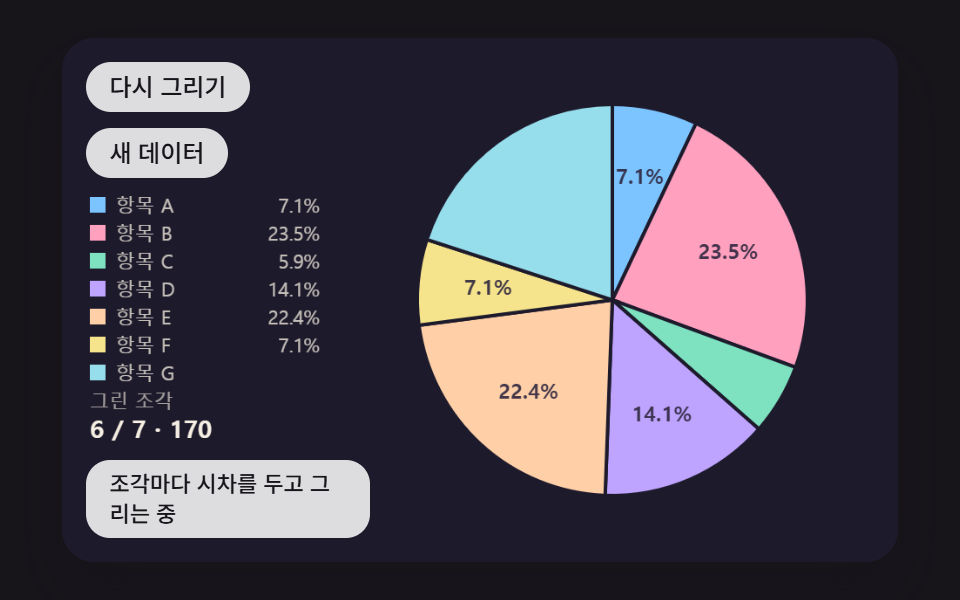 ダッシュボードUI円グラフ アニメーション 9種 — 飛び出し・傾き・変形する扇形
 ダッシュボードUIダッシュボード コンポーネント9選 — 画面ごとじゃなくこの部品だけ
 ダッシュボードUI円形プログレスバー css スタットリング9選 — 数値も実際に動く
 ダッシュボードUI検索窓 デザイン css 9選 — Cmd+Kで開くパレット
 ダッシュボードUIcss グラフ をSVGで描く9種 — ライブラリなし
 ダッシュボードUI習慣トラッカー UI 9選 — 草グリッドから共有カードまで
 ダッシュボードUIkanban board html css js 9パターン — 掴んだカードが追従し置く場所が開く
 ダッシュボードUIワードクラウド 作り方 9種 — 渦巻き配置・形の中・3D球・リアルタイム投票
 ダッシュボードUIダッシュボード ウィジェット単体UI9選 —そのまま貼れる部品だけ
 ダッシュボードUIティッカー ui で作るリアルタイム株価表示9種 — APIキー不要