スクロール インジケーター 9選 — 現在地がすぐわかる
スクロール インジケーターは、長いページをどこまで読んだかを棒・数字・印で伝えるUI部品です。この記事では、ライブラリーに頼らないHTML・SCSS・少量のJavaScriptだけで組んだ九つの現在地表示を、そのまま貼れる断片コードと一緒に載せます。どれも上のグリッドの中で実際に動くので、まず九つの動きを見てください。
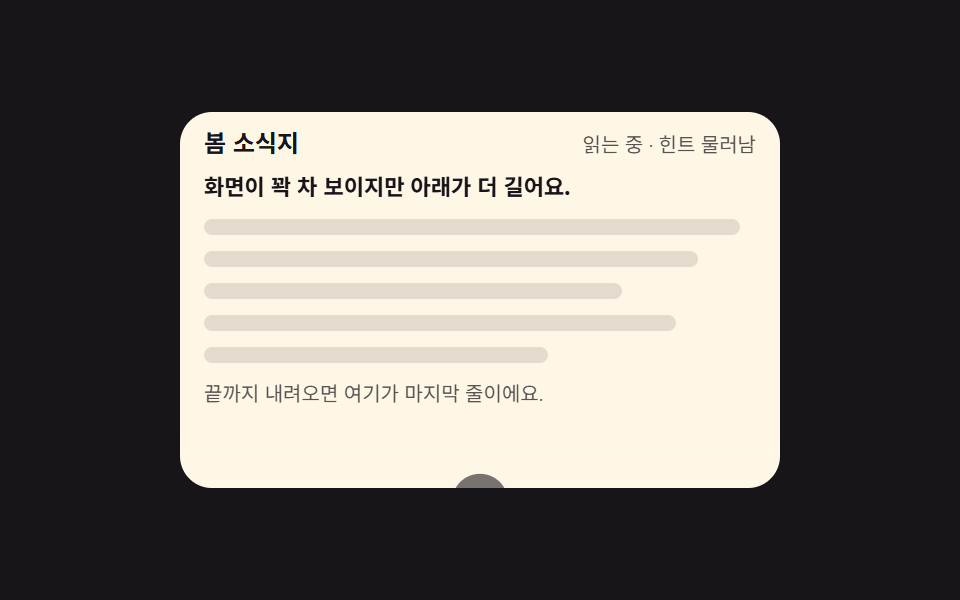 01 scroll-hint-arrow-firstview
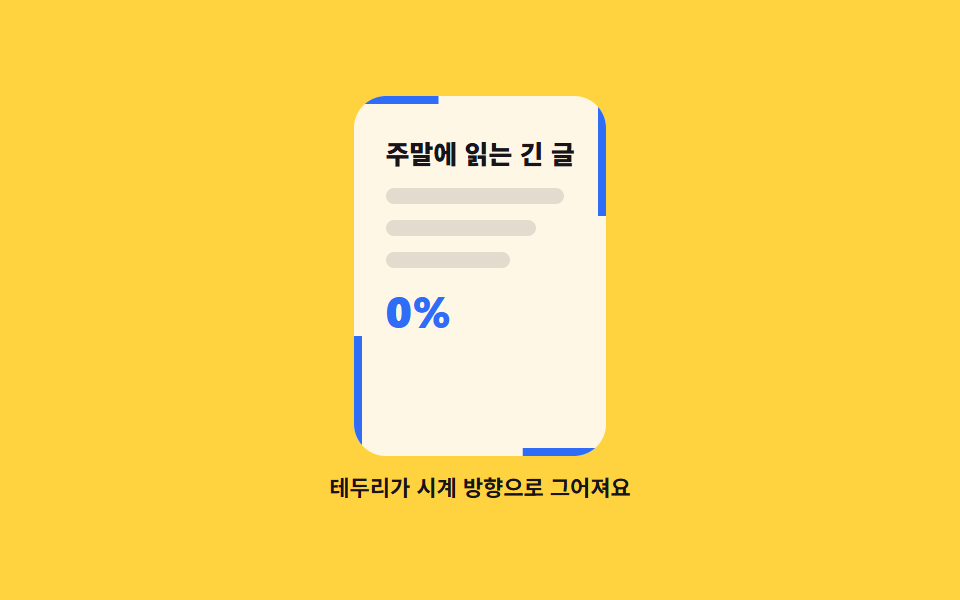 02 scroll-progress-frame-line
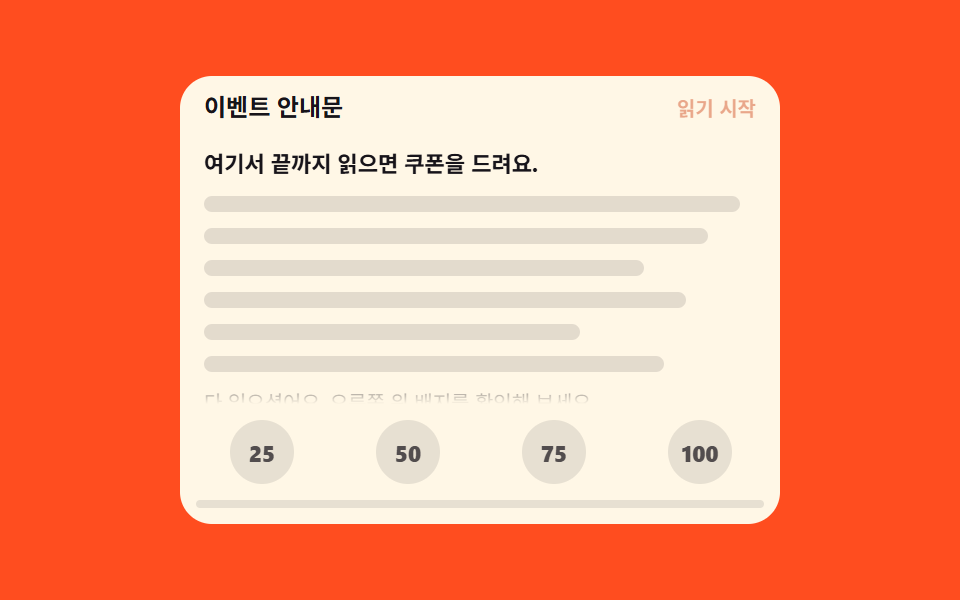 03 scroll-depth-milestone-badge
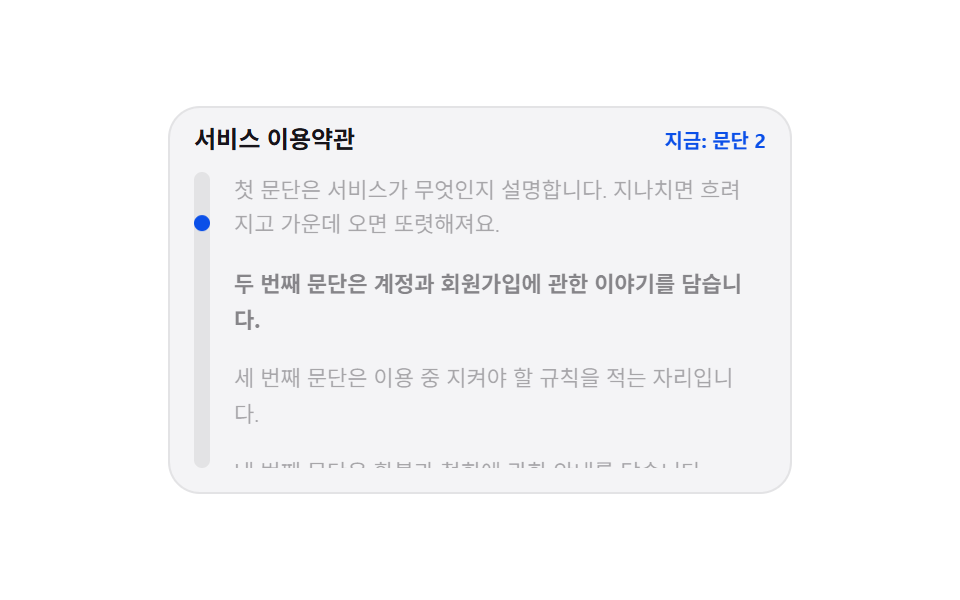 04 scroll-read-focus-paragraph
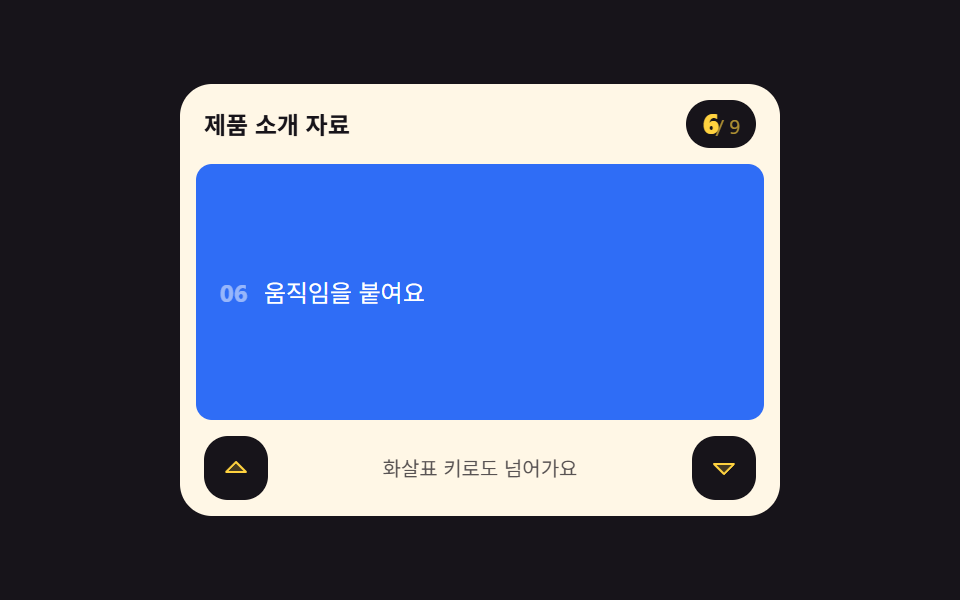 05 scroll-section-counter-keys
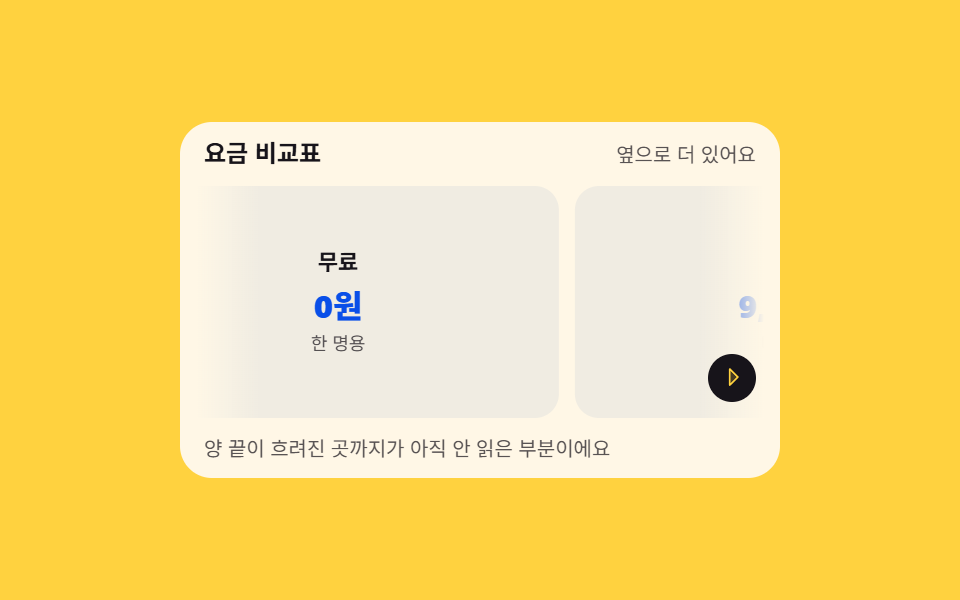 06 scroll-overflow-edge-hint
 07 scroll-tab-title-progress
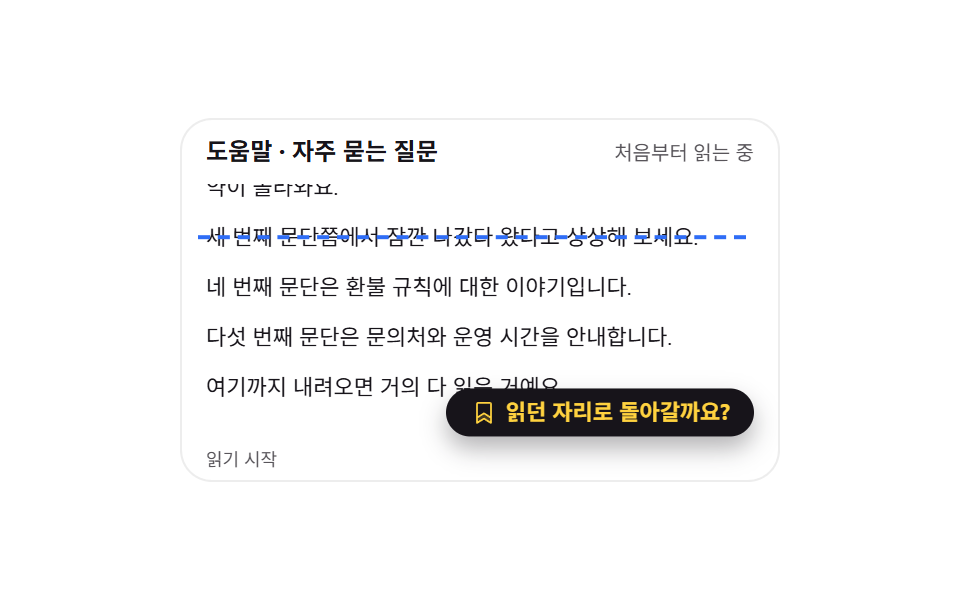 08 scroll-resume-marker
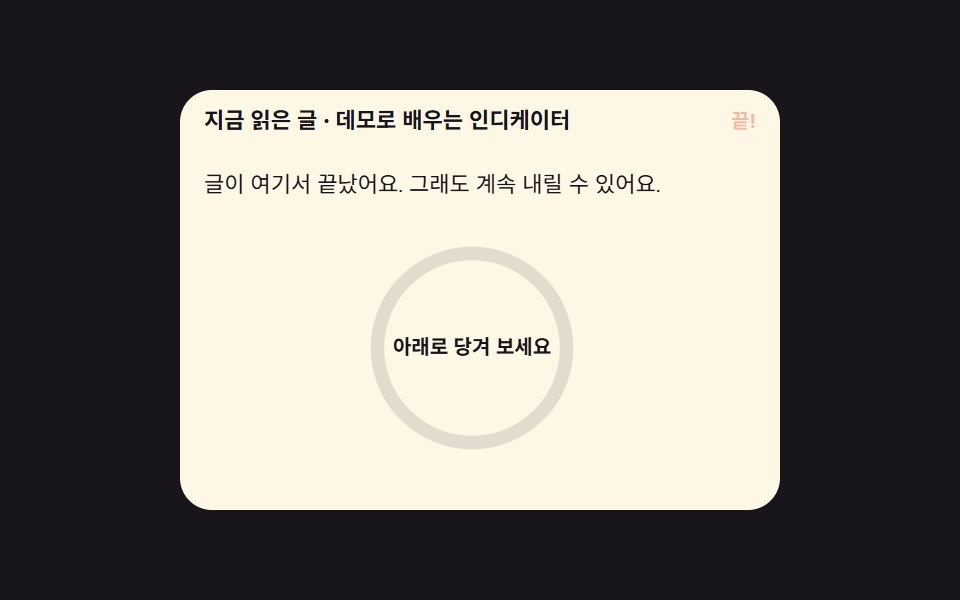 09 scroll-next-article-ring
自動再生 · タイルを押すとその項目へ · すべて1つのzip
- 01 最初の画面だけで揺れる下向きヒント
- 02 枠を一周する読書の進み具合
- 03 4分の1ごとに灯る読了バッジ
- 04 今読んでいる段落だけがはっきりする焦点
- 05 何番目の区間かを数えるカウンター
- 06 横にまだ続くと知らせる端の影
- 07 ブラウザーのタブ名に書かれる進み具合
- 08 読んでいた場所を残す続きから表示
- 09 末尾で次の記事を引き寄せる進行リング
並び順は目立たせ方の強さでも スクロール バー 表示 位置 の話でもなく、読み手が一枚のページで辿る時間の順です。まだ一行も読んでいない人に「下に続く」と知らせる(01)ところから始まって、読み進むあいだの連続した進み(02)、四つの節目(03)、今いる段の明示(04)、番号による位置の言語化(05)へ進み、横方向の位置を伝える影(06)でページの内側を締めくくります。そこから先はページの外へ出て、ブラウザーのタブという顔に進みを書く(07)、離れて戻った人を最深点まで迎えに行く(08)、記事が終わった後に次の一編へ手を伸ばす(09)までを、この順で並べました。位置の値で場面そのものを入れ替える側へ進むとスクロールテリングのセクションになり、端の影を半透明のガラスで染めたいときはグラスモーフィズム効果が同じ値を引き継ぎます。
01最初の画面だけで揺れる下向きヒント
スクロール インジケーター デザイン で何が見えるか
ページがまだ一行も動いていないあいだだけ、下向きの矢印がtranslateY(5px)の往復で揺れて、続きが下にあることを伝えます。scrollTopが8pxを超えると.is-goneが付いて矢印は下へ120%退いて薄れ、先頭に戻るとまた立ち上がります。
<main class="stage">
  <section class="sh is-demo" id="sh" aria-label="最初の画面のスクロールヒント">
    <header class="sh__head">
      <p class="sh__kicker">春のニュースレター</p>
      <p class="sh__state"><span class="sh__s sh__s--top" id="sh-state">先頭 · ヒント表示中</span><span class="sh__s sh__s--gone" aria-hidden="true">読書中 · ヒントは後退</span></p>
    </header>
    <div class="sh__view" id="sh-view" tabindex="0" role="region" aria-label="ニュースレター本文">
      <div class="sh__pad">
        <p class="sh__lede">画面は埋まって見えますが、下にもっと続きます。</p>
        <p class="sh__line"></p>
        <p class="sh__line"></p>
        <p class="sh__line"></p>
        <p class="sh__line"></p>
        <p class="sh__line"></p>
        <p class="sh__tail">最後まで下りると、ここが最終行です。</p>
      </div>
    </div>
    <div class="sh__hint" id="sh-hint" aria-hidden="true">
      <span class="sh__pill"><svg viewBox="0 0 256 256" width="14" height="14" aria-hidden="true"><path d="M200,144l-72,72L56,144Z" opacity="0.2"/><path d="M207.39,140.94A8,8,0,0,0,200,136H136V40a8,8,0,0,0-16,0v96H56a8,8,0,0,0-5.66,13.66l72,72a8,8,0,0,0,11.32,0l72-72A8,8,0,0,0,207.39,140.94ZM128,204.69,75.31,152H180.69Z"/></svg></span>
      <span class="sh__bob"><svg viewBox="0 0 256 256" width="1em" height="1em" fill="currentColor" aria-hidden="true"><path d="M200,144l-72,72L56,144Z" opacity="0.2"/><path d="M207.39,140.94A8,8,0,0,0,200,136H136V40a8,8,0,0,0-16,0v96H56a8,8,0,0,0-5.66,13.66l72,72a8,8,0,0,0,11.32,0l72-72A8,8,0,0,0,207.39,140.94ZM128,204.69,75.31,152H180.69Z"/></svg></span>
      <span class="sh__note">下にスクロール</span>
    </div>
  </section>
</main>
@use "../../../../site/static/demo-tokens" as *;
// 첫 화면에서만 흔들리는 아래로 힌트 — 스크롤이 8px 만 움직여도 힌트는 물러난다
$duration: $dur-loop;
$easing: $ease-spring;
$color: $subject-cream;
@include stage($stage-ink);
.sh {
position: relative;
box-sizing: border-box;
width: min(300px, 92vw);
border-radius: $r-card;
background: $subject-cream;
color: $subject-ink;
font-family: -apple-system, "Segoe UI", "Noto Sans KR", sans-serif;
overflow: hidden;
}
.sh__head {
display: flex;
align-items: baseline;
justify-content: space-between;
gap: $sp-2;
padding: $sp-2 $sp-3 0;
}
.sh__kicker {
margin: 0;
font-size: 12px;
font-weight: 700;
line-height: 1.3;
}
.sh__state {
position: relative;
margin: 0;
font-size: 10px;
line-height: 1.3;
color: rgba($stage-ink, .72);
white-space: nowrap;
}
// 미리보기 루프에서만 쓰는 두 번째 문구 — 정적 경로에서는 JS 가 첫 칸의 글자를 갈아 쓴다
.sh__s--gone { display: none; }
.sh__view {
box-sizing: border-box;
height: 148px;
margin: $sp-2;
padding-right: $sp-2;
overflow-y: auto;
scrollbar-width: none;
&::-webkit-scrollbar { display: none; }
&:focus-visible { outline: 2px solid $color; outline-offset: 2px; }
}
.sh__pad {
display: grid;
gap: $sp-2;
padding: $sp-1 $sp-1 96px;
}
.sh__lede {
margin: 0;
font-size: 11px;
font-weight: 700;
line-height: 1.5;
}
.sh__line {
height: 8px;
margin: 0;
border-radius: $r-pill;
background: rgba(23, 20, 26, .12);
}
.sh__line:nth-child(3) { width: 92%; }
.sh__line:nth-child(4) { width: 78%; }
.sh__line:nth-child(5) { width: 88%; }
.sh__line:nth-child(6) { width: 64%; }
.sh__tail {
margin: 0;
font-size: 10px;
line-height: 1.5;
color: rgba($stage-ink, .72);
}
// ── 힌트 묶음: 본문 아래 가운데에 붙는다 ──
.sh__hint {
position: absolute;
left: 0;
right: 0;
bottom: $sp-1;
display: grid;
justify-items: center;
gap: $sp-1;
color: $subject-ink;
// 힌트가 본문 글자 위에 그냥 얹히면 글자가 원 뒤로 비쳐 지저분하다 — 제 자리만큼 바탕을 덮는다
isolation: isolate;
&::before {
content: "";
position: absolute;
inset: -$sp-5 0 -$sp-1;
background: linear-gradient(to bottom, transparent, $subject-cream 58%);
z-index: -1;
}
// 정적(실제 사용) 경로 — 스크롤되면 .is-gone 로 물러난다
transition: transform $dur-quick $easing, opacity $dur-instant linear;
}
.sh.is-gone .sh__hint {
transform: translateY(120%);
opacity: 0;
}
.sh__pill {
display: inline-grid;
place-items: center;
width: 28px;
height: 28px;
border-radius: 50%;
background: $subject-ink;
color: $stage-yellow;
}
.sh__pill svg { width: 14px; height: 14px; }
.sh__bob {
display: inline-grid;
place-items: center;
font-size: 18px;
line-height: 1;
}
.sh__note {
padding: $sp-1 $sp-2;
border-radius: $r-pill;
background: rgba(23, 20, 26, .08);
font-size: 10px;
font-weight: 700;
line-height: 1.4;
}
// ── 격자 미리보기 루프: 화살표는 계속 점프하고, 중간에 본문이 흐르면 힌트가 물러난다 ──
@keyframes sh-bob {
0%, 100% { transform: translateY(0); }
50% { transform: translateY(5px); }
}
// 물러남은 네 프레임에 나눠 흐리게, 돌아옴은 한 프레임 컷 — 그래야 대표 이미지가
// 「힌트가 사라진 빈 화면」 이 아니라 힌트가 서 있는 장이 된다 (퇴장이 등장을 이기는 함정)
@keyframes sh-fade {
0%, 37% { opacity: 1; }
54%, 79% { opacity: 0; }
80%, 100% { opacity: 1; }
}
@keyframes sh-drop {
0%, 37% { transform: translateY(0); }
54%, 79% { transform: translateY(120%); }
80%, 100% { transform: translateY(0); }
}
@keyframes sh-flow {
0%, 38% { transform: translateY(0); }
78% { transform: translateY(-20%); }
82%, 100% { transform: translateY(0); }
}
// 머리말도 두 문구를 겹쳐 두고 컷으로 갈아 낀다 — 힌트가 물러났는데 「보이는 중」 이라고
// 적힌 장이 대표 이미지로 나가면 글과 그림이 서로 다른 말을 한다
@keyframes sh-state-0 { 0%, 37% { opacity: 1; } 38%, 79% { opacity: 0; } 80%, 100% { opacity: 1; } }
@keyframes sh-state-1 { 0%, 37% { opacity: 0; } 38%, 79% { opacity: 1; } 80%, 100% { opacity: 0; } }
.sh.is-demo {
.sh__bob {
animation-name: sh-bob;
animation-duration: 1s;
animation-timing-function: $easing;
animation-iteration-count: infinite;
}
.sh__hint {
animation-name: sh-fade, sh-drop;
animation-duration: $duration, $duration;
animation-timing-function: $ease-out, $easing;
animation-iteration-count: infinite, infinite;
animation-fill-mode: backwards, backwards;
}
.sh__pad {
animation-name: sh-flow;
animation-duration: $duration;
animation-timing-function: $ease-out;
animation-iteration-count: infinite;
}
.sh__s--gone { display: block; position: absolute; right: 0; top: 0; }
.sh__s {
animation-duration: $duration;
animation-timing-function: steps(1, end);
animation-iteration-count: infinite;
}
.sh__s--top { animation-name: sh-state-0; }
.sh__s--gone { animation-name: sh-state-1; }
}
@media (max-width: 340px) {
.sh__view { height: 124px; }
.sh__lede { font-size: 10px; }
.sh__line { height: 6px; }
}
@media (prefers-reduced-motion: reduce) {
.sh.is-demo .sh__bob,
.sh.is-demo .sh__pad,
.sh.is-demo .sh__s { animation: none !important; transform: none !important; }
.sh.is-demo .sh__hint { animation: none !important; transform: none !important; opacity: 1 !important; }
// 정지 상태에서도 힌트가 무엇인지는 보인다 — 움직임만 뺀다. 머리말은 맨 위 문구 하나만
.sh.is-demo .sh__s--top { opacity: 1 !important; }
.sh.is-demo .sh__s--gone { opacity: 0 !important; }
}html, body {
margin: 0;
overflow: hidden;
}
.stage {
box-sizing: border-box;
min-height: 100vh;
display: grid;
place-items: center;
margin: 0;
background: #17141a;
font-family: -apple-system, "Segoe UI", "Noto Sans KR", sans-serif;
padding: clamp(8px, 4vw, 24px);
}
.sh {
position: relative;
box-sizing: border-box;
width: min(300px, 92vw);
border-radius: 16px;
background: #fff7e6;
color: #17141a;
font-family: -apple-system, "Segoe UI", "Noto Sans KR", sans-serif;
overflow: hidden;
}
.sh__head {
display: flex;
align-items: baseline;
justify-content: space-between;
gap: 8px;
padding: 8px 12px 0;
}
.sh__kicker {
margin: 0;
font-size: 12px;
font-weight: 700;
line-height: 1.3;
}
.sh__state {
position: relative;
margin: 0;
font-size: 10px;
line-height: 1.3;
color: rgba(23, 20, 26, 0.72);
white-space: nowrap;
}
.sh__s--gone {
display: none;
}
.sh__view {
box-sizing: border-box;
height: 148px;
margin: 8px;
padding-right: 8px;
overflow-y: auto;
scrollbar-width: none;
}
.sh__view::-webkit-scrollbar {
display: none;
}
.sh__view:focus-visible {
outline: 2px solid #fff7e6;
outline-offset: 2px;
}
.sh__pad {
display: grid;
gap: 8px;
padding: 4px 4px 96px;
}
.sh__lede {
margin: 0;
font-size: 11px;
font-weight: 700;
line-height: 1.5;
}
.sh__line {
height: 8px;
margin: 0;
border-radius: 999px;
background: rgba(23, 20, 26, 0.12);
}
.sh__line:nth-child(3) {
width: 92%;
}
.sh__line:nth-child(4) {
width: 78%;
}
.sh__line:nth-child(5) {
width: 88%;
}
.sh__line:nth-child(6) {
width: 64%;
}
.sh__tail {
margin: 0;
font-size: 10px;
line-height: 1.5;
color: rgba(23, 20, 26, 0.72);
}
.sh__hint {
position: absolute;
left: 0;
right: 0;
bottom: 4px;
display: grid;
justify-items: center;
gap: 4px;
color: #17141a;
isolation: isolate;
}
.sh__hint::before {
content: "";
position: absolute;
inset: -20px -4px;
background: linear-gradient(to bottom, transparent, #fff7e6 58%);
z-index: -1;
}
.sh__hint {
transition: transform 220ms cubic-bezier(0.2, 0.8, 0.2, 1), opacity 140ms linear;
}
.sh.is-gone .sh__hint {
transform: translateY(120%);
opacity: 0;
}
.sh__pill {
display: inline-grid;
place-items: center;
width: 28px;
height: 28px;
border-radius: 50%;
background: #17141a;
color: #ffd23f;
}
.sh__pill svg {
width: 14px;
height: 14px;
}
.sh__bob {
display: inline-grid;
place-items: center;
font-size: 18px;
line-height: 1;
}
.sh__note {
padding: 4px 8px;
border-radius: 999px;
background: rgba(23, 20, 26, 0.08);
font-size: 10px;
font-weight: 700;
line-height: 1.4;
}
@keyframes sh-bob {
0%, 100% {
transform: translateY(0);
}
50% {
transform: translateY(5px);
}
}
@keyframes sh-fade {
0%, 37% {
opacity: 1;
}
54%, 79% {
opacity: 0;
}
80%, 100% {
opacity: 1;
}
}
@keyframes sh-drop {
0%, 37% {
transform: translateY(0);
}
54%, 79% {
transform: translateY(120%);
}
80%, 100% {
transform: translateY(0);
}
}
@keyframes sh-flow {
0%, 38% {
transform: translateY(0);
}
78% {
transform: translateY(-20%);
}
82%, 100% {
transform: translateY(0);
}
}
@keyframes sh-state-0 {
0%, 37% {
opacity: 1;
}
38%, 79% {
opacity: 0;
}
80%, 100% {
opacity: 1;
}
}
@keyframes sh-state-1 {
0%, 37% {
opacity: 0;
}
38%, 79% {
opacity: 1;
}
80%, 100% {
opacity: 0;
}
}
.sh.is-demo .sh__bob {
animation-name: sh-bob;
animation-duration: 1s;
animation-timing-function: cubic-bezier(0.2, 0.8, 0.2, 1);
animation-iteration-count: infinite;
}
.sh.is-demo .sh__hint {
animation-name: sh-fade, sh-drop;
animation-duration: 2s, 2s;
animation-timing-function: ease-out, cubic-bezier(0.2, 0.8, 0.2, 1);
animation-iteration-count: infinite, infinite;
animation-fill-mode: backwards, backwards;
}
.sh.is-demo .sh__pad {
animation-name: sh-flow;
animation-duration: 2s;
animation-timing-function: ease-out;
animation-iteration-count: infinite;
}
.sh.is-demo .sh__s--gone {
display: block;
position: absolute;
right: 0;
top: 0;
}
.sh.is-demo .sh__s {
animation-duration: 2s;
animation-timing-function: steps(1, end);
animation-iteration-count: infinite;
}
.sh.is-demo .sh__s--top {
animation-name: sh-state-0;
}
.sh.is-demo .sh__s--gone {
animation-name: sh-state-1;
}
@media (max-width: 340px) {
.sh__view {
height: 124px;
}
.sh__lede {
font-size: 10px;
}
.sh__line {
height: 6px;
}
}
@media (prefers-reduced-motion: reduce) {
.sh.is-demo .sh__bob,
.sh.is-demo .sh__pad,
.sh.is-demo .sh__s {
animation: none !important;
transform: none !important;
}
.sh.is-demo .sh__hint {
animation: none !important;
transform: none !important;
opacity: 1 !important;
}
.sh.is-demo .sh__s--top {
opacity: 1 !important;
}
.sh.is-demo .sh__s--gone {
opacity: 0 !important;
}
}// 첫 화면에서만 흔들리는 아래로 힌트 — scrollTop 8px 기준으로 보였다 물러난다
var sh = document.getElementById('sh');
var view = document.getElementById('sh-view');
var state = document.getElementById('sh-state');
view.addEventListener('scroll', function () {
sh.classList.remove('is-demo');
var gone = view.scrollTop > 8;
sh.classList.toggle('is-gone', gone);
state.textContent = gone ? '読書中 · ヒントは後退' : '先頭 · ヒント表示中';
});import { useRef, useState } from "react";
import type { CSSProperties } from "react";
import styles from "./ScrollHintFirstview.module.scss";
export type ScrollHintFirstviewProps = {
kicker?: string;
stateVisible?: string;
stateHidden?: string;
lede?: string;
tail?: string;
note?: string;
groupLabel?: string;
bodyLabel?: string;
/** 격자 미리보기용 2초 자동 루프. 사람이 손대면 꺼진다 */
demo?: boolean;
duration?: number;
easing?: string;
color?: string;
};
type Vars = CSSProperties & { "--duration"?: string; "--easing"?: string; "--color"?: string };
// ambient 가 얇아 DOM 요소 타입을 못 쓴다 — 필요한 꼴만 로컬 타입으로 선언
type ScrollBox = { scrollTop: number };
function ArrowDownIcon() {
return (
<svg viewBox="0 0 256 256" width="1em" height="1em" fill="currentColor" aria-hidden="true"><path d="M200,144l-72,72L56,144Z" opacity="0.2"/><path d="M207.39,140.94A8,8,0,0,0,200,136H136V40a8,8,0,0,0-16,0v96H56a8,8,0,0,0-5.66,13.66l72,72a8,8,0,0,0,11.32,0l72-72A8,8,0,0,0,207.39,140.94ZM128,204.69,75.31,152H180.69Z"/></svg>
);
}
export default function ScrollHintFirstview({
kicker = "봄 소식지",
stateVisible = "맨 위 · 힌트 보이는 중",
stateHidden = "읽는 중 · 힌트 물러남",
lede = "화면이 꽉 차 보이지만 아래가 더 길어요.",
tail = "끝까지 내려오면 여기가 마지막 줄이에요.",
note = "아래로 내려 보세요",
groupLabel = "첫 화면 스크롤 힌트",
bodyLabel = "소식지 본문",
demo = true,
duration = 2000,
easing = "cubic-bezier(.2,.8,.2,1)",
color = "#fff7e6",
}: ScrollHintFirstviewProps) {
const [hidden, setHidden] = useState(false);
const [live, setLive] = useState(demo);
const viewRef = useRef<ScrollBox>(null);
const vars: Vars = { "--duration": `${duration}ms`, "--easing": easing, "--color": color };
// scrollTop 8px 기준 — 처음 화면에서만 힌트가 살아 있다
function onScroll() {
const el = viewRef.current;
if (!el) return;
setLive(false);
setHidden(el.scrollTop > 8);
}
const cls = [styles.sh, live ? styles.isDemo : "", hidden ? styles.isGone : ""].filter(Boolean).join(" ");
return (
<section className={cls} style={vars} aria-label={groupLabel}>
<header className={styles.head}>
<p className={styles.kicker}>{kicker}</p>
<p className={styles.state}>
{live ? (
// 미리보기 루프 — 두 문구를 겹쳐 두고 힌트가 물러나는 순간에 맞춰 컷으로 갈아 낀다
<>
<span className={`${styles.s} ${styles.sTop}`}>{stateVisible}</span>
<span className={`${styles.s} ${styles.sGone}`} aria-hidden="true">{stateHidden}</span>
</>
) : (
hidden ? stateHidden : stateVisible
)}
</p>
</header>
<div className={styles.view} ref={viewRef} onScroll={onScroll} tabIndex={0} role="region" aria-label={bodyLabel}>
<div className={styles.pad}>
<p className={styles.lede}>{lede}</p>
<p className={styles.line}></p>
<p className={styles.line}></p>
<p className={styles.line}></p>
<p className={styles.line}></p>
<p className={styles.tail}>{tail}</p>
</div>
</div>
<div className={styles.hint} aria-hidden="true">
<span className={styles.pill}><ArrowDownIcon /></span>
<span className={styles.bob}><ArrowDownIcon /></span>
<span className={styles.shnote}>{note}</span>
</div>
</section>
);
}01 · 最初の画面だけで揺れる下向きヒント — 計測 累積面積 19.999% · 動いたフレーム 20/23GODRICH オリジナル · SCSS と React は zip に同梱 · パスワードを見る
コードのどこを見るか
最初の画面が埋まっていて続きに気づけない紹介ページに向いていて、24コマのうち20コマに動きがあり、変化が及んだ面積は19.874%です。
.sh__hint {
  position: absolute;
  left: 0;
  right: 0;
  bottom: $sp-1;
  transition: transform $dur-quick $easing, opacity $dur-instant linear;
}
.sh.is-gone .sh__hint {
  transform: translateY(120%);
  opacity: 0;
}
@keyframes sh-bob {
  0%, 100% { transform: translateY(0); }
  50% { transform: translateY(5px); }
}
02枠を一周する読書の進み具合
画面で起きること
本文のスクロールポートにscroll-timeline-name: --pv-scrollで名前を付けると、四辺の細い棒がanimation-rangeで四分の一ずつを受け持ち、上辺から時計回りに枠線が引かれます。読んだ割合の数字も、同じタイムラインで@propertyに登録した--pv-pctをcounter()に流して出すので、枠と数字が食い違う瞬間が生まれません。
<main class="stage">
  <div class="pv" id="pv">
    <div class="pv__scroller" id="pv-scroller" tabindex="0" role="region" aria-label="長い記事の本文">
      <div class="pv__tall">
        <article class="pv__frame" id="pv-frame" role="progressbar" aria-label="読書の進み具合" aria-valuemin="0" aria-valuemax="100" aria-valuenow="0">
          <span class="pv__bar pv__bar--top"></span>
          <span class="pv__bar pv__bar--right"></span>
          <span class="pv__bar pv__bar--bottom"></span>
          <span class="pv__bar pv__bar--left"></span>
          <h2 class="pv__title">週末に読む長い記事</h2>
          <p class="pv__row pv__row--w1"></p>
          <p class="pv__row pv__row--w2"></p>
          <p class="pv__row pv__row--w3"></p>
          <p class="pv__pct" id="pv-pct" aria-hidden="true"></p>
        </article>
      </div>
    </div>
    <p class="pv__note" aria-hidden="true">枠が時計回りに引かれます</p>
  </div>
</main>
@use "../../../../site/static/demo-tokens" as *;
// 테두리를 한 바퀴 도는 읽기 진행선 — 네 변의 막대가 animation-range 로 사분면을 하나씩 맡는다
$duration: $dur-loop;
$easing: linear;
$color: $subject-blue;
@include stage($stage-yellow);
.pv {
--h: clamp(172px, 60vh, 212px);
--fw: min(240px, 84vw);
display: grid;
justify-items: center;
gap: $sp-2;
width: min(300px, 92vw);
}
// ⚠ 스크롤포트 자체에 타임라인 이름을 붙인다. scroll() 를 그냥 쓰면 overflow 상자를
// 다른 스크롤포트로 잡는 일이 생긴다 (260 실측) — 이름을 지정해 연결을 고정한다
.pv__scroller {
height: var(--h);
overflow-y: auto;
scrollbar-width: none;
scroll-timeline-name: --pv-scroll;
scroll-timeline-axis: block;
&::-webkit-scrollbar { display: none; }
&:focus-visible { outline: 2px solid $color; outline-offset: 2px; }
}
// sticky 의 여유는 padding 이 아니라 이 상자의 height 로 준다 (260 실측)
.pv__tall {
position: relative;
height: 340%;
}
.pv__frame {
position: sticky;
top: 0;
box-sizing: border-box;
display: grid;
align-content: start;
gap: $sp-2;
height: var(--h);
margin: 0;
padding: $sp-5 $sp-4 0;
border-radius: $r-card;
background: $subject-cream;
color: $subject-ink;
font-family: -apple-system, "Segoe UI", "Noto Sans KR", sans-serif;
overflow: hidden;
}
// ── 네 변의 진행 막대: 시계 방향으로 위→오른쪽→아래→왼쪽이 차례로 그어진다 ──
.pv__bar {
position: absolute;
background: $color;
animation-duration: 1s;
animation-timing-function: $easing;
animation-fill-mode: both;
animation-timeline: --pv-scroll;
}
.pv__bar--top {
top: 0; left: 0;
width: 100%; height: 4px;
transform-origin: left center; // 규칙8: 윗변 left에서 그어짐
transform: scaleX(0);
animation-name: pv-draw-x;
animation-range: 0% 25%;
}
.pv__bar--right {
top: 0; right: 0;
width: 4px; height: 100%;
transform-origin: center top;
transform: scaleY(0);
animation-name: pv-draw-y;
animation-range: 25% 50%;
}
.pv__bar--bottom {
bottom: 0; right: 0;
width: 100%; height: 4px;
transform-origin: right center; // 규칙8: 아랫변 right에서 그어짐
transform: scaleX(0);
animation-name: pv-draw-x;
animation-range: 50% 75%;
}
.pv__bar--left {
bottom: 0; left: 0;
width: 4px; height: 100%;
transform-origin: center bottom;
transform: scaleY(0);
animation-name: pv-draw-y;
animation-range: 75% 100%;
}
@keyframes pv-draw-x { from { transform: scaleX(0); } to { transform: scaleX(1); } }
@keyframes pv-draw-y { from { transform: scaleY(0); } to { transform: scaleY(1); } }
.pv__title {
margin: 0;
font-size: 13px;
font-weight: 800;
line-height: 1.4;
}
.pv__row {
height: 8px;
margin: 0;
border-radius: $r-pill;
background: rgba(23, 20, 26, .12);
}
.pv__row--w1 { width: 94%; }
.pv__row--w2 { width: 80%; }
.pv__row--w3 { width: 66%; }
// 읽은 비율 숫자도 같은 타임라인에서 나온다 — 등록한 정수 속성을 카운터로 찍으면
// 「테두리는 그어졌는데 숫자는 0%」 같은 어긋난 장면이 아예 생기지 않는다
@property --pv-pct {
syntax: "<integer>";
inherits: false;
initial-value: 0;
}
@keyframes pv-count { from { --pv-pct: 0; } to { --pv-pct: 100; } }
.pv__pct {
margin: 0;
font-size: 22px;
font-weight: 800;
line-height: 1.2;
color: $color;
animation-name: pv-count;
animation-duration: 1s;
animation-timing-function: linear;
animation-fill-mode: both;
animation-timeline: --pv-scroll;
animation-range: 0% 100%;
&::after {
counter-reset: pv-n var(--pv-pct);
content: counter(pv-n) "%";
}
}
.pv__note {
margin: 0;
font-size: 11px;
font-weight: 700;
line-height: 1.4;
color: $subject-ink;
}
// ── 격자 미리보기 루프 — 네 변이 시계 방향으로 그어졌다가 88% 에 함께 지워지고 처음부터 다시 그린다 ──
// 이 항목만 미리보기용 시간 루프가 없다 — 네 변과 숫자가 전부 스크롤 타임라인에서 나오므로
// 격자 미리보기도 같은 진행률을 보여 준다 (다른 여덟 개의 `.is-demo` 루프에 해당하는 자리)
@media (max-width: 340px) {
.pv { --h: 150px; --fw: 84vw; }
.pv__frame { padding: $sp-4 $sp-3 0; }
.pv__title { font-size: 12px; }
.pv__pct { font-size: 18px; }
}
@media (prefers-reduced-motion: reduce) {
// 스스로 움직이는 애니메이션은 끄고, 진행률은 정보라서 남긴다 — 테두리 대신 숫자 한 줄이 그 자리를 맡는다
.pv__bar { animation: none !important; transform: none !important; }
.pv__bar--top { transform: scaleX(1) !important; }
.pv__bar--right { transform: scaleY(0) !important; }
.pv__bar--bottom { transform: scaleX(0) !important; }
.pv__bar--left { transform: scaleY(0) !important; }
// 숫자는 사용자가 스크롤한 만큼만 바뀌는 정보라 그대로 둔다
}html, body {
margin: 0;
overflow: hidden;
}
.stage {
box-sizing: border-box;
min-height: 100vh;
display: grid;
place-items: center;
margin: 0;
background: #ffd23f;
font-family: -apple-system, "Segoe UI", "Noto Sans KR", sans-serif;
padding: clamp(8px, 4vw, 24px);
}
.pv {
--h: clamp(172px, 60vh, 212px);
--fw: min(240px, 84vw);
display: grid;
justify-items: center;
gap: 8px;
width: min(300px, 92vw);
}
.pv__scroller {
height: var(--h);
overflow-y: auto;
scrollbar-width: none;
scroll-timeline-name: --pv-scroll;
scroll-timeline-axis: block;
}
.pv__scroller::-webkit-scrollbar {
display: none;
}
.pv__scroller:focus-visible {
outline: 2px solid #2f6df6;
outline-offset: 2px;
}
.pv__tall {
position: relative;
height: 340%;
}
.pv__frame {
position: sticky;
top: 0;
box-sizing: border-box;
display: grid;
align-content: start;
gap: 8px;
height: var(--h);
margin: 0;
padding: 20px 16px 0;
border-radius: 16px;
background: #fff7e6;
color: #17141a;
font-family: -apple-system, "Segoe UI", "Noto Sans KR", sans-serif;
overflow: hidden;
}
.pv__bar {
position: absolute;
background: #2f6df6;
animation-duration: 1s;
animation-timing-function: linear;
animation-fill-mode: both;
animation-timeline: --pv-scroll;
}
.pv__bar--top {
top: 0;
left: 0;
width: 100%;
height: 4px;
transform-origin: left center;
transform: scaleX(0);
animation-name: pv-draw-x;
animation-range: 0% 25%;
}
.pv__bar--right {
top: 0;
right: 0;
width: 4px;
height: 100%;
transform-origin: center top;
transform: scaleY(0);
animation-name: pv-draw-y;
animation-range: 25% 50%;
}
.pv__bar--bottom {
bottom: 0;
right: 0;
width: 100%;
height: 4px;
transform-origin: right center;
transform: scaleX(0);
animation-name: pv-draw-x;
animation-range: 50% 75%;
}
.pv__bar--left {
bottom: 0;
left: 0;
width: 4px;
height: 100%;
transform-origin: center bottom;
transform: scaleY(0);
animation-name: pv-draw-y;
animation-range: 75% 100%;
}
@keyframes pv-draw-x {
from {
transform: scaleX(0);
}
to {
transform: scaleX(1);
}
}
@keyframes pv-draw-y {
from {
transform: scaleY(0);
}
to {
transform: scaleY(1);
}
}
.pv__title {
margin: 0;
font-size: 13px;
font-weight: 800;
line-height: 1.4;
}
.pv__row {
height: 8px;
margin: 0;
border-radius: 999px;
background: rgba(23, 20, 26, 0.12);
}
.pv__row--w1 {
width: 94%;
}
.pv__row--w2 {
width: 80%;
}
.pv__row--w3 {
width: 66%;
}
@property --pv-pct {
syntax: "<integer>";
inherits: false;
initial-value: 0;
}
@keyframes pv-count {
from {
--pv-pct: 0;
}
to {
--pv-pct: 100;
}
}
.pv__pct {
margin: 0;
font-size: 22px;
font-weight: 800;
line-height: 1.2;
color: #2f6df6;
animation-name: pv-count;
animation-duration: 1s;
animation-timing-function: linear;
animation-fill-mode: both;
animation-timeline: --pv-scroll;
animation-range: 0% 100%;
}
.pv__pct::after {
counter-reset: pv-n var(--pv-pct);
content: counter(pv-n) "%";
}
.pv__note {
margin: 0;
font-size: 11px;
font-weight: 700;
line-height: 1.4;
color: #17141a;
}
@media (max-width: 340px) {
.pv {
--h: 150px;
--fw: 84vw;
}
.pv__frame {
padding: 16px 12px 0;
}
.pv__title {
font-size: 12px;
}
.pv__pct {
font-size: 18px;
}
}
@media (prefers-reduced-motion: reduce) {
.pv__bar {
animation: none !important;
transform: none !important;
}
.pv__bar--top {
transform: scaleX(1) !important;
}
.pv__bar--right {
transform: scaleY(0) !important;
}
.pv__bar--bottom {
transform: scaleX(0) !important;
}
.pv__bar--left {
transform: scaleY(0) !important;
}
}// 테두리를 도는 읽기 진행선 — 스크롤포트에 scroll-timeline-name 을 붙여 네 변이 사분면을 나눠 가진다
// 보이는 숫자와 네 변은 CSS 가 타임라인에서 직접 그린다 — JS 는 스크린 리더가 읽을 값만 맞춘다
var scroller = document.getElementById('pv-scroller');
var frame = document.getElementById('pv-frame');
scroller.addEventListener('scroll', function () {
var max = scroller.scrollHeight - scroller.clientHeight;
var r = max > 0 ? scroller.scrollTop / max : 0;
frame.setAttribute('aria-valuenow', Math.round(r * 100));
}, { passive: true });import { useRef, useState } from "react";
import type { CSSProperties } from "react";
import styles from "./FrameLineProgress.module.scss";
export type FrameLineProgressProps = {
title?: string;
note?: string;
groupLabel?: string;
bodyLabel?: string;
/** 격자 미리보기용 2초 자동 루프. 사람이 손대면 꺼진다 */
demo?: boolean;
duration?: number;
easing?: string;
color?: string;
};
type Vars = CSSProperties & { "--duration"?: string; "--easing"?: string; "--color"?: string };
// ambient 가 얇아 DOM 요소 타입을 못 쓴다 — 필요한 꼴만 로컬 타입으로 선언
type ScrollBox = { scrollTop: number; scrollHeight: number; clientHeight: number };
export default function FrameLineProgress({
title = "주말에 읽는 긴 글",
note = "테두리가 시계 방향으로 그어져요",
groupLabel = "읽기 진행",
bodyLabel = "긴 글 본문",
demo = true,
duration = 2000,
easing = "linear",
color = "#2f6df6",
}: FrameLineProgressProps) {
const [pct, setPct] = useState(0);
const [live, setLive] = useState(demo);
const viewRef = useRef<ScrollBox>(null);
const vars: Vars = { "--duration": `${duration}ms`, "--easing": easing, "--color": color };
function onScroll() {
const el = viewRef.current;
if (!el) return;
setLive(false);
const max = el.scrollHeight - el.clientHeight;
setPct(max > 0 ? Math.round((el.scrollTop / max) * 100) : 0);
}
const cls = [styles.pv, live ? styles.isDemo : ""].filter(Boolean).join(" ");
return (
<div className={cls} style={vars}>
<div className={styles.scroller} ref={viewRef} onScroll={onScroll} tabIndex={0} role="region" aria-label={bodyLabel}>
<div className={styles.tall}>
<article
className={styles.frame}
role="progressbar"
aria-label={groupLabel}
aria-valuemin={0}
aria-valuemax={100}
aria-valuenow={pct}
>
<span className={`${styles.bar} ${styles.barTop}`}></span>
<span className={`${styles.bar} ${styles.barRight}`}></span>
<span className={`${styles.bar} ${styles.barBottom}`}></span>
<span className={`${styles.bar} ${styles.barLeft}`}></span>
<h2 className={styles.ptitle}>{title}</h2>
<p className={styles.row}></p>
<p className={styles.row}></p>
<p className={styles.row}></p>
<p className={styles.pct}>{pct}%</p>
</article>
</div>
</div>
<p className={styles.note} aria-hidden="true">{note}</p>
</div>
);
}02 · 枠を一周する読書の進み具合 — 計測 累積面積 1.528% · 動いたフレーム 6/23GODRICH オリジナル · SCSS と React は zip に同梱 · パスワードを見る
コードの読み方
上部バーを置く余地がない全画面の読み物や写真の上に文章を載せる記事に向いていて、動いたのは24コマ中6コマと静かですが、変化の平均強度は200.3と九つで最も高いです。
.pv__scroller {
  height: var(--h);
  overflow-y: auto;
  scroll-timeline-name: --pv-scroll;
  scroll-timeline-axis: block;
}
.pv__bar {
  position: absolute;
  background: $color;
  animation-duration: 1s;
  animation-timing-function: $easing;
  animation-fill-mode: both;
  animation-timeline: --pv-scroll;
}
.pv__bar--top {
  top: 0; left: 0;
  width: 100%; height: 4px;
  transform-origin: left center;
  transform: scaleX(0);
  animation-name: pv-draw-x;
  animation-range: 0% 25%;
}
数字の側は、登録した整数をカウンターで刻むこの二つだけです。
@property --pv-pct {
  syntax: "<integer>";
  inherits: false;
  initial-value: 0;
}
@keyframes pv-count { from { --pv-pct: 0; } to { --pv-pct: 100; } }
.pv__pct::after {
  counter-reset: pv-n var(--pv-pct);
  content: counter(pv-n) "%";
}
034分の1ごとに灯る読了バッジ
どんな動きか
25・50・75・100の四つの丸は、その深さに届いた瞬間steps(1, end)の一コマで色を替え、一度だけ1.22倍に跳ねます。下の棒は読んだ割合と同じだけscaleXで満ち、新しく灯った深さはaria-liveで読み上げられます。
<main class="stage">
  <section class="db is-demo" id="db" aria-label="読了の深さバッジ">
    <header class="db__head">
      <p class="db__title">イベントのお知らせ</p>
      <p class="db__live" id="db-live" aria-live="polite">読み始め</p>
    </header>
    <div class="db__view" id="db-view" tabindex="0" role="region" aria-label="お知らせ本文">
      <div class="db__pad">
        <p class="db__lede">ここを最後まで読むとクーポンを差し上げます。</p>
        <p class="db__line"></p>
        <p class="db__line"></p>
        <p class="db__line"></p>
        <p class="db__line"></p>
        <p class="db__line"></p>
        <p class="db__line"></p>
        <p class="db__tail">すべて読み終えました。右上のバッジをご確認ください。</p>
      </div>
    </div>
    <footer class="db__foot">
      <div class="db__row" role="progressbar" aria-label="読んだ深さ" aria-valuemin="0" aria-valuemax="100" aria-valuenow="0" id="db-bar-role">
        <span class="db__cell"><b class="db__chip" data-milestone="25">25</b></span>
        <span class="db__cell"><b class="db__chip" data-milestone="50">50</b></span>
        <span class="db__cell"><b class="db__chip" data-milestone="75">75</b></span>
        <span class="db__cell"><b class="db__chip" data-milestone="100">100</b></span>
      </div>
      <span class="db__fill" id="db-fill" aria-hidden="true"></span>
    </footer>
  </section>
</main>@use "../../../../site/static/demo-tokens" as *;
// 읽기 깊이 배지 — 25·50·75·100 배지가 steps(1,end) 컷으로 색을 갈아입고 한 번 튀어오른다
$duration: $dur-loop;
$easing: $ease-pop;
$color: $subject-orange-deep;
@include stage($stage-orange);
.db {
position: relative;
box-sizing: border-box;
width: min(300px, 92vw);
border-radius: $r-card;
background: $subject-cream;
color: $subject-ink;
font-family: -apple-system, "Segoe UI", "Noto Sans KR", sans-serif;
overflow: hidden;
}
.db__head {
display: flex;
align-items: baseline;
justify-content: space-between;
gap: $sp-2;
padding: $sp-2 $sp-3 0;
}
.db__title {
margin: 0;
font-size: 12px;
font-weight: 700;
line-height: 1.3;
}
.db__live {
margin: 0;
font-size: 10px;
line-height: 1.3;
color: $color;
font-weight: 700;
}
.db__view {
box-sizing: border-box;
height: 132px;
margin: $sp-2 $sp-2 0;
padding-right: $sp-2;
overflow-y: auto;
scrollbar-width: none;
// 창 아래 모서리에서 글줄이 반토막으로 잘려 보이는 걸 막는다 — 마지막 12px 을 흐리게 내린다
mask-image: linear-gradient(to bottom, #000 calc(100% - 12px), transparent);
&::-webkit-scrollbar { display: none; }
&:focus-visible { outline: 2px solid $color; outline-offset: 2px; }
}
.db__pad {
display: grid;
gap: $sp-2;
padding: $sp-1 $sp-1 104px;
}
.db__lede {
margin: 0;
font-size: 11px;
font-weight: 700;
line-height: 1.5;
}
.db__line {
height: 8px;
margin: 0;
border-radius: $r-pill;
background: rgba(23, 20, 26, .12);
}
.db__pad .db__line:nth-child(3) { width: 94%; }
.db__pad .db__line:nth-child(4) { width: 82%; }
.db__pad .db__line:nth-child(5) { width: 90%; }
.db__pad .db__line:nth-child(6) { width: 70%; }
.db__pad .db__line:nth-child(7) { width: 86%; }
.db__tail {
margin: 0;
font-size: 10px;
line-height: 1.5;
color: rgba($stage-ink, .72);
}
// ── 배지 줄: 게이지 칸은 grid 로 짠다 (BD19 오탐 회피 · 칸 폭이 정확히 균등) ──
.db__foot {
position: relative;
margin: 0 $sp-2 $sp-2;
padding: $sp-2 0 0;
}
.db__row {
display: grid;
grid-template-columns: repeat(4, 1fr);
justify-items: center;
gap: $sp-2;
}
.db__chip {
display: inline-grid;
place-items: center;
width: 32px;
height: 32px;
border-radius: 50%;
background: rgba(23, 20, 26, .1);
color: rgba($stage-ink, .72);
font-size: 11px;
font-weight: 800;
line-height: 1;
// 정적 경로 — 실제로는 .is-on 이 붙는 순간 컷으로 색이 바뀐다
transition: background $dur-instant steps(1, end), color $dur-instant steps(1, end);
}
.db__chip.is-on {
background: $color;
color: #fff;
animation-name: db-pop;
animation-duration: $dur-base;
animation-timing-function: $easing;
animation-iteration-count: 1;
}
@keyframes db-pop {
0% { transform: scale(1); }
45% { transform: scale(1.22); }
100% { transform: scale(1); }
}
// 같은 비율만큼 차오르는 막대 — grid 칸 아래를 지나가는 길
.db__fill {
display: block;
height: 4px;
margin-top: $sp-2;
border-radius: $r-pill;
background: rgba(23, 20, 26, .1);
overflow: hidden;
&::after {
content: "";
display: block;
height: 100%;
border-radius: $r-pill;
background: $color;
transform: scaleX(0);
transform-origin: left center; // 규칙8: 진행막대 left 채움
}
}
.db.is-demo .db__fill::after {
animation-name: db-fill;
animation-duration: $duration;
animation-timing-function: $ease-out;
animation-iteration-count: infinite;
animation-fill-mode: backwards;
}
@keyframes db-fill {
0% { transform: scaleX(0); }
88% { transform: scaleX(1); }
90%, 100% { transform: scaleX(0); }
}
// ── 격자 미리보기 루프: 배지 넷이 제 각각의 순간에 컷으로 켜지고 튀어오른다 ──
@keyframes db-cut-1 { 0%, 21% { background: rgba(23, 20, 26, .1); color: rgba($stage-ink, .72); } 22%, 88% { background: $color; color: #fff; } 89%, 100% { background: rgba(23, 20, 26, .1); color: rgba($stage-ink, .72); } }
@keyframes db-cut-2 { 0%, 41% { background: rgba(23, 20, 26, .1); color: rgba($stage-ink, .72); } 42%, 88% { background: $color; color: #fff; } 89%, 100% { background: rgba(23, 20, 26, .1); color: rgba($stage-ink, .72); } }
@keyframes db-cut-3 { 0%, 61% { background: rgba(23, 20, 26, .1); color: rgba($stage-ink, .72); } 62%, 88% { background: $color; color: #fff; } 89%, 100% { background: rgba(23, 20, 26, .1); color: rgba($stage-ink, .72); } }
@keyframes db-cut-4 { 0%, 81% { background: rgba(23, 20, 26, .1); color: rgba($stage-ink, .72); } 82%, 88% { background: $color; color: #fff; } 89%, 100% { background: rgba(23, 20, 26, .1); color: rgba($stage-ink, .72); } }
@keyframes db-hop-1 { 0%, 21% { transform: scale(1); } 24% { transform: scale(1.22); } 30%, 100% { transform: scale(1); } }
@keyframes db-hop-2 { 0%, 41% { transform: scale(1); } 44% { transform: scale(1.22); } 50%, 100% { transform: scale(1); } }
@keyframes db-hop-3 { 0%, 61% { transform: scale(1); } 64% { transform: scale(1.22); } 70%, 100% { transform: scale(1); } }
@keyframes db-hop-4 { 0%, 81% { transform: scale(1); } 84% { transform: scale(1.22); } 90%, 100% { transform: scale(1); } }
@keyframes db-say {
0%, 21% { opacity: 1; }
22%, 41% { opacity: .4; }
42%, 61% { opacity: 1; }
62%, 81% { opacity: .4; }
82%, 88% { opacity: 1; }
89%, 100% { opacity: .4; }
}
.db.is-demo {
.db__chip[data-milestone="25"] { animation-name: db-hop-1; animation-duration: $duration; animation-timing-function: $easing; animation-iteration-count: infinite; }
.db__chip[data-milestone="50"] { animation-name: db-hop-2; animation-duration: $duration; animation-timing-function: $easing; animation-iteration-count: infinite; }
.db__chip[data-milestone="75"] { animation-name: db-hop-3; animation-duration: $duration; animation-timing-function: $easing; animation-iteration-count: infinite; }
.db__chip[data-milestone="100"] { animation-name: db-hop-4; animation-duration: $duration; animation-timing-function: $easing; animation-iteration-count: infinite; }
}
// 색 컷은 별도 애니메이션 두 개를 겹친다 — 낱개 속성으로 써야 지연 리셋 함정을 피한다
.db.is-demo .db__chip[data-milestone="25"] { animation-name: db-hop-1, db-cut-1; animation-duration: $duration, $duration; animation-timing-function: $easing, steps(1, end); animation-iteration-count: infinite, infinite; }
.db.is-demo .db__chip[data-milestone="50"] { animation-name: db-hop-2, db-cut-2; animation-duration: $duration, $duration; animation-timing-function: $easing, steps(1, end); animation-iteration-count: infinite, infinite; }
.db.is-demo .db__chip[data-milestone="75"] { animation-name: db-hop-3, db-cut-3; animation-duration: $duration, $duration; animation-timing-function: $easing, steps(1, end); animation-iteration-count: infinite, infinite; }
.db.is-demo .db__chip[data-milestone="100"] { animation-name: db-hop-4, db-cut-4; animation-duration: $duration, $duration; animation-timing-function: $easing, steps(1, end); animation-iteration-count: infinite, infinite; }
.db.is-demo .db__live {
animation-name: db-say;
animation-duration: $duration;
animation-timing-function: steps(1, end);
animation-iteration-count: infinite;
}
@media (max-width: 340px) {
// 폰 320×200 무대의 세로 여유는 174px — 머리 24 + 배지줄 56 을 빼면 읽기 창은 84px 이 상한
.db__view { height: 84px; }
.db__chip { width: 28px; height: 28px; font-size: 10px; }
}
@media (prefers-reduced-motion: reduce) {
.db.is-demo .db__chip,
.db.is-demo .db__fill::after,
.db.is-demo .db__live { animation: none !important; }
// 정지 상태에서도 깊이를 알 수 있게 절반까지 켜진 모습으로 둔다
.db.is-demo .db__chip[data-milestone="25"],
.db.is-demo .db__chip[data-milestone="50"] { background: $color !important; color: #fff !important; }
.db.is-demo .db__fill::after { transform: scaleX(.5) !important; }
}html, body {
margin: 0;
overflow: hidden;
}
.stage {
box-sizing: border-box;
min-height: 100vh;
display: grid;
place-items: center;
margin: 0;
background: #ff4d1f;
font-family: -apple-system, "Segoe UI", "Noto Sans KR", sans-serif;
padding: clamp(8px, 4vw, 24px);
}
.db {
position: relative;
box-sizing: border-box;
width: min(300px, 92vw);
border-radius: 16px;
background: #fff7e6;
color: #17141a;
font-family: -apple-system, "Segoe UI", "Noto Sans KR", sans-serif;
overflow: hidden;
}
.db__head {
display: flex;
align-items: baseline;
justify-content: space-between;
gap: 8px;
padding: 8px 12px 0;
}
.db__title {
margin: 0;
font-size: 12px;
font-weight: 700;
line-height: 1.3;
}
.db__live {
margin: 0;
font-size: 10px;
line-height: 1.3;
color: #c93000;
font-weight: 700;
}
.db__view {
box-sizing: border-box;
height: 132px;
margin: 8px 8px 0;
padding-right: 8px;
overflow-y: auto;
scrollbar-width: none;
mask-image: linear-gradient(to bottom, #000 calc(100% - 12px), transparent);
}
.db__view::-webkit-scrollbar {
display: none;
}
.db__view:focus-visible {
outline: 2px solid #c93000;
outline-offset: 2px;
}
.db__pad {
display: grid;
gap: 8px;
padding: 4px 4px 104px;
}
.db__lede {
margin: 0;
font-size: 11px;
font-weight: 700;
line-height: 1.5;
}
.db__line {
height: 8px;
margin: 0;
border-radius: 999px;
background: rgba(23, 20, 26, 0.12);
}
.db__pad .db__line:nth-child(3) {
width: 94%;
}
.db__pad .db__line:nth-child(4) {
width: 82%;
}
.db__pad .db__line:nth-child(5) {
width: 90%;
}
.db__pad .db__line:nth-child(6) {
width: 70%;
}
.db__pad .db__line:nth-child(7) {
width: 86%;
}
.db__tail {
margin: 0;
font-size: 10px;
line-height: 1.5;
color: rgba(23, 20, 26, 0.72);
}
.db__foot {
position: relative;
margin: 0 8px 8px;
padding: 8px 0 0;
}
.db__row {
display: grid;
grid-template-columns: repeat(4, 1fr);
justify-items: center;
gap: 8px;
}
.db__chip {
display: inline-grid;
place-items: center;
width: 32px;
height: 32px;
border-radius: 50%;
background: rgba(23, 20, 26, 0.1);
color: rgba(23, 20, 26, 0.72);
font-size: 11px;
font-weight: 800;
line-height: 1;
transition: background 140ms steps(1, end), color 140ms steps(1, end);
}
.db__chip.is-on {
background: #c93000;
color: #fff;
animation-name: db-pop;
animation-duration: 300ms;
animation-timing-function: cubic-bezier(0.2, 1.4, 0.4, 1);
animation-iteration-count: 1;
}
@keyframes db-pop {
0% {
transform: scale(1);
}
45% {
transform: scale(1.22);
}
100% {
transform: scale(1);
}
}
.db__fill {
display: block;
height: 4px;
margin-top: 8px;
border-radius: 999px;
background: rgba(23, 20, 26, 0.1);
overflow: hidden;
}
.db__fill::after {
content: "";
display: block;
height: 100%;
border-radius: 999px;
background: #c93000;
transform: scaleX(0);
transform-origin: left center;
}
.db.is-demo .db__fill::after {
animation-name: db-fill;
animation-duration: 2s;
animation-timing-function: ease-out;
animation-iteration-count: infinite;
animation-fill-mode: backwards;
}
@keyframes db-fill {
0% {
transform: scaleX(0);
}
88% {
transform: scaleX(1);
}
90%, 100% {
transform: scaleX(0);
}
}
@keyframes db-cut-1 {
0%, 21% {
background: rgba(23, 20, 26, 0.1);
color: rgba(23, 20, 26, 0.72);
}
22%, 88% {
background: #c93000;
color: #fff;
}
89%, 100% {
background: rgba(23, 20, 26, 0.1);
color: rgba(23, 20, 26, 0.72);
}
}
@keyframes db-cut-2 {
0%, 41% {
background: rgba(23, 20, 26, 0.1);
color: rgba(23, 20, 26, 0.72);
}
42%, 88% {
background: #c93000;
color: #fff;
}
89%, 100% {
background: rgba(23, 20, 26, 0.1);
color: rgba(23, 20, 26, 0.72);
}
}
@keyframes db-cut-3 {
0%, 61% {
background: rgba(23, 20, 26, 0.1);
color: rgba(23, 20, 26, 0.72);
}
62%, 88% {
background: #c93000;
color: #fff;
}
89%, 100% {
background: rgba(23, 20, 26, 0.1);
color: rgba(23, 20, 26, 0.72);
}
}
@keyframes db-cut-4 {
0%, 81% {
background: rgba(23, 20, 26, 0.1);
color: rgba(23, 20, 26, 0.72);
}
82%, 88% {
background: #c93000;
color: #fff;
}
89%, 100% {
background: rgba(23, 20, 26, 0.1);
color: rgba(23, 20, 26, 0.72);
}
}
@keyframes db-hop-1 {
0%, 21% {
transform: scale(1);
}
24% {
transform: scale(1.22);
}
30%, 100% {
transform: scale(1);
}
}
@keyframes db-hop-2 {
0%, 41% {
transform: scale(1);
}
44% {
transform: scale(1.22);
}
50%, 100% {
transform: scale(1);
}
}
@keyframes db-hop-3 {
0%, 61% {
transform: scale(1);
}
64% {
transform: scale(1.22);
}
70%, 100% {
transform: scale(1);
}
}
@keyframes db-hop-4 {
0%, 81% {
transform: scale(1);
}
84% {
transform: scale(1.22);
}
90%, 100% {
transform: scale(1);
}
}
@keyframes db-say {
0%, 21% {
opacity: 1;
}
22%, 41% {
opacity: 0.4;
}
42%, 61% {
opacity: 1;
}
62%, 81% {
opacity: 0.4;
}
82%, 88% {
opacity: 1;
}
89%, 100% {
opacity: 0.4;
}
}
.db.is-demo .db__chip[data-milestone="25"] {
animation-name: db-hop-1;
animation-duration: 2s;
animation-timing-function: cubic-bezier(0.2, 1.4, 0.4, 1);
animation-iteration-count: infinite;
}
.db.is-demo .db__chip[data-milestone="50"] {
animation-name: db-hop-2;
animation-duration: 2s;
animation-timing-function: cubic-bezier(0.2, 1.4, 0.4, 1);
animation-iteration-count: infinite;
}
.db.is-demo .db__chip[data-milestone="75"] {
animation-name: db-hop-3;
animation-duration: 2s;
animation-timing-function: cubic-bezier(0.2, 1.4, 0.4, 1);
animation-iteration-count: infinite;
}
.db.is-demo .db__chip[data-milestone="100"] {
animation-name: db-hop-4;
animation-duration: 2s;
animation-timing-function: cubic-bezier(0.2, 1.4, 0.4, 1);
animation-iteration-count: infinite;
}
.db.is-demo .db__chip[data-milestone="25"] {
animation-name: db-hop-1, db-cut-1;
animation-duration: 2s, 2s;
animation-timing-function: cubic-bezier(0.2, 1.4, 0.4, 1), steps(1, end);
animation-iteration-count: infinite, infinite;
}
.db.is-demo .db__chip[data-milestone="50"] {
animation-name: db-hop-2, db-cut-2;
animation-duration: 2s, 2s;
animation-timing-function: cubic-bezier(0.2, 1.4, 0.4, 1), steps(1, end);
animation-iteration-count: infinite, infinite;
}
.db.is-demo .db__chip[data-milestone="75"] {
animation-name: db-hop-3, db-cut-3;
animation-duration: 2s, 2s;
animation-timing-function: cubic-bezier(0.2, 1.4, 0.4, 1), steps(1, end);
animation-iteration-count: infinite, infinite;
}
.db.is-demo .db__chip[data-milestone="100"] {
animation-name: db-hop-4, db-cut-4;
animation-duration: 2s, 2s;
animation-timing-function: cubic-bezier(0.2, 1.4, 0.4, 1), steps(1, end);
animation-iteration-count: infinite, infinite;
}
.db.is-demo .db__live {
animation-name: db-say;
animation-duration: 2s;
animation-timing-function: steps(1, end);
animation-iteration-count: infinite;
}
@media (max-width: 340px) {
.db__view {
height: 84px;
}
.db__chip {
width: 28px;
height: 28px;
font-size: 10px;
}
}
@media (prefers-reduced-motion: reduce) {
.db.is-demo .db__chip,
.db.is-demo .db__fill::after,
.db.is-demo .db__live {
animation: none !important;
}
.db.is-demo .db__chip[data-milestone="25"],
.db.is-demo .db__chip[data-milestone="50"] {
background: #c93000 !important;
color: #fff !important;
}
.db.is-demo .db__fill::after {
transform: scaleX(0.5) !important;
}
}// 読了の深さバッジ — 25·50·75·100 에 닿으면 배지가 켜지고 한 번 튀어오른다
var db = document.getElementById('db');
var view = document.getElementById('db-view');
var live = document.getElementById('db-live');
var fill = document.getElementById('db-fill');
var role = document.getElementById('db-bar-role');
var chips = document.querySelectorAll('.db__chip');
var lit = 0;
view.addEventListener('scroll', function () {
db.classList.remove('is-demo');
var max = view.scrollHeight - view.clientHeight;
var pct = max > 0 ? Math.round(view.scrollTop / max * 100) : 0;
fill.style.transform = 'scaleX(' + (pct / 100) + ')';
role.setAttribute('aria-valuenow', pct);
var told = [ '4分の1を読みました', '半分を読みました', '4分の3を読みました', 'すべて読みました' ];
chips.forEach(function (c) {
var m = Number(c.dataset.milestone);
var on = pct >= m;
if (on && !c.classList.contains('is-on') && m > lit * 25) {
lit = m / 25;
live.textContent = told[m / 25 - 1];
}
c.classList.toggle('is-on', on);
});
});import { useRef, useState } from "react";
import type { CSSProperties } from "react";
import styles from "./DepthMilestoneBadges.module.scss";
export type DepthMilestoneBadgesProps = {
title?: string;
lede?: string;
tail?: string;
liveStart?: string;
liveSaid?: [string, string, string, string];
groupLabel?: string;
bodyLabel?: string;
barLabel?: string;
/** 격자 미리보기용 2초 자동 루프. 사람이 손대면 꺼진다 */
demo?: boolean;
duration?: number;
easing?: string;
color?: string;
};
type Vars = CSSProperties & { "--duration"?: string; "--easing"?: string; "--color"?: string };
// ambient 가 얇아 DOM 요소 타입을 못 쓴다 — 필요한 꼴만 로컬 타입으로 선언
type ScrollBox = { scrollTop: number; scrollHeight: number; clientHeight: number };
const MILESTONES = [25, 50, 75, 100];
export default function DepthMilestoneBadges({
title = "이벤트 안내문",
lede = "여기서 끝까지 읽으면 쿠폰을 드려요.",
tail = "다 읽으셨어요. 오른쪽 위 배지를 확인해 보세요.",
liveStart = "읽기 시작",
liveSaid = ["4분의 1 읽었어요", "절반 읽었어요", "4분의 3 읽었어요", "다 읽었어요"],
groupLabel = "읽기 깊이 배지",
bodyLabel = "안내문 본문",
barLabel = "읽은 깊이",
demo = true,
duration = 2000,
easing = "cubic-bezier(.2,1.4,.4,1)",
color = "#ff4d1f",
}: DepthMilestoneBadgesProps) {
const [pct, setPct] = useState(0);
const [said, setSaid] = useState(-1);
const [live, setLive] = useState(demo);
const viewRef = useRef<ScrollBox>(null);
const lastLitRef = useRef(0);
const vars: Vars = { "--duration": `${duration}ms`, "--easing": easing, "--color": color };
// 25·50·75·100 — 닿는 순간 배지가 켜지고 한 번 튀어오른다
function onScroll() {
const el = viewRef.current;
if (!el) return;
setLive(false);
const max = el.scrollHeight - el.clientHeight;
const now = max > 0 ? Math.round((el.scrollTop / max) * 100) : 0;
setPct(now);
MILESTONES.forEach((m, i) => {
if (now >= m && m > (lastLitRef.current || 0) * 25) {
lastLitRef.current = i + 1;
setSaid(i);
}
});
}
const cls = [styles.db, live ? styles.isDemo : ""].filter(Boolean).join(" ");
return (
<section className={cls} style={vars} aria-label={groupLabel}>
<header className={styles.head}>
<p className={styles.dtitle}>{title}</p>
<p className={styles.live} aria-live="polite">{said >= 0 ? liveSaid[said] : liveStart}</p>
</header>
<div className={styles.view} ref={viewRef} onScroll={onScroll} tabIndex={0} role="region" aria-label={bodyLabel}>
<div className={styles.pad}>
<p className={styles.lede}>{lede}</p>
<p className={styles.line}></p>
<p className={styles.line}></p>
<p className={styles.line}></p>
<p className={styles.line}></p>
<p className={styles.line}></p>
<p className={styles.tail}>{tail}</p>
</div>
</div>
<footer className={styles.foot}>
<div className={styles.row} role="progressbar" aria-label={barLabel} aria-valuemin={0} aria-valuemax={100} aria-valuenow={pct}>
{MILESTONES.map((m) => (
<span className={styles.cell} key={m}>
<b className={`${styles.chip} ${pct >= m ? styles.on : ""} ${styles["m" + m]}`}>{m}</b>
</span>
))}
</div>
<span className={styles.fill} aria-hidden="true"></span>
</footer>
</section>
);
}03 · 4分の1ごとに灯る読了バッジ — 計測 累積面積 4.192% · 動いたフレーム 22/23GODRICH オリジナル · SCSS と React は zip に同梱 · パスワードを見る
どこを変えるか
最後まで読むと特典を渡す案内や読了の深さを測る社内教育の文書に向いていて、24コマのうち22コマが動き、変化が及んだ面積は4.189%です。
.db__chip {
  transition: background $dur-instant steps(1, end), color $dur-instant steps(1, end);
}
.db__chip.is-on {
  background: $color;
  color: #fff;
  animation-name: db-pop;
  animation-duration: $dur-base;
  animation-timing-function: $easing;
  animation-iteration-count: 1;
}
@keyframes db-pop {
  0% { transform: scale(1); }
  45% { transform: scale(1.22); }
  100% { transform: scale(1); }
}
04今読んでいる段落だけがはっきりする焦点
何が見えるか
IntersectionObserverがrootMargin: '-45% 0px -45% 0px'の中央の帯を通る段落を一つだけ選び、aria-currentをそこへ移して、残りの段落はopacity .35に退きます。左のレールの点は段落の番号×20pxずつ下りて今いる段を指し、プレビューではanimation-delayを0.4秒間隔でずらして焦点が下へ流れます。
<main class="stage">
  <section class="rf is-demo" id="rf" aria-label="読んでいる段落の焦点">
    <header class="rf__head">
      <p class="rf__title">サービス利用規約</p>
      <p class="rf__state" id="rf-state">現在: 段落 1</p>
    </header>
    <div class="rf__body">
      <div class="rf__rail" aria-hidden="true"><span class="rf__dot" id="rf-dot"></span></div>
      <div class="rf__view" id="rf-view" tabindex="0" role="region" aria-label="規約本文">
        <div class="rf__pad">
          <p class="rf__p">最初の段落はサービスが何かを説明します。通り過ぎると薄れ、中央に来るとはっきりします。</p>
          <p class="rf__p">2番目の段落はアカウントと会員登録についての話を収めます。</p>
          <p class="rf__p">3番目の段落は利用中に守るべき規則を記す場所です。</p>
          <p class="rf__p">4番目の段落は返金と撤回に関する案内を収めます。</p>
          <p class="rf__p">最後の段落は問い合わせ先と、いつでも戻ってこられるという言葉で終わります。</p>
        </div>
      </div>
    </div>
  </section>
</main>
@use "../../../../site/static/demo-tokens" as *;
// 지금 읽는 문단만 또렷해지는 초점 — aria-current 문단은 진하게, 나머지는 opacity 로 물러난다
$duration: $dur-loop;
$easing: $ease-out;
$color: $subject-blue-deep;
@include stage($stage-paper);
.rf {
box-sizing: border-box;
width: min(312px, 92vw);
border-radius: $r-card;
background: #f4f4f6;
color: $subject-ink;
font-family: -apple-system, "Segoe UI", "Noto Sans KR", sans-serif;
border: 1px solid rgba(23, 20, 26, .08);
}
.rf__head {
display: flex;
align-items: baseline;
justify-content: space-between;
gap: $sp-2;
padding: $sp-2 $sp-3 0;
}
.rf__title {
margin: 0;
font-size: 12px;
font-weight: 700;
line-height: 1.3;
}
.rf__state {
margin: 0;
font-size: 10px;
line-height: 1.3;
color: $color;
font-weight: 700;
}
.rf__body {
display: grid;
grid-template-columns: auto 1fr;
gap: $sp-2;
padding: $sp-2 $sp-3 $sp-3;
}
// 왼쪽 레일 — 점이 내려가며 지금 문단을 가리킨다
.rf__rail {
position: relative;
width: 8px;
border-radius: $r-pill;
background: rgba(23, 20, 26, .08);
}
.rf__dot {
position: absolute;
top: 2px;
left: 0;
display: block;
width: 8px;
height: 8px;
border-radius: 50%;
background: $color;
// 정적 경로 — JS 가 문단 인덱스 × 20px 로 translateY 한다
transition: transform $dur-quick $ease-spring;
}
.rf__view {
box-sizing: border-box;
height: 148px;
overflow-y: auto;
scrollbar-width: none;
&::-webkit-scrollbar { display: none; }
&:focus-visible { outline: 2px solid $color; outline-offset: 2px; }
}
.rf__pad {
display: grid;
gap: $sp-3;
padding: 0 $sp-1 64px;
}
.rf__p {
margin: 0;
font-size: 11px;
line-height: 1.6;
color: $subject-ink;
// 정적(실제 사용) 경로 — .is-cur 문단만 진하게
opacity: .35;
transition: opacity $dur-quick $easing;
}
.rf__p.is-cur,
.rf__p[aria-current="true"] {
opacity: 1;
font-weight: 700;
}
// ── 격자 미리보기 루프 — 초점이 문단에서 문단으로 흘러 내려간다 ──
@keyframes rf-focus {
0% { opacity: .35; }
6% { opacity: 1; }
14% { opacity: 1; }
20%, 100% { opacity: .35; }
}
// 문단 다섯 개가 0.4s 간격으로 위 키프레임을 돈다 (2s 루프의 다섯 조각)
.rf.is-demo .rf__p:nth-child(1) { animation-name: rf-focus; animation-duration: $duration; animation-timing-function: $easing; animation-iteration-count: infinite; animation-delay: 0s; animation-fill-mode: backwards; }
.rf.is-demo .rf__p:nth-child(2) { animation-name: rf-focus; animation-duration: $duration; animation-timing-function: $easing; animation-iteration-count: infinite; animation-delay: .4s; animation-fill-mode: backwards; }
.rf.is-demo .rf__p:nth-child(3) { animation-name: rf-focus; animation-duration: $duration; animation-timing-function: $easing; animation-iteration-count: infinite; animation-delay: .8s; animation-fill-mode: backwards; }
.rf.is-demo .rf__p:nth-child(4) { animation-name: rf-focus; animation-duration: $duration; animation-timing-function: $easing; animation-iteration-count: infinite; animation-delay: 1.2s; animation-fill-mode: backwards; }
.rf.is-demo .rf__p:nth-child(5) { animation-name: rf-focus; animation-duration: $duration; animation-timing-function: $easing; animation-iteration-count: infinite; animation-delay: 1.6s; animation-fill-mode: backwards; }
// 점은 같은 박자로 다섯 칸을 지나간다 (0·20·40·60·80px) — 루프 끝에 첫 칸으로 되돌아온다
@keyframes rf-dot-move {
0%, 8% { transform: translateY(0); }
28% { transform: translateY(20px); }
48% { transform: translateY(40px); }
68% { transform: translateY(60px); }
88%, 90% { transform: translateY(80px); }
98%, 100% { transform: translateY(0); }
}
.rf.is-demo .rf__dot {
animation-name: rf-dot-move;
animation-duration: $duration;
animation-timing-function: $ease-spring;
animation-iteration-count: infinite;
}
@keyframes rf-say {
0%, 27% { opacity: 1; }
28%, 47% { opacity: .4; }
48%, 67% { opacity: 1; }
68%, 87% { opacity: .4; }
88%, 100% { opacity: 1; }
}
.rf.is-demo .rf__state {
animation-name: rf-say;
animation-duration: $duration;
animation-timing-function: steps(1, end);
animation-iteration-count: infinite;
}
@media (max-width: 340px) {
.rf__view { height: 124px; }
.rf__p { font-size: 10px; }
}
@media (prefers-reduced-motion: reduce) {
.rf.is-demo .rf__p,
.rf.is-demo .rf__dot,
.rf.is-demo .rf__state { animation: none !important; transform: none !important; }
// 정지 상태에서도 초점의 뜻은 보인다 — 3번 문단만 진하게
.rf.is-demo .rf__p:nth-child(3) { opacity: 1 !important; font-weight: 700; }
}html, body {
margin: 0;
overflow: hidden;
}
.stage {
box-sizing: border-box;
min-height: 100vh;
display: grid;
place-items: center;
margin: 0;
background: #ffffff;
font-family: -apple-system, "Segoe UI", "Noto Sans KR", sans-serif;
padding: clamp(8px, 4vw, 24px);
}
.rf {
box-sizing: border-box;
width: min(312px, 92vw);
border-radius: 16px;
background: #f4f4f6;
color: #17141a;
font-family: -apple-system, "Segoe UI", "Noto Sans KR", sans-serif;
border: 1px solid rgba(23, 20, 26, 0.08);
}
.rf__head {
display: flex;
align-items: baseline;
justify-content: space-between;
gap: 8px;
padding: 8px 12px 0;
}
.rf__title {
margin: 0;
font-size: 12px;
font-weight: 700;
line-height: 1.3;
}
.rf__state {
margin: 0;
font-size: 10px;
line-height: 1.3;
color: #0a4fe8;
font-weight: 700;
}
.rf__body {
display: grid;
grid-template-columns: auto 1fr;
gap: 8px;
padding: 8px 12px 12px;
}
.rf__rail {
position: relative;
width: 8px;
border-radius: 999px;
background: rgba(23, 20, 26, 0.08);
}
.rf__dot {
position: absolute;
top: 2px;
left: 0;
display: block;
width: 8px;
height: 8px;
border-radius: 50%;
background: #0a4fe8;
transition: transform 220ms cubic-bezier(0.2, 0.8, 0.2, 1);
}
.rf__view {
box-sizing: border-box;
height: 148px;
overflow-y: auto;
scrollbar-width: none;
}
.rf__view::-webkit-scrollbar {
display: none;
}
.rf__view:focus-visible {
outline: 2px solid #0a4fe8;
outline-offset: 2px;
}
.rf__pad {
display: grid;
gap: 12px;
padding: 0 4px 64px;
}
.rf__p {
margin: 0;
font-size: 11px;
line-height: 1.6;
color: #17141a;
opacity: 0.35;
transition: opacity 220ms ease-out;
}
.rf__p.is-cur,
.rf__p[aria-current=true] {
opacity: 1;
font-weight: 700;
}
@keyframes rf-focus {
0% {
opacity: 0.35;
}
6% {
opacity: 1;
}
14% {
opacity: 1;
}
20%, 100% {
opacity: 0.35;
}
}
.rf.is-demo .rf__p:nth-child(1) {
animation-name: rf-focus;
animation-duration: 2s;
animation-timing-function: ease-out;
animation-iteration-count: infinite;
animation-delay: 0s;
animation-fill-mode: backwards;
}
.rf.is-demo .rf__p:nth-child(2) {
animation-name: rf-focus;
animation-duration: 2s;
animation-timing-function: ease-out;
animation-iteration-count: infinite;
animation-delay: 0.4s;
animation-fill-mode: backwards;
}
.rf.is-demo .rf__p:nth-child(3) {
animation-name: rf-focus;
animation-duration: 2s;
animation-timing-function: ease-out;
animation-iteration-count: infinite;
animation-delay: 0.8s;
animation-fill-mode: backwards;
}
.rf.is-demo .rf__p:nth-child(4) {
animation-name: rf-focus;
animation-duration: 2s;
animation-timing-function: ease-out;
animation-iteration-count: infinite;
animation-delay: 1.2s;
animation-fill-mode: backwards;
}
.rf.is-demo .rf__p:nth-child(5) {
animation-name: rf-focus;
animation-duration: 2s;
animation-timing-function: ease-out;
animation-iteration-count: infinite;
animation-delay: 1.6s;
animation-fill-mode: backwards;
}
@keyframes rf-dot-move {
0%, 8% {
transform: translateY(0);
}
28% {
transform: translateY(20px);
}
48% {
transform: translateY(40px);
}
68% {
transform: translateY(60px);
}
88%, 90% {
transform: translateY(80px);
}
98%, 100% {
transform: translateY(0);
}
}
.rf.is-demo .rf__dot {
animation-name: rf-dot-move;
animation-duration: 2s;
animation-timing-function: cubic-bezier(0.2, 0.8, 0.2, 1);
animation-iteration-count: infinite;
}
@keyframes rf-say {
0%, 27% {
opacity: 1;
}
28%, 47% {
opacity: 0.4;
}
48%, 67% {
opacity: 1;
}
68%, 87% {
opacity: 0.4;
}
88%, 100% {
opacity: 1;
}
}
.rf.is-demo .rf__state {
animation-name: rf-say;
animation-duration: 2s;
animation-timing-function: steps(1, end);
animation-iteration-count: infinite;
}
@media (max-width: 340px) {
.rf__view {
height: 124px;
}
.rf__p {
font-size: 10px;
}
}
@media (prefers-reduced-motion: reduce) {
.rf.is-demo .rf__p,
.rf.is-demo .rf__dot,
.rf.is-demo .rf__state {
animation: none !important;
transform: none !important;
}
.rf.is-demo .rf__p:nth-child(3) {
opacity: 1 !important;
font-weight: 700;
}
}// 지금 읽는 문단만 또렷해지는 초점 — IntersectionObserver 가 가운데 띠를 지나는 문단 하나만 고른다
var rf = document.getElementById('rf');
var view = document.getElementById('rf-view');
var dot = document.getElementById('rf-dot');
var state = document.getElementById('rf-state');
var ps = Array.prototype.slice.call(document.querySelectorAll('.rf__p'));
var io = new IntersectionObserver(function (entries) {
entries.forEach(function (e) {
if (!e.isIntersecting) return;
var i = ps.indexOf(e.target);
ps.forEach(function (p, j) {
p.classList.toggle('is-cur', i === j);
if (i === j) p.setAttribute('aria-current', 'true'); else p.removeAttribute('aria-current');
});
dot.style.transform = 'translateY(' + (i * 20) + 'px)';
state.textContent = '現在: 段落 ' + (i + 1);
});
}, { root: view, rootMargin: '-45% 0px -45% 0px', threshold: 0 });
ps.forEach(function (p) { io.observe(p); });
// 격자 루프는 사람이 손댄 순간에만 끝난다 — IO 는 페이지 열자마자도 뛰므로 여기서 끄지 않는다
['wheel', 'pointerdown', 'touchstart', 'keydown'].forEach(function (ev) {
view.addEventListener(ev, function () { rf.classList.remove('is-demo'); }, { passive: true, once: true });
});import { useEffect, useRef, useState } from "react";
import type { CSSProperties } from "react";
import styles from "./ReadFocusParagraph.module.scss";
export type ReadFocusParagraphProps = {
title?: string;
stateFormat?: string;
paragraphs?: string[];
groupLabel?: string;
bodyLabel?: string;
/** 격자 미리보기용 2초 자동 루프. 사람이 손대면 꺼진다 */
demo?: boolean;
duration?: number;
easing?: string;
color?: string;
};
type Vars = CSSProperties & { "--duration"?: string; "--easing"?: string; "--color"?: string };
// ambient 가 얇아 DOM 요소 타입을 못 쓴다 — 필요한 꼴만 로컬 타입으로 선언
type ScrollBox = { scrollTop: number; clientHeight: number };
type ParaBox = { offsetTop: number; offsetHeight: number };
const DEFAULT_PARAGRAPHS = [
"첫 문단은 서비스가 무엇인지 설명합니다. 지나치면 흐려지고 가운데 오면 또렷해져요.",
"두 번째 문단은 계정과 회원가입에 관한 이야기를 담습니다.",
"세 번째 문단은 이용 중 지켜야 할 규칙을 적는 자리입니다.",
"네 번째 문단은 환불과 철회에 관한 안내를 담습니다.",
"마지막 문단은 문의처와 언제든 되돌아올 수 있다는 말로 끝나요.",
];
export default function ReadFocusParagraph({
title = "서비스 이용약관",
stateFormat = "지금: 문단 {n}",
paragraphs = DEFAULT_PARAGRAPHS,
groupLabel = "읽는 문단 초점",
bodyLabel = "약관 본문",
demo = true,
duration = 2000,
easing = "ease-out",
color = "#2f6df6",
}: ReadFocusParagraphProps) {
const [current, setCurrent] = useState(0);
const [live, setLive] = useState(demo);
const viewRef = useRef<ScrollBox>(null);
const paraRefs = useRef<(ParaBox | null)[]>([]);
const vars: Vars = { "--duration": `${duration}ms`, "--easing": easing, "--color": color };
// 가운데 띠(-45% ~ -45%)를 지나는 문단 하나만 고른다.
// 로컬 타입(ScrollBox·ParaBox)과 DOM 의 Element 는 겹치지 않으므로 관측기에 넘길 때만 unknown 을 거쳐 단언한다
useEffect(() => {
const view = viewRef.current;
if (!view) return;
const io = new IntersectionObserver(
(entries) => {
entries.forEach((e) => {
if (!e.isIntersecting) return;
const list = paraRefs.current || [];
const i = list.indexOf(e.target as unknown as ParaBox);
if (i >= 0) setCurrent(i);
});
},
{ root: view as unknown as Element, rootMargin: "-45% 0px -45% 0px", threshold: 0 }
);
(paraRefs.current || []).forEach((p) => { if (p) io.observe(p as unknown as Element); });
return () => io.disconnect();
}, []);
function touch() {
setLive(false);
}
const cls = [styles.rf, live ? styles.isDemo : ""].filter(Boolean).join(" ");
return (
<section className={cls} style={vars} aria-label={groupLabel}>
<header className={styles.head}>
<p className={styles.rtitle}>{title}</p>
<p className={styles.state}>{stateFormat.replace("{n}", String(current + 1))}</p>
</header>
<div className={styles.body}>
<div className={styles.rail} aria-hidden="true">
<span className={styles.dot} style={{ transform: `translateY(${current * 20}px)` }}></span>
</div>
<div
className={styles.view}
ref={viewRef}
tabIndex={0}
role="region"
aria-label={bodyLabel}
onWheel={touch}
onPointerDown={touch}
onTouchStart={touch}
onKeyDown={touch}
>
<div className={styles.pad}>
{paragraphs.map((p, i) => (
<p
key={p}
ref={(el: ParaBox | null) => { if (paraRefs.current) paraRefs.current[i] = el; }}
className={`${styles.p} ${styles["p" + (i + 1)]} ${i === current ? styles.cur : ""}`}
aria-current={i === current ? "true" : undefined}
>
{p}
</p>
))}
</div>
</div>
</div>
</section>
);
}04 · 今読んでいる段落だけがはっきりする焦点 — 計測 累積面積 4.237% · 動いたフレーム 23/23GODRICH オリジナル · SCSS と React は zip に同梱 · パスワードを見る
コードのどこを見るか
行を見失うと困る長い契約書や規約、声に出して読む台本に向いていて、24コマのうち23コマまでが動く、九つで一番長い動きです。
var io = new IntersectionObserver(function (entries) {
  entries.forEach(function (e) {
    if (!e.isIntersecting) return;
    var i = ps.indexOf(e.target);
    ps.forEach(function (p, j) {
      p.classList.toggle('is-cur', i === j);
      if (i === j) p.setAttribute('aria-current', 'true');
      else p.removeAttribute('aria-current');
    });
    dot.style.transform = 'translateY(' + (i * 20) + 'px)';
  });
}, { root: view, rootMargin: '-45% 0px -45% 0px', threshold: 0 });
ps.forEach(function (p) { io.observe(p); });
05何番目の区間かを数えるカウンター
画面で起きること
場面を越えるたびに「3 / 9」の数字が替わり、今いる場面へaria-currentが移ります。上下の矢印キーを受け取ったkeydownがscrollToで前後の場面の先頭へ正確に移すので、指を使わずに位置を動かせます。
<main class="stage">
  <section class="sc is-demo" id="sc" aria-label="区間カウンター">
    <header class="sc__head">
      <p class="sc__title">製品紹介資料</p>
      <p class="sc__count">
        <b class="sc__now" id="sc-now">1</b>
        <span class="sc__num sc__num--1" aria-hidden="true">1</span>
        <span class="sc__num sc__num--3" aria-hidden="true">3</span>
        <span class="sc__num sc__num--6" aria-hidden="true">6</span>
        <span class="sc__num sc__num--9" aria-hidden="true">9</span>
        <span class="sc__slash"> / 9</span>
      </p>
    </header>
    <div class="sc__view" id="sc-view" tabindex="0" role="region" aria-label="場面の一覧 — 上下の矢印キーで移動">
      <div class="sc__track" id="sc-track">
        <article class="sc__sec" data-i="0"><b>01</b><span>最初に見る画面</span></article>
        <article class="sc__sec" data-i="1"><b>02</b><span>何を作りましょうか</span></article>
        <article class="sc__sec" data-i="2"><b>03</b><span>材料を選びましょう</span></article>
        <article class="sc__sec" data-i="3"><b>04</b><span>組み立てが始まります</span></article>
        <article class="sc__sec" data-i="4"><b>05</b><span>色を塗ります</span></article>
        <article class="sc__sec" data-i="5"><b>06</b><span>動きを付けます</span></article>
        <article class="sc__sec" data-i="6"><b>07</b><span>検査を通ります</span></article>
        <article class="sc__sec" data-i="7"><b>08</b><span>梱包する場面</span></article>
        <article class="sc__sec" data-i="8"><b>09</b><span>次の話へ</span></article>
      </div>
    </div>
    <footer class="sc__keys">
      <button class="sc__key" type="button" id="sc-up" aria-label="前の場面"><svg viewBox="0 0 256 256" width="1em" height="1em" fill="currentColor" aria-hidden="true"><path d="M208,160H48l80-80Z" opacity="0.2"/><path d="M213.66,154.34l-80-80a8,8,0,0,0-11.32,0l-80,80A8,8,0,0,0,48,168H208a8,8,0,0,0,5.66-13.66ZM67.31,152,128,91.31,188.69,152Z"/></svg></button>
      <span class="sc__hint">矢印キーでも移動できます</span>
      <button class="sc__key" type="button" id="sc-down" aria-label="次の場面"><svg viewBox="0 0 256 256" width="1em" height="1em" fill="currentColor" aria-hidden="true"><path d="M208,96l-80,80L48,96Z" opacity="0.2"/><path d="M215.39,92.94A8,8,0,0,0,208,88H48a8,8,0,0,0-5.66,13.66l80,80a8,8,0,0,0,11.32,0l80-80A8,8,0,0,0,215.39,92.94ZM128,164.69,67.31,104H188.69Z"/></svg></button>
    </footer>
  </section>
</main>@use "../../../../site/static/demo-tokens" as *;
// 구간 카운터 — 장면을 지날 때마다 「3 / 9」 가 바뀌고 화살표 키로도 앞뒤로 넘어간다
$duration: $dur-loop;
$easing: $ease-spring;
$color: $subject-cream;
@include stage($stage-ink);
.sc {
position: relative;
box-sizing: border-box;
width: min(300px, 92vw);
border-radius: $r-card;
background: $subject-cream;
color: $subject-ink;
font-family: -apple-system, "Segoe UI", "Noto Sans KR", sans-serif;
overflow: hidden;
}
.sc__head {
display: flex;
align-items: baseline;
justify-content: space-between;
gap: $sp-2;
padding: $sp-2 $sp-3 0;
}
.sc__title {
margin: 0;
font-size: 12px;
font-weight: 700;
line-height: 1.3;
}
.sc__count {
position: relative;
display: inline-flex;
align-items: baseline;
gap: 0;
margin: 0;
padding: $sp-1 $sp-2;
border-radius: $r-pill;
background: $subject-ink;
color: $stage-yellow;
font-size: 12px;
line-height: 1.2;
}
.sc__now { font-size: 14px; font-weight: 800; font-variant-numeric: tabular-nums; }
.sc__slash { opacity: .65; font-size: 10px; }
// 격자 미리보기에서 카운터 숫자 넷을 같은 자리에 겹쳐 두고 컷으로 갈아 끼운다
.sc__num {
display: none;
font-size: 14px;
font-weight: 800;
line-height: 1.2;
font-variant-numeric: tabular-nums;
}
.sc__view {
box-sizing: border-box;
height: 128px;
margin: $sp-2 $sp-2 0;
overflow-y: auto;
scrollbar-width: none;
scroll-snap-type: y mandatory;
&::-webkit-scrollbar { display: none; }
&:focus-visible { outline: 2px solid $subject-blue; outline-offset: 2px; }
}
.sc__track {
display: grid;
}
.sc__sec {
display: flex;
align-items: center;
gap: $sp-2;
height: 128px;
padding: 0 $sp-3;
border-radius: $r-sm;
background: rgba(23, 20, 26, .05);
font-size: 12px;
line-height: 1.4;
scroll-snap-align: start;
scroll-snap-stop: always;
// 정적 경로 — aria-current 장면만 진하게
opacity: .6;
transition: opacity $dur-quick $easing, background $dur-quick $easing;
}
.sc__sec b { font-size: 12px; opacity: .5; }
.sc__sec[aria-current="true"] {
opacity: 1;
background: $subject-blue;
color: #fff;
}
.sc__sec[aria-current="true"] b { opacity: .85; }
.sc__keys {
display: flex;
align-items: center;
justify-content: space-between;
gap: $sp-2;
padding: $sp-2 $sp-3;
}
.sc__key {
display: inline-grid;
place-items: center;
width: 32px;
height: 32px;
margin: 0;
padding: 0;
border: 0;
border-radius: $r-control;
background: $subject-ink;
color: $stage-yellow;
font-size: 16px;
line-height: 1;
cursor: pointer;
transition: transform $dur-instant $ease-out;
&:focus-visible { outline: 2px solid $subject-blue; outline-offset: 2px; }
&:active { transform: scale(.9); }
}
.sc__hint {
margin: 0;
font-size: 10px;
line-height: 1.4;
color: rgba($stage-ink, .72);
}
// ── 격자 미리보기 루프 — 장면이 1 → 3 → 6 → 9 를 지나고 88% 에 첫 장면으로 돌아온다 ──
@keyframes sc-flow {
0%, 26% { transform: translateY(0); }
34%, 54% { transform: translateY(-256px); }
62%, 76% { transform: translateY(-640px); }
84% { transform: translateY(-1024px); }
88%, 100% { transform: translateY(0); }
}
// 숫자는 각자의 창에만 보이는 steps 컷 — 반투명 겹침이 없다
@keyframes sc-n1 { 0%, 29% { opacity: 1; } 30%, 87% { opacity: 0; } 88%, 100% { opacity: 1; } }
@keyframes sc-n3 { 0%, 33% { opacity: 0; } 34%, 53% { opacity: 1; } 54%, 100% { opacity: 0; } }
@keyframes sc-n6 { 0%, 61% { opacity: 0; } 62%, 75% { opacity: 1; } 76%, 100% { opacity: 0; } }
@keyframes sc-n9 { 0%, 83% { opacity: 0; } 84%, 87% { opacity: 1; } 88%, 100% { opacity: 0; } }
.sc.is-demo {
// 숫자 칸의 폭은 .sc__now 가 그대로 잡아 둔다 — display:none 으로 빼면 알약이 슬래시 폭으로 쪼그라들어
// 겹쳐 둔 숫자가 「/ 9」 위로 올라탄다 (실측: 알약이 「/6」 으로 보였다)
.sc__now { color: transparent; }
.sc__num { display: block; position: absolute; left: $sp-2; }
.sc__num--1 { animation-name: sc-n1; animation-duration: $duration; animation-timing-function: steps(1, end); animation-iteration-count: infinite; }
.sc__num--3 { animation-name: sc-n3; animation-duration: $duration; animation-timing-function: steps(1, end); animation-iteration-count: infinite; }
.sc__num--6 { animation-name: sc-n6; animation-duration: $duration; animation-timing-function: steps(1, end); animation-iteration-count: infinite; }
.sc__num--9 { animation-name: sc-n9; animation-duration: $duration; animation-timing-function: steps(1, end); animation-iteration-count: infinite; }
.sc__track {
animation-name: sc-flow;
animation-duration: $duration;
animation-timing-function: $easing;
animation-iteration-count: infinite;
// 미리보기 동안에는 스냅이 트랙을 다시 붙잡지 않게 한다 (262 실측)
scroll-snap-type: none;
}
// 정적(스냅) 경로에서 aria-current 는 JS 가 다니, 미리보기에서는 첫 장면이 켜진 모습으로 시작한다
.sc__sec[data-i="0"] { opacity: 1; background: $subject-blue; color: #fff; }
@keyframes sc-sec-0 { 0%, 29% { opacity: 1; background: $subject-blue; color: #fff; } 30%, 87% { opacity: .6; background: rgba(23, 20, 26, .05); color: $subject-ink; } 88%, 100% { opacity: 1; background: $subject-blue; color: #fff; } }
.sc__sec[data-i="0"] { animation-name: sc-sec-0; animation-duration: $duration; animation-timing-function: steps(1, end); animation-iteration-count: infinite; }
@keyframes sc-sec-2 { 0%, 33% { opacity: .6; background: rgba(23, 20, 26, .05); color: $subject-ink; } 34%, 53% { opacity: 1; background: $subject-blue; color: #fff; } 54%, 100% { opacity: .6; background: rgba(23, 20, 26, .05); color: $subject-ink; } }
.sc__sec[data-i="2"] { animation-name: sc-sec-2; animation-duration: $duration; animation-timing-function: steps(1, end); animation-iteration-count: infinite; }
@keyframes sc-sec-5 { 0%, 61% { opacity: .6; background: rgba(23, 20, 26, .05); color: $subject-ink; } 62%, 75% { opacity: 1; background: $subject-blue; color: #fff; } 76%, 100% { opacity: .6; background: rgba(23, 20, 26, .05); color: $subject-ink; } }
.sc__sec[data-i="5"] { animation-name: sc-sec-5; animation-duration: $duration; animation-timing-function: steps(1, end); animation-iteration-count: infinite; }
@keyframes sc-sec-8 { 0%, 83% { opacity: .6; background: rgba(23, 20, 26, .05); color: $subject-ink; } 84%, 87% { opacity: 1; background: $subject-blue; color: #fff; } 88%, 100% { opacity: .6; background: rgba(23, 20, 26, .05); color: $subject-ink; } }
.sc__sec[data-i="8"] { animation-name: sc-sec-8; animation-duration: $duration; animation-timing-function: steps(1, end); animation-iteration-count: infinite; }
}
@media (max-width: 340px) {
// 폰 320×200 무대의 세로 여유는 174px — 머리 31 + 키 줄 48 을 빼면 장면 창은 84px 이 상한
.sc__view { height: 84px; }
.sc__sec { height: 84px; font-size: 11px; }
// 장면 높이가 바뀌면 루프의 이동 거리도 같이 바뀌어야 한다 (84 × 2·5·8)
@keyframes sc-flow {
0%, 26% { transform: translateY(0); }
34%, 54% { transform: translateY(-168px); }
62%, 76% { transform: translateY(-420px); }
84% { transform: translateY(-672px); }
88%, 100% { transform: translateY(0); }
}
}
@media (prefers-reduced-motion: reduce) {
.sc.is-demo .sc__track,
.sc.is-demo .sc__num,
.sc.is-demo .sc__sec { animation: none !important; transform: none !important; }
// 정지 상태 — 첫 장면과 카운터 1 만 보인다
.sc.is-demo .sc__num--1 { opacity: 1 !important; }
.sc.is-demo .sc__num--3,
.sc.is-demo .sc__num--6,
.sc.is-demo .sc__num--9 { opacity: 0 !important; }
.sc.is-demo .sc__sec[data-i="0"] { opacity: 1 !important; background: $subject-blue !important; color: #fff !important; }
}html, body {
margin: 0;
overflow: hidden;
}
.stage {
box-sizing: border-box;
min-height: 100vh;
display: grid;
place-items: center;
margin: 0;
background: #17141a;
font-family: -apple-system, "Segoe UI", "Noto Sans KR", sans-serif;
padding: clamp(8px, 4vw, 24px);
}
.sc {
position: relative;
box-sizing: border-box;
width: min(300px, 92vw);
border-radius: 16px;
background: #fff7e6;
color: #17141a;
font-family: -apple-system, "Segoe UI", "Noto Sans KR", sans-serif;
overflow: hidden;
}
.sc__head {
display: flex;
align-items: baseline;
justify-content: space-between;
gap: 8px;
padding: 8px 12px 0;
}
.sc__title {
margin: 0;
font-size: 12px;
font-weight: 700;
line-height: 1.3;
}
.sc__count {
position: relative;
display: inline-flex;
align-items: baseline;
gap: 0;
margin: 0;
padding: 4px 8px;
border-radius: 999px;
background: #17141a;
color: #ffd23f;
font-size: 12px;
line-height: 1.2;
}
.sc__now {
font-size: 14px;
font-weight: 800;
font-variant-numeric: tabular-nums;
}
.sc__slash {
opacity: 0.65;
font-size: 10px;
}
.sc__num {
display: none;
font-size: 14px;
font-weight: 800;
line-height: 1.2;
font-variant-numeric: tabular-nums;
}
.sc__view {
box-sizing: border-box;
height: 128px;
margin: 8px 8px 0;
overflow-y: auto;
scrollbar-width: none;
scroll-snap-type: y mandatory;
}
.sc__view::-webkit-scrollbar {
display: none;
}
.sc__view:focus-visible {
outline: 2px solid #2f6df6;
outline-offset: 2px;
}
.sc__track {
display: grid;
}
.sc__sec {
display: flex;
align-items: center;
gap: 8px;
height: 128px;
padding: 0 12px;
border-radius: 8px;
background: rgba(23, 20, 26, 0.05);
font-size: 12px;
line-height: 1.4;
scroll-snap-align: start;
scroll-snap-stop: always;
opacity: 0.6;
transition: opacity 220ms cubic-bezier(0.2, 0.8, 0.2, 1), background 220ms cubic-bezier(0.2, 0.8, 0.2, 1);
}
.sc__sec b {
font-size: 12px;
opacity: 0.5;
}
.sc__sec[aria-current=true] {
opacity: 1;
background: #2f6df6;
color: #fff;
}
.sc__sec[aria-current=true] b {
opacity: 0.85;
}
.sc__keys {
display: flex;
align-items: center;
justify-content: space-between;
gap: 8px;
padding: 8px 12px;
}
.sc__key {
display: inline-grid;
place-items: center;
width: 32px;
height: 32px;
margin: 0;
padding: 0;
border: 0;
border-radius: 12px;
background: #17141a;
color: #ffd23f;
font-size: 16px;
line-height: 1;
cursor: pointer;
transition: transform 140ms ease-out;
}
.sc__key:focus-visible {
outline: 2px solid #2f6df6;
outline-offset: 2px;
}
.sc__key:active {
transform: scale(0.9);
}
.sc__hint {
margin: 0;
font-size: 10px;
line-height: 1.4;
color: rgba(23, 20, 26, 0.72);
}
@keyframes sc-flow {
0%, 26% {
transform: translateY(0);
}
34%, 54% {
transform: translateY(-256px);
}
62%, 76% {
transform: translateY(-640px);
}
84% {
transform: translateY(-1024px);
}
88%, 100% {
transform: translateY(0);
}
}
@keyframes sc-n1 {
0%, 29% {
opacity: 1;
}
30%, 87% {
opacity: 0;
}
88%, 100% {
opacity: 1;
}
}
@keyframes sc-n3 {
0%, 33% {
opacity: 0;
}
34%, 53% {
opacity: 1;
}
54%, 100% {
opacity: 0;
}
}
@keyframes sc-n6 {
0%, 61% {
opacity: 0;
}
62%, 75% {
opacity: 1;
}
76%, 100% {
opacity: 0;
}
}
@keyframes sc-n9 {
0%, 83% {
opacity: 0;
}
84%, 87% {
opacity: 1;
}
88%, 100% {
opacity: 0;
}
}
.sc.is-demo .sc__now {
color: transparent;
}
.sc.is-demo .sc__num {
display: block;
position: absolute;
left: 8px;
}
.sc.is-demo .sc__num--1 {
animation-name: sc-n1;
animation-duration: 2s;
animation-timing-function: steps(1, end);
animation-iteration-count: infinite;
}
.sc.is-demo .sc__num--3 {
animation-name: sc-n3;
animation-duration: 2s;
animation-timing-function: steps(1, end);
animation-iteration-count: infinite;
}
.sc.is-demo .sc__num--6 {
animation-name: sc-n6;
animation-duration: 2s;
animation-timing-function: steps(1, end);
animation-iteration-count: infinite;
}
.sc.is-demo .sc__num--9 {
animation-name: sc-n9;
animation-duration: 2s;
animation-timing-function: steps(1, end);
animation-iteration-count: infinite;
}
.sc.is-demo .sc__track {
animation-name: sc-flow;
animation-duration: 2s;
animation-timing-function: cubic-bezier(0.2, 0.8, 0.2, 1);
animation-iteration-count: infinite;
scroll-snap-type: none;
}
.sc.is-demo .sc__sec[data-i="0"] {
opacity: 1;
background: #2f6df6;
color: #fff;
}
@keyframes sc-sec-0 {
0%, 29% {
opacity: 1;
background: #2f6df6;
color: #fff;
}
30%, 87% {
opacity: 0.6;
background: rgba(23, 20, 26, 0.05);
color: #17141a;
}
88%, 100% {
opacity: 1;
background: #2f6df6;
color: #fff;
}
}
.sc.is-demo .sc__sec[data-i="0"] {
animation-name: sc-sec-0;
animation-duration: 2s;
animation-timing-function: steps(1, end);
animation-iteration-count: infinite;
}
@keyframes sc-sec-2 {
0%, 33% {
opacity: 0.6;
background: rgba(23, 20, 26, 0.05);
color: #17141a;
}
34%, 53% {
opacity: 1;
background: #2f6df6;
color: #fff;
}
54%, 100% {
opacity: 0.6;
background: rgba(23, 20, 26, 0.05);
color: #17141a;
}
}
.sc.is-demo .sc__sec[data-i="2"] {
animation-name: sc-sec-2;
animation-duration: 2s;
animation-timing-function: steps(1, end);
animation-iteration-count: infinite;
}
@keyframes sc-sec-5 {
0%, 61% {
opacity: 0.6;
background: rgba(23, 20, 26, 0.05);
color: #17141a;
}
62%, 75% {
opacity: 1;
background: #2f6df6;
color: #fff;
}
76%, 100% {
opacity: 0.6;
background: rgba(23, 20, 26, 0.05);
color: #17141a;
}
}
.sc.is-demo .sc__sec[data-i="5"] {
animation-name: sc-sec-5;
animation-duration: 2s;
animation-timing-function: steps(1, end);
animation-iteration-count: infinite;
}
@keyframes sc-sec-8 {
0%, 83% {
opacity: 0.6;
background: rgba(23, 20, 26, 0.05);
color: #17141a;
}
84%, 87% {
opacity: 1;
background: #2f6df6;
color: #fff;
}
88%, 100% {
opacity: 0.6;
background: rgba(23, 20, 26, 0.05);
color: #17141a;
}
}
.sc.is-demo .sc__sec[data-i="8"] {
animation-name: sc-sec-8;
animation-duration: 2s;
animation-timing-function: steps(1, end);
animation-iteration-count: infinite;
}
@media (max-width: 340px) {
.sc__view {
height: 84px;
}
.sc__sec {
height: 84px;
font-size: 11px;
}
@keyframes sc-flow {
0%, 26% {
transform: translateY(0);
}
34%, 54% {
transform: translateY(-168px);
}
62%, 76% {
transform: translateY(-420px);
}
84% {
transform: translateY(-672px);
}
88%, 100% {
transform: translateY(0);
}
}
}
@media (prefers-reduced-motion: reduce) {
.sc.is-demo .sc__track,
.sc.is-demo .sc__num,
.sc.is-demo .sc__sec {
animation: none !important;
transform: none !important;
}
.sc.is-demo .sc__num--1 {
opacity: 1 !important;
}
.sc.is-demo .sc__num--3,
.sc.is-demo .sc__num--6,
.sc.is-demo .sc__num--9 {
opacity: 0 !important;
}
.sc.is-demo .sc__sec[data-i="0"] {
opacity: 1 !important;
background: #2f6df6 !important;
color: #fff !important;
}
}// 区間カウンター — 스크롤로 지나간 장면을 세고, keydown 화살표로도 앞뒤 장면을 부른다
var sc = document.getElementById('sc');
var view = document.getElementById('sc-view');
var now = document.getElementById('sc-now');
var secs = Array.prototype.slice.call(document.querySelectorAll('.sc__sec'));
function currentIndex() {
var mid = view.scrollTop + view.clientHeight / 2;
var best = 0, dist = 1e9;
secs.forEach(function (s, i) {
var d = Math.abs(s.offsetTop + s.offsetHeight / 2 - mid);
if (d < dist) { dist = d; best = i; }
});
return best;
}
function paint() {
var i = currentIndex();
now.textContent = i + 1;
secs.forEach(function (s, j) {
if (j === i) s.setAttribute('aria-current', 'true');
else s.removeAttribute('aria-current');
});
}
function goTo(i) {
sc.classList.remove('is-demo');
i = Math.max(0, Math.min(secs.length - 1, i));
view.scrollTo({ top: secs[i].offsetTop, behavior: 'smooth' });
}
view.addEventListener('scroll', function () { sc.classList.remove('is-demo'); paint(); }, { passive: true });
view.addEventListener('keydown', function (e) {
if (e.key === 'ArrowDown') { e.preventDefault(); goTo(currentIndex() + 1); }
if (e.key === 'ArrowUp') { e.preventDefault(); goTo(currentIndex() - 1); }
});
document.getElementById('sc-up').addEventListener('click', function () { goTo(currentIndex() - 1); });
document.getElementById('sc-down').addEventListener('click', function () { goTo(currentIndex() + 1); });import { useRef, useState } from "react";
import type { CSSProperties } from "react";
import styles from "./SectionCounterKeys.module.scss";
export type SectionCounterKeysProps = {
title?: string;
scenes?: [string, string][];
hint?: string;
groupLabel?: string;
listLabel?: string;
prevLabel?: string;
nextLabel?: string;
/** 격자 미리보기용 2초 자동 루프. 사람이 손대면 꺼진다 */
demo?: boolean;
duration?: number;
easing?: string;
color?: string;
};
type Vars = CSSProperties & { "--duration"?: string; "--easing"?: string; "--color"?: string };
// ambient 가 얇아 DOM·이벤트 타입을 못 쓴다 — 필요한 꼴만 로컬 타입으로 선언
type ScrollBox = { scrollTop: number; clientHeight: number; scrollTo: (o: { top: number; behavior: string }) => void };
type SecBox = { offsetTop: number; offsetHeight: number };
type KeyEvt = { key: string; preventDefault(): void };
const DEFAULT_SCENES: [string, string][] = [
["01", "처음 보는 화면"],
["02", "무엇을 만들까요"],
["03", "재료를 고르세요"],
["04", "조립이 시작돼요"],
["05", "색을 입힙니다"],
["06", "움직임을 붙여요"],
["07", "검사를 지나가요"],
["08", "포장하는 장면"],
["09", "다음 이야기로"],
];
function CaretUpIcon() {
return <svg viewBox="0 0 256 256" width="1em" height="1em" fill="currentColor" aria-hidden="true"><path d="M208,160H48l80-80Z" opacity="0.2"/><path d="M213.66,154.34l-80-80a8,8,0,0,0-11.32,0l-80,80A8,8,0,0,0,48,168H208a8,8,0,0,0,5.66-13.66ZM67.31,152,128,91.31,188.69,152Z"/></svg>;
}
function CaretDownIcon() {
return <svg viewBox="0 0 256 256" width="1em" height="1em" fill="currentColor" aria-hidden="true"><path d="M208,96l-80,80L48,96Z" opacity="0.2"/><path d="M215.39,92.94A8,8,0,0,0,208,88H48a8,8,0,0,0-5.66,13.66l80,80a8,8,0,0,0,11.32,0l80-80A8,8,0,0,0,215.39,92.94ZM128,164.69,67.31,104H188.69Z"/></svg>;
}
export default function SectionCounterKeys({
title = "제품 소개 자료",
scenes = DEFAULT_SCENES,
hint = "화살표 키로도 넘어가요",
groupLabel = "구간 카운터",
listLabel = "장면 목록 — 위아래 화살표 키로 이동",
prevLabel = "이전 장면",
nextLabel = "다음 장면",
demo = true,
duration = 2000,
easing = "cubic-bezier(.2,.8,.2,1)",
color = "#fff7e6",
}: SectionCounterKeysProps) {
const [current, setCurrent] = useState(0);
const [live, setLive] = useState(demo);
const viewRef = useRef<ScrollBox>(null);
const secRefs = useRef<(SecBox | null)[]>([]);
const vars: Vars = { "--duration": `${duration}ms`, "--easing": easing, "--color": color };
// 뷰포트 가운데에 가장 가까운 장면이 몇 번째인지
function pick(): number {
const view = viewRef.current;
if (!view) return 0;
const mid = view.scrollTop + view.clientHeight / 2;
let best = 0;
let dist = 1e9;
(secRefs.current || []).forEach((s, i) => {
if (!s) return;
const d = Math.abs(s.offsetTop + s.offsetHeight / 2 - mid);
if (d < dist) { dist = d; best = i; }
});
return best;
}
function onScroll() {
setLive(false);
setCurrent(pick());
}
function go(i: number) {
setLive(false);
const view = viewRef.current;
const s = (secRefs.current || [])[Math.max(0, Math.min(scenes.length - 1, i))];
if (!view || !s) return;
view.scrollTo({ top: s.offsetTop, behavior: "smooth" });
}
// keydown — 위아래 화살표로 앞뒤 장면을 부른다
function onKey(e: KeyEvt) {
if (e.key === "ArrowDown") { e.preventDefault(); go(pick() + 1); }
if (e.key === "ArrowUp") { e.preventDefault(); go(pick() - 1); }
}
const cls = [styles.sc, live ? styles.isDemo : ""].filter(Boolean).join(" ");
const nums = ["n1", "n3", "n6", "n9"];
return (
<section className={cls} style={vars} aria-label={groupLabel}>
<header className={styles.head}>
<p className={styles.stitle}>{title}</p>
<p className={styles.count}>
{live ? (
nums.map((n, i) => (
<span className={`${styles.num} ${styles[n]}`} key={n} aria-hidden="true">{[1, 3, 6, 9][i]}</span>
))
) : (
<b className={styles.now}>{current + 1}</b>
)}
<span className={styles.slash}> / {scenes.length}</span>
</p>
</header>
<div className={styles.view} ref={viewRef} onScroll={onScroll} onKeyDown={onKey} tabIndex={0} role="region" aria-label={listLabel}>
<div className={styles.track}>
{scenes.map(([num, label], i) => (
<article
key={num}
ref={(el: SecBox | null) => { if (secRefs.current) secRefs.current[i] = el; }}
className={`${styles.sec} ${styles["s" + i]}`}
aria-current={i === current ? "true" : undefined}
>
<b>{num}</b><span>{label}</span>
</article>
))}
</div>
</div>
<footer className={styles.keys}>
<button className={styles.key} type="button" aria-label={prevLabel} onClick={() => go(pick() - 1)}>
<CaretUpIcon />
</button>
<span className={styles.hint}>{hint}</span>
<button className={styles.key} type="button" aria-label={nextLabel} onClick={() => go(pick() + 1)}>
<CaretDownIcon />
</button>
</footer>
</section>
);
}05 · 何番目の区間かを数えるカウンター — 計測 累積面積 25.274% · 動いたフレーム 10/23GODRICH オリジナル · SCSS と React は zip に同梱 · パスワードを見る
コードの読み方
1画面に1場面ずつ送る発表資料や段階の決まった説明文書に向いていて、変化が及んだ面積は25.274%と九つで最大です。
function goTo(i) {
  sc.classList.remove('is-demo');
  i = Math.max(0, Math.min(secs.length - 1, i));
  view.scrollTo({ top: secs[i].offsetTop, behavior: 'smooth' });
}
view.addEventListener('keydown', function (e) {
  if (e.key === 'ArrowDown') { e.preventDefault(); goTo(currentIndex() + 1); }
  if (e.key === 'ArrowUp') { e.preventDefault(); goTo(currentIndex() - 1); }
});
document.getElementById('sc-up').addEventListener('click', function () { goTo(currentIndex() - 1); });
document.getElementById('sc-down').addEventListener('click', function () { goTo(currentIndex() + 1); });
06横にまだ続くと知らせる端の影
どんな動きか
scrollWidthが見える幅より広いあいだだけ、両端にlinear-gradientの影が灯ります。scrollLeftが4px以内で端に届くとその側の影だけがis-offで消え、右の影に乗った小さな矢印が一度4px押し出されて戻って、まだ続いていることを伝えます。
<main class="stage">
  <section class="ot is-demo" id="ot" aria-label="横にまだ続くと知らせる端の合図">
    <header class="ot__head">
      <p class="ot__title">料金比較表</p>
      <p class="ot__state" id="ot-state">横にまだ続きます</p>
    </header>
    <div class="ot__view" id="ot-view" tabindex="0" role="region" aria-label="料金表 — 左右に見ていく">
      <div class="ot__track" id="ot-track">
        <div class="ot__card"><b>無料</b><span>0円</span><i>1人向け</i></div>
        <div class="ot__card"><b>ベーシック</b><span>9,000円</span><i>5人向け</i></div>
        <div class="ot__card"><b>チーム</b><span>19,000円</span><i>10人向け</i></div>
        <div class="ot__card"><b>団体</b><span>39,000円</span><i>制限なし</i></div>
      </div>
    </div>
    <div class="ot__shade ot__shade--l" id="ot-l" aria-hidden="true"></div>
    <div class="ot__shade ot__shade--r" id="ot-r" aria-hidden="true">
      <span class="ot__nudge"><svg viewBox="0 0 256 256" width="1em" height="1em" fill="currentColor" aria-hidden="true"><path d="M176,128,96,208V48Z" opacity="0.2"/><path d="M181.66,122.34l-80-80A8,8,0,0,0,88,48V208a8,8,0,0,0,13.66,5.66l80-80A8,8,0,0,0,181.66,122.34ZM104,188.69V67.31L164.69,128Z"/></svg></span>
    </div>
    <p class="ot__note" aria-hidden="true">両端がぼやけているところが、まだ見ていない部分です</p>
  </section>
</main>
@use "../../../../site/static/demo-tokens" as *;
// 옆으로 더 있다고 알려 주는 가장자리 그늘 — 스크롤포트와 트랙을 분리하고 transform 은 트랙에만
$duration: $dur-loop;
$easing: $ease-out;
$color: $subject-ink;
@include stage($stage-yellow);
.ot {
position: relative;
box-sizing: border-box;
width: min(300px, 92vw);
border-radius: $r-card;
background: $subject-cream;
color: $subject-ink;
font-family: -apple-system, "Segoe UI", "Noto Sans KR", sans-serif;
overflow: hidden;
}
.ot__head {
display: flex;
align-items: baseline;
justify-content: space-between;
gap: $sp-2;
padding: $sp-2 $sp-3 0;
}
.ot__title {
margin: 0;
font-size: 12px;
font-weight: 700;
line-height: 1.3;
}
.ot__state {
margin: 0;
font-size: 10px;
line-height: 1.3;
color: rgba($stage-ink, .72);
}
// 스크롤포트(overflow) — 이 상자 자체에는 transform 을 걸지 않는다 (051 실측)
.ot__view {
box-sizing: border-box;
height: 116px;
margin: $sp-2 $sp-2 0;
overflow-x: auto;
overflow-y: hidden;
scrollbar-width: none;
scroll-snap-type: x mandatory;
&::-webkit-scrollbar { display: none; }
&:focus-visible { outline: 2px solid $color; outline-offset: 2px; }
}
.ot__track {
display: grid;
grid-auto-flow: column;
grid-auto-columns: 72%;
gap: $sp-2;
width: max-content;
height: 100%;
padding: 0 $sp-1;
}
.ot__card {
box-sizing: border-box;
display: grid;
align-content: center;
justify-items: center;
gap: $sp-1;
padding: $sp-2;
border-radius: $r-control;
background: #f0ece2;
scroll-snap-align: center;
}
.ot__card b { font-size: 11px; line-height: 1.3; }
.ot__card span { font-size: 16px; font-weight: 800; line-height: 1.2; color: $subject-blue-deep; }
.ot__card i { font-size: 9px; font-style: normal; line-height: 1.3; color: rgba($stage-ink, .72); }
// ── 가장자리 그늘 — 뷰 위에 얹힌다. linear-gradient 로 카드 끝을 감쪽같이 녹인다 ──
// 그늘의 세로 범위는 스크롤 상자와 정확히 같아야 한다 — 머리말·아래 설명까지 덮으면
// 카드 전체가 흐려 보인다 (실측: 상자는 카드 위에서 32px, 아래에서 30px 자리에 있다)
.ot__shade {
position: absolute;
top: 32px;
bottom: 30px;
width: 32px;
pointer-events: none;
opacity: 1;
// 정적 경로 — 한쪽 끝에 닿으면 그쪽만 .is-off 로 꺼진다
transition: opacity $dur-quick $easing;
}
.ot__shade--l {
left: $sp-2;
background: linear-gradient(to right, $subject-cream, rgba(255, 247, 230, 0));
}
.ot__shade--r {
right: $sp-2;
background: linear-gradient(to left, $subject-cream, rgba(255, 247, 230, 0));
display: grid;
align-items: end;
justify-items: center;
}
.ot__shade.is-off { opacity: 0; }
.ot__nudge {
display: inline-grid;
place-items: center;
width: 24px;
height: 24px;
margin-bottom: $sp-2;
border-radius: 50%;
background: $subject-ink;
color: $stage-yellow;
font-size: 13px;
line-height: 1;
}
.ot__note {
margin: 0;
padding: $sp-2 $sp-3;
font-size: 10px;
line-height: 1.4;
color: rgba($stage-ink, .72);
}
// ── 격자 미리보기 루프 — 트랙이 오른쪽으로 살짝 밀렸다 돌아오고 그늘·화살표가 호흡한다 ──
@keyframes ot-slide {
0%, 16% { transform: translateX(0); }
44%, 72% { transform: translateX(-56%); }
92%, 100% { transform: translateX(0); }
}
@keyframes ot-shade-l {
0%, 16% { opacity: 1; }
20%, 72% { opacity: 0; }
80%, 100% { opacity: 1; }
}
@keyframes ot-shade-r {
0% { opacity: 1; }
44%, 72% { opacity: 0; }
80%, 100% { opacity: 1; }
}
@keyframes ot-nudge {
0%, 10% { transform: translateX(0); }
16% { transform: translateX(4px); }
24%, 90% { transform: translateX(0); }
94% { transform: translateX(4px); }
100% { transform: translateX(0); }
}
@keyframes ot-say {
0%, 42% { opacity: 1; }
43%, 71% { opacity: .35; }
72%, 100% { opacity: 1; }
}
.ot.is-demo {
.ot__track {
animation-name: ot-slide;
animation-duration: $duration;
animation-timing-function: $easing;
animation-iteration-count: infinite;
// 미리보기 동안 스냅이 트랙을 붙잡지 않게 (262 실측)
scroll-snap-type: none;
}
.ot__shade--l {
animation-name: ot-shade-l;
animation-duration: $duration;
animation-timing-function: steps(1, end);
animation-iteration-count: infinite;
}
.ot__shade--r {
animation-name: ot-shade-r;
animation-duration: $duration;
animation-timing-function: steps(1, end);
animation-iteration-count: infinite;
}
.ot__nudge {
animation-name: ot-nudge;
animation-duration: $duration;
animation-timing-function: $ease-spring;
animation-iteration-count: infinite;
}
.ot__state {
animation-name: ot-say;
animation-duration: $duration;
animation-timing-function: steps(1, end);
animation-iteration-count: infinite;
}
}
@media (max-width: 340px) {
.ot__view { height: 104px; }
.ot__track { grid-auto-columns: 78%; }
.ot__shade { width: 24px; }
}
@media (prefers-reduced-motion: reduce) {
.ot.is-demo .ot__track,
.ot.is-demo .ot__nudge,
.ot.is-demo .ot__state { animation: none !important; transform: none !important; }
// 정지 상태 — 왼쪽 끝에 있으니 왼쪽 그늘은 꺼지고 오른쪽만 켜진 채 머문다
.ot.is-demo .ot__shade--l { animation: none !important; opacity: 0 !important; }
.ot.is-demo .ot__shade--r { animation: none !important; opacity: 1 !important; }
}html, body {
margin: 0;
overflow: hidden;
}
.stage {
box-sizing: border-box;
min-height: 100vh;
display: grid;
place-items: center;
margin: 0;
background: #ffd23f;
font-family: -apple-system, "Segoe UI", "Noto Sans KR", sans-serif;
padding: clamp(8px, 4vw, 24px);
}
.ot {
position: relative;
box-sizing: border-box;
width: min(300px, 92vw);
border-radius: 16px;
background: #fff7e6;
color: #17141a;
font-family: -apple-system, "Segoe UI", "Noto Sans KR", sans-serif;
overflow: hidden;
}
.ot__head {
display: flex;
align-items: baseline;
justify-content: space-between;
gap: 8px;
padding: 8px 12px 0;
}
.ot__title {
margin: 0;
font-size: 12px;
font-weight: 700;
line-height: 1.3;
}
.ot__state {
margin: 0;
font-size: 10px;
line-height: 1.3;
color: rgba(23, 20, 26, 0.72);
}
.ot__view {
box-sizing: border-box;
height: 116px;
margin: 8px 8px 0;
overflow-x: auto;
overflow-y: hidden;
scrollbar-width: none;
scroll-snap-type: x mandatory;
}
.ot__view::-webkit-scrollbar {
display: none;
}
.ot__view:focus-visible {
outline: 2px solid #17141a;
outline-offset: 2px;
}
.ot__track {
display: grid;
grid-auto-flow: column;
grid-auto-columns: 72%;
gap: 8px;
width: max-content;
height: 100%;
padding: 0 4px;
}
.ot__card {
box-sizing: border-box;
display: grid;
align-content: center;
justify-items: center;
gap: 4px;
padding: 8px;
border-radius: 12px;
background: #f0ece2;
scroll-snap-align: center;
}
.ot__card b {
font-size: 11px;
line-height: 1.3;
}
.ot__card span {
font-size: 16px;
font-weight: 800;
line-height: 1.2;
color: #0a4fe8;
}
.ot__card i {
font-size: 9px;
font-style: normal;
line-height: 1.3;
color: rgba(23, 20, 26, 0.72);
}
.ot__shade {
position: absolute;
top: 32px;
bottom: 30px;
width: 32px;
pointer-events: none;
opacity: 1;
transition: opacity 220ms ease-out;
}
.ot__shade--l {
left: 8px;
background: linear-gradient(to right, #fff7e6, rgba(255, 247, 230, 0));
}
.ot__shade--r {
right: 8px;
background: linear-gradient(to left, #fff7e6, rgba(255, 247, 230, 0));
display: grid;
align-items: end;
justify-items: center;
}
.ot__shade.is-off {
opacity: 0;
}
.ot__nudge {
display: inline-grid;
place-items: center;
width: 24px;
height: 24px;
margin-bottom: 8px;
border-radius: 50%;
background: #17141a;
color: #ffd23f;
font-size: 13px;
line-height: 1;
}
.ot__note {
margin: 0;
padding: 8px 12px;
font-size: 10px;
line-height: 1.4;
color: rgba(23, 20, 26, 0.72);
}
@keyframes ot-slide {
0%, 16% {
transform: translateX(0);
}
44%, 72% {
transform: translateX(-56%);
}
92%, 100% {
transform: translateX(0);
}
}
@keyframes ot-shade-l {
0%, 16% {
opacity: 1;
}
20%, 72% {
opacity: 0;
}
80%, 100% {
opacity: 1;
}
}
@keyframes ot-shade-r {
0% {
opacity: 1;
}
44%, 72% {
opacity: 0;
}
80%, 100% {
opacity: 1;
}
}
@keyframes ot-nudge {
0%, 10% {
transform: translateX(0);
}
16% {
transform: translateX(4px);
}
24%, 90% {
transform: translateX(0);
}
94% {
transform: translateX(4px);
}
100% {
transform: translateX(0);
}
}
@keyframes ot-say {
0%, 42% {
opacity: 1;
}
43%, 71% {
opacity: 0.35;
}
72%, 100% {
opacity: 1;
}
}
.ot.is-demo .ot__track {
animation-name: ot-slide;
animation-duration: 2s;
animation-timing-function: ease-out;
animation-iteration-count: infinite;
scroll-snap-type: none;
}
.ot.is-demo .ot__shade--l {
animation-name: ot-shade-l;
animation-duration: 2s;
animation-timing-function: steps(1, end);
animation-iteration-count: infinite;
}
.ot.is-demo .ot__shade--r {
animation-name: ot-shade-r;
animation-duration: 2s;
animation-timing-function: steps(1, end);
animation-iteration-count: infinite;
}
.ot.is-demo .ot__nudge {
animation-name: ot-nudge;
animation-duration: 2s;
animation-timing-function: cubic-bezier(0.2, 0.8, 0.2, 1);
animation-iteration-count: infinite;
}
.ot.is-demo .ot__state {
animation-name: ot-say;
animation-duration: 2s;
animation-timing-function: steps(1, end);
animation-iteration-count: infinite;
}
@media (max-width: 340px) {
.ot__view {
height: 104px;
}
.ot__track {
grid-auto-columns: 78%;
}
.ot__shade {
width: 24px;
}
}
@media (prefers-reduced-motion: reduce) {
.ot.is-demo .ot__track,
.ot.is-demo .ot__nudge,
.ot.is-demo .ot__state {
animation: none !important;
transform: none !important;
}
.ot.is-demo .ot__shade--l {
animation: none !important;
opacity: 0 !important;
}
.ot.is-demo .ot__shade--r {
animation: none !important;
opacity: 1 !important;
}
}// 옆으로 더 있다고 알려 주는 가장자리 그늘 — scrollLeft/scrollWidth 로 양 끝을 각각 지운다
var ot = document.getElementById('ot');
var view = document.getElementById('ot-view');
var l = document.getElementById('ot-l');
var r = document.getElementById('ot-r');
var state = document.getElementById('ot-state');
view.addEventListener('scroll', function () {
ot.classList.remove('is-demo');
var max = view.scrollWidth - view.clientWidth;
var atLeft = view.scrollLeft <= 4;
var atRight = view.scrollLeft >= max - 4;
l.classList.toggle('is-off', atLeft);
r.classList.toggle('is-off', atRight);
state.textContent = atRight ? '端まで来ました' : '横にまだ続きます';
});import { useRef, useState } from "react";
import type { CSSProperties } from "react";
import styles from "./OverflowEdgeHint.module.scss";
export type OverflowEdgeHintProps = {
title?: string;
stateMore?: string;
stateEnd?: string;
plans?: [string, string, string][];
note?: string;
groupLabel?: string;
tableLabel?: string;
/** 격자 미리보기용 2초 자동 루프. 사람이 손대면 꺼진다 */
demo?: boolean;
duration?: number;
easing?: string;
color?: string;
};
type Vars = CSSProperties & { "--duration"?: string; "--easing"?: string; "--color"?: string };
// ambient 가 얇아 DOM 요소 타입을 못 쓴다 — 필요한 꼴만 로컬 타입으로 선언
type ScrollBox = { scrollLeft: number; scrollWidth: number; clientWidth: number };
const DEFAULT_PLANS: [string, string, string][] = [
["무료", "0원", "한 명용"],
["기본", "9,000원", "다섯 명용"],
["팀", "19,000원", "열 명용"],
["단체", "39,000원", "제한 없음"],
];
function CaretRightIcon() {
return <svg viewBox="0 0 256 256" width="1em" height="1em" fill="currentColor" aria-hidden="true"><path d="M176,128,96,208V48Z" opacity="0.2"/><path d="M181.66,122.34l-80-80A8,8,0,0,0,88,48V208a8,8,0,0,0,13.66,5.66l80-80A8,8,0,0,0,181.66,122.34ZM104,188.69V67.31L164.69,128Z"/></svg>;
}
export default function OverflowEdgeHint({
title = "요금 비교표",
stateMore = "옆으로 더 있어요",
stateEnd = "끝까지 왔어요",
plans = DEFAULT_PLANS,
note = "양 끝이 흐려진 곳까지가 아직 안 읽은 부분이에요",
groupLabel = "옆으로 더 있다는 가장자리 알림",
tableLabel = "요금표 — 좌우로 살펴보기",
demo = true,
duration = 2000,
easing = "ease-out",
color = "#17141a",
}: OverflowEdgeHintProps) {
const [atLeft, setAtLeft] = useState(true);
const [atRight, setAtRight] = useState(false);
const [live, setLive] = useState(demo);
const viewRef = useRef<ScrollBox>(null);
const vars: Vars = { "--duration": `${duration}ms`, "--easing": easing, "--color": color };
// scrollLeft/scrollWidth 로 양 끝을 각각 지운다
function onScroll() {
const el = viewRef.current;
if (!el) return;
setLive(false);
const max = el.scrollWidth - el.clientWidth;
setAtLeft(el.scrollLeft <= 4);
setAtRight(el.scrollLeft >= max - 4);
}
const cls = [styles.ot, live ? styles.isDemo : ""].filter(Boolean).join(" ");
return (
<section className={cls} style={vars} aria-label={groupLabel}>
<header className={styles.head}>
<p className={styles.otitle}>{title}</p>
<p className={styles.state}>{atRight ? stateEnd : stateMore}</p>
</header>
<div className={styles.view} ref={viewRef} onScroll={onScroll} tabIndex={0} role="region" aria-label={tableLabel}>
<div className={styles.track}>
{plans.map(([name, price, who]) => (
<div className={styles.card} key={name}>
<b>{name}</b>
<span>{price}</span>
<i>{who}</i>
</div>
))}
</div>
</div>
<div className={`${styles.shade} ${styles.shadeL} ${live || !atLeft ? "" : styles.off}`} aria-hidden="true"></div>
<div className={`${styles.shade} ${styles.shadeR} ${live || !atRight ? "" : styles.off}`} aria-hidden="true">
<span className={styles.nudge}><CaretRightIcon /></span>
</div>
<p className={styles.onote} aria-hidden="true">{note}</p>
</section>
);
}06 · 横にまだ続くと知らせる端の影 — 計測 累積面積 11.281% · 動いたフレーム 15/23GODRICH オリジナル · SCSS と React は zip に同梱 · パスワードを見る
どこを変えるか
スマートフォンで横に送る料金比較表や列の多い統計表に向いていて、24コマのうち15コマが動き、変化が及んだ面積は11.218%です。
.ot__shade {
  position: absolute;
  top: 32px;
  bottom: 30px;
  width: 32px;
  pointer-events: none;
  opacity: 1;
  transition: opacity $dur-quick $easing;
}
.ot__shade--l {
  left: $sp-2;
  background: linear-gradient(to right, $subject-cream, rgba(255, 247, 230, 0));
}
.ot__shade--r {
  right: $sp-2;
  background: linear-gradient(to left, $subject-cream, rgba(255, 247, 230, 0));
}
.ot__shade.is-off { opacity: 0; }
07ブラウザーのタブ名に書かれる進み具合
何が見えるか
読んだ割合がdocument.titleの先頭に「34% · 」の形で付き、タブをいくつも開いている人も題名だけでどこまで読んだかが分かります。タブのアイコン位置の輪は、@propertyに登録した--pをconic-gradientの停止点に直結させて満ちていきます。
<main class="stage">
  <section class="tt is-demo" id="tt" aria-label="タブ名に書かれる進み具合">
    <div class="tt__bar" role="progressbar" aria-label="読書の進み具合" aria-valuemin="0" aria-valuemax="100" aria-valuenow="0" id="tt-role">
      <span class="tt__tab">
        <span class="tt__ring" id="tt-ring" aria-hidden="true"><svg viewBox="0 0 256 256" width="1em" height="1em" fill="currentColor"><path d="M224,56V200a8,8,0,0,1-8,8H40a8,8,0,0,1-8-8V56a8,8,0,0,1,8-8H216A8,8,0,0,1,224,56Z" opacity="0.2"/><path d="M216,40H40A16,16,0,0,0,24,56V200a16,16,0,0,0,16,16H216a16,16,0,0,0,16-16V56A16,16,0,0,0,216,40Zm0,160H40V56H216V200ZM184,96a8,8,0,0,1-8,8H80a8,8,0,0,1,0-16h96A8,8,0,0,1,184,96Zm0,32a8,8,0,0,1-8,8H80a8,8,0,0,1,0-16h96A8,8,0,0,1,184,128Zm0,32a8,8,0,0,1-8,8H80a8,8,0,0,1,0-16h96A8,8,0,0,1,184,160Z"/></svg></span>
        <span class="tt__titles">
          <b class="tt__t tt__t--0">週末に読む長い記事</b>
          <b class="tt__t tt__t--1">34% · 週末に読む長い記事</b>
          <b class="tt__t tt__t--2">78% · 週末に読む長い記事</b>
          <b class="tt__t tt__t--3">100% · 週末に読む長い記事</b>
        </span>
        <span class="tt__x" aria-hidden="true"></span>
      </span>
    </div>
    <div class="tt__view" id="tt-view" tabindex="0" role="region" aria-label="長い記事の本文">
      <div class="tt__pad">
        <p class="tt__lede">タブをいくつも開いたまま読む記事です。</p>
        <p class="tt__line"></p>
        <p class="tt__line"></p>
        <p class="tt__line"></p>
        <p class="tt__line"></p>
        <p class="tt__line"></p>
        <p class="tt__line"></p>
        <p class="tt__tail">ブラウザーのタブ名が、今何%かに合わせて変わります。</p>
      </div>
    </div>
  </section>
</main>@use "../../../../site/static/demo-tokens" as *;
// 탭 이름에 적히는 진행률 — document.title 앞에 숫자가 붙고, 탭 아이콘 자리 고리가 conic-gradient 로 채워진다
$duration: $dur-loop;
$easing: linear;
$color: $subject-cream;
// 링의 채움 각도 — 등록된 커스텀 속성이라 요소 자신의 값으로 보간된다
@property --p {
syntax: "<number>";
inherits: false;
initial-value: 0;
}
@include stage($stage-orange);
.tt {
box-sizing: border-box;
width: min(312px, 92vw);
border-radius: $r-card;
background: $subject-cream;
color: $subject-ink;
font-family: -apple-system, "Segoe UI", "Noto Sans KR", sans-serif;
overflow: hidden;
}
// 모양은 브라우저 탭을 본뜬다
.tt__bar {
display: grid;
padding: $sp-2 $sp-3 0;
}
.tt__tab {
display: inline-flex;
align-items: center;
gap: $sp-1;
box-sizing: border-box;
min-width: 0;
padding: $sp-1 $sp-2;
border-radius: $r-sm $r-sm 0 0;
background: #ecead9;
font-size: 10px;
line-height: 1.4;
}
.tt__ring {
--p: 0;
position: relative;
display: inline-grid;
place-items: center;
width: 20px;
height: 20px;
border-radius: 50%;
color: $subject-ink;
font-size: 12px;
// @property 등록값이라 conic-gradient 의 정지점이 --p 와 함께 움직인다
background: conic-gradient(from -90deg, $subject-blue calc(var(--p) * 360deg), rgba(23, 20, 26, .18) 0);
}
.tt__ring svg {
position: relative;
width: 12px;
height: 12px;
color: $subject-cream;
}
.tt__titles {
position: relative;
display: block;
flex: 1;
min-width: 0;
height: 14px;
white-space: nowrap;
overflow: hidden;
}
// 네 문구를 같은 자리에 겹쳐 두고 컷으로 갈아 낀다 — 반투명 겹침이 없다
.tt__t {
position: absolute;
top: 0;
left: 0;
display: none;
margin: 0;
font-size: 10px;
font-weight: 700;
line-height: 14px;
color: $subject-ink;
overflow: hidden;
text-overflow: ellipsis;
}
// 정적(실제 사용) 경로 — 첫 칸 하나만 보이고 JS 가 그 글자를 진행률로 고쳐 쓴다.
// 나머지 셋은 미리보기 루프에서만 컷으로 갈아 끼는 장면이다
.tt__t--0 { display: block; }
.tt.is-demo .tt__t { display: block; }
.tt__x {
width: 8px;
height: 8px;
border-radius: 50%;
background: rgba(23, 20, 26, .25);
}
.tt__view {
box-sizing: border-box;
height: 148px;
margin: 0 $sp-3 $sp-3;
padding-right: $sp-2;
overflow-y: auto;
scrollbar-width: none;
&::-webkit-scrollbar { display: none; }
&:focus-visible { outline: 2px solid $subject-blue; outline-offset: 2px; }
}
.tt__pad {
display: grid;
gap: $sp-2;
padding: $sp-2 $sp-1 84px;
}
.tt__lede {
margin: 0;
font-size: 11px;
font-weight: 700;
line-height: 1.5;
}
.tt__line {
height: 8px;
margin: 0;
border-radius: $r-pill;
background: rgba(23, 20, 26, .12);
}
.tt__pad .tt__line:nth-child(3) { width: 92%; }
.tt__pad .tt__line:nth-child(4) { width: 80%; }
.tt__pad .tt__line:nth-child(5) { width: 88%; }
.tt__pad .tt__line:nth-child(6) { width: 64%; }
.tt__pad .tt__line:nth-child(7) { width: 84%; }
.tt__tail {
margin: 0;
font-size: 10px;
line-height: 1.5;
color: rgba($stage-ink, .72);
}
// ── 격자 미리보기 루프 — 고리가 0→1 로 차고 네 문구가 컷으로 바뀐다 ──
// 24프레임 샘플은 4.1667% 눈금 — 되돌아가는 구간을 87.5% 와 91.67% 사이(88~90%)에 둔다
@keyframes tt-fill {
0% { --p: 0; }
86%, 88% { --p: 1; }
90%, 100% { --p: 0; }
}
// 87% 뒤에 넷 다 꺼지면 탭 이름이 빈 칸인 장이 대표 이미지로 뽑힌다 — 고리가 0 으로 돌아가는 89% 에 첫 문구도 같이 돌아온다
@keyframes tt-t0 { 0%, 24% { opacity: 1; } 25%, 88% { opacity: 0; } 89%, 100% { opacity: 1; } }
@keyframes tt-t1 { 0%, 24% { opacity: 0; } 25%, 49% { opacity: 1; } 50%, 100% { opacity: 0; } }
@keyframes tt-t2 { 0%, 49% { opacity: 0; } 50%, 79% { opacity: 1; } 80%, 100% { opacity: 0; } }
@keyframes tt-t3 { 0%, 79% { opacity: 0; } 80%, 88% { opacity: 1; } 89%, 100% { opacity: 0; } }
.tt.is-demo {
.tt__ring {
animation-name: tt-fill;
animation-duration: $duration;
animation-timing-function: $easing;
animation-iteration-count: infinite;
}
.tt__t--0 { animation-name: tt-t0; animation-duration: $duration; animation-timing-function: steps(1, end); animation-iteration-count: infinite; }
.tt__t--1 { animation-name: tt-t1; animation-duration: $duration; animation-timing-function: steps(1, end); animation-iteration-count: infinite; }
.tt__t--2 { animation-name: tt-t2; animation-duration: $duration; animation-timing-function: steps(1, end); animation-iteration-count: infinite; }
.tt__t--3 { animation-name: tt-t3; animation-duration: $duration; animation-timing-function: steps(1, end); animation-iteration-count: infinite; }
}
@media (max-width: 340px) {
.tt__view { height: 124px; }
.tt__tab { font-size: 9px; }
}
@media (prefers-reduced-motion: reduce) {
.tt.is-demo .tt__ring,
.tt.is-demo .tt__t { animation: none !important; }
// 정지 상태 — 고리는 절반, 문구는 첫 제목
.tt.is-demo .tt__ring { --p: .5 !important; }
.tt.is-demo .tt__t--0 { opacity: 1 !important; }
.tt.is-demo .tt__t--1,
.tt.is-demo .tt__t--2,
.tt.is-demo .tt__t--3 { opacity: 0 !important; }
}@property --p {
syntax: "<number>";
inherits: false;
initial-value: 0;
}
html, body {
margin: 0;
overflow: hidden;
}
.stage {
box-sizing: border-box;
min-height: 100vh;
display: grid;
place-items: center;
margin: 0;
background: #ff4d1f;
font-family: -apple-system, "Segoe UI", "Noto Sans KR", sans-serif;
padding: clamp(8px, 4vw, 24px);
}
.tt {
box-sizing: border-box;
width: min(312px, 92vw);
border-radius: 16px;
background: #fff7e6;
color: #17141a;
font-family: -apple-system, "Segoe UI", "Noto Sans KR", sans-serif;
overflow: hidden;
}
.tt__bar {
display: grid;
padding: 8px 12px 0;
}
.tt__tab {
display: inline-flex;
align-items: center;
gap: 4px;
box-sizing: border-box;
min-width: 0;
padding: 4px 8px;
border-radius: 8px 8px 0 0;
background: #ecead9;
font-size: 10px;
line-height: 1.4;
}
.tt__ring {
--p: 0;
position: relative;
display: inline-grid;
place-items: center;
width: 20px;
height: 20px;
border-radius: 50%;
color: #17141a;
font-size: 12px;
background: conic-gradient(from -90deg, #2f6df6 calc(var(--p) * 360deg), rgba(23, 20, 26, 0.18) 0);
}
.tt__ring svg {
position: relative;
width: 12px;
height: 12px;
color: #fff7e6;
}
.tt__titles {
position: relative;
display: block;
flex: 1;
min-width: 0;
height: 14px;
white-space: nowrap;
overflow: hidden;
}
.tt__t {
position: absolute;
top: 0;
left: 0;
display: none;
margin: 0;
font-size: 10px;
font-weight: 700;
line-height: 14px;
color: #17141a;
overflow: hidden;
text-overflow: ellipsis;
}
.tt__t--0 {
display: block;
}
.tt.is-demo .tt__t {
display: block;
}
.tt__x {
width: 8px;
height: 8px;
border-radius: 50%;
background: rgba(23, 20, 26, 0.25);
}
.tt__view {
box-sizing: border-box;
height: 148px;
margin: 0 12px 12px;
padding-right: 8px;
overflow-y: auto;
scrollbar-width: none;
}
.tt__view::-webkit-scrollbar {
display: none;
}
.tt__view:focus-visible {
outline: 2px solid #2f6df6;
outline-offset: 2px;
}
.tt__pad {
display: grid;
gap: 8px;
padding: 8px 4px 84px;
}
.tt__lede {
margin: 0;
font-size: 11px;
font-weight: 700;
line-height: 1.5;
}
.tt__line {
height: 8px;
margin: 0;
border-radius: 999px;
background: rgba(23, 20, 26, 0.12);
}
.tt__pad .tt__line:nth-child(3) {
width: 92%;
}
.tt__pad .tt__line:nth-child(4) {
width: 80%;
}
.tt__pad .tt__line:nth-child(5) {
width: 88%;
}
.tt__pad .tt__line:nth-child(6) {
width: 64%;
}
.tt__pad .tt__line:nth-child(7) {
width: 84%;
}
.tt__tail {
margin: 0;
font-size: 10px;
line-height: 1.5;
color: rgba(23, 20, 26, 0.72);
}
@keyframes tt-fill {
0% {
--p: 0;
}
86%, 88% {
--p: 1;
}
90%, 100% {
--p: 0;
}
}
@keyframes tt-t0 {
0%, 24% {
opacity: 1;
}
25%, 88% {
opacity: 0;
}
89%, 100% {
opacity: 1;
}
}
@keyframes tt-t1 {
0%, 24% {
opacity: 0;
}
25%, 49% {
opacity: 1;
}
50%, 100% {
opacity: 0;
}
}
@keyframes tt-t2 {
0%, 49% {
opacity: 0;
}
50%, 79% {
opacity: 1;
}
80%, 100% {
opacity: 0;
}
}
@keyframes tt-t3 {
0%, 79% {
opacity: 0;
}
80%, 88% {
opacity: 1;
}
89%, 100% {
opacity: 0;
}
}
.tt.is-demo .tt__ring {
animation-name: tt-fill;
animation-duration: 2s;
animation-timing-function: linear;
animation-iteration-count: infinite;
}
.tt.is-demo .tt__t--0 {
animation-name: tt-t0;
animation-duration: 2s;
animation-timing-function: steps(1, end);
animation-iteration-count: infinite;
}
.tt.is-demo .tt__t--1 {
animation-name: tt-t1;
animation-duration: 2s;
animation-timing-function: steps(1, end);
animation-iteration-count: infinite;
}
.tt.is-demo .tt__t--2 {
animation-name: tt-t2;
animation-duration: 2s;
animation-timing-function: steps(1, end);
animation-iteration-count: infinite;
}
.tt.is-demo .tt__t--3 {
animation-name: tt-t3;
animation-duration: 2s;
animation-timing-function: steps(1, end);
animation-iteration-count: infinite;
}
@media (max-width: 340px) {
.tt__view {
height: 124px;
}
.tt__tab {
font-size: 9px;
}
}
@media (prefers-reduced-motion: reduce) {
.tt.is-demo .tt__ring,
.tt.is-demo .tt__t {
animation: none !important;
}
.tt.is-demo .tt__ring {
--p: .5 !important;
}
.tt.is-demo .tt__t--0 {
opacity: 1 !important;
}
.tt.is-demo .tt__t--1,
.tt.is-demo .tt__t--2,
.tt.is-demo .tt__t--3 {
opacity: 0 !important;
}
}// タブ名に書かれる進み具合 — document.title 앞에 숫자를 붙이고 고리는 --p 로 채운다
var tt = document.getElementById('tt');
var view = document.getElementById('tt-view');
var ring = document.getElementById('tt-ring');
var role = document.getElementById('tt-role');
var tabLabel = document.querySelector('.tt__t--0');
var baseTitle = document.title;
var tabName = tabLabel.textContent;
view.addEventListener('scroll', function () {
tt.classList.remove('is-demo');
var max = view.scrollHeight - view.clientHeight;
var r = max > 0 ? view.scrollTop / max : 0;
var now = Math.round(r * 100);
// @property 로 등록한 --p 는 inherits:false — 링 요소 자신에 얹는다 (262 실측)
ring.style.setProperty('--p', r.toFixed(3));
role.setAttribute('aria-valuenow', now);
document.title = now > 0 ? now + '% · ' + baseTitle : baseTitle;
// 데모 안의 가짜 탭도 같은 규칙으로 — 루프를 뗀 정적 경로에서 빈 칸이 되지 않게
tabLabel.textContent = now > 0 ? now + '% · ' + tabName : tabName;
});import { useEffect, useRef, useState } from "react";
import type { CSSProperties } from "react";
import styles from "./TabTitleProgress.module.scss";
export type TabTitleProgressProps = {
title?: string;
titlesAt?: [string, string, string, string];
lede?: string;
tail?: string;
groupLabel?: string;
bodyLabel?: string;
/** 격자 미리보기용 2초 자동 루프. 사람이 손대면 꺼진다 */
demo?: boolean;
duration?: number;
easing?: string;
color?: string;
};
type Vars = CSSProperties & { "--duration"?: string; "--easing"?: string; "--color"?: string };
// ambient 가 얇아 DOM 요소 타입을 못 쓴다 — 필요한 꼴만 로컬 타입으로 선언
type ScrollBox = { scrollTop: number; scrollHeight: number; clientHeight: number };
function ArticleIcon() {
return (
<svg viewBox="0 0 256 256" width="1em" height="1em" fill="currentColor" aria-hidden="true"><path d="M224,56V200a8,8,0,0,1-8,8H40a8,8,0,0,1-8-8V56a8,8,0,0,1,8-8H216A8,8,0,0,1,224,56Z" opacity="0.2"/><path d="M216,40H40A16,16,0,0,0,24,56V200a16,16,0,0,0,16,16H216a16,16,0,0,0,16-16V56A16,16,0,0,0,216,40Zm0,160H40V56H216V200ZM184,96a8,8,0,0,1-8,8H80a8,8,0,0,1,0-16h96A8,8,0,0,1,184,96Zm0,32a8,8,0,0,1-8,8H80a8,8,0,0,1,0-16h96A8,8,0,0,1,184,128Zm0,32a8,8,0,0,1-8,8H80a8,8,0,0,1,0-16h96A8,8,0,0,1,184,160Z"/></svg>
);
}
export default function TabTitleProgress({
title = "주말에 읽는 긴 글",
titlesAt = ["주말에 읽는 긴 글", "34% · 주말에 읽는 긴 글", "78% · 주말에 읽는 긴 글", "100% · 주말에 읽는 긴 글"],
lede = "탭을 여러 개 열어 두고 읽는 글이에요.",
tail = "브라우저 탭 이름이 지금 몇 % 인지 따라 바뀌어요.",
groupLabel = "읽기 진행",
bodyLabel = "긴 글 본문",
demo = true,
duration = 2000,
easing = "linear",
color = "#fff7e6",
}: TabTitleProgressProps) {
const [pct, setPct] = useState(0);
const [live, setLive] = useState(demo);
const viewRef = useRef<ScrollBox>(null);
const ringRef = useRef<HTMLElement>(null);
const vars: Vars = { "--duration": `${duration}ms`, "--easing": easing, "--color": color };
// document.title 앞에 진행률 숫자를 붙인다 — 탭만 보고도 위치를 안다
useEffect(() => {
if (live) return;
document.title = pct > 0 ? pct + "% · " + title : title;
}, [pct, live, title]);
function onScroll() {
const el = viewRef.current;
if (!el) return;
setLive(false);
const max = el.scrollHeight - el.clientHeight;
const now = max > 0 ? Math.round((el.scrollTop / max) * 100) : 0;
setPct(now);
// @property 등록값은 요소 자신에게 얹는다
const ring = ringRef.current;
if (ring) ring.style.setProperty("--p", ((max > 0 ? el.scrollTop / max : 0)).toFixed(3));
}
const cls = [styles.tt, live ? styles.isDemo : ""].filter(Boolean).join(" ");
return (
<section className={cls} style={vars} aria-label="탭 이름에 적히는 진행률">
<div className={styles.bar} role="progressbar" aria-label={groupLabel} aria-valuemin={0} aria-valuemax={100} aria-valuenow={pct}>
<span className={styles.tab}>
<span className={styles.ring} ref={ringRef} aria-hidden="true"><ArticleIcon /></span>
<span className={styles.titles}>
{live ? (
// 미리보기 루프 — 네 문구를 같은 자리에 겹쳐 두고 컷으로 갈아 낀다
titlesAt.map((t, i) => (
<b className={`${styles.t} ${styles["t" + i]}`} key={i}>{t}</b>
))
) : (
// 정적(실제 사용) 경로 — 실제 진행률 숫자를 붙인 한 칸만
<b className={`${styles.t} ${styles.t0}`}>{pct > 0 ? pct + "% · " + title : title}</b>
)}
</span>
<span className={styles.x} aria-hidden="true"></span>
</span>
</div>
<div className={styles.view} ref={viewRef} onScroll={onScroll} tabIndex={0} role="region" aria-label={bodyLabel}>
<div className={styles.pad}>
<p className={styles.lede}>{lede}</p>
<p className={styles.line}></p>
<p className={styles.line}></p>
<p className={styles.line}></p>
<p className={styles.line}></p>
<p className={styles.line}></p>
<p className={styles.tail}>{tail}</p>
</div>
</div>
</section>
);
}07 · ブラウザーのタブ名に書かれる進み具合 — 計測 累積面積 0.849% · 動いたフレーム 22/23GODRICH オリジナル · SCSS と React は zip に同梱 · パスワードを見る
コードのどこを見るか
タブを行き来しながら読む長い文書や社内のウィキに向いていて、変化が及んだ面積は0.849%と九つで最も小さい代わり、24コマのうち22コマが動いています。
@property --p {
  syntax: "<number>";
  inherits: false;
  initial-value: 0;
}
.tt__ring {
  --p: 0;
  width: 20px;
  height: 20px;
  border-radius: 50%;
  background: conic-gradient(from -90deg, $subject-blue calc(var(--p) * 360deg), rgba(23, 20, 26, .18) 0);
}
08読んでいた場所を残す続きから表示
画面で起きること
いちばん深く下りたscrollTopの位置に点線が一本残り、浅い位置へ戻っても上書きはされません。その線が窓の外へ押し出されると丸いボタンがtranslateYで上がってその場所へ戻ろうと誘い、文言が変わるたびaria-liveが読み上げます。
<main class="stage">
  <section class="rs is-demo" id="rs" aria-label="読んでいた場所から続きを読む">
    <header class="rs__head">
      <p class="rs__title">ヘルプ · よくある質問</p>
      <p class="rs__state" id="rs-state">最初から読書中</p>
    </header>
    <div class="rs__view" id="rs-view" tabindex="0" role="region" aria-label="ヘルプ本文">
      <div class="rs__pad" id="rs-pad">
        <p class="rs__p">この文書は、途中で離れて戻ってくる人のための文書です。</p>
        <p class="rs__p">読んでいた深さが点線で残り、その線が画面の上へ押し出されると丸いボタンが上がってきます。</p>
        <p class="rs__p">3番目の段落あたりで少し離れて戻ったと想像してみてください。</p>
        <p class="rs__p">4番目の段落は返金規則についての話です。</p>
        <p class="rs__p">5番目の段落は問い合わせ先と営業時間を案内します。</p>
        <p class="rs__p">ここまで下りれば、ほとんど読み終えています。</p>
        <span class="rs__mark" id="rs-mark" aria-hidden="true"></span>
      </div>
    </div>
    <button class="rs__pill" type="button" id="rs-pill">
      <svg viewBox="0 0 256 256" width="1em" height="1em" fill="currentColor" aria-hidden="true"><path d="M192,176v48l-64-40L64,224V176l64-40Z" opacity="0.2"/><path d="M184,32H72A16,16,0,0,0,56,48V224a8,8,0,0,0,12.24,6.78L128,193.43l59.77,37.35A8,8,0,0,0,200,224V48A16,16,0,0,0,184,32Zm0,16V161.57l-51.77-32.35a8,8,0,0,0-8.48,0L72,161.56V48ZM132.23,177.22a8,8,0,0,0-8.48,0L72,209.57V180.43l56-35,56,35v29.14Z"/></svg>
      <span class="rs__say" id="rs-say">読んでいた場所に戻りますか?</span>
    </button>
    <p class="rs__live" id="rs-live" aria-live="polite">読み始め</p>
  </section>
</main>
@use "../../../../site/static/demo-tokens" as *;
// 읽던 자리를 남겨 두는 이어읽기 표시 — 가장 깊이 내려갔던 자리의 점선과, 그 자리로 돌아가는 알약
$duration: $dur-loop;
$easing: $ease-spring;
$color: $subject-blue;
@include stage($stage-paper);
.rs {
position: relative;
box-sizing: border-box;
width: min(300px, 92vw);
border-radius: $r-card;
background: #ffffff;
color: $subject-ink;
font-family: -apple-system, "Segoe UI", "Noto Sans KR", sans-serif;
border: 1px solid rgba(23, 20, 26, .08);
overflow: hidden;
}
.rs__head {
display: flex;
align-items: baseline;
justify-content: space-between;
gap: $sp-2;
padding: $sp-2 $sp-3 0;
}
.rs__title {
margin: 0;
font-size: 12px;
font-weight: 700;
line-height: 1.3;
}
.rs__state {
margin: 0;
font-size: 10px;
line-height: 1.3;
color: rgba($stage-ink, .72);
}
.rs__view {
box-sizing: border-box;
height: 148px;
margin: $sp-2 $sp-2 0;
padding-right: $sp-2;
overflow-y: auto;
scrollbar-width: none;
&::-webkit-scrollbar { display: none; }
&:focus-visible { outline: 2px solid $color; outline-offset: 2px; }
}
.rs__pad {
position: relative;
display: grid;
gap: $sp-2;
// 아래 여백이 창 높이(148px)보다 넉넉해야 「점선이 화면 위로 밀려난」 상태가 실제로 만들어진다
padding: $sp-1 $sp-1 160px;
}
.rs__p {
margin: 0;
font-size: 11px;
line-height: 1.55;
}
// 읽던 자리 점선 — JS 가 가장 깊었던 scrollTop px 를 top 에 얹는다
.rs__mark {
position: absolute;
left: 0;
right: 0;
top: 0;
height: 0;
border-top: 2px dashed $color;
pointer-events: none;
}
// 이어읽기 알약 — 카드 밑에서 기다리다 .is-up 이 되면 올라온다
.rs__pill {
position: absolute;
right: $sp-3;
bottom: $sp-6;
display: inline-flex;
align-items: center;
gap: $sp-1;
margin: 0;
padding: $sp-1 $sp-3;
border: 0;
border-radius: $r-pill;
background: $subject-ink;
color: $stage-yellow;
font-family: inherit;
font-size: 11px;
font-weight: 700;
line-height: 1.4;
cursor: pointer;
box-shadow: $shadow-press;
// 정적 경로 — 기본은 카드 아래에 숨어 있다
transform: translateY(150%);
opacity: 0;
transition: transform $dur-base $easing, opacity $dur-quick $ease-out;
&:focus-visible { outline: 2px solid $color; outline-offset: 2px; }
}
.rs__pill.is-up {
transform: translateY(0);
opacity: 1;
}
.rs__pill svg { font-size: 14px; }
.rs__live {
position: absolute;
left: $sp-3;
bottom: $sp-1;
margin: 0;
font-size: 9px;
line-height: 1.4;
color: rgba($stage-ink, .72);
}
// ── 격자 미리보기 루프 — 본문이 흘러 내려가고 점선이 남은 뒤 알약이 올라온다 ──
@keyframes rs-flow {
0%, 24% { transform: translateY(0); }
56%, 78% { transform: translateY(-28%); }
88%, 100% { transform: translateY(0); }
}
// 점선은 pad 안에 있어 흐름을 따라가되, 중간에 멈춘 자리를 보여준다
@keyframes rs-mark {
0%, 24% { opacity: 0; }
28%, 82% { opacity: 1; }
84%, 100% { opacity: 0; }
}
@keyframes rs-pill-up {
0%, 36% { transform: translateY(150%); opacity: 0; }
42% { opacity: 1; }
48%, 78% { transform: translateY(0); opacity: 1; }
88%, 100% { transform: translateY(150%); opacity: 0; }
}
@keyframes rs-say {
0%, 36% { opacity: .3; }
40%, 82% { opacity: 1; }
86%, 100% { opacity: .3; }
}
.rs.is-demo {
.rs__pad {
animation-name: rs-flow;
animation-duration: $duration;
animation-timing-function: $ease-out;
animation-iteration-count: infinite;
}
.rs__mark {
top: 96px;
animation-name: rs-mark;
animation-duration: $duration;
animation-timing-function: steps(1, end);
animation-iteration-count: infinite;
}
.rs__pill {
animation-name: rs-pill-up;
animation-duration: $duration;
animation-timing-function: $easing;
animation-iteration-count: infinite;
animation-fill-mode: backwards;
}
.rs__state {
animation-name: rs-say;
animation-duration: $duration;
animation-timing-function: steps(1, end);
animation-iteration-count: infinite;
}
}
@media (max-width: 340px) {
.rs__view { height: 124px; }
.rs__p { font-size: 10px; }
.rs__pill { bottom: $sp-5; }
}
@media (prefers-reduced-motion: reduce) {
.rs.is-demo .rs__pad,
.rs.is-demo .rs__pill,
.rs.is-demo .rs__state { animation: none !important; transform: none !important; }
// 정지 상태 — 점선은 중간쯤, 알약은 올라온 모습으로 머문다
.rs.is-demo .rs__pad { transform: translateY(-14%) !important; }
.rs.is-demo .rs__mark { opacity: 1 !important; top: 96px; }
.rs.is-demo .rs__pill { transform: translateY(0) !important; opacity: 1 !important; }
}html, body {
margin: 0;
overflow: hidden;
}
.stage {
box-sizing: border-box;
min-height: 100vh;
display: grid;
place-items: center;
margin: 0;
background: #ffffff;
font-family: -apple-system, "Segoe UI", "Noto Sans KR", sans-serif;
padding: clamp(8px, 4vw, 24px);
}
.rs {
position: relative;
box-sizing: border-box;
width: min(300px, 92vw);
border-radius: 16px;
background: #ffffff;
color: #17141a;
font-family: -apple-system, "Segoe UI", "Noto Sans KR", sans-serif;
border: 1px solid rgba(23, 20, 26, 0.08);
overflow: hidden;
}
.rs__head {
display: flex;
align-items: baseline;
justify-content: space-between;
gap: 8px;
padding: 8px 12px 0;
}
.rs__title {
margin: 0;
font-size: 12px;
font-weight: 700;
line-height: 1.3;
}
.rs__state {
margin: 0;
font-size: 10px;
line-height: 1.3;
color: rgba(23, 20, 26, 0.72);
}
.rs__view {
box-sizing: border-box;
height: 148px;
margin: 8px 8px 0;
padding-right: 8px;
overflow-y: auto;
scrollbar-width: none;
}
.rs__view::-webkit-scrollbar {
display: none;
}
.rs__view:focus-visible {
outline: 2px solid #2f6df6;
outline-offset: 2px;
}
.rs__pad {
position: relative;
display: grid;
gap: 8px;
padding: 4px 4px 160px;
}
.rs__p {
margin: 0;
font-size: 11px;
line-height: 1.55;
}
.rs__mark {
position: absolute;
left: 0;
right: 0;
top: 0;
height: 0;
border-top: 2px dashed #2f6df6;
pointer-events: none;
}
.rs__pill {
position: absolute;
right: 12px;
bottom: 24px;
display: inline-flex;
align-items: center;
gap: 4px;
margin: 0;
padding: 4px 12px;
border: 0;
border-radius: 999px;
background: #17141a;
color: #ffd23f;
font-family: inherit;
font-size: 11px;
font-weight: 700;
line-height: 1.4;
cursor: pointer;
box-shadow: 0 6px 12px rgba(23, 20, 26, 0.32);
transform: translateY(150%);
opacity: 0;
transition: transform 300ms cubic-bezier(0.2, 0.8, 0.2, 1), opacity 220ms ease-out;
}
.rs__pill:focus-visible {
outline: 2px solid #2f6df6;
outline-offset: 2px;
}
.rs__pill.is-up {
transform: translateY(0);
opacity: 1;
}
.rs__pill svg {
font-size: 14px;
}
.rs__live {
position: absolute;
left: 12px;
bottom: 4px;
margin: 0;
font-size: 9px;
line-height: 1.4;
color: rgba(23, 20, 26, 0.72);
}
@keyframes rs-flow {
0%, 24% {
transform: translateY(0);
}
56%, 78% {
transform: translateY(-28%);
}
88%, 100% {
transform: translateY(0);
}
}
@keyframes rs-mark {
0%, 24% {
opacity: 0;
}
28%, 82% {
opacity: 1;
}
84%, 100% {
opacity: 0;
}
}
@keyframes rs-pill-up {
0%, 36% {
transform: translateY(150%);
opacity: 0;
}
42% {
opacity: 1;
}
48%, 78% {
transform: translateY(0);
opacity: 1;
}
88%, 100% {
transform: translateY(150%);
opacity: 0;
}
}
@keyframes rs-say {
0%, 36% {
opacity: 0.3;
}
40%, 82% {
opacity: 1;
}
86%, 100% {
opacity: 0.3;
}
}
.rs.is-demo .rs__pad {
animation-name: rs-flow;
animation-duration: 2s;
animation-timing-function: ease-out;
animation-iteration-count: infinite;
}
.rs.is-demo .rs__mark {
top: 96px;
animation-name: rs-mark;
animation-duration: 2s;
animation-timing-function: steps(1, end);
animation-iteration-count: infinite;
}
.rs.is-demo .rs__pill {
animation-name: rs-pill-up;
animation-duration: 2s;
animation-timing-function: cubic-bezier(0.2, 0.8, 0.2, 1);
animation-iteration-count: infinite;
animation-fill-mode: backwards;
}
.rs.is-demo .rs__state {
animation-name: rs-say;
animation-duration: 2s;
animation-timing-function: steps(1, end);
animation-iteration-count: infinite;
}
@media (max-width: 340px) {
.rs__view {
height: 124px;
}
.rs__p {
font-size: 10px;
}
.rs__pill {
bottom: 20px;
}
}
@media (prefers-reduced-motion: reduce) {
.rs.is-demo .rs__pad,
.rs.is-demo .rs__pill,
.rs.is-demo .rs__state {
animation: none !important;
transform: none !important;
}
.rs.is-demo .rs__pad {
transform: translateY(-14%) !important;
}
.rs.is-demo .rs__mark {
opacity: 1 !important;
top: 96px;
}
.rs.is-demo .rs__pill {
transform: translateY(0) !important;
opacity: 1 !important;
}
}// 읽던 자리를 남겨 두는 이어읽기 표시 — 가장 깊이 내려갔던 scrollTop 자리에 점선이 남는다
var rs = document.getElementById('rs');
var view = document.getElementById('rs-view');
var mark = document.getElementById('rs-mark');
var pill = document.getElementById('rs-pill');
var say = document.getElementById('rs-say');
var live = document.getElementById('rs-live');
var state = document.getElementById('rs-state');
var deepest = 0;
function paint() {
var max = view.scrollHeight - view.clientHeight;
var pct = max > 0 ? Math.round(view.scrollTop / max * 100) : 0;
// 점선은 가장 깊이 갔던 자리에 — 위로 올려 쓰지 않는다
mark.style.top = (Math.max(deepest, view.scrollTop)) + 'px';
deepest = Math.max(deepest, view.scrollTop);
// 점선이 창 아래로 벗어났을 때만 — 「한 번이라도 깊이 갔다」 가 아니라 「지금 안 보인다」 가 조건이다
var pushedOut = view.scrollTop + view.clientHeight < deepest + 8 && view.scrollTop < deepest - 8;
var showPill = pushedOut && deepest > 24;
pill.classList.toggle('is-up', showPill);
rs.classList.toggle('rs--deep', showPill);
// 머리말도 정적 경로에서 같이 움직인다 — 루프를 뗀 뒤 「처음부터」 로 굳지 않게
state.textContent = showPill ? '読んでいた場所が残っています' : '最初から読書中';
if (showPill) {
var phrase = '読んでいた場所に戻りますか?';
if (say.textContent !== phrase) { say.textContent = phrase; live.textContent = '読んでいた場所は ' + pct + '% の地点に残っています'; }
} else {
live.textContent = pct > 8 ? '読書中 · ' + pct + '%' : '読み始め';
}
}
view.addEventListener('scroll', function () { rs.classList.remove('is-demo'); paint(); }, { passive: true });
pill.addEventListener('click', function () {
rs.classList.remove('is-demo');
view.scrollTo({ top: deepest, behavior: 'smooth' });
});import { useRef, useState } from "react";
import type { CSSProperties } from "react";
import styles from "./ResumeMarker.module.scss";
export type ResumeMarkerProps = {
title?: string;
stateReading?: string;
stateSaved?: string;
paragraphs?: string[];
say?: string;
pillLabel?: string;
groupLabel?: string;
bodyLabel?: string;
/** 격자 미리보기용 2초 자동 루프. 사람이 손대면 꺼진다 */
demo?: boolean;
duration?: number;
easing?: string;
color?: string;
};
type Vars = CSSProperties & { "--duration"?: string; "--easing"?: string; "--color"?: string };
// ambient 가 얇아 DOM 요소 타입을 못 쓴다 — 필요한 꼴만 로컬 타입으로 선언
type ScrollBox = { scrollTop: number; scrollHeight: number; clientHeight: number; scrollTo: (o: { top: number; behavior: string }) => void };
const DEFAULT_PARAGRAPHS = [
"이 문서는 중간에 두고 나갔다 돌아오는 사람을 위한 문서예요.",
"읽던 깊이가 점선으로 남고, 그 줄이 화면 위로 밀려나면 알약이 올라와요.",
"세 번째 문단쯤에서 잠깐 나갔다 왔다고 상상해 보세요.",
"네 번째 문단은 환불 규칙에 대한 이야기입니다.",
"다섯 번째 문단은 문의처와 운영 시간을 안내합니다.",
"여기까지 내려오면 거의 다 읽은 거예요.",
];
function BookmarkIcon() {
return (
<svg viewBox="0 0 256 256" width="1em" height="1em" fill="currentColor" aria-hidden="true"><path d="M192,176v48l-64-40L64,224V176l64-40Z" opacity="0.2"/><path d="M184,32H72A16,16,0,0,0,56,48V224a8,8,0,0,0,12.24,6.78L128,193.43l59.77,37.35A8,8,0,0,0,200,224V48A16,16,0,0,0,184,32Zm0,16V161.57l-51.77-32.35a8,8,0,0,0-8.48,0L72,161.56V48ZM132.23,177.22a8,8,0,0,0-8.48,0L72,209.57V180.43l56-35,56,35v29.14Z"/></svg>
);
}
export default function ResumeMarker({
title = "도움말 · 자주 묻는 질문",
stateReading = "처음부터 읽는 중",
stateSaved = "읽던 자리가 남아 있어요",
paragraphs = DEFAULT_PARAGRAPHS,
say = "읽던 자리로 돌아갈까요?",
pillLabel = "읽던 자리로 돌아가기",
groupLabel = "읽던 자리 이어읽기",
bodyLabel = "도움말 본문",
demo = true,
duration = 2000,
easing = "cubic-bezier(.2,.8,.2,1)",
color = "#2f6df6",
}: ResumeMarkerProps) {
const [deep, setDeep] = useState(false);
const [live, setLive] = useState(demo);
const [liveText, setLiveText] = useState("읽기 시작");
const [markTop, setMarkTop] = useState(0);
const viewRef = useRef<ScrollBox>(null);
const deepestRef = useRef(0);
const vars: Vars = { "--duration": `${duration}ms`, "--easing": easing, "--color": color };
// 가장 깊이 내려갔던 scrollTop 자리에 점선이 남는다
function onScroll() {
const el = viewRef.current;
if (!el) return;
setLive(false);
const next = Math.max(deepestRef.current || 0, el.scrollTop);
deepestRef.current = next;
setMarkTop(next);
const max = el.scrollHeight - el.clientHeight;
const pct = max > 0 ? Math.round((el.scrollTop / max) * 100) : 0;
const pushed = next > 24 && el.scrollTop + el.clientHeight < next + 8 && el.scrollTop < next - 8;
setDeep(pushed);
setLiveText(pushed ? "읽던 자리가 " + Math.round((next / (max || 1)) * 100) + "% 지점에 남아 있어요" : pct > 8 ? "읽는 중 · " + pct + "%" : "읽기 시작");
}
function back() {
setLive(false);
const el = viewRef.current;
if (!el) return;
el.scrollTo({ top: deepestRef.current || 0, behavior: "smooth" });
}
const cls = [styles.rs, live ? styles.isDemo : ""].filter(Boolean).join(" ");
return (
<section className={cls} style={vars} aria-label={groupLabel}>
<header className={styles.head}>
<p className={styles.rtitle}>{title}</p>
<p className={styles.state}>{deep ? stateSaved : stateReading}</p>
</header>
<div className={styles.view} ref={viewRef} onScroll={onScroll} tabIndex={0} role="region" aria-label={bodyLabel}>
<div className={styles.pad}>
{paragraphs.map((p) => (
<p className={styles.p} key={p}>{p}</p>
))}
<span className={styles.mark} style={{ top: (live ? 96 : markTop) + "px" }} aria-hidden="true"></span>
</div>
</div>
<button className={`${styles.pill} ${deep ? styles.up : ""}`} type="button" aria-label={pillLabel} onClick={back}>
<BookmarkIcon />
<span className={styles.psay}>{say}</span>
</button>
<p className={styles.plive} aria-live="polite">{liveText}</p>
</section>
);
}08 · 読んでいた場所を残す続きから表示 — 計測 累積面積 24.433% · 動いたフレーム 13/23GODRICH オリジナル · SCSS と React は zip に同梱 · パスワードを見る
コードの読み方
途中で離れて戻ってくるヘルプ文書や回数の多い連載に向いていて、24コマのうち13コマが動き、変化が及んだ面積は24.428%です。
.rs__pad {
  position: relative;
  padding: $sp-1 $sp-1 160px;
}
.rs__mark {
  position: absolute;
  left: 0;
  right: 0;
  top: 0;
  border-top: 2px dashed $color;
  pointer-events: none;
}
.rs__pill {
  transform: translateY(150%);
  opacity: 0;
  transition: transform $dur-base $easing, opacity $dur-quick $ease-out;
}
.rs__pill.is-up {
  transform: translateY(0);
  opacity: 1;
}
09末尾で次の記事を引き寄せる進行リング
どんな動きか
記事が終わった後もさらに引き下ろすと、輪のstroke-dashoffsetが263.9から0へ減って一周を満たし、満ちた割合はaria-valuenowに反映されます。充填は本文を抜けてからの45%区間(r - 0.55) / 0.45で計算され、95%に達すると内側の文字が一コマで「次の記事へ」に切り替わります。
<main class="stage">
  <section class="nx is-demo" id="nx" aria-label="次の記事を引き寄せるリング">
    <header class="nx__head">
      <p class="nx__title">今読んだ記事 · デモで学ぶインジケーター</p>
      <p class="nx__state" id="nx-state">おしまい!</p>
    </header>
    <div class="nx__view" id="nx-view" tabindex="0" role="region" aria-label="記事の末尾と引く領域">
      <div class="nx__pad">
        <p class="nx__p">記事はここで終わりました。それでもまだ下ろせます。</p>
        <div class="nx__pull" role="progressbar" aria-label="次の記事を引き寄せる" aria-valuemin="0" aria-valuemax="100" aria-valuenow="0" id="nx-role">
          <span class="nx__ring" aria-hidden="true">
            <svg viewBox="0 0 96 96">
              <circle class="nx__track" cx="48" cy="48" r="42"></circle>
              <circle class="nx__fill" cx="48" cy="48" r="42" id="nx-fill"></circle>
            </svg>
          </span>
          <span class="nx__labels">
            <b class="nx__l nx__l--0">下に引いてみて</b>
            <b class="nx__l nx__l--1"><svg viewBox="0 0 256 256" width="1em" height="1em" fill="currentColor" aria-hidden="true"><path d="M216,128l-72,72V56Z" opacity="0.2"/><path d="M221.66,122.34l-72-72A8,8,0,0,0,136,56v64H40a8,8,0,0,0,0,16h96v64a8,8,0,0,0,13.66,5.66l72-72A8,8,0,0,0,221.66,122.34ZM152,180.69V75.31L204.69,128Z"/></svg> 次の記事へ</b>
          </span>
        </div>
      </div>
    </div>
  </section>
</main>@use "../../../../site/static/demo-tokens" as *;
// 끝에서 다음 글을 당겨 오는 진행 링 — stroke-dashoffset 이 줄며 고리가 차고, 다 차면 글자가 갈린다
$duration: $dur-loop;
$easing: $ease-out;
$color: $subject-cream;
@include stage($stage-ink);
.nx {
box-sizing: border-box;
width: min(300px, 92vw);
border-radius: $r-card;
background: $subject-cream;
color: $subject-ink;
font-family: -apple-system, "Segoe UI", "Noto Sans KR", sans-serif;
overflow: hidden;
}
.nx__head {
display: flex;
align-items: baseline;
justify-content: space-between;
gap: $sp-2;
padding: $sp-2 $sp-3 0;
}
.nx__title {
margin: 0;
font-size: 11px;
font-weight: 700;
line-height: 1.3;
}
.nx__state {
margin: 0;
font-size: 10px;
line-height: 1.3;
color: $subject-orange-deep;
font-weight: 700;
}
.nx__view {
box-sizing: border-box;
height: 168px;
margin: $sp-2 $sp-2 $sp-3;
padding-right: $sp-2;
overflow-y: auto;
scrollbar-width: none;
&::-webkit-scrollbar { display: none; }
&:focus-visible { outline: 2px solid $subject-blue; outline-offset: 2px; }
}
// 스크롤 여유 — 끝머리 여백이 곧 「당기는 칸」
.nx__pad {
display: grid;
justify-items: center;
gap: $sp-3;
padding: $sp-2 $sp-1 64px;
}
.nx__p {
margin: 0;
justify-self: start;
font-size: 11px;
line-height: 1.55;
}
.nx__pull {
position: relative;
display: grid;
place-items: center;
width: 108px;
height: 108px;
margin-top: $sp-2;
}
.nx__ring { position: absolute; inset: 0; }
.nx__ring svg { width: 108px; height: 108px; transform: rotate(-90deg); }
.nx__track,
.nx__fill {
fill: none;
stroke-width: 6;
}
.nx__track { stroke: rgba(23, 20, 26, .12); }
.nx__fill {
stroke: $subject-blue;
stroke-linecap: round;
stroke-dasharray: 263.9;
// 정적 경로 — JS 가 둘레를 다시 세팅하고 스크롤 비율만큼 offset 을 줄인다
stroke-dashoffset: 263.9;
}
// 두 문구를 같은 자리에 겹쳐 두고 컷으로 갈아 낀다
.nx__labels {
position: relative;
display: grid;
place-items: center;
width: 84px;
height: 84px;
text-align: center;
}
.nx__l {
position: absolute;
inset: 0;
display: grid;
place-items: center;
gap: $sp-1;
margin: 0;
font-size: 10px;
font-weight: 700;
line-height: 1.35;
color: $subject-ink;
opacity: 0;
}
.nx__l svg { font-size: 14px; color: $subject-blue; }
.nx__l--0 { opacity: 1; }
.nx--next .nx__l--0 { opacity: 0; }
.nx--next .nx__l--1 { opacity: 1; color: $subject-blue; }
// ── 격자 미리보기 루프 — 고리가 차오르고 다 차면 글자가 컷으로 바뀐다 ──
// 24프레임 샘플은 4.1667% 눈금 — 되돌아가는 구간을 87.5% 와 91.67% 사이(88~90%)에 둔다.
// 그러지 않으면 「고리는 비었는데 글자는 다음 글로」 인 장이 대표 이미지로 뽑힌다
@keyframes nx-draw {
0%, 30% { stroke-dashoffset: 263.9; }
78%, 88% { stroke-dashoffset: 0; }
90%, 100% { stroke-dashoffset: 263.9; }
}
@keyframes nx-l0 { 0%, 78% { opacity: 1; } 80%, 88% { opacity: 0; } 89%, 100% { opacity: 1; } }
@keyframes nx-l1 {
0%, 78% { opacity: 0; transform: scale(.92); }
80% { opacity: 1; transform: scale(1.04); }
84%, 88% { opacity: 1; transform: scale(1); }
89%, 100% { opacity: 0; transform: scale(.92); }
}
@keyframes nx-say {
0%, 77% { opacity: .3; }
80%, 88% { opacity: 1; }
89%, 100% { opacity: .3; }
}
.nx.is-demo {
.nx__fill {
animation-name: nx-draw;
animation-duration: $duration;
animation-timing-function: $ease-out;
animation-iteration-count: infinite;
}
.nx__l--0 { animation-name: nx-l0; animation-duration: $duration; animation-timing-function: steps(1, end); animation-iteration-count: infinite; }
.nx__l--1 { animation-name: nx-l1; animation-duration: $duration; animation-timing-function: steps(1, end); animation-iteration-count: infinite; }
.nx__state { animation-name: nx-say; animation-duration: $duration; animation-timing-function: steps(1, end); animation-iteration-count: infinite; }
}
@media (max-width: 340px) {
// 폰 320×200 무대의 세로 여유는 174px — 머리 22 + 창 위아래 여백 20 을 빼면 창은 128px 이 상한
.nx__view { height: 128px; }
.nx__pull { width: 96px; height: 96px; }
.nx__ring svg { width: 96px; height: 96px; }
.nx__labels { width: 72px; height: 72px; }
}
@media (prefers-reduced-motion: reduce) {
.nx.is-demo .nx__fill,
.nx.is-demo .nx__l,
.nx.is-demo .nx__state { animation: none !important; }
// 정지 상태 — 고리는 절반, 첫 문구
.nx.is-demo .nx__fill { stroke-dashoffset: 132 !important; }
.nx.is-demo .nx__l--0 { opacity: 1 !important; }
.nx.is-demo .nx__l--1 { opacity: 0 !important; }
}html, body {
margin: 0;
overflow: hidden;
}
.stage {
box-sizing: border-box;
min-height: 100vh;
display: grid;
place-items: center;
margin: 0;
background: #17141a;
font-family: -apple-system, "Segoe UI", "Noto Sans KR", sans-serif;
padding: clamp(8px, 4vw, 24px);
}
.nx {
box-sizing: border-box;
width: min(300px, 92vw);
border-radius: 16px;
background: #fff7e6;
color: #17141a;
font-family: -apple-system, "Segoe UI", "Noto Sans KR", sans-serif;
overflow: hidden;
}
.nx__head {
display: flex;
align-items: baseline;
justify-content: space-between;
gap: 8px;
padding: 8px 12px 0;
}
.nx__title {
margin: 0;
font-size: 11px;
font-weight: 700;
line-height: 1.3;
}
.nx__state {
margin: 0;
font-size: 10px;
line-height: 1.3;
color: #c93000;
font-weight: 700;
}
.nx__view {
box-sizing: border-box;
height: 168px;
margin: 8px 8px 12px;
padding-right: 8px;
overflow-y: auto;
scrollbar-width: none;
}
.nx__view::-webkit-scrollbar {
display: none;
}
.nx__view:focus-visible {
outline: 2px solid #2f6df6;
outline-offset: 2px;
}
.nx__pad {
display: grid;
justify-items: center;
gap: 12px;
padding: 8px 4px 64px;
}
.nx__p {
margin: 0;
justify-self: start;
font-size: 11px;
line-height: 1.55;
}
.nx__pull {
position: relative;
display: grid;
place-items: center;
width: 108px;
height: 108px;
margin-top: 8px;
}
.nx__ring {
position: absolute;
inset: 0;
}
.nx__ring svg {
width: 108px;
height: 108px;
transform: rotate(-90deg);
}
.nx__track,
.nx__fill {
fill: none;
stroke-width: 6;
}
.nx__track {
stroke: rgba(23, 20, 26, 0.12);
}
.nx__fill {
stroke: #2f6df6;
stroke-linecap: round;
stroke-dasharray: 263.9;
stroke-dashoffset: 263.9;
}
.nx__labels {
position: relative;
display: grid;
place-items: center;
width: 84px;
height: 84px;
text-align: center;
}
.nx__l {
position: absolute;
inset: 0;
display: grid;
place-items: center;
gap: 4px;
margin: 0;
font-size: 10px;
font-weight: 700;
line-height: 1.35;
color: #17141a;
opacity: 0;
}
.nx__l svg {
font-size: 14px;
color: #2f6df6;
}
.nx__l--0 {
opacity: 1;
}
.nx--next .nx__l--0 {
opacity: 0;
}
.nx--next .nx__l--1 {
opacity: 1;
color: #2f6df6;
}
@keyframes nx-draw {
0%, 30% {
stroke-dashoffset: 263.9;
}
78%, 88% {
stroke-dashoffset: 0;
}
90%, 100% {
stroke-dashoffset: 263.9;
}
}
@keyframes nx-l0 {
0%, 78% {
opacity: 1;
}
80%, 88% {
opacity: 0;
}
89%, 100% {
opacity: 1;
}
}
@keyframes nx-l1 {
0%, 78% {
opacity: 0;
transform: scale(0.92);
}
80% {
opacity: 1;
transform: scale(1.04);
}
84%, 88% {
opacity: 1;
transform: scale(1);
}
89%, 100% {
opacity: 0;
transform: scale(0.92);
}
}
@keyframes nx-say {
0%, 77% {
opacity: 0.3;
}
80%, 88% {
opacity: 1;
}
89%, 100% {
opacity: 0.3;
}
}
.nx.is-demo .nx__fill {
animation-name: nx-draw;
animation-duration: 2s;
animation-timing-function: ease-out;
animation-iteration-count: infinite;
}
.nx.is-demo .nx__l--0 {
animation-name: nx-l0;
animation-duration: 2s;
animation-timing-function: steps(1, end);
animation-iteration-count: infinite;
}
.nx.is-demo .nx__l--1 {
animation-name: nx-l1;
animation-duration: 2s;
animation-timing-function: steps(1, end);
animation-iteration-count: infinite;
}
.nx.is-demo .nx__state {
animation-name: nx-say;
animation-duration: 2s;
animation-timing-function: steps(1, end);
animation-iteration-count: infinite;
}
@media (max-width: 340px) {
.nx__view {
height: 128px;
}
.nx__pull {
width: 96px;
height: 96px;
}
.nx__ring svg {
width: 96px;
height: 96px;
}
.nx__labels {
width: 72px;
height: 72px;
}
}
@media (prefers-reduced-motion: reduce) {
.nx.is-demo .nx__fill,
.nx.is-demo .nx__l,
.nx.is-demo .nx__state {
animation: none !important;
}
.nx.is-demo .nx__fill {
stroke-dashoffset: 132 !important;
}
.nx.is-demo .nx__l--0 {
opacity: 1 !important;
}
.nx.is-demo .nx__l--1 {
opacity: 0 !important;
}
}// 끝에서 다음 글을 당겨 오는 진행 링 — 끝머리 여백을 스크롤한 비율로 stroke-dashoffset 을 줄인다
var nx = document.getElementById('nx');
var view = document.getElementById('nx-view');
var fill = document.getElementById('nx-fill');
var role = document.getElementById('nx-role');
var state = document.getElementById('nx-state');
var circumference = 2 * Math.PI * 42;
fill.style.strokeDasharray = circumference;
view.addEventListener('scroll', function () {
nx.classList.remove('is-demo');
var max = view.scrollHeight - view.clientHeight;
var r = max > 0 ? view.scrollTop / max : 0;
// 글 본문(패드 위쪽)을 지나고 나서부터 링이 차오른다
var p = Math.max(0, Math.min(1, (r - 0.55) / 0.45));
fill.style.strokeDashoffset = circumference * (1 - p);
role.setAttribute('aria-valuenow', Math.round(p * 100));
var isNext = p >= 0.95;
nx.classList.toggle('nx--next', isNext);
state.textContent = isNext ? '離せば次の記事!' : 'おしまい!';
});import { useRef, useState } from "react";
import type { CSSProperties } from "react";
import styles from "./NextArticleRing.module.scss";
export type NextArticleRingProps = {
title?: string;
stateEnd?: string;
stateNext?: string;
body?: string;
pullLabel?: string;
nextLabel?: string;
groupLabel?: string;
viewLabel?: string;
ringLabel?: string;
/** 격자 미리보기용 2초 자동 루프. 사람이 손대면 꺼진다 */
demo?: boolean;
duration?: number;
easing?: string;
color?: string;
};
type Vars = CSSProperties & { "--duration"?: string; "--easing"?: string; "--color"?: string };
// ambient 가 얇아 DOM 요소 타입을 못 쓴다 — 필요한 꼴만 로컬 타입으로 선언
type ScrollBox = { scrollTop: number; scrollHeight: number; clientHeight: number };
// 반지름 42 인 원의 둘레. 한 곳에만 적고 CSS 의 stroke-dasharray 도 같은 값을 쓴다
const R = 42;
const CIRCUMFERENCE = 2 * Math.PI * R;
export default function NextArticleRing({
title = "지금 읽은 글 · 데모로 배우는 인디케이터",
stateEnd = "끝!",
stateNext = "놓으면 다음 글!",
body = "글이 여기서 끝났어요. 그래도 계속 내릴 수 있어요.",
pullLabel = "아래로 당겨 보세요",
nextLabel = "다음 글로",
groupLabel = "다음 글 당기는 고리",
viewLabel = "글 끝과 당기는 칸",
ringLabel = "다음 글 당기기",
demo = true,
duration = 2000,
easing = "ease-out",
color = "#2f6df6",
}: NextArticleRingProps) {
const [live, setLive] = useState(demo);
const [pct, setPct] = useState(0);
const viewRef = useRef<ScrollBox>(null);
const vars: Vars = { "--duration": `${duration}ms`, "--easing": easing, "--color": color };
const isNext = pct >= 95;
// 글 본문(패드 위쪽)을 지나고 나서부터 링이 차오른다 — 끝머리 여백이 곧 「당기는 칸」
function onScroll() {
const el = viewRef.current;
if (!el) return;
setLive(false);
const max = el.scrollHeight - el.clientHeight;
const r = max > 0 ? el.scrollTop / max : 0;
const p = Math.max(0, Math.min(1, (r - 0.55) / 0.45));
setPct(Math.round(p * 100));
}
const cls = [styles.nx, live ? styles.isDemo : "", isNext ? styles.next : ""].filter(Boolean).join(" ");
return (
<section className={cls} style={vars} aria-label={groupLabel}>
<header className={styles.head}>
<p className={styles.ntitle}>{title}</p>
<p className={styles.state}>{isNext ? stateNext : stateEnd}</p>
</header>
<div className={styles.view} ref={viewRef} onScroll={onScroll} tabIndex={0} role="region" aria-label={viewLabel}>
<div className={styles.pad}>
<p className={styles.p}>{body}</p>
<div
className={styles.pull}
role="progressbar"
aria-label={ringLabel}
aria-valuemin={0}
aria-valuemax={100}
aria-valuenow={pct}
>
<span className={styles.ring} aria-hidden="true">
<svg viewBox="0 0 96 96">
<circle className={styles.track} cx="48" cy="48" r={R}></circle>
<circle
className={styles.fill}
cx="48"
cy="48"
r={R}
style={{ strokeDasharray: CIRCUMFERENCE, strokeDashoffset: (CIRCUMFERENCE * (100 - pct)) / 100 }}
></circle>
</svg>
</span>
<span className={styles.labels}>
<b className={`${styles.l} ${styles.l0}`}>{pullLabel}</b>
<b className={`${styles.l} ${styles.l1}`}>
<svg viewBox="0 0 256 256" width="1em" height="1em" fill="currentColor" aria-hidden="true"><path d="M216,128l-72,72V56Z" opacity="0.2"/><path d="M221.66,122.34l-72-72A8,8,0,0,0,136,56v64H40a8,8,0,0,0,0,16h96v64a8,8,0,0,0,13.66,5.66l72-72A8,8,0,0,0,221.66,122.34ZM152,180.69V75.31L204.69,128Z"/></svg>{" "}
{nextLabel}
</b>
</span>
</div>
</div>
</div>
</section>
);
}09 · 末尾で次の記事を引き寄せる進行リング — 計測 累積面積 2.317% · 動いたフレーム 15/23GODRICH オリジナル · SCSS と React は zip に同梱 · パスワードを見る
どこを変えるか
次の記事へ読み継がせる媒体記事や回が続く講座の一覧に向いていて、24コマのうち15コマが動き、変化が及んだ面積は2.317%です。
.nx__fill {
  stroke: $subject-blue;
  stroke-linecap: round;
  stroke-dasharray: 263.9;
  stroke-dashoffset: 263.9;
}
@keyframes nx-draw {
  0%, 30% { stroke-dashoffset: 263.9; }
  78%, 88% { stroke-dashoffset: 0; }
  90%, 100% { stroke-dashoffset: 263.9; }
}
.nx--next .nx__l--0 { opacity: 0; }
.nx--next .nx__l--1 { opacity: 1; color: $subject-blue; }
どこで壊れるか — 落とし穴
九つを作る間に実際にぶつかった壁を、数値ごとに残しておきます。まず狭い画面です。見本の舞台は480×300ですが、site/static/demo-tokens.scssの@mixin stageが定める携帯電話の舞台は320×200で、余白を引くと主体が使える高さは174pxまでです。03と05は読み窓を84pxまで、09は128pxまで下げ、ほかの六つも104〜150pxの間に下げて収めました。@media (max-width: 340px)の中で値を上げることは一度もしていません。174pxの天井を突き破ると、狭い画面ではみ出して表示が切れます。
次に07の静的な経路です。見本のループでは四枚のタブ名をdisplayの切り替えで差し替えていたため、display: noneに隠れた三枚のせいで、実際に人が操作するとタブ名の欄が空欄のままでした。そこで一枚だけ静的な経路に残し(07/index.htmlのtabLabel)、JSがその文字を進捗率つきの題名に書き換える形に直しました。
08の丸いボタンは、点線が窓の外へ出たときにだけ現れます。この条件は.rs__viewの高さ148pxに対して.rs__padの下余白が160pxあることで初めて成り立ちます。下余白が窓の高さを下回ると最深点は決して窓の外へ出ないので、ボタンは何回読み直しても現れません。
見本の動画は2秒を24枚で抜くので、標本は4.1667%間隔の目盛りに並びます。07と09では、巻き戻す区間を目盛りと目盛りの間(88〜90%)に置きました。目盛りの上で戻すと代表画像が戻りの途中を捉えて、「輪は空なのに文字は次の記事へ」のような食い違った一枚になります。
02は九つの中で唯一、見本用の時間ループを持ちません。四辺も数字もすべてscroll-timeline-name: --pv-scrollから出しています。名前なしのanimation-timeline: scroll()を使うと、overflow: hiddenの箱が別のスクロールポートとして選ばれてしまうことがあるため、接続を名前で固定しました。
対応するブラウザーも条件です。animation-timelineは2026年9月時点でChrome・Edge 115以降、Safari 26以降、Firefox 158以降で動き、caniuseの集計では全世界の87.22%に届きます。この機能に依存しているのは02と07の二つで、数字の表示に使う@propertyはChrome・Edge 85以降・Safari 16.4以降・Firefox 128以降の対応です(MDNの@property、MDNのanimation-timeline)。残る七つは普通のJavaScriptとCSSだけで組んであるので、どこでも動きます。示す側と示される側の値が食い違うと信頼が壊れる点は、ツールチップ 吹き出しでも同じ原理で守る必要があります。ここまで直した九つの入った圧縮ファイルを開く合言葉は exsgeatr です。
アクセシビリティ — reduced-motion と読み上げ
九つともprefers-reduced-motion: reduceでは見本の動きを止め、伝えるべき状態を静止画として残します。項目ごとの扱いは次のとおりです。
| 項目 | 止めるもの | 残すもの |
|---|---|---|
| 01下向きヒント | 矢印の揺れと本文の流れ | ヒントは不透明のまま立ち、見出しは最初の一文のみ |
| 02枠の進行線 | 四辺の描画アニメーション | 上辺だけ点灯し、百分率は操作に応じて変わる |
| 03読了バッジ | 跳ねと棒の充填 | 25と50の二つが点灯し、棒は半分 |
| 04段落の焦点 | 点の移動と濃淡の遷移 | 三番目の段落だけが太字 |
| 05区間カウンター | 場面の流し | 最初の場面と「1 / 9」の表示 |
| 06端の影 | カードの横流しと矢印の押し | 左の影は消え、右の影だけ点灯 |
| 07タブの進行 | 輪の充填と文言の差し替え | 輪は半分、文言は最初の題名 |
| 08続きから表示 | 本文の流れと浮上の遷移 | 点線は途中、ボタンは上がった姿 |
| 09進行リング | 輪の描画と文言の切り替え | 輪は半分(dashoffset 132)、「下に引いてみて」の文言 |
reduceブロックの宣言に!importantを付けているのは、見本用の.is-demo側の規則が詳細度で勝ってしまうためです。操作の面では、九つのスクロール窓すべてがtabindex="0"とrole="region"・aria-labelを持つフォーカス可能な領域で、:focus-visibleで輪郭が示されます。02・03・07・09はrole="progressbar"とaria-valuenowで進みを数値でも伝え、03と08はaria-liveで節目と文言を読み上げ、04の段落と05の場面はaria-currentで今いる位置を示します。この設定の意味はMDNのprefers-reduced-motionにまとまっています。スクロールをきっかけにした動きをさらに見るなら進行バーに絞った隣の記事とスクロール効果の分類へ進み、この配布の仕組みはサイト紹介に書いてあります。
FAQ — よくある質問
スクロール インジケーター と は何を指し、読了率や検索順位に効きますか
画面上の表示が直接ランキングに働くことはありません。ただし03の節目や09の引き込みは最後まで読む導線として機能しやすく、結果として滞在時間が伸びる余地はあります。どこで読まれているかを細かく知りたいなら、計測側でイベントを取る方が確実です。バーの形だけを集めた縮小版は、プログレスバー css アニメーションに別にまとめてあります。
WordPressやReactのページにも貼れますか
貼れます。九つとも標準のDOMとCSSだけで動くので、WordPressなら固定ページのカスタムHTMLブロックに展開したCSSとJavaScriptを置くだけで動作します。Reactに貼り替える手間も省けるよう、zipには貼り替え済みの九つのReact版を同梱してあります。
既存のページに一つだけ足すならどれですか
迷ったら03か08です。この二つは新しいCSS機能に依存しないので古めのブラウザーでも同じ挙動になり、貼り足す範囲も小さいです。Chrome系が確実に使える社内ツールなら、見た目の進行がCSSだけで済む02の枠がいちばん軽く済みます。
こんな記事もどうぞ
 スクロールスクロールテリング 作り方 9選 — コピペOKのCSS
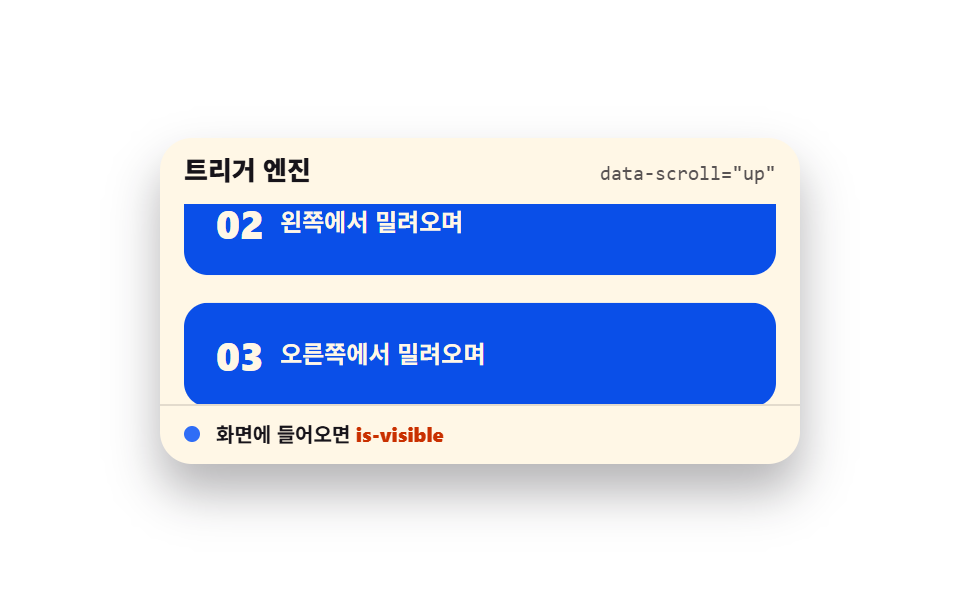 スクロールスクロール トリガー アニメーション 9選 — GSAPなしのバニラJSで
 スクロールスクロール 慣性 css 9選 — 値が自ら収まっていく9つの計算パターン
 スクロールcss スクロールバー デザイン 9パターン — 慣性と反発で動く
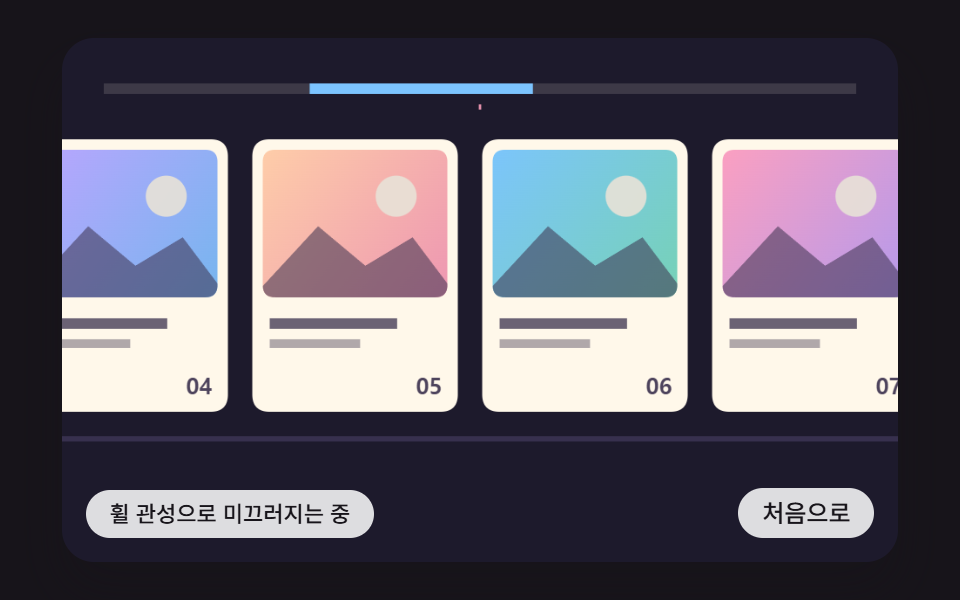 スクロール横スクロール アニメーション css 9パターン — 慣性・円筒・魚眼レンズ
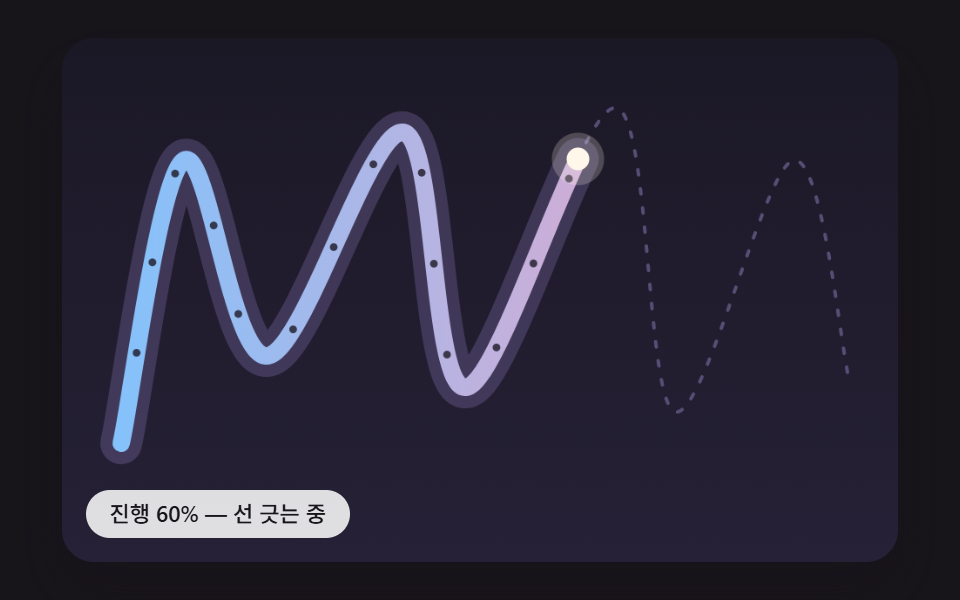 スクロールスクロール 連動 アニメーション 9種 — 線・道・しっぽ・らせん
 スクロール【コピペOK】スクロール アニメーション CSS のみ 9選
 スクロールCSS パララックス スクロール 9選 — CSSだけ・JS不要
 スクロールCSS 固定ヘッダー 9選 — CSSだけ・JS不要
 スクロールCSS 無限ループ マーキー9選 — CSSだけ・JS不要