css 背景 パターン ジェネレーター 自作9種
css 背景 パターン ジェネレーターは、画像ファイルを配る代わりに数字ひとつから模様をその場で計算する仕組みです。ここで紹介する9つはシードひとつで絵が決まり、同じ数字を入れ直せば同じ絵が必ず戻ってきます。
 01 generative-noise-contour
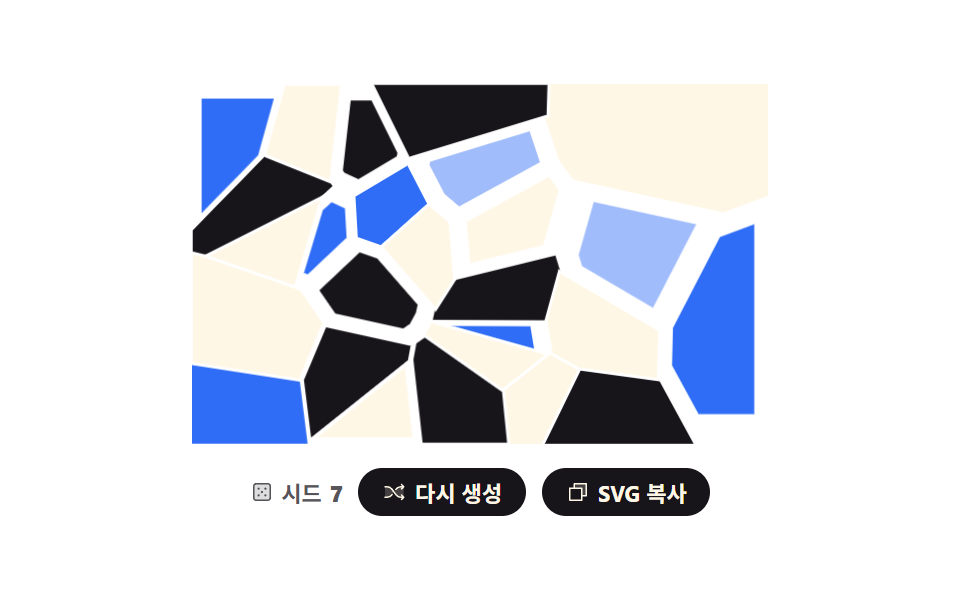 02 generative-voronoi-cells
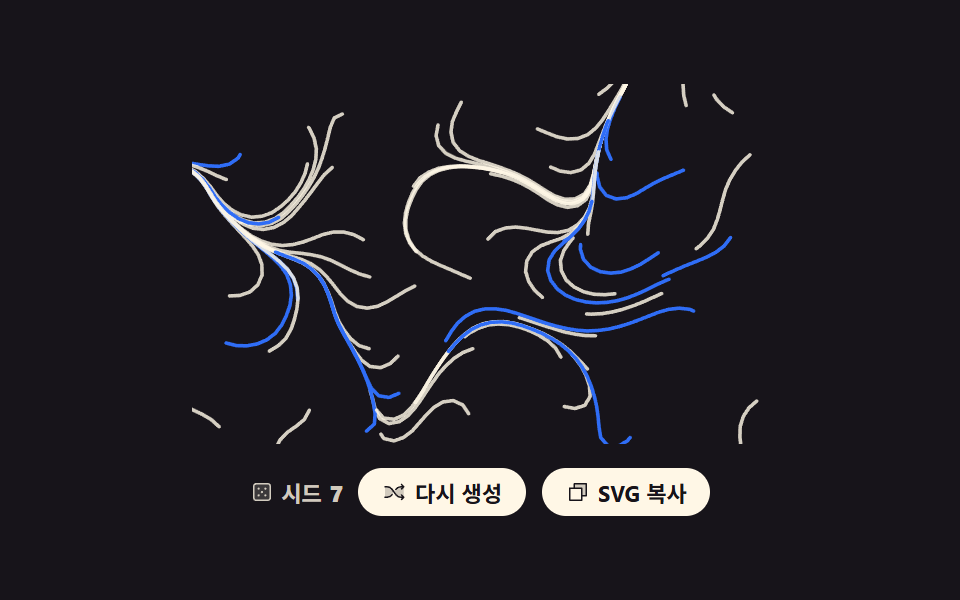 03 generative-flow-field-lines
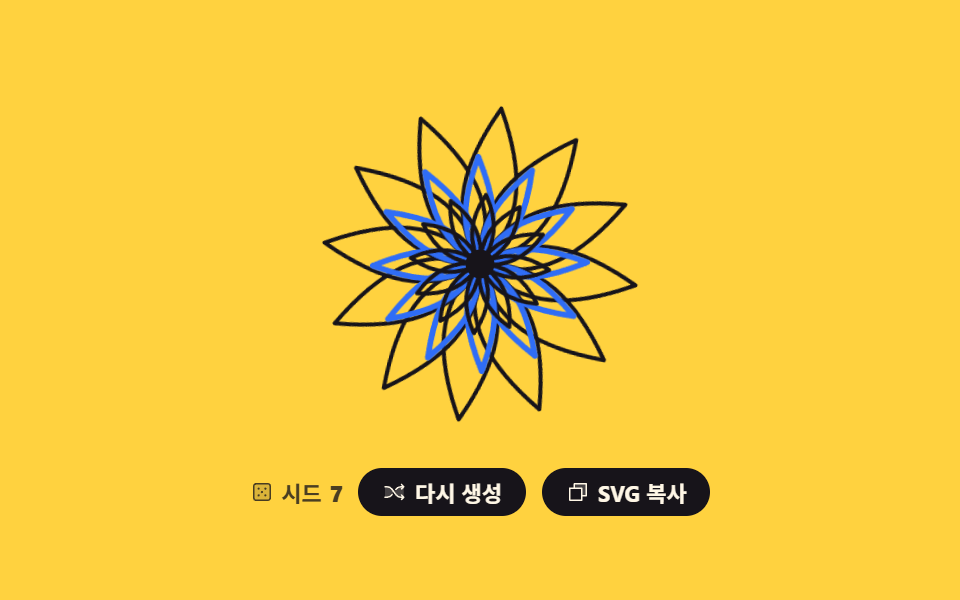 04 generative-mandala-symmetry
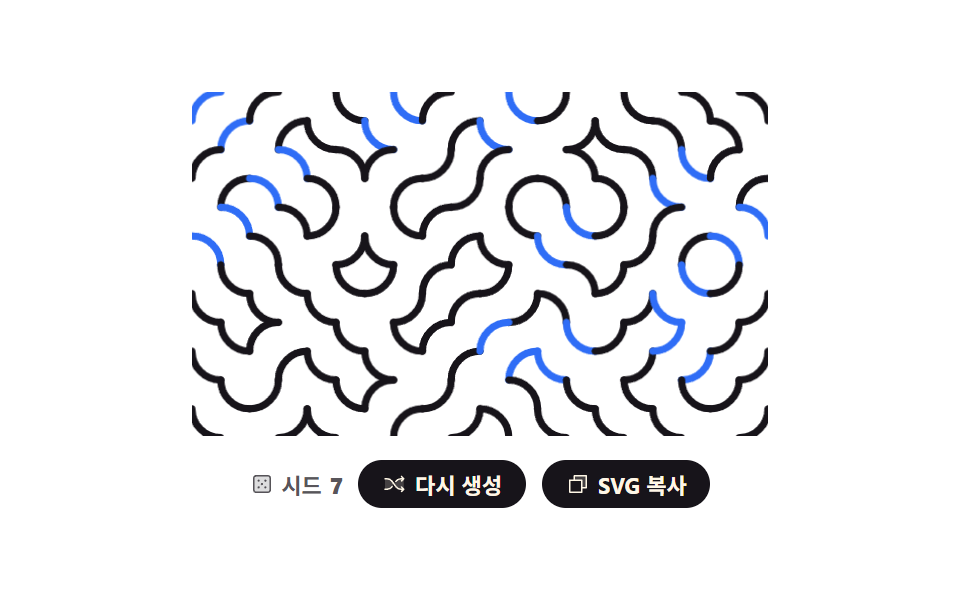 05 generative-truchet-tiles
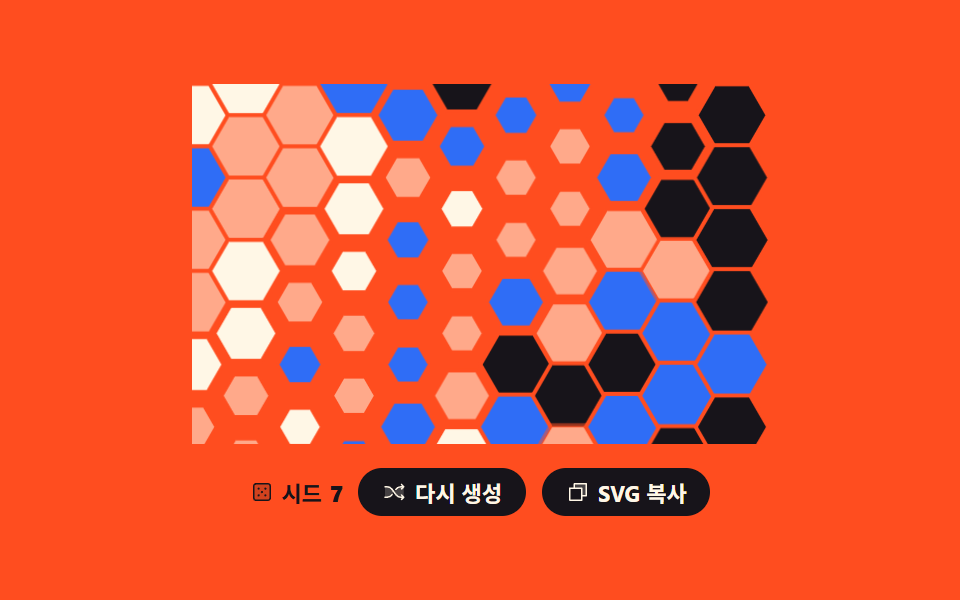 06 generative-hex-grid-paint
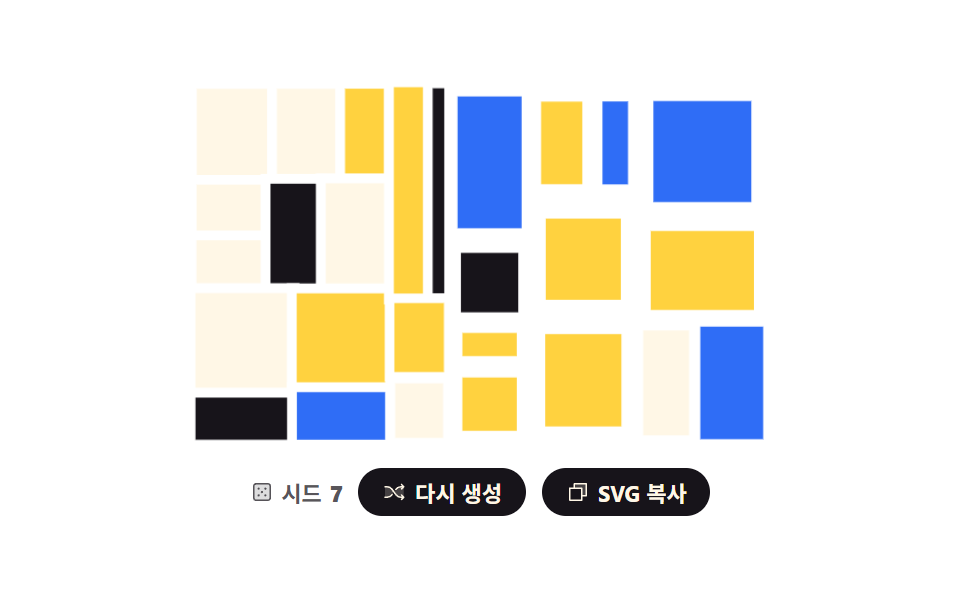 07 generative-recursive-split
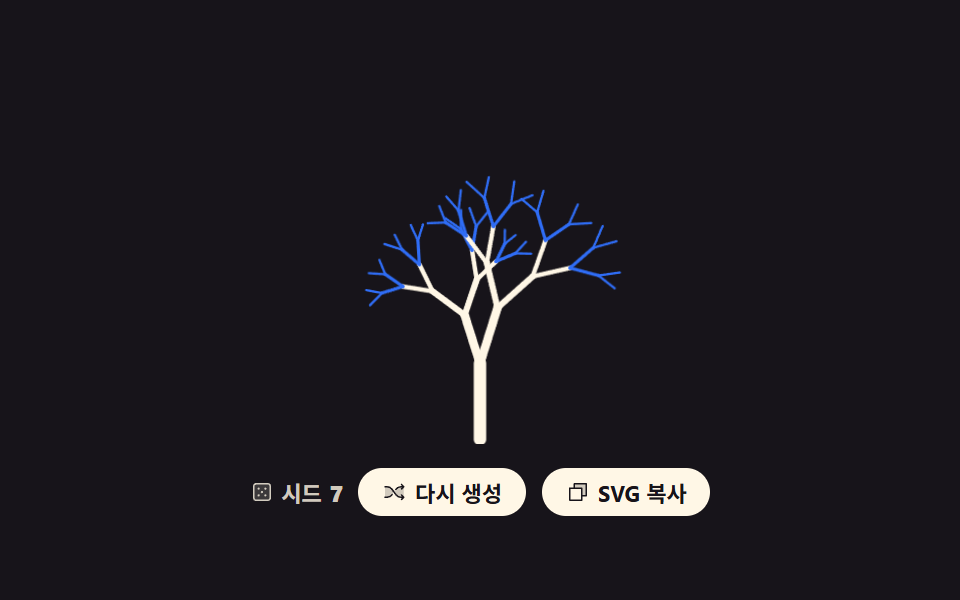 08 generative-branching-tree
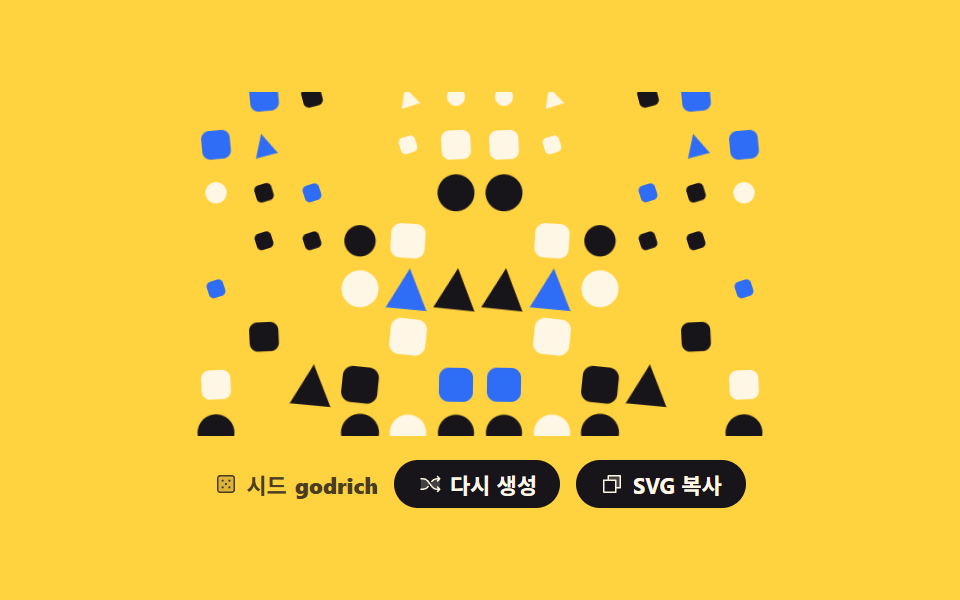 09 generative-seed-avatar-bg
自動再生 · タイルを押すとその項目へ · すべて1つのzip
- 01 ノイズ等高線マップ
- 02 ボロノイセルのタイル
- 03 フローフィールドの線画
- 04 回転対称のマンダラ
- 05 トルシェタイルの迷路
- 06 六角格子の塗り分け
- 07 再帰分割の四角
- 08 枝分かれする木
- 09 名前から作る背景
9つを並べた基準は人気順ではなく、ジェネラティブ デザイン が乱数をどこに使うかです。はじめの3つは乱数を画面全体にばらまきます — 格子ごとに高さを乱数で決めて等高線で切り(01)、散らした点ごとに領域を分け(02)、位置ごとに角度を決めて線を流します(03)。真ん中の3つは乱数を一度だけ使い、あとは規則が複製します — ひと筆を12回まわすマンダラ(04)、タイル1枚を4つの角度で置くだけのトルシェ(05)、位置に応じて傾けた確率でマスを塗る六角格子(06)。最後の3つは乱数を再帰に流し込みます — 切ってまた切る四角(07)、分かれてまた分かれる木(08)、そしてシードが数字ではなく文字列である名前の背景(09)。背景そのものを動かしたいなら CSS 背景 アニメーション 9選 が、同じ SVG で数値を描く話は css グラフ をSVGで描く9種 にあります。03の流れ場を規則ではなく力で動かせば物理シミュレーションになり、描いた模様を写真のように切り取って使う側は画像のトリミングUIが担います。
01ノイズ等高線マップ
何が見えるか
粗い格子の頂点にだけ乱数を置き、あいだを smoothstep でつなぐと、でこぼこした高さの地図になります。マーチングスクエアで「同じ高さ」を結ぶ線を6層取り出すやり方は、地形図の描き方そのものです。プレビューでは累積面積 11.93%・強度 94.5・移動フレーム 16/23 を記録しました。
<main class="stage">
<div class="nc is-demo" id="root">
  <svg class="nc__art" id="art" viewBox="0 0 240 150" role="img" data-label="乱数の高さを等高線で描いた地図、シード {n}"></svg>
  <div class="nc__bar">
    <p class="nc__seed">
      <svg xmlns="http://www.w3.org/2000/svg" class="nc__ic" viewBox="0 0 256 256" aria-hidden="true"><g fill="currentColor"><path d="M216 64v128a24 24 0 0 1-24 24H64a24 24 0 0 1-24-24V64a24 24 0 0 1 24-24h128a24 24 0 0 1 24 24" opacity=".2"/><path d="M192 32H64a32 32 0 0 0-32 32v128a32 32 0 0 0 32 32h128a32 32 0 0 0 32-32V64a32 32 0 0 0-32-32m16 160a16 16 0 0 1-16 16H64a16 16 0 0 1-16-16V64a16 16 0 0 1 16-16h128a16 16 0 0 1 16 16ZM104 92a12 12 0 1 1-12-12a12 12 0 0 1 12 12m72 0a12 12 0 1 1-12-12a12 12 0 0 1 12 12m-72 72a12 12 0 1 1-12-12a12 12 0 0 1 12 12m36-36a12 12 0 1 1-12-12a12 12 0 0 1 12 12m36 36a12 12 0 1 1-12-12a12 12 0 0 1 12 12"/></g></svg>
      シード <b id="num">7</b>
    </p>
    <button class="nc__btn" type="button" id="again">
      <svg xmlns="http://www.w3.org/2000/svg" class="nc__ic" viewBox="0 0 256 256" aria-hidden="true"><g fill="currentColor"><path d="M107.14 98.8L128 128l-20.86 29.2A64 64 0 0 1 55.06 184H32V72h23.06a64 64 0 0 1 52.08 26.8m93.8-26.8a64 64 0 0 0-52.08 26.8L128 128l20.86 29.2a64 64 0 0 0 52.08 26.8H232V72Z" opacity=".2"/><path d="M237.66 178.34a8 8 0 0 1 0 11.32l-24 24a8 8 0 0 1-11.32-11.32L212.69 192h-11.75a72.12 72.12 0 0 1-58.59-30.15l-41.72-58.4A56.1 56.1 0 0 0 55.06 80H32a8 8 0 0 1 0-16h23.06a72.12 72.12 0 0 1 58.59 30.15l41.72 58.4A56.1 56.1 0 0 0 200.94 176h11.75l-10.35-10.34a8 8 0 0 1 11.32-11.32ZM143 107a8 8 0 0 0 11.16-1.86l1.2-1.67A56.1 56.1 0 0 1 200.94 80h11.75l-10.35 10.34a8 8 0 0 0 11.32 11.32l24-24a8 8 0 0 0 0-11.32l-24-24a8 8 0 0 0-11.32 11.32L212.69 64h-11.75a72.12 72.12 0 0 0-58.59 30.15l-1.2 1.67A8 8 0 0 0 143 107m-30 42a8 8 0 0 0-11.16 1.86l-1.2 1.67A56.1 56.1 0 0 1 55.06 176H32a8 8 0 0 0 0 16h23.06a72.12 72.12 0 0 0 58.59-30.15l1.2-1.67A8 8 0 0 0 113 149"/></g></svg>
      <span class="nc__label">再生成</span>
    </button>
    <button class="nc__btn" type="button" id="copy" data-done="コピーしました">
      <svg xmlns="http://www.w3.org/2000/svg" class="nc__ic" viewBox="0 0 256 256" aria-hidden="true"><g fill="currentColor"><path d="M216 40v128h-48V88H88V40Z" opacity=".2"/><path d="M216 32H88a8 8 0 0 0-8 8v40H40a8 8 0 0 0-8 8v128a8 8 0 0 0 8 8h128a8 8 0 0 0 8-8v-40h40a8 8 0 0 0 8-8V40a8 8 0 0 0-8-8m-56 176H48V96h112Zm48-48h-32V88a8 8 0 0 0-8-8H96V48h112Z"/></g></svg>
      <span class="nc__label">SVGをコピー</span>
    </button>
  </div>
</div>
</main>
@use "../../../../site/static/demo-tokens" as *;
// 노이즈 등고선 지도 — 값 노이즈로 높이를 만들고 마칭 스퀘어로 같은 높이를 잇는 선을 뽑는다.
// 경로 생성은 JS 지만 **그리는 연출은 CSS** 다: path 마다 pathLength="1" 로 길이를 1 로 정규화해
// stroke-dasharray: 1 · stroke-dashoffset 1 → 0 → -1 을 키프레임으로 돌린다.
// demo.py 는 CSS 애니메이션 시계로 24장을 뽑으므로 rAF 로 그리면 전부 같은 장면이 된다.
$duration: $dur-loop;
$easing: cubic-bezier(.7, 0, .85, .4);
$color: $subject-cream;
@include stage($stage-ink);
.nc { display: grid; justify-items: center; gap: $sp-3; width: 100%; }
.nc__art { display: block; width: clamp(176px, 60vw, 320px); height: auto; }
// 정적(미리보기를 뗀) 상태가 기본값 — 시드로 뽑힌 지도가 다 그려져 있다
.nc__line {
fill: none;
stroke: $color;
stroke-width: 1.4;
stroke-linecap: round;
stroke-dasharray: 1; // pathLength="1" 이라 1 = 경로 전체 길이
stroke-dashoffset: 0;
opacity: calc(.44 + var(--i) * .1);
}
.nc__bar { display: flex; flex-wrap: wrap; align-items: center; justify-content: center; gap: $sp-2; }
.nc__seed {
margin: 0;
display: inline-flex; align-items: center; gap: $sp-1;
color: rgba(255, 247, 230, .8);
font-weight: 700; font-size: clamp(9px, 2.4vw, 11px);
}
.nc__btn {
display: inline-flex; align-items: center; gap: $sp-1;
border: 0; border-radius: $r-pill;
padding: $sp-1 $sp-3;
background: $subject-cream; color: $subject-ink;
font-family: inherit; font-weight: 700; font-size: clamp(9px, 2.4vw, 11px);
cursor: pointer;
}
.nc__btn:focus-visible { outline: 3px solid $subject-blue; outline-offset: 2px; }
.nc__ic { width: 12px; height: 12px; flex: none; }
// ── 미리보기 루프: 아래 dashoffset 궤적은 「다시 생성」을 눌렀을 때 실제로 도는 것과 같은 그리기 연출이다.
// 양 끝(1 과 -1)이 둘 다 "감춰짐" 이라 한 바퀴가 끝날 때 튀지 않는다.
.nc.is-demo .nc__line {
animation-name: ncScan;
animation-duration: $duration;
animation-timing-function: $easing;
animation-iteration-count: infinite;
animation-fill-mode: backwards; // 지연 구간에 다 그려진 기본 상태가 번쩍이지 않게
animation-delay: calc(var(--i) * 110ms);
}
// 사람이 「다시 생성」을 누르면 루프를 떼고 한 번만 그린다
.nc.is-draw .nc__line {
animation-name: ncDraw;
animation-duration: $dur-enter;
animation-timing-function: $ease-out;
animation-iteration-count: 1;
animation-fill-mode: backwards;
animation-delay: calc(var(--i) * 110ms);
}
// 그리기는 느리게 시작해 끝에서 빨라지고 지우기는 그 반대다 — 프레임당 변화가 가장 큰 순간이
// 「선이 거의 다 있는」 장면에 오게 해서 poster(앞 장과 가장 크게 달라진 장)가 빈 지도로 뽑히지 않는다
@keyframes ncScan {
0% { stroke-dashoffset: 1; animation-timing-function: $easing; }
38% { stroke-dashoffset: 0; animation-timing-function: linear; }
50% { stroke-dashoffset: 0; animation-timing-function: $ease-out; }
86% { stroke-dashoffset: -1; }
100% { stroke-dashoffset: -1; }
}
@keyframes ncDraw {
from { stroke-dashoffset: 1; }
to { stroke-dashoffset: 0; }
}
@media (max-width: 340px) {
.nc { gap: $sp-2; }
.nc__ic { width: 10px; height: 10px; }
}
@media (prefers-reduced-motion: reduce) {
.nc.is-demo .nc__line,
.nc.is-draw .nc__line { animation: none !important; stroke-dashoffset: 0 !important; }
}html, body {
margin: 0;
overflow: hidden;
}
.stage {
box-sizing: border-box;
min-height: 100vh;
display: grid;
place-items: center;
margin: 0;
background: #17141a;
font-family: -apple-system, "Segoe UI", "Noto Sans KR", sans-serif;
padding: clamp(8px, 4vw, 24px);
}
.nc {
display: grid;
justify-items: center;
gap: 12px;
width: 100%;
}
.nc__art {
display: block;
width: clamp(176px, 60vw, 320px);
height: auto;
}
.nc__line {
fill: none;
stroke: #fff7e6;
stroke-width: 1.4;
stroke-linecap: round;
stroke-dasharray: 1;
stroke-dashoffset: 0;
opacity: calc(0.44 + var(--i) * 0.1);
}
.nc__bar {
display: flex;
flex-wrap: wrap;
align-items: center;
justify-content: center;
gap: 8px;
}
.nc__seed {
margin: 0;
display: inline-flex;
align-items: center;
gap: 4px;
color: rgba(255, 247, 230, 0.8);
font-weight: 700;
font-size: clamp(9px, 2.4vw, 11px);
}
.nc__btn {
display: inline-flex;
align-items: center;
gap: 4px;
border: 0;
border-radius: 999px;
padding: 4px 12px;
background: #fff7e6;
color: #17141a;
font-family: inherit;
font-weight: 700;
font-size: clamp(9px, 2.4vw, 11px);
cursor: pointer;
}
.nc__btn:focus-visible {
outline: 3px solid #2f6df6;
outline-offset: 2px;
}
.nc__ic {
width: 12px;
height: 12px;
flex: none;
}
.nc.is-demo .nc__line {
animation-name: ncScan;
animation-duration: 2s;
animation-timing-function: cubic-bezier(0.7, 0, 0.85, 0.4);
animation-iteration-count: infinite;
animation-fill-mode: backwards;
animation-delay: calc(var(--i) * 110ms);
}
.nc.is-draw .nc__line {
animation-name: ncDraw;
animation-duration: 600ms;
animation-timing-function: ease-out;
animation-iteration-count: 1;
animation-fill-mode: backwards;
animation-delay: calc(var(--i) * 110ms);
}
@keyframes ncScan {
0% {
stroke-dashoffset: 1;
animation-timing-function: cubic-bezier(0.7, 0, 0.85, 0.4);
}
38% {
stroke-dashoffset: 0;
animation-timing-function: linear;
}
50% {
stroke-dashoffset: 0;
animation-timing-function: ease-out;
}
86% {
stroke-dashoffset: -1;
}
100% {
stroke-dashoffset: -1;
}
}
@keyframes ncDraw {
from {
stroke-dashoffset: 1;
}
to {
stroke-dashoffset: 0;
}
}
@media (max-width: 340px) {
.nc {
gap: 8px;
}
.nc__ic {
width: 10px;
height: 10px;
}
}
@media (prefers-reduced-motion: reduce) {
.nc.is-demo .nc__line,
.nc.is-draw .nc__line {
animation: none !important;
stroke-dashoffset: 0 !important;
}
}var root = document.getElementById('root');
var art = document.getElementById('art');
var num = document.getElementById('num');
var W = 240, H = 150, COLS = 9, ROWS = 6, LEVELS = 6, NX = 32, NY = 20;
var seed = 7;
// mulberry32 — 32비트 정수 シード 하나로 언제나 같은 난수열을 돌려준다. 재현 가능한 생성의 뿌리
function mulberry32(a) {
return function () {
a = a + 0x6D2B79F5 | 0;
var t = Math.imul(a ^ a >>> 15, 1 | a);
t = t + Math.imul(t ^ t >>> 7, 61 | t) ^ t;
return ((t ^ t >>> 14) >>> 0) / 4294967296;
};
}
// 격자 꼭짓점에만 난수를 놓고 사이는 smoothstep 으로 이어 붙인다 (값 노이즈)
function makeField(s) {
var rand = mulberry32(s), lat = [], r, c;
for (r = 0; r <= ROWS; r++) { lat.push([]); for (c = 0; c <= COLS; c++) { lat[r].push(rand()); } }
return function (x, y) {
var gx = x * COLS, gy = y * ROWS;
var ix = Math.min(COLS - 1, Math.floor(gx)), iy = Math.min(ROWS - 1, Math.floor(gy));
var fx = gx - ix, fy = gy - iy;
var sx = fx * fx * (3 - 2 * fx), sy = fy * fy * (3 - 2 * fy);
var top = lat[iy][ix] + (lat[iy][ix + 1] - lat[iy][ix]) * sx;
var bot = lat[iy + 1][ix] + (lat[iy + 1][ix + 1] - lat[iy + 1][ix]) * sx;
return top + (bot - top) * sy;
};
}
// 칸 네 꼭짓점의 높이를 문턱과 견줘 어느 변에서 선이 드나드는지 고른다 (마칭 스퀘어 16가지)
var TABLE = [[], [[2, 3]], [[1, 2]], [[1, 3]], [[0, 1]], [[0, 3], [1, 2]], [[0, 2]], [[0, 3]],
[[0, 3]], [[0, 2]], [[0, 1], [2, 3]], [[0, 1]], [[1, 3]], [[1, 2]], [[2, 3]], []];
function cut(ax, ay, av, bx, by, bv, level) {
var t = (level - av) / (bv - av);
return ((ax + (bx - ax) * t) * W).toFixed(1) + ' ' + ((ay + (by - ay) * t) * H).toFixed(1);
}
function contour(field, level) {
var d = '', i, j, k;
for (j = 0; j < NY; j++) {
for (i = 0; i < NX; i++) {
var x0 = i / NX, y0 = j / NY, x1 = (i + 1) / NX, y1 = (j + 1) / NY;
var v = [field(x0, y0), field(x1, y0), field(x1, y1), field(x0, y1)];
var code = (v[0] > level ? 8 : 0) | (v[1] > level ? 4 : 0) | (v[2] > level ? 2 : 0) | (v[3] > level ? 1 : 0);
var pairs = TABLE[code];
if (!pairs.length) { continue; }
var edge = [cut(x0, y0, v[0], x1, y0, v[1], level), cut(x1, y0, v[1], x1, y1, v[2], level),
cut(x1, y1, v[2], x0, y1, v[3], level), cut(x0, y1, v[3], x0, y0, v[0], level)];
for (k = 0; k < pairs.length; k++) { d += 'M' + edge[pairs[k][0]] + 'L' + edge[pairs[k][1]]; }
}
}
return d;
}
function build() {
var field = makeField(seed), parts = [], i;
for (i = 0; i < LEVELS; i++) {
parts.push('<path class="nc__line" style="--i:' + i + '" pathLength="1" d="' + contour(field, 0.26 + i * 0.1) + '"/>');
}
art.innerHTML = parts.join('');
art.setAttribute('aria-label', art.getAttribute('data-label').replace('{n}', seed));
num.textContent = seed;
}
document.getElementById('again').addEventListener('click', function () {
seed = (seed * 7 + 13) % 991 + 1;
build();
root.classList.remove('is-demo');
root.classList.remove('is-draw');
void art.getBoundingClientRect().width; // 한 번 읽어 리플로를 일으켜야 같은 애니메이션이 처음부터 다시 돈다
root.classList.add('is-draw');
});
var copyBtn = document.getElementById('copy');
copyBtn.addEventListener('click', function () {
var label = copyBtn.querySelector('.nc__label');
var before = label.textContent;
if (navigator.clipboard && navigator.clipboard.writeText) {
navigator.clipboard.writeText(art.outerHTML).catch(function () {});
}
label.textContent = copyBtn.getAttribute('data-done');
setTimeout(function () { label.textContent = before; }, 1200);
});
build();// NoiseContourMap — vanilla 판(run/293/demo/01-generative-noise-contour/index.html) 의 React 포트.
// 값 노이즈로 높이를 만들고 마칭 스퀘어로 같은 높이를 잇는 선을 뽑는다. 경로는 JS, 그리는 연출은 CSS.
// 시드·격자 수·문턱은 vanilla 와 같은 값이다.
import { useMemo, useRef, useState } from "react";
import type { CSSProperties } from "react";
import styles from "./NoiseContourMap.module.scss";
export type NoiseContourMapProps = {
duration?: number;
easing?: string;
color?: string;
label?: string;
seedText?: string;
regenerateText?: string;
copyText?: string;
copiedText?: string;
};
type Vars = CSSProperties & { "--duration"?: string; "--easing"?: string; "--color"?: string };
// useRef 는 T | null 을 돌려준다. 처음부터 값이 있고 절대 비지 않는 상자는 이렇게 좁혀 쓴다
type Box<T> = { current: T };
const W = 240;
const H = 150;
const COLS = 9;
const ROWS = 6;
const LEVELS = 6;
const NX = 32;
const NY = 20;
// 칸 네 꼭짓점의 높이를 문턱과 견줘 어느 변에서 선이 드나드는지 고른다 (마칭 스퀘어 16가지)
const TABLE: number[][][] = [[], [[2, 3]], [[1, 2]], [[1, 3]], [[0, 1]], [[0, 3], [1, 2]], [[0, 2]], [[0, 3]],
[[0, 3]], [[0, 2]], [[0, 1], [2, 3]], [[0, 1]], [[1, 3]], [[1, 2]], [[2, 3]], []];
// mulberry32 — 32비트 정수 시드 하나로 언제나 같은 난수열을 돌려준다. 재현 가능한 생성의 뿌리
function mulberry32(a: number): () => number {
return function (): number {
a = a + 0x6D2B79F5 | 0;
let t = Math.imul(a ^ a >>> 15, 1 | a);
t = t + Math.imul(t ^ t >>> 7, 61 | t) ^ t;
return ((t ^ t >>> 14) >>> 0) / 4294967296;
};
}
// 격자 꼭짓점에만 난수를 놓고 사이는 smoothstep 으로 이어 붙인다 (값 노이즈)
function makeField(s: number): (x: number, y: number) => number {
const rand = mulberry32(s);
const lat: number[][] = [];
for (let r = 0; r <= ROWS; r++) {
const row: number[] = [];
for (let c = 0; c <= COLS; c++) { row.push(rand()); }
lat.push(row);
}
return function (x: number, y: number): number {
const gx = x * COLS;
const gy = y * ROWS;
const ix = Math.min(COLS - 1, Math.floor(gx));
const iy = Math.min(ROWS - 1, Math.floor(gy));
const fx = gx - ix;
const fy = gy - iy;
const sx = fx * fx * (3 - 2 * fx);
const sy = fy * fy * (3 - 2 * fy);
const top = lat[iy][ix] + (lat[iy][ix + 1] - lat[iy][ix]) * sx;
const bot = lat[iy + 1][ix] + (lat[iy + 1][ix + 1] - lat[iy + 1][ix]) * sx;
return top + (bot - top) * sy;
};
}
function cut(ax: number, ay: number, av: number, bx: number, by: number, bv: number, level: number): string {
const t = (level - av) / (bv - av);
return ((ax + (bx - ax) * t) * W).toFixed(1) + " " + ((ay + (by - ay) * t) * H).toFixed(1);
}
function contour(field: (x: number, y: number) => number, level: number): string {
let d = "";
for (let j = 0; j < NY; j++) {
for (let i = 0; i < NX; i++) {
const x0 = i / NX, y0 = j / NY, x1 = (i + 1) / NX, y1 = (j + 1) / NY;
const v = [field(x0, y0), field(x1, y0), field(x1, y1), field(x0, y1)];
const code = (v[0] > level ? 8 : 0) | (v[1] > level ? 4 : 0) | (v[2] > level ? 2 : 0) | (v[3] > level ? 1 : 0);
const pairs = TABLE[code];
if (!pairs.length) { continue; }
const edge = [cut(x0, y0, v[0], x1, y0, v[1], level), cut(x1, y0, v[1], x1, y1, v[2], level),
cut(x1, y1, v[2], x0, y1, v[3], level), cut(x0, y1, v[3], x0, y0, v[0], level)];
for (let k = 0; k < pairs.length; k++) { d += "M" + edge[pairs[k][0]] + "L" + edge[pairs[k][1]]; }
}
}
return d;
}
export default function NoiseContourMap({
duration = 2000,
easing = "cubic-bezier(.7, 0, .85, .4)",
color = "#fff7e6",
label = "A map of random heights drawn as contour lines, seed {n}",
seedText = "Seed",
regenerateText = "Regenerate",
copyText = "Copy SVG",
copiedText = "Copied",
}: NoiseContourMapProps) {
const artRef = useRef<SVGSVGElement | null>(null);
const timerRef = useRef<number>(0) as Box<number>;
const [seed, setSeed] = useState(7);
const [mode, setMode] = useState("demo");
const [copyLabel, setCopyLabel] = useState(copyText);
const vars: Vars = { "--duration": `${duration}ms`, "--easing": easing, "--color": color };
// 시드가 바뀔 때만 다시 계산한다 — 같은 시드면 언제나 같은 경로 문자열이 나온다
const paths = useMemo(() => {
const field = makeField(seed);
const out: string[] = [];
for (let i = 0; i < LEVELS; i++) { out.push(contour(field, 0.26 + i * 0.1)); }
return out;
}, [seed]);
function regenerate(): void {
setSeed((prev: number) => (prev * 7 + 13) % 991 + 1);
setMode("draw");
}
function copySvg(): void {
const art = artRef.current;
if (!art) { return; }
if (navigator.clipboard && navigator.clipboard.writeText) {
navigator.clipboard.writeText(art.outerHTML).catch(function () {});
}
setCopyLabel(copiedText);
clearTimeout(timerRef.current);
timerRef.current = window.setTimeout(() => setCopyLabel(copyText), 1200);
}
const rootClass = `${styles.nc} ${mode === "demo" ? styles.isDemo : styles.isDraw}`;
return (
<div className={rootClass} style={vars}>
<svg
ref={artRef}
className={styles.art}
viewBox={`0 0 ${W} ${H}`}
role="img"
aria-label={label.replace("{n}", String(seed))}
>
{paths.map((d: string, i: number) => (
<path key={i} className={styles.line} style={{ "--i": i } as CSSProperties} pathLength={1} d={d} />
))}
</svg>
<div className={styles.bar}>
<p className={styles.seed}>{seedText} <b>{seed}</b></p>
<button className={styles.btn} type="button" onClick={regenerate}>{regenerateText}</button>
<button className={styles.btn} type="button" onClick={copySvg}>{copyLabel}</button>
</div>
</div>
);
}01 · ノイズ等高線マップ — 計測 累積面積 11.925% · 動いたフレーム 16/23GODRICH オリジナル · SCSS と React は zip に同梱 · パスワードを見る
コードのどこを見るか
紹介ページ冒頭の背景に使います。
// mulberry32 — 32ビット整数のシードひとつで、いつも同じ乱数列を返す。再現できる生成の根っこ
function mulberry32(a) {
  return function () {
    a = a + 0x6D2B79F5 | 0;
    var t = Math.imul(a ^ a >>> 15, 1 | a);
    t = t + Math.imul(t ^ t >>> 7, 61 | t) ^ t;
    return ((t ^ t >>> 14) >>> 0) / 4294967296;
  };
}
@keyframes ncScan {
  0%   { stroke-dashoffset: 1; animation-timing-function: $easing; }
  38%  { stroke-dashoffset: 0; animation-timing-function: linear; }
  50%  { stroke-dashoffset: 0; animation-timing-function: $ease-out; }
  86%  { stroke-dashoffset: -1; }
  100% { stroke-dashoffset: -1; }
}
02ボロノイセルのタイル
css 背景 パターン とどこが違うか
点を26個ばらまき、それぞれに「自分にいちばん近い領域」を割り当てると、割れたガラスのような面になります。専用の幾何ライブラリを読み込む必要はありません。外側の四角をほかの点との垂直二等分線で順に切っていけば、残ったものがその点のセルです。
<main class="stage">
<div class="vo is-demo" id="root">
  <svg class="vo__art" id="art" viewBox="0 0 240 150" role="img" data-label="散らした点ごとに最も近い領域を塗ったセルタイル、シード {n}"></svg>
  <div class="vo__bar">
    <p class="vo__seed">
      <svg xmlns="http://www.w3.org/2000/svg" class="vo__ic" viewBox="0 0 256 256" aria-hidden="true"><g fill="currentColor"><path d="M216 64v128a24 24 0 0 1-24 24H64a24 24 0 0 1-24-24V64a24 24 0 0 1 24-24h128a24 24 0 0 1 24 24" opacity=".2"/><path d="M192 32H64a32 32 0 0 0-32 32v128a32 32 0 0 0 32 32h128a32 32 0 0 0 32-32V64a32 32 0 0 0-32-32m16 160a16 16 0 0 1-16 16H64a16 16 0 0 1-16-16V64a16 16 0 0 1 16-16h128a16 16 0 0 1 16 16ZM104 92a12 12 0 1 1-12-12a12 12 0 0 1 12 12m72 0a12 12 0 1 1-12-12a12 12 0 0 1 12 12m-72 72a12 12 0 1 1-12-12a12 12 0 0 1 12 12m36-36a12 12 0 1 1-12-12a12 12 0 0 1 12 12m36 36a12 12 0 1 1-12-12a12 12 0 0 1 12 12"/></g></svg>
      シード <b id="num">7</b>
    </p>
    <button class="vo__btn" type="button" id="again">
      <svg xmlns="http://www.w3.org/2000/svg" class="vo__ic" viewBox="0 0 256 256" aria-hidden="true"><g fill="currentColor"><path d="M107.14 98.8L128 128l-20.86 29.2A64 64 0 0 1 55.06 184H32V72h23.06a64 64 0 0 1 52.08 26.8m93.8-26.8a64 64 0 0 0-52.08 26.8L128 128l20.86 29.2a64 64 0 0 0 52.08 26.8H232V72Z" opacity=".2"/><path d="M237.66 178.34a8 8 0 0 1 0 11.32l-24 24a8 8 0 0 1-11.32-11.32L212.69 192h-11.75a72.12 72.12 0 0 1-58.59-30.15l-41.72-58.4A56.1 56.1 0 0 0 55.06 80H32a8 8 0 0 1 0-16h23.06a72.12 72.12 0 0 1 58.59 30.15l41.72 58.4A56.1 56.1 0 0 0 200.94 176h11.75l-10.35-10.34a8 8 0 0 1 11.32-11.32ZM143 107a8 8 0 0 0 11.16-1.86l1.2-1.67A56.1 56.1 0 0 1 200.94 80h11.75l-10.35 10.34a8 8 0 0 0 11.32 11.32l24-24a8 8 0 0 0 0-11.32l-24-24a8 8 0 0 0-11.32 11.32L212.69 64h-11.75a72.12 72.12 0 0 0-58.59 30.15l-1.2 1.67A8 8 0 0 0 143 107m-30 42a8 8 0 0 0-11.16 1.86l-1.2 1.67A56.1 56.1 0 0 1 55.06 176H32a8 8 0 0 0 0 16h23.06a72.12 72.12 0 0 0 58.59-30.15l1.2-1.67A8 8 0 0 0 113 149"/></g></svg>
      <span class="vo__label">再生成</span>
    </button>
    <button class="vo__btn" type="button" id="copy" data-done="コピーしました">
      <svg xmlns="http://www.w3.org/2000/svg" class="vo__ic" viewBox="0 0 256 256" aria-hidden="true"><g fill="currentColor"><path d="M216 40v128h-48V88H88V40Z" opacity=".2"/><path d="M216 32H88a8 8 0 0 0-8 8v40H40a8 8 0 0 0-8 8v128a8 8 0 0 0 8 8h128a8 8 0 0 0 8-8v-40h40a8 8 0 0 0 8-8V40a8 8 0 0 0-8-8m-56 176H48V96h112Zm48-48h-32V88a8 8 0 0 0-8-8H96V48h112Z"/></g></svg>
      <span class="vo__label">SVGをコピー</span>
    </button>
  </div>
</div>
</main>
@use "../../../../site/static/demo-tokens" as *;
// 보로노이 셀 타일 — 흩뿌린 점마다 바깥 사각형을 다른 점과의 수직이등분선으로 계속 잘라 셀을 남긴다.
// 면 생성은 JS, 연출은 CSS. 미리보기 루프는 셀이 **사라졌다 나타나는** 것이 아니라 한 칸씩 눌렸다
// 펴지는 물결이다 — 시작 상태와 끝 상태가 같은 완성 모자이크라 한 바퀴가 끝날 때 튀지 않고,
// poster(앞 장과 가장 크게 달라진 장)에도 빈 화면이 뽑히지 않는다.
$duration: $dur-loop;
$easing: $ease-spring;
$color: $subject-blue;
@include stage($stage-paper);
.vo { display: grid; justify-items: center; gap: $sp-3; width: 100%; }
.vo__art { display: block; width: clamp(176px, 60vw, 320px); height: auto; }
// transform-box: fill-box 가 없으면 SVG 도형의 % 원점이 뷰포트 기준이 되어 셀이 제자리에서 안 커진다
.vo__cell {
stroke: $stage-paper;
stroke-width: 1.2;
transform-box: fill-box;
transform-origin: 50% 50%;
}
.vo__cell--a { fill: $color; }
.vo__cell--b { fill: $color; opacity: .46; }
.vo__cell--c { fill: $subject-ink; }
.vo__cell--d { fill: $subject-cream; }
.vo__bar { display: flex; flex-wrap: wrap; align-items: center; justify-content: center; gap: $sp-2; }
.vo__seed {
margin: 0;
display: inline-flex; align-items: center; gap: $sp-1;
color: rgba(23, 20, 26, .72);
font-weight: 700; font-size: clamp(9px, 2.4vw, 11px);
}
.vo__btn {
display: inline-flex; align-items: center; gap: $sp-1;
border: 0; border-radius: $r-pill;
padding: $sp-1 $sp-3;
background: $subject-ink; color: $subject-cream;
font-family: inherit; font-weight: 700; font-size: clamp(9px, 2.4vw, 11px);
cursor: pointer;
}
.vo__btn:focus-visible { outline: 3px solid $color; outline-offset: 2px; }
.vo__ic { width: 12px; height: 12px; flex: none; }
// ── 미리보기 루프: 셀 번호 순으로 물결이 지나간다. 같은 셀 크기로 시작해 같은 크기로 끝난다
.vo.is-demo .vo__cell {
animation-name: voPress;
animation-duration: $duration;
animation-timing-function: $easing;
animation-iteration-count: infinite;
animation-fill-mode: backwards;
animation-delay: calc(var(--i) * -46ms); // 음수 지연이라 첫 프레임부터 물결이 이미 퍼져 있다
}
// 사람이 「다시 생성」을 누르면 새 시드의 셀이 한 칸씩 펼쳐진다 — 루프와 달리 한 번만 돈다
.vo.is-draw .vo__cell {
animation-name: voPop;
animation-duration: $dur-enter;
animation-timing-function: $ease-pop;
animation-iteration-count: 1;
animation-fill-mode: backwards;
animation-delay: calc(var(--i) * 18ms);
}
@keyframes voPress {
0% { transform: scale(1); }
22% { transform: scale(.72); }
46% { transform: scale(1.04); }
70% { transform: scale(1); }
100% { transform: scale(1); }
}
@keyframes voPop {
from { transform: scale(.2); opacity: 0; }
to { transform: scale(1); opacity: 1; }
}
@media (max-width: 340px) {
.vo { gap: $sp-2; }
.vo__ic { width: 10px; height: 10px; }
}
@media (prefers-reduced-motion: reduce) {
.vo.is-demo .vo__cell,
.vo.is-draw .vo__cell { animation: none !important; transform: scale(1) !important; }
}html, body {
margin: 0;
overflow: hidden;
}
.stage {
box-sizing: border-box;
min-height: 100vh;
display: grid;
place-items: center;
margin: 0;
background: #ffffff;
font-family: -apple-system, "Segoe UI", "Noto Sans KR", sans-serif;
padding: clamp(8px, 4vw, 24px);
}
.vo {
display: grid;
justify-items: center;
gap: 12px;
width: 100%;
}
.vo__art {
display: block;
width: clamp(176px, 60vw, 320px);
height: auto;
}
.vo__cell {
stroke: #ffffff;
stroke-width: 1.2;
transform-box: fill-box;
transform-origin: 50% 50%;
}
.vo__cell--a {
fill: #2f6df6;
}
.vo__cell--b {
fill: #2f6df6;
opacity: 0.46;
}
.vo__cell--c {
fill: #17141a;
}
.vo__cell--d {
fill: #fff7e6;
}
.vo__bar {
display: flex;
flex-wrap: wrap;
align-items: center;
justify-content: center;
gap: 8px;
}
.vo__seed {
margin: 0;
display: inline-flex;
align-items: center;
gap: 4px;
color: rgba(23, 20, 26, 0.72);
font-weight: 700;
font-size: clamp(9px, 2.4vw, 11px);
}
.vo__btn {
display: inline-flex;
align-items: center;
gap: 4px;
border: 0;
border-radius: 999px;
padding: 4px 12px;
background: #17141a;
color: #fff7e6;
font-family: inherit;
font-weight: 700;
font-size: clamp(9px, 2.4vw, 11px);
cursor: pointer;
}
.vo__btn:focus-visible {
outline: 3px solid #2f6df6;
outline-offset: 2px;
}
.vo__ic {
width: 12px;
height: 12px;
flex: none;
}
.vo.is-demo .vo__cell {
animation-name: voPress;
animation-duration: 2s;
animation-timing-function: cubic-bezier(0.2, 0.8, 0.2, 1);
animation-iteration-count: infinite;
animation-fill-mode: backwards;
animation-delay: calc(var(--i) * -46ms);
}
.vo.is-draw .vo__cell {
animation-name: voPop;
animation-duration: 600ms;
animation-timing-function: cubic-bezier(0.2, 1.4, 0.4, 1);
animation-iteration-count: 1;
animation-fill-mode: backwards;
animation-delay: calc(var(--i) * 18ms);
}
@keyframes voPress {
0% {
transform: scale(1);
}
22% {
transform: scale(0.72);
}
46% {
transform: scale(1.04);
}
70% {
transform: scale(1);
}
100% {
transform: scale(1);
}
}
@keyframes voPop {
from {
transform: scale(0.2);
opacity: 0;
}
to {
transform: scale(1);
opacity: 1;
}
}
@media (max-width: 340px) {
.vo {
gap: 8px;
}
.vo__ic {
width: 10px;
height: 10px;
}
}
@media (prefers-reduced-motion: reduce) {
.vo.is-demo .vo__cell,
.vo.is-draw .vo__cell {
animation: none !important;
transform: scale(1) !important;
}
}var root = document.getElementById('root');
var art = document.getElementById('art');
var num = document.getElementById('num');
var W = 240, H = 150, SITES = 26;
var seed = 7;
// mulberry32 — 32비트 정수 シード 하나로 언제나 같은 난수열을 돌려준다. 재현 가능한 생성의 뿌리
function mulberry32(a) {
return function () {
a = a + 0x6D2B79F5 | 0;
var t = Math.imul(a ^ a >>> 15, 1 | a);
t = t + Math.imul(t ^ t >>> 7, 61 | t) ^ t;
return ((t ^ t >>> 14) >>> 0) / 4294967296;
};
}
// 두 점의 수직이등분선으로 다각형을 잘라 a 쪽 반평면만 남긴다 (서덜랜드-호지먼 클리핑)
function clip(poly, a, b) {
var mx = (a[0] + b[0]) / 2, my = (a[1] + b[1]) / 2;
var dx = b[0] - a[0], dy = b[1] - a[1], out = [], i;
function side(p) { return (p[0] - mx) * dx + (p[1] - my) * dy; }
for (i = 0; i < poly.length; i++) {
var p = poly[i], q = poly[(i + 1) % poly.length], sp = side(p), sq = side(q);
if (sp <= 0) { out.push(p); }
if ((sp < 0 && sq > 0) || (sp > 0 && sq < 0)) {
var t = sp / (sp - sq);
out.push([p[0] + (q[0] - p[0]) * t, p[1] + (q[1] - p[1]) * t]);
}
}
return out;
}
var TONES = ['a', 'b', 'c', 'd'];
function build() {
var rand = mulberry32(seed), pts = [], parts = [], i, j;
for (i = 0; i < SITES; i++) { pts.push([10 + rand() * (W - 20), 8 + rand() * (H - 16)]); }
for (i = 0; i < SITES; i++) {
var poly = [[0, 0], [W, 0], [W, H], [0, H]];
for (j = 0; j < SITES && poly.length; j++) { if (j !== i) { poly = clip(poly, pts[i], pts[j]); } }
if (poly.length < 3) { continue; }
var tone = TONES[Math.min(3, Math.floor(rand() * 4))];
var d = poly.map(function (p) { return p[0].toFixed(1) + ',' + p[1].toFixed(1); }).join(' ');
parts.push('<polygon class="vo__cell vo__cell--' + tone + '" style="--i:' + i + '" points="' + d + '"/>');
}
art.innerHTML = parts.join('');
art.setAttribute('aria-label', art.getAttribute('data-label').replace('{n}', seed));
num.textContent = seed;
}
document.getElementById('again').addEventListener('click', function () {
seed = (seed * 7 + 13) % 991 + 1;
build();
root.classList.remove('is-demo');
root.classList.remove('is-draw');
void art.getBoundingClientRect().width; // 한 번 읽어 리플로를 일으켜야 같은 애니메이션이 처음부터 다시 돈다
root.classList.add('is-draw');
});
var copyBtn = document.getElementById('copy');
copyBtn.addEventListener('click', function () {
var label = copyBtn.querySelector('.vo__label');
var before = label.textContent;
if (navigator.clipboard && navigator.clipboard.writeText) {
navigator.clipboard.writeText(art.outerHTML).catch(function () {});
}
label.textContent = copyBtn.getAttribute('data-done');
setTimeout(function () { label.textContent = before; }, 1200);
});
build();// VoronoiCellTiles — vanilla 판(run/293/demo/02-generative-voronoi-cells/index.html) 의 React 포트.
// 흩뿌린 점마다 바깥 사각형을 "다른 점과의 수직이등분선" 으로 계속 잘라, 남은 조각이 그 점의 셀이다.
// 면 생성은 JS, 연출은 CSS. 시드·점 개수·자르는 순서는 vanilla 와 같은 값이다.
import { useMemo, useRef, useState } from "react";
import type { CSSProperties } from "react";
import styles from "./VoronoiCellTiles.module.scss";
export type VoronoiCellTilesProps = {
duration?: number;
easing?: string;
color?: string;
label?: string;
seedText?: string;
regenerateText?: string;
copyText?: string;
copiedText?: string;
};
type Vars = CSSProperties & { "--duration"?: string; "--easing"?: string; "--color"?: string };
// useRef 는 T | null 을 돌려준다. 처음부터 값이 있고 절대 비지 않는 상자는 이렇게 좁혀 쓴다
type Box<T> = { current: T };
type Point = [number, number];
type Cell = { i: number; tone: string; points: string };
const W = 240;
const H = 150;
const SITES = 26;
// 네 가지 칠. 뽑는 순서와 확률은 vanilla 의 'a' 'b' 'c' 'd' 와 같고 이름만 CSS 모듈식이다
const TONES: string[] = ["cellA", "cellB", "cellC", "cellD"];
// mulberry32 — 32비트 정수 시드 하나로 언제나 같은 난수열을 돌려준다. 재현 가능한 생성의 뿌리
function mulberry32(a: number): () => number {
return function (): number {
a = a + 0x6D2B79F5 | 0;
let t = Math.imul(a ^ a >>> 15, 1 | a);
t = t + Math.imul(t ^ t >>> 7, 61 | t) ^ t;
return ((t ^ t >>> 14) >>> 0) / 4294967296;
};
}
// 두 점의 수직이등분선으로 다각형을 잘라 a 쪽 반평면만 남긴다 (서덜랜드-호지먼 클리핑)
function clip(poly: Point[], a: Point, b: Point): Point[] {
const mx = (a[0] + b[0]) / 2;
const my = (a[1] + b[1]) / 2;
const dx = b[0] - a[0];
const dy = b[1] - a[1];
const out: Point[] = [];
function side(p: Point): number { return (p[0] - mx) * dx + (p[1] - my) * dy; }
for (let i = 0; i < poly.length; i++) {
const p = poly[i];
const q = poly[(i + 1) % poly.length];
const sp = side(p);
const sq = side(q);
if (sp <= 0) { out.push(p); }
if ((sp < 0 && sq > 0) || (sp > 0 && sq < 0)) {
const t = sp / (sp - sq);
out.push([p[0] + (q[0] - p[0]) * t, p[1] + (q[1] - p[1]) * t]);
}
}
return out;
}
export default function VoronoiCellTiles({
duration = 2000,
easing = "cubic-bezier(.2, .8, .2, 1)",
color = "#2f6df6",
label = "Cell tiles where each scattered point owns its nearest area, seed {n}",
seedText = "Seed",
regenerateText = "Regenerate",
copyText = "Copy SVG",
copiedText = "Copied",
}: VoronoiCellTilesProps) {
const artRef = useRef<SVGSVGElement | null>(null);
const timerRef = useRef<number>(0) as Box<number>;
const [seed, setSeed] = useState(7);
const [mode, setMode] = useState("demo");
const [copyLabel, setCopyLabel] = useState(copyText);
const vars: Vars = { "--duration": `${duration}ms`, "--easing": easing, "--color": color };
// 시드가 바뀔 때만 다시 계산한다 — 같은 시드면 언제나 같은 셀이 나온다.
// 칠(tone)을 뽑는 rand() 는 셀이 살아남은 뒤에만 부른다: vanilla 와 난수 소비 순서를 맞춰야
// 같은 시드에서 두 판의 색이 어긋나지 않는다
const cells = useMemo(() => {
const rand = mulberry32(seed);
const pts: Point[] = [];
const out: Cell[] = [];
for (let i = 0; i < SITES; i++) { pts.push([10 + rand() * (W - 20), 8 + rand() * (H - 16)]); }
for (let i = 0; i < SITES; i++) {
let poly: Point[] = [[0, 0], [W, 0], [W, H], [0, H]];
for (let j = 0; j < SITES && poly.length > 0; j++) { if (j !== i) { poly = clip(poly, pts[i], pts[j]); } }
if (poly.length < 3) { continue; }
const tone = TONES[Math.min(3, Math.floor(rand() * 4))];
const d = poly.map((p: Point) => p[0].toFixed(1) + "," + p[1].toFixed(1)).join(" ");
out.push({ i, tone, points: d });
}
return out;
}, [seed]);
function regenerate(): void {
setSeed((prev: number) => (prev * 7 + 13) % 991 + 1);
setMode("draw");
}
function copySvg(): void {
const art = artRef.current;
if (!art) { return; }
if (navigator.clipboard && navigator.clipboard.writeText) {
navigator.clipboard.writeText(art.outerHTML).catch(function () {});
}
setCopyLabel(copiedText);
clearTimeout(timerRef.current);
timerRef.current = window.setTimeout(() => setCopyLabel(copyText), 1200);
}
const rootClass = `${styles.vo} ${mode === "demo" ? styles.isDemo : styles.isDraw}`;
return (
<div className={rootClass} style={vars}>
<svg
ref={artRef}
className={styles.art}
viewBox={`0 0 ${W} ${H}`}
role="img"
aria-label={label.replace("{n}", String(seed))}
>
{cells.map((c: Cell) => (
<polygon
key={c.i}
className={`${styles.cell} ${styles[c.tone]}`}
style={{ "--i": c.i } as CSSProperties}
points={c.points}
/>
))}
</svg>
<div className={styles.bar}>
<p className={styles.seed}>{seedText} <b>{seed}</b></p>
<button className={styles.btn} type="button" onClick={regenerate}>{regenerateText}</button>
<button className={styles.btn} type="button" onClick={copySvg}>{copyLabel}</button>
</div>
</div>
);
}02 · ボロノイセルのタイル — 計測 累積面積 19.066% · 動いたフレーム 23/23GODRICH オリジナル · SCSS と React は zip に同梱 · パスワードを見る
コードの読み方
累積面積 19.07%・強度 72.5・移動フレーム 23/23 で、料金表セクションの背景に向きます。
// 2点の垂直二等分線で多角形を切り、a 側の半平面だけ残す (サザーランド・ホッジマン法)
function clip(poly, a, b) {
  var mx = (a[0] + b[0]) / 2, my = (a[1] + b[1]) / 2;
  var dx = b[0] - a[0], dy = b[1] - a[1], out = [], i;
  function side(p) { return (p[0] - mx) * dx + (p[1] - my) * dy; }
  for (i = 0; i < poly.length; i++) {
    var p = poly[i], q = poly[(i + 1) % poly.length], sp = side(p), sq = side(q);
    if (sp <= 0) { out.push(p); }
    if ((sp < 0 && sq > 0) || (sp > 0 && sq < 0)) {
      var t = sp / (sp - sq);
      out.push([p[0] + (q[0] - p[0]) * t, p[1] + (q[1] - p[1]) * t]);
    }
  }
  return out;
}
03フローフィールドの線画
どんな動きか
位置ごとに角度をひとつずつ決めておいた面(方向の場)の上で、短い歩幅を30回つなぐと長い曲線になります。54本の線の開始点はただの乱数ではなく揺らした格子から取っているので、片側に固まらず画面全体に散ります。
<main class="stage">
<div class="ff is-demo" id="root">
  <svg class="ff__art" id="art" viewBox="0 0 240 150" role="img" data-label="方向の場に沿って流れる線で描いた絵、シード {n}"></svg>
  <div class="ff__bar">
    <p class="ff__seed">
      <svg xmlns="http://www.w3.org/2000/svg" class="ff__ic" viewBox="0 0 256 256" aria-hidden="true"><g fill="currentColor"><path d="M216 64v128a24 24 0 0 1-24 24H64a24 24 0 0 1-24-24V64a24 24 0 0 1 24-24h128a24 24 0 0 1 24 24" opacity=".2"/><path d="M192 32H64a32 32 0 0 0-32 32v128a32 32 0 0 0 32 32h128a32 32 0 0 0 32-32V64a32 32 0 0 0-32-32m16 160a16 16 0 0 1-16 16H64a16 16 0 0 1-16-16V64a16 16 0 0 1 16-16h128a16 16 0 0 1 16 16ZM104 92a12 12 0 1 1-12-12a12 12 0 0 1 12 12m72 0a12 12 0 1 1-12-12a12 12 0 0 1 12 12m-72 72a12 12 0 1 1-12-12a12 12 0 0 1 12 12m36-36a12 12 0 1 1-12-12a12 12 0 0 1 12 12m36 36a12 12 0 1 1-12-12a12 12 0 0 1 12 12"/></g></svg>
      シード <b id="num">7</b>
    </p>
    <button class="ff__btn" type="button" id="again">
      <svg xmlns="http://www.w3.org/2000/svg" class="ff__ic" viewBox="0 0 256 256" aria-hidden="true"><g fill="currentColor"><path d="M107.14 98.8L128 128l-20.86 29.2A64 64 0 0 1 55.06 184H32V72h23.06a64 64 0 0 1 52.08 26.8m93.8-26.8a64 64 0 0 0-52.08 26.8L128 128l20.86 29.2a64 64 0 0 0 52.08 26.8H232V72Z" opacity=".2"/><path d="M237.66 178.34a8 8 0 0 1 0 11.32l-24 24a8 8 0 0 1-11.32-11.32L212.69 192h-11.75a72.12 72.12 0 0 1-58.59-30.15l-41.72-58.4A56.1 56.1 0 0 0 55.06 80H32a8 8 0 0 1 0-16h23.06a72.12 72.12 0 0 1 58.59 30.15l41.72 58.4A56.1 56.1 0 0 0 200.94 176h11.75l-10.35-10.34a8 8 0 0 1 11.32-11.32ZM143 107a8 8 0 0 0 11.16-1.86l1.2-1.67A56.1 56.1 0 0 1 200.94 80h11.75l-10.35 10.34a8 8 0 0 0 11.32 11.32l24-24a8 8 0 0 0 0-11.32l-24-24a8 8 0 0 0-11.32 11.32L212.69 64h-11.75a72.12 72.12 0 0 0-58.59 30.15l-1.2 1.67A8 8 0 0 0 143 107m-30 42a8 8 0 0 0-11.16 1.86l-1.2 1.67A56.1 56.1 0 0 1 55.06 176H32a8 8 0 0 0 0 16h23.06a72.12 72.12 0 0 0 58.59-30.15l1.2-1.67A8 8 0 0 0 113 149"/></g></svg>
      <span class="ff__label">再生成</span>
    </button>
    <button class="ff__btn" type="button" id="copy" data-done="コピーしました">
      <svg xmlns="http://www.w3.org/2000/svg" class="ff__ic" viewBox="0 0 256 256" aria-hidden="true"><g fill="currentColor"><path d="M216 40v128h-48V88H88V40Z" opacity=".2"/><path d="M216 32H88a8 8 0 0 0-8 8v40H40a8 8 0 0 0-8 8v128a8 8 0 0 0 8 8h128a8 8 0 0 0 8-8v-40h40a8 8 0 0 0 8-8V40a8 8 0 0 0-8-8m-56 176H48V96h112Zm48-48h-32V88a8 8 0 0 0-8-8H96V48h112Z"/></g></svg>
      <span class="ff__label">SVGをコピー</span>
    </button>
  </div>
</div>
</main>
@use "../../../../site/static/demo-tokens" as *;
// 플로우 필드 선 그림 — 자리마다 각도를 하나씩 정해 둔 방향장 위를 짧은 걸음으로 걸어 곡선을 만든다.
// 경로 계산은 JS, 그리는 연출은 CSS: pathLength="1" 로 길이를 1 로 정규화하고
// stroke-dashoffset 을 1 → 0 → -1 로 돌린다. 1 과 -1 은 둘 다 "감춰짐" 이라 한 바퀴 끝에서 안 튄다.
$duration: $dur-loop;
$easing: cubic-bezier(.7, 0, .85, .4);
$color: $subject-cream;
@include stage($stage-ink);
.ff { display: grid; justify-items: center; gap: $sp-3; width: 100%; }
.ff__art { display: block; width: clamp(176px, 60vw, 320px); height: auto; }
.ff__line {
fill: none;
stroke-width: 1.5;
stroke-linecap: round;
stroke-linejoin: round;
stroke-dasharray: 1; // pathLength="1" 이라 1 = 경로 전체 길이
stroke-dashoffset: 0; // 정적 상태는 선이 다 그려진 그림
}
.ff__line--a { stroke: $color; opacity: .82; }
.ff__line--b { stroke: $subject-blue; }
.ff__bar { display: flex; flex-wrap: wrap; align-items: center; justify-content: center; gap: $sp-2; }
.ff__seed {
margin: 0;
display: inline-flex; align-items: center; gap: $sp-1;
color: rgba(255, 247, 230, .8);
font-weight: 700; font-size: clamp(9px, 2.4vw, 11px);
}
.ff__btn {
display: inline-flex; align-items: center; gap: $sp-1;
border: 0; border-radius: $r-pill;
padding: $sp-1 $sp-3;
background: $subject-cream; color: $subject-ink;
font-family: inherit; font-weight: 700; font-size: clamp(9px, 2.4vw, 11px);
cursor: pointer;
}
.ff__btn:focus-visible { outline: 3px solid $subject-blue; outline-offset: 2px; }
.ff__ic { width: 12px; height: 12px; flex: none; }
// ── 미리보기 루프: 「다시 생성」을 눌렀을 때 실제로 도는 것과 같은 그리기 연출을 무한 반복한다.
// 그리기는 느리게 시작해 끝에서 빨라지고 지우기는 그 반대라, 프레임당 변화가 가장 큰 순간이
// 「선이 거의 다 있는」 장면에 온다 — poster 가 빈 화면으로 뽑히지 않는다.
.ff.is-demo .ff__line {
animation-name: ffFlow;
animation-duration: $duration;
animation-timing-function: $easing;
animation-iteration-count: infinite;
animation-fill-mode: backwards;
animation-delay: calc(var(--i) * 62ms);
}
.ff.is-draw .ff__line {
animation-name: ffDraw;
animation-duration: $dur-enter;
animation-timing-function: $ease-out;
animation-iteration-count: 1;
animation-fill-mode: backwards;
animation-delay: calc(var(--i) * 30ms);
}
@keyframes ffFlow {
0% { stroke-dashoffset: 1; animation-timing-function: $easing; }
40% { stroke-dashoffset: 0; animation-timing-function: linear; }
52% { stroke-dashoffset: 0; animation-timing-function: $ease-out; }
86% { stroke-dashoffset: -1; }
100% { stroke-dashoffset: -1; }
}
@keyframes ffDraw {
from { stroke-dashoffset: 1; }
to { stroke-dashoffset: 0; }
}
@media (max-width: 340px) {
.ff { gap: $sp-2; }
.ff__ic { width: 10px; height: 10px; }
}
@media (prefers-reduced-motion: reduce) {
.ff.is-demo .ff__line,
.ff.is-draw .ff__line { animation: none !important; stroke-dashoffset: 0 !important; }
}html, body {
margin: 0;
overflow: hidden;
}
.stage {
box-sizing: border-box;
min-height: 100vh;
display: grid;
place-items: center;
margin: 0;
background: #17141a;
font-family: -apple-system, "Segoe UI", "Noto Sans KR", sans-serif;
padding: clamp(8px, 4vw, 24px);
}
.ff {
display: grid;
justify-items: center;
gap: 12px;
width: 100%;
}
.ff__art {
display: block;
width: clamp(176px, 60vw, 320px);
height: auto;
}
.ff__line {
fill: none;
stroke-width: 1.5;
stroke-linecap: round;
stroke-linejoin: round;
stroke-dasharray: 1;
stroke-dashoffset: 0;
}
.ff__line--a {
stroke: #fff7e6;
opacity: 0.82;
}
.ff__line--b {
stroke: #2f6df6;
}
.ff__bar {
display: flex;
flex-wrap: wrap;
align-items: center;
justify-content: center;
gap: 8px;
}
.ff__seed {
margin: 0;
display: inline-flex;
align-items: center;
gap: 4px;
color: rgba(255, 247, 230, 0.8);
font-weight: 700;
font-size: clamp(9px, 2.4vw, 11px);
}
.ff__btn {
display: inline-flex;
align-items: center;
gap: 4px;
border: 0;
border-radius: 999px;
padding: 4px 12px;
background: #fff7e6;
color: #17141a;
font-family: inherit;
font-weight: 700;
font-size: clamp(9px, 2.4vw, 11px);
cursor: pointer;
}
.ff__btn:focus-visible {
outline: 3px solid #2f6df6;
outline-offset: 2px;
}
.ff__ic {
width: 12px;
height: 12px;
flex: none;
}
.ff.is-demo .ff__line {
animation-name: ffFlow;
animation-duration: 2s;
animation-timing-function: cubic-bezier(0.7, 0, 0.85, 0.4);
animation-iteration-count: infinite;
animation-fill-mode: backwards;
animation-delay: calc(var(--i) * 62ms);
}
.ff.is-draw .ff__line {
animation-name: ffDraw;
animation-duration: 600ms;
animation-timing-function: ease-out;
animation-iteration-count: 1;
animation-fill-mode: backwards;
animation-delay: calc(var(--i) * 30ms);
}
@keyframes ffFlow {
0% {
stroke-dashoffset: 1;
animation-timing-function: cubic-bezier(0.7, 0, 0.85, 0.4);
}
40% {
stroke-dashoffset: 0;
animation-timing-function: linear;
}
52% {
stroke-dashoffset: 0;
animation-timing-function: ease-out;
}
86% {
stroke-dashoffset: -1;
}
100% {
stroke-dashoffset: -1;
}
}
@keyframes ffDraw {
from {
stroke-dashoffset: 1;
}
to {
stroke-dashoffset: 0;
}
}
@media (max-width: 340px) {
.ff {
gap: 8px;
}
.ff__ic {
width: 10px;
height: 10px;
}
}
@media (prefers-reduced-motion: reduce) {
.ff.is-demo .ff__line,
.ff.is-draw .ff__line {
animation: none !important;
stroke-dashoffset: 0 !important;
}
}var root = document.getElementById('root');
var art = document.getElementById('art');
var num = document.getElementById('num');
var W = 240, H = 150, COLS = 5, ROWS = 3, GX = 9, GY = 6, STEPS = 30, STEP = 4.4;
var seed = 7;
// mulberry32 — 32비트 정수 シード 하나로 언제나 같은 난수열을 돌려준다. 재현 가능한 생성의 뿌리
function mulberry32(a) {
return function () {
a = a + 0x6D2B79F5 | 0;
var t = Math.imul(a ^ a >>> 15, 1 | a);
t = t + Math.imul(t ^ t >>> 7, 61 | t) ^ t;
return ((t ^ t >>> 14) >>> 0) / 4294967296;
};
}
// 성긴 격자에 난수를 놓고 사이를 smoothstep 으로 이어 자리마다 하나의 각도를 준다 = 방향장
function makeAngles(s) {
var rand = mulberry32(s), lat = [], r, c;
for (r = 0; r <= ROWS; r++) { lat.push([]); for (c = 0; c <= COLS; c++) { lat[r].push(rand()); } }
return function (x, y) {
var gx = Math.max(0, Math.min(COLS - 0.001, x / W * COLS));
var gy = Math.max(0, Math.min(ROWS - 0.001, y / H * ROWS));
var ix = Math.floor(gx), iy = Math.floor(gy), fx = gx - ix, fy = gy - iy;
var sx = fx * fx * (3 - 2 * fx), sy = fy * fy * (3 - 2 * fy);
var top = lat[iy][ix] + (lat[iy][ix + 1] - lat[iy][ix]) * sx;
var bot = lat[iy + 1][ix] + (lat[iy + 1][ix + 1] - lat[iy + 1][ix]) * sx;
return (top + (bot - top) * sy) * Math.PI * 3;
};
}
// 한 점에서 시작해 그 자리의 각도로 한 걸음씩 옮기며 좌표를 이어 붙인다
function walk(angleAt, x, y) {
var d = 'M' + x.toFixed(1) + ' ' + y.toFixed(1), i;
for (i = 0; i < STEPS; i++) {
var a = angleAt(x, y);
x += Math.cos(a) * STEP;
y += Math.sin(a) * STEP;
if (x < -8 || x > W + 8 || y < -8 || y > H + 8) { break; }
d += 'L' + x.toFixed(1) + ' ' + y.toFixed(1);
}
return d;
}
function build() {
var angleAt = makeAngles(seed), rand = mulberry32(seed + 991), parts = [], gx, gy;
// 시작점을 흔들린 격자에서 뽑아 화면 전체에 고르게 깔리게 한다 (순수 난수면 한쪽에 뭉친다)
for (gy = 0; gy < GY; gy++) {
for (gx = 0; gx < GX; gx++) {
var x = (gx + 0.15 + rand() * 0.7) / GX * W, y = (gy + 0.15 + rand() * 0.7) / GY * H;
var tone = rand() < 0.34 ? 'b' : 'a';
parts.push('<path class="ff__line ff__line--' + tone + '" style="--i:' + ((gx + gy) % 11) + '" pathLength="1" d="' + walk(angleAt, x, y) + '"/>');
}
}
art.innerHTML = parts.join('');
art.setAttribute('aria-label', art.getAttribute('data-label').replace('{n}', seed));
num.textContent = seed;
}
document.getElementById('again').addEventListener('click', function () {
seed = (seed * 7 + 13) % 991 + 1;
build();
root.classList.remove('is-demo');
root.classList.remove('is-draw');
void art.getBoundingClientRect().width; // 한 번 읽어 리플로를 일으켜야 같은 애니메이션이 처음부터 다시 돈다
root.classList.add('is-draw');
});
var copyBtn = document.getElementById('copy');
copyBtn.addEventListener('click', function () {
var label = copyBtn.querySelector('.ff__label');
var before = label.textContent;
if (navigator.clipboard && navigator.clipboard.writeText) {
navigator.clipboard.writeText(art.outerHTML).catch(function () {});
}
label.textContent = copyBtn.getAttribute('data-done');
setTimeout(function () { label.textContent = before; }, 1200);
});
build();// FlowFieldLines — vanilla 판(run/293/demo/03-generative-flow-field-lines/index.html) 의 React 포트.
// 자리마다 각도를 하나씩 정해 둔 방향장 위를 짧은 걸음으로 걸어 곡선을 만든다. 경로는 JS, 그리는 연출은 CSS.
// 시드·격자 수·걸음 수·걸음 길이는 vanilla 와 같은 값이다.
import { useMemo, useRef, useState } from "react";
import type { CSSProperties } from "react";
import styles from "./FlowFieldLines.module.scss";
export type FlowFieldLinesProps = {
duration?: number;
easing?: string;
color?: string;
label?: string;
seedText?: string;
regenerateText?: string;
copyText?: string;
copiedText?: string;
};
type Vars = CSSProperties & { "--duration"?: string; "--easing"?: string; "--color"?: string };
// useRef 는 T | null 을 돌려준다. 처음부터 값이 있고 절대 비지 않는 상자는 이렇게 좁혀 쓴다
type Box<T> = { current: T };
type Line = { key: number; tone: string; i: number; d: string };
const W = 240;
const H = 150;
const COLS = 5;
const ROWS = 3;
const GX = 9;
const GY = 6;
const STEPS = 30;
const STEP = 4.4;
// mulberry32 — 32비트 정수 시드 하나로 언제나 같은 난수열을 돌려준다. 재현 가능한 생성의 뿌리
function mulberry32(a: number): () => number {
return function (): number {
a = a + 0x6D2B79F5 | 0;
let t = Math.imul(a ^ a >>> 15, 1 | a);
t = t + Math.imul(t ^ t >>> 7, 61 | t) ^ t;
return ((t ^ t >>> 14) >>> 0) / 4294967296;
};
}
// 성긴 격자에 난수를 놓고 사이를 smoothstep 으로 이어 자리마다 하나의 각도를 준다 = 방향장
function makeAngles(s: number): (x: number, y: number) => number {
const rand = mulberry32(s);
const lat: number[][] = [];
for (let r = 0; r <= ROWS; r++) {
const row: number[] = [];
for (let c = 0; c <= COLS; c++) { row.push(rand()); }
lat.push(row);
}
return function (x: number, y: number): number {
const gx = Math.max(0, Math.min(COLS - 0.001, x / W * COLS));
const gy = Math.max(0, Math.min(ROWS - 0.001, y / H * ROWS));
const ix = Math.floor(gx);
const iy = Math.floor(gy);
const fx = gx - ix;
const fy = gy - iy;
const sx = fx * fx * (3 - 2 * fx);
const sy = fy * fy * (3 - 2 * fy);
const top = lat[iy][ix] + (lat[iy][ix + 1] - lat[iy][ix]) * sx;
const bot = lat[iy + 1][ix] + (lat[iy + 1][ix + 1] - lat[iy + 1][ix]) * sx;
return (top + (bot - top) * sy) * Math.PI * 3;
};
}
// 한 점에서 시작해 그 자리의 각도로 한 걸음씩 옮기며 좌표를 이어 붙인다
function walk(angleAt: (x: number, y: number) => number, x: number, y: number): string {
let d = "M" + x.toFixed(1) + " " + y.toFixed(1);
for (let i = 0; i < STEPS; i++) {
const a = angleAt(x, y);
x += Math.cos(a) * STEP;
y += Math.sin(a) * STEP;
if (x < -8 || x > W + 8 || y < -8 || y > H + 8) { break; }
d += "L" + x.toFixed(1) + " " + y.toFixed(1);
}
return d;
}
export default function FlowFieldLines({
duration = 2000,
easing = "cubic-bezier(.7, 0, .85, .4)",
color = "#fff7e6",
label = "A picture drawn with lines flowing along a field of angles, seed {n}",
seedText = "Seed",
regenerateText = "Regenerate",
copyText = "Copy SVG",
copiedText = "Copied",
}: FlowFieldLinesProps) {
const artRef = useRef<SVGSVGElement | null>(null);
const timerRef = useRef<number>(0) as Box<number>;
const [seed, setSeed] = useState(7);
const [mode, setMode] = useState("demo");
const [copyLabel, setCopyLabel] = useState(copyText);
const vars: Vars = { "--duration": `${duration}ms`, "--easing": easing, "--color": color };
// 시드가 바뀔 때만 다시 계산한다 — 같은 시드면 언제나 같은 경로 문자열이 나온다.
// 시작점은 흔들린 격자에서 뽑아 화면 전체에 고르게 깔리게 한다 (순수 난수면 한쪽에 뭉친다)
const lines = useMemo(() => {
const angleAt = makeAngles(seed);
const rand = mulberry32(seed + 991);
const out: Line[] = [];
for (let gy = 0; gy < GY; gy++) {
for (let gx = 0; gx < GX; gx++) {
const x = (gx + 0.15 + rand() * 0.7) / GX * W;
const y = (gy + 0.15 + rand() * 0.7) / GY * H;
const tone = rand() < 0.34 ? "lineB" : "lineA";
out.push({ key: gy * GX + gx, tone, i: (gx + gy) % 11, d: walk(angleAt, x, y) });
}
}
return out;
}, [seed]);
function regenerate(): void {
setSeed((prev: number) => (prev * 7 + 13) % 991 + 1);
setMode("draw");
}
function copySvg(): void {
const art = artRef.current;
if (!art) { return; }
if (navigator.clipboard && navigator.clipboard.writeText) {
navigator.clipboard.writeText(art.outerHTML).catch(function () {});
}
setCopyLabel(copiedText);
clearTimeout(timerRef.current);
timerRef.current = window.setTimeout(() => setCopyLabel(copyText), 1200);
}
const rootClass = `${styles.ff} ${mode === "demo" ? styles.isDemo : styles.isDraw}`;
return (
<div className={rootClass} style={vars}>
<svg
ref={artRef}
className={styles.art}
viewBox={`0 0 ${W} ${H}`}
role="img"
aria-label={label.replace("{n}", String(seed))}
>
{lines.map((l: Line) => (
<path
key={l.key}
className={`${styles.line} ${styles[l.tone]}`}
style={{ "--i": l.i } as CSSProperties}
pathLength={1}
d={l.d}
/>
))}
</svg>
<div className={styles.bar}>
<p className={styles.seed}>{seedText} <b>{seed}</b></p>
<button className={styles.btn} type="button" onClick={regenerate}>{regenerateText}</button>
<button className={styles.btn} type="button" onClick={copySvg}>{copyLabel}</button>
</div>
</div>
);
}03 · フローフィールドの線画 — 計測 累積面積 5.71% · 動いたフレーム 23/23GODRICH オリジナル · SCSS と React は zip に同梱 · パスワードを見る
どこを変えるか
累積面積 5.71%・強度 90.8・移動フレーム 23/23 で、音楽や展示ページの全面背景に使います。
// ある点から始めて、その位置の角度へ一歩ずつ移りながら座標をつないでいく
function walk(angleAt, x, y) {
  var d = 'M' + x.toFixed(1) + ' ' + y.toFixed(1), i;
  for (i = 0; i < STEPS; i++) {
    var a = angleAt(x, y);
    x += Math.cos(a) * STEP;
    y += Math.sin(a) * STEP;
    if (x < -8 || x > W + 8 || y < -8 || y > H + 8) { break; }
    d += 'L' + x.toFixed(1) + ' ' + y.toFixed(1);
  }
  return d;
}
04回転対称のマンダラ
何が見えるか
乱数を使う場所は層ごとに「中心から外へ伸びるひと筆」だけで、その層の残り11本はそれを30度ずつまわした複製です。対称は、乱数をほとんど使わずに模様を成立させるいちばん安い手です。3層・図形37個で累積面積 11.88%・強度 76.2・移動フレーム 23/23 を記録しました。
<main class="stage">
<div class="md is-demo" id="root">
  <svg class="md__art" id="art" viewBox="0 0 240 150" role="img" data-label="ひと筆を12回まわして作った対称模様、シード {n}"></svg>
  <div class="md__bar">
    <p class="md__seed">
      <svg xmlns="http://www.w3.org/2000/svg" class="md__ic" viewBox="0 0 256 256" aria-hidden="true"><g fill="currentColor"><path d="M216 64v128a24 24 0 0 1-24 24H64a24 24 0 0 1-24-24V64a24 24 0 0 1 24-24h128a24 24 0 0 1 24 24" opacity=".2"/><path d="M192 32H64a32 32 0 0 0-32 32v128a32 32 0 0 0 32 32h128a32 32 0 0 0 32-32V64a32 32 0 0 0-32-32m16 160a16 16 0 0 1-16 16H64a16 16 0 0 1-16-16V64a16 16 0 0 1 16-16h128a16 16 0 0 1 16 16ZM104 92a12 12 0 1 1-12-12a12 12 0 0 1 12 12m72 0a12 12 0 1 1-12-12a12 12 0 0 1 12 12m-72 72a12 12 0 1 1-12-12a12 12 0 0 1 12 12m36-36a12 12 0 1 1-12-12a12 12 0 0 1 12 12m36 36a12 12 0 1 1-12-12a12 12 0 0 1 12 12"/></g></svg>
      シード <b id="num">7</b>
    </p>
    <button class="md__btn" type="button" id="again">
      <svg xmlns="http://www.w3.org/2000/svg" class="md__ic" viewBox="0 0 256 256" aria-hidden="true"><g fill="currentColor"><path d="M107.14 98.8L128 128l-20.86 29.2A64 64 0 0 1 55.06 184H32V72h23.06a64 64 0 0 1 52.08 26.8m93.8-26.8a64 64 0 0 0-52.08 26.8L128 128l20.86 29.2a64 64 0 0 0 52.08 26.8H232V72Z" opacity=".2"/><path d="M237.66 178.34a8 8 0 0 1 0 11.32l-24 24a8 8 0 0 1-11.32-11.32L212.69 192h-11.75a72.12 72.12 0 0 1-58.59-30.15l-41.72-58.4A56.1 56.1 0 0 0 55.06 80H32a8 8 0 0 1 0-16h23.06a72.12 72.12 0 0 1 58.59 30.15l41.72 58.4A56.1 56.1 0 0 0 200.94 176h11.75l-10.35-10.34a8 8 0 0 1 11.32-11.32ZM143 107a8 8 0 0 0 11.16-1.86l1.2-1.67A56.1 56.1 0 0 1 200.94 80h11.75l-10.35 10.34a8 8 0 0 0 11.32 11.32l24-24a8 8 0 0 0 0-11.32l-24-24a8 8 0 0 0-11.32 11.32L212.69 64h-11.75a72.12 72.12 0 0 0-58.59 30.15l-1.2 1.67A8 8 0 0 0 143 107m-30 42a8 8 0 0 0-11.16 1.86l-1.2 1.67A56.1 56.1 0 0 1 55.06 176H32a8 8 0 0 0 0 16h23.06a72.12 72.12 0 0 0 58.59-30.15l1.2-1.67A8 8 0 0 0 113 149"/></g></svg>
      <span class="md__label">再生成</span>
    </button>
    <button class="md__btn" type="button" id="copy" data-done="コピーしました">
      <svg xmlns="http://www.w3.org/2000/svg" class="md__ic" viewBox="0 0 256 256" aria-hidden="true"><g fill="currentColor"><path d="M216 40v128h-48V88H88V40Z" opacity=".2"/><path d="M216 32H88a8 8 0 0 0-8 8v40H40a8 8 0 0 0-8 8v128a8 8 0 0 0 8 8h128a8 8 0 0 0 8-8v-40h40a8 8 0 0 0 8-8V40a8 8 0 0 0-8-8m-56 176H48V96h112Zm48-48h-32V88a8 8 0 0 0-8-8H96V48h112Z"/></g></svg>
      <span class="md__label">SVGをコピー</span>
    </button>
  </div>
</div>
</main>
@use "../../../../site/static/demo-tokens" as *;
// 회전 대칭 만다라 — 난수는 "획 하나"에만 쓰고 나머지 열한 개는 그 획을 30도씩 돌린 복사본이다.
// 미리보기 루프는 겹(ring)이 서로 반대로 조금씩 돌며 숨쉬는 것이라 시작과 끝 상태가 같다 —
// 사라졌다 나타나지 않으니 한 바퀴 끝에서 튀지 않고 poster 에도 늘 무늬가 다 차 있다.
$duration: $dur-loop;
$easing: $ease-spring;
$color: $subject-ink;
@include stage($stage-yellow);
.md { display: grid; justify-items: center; gap: $sp-3; width: 100%; }
.md__art { display: block; width: clamp(176px, 60vw, 320px); height: auto; }
// 겹의 회전 중심은 무늬의 중심이어야 한다. fill-box 는 그 겹의 경계 상자를 기준으로 잡는데
// 12겹 회전 대칭이라 경계 상자의 한가운데가 곧 만다라의 중심이다
.md__ring {
transform-box: fill-box;
transform-origin: 50% 50%;
fill: none;
stroke-linejoin: round;
stroke-linecap: round;
}
.md__ring--a { stroke: $color; stroke-width: 1.6; }
.md__ring--b { stroke: $subject-blue; stroke-width: 2.4; }
.md__eye { fill: $color; }
.md__bar { display: flex; flex-wrap: wrap; align-items: center; justify-content: center; gap: $sp-2; }
.md__seed {
margin: 0;
display: inline-flex; align-items: center; gap: $sp-1;
color: rgba(23, 20, 26, .78);
font-weight: 700; font-size: clamp(9px, 2.4vw, 11px);
}
.md__btn {
display: inline-flex; align-items: center; gap: $sp-1;
border: 0; border-radius: $r-pill;
padding: $sp-1 $sp-3;
background: $subject-ink; color: $subject-cream;
font-family: inherit; font-weight: 700; font-size: clamp(9px, 2.4vw, 11px);
cursor: pointer;
}
.md__btn:focus-visible { outline: 3px solid $subject-blue; outline-offset: 2px; }
.md__ic { width: 12px; height: 12px; flex: none; }
// ── 미리보기 루프: 겹마다 조금씩 다른 각도로 돌았다 제자리로 돌아온다
.md.is-demo .md__ring {
animation-name: mdBreathe;
animation-duration: $duration;
animation-timing-function: $easing;
animation-iteration-count: infinite;
animation-fill-mode: backwards;
animation-delay: calc(var(--i) * -260ms); // 음수 지연이라 첫 프레임부터 겹들이 서로 어긋나 있다
}
.md.is-demo .md__ring--b { animation-direction: reverse; }
// 사람이 「다시 생성」을 누르면 새 시드의 무늬가 한 겹씩 펼쳐진다
.md.is-draw .md__ring {
animation-name: mdOpen;
animation-duration: $dur-enter;
animation-timing-function: $ease-pop;
animation-iteration-count: 1;
animation-fill-mode: backwards;
animation-delay: calc(var(--i) * 70ms);
}
@keyframes mdBreathe {
0% { transform: rotate(0deg) scale(1); }
32% { transform: rotate(10deg) scale(1.07); }
66% { transform: rotate(-8deg) scale(.94); }
100% { transform: rotate(0deg) scale(1); }
}
@keyframes mdOpen {
from { transform: rotate(-24deg) scale(.4); opacity: 0; }
to { transform: rotate(0deg) scale(1); opacity: 1; }
}
@media (max-width: 340px) {
.md { gap: $sp-2; }
.md__ic { width: 10px; height: 10px; }
}
@media (prefers-reduced-motion: reduce) {
.md.is-demo .md__ring,
.md.is-draw .md__ring { animation: none !important; transform: rotate(0deg) scale(1) !important; }
}html, body {
margin: 0;
overflow: hidden;
}
.stage {
box-sizing: border-box;
min-height: 100vh;
display: grid;
place-items: center;
margin: 0;
background: #ffd23f;
font-family: -apple-system, "Segoe UI", "Noto Sans KR", sans-serif;
padding: clamp(8px, 4vw, 24px);
}
.md {
display: grid;
justify-items: center;
gap: 12px;
width: 100%;
}
.md__art {
display: block;
width: clamp(176px, 60vw, 320px);
height: auto;
}
.md__ring {
transform-box: fill-box;
transform-origin: 50% 50%;
fill: none;
stroke-linejoin: round;
stroke-linecap: round;
}
.md__ring--a {
stroke: #17141a;
stroke-width: 1.6;
}
.md__ring--b {
stroke: #2f6df6;
stroke-width: 2.4;
}
.md__eye {
fill: #17141a;
}
.md__bar {
display: flex;
flex-wrap: wrap;
align-items: center;
justify-content: center;
gap: 8px;
}
.md__seed {
margin: 0;
display: inline-flex;
align-items: center;
gap: 4px;
color: rgba(23, 20, 26, 0.78);
font-weight: 700;
font-size: clamp(9px, 2.4vw, 11px);
}
.md__btn {
display: inline-flex;
align-items: center;
gap: 4px;
border: 0;
border-radius: 999px;
padding: 4px 12px;
background: #17141a;
color: #fff7e6;
font-family: inherit;
font-weight: 700;
font-size: clamp(9px, 2.4vw, 11px);
cursor: pointer;
}
.md__btn:focus-visible {
outline: 3px solid #2f6df6;
outline-offset: 2px;
}
.md__ic {
width: 12px;
height: 12px;
flex: none;
}
.md.is-demo .md__ring {
animation-name: mdBreathe;
animation-duration: 2s;
animation-timing-function: cubic-bezier(0.2, 0.8, 0.2, 1);
animation-iteration-count: infinite;
animation-fill-mode: backwards;
animation-delay: calc(var(--i) * -260ms);
}
.md.is-demo .md__ring--b {
animation-direction: reverse;
}
.md.is-draw .md__ring {
animation-name: mdOpen;
animation-duration: 600ms;
animation-timing-function: cubic-bezier(0.2, 1.4, 0.4, 1);
animation-iteration-count: 1;
animation-fill-mode: backwards;
animation-delay: calc(var(--i) * 70ms);
}
@keyframes mdBreathe {
0% {
transform: rotate(0deg) scale(1);
}
32% {
transform: rotate(10deg) scale(1.07);
}
66% {
transform: rotate(-8deg) scale(0.94);
}
100% {
transform: rotate(0deg) scale(1);
}
}
@keyframes mdOpen {
from {
transform: rotate(-24deg) scale(0.4);
opacity: 0;
}
to {
transform: rotate(0deg) scale(1);
opacity: 1;
}
}
@media (max-width: 340px) {
.md {
gap: 8px;
}
.md__ic {
width: 10px;
height: 10px;
}
}
@media (prefers-reduced-motion: reduce) {
.md.is-demo .md__ring,
.md.is-draw .md__ring {
animation: none !important;
transform: rotate(0deg) scale(1) !important;
}
}var root = document.getElementById('root');
var art = document.getElementById('art');
var num = document.getElementById('num');
var CX = 120, CY = 75, ARMS = 12, RINGS = 3;
var seed = 7;
// mulberry32 — 32비트 정수 シード 하나로 언제나 같은 난수열을 돌려준다. 재현 가능한 생성의 뿌리
function mulberry32(a) {
return function () {
a = a + 0x6D2B79F5 | 0;
var t = Math.imul(a ^ a >>> 15, 1 | a);
t = t + Math.imul(t ^ t >>> 7, 61 | t) ^ t;
return ((t ^ t >>> 14) >>> 0) / 4294967296;
};
}
// 중심에서 위로 뻗는 획 하나. 이 획 하나만 난수로 정하고 나머지는 전부 이것을 돌려 쓴다
function stroke(rand, reach) {
var r1 = reach * (0.3 + rand() * 0.14), r2 = reach * (0.62 + rand() * 0.16), r3 = reach;
var w1 = 4 + rand() * 12, w2 = 2 + rand() * 14;
return 'M0 0C' + w1.toFixed(1) + ' ' + (-r1).toFixed(1) + ' ' + w2.toFixed(1) + ' ' + (-r2).toFixed(1) +
' 0 ' + (-r3).toFixed(1) + 'C' + (-w2).toFixed(1) + ' ' + (-r2).toFixed(1) + ' ' +
(-w1).toFixed(1) + ' ' + (-r1).toFixed(1) + ' 0 0Z';
}
function build() {
var rand = mulberry32(seed), parts = [], ring, arm;
for (ring = 0; ring < RINGS; ring++) {
var d = stroke(rand, 62 - ring * 17), inner = '';
for (arm = 0; arm < ARMS; arm++) {
// 획 하나를 30도씩 돌려 붙인다 — 회전 대칭은 난수를 한 번만 쓰고도 무늬가 되는 가장 싼 방법
inner += '<path transform="translate(' + CX + ' ' + CY + ') rotate(' + (arm * 360 / ARMS) + ')" d="' + d + '"/>';
}
parts.push('<g class="md__ring md__ring--' + (ring % 2 ? 'b' : 'a') + '" style="--i:' + ring + '">' + inner + '</g>');
}
parts.push('<circle class="md__eye" cx="' + CX + '" cy="' + CY + '" r="6"/>');
art.innerHTML = parts.join('');
art.setAttribute('aria-label', art.getAttribute('data-label').replace('{n}', seed));
num.textContent = seed;
}
document.getElementById('again').addEventListener('click', function () {
seed = (seed * 7 + 13) % 991 + 1;
build();
root.classList.remove('is-demo');
root.classList.remove('is-draw');
void art.getBoundingClientRect().width; // 한 번 읽어 리플로를 일으켜야 같은 애니메이션이 처음부터 다시 돈다
root.classList.add('is-draw');
});
var copyBtn = document.getElementById('copy');
copyBtn.addEventListener('click', function () {
var label = copyBtn.querySelector('.md__label');
var before = label.textContent;
if (navigator.clipboard && navigator.clipboard.writeText) {
navigator.clipboard.writeText(art.outerHTML).catch(function () {});
}
label.textContent = copyBtn.getAttribute('data-done');
setTimeout(function () { label.textContent = before; }, 1200);
});
build();// MandalaSymmetry — vanilla 판(run/293/demo/04-generative-mandala-symmetry/index.html) 의 React 포트.
// 난수는 "획 하나"에만 쓰고 나머지 열한 개는 그 획을 30도씩 돌린 복사본이다. 획 생성은 JS, 연출은 CSS.
// 시드·겹 수·팔 수·획의 반지름 비율은 vanilla 와 같은 값이다.
import { useMemo, useRef, useState } from "react";
import type { CSSProperties } from "react";
import styles from "./MandalaSymmetry.module.scss";
export type MandalaSymmetryProps = {
duration?: number;
easing?: string;
color?: string;
label?: string;
seedText?: string;
regenerateText?: string;
copyText?: string;
copiedText?: string;
};
type Vars = CSSProperties & { "--duration"?: string; "--easing"?: string; "--color"?: string };
// useRef 는 T | null 을 돌려준다. 처음부터 값이 있고 절대 비지 않는 상자는 이렇게 좁혀 쓴다
type Box<T> = { current: T };
type Ring = { i: number; tone: string; d: string };
const CX = 120;
const CY = 75;
const ARMS = 12;
const RINGS = 3;
// 팔의 각도는 시드와 무관한 상수다 — 30도씩 열두 번
const ANGLES: number[] = [];
for (let arm = 0; arm < ARMS; arm++) { ANGLES.push(arm * 360 / ARMS); }
// mulberry32 — 32비트 정수 시드 하나로 언제나 같은 난수열을 돌려준다. 재현 가능한 생성의 뿌리
function mulberry32(a: number): () => number {
return function (): number {
a = a + 0x6D2B79F5 | 0;
let t = Math.imul(a ^ a >>> 15, 1 | a);
t = t + Math.imul(t ^ t >>> 7, 61 | t) ^ t;
return ((t ^ t >>> 14) >>> 0) / 4294967296;
};
}
// 중심에서 위로 뻗는 획 하나. 이 획 하나만 난수로 정하고 나머지는 전부 이것을 돌려 쓴다
function stroke(rand: () => number, reach: number): string {
const r1 = reach * (0.3 + rand() * 0.14);
const r2 = reach * (0.62 + rand() * 0.16);
const r3 = reach;
const w1 = 4 + rand() * 12;
const w2 = 2 + rand() * 14;
return "M0 0C" + w1.toFixed(1) + " " + (-r1).toFixed(1) + " " + w2.toFixed(1) + " " + (-r2).toFixed(1) +
" 0 " + (-r3).toFixed(1) + "C" + (-w2).toFixed(1) + " " + (-r2).toFixed(1) + " " +
(-w1).toFixed(1) + " " + (-r1).toFixed(1) + " 0 0Z";
}
export default function MandalaSymmetry({
duration = 2000,
easing = "cubic-bezier(.2, .8, .2, 1)",
color = "#17141a",
label = "A symmetric figure made by turning one stroke twelve times, seed {n}",
seedText = "Seed",
regenerateText = "Regenerate",
copyText = "Copy SVG",
copiedText = "Copied",
}: MandalaSymmetryProps) {
const artRef = useRef<SVGSVGElement | null>(null);
const timerRef = useRef<number>(0) as Box<number>;
const [seed, setSeed] = useState(7);
const [mode, setMode] = useState("demo");
const [copyLabel, setCopyLabel] = useState(copyText);
const vars: Vars = { "--duration": `${duration}ms`, "--easing": easing, "--color": color };
// 시드가 바뀔 때만 다시 계산한다 — 겹마다 난수를 이어서 쓰므로 겹 순서가 곧 난수 소비 순서다
const rings = useMemo(() => {
const rand = mulberry32(seed);
const out: Ring[] = [];
for (let ring = 0; ring < RINGS; ring++) {
out.push({ i: ring, tone: ring % 2 ? "ringB" : "ringA", d: stroke(rand, 62 - ring * 17) });
}
return out;
}, [seed]);
function regenerate(): void {
setSeed((prev: number) => (prev * 7 + 13) % 991 + 1);
setMode("draw");
}
function copySvg(): void {
const art = artRef.current;
if (!art) { return; }
if (navigator.clipboard && navigator.clipboard.writeText) {
navigator.clipboard.writeText(art.outerHTML).catch(function () {});
}
setCopyLabel(copiedText);
clearTimeout(timerRef.current);
timerRef.current = window.setTimeout(() => setCopyLabel(copyText), 1200);
}
const rootClass = `${styles.md} ${mode === "demo" ? styles.isDemo : styles.isDraw}`;
return (
<div className={rootClass} style={vars}>
<svg
ref={artRef}
className={styles.art}
viewBox="0 0 240 150"
role="img"
aria-label={label.replace("{n}", String(seed))}
>
{rings.map((r: Ring) => (
<g
key={r.i}
className={`${styles.ring} ${styles[r.tone]}`}
style={{ "--i": r.i } as CSSProperties}
>
{ANGLES.map((deg: number, k: number) => (
<path key={k} transform={`translate(${CX} ${CY}) rotate(${deg})`} d={r.d} />
))}
</g>
))}
<circle className={styles.eye} cx={CX} cy={CY} r={6} />
</svg>
<div className={styles.bar}>
<p className={styles.seed}>{seedText} <b>{seed}</b></p>
<button className={styles.btn} type="button" onClick={regenerate}>{regenerateText}</button>
<button className={styles.btn} type="button" onClick={copySvg}>{copyLabel}</button>
</div>
</div>
);
}04 · 回転対称のマンダラ — 計測 累積面積 11.881% · 動いたフレーム 23/23GODRICH オリジナル · SCSS と React は zip に同梱 · パスワードを見る
コードのどこを見るか
瞑想アプリの起動画面や招待状の装飾リングに使います。
  for (ring = 0; ring < RINGS; ring++) {
    var d = stroke(rand, 62 - ring * 17), inner = '';
    for (arm = 0; arm < ARMS; arm++) {
      // ひと筆を30度ずつまわして重ねる — 回転対称は乱数を一度だけ使って模様にする、いちばん安い手
      inner += '<path transform="translate(' + CX + ' ' + CY + ') rotate(' + (arm * 360 / ARMS) + ')" d="' + d + '"/>';
    }
    parts.push('<g class="md__ring md__ring--' + (ring % 2 ? 'b' : 'a') + '" style="--i:' + ring + '">' + inner + '</g>');
  }
05トルシェタイルの迷路
画面で起きること
タイルは1枚しかありません。隣り合う辺の中点を結ぶ四分円を2つ描き、0・90・180・270度のいずれかで置くだけで、マスの境目を越えてつながる曲線が勝手にできます。60マスで累積面積 26.12%・強度 150.0・移動フレーム 22/23。
<main class="stage">
<div class="tr is-demo" id="root">
  <svg class="tr__art" id="art" viewBox="0 0 240 144" role="img" data-label="同じタイルをランダムな角度で敷いてつながった曲線の迷路、シード {n}"></svg>
  <div class="tr__bar">
    <p class="tr__seed">
      <svg xmlns="http://www.w3.org/2000/svg" class="tr__ic" viewBox="0 0 256 256" aria-hidden="true"><g fill="currentColor"><path d="M216 64v128a24 24 0 0 1-24 24H64a24 24 0 0 1-24-24V64a24 24 0 0 1 24-24h128a24 24 0 0 1 24 24" opacity=".2"/><path d="M192 32H64a32 32 0 0 0-32 32v128a32 32 0 0 0 32 32h128a32 32 0 0 0 32-32V64a32 32 0 0 0-32-32m16 160a16 16 0 0 1-16 16H64a16 16 0 0 1-16-16V64a16 16 0 0 1 16-16h128a16 16 0 0 1 16 16ZM104 92a12 12 0 1 1-12-12a12 12 0 0 1 12 12m72 0a12 12 0 1 1-12-12a12 12 0 0 1 12 12m-72 72a12 12 0 1 1-12-12a12 12 0 0 1 12 12m36-36a12 12 0 1 1-12-12a12 12 0 0 1 12 12m36 36a12 12 0 1 1-12-12a12 12 0 0 1 12 12"/></g></svg>
      シード <b id="num">7</b>
    </p>
    <button class="tr__btn" type="button" id="again">
      <svg xmlns="http://www.w3.org/2000/svg" class="tr__ic" viewBox="0 0 256 256" aria-hidden="true"><g fill="currentColor"><path d="M107.14 98.8L128 128l-20.86 29.2A64 64 0 0 1 55.06 184H32V72h23.06a64 64 0 0 1 52.08 26.8m93.8-26.8a64 64 0 0 0-52.08 26.8L128 128l20.86 29.2a64 64 0 0 0 52.08 26.8H232V72Z" opacity=".2"/><path d="M237.66 178.34a8 8 0 0 1 0 11.32l-24 24a8 8 0 0 1-11.32-11.32L212.69 192h-11.75a72.12 72.12 0 0 1-58.59-30.15l-41.72-58.4A56.1 56.1 0 0 0 55.06 80H32a8 8 0 0 1 0-16h23.06a72.12 72.12 0 0 1 58.59 30.15l41.72 58.4A56.1 56.1 0 0 0 200.94 176h11.75l-10.35-10.34a8 8 0 0 1 11.32-11.32ZM143 107a8 8 0 0 0 11.16-1.86l1.2-1.67A56.1 56.1 0 0 1 200.94 80h11.75l-10.35 10.34a8 8 0 0 0 11.32 11.32l24-24a8 8 0 0 0 0-11.32l-24-24a8 8 0 0 0-11.32 11.32L212.69 64h-11.75a72.12 72.12 0 0 0-58.59 30.15l-1.2 1.67A8 8 0 0 0 143 107m-30 42a8 8 0 0 0-11.16 1.86l-1.2 1.67A56.1 56.1 0 0 1 55.06 176H32a8 8 0 0 0 0 16h23.06a72.12 72.12 0 0 0 58.59-30.15l1.2-1.67A8 8 0 0 0 113 149"/></g></svg>
      <span class="tr__label">再生成</span>
    </button>
    <button class="tr__btn" type="button" id="copy" data-done="コピーしました">
      <svg xmlns="http://www.w3.org/2000/svg" class="tr__ic" viewBox="0 0 256 256" aria-hidden="true"><g fill="currentColor"><path d="M216 40v128h-48V88H88V40Z" opacity=".2"/><path d="M216 32H88a8 8 0 0 0-8 8v40H40a8 8 0 0 0-8 8v128a8 8 0 0 0 8 8h128a8 8 0 0 0 8-8v-40h40a8 8 0 0 0 8-8V40a8 8 0 0 0-8-8m-56 176H48V96h112Zm48-48h-32V88a8 8 0 0 0-8-8H96V48h112Z"/></g></svg>
      <span class="tr__label">SVGをコピー</span>
    </button>
  </div>
</div>
</main>
@use "../../../../site/static/demo-tokens" as *;
// 트루셰 타일 미로 — 타일은 한 장뿐이고 난수가 정하는 것은 각도(0·90·180·270)밖에 없다.
// 미리보기 루프는 그 네 각도를 steps(1, end) 로 한 프레임에 딱 끊어 넘긴다 — 중간 각도를 거치면
// 곡선이 반투명하게 겹쳐 보이고 poster 가 유령 프레임으로 뽑힌다.
// 한 바퀴에 360도를 돌아 제자리로 오므로 루프 끝에서 튀지 않는다.
$duration: $dur-loop;
$easing: steps(1, end);
$color: $subject-ink;
@include stage($stage-paper);
.tr { display: grid; justify-items: center; gap: $sp-3; width: 100%; }
.tr__art { display: block; width: clamp(176px, 60vw, 320px); height: auto; }
// 타일이 도는 중심은 타일 자신의 한가운데다 (blog-demo 규칙 8) — fill-box 의 경계 상자는
// 사분원 두 개를 합쳐 정확히 24×24 가 되므로 그 50% 50% 가 곧 타일 중심이다
.tr__tile {
transform-box: fill-box;
transform-origin: 50% 50%;
fill: none;
stroke-width: 3;
stroke-linecap: round;
}
.tr__tile--a { stroke: $color; }
.tr__tile--b { stroke: $subject-blue; }
.tr__bar { display: flex; flex-wrap: wrap; align-items: center; justify-content: center; gap: $sp-2; }
.tr__seed {
margin: 0;
display: inline-flex; align-items: center; gap: $sp-1;
color: rgba(23, 20, 26, .72);
font-weight: 700; font-size: clamp(9px, 2.4vw, 11px);
}
.tr__btn {
display: inline-flex; align-items: center; gap: $sp-1;
border: 0; border-radius: $r-pill;
padding: $sp-1 $sp-3;
background: $subject-ink; color: $subject-cream;
font-family: inherit; font-weight: 700; font-size: clamp(9px, 2.4vw, 11px);
cursor: pointer;
}
.tr__btn:focus-visible { outline: 3px solid $subject-blue; outline-offset: 2px; }
.tr__ic { width: 12px; height: 12px; flex: none; }
// ── 미리보기 루프: 뒤집기가 왼쪽 칸부터 차례로 번져 나간다.
// 시차는 타일 60장이 서로 다른 순간에 뒤집히도록 33ms 로 잡았다 — 대각선 번호(0~14)로 묶어
// 64ms 를 주면 같은 번호의 네 장이 한꺼번에 뒤집혀 이음매(마지막 프레임 → 첫 프레임) 한 칸에만
// 뒤집기가 몰린다. 실측: 이음매 7.197% · 보통 칸 최대 4.169% (run/293/_이음매.json)
.tr.is-demo .tr__tile {
animation-name: trFlip;
animation-duration: $duration;
animation-timing-function: $easing;
animation-iteration-count: infinite;
animation-fill-mode: backwards;
animation-delay: calc(var(--i) * -33ms); // 음수 지연이라 첫 프레임부터 뒤집기가 이미 번져 있다
}
// 사람이 「다시 생성」을 누르면 새 시드의 타일이 한 줄씩 내려앉는다
.tr.is-draw .tr__tile {
animation-name: trDrop;
animation-duration: $dur-enter;
animation-timing-function: $ease-pop;
animation-iteration-count: 1;
animation-fill-mode: backwards;
animation-delay: calc(var(--i) * 9ms);
}
@keyframes trFlip {
0% { transform: rotate(0deg); }
25% { transform: rotate(90deg); }
50% { transform: rotate(180deg); }
75% { transform: rotate(270deg); }
100% { transform: rotate(360deg); }
}
@keyframes trDrop {
from { transform: scale(.3); opacity: 0; }
to { transform: scale(1); opacity: 1; }
}
@media (max-width: 340px) {
.tr { gap: $sp-2; }
.tr__ic { width: 10px; height: 10px; }
}
@media (prefers-reduced-motion: reduce) {
.tr.is-demo .tr__tile,
.tr.is-draw .tr__tile { animation: none !important; transform: rotate(0deg) !important; }
}html, body {
margin: 0;
overflow: hidden;
}
.stage {
box-sizing: border-box;
min-height: 100vh;
display: grid;
place-items: center;
margin: 0;
background: #ffffff;
font-family: -apple-system, "Segoe UI", "Noto Sans KR", sans-serif;
padding: clamp(8px, 4vw, 24px);
}
.tr {
display: grid;
justify-items: center;
gap: 12px;
width: 100%;
}
.tr__art {
display: block;
width: clamp(176px, 60vw, 320px);
height: auto;
}
.tr__tile {
transform-box: fill-box;
transform-origin: 50% 50%;
fill: none;
stroke-width: 3;
stroke-linecap: round;
}
.tr__tile--a {
stroke: #17141a;
}
.tr__tile--b {
stroke: #2f6df6;
}
.tr__bar {
display: flex;
flex-wrap: wrap;
align-items: center;
justify-content: center;
gap: 8px;
}
.tr__seed {
margin: 0;
display: inline-flex;
align-items: center;
gap: 4px;
color: rgba(23, 20, 26, 0.72);
font-weight: 700;
font-size: clamp(9px, 2.4vw, 11px);
}
.tr__btn {
display: inline-flex;
align-items: center;
gap: 4px;
border: 0;
border-radius: 999px;
padding: 4px 12px;
background: #17141a;
color: #fff7e6;
font-family: inherit;
font-weight: 700;
font-size: clamp(9px, 2.4vw, 11px);
cursor: pointer;
}
.tr__btn:focus-visible {
outline: 3px solid #2f6df6;
outline-offset: 2px;
}
.tr__ic {
width: 12px;
height: 12px;
flex: none;
}
.tr.is-demo .tr__tile {
animation-name: trFlip;
animation-duration: 2s;
animation-timing-function: steps(1, end);
animation-iteration-count: infinite;
animation-fill-mode: backwards;
animation-delay: calc(var(--i) * -33ms);
}
.tr.is-draw .tr__tile {
animation-name: trDrop;
animation-duration: 600ms;
animation-timing-function: cubic-bezier(0.2, 1.4, 0.4, 1);
animation-iteration-count: 1;
animation-fill-mode: backwards;
animation-delay: calc(var(--i) * 9ms);
}
@keyframes trFlip {
0% {
transform: rotate(0deg);
}
25% {
transform: rotate(90deg);
}
50% {
transform: rotate(180deg);
}
75% {
transform: rotate(270deg);
}
100% {
transform: rotate(360deg);
}
}
@keyframes trDrop {
from {
transform: scale(0.3);
opacity: 0;
}
to {
transform: scale(1);
opacity: 1;
}
}
@media (max-width: 340px) {
.tr {
gap: 8px;
}
.tr__ic {
width: 10px;
height: 10px;
}
}
@media (prefers-reduced-motion: reduce) {
.tr.is-demo .tr__tile,
.tr.is-draw .tr__tile {
animation: none !important;
transform: rotate(0deg) !important;
}
}var root = document.getElementById('root');
var art = document.getElementById('art');
var num = document.getElementById('num');
var SIZE = 24, COLS = 10, ROWS = 6;
// 타일 한 장 = 이웃한 두 변의 한가운데를 잇는 사분원 두 개. 이것만 있으면 된다
// (왼쪽 변 중점 → 위쪽 변 중점, 오른쪽 변 중점 → 아래쪽 변 중점. 마주 보는 변끼리면 사분원이 안 된다)
var TILE = 'M0 12A12 12 0 0 1 12 0M24 12A12 12 0 0 0 12 24';
var seed = 7;
// mulberry32 — 32비트 정수 シード 하나로 언제나 같은 난수열을 돌려준다. 재현 가능한 생성의 뿌리
function mulberry32(a) {
return function () {
a = a + 0x6D2B79F5 | 0;
var t = Math.imul(a ^ a >>> 15, 1 | a);
t = t + Math.imul(t ^ t >>> 7, 61 | t) ^ t;
return ((t ^ t >>> 14) >>> 0) / 4294967296;
};
}
function build() {
var rand = mulberry32(seed), parts = [], col, row;
for (row = 0; row < ROWS; row++) {
for (col = 0; col < COLS; col++) {
var turn = Math.floor(rand() * 4) * 90;
var tone = rand() < 0.28 ? 'b' : 'a';
// 바깥 g 는 자리만 잡는다(정적). 애니메이션이 붙는 안쪽 g 에 CSS transform 을 쓰면
// transform 속성이 덮여 타일이 제자리를 잃기 때문이다
parts.push('<g transform="translate(' + col * SIZE + ' ' + row * SIZE + ')">' +
'<g class="tr__tile tr__tile--' + tone + '" style="--i:' + (col * ROWS + row) + '">' +
'<path transform="rotate(' + turn + ' 12 12)" d="' + TILE + '"/></g></g>');
}
}
art.innerHTML = parts.join('');
art.setAttribute('aria-label', art.getAttribute('data-label').replace('{n}', seed));
num.textContent = seed;
}
document.getElementById('again').addEventListener('click', function () {
seed = (seed * 7 + 13) % 991 + 1;
build();
root.classList.remove('is-demo');
root.classList.remove('is-draw');
void art.getBoundingClientRect().width; // 한 번 읽어 리플로를 일으켜야 같은 애니메이션이 처음부터 다시 돈다
root.classList.add('is-draw');
});
var copyBtn = document.getElementById('copy');
copyBtn.addEventListener('click', function () {
var label = copyBtn.querySelector('.tr__label');
var before = label.textContent;
if (navigator.clipboard && navigator.clipboard.writeText) {
navigator.clipboard.writeText(art.outerHTML).catch(function () {});
}
label.textContent = copyBtn.getAttribute('data-done');
setTimeout(function () { label.textContent = before; }, 1200);
});
build();// TruchetTiles — vanilla 판(run/293/demo/05-generative-truchet-tiles/index.html) 의 React 포트.
// 타일은 한 장뿐이고 난수가 정하는 것은 각도(0·90·180·270)와 색 두 가지밖에 없다.
// 시드·격자 수·확률(0.28)은 vanilla 와 같은 값이다.
import { useMemo, useRef, useState } from "react";
import type { CSSProperties } from "react";
import styles from "./TruchetTiles.module.scss";
export type TruchetTilesProps = {
duration?: number;
easing?: string;
color?: string;
label?: string;
seedText?: string;
regenerateText?: string;
copyText?: string;
copiedText?: string;
};
type Vars = CSSProperties & { "--duration"?: string; "--easing"?: string; "--color"?: string };
// useRef 는 T | null 을 돌려준다. 처음부터 값이 있고 절대 비지 않는 상자는 이렇게 좁혀 쓴다
type Box<T> = { current: T };
type Tile = { x: number; y: number; turn: number; toned: boolean; i: number };
const SIZE = 24;
const COLS = 10;
const ROWS = 6;
const W = SIZE * COLS;
const H = SIZE * ROWS;
// 타일 한 장 = 이웃한 두 변의 한가운데를 잇는 사분원 두 개. 이것만 있으면 된다
// (왼쪽 변 중점 → 위쪽 변 중점, 오른쪽 변 중점 → 아래쪽 변 중점. 마주 보는 변끼리면 사분원이 안 된다)
const TILE = "M0 12A12 12 0 0 1 12 0M24 12A12 12 0 0 0 12 24";
// mulberry32 — 32비트 정수 시드 하나로 언제나 같은 난수열을 돌려준다. 재현 가능한 생성의 뿌리
function mulberry32(a: number): () => number {
return function (): number {
a = a + 0x6D2B79F5 | 0;
let t = Math.imul(a ^ a >>> 15, 1 | a);
t = t + Math.imul(t ^ t >>> 7, 61 | t) ^ t;
return ((t ^ t >>> 14) >>> 0) / 4294967296;
};
}
// 난수를 부르는 차례(각도 → 색)가 vanilla 와 같아야 같은 시드에서 같은 미로가 나온다
function build(s: number): Tile[] {
const rand = mulberry32(s);
const out: Tile[] = [];
for (let row = 0; row < ROWS; row++) {
for (let col = 0; col < COLS; col++) {
const turn = Math.floor(rand() * 4) * 90;
const toned = rand() < 0.28;
out.push({ x: col * SIZE, y: row * SIZE, turn: turn, toned: toned, i: col + row });
}
}
return out;
}
export default function TruchetTiles({
duration = 2000,
easing = "steps(1, end)",
color = "#17141a",
label = "A maze of curves from one tile laid at random angles, seed {n}",
seedText = "Seed",
regenerateText = "Regenerate",
copyText = "Copy SVG",
copiedText = "Copied",
}: TruchetTilesProps) {
const artRef = useRef<SVGSVGElement | null>(null);
const timerRef = useRef<number>(0) as Box<number>;
const [seed, setSeed] = useState(7);
const [mode, setMode] = useState("demo");
const [copyLabel, setCopyLabel] = useState(copyText);
const vars: Vars = { "--duration": `${duration}ms`, "--easing": easing, "--color": color };
// 시드가 바뀔 때만 다시 계산한다 — 같은 시드면 언제나 같은 타일 배열이 나온다
const tiles = useMemo(() => build(seed), [seed]);
function regenerate(): void {
setSeed((prev: number) => (prev * 7 + 13) % 991 + 1);
setMode("draw");
}
function copySvg(): void {
const art = artRef.current;
if (!art) { return; }
if (navigator.clipboard && navigator.clipboard.writeText) {
navigator.clipboard.writeText(art.outerHTML).catch(function () {});
}
setCopyLabel(copiedText);
clearTimeout(timerRef.current);
timerRef.current = window.setTimeout(() => setCopyLabel(copyText), 1200);
}
const rootClass = `${styles.tr} ${mode === "demo" ? styles.isDemo : styles.isDraw}`;
return (
<div className={rootClass} style={vars}>
<svg
ref={artRef}
className={styles.art}
viewBox={`0 0 ${W} ${H}`}
role="img"
aria-label={label.replace("{n}", String(seed))}
>
{/* 바깥 g 는 자리만 잡는다(정적). 애니메이션이 붙는 안쪽 g 에 CSS transform 을 쓰면
transform 속성이 덮여 타일이 제자리를 잃기 때문이다 */}
{tiles.map((t: Tile, k: number) => (
<g key={k} transform={`translate(${t.x} ${t.y})`}>
<g
className={`${styles.tile} ${t.toned ? styles.toneB : styles.toneA}`}
style={{ "--i": t.i } as CSSProperties}
>
<path transform={`rotate(${t.turn} 12 12)`} d={TILE} />
</g>
</g>
))}
</svg>
<div className={styles.bar}>
<p className={styles.seed}>{seedText} <b>{seed}</b></p>
<button className={styles.btn} type="button" onClick={regenerate}>{regenerateText}</button>
<button className={styles.btn} type="button" onClick={copySvg}>{copyLabel}</button>
</div>
</div>
);
}05 · トルシェタイルの迷路 — 計測 累積面積 26.122% · 動いたフレーム 22/23GODRICH オリジナル · SCSS と React は zip に同梱 · パスワードを見る
コードの読み方
404ページの背景やカード格子の後ろの模様に使います。
  for (row = 0; row < ROWS; row++) {
    for (col = 0; col < COLS; col++) {
      var turn = Math.floor(rand() * 4) * 90;
      var tone = rand() < 0.28 ? 'b' : 'a';
      // 外側の g は位置を決めるだけ(静的)。アニメーションが付く内側の g に CSS transform を書くと
      // transform 属性が上書きされ、タイルが自分の場所を失うため
      parts.push('<g transform="translate(' + col * SIZE + ' ' + row * SIZE + ')">' +
        '<g class="tr__tile tr__tile--' + tone + '" style="--i:' + (col * ROWS + row) + '">' +
        '<path transform="rotate(' + turn + ' 12 12)" d="' + TILE + '"/></g></g>');
    }
  }
06六角格子の塗り分け
どんな動きか
マスの色を純粋な乱数だけで決めると、塩をまいたように散らばって模様に見えません。左から右へ傾けた確率に乱数を混ぜると、位置が結果に残り、色が流れているように見えます。六角形77個で累積面積 25.93%・強度 84.4・移動フレーム 23/23。
<main class="stage">
<div class="hx is-demo" id="root">
  <svg class="hx__art" id="art" viewBox="0 0 240 150" role="img" data-label="ハチの巣状に敷いた六角形を位置と乱数で塗った格子、シード {n}"></svg>
  <div class="hx__bar">
    <p class="hx__seed">
      <svg xmlns="http://www.w3.org/2000/svg" class="hx__ic" viewBox="0 0 256 256" aria-hidden="true"><g fill="currentColor"><path d="M216 64v128a24 24 0 0 1-24 24H64a24 24 0 0 1-24-24V64a24 24 0 0 1 24-24h128a24 24 0 0 1 24 24" opacity=".2"/><path d="M192 32H64a32 32 0 0 0-32 32v128a32 32 0 0 0 32 32h128a32 32 0 0 0 32-32V64a32 32 0 0 0-32-32m16 160a16 16 0 0 1-16 16H64a16 16 0 0 1-16-16V64a16 16 0 0 1 16-16h128a16 16 0 0 1 16 16ZM104 92a12 12 0 1 1-12-12a12 12 0 0 1 12 12m72 0a12 12 0 1 1-12-12a12 12 0 0 1 12 12m-72 72a12 12 0 1 1-12-12a12 12 0 0 1 12 12m36-36a12 12 0 1 1-12-12a12 12 0 0 1 12 12m36 36a12 12 0 1 1-12-12a12 12 0 0 1 12 12"/></g></svg>
      シード <b id="num">7</b>
    </p>
    <button class="hx__btn" type="button" id="again">
      <svg xmlns="http://www.w3.org/2000/svg" class="hx__ic" viewBox="0 0 256 256" aria-hidden="true"><g fill="currentColor"><path d="M107.14 98.8L128 128l-20.86 29.2A64 64 0 0 1 55.06 184H32V72h23.06a64 64 0 0 1 52.08 26.8m93.8-26.8a64 64 0 0 0-52.08 26.8L128 128l20.86 29.2a64 64 0 0 0 52.08 26.8H232V72Z" opacity=".2"/><path d="M237.66 178.34a8 8 0 0 1 0 11.32l-24 24a8 8 0 0 1-11.32-11.32L212.69 192h-11.75a72.12 72.12 0 0 1-58.59-30.15l-41.72-58.4A56.1 56.1 0 0 0 55.06 80H32a8 8 0 0 1 0-16h23.06a72.12 72.12 0 0 1 58.59 30.15l41.72 58.4A56.1 56.1 0 0 0 200.94 176h11.75l-10.35-10.34a8 8 0 0 1 11.32-11.32ZM143 107a8 8 0 0 0 11.16-1.86l1.2-1.67A56.1 56.1 0 0 1 200.94 80h11.75l-10.35 10.34a8 8 0 0 0 11.32 11.32l24-24a8 8 0 0 0 0-11.32l-24-24a8 8 0 0 0-11.32 11.32L212.69 64h-11.75a72.12 72.12 0 0 0-58.59 30.15l-1.2 1.67A8 8 0 0 0 143 107m-30 42a8 8 0 0 0-11.16 1.86l-1.2 1.67A56.1 56.1 0 0 1 55.06 176H32a8 8 0 0 0 0 16h23.06a72.12 72.12 0 0 0 58.59-30.15l1.2-1.67A8 8 0 0 0 113 149"/></g></svg>
      <span class="hx__label">再生成</span>
    </button>
    <button class="hx__btn" type="button" id="copy" data-done="コピーしました">
      <svg xmlns="http://www.w3.org/2000/svg" class="hx__ic" viewBox="0 0 256 256" aria-hidden="true"><g fill="currentColor"><path d="M216 40v128h-48V88H88V40Z" opacity=".2"/><path d="M216 32H88a8 8 0 0 0-8 8v40H40a8 8 0 0 0-8 8v128a8 8 0 0 0 8 8h128a8 8 0 0 0 8-8v-40h40a8 8 0 0 0 8-8V40a8 8 0 0 0-8-8m-56 176H48V96h112Zm48-48h-32V88a8 8 0 0 0-8-8H96V48h112Z"/></g></svg>
      <span class="hx__label">SVGをコピー</span>
    </button>
  </div>
</div>
</main>
@use "../../../../site/static/demo-tokens" as *;
// 육각 격자 색칠 — 자리(왼쪽에서 오른쪽으로 기운 확률)와 난수를 섞어 칸마다 색 단계를 고른다.
// 미리보기 루프는 대각선을 타고 지나가는 물결이라 시작과 끝이 같은 완성 격자다 —
// 칸이 사라지지 않으니 루프 끝에서 튀지 않고 poster 에도 빈 화면이 안 뽑힌다.
$duration: $dur-loop;
$easing: $ease-spring;
$color: $subject-cream;
@include stage($stage-orange);
.hx { display: grid; justify-items: center; gap: $sp-3; width: 100%; }
.hx__art { display: block; width: clamp(176px, 60vw, 320px); height: auto; }
// transform-box: fill-box 가 없으면 % 원점이 SVG 뷰포트 기준이라 칸이 제자리에서 안 커진다
.hx__cell {
stroke: $stage-orange;
stroke-width: 1.6;
transform-box: fill-box;
transform-origin: 50% 50%;
}
.hx__cell--a { fill: $color; }
.hx__cell--b { fill: $color; opacity: .54; }
.hx__cell--c { fill: $subject-blue; }
.hx__cell--d { fill: $subject-ink; }
.hx__bar { display: flex; flex-wrap: wrap; align-items: center; justify-content: center; gap: $sp-2; }
.hx__seed {
margin: 0;
display: inline-flex; align-items: center; gap: $sp-1;
color: $subject-ink;
font-weight: 700; font-size: clamp(9px, 2.4vw, 11px);
}
.hx__btn {
display: inline-flex; align-items: center; gap: $sp-1;
border: 0; border-radius: $r-pill;
padding: $sp-1 $sp-3;
background: $subject-ink; color: $subject-cream;
font-family: inherit; font-weight: 700; font-size: clamp(9px, 2.4vw, 11px);
cursor: pointer;
}
.hx__btn:focus-visible { outline: 3px solid $subject-cream; outline-offset: 2px; }
.hx__ic { width: 12px; height: 12px; flex: none; }
// ── 미리보기 루프: 대각선을 따라 칸이 한 번씩 눌렸다 펴진다
.hx.is-demo .hx__cell {
animation-name: hxWave;
animation-duration: $duration;
animation-timing-function: $easing;
animation-iteration-count: infinite;
animation-fill-mode: backwards;
animation-delay: calc(var(--i) * -108ms); // 음수 지연이라 첫 프레임부터 물결이 이미 퍼져 있다
}
// 사람이 「다시 생성」을 누르면 새 시드의 격자가 대각선 순으로 펼쳐진다
.hx.is-draw .hx__cell {
animation-name: hxPop;
animation-duration: $dur-enter;
animation-timing-function: $ease-pop;
animation-iteration-count: 1;
animation-fill-mode: backwards;
animation-delay: calc(var(--i) * 22ms);
}
@keyframes hxWave {
0% { transform: scale(1); }
26% { transform: scale(.58); }
52% { transform: scale(1.06); }
78% { transform: scale(1); }
100% { transform: scale(1); }
}
@keyframes hxPop {
from { transform: scale(.2); opacity: 0; }
to { transform: scale(1); opacity: 1; }
}
@media (max-width: 340px) {
.hx { gap: $sp-2; }
.hx__ic { width: 10px; height: 10px; }
}
@media (prefers-reduced-motion: reduce) {
.hx.is-demo .hx__cell,
.hx.is-draw .hx__cell { animation: none !important; transform: scale(1) !important; }
}html, body {
margin: 0;
overflow: hidden;
}
.stage {
box-sizing: border-box;
min-height: 100vh;
display: grid;
place-items: center;
margin: 0;
background: #ff4d1f;
font-family: -apple-system, "Segoe UI", "Noto Sans KR", sans-serif;
padding: clamp(8px, 4vw, 24px);
}
.hx {
display: grid;
justify-items: center;
gap: 12px;
width: 100%;
}
.hx__art {
display: block;
width: clamp(176px, 60vw, 320px);
height: auto;
}
.hx__cell {
stroke: #ff4d1f;
stroke-width: 1.6;
transform-box: fill-box;
transform-origin: 50% 50%;
}
.hx__cell--a {
fill: #fff7e6;
}
.hx__cell--b {
fill: #fff7e6;
opacity: 0.54;
}
.hx__cell--c {
fill: #2f6df6;
}
.hx__cell--d {
fill: #17141a;
}
.hx__bar {
display: flex;
flex-wrap: wrap;
align-items: center;
justify-content: center;
gap: 8px;
}
.hx__seed {
margin: 0;
display: inline-flex;
align-items: center;
gap: 4px;
color: #17141a;
font-weight: 700;
font-size: clamp(9px, 2.4vw, 11px);
}
.hx__btn {
display: inline-flex;
align-items: center;
gap: 4px;
border: 0;
border-radius: 999px;
padding: 4px 12px;
background: #17141a;
color: #fff7e6;
font-family: inherit;
font-weight: 700;
font-size: clamp(9px, 2.4vw, 11px);
cursor: pointer;
}
.hx__btn:focus-visible {
outline: 3px solid #fff7e6;
outline-offset: 2px;
}
.hx__ic {
width: 12px;
height: 12px;
flex: none;
}
.hx.is-demo .hx__cell {
animation-name: hxWave;
animation-duration: 2s;
animation-timing-function: cubic-bezier(0.2, 0.8, 0.2, 1);
animation-iteration-count: infinite;
animation-fill-mode: backwards;
animation-delay: calc(var(--i) * -108ms);
}
.hx.is-draw .hx__cell {
animation-name: hxPop;
animation-duration: 600ms;
animation-timing-function: cubic-bezier(0.2, 1.4, 0.4, 1);
animation-iteration-count: 1;
animation-fill-mode: backwards;
animation-delay: calc(var(--i) * 22ms);
}
@keyframes hxWave {
0% {
transform: scale(1);
}
26% {
transform: scale(0.58);
}
52% {
transform: scale(1.06);
}
78% {
transform: scale(1);
}
100% {
transform: scale(1);
}
}
@keyframes hxPop {
from {
transform: scale(0.2);
opacity: 0;
}
to {
transform: scale(1);
opacity: 1;
}
}
@media (max-width: 340px) {
.hx {
gap: 8px;
}
.hx__ic {
width: 10px;
height: 10px;
}
}
@media (prefers-reduced-motion: reduce) {
.hx.is-demo .hx__cell,
.hx.is-draw .hx__cell {
animation: none !important;
transform: scale(1) !important;
}
}var root = document.getElementById('root');
var art = document.getElementById('art');
var num = document.getElementById('num');
var R = 15, COLS = 11, ROWS = 7;
var HSTEP = R * 1.5, VSTEP = R * Math.sqrt(3);
var TONES = ['a', 'b', 'c', 'd'];
var seed = 7;
// mulberry32 — 32비트 정수 シード 하나로 언제나 같은 난수열을 돌려준다. 재현 가능한 생성의 뿌리
function mulberry32(a) {
return function () {
a = a + 0x6D2B79F5 | 0;
var t = Math.imul(a ^ a >>> 15, 1 | a);
t = t + Math.imul(t ^ t >>> 7, 61 | t) ^ t;
return ((t ^ t >>> 14) >>> 0) / 4294967296;
};
}
// 납작한 육각형 여섯 꼭짓점 — 0도부터 60도씩
function hexPoints(cx, cy) {
var pts = [], k;
for (k = 0; k < 6; k++) {
var a = k * Math.PI / 3;
pts.push((cx + R * Math.cos(a)).toFixed(1) + ',' + (cy + R * Math.sin(a)).toFixed(1));
}
return pts.join(' ');
}
function build() {
var rand = mulberry32(seed), parts = [], col, row;
for (col = 0; col < COLS; col++) {
for (row = 0; row < ROWS; row++) {
var cx = col * HSTEP, cy = row * VSTEP + (col % 2 ? VSTEP / 2 : 0) - VSTEP / 2;
// 색 단계는 왼쪽에서 오른쪽으로 기운 확률에 난수를 섞어 고른다 — 자리가 결과에 남는다
var bias = col / (COLS - 1) * 1.6 + rand() * 2.4;
var tone = TONES[Math.max(0, Math.min(3, Math.floor(bias)))];
parts.push('<polygon class="hx__cell hx__cell--' + tone + '" style="--i:' + (col + row) +
'" points="' + hexPoints(cx, cy) + '"/>');
}
}
art.innerHTML = parts.join('');
art.setAttribute('aria-label', art.getAttribute('data-label').replace('{n}', seed));
num.textContent = seed;
}
document.getElementById('again').addEventListener('click', function () {
seed = (seed * 7 + 13) % 991 + 1;
build();
root.classList.remove('is-demo');
root.classList.remove('is-draw');
void art.getBoundingClientRect().width; // 한 번 읽어 리플로를 일으켜야 같은 애니메이션이 처음부터 다시 돈다
root.classList.add('is-draw');
});
var copyBtn = document.getElementById('copy');
copyBtn.addEventListener('click', function () {
var label = copyBtn.querySelector('.hx__label');
var before = label.textContent;
if (navigator.clipboard && navigator.clipboard.writeText) {
navigator.clipboard.writeText(art.outerHTML).catch(function () {});
}
label.textContent = copyBtn.getAttribute('data-done');
setTimeout(function () { label.textContent = before; }, 1200);
});
build();// HexGridPaint — vanilla 판(run/293/demo/06-generative-hex-grid-paint/index.html) 의 React 포트.
// 벌집처럼 깔린 육각형을 「자리(왼쪽→오른쪽으로 기운 확률) + 난수」로 칠한다. 자리가 결과에 남는다.
// 시드·반지름·격자 수·기울기(1.6 / 2.4)는 vanilla 와 같은 값이다.
import { useMemo, useRef, useState } from "react";
import type { CSSProperties } from "react";
import styles from "./HexGridPaint.module.scss";
export type HexGridPaintProps = {
duration?: number;
easing?: string;
color?: string;
label?: string;
seedText?: string;
regenerateText?: string;
copyText?: string;
copiedText?: string;
};
type Vars = CSSProperties & { "--duration"?: string; "--easing"?: string; "--color"?: string };
// useRef 는 T | null 을 돌려준다. 처음부터 값이 있고 절대 비지 않는 상자는 이렇게 좁혀 쓴다
type Box<T> = { current: T };
type Cell = { points: string; tone: number; i: number };
const W = 240;
const H = 150;
const R = 15;
const COLS = 11;
const ROWS = 7;
const HSTEP = R * 1.5;
const VSTEP = R * Math.sqrt(3);
// 색 단계 네 가지 — vanilla 의 TONES = ['a','b','c','d'] 와 차례가 같다
const TONES: string[] = ["toneA", "toneB", "toneC", "toneD"];
// mulberry32 — 32비트 정수 시드 하나로 언제나 같은 난수열을 돌려준다. 재현 가능한 생성의 뿌리
function mulberry32(a: number): () => number {
return function (): number {
a = a + 0x6D2B79F5 | 0;
let t = Math.imul(a ^ a >>> 15, 1 | a);
t = t + Math.imul(t ^ t >>> 7, 61 | t) ^ t;
return ((t ^ t >>> 14) >>> 0) / 4294967296;
};
}
// 납작한 육각형 여섯 꼭짓점 — 0도부터 60도씩
function hexPoints(cx: number, cy: number): string {
const pts: string[] = [];
for (let k = 0; k < 6; k++) {
const a = k * Math.PI / 3;
pts.push((cx + R * Math.cos(a)).toFixed(1) + "," + (cy + R * Math.sin(a)).toFixed(1));
}
return pts.join(" ");
}
function build(s: number): Cell[] {
const rand = mulberry32(s);
const out: Cell[] = [];
for (let col = 0; col < COLS; col++) {
for (let row = 0; row < ROWS; row++) {
const cx = col * HSTEP;
const cy = row * VSTEP + (col % 2 ? VSTEP / 2 : 0) - VSTEP / 2;
// 색 단계는 왼쪽에서 오른쪽으로 기운 확률에 난수를 섞어 고른다 — 자리가 결과에 남는다
const bias = col / (COLS - 1) * 1.6 + rand() * 2.4;
const tone = Math.max(0, Math.min(3, Math.floor(bias)));
out.push({ points: hexPoints(cx, cy), tone: tone, i: col + row });
}
}
return out;
}
export default function HexGridPaint({
duration = 2000,
easing = "cubic-bezier(.2, .8, .2, 1)",
color = "#fff7e6",
label = "A honeycomb grid colored by position and a random draw, seed {n}",
seedText = "Seed",
regenerateText = "Regenerate",
copyText = "Copy SVG",
copiedText = "Copied",
}: HexGridPaintProps) {
const artRef = useRef<SVGSVGElement | null>(null);
const timerRef = useRef<number>(0) as Box<number>;
const [seed, setSeed] = useState(7);
const [mode, setMode] = useState("demo");
const [copyLabel, setCopyLabel] = useState(copyText);
const vars: Vars = { "--duration": `${duration}ms`, "--easing": easing, "--color": color };
// 시드가 바뀔 때만 다시 계산한다 — 같은 시드면 언제나 같은 격자가 나온다
const cells = useMemo(() => build(seed), [seed]);
function regenerate(): void {
setSeed((prev: number) => (prev * 7 + 13) % 991 + 1);
setMode("draw");
}
function copySvg(): void {
const art = artRef.current;
if (!art) { return; }
if (navigator.clipboard && navigator.clipboard.writeText) {
navigator.clipboard.writeText(art.outerHTML).catch(function () {});
}
setCopyLabel(copiedText);
clearTimeout(timerRef.current);
timerRef.current = window.setTimeout(() => setCopyLabel(copyText), 1200);
}
const rootClass = `${styles.hx} ${mode === "demo" ? styles.isDemo : styles.isDraw}`;
return (
<div className={rootClass} style={vars}>
<svg
ref={artRef}
className={styles.art}
viewBox={`0 0 ${W} ${H}`}
role="img"
aria-label={label.replace("{n}", String(seed))}
>
{cells.map((c: Cell, k: number) => (
<polygon
key={k}
className={`${styles.cell} ${styles[TONES[c.tone]]}`}
style={{ "--i": c.i } as CSSProperties}
points={c.points}
/>
))}
</svg>
<div className={styles.bar}>
<p className={styles.seed}>{seedText} <b>{seed}</b></p>
<button className={styles.btn} type="button" onClick={regenerate}>{regenerateText}</button>
<button className={styles.btn} type="button" onClick={copySvg}>{copyLabel}</button>
</div>
</div>
);
}06 · 六角格子の塗り分け — 計測 累積面積 25.931% · 動いたフレーム 23/23GODRICH オリジナル · SCSS と React は zip に同梱 · パスワードを見る
どこを変えるか
ダッシュボードの空状態や統計ページのヘッダー帯に使います。
// 平たい六角形の6頂点 — 0度から60度ずつ
function hexPoints(cx, cy) {
  var pts = [], k;
  for (k = 0; k < 6; k++) {
    var a = k * Math.PI / 3;
    pts.push((cx + R * Math.cos(a)).toFixed(1) + ',' + (cy + R * Math.sin(a)).toFixed(1));
  }
  return pts.join(' ');
}
07再帰分割の四角
何が見えるか
大きな四角を一度切り、出てきた断片を同じ規則でまた切ります。関数が自分自身を呼びながら深さをひとつずつ減らす、それだけです。調整すべきは偏りで、長いほうを切る側へ確率を傾けないと細長い断片ばかりになります。断片27個で累積面積 14.92%・強度 77.2・移動フレーム 23/23。
<main class="stage">
<div class="rs is-demo" id="root">
  <svg class="rs__art" id="art" viewBox="0 0 240 150" role="img" data-label="大きな四角を繰り返し切って作った構成、シード {n}"></svg>
  <div class="rs__bar">
    <p class="rs__seed">
      <svg xmlns="http://www.w3.org/2000/svg" class="rs__ic" viewBox="0 0 256 256" aria-hidden="true"><g fill="currentColor"><path d="M216 64v128a24 24 0 0 1-24 24H64a24 24 0 0 1-24-24V64a24 24 0 0 1 24-24h128a24 24 0 0 1 24 24" opacity=".2"/><path d="M192 32H64a32 32 0 0 0-32 32v128a32 32 0 0 0 32 32h128a32 32 0 0 0 32-32V64a32 32 0 0 0-32-32m16 160a16 16 0 0 1-16 16H64a16 16 0 0 1-16-16V64a16 16 0 0 1 16-16h128a16 16 0 0 1 16 16ZM104 92a12 12 0 1 1-12-12a12 12 0 0 1 12 12m72 0a12 12 0 1 1-12-12a12 12 0 0 1 12 12m-72 72a12 12 0 1 1-12-12a12 12 0 0 1 12 12m36-36a12 12 0 1 1-12-12a12 12 0 0 1 12 12m36 36a12 12 0 1 1-12-12a12 12 0 0 1 12 12"/></g></svg>
      シード <b id="num">7</b>
    </p>
    <button class="rs__btn" type="button" id="again">
      <svg xmlns="http://www.w3.org/2000/svg" class="rs__ic" viewBox="0 0 256 256" aria-hidden="true"><g fill="currentColor"><path d="M107.14 98.8L128 128l-20.86 29.2A64 64 0 0 1 55.06 184H32V72h23.06a64 64 0 0 1 52.08 26.8m93.8-26.8a64 64 0 0 0-52.08 26.8L128 128l20.86 29.2a64 64 0 0 0 52.08 26.8H232V72Z" opacity=".2"/><path d="M237.66 178.34a8 8 0 0 1 0 11.32l-24 24a8 8 0 0 1-11.32-11.32L212.69 192h-11.75a72.12 72.12 0 0 1-58.59-30.15l-41.72-58.4A56.1 56.1 0 0 0 55.06 80H32a8 8 0 0 1 0-16h23.06a72.12 72.12 0 0 1 58.59 30.15l41.72 58.4A56.1 56.1 0 0 0 200.94 176h11.75l-10.35-10.34a8 8 0 0 1 11.32-11.32ZM143 107a8 8 0 0 0 11.16-1.86l1.2-1.67A56.1 56.1 0 0 1 200.94 80h11.75l-10.35 10.34a8 8 0 0 0 11.32 11.32l24-24a8 8 0 0 0 0-11.32l-24-24a8 8 0 0 0-11.32 11.32L212.69 64h-11.75a72.12 72.12 0 0 0-58.59 30.15l-1.2 1.67A8 8 0 0 0 143 107m-30 42a8 8 0 0 0-11.16 1.86l-1.2 1.67A56.1 56.1 0 0 1 55.06 176H32a8 8 0 0 0 0 16h23.06a72.12 72.12 0 0 0 58.59-30.15l1.2-1.67A8 8 0 0 0 113 149"/></g></svg>
      <span class="rs__label">再生成</span>
    </button>
    <button class="rs__btn" type="button" id="copy" data-done="コピーしました">
      <svg xmlns="http://www.w3.org/2000/svg" class="rs__ic" viewBox="0 0 256 256" aria-hidden="true"><g fill="currentColor"><path d="M216 40v128h-48V88H88V40Z" opacity=".2"/><path d="M216 32H88a8 8 0 0 0-8 8v40H40a8 8 0 0 0-8 8v128a8 8 0 0 0 8 8h128a8 8 0 0 0 8-8v-40h40a8 8 0 0 0 8-8V40a8 8 0 0 0-8-8m-56 176H48V96h112Zm48-48h-32V88a8 8 0 0 0-8-8H96V48h112Z"/></g></svg>
      <span class="rs__label">SVGをコピー</span>
    </button>
  </div>
</div>
</main>
@use "../../../../site/static/demo-tokens" as *;
// 재귀 분할 사각형 — 자르는 규칙 하나가 자기 자신을 부르며 깊이를 줄인다. 난수는 자르는 방향과
// 자르는 자리에만 쓴다. 미리보기 루프는 조각이 한 번씩 안으로 물러났다 제자리로 돌아오는 물결이라
// 시작과 끝이 같은 완성 구성이다 — 조각이 사라지지 않으니 루프 끝에서 튀지 않는다.
$duration: $dur-loop;
$easing: $ease-spring;
$color: $subject-blue;
@include stage($stage-paper);
.rs { display: grid; justify-items: center; gap: $sp-3; width: 100%; }
.rs__art { display: block; width: clamp(176px, 60vw, 320px); height: auto; }
// 조각은 자기 한가운데를 기준으로 물러난다 (blog-demo 규칙 8) — 모서리 기준이면 옆으로 밀려 보인다
.rs__box {
stroke: $stage-paper;
stroke-width: 4;
transform-box: fill-box;
transform-origin: 50% 50%;
}
.rs__box--a { fill: $subject-cream; }
.rs__box--b { fill: $color; }
.rs__box--c { fill: $subject-ink; }
.rs__box--d { fill: $stage-yellow; }
.rs__bar { display: flex; flex-wrap: wrap; align-items: center; justify-content: center; gap: $sp-2; }
.rs__seed {
margin: 0;
display: inline-flex; align-items: center; gap: $sp-1;
color: rgba(23, 20, 26, .72);
font-weight: 700; font-size: clamp(9px, 2.4vw, 11px);
}
.rs__btn {
display: inline-flex; align-items: center; gap: $sp-1;
border: 0; border-radius: $r-pill;
padding: $sp-1 $sp-3;
background: $subject-ink; color: $subject-cream;
font-family: inherit; font-weight: 700; font-size: clamp(9px, 2.4vw, 11px);
cursor: pointer;
}
.rs__btn:focus-visible { outline: 3px solid $color; outline-offset: 2px; }
.rs__ic { width: 12px; height: 12px; flex: none; }
// ── 미리보기 루프: 잘린 차례대로 조각이 물러났다 돌아온다.
// animation-fill-mode: backwards 가 없으면 지연 구간에 기본 상태가 그대로 그려져
// 첫 프레임에 전부 제자리로 한 번 번쩍인다 (blog-demo 252-08 실측 계열)
.rs.is-demo .rs__box {
animation-name: rsSettle;
animation-duration: $duration;
animation-timing-function: $easing;
animation-iteration-count: infinite;
animation-fill-mode: backwards;
animation-delay: calc(var(--i) * 52ms);
}
// 사람이 「다시 생성」을 누르면 새 시드의 조각이 잘린 차례대로 벌어진다
.rs.is-draw .rs__box {
animation-name: rsOpen;
animation-duration: $dur-enter;
animation-timing-function: $ease-pop;
animation-iteration-count: 1;
animation-fill-mode: backwards;
animation-delay: calc(var(--i) * 30ms);
}
@keyframes rsSettle {
0% { transform: scale(1); }
24% { transform: scale(.76); }
52% { transform: scale(1.03); }
76% { transform: scale(1); }
100% { transform: scale(1); }
}
@keyframes rsOpen {
from { transform: scale(.24); opacity: 0; }
to { transform: scale(1); opacity: 1; }
}
@media (max-width: 340px) {
.rs { gap: $sp-2; }
.rs__ic { width: 10px; height: 10px; }
}
@media (prefers-reduced-motion: reduce) {
.rs.is-demo .rs__box,
.rs.is-draw .rs__box { animation: none !important; transform: scale(1) !important; }
}html, body {
margin: 0;
overflow: hidden;
}
.stage {
box-sizing: border-box;
min-height: 100vh;
display: grid;
place-items: center;
margin: 0;
background: #ffffff;
font-family: -apple-system, "Segoe UI", "Noto Sans KR", sans-serif;
padding: clamp(8px, 4vw, 24px);
}
.rs {
display: grid;
justify-items: center;
gap: 12px;
width: 100%;
}
.rs__art {
display: block;
width: clamp(176px, 60vw, 320px);
height: auto;
}
.rs__box {
stroke: #ffffff;
stroke-width: 4;
transform-box: fill-box;
transform-origin: 50% 50%;
}
.rs__box--a {
fill: #fff7e6;
}
.rs__box--b {
fill: #2f6df6;
}
.rs__box--c {
fill: #17141a;
}
.rs__box--d {
fill: #ffd23f;
}
.rs__bar {
display: flex;
flex-wrap: wrap;
align-items: center;
justify-content: center;
gap: 8px;
}
.rs__seed {
margin: 0;
display: inline-flex;
align-items: center;
gap: 4px;
color: rgba(23, 20, 26, 0.72);
font-weight: 700;
font-size: clamp(9px, 2.4vw, 11px);
}
.rs__btn {
display: inline-flex;
align-items: center;
gap: 4px;
border: 0;
border-radius: 999px;
padding: 4px 12px;
background: #17141a;
color: #fff7e6;
font-family: inherit;
font-weight: 700;
font-size: clamp(9px, 2.4vw, 11px);
cursor: pointer;
}
.rs__btn:focus-visible {
outline: 3px solid #2f6df6;
outline-offset: 2px;
}
.rs__ic {
width: 12px;
height: 12px;
flex: none;
}
.rs.is-demo .rs__box {
animation-name: rsSettle;
animation-duration: 2s;
animation-timing-function: cubic-bezier(0.2, 0.8, 0.2, 1);
animation-iteration-count: infinite;
animation-fill-mode: backwards;
animation-delay: calc(var(--i) * 52ms);
}
.rs.is-draw .rs__box {
animation-name: rsOpen;
animation-duration: 600ms;
animation-timing-function: cubic-bezier(0.2, 1.4, 0.4, 1);
animation-iteration-count: 1;
animation-fill-mode: backwards;
animation-delay: calc(var(--i) * 30ms);
}
@keyframes rsSettle {
0% {
transform: scale(1);
}
24% {
transform: scale(0.76);
}
52% {
transform: scale(1.03);
}
76% {
transform: scale(1);
}
100% {
transform: scale(1);
}
}
@keyframes rsOpen {
from {
transform: scale(0.24);
opacity: 0;
}
to {
transform: scale(1);
opacity: 1;
}
}
@media (max-width: 340px) {
.rs {
gap: 8px;
}
.rs__ic {
width: 10px;
height: 10px;
}
}
@media (prefers-reduced-motion: reduce) {
.rs.is-demo .rs__box,
.rs.is-draw .rs__box {
animation: none !important;
transform: scale(1) !important;
}
}var root = document.getElementById('root');
var art = document.getElementById('art');
var num = document.getElementById('num');
var W = 240, H = 150, DEPTH = 5, MIN = 22;
var TONES = ['a', 'a', 'b', 'c', 'd'];
var seed = 7;
// mulberry32 — 32비트 정수 シード 하나로 언제나 같은 난수열을 돌려준다. 재현 가능한 생성의 뿌리
function mulberry32(a) {
return function () {
a = a + 0x6D2B79F5 | 0;
var t = Math.imul(a ^ a >>> 15, 1 | a);
t = t + Math.imul(t ^ t >>> 7, 61 | t) ^ t;
return ((t ^ t >>> 14) >>> 0) / 4294967296;
};
}
// 자기 자신을 두 번 부르며 깊이를 하나씩 줄인다. 더 못 자를 만큼 작아지면 그 조각을 결과에 넣는다
function split(x, y, w, h, depth, rand, out) {
if (depth === 0 || (w < MIN * 2 && h < MIN * 2)) { out.push([x, y, w, h]); return; }
var cutDown = w > h ? rand() < 0.82 : rand() < 0.18; // 긴 쪽을 자르는 쪽으로 기울인다
var t = 0.32 + rand() * 0.36;
if (cutDown) {
split(x, y, w * t, h, depth - 1, rand, out);
split(x + w * t, y, w * (1 - t), h, depth - 1, rand, out);
} else {
split(x, y, w, h * t, depth - 1, rand, out);
split(x, y + h * t, w, h * (1 - t), depth - 1, rand, out);
}
}
function build() {
var rand = mulberry32(seed), boxes = [], parts = [], i;
split(0, 0, W, H, DEPTH, rand, boxes);
for (i = 0; i < boxes.length; i++) {
var b = boxes[i], tone = TONES[Math.floor(rand() * TONES.length)];
parts.push('<rect class="rs__box rs__box--' + tone + '" style="--i:' + i + '" x="' + b[0].toFixed(1) +
'" y="' + b[1].toFixed(1) + '" width="' + b[2].toFixed(1) + '" height="' + b[3].toFixed(1) + '"/>');
}
art.innerHTML = parts.join('');
art.setAttribute('aria-label', art.getAttribute('data-label').replace('{n}', seed));
num.textContent = seed;
}
document.getElementById('again').addEventListener('click', function () {
seed = (seed * 7 + 13) % 991 + 1;
build();
root.classList.remove('is-demo');
root.classList.remove('is-draw');
void art.getBoundingClientRect().width; // 한 번 읽어 리플로를 일으켜야 같은 애니메이션이 처음부터 다시 돈다
root.classList.add('is-draw');
});
var copyBtn = document.getElementById('copy');
copyBtn.addEventListener('click', function () {
var label = copyBtn.querySelector('.rs__label');
var before = label.textContent;
if (navigator.clipboard && navigator.clipboard.writeText) {
navigator.clipboard.writeText(art.outerHTML).catch(function () {});
}
label.textContent = copyBtn.getAttribute('data-done');
setTimeout(function () { label.textContent = before; }, 1200);
});
build();// RecursiveSplit — vanilla 판(run/293/demo/07-generative-recursive-split/index.html) 의 React 포트.
// 자르는 규칙 하나가 자기 자신을 부르며 깊이를 줄인다. 난수는 자르는 방향과 자르는 자리에만 쓴다.
// 시드·깊이(5)·최소 변(22)·확률(0.82 / 0.18)·자리(0.32 + 0.36)는 vanilla 와 같은 값이다.
import { useMemo, useRef, useState } from "react";
import type { CSSProperties } from "react";
import styles from "./RecursiveSplit.module.scss";
export type RecursiveSplitProps = {
duration?: number;
easing?: string;
color?: string;
label?: string;
seedText?: string;
regenerateText?: string;
copyText?: string;
copiedText?: string;
};
type Vars = CSSProperties & { "--duration"?: string; "--easing"?: string; "--color"?: string };
// useRef 는 T | null 을 돌려준다. 처음부터 값이 있고 절대 비지 않는 상자는 이렇게 좁혀 쓴다
type Box<T> = { current: T };
type Rect = { x: number; y: number; w: number; h: number };
type Piece = Rect & { tone: string };
const W = 240;
const H = 150;
const DEPTH = 5;
const MIN = 22;
// vanilla 의 TONES = ['a','a','b','c','d'] 와 같다 — 'a' 가 두 번이라 크림색이 더 자주 나온다
const TONES: string[] = ["toneA", "toneA", "toneB", "toneC", "toneD"];
// mulberry32 — 32비트 정수 시드 하나로 언제나 같은 난수열을 돌려준다. 재현 가능한 생성의 뿌리
function mulberry32(a: number): () => number {
return function (): number {
a = a + 0x6D2B79F5 | 0;
let t = Math.imul(a ^ a >>> 15, 1 | a);
t = t + Math.imul(t ^ t >>> 7, 61 | t) ^ t;
return ((t ^ t >>> 14) >>> 0) / 4294967296;
};
}
// 자기 자신을 두 번 부르며 깊이를 하나씩 줄인다. 더 못 자를 만큼 작아지면 그 조각을 결과에 넣는다
function split(x: number, y: number, w: number, h: number, depth: number, rand: () => number, out: Rect[]): void {
if (depth === 0 || (w < MIN * 2 && h < MIN * 2)) { out.push({ x: x, y: y, w: w, h: h }); return; }
const cutDown = w > h ? rand() < 0.82 : rand() < 0.18; // 긴 쪽을 자르는 쪽으로 기울인다
const t = 0.32 + rand() * 0.36;
if (cutDown) {
split(x, y, w * t, h, depth - 1, rand, out);
split(x + w * t, y, w * (1 - t), h, depth - 1, rand, out);
} else {
split(x, y, w, h * t, depth - 1, rand, out);
split(x, y + h * t, w, h * (1 - t), depth - 1, rand, out);
}
}
// 색은 조각을 다 자른 뒤에 고른다 — 난수를 부르는 차례가 vanilla 와 같아야 같은 그림이 나온다
function build(s: number): Piece[] {
const rand = mulberry32(s);
const boxes: Rect[] = [];
split(0, 0, W, H, DEPTH, rand, boxes);
const out: Piece[] = [];
for (let i = 0; i < boxes.length; i++) {
const b = boxes[i];
out.push({ x: b.x, y: b.y, w: b.w, h: b.h, tone: TONES[Math.floor(rand() * TONES.length)] });
}
return out;
}
export default function RecursiveSplit({
duration = 2000,
easing = "cubic-bezier(.2, .8, .2, 1)",
color = "#2f6df6",
label = "A composition built by cutting one big rectangle over and over, seed {n}",
seedText = "Seed",
regenerateText = "Regenerate",
copyText = "Copy SVG",
copiedText = "Copied",
}: RecursiveSplitProps) {
const artRef = useRef<SVGSVGElement | null>(null);
const timerRef = useRef<number>(0) as Box<number>;
const [seed, setSeed] = useState(7);
const [mode, setMode] = useState("demo");
const [copyLabel, setCopyLabel] = useState(copyText);
const vars: Vars = { "--duration": `${duration}ms`, "--easing": easing, "--color": color };
// 시드가 바뀔 때만 다시 계산한다 — 같은 시드면 언제나 같은 구성이 나온다
const pieces = useMemo(() => build(seed), [seed]);
function regenerate(): void {
setSeed((prev: number) => (prev * 7 + 13) % 991 + 1);
setMode("draw");
}
function copySvg(): void {
const art = artRef.current;
if (!art) { return; }
if (navigator.clipboard && navigator.clipboard.writeText) {
navigator.clipboard.writeText(art.outerHTML).catch(function () {});
}
setCopyLabel(copiedText);
clearTimeout(timerRef.current);
timerRef.current = window.setTimeout(() => setCopyLabel(copyText), 1200);
}
const rootClass = `${styles.rs} ${mode === "demo" ? styles.isDemo : styles.isDraw}`;
return (
<div className={rootClass} style={vars}>
<svg
ref={artRef}
className={styles.art}
viewBox={`0 0 ${W} ${H}`}
role="img"
aria-label={label.replace("{n}", String(seed))}
>
{/* 자리는 x·y 속성이 잡고 CSS 는 transform 만 건드린다 — 둘이 겹치지 않아 조각이 제자리를 지킨다 */}
{pieces.map((p: Piece, i: number) => (
<rect
key={i}
className={`${styles.box} ${styles[p.tone]}`}
style={{ "--i": i } as CSSProperties}
x={p.x.toFixed(1)}
y={p.y.toFixed(1)}
width={p.w.toFixed(1)}
height={p.h.toFixed(1)}
/>
))}
</svg>
<div className={styles.bar}>
<p className={styles.seed}>{seedText} <b>{seed}</b></p>
<button className={styles.btn} type="button" onClick={regenerate}>{regenerateText}</button>
<button className={styles.btn} type="button" onClick={copySvg}>{copyLabel}</button>
</div>
</div>
);
}07 · 再帰分割の四角 — 計測 累積面積 14.919% · 動いたフレーム 23/23GODRICH オリジナル · SCSS と React は zip に同梱 · パスワードを見る
コードのどこを見るか
ポートフォリオの表紙に使います。
// 自分自身を2回呼びながら深さをひとつずつ減らす。これ以上切れない大きさになったらその断片を結果に入れる
function split(x, y, w, h, depth, rand, out) {
  if (depth === 0 || (w < MIN * 2 && h < MIN * 2)) { out.push([x, y, w, h]); return; }
  var cutDown = w > h ? rand() < 0.82 : rand() < 0.18;   // 長いほうを切る側へ傾ける
  var t = 0.32 + rand() * 0.36;
  if (cutDown) {
    split(x, y, w * t, h, depth - 1, rand, out);
    split(x + w * t, y, w * (1 - t), h, depth - 1, rand, out);
  } else {
    split(x, y, w, h * t, depth - 1, rand, out);
    split(x, y + h * t, w, h * (1 - t), depth - 1, rand, out);
  }
}
08枝分かれする木
画面で起きること
07 と同じ再帰ですが、切り込む代わりに伸びていきます。枝を1本描いてその先から自分自身を2回呼び、分かれるたびに長さを 0.70〜0.82 倍、太さを 0.72 倍に減らします。枝63本で累積面積 3.97%・強度 125.2・移動フレーム 16/23。
<main class="stage">
<div class="bt is-demo" id="root">
  <svg class="bt__art" id="art" viewBox="0 0 240 150" role="img" data-label="1本の幹から2つに分かれて育った木、シード {n}"></svg>
  <div class="bt__bar">
    <p class="bt__seed">
      <svg xmlns="http://www.w3.org/2000/svg" class="bt__ic" viewBox="0 0 256 256" aria-hidden="true"><g fill="currentColor"><path d="M216 64v128a24 24 0 0 1-24 24H64a24 24 0 0 1-24-24V64a24 24 0 0 1 24-24h128a24 24 0 0 1 24 24" opacity=".2"/><path d="M192 32H64a32 32 0 0 0-32 32v128a32 32 0 0 0 32 32h128a32 32 0 0 0 32-32V64a32 32 0 0 0-32-32m16 160a16 16 0 0 1-16 16H64a16 16 0 0 1-16-16V64a16 16 0 0 1 16-16h128a16 16 0 0 1 16 16ZM104 92a12 12 0 1 1-12-12a12 12 0 0 1 12 12m72 0a12 12 0 1 1-12-12a12 12 0 0 1 12 12m-72 72a12 12 0 1 1-12-12a12 12 0 0 1 12 12m36-36a12 12 0 1 1-12-12a12 12 0 0 1 12 12m36 36a12 12 0 1 1-12-12a12 12 0 0 1 12 12"/></g></svg>
      シード <b id="num">7</b>
    </p>
    <button class="bt__btn" type="button" id="again">
      <svg xmlns="http://www.w3.org/2000/svg" class="bt__ic" viewBox="0 0 256 256" aria-hidden="true"><g fill="currentColor"><path d="M107.14 98.8L128 128l-20.86 29.2A64 64 0 0 1 55.06 184H32V72h23.06a64 64 0 0 1 52.08 26.8m93.8-26.8a64 64 0 0 0-52.08 26.8L128 128l20.86 29.2a64 64 0 0 0 52.08 26.8H232V72Z" opacity=".2"/><path d="M237.66 178.34a8 8 0 0 1 0 11.32l-24 24a8 8 0 0 1-11.32-11.32L212.69 192h-11.75a72.12 72.12 0 0 1-58.59-30.15l-41.72-58.4A56.1 56.1 0 0 0 55.06 80H32a8 8 0 0 1 0-16h23.06a72.12 72.12 0 0 1 58.59 30.15l41.72 58.4A56.1 56.1 0 0 0 200.94 176h11.75l-10.35-10.34a8 8 0 0 1 11.32-11.32ZM143 107a8 8 0 0 0 11.16-1.86l1.2-1.67A56.1 56.1 0 0 1 200.94 80h11.75l-10.35 10.34a8 8 0 0 0 11.32 11.32l24-24a8 8 0 0 0 0-11.32l-24-24a8 8 0 0 0-11.32 11.32L212.69 64h-11.75a72.12 72.12 0 0 0-58.59 30.15l-1.2 1.67A8 8 0 0 0 143 107m-30 42a8 8 0 0 0-11.16 1.86l-1.2 1.67A56.1 56.1 0 0 1 55.06 176H32a8 8 0 0 0 0 16h23.06a72.12 72.12 0 0 0 58.59-30.15l1.2-1.67A8 8 0 0 0 113 149"/></g></svg>
      <span class="bt__label">再生成</span>
    </button>
    <button class="bt__btn" type="button" id="copy" data-done="コピーしました">
      <svg xmlns="http://www.w3.org/2000/svg" class="bt__ic" viewBox="0 0 256 256" aria-hidden="true"><g fill="currentColor"><path d="M216 40v128h-48V88H88V40Z" opacity=".2"/><path d="M216 32H88a8 8 0 0 0-8 8v40H40a8 8 0 0 0-8 8v128a8 8 0 0 0 8 8h128a8 8 0 0 0 8-8v-40h40a8 8 0 0 0 8-8V40a8 8 0 0 0-8-8m-56 176H48V96h112Zm48-48h-32V88a8 8 0 0 0-8-8H96V48h112Z"/></g></svg>
      <span class="bt__label">SVGをコピー</span>
    </button>
  </div>
</div>
</main>
@use "../../../../site/static/demo-tokens" as *;
// 가지치기 나무 — 가지 하나를 그리고 그 끝에서 자기 자신을 두 번 부른다. 난수는 벌어지는 각도와
// 줄어드는 비율에만 쓴다. 미리보기 루프는 뿌리에서 끝으로 번지며 자랐다 같은 순서로 접히는 것이고,
// 시작 상태와 끝 상태가 둘 다 "접힘" 이라 한 바퀴 끝에서 튀지 않는다.
$duration: $dur-loop;
$easing: cubic-bezier(.7, 0, .85, .4);
$color: $subject-cream;
@include stage($stage-ink);
.bt { display: grid; justify-items: center; gap: $sp-3; width: 100%; }
.bt__art { display: block; width: clamp(176px, 60vw, 320px); height: auto; }
// 여기서만 회전·확대 중심이 요소 한가운데가 아니다 (blog-demo 규칙 8 의 예외 조건 — 붙는 지점이 있는 요소).
// 가지는 제 뿌리에 붙어 있으므로 --ox/--oy(뿌리 좌표)에서 자라야 한다. 한가운데에서 키우면
// 가지가 줄기에서 떨어져 공중에 뜬 채 커진다. view-box 라 이 px 값은 viewBox 좌표다
.bt__seg {
transform-box: view-box;
transform-origin: var(--ox) var(--oy);
}
.bt__line { stroke-linecap: round; }
.bt__line--a { stroke: $color; }
.bt__line--b { stroke: $subject-blue; }
.bt__bar { display: flex; flex-wrap: wrap; align-items: center; justify-content: center; gap: $sp-2; }
.bt__seed {
margin: 0;
display: inline-flex; align-items: center; gap: $sp-1;
color: rgba(255, 247, 230, .8);
font-weight: 700; font-size: clamp(9px, 2.4vw, 11px);
}
.bt__btn {
display: inline-flex; align-items: center; gap: $sp-1;
border: 0; border-radius: $r-pill;
padding: $sp-1 $sp-3;
background: $subject-cream; color: $subject-ink;
font-family: inherit; font-weight: 700; font-size: clamp(9px, 2.4vw, 11px);
cursor: pointer;
}
.bt__btn:focus-visible { outline: 3px solid $subject-blue; outline-offset: 2px; }
.bt__ic { width: 12px; height: 12px; flex: none; }
// ── 미리보기 루프: 「다시 생성」을 눌렀을 때 실제로 자라는 것과 같은 연출을 무한 반복한다.
// 자람은 느리게 시작해 끝에서 빨라지고 접힘은 그 반대라, 프레임당 변화가 가장 큰 순간이
// 「가지가 거의 다 나온」 장면에 온다 — poster 가 빈 화면으로 뽑히지 않는다.
.bt.is-demo .bt__seg {
animation-name: btGrow;
animation-duration: $duration;
animation-timing-function: $easing;
animation-iteration-count: infinite;
animation-fill-mode: backwards;
animation-delay: calc(var(--i) * 70ms);
}
.bt.is-draw .bt__seg {
animation-name: btSprout;
animation-duration: $dur-enter;
animation-timing-function: $ease-out;
animation-iteration-count: 1;
animation-fill-mode: backwards;
animation-delay: calc(var(--i) * 60ms);
}
@keyframes btGrow {
0% { transform: scale(0); animation-timing-function: $easing; }
40% { transform: scale(1); animation-timing-function: linear; }
54% { transform: scale(1); animation-timing-function: $ease-out; }
86% { transform: scale(0); }
100% { transform: scale(0); }
}
@keyframes btSprout {
from { transform: scale(0); }
to { transform: scale(1); }
}
@media (max-width: 340px) {
.bt { gap: $sp-2; }
.bt__ic { width: 10px; height: 10px; }
}
@media (prefers-reduced-motion: reduce) {
.bt.is-demo .bt__seg,
.bt.is-draw .bt__seg { animation: none !important; transform: scale(1) !important; }
}html, body {
margin: 0;
overflow: hidden;
}
.stage {
box-sizing: border-box;
min-height: 100vh;
display: grid;
place-items: center;
margin: 0;
background: #17141a;
font-family: -apple-system, "Segoe UI", "Noto Sans KR", sans-serif;
padding: clamp(8px, 4vw, 24px);
}
.bt {
display: grid;
justify-items: center;
gap: 12px;
width: 100%;
}
.bt__art {
display: block;
width: clamp(176px, 60vw, 320px);
height: auto;
}
.bt__seg {
transform-box: view-box;
transform-origin: var(--ox) var(--oy);
}
.bt__line {
stroke-linecap: round;
}
.bt__line--a {
stroke: #fff7e6;
}
.bt__line--b {
stroke: #2f6df6;
}
.bt__bar {
display: flex;
flex-wrap: wrap;
align-items: center;
justify-content: center;
gap: 8px;
}
.bt__seed {
margin: 0;
display: inline-flex;
align-items: center;
gap: 4px;
color: rgba(255, 247, 230, 0.8);
font-weight: 700;
font-size: clamp(9px, 2.4vw, 11px);
}
.bt__btn {
display: inline-flex;
align-items: center;
gap: 4px;
border: 0;
border-radius: 999px;
padding: 4px 12px;
background: #fff7e6;
color: #17141a;
font-family: inherit;
font-weight: 700;
font-size: clamp(9px, 2.4vw, 11px);
cursor: pointer;
}
.bt__btn:focus-visible {
outline: 3px solid #2f6df6;
outline-offset: 2px;
}
.bt__ic {
width: 12px;
height: 12px;
flex: none;
}
.bt.is-demo .bt__seg {
animation-name: btGrow;
animation-duration: 2s;
animation-timing-function: cubic-bezier(0.7, 0, 0.85, 0.4);
animation-iteration-count: infinite;
animation-fill-mode: backwards;
animation-delay: calc(var(--i) * 70ms);
}
.bt.is-draw .bt__seg {
animation-name: btSprout;
animation-duration: 600ms;
animation-timing-function: ease-out;
animation-iteration-count: 1;
animation-fill-mode: backwards;
animation-delay: calc(var(--i) * 60ms);
}
@keyframes btGrow {
0% {
transform: scale(0);
animation-timing-function: cubic-bezier(0.7, 0, 0.85, 0.4);
}
40% {
transform: scale(1);
animation-timing-function: linear;
}
54% {
transform: scale(1);
animation-timing-function: ease-out;
}
86% {
transform: scale(0);
}
100% {
transform: scale(0);
}
}
@keyframes btSprout {
from {
transform: scale(0);
}
to {
transform: scale(1);
}
}
@media (max-width: 340px) {
.bt {
gap: 8px;
}
.bt__ic {
width: 10px;
height: 10px;
}
}
@media (prefers-reduced-motion: reduce) {
.bt.is-demo .bt__seg,
.bt.is-draw .bt__seg {
animation: none !important;
transform: scale(1) !important;
}
}var root = document.getElementById('root');
var art = document.getElementById('art');
var num = document.getElementById('num');
var DEPTH = 5, ROOT_LEN = 40, ROOT_WIDTH = 6.6;
var seed = 7;
// mulberry32 — 32비트 정수 シード 하나로 언제나 같은 난수열을 돌려준다. 재현 가능한 생성의 뿌리
function mulberry32(a) {
return function () {
a = a + 0x6D2B79F5 | 0;
var t = Math.imul(a ^ a >>> 15, 1 | a);
t = t + Math.imul(t ^ t >>> 7, 61 | t) ^ t;
return ((t ^ t >>> 14) >>> 0) / 4294967296;
};
}
// 가지 하나를 그린 뒤 그 끝에서 자기 자신을 두 번 부르고, 두 자식을 **자기 그룹 안에** 넣는다.
// 자식을 형제로 늘어놓으면 부모가 아직 덜 자란 사이에 자식만 제자리에 떠서 나무가 끊어져 보인다
// (실측: 접히는 구간의 poster 에 줄기 없이 잔가지만 남았다). 겹쳐 두면 부모의 배율이 자식까지 함께 끌고 간다
function branch(x, y, angle, len, width, depth, rand) {
var x2 = x + Math.cos(angle) * len, y2 = y + Math.sin(angle) * len;
var gen = DEPTH - depth;
var inner = '<line class="bt__line bt__line--' + (gen > 3 ? 'b' : 'a') + '" x1="' + x.toFixed(1) +
'" y1="' + y.toFixed(1) + '" x2="' + x2.toFixed(1) + '" y2="' + y2.toFixed(1) +
'" stroke-width="' + width.toFixed(2) + '"/>';
if (depth > 0) {
var spread = 0.3 + rand() * 0.34;
inner += branch(x2, y2, angle - spread, len * (0.7 + rand() * 0.12), width * 0.72, depth - 1, rand);
inner += branch(x2, y2, angle + spread, len * (0.7 + rand() * 0.12), width * 0.72, depth - 1, rand);
}
// --ox/--oy 는 그 가지의 뿌리 좌표다. CSS 가 이 점을 transform-origin 으로 받아 거기서 자라게 한다
return '<g class="bt__seg" style="--i:' + gen + ';--ox:' + x.toFixed(1) + 'px;--oy:' + y.toFixed(1) +
'px">' + inner + '</g>';
}
function build() {
var rand = mulberry32(seed);
art.innerHTML = branch(120, 148, -Math.PI / 2, ROOT_LEN, ROOT_WIDTH, DEPTH, rand);
art.setAttribute('aria-label', art.getAttribute('data-label').replace('{n}', seed));
num.textContent = seed;
}
document.getElementById('again').addEventListener('click', function () {
seed = (seed * 7 + 13) % 991 + 1;
build();
root.classList.remove('is-demo');
root.classList.remove('is-draw');
void art.getBoundingClientRect().width; // 한 번 읽어 리플로를 일으켜야 같은 애니메이션이 처음부터 다시 돈다
root.classList.add('is-draw');
});
var copyBtn = document.getElementById('copy');
copyBtn.addEventListener('click', function () {
var label = copyBtn.querySelector('.bt__label');
var before = label.textContent;
if (navigator.clipboard && navigator.clipboard.writeText) {
navigator.clipboard.writeText(art.outerHTML).catch(function () {});
}
label.textContent = copyBtn.getAttribute('data-done');
setTimeout(function () { label.textContent = before; }, 1200);
});
build();// BranchingTree — vanilla 판(run/293/demo/08-generative-branching-tree/index.html) 의 React 포트.
// 가지 하나를 그린 뒤 그 끝에서 자기 자신을 두 번 부른다. 난수는 벌어지는 각도와 줄어드는 비율에만 쓴다.
// 시드·깊이·뿌리 길이·굵기는 vanilla 와 같은 값이다.
import { useMemo, useRef, useState } from "react";
import type { CSSProperties } from "react";
import styles from "./BranchingTree.module.scss";
export type BranchingTreeProps = {
duration?: number;
easing?: string;
color?: string;
label?: string;
seedText?: string;
regenerateText?: string;
copyText?: string;
copiedText?: string;
};
type Vars = CSSProperties & { "--duration"?: string; "--easing"?: string; "--color"?: string };
// useRef 는 T | null 을 돌려준다. 처음부터 값이 있고 절대 비지 않는 상자는 이렇게 좁혀 쓴다
type Box<T> = { current: T };
// 가지 하나와 그 끝에서 갈라진 자식들. 자식을 배열로 품기 때문에 JSX 도 같은 모양으로 중첩된다
type Branch = { x: number; y: number; x2: number; y2: number; width: number; gen: number; kids: Branch[] };
const DEPTH = 5;
const ROOT_LEN = 40;
const ROOT_WIDTH = 6.6;
// mulberry32 — 32비트 정수 시드 하나로 언제나 같은 난수열을 돌려준다. 재현 가능한 생성의 뿌리
function mulberry32(a: number): () => number {
return function (): number {
a = a + 0x6D2B79F5 | 0;
let t = Math.imul(a ^ a >>> 15, 1 | a);
t = t + Math.imul(t ^ t >>> 7, 61 | t) ^ t;
return ((t ^ t >>> 14) >>> 0) / 4294967296;
};
}
// 난수를 부르는 순서가 곧 무늬다. 벌어지는 각도 → 왼쪽 가지(그 안의 재귀까지) → 오른쪽 가지 순서로
// vanilla 와 똑같이 부른다. 한 번만 어긋나도 같은 시드에서 다른 나무가 나온다
function grow(x: number, y: number, angle: number, len: number, width: number, depth: number, rand: () => number): Branch {
const x2 = x + Math.cos(angle) * len;
const y2 = y + Math.sin(angle) * len;
const gen = DEPTH - depth;
const kids: Branch[] = [];
if (depth > 0) {
const spread = 0.3 + rand() * 0.34;
kids.push(grow(x2, y2, angle - spread, len * (0.7 + rand() * 0.12), width * 0.72, depth - 1, rand));
kids.push(grow(x2, y2, angle + spread, len * (0.7 + rand() * 0.12), width * 0.72, depth - 1, rand));
}
return { x: x, y: y, x2: x2, y2: y2, width: width, gen: gen, kids: kids };
}
// 자식을 **부모 그룹 안에** 넣는다. 형제로 늘어놓으면 부모가 아직 덜 자란 사이에 자식만 제자리에
// 떠서 나무가 끊어져 보인다 (vanilla 실측: 접히는 구간의 poster 에 줄기 없이 잔가지만 남았다).
// 겹쳐 두면 부모의 배율이 자식까지 함께 끌고 간다
function renderBranch(b: Branch, key: string) {
// --ox/--oy 는 그 가지의 뿌리 좌표다. CSS 가 이 점을 transform-origin 으로 받아 거기서 자라게 한다
const vars = { "--i": b.gen, "--ox": `${b.x.toFixed(1)}px`, "--oy": `${b.y.toFixed(1)}px` } as CSSProperties;
return (
<g key={key} className={styles.seg} style={vars}>
<line
className={`${styles.line} ${b.gen > 3 ? styles.lineB : styles.lineA}`}
x1={b.x.toFixed(1)}
y1={b.y.toFixed(1)}
x2={b.x2.toFixed(1)}
y2={b.y2.toFixed(1)}
strokeWidth={b.width.toFixed(2)}
/>
{b.kids.map((kid: Branch, i: number) => renderBranch(kid, `${key}-${i}`))}
</g>
);
}
export default function BranchingTree({
duration = 2000,
easing = "cubic-bezier(.7, 0, .85, .4)",
color = "#fff7e6",
label = "A tree grown by splitting each branch in two, seed {n}",
seedText = "Seed",
regenerateText = "Regenerate",
copyText = "Copy SVG",
copiedText = "Copied",
}: BranchingTreeProps) {
const artRef = useRef<SVGSVGElement | null>(null);
const timerRef = useRef<number>(0) as Box<number>;
const [seed, setSeed] = useState(7);
const [mode, setMode] = useState("demo");
const [copyLabel, setCopyLabel] = useState(copyText);
const vars: Vars = { "--duration": `${duration}ms`, "--easing": easing, "--color": color };
// 시드가 바뀔 때만 다시 계산한다 — 같은 시드면 언제나 같은 나무가 나온다
const tree = useMemo(() => grow(120, 148, -Math.PI / 2, ROOT_LEN, ROOT_WIDTH, DEPTH, mulberry32(seed)), [seed]);
function regenerate(): void {
setSeed((prev: number) => (prev * 7 + 13) % 991 + 1);
setMode("draw");
}
function copySvg(): void {
const art = artRef.current;
if (!art) { return; }
if (navigator.clipboard && navigator.clipboard.writeText) {
navigator.clipboard.writeText(art.outerHTML).catch(function () {});
}
setCopyLabel(copiedText);
clearTimeout(timerRef.current);
timerRef.current = window.setTimeout(() => setCopyLabel(copyText), 1200);
}
const rootClass = `${styles.bt} ${mode === "demo" ? styles.isDemo : styles.isDraw}`;
return (
<div className={rootClass} style={vars}>
<svg
ref={artRef}
className={styles.art}
viewBox="0 0 240 150"
role="img"
aria-label={label.replace("{n}", String(seed))}
>
{renderBranch(tree, "r")}
</svg>
<div className={styles.bar}>
<p className={styles.seed}>{seedText} <b>{seed}</b></p>
<button className={styles.btn} type="button" onClick={regenerate}>{regenerateText}</button>
<button className={styles.btn} type="button" onClick={copySvg}>{copyLabel}</button>
</div>
</div>
);
}08 · 枝分かれする木 — 計測 累積面積 3.97% · 動いたフレーム 16/23GODRICH オリジナル · SCSS と React は zip に同梱 · パスワードを見る
コードの読み方
環境ページの挿絵やローディング画面で育つ絵に使います。
function branch(x, y, angle, len, width, depth, rand) {
  var x2 = x + Math.cos(angle) * len, y2 = y + Math.sin(angle) * len;
  var gen = DEPTH - depth;
  var inner = '<line class="bt__line bt__line--' + (gen > 3 ? 'b' : 'a') + '" x1="' + x.toFixed(1) +
    '" y1="' + y.toFixed(1) + '" x2="' + x2.toFixed(1) + '" y2="' + y2.toFixed(1) +
    '" stroke-width="' + width.toFixed(2) + '"/>';
  if (depth > 0) {
    var spread = 0.3 + rand() * 0.34;
    inner += branch(x2, y2, angle - spread, len * (0.7 + rand() * 0.12), width * 0.72, depth - 1, rand);
    inner += branch(x2, y2, angle + spread, len * (0.7 + rand() * 0.12), width * 0.72, depth - 1, rand);
  }
  // --ox/--oy はその枝の根もとの座標。CSS がこの点を transform-origin として受け取り、そこから育たせる
  return '<g class="bt__seg" style="--i:' + gen + ';--ox:' + x.toFixed(1) + 'px;--oy:' + y.toFixed(1) +
    'px">' + inner + '</g>';
}
09名前から作る背景
どんな動きか
ここではシードが数字ではなく文字列です。名前を FNV-1a で32ビット整数ひとつに畳んで乱数のシードに渡すと、同じ名前はいつも同じ模様で戻ってきます。左半分だけを生成して右半分は鏡写しにしているので、ただの乱数格子が顔のように読めます。図形60個で累積面積 11.03%・強度 72.5・移動フレーム 23/23。
<main class="stage">
<div class="sa is-demo" id="root">
  <svg class="sa__art" id="art" viewBox="0 0 240 144" role="img" data-label="名前を数値に畳んで作った左右対称の背景、シード {n}"></svg>
  <div class="sa__bar">
    <p class="sa__seed">
      <svg xmlns="http://www.w3.org/2000/svg" class="sa__ic" viewBox="0 0 256 256" aria-hidden="true"><g fill="currentColor"><path d="M216 64v128a24 24 0 0 1-24 24H64a24 24 0 0 1-24-24V64a24 24 0 0 1 24-24h128a24 24 0 0 1 24 24" opacity=".2"/><path d="M192 32H64a32 32 0 0 0-32 32v128a32 32 0 0 0 32 32h128a32 32 0 0 0 32-32V64a32 32 0 0 0-32-32m16 160a16 16 0 0 1-16 16H64a16 16 0 0 1-16-16V64a16 16 0 0 1 16-16h128a16 16 0 0 1 16 16ZM104 92a12 12 0 1 1-12-12a12 12 0 0 1 12 12m72 0a12 12 0 1 1-12-12a12 12 0 0 1 12 12m-72 72a12 12 0 1 1-12-12a12 12 0 0 1 12 12m36-36a12 12 0 1 1-12-12a12 12 0 0 1 12 12m36 36a12 12 0 1 1-12-12a12 12 0 0 1 12 12"/></g></svg>
      シード <b id="num">godrich</b>
    </p>
    <button class="sa__btn" type="button" id="again">
      <svg xmlns="http://www.w3.org/2000/svg" class="sa__ic" viewBox="0 0 256 256" aria-hidden="true"><g fill="currentColor"><path d="M107.14 98.8L128 128l-20.86 29.2A64 64 0 0 1 55.06 184H32V72h23.06a64 64 0 0 1 52.08 26.8m93.8-26.8a64 64 0 0 0-52.08 26.8L128 128l20.86 29.2a64 64 0 0 0 52.08 26.8H232V72Z" opacity=".2"/><path d="M237.66 178.34a8 8 0 0 1 0 11.32l-24 24a8 8 0 0 1-11.32-11.32L212.69 192h-11.75a72.12 72.12 0 0 1-58.59-30.15l-41.72-58.4A56.1 56.1 0 0 0 55.06 80H32a8 8 0 0 1 0-16h23.06a72.12 72.12 0 0 1 58.59 30.15l41.72 58.4A56.1 56.1 0 0 0 200.94 176h11.75l-10.35-10.34a8 8 0 0 1 11.32-11.32ZM143 107a8 8 0 0 0 11.16-1.86l1.2-1.67A56.1 56.1 0 0 1 200.94 80h11.75l-10.35 10.34a8 8 0 0 0 11.32 11.32l24-24a8 8 0 0 0 0-11.32l-24-24a8 8 0 0 0-11.32 11.32L212.69 64h-11.75a72.12 72.12 0 0 0-58.59 30.15l-1.2 1.67A8 8 0 0 0 143 107m-30 42a8 8 0 0 0-11.16 1.86l-1.2 1.67A56.1 56.1 0 0 1 55.06 176H32a8 8 0 0 0 0 16h23.06a72.12 72.12 0 0 0 58.59-30.15l1.2-1.67A8 8 0 0 0 113 149"/></g></svg>
      <span class="sa__label">再生成</span>
    </button>
    <button class="sa__btn" type="button" id="copy" data-done="コピーしました">
      <svg xmlns="http://www.w3.org/2000/svg" class="sa__ic" viewBox="0 0 256 256" aria-hidden="true"><g fill="currentColor"><path d="M216 40v128h-48V88H88V40Z" opacity=".2"/><path d="M216 32H88a8 8 0 0 0-8 8v40H40a8 8 0 0 0-8 8v128a8 8 0 0 0 8 8h128a8 8 0 0 0 8-8v-40h40a8 8 0 0 0 8-8V40a8 8 0 0 0-8-8m-56 176H48V96h112Zm48-48h-32V88a8 8 0 0 0-8-8H96V48h112Z"/></g></svg>
      <span class="sa__label">SVGをコピー</span>
    </button>
  </div>
</div>
</main>
@use "../../../../site/static/demo-tokens" as *;
// 이름으로 만든 배경 — 시드가 숫자가 아니라 글자열이다. FNV-1a 로 접어 얻은 32비트 정수를
// 그대로 난수의 시드로 쓰면 같은 이름은 언제나 같은 무늬로 돌아온다.
// 미리보기 루프는 대각선을 타는 물결이라 시작과 끝이 같은 완성 배경이다 — 조각이 사라지지 않는다.
$duration: $dur-loop;
$easing: $ease-spring;
$color: $subject-ink;
@include stage($stage-yellow);
.sa { display: grid; justify-items: center; gap: $sp-3; width: 100%; }
.sa__art { display: block; width: clamp(176px, 60vw, 320px); height: auto; }
// transform-box: fill-box 가 없으면 % 원점이 SVG 뷰포트 기준이라 조각이 제자리에서 안 커진다
.sa__bit {
transform-box: fill-box;
transform-origin: 50% 50%;
}
.sa__bit--a { fill: $color; }
.sa__bit--b { fill: $subject-blue; }
.sa__bit--c { fill: $subject-cream; }
.sa__bar { display: flex; flex-wrap: wrap; align-items: center; justify-content: center; gap: $sp-2; }
.sa__seed {
margin: 0;
display: inline-flex; align-items: center; gap: $sp-1;
color: rgba(23, 20, 26, .78);
font-weight: 700; font-size: clamp(9px, 2.4vw, 11px);
}
.sa__btn {
display: inline-flex; align-items: center; gap: $sp-1;
border: 0; border-radius: $r-pill;
padding: $sp-1 $sp-3;
background: $subject-ink; color: $subject-cream;
font-family: inherit; font-weight: 700; font-size: clamp(9px, 2.4vw, 11px);
cursor: pointer;
}
.sa__btn:focus-visible { outline: 3px solid $subject-blue; outline-offset: 2px; }
.sa__ic { width: 12px; height: 12px; flex: none; }
// ── 미리보기 루프: 좌우 대칭이라 물결도 양쪽에서 같이 온다
.sa.is-demo .sa__bit {
animation-name: saPulse;
animation-duration: $duration;
animation-timing-function: $easing;
animation-iteration-count: infinite;
animation-fill-mode: backwards;
animation-delay: calc(var(--i) * -124ms); // 음수 지연이라 첫 프레임부터 물결이 이미 퍼져 있다
}
// 사람이 「다시 생성」을 눌러 다음 이름으로 넘어가면 새 무늬가 대각선 순으로 찍힌다
.sa.is-draw .sa__bit {
animation-name: saStamp;
animation-duration: $dur-enter;
animation-timing-function: $ease-pop;
animation-iteration-count: 1;
animation-fill-mode: backwards;
animation-delay: calc(var(--i) * 28ms);
}
@keyframes saPulse {
0% { transform: scale(1) rotate(0deg); }
28% { transform: scale(.5) rotate(-18deg); }
56% { transform: scale(1.08) rotate(6deg); }
80% { transform: scale(1) rotate(0deg); }
100% { transform: scale(1) rotate(0deg); }
}
@keyframes saStamp {
from { transform: scale(.2) rotate(-30deg); opacity: 0; }
to { transform: scale(1) rotate(0deg); opacity: 1; }
}
@media (max-width: 340px) {
.sa { gap: $sp-2; }
.sa__ic { width: 10px; height: 10px; }
}
@media (prefers-reduced-motion: reduce) {
.sa.is-demo .sa__bit,
.sa.is-draw .sa__bit { animation: none !important; transform: scale(1) rotate(0deg) !important; }
}html, body {
margin: 0;
overflow: hidden;
}
.stage {
box-sizing: border-box;
min-height: 100vh;
display: grid;
place-items: center;
margin: 0;
background: #ffd23f;
font-family: -apple-system, "Segoe UI", "Noto Sans KR", sans-serif;
padding: clamp(8px, 4vw, 24px);
}
.sa {
display: grid;
justify-items: center;
gap: 12px;
width: 100%;
}
.sa__art {
display: block;
width: clamp(176px, 60vw, 320px);
height: auto;
}
.sa__bit {
transform-box: fill-box;
transform-origin: 50% 50%;
}
.sa__bit--a {
fill: #17141a;
}
.sa__bit--b {
fill: #2f6df6;
}
.sa__bit--c {
fill: #fff7e6;
}
.sa__bar {
display: flex;
flex-wrap: wrap;
align-items: center;
justify-content: center;
gap: 8px;
}
.sa__seed {
margin: 0;
display: inline-flex;
align-items: center;
gap: 4px;
color: rgba(23, 20, 26, 0.78);
font-weight: 700;
font-size: clamp(9px, 2.4vw, 11px);
}
.sa__btn {
display: inline-flex;
align-items: center;
gap: 4px;
border: 0;
border-radius: 999px;
padding: 4px 12px;
background: #17141a;
color: #fff7e6;
font-family: inherit;
font-weight: 700;
font-size: clamp(9px, 2.4vw, 11px);
cursor: pointer;
}
.sa__btn:focus-visible {
outline: 3px solid #2f6df6;
outline-offset: 2px;
}
.sa__ic {
width: 12px;
height: 12px;
flex: none;
}
.sa.is-demo .sa__bit {
animation-name: saPulse;
animation-duration: 2s;
animation-timing-function: cubic-bezier(0.2, 0.8, 0.2, 1);
animation-iteration-count: infinite;
animation-fill-mode: backwards;
animation-delay: calc(var(--i) * -124ms);
}
.sa.is-draw .sa__bit {
animation-name: saStamp;
animation-duration: 600ms;
animation-timing-function: cubic-bezier(0.2, 1.4, 0.4, 1);
animation-iteration-count: 1;
animation-fill-mode: backwards;
animation-delay: calc(var(--i) * 28ms);
}
@keyframes saPulse {
0% {
transform: scale(1) rotate(0deg);
}
28% {
transform: scale(0.5) rotate(-18deg);
}
56% {
transform: scale(1.08) rotate(6deg);
}
80% {
transform: scale(1) rotate(0deg);
}
100% {
transform: scale(1) rotate(0deg);
}
}
@keyframes saStamp {
from {
transform: scale(0.2) rotate(-30deg);
opacity: 0;
}
to {
transform: scale(1) rotate(0deg);
opacity: 1;
}
}
@media (max-width: 340px) {
.sa {
gap: 8px;
}
.sa__ic {
width: 10px;
height: 10px;
}
}
@media (prefers-reduced-motion: reduce) {
.sa.is-demo .sa__bit,
.sa.is-draw .sa__bit {
animation: none !important;
transform: scale(1) rotate(0deg) !important;
}
}var root = document.getElementById('root');
var art = document.getElementById('art');
var num = document.getElementById('num');
var COLS = 12, ROWS = 8, CELL = 20, HALF = 6;
var NAMES = ['godrich', 'aurora', 'bluebird', 'studio', 'maker'];
var TONES = ['a', 'b', 'c'];
var at = 0;
// mulberry32 — 32비트 정수 シード 하나로 언제나 같은 난수열을 돌려준다. 재현 가능한 생성의 뿌리
function mulberry32(a) {
return function () {
a = a + 0x6D2B79F5 | 0;
var t = Math.imul(a ^ a >>> 15, 1 | a);
t = t + Math.imul(t ^ t >>> 7, 61 | t) ^ t;
return ((t ^ t >>> 14) >>> 0) / 4294967296;
};
}
// FNV-1a: 글자 하나씩 섞어 32비트 정수 하나로 접는다. 같은 글자열은 언제나 같은 숫자가 된다
function hash(text) {
var h = 2166136261, i;
for (i = 0; i < text.length; i++) {
h = Math.imul(h ^ text.charCodeAt(i), 16777619);
}
return h >>> 0;
}
// 반쪽만 뽑고 오른쪽은 거울처럼 되비춘다 — 좌우 대칭이라야 얼굴처럼 읽힌다
function shape(kind, x, y, tone, order) {
var c = ' class="sa__bit sa__bit--' + tone + '" style="--i:' + order + '"';
if (kind === 1) { return '<rect' + c + ' x="' + (x + 3) + '" y="' + (y + 3) + '" width="14" height="14" rx="4"/>'; }
if (kind === 2) { return '<circle' + c + ' cx="' + (x + 10) + '" cy="' + (y + 10) + '" r="7.5"/>'; }
return '<polygon' + c + ' points="' + (x + 10) + ',' + (y + 2) + ' ' + (x + 18) + ',' + (y + 18) +
' ' + (x + 2) + ',' + (y + 18) + '"/>';
}
function build() {
var name = NAMES[at], rand = mulberry32(hash(name)), parts = [], col, row;
for (row = 0; row < ROWS; row++) {
for (col = 0; col < HALF; col++) {
var draw = rand(), kind = 1 + Math.floor(rand() * 3), tone = TONES[Math.floor(rand() * 3)];
if (draw < 0.38) { continue; }
var order = col + row;
parts.push(shape(kind, col * CELL, row * CELL - 8, tone, order));
parts.push(shape(kind, (COLS - 1 - col) * CELL, row * CELL - 8, tone, order));
}
}
art.innerHTML = parts.join('');
art.setAttribute('aria-label', art.getAttribute('data-label').replace('{n}', name));
num.textContent = name;
}
document.getElementById('again').addEventListener('click', function () {
at = (at + 1) % NAMES.length;
build();
root.classList.remove('is-demo');
root.classList.remove('is-draw');
void art.getBoundingClientRect().width; // 한 번 읽어 리플로를 일으켜야 같은 애니메이션이 처음부터 다시 돈다
root.classList.add('is-draw');
});
var copyBtn = document.getElementById('copy');
copyBtn.addEventListener('click', function () {
var label = copyBtn.querySelector('.sa__label');
var before = label.textContent;
if (navigator.clipboard && navigator.clipboard.writeText) {
navigator.clipboard.writeText(art.outerHTML).catch(function () {});
}
label.textContent = copyBtn.getAttribute('data-done');
setTimeout(function () { label.textContent = before; }, 1200);
});
build();// SeedAvatarBackground — vanilla 판(run/293/demo/09-generative-seed-avatar-bg/index.html) 의 React 포트.
// 시드가 숫자가 아니라 글자열이다. FNV-1a 로 접어 얻은 32비트 정수를 그대로 난수 시드로 쓰면
// 같은 이름은 언제나 같은 무늬로 돌아온다. 격자 수·칸 크기·이름 목록은 vanilla 와 같은 값이다.
import { useMemo, useRef, useState } from "react";
import type { CSSProperties } from "react";
import styles from "./SeedAvatarBackground.module.scss";
export type SeedAvatarBackgroundProps = {
duration?: number;
easing?: string;
color?: string;
label?: string;
seedText?: string;
regenerateText?: string;
copyText?: string;
copiedText?: string;
};
type Vars = CSSProperties & { "--duration"?: string; "--easing"?: string; "--color"?: string };
// useRef 는 T | null 을 돌려준다. 처음부터 값이 있고 절대 비지 않는 상자는 이렇게 좁혀 쓴다
type Box<T> = { current: T };
// 조각 하나 — 모양(1 네모 · 2 원 · 그 밖 삼각형)·왼쪽 위 좌표·색 계열·대각선 차례
type Bit = { kind: number; x: number; y: number; tone: string; order: number };
const COLS = 12;
const ROWS = 8;
const CELL = 20;
const HALF = 6;
const NAMES: string[] = ["godrich", "aurora", "bluebird", "studio", "maker"];
const TONES: string[] = ["a", "b", "c"];
// mulberry32 — 32비트 정수 시드 하나로 언제나 같은 난수열을 돌려준다. 재현 가능한 생성의 뿌리
function mulberry32(a: number): () => number {
return function (): number {
a = a + 0x6D2B79F5 | 0;
let t = Math.imul(a ^ a >>> 15, 1 | a);
t = t + Math.imul(t ^ t >>> 7, 61 | t) ^ t;
return ((t ^ t >>> 14) >>> 0) / 4294967296;
};
}
// FNV-1a: 글자 하나씩 섞어 32비트 정수 하나로 접는다. 같은 글자열은 언제나 같은 숫자가 된다
function hash(text: string): number {
let h = 2166136261;
for (let i = 0; i < text.length; i++) {
h = Math.imul(h ^ text.charCodeAt(i), 16777619);
}
return h >>> 0;
}
// 반쪽(HALF 열)만 뽑고 오른쪽은 거울처럼 되비춘다 — 좌우 대칭이라야 얼굴처럼 읽힌다.
// 건너뛰는 칸에서도 난수를 세 번 다 뽑는다 (vanilla 와 같은 순서라야 같은 이름에 같은 무늬가 나온다)
function build(name: string): Bit[] {
const rand = mulberry32(hash(name));
const parts: Bit[] = [];
for (let row = 0; row < ROWS; row++) {
for (let col = 0; col < HALF; col++) {
const draw = rand();
const kind = 1 + Math.floor(rand() * 3);
const tone = TONES[Math.floor(rand() * 3)];
if (draw < 0.38) { continue; }
const order = col + row;
parts.push({ kind: kind, x: col * CELL, y: row * CELL - 8, tone: tone, order: order });
parts.push({ kind: kind, x: (COLS - 1 - col) * CELL, y: row * CELL - 8, tone: tone, order: order });
}
}
return parts;
}
// 색 계열은 문자열 하나지만 CSS 모듈 클래스는 객체 속성이라 이렇게 갈라 준다 (동적 색인 금지)
function toneClass(tone: string): string {
if (tone === "a") { return styles.bitA; }
if (tone === "b") { return styles.bitB; }
return styles.bitC;
}
function renderBit(b: Bit, key: string) {
const cls = `${styles.bit} ${toneClass(b.tone)}`;
const vars = { "--i": b.order } as CSSProperties;
if (b.kind === 1) {
return <rect key={key} className={cls} style={vars} x={b.x + 3} y={b.y + 3} width={14} height={14} rx={4} />;
}
if (b.kind === 2) {
return <circle key={key} className={cls} style={vars} cx={b.x + 10} cy={b.y + 10} r={7.5} />;
}
const points = `${b.x + 10},${b.y + 2} ${b.x + 18},${b.y + 18} ${b.x + 2},${b.y + 18}`;
return <polygon key={key} className={cls} style={vars} points={points} />;
}
export default function SeedAvatarBackground({
duration = 2000,
easing = "cubic-bezier(.2, .8, .2, 1)",
color = "#17141a",
label = "A left-right symmetric background folded out of a name, seed {n}",
seedText = "Seed",
regenerateText = "Regenerate",
copyText = "Copy SVG",
copiedText = "Copied",
}: SeedAvatarBackgroundProps) {
const artRef = useRef<SVGSVGElement | null>(null);
const timerRef = useRef<number>(0) as Box<number>;
const [nameIndex, setNameIndex] = useState(0);
const [mode, setMode] = useState("demo");
const [copyLabel, setCopyLabel] = useState(copyText);
const vars: Vars = { "--duration": `${duration}ms`, "--easing": easing, "--color": color };
const name = NAMES[nameIndex];
// 이름이 바뀔 때만 다시 계산한다 — 같은 이름이면 언제나 같은 무늬가 나온다
const bits = useMemo(() => build(NAMES[nameIndex]), [nameIndex]);
function regenerate(): void {
setNameIndex((prev: number) => (prev + 1) % NAMES.length);
setMode("draw");
}
function copySvg(): void {
const art = artRef.current;
if (!art) { return; }
if (navigator.clipboard && navigator.clipboard.writeText) {
navigator.clipboard.writeText(art.outerHTML).catch(function () {});
}
setCopyLabel(copiedText);
clearTimeout(timerRef.current);
timerRef.current = window.setTimeout(() => setCopyLabel(copyText), 1200);
}
const rootClass = `${styles.sa} ${mode === "demo" ? styles.isDemo : styles.isDraw}`;
return (
<div className={rootClass} style={vars}>
<svg
ref={artRef}
className={styles.art}
viewBox="0 0 240 144"
role="img"
aria-label={label.replace("{n}", name)}
>
{bits.map((b: Bit, i: number) => renderBit(b, String(i)))}
</svg>
<div className={styles.bar}>
<p className={styles.seed}>{seedText} <b>{name}</b></p>
<button className={styles.btn} type="button" onClick={regenerate}>{regenerateText}</button>
<button className={styles.btn} type="button" onClick={copySvg}>{copyLabel}</button>
</div>
</div>
);
}09 · 名前から作る背景 — 計測 累積面積 11.025% · 動いたフレーム 23/23GODRICH オリジナル · SCSS と React は zip に同梱 · パスワードを見る
どこを変えるか
プロフィールヘッダーの背景に使います。
// FNV-1a: 文字を1つずつ混ぜて32ビット整数ひとつに畳む。同じ文字列はいつも同じ数値になる
function hash(text) {
  var h = 2166136261, i;
  for (i = 0; i < text.length; i++) {
    h = Math.imul(h ^ text.charCodeAt(i), 16777619);
  }
  return h >>> 0;
}
どこで壊れるか — 再帰は画面の上でも入れ子にする
08 を最初に作ったとき、63本の枝をすべて兄弟として並べました。座標は完成した木を基準に計算してあり、枝はそれぞれ自分の根もとから育つので合っているはずでした。ところが、折りたたまれる区間の代表画像では、幹が消えた場所に小枝だけが宙に浮いていました。世代ごとに 70ms の時差を付けたので、幹(遅延 0ms)が先に畳まれ、外側の小枝(遅延 350ms)はまだ立っていたからです。自動再生のループを自分の目で見るまでゲートはすべて通過していて、そのときの値は累積面積 1.83%・強度 74.5・移動フレーム 18/23 でした(run/293/_수리전실측.json)。直し方はひとつ、子の枝を親の <g> の中に入れることでした。そうすれば親の拡大縮小が子まで一緒に効くので、どの瞬間で止めても木は木のままです。
同じ根から来る落とし穴がもうひとつあります — 要素数です。生成するコードは格子の数字を上げるだけで図形がいくらでも増えてしまい、その全部に animation-delay が付くと、320px の非力な端末ではフレームより先にスクロールが崩れます。そこで9つとも上限を決め、シードを10回めくって実際にいくつ出るかを数えました(run/293/_요소수.json)。
| 項目 | 既定シードの図形数 | シード10回中の最大 | 増える軸 |
|---|---|---|---|
| 01 等高線 | 6 | 6 | 等高線の層数(6)。標本格子 32×20 は層の中だけを細かくする |
| 02 ボロノイ | 26 | 26 | 点の数(26) |
| 03 フローフィールド | 54 | 54 | 開始点の格子 9×6 |
| 04 マンダラ | 37 | 37 | 3層 × 12筆 + 中心の円 1 |
| 05 トルシェ | 60 | 60 | タイル格子 10×6 |
| 06 六角格子 | 77 | 77 | ハチの巣 11×7 |
| 07 再帰分割 | 27 | 32 | 深さ5 — 乱数なのでシードごとに変わる |
| 08 木 | 63 | 63 | 深さ5 (2⁶−1) |
| 09 名前の背景 | 60 | 60 | 12×8 格子のうち埋まったマス |
表のなかで値が動くのは 07 だけで、それも32個で止まります。模様をもっと密にしたいときは図形の数を増やさず、ひとつの図形をより細かく描くほうを選んでください。01 は図形が6個しかないのに、9つのなかでいちばん線が詰まっています。シード1つで作った模様を毎日自動で差し替えたいなら、n8n ワークフロー サンプルがその繰り返しをノードで肩代わりします。9つのファイルと React 版が入った zip のパスワードは 69g487dg で、マーチングスクエアの表からボロノイのクリッピングまで、手を入れずにそのまま動きます。
アクセシビリティ (reduced-motion)
9つとも SVG に role="img" と aria-label を付け、ラベルの中には今描かれているシードの値が入ります。スクリーンリーダーの利用者が「再生成」を押したとき、何が変わったのかを値で分かるようにするためです。色は情報を運びません — 色の段階は装飾で、模様の意味は形と位置にあります。文字のコントラストは実測しました。インクのステージ上のシードラベルが 11.16:1、オレンジのステージ(#ff4d1f)の上が 5.5:1、ペーパーとイエローのステージの上が 7.27:1、ボタン内の文字はすべて 17.11:1 で、いずれも AA 基準の 4.5:1 を超えています(run/293/_대비실측.json)。prefers-reduced-motion: reduce では9つともアニメーションを止めますが、完成した模様はそのまま残します。動きを減らしてほしいという設定は、背景を消してほしいという意味ではないからです。reduce ブロックの中の宣言には !important を付けてあります。ここでは reduce ブロックが .nc.is-demo .nc__line と同じセレクタを後ろで宣言し直しているので付けなくても勝ちますが、あとから誰かが詳細度の高い規則を上に重ねても動きが復活しないよう、守りを固めておく側を選びました。
FAQ
同じシードなのにブラウザによって絵が変わることはありますか
ありません。mulberry32 は32ビット整数の演算(Math.imul、>>>)だけを使い、浮動小数点の誤差を積み上げないので、どのエンジンでも同じ数列になります。座標の計算に入る Math.cos・Math.sin は実装ごとに末尾の桁が食い違うことがありますが、toFixed(1) で小数第1位に丸めるため、出力される文字列は同じです。
背景画像のファイルを使うのと比べて何がよいのですか
管理するファイルが1つ減ります。1,000人に別々の模様を配るために画像を1,000枚作る必要がなくなり、09 のようにユーザー名を渡せばその場で出てきます。生成された SVG は「SVGをコピー」ボタンでそのまま持ち出せるので、気に入ったシードをひとつ選んで静的ファイルとして固定するのも自由です。
css 背景 無限ループ を毎フレーム描き直さず CSS だけで動かすのはなぜですか
requestAnimationFrame で描くと、タブが裏に回ったり画面が忙しかったりするときに、フレームがまとめて飛びます。生成は一度だけにして動きを @keyframes に任せると、ブラウザの合成段階まで下りるので、スクロール中も途切れず、prefers-reduced-motion で止めるのも1行です。stroke-dashoffset がアニメーション可能なプロパティであることは MDN の stroke-dasharray リファレンス に書かれています。
こんな記事もどうぞ
 クリエイティブUI物理エンジン 作り方 9選 — Verletロープからラグドールまで
 クリエイティブUIリサージュ曲線 作り方9選 — 波の干渉で描くキャンバス
 クリエイティブUI3D 地球儀サイト演出9選 — Three.jsなしのcanvas計算
 クリエイティブUI流体シミュレーション9種 — canvas の煙・インク格子計算 (WebGLなし)
 クリエイティブUIチューリングパターン シミュレーション9選 — ライブラリなし、2物質の反応グリッドだけで
 クリエイティブUIオーディオビジュアライザー 作り方 9選 — 棒からマイクまで
 クリエイティブUI物理シミュレーション 作り方 9選 — バネから慣性スクラブまで
 クリエイティブUIパーティクル アニメーション canvas 9種 — ライブラリなしの作り方
 クリエイティブUIhtml5 canvas アニメーション9種 — 水滴とブラックホール
 クリエイティブUIテキスト アニメーション css 9選 — 文字をキャンバスのピクセルから作り直す