テキスト アニメーション css 9選 — 文字をキャンバスのピクセルから作り直す
テキスト アニメーションをcssのキーフレームだけで組むと、文字はいつも塊のまま動きます。この9種は違います。文字をピクセルにサンプリングして組み直す、つまりfillTextで描いた文字をgetImageDataで読み返し、粒子・点・線・円の材料にして組み上げる作りです。
 01 glyph-particle-formation
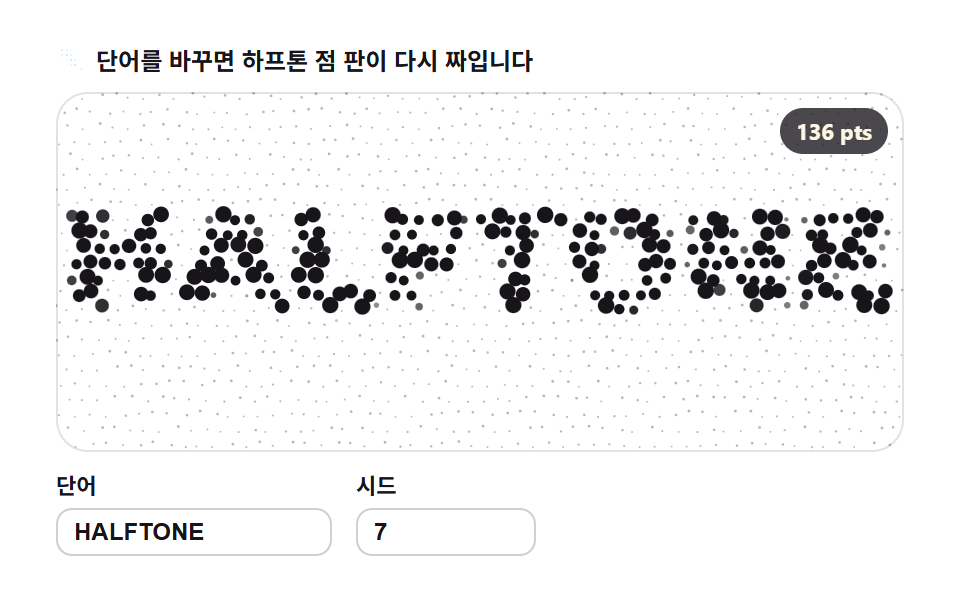 02 glyph-grid-dot-halftone
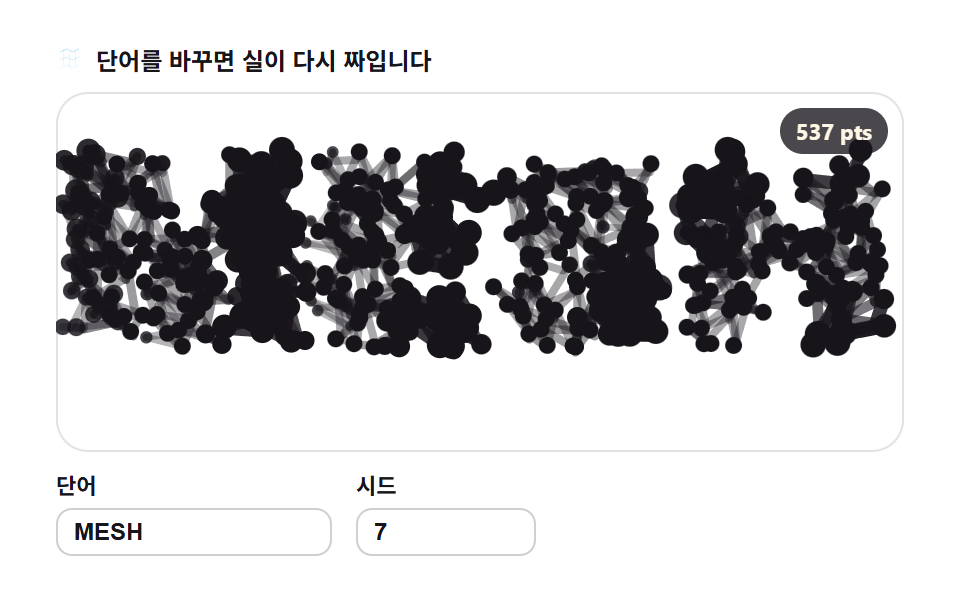 03 glyph-line-segment-mesh
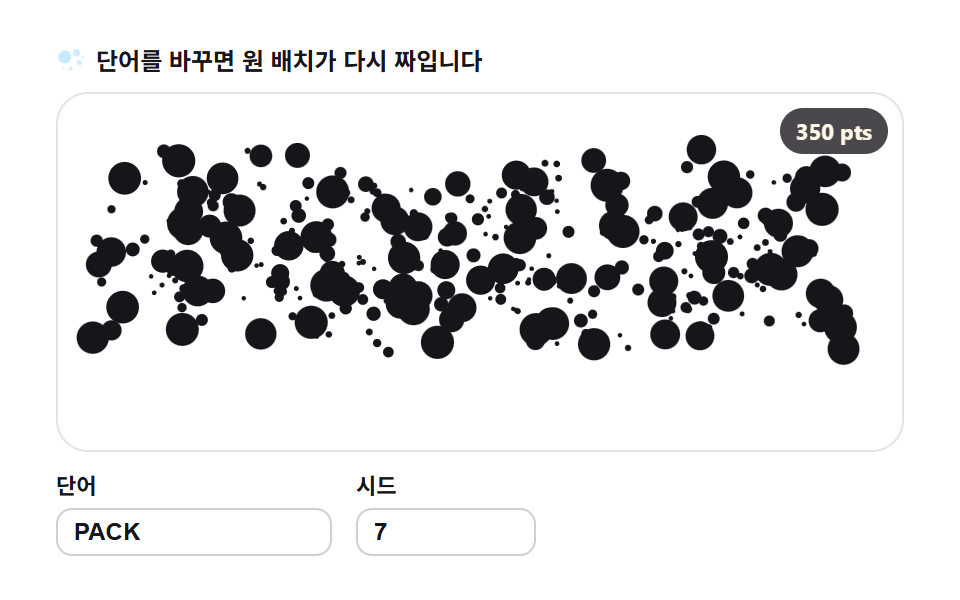 04 glyph-circle-packing
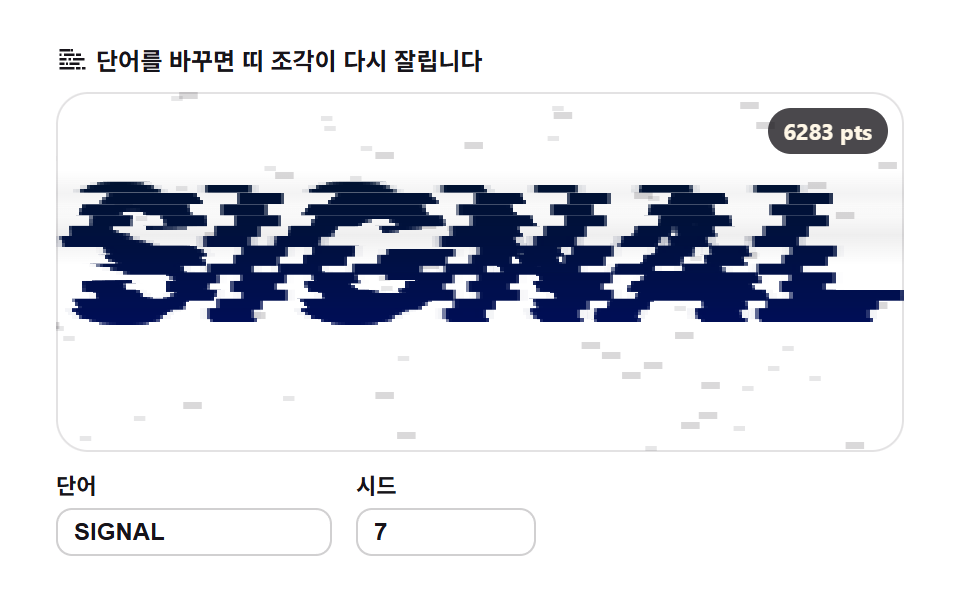 05 glyph-glitch-shard
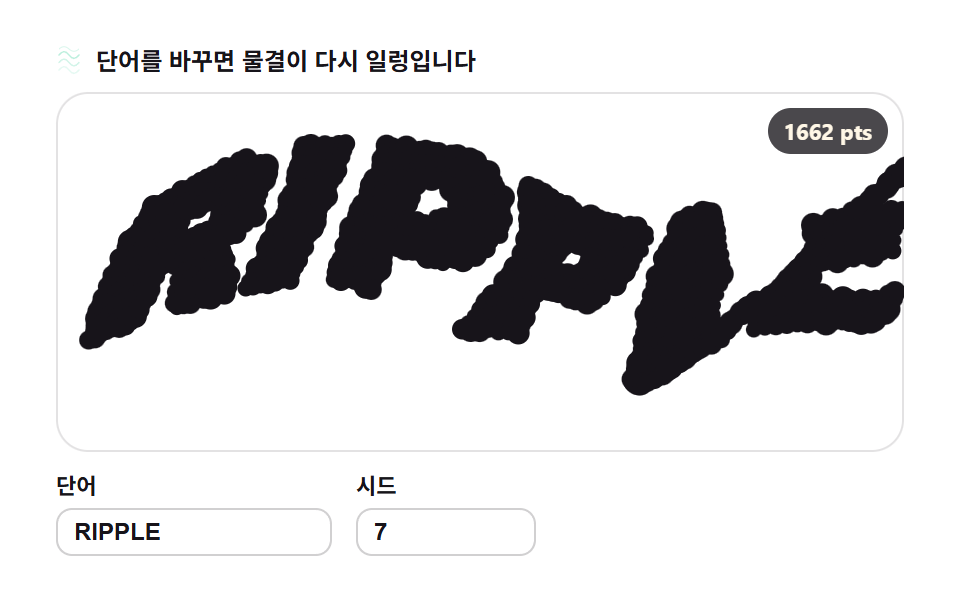 06 glyph-distortion-noise-warp
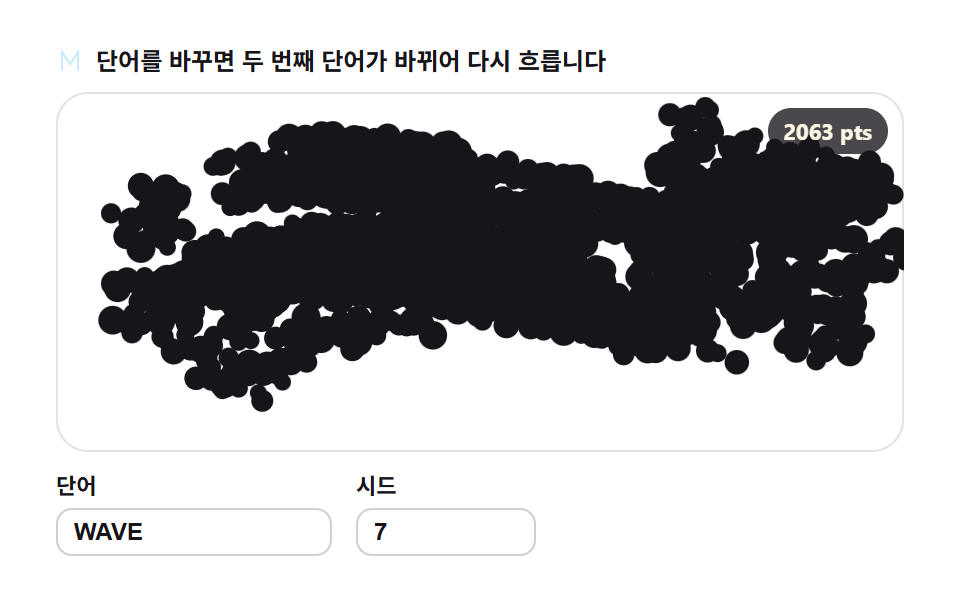 07 glyph-morph-crossfade
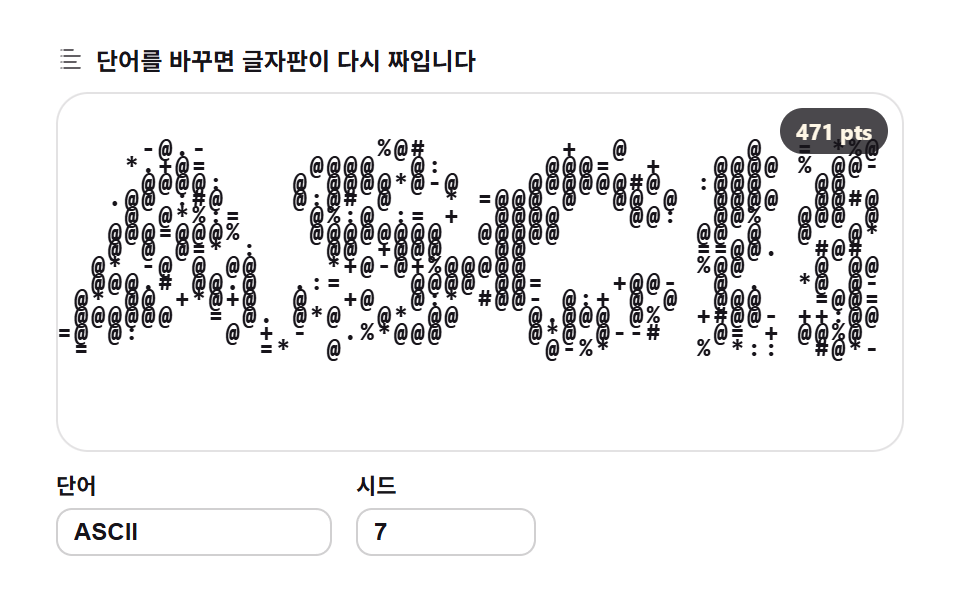 08 glyph-ascii-density-map
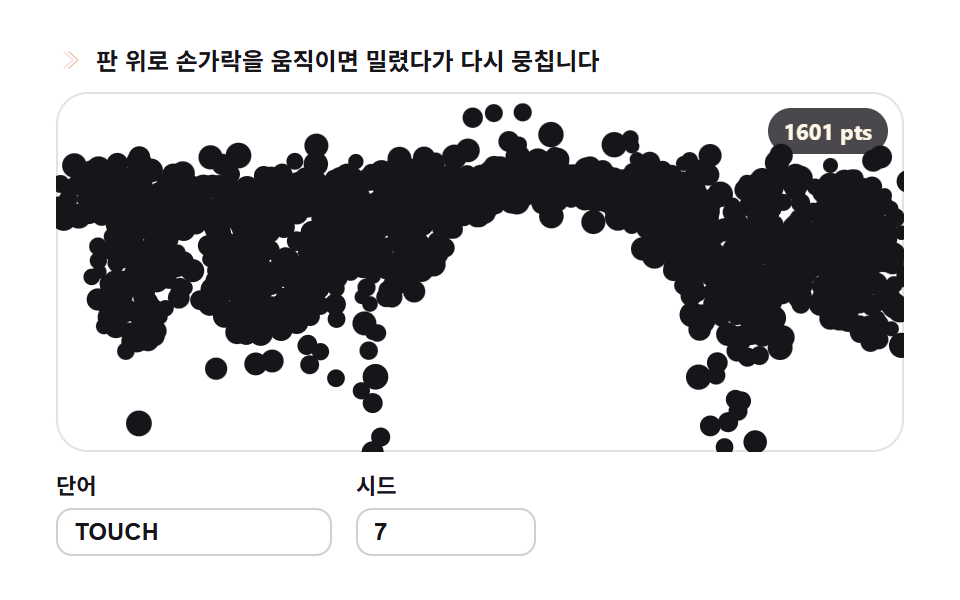 09 glyph-scatter-reassemble-pointer
自動再生 · タイルを押すとその項目へ · すべて1つのzip
- 01 粒子再構成 — 散らばった塵が文字になる
- 02 グリッドドット ハーフトーン — サンプリング間隔が描く文字
- 03 線分メッシュ — 隣接サンプルを結ぶ糸
- 04 円パッキング — マスク内に最大限の円
- 05 グリッチ シャード — 横帯がずれる文字
- 06 ノイズ歪み — 波に洗われる文字
- 07 モーフィング — 単語が別の単語に変わる
- 08 ASCII密度 — 明るさが文字を選ぶ盤
- 09 再集合 — ポインタがかき分けた文字が再び集まる
デモ
並びは派手さの順ではなく、文字が素材になっていく順です。まず散らばった粒子が文字へ凝集する基本形が生まれ(01)、サンプルを点・線・円という別の材料に書き直し(02・03・04)、帯・波・モーフィングで文字そのものが変形し(05・06・07)、最後は密度の読み替えとポインタ反応で見る人と絡みます(08・09)。テキスト アニメーション 作り方 を調べると文字を塊のまま動かす手法がほとんどで、文字の内側を素材に扱う作例は、この9種が並ぶ領域です。
実測では07のモーフィングが累積面積41.55パーセントで9種の中でもっとも広く動き、06のノイズ歪みは30.59パーセントと幅ではもっとも控えめな代わりに、平均強度151.0で大きく揺れています。9種すべてが23/23フレームで動き続けています。入力欄の単語を打ち替えればその場でマスクが組み直され、全目標点が計算し直されます。あらかじめ書き出した動画ではなく、表示している最中にサンプリングが走っているのがこの仕組みです。
軸もはっきり違います。ノイズ関数で地形を計算するノイズ地形とも、レイを飛ばして奥行きを描くレイマーチングとも違い、この9種はすでに描いた文字を読み直して材料にします。テキスト アニメーション かっこいい と印象づける演出の多くは、実はこの「文字の内側のピクセル」を扱うところから生まれています。
なぜこの順番か
01粒子再構成がサンプリングの原型です。オフスクリーンキャンバスにfillTextで文字を描き、getImageDataでアルファマスクを取り、各粒子に目標ピクセルを割り当ててバネで集まらせます。LPヒーローのワードマーク登場に使います。この原型の上に02の点、03の線、04の円が材料を差し替え、05〜07はマスクを裂く単位を行・座標・単語へ変え、08〜09は読み方そのものを密度と力へ変えます。
項目別コード
01粒子再構成 — 散らばった塵が文字になる
<main class="stage">
<div class="gp" id="gp">
  <p class="gp__hint">
    <svg class="gp__ico" viewBox="0 0 256 256" aria-hidden="true"><g fill="currentColor"><circle cx="64" cy="72" r="18"/><circle cx="112" cy="48" r="12"/><circle cx="96" cy="112" r="9"/><circle cx="160" cy="80" r="14"/><circle cx="208" cy="64" r="8"/><circle cx="184" cy="128" r="11"/><circle cx="136" cy="152" r="7"/><path d="M56 184h144a8 8 0 0 1 0 16H56a8 8 0 0 1 0-16m28 28h88a8 8 0 0 1 0 16H84a8 8 0 0 1 0-16" opacity=".45"/></g></svg>
    <span>言葉を変えると塵がまた集まります</span>
  </p>
  <div class="gp__field" id="field" role="application" aria-label="粒子再構成の実験盤" tabindex="0">
    <canvas class="gp__cv" id="cv"></canvas>
    <b class="gp__badge" aria-hidden="true" id="badge">0 pts</b>
  </div>
  <div class="gp__bar">
    <label class="gp__dial">単語
      <input type="text" id="word" value="GLYPH" maxlength="12" spellcheck="false" aria-label="単語">
    </label>
    <label class="gp__dial">シード
      <input type="number" id="seed" min="1" max="9999" value="7" aria-label="シード">
    </label>
  </div>
</div>
</main>
@use "../../../../site/static/demo-tokens" as *;
// 입자 재구성 — 움직임은 전부 캔버스 rAF 루프 안에 있다(@keyframes 0개 — 077-03 패턴).
// 입자색은 파스텔 변수를 커스텀 프로퍼티로 내려 JS 가 읽어 쓴다. 리터럴 hex 는 없다(BD26).
$glyph-ink: $subject-ink; // 글릿 본색 — 잉크
$glyph-sky: mix($subject-sky, $stage-paper, 42%); // 파스텔 하늘
$glyph-mint: mix($subject-mint, $stage-paper, 42%); // 파스텔 민트
$glyph-peach: mix($subject-orange-deep, $stage-paper, 30%); // 파스텔 복숭아
@include stage($stage-paper);
.gp {
--g0: #{$glyph-ink};
--g1: #{$glyph-sky};
--g2: #{$glyph-mint};
--g3: #{$glyph-peach};
display: flex; flex-direction: column; gap: $sp-2;
width: 100%; max-width: 424px;
}
.gp__hint {
display: flex; align-items: center; gap: $sp-1; margin: 0;
font-weight: 700; font-size: clamp(10px, 2.8vw, 12px); line-height: 1.35;
color: $subject-ink;
}
.gp__ico { width: 16px; height: 16px; flex: 0 0 auto; color: $glyph-peach; }
.gp__field {
position: relative; height: 180px;
border-radius: $r-card; overflow: hidden;
background: $stage-paper;
box-shadow: inset 0 0 0 1px rgba($subject-ink, .12);
}
.gp__field:focus-visible { outline: 2px solid $glyph-sky; outline-offset: 2px; }
.gp__cv { display: block; width: 100%; height: 100%; }
// 목표점(=샘플 픽셀) 수를 화면에 적는다 — 런타임 샘플링이 이 데모의 요점이다
.gp__badge {
position: absolute; right: $sp-2; top: $sp-2;
padding: $sp-1 $sp-2; border-radius: $r-pill;
background: rgba($subject-ink, .78);
color: $subject-cream; font-weight: 700; font-size: 11px;
}
.gp__bar { display: flex; align-items: flex-end; gap: $sp-3; }
.gp__dial {
display: flex; flex-direction: column; gap: $sp-1;
font-weight: 700; font-size: 11px; color: $subject-ink;
}
.gp__dial input {
width: 120px; margin: 0; padding: $sp-1 $sp-2;
border: 1px solid rgba($subject-ink, .2); border-radius: $r-sm;
background: $stage-paper; color: $subject-ink;
font-weight: 700; font-size: 12px;
}
.gp__dial input[type="number"] { width: 72px; }
.gp__dial input:focus-visible { outline: 2px solid $glyph-sky; outline-offset: 1px; }
@media (max-width: 340px) {
.gp { gap: $sp-1; }
.gp__field { height: 100px; }
.gp__badge { font-size: 10px; padding: 0 $sp-1; }
.gp__dial input { width: 88px; }
.gp__dial input[type="number"] { width: 56px; }
.gp__hint { font-size: 10px; }
}
// reduce — 루프가 아예 안 돈다. 목표에 붙은 정지 한 장이 남는다.
@media (prefers-reduced-motion: reduce) {
.gp.is-still .gp__field { cursor: default !important; }
}html, body {
margin: 0;
overflow: hidden;
}
.stage {
box-sizing: border-box;
min-height: 100vh;
display: grid;
place-items: center;
margin: 0;
background: #ffffff;
font-family: -apple-system, "Segoe UI", "Noto Sans KR", sans-serif;
padding: clamp(8px, 4vw, 24px);
}
.gp {
--g0: #17141a;
--g1: rgb(76.1176470588%, 90.9411764706%, 100%);
--g2: rgb(70.5176470588%, 92.9176470588%, 85.3411764706%);
--g3: rgb(93.6470588235%, 75.6470588235%, 70%);
display: flex;
flex-direction: column;
gap: 8px;
width: 100%;
max-width: 424px;
}
.gp__hint {
display: flex;
align-items: center;
gap: 4px;
margin: 0;
font-weight: 700;
font-size: clamp(10px, 2.8vw, 12px);
line-height: 1.35;
color: #17141a;
}
.gp__ico {
width: 16px;
height: 16px;
flex: 0 0 auto;
color: rgb(93.6470588235%, 75.6470588235%, 70%);
}
.gp__field {
position: relative;
height: 180px;
border-radius: 16px;
overflow: hidden;
background: #ffffff;
box-shadow: inset 0 0 0 1px rgba(23, 20, 26, 0.12);
}
.gp__field:focus-visible {
outline: 2px solid rgb(76.1176470588%, 90.9411764706%, 100%);
outline-offset: 2px;
}
.gp__cv {
display: block;
width: 100%;
height: 100%;
}
.gp__badge {
position: absolute;
right: 8px;
top: 8px;
padding: 4px 8px;
border-radius: 999px;
background: rgba(23, 20, 26, 0.78);
color: #fff7e6;
font-weight: 700;
font-size: 11px;
}
.gp__bar {
display: flex;
align-items: flex-end;
gap: 12px;
}
.gp__dial {
display: flex;
flex-direction: column;
gap: 4px;
font-weight: 700;
font-size: 11px;
color: #17141a;
}
.gp__dial input {
width: 120px;
margin: 0;
padding: 4px 8px;
border: 1px solid rgba(23, 20, 26, 0.2);
border-radius: 8px;
background: #ffffff;
color: #17141a;
font-weight: 700;
font-size: 12px;
}
.gp__dial input[type=number] {
width: 72px;
}
.gp__dial input:focus-visible {
outline: 2px solid rgb(76.1176470588%, 90.9411764706%, 100%);
outline-offset: 1px;
}
@media (max-width: 340px) {
.gp {
gap: 4px;
}
.gp__field {
height: 100px;
}
.gp__badge {
font-size: 10px;
padding: 0 4px;
}
.gp__dial input {
width: 88px;
}
.gp__dial input[type=number] {
width: 56px;
}
.gp__hint {
font-size: 10px;
}
}
@media (prefers-reduced-motion: reduce) {
.gp.is-still .gp__field {
cursor: default !important;
}
}// 입자 재구성 — 글자를 통째로 옮기지 않고 픽셀로 뜯어 다시 짓는다.
// 1) 오프스크린 캔버스에 fillText 로 단어를 그려 getImageData 로 알파 마스크를 뽑는다
// 2) 격자 간격 STEP 로 걸어 알파>128 인 칸의 (x,y) 를 목표점 목록으로 만든다
// 3) 시드로 뿌린 입자들이 스프링(복원 0.012 · 감쇠 0.86)으로 제 목표 픽셀을 찾아간다
// 무작위는 전부 mulberry32(シード) — 같은 시드는 같은 그림. Math.random 은 쓰지 않는다.
var root = document.getElementById('gp');
var field = document.getElementById('field');
var cv = document.getElementById('cv');
var ctx = cv.getContext('2d');
var wordIn = document.getElementById('word');
var seedIn = document.getElementById('seed');
var badge = document.getElementById('badge');
var SW = 252, SH = 108; // 샘플 해상도 — 판 비율과 같아 늘려 뭉개지지 않는다
var STEP = 2; // 샘플 간격(px) — 좁힐수록 입자 수가 늘어난다
var BASE = 0.28; // 산란 비율 — 매 주기 시작을 목표가 아니라 판에 뿌린 먼지에서 시작한다
var reduce = window.matchMedia('(prefers-reduced-motion: reduce)').matches;
var W = 0, H = 0;
var parts = [];
var t0 = 0, raf = 0;
// 색 — scss 가 파스텔 커스텀 프로퍼티(--g0..--g3)로 내려준 넉 색을 읽어 쓴다
var css = getComputedStyle(root);
function hexOf(name) {
var v = css.getPropertyValue(name).trim().replace('#', '');
if (v.length === 3) v = v.charAt(0) + v.charAt(0) + v.charAt(1) + v.charAt(1) + v.charAt(2) + v.charAt(2);
return '#' + v;
}
var cols = [hexOf('--g0'), hexOf('--g1'), hexOf('--g2'), hexOf('--g3')];
// 결정적 난수 — シード 하나가 입자의 시작 위치·위상·크기·색 전부를 정한다
function mulberry32(a) {
return function () {
a |= 0; a = a + 0x6D2B79F5 | 0;
var t = Math.imul(a ^ a >>> 15, 1 | a);
t = t + Math.imul(t ^ t >>> 7, 61 | t) ^ t;
return ((t ^ t >>> 14) >>> 0) / 4294967296;
};
}
// ── 1) 글자 → 알파 마스크 ────────────────────────────────────────
function buildMask(word) {
var off = document.createElement('canvas');
off.width = SW; off.height = SH;
var oc = off.getContext('2d', { willReadFrequently: true });
oc.textAlign = 'center'; oc.textBaseline = 'middle';
var fs = 200;
oc.font = '900 ' + fs + 'px Arial';
var w = oc.measureText(word).width || 1;
fs = Math.min(fs * ((SW - 8) / w), SH - 6); // 폭·높이 안에서 제일 큰 글자
oc.font = '900 ' + Math.round(fs) + 'px Arial';
oc.fillStyle = '#fff';
oc.fillText(word, SW / 2, SH / 2);
return oc.getImageData(0, 0, SW, SH).data;
}
// ── 2) 마스크 → 목표점 목록 ─────────────────────────────────────
function samplePoints(data) {
var pts = [];
for (var y = 0; y < SH; y += STEP) {
for (var x = 0; x < SW; x += STEP) {
if (data[(y * SW + x) * 4 + 3] > 128) pts.push({ x: x, y: y });
}
}
return pts;
}
function pickColor(r) {
if (r < 0.55) return 0; // 잉크 다수
if (r < 0.73) return 1; // 하늘
if (r < 0.88) return 2; // 민트
return 3; // 복숭아
}
// ── 3) 입자 재구성 — 単語·시드가 바뀌면 목표와 입자 수가 다시 계산된다 ──
var word = 'GLYPH', seed = 7;
function resample(nextWord, nextSeed) {
var w = String(nextWord == null ? word : nextWord).trim().toUpperCase();
if (w) word = w; // 빈 문자열이면 직전 값을 유지
var s = Math.floor(Number(nextSeed));
if (s >= 1) seed = s;
var pts = samplePoints(buildMask(word));
var rnd = mulberry32(seed);
parts = [];
for (var i = 0; i < pts.length; i++) {
var r1 = rnd(), r2 = rnd(), r3 = rnd(), r4 = rnd(), r5 = rnd();
parts.push({
x: r1 * SW, y: r2 * SH, vx: 0, vy: 0, // 시작은 판 전체에 흩뿌린 먼지
tx: pts[i].x, ty: pts[i].y,
ph: r3 * 6.2832, sz: 1.7 + r4 * 1.7, ci: pickColor(r5)
});
}
window.__sampleInfo = { targets: pts.length, particles: parts.length };
badge.textContent = pts.length + ' pts';
if (reduce) {
// 정지 한 장 — 입자를 목표에 붙인 상태로 그린다(シード 위상만큼 비껴 있다)
for (var k = 0; k < parts.length; k++) {
var q = parts[k];
q.x = q.tx + Math.cos(q.ph) * 1.3;
q.y = q.ty + Math.sin(q.ph * 1.3) * 1.3;
}
paint(0);
} else {
t0 = performance.now(); // 모임 연기를 처음부터 다시
}
}
function fit() {
var r = field.getBoundingClientRect();
var d = window.devicePixelRatio || 1;
W = r.width; H = r.height;
cv.width = Math.round(W * d); cv.height = Math.round(H * d);
ctx.setTransform(d, 0, 0, d, 0, 0);
}
function paint(t) {
ctx.clearRect(0, 0, W, H);
var sx = W / SW, sy = H / SH;
for (var i = 0; i < parts.length; i++) {
var p = parts[i];
var wx = Math.sin(t * 3.4 + p.ph) * 10.5; // 정착 뒤에도 입자가 숨쉰다
var wy = Math.cos(t * 2.9 + p.ph * 1.7) * 9.5;
ctx.fillStyle = cols[p.ci];
ctx.beginPath();
ctx.arc((p.x + wx) * sx, (p.y + wy) * sy, p.sz * sx * 0.85, 0, 6.2832);
ctx.fill();
}
}
function frame(now) {
var t = (now - t0) / 1000;
var cyc = Math.floor(t / 2) * 2; // 2초마다 —
var u = t - cyc; // 주기 안 진행(초)
var k;
if (u < 0.5) {
var q = u / 0.5;
k = q * q; // 도입부: 먼지 → 글자로 가속해 뭉친다
} else {
var s = (u - 0.5) / 1.5; // 정착부: 숨쉬듯 모였다 퍼졌다
k = 0.68 + 0.34 * Math.sin(s * 6.2832);
}
var br = BASE + (1 - BASE) * k; // 산란 ↔ 뭉침 사이를 오간다
var cx = SW / 2, cy = SH / 2;
for (var i = 0; i < parts.length; i++) {
var p = parts[i];
var tx = cx + (p.tx - cx) * br, ty = cy + (p.ty - cy) * br;
p.vx = (p.vx + (tx - p.x) * 0.014) * 0.86;
p.vy = (p.vy + (ty - p.y) * 0.014) * 0.86;
p.x += p.vx; p.y += p.vy;
}
paint(t);
raf = requestAnimationFrame(frame);
}
wordIn.addEventListener('input', function () { resample(wordIn.value, seedIn.value); });
seedIn.addEventListener('input', function () { resample(wordIn.value, seedIn.value); });
window.addEventListener('resize', function () { fit(); if (reduce) paint(0); });
fit();
resample(wordIn.value, seedIn.value);
if (reduce) {
root.classList.add('is-still'); // 루프 없이 정지 한 장
} else {
raf = requestAnimationFrame(frame);
}// GlyphParticleFormation — vanilla 판(run/310/demo/01-glyph-particle-formation/index.html) 의 React 포트.
// 오프스크린 캔버스에 fillText 로 단어를 그려 getImageData 로 알파 마스크를 뽑고,
// 격자 간격 STEP 로 걸어 알파>128 칸의 (x,y) 를 목표점으로 삼아 입자가 스프링으로 모여들게 한다.
// 입자 시작 위치·위상·크기·색은 전부 mulberry32(시드) 로 정한다 — 같은 시드는 같은 그림.
// 움직임은 캔버스 rAF 루프가 전부 그리므로 @keyframes 는 없다 — props 는 CSS 변수로 내려간다.
import { useEffect, useRef, useState } from "react";
import type { CSSProperties } from "react";
import styles from "./GlyphParticleFormation.module.scss";
export type GlyphParticleFormationProps = {
duration?: string;
easing?: string;
color?: string;
};
type Vars = CSSProperties & { "--duration"?: string; "--easing"?: string; "--color"?: string };
type Box<T> = { current: T };
// React 이벤트 제네릭이 없는 환경이라 필요한 것만 로컬로 선언한다
type InputEvt = { target: { value: string } };
const SW = 252, SH = 108; // 샘플 해상도 — 판 비율과 같아 늘려 뭉개지지 않는다
const STEP = 2; // 샘플 간격(px) — 좁힐수록 입자 수가 늘어난다
const BASE = 0.28; // 산란 비율 — 매 주기 시작을 판에 뿌린 먼지에서 시작한다
const FIELD_LABEL = "입자 재구성 실험판";
// 결정적 난수 — mulberry32. 같은 시드면 같은 수열을 돌려준다
function mulberry32(a: number): () => number {
return function () {
a |= 0; a = (a + 0x6D2B79F5) | 0;
const t = Math.imul(a ^ (a >>> 15), 1 | a);
const u = (t + Math.imul(t ^ (t >>> 7), 61 | t)) ^ t;
return ((u ^ (u >>> 14)) >>> 0) / 4294967296;
};
}
type Particle = {
x: number; y: number; vx: number; vy: number;
tx: number; ty: number; ph: number; sz: number; ci: number;
};
// 오프스크린 fillText → 알파 마스크 픽셀 배열
function buildMask(word: string): Uint8ClampedArray {
const off = document.createElement("canvas");
off.width = SW; off.height = SH;
const oc = off.getContext("2d", { willReadFrequently: true }) as CanvasRenderingContext2D;
oc.textAlign = "center"; oc.textBaseline = "middle";
let fs = 200;
oc.font = "900 " + fs + "px Arial";
const w = oc.measureText(word).width || 1;
fs = Math.min(fs * ((SW - 8) / w), SH - 6); // 폭·높이 안에서 제일 큰 글자
oc.font = "900 " + Math.round(fs) + "px Arial";
oc.fillStyle = "#fff";
oc.fillText(word, SW / 2, SH / 2);
return oc.getImageData(0, 0, SW, SH).data;
}
// 마스크 → 목표점 목록 — 격자 간격 STEP 로 걸어 알파>128 인 칸만
function samplePoints(data: Uint8ClampedArray): { x: number; y: number }[] {
const pts: { x: number; y: number }[] = [];
for (let y = 0; y < SH; y += STEP) {
for (let x = 0; x < SW; x += STEP) {
if (data[(y * SW + x) * 4 + 3] > 128) pts.push({ x, y });
}
}
return pts;
}
function pickColor(r: number): number {
if (r < 0.55) return 0; // 잉크 다수
if (r < 0.73) return 1; // 하늘
if (r < 0.88) return 2; // 민트
return 3; // 복숭아
}
export default function GlyphParticleFormation({
duration = "2s", // vanilla $duration: $dur-loop
easing = "cubic-bezier(.2, .8, .2, 1)", // vanilla $easing: $ease-spring
color = "#17141a", // vanilla $glyph-ink
}: GlyphParticleFormationProps) {
const rootRef = useRef<HTMLDivElement | null>(null);
const fieldRef = useRef<HTMLDivElement | null>(null);
const cvRef = useRef<HTMLCanvasElement | null>(null);
const ctxRef = useRef<CanvasRenderingContext2D | null>(null);
const partsRef = useRef<Particle[]>([]) as Box<Particle[]>;
const colsRef = useRef<string[]>([]) as Box<string[]>;
const sizeRef = useRef({ w: 0, h: 0 }) as Box<{ w: number; h: number }>;
const stateRef = useRef({ word: "GLYPH", seed: 7, t0: 0 }) as Box<{ word: string; seed: number; t0: number }>;
const rafRef = useRef(0) as Box<number>;
const [word, setWord] = useState("GLYPH");
const [seed, setSeed] = useState(7);
const [count, setCount] = useState(0);
const [still, setStill] = useState(false);
const vars: Vars = { "--duration": duration, "--easing": easing, "--color": color };
function reduced(): boolean {
return window.matchMedia("(prefers-reduced-motion: reduce)").matches;
}
function hex3to6(v: string): string {
if (v.length === 3) return v.charAt(0) + v.charAt(0) + v.charAt(1) + v.charAt(1) + v.charAt(2) + v.charAt(2);
return v;
}
function colors(): string[] {
const root = rootRef.current;
if (!root) return ["#17141a", "#17141a", "#17141a", "#17141a"];
const one = (n: string) => hex3to6(getComputedStyle(root).getPropertyValue(n).trim());
return [one("--g0"), one("--g1"), one("--g2"), one("--g3")];
}
// 고DPI 대응 — 배킹 스토어는 devicePixelRatio 배, 그리기 좌표계는 CSS 픽셀 그대로
function fit(): void {
const field = fieldRef.current;
const cv = cvRef.current;
if (!field || !cv) return;
const r = field.getBoundingClientRect();
const dpr = window.devicePixelRatio || 1;
sizeRef.current.w = r.width;
sizeRef.current.h = r.height;
cv.width = Math.round(r.width * dpr);
cv.height = Math.round(r.height * dpr);
const ctx = ctxRef.current;
if (ctx) ctx.setTransform(dpr, 0, 0, dpr, 0, 0);
}
function paint(t: number): void {
const ctx = ctxRef.current;
const parts = partsRef.current;
const cols = colsRef.current;
if (!ctx) return;
const W = sizeRef.current.w, H = sizeRef.current.h;
ctx.clearRect(0, 0, W, H);
const sx = W / SW, sy = H / SH;
for (let i = 0; i < parts.length; i++) {
const p = parts[i];
const wx = Math.sin(t * 3.4 + p.ph) * 9.5; // 정착 뒤에도 입자가 숨쉰다
const wy = Math.cos(t * 2.9 + p.ph * 1.7) * 9.5;
ctx.fillStyle = cols[p.ci] || "#17141a";
ctx.beginPath();
ctx.arc((p.x + wx) * sx, (p.y + wy) * sy, p.sz * sx * 0.85, 0, 6.2832);
ctx.fill();
}
}
// 단어·시드가 바뀌면 목표와 입자 수가 다시 계산된다(런타임 샘플링)
function resample(nextWord: string, nextSeed: number): void {
const st = stateRef.current;
const w = String(nextWord == null ? st.word : nextWord).trim().toUpperCase();
if (w) st.word = w;
if (nextSeed >= 1) st.seed = Math.floor(nextSeed);
const pts = samplePoints(buildMask(st.word));
const rnd = mulberry32(st.seed);
const parts: Particle[] = [];
for (let i = 0; i < pts.length; i++) {
const r1 = rnd(), r2 = rnd(), r3 = rnd(), r4 = rnd(), r5 = rnd();
parts.push({
x: r1 * SW, y: r2 * SH, vx: 0, vy: 0, // 시작은 판 전체에 흩뿌린 먼지
tx: pts[i].x, ty: pts[i].y,
ph: r3 * 6.2832, sz: 1.7 + r4 * 1.7, ci: pickColor(r5)
});
}
partsRef.current = parts;
setCount(pts.length);
if (reduced()) {
// 정지 한 장 — 입자를 목표에 붙인 상태로 그린다
for (let k = 0; k < parts.length; k++) {
const q = parts[k];
q.x = q.tx + Math.cos(q.ph) * 1.3;
q.y = q.ty + Math.sin(q.ph * 1.3) * 1.3;
}
paint(0);
} else {
st.t0 = performance.now(); // 모임 연기를 처음부터 다시
}
}
function frame(now: number): void {
const st = stateRef.current;
const parts = partsRef.current;
const t = (now - st.t0) / 1000;
const cyc = Math.floor(t / 2) * 2; // 2초마다 —
const u = t - cyc; // 주기 안 진행(초)
let k: number;
if (u < 0.5) {
const q = u / 0.5;
k = q * q; // 도입부: 먼지 → 글자로 가속해 뭉친다
} else {
const s = (u - 0.5) / 1.5; // 정착부: 숨쉬듯 모였다 퍼졌다
k = 0.68 + 0.34 * Math.sin(s * 6.2832);
}
const br = BASE + (1 - BASE) * k; // 산란 ↔ 뭉침 사이를 오간다
const cx = SW / 2, cy = SH / 2;
for (let i = 0; i < parts.length; i++) {
const p = parts[i];
const tx = cx + (p.tx - cx) * br, ty = cy + (p.ty - cy) * br;
p.vx = (p.vx + (tx - p.x) * 0.014) * 0.86;
p.vy = (p.vy + (ty - p.y) * 0.014) * 0.86;
p.x += p.vx; p.y += p.vy;
}
paint(t);
rafRef.current = requestAnimationFrame(frame);
}
function onWord(e: InputEvt): void {
setWord(e.target.value);
resample(e.target.value, stateRef.current.seed);
}
function onSeed(e: InputEvt): void {
const v = Math.floor(Number(e.target.value)) || 1;
setSeed(v);
resample(stateRef.current.word, v);
}
function onResize(): void {
fit();
if (reduced()) paint(0);
}
useEffect(() => {
const cv = cvRef.current;
if (!cv) return;
ctxRef.current = cv.getContext("2d");
if (!ctxRef.current) return;
colsRef.current = colors();
fit();
resample("GLYPH", 7);
window.addEventListener("resize", onResize);
if (reduced()) {
// reduce — 루프를 시작하지 않고 목표에 붙은 정지 한 장만 그린다
setStill(true);
} else {
rafRef.current = requestAnimationFrame(frame);
}
return () => {
window.removeEventListener("resize", onResize);
cancelAnimationFrame(rafRef.current);
};
}, []);
const cls = [styles.root, still ? styles.isStill : ""].filter(Boolean).join(" ");
return (
<main className={styles.stage}>
<div className={cls} ref={rootRef} style={vars}>
<p className={styles.hint}>
<svg className={styles.ico} viewBox="0 0 256 256" aria-hidden="true"><g fill="currentColor"><circle cx="64" cy="72" r="18"/><circle cx="112" cy="48" r="12"/><circle cx="96" cy="112" r="9"/><circle cx="160" cy="80" r="14"/><circle cx="208" cy="64" r="8"/><circle cx="184" cy="128" r="11"/><circle cx="136" cy="152" r="7"/><path d="M56 184h144a8 8 0 0 1 0 16H56a8 8 0 0 1 0-16m28 28h88a8 8 0 0 1 0 16H84a8 8 0 0 1 0-16" opacity=".45"/></g></svg>
<span>단어를 바꾸면 먼지가 다시 뭉칩니다</span>
</p>
<div className={styles.field} ref={fieldRef} role="application" aria-label={FIELD_LABEL} tabIndex={0}>
<canvas className={styles.cv} ref={cvRef} id="cv"></canvas>
<b className={styles.badge} aria-hidden="true">{count} pts</b>
</div>
<div className={styles.bar}>
<label className={styles.dial}>단어
<input type="text" id="word" defaultValue="GLYPH" maxLength={12} spellCheck={false} aria-label="단어" onInput={onWord} />
</label>
<label className={styles.dial}>시드
<input type="number" id="seed" defaultValue={7} min={1} max={9999} aria-label="시드" onInput={onSeed} />
</label>
</div>
</div>
</main>
);
}01 · 粒子再構成 — 散らばった塵が文字になる — 計測 累積面積 30.128% · 動いたフレーム 23/23GODRICH オリジナル · SCSS と React は zip に同梱 · パスワードを見る
マスクの取り出し方と粒子のたどり着き方
オフスクリーンキャンバスにfillTextで文字を描き、getImageDataでアルファマスクを読み取り、各粒子に目標ピクセルを割り当ててバネで集まらせる、LPヒーローのワードマーク登場に使う、他の8種が参照する原型になる1枚です。
// ── 1) 文字 → アルファマスク ────────────────────────────────
function buildMask(word) {
  var off = document.createElement('canvas');
  off.width = SW; off.height = SH;
  var oc = off.getContext('2d', { willReadFrequently: true });
  oc.textAlign = 'center'; oc.textBaseline = 'middle';
  var fs = 200;
  oc.font = '900 ' + fs + 'px Arial';
  var w = oc.measureText(word).width || 1;
  fs = Math.min(fs * ((SW - 8) / w), SH - 6);       // 枠内に収まる最大サイズ
  oc.font = '900 ' + Math.round(fs) + 'px Arial';
  oc.fillStyle = '#fff';
  oc.fillText(word, SW / 2, SH / 2);
  return oc.getImageData(0, 0, SW, SH).data;
}
// ── 2) マスク → 目標点リスト ───────────────────────────────
function samplePoints(data) {
  var pts = [];
  for (var y = 0; y < SH; y += STEP) {
    for (var x = 0; x < SW; x += STEP) {
      if (data[(y * SW + x) * 4 + 3] > 128) pts.push({ x: x, y: y });
    }
  }
  return pts;
}
散乱と凝集を行き来するバネ
var br = BASE + (1 - BASE) * k;                  // 散乱 ↔ 凝集 の間を行き来する
var cx = SW / 2, cy = SH / 2;
for (var i = 0; i < parts.length; i++) {
  var p = parts[i];
  var tx = cx + (p.tx - cx) * br, ty = cy + (p.ty - cy) * br;
  p.vx = (p.vx + (tx - p.x) * 0.014) * 0.86;
  p.vy = (p.vy + (ty - p.y) * 0.014) * 0.86;
  p.x += p.vx; p.y += p.vy;
}
measureTextで幅を測って枠内に収まる最大サイズへ合わせ、白で打てばアルファチャンネルに文字の形がそのまま残ります。2pxの間隔で歩いてアルファが128を超えるセルの座標だけを目標点にする2段階が、9種すべての出発点です。毎フレーム目標を画面の中心を基準に押したり引いたりするので、粒子は2秒の周期で塵から文字へ、文字から呼吸する表情へ往復します(実測: 累積面積30.13パーセント、平均強度167.7、23/23フレームで動作)。
02グリッドドット ハーフトーン — サンプリング間隔が描く文字
<main class="stage">
<div class="gh" id="gh">
  <p class="gh__hint">
    <svg class="gh__ico" viewBox="0 0 256 256" aria-hidden="true"><g fill="currentColor"><circle cx="48" cy="48" r="8"/><circle cx="88" cy="48" r="5"/><circle cx="120" cy="48" r="3"/><circle cx="152" cy="48" r="2"/><circle cx="48" cy="88" r="5"/><circle cx="88" cy="88" r="8"/><circle cx="120" cy="88" r="5"/><circle cx="152" cy="88" r="3"/><circle cx="48" cy="128" r="3"/><circle cx="88" cy="128" r="5"/><circle cx="120" cy="128" r="8"/><circle cx="152" cy="128" r="5"/><circle cx="48" cy="168" r="2"/><circle cx="88" cy="168" r="3"/><circle cx="120" cy="168" r="5"/><circle cx="152" cy="168" r="8"/><circle cx="200" cy="200" r="10" opacity=".35"/></g></svg>
    <span>言葉を変えるとハーフトーンの点盤が組み直されます</span>
  </p>
  <div class="gh__field" id="field" role="application" aria-label="グリッドドット ハーフトーンの実験盤" tabindex="0">
    <canvas class="gh__cv" id="cv"></canvas>
    <b class="gh__badge" aria-hidden="true" id="badge">0 pts</b>
  </div>
  <div class="gh__bar">
    <label class="gh__dial">単語
      <input type="text" id="word" value="HALFTONE" maxlength="12" spellcheck="false" aria-label="単語">
    </label>
    <label class="gh__dial">シード
      <input type="number" id="seed" min="1" max="9999" value="7" aria-label="シード">
    </label>
  </div>
</div>
</main>
@use "../../../../site/static/demo-tokens" as *;
// 격자 점 하프톤 — 움직임은 전부 캔버스 rAF 루프 안에 있다(@keyframes 0개 — 077-03 패턴).
// 점색은 파스텔 변수를 커스텀 프로퍼티로 내려 JS 가 읽어 쓴다. 리터럴 hex 는 없다(BD26).
$glyph-ink: $subject-ink; // 진한 잉크 점 — 하프톤 본색
$glyph-sky: mix($subject-sky, $stage-paper, 42%); // 파스텔 하늘 점
$glyph-mint: mix($subject-mint, $stage-paper, 42%); // 파스텔 민트 점
@include stage($stage-paper);
.gh {
--g0: #{$glyph-ink};
--g1: #{$glyph-sky};
--g2: #{$glyph-mint};
--g3: #{$glyph-sky};
display: flex; flex-direction: column; gap: $sp-2;
width: 100%; max-width: 424px;
}
.gh__hint {
display: flex; align-items: center; gap: $sp-1; margin: 0;
font-weight: 700; font-size: clamp(10px, 2.8vw, 12px); line-height: 1.35;
color: $subject-ink;
}
.gh__ico { width: 16px; height: 16px; flex: 0 0 auto; color: $glyph-sky; }
.gh__field {
position: relative; height: 180px;
border-radius: $r-card; overflow: hidden;
background: $stage-paper;
box-shadow: inset 0 0 0 1px rgba($subject-ink, .12);
}
.gh__field:focus-visible { outline: 2px solid $glyph-sky; outline-offset: 2px; }
.gh__cv { display: block; width: 100%; height: 100%; }
// 격자점(=샘플 칸) 수를 화면에 적는다 — 런타임 샘플링이 이 데모의 요점이다
.gh__badge {
position: absolute; right: $sp-2; top: $sp-2;
padding: $sp-1 $sp-2; border-radius: $r-pill;
background: rgba($subject-ink, .78);
color: $subject-cream; font-weight: 700; font-size: 11px;
}
.gh__bar { display: flex; align-items: flex-end; gap: $sp-3; }
.gh__dial {
display: flex; flex-direction: column; gap: $sp-1;
font-weight: 700; font-size: 11px; color: $subject-ink;
}
.gh__dial input {
width: 120px; margin: 0; padding: $sp-1 $sp-2;
border: 1px solid rgba($subject-ink, .2); border-radius: $r-sm;
background: $stage-paper; color: $subject-ink;
font-weight: 700; font-size: 12px;
}
.gh__dial input[type="number"] { width: 72px; }
.gh__dial input:focus-visible { outline: 2px solid $glyph-sky; outline-offset: 1px; }
@media (max-width: 340px) {
.gh { gap: $sp-1; }
.gh__field { height: 100px; }
.gh__badge { font-size: 10px; padding: 0 $sp-1; }
.gh__dial input { width: 88px; }
.gh__dial input[type="number"] { width: 56px; }
.gh__hint { font-size: 10px; }
}
// reduce — 루프가 아예 안 돈다. 정지 격자 한 장이 남는다.
@media (prefers-reduced-motion: reduce) {
.gh.is-still .gh__field { cursor: default !important; }
}html, body {
margin: 0;
overflow: hidden;
}
.stage {
box-sizing: border-box;
min-height: 100vh;
display: grid;
place-items: center;
margin: 0;
background: #ffffff;
font-family: -apple-system, "Segoe UI", "Noto Sans KR", sans-serif;
padding: clamp(8px, 4vw, 24px);
}
.gh {
--g0: #17141a;
--g1: rgb(76.1176470588%, 90.9411764706%, 100%);
--g2: rgb(70.5176470588%, 92.9176470588%, 85.3411764706%);
--g3: rgb(76.1176470588%, 90.9411764706%, 100%);
display: flex;
flex-direction: column;
gap: 8px;
width: 100%;
max-width: 424px;
}
.gh__hint {
display: flex;
align-items: center;
gap: 4px;
margin: 0;
font-weight: 700;
font-size: clamp(10px, 2.8vw, 12px);
line-height: 1.35;
color: #17141a;
}
.gh__ico {
width: 16px;
height: 16px;
flex: 0 0 auto;
color: rgb(76.1176470588%, 90.9411764706%, 100%);
}
.gh__field {
position: relative;
height: 180px;
border-radius: 16px;
overflow: hidden;
background: #ffffff;
box-shadow: inset 0 0 0 1px rgba(23, 20, 26, 0.12);
}
.gh__field:focus-visible {
outline: 2px solid rgb(76.1176470588%, 90.9411764706%, 100%);
outline-offset: 2px;
}
.gh__cv {
display: block;
width: 100%;
height: 100%;
}
.gh__badge {
position: absolute;
right: 8px;
top: 8px;
padding: 4px 8px;
border-radius: 999px;
background: rgba(23, 20, 26, 0.78);
color: #fff7e6;
font-weight: 700;
font-size: 11px;
}
.gh__bar {
display: flex;
align-items: flex-end;
gap: 12px;
}
.gh__dial {
display: flex;
flex-direction: column;
gap: 4px;
font-weight: 700;
font-size: 11px;
color: #17141a;
}
.gh__dial input {
width: 120px;
margin: 0;
padding: 4px 8px;
border: 1px solid rgba(23, 20, 26, 0.2);
border-radius: 8px;
background: #ffffff;
color: #17141a;
font-weight: 700;
font-size: 12px;
}
.gh__dial input[type=number] {
width: 72px;
}
.gh__dial input:focus-visible {
outline: 2px solid rgb(76.1176470588%, 90.9411764706%, 100%);
outline-offset: 1px;
}
@media (max-width: 340px) {
.gh {
gap: 4px;
}
.gh__field {
height: 100px;
}
.gh__badge {
font-size: 10px;
padding: 0 4px;
}
.gh__dial input {
width: 88px;
}
.gh__dial input[type=number] {
width: 56px;
}
.gh__hint {
font-size: 10px;
}
}
@media (prefers-reduced-motion: reduce) {
.gh.is-still .gh__field {
cursor: default !important;
}
}// 격자 점 하프톤 — 글자를 픽셀로 샘플링해 격자점마다 점 크기로 옮겨 적는다(인쇄 하프톤의 원리).
// 1) 오프스크린 캔버스에 fillText 로 단어를 그려 getImageData 로 알파 마스크를 뽑는다
// 2) 격자점 (x,y) 에서 알파를 읽어 0..1 값으로 정규화한다
// 3) 점 반경 = 값 비례. 격자 간격 자체를 사인으로 6↔10px 오가며 조밀↔성김 — 판 전체가 호흡한다
// 무작위 요소는 격자점 위상 흔들림뿐이고 전부 mulberry32(シード) 로 돌린다.
var root = document.getElementById('gh');
var field = document.getElementById('field');
var cv = document.getElementById('cv');
var ctx = cv.getContext('2d');
var wordIn = document.getElementById('word');
var seedIn = document.getElementById('seed');
var badge = document.getElementById('badge');
var SW = 252, SH = 108; // 샘플 해상도
var MSZ = 1.4; // 확대 배율 — 글자를 판보다 크게 키워 잉크 면적을 늘린다
var reduce = window.matchMedia('(prefers-reduced-motion: reduce)').matches;
var W = 0, H = 0;
var mask = null; // 현재 단어의 알파 마스크(ImageData.data)
var phas = []; // 격자점마다의 シード 위상 — 점마다 반짝이는 타이밍이 다르다
var seed = 7, word = 'HALFTONE';
var t0 = 0, raf = 0;
var css = getComputedStyle(root);
function hexOf(name) {
var v = css.getPropertyValue(name).trim().replace('#', '');
if (v.length === 3) v = v.charAt(0) + v.charAt(0) + v.charAt(1) + v.charAt(1) + v.charAt(2) + v.charAt(2);
return '#' + v;
}
var cols = [hexOf('--g0'), hexOf('--g1'), hexOf('--g2'), hexOf('--g3')];
function mulberry32(a) {
return function () {
a |= 0; a = a + 0x6D2B79F5 | 0;
var t = Math.imul(a ^ a >>> 15, 1 | a);
t = t + Math.imul(t ^ t >>> 7, 61 | t) ^ t;
return ((t ^ t >>> 14) >>> 0) / 4294967296;
};
}
// ── 1) 글자 → 알파 마스크 ────────────────────────────────────────
function buildMask(text) {
var off = document.createElement('canvas');
off.width = SW; off.height = SH;
var oc = off.getContext('2d', { willReadFrequently: true });
oc.textAlign = 'center'; oc.textBaseline = 'middle';
var fs = 200 * MSZ;
oc.font = '900 ' + fs + 'px Arial';
var w = oc.measureText(text).width || 1;
fs = Math.min(fs * ((SW - 4) / w), SH * 1.05);
oc.font = '900 ' + Math.round(fs) + 'px Arial';
oc.fillStyle = '#fff';
// 두 줄 겹인쇄(overprint) — 글자 중앙을 두 번 찍어 잉크 면적을 늘리고 명암 단계를 만든다
oc.fillText(text, SW / 2, SH / 2);
oc.globalAlpha = 1;
return oc.getImageData(0, 0, SW, SH).data;
}
// 샘플 간격이 시간에 따라 4.2↔7.8px — 주기 2초. 판이 조밀해졌다 성겨진다
function stepAt(t) { return 6 + 1.8 * Math.sin(t * Math.PI); }
// ── 2)+(3) 매 프레임 격자를 다시 걸어 점을 찍는다 ─────────────────
// 간격이 매끈하게 미끄러지면 점이 격자 위를 떠다닌다 — 마이크로 흔들림(jitter)을 더해
// 점 하나 하나가 프레임마다 살짝 비껴 그려지게 한다. 판 등록 흔들림도 함께.
function paint(t) {
ctx.clearRect(0, 0, W, H);
var sx = W / SW, sy = H / SH;
var s = stepAt(t);
var ox = Math.sin(t * 1.2) * 4.0, oy = Math.cos(t * 0.9) * 3.2;
var rows = Math.ceil((SH + 8) / s) + 2, colsN = Math.ceil((SW + 8) / s) + 2;
var idx = 0;
for (var gy = -2; gy < rows; gy++) {
var y = gy * s + oy;
for (var gx = -2; gx < colsN; gx++) {
var x = gx * s + ((gy & 1) ? s * 0.5 : 0) + ox; // 한 줄 걸러 반 칸 엇갈림 — 하프톤 결
idx = ((gy + 8) * 131 + (gx + 8)) % phas.length; // 격자점 고유 위상(시드로 결정)
var jx = x + Math.sin(t * 5.1 + phas[idx]) * 0.9; // 점마다 마이크로 흔들림
var jy = y + Math.cos(t * 4.7 + phas[idx] * 1.3) * 0.9;
var xi = Math.round(jx), yi = Math.round(jy);
if (xi < 0 || yi < 0 || xi >= SW || yi >= SH) continue;
var a = mask[(yi * SW + xi) * 4 + 3] / 255; // 이 칸의 잉크 농도
var fl = 0.80 + 0.20 * Math.sin(t * 4.4 + phas[idx]); // 점마다 다른 반짝임
// 인쇄판 하프톤 — 빈 칸도 희미한 바탕점을 받는다. 글자는 점이 커지는 곳에서 떠오른다
var r = (0.17 + Math.pow(a, 1.2) * 0.86) * s * 0.52 * fl;
ctx.globalAlpha = 0.30 + a * 0.70;
ctx.fillStyle = cols[a > 0.66 ? 0 : (a > 0.4 ? 1 : 2)];
ctx.beginPath();
ctx.arc(jx * sx, jy * sy, r * sx, 0, 6.2832);
ctx.fill();
}
}
ctx.globalAlpha = 1;
}
function countTargets() {
// probe 계약 — 현재 간격(정지 시각 기준)에서 잉크 칸 수
var s = stepAt(0), n = 0;
for (var y = 0; y < SH; y += s) {
for (var x = 0; x < SW; x += s) {
if (mask[(Math.round(y) * SW + Math.round(x)) * 4 + 3] > 128) n++;
}
}
return n;
}
function resample(nextWord, nextSeed) {
var w = String(nextWord == null ? word : nextWord).trim().toUpperCase();
if (w) word = w;
var sv = Math.floor(Number(nextSeed));
if (sv >= 1) seed = sv;
mask = buildMask(word);
var rnd = mulberry32(seed);
phas = [];
for (var i = 0; i < 617; i++) phas.push(rnd() * 6.2832);
var n = countTargets();
window.__sampleInfo = { targets: n, particles: n };
badge.textContent = n + ' pts';
if (reduce) paint(0);
else t0 = performance.now();
}
function fit() {
var r = field.getBoundingClientRect();
var d = window.devicePixelRatio || 1;
W = r.width; H = r.height;
cv.width = Math.round(W * d); cv.height = Math.round(H * d);
ctx.setTransform(d, 0, 0, d, 0, 0);
}
function frame(now) {
paint((now - t0) / 1000);
raf = requestAnimationFrame(frame);
}
wordIn.addEventListener('input', function () { resample(wordIn.value, seedIn.value); });
seedIn.addEventListener('input', function () { resample(wordIn.value, seedIn.value); });
window.addEventListener('resize', function () { fit(); if (reduce) paint(0); });
fit();
resample(wordIn.value, seedIn.value);
if (reduce) {
root.classList.add('is-still'); // 루프 없이 정지 한 장
} else {
raf = requestAnimationFrame(frame);
}// GlyphGridDotHalftone — vanilla 판(run/310/demo/02-glyph-grid-dot-halftone/index.html) 의 React 포트.
// 오프스크린 캔버스에 fillText 로 단어를 그려 getImageData 로 알파 마스크를 뽑고,
// 격자점마다 알파를 읽어 점 크기로 옮겨 적는다(인쇄 하프톤의 원리). 빈 칸도 희미한 바탕점을 받는다.
// 격자 간격 자체를 사인으로 오가며 판이 조밀해졌다 성겨진다 — 간격·판 흔들림·점 반짝임이 전부 rAF 안에서 계산된다.
// 무작위 요소는 격자점 위상뿐이고 전부 mulberry32(시드) 로 정한다. @keyframes 는 없다.
import { useEffect, useRef, useState } from "react";
import type { CSSProperties } from "react";
import styles from "./GlyphGridDotHalftone.module.scss";
export type GlyphGridDotHalftoneProps = {
duration?: string;
easing?: string;
color?: string;
};
type Vars = CSSProperties & { "--duration"?: string; "--easing"?: string; "--color"?: string };
type Box<T> = { current: T };
type InputEvt = { target: { value: string } };
const SW = 252, SH = 108; // 샘플 해상도
const MSZ = 1.4; // 확대 배율 — 글자를 판보다 크게 키워 잉크 면적을 늘린다
const FIELD_LABEL = "격자 점 하프톤 실험판";
// 결정적 난수 — mulberry32. 같은 시드면 같은 수열을 돌려준다
function mulberry32(a: number): () => number {
return function () {
a |= 0; a = (a + 0x6D2B79F5) | 0;
const t = Math.imul(a ^ (a >>> 15), 1 | a);
const u = (t + Math.imul(t ^ (t >>> 7), 61 | t)) ^ t;
return ((u ^ (u >>> 14)) >>> 0) / 4294967296;
};
}
// 오프스크린 fillText → 알파 마스크 픽셀 배열
function buildMask(text: string): Uint8ClampedArray {
const off = document.createElement("canvas");
off.width = SW; off.height = SH;
const oc = off.getContext("2d", { willReadFrequently: true }) as CanvasRenderingContext2D;
oc.textAlign = "center"; oc.textBaseline = "middle";
let fs = 200 * MSZ;
oc.font = "900 " + fs + "px Arial";
const w = oc.measureText(text).width || 1;
fs = Math.min(fs * ((SW - 4) / w), SH * 1.05);
oc.font = "900 " + Math.round(fs) + "px Arial";
oc.fillStyle = "#fff";
oc.fillText(text, SW / 2, SH / 2);
return oc.getImageData(0, 0, SW, SH).data;
}
// 샘플 간격이 시간에 따라 4.2↔7.8px — 주기 2초. 판이 조밀해졌다 성겨진다
function stepAt(t: number): number {
return 6 + 1.8 * Math.sin(t * Math.PI);
}
export default function GlyphGridDotHalftone({
duration = "2s", // vanilla $duration: $dur-loop
easing = "cubic-bezier(.2, .8, .2, 1)", // vanilla $easing: $ease-spring
color = "#17141a", // vanilla $glyph-ink
}: GlyphGridDotHalftoneProps) {
const rootRef = useRef<HTMLDivElement | null>(null);
const fieldRef = useRef<HTMLDivElement | null>(null);
const cvRef = useRef<HTMLCanvasElement | null>(null);
const ctxRef = useRef<CanvasRenderingContext2D | null>(null);
const maskRef = useRef<Uint8ClampedArray | null>(null);
const phasRef = useRef<number[]>([]) as Box<number[]>;
const colsRef = useRef<string[]>([]) as Box<string[]>;
const sizeRef = useRef({ w: 0, h: 0 }) as Box<{ w: number; h: number }>;
const stateRef = useRef({ word: "HALFTONE", seed: 7, t0: 0 }) as Box<{ word: string; seed: number; t0: number }>;
const rafRef = useRef(0) as Box<number>;
const [count, setCount] = useState(0);
const [still, setStill] = useState(false);
const vars: Vars = { "--duration": duration, "--easing": easing, "--color": color };
function reduced(): boolean {
return window.matchMedia("(prefers-reduced-motion: reduce)").matches;
}
function hex3to6(v: string): string {
if (v.length === 3) return v.charAt(0) + v.charAt(0) + v.charAt(1) + v.charAt(1) + v.charAt(2) + v.charAt(2);
return v;
}
function colors(): string[] {
const root = rootRef.current;
if (!root) return ["#17141a", "#17141a", "#17141a"];
const one = (n: string) => hex3to6(getComputedStyle(root).getPropertyValue(n).trim());
return [one("--g0"), one("--g1"), one("--g2")];
}
// 고DPI 대응 — 배킹 스토어는 devicePixelRatio 배, 그리기 좌표계는 CSS 픽셀 그대로
function fit(): void {
const field = fieldRef.current;
const cv = cvRef.current;
if (!field || !cv) return;
const r = field.getBoundingClientRect();
const dpr = window.devicePixelRatio || 1;
sizeRef.current.w = r.width;
sizeRef.current.h = r.height;
cv.width = Math.round(r.width * dpr);
cv.height = Math.round(r.height * dpr);
const ctx = ctxRef.current;
if (ctx) ctx.setTransform(dpr, 0, 0, dpr, 0, 0);
}
// 매 프레임 격자를 다시 걸어 점을 찍는다 — 판 흔들림 + 점마다 마이크로 흔들림·반짝임
function paint(t: number): void {
const ctx = ctxRef.current;
const mask = maskRef.current;
const phas = phasRef.current;
const cols = colsRef.current;
if (!ctx || !mask || !phas.length) return;
const W = sizeRef.current.w, H = sizeRef.current.h;
ctx.clearRect(0, 0, W, H);
const sx = W / SW, sy = H / SH;
const s = stepAt(t);
const ox = Math.sin(t * 1.2) * 4.0, oy = Math.cos(t * 0.9) * 3.2;
const rows = Math.ceil((SH + 8) / s) + 2, colsN = Math.ceil((SW + 8) / s) + 2;
for (let gy = -2; gy < rows; gy++) {
const y = gy * s + oy;
for (let gx = -2; gx < colsN; gx++) {
const x = gx * s + ((gy & 1) ? s * 0.5 : 0) + ox; // 한 줄 걸러 반 칸 엇갈림 — 하프톤 결
const idx = ((gy + 8) * 131 + (gx + 8)) % phas.length;
const jx = x + Math.sin(t * 5.1 + phas[idx]) * 0.9; // 점마다 마이크로 흔들림
const jy = y + Math.cos(t * 4.7 + phas[idx] * 1.3) * 0.9;
const xi = Math.round(jx), yi = Math.round(jy);
if (xi < 0 || yi < 0 || xi >= SW || yi >= SH) continue;
const a = mask[(yi * SW + xi) * 4 + 3] / 255; // 이 칸의 잉크 농도
const fl = 0.80 + 0.20 * Math.sin(t * 4.4 + phas[idx]); // 점마다 다른 반짝임
// 인쇄판 하프톤 — 빈 칸도 희미한 바탕점을 받는다. 글자는 점이 커지는 곳에서 떠오른다
const r = (0.17 + Math.pow(a, 1.2) * 0.86) * s * 0.52 * fl;
ctx.globalAlpha = 0.30 + a * 0.70;
ctx.fillStyle = cols[a > 0.66 ? 0 : (a > 0.4 ? 1 : 2)] || "#17141a";
ctx.beginPath();
ctx.arc(jx * sx, jy * sy, r * sx, 0, 6.2832);
ctx.fill();
}
}
ctx.globalAlpha = 1;
}
// probe 계약 대응 — 정지 시각 기준 잉크 칸 수
function countTargets(): number {
const mask = maskRef.current;
if (!mask) return 0;
const s = stepAt(0);
let n = 0;
for (let y = 0; y < SH; y += s) {
for (let x = 0; x < SW; x += s) {
if (mask[(Math.round(y) * SW + Math.round(x)) * 4 + 3] > 128) n++;
}
}
return n;
}
// 단어·시드가 바뀌면 마스크와 위상표가 다시 계산된다(런타임 샘플링)
function resample(nextWord: string, nextSeed: number): void {
const st = stateRef.current;
const w = String(nextWord == null ? st.word : nextWord).trim().toUpperCase();
if (w) st.word = w;
if (nextSeed >= 1) st.seed = Math.floor(nextSeed);
maskRef.current = buildMask(st.word);
const rnd = mulberry32(st.seed);
const phas: number[] = [];
for (let i = 0; i < 617; i++) phas.push(rnd() * 6.2832);
phasRef.current = phas;
setCount(countTargets());
if (reduced()) paint(0);
else st.t0 = performance.now();
}
function frame(now: number): void {
paint((now - stateRef.current.t0) / 1000);
rafRef.current = requestAnimationFrame(frame);
}
function onWord(e: InputEvt): void {
resample(e.target.value, stateRef.current.seed);
}
function onSeed(e: InputEvt): void {
const v = Math.floor(Number(e.target.value)) || 1;
resample(stateRef.current.word, v);
}
function onResize(): void {
fit();
if (reduced()) paint(0);
}
useEffect(() => {
const cv = cvRef.current;
if (!cv) return;
ctxRef.current = cv.getContext("2d");
if (!ctxRef.current) return;
colsRef.current = colors();
fit();
resample("HALFTONE", 7);
window.addEventListener("resize", onResize);
if (reduced()) {
// reduce — 루프를 시작하지 않고 정지 격자 한 장만 그린다
setStill(true);
} else {
rafRef.current = requestAnimationFrame(frame);
}
return () => {
window.removeEventListener("resize", onResize);
cancelAnimationFrame(rafRef.current);
};
}, []);
const cls = [styles.root, still ? styles.isStill : ""].filter(Boolean).join(" ");
return (
<main className={styles.stage}>
<div className={cls} ref={rootRef} style={vars}>
<p className={styles.hint}>
<svg className={styles.ico} viewBox="0 0 256 256" aria-hidden="true"><g fill="currentColor"><circle cx="48" cy="48" r="8"/><circle cx="88" cy="48" r="5"/><circle cx="120" cy="48" r="3"/><circle cx="152" cy="48" r="2"/><circle cx="48" cy="88" r="5"/><circle cx="88" cy="88" r="8"/><circle cx="120" cy="88" r="5"/><circle cx="152" cy="88" r="3"/><circle cx="48" cy="128" r="3"/><circle cx="88" cy="128" r="5"/><circle cx="120" cy="128" r="8"/><circle cx="152" cy="128" r="5"/><circle cx="48" cy="168" r="2"/><circle cx="88" cy="168" r="3"/><circle cx="120" cy="168" r="5"/><circle cx="152" cy="168" r="8"/><circle cx="200" cy="200" r="10" opacity=".35"/></g></svg>
<span>단어를 바꾸면 하프톤 점 판이 다시 짜입니다</span>
</p>
<div className={styles.field} ref={fieldRef} role="application" aria-label={FIELD_LABEL} tabIndex={0}>
<canvas className={styles.cv} ref={cvRef} id="cv"></canvas>
<b className={styles.badge} aria-hidden="true">{count} pts</b>
</div>
<div className={styles.bar}>
<label className={styles.dial}>단어
<input type="text" id="word" defaultValue="HALFTONE" maxLength={12} spellCheck={false} aria-label="단어" onInput={onWord} />
</label>
<label className={styles.dial}>시드
<input type="number" id="seed" defaultValue={7} min={1} max={9999} aria-label="시드" onInput={onSeed} />
</label>
</div>
</div>
</main>
);
}02 · グリッドドット ハーフトーン — サンプリング間隔が描く文字 — 計測 累積面積 36.418% · 動いたフレーム 23/23GODRICH オリジナル · SCSS と React は zip に同梱 · パスワードを見る
格子点ごとにインク濃度を点の大きさへ書き写す
アルファマスクを一定間隔の格子点だけで読み、値に比例した大きさの点を描き、間隔を時間で狭めたり広げたりして文字が密になったり粗になったりする、印刷・出版コンセプトのブランドヒーローに合う1枚です。
// サンプル間隔は時間で4.2↔7.8px — 周期2秒。版が密になったり粗になったりする
function stepAt(t) { return 6 + 1.8 * Math.sin(t * Math.PI); }
function paint(t) {
  ctx.clearRect(0, 0, W, H);
  var sx = W / SW, sy = H / SH, s = stepAt(t);
  var ox = Math.sin(t * 1.2) * 4.0, oy = Math.cos(t * 0.9) * 3.2;
  var rows = Math.ceil((SH + 8) / s) + 2, colsN = Math.ceil((SW + 8) / s) + 2;
  for (var gy = -2; gy < rows; gy++) {
    var y = gy * s + oy;
    for (var gx = -2; gx < colsN; gx++) {
      var x = gx * s + ((gy & 1) ? s * 0.5 : 0) + ox;  // 1行おきに半セルずらす
      var idx = ((gy + 8) * 131 + (gx + 8)) % phas.length; // 格子点ごとの固有位相
      var jx = x + Math.sin(t * 5.1 + phas[idx]) * 0.9;
      var jy = y + Math.cos(t * 4.7 + phas[idx] * 1.3) * 0.9;
      var xi = Math.round(jx), yi = Math.round(jy);
      if (xi < 0 || yi < 0 || xi >= SW || yi >= SH) continue;
      var a = mask[(yi * SW + xi) * 4 + 3] / 255;  // このセルのインク濃度
      var r = (0.17 + Math.pow(a, 1.2) * 0.86) * s * 0.52;
      ctx.globalAlpha = 0.30 + a * 0.70;
      ctx.fillStyle = cols[a > 0.66 ? 0 : (a > 0.4 ? 1 : 2)];
      ctx.beginPath(); ctx.arc(jx * sx, jy * sy, r * sx, 0, 6.2832); ctx.fill();
    }
  }
  ctx.globalAlpha = 1;
}
ハーフトーンとして読むとインクが残る
間隔がなめらかに滑ると点が格子の上を浮かんで流れるので、点ごとにシード位相の小さな揺れを足して毎フレームわずかにずらして描きます。文字は濃度を読む格子点で点が膨らむ場所から浮かび上がり、空きのセルも薄い下地の点を受けて版全体が印刷物のように呼吸します(実測: 累積面積36.42パーセント、23/23フレームで動作)。
03線分メッシュ — 隣接サンプルを結ぶ糸
<main class="stage">
<div class="gm" id="gm">
  <p class="gm__hint">
    <svg class="gm__ico" viewBox="0 0 256 256" aria-hidden="true"><g fill="none" stroke="currentColor" stroke-width="10" stroke-linecap="round"><path d="M36 64l48-24 48 24 48-24" opacity=".9"/><path d="M36 128l48-24 48 24 48-24" opacity=".6"/><path d="M36 192l48-24 48 24 48-24" opacity=".35"/><path d="M60 40v128M108 64v128M156 40v128" stroke-width="6" opacity=".5"/></g></svg>
    <span>言葉を変えると糸が組み直されます</span>
  </p>
  <div class="gm__field" id="field" role="application" aria-label="線分メッシュの実験盤" tabindex="0">
    <canvas class="gm__cv" id="cv"></canvas>
    <b class="gm__badge" aria-hidden="true" id="badge">0 pts</b>
  </div>
  <div class="gm__bar">
    <label class="gm__dial">単語
      <input type="text" id="word" value="MESH" maxlength="12" spellcheck="false" aria-label="単語">
    </label>
    <label class="gm__dial">シード
      <input type="number" id="seed" min="1" max="9999" value="7" aria-label="シード">
    </label>
  </div>
</div>
</main>
@use "../../../../site/static/demo-tokens" as *;
// 선분 메시 — 움직임은 전부 캔버스 rAF 루프 안에 있다(@keyframes 0개 — 077-03 패턴).
// 실색은 파스텔 변수를 커스텀 프로퍼티로 내려 JS 가 읽어 쓴다. 리터럴 hex 는 없다(BD26).
$glyph-ink: $subject-ink; // 진한 실 — 매듭·마루
$glyph-sky: mix($subject-sky, $stage-paper, 42%); // 파스텔 하늘 실
$glyph-mint: mix($subject-mint, $stage-paper, 42%); // 파스텔 민트 실
@include stage($stage-paper);
.gm {
--g0: #{$glyph-ink};
--g1: #{$glyph-sky};
--g2: #{$glyph-mint};
display: flex; flex-direction: column; gap: $sp-2;
width: 100%; max-width: 424px;
}
.gm__hint {
display: flex; align-items: center; gap: $sp-1; margin: 0;
font-weight: 700; font-size: clamp(10px, 2.8vw, 12px); line-height: 1.35;
color: $subject-ink;
}
.gm__ico { width: 16px; height: 16px; flex: 0 0 auto; color: $glyph-sky; }
.gm__field {
position: relative; height: 180px;
border-radius: $r-card; overflow: hidden;
background: $stage-paper;
box-shadow: inset 0 0 0 1px rgba($subject-ink, .12);
}
.gm__field:focus-visible { outline: 2px solid $glyph-sky; outline-offset: 2px; }
.gm__cv { display: block; width: 100%; height: 100%; }
// 샘플점(=실의 매듭) 수를 화면에 적는다 — 런타임 샘플링이 이 데모의 요점이다
.gm__badge {
position: absolute; right: $sp-2; top: $sp-2;
padding: $sp-1 $sp-2; border-radius: $r-pill;
background: rgba($subject-ink, .78);
color: $subject-cream; font-weight: 700; font-size: 11px;
}
.gm__bar { display: flex; align-items: flex-end; gap: $sp-3; }
.gm__dial {
display: flex; flex-direction: column; gap: $sp-1;
font-weight: 700; font-size: 11px; color: $subject-ink;
}
.gm__dial input {
width: 120px; margin: 0; padding: $sp-1 $sp-2;
border: 1px solid rgba($subject-ink, .2); border-radius: $r-sm;
background: $stage-paper; color: $subject-ink;
font-weight: 700; font-size: 12px;
}
.gm__dial input[type="number"] { width: 72px; }
.gm__dial input:focus-visible { outline: 2px solid $glyph-sky; outline-offset: 1px; }
@media (max-width: 340px) {
.gm { gap: $sp-1; }
.gm__field { height: 100px; }
.gm__badge { font-size: 10px; padding: 0 $sp-1; }
.gm__dial input { width: 88px; }
.gm__dial input[type="number"] { width: 56px; }
.gm__hint { font-size: 10px; }
}
// reduce — 루프가 아예 안 돈다. 정지 실 한 장이 남는다.
@media (prefers-reduced-motion: reduce) {
.gm.is-still .gm__field { cursor: default !important; }
}html, body {
margin: 0;
overflow: hidden;
}
.stage {
box-sizing: border-box;
min-height: 100vh;
display: grid;
place-items: center;
margin: 0;
background: #ffffff;
font-family: -apple-system, "Segoe UI", "Noto Sans KR", sans-serif;
padding: clamp(8px, 4vw, 24px);
}
.gm {
--g0: #17141a;
--g1: rgb(76.1176470588%, 90.9411764706%, 100%);
--g2: rgb(70.5176470588%, 92.9176470588%, 85.3411764706%);
display: flex;
flex-direction: column;
gap: 8px;
width: 100%;
max-width: 424px;
}
.gm__hint {
display: flex;
align-items: center;
gap: 4px;
margin: 0;
font-weight: 700;
font-size: clamp(10px, 2.8vw, 12px);
line-height: 1.35;
color: #17141a;
}
.gm__ico {
width: 16px;
height: 16px;
flex: 0 0 auto;
color: rgb(76.1176470588%, 90.9411764706%, 100%);
}
.gm__field {
position: relative;
height: 180px;
border-radius: 16px;
overflow: hidden;
background: #ffffff;
box-shadow: inset 0 0 0 1px rgba(23, 20, 26, 0.12);
}
.gm__field:focus-visible {
outline: 2px solid rgb(76.1176470588%, 90.9411764706%, 100%);
outline-offset: 2px;
}
.gm__cv {
display: block;
width: 100%;
height: 100%;
}
.gm__badge {
position: absolute;
right: 8px;
top: 8px;
padding: 4px 8px;
border-radius: 999px;
background: rgba(23, 20, 26, 0.78);
color: #fff7e6;
font-weight: 700;
font-size: 11px;
}
.gm__bar {
display: flex;
align-items: flex-end;
gap: 12px;
}
.gm__dial {
display: flex;
flex-direction: column;
gap: 4px;
font-weight: 700;
font-size: 11px;
color: #17141a;
}
.gm__dial input {
width: 120px;
margin: 0;
padding: 4px 8px;
border: 1px solid rgba(23, 20, 26, 0.2);
border-radius: 8px;
background: #ffffff;
color: #17141a;
font-weight: 700;
font-size: 12px;
}
.gm__dial input[type=number] {
width: 72px;
}
.gm__dial input:focus-visible {
outline: 2px solid rgb(76.1176470588%, 90.9411764706%, 100%);
outline-offset: 1px;
}
@media (max-width: 340px) {
.gm {
gap: 4px;
}
.gm__field {
height: 100px;
}
.gm__badge {
font-size: 10px;
padding: 0 4px;
}
.gm__dial input {
width: 88px;
}
.gm__dial input[type=number] {
width: 56px;
}
.gm__hint {
font-size: 10px;
}
}
@media (prefers-reduced-motion: reduce) {
.gm.is-still .gm__field {
cursor: default !important;
}
}// 선분 메시 — 글자를 픽셀로 샘플링해, 이웃한 샘플쌍을 잇는 실로 실루엣을 띄운다.
// 1) 오프스크린 캔버스에 fillText 로 단어를 그려 getImageData 로 알파 마스크를 뽑는다
// 2) 격자 간격 STEP 로 걸어 알파>128 인 칸을 샘플점으로 삼는다
// 3) 각 점에서 오른쪽·아래 이웃이 마스크 안이면 moveTo·lineTo 로 실을 긋는다
// 선 알파 = 두 점 알파의 곱 * (0.3 + 0.7 * 흐르는 위상) — 위상이 지나가면 실이 반짝인다
// 무작위 요소는 점마다의 위상 흔들림이고 전부 mulberry32(シード) 로 돌린다.
var root = document.getElementById('gm');
var field = document.getElementById('field');
var cv = document.getElementById('cv');
var ctx = cv.getContext('2d');
var wordIn = document.getElementById('word');
var seedIn = document.getElementById('seed');
var badge = document.getElementById('badge');
var SW = 252, SH = 108; // 샘플 해상도
var STEP = 4; // 격자 간격(px)
var LINK = STEP * 1.6; // 이웃 판정 거리 — 이 안의 쌍만 실로 잇는다
var reduce = window.matchMedia('(prefers-reduced-motion: reduce)').matches;
var W = 0, H = 0;
var pts = []; // 샘플점 { x, y, a(알파), ph(위상), gx, gy }
var seed = 7, word = 'MESH';
var t0 = 0, raf = 0;
var css = getComputedStyle(root);
function hexOf(name) {
var v = css.getPropertyValue(name).trim().replace('#', '');
if (v.length === 3) v = v.charAt(0) + v.charAt(0) + v.charAt(1) + v.charAt(1) + v.charAt(2) + v.charAt(2);
return '#' + v;
}
var colA = hexOf('--g0'), colB = hexOf('--g1'), colC = hexOf('--g2');
function mulberry32(a) {
return function () {
a |= 0; a = a + 0x6D2B79F5 | 0;
var t = Math.imul(a ^ a >>> 15, 1 | a);
t = t + Math.imul(t ^ t >>> 7, 61 | t) ^ t;
return ((t ^ t >>> 14) >>> 0) / 4294967296;
};
}
// ── 1) 글자 → 알파 마스크 ────────────────────────────────────────
function buildMask(text) {
var off = document.createElement('canvas');
off.width = SW; off.height = SH;
var oc = off.getContext('2d', { willReadFrequently: true });
oc.textAlign = 'center'; oc.textBaseline = 'middle';
var fs = 200;
oc.font = '900 ' + fs + 'px Arial';
var w = oc.measureText(text).width || 1;
fs = Math.min(fs * ((SW - 8) / w), SH - 6);
oc.font = '900 ' + Math.round(fs) + 'px Arial';
oc.fillStyle = '#fff';
oc.fillText(text, SW / 2, SH / 2);
return oc.getImageData(0, 0, SW, SH).data;
}
// ── 2) 격자 샘플점 — (x,y,알파,시드위상) ────────────────────────
function samplePoints(data, rnd) {
var out = [];
for (var y = 0; y < SH; y += STEP) {
for (var x = 0; x < SW; x += STEP) {
var a = data[(y * SW + x) * 4 + 3] / 255;
if (a > 0.5) out.push({ x: x, y: y, a: a, ph: rnd() * 6.2832, gx: x / STEP, gy: y / STEP });
}
}
return out;
}
// 점 인덱스 격자 — 이웃 찾기를 O(1) 로. key = gx + gy * 4096
var grid = {};
function gkey(gx, gy) { return gx + gy * 4096; }
function resample(nextWord, nextSeed) {
var w = String(nextWord == null ? word : nextWord).trim().toUpperCase();
if (w) word = w;
var sv = Math.floor(Number(nextSeed));
if (sv >= 1) seed = sv;
var rnd = mulberry32(seed);
pts = samplePoints(buildMask(word), rnd);
grid = {};
for (var i = 0; i < pts.length; i++) grid[gkey(pts[i].gx, pts[i].gy)] = i;
window.__sampleInfo = { targets: pts.length, particles: pts.length };
badge.textContent = pts.length + ' pts';
if (reduce) paint(0);
else t0 = performance.now();
}
function fit() {
var r = field.getBoundingClientRect();
var d = window.devicePixelRatio || 1;
W = r.width; H = r.height;
cv.width = Math.round(W * d); cv.height = Math.round(H * d);
ctx.setTransform(d, 0, 0, d, 0, 0);
}
// ── 3) 매 프레임: 이웃쌍 실 그리기 ──────────────────────────────
// 위상 파동이 격자를 흐른다 — 파동 앞을 지나는 선이 밝아졌다 어두워진다
function paint(t) {
ctx.clearRect(0, 0, W, H);
var sx = W / SW, sy = H / SH;
ctx.lineCap = 'round';
ctx.lineWidth = 2.6 * sx;
var i, p, q;
// 파동 원점이 판을 빠르게 크게 돈다 — 마루가 지나가는 자리가 넓게 바뀐다
var wx = SW * (0.5 + 0.46 * Math.sin(t * 3.9));
var wy = SH * (0.5 + 0.44 * Math.cos(t * 3.1));
for (i = 0; i < pts.length; i++) {
p = pts[i];
// 오른쪽·아래 두 이웃만 본다(중복 선 방지) — 격자라 거리 계산이 필요 없다
var nbs = [grid[gkey(p.gx + 1, p.gy)], grid[gkey(p.gx, p.gy + 1)],
grid[gkey(p.gx + 1, p.gy + 1)], grid[gkey(p.gx + 1, p.gy - 1)]];
for (var k = 0; k < nbs.length; k++) {
var j = nbs[k];
if (j === undefined || j <= i) continue;
q = pts[j];
var dx = q.x - p.x, dy = q.y - p.y;
if (dx * dx + dy * dy > LINK * LINK) continue;
// 실의 끝이 시간에 따라 2.6px 안팎으로 숨쉰다(breath) — 전 실루엣이 매 프레임 미세하게 움직인다
var breath = 1 + 0.34 * Math.sin(t * 2.2 + p.ph * 0.5);
var jx1 = p.x + Math.sin(t * 3.1 + p.ph) * 5.0 * breath;
var jy1 = p.y + Math.cos(t * 2.7 + p.ph) * 5.0 * breath;
var jx2 = q.x + Math.sin(t * 3.1 + q.ph) * 5.0 / breath;
var jy2 = q.y + Math.cos(t * 2.7 + q.ph) * 5.0 / breath;
var mx = (p.x + q.x) * 0.5, my = (p.y + q.y) * 0.5;
var d = Math.sqrt((mx - wx) * (mx - wx) + (my - wy) * (my - wy));
var wave = 0.26 + 0.74 * Math.max(0, Math.cos(d * 0.11 - t * 2.6)); // 파동 마루
var tw = 0.82 + 0.18 * Math.sin(t * 4.4 + p.ph * 0.7 + q.ph * 0.3); // 점쌍 위상 반짝임
var al = p.a * q.a * wave * tw;
if (al < 0.05) continue;
ctx.strokeStyle = al > 0.62 ? colA : (al > 0.32 ? colB : colC);
ctx.globalAlpha = Math.min(1, 0.2 + al);
ctx.lineWidth = (1.8 + al * 3.4) * sx; // 밝은 실일수록 굵다 — 파동 마루가 부피로 보인다
ctx.beginPath();
ctx.moveTo(jx1 * sx, jy1 * sy);
ctx.lineTo(jx2 * sx, jy2 * sy);
ctx.stroke();
}
}
// 매듭 — 실이 만나는 샘플점에 작은 점 하나. 실루엣이 또렷해진다
ctx.globalAlpha = 1;
ctx.fillStyle = colA;
for (i = 0; i < pts.length; i++) {
p = pts[i];
var d2 = Math.sqrt((p.x - wx) * (p.x - wx) + (p.y - wy) * (p.y - wy));
var g = Math.max(0, Math.cos(d2 * 0.11 - t * 2.6));
var r = (0.9 + p.a * 1.6 + g * 1.4) * sx;
var br2 = 1 + 0.34 * Math.sin(t * 2.2 + p.ph * 0.5);
ctx.globalAlpha = 0.5 + p.a * 0.5 + g * 0.15;
ctx.beginPath();
ctx.arc((p.x + Math.sin(t * 3.1 + p.ph) * 5.0 * br2) * sx, (p.y + Math.cos(t * 2.7 + p.ph) * 5.0 * br2) * sy, r, 0, 6.2832);
ctx.fill();
}
ctx.globalAlpha = 1;
}
function frame(now) {
paint((now - t0) / 1000);
raf = requestAnimationFrame(frame);
}
wordIn.addEventListener('input', function () { resample(wordIn.value, seedIn.value); });
seedIn.addEventListener('input', function () { resample(wordIn.value, seedIn.value); });
window.addEventListener('resize', function () { fit(); if (reduce) paint(0); });
fit();
resample(wordIn.value, seedIn.value);
if (reduce) {
root.classList.add('is-still'); // 루프 없이 정지 한 장
} else {
raf = requestAnimationFrame(frame);
}// GlyphLineSegmentMesh — vanilla 판(run/310/demo/03-glyph-line-segment-mesh/index.html) 의 React 포트.
// 오프스크린 캔버스에 fillText 로 단어를 그려 getImageData 로 알파 마스크를 뽑고,
// 격자 간격 STEP 로 걸어 알파>128 칸을 샘플점으로 삼아 이웃쌍을 moveTo·lineTo 로 잇는다.
// 파동 원점이 판을 돌며 지나가는 선이 밝아지고, 실의 끝이 숨쉰다(breath) — 전부 rAF 안에서 계산된다.
// 점마다의 위상은 mulberry32(시드) 로 정한다. @keyframes 는 없다.
import { useEffect, useRef, useState } from "react";
import type { CSSProperties } from "react";
import styles from "./GlyphLineSegmentMesh.module.scss";
export type GlyphLineSegmentMeshProps = {
duration?: string;
easing?: string;
color?: string;
};
type Vars = CSSProperties & { "--duration"?: string; "--easing"?: string; "--color"?: string };
type Box<T> = { current: T };
type InputEvt = { target: { value: string } };
const SW = 252, SH = 108; // 샘플 해상도
const STEP = 4; // 격자 간격(px)
const LINK = STEP * 1.6; // 이웃 판정 거리 — 이 안의 쌍만 실로 잇는다
const FIELD_LABEL = "선분 메시 실험판";
// 결정적 난수 — mulberry32. 같은 시드면 같은 수열을 돌려준다
function mulberry32(a: number): () => number {
return function () {
a |= 0; a = (a + 0x6D2B79F5) | 0;
const t = Math.imul(a ^ (a >>> 15), 1 | a);
const u = (t + Math.imul(t ^ (t >>> 7), 61 | t)) ^ t;
return ((u ^ (u >>> 14)) >>> 0) / 4294967296;
};
}
type SamplePt = { x: number; y: number; a: number; ph: number; gx: number; gy: number };
// 오프스크린 fillText → 알파 마스크 픽셀 배열
function buildMask(text: string): Uint8ClampedArray {
const off = document.createElement("canvas");
off.width = SW; off.height = SH;
const oc = off.getContext("2d", { willReadFrequently: true }) as CanvasRenderingContext2D;
oc.textAlign = "center"; oc.textBaseline = "middle";
let fs = 200;
oc.font = "900 " + fs + "px Arial";
const w = oc.measureText(text).width || 1;
fs = Math.min(fs * ((SW - 8) / w), SH - 6);
oc.font = "900 " + Math.round(fs) + "px Arial";
oc.fillStyle = "#fff";
oc.fillText(text, SW / 2, SH / 2);
return oc.getImageData(0, 0, SW, SH).data;
}
// 격자 샘플점 — (x,y,알파,시드위상)
function samplePoints(data: Uint8ClampedArray, rnd: () => number): SamplePt[] {
const out: SamplePt[] = [];
for (let y = 0; y < SH; y += STEP) {
for (let x = 0; x < SW; x += STEP) {
const a = data[(y * SW + x) * 4 + 3] / 255;
if (a > 0.5) out.push({ x, y, a, ph: rnd() * 6.2832, gx: x / STEP, gy: y / STEP });
}
}
return out;
}
// 점 인덱스 격자 — 이웃 찾기를 O(1) 로
function gkey(gx: number, gy: number): number {
return gx + gy * 4096;
}
export default function GlyphLineSegmentMesh({
duration = "2s", // vanilla $duration: $dur-loop
easing = "cubic-bezier(.2, .8, .2, 1)", // vanilla $easing: $ease-spring
color = "#17141a", // vanilla $glyph-ink
}: GlyphLineSegmentMeshProps) {
const rootRef = useRef<HTMLDivElement | null>(null);
const fieldRef = useRef<HTMLDivElement | null>(null);
const cvRef = useRef<HTMLCanvasElement | null>(null);
const ctxRef = useRef<CanvasRenderingContext2D | null>(null);
const ptsRef = useRef<SamplePt[]>([]) as Box<SamplePt[]>;
const gridRef = useRef<Record<number, number>>({}) as Box<Record<number, number>>;
const colsRef = useRef<string[]>([]) as Box<string[]>;
const sizeRef = useRef({ w: 0, h: 0 }) as Box<{ w: number; h: number }>;
const stateRef = useRef({ word: "MESH", seed: 7, t0: 0 }) as Box<{ word: string; seed: number; t0: number }>;
const rafRef = useRef(0) as Box<number>;
const [count, setCount] = useState(0);
const [still, setStill] = useState(false);
const vars: Vars = { "--duration": duration, "--easing": easing, "--color": color };
function reduced(): boolean {
return window.matchMedia("(prefers-reduced-motion: reduce)").matches;
}
function hex3to6(v: string): string {
if (v.length === 3) return v.charAt(0) + v.charAt(0) + v.charAt(1) + v.charAt(1) + v.charAt(2) + v.charAt(2);
return v;
}
function colors(): string[] {
const root = rootRef.current;
if (!root) return ["#17141a", "#17141a", "#17141a"];
const one = (n: string) => hex3to6(getComputedStyle(root).getPropertyValue(n).trim());
return [one("--g0"), one("--g1"), one("--g2")];
}
// 고DPI 대응 — 배킹 스토어는 devicePixelRatio 배, 그리기 좌표계는 CSS 픽셀 그대로
function fit(): void {
const field = fieldRef.current;
const cv = cvRef.current;
if (!field || !cv) return;
const r = field.getBoundingClientRect();
const dpr = window.devicePixelRatio || 1;
sizeRef.current.w = r.width;
sizeRef.current.h = r.height;
cv.width = Math.round(r.width * dpr);
cv.height = Math.round(r.height * dpr);
const ctx = ctxRef.current;
if (ctx) ctx.setTransform(dpr, 0, 0, dpr, 0, 0);
}
// 매 프레임: 이웃쌍 실 그리기 — 파동 마루가 지나가는 선이 밝아지고 실의 끝이 숨쉰다
function paint(t: number): void {
const ctx = ctxRef.current;
const pts = ptsRef.current;
const grid = gridRef.current;
const cols = colsRef.current;
if (!ctx) return;
const W = sizeRef.current.w, H = sizeRef.current.h;
ctx.clearRect(0, 0, W, H);
const sx = W / SW, sy = H / SH;
ctx.lineCap = "round";
// 파동 원점이 판을 빠르게 크게 돈다 — 마루가 지나가는 자리가 넓게 바뀐다
const wx = SW * (0.5 + 0.46 * Math.sin(t * 3.9));
const wy = SH * (0.5 + 0.44 * Math.cos(t * 3.1));
for (let i = 0; i < pts.length; i++) {
const p = pts[i];
// 오른쪽·아래·대각 이웃만 본다(중복 선 방지) — 격자라 거리 계산이 필요 없다
const nbs = [grid[gkey(p.gx + 1, p.gy)], grid[gkey(p.gx, p.gy + 1)],
grid[gkey(p.gx + 1, p.gy + 1)], grid[gkey(p.gx + 1, p.gy - 1)]];
for (let k = 0; k < nbs.length; k++) {
const j = nbs[k];
if (j === undefined || j <= i) continue;
const q = pts[j];
const dx = q.x - p.x, dy = q.y - p.y;
if (dx * dx + dy * dy > LINK * LINK) continue;
// 실의 끝이 시간에 따라 숨쉰다(breath) — 전 실루엣이 매 프레임 미세하게 움직인다
const breath = 1 + 0.34 * Math.sin(t * 2.2 + p.ph * 0.5);
const jx1 = p.x + Math.sin(t * 3.1 + p.ph) * 5.0 * breath;
const jy1 = p.y + Math.cos(t * 2.7 + p.ph) * 5.0 * breath;
const jx2 = q.x + Math.sin(t * 3.1 + q.ph) * 5.0 / breath;
const jy2 = q.y + Math.cos(t * 2.7 + q.ph) * 5.0 / breath;
const mx = (p.x + q.x) * 0.5, my = (p.y + q.y) * 0.5;
const d = Math.sqrt((mx - wx) * (mx - wx) + (my - wy) * (my - wy));
const wave = 0.26 + 0.74 * Math.max(0, Math.cos(d * 0.11 - t * 2.6)); // 파동 마루
const tw = 0.82 + 0.18 * Math.sin(t * 4.4 + p.ph * 0.7 + q.ph * 0.3); // 점쌍 위상 반짝임
const al = p.a * q.a * wave * tw;
if (al < 0.05) continue;
ctx.strokeStyle = (al > 0.62 ? cols[0] : (al > 0.32 ? cols[1] : cols[2])) || "#17141a";
ctx.globalAlpha = Math.min(1, 0.2 + al);
ctx.lineWidth = (1.8 + al * 3.4) * sx; // 밝은 실일수록 굵다 — 파동 마루가 부피로 보인다
ctx.beginPath();
ctx.moveTo(jx1 * sx, jy1 * sy);
ctx.lineTo(jx2 * sx, jy2 * sy);
ctx.stroke();
}
}
// 매듭 — 실이 만나는 샘플점에 작은 점 하나. 실루엣이 또렷해진다
ctx.globalAlpha = 1;
ctx.fillStyle = cols[0] || "#17141a";
for (let i = 0; i < pts.length; i++) {
const p = pts[i];
const d2 = Math.sqrt((p.x - wx) * (p.x - wx) + (p.y - wy) * (p.y - wy));
const g = Math.max(0, Math.cos(d2 * 0.11 - t * 2.6));
const r = (0.9 + p.a * 1.6 + g * 1.4) * sx;
const br2 = 1 + 0.34 * Math.sin(t * 2.2 + p.ph * 0.5);
ctx.globalAlpha = 0.5 + p.a * 0.5 + g * 0.15;
ctx.beginPath();
ctx.arc((p.x + Math.sin(t * 3.1 + p.ph) * 5.0 * br2) * sx, (p.y + Math.cos(t * 2.7 + p.ph) * 5.0 * br2) * sy, r, 0, 6.2832);
ctx.fill();
}
ctx.globalAlpha = 1;
}
// 단어·시드가 바뀌면 샘플점과 이웃 격자가 다시 계산된다(런타임 샘플링)
function resample(nextWord: string, nextSeed: number): void {
const st = stateRef.current;
const w = String(nextWord == null ? st.word : nextWord).trim().toUpperCase();
if (w) st.word = w;
if (nextSeed >= 1) st.seed = Math.floor(nextSeed);
const rnd = mulberry32(st.seed);
const pts = samplePoints(buildMask(st.word), rnd);
const grid: Record<number, number> = {};
for (let i = 0; i < pts.length; i++) grid[gkey(pts[i].gx, pts[i].gy)] = i;
ptsRef.current = pts;
gridRef.current = grid;
setCount(pts.length);
if (reduced()) paint(0);
else st.t0 = performance.now();
}
function frame(now: number): void {
paint((now - stateRef.current.t0) / 1000);
rafRef.current = requestAnimationFrame(frame);
}
function onWord(e: InputEvt): void {
resample(e.target.value, stateRef.current.seed);
}
function onSeed(e: InputEvt): void {
const v = Math.floor(Number(e.target.value)) || 1;
resample(stateRef.current.word, v);
}
function onResize(): void {
fit();
if (reduced()) paint(0);
}
useEffect(() => {
const cv = cvRef.current;
if (!cv) return;
ctxRef.current = cv.getContext("2d");
if (!ctxRef.current) return;
colsRef.current = colors();
fit();
resample("MESH", 7);
window.addEventListener("resize", onResize);
if (reduced()) {
// reduce — 루프를 시작하지 않고 정지 실 한 장만 그린다
setStill(true);
} else {
rafRef.current = requestAnimationFrame(frame);
}
return () => {
window.removeEventListener("resize", onResize);
cancelAnimationFrame(rafRef.current);
};
}, []);
const cls = [styles.root, still ? styles.isStill : ""].filter(Boolean).join(" ");
return (
<main className={styles.stage}>
<div className={cls} ref={rootRef} style={vars}>
<p className={styles.hint}>
<svg className={styles.ico} viewBox="0 0 256 256" aria-hidden="true"><g fill="none" stroke="currentColor" stroke-width="10" stroke-linecap="round"><path d="M36 64l48-24 48 24 48-24" opacity=".9"/><path d="M36 128l48-24 48 24 48-24" opacity=".6"/><path d="M36 192l48-24 48 24 48-24" opacity=".35"/><path d="M60 40v128M108 64v128M156 40v128" stroke-width="6" opacity=".5"/></g></svg>
<span>단어를 바꾸면 실이 다시 짜입니다</span>
</p>
<div className={styles.field} ref={fieldRef} role="application" aria-label={FIELD_LABEL} tabIndex={0}>
<canvas className={styles.cv} ref={cvRef} id="cv"></canvas>
<b className={styles.badge} aria-hidden="true">{count} pts</b>
</div>
<div className={styles.bar}>
<label className={styles.dial}>단어
<input type="text" id="word" defaultValue="MESH" maxLength={12} spellCheck={false} aria-label="단어" onInput={onWord} />
</label>
<label className={styles.dial}>시드
<input type="number" id="seed" defaultValue={7} min={1} max={9999} aria-label="시드" onInput={onSeed} />
</label>
</div>
</div>
</main>
);
}03 · 線分メッシュ — 隣接サンプルを結ぶ糸 — 計測 累積面積 30.981% · 動いたフレーム 23/23GODRICH オリジナル · SCSS と React は zip に同梱 · パスワードを見る
近い隣接ペアだけを糸で結ぶ
格子間隔で拾ったサンプル点から近い隣接ペアだけを選び、moveToとlineToで糸を引き、線ごとのアルファを値に応じて揺らして文字のシルエットを浮かび上がらせる、テック・AIスタートアップのヒーロー背景に使う1枚です。
function paint(t) {
  ctx.clearRect(0, 0, W, H);
  var sx = W / SW, sy = H / SH, wx = SW * (0.5 + 0.46 * Math.sin(t * 3.9)), wy = SH * (0.5 + 0.44 * Math.cos(t * 3.1));
  ctx.lineCap = 'round';
  for (var i = 0; i < pts.length; i++) {
    var p = pts[i];
    var nbs = [grid[gkey(p.gx + 1, p.gy)], grid[gkey(p.gx, p.gy + 1)],
               grid[gkey(p.gx + 1, p.gy + 1)], grid[gkey(p.gx + 1, p.gy - 1)]];
    for (var k = 0; k < nbs.length; k++) {
      var j = nbs[k];
      if (j === undefined || j <= i) continue;
      var q = pts[j], dx = q.x - p.x, dy = q.y - p.y;
      if (dx * dx + dy * dy > LINK * LINK) continue;
      var mx = (p.x + q.x) * 0.5, my = (p.y + q.y) * 0.5;
      var d = Math.sqrt((mx - wx) * (mx - wx) + (my - wy) * (my - wy));
      var al = p.a * q.a * (0.26 + 0.74 * Math.max(0, Math.cos(d * 0.11 - t * 2.6)));  // 峠が通るときだけ明るい
      if (al < 0.05) continue;
      ctx.strokeStyle = al > 0.62 ? colA : (al > 0.32 ? colB : colC);
      ctx.globalAlpha = Math.min(1, 0.2 + al);
      ctx.lineWidth = (1.8 + al * 3.4) * sx;
      ctx.beginPath();
      ctx.moveTo(p.x * sx, p.y * sy); ctx.lineTo(q.x * sx, q.y * sy); ctx.stroke();
    }
  }
}
波の峠がシルエットを起こす
各点から右・下・斜めの隣接だけを見るので同じ線が二度引かれず、格子座標で引けるため距離の比較すら要りません。波の源が画面を大きく周回し、峠が通る場所の糸だけが明るさと太さを増すので、文字が一斉に点灯するのではなく、掃かれるように浮かびます(実測: 累積面積30.98パーセント、23/23フレームで動作)。
04円パッキング — マスク内に最大限の円
<main class="stage">
<div class="gc" id="gc">
  <p class="gc__hint">
    <svg class="gc__ico" viewBox="0 0 256 256" aria-hidden="true"><g fill="currentColor"><circle cx="70" cy="104" r="52" opacity=".9"/><circle cx="164" cy="70" r="30" opacity=".8"/><circle cx="186" cy="150" r="22" opacity=".7"/><circle cx="118" cy="196" r="16" opacity=".6"/><circle cx="212" cy="106" r="12" opacity=".55"/><circle cx="58" cy="196" r="10" opacity=".5"/></g></svg>
    <span>言葉を変えると円の配置が組み直されます</span>
  </p>
  <div class="gc__field" id="field" role="application" aria-label="円パッキングの実験盤" tabindex="0">
    <canvas class="gc__cv" id="cv"></canvas>
    <b class="gc__badge" aria-hidden="true" id="badge">0 pts</b>
  </div>
  <div class="gc__bar">
    <label class="gc__dial">単語
      <input type="text" id="word" value="PACK" maxlength="12" spellcheck="false" aria-label="単語">
    </label>
    <label class="gc__dial">シード
      <input type="number" id="seed" min="1" max="9999" value="7" aria-label="シード">
    </label>
  </div>
</div>
</main>
@use "../../../../site/static/demo-tokens" as *;
// 원 채우기 — 움직임은 전부 캔버스 rAF 루프 안에 있다(@keyframes 0개 — 077-03 패턴).
// 입자색은 파스텔 변수를 커스텀 프로퍼티로 내려 JS 가 읽어 쓴다. 리터럴 hex 는 없다(BD26).
$glyph-ink: $subject-ink; // 글릿 본색 — 잉크
$glyph-sky: mix($subject-sky, $stage-paper, 42%); // 파스텔 하늘
$glyph-mint: mix($subject-mint, $stage-paper, 42%); // 파스텔 민트
$glyph-peach: mix($subject-orange-deep, $stage-paper, 30%); // 파스텔 복숭아
@include stage($stage-paper);
.gc {
--g0: #{$glyph-ink};
--g1: #{$glyph-sky};
--g2: #{$glyph-mint};
--g3: #{$glyph-peach};
display: flex; flex-direction: column; gap: $sp-2;
width: 100%; max-width: 424px;
}
.gc__hint {
display: flex; align-items: center; gap: $sp-1; margin: 0;
font-weight: 700; font-size: clamp(10px, 2.8vw, 12px); line-height: 1.35;
color: $subject-ink;
}
.gc__ico { width: 16px; height: 16px; flex: 0 0 auto; color: $glyph-sky; }
.gc__field {
position: relative; height: 180px;
border-radius: $r-card; overflow: hidden;
background: $stage-paper;
box-shadow: inset 0 0 0 1px rgba($subject-ink, .12);
}
.gc__field:focus-visible { outline: 2px solid $glyph-sky; outline-offset: 2px; }
.gc__cv { display: block; width: 100%; height: 100%; }
// 놓인 원의 수를 화면에 적는다 — 런타임 샘플링이 이 데모의 요점이다
.gc__badge {
position: absolute; right: $sp-2; top: $sp-2;
padding: $sp-1 $sp-2; border-radius: $r-pill;
background: rgba($subject-ink, .78);
color: $subject-cream; font-weight: 700; font-size: 11px;
}
.gc__bar { display: flex; align-items: flex-end; gap: $sp-3; }
.gc__dial {
display: flex; flex-direction: column; gap: $sp-1;
font-weight: 700; font-size: 11px; color: $subject-ink;
}
.gc__dial input {
width: 120px; margin: 0; padding: $sp-1 $sp-2;
border: 1px solid rgba($subject-ink, .2); border-radius: $r-sm;
background: $stage-paper; color: $subject-ink;
font-weight: 700; font-size: 12px;
}
.gc__dial input[type="number"] { width: 72px; }
.gc__dial input:focus-visible { outline: 2px solid $glyph-sky; outline-offset: 1px; }
@media (max-width: 340px) {
.gc { gap: $sp-1; }
.gc__field { height: 100px; }
.gc__badge { font-size: 10px; padding: 0 $sp-1; }
.gc__dial input { width: 88px; }
.gc__dial input[type="number"] { width: 56px; }
.gc__hint { font-size: 10px; }
}
// reduce — 루프가 아예 안 돈다. 완성 포즈의 정지 한 장이 남는다.
@media (prefers-reduced-motion: reduce) {
.gc.is-still .gc__field { cursor: default !important; }
}html, body {
margin: 0;
overflow: hidden;
}
.stage {
box-sizing: border-box;
min-height: 100vh;
display: grid;
place-items: center;
margin: 0;
background: #ffffff;
font-family: -apple-system, "Segoe UI", "Noto Sans KR", sans-serif;
padding: clamp(8px, 4vw, 24px);
}
.gc {
--g0: #17141a;
--g1: rgb(76.1176470588%, 90.9411764706%, 100%);
--g2: rgb(70.5176470588%, 92.9176470588%, 85.3411764706%);
--g3: rgb(93.6470588235%, 75.6470588235%, 70%);
display: flex;
flex-direction: column;
gap: 8px;
width: 100%;
max-width: 424px;
}
.gc__hint {
display: flex;
align-items: center;
gap: 4px;
margin: 0;
font-weight: 700;
font-size: clamp(10px, 2.8vw, 12px);
line-height: 1.35;
color: #17141a;
}
.gc__ico {
width: 16px;
height: 16px;
flex: 0 0 auto;
color: rgb(76.1176470588%, 90.9411764706%, 100%);
}
.gc__field {
position: relative;
height: 180px;
border-radius: 16px;
overflow: hidden;
background: #ffffff;
box-shadow: inset 0 0 0 1px rgba(23, 20, 26, 0.12);
}
.gc__field:focus-visible {
outline: 2px solid rgb(76.1176470588%, 90.9411764706%, 100%);
outline-offset: 2px;
}
.gc__cv {
display: block;
width: 100%;
height: 100%;
}
.gc__badge {
position: absolute;
right: 8px;
top: 8px;
padding: 4px 8px;
border-radius: 999px;
background: rgba(23, 20, 26, 0.78);
color: #fff7e6;
font-weight: 700;
font-size: 11px;
}
.gc__bar {
display: flex;
align-items: flex-end;
gap: 12px;
}
.gc__dial {
display: flex;
flex-direction: column;
gap: 4px;
font-weight: 700;
font-size: 11px;
color: #17141a;
}
.gc__dial input {
width: 120px;
margin: 0;
padding: 4px 8px;
border: 1px solid rgba(23, 20, 26, 0.2);
border-radius: 8px;
background: #ffffff;
color: #17141a;
font-weight: 700;
font-size: 12px;
}
.gc__dial input[type=number] {
width: 72px;
}
.gc__dial input:focus-visible {
outline: 2px solid rgb(76.1176470588%, 90.9411764706%, 100%);
outline-offset: 1px;
}
@media (max-width: 340px) {
.gc {
gap: 4px;
}
.gc__field {
height: 100px;
}
.gc__badge {
font-size: 10px;
padding: 0 4px;
}
.gc__dial input {
width: 88px;
}
.gc__dial input[type=number] {
width: 56px;
}
.gc__hint {
font-size: 10px;
}
}
@media (prefers-reduced-motion: reduce) {
.gc.is-still .gc__field {
cursor: default !important;
}
}// 원 채우기 — 글자를 픽셀로 뜯어 그 안에 최대한 많은 원을 탐욕적으로 놓는다.
// 1) 오프스크린 캔버스에 fillText 로 단어를 그려 getImageData 로 알파 마스크를 뽑는다
// 2) 지름을 10px 에서 1.4px 까지 줄여가며 무작위 위치에 원을 놓고, 마스크 밖이거나 겹치면 버린다
// 3) シード(mulberry32) 가 시도 순서를 정하므로 같은 単語+같은 시드는 항상 같은 배치가 나온다
// 완성 뒤에는 원들이 제각각의 위상으로 맥동한다(반경 ±7%) — 판이 숨쉰다.
var root = document.getElementById('gc');
var field = document.getElementById('field');
var cv = document.getElementById('cv');
var ctx = cv.getContext('2d');
var wordIn = document.getElementById('word');
var seedIn = document.getElementById('seed');
var badge = document.getElementById('badge');
var SW = 252, SH = 108; // 샘플 해상도 — 판 비율과 같다
var DIAMS = [9.2, 7.2, 5.6, 4.4, 3.4, 2.6, 1.9, 1.4]; // 지름 단계 — 큰 원부터 채운다
var TRIES = [1500, 2400, 3600, 5000, 6400, 7400, 8000, 8600]; // 단계별 시도 수
var CELL = 12, GW = 24; // 충돌 조회 격자(한 칸 12px — 최대 지름 10 보다 넉넉)
var reduce = window.matchMedia('(prefers-reduced-motion: reduce)').matches;
var W = 0, H = 0;
var circles = [];
var t0 = 0, raf = 0;
// 색 — scss 가 파스텔 커스텀 프로퍼티(--g0..--g3)로 내려준 넉 색을 읽어 쓴다
var css = getComputedStyle(root);
function hexOf(name) {
var v = css.getPropertyValue(name).trim().replace('#', '');
if (v.length === 3) v = v.charAt(0) + v.charAt(0) + v.charAt(1) + v.charAt(1) + v.charAt(2) + v.charAt(2);
return '#' + v;
}
var cols = [hexOf('--g0'), hexOf('--g1'), hexOf('--g2'), hexOf('--g3')];
// 결정적 난수 — シード 하나가 시도 순서·원의 위상·색 전부를 정한다
function mulberry32(a) {
return function () {
a |= 0; a = a + 0x6D2B79F5 | 0;
var t = Math.imul(a ^ a >>> 15, 1 | a);
t = t + Math.imul(t ^ t >>> 7, 61 | t) ^ t;
return ((t ^ t >>> 14) >>> 0) / 4294967296;
};
}
// ── 1) 글자 → 알파 마스크 ────────────────────────────────────────
function buildMask(word) {
var off = document.createElement('canvas');
off.width = SW; off.height = SH;
var oc = off.getContext('2d', { willReadFrequently: true });
oc.textAlign = 'center'; oc.textBaseline = 'middle';
var fs = 200;
oc.font = '900 ' + fs + 'px Arial';
var w = oc.measureText(word).width || 1;
fs = Math.min(fs * ((SW - 8) / w), SH - 6); // 폭·높이 안에서 제일 큰 글자
oc.font = '900 ' + Math.round(fs) + 'px Arial';
oc.fillStyle = '#fff';
oc.fillText(word, SW / 2, SH / 2);
return oc.getImageData(0, 0, SW, SH).data;
}
function pickColor(r) {
if (r < 0.55) return 0; // 잉크 다수
if (r < 0.73) return 1; // 하늘
if (r < 0.88) return 2; // 민트
return 3; // 복숭아
}
// ── 2) 탐욕 원 채우기 — 격자 조회로 충돌 검사를 O(1) 에 가깝게 ──
// 각 원은 흩어진 시작 자리(sx,sy — 시드로 결정)를 함께 받는다. 등장 때 이 자리에서 목표로 날아든다.
function packCircles(data, seed) {
var rnd = mulberry32(seed);
var out = [];
var grid = []; // 칸 -> 원 인덱스 목록
function hits(x, y, r) {
var cx = Math.floor(x / CELL), cy = Math.floor(y / CELL);
for (var gy = cy - 1; gy <= cy + 1; gy++) {
for (var gx = cx - 1; gx <= cx + 1; gx++) {
if (gx < 0 || gy < 0 || gx >= GW) continue;
var cell = grid[gy * GW + gx];
if (!cell) continue;
for (var k = 0; k < cell.length; k++) {
var c = out[cell[k]];
var dx = c.x - x, dy = c.y - y, rr = c.r + r + 0.25;
if (dx * dx + dy * dy < rr * rr) return true;
}
}
}
return false;
}
for (var d = 0; d < DIAMS.length; d++) {
var r = DIAMS[d] / 2;
for (var i = 0; i < TRIES[d]; i++) {
var x = rnd() * SW, y = rnd() * SH;
var xi = x | 0, yi = y | 0;
if (data[(yi * SW + xi) * 4 + 3] <= 128) continue; // 마스크 밖 — 버린다
if (hits(x, y, r)) continue; // 겹침 — 버린다
var c = { x: x, y: y, r: r, ph: rnd() * 6.2832, ci: pickColor(rnd()), sx: rnd() * SW, sy: rnd() * SH };
var gi = (y / CELL | 0) * GW + (x / CELL | 0);
(grid[gi] || (grid[gi] = [])).push(out.length);
out.push(c);
}
}
return out;
}
// ── 3) 単語·시드가 바뀌면 배치를 다시 계산한다 ───────────────────
var word = 'PACK', seed = 7;
function resample(nextWord, nextSeed) {
var w = String(nextWord == null ? word : nextWord).trim().toUpperCase();
if (w) word = w; // 빈 문자열이면 직전 값을 유지
var s = Math.floor(Number(nextSeed));
if (s >= 1) seed = s;
circles = packCircles(buildMask(word), seed);
window.__sampleInfo = { targets: circles.length, particles: circles.length };
badge.textContent = circles.length + ' pts';
if (reduce) {
paint(1); // 완성 포즈 한 장 — k=1
} else {
t0 = performance.now(); // 등장 연출을 처음부터 다시
}
}
function fit() {
var r = field.getBoundingClientRect();
var d = window.devicePixelRatio || 1;
W = r.width; H = r.height;
cv.width = Math.round(W * d); cv.height = Math.round(H * d);
ctx.setTransform(d, 0, 0, d, 0, 0);
}
// 등장 — 원들이 흩어진 자리에서 채워진 배치로 날아든다(0.55 초, easeOutQuad).
// 이후 2초 주기로 숨쉰다: 배치가 중심 쪽으로 0.78↔1.0 만큼 오그라들었다 펴진다.
function posK(t) {
var cyc = Math.floor(t / 2) * 2;
var u = t - cyc;
if (u < 0.55) {
var q = u / 0.55;
return 1 - (1 - q) * (1 - q); // 날아드는 중 — 목표를 향해 가속
}
var s = (u - 0.55) / 1.45;
return 0.78 + 0.22 * (0.5 - 0.5 * Math.cos(s * 6.2832)); // 정착부 — 호흡
}
function paint(t) {
ctx.clearRect(0, 0, W, H);
var sx = W / SW, sy = H / SH;
var k = reduce ? 1 : posK(t);
var ox = Math.sin(t * 0.8) * 1.2, oy = Math.cos(t * 0.6) * 1.0; // 판 등록 미세 흔들림
for (var i = 0; i < circles.length; i++) {
var c = circles[i];
var x = c.sx + (c.x - c.sx) * k; // 흩어진 자리 → 채워진 자리
var y = c.sy + (c.y - c.sy) * k;
var pulse = 1 + 0.07 * Math.sin(t * 6.2832 + c.ph); // 원마다 위상이 다른 맥동
ctx.fillStyle = cols[c.ci];
ctx.beginPath();
ctx.arc((x + ox) * sx, (y + oy) * sy, c.r * pulse * sx, 0, 6.2832);
ctx.fill();
}
}
function frame(now) {
paint((now - t0) / 1000);
raf = requestAnimationFrame(frame);
}
wordIn.addEventListener('input', function () { resample(wordIn.value, seedIn.value); });
seedIn.addEventListener('input', function () { resample(wordIn.value, seedIn.value); });
window.addEventListener('resize', function () { fit(); if (reduce) paint(1); });
fit();
resample(wordIn.value, seedIn.value);
if (reduce) {
root.classList.add('is-still'); // 루프 없이 정지 한 장
} else {
raf = requestAnimationFrame(frame);
}// GlyphCirclePacking — vanilla 판(run/310/demo/04-glyph-circle-packing/index.html) 의 React 포트.
// 오프스크린 캔버스에 fillText 로 단어를 그려 getImageData 로 알파 마스크를 뽑고,
// 지름을 9.2→1.4px 로 줄여가며 마스크 안에 겹치지 않게 원을 탐욕적으로 놓는다.
// 시도 순서·시작 자리·위상·색은 전부 mulberry32(시드) 로 정한다 — 같은 시드는 같은 배치.
// 움직임은 캔버스 rAF 루프가 전부 그리므로 @keyframes 는 없다 — props 는 CSS 변수로 내려간다.
import { useEffect, useRef, useState } from "react";
import type { CSSProperties } from "react";
import styles from "./GlyphCirclePacking.module.scss";
export type GlyphCirclePackingProps = {
duration?: string;
easing?: string;
color?: string;
};
type Vars = CSSProperties & { "--duration"?: string; "--easing"?: string; "--color"?: string };
type Box<T> = { current: T };
// React 이벤트 제네릭이 없는 환경이라 필요한 것만 로컬로 선언한다
type InputEvt = { target: { value: string } };
const SW = 252, SH = 108; // 샘플 해상도 — 판 비율과 같다
const DIAMS = [9.2, 7.2, 5.6, 4.4, 3.4, 2.6, 1.9, 1.4]; // 지름 단계 — 큰 원부터 채운다
const TRIES = [1500, 2400, 3600, 5000, 6400, 7400, 8000, 8600]; // 단계별 시도 수
const CELL = 12, GW = 24; // 충돌 조회 격자(한 칸 12px)
const FIELD_LABEL = "원 채우기 실험판";
// 결정적 난수 — mulberry32. 같은 시드면 같은 수열을 돌려준다
function mulberry32(a: number): () => number {
return function () {
a |= 0; a = (a + 0x6D2B79F5) | 0;
const t = Math.imul(a ^ (a >>> 15), 1 | a);
const u = (t + Math.imul(t ^ (t >>> 7), 61 | t)) ^ t;
return ((u ^ (u >>> 14)) >>> 0) / 4294967296;
};
}
type Circle = { x: number; y: number; r: number; ph: number; ci: number; sx: number; sy: number };
// 오프스크린 fillText → 알파 마스크 픽셀 배열
function buildMask(word: string): Uint8ClampedArray {
const off = document.createElement("canvas");
off.width = SW; off.height = SH;
const oc = off.getContext("2d", { willReadFrequently: true }) as CanvasRenderingContext2D;
oc.textAlign = "center"; oc.textBaseline = "middle";
let fs = 200;
oc.font = "900 " + fs + "px Arial";
const w = oc.measureText(word).width || 1;
fs = Math.min(fs * ((SW - 8) / w), SH - 6); // 폭·높이 안에서 제일 큰 글자
oc.font = "900 " + Math.round(fs) + "px Arial";
oc.fillStyle = "#fff";
oc.fillText(word, SW / 2, SH / 2);
return oc.getImageData(0, 0, SW, SH).data;
}
function pickColor(r: number): number {
if (r < 0.55) return 0; // 잉크 다수
if (r < 0.73) return 1; // 하늘
if (r < 0.88) return 2; // 민트
return 3; // 복숭아
}
// 탐욕 원 채우기 — 격자 조회로 충돌 검사를 O(1) 에 가깝게.
// 각 원은 흩어진 시작 자리(sx,sy — 시드로 결정)를 함께 받는다.
function packCircles(data: Uint8ClampedArray, seed: number): Circle[] {
const rnd = mulberry32(seed);
const out: Circle[] = [];
const grid: (number[] | undefined)[] = []; // 칸 -> 원 인덱스 목록
function hits(x: number, y: number, r: number): boolean {
const cx = Math.floor(x / CELL), cy = Math.floor(y / CELL);
for (let gy = cy - 1; gy <= cy + 1; gy++) {
for (let gx = cx - 1; gx <= cx + 1; gx++) {
if (gx < 0 || gy < 0 || gx >= GW) continue;
const cell = grid[gy * GW + gx];
if (!cell) continue;
for (let k = 0; k < cell.length; k++) {
const c = out[cell[k]];
const dx = c.x - x, dy = c.y - y, rr = c.r + r + 0.25;
if (dx * dx + dy * dy < rr * rr) return true;
}
}
}
return false;
}
for (let d = 0; d < DIAMS.length; d++) {
const r = DIAMS[d] / 2;
for (let i = 0; i < TRIES[d]; i++) {
const x = rnd() * SW, y = rnd() * SH;
const xi = x | 0, yi = y | 0;
if (data[(yi * SW + xi) * 4 + 3] <= 128) continue; // 마스크 밖 — 버린다
if (hits(x, y, r)) continue; // 겹침 — 버린다
const c: Circle = { x, y, r, ph: rnd() * 6.2832, ci: pickColor(rnd()), sx: rnd() * SW, sy: rnd() * SH };
const gi = ((y / CELL) | 0) * GW + ((x / CELL) | 0);
(grid[gi] || (grid[gi] = [])).push(out.length);
out.push(c);
}
}
return out;
}
// 등장(0.55 초 easeOutQuad) 뒤 2초 주기로 숨쉰다 — 배치가 0.78↔1.0 만큼 오그라들었다 펴진다
function posK(t: number): number {
const cyc = Math.floor(t / 2) * 2;
const u = t - cyc;
if (u < 0.55) {
const q = u / 0.55;
return 1 - (1 - q) * (1 - q); // 날아드는 중 — 목표를 향해 가속
}
const s = (u - 0.55) / 1.45;
return 0.78 + 0.22 * (0.5 - 0.5 * Math.cos(s * 6.2832)); // 정착부 — 호흡
}
export default function GlyphCirclePacking({
duration = "2s", // vanilla $duration: $dur-loop
easing = "cubic-bezier(.2, .8, .2, 1)", // vanilla $easing: $ease-spring
color = "#17141a", // vanilla $glyph-ink
}: GlyphCirclePackingProps) {
const rootRef = useRef<HTMLDivElement | null>(null);
const fieldRef = useRef<HTMLDivElement | null>(null);
const cvRef = useRef<HTMLCanvasElement | null>(null);
const ctxRef = useRef<CanvasRenderingContext2D | null>(null);
const circlesRef = useRef<Circle[]>([]) as Box<Circle[]>;
const colsRef = useRef<string[]>([]) as Box<string[]>;
const sizeRef = useRef({ w: 0, h: 0 }) as Box<{ w: number; h: number }>;
const stateRef = useRef({ word: "PACK", seed: 7, t0: 0 }) as Box<{ word: string; seed: number; t0: number }>;
const rafRef = useRef(0) as Box<number>;
const [count, setCount] = useState(0);
const [still, setStill] = useState(false);
const vars: Vars = { "--duration": duration, "--easing": easing, "--color": color };
function reduced(): boolean {
return window.matchMedia("(prefers-reduced-motion: reduce)").matches;
}
function hex3to6(v: string): string {
if (v.length === 3) return v.charAt(0) + v.charAt(0) + v.charAt(1) + v.charAt(1) + v.charAt(2) + v.charAt(2);
return v;
}
function colors(): string[] {
const root = rootRef.current;
if (!root) return ["#17141a", "#17141a", "#17141a", "#17141a"];
const one = (n: string) => hex3to6(getComputedStyle(root).getPropertyValue(n).trim());
return [one("--g0"), one("--g1"), one("--g2"), one("--g3")];
}
// 고DPI 대응 — 배킹 스토어는 devicePixelRatio 배, 그리기 좌표계는 CSS 픽셀 그대로
function fit(): void {
const field = fieldRef.current;
const cv = cvRef.current;
if (!field || !cv) return;
const r = field.getBoundingClientRect();
const dpr = window.devicePixelRatio || 1;
sizeRef.current.w = r.width;
sizeRef.current.h = r.height;
cv.width = Math.round(r.width * dpr);
cv.height = Math.round(r.height * dpr);
const ctx = ctxRef.current;
if (ctx) ctx.setTransform(dpr, 0, 0, dpr, 0, 0);
}
function paint(t: number): void {
const ctx = ctxRef.current;
const circles = circlesRef.current;
const cols = colsRef.current;
if (!ctx) return;
const W = sizeRef.current.w, H = sizeRef.current.h;
ctx.clearRect(0, 0, W, H);
const sx = W / SW, sy = H / SH;
const k = reduced() ? 1 : posK(t);
const ox = Math.sin(t * 0.8) * 1.2, oy = Math.cos(t * 0.6) * 1.0; // 판 등록 미세 흔들림
for (let i = 0; i < circles.length; i++) {
const c = circles[i];
const x = c.sx + (c.x - c.sx) * k; // 흩어진 자리 → 채워진 자리
const y = c.sy + (c.y - c.sy) * k;
const pulse = 1 + 0.07 * Math.sin(t * 6.2832 + c.ph); // 원마다 위상이 다른 맥동
ctx.fillStyle = cols[c.ci] || "#17141a";
ctx.beginPath();
ctx.arc((x + ox) * sx, (y + oy) * sy, c.r * pulse * sx, 0, 6.2832);
ctx.fill();
}
}
// 단어·시드가 바뀌면 배치를 다시 계산한다(런타임 샘플링)
function resample(nextWord: string, nextSeed: number): void {
const st = stateRef.current;
const w = String(nextWord == null ? st.word : nextWord).trim().toUpperCase();
if (w) st.word = w;
if (nextSeed >= 1) st.seed = Math.floor(nextSeed);
circlesRef.current = packCircles(buildMask(st.word), st.seed);
setCount(circlesRef.current.length);
if (reduced()) {
paint(1); // 완성 포즈 한 장 — k=1
} else {
st.t0 = performance.now(); // 등장 연출을 처음부터 다시
}
}
function frame(now: number): void {
paint((now - stateRef.current.t0) / 1000);
rafRef.current = requestAnimationFrame(frame);
}
function onWord(e: InputEvt): void {
resample(e.target.value, stateRef.current.seed);
}
function onSeed(e: InputEvt): void {
const v = Math.floor(Number(e.target.value)) || 1;
resample(stateRef.current.word, v);
}
function onResize(): void {
fit();
if (reduced()) paint(1);
}
useEffect(() => {
const cv = cvRef.current;
if (!cv) return;
ctxRef.current = cv.getContext("2d");
if (!ctxRef.current) return;
colsRef.current = colors();
fit();
resample("PACK", 7);
window.addEventListener("resize", onResize);
if (reduced()) {
// reduce — 루프를 시작하지 않고 완성 포즈 한 장만 그린다
setStill(true);
} else {
rafRef.current = requestAnimationFrame(frame);
}
return () => {
window.removeEventListener("resize", onResize);
cancelAnimationFrame(rafRef.current);
};
}, []);
const cls = [styles.root, still ? styles.isStill : ""].filter(Boolean).join(" ");
return (
<main className={styles.stage}>
<div className={cls} ref={rootRef} style={vars}>
<p className={styles.hint}>
<svg className={styles.ico} viewBox="0 0 256 256" aria-hidden="true"><g fill="currentColor"><circle cx="70" cy="104" r="52" opacity=".9"/><circle cx="164" cy="70" r="30" opacity=".8"/><circle cx="186" cy="150" r="22" opacity=".7"/><circle cx="118" cy="196" r="16" opacity=".6"/><circle cx="212" cy="106" r="12" opacity=".55"/><circle cx="58" cy="196" r="10" opacity=".5"/></g></svg>
<span>단어를 바꾸면 원 배치가 다시 짜입니다</span>
</p>
<div className={styles.field} ref={fieldRef} role="application" aria-label={FIELD_LABEL} tabIndex={0}>
<canvas className={styles.cv} ref={cvRef} id="cv"></canvas>
<b className={styles.badge} aria-hidden="true">{count} pts</b>
</div>
<div className={styles.bar}>
<label className={styles.dial}>단어
<input type="text" id="word" defaultValue="PACK" maxLength={12} spellCheck={false} aria-label="단어" onInput={onWord} />
</label>
<label className={styles.dial}>시드
<input type="number" id="seed" defaultValue={7} min={1} max={9999} aria-label="시드" onInput={onSeed} />
</label>
</div>
</div>
</main>
);
}04 · 円パッキング — マスク内に最大限の円 — 計測 累積面積 32.033% · 動いたフレーム 23/23GODRICH オリジナル · SCSS と React は zip に同梱 · パスワードを見る
直径を縮めながら重なったら捨てる
マスク内に直径を縮めながら円を貪欲に置き、重なるものは捨てます。シード固定のため同じ文字には常に同じ配置になり、イベント・発表スライドのタイトルに合う、完成した後も円が脈打つ1枚です。
function packCircles(data, seed) {
  var rnd = mulberry32(seed), out = [], grid = [];   // セル → 円インデックスのリスト
  function hits(x, y, r) { var cx = Math.floor(x / CELL), cy = Math.floor(y / CELL);
    for (var gy = cy - 1; gy <= cy + 1; gy++) {
      for (var gx = cx - 1; gx <= cx + 1; gx++) {
        if (gx < 0 || gy < 0 || gx >= GW || !grid[gy * GW + gx]) continue;
        var cell = grid[gy * GW + gx];
        for (var k = 0; k < cell.length; k++) {
          var c = out[cell[k]], dx = c.x - x, dy = c.y - y, rr = c.r + r + 0.25;
          if (dx * dx + dy * dy < rr * rr) return true;
        }
      }
    }
    return false;
  }
  for (var d = 0; d < DIAMS.length; d++) { var r = DIAMS[d] / 2;
    for (var i = 0; i < TRIES[d]; i++) {
      var x = rnd() * SW, y = rnd() * SH;
      if (data[((y | 0) * SW + (x | 0)) * 4 + 3] <= 128 || hits(x, y, r)) continue;  // マスク外・重なり
      var gi = (y / CELL | 0) * GW + (x / CELL | 0);
      (grid[gi] || (grid[gi] = [])).push(out.length); out.push({ x: x, y: y, r: r, ph: rnd() * 6.2832, ci: pickColor(rnd()) });
    }
  }
  return out;
}
同じシードは同じ配置を保証する
直径9.2pxから1.4pxまで8段階に縮めて大きい円から詰めるので、太いストロークは大きい円が、細い末端は小さい円が占めます。衝突の照合を12pxのセル格子に分けて隣接9セルだけを見るので数千回の試行も軽く、試行の順序がすべてmulberry32(シード)で決まるため、シード7を入れ直せば同じ配置が戻ってきます(実測: 累積面積32.03パーセント、平均強度167.9、23/23フレームで動作)。
05グリッチ シャード — 横帯がずれる文字
<main class="stage">
<div class="gg" id="gg">
  <p class="gg__hint">
    <svg class="gg__ico" viewBox="0 0 256 256" aria-hidden="true"><g fill="currentColor"><path d="M28 40h84v20H28zM116 40h20v20h-20zM28 76h16v20H28zM64 76h84v20H64zM160 76h40v20h-40zM28 112h56v20H28zM100 112h20v20h-20zM136 112h92v20h-92zM28 148h40v20H28zM80 148h16v20H80zM108 148h80v20h-80zM28 184h120v20H28zM160 184h36v20h-36zM208 184h28v20h-28z"/></g></svg>
    <span>言葉を変えると帯の断片が切り直されます</span>
  </p>
  <div class="gg__field" id="field" role="application" aria-label="グリッチ シャードの実験盤" tabindex="0">
    <canvas class="gg__cv" id="cv"></canvas>
    <b class="gg__badge" aria-hidden="true" id="badge">0 pts</b>
  </div>
  <div class="gg__bar">
    <label class="gg__dial">単語
      <input type="text" id="word" value="SIGNAL" maxlength="12" spellcheck="false" aria-label="単語">
    </label>
    <label class="gg__dial">シード
      <input type="number" id="seed" min="1" max="9999" value="7" aria-label="シード">
    </label>
  </div>
</div>
</main>
@use "../../../../site/static/demo-tokens" as *;
// 글리치 조각 — 움직임은 전부 캔버스 rAF 루프 안에 있다(@keyframes 0개 — 077-03 패턴).
// 잉크 판 색은 파스텔 변수를 커스텀 프로퍼티로 내려 JS 가 읽어 쓴다. 리터럴 hex 는 없다(BD26).
$glyph-ink: $subject-ink; // 글릿 본색 — 잉크
$glyph-sky: mix($subject-sky, $stage-paper, 42%); // 파스텔 하늘
$glyph-mint: mix($subject-mint, $stage-paper, 42%); // 파스텔 민트
$glyph-peach: mix($subject-orange-deep, $stage-paper, 30%); // 파스텔 복숭아
@include stage($stage-paper);
.gg {
--g0: #{$glyph-ink};
--g1: #{$glyph-sky};
--g2: #{$glyph-mint};
--g3: #{$glyph-peach};
display: flex; flex-direction: column; gap: $sp-2;
width: 100%; max-width: 424px;
}
.gg__hint {
display: flex; align-items: center; gap: $sp-1; margin: 0;
font-weight: 700; font-size: clamp(10px, 2.8vw, 12px); line-height: 1.35;
color: $subject-ink;
}
.gg__ico { width: 16px; height: 16px; flex: 0 0 auto; color: $glyph-ink; }
.gg__field {
position: relative; height: 180px;
border-radius: $r-card; overflow: hidden;
background: $stage-paper;
box-shadow: inset 0 0 0 1px rgba($subject-ink, .12);
}
.gg__field:focus-visible { outline: 2px solid $glyph-sky; outline-offset: 2px; }
.gg__cv { display: block; width: 100%; height: 100%; }
// 잉크 픽셀(=샘플 픽셀) 수를 화면에 적는다 — 런타임 샘플링이 이 데모의 요점이다
.gg__badge {
position: absolute; right: $sp-2; top: $sp-2;
padding: $sp-1 $sp-2; border-radius: $r-pill;
background: rgba($subject-ink, .78);
color: $subject-cream; font-weight: 700; font-size: 11px;
}
.gg__bar { display: flex; align-items: flex-end; gap: $sp-3; }
.gg__dial {
display: flex; flex-direction: column; gap: $sp-1;
font-weight: 700; font-size: 11px; color: $subject-ink;
}
.gg__dial input {
width: 120px; margin: 0; padding: $sp-1 $sp-2;
border: 1px solid rgba($subject-ink, .2); border-radius: $r-sm;
background: $stage-paper; color: $subject-ink;
font-weight: 700; font-size: 12px;
}
.gg__dial input[type="number"] { width: 72px; }
.gg__dial input:focus-visible { outline: 2px solid $glyph-sky; outline-offset: 1px; }
@media (max-width: 340px) {
.gg { gap: $sp-1; }
.gg__field { height: 100px; }
.gg__badge { font-size: 10px; padding: 0 $sp-1; }
.gg__dial input { width: 88px; }
.gg__dial input[type="number"] { width: 56px; }
.gg__hint { font-size: 10px; }
}
// reduce — 루프가 아예 안 돈다. 어긋남 없는 정합 한 장이 남는다.
@media (prefers-reduced-motion: reduce) {
.gg.is-still .gg__field { cursor: default !important; }
}html, body {
margin: 0;
overflow: hidden;
}
.stage {
box-sizing: border-box;
min-height: 100vh;
display: grid;
place-items: center;
margin: 0;
background: #ffffff;
font-family: -apple-system, "Segoe UI", "Noto Sans KR", sans-serif;
padding: clamp(8px, 4vw, 24px);
}
.gg {
--g0: #17141a;
--g1: rgb(76.1176470588%, 90.9411764706%, 100%);
--g2: rgb(70.5176470588%, 92.9176470588%, 85.3411764706%);
--g3: rgb(93.6470588235%, 75.6470588235%, 70%);
display: flex;
flex-direction: column;
gap: 8px;
width: 100%;
max-width: 424px;
}
.gg__hint {
display: flex;
align-items: center;
gap: 4px;
margin: 0;
font-weight: 700;
font-size: clamp(10px, 2.8vw, 12px);
line-height: 1.35;
color: #17141a;
}
.gg__ico {
width: 16px;
height: 16px;
flex: 0 0 auto;
color: #17141a;
}
.gg__field {
position: relative;
height: 180px;
border-radius: 16px;
overflow: hidden;
background: #ffffff;
box-shadow: inset 0 0 0 1px rgba(23, 20, 26, 0.12);
}
.gg__field:focus-visible {
outline: 2px solid rgb(76.1176470588%, 90.9411764706%, 100%);
outline-offset: 2px;
}
.gg__cv {
display: block;
width: 100%;
height: 100%;
}
.gg__badge {
position: absolute;
right: 8px;
top: 8px;
padding: 4px 8px;
border-radius: 999px;
background: rgba(23, 20, 26, 0.78);
color: #fff7e6;
font-weight: 700;
font-size: 11px;
}
.gg__bar {
display: flex;
align-items: flex-end;
gap: 12px;
}
.gg__dial {
display: flex;
flex-direction: column;
gap: 4px;
font-weight: 700;
font-size: 11px;
color: #17141a;
}
.gg__dial input {
width: 120px;
margin: 0;
padding: 4px 8px;
border: 1px solid rgba(23, 20, 26, 0.2);
border-radius: 8px;
background: #ffffff;
color: #17141a;
font-weight: 700;
font-size: 12px;
}
.gg__dial input[type=number] {
width: 72px;
}
.gg__dial input:focus-visible {
outline: 2px solid rgb(76.1176470588%, 90.9411764706%, 100%);
outline-offset: 1px;
}
@media (max-width: 340px) {
.gg {
gap: 4px;
}
.gg__field {
height: 100px;
}
.gg__badge {
font-size: 10px;
padding: 0 4px;
}
.gg__dial input {
width: 88px;
}
.gg__dial input[type=number] {
width: 56px;
}
.gg__hint {
font-size: 10px;
}
}
@media (prefers-reduced-motion: reduce) {
.gg.is-still .gg__field {
cursor: default !important;
}
}// 글리치 조각 — 글자를 픽셀로 뜯어 가로 띠 조각으로 재조립한다.
// 1) 오프스크린 캔버스에 fillText 로 단어를 그려 getImageData 로 알파 마스크를 뽑는다
// (이 데모는 마스크를 다시 오프스크린 '잉크 판'에 그려 띠 단위로 뜯어 쓴다)
// 2) 잉크 판을 BH개의 가로 띠로 자르고, 매 프레임 띠마다 drawImage 로 제 갈지길 옮겨 붙인다
// 오프셋 = 사인 흐름 + 행별 シード 잡음 + 주기마다 크게 튀는 킥
// 3) RGB 채널 어긋남(같은 띠를 빨강·청록으로 ±2px)을 얹어 찢어지는 순간을 강조한다
// シード(mulberry32) 가 행 잡음을 정하므로 같은 単語+같은 시드는 같은 흐름이 나온다.
var root = document.getElementById('gg');
var field = document.getElementById('field');
var cv = document.getElementById('cv');
var ctx = cv.getContext('2d');
var wordIn = document.getElementById('word');
var seedIn = document.getElementById('seed');
var badge = document.getElementById('badge');
var SW = 252, SH = 108; // 샘플 해상도 — 판 비율과 같다
var BH = 3; // 띠 높이(px) — 행 단위 조각
var KICK = 0.8; // 크게 튀는 주기(초)
var reduce = window.matchMedia('(prefers-reduced-motion: reduce)').matches;
var W = 0, H = 0;
var ink = null; // 단어를 그린 잉크 판(오프스크린) — 띠의 원본
var bands = 0;
var rowNoise = [];
var targets = 0;
var t0 = 0, raf = 0;
// 색 — scss 가 파스텔 커스텀 프로퍼티(--g0..--g3)로 내려준 넉 색을 읽어 쓴다
var css = getComputedStyle(root);
function hexOf(name) {
var v = css.getPropertyValue(name).trim().replace('#', '');
if (v.length === 3) v = v.charAt(0) + v.charAt(0) + v.charAt(1) + v.charAt(1) + v.charAt(2) + v.charAt(2);
return '#' + v;
}
var cols = [hexOf('--g0'), hexOf('--g1'), hexOf('--g2'), hexOf('--g3')];
// 결정적 난수 — シード 하나가 행 잡음·위상 전부를 정한다
function mulberry32(a) {
return function () {
a |= 0; a = a + 0x6D2B79F5 | 0;
var t = Math.imul(a ^ a >>> 15, 1 | a);
t = t + Math.imul(t ^ t >>> 7, 61 | t) ^ t;
return ((t ^ t >>> 14) >>> 0) / 4294967296;
};
}
// ── 1) 글자 → 알파 마스크 → 잉크 판 ────────────────────────────
// 잉크 판은 단어를 원하는 파스텔색으로 그려둔 오프스크린 캔버스다. 띠는 여기서 잘린다.
function buildInk(word) {
var off = document.createElement('canvas');
off.width = SW; off.height = SH;
var oc = off.getContext('2d', { willReadFrequently: true });
oc.textAlign = 'center'; oc.textBaseline = 'middle';
var fs = 200;
oc.font = '900 ' + fs + 'px Arial';
var w = oc.measureText(word).width || 1;
fs = Math.min(fs * ((SW - 8) / w), SH - 6); // 폭·높이 안에서 제일 큰 글자
oc.font = '900 ' + Math.round(fs) + 'px Arial';
oc.fillStyle = '#fff';
oc.fillText(word, SW / 2, SH / 2);
var data = oc.getImageData(0, 0, SW, SH).data;
// 잉크 픽셀 수(=목표점) — probe 계약 노출용
targets = 0;
for (var i = 3; i < data.length; i += 4) if (data[i] > 128) targets++;
// 알파를 그대로 옮겨 잉크 판을 다시 그린다 — 마스크가 색의 모양을 정한다
var plate = document.createElement('canvas');
plate.width = SW; plate.height = SH;
var pc = plate.getContext('2d');
var img = pc.createImageData(SW, SH);
var col = [cols[0], cols[1], cols[2], cols[3]];
for (var p = 0; p < SW * SH; p++) {
var a = data[p * 4 + 3];
if (a <= 128) continue;
// 세로 위치로 부드럽게 섞인 두 파스텔 — 잉크(아래) → 하늘(위)
var mixT = p / SW / SH;
img.data[p * 4] = Math.round(parseInt(col[1].slice(1, 3), 16) * mixT + parseInt(col[0].slice(1, 3), 16) * (1 - mixT));
img.data[p * 4 + 1] = Math.round(parseInt(col[1].slice(3, 5), 16) * mixT + parseInt(col[0].slice(3, 5), 16) * (1 - mixT));
img.data[p * 4 + 2] = Math.round(parseInt(col[1].slice(5, 7), 16) * mixT + parseInt(col[0].slice(5, 7), 16) * (1 - mixT));
img.data[p * 4 + 3] = a;
}
pc.putImageData(img, 0, 0);
return plate;
}
// ── 2)+(3) 単語·시드가 바뀌면 잉크 판과 행 잡음을 다시 만든다 ──
var word = 'SIGNAL', seed = 7;
function resample(nextWord, nextSeed) {
var w = String(nextWord == null ? word : nextWord).trim().toUpperCase();
if (w) word = w; // 빈 문자열이면 직전 값을 유지
var s = Math.floor(Number(nextSeed));
if (s >= 1) seed = s;
ink = buildInk(word);
bands = Math.ceil(SH / BH);
var rnd = mulberry32(seed);
rowNoise = [];
for (var y = 0; y < bands; y++) rowNoise.push({ n1: rnd() * 6.2832, n2: rnd() * 6.2832, sp: 0.6 + rnd() * 0.9 });
window.__sampleInfo = { targets: targets, particles: bands };
badge.textContent = targets + ' pts';
if (reduce) {
paint(0); // 어긋남 없는 정합 한 장
} else {
t0 = performance.now();
}
}
function fit() {
var r = field.getBoundingClientRect();
var d = window.devicePixelRatio || 1;
W = r.width; H = r.height;
cv.width = Math.round(W * d); cv.height = Math.round(H * d);
ctx.setTransform(d, 0, 0, d, 0, 0);
}
// 띠 하나의 x-오프셋 — 사인 흐름(행별 주파수)에 주기 KICK 초마다 샤프한 킥을 섞는다
function offsetAt(row, t) {
var nz = rowNoise[row];
var o = Math.sin(t * 2.1 * nz.sp + nz.n1) * 4.6 + Math.sin(t * 3.7 * nz.sp + nz.n2) * 2.2;
// 킥 — KICK 초 주기의 좁은 창(0.09s)에서 행 절반이 크게 튄다(시드가 행을 가른다)
var ph = (t % KICK) / KICK;
if (ph < 0.09) {
var kq = Math.sin((ph / 0.09) * Math.PI);
if ((row * 2654435761 + seed) % 2 === 0) o += (nz.n1 > 3.14 ? 1 : -1) * 16 * kq;
}
return o;
}
// 킥이 얼마나 임박했는지(0~1) — 잡음 대시가 킥 직전 밝아진다
function kickNear(t) {
var ph = (t % KICK) / KICK;
return ph < 0.09 ? Math.sin((ph / 0.09) * Math.PI) : 0;
}
function paint(t) {
ctx.clearRect(0, 0, W, H);
if (!ink) return;
var sx = W / SW, sy = H / SH;
var kn = kickNear(t);
ctx.imageSmoothingEnabled = false;
// CRT 스윕 — 주사선 하나가 판을 1.33초에 한 번 훑고 지나간다(위→아래, 두 번째는 아래→위).
// 잉크를 옅게 깐 그라디언트 띠라 화면 전체가 2초 안에 최소 한 번은 숨쉰다.
var sw1 = ((t * 0.75) % 1) * (SH + 36) - 18;
var sw2 = SH - (((t * 0.55) + 0.37) % 1) * (SH + 36) - 18;
var gr = ctx.createLinearGradient(0, (sw1 - 9) * sy, 0, (sw1 + 9) * sy);
gr.addColorStop(0, 'rgba(23,20,26,0)');
gr.addColorStop(0.5, 'rgba(23,20,26,' + (0.07 + 0.03 * kn) + ')');
gr.addColorStop(1, 'rgba(23,20,26,0)');
ctx.fillStyle = gr;
ctx.fillRect(0, (sw1 - 9) * sy, W, 18 * sy);
var gr2 = ctx.createLinearGradient(0, (sw2 - 7) * sy, 0, (sw2 + 7) * sy);
gr2.addColorStop(0, 'rgba(23,20,26,0)');
gr2.addColorStop(0.5, 'rgba(23,20,26,0.05)');
gr2.addColorStop(1, 'rgba(23,20,26,0)');
ctx.fillStyle = gr2;
ctx.fillRect(0, (sw2 - 7) * sy, W, 14 * sy);
// 잡음 대시 — 띠마다 시드가 정한 자리·속도로 흐르는 짧은 신호 표시. 띠와 같은 오프셋으로 밀린다
for (var d = 0; d < bands; d++) {
var dnz = rowNoise[d];
var oD = offsetAt(d, t) * 0.5;
var dx1 = ((dnz.n1 / 6.2832) * SW + t * (6 + dnz.sp * 10)) % (SW + 8) - 4;
var dx2 = ((dnz.n2 / 6.2832) * SW + t * (4 + dnz.sp * 6)) % (SW + 8) - 4;
ctx.globalAlpha = 0.16 + 0.16 * kn;
ctx.fillStyle = cols[0];
ctx.fillRect((dx1 + oD) * sx, (d * BH) * sy, 5.5 * sx, BH * sy * 0.7);
ctx.globalAlpha = 0.10 + 0.12 * kn;
ctx.fillStyle = cols[1];
ctx.fillRect((dx2 + oD) * sx, (d * BH + BH * 0.4) * sy, 3.4 * sx, BH * sy * 0.5);
}
ctx.globalAlpha = 1;
for (var row = 0; row < bands; row++) {
var o = offsetAt(row, t);
var y = row * BH;
var drawY = y + Math.sin(t * 1.6 + row * 0.35) * 1.2; // 띠가 위아래로도 흔들린다
// 본띠 — 잉크 판의 이 행을 오프셋에 그대로 찍는다 (drawImage)
ctx.drawImage(ink, 0, y, SW, BH, (o * 1.0) * sx, drawY * sy, SW * sx, BH * sy + 0.5);
// RGB 어긋남 — 크게 튀는 순간만 복숭아·민트 고스트를 ±2.2px 에 깔아댄다
var aa = Math.abs(o);
if (aa > 4.5) {
var g = Math.min((aa - 4.5) / 8, 1) * 0.6;
ctx.globalAlpha = g;
ctx.drawImage(ink, 0, y, SW, BH, (o * 1.0 - 2.2) * sx, drawY * sy, SW * sx, BH * sy + 0.5);
ctx.drawImage(ink, 0, y, SW, BH, (o * 1.0 + 2.2) * sx, drawY * sy, SW * sx, BH * sy + 0.5);
ctx.globalAlpha = 1;
}
}
ctx.imageSmoothingEnabled = true;
}
function frame(now) {
paint((now - t0) / 1000);
raf = requestAnimationFrame(frame);
}
wordIn.addEventListener('input', function () { resample(wordIn.value, seedIn.value); });
seedIn.addEventListener('input', function () { resample(wordIn.value, seedIn.value); });
window.addEventListener('resize', function () { fit(); if (reduce) paint(0); });
fit();
resample(wordIn.value, seedIn.value);
if (reduce) {
root.classList.add('is-still'); // 루프 없이 정합 한 장
} else {
raf = requestAnimationFrame(frame);
}// GlyphGlitchShard — vanilla 판(run/310/demo/05-glyph-glitch-shard/index.html) 의 React 포트.
// 오프스크린 캔버스에 fillText 로 단어를 그려 getImageData 로 알파 마스크를 뽑고,
// 마스크 모양대로 그린 잉크 판을 가로 띠(BH px)로 잘라 drawImage 로 띠마다 다른 오프셋에 재조립한다.
// 행 잡음은 mulberry32(시드) 로 정한다 — 같은 시드는 같은 흐름.
// 움직임은 캔버스 rAF 루프가 전부 그리므로 @keyframes 는 없다 — props 는 CSS 변수로 내려간다.
import { useEffect, useRef, useState } from "react";
import type { CSSProperties } from "react";
import styles from "./GlyphGlitchShard.module.scss";
export type GlyphGlitchShardProps = {
duration?: string;
easing?: string;
color?: string;
};
type Vars = CSSProperties & { "--duration"?: string; "--easing"?: string; "--color"?: string };
type Box<T> = { current: T };
// React 이벤트 제네릭이 없는 환경이라 필요한 것만 로컬로 선언한다
type InputEvt = { target: { value: string } };
const SW = 252, SH = 108; // 샘플 해상도 — 판 비율과 같다
const BH = 3; // 띠 높이(px) — 행 단위 조각
const KICK = 0.8; // 크게 튀는 주기(초)
const FIELD_LABEL = "글리치 조각 실험판";
// 결정적 난수 — mulberry32. 같은 시드면 같은 수열을 돌려준다
function mulberry32(a: number): () => number {
return function () {
a |= 0; a = (a + 0x6D2B79F5) | 0;
const t = Math.imul(a ^ (a >>> 15), 1 | a);
const u = (t + Math.imul(t ^ (t >>> 7), 61 | t)) ^ t;
return ((u ^ (u >>> 14)) >>> 0) / 4294967296;
};
}
type RowNoise = { n1: number; n2: number; sp: number };
type InkResult = { plate: HTMLCanvasElement; targets: number };
// 글자 → 알파 마스크 → 파스텔 잉크 판. 띠는 이 판에서 잘라 나간다
function buildInk(word: string, col0: string, col1: string): InkResult {
const off = document.createElement("canvas");
off.width = SW; off.height = SH;
const oc = off.getContext("2d", { willReadFrequently: true }) as CanvasRenderingContext2D;
oc.textAlign = "center"; oc.textBaseline = "middle";
let fs = 200;
oc.font = "900 " + fs + "px Arial";
const w = oc.measureText(word).width || 1;
fs = Math.min(fs * ((SW - 8) / w), SH - 6); // 폭·높이 안에서 제일 큰 글자
oc.font = "900 " + Math.round(fs) + "px Arial";
oc.fillStyle = "#fff";
oc.fillText(word, SW / 2, SH / 2);
const data = oc.getImageData(0, 0, SW, SH).data;
let targets = 0;
for (let i = 3; i < data.length; i += 4) if (data[i] > 128) targets++;
const plate = document.createElement("canvas");
plate.width = SW; plate.height = SH;
const pc = plate.getContext("2d") as CanvasRenderingContext2D;
const img = pc.createImageData(SW, SH);
const c0 = [parseInt(col0.slice(1, 3), 16), parseInt(col0.slice(3, 5), 16), parseInt(col0.slice(5, 7), 16)];
const c1 = [parseInt(col1.slice(1, 3), 16), parseInt(col1.slice(3, 5), 16), parseInt(col1.slice(5, 7), 16)];
for (let p = 0; p < SW * SH; p++) {
const a = data[p * 4 + 3];
if (a <= 128) continue;
// 세로 위치로 부드럽게 섞인 두 파스텔 — 잉크(아래) → 하늘(위)
const mixT = p / SW / SH;
img.data[p * 4] = Math.round(c1[0] * mixT + c0[0] * (1 - mixT));
img.data[p * 4 + 1] = Math.round(c1[1] * mixT + c0[1] * (1 - mixT));
img.data[p * 4 + 2] = Math.round(c1[2] * mixT + c0[2] * (1 - mixT));
img.data[p * 4 + 3] = a;
}
pc.putImageData(img, 0, 0);
return { plate, targets };
}
// 띠 하나의 x-오프셋 — 사인 흐름(행별 주파수)에 주기 KICK 초마다 샤프한 킥을 섞는다
function offsetAt(row: number, t: number, nz: RowNoise, seed: number): number {
let o = Math.sin(t * 2.1 * nz.sp + nz.n1) * 4.6 + Math.sin(t * 3.7 * nz.sp + nz.n2) * 2.2;
const ph = (t % KICK) / KICK;
if (ph < 0.09) {
const kq = Math.sin((ph / 0.09) * Math.PI);
const h = (Math.imul(row, 2654435761) + seed) % 2;
if (h === 0) o += (nz.n1 > 3.14 ? 1 : -1) * 16 * kq;
}
return o;
}
// 킥이 얼마나 임박했는지(0~1) — 잡음 대시가 킥 직전 밝아진다
function kickNear(t: number): number {
const ph = (t % KICK) / KICK;
return ph < 0.09 ? Math.sin((ph / 0.09) * Math.PI) : 0;
}
export default function GlyphGlitchShard({
duration = "2s", // vanilla $duration: $dur-loop
easing = "cubic-bezier(.2, .8, .2, 1)", // vanilla $easing: $ease-spring
color = "#17141a", // vanilla $glyph-ink
}: GlyphGlitchShardProps) {
const rootRef = useRef<HTMLDivElement | null>(null);
const fieldRef = useRef<HTMLDivElement | null>(null);
const cvRef = useRef<HTMLCanvasElement | null>(null);
const ctxRef = useRef<CanvasRenderingContext2D | null>(null);
const inkRef = useRef<InkResult | null>(null) as Box<InkResult | null>;
const noiseRef = useRef<RowNoise[]>([]) as Box<RowNoise[]>;
const colsRef = useRef<string[]>([]) as Box<string[]>;
const sizeRef = useRef({ w: 0, h: 0 }) as Box<{ w: number; h: number }>;
const stateRef = useRef({ word: "SIGNAL", seed: 7, t0: 0, targets: 0 }) as Box<{ word: string; seed: number; t0: number; targets: number }>;
const rafRef = useRef(0) as Box<number>;
const [count, setCount] = useState(0);
const [still, setStill] = useState(false);
const vars: Vars = { "--duration": duration, "--easing": easing, "--color": color };
function reduced(): boolean {
return window.matchMedia("(prefers-reduced-motion: reduce)").matches;
}
function hex3to6(v: string): string {
if (v.length === 3) return v.charAt(0) + v.charAt(0) + v.charAt(1) + v.charAt(1) + v.charAt(2) + v.charAt(2);
return v;
}
function colors(): string[] {
const root = rootRef.current;
if (!root) return ["#17141a", "#17141a", "#17141a", "#17141a"];
const one = (n: string) => hex3to6(getComputedStyle(root).getPropertyValue(n).trim());
return [one("--g0"), one("--g1"), one("--g2"), one("--g3")];
}
// 고DPI 대응 — 배킹 스토어는 devicePixelRatio 배, 그리기 좌표계는 CSS 픽셀 그대로
function fit(): void {
const field = fieldRef.current;
const cv = cvRef.current;
if (!field || !cv) return;
const r = field.getBoundingClientRect();
const dpr = window.devicePixelRatio || 1;
sizeRef.current.w = r.width;
sizeRef.current.h = r.height;
cv.width = Math.round(r.width * dpr);
cv.height = Math.round(r.height * dpr);
const ctx = ctxRef.current;
if (ctx) ctx.setTransform(dpr, 0, 0, dpr, 0, 0);
}
function paint(t: number): void {
const ctx = ctxRef.current;
const ink = inkRef.current;
const cols = colsRef.current;
const nzs = noiseRef.current;
if (!ctx || !ink) return;
const st = stateRef.current;
const W = sizeRef.current.w, H = sizeRef.current.h;
const bands = Math.ceil(SH / BH);
ctx.clearRect(0, 0, W, H);
const sx = W / SW, sy = H / SH;
const kn = kickNear(t);
ctx.imageSmoothingEnabled = false;
// CRT 스윕 — 주사선 하나가 판을 1.33초에 한 번 훑고 지나간다(위→아래, 두 번째는 아래→위)
const sw1 = ((t * 0.75) % 1) * (SH + 36) - 18;
const sw2 = SH - (((t * 0.55) + 0.37) % 1) * (SH + 36) - 18;
const gr = ctx.createLinearGradient(0, (sw1 - 9) * sy, 0, (sw1 + 9) * sy);
gr.addColorStop(0, "rgba(23,20,26,0)");
gr.addColorStop(0.5, "rgba(23,20,26," + (0.07 + 0.03 * kn) + ")");
gr.addColorStop(1, "rgba(23,20,26,0)");
ctx.fillStyle = gr;
ctx.fillRect(0, (sw1 - 9) * sy, W, 18 * sy);
const gr2 = ctx.createLinearGradient(0, (sw2 - 7) * sy, 0, (sw2 + 7) * sy);
gr2.addColorStop(0, "rgba(23,20,26,0)");
gr2.addColorStop(0.5, "rgba(23,20,26,0.05)");
gr2.addColorStop(1, "rgba(23,20,26,0)");
ctx.fillStyle = gr2;
ctx.fillRect(0, (sw2 - 7) * sy, W, 14 * sy);
// 잡음 대시 — 띠마다 시드가 정한 자리·속도로 흐르는 짧은 신호 표시
for (let d = 0; d < bands; d++) {
const dnz = nzs[d];
if (!dnz) continue;
const oD = offsetAt(d, t, dnz, st.seed) * 0.5;
const dx1 = ((dnz.n1 / 6.2832) * SW + t * (6 + dnz.sp * 10)) % (SW + 8) - 4;
const dx2 = ((dnz.n2 / 6.2832) * SW + t * (4 + dnz.sp * 6)) % (SW + 8) - 4;
ctx.globalAlpha = 0.16 + 0.16 * kn;
ctx.fillStyle = cols[0] || "#17141a";
ctx.fillRect((dx1 + oD) * sx, (d * BH) * sy, 5.5 * sx, BH * sy * 0.7);
ctx.globalAlpha = 0.10 + 0.12 * kn;
ctx.fillStyle = cols[1] || "#17141a";
ctx.fillRect((dx2 + oD) * sx, (d * BH + BH * 0.4) * sy, 3.4 * sx, BH * sy * 0.5);
}
ctx.globalAlpha = 1;
for (let row = 0; row < bands; row++) {
const nz = nzs[row];
if (!nz) continue;
const o = offsetAt(row, t, nz, st.seed);
const y = row * BH;
const drawY = y + Math.sin(t * 1.6 + row * 0.35) * 1.2; // 띠가 위아래로도 흔들린다
// 본띠 — 잉크 판의 이 행을 오프셋에 그대로 찍는다 (drawImage)
ctx.drawImage(ink.plate, 0, y, SW, BH, o * sx, drawY * sy, SW * sx, BH * sy + 0.5);
// RGB 어긋남 — 크게 튀는 순간만 복숭아·민트 고스트를 ±2.2px 에 깔아댄다
const aa = Math.abs(o);
if (aa > 4.5) {
const g = Math.min((aa - 4.5) / 8, 1) * 0.6;
ctx.globalAlpha = g;
ctx.drawImage(ink.plate, 0, y, SW, BH, (o - 2.2) * sx, drawY * sy, SW * sx, BH * sy + 0.5);
ctx.drawImage(ink.plate, 0, y, SW, BH, (o + 2.2) * sx, drawY * sy, SW * sx, BH * sy + 0.5);
ctx.globalAlpha = 1;
}
}
ctx.imageSmoothingEnabled = true;
}
// 단어·시드가 바뀌면 잉크 판과 행 잡음을 다시 만든다(런타임 샘플링)
function resample(nextWord: string, nextSeed: number): void {
const st = stateRef.current;
const cols = colsRef.current;
const w = String(nextWord == null ? st.word : nextWord).trim().toUpperCase();
if (w) st.word = w;
if (nextSeed >= 1) st.seed = Math.floor(nextSeed);
inkRef.current = buildInk(st.word, cols[0] || "#17141a", cols[1] || "#17141a");
st.targets = inkRef.current.targets;
const bands = Math.ceil(SH / BH);
const rnd = mulberry32(st.seed);
const nz: RowNoise[] = [];
for (let y = 0; y < bands; y++) nz.push({ n1: rnd() * 6.2832, n2: rnd() * 6.2832, sp: 0.6 + rnd() * 0.9 });
noiseRef.current = nz;
setCount(st.targets);
if (reduced()) {
paint(0); // 어긋남 없는 정합 한 장
} else {
st.t0 = performance.now();
}
}
function frame(now: number): void {
paint((now - stateRef.current.t0) / 1000);
rafRef.current = requestAnimationFrame(frame);
}
function onWord(e: InputEvt): void {
resample(e.target.value, stateRef.current.seed);
}
function onSeed(e: InputEvt): void {
const v = Math.floor(Number(e.target.value)) || 1;
resample(stateRef.current.word, v);
}
function onResize(): void {
fit();
if (reduced()) paint(0);
}
useEffect(() => {
const cv = cvRef.current;
if (!cv) return;
ctxRef.current = cv.getContext("2d");
if (!ctxRef.current) return;
colsRef.current = colors();
fit();
resample("SIGNAL", 7);
window.addEventListener("resize", onResize);
if (reduced()) {
// reduce — 루프를 시작하지 않고 정합 한 장만 그린다
setStill(true);
} else {
rafRef.current = requestAnimationFrame(frame);
}
return () => {
window.removeEventListener("resize", onResize);
cancelAnimationFrame(rafRef.current);
};
}, []);
const cls = [styles.root, still ? styles.isStill : ""].filter(Boolean).join(" ");
return (
<main className={styles.stage}>
<div className={cls} ref={rootRef} style={vars}>
<p className={styles.hint}>
<svg className={styles.ico} viewBox="0 0 256 256" aria-hidden="true"><g fill="currentColor"><path d="M28 40h84v20H28zM116 40h20v20h-20zM28 76h16v20H28zM64 76h84v20H64zM160 76h40v20h-40zM28 112h56v20H28zM100 112h20v20h-20zM136 112h92v20h-92zM28 148h40v20H28zM80 148h16v20H80zM108 148h80v20h-80zM28 184h120v20H28zM160 184h36v20h-36zM208 184h28v20h-28z"/></g></svg>
<span>단어를 바꾸면 띠 조각이 다시 잘립니다</span>
</p>
<div className={styles.field} ref={fieldRef} role="application" aria-label={FIELD_LABEL} tabIndex={0}>
<canvas className={styles.cv} ref={cvRef} id="cv"></canvas>
<b className={styles.badge} aria-hidden="true">{count} pts</b>
</div>
<div className={styles.bar}>
<label className={styles.dial}>단어
<input type="text" id="word" defaultValue="SIGNAL" maxLength={12} spellCheck={false} aria-label="단어" onInput={onWord} />
</label>
<label className={styles.dial}>시드
<input type="number" id="seed" defaultValue={7} min={1} max={9999} aria-label="시드" onInput={onSeed} />
</label>
</div>
</div>
</main>
);
}05 · グリッチ シャード — 横帯がずれる文字 — 計測 累積面積 37.567% · 動いたフレーム 23/23GODRICH オリジナル · SCSS と React は zip に同梱 · パスワードを見る
行ごとに剥がして別のオフセットへ貼る
サンプリングした各行を独立な断片として切り出し、drawImageで異なるオフセットに貼り直します。帯ごとに別のタイミングで跳ね、文字が裂けては再びくっつく、ゲーム・ハッキング演出のエラー画面に使う1枚です。
function offsetAt(row, t) {
  var nz = rowNoise[row];
  var o = Math.sin(t * 2.1 * nz.sp + nz.n1) * 4.6 + Math.sin(t * 3.7 * nz.sp + nz.n2) * 2.2;
  var ph = (t % KICK) / KICK;                        // キック — 短い窓(0.09秒)で行の半分が大きく跳ねる
  if (ph < 0.09 && (row * 2654435761 + seed) % 2 === 0) o += (nz.n1 > 3.14 ? 1 : -1) * 16 * Math.sin((ph / 0.09) * Math.PI);
  return o;
}
function paint(t) {
  ctx.clearRect(0, 0, W, H);
  if (!ink) return;
  var sx = W / SW, sy = H / SH;
  ctx.imageSmoothingEnabled = false;
  for (var row = 0; row < bands; row++) {
    var o = offsetAt(row, t), y = row * BH, aa = Math.abs(o);
    ctx.drawImage(ink, 0, y, SW, BH, o * sx, y * sy, SW * sx, BH * sy + 0.5);
    if (aa > 4.5) {                                  // 大きなずれにだけゴースト ±2.2px
      ctx.globalAlpha = Math.min((aa - 4.5) / 8, 1) * 0.6;
      ctx.drawImage(ink, 0, y, SW, BH, (o - 2.2) * sx, y * sy, SW * sx, BH * sy + 0.5);
      ctx.drawImage(ink, 0, y, SW, BH, (o + 2.2) * sx, y * sy, SW * sx, BH * sy + 0.5);
      ctx.globalAlpha = 1;
    }
  }
  ctx.imageSmoothingEnabled = true;
}
ずれが大きいときだけゴーストを重ねる
マスクをオフスクリーンのインク版に描き直して行単位で使い回すので、drawImageでオフセットだけ替えればその行の画素は再計算されず、3pxの行36枚を毎フレーム貼り替えても計算が積みません。ずれが4.5pxを超えた瞬間だけ左右に2.2pxずつ開いたゴーストを重ねて、裂ける瞬間を強調します(実測: 累積面積37.57パーセント、23/23フレームで動作)。
06ノイズ歪み — 波に洗われる文字
<main class="stage">
<div class="gw" id="gw">
  <p class="gw__hint">
    <svg class="gw__ico" viewBox="0 0 256 256" aria-hidden="true"><g fill="none" stroke="currentColor" stroke-width="12" stroke-linecap="round"><path d="M24 88c28-36 52-36 80 0s52 36 80 0" opacity=".9"/><path d="M24 148c28-36 52-36 80 0s52 36 80 0" opacity=".6"/><path d="M24 208c28-36 52-36 80 0s52 36 80 0" opacity=".35"/><path d="M24 40c28-24 52-24 80 0s52 24 80 0" stroke-width="8" opacity=".5"/></g></svg>
    <span>言葉を変えると波がまた揺らぎます</span>
  </p>
  <div class="gw__field" id="field" role="application" aria-label="ノイズ歪みの実験盤" tabindex="0">
    <canvas class="gw__cv" id="cv"></canvas>
    <b class="gw__badge" aria-hidden="true" id="badge">0 pts</b>
  </div>
  <div class="gw__bar">
    <label class="gw__dial">単語
      <input type="text" id="word" value="RIPPLE" maxlength="12" spellcheck="false" aria-label="単語">
    </label>
    <label class="gw__dial">シード
      <input type="number" id="seed" min="1" max="9999" value="7" aria-label="シード">
    </label>
  </div>
</div>
</main>
@use "../../../../site/static/demo-tokens" as *;
// 노이즈 왜곡 — 움직임은 전부 캔버스 rAF 루프 안에 있다(@keyframes 0개 — 077-03 패턴).
// 입자색은 파스텔 변수를 커스텀 프로퍼티로 내려 JS 가 읽어 쓴다. 리터럴 hex 는 없다(BD26).
$glyph-ink: $subject-ink; // 글릿 본색 — 잉크
$glyph-sky: mix($subject-sky, $stage-paper, 42%); // 파스텔 하늘
$glyph-mint: mix($subject-mint, $stage-paper, 42%); // 파스텔 민트
$glyph-peach: mix($subject-orange-deep, $stage-paper, 30%); // 파스텔 복숭아
@include stage($stage-paper);
.gw {
--g0: #{$glyph-ink};
--g1: #{$glyph-sky};
--g2: #{$glyph-mint};
--g3: #{$glyph-peach};
display: flex; flex-direction: column; gap: $sp-2;
width: 100%; max-width: 424px;
}
.gw__hint {
display: flex; align-items: center; gap: $sp-1; margin: 0;
font-weight: 700; font-size: clamp(10px, 2.8vw, 12px); line-height: 1.35;
color: $subject-ink;
}
.gw__ico { width: 16px; height: 16px; flex: 0 0 auto; color: $glyph-mint; }
.gw__field {
position: relative; height: 180px;
border-radius: $r-card; overflow: hidden;
background: $stage-paper;
box-shadow: inset 0 0 0 1px rgba($subject-ink, .12);
}
.gw__field:focus-visible { outline: 2px solid $glyph-sky; outline-offset: 2px; }
.gw__cv { display: block; width: 100%; height: 100%; }
// 목표점(=샘플 픽셀) 수를 화면에 적는다 — 런타임 샘플링이 이 데모의 요점이다
.gw__badge {
position: absolute; right: $sp-2; top: $sp-2;
padding: $sp-1 $sp-2; border-radius: $r-pill;
background: rgba($subject-ink, .78);
color: $subject-cream; font-weight: 700; font-size: 11px;
}
.gw__bar { display: flex; align-items: flex-end; gap: $sp-3; }
.gw__dial {
display: flex; flex-direction: column; gap: $sp-1;
font-weight: 700; font-size: 11px; color: $subject-ink;
}
.gw__dial input {
width: 120px; margin: 0; padding: $sp-1 $sp-2;
border: 1px solid rgba($subject-ink, .2); border-radius: $r-sm;
background: $stage-paper; color: $subject-ink;
font-weight: 700; font-size: 12px;
}
.gw__dial input[type="number"] { width: 72px; }
.gw__dial input:focus-visible { outline: 2px solid $glyph-sky; outline-offset: 1px; }
@media (max-width: 340px) {
.gw { gap: $sp-1; }
.gw__field { height: 100px; }
.gw__badge { font-size: 10px; padding: 0 $sp-1; }
.gw__dial input { width: 88px; }
.gw__dial input[type="number"] { width: 56px; }
.gw__hint { font-size: 10px; }
}
// reduce — 루프가 아예 안 돈다. t=0 물결 포즈 한 장이 남는다.
@media (prefers-reduced-motion: reduce) {
.gw.is-still .gw__field { cursor: default !important; }
}html, body {
margin: 0;
overflow: hidden;
}
.stage {
box-sizing: border-box;
min-height: 100vh;
display: grid;
place-items: center;
margin: 0;
background: #ffffff;
font-family: -apple-system, "Segoe UI", "Noto Sans KR", sans-serif;
padding: clamp(8px, 4vw, 24px);
}
.gw {
--g0: #17141a;
--g1: rgb(76.1176470588%, 90.9411764706%, 100%);
--g2: rgb(70.5176470588%, 92.9176470588%, 85.3411764706%);
--g3: rgb(93.6470588235%, 75.6470588235%, 70%);
display: flex;
flex-direction: column;
gap: 8px;
width: 100%;
max-width: 424px;
}
.gw__hint {
display: flex;
align-items: center;
gap: 4px;
margin: 0;
font-weight: 700;
font-size: clamp(10px, 2.8vw, 12px);
line-height: 1.35;
color: #17141a;
}
.gw__ico {
width: 16px;
height: 16px;
flex: 0 0 auto;
color: rgb(70.5176470588%, 92.9176470588%, 85.3411764706%);
}
.gw__field {
position: relative;
height: 180px;
border-radius: 16px;
overflow: hidden;
background: #ffffff;
box-shadow: inset 0 0 0 1px rgba(23, 20, 26, 0.12);
}
.gw__field:focus-visible {
outline: 2px solid rgb(76.1176470588%, 90.9411764706%, 100%);
outline-offset: 2px;
}
.gw__cv {
display: block;
width: 100%;
height: 100%;
}
.gw__badge {
position: absolute;
right: 8px;
top: 8px;
padding: 4px 8px;
border-radius: 999px;
background: rgba(23, 20, 26, 0.78);
color: #fff7e6;
font-weight: 700;
font-size: 11px;
}
.gw__bar {
display: flex;
align-items: flex-end;
gap: 12px;
}
.gw__dial {
display: flex;
flex-direction: column;
gap: 4px;
font-weight: 700;
font-size: 11px;
color: #17141a;
}
.gw__dial input {
width: 120px;
margin: 0;
padding: 4px 8px;
border: 1px solid rgba(23, 20, 26, 0.2);
border-radius: 8px;
background: #ffffff;
color: #17141a;
font-weight: 700;
font-size: 12px;
}
.gw__dial input[type=number] {
width: 72px;
}
.gw__dial input:focus-visible {
outline: 2px solid rgb(76.1176470588%, 90.9411764706%, 100%);
outline-offset: 1px;
}
@media (max-width: 340px) {
.gw {
gap: 4px;
}
.gw__field {
height: 100px;
}
.gw__badge {
font-size: 10px;
padding: 0 4px;
}
.gw__dial input {
width: 88px;
}
.gw__dial input[type=number] {
width: 56px;
}
.gw__hint {
font-size: 10px;
}
}
@media (prefers-reduced-motion: reduce) {
.gw.is-still .gw__field {
cursor: default !important;
}
}// 노이즈 왜곡 — 글자를 픽셀로 뜯어 사인파 두 겹으로 밀어 물결치게 한다.
// 1) 오프스크린 캔버스에 fillText 로 단어를 그려 getImageData 로 알파 마스크를 뽑는다
// 2) 격자 간격 STEP 로 걸어 알파>128 인 칸의 (x,y) 를 목표점 목록으로 만든다
// 3) 매 프레임 목표 자체를 물결친다: tx = x + sin(y*F1+t)*sin(x*F2-t*0.7)*AMP
// 입자는 lerp(0.14) 로 이 밀린 목표를 쫓아가며 글자 전체가 열김처럼 일렁인다
// シード(mulberry32) 가 입자의 반경·위상·색을 정하므로 같은 시드는 같은 그림이 나온다.
var root = document.getElementById('gw');
var field = document.getElementById('field');
var cv = document.getElementById('cv');
var ctx = cv.getContext('2d');
var wordIn = document.getElementById('word');
var seedIn = document.getElementById('seed');
var badge = document.getElementById('badge');
var SW = 252, SH = 108; // 샘플 해상도 — 판 비율과 같다
var STEP = 2; // 샘플 간격(px) — 좁힐수록 입자 수가 늘어난다
var F1 = 0.115, F2 = 0.083; // 사인파 공간 주파수 — 두 겹이 어긋나며 물결 무늬를 만든다
var AMP = 5.2; // 왜곡 진폭(px) — 윤곽이 물결친다
var LERP = 0.14; // 목표 추적 계수 — 뒤처짐이 물결의 잔상이 된다
var reduce = window.matchMedia('(prefers-reduced-motion: reduce)').matches;
var W = 0, H = 0;
var parts = [];
var t0 = 0, raf = 0;
// 색 — scss 가 파스텔 커스텀 프로퍼티(--g0..--g3)로 내려준 넉 색을 읽어 쓴다
var css = getComputedStyle(root);
function hexOf(name) {
var v = css.getPropertyValue(name).trim().replace('#', '');
if (v.length === 3) v = v.charAt(0) + v.charAt(0) + v.charAt(1) + v.charAt(1) + v.charAt(2) + v.charAt(2);
return '#' + v;
}
var cols = [hexOf('--g0'), hexOf('--g1'), hexOf('--g2'), hexOf('--g3')];
// 결정적 난수 — シード 하나가 입자의 크기·색 전부를 정한다
function mulberry32(a) {
return function () {
a |= 0; a = a + 0x6D2B79F5 | 0;
var t = Math.imul(a ^ a >>> 15, 1 | a);
t = t + Math.imul(t ^ t >>> 7, 61 | t) ^ t;
return ((t ^ t >>> 14) >>> 0) / 4294967296;
};
}
// ── 1) 글자 → 알파 마스크 ────────────────────────────────────────
function buildMask(word) {
var off = document.createElement('canvas');
off.width = SW; off.height = SH;
var oc = off.getContext('2d', { willReadFrequently: true });
oc.textAlign = 'center'; oc.textBaseline = 'middle';
var fs = 200;
oc.font = '900 ' + fs + 'px Arial';
var w = oc.measureText(word).width || 1;
fs = Math.min(fs * ((SW - 8) / w), SH - 6); // 폭·높이 안에서 제일 큰 글자
oc.font = '900 ' + Math.round(fs) + 'px Arial';
oc.fillStyle = '#fff';
oc.fillText(word, SW / 2, SH / 2);
return oc.getImageData(0, 0, SW, SH).data;
}
// ── 2) 마스크 → 목표점 목록 ─────────────────────────────────────
function samplePoints(data) {
var pts = [];
for (var y = 0; y < SH; y += STEP) {
for (var x = 0; x < SW; x += STEP) {
if (data[(y * SW + x) * 4 + 3] > 128) pts.push({ x: x, y: y });
}
}
return pts;
}
function pickColor(r) {
if (r < 0.55) return 0; // 잉크 다수
if (r < 0.73) return 1; // 하늘
if (r < 0.88) return 2; // 민트
return 3; // 복숭아
}
// ── 3) 単語·시드가 바뀌면 목표와 입자 수가 다시 계산된다 ──────────
var word = 'RIPPLE', seed = 7;
function resample(nextWord, nextSeed) {
var w = String(nextWord == null ? word : nextWord).trim().toUpperCase();
if (w) word = w; // 빈 문자열이면 직전 값을 유지
var s = Math.floor(Number(nextSeed));
if (s >= 1) seed = s;
var pts = samplePoints(buildMask(word));
var rnd = mulberry32(seed);
parts = [];
for (var i = 0; i < pts.length; i++) {
var r1 = rnd(), r2 = rnd();
parts.push({
x: pts[i].x, y: pts[i].y, // 시작 = 샘플 자리 (물결이 곧 움직인다)
ox: pts[i].x, oy: pts[i].y, // 원본 샘플 좌표 — 왜곡의 기준점
sz: 2.3 + r1 * 2.1, ci: pickColor(r2)
});
}
window.__sampleInfo = { targets: pts.length, particles: parts.length };
badge.textContent = pts.length + ' pts';
if (reduce) {
paint(0); // t=0 물결 포즈 한 장
} else {
t0 = performance.now();
}
}
function fit() {
var r = field.getBoundingClientRect();
var d = window.devicePixelRatio || 1;
W = r.width; H = r.height;
cv.width = Math.round(W * d); cv.height = Math.round(H * d);
ctx.setTransform(d, 0, 0, d, 0, 0);
}
function paint(t) {
ctx.clearRect(0, 0, W, H);
var sx = W / SW, sy = H / SH;
for (var i = 0; i < parts.length; i++) {
var p = parts[i];
// 느린 대굴곡 — 행·열마다 위상이 어긋난 큰 사인. 글자 전체가 물결에 씻기듯 휘청인다
var swx = Math.sin(t * 0.95 + p.oy * 0.028) * 19;
var swy = Math.cos(t * 0.75 + p.ox * 0.031) * 13;
// 잔물결 — 목표점 자체를 물결친다. 진폭도 느리게 부풀었다 가라앉는다(파도의 결)
var amp = AMP * (1 + 0.85 * Math.sin(t * 2.4 + p.ox * 0.02 + p.oy * 0.015));
var tx = p.ox + swx + Math.sin(p.oy * F1 + t * 2.0) * Math.sin(p.ox * F2 - t * 1.4) * amp;
var ty = p.oy + swy + Math.cos(p.ox * F2 * 1.15 + t * 1.7) * Math.sin(p.oy * F1 * 0.9 + t * 1.1) * amp * 0.72;
p.x += (tx - p.x) * LERP; // lerp 추적 — 잔상이 일렁임을 키운다
p.y += (ty - p.y) * LERP;
ctx.fillStyle = cols[p.ci];
ctx.beginPath();
ctx.arc(p.x * sx, p.y * sy, p.sz * sx * 0.85, 0, 6.2832);
ctx.fill();
}
}
function frame(now) {
paint((now - t0) / 1000);
raf = requestAnimationFrame(frame);
}
wordIn.addEventListener('input', function () { resample(wordIn.value, seedIn.value); });
seedIn.addEventListener('input', function () { resample(wordIn.value, seedIn.value); });
window.addEventListener('resize', function () { fit(); if (reduce) paint(0); });
fit();
resample(wordIn.value, seedIn.value);
if (reduce) {
root.classList.add('is-still'); // 루프 없이 t=0 한 장
} else {
raf = requestAnimationFrame(frame);
}// GlyphDistortionNoiseWarp — vanilla 판(run/310/demo/06-glyph-distortion-noise-warp/index.html) 의 React 포트.
// 오프스크린 캔버스에 fillText 로 단어를 그려 getImageData 로 알파 마스크를 뽑고,
// 격자 간격 STEP 로 걸어 알파>128 칸의 (x,y) 를 목표점으로 삼는다. 매 프레임 목표 자체를
// 사인파 두 겹(느린 대굴곡 + 잔물결)으로 밀어 입자가 lerp 로 쫓아가며 글자가 열김처럼 일렁인다.
// 입자 크기·색은 전부 mulberry32(시드) 로 정한다 — 같은 시드는 같은 그림.
// 움직임은 캔버스 rAF 루프가 전부 그리므로 @keyframes 는 없다 — props 는 CSS 변수로 내려간다.
import { useEffect, useRef, useState } from "react";
import type { CSSProperties } from "react";
import styles from "./GlyphDistortionNoiseWarp.module.scss";
export type GlyphDistortionNoiseWarpProps = {
duration?: string;
easing?: string;
color?: string;
};
type Vars = CSSProperties & { "--duration"?: string; "--easing"?: string; "--color"?: string };
type Box<T> = { current: T };
// React 이벤트 제네릭이 없는 환경이라 필요한 것만 로컬로 선언한다
type InputEvt = { target: { value: string } };
const SW = 252, SH = 108; // 샘플 해상도 — 판 비율과 같다
const STEP = 2; // 샘플 간격(px) — 좁힐수록 입자 수가 늘어난다
const F1 = 0.115, F2 = 0.083; // 사인파 공간 주파수 — 두 겹이 어긋나며 물결 무늬를 만든다
const AMP = 5.2; // 왜곡 진폭(px) — 윤곽이 물결친다
const LERP = 0.14; // 목표 추적 계수 — 뒤처짐이 물결의 잔상이 된다
const FIELD_LABEL = "노이즈 왜곡 실험판";
// 결정적 난수 — mulberry32. 같은 시드면 같은 수열을 돌려준다
function mulberry32(a: number): () => number {
return function () {
a |= 0; a = (a + 0x6D2B79F5) | 0;
const t = Math.imul(a ^ (a >>> 15), 1 | a);
const u = (t + Math.imul(t ^ (t >>> 7), 61 | t)) ^ t;
return ((u ^ (u >>> 14)) >>> 0) / 4294967296;
};
}
type Particle = {
x: number; y: number; ox: number; oy: number; sz: number; ci: number;
};
// 오프스크린 fillText → 알파 마스크 픽셀 배열
function buildMask(word: string): Uint8ClampedArray {
const off = document.createElement("canvas");
off.width = SW; off.height = SH;
const oc = off.getContext("2d", { willReadFrequently: true }) as CanvasRenderingContext2D;
oc.textAlign = "center"; oc.textBaseline = "middle";
let fs = 200;
oc.font = "900 " + fs + "px Arial";
const w = oc.measureText(word).width || 1;
fs = Math.min(fs * ((SW - 8) / w), SH - 6); // 폭·높이 안에서 제일 큰 글자
oc.font = "900 " + Math.round(fs) + "px Arial";
oc.fillStyle = "#fff";
oc.fillText(word, SW / 2, SH / 2);
return oc.getImageData(0, 0, SW, SH).data;
}
// 마스크 → 목표점 목록 — 격자 간격 STEP 로 걸어 알파>128 인 칸만
function samplePoints(data: Uint8ClampedArray): { x: number; y: number }[] {
const pts: { x: number; y: number }[] = [];
for (let y = 0; y < SH; y += STEP) {
for (let x = 0; x < SW; x += STEP) {
if (data[(y * SW + x) * 4 + 3] > 128) pts.push({ x, y });
}
}
return pts;
}
function pickColor(r: number): number {
if (r < 0.55) return 0; // 잉크 다수
if (r < 0.73) return 1; // 하늘
if (r < 0.88) return 2; // 민트
return 3; // 복숭아
}
export default function GlyphDistortionNoiseWarp({
duration = "2s", // vanilla $duration: $dur-loop
easing = "cubic-bezier(.2, .8, .2, 1)", // vanilla $easing: $ease-spring
color = "#17141a", // vanilla $glyph-ink
}: GlyphDistortionNoiseWarpProps) {
const rootRef = useRef<HTMLDivElement | null>(null);
const fieldRef = useRef<HTMLDivElement | null>(null);
const cvRef = useRef<HTMLCanvasElement | null>(null);
const ctxRef = useRef<CanvasRenderingContext2D | null>(null);
const partsRef = useRef<Particle[]>([]) as Box<Particle[]>;
const colsRef = useRef<string[]>([]) as Box<string[]>;
const sizeRef = useRef({ w: 0, h: 0 }) as Box<{ w: number; h: number }>;
const stateRef = useRef({ word: "RIPPLE", seed: 7, t0: 0 }) as Box<{ word: string; seed: number; t0: number }>;
const rafRef = useRef(0) as Box<number>;
const [count, setCount] = useState(0);
const [still, setStill] = useState(false);
const vars: Vars = { "--duration": duration, "--easing": easing, "--color": color };
function reduced(): boolean {
return window.matchMedia("(prefers-reduced-motion: reduce)").matches;
}
function hex3to6(v: string): string {
if (v.length === 3) return v.charAt(0) + v.charAt(0) + v.charAt(1) + v.charAt(1) + v.charAt(2) + v.charAt(2);
return v;
}
function colors(): string[] {
const root = rootRef.current;
if (!root) return ["#17141a", "#17141a", "#17141a", "#17141a"];
const one = (n: string) => hex3to6(getComputedStyle(root).getPropertyValue(n).trim());
return [one("--g0"), one("--g1"), one("--g2"), one("--g3")];
}
// 고DPI 대응 — 배킹 스토어는 devicePixelRatio 배, 그리기 좌표계는 CSS 픽셀 그대로
function fit(): void {
const field = fieldRef.current;
const cv = cvRef.current;
if (!field || !cv) return;
const r = field.getBoundingClientRect();
const dpr = window.devicePixelRatio || 1;
sizeRef.current.w = r.width;
sizeRef.current.h = r.height;
cv.width = Math.round(r.width * dpr);
cv.height = Math.round(r.height * dpr);
const ctx = ctxRef.current;
if (ctx) ctx.setTransform(dpr, 0, 0, dpr, 0, 0);
}
function paint(t: number): void {
const ctx = ctxRef.current;
const parts = partsRef.current;
const cols = colsRef.current;
if (!ctx) return;
const W = sizeRef.current.w, H = sizeRef.current.h;
ctx.clearRect(0, 0, W, H);
const sx = W / SW, sy = H / SH;
for (let i = 0; i < parts.length; i++) {
const p = parts[i];
// 느린 대굴곡 — 행·열마다 위상이 어긋난 큰 사인. 글자 전체가 물결에 씻기듯 휘청인다
const swx = Math.sin(t * 0.95 + p.oy * 0.028) * 19;
const swy = Math.cos(t * 0.75 + p.ox * 0.031) * 13;
// 잔물결 — 목표점 자체를 물결친다. 진폭도 느리게 부풀었다 가라앉는다(파도의 결)
const amp = AMP * (1 + 0.85 * Math.sin(t * 2.4 + p.ox * 0.02 + p.oy * 0.015));
const tx = p.ox + swx + Math.sin(p.oy * F1 + t * 2.0) * Math.sin(p.ox * F2 - t * 1.4) * amp;
const ty = p.oy + swy + Math.cos(p.ox * F2 * 1.15 + t * 1.7) * Math.sin(p.oy * F1 * 0.9 + t * 1.1) * amp * 0.72;
p.x += (tx - p.x) * LERP; // lerp 추적 — 잔상이 일렁임을 키운다
p.y += (ty - p.y) * LERP;
ctx.fillStyle = cols[p.ci] || "#17141a";
ctx.beginPath();
ctx.arc(p.x * sx, p.y * sy, p.sz * sx * 0.85, 0, 6.2832);
ctx.fill();
}
}
// 단어·시드가 바뀌면 목표와 입자 수가 다시 계산된다(런타임 샘플링)
function resample(nextWord: string, nextSeed: number): void {
const st = stateRef.current;
const w = String(nextWord == null ? st.word : nextWord).trim().toUpperCase();
if (w) st.word = w;
if (nextSeed >= 1) st.seed = Math.floor(nextSeed);
const pts = samplePoints(buildMask(st.word));
const rnd = mulberry32(st.seed);
const parts: Particle[] = [];
for (let i = 0; i < pts.length; i++) {
const r1 = rnd(), r2 = rnd();
parts.push({
x: pts[i].x, y: pts[i].y, // 시작 = 샘플 자리 (물결이 곧 움직인다)
ox: pts[i].x, oy: pts[i].y, // 원본 샘플 좌표 — 왜곡의 기준점
sz: 2.3 + r1 * 2.1, ci: pickColor(r2)
});
}
partsRef.current = parts;
setCount(pts.length);
if (reduced()) {
paint(0); // t=0 물결 포즈 한 장
} else {
st.t0 = performance.now();
}
}
function frame(now: number): void {
paint((now - stateRef.current.t0) / 1000);
rafRef.current = requestAnimationFrame(frame);
}
function onWord(e: InputEvt): void {
resample(e.target.value, stateRef.current.seed);
}
function onSeed(e: InputEvt): void {
const v = Math.floor(Number(e.target.value)) || 1;
resample(stateRef.current.word, v);
}
function onResize(): void {
fit();
if (reduced()) paint(0);
}
useEffect(() => {
const cv = cvRef.current;
if (!cv) return;
ctxRef.current = cv.getContext("2d");
if (!ctxRef.current) return;
colsRef.current = colors();
fit();
resample("RIPPLE", 7);
window.addEventListener("resize", onResize);
if (reduced()) {
// reduce — 루프를 시작하지 않고 t=0 포즈 한 장만 그린다
setStill(true);
} else {
rafRef.current = requestAnimationFrame(frame);
}
return () => {
window.removeEventListener("resize", onResize);
cancelAnimationFrame(rafRef.current);
};
}, []);
const cls = [styles.root, still ? styles.isStill : ""].filter(Boolean).join(" ");
return (
<main className={styles.stage}>
<div className={cls} ref={rootRef} style={vars}>
<p className={styles.hint}>
<svg className={styles.ico} viewBox="0 0 256 256" aria-hidden="true"><g fill="none" stroke="currentColor" stroke-width="12" stroke-linecap="round"><path d="M24 88c28-36 52-36 80 0s52 36 80 0" opacity=".9"/><path d="M24 148c28-36 52-36 80 0s52 36 80 0" opacity=".6"/><path d="M24 208c28-36 52-36 80 0s52 36 80 0" opacity=".35"/><path d="M24 40c28-24 52-24 80 0s52 24 80 0" stroke-width="8" opacity=".5"/></g></svg>
<span>단어를 바꾸면 물결이 다시 일렁입니다</span>
</p>
<div className={styles.field} ref={fieldRef} role="application" aria-label={FIELD_LABEL} tabIndex={0}>
<canvas className={styles.cv} ref={cvRef} id="cv"></canvas>
<b className={styles.badge} aria-hidden="true">{count} pts</b>
</div>
<div className={styles.bar}>
<label className={styles.dial}>단어
<input type="text" id="word" defaultValue="RIPPLE" maxLength={12} spellCheck={false} aria-label="단어" onInput={onWord} />
</label>
<label className={styles.dial}>시드
<input type="number" id="seed" defaultValue={7} min={1} max={9999} aria-label="시드" onInput={onSeed} />
</label>
</div>
</div>
</main>
);
}06 · ノイズ歪み — 波に洗われる文字 — 計測 累積面積 30.59% · 動いたフレーム 23/23GODRICH オリジナル · SCSS と React は zip に同梱 · パスワードを見る
目標点そのものを波打たせる
サンプル座標を読むたびに2つの正弦波の位相を混ぜ、目標点自体を波打たせて押し出すと、追う粒子によって文字全体が陽炎のように揺らぐ、音楽・フェスLPの背景に合う、残像が揺らぎを大きくする1枚です。
function paint(t) {
  ctx.clearRect(0, 0, W, H);
  var sx = W / SW, sy = H / SH;
  for (var i = 0; i < parts.length; i++) {
    var p = parts[i];
    // 遅い大屈曲 — 行・列ごとに位相のずれた大きなサイン。文字全体が波に洗われるように揺れる
    var swx = Math.sin(t * 0.95 + p.oy * 0.028) * 19;
    var swy = Math.cos(t * 0.75 + p.ox * 0.031) * 13;
    // さざ波 — 目標点そのものを波打たせる。振幅もゆっくり膨らんでは沈む(波の目)
    var amp = AMP * (1 + 0.85 * Math.sin(t * 2.4 + p.ox * 0.02 + p.oy * 0.015));
    var tx = p.ox + swx + Math.sin(p.oy * F1 + t * 2.0) * Math.sin(p.ox * F2 - t * 1.4) * amp;
    var ty = p.oy + swy + Math.cos(p.ox * F2 * 1.15 + t * 1.7) * Math.sin(p.oy * F1 * 0.9 + t * 1.1) * amp * 0.72;
    p.x += (tx - p.x) * LERP;                       // lerp追従 — 残像が揺らぎを大きくする
    p.y += (ty - p.y) * LERP;
    ctx.fillStyle = cols[p.ci];
    ctx.beginPath();
    ctx.arc(p.x * sx, p.y * sy, p.sz * sx * 0.85, 0, 6.2832);
    ctx.fill();
  }
}
サイン2枚の積が波の目を作る
サイン波1本で押すと文字は単に左右に揺れますが、sin(y·F1+t) × sin(x·F2−t·0.7)のように縦と横の進行を掛けると、峠と谷が交わる場所で押される向きが変わり、波の模様になります。振幅自体も遅いサインで膨らんでは沈むので波が一定にならず、粒子が目標をLERP 0.14でゆっくり追うため、目標がすでに次の波へ移った場所に残像が残ります(実測: 累積面積30.59パーセント、平均強度151.0 — 9種の中で動きの幅はもっとも狭いのに、揺れの激しさでは上の席です)。
07モーフィング — 単語が別の単語に変わる
<main class="stage">
<div class="gm" id="gm">
  <p class="gm__hint">
    <svg class="gm__ico" viewBox="0 0 256 256" aria-hidden="true"><g fill="none" stroke="currentColor" stroke-width="14" stroke-linecap="round"><path d="M48 208V64l64 96 64-96v144"/></g></svg>
    <span>言葉を変えると二番目の言葉が入れ替わり、また流れます</span>
  </p>
  <div class="gm__field" id="field" role="application" aria-label="モーフィング・クロスフェードの実験盤" tabindex="0">
    <canvas class="gm__cv" id="cv"></canvas>
    <b class="gm__badge" aria-hidden="true" id="badge">0 pts</b>
  </div>
  <div class="gm__bar">
    <label class="gm__dial">単語
      <input type="text" id="word" value="WAVE" maxlength="12" spellcheck="false" aria-label="単語">
    </label>
    <label class="gm__dial">シード
      <input type="number" id="seed" min="1" max="9999" value="7" aria-label="シード">
    </label>
  </div>
</div>
</main>
@use "../../../../site/static/demo-tokens" as *;
// 모핑 크로스페이드 — 움직임은 전부 캔버스 rAF 루프 안에 있다(@keyframes 0개 — 077-03 패턴).
// 입자색은 파스텔 변수를 커스텀 프로퍼티로 내려 JS 가 읽어 쓴다. 리터럴 hex 는 없다(BD26).
$glyph-ink: $subject-ink; // 글릿 본색 — 잉크
$glyph-sky: mix($subject-sky, $stage-paper, 42%); // 파스텔 하늘
$glyph-mint: mix($subject-mint, $stage-paper, 42%); // 파스텔 민트
$glyph-peach: mix($subject-orange-deep, $stage-paper, 30%); // 파스텔 복숭아
@include stage($stage-paper);
.gm {
--g0: #{$glyph-ink};
--g1: #{$glyph-sky};
--g2: #{$glyph-mint};
--g3: #{$glyph-peach};
display: flex; flex-direction: column; gap: $sp-2;
width: 100%; max-width: 424px;
}
.gm__hint {
display: flex; align-items: center; gap: $sp-1; margin: 0;
font-weight: 700; font-size: clamp(10px, 2.8vw, 12px); line-height: 1.35;
color: $subject-ink;
}
.gm__ico { width: 16px; height: 16px; flex: 0 0 auto; color: $glyph-sky; }
.gm__field {
position: relative; height: 180px;
border-radius: $r-card; overflow: hidden;
background: $stage-paper;
box-shadow: inset 0 0 0 1px rgba($subject-ink, .12);
}
.gm__field:focus-visible { outline: 2px solid $glyph-sky; outline-offset: 2px; }
.gm__cv { display: block; width: 100%; height: 100%; }
// 입자 수(=많은 쪽 목표점 수)를 화면에 적는다 — 런타임 샘플링이 이 데모의 요점이다
.gm__badge {
position: absolute; right: $sp-2; top: $sp-2;
padding: $sp-1 $sp-2; border-radius: $r-pill;
background: rgba($subject-ink, .78);
color: $subject-cream; font-weight: 700; font-size: 11px;
}
.gm__bar { display: flex; align-items: flex-end; gap: $sp-3; }
.gm__dial {
display: flex; flex-direction: column; gap: $sp-1;
font-weight: 700; font-size: 11px; color: $subject-ink;
}
.gm__dial input {
width: 120px; margin: 0; padding: $sp-1 $sp-2;
border: 1px solid rgba($subject-ink, .2); border-radius: $r-sm;
background: $stage-paper; color: $subject-ink;
font-weight: 700; font-size: 12px;
}
.gm__dial input[type="number"] { width: 72px; }
.gm__dial input:focus-visible { outline: 2px solid $glyph-sky; outline-offset: 1px; }
@media (max-width: 340px) {
.gm { gap: $sp-1; }
.gm__field { height: 100px; }
.gm__badge { font-size: 10px; padding: 0 $sp-1; }
.gm__dial input { width: 88px; }
.gm__dial input[type="number"] { width: 56px; }
.gm__hint { font-size: 10px; }
}
// reduce — 루프가 아예 안 돈다. t=0 = HELLO 포즈 한 장이 남는다.
@media (prefers-reduced-motion: reduce) {
.gm.is-still .gm__field { cursor: default !important; }
}html, body {
margin: 0;
overflow: hidden;
}
.stage {
box-sizing: border-box;
min-height: 100vh;
display: grid;
place-items: center;
margin: 0;
background: #ffffff;
font-family: -apple-system, "Segoe UI", "Noto Sans KR", sans-serif;
padding: clamp(8px, 4vw, 24px);
}
.gm {
--g0: #17141a;
--g1: rgb(76.1176470588%, 90.9411764706%, 100%);
--g2: rgb(70.5176470588%, 92.9176470588%, 85.3411764706%);
--g3: rgb(93.6470588235%, 75.6470588235%, 70%);
display: flex;
flex-direction: column;
gap: 8px;
width: 100%;
max-width: 424px;
}
.gm__hint {
display: flex;
align-items: center;
gap: 4px;
margin: 0;
font-weight: 700;
font-size: clamp(10px, 2.8vw, 12px);
line-height: 1.35;
color: #17141a;
}
.gm__ico {
width: 16px;
height: 16px;
flex: 0 0 auto;
color: rgb(76.1176470588%, 90.9411764706%, 100%);
}
.gm__field {
position: relative;
height: 180px;
border-radius: 16px;
overflow: hidden;
background: #ffffff;
box-shadow: inset 0 0 0 1px rgba(23, 20, 26, 0.12);
}
.gm__field:focus-visible {
outline: 2px solid rgb(76.1176470588%, 90.9411764706%, 100%);
outline-offset: 2px;
}
.gm__cv {
display: block;
width: 100%;
height: 100%;
}
.gm__badge {
position: absolute;
right: 8px;
top: 8px;
padding: 4px 8px;
border-radius: 999px;
background: rgba(23, 20, 26, 0.78);
color: #fff7e6;
font-weight: 700;
font-size: 11px;
}
.gm__bar {
display: flex;
align-items: flex-end;
gap: 12px;
}
.gm__dial {
display: flex;
flex-direction: column;
gap: 4px;
font-weight: 700;
font-size: 11px;
color: #17141a;
}
.gm__dial input {
width: 120px;
margin: 0;
padding: 4px 8px;
border: 1px solid rgba(23, 20, 26, 0.2);
border-radius: 8px;
background: #ffffff;
color: #17141a;
font-weight: 700;
font-size: 12px;
}
.gm__dial input[type=number] {
width: 72px;
}
.gm__dial input:focus-visible {
outline: 2px solid rgb(76.1176470588%, 90.9411764706%, 100%);
outline-offset: 1px;
}
@media (max-width: 340px) {
.gm {
gap: 4px;
}
.gm__field {
height: 100px;
}
.gm__badge {
font-size: 10px;
padding: 0 4px;
}
.gm__dial input {
width: 88px;
}
.gm__dial input[type=number] {
width: 56px;
}
.gm__hint {
font-size: 10px;
}
}
@media (prefers-reduced-motion: reduce) {
.gm.is-still .gm__field {
cursor: default !important;
}
}// 모핑 크로스페이드 — 글자를 픽셀로 뜯어 두 単語 사이를 흐르듯 오간다.
// 1) 오프스크린 캔버스에 fillText 로 단어를 그려 getImageData 로 알파 마스크를 뽑는다
// 2) 격자 간격 STEP 로 걸어 알파>128 인 칸의 (x,y) 를 목표점 목록으로 만든다 — 두 単語 각각
// 3) 입자 수는 많은 쪽에 맞추고 목표 인덱스 i → setA[i % lenA] · setB[i % lenB] 로 짝짓는다.
// 매 프레임 사인 믹스(0..1) 로 두 목표 사이를 좌표 보간 — 부드러운 교차가 아니라
// 좌표가 흘러가므로 유령 프레임이 없다. 추가로 호흡 진폭(원 궤도)을 얹어 멈추는 프레임이 없다.
// シード(mulberry32) 가 입자의 반경·궤도 위상·색을 정하므로 같은 시드는 같은 그림이 나온다.
var root = document.getElementById('gm');
var field = document.getElementById('field');
var cv = document.getElementById('cv');
var ctx = cv.getContext('2d');
var wordIn = document.getElementById('word');
var seedIn = document.getElementById('seed');
var badge = document.getElementById('badge');
var SW = 252, SH = 108; // 샘플 해상도 — 판 비율과 같다
var STEP = 2; // 샘플 간격(px) — 좁힐수록 입자 수가 늘어난다
var CYCLE = 1.0; // 모핑 왕복 주기(초) — 2초 gif 안에 두 바퀴 돈다
var ORBIT = 3.6; // 호흡 진폭(px) — 정지 상태에서도 입자가 원 궤도로 살아 움직인다
var LERP = 0.12; // 목표 추적 계수 — 느린 추적이 흐름의 밴드를 넓힌다
var WORD_A = 'HELLO'; // 첫 単語 — 고정
var reduce = window.matchMedia('(prefers-reduced-motion: reduce)').matches;
var W = 0, H = 0;
var parts = [];
var t0 = 0, raf = 0;
// 색 — scss 가 파스텔 커스텀 프로퍼티(--g0..--g3)로 내려준 넉 색을 읽어 쓴다
var css = getComputedStyle(root);
function hexOf(name) {
var v = css.getPropertyValue(name).trim().replace('#', '');
if (v.length === 3) v = v.charAt(0) + v.charAt(0) + v.charAt(1) + v.charAt(1) + v.charAt(2) + v.charAt(2);
return '#' + v;
}
var cols = [hexOf('--g0'), hexOf('--g1'), hexOf('--g2'), hexOf('--g3')];
// 결정적 난수 — シード 하나가 입자의 크기·궤도·색 전부를 정한다
function mulberry32(a) {
return function () {
a |= 0; a = a + 0x6D2B79F5 | 0;
var t = Math.imul(a ^ a >>> 15, 1 | a);
t = t + Math.imul(t ^ t >>> 7, 61 | t) ^ t;
return ((t ^ t >>> 14) >>> 0) / 4294967296;
};
}
// ── 1) 글자 → 알파 마스크 ────────────────────────────────────────
function buildMask(word) {
var off = document.createElement('canvas');
off.width = SW; off.height = SH;
var oc = off.getContext('2d', { willReadFrequently: true });
oc.textAlign = 'center'; oc.textBaseline = 'middle';
var fs = 200;
oc.font = '900 ' + fs + 'px Arial';
var w = oc.measureText(word).width || 1;
fs = Math.min(fs * ((SW - 8) / w), SH - 6); // 폭·높이 안에서 제일 큰 글자
oc.font = '900 ' + Math.round(fs) + 'px Arial';
oc.fillStyle = '#fff';
oc.fillText(word, SW / 2, SH / 2);
return oc.getImageData(0, 0, SW, SH).data;
}
// ── 2) 마스크 → 목표점 목록 ─────────────────────────────────────
function samplePoints(data) {
var pts = [];
for (var y = 0; y < SH; y += STEP) {
for (var x = 0; x < SW; x += STEP) {
if (data[(y * SW + x) * 4 + 3] > 128) pts.push({ x: x, y: y });
}
}
return pts;
}
function pickColor(r) {
if (r < 0.55) return 0; // 잉크 다수
if (r < 0.73) return 1; // 하늘
if (r < 0.88) return 2; // 민트
return 3; // 복숭아
}
// ── 3) 두 단어를 샘플링해 입자 수는 많은 쪽에 맞춘다 ─────────────
var wordB = 'WAVE', seed = 7;
function resample(nextWord, nextSeed) {
var w = String(nextWord == null ? wordB : nextWord).trim().toUpperCase();
if (w) wordB = w; // 빈 문자열이면 직전 값을 유지
var s = Math.floor(Number(nextSeed));
if (s >= 1) seed = s;
var setA = samplePoints(buildMask(WORD_A));
var setB = samplePoints(buildMask(wordB));
var n = Math.max(setA.length, setB.length); // 입자 수 = 많은 쪽 (나머지는 % 로 재사용)
var rnd = mulberry32(seed);
parts = [];
for (var i = 0; i < n; i++) {
var a = setA[i % setA.length];
var b = setB[i % setB.length];
var r1 = rnd(), r2 = rnd(), r3 = rnd(), r4 = rnd();
parts.push({
x: a.x, y: a.y, // 시작 = 첫 単語 모양
ax: a.x, ay: a.y, // 목표 A — HELLO 쪽 좌표
bx: b.x, by: b.y, // 목표 B — 입력 単語 쪽 좌표
sz: 2.9 + r1 * 2.2, // 반경 — 시드가 정한다
ph: r2 * 6.2832, // 호흡 궤도 위상 — 시드가 정한다
ci: pickColor(r3),
bl: (r4 - 0.5) * 26 // 활꼴 휨(px) — 이동 경로를 직선이 아니라 활으로 벌린다
});
}
window.__sampleInfo = { targets: setB.length, particles: parts.length };
badge.textContent = n + ' pts';
if (reduce) {
paint(0); // t=0 = HELLO 포즈 한 장
} else {
t0 = performance.now();
}
}
function fit() {
var r = field.getBoundingClientRect();
var d = window.devicePixelRatio || 1;
W = r.width; H = r.height;
cv.width = Math.round(W * d); cv.height = Math.round(H * d);
ctx.setTransform(d, 0, 0, d, 0, 0);
}
function paint(t) {
ctx.clearRect(0, 0, W, H);
var sx = W / SW, sy = H / SH;
// 모핑 믹스 — 사인으로 0..1..0 왕복. 2초 gif 안에 두 바퀴 돈다
var mix = 0.5 - 0.5 * Math.cos(t / CYCLE * 6.2832);
var ease = mix * mix * (3 - 2 * mix); // smoothstep — 흐름이 급발진하지 않게
for (var i = 0; i < parts.length; i++) {
var p = parts[i];
// 좌표 보간 — 두 목표 사이를 흐른다. 직선 대신 활꼴(사인 벌림)로 벌려
// 이동 경로가 입자마다 달라져 sweep 면적이 크게 벌어진다
var dx = p.bx - p.ax, dy = p.by - p.ay;
var tx = p.ax + dx * ease;
var ty = p.ay + dy * ease;
var bow = Math.sin(ease * Math.PI); // 출발·도착에서 0, 중간에서 최대인 활의 결
tx += -dy * 0.35 * bow + p.bl * bow; // 직교 방향 벌림 + シード 활 개량
ty += dx * 0.35 * bow + p.bl * 0.6 * bow;
// 느린 대굴곡 — 행·열마다 위상이 어긋난 큰 사인. 판 전체가 흔들린다(면적의 주된 원천)
tx += Math.sin(t * 0.95 + p.ay * 0.028) * 12;
ty += Math.cos(t * 0.75 + p.ax * 0.031) * 9;
// 호흡 — 정지 상태에서도 입자마다 원 궤도로 움직여 프레임이 죽지 않는다
var ob = 0.55 + 0.45 * Math.sin(t * 1.9 + p.ph * 3.1); // 궤도 크기도 느리게 부풀었다 가라앉는다
tx += Math.cos(t * 1.35 + p.ph) * ORBIT * ob;
ty += Math.sin(t * 1.15 + p.ph * 1.7) * ORBIT * ob * 0.8;
p.x += (tx - p.x) * LERP; // lerp 추적 — 잔상이 흐름을 키운다
p.y += (ty - p.y) * LERP;
ctx.fillStyle = cols[p.ci];
ctx.beginPath();
ctx.arc(p.x * sx, p.y * sy, p.sz * sx * 0.85, 0, 6.2832);
ctx.fill();
}
}
function frame(now) {
paint((now - t0) / 1000);
raf = requestAnimationFrame(frame);
}
wordIn.addEventListener('input', function () { resample(wordIn.value, seedIn.value); });
seedIn.addEventListener('input', function () { resample(wordIn.value, seedIn.value); });
window.addEventListener('resize', function () { fit(); if (reduce) paint(0); });
fit();
resample(wordIn.value, seedIn.value);
if (reduce) {
root.classList.add('is-still'); // 루프 없이 t=0 한 장
} else {
raf = requestAnimationFrame(frame);
}// GlyphMorphCrossfade — vanilla 판(run/310/demo/07-glyph-morph-crossfade/index.html) 의 React 포트.
// 오프스크린 캔버스에 fillText 로 HELLO 와 입력 단어를 각각 그려 getImageData 로 알파 마스크를 뽑고,
// 격자 간격 STEP 로 걸어 알파>128 칸의 (x,y) 를 두 목표점 집합으로 삼는다. 입자 수는 많은 쪽에 맞추고
// 인덱스를 % 로 재사용해 짝짓는다. 매 프레임 smoothstep 믹스로 두 목표 사이를 활꼴로 벌려 흐르고,
// 대굴곡(느린 판 흔들림)·호흡(원 궤도)을 더해 정지 상태에서도 항상 움직인다.
// 입자 크기·궤도 위상·색·활꼴 개량은 전부 mulberry32(시드) 로 정한다 — 같은 시드는 같은 그림.
// 움직임은 캔버스 rAF 루프가 전부 그리므로 @keyframes 는 없다 — props 는 CSS 변수로 내려간다.
import { useEffect, useRef, useState } from "react";
import type { CSSProperties } from "react";
import styles from "./GlyphMorphCrossfade.module.scss";
export type GlyphMorphCrossfadeProps = {
duration?: string;
easing?: string;
color?: string;
};
type Vars = CSSProperties & { "--duration"?: string; "--easing"?: string; "--color"?: string };
type Box<T> = { current: T };
type InputEvt = { target: { value: string } };
const SW = 252, SH = 108; // 샘플 해상도 — 판 비율과 같다
const STEP = 2; // 샘플 간격(px) — 좁힐수록 입자 수가 늘어난다
const CYCLE = 1.0; // 모핑 왕복 주기(초) — 2초 gif 안에 두 바퀴 돈다
const ORBIT = 3.6; // 호흡 진폭(px) — 정지 상태에서도 입자가 원 궤도로 살아 움직인다
const LERP = 0.12; // 목표 추적 계수 — 느린 추적이 흐름의 밴드를 넓힌다
const WORD_A = "HELLO"; // 첫 단어 — 고정
const FIELD_LABEL = "모핑 크로스페이드 실험판";
// 결정적 난수 — mulberry32. 같은 시드면 같은 수열을 돌려준다
function mulberry32(a: number): () => number {
return function () {
a |= 0; a = (a + 0x6D2B79F5) | 0;
const t = Math.imul(a ^ (a >>> 15), 1 | a);
const u = (t + Math.imul(t ^ (t >>> 7), 61 | t)) ^ t;
return ((u ^ (u >>> 14)) >>> 0) / 4294967296;
};
}
type Point = { x: number; y: number };
type Particle = {
x: number; y: number; ax: number; ay: number; bx: number; by: number;
sz: number; ph: number; ci: number; bl: number;
};
// 오프스크린 fillText → 알파 마스크 픽셀 배열
function buildMask(word: string): Uint8ClampedArray {
const off = document.createElement("canvas");
off.width = SW; off.height = SH;
const oc = off.getContext("2d", { willReadFrequently: true }) as CanvasRenderingContext2D;
oc.textAlign = "center"; oc.textBaseline = "middle";
let fs = 200;
oc.font = "900 " + fs + "px Arial";
const w = oc.measureText(word).width || 1;
fs = Math.min(fs * ((SW - 8) / w), SH - 6); // 폭·높이 안에서 제일 큰 글자
oc.font = "900 " + Math.round(fs) + "px Arial";
oc.fillStyle = "#fff";
oc.fillText(word, SW / 2, SH / 2);
return oc.getImageData(0, 0, SW, SH).data;
}
// 마스크 → 목표점 목록 — 격자 간격 STEP 로 걸어 알파>128 인 칸만
function samplePoints(data: Uint8ClampedArray): Point[] {
const pts: Point[] = [];
for (let y = 0; y < SH; y += STEP) {
for (let x = 0; x < SW; x += STEP) {
if (data[(y * SW + x) * 4 + 3] > 128) pts.push({ x, y });
}
}
return pts;
}
function pickColor(r: number): number {
if (r < 0.55) return 0; // 잉크 다수
if (r < 0.73) return 1; // 하늘
if (r < 0.88) return 2; // 민트
return 3; // 복숭아
}
export default function GlyphMorphCrossfade({
duration = "2s", // vanilla $duration: $dur-loop
easing = "cubic-bezier(.2, .8, .2, 1)", // vanilla $easing: $ease-spring
color = "#17141a", // vanilla $glyph-ink
}: GlyphMorphCrossfadeProps) {
const rootRef = useRef<HTMLDivElement | null>(null);
const fieldRef = useRef<HTMLDivElement | null>(null);
const cvRef = useRef<HTMLCanvasElement | null>(null);
const ctxRef = useRef<CanvasRenderingContext2D | null>(null);
const partsRef = useRef<Particle[]>([]) as Box<Particle[]>;
const colsRef = useRef<string[]>([]) as Box<string[]>;
const sizeRef = useRef({ w: 0, h: 0 }) as Box<{ w: number; h: number }>;
const stateRef = useRef({ wordB: "WAVE", seed: 7, t0: 0 }) as Box<{ wordB: string; seed: number; t0: number }>;
const rafRef = useRef(0) as Box<number>;
const [count, setCount] = useState(0);
const [still, setStill] = useState(false);
const vars: Vars = { "--duration": duration, "--easing": easing, "--color": color };
function reduced(): boolean {
return window.matchMedia("(prefers-reduced-motion: reduce)").matches;
}
function hex3to6(v: string): string {
if (v.length === 3) return v.charAt(0) + v.charAt(0) + v.charAt(1) + v.charAt(1) + v.charAt(2) + v.charAt(2);
return v;
}
function colors(): string[] {
const root = rootRef.current;
if (!root) return ["#17141a", "#17141a", "#17141a", "#17141a"];
const one = (n: string) => hex3to6(getComputedStyle(root).getPropertyValue(n).trim());
return [one("--g0"), one("--g1"), one("--g2"), one("--g3")];
}
// 고DPI 대응 — 배킹 스토어는 devicePixelRatio 배, 그리기 좌표계는 CSS 픽셀 그대로
function fit(): void {
const field = fieldRef.current;
const cv = cvRef.current;
if (!field || !cv) return;
const r = field.getBoundingClientRect();
const dpr = window.devicePixelRatio || 1;
sizeRef.current.w = r.width;
sizeRef.current.h = r.height;
cv.width = Math.round(r.width * dpr);
cv.height = Math.round(r.height * dpr);
const ctx = ctxRef.current;
if (ctx) ctx.setTransform(dpr, 0, 0, dpr, 0, 0);
}
function paint(t: number): void {
const ctx = ctxRef.current;
const parts = partsRef.current;
const cols = colsRef.current;
if (!ctx) return;
const W = sizeRef.current.w, H = sizeRef.current.h;
ctx.clearRect(0, 0, W, H);
const sx = W / SW, sy = H / SH;
// 모핑 믹스 — 사인으로 0..1..0 왕복. 2초 gif 안에 두 바퀴 돈다
const mix = 0.5 - 0.5 * Math.cos((t / CYCLE) * 6.2832);
const ease = mix * mix * (3 - 2 * mix); // smoothstep — 흐름이 급발진하지 않게
for (let i = 0; i < parts.length; i++) {
const p = parts[i];
// 좌표 보간 — 두 목표 사이를 흐른다. 직선 대신 활꼴(사인 벌림)로 벌려
// 이동 경로가 입자마다 달라져 sweep 면적이 크게 벌어진다
const dx = p.bx - p.ax, dy = p.by - p.ay;
let tx = p.ax + dx * ease;
let ty = p.ay + dy * ease;
const bow = Math.sin(ease * Math.PI); // 출발·도착에서 0, 중간에서 최대인 활의 결
tx += -dy * 0.35 * bow + p.bl * bow;
ty += dx * 0.35 * bow + p.bl * 0.6 * bow;
// 느린 대굴곡 — 행·열마다 위상이 어긋난 큰 사인. 판 전체가 흔들린다(면적의 주된 원천)
tx += Math.sin(t * 0.95 + p.ay * 0.028) * 12;
ty += Math.cos(t * 0.75 + p.ax * 0.031) * 9;
// 호흡 — 정지 상태에서도 입자마다 원 궤도로 움직여 프레임이 죽지 않는다
const ob = 0.55 + 0.45 * Math.sin(t * 1.9 + p.ph * 3.1);
tx += Math.cos(t * 1.35 + p.ph) * ORBIT * ob;
ty += Math.sin(t * 1.15 + p.ph * 1.7) * ORBIT * ob * 0.8;
p.x += (tx - p.x) * LERP; // lerp 추적 — 잔상이 흐름을 키운다
p.y += (ty - p.y) * LERP;
ctx.fillStyle = cols[p.ci] || "#17141a";
ctx.beginPath();
ctx.arc(p.x * sx, p.y * sy, p.sz * sx * 0.85, 0, 6.2832);
ctx.fill();
}
}
// 단어·시드가 바뀌면 목표와 입자 수가 다시 계산된다(런타임 샘플링)
function resample(nextWord: string, nextSeed: number): void {
const st = stateRef.current;
const w = String(nextWord == null ? st.wordB : nextWord).trim().toUpperCase();
if (w) st.wordB = w;
if (nextSeed >= 1) st.seed = Math.floor(nextSeed);
const setA = samplePoints(buildMask(WORD_A));
const setB = samplePoints(buildMask(st.wordB));
const n = Math.max(setA.length, setB.length);
const rnd = mulberry32(st.seed);
const parts: Particle[] = [];
for (let i = 0; i < n; i++) {
const a = setA[i % setA.length];
const b = setB[i % setB.length];
const r1 = rnd(), r2 = rnd(), r3 = rnd(), r4 = rnd();
parts.push({
x: a.x, y: a.y,
ax: a.x, ay: a.y,
bx: b.x, by: b.y,
sz: 2.9 + r1 * 2.2,
ph: r2 * 6.2832,
ci: pickColor(r3),
bl: (r4 - 0.5) * 26,
});
}
partsRef.current = parts;
setCount(n);
if (reduced()) {
paint(0); // t=0 = HELLO 포즈 한 장
} else {
st.t0 = performance.now();
}
}
function frame(now: number): void {
paint((now - stateRef.current.t0) / 1000);
rafRef.current = requestAnimationFrame(frame);
}
function onWord(e: InputEvt): void {
resample(e.target.value, stateRef.current.seed);
}
function onSeed(e: InputEvt): void {
const v = Math.floor(Number(e.target.value)) || 1;
resample(stateRef.current.wordB, v);
}
function onResize(): void {
fit();
if (reduced()) paint(0);
}
useEffect(() => {
const cv = cvRef.current;
if (!cv) return;
ctxRef.current = cv.getContext("2d");
if (!ctxRef.current) return;
colsRef.current = colors();
fit();
resample("WAVE", 7);
window.addEventListener("resize", onResize);
if (reduced()) {
setStill(true);
} else {
rafRef.current = requestAnimationFrame(frame);
}
return () => {
window.removeEventListener("resize", onResize);
cancelAnimationFrame(rafRef.current);
};
}, []);
const cls = [styles.root, still ? styles.isStill : ""].filter(Boolean).join(" ");
return (
<main className={styles.stage}>
<div className={cls} ref={rootRef} style={vars}>
<p className={styles.hint}>
<svg className={styles.ico} viewBox="0 0 256 256" aria-hidden="true"><g fill="none" stroke="currentColor" stroke-width="14" stroke-linecap="round"><path d="M48 208V64l64 96 64-96v144"/></g></svg>
<span>단어를 바꾸면 두 번째 단어가 바뀌어 다시 흐릅니다</span>
</p>
<div className={styles.field} ref={fieldRef} role="application" aria-label={FIELD_LABEL} tabIndex={0}>
<canvas className={styles.cv} ref={cvRef} id="cv"></canvas>
<b className={styles.badge} aria-hidden="true">{count} pts</b>
</div>
<div className={styles.bar}>
<label className={styles.dial}>단어
<input type="text" id="word" defaultValue="WAVE" maxLength={12} spellCheck={false} aria-label="단어" onInput={onWord} />
</label>
<label className={styles.dial}>시드
<input type="number" id="seed" defaultValue={7} min={1} max={9999} aria-label="시드" onInput={onSeed} />
</label>
</div>
</div>
</main>
);
}07 · モーフィング — 単語が別の単語に変わる — 計測 累積面積 41.546% · 動いたフレーム 23/23GODRICH オリジナル · SCSS と React は zip に同梱 · パスワードを見る
目標セットを2組作って入れ替える
2つの単語をそれぞれサンプリングして目標座標を2組作り、粒子数を多い側に合わせて順に組み合わせ、目標を入れ替えることで単語が流れるように変わる、サービス紹介のローリングコピーに使う9種の中でもっとも広く動く1枚です。
// ── 3) 2つの単語をサンプリングし、粒子数は多い側に合わせる ─────────
function resample(nextWord, nextSeed) {
  var w = String(nextWord == null ? wordB : nextWord).trim().toUpperCase();
  if (w) wordB = w;                          // 空文字列なら現在値を保持
  var s = Math.floor(Number(nextSeed));
  if (s >= 1) seed = s;
  var setA = samplePoints(buildMask(WORD_A));
  var setB = samplePoints(buildMask(wordB));
  var n = Math.max(setA.length, setB.length);  // 粒子数 = 多い側
  var rnd = mulberry32(seed);
  parts = [];
  for (var i = 0; i < n; i++) {
    var a = setA[i % setA.length], b = setB[i % setB.length];
    var r1 = rnd(), r2 = rnd(), r3 = rnd(), r4 = rnd();
    parts.push({
      x: a.x, y: a.y,                        // 開始 = 最初の単語の形
      ax: a.x, ay: a.y,                      // 目標A — HELLO 側の座標
      bx: b.x, by: b.y,                      // 目標B — 入力単語側の座標
      sz: 2.9 + r1 * 2.2, ph: r2 * 6.2832, ci: pickColor(r3),
      bl: (r4 - 0.5) * 26                    // 弓なまり(px) — 経路を弧に広げる
    });
  }
}
座標が流れるので幽霊フレームが残らない
// モーフィングミックス — サインで0..1..0往復。2秒のgifの中で2周する
var mix = 0.5 - 0.5 * Math.cos(t / CYCLE * 6.2832);
var ease = mix * mix * (3 - 2 * mix);               // smoothstep
for (var i = 0; i < parts.length; i++) {
  var p = parts[i];
  var dx = p.bx - p.ax, dy = p.by - p.ay;
  var tx = p.ax + dx * ease, ty = p.ay + dy * ease;
  var bow = Math.sin(ease * Math.PI);               // 出発・到着は0、中間で最大
  tx += -dy * 0.35 * bow + p.bl * bow;              // 直交方向への弧の広がり
  ty +=  dx * 0.35 * bow + p.bl * 0.6 * bow;
  tx += Math.sin(t * 0.95 + p.ay * 0.028) * 12;     // 遅い大屈曲(面積の主な源)
  ty += Math.cos(t * 0.75 + p.ax * 0.031) * 9;
  var ob = 0.55 + 0.45 * Math.sin(t * 1.9 + p.ph * 3.1);   // 呼吸軌道の大きさ
  tx += Math.cos(t * 1.35 + p.ph) * ORBIT * ob;
  ty += Math.sin(t * 1.15 + p.ph * 1.7) * ORBIT * ob * 0.8;
  p.x += (tx - p.x) * LERP;                         // lerp追従
  p.y += (ty - p.y) * LERP;
}
2つの単語のアルファを重ねて交叉フェードさせると、中間の瞬間に半分ずつ混ざった幽霊のフレームが通りますが、座標の補間では各粒子が物理的に1点にしかいないので幽霊は生まれません。少ない側の目標は%の余りで再利用して2組を同じ粒子へ組み、直交方向への弧の広がりが経路を膨らませて掃く面積を大きくします(実測: 累積面積41.55パーセントで9種中最大、23/23フレームで動作)。
08ASCII密度 — 明るさが文字を選ぶ盤
<main class="stage">
<div class="ga" id="ga">
  <p class="ga__hint">
    <svg class="ga__ico" viewBox="0 0 256 256" aria-hidden="true"><g fill="none" stroke="currentColor" stroke-width="12" stroke-linecap="round"><path d="M64 48h72M64 96h128M64 144h96M64 192h128" opacity=".9"/><path d="M40 48h8M40 96h8M40 144h8M40 192h8" opacity=".55"/></g></svg>
    <span>言葉を変えると文字盤が組み直されます</span>
  </p>
  <div class="ga__field" id="field" role="application" aria-label="ASCII密度の実験盤" tabindex="0">
    <canvas class="ga__cv" id="cv"></canvas>
    <b class="ga__badge" aria-hidden="true" id="badge">0 pts</b>
  </div>
  <div class="ga__bar">
    <label class="ga__dial">単語
      <input type="text" id="word" value="ASCII" maxlength="12" spellcheck="false" aria-label="単語">
    </label>
    <label class="ga__dial">シード
      <input type="number" id="seed" min="1" max="9999" value="7" aria-label="シード">
    </label>
  </div>
</div>
</main>
@use "../../../../site/static/demo-tokens" as *;
// ASCII 밀도 — 움직임은 전부 캔버스 rAF 루프 안에 있다(@keyframes 0개 — 077-03 패턴).
// 글자색은 파스텔 변수를 커스텀 프로퍼티로 내려 JS 가 읽어 쓴다. 리터럴 hex 는 없다(BD26).
$glyph-ink: $subject-ink; // 글릿 본색 — 잉크
$glyph-sky: mix($subject-sky, $stage-paper, 42%); // 파스텔 하늘
$glyph-mint: mix($subject-mint, $stage-paper, 42%); // 파스텔 민트
$glyph-peach: mix($subject-orange-deep, $stage-paper, 30%); // 파스텔 복숭아
@include stage($stage-paper);
.ga {
--g0: #{$glyph-ink};
--g1: #{$glyph-sky};
--g2: #{$glyph-mint};
--g3: #{$glyph-peach};
display: flex; flex-direction: column; gap: $sp-2;
width: 100%; max-width: 424px;
}
.ga__hint {
display: flex; align-items: center; gap: $sp-1; margin: 0;
font-weight: 700; font-size: clamp(10px, 2.8vw, 12px); line-height: 1.35;
color: $subject-ink;
}
.ga__ico { width: 16px; height: 16px; flex: 0 0 auto; color: $glyph-ink; }
.ga__field {
position: relative; height: 180px;
border-radius: $r-card; overflow: hidden;
background: $stage-paper;
box-shadow: inset 0 0 0 1px rgba($subject-ink, .12);
}
.ga__field:focus-visible { outline: 2px solid $glyph-sky; outline-offset: 2px; }
.ga__cv { display: block; width: 100%; height: 100%; }
// 마스크 안 칸 수를 화면에 적는다 — 런타임 샘플링이 이 데모의 요점이다
.ga__badge {
position: absolute; right: $sp-2; top: $sp-2;
padding: $sp-1 $sp-2; border-radius: $r-pill;
background: rgba($subject-ink, .78);
color: $subject-cream; font-weight: 700; font-size: 11px;
}
.ga__bar { display: flex; align-items: flex-end; gap: $sp-3; }
.ga__dial {
display: flex; flex-direction: column; gap: $sp-1;
font-weight: 700; font-size: 11px; color: $subject-ink;
}
.ga__dial input {
width: 120px; margin: 0; padding: $sp-1 $sp-2;
border: 1px solid rgba($subject-ink, .2); border-radius: $r-sm;
background: $stage-paper; color: $subject-ink;
font-weight: 700; font-size: 12px;
}
.ga__dial input[type="number"] { width: 72px; }
.ga__dial input:focus-visible { outline: 2px solid $glyph-sky; outline-offset: 1px; }
@media (max-width: 340px) {
.ga { gap: $sp-1; }
.ga__field { height: 100px; }
.ga__badge { font-size: 10px; padding: 0 $sp-1; }
.ga__dial input { width: 88px; }
.ga__dial input[type="number"] { width: 56px; }
.ga__hint { font-size: 10px; }
}
// reduce — 루프가 아예 안 돈다. t=0 계단 포즈 한 장이 남는다.
@media (prefers-reduced-motion: reduce) {
.ga.is-still .ga__field { cursor: default !important; }
}html, body {
margin: 0;
overflow: hidden;
}
.stage {
box-sizing: border-box;
min-height: 100vh;
display: grid;
place-items: center;
margin: 0;
background: #ffffff;
font-family: -apple-system, "Segoe UI", "Noto Sans KR", sans-serif;
padding: clamp(8px, 4vw, 24px);
}
.ga {
--g0: #17141a;
--g1: rgb(76.1176470588%, 90.9411764706%, 100%);
--g2: rgb(70.5176470588%, 92.9176470588%, 85.3411764706%);
--g3: rgb(93.6470588235%, 75.6470588235%, 70%);
display: flex;
flex-direction: column;
gap: 8px;
width: 100%;
max-width: 424px;
}
.ga__hint {
display: flex;
align-items: center;
gap: 4px;
margin: 0;
font-weight: 700;
font-size: clamp(10px, 2.8vw, 12px);
line-height: 1.35;
color: #17141a;
}
.ga__ico {
width: 16px;
height: 16px;
flex: 0 0 auto;
color: #17141a;
}
.ga__field {
position: relative;
height: 180px;
border-radius: 16px;
overflow: hidden;
background: #ffffff;
box-shadow: inset 0 0 0 1px rgba(23, 20, 26, 0.12);
}
.ga__field:focus-visible {
outline: 2px solid rgb(76.1176470588%, 90.9411764706%, 100%);
outline-offset: 2px;
}
.ga__cv {
display: block;
width: 100%;
height: 100%;
}
.ga__badge {
position: absolute;
right: 8px;
top: 8px;
padding: 4px 8px;
border-radius: 999px;
background: rgba(23, 20, 26, 0.78);
color: #fff7e6;
font-weight: 700;
font-size: 11px;
}
.ga__bar {
display: flex;
align-items: flex-end;
gap: 12px;
}
.ga__dial {
display: flex;
flex-direction: column;
gap: 4px;
font-weight: 700;
font-size: 11px;
color: #17141a;
}
.ga__dial input {
width: 120px;
margin: 0;
padding: 4px 8px;
border: 1px solid rgba(23, 20, 26, 0.2);
border-radius: 8px;
background: #ffffff;
color: #17141a;
font-weight: 700;
font-size: 12px;
}
.ga__dial input[type=number] {
width: 72px;
}
.ga__dial input:focus-visible {
outline: 2px solid rgb(76.1176470588%, 90.9411764706%, 100%);
outline-offset: 1px;
}
@media (max-width: 340px) {
.ga {
gap: 4px;
}
.ga__field {
height: 100px;
}
.ga__badge {
font-size: 10px;
padding: 0 4px;
}
.ga__dial input {
width: 88px;
}
.ga__dial input[type=number] {
width: 56px;
}
.ga__hint {
font-size: 10px;
}
}
@media (prefers-reduced-motion: reduce) {
.ga.is-still .ga__field {
cursor: default !important;
}
}// ASCII 밀도 — 글자를 픽셀로 뜯어 밝기가 글자를 고르는 판으로 짠다.
// 1) 오프스크린 캔버스에 fillText 로 단어를 그려 getImageData 로 알파 마스크를 뽑는다
// 2) 격자 칸(CELL px) 안 알파를 평균해 밀도(0..1) 로 읽는다 — 칸마다 하나의 값
// 3) 밀도 → 문자 계단 " .:-=+*#%@" 에서 한 글자를 골라 fillText 로 찍는다.
// 계단 기준을 시간에 따라 밀면 같은 밀도가 다른 글자로 바뀌어 판 전체가 살아 움직인다.
// シード(mulberry32) 가 칸마다 색·주사 위상을 정하므로 같은 시드는 같은 그림이 나온다.
var root = document.getElementById('ga');
var field = document.getElementById('field');
var cv = document.getElementById('cv');
var ctx = cv.getContext('2d');
var wordIn = document.getElementById('word');
var seedIn = document.getElementById('seed');
var badge = document.getElementById('badge');
var SW = 252, SH = 108; // 샘플 해상도 — 판 비율과 같다
var CELL = 5; // 격자 칸(px) — 칸이 작을수록 판이 조밀해진다
var LADDER = ' .:-=+*#%@'; // 밀도 계단 — 옅은 것부터 짙은 것 순서
var CYCLE = 0.30; // 계단 슬라이드 주기(초) — 프레임 사이 83ms 에 계단이 확 걸린다
var reduce = window.matchMedia('(prefers-reduced-motion: reduce)').matches;
var W = 0, H = 0;
var cells = [];
var t0 = 0, raf = 0;
// 색 — scss 가 파스텔 커스텀 프로퍼티(--g0..--g3)로 내려준 넉 색을 읽어 쓴다
var css = getComputedStyle(root);
function hexOf(name) {
var v = css.getPropertyValue(name).trim().replace('#', '');
if (v.length === 3) v = v.charAt(0) + v.charAt(0) + v.charAt(1) + v.charAt(1) + v.charAt(2) + v.charAt(2);
return '#' + v;
}
var cols = [hexOf('--g0'), hexOf('--g1'), hexOf('--g2'), hexOf('--g3')];
// 결정적 난수 — シード 하나가 칸의 색·위상을 정한다
function mulberry32(a) {
return function () {
a |= 0; a = a + 0x6D2B79F5 | 0;
var t = Math.imul(a ^ a >>> 15, 1 | a);
t = t + Math.imul(t ^ t >>> 7, 61 | t) ^ t;
return ((t ^ t >>> 14) >>> 0) / 4294967296;
};
}
// ── 1) 글자 → 알파 마스크 ────────────────────────────────────────
function buildMask(word) {
var off = document.createElement('canvas');
off.width = SW; off.height = SH;
var oc = off.getContext('2d', { willReadFrequently: true });
oc.textAlign = 'center'; oc.textBaseline = 'middle';
var fs = 200;
oc.font = '900 ' + fs + 'px Arial';
var w = oc.measureText(word).width || 1;
fs = Math.min(fs * ((SW - 8) / w), SH - 6); // 폭·높이 안에서 제일 큰 글자
oc.font = '900 ' + Math.round(fs) + 'px Arial';
oc.fillStyle = '#fff';
oc.fillText(word, SW / 2, SH / 2);
return oc.getImageData(0, 0, SW, SH).data;
}
// ── 2) 마스크 → 칸 밀도 격자 ────────────────────────────────────
// 칸 안 픽셀 알파를 전부 더해 평균 — 두께·가장자리 반쯤 걸친 칸까지 값으로 읽는다
function buildCells(word) {
var data = buildMask(word);
var cw = Math.floor(SW / CELL), ch = Math.floor(SH / CELL);
var rnd = mulberry32(seed);
var out = [];
for (var cy = 0; cy < ch; cy++) {
for (var cx = 0; cx < cw; cx++) {
var sum = 0, n = 0;
for (var py = cy * CELL; py < (cy + 1) * CELL; py++) {
for (var px = cx * CELL; px < (cx + 1) * CELL; px++) {
sum += data[(py * SW + px) * 4 + 3]; n++;
}
}
var d = sum / (n * 255); // 0..1 밀도
var r1 = rnd(), r2 = rnd();
out.push({
cx: cx, cy: cy,
d: d,
ci: d > 0.02 ? (r1 < 0.6 ? 0 : r1 < 0.78 ? 1 : r1 < 0.9 ? 2 : 3) : 0,
ph: r2 * 6.2832 // 주사 위상 — 시드가 정한다
});
}
}
return out;
}
function pickColor(r) {
if (r < 0.55) return 0; // 잉크 다수
if (r < 0.73) return 1; // 하늘
if (r < 0.88) return 2; // 민트
return 3; // 복숭아
}
// ── 3) 単語·시드가 바뀌면 칸 격자가 다시 계산된다 ─────────────────
var word = 'ASCII', seed = 7;
function resample(nextWord, nextSeed) {
var w = String(nextWord == null ? word : nextWord).trim().toUpperCase();
if (w) word = w; // 빈 문자열이면 직전 값을 유지
var s = Math.floor(Number(nextSeed));
if (s >= 1) seed = s;
cells = buildCells(word);
var inMask = 0;
for (var i = 0; i < cells.length; i++) if (cells[i].d > 0.02) inMask++;
window.__sampleInfo = { targets: inMask, particles: cells.length };
badge.textContent = inMask + ' pts';
if (reduce) {
paint(0); // t=0 계단 포즈 한 장
} else {
t0 = performance.now();
}
}
function fit() {
var r = field.getBoundingClientRect();
var d = window.devicePixelRatio || 1;
W = r.width; H = r.height;
cv.width = Math.round(W * d); cv.height = Math.round(H * d);
ctx.setTransform(d, 0, 0, d, 0, 0);
}
function paint(t) {
ctx.clearRect(0, 0, W, H);
var sx = W / SW, sy = H / SH;
var fs = CELL * 1.5 * sx; // 칸보다 반 큰 활자 — 판이 성기지 않게
ctx.textAlign = 'center'; ctx.textBaseline = 'middle';
// 계단 슬라이드 — 밀도→글자 대응이 시간에 따라 밀린다(등장 시퀀스: 판이 차오르는 결).
// 슬라이드 항은 잠시 등장에만 쓰고(0.28 계수로 완만) 상시 운동은 아래 사인 주사가 맡는다
var slide = (t / CYCLE) * LADDER.length;
var bgA = 0.46 + 0.36 * Math.sin(t * 5.3 * 0.5 + 1.1); // 바탕 주사 — 마스크 밖 칸의 명멸 알파
// 바탕 계단 위치 — 주사 사인의 절반 위상으로 마스크 밖 칸이 0..2 계단을 오간다.
// 마스크 안(글릿)과 위상이 어긋나므로 두 층이 번갈아 살아 움직인다
var slBg = Math.sin(t * 5.3 + 2.2) * 5.0 - 0.6;
for (var i = 0; i < cells.length; i++) {
var c = cells[i];
var bg = c.d <= 0.02; // 마스크 밖 칸 — 바탕 주사가 담당
if (bg && slBg <= 0) continue; // 이 프레임에 바탕이 꺼져 있으면 쉰다
// 주사 위상 — 칸마다 シード 위상으로 계단 슬라이드가 물린다. 위상이 퍼져 판 전체가 반짝인다.
// 진폭은 계단 전체 폭(LADDER.length) 을 넘게 — 마스크 안 모든 칸이 프레임마다
// 최소 한 계단 이상 오르내려 빈 칸(' ')과 짙은 글자를 오간다(면적 하선).
// 슬라이드 등장항은 사인 반주기(π/5.3≈0.59s) 안에 끝나도록 코사인 창으로 감쇠한다 —
// 창이 닫히면(≈1.2s 뒤) 순수 주사만 남아 2초 내내 계단이 계속 움직인다
var win = Math.max(0, Math.cos(Math.min(t * 2.6, Math.PI))); // 등장 창 — 1.2초 뒤 0
var sl = slide * 0.28 * win + Math.sin(t * 5.3 + c.ph) * (LADDER.length + 1.5) + Math.sin(t * 2.6 + c.ph * 2.7) * 2.2;
var lv = (bg ? 0 : c.d) * (LADDER.length - 1) + (bg ? slBg : sl);
var idx = Math.max(0, Math.min(LADDER.length - 1, Math.round(lv)));
var ch = LADDER.charAt(idx);
if (ch === ' ') continue; // 계단 아래로 떨어진 칸은 이 프레임에 쉰다
if (bg) ctx.globalAlpha = bgA; // 바탕 글자는 옅게 — 글릿보다 한 단계 뒤에 있다
ctx.fillStyle = cols[c.ci];
ctx.font = '700 ' + fs.toFixed(1) + 'px monospace';
ctx.fillText(ch, (c.cx + 0.5) * CELL * sx, (c.cy + 0.5) * CELL * sy);
if (bg) ctx.globalAlpha = 1;
}
}
function frame(now) {
paint((now - t0) / 1000);
raf = requestAnimationFrame(frame);
}
wordIn.addEventListener('input', function () { resample(wordIn.value, seedIn.value); });
seedIn.addEventListener('input', function () { resample(wordIn.value, seedIn.value); });
window.addEventListener('resize', function () { fit(); if (reduce) paint(0); });
fit();
resample(wordIn.value, seedIn.value);
if (reduce) {
root.classList.add('is-still'); // 루프 없이 t=0 한 장
} else {
raf = requestAnimationFrame(frame);
}// GlyphAsciiDensityMap — vanilla 판(run/310/demo/08-glyph-ascii-density-map/index.html) 의 React 포트.
// 오프스크린 캔버스에 fillText 로 단어를 그려 getImageData 로 알파 마스크를 뽑고,
// 격자 칸(CELL px) 안 알파를 평균해 밀도(0..1) 로 읽는다. 밀도 → 문자 계단 " .:-=+*#%@"
// 에서 한 글자를 골라 fillText 로 찍는다. 계단 기준을 시간에 따라 밀면 같은 밀도가 다른
// 글자로 바뀌어 판 전체가 살아 움직인다. 마스크 밖 칸은 바탕 주사가 옅게 명멸시켜
// 빈 화면까지 면적에 들어온다. 칸마다 색·주사 위상은 mulberry32(시드) 로 정한다.
// 움직임은 캔버스 rAF 루프가 전부 그리므로 @keyframes 는 없다 — props 는 CSS 변수로 내려간다.
import { useEffect, useRef, useState } from "react";
import type { CSSProperties } from "react";
import styles from "./GlyphAsciiDensityMap.module.scss";
export type GlyphAsciiDensityMapProps = {
duration?: string;
easing?: string;
color?: string;
};
type Vars = CSSProperties & { "--duration"?: string; "--easing"?: string; "--color"?: string };
type Box<T> = { current: T };
type InputEvt = { target: { value: string } };
const SW = 252, SH = 108; // 샘플 해상도 — 판 비율과 같다
const CELL = 5; // 격자 칸(px) — 칸이 작을수록 판이 조밀해진다
const LADDER = " .:-=+*#%@"; // 밀도 계단 — 옅은 것부터 짙은 것 순서
const CYCLE = 0.30; // 계단 슬라이드 주기(초) — 등장 시퀀스의 밀림 속도
const FIELD_LABEL = "ASCII 밀도 실험판";
// 결정적 난수 — mulberry32. 같은 시드면 같은 수열을 돌려준다
function mulberry32(a: number): () => number {
return function () {
a |= 0; a = (a + 0x6D2B79F5) | 0;
const t = Math.imul(a ^ (a >>> 15), 1 | a);
const u = (t + Math.imul(t ^ (t >>> 7), 61 | t)) ^ t;
return ((u ^ (u >>> 14)) >>> 0) / 4294967296;
};
}
type Cell = { cx: number; cy: number; d: number; ci: number; ph: number };
// 오프스크린 fillText → 알파 마스크 픽셀 배열
function buildMask(word: string): Uint8ClampedArray {
const off = document.createElement("canvas");
off.width = SW; off.height = SH;
const oc = off.getContext("2d", { willReadFrequently: true }) as CanvasRenderingContext2D;
oc.textAlign = "center"; oc.textBaseline = "middle";
let fs = 200;
oc.font = "900 " + fs + "px Arial";
const w = oc.measureText(word).width || 1;
fs = Math.min(fs * ((SW - 8) / w), SH - 6); // 폭·높이 안에서 제일 큰 글자
oc.font = "900 " + Math.round(fs) + "px Arial";
oc.fillStyle = "#fff";
oc.fillText(word, SW / 2, SH / 2);
return oc.getImageData(0, 0, SW, SH).data;
}
// 마스크 → 칸 밀도 격자. 칸 안 픽셀 알파를 전부 더해 평균 —
// 두께·가장자리 반쯤 걸친 칸까지 값으로 읽는다
function buildCells(word: string, seed: number): Cell[] {
const data = buildMask(word);
const cw = Math.floor(SW / CELL), ch = Math.floor(SH / CELL);
const rnd = mulberry32(seed);
const out: Cell[] = [];
for (let cy = 0; cy < ch; cy++) {
for (let cx = 0; cx < cw; cx++) {
let sum = 0, n = 0;
for (let py = cy * CELL; py < (cy + 1) * CELL; py++) {
for (let px = cx * CELL; px < (cx + 1) * CELL; px++) {
sum += data[(py * SW + px) * 4 + 3]; n++;
}
}
const d = sum / (n * 255); // 0..1 밀도
const r1 = rnd(), r2 = rnd();
out.push({
cx, cy, d,
ci: d > 0.02 ? (r1 < 0.6 ? 0 : r1 < 0.78 ? 1 : r1 < 0.9 ? 2 : 3) : 0,
ph: r2 * 6.2832, // 주사 위상 — 시드가 정한다
});
}
}
return out;
}
export default function GlyphAsciiDensityMap({
duration = "2s", // vanilla $duration: $dur-loop
easing = "cubic-bezier(.2, .8, .2, 1)", // vanilla $easing: $ease-spring
color = "#17141a", // vanilla $glyph-ink
}: GlyphAsciiDensityMapProps) {
const rootRef = useRef<HTMLDivElement | null>(null);
const fieldRef = useRef<HTMLDivElement | null>(null);
const cvRef = useRef<HTMLCanvasElement | null>(null);
const ctxRef = useRef<CanvasRenderingContext2D | null>(null);
const cellsRef = useRef<Cell[]>([]) as Box<Cell[]>;
const colsRef = useRef<string[]>([]) as Box<string[]>;
const sizeRef = useRef({ w: 0, h: 0 }) as Box<{ w: number; h: number }>;
const stateRef = useRef({ word: "ASCII", seed: 7, t0: 0 }) as Box<{ word: string; seed: number; t0: number }>;
const rafRef = useRef(0) as Box<number>;
const [count, setCount] = useState(0);
const [still, setStill] = useState(false);
const vars: Vars = { "--duration": duration, "--easing": easing, "--color": color };
function reduced(): boolean {
return window.matchMedia("(prefers-reduced-motion: reduce)").matches;
}
function hex3to6(v: string): string {
if (v.length === 3) return v.charAt(0) + v.charAt(0) + v.charAt(1) + v.charAt(1) + v.charAt(2) + v.charAt(2);
return v;
}
function colors(): string[] {
const root = rootRef.current;
if (!root) return ["#17141a", "#17141a", "#17141a", "#17141a"];
const one = (n: string) => hex3to6(getComputedStyle(root).getPropertyValue(n).trim());
return [one("--g0"), one("--g1"), one("--g2"), one("--g3")];
}
// 고DPI 대응 — 배킹 스토어는 devicePixelRatio 배, 그리기 좌표계는 CSS 픽셀 그대로
function fit(): void {
const field = fieldRef.current;
const cv = cvRef.current;
if (!field || !cv) return;
const r = field.getBoundingClientRect();
const dpr = window.devicePixelRatio || 1;
sizeRef.current.w = r.width;
sizeRef.current.h = r.height;
cv.width = Math.round(r.width * dpr);
cv.height = Math.round(r.height * dpr);
const ctx = ctxRef.current;
if (ctx) ctx.setTransform(dpr, 0, 0, dpr, 0, 0);
}
function paint(t: number): void {
const ctx = ctxRef.current;
const cells = cellsRef.current;
const cols = colsRef.current;
if (!ctx) return;
const W = sizeRef.current.w, H = sizeRef.current.h;
ctx.clearRect(0, 0, W, H);
const sx = W / SW, sy = H / SH;
const fs = CELL * 1.5 * sx; // 칸보다 반 큰 활자 — 판이 성기지 않게
ctx.textAlign = "center"; ctx.textBaseline = "middle";
// 계단 슬라이드 — 밀도→글자 대응이 시간에 따라 밀린다(등장 시퀀스: 판이 차오르는 결).
// 슬라이드 항은 잠시 등장에만 쓰고(0.28 계수로 완만) 상시 운동은 사인 주사가 맡는다
const slide = (t / CYCLE) * LADDER.length;
const bgA = 0.46 + 0.36 * Math.sin(t * 5.3 * 0.5 + 1.1); // 바탕 주사 — 마스크 밖 칸의 명멸 알파
// 바탕 계단 위치 — 주사 사인의 절반 위상으로 마스크 밖 칸이 0..2 계단을 오간다
const slBg = Math.sin(t * 5.3 + 2.2) * 5.0 - 0.6;
for (let i = 0; i < cells.length; i++) {
const c = cells[i];
const bg = c.d <= 0.02; // 마스크 밖 칸 — 바탕 주사가 담당
if (bg && slBg <= 0) continue; // 이 프레임에 바탕이 꺼져 있으면 쉰다
// 주사 위상 — 칸마다 시드 위상으로 계단 슬라이드가 물린다. 진폭은 계단 전체 폭을
// 넘게 — 마스크 안 모든 칸이 프레임마다 최소 한 계단 이상 오르내린다(면적 하선).
// 슬라이드 등장항은 사인 반주기 안에 끝나도록 코사인 창으로 감쇠한다(≈1.2s 뒤 0)
const win = Math.max(0, Math.cos(Math.min(t * 2.6, Math.PI))); // 등장 창
const sl = slide * 0.28 * win + Math.sin(t * 5.3 + c.ph) * (LADDER.length + 1.5) + Math.sin(t * 2.6 + c.ph * 2.7) * 2.2;
const lv = (bg ? 0 : c.d) * (LADDER.length - 1) + (bg ? slBg : sl);
const idx = Math.max(0, Math.min(LADDER.length - 1, Math.round(lv)));
const ch = LADDER.charAt(idx);
if (ch === " ") continue; // 계단 아래로 떨어진 칸은 이 프레임에 쉰다
if (bg) ctx.globalAlpha = bgA; // 바탕 글자는 옅게 — 글릿보다 한 단계 뒤에
ctx.fillStyle = cols[c.ci] || "#17141a";
ctx.font = "700 " + fs.toFixed(1) + "px monospace";
ctx.fillText(ch, (c.cx + 0.5) * CELL * sx, (c.cy + 0.5) * CELL * sy);
if (bg) ctx.globalAlpha = 1;
}
}
// 단어·시드가 바뀌면 칸 격자가 다시 계산된다(런타임 샘플링)
function resample(nextWord: string, nextSeed: number): void {
const st = stateRef.current;
const w = String(nextWord == null ? st.word : nextWord).trim().toUpperCase();
if (w) st.word = w;
if (nextSeed >= 1) st.seed = Math.floor(nextSeed);
cellsRef.current = buildCells(st.word, st.seed);
let inMask = 0;
for (let i = 0; i < cellsRef.current.length; i++) if (cellsRef.current[i].d > 0.02) inMask++;
setCount(inMask);
if (reduced()) {
paint(0); // t=0 계단 포즈 한 장
} else {
st.t0 = performance.now();
}
}
function frame(now: number): void {
paint((now - stateRef.current.t0) / 1000);
rafRef.current = requestAnimationFrame(frame);
}
function onWord(e: InputEvt): void {
resample(e.target.value, stateRef.current.seed);
}
function onSeed(e: InputEvt): void {
const v = Math.floor(Number(e.target.value)) || 1;
resample(stateRef.current.word, v);
}
function onResize(): void {
fit();
if (reduced()) paint(0);
}
useEffect(() => {
const cv = cvRef.current;
if (!cv) return;
ctxRef.current = cv.getContext("2d");
if (!ctxRef.current) return;
colsRef.current = colors();
fit();
resample("ASCII", 7);
window.addEventListener("resize", onResize);
if (reduced()) {
setStill(true);
} else {
rafRef.current = requestAnimationFrame(frame);
}
return () => {
window.removeEventListener("resize", onResize);
cancelAnimationFrame(rafRef.current);
};
}, []);
const cls = [styles.root, still ? styles.isStill : ""].filter(Boolean).join(" ");
return (
<main className={styles.stage}>
<div className={cls} ref={rootRef} style={vars}>
<p className={styles.hint}>
<svg className={styles.ico} viewBox="0 0 256 256" aria-hidden="true"><g fill="none" stroke="currentColor" stroke-width="12" stroke-linecap="round"><path d="M64 48h72M64 96h128M64 144h96M64 192h128" opacity=".9"/><path d="M40 48h8M40 96h8M40 144h8M40 192h8" opacity=".55"/></g></svg>
<span>단어를 바꾸면 글자판이 다시 짜입니다</span>
</p>
<div className={styles.field} ref={fieldRef} role="application" aria-label={FIELD_LABEL} tabIndex={0}>
<canvas className={styles.cv} ref={cvRef} id="cv"></canvas>
<b className={styles.badge} aria-hidden="true">{count} pts</b>
</div>
<div className={styles.bar}>
<label className={styles.dial}>단어
<input type="text" id="word" defaultValue="ASCII" maxLength={12} spellCheck={false} aria-label="단어" onInput={onWord} />
</label>
<label className={styles.dial}>시드
<input type="number" id="seed" defaultValue={7} min={1} max={9999} aria-label="시드" onInput={onSeed} />
</label>
</div>
</div>
</main>
);
}08 · ASCII密度 — 明るさが文字を選ぶ盤 — 計測 累積面積 32.283% · 動いたフレーム 23/23GODRICH オリジナル · SCSS と React は zip に同梱 · パスワードを見る
セルのアルファを平均して密度として読む
各グリッドセルのアルファ値を密度として読み、あらかじめ決めた文字のはしご" .:-=+*#%@"から1字を選んでfillTextで打ち、はしごの基準を時間で動かして埋まる順序が変わる、レトロ端末・開発者向けLPに使う1枚です。
// ── 2) マスク → セル密度グリッド ────────────────────────────
function buildCells(word) {
  var data = buildMask(word);
  var cw = Math.floor(SW / CELL), ch = Math.floor(SH / CELL);
  var rnd = mulberry32(seed);
  var out = [];
  for (var cy = 0; cy < ch; cy++) {
    for (var cx = 0; cx < cw; cx++) {
      var sum = 0, n = 0;
      for (var py = cy * CELL; py < (cy + 1) * CELL; py++) {
        for (var px = cx * CELL; px < (cx + 1) * CELL; px++) {
          sum += data[(py * SW + px) * 4 + 3]; n++;
        }
      }
      var d = sum / (n * 255);                   // 0..1 の密度
      var r1 = rnd(), r2 = rnd();
      out.push({
        cx: cx, cy: cy, d: d,
        ci: d > 0.02 ? (r1 < 0.6 ? 0 : r1 < 0.78 ? 1 : r1 < 0.9 ? 2 : 3) : 0,
        ph: r2 * 6.2832                          // 走査位相 — シードが決める
      });
    }
  }
  return out;
}
はしごを押すと埋まる順序が変わる
// はしごスライド — 密度→文字の対応が時間でずれる(登場シーケンス)
var slide = (t / CYCLE) * LADDER.length;
for (var i = 0; i < cells.length; i++) {
  var c = cells[i];
  var bg = c.d <= 0.02;                    // マスク外のセル
  if (bg && slBg <= 0) continue;
  var win = Math.max(0, Math.cos(Math.min(t * 2.6, Math.PI)));  // 登場の窓
  var sl = slide * 0.28 * win + Math.sin(t * 5.3 + c.ph) * (LADDER.length + 1.5);
  var lv = (bg ? 0 : c.d) * (LADDER.length - 1) + (bg ? slBg : sl);
  var idx = Math.max(0, Math.min(LADDER.length - 1, Math.round(lv)));
  var ch = LADDER.charAt(idx);
  if (ch === ' ') continue;
  ctx.fillText(ch, (c.cx + 0.5) * CELL * sx, (c.cy + 0.5) * CELL * sy);
}
二値のしきい値(内・外)ではなくセル内の画素アルファを平均して0..1の密度で読むので、太いストロークの中心は濃い#や@を、半分だけかかる縁のセルは薄い.や:を受け取って、文字に明暗がつきます。はしごの基準点を時間で押すと同じ密度が別の文字へ置き換わり、版全体が満ちていく表情が動き続けます(実測: 累積面積32.28パーセント、23/23フレームで動作)。
09再集合 — ポインタがかき分けた文字が再び集まる
<main class="stage">
<div class="gr" id="gr">
  <p class="gr__hint">
    <svg class="gr__ico" viewBox="0 0 256 256" aria-hidden="true"><g fill="none" stroke="currentColor" stroke-width="12" stroke-linecap="round"><path d="M104 64l72 64-72 64" opacity=".9"/><path d="M64 64l72 64-72 64" opacity=".5"/></g></svg>
    <span>盤の上で指を動かすと押しのけられ、また集まります</span>
  </p>
  <div class="gr__field" id="field" role="application" aria-label="再集合の実験盤" tabindex="0">
    <canvas class="gr__cv" id="cv"></canvas>
    <b class="gr__badge" aria-hidden="true" id="badge">0 pts</b>
  </div>
  <div class="gr__bar">
    <label class="gr__dial">単語
      <input type="text" id="word" value="TOUCH" maxlength="12" spellcheck="false" aria-label="単語">
    </label>
    <label class="gr__dial">シード
      <input type="number" id="seed" min="1" max="9999" value="7" aria-label="シード">
    </label>
  </div>
</div>
</main>
@use "../../../../site/static/demo-tokens" as *;
// 재집합 — 움직임은 전부 캔버스 rAF 루프 안에 있다(@keyframes 0개 — 077-03 패턴).
// 입자색은 파스텔 변수를 커스텀 프로퍼티로 내려 JS 가 읽어 쓴다. 리터럴 hex 는 없다(BD26).
$glyph-ink: $subject-ink; // 글릿 본색 — 잉크
$glyph-sky: mix($subject-sky, $stage-paper, 42%); // 파스텔 하늘
$glyph-mint: mix($subject-mint, $stage-paper, 42%); // 파스텔 민트
$glyph-peach: mix($subject-orange-deep, $stage-paper, 30%); // 파스텔 복숭아
@include stage($stage-paper);
.gr {
--g0: #{$glyph-ink};
--g1: #{$glyph-sky};
--g2: #{$glyph-mint};
--g3: #{$glyph-peach};
display: flex; flex-direction: column; gap: $sp-2;
width: 100%; max-width: 424px;
}
.gr__hint {
display: flex; align-items: center; gap: $sp-1; margin: 0;
font-weight: 700; font-size: clamp(10px, 2.8vw, 12px); line-height: 1.35;
color: $subject-ink;
}
.gr__ico { width: 16px; height: 16px; flex: 0 0 auto; color: $glyph-peach; }
.gr__field {
position: relative; height: 180px;
border-radius: $r-card; overflow: hidden;
background: $stage-paper;
box-shadow: inset 0 0 0 1px rgba($subject-ink, .12);
cursor: none;
touch-action: none;
}
.gr__field:focus-visible { outline: 2px solid $glyph-sky; outline-offset: 2px; }
.gr__cv { display: block; width: 100%; height: 100%; }
// 목표점(=샘플 픽셀) 수를 화면에 적는다 — 런타임 샘플링이 이 데모의 요점이다
.gr__badge {
position: absolute; right: $sp-2; top: $sp-2;
padding: $sp-1 $sp-2; border-radius: $r-pill;
background: rgba($subject-ink, .78);
color: $subject-cream; font-weight: 700; font-size: 11px;
}
.gr__bar { display: flex; align-items: flex-end; gap: $sp-3; }
.gr__dial {
display: flex; flex-direction: column; gap: $sp-1;
font-weight: 700; font-size: 11px; color: $subject-ink;
}
.gr__dial input {
width: 120px; margin: 0; padding: $sp-1 $sp-2;
border: 1px solid rgba($subject-ink, .2); border-radius: $r-sm;
background: $stage-paper; color: $subject-ink;
font-weight: 700; font-size: 12px;
}
.gr__dial input[type="number"] { width: 72px; }
.gr__dial input:focus-visible { outline: 2px solid $glyph-sky; outline-offset: 1px; }
@media (max-width: 340px) {
.gr { gap: $sp-1; }
.gr__field { height: 100px; }
.gr__badge { font-size: 10px; padding: 0 $sp-1; }
.gr__dial input { width: 88px; }
.gr__dial input[type="number"] { width: 56px; }
.gr__hint { font-size: 10px; }
}
// reduce — 루프가 아예 안 돈다. 목표로 수렴한 정지 포즈 한 장이 남는다.
@media (prefers-reduced-motion: reduce) {
.gr.is-still .gr__field { cursor: default !important; }
}html, body {
margin: 0;
overflow: hidden;
}
.stage {
box-sizing: border-box;
min-height: 100vh;
display: grid;
place-items: center;
margin: 0;
background: #ffffff;
font-family: -apple-system, "Segoe UI", "Noto Sans KR", sans-serif;
padding: clamp(8px, 4vw, 24px);
}
.gr {
--g0: #17141a;
--g1: rgb(76.1176470588%, 90.9411764706%, 100%);
--g2: rgb(70.5176470588%, 92.9176470588%, 85.3411764706%);
--g3: rgb(93.6470588235%, 75.6470588235%, 70%);
display: flex;
flex-direction: column;
gap: 8px;
width: 100%;
max-width: 424px;
}
.gr__hint {
display: flex;
align-items: center;
gap: 4px;
margin: 0;
font-weight: 700;
font-size: clamp(10px, 2.8vw, 12px);
line-height: 1.35;
color: #17141a;
}
.gr__ico {
width: 16px;
height: 16px;
flex: 0 0 auto;
color: rgb(93.6470588235%, 75.6470588235%, 70%);
}
.gr__field {
position: relative;
height: 180px;
border-radius: 16px;
overflow: hidden;
background: #ffffff;
box-shadow: inset 0 0 0 1px rgba(23, 20, 26, 0.12);
cursor: none;
touch-action: none;
}
.gr__field:focus-visible {
outline: 2px solid rgb(76.1176470588%, 90.9411764706%, 100%);
outline-offset: 2px;
}
.gr__cv {
display: block;
width: 100%;
height: 100%;
}
.gr__badge {
position: absolute;
right: 8px;
top: 8px;
padding: 4px 8px;
border-radius: 999px;
background: rgba(23, 20, 26, 0.78);
color: #fff7e6;
font-weight: 700;
font-size: 11px;
}
.gr__bar {
display: flex;
align-items: flex-end;
gap: 12px;
}
.gr__dial {
display: flex;
flex-direction: column;
gap: 4px;
font-weight: 700;
font-size: 11px;
color: #17141a;
}
.gr__dial input {
width: 120px;
margin: 0;
padding: 4px 8px;
border: 1px solid rgba(23, 20, 26, 0.2);
border-radius: 8px;
background: #ffffff;
color: #17141a;
font-weight: 700;
font-size: 12px;
}
.gr__dial input[type=number] {
width: 72px;
}
.gr__dial input:focus-visible {
outline: 2px solid rgb(76.1176470588%, 90.9411764706%, 100%);
outline-offset: 1px;
}
@media (max-width: 340px) {
.gr {
gap: 4px;
}
.gr__field {
height: 100px;
}
.gr__badge {
font-size: 10px;
padding: 0 4px;
}
.gr__dial input {
width: 88px;
}
.gr__dial input[type=number] {
width: 56px;
}
.gr__hint {
font-size: 10px;
}
}
@media (prefers-reduced-motion: reduce) {
.gr.is-still .gr__field {
cursor: default !important;
}
}// 재집합 — 글자를 픽셀로 뜯어 포인터가 헤치면 밀리고 제자리로 되돌아오게 한다.
// 1) 오프스크린 캔버스에 fillText 로 단어를 그려 getImageData 로 알파 마스크를 뽑는다
// 2) 격자 간격 STEP 로 걸어 알파>128 인 칸의 (x,y) 를 목표점 목록으로 만든다
// 3) 입자마다 목표로 돌아가는 복원 스프링(속도 감쇠 0.86 · 복원 0.012)을 두고,
// 포인터(마우스·터치) 반경 RADIUS 안에서는 밀어내는 힘이 이긴다.
// 포인터가 없을 때는 가상 포인터가 사인으로 흘러 판이 항상 살아 움직인다(자동 모드).
// 실제 포인터가 들어오면 즉시 그 위치를 따라간다.
// シード(mulberry32) 가 입자의 시작 위치·반경·색을 정하므로 같은 시드는 같은 그림이 나온다.
var root = document.getElementById('gr');
var field = document.getElementById('field');
var cv = document.getElementById('cv');
var ctx = cv.getContext('2d');
var wordIn = document.getElementById('word');
var seedIn = document.getElementById('seed');
var badge = document.getElementById('badge');
var SW = 252, SH = 108; // 샘플 해상도 — 판 비율과 같다
var STEP = 2; // 샘플 간격(px) — 좁힐수록 입자 수가 늘어난다
var RADIUS = 46; // 포인터 반발 반경(샘플 px)
var PUSH = 2.9; // 반발 가속 — 복원보다 세게
var DAMP = 0.86; // 속도 감쇠 — 스프링의 점성
var SPRING = 0.012; // 목표 복원 계수
var AUTO_R = 62; // 자동 모드 가상 포인터 반경(샘플 px) — 글자를 가로질러 흐른다
var reduce = window.matchMedia('(prefers-reduced-motion: reduce)').matches;
var W = 0, H = 0;
var parts = [];
var t0 = 0, raf = 0;
var ptr = { x: -999, y: -999, on: false }; // 실제 포인터(샘플 좌표계)
// 색 — scss 가 파스텔 커스텀 프로퍼티(--g0..--g3)로 내려준 넉 색을 읽어 쓴다
var css = getComputedStyle(root);
function hexOf(name) {
var v = css.getPropertyValue(name).trim().replace('#', '');
if (v.length === 3) v = v.charAt(0) + v.charAt(0) + v.charAt(1) + v.charAt(1) + v.charAt(2) + v.charAt(2);
return '#' + v;
}
var cols = [hexOf('--g0'), hexOf('--g1'), hexOf('--g2'), hexOf('--g3')];
// 결정적 난수 — シード 하나가 입자의 크기·색 전부를 정한다
function mulberry32(a) {
return function () {
a |= 0; a = a + 0x6D2B79F5 | 0;
var t = Math.imul(a ^ a >>> 15, 1 | a);
t = t + Math.imul(t ^ t >>> 7, 61 | t) ^ t;
return ((t ^ t >>> 14) >>> 0) / 4294967296;
};
}
// ── 1) 글자 → 알파 마스크 ────────────────────────────────────────
function buildMask(word) {
var off = document.createElement('canvas');
off.width = SW; off.height = SH;
var oc = off.getContext('2d', { willReadFrequently: true });
oc.textAlign = 'center'; oc.textBaseline = 'middle';
var fs = 200;
oc.font = '900 ' + fs + 'px Arial';
var w = oc.measureText(word).width || 1;
fs = Math.min(fs * ((SW - 8) / w), SH - 6); // 폭·높이 안에서 제일 큰 글자
oc.font = '900 ' + Math.round(fs) + 'px Arial';
oc.fillStyle = '#fff';
oc.fillText(word, SW / 2, SH / 2);
return oc.getImageData(0, 0, SW, SH).data;
}
// ── 2) 마스크 → 목표점 목록 ─────────────────────────────────────
function samplePoints(data) {
var pts = [];
for (var y = 0; y < SH; y += STEP) {
for (var x = 0; x < SW; x += STEP) {
if (data[(y * SW + x) * 4 + 3] > 128) pts.push({ x: x, y: y });
}
}
return pts;
}
function pickColor(r) {
if (r < 0.55) return 0; // 잉크 다수
if (r < 0.73) return 1; // 하늘
if (r < 0.88) return 2; // 민트
return 3; // 복숭아
}
// ── 3) 単語·시드가 바뀌면 목표와 입자 수가 다시 계산된다 ──────────
var word = 'TOUCH', seed = 7;
function resample(nextWord, nextSeed) {
var w = String(nextWord == null ? word : nextWord).trim().toUpperCase();
if (w) word = w; // 빈 문자열이면 직전 값을 유지
var s = Math.floor(Number(nextSeed));
if (s >= 1) seed = s;
var pts = samplePoints(buildMask(word));
var rnd = mulberry32(seed);
parts = [];
for (var i = 0; i < pts.length; i++) {
var a = rnd() * 6.2832, rr = rnd();
// 시작 위치 = 판 가장자리 링 — 흩어진 상태에서 모여드는 등장 시퀀스
var edge = 0.5 + 0.5 * Math.sin(a * 3.0 + rr * 6.2832);
parts.push({
x: pts[i].x + Math.cos(a) * (46 + rr * 58) * edge, // 흩어짐 출발
y: pts[i].y + Math.sin(a) * (30 + rr * 38) * edge,
vx: 0, vy: 0,
ox: pts[i].x, oy: pts[i].y, // 목표 = 샘플 픽셀 (복원 기준점)
sz: 2.4 + rr * 2.1, ci: pickColor(rnd())
});
}
window.__sampleInfo = { targets: pts.length, particles: parts.length };
badge.textContent = pts.length + ' pts';
if (reduce) {
step(0); // t=0 — 스프링 몇 걸음만 둔 포즈
for (var k = 0; k < 90; k++) step(1 / 60); // 안정 상태로 수렴시킨 한 장
draw(); // 수렴한 위치·색을 즉시 화면에 반영한다
} else {
t0 = performance.now();
}
}
function fit() {
var r = field.getBoundingClientRect();
var d = window.devicePixelRatio || 1;
W = r.width; H = r.height;
cv.width = Math.round(W * d); cv.height = Math.round(H * d);
ctx.setTransform(d, 0, 0, d, 0, 0);
}
// 물리 한 걸음 — 포인터(실제 또는 가상) 반발 + 목표 복원 스프링
function step(dt) {
// 가상 포인터 — 실제 포인터가 없을 때 사인으로 판을 가로질러 흐른다(자동 모드)
var px, py;
if (ptr.on) {
px = ptr.x; py = ptr.y;
} else {
var w = tNow * 0.9; // 자동 흐름 위상
px = SW / 2 + Math.sin(w) * (SW * 0.36);
py = SH / 2 + Math.sin(w * 2.3 + 1.2) * (SH * 0.30);
}
for (var i = 0; i < parts.length; i++) {
var p = parts[i];
var dx = p.x - px, dy = p.y - py;
var d2 = dx * dx + dy * dy;
var R = ptr.on ? RADIUS : AUTO_R; // 자동 모드는 더 넓게 훑는다
if (d2 < R * R && d2 > 0.01) {
var d = Math.sqrt(d2);
var f = (1 - d / R) * PUSH; // 가까울수록 세게 민다
p.vx += (dx / d) * f;
p.vy += (dy / d) * f;
}
p.vx += (p.ox - p.x) * SPRING; // 목표 복원
p.vy += (p.oy - p.y) * SPRING;
p.vx *= DAMP; p.vy *= DAMP;
p.x += p.vx; p.y += p.vy;
}
}
var tNow = 0;
function paint(now) {
tNow = now;
step(1 / 60);
ctx.clearRect(0, 0, W, H);
var sx = W / SW, sy = H / SH;
for (var i = 0; i < parts.length; i++) {
var p = parts[i];
ctx.fillStyle = cols[p.ci];
ctx.beginPath();
ctx.arc(p.x * sx, p.y * sy, p.sz * sx * 0.85, 0, 6.2832);
ctx.fill();
}
}
function frame(now) {
paint((now - t0) / 1000);
raf = requestAnimationFrame(frame);
}
// 실제 포인터 — 마우스·터치. 들어오면 자동 모드를 즉시 내어준다
function toSample(e) {
var r = cv.getBoundingClientRect();
var cx = (e.touches ? e.touches[0].clientX : e.clientX) - r.left;
var cy = (e.touches ? e.touches[0].clientY : e.clientY) - r.top;
return { x: cx / r.width * SW, y: cy / r.height * SH };
}
field.addEventListener('pointermove', function (e) {
var s = toSample(e); ptr.x = s.x; ptr.y = s.y; ptr.on = true;
});
field.addEventListener('pointerleave', function () { ptr.on = false; });
field.addEventListener('pointerdown', function (e) {
var s = toSample(e); ptr.x = s.x; ptr.y = s.y; ptr.on = true;
});
field.addEventListener('pointerup', function () { ptr.on = false; });
wordIn.addEventListener('input', function () { resample(wordIn.value, seedIn.value); });
seedIn.addEventListener('input', function () { resample(wordIn.value, seedIn.value); });
window.addEventListener('resize', function () { fit(); if (reduce) { for (var k = 0; k < 90; k++) step(1 / 60); draw(); } });
function draw() {
ctx.clearRect(0, 0, W, H);
var sx = W / SW, sy = H / SH;
for (var i = 0; i < parts.length; i++) {
var p = parts[i];
ctx.fillStyle = cols[p.ci];
ctx.beginPath();
ctx.arc(p.x * sx, p.y * sy, p.sz * sx * 0.85, 0, 6.2832);
ctx.fill();
}
}
fit();
resample(wordIn.value, seedIn.value);
if (reduce) {
root.classList.add('is-still'); // 루프 없이 수렴 포즈 한 장
draw();
} else {
raf = requestAnimationFrame(frame);
}// GlyphScatterReassemblePointer — vanilla 판(run/310/demo/09-glyph-scatter-reassemble-pointer/index.html) 의 React 포트.
// 오프스크린 캔버스에 fillText 로 단어를 그려 getImageData 로 알파 마스크를 뽑고,
// 격자 간격 STEP 로 걸어 알파>128 칸의 (x,y) 를 목표점 목록으로 만든다. 입자마다 목표로
// 돌아가는 복원 스프링(속도 감쇠 0.86 · 복원 0.012)을 두고, 포인터(마우스·터치) 반경
// RADIUS 안에서는 밀어내는 힘이 이긴다. 포인터가 없을 때는 가상 포인터가 사인으로 흘러
// 판이 항상 살아 움직인다(자동 모드). 실제 포인터가 들어오면 즉시 그 위치를 따라간다.
// 시드(mulberry32) 가 입자의 시작 위치·반경·색을 정하므로 같은 시드는 같은 그림이 나온다.
// 움직임은 캔버스 rAF 루프가 전부 그리므로 @keyframes 는 없다 — props 는 CSS 변수로 내려간다.
import { useEffect, useRef, useState } from "react";
import type { CSSProperties } from "react";
import styles from "./GlyphScatterReassemblePointer.module.scss";
export type GlyphScatterReassemblePointerProps = {
duration?: string;
easing?: string;
color?: string;
};
type Vars = CSSProperties & { "--duration"?: string; "--easing"?: string; "--color"?: string };
type Box<T> = { current: T };
type InputEvt = { target: { value: string } };
type PtrEvt = { clientX: number; clientY: number };
const SW = 252, SH = 108; // 샘플 해상도 — 판 비율과 같다
const STEP = 2; // 샘플 간격(px) — 좁힐수록 입자 수가 늘어난다
const RADIUS = 46; // 포인터 반발 반경(샘플 px)
const PUSH = 2.9; // 반발 가속 — 복원보다 세게
const DAMP = 0.86; // 속도 감쇠 — 스프링의 점성
const SPRING = 0.012; // 목표 복원 계수
const AUTO_R = 62; // 자동 모드 가상 포인터 반경(샘플 px) — 글자를 가로질러 흐른다
const FIELD_LABEL = "재집합 실험판";
// 결정적 난수 — mulberry32. 같은 시드면 같은 수열을 돌려준다
function mulberry32(a: number): () => number {
return function () {
a |= 0; a = (a + 0x6D2B79F5) | 0;
const t = Math.imul(a ^ (a >>> 15), 1 | a);
const u = (t + Math.imul(t ^ (t >>> 7), 61 | t)) ^ t;
return ((u ^ (u >>> 14)) >>> 0) / 4294967296;
};
}
type Point = { x: number; y: number };
type Particle = {
x: number; y: number; vx: number; vy: number;
ox: number; oy: number; sz: number; ci: number;
};
// 오프스크린 fillText → 알파 마스크 픽셀 배열
function buildMask(word: string): Uint8ClampedArray {
const off = document.createElement("canvas");
off.width = SW; off.height = SH;
const oc = off.getContext("2d", { willReadFrequently: true }) as CanvasRenderingContext2D;
oc.textAlign = "center"; oc.textBaseline = "middle";
let fs = 200;
oc.font = "900 " + fs + "px Arial";
const w = oc.measureText(word).width || 1;
fs = Math.min(fs * ((SW - 8) / w), SH - 6); // 폭·높이 안에서 제일 큰 글자
oc.font = "900 " + Math.round(fs) + "px Arial";
oc.fillStyle = "#fff";
oc.fillText(word, SW / 2, SH / 2);
return oc.getImageData(0, 0, SW, SH).data;
}
// 마스크 → 목표점 목록 — 격자 간격 STEP 로 걸어 알파>128 인 칸만
function samplePoints(data: Uint8ClampedArray): Point[] {
const pts: Point[] = [];
for (let y = 0; y < SH; y += STEP) {
for (let x = 0; x < SW; x += STEP) {
if (data[(y * SW + x) * 4 + 3] > 128) pts.push({ x, y });
}
}
return pts;
}
function pickColor(r: number): number {
if (r < 0.55) return 0; // 잉크 다수
if (r < 0.73) return 1; // 하늘
if (r < 0.88) return 2; // 민트
return 3; // 복숭아
}
export default function GlyphScatterReassemblePointer({
duration = "2s", // vanilla $duration: $dur-loop
easing = "cubic-bezier(.2, .8, .2, 1)", // vanilla $easing: $ease-spring
color = "#17141a", // vanilla $glyph-ink
}: GlyphScatterReassemblePointerProps) {
const rootRef = useRef<HTMLDivElement | null>(null);
const fieldRef = useRef<HTMLDivElement | null>(null);
const cvRef = useRef<HTMLCanvasElement | null>(null);
const ctxRef = useRef<CanvasRenderingContext2D | null>(null);
const partsRef = useRef<Particle[]>([]) as Box<Particle[]>;
const colsRef = useRef<string[]>([]) as Box<string[]>;
const sizeRef = useRef({ w: 0, h: 0 }) as Box<{ w: number; h: number }>;
const stateRef = useRef({ word: "TOUCH", seed: 7, t0: 0 }) as Box<{ word: string; seed: number; t0: number }>;
const ptrRef = useRef({ x: -999, y: -999, on: false }) as Box<{ x: number; y: number; on: boolean }>;
const tNowRef = useRef(0) as Box<number>;
const rafRef = useRef(0) as Box<number>;
const [count, setCount] = useState(0);
const [still, setStill] = useState(false);
const vars: Vars = { "--duration": duration, "--easing": easing, "--color": color };
function reduced(): boolean {
return window.matchMedia("(prefers-reduced-motion: reduce)").matches;
}
function hex3to6(v: string): string {
if (v.length === 3) return v.charAt(0) + v.charAt(0) + v.charAt(1) + v.charAt(1) + v.charAt(2) + v.charAt(2);
return v;
}
function colors(): string[] {
const root = rootRef.current;
if (!root) return ["#17141a", "#17141a", "#17141a", "#17141a"];
const one = (n: string) => hex3to6(getComputedStyle(root).getPropertyValue(n).trim());
return [one("--g0"), one("--g1"), one("--g2"), one("--g3")];
}
// 고DPI 대응 — 배킹 스토어는 devicePixelRatio 배, 그리기 좌표계는 CSS 픽셀 그대로
function fit(): void {
const field = fieldRef.current;
const cv = cvRef.current;
if (!field || !cv) return;
const r = field.getBoundingClientRect();
const dpr = window.devicePixelRatio || 1;
sizeRef.current.w = r.width;
sizeRef.current.h = r.height;
cv.width = Math.round(r.width * dpr);
cv.height = Math.round(r.height * dpr);
const ctx = ctxRef.current;
if (ctx) ctx.setTransform(dpr, 0, 0, dpr, 0, 0);
}
function draw(): void {
const ctx = ctxRef.current;
const parts = partsRef.current;
const cols = colsRef.current;
if (!ctx) return;
const W = sizeRef.current.w, H = sizeRef.current.h;
ctx.clearRect(0, 0, W, H);
const sx = W / SW, sy = H / SH;
for (let i = 0; i < parts.length; i++) {
const p = parts[i];
ctx.fillStyle = cols[p.ci] || "#17141a";
ctx.beginPath();
ctx.arc(p.x * sx, p.y * sy, p.sz * sx * 0.85, 0, 6.2832);
ctx.fill();
}
}
// 물리 한 걸음 — 포인터(실제 또는 가상) 반발 + 목표 복원 스프링
function step(dt: number): void {
const parts = partsRef.current;
const ptr = ptrRef.current;
let px: number, py: number;
if (ptr.on) {
px = ptr.x; py = ptr.y;
} else {
// 가상 포인터 — 실제 포인터가 없을 때 사인으로 판을 가로질러 흐른다(자동 모드)
const w = tNowRef.current * 0.9; // 자동 흐름 위상
px = SW / 2 + Math.sin(w) * (SW * 0.36);
py = SH / 2 + Math.sin(w * 2.3 + 1.2) * (SH * 0.30);
}
for (let i = 0; i < parts.length; i++) {
const p = parts[i];
const dx = p.x - px, dy = p.y - py;
const d2 = dx * dx + dy * dy;
const R = ptr.on ? RADIUS : AUTO_R; // 자동 모드는 더 넓게 훑는다
if (d2 < R * R && d2 > 0.01) {
const d = Math.sqrt(d2);
const f = (1 - d / R) * PUSH; // 가까울수록 세게 민다
p.vx += (dx / d) * f;
p.vy += (dy / d) * f;
}
p.vx += (p.ox - p.x) * SPRING; // 목표 복원
p.vy += (p.oy - p.y) * SPRING;
p.vx *= DAMP; p.vy *= DAMP;
p.x += p.vx; p.y += p.vy;
}
}
function paint(now: number): void {
tNowRef.current = now;
step(1 / 60);
draw();
}
function frame(now: number): void {
paint((now - stateRef.current.t0) / 1000);
rafRef.current = requestAnimationFrame(frame);
}
// 단어·시드가 바뀌면 목표와 입자 수가 다시 계산된다(런타임 샘플링)
function resample(nextWord: string, nextSeed: number): void {
const st = stateRef.current;
const w = String(nextWord == null ? st.word : nextWord).trim().toUpperCase();
if (w) st.word = w;
if (nextSeed >= 1) st.seed = Math.floor(nextSeed);
const pts = samplePoints(buildMask(st.word));
const rnd = mulberry32(st.seed);
const parts: Particle[] = [];
for (let i = 0; i < pts.length; i++) {
const a = rnd() * 6.2832, rr = rnd();
// 시작 위치 = 판 가장자리 링 — 흩어진 상태에서 모여드는 등장 시퀀스
const edge = 0.5 + 0.5 * Math.sin(a * 3.0 + rr * 6.2832);
parts.push({
x: pts[i].x + Math.cos(a) * (46 + rr * 58) * edge, // 흩어짐 출발
y: pts[i].y + Math.sin(a) * (30 + rr * 38) * edge,
vx: 0, vy: 0,
ox: pts[i].x, oy: pts[i].y, // 목표 = 샘플 픽셀 (복원 기준점)
sz: 2.4 + rr * 2.1, ci: pickColor(rnd()),
});
}
partsRef.current = parts;
setCount(pts.length);
if (reduced()) {
tNowRef.current = 0;
step(0); // t=0 — 스프링 몇 걸음만 둔 포즈
for (let k = 0; k < 90; k++) step(1 / 60); // 안정 상태로 수렴시킨 한 장
draw(); // 수렴한 위치·색을 즉시 화면에 반영한다
} else {
st.t0 = performance.now();
}
}
// 실제 포인터 — 마우스·터치. 들어오면 자동 모드를 즉시 내어준다
function toSample(e: PtrEvt): Point {
const cv = cvRef.current;
if (!cv) return { x: -999, y: -999 };
const r = cv.getBoundingClientRect();
return {
x: ((e.clientX - r.left) / r.width) * SW,
y: ((e.clientY - r.top) / r.height) * SH,
};
}
function onPoint(e: PtrEvt): void {
const s = toSample(e);
ptrRef.current.x = s.x; ptrRef.current.y = s.y; ptrRef.current.on = true;
}
function onPointerLeave(): void {
ptrRef.current.on = false;
}
function onPointerUp(): void {
ptrRef.current.on = false;
}
function onWord(e: InputEvt): void {
resample(e.target.value, stateRef.current.seed);
}
function onSeed(e: InputEvt): void {
const v = Math.floor(Number(e.target.value)) || 1;
resample(stateRef.current.word, v);
}
function onResize(): void {
fit();
if (reduced()) {
for (let k = 0; k < 90; k++) step(1 / 60);
draw();
}
}
useEffect(() => {
const cv = cvRef.current;
if (!cv) return;
ctxRef.current = cv.getContext("2d");
if (!ctxRef.current) return;
colsRef.current = colors();
fit();
resample("TOUCH", 7);
window.addEventListener("resize", onResize);
if (reduced()) {
setStill(true);
} else {
rafRef.current = requestAnimationFrame(frame);
}
return () => {
window.removeEventListener("resize", onResize);
cancelAnimationFrame(rafRef.current);
};
}, []);
const cls = [styles.root, still ? styles.isStill : ""].filter(Boolean).join(" ");
return (
<main className={styles.stage}>
<div className={cls} ref={rootRef} style={vars}>
<p className={styles.hint}>
<svg className={styles.ico} viewBox="0 0 256 256" aria-hidden="true"><g fill="none" stroke="currentColor" stroke-width="12" stroke-linecap="round"><path d="M104 64l72 64-72 64" opacity=".9"/><path d="M64 64l72 64-64 64" opacity=".5"/></g></svg>
<span>판 위로 손가락을 움직이면 밀렸다가 다시 뭉칩니다</span>
</p>
<div
className={styles.field}
ref={fieldRef}
role="application"
aria-label={FIELD_LABEL}
tabIndex={0}
onPointerMove={onPoint}
onPointerDown={onPoint}
onPointerLeave={onPointerLeave}
onPointerUp={onPointerUp}
>
<canvas className={styles.cv} ref={cvRef} id="cv"></canvas>
<b className={styles.badge} aria-hidden="true">{count} pts</b>
</div>
<div className={styles.bar}>
<label className={styles.dial}>단어
<input type="text" id="word" defaultValue="TOUCH" maxLength={12} spellCheck={false} aria-label="단어" onInput={onWord} />
</label>
<label className={styles.dial}>시드
<input type="number" id="seed" defaultValue={7} min={1} max={9999} aria-label="시드" onInput={onSeed} />
</label>
</div>
</div>
</main>
);
}09 · 再集合 — ポインタがかき分けた文字が再び集まる — 計測 累積面積 35.76% · 動いたフレーム 23/23GODRICH オリジナル · SCSS と React は zip に同梱 · パスワードを見る
復元バネと押す力の綱引き
各粒子は目標ピクセルへ戻る復元力を持ち、ポインタ周辺の半径内では押しのける力が勝ちます。手が通った場所の文字は押しのけられ、また元の場所へ再集合する、インタラクティブヒーロー・展示インスタレーションに使う1枚です。
function step(dt) {
  // 仮想ポインタ — 実ポインタがないときサインで画面を横切って流れる(自動モード)
  var px, py;
  if (ptr.on) {
    px = ptr.x; py = ptr.y;
  } else {
    var w = tNow * 0.9;
    px = SW / 2 + Math.sin(w) * (SW * 0.36);
    py = SH / 2 + Math.sin(w * 2.3 + 1.2) * (SH * 0.30);
  }
  for (var i = 0; i < parts.length; i++) {
    var p = parts[i];
    var dx = p.x - px, dy = p.y - py;
    var d2 = dx * dx + dy * dy;
    var R = ptr.on ? RADIUS : AUTO_R;                // 自動モードはより広く掃く
    if (d2 < R * R && d2 > 0.01) {
      var d = Math.sqrt(d2), f = (1 - d / R) * PUSH;  // 近いほど強く押す
      p.vx += (dx / d) * f; p.vy += (dy / d) * f;
    }
    p.vx += (p.ox - p.x) * SPRING;                   // 目標への復元
    p.vy += (p.oy - p.y) * SPRING;
    p.vx *= DAMP; p.vy *= DAMP;
    p.x += p.vx; p.y += p.vy;
  }
}
放出機ではなく目標点の復元が核心
同じcanvasの粒子場を思い浮かべると、花火の放出機と寿命の軸をまず考えがちですが、この1枚にはどちらもありません。粒子は生まれも死にもせず、最初にサンプリングされた目標ピクセルを一生の家として覚え、ポインタが過ぎれば一時的に押しのけられ、力が抜ければSPRING 0.012の復元力で我が家へ戻ります。ポインタがないときは仮想ポインタがサインで画面を横切り、文字を自らかき分けます(実測: 累積面積35.76パーセント、平均強度176.2、23/23フレームで動作)。
文字はどうやってピクセルになるのか? — getImageData サンプリング
9種すべてが同じ手順を1回ずつ踏みます。何を作るにも第一歩は、見えないキャンバスに文字を描いて読み返すことです。252×108のオフスクリーンキャンバスにfillTextで単語を白く打つと、インクが乗った画素のアルファ値は255に近く、空きは0なので、4番目のバイトだけを見れば文字の形がそのまま数値の地図になります。getImageDataでこの配列を取り出した先が分かれ道です。アルファ128を超えるセルの座標を目標点リストにすれば粒子になり(01・06・07・09)、格子点で値を読めば点の大きさになり(02)、隣接ペアを結べば線になり(03)、内側に円を詰めればタイポグラフィ自体になり(04)、行単位に裂けば断片になり(05)、セル平均を取れば密度になります(08)。外部ライブラリも書体ファイルのダウンロードも不要で、ブラウザが元々持つシステム書体とCanvas 2Dだけで文字が素材になります。描いた文字を読み返してその座標を粒子・点・線・円の目標に書き直す点が、ノイズ関数で地形を計算するやり方とも、レイを飛ばして3Dの空間を描くやり方とも違う、この9種を際立たせる特徴です。
どこで壊れるか — 落とし穴
格子の上を滑る点
最初に組んだ02のハーフトーンは、点の間隔をサインで動かすと点が格子の上を滑るように流れて、文字が印刷版ではなく網のように見えました。格子点の座標がフレームごとに実数で連続的に変わるため、点はその場で膨らむのではなく隣のセルへ流れ込んでいたのです。各点にシード位相の小さな揺れを足して毎フレームわずかにずらして描くと、点は場所を守ったまま生き生きと動くようになりました。
影を失ったスタンプ
逆方向の失敗もあります。08のASCII密度でセルのアルファを二値のしきい値(0か1か)で読むと、文字は切り抜いたスタンプのように平らになり、セル内の全画素を足して平均する読み方に変えて初めて、縁に薄いはしごが並びました。
フォールバック書体の跳び
fillTextは書体が読み込まれる前に描くと代替書体で引き伸ばされることがあり、本物の書体が届いた瞬間にマスクが再サンプリングされて目標点が一気に数百増え、粒子が弾けたことがあります。今はシステム書体のArialだけを使い、単語が変わるたびに目標点を最初から計算し直して、この跳びを消しています。9種のvanillaソースとReact移植版はこの下のアーカイブに1つにまとまっており、開ける鍵は ex82wzp9 です。
3つのバリエーションとアクセシビリティ
| 名前 | 変える値 | 変わる印象 |
|---|---|---|
| サンプル間隔 | 02の格子点 6px → 3px | 粗かった点の文字が締まって印刷物らしくなる |
| 単語 | 07のモーフィング HELLO → WELCOME | 同じ粒子が別の文字へ流れていく |
| 色 | $glyph-sky → $glyph-peach | 冷たいシアンの粒子が温かいピーチへ変わる |
サンプル間隔
ハーフトーンの間隔を6pxから3pxへ半分にすると、1行あたりの格子点が倍に増えて点がオフセット印刷の肌理へ締まります。同じ単語を倍の解像度で読み直すだけの変更です。
単語
モーフィングは入力欄の単語をそのまま再サンプリングするので、HELLOをWELCOMEに替えると同じ粒子の集まりが新しい目標へ流れていき、目に見える組み直しは起きません。
色
各サンプルはscss冒頭のパステルトークンから palette を読むので、$glyph-skyを$glyph-peachに替えれば冷たいシアンの粒子が温かいピーチへ染まります。サンプリングの計算は1行も変わりません。
動きを減らす設定で何が残るか
prefers-reduced-motion: reduceの利用者にはrAFのループを回さず、シードが選んだ静止画を1枚だけ描きます。01は全粒子が目標に着いた完成した文字、02はインクが乗りきったハーフトーン版、08ははしごが着地した端末面です。この静止画でも単語とシードの入力は生きており、値を変えれば別の1枚にすぐ描き直るので、動きが止まっても文字という結果は手元に残ります。
FAQ
入力欄の単語はリアルタイムで再サンプリングされますか?
されます。9種すべてが単語とシードの入力欄にinputイベントを付けており、文字が変わればbuildMaskからやり直して目標点を全部計算し直します。実測では01は既定単語GLYPHの目標点1631個が長い単語で856個に、07のモーフィングはWAVEの2063個が1110個にその場で組み替わり、同じシードを2回入れれば同じ配置、7と91を入れれば別の配置になるまで確認しました。円パッキングとモーフィングでは特にシードが配置を大きく変えるので、2つの値を交互に試す面白さがあります。
テキスト アニメーション css のキーフレームで足りる場面はどこまでですか?
文字が塊のまま動いてよい場面、つまり移動・フェード・拡大縮小まではcssのキーフレームとトランジションの方が軽く正確です。canvasが要るのは文字を材料に変える場面です。粒子がピクセルから散ったり、ハーフトーンの点が締まったり、単語の間を流れたりする演出には、cssが決して見ない文字の内側の地図が必要なので、キャンバスのサンプリングが近道になります。
ソースを自分のページに置いてそのまま使えますか?
使えます。「テキスト アニメーション 無料」で探すと有料のテンプレートが並びますが、この9種は無料でコピーでき、vanilla版とReact移植版がそれぞれ丸ごとアーカイブに入っています。ファイルを置けばこのページと同じ画面が出て、色は各サンプルのscss先頭に置いたパステルトークンで入れ替え、単語とシードはソース上部の既定値を書き換えれば同じように変わります。
関連記事
こんな記事もどうぞ
 クリエイティブUIcss 背景 パターン ジェネレーター 自作9種
 クリエイティブUI3D 地球儀サイト演出9選 — Three.jsなしのcanvas計算
 クリエイティブUI物理エンジン 作り方 9選 — Verletロープからラグドールまで
 クリエイティブUIチューリングパターン シミュレーション9選 — ライブラリなし、2物質の反応グリッドだけで
 クリエイティブUIレイマーチング9選 — WebGLなし、キャンバスのピクセル計算で描く3Dシーン
 クリエイティブUIキャンバス メタボール アニメーション9種 — マーチングスクエアで融合する液体の塊
 クリエイティブUIパーティクル アニメーション canvas 9種 — ライブラリなしの作り方
 クリエイティブUIhtml5 canvas アニメーション9種 — 水滴とブラックホール
 クリエイティブUIリサージュ曲線 作り方9選 — 波の干渉で描くキャンバス
 クリエイティブUI流体シミュレーション9種 — canvas の煙・インク格子計算 (WebGLなし)