09二重線クレヨンボタン・入力欄
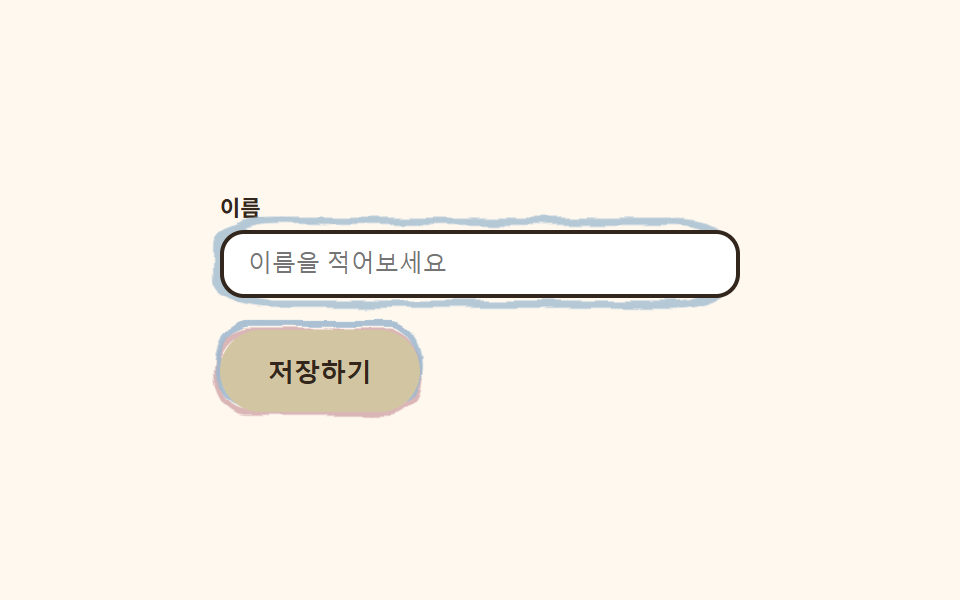
ボタンは太いクレヨンの二重線の枠を纏い、押すと内側の線が少しずれて手描きの質感を出し、入力欄はフォーカスすると手でぐるっと囲んだような丸が枠の外ににじむように描かれます。手描きキットの手触りを1項目にまとめました。
使いどころフォーム送信ボタン・氏名・メール入力欄
이중선 어긋남focus 손그림 원radius 12
<main class="stage">
  <svg width="0" height="0" style="position:absolute" aria-hidden="true" focusable="false">
    <filter id="rough9" x="-40%" y="-40%" width="180%" height="180%">
      <feTurbulence type="fractalNoise" baseFrequency="0.05 0.07" numOctaves="2" seed="51" result="n"/>
      <feDisplacementMap in="SourceGraphic" in2="n" scale="5" xChannelSelector="R" yChannelSelector="G"/>
    </filter>
  </svg>
  <form class="formcrayon">
    <label class="formcrayon__field">
      <span class="formcrayon__label">お名前</span>
      <span class="formcrayon__input-wrap">
        <svg class="formcrayon__ring" viewBox="0 0 100 40" preserveAspectRatio="none" aria-hidden="true">
          <rect x="3" y="3" width="94" height="34" rx="10" class="formcrayon__ring-rect" />
        </svg>
        <input class="formcrayon__input" type="text" placeholder="お名前を入力" readonly>
      </span>
    </label>
    <span class="formcrayon__btn-wrap">
      <svg class="formcrayon__btn-frame" viewBox="0 0 110 40" preserveAspectRatio="none" aria-hidden="true">
        <rect x="5" y="5" width="100" height="30" rx="15" class="formcrayon__btn-rect formcrayon__btn-rect--a" />
        <rect x="3" y="3" width="100" height="30" rx="15" class="formcrayon__btn-rect formcrayon__btn-rect--b" />
      </svg>
      <button class="formcrayon__btn" type="button">保存する</button>
    </span>
  </form>
</main>@use "../../../../site/static/demo-tokens" as *;
$duration: $dur-loop; // 이중선이 한 번 어긋났다 돌아오는 주기
$easing: $ease-spring; // 어긋남 곡선
$color: $stage-ink; // 글자 색 기본값(토큰) — 아래 크레용 잉크로 덮는다
$crayon-paper: #fff8ef;
$crayon-ink: #33261c;
$crayon-red: #dbb6b7;
$crayon-yellow: #d1c5a2;
$crayon-blue: #9cb8ce;
$crayon-green: #6dbe6d;
$crayon-purple: #cbbfe0;
@include stage($crayon-paper);
.formcrayon {
display: flex;
flex-direction: column;
align-items: flex-start;
gap: $sp-4;
width: clamp(210px, 74vw, 260px);
}
.formcrayon__field {
display: flex;
flex-direction: column;
gap: $sp-1;
width: 100%;
}
.formcrayon__label {
color: $crayon-ink;
font-weight: 700;
font-size: 11px;
}
.formcrayon__input-wrap {
position: relative;
display: block;
}
.formcrayon__ring {
position: absolute;
inset: -8px;
width: calc(100% + 16px);
height: calc(100% + 16px);
pointer-events: none;
filter: url(#rough9);
}
.formcrayon__ring-rect {
fill: none;
stroke: $crayon-blue;
stroke-width: 3;
stroke-linecap: round;
animation: ringBloom $duration $easing infinite;
}
.formcrayon__input {
position: relative;
box-sizing: border-box;
width: 100%;
border: 2px solid $crayon-ink;
border-radius: $r-control;
background: $stage-paper;
color: $crayon-ink;
padding: $sp-2 $sp-3;
font-weight: 500;
font-size: 12px;
}
.formcrayon__input:focus-visible {
outline: 3px solid $crayon-blue;
outline-offset: 2px;
}
.formcrayon__btn-wrap {
position: relative;
display: inline-block;
}
.formcrayon__btn-frame {
position: absolute;
inset: -6px;
width: calc(100% + 12px);
height: calc(100% + 12px);
pointer-events: none;
filter: url(#rough9);
}
.formcrayon__btn-rect {
fill: none;
stroke-width: 2.6;
}
.formcrayon__btn-rect--a { stroke: $crayon-red; animation: lineShiftA $duration $easing infinite; }
.formcrayon__btn-rect--b { stroke: $crayon-blue; opacity: .85; animation: lineShiftB $duration $easing infinite; }
.formcrayon__btn {
position: relative;
border: 0;
border-radius: $r-pill;
background: $crayon-yellow;
color: $crayon-ink;
padding: $sp-3 $sp-6;
font-weight: 700;
font-size: 13px;
}
.formcrayon__btn:focus-visible {
outline: 3px solid $crayon-ink;
outline-offset: 2px;
}
// 데모: 인풋은 손으로 두른 동그라미가 번지듯 피어났다 사라지고, 버튼은 두 선이 살짝 어긋났다 돌아온다
@keyframes ringBloom {
0% { opacity: 0; transform: scale(.9); }
35% { opacity: 1; transform: scale(1); }
70% { opacity: 1; transform: scale(1.03); }
100% { opacity: 0; transform: scale(1.06); }
}
@keyframes lineShiftA {
0%, 100% { transform: translate(0, 0); }
50% { transform: translate(-2px, 1px); }
}
@keyframes lineShiftB {
0%, 100% { transform: translate(0, 0); }
50% { transform: translate(2px, -1px); }
}
@media (max-width: 340px), (max-height: 220px) {
.formcrayon { gap: $sp-2; }
.formcrayon__btn { padding: $sp-2 $sp-4; }
}
@media (prefers-reduced-motion: reduce) {
.formcrayon__ring-rect, .formcrayon__btn-rect {
animation: none !important;
transform: none;
}
.formcrayon__ring-rect { opacity: .8; }
}html, body {
margin: 0;
overflow: hidden;
}
.stage {
box-sizing: border-box;
min-height: 100vh;
display: grid;
place-items: center;
margin: 0;
background: #fff8ef;
font-family: -apple-system, "Segoe UI", "Noto Sans KR", sans-serif;
padding: clamp(8px, 4vw, 24px);
}
.formcrayon {
display: flex;
flex-direction: column;
align-items: flex-start;
gap: 16px;
width: clamp(210px, 74vw, 260px);
}
.formcrayon__field {
display: flex;
flex-direction: column;
gap: 4px;
width: 100%;
}
.formcrayon__label {
color: #33261c;
font-weight: 700;
font-size: 11px;
}
.formcrayon__input-wrap {
position: relative;
display: block;
}
.formcrayon__ring {
position: absolute;
inset: -8px;
width: calc(100% + 16px);
height: calc(100% + 16px);
pointer-events: none;
filter: url(#rough9);
}
.formcrayon__ring-rect {
fill: none;
stroke: #9cb8ce;
stroke-width: 3;
stroke-linecap: round;
animation: ringBloom 2s cubic-bezier(0.2, 0.8, 0.2, 1) infinite;
}
.formcrayon__input {
position: relative;
box-sizing: border-box;
width: 100%;
border: 2px solid #33261c;
border-radius: 12px;
background: #ffffff;
color: #33261c;
padding: 8px 12px;
font-weight: 500;
font-size: 12px;
}
.formcrayon__input:focus-visible {
outline: 3px solid #9cb8ce;
outline-offset: 2px;
}
.formcrayon__btn-wrap {
position: relative;
display: inline-block;
}
.formcrayon__btn-frame {
position: absolute;
inset: -6px;
width: calc(100% + 12px);
height: calc(100% + 12px);
pointer-events: none;
filter: url(#rough9);
}
.formcrayon__btn-rect {
fill: none;
stroke-width: 2.6;
}
.formcrayon__btn-rect--a {
stroke: #dbb6b7;
animation: lineShiftA 2s cubic-bezier(0.2, 0.8, 0.2, 1) infinite;
}
.formcrayon__btn-rect--b {
stroke: #9cb8ce;
opacity: 0.85;
animation: lineShiftB 2s cubic-bezier(0.2, 0.8, 0.2, 1) infinite;
}
.formcrayon__btn {
position: relative;
border: 0;
border-radius: 999px;
background: #d1c5a2;
color: #33261c;
padding: 12px 24px;
font-weight: 700;
font-size: 13px;
}
.formcrayon__btn:focus-visible {
outline: 3px solid #33261c;
outline-offset: 2px;
}
@keyframes ringBloom {
0% {
opacity: 0;
transform: scale(0.9);
}
35% {
opacity: 1;
transform: scale(1);
}
70% {
opacity: 1;
transform: scale(1.03);
}
100% {
opacity: 0;
transform: scale(1.06);
}
}
@keyframes lineShiftA {
0%, 100% {
transform: translate(0, 0);
}
50% {
transform: translate(-2px, 1px);
}
}
@keyframes lineShiftB {
0%, 100% {
transform: translate(0, 0);
}
50% {
transform: translate(2px, -1px);
}
}
@media (max-width: 340px), (max-height: 220px) {
.formcrayon {
gap: 8px;
}
.formcrayon__btn {
padding: 8px 16px;
}
}
@media (prefers-reduced-motion: reduce) {
.formcrayon__ring-rect, .formcrayon__btn-rect {
animation: none !important;
transform: none;
}
.formcrayon__ring-rect {
opacity: 0.8;
}
}import type { CSSProperties } from "react";
import styles from "./ButtonsInputsCrayon.module.scss";
export type ButtonsInputsCrayonProps = {
label?: string;
placeholder?: string;
cta?: string;
duration?: number;
easing?: string;
color?: string;
};
type Vars = CSSProperties & { "--duration"?: string; "--easing"?: string; "--color"?: string };
export default function ButtonsInputsCrayon({
label = "이름",
placeholder = "이름을 적어보세요",
cta = "저장하기",
duration = 2000,
easing = "cubic-bezier(.2,.8,.2,1)",
color = "#4fa3e3",
}: ButtonsInputsCrayonProps) {
const vars: Vars = { "--duration": `${duration}ms`, "--easing": easing, "--color": color };
return (
<form className={styles.form} style={vars}>
<svg width="0" height="0" style={{ position: "absolute" }} aria-hidden="true" focusable="false">
<filter id="bi-rough" x="-40%" y="-40%" width="180%" height="180%">
<feTurbulence type="fractalNoise" baseFrequency={0.06} numOctaves={2} seed={51} result="n" />
<feDisplacementMap in="SourceGraphic" in2="n" scale={5} xChannelSelector="R" yChannelSelector="G" />
</filter>
</svg>
<label className={styles.field}>
<span className={styles.label}>{label}</span>
<span className={styles.inputWrap}>
<svg className={styles.ring} viewBox="0 0 100 40" preserveAspectRatio="none" aria-hidden="true">
<rect x={3} y={3} width={94} height={34} rx={10} className={styles.ringRect} />
</svg>
<input className={styles.input} type="text" placeholder={placeholder} />
</span>
</label>
<span className={styles.btnWrap}>
<svg className={styles.btnFrame} viewBox="0 0 110 40" preserveAspectRatio="none" aria-hidden="true">
<rect x={5} y={5} width={100} height={30} rx={15} className={`${styles.btnRect} ${styles.btnRectA}`} />
<rect x={3} y={3} width={100} height={30} rx={15} className={`${styles.btnRect} ${styles.btnRectB}`} />
</svg>
<button type="button" className={styles.btn}>{cta}</button>
</span>
</form>
);
}09 二重線クレヨンボタン・入力欄 — 計測 累積面積 3.212% · 動いたフレーム 18/23GODRICH オリジナル · SCSS と React は zip に同梱 · 手書き風 デザイン LPキット、クレヨン風セクション9選
このデモが属する記事
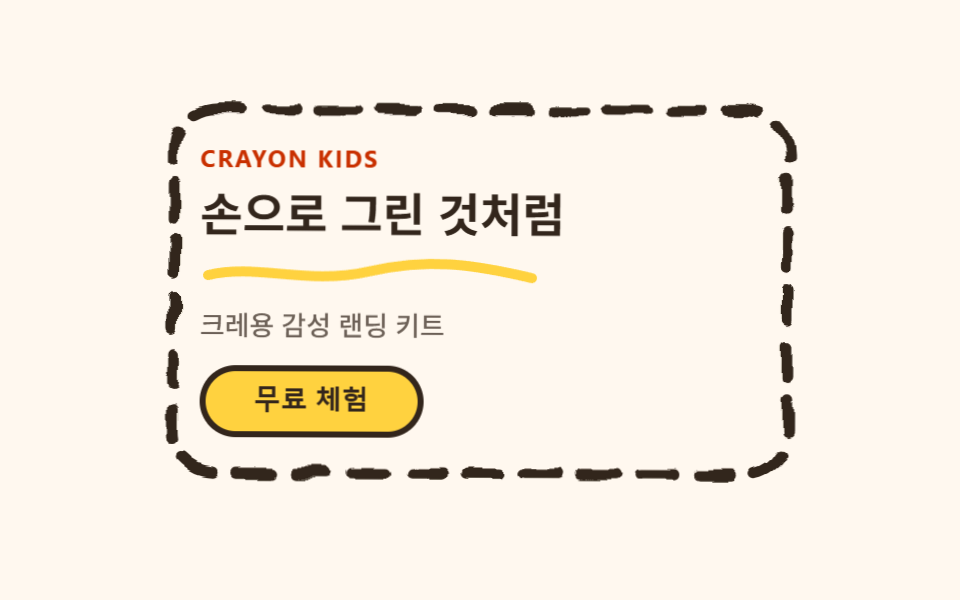 手書き風 デザイン LPキット、クレヨン風セクション9選手書き風 デザインは、カードやボタンの周りに太くよれた輪郭線を描き、その輪郭線だけにSVGフィルターをかけて、定規で引いたのではなく手で描いたように見せるスタイルです。手で描いたと思ったら実は CSS だった、というのがこのキットの正体です この記事のデモをすべて見る