08ホバーでピル拡張
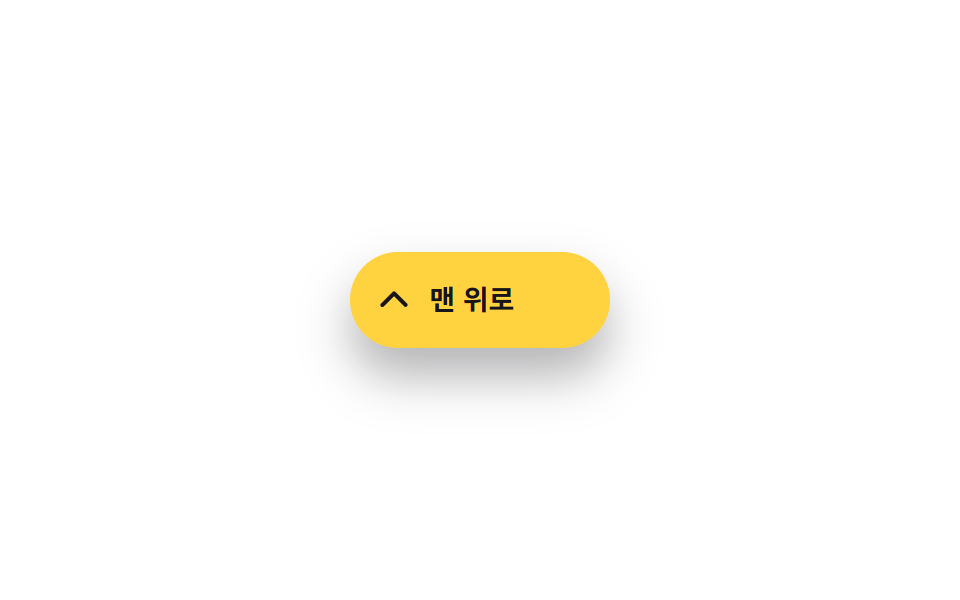
普段は丸いアイコンボタンですが、ホバーすると横に伸びて「トップへ」の文字が一緒に現れます。
使いどころデスクトップ専用ボタン、ラベルで目的をはっきり示したいボタン
width transition:hover·:focus-visible220ms
<main class="stage">
  <button type="button" class="totop" aria-label="トップへ">
    <svg class="totop__arrow" viewBox="0 0 24 24" aria-hidden="true"><polyline points="5,15 12,8 19,15"/></svg>
    <span class="totop__label">トップへ</span>
  </button>
</main>
@use "../../../../site/static/demo-tokens" as *;
// ── 변수 3개 ──────────────────────────────────────────
$duration: 220ms;
$easing: $ease-out;
$color: $subject-ink; // 글자·화살표 색
@include stage($stage-paper);
.totop {
display: inline-flex;
align-items: center;
gap: $sp-2;
width: 48px;
height: 48px;
padding: 0 $sp-3;
border: 0;
border-radius: $r-pill;
background: $stage-yellow;
overflow: hidden;
box-shadow: $shadow-raised;
cursor: pointer;
transition: width $duration $easing;
}
// 실제 사용: 마우스를 올리거나 포커스하면 폭이 넓어져 라벨이 드러난다
.totop:hover,
.totop:focus-visible,
.totop.is-demo-open { width: 132px; }
.totop__arrow {
flex: none;
width: 20px; height: 20px;
fill: none;
stroke: $color;
stroke-width: 2.4;
stroke-linecap: round;
stroke-linejoin: round;
}
.totop__label {
font: 600 clamp(13px, 3.6vw, 14px)/1 -apple-system, "Segoe UI", "Noto Sans KR", sans-serif;
color: $color;
white-space: nowrap;
}
@media (prefers-reduced-motion: reduce) {
.totop { transition: none; }
}html, body {
margin: 0;
overflow: hidden;
}
.stage {
box-sizing: border-box;
min-height: 100vh;
display: grid;
place-items: center;
margin: 0;
background: #ffffff;
font-family: -apple-system, "Segoe UI", "Noto Sans KR", sans-serif;
padding: clamp(8px, 4vw, 24px);
}
.totop {
display: inline-flex;
align-items: center;
gap: 8px;
width: 48px;
height: 48px;
padding: 0 12px;
border: 0;
border-radius: 999px;
background: #ffd23f;
overflow: hidden;
box-shadow: 0 14px 24px rgba(23, 20, 26, 0.32);
cursor: pointer;
transition: width 220ms ease-out;
}
.totop:hover,
.totop:focus-visible,
.totop.is-demo-open {
width: 132px;
}
.totop__arrow {
flex: none;
width: 20px;
height: 20px;
fill: none;
stroke: #17141a;
stroke-width: 2.4;
stroke-linecap: round;
stroke-linejoin: round;
}
.totop__label {
font: 600 clamp(13px, 3.6vw, 14px)/1 -apple-system, "Segoe UI", "Noto Sans KR", sans-serif;
color: #17141a;
white-space: nowrap;
}
@media (prefers-reduced-motion: reduce) {
.totop {
transition: none;
}
}// .is-demo 자동 재생: 진짜 :hover·:focus-visible 규칙을 그대로 타도록 is-demo-open 만 오간다.
// 500ms 간격 — 2초 측정 창 안에 전이(220ms)가 4번 들어가야 움직인 프레임 하한(6)에 여유가 생긴다
// (실측 2026-09-10: 1000ms 간격은 전이 2번뿐이라 5~6 프레임 경계에서 흔들렸다)
var btn = document.querySelector('.totop');
var t = function () { btn.classList.toggle('is-demo-open'); };
t(); setInterval(t, 500);import type { CSSProperties } from "react";
import styles from "./PillExpandButton.module.scss";
export type PillExpandButtonProps = {
label?: string;
/** 폭이 넓어지는 시간 (기본 220ms) */
duration?: number;
easing?: string;
};
type Vars = CSSProperties & { "--duration"?: string; "--easing"?: string };
// 실제 사용: 마우스를 올리거나 포커스하면 폭이 넓어져 라벨이 드러난다. 상태 없이 CSS 로 처리한다
export default function PillExpandButton({
label = "맨 위로",
duration = 220,
easing = "ease-out",
}: PillExpandButtonProps) {
const vars: Vars = { "--duration": `${duration}ms`, "--easing": easing };
return (
<button
type="button"
className={styles.totop}
style={vars}
aria-label={label}
onClick={() => window.scrollTo({ top: 0, behavior: "smooth" })}
>
<svg className={styles.arrow} viewBox="0 0 24 24" aria-hidden="true">
<polyline points="5,15 12,8 19,15" />
</svg>
<span className={styles.label}>{label}</span>
</button>
);
}08 ホバーでピル拡張 — 計測 累積面積 5.592% · 動いたフレーム 15/23GODRICH オリジナル · SCSS と React は zip に同梱 · トップへ戻るボタン css アニメーション9選【CSSだけ・JS不要】
このデモが属する記事
 トップへ戻るボタン css アニメーション9選【CSSだけ・JS不要】トップへ戻るボタンとは、ページを下まで読んだあとにワンクリックで一番上へ戻してくれる小さなボタンのことです。この記事では「トップへ戻るボタン css」でよく探される9つの動きを、AOS・GSAPなしでそのまま使えるコードとしてまとめました。 この記事のデモをすべて見る