05検索窓の拡張
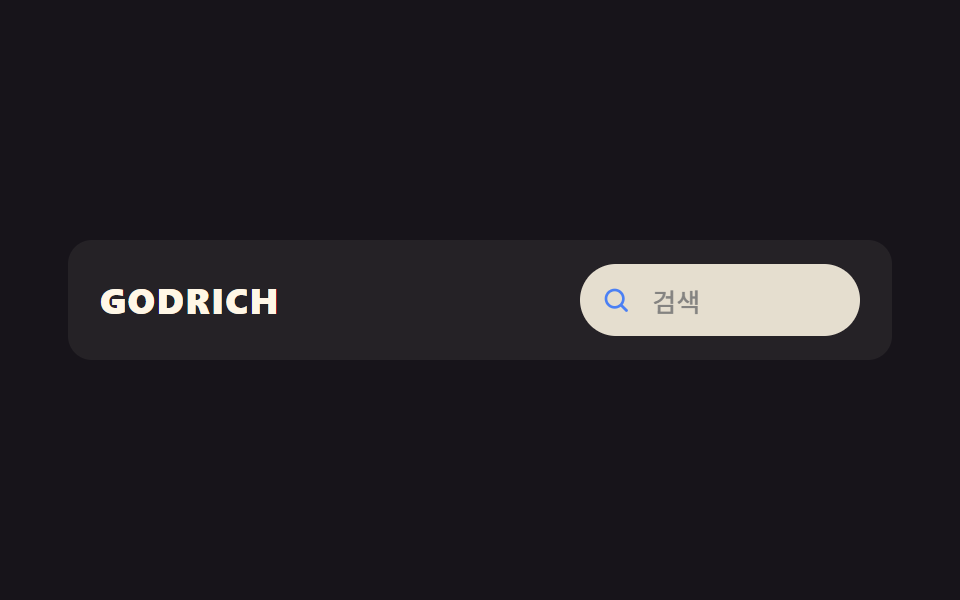
虫眼鏡アイコンだけだった場所がクリックすると幅が広がり、実際の入力欄に変わる。
使いどころECヘッダーの検索、ドキュメントサイト上部の検索
transition: width아이콘→입력창포커스 트리거
<main class="stage">
  <header class="sse is-demo">
    <span class="sse__logo">GODRICH</span>
    <div class="sse__search">
      <button class="sse__toggle" type="button" aria-label="検索を開く" aria-expanded="false" aria-controls="sseInput">
        <svg class="sse__icon" viewBox="0 0 24 24" aria-hidden="true"><circle cx="11" cy="11" r="6.5"/><line x1="20" y1="20" x2="15.7" y2="15.7"/></svg>
      </button>
      <input id="sseInput" class="sse__input" type="search" placeholder="検索" aria-label="検索語入力" tabindex="-1">
    </div>
  </header>
</main>
@use "../../../../site/static/demo-tokens" as *;
// ── 변수 3개. 변형은 이것만 바꾼다 ──────────────────────────
$duration: $dur-base; // 폭이 넓어지는 시간
$easing: $ease-spring;
$color: $subject-blue; // 아이콘·포커스 색
@include stage($stage-ink);
// 320px 데모 스테이지: stage() 믹스인은 html,body 에만 overflow:hidden 을 준다 — html(root)은
// 자기 overflow:hidden 이 scrollWidth 를 뷰포트에 눌러주지만 body 는 보통 요소라 그대로 실제 콘텐츠
// 폭을 보고한다. 검색창이 156px 로 펼쳐질 때 로고+패딩과 합쳐 90vw 보다 실측 폭이 넓어 320px 에서
// 13px 넘친다 (128-05 실측, body.scrollWidth 333 vs innerWidth 320). .stage 를 직접 잘라 위로 전파를 막는다.
.stage { overflow: hidden; }
.sse {
width: min(380px, 90vw);
display: flex; align-items: center; justify-content: space-between;
padding: $sp-3 $sp-4;
border-radius: $r-control;
background: rgba($subject-cream, .06);
}
.sse__logo { color: $subject-cream; font-weight: 800; font-size: clamp(14px, 4vw, 18px); line-height: 1; font-family: inherit; letter-spacing: .04em; }
// 작은 요소 안에서만 폭이 바뀐다 — 아이콘→입력창은 본질적으로 width 변화라 이 항목만의 예외
.sse__search {
position: relative;
display: inline-flex;
align-items: center;
height: 36px;
width: 36px;
border-radius: $r-pill;
background: rgba($subject-cream, .12);
overflow: hidden;
transition: width $duration $easing, background $duration $easing;
&.is-open { width: 156px; background: $subject-cream; }
}
.sse__toggle {
flex: none;
width: 36px; height: 36px;
display: grid; place-items: center;
border: 0; padding: 0;
background: transparent;
cursor: pointer;
-webkit-tap-highlight-color: transparent;
}
.sse__icon {
width: 16px; height: 16px;
fill: none;
stroke: $subject-cream;
stroke-width: 2;
stroke-linecap: round;
}
.sse__search.is-open .sse__icon { stroke: $color; }
.sse__input {
flex: 1 1 auto;
min-width: 0;
border: 0; outline: 0;
background: transparent;
padding: 0 $sp-3 0 0;
font-weight: 500;
font-size: clamp(12px, 3.6vw, 13px);
line-height: 1;
font-family: inherit;
color: $stage-ink;
opacity: 0;
transition: opacity $duration $easing;
}
.sse__search.is-open .sse__input { opacity: 1; }
// ── 데모(.is-demo): 아이콘이 클릭 한 번을 시뮬레이션해 입력창으로 넓어지는 2초 루프 ──────────────
.sse.is-demo .sse__search {
animation: sse-expand-loop $dur-loop $easing infinite;
}
.sse.is-demo .sse__icon { animation: sse-icon-loop $dur-loop $easing infinite; }
.sse.is-demo .sse__input { animation: sse-input-loop $dur-loop $easing infinite; }
@keyframes sse-expand-loop {
0%, 20% { width: 36px; background: rgba($subject-cream, .12); }
45%, 70% { width: 156px; background: $subject-cream; }
95%, 100% { width: 36px; background: rgba($subject-cream, .12); }
}
@keyframes sse-icon-loop {
0%, 20% { stroke: $subject-cream; }
45%, 70% { stroke: $color; }
95%, 100% { stroke: $subject-cream; }
}
@keyframes sse-input-loop {
0%, 20% { opacity: 0; }
45%, 70% { opacity: 1; }
95%, 100% { opacity: 0; }
}
// ── 접근성 ──────────────────────────────────────────
@media (prefers-reduced-motion: reduce) {
.sse__search, .sse__input { transition: none; }
.sse.is-demo {
.sse__search, .sse__icon, .sse__input { animation: none !important; }
.sse__search { width: 36px; background: rgba($subject-cream, .12); }
.sse__icon { stroke: $subject-cream; }
.sse__input { opacity: 0; }
}
}html, body {
margin: 0;
overflow: hidden;
}
.stage {
box-sizing: border-box;
min-height: 100vh;
display: grid;
place-items: center;
margin: 0;
background: #17141a;
font-family: -apple-system, "Segoe UI", "Noto Sans KR", sans-serif;
padding: clamp(8px, 4vw, 24px);
}
.stage {
overflow: hidden;
}
.sse {
width: min(380px, 90vw);
display: flex;
align-items: center;
justify-content: space-between;
padding: 12px 16px;
border-radius: 12px;
background: rgba(255, 247, 230, 0.06);
}
.sse__logo {
color: #fff7e6;
font-weight: 800;
font-size: clamp(14px, 4vw, 18px);
line-height: 1;
font-family: inherit;
letter-spacing: 0.04em;
}
.sse__search {
position: relative;
display: inline-flex;
align-items: center;
height: 36px;
width: 36px;
border-radius: 999px;
background: rgba(255, 247, 230, 0.12);
overflow: hidden;
transition: width 300ms cubic-bezier(0.2, 0.8, 0.2, 1), background 300ms cubic-bezier(0.2, 0.8, 0.2, 1);
}
.sse__search.is-open {
width: 156px;
background: #fff7e6;
}
.sse__toggle {
flex: none;
width: 36px;
height: 36px;
display: grid;
place-items: center;
border: 0;
padding: 0;
background: transparent;
cursor: pointer;
-webkit-tap-highlight-color: transparent;
}
.sse__icon {
width: 16px;
height: 16px;
fill: none;
stroke: #fff7e6;
stroke-width: 2;
stroke-linecap: round;
}
.sse__search.is-open .sse__icon {
stroke: #2f6df6;
}
.sse__input {
flex: 1 1 auto;
min-width: 0;
border: 0;
outline: 0;
background: transparent;
padding: 0 12px 0 0;
font-weight: 500;
font-size: clamp(12px, 3.6vw, 13px);
line-height: 1;
font-family: inherit;
color: #17141a;
opacity: 0;
transition: opacity 300ms cubic-bezier(0.2, 0.8, 0.2, 1);
}
.sse__search.is-open .sse__input {
opacity: 1;
}
.sse.is-demo .sse__search {
animation: sse-expand-loop 2s cubic-bezier(0.2, 0.8, 0.2, 1) infinite;
}
.sse.is-demo .sse__icon {
animation: sse-icon-loop 2s cubic-bezier(0.2, 0.8, 0.2, 1) infinite;
}
.sse.is-demo .sse__input {
animation: sse-input-loop 2s cubic-bezier(0.2, 0.8, 0.2, 1) infinite;
}
@keyframes sse-expand-loop {
0%, 20% {
width: 36px;
background: rgba(255, 247, 230, 0.12);
}
45%, 70% {
width: 156px;
background: #fff7e6;
}
95%, 100% {
width: 36px;
background: rgba(255, 247, 230, 0.12);
}
}
@keyframes sse-icon-loop {
0%, 20% {
stroke: #fff7e6;
}
45%, 70% {
stroke: #2f6df6;
}
95%, 100% {
stroke: #fff7e6;
}
}
@keyframes sse-input-loop {
0%, 20% {
opacity: 0;
}
45%, 70% {
opacity: 1;
}
95%, 100% {
opacity: 0;
}
}
@media (prefers-reduced-motion: reduce) {
.sse__search, .sse__input {
transition: none;
}
.sse.is-demo .sse__search, .sse.is-demo .sse__icon, .sse.is-demo .sse__input {
animation: none !important;
}
.sse.is-demo .sse__search {
width: 36px;
background: rgba(255, 247, 230, 0.12);
}
.sse.is-demo .sse__icon {
stroke: #fff7e6;
}
.sse.is-demo .sse__input {
opacity: 0;
}
}// 실제 페이지: 아이콘을 클릭하면 입력창 폭이 넓어지며 실제 검색창이 된다 (9줄)
var box = document.querySelector('.sse__search');
var input = document.querySelector('#sseInput');
document.querySelector('.sse__toggle').addEventListener('click', function (e) {
var open = box.classList.toggle('is-open');
e.currentTarget.setAttribute('aria-expanded', String(open));
document.querySelector('.sse').classList.remove('is-demo');
input.tabIndex = open ? 0 : -1;
if (open) input.focus({ preventScroll: true }); else input.blur();
});import { useRef, useState } from "react";
import type { CSSProperties } from "react";
import styles from "./SearchExpandHeader.module.scss";
export type SearchExpandHeaderProps = {
logo: string;
placeholder: string;
/** 폭이 넓어지는 시간 (기본 300ms) */
duration?: number;
easing?: string;
color?: string;
};
type Vars = CSSProperties & { "--duration"?: string; "--easing"?: string; "--color"?: string };
export default function SearchExpandHeader({
logo,
placeholder,
duration = 300,
easing = "cubic-bezier(.2,.8,.2,1)",
color = "#2f6df6",
}: SearchExpandHeaderProps) {
const [open, setOpen] = useState(false);
const inputRef = useRef<HTMLInputElement>(null);
const vars: Vars = { "--duration": `${duration}ms`, "--easing": easing, "--color": color };
function toggle() {
const next = !open;
setOpen(next);
if (next) inputRef.current?.focus({ preventScroll: true });
else inputRef.current?.blur();
}
return (
<header className={styles.head} style={vars}>
<span className={styles.logo}>{logo}</span>
<div className={open ? `${styles.search} ${styles.isOpen}` : styles.search}>
<button type="button" className={styles.toggle} aria-label="검색 열기" aria-expanded={open} onClick={toggle}>
<svg className={styles.icon} viewBox="0 0 24 24" aria-hidden="true">
<circle cx="11" cy="11" r="6.5" />
<line x1="20" y1="20" x2="15.7" y2="15.7" />
</svg>
</button>
<input
ref={inputRef}
className={styles.input}
type="search"
placeholder={placeholder}
aria-label="검색어 입력"
tabIndex={open ? 0 : -1}
/>
</div>
</header>
);
}05 検索窓の拡張 — 計測 累積面積 3.736% · 動いたフレーム 13/23GODRICH オリジナル · SCSS と React は zip に同梱 · CSS スティッキーヘッダー追加9選 — 検索バー・CTA・通知まで
このデモが属する記事
 CSS スティッキーヘッダー追加9選 — 検索バー・CTA・通知までcss スティッキーヘッダーとは、スクロールしてもページ上部のメニュー行が画面に貼り付いたまま残る機能で、position: stickyを一行書くだけで実現できます。ここで紹介する9個は貼り付くだけのヘッダーの一歩先で、スクロールする間に この記事のデモをすべて見る