09カーソルスポットライト背景
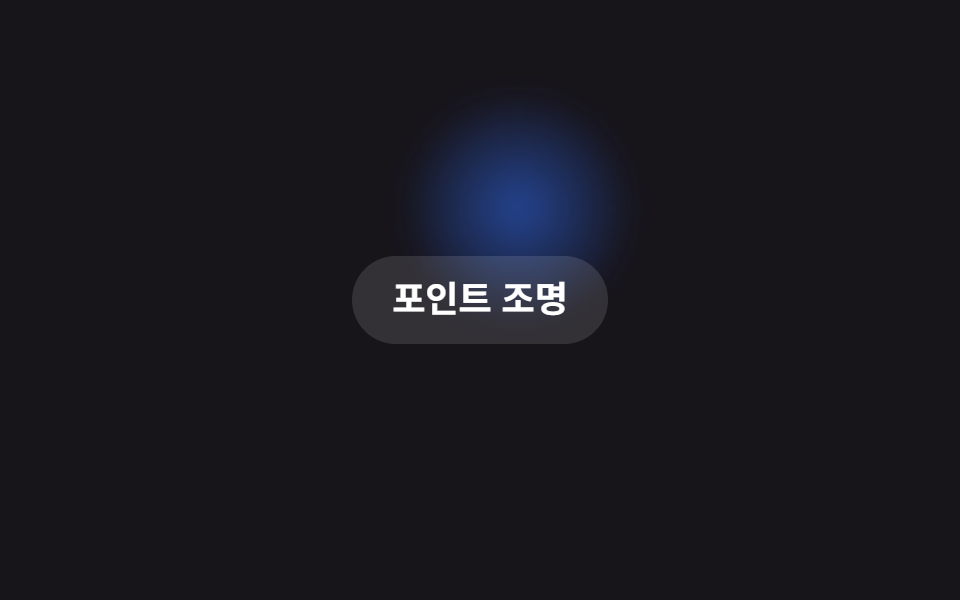
ぼかした小さな radial-gradient の円をスポットライトとして transform: translate で楕円軌道上に動かし、実際のページではこの座標を pointermove の値に差し替えてカーソルに追従させる。
使いどころインタラクティブなランディング背景、ダークヒーローのポイント照明
radial-gradient 스포트라이트transform: translatepointermove 대응
<main class="stage">
  <span class="spot is-demo" aria-hidden="true"></span>
  <p class="hint">ポイント照明</p>
</main>
@use "../../../../site/static/demo-tokens" as *;
// ── 변수 3개 ──────────────────────────────────────────
$duration: $dur-loop; // 스포트라이트가 궤도를 한 바퀴 도는 시간
$easing: $ease-spring;
$color: $subject-blue; // 스포트라이트 색
// ── 데모 무대 ──────────────────────────────────────────
@include stage($stage-ink);
.stage {
position: relative;
overflow: hidden;
}
// 작은 블러 원 하나만 transform: translate 로 궤도를 그린다. 실제 페이지에서는 같은 좌표가 pointermove 에서 온다
.spot {
position: absolute;
top: 50%;
left: 50%;
width: 120px;
height: 120px;
margin: -60px 0 0 -60px;
border-radius: 50%;
background: radial-gradient(circle, rgba($color, .55), transparent 70%);
filter: blur(6px);
pointer-events: none;
}
.spot.is-demo { animation: orbit $duration $easing infinite; }
@keyframes orbit {
0% { transform: translate(-90px, -40px); }
25% { transform: translate(90px, -50px); }
50% { transform: translate(70px, 60px); }
75% { transform: translate(-80px, 55px); }
100% { transform: translate(-90px, -40px); }
}
.hint {
position: relative;
margin: 0;
padding: 10px 20px;
border-radius: $r-pill;
background: rgba($stage-paper, .12);
color: $stage-paper;
font: 700 clamp(14px, 4vw, 18px)/1.3 -apple-system, "Segoe UI", "Noto Sans KR", sans-serif;
}
@media (prefers-reduced-motion: reduce) {
.spot.is-demo { animation: none; transform: translate(-90px, -40px); }
}html, body {
margin: 0;
overflow: hidden;
}
.stage {
box-sizing: border-box;
min-height: 100vh;
display: grid;
place-items: center;
margin: 0;
background: #17141a;
font-family: -apple-system, "Segoe UI", "Noto Sans KR", sans-serif;
padding: clamp(8px, 4vw, 24px);
}
.stage {
position: relative;
overflow: hidden;
}
.spot {
position: absolute;
top: 50%;
left: 50%;
width: 120px;
height: 120px;
margin: -60px 0 0 -60px;
border-radius: 50%;
background: radial-gradient(circle, rgba(47, 109, 246, 0.55), transparent 70%);
filter: blur(6px);
pointer-events: none;
}
.spot.is-demo {
animation: orbit 2s cubic-bezier(0.2, 0.8, 0.2, 1) infinite;
}
@keyframes orbit {
0% {
transform: translate(-90px, -40px);
}
25% {
transform: translate(90px, -50px);
}
50% {
transform: translate(70px, 60px);
}
75% {
transform: translate(-80px, 55px);
}
100% {
transform: translate(-90px, -40px);
}
}
.hint {
position: relative;
margin: 0;
padding: 10px 20px;
border-radius: 999px;
background: rgba(255, 255, 255, 0.12);
color: #ffffff;
font: 700 clamp(14px, 4vw, 18px)/1.3 -apple-system, "Segoe UI", "Noto Sans KR", sans-serif;
}
@media (prefers-reduced-motion: reduce) {
.spot.is-demo {
animation: none;
transform: translate(-90px, -40px);
}
}// 실제 페이지에서는 좌표를 pointermove 값으로 바꿔 스포트라이트가 커서를 따라가게 한다. 데모(.is-demo)는 궤도를 자동으로 돈다.
if (matchMedia('(pointer: fine)').matches) {
var stage = document.querySelector('.stage');
var spot = document.querySelector('.spot');
stage.addEventListener('pointermove', function (e) {
var r = stage.getBoundingClientRect();
spot.classList.remove('is-demo');
spot.style.transform = 'translate(' + (e.clientX - r.left - r.width / 2) + 'px,' + (e.clientY - r.top - r.height / 2) + 'px)';
});
}import { useCallback, useState } from "react";
import type { CSSProperties, PointerEvent, ReactNode } from "react";
import styles from "./SpotlightCursorBg.module.scss";
export type SpotlightCursorBgProps = {
children?: ReactNode;
/** 궤도를 한 바퀴 도는 시간 (기본 2000ms) */
duration?: number;
easing?: string;
/** 스포트라이트 색 */
color?: string;
className?: string;
};
type Vars = CSSProperties & { "--duration"?: string; "--easing"?: string; "--color"?: string };
export default function SpotlightCursorBg({
children,
duration = 2000,
easing = "cubic-bezier(.2,.8,.2,1)",
color = "#2f6df6",
className = "",
}: SpotlightCursorBgProps) {
const [demo, setDemo] = useState(true);
const [pos, setPos] = useState({ x: -90, y: -40 });
const move = useCallback((e: PointerEvent<HTMLDivElement>) => {
const r = e.currentTarget.getBoundingClientRect();
setDemo(false);
setPos({ x: e.clientX - r.left - r.width / 2, y: e.clientY - r.top - r.height / 2 });
}, []);
const vars: Vars = { "--duration": `${duration}ms`, "--easing": easing, "--color": color };
const t = demo ? undefined : { transform: `translate(${pos.x}px,${pos.y}px)` };
return (
<div className={`${styles.stage} ${className}`} style={vars} onPointerMove={move}>
<span className={demo ? `${styles.spot} ${styles.isDemo}` : styles.spot} style={t} aria-hidden="true" />
{children}
</div>
);
}09 カーソルスポットライト背景 — 計測 累積面積 34.851% · 動いたフレーム 13/23GODRICH オリジナル · SCSS と React は zip に同梱 · CSS 背景 アニメーション 9選 — 一行でコピペOK
このデモが属する記事
 CSS 背景 アニメーション 9選 — 一行でコピペOKcss 背景 アニメーションは、CSSだけで背景を動かし続ける手法です。この記事では9種類を選び、background-positionとtransform、filter: blurという仕組みだけで実装しました。グリッドの9つはifram この記事のデモをすべて見る