07擬似要素だけの紙吹雪
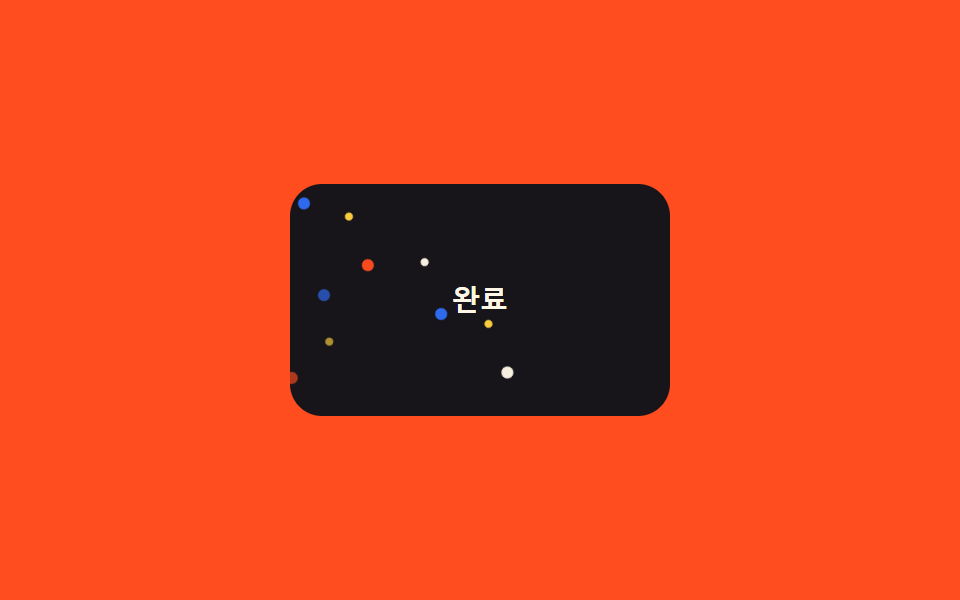
カードのDOMに要素を一つも追加せず、::beforeと::afterの2つだけにbox-shadowで複数の点を描き、それぞれ違うタイミングでtranslateY+rotateで落とす。
使いどころマークアップを増やせないカードコンポーネント、完了状態のカード
::before/::afterbox-shadow 다중점1.2s
<main class="stage">
  <div class="pc-card is-demo">
    <span class="pc-label">完了</span>
  </div>
</main>
@use "../../../../site/static/demo-tokens" as *;
// ── 변수 3개 ──────────────────────────────────────────
$duration: 1.2s;
$easing: $ease-out;
$color: $subject-blue;
@include stage($stage-orange);
.pc-card {
position: relative;
width: 190px;
height: 116px;
border-radius: $r-card;
background: $subject-ink;
overflow: hidden;
display: grid;
place-items: center;
}
.pc-label {
color: $subject-cream;
font: 700 14px/1 -apple-system, "Segoe UI", sans-serif;
}
// 마크업엔 요소를 하나도 더하지 않는다 — ::before·::after 각각 box-shadow 로 점 6개씩을 그린다
.pc-card::before,
.pc-card::after {
content: "";
position: absolute;
top: -18px;
left: 14px;
width: 6px;
height: 6px;
border-radius: $r-pill;
background: $color;
box-shadow:
22px -8px 0 -1px $stage-yellow,
44px 6px 0 0 $stage-orange,
66px -12px 0 -1px $subject-cream,
88px 4px 0 0 $color,
110px -6px 0 -1px $stage-yellow,
132px 8px 0 0 $subject-cream;
opacity: 0;
}
.pc-card::after { left: 4px; }
@keyframes pc-fall {
0% { transform: translateY(0) rotate(0deg); opacity: 0; }
12% { opacity: 1; }
100% { transform: translateY(150px) rotate(220deg); opacity: 0; }
}
.pc-card.is-demo::before,
.pc-card.is-demo::after { animation: pc-fall $duration $easing infinite; }
.pc-card.is-demo::after { animation-delay: 260ms; }
@media (prefers-reduced-motion: reduce) {
.pc-card.is-demo::before,
.pc-card.is-demo::after { animation: none !important; opacity: 0 !important; }
}html, body {
margin: 0;
overflow: hidden;
}
.stage {
box-sizing: border-box;
min-height: 100vh;
display: grid;
place-items: center;
margin: 0;
background: #ff4d1f;
font-family: -apple-system, "Segoe UI", "Noto Sans KR", sans-serif;
padding: clamp(8px, 4vw, 24px);
}
.pc-card {
position: relative;
width: 190px;
height: 116px;
border-radius: 16px;
background: #17141a;
overflow: hidden;
display: grid;
place-items: center;
}
.pc-label {
color: #fff7e6;
font: 700 14px/1 -apple-system, "Segoe UI", sans-serif;
}
.pc-card::before,
.pc-card::after {
content: "";
position: absolute;
top: -18px;
left: 14px;
width: 6px;
height: 6px;
border-radius: 999px;
background: #2f6df6;
box-shadow: 22px -8px 0 -1px #ffd23f, 44px 6px 0 0 #ff4d1f, 66px -12px 0 -1px #fff7e6, 88px 4px 0 0 #2f6df6, 110px -6px 0 -1px #ffd23f, 132px 8px 0 0 #fff7e6;
opacity: 0;
}
.pc-card::after {
left: 4px;
}
@keyframes pc-fall {
0% {
transform: translateY(0) rotate(0deg);
opacity: 0;
}
12% {
opacity: 1;
}
100% {
transform: translateY(150px) rotate(220deg);
opacity: 0;
}
}
.pc-card.is-demo::before,
.pc-card.is-demo::after {
animation: pc-fall 1.2s ease-out infinite;
}
.pc-card.is-demo::after {
animation-delay: 260ms;
}
@media (prefers-reduced-motion: reduce) {
.pc-card.is-demo::before,
.pc-card.is-demo::after {
animation: none !important;
opacity: 0 !important;
}
}import { CSSProperties } from "react";
import styles from "./PseudoOnlyConfetti.module.scss";
type Vars = CSSProperties & Record<string, string>;
export interface PseudoOnlyConfettiProps {
duration?: string;
easing?: string;
color?: string;
}
// 마크업엔 요소를 하나도 더하지 않는다 — ::before·::after(module.scss) 만으로 점을 그린다
export default function PseudoOnlyConfetti({
duration = "1.2s",
easing = "ease-out",
color = "#2f6df6",
}: PseudoOnlyConfettiProps) {
const style: Vars = { "--duration": duration, "--easing": easing, "--color": color };
return (
<div className={styles.card} style={style}>
<span className={styles.label}>완료</span>
</div>
);
}07 擬似要素だけの紙吹雪 — 計測 累積面積 2.233% · 動いたフレーム 23/23GODRICH オリジナル · SCSS と React は zip に同梱 · 紙吹雪 アニメーション css キラキラ演出9選
このデモが属する記事
 紙吹雪 アニメーション css キラキラ演出9選会員登録や決済が終わった瞬間、画面いっぱいに色とりどりの紙の破片が舞い散る演出を見たことはありませんか。あれは紙吹雪 アニメーション cssと呼ばれるコードで作られていて、ボタンを押す、チェックを入れるといった操作一つで同じお祝いの動きを、 この記事のデモをすべて見る