09カーソルキラキラトレイル
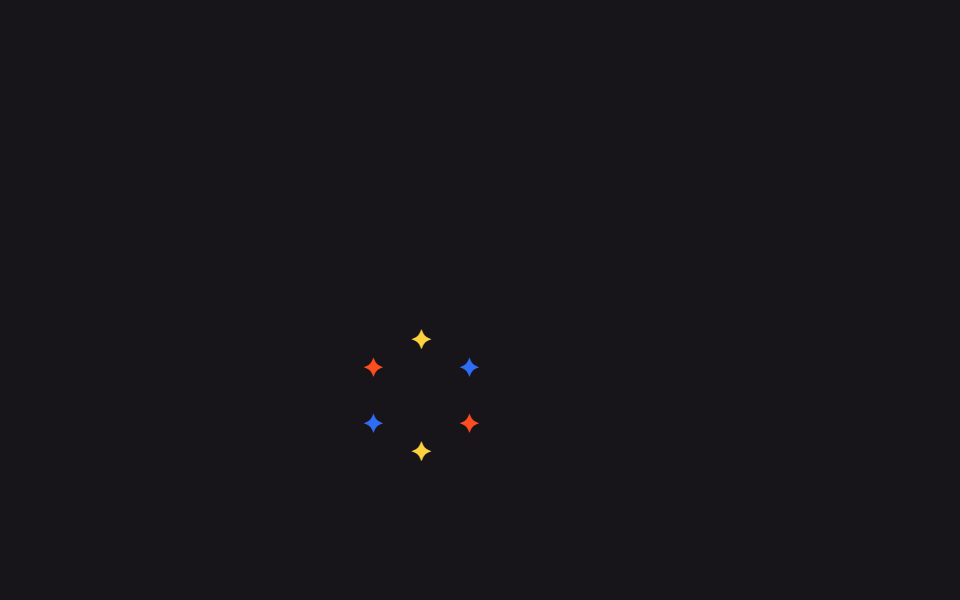
バナー上でマウスを動かすと座標を--mx・--myに保存し、その周りの6つのキラキラがtransform: translateで追従しながら点滅する。
使いどころインタラクティブなプロモーションバナー、ヒーローセクションのカーソル演出
pointermovecustom propertytranslate()
<main class="stage">
  <div class="sc-wrap is-demo">
    <span class="sc-piece">✦</span><span class="sc-piece">✦</span><span class="sc-piece">✦</span>
    <span class="sc-piece">✦</span><span class="sc-piece">✦</span><span class="sc-piece">✦</span>
  </div>
</main>
@use "../../../../site/static/demo-tokens" as *;
// ── 변수 3개 ──────────────────────────────────────────
$duration: 900ms;
$easing: $ease-out;
$color: $stage-yellow;
@include stage($stage-ink);
$piece-colors: $color, $subject-blue, $stage-orange;
$offsets: (0px -28px), (24px -14px), (24px 14px), (0px 28px), (-24px 14px), (-24px -14px);
// 커서 좌표를 px 길이로 등록해야 is-demo 의 드리프트 keyframes 가 값을 보간한다
@property --mx { syntax: '<length>'; inherits: true; initial-value: 0px; }
@property --my { syntax: '<length>'; inherits: true; initial-value: 0px; }
.sc-wrap {
position: relative;
width: min(280px, 84vw);
height: min(176px, 58vh);
border-radius: $r-card;
background: $subject-ink;
overflow: hidden;
--mx: 140px;
--my: 88px;
}
.sc-piece {
position: absolute;
top: 0;
left: 0;
font-size: 14px;
line-height: 1;
opacity: 0;
pointer-events: none;
}
@for $i from 1 through 6 {
.sc-piece:nth-child(#{$i}) {
$pair: nth($offsets, $i);
--ox: #{nth($pair, 1)};
--oy: #{nth($pair, 2)};
color: nth($piece-colors, ($i - 1) % 3 + 1);
animation-delay: #{($i % 3) * 140ms};
}
}
// 실사용: <script> 가 --mx·--my 를 갱신하고, 이 keyframes 는 그 값을 읽어 트랜슬레이트만 애니메이션한다
@keyframes sc-twinkle {
0%, 100% { transform: translate(calc(var(--mx) + var(--ox)), calc(var(--my) + var(--oy))) translate(-50%, -50%) scale(0); opacity: 0; }
50% { transform: translate(calc(var(--mx) + var(--ox)), calc(var(--my) + var(--oy))) translate(-50%, -50%) scale(1); opacity: 1; }
}
// 캡처용: is-demo 는 --mx·--my 자체를 원을 그리며 돈다 (헤드리스는 pointermove 를 못 낸다)
@keyframes sc-drift {
0% { --mx: 44px; --my: 40px; }
25% { --mx: 236px; --my: 34px; }
50% { --mx: 228px; --my: 140px; }
75% { --mx: 52px; --my: 132px; }
100% { --mx: 44px; --my: 40px; }
}
.sc-wrap.is-demo { animation: sc-drift 2s linear infinite; }
.sc-wrap .sc-piece { animation: sc-twinkle $duration $easing infinite; }
@media (prefers-reduced-motion: reduce) {
.sc-wrap.is-demo { animation: none !important; }
.sc-wrap .sc-piece { animation: none !important; opacity: 0 !important; }
}html, body {
margin: 0;
overflow: hidden;
}
.stage {
box-sizing: border-box;
min-height: 100vh;
display: grid;
place-items: center;
margin: 0;
background: #17141a;
font-family: -apple-system, "Segoe UI", "Noto Sans KR", sans-serif;
padding: clamp(8px, 4vw, 24px);
}
@property --mx {
syntax: "<length>";
inherits: true;
initial-value: 0px;
}
@property --my {
syntax: "<length>";
inherits: true;
initial-value: 0px;
}
.sc-wrap {
position: relative;
width: min(280px, 84vw);
height: min(176px, 58vh);
border-radius: 16px;
background: #17141a;
overflow: hidden;
--mx: 140px;
--my: 88px;
}
.sc-piece {
position: absolute;
top: 0;
left: 0;
font-size: 14px;
line-height: 1;
opacity: 0;
pointer-events: none;
}
.sc-piece:nth-child(1) {
--ox: 0px;
--oy: -28px;
color: #ffd23f;
animation-delay: 140ms;
}
.sc-piece:nth-child(2) {
--ox: 24px;
--oy: -14px;
color: #2f6df6;
animation-delay: 280ms;
}
.sc-piece:nth-child(3) {
--ox: 24px;
--oy: 14px;
color: #ff4d1f;
animation-delay: 0ms;
}
.sc-piece:nth-child(4) {
--ox: 0px;
--oy: 28px;
color: #ffd23f;
animation-delay: 140ms;
}
.sc-piece:nth-child(5) {
--ox: -24px;
--oy: 14px;
color: #2f6df6;
animation-delay: 280ms;
}
.sc-piece:nth-child(6) {
--ox: -24px;
--oy: -14px;
color: #ff4d1f;
animation-delay: 0ms;
}
@keyframes sc-twinkle {
0%, 100% {
transform: translate(calc(var(--mx) + var(--ox)), calc(var(--my) + var(--oy))) translate(-50%, -50%) scale(0);
opacity: 0;
}
50% {
transform: translate(calc(var(--mx) + var(--ox)), calc(var(--my) + var(--oy))) translate(-50%, -50%) scale(1);
opacity: 1;
}
}
@keyframes sc-drift {
0% {
--mx: 44px;
--my: 40px;
}
25% {
--mx: 236px;
--my: 34px;
}
50% {
--mx: 228px;
--my: 140px;
}
75% {
--mx: 52px;
--my: 132px;
}
100% {
--mx: 44px;
--my: 40px;
}
}
.sc-wrap.is-demo {
animation: sc-drift 2s linear infinite;
}
.sc-wrap .sc-piece {
animation: sc-twinkle 900ms ease-out infinite;
}
@media (prefers-reduced-motion: reduce) {
.sc-wrap.is-demo {
animation: none !important;
}
.sc-wrap .sc-piece {
animation: none !important;
opacity: 0 !important;
}
}var wrap = document.querySelector('.sc-wrap');
wrap.addEventListener('pointermove', function (e) {
wrap.classList.remove('is-demo');
var r = wrap.getBoundingClientRect();
wrap.style.setProperty('--mx', (e.clientX - r.left) + 'px');
wrap.style.setProperty('--my', (e.clientY - r.top) + 'px');
});import { CSSProperties, PointerEvent, useCallback, useRef } from "react";
import styles from "./SparkleCursorTrail.module.scss";
type Vars = CSSProperties & Record<string, string>;
export interface SparkleCursorTrailProps {
duration?: string;
easing?: string;
color?: string;
}
const COLORS = ["var(--color)", "#2f6df6", "#ff4d1f"];
const OFFSETS: [number, number][] = [
[0, -28], [24, -14], [24, 14], [0, 28], [-24, 14], [-24, -14],
];
// 실사용: 진짜 pointermove 가 --mx·--my(px) 를 갱신한다. 반짝임은 그 좌표를 calc() 로 읽어 따라온다
export default function SparkleCursorTrail({
duration = "900ms",
easing = "ease-out",
color = "#ffd23f",
}: SparkleCursorTrailProps) {
const wrapRef = useRef<HTMLDivElement>(null);
const handleMove = useCallback((e: PointerEvent<HTMLDivElement>) => {
const el = wrapRef.current;
if (!el) return;
const r = el.getBoundingClientRect();
el.style.setProperty("--mx", `${e.clientX - r.left}px`);
el.style.setProperty("--my", `${e.clientY - r.top}px`);
}, []);
const style: Vars = { "--duration": duration, "--easing": easing, "--color": color, "--mx": "140px", "--my": "88px" };
return (
<div className={styles.wrap} style={style} ref={wrapRef} onPointerMove={handleMove}>
{OFFSETS.map(([ox, oy], i) => {
const pieceStyle: Vars = {
color: COLORS[i % COLORS.length],
"--ox": `${ox}px`,
"--oy": `${oy}px`,
animationDelay: `${(i % 3) * 140}ms`,
};
return (
<span key={i} className={styles.piece} style={pieceStyle}>
✦
</span>
);
})}
</div>
);
}09 カーソルキラキラトレイル — 計測 累積面積 1.717% · 動いたフレーム 21/23GODRICH オリジナル · SCSS と React は zip に同梱 · 紙吹雪 アニメーション css キラキラ演出9選
このデモが属する記事
 紙吹雪 アニメーション css キラキラ演出9選会員登録や決済が終わった瞬間、画面いっぱいに色とりどりの紙の破片が舞い散る演出を見たことはありませんか。あれは紙吹雪 アニメーション cssと呼ばれるコードで作られていて、ボタンを押す、チェックを入れるといった操作一つで同じお祝いの動きを、 この記事のデモをすべて見る