07遅延して開く(transition-delay)
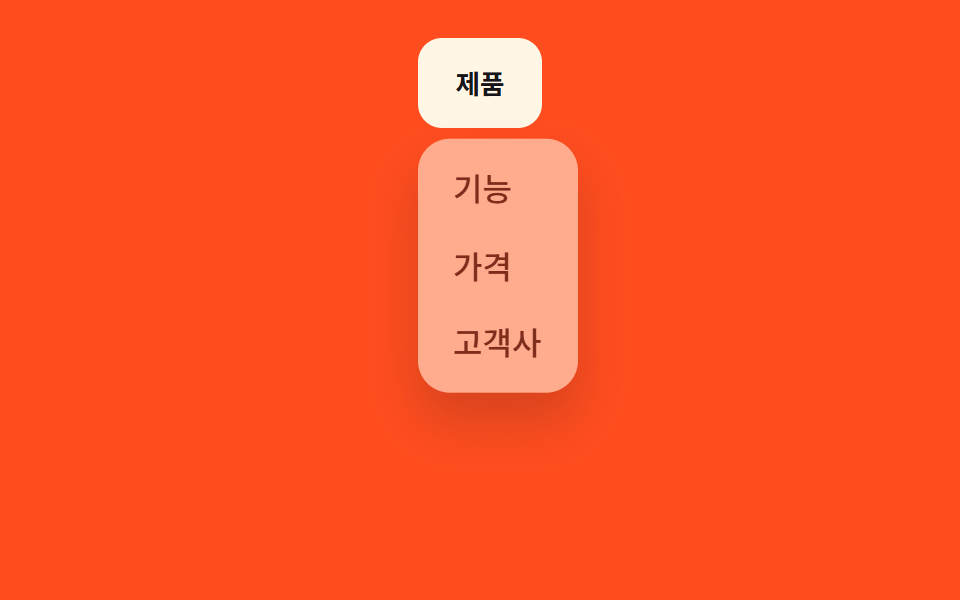
カーソルが素通りしただけでは開かないよう、transition-delay で進入後150ms待ってからメニューを開く。
使いどころ横に並んだ複数のヘッダーメニュー、誤って開いてはいけないナビゲーション
transition-delay150ms 지연:hover 진입
<main class="stage">
  <nav class="menu is-demo">
    <button class="menu__trigger" type="button" aria-expanded="false">製品</button>
    <ul class="menu__panel">
      <li><a href="#">機能</a></li>
      <li><a href="#">料金</a></li>
      <li><a href="#">導入企業</a></li>
    </ul>
  </nav>
</main>
@use "../../../../site/static/demo-tokens" as *;
$duration: $dur-quick; // 열리고 닫히는 시간
$easing: $ease-out; // 시작 빠르고 끝은 부드럽게
$delay: 150ms; // 진입 후 기다리는 시간 (닫힐 땐 지연 없음)
$color: $subject-cream; // 트리거 버튼 색 (주황 무대와 대비)
@include stage($stage-orange);
.menu {
position: relative;
align-self: flex-start; // 패널이 트리거 아래로 열려 무대 중앙에 두면 아래로 넘친다 — 위로 붙여 여유를 둔다 (실측 320px 재검증 2026-09-10)
font-weight: 500;
font-size: clamp(13px, 3.6vw, 16px);
line-height: 1.4;
font-family: inherit;
&__trigger {
border: 0;
border-radius: $r-control;
padding: clamp(9px, 3vw, 13px) clamp(16px, 4vw, 22px);
font-weight: 700;
font-family: inherit;
color: $stage-ink;
background: $color;
cursor: pointer;
}
&__panel {
position: absolute;
top: calc(100% + 8px);
left: 0;
width: max-content;
max-width: min(150px, 76vw);
margin: 0;
padding: 6px;
list-style: none;
background: $subject-cream;
border-radius: $r-card;
box-shadow: $shadow-raised;
opacity: 0;
transform: translateY(-6px);
pointer-events: none;
transition: opacity $duration $easing, transform $duration $easing; // 닫힐 때는 지연 없이 바로
}
&__panel li a {
display: block;
padding: 8px 12px;
border-radius: $r-control - 4px;
color: $stage-ink;
text-decoration: none;
}
&__panel li a:hover { background: rgba($stage-ink, .06); }
// 마우스가 지나가기만 해선 안 열리게 — 진입 후 $delay 를 기다렸다가 연다
&:hover &__panel,
&.is-open &__panel {
opacity: 1;
transform: none;
pointer-events: auto;
transition-delay: $delay;
}
&.is-demo &__panel { animation: reveal-loop $dur-loop $easing infinite; }
}
@keyframes reveal-loop {
0%, 40% { opacity: 0; transform: translateY(-6px); }
55%, 80% { opacity: 1; transform: none; }
95%, 100% { opacity: 0; transform: translateY(-6px); }
}
@media (prefers-reduced-motion: reduce) {
.menu__panel { transition: none !important; }
.menu.is-demo .menu__panel { animation: none; opacity: 0; transform: none; }
}html, body {
margin: 0;
overflow: hidden;
}
.stage {
box-sizing: border-box;
min-height: 100vh;
display: grid;
place-items: center;
margin: 0;
background: #ff4d1f;
font-family: -apple-system, "Segoe UI", "Noto Sans KR", sans-serif;
padding: clamp(8px, 4vw, 24px);
}
.menu {
position: relative;
align-self: flex-start;
font-weight: 500;
font-size: clamp(13px, 3.6vw, 16px);
line-height: 1.4;
font-family: inherit;
}
.menu__trigger {
border: 0;
border-radius: 12px;
padding: clamp(9px, 3vw, 13px) clamp(16px, 4vw, 22px);
font-weight: 700;
font-family: inherit;
color: #17141a;
background: #fff7e6;
cursor: pointer;
}
.menu__panel {
position: absolute;
top: calc(100% + 8px);
left: 0;
width: max-content;
max-width: min(150px, 76vw);
margin: 0;
padding: 6px;
list-style: none;
background: #fff7e6;
border-radius: 16px;
box-shadow: 0 14px 24px rgba(23, 20, 26, 0.32);
opacity: 0;
transform: translateY(-6px);
pointer-events: none;
transition: opacity 220ms ease-out, transform 220ms ease-out;
}
.menu__panel li a {
display: block;
padding: 8px 12px;
border-radius: 8px;
color: #17141a;
text-decoration: none;
}
.menu__panel li a:hover {
background: rgba(23, 20, 26, 0.06);
}
.menu:hover .menu__panel, .menu.is-open .menu__panel {
opacity: 1;
transform: none;
pointer-events: auto;
transition-delay: 150ms;
}
.menu.is-demo .menu__panel {
animation: reveal-loop 2s ease-out infinite;
}
@keyframes reveal-loop {
0%, 40% {
opacity: 0;
transform: translateY(-6px);
}
55%, 80% {
opacity: 1;
transform: none;
}
95%, 100% {
opacity: 0;
transform: translateY(-6px);
}
}
@media (prefers-reduced-motion: reduce) {
.menu__panel {
transition: none !important;
}
.menu.is-demo .menu__panel {
animation: none;
opacity: 0;
transform: none;
}
}// 데스크톱은 :hover + transition-delay 로만 연다(아래 CSS). 터치 화면을 위해 클릭 토글도 둔다.
var m = document.querySelector('.menu'), t = m.querySelector('.menu__trigger');
t.addEventListener('click', function () {
m.classList.remove('is-demo');
t.setAttribute('aria-expanded', m.classList.toggle('is-open'));
});import { useState } from "react";
import type { CSSProperties } from "react";
import styles from "./HoverIntentDropdown.module.scss";
export type HoverIntentDropdownProps = {
triggerLabel: string;
items: string[];
/** 열리고 닫히는 시간 (기본 220ms) */
duration?: number;
easing?: string;
/** 진입 후 기다리는 시간 (기본 150ms, 닫힐 땐 지연 없음) */
delay?: number;
color?: string;
};
type Vars = CSSProperties & { "--duration"?: string; "--easing"?: string; "--delay"?: string; "--color"?: string };
export default function HoverIntentDropdown({
triggerLabel,
items,
duration = 220,
easing = "ease-out",
delay = 150,
color = "#fff7e6",
}: HoverIntentDropdownProps) {
const [open, setOpen] = useState(false);
const vars: Vars = { "--duration": `${duration}ms`, "--easing": easing, "--delay": `${delay}ms`, "--color": color };
return (
// 데스크톱은 CSS :hover 만으로 지연 열림이 동작한다. 터치 화면을 위해 클릭 토글도 겸한다.
<nav className={styles.menu} style={vars} onClick={() => setOpen((v) => !v)}>
<button type="button" className={styles.trigger} aria-expanded={open}>{triggerLabel}</button>
<ul className={open ? `${styles.panel} ${styles.panelOpen}` : styles.panel}>
{items.map((label) => (
<li key={label}><a href="#">{label}</a></li>
))}
</ul>
</nav>
);
}07 遅延して開く(transition-delay) — 計測 累積面積 10.278% · 動いたフレーム 8/23GODRICH オリジナル · SCSS と React は zip に同梱 · CSS ドロップダウン メニュー アニメーション 9選 — JS最小・CSSだけ
このデモが属する記事
 CSS ドロップダウン メニュー アニメーション 9選 — JS最小・CSSだけcss ドロップダウン メニューは、クリックやホバーで隠れていた選択肢を高さや透明度の変化で見せる、CSSだけで動くナビゲーション部品です。この記事では9種類を選び、grid-template-rows・clip-path・popover属 この記事のデモをすべて見る