CSS ドロップダウン メニュー アニメーション 9選 — JS最小・CSSだけ
css ドロップダウン メニューは、クリックやホバーで隠れていた選択肢を高さや透明度の変化で見せる、CSSだけで動くナビゲーション部品です。この記事では9種類を選び、grid-template-rows・clip-path・popover属性という異なる仕組みで開閉を実装しました。
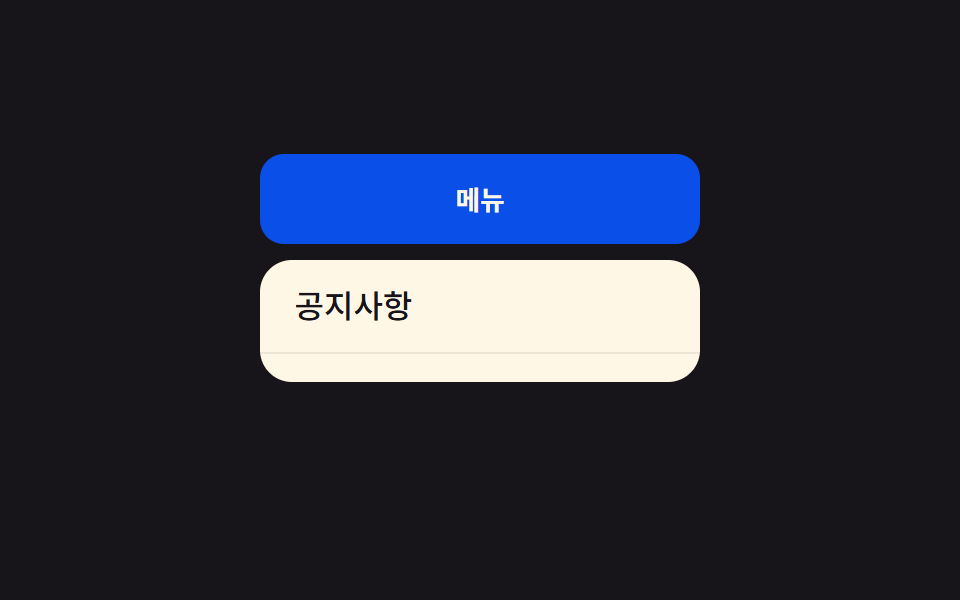 01 dropdown-menu-height-auto
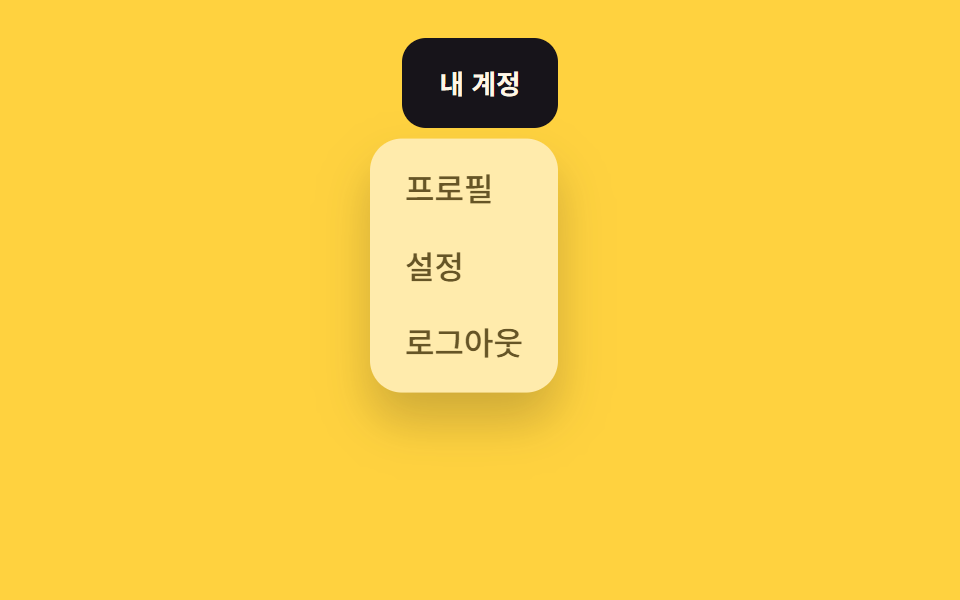 02 dropdown-menu-fade-slide
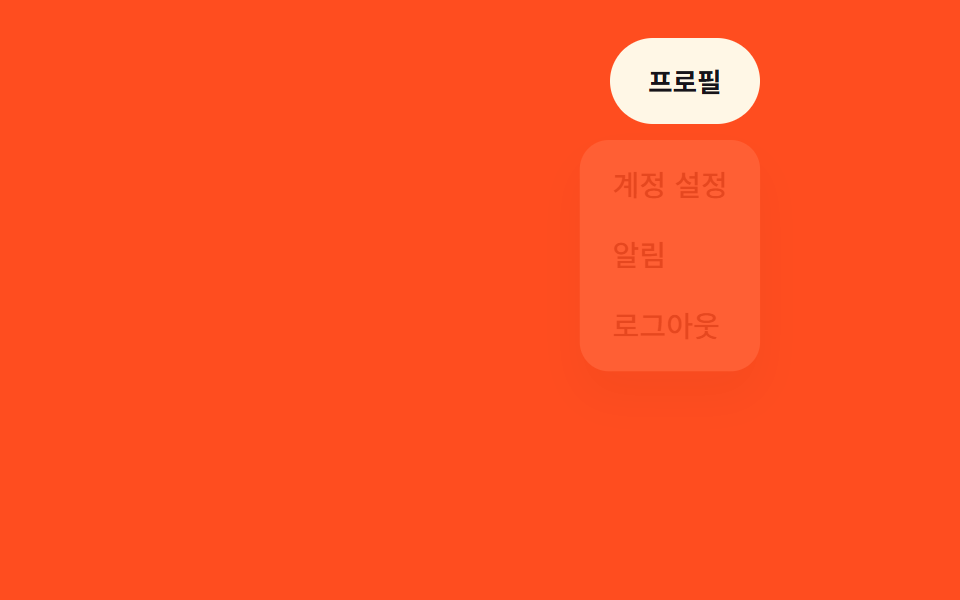 03 dropdown-menu-scale-origin
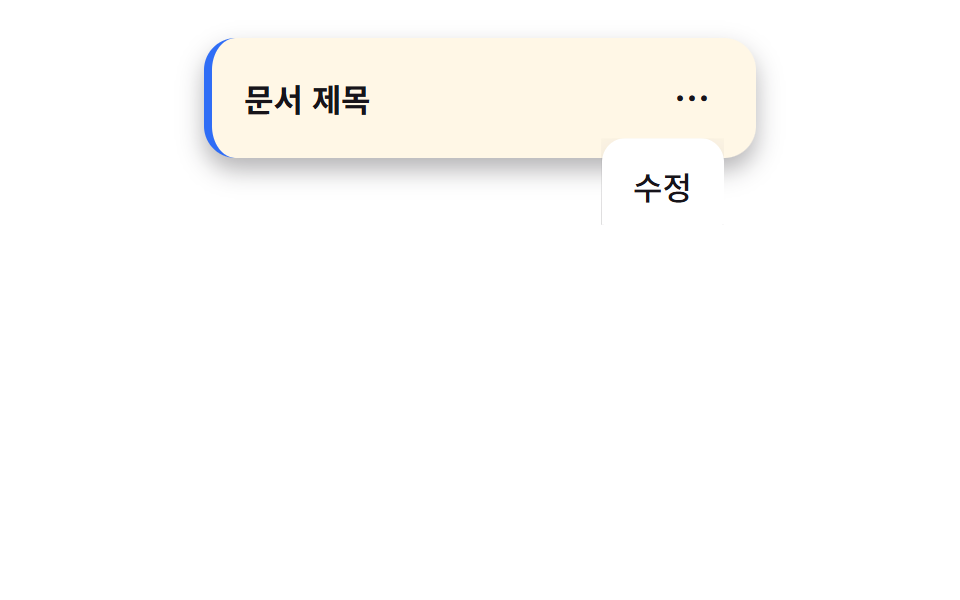 04 dropdown-menu-clip-open
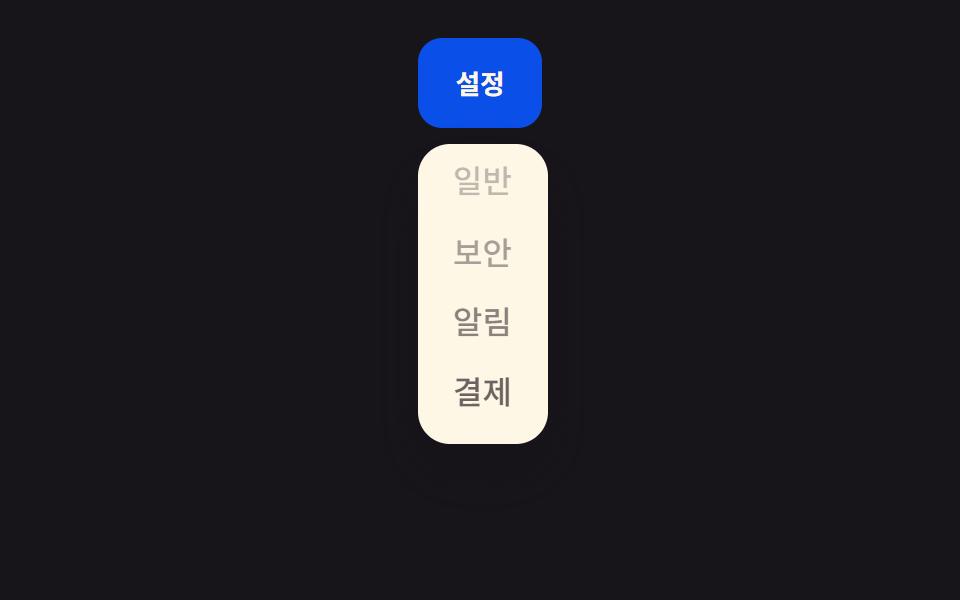 05 dropdown-menu-stagger-items
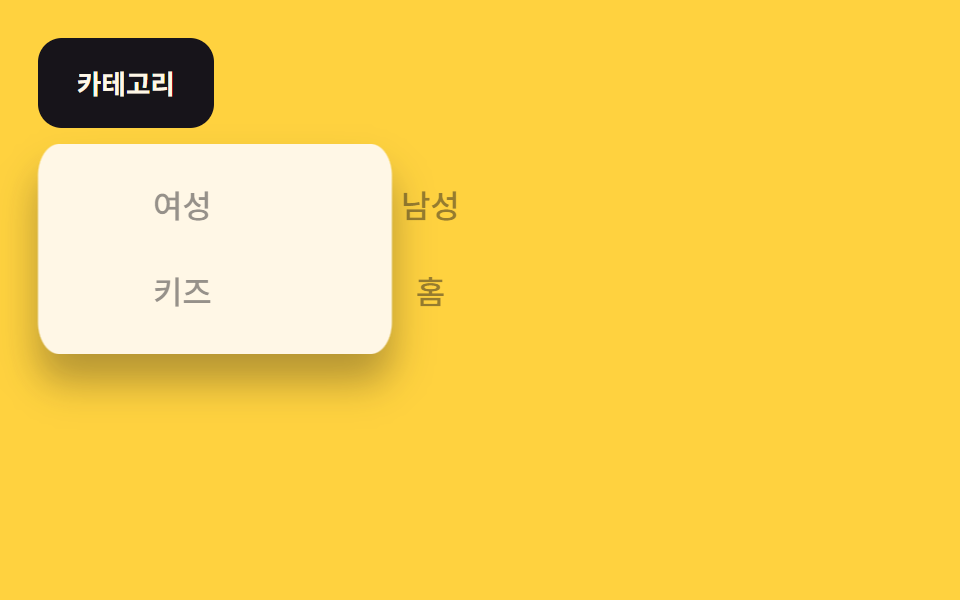 06 dropdown-menu-mega-menu-fill
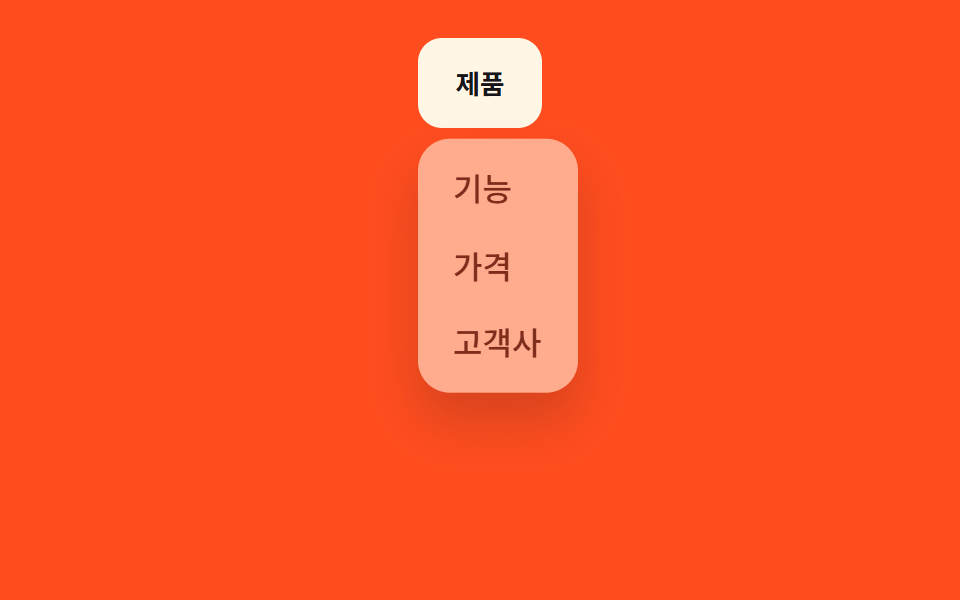 07 dropdown-menu-hover-intent-delay
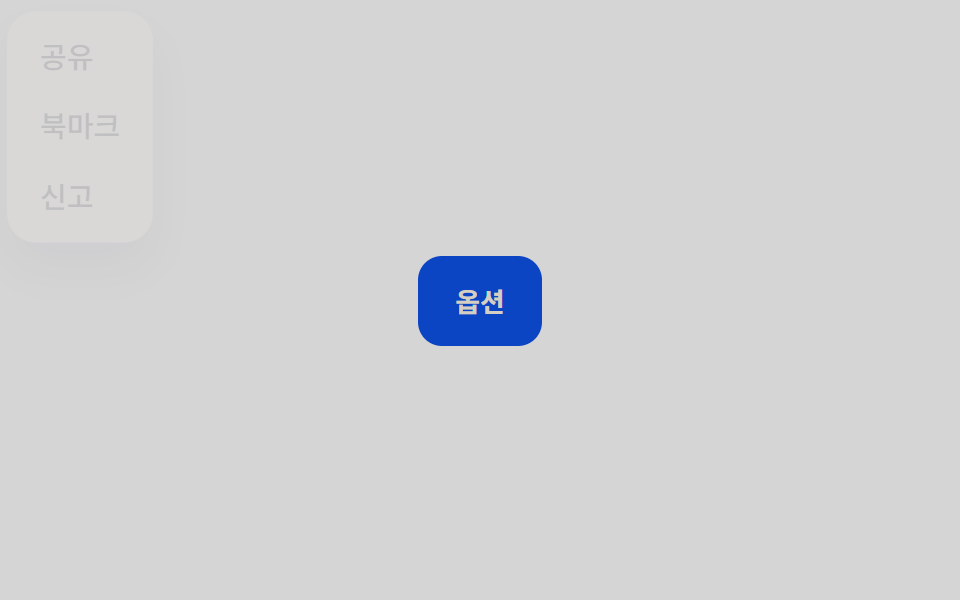 08 dropdown-menu-popover-native
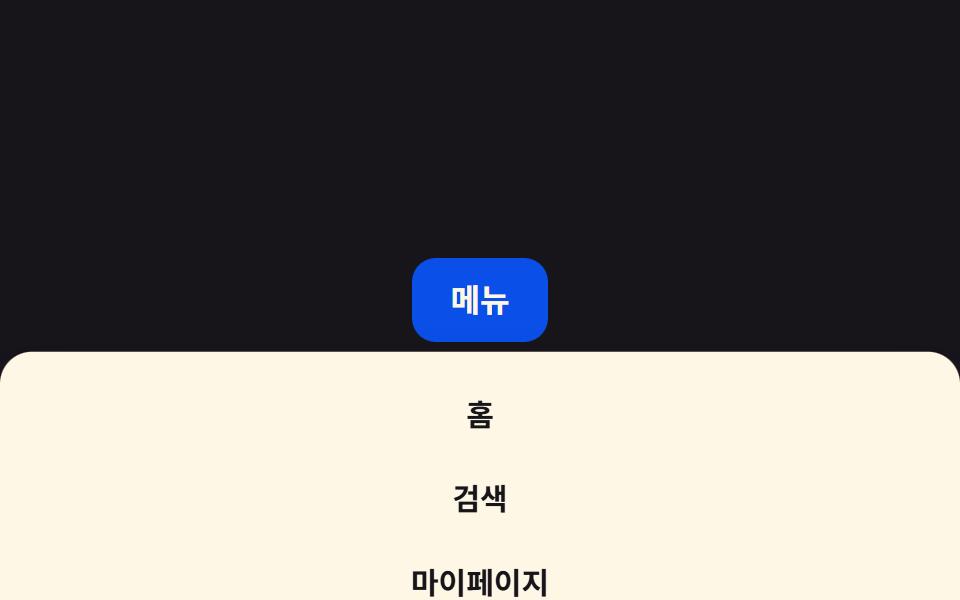 09 dropdown-menu-mobile-full-sheet
自動再生 · タイルを押すとその項目へ · すべて1つのzip
- 01 height:auto遷移
- 02 フェード+スライド
- 03 角を起点に拡大
- 04 クリップパスで開く
- 05 項目が順番に表示
- 06 メガメニュー背景の塗りつぶし
- 07 遅延して開く(transition-delay)
- 08 popover属性を使用
- 09 モバイル全画面シート
並び順は効果の派手さではなく、開閉を作る仕組みの難易度です。まずheight:autoをgrid-template-rowsで擬似的に再現する基本形から始め(01)、それを不透明度と縦の移動に置き換え(02)、拡大の起点をトリガー側の角に寄せ(03)、clip-pathで切り出す形に変え(04)、項目ごとに時差をつける発展形を重ね(05)、最後に背景の塗りつぶし・ホバー遅延・popover属性・モバイル全画面シートという実際の場面への転用を並べました(06〜09)。9つとも実際の高さや座標の数値を直接書き換えるのではなく、grid-template-rows・opacity・transform・clip-pathという補間できる値だけを動かしています。 項目が下へ積み重なる向きならCSS アコーディオン アニメーション 9選が01のグリッドのトリックをさらに掘り下げ、クリックの後に浮かんで消す知らせが必要ならトースト通知 css アニメーション9選がその役割です。
01height:auto遷移
動きの内容
パネルの.menu__panelがgrid-template-rowsを0frから1frへ0.3秒かけて動かし、内側の.menu__listにoverflow: hiddenを付けることで、height:autoを直接アニメーションできないCSSの制約を回避しています。
<main class="stage">
  <nav class="menu is-demo">
    <button class="menu__trigger" type="button" aria-expanded="false">メニュー</button>
    <div class="menu__panel">
      <ul class="menu__list">
        <li><a href="#">お知らせ</a></li>
        <li><a href="#">よくある質問</a></li>
        <li><a href="#">サポート</a></li>
      </ul>
    </div>
  </nav>
</main>
@use "../../../../site/static/demo-tokens" as *;
$duration: $dur-base; // 패널이 늘어나는 시간
$easing: $ease-out; // 시작 빠르고 끝은 부드럽게
$color: $subject-blue-deep; // 트리거 버튼 색 (크림 글자가 얹히므로 진한 파랑)
@include stage($stage-ink);
.menu {
position: relative;
width: min(220px, 90vw);
font-weight: 500;
font-size: clamp(13px, 3.6vw, 16px);
line-height: 1.4;
font-family: inherit;
&__trigger {
width: 100%;
border: 0;
border-radius: $r-control;
padding: clamp(9px, 3vw, 13px) clamp(16px, 4vw, 22px);
font-weight: 700;
font-family: inherit;
color: $subject-cream;
background: $color;
cursor: pointer;
}
&__panel {
display: grid;
grid-template-rows: 0fr; // height:auto 를 흉내내는 트릭. 0fr↔1fr 만 움직인다
transition: grid-template-rows $duration $easing;
margin-top: 8px;
}
&__list {
overflow: hidden; // grid-template-rows 트릭엔 자식에 overflow:hidden 이 필수
min-height: 0;
margin: 0;
padding: 0;
list-style: none;
background: $subject-cream;
border-radius: $r-card;
}
&__list li a {
display: block;
padding: clamp(8px, 2.6vw, 12px) clamp(12px, 3.6vw, 18px);
color: $stage-ink;
text-decoration: none;
border-bottom: 1px solid rgba($stage-ink, .08);
}
&__list li:last-child a { border-bottom: 0; }
&.is-demo &__panel { animation: reveal-loop $dur-loop $easing infinite; }
&.is-open &__panel { animation: none; grid-template-rows: 1fr; }
}
@keyframes reveal-loop {
0%, 30% { grid-template-rows: 0fr; }
45%, 80% { grid-template-rows: 1fr; }
95%, 100% { grid-template-rows: 0fr; }
}
@media (prefers-reduced-motion: reduce) {
.menu__panel { transition: none; }
.menu.is-demo .menu__panel { animation: none; grid-template-rows: 0fr; }
}html, body {
margin: 0;
overflow: hidden;
}
.stage {
box-sizing: border-box;
min-height: 100vh;
display: grid;
place-items: center;
margin: 0;
background: #17141a;
font-family: -apple-system, "Segoe UI", "Noto Sans KR", sans-serif;
padding: clamp(8px, 4vw, 24px);
}
.menu {
position: relative;
width: min(220px, 90vw);
font-weight: 500;
font-size: clamp(13px, 3.6vw, 16px);
line-height: 1.4;
font-family: inherit;
}
.menu__trigger {
width: 100%;
border: 0;
border-radius: 12px;
padding: clamp(9px, 3vw, 13px) clamp(16px, 4vw, 22px);
font-weight: 700;
font-family: inherit;
color: #fff7e6;
background: #0a4fe8;
cursor: pointer;
}
.menu__panel {
display: grid;
grid-template-rows: 0fr;
transition: grid-template-rows 300ms ease-out;
margin-top: 8px;
}
.menu__list {
overflow: hidden;
min-height: 0;
margin: 0;
padding: 0;
list-style: none;
background: #fff7e6;
border-radius: 16px;
}
.menu__list li a {
display: block;
padding: clamp(8px, 2.6vw, 12px) clamp(12px, 3.6vw, 18px);
color: #17141a;
text-decoration: none;
border-bottom: 1px solid rgba(23, 20, 26, 0.08);
}
.menu__list li:last-child a {
border-bottom: 0;
}
.menu.is-demo .menu__panel {
animation: reveal-loop 2s ease-out infinite;
}
.menu.is-open .menu__panel {
animation: none;
grid-template-rows: 1fr;
}
@keyframes reveal-loop {
0%, 30% {
grid-template-rows: 0fr;
}
45%, 80% {
grid-template-rows: 1fr;
}
95%, 100% {
grid-template-rows: 0fr;
}
}
@media (prefers-reduced-motion: reduce) {
.menu__panel {
transition: none;
}
.menu.is-demo .menu__panel {
animation: none;
grid-template-rows: 0fr;
}
}// 실제 클릭으로도 열고 닫힌다. 데모(.is-demo)는 스스로 반복하다가 사람이 누르면 멈추고 수동 토글로 바뀐다.
var m = document.querySelector('.menu');
var t = m.querySelector('.menu__trigger');
t.addEventListener('click', function () {
m.classList.remove('is-demo');
var open = m.classList.toggle('is-open');
t.setAttribute('aria-expanded', open);
});import { useState } from "react";
import type { CSSProperties } from "react";
import styles from "./HeightAutoDropdown.module.scss";
export type HeightAutoDropdownProps = {
triggerLabel: string;
items: string[];
/** 패널이 늘어나는 시간 (기본 300ms) */
duration?: number;
easing?: string;
color?: string;
};
type Vars = CSSProperties & { "--duration"?: string; "--easing"?: string; "--color"?: string };
export default function HeightAutoDropdown({
triggerLabel,
items,
duration = 300,
easing = "ease-out",
color = "#0a4fe8",
}: HeightAutoDropdownProps) {
const [open, setOpen] = useState(false);
const vars: Vars = { "--duration": `${duration}ms`, "--easing": easing, "--color": color };
return (
<nav className={styles.menu} style={vars}>
<button
type="button"
className={styles.trigger}
aria-expanded={open}
onClick={() => setOpen((v) => !v)}
>
{triggerLabel}
</button>
<div className={open ? `${styles.panel} ${styles.panelOpen}` : styles.panel}>
<ul className={styles.list}>
{items.map((label) => (
<li key={label}><a href="#">{label}</a></li>
))}
</ul>
</div>
</nav>
);
}01 · height:auto遷移 — 計測 累積面積 29.538% · 動いたフレーム 8/23GODRICH オリジナル · SCSS と React は zip に同梱 · パスワードを見る
使う場面
ナビゲーションのドロップダウンや、フィルターと兼用するアコーディオンに向いています。
.menu__panel {
  display: grid;
  grid-template-rows: 0fr;
  transition: grid-template-rows .3s ease-out;
  margin-top: 8px;
}

.menu__list {
  overflow: hidden;
  min-height: 0;
}

.menu.is-open .menu__panel {
  grid-template-rows: 1fr;
}
02フェード+スライド
どんな動きか
パネルが不透明度0から1へ変わると同時に、8px上の位置から下の定位置へ0.22秒かけて滑り込み、唐突に現れる印象を和らげます。
<main class="stage">
  <nav class="menu is-demo">
    <button class="menu__trigger" type="button" aria-expanded="false">マイアカウント</button>
    <ul class="menu__panel">
      <li><a href="#">プロフィール</a></li>
      <li><a href="#">設定</a></li>
      <li><a href="#">ログアウト</a></li>
    </ul>
  </nav>
</main>
@use "../../../../site/static/demo-tokens" as *;
$duration: $dur-quick; // 페이드+슬라이드 시간
$easing: $ease-out; // 시작 빠르고 끝은 부드럽게
$color: $stage-ink; // 트리거 버튼 색 (노란 무대와 대비)
@include stage($stage-yellow);
.menu {
position: relative;
align-self: flex-start; // 패널이 트리거 아래로 열려 무대 중앙에 두면 320px 에서 아래로 넘친다 — 위로 붙여 여유를 둔다 (실측 320px 재검증 2026-09-10)
font-weight: 500;
font-size: clamp(13px, 3.6vw, 16px);
line-height: 1.4;
font-family: inherit;
&__trigger {
border: 0;
border-radius: $r-control;
padding: clamp(9px, 3vw, 13px) clamp(16px, 4vw, 22px);
font-weight: 700;
font-family: inherit;
color: $subject-cream;
background: $color;
cursor: pointer;
}
&__panel {
position: absolute;
top: calc(100% + 8px);
right: 0;
width: max-content;
max-width: min(180px, 78vw);
margin: 0;
padding: 6px;
list-style: none;
background: $subject-cream;
border-radius: $r-card;
box-shadow: $shadow-raised;
opacity: 0;
transform: translateY(-8px); // transform · opacity 만 움직인다
pointer-events: none;
}
&__panel li a {
display: block;
padding: 8px 12px;
border-radius: $r-control - 4px;
color: $stage-ink;
text-decoration: none;
}
&__panel li a:hover { background: rgba($stage-ink, .06); }
&.is-open &__panel { opacity: 1; transform: translateY(0); pointer-events: auto; transition: opacity $duration $easing, transform $duration $easing; }
&.is-demo &__panel { animation: reveal-loop $dur-loop $easing infinite; }
}
@keyframes reveal-loop {
0%, 30% { opacity: 0; transform: translateY(-8px); }
45%, 80% { opacity: 1; transform: translateY(0); }
95%, 100% { opacity: 0; transform: translateY(-8px); }
}
@media (prefers-reduced-motion: reduce) {
.menu__panel { transition: none !important; }
.menu.is-demo .menu__panel { animation: none; opacity: 0; transform: none; }
}html, body {
margin: 0;
overflow: hidden;
}
.stage {
box-sizing: border-box;
min-height: 100vh;
display: grid;
place-items: center;
margin: 0;
background: #ffd23f;
font-family: -apple-system, "Segoe UI", "Noto Sans KR", sans-serif;
padding: clamp(8px, 4vw, 24px);
}
.menu {
position: relative;
align-self: flex-start;
font-weight: 500;
font-size: clamp(13px, 3.6vw, 16px);
line-height: 1.4;
font-family: inherit;
}
.menu__trigger {
border: 0;
border-radius: 12px;
padding: clamp(9px, 3vw, 13px) clamp(16px, 4vw, 22px);
font-weight: 700;
font-family: inherit;
color: #fff7e6;
background: #17141a;
cursor: pointer;
}
.menu__panel {
position: absolute;
top: calc(100% + 8px);
right: 0;
width: max-content;
max-width: min(180px, 78vw);
margin: 0;
padding: 6px;
list-style: none;
background: #fff7e6;
border-radius: 16px;
box-shadow: 0 14px 24px rgba(23, 20, 26, 0.32);
opacity: 0;
transform: translateY(-8px);
pointer-events: none;
}
.menu__panel li a {
display: block;
padding: 8px 12px;
border-radius: 8px;
color: #17141a;
text-decoration: none;
}
.menu__panel li a:hover {
background: rgba(23, 20, 26, 0.06);
}
.menu.is-open .menu__panel {
opacity: 1;
transform: translateY(0);
pointer-events: auto;
transition: opacity 220ms ease-out, transform 220ms ease-out;
}
.menu.is-demo .menu__panel {
animation: reveal-loop 2s ease-out infinite;
}
@keyframes reveal-loop {
0%, 30% {
opacity: 0;
transform: translateY(-8px);
}
45%, 80% {
opacity: 1;
transform: translateY(0);
}
95%, 100% {
opacity: 0;
transform: translateY(-8px);
}
}
@media (prefers-reduced-motion: reduce) {
.menu__panel {
transition: none !important;
}
.menu.is-demo .menu__panel {
animation: none;
opacity: 0;
transform: none;
}
}// 트리거 클릭으로 열고, メニュー 바깥을 클릭하면 닫힌다. 데모(.is-demo)는 스스로 반복한다.
var m = document.querySelector('.menu'), t = m.querySelector('.menu__trigger');
t.addEventListener('click', function () {
m.classList.remove('is-demo');
t.setAttribute('aria-expanded', m.classList.toggle('is-open'));
});
document.addEventListener('pointerdown', function (e) {
if (!m.contains(e.target)) { m.classList.remove('is-open'); t.setAttribute('aria-expanded', false); }
});import { useEffect, useRef, useState } from "react";
import type { CSSProperties } from "react";
import styles from "./FadeSlideDropdown.module.scss";
export type FadeSlideDropdownProps = {
triggerLabel: string;
items: string[];
/** 페이드+슬라이드 시간 (기본 220ms) */
duration?: number;
easing?: string;
color?: string;
};
type Vars = CSSProperties & { "--duration"?: string; "--easing"?: string; "--color"?: string };
export default function FadeSlideDropdown({
triggerLabel,
items,
duration = 220,
easing = "ease-out",
color = "#17141a",
}: FadeSlideDropdownProps) {
const [open, setOpen] = useState(false);
const ref = useRef<HTMLElement>(null);
const vars: Vars = { "--duration": `${duration}ms`, "--easing": easing, "--color": color };
useEffect(() => {
function onDown(e: PointerEvent) {
if (ref.current && !ref.current.contains(e.target as Node)) setOpen(false);
}
document.addEventListener("pointerdown", onDown);
return () => document.removeEventListener("pointerdown", onDown);
}, []);
return (
<nav className={styles.menu} style={vars} ref={ref}>
<button type="button" className={styles.trigger} aria-expanded={open} onClick={() => setOpen((v) => !v)}>
{triggerLabel}
</button>
<ul className={open ? `${styles.panel} ${styles.panelOpen}` : styles.panel}>
{items.map((label) => (
<li key={label}><a href="#">{label}</a></li>
))}
</ul>
</nav>
);
}02 · フェード+スライド — 計測 累積面積 11.872% · 動いたフレーム 8/23GODRICH オリジナル · SCSS と React は zip に同梱 · パスワードを見る
使いどころ
ヘッダーのアカウントメニューや、上部ナビのドロップダウンに向いています。
.menu__panel {
  opacity: 0;
  transform: translateY(-8px);
  pointer-events: none;
}

.menu.is-open .menu__panel {
  opacity: 1;
  transform: translateY(0);
  pointer-events: auto;
  transition: opacity .22s ease-out, transform .22s ease-out;
}
03角を起点に拡大
何が起きるか
transform-originをトリガーに近い右上の角に固定し、scale(.9)からscale(1)へ0.22秒で拡大します。
<main class="stage">
  <div class="toolbar">
    <nav class="menu is-demo">
      <button class="menu__trigger" type="button" aria-expanded="false">プロフィール</button>
      <ul class="menu__panel">
        <li><a href="#">アカウント設定</a></li>
        <li><a href="#">通知</a></li>
        <li><a href="#">ログアウト</a></li>
      </ul>
    </nav>
  </div>
</main>
@use "../../../../site/static/demo-tokens" as *;
$duration: $dur-quick; // 확대되는 시간
$easing: $ease-pop; // 살짝 튀는 이징
$color: $subject-cream; // 트리거 버튼 색 (주황 무대와 대비)
@include stage($stage-orange);
.toolbar {
width: min(280px, 92vw);
display: flex;
justify-content: flex-end;
align-self: flex-start; // 패널이 트리거 아래로 열려 무대 중앙에 두면 320px 에서 아래로 넘친다 — 위로 붙여 여유를 둔다 (실측 320px 재검증 2026-09-10)
}
.menu {
position: relative;
font-weight: 500;
font-size: clamp(13px, 3.6vw, 16px);
line-height: 1.4;
font-family: inherit;
&__trigger {
border: 0;
border-radius: $r-pill;
padding: clamp(9px, 3vw, 12px) clamp(16px, 4vw, 20px);
font-weight: 700;
font-family: inherit;
color: $stage-ink;
background: $color;
cursor: pointer;
}
&__panel {
position: absolute;
top: calc(100% + 8px);
right: 0; // 트리거가 붙은 모서리
width: max-content;
max-width: min(170px, 76vw);
margin: 0;
padding: 6px;
list-style: none;
background: $subject-cream;
border-radius: $r-card;
box-shadow: $shadow-raised;
transform-origin: top right; // 트리거 모서리를 기준으로 확대
transform: scale(.9);
opacity: 0;
pointer-events: none;
}
&__panel li a {
display: block;
padding: 8px 12px;
border-radius: $r-control - 4px;
color: $stage-ink;
text-decoration: none;
}
&__panel li a:hover { background: rgba($stage-ink, .06); }
&.is-open &__panel { opacity: 1; transform: scale(1); pointer-events: auto; transition: opacity $duration $easing, transform $duration $easing; }
&.is-demo &__panel { animation: reveal-loop $dur-loop $easing infinite; }
}
@keyframes reveal-loop {
0%, 30% { opacity: 0; transform: scale(.9); }
45%, 80% { opacity: 1; transform: scale(1); }
95%, 100% { opacity: 0; transform: scale(.9); }
}
@media (prefers-reduced-motion: reduce) {
.menu__panel { transition: none !important; }
.menu.is-demo .menu__panel { animation: none; opacity: 0; transform: scale(.9); }
}html, body {
margin: 0;
overflow: hidden;
}
.stage {
box-sizing: border-box;
min-height: 100vh;
display: grid;
place-items: center;
margin: 0;
background: #ff4d1f;
font-family: -apple-system, "Segoe UI", "Noto Sans KR", sans-serif;
padding: clamp(8px, 4vw, 24px);
}
.toolbar {
width: min(280px, 92vw);
display: flex;
justify-content: flex-end;
align-self: flex-start;
}
.menu {
position: relative;
font-weight: 500;
font-size: clamp(13px, 3.6vw, 16px);
line-height: 1.4;
font-family: inherit;
}
.menu__trigger {
border: 0;
border-radius: 999px;
padding: clamp(9px, 3vw, 12px) clamp(16px, 4vw, 20px);
font-weight: 700;
font-family: inherit;
color: #17141a;
background: #fff7e6;
cursor: pointer;
}
.menu__panel {
position: absolute;
top: calc(100% + 8px);
right: 0;
width: max-content;
max-width: min(170px, 76vw);
margin: 0;
padding: 6px;
list-style: none;
background: #fff7e6;
border-radius: 16px;
box-shadow: 0 14px 24px rgba(23, 20, 26, 0.32);
transform-origin: top right;
transform: scale(0.9);
opacity: 0;
pointer-events: none;
}
.menu__panel li a {
display: block;
padding: 8px 12px;
border-radius: 8px;
color: #17141a;
text-decoration: none;
}
.menu__panel li a:hover {
background: rgba(23, 20, 26, 0.06);
}
.menu.is-open .menu__panel {
opacity: 1;
transform: scale(1);
pointer-events: auto;
transition: opacity 220ms cubic-bezier(0.2, 1.4, 0.4, 1), transform 220ms cubic-bezier(0.2, 1.4, 0.4, 1);
}
.menu.is-demo .menu__panel {
animation: reveal-loop 2s cubic-bezier(0.2, 1.4, 0.4, 1) infinite;
}
@keyframes reveal-loop {
0%, 30% {
opacity: 0;
transform: scale(0.9);
}
45%, 80% {
opacity: 1;
transform: scale(1);
}
95%, 100% {
opacity: 0;
transform: scale(0.9);
}
}
@media (prefers-reduced-motion: reduce) {
.menu__panel {
transition: none !important;
}
.menu.is-demo .menu__panel {
animation: none;
opacity: 0;
transform: scale(0.9);
}
}// 트리거를 클릭하면 열리고 닫힌다. 데모(.is-demo)는 스스로 반복한다.
var m = document.querySelector('.menu'), t = m.querySelector('.menu__trigger');
t.addEventListener('click', function () {
m.classList.remove('is-demo');
t.setAttribute('aria-expanded', m.classList.toggle('is-open'));
});import { useState } from "react";
import type { CSSProperties } from "react";
import styles from "./ScaleOriginDropdown.module.scss";
export type ScaleOriginDropdownProps = {
triggerLabel: string;
items: string[];
/** 확대되는 시간 (기본 220ms) */
duration?: number;
easing?: string;
color?: string;
};
type Vars = CSSProperties & { "--duration"?: string; "--easing"?: string; "--color"?: string };
export default function ScaleOriginDropdown({
triggerLabel,
items,
duration = 220,
easing = "cubic-bezier(.2,1.4,.4,1)",
color = "#fff7e6",
}: ScaleOriginDropdownProps) {
const [open, setOpen] = useState(false);
const vars: Vars = { "--duration": `${duration}ms`, "--easing": easing, "--color": color };
return (
<nav className={styles.menu} style={vars}>
<button type="button" className={styles.trigger} aria-expanded={open} onClick={() => setOpen((v) => !v)}>
{triggerLabel}
</button>
<ul className={open ? `${styles.panel} ${styles.panelOpen}` : styles.panel}>
{items.map((label) => (
<li key={label}><a href="#">{label}</a></li>
))}
</ul>
</nav>
);
}03 · 角を起点に拡大 — 計測 累積面積 12.244% · 動いたフレーム 6/23GODRICH オリジナル · SCSS と React は zip に同梱 · パスワードを見る
向いている場面
跳ねるようなcubic-bezierを使っているため、開いた瞬間にわずかな弾みが付きます。右上のプロフィールメニューや、ツールバーのオプションメニューに向いています。
.menu__panel {
  transform-origin: top right;
  transform: scale(.9);
  opacity: 0;
}

.menu.is-open .menu__panel {
  transform: scale(1);
  opacity: 1;
  transition: transform .22s cubic-bezier(.2, 1.4, .4, 1),
              opacity .22s cubic-bezier(.2, 1.4, .4, 1);
}
04クリップパスで開く
動きの内容
clip-pathの矩形がinset(0 0 100% 0)からinset(0 0 0% 0)へ0.3秒かけて動き、パネルの中身を上から切り出すように見せます。
<main class="stage">
  <div class="card">
    <span class="card__title">ドキュメントのタイトル</span>
    <nav class="menu is-demo">
      <button class="menu__trigger" type="button" aria-expanded="false" aria-label="もっと見る">⋯</button>
      <ul class="menu__panel">
        <li><a href="#">編集</a></li>
        <li><a href="#">複製</a></li>
        <li><a href="#">削除</a></li>
      </ul>
    </nav>
  </div>
</main>
@use "../../../../site/static/demo-tokens" as *;
$duration: $dur-base; // 클립이 펼쳐지는 시간
$easing: $ease-out; // 시작 빠르고 끝은 부드럽게
$color: $subject-blue; // 문서 카드 강조 색
@include stage($stage-paper);
.card {
position: relative;
align-self: flex-start; // 패널이 트리거 아래로 열려 무대 중앙에 두면 320px 에서 아래로 넘친다 — 위로 붙여 여유를 둔다 (실측 320px 재검증 2026-09-10)
width: min(240px, 88vw);
display: flex;
align-items: center;
justify-content: space-between;
padding: 14px 16px;
border-radius: $r-card;
background: $subject-cream;
box-shadow: $shadow-press;
font-weight: 600;
font-size: clamp(13px, 3.6vw, 16px);
line-height: 1.2;
font-family: inherit;
color: $stage-ink;
border-left: 4px solid $color;
}
.menu {
position: relative;
font-weight: 500;
font-size: clamp(13px, 3.6vw, 16px);
line-height: 1.4;
font-family: inherit;
&__trigger {
border: 0;
border-radius: $r-control;
width: 32px;
height: 32px;
font-weight: 700;
font-size: 18px;
line-height: 1;
font-family: inherit;
color: $stage-ink;
background: transparent;
cursor: pointer;
}
&__trigger:hover { background: rgba($stage-ink, .06); }
&__panel {
position: absolute;
top: calc(100% + 4px);
right: 0;
width: max-content;
max-width: min(140px, 70vw);
margin: 0;
padding: 6px;
list-style: none;
background: #fff;
border-radius: $r-control;
box-shadow: $shadow-raised;
clip-path: inset(0 0 100% 0); // 위에서부터 잘려 보이지 않던 것이 펼쳐진다
pointer-events: none;
}
&__panel li a {
display: block;
padding: 8px 10px;
border-radius: $r-control - 4px;
color: $stage-ink;
text-decoration: none;
}
&__panel li a:hover { background: rgba($stage-ink, .06); }
&.is-open &__panel { clip-path: inset(0 0 0% 0); pointer-events: auto; transition: clip-path $duration $easing; }
&.is-demo &__panel { animation: reveal-loop $dur-loop $easing infinite; }
}
@keyframes reveal-loop {
0%, 30% { clip-path: inset(0 0 100% 0); }
45%, 80% { clip-path: inset(0 0 0% 0); }
95%, 100% { clip-path: inset(0 0 100% 0); }
}
@media (prefers-reduced-motion: reduce) {
.menu__panel { transition: none !important; }
.menu.is-demo .menu__panel { animation: none; clip-path: inset(0 0 100% 0); }
}html, body {
margin: 0;
overflow: hidden;
}
.stage {
box-sizing: border-box;
min-height: 100vh;
display: grid;
place-items: center;
margin: 0;
background: #ffffff;
font-family: -apple-system, "Segoe UI", "Noto Sans KR", sans-serif;
padding: clamp(8px, 4vw, 24px);
}
.card {
position: relative;
align-self: flex-start;
width: min(240px, 88vw);
display: flex;
align-items: center;
justify-content: space-between;
padding: 14px 16px;
border-radius: 16px;
background: #fff7e6;
box-shadow: 0 6px 12px rgba(23, 20, 26, 0.32);
font-weight: 600;
font-size: clamp(13px, 3.6vw, 16px);
line-height: 1.2;
font-family: inherit;
color: #17141a;
border-left: 4px solid #2f6df6;
}
.menu {
position: relative;
font-weight: 500;
font-size: clamp(13px, 3.6vw, 16px);
line-height: 1.4;
font-family: inherit;
}
.menu__trigger {
border: 0;
border-radius: 12px;
width: 32px;
height: 32px;
font-weight: 700;
font-size: 18px;
line-height: 1;
font-family: inherit;
color: #17141a;
background: transparent;
cursor: pointer;
}
.menu__trigger:hover {
background: rgba(23, 20, 26, 0.06);
}
.menu__panel {
position: absolute;
top: calc(100% + 4px);
right: 0;
width: max-content;
max-width: min(140px, 70vw);
margin: 0;
padding: 6px;
list-style: none;
background: #fff;
border-radius: 12px;
box-shadow: 0 14px 24px rgba(23, 20, 26, 0.32);
clip-path: inset(0 0 100% 0);
pointer-events: none;
}
.menu__panel li a {
display: block;
padding: 8px 10px;
border-radius: 8px;
color: #17141a;
text-decoration: none;
}
.menu__panel li a:hover {
background: rgba(23, 20, 26, 0.06);
}
.menu.is-open .menu__panel {
clip-path: inset(0 0 0% 0);
pointer-events: auto;
transition: clip-path 300ms ease-out;
}
.menu.is-demo .menu__panel {
animation: reveal-loop 2s ease-out infinite;
}
@keyframes reveal-loop {
0%, 30% {
clip-path: inset(0 0 100% 0);
}
45%, 80% {
clip-path: inset(0 0 0% 0);
}
95%, 100% {
clip-path: inset(0 0 100% 0);
}
}
@media (prefers-reduced-motion: reduce) {
.menu__panel {
transition: none !important;
}
.menu.is-demo .menu__panel {
animation: none;
clip-path: inset(0 0 100% 0);
}
}// 트리거를 클릭하면 열리고 닫힌다. 데모(.is-demo)는 스스로 반복한다.
var m = document.querySelector('.menu'), t = m.querySelector('.menu__trigger');
t.addEventListener('click', function () {
m.classList.remove('is-demo');
t.setAttribute('aria-expanded', m.classList.toggle('is-open'));
});import { useState } from "react";
import type { CSSProperties } from "react";
import styles from "./ClipOpenDropdown.module.scss";
export type ClipOpenDropdownProps = {
title: string;
moreLabel: string;
items: string[];
/** 클립이 펼쳐지는 시간 (기본 300ms) */
duration?: number;
easing?: string;
color?: string;
};
type Vars = CSSProperties & { "--duration"?: string; "--easing"?: string; "--color"?: string };
export default function ClipOpenDropdown({
title,
moreLabel,
items,
duration = 300,
easing = "ease-out",
color = "#2f6df6",
}: ClipOpenDropdownProps) {
const [open, setOpen] = useState(false);
const vars: Vars = { "--duration": `${duration}ms`, "--easing": easing, "--color": color };
return (
<div className={styles.card} style={vars}>
<span className={styles.title}>{title}</span>
<nav className={styles.menu}>
<button type="button" className={styles.trigger} aria-expanded={open} aria-label={moreLabel} onClick={() => setOpen((v) => !v)}>
⋯
</button>
<ul className={open ? `${styles.panel} ${styles.panelOpen}` : styles.panel}>
{items.map((label) => (
<li key={label}><a href="#">{label}</a></li>
))}
</ul>
</nav>
</div>
);
}04 · クリップパスで開く — 計測 累積面積 1.538% · 動いたフレーム 8/23GODRICH オリジナル · SCSS と React は zip に同梱 · パスワードを見る
使う場面
カード内のコンテキストメニューや、狭いツールバーの「もっと見る」メニューに向いています。
.menu__panel {
  clip-path: inset(0 0 100% 0);
  pointer-events: none;
}

.menu.is-open .menu__panel {
  clip-path: inset(0 0 0% 0);
  pointer-events: auto;
  transition: clip-path .3s ease-out;
}
05項目が順番に表示
どんな動きか
パネルが開くと項目は一斉に現れず、各liのtransition-delayに(i-1)×20msを足すことで、上から20msずつ遅れて一つずつ浮かび上がります。
<main class="stage">
  <nav class="menu is-demo">
    <button class="menu__trigger" type="button" aria-expanded="false">設定</button>
    <ul class="menu__panel">
      <li><a href="#">一般</a></li>
      <li><a href="#">セキュリティ</a></li>
      <li><a href="#">通知</a></li>
      <li><a href="#">お支払い</a></li>
    </ul>
  </nav>
</main>
@use "../../../../site/static/demo-tokens" as *;
$duration: $dur-quick; // 항목 하나가 나타나는 시간
$easing: $ease-out; // 시작 빠르고 끝은 부드럽게
$stagger: 20ms; // 항목 사이 시차
$color: $subject-blue-deep; // 트리거 버튼 색 (크림 글자가 얹히므로 진한 파랑)
@include stage($stage-ink);
.menu {
position: relative;
align-self: flex-start; // 패널이 4개 항목만큼 길어 트리거를 무대 중앙에 두면 아래로 넘친다 — 위로 붙여 여유를 둔다 (실측 320px 재검증 2026-09-10)
font-weight: 500;
font-size: clamp(13px, 3.6vw, 16px);
line-height: 1.4;
font-family: inherit;
&__trigger {
border: 0;
border-radius: $r-control;
padding: clamp(9px, 3vw, 13px) clamp(16px, 4vw, 22px);
font-weight: 700;
font-family: inherit;
color: $subject-cream;
background: $color;
cursor: pointer;
}
&__panel {
position: absolute;
top: calc(100% + 8px);
left: 0;
width: max-content;
max-width: min(160px, 78vw);
margin: 0;
padding: 6px;
list-style: none;
background: $subject-cream;
border-radius: $r-card;
box-shadow: $shadow-raised;
visibility: hidden;
}
&.is-open &__panel,
&.is-demo &__panel { visibility: visible; }
&__panel li a {
display: block;
padding: 6px 12px; // 320px 재검증: align-self:flex-start 로도 4항목분 높이가 8px 모자랐다 — 항목당 4px(2px×2) 씩 줄여 20px 확보 (실측 2026-09-10)
border-radius: $r-control - 4px;
color: $stage-ink;
text-decoration: none;
}
&__panel li a:hover { background: rgba($stage-ink, .06); }
// 항목마다 20ms 씩 늦게 등장 — transform · opacity 만 움직인다
&__panel li { opacity: 0; transform: translateY(-6px); }
&.is-open &__panel li { opacity: 1; transform: none; transition: opacity $duration $easing, transform $duration $easing; }
&.is-demo &__panel li { animation: item-loop $dur-loop $easing infinite; }
@for $i from 1 through 4 {
&.is-open &__panel li:nth-child(#{$i}) { transition-delay: ($i - 1) * $stagger; }
&.is-demo &__panel li:nth-child(#{$i}) { animation-delay: ($i - 1) * $stagger; }
}
}
@keyframes item-loop {
0%, 30% { opacity: 0; transform: translateY(-6px); }
40%, 78% { opacity: 1; transform: none; }
88%, 100% { opacity: 0; transform: translateY(-6px); }
}
@media (prefers-reduced-motion: reduce) {
.menu__panel li { transition: none !important; }
.menu.is-demo .menu__panel li { animation: none; opacity: 0; transform: none; }
.menu.is-demo .menu__panel { visibility: hidden; }
}html, body {
margin: 0;
overflow: hidden;
}
.stage {
box-sizing: border-box;
min-height: 100vh;
display: grid;
place-items: center;
margin: 0;
background: #17141a;
font-family: -apple-system, "Segoe UI", "Noto Sans KR", sans-serif;
padding: clamp(8px, 4vw, 24px);
}
.menu {
position: relative;
align-self: flex-start;
font-weight: 500;
font-size: clamp(13px, 3.6vw, 16px);
line-height: 1.4;
font-family: inherit;
}
.menu__trigger {
border: 0;
border-radius: 12px;
padding: clamp(9px, 3vw, 13px) clamp(16px, 4vw, 22px);
font-weight: 700;
font-family: inherit;
color: #fff7e6;
background: #0a4fe8;
cursor: pointer;
}
.menu__panel {
position: absolute;
top: calc(100% + 8px);
left: 0;
width: max-content;
max-width: min(160px, 78vw);
margin: 0;
padding: 6px;
list-style: none;
background: #fff7e6;
border-radius: 16px;
box-shadow: 0 14px 24px rgba(23, 20, 26, 0.32);
visibility: hidden;
}
.menu.is-open .menu__panel, .menu.is-demo .menu__panel {
visibility: visible;
}
.menu__panel li a {
display: block;
padding: 6px 12px;
border-radius: 8px;
color: #17141a;
text-decoration: none;
}
.menu__panel li a:hover {
background: rgba(23, 20, 26, 0.06);
}
.menu__panel li {
opacity: 0;
transform: translateY(-6px);
}
.menu.is-open .menu__panel li {
opacity: 1;
transform: none;
transition: opacity 220ms ease-out, transform 220ms ease-out;
}
.menu.is-demo .menu__panel li {
animation: item-loop 2s ease-out infinite;
}
.menu.is-open .menu__panel li:nth-child(1) {
transition-delay: 0ms;
}
.menu.is-demo .menu__panel li:nth-child(1) {
animation-delay: 0ms;
}
.menu.is-open .menu__panel li:nth-child(2) {
transition-delay: 20ms;
}
.menu.is-demo .menu__panel li:nth-child(2) {
animation-delay: 20ms;
}
.menu.is-open .menu__panel li:nth-child(3) {
transition-delay: 40ms;
}
.menu.is-demo .menu__panel li:nth-child(3) {
animation-delay: 40ms;
}
.menu.is-open .menu__panel li:nth-child(4) {
transition-delay: 60ms;
}
.menu.is-demo .menu__panel li:nth-child(4) {
animation-delay: 60ms;
}
@keyframes item-loop {
0%, 30% {
opacity: 0;
transform: translateY(-6px);
}
40%, 78% {
opacity: 1;
transform: none;
}
88%, 100% {
opacity: 0;
transform: translateY(-6px);
}
}
@media (prefers-reduced-motion: reduce) {
.menu__panel li {
transition: none !important;
}
.menu.is-demo .menu__panel li {
animation: none;
opacity: 0;
transform: none;
}
.menu.is-demo .menu__panel {
visibility: hidden;
}
}// 트리거를 클릭하면 열리고 닫힌다. 데모(.is-demo)는 스스로 반복한다.
var m = document.querySelector('.menu'), t = m.querySelector('.menu__trigger');
t.addEventListener('click', function () {
m.classList.remove('is-demo');
t.setAttribute('aria-expanded', m.classList.toggle('is-open'));
});import { useState } from "react";
import type { CSSProperties } from "react";
import styles from "./StaggerItemsDropdown.module.scss";
export type StaggerItemsDropdownProps = {
triggerLabel: string;
items: string[];
/** 항목 하나가 나타나는 시간 (기본 220ms) */
duration?: number;
easing?: string;
/** 항목 사이 시차 ms (기본 20ms) */
stagger?: number;
color?: string;
};
type Vars = CSSProperties & { "--duration"?: string; "--easing"?: string; "--color"?: string };
export default function StaggerItemsDropdown({
triggerLabel,
items,
duration = 220,
easing = "ease-out",
stagger = 20,
color = "#0a4fe8",
}: StaggerItemsDropdownProps) {
const [open, setOpen] = useState(false);
const vars: Vars = { "--duration": `${duration}ms`, "--easing": easing, "--color": color };
return (
<nav className={styles.menu} style={vars}>
<button type="button" className={styles.trigger} aria-expanded={open} onClick={() => setOpen((v) => !v)}>
{triggerLabel}
</button>
<ul className={open ? `${styles.panel} ${styles.panelOpen}` : styles.panel}>
{items.map((label, i) => (
<li key={label} style={{ transitionDelay: open ? `${i * stagger}ms` : "0ms" }}>
<a href="#">{label}</a>
</li>
))}
</ul>
</nav>
);
}05 · 項目が順番に表示 — 計測 累積面積 1.174% · 動いたフレーム 8/23GODRICH オリジナル · SCSS と React は zip に同梱 · パスワードを見る
使いどころ
項目数の多い設定メニューや、フィルターオプションのドロップダウンに向いています。
.menu__panel li {
  opacity: 0;
  transform: translateY(-6px);
}

.menu.is-open .menu__panel li {
  opacity: 1;
  transform: none;
  transition: opacity .22s ease-out, transform .22s ease-out;
}

@for $i from 1 through 4 {
  .menu.is-open .menu__panel li:nth-child(#{$i}) {
    transition-delay: ($i - 1) * 20ms;
  }
}
06メガメニュー背景の塗りつぶし
何が起きるか
背景の.menu__fillがtransform-origin: leftを起点にscaleX(0)からscaleX(1)へ0.3秒で横に広がり、続けて.menu__gridの不透明度が上がることで、複数列のカテゴリを一枚のパネルに展開します。
<main class="stage">
  <nav class="menu is-demo">
    <button class="menu__trigger" type="button" aria-expanded="false">カテゴリー</button>
    <div class="menu__panel">
      <div class="menu__fill"></div>
      <div class="menu__grid">
        <a href="#">レディース</a>
        <a href="#">メンズ</a>
        <a href="#">キッズ</a>
        <a href="#">ホーム</a>
      </div>
    </div>
  </nav>
</main>
@use "../../../../site/static/demo-tokens" as *;
$duration: $dur-base; // 배경이 번지는 시간
$easing: $ease-out; // 시작 빠르고 끝은 부드럽게
$color: $stage-ink; // 트리거 버튼 색 (노란 무대와 대비)
@include stage($stage-yellow);
.menu {
position: relative;
align-self: flex-start; // 패널이 트리거 아래로 열려 무대 중앙에 두면 320px 에서 아래로 넘친다 — 위로 붙여 여유를 둔다 (실측 320px 재검증 2026-09-10)
justify-self: start; // 패널이 260px 까지 오른쪽으로 늘어나는데 트리거가 무대 가운데라 320px 에서 오른쪽으로도 넘친다 — 왼쪽에 붙인다
font-weight: 500;
font-size: clamp(13px, 3.6vw, 16px);
line-height: 1.4;
font-family: inherit;
&__trigger {
border: 0;
border-radius: $r-control;
padding: clamp(9px, 3vw, 13px) clamp(16px, 4vw, 22px);
font-weight: 700;
font-family: inherit;
color: $subject-cream;
background: $color;
cursor: pointer;
}
&__panel {
position: absolute;
top: calc(100% + 8px);
left: 0;
width: min(260px, 90vw);
padding: 4px;
pointer-events: none;
}
// 배경이 왼쪽부터 옆으로 번지듯 채워진다 (transform 만 움직인다)
&__fill {
position: absolute;
inset: 0;
background: $subject-cream;
border-radius: $r-card;
box-shadow: $shadow-raised;
transform: scaleX(0);
transform-origin: left; // 규칙8: 왼쪽부터 번짐
}
&__grid {
position: relative;
display: grid;
grid-template-columns: repeat(2, 1fr);
gap: 4px;
padding: 8px;
opacity: 0;
}
&__grid a {
padding: 8px 10px;
border-radius: $r-control - 4px;
color: $stage-ink;
text-decoration: none;
text-align: center;
}
&__grid a:hover { background: rgba($stage-ink, .06); }
&.is-open &__fill { transform: scaleX(1); pointer-events: auto; transition: transform $duration $easing; }
&.is-open &__grid { opacity: 1; pointer-events: auto; transition: opacity $duration $easing $duration * .4; }
&.is-demo &__fill { animation: fill-loop $dur-loop $easing infinite; }
&.is-demo &__grid { animation: grid-loop $dur-loop $easing infinite; }
}
@keyframes fill-loop {
0%, 25% { transform: scaleX(0); }
45%, 80% { transform: scaleX(1); }
95%, 100% { transform: scaleX(0); }
}
@keyframes grid-loop {
0%, 33% { opacity: 0; }
50%, 78% { opacity: 1; }
92%, 100% { opacity: 0; }
}
@media (prefers-reduced-motion: reduce) {
.menu__fill, .menu__grid { transition: none !important; }
.menu.is-demo .menu__fill, .menu.is-demo .menu__grid { animation: none; }
.menu.is-demo .menu__fill { transform: scaleX(0); }
.menu.is-demo .menu__grid { opacity: 0; }
}html, body {
margin: 0;
overflow: hidden;
}
.stage {
box-sizing: border-box;
min-height: 100vh;
display: grid;
place-items: center;
margin: 0;
background: #ffd23f;
font-family: -apple-system, "Segoe UI", "Noto Sans KR", sans-serif;
padding: clamp(8px, 4vw, 24px);
}
.menu {
position: relative;
align-self: flex-start;
justify-self: start;
font-weight: 500;
font-size: clamp(13px, 3.6vw, 16px);
line-height: 1.4;
font-family: inherit;
}
.menu__trigger {
border: 0;
border-radius: 12px;
padding: clamp(9px, 3vw, 13px) clamp(16px, 4vw, 22px);
font-weight: 700;
font-family: inherit;
color: #fff7e6;
background: #17141a;
cursor: pointer;
}
.menu__panel {
position: absolute;
top: calc(100% + 8px);
left: 0;
width: min(260px, 90vw);
padding: 4px;
pointer-events: none;
}
.menu__fill {
position: absolute;
inset: 0;
background: #fff7e6;
border-radius: 16px;
box-shadow: 0 14px 24px rgba(23, 20, 26, 0.32);
transform: scaleX(0);
transform-origin: left;
}
.menu__grid {
position: relative;
display: grid;
grid-template-columns: repeat(2, 1fr);
gap: 4px;
padding: 8px;
opacity: 0;
}
.menu__grid a {
padding: 8px 10px;
border-radius: 8px;
color: #17141a;
text-decoration: none;
text-align: center;
}
.menu__grid a:hover {
background: rgba(23, 20, 26, 0.06);
}
.menu.is-open .menu__fill {
transform: scaleX(1);
pointer-events: auto;
transition: transform 300ms ease-out;
}
.menu.is-open .menu__grid {
opacity: 1;
pointer-events: auto;
transition: opacity 300ms ease-out 120ms;
}
.menu.is-demo .menu__fill {
animation: fill-loop 2s ease-out infinite;
}
.menu.is-demo .menu__grid {
animation: grid-loop 2s ease-out infinite;
}
@keyframes fill-loop {
0%, 25% {
transform: scaleX(0);
}
45%, 80% {
transform: scaleX(1);
}
95%, 100% {
transform: scaleX(0);
}
}
@keyframes grid-loop {
0%, 33% {
opacity: 0;
}
50%, 78% {
opacity: 1;
}
92%, 100% {
opacity: 0;
}
}
@media (prefers-reduced-motion: reduce) {
.menu__fill, .menu__grid {
transition: none !important;
}
.menu.is-demo .menu__fill, .menu.is-demo .menu__grid {
animation: none;
}
.menu.is-demo .menu__fill {
transform: scaleX(0);
}
.menu.is-demo .menu__grid {
opacity: 0;
}
}// 트리거를 클릭하면 열리고 닫힌다. 데모(.is-demo)는 스스로 반복한다.
var m = document.querySelector('.menu'), t = m.querySelector('.menu__trigger');
t.addEventListener('click', function () {
m.classList.remove('is-demo');
t.setAttribute('aria-expanded', m.classList.toggle('is-open'));
});import { useState } from "react";
import type { CSSProperties } from "react";
import styles from "./MegaMenuFillDropdown.module.scss";
export type MegaMenuFillDropdownProps = {
triggerLabel: string;
categories: string[];
/** 배경이 번지는 시간 (기본 300ms) */
duration?: number;
easing?: string;
color?: string;
};
type Vars = CSSProperties & { "--duration"?: string; "--easing"?: string; "--color"?: string };
export default function MegaMenuFillDropdown({
triggerLabel,
categories,
duration = 300,
easing = "ease-out",
color = "#17141a",
}: MegaMenuFillDropdownProps) {
const [open, setOpen] = useState(false);
const vars: Vars = { "--duration": `${duration}ms`, "--easing": easing, "--color": color };
return (
<nav className={styles.menu} style={vars}>
<button type="button" className={styles.trigger} aria-expanded={open} onClick={() => setOpen((v) => !v)}>
{triggerLabel}
</button>
<div className={open ? `${styles.panel} ${styles.panelOpen}` : styles.panel}>
<div className={styles.fill} />
<div className={styles.grid}>
{categories.map((label) => (
<a key={label} href="#">{label}</a>
))}
</div>
</div>
</nav>
);
}06 · メガメニュー背景の塗りつぶし — 計測 累積面積 25.75% · 動いたフレーム 11/23GODRICH オリジナル · SCSS と React は zip に同梱 · パスワードを見る
メガメニュー css の使いどころ
ECサイト上部のカテゴリメガメニューや、多段の商品ナビゲーションに向いた発想の型です。
.menu__fill {
  transform: scaleX(0);
  transform-origin: left;
}

.menu__grid { opacity: 0; }

.menu.is-open .menu__fill {
  transform: scaleX(1);
  transition: transform .3s ease-out;
}

.menu.is-open .menu__grid {
  opacity: 1;
  transition: opacity .3s ease-out .12s;
}
07遅延して開く(transition-delay)
動きの内容
トリガーにカーソルが乗っただけでは開かないよう、:hoverと.is-openのtransition-delayだけに150msを足し、素通りしたカーソルでは開かせません。
<main class="stage">
  <nav class="menu is-demo">
    <button class="menu__trigger" type="button" aria-expanded="false">製品</button>
    <ul class="menu__panel">
      <li><a href="#">機能</a></li>
      <li><a href="#">料金</a></li>
      <li><a href="#">導入企業</a></li>
    </ul>
  </nav>
</main>
@use "../../../../site/static/demo-tokens" as *;
$duration: $dur-quick; // 열리고 닫히는 시간
$easing: $ease-out; // 시작 빠르고 끝은 부드럽게
$delay: 150ms; // 진입 후 기다리는 시간 (닫힐 땐 지연 없음)
$color: $subject-cream; // 트리거 버튼 색 (주황 무대와 대비)
@include stage($stage-orange);
.menu {
position: relative;
align-self: flex-start; // 패널이 트리거 아래로 열려 무대 중앙에 두면 아래로 넘친다 — 위로 붙여 여유를 둔다 (실측 320px 재검증 2026-09-10)
font-weight: 500;
font-size: clamp(13px, 3.6vw, 16px);
line-height: 1.4;
font-family: inherit;
&__trigger {
border: 0;
border-radius: $r-control;
padding: clamp(9px, 3vw, 13px) clamp(16px, 4vw, 22px);
font-weight: 700;
font-family: inherit;
color: $stage-ink;
background: $color;
cursor: pointer;
}
&__panel {
position: absolute;
top: calc(100% + 8px);
left: 0;
width: max-content;
max-width: min(150px, 76vw);
margin: 0;
padding: 6px;
list-style: none;
background: $subject-cream;
border-radius: $r-card;
box-shadow: $shadow-raised;
opacity: 0;
transform: translateY(-6px);
pointer-events: none;
transition: opacity $duration $easing, transform $duration $easing; // 닫힐 때는 지연 없이 바로
}
&__panel li a {
display: block;
padding: 8px 12px;
border-radius: $r-control - 4px;
color: $stage-ink;
text-decoration: none;
}
&__panel li a:hover { background: rgba($stage-ink, .06); }
// 마우스가 지나가기만 해선 안 열리게 — 진입 후 $delay 를 기다렸다가 연다
&:hover &__panel,
&.is-open &__panel {
opacity: 1;
transform: none;
pointer-events: auto;
transition-delay: $delay;
}
&.is-demo &__panel { animation: reveal-loop $dur-loop $easing infinite; }
}
@keyframes reveal-loop {
0%, 40% { opacity: 0; transform: translateY(-6px); }
55%, 80% { opacity: 1; transform: none; }
95%, 100% { opacity: 0; transform: translateY(-6px); }
}
@media (prefers-reduced-motion: reduce) {
.menu__panel { transition: none !important; }
.menu.is-demo .menu__panel { animation: none; opacity: 0; transform: none; }
}html, body {
margin: 0;
overflow: hidden;
}
.stage {
box-sizing: border-box;
min-height: 100vh;
display: grid;
place-items: center;
margin: 0;
background: #ff4d1f;
font-family: -apple-system, "Segoe UI", "Noto Sans KR", sans-serif;
padding: clamp(8px, 4vw, 24px);
}
.menu {
position: relative;
align-self: flex-start;
font-weight: 500;
font-size: clamp(13px, 3.6vw, 16px);
line-height: 1.4;
font-family: inherit;
}
.menu__trigger {
border: 0;
border-radius: 12px;
padding: clamp(9px, 3vw, 13px) clamp(16px, 4vw, 22px);
font-weight: 700;
font-family: inherit;
color: #17141a;
background: #fff7e6;
cursor: pointer;
}
.menu__panel {
position: absolute;
top: calc(100% + 8px);
left: 0;
width: max-content;
max-width: min(150px, 76vw);
margin: 0;
padding: 6px;
list-style: none;
background: #fff7e6;
border-radius: 16px;
box-shadow: 0 14px 24px rgba(23, 20, 26, 0.32);
opacity: 0;
transform: translateY(-6px);
pointer-events: none;
transition: opacity 220ms ease-out, transform 220ms ease-out;
}
.menu__panel li a {
display: block;
padding: 8px 12px;
border-radius: 8px;
color: #17141a;
text-decoration: none;
}
.menu__panel li a:hover {
background: rgba(23, 20, 26, 0.06);
}
.menu:hover .menu__panel, .menu.is-open .menu__panel {
opacity: 1;
transform: none;
pointer-events: auto;
transition-delay: 150ms;
}
.menu.is-demo .menu__panel {
animation: reveal-loop 2s ease-out infinite;
}
@keyframes reveal-loop {
0%, 40% {
opacity: 0;
transform: translateY(-6px);
}
55%, 80% {
opacity: 1;
transform: none;
}
95%, 100% {
opacity: 0;
transform: translateY(-6px);
}
}
@media (prefers-reduced-motion: reduce) {
.menu__panel {
transition: none !important;
}
.menu.is-demo .menu__panel {
animation: none;
opacity: 0;
transform: none;
}
}// 데스크톱은 :hover + transition-delay 로만 연다(아래 CSS). 터치 화면을 위해 클릭 토글도 둔다.
var m = document.querySelector('.menu'), t = m.querySelector('.menu__trigger');
t.addEventListener('click', function () {
m.classList.remove('is-demo');
t.setAttribute('aria-expanded', m.classList.toggle('is-open'));
});import { useState } from "react";
import type { CSSProperties } from "react";
import styles from "./HoverIntentDropdown.module.scss";
export type HoverIntentDropdownProps = {
triggerLabel: string;
items: string[];
/** 열리고 닫히는 시간 (기본 220ms) */
duration?: number;
easing?: string;
/** 진입 후 기다리는 시간 (기본 150ms, 닫힐 땐 지연 없음) */
delay?: number;
color?: string;
};
type Vars = CSSProperties & { "--duration"?: string; "--easing"?: string; "--delay"?: string; "--color"?: string };
export default function HoverIntentDropdown({
triggerLabel,
items,
duration = 220,
easing = "ease-out",
delay = 150,
color = "#fff7e6",
}: HoverIntentDropdownProps) {
const [open, setOpen] = useState(false);
const vars: Vars = { "--duration": `${duration}ms`, "--easing": easing, "--delay": `${delay}ms`, "--color": color };
return (
// 데스크톱은 CSS :hover 만으로 지연 열림이 동작한다. 터치 화면을 위해 클릭 토글도 겸한다.
<nav className={styles.menu} style={vars} onClick={() => setOpen((v) => !v)}>
<button type="button" className={styles.trigger} aria-expanded={open}>{triggerLabel}</button>
<ul className={open ? `${styles.panel} ${styles.panelOpen}` : styles.panel}>
{items.map((label) => (
<li key={label}><a href="#">{label}</a></li>
))}
</ul>
</nav>
);
}07 · 遅延して開く(transition-delay) — 計測 累積面積 10.278% · 動いたフレーム 8/23GODRICH オリジナル · SCSS と React は zip に同梱 · パスワードを見る
使う場面
閉じるときはこの遅延付きセレクタが外れるため、間を置かず0.22秒で閉じます。横に並んだ複数のヘッダーメニューや、誤って開いてはいけないナビゲーションに向いた発想の型です。
.menu__panel {
  opacity: 0;
  transform: translateY(-6px);
  transition: opacity .22s ease-out, transform .22s ease-out;
}

.menu:hover .menu__panel,
.menu.is-open .menu__panel {
  opacity: 1;
  transform: none;
  transition-delay: 150ms;
}
08popover属性を使用
どんな動きか
popover属性と::backdropを使うと、開閉・バックドロップの表示・Escキーでの閉じる動作をブラウザが代わりに管理し、JSのトグル処理を書かずに済みます。
<main class="stage">
  <div class="menu">
    <button class="menu__trigger" type="button" popovertarget="menu-panel">オプション</button>
    <ul class="menu__panel" id="menu-panel" popover>
      <li><a href="#">共有</a></li>
      <li><a href="#">ブックマーク</a></li>
      <li><a href="#">通報</a></li>
    </ul>
  </div>
</main>
@use "../../../../site/static/demo-tokens" as *;
$duration: $dur-base; // 내용이 접혔다 펴지는 시간
$easing: $ease-pop; // 살짝 튀는 이징
$color: $subject-blue-deep; // 트리거 버튼 색 (크림 글자가 얹히므로 진한 파랑)
@include stage($stage-paper);
.menu {
position: relative;
font-weight: 500;
font-size: clamp(13px, 3.6vw, 16px);
line-height: 1.4;
font-family: inherit;
}
.menu__trigger {
border: 0;
border-radius: $r-control;
padding: clamp(9px, 3vw, 13px) clamp(16px, 4vw, 22px);
font-weight: 700;
font-family: inherit;
color: $subject-cream;
background: $color;
cursor: pointer;
}
.menu__panel {
width: max-content;
max-width: min(150px, 70vw);
margin: 0;
padding: 6px;
list-style: none;
border: 0;
border-radius: $r-card;
background: $subject-cream;
box-shadow: $shadow-raised;
transform: scale(.9);
opacity: 0;
}
.menu__panel li a {
display: block;
padding: 8px 12px;
border-radius: $r-control - 4px;
color: $stage-ink;
text-decoration: none;
}
.menu__panel li a:hover { background: rgba($stage-ink, .06); }
.menu__panel::backdrop {
background: rgba($stage-ink, .18);
}
// popover 는 열어 둔 채, 안쪽 내용만 2초 주기로 접었다 편다 (transform · opacity 만 움직인다)
.menu__panel:popover-open { animation: pop-loop $dur-loop $easing infinite; }
@keyframes pop-loop {
0%, 30% { transform: scale(.9); opacity: 0; }
45%, 80% { transform: scale(1); opacity: 1; }
95%, 100% { transform: scale(.9); opacity: 0; }
}
@media (prefers-reduced-motion: reduce) {
.menu__panel { transition: none !important; }
.menu__panel:popover-open { animation: none; transform: scale(1); opacity: 1; }
}html, body {
margin: 0;
overflow: hidden;
}
.stage {
box-sizing: border-box;
min-height: 100vh;
display: grid;
place-items: center;
margin: 0;
background: #ffffff;
font-family: -apple-system, "Segoe UI", "Noto Sans KR", sans-serif;
padding: clamp(8px, 4vw, 24px);
}
.menu {
position: relative;
font-weight: 500;
font-size: clamp(13px, 3.6vw, 16px);
line-height: 1.4;
font-family: inherit;
}
.menu__trigger {
border: 0;
border-radius: 12px;
padding: clamp(9px, 3vw, 13px) clamp(16px, 4vw, 22px);
font-weight: 700;
font-family: inherit;
color: #fff7e6;
background: #0a4fe8;
cursor: pointer;
}
.menu__panel {
width: max-content;
max-width: min(150px, 70vw);
margin: 0;
padding: 6px;
list-style: none;
border: 0;
border-radius: 16px;
background: #fff7e6;
box-shadow: 0 14px 24px rgba(23, 20, 26, 0.32);
transform: scale(0.9);
opacity: 0;
}
.menu__panel li a {
display: block;
padding: 8px 12px;
border-radius: 8px;
color: #17141a;
text-decoration: none;
}
.menu__panel li a:hover {
background: rgba(23, 20, 26, 0.06);
}
.menu__panel::backdrop {
background: rgba(23, 20, 26, 0.18);
}
.menu__panel:popover-open {
animation: pop-loop 2s cubic-bezier(0.2, 1.4, 0.4, 1) infinite;
}
@keyframes pop-loop {
0%, 30% {
transform: scale(0.9);
opacity: 0;
}
45%, 80% {
transform: scale(1);
opacity: 1;
}
95%, 100% {
transform: scale(0.9);
opacity: 0;
}
}
@media (prefers-reduced-motion: reduce) {
.menu__panel {
transition: none !important;
}
.menu__panel:popover-open {
animation: none;
transform: scale(1);
opacity: 1;
}
}// popover 는 열려야 화면에 그려진다. 열어 둔 채 안쪽 내용만 2초 주기로 접었다 편다.
// 트리거는 popovertarget 하나로 실제 열고 닫기·바깥 클릭·Esc 를 브라우저가 대신 처리한다.
document.getElementById('menu-panel').showPopover();import { useState } from "react";
import type { CSSProperties } from "react";
import styles from "./PopoverNativeDropdown.module.scss";
export type PopoverNativeDropdownProps = {
triggerLabel: string;
items: string[];
/** 내용이 접혔다 펴지는 시간 (기본 300ms) */
duration?: number;
easing?: string;
color?: string;
};
type Vars = CSSProperties & { "--duration"?: string; "--easing"?: string; "--color"?: string };
export default function PopoverNativeDropdown({
triggerLabel,
items,
duration = 300,
easing = "cubic-bezier(.2,1.4,.4,1)",
color = "#2f6df6",
}: PopoverNativeDropdownProps) {
const [open, setOpen] = useState(false);
const vars: Vars = { "--duration": `${duration}ms`, "--easing": easing, "--color": color };
return (
<div className={styles.menu} style={vars}>
<button type="button" className={styles.trigger} aria-expanded={open} onClick={() => setOpen((v) => !v)}>
{triggerLabel}
</button>
{/* React 는 showPopover() 를 ref 로 직접 불러야 해서 상태로 대신한다. 실제 zip 의 vanilla 판은 popover 속성 + popovertarget 을 그대로 쓴다 */}
<ul className={open ? `${styles.panel} ${styles.panelOpen}` : styles.panel}>
{items.map((label) => (
<li key={label}><a href="#">{label}</a></li>
))}
</ul>
</div>
);
}08 · popover属性を使用 — 計測 累積面積 8.969% · 動いたフレーム 6/23GODRICH オリジナル · SCSS と React は zip に同梱 · パスワードを見る
使いどころ
軽いアクションメニューや、JSバンドルを増やしたくないページに向いた発想の型です。
.menu__panel {
  transform: scale(.9);
  opacity: 0;
}

.menu__panel::backdrop {
  background: rgba(0, 0, 0, .18);
}

.menu__panel:popover-open {
  transform: scale(1);
  opacity: 1;
  transition: transform .3s cubic-bezier(.2, 1.4, .4, 1),
              opacity .3s cubic-bezier(.2, 1.4, .4, 1);
}
09モバイル全画面シート
何が起きるか
狭い画面ではドロップダウンの代わりに、.menu__sheetがtranslateY(100%)から0へ0.3秒かけて画面下からせり上がり、指で押しやすい全幅のシートになります。
<main class="stage">
  <button class="menu__trigger is-demo" type="button" aria-expanded="false">メニュー</button>
  <ul class="menu__sheet">
    <li><a href="#">ホーム</a></li>
    <li><a href="#">検索</a></li>
    <li><a href="#">マイページ</a></li>
    <li><a href="#">設定</a></li>
  </ul>
</main>
@use "../../../../site/static/demo-tokens" as *;
$duration: $dur-base; // 시트가 올라오는 시간
$easing: $ease-out; // 시작 빠르고 끝은 부드럽게
$color: $subject-blue-deep; // 트리거 버튼 색 (크림 글자가 얹히므로 진한 파랑)
@include stage($stage-ink);
.stage { position: relative; overflow: hidden; } // 시트의 기준 — 닫힌 시트는 translateY(100%) 로 화면 아래에 있다.
// 열렸을 땐 시트가 무대 안에 완전히 들어오므로(위 계산: top 112 / bottom 300, 무대는 0~300) 잘리지 않는다.
// overflow:hidden 이 없으면 닫힌 상태의 화면 밖 188px 가 body.scrollHeight 를 밀어 올려 320px 재검증에서 넘침으로 잡힌다
.menu__trigger {
border: 0;
border-radius: $r-control;
padding: clamp(9px, 3vw, 13px) clamp(16px, 4vw, 22px);
font-weight: 700;
font-size: clamp(13px, 3.6vw, 16px);
line-height: 1;
font-family: inherit;
color: $subject-cream;
background: $color;
cursor: pointer;
}
.menu__sheet {
position: absolute;
left: 0;
right: 0;
bottom: 0;
margin: 0;
padding: 10px 10px calc(10px + env(safe-area-inset-bottom, 0px));
list-style: none;
background: $subject-cream;
border-radius: $r-card $r-card 0 0;
box-shadow: $shadow-raised;
transform: translateY(100%); // 화면 아래에서 전체 폭으로 올라온다
}
.menu__sheet li a {
display: block;
padding: clamp(9px, 2.6vw, 12px) 12px;
border-radius: $r-control - 4px;
color: $stage-ink;
text-decoration: none;
text-align: center;
font-weight: 600;
font-size: clamp(13px, 3.6vw, 15px);
line-height: 1.2;
font-family: inherit;
}
.menu__sheet li a:hover { background: rgba($stage-ink, .06); }
.menu__sheet.is-open { transform: translateY(0); transition: transform $duration $easing; }
.menu__trigger.is-demo ~ .menu__sheet { animation: sheet-loop $dur-loop $easing infinite; }
@keyframes sheet-loop {
0%, 30% { transform: translateY(100%); }
45%, 80% { transform: translateY(0); }
95%, 100% { transform: translateY(100%); }
}
@media (prefers-reduced-motion: reduce) {
.menu__sheet { transition: none !important; }
.menu__trigger.is-demo ~ .menu__sheet { animation: none; transform: translateY(100%); }
}
// 320px 에서도 넘치지 않게 — 좁은 화면일수록 오히려 이 패턴이 맞는 크기다
@media (max-width: 360px) {
.menu__sheet { padding-bottom: calc(8px + env(safe-area-inset-bottom, 0px)); }
}html, body {
margin: 0;
overflow: hidden;
}
.stage {
box-sizing: border-box;
min-height: 100vh;
display: grid;
place-items: center;
margin: 0;
background: #17141a;
font-family: -apple-system, "Segoe UI", "Noto Sans KR", sans-serif;
padding: clamp(8px, 4vw, 24px);
}
.stage {
position: relative;
overflow: hidden;
}
.menu__trigger {
border: 0;
border-radius: 12px;
padding: clamp(9px, 3vw, 13px) clamp(16px, 4vw, 22px);
font-weight: 700;
font-size: clamp(13px, 3.6vw, 16px);
line-height: 1;
font-family: inherit;
color: #fff7e6;
background: #0a4fe8;
cursor: pointer;
}
.menu__sheet {
position: absolute;
left: 0;
right: 0;
bottom: 0;
margin: 0;
padding: 10px 10px calc(10px + env(safe-area-inset-bottom, 0px));
list-style: none;
background: #fff7e6;
border-radius: 16px 16px 0 0;
box-shadow: 0 14px 24px rgba(23, 20, 26, 0.32);
transform: translateY(100%);
}
.menu__sheet li a {
display: block;
padding: clamp(9px, 2.6vw, 12px) 12px;
border-radius: 8px;
color: #17141a;
text-decoration: none;
text-align: center;
font-weight: 600;
font-size: clamp(13px, 3.6vw, 15px);
line-height: 1.2;
font-family: inherit;
}
.menu__sheet li a:hover {
background: rgba(23, 20, 26, 0.06);
}
.menu__sheet.is-open {
transform: translateY(0);
transition: transform 300ms ease-out;
}
.menu__trigger.is-demo ~ .menu__sheet {
animation: sheet-loop 2s ease-out infinite;
}
@keyframes sheet-loop {
0%, 30% {
transform: translateY(100%);
}
45%, 80% {
transform: translateY(0);
}
95%, 100% {
transform: translateY(100%);
}
}
@media (prefers-reduced-motion: reduce) {
.menu__sheet {
transition: none !important;
}
.menu__trigger.is-demo ~ .menu__sheet {
animation: none;
transform: translateY(100%);
}
}
@media (max-width: 360px) {
.menu__sheet {
padding-bottom: calc(8px + env(safe-area-inset-bottom, 0px));
}
}// 트리거를 클릭하면 열리고, 시트 바깥을 클릭하면 닫힌다. 데모(.is-demo)는 스스로 반복한다.
var t = document.querySelector('.menu__trigger'), s = document.querySelector('.menu__sheet');
t.addEventListener('click', function () {
t.classList.remove('is-demo');
t.setAttribute('aria-expanded', s.classList.toggle('is-open'));
});
document.addEventListener('pointerdown', function (e) {
if (s.classList.contains('is-open') && !s.contains(e.target) && e.target !== t) { s.classList.remove('is-open'); t.setAttribute('aria-expanded', false); }
});import { useEffect, useRef, useState } from "react";
import type { CSSProperties } from "react";
import styles from "./MobileFullSheetDropdown.module.scss";
export type MobileFullSheetDropdownProps = {
triggerLabel: string;
items: string[];
/** 시트가 올라오는 시간 (기본 300ms) */
duration?: number;
easing?: string;
color?: string;
};
type Vars = CSSProperties & { "--duration"?: string; "--easing"?: string; "--color"?: string };
export default function MobileFullSheetDropdown({
triggerLabel,
items,
duration = 300,
easing = "ease-out",
color = "#0a4fe8",
}: MobileFullSheetDropdownProps) {
const [open, setOpen] = useState(false);
const ref = useRef<HTMLDivElement>(null);
const vars: Vars = { "--duration": `${duration}ms`, "--easing": easing, "--color": color };
useEffect(() => {
function onDown(e: PointerEvent) {
if (ref.current && !ref.current.contains(e.target as Node)) setOpen(false);
}
document.addEventListener("pointerdown", onDown);
return () => document.removeEventListener("pointerdown", onDown);
}, []);
return (
<div className={styles.stage} ref={ref} style={vars}>
<button type="button" className={styles.trigger} aria-expanded={open} onClick={() => setOpen((v) => !v)}>
{triggerLabel}
</button>
<ul className={open ? `${styles.sheet} ${styles.sheetOpen}` : styles.sheet}>
{items.map((label) => (
<li key={label}><a href="#">{label}</a></li>
))}
</ul>
</div>
);
}09 · モバイル全画面シート — 計測 累積面積 62.561% · 動いたフレーム 8/23GODRICH オリジナル · SCSS と React は zip に同梱 · パスワードを見る
向いている場面
max-width: 360pxのメディアクエリではenv(safe-area-inset-bottom)も足し、ノッチのある端末でも項目が隠れません。モバイルWebのナビゲーションメニューや、レスポンシブヘッダーの「もっと見る」メニューに向いています。
.menu__sheet {
  transform: translateY(100%);
}

.menu__sheet.is-open {
  transform: translateY(0);
  transition: transform .3s ease-out;
}

@media (max-width: 360px) {
  .menu__sheet {
    padding-bottom: calc(8px + env(safe-area-inset-bottom, 0px));
  }
}
どこで崩れるか — 落とし穴
overflow hidden の付け忘れ
9つとも高さや座標の数値を直接書き換えず、grid-template-rows・opacity・transform・clip-pathという補間できる値だけを動かしています。1つ目の落とし穴は01を組み立てているときに踏んだもので、内側の.menu__listにoverflow: hiddenを付け忘れると、grid-template-rowsが0frの状態でも中の文字がはみ出して見えてしまいました。高さの単位そのものを補間するinterpolate-sizeというプロパティもありますが、MDNの対応状況によると2026年9月時点ではChrome 129以降にしか実装されておらず、SafariとFirefoxではまだ使えないため、この記事では全ブラウザで動くgrid-template-rowsのトリックを選びました。
背景より先に文字が出る
2つ目は06のメガメニューを作っていたときのことです。背景の.menu__fillと項目の.menu__gridを同時に不透明度1へ変えると、背景がまだ左端しか塗られていない途中の段階でリンクの文字が先に見えてしまい、文字だけが余白の上に浮いているように見えました。.menu__gridのtransitionに0.3秒の40%にあたる0.12秒の遅延を足し、背景が塗り終わってから項目を出すようにしてから、この崩れは直りました。修正済みの9ファイルを開くには wncdnnc7 という文字列が必要です。下のカードからzipを取ってください。
popover の対応ブラウザ
3つ目は08のpopover属性を試したときのことです。popoverはJSのトグルなしに開閉・バックドロップ・Escキーをブラウザが代わりに処理してくれますが、MDNのPopover API対応表によるとChrome 114以降・Safari 17以降・Firefox 125以降でしか動かず、それより古いブラウザではpopover属性ごと無視されるため、パネルは開閉できないまま常に非表示で残ります。popoverだけに頼らず、対応していないブラウザ向けに別の開閉手段を残しておく必要があると分かりました。 なお、メニューの中身を開閉ではなく流し続けるべき場所では、CSS 無限ループ マーキー9選が同じヘッダーの位置の別の答えになります。
アクセシビリティ
動きを減らす設定のとき
9つともprefers-reduced-motion: reduceで開閉のtransitionとアニメーションが止まりますが、要素そのものは消えません。01のgrid-template-rowsは0frのまま、02のフェード+スライドと03の拡大、04のクリップパス、05の項目、07の遅延メニューはどれも「閉じた状態の見た目」で静止します。06はメガメニューの背景.menu__fillがscaleX(0)のまま、.menu__gridがopacity 0のままで止まり、09の全画面シートはtranslateY(100%)のまま画面外に残ります。08のpopoverだけは逆に「開いた状態」で止まり、transform: scale(1)とopacity: 1を保ったまま表示され続けます。
@media (prefers-reduced-motion: reduce) {
  .menu__panel, .menu__panel li,
  .menu__fill, .menu__grid,
  .menu__sheet { transition: none !important; animation: none !important; }
  .menu.is-demo .menu__panel { grid-template-rows: 0fr; }
  .menu__panel:popover-open { transform: scale(1); opacity: 1; }
}
css ドロワー メニューなどドロップダウン以外のCSSアニメーションはこちらのカテゴリー一覧に、このサイトの成り立ちは紹介ページにまとめています。
FAQ
フローティングメニュー デザインを9つ同じページに置いても動きは重なりませんか?
重なりません。それぞれのtransitionやanimationは自分自身のクラス名にしか結び付いていないため、01のgrid-template-rowsと06のscaleXを同じページに並べても、片方の動きがもう片方の要素に影響することはありません。08のpopoverだけはidで対象を指定するため、複数置く場合はpopovertargetとidの組を項目ごとに変える必要があります。 06のメガメニューの背景の塗りを手書きのルールではなくユーティリティで組みたい場合は、Tailwindアニメーション9選がこの開閉の仕組みの移し先です。
Reactでは何を使って開閉を実装しますか?
zipのreact/フォルダの各コンポーネントは、is-openのようなbooleanをuseStateで持ち、そのstateに応じてクラス名を付け外しするだけで、開閉の速さと軌道はCSSのtransitionとanimationが担います。08だけはネイティブなpopover属性を使うため、booleanではなくref経由でshowPopover()とhidePopover()を呼び分ける形になっています。
スマホでも同じように開閉しますか?
はい、01から07はモバイルのSafariやChromeでも同じ速さで開閉します。09はもともと狭い画面向けに全幅シートへ切り替わる作りです。08のpopoverは前述のMDNの対応表にあるとおりSafari 17以降で動きますが、それより古いiOSでは属性ごと無視され、メニューが開閉できないまま残ります。
こんな記事もどうぞ
 トランジション【JS最小・CSSだけ】css ページ遷移 アニメーション9選
 トランジション【JS最小・CSSだけ】css ハンバーガーメニュー アニメーション9選
 トランジションcss ドロワー メニュー スライド9選 — JS最小・CSSだけ
 トランジションCSS アコーディオン アニメーション 9選 — JS最小・CSSだけ
 トランジショントースト通知 css アニメーション9選 — JS最小・CSSだけ
 トランジションCSS タブ 切り替え アニメーション9選 — JS最小・CSSだけ
 トランジションCSS 画面切り替え アニメーション9選
 トランジションメガメニュー css 9選 — リンクの羅列からサイトの地図へ
 トランジションカート ドロワー UIパターン9選 — スプリングからバッジ慣性まで
 トランジションボトムナビゲーション 9選 — 状態値で変わる9つの転換パターン