07スクロールで文字が背後にフェード
本番ではscroll-timelineが見出しのscale・opacity・translateYをスクロール進捗に直接結びつけるが、ブラウザ対応差が大きいためデモは同じ見た目を@keyframesの繰り返しループで代わりに見せている。
使いどころスクロールストーリーテリングのヒーロー、セクション切り替わりの見出し演出
scale · opacitytranslateYtransform-origin: center top
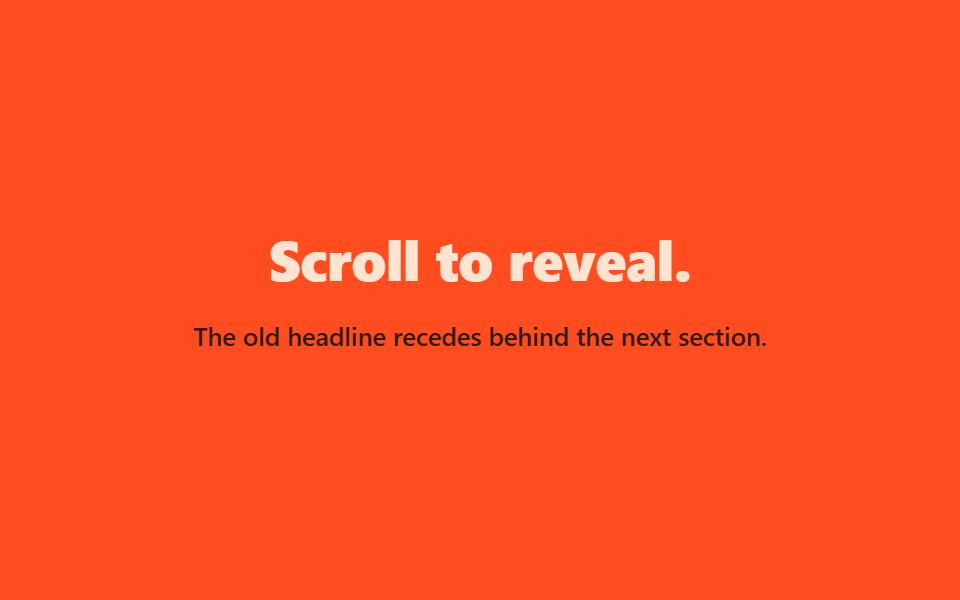
<main class="stage is-demo">
  <div class="hero">
    <h1 class="hero__title">Scroll to reveal.</h1>
    <p class="hero__sub">The old headline recedes behind the next section.</p>
  </div>
</main>
@use "../../../../site/static/demo-tokens" as *;
// ── 변수 3개 ──────────────────────────────────────────
$duration: $dur-loop; // 2s — 물러남 한 바퀴
$easing: $ease-out;
$color: $subject-cream;
@include stage($stage-orange);
// 실제 서비스라면 scroll-timeline / animation-timeline: view() 로 스크롤 진행률에 직접 묶지만,
// 브라우저 지원 차이가 커서(blog-demo 규칙 6) 데모는 같은 모양을 keyframes 루프로 대신한다 (사실.md 명시)
.hero {
box-sizing: border-box;
max-width: clamp(220px, 78vw, 360px);
text-align: center;
display: grid;
gap: $sp-3;
}
.hero__title { margin: 0; color: $color; font-weight: 800; font-size: clamp(20px, 6vw, 28px); line-height: 1.25; font-family: inherit; }
.hero__sub { margin: 0; color: $subject-ink; font-weight: 500; font-size: clamp(12px, 3.4vw, 13px); line-height: 1.5; font-family: inherit; }
.stage.is-demo .hero { animation: recede $duration $easing infinite; transform-origin: center top; }
@keyframes recede {
0% { opacity: 1; transform: scale(1) translateY(0); }
55% { opacity: .15; transform: scale(.85) translateY(-$sp-10); }
100% { opacity: 1; transform: scale(1) translateY(0); }
}
@media (prefers-reduced-motion: reduce) {
.stage.is-demo .hero { animation: none; opacity: 1; transform: none; }
}html, body {
margin: 0;
overflow: hidden;
}
.stage {
box-sizing: border-box;
min-height: 100vh;
display: grid;
place-items: center;
margin: 0;
background: #ff4d1f;
font-family: -apple-system, "Segoe UI", "Noto Sans KR", sans-serif;
padding: clamp(8px, 4vw, 24px);
}
.hero {
box-sizing: border-box;
max-width: clamp(220px, 78vw, 360px);
text-align: center;
display: grid;
gap: 12px;
}
.hero__title {
margin: 0;
color: #fff7e6;
font-weight: 800;
font-size: clamp(20px, 6vw, 28px);
line-height: 1.25;
font-family: inherit;
}
.hero__sub {
margin: 0;
color: #17141a;
font-weight: 500;
font-size: clamp(12px, 3.4vw, 13px);
line-height: 1.5;
font-family: inherit;
}
.stage.is-demo .hero {
animation: recede 2s ease-out infinite;
transform-origin: center top;
}
@keyframes recede {
0% {
opacity: 1;
transform: scale(1) translateY(0);
}
55% {
opacity: 0.15;
transform: scale(0.85) translateY(-40px);
}
100% {
opacity: 1;
transform: scale(1) translateY(0);
}
}
@media (prefers-reduced-motion: reduce) {
.stage.is-demo .hero {
animation: none;
opacity: 1;
transform: none;
}
}import type { CSSProperties } from "react";
import styles from "./ScrollFadeBehind.module.scss";
export type ScrollFadeBehindProps = {
title?: string;
subtitle?: string;
duration?: number;
easing?: string;
color?: string;
};
type Vars = CSSProperties & { "--duration"?: string; "--easing"?: string; "--color"?: string };
export default function ScrollFadeBehind({
title = "Scroll to reveal.",
subtitle = "The old headline recedes behind the next section.",
duration = 2000,
easing = "ease-out",
color = "#fff7e6",
}: ScrollFadeBehindProps) {
const vars: Vars = { "--duration": `${duration}ms`, "--easing": easing, "--color": color };
// 실제 서비스라면 scroll-timeline / animation-timeline: view() 로 스크롤 진행률에 직접 묶는다.
// 브라우저 지원 차이가 커서 이 컴포넌트는 같은 모양을 keyframes 루프로 대신 보여준다.
return (
<div className={styles.hero} style={vars}>
<h1 className={styles.title}>{title}</h1>
<p className={styles.sub}>{subtitle}</p>
</div>
);
}07 スクロールで文字が背後にフェード — 計測 累積面積 13.056% · 動いたフレーム 23/23GODRICH オリジナル · SCSS と React は zip に同梱 · 【コピペOK】CSSヒーローセクション アニメーション9選
このデモが属する記事
 【コピペOK】CSSヒーローセクション アニメーション9選ヒーローセクションとは、サイトを開いた瞬間に画面いっぱいに映る最初の一枚、大きな見出しとボタンが乗ったあの一画面のことです。この記事では、そこに動きを添える「ヒーローセクション アニメーション」を集めました。CSSだけ・JS不要で、そのまま この記事のデモをすべて見る