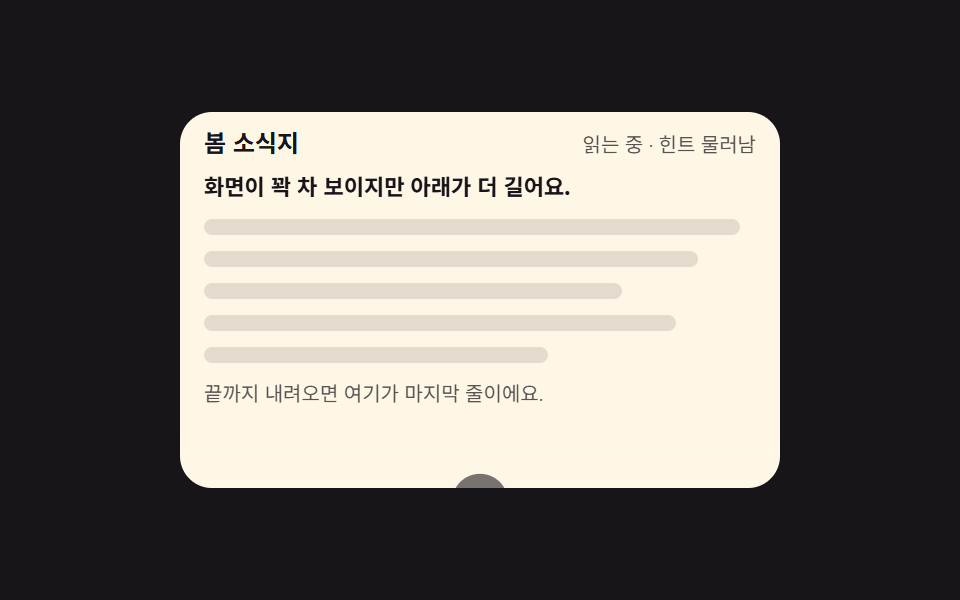
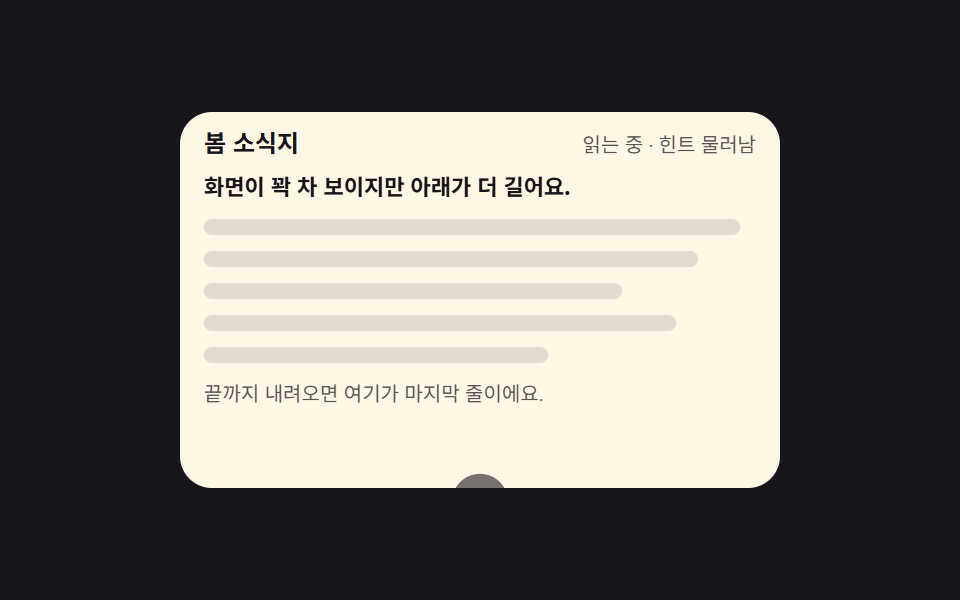
01最初の画面だけで揺れる下向きヒント
記事がまだ一行も動いていないときだけ、下向きの矢印が translateY で上下に揺れます。scrollTop が 8px を超えるとヒントは薄れて退き、先頭に戻ると animation-fill-mode が最初の姿勢を戻します。
使いどころ最初の画面が埋まっていて、続きがあると気づけない紹介ページ
scrollToptranslateYanimation-fill-mode
<main class="stage">
  <section class="sh is-demo" id="sh" aria-label="最初の画面のスクロールヒント">
    <header class="sh__head">
      <p class="sh__kicker">春のニュースレター</p>
      <p class="sh__state"><span class="sh__s sh__s--top" id="sh-state">先頭 · ヒント表示中</span><span class="sh__s sh__s--gone" aria-hidden="true">読書中 · ヒントは後退</span></p>
    </header>
    <div class="sh__view" id="sh-view" tabindex="0" role="region" aria-label="ニュースレター本文">
      <div class="sh__pad">
        <p class="sh__lede">画面は埋まって見えますが、下にもっと続きます。</p>
        <p class="sh__line"></p>
        <p class="sh__line"></p>
        <p class="sh__line"></p>
        <p class="sh__line"></p>
        <p class="sh__line"></p>
        <p class="sh__tail">最後まで下りると、ここが最終行です。</p>
      </div>
    </div>
    <div class="sh__hint" id="sh-hint" aria-hidden="true">
      <span class="sh__pill"><svg viewBox="0 0 256 256" width="14" height="14" aria-hidden="true"><path d="M200,144l-72,72L56,144Z" opacity="0.2"/><path d="M207.39,140.94A8,8,0,0,0,200,136H136V40a8,8,0,0,0-16,0v96H56a8,8,0,0,0-5.66,13.66l72,72a8,8,0,0,0,11.32,0l72-72A8,8,0,0,0,207.39,140.94ZM128,204.69,75.31,152H180.69Z"/></svg></span>
      <span class="sh__bob"><svg viewBox="0 0 256 256" width="1em" height="1em" fill="currentColor" aria-hidden="true"><path d="M200,144l-72,72L56,144Z" opacity="0.2"/><path d="M207.39,140.94A8,8,0,0,0,200,136H136V40a8,8,0,0,0-16,0v96H56a8,8,0,0,0-5.66,13.66l72,72a8,8,0,0,0,11.32,0l72-72A8,8,0,0,0,207.39,140.94ZM128,204.69,75.31,152H180.69Z"/></svg></span>
      <span class="sh__note">下にスクロール</span>
    </div>
  </section>
</main>
@use "../../../../site/static/demo-tokens" as *;
// 첫 화면에서만 흔들리는 아래로 힌트 — 스크롤이 8px 만 움직여도 힌트는 물러난다
$duration: $dur-loop;
$easing: $ease-spring;
$color: $subject-cream;
@include stage($stage-ink);
.sh {
position: relative;
box-sizing: border-box;
width: min(300px, 92vw);
border-radius: $r-card;
background: $subject-cream;
color: $subject-ink;
font-family: -apple-system, "Segoe UI", "Noto Sans KR", sans-serif;
overflow: hidden;
}
.sh__head {
display: flex;
align-items: baseline;
justify-content: space-between;
gap: $sp-2;
padding: $sp-2 $sp-3 0;
}
.sh__kicker {
margin: 0;
font-size: 12px;
font-weight: 700;
line-height: 1.3;
}
.sh__state {
position: relative;
margin: 0;
font-size: 10px;
line-height: 1.3;
color: rgba($stage-ink, .72);
white-space: nowrap;
}
// 미리보기 루프에서만 쓰는 두 번째 문구 — 정적 경로에서는 JS 가 첫 칸의 글자를 갈아 쓴다
.sh__s--gone { display: none; }
.sh__view {
box-sizing: border-box;
height: 148px;
margin: $sp-2;
padding-right: $sp-2;
overflow-y: auto;
scrollbar-width: none;
&::-webkit-scrollbar { display: none; }
&:focus-visible { outline: 2px solid $color; outline-offset: 2px; }
}
.sh__pad {
display: grid;
gap: $sp-2;
padding: $sp-1 $sp-1 96px;
}
.sh__lede {
margin: 0;
font-size: 11px;
font-weight: 700;
line-height: 1.5;
}
.sh__line {
height: 8px;
margin: 0;
border-radius: $r-pill;
background: rgba(23, 20, 26, .12);
}
.sh__line:nth-child(3) { width: 92%; }
.sh__line:nth-child(4) { width: 78%; }
.sh__line:nth-child(5) { width: 88%; }
.sh__line:nth-child(6) { width: 64%; }
.sh__tail {
margin: 0;
font-size: 10px;
line-height: 1.5;
color: rgba($stage-ink, .72);
}
// ── 힌트 묶음: 본문 아래 가운데에 붙는다 ──
.sh__hint {
position: absolute;
left: 0;
right: 0;
bottom: $sp-1;
display: grid;
justify-items: center;
gap: $sp-1;
color: $subject-ink;
// 힌트가 본문 글자 위에 그냥 얹히면 글자가 원 뒤로 비쳐 지저분하다 — 제 자리만큼 바탕을 덮는다
isolation: isolate;
&::before {
content: "";
position: absolute;
inset: -$sp-5 0 -$sp-1;
background: linear-gradient(to bottom, transparent, $subject-cream 58%);
z-index: -1;
}
// 정적(실제 사용) 경로 — 스크롤되면 .is-gone 로 물러난다
transition: transform $dur-quick $easing, opacity $dur-instant linear;
}
.sh.is-gone .sh__hint {
transform: translateY(120%);
opacity: 0;
}
.sh__pill {
display: inline-grid;
place-items: center;
width: 28px;
height: 28px;
border-radius: 50%;
background: $subject-ink;
color: $stage-yellow;
}
.sh__pill svg { width: 14px; height: 14px; }
.sh__bob {
display: inline-grid;
place-items: center;
font-size: 18px;
line-height: 1;
}
.sh__note {
padding: $sp-1 $sp-2;
border-radius: $r-pill;
background: rgba(23, 20, 26, .08);
font-size: 10px;
font-weight: 700;
line-height: 1.4;
}
// ── 격자 미리보기 루프: 화살표는 계속 점프하고, 중간에 본문이 흐르면 힌트가 물러난다 ──
@keyframes sh-bob {
0%, 100% { transform: translateY(0); }
50% { transform: translateY(5px); }
}
// 물러남은 네 프레임에 나눠 흐리게, 돌아옴은 한 프레임 컷 — 그래야 대표 이미지가
// 「힌트가 사라진 빈 화면」 이 아니라 힌트가 서 있는 장이 된다 (퇴장이 등장을 이기는 함정)
@keyframes sh-fade {
0%, 37% { opacity: 1; }
54%, 79% { opacity: 0; }
80%, 100% { opacity: 1; }
}
@keyframes sh-drop {
0%, 37% { transform: translateY(0); }
54%, 79% { transform: translateY(120%); }
80%, 100% { transform: translateY(0); }
}
@keyframes sh-flow {
0%, 38% { transform: translateY(0); }
78% { transform: translateY(-20%); }
82%, 100% { transform: translateY(0); }
}
// 머리말도 두 문구를 겹쳐 두고 컷으로 갈아 낀다 — 힌트가 물러났는데 「보이는 중」 이라고
// 적힌 장이 대표 이미지로 나가면 글과 그림이 서로 다른 말을 한다
@keyframes sh-state-0 { 0%, 37% { opacity: 1; } 38%, 79% { opacity: 0; } 80%, 100% { opacity: 1; } }
@keyframes sh-state-1 { 0%, 37% { opacity: 0; } 38%, 79% { opacity: 1; } 80%, 100% { opacity: 0; } }
.sh.is-demo {
.sh__bob {
animation-name: sh-bob;
animation-duration: 1s;
animation-timing-function: $easing;
animation-iteration-count: infinite;
}
.sh__hint {
animation-name: sh-fade, sh-drop;
animation-duration: $duration, $duration;
animation-timing-function: $ease-out, $easing;
animation-iteration-count: infinite, infinite;
animation-fill-mode: backwards, backwards;
}
.sh__pad {
animation-name: sh-flow;
animation-duration: $duration;
animation-timing-function: $ease-out;
animation-iteration-count: infinite;
}
.sh__s--gone { display: block; position: absolute; right: 0; top: 0; }
.sh__s {
animation-duration: $duration;
animation-timing-function: steps(1, end);
animation-iteration-count: infinite;
}
.sh__s--top { animation-name: sh-state-0; }
.sh__s--gone { animation-name: sh-state-1; }
}
@media (max-width: 340px) {
.sh__view { height: 124px; }
.sh__lede { font-size: 10px; }
.sh__line { height: 6px; }
}
@media (prefers-reduced-motion: reduce) {
.sh.is-demo .sh__bob,
.sh.is-demo .sh__pad,
.sh.is-demo .sh__s { animation: none !important; transform: none !important; }
.sh.is-demo .sh__hint { animation: none !important; transform: none !important; opacity: 1 !important; }
// 정지 상태에서도 힌트가 무엇인지는 보인다 — 움직임만 뺀다. 머리말은 맨 위 문구 하나만
.sh.is-demo .sh__s--top { opacity: 1 !important; }
.sh.is-demo .sh__s--gone { opacity: 0 !important; }
}html, body {
margin: 0;
overflow: hidden;
}
.stage {
box-sizing: border-box;
min-height: 100vh;
display: grid;
place-items: center;
margin: 0;
background: #17141a;
font-family: -apple-system, "Segoe UI", "Noto Sans KR", sans-serif;
padding: clamp(8px, 4vw, 24px);
}
.sh {
position: relative;
box-sizing: border-box;
width: min(300px, 92vw);
border-radius: 16px;
background: #fff7e6;
color: #17141a;
font-family: -apple-system, "Segoe UI", "Noto Sans KR", sans-serif;
overflow: hidden;
}
.sh__head {
display: flex;
align-items: baseline;
justify-content: space-between;
gap: 8px;
padding: 8px 12px 0;
}
.sh__kicker {
margin: 0;
font-size: 12px;
font-weight: 700;
line-height: 1.3;
}
.sh__state {
position: relative;
margin: 0;
font-size: 10px;
line-height: 1.3;
color: rgba(23, 20, 26, 0.72);
white-space: nowrap;
}
.sh__s--gone {
display: none;
}
.sh__view {
box-sizing: border-box;
height: 148px;
margin: 8px;
padding-right: 8px;
overflow-y: auto;
scrollbar-width: none;
}
.sh__view::-webkit-scrollbar {
display: none;
}
.sh__view:focus-visible {
outline: 2px solid #fff7e6;
outline-offset: 2px;
}
.sh__pad {
display: grid;
gap: 8px;
padding: 4px 4px 96px;
}
.sh__lede {
margin: 0;
font-size: 11px;
font-weight: 700;
line-height: 1.5;
}
.sh__line {
height: 8px;
margin: 0;
border-radius: 999px;
background: rgba(23, 20, 26, 0.12);
}
.sh__line:nth-child(3) {
width: 92%;
}
.sh__line:nth-child(4) {
width: 78%;
}
.sh__line:nth-child(5) {
width: 88%;
}
.sh__line:nth-child(6) {
width: 64%;
}
.sh__tail {
margin: 0;
font-size: 10px;
line-height: 1.5;
color: rgba(23, 20, 26, 0.72);
}
.sh__hint {
position: absolute;
left: 0;
right: 0;
bottom: 4px;
display: grid;
justify-items: center;
gap: 4px;
color: #17141a;
isolation: isolate;
}
.sh__hint::before {
content: "";
position: absolute;
inset: -20px -4px;
background: linear-gradient(to bottom, transparent, #fff7e6 58%);
z-index: -1;
}
.sh__hint {
transition: transform 220ms cubic-bezier(0.2, 0.8, 0.2, 1), opacity 140ms linear;
}
.sh.is-gone .sh__hint {
transform: translateY(120%);
opacity: 0;
}
.sh__pill {
display: inline-grid;
place-items: center;
width: 28px;
height: 28px;
border-radius: 50%;
background: #17141a;
color: #ffd23f;
}
.sh__pill svg {
width: 14px;
height: 14px;
}
.sh__bob {
display: inline-grid;
place-items: center;
font-size: 18px;
line-height: 1;
}
.sh__note {
padding: 4px 8px;
border-radius: 999px;
background: rgba(23, 20, 26, 0.08);
font-size: 10px;
font-weight: 700;
line-height: 1.4;
}
@keyframes sh-bob {
0%, 100% {
transform: translateY(0);
}
50% {
transform: translateY(5px);
}
}
@keyframes sh-fade {
0%, 37% {
opacity: 1;
}
54%, 79% {
opacity: 0;
}
80%, 100% {
opacity: 1;
}
}
@keyframes sh-drop {
0%, 37% {
transform: translateY(0);
}
54%, 79% {
transform: translateY(120%);
}
80%, 100% {
transform: translateY(0);
}
}
@keyframes sh-flow {
0%, 38% {
transform: translateY(0);
}
78% {
transform: translateY(-20%);
}
82%, 100% {
transform: translateY(0);
}
}
@keyframes sh-state-0 {
0%, 37% {
opacity: 1;
}
38%, 79% {
opacity: 0;
}
80%, 100% {
opacity: 1;
}
}
@keyframes sh-state-1 {
0%, 37% {
opacity: 0;
}
38%, 79% {
opacity: 1;
}
80%, 100% {
opacity: 0;
}
}
.sh.is-demo .sh__bob {
animation-name: sh-bob;
animation-duration: 1s;
animation-timing-function: cubic-bezier(0.2, 0.8, 0.2, 1);
animation-iteration-count: infinite;
}
.sh.is-demo .sh__hint {
animation-name: sh-fade, sh-drop;
animation-duration: 2s, 2s;
animation-timing-function: ease-out, cubic-bezier(0.2, 0.8, 0.2, 1);
animation-iteration-count: infinite, infinite;
animation-fill-mode: backwards, backwards;
}
.sh.is-demo .sh__pad {
animation-name: sh-flow;
animation-duration: 2s;
animation-timing-function: ease-out;
animation-iteration-count: infinite;
}
.sh.is-demo .sh__s--gone {
display: block;
position: absolute;
right: 0;
top: 0;
}
.sh.is-demo .sh__s {
animation-duration: 2s;
animation-timing-function: steps(1, end);
animation-iteration-count: infinite;
}
.sh.is-demo .sh__s--top {
animation-name: sh-state-0;
}
.sh.is-demo .sh__s--gone {
animation-name: sh-state-1;
}
@media (max-width: 340px) {
.sh__view {
height: 124px;
}
.sh__lede {
font-size: 10px;
}
.sh__line {
height: 6px;
}
}
@media (prefers-reduced-motion: reduce) {
.sh.is-demo .sh__bob,
.sh.is-demo .sh__pad,
.sh.is-demo .sh__s {
animation: none !important;
transform: none !important;
}
.sh.is-demo .sh__hint {
animation: none !important;
transform: none !important;
opacity: 1 !important;
}
.sh.is-demo .sh__s--top {
opacity: 1 !important;
}
.sh.is-demo .sh__s--gone {
opacity: 0 !important;
}
}// 첫 화면에서만 흔들리는 아래로 힌트 — scrollTop 8px 기준으로 보였다 물러난다
var sh = document.getElementById('sh');
var view = document.getElementById('sh-view');
var state = document.getElementById('sh-state');
view.addEventListener('scroll', function () {
sh.classList.remove('is-demo');
var gone = view.scrollTop > 8;
sh.classList.toggle('is-gone', gone);
state.textContent = gone ? '読書中 · ヒントは後退' : '先頭 · ヒント表示中';
});import { useRef, useState } from "react";
import type { CSSProperties } from "react";
import styles from "./ScrollHintFirstview.module.scss";
export type ScrollHintFirstviewProps = {
kicker?: string;
stateVisible?: string;
stateHidden?: string;
lede?: string;
tail?: string;
note?: string;
groupLabel?: string;
bodyLabel?: string;
/** 격자 미리보기용 2초 자동 루프. 사람이 손대면 꺼진다 */
demo?: boolean;
duration?: number;
easing?: string;
color?: string;
};
type Vars = CSSProperties & { "--duration"?: string; "--easing"?: string; "--color"?: string };
// ambient 가 얇아 DOM 요소 타입을 못 쓴다 — 필요한 꼴만 로컬 타입으로 선언
type ScrollBox = { scrollTop: number };
function ArrowDownIcon() {
return (
<svg viewBox="0 0 256 256" width="1em" height="1em" fill="currentColor" aria-hidden="true"><path d="M200,144l-72,72L56,144Z" opacity="0.2"/><path d="M207.39,140.94A8,8,0,0,0,200,136H136V40a8,8,0,0,0-16,0v96H56a8,8,0,0,0-5.66,13.66l72,72a8,8,0,0,0,11.32,0l72-72A8,8,0,0,0,207.39,140.94ZM128,204.69,75.31,152H180.69Z"/></svg>
);
}
export default function ScrollHintFirstview({
kicker = "봄 소식지",
stateVisible = "맨 위 · 힌트 보이는 중",
stateHidden = "읽는 중 · 힌트 물러남",
lede = "화면이 꽉 차 보이지만 아래가 더 길어요.",
tail = "끝까지 내려오면 여기가 마지막 줄이에요.",
note = "아래로 내려 보세요",
groupLabel = "첫 화면 스크롤 힌트",
bodyLabel = "소식지 본문",
demo = true,
duration = 2000,
easing = "cubic-bezier(.2,.8,.2,1)",
color = "#fff7e6",
}: ScrollHintFirstviewProps) {
const [hidden, setHidden] = useState(false);
const [live, setLive] = useState(demo);
const viewRef = useRef<ScrollBox>(null);
const vars: Vars = { "--duration": `${duration}ms`, "--easing": easing, "--color": color };
// scrollTop 8px 기준 — 처음 화면에서만 힌트가 살아 있다
function onScroll() {
const el = viewRef.current;
if (!el) return;
setLive(false);
setHidden(el.scrollTop > 8);
}
const cls = [styles.sh, live ? styles.isDemo : "", hidden ? styles.isGone : ""].filter(Boolean).join(" ");
return (
<section className={cls} style={vars} aria-label={groupLabel}>
<header className={styles.head}>
<p className={styles.kicker}>{kicker}</p>
<p className={styles.state}>
{live ? (
// 미리보기 루프 — 두 문구를 겹쳐 두고 힌트가 물러나는 순간에 맞춰 컷으로 갈아 낀다
<>
<span className={`${styles.s} ${styles.sTop}`}>{stateVisible}</span>
<span className={`${styles.s} ${styles.sGone}`} aria-hidden="true">{stateHidden}</span>
</>
) : (
hidden ? stateHidden : stateVisible
)}
</p>
</header>
<div className={styles.view} ref={viewRef} onScroll={onScroll} tabIndex={0} role="region" aria-label={bodyLabel}>
<div className={styles.pad}>
<p className={styles.lede}>{lede}</p>
<p className={styles.line}></p>
<p className={styles.line}></p>
<p className={styles.line}></p>
<p className={styles.line}></p>
<p className={styles.tail}>{tail}</p>
</div>
</div>
<div className={styles.hint} aria-hidden="true">
<span className={styles.pill}><ArrowDownIcon /></span>
<span className={styles.bob}><ArrowDownIcon /></span>
<span className={styles.shnote}>{note}</span>
</div>
</section>
);
}01 最初の画面だけで揺れる下向きヒント — 計測 累積面積 19.999% · 動いたフレーム 20/23GODRICH オリジナル · SCSS と React は zip に同梱 · スクロール インジケーター 9選 — 現在地がすぐわかる
このデモが属する記事
 スクロール インジケーター 9選 — 現在地がすぐわかるスクロール インジケーターは、長いページをどこまで読んだかを棒・数字・印で伝えるUI部品です。この記事では、ライブラリーに頼らないHTML・SCSS・少量のJavaScriptだけで組んだ九つの現在地表示を、そのまま貼れる断片コードと一緒に この記事のデモをすべて見る