09揺れ
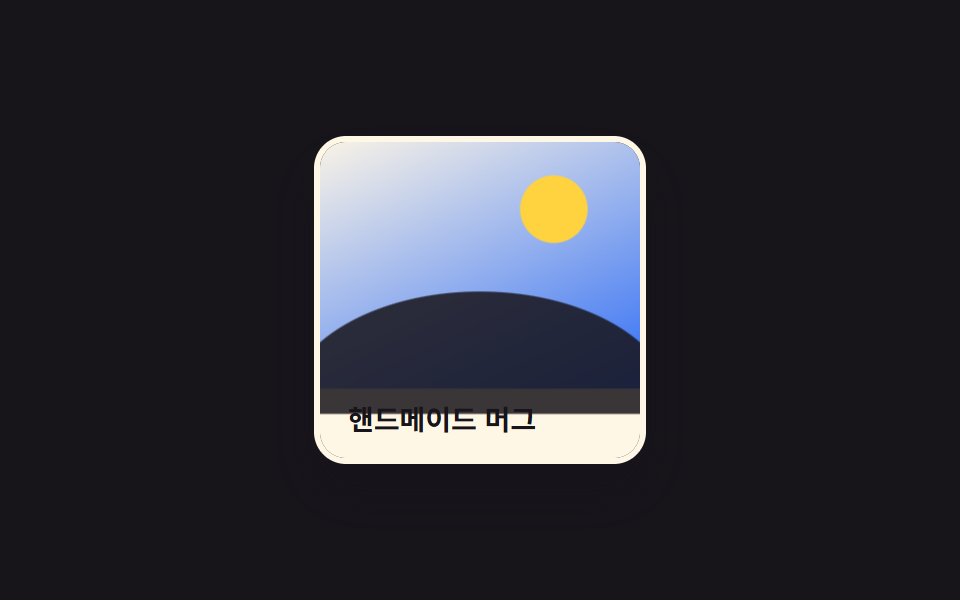
短い keyframes で写真が左右に数ピクセルすばやく振動し、視線を引きつける。
使いどころ限定セールバッジ付きの商品画像、注意を引くバナー写真
@keyframestranslateX0.4초

<main class="stage">
  <figure class="photo is-demo" tabindex="0">
    <span class="photo__pic" aria-hidden="true">
      <span class="photo__sun"></span>
      <span class="photo__hill"></span>
      <span class="photo__badge">SALE</span>
    </span>
    <figcaption class="photo__cap">期間限定セール</figcaption>
  </figure>
</main>
@use "../../../../site/static/demo-tokens" as *;
$duration: $dur-quick; // 흔들림이 끝나는 시간
$easing: $ease-pop;
$color: $subject-cream; // 사진 프레임 색
@include stage($stage-ink);
.stage { padding: clamp(6px, 2.4vw, 16px); } // 320px 대응: 데모 카드가 작아 여백도 줄인다
.photo {
margin: 0;
width: min(160px, 50vw);
border-radius: $r-card;
overflow: visible; // 흔들릴 때 프레임 밖으로 살짝 나가도 된다
outline: none;
cursor: pointer;
}
.photo__pic {
display: block;
position: relative;
aspect-ratio: 4 / 3;
border-radius: $r-card;
overflow: hidden;
box-shadow: $shadow-raised;
border: 3px solid $color;
background: linear-gradient(155deg, $subject-cream 0%, $subject-blue 100%);
transform: translateX(0);
}
.photo__sun {
position: absolute;
top: 16%;
right: 18%;
width: 20%;
aspect-ratio: 1;
border-radius: 50%;
background: $stage-yellow;
}
.photo__hill {
position: absolute;
left: -8%;
right: -8%;
bottom: -10%;
height: 48%;
border-radius: 50% 50% 0 0 / 100% 100% 0 0;
background: $subject-ink;
opacity: .85;
}
.photo__badge {
position: absolute;
top: 10px;
left: 10px;
padding: 4px 10px;
border-radius: $r-pill;
font-weight: 800; font-size: clamp(10px, 2.8vw, 12px); line-height: 1; font-family: inherit;
letter-spacing: .04em;
color: $subject-cream;
background: $error;
}
.photo__cap {
word-break: keep-all;
margin: 0;
padding: 10px 14px 0;
font-weight: 600; font-size: clamp(12px, 3.4vw, 14px); line-height: 1.3; font-family: inherit;
color: $color;
background: transparent;
}
.photo:hover .photo__pic,
.photo:focus-visible .photo__pic,
.photo:active .photo__pic {
animation: shake $duration $easing;
}
.photo.is-demo .photo__pic {
animation: shake-loop $dur-loop linear infinite;
}
@keyframes shake {
0%, 100% { transform: translateX(0); }
20% { transform: translateX(-6px); }
40% { transform: translateX(5px); }
60% { transform: translateX(-4px); }
80% { transform: translateX(3px); }
}
@keyframes shake-loop {
0%, 55%, 100% { transform: translateX(0); }
60% { transform: translateX(-7px); }
65% { transform: translateX(6px); }
70% { transform: translateX(-6px); }
75% { transform: translateX(5px); }
80% { transform: translateX(-4px); }
85% { transform: translateX(3px); }
90% { transform: translateX(-2px); }
95% { transform: translateX(1px); }
}
@media (hover: none) {
.photo:active .photo__pic { animation: shake $duration $easing; }
}
@media (prefers-reduced-motion: reduce) {
.photo.is-demo .photo__pic { animation: none; }
.photo:hover .photo__pic,
.photo:focus-visible .photo__pic,
.photo:active .photo__pic { animation: none; }
}html, body {
margin: 0;
overflow: hidden;
}
.stage {
box-sizing: border-box;
min-height: 100vh;
display: grid;
place-items: center;
margin: 0;
background: #17141a;
font-family: -apple-system, "Segoe UI", "Noto Sans KR", sans-serif;
padding: clamp(8px, 4vw, 24px);
}
.stage {
padding: clamp(6px, 2.4vw, 16px);
}
.photo {
margin: 0;
width: min(160px, 50vw);
border-radius: 16px;
overflow: visible;
outline: none;
cursor: pointer;
}
.photo__pic {
display: block;
position: relative;
aspect-ratio: 4/3;
border-radius: 16px;
overflow: hidden;
box-shadow: 0 14px 24px rgba(23, 20, 26, 0.32);
border: 3px solid #fff7e6;
background: linear-gradient(155deg, #fff7e6 0%, #2f6df6 100%);
transform: translateX(0);
}
.photo__sun {
position: absolute;
top: 16%;
right: 18%;
width: 20%;
aspect-ratio: 1;
border-radius: 50%;
background: #ffd23f;
}
.photo__hill {
position: absolute;
left: -8%;
right: -8%;
bottom: -10%;
height: 48%;
border-radius: 50% 50% 0 0/100% 100% 0 0;
background: #17141a;
opacity: 0.85;
}
.photo__badge {
position: absolute;
top: 10px;
left: 10px;
padding: 4px 10px;
border-radius: 999px;
font-weight: 800;
font-size: clamp(10px, 2.8vw, 12px);
line-height: 1;
font-family: inherit;
letter-spacing: 0.04em;
color: #fff7e6;
background: #c2361a;
}
.photo__cap {
word-break: keep-all;
margin: 0;
padding: 10px 14px 0;
font-weight: 600;
font-size: clamp(12px, 3.4vw, 14px);
line-height: 1.3;
font-family: inherit;
color: #fff7e6;
background: transparent;
}
.photo:hover .photo__pic,
.photo:focus-visible .photo__pic,
.photo:active .photo__pic {
animation: shake 220ms cubic-bezier(0.2, 1.4, 0.4, 1);
}
.photo.is-demo .photo__pic {
animation: shake-loop 2s linear infinite;
}
@keyframes shake {
0%, 100% {
transform: translateX(0);
}
20% {
transform: translateX(-6px);
}
40% {
transform: translateX(5px);
}
60% {
transform: translateX(-4px);
}
80% {
transform: translateX(3px);
}
}
@keyframes shake-loop {
0%, 55%, 100% {
transform: translateX(0);
}
60% {
transform: translateX(-7px);
}
65% {
transform: translateX(6px);
}
70% {
transform: translateX(-6px);
}
75% {
transform: translateX(5px);
}
80% {
transform: translateX(-4px);
}
85% {
transform: translateX(3px);
}
90% {
transform: translateX(-2px);
}
95% {
transform: translateX(1px);
}
}
@media (hover: none) {
.photo:active .photo__pic {
animation: shake 220ms cubic-bezier(0.2, 1.4, 0.4, 1);
}
}
@media (prefers-reduced-motion: reduce) {
.photo.is-demo .photo__pic {
animation: none;
}
.photo:hover .photo__pic,
.photo:focus-visible .photo__pic,
.photo:active .photo__pic {
animation: none;
}
}import type { CSSProperties } from "react";
import styles from "./ShakePhoto.module.scss";
export type ShakePhotoProps = {
caption: string;
badge?: string;
/** 흔들림이 끝나는 시간 (기본 220ms) */
duration?: number;
easing?: string;
/** 프레임 색 */
color?: string;
};
type Vars = CSSProperties & { "--duration"?: string; "--easing"?: string; "--color"?: string };
export default function ShakePhoto({
caption,
badge = "SALE",
duration = 220,
easing = "cubic-bezier(.2,1.4,.4,1)",
color = "#fff7e6",
}: ShakePhotoProps) {
const vars: Vars = { "--duration": `${duration}ms`, "--easing": easing, "--color": color };
return (
<figure className={styles.photo} style={vars} tabIndex={0}>
<span className={styles.pic} aria-hidden="true">
<span className={styles.sun} />
<span className={styles.hill} />
<span className={styles.badge}>{badge}</span>
</span>
<figcaption className={styles.cap}>{caption}</figcaption>
</figure>
);
}09 揺れ — 計測 累積面積 3.646% · 動いたフレーム 10/23GODRICH オリジナル · SCSS と React は zip に同梱 · CSS 画像 ホバー エフェクト 9選 — 一行でコピペOK
このデモが属する記事
 CSS 画像 ホバー エフェクト 9選 — 一行でコピペOKcss 画像 ホバー エフェクトは、写真の上にカーソルを乗せた瞬間だけ拡大・変色・出現が起きる、CSSのtransformとtransitionだけで組める小さな仕掛けです。この記事では9種類を選び、それぞれ6〜25行のコードとして実装しま この記事のデモをすべて見る