08積み上がるキューブ
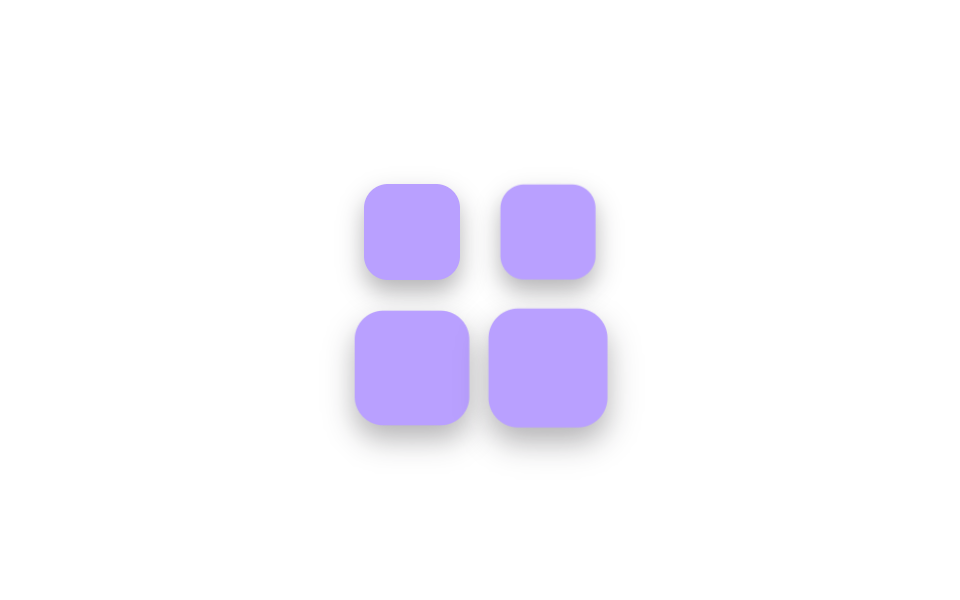
同じ大きさの正方形4つが下から順にふわっと浮かんで定位置に収まり、1拍置いて全部が一緒に沈み、ブロックを組み立てるローディングのリズムを作る。
使いどころモジュール読み込み段階の表示、ビルド待ち画面
scalestagger$easing
<main class="stage">
  <div class="cs-grid is-demo" aria-hidden="true">
    <span class="cs-cell"><span class="cs-cube"></span></span>
    <span class="cs-cell"><span class="cs-cube"></span></span>
    <span class="cs-cell"><span class="cs-cube"></span></span>
    <span class="cs-cell"><span class="cs-cube"></span></span>
  </div>
</main>
@use "../../../../site/static/demo-tokens" as *;
// ── 변수 3개 ──────────────────────────────────────────
$duration: 2s;
$easing: $ease-pop;
$color: $subject-lilac;
@include stage($stage-paper);
.cs-grid {
display: grid;
grid-template-columns: repeat(2, 56px);
grid-auto-rows: 56px;
gap: $sp-3;
}
.cs-cell {
display: grid;
place-items: center;
}
// 실사용: 로딩 중에만 .is-loading — 등장(안쪽 큐브 scale)은 하나씩,
// 착지(바깥 셀 translate)는 전부 같은 박자에
.cs-cube {
width: 48px;
height: 48px;
border-radius: $r-control;
background: $color;
box-shadow: $shadow-press;
}
.is-loading .cs-cell,
.is-demo .cs-cell {
animation: cs-settle $duration $easing infinite;
}
.is-loading .cs-cube,
.is-demo .cs-cube {
animation: cs-pop $duration $easing infinite backwards;
}
.is-loading .cs-cell:nth-child(1) .cs-cube,
.is-demo .cs-cell:nth-child(1) .cs-cube { animation-delay: 0s; }
.is-loading .cs-cell:nth-child(2) .cs-cube,
.is-demo .cs-cell:nth-child(2) .cs-cube { animation-delay: 120ms; }
.is-loading .cs-cell:nth-child(3) .cs-cube,
.is-demo .cs-cell:nth-child(3) .cs-cube { animation-delay: 240ms; }
.is-loading .cs-cell:nth-child(4) .cs-cube,
.is-demo .cs-cell:nth-child(4) .cs-cube { animation-delay: 360ms; }
@keyframes cs-pop {
0% { transform: scale(0); opacity: 0; }
16% { transform: scale(1.18); opacity: 1; }
22%, 68% { transform: scale(1); opacity: 1; }
90%, 100% { transform: scale(0); opacity: 0; }
}
@keyframes cs-settle {
0%, 60% { transform: translateY(0); }
70% { transform: translateY(8px); }
80%, 100% { transform: translateY(0); }
}
@media (prefers-reduced-motion: reduce) {
.is-loading .cs-cell,
.is-loading .cs-cube,
.is-demo .cs-cell,
.is-demo .cs-cube {
animation: none !important;
transform: none !important;
opacity: 1 !important;
}
}html, body {
margin: 0;
overflow: hidden;
}
.stage {
box-sizing: border-box;
min-height: 100vh;
display: grid;
place-items: center;
margin: 0;
background: #ffffff;
font-family: -apple-system, "Segoe UI", "Noto Sans KR", sans-serif;
padding: clamp(8px, 4vw, 24px);
}
.cs-grid {
display: grid;
grid-template-columns: repeat(2, 56px);
grid-auto-rows: 56px;
gap: 12px;
}
.cs-cell {
display: grid;
place-items: center;
}
.cs-cube {
width: 48px;
height: 48px;
border-radius: 12px;
background: #b9a0ff;
box-shadow: 0 6px 12px rgba(23, 20, 26, 0.32);
}
.is-loading .cs-cell,
.is-demo .cs-cell {
animation: cs-settle 2s cubic-bezier(0.2, 1.4, 0.4, 1) infinite;
}
.is-loading .cs-cube,
.is-demo .cs-cube {
animation: cs-pop 2s cubic-bezier(0.2, 1.4, 0.4, 1) infinite backwards;
}
.is-loading .cs-cell:nth-child(1) .cs-cube,
.is-demo .cs-cell:nth-child(1) .cs-cube {
animation-delay: 0s;
}
.is-loading .cs-cell:nth-child(2) .cs-cube,
.is-demo .cs-cell:nth-child(2) .cs-cube {
animation-delay: 120ms;
}
.is-loading .cs-cell:nth-child(3) .cs-cube,
.is-demo .cs-cell:nth-child(3) .cs-cube {
animation-delay: 240ms;
}
.is-loading .cs-cell:nth-child(4) .cs-cube,
.is-demo .cs-cell:nth-child(4) .cs-cube {
animation-delay: 360ms;
}
@keyframes cs-pop {
0% {
transform: scale(0);
opacity: 0;
}
16% {
transform: scale(1.18);
opacity: 1;
}
22%, 68% {
transform: scale(1);
opacity: 1;
}
90%, 100% {
transform: scale(0);
opacity: 0;
}
}
@keyframes cs-settle {
0%, 60% {
transform: translateY(0);
}
70% {
transform: translateY(8px);
}
80%, 100% {
transform: translateY(0);
}
}
@media (prefers-reduced-motion: reduce) {
.is-loading .cs-cell,
.is-loading .cs-cube,
.is-demo .cs-cell,
.is-demo .cs-cube {
animation: none !important;
transform: none !important;
opacity: 1 !important;
}
}import { CSSProperties } from "react";
import styles from "./CubeStack.module.scss";
type Vars = CSSProperties & {
"--duration"?: string;
"--easing"?: string;
"--color"?: string;
};
export interface CubeStackProps {
duration?: string;
easing?: string;
color?: string;
}
export default function CubeStack({
duration = "2s",
easing = "cubic-bezier(.2, 1.4, .4, 1)",
color = "#b9a0ff",
}: CubeStackProps) {
const style: Vars = {
"--duration": duration,
"--easing": easing,
"--color": color,
};
return (
<div className={styles.grid} style={style} aria-hidden="true">
{[0, 1, 2, 3].map((i) => (
<span key={i} className={`${styles.cell} ${styles["d" + i]}`}>
<span className={styles.cube} />
</span>
))}
</div>
);
}08 積み上がるキューブ — 計測 累積面積 13.051% · 動いたフレーム 18/23GODRICH オリジナル · SCSS と React は zip に同梱 · 【コピペOK】ローディング 画面 デザイン CSSだけ 9選
このデモが属する記事
 【コピペOK】ローディング 画面 デザイン CSSだけ 9選ローディング 画面 デザインとは、サービスが開く最初の瞬間に「今準備しています」と伝える待ち画面のことです。デフォルトのスピナーでも動きますが、パステルのリングや満ちていく水のような画面にすると、同じ待ち時間が意図のあるものに見えます。コピ この記事のデモをすべて見る