09反応速度テスト
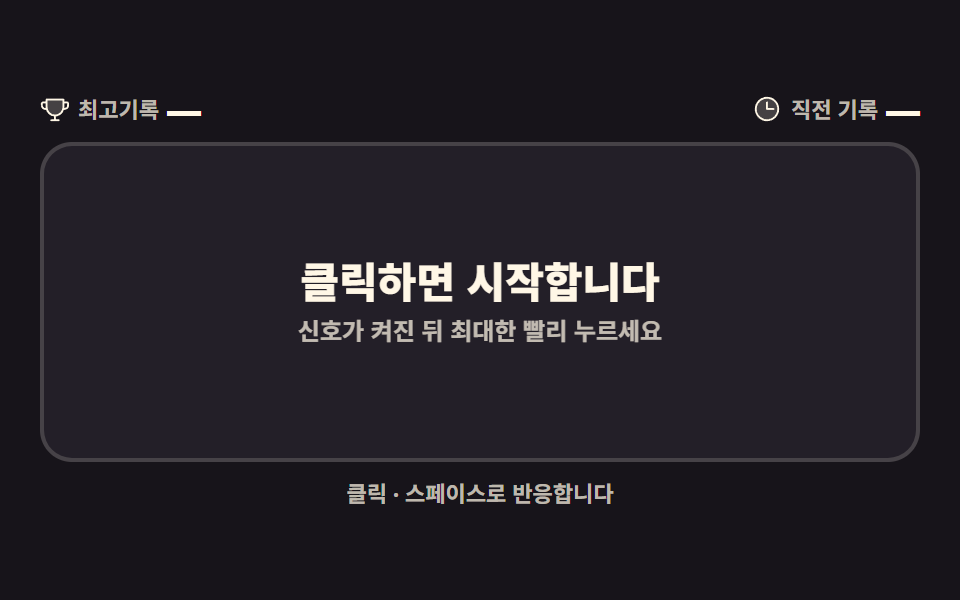
信号が点いた瞬間にできるだけ早く押して経過時間を測る。慌てて先に押すとペナルティ表示でスタート前にバレる。
使いどころチームページの遊び、反応速度ベンチマークのネタ
performance.nowtransitionclassList
<svg width="0" height="0" style="position:absolute" aria-hidden="true">
  <defs>
    <symbol id="ico-lightning" viewBox="0 0 256 256" fill="currentColor"><g><path d="m96 240l16-80l-64-24L160 16l-16 80l64 24Z" opacity=".2"/><path d="M215.79 118.17a8 8 0 0 0-5-5.66L153.18 90.9l14.66-73.33a8 8 0 0 0-13.69-7l-112 120a8 8 0 0 0 3 13l57.63 21.61l-14.62 73.25a8 8 0 0 0 13.69 7l112-120a8 8 0 0 0 1.94-7.26M109.37 214l10.47-52.38a8 8 0 0 0-5-9.06L62 132.71l84.62-90.66l-10.46 52.38a8 8 0 0 0 5 9.06l52.8 19.8Z"/></g></symbol>
    <symbol id="ico-clock" viewBox="0 0 256 256" fill="currentColor"><g><path d="M224 128a96 96 0 1 1-96-96a96 96 0 0 1 96 96" opacity=".2"/><path d="M128 24a104 104 0 1 0 104 104A104.11 104.11 0 0 0 128 24m0 192a88 88 0 1 1 88-88a88.1 88.1 0 0 1-88 88m64-88a8 8 0 0 1-8 8h-56a8 8 0 0 1-8-8V72a8 8 0 0 1 16 0v48h48a8 8 0 0 1 8 8"/></g></symbol>
    <symbol id="ico-trophy" viewBox="0 0 256 256" fill="currentColor"><g><path d="M200 48v63.1c0 39.7-31.75 72.6-71.45 72.9A72 72 0 0 1 56 112V48Z" opacity=".2"/><path d="M232 64h-24V48a8 8 0 0 0-8-8H56a8 8 0 0 0-8 8v16H24A16 16 0 0 0 8 80v16a40 40 0 0 0 40 40h3.65A80.13 80.13 0 0 0 120 191.61V216H96a8 8 0 0 0 0 16h64a8 8 0 0 0 0-16h-24v-24.42c31.94-3.23 58.44-25.64 68.08-55.58H208a40 40 0 0 0 40-40V80a16 16 0 0 0-16-16M48 120a24 24 0 0 1-24-24V80h24v32q0 4 .39 8Zm144-8.9c0 35.52-29 64.64-64 64.9a64 64 0 0 1-64-64V56h128ZM232 96a24 24 0 0 1-24 24h-.5a82 82 0 0 0 .5-8.9V80h24Z"/></g></symbol>
    <symbol id="ico-warning" viewBox="0 0 256 256" fill="currentColor"><g><path d="M215.46 216H40.54c-12.62 0-20.54-13.21-14.41-23.91l87.46-151.87c6.3-11 22.52-11 28.82 0l87.46 151.87c6.13 10.7-1.79 23.91-14.41 23.91" opacity=".2"/><path d="M236.8 188.09L149.35 36.22a24.76 24.76 0 0 0-42.7 0L19.2 188.09a23.51 23.51 0 0 0 0 23.72A24.35 24.35 0 0 0 40.55 224h174.9a24.35 24.35 0 0 0 21.33-12.19a23.51 23.51 0 0 0 .02-23.72m-13.87 15.71a8.5 8.5 0 0 1-7.48 4.2H40.55a8.5 8.5 0 0 1-7.48-4.2a7.59 7.59 0 0 1 0-7.72l87.45-151.87a8.75 8.75 0 0 1 15 0l87.45 151.87a7.59 7.59 0 0 1-.04 7.72M120 144v-40a8 8 0 0 1 16 0v40a8 8 0 0 1-16 0m20 36a12 12 0 1 1-12-12a12 12 0 0 1 12 12"/></g></symbol>
    <symbol id="ico-restart" viewBox="0 0 256 256" fill="currentColor"><g><path d="M216 128a88 88 0 1 1-88-88a88 88 0 0 1 88 88" opacity=".2"/><path d="M240 56v48a8 8 0 0 1-8 8h-48a8 8 0 0 1 0-16h27.4l-26.59-24.36l-.25-.24a80 80 0 1 0-1.67 114.78a8 8 0 0 1 11 11.63A95.44 95.44 0 0 1 128 224h-1.32a96 96 0 1 1 69.07-164L224 85.8V56a8 8 0 1 1 16 0"/></g></symbol>
  </defs>
</svg>
<main class="stage">
<div class="rt is-demo is-idle" id="rt">
  <header class="rt__hud">
    <p class="rt__stat">
      <svg class="rt__ico" aria-hidden="true"><use href="#ico-trophy"/></svg>
      <span class="rt__label">最高記録</span><b class="rt__num" id="rtBest" aria-live="polite">—</b>
    </p>
    <p class="rt__stat">
      <svg class="rt__ico" aria-hidden="true"><use href="#ico-clock"/></svg>
      <span class="rt__label">直前の記録</span><b class="rt__num" id="rtLast">—</b>
    </p>
  </header>
  <div class="rt__panel" id="rtPanel" tabindex="0" role="application" aria-label="反応速度プレイフィールド。信号が点いたらクリックかスペースでできるだけ早く押します">
    <p class="rt__face rt__face--wait">
      <span class="rt__waitTitle" id="rtWaitTitle">クリックでスタート</span>
      <span class="rt__waitSub" id="rtWaitSub">信号が点いたらできるだけ早く押してください</span>
    </p>
    <p class="rt__face rt__face--go">
      <svg class="rt__goIco" aria-hidden="true"><use href="#ico-lightning"/></svg>
      <span class="rt__goTitle">今押して!</span>
    </p>
    <p class="rt__face rt__face--result">
      <b class="rt__ms" id="rtMs">{n}ms</b>
      <span class="rt__grade rt__grade--s3" id="rtGrade">普通</span>
      <button class="rt__restart" type="button">
        <svg class="rt__ico" aria-hidden="true"><use href="#ico-restart"/></svg><span>もう一度</span>
      </button>
    </p>
    <p class="rt__face rt__face--penalty">
      <svg class="rt__penIco" aria-hidden="true"><use href="#ico-warning"/></svg>
      <span class="rt__penTitle">慌てすぎです!</span>
      <span class="rt__penSub">信号が点いた後に押してください</span>
      <button class="rt__restart" type="button">
        <svg class="rt__ico" aria-hidden="true"><use href="#ico-restart"/></svg><span>もう一度</span>
      </button>
    </p>
    <p class="rt__demoMs" id="rtDemoMs" aria-hidden="true"></p>
  </div>
  <p class="rt__hint">クリック・スペースで反応します</p>
</div>
</main>@use "../../../../site/static/demo-tokens" as *;
// 반응속도 재기 — 패널 하나가 대기(무작위 1.5~4초) → 신호(크림 면 전환, transition) → 결과(ms) 를 돈다.
// 신호가 켜진 순간부터 첫 클릭·Space 까지 performance.now() 로 잰다. 신호 전 입력은 성급 클릭 벌점.
// 상태 전환은 classList 로 상태 클래스를 갈아 끼우고, 패널 배경색만 transition 이 부드럽게 잇는다.
// .is-demo 미리보기는 대기 → 신호 컷(steps) → 가짜 ms 카운트업(@property 정수 + counter) 한 바퀴를
// 2초 주기로 돈다. 상태 교체에 반투명 크로스페이드는 쓰지 않는다(237·252 함정).
$duration: $dur-loop;
$easing: $ease-out;
$color: $subject-cream;
// 미리보기 카운트업용 등록 정수 — CSS 만으로 ms 숫자를 센다(286 선례)
@property --dms {
syntax: "<integer>";
inherits: false;
initial-value: 0;
}
@include stage($stage-ink);
// 먹 무대 위 글자는 크림 (blog-design 대비 표)
.rt { display: flex; flex-direction: column; gap: $sp-2; width: 100%; max-width: 440px; }
.rt__hud { display: flex; align-items: center; justify-content: space-between; gap: $sp-2; }
.rt__hud > p { display: flex; align-items: center; gap: $sp-1; margin: 0; }
.rt__ico { width: 15px; height: 15px; flex: 0 0 auto; color: $subject-cream; }
.rt__label { font-weight: 700; font-size: clamp(9px, 2.4vw, 11px); line-height: 1.4; color: rgba($subject-cream, .72); }
.rt__num {
font-weight: 800; font-size: clamp(13px, 3.6vw, 17px); line-height: 1;
color: $subject-cream; font-variant-numeric: tabular-nums;
}
// ── 신호 패널 ─────────────────────────────────────────────
.rt__panel {
position: relative; overflow: hidden;
height: clamp(104px, 52vh, 180px);
border: 2px solid rgba($subject-cream, .16);
border-radius: $r-card;
background: $tick-panel;
// 상태별 배경 전환 — 대비가 큰 색끼리 transition 하나로 잇는다(신호만이 연출이다)
transition: background-color $dur-quick $easing;
touch-action: manipulation;
cursor: pointer;
}
.rt__panel:focus-visible { outline: 2px solid $color; outline-offset: 2px; }
.rt.is-signal .rt__panel { background: $color; }
.rt.is-penalty .rt__panel { background: $error-soft; }
// 네 얼굴(대기·신호·결과·벌점)은 같은 자리에 겹쳐 두고 상태 클래스로 보인다
.rt__face {
position: absolute; inset: 0;
display: grid; place-content: center; justify-items: center; gap: $sp-1;
padding: $sp-2;
text-align: center;
opacity: 0; pointer-events: none;
}
.rt.is-idle .rt__face--wait,
.rt.is-armed .rt__face--wait,
.rt.is-signal .rt__face--go,
.rt.is-result .rt__face--result,
.rt.is-penalty .rt__face--penalty { opacity: 1; }
.rt__waitTitle, .rt__goTitle, .rt__penTitle {
margin: 0; font-weight: 800; line-height: 1.2;
font-size: clamp(15px, 4.4vw, 21px);
}
.rt__waitSub, .rt__penSub {
margin: 0; font-weight: 700; line-height: 1.4;
font-size: clamp(10px, 2.6vw, 12px); color: rgba($subject-cream, .72);
}
.rt__face--wait, .rt__face--result { color: $subject-cream; } // 어두운 패널 위 크림 (15.2:1)
.rt__face--go { color: $subject-ink; } // 크림 면 위 잉크 (17.1:1)
.rt__face--penalty { color: $subject-ink; } // 연살구 면 위 잉크 (14.7:1)
.rt__goIco { width: 22px; height: 22px; color: $subject-ink; }
.rt__penIco { width: 22px; height: 22px; color: $error; } // 아이콘(비문자) — 3:1 UI 기준 통과
// 결과 얼굴 — '{n}ms' 큰 숫자 + 평가 라벨
.rt__ms {
margin: 0; font-weight: 800; line-height: 1;
font-size: clamp(30px, 9vw, 44px);
font-variant-numeric: tabular-nums;
}
// 다시 시작 버튼 — 결과·벌점 얼굴에 하나씩. 얼굴은 pointer-events:none 이라 버튼만 되살린다
.rt__restart {
display: inline-flex; align-items: center; gap: $sp-1;
border: 0; border-radius: $r-pill;
padding: $sp-1 $sp-3;
background: $subject-blue-deep; color: $subject-cream;
cursor: pointer; pointer-events: auto;
font-family: inherit; font-weight: 800; font-size: clamp(10px, 2.6vw, 12px); line-height: 1.6;
transition: transform $dur-quick $ease-pop;
}
.rt__restart .rt__ico { color: $subject-cream; }
.rt__restart:hover { transform: translateY(-2px) scale(1.04); }
.rt__restart:active { transform: translateY(0) scale(.97); }
.rt__restart:focus-visible { outline: 2px solid $subject-cream; outline-offset: 2px; }
// 보이지 않는 얼굴의 버튼은 탭 순서에서도 빠진다
.rt__face { visibility: hidden; }
.rt.is-idle .rt__face--wait,
.rt.is-armed .rt__face--wait,
.rt.is-signal .rt__face--go,
.rt.is-result .rt__face--result,
.rt.is-penalty .rt__face--penalty { visibility: visible; }
.rt.is-demo .rt__face { visibility: visible; }
.rt__grade {
margin: 0; font-weight: 800; font-size: clamp(11px, 3vw, 14px); line-height: 1.4;
}
.rt__grade--s1 { color: $tick-up; } // 매우 빠름 — 패널 위 9.15:1
.rt__grade--s2 { color: $tick-up; } // 빠름
.rt__grade--s3 { color: $subject-cream; } // 보통 — 15.2:1
.rt__grade--s4 { color: $tick-down; } // 느림 — 패널 위 6.31:1
.rt__hint {
margin: 0; text-align: center;
font-weight: 700; font-size: clamp(9px, 2.4vw, 11px); line-height: 1.4;
color: rgba($subject-cream, .72);
}
// ── 미리보기(.is-demo): 대기 → 신호 컷 → 가짜 ms 카운트업 한 바퀴 ───────
// 배경·얼굴 교체는 steps(1, end) 컷 — 반투명 유령 프레임을 만들지 않는다. 카운트업은
// 등록 정수 --dms 를 0 에서 300 까지 세고 counter 로 화면에 찍는다. 복귀 컷은 90% 안(86%).
.rt.is-demo .rt__panel {
animation-name: rtPanelCut;
animation-duration: $duration;
animation-timing-function: steps(1, end);
animation-iteration-count: infinite;
}
@keyframes rtPanelCut {
0% { background-color: $tick-panel; }
32% { background-color: $color; } // 신호 컷
86% { background-color: $tick-panel; } // 복귀 컷 (90% 안)
100% { background-color: $tick-panel; }
}
.rt.is-demo .rt__face { animation-name: rtFaceCut; animation-duration: $duration; animation-timing-function: steps(1, end); animation-iteration-count: infinite; }
.rt.is-demo .rt__face--go { animation-name: rtFaceGoCut; }
.rt.is-demo .rt__face--result,
.rt.is-demo .rt__face--penalty { animation-name: none; opacity: 0; }
@keyframes rtFaceCut {
0% { opacity: 1; }
32% { opacity: 0; }
86% { opacity: 1; }
100% { opacity: 1; }
}
@keyframes rtFaceGoCut {
0% { opacity: 0; }
32% { opacity: 1; }
86% { opacity: 0; }
100% { opacity: 0; }
}
// 카운트업 숫자 — 미리보기에서만 보이는 가짜 ms. 신호 컷(32%)과 함께 올라 84% 에서 멈춘 뒤 복귀 컷에서 사라진다.
.rt__demoMs {
position: absolute; inset: 0;
display: grid; place-content: center; justify-items: center;
color: $subject-ink; // 크림 면 위 잉크
font-weight: 800; line-height: 1;
font-size: clamp(30px, 9vw, 44px);
font-variant-numeric: tabular-nums;
pointer-events: none;
opacity: 0;
counter-reset: dms var(--dms);
}
.rt__demoMs::after { content: counter(dms) "ms"; }
.rt.is-demo .rt__demoMs {
animation-name: rtFaceGoCut, rtCount;
animation-duration: $duration, $duration;
animation-timing-function: steps(1, end), linear;
animation-iteration-count: infinite, infinite;
}
@keyframes rtCount {
0%, 32% { --dms: 0; }
84%, 100% { --dms: 300; }
}
// ── 인계 정비(2026-09-13) ───────────────────────────────────────────
// 1) 벌점 얼굴의 보조 글자가 공용 규칙의 크림(.72)을 물려받아 연살구 면 위에서 약 1.1:1 로
// 사실상 안 보였다 — 잉크 계열로 갈아 연살구(#ffe0d8) 위 6.5:1 (알파 하한 .72 준수).
.rt__penSub { color: rgba($subject-ink, .72); }
// 2) 미리보기에서 신호 얼굴(문구)과 카운트업 숫자가 같은 자리에 겹쳐 보였다 —
// 문구(32~52%) → 숫자 카운트업(52~84%) 순으로 이어지게 갈라 잡는다.
.rt.is-demo .rt__face--go { animation-name: rtGoTitleCut; }
@keyframes rtGoTitleCut {
0%, 32% { opacity: 0; }
35%, 49% { opacity: 1; }
52%, 100% { opacity: 0; }
}
.rt.is-demo .rt__demoMs { animation-name: rtDemoMsShow, rtCount; }
@keyframes rtDemoMsShow {
0%, 51% { opacity: 0; }
54%, 84% { opacity: 1; }
87%, 100% { opacity: 0; }
}
@media (max-width: 340px) {
.rt { gap: $sp-1; }
.rt__panel { height: clamp(96px, 46vh, 140px); }
.rt__ms { font-size: clamp(26px, 8vw, 34px); }
.rt__demoMs { font-size: clamp(26px, 8vw, 34px); }
}
// reduce 에서는 색 전환 transition 과 미리보기 연출을 끈다. 게임 자체는 즉시 전환으로 그대로
// 동작한다(index.html 참조 — 재는 건 performance.now() 라 연출과 무관하다).
@media (prefers-reduced-motion: reduce) {
.rt__panel, .rt__restart { transition: none !important; }
.rt.is-demo .rt__panel,
.rt.is-demo .rt__face,
.rt.is-demo .rt__demoMs { animation: none !important; }
.rt.is-demo .rt__demoMs { opacity: 0 !important; }
}@property --dms {
syntax: "<integer>";
inherits: false;
initial-value: 0;
}
html, body {
margin: 0;
overflow: hidden;
}
.stage {
box-sizing: border-box;
min-height: 100vh;
display: grid;
place-items: center;
margin: 0;
background: #17141a;
font-family: -apple-system, "Segoe UI", "Noto Sans KR", sans-serif;
padding: clamp(8px, 4vw, 24px);
}
.rt {
display: flex;
flex-direction: column;
gap: 8px;
width: 100%;
max-width: 440px;
}
.rt__hud {
display: flex;
align-items: center;
justify-content: space-between;
gap: 8px;
}
.rt__hud > p {
display: flex;
align-items: center;
gap: 4px;
margin: 0;
}
.rt__ico {
width: 15px;
height: 15px;
flex: 0 0 auto;
color: #fff7e6;
}
.rt__label {
font-weight: 700;
font-size: clamp(9px, 2.4vw, 11px);
line-height: 1.4;
color: rgba(255, 247, 230, 0.72);
}
.rt__num {
font-weight: 800;
font-size: clamp(13px, 3.6vw, 17px);
line-height: 1;
color: #fff7e6;
font-variant-numeric: tabular-nums;
}
.rt__panel {
position: relative;
overflow: hidden;
height: clamp(104px, 52vh, 180px);
border: 2px solid rgba(255, 247, 230, 0.16);
border-radius: 16px;
background: #231f28;
transition: background-color 220ms ease-out;
touch-action: manipulation;
cursor: pointer;
}
.rt__panel:focus-visible {
outline: 2px solid #fff7e6;
outline-offset: 2px;
}
.rt.is-signal .rt__panel {
background: #fff7e6;
}
.rt.is-penalty .rt__panel {
background: #ffe0d8;
}
.rt__face {
position: absolute;
inset: 0;
display: grid;
place-content: center;
justify-items: center;
gap: 4px;
padding: 8px;
text-align: center;
opacity: 0;
pointer-events: none;
}
.rt.is-idle .rt__face--wait,
.rt.is-armed .rt__face--wait,
.rt.is-signal .rt__face--go,
.rt.is-result .rt__face--result,
.rt.is-penalty .rt__face--penalty {
opacity: 1;
}
.rt__waitTitle, .rt__goTitle, .rt__penTitle {
margin: 0;
font-weight: 800;
line-height: 1.2;
font-size: clamp(15px, 4.4vw, 21px);
}
.rt__waitSub, .rt__penSub {
margin: 0;
font-weight: 700;
line-height: 1.4;
font-size: clamp(10px, 2.6vw, 12px);
color: rgba(255, 247, 230, 0.72);
}
.rt__face--wait, .rt__face--result {
color: #fff7e6;
}
.rt__face--go {
color: #17141a;
}
.rt__face--penalty {
color: #17141a;
}
.rt__goIco {
width: 22px;
height: 22px;
color: #17141a;
}
.rt__penIco {
width: 22px;
height: 22px;
color: #c2361a;
}
.rt__ms {
margin: 0;
font-weight: 800;
line-height: 1;
font-size: clamp(30px, 9vw, 44px);
font-variant-numeric: tabular-nums;
}
.rt__restart {
display: inline-flex;
align-items: center;
gap: 4px;
border: 0;
border-radius: 999px;
padding: 4px 12px;
background: #0a4fe8;
color: #fff7e6;
cursor: pointer;
pointer-events: auto;
font-family: inherit;
font-weight: 800;
font-size: clamp(10px, 2.6vw, 12px);
line-height: 1.6;
transition: transform 220ms cubic-bezier(0.2, 1.4, 0.4, 1);
}
.rt__restart .rt__ico {
color: #fff7e6;
}
.rt__restart:hover {
transform: translateY(-2px) scale(1.04);
}
.rt__restart:active {
transform: translateY(0) scale(0.97);
}
.rt__restart:focus-visible {
outline: 2px solid #fff7e6;
outline-offset: 2px;
}
.rt__face {
visibility: hidden;
}
.rt.is-idle .rt__face--wait,
.rt.is-armed .rt__face--wait,
.rt.is-signal .rt__face--go,
.rt.is-result .rt__face--result,
.rt.is-penalty .rt__face--penalty {
visibility: visible;
}
.rt.is-demo .rt__face {
visibility: visible;
}
.rt__grade {
margin: 0;
font-weight: 800;
font-size: clamp(11px, 3vw, 14px);
line-height: 1.4;
}
.rt__grade--s1 {
color: #3ddc97;
}
.rt__grade--s2 {
color: #3ddc97;
}
.rt__grade--s3 {
color: #fff7e6;
}
.rt__grade--s4 {
color: #ff7a5e;
}
.rt__hint {
margin: 0;
text-align: center;
font-weight: 700;
font-size: clamp(9px, 2.4vw, 11px);
line-height: 1.4;
color: rgba(255, 247, 230, 0.72);
}
.rt.is-demo .rt__panel {
animation-name: rtPanelCut;
animation-duration: 2s;
animation-timing-function: steps(1, end);
animation-iteration-count: infinite;
}
@keyframes rtPanelCut {
0% {
background-color: #231f28;
}
32% {
background-color: #fff7e6;
}
86% {
background-color: #231f28;
}
100% {
background-color: #231f28;
}
}
.rt.is-demo .rt__face {
animation-name: rtFaceCut;
animation-duration: 2s;
animation-timing-function: steps(1, end);
animation-iteration-count: infinite;
}
.rt.is-demo .rt__face--go {
animation-name: rtFaceGoCut;
}
.rt.is-demo .rt__face--result,
.rt.is-demo .rt__face--penalty {
animation-name: none;
opacity: 0;
}
@keyframes rtFaceCut {
0% {
opacity: 1;
}
32% {
opacity: 0;
}
86% {
opacity: 1;
}
100% {
opacity: 1;
}
}
@keyframes rtFaceGoCut {
0% {
opacity: 0;
}
32% {
opacity: 1;
}
86% {
opacity: 0;
}
100% {
opacity: 0;
}
}
.rt__demoMs {
position: absolute;
inset: 0;
display: grid;
place-content: center;
justify-items: center;
color: #17141a;
font-weight: 800;
line-height: 1;
font-size: clamp(30px, 9vw, 44px);
font-variant-numeric: tabular-nums;
pointer-events: none;
opacity: 0;
counter-reset: dms var(--dms);
}
.rt__demoMs::after {
content: counter(dms) "ms";
}
.rt.is-demo .rt__demoMs {
animation-name: rtFaceGoCut, rtCount;
animation-duration: 2s, 2s;
animation-timing-function: steps(1, end), linear;
animation-iteration-count: infinite, infinite;
}
@keyframes rtCount {
0%, 32% {
--dms: 0;
}
84%, 100% {
--dms: 300;
}
}
.rt__penSub {
color: rgba(23, 20, 26, 0.72);
}
.rt.is-demo .rt__face--go {
animation-name: rtGoTitleCut;
}
@keyframes rtGoTitleCut {
0%, 32% {
opacity: 0;
}
35%, 49% {
opacity: 1;
}
52%, 100% {
opacity: 0;
}
}
.rt.is-demo .rt__demoMs {
animation-name: rtDemoMsShow, rtCount;
}
@keyframes rtDemoMsShow {
0%, 51% {
opacity: 0;
}
54%, 84% {
opacity: 1;
}
87%, 100% {
opacity: 0;
}
}
@media (max-width: 340px) {
.rt {
gap: 4px;
}
.rt__panel {
height: clamp(96px, 46vh, 140px);
}
.rt__ms {
font-size: clamp(26px, 8vw, 34px);
}
.rt__demoMs {
font-size: clamp(26px, 8vw, 34px);
}
}
@media (prefers-reduced-motion: reduce) {
.rt__panel, .rt__restart {
transition: none !important;
}
.rt.is-demo .rt__panel,
.rt.is-demo .rt__face,
.rt.is-demo .rt__demoMs {
animation: none !important;
}
.rt.is-demo .rt__demoMs {
opacity: 0 !important;
}
}// 반응속도 재기 — 대기(무작위 1.5~4秒) → 신호(크림 면, transition) → 결과(ms) 상태 머신.
// 상태 전환은 classList 로 상태 클래스를 갈아 끼운다(is-idle/is-armed/is-signal/is-result/is-penalty).
// 신호가 켜진 순간(signalAt)부터 첫 클릭·Space 까지 performance.now() 로 잰다.
// 신호 전 입력은 성급 클릭 — 대기 타이머를 끄고 ペナルティ 문구로 판을 초기화한다.
var BEST_KEY = 'p301-09-best';
var MS_TEXT = '{n}ms';
var IDLE_TITLE = 'クリックでスタート';
var IDLE_SUB = '信号が点いたらできるだけ早く押してください';
var ARM_TITLE = '信号を待ってください';
var ARM_SUB = '点いたらすぐ押してください';
var NO_RECORD = '—';
// 평가 라벨 4단계 — 문구는 문구_09.json 이 로케일마다 바꾼다
var GRADES = [
{ max: 200, cls: 'rt__grade--s1', label: '非常に速い' },
{ max: 260, cls: 'rt__grade--s2', label: '速い' },
{ max: 350, cls: 'rt__grade--s3', label: '普通' },
{ max: Infinity, cls: 'rt__grade--s4', label: '遅い' }
];
var WAIT_MIN = 1500; // 대기 최소 ms
var WAIT_RANGE = 2500; // 대기 폭 ms (1.5~4秒)
var root = document.getElementById('rt');
var panel = document.getElementById('rtPanel');
var waitTitleEl = document.getElementById('rtWaitTitle');
var waitSubEl = document.getElementById('rtWaitSub');
var msEl = document.getElementById('rtMs');
var gradeEl = document.getElementById('rtGrade');
var bestEl = document.getElementById('rtBest');
var lastEl = document.getElementById('rtLast');
// 결과 얼굴과 ペナルティ 얼굴에 같은 버튼이 하나씩 — 둘 다 처음 화면으로 되돌린다
var restartBtns = document.querySelectorAll('.rt__restart');
var state = 'idle';
var armTimer = 0;
var signalAt = 0;
var best = loadBest();
var last = null;
function loadBest() {
try {
var v = Number(localStorage.getItem(BEST_KEY));
return v > 0 ? v : null; // 최고기록은 최소 ms — 0 이하는 기록이 아니다
} catch (e) { return null; }
}
function saveBest() {
try { localStorage.setItem(BEST_KEY, String(best)); } catch (e) { /* 시크릿 창에서는 저장만 건너뛴다 */ }
}
function setState(next) {
state = next;
var map = { idle: 'is-idle', armed: 'is-armed', signal: 'is-signal', result: 'is-result', penalty: 'is-penalty' };
root.classList.remove('is-idle', 'is-armed', 'is-signal', 'is-result', 'is-penalty');
root.classList.add(map[next]);
}
function paintHud() {
bestEl.textContent = best === null ? NO_RECORD : best + 'ms';
lastEl.textContent = last === null ? NO_RECORD : last + 'ms';
}
function arm() {
root.classList.remove('is-demo'); // 격자 미리보기 연출을 떼고 실제 게임으로
waitTitleEl.textContent = ARM_TITLE;
waitSubEl.textContent = ARM_SUB;
setState('armed');
clearTimeout(armTimer);
armTimer = setTimeout(fire, WAIT_MIN + Math.random() * WAIT_RANGE);
}
function fire() {
signalAt = performance.now();
setState('signal');
}
function gradeFor(ms) {
for (var i = 0; i < GRADES.length; i++) { if (ms <= GRADES[i].max) { return GRADES[i]; } }
return GRADES[GRADES.length - 1];
}
function settle() {
var ms = Math.round(performance.now() - signalAt);
last = ms;
if (best === null || ms < best) { best = ms; saveBest(); }
var g = gradeFor(ms);
msEl.textContent = MS_TEXT.replace('{n}', String(ms));
gradeEl.textContent = g.label;
gradeEl.className = 'rt__grade ' + g.cls;
setState('result');
paintHud();
}
function penalize() {
clearTimeout(armTimer); // 판 초기화 — 걸려 있던 대기 타이머를 끈다
setState('penalty');
}
function act() {
if (state === 'armed') { penalize(); return; }
if (state === 'signal') { settle(); return; }
arm(); // idle · result · penalty 에서는 다음 판 スタート
}
function isRestart(el) {
while (el && el !== panel) {
if (el.classList && el.classList.contains('rt__restart')) { return true; }
el = el.parentNode;
}
return false;
}
function resetIdle() {
clearTimeout(armTimer); // 판 초기화 — 걸려 있던 대기 타이머를 끄고 처음 화면으로
waitTitleEl.textContent = IDLE_TITLE;
waitSubEl.textContent = IDLE_SUB;
setState('idle');
paintHud();
}
panel.addEventListener('pointerdown', function (e) {
if (isRestart(e.target)) { return; } // 버튼 위 누름은 버튼의 click 에 맡긴다
act();
});
window.addEventListener('keydown', function (e) {
if (e.repeat) { return; } // 키 자동 반복으로 대기가 계속 새로 시작되지 않게 한다
if (e.key !== ' ' && e.code !== 'Space') { return; }
if (isRestart(e.target)) { return; } // 버튼 포커스 중에는 기본 클릭에 맡긴다
e.preventDefault();
act();
});
for (var bi = 0; bi < restartBtns.length; bi++) {
restartBtns[bi].addEventListener('click', function () { resetIdle(); });
}
setState('idle');
paintHud();// ReactionTimeSignal — vanilla 판(run/301/demo/09-reaction-time-signal/index.html) 의 React 포트.
// 대기(무작위 1.5~4초) → 신호(크림 면, transition) → 결과(ms) 상태 머신. 재는 건 performance.now().
// 상태 전환은 상태 클래스(isIdle/isArmed/isSignal/isResult/isPenalty) 갈아 끼우기로 화면에 반영한다.
import { useEffect, useRef, useState } from "react";
import styles from "./ReactionTimeSignal.module.scss";
export type ReactionTimeSignalProps = {
duration?: number;
easing?: string;
accentColor?: string;
};
type Grade = { max: number; cls: string; label: string };
type Vars = { [k: string]: string | undefined };
// ambient.d.ts 의 useRef 는 { current: T | null } 을 돌려주므로 값 보관용 참조는 null 없는 상자로 단언한다
type Box<T> = { current: T };
const BEST_KEY = "p301-09-best";
const MS_TEXT = "{n}ms";
const IDLE_TITLE = "클릭하면 시작합니다";
const IDLE_SUB = "신호가 켜진 뒤 최대한 빨리 누르세요";
const ARM_TITLE = "신호를 기다리세요";
const ARM_SUB = "켜지면 바로 누르세요";
const GO_TITLE = "지금 누르세요!";
const PEN_TITLE = "너무 성급해요!";
const PEN_SUB = "신호가 켜진 뒤에 누르세요";
const LABEL_BEST = "최고기록";
const LABEL_LAST = "직전 기록";
const NO_RECORD = "—";
const RESTART = "다시 시작";
const HINT = "클릭 · 스페이스로 반응합니다";
const FIELD_ARIA = "반응속도 놀이판. 신호가 켜지면 클릭이나 스페이스로 최대한 빨리 누릅니다";
// 평가 라벨 4단계
const GRADES: Grade[] = [
{ max: 200, cls: "s1", label: "매우 빠름" },
{ max: 260, cls: "s2", label: "빠름" },
{ max: 350, cls: "s3", label: "보통" },
{ max: Infinity, cls: "s4", label: "느림" }
];
const GRADE_CLS: { [k: string]: string } = {
s1: "gradeS1", s2: "gradeS2", s3: "gradeS3", s4: "gradeS4"
};
const WAIT_MIN = 1500; // 대기 최소 ms
const WAIT_RANGE = 2500; // 대기 폭 ms (1.5~4초)
type Phase = "idle" | "armed" | "signal" | "result" | "penalty";
function loadBest(): number | null {
try {
const v = Number(window.localStorage.getItem(BEST_KEY));
return v > 0 ? v : null; // 최고기록은 최소 ms — 0 이하는 기록이 아니다
} catch (e) { return null; }
}
export default function ReactionTimeSignal({
duration = 2000,
easing = "ease-out",
accentColor = "#fff7e6",
}: ReactionTimeSignalProps) {
const st = useRef({ state: "idle" as Phase, best: null as number | null, last: null as number | null, signalAt: 0 }) as Box<{
state: Phase; best: number | null; last: number | null; signalAt: number;
}>;
const armTimer = useRef(0) as Box<number>;
const restartRef = useRef<HTMLButtonElement | null>(null); // 결과 얼굴의 버튼
const penRestartRef = useRef<HTMLButtonElement | null>(null); // 벌점 얼굴의 버튼
const [phase, setPhase] = useState<Phase>("idle");
const [best, setBest] = useState<number | null>(null);
const [last, setLast] = useState<number | null>(null);
const [demo, setDemo] = useState(true);
const vars: Vars = { "--duration": `${duration}ms`, "--easing": easing, "--accent": accentColor };
function saveBest() {
try { window.localStorage.setItem(BEST_KEY, String(st.current.best)); } catch (e) { /* 시크릿 창에서는 저장만 건너뛴다 */ }
}
function go(next: Phase) {
st.current.state = next;
setPhase(next);
}
function arm() {
setDemo(false); // 격자 미리보기 연출을 떼고 실제 게임으로
window.clearTimeout(armTimer.current);
go("armed");
armTimer.current = window.setTimeout(() => {
st.current.signalAt = performance.now();
go("signal");
}, WAIT_MIN + Math.random() * WAIT_RANGE);
}
function settle() {
const ms = Math.round(performance.now() - st.current.signalAt);
st.current.last = ms;
setLast(ms);
if (st.current.best === null || ms < st.current.best) {
st.current.best = ms;
setBest(ms);
saveBest();
}
go("result");
}
function act() {
if (st.current.state === "armed") {
window.clearTimeout(armTimer.current); // 판 초기화 — 걸려 있던 대기 타이머를 끈다
go("penalty");
return;
}
if (st.current.state === "signal") { settle(); return; }
arm(); // idle · result · penalty 에서는 다음 판 시작
}
function restart() {
window.clearTimeout(armTimer.current); // 판 초기화 — 걸려 있던 대기 타이머를 끄고 처음 화면으로
go("idle");
}
// 최초 배치 + 키보드 + 언마운트 정리
useEffect(() => {
st.current.best = loadBest();
setBest(st.current.best);
const down = (e: KeyboardEvent) => {
if (e.repeat) { return; } // 키 자동 반복으로 대기가 계속 새로 시작되지 않게 한다
if (e.key !== " " && e.code !== "Space") { return; }
const ae = document.activeElement;
if (ae === restartRef.current || ae === penRestartRef.current) { return; } // 버튼 포커스 중에는 기본 클릭에 맡긴다
e.preventDefault();
act();
};
window.addEventListener("keydown", down);
return () => {
window.removeEventListener("keydown", down);
window.clearTimeout(armTimer.current);
};
// eslint-disable-next-line react-hooks/exhaustive-deps
}, []);
const stateCls: { [k in Phase]: string } = {
idle: styles.isIdle, armed: styles.isArmed, signal: styles.isSignal, result: styles.isResult, penalty: styles.isPenalty
};
const rootCls = [styles.root, demo ? styles.isDemo : "", stateCls[phase]].filter(Boolean).join(" ");
const grade = last === null ? GRADES[2] : GRADES.find(g => last <= g.max) || GRADES[GRADES.length - 1];
const gradeCls = [styles.grade, styles[GRADE_CLS[grade.cls]]].filter(Boolean).join(" ");
return (
<main className={styles.stage}>
<svg width="0" height="0" style={{ position: "absolute" }} aria-hidden="true">
<defs>
<symbol id="ico-lightning" viewBox="0 0 256 256" fill="currentColor"><g><path d="m96 240l16-80l-64-24L160 16l-16 80l64 24Z" opacity=".2"/><path d="M215.79 118.17a8 8 0 0 0-5-5.66L153.18 90.9l14.66-73.33a8 8 0 0 0-13.69-7l-112 120a8 8 0 0 0 3 13l57.63 21.61l-14.62 73.25a8 8 0 0 0 13.69 7l112-120a8 8 0 0 0 1.94-7.26M109.37 214l10.47-52.38a8 8 0 0 0-5-9.06L62 132.71l84.62-90.66l-10.46 52.38a8 8 0 0 0 5 9.06l52.8 19.8Z"/></g></symbol>
<symbol id="ico-clock" viewBox="0 0 256 256" fill="currentColor"><g><path d="M224 128a96 96 0 1 1-96-96a96 96 0 0 1 96 96" opacity=".2"/><path d="M128 24a104 104 0 1 0 104 104A104.11 104.11 0 0 0 128 24m0 192a88 88 0 1 1 88-88a88.1 88.1 0 0 1-88 88m64-88a8 8 0 0 1-8 8h-56a8 8 0 0 1-8-8V72a8 8 0 0 1 16 0v48h48a8 8 0 0 1 8 8"/></g></symbol>
<symbol id="ico-trophy" viewBox="0 0 256 256" fill="currentColor"><g><path d="M200 48v63.1c0 39.7-31.75 72.6-71.45 72.9A72 72 0 0 1 56 112V48Z" opacity=".2"/><path d="M232 64h-24V48a8 8 0 0 0-8-8H56a8 8 0 0 0-8 8v16H24A16 16 0 0 0 8 80v16a40 40 0 0 0 40 40h3.65A80.13 80.13 0 0 0 120 191.61V216H96a8 8 0 0 0 0 16h64a8 8 0 0 0 0-16h-24v-24.42c31.94-3.23 58.44-25.64 68.08-55.58H208a40 40 0 0 0 40-40V80a16 16 0 0 0-16-16M48 120a24 24 0 0 1-24-24V80h24v32q0 4 .39 8Zm144-8.9c0 35.52-29 64.64-64 64.9a64 64 0 0 1-64-64V56h128ZM232 96a24 24 0 0 1-24 24h-.5a82 82 0 0 0 .5-8.9V80h24Z"/></g></symbol>
<symbol id="ico-warning" viewBox="0 0 256 256" fill="currentColor"><g><path d="M215.46 216H40.54c-12.62 0-20.54-13.21-14.41-23.91l87.46-151.87c6.3-11 22.52-11 28.82 0l87.46 151.87c6.13 10.7-1.79 23.91-14.41 23.91" opacity=".2"/><path d="M236.8 188.09L149.35 36.22a24.76 24.76 0 0 0-42.7 0L19.2 188.09a23.51 23.51 0 0 0 0 23.72A24.35 24.35 0 0 0 40.55 224h174.9a24.35 24.35 0 0 0 21.33-12.19a23.51 23.51 0 0 0 .02-23.72m-13.87 15.71a8.5 8.5 0 0 1-7.48 4.2H40.55a8.5 8.5 0 0 1-7.48-4.2a7.59 7.59 0 0 1 0-7.72l87.45-151.87a8.75 8.75 0 0 1 15 0l87.45 151.87a7.59 7.59 0 0 1-.04 7.72M120 144v-40a8 8 0 0 1 16 0v40a8 8 0 0 1-16 0m20 36a12 12 0 1 1-12-12a12 12 0 0 1 12 12"/></g></symbol>
<symbol id="ico-restart" viewBox="0 0 256 256" fill="currentColor"><g><path d="M216 128a88 88 0 1 1-88-88a88 88 0 0 1 88 88" opacity=".2"/><path d="M240 56v48a8 8 0 0 1-8 8h-48a8 8 0 0 1 0-16h27.4l-26.59-24.36l-.25-.24a80 80 0 1 0-1.67 114.78a8 8 0 0 1 11 11.63A95.44 95.44 0 0 1 128 224h-1.32a96 96 0 1 1 69.07-164L224 85.8V56a8 8 0 1 1 16 0"/></g></symbol>
</defs>
</svg>
<div className={rootCls} style={vars}>
<header className={styles.hud}>
<p className={styles.stat}>
<svg className={styles.ico} aria-hidden="true"><use href="#ico-trophy" /></svg>
<span className={styles.label}>{LABEL_BEST}</span>
<b className={styles.num} aria-live="polite">{best === null ? NO_RECORD : `${best}ms`}</b>
</p>
<p className={styles.stat}>
<svg className={styles.ico} aria-hidden="true"><use href="#ico-clock" /></svg>
<span className={styles.label}>{LABEL_LAST}</span>
<b className={styles.num}>{last === null ? NO_RECORD : `${last}ms`}</b>
</p>
</header>
<div
className={styles.panel}
tabIndex={0}
role="application"
aria-label={FIELD_ARIA}
onPointerDown={() => act()}
>
<p className={[styles.face, styles.faceWait].join(" ")}>
<span className={styles.waitTitle}>{phase === "idle" ? IDLE_TITLE : ARM_TITLE}</span>
<span className={styles.waitSub}>{phase === "idle" ? IDLE_SUB : ARM_SUB}</span>
</p>
<p className={[styles.face, styles.faceGo].join(" ")}>
<svg className={styles.goIco} aria-hidden="true"><use href="#ico-lightning" /></svg>
<span className={styles.goTitle}>{GO_TITLE}</span>
</p>
<p className={[styles.face, styles.faceResult].join(" ")}>
<b className={styles.ms}>{MS_TEXT.replace("{n}", String(last === null ? 0 : last))}</b>
<span className={gradeCls}>{grade.label}</span>
<button className={styles.restart} ref={restartRef} type="button" onClick={restart}>
<svg className={styles.ico} aria-hidden="true"><use href="#ico-restart" /></svg>
<span>{RESTART}</span>
</button>
</p>
<p className={[styles.face, styles.facePenalty].join(" ")}>
<svg className={styles.penIco} aria-hidden="true"><use href="#ico-warning" /></svg>
<span className={styles.penTitle}>{PEN_TITLE}</span>
<span className={styles.penSub}>{PEN_SUB}</span>
<button className={styles.restart} ref={penRestartRef} type="button" onClick={restart}>
<svg className={styles.ico} aria-hidden="true"><use href="#ico-restart" /></svg>
<span>{RESTART}</span>
</button>
</p>
<p className={styles.demoMs} aria-hidden="true" />
</div>
<p className={styles.hint}>{HINT}</p>
</div>
</main>
);
}09 反応速度テスト — 計測 累積面積 48.163% · 動いたフレーム 11/23GODRICH オリジナル · SCSS と React は zip に同梱 · CSS ゲーム 作成 — CSSだけで動くミニゲーム9選
このデモが属する記事
 CSS ゲーム 作成 — CSSだけで動くミニゲーム9選css ゲームとは、セレクタとキーフレームと transform だけでルールと画面の両方をまかなう仕掛けのことです。この9つはゲームエンジンなしで、素の HTML・CSS・バニラ JS だけで組んであり、下のグリッドでそのまま遊べます。 この記事のデモをすべて見る