03SVGの波
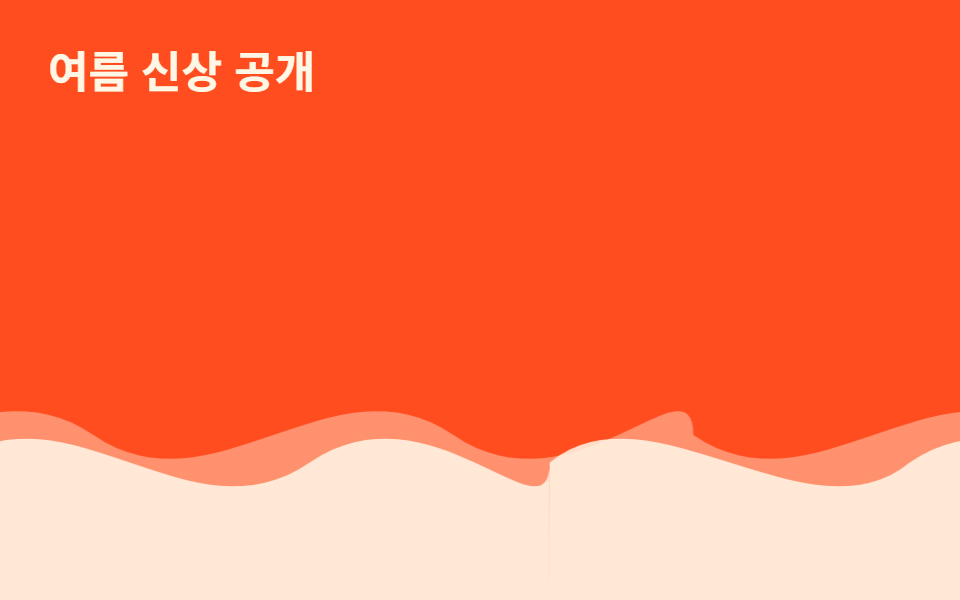
2枚の SVG 波形パスを重ね、それぞれ translateX で逆方向に無限ループさせ、レイヤー間の視差で波が流れて見える。
使いどころプロダクト紹介セクション下部の区切り線、海・旅行系ランディング背景
SVG pathtranslateX 루프레이어 시차
<main class="stage">
  <div class="waves" aria-hidden="true">
  <div class="layer layer--back">
    <svg class="wave" viewBox="0 0 480 120" preserveAspectRatio="none" aria-hidden="true"><path d="M0,60 C60,90 120,30 180,60 C240,90 300,30 360,60 C420,90 480,30 480,60 L480,120 L0,120 Z"/></svg>
    <svg class="wave" viewBox="0 0 480 120" preserveAspectRatio="none" aria-hidden="true"><path d="M0,60 C60,90 120,30 180,60 C240,90 300,30 360,60 C420,90 480,30 480,60 L480,120 L0,120 Z"/></svg>
  </div>
  <div class="layer layer--front">
    <svg class="wave" viewBox="0 0 480 120" preserveAspectRatio="none" aria-hidden="true"><path d="M0,70 C50,40 130,100 180,70 C240,40 300,100 360,70 C420,40 480,100 480,70 L480,120 L0,120 Z"/></svg>
    <svg class="wave" viewBox="0 0 480 120" preserveAspectRatio="none" aria-hidden="true"><path d="M0,70 C50,40 130,100 180,70 C240,40 300,100 360,70 C420,40 480,100 480,70 L480,120 L0,120 Z"/></svg>
  </div>
  </div>
  <p class="caption">夏の新作</p>
</main>
@use "../../../../site/static/demo-tokens" as *;
// ── 변수 3개 ──────────────────────────────
$duration: $dur-loop * 3; // 6s — 뒤 레이어 한 바퀴
$easing: linear;
$color: $subject-cream;
// ── 데모 무대 ───────────────────────────────
@include stage($stage-orange);
.caption {
position: absolute; z-index: 1; top: $sp-6; left: $sp-6; margin: 0;
color: $subject-cream; font-weight: 700; font-size: clamp(16px, 5vw, 22px); line-height: 1; font-family: inherit;
}
// .layer 는 폭 200%로 뷰포트 밖까지 나간다 — 문서 스크롤을 부풀리지 않도록 .waves 로 먼저 가둔다 (BD8)
.waves { position: absolute; inset: 0; overflow: hidden; }
// 물결은 같은 SVG 를 두 장 나란히(각 50%) 붙여 폭 200%로 만들고, 정확히 -50% 만큼 옮기면
// 이어붙인 자리가 서로 같은 그림이라 이음새 없이 반복된다 (마퀴와 같은 원리, flex gap 은 안 쓴다)
.layer {
position: absolute; left: 0; right: 0; bottom: 0; height: 55%;
display: flex; width: 200%;
}
.wave { width: 50%; height: 100%; flex: none; display: block; fill: $color; }
.layer--back {
opacity: .4;
animation: drift $duration $easing infinite;
}
.layer--front {
opacity: .85;
animation: drift ($duration * .65) $easing infinite;
}
@keyframes drift {
from { transform: translateX(0); }
to { transform: translateX(-50%); }
}
// ── 접근성: 물결을 멈추고 정지 이미지로 ────────────
@media (prefers-reduced-motion: reduce) {
.layer { animation: none; }
}html, body {
margin: 0;
overflow: hidden;
}
.stage {
box-sizing: border-box;
min-height: 100vh;
display: grid;
place-items: center;
margin: 0;
background: #ff4d1f;
font-family: -apple-system, "Segoe UI", "Noto Sans KR", sans-serif;
padding: clamp(8px, 4vw, 24px);
}
.caption {
position: absolute;
z-index: 1;
top: 24px;
left: 24px;
margin: 0;
color: #fff7e6;
font-weight: 700;
font-size: clamp(16px, 5vw, 22px);
line-height: 1;
font-family: inherit;
}
.waves {
position: absolute;
inset: 0;
overflow: hidden;
}
.layer {
position: absolute;
left: 0;
right: 0;
bottom: 0;
height: 55%;
display: flex;
width: 200%;
}
.wave {
width: 50%;
height: 100%;
flex: none;
display: block;
fill: #fff7e6;
}
.layer--back {
opacity: 0.4;
animation: drift 6s linear infinite;
}
.layer--front {
opacity: 0.85;
animation: drift 3.9s linear infinite;
}
@keyframes drift {
from {
transform: translateX(0);
}
to {
transform: translateX(-50%);
}
}
@media (prefers-reduced-motion: reduce) {
.layer {
animation: none;
}
}import type { CSSProperties } from "react";
import styles from "./SvgWave.module.scss";
export type SvgWaveProps = {
/** 애니메이션 기준 시간(ms) */
duration?: number;
/** CSS easing */
easing?: string;
/** 피사체 색 */
color?: string;
};
type Vars = CSSProperties & { "--i"?: number };
const COUNT = 4;
export default function SvgWave({
duration = 6000,
easing = "linear",
color = "#fff7e6",
}: SvgWaveProps) {
const vars = {
"--duration": `${duration}ms`,
"--easing": easing,
"--color": color,
} as CSSProperties;
return (
<div className={styles.stage} style={vars}>
<div className={styles.layerBack}>
<svg className={styles.wave} viewBox="0 0 480 120" preserveAspectRatio="none" aria-hidden="true"><path d="M0,60 C60,90 120,30 180,60 C240,90 300,30 360,60 C420,90 480,30 480,60 L480,120 L0,120 Z" /></svg>
<svg className={styles.wave} viewBox="0 0 480 120" preserveAspectRatio="none" aria-hidden="true"><path d="M0,60 C60,90 120,30 180,60 C240,90 300,30 360,60 C420,90 480,30 480,60 L480,120 L0,120 Z" /></svg>
</div>
<div className={styles.layerFront}>
<svg className={styles.wave} viewBox="0 0 480 120" preserveAspectRatio="none" aria-hidden="true"><path d="M0,70 C50,40 130,100 180,70 C240,40 300,100 360,70 C420,40 480,100 480,70 L480,120 L0,120 Z" /></svg>
<svg className={styles.wave} viewBox="0 0 480 120" preserveAspectRatio="none" aria-hidden="true"><path d="M0,70 C50,40 130,100 180,70 C240,40 300,100 360,70 C420,40 480,100 480,70 L480,120 L0,120 Z" /></svg>
</div>
</div>
);
}03 SVGの波 — 計測 累積面積 12.781% · 動いたフレーム 23/23GODRICH オリジナル · SCSS と React は zip に同梱 · CSS 背景アニメーション 星 9選 — 一行でコピペOK
このデモが属する記事
 CSS 背景アニメーション 星 9選 — 一行でコピペOKcss 背景アニメーション 星のような検索でたどり着く人が本当に探しているのは、雪や星、雨、紙吹雪、泡、蛍、花びら、霧のように小さな粒を画面全体にばらまいて動かす背景の作り方です。span 1個をnth-childで何十回も繰り返し、位置・ この記事のデモをすべて見る