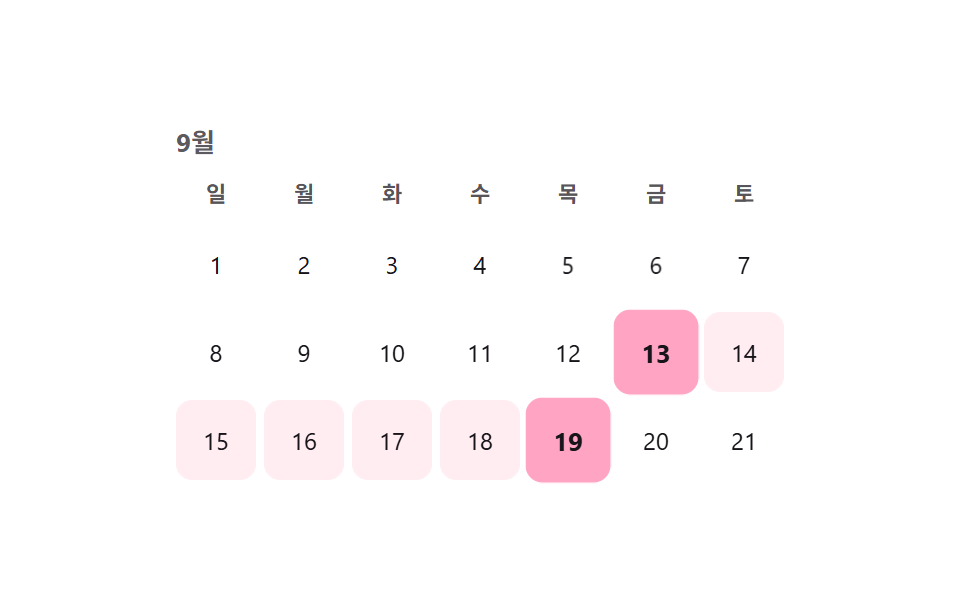
01カレンダー範囲ドラッグ選択
月のグリッドで開始日を選び、続けて終了日を選ぶと、その間の日付が薄く塗られ、両端だけ濃い点になる。
使いどころ宿泊予約の期間選択、休暇申請の期間選択
방향키 이동aria-selected0.22초

<main class="stage">
  <div class="cal is-demo">
    <div class="cal__head">9月</div>
    <div class="cal__grid" role="grid" aria-label="日付範囲を選択">
      <div class="cal__dow" aria-hidden="true">日</div>
      <div class="cal__dow" aria-hidden="true">月</div>
      <div class="cal__dow" aria-hidden="true">火</div>
      <div class="cal__dow" aria-hidden="true">水</div>
      <div class="cal__dow" aria-hidden="true">木</div>
      <div class="cal__dow" aria-hidden="true">金</div>
      <div class="cal__dow" aria-hidden="true">土</div>
    </div>
    <div class="cal__days" role="rowgroup"></div>
  </div>
</main>
@use "../../../../site/static/demo-tokens" as *;
// ── 변수 3개 ──────────────────────────────
$duration: $dur-quick;
$easing: $ease-pop;
$color: $subject-pink;
@include stage($stage-paper);
.cal { position: relative; width: min(304px, 88vw); color: $subject-ink; }
.cal__head {
font-weight: 700; font-size: 13px; margin-bottom: $sp-2; color: rgba($subject-ink, .7);
}
.cal__grid, .cal__row {
display: grid; grid-template-columns: repeat(7, 1fr); gap: $sp-1;
}
.cal__dow {
text-align: center; font-size: 11px; font-weight: 600; color: rgba($subject-ink, .72);
padding-bottom: $sp-1;
}
.cal__days { position: relative; margin-top: $sp-1; }
.cal__row { position: relative; }
.cal__day {
appearance: none; border: 0; background: transparent; font: inherit; font-family: inherit;
width: 100%; aspect-ratio: 1; border-radius: $r-sm; cursor: pointer;
font-size: 12px; color: $subject-ink; position: relative; z-index: 1;
transition: background-color $duration $easing, color $duration $easing, transform $duration $easing;
-webkit-tap-highlight-color: transparent;
}
.cal__day:focus-visible { outline: 2px solid $color; outline-offset: 2px; }
.cal__day.is-range { background: rgba($color, .18); }
.cal__day.is-edge {
background: $color; color: $subject-ink; font-weight: 700; transform: scale(1.06);
}
@media (prefers-reduced-motion: reduce) {
.cal__day { transition: none; }
}html, body {
margin: 0;
overflow: hidden;
}
.stage {
box-sizing: border-box;
min-height: 100vh;
display: grid;
place-items: center;
margin: 0;
background: #ffffff;
font-family: -apple-system, "Segoe UI", "Noto Sans KR", sans-serif;
padding: clamp(8px, 4vw, 24px);
}
.cal {
position: relative;
width: min(304px, 88vw);
color: #17141a;
}
.cal__head {
font-weight: 700;
font-size: 13px;
margin-bottom: 8px;
color: rgba(23, 20, 26, 0.7);
}
.cal__grid, .cal__row {
display: grid;
grid-template-columns: repeat(7, 1fr);
gap: 4px;
}
.cal__dow {
text-align: center;
font-size: 11px;
font-weight: 600;
color: rgba(23, 20, 26, 0.72);
padding-bottom: 4px;
}
.cal__days {
position: relative;
margin-top: 4px;
}
.cal__row {
position: relative;
}
.cal__day {
appearance: none;
border: 0;
background: transparent;
font: inherit;
font-family: inherit;
width: 100%;
aspect-ratio: 1;
border-radius: 8px;
cursor: pointer;
font-size: 12px;
color: #17141a;
position: relative;
z-index: 1;
transition: background-color 220ms cubic-bezier(0.2, 1.4, 0.4, 1), color 220ms cubic-bezier(0.2, 1.4, 0.4, 1), transform 220ms cubic-bezier(0.2, 1.4, 0.4, 1);
-webkit-tap-highlight-color: transparent;
}
.cal__day:focus-visible {
outline: 2px solid #ff9ebb;
outline-offset: 2px;
}
.cal__day.is-range {
background: rgba(255, 158, 187, 0.18);
}
.cal__day.is-edge {
background: #ff9ebb;
color: #17141a;
font-weight: 700;
transform: scale(1.06);
}
@media (prefers-reduced-motion: reduce) {
.cal__day {
transition: none;
}
}(function () {
var cal = document.querySelector('.cal');
var days = document.createElement('div');
days.className = 'cal__row';
var cells = [];
for (var d = 1; d <= 21; d++) {
var b = document.createElement('button');
b.type = 'button'; b.className = 'cal__day'; b.textContent = d;
b.setAttribute('role', 'gridcell');
b.setAttribute('aria-selected', 'false');
b.tabIndex = d === 1 ? 0 : -1;
b.dataset.day = d;
days.appendChild(b); cells.push(b);
}
cal.querySelector('.cal__days').appendChild(days);
var start = null, end = null;
function paint() {
cells.forEach(function (c) {
var n = +c.dataset.day;
var inRange = start && end && n >= start && n <= end;
var isEdge = n === start || n === end;
c.classList.toggle('is-range', !!inRange);
c.classList.toggle('is-edge', isEdge);
c.setAttribute('aria-selected', isEdge ? 'true' : 'false');
});
}
function pick(n) {
if (start === null || (start !== null && end !== null)) { start = n; end = null; }
else { if (n < start) { end = start; start = n; } else { end = n; } }
paint();
}
cells.forEach(function (c, i) {
c.addEventListener('click', function () { stop(); pick(+c.dataset.day); });
c.addEventListener('keydown', function (e) {
var map = { ArrowRight: 1, ArrowLeft: -1, ArrowDown: 7, ArrowUp: -7 };
if (map[e.key] !== undefined) {
e.preventDefault(); stop();
var next = cells[Math.min(cells.length - 1, Math.max(0, i + map[e.key]))];
cells.forEach(function (x) { x.tabIndex = -1; });
next.tabIndex = 0; next.focus({ preventScroll: true });
} else if (e.key === 'Enter' || e.key === ' ') {
e.preventDefault(); stop(); pick(+c.dataset.day);
}
});
});
var demoPairs = [[3, 8], [10, 15], [5, 6], [13, 19]];
var pi = 0;
function tick() { var pr = demoPairs[pi % demoPairs.length]; start = pr[0]; end = pr[1]; paint(); pi++; }
var t = setInterval(tick, 500); tick();
function stop() { cal.classList.remove('is-demo'); clearInterval(t); }
}());import { useState } from "react";
import type { CSSProperties } from "react";
import styles from "./DateRangeCalendarSelect.module.scss";
export type DateRangeCalendarSelectProps = {
month?: string;
dow?: string[];
days?: number;
duration?: number;
easing?: string;
color?: string;
};
type Vars = CSSProperties & { "--duration"?: string; "--easing"?: string; "--c"?: string };
export default function DateRangeCalendarSelect({
month = "Sep",
dow = ["Sun", "Mon", "Tue", "Wed", "Thu", "Fri", "Sat"],
days = 21,
duration = 220,
easing = "cubic-bezier(.2,1.4,.4,1)",
color = "#ff9ebb",
}: DateRangeCalendarSelectProps) {
const [start, setStart] = useState<number | null>(3);
const [end, setEnd] = useState<number | null>(8);
const vars: Vars = { "--duration": `${duration}ms`, "--easing": easing, "--c": color };
function pick(n: number) {
if (start === null || (start !== null && end !== null)) {
setStart(n); setEnd(null);
} else if (n < start) {
setEnd(start); setStart(n);
} else {
setEnd(n);
}
}
return (
<div className={styles.cal} style={vars}>
<div className={styles.head}>{month}</div>
<div className={styles.grid}>
{dow.map((d) => (
<div key={d} className={styles.dow}>{d}</div>
))}
</div>
<div className={styles.row}>
{Array.from({ length: days }, (_, i) => i + 1).map((n, i) => {
const inRange = start !== null && end !== null && n >= start && n <= end;
const isEdge = n === start || n === end;
return (
<button
key={n}
type="button"
className={styles.day}
data-range={inRange}
data-edge={isEdge}
aria-selected={isEdge}
tabIndex={i === 0 ? 0 : -1}
onClick={() => pick(n)}
>
{n}
</button>
);
})}
</div>
</div>
);
}01 カレンダー範囲ドラッグ選択 — 計測 累積面積 18.911% · 動いたフレーム 13/23GODRICH オリジナル · SCSS と React は zip に同梱 · カレンダー 選択 UI 9選 — コピペOK
このデモが属する記事
 カレンダー 選択 UI 9選 — コピペOKカレンダー 選択 UI は、値一つではなく開始日と終了日のような範囲をまとめて選ばせる部品です。セグメントコントロールに続き、範囲・アバター・検索・ホイール・比率まで、実際の実装で詰まりやすい選択UI9種を、コードとともにまとめました。 この記事のデモをすべて見る