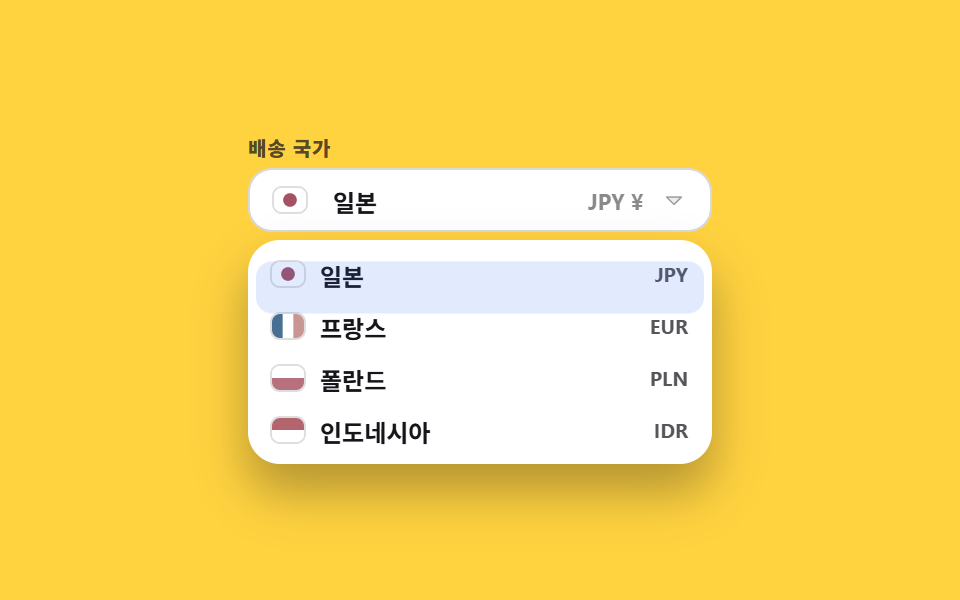
06国旗付きの国・通貨セレクト
国を選ぶとボタンの国旗と通貨記号が一緒に変わり、国旗は画像ファイルなしで図形2〜3個のSVGとして描かれます。
使いどころ海外決済や配送のように、どの国かで金額表示が変わる画面に国選択を付けるとき
inline SVGaria-selectedopacity
<main class="stage">
  <div class="cf is-demo is-open">
    <span class="cf__label" id="cf-label">配送先の国</span>
    <button class="cf__btn" type="button" id="cf-btn" aria-haspopup="listbox" aria-expanded="true" aria-controls="cf-list" aria-labelledby="cf-label cf-name">
      <span class="cf__swap">
        <span class="cf__flag cf__slot cf__slot--a"><svg viewBox="0 0 16 12" width="16" height="12" aria-hidden="true"><rect width="16" height="12" fill="#ffffff"/><circle cx="8" cy="6" r="3.4" fill="#a45164"/></svg></span>
        <span class="cf__flag cf__slot cf__slot--b" aria-hidden="true"><svg viewBox="0 0 16 12" width="16" height="12"><rect width="16" height="12" fill="#ffffff"/><rect width="5.33" height="12" fill="#496f93"/><rect x="10.67" width="5.33" height="12" fill="#ca9693"/></svg></span>
      </span>
      <span class="cf__name" id="cf-name">
        <span class="cf__slot cf__slot--a">日本</span>
        <span class="cf__slot cf__slot--b" aria-hidden="true">フランス</span>
      </span>
      <span class="cf__cur">
        <span class="cf__slot cf__slot--a">JPY ¥</span>
        <span class="cf__slot cf__slot--b" aria-hidden="true">EUR €</span>
      </span>
      <span class="cf__caret" aria-hidden="true"><svg viewBox="0 0 256 256" width="12" height="12"><g fill="currentColor"><path d="m208 96l-80 80l-80-80Z" opacity=".2"/><path d="M215.39 92.94A8 8 0 0 0 208 88H48a8 8 0 0 0-5.66 13.66l80 80a8 8 0 0 0 11.32 0l80-80a8 8 0 0 0 1.73-8.72M128 164.69L67.31 104h121.38Z"/></g></svg></span>
    </button>
    <span class="cf__mark" aria-hidden="true"></span>
    <ul class="cf__list" id="cf-list" role="listbox" aria-labelledby="cf-label">
      <li class="cf__opt cf__opt--a" id="cf-o1" role="option" aria-selected="true" data-cur="JPY ¥">
        <span class="cf__flag"><svg viewBox="0 0 16 12" width="16" height="12" aria-hidden="true"><rect width="16" height="12" fill="#ffffff"/><circle cx="8" cy="6" r="3.4" fill="#a45164"/></svg></span>
        <span class="cf__opt-name">日本</span><span class="cf__code">JPY</span>
      </li>
      <li class="cf__opt cf__opt--b" id="cf-o2" role="option" aria-selected="false" data-cur="EUR €">
        <span class="cf__flag"><svg viewBox="0 0 16 12" width="16" height="12" aria-hidden="true"><rect width="16" height="12" fill="#ffffff"/><rect width="5.33" height="12" fill="#496f93"/><rect x="10.67" width="5.33" height="12" fill="#ca9693"/></svg></span>
        <span class="cf__opt-name">フランス</span><span class="cf__code">EUR</span>
      </li>
      <li class="cf__opt" id="cf-o3" role="option" aria-selected="false" data-cur="PLN zł">
        <span class="cf__flag"><svg viewBox="0 0 16 12" width="16" height="12" aria-hidden="true"><rect width="16" height="6" fill="#ffffff"/><rect y="6" width="16" height="6" fill="#b8707e"/></svg></span>
        <span class="cf__opt-name">ポーランド</span><span class="cf__code">PLN</span>
      </li>
      <li class="cf__opt" id="cf-o4" role="option" aria-selected="false" data-cur="IDR Rp">
        <span class="cf__flag"><svg viewBox="0 0 16 12" width="16" height="12" aria-hidden="true"><rect width="16" height="6" fill="#b3646d"/><rect y="6" width="16" height="6" fill="#ffffff"/></svg></span>
        <span class="cf__opt-name">インドネシア</span><span class="cf__code">IDR</span>
      </li>
    </ul>
  </div>
</main>@use "../../../../site/static/demo-tokens" as *;
$duration: $dur-quick;
$easing: $ease-spring;
$color: $subject-blue;
@include stage($stage-yellow);
.cf {
position: relative;
box-sizing: border-box;
width: min(232px, 84vw);
// 열린 목록은 absolute 라 높이에 안 잡힌다 — 그만큼 아래를 비워 둔다
padding-bottom: 116px;
font-family: -apple-system, "Segoe UI", "Noto Sans KR", sans-serif;
color: $stage-ink;
}
.cf__label {
display: block;
font-size: 10px; line-height: 12px; font-weight: 800;
letter-spacing: .04em;
color: rgba(23, 20, 26, .72);
margin: 0 0 $sp-1;
}
.cf__btn {
box-sizing: border-box;
width: 100%; height: 32px;
display: flex; align-items: center; gap: $sp-2;
padding: 0 $sp-3;
border: 1px solid rgba(23, 20, 26, .16);
background: #fff;
border-radius: $r-control;
color: $stage-ink;
font-family: inherit;
font-size: 12px; font-weight: 700;
cursor: pointer;
}
.cf__swap, .cf__name, .cf__cur { display: inline-grid; }
.cf__slot { grid-area: 1 / 1; }
.cf__slot--b { opacity: 0; }
.cf__cur { margin-left: auto; font-size: 11px; font-weight: 700; color: rgba(23, 20, 26, .5); }
.cf__flag {
display: inline-flex;
border-radius: $r-xs;
overflow: hidden;
box-shadow: 0 0 0 1px rgba(23, 20, 26, .14);
}
.cf__caret { display: inline-flex; color: rgba(23, 20, 26, .4); }
.cf__list {
position: absolute;
top: 52px; left: 0; right: 0;
box-sizing: border-box;
margin: 0; padding: $sp-1;
list-style: none;
background: #fff;
border-radius: $r-card;
box-shadow: $shadow-raised;
opacity: 0;
transform: translateY(-4px);
pointer-events: none;
transition: opacity $duration $easing, transform $duration $easing;
}
.cf.is-open .cf__list { opacity: 1; transform: translateY(0); pointer-events: auto; }
.cf__mark {
position: absolute;
z-index: 1;
top: 56px; left: $sp-1; right: $sp-1;
height: 26px;
border-radius: $r-sm;
background: rgba(47, 109, 246, .14);
opacity: 0;
pointer-events: none;
}
.cf__opt {
position: relative;
isolation: isolate;
box-sizing: border-box;
height: 26px;
display: flex; align-items: center; gap: $sp-2;
padding: 0 $sp-2;
border-radius: $r-sm;
font-size: 12px; font-weight: 600;
cursor: pointer;
}
.cf__opt::after {
content: "";
position: absolute;
inset: 0;
z-index: -1;
border-radius: $r-sm;
background: rgba(47, 109, 246, .14);
opacity: 0;
}
.cf__opt[aria-selected="true"]::after { opacity: 1; }
.cf__opt.is-at::after { opacity: .6; }
.cf__code { margin-left: auto; font-size: 10px; font-weight: 700; color: rgba(23, 20, 26, .72); }
// ── 자동 루프: 두 번째 나라로 바뀌었다가 다시 첫 나라로 돌아온다 (국기·이름·통화가 한꺼번에) ──
// 선택 표시는 줄마다 켜고 끄는 게 아니라 막대 하나가 줄 사이(26px)를 미끄러진다.
// 글자와 국기는 겹쳐 놓은 두 겹이라 서서히 교차시키면 두 나라가 동시에 비친다 — steps(1) 로 한 번에 갈아 끼운다
.cf.is-demo .cf__opt::after { opacity: 0; }
.cf.is-demo .cf__mark { opacity: 1; animation: cf-mark $dur-loop $easing infinite; }
.cf.is-demo .cf__slot--a { animation: cf-swap-a $dur-loop steps(1, end) infinite; }
.cf.is-demo .cf__slot--b { animation: cf-swap-b $dur-loop steps(1, end) infinite; }
@keyframes cf-mark {
0%, 10% { transform: translateY(0); }
35%, 65% { transform: translateY(26px); }
90%, 100% { transform: translateY(0); }
}
@keyframes cf-swap-a {
0%, 33% { opacity: 1; }
34%, 65% { opacity: 0; }
66%, 100% { opacity: 1; }
}
@keyframes cf-swap-b {
0%, 33% { opacity: 0; }
34%, 65% { opacity: 1; }
66%, 100% { opacity: 0; }
}
@media (prefers-reduced-motion: reduce) {
.cf.is-demo .cf__slot--a, .cf.is-demo .cf__slot--b,
.cf.is-demo .cf__mark { animation: none !important; }
.cf__slot--b { opacity: 0; }
.cf__list { transition: none; }
}html, body {
margin: 0;
overflow: hidden;
}
.stage {
box-sizing: border-box;
min-height: 100vh;
display: grid;
place-items: center;
margin: 0;
background: #ffd23f;
font-family: -apple-system, "Segoe UI", "Noto Sans KR", sans-serif;
padding: clamp(8px, 4vw, 24px);
}
.cf {
position: relative;
box-sizing: border-box;
width: min(232px, 84vw);
padding-bottom: 116px;
font-family: -apple-system, "Segoe UI", "Noto Sans KR", sans-serif;
color: #17141a;
}
.cf__label {
display: block;
font-size: 10px;
line-height: 12px;
font-weight: 800;
letter-spacing: 0.04em;
color: rgba(23, 20, 26, 0.72);
margin: 0 0 4px;
}
.cf__btn {
box-sizing: border-box;
width: 100%;
height: 32px;
display: flex;
align-items: center;
gap: 8px;
padding: 0 12px;
border: 1px solid rgba(23, 20, 26, 0.16);
background: #fff;
border-radius: 12px;
color: #17141a;
font-family: inherit;
font-size: 12px;
font-weight: 700;
cursor: pointer;
}
.cf__swap, .cf__name, .cf__cur {
display: inline-grid;
}
.cf__slot {
grid-area: 1/1;
}
.cf__slot--b {
opacity: 0;
}
.cf__cur {
margin-left: auto;
font-size: 11px;
font-weight: 700;
color: rgba(23, 20, 26, 0.5);
}
.cf__flag {
display: inline-flex;
border-radius: 4px;
overflow: hidden;
box-shadow: 0 0 0 1px rgba(23, 20, 26, 0.14);
}
.cf__caret {
display: inline-flex;
color: rgba(23, 20, 26, 0.4);
}
.cf__list {
position: absolute;
top: 52px;
left: 0;
right: 0;
box-sizing: border-box;
margin: 0;
padding: 4px;
list-style: none;
background: #fff;
border-radius: 16px;
box-shadow: 0 14px 24px rgba(23, 20, 26, 0.32);
opacity: 0;
transform: translateY(-4px);
pointer-events: none;
transition: opacity 220ms cubic-bezier(0.2, 0.8, 0.2, 1), transform 220ms cubic-bezier(0.2, 0.8, 0.2, 1);
}
.cf.is-open .cf__list {
opacity: 1;
transform: translateY(0);
pointer-events: auto;
}
.cf__mark {
position: absolute;
z-index: 1;
top: 56px;
left: 4px;
right: 4px;
height: 26px;
border-radius: 8px;
background: rgba(47, 109, 246, 0.14);
opacity: 0;
pointer-events: none;
}
.cf__opt {
position: relative;
isolation: isolate;
box-sizing: border-box;
height: 26px;
display: flex;
align-items: center;
gap: 8px;
padding: 0 8px;
border-radius: 8px;
font-size: 12px;
font-weight: 600;
cursor: pointer;
}
.cf__opt::after {
content: "";
position: absolute;
inset: 0;
z-index: -1;
border-radius: 8px;
background: rgba(47, 109, 246, 0.14);
opacity: 0;
}
.cf__opt[aria-selected=true]::after {
opacity: 1;
}
.cf__opt.is-at::after {
opacity: 0.6;
}
.cf__code {
margin-left: auto;
font-size: 10px;
font-weight: 700;
color: rgba(23, 20, 26, 0.72);
}
.cf.is-demo .cf__opt::after {
opacity: 0;
}
.cf.is-demo .cf__mark {
opacity: 1;
animation: cf-mark 2s cubic-bezier(0.2, 0.8, 0.2, 1) infinite;
}
.cf.is-demo .cf__slot--a {
animation: cf-swap-a 2s steps(1, end) infinite;
}
.cf.is-demo .cf__slot--b {
animation: cf-swap-b 2s steps(1, end) infinite;
}
@keyframes cf-mark {
0%, 10% {
transform: translateY(0);
}
35%, 65% {
transform: translateY(26px);
}
90%, 100% {
transform: translateY(0);
}
}
@keyframes cf-swap-a {
0%, 33% {
opacity: 1;
}
34%, 65% {
opacity: 0;
}
66%, 100% {
opacity: 1;
}
}
@keyframes cf-swap-b {
0%, 33% {
opacity: 0;
}
34%, 65% {
opacity: 1;
}
66%, 100% {
opacity: 0;
}
}
@media (prefers-reduced-motion: reduce) {
.cf.is-demo .cf__slot--a, .cf.is-demo .cf__slot--b,
.cf.is-demo .cf__mark {
animation: none !important;
}
.cf__slot--b {
opacity: 0;
}
.cf__list {
transition: none;
}
}// 실제 동작: 국가를 고르면 버튼의 국기와 통화 표시가 함께 바뀐다.
var root = document.querySelector('.cf');
var btn = document.getElementById('cf-btn');
var list = document.getElementById('cf-list');
var name = document.getElementById('cf-name');
var swap = root.querySelector('.cf__swap');
var cur = root.querySelector('.cf__cur');
var opts = [].slice.call(list.querySelectorAll('.cf__opt'));
var at = 0;
function open(on) {
root.classList.remove('is-demo');
root.classList.toggle('is-open', on);
btn.setAttribute('aria-expanded', String(on));
if (on) list.focus({ preventScroll: true });
}
function pick(i) {
at = i;
root.classList.remove('is-demo');
opts.forEach(function (o, k) { o.setAttribute('aria-selected', String(k === i)); });
swap.innerHTML = opts[i].querySelector('.cf__flag').innerHTML;
name.textContent = opts[i].querySelector('.cf__opt-name').textContent;
cur.textContent = opts[i].dataset.cur;
open(false);
btn.focus({ preventScroll: true });
}
btn.addEventListener('click', function () { open(!root.classList.contains('is-open')); });
opts.forEach(function (o, i) { o.addEventListener('click', function () { pick(i); }); });
list.setAttribute('tabindex', '-1');
list.addEventListener('keydown', function (e) {
if (e.key === 'ArrowDown' || e.key === 'ArrowUp') {
at = Math.max(0, Math.min(at + (e.key === 'ArrowDown' ? 1 : -1), opts.length - 1));
opts.forEach(function (o, k) { o.classList.toggle('is-at', k === at); });
list.setAttribute('aria-activedescendant', opts[at].id);
e.preventDefault();
} else if (e.key === 'Enter' || e.key === ' ') { pick(at); e.preventDefault(); }
else if (e.key === 'Escape') { open(false); btn.focus({ preventScroll: true }); }
});
document.addEventListener('click', function (e) { if (!e.target.closest('.cf')) open(false); });import { useEffect, useRef, useState } from "react";
import type { CSSProperties, ReactNode } from "react";
import styles from "./CountrySelect.module.scss";
export type Country = {
name: string;
code: string;
currency: string;
flag: ReactNode;
};
export type CountrySelectProps = {
label?: string;
countries?: Country[];
duration?: number;
easing?: string;
color?: string;
};
type Vars = CSSProperties & { "--duration"?: string; "--easing"?: string; "--color"?: string };
type KeyEvt = { key: string; preventDefault: () => void };
type ChangeEvt = { target: { value: string } };
type ClickEvt = { stopPropagation: () => void };
const FLAG_JAPAN: ReactNode = (
<svg viewBox="0 0 16 12" width="16" height="12" aria-hidden="true">
<rect width="16" height="12" fill="#ffffff" />
<circle cx="8" cy="6" r="3.4" fill="#bc002d" />
</svg>
);
const FLAG_FRANCE: ReactNode = (
<svg viewBox="0 0 16 12" width="16" height="12" aria-hidden="true">
<rect width="16" height="12" fill="#ffffff" />
<rect width="5.33" height="12" fill="#0055a4" />
<rect x="10.67" width="5.33" height="12" fill="#ef4135" />
</svg>
);
const FLAG_POLAND: ReactNode = (
<svg viewBox="0 0 16 12" width="16" height="12" aria-hidden="true">
<rect width="16" height="6" fill="#ffffff" />
<rect y="6" width="16" height="6" fill="#dc143c" />
</svg>
);
const FLAG_INDONESIA: ReactNode = (
<svg viewBox="0 0 16 12" width="16" height="12" aria-hidden="true">
<rect width="16" height="6" fill="#ce1126" />
<rect y="6" width="16" height="6" fill="#ffffff" />
</svg>
);
const DEFAULT_COUNTRIES: Country[] = [
{ name: "Japan", code: "JPY", currency: "JPY ¥", flag: FLAG_JAPAN },
{ name: "France", code: "EUR", currency: "EUR €", flag: FLAG_FRANCE },
{ name: "Poland", code: "PLN", currency: "PLN zł", flag: FLAG_POLAND },
{ name: "Indonesia", code: "IDR", currency: "IDR Rp", flag: FLAG_INDONESIA },
];
export default function CountrySelect({
label = "Ship to",
countries = DEFAULT_COUNTRIES,
duration = 180,
easing = "cubic-bezier(.2,1.4,.4,1)",
color = "#2f6df6",
}: CountrySelectProps) {
const [open, setOpen] = useState(false);
const [picked, setPicked] = useState(0);
const [active, setActive] = useState(0);
const rootRef = useRef<HTMLDivElement>(null);
const btnRef = useRef<HTMLButtonElement>(null);
const listRef = useRef<HTMLUListElement>(null);
const vars: Vars = { "--duration": `${duration}ms`, "--easing": easing, "--color": color };
const current = countries[picked];
useEffect(() => {
function onDocClick(e: MouseEvent) {
if (rootRef.current && !rootRef.current.contains(e.target as Node)) setOpen(false);
}
document.addEventListener("click", onDocClick);
return () => document.removeEventListener("click", onDocClick);
}, []);
useEffect(() => {
if (open) listRef.current?.focus({ preventScroll: true });
}, [open]);
function pick(i: number) {
setPicked(i);
setActive(i);
setOpen(false);
btnRef.current?.focus({ preventScroll: true });
}
return (
<div className={`${styles.cf} ${open ? styles.isOpen : ""}`} style={vars} ref={rootRef}>
<span className={styles.label} id="cf-label">{label}</span>
<button
ref={btnRef}
type="button"
id="cf-btn"
className={styles.btn}
aria-haspopup="listbox"
aria-expanded={open}
aria-controls="cf-list"
aria-labelledby="cf-label cf-name"
onClick={() => setOpen((o) => !o)}
>
<span className={styles.flag}>{current.flag}</span>
<span className={styles.name} id="cf-name">{current.name}</span>
<span className={styles.cur}>{current.currency}</span>
<span className={styles.caret} aria-hidden="true">
<svg viewBox="0 0 256 256" width="12" height="12">
<g fill="currentColor">
<path d="m208 96l-80 80l-80-80Z" opacity=".2" />
<path d="M215.39 92.94A8 8 0 0 0 208 88H48a8 8 0 0 0-5.66 13.66l80 80a8 8 0 0 0 11.32 0l80-80a8 8 0 0 0 1.73-8.72M128 164.69L67.31 104h121.38Z" />
</g>
</svg>
</span>
</button>
<ul
ref={listRef}
id="cf-list"
className={styles.list}
role="listbox"
aria-labelledby="cf-label"
aria-activedescendant={`cf-o${active}`}
tabIndex={-1}
onKeyDown={(e: KeyEvt) => {
if (e.key === "ArrowDown") { setActive((a) => Math.min(a + 1, countries.length - 1)); e.preventDefault(); }
else if (e.key === "ArrowUp") { setActive((a) => Math.max(a - 1, 0)); e.preventDefault(); }
else if (e.key === "Enter" || e.key === " ") { pick(active); e.preventDefault(); }
else if (e.key === "Escape") { setOpen(false); btnRef.current?.focus({ preventScroll: true }); }
}}
>
{countries.map((c, i) => (
<li
key={c.code}
id={`cf-o${i}`}
className={`${styles.opt} ${i === active ? styles.isAt : ""} ${i === picked ? styles.isPicked : ""}`}
role="option"
aria-selected={i === picked}
onMouseMove={() => setActive(i)}
onClick={() => pick(i)}
>
<span className={styles.flag}>{c.flag}</span>
<span className={styles.optName}>{c.name}</span>
<span className={styles.code}>{c.code}</span>
</li>
))}
</ul>
</div>
);
}06 国旗付きの国・通貨セレクト — 計測 累積面積 8.468% · 動いたフレーム 11/23GODRICH オリジナル · SCSS と React は zip に同梱 · セレクトボックス デザイン css 9選 — 実際に開く
このデモが属する記事
 セレクトボックス デザイン css 9選 — 実際に開くセレクトボックス デザイン css とは、ブラウザが勝手に描く標準の <select> を捨て、ボタンとリストを自分で組み立てる作り方です。9つのうち1つは最後までリストを開かず、その売り切れのマスは押しても動きません。実際に開くものだけを この記事のデモをすべて見る