セレクトボックス デザイン css 9選 — 実際に開く
セレクトボックス デザイン css とは、ブラウザが勝手に描く標準の <select> を捨て、ボタンとリストを自分で組み立てる作り方です。9つのうち1つは最後までリストを開かず、その売り切れのマスは押しても動きません。実際に開くものだけを並べました。
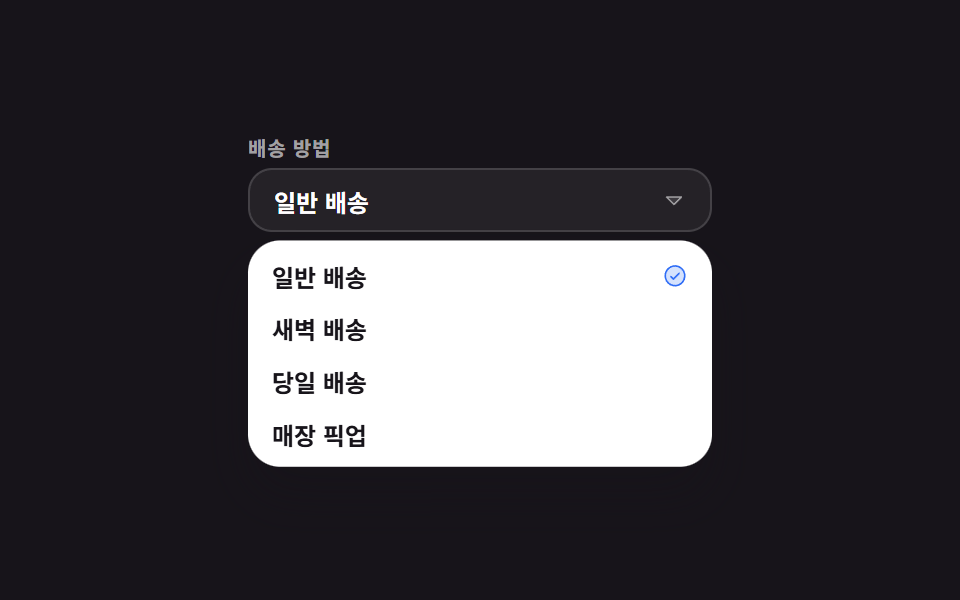 01 custom-select-spring-open
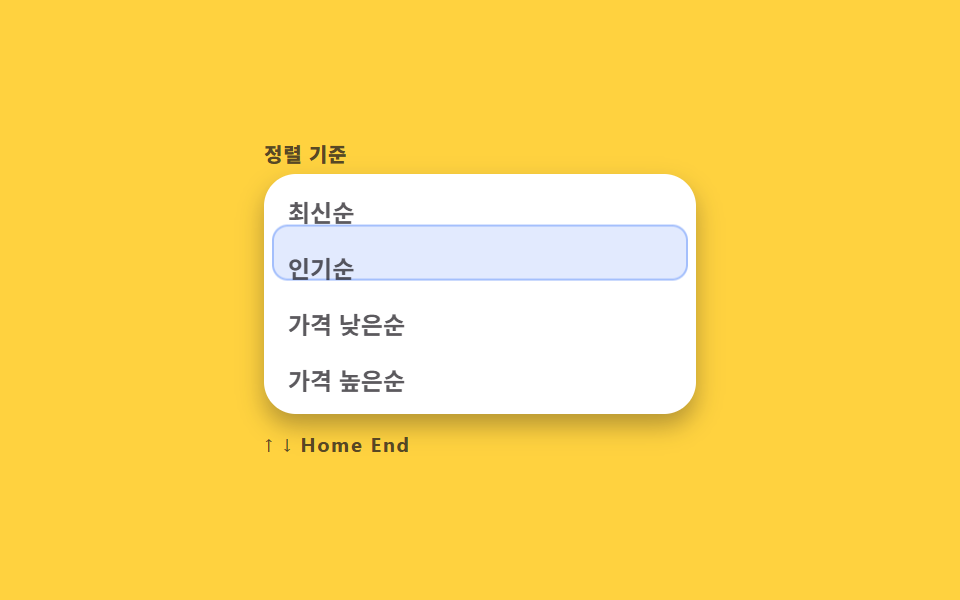 02 custom-select-keyboard-highlight
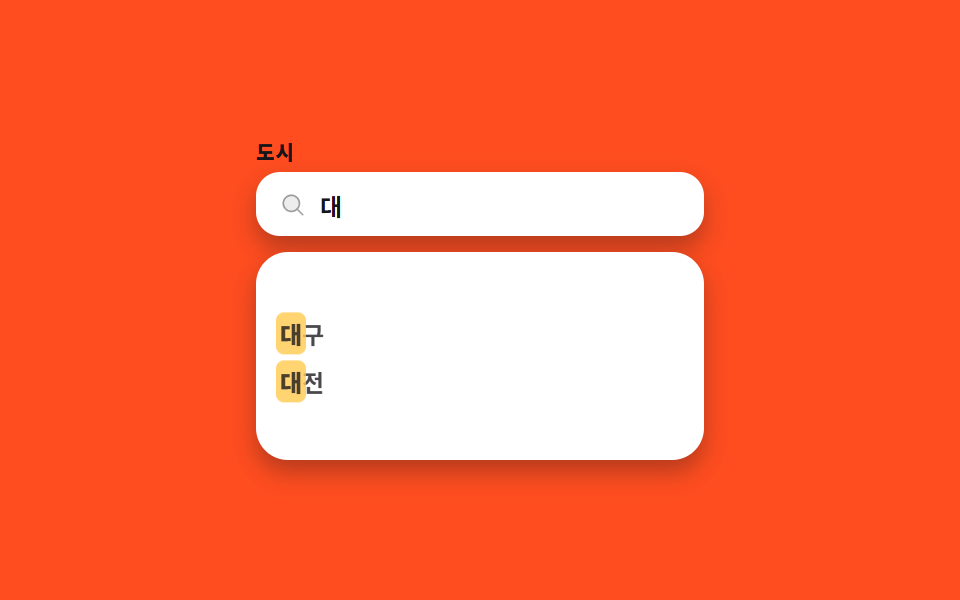 03 custom-select-search-filter
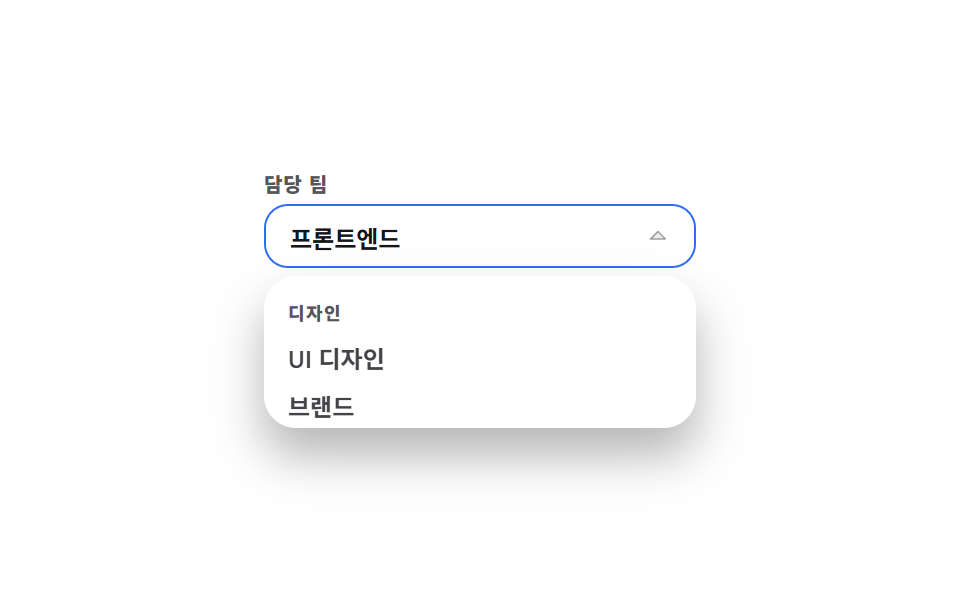 04 custom-select-grouped-headers
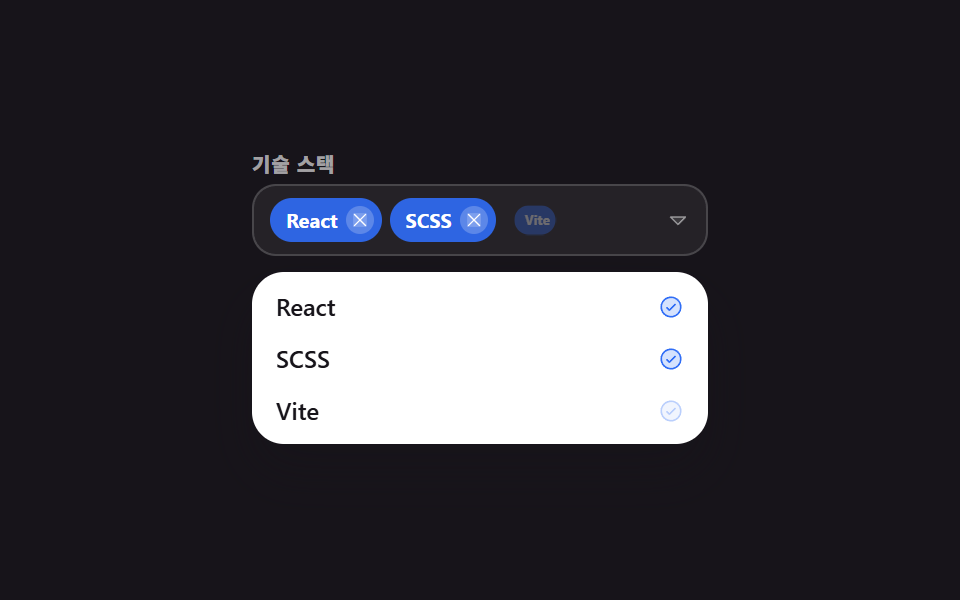 05 custom-select-multi-chip
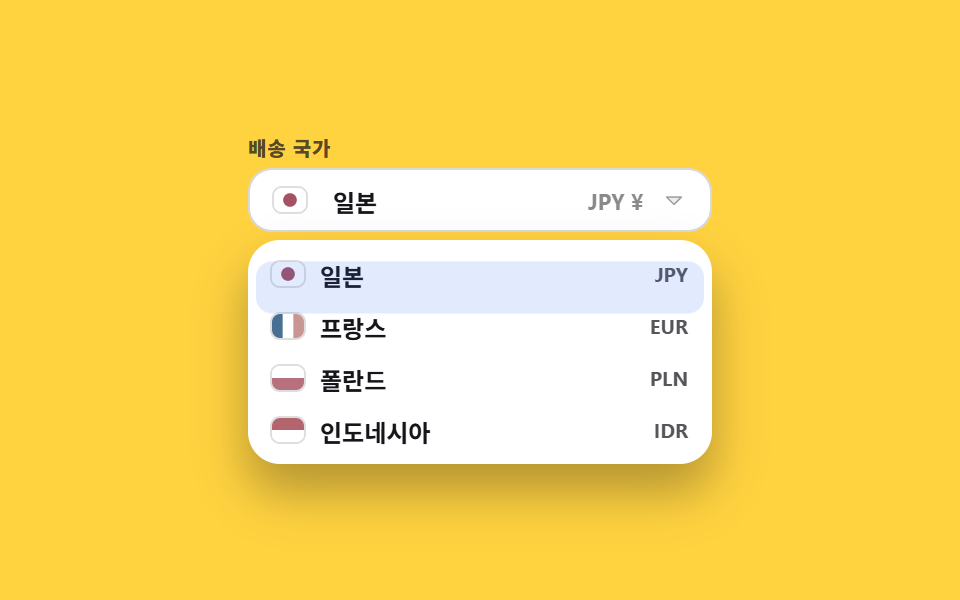 06 custom-select-country-flag
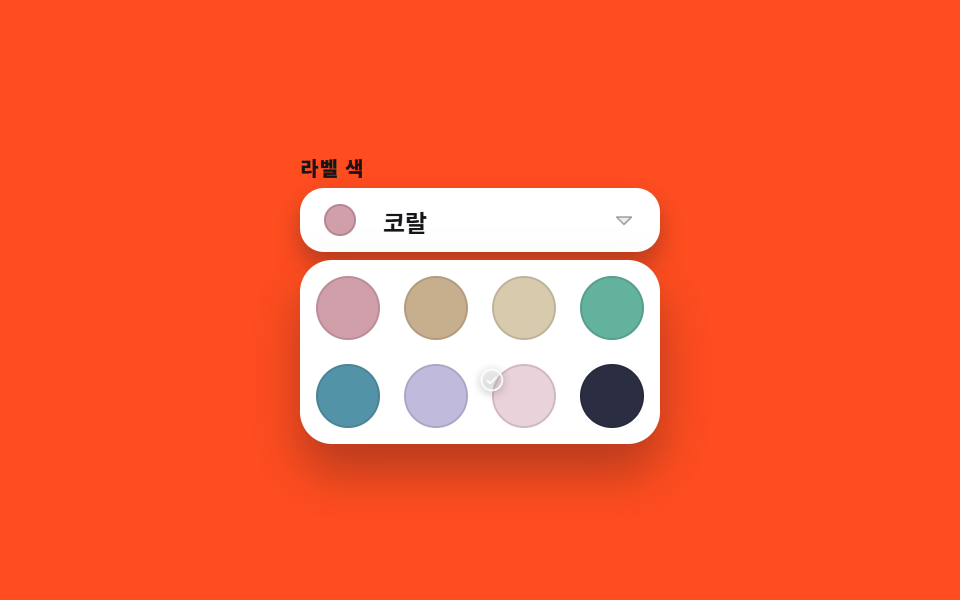 07 custom-select-color-swatch
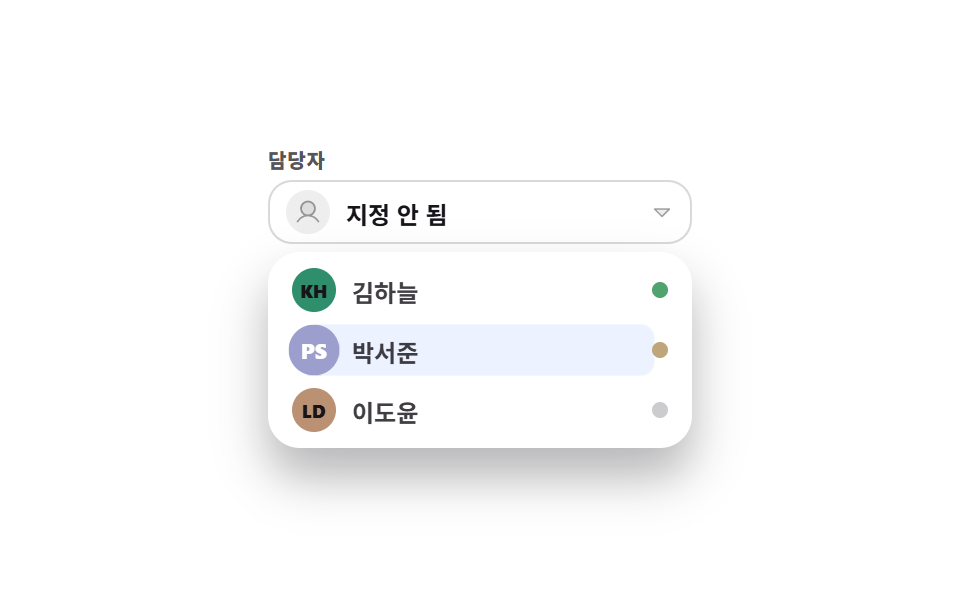 08 custom-select-avatar-assignee
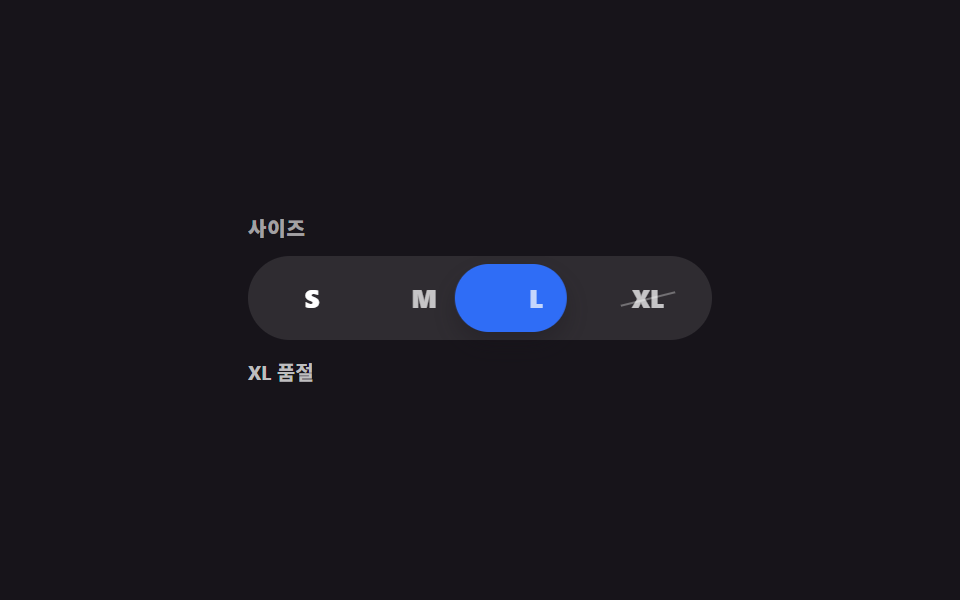 09 custom-select-size-segment
自動再生 · タイルを押すとその項目へ · すべて1つのzip
- 01 スプリングで開く基本セレクト
- 02 キーボードハイライトレール
- 03 検索して絞るコンボボックス
- 04 グループ見出しが貼り付くリスト
- 05 複数選択チップトークン
- 06 国旗付きの国・通貨セレクト
- 07 カラースウォッチ格子セレクト
- 08 アバター担当者アサイン
- 09 開かないサイズセグメント
並び順は人気順ではなく、セレクトボックス 矢印 デザインも含めてセレクトボックスが実際にたどる順番です。まず開き(01)、開いたリストの中をキーボードで移動し(02)、選択肢が増えればスクロールより入力で絞り(03)、それでも多ければグループに分けます(04)。次は答えが1つではなく複数になる場合(05)です。最後の4つは、選ぶ値がそもそも文字ではないときのものです。国は国旗(06)、ラベルは色の丸(07)、担当者はイニシャル(08)で見分け、選択肢が4つしかないサイズ(09)は開く動作そのものを捨てます。9つすべてに role="listbox" と role="option" が付き、矢印キーでの移動は飾りではなく実際に効きます。選択肢が日付なら見た目がまるで変わりますが、その版はカレンダー 選択 UIとカレンダー css デザインに月間格子から別に整理してあります。
01スプリングで開く基本セレクト
プルダウン css デザインとして何が見えるか
ボタンを押すとリストが上端を起点にバネのように広がって実際に開き、項目を選ぶとボタンの文字がその値に変わります。
<main class="stage">
  <div class="ss is-demo">
    <span class="ss__label" id="ss-label">配送方法</span>
    <button class="ss__btn" type="button" id="ss-btn" role="combobox" aria-haspopup="listbox" aria-expanded="false" aria-controls="ss-list" aria-labelledby="ss-label ss-value">
      <span class="ss__value" id="ss-value">通常配送</span>
      <span class="ss__caret" aria-hidden="true"><svg viewBox="0 0 256 256" width="12" height="12"><g fill="currentColor"><path d="m208 96l-80 80l-80-80Z" opacity=".2"/><path d="M215.39 92.94A8 8 0 0 0 208 88H48a8 8 0 0 0-5.66 13.66l80 80a8 8 0 0 0 11.32 0l80-80a8 8 0 0 0 1.73-8.72M128 164.69L67.31 104h121.38Z"/></g></svg></span>
    </button>
    <ul class="ss__list" id="ss-list" role="listbox" aria-labelledby="ss-label" tabindex="-1">
      <li class="ss__opt is-sel" id="ss-o1" role="option" aria-selected="true"><span>通常配送</span><span class="ss__tick" aria-hidden="true"><svg viewBox="0 0 256 256" width="13" height="13"><g fill="currentColor"><path d="M224 128a96 96 0 1 1-96-96a96 96 0 0 1 96 96" opacity=".2"/><path d="M173.66 98.34a8 8 0 0 1 0 11.32l-56 56a8 8 0 0 1-11.32 0l-24-24a8 8 0 0 1 11.32-11.32L112 148.69l50.34-50.35a8 8 0 0 1 11.32 0M232 128A104 104 0 1 1 128 24a104.11 104.11 0 0 1 104 104m-16 0a88 88 0 1 0-88 88a88.1 88.1 0 0 0 88-88"/></g></svg></span></li>
      <li class="ss__opt" id="ss-o2" role="option" aria-selected="false"><span>早朝配送</span><span class="ss__tick" aria-hidden="true"><svg viewBox="0 0 256 256" width="13" height="13"><g fill="currentColor"><path d="M224 128a96 96 0 1 1-96-96a96 96 0 0 1 96 96" opacity=".2"/><path d="M173.66 98.34a8 8 0 0 1 0 11.32l-56 56a8 8 0 0 1-11.32 0l-24-24a8 8 0 0 1 11.32-11.32L112 148.69l50.34-50.35a8 8 0 0 1 11.32 0M232 128A104 104 0 1 1 128 24a104.11 104.11 0 0 1 104 104m-16 0a88 88 0 1 0-88 88a88.1 88.1 0 0 0 88-88"/></g></svg></span></li>
      <li class="ss__opt" id="ss-o3" role="option" aria-selected="false"><span>当日配送</span><span class="ss__tick" aria-hidden="true"><svg viewBox="0 0 256 256" width="13" height="13"><g fill="currentColor"><path d="M224 128a96 96 0 1 1-96-96a96 96 0 0 1 96 96" opacity=".2"/><path d="M173.66 98.34a8 8 0 0 1 0 11.32l-56 56a8 8 0 0 1-11.32 0l-24-24a8 8 0 0 1 11.32-11.32L112 148.69l50.34-50.35a8 8 0 0 1 11.32 0M232 128A104 104 0 1 1 128 24a104.11 104.11 0 0 1 104 104m-16 0a88 88 0 1 0-88 88a88.1 88.1 0 0 0 88-88"/></g></svg></span></li>
      <li class="ss__opt" id="ss-o4" role="option" aria-selected="false"><span>店舗受取</span><span class="ss__tick" aria-hidden="true"><svg viewBox="0 0 256 256" width="13" height="13"><g fill="currentColor"><path d="M224 128a96 96 0 1 1-96-96a96 96 0 0 1 96 96" opacity=".2"/><path d="M173.66 98.34a8 8 0 0 1 0 11.32l-56 56a8 8 0 0 1-11.32 0l-24-24a8 8 0 0 1 11.32-11.32L112 148.69l50.34-50.35a8 8 0 0 1 11.32 0M232 128A104 104 0 1 1 128 24a104.11 104.11 0 0 1 104 104m-16 0a88 88 0 1 0-88 88a88.1 88.1 0 0 0 88-88"/></g></svg></span></li>
    </ul>
  </div>
</main>
@use "../../../../site/static/demo-tokens" as *;
$duration: $dur-quick;
$easing: $ease-pop;
$color: $subject-blue;
@include stage($stage-ink);
.ss {
position: relative;
box-sizing: border-box;
width: min(232px, 84vw);
// 열린 목록은 absolute 라 높이에 안 잡힌다 — 그만큼 아래를 비워 둬야 무대 가운데 정렬이 맞는다
padding-bottom: 116px;
font-family: -apple-system, "Segoe UI", "Noto Sans KR", sans-serif;
color: $stage-ink;
}
.ss__label {
display: block;
font-size: 10px; line-height: 12px; font-weight: 700;
letter-spacing: .04em;
color: rgba(255, 255, 255, .6);
margin: 0 0 $sp-1;
}
.ss__btn {
box-sizing: border-box;
width: 100%; height: 32px;
display: flex; align-items: center; justify-content: space-between; gap: $sp-2;
padding: 0 $sp-3;
border: 1px solid rgba(255, 255, 255, .14);
background: rgba(255, 255, 255, .06);
border-radius: $r-control;
color: #fff;
font-family: inherit;
font-size: 12px; font-weight: 600;
cursor: pointer;
transition: border-color $duration $easing, background $duration $easing;
}
.ss__btn:hover { background: rgba(255, 255, 255, .1); }
.ss.is-open .ss__btn { border-color: $color; }
.ss__caret { display: inline-flex; color: rgba(255, 255, 255, .55); transition: transform $duration $easing; }
.ss.is-open .ss__caret { transform: rotate(180deg); }
.ss__list {
position: absolute;
top: 52px; left: 0; right: 0;
box-sizing: border-box;
margin: 0; padding: $sp-1;
list-style: none;
background: #fff;
border-radius: $r-card;
box-shadow: $shadow-raised;
transform-origin: top center; // 규칙8: 버튼 아래변에서 펼침
transform: translateY(-6px) scaleY(.72);
opacity: 0;
pointer-events: none;
transition: transform $duration $easing, opacity $duration $easing;
}
.ss.is-open .ss__list { transform: translateY(0) scaleY(1); opacity: 1; pointer-events: auto; }
.ss__list:focus-visible { outline: 2px solid $color; outline-offset: 2px; }
.ss__opt {
box-sizing: border-box;
height: 26px;
display: flex; align-items: center; justify-content: space-between; gap: $sp-2;
padding: 0 $sp-2;
border-radius: $r-sm;
font-size: 12px; font-weight: 600;
cursor: pointer;
}
.ss__opt.is-active { background: rgba(47, 109, 246, .12); }
.ss__tick { display: inline-flex; color: $color; opacity: 0; }
.ss__opt.is-sel .ss__tick { opacity: 1; }
// ── 자동 루프: 열림 → 유지 → 닫힘. 끝 프레임이 첫 프레임과 같아 이어 붙어도 튀지 않는다 ──
.ss.is-demo .ss__list { animation: ss-open $dur-loop $easing infinite; }
@keyframes ss-open {
0%, 100% { opacity: 0; transform: translateY(-6px) scaleY(.72); }
22% { opacity: 1; transform: translateY(0) scaleY(1); }
78% { opacity: 1; transform: translateY(0) scaleY(1); }
}
@media (prefers-reduced-motion: reduce) {
.ss.is-demo .ss__list { animation: none !important; }
.ss__list, .ss__btn, .ss__caret { transition: none; }
}html, body {
margin: 0;
overflow: hidden;
}
.stage {
box-sizing: border-box;
min-height: 100vh;
display: grid;
place-items: center;
margin: 0;
background: #17141a;
font-family: -apple-system, "Segoe UI", "Noto Sans KR", sans-serif;
padding: clamp(8px, 4vw, 24px);
}
.ss {
position: relative;
box-sizing: border-box;
width: min(232px, 84vw);
padding-bottom: 116px;
font-family: -apple-system, "Segoe UI", "Noto Sans KR", sans-serif;
color: #17141a;
}
.ss__label {
display: block;
font-size: 10px;
line-height: 12px;
font-weight: 700;
letter-spacing: 0.04em;
color: rgba(255, 255, 255, 0.6);
margin: 0 0 4px;
}
.ss__btn {
box-sizing: border-box;
width: 100%;
height: 32px;
display: flex;
align-items: center;
justify-content: space-between;
gap: 8px;
padding: 0 12px;
border: 1px solid rgba(255, 255, 255, 0.14);
background: rgba(255, 255, 255, 0.06);
border-radius: 12px;
color: #fff;
font-family: inherit;
font-size: 12px;
font-weight: 600;
cursor: pointer;
transition: border-color 220ms cubic-bezier(0.2, 1.4, 0.4, 1), background 220ms cubic-bezier(0.2, 1.4, 0.4, 1);
}
.ss__btn:hover {
background: rgba(255, 255, 255, 0.1);
}
.ss.is-open .ss__btn {
border-color: #2f6df6;
}
.ss__caret {
display: inline-flex;
color: rgba(255, 255, 255, 0.55);
transition: transform 220ms cubic-bezier(0.2, 1.4, 0.4, 1);
}
.ss.is-open .ss__caret {
transform: rotate(180deg);
}
.ss__list {
position: absolute;
top: 52px;
left: 0;
right: 0;
box-sizing: border-box;
margin: 0;
padding: 4px;
list-style: none;
background: #fff;
border-radius: 16px;
box-shadow: 0 14px 24px rgba(23, 20, 26, 0.32);
transform-origin: top center;
transform: translateY(-6px) scaleY(0.72);
opacity: 0;
pointer-events: none;
transition: transform 220ms cubic-bezier(0.2, 1.4, 0.4, 1), opacity 220ms cubic-bezier(0.2, 1.4, 0.4, 1);
}
.ss.is-open .ss__list {
transform: translateY(0) scaleY(1);
opacity: 1;
pointer-events: auto;
}
.ss__list:focus-visible {
outline: 2px solid #2f6df6;
outline-offset: 2px;
}
.ss__opt {
box-sizing: border-box;
height: 26px;
display: flex;
align-items: center;
justify-content: space-between;
gap: 8px;
padding: 0 8px;
border-radius: 8px;
font-size: 12px;
font-weight: 600;
cursor: pointer;
}
.ss__opt.is-active {
background: rgba(47, 109, 246, 0.12);
}
.ss__tick {
display: inline-flex;
color: #2f6df6;
opacity: 0;
}
.ss__opt.is-sel .ss__tick {
opacity: 1;
}
.ss.is-demo .ss__list {
animation: ss-open 2s cubic-bezier(0.2, 1.4, 0.4, 1) infinite;
}
@keyframes ss-open {
0%, 100% {
opacity: 0;
transform: translateY(-6px) scaleY(0.72);
}
22% {
opacity: 1;
transform: translateY(0) scaleY(1);
}
78% {
opacity: 1;
transform: translateY(0) scaleY(1);
}
}
@media (prefers-reduced-motion: reduce) {
.ss.is-demo .ss__list {
animation: none !important;
}
.ss__list, .ss__btn, .ss__caret {
transition: none;
}
}// 실제 동작: 버튼으로 열고 닫고, 화살표로 옮기고, Enter 로 고르고, Escape 로 닫는다.
var root = document.querySelector('.ss');
var btn = document.getElementById('ss-btn');
var list = document.getElementById('ss-list');
var value = document.getElementById('ss-value');
var opts = [].slice.call(list.querySelectorAll('.ss__opt'));
var active = 0;
function paint() {
opts.forEach(function (o, i) { o.classList.toggle('is-active', i === active); });
list.setAttribute('aria-activedescendant', opts[active].id);
}
function open(on) {
root.classList.remove('is-demo');
root.classList.toggle('is-open', on);
btn.setAttribute('aria-expanded', String(on));
if (on) { paint(); list.focus({ preventScroll: true }); }
}
function pick(i) {
opts.forEach(function (o, k) {
o.classList.toggle('is-sel', k === i);
o.setAttribute('aria-selected', String(k === i));
});
value.textContent = opts[i].firstElementChild.textContent;
open(false);
btn.focus({ preventScroll: true });
}
btn.addEventListener('click', function () { open(!root.classList.contains('is-open')); });
opts.forEach(function (o, i) {
o.addEventListener('click', function () { pick(i); });
o.addEventListener('mousemove', function () { active = i; paint(); });
});
list.addEventListener('keydown', function (e) {
if (e.key === 'ArrowDown') { active = Math.min(active + 1, opts.length - 1); paint(); e.preventDefault(); }
else if (e.key === 'ArrowUp') { active = Math.max(active - 1, 0); paint(); e.preventDefault(); }
else if (e.key === 'Enter' || e.key === ' ') { pick(active); e.preventDefault(); }
else if (e.key === 'Escape') { open(false); btn.focus({ preventScroll: true }); }
});
document.addEventListener('click', function (e) { if (!e.target.closest('.ss')) open(false); });import { useEffect, useRef, useState } from "react";
import type { CSSProperties } from "react";
import styles from "./SpringSelect.module.scss";
export type SpringSelectProps = {
label?: string;
options?: string[];
duration?: number;
easing?: string;
color?: string;
};
type Vars = CSSProperties & { "--duration"?: string; "--easing"?: string; "--color"?: string };
type KeyEvt = { key: string; preventDefault: () => void };
type ChangeEvt = { target: { value: string } };
type ClickEvt = { stopPropagation: () => void };
export default function SpringSelect({
label = "Shipping method",
options = ["Standard", "Dawn delivery", "Same day", "Store pickup"],
duration = 220,
easing = "cubic-bezier(.2,1.4,.4,1)",
color = "#2f6df6",
}: SpringSelectProps) {
const [open, setOpen] = useState(false);
const [picked, setPicked] = useState(0);
const [active, setActive] = useState(0);
const rootRef = useRef<HTMLDivElement>(null);
const btnRef = useRef<HTMLButtonElement>(null);
const listRef = useRef<HTMLUListElement>(null);
const vars: Vars = { "--duration": `${duration}ms`, "--easing": easing, "--color": color };
useEffect(() => {
function onDocClick(e: MouseEvent) {
if (rootRef.current && !rootRef.current.contains(e.target as Node)) setOpen(false);
}
document.addEventListener("click", onDocClick);
return () => document.removeEventListener("click", onDocClick);
}, []);
useEffect(() => {
if (open) listRef.current?.focus({ preventScroll: true });
}, [open]);
function pick(i: number) {
setPicked(i);
setOpen(false);
btnRef.current?.focus({ preventScroll: true });
}
return (
<div className={`${styles.ss} ${open ? styles.isOpen : ""}`} style={vars} ref={rootRef}>
<span className={styles.label} id="ss-label">{label}</span>
<button
ref={btnRef}
type="button"
className={styles.btn}
role="combobox"
aria-haspopup="listbox"
aria-expanded={open}
aria-controls="ss-list"
onClick={() => setOpen((o) => !o)}
>
<span>{options[picked]}</span>
<span className={styles.caret} aria-hidden="true">▾</span>
</button>
<ul
ref={listRef}
id="ss-list"
className={styles.list}
role="listbox"
aria-labelledby="ss-label"
aria-activedescendant={`ss-o${active}`}
tabIndex={-1}
onKeyDown={(e: KeyEvt) => {
if (e.key === "ArrowDown") { setActive((a) => Math.min(a + 1, options.length - 1)); e.preventDefault(); }
else if (e.key === "ArrowUp") { setActive((a) => Math.max(a - 1, 0)); e.preventDefault(); }
else if (e.key === "Enter" || e.key === " ") { pick(active); e.preventDefault(); }
else if (e.key === "Escape") { setOpen(false); btnRef.current?.focus({ preventScroll: true }); }
}}
>
{options.map((o, i) => (
<li
key={o}
id={`ss-o${i}`}
className={`${styles.opt} ${i === active ? styles.isActive : ""}`}
role="option"
aria-selected={i === picked}
onMouseMove={() => setActive(i)}
onClick={() => pick(i)}
>
<span>{o}</span>
<span className={styles.tick} aria-hidden="true">{i === picked ? "●" : ""}</span>
</li>
))}
</ul>
</div>
);
}01 · スプリングで開く基本セレクト — 計測 累積面積 19.057% · 動いたフレーム 8/23GODRICH オリジナル · SCSS と React は zip に同梱 · パスワードを見る
コードのどこを見るか
この弾む感じは、transform-origin をパネルの上端に置き、scaleY を 0.72 から 1 へ押し上げて作っています。
.ss__list {
  transform-origin: top center;
  transform: translateY(-6px) scaleY(.72);
  opacity: 0;
  pointer-events: none;
  transition: transform $duration $easing, opacity $duration $easing;
}
.ss.is-open .ss__list { transform: translateY(0) scaleY(1); opacity: 1; pointer-events: auto; }
02キーボードハイライトレール
画面で起きること
上下の矢印キーを押すと、色の付いたバーが1本だけ行の間を滑って移動し、Home と End で両端まで一気に飛びます。
<main class="stage">
  <div class="kb is-demo">
    <span class="kb__label" id="kb-label">並び替え</span>
    <div class="kb__panel">
      <div class="kb__rail" aria-hidden="true"></div>
      <ul class="kb__list" id="kb-list" role="listbox" aria-labelledby="kb-label" tabindex="0" aria-activedescendant="kb-o1">
        <li class="kb__opt" id="kb-o1" role="option" aria-selected="true">新着順</li>
        <li class="kb__opt" id="kb-o2" role="option" aria-selected="false">人気順</li>
        <li class="kb__opt" id="kb-o3" role="option" aria-selected="false">価格の安い順</li>
        <li class="kb__opt" id="kb-o4" role="option" aria-selected="false">価格の高い順</li>
      </ul>
    </div>
    <span class="kb__hint">↑ ↓ Home End</span>
  </div>
</main>
@use "../../../../site/static/demo-tokens" as *;
$duration: $dur-quick;
$easing: $ease-spring;
$color: $subject-blue;
@include stage($stage-yellow);
.kb {
box-sizing: border-box;
width: min(216px, 84vw);
font-family: -apple-system, "Segoe UI", "Noto Sans KR", sans-serif;
color: $stage-ink;
}
.kb__label {
display: block;
font-size: 10px; line-height: 12px; font-weight: 800;
letter-spacing: .04em;
color: rgba(23, 20, 26, .72);
margin: 0 0 $sp-1;
}
.kb__panel {
position: relative;
box-sizing: border-box;
padding: $sp-1;
background: #fff;
border-radius: $r-card;
box-shadow: $shadow-press;
}
.kb__rail {
position: absolute;
top: $sp-1; left: $sp-1; right: $sp-1;
height: 28px;
border-radius: $r-sm;
background: rgba(47, 109, 246, .14);
box-shadow: inset 0 0 0 1px rgba(47, 109, 246, .35);
transform: translateY(0);
transition: transform $duration $easing;
}
.kb__list { margin: 0; padding: 0; list-style: none; position: relative; }
.kb__list:focus-visible { outline: 2px solid $color; outline-offset: 4px; border-radius: $r-sm; }
.kb__opt {
box-sizing: border-box;
height: 28px;
display: flex; align-items: center;
padding: 0 $sp-2;
font-size: 12px; font-weight: 600;
color: rgba(23, 20, 26, .7);
cursor: pointer;
}
.kb__opt.is-at { color: $color; }
.kb__opt.is-sel { font-weight: 800; }
.kb__hint {
display: block;
margin: $sp-2 0 0;
font-size: 10px; font-weight: 700;
letter-spacing: .08em;
color: rgba(23, 20, 26, .72);
}
// ── 자동 루프: 막대가 1→4 로 내려갔다 다시 1 로 올라온다. 되돌아오므로 이음새가 없다 ──
.kb.is-demo .kb__rail { animation: kb-rail $dur-loop $ease-spring infinite; }
@keyframes kb-rail {
0% { transform: translateY(0); }
17% { transform: translateY(28px); }
34% { transform: translateY(56px); }
50% { transform: translateY(84px); }
67% { transform: translateY(56px); }
84% { transform: translateY(28px); }
100% { transform: translateY(0); }
}
@media (prefers-reduced-motion: reduce) {
.kb.is-demo .kb__rail { animation: none !important; }
.kb__rail { transition: none; }
}html, body {
margin: 0;
overflow: hidden;
}
.stage {
box-sizing: border-box;
min-height: 100vh;
display: grid;
place-items: center;
margin: 0;
background: #ffd23f;
font-family: -apple-system, "Segoe UI", "Noto Sans KR", sans-serif;
padding: clamp(8px, 4vw, 24px);
}
.kb {
box-sizing: border-box;
width: min(216px, 84vw);
font-family: -apple-system, "Segoe UI", "Noto Sans KR", sans-serif;
color: #17141a;
}
.kb__label {
display: block;
font-size: 10px;
line-height: 12px;
font-weight: 800;
letter-spacing: 0.04em;
color: rgba(23, 20, 26, 0.72);
margin: 0 0 4px;
}
.kb__panel {
position: relative;
box-sizing: border-box;
padding: 4px;
background: #fff;
border-radius: 16px;
box-shadow: 0 6px 12px rgba(23, 20, 26, 0.32);
}
.kb__rail {
position: absolute;
top: 4px;
left: 4px;
right: 4px;
height: 28px;
border-radius: 8px;
background: rgba(47, 109, 246, 0.14);
box-shadow: inset 0 0 0 1px rgba(47, 109, 246, 0.35);
transform: translateY(0);
transition: transform 220ms cubic-bezier(0.2, 0.8, 0.2, 1);
}
.kb__list {
margin: 0;
padding: 0;
list-style: none;
position: relative;
}
.kb__list:focus-visible {
outline: 2px solid #2f6df6;
outline-offset: 4px;
border-radius: 8px;
}
.kb__opt {
box-sizing: border-box;
height: 28px;
display: flex;
align-items: center;
padding: 0 8px;
font-size: 12px;
font-weight: 600;
color: rgba(23, 20, 26, 0.7);
cursor: pointer;
}
.kb__opt.is-at {
color: #2f6df6;
}
.kb__opt.is-sel {
font-weight: 800;
}
.kb__hint {
display: block;
margin: 8px 0 0;
font-size: 10px;
font-weight: 700;
letter-spacing: 0.08em;
color: rgba(23, 20, 26, 0.72);
}
.kb.is-demo .kb__rail {
animation: kb-rail 2s cubic-bezier(0.2, 0.8, 0.2, 1) infinite;
}
@keyframes kb-rail {
0% {
transform: translateY(0);
}
17% {
transform: translateY(28px);
}
34% {
transform: translateY(56px);
}
50% {
transform: translateY(84px);
}
67% {
transform: translateY(56px);
}
84% {
transform: translateY(28px);
}
100% {
transform: translateY(0);
}
}
@media (prefers-reduced-motion: reduce) {
.kb.is-demo .kb__rail {
animation: none !important;
}
.kb__rail {
transition: none;
}
}// 실제 동작: 화살표·Home·End 로 하이라이트 막대가 옮겨 다니고, Enter 로 그 줄이 선택된다.
var root = document.querySelector('.kb');
var list = document.getElementById('kb-list');
var rail = document.querySelector('.kb__rail');
var opts = [].slice.call(list.querySelectorAll('.kb__opt'));
var ROW = 28;
var at = 0;
function move(i) {
root.classList.remove('is-demo');
at = Math.max(0, Math.min(i, opts.length - 1));
rail.style.transform = 'translateY(' + (at * ROW) + 'px)';
list.setAttribute('aria-activedescendant', opts[at].id);
opts.forEach(function (o, k) { o.classList.toggle('is-at', k === at); });
}
function choose() {
opts.forEach(function (o, k) {
o.setAttribute('aria-selected', String(k === at));
o.classList.toggle('is-sel', k === at);
});
}
list.addEventListener('keydown', function (e) {
if (e.key === 'ArrowDown') { move(at + 1); e.preventDefault(); }
else if (e.key === 'ArrowUp') { move(at - 1); e.preventDefault(); }
else if (e.key === 'Home') { move(0); e.preventDefault(); }
else if (e.key === 'End') { move(opts.length - 1); e.preventDefault(); }
else if (e.key === 'Enter' || e.key === ' ') { choose(); e.preventDefault(); }
});
opts.forEach(function (o, i) {
o.addEventListener('click', function () { move(i); choose(); });
});import { useRef, useState } from "react";
import type { CSSProperties } from "react";
import styles from "./HighlightRail.module.scss";
export type HighlightRailProps = {
label?: string;
options?: string[];
hint?: string;
duration?: number;
easing?: string;
color?: string;
};
type Vars = CSSProperties & { "--duration"?: string; "--easing"?: string; "--color"?: string };
type KeyEvt = { key: string; preventDefault: () => void };
type ChangeEvt = { target: { value: string } };
type ClickEvt = { stopPropagation: () => void };
const ROW = 28;
export default function HighlightRail({
label = "Sort by",
options = ["Newest", "Most popular", "Price: low to high", "Price: high to low"],
hint = "↑ ↓ Home End",
duration = 220,
easing = "cubic-bezier(.2,.8,.2,1)",
color = "#2f6df6",
}: HighlightRailProps) {
const [at, setAt] = useState(0);
const [picked, setPicked] = useState(0);
const listRef = useRef<HTMLUListElement>(null);
const vars: Vars = { "--duration": `${duration}ms`, "--easing": easing, "--color": color };
function move(i: number) {
setAt(Math.max(0, Math.min(i, options.length - 1)));
}
return (
<div className={styles.kb} style={vars}>
<span className={styles.label} id="kb-label">{label}</span>
<div className={styles.panel}>
<div
className={styles.rail}
aria-hidden="true"
style={{ transform: `translateY(${at * ROW}px)` }}
/>
<ul
ref={listRef}
id="kb-list"
className={styles.list}
role="listbox"
aria-labelledby="kb-label"
aria-activedescendant={`kb-o${at}`}
tabIndex={0}
onKeyDown={(e: KeyEvt) => {
if (e.key === "ArrowDown") { move(at + 1); e.preventDefault(); }
else if (e.key === "ArrowUp") { move(at - 1); e.preventDefault(); }
else if (e.key === "Home") { move(0); e.preventDefault(); }
else if (e.key === "End") { move(options.length - 1); e.preventDefault(); }
else if (e.key === "Enter" || e.key === " ") { setPicked(at); e.preventDefault(); }
}}
>
{options.map((o, i) => (
<li
key={o}
id={`kb-o${i}`}
className={`${styles.opt} ${i === at ? styles.isAt : ""} ${i === picked ? styles.isSel : ""}`}
role="option"
aria-selected={i === picked}
onClick={() => {
move(i);
setPicked(i);
listRef.current?.focus({ preventScroll: true });
}}
>
{o}
</li>
))}
</ul>
</div>
<span className={styles.hint}>{hint}</span>
</div>
);
}02 · キーボードハイライトレール — 計測 累積面積 15.938% · 動いたフレーム 23/23GODRICH オリジナル · SCSS と React は zip に同梱 · パスワードを見る
コードの読み方
行ごとに背景を塗り替える作りだと4回の操作で4か所を塗り直すことになりますが、1本を translateY で動かせば変わるのは面積ではなく位置だけです。
function move(i) {
  root.classList.remove('is-demo');
  at = Math.max(0, Math.min(i, opts.length - 1));
  rail.style.transform = 'translateY(' + (at * ROW) + 'px)';
  list.setAttribute('aria-activedescendant', opts[at].id);
  opts.forEach(function (o, k) { o.classList.toggle('is-at', k === at); });
}
list.addEventListener('keydown', function (e) {
  if (e.key === 'ArrowDown') { move(at + 1); e.preventDefault(); }
  else if (e.key === 'ArrowUp') { move(at - 1); e.preventDefault(); }
  else if (e.key === 'Home') { move(0); e.preventDefault(); }
  else if (e.key === 'End') { move(opts.length - 1); e.preventDefault(); }
});
03検索して絞るコンボボックス
どんな動きか
文字を打つとリストが実際に短くなり、一致した文字だけに蛍光ペンのような背景が付きます。
<main class="stage">
  <div class="cb is-demo">
    <span class="cb__label" id="cb-label">都市</span>
    <div class="cb__field">
      <span class="cb__mag" aria-hidden="true"><svg viewBox="0 0 256 256" width="13" height="13"><g fill="currentColor"><path d="M192 112a80 80 0 1 1-80-80a80 80 0 0 1 80 80" opacity=".2"/><path d="m229.66 218.34l-50.06-50.06a88.21 88.21 0 1 0-11.32 11.31l50.06 50.07a8 8 0 0 0 11.32-11.32M40 112a72 72 0 1 1 72 72a72.08 72.08 0 0 1-72-72"/></g></svg></span>
      <input class="cb__input" id="cb-input" type="text" role="combobox" aria-expanded="true" aria-controls="cb-list" aria-autocomplete="list" aria-labelledby="cb-label" placeholder="都市を検索" autocomplete="off">
      <span class="cb__typed" aria-hidden="true">テ</span>
    </div>
    <div class="cb__box">
      <ul class="cb__list" id="cb-list" role="listbox" aria-labelledby="cb-label">
        <li class="cb__opt cb__opt--out" id="cb-o1" role="option" aria-selected="false">ソウル</li>
        <li class="cb__opt cb__opt--out" id="cb-o2" role="option" aria-selected="false">プサン</li>
        <li class="cb__opt cb__opt--hit" id="cb-o3" role="option" aria-selected="false"><span class="cb__m">テ</span>グ</li>
        <li class="cb__opt cb__opt--hit" id="cb-o4" role="option" aria-selected="false"><span class="cb__m">テ</span>ジョン</li>
      </ul>
      <p class="cb__empty" id="cb-empty" hidden>該当なし</p>
    </div>
  </div>
</main>
@use "../../../../site/static/demo-tokens" as *;
$duration: $dur-quick;
$easing: $ease-spring;
$color: $subject-blue;
@include stage($stage-orange);
.cb {
box-sizing: border-box;
width: min(224px, 84vw);
font-family: -apple-system, "Segoe UI", "Noto Sans KR", sans-serif;
color: $stage-ink;
}
.cb__label {
display: block;
font-size: 10px; line-height: 12px; font-weight: 800;
letter-spacing: .04em;
color: $subject-ink;
margin: 0 0 $sp-1;
}
.cb__field {
position: relative;
box-sizing: border-box;
height: 32px;
display: flex; align-items: center; gap: $sp-2;
padding: 0 $sp-3;
background: #fff;
border-radius: $r-control;
box-shadow: $shadow-press;
}
.cb__mag { display: inline-flex; color: rgba(23, 20, 26, .4); }
.cb__input {
flex: 1 1 auto;
min-width: 0;
border: 0; background: transparent;
font-family: inherit;
font-size: 12px; font-weight: 600;
color: $stage-ink;
}
.cb__input:focus-visible { outline: 2px solid $color; outline-offset: 4px; border-radius: $r-xs; }
.cb__typed {
position: absolute;
left: 32px; right: 12px; top: 50%;
display: flex; align-items: center;
height: 18px;
transform: translateY(-50%);
background: #fff;
font-size: 12px; font-weight: 700;
color: $stage-ink;
opacity: 0;
pointer-events: none;
}
.cb__box {
position: relative;
box-sizing: border-box;
height: 104px;
margin: $sp-2 0 0;
padding: $sp-1;
overflow: hidden;
background: #fff;
border-radius: $r-card;
box-shadow: $shadow-press;
}
.cb__list { margin: 0; padding: 0; list-style: none; }
.cb__opt {
box-sizing: border-box;
height: 24px;
display: flex; align-items: center;
padding: 0 $sp-2;
border-radius: $r-sm;
font-size: 12px; font-weight: 600;
color: rgba(23, 20, 26, .78);
cursor: pointer;
}
.cb__opt.is-at { background: rgba(47, 109, 246, .12); color: $color; }
.cb__m { position: relative; z-index: 0; font-weight: 800; }
.cb__m::before {
content: "";
position: absolute;
inset: -2px -2px;
z-index: -1;
border-radius: $r-xs;
background: rgba(255, 201, 77, .8);
opacity: 0;
}
.cb__m.is-on::before { opacity: 1; }
.cb__empty {
margin: 0; padding: $sp-2;
font-size: 11px; font-weight: 600;
color: rgba(23, 20, 26, .4);
}
// ── 자동 루프: 「대」를 치면 안 맞는 두 줄이 사라지고 맞은 두 줄이 올라온다. 다시 원래대로 되돌아온다 ──
// 사라지는 줄과 올라오는 줄이 같은 자리를 지나므로, 사라짐은 steps(1) 로 먼저 끝내고
// 그다음 남은 줄이 미끄러져 올라온다 — 겹쳐 비치는 프레임이 없다
.cb.is-demo .cb__typed,
.cb.is-demo .cb__m::before { animation: cb-cut-in $dur-loop steps(1, end) infinite; }
.cb.is-demo .cb__opt--out { animation: cb-cut-out $dur-loop steps(1, end) infinite; }
.cb.is-demo .cb__opt--hit { animation: cb-rise $dur-loop $easing infinite; }
@keyframes cb-cut-in {
0%, 17% { opacity: 0; }
18%, 83% { opacity: 1; }
84%, 100% { opacity: 0; }
}
@keyframes cb-cut-out {
0%, 17% { opacity: 1; }
18%, 83% { opacity: 0; }
84%, 100% { opacity: 1; }
}
@keyframes cb-rise {
0%, 18% { transform: translateY(0); }
40%, 62% { transform: translateY(-48px); }
84%, 100% { transform: translateY(0); }
}
@media (prefers-reduced-motion: reduce) {
.cb.is-demo .cb__typed,
.cb.is-demo .cb__opt--out,
.cb.is-demo .cb__opt--hit,
.cb.is-demo .cb__m::before { animation: none !important; }
.cb__typed { opacity: 0; }
}html, body {
margin: 0;
overflow: hidden;
}
.stage {
box-sizing: border-box;
min-height: 100vh;
display: grid;
place-items: center;
margin: 0;
background: #ff4d1f;
font-family: -apple-system, "Segoe UI", "Noto Sans KR", sans-serif;
padding: clamp(8px, 4vw, 24px);
}
.cb {
box-sizing: border-box;
width: min(224px, 84vw);
font-family: -apple-system, "Segoe UI", "Noto Sans KR", sans-serif;
color: #17141a;
}
.cb__label {
display: block;
font-size: 10px;
line-height: 12px;
font-weight: 800;
letter-spacing: 0.04em;
color: #17141a;
margin: 0 0 4px;
}
.cb__field {
position: relative;
box-sizing: border-box;
height: 32px;
display: flex;
align-items: center;
gap: 8px;
padding: 0 12px;
background: #fff;
border-radius: 12px;
box-shadow: 0 6px 12px rgba(23, 20, 26, 0.32);
}
.cb__mag {
display: inline-flex;
color: rgba(23, 20, 26, 0.4);
}
.cb__input {
flex: 1 1 auto;
min-width: 0;
border: 0;
background: transparent;
font-family: inherit;
font-size: 12px;
font-weight: 600;
color: #17141a;
}
.cb__input:focus-visible {
outline: 2px solid #2f6df6;
outline-offset: 4px;
border-radius: 4px;
}
.cb__typed {
position: absolute;
left: 32px;
right: 12px;
top: 50%;
display: flex;
align-items: center;
height: 18px;
transform: translateY(-50%);
background: #fff;
font-size: 12px;
font-weight: 700;
color: #17141a;
opacity: 0;
pointer-events: none;
}
.cb__box {
position: relative;
box-sizing: border-box;
height: 104px;
margin: 8px 0 0;
padding: 4px;
overflow: hidden;
background: #fff;
border-radius: 16px;
box-shadow: 0 6px 12px rgba(23, 20, 26, 0.32);
}
.cb__list {
margin: 0;
padding: 0;
list-style: none;
}
.cb__opt {
box-sizing: border-box;
height: 24px;
display: flex;
align-items: center;
padding: 0 8px;
border-radius: 8px;
font-size: 12px;
font-weight: 600;
color: rgba(23, 20, 26, 0.78);
cursor: pointer;
}
.cb__opt.is-at {
background: rgba(47, 109, 246, 0.12);
color: #2f6df6;
}
.cb__m {
position: relative;
z-index: 0;
font-weight: 800;
}
.cb__m::before {
content: "";
position: absolute;
inset: -2px -2px;
z-index: -1;
border-radius: 4px;
background: rgba(255, 201, 77, 0.8);
opacity: 0;
}
.cb__m.is-on::before {
opacity: 1;
}
.cb__empty {
margin: 0;
padding: 8px;
font-size: 11px;
font-weight: 600;
color: rgba(23, 20, 26, 0.4);
}
.cb.is-demo .cb__typed,
.cb.is-demo .cb__m::before {
animation: cb-cut-in 2s steps(1, end) infinite;
}
.cb.is-demo .cb__opt--out {
animation: cb-cut-out 2s steps(1, end) infinite;
}
.cb.is-demo .cb__opt--hit {
animation: cb-rise 2s cubic-bezier(0.2, 0.8, 0.2, 1) infinite;
}
@keyframes cb-cut-in {
0%, 17% {
opacity: 0;
}
18%, 83% {
opacity: 1;
}
84%, 100% {
opacity: 0;
}
}
@keyframes cb-cut-out {
0%, 17% {
opacity: 1;
}
18%, 83% {
opacity: 0;
}
84%, 100% {
opacity: 1;
}
}
@keyframes cb-rise {
0%, 18% {
transform: translateY(0);
}
40%, 62% {
transform: translateY(-48px);
}
84%, 100% {
transform: translateY(0);
}
}
@media (prefers-reduced-motion: reduce) {
.cb.is-demo .cb__typed,
.cb.is-demo .cb__opt--out,
.cb.is-demo .cb__opt--hit,
.cb.is-demo .cb__m::before {
animation: none !important;
}
.cb__typed {
opacity: 0;
}
}// 실제 동작: 글자를 치면 목록이 실제로 줄고, 맞은 글자만 형광으로 칠해진다.
var root = document.querySelector('.cb');
var input = document.getElementById('cb-input');
var list = document.getElementById('cb-list');
var empty = document.getElementById('cb-empty');
var opts = [].slice.call(list.querySelectorAll('.cb__opt'));
var names = opts.map(function (o) { return o.textContent; });
var at = -1;
function render(q) {
  root.classList.remove('is-demo');
  var shown = 0;
  opts.forEach(function (o, i) {
    var hit = !q || names[i].indexOf(q) >= 0;
    o.hidden = !hit;
    if (hit) {
      shown++;
      var k = names[i].indexOf(q);
      o.innerHTML = !q ? names[i]
        : names[i].slice(0, k) + '<span class="cb__m is-on">' + q + '</span>' + names[i].slice(k + q.length);
    }
  });
  empty.hidden = shown > 0;
  at = -1;
}
input.addEventListener('input', function () { render(input.value.trim()); });
input.addEventListener('keydown', function (e) {
var vis = opts.filter(function (o) { return !o.hidden; });
if (e.key === 'ArrowDown' || e.key === 'ArrowUp') {
at = Math.max(0, Math.min(at + (e.key === 'ArrowDown' ? 1 : -1), vis.length - 1));
vis.forEach(function (o, i) { o.classList.toggle('is-at', i === at); });
if (vis[at]) input.setAttribute('aria-activedescendant', vis[at].id);
e.preventDefault();
} else if (e.key === 'Enter' && vis[at]) {
vis.forEach(function (o) { o.setAttribute('aria-selected', String(o === vis[at])); });
input.value = vis[at].textContent;
render('');
e.preventDefault();
} else if (e.key === 'Escape') {
input.value = ''; render(''); input.focus({ preventScroll: true });
}
});import { useRef, useState } from "react";
import type { CSSProperties } from "react";
import styles from "./SearchCombobox.module.scss";
export type SearchComboboxProps = {
label?: string;
placeholder?: string;
emptyText?: string;
options?: string[];
duration?: number;
easing?: string;
color?: string;
};
type Vars = CSSProperties & { "--duration"?: string; "--easing"?: string; "--color"?: string };
type KeyEvt = { key: string; preventDefault: () => void };
type ChangeEvt = { target: { value: string } };
type ClickEvt = { stopPropagation: () => void };
type Slice = { before: string; hit: string; after: string };
function split(name: string, q: string): Slice {
if (!q) return { before: name, hit: "", after: "" };
const k = name.toLowerCase().indexOf(q.toLowerCase());
if (k < 0) return { before: name, hit: "", after: "" };
return { before: name.slice(0, k), hit: name.slice(k, k + q.length), after: name.slice(k + q.length) };
}
export default function SearchCombobox({
label = "City",
placeholder = "Search city",
emptyText = "No results",
options = ["Seoul", "Busan", "Daegu", "Daejeon"],
duration = 220,
easing = "cubic-bezier(.2,.8,.2,1)",
color = "#2f6df6",
}: SearchComboboxProps) {
const [query, setQuery] = useState("");
const [filter, setFilter] = useState("");
const [picked, setPicked] = useState<string | null>(null);
const [at, setAt] = useState(-1);
const inputRef = useRef<HTMLInputElement>(null);
const vars: Vars = { "--duration": `${duration}ms`, "--easing": easing, "--color": color };
const visible = options
.map((name, i) => ({ name, i }))
.filter(({ name }) => !filter || name.toLowerCase().includes(filter.toLowerCase()));
function choose(name: string) {
setPicked(name);
setQuery(name);
setFilter("");
setAt(-1);
}
return (
<div className={styles.cb} style={vars}>
<span className={styles.label} id="cb-label">{label}</span>
<div className={styles.field}>
<span className={styles.mag} aria-hidden="true">
<svg viewBox="0 0 256 256" width="13" height="13">
<g fill="currentColor">
<path d="M192 112a80 80 0 1 1-80-80a80 80 0 0 1 80 80" opacity=".2" />
<path d="m229.66 218.34l-50.06-50.06a88.21 88.21 0 1 0-11.32 11.31l50.06 50.07a8 8 0 0 0 11.32-11.32M40 112a72 72 0 1 1 72 72a72.08 72.08 0 0 1-72-72" />
</g>
</svg>
</span>
<input
ref={inputRef}
id="cb-input"
className={styles.input}
type="text"
role="combobox"
aria-expanded="true"
aria-controls="cb-list"
aria-autocomplete="list"
aria-labelledby="cb-label"
aria-activedescendant={at >= 0 && visible[at] ? `cb-o${visible[at].i}` : undefined}
placeholder={placeholder}
autoComplete="off"
value={query}
onChange={(e: ChangeEvt) => {
const q = e.target.value;
setQuery(q);
setFilter(q.trim());
setAt(-1);
}}
onKeyDown={(e: KeyEvt) => {
if (e.key === "ArrowDown" || e.key === "ArrowUp") {
setAt((a) => Math.max(0, Math.min(a + (e.key === "ArrowDown" ? 1 : -1), visible.length - 1)));
e.preventDefault();
} else if (e.key === "Enter" && visible[at]) {
choose(visible[at].name);
e.preventDefault();
} else if (e.key === "Escape") {
setQuery("");
setFilter("");
setAt(-1);
inputRef.current?.focus({ preventScroll: true });
}
}}
/>
</div>
<div className={styles.box}>
<ul id="cb-list" className={styles.list} role="listbox" aria-labelledby="cb-label">
{visible.map(({ name, i }, vi) => {
const s = split(name, filter);
return (
<li
key={name}
id={`cb-o${i}`}
className={`${styles.opt} ${vi === at ? styles.isAt : ""}`}
role="option"
aria-selected={name === picked}
onMouseMove={() => setAt(vi)}
onClick={() => choose(name)}
>
{s.before}
{s.hit ? <mark className={styles.mark}>{s.hit}</mark> : null}
{s.after}
</li>
);
})}
</ul>
{visible.length === 0 ? <p className={styles.empty} id="cb-empty">{emptyText}</p> : null}
</div>
</div>
);
}03 · 検索して絞るコンボボックス — 計測 累積面積 1.65% · 動いたフレーム 13/23GODRICH オリジナル · SCSS と React は zip に同梱 · パスワードを見る
どこを変えるか
絞り込んで何も残らなければ行の代わりに「該当なし」の一文が出て、Escape を押すと入力が消えて全部の行が戻ります。
function render(q) {
root.classList.remove('is-demo');
var shown = 0;
opts.forEach(function (o, i) {
var hit = !q || names[i].indexOf(q) >= 0;
o.hidden = !hit;
if (hit) {
shown++;
var k = names[i].indexOf(q);
o.innerHTML = !q ? names[i]
: names[i].slice(0, k) + '<span class="cb__m is-on">' + q + '</span>' + names[i].slice(k + q.length);
}
});
empty.hidden = shown > 0;
at = -1;
}
04グループ見出しが貼り付くリスト
何が見えるか
リストをスクロールすると、今見ているグループの見出しが上部に貼り付いたまま残り、次のグループが来ると押し上げられます。
<main class="stage">
  <div class="gs is-demo is-open">
    <span class="gs__label" id="gs-label">担当チーム</span>
    <button class="gs__btn" type="button" id="gs-btn" aria-haspopup="listbox" aria-expanded="true" aria-controls="gs-list" aria-labelledby="gs-label gs-value">
      <span id="gs-value">フロントエンド</span>
      <span class="gs__caret" aria-hidden="true"><svg viewBox="0 0 256 256" width="12" height="12"><g fill="currentColor"><path d="m208 96l-80 80l-80-80Z" opacity=".2"/><path d="M215.39 92.94A8 8 0 0 0 208 88H48a8 8 0 0 0-5.66 13.66l80 80a8 8 0 0 0 11.32 0l80-80a8 8 0 0 0 1.73-8.72M128 164.69L67.31 104h121.38Z"/></g></svg></span>
    </button>
    <div class="gs__panel">
      <div class="gs__scroll" id="gs-scroll">
        <ul class="gs__track" id="gs-list" role="listbox" aria-labelledby="gs-label" tabindex="-1">
          <li class="gs__group" role="group" aria-labelledby="gs-g1">
            <p class="gs__head gs__head--a" id="gs-g1">開発</p>
            <ul class="gs__sub" role="presentation">
              <li class="gs__opt" id="gs-o1" role="option" aria-selected="true">フロントエンド</li>
              <li class="gs__opt" id="gs-o2" role="option" aria-selected="false">バックエンド</li>
            </ul>
          </li>
          <li class="gs__group" role="group" aria-labelledby="gs-g2">
            <p class="gs__head" id="gs-g2">デザイン</p>
            <ul class="gs__sub" role="presentation">
              <li class="gs__opt" id="gs-o3" role="option" aria-selected="false">UIデザイン</li>
              <li class="gs__opt" id="gs-o4" role="option" aria-selected="false">ブランド</li>
            </ul>
          </li>
        </ul>
      </div>
    </div>
  </div>
</main>@use "../../../../site/static/demo-tokens" as *;
$duration: $dur-quick;
$easing: $ease-spring;
$color: $subject-blue;
@include stage($stage-paper);
.gs {
position: relative;
box-sizing: border-box;
width: min(216px, 84vw);
// 열린 패널은 absolute 라 높이에 안 잡힌다 — 그만큼 아래를 비워 둔다
padding-bottom: 80px;
font-family: -apple-system, "Segoe UI", "Noto Sans KR", sans-serif;
color: $stage-ink;
}
.gs__label {
display: block;
font-size: 10px; line-height: 12px; font-weight: 800;
letter-spacing: .04em;
color: rgba(23, 20, 26, .72);
margin: 0 0 $sp-1;
}
.gs__btn {
box-sizing: border-box;
width: 100%; height: 32px;
display: flex; align-items: center; justify-content: space-between; gap: $sp-2;
padding: 0 $sp-3;
border: 1px solid rgba(23, 20, 26, .16);
background: #fff;
border-radius: $r-control;
color: $stage-ink;
font-family: inherit;
font-size: 12px; font-weight: 600;
cursor: pointer;
}
.gs.is-open .gs__btn { border-color: $color; }
.gs__caret { display: inline-flex; color: rgba(23, 20, 26, .4); transition: transform $duration $easing; }
.gs.is-open .gs__caret { transform: rotate(180deg); }
.gs__panel {
position: absolute;
top: 52px; left: 0; right: 0;
box-sizing: border-box;
padding: $sp-1;
background: #fff;
border-radius: $r-card;
box-shadow: $shadow-raised;
transform-origin: top center; // 규칙8: 버튼 아래변에서 펼침
transform: scaleY(.8);
opacity: 0;
pointer-events: none;
transition: transform $duration $easing, opacity $duration $easing;
}
.gs.is-open .gs__panel { transform: scaleY(1); opacity: 1; pointer-events: auto; }
.gs__scroll {
height: 68px;
overflow-y: auto;
scrollbar-width: thin;
overscroll-behavior: contain;
}
.gs__track, .gs__sub { margin: 0; padding: 0; list-style: none; }
.gs__track:focus-visible { outline: 2px solid $color; outline-offset: 2px; border-radius: $r-sm; }
.gs__head {
position: sticky;
top: 0;
z-index: 1;
box-sizing: border-box;
height: 20px;
margin: 0; padding: 0 $sp-2;
display: flex; align-items: center;
background: #fff;
font-size: 9px; font-weight: 800;
letter-spacing: .08em;
color: rgba(23, 20, 26, .72);
} // 스티키 헤더 글자 — 회색 면 위 5.55:1
.gs__opt {
box-sizing: border-box;
height: 24px;
display: flex; align-items: center;
padding: 0 $sp-2;
border-radius: $r-sm;
font-size: 12px; font-weight: 600;
color: rgba(23, 20, 26, .8);
cursor: pointer;
}
.gs__opt.is-at, .gs__opt:hover { background: rgba(47, 109, 246, .1); color: $color; }
.gs__opt[aria-selected="true"] { font-weight: 800; color: $color; }
// ── 자동 루프: 목록이 68px 내려갔다 그대로 되돌아온다. 「개발」 머리글은 48px 까지 제자리에
// 버티다(sticky 가 하는 일) 다음 묶음에 밀려 올라간다. 0% 와 100% 가 같아 이음새가 없다 ──
.gs.is-demo .gs__track { animation: gs-scroll $dur-loop linear infinite; }
.gs.is-demo .gs__head--a { animation: gs-pin $dur-loop linear infinite; }
@keyframes gs-scroll {
0% { transform: translateY(0); }
28% { transform: translateY(-48px); }
40% { transform: translateY(-68px); }
60% { transform: translateY(-68px); }
72% { transform: translateY(-48px); }
100% { transform: translateY(0); }
}
@keyframes gs-pin {
0% { transform: translateY(0); }
28% { transform: translateY(48px); }
40% { transform: translateY(28px); }
60% { transform: translateY(28px); }
72% { transform: translateY(48px); }
100% { transform: translateY(0); }
}
@media (prefers-reduced-motion: reduce) {
.gs.is-demo .gs__track, .gs.is-demo .gs__head--a { animation: none !important; }
.gs__panel, .gs__caret { transition: none; }
}html, body {
margin: 0;
overflow: hidden;
}
.stage {
box-sizing: border-box;
min-height: 100vh;
display: grid;
place-items: center;
margin: 0;
background: #ffffff;
font-family: -apple-system, "Segoe UI", "Noto Sans KR", sans-serif;
padding: clamp(8px, 4vw, 24px);
}
.gs {
position: relative;
box-sizing: border-box;
width: min(216px, 84vw);
padding-bottom: 80px;
font-family: -apple-system, "Segoe UI", "Noto Sans KR", sans-serif;
color: #17141a;
}
.gs__label {
display: block;
font-size: 10px;
line-height: 12px;
font-weight: 800;
letter-spacing: 0.04em;
color: rgba(23, 20, 26, 0.72);
margin: 0 0 4px;
}
.gs__btn {
box-sizing: border-box;
width: 100%;
height: 32px;
display: flex;
align-items: center;
justify-content: space-between;
gap: 8px;
padding: 0 12px;
border: 1px solid rgba(23, 20, 26, 0.16);
background: #fff;
border-radius: 12px;
color: #17141a;
font-family: inherit;
font-size: 12px;
font-weight: 600;
cursor: pointer;
}
.gs.is-open .gs__btn {
border-color: #2f6df6;
}
.gs__caret {
display: inline-flex;
color: rgba(23, 20, 26, 0.4);
transition: transform 220ms cubic-bezier(0.2, 0.8, 0.2, 1);
}
.gs.is-open .gs__caret {
transform: rotate(180deg);
}
.gs__panel {
position: absolute;
top: 52px;
left: 0;
right: 0;
box-sizing: border-box;
padding: 4px;
background: #fff;
border-radius: 16px;
box-shadow: 0 14px 24px rgba(23, 20, 26, 0.32);
transform-origin: top center;
transform: scaleY(0.8);
opacity: 0;
pointer-events: none;
transition: transform 220ms cubic-bezier(0.2, 0.8, 0.2, 1), opacity 220ms cubic-bezier(0.2, 0.8, 0.2, 1);
}
.gs.is-open .gs__panel {
transform: scaleY(1);
opacity: 1;
pointer-events: auto;
}
.gs__scroll {
height: 68px;
overflow-y: auto;
scrollbar-width: thin;
overscroll-behavior: contain;
}
.gs__track, .gs__sub {
margin: 0;
padding: 0;
list-style: none;
}
.gs__track:focus-visible {
outline: 2px solid #2f6df6;
outline-offset: 2px;
border-radius: 8px;
}
.gs__head {
position: sticky;
top: 0;
z-index: 1;
box-sizing: border-box;
height: 20px;
margin: 0;
padding: 0 8px;
display: flex;
align-items: center;
background: #fff;
font-size: 9px;
font-weight: 800;
letter-spacing: 0.08em;
color: rgba(23, 20, 26, 0.72);
}
.gs__opt {
box-sizing: border-box;
height: 24px;
display: flex;
align-items: center;
padding: 0 8px;
border-radius: 8px;
font-size: 12px;
font-weight: 600;
color: rgba(23, 20, 26, 0.8);
cursor: pointer;
}
.gs__opt.is-at, .gs__opt:hover {
background: rgba(47, 109, 246, 0.1);
color: #2f6df6;
}
.gs__opt[aria-selected=true] {
font-weight: 800;
color: #2f6df6;
}
.gs.is-demo .gs__track {
animation: gs-scroll 2s linear infinite;
}
.gs.is-demo .gs__head--a {
animation: gs-pin 2s linear infinite;
}
@keyframes gs-scroll {
0% {
transform: translateY(0);
}
28% {
transform: translateY(-48px);
}
40% {
transform: translateY(-68px);
}
60% {
transform: translateY(-68px);
}
72% {
transform: translateY(-48px);
}
100% {
transform: translateY(0);
}
}
@keyframes gs-pin {
0% {
transform: translateY(0);
}
28% {
transform: translateY(48px);
}
40% {
transform: translateY(28px);
}
60% {
transform: translateY(28px);
}
72% {
transform: translateY(48px);
}
100% {
transform: translateY(0);
}
}
@media (prefers-reduced-motion: reduce) {
.gs.is-demo .gs__track, .gs.is-demo .gs__head--a {
animation: none !important;
}
.gs__panel, .gs__caret {
transition: none;
}
}// 실제 동작: 진짜 스크롤이라 position:sticky 로 그룹 제목이 목록 위에 붙는다. 버튼으로 열고 닫는다.
var root = document.querySelector('.gs');
var btn = document.getElementById('gs-btn');
var track = document.getElementById('gs-list');
var value = document.getElementById('gs-value');
var opts = [].slice.call(track.querySelectorAll('.gs__opt'));
var at = 0;
function open(on) {
root.classList.remove('is-demo');
root.classList.toggle('is-open', on);
btn.setAttribute('aria-expanded', String(on));
if (on) track.focus({ preventScroll: true });
}
function pick(i) {
at = i;
opts.forEach(function (o, k) { o.setAttribute('aria-selected', String(k === i)); });
value.textContent = opts[i].textContent;
open(false);
btn.focus({ preventScroll: true });
}
btn.addEventListener('click', function () { open(!root.classList.contains('is-open')); });
opts.forEach(function (o, i) { o.addEventListener('click', function () { pick(i); }); });
track.addEventListener('keydown', function (e) {
if (e.key === 'ArrowDown' || e.key === 'ArrowUp') {
at = Math.max(0, Math.min(at + (e.key === 'ArrowDown' ? 1 : -1), opts.length - 1));
opts.forEach(function (o, k) { o.classList.toggle('is-at', k === at); });
track.setAttribute('aria-activedescendant', opts[at].id);
opts[at].scrollIntoView({ block: 'nearest' });
e.preventDefault();
} else if (e.key === 'Enter' || e.key === ' ') { pick(at); e.preventDefault(); }
else if (e.key === 'Escape') { open(false); btn.focus({ preventScroll: true }); }
});
document.addEventListener('click', function (e) { if (!e.target.closest('.gs')) open(false); });import { useEffect, useRef, useState } from "react";
import type { CSSProperties } from "react";
import styles from "./GroupedSelect.module.scss";
export type SelectGroup = { head: string; options: string[] };
export type GroupedSelectProps = {
label?: string;
groups?: SelectGroup[];
duration?: number;
easing?: string;
color?: string;
};
type Vars = CSSProperties & { "--duration"?: string; "--easing"?: string; "--color"?: string };
type KeyEvt = { key: string; preventDefault: () => void };
type ChangeEvt = { target: { value: string } };
type ClickEvt = { stopPropagation: () => void };
const DEFAULT_GROUPS: SelectGroup[] = [
{ head: "Engineering", options: ["Frontend", "Backend"] },
{ head: "Design", options: ["UI design", "Brand"] },
];
export default function GroupedSelect({
label = "Team",
groups = DEFAULT_GROUPS,
duration = 220,
easing = "cubic-bezier(.2,.8,.2,1)",
color = "#2f6df6",
}: GroupedSelectProps) {
const [open, setOpen] = useState(false);
const [at, setAt] = useState(0);
const [picked, setPicked] = useState(0);
const rootRef = useRef<HTMLDivElement>(null);
const btnRef = useRef<HTMLButtonElement>(null);
const trackRef = useRef<HTMLUListElement>(null);
const optRefs = useRef<(HTMLLIElement | null)[]>([]);
const vars: Vars = { "--duration": `${duration}ms`, "--easing": easing, "--color": color };
const flat: string[] = groups.flatMap((g) => g.options);
const offset = (gi: number) => groups.slice(0, gi).reduce((s, g) => s + g.options.length, 0);
useEffect(() => {
function onDocClick(e: MouseEvent) {
if (rootRef.current && !rootRef.current.contains(e.target as Node)) setOpen(false);
}
document.addEventListener("click", onDocClick);
return () => document.removeEventListener("click", onDocClick);
}, []);
useEffect(() => {
if (open) trackRef.current?.focus({ preventScroll: true });
}, [open]);
function pick(i: number) {
setAt(i);
setPicked(i);
setOpen(false);
btnRef.current?.focus({ preventScroll: true });
}
return (
<div className={`${styles.gs} ${open ? styles.isOpen : ""}`} style={vars} ref={rootRef}>
<span className={styles.label} id="gs-label">{label}</span>
<button
ref={btnRef}
type="button"
id="gs-btn"
className={styles.btn}
aria-haspopup="listbox"
aria-expanded={open}
aria-controls="gs-list"
aria-labelledby="gs-label gs-value"
onClick={() => setOpen((o) => !o)}
>
<span id="gs-value">{flat[picked]}</span>
<span className={styles.caret} aria-hidden="true">
<svg viewBox="0 0 256 256" width="12" height="12">
<g fill="currentColor">
<path d="m208 96l-80 80l-80-80Z" opacity=".2" />
<path d="M215.39 92.94A8 8 0 0 0 208 88H48a8 8 0 0 0-5.66 13.66l80 80a8 8 0 0 0 11.32 0l80-80a8 8 0 0 0 1.73-8.72M128 164.69L67.31 104h121.38Z" />
</g>
</svg>
</span>
</button>
<div className={styles.panel}>
<div className={styles.scroll} id="gs-scroll">
<ul
ref={trackRef}
id="gs-list"
className={styles.track}
role="listbox"
aria-labelledby="gs-label"
aria-activedescendant={`gs-o${at}`}
tabIndex={-1}
onKeyDown={(e: KeyEvt) => {
if (e.key === "ArrowDown" || e.key === "ArrowUp") {
const next = Math.max(0, Math.min(at + (e.key === "ArrowDown" ? 1 : -1), flat.length - 1));
setAt(next);
optRefs.current?.[next]?.scrollIntoView({ block: "nearest" });
e.preventDefault();
} else if (e.key === "Enter" || e.key === " ") {
pick(at);
e.preventDefault();
} else if (e.key === "Escape") {
setOpen(false);
btnRef.current?.focus({ preventScroll: true });
}
}}
>
{groups.map((g, gi) => (
<li key={g.head} className={styles.group} role="group" aria-labelledby={`gs-g${gi}`}>
<p className={styles.head} id={`gs-g${gi}`}>{g.head}</p>
<ul className={styles.sub} role="presentation">
{g.options.map((o, oi) => {
const i = offset(gi) + oi;
return (
<li
key={o}
ref={(el: HTMLLIElement | null) => { if (optRefs.current) optRefs.current[i] = el; }}
id={`gs-o${i}`}
className={`${styles.opt} ${i === at ? styles.isAt : ""}`}
role="option"
aria-selected={i === picked}
onClick={() => pick(i)}
>
{o}
</li>
);
})}
</ul>
</li>
))}
</ul>
</div>
</div>
</div>
);
}04 · グループ見出しが貼り付くリスト — 計測 累積面積 1.897% · 動いたフレーム 19/23GODRICH オリジナル · SCSS と React は zip に同梱 · パスワードを見る
コードのどこを見るか
貼り付ける仕事は position: sticky の1行が担当し、リストの箱には見せかけではない 68px の実スクロール領域を持たせています。
.gs__scroll {
  height: 68px;
  overflow-y: auto;
  scrollbar-width: thin;
  overscroll-behavior: contain;
}
.gs__head {
  position: sticky;
  top: 0;
  z-index: 1;
  box-sizing: border-box;
  height: 20px;
  margin: 0; padding: 0 $sp-2;
  display: flex; align-items: center;
  background: #fff;
  font-size: 9px; font-weight: 800;
  letter-spacing: .08em;
  color: rgba(23, 20, 26, .38);
}
05複数選択チップトークン
画面で起きること
選んだ行が入力欄の中にピル形のチップとして積み上がり、チップの x を押すか入力欄で Backspace を打つと、最後の1つから外れます。
<main class="stage">
  <div class="mc is-demo is-open">
    <span class="mc__label" id="mc-label">技術スタック</span>
    <div class="mc__field" id="mc-field" role="combobox" tabindex="0" aria-haspopup="listbox" aria-expanded="true" aria-controls="mc-list" aria-labelledby="mc-label">
      <span class="mc__chips" id="mc-chips">
        <span class="mc__chip" data-for="mc-o1">React<button class="mc__x" type="button" aria-label="Reactを外す"><svg viewBox="0 0 256 256" width="10" height="10"><g fill="currentColor"><path d="M216 56v144a16 16 0 0 1-16 16H56a16 16 0 0 1-16-16V56a16 16 0 0 1 16-16h144a16 16 0 0 1 16 16" opacity=".2"/><path d="M205.66 194.34a8 8 0 0 1-11.32 11.32L128 139.31l-66.34 66.35a8 8 0 0 1-11.32-11.32L116.69 128L50.34 61.66a8 8 0 0 1 11.32-11.32L128 116.69l66.34-66.35a8 8 0 0 1 11.32 11.32L139.31 128Z"/></g></svg></button></span>
        <span class="mc__chip" data-for="mc-o2">SCSS<button class="mc__x" type="button" aria-label="SCSSを外す"><svg viewBox="0 0 256 256" width="10" height="10"><g fill="currentColor"><path d="M216 56v144a16 16 0 0 1-16 16H56a16 16 0 0 1-16-16V56a16 16 0 0 1 16-16h144a16 16 0 0 1 16 16" opacity=".2"/><path d="M205.66 194.34a8 8 0 0 1-11.32 11.32L128 139.31l-66.34 66.35a8 8 0 0 1-11.32-11.32L116.69 128L50.34 61.66a8 8 0 0 1 11.32-11.32L128 116.69l66.34-66.35a8 8 0 0 1 11.32 11.32L139.31 128Z"/></g></svg></button></span>
        <span class="mc__chip mc__chip--ghost" aria-hidden="true">Vite</span>
      </span>
      <span class="mc__caret" aria-hidden="true"><svg viewBox="0 0 256 256" width="12" height="12"><g fill="currentColor"><path d="m208 96l-80 80l-80-80Z" opacity=".2"/><path d="M215.39 92.94A8 8 0 0 0 208 88H48a8 8 0 0 0-5.66 13.66l80 80a8 8 0 0 0 11.32 0l80-80a8 8 0 0 0 1.73-8.72M128 164.69L67.31 104h121.38Z"/></g></svg></span>
    </div>
    <ul class="mc__list" id="mc-list" role="listbox" aria-multiselectable="true" aria-labelledby="mc-label">
      <li class="mc__opt is-on" id="mc-o1" role="option" aria-selected="true">React<span class="mc__tick" aria-hidden="true"><svg viewBox="0 0 256 256" width="13" height="13"><g fill="currentColor"><path d="M224 128a96 96 0 1 1-96-96a96 96 0 0 1 96 96" opacity=".2"/><path d="M173.66 98.34a8 8 0 0 1 0 11.32l-56 56a8 8 0 0 1-11.32 0l-24-24a8 8 0 0 1 11.32-11.32L112 148.69l50.34-50.35a8 8 0 0 1 11.32 0M232 128A104 104 0 1 1 128 24a104.11 104.11 0 0 1 104 104m-16 0a88 88 0 1 0-88 88a88.1 88.1 0 0 0 88-88"/></g></svg></span></li>
      <li class="mc__opt is-on" id="mc-o2" role="option" aria-selected="true">SCSS<span class="mc__tick" aria-hidden="true"><svg viewBox="0 0 256 256" width="13" height="13"><g fill="currentColor"><path d="M224 128a96 96 0 1 1-96-96a96 96 0 0 1 96 96" opacity=".2"/><path d="M173.66 98.34a8 8 0 0 1 0 11.32l-56 56a8 8 0 0 1-11.32 0l-24-24a8 8 0 0 1 11.32-11.32L112 148.69l50.34-50.35a8 8 0 0 1 11.32 0M232 128A104 104 0 1 1 128 24a104.11 104.11 0 0 1 104 104m-16 0a88 88 0 1 0-88 88a88.1 88.1 0 0 0 88-88"/></g></svg></span></li>
      <li class="mc__opt mc__opt--pulse" id="mc-o3" role="option" aria-selected="false">Vite<span class="mc__tick" aria-hidden="true"><svg viewBox="0 0 256 256" width="13" height="13"><g fill="currentColor"><path d="M224 128a96 96 0 1 1-96-96a96 96 0 0 1 96 96" opacity=".2"/><path d="M173.66 98.34a8 8 0 0 1 0 11.32l-56 56a8 8 0 0 1-11.32 0l-24-24a8 8 0 0 1 11.32-11.32L112 148.69l50.34-50.35a8 8 0 0 1 11.32 0M232 128A104 104 0 1 1 128 24a104.11 104.11 0 0 1 104 104m-16 0a88 88 0 1 0-88 88a88.1 88.1 0 0 0 88-88"/></g></svg></span></li>
    </ul>
  </div>
</main>
@use "../../../../site/static/demo-tokens" as *;
$duration: $dur-quick;
$easing: $ease-pop;
$color: $subject-blue;
@include stage($stage-ink);
.mc {
position: relative;
box-sizing: border-box;
width: min(228px, 84vw);
// 열린 목록은 absolute 라 높이에 안 잡힌다 — 그만큼 아래를 비워 둔다
padding-bottom: 96px;
font-family: -apple-system, "Segoe UI", "Noto Sans KR", sans-serif;
}
.mc__label {
display: block;
font-size: 10px; line-height: 12px; font-weight: 800;
letter-spacing: .04em;
color: rgba(255, 255, 255, .6);
margin: 0 0 $sp-1;
}
.mc__field {
box-sizing: border-box;
min-height: 36px;
display: flex; align-items: center; justify-content: space-between; gap: $sp-2;
padding: 0 $sp-2;
border: 1px solid rgba(255, 255, 255, .16);
background: rgba(255, 255, 255, .06);
border-radius: $r-control;
cursor: text;
}
.mc__field:focus-visible { outline: 2px solid $color; outline-offset: 2px; }
.mc__chips { display: flex; align-items: center; gap: $sp-1; flex-wrap: nowrap; }
.mc__chip {
box-sizing: border-box;
height: 22px;
display: inline-flex; align-items: center; gap: $sp-1;
padding: 0 $sp-1 0 $sp-2;
border-radius: $r-pill;
background: rgba(47, 109, 246, .9);
color: #fff;
font-size: 10px; font-weight: 700;
white-space: nowrap;
}
.mc__x {
display: inline-flex; align-items: center; justify-content: center;
width: 14px; height: 14px;
padding: 0;
border: 0;
border-radius: 50%;
background: rgba(255, 255, 255, .22);
color: #fff;
font: inherit;
font-size: 10px; line-height: 1;
cursor: pointer;
}
.mc__chip--ghost {
transform: scale(.5);
opacity: 0;
}
.mc__caret { display: inline-flex; color: rgba(255, 255, 255, .5); }
.mc__list {
position: absolute;
top: 60px; left: 0; right: 0;
box-sizing: border-box;
margin: 0; padding: $sp-1;
list-style: none;
background: #fff;
border-radius: $r-card;
box-shadow: $shadow-raised;
opacity: 0;
transform: translateY(-4px);
pointer-events: none;
transition: opacity $duration $easing, transform $duration $easing;
}
.mc.is-open .mc__list { opacity: 1; transform: translateY(0); pointer-events: auto; }
.mc__opt {
box-sizing: border-box;
height: 26px;
display: flex; align-items: center; justify-content: space-between; gap: $sp-2;
padding: 0 $sp-2;
border-radius: $r-sm;
color: $stage-ink;
font-size: 12px; font-weight: 600;
cursor: pointer;
}
.mc__opt.is-at, .mc__opt:hover { background: rgba(47, 109, 246, .1); }
.mc__tick { display: inline-flex; color: $color; opacity: 0; }
.mc__opt.is-on .mc__tick { opacity: 1; }
// ── 자동 루프: 세 번째 항목을 고르면 칩이 튀어나오고, 다시 빼면 칩이 줄어든다 ──
.mc.is-demo .mc__chip--ghost { animation: mc-chip $dur-loop $easing infinite; }
.mc.is-demo .mc__opt--pulse .mc__tick { animation: mc-tick $dur-loop $easing infinite; }
@keyframes mc-chip {
0%, 100% { transform: scale(.5); opacity: 0; }
24% { transform: scale(1); opacity: 1; }
76% { transform: scale(1); opacity: 1; }
}
@keyframes mc-tick {
0%, 100% { opacity: 0; }
24% { opacity: 1; }
76% { opacity: 1; }
}
@media (prefers-reduced-motion: reduce) {
.mc.is-demo .mc__chip--ghost,
.mc.is-demo .mc__opt--pulse .mc__tick { animation: none !important; }
.mc__list { transition: none; }
}html, body {
margin: 0;
overflow: hidden;
}
.stage {
box-sizing: border-box;
min-height: 100vh;
display: grid;
place-items: center;
margin: 0;
background: #17141a;
font-family: -apple-system, "Segoe UI", "Noto Sans KR", sans-serif;
padding: clamp(8px, 4vw, 24px);
}
.mc {
position: relative;
box-sizing: border-box;
width: min(228px, 84vw);
padding-bottom: 96px;
font-family: -apple-system, "Segoe UI", "Noto Sans KR", sans-serif;
}
.mc__label {
display: block;
font-size: 10px;
line-height: 12px;
font-weight: 800;
letter-spacing: 0.04em;
color: rgba(255, 255, 255, 0.6);
margin: 0 0 4px;
}
.mc__field {
box-sizing: border-box;
min-height: 36px;
display: flex;
align-items: center;
justify-content: space-between;
gap: 8px;
padding: 0 8px;
border: 1px solid rgba(255, 255, 255, 0.16);
background: rgba(255, 255, 255, 0.06);
border-radius: 12px;
cursor: text;
}
.mc__field:focus-visible {
outline: 2px solid #2f6df6;
outline-offset: 2px;
}
.mc__chips {
display: flex;
align-items: center;
gap: 4px;
flex-wrap: nowrap;
}
.mc__chip {
box-sizing: border-box;
height: 22px;
display: inline-flex;
align-items: center;
gap: 4px;
padding: 0 4px 0 8px;
border-radius: 999px;
background: rgba(47, 109, 246, 0.9);
color: #fff;
font-size: 10px;
font-weight: 700;
white-space: nowrap;
}
.mc__x {
display: inline-flex;
align-items: center;
justify-content: center;
width: 14px;
height: 14px;
padding: 0;
border: 0;
border-radius: 50%;
background: rgba(255, 255, 255, 0.22);
color: #fff;
font: inherit;
font-size: 10px;
line-height: 1;
cursor: pointer;
}
.mc__chip--ghost {
transform: scale(0.5);
opacity: 0;
}
.mc__caret {
display: inline-flex;
color: rgba(255, 255, 255, 0.5);
}
.mc__list {
position: absolute;
top: 60px;
left: 0;
right: 0;
box-sizing: border-box;
margin: 0;
padding: 4px;
list-style: none;
background: #fff;
border-radius: 16px;
box-shadow: 0 14px 24px rgba(23, 20, 26, 0.32);
opacity: 0;
transform: translateY(-4px);
pointer-events: none;
transition: opacity 220ms cubic-bezier(0.2, 1.4, 0.4, 1), transform 220ms cubic-bezier(0.2, 1.4, 0.4, 1);
}
.mc.is-open .mc__list {
opacity: 1;
transform: translateY(0);
pointer-events: auto;
}
.mc__opt {
box-sizing: border-box;
height: 26px;
display: flex;
align-items: center;
justify-content: space-between;
gap: 8px;
padding: 0 8px;
border-radius: 8px;
color: #17141a;
font-size: 12px;
font-weight: 600;
cursor: pointer;
}
.mc__opt.is-at, .mc__opt:hover {
background: rgba(47, 109, 246, 0.1);
}
.mc__tick {
display: inline-flex;
color: #2f6df6;
opacity: 0;
}
.mc__opt.is-on .mc__tick {
opacity: 1;
}
.mc.is-demo .mc__chip--ghost {
animation: mc-chip 2s cubic-bezier(0.2, 1.4, 0.4, 1) infinite;
}
.mc.is-demo .mc__opt--pulse .mc__tick {
animation: mc-tick 2s cubic-bezier(0.2, 1.4, 0.4, 1) infinite;
}
@keyframes mc-chip {
0%, 100% {
transform: scale(0.5);
opacity: 0;
}
24% {
transform: scale(1);
opacity: 1;
}
76% {
transform: scale(1);
opacity: 1;
}
}
@keyframes mc-tick {
0%, 100% {
opacity: 0;
}
24% {
opacity: 1;
}
76% {
opacity: 1;
}
}
@media (prefers-reduced-motion: reduce) {
.mc.is-demo .mc__chip--ghost,
.mc.is-demo .mc__opt--pulse .mc__tick {
animation: none !important;
}
.mc__list {
transition: none;
}
}// 실제 동작: 항목을 누르면 칩이 실제로 늘고 줄며, Backspace 는 마지막 칩을 뺀다.
var root = document.querySelector('.mc');
var field = document.getElementById('mc-field');
var chips = document.getElementById('mc-chips');
var list = document.getElementById('mc-list');
var opts = [].slice.call(list.querySelectorAll('.mc__opt'));
var ghost = chips.querySelector('.mc__chip--ghost');
var at = 0;
function label(o) { return o.firstChild.nodeValue; }
function sync(o) {
root.classList.remove('is-demo');
if (ghost) { ghost.remove(); ghost = null; }
var on = o.getAttribute('aria-selected') !== 'true';
o.setAttribute('aria-selected', String(on));
o.classList.toggle('is-on', on);
var have = chips.querySelector('[data-for="' + o.id + '"]');
if (on && !have) {
var chip = document.createElement('span');
chip.className = 'mc__chip';
chip.dataset.for = o.id;
chip.textContent = label(o);
var x = document.createElement('button');
x.type = 'button';
x.className = 'mc__x';
x.setAttribute('aria-label', label(o) + ' を外す');
x.textContent = '×';
x.addEventListener('click', function (e) { e.stopPropagation(); sync(o); });
chip.appendChild(x);
chips.appendChild(chip);
} else if (!on && have) { have.remove(); }
}
opts.forEach(function (o, i) {
o.addEventListener('click', function () { at = i; sync(o); });
});
chips.querySelectorAll('.mc__x').forEach(function (x) {
x.addEventListener('click', function (e) {
e.stopPropagation();
sync(document.getElementById(x.parentNode.dataset.for));
});
});
field.addEventListener('keydown', function (e) {
  if (e.key === 'Backspace') {
    var last = chips.querySelector('.mc__chip:last-child');
    if (last && last.dataset.for) sync(document.getElementById(last.dataset.for));
    e.preventDefault();
  } else if (e.key === 'ArrowDown' || e.key === 'ArrowUp') {
    at = Math.max(0, Math.min(at + (e.key === 'ArrowDown' ? 1 : -1), opts.length - 1));
    opts.forEach(function (o, k) { o.classList.toggle('is-at', k === at); });
    field.setAttribute('aria-activedescendant', opts[at].id);
    e.preventDefault();
  } else if (e.key === 'Enter' || e.key === ' ') { sync(opts[at]); e.preventDefault(); }
  else if (e.key === 'Escape') { root.classList.remove('is-open'); field.blur(); }
});import { useRef, useState } from "react";
import type { CSSProperties } from "react";
import styles from "./MultiChipSelect.module.scss";
export type MultiChipSelectProps = {
label?: string;
options?: string[];
initial?: string[];
removeLabel?: (name: string) => string;
duration?: number;
easing?: string;
color?: string;
};
type Vars = CSSProperties & { "--duration"?: string; "--easing"?: string; "--color"?: string };
type KeyEvt = { key: string; preventDefault: () => void };
type ChangeEvt = { target: { value: string } };
type ClickEvt = { stopPropagation: () => void };
const DEFAULT_OPTIONS = ["React", "SCSS", "Vite"];
const DEFAULT_INITIAL = ["React", "SCSS"];
function XIcon() {
return (
<svg viewBox="0 0 256 256" width="10" height="10">
<g fill="currentColor">
<path d="M216 56v144a16 16 0 0 1-16 16H56a16 16 0 0 1-16-16V56a16 16 0 0 1 16-16h144a16 16 0 0 1 16 16" opacity=".2" />
<path d="M205.66 194.34a8 8 0 0 1-11.32 11.32L128 139.31l-66.34 66.35a8 8 0 0 1-11.32-11.32L116.69 128L50.34 61.66a8 8 0 0 1 11.32-11.32L128 116.69l66.34-66.35a8 8 0 0 1 11.32 11.32L139.31 128Z" />
</g>
</svg>
);
}
export default function MultiChipSelect({
label = "Tech stack",
options = DEFAULT_OPTIONS,
initial = DEFAULT_INITIAL,
removeLabel = (name: string) => `Remove ${name}`,
duration = 220,
easing = "cubic-bezier(.2,1.4,.4,1)",
color = "#2f6df6",
}: MultiChipSelectProps) {
const [open, setOpen] = useState(true);
const [chips, setChips] = useState<string[]>(initial);
const [at, setAt] = useState(0);
const fieldRef = useRef<HTMLDivElement>(null);
const vars: Vars = { "--duration": `${duration}ms`, "--easing": easing, "--color": color };
function toggle(name: string) {
setChips((cur) => (cur.includes(name) ? cur.filter((c) => c !== name) : [...cur, name]));
}
return (
<div className={`${styles.mc} ${open ? styles.isOpen : ""}`} style={vars}>
<span className={styles.label} id="mc-label">{label}</span>
<div
ref={fieldRef}
id="mc-field"
className={styles.field}
role="combobox"
tabIndex={0}
aria-haspopup="listbox"
aria-expanded={open}
aria-controls="mc-list"
aria-labelledby="mc-label"
aria-activedescendant={`mc-o${at}`}
onClick={() => setOpen(true)}
onKeyDown={(e: KeyEvt) => {
if (e.key === "Backspace") {
setChips((cur) => cur.slice(0, -1));
e.preventDefault();
} else if (e.key === "ArrowDown" || e.key === "ArrowUp") {
setAt((a) => Math.max(0, Math.min(a + (e.key === "ArrowDown" ? 1 : -1), options.length - 1)));
setOpen(true);
e.preventDefault();
} else if (e.key === "Enter" || e.key === " ") {
toggle(options[at]);
e.preventDefault();
} else if (e.key === "Escape") {
setOpen(false);
fieldRef.current?.blur();
}
}}
>
<span className={styles.chips} id="mc-chips">
{chips.map((c) => (
<span key={c} className={styles.chip}>
{c}
<button
type="button"
className={styles.x}
aria-label={removeLabel(c)}
onClick={(e: ClickEvt) => {
e.stopPropagation();
toggle(c);
}}
>
<XIcon />
</button>
</span>
))}
</span>
<span className={styles.caret} aria-hidden="true">
<svg viewBox="0 0 256 256" width="12" height="12">
<g fill="currentColor">
<path d="m208 96l-80 80l-80-80Z" opacity=".2" />
<path d="M215.39 92.94A8 8 0 0 0 208 88H48a8 8 0 0 0-5.66 13.66l80 80a8 8 0 0 0 11.32 0l80-80a8 8 0 0 0 1.73-8.72M128 164.69L67.31 104h121.38Z" />
</g>
</svg>
</span>
</div>
<ul
id="mc-list"
className={styles.list}
role="listbox"
aria-multiselectable="true"
aria-labelledby="mc-label"
>
{options.map((o, i) => {
const on = chips.includes(o);
return (
<li
key={o}
id={`mc-o${i}`}
className={`${styles.opt} ${on ? styles.isOn : ""} ${i === at ? styles.isAt : ""}`}
role="option"
aria-selected={on}
onMouseMove={() => setAt(i)}
onClick={() => {
setAt(i);
toggle(o);
fieldRef.current?.focus({ preventScroll: true });
}}
>
{o}
<span className={styles.tick} aria-hidden="true">
<svg viewBox="0 0 256 256" width="13" height="13">
<g fill="currentColor">
<path d="M224 128a96 96 0 1 1-96-96a96 96 0 0 1 96 96" opacity=".2" />
<path d="M173.66 98.34a8 8 0 0 1 0 11.32l-56 56a8 8 0 0 1-11.32 0l-24-24a8 8 0 0 1 11.32-11.32L112 148.69l50.34-50.35a8 8 0 0 1 11.32 0M232 128A104 104 0 1 1 128 24a104.11 104.11 0 0 1 104 104m-16 0a88 88 0 1 0-88 88a88.1 88.1 0 0 0 88-88" />
</g>
</svg>
</span>
</li>
);
})}
</ul>
</div>
);
}05 · 複数選択チップトークン — 計測 累積面積 0.526% · 動いたフレーム 8/23GODRICH オリジナル · SCSS と React は zip に同梱 · パスワードを見る
コードの読み方
リストには aria-multiselectable="true" が付いているので、2つ目を選んでも1つ目が解除されません。
field.addEventListener('keydown', function (e) {
if (e.key === 'Backspace') {
var last = chips.querySelector('.mc__chip:last-child');
if (last && last.dataset.for) sync(document.getElementById(last.dataset.for));
e.preventDefault();
} else if (e.key === 'ArrowDown' || e.key === 'ArrowUp') {
at = Math.max(0, Math.min(at + (e.key === 'ArrowDown' ? 1 : -1), opts.length - 1));
opts.forEach(function (o, k) { o.classList.toggle('is-at', k === at); });
field.setAttribute('aria-activedescendant', opts[at].id);
e.preventDefault();
} else if (e.key === 'Enter' || e.key === ' ') { sync(opts[at]); e.preventDefault(); }
else if (e.key === 'Escape') { root.classList.remove('is-open'); field.blur(); }
});
06国旗付きの国・通貨セレクト
どんな動きか
国を選ぶと、ボタンの国旗と通貨表示が同じ動きの中で入れ替わります。国旗は画像ファイルでも絵文字でもなく、viewBox="0 0 16 12" の中に長方形2〜3個か円1個を置いたインライン SVG です。
<main class="stage">
  <div class="cf is-demo is-open">
    <span class="cf__label" id="cf-label">配送先の国</span>
    <button class="cf__btn" type="button" id="cf-btn" aria-haspopup="listbox" aria-expanded="true" aria-controls="cf-list" aria-labelledby="cf-label cf-name">
      <span class="cf__swap">
        <span class="cf__flag cf__slot cf__slot--a"><svg viewBox="0 0 16 12" width="16" height="12" aria-hidden="true"><rect width="16" height="12" fill="#ffffff"/><circle cx="8" cy="6" r="3.4" fill="#a45164"/></svg></span>
        <span class="cf__flag cf__slot cf__slot--b" aria-hidden="true"><svg viewBox="0 0 16 12" width="16" height="12"><rect width="16" height="12" fill="#ffffff"/><rect width="5.33" height="12" fill="#496f93"/><rect x="10.67" width="5.33" height="12" fill="#ca9693"/></svg></span>
      </span>
      <span class="cf__name" id="cf-name">
        <span class="cf__slot cf__slot--a">日本</span>
        <span class="cf__slot cf__slot--b" aria-hidden="true">フランス</span>
      </span>
      <span class="cf__cur">
        <span class="cf__slot cf__slot--a">JPY ¥</span>
        <span class="cf__slot cf__slot--b" aria-hidden="true">EUR €</span>
      </span>
      <span class="cf__caret" aria-hidden="true"><svg viewBox="0 0 256 256" width="12" height="12"><g fill="currentColor"><path d="m208 96l-80 80l-80-80Z" opacity=".2"/><path d="M215.39 92.94A8 8 0 0 0 208 88H48a8 8 0 0 0-5.66 13.66l80 80a8 8 0 0 0 11.32 0l80-80a8 8 0 0 0 1.73-8.72M128 164.69L67.31 104h121.38Z"/></g></svg></span>
    </button>
    <span class="cf__mark" aria-hidden="true"></span>
    <ul class="cf__list" id="cf-list" role="listbox" aria-labelledby="cf-label">
      <li class="cf__opt cf__opt--a" id="cf-o1" role="option" aria-selected="true" data-cur="JPY ¥">
        <span class="cf__flag"><svg viewBox="0 0 16 12" width="16" height="12" aria-hidden="true"><rect width="16" height="12" fill="#ffffff"/><circle cx="8" cy="6" r="3.4" fill="#a45164"/></svg></span>
        <span class="cf__opt-name">日本</span><span class="cf__code">JPY</span>
      </li>
      <li class="cf__opt cf__opt--b" id="cf-o2" role="option" aria-selected="false" data-cur="EUR €">
        <span class="cf__flag"><svg viewBox="0 0 16 12" width="16" height="12" aria-hidden="true"><rect width="16" height="12" fill="#ffffff"/><rect width="5.33" height="12" fill="#496f93"/><rect x="10.67" width="5.33" height="12" fill="#ca9693"/></svg></span>
        <span class="cf__opt-name">フランス</span><span class="cf__code">EUR</span>
      </li>
      <li class="cf__opt" id="cf-o3" role="option" aria-selected="false" data-cur="PLN zł">
        <span class="cf__flag"><svg viewBox="0 0 16 12" width="16" height="12" aria-hidden="true"><rect width="16" height="6" fill="#ffffff"/><rect y="6" width="16" height="6" fill="#b8707e"/></svg></span>
        <span class="cf__opt-name">ポーランド</span><span class="cf__code">PLN</span>
      </li>
      <li class="cf__opt" id="cf-o4" role="option" aria-selected="false" data-cur="IDR Rp">
        <span class="cf__flag"><svg viewBox="0 0 16 12" width="16" height="12" aria-hidden="true"><rect width="16" height="6" fill="#b3646d"/><rect y="6" width="16" height="6" fill="#ffffff"/></svg></span>
        <span class="cf__opt-name">インドネシア</span><span class="cf__code">IDR</span>
      </li>
    </ul>
  </div>
</main>@use "../../../../site/static/demo-tokens" as *;
$duration: $dur-quick;
$easing: $ease-spring;
$color: $subject-blue;
@include stage($stage-yellow);
.cf {
position: relative;
box-sizing: border-box;
width: min(232px, 84vw);
// 열린 목록은 absolute 라 높이에 안 잡힌다 — 그만큼 아래를 비워 둔다
padding-bottom: 116px;
font-family: -apple-system, "Segoe UI", "Noto Sans KR", sans-serif;
color: $stage-ink;
}
.cf__label {
display: block;
font-size: 10px; line-height: 12px; font-weight: 800;
letter-spacing: .04em;
color: rgba(23, 20, 26, .72);
margin: 0 0 $sp-1;
}
.cf__btn {
box-sizing: border-box;
width: 100%; height: 32px;
display: flex; align-items: center; gap: $sp-2;
padding: 0 $sp-3;
border: 1px solid rgba(23, 20, 26, .16);
background: #fff;
border-radius: $r-control;
color: $stage-ink;
font-family: inherit;
font-size: 12px; font-weight: 700;
cursor: pointer;
}
.cf__swap, .cf__name, .cf__cur { display: inline-grid; }
.cf__slot { grid-area: 1 / 1; }
.cf__slot--b { opacity: 0; }
.cf__cur { margin-left: auto; font-size: 11px; font-weight: 700; color: rgba(23, 20, 26, .5); }
.cf__flag {
display: inline-flex;
border-radius: $r-xs;
overflow: hidden;
box-shadow: 0 0 0 1px rgba(23, 20, 26, .14);
}
.cf__caret { display: inline-flex; color: rgba(23, 20, 26, .4); }
.cf__list {
position: absolute;
top: 52px; left: 0; right: 0;
box-sizing: border-box;
margin: 0; padding: $sp-1;
list-style: none;
background: #fff;
border-radius: $r-card;
box-shadow: $shadow-raised;
opacity: 0;
transform: translateY(-4px);
pointer-events: none;
transition: opacity $duration $easing, transform $duration $easing;
}
.cf.is-open .cf__list { opacity: 1; transform: translateY(0); pointer-events: auto; }
.cf__mark {
position: absolute;
z-index: 1;
top: 56px; left: $sp-1; right: $sp-1;
height: 26px;
border-radius: $r-sm;
background: rgba(47, 109, 246, .14);
opacity: 0;
pointer-events: none;
}
.cf__opt {
position: relative;
isolation: isolate;
box-sizing: border-box;
height: 26px;
display: flex; align-items: center; gap: $sp-2;
padding: 0 $sp-2;
border-radius: $r-sm;
font-size: 12px; font-weight: 600;
cursor: pointer;
}
.cf__opt::after {
content: "";
position: absolute;
inset: 0;
z-index: -1;
border-radius: $r-sm;
background: rgba(47, 109, 246, .14);
opacity: 0;
}
.cf__opt[aria-selected="true"]::after { opacity: 1; }
.cf__opt.is-at::after { opacity: .6; }
.cf__code { margin-left: auto; font-size: 10px; font-weight: 700; color: rgba(23, 20, 26, .72); }
// ── 자동 루프: 두 번째 나라로 바뀌었다가 다시 첫 나라로 돌아온다 (국기·이름·통화가 한꺼번에) ──
// 선택 표시는 줄마다 켜고 끄는 게 아니라 막대 하나가 줄 사이(26px)를 미끄러진다.
// 글자와 국기는 겹쳐 놓은 두 겹이라 서서히 교차시키면 두 나라가 동시에 비친다 — steps(1) 로 한 번에 갈아 끼운다
.cf.is-demo .cf__opt::after { opacity: 0; }
.cf.is-demo .cf__mark { opacity: 1; animation: cf-mark $dur-loop $easing infinite; }
.cf.is-demo .cf__slot--a { animation: cf-swap-a $dur-loop steps(1, end) infinite; }
.cf.is-demo .cf__slot--b { animation: cf-swap-b $dur-loop steps(1, end) infinite; }
@keyframes cf-mark {
0%, 10% { transform: translateY(0); }
35%, 65% { transform: translateY(26px); }
90%, 100% { transform: translateY(0); }
}
@keyframes cf-swap-a {
0%, 33% { opacity: 1; }
34%, 65% { opacity: 0; }
66%, 100% { opacity: 1; }
}
@keyframes cf-swap-b {
0%, 33% { opacity: 0; }
34%, 65% { opacity: 1; }
66%, 100% { opacity: 0; }
}
@media (prefers-reduced-motion: reduce) {
.cf.is-demo .cf__slot--a, .cf.is-demo .cf__slot--b,
.cf.is-demo .cf__mark { animation: none !important; }
.cf__slot--b { opacity: 0; }
.cf__list { transition: none; }
}html, body {
margin: 0;
overflow: hidden;
}
.stage {
box-sizing: border-box;
min-height: 100vh;
display: grid;
place-items: center;
margin: 0;
background: #ffd23f;
font-family: -apple-system, "Segoe UI", "Noto Sans KR", sans-serif;
padding: clamp(8px, 4vw, 24px);
}
.cf {
position: relative;
box-sizing: border-box;
width: min(232px, 84vw);
padding-bottom: 116px;
font-family: -apple-system, "Segoe UI", "Noto Sans KR", sans-serif;
color: #17141a;
}
.cf__label {
display: block;
font-size: 10px;
line-height: 12px;
font-weight: 800;
letter-spacing: 0.04em;
color: rgba(23, 20, 26, 0.72);
margin: 0 0 4px;
}
.cf__btn {
box-sizing: border-box;
width: 100%;
height: 32px;
display: flex;
align-items: center;
gap: 8px;
padding: 0 12px;
border: 1px solid rgba(23, 20, 26, 0.16);
background: #fff;
border-radius: 12px;
color: #17141a;
font-family: inherit;
font-size: 12px;
font-weight: 700;
cursor: pointer;
}
.cf__swap, .cf__name, .cf__cur {
display: inline-grid;
}
.cf__slot {
grid-area: 1/1;
}
.cf__slot--b {
opacity: 0;
}
.cf__cur {
margin-left: auto;
font-size: 11px;
font-weight: 700;
color: rgba(23, 20, 26, 0.5);
}
.cf__flag {
display: inline-flex;
border-radius: 4px;
overflow: hidden;
box-shadow: 0 0 0 1px rgba(23, 20, 26, 0.14);
}
.cf__caret {
display: inline-flex;
color: rgba(23, 20, 26, 0.4);
}
.cf__list {
position: absolute;
top: 52px;
left: 0;
right: 0;
box-sizing: border-box;
margin: 0;
padding: 4px;
list-style: none;
background: #fff;
border-radius: 16px;
box-shadow: 0 14px 24px rgba(23, 20, 26, 0.32);
opacity: 0;
transform: translateY(-4px);
pointer-events: none;
transition: opacity 220ms cubic-bezier(0.2, 0.8, 0.2, 1), transform 220ms cubic-bezier(0.2, 0.8, 0.2, 1);
}
.cf.is-open .cf__list {
opacity: 1;
transform: translateY(0);
pointer-events: auto;
}
.cf__mark {
position: absolute;
z-index: 1;
top: 56px;
left: 4px;
right: 4px;
height: 26px;
border-radius: 8px;
background: rgba(47, 109, 246, 0.14);
opacity: 0;
pointer-events: none;
}
.cf__opt {
position: relative;
isolation: isolate;
box-sizing: border-box;
height: 26px;
display: flex;
align-items: center;
gap: 8px;
padding: 0 8px;
border-radius: 8px;
font-size: 12px;
font-weight: 600;
cursor: pointer;
}
.cf__opt::after {
content: "";
position: absolute;
inset: 0;
z-index: -1;
border-radius: 8px;
background: rgba(47, 109, 246, 0.14);
opacity: 0;
}
.cf__opt[aria-selected=true]::after {
opacity: 1;
}
.cf__opt.is-at::after {
opacity: 0.6;
}
.cf__code {
margin-left: auto;
font-size: 10px;
font-weight: 700;
color: rgba(23, 20, 26, 0.72);
}
.cf.is-demo .cf__opt::after {
opacity: 0;
}
.cf.is-demo .cf__mark {
opacity: 1;
animation: cf-mark 2s cubic-bezier(0.2, 0.8, 0.2, 1) infinite;
}
.cf.is-demo .cf__slot--a {
animation: cf-swap-a 2s steps(1, end) infinite;
}
.cf.is-demo .cf__slot--b {
animation: cf-swap-b 2s steps(1, end) infinite;
}
@keyframes cf-mark {
0%, 10% {
transform: translateY(0);
}
35%, 65% {
transform: translateY(26px);
}
90%, 100% {
transform: translateY(0);
}
}
@keyframes cf-swap-a {
0%, 33% {
opacity: 1;
}
34%, 65% {
opacity: 0;
}
66%, 100% {
opacity: 1;
}
}
@keyframes cf-swap-b {
0%, 33% {
opacity: 0;
}
34%, 65% {
opacity: 1;
}
66%, 100% {
opacity: 0;
}
}
@media (prefers-reduced-motion: reduce) {
.cf.is-demo .cf__slot--a, .cf.is-demo .cf__slot--b,
.cf.is-demo .cf__mark {
animation: none !important;
}
.cf__slot--b {
opacity: 0;
}
.cf__list {
transition: none;
}
}// 실제 동작: 국가를 고르면 버튼의 국기와 통화 표시가 함께 바뀐다.
var root = document.querySelector('.cf');
var btn = document.getElementById('cf-btn');
var list = document.getElementById('cf-list');
var name = document.getElementById('cf-name');
var swap = root.querySelector('.cf__swap');
var cur = root.querySelector('.cf__cur');
var opts = [].slice.call(list.querySelectorAll('.cf__opt'));
var at = 0;
function open(on) {
root.classList.remove('is-demo');
root.classList.toggle('is-open', on);
btn.setAttribute('aria-expanded', String(on));
if (on) list.focus({ preventScroll: true });
}
function pick(i) {
  at = i;
  root.classList.remove('is-demo');
  opts.forEach(function (o, k) { o.setAttribute('aria-selected', String(k === i)); });
  swap.innerHTML = opts[i].querySelector('.cf__flag').innerHTML;
  name.textContent = opts[i].querySelector('.cf__opt-name').textContent;
  cur.textContent = opts[i].dataset.cur;
  open(false);
  btn.focus({ preventScroll: true });
}
btn.addEventListener('click', function () { open(!root.classList.contains('is-open')); });
opts.forEach(function (o, i) { o.addEventListener('click', function () { pick(i); }); });
list.setAttribute('tabindex', '-1');
list.addEventListener('keydown', function (e) {
if (e.key === 'ArrowDown' || e.key === 'ArrowUp') {
at = Math.max(0, Math.min(at + (e.key === 'ArrowDown' ? 1 : -1), opts.length - 1));
opts.forEach(function (o, k) { o.classList.toggle('is-at', k === at); });
list.setAttribute('aria-activedescendant', opts[at].id);
e.preventDefault();
} else if (e.key === 'Enter' || e.key === ' ') { pick(at); e.preventDefault(); }
else if (e.key === 'Escape') { open(false); btn.focus({ preventScroll: true }); }
});
document.addEventListener('click', function (e) { if (!e.target.closest('.cf')) open(false); });import { useEffect, useRef, useState } from "react";
import type { CSSProperties, ReactNode } from "react";
import styles from "./CountrySelect.module.scss";
export type Country = {
name: string;
code: string;
currency: string;
flag: ReactNode;
};
export type CountrySelectProps = {
label?: string;
countries?: Country[];
duration?: number;
easing?: string;
color?: string;
};
type Vars = CSSProperties & { "--duration"?: string; "--easing"?: string; "--color"?: string };
type KeyEvt = { key: string; preventDefault: () => void };
type ChangeEvt = { target: { value: string } };
type ClickEvt = { stopPropagation: () => void };
const FLAG_JAPAN: ReactNode = (
<svg viewBox="0 0 16 12" width="16" height="12" aria-hidden="true">
<rect width="16" height="12" fill="#ffffff" />
<circle cx="8" cy="6" r="3.4" fill="#bc002d" />
</svg>
);
const FLAG_FRANCE: ReactNode = (
<svg viewBox="0 0 16 12" width="16" height="12" aria-hidden="true">
<rect width="16" height="12" fill="#ffffff" />
<rect width="5.33" height="12" fill="#0055a4" />
<rect x="10.67" width="5.33" height="12" fill="#ef4135" />
</svg>
);
const FLAG_POLAND: ReactNode = (
<svg viewBox="0 0 16 12" width="16" height="12" aria-hidden="true">
<rect width="16" height="6" fill="#ffffff" />
<rect y="6" width="16" height="6" fill="#dc143c" />
</svg>
);
const FLAG_INDONESIA: ReactNode = (
<svg viewBox="0 0 16 12" width="16" height="12" aria-hidden="true">
<rect width="16" height="6" fill="#ce1126" />
<rect y="6" width="16" height="6" fill="#ffffff" />
</svg>
);
const DEFAULT_COUNTRIES: Country[] = [
{ name: "Japan", code: "JPY", currency: "JPY ¥", flag: FLAG_JAPAN },
{ name: "France", code: "EUR", currency: "EUR €", flag: FLAG_FRANCE },
{ name: "Poland", code: "PLN", currency: "PLN zł", flag: FLAG_POLAND },
{ name: "Indonesia", code: "IDR", currency: "IDR Rp", flag: FLAG_INDONESIA },
];
export default function CountrySelect({
label = "Ship to",
countries = DEFAULT_COUNTRIES,
duration = 180,
easing = "cubic-bezier(.2,1.4,.4,1)",
color = "#2f6df6",
}: CountrySelectProps) {
const [open, setOpen] = useState(false);
const [picked, setPicked] = useState(0);
const [active, setActive] = useState(0);
const rootRef = useRef<HTMLDivElement>(null);
const btnRef = useRef<HTMLButtonElement>(null);
const listRef = useRef<HTMLUListElement>(null);
const vars: Vars = { "--duration": `${duration}ms`, "--easing": easing, "--color": color };
const current = countries[picked];
useEffect(() => {
function onDocClick(e: MouseEvent) {
if (rootRef.current && !rootRef.current.contains(e.target as Node)) setOpen(false);
}
document.addEventListener("click", onDocClick);
return () => document.removeEventListener("click", onDocClick);
}, []);
useEffect(() => {
if (open) listRef.current?.focus({ preventScroll: true });
}, [open]);
function pick(i: number) {
setPicked(i);
setActive(i);
setOpen(false);
btnRef.current?.focus({ preventScroll: true });
}
return (
<div className={`${styles.cf} ${open ? styles.isOpen : ""}`} style={vars} ref={rootRef}>
<span className={styles.label} id="cf-label">{label}</span>
<button
ref={btnRef}
type="button"
id="cf-btn"
className={styles.btn}
aria-haspopup="listbox"
aria-expanded={open}
aria-controls="cf-list"
aria-labelledby="cf-label cf-name"
onClick={() => setOpen((o) => !o)}
>
<span className={styles.flag}>{current.flag}</span>
<span className={styles.name} id="cf-name">{current.name}</span>
<span className={styles.cur}>{current.currency}</span>
<span className={styles.caret} aria-hidden="true">
<svg viewBox="0 0 256 256" width="12" height="12">
<g fill="currentColor">
<path d="m208 96l-80 80l-80-80Z" opacity=".2" />
<path d="M215.39 92.94A8 8 0 0 0 208 88H48a8 8 0 0 0-5.66 13.66l80 80a8 8 0 0 0 11.32 0l80-80a8 8 0 0 0 1.73-8.72M128 164.69L67.31 104h121.38Z" />
</g>
</svg>
</span>
</button>
<ul
ref={listRef}
id="cf-list"
className={styles.list}
role="listbox"
aria-labelledby="cf-label"
aria-activedescendant={`cf-o${active}`}
tabIndex={-1}
onKeyDown={(e: KeyEvt) => {
if (e.key === "ArrowDown") { setActive((a) => Math.min(a + 1, countries.length - 1)); e.preventDefault(); }
else if (e.key === "ArrowUp") { setActive((a) => Math.max(a - 1, 0)); e.preventDefault(); }
else if (e.key === "Enter" || e.key === " ") { pick(active); e.preventDefault(); }
else if (e.key === "Escape") { setOpen(false); btnRef.current?.focus({ preventScroll: true }); }
}}
>
{countries.map((c, i) => (
<li
key={c.code}
id={`cf-o${i}`}
className={`${styles.opt} ${i === active ? styles.isAt : ""} ${i === picked ? styles.isPicked : ""}`}
role="option"
aria-selected={i === picked}
onMouseMove={() => setActive(i)}
onClick={() => pick(i)}
>
<span className={styles.flag}>{c.flag}</span>
<span className={styles.optName}>{c.name}</span>
<span className={styles.code}>{c.code}</span>
</li>
))}
</ul>
</div>
);
}06 · 国旗付きの国・通貨セレクト — 計測 累積面積 8.468% · 動いたフレーム 11/23GODRICH オリジナル · SCSS と React は zip に同梱 · パスワードを見る
どこを変えるか
そのため、国旗の絵文字が2文字のアルファベットで表示される Windows の Chrome でも、ちゃんと国旗のまま出ます。
function pick(i) {
at = i;
root.classList.remove('is-demo');
opts.forEach(function (o, k) { o.setAttribute('aria-selected', String(k === i)); });
swap.innerHTML = opts[i].querySelector('.cf__flag').innerHTML;
name.textContent = opts[i].querySelector('.cf__opt-name').textContent;
cur.textContent = opts[i].dataset.cur;
open(false);
btn.focus({ preventScroll: true });
}
07カラースウォッチ格子セレクト
何が見えるか
名前が縦に並ぶリストではなく、横4つの色の丸の格子が開き、チェックマーク1つが選んだ丸の上へ跳びます。
<main class="stage">
  <div class="cs is-demo is-open">
    <span class="cs__label" id="cs-label">ラベルの色</span>
    <button class="cs__btn" type="button" id="cs-btn" aria-haspopup="listbox" aria-expanded="true" aria-controls="cs-grid" aria-labelledby="cs-label cs-name">
      <span class="cs__preview">
        <span class="cs__dot cs__slot cs__slot--a" style="background:#d09faa"></span>
        <span class="cs__dot cs__slot cs__slot--b" aria-hidden="true" style="background:#c0bbdd"></span>
      </span>
      <span class="cs__name" id="cs-name">
        <span class="cs__slot cs__slot--a">コーラル</span>
        <span class="cs__slot cs__slot--b" aria-hidden="true">ラベンダー</span>
      </span>
      <span class="cs__caret" aria-hidden="true"><svg viewBox="0 0 256 256" width="12" height="12"><g fill="currentColor"><path d="m208 96l-80 80l-80-80Z" opacity=".2"/><path d="M215.39 92.94A8 8 0 0 0 208 88H48a8 8 0 0 0-5.66 13.66l80 80a8 8 0 0 0 11.32 0l80-80a8 8 0 0 0 1.73-8.72M128 164.69L67.31 104h121.38Z"/></g></svg></span>
    </button>
    <div class="cs__panel">
      <span class="cs__ring" aria-hidden="true"><svg viewBox="0 0 256 256" width="14" height="14"><g fill="#ffffff"><path d="M224 128a96 96 0 1 1-96-96a96 96 0 0 1 96 96" opacity=".2"/><path d="M173.66 98.34a8 8 0 0 1 0 11.32l-56 56a8 8 0 0 1-11.32 0l-24-24a8 8 0 0 1 11.32-11.32L112 148.69l50.34-50.35a8 8 0 0 1 11.32 0M232 128A104 104 0 1 1 128 24a104.11 104.11 0 0 1 104 104m-16 0a88 88 0 1 0-88 88a88.1 88.1 0 0 0 88-88"/></g></svg></span>
      <div class="cs__grid" id="cs-grid" role="listbox" aria-labelledby="cs-label" tabindex="-1">
        <span class="cs__sw" role="option" aria-selected="true" aria-label="コーラル" style="background:#d09faa"></span>
        <span class="cs__sw" role="option" aria-selected="false" aria-label="タンジェリン" style="background:#c7ae8c"></span>
        <span class="cs__sw" role="option" aria-selected="false" aria-label="レモン" style="background:#d7caad"></span>
        <span class="cs__sw" role="option" aria-selected="false" aria-label="ミント" style="background:#62b29d"></span>
        <span class="cs__sw" role="option" aria-selected="false" aria-label="オーシャン" style="background:#5393a8"></span>
        <span class="cs__sw" role="option" aria-selected="false" aria-label="ラベンダー" style="background:#c0bbdd"></span>
        <span class="cs__sw" role="option" aria-selected="false" aria-label="ブロッサム" style="background:#e9d2da"></span>
        <span class="cs__sw" role="option" aria-selected="false" aria-label="インク" style="background:#2b2d42"></span>
      </div>
    </div>
  </div>
</main>@use "../../../../site/static/demo-tokens" as *;
$duration: $dur-quick;
$easing: $ease-pop;
$color: $subject-blue;
@include stage($stage-orange);
.cs {
position: relative;
box-sizing: border-box;
width: min(180px, 84vw);
// 열린 패널은 absolute 라 높이에 안 잡힌다 — 그만큼 아래를 비워 둔다
padding-bottom: 96px;
font-family: -apple-system, "Segoe UI", "Noto Sans KR", sans-serif;
color: $stage-ink;
}
.cs__label {
display: block;
font-size: 10px; line-height: 12px; font-weight: 800;
letter-spacing: .04em;
color: $subject-ink;
margin: 0 0 $sp-1;
}
.cs__btn {
box-sizing: border-box;
width: 100%; height: 32px;
display: flex; align-items: center; gap: $sp-2;
padding: 0 $sp-3;
border: 0;
background: #fff;
border-radius: $r-control;
color: $stage-ink;
font-family: inherit;
font-size: 12px; font-weight: 700;
cursor: pointer;
box-shadow: $shadow-press;
}
.cs__preview, .cs__name { display: inline-grid; }
.cs__slot { grid-area: 1 / 1; }
.cs__slot--b { opacity: 0; }
.cs__dot {
display: block;
width: 16px; height: 16px;
border-radius: 50%;
box-shadow: inset 0 0 0 1px rgba(23, 20, 26, .16);
}
.cs__caret { margin-left: auto; display: inline-flex; color: rgba(23, 20, 26, .4); }
.cs__panel {
position: absolute;
top: 52px; left: 0;
box-sizing: border-box;
padding: $sp-2;
background: #fff;
border-radius: $r-card;
box-shadow: $shadow-raised;
transform-origin: top left; // 규칙8: 버튼 좌상단에서 팝
transform: scale(.9);
opacity: 0;
pointer-events: none;
transition: transform $duration $easing, opacity $duration $easing;
}
.cs.is-open .cs__panel { transform: scale(1); opacity: 1; pointer-events: auto; }
.cs__grid {
display: grid;
grid-template-columns: repeat(4, 32px);
gap: $sp-3;
}
.cs__grid:focus-visible { outline: 2px solid $color; outline-offset: 4px; border-radius: $r-sm; }
.cs__sw {
width: 32px; height: 32px;
border-radius: 50%;
cursor: pointer;
box-shadow: inset 0 0 0 1px rgba(23, 20, 26, .12);
transition: transform $duration $easing;
}
.cs__sw:hover { transform: scale(1.12); }
.cs__ring {
position: absolute;
top: 17px; left: 17px;
z-index: 1;
display: inline-flex;
pointer-events: none;
filter: drop-shadow(0 1px 2px rgba(23, 20, 26, .45));
transform: translate(0, 0);
transition: transform $duration $easing;
}
// ── 자동 루프: 체크가 첫 색에서 여섯 번째 색(2행 3열)으로 갔다가 그대로 되돌아온다 ──
.cs.is-demo .cs__ring { animation: cs-hop $dur-loop $easing infinite; }
// 미리보기 원과 색 이름은 겹쳐 놓은 두 겹이라 steps(1) 로 한 번에 갈아 끼운다 (서서히 겹치면 두 색이 동시에 비친다)
.cs.is-demo .cs__slot--a { animation: cs-swap-a $dur-loop steps(1, end) infinite; }
.cs.is-demo .cs__slot--b { animation: cs-swap-b $dur-loop steps(1, end) infinite; }
@keyframes cs-hop {
0%, 100% { transform: translate(0, 0); }
30%, 70% { transform: translate(88px, 44px); }
}
@keyframes cs-swap-a {
0%, 29% { opacity: 1; }
30%, 69% { opacity: 0; }
70%, 100% { opacity: 1; }
}
@keyframes cs-swap-b {
0%, 29% { opacity: 0; }
30%, 69% { opacity: 1; }
70%, 100% { opacity: 0; }
}
@media (prefers-reduced-motion: reduce) {
.cs.is-demo .cs__ring, .cs.is-demo .cs__slot--a, .cs.is-demo .cs__slot--b { animation: none !important; }
.cs__slot--b { opacity: 0; }
.cs__panel, .cs__ring, .cs__sw { transition: none; }
}html, body {
margin: 0;
overflow: hidden;
}
.stage {
box-sizing: border-box;
min-height: 100vh;
display: grid;
place-items: center;
margin: 0;
background: #ff4d1f;
font-family: -apple-system, "Segoe UI", "Noto Sans KR", sans-serif;
padding: clamp(8px, 4vw, 24px);
}
.cs {
position: relative;
box-sizing: border-box;
width: min(180px, 84vw);
padding-bottom: 96px;
font-family: -apple-system, "Segoe UI", "Noto Sans KR", sans-serif;
color: #17141a;
}
.cs__label {
display: block;
font-size: 10px;
line-height: 12px;
font-weight: 800;
letter-spacing: 0.04em;
color: #17141a;
margin: 0 0 4px;
}
.cs__btn {
box-sizing: border-box;
width: 100%;
height: 32px;
display: flex;
align-items: center;
gap: 8px;
padding: 0 12px;
border: 0;
background: #fff;
border-radius: 12px;
color: #17141a;
font-family: inherit;
font-size: 12px;
font-weight: 700;
cursor: pointer;
box-shadow: 0 6px 12px rgba(23, 20, 26, 0.32);
}
.cs__preview, .cs__name {
display: inline-grid;
}
.cs__slot {
grid-area: 1/1;
}
.cs__slot--b {
opacity: 0;
}
.cs__dot {
display: block;
width: 16px;
height: 16px;
border-radius: 50%;
box-shadow: inset 0 0 0 1px rgba(23, 20, 26, 0.16);
}
.cs__caret {
margin-left: auto;
display: inline-flex;
color: rgba(23, 20, 26, 0.4);
}
.cs__panel {
position: absolute;
top: 52px;
left: 0;
box-sizing: border-box;
padding: 8px;
background: #fff;
border-radius: 16px;
box-shadow: 0 14px 24px rgba(23, 20, 26, 0.32);
transform-origin: top left;
transform: scale(0.9);
opacity: 0;
pointer-events: none;
transition: transform 220ms cubic-bezier(0.2, 1.4, 0.4, 1), opacity 220ms cubic-bezier(0.2, 1.4, 0.4, 1);
}
.cs.is-open .cs__panel {
transform: scale(1);
opacity: 1;
pointer-events: auto;
}
.cs__grid {
display: grid;
grid-template-columns: repeat(4, 32px);
gap: 12px;
}
.cs__grid:focus-visible {
outline: 2px solid #2f6df6;
outline-offset: 4px;
border-radius: 8px;
}
.cs__sw {
width: 32px;
height: 32px;
border-radius: 50%;
cursor: pointer;
box-shadow: inset 0 0 0 1px rgba(23, 20, 26, 0.12);
transition: transform 220ms cubic-bezier(0.2, 1.4, 0.4, 1);
}
.cs__sw:hover {
transform: scale(1.12);
}
.cs__ring {
position: absolute;
top: 17px;
left: 17px;
z-index: 1;
display: inline-flex;
pointer-events: none;
filter: drop-shadow(0 1px 2px rgba(23, 20, 26, 0.45));
transform: translate(0, 0);
transition: transform 220ms cubic-bezier(0.2, 1.4, 0.4, 1);
}
.cs.is-demo .cs__ring {
animation: cs-hop 2s cubic-bezier(0.2, 1.4, 0.4, 1) infinite;
}
.cs.is-demo .cs__slot--a {
animation: cs-swap-a 2s steps(1, end) infinite;
}
.cs.is-demo .cs__slot--b {
animation: cs-swap-b 2s steps(1, end) infinite;
}
@keyframes cs-hop {
0%, 100% {
transform: translate(0, 0);
}
30%, 70% {
transform: translate(88px, 44px);
}
}
@keyframes cs-swap-a {
0%, 29% {
opacity: 1;
}
30%, 69% {
opacity: 0;
}
70%, 100% {
opacity: 1;
}
}
@keyframes cs-swap-b {
0%, 29% {
opacity: 0;
}
30%, 69% {
opacity: 1;
}
70%, 100% {
opacity: 0;
}
}
@media (prefers-reduced-motion: reduce) {
.cs.is-demo .cs__ring, .cs.is-demo .cs__slot--a, .cs.is-demo .cs__slot--b {
animation: none !important;
}
.cs__slot--b {
opacity: 0;
}
.cs__panel, .cs__ring, .cs__sw {
transition: none;
}
}// 실제 동작: 색을 고르면 체크가 그 색 위로 옮겨가고 버튼의 미리보기 원이 그 색이 된다.
var root = document.querySelector('.cs');
var btn = document.getElementById('cs-btn');
var grid = document.getElementById('cs-grid');
var ring = root.querySelector('.cs__ring');
var preview = root.querySelector('.cs__preview');
var name = document.getElementById('cs-name');
var sws = [].slice.call(grid.querySelectorAll('.cs__sw'));
var STEP = 44;
var at = 0;
function place(i) {
  ring.style.transform = 'translate(' + ((i % 4) * STEP) + 'px,' + (Math.floor(i / 4) * STEP) + 'px)';
}
function pick(i) {
  root.classList.remove('is-demo');
  at = i;
  sws.forEach(function (s, k) { s.setAttribute('aria-selected', String(k === i)); });
  place(i);
  preview.innerHTML = '<span class="cs__dot" style="background:' + sws[i].style.background + '"></span>';
  name.textContent = sws[i].getAttribute('aria-label');
}
function open(on) {
root.classList.remove('is-demo');
root.classList.toggle('is-open', on);
btn.setAttribute('aria-expanded', String(on));
if (on) grid.focus({ preventScroll: true });
}
btn.addEventListener('click', function () { open(!root.classList.contains('is-open')); });
sws.forEach(function (s, i) { s.addEventListener('click', function () { pick(i); }); });
grid.addEventListener('keydown', function (e) {
var step = { ArrowRight: 1, ArrowLeft: -1, ArrowDown: 4, ArrowUp: -4 }[e.key];
if (step) { pick(Math.max(0, Math.min(at + step, sws.length - 1))); e.preventDefault(); }
else if (e.key === 'Escape') { open(false); btn.focus({ preventScroll: true }); }
});
document.addEventListener('click', function (e) { if (!e.target.closest('.cs')) open(false); });import { useEffect, useRef, useState } from "react";
import type { CSSProperties } from "react";
import styles from "./ColorSwatchSelect.module.scss";
export type Swatch = { name: string; hex: string };
export type ColorSwatchSelectProps = {
label?: string;
swatches?: Swatch[];
duration?: number;
easing?: string;
color?: string;
};
type Vars = CSSProperties & { "--duration"?: string; "--easing"?: string; "--color"?: string };
type KeyEvt = { key: string; preventDefault: () => void };
type ChangeEvt = { target: { value: string } };
type ClickEvt = { stopPropagation: () => void };
const COLS = 4;
const STEP = 44;
const DEFAULT_SWATCHES: Swatch[] = [
{ name: "Coral", hex: "#ef476f" },
{ name: "Tangerine", hex: "#ff9f1c" },
{ name: "Lemon", hex: "#ffc94d" },
{ name: "Mint", hex: "#06d6a0" },
{ name: "Ocean", hex: "#118ab2" },
{ name: "Lavender", hex: "#7b61ff" },
{ name: "Blossom", hex: "#f48fb1" },
{ name: "Ink", hex: "#2b2d42" },
];
const KEY_STEP: Record<string, number | undefined> = {
ArrowRight: 1,
ArrowLeft: -1,
ArrowDown: COLS,
ArrowUp: -COLS,
};
export default function ColorSwatchSelect({
label = "Label color",
swatches = DEFAULT_SWATCHES,
duration = 180,
easing = "cubic-bezier(.34,1.56,.64,1)",
color = "#2f6df6",
}: ColorSwatchSelectProps) {
const [open, setOpen] = useState(false);
const [picked, setPicked] = useState(0);
const rootRef = useRef<HTMLDivElement>(null);
const btnRef = useRef<HTMLButtonElement>(null);
const gridRef = useRef<HTMLDivElement>(null);
const vars: Vars = { "--duration": `${duration}ms`, "--easing": easing, "--color": color };
const current = swatches[picked];
const ringStyle: CSSProperties = {
transform: `translate(${(picked % COLS) * STEP}px, ${Math.floor(picked / COLS) * STEP}px)`,
};
useEffect(() => {
function onDocClick(e: MouseEvent) {
if (rootRef.current && !rootRef.current.contains(e.target as Node)) setOpen(false);
}
document.addEventListener("click", onDocClick);
return () => document.removeEventListener("click", onDocClick);
}, []);
useEffect(() => {
if (open) gridRef.current?.focus({ preventScroll: true });
}, [open]);
function pick(i: number) {
setPicked(Math.max(0, Math.min(i, swatches.length - 1)));
}
return (
<div className={`${styles.cs} ${open ? styles.isOpen : ""}`} style={vars} ref={rootRef}>
<span className={styles.label} id="cs-label">{label}</span>
<button
ref={btnRef}
type="button"
id="cs-btn"
className={styles.btn}
aria-haspopup="listbox"
aria-expanded={open}
aria-controls="cs-grid"
aria-labelledby="cs-label cs-name"
onClick={() => setOpen((o) => !o)}
>
<span className={styles.dot} style={{ background: current.hex }} />
<span className={styles.name} id="cs-name">{current.name}</span>
<span className={styles.caret} aria-hidden="true">
<svg viewBox="0 0 256 256" width="12" height="12">
<g fill="currentColor">
<path d="m208 96l-80 80l-80-80Z" opacity=".2" />
<path d="M215.39 92.94A8 8 0 0 0 208 88H48a8 8 0 0 0-5.66 13.66l80 80a8 8 0 0 0 11.32 0l80-80a8 8 0 0 0 1.73-8.72M128 164.69L67.31 104h121.38Z" />
</g>
</svg>
</span>
</button>
<div className={styles.panel}>
<span className={styles.ring} style={ringStyle} aria-hidden="true">
<svg viewBox="0 0 256 256" width="14" height="14">
<g fill="#ffffff">
<path d="M224 128a96 96 0 1 1-96-96a96 96 0 0 1 96 96" opacity=".2" />
<path d="M173.66 98.34a8 8 0 0 1 0 11.32l-56 56a8 8 0 0 1-11.32 0l-24-24a8 8 0 0 1 11.32-11.32L112 148.69l50.34-50.35a8 8 0 0 1 11.32 0M232 128A104 104 0 1 1 128 24a104.11 104.11 0 0 1 104 104m-16 0a88 88 0 1 0-88 88a88.1 88.1 0 0 0 88-88" />
</g>
</svg>
</span>
<div
ref={gridRef}
id="cs-grid"
className={styles.grid}
role="listbox"
aria-labelledby="cs-label"
tabIndex={-1}
onKeyDown={(e: KeyEvt) => {
const step = KEY_STEP[e.key];
if (step) { pick(picked + step); e.preventDefault(); }
else if (e.key === "Escape") { setOpen(false); btnRef.current?.focus({ preventScroll: true }); }
}}
>
{swatches.map((s, i) => (
<span
key={s.hex}
className={styles.sw}
role="option"
aria-selected={i === picked}
aria-label={s.name}
style={{ background: s.hex }}
onClick={() => pick(i)}
/>
))}
</div>
</div>
</div>
);
}07 · カラースウォッチ格子セレクト — 計測 累積面積 0.888% · 動いたフレーム 14/23GODRICH オリジナル · SCSS と React は zip に同梱 · パスワードを見る
コードのどこを見るか
スウォッチごとにチェックを置くのではなく1つを動かすので、色をいくつ増やしても動く要素は1つのままです。
function place(i) {
ring.style.transform = 'translate(' + ((i % 4) * STEP) + 'px,' + (Math.floor(i / 4) * STEP) + 'px)';
}
function pick(i) {
root.classList.remove('is-demo');
at = i;
sws.forEach(function (s, k) { s.setAttribute('aria-selected', String(k === i)); });
place(i);
preview.innerHTML = '<span class="cs__dot" style="background:' + sws[i].style.background + '"></span>';
name.textContent = sws[i].getAttribute('aria-label');
}
08アバター担当者アサイン
画面で起きること
どの行にもイニシャルの円と在席状況を示す点が並び、1人を選ぶとボタンの空のアバター枠がその人で埋まります。
<main class="stage">
  <div class="av is-demo is-open">
    <span class="av__label" id="av-label">担当者</span>
    <button class="av__btn" type="button" id="av-btn" aria-haspopup="listbox" aria-expanded="true" aria-controls="av-list" aria-labelledby="av-label av-name">
      <span class="av__slot-wrap">
        <span class="av__empty av__slot av__slot--a"><svg viewBox="0 0 256 256" width="14" height="14"><g fill="currentColor"><path d="M192 96a64 64 0 1 1-64-64a64 64 0 0 1 64 64" opacity=".2"/><path d="M230.92 212c-15.23-26.33-38.7-45.21-66.09-54.16a72 72 0 1 0-73.66 0c-27.39 8.94-50.86 27.82-66.09 54.16a8 8 0 1 0 13.85 8c18.84-32.56 52.14-52 89.07-52s70.23 19.44 89.07 52a8 8 0 1 0 13.85-8M72 96a56 56 0 1 1 56 56a56.06 56.06 0 0 1-56-56"/></g></svg></span>
        <span class="av__pic av__pic--b av__slot av__slot--b" aria-hidden="true">PS</span>
      </span>
      <span class="av__name" id="av-name">
        <span class="av__slot av__slot--a">未割り当て</span>
        <span class="av__slot av__slot--b" aria-hidden="true">パク・ソジュン</span>
      </span>
      <span class="av__caret" aria-hidden="true"><svg viewBox="0 0 256 256" width="12" height="12"><g fill="currentColor"><path d="m208 96l-80 80l-80-80Z" opacity=".2"/><path d="M215.39 92.94A8 8 0 0 0 208 88H48a8 8 0 0 0-5.66 13.66l80 80a8 8 0 0 0 11.32 0l80-80a8 8 0 0 0 1.73-8.72M128 164.69L67.31 104h121.38Z"/></g></svg></span>
    </button>
    <ul class="av__list" id="av-list" role="listbox" aria-labelledby="av-label" tabindex="-1">
      <li class="av__opt" id="av-o1" role="option" aria-selected="false">
        <span class="av__pic av__pic--a">KH</span>
        <span class="av__who">キム・ハヌル</span>
        <span class="av__dot av__dot--on" title="オンライン"></span>
      </li>
      <li class="av__opt av__opt--b" id="av-o2" role="option" aria-selected="false">
        <span class="av__pic av__pic--b">PS</span>
        <span class="av__who">パク・ソジュン</span>
        <span class="av__dot av__dot--away" title="離席中"></span>
      </li>
      <li class="av__opt" id="av-o3" role="option" aria-selected="false">
        <span class="av__pic av__pic--c">LD</span>
        <span class="av__who">イ・ドユン</span>
        <span class="av__dot" title="オフライン"></span>
      </li>
    </ul>
  </div>
</main>@use "../../../../site/static/demo-tokens" as *;
$duration: $dur-quick;
$easing: $ease-pop;
$color: $subject-blue;
@include stage($stage-paper);
.av {
position: relative;
box-sizing: border-box;
width: min(212px, 84vw);
// 열린 목록은 absolute 라 높이에 안 잡힌다 — 그만큼 아래를 비워 둔다
padding-bottom: 104px;
font-family: -apple-system, "Segoe UI", "Noto Sans KR", sans-serif;
color: $stage-ink;
}
.av__label {
display: block;
font-size: 10px; line-height: 12px; font-weight: 800;
letter-spacing: .04em;
color: rgba(23, 20, 26, .72);
margin: 0 0 $sp-1;
}
.av__btn {
box-sizing: border-box;
width: 100%; height: 32px;
display: flex; align-items: center; gap: $sp-2;
padding: 0 $sp-2;
border: 1px solid rgba(23, 20, 26, .16);
background: #fff;
border-radius: $r-control;
color: $stage-ink;
font-family: inherit;
font-size: 12px; font-weight: 700;
cursor: pointer;
}
.av__slot-wrap, .av__name { display: inline-grid; }
.av__slot { grid-area: 1 / 1; place-self: center start; }
.av__slot--b { opacity: 0; }
.av__empty {
display: inline-flex; align-items: center; justify-content: center;
width: 22px; height: 22px;
border-radius: 50%;
background: rgba(23, 20, 26, .07);
color: rgba(23, 20, 26, .4);
}
.av__pic {
display: inline-flex; align-items: center; justify-content: center;
width: 22px; height: 22px;
border-radius: 50%;
color: #fff;
font-size: 9px; font-weight: 800;
letter-spacing: .02em;
}
.av__pic--a { background: #2f8f6d; color: $subject-ink; } // 흰 이니셜 3.98:1 — 잉크 4.58:1
.av__pic--b { background: #9c9fce; }
.av__pic--c { background: #ba9273; color: $subject-ink; } // 흰 이니셜 3.60:1 — 잉크 5.07:1
.av__caret { margin-left: auto; display: inline-flex; color: rgba(23, 20, 26, .4); }
.av__list {
position: absolute;
top: 52px; left: 0; right: 0;
box-sizing: border-box;
margin: 0; padding: $sp-1;
list-style: none;
background: #fff;
border-radius: $r-card;
box-shadow: $shadow-raised;
opacity: 0;
transform: translateY(-4px);
pointer-events: none;
transition: opacity $duration $easing, transform $duration $easing;
}
.av.is-open .av__list { opacity: 1; transform: translateY(0); pointer-events: auto; }
.av__opt {
position: relative;
isolation: isolate;
box-sizing: border-box;
height: 30px;
display: flex; align-items: center; gap: $sp-2;
padding: 0 $sp-2;
border-radius: $r-sm;
font-size: 12px; font-weight: 600;
cursor: pointer;
}
.av__opt::after {
content: "";
position: absolute;
inset: 0;
z-index: -1;
border-radius: $r-sm;
background: rgba(47, 109, 246, .12);
opacity: 0;
}
.av__opt[aria-selected="true"]::after, .av__opt.is-at::after, .av__opt:hover::after { opacity: 1; }
.av__who { color: rgba(23, 20, 26, .82); }
.av__dot {
margin-left: auto;
width: 8px; height: 8px;
border-radius: 50%;
background: rgba(23, 20, 26, .22);
}
.av__dot--on { background: #50a26e; }
.av__dot--away { background: #bea57a; }
// ── 자동 루프: 두 번째 사람이 눌리면 빈 아바타 자리가 그 사람으로 채워졌다가 다시 비워진다 ──
// 트리거의 빈 자리와 채워진 아바타는 겹쳐 놓은 두 겹이라 steps(1) 로 한 번에 갈아 끼운다
.av.is-demo .av__slot--a { animation: av-swap-a $dur-loop steps(1, end) infinite; }
.av.is-demo .av__slot--b { animation: av-swap-b $dur-loop steps(1, end) infinite; }
.av.is-demo .av__opt--b::after { animation: av-in $dur-loop $easing infinite; }
.av.is-demo .av__opt--b .av__pic { animation: av-pop $dur-loop $easing infinite; }
@keyframes av-swap-a {
0%, 25% { opacity: 1; }
26%, 73% { opacity: 0; }
74%, 100% { opacity: 1; }
}
@keyframes av-swap-b {
0%, 25% { opacity: 0; }
26%, 73% { opacity: 1; }
74%, 100% { opacity: 0; }
}
@keyframes av-in {
0%, 100% { opacity: 0; transform: scale(.4); }
26%, 74% { opacity: 1; transform: scale(1); }
}
@keyframes av-pop {
0%, 100% { transform: scale(1); }
20% { transform: scale(1.18); }
40%, 74% { transform: scale(1); }
}
@media (prefers-reduced-motion: reduce) {
.av.is-demo .av__slot--a, .av.is-demo .av__slot--b,
.av.is-demo .av__opt--b::after, .av.is-demo .av__opt--b .av__pic { animation: none !important; }
.av__list { transition: none; }
}html, body {
margin: 0;
overflow: hidden;
}
.stage {
box-sizing: border-box;
min-height: 100vh;
display: grid;
place-items: center;
margin: 0;
background: #ffffff;
font-family: -apple-system, "Segoe UI", "Noto Sans KR", sans-serif;
padding: clamp(8px, 4vw, 24px);
}
.av {
position: relative;
box-sizing: border-box;
width: min(212px, 84vw);
padding-bottom: 104px;
font-family: -apple-system, "Segoe UI", "Noto Sans KR", sans-serif;
color: #17141a;
}
.av__label {
display: block;
font-size: 10px;
line-height: 12px;
font-weight: 800;
letter-spacing: 0.04em;
color: rgba(23, 20, 26, 0.72);
margin: 0 0 4px;
}
.av__btn {
box-sizing: border-box;
width: 100%;
height: 32px;
display: flex;
align-items: center;
gap: 8px;
padding: 0 8px;
border: 1px solid rgba(23, 20, 26, 0.16);
background: #fff;
border-radius: 12px;
color: #17141a;
font-family: inherit;
font-size: 12px;
font-weight: 700;
cursor: pointer;
}
.av__slot-wrap, .av__name {
display: inline-grid;
}
.av__slot {
grid-area: 1/1;
place-self: center start;
}
.av__slot--b {
opacity: 0;
}
.av__empty {
display: inline-flex;
align-items: center;
justify-content: center;
width: 22px;
height: 22px;
border-radius: 50%;
background: rgba(23, 20, 26, 0.07);
color: rgba(23, 20, 26, 0.4);
}
.av__pic {
display: inline-flex;
align-items: center;
justify-content: center;
width: 22px;
height: 22px;
border-radius: 50%;
color: #fff;
font-size: 9px;
font-weight: 800;
letter-spacing: 0.02em;
}
.av__pic--a {
background: #2f8f6d;
color: #17141a;
}
.av__pic--b {
background: #9c9fce;
}
.av__pic--c {
background: #ba9273;
color: #17141a;
}
.av__caret {
margin-left: auto;
display: inline-flex;
color: rgba(23, 20, 26, 0.4);
}
.av__list {
position: absolute;
top: 52px;
left: 0;
right: 0;
box-sizing: border-box;
margin: 0;
padding: 4px;
list-style: none;
background: #fff;
border-radius: 16px;
box-shadow: 0 14px 24px rgba(23, 20, 26, 0.32);
opacity: 0;
transform: translateY(-4px);
pointer-events: none;
transition: opacity 220ms cubic-bezier(0.2, 1.4, 0.4, 1), transform 220ms cubic-bezier(0.2, 1.4, 0.4, 1);
}
.av.is-open .av__list {
opacity: 1;
transform: translateY(0);
pointer-events: auto;
}
.av__opt {
position: relative;
isolation: isolate;
box-sizing: border-box;
height: 30px;
display: flex;
align-items: center;
gap: 8px;
padding: 0 8px;
border-radius: 8px;
font-size: 12px;
font-weight: 600;
cursor: pointer;
}
.av__opt::after {
content: "";
position: absolute;
inset: 0;
z-index: -1;
border-radius: 8px;
background: rgba(47, 109, 246, 0.12);
opacity: 0;
}
.av__opt[aria-selected=true]::after, .av__opt.is-at::after, .av__opt:hover::after {
opacity: 1;
}
.av__who {
color: rgba(23, 20, 26, 0.82);
}
.av__dot {
margin-left: auto;
width: 8px;
height: 8px;
border-radius: 50%;
background: rgba(23, 20, 26, 0.22);
}
.av__dot--on {
background: #50a26e;
}
.av__dot--away {
background: #bea57a;
}
.av.is-demo .av__slot--a {
animation: av-swap-a 2s steps(1, end) infinite;
}
.av.is-demo .av__slot--b {
animation: av-swap-b 2s steps(1, end) infinite;
}
.av.is-demo .av__opt--b::after {
animation: av-in 2s cubic-bezier(0.2, 1.4, 0.4, 1) infinite;
}
.av.is-demo .av__opt--b .av__pic {
animation: av-pop 2s cubic-bezier(0.2, 1.4, 0.4, 1) infinite;
}
@keyframes av-swap-a {
0%, 25% {
opacity: 1;
}
26%, 73% {
opacity: 0;
}
74%, 100% {
opacity: 1;
}
}
@keyframes av-swap-b {
0%, 25% {
opacity: 0;
}
26%, 73% {
opacity: 1;
}
74%, 100% {
opacity: 0;
}
}
@keyframes av-in {
0%, 100% {
opacity: 0;
transform: scale(0.4);
}
26%, 74% {
opacity: 1;
transform: scale(1);
}
}
@keyframes av-pop {
0%, 100% {
transform: scale(1);
}
20% {
transform: scale(1.18);
}
40%, 74% {
transform: scale(1);
}
}
@media (prefers-reduced-motion: reduce) {
.av.is-demo .av__slot--a, .av.is-demo .av__slot--b,
.av.is-demo .av__opt--b::after, .av.is-demo .av__opt--b .av__pic {
animation: none !important;
}
.av__list {
transition: none;
}
}// 실제 동작: 사람을 고르면 버튼의 빈 아바타 자리가 그 사람의 이니셜 원으로 채워진다.
var root = document.querySelector('.av');
var btn = document.getElementById('av-btn');
var list = document.getElementById('av-list');
var wrap = root.querySelector('.av__slot-wrap');
var name = document.getElementById('av-name');
var opts = [].slice.call(list.querySelectorAll('.av__opt'));
var at = 0;
function open(on) {
root.classList.remove('is-demo');
root.classList.toggle('is-open', on);
btn.setAttribute('aria-expanded', String(on));
if (on) list.focus({ preventScroll: true });
}
function pick(i) {
  root.classList.remove('is-demo');
  at = i;
  opts.forEach(function (o, k) { o.setAttribute('aria-selected', String(k === i)); });
  var pic = opts[i].querySelector('.av__pic');
  wrap.innerHTML = '<span class="' + pic.className + '">' + pic.textContent + '</span>';
  name.textContent = opts[i].querySelector('.av__who').textContent;
  open(false);
  btn.focus({ preventScroll: true });
}
btn.addEventListener('click', function () { open(!root.classList.contains('is-open')); });
opts.forEach(function (o, i) { o.addEventListener('click', function () { pick(i); }); });
list.addEventListener('keydown', function (e) {
if (e.key === 'ArrowDown' || e.key === 'ArrowUp') {
at = Math.max(0, Math.min(at + (e.key === 'ArrowDown' ? 1 : -1), opts.length - 1));
opts.forEach(function (o, k) { o.classList.toggle('is-at', k === at); });
list.setAttribute('aria-activedescendant', opts[at].id);
e.preventDefault();
} else if (e.key === 'Enter' || e.key === ' ') { pick(at); e.preventDefault(); }
else if (e.key === 'Escape') { open(false); btn.focus({ preventScroll: true }); }
});
document.addEventListener('click', function (e) { if (!e.target.closest('.av')) open(false); });import { useEffect, useRef, useState } from "react";
import type { CSSProperties } from "react";
import styles from "./AssigneeSelect.module.scss";
export type Assignee = {
initials: string;
name: string;
status: "online" | "away" | "offline";
};
export type AssigneeSelectProps = {
label?: string;
emptyText?: string;
people?: Assignee[];
duration?: number;
easing?: string;
color?: string;
};
type Vars = CSSProperties & { "--duration"?: string; "--easing"?: string; "--color"?: string };
type KeyEvt = { key: string; preventDefault: () => void };
type ChangeEvt = { target: { value: string } };
type ClickEvt = { stopPropagation: () => void };
const DEFAULT_PEOPLE: Assignee[] = [
{ initials: "HK", name: "Hana Kim", status: "online" },
{ initials: "PP", name: "Peter Park", status: "away" },
{ initials: "LL", name: "Leo Lee", status: "offline" },
];
const TONES = [styles.picA, styles.picB, styles.picC];
const STATUS_TEXT: Record<Assignee["status"], string> = {
online: "Online",
away: "Away",
offline: "Offline",
};
const STATUS_CLASS: Record<Assignee["status"], string> = {
online: styles.dotOn,
away: styles.dotAway,
offline: "",
};
export default function AssigneeSelect({
label = "Assignee",
emptyText = "Unassigned",
people = DEFAULT_PEOPLE,
duration = 180,
easing = "cubic-bezier(.34,1.56,.64,1)",
color = "#2f6df6",
}: AssigneeSelectProps) {
const [open, setOpen] = useState(false);
const [picked, setPicked] = useState<number | null>(null);
const [active, setActive] = useState(0);
const rootRef = useRef<HTMLDivElement>(null);
const btnRef = useRef<HTMLButtonElement>(null);
const listRef = useRef<HTMLUListElement>(null);
const vars: Vars = { "--duration": `${duration}ms`, "--easing": easing, "--color": color };
const current = picked === null ? null : people[picked];
useEffect(() => {
function onDocClick(e: MouseEvent) {
if (rootRef.current && !rootRef.current.contains(e.target as Node)) setOpen(false);
}
document.addEventListener("click", onDocClick);
return () => document.removeEventListener("click", onDocClick);
}, []);
useEffect(() => {
if (open) listRef.current?.focus({ preventScroll: true });
}, [open]);
function pick(i: number) {
setPicked(i);
setActive(i);
setOpen(false);
btnRef.current?.focus({ preventScroll: true });
}
return (
<div className={`${styles.av} ${open ? styles.isOpen : ""}`} style={vars} ref={rootRef}>
<span className={styles.label} id="av-label">{label}</span>
<button
ref={btnRef}
type="button"
id="av-btn"
className={styles.btn}
aria-haspopup="listbox"
aria-expanded={open}
aria-controls="av-list"
aria-labelledby="av-label av-name"
onClick={() => setOpen((o) => !o)}
>
{current === null ? (
<span className={styles.empty}>
<svg viewBox="0 0 256 256" width="14" height="14" aria-hidden="true">
<g fill="currentColor">
<path d="M192 96a64 64 0 1 1-64-64a64 64 0 0 1 64 64" opacity=".2" />
<path d="M230.92 212c-15.23-26.33-38.7-45.21-66.09-54.16a72 72 0 1 0-73.66 0c-27.39 8.94-50.86 27.82-66.09 54.16a8 8 0 1 0 13.85 8c18.84-32.56 52.14-52 89.07-52s70.23 19.44 89.07 52a8 8 0 1 0 13.85-8M72 96a56 56 0 1 1 56 56a56.06 56.06 0 0 1-56-56" />
</g>
</svg>
</span>
) : (
<span className={`${styles.pic} ${TONES[(picked ?? 0) % TONES.length]}`}>{current.initials}</span>
)}
<span className={styles.name} id="av-name">{current === null ? emptyText : current.name}</span>
<span className={styles.caret} aria-hidden="true">
<svg viewBox="0 0 256 256" width="12" height="12">
<g fill="currentColor">
<path d="m208 96l-80 80l-80-80Z" opacity=".2" />
<path d="M215.39 92.94A8 8 0 0 0 208 88H48a8 8 0 0 0-5.66 13.66l80 80a8 8 0 0 0 11.32 0l80-80a8 8 0 0 0 1.73-8.72M128 164.69L67.31 104h121.38Z" />
</g>
</svg>
</span>
</button>
<ul
ref={listRef}
id="av-list"
className={styles.list}
role="listbox"
aria-labelledby="av-label"
aria-activedescendant={`av-o${active}`}
tabIndex={-1}
onKeyDown={(e: KeyEvt) => {
if (e.key === "ArrowDown") { setActive((a) => Math.min(a + 1, people.length - 1)); e.preventDefault(); }
else if (e.key === "ArrowUp") { setActive((a) => Math.max(a - 1, 0)); e.preventDefault(); }
else if (e.key === "Enter" || e.key === " ") { pick(active); e.preventDefault(); }
else if (e.key === "Escape") { setOpen(false); btnRef.current?.focus({ preventScroll: true }); }
}}
>
{people.map((p, i) => (
<li
key={p.name}
id={`av-o${i}`}
className={`${styles.opt} ${i === active ? styles.isAt : ""} ${i === picked ? styles.isPicked : ""}`}
role="option"
aria-selected={i === picked}
onMouseMove={() => setActive(i)}
onClick={() => pick(i)}
>
<span className={`${styles.pic} ${TONES[i % TONES.length]}`}>{p.initials}</span>
<span className={styles.who}>{p.name}</span>
<span className={`${styles.dot} ${STATUS_CLASS[p.status]}`} title={STATUS_TEXT[p.status]} />
</li>
))}
</ul>
</div>
);
}08 · アバター担当者アサイン — 計測 累積面積 4.726% · 動いたフレーム 9/23GODRICH オリジナル · SCSS と React は zip に同梱 · パスワードを見る
コードの読み方
その空の枠は手で描いた人の形ではなく、Phosphor Duotone の user アイコンの SVG をそのまま貼ったものです。
function pick(i) {
root.classList.remove('is-demo');
at = i;
opts.forEach(function (o, k) { o.setAttribute('aria-selected', String(k === i)); });
var pic = opts[i].querySelector('.av__pic');
wrap.innerHTML = '<span class="' + pic.className + '">' + pic.textContent + '</span>';
name.textContent = opts[i].querySelector('.av__who').textContent;
open(false);
btn.focus({ preventScroll: true });
}
09開かないサイズセグメント
どんな動きか
選択肢が4つなので何も開かず、ピル1つがマスの間を滑ります。
<main class="stage">
  <div class="sg is-demo">
    <span class="sg__label" id="sg-label">サイズ</span>
    <div class="sg__track" id="sg-track" role="listbox" aria-labelledby="sg-label" tabindex="0" aria-activedescendant="sg-o1">
      <span class="sg__pill" aria-hidden="true"></span>
      <span class="sg__cell" id="sg-o1" role="option" aria-selected="true">S</span>
      <span class="sg__cell" id="sg-o2" role="option" aria-selected="false">M</span>
      <span class="sg__cell" id="sg-o3" role="option" aria-selected="false">L</span>
      <span class="sg__cell sg__cell--out" id="sg-o4" role="option" aria-selected="false" aria-disabled="true">XL</span>
    </div>
    <p class="sg__note">XLは売り切れ</p>
  </div>
</main>
@use "../../../../site/static/demo-tokens" as *;
$duration: $dur-quick;
$easing: $ease-pop;
$color: $subject-blue;
@include stage($stage-ink);
.sg {
box-sizing: border-box;
font-family: -apple-system, "Segoe UI", "Noto Sans KR", sans-serif;
}
.sg__label {
display: block;
font-size: 10px; line-height: 12px; font-weight: 800;
letter-spacing: .04em;
color: rgba(255, 255, 255, .6);
margin: 0 0 $sp-2;
}
.sg__track {
position: relative;
box-sizing: border-box;
width: 232px;
display: flex;
padding: $sp-1;
border-radius: $r-pill;
background: rgba(255, 255, 255, .1);
}
.sg__track:focus-visible { outline: 2px solid $color; outline-offset: 4px; }
.sg__pill {
position: absolute;
top: $sp-1; left: $sp-1;
width: 56px; height: 34px;
border-radius: $r-pill;
background: $color;
box-shadow: $shadow-press;
transform: translateX(0);
transition: transform $duration $easing;
}
.sg__cell {
position: relative;
z-index: 1;
flex: 0 0 56px;
height: 34px;
display: flex; align-items: center; justify-content: center;
font-size: 13px; font-weight: 800;
color: rgba(255, 255, 255, .72);
cursor: pointer;
transition: color $duration $easing;
}
.sg__cell[aria-selected="true"] { color: #fff; }
.sg__cell--out {
color: rgba(255, 255, 255, .72);
cursor: not-allowed;
}
.sg__cell--out::after {
content: "";
position: absolute;
left: 14px; right: 14px; top: 50%;
height: 1px;
background: rgba(255, 255, 255, .32);
transform: rotate(-14deg);
}
.sg__note {
margin: $sp-2 0 0;
font-size: 10px; font-weight: 700;
color: rgba(255, 255, 255, .72);
}
// ── 자동 루프: 알약이 S→M→L 로 갔다가 같은 길로 되돌아온다 (품절 XL 은 건너뛴다) ──
.sg.is-demo .sg__pill { animation: sg-slide $dur-loop $easing infinite; }
@keyframes sg-slide {
0% { transform: translateX(0); }
25% { transform: translateX(56px); }
50% { transform: translateX(112px); }
75% { transform: translateX(56px); }
100% { transform: translateX(0); }
}
@media (prefers-reduced-motion: reduce) {
.sg.is-demo .sg__pill { animation: none !important; }
.sg__pill, .sg__cell { transition: none; }
}html, body {
margin: 0;
overflow: hidden;
}
.stage {
box-sizing: border-box;
min-height: 100vh;
display: grid;
place-items: center;
margin: 0;
background: #17141a;
font-family: -apple-system, "Segoe UI", "Noto Sans KR", sans-serif;
padding: clamp(8px, 4vw, 24px);
}
.sg {
box-sizing: border-box;
font-family: -apple-system, "Segoe UI", "Noto Sans KR", sans-serif;
}
.sg__label {
display: block;
font-size: 10px;
line-height: 12px;
font-weight: 800;
letter-spacing: 0.04em;
color: rgba(255, 255, 255, 0.6);
margin: 0 0 8px;
}
.sg__track {
position: relative;
box-sizing: border-box;
width: 232px;
display: flex;
padding: 4px;
border-radius: 999px;
background: rgba(255, 255, 255, 0.1);
}
.sg__track:focus-visible {
outline: 2px solid #2f6df6;
outline-offset: 4px;
}
.sg__pill {
position: absolute;
top: 4px;
left: 4px;
width: 56px;
height: 34px;
border-radius: 999px;
background: #2f6df6;
box-shadow: 0 6px 12px rgba(23, 20, 26, 0.32);
transform: translateX(0);
transition: transform 220ms cubic-bezier(0.2, 1.4, 0.4, 1);
}
.sg__cell {
position: relative;
z-index: 1;
flex: 0 0 56px;
height: 34px;
display: flex;
align-items: center;
justify-content: center;
font-size: 13px;
font-weight: 800;
color: rgba(255, 255, 255, 0.72);
cursor: pointer;
transition: color 220ms cubic-bezier(0.2, 1.4, 0.4, 1);
}
.sg__cell[aria-selected=true] {
color: #fff;
}
.sg__cell--out {
color: rgba(255, 255, 255, 0.72);
cursor: not-allowed;
}
.sg__cell--out::after {
content: "";
position: absolute;
left: 14px;
right: 14px;
top: 50%;
height: 1px;
background: rgba(255, 255, 255, 0.32);
transform: rotate(-14deg);
}
.sg__note {
margin: 8px 0 0;
font-size: 10px;
font-weight: 700;
color: rgba(255, 255, 255, 0.72);
}
.sg.is-demo .sg__pill {
animation: sg-slide 2s cubic-bezier(0.2, 1.4, 0.4, 1) infinite;
}
@keyframes sg-slide {
0% {
transform: translateX(0);
}
25% {
transform: translateX(56px);
}
50% {
transform: translateX(112px);
}
75% {
transform: translateX(56px);
}
100% {
transform: translateX(0);
}
}
@media (prefers-reduced-motion: reduce) {
.sg.is-demo .sg__pill {
animation: none !important;
}
.sg__pill, .sg__cell {
transition: none;
}
}// 실제 동작: 알약이 칸 폭(56px)만큼 옮겨 간다. 품절 칸은 aria-disabled 라 옮겨가지 않는다.
var root = document.querySelector('.sg');
var track = document.getElementById('sg-track');
var pill = root.querySelector('.sg__pill');
var cells = [].slice.call(track.querySelectorAll('.sg__cell'));
var W = 56;
var at = 0;
function pick(i) {
  if (i < 0 || i >= cells.length) return;
  if (cells[i].getAttribute('aria-disabled') === 'true') return;
  root.classList.remove('is-demo');
  at = i;
  pill.style.transform = 'translateX(' + (i * W) + 'px)';
  cells.forEach(function (c, k) { c.setAttribute('aria-selected', String(k === i)); });
  track.setAttribute('aria-activedescendant', cells[i].id);
}
cells.forEach(function (c, i) { c.addEventListener('click', function () { pick(i); }); });
track.addEventListener('keydown', function (e) {
if (e.key === 'ArrowRight') { pick(at + 1); e.preventDefault(); }
else if (e.key === 'ArrowLeft') { pick(at - 1); e.preventDefault(); }
else if (e.key === 'Home') { pick(0); e.preventDefault(); }
else if (e.key === 'End') { pick(cells.length - 1); e.preventDefault(); }
});import { useRef, useState } from "react";
import type { CSSProperties } from "react";
import styles from "./SizeSegment.module.scss";
export type SizeOption = { label: string; soldOut?: boolean };
export type SizeSegmentProps = {
label?: string;
note?: string;
sizes?: SizeOption[];
duration?: number;
easing?: string;
color?: string;
};
type Vars = CSSProperties & { "--duration"?: string; "--easing"?: string; "--color"?: string };
type KeyEvt = { key: string; preventDefault: () => void };
type ChangeEvt = { target: { value: string } };
type ClickEvt = { stopPropagation: () => void };
const CELL = 56;
const DEFAULT_SIZES: SizeOption[] = [
{ label: "S" },
{ label: "M" },
{ label: "L" },
{ label: "XL", soldOut: true },
];
export default function SizeSegment({
label = "Size",
note = "XL sold out",
sizes = DEFAULT_SIZES,
duration = 180,
easing = "cubic-bezier(.34,1.56,.64,1)",
color = "#2f6df6",
}: SizeSegmentProps) {
const [picked, setPicked] = useState(0);
const trackRef = useRef<HTMLDivElement>(null);
const vars: Vars = { "--duration": `${duration}ms`, "--easing": easing, "--color": color };
function pick(i: number) {
if (i < 0 || i >= sizes.length) return;
if (sizes[i].soldOut) return;
setPicked(i);
}
return (
<div className={styles.sg} style={vars}>
<span className={styles.label} id="sg-label">{label}</span>
<div
ref={trackRef}
id="sg-track"
className={styles.track}
role="listbox"
aria-labelledby="sg-label"
tabIndex={0}
aria-activedescendant={`sg-o${picked}`}
onKeyDown={(e: KeyEvt) => {
if (e.key === "ArrowRight") { pick(picked + 1); e.preventDefault(); }
else if (e.key === "ArrowLeft") { pick(picked - 1); e.preventDefault(); }
else if (e.key === "Home") { pick(0); e.preventDefault(); }
else if (e.key === "End") { pick(sizes.length - 1); e.preventDefault(); }
}}
>
<span
className={styles.pill}
aria-hidden="true"
style={{ transform: `translateX(${picked * CELL}px)` }}
/>
{sizes.map((s, i) => (
<span
key={s.label}
id={`sg-o${i}`}
className={`${styles.cell} ${s.soldOut ? styles.isOut : ""}`}
role="option"
aria-selected={i === picked}
aria-disabled={s.soldOut ? true : undefined}
onClick={() => pick(i)}
>
{s.label}
</span>
))}
</div>
<p className={styles.note}>{note}</p>
</div>
);
}09 · 開かないサイズセグメント — 計測 累積面積 3.94% · 動いたフレーム 23/23GODRICH オリジナル · SCSS と React は zip に同梱 · パスワードを見る
どこを変えるか
売り切れのマスには aria-disabled="true" が付いているのでクリックしてもピルは動かず、同じガードが矢印キーでの移動も止めます。
function pick(i) {
if (i < 0 || i >= cells.length) return;
if (cells[i].getAttribute('aria-disabled') === 'true') return;
root.classList.remove('is-demo');
at = i;
pill.style.transform = 'translateX(' + (i * W) + 'px)';
cells.forEach(function (c, k) { c.setAttribute('aria-selected', String(k === i)); });
track.setAttribute('aria-activedescendant', cells[i].id);
}
どこで壊れるか — 落とし穴
開いたリストを position: absolute で浮かせた瞬間、そのリストは親の高さの計算から丸ごと抜け落ちます。中央揃えはラベルとボタンだけで計算され、リストは親が思っている箱の下へはみ出します。画面が広いうちは周りの余白が隠してくれます。幅 320px で測ると9つのうち6つで文書の高さが画面を超え、01 番は画面 200px に対して中身が 230px でした。30px でも最後の行を切り落とすには十分な長さです。直し方はリストを流れの中に戻すことではなく、開いたパネルの高さ分の場所を先に取っておくこと、つまりルート要素に padding-bottom を置くことでした。値は項目ごとに違い、01 番は 116px、04 番は 80px です。
2つ目の落とし穴は 04 番のものです。position: sticky は本物のスクロールがないと発動しません。自動再生の収録ではリストを transform で押し上げるため、スクロール位置は 0 のままで、見出しも一緒に上がってしまい、いちばん見せたい瞬間が記録されません。そこで自動再生のときだけ見出しに逆向きの移動を与えて貼り付いて見えるようにし、人がホイールやキーボードで実際にスクロールするときは手を加えていない position: sticky がそのまま働きます。開くアニメーションがスクロールと絡む問題は、ユーザー表示をアイコンで代えるプロフィール UI デザインでも一覧が長くなると同じ形で起きます。この2つを直した状態のソースは、解凍パスワード c7dd2vxx で開く zip の中に9つ分そろえてあります。
アクセシビリティ
9つとも prefers-reduced-motion: reduce では自動再生のループを止め、状態の値はそのまま残します。バーは滑らずに行へ着き、パネルは広がる動きなしに開いた姿で現れ、どれが答えかは aria-selected が言い続けます。トリガーには aria-haspopup="listbox" と aria-expanded が付いて開閉が読み上げられ、開いたリストは aria-activedescendant でフォーカスを移さずに指している行だけを変えます。ここで使ったロールと属性の定義は MDN の listbox ロールの解説にまとまっています。フォーカスを戻すときに必ず focus({ preventScroll: true }) を使うのは、これらのデモが一覧ページに iframe で埋め込まれていて、素の focus() だと読んでいる人の画面が下へ引っ張られるからです。
同じ場所で使う入力部品はフォーム・入力カテゴリに、押すと返事をする部品はクリックカテゴリにまとめてあります。
FAQ
css プルダウン メニュー デザインのために標準の <select> を使わない理由はありますか
見た目が気に入らないだけなら、理由にはなりません。標準のコントロールはどのスクリーンリーダーもキーボードもすでに理解していますし、スマホでは OS が自前では作れない品質のシートを出してくれます。自分で作るのは、選択肢が文字ではないとき、つまり国旗・色の丸・イニシャルのときか、答えが同時に複数になるときです。その場合は標準が担っていた仕事を、役割もキー操作も含めて丸ごと引き受けることになります。選択肢が階層で重なる場合はファイルツリー 作成がフォルダ開閉で解いています。
9つともマウスなしで使えますか
使えます。トリガーには Tab でフォーカスが移り、Enter か Space で開き、開いたリストは上下の矢印で移動して Enter で確定し、Escape で閉じるとフォーカスがトリガーに戻ります。02 番は Home と End が加わり、07 番は左右の矢印で隣のスウォッチ、上下の矢印で1つ上の段と1つ下の段に移動します。
React 版でもアニメーションの値を変えられますか
変えられます。9つのコンポーネントはすべて duration・easing・color を props で受け取り、--duration・--easing・--color のカスタムプロパティとして渡します。スタイルシートはこの変数しか読まないので、値を1つ変えれば9つが同じリズムで動きます。
こんな記事もどうぞ
 選択UIセグメントコントロールUI 9選 — コピペOK
 選択UIカレンダー 選択 UI 9選 — コピペOK
 選択UIタイムピッカー ui 9選 — 一点から区間まで
 選択UIカラーピッカー UI 9選 — ライブラリなしで作る色選択
 選択UIcss レンジスライダー — 慣性・スナップ計算を重ねたカスタム9種
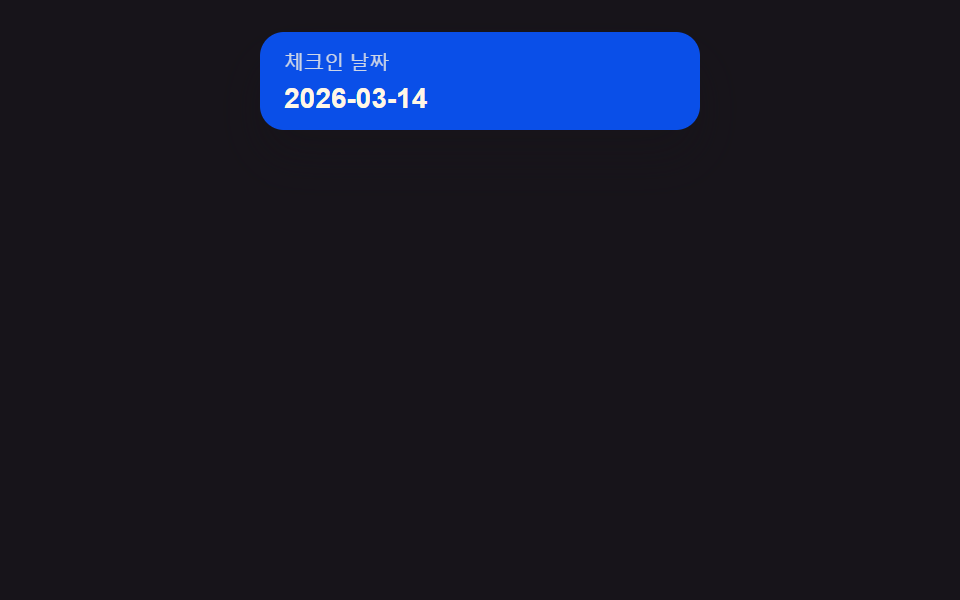 選択UIcss 日付選択 9選 — ポップオーバーで開閉する9つの方式
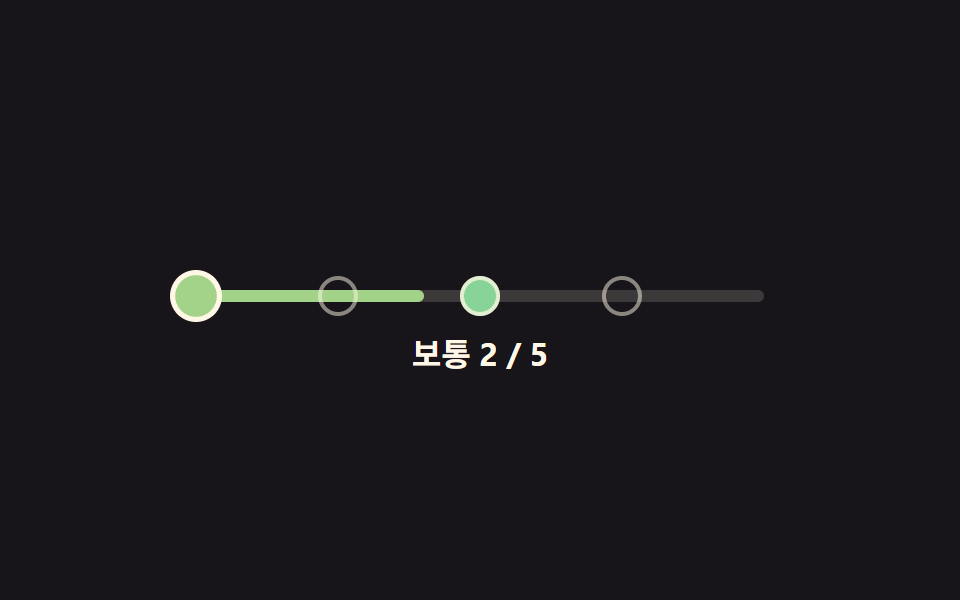 選択UI難易度選択 ui 9種 — 角度と数式で決まる選択まで
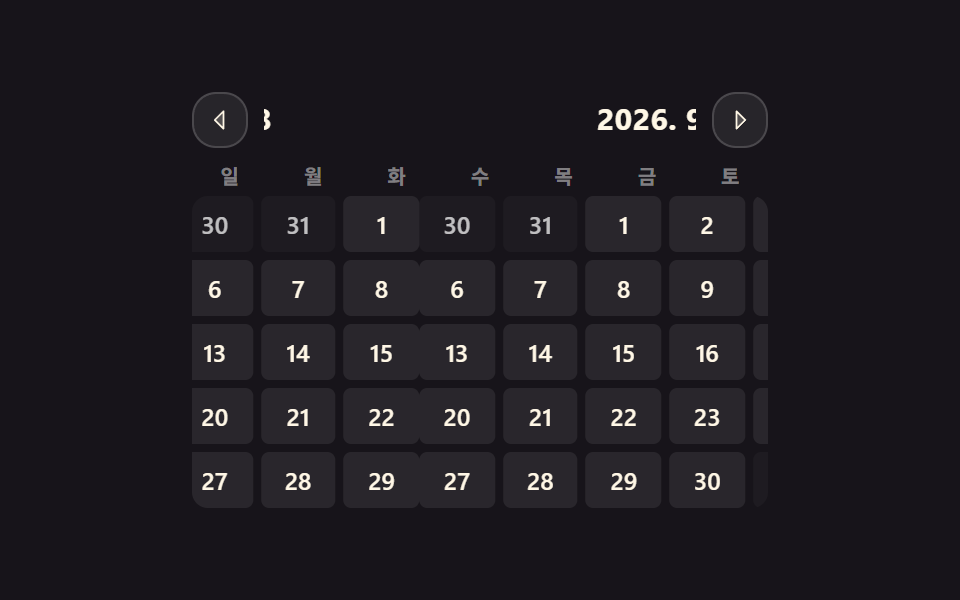 選択UIカレンダー css デザイン 9選 — 実際に月が動く
 選択UI地図 ui デザイン 9選 — クリックでピンが落ちる位置選択
 選択UI星評価 UI 9選 — 塗りの値が状態に応じて変わる仕組み