03リスト追加削除アニメーション
state配列に項目を追加・削除すると、新しい<li>は@starting-styleで入ってきて、削除される項目は02番と同じexitクラスのパターンをもう一度使い、アニメーションライブラリなしでもタイミングが揃います。
使いどころTODOリスト、カート内の行項目、通知スタック
key@keyframes la-enter@keyframes la-leave
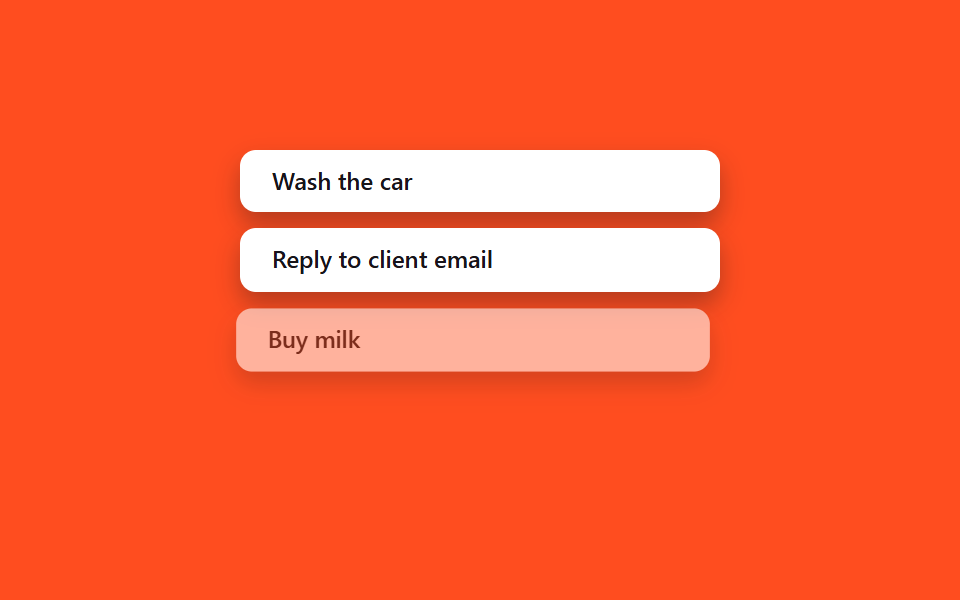
<main class="stage">
  <ul class="la-list is-demo">
    <li class="la-item">Wash the car</li>
    <li class="la-item">Reply to client email</li>
    <li class="la-item la-item--leave">Buy milk</li>
    <li class="la-item la-item--enter">Book flight tickets</li>
  </ul>
</main>
@use "../../../../site/static/demo-tokens" as *;
// ── 변수 3개 ──────────────────────────────────────────
$duration: $dur-base;
$easing: $ease-spring;
$color: $subject-ink;
@include stage($stage-orange);
.la-list {
width: min(240px, 76vw);
margin: 0;
padding: 0;
list-style: none;
display: flex;
flex-direction: column;
gap: $sp-2;
}
.la-item {
box-sizing: border-box;
padding: $sp-2 $sp-4;
border-radius: $r-sm;
background: $stage-paper;
color: $color;
font: 600 12px/1.3 -apple-system, "Segoe UI", sans-serif;
box-shadow: $shadow-press;
white-space: nowrap;
overflow: hidden;
text-overflow: ellipsis;
}
// 실사용 원리: 배열에서 항목을 지우면 새 <li> 는 @starting-style 로 들어오고,
// 지워지는 항목은 02번 exit 패턴처럼 클래스가 먼저 붙은 뒤 실제로 제거된다.
// 여기서는 둘 다 transform·opacity 로만 움직여 레이아웃 재계산을 피한다.
@keyframes la-leave {
0%, 40% { opacity: 1; transform: none; }
55% { opacity: 0; transform: translateX(-8px) scale(.97); }
100% { opacity: 0; transform: translateX(-8px) scale(.97); }
}
@keyframes la-enter {
0%, 55% { opacity: 0; transform: translateX(8px) scale(.97); }
85%, 100% { opacity: 1; transform: none; }
}
.la-list.is-demo .la-item--leave { animation: la-leave $dur-loop $easing infinite; }
.la-list.is-demo .la-item--enter { animation: la-enter $dur-loop $easing infinite; }
@media (prefers-reduced-motion: reduce) {
.la-list.is-demo .la-item--leave,
.la-list.is-demo .la-item--enter { animation: none !important; opacity: 1; transform: none; }
}html, body {
margin: 0;
overflow: hidden;
}
.stage {
box-sizing: border-box;
min-height: 100vh;
display: grid;
place-items: center;
margin: 0;
background: #ff4d1f;
font-family: -apple-system, "Segoe UI", "Noto Sans KR", sans-serif;
padding: clamp(8px, 4vw, 24px);
}
.la-list {
width: min(240px, 76vw);
margin: 0;
padding: 0;
list-style: none;
display: flex;
flex-direction: column;
gap: 8px;
}
.la-item {
box-sizing: border-box;
padding: 8px 16px;
border-radius: 8px;
background: #ffffff;
color: #17141a;
font: 600 12px/1.3 -apple-system, "Segoe UI", sans-serif;
box-shadow: 0 6px 12px rgba(23, 20, 26, 0.32);
white-space: nowrap;
overflow: hidden;
text-overflow: ellipsis;
}
@keyframes la-leave {
0%, 40% {
opacity: 1;
transform: none;
}
55% {
opacity: 0;
transform: translateX(-8px) scale(0.97);
}
100% {
opacity: 0;
transform: translateX(-8px) scale(0.97);
}
}
@keyframes la-enter {
0%, 55% {
opacity: 0;
transform: translateX(8px) scale(0.97);
}
85%, 100% {
opacity: 1;
transform: none;
}
}
.la-list.is-demo .la-item--leave {
animation: la-leave 2s cubic-bezier(0.2, 0.8, 0.2, 1) infinite;
}
.la-list.is-demo .la-item--enter {
animation: la-enter 2s cubic-bezier(0.2, 0.8, 0.2, 1) infinite;
}
@media (prefers-reduced-motion: reduce) {
.la-list.is-demo .la-item--leave,
.la-list.is-demo .la-item--enter {
animation: none !important;
opacity: 1;
transform: none;
}
}import { CSSProperties, useState } from "react";
import styles from "./ListAddRemove.module.scss";
interface Task {
id: number;
label: string;
leaving?: boolean;
}
let nextId = 3;
export interface ListAddRemoveProps {
duration?: string;
easing?: string;
}
export default function ListAddRemove({
duration = "300ms",
easing = "cubic-bezier(.2, .8, .2, 1)",
}: ListAddRemoveProps) {
const [items, setItems] = useState<Task[]>([
{ id: 1, label: "Wash the car" },
{ id: 2, label: "Reply to client email" },
]);
const add = () => {
const id = nextId++;
setItems((list) => [...list, { id, label: "Book flight tickets" }]);
};
const startRemove = (id: number) => {
// Mark it leaving first (drives the CSS exit transition, styles.leaving below).
// The item keeps rendering — with opacity heading to 0 — until its own
// onTransitionEnd fires, which is when it actually leaves the array.
setItems((list) => list.map((it) => (it.id === id ? { ...it, leaving: true } : it)));
};
const finishRemove = (id: number) => {
setItems((list) => list.filter((it) => it.id !== id));
};
const style: CSSProperties & { "--duration"?: string; "--easing"?: string } = {
"--duration": duration,
"--easing": easing,
};
return (
<div className={styles.wrap} style={style}>
<ul className={styles.list}>
{items.map((it) => (
<li
key={it.id}
className={`${styles.item} ${it.leaving ? styles.leaving : styles.entering}`}
onTransitionEnd={() => it.leaving && finishRemove(it.id)}
>
{it.label}
<button className={styles.remove} onClick={() => startRemove(it.id)}>×</button>
</li>
))}
</ul>
<button className={styles.add} onClick={add}>+ Add task</button>
</div>
);
}03 リスト追加削除アニメーション — 計測 累積面積 14.355% · 動いたフレーム 10/23GODRICH オリジナル · SCSS と React は zip に同梱 · React アニメーション ライブラリなしで作るCSS9選
このデモが属する記事
 React アニメーション ライブラリなしで作るCSS9選Reactで作った画面に動きを付けたいとき最初に思い浮かぶのはreact アニメーション ライブラリの導入ですが、コンポーネントが現れたり消えたりするタイミングさえ押さえれば一行でコピペOKなCSSだけで済むことも多いです。この記事はそんな この記事のデモをすべて見る