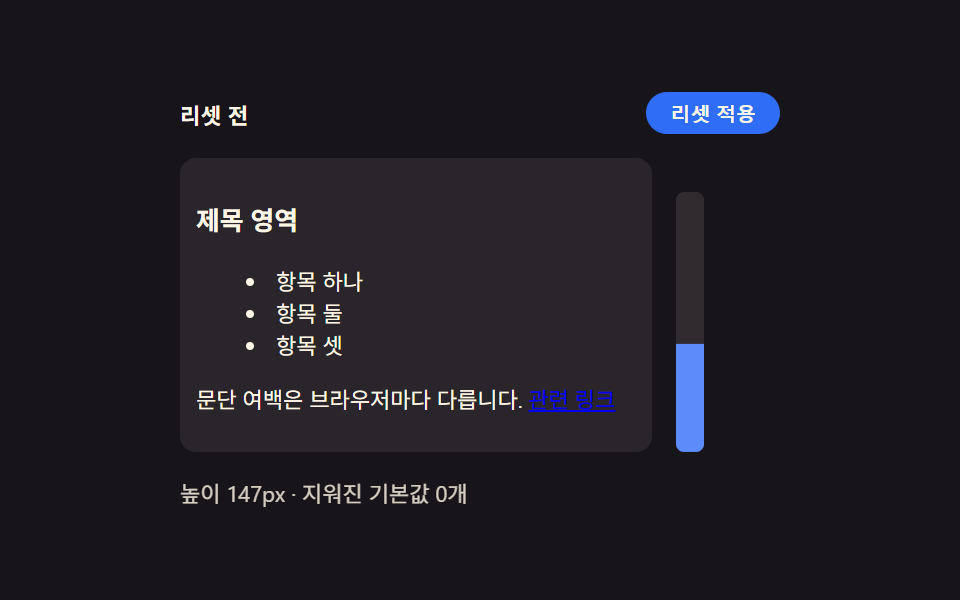
01ブラウザ既定値リセット — 要素ごとに違う余白とリスト表示をひとつに揃える出発点
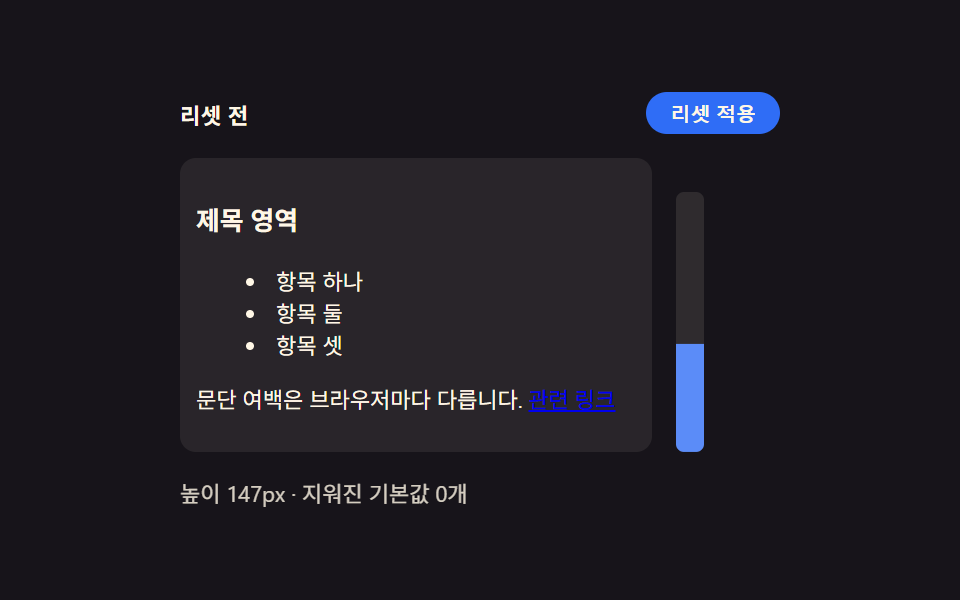
ブラウザごとに異なる既定の余白とリストの点表示をすべて消し、すべての要素が同じ出発点から始まります。
使いどころ新規プロジェクトの土台スタイルシート、コンポーネントライブラリの基礎
margin: 0list-style: noneRESET_SCOPE
<main class="stage">
<div class="wrap is-demo" id="wrap">
  <div class="head">
    <span class="stateLabel" id="stateLabel">リセット前</span>
    <button class="toggleBtn" id="toggleBtn" type="button" aria-pressed="false">リセット適用</button>
  </div>
  <div class="body">
    <div class="panel" id="panel">
      <h3 class="demoHeading">見出し領域</h3>
      <ul class="demoList">
        <li>項目1</li>
        <li>項目2</li>
        <li>項目3</li>
      </ul>
      <p class="demoPara">段落の余白はブラウザごとに異なります。 <a href="#" class="demoLink" id="demoLink">関連リンク</a></p>
    </div>
    <div class="ruler" id="ruler">
      <div class="rulerFill" id="rulerFill"></div>
    </div>
  </div>
  <div class="readout" id="readout">高さ —px・既定値解除 —件</div>
</div>
</main>
@use "../../../../site/static/demo-tokens" as *;
// 계산 겹은 index.html 의 measure() 에 있다 — 패널의 실제 렌더 높이(getBoundingClientRect)를 매 프레임
// 다시 재서 룰러 막대의 scaleY 와 "높이 Npx" 문구에 그대로 반영한다. 여기는 리셋 전/후 두 규칙 집합과
// 룰러 모양만 맡는다.
@include stage($stage-ink);
.wrap {
width: 300px;
display: flex;
flex-direction: column;
gap: $sp-3;
}
.head {
display: flex;
align-items: center;
justify-content: space-between;
gap: $sp-2;
}
.stateLabel {
color: $subject-cream;
font-size: 11px;
font-weight: 700;
letter-spacing: .02em;
}
.toggleBtn {
appearance: none;
border: none;
border-radius: $r-pill;
background: $subject-blue;
color: $subject-cream;
padding: $sp-1 $sp-3;
font-size: 10px;
font-weight: 600;
cursor: pointer;
transition: background $dur-instant $ease-out, transform $dur-instant $ease-out;
&:hover { background: $subject-blue-light; }
&:active { transform: scale(.96); }
&[aria-pressed="true"] { background: $subject-orange-deep; }
&:focus-visible { outline: 2px solid $subject-blue-light; outline-offset: 2px; }
}
.body {
display: flex;
align-items: flex-start;
gap: $sp-3;
}
// 패널은 일부러 우리 스타일을 씌우지 않는다 — .reset 이 없는 기본 상태가 곧 브라우저 기본값이다.
// font-size 를 11px 로 낮춰 h3·ul·p 의 em 기반 기본 여백을 실제 비율 그대로 작게 줄인다(값을 지어내지
// 않는다 — UA 스타일시트의 em 마진이 그대로 이 기준을 따라간다).
.panel {
width: 220px;
font-size: 11px;
background: rgba($subject-cream, .08);
border-radius: $r-sm;
padding: $sp-2;
transition: padding $dur-base $ease-out;
}
.demoHeading,
.demoPara,
.demoList {
color: $subject-cream;
transition: margin $dur-base $ease-out;
}
.demoList {
transition: margin $dur-base $ease-out, padding $dur-base $ease-out;
}
.demoList li { color: $subject-cream; }
.demoLink {
transition: color $dur-base $ease-out;
}
.panel.reset {
.demoHeading, .demoPara, .demoList { margin: 0 0 $sp-2; }
.demoList { padding: 0; list-style: none; }
.demoList li { padding: $sp-1 0; }
}
.panel.reset.full .demoLink {
color: $subject-blue-light;
text-decoration: none;
}
.ruler {
position: relative;
width: 14px;
height: 130px;
border-radius: $r-xs;
background: rgba($subject-cream, .1);
align-self: flex-end;
overflow: hidden;
}
.rulerFill {
position: absolute;
left: 0;
bottom: 0;
width: 100%;
height: 100%;
transform-origin: bottom;
transform: scaleY(0);
background: $subject-blue-light;
transition: transform $dur-base $ease-out;
}
.readout {
color: $subject-cream;
font-size: 11px;
opacity: .82;
}
@media (max-width: 340px) {
.wrap { width: 260px; gap: $sp-2; }
.panel { width: 190px; padding: $sp-1; font-size: 9px; }
.body { gap: $sp-2; }
.ruler { height: 80px; }
.demoList li:nth-child(3) { display: none; }
}
@media (prefers-reduced-motion: reduce) {
// reduce: 전환의 완만함만 지운다 — 상태 자체는 계속 바뀐다(모션이 아니라 값 전환이라 유지)
.panel, .demoHeading, .demoPara, .demoList, .demoBtn, .rulerFill, .toggleBtn { transition: none; }
}html, body {
margin: 0;
overflow: hidden;
}
.stage {
box-sizing: border-box;
min-height: 100vh;
display: grid;
place-items: center;
margin: 0;
background: #17141a;
font-family: -apple-system, "Segoe UI", "Noto Sans KR", sans-serif;
padding: clamp(8px, 4vw, 24px);
}
.wrap {
width: 300px;
display: flex;
flex-direction: column;
gap: 12px;
}
.head {
display: flex;
align-items: center;
justify-content: space-between;
gap: 8px;
}
.stateLabel {
color: #fff7e6;
font-size: 11px;
font-weight: 700;
letter-spacing: 0.02em;
}
.toggleBtn {
appearance: none;
border: none;
border-radius: 999px;
background: #2f6df6;
color: #fff7e6;
padding: 4px 12px;
font-size: 10px;
font-weight: 600;
cursor: pointer;
transition: background 140ms ease-out, transform 140ms ease-out;
}
.toggleBtn:hover {
background: #5b8cf8;
}
.toggleBtn:active {
transform: scale(0.96);
}
.toggleBtn[aria-pressed=true] {
background: #c93000;
}
.toggleBtn:focus-visible {
outline: 2px solid #5b8cf8;
outline-offset: 2px;
}
.body {
display: flex;
align-items: flex-start;
gap: 12px;
}
.panel {
width: 220px;
font-size: 11px;
background: rgba(255, 247, 230, 0.08);
border-radius: 8px;
padding: 8px;
transition: padding 300ms ease-out;
}
.demoHeading,
.demoPara,
.demoList {
color: #fff7e6;
transition: margin 300ms ease-out;
}
.demoList {
transition: margin 300ms ease-out, padding 300ms ease-out;
}
.demoList li {
color: #fff7e6;
}
.demoLink {
transition: color 300ms ease-out;
}
.panel.reset .demoHeading, .panel.reset .demoPara, .panel.reset .demoList {
margin: 0 0 8px;
}
.panel.reset .demoList {
padding: 0;
list-style: none;
}
.panel.reset .demoList li {
padding: 4px 0;
}
.panel.reset.full .demoLink {
color: #5b8cf8;
text-decoration: none;
}
.ruler {
position: relative;
width: 14px;
height: 130px;
border-radius: 4px;
background: rgba(255, 247, 230, 0.1);
align-self: flex-end;
overflow: hidden;
}
.rulerFill {
position: absolute;
left: 0;
bottom: 0;
width: 100%;
height: 100%;
transform-origin: bottom;
transform: scaleY(0);
background: #5b8cf8;
transition: transform 300ms ease-out;
}
.readout {
color: #fff7e6;
font-size: 11px;
opacity: 0.82;
}
@media (max-width: 340px) {
.wrap {
width: 260px;
gap: 8px;
}
.panel {
width: 190px;
padding: 4px;
font-size: 9px;
}
.body {
gap: 8px;
}
.ruler {
height: 80px;
}
.demoList li:nth-child(3) {
display: none;
}
}
@media (prefers-reduced-motion: reduce) {
.panel, .demoHeading, .demoPara, .demoList, .demoBtn, .rulerFill, .toggleBtn {
transition: none;
}
}(function () {
// 변형 상수 — minimal 은 목록·여백만, full 은 버튼 겉모습까지 지운다 (D 뒤 확정)
var RESET_SCOPE = 'minimal';
var STEP_MS = 320;
// 지워지는 기본값 카테고리 — 실제로 화면에 세어 보여주는 목록이라 죽은 상수가 아니다
var CLEARED_MINIMAL = ['heading-margin', 'paragraph-margin', 'list-style'];
var CLEARED_FULL = CLEARED_MINIMAL.concat(['link-decoration']);
var MAX_HEIGHT_PX = 130; // 룰러 눈금의 기준 최대 高さ — 이 값을 넘는 초과분은 눈금 밖으로 잘린다
var reduce = window.matchMedia('(prefers-reduced-motion: reduce)').matches;
var wrap = document.getElementById('wrap');
var panel = document.getElementById('panel');
var toggleBtn = document.getElementById('toggleBtn');
var stateLabel = document.getElementById('stateLabel');
var readout = document.getElementById('readout');
var rulerFill = document.getElementById('rulerFill');
var isDemo = true;
var on = false;
function clearedList() { return RESET_SCOPE === 'full' ? CLEARED_FULL : CLEARED_MINIMAL; }
function measure() {
// 실측 — 패널의 실제 렌더 높이를 매 프레임 다시 잰다. 값을 미리 정해두지 않는다
var h = panel.getBoundingClientRect().height;
var ratio = Math.min(1, h / MAX_HEIGHT_PX);
rulerFill.style.transform = 'scaleY(' + ratio.toFixed(3) + ')';
readout.textContent = '高さ ' + Math.round(h) + 'px・既定値解除 ' + (on ? clearedList().length : 0) + '件';
}
function apply(next) {
on = next;
panel.classList.toggle('reset', on);
panel.classList.toggle('full', on && RESET_SCOPE === 'full');
stateLabel.textContent = on ? 'リセット後' : 'リセット前';
toggleBtn.setAttribute('aria-pressed', String(on));
}
function human() { if (isDemo) { wrap.classList.remove('is-demo'); isDemo = false; } }
toggleBtn.addEventListener('click', function () { human(); apply(!on); });
document.getElementById('demoLink').addEventListener('click', function (e) { human(); e.preventDefault(); });
var last = 0;
function loop(ts) {
if (!last) last = ts;
if (isDemo && !reduce && ts - last >= STEP_MS) { last = ts; apply(!on); }
measure();
requestAnimationFrame(loop);
}
requestAnimationFrame(loop);
})();// Reset — vanilla 판(run/376/demo/01-reset/index.html) 의 React 포트.
// 패널에 .reset 클래스를 토글해 브라우저 기본값(h3·ul·p 여백)이 지워지는 전후를 보여주고,
// 룰러 막대는 실제 렌더 높이(getBoundingClientRect)를 매 프레임 다시 재 채운다.
import { useEffect, useRef } from "react";
import styles from "./Reset.module.scss";
type Box<T> = { current: T };
const RESET_SCOPE: "minimal" | "full" = "minimal";
const STEP_MS = 320;
const CLEARED_MINIMAL = ["heading-margin", "paragraph-margin", "list-style"];
const CLEARED_FULL = CLEARED_MINIMAL.concat(["link-decoration"]);
const MAX_HEIGHT_PX = 130;
export default function Reset() {
const wrapRef = useRef(null) as unknown as Box<HTMLDivElement>;
const panelRef = useRef(null) as unknown as Box<HTMLDivElement>;
const toggleBtnRef = useRef(null) as unknown as Box<HTMLButtonElement>;
const stateLabelRef = useRef(null) as unknown as Box<HTMLSpanElement>;
const readoutRef = useRef(null) as unknown as Box<HTMLDivElement>;
const rulerFillRef = useRef(null) as unknown as Box<HTMLDivElement>;
const demoLinkRef = useRef(null) as unknown as Box<HTMLAnchorElement>;
const rafRef = useRef(0) as unknown as Box<number>;
useEffect(() => {
const reduce = window.matchMedia("(prefers-reduced-motion: reduce)").matches;
const wrap = wrapRef.current;
const panel = panelRef.current;
const toggleBtn = toggleBtnRef.current;
const stateLabel = stateLabelRef.current;
const readout = readoutRef.current;
const rulerFill = rulerFillRef.current;
const demoLink = demoLinkRef.current;
if (!wrap || !panel || !toggleBtn || !stateLabel || !readout || !rulerFill || !demoLink) return;
let isDemo = true;
let on = false;
function clearedList() {
return RESET_SCOPE === "full" ? CLEARED_FULL : CLEARED_MINIMAL;
}
function measure() {
const h = panel!.getBoundingClientRect().height;
const ratio = Math.min(1, h / MAX_HEIGHT_PX);
rulerFill!.style.transform = "scaleY(" + ratio.toFixed(3) + ")";
readout!.textContent = "높이 " + Math.round(h) + "px · 지워진 기본값 " + (on ? clearedList().length : 0) + "개";
}
function apply(next: boolean) {
on = next;
panel!.classList.toggle(styles.reset, on);
panel!.classList.toggle(styles.full, on && RESET_SCOPE === "full");
stateLabel!.textContent = on ? "리셋 후" : "리셋 전";
toggleBtn!.setAttribute("aria-pressed", String(on));
}
function human() { if (isDemo) { wrap!.classList.remove(styles.isDemo); isDemo = false; } }
function onToggleClick() { human(); apply(!on); }
function onLinkClick(e: MouseEvent) { human(); e.preventDefault(); }
toggleBtn.addEventListener("click", onToggleClick);
demoLink.addEventListener("click", onLinkClick);
let last = 0;
function loop(ts: number) {
if (!last) last = ts;
if (isDemo && !reduce && ts - last >= STEP_MS) { last = ts; apply(!on); }
measure();
rafRef.current = requestAnimationFrame(loop);
}
rafRef.current = requestAnimationFrame(loop);
return () => {
toggleBtn!.removeEventListener("click", onToggleClick);
demoLink!.removeEventListener("click", onLinkClick);
cancelAnimationFrame(rafRef.current);
};
}, []);
return (
<main className={styles.stage}>
<div className={styles.wrap + " " + styles.isDemo} ref={wrapRef}>
<div className={styles.head}>
<span className={styles.stateLabel} ref={stateLabelRef}>리셋 전</span>
<button className={styles.toggleBtn} ref={toggleBtnRef} type="button" aria-pressed="false">리셋 적용</button>
</div>
<div className={styles.body}>
<div className={styles.panel} ref={panelRef}>
<h3 className={styles.demoHeading}>제목 영역</h3>
<ul className={styles.demoList}>
<li>항목 하나</li>
<li>항목 둘</li>
<li>항목 셋</li>
</ul>
<p className={styles.demoPara}>문단 여백은 브라우저마다 다릅니다. <a href="#" className={styles.demoLink} ref={demoLinkRef}>관련 링크</a></p>
</div>
<div className={styles.ruler}>
<div className={styles.rulerFill} ref={rulerFillRef}></div>
</div>
</div>
<div className={styles.readout} ref={readoutRef}>높이 —px · 지워진 기본값 —개</div>
</div>
</main>
);
}01 ブラウザ既定値リセット — 要素ごとに違う余白とリスト表示をひとつに揃える出発点 — 計測 累積面積 19.15% · 動いたフレーム 12/23GODRICH オリジナル · SCSS と React は zip に同梱 · css リセット 9選 — 基本からセーフエリアまで一気に整理
このデモが属する記事
 css リセット 9選 — 基本からセーフエリアまで一気に整理9つのcss リセットパターンのうち、1つはノッチのセーフエリアに合わせて余白を再計算し、1つはモーションを減らす環境で遷移時間がほぼ0まで縮み、1つは角ばった初期の角が滑らかな曲線に変わります。 この記事のデモをすべて見る