css リセット 9選 — 基本からセーフエリアまで一気に整理
9つのcss リセットパターンのうち、1つはノッチのセーフエリアに合わせて余白を再計算し、1つはモーションを減らす環境で遷移時間がほぼ0まで縮み、1つは角ばった初期の角が滑らかな曲線に変わります。
 01 reset
 02 box-model
 03 text-wrap
 04 media-block
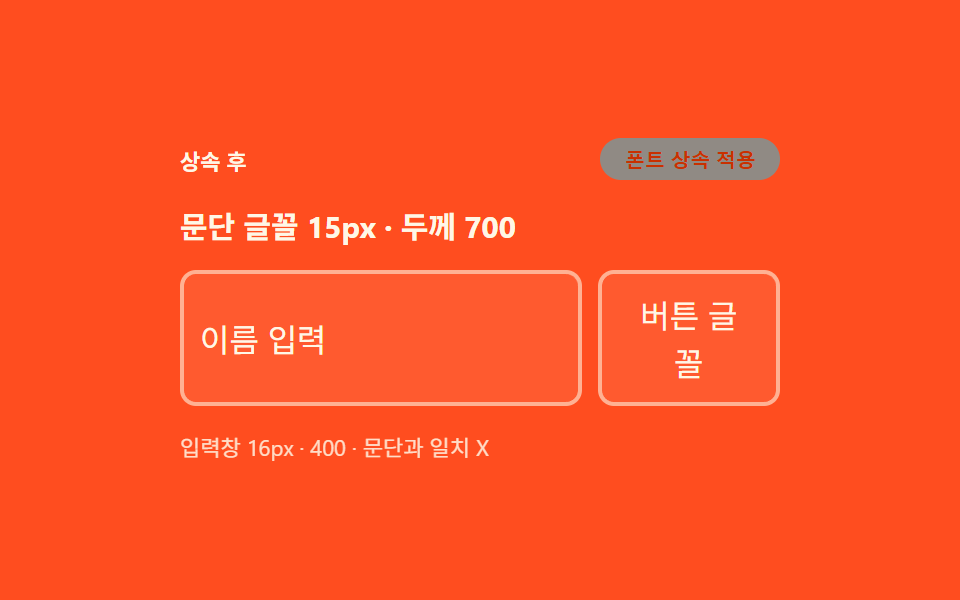 05 form-inherit
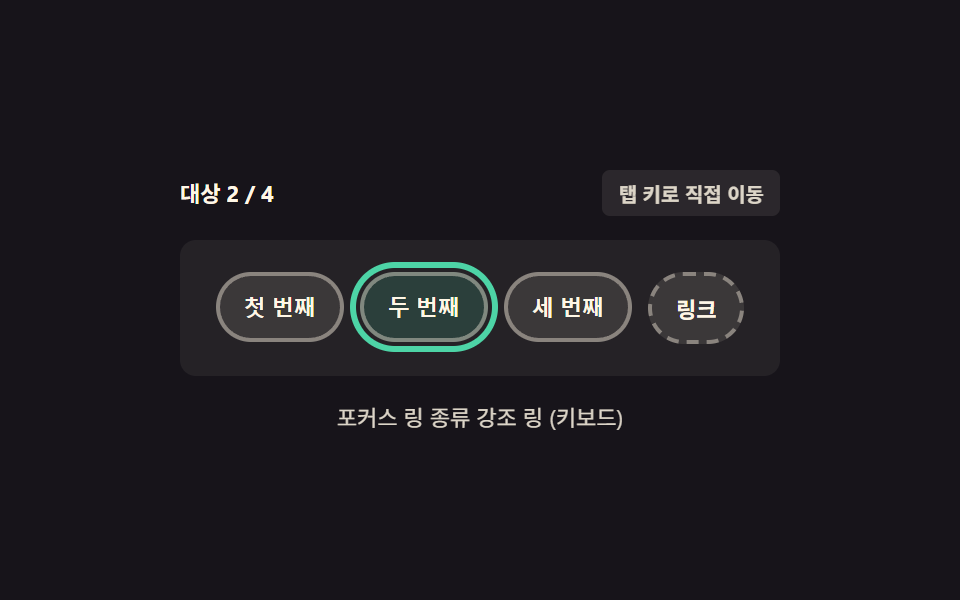 06 focus-visible
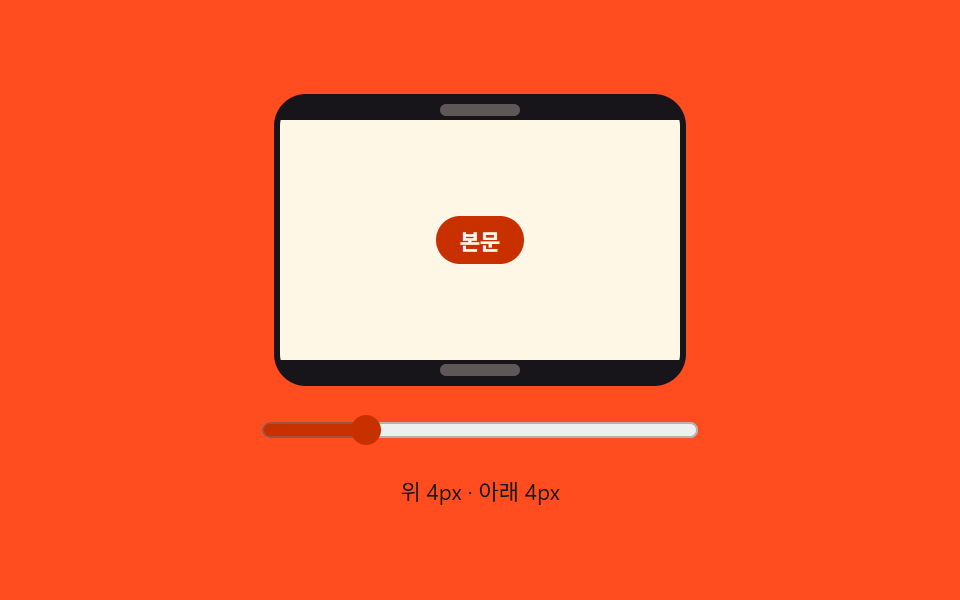 07 safe-area
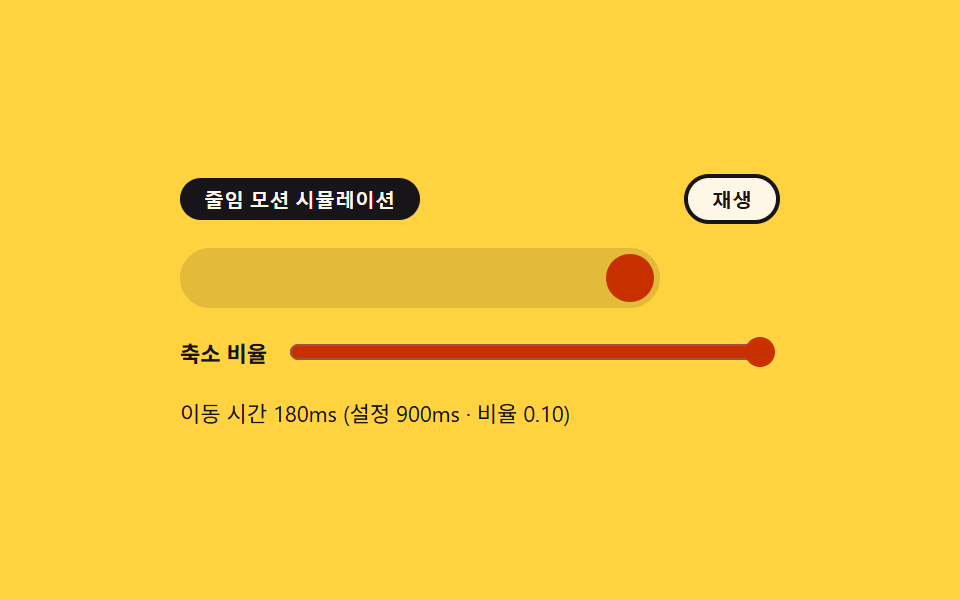 08 reduced-motion
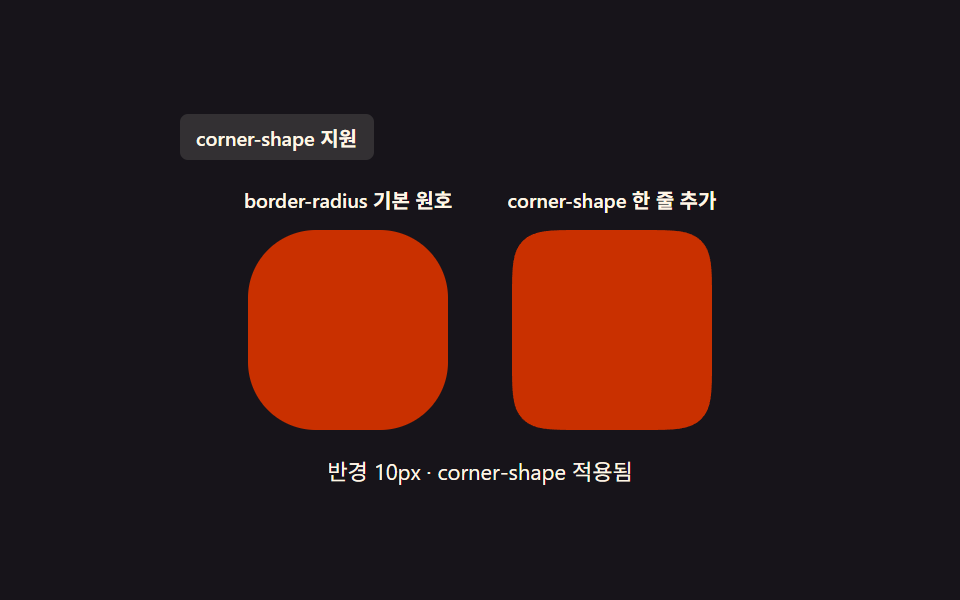 09 corner-shape
自動再生 · タイルを押すとその項目へ · すべて1つのzip
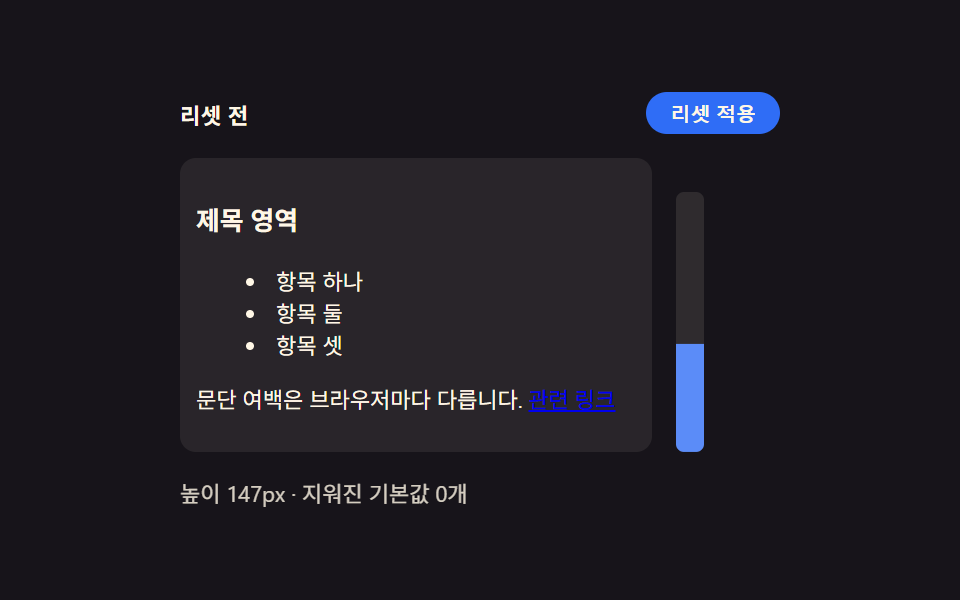
- 01 ブラウザ既定値リセット — 要素ごとに違う余白とリスト表示をひとつに揃える出発点
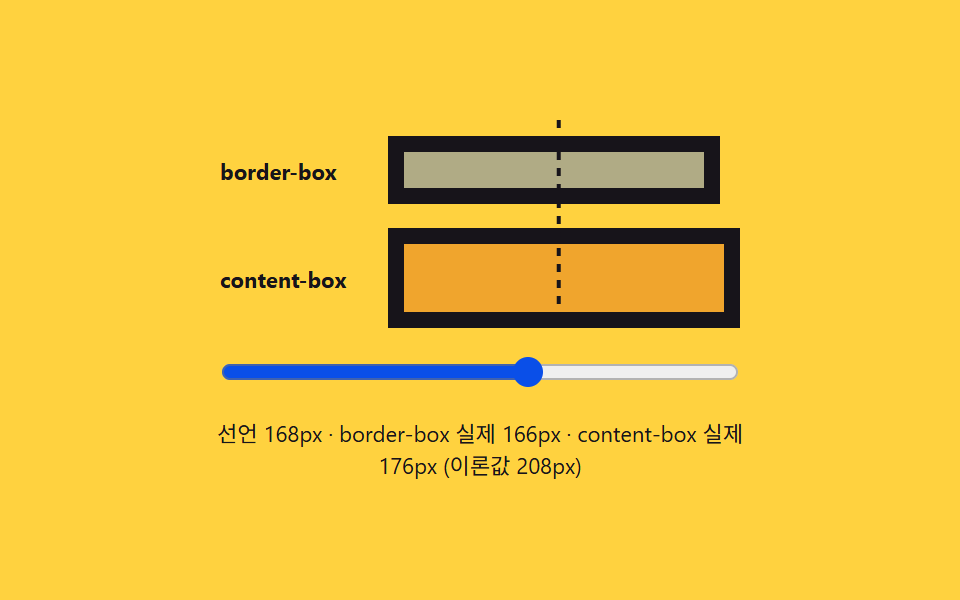
- 02 ボックスモデル比較 — 枠線と内側の余白がサイズ計算に含まれるかを見せるカード
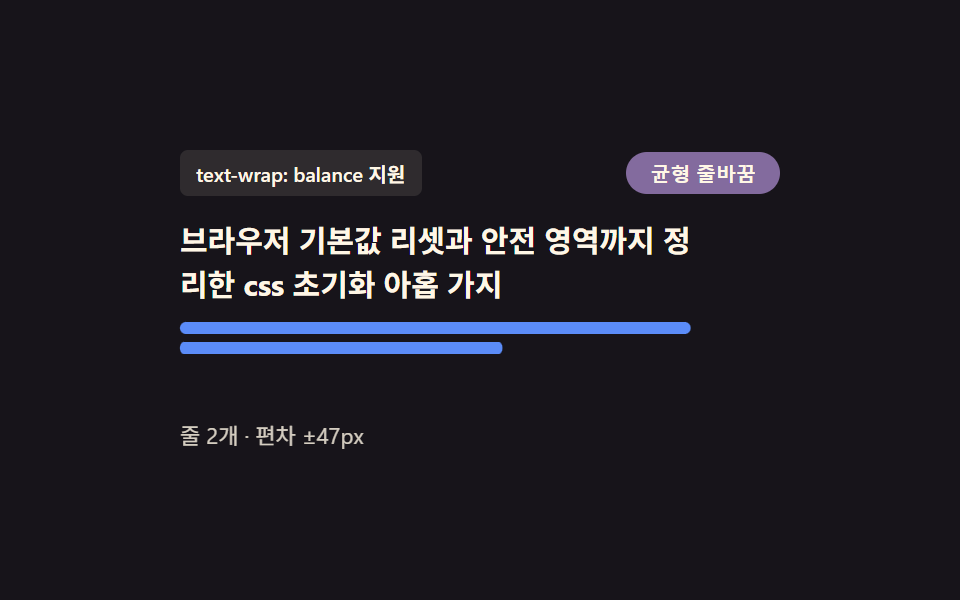
- 03 見出しの折り返し調整 — 最終行に単語がひとつだけ残らないよう整える段落
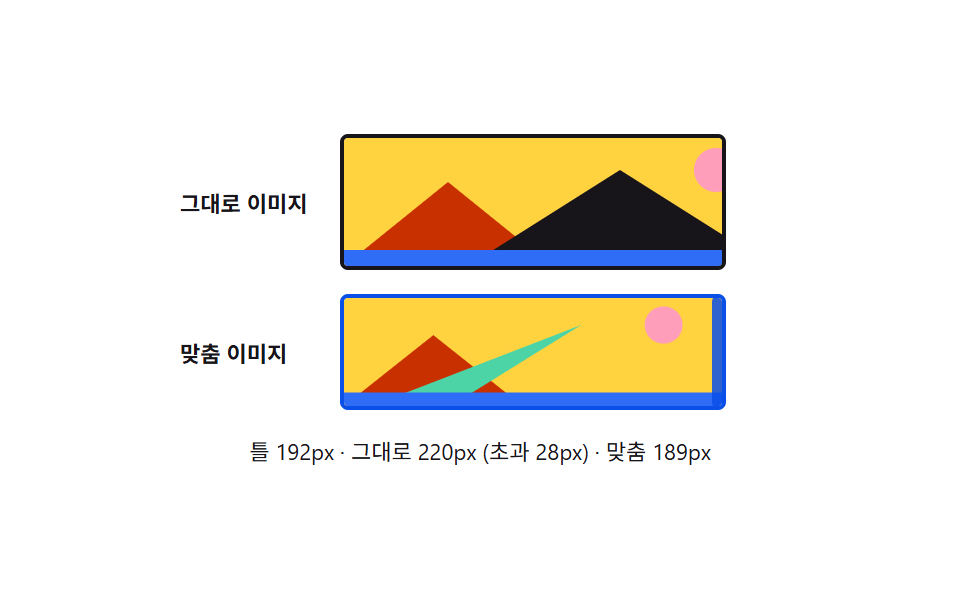
- 04 メディア基本比率固定 — 画像と動画が親要素の幅を超えないよう合わせる枠
- 05 フォーム要素のフォント継承 — ボタンと入力欄を周囲の文字と同じ書体に揃えるルール
- 06 キーボードフォーカスリング — マウスクリックでは出ず、キーボード移動時だけ現れる枠線
- 07 ノッチのセーフエリア余白 — 画面の欠けた部分でも内容が隠れないよう押し広げる余白
- 08 モーション削減対応 — システム設定に応じてアニメーションがほぼ止まる遷移
- 09 角丸の形状比較 — 円弧の角と滑らかな曲線の角を並べて見るカード
以下の9つはどれもブラウザ名を判定するコードを持ちません。あるものはクラスや疑似クラスの切り替えでどちらのルールが有効になるかを決め、あるものは定数と連動した数値を都度計算し直し、あるものは機能そのものに対応しているかを一度だけ尋ねて分岐します。9つのデモはページが落ち着くと自動的に動き出し、最初のポインター・キーボード・入力操作でただちに手動操作へ切り替わり、prefers-reduced-motion: reduce が有効な環境でもすべて問題なく動作し続けます。
デモ
下の各パネルをドラッグ・フォーカス・入力・切り替えしてみてください — 数値の読み取り行がその場で更新されるので、変化を推測ではなく目で確かめられます。
9つがこの順番である理由
9つをこう並べ替えると、素のcss リセットを書くときに実際に何を払っているかが一番見えやすくなります — あるときはクラス名ひとつ、あるときは数値ひとつ、あるときはsupports() の問いひとつです。
| パターン | 仕組み | 動いたフレーム(24中) | 累積面積 | 平均強度 |
|---|---|---|---|---|
| 01 ブラウザ既定値リセット | ルール切り替え | 12 | 19.15% | 104.5 |
| 02 ボックスモデル比較 | 再計算 | 22 | 2.36% | 122.3 |
| 03 見出しの折り返し調整 | 機能検査 | 23 | 3.253% | 139.6 |
| 04 メディア基本比率固定 | 再計算 | 18 | 11.703% | 137.6 |
| 05 フォーム要素のフォント継承 | ルール切り替え | 22 | 13.463% | 95.8 |
| 06 キーボードフォーカスリング | ルール切り替え | 15 | 6.39% | 94.2 |
| 07 ノッチのセーフエリア余白 | 再計算 | 23 | 1.788% | 110.3 |
| 08 モーション削減対応 | 再計算 | 13 | 5.87% | 122.2 |
| 09 角丸の形状比較 | 機能検査 | 9 | 1.044% | 118.6 |
クラスターA — クラスか疑似クラスがどちらのルールを勝たせるか決める
3つのパターン(01・05・06)は数値をまったく扱いません。RESET_SCOPE を切り替える、.inherited クラスをオン・オフする、マウスではなくキーボードでボタンに到達する — このどれかが2つの素朴なルールのどちらを効かせるかを決め、あとはカスケードに任せます。01番は余白とリスト表示を一括で消すため、9項目の中で最も広い累積面積(19.15%)を占めます。
クラスターB — 名前付き定数が再計算の対象を決める
4つのパターン(02・04・07・08)はスライダー・ドラッグ・スイッチといったライブな入力を読み取り、値が変わるたびに名前付き定数に対して測定値を計算し直します。4つとも環境を判定してはおらず、BORDER_PX・MAX_FRAME_PX・SAFE_AREA_SCALE・REDUCED_MOTION_SCALE という定数にそれぞれ依存しています。
クラスターC — supports() の問いが一度だけ分岐先を決める
2つのパターン(03・09)は CSS.supports() に直接イエス・ノーを尋ね、時間をかけて矩形を比較する代わりにその答えだけで分岐します。03番はこの中で最も多くのフレームで動き(24中23、07番と並んで最多)、行の均等化が起こるたびに下のバーグラフごと再描画されるためです。
項目別コード
以下の各コードは、そのデモの実際のcss リセットコードをそのまま連続で切り出したものです。コメントだけ日本語に訳し、識別子は表示されている通りに残しています。
01ブラウザ既定値リセット — 要素ごとに違う余白とリスト表示をひとつに揃える出発点
ブラウザごとに異なる既定の余白とリストの点表示をすべて消し、すべての要素が同じ出発点から始まります。RESET_SCOPE を 'full' に切り替えると、そこにリンクの下線を消す処理まで追加で乗ります。23フレーム中12フレームで動き、9項目の中で最大の累積面積(19.15%)を平均強度104.5で記録しました。範囲ボタンのクリックが最初の操作としてカウントされます。
<main class="stage">
<div class="wrap is-demo" id="wrap">
  <div class="head">
    <span class="stateLabel" id="stateLabel">リセット前</span>
    <button class="toggleBtn" id="toggleBtn" type="button" aria-pressed="false">リセット適用</button>
  </div>
  <div class="body">
    <div class="panel" id="panel">
      <h3 class="demoHeading">見出し領域</h3>
      <ul class="demoList">
        <li>項目1</li>
        <li>項目2</li>
        <li>項目3</li>
      </ul>
      <p class="demoPara">段落の余白はブラウザごとに異なります。 <a href="#" class="demoLink" id="demoLink">関連リンク</a></p>
    </div>
    <div class="ruler" id="ruler">
      <div class="rulerFill" id="rulerFill"></div>
    </div>
  </div>
  <div class="readout" id="readout">高さ —px・既定値解除 —件</div>
</div>
</main>
@use "../../../../site/static/demo-tokens" as *;
// 계산 겹은 index.html 의 measure() 에 있다 — 패널의 실제 렌더 높이(getBoundingClientRect)를 매 프레임
// 다시 재서 룰러 막대의 scaleY 와 "높이 Npx" 문구에 그대로 반영한다. 여기는 리셋 전/후 두 규칙 집합과
// 룰러 모양만 맡는다.
@include stage($stage-ink);
.wrap {
width: 300px;
display: flex;
flex-direction: column;
gap: $sp-3;
}
.head {
display: flex;
align-items: center;
justify-content: space-between;
gap: $sp-2;
}
.stateLabel {
color: $subject-cream;
font-size: 11px;
font-weight: 700;
letter-spacing: .02em;
}
.toggleBtn {
appearance: none;
border: none;
border-radius: $r-pill;
background: $subject-blue;
color: $subject-cream;
padding: $sp-1 $sp-3;
font-size: 10px;
font-weight: 600;
cursor: pointer;
transition: background $dur-instant $ease-out, transform $dur-instant $ease-out;
&:hover { background: $subject-blue-light; }
&:active { transform: scale(.96); }
&[aria-pressed="true"] { background: $subject-orange-deep; }
&:focus-visible { outline: 2px solid $subject-blue-light; outline-offset: 2px; }
}
.body {
display: flex;
align-items: flex-start;
gap: $sp-3;
}
// 패널은 일부러 우리 스타일을 씌우지 않는다 — .reset 이 없는 기본 상태가 곧 브라우저 기본값이다.
// font-size 를 11px 로 낮춰 h3·ul·p 의 em 기반 기본 여백을 실제 비율 그대로 작게 줄인다(값을 지어내지
// 않는다 — UA 스타일시트의 em 마진이 그대로 이 기준을 따라간다).
.panel {
width: 220px;
font-size: 11px;
background: rgba($subject-cream, .08);
border-radius: $r-sm;
padding: $sp-2;
transition: padding $dur-base $ease-out;
}
.demoHeading,
.demoPara,
.demoList {
color: $subject-cream;
transition: margin $dur-base $ease-out;
}
.demoList {
transition: margin $dur-base $ease-out, padding $dur-base $ease-out;
}
.demoList li { color: $subject-cream; }
.demoLink {
transition: color $dur-base $ease-out;
}
.panel.reset {
  .demoHeading, .demoPara, .demoList { margin: 0 0 $sp-2; }
  .demoList { padding: 0; list-style: none; }
  .demoList li { padding: $sp-1 0; }
}

.panel.reset.full .demoLink {
  color: $subject-blue-light;
  text-decoration: none;
}
.ruler {
position: relative;
width: 14px;
height: 130px;
border-radius: $r-xs;
background: rgba($subject-cream, .1);
align-self: flex-end;
overflow: hidden;
}
.rulerFill {
position: absolute;
left: 0;
bottom: 0;
width: 100%;
height: 100%;
transform-origin: bottom;
transform: scaleY(0);
background: $subject-blue-light;
transition: transform $dur-base $ease-out;
}
.readout {
color: $subject-cream;
font-size: 11px;
opacity: .82;
}
@media (max-width: 340px) {
.wrap { width: 260px; gap: $sp-2; }
.panel { width: 190px; padding: $sp-1; font-size: 9px; }
.body { gap: $sp-2; }
.ruler { height: 80px; }
.demoList li:nth-child(3) { display: none; }
}
@media (prefers-reduced-motion: reduce) {
// reduce: 전환의 완만함만 지운다 — 상태 자체는 계속 바뀐다(모션이 아니라 값 전환이라 유지)
.panel, .demoHeading, .demoPara, .demoList, .demoBtn, .rulerFill, .toggleBtn { transition: none; }
}html, body {
margin: 0;
overflow: hidden;
}
.stage {
box-sizing: border-box;
min-height: 100vh;
display: grid;
place-items: center;
margin: 0;
background: #17141a;
font-family: -apple-system, "Segoe UI", "Noto Sans KR", sans-serif;
padding: clamp(8px, 4vw, 24px);
}
.wrap {
width: 300px;
display: flex;
flex-direction: column;
gap: 12px;
}
.head {
display: flex;
align-items: center;
justify-content: space-between;
gap: 8px;
}
.stateLabel {
color: #fff7e6;
font-size: 11px;
font-weight: 700;
letter-spacing: 0.02em;
}
.toggleBtn {
appearance: none;
border: none;
border-radius: 999px;
background: #2f6df6;
color: #fff7e6;
padding: 4px 12px;
font-size: 10px;
font-weight: 600;
cursor: pointer;
transition: background 140ms ease-out, transform 140ms ease-out;
}
.toggleBtn:hover {
background: #5b8cf8;
}
.toggleBtn:active {
transform: scale(0.96);
}
.toggleBtn[aria-pressed=true] {
background: #c93000;
}
.toggleBtn:focus-visible {
outline: 2px solid #5b8cf8;
outline-offset: 2px;
}
.body {
display: flex;
align-items: flex-start;
gap: 12px;
}
.panel {
width: 220px;
font-size: 11px;
background: rgba(255, 247, 230, 0.08);
border-radius: 8px;
padding: 8px;
transition: padding 300ms ease-out;
}
.demoHeading,
.demoPara,
.demoList {
color: #fff7e6;
transition: margin 300ms ease-out;
}
.demoList {
transition: margin 300ms ease-out, padding 300ms ease-out;
}
.demoList li {
color: #fff7e6;
}
.demoLink {
transition: color 300ms ease-out;
}
.panel.reset .demoHeading, .panel.reset .demoPara, .panel.reset .demoList {
margin: 0 0 8px;
}
.panel.reset .demoList {
padding: 0;
list-style: none;
}
.panel.reset .demoList li {
padding: 4px 0;
}
.panel.reset.full .demoLink {
color: #5b8cf8;
text-decoration: none;
}
.ruler {
position: relative;
width: 14px;
height: 130px;
border-radius: 4px;
background: rgba(255, 247, 230, 0.1);
align-self: flex-end;
overflow: hidden;
}
.rulerFill {
position: absolute;
left: 0;
bottom: 0;
width: 100%;
height: 100%;
transform-origin: bottom;
transform: scaleY(0);
background: #5b8cf8;
transition: transform 300ms ease-out;
}
.readout {
color: #fff7e6;
font-size: 11px;
opacity: 0.82;
}
@media (max-width: 340px) {
.wrap {
width: 260px;
gap: 8px;
}
.panel {
width: 190px;
padding: 4px;
font-size: 9px;
}
.body {
gap: 8px;
}
.ruler {
height: 80px;
}
.demoList li:nth-child(3) {
display: none;
}
}
@media (prefers-reduced-motion: reduce) {
.panel, .demoHeading, .demoPara, .demoList, .demoBtn, .rulerFill, .toggleBtn {
transition: none;
}
}(function () {
// 변형 상수 — minimal 은 목록·여백만, full 은 버튼 겉모습까지 지운다 (D 뒤 확정)
var RESET_SCOPE = 'minimal';
var STEP_MS = 320;
// 지워지는 기본값 카테고리 — 실제로 화면에 세어 보여주는 목록이라 죽은 상수가 아니다
var CLEARED_MINIMAL = ['heading-margin', 'paragraph-margin', 'list-style'];
var CLEARED_FULL = CLEARED_MINIMAL.concat(['link-decoration']);
var MAX_HEIGHT_PX = 130; // 룰러 눈금의 기준 최대 高さ — 이 값을 넘는 초과분은 눈금 밖으로 잘린다
var reduce = window.matchMedia('(prefers-reduced-motion: reduce)').matches;
var wrap = document.getElementById('wrap');
var panel = document.getElementById('panel');
var toggleBtn = document.getElementById('toggleBtn');
var stateLabel = document.getElementById('stateLabel');
var readout = document.getElementById('readout');
var rulerFill = document.getElementById('rulerFill');
var isDemo = true;
var on = false;
function clearedList() { return RESET_SCOPE === 'full' ? CLEARED_FULL : CLEARED_MINIMAL; }
function measure() {
// 실측 — 패널의 실제 렌더 높이를 매 프레임 다시 잰다. 값을 미리 정해두지 않는다
var h = panel.getBoundingClientRect().height;
var ratio = Math.min(1, h / MAX_HEIGHT_PX);
rulerFill.style.transform = 'scaleY(' + ratio.toFixed(3) + ')';
readout.textContent = '高さ ' + Math.round(h) + 'px・既定値解除 ' + (on ? clearedList().length : 0) + '件';
}
function apply(next) {
on = next;
panel.classList.toggle('reset', on);
panel.classList.toggle('full', on && RESET_SCOPE === 'full');
stateLabel.textContent = on ? 'リセット後' : 'リセット前';
toggleBtn.setAttribute('aria-pressed', String(on));
}
function human() { if (isDemo) { wrap.classList.remove('is-demo'); isDemo = false; } }
toggleBtn.addEventListener('click', function () { human(); apply(!on); });
document.getElementById('demoLink').addEventListener('click', function (e) { human(); e.preventDefault(); });
var last = 0;
function loop(ts) {
if (!last) last = ts;
if (isDemo && !reduce && ts - last >= STEP_MS) { last = ts; apply(!on); }
measure();
requestAnimationFrame(loop);
}
requestAnimationFrame(loop);
})();// Reset — vanilla 판(run/376/demo/01-reset/index.html) 의 React 포트.
// 패널에 .reset 클래스를 토글해 브라우저 기본값(h3·ul·p 여백)이 지워지는 전후를 보여주고,
// 룰러 막대는 실제 렌더 높이(getBoundingClientRect)를 매 프레임 다시 재 채운다.
import { useEffect, useRef } from "react";
import styles from "./Reset.module.scss";
type Box<T> = { current: T };
const RESET_SCOPE: "minimal" | "full" = "minimal";
const STEP_MS = 320;
const CLEARED_MINIMAL = ["heading-margin", "paragraph-margin", "list-style"];
const CLEARED_FULL = CLEARED_MINIMAL.concat(["link-decoration"]);
const MAX_HEIGHT_PX = 130;
export default function Reset() {
const wrapRef = useRef(null) as unknown as Box<HTMLDivElement>;
const panelRef = useRef(null) as unknown as Box<HTMLDivElement>;
const toggleBtnRef = useRef(null) as unknown as Box<HTMLButtonElement>;
const stateLabelRef = useRef(null) as unknown as Box<HTMLSpanElement>;
const readoutRef = useRef(null) as unknown as Box<HTMLDivElement>;
const rulerFillRef = useRef(null) as unknown as Box<HTMLDivElement>;
const demoLinkRef = useRef(null) as unknown as Box<HTMLAnchorElement>;
const rafRef = useRef(0) as unknown as Box<number>;
useEffect(() => {
const reduce = window.matchMedia("(prefers-reduced-motion: reduce)").matches;
const wrap = wrapRef.current;
const panel = panelRef.current;
const toggleBtn = toggleBtnRef.current;
const stateLabel = stateLabelRef.current;
const readout = readoutRef.current;
const rulerFill = rulerFillRef.current;
const demoLink = demoLinkRef.current;
if (!wrap || !panel || !toggleBtn || !stateLabel || !readout || !rulerFill || !demoLink) return;
let isDemo = true;
let on = false;
function clearedList() {
return RESET_SCOPE === "full" ? CLEARED_FULL : CLEARED_MINIMAL;
}
function measure() {
const h = panel!.getBoundingClientRect().height;
const ratio = Math.min(1, h / MAX_HEIGHT_PX);
rulerFill!.style.transform = "scaleY(" + ratio.toFixed(3) + ")";
readout!.textContent = "높이 " + Math.round(h) + "px · 지워진 기본값 " + (on ? clearedList().length : 0) + "개";
}
function apply(next: boolean) {
on = next;
panel!.classList.toggle(styles.reset, on);
panel!.classList.toggle(styles.full, on && RESET_SCOPE === "full");
stateLabel!.textContent = on ? "리셋 후" : "리셋 전";
toggleBtn!.setAttribute("aria-pressed", String(on));
}
function human() { if (isDemo) { wrap!.classList.remove(styles.isDemo); isDemo = false; } }
function onToggleClick() { human(); apply(!on); }
function onLinkClick(e: MouseEvent) { human(); e.preventDefault(); }
toggleBtn.addEventListener("click", onToggleClick);
demoLink.addEventListener("click", onLinkClick);
let last = 0;
function loop(ts: number) {
if (!last) last = ts;
if (isDemo && !reduce && ts - last >= STEP_MS) { last = ts; apply(!on); }
measure();
rafRef.current = requestAnimationFrame(loop);
}
rafRef.current = requestAnimationFrame(loop);
return () => {
toggleBtn!.removeEventListener("click", onToggleClick);
demoLink!.removeEventListener("click", onLinkClick);
cancelAnimationFrame(rafRef.current);
};
}, []);
return (
<main className={styles.stage}>
<div className={styles.wrap + " " + styles.isDemo} ref={wrapRef}>
<div className={styles.head}>
<span className={styles.stateLabel} ref={stateLabelRef}>리셋 전</span>
<button className={styles.toggleBtn} ref={toggleBtnRef} type="button" aria-pressed="false">리셋 적용</button>
</div>
<div className={styles.body}>
<div className={styles.panel} ref={panelRef}>
<h3 className={styles.demoHeading}>제목 영역</h3>
<ul className={styles.demoList}>
<li>항목 하나</li>
<li>항목 둘</li>
<li>항목 셋</li>
</ul>
<p className={styles.demoPara}>문단 여백은 브라우저마다 다릅니다. <a href="#" className={styles.demoLink} ref={demoLinkRef}>관련 링크</a></p>
</div>
<div className={styles.ruler}>
<div className={styles.rulerFill} ref={rulerFillRef}></div>
</div>
</div>
<div className={styles.readout} ref={readoutRef}>높이 —px · 지워진 기본값 —개</div>
</div>
</main>
);
}01 · ブラウザ既定値リセット — 要素ごとに違う余白とリスト表示をひとつに揃える出発点 — 計測 累積面積 19.15% · 動いたフレーム 12/23GODRICH オリジナル · SCSS と React は zip に同梱 · パスワードを見る
.panel.reset {
.demoHeading, .demoPara, .demoList { margin: 0 0 $sp-2; }
.demoList { padding: 0; list-style: none; }
.demoList li { padding: $sp-1 0; }
}
.panel.reset.full .demoLink {
color: $subject-blue-light;
text-decoration: none;
}
02ボックスモデル比較 — 枠線と内側の余白がサイズ計算に含まれるかを見せるカード
2つの計算方式を切り替えると、同じ幅の値でも枠線と内側の余白を含むかどうかでカードの実際の大きさが変わる様子を並べて比較できます。スライダーを動かすたびにborder-boxとcontent-boxそれぞれの矩形を実測し直し、23フレーム中22フレームで動いて平均強度122.3・累積面積2.36%を記録しました。幅スライダーのドラッグ、あるいはポインターを押し下げる操作のどちらも最初の操作としてカウントされます。
<main class="stage">
<div class="wrap is-demo" id="wrap">
  <div class="track" id="track">
    <div class="guide" id="guide"></div>
    <div class="row">
      <span class="rowLabel">border-box</span>
      <div class="box borderBox" id="borderBox"></div>
    </div>
    <div class="row">
      <span class="rowLabel">content-box</span>
      <div class="box contentBox" id="contentBox"></div>
    </div>
  </div>
  <input class="widthRange" id="widthRange" type="range" min="120" max="200" value="140" aria-label="宣言幅">
  <div class="readout" id="readout">宣言幅 —px</div>
</div>
</main>
@use "../../../../site/static/demo-tokens" as *;
// 계산 겹은 index.html 의 apply() 에 있다 — 선언 너비를 실제 style.width 로 넣고
// getBoundingClientRect 로 다시 잰 실제 렌더 너비를 이론값(선언+테두리·패딩)과 나란히 보여준다.
// 여기는 두 박스의 테두리·패딩 값과 안내선 모양만 맡는다.
@include stage($stage-yellow);
$border-w: 8px;
$pad-w: 12px;
.wrap {
width: 280px;
display: flex;
flex-direction: column;
gap: $sp-3;
align-items: center;
}
.track {
position: relative;
width: 260px;
display: flex;
flex-direction: column;
gap: $sp-3;
padding-top: $sp-2;
}
.guide {
position: absolute;
top: 0;
left: 0;
width: 2px;
height: 100%;
background: repeating-linear-gradient($subject-ink, $subject-ink 4px, transparent 4px, transparent 8px);
transform: translateX(140px);
}
.row {
display: flex;
align-items: center;
gap: $sp-2;
}
.rowLabel {
width: 76px;
flex: 0 0 auto;
color: $subject-ink;
font-size: 11px;
font-weight: 700;
}
.box {
height: 34px;
border: $border-w solid $subject-ink;
padding: 0 $pad-w;
background: rgba($subject-blue, .38);
transition: width $dur-base $ease-out;
box-sizing: content-box;
}
.contentBox {
box-sizing: content-box;
background: rgba($subject-orange-deep, .28);
}
.borderBox {
box-sizing: border-box;
}
.widthRange {
width: 260px;
accent-color: $subject-blue-deep;
}
.readout {
color: $subject-ink;
font-size: 11px;
text-align: center;
}
@media (max-width: 340px) {
.wrap { width: 230px; gap: $sp-2; }
.track, .widthRange { width: 210px; gap: $sp-2; }
.rowLabel { width: 64px; font-size: 10px; }
.box { height: 28px; }
}
@media (prefers-reduced-motion: reduce) {
// reduce: 자동 루프의 사인 진동만 멈춘다(슬라이더로 하는 실사용 조작은 그대로 즉시 반영)
.box { transition: none; }
}html, body {
margin: 0;
overflow: hidden;
}
.stage {
box-sizing: border-box;
min-height: 100vh;
display: grid;
place-items: center;
margin: 0;
background: #ffd23f;
font-family: -apple-system, "Segoe UI", "Noto Sans KR", sans-serif;
padding: clamp(8px, 4vw, 24px);
}
.wrap {
width: 280px;
display: flex;
flex-direction: column;
gap: 12px;
align-items: center;
}
.track {
position: relative;
width: 260px;
display: flex;
flex-direction: column;
gap: 12px;
padding-top: 8px;
}
.guide {
position: absolute;
top: 0;
left: 0;
width: 2px;
height: 100%;
background: repeating-linear-gradient(#17141a, #17141a 4px, transparent 4px, transparent 8px);
transform: translateX(140px);
}
.row {
display: flex;
align-items: center;
gap: 8px;
}
.rowLabel {
width: 76px;
flex: 0 0 auto;
color: #17141a;
font-size: 11px;
font-weight: 700;
}
.box {
height: 34px;
border: 8px solid #17141a;
padding: 0 12px;
background: rgba(47, 109, 246, 0.38);
transition: width 300ms ease-out;
box-sizing: content-box;
}
.contentBox {
box-sizing: content-box;
background: rgba(201, 48, 0, 0.28);
}
.borderBox {
box-sizing: border-box;
}
.widthRange {
width: 260px;
accent-color: #0a4fe8;
}
.readout {
color: #17141a;
font-size: 11px;
text-align: center;
}
@media (max-width: 340px) {
.wrap {
width: 230px;
gap: 8px;
}
.track, .widthRange {
width: 210px;
gap: 8px;
}
.rowLabel {
width: 64px;
font-size: 10px;
}
.box {
height: 28px;
}
}
@media (prefers-reduced-motion: reduce) {
.box {
transition: none;
}
}(function () {
var BORDER_PX = 8;
var PADDING_PX = 12;
var reduce = window.matchMedia('(prefers-reduced-motion: reduce)').matches;
var wrap = document.getElementById('wrap');
var track = document.getElementById('track');
var guide = document.getElementById('guide');
var borderBox = document.getElementById('borderBox');
var contentBox = document.getElementById('contentBox');
var widthRange = document.getElementById('widthRange');
var readout = document.getElementById('readout');
var isDemo = true;
var declared = 140;
function human() { if (isDemo) { wrap.classList.remove('is-demo'); isDemo = false; } }
widthRange.addEventListener('input', function () {
human();
declared = Number(widthRange.value);
});
widthRange.addEventListener('pointerdown', human);
function apply() {
borderBox.style.width = declared + 'px';
contentBox.style.width = declared + 'px';
// 실측 — 계산값을 가정하지 않고 실제 렌더 결과를 다시 잰다
var bRect = borderBox.getBoundingClientRect();
var cRect = contentBox.getBoundingClientRect();
guide.style.transform = 'translateX(' + declared + 'px)';
widthRange.value = String(Math.round(declared));
// 이론값 = 宣言幅 + 테두리·패딩 두 변 — 실측(getBoundingClientRect)과 맞는지 함께 보여준다
var theory = declared + 2 * (BORDER_PX + PADDING_PX);
readout.textContent = '宣言 ' + Math.round(declared) + 'px・border-box 実測 ' +
Math.round(bRect.width) + 'px・content-box 実測 ' + Math.round(cRect.width) +
'px(理論値 ' + Math.round(theory) + 'px)';
}
var start = 0;
function loop(ts) {
if (!start) start = ts;
if (isDemo && !reduce) {
declared = 160 + 38 * Math.sin((ts - start) / 900);
}
apply();
requestAnimationFrame(loop);
}
requestAnimationFrame(loop);
})();// BoxModel — vanilla 판(run/376/demo/02-box-model/index.html) 의 React 포트.
// 슬라이더로 선언 너비를 바꾸면 border-box·content-box 두 박스에 같은 width 를 넣고,
// 실제 렌더 결과(getBoundingClientRect)를 이론값(선언+테두리·패딩)과 나란히 보여준다.
import { useEffect, useRef } from "react";
import styles from "./BoxModel.module.scss";
type Box<T> = { current: T };
const BORDER_PX = 8;
const PADDING_PX = 12;
export default function BoxModel() {
const wrapRef = useRef(null) as unknown as Box<HTMLDivElement>;
const guideRef = useRef(null) as unknown as Box<HTMLDivElement>;
const borderBoxRef = useRef(null) as unknown as Box<HTMLDivElement>;
const contentBoxRef = useRef(null) as unknown as Box<HTMLDivElement>;
const widthRangeRef = useRef(null) as unknown as Box<HTMLInputElement>;
const readoutRef = useRef(null) as unknown as Box<HTMLDivElement>;
const rafRef = useRef(0) as unknown as Box<number>;
useEffect(() => {
const reduce = window.matchMedia("(prefers-reduced-motion: reduce)").matches;
const wrap = wrapRef.current;
const guide = guideRef.current;
const borderBox = borderBoxRef.current;
const contentBox = contentBoxRef.current;
const widthRange = widthRangeRef.current;
const readout = readoutRef.current;
if (!wrap || !guide || !borderBox || !contentBox || !widthRange || !readout) return;
let isDemo = true;
let declared = 140;
function human() { if (isDemo) { wrap!.classList.remove(styles.isDemo); isDemo = false; } }
function onInput() { human(); declared = Number(widthRange!.value); }
function onPointerDown() { human(); }
widthRange.addEventListener("input", onInput);
widthRange.addEventListener("pointerdown", onPointerDown);
function apply() {
borderBox!.style.width = declared + "px";
contentBox!.style.width = declared + "px";
const bRect = borderBox!.getBoundingClientRect();
const cRect = contentBox!.getBoundingClientRect();
guide!.style.transform = "translateX(" + declared + "px)";
widthRange!.value = String(Math.round(declared));
const theory = declared + 2 * (BORDER_PX + PADDING_PX);
readout!.textContent = "선언 " + Math.round(declared) + "px · border-box 실제 " +
Math.round(bRect.width) + "px · content-box 실제 " + Math.round(cRect.width) +
"px (이론값 " + Math.round(theory) + "px)";
}
let start = 0;
function loop(ts: number) {
if (!start) start = ts;
if (isDemo && !reduce) { declared = 160 + 38 * Math.sin((ts - start) / 900); }
apply();
rafRef.current = requestAnimationFrame(loop);
}
rafRef.current = requestAnimationFrame(loop);
return () => {
widthRange!.removeEventListener("input", onInput);
widthRange!.removeEventListener("pointerdown", onPointerDown);
cancelAnimationFrame(rafRef.current);
};
}, []);
return (
<main className={styles.stage}>
<div className={styles.wrap + " " + styles.isDemo} ref={wrapRef}>
<div className={styles.track}>
<div className={styles.guide} ref={guideRef}></div>
<div className={styles.row}>
<span className={styles.rowLabel}>border-box</span>
<div className={styles.box + " " + styles.borderBox} ref={borderBoxRef}></div>
</div>
<div className={styles.row}>
<span className={styles.rowLabel}>content-box</span>
<div className={styles.box + " " + styles.contentBox} ref={contentBoxRef}></div>
</div>
</div>
<input className={styles.widthRange} ref={widthRangeRef} type="range" min="120" max="200" defaultValue="140" aria-label="선언 너비" />
<div className={styles.readout} ref={readoutRef}>선언 너비 —px</div>
</div>
</main>
);
}02 · ボックスモデル比較 — 枠線と内側の余白がサイズ計算に含まれるかを見せるカード — 計測 累積面積 2.36% · 動いたフレーム 22/23GODRICH オリジナル · SCSS と React は zip に同梱 · パスワードを見る
  function apply() {
    borderBox.style.width = declared + 'px';
    contentBox.style.width = declared + 'px';
    // 実測 — 計算値を仮定せず、実際のレンダー結果を測り直す
    var bRect = borderBox.getBoundingClientRect();
    var cRect = contentBox.getBoundingClientRect();
    guide.style.transform = 'translateX(' + declared + 'px)';
    widthRange.value = String(Math.round(declared));
    // 理論値 = 宣言幅 + 枠線・パディング両辺 — 実測(getBoundingClientRect)と一致するか併せて示す
    var theory = declared + 2 * (BORDER_PX + PADDING_PX);
    readout.textContent = '宣言 ' + Math.round(declared) + 'px・border-box 実測 ' +
      Math.round(bRect.width) + 'px・content-box 実測 ' + Math.round(cRect.width) +
      'px(理論値 ' + Math.round(theory) + 'px)';
  }
03見出しの折り返し調整 — 最終行に単語がひとつだけ残らないよう整える段落
長い見出しが複数行に折り返るとき、各行の文字数が均等にそろい、最終行に単語がひとつだけ取り残される形を防ぎます。CSS.supports('text-wrap', 'balance') を一度だけ検査し、対応している環境でだけ再調整を行います。23フレーム中23フレームで動き(この中で07番と並んで最多)、平均強度139.6は9項目のうち最も高い値でした。トグルのクリックが最初の操作としてカウントされます。
<main class="stage">
<div class="wrap is-demo" id="wrap">
  <div class="head">
    <span class="supportBadge" id="supportBadge">確認中</span>
    <button class="toggleBtn" id="toggleBtn" type="button" aria-pressed="false">バランス改行</button>
  </div>
  <div class="frame">
    <h3 class="heading" id="heading">ブラウザ既定値のリセットからセーフエリアまで整えるCSS初期化9選</h3>
    <div class="bars" id="bars"></div>
  </div>
  <div class="readout" id="readout">行数 —行・偏差 —px</div>
</div>
</main>
@use "../../../../site/static/demo-tokens" as *;
// 계산 겹은 index.html 의 render() 에 있다 — Range.getClientRects() 로 줄마다 실제 렌더 폭을
// 다시 재고, 표준편차(stdDev)를 문구로 보여준다. 여기는 줄 막대의 모양과 균형 전환만 맡는다.
@include stage($stage-ink);
.wrap {
width: 300px;
display: flex;
flex-direction: column;
gap: $sp-3;
}
.head {
display: flex;
align-items: center;
justify-content: space-between;
gap: $sp-2;
}
.supportBadge {
color: $subject-cream;
font-size: 10px;
font-weight: 600;
background: rgba($subject-cream, .1);
border-radius: $r-xs;
padding: $sp-1 $sp-2;
&.fallback { background: rgba($subject-orange-deep, .45); }
}
.toggleBtn {
appearance: none;
border: none;
border-radius: $r-pill;
background: $subject-orange-deep;
color: $subject-cream;
padding: $sp-1 $sp-3;
font-size: 10px;
font-weight: 600;
cursor: pointer;
transition: background $dur-instant $ease-out, transform $dur-instant $ease-out;
&:hover { background: $subject-orange-deep; filter: brightness(1.2); }
&:active { transform: scale(.96); }
&[aria-pressed="true"] { background: $subject-blue-light; }
&:focus-visible { outline: 2px solid $subject-blue-light; outline-offset: 2px; }
}
.frame {
display: flex;
flex-direction: column;
gap: $sp-2;
}
.heading {
margin: 0;
color: $subject-cream;
font-size: 15px;
font-weight: 700;
line-height: 1.45;
width: 260px;
}
.bars {
display: flex;
flex-direction: column;
gap: $sp-1;
}
.bar {
height: 6px;
width: 260px;
border-radius: $r-xs;
background: $subject-blue-light;
transform-origin: left;
}
.readout {
color: $subject-cream;
font-size: 11px;
opacity: .82;
}
@media (max-width: 340px) {
.wrap { width: 260px; }
.heading, .bar { width: 230px; }
}
@media (prefers-reduced-motion: reduce) {
// reduce: 자동 루프 토글만 멈춘다(버튼으로 하는 실사용 전환은 즉시 상태만 바뀌면 된다)
.toggleBtn { transition: none; }
}html, body {
margin: 0;
overflow: hidden;
}
.stage {
box-sizing: border-box;
min-height: 100vh;
display: grid;
place-items: center;
margin: 0;
background: #17141a;
font-family: -apple-system, "Segoe UI", "Noto Sans KR", sans-serif;
padding: clamp(8px, 4vw, 24px);
}
.wrap {
width: 300px;
display: flex;
flex-direction: column;
gap: 12px;
}
.head {
display: flex;
align-items: center;
justify-content: space-between;
gap: 8px;
}
.supportBadge {
color: #fff7e6;
font-size: 10px;
font-weight: 600;
background: rgba(255, 247, 230, 0.1);
border-radius: 4px;
padding: 4px 8px;
}
.supportBadge.fallback {
background: rgba(201, 48, 0, 0.45);
}
.toggleBtn {
appearance: none;
border: none;
border-radius: 999px;
background: #c93000;
color: #fff7e6;
padding: 4px 12px;
font-size: 10px;
font-weight: 600;
cursor: pointer;
transition: background 140ms ease-out, transform 140ms ease-out;
}
.toggleBtn:hover {
background: #c93000;
filter: brightness(1.2);
}
.toggleBtn:active {
transform: scale(0.96);
}
.toggleBtn[aria-pressed=true] {
background: #5b8cf8;
}
.toggleBtn:focus-visible {
outline: 2px solid #5b8cf8;
outline-offset: 2px;
}
.frame {
display: flex;
flex-direction: column;
gap: 8px;
}
.heading {
margin: 0;
color: #fff7e6;
font-size: 15px;
font-weight: 700;
line-height: 1.45;
width: 260px;
}
.bars {
display: flex;
flex-direction: column;
gap: 4px;
}
.bar {
height: 6px;
width: 260px;
border-radius: 4px;
background: #5b8cf8;
transform-origin: left;
}
.readout {
color: #fff7e6;
font-size: 11px;
opacity: 0.82;
}
@media (max-width: 340px) {
.wrap {
width: 260px;
}
.heading, .bar {
width: 230px;
}
}
@media (prefers-reduced-motion: reduce) {
.toggleBtn {
transition: none;
}
}(function () {
var STEP_MS = 220;
var MAX_BARS = 4;
var reduce = window.matchMedia('(prefers-reduced-motion: reduce)').matches;
var supported = typeof CSS !== 'undefined' && CSS.supports && CSS.supports('text-wrap', 'balance');
var wrap = document.getElementById('wrap');
var heading = document.getElementById('heading');
var toggleBtn = document.getElementById('toggleBtn');
var supportBadge = document.getElementById('supportBadge');
var bars = document.getElementById('bars');
var readout = document.getElementById('readout');
var isDemo = true;
var on = false;
supportBadge.textContent = supported ? 'text-wrap: balance 対応' : '非対応 — フォールバック(バランスなし)';
supportBadge.classList.toggle('fallback', !supported);
function lineWidths() {
var range = document.createRange();
range.selectNodeContents(heading);
var rects = range.getClientRects();
var out = [];
for (var i = 0; i < rects.length; i++) out.push(rects[i].width);
return out;
}
function stdDev(vals) {
if (vals.length < 2) return 0;
var mean = vals.reduce(function (a, b) { return a + b; }, 0) / vals.length;
var variance = vals.reduce(function (a, b) { return a + (b - mean) * (b - mean); }, 0) / vals.length;
return Math.sqrt(variance);
}
  function render() {
    var widths = lineWidths();
    var maxW = heading.getBoundingClientRect().width || 1;
    var html = '';
    for (var i = 0; i < MAX_BARS; i++) {
      var w = widths[i] || 0;
      html += '<div class="bar" style="transform: scaleX(' + (w / maxW).toFixed(3) + '); opacity: ' + (widths[i] ? 1 : 0) + '"></div>';
    }
    bars.innerHTML = html;
    readout.textContent = '行数 ' + widths.length + '行・偏差 ±' + Math.round(stdDev(widths)) + 'px';
  }

  function apply(next) {
    on = next && supported;
    heading.style.textWrap = on ? 'balance' : 'wrap';
    toggleBtn.setAttribute('aria-pressed', String(on));
    render();
  }
function human() { if (isDemo) { wrap.classList.remove('is-demo'); isDemo = false; } }
toggleBtn.addEventListener('click', function () { human(); apply(!on); });
var last = 0;
function loop(ts) {
if (!last) last = ts;
if (isDemo && !reduce && supported && ts - last >= STEP_MS) { last = ts; apply(!on); }
requestAnimationFrame(loop);
}
apply(false);
requestAnimationFrame(loop);
})();// TextWrap — vanilla 판(run/376/demo/03-text-wrap/index.html) 의 React 포트.
// Range.getClientRects() 로 실제 렌더된 줄마다의 폭을 재고, text-wrap: balance 켜짐/꺼짐에
// 따른 줄 수·너비 편차(표준편차)를 계산해 막대와 문구로 보여준다.
import { useEffect, useRef } from "react";
import styles from "./TextWrap.module.scss";
type Box<T> = { current: T };
const STEP_MS = 220;
const MAX_BARS = 4;
export default function TextWrap() {
const wrapRef = useRef(null) as unknown as Box<HTMLDivElement>;
const headingRef = useRef(null) as unknown as Box<HTMLHeadingElement>;
const toggleBtnRef = useRef(null) as unknown as Box<HTMLButtonElement>;
const supportBadgeRef = useRef(null) as unknown as Box<HTMLSpanElement>;
const barsRef = useRef(null) as unknown as Box<HTMLDivElement>;
const readoutRef = useRef(null) as unknown as Box<HTMLDivElement>;
const rafRef = useRef(0) as unknown as Box<number>;
useEffect(() => {
const reduce = window.matchMedia("(prefers-reduced-motion: reduce)").matches;
const wrap = wrapRef.current;
const heading = headingRef.current;
const toggleBtn = toggleBtnRef.current;
const supportBadge = supportBadgeRef.current;
const bars = barsRef.current;
const readout = readoutRef.current;
if (!wrap || !heading || !toggleBtn || !supportBadge || !bars || !readout) return;
const supported = typeof CSS !== "undefined" && !!CSS.supports && CSS.supports("text-wrap", "balance");
let isDemo = true;
let on = false;
supportBadge.textContent = supported ? "text-wrap: balance 지원" : "미지원 — 폴백(균형 없음)";
supportBadge.classList.toggle(styles.fallback, !supported);
function lineWidths(): number[] {
const range = document.createRange();
range.selectNodeContents(heading!);
const rects = range.getClientRects();
const out: number[] = [];
for (let i = 0; i < rects.length; i++) out.push(rects[i].width);
return out;
}
function stdDev(vals: number[]): number {
if (vals.length < 2) return 0;
const mean = vals.reduce(function (a, b) { return a + b; }, 0) / vals.length;
const variance = vals.reduce(function (a, b) { return a + (b - mean) * (b - mean); }, 0) / vals.length;
return Math.sqrt(variance);
}
function render() {
const widths = lineWidths();
const maxW = heading!.getBoundingClientRect().width || 1;
let html = "";
for (let i = 0; i < MAX_BARS; i++) {
const w = widths[i] || 0;
html += '<div class="' + styles.bar + '" style="transform: scaleX(' + (w / maxW).toFixed(3) + '); opacity: ' + (widths[i] ? 1 : 0) + '"></div>';
}
bars!.innerHTML = html;
readout!.textContent = "줄 " + widths.length + "개 · 편차 ±" + Math.round(stdDev(widths)) + "px";
}
function apply(next: boolean) {
on = next && supported;
heading!.style.setProperty("text-wrap", on ? "balance" : "wrap");
toggleBtn!.setAttribute("aria-pressed", String(on));
render();
}
function human() { if (isDemo) { wrap!.classList.remove(styles.isDemo); isDemo = false; } }
function onToggleClick() { human(); apply(!on); }
toggleBtn.addEventListener("click", onToggleClick);
let last = 0;
function loop(ts: number) {
if (!last) last = ts;
if (isDemo && !reduce && supported && ts - last >= STEP_MS) { last = ts; apply(!on); }
rafRef.current = requestAnimationFrame(loop);
}
apply(false);
rafRef.current = requestAnimationFrame(loop);
return () => {
toggleBtn!.removeEventListener("click", onToggleClick);
cancelAnimationFrame(rafRef.current);
};
}, []);
return (
<main className={styles.stage}>
<div className={styles.wrap + " " + styles.isDemo} ref={wrapRef}>
<div className={styles.head}>
<span className={styles.supportBadge} ref={supportBadgeRef}>확인 중</span>
<button className={styles.toggleBtn} ref={toggleBtnRef} type="button" aria-pressed="false">균형 줄바꿈</button>
</div>
<div className={styles.frame}>
<h3 className={styles.heading} ref={headingRef}>브라우저 기본값 리셋과 안전 영역까지 정리한 css 초기화 아홉 가지</h3>
<div className={styles.bars} ref={barsRef}></div>
</div>
<div className={styles.readout} ref={readoutRef}>줄 —개 · 편차 —px</div>
</div>
</main>
);
}03 · 見出しの折り返し調整 — 最終行に単語がひとつだけ残らないよう整える段落 — 計測 累積面積 3.253% · 動いたフレーム 23/23GODRICH オリジナル · SCSS と React は zip に同梱 · パスワードを見る
function render() {
var widths = lineWidths();
var maxW = heading.getBoundingClientRect().width || 1;
var html = '';
for (var i = 0; i < MAX_BARS; i++) {
var w = widths[i] || 0;
html += '<div class="bar" style="transform: scaleX(' + (w / maxW).toFixed(3) + '); opacity: ' + (widths[i] ? 1 : 0) + '"></div>';
}
bars.innerHTML = html;
readout.textContent = '行数 ' + widths.length + '行・偏差 ±' + Math.round(stdDev(widths)) + 'px';
}
function apply(next) {
on = next && supported;
heading.style.textWrap = on ? 'balance' : 'wrap';
toggleBtn.setAttribute('aria-pressed', String(on));
render();
}
04メディア基本比率固定 — 画像と動画が親要素の幅を超えないよう合わせる枠
画像と動画がテキストのように扱われて下に隙間ができる問題をなくし、親要素の幅を超えないまま元の比率を保って表示されます。枠のハンドルを最小幅と最大幅の間でドラッグするたびに、元画像と調整後の画像それぞれの実際の描画幅を測り直し、23フレーム中18フレームで動いて累積面積11.703%・平均強度137.6を記録しました。ハンドルの押し下げ・移動・離す操作のすべてが操作としてカウントされます。
<main class="stage">
<div class="wrap is-demo" id="wrap">
  <div class="row">
    <span class="rowLabel">そのままの画像</span>
    <div class="frame rawFrame" id="rawFrame">
      <img class="rawImg" id="rawImg" alt="風景サンプル画像" src="data:image/svg+xml;utf8,<svg xmlns='http://www.w3.org/2000/svg' width='220' height='64'><rect width='220' height='64' fill='%23ffd23f'/><circle cx='186' cy='16' r='11' fill='%23ff9ebb'/><polygon points='0,64 52,22 104,64' fill='%23c93000'/><polygon points='62,64 138,16 214,64' fill='%2317141a'/><rect y='56' width='220' height='8' fill='%232f6df6'/></svg>">
    </div>
  </div>
  <div class="row">
    <span class="rowLabel">調整後の画像</span>
    <div class="frame fitFrame" id="fitFrame">
      <img class="fitImg" id="fitImg" alt="風景サンプル画像" src="data:image/svg+xml;utf8,<svg xmlns='http://www.w3.org/2000/svg' width='220' height='64'><rect width='220' height='64' fill='%23ffd23f'/><circle cx='186' cy='16' r='11' fill='%23ff9ebb'/><polygon points='0,64 52,22 104,64' fill='%23c93000'/><polygon points='62,64 138,16 16,64' fill='%234cd4a6'/><rect y='56' width='220' height='8' fill='%232f6df6'/></svg>">
      <div class="handle" id="handle" role="separator" aria-label="枠幅を調整"></div>
    </div>
  </div>
  <div class="readout" id="readout">枠 —px</div>
</div>
</main>
@use "../../../../site/static/demo-tokens" as *;
// 계산 겹은 index.html 의 apply() 에 있다 — 틀 너비가 실시간으로 줄어들 때 그대로 이미지는
// 자연 폭(220px)을 지키다 틀 밖으로 삐져나가고(초과 px 를 문구로 세준다), 맞춤 이미지는
// max-width: 100% 로 틀 안으로 줄어든다. 실측은 getBoundingClientRect 로 매 프레임 다시.
@include stage($stage-paper);
.wrap {
width: 300px;
display: flex;
flex-direction: column;
gap: $sp-3;
}
.row {
display: flex;
align-items: center;
gap: $sp-2;
}
.rowLabel {
width: 72px;
flex: 0 0 auto;
color: $subject-ink;
font-size: 11px;
font-weight: 700;
}
.frame {
position: relative;
border: 2px solid $subject-ink;
border-radius: $r-xs;
overflow: hidden;
transition: width $dur-base $ease-out;
}
.fitFrame { border-color: $subject-blue-deep; }
// 리셋 항목의 주인공 — img { max-width: 100%; } 를 .fitImg 에만 걸어 나란히 비교한다
.fitImg {
display: block;
max-width: 100%;
height: auto;
}
.rawImg {
display: block;
}
.handle {
position: absolute;
top: -2px;
right: -9px;
width: 14px;
height: calc(100% + 4px);
border-radius: $r-xs;
background: $subject-blue-deep;
cursor: ew-resize;
opacity: .85;
transition: opacity $dur-instant $ease-out;
&::after {
content: "";
position: absolute;
top: 50%;
left: 50%;
width: 2px;
height: 14px;
border-radius: $r-xs;
background: $subject-cream;
transform: translate(-50%, -50%);
}
&:hover { opacity: 1; }
}
.readout {
color: $subject-ink;
font-size: 11px;
text-align: center;
}
@media (max-width: 340px) {
.wrap { width: 260px; }
.rowLabel { width: 60px; font-size: 10px; }
}
@media (prefers-reduced-motion: reduce) {
// reduce: 자동 루프의 사인 진동만 멈춘다(핸들로 하는 실사용 조절은 즉시 반영)
.frame { transition: none; }
}html, body {
margin: 0;
overflow: hidden;
}
.stage {
box-sizing: border-box;
min-height: 100vh;
display: grid;
place-items: center;
margin: 0;
background: #ffffff;
font-family: -apple-system, "Segoe UI", "Noto Sans KR", sans-serif;
padding: clamp(8px, 4vw, 24px);
}
.wrap {
width: 300px;
display: flex;
flex-direction: column;
gap: 12px;
}
.row {
display: flex;
align-items: center;
gap: 8px;
}
.rowLabel {
width: 72px;
flex: 0 0 auto;
color: #17141a;
font-size: 11px;
font-weight: 700;
}
.frame {
position: relative;
border: 2px solid #17141a;
border-radius: 4px;
overflow: hidden;
transition: width 300ms ease-out;
}
.fitFrame {
border-color: #0a4fe8;
}
.fitImg {
display: block;
max-width: 100%;
height: auto;
}
.rawImg {
display: block;
}
.handle {
position: absolute;
top: -2px;
right: -9px;
width: 14px;
height: calc(100% + 4px);
border-radius: 4px;
background: #0a4fe8;
cursor: ew-resize;
opacity: 0.85;
transition: opacity 140ms ease-out;
}
.handle::after {
content: "";
position: absolute;
top: 50%;
left: 50%;
width: 2px;
height: 14px;
border-radius: 4px;
background: #fff7e6;
transform: translate(-50%, -50%);
}
.handle:hover {
opacity: 1;
}
.readout {
color: #17141a;
font-size: 11px;
text-align: center;
}
@media (max-width: 340px) {
.wrap {
width: 260px;
}
.rowLabel {
width: 60px;
font-size: 10px;
}
}
@media (prefers-reduced-motion: reduce) {
.frame {
transition: none;
}
}(function () {
var MIN_FRAME_PX = 130;
var MAX_FRAME_PX = 230;
var reduce = window.matchMedia('(prefers-reduced-motion: reduce)').matches;
var wrap = document.getElementById('wrap');
var rawFrame = document.getElementById('rawFrame');
var rawImg = document.getElementById('rawImg');
var fitFrame = document.getElementById('fitFrame');
var fitImg = document.getElementById('fitImg');
var handle = document.getElementById('handle');
var readout = document.getElementById('readout');
var isDemo = true;
var frameW = 180;
function apply() {
rawFrame.style.width = frameW + 'px';
fitFrame.style.width = frameW + 'px';
// 실측 — 두 이미지의 실제 렌더 폭을 매 프레임 다시 잰다 (자연 폭 220px 는 svg width 에서 온다)
var fitW = fitImg.getBoundingClientRect().width;
var rawW = rawImg.getBoundingClientRect().width;
var over = Math.max(0, Math.round(rawW - frameW));
readout.textContent = '枠 ' + Math.round(frameW) + 'px・そのまま ' + Math.round(rawW) +
'px(超過 ' + over + 'px)・調整後 ' + Math.round(fitW) + 'px';
}
var start = 0;
function loop(ts) {
if (!start) start = ts;
if (isDemo && !reduce) { frameW = 180 + 50 * Math.sin((ts - start) / 900); }
apply();
requestAnimationFrame(loop);
}
function human() { if (isDemo) { wrap.classList.remove('is-demo'); isDemo = false; } }
function onMove(e) {
var rect = fitFrame.getBoundingClientRect();
frameW = Math.min(MAX_FRAME_PX, Math.max(MIN_FRAME_PX, e.clientX - rect.left));
}
function onUp() {
window.removeEventListener('pointermove', onMove);
window.removeEventListener('pointerup', onUp);
}
handle.addEventListener('pointerdown', function (e) {
human();
e.preventDefault();
onMove(e);
window.addEventListener('pointermove', onMove);
window.addEventListener('pointerup', onUp);
});
requestAnimationFrame(loop);
})();// MediaBlock — vanilla 판(run/376/demo/04-media-block/index.html) 의 React 포트.
// 틀 너비를 핸들로 끌면 두 이미지의 실제 렌더 폭(getBoundingClientRect)을 다시 재
// "그대로 이미지" 는 자연 폭을 지키다 넘치고 "맞춤 이미지" 는 max-width:100% 로 줄어드는
// 차이를 초과 px 문구로 보여준다.
import { useEffect, useRef } from "react";
import styles from "./MediaBlock.module.scss";
type Box<T> = { current: T };
const MIN_FRAME_PX = 130;
const MAX_FRAME_PX = 230;
const SAMPLE_SVG =
"data:image/svg+xml;utf8,<svg xmlns='http://www.w3.org/2000/svg' width='220' height='64'><rect width='220' height='64' fill='%23ffd23f'/><circle cx='186' cy='16' r='11' fill='%23ff9ebb'/><polygon points='0,64 52,22 104,64' fill='%23c93000'/><polygon points='62,64 138,16 214,64' fill='%2317141a'/><rect y='56' width='220' height='8' fill='%232f6df6'/></svg>";
export default function MediaBlock() {
const wrapRef = useRef(null) as unknown as Box<HTMLDivElement>;
const rawFrameRef = useRef(null) as unknown as Box<HTMLDivElement>;
const rawImgRef = useRef(null) as unknown as Box<HTMLImageElement>;
const fitFrameRef = useRef(null) as unknown as Box<HTMLDivElement>;
const fitImgRef = useRef(null) as unknown as Box<HTMLImageElement>;
const handleRef = useRef(null) as unknown as Box<HTMLDivElement>;
const readoutRef = useRef(null) as unknown as Box<HTMLDivElement>;
const rafRef = useRef(0) as unknown as Box<number>;
useEffect(() => {
const reduce = window.matchMedia("(prefers-reduced-motion: reduce)").matches;
const wrap = wrapRef.current;
const rawFrame = rawFrameRef.current;
const rawImg = rawImgRef.current;
const fitFrame = fitFrameRef.current;
const fitImg = fitImgRef.current;
const handle = handleRef.current;
const readout = readoutRef.current;
if (!wrap || !rawFrame || !rawImg || !fitFrame || !fitImg || !handle || !readout) return;
let isDemo = true;
let frameW = 180;
function apply() {
rawFrame!.style.width = frameW + "px";
fitFrame!.style.width = frameW + "px";
const fitW = fitImg!.getBoundingClientRect().width;
const rawW = rawImg!.getBoundingClientRect().width;
const over = Math.max(0, Math.round(rawW - frameW));
readout!.textContent = "틀 " + Math.round(frameW) + "px · 그대로 " + Math.round(rawW) +
"px (초과 " + over + "px) · 맞춤 " + Math.round(fitW) + "px";
}
let start = 0;
function loop(ts: number) {
if (!start) start = ts;
if (isDemo && !reduce) { frameW = 180 + 50 * Math.sin((ts - start) / 900); }
apply();
rafRef.current = requestAnimationFrame(loop);
}
function human() { if (isDemo) { wrap!.classList.remove(styles.isDemo); isDemo = false; } }
function onMove(e: PointerEvent) {
const rect = fitFrame!.getBoundingClientRect();
frameW = Math.min(MAX_FRAME_PX, Math.max(MIN_FRAME_PX, e.clientX - rect.left));
}
function onUp() {
window.removeEventListener("pointermove", onMove);
window.removeEventListener("pointerup", onUp);
}
function onDown(e: PointerEvent) {
human();
e.preventDefault();
onMove(e);
window.addEventListener("pointermove", onMove);
window.addEventListener("pointerup", onUp);
}
handle.addEventListener("pointerdown", onDown as unknown as EventListener);
rafRef.current = requestAnimationFrame(loop);
return () => {
handle!.removeEventListener("pointerdown", onDown as unknown as EventListener);
window.removeEventListener("pointermove", onMove);
window.removeEventListener("pointerup", onUp);
cancelAnimationFrame(rafRef.current);
};
}, []);
return (
<main className={styles.stage}>
<div className={styles.wrap + " " + styles.isDemo} ref={wrapRef}>
<div className={styles.row}>
<span className={styles.rowLabel}>그대로 이미지</span>
<div className={styles.frame + " " + styles.rawFrame} ref={rawFrameRef}>
<img className={styles.rawImg} ref={rawImgRef} alt="풍경 샘플 이미지" src={SAMPLE_SVG} />
</div>
</div>
<div className={styles.row}>
<span className={styles.rowLabel}>맞춤 이미지</span>
<div className={styles.frame + " " + styles.fitFrame} ref={fitFrameRef}>
<img className={styles.fitImg} ref={fitImgRef} alt="풍경 샘플 이미지" src={SAMPLE_SVG} />
<div className={styles.handle} ref={handleRef} role="separator" aria-label="틀 너비 조절"></div>
</div>
</div>
<div className={styles.readout} ref={readoutRef}>틀 —px</div>
</div>
</main>
);
}04 · メディア基本比率固定 — 画像と動画が親要素の幅を超えないよう合わせる枠 — 計測 累積面積 11.703% · 動いたフレーム 18/23GODRICH オリジナル · SCSS と React は zip に同梱 · パスワードを見る
  function apply() {
    rawFrame.style.width = frameW + 'px';
    fitFrame.style.width = frameW + 'px';
    // 実測 — 2つの画像の実際のレンダー幅を毎フレーム測り直す(自然幅220pxはsvgのwidthに由来)
    var fitW = fitImg.getBoundingClientRect().width;
    var rawW = rawImg.getBoundingClientRect().width;
    var over = Math.max(0, Math.round(rawW - frameW));
    readout.textContent = '枠 ' + Math.round(frameW) + 'px・そのまま ' + Math.round(rawW) +
      'px(超過 ' + over + 'px)・調整後 ' + Math.round(fitW) + 'px';
  }

  var start = 0;
  function loop(ts) {
    if (!start) start = ts;
    if (isDemo && !reduce) { frameW = 180 + 50 * Math.sin((ts - start) / 900); }
    apply();
    requestAnimationFrame(loop);
  }
05フォーム要素のフォント継承 — ボタンと入力欄を周囲の文字と同じ書体に揃えるルール
ブラウザがボタンと入力欄に個別に与えていた書体と文字サイズを取り消し、周囲の段落とまったく同じ書体・サイズ・色をそのまま引き継がせます。ルール自体は button css リセットの中でもいちばん単純な形で、inherit に設定された3つのプロパティ以外は何も変えません。23フレーム中22フレームで動き、累積面積13.463%・平均強度95.8を記録しました。トグルのクリック・入力欄へのフォーカス・文字入力のいずれも操作としてカウントされます。
<main class="stage">
<div class="wrap is-demo" id="wrap">
  <div class="head">
    <span class="stateLabel" id="stateLabel">継承前</span>
    <button class="toggleBtn" id="toggleBtn" type="button" aria-pressed="false">フォント継承適用</button>
  </div>
  <p class="sample" id="sample">段落フォント 15px・太さ700</p>
  <div class="fieldRow">
    <input class="field inheritField" id="fieldA" type="text" value="名前を入力" aria-label="入力欄の例">
    <button class="ghostBtn" id="ghostBtn" type="button">ボタンのフォント</button>
  </div>
  <div class="readout" id="readout">入力欄 —px・段落と一致 —</div>
</div>
</main>
@use "../../../../site/static/demo-tokens" as *;
// 계산 겹은 index.html 의 measure() 에 있다 — 문단과 입력창의 실제 렌더 font-size·font-weight
// 를 getComputedStyle 로 다시 잡아 두 값이 같은지를 문구로 판정한다. 여기는 상속 전(브라우저
// 기본 13.33px · 400)과 상속 후(inherit) 두 규칙과 화면 구성만 맡는다.
@include stage($stage-orange);
.wrap {
width: 300px;
display: flex;
flex-direction: column;
gap: $sp-3;
}
.head {
display: flex;
align-items: center;
justify-content: space-between;
gap: $sp-2;
}
.stateLabel {
color: $subject-cream;
font-size: 11px;
font-weight: 700;
}
.toggleBtn {
appearance: none;
border: none;
border-radius: $r-pill;
background: $subject-ink;
color: $subject-cream;
padding: $sp-1 $sp-3;
font-size: 10px;
font-weight: 600;
cursor: pointer;
transition: background $dur-instant $ease-out, transform $dur-instant $ease-out;
&:hover { background: $subject-blue-deep; }
&:active { transform: scale(.96); }
&[aria-pressed="true"] { background: $subject-cream; color: $subject-orange-deep; }
&:focus-visible { outline: 2px solid $subject-cream; outline-offset: 2px; }
}
// 문단 기준 — 이 폰트로 입력창·버튼이 맞춰지는지가 주제다
.sample {
margin: 0;
color: $subject-cream;
font-size: 15px;
font-weight: 700;
}
.fieldRow {
display: flex;
gap: $sp-2;
align-items: stretch;
}
.field {
flex: 1 1 auto;
min-width: 0;
border: 2px solid rgba($subject-cream, .55);
border-radius: $r-sm;
background: rgba($subject-cream, .08);
padding: $sp-2;
color: $subject-cream;
transition: color $dur-base $ease-out, border-color $dur-base $ease-out;
}
.ghostBtn {
appearance: none;
border: 2px solid rgba($subject-cream, .55);
border-radius: $r-sm;
background: rgba($subject-cream, .08);
padding: $sp-2 $sp-3;
color: $subject-cream;
cursor: pointer;
transition: color $dur-base $ease-out;
}
// 리셋의 주인공 — font: inherit 계열을 토글로 비교한다
.wrap.inherited {
.field, .ghostBtn { font-size: inherit; font-weight: inherit; font-family: inherit; color: $subject-cream; }
}
.readout {
color: $subject-cream;
font-size: 11px;
opacity: .85;
}
@media (max-width: 340px) {
.wrap { width: 260px; }
.ghostBtn { padding: $sp-2; }
}
@media (prefers-reduced-motion: reduce) {
// reduce: 전환의 완만함만 지운다 — 상태 자체는 토글로 계속 바뀐다(값 전환이라 유지)
.toggleBtn, .field, .ghostBtn { transition: none; }
}html, body {
margin: 0;
overflow: hidden;
}
.stage {
box-sizing: border-box;
min-height: 100vh;
display: grid;
place-items: center;
margin: 0;
background: #ff4d1f;
font-family: -apple-system, "Segoe UI", "Noto Sans KR", sans-serif;
padding: clamp(8px, 4vw, 24px);
}
.wrap {
width: 300px;
display: flex;
flex-direction: column;
gap: 12px;
}
.head {
display: flex;
align-items: center;
justify-content: space-between;
gap: 8px;
}
.stateLabel {
color: #fff7e6;
font-size: 11px;
font-weight: 700;
}
.toggleBtn {
appearance: none;
border: none;
border-radius: 999px;
background: #17141a;
color: #fff7e6;
padding: 4px 12px;
font-size: 10px;
font-weight: 600;
cursor: pointer;
transition: background 140ms ease-out, transform 140ms ease-out;
}
.toggleBtn:hover {
background: #0a4fe8;
}
.toggleBtn:active {
transform: scale(0.96);
}
.toggleBtn[aria-pressed=true] {
background: #fff7e6;
color: #c93000;
}
.toggleBtn:focus-visible {
outline: 2px solid #fff7e6;
outline-offset: 2px;
}
.sample {
margin: 0;
color: #fff7e6;
font-size: 15px;
font-weight: 700;
}
.fieldRow {
display: flex;
gap: 8px;
align-items: stretch;
}
.field {
flex: 1 1 auto;
min-width: 0;
border: 2px solid rgba(255, 247, 230, 0.55);
border-radius: 8px;
background: rgba(255, 247, 230, 0.08);
padding: 8px;
color: #fff7e6;
transition: color 300ms ease-out, border-color 300ms ease-out;
}
.ghostBtn {
appearance: none;
border: 2px solid rgba(255, 247, 230, 0.55);
border-radius: 8px;
background: rgba(255, 247, 230, 0.08);
padding: 8px 12px;
color: #fff7e6;
cursor: pointer;
transition: color 300ms ease-out;
}
.wrap.inherited .field, .wrap.inherited .ghostBtn {
font-size: inherit;
font-weight: inherit;
font-family: inherit;
color: #fff7e6;
}
.readout {
color: #fff7e6;
font-size: 11px;
opacity: 0.85;
}
@media (max-width: 340px) {
.wrap {
width: 260px;
}
.ghostBtn {
padding: 8px;
}
}
@media (prefers-reduced-motion: reduce) {
.toggleBtn, .field, .ghostBtn {
transition: none;
}
}(function () {
var STEP_MS = 260;
var reduce = window.matchMedia('(prefers-reduced-motion: reduce)').matches;
var wrap = document.getElementById('wrap');
var toggleBtn = document.getElementById('toggleBtn');
var ghostBtn = document.getElementById('ghostBtn');
var stateLabel = document.getElementById('stateLabel');
var sample = document.getElementById('sample');
var fieldA = document.getElementById('fieldA');
var readout = document.getElementById('readout');
var isDemo = true;
var on = false;
function measure() {
// 실측 — 문단과 입력창의 렌더 글꼴 크기를 getComputedStyle 로 매 토글 뒤 다시 잰다
var ps = getComputedStyle(sample).fontSize;
var fs = getComputedStyle(fieldA).fontSize;
var pw = getComputedStyle(sample).fontWeight;
var fw = getComputedStyle(fieldA).fontWeight;
var match = ps === fs && pw === fw;
readout.textContent = '入力欄 ' + fs + ' · ' + fw + ' ・段落と一致 ' + (match ? 'O' : 'X');
}
function apply(next) {
on = next;
wrap.classList.toggle('inherited', on);
stateLabel.textContent = on ? '継承後' : '継承前';
toggleBtn.setAttribute('aria-pressed', String(on));
measure();
}
function human() { if (isDemo) { wrap.classList.remove('is-demo'); isDemo = false; } }
toggleBtn.addEventListener('click', function () { human(); apply(!on); });
ghostBtn.addEventListener('click', human);
fieldA.addEventListener('input', human);
fieldA.addEventListener('focus', human);
var last = 0;
function loop(ts) {
if (!last) last = ts;
if (isDemo && !reduce && ts - last >= STEP_MS) { last = ts; apply(!on); }
requestAnimationFrame(loop);
}
apply(false);
requestAnimationFrame(loop);
})();// FormInherit — vanilla 판(run/376/demo/05-form-inherit/index.html) 의 React 포트.
// 상속 전/후를 토글해 입력창·버튼의 렌더 font-size·font-weight 를 getComputedStyle 로 다시 재
// 문단 값과 일치하는지 판정한다.
import { useEffect, useRef } from "react";
import styles from "./FormInherit.module.scss";
type Box<T> = { current: T };
const STEP_MS = 260;
export default function FormInherit() {
const wrapRef = useRef(null) as unknown as Box<HTMLDivElement>;
const toggleBtnRef = useRef(null) as unknown as Box<HTMLButtonElement>;
const ghostBtnRef = useRef(null) as unknown as Box<HTMLButtonElement>;
const stateLabelRef = useRef(null) as unknown as Box<HTMLSpanElement>;
const sampleRef = useRef(null) as unknown as Box<HTMLParagraphElement>;
const fieldARef = useRef(null) as unknown as Box<HTMLInputElement>;
const readoutRef = useRef(null) as unknown as Box<HTMLDivElement>;
const rafRef = useRef(0) as unknown as Box<number>;
useEffect(() => {
const reduce = window.matchMedia("(prefers-reduced-motion: reduce)").matches;
const wrap = wrapRef.current;
const toggleBtn = toggleBtnRef.current;
const ghostBtn = ghostBtnRef.current;
const stateLabel = stateLabelRef.current;
const sample = sampleRef.current;
const fieldA = fieldARef.current;
const readout = readoutRef.current;
if (!wrap || !toggleBtn || !ghostBtn || !stateLabel || !sample || !fieldA || !readout) return;
let isDemo = true;
let on = false;
function measure() {
const ps = getComputedStyle(sample!).fontSize;
const fs = getComputedStyle(fieldA!).fontSize;
const pw = getComputedStyle(sample!).fontWeight;
const fw = getComputedStyle(fieldA!).fontWeight;
const match = ps === fs && pw === fw;
readout!.textContent = "입력창 " + fs + " · " + fw + " · 문단과 일치 " + (match ? "O" : "X");
}
function apply(next: boolean) {
on = next;
wrap!.classList.toggle(styles.inherited, on);
stateLabel!.textContent = on ? "상속 후" : "상속 전";
toggleBtn!.setAttribute("aria-pressed", String(on));
measure();
}
function human() { if (isDemo) { wrap!.classList.remove(styles.isDemo); isDemo = false; } }
function onToggleClick() { human(); apply(!on); }
function onGhostClick() { human(); }
function onFieldEvent() { human(); }
toggleBtn.addEventListener("click", onToggleClick);
ghostBtn.addEventListener("click", onGhostClick);
fieldA.addEventListener("input", onFieldEvent);
fieldA.addEventListener("focus", onFieldEvent);
let last = 0;
function loop(ts: number) {
if (!last) last = ts;
if (isDemo && !reduce && ts - last >= STEP_MS) { last = ts; apply(!on); }
rafRef.current = requestAnimationFrame(loop);
}
apply(false);
rafRef.current = requestAnimationFrame(loop);
return () => {
toggleBtn!.removeEventListener("click", onToggleClick);
ghostBtn!.removeEventListener("click", onGhostClick);
fieldA!.removeEventListener("input", onFieldEvent);
fieldA!.removeEventListener("focus", onFieldEvent);
cancelAnimationFrame(rafRef.current);
};
}, []);
return (
<main className={styles.stage}>
<div className={styles.wrap + " " + styles.isDemo} ref={wrapRef}>
<div className={styles.head}>
<span className={styles.stateLabel} ref={stateLabelRef}>상속 전</span>
<button className={styles.toggleBtn} ref={toggleBtnRef} type="button" aria-pressed="false">폰트 상속 적용</button>
</div>
<p className={styles.sample} ref={sampleRef}>문단 글꼴 15px · 두께 700</p>
<div className={styles.fieldRow}>
<input className={styles.field + " " + styles.inheritField} ref={fieldARef} type="text" defaultValue="이름 입력" aria-label="입력창 예시" />
<button className={styles.ghostBtn} ref={ghostBtnRef} type="button">버튼 글꼴</button>
</div>
<div className={styles.readout} ref={readoutRef}>입력창 —px · 문단과 일치 —</div>
</div>
</main>
);
}05 · フォーム要素のフォント継承 — ボタンと入力欄を周囲の文字と同じ書体に揃えるルール — 計測 累積面積 13.463% · 動いたフレーム 22/23GODRICH オリジナル · SCSS と React は zip に同梱 · パスワードを見る
// リセットの主役 — font: inherit系のプロパティをトグルで比較する
.wrap.inherited {
  .field, .ghostBtn { font-size: inherit; font-weight: inherit; font-family: inherit; color: $subject-cream; }
}

.readout {
  color: $subject-cream;
  font-size: 11px;
  opacity: .85;
}
06キーボードフォーカスリング — マウスクリックでは出ず、キーボード移動時だけ現れる枠線
同じボタンでもマウスでクリックしたときは枠線が現れず、Tabキーで移動して到達したときだけはっきりとした枠線が現れ、アクセシビリティと見た目のすっきりさを両立します。:focus-visible と :focus:not(:focus-visible) が、どちらの入力手段かをスクリプトで判定することなく2つを分けています。23フレーム中15フレームで動き、これはルール切り替えクラスターの中で最も少ない値で、累積面積6.39%・平均強度94.2を記録しました。クリック・フォーカス・keydownのいずれも操作としてカウントされます。
<main class="stage">
<div class="wrap is-demo" id="wrap">
  <div class="head">
    <span class="stateLabel" id="stateLabel">対象 —</span>
    <span class="howBadge">Tabキーで直接移動</span>
  </div>
  <div class="pad">
    <button class="padBtn" id="padBtn1" type="button" data-idx="1">1番目</button>
    <button class="padBtn" id="padBtn2" type="button" data-idx="2">2番目</button>
    <button class="padBtn" id="padBtn3" type="button" data-idx="3">3番目</button>
    <a class="padLink" id="padLink" href="#" data-idx="4">リンク</a>
  </div>
  <div class="readout" id="readout">フォーカスリングの種類 —</div>
</div>
</main>
@use "../../../../site/static/demo-tokens" as *;
// 계산 겹은 index.html 의 describe() 에 있다 — 실제 focus 를 옮기며 브라우저가 결정한
// matches(':focus-visible') 값을 그대로 읽어 링 종류를 판정한다. 여기는 링의 두 모습
// (키보드 진입 = 진한 링 / 마우스 클릭 = 링 없음)만 담당한다.
@include stage($stage-ink);
.wrap {
width: 300px;
display: flex;
flex-direction: column;
gap: $sp-3;
}
.head {
display: flex;
align-items: center;
justify-content: space-between;
gap: $sp-2;
}
.stateLabel {
color: $subject-cream;
font-size: 11px;
font-weight: 700;
}
.howBadge {
color: $subject-cream;
font-size: 10px;
font-weight: 600;
background: rgba($subject-cream, .1);
border-radius: $r-xs;
padding: $sp-1 $sp-2;
opacity: .85;
}
.pad {
display: flex;
gap: $sp-2;
justify-content: center;
align-items: center;
padding: $sp-4 $sp-2;
background: rgba($subject-cream, .06);
border-radius: $r-sm;
}
.padBtn,
.padLink {
appearance: none;
border: 2px solid rgba($subject-cream, .4);
border-radius: $r-pill;
background: rgba($subject-cream, .1);
color: $subject-cream;
padding: $sp-2 $sp-3;
font-size: 11px;
font-weight: 600;
cursor: pointer;
text-decoration: none;
transition: transform $dur-instant $ease-out, background $dur-instant $ease-out, outline-color $dur-instant $ease-out;
}
.padLink { border-style: dashed; }
// 주인공 — :focus-visible 은 키보드 진입에만 링을 준다. 마우스 클릭의 :focus 에는 없다.
// outline 색 전환을 부드럽게 하되 링의 생김/사라짐 자체는 즉시다.
.padBtn:focus-visible,
.padLink:focus-visible {
outline: 3px solid $subject-mint;
outline-offset: 2px;
background: rgba($subject-mint, .16);
}
.padBtn:focus:not(:focus-visible),
.padLink:focus:not(:focus-visible) {
outline: none;
}
// 시연 게이트 전용 — 자동 루프(.is-demo) 동안 키보드 진입과 같은 링 모양을 재현하는 클래스.
// 실사용(human() 호출 뒤) 에는 절대 붙지 않고 진짜 :focus-visible 규칙만 작동한다.
.padBtn.demoFocus,
.padLink.demoFocus {
outline: 3px solid $subject-mint;
outline-offset: 2px;
background: rgba($subject-mint, .16);
}
.readout {
color: $subject-cream;
font-size: 11px;
text-align: center;
opacity: .85;
}
@media (max-width: 340px) {
.wrap { width: 260px; }
.pad { flex-wrap: wrap; }
.padBtn, .padLink { padding: $sp-1 $sp-2; font-size: 10px; }
}
@media (prefers-reduced-motion: reduce) {
// reduce: 자동 루프의 포커스 순회만 멈춘다(탭 키·클릭으로 하는 실사용 포커스 이동은 그대로)
.padBtn, .padLink { transition: none; }
}html, body {
margin: 0;
overflow: hidden;
}
.stage {
box-sizing: border-box;
min-height: 100vh;
display: grid;
place-items: center;
margin: 0;
background: #17141a;
font-family: -apple-system, "Segoe UI", "Noto Sans KR", sans-serif;
padding: clamp(8px, 4vw, 24px);
}
.wrap {
width: 300px;
display: flex;
flex-direction: column;
gap: 12px;
}
.head {
display: flex;
align-items: center;
justify-content: space-between;
gap: 8px;
}
.stateLabel {
color: #fff7e6;
font-size: 11px;
font-weight: 700;
}
.howBadge {
color: #fff7e6;
font-size: 10px;
font-weight: 600;
background: rgba(255, 247, 230, 0.1);
border-radius: 4px;
padding: 4px 8px;
opacity: 0.85;
}
.pad {
display: flex;
gap: 8px;
justify-content: center;
align-items: center;
padding: 16px 8px;
background: rgba(255, 247, 230, 0.06);
border-radius: 8px;
}
.padBtn,
.padLink {
appearance: none;
border: 2px solid rgba(255, 247, 230, 0.4);
border-radius: 999px;
background: rgba(255, 247, 230, 0.1);
color: #fff7e6;
padding: 8px 12px;
font-size: 11px;
font-weight: 600;
cursor: pointer;
text-decoration: none;
transition: transform 140ms ease-out, background 140ms ease-out, outline-color 140ms ease-out;
}
.padLink {
border-style: dashed;
}
.padBtn:focus-visible,
.padLink:focus-visible {
outline: 3px solid #4cd4a6;
outline-offset: 2px;
background: rgba(76, 212, 166, 0.16);
}
.padBtn:focus:not(:focus-visible),
.padLink:focus:not(:focus-visible) {
outline: none;
}
.padBtn.demoFocus,
.padLink.demoFocus {
outline: 3px solid #4cd4a6;
outline-offset: 2px;
background: rgba(76, 212, 166, 0.16);
}
.readout {
color: #fff7e6;
font-size: 11px;
text-align: center;
opacity: 0.85;
}
@media (max-width: 340px) {
.wrap {
width: 260px;
}
.pad {
flex-wrap: wrap;
}
.padBtn, .padLink {
padding: 4px 8px;
font-size: 10px;
}
}
@media (prefers-reduced-motion: reduce) {
.padBtn, .padLink {
transition: none;
}
}(function () {
var STEP_MS = 320;
var reduce = window.matchMedia('(prefers-reduced-motion: reduce)').matches;
var wrap = document.getElementById('wrap');
var stateLabel = document.getElementById('stateLabel');
var readout = document.getElementById('readout');
var order = ['padBtn1', 'padBtn2', 'padBtn3', 'padLink'];
var isDemo = true;
var cursor = 0;
// 실측 — 이 데모는 focus({preventScroll:true}) 로 실제 포커스를 옮기고
// document.activeElement 와 matches(':focus-visible') 로 링 종류를 판정한다 (BD18 준수)
// 단 스크립트가 부른 focus() 는 :focus-visible 로 판정되지 않는다(브라우저는 마지막 입력이
// 키보드일 때만 이 상태를 켠다). 그래서 자동 루프(.is-demo) 동안에만 같은 모양의 링을
// demoFocus 클래스로 재현한다 — 시연 게이트 전용이고, 사람이 조작하면(human()) 루프가
// 멈추고 진짜 :focus-visible 판정(matches) 만을 읽는다.
function focusAt(idx) {
cursor = idx;
for (var j = 0; j < order.length; j++) {
document.getElementById(order[j]).classList.remove('demoFocus');
}
var el = document.getElementById(order[idx]);
el.focus({ preventScroll: true });
if (isDemo) { el.classList.add('demoFocus'); }
}
function describe() {
var el = document.activeElement;
if (!el || !el.id || order.indexOf(el.id) < 0) {
stateLabel.textContent = '対象 —';
readout.textContent = 'フォーカスリングの種類 —';
return;
}
var idx = order.indexOf(el.id);
stateLabel.textContent = '対象 ' + (idx + 1) + ' / ' + order.length;
// 실측 — 브라우저가 스스로 결정한 :focus-visible 상태를 그대로 읽는다 (추측 아님)
// 자동 루프 동안에는 키보드 진입 상황을 시연 중이므로 시연 상태로 말한다
var viaKeyboard = isDemo ? true : el.matches(':focus-visible');
readout.textContent = 'フォーカスリングの種類 ' + (viaKeyboard ? '強調リング(キーボード)' : 'なし(マウス)');
}
function human() {
if (isDemo) {
wrap.classList.remove('is-demo');
isDemo = false;
// 자동 루프가 요소를 붙잡고 있으니 실사용 모드로 넘어갈 때 포커스를 돌려놓는다
if (document.activeElement && document.activeElement.blur) { document.activeElement.blur(); }
describe();
}
}
for (var i = 0; i < order.length; i++) {
(function (id) {
var el = document.getElementById(id);
// focus 이벤트는 스크립트가 부른 것도 사람이 부른 것도 똑같이 울리므로 human() 을
// 여기서 걸면 자동 루프의 focusAt() 자체가 매번 사람 조작으로 오인된다.
// 사람이 실제로 한 입력(click·keydown)만 human() 을 부른다 — describe() 만 갱신
el.addEventListener('focus', describe);
el.addEventListener('click', function () { human(); describe(); });
})(order[i]);
}
document.addEventListener('keydown', function (e) {
human();
if (e.key === 'Tab') {
e.preventDefault();
// 실제 탭 순서를 그대로 순환한다 — リンク·버튼이 섞인 그대로
var next = (cursor + (e.shiftKey ? -1 : 1) + order.length) % order.length;
focusAt(next);
describe();
}
});
var last = 0;
function loop(ts) {
if (!last) last = ts;
if (isDemo && !reduce && ts - last >= STEP_MS) {
last = ts;
cursor = (cursor + 1) % order.length;
focusAt(cursor);
describe();
}
requestAnimationFrame(loop);
}
requestAnimationFrame(loop);
})();// FocusVisible — vanilla 판(run/376/demo/06-focus-visible/index.html) 의 React 포트.
// focus({preventScroll:true}) 로 실제 포커스를 옮기고 matches(':focus-visible') 로 브라우저가
// 스스로 결정한 링 종류를 읽는다. 자동 루프 동안만 demoFocus 클래스로 같은 링을 시연한다
// (스크립트가 부른 focus() 는 :focus-visible 로 판정되지 않기 때문).
import { useEffect, useRef } from "react";
import styles from "./FocusVisible.module.scss";
type Box<T> = { current: T };
const STEP_MS = 320;
const ORDER = ["padBtn1", "padBtn2", "padBtn3", "padLink"];
export default function FocusVisible() {
const wrapRef = useRef(null) as unknown as Box<HTMLDivElement>;
const stateLabelRef = useRef(null) as unknown as Box<HTMLSpanElement>;
const readoutRef = useRef(null) as unknown as Box<HTMLDivElement>;
const rafRef = useRef(0) as unknown as Box<number>;
useEffect(() => {
const reduce = window.matchMedia("(prefers-reduced-motion: reduce)").matches;
const wrap = wrapRef.current;
const stateLabel = stateLabelRef.current;
const readout = readoutRef.current;
if (!wrap || !stateLabel || !readout) return;
let isDemo = true;
let cursor = 0;
function elFor(id: string): HTMLElement | null {
return wrap!.querySelector<HTMLElement>("#" + id);
}
function describe() {
const el = document.activeElement as HTMLElement | null;
if (!el || !el.id || ORDER.indexOf(el.id) < 0) {
stateLabel!.textContent = "대상 —";
readout!.textContent = "포커스 링 종류 —";
return;
}
const idx = ORDER.indexOf(el.id);
stateLabel!.textContent = "대상 " + (idx + 1) + " / " + ORDER.length;
const viaKeyboard = isDemo ? true : el.matches(":focus-visible");
readout!.textContent = "포커스 링 종류 " + (viaKeyboard ? "강조 링 (키보드)" : "없음 (마우스)");
}
function focusAt(idx: number) {
cursor = idx;
for (let j = 0; j < ORDER.length; j++) {
const el = elFor(ORDER[j]);
if (el) el.classList.remove(styles.demoFocus);
}
const el = elFor(ORDER[idx]);
if (!el) return;
el.focus({ preventScroll: true });
if (isDemo) el.classList.add(styles.demoFocus);
}
function human() {
if (isDemo) {
wrap!.classList.remove(styles.isDemo);
isDemo = false;
if (document.activeElement && (document.activeElement as HTMLElement).blur) {
(document.activeElement as HTMLElement).blur();
}
describe();
}
}
const cleanups: (() => void)[] = [];
for (let i = 0; i < ORDER.length; i++) {
const el = elFor(ORDER[i]);
if (!el) continue;
const onFocus = () => describe();
const onClick = () => { human(); describe(); };
el.addEventListener("focus", onFocus);
el.addEventListener("click", onClick);
cleanups.push(function () {
el.removeEventListener("focus", onFocus);
el.removeEventListener("click", onClick);
});
}
function onKeyDown(e: KeyboardEvent) {
human();
if (e.key === "Tab") {
e.preventDefault();
const next = (cursor + (e.shiftKey ? -1 : 1) + ORDER.length) % ORDER.length;
focusAt(next);
describe();
}
}
document.addEventListener("keydown", onKeyDown);
let last = 0;
function loop(ts: number) {
if (!last) last = ts;
if (isDemo && !reduce && ts - last >= STEP_MS) {
last = ts;
cursor = (cursor + 1) % ORDER.length;
focusAt(cursor);
describe();
}
rafRef.current = requestAnimationFrame(loop);
}
rafRef.current = requestAnimationFrame(loop);
return () => {
cleanups.forEach(function (fn) { fn(); });
document.removeEventListener("keydown", onKeyDown);
cancelAnimationFrame(rafRef.current);
};
}, []);
return (
<main className={styles.stage}>
<div className={styles.wrap + " " + styles.isDemo} ref={wrapRef}>
<div className={styles.head}>
<span className={styles.stateLabel} ref={stateLabelRef}>대상 —</span>
<span className={styles.howBadge}>탭 키로 직접 이동</span>
</div>
<div className={styles.pad}>
<button className={styles.padBtn} id="padBtn1" type="button">첫 번째</button>
<button className={styles.padBtn} id="padBtn2" type="button">두 번째</button>
<button className={styles.padBtn} id="padBtn3" type="button">세 번째</button>
<a className={styles.padLink} id="padLink" href="#">링크</a>
</div>
<div className={styles.readout} ref={readoutRef}>포커스 링 종류 —</div>
</div>
</main>
);
}06 · キーボードフォーカスリング — マウスクリックでは出ず、キーボード移動時だけ現れる枠線 — 計測 累積面積 6.39% · 動いたフレーム 15/23GODRICH オリジナル · SCSS と React は zip に同梱 · パスワードを見る
// 主役 — :focus-visibleはキーボードでの到達時にだけリングを与える。マウスクリックの:focusには付かない。
// outlineの色遷移は滑らかにするが、リング自体の出現・消失は即時にする。
.padBtn:focus-visible,
.padLink:focus-visible {
  outline: 3px solid $subject-mint;
  outline-offset: 2px;
  background: rgba($subject-mint, .16);
}

.padBtn:focus:not(:focus-visible),
.padLink:focus:not(:focus-visible) {
  outline: none;
}
07ノッチのセーフエリア余白 — 画面の欠けた部分でも内容が隠れないよう押し広げる余白
ノッチと下部バーのある画面を模した枠の中で、コンテンツ下部の余白がその欠けた領域の分だけ自動的に広がり、ボタンが隠れません。SAFE_AREA_SCALE という定数がシミュレートした余白の値に掛け合わされ、その結果を getComputedStyle で読み戻します。23フレーム中23フレームで動き(03番と並んでこの中で最多)、累積面積1.788%・平均強度110.3を記録しました。スライダーのドラッグ、あるいはポインターを押し下げる操作のどちらも操作としてカウントされます。
<main class="stage">
<div class="wrap is-demo" id="wrap">
  <div class="frameOuter">
    <div class="notchTop" id="notchTop"></div>
    <div class="frameInner">
      <div class="content" id="content">
        <span class="pill" id="pill">本文</span>
      </div>
    </div>
    <div class="notchBottom" id="notchBottom"></div>
  </div>
  <input class="slider" id="slider" type="range" min="0" max="100" value="0" aria-label="セーフエリアのシミュレーション">
  <div class="readout" id="readout">上 —px・下 —px</div>
</div>
</main>
@use "../../../../site/static/demo-tokens" as *;
// 계산 겹은 index.html 의 apply() 에 있다 — 슬라이더 진행률(t)로 --safe-top/--safe-bottom
// 커스텀 프로퍼티를 실측 px 로 채우고 getComputedStyle 로 실제 렌더된 padding 을 다시 잰다.
// 실사용 코드는 env(safe-area-inset-*) 를 그대로 쓰고, 데스크톱은 그 값이 항상 0px 이라
// 시뮬레이션용 --safe-top/--safe-bottom 을 max() 로 겹쳐 잰다(데모 전용 값이지 대체가 아니다).
@include stage($stage-orange);
.wrap {
width: 300px;
display: flex;
flex-direction: column;
gap: $sp-3;
align-items: center;
}
.frameOuter {
width: 200px;
border-radius: $r-card;
border: 3px solid $subject-ink;
overflow: hidden;
background: $subject-ink;
}
.notchTop,
.notchBottom {
height: 10px;
background: rgba($subject-ink, .9);
display: flex;
justify-content: center;
&::after {
content: "";
width: 40px;
height: 6px;
border-radius: $r-pill;
background: $subject-cream;
opacity: .3;
align-self: center;
}
}
.frameInner {
background: $subject-cream;
min-height: 120px;
display: flex;
align-items: stretch;
}
.content {
flex: 1 1 auto;
display: flex;
align-items: center;
justify-content: center;
// 실사용 규칙 — 실제 기기 안전 영역과 시뮬레이션 값 중 큰 쪽을 쓴다
padding-top: max(var(--safe-top, 0px), env(safe-area-inset-top));
padding-bottom: max(var(--safe-bottom, 0px), env(safe-area-inset-bottom));
padding-left: $sp-3;
padding-right: $sp-3;
transition: padding $dur-base $ease-out;
}
.pill {
border-radius: $r-pill;
background: $subject-orange-deep;
color: $subject-cream;
padding: $sp-1 $sp-3;
font-size: 11px;
font-weight: 700;
}
.slider {
width: 220px;
accent-color: $subject-orange-deep;
}
.readout {
color: $subject-ink;
font-size: 11px;
}
@media (max-width: 340px) {
.wrap { width: 260px; gap: $sp-2; }
.frameOuter, .slider { width: 170px; }
.frameInner { min-height: 84px; }
.notchTop, .notchBottom { height: 8px; }
}
@media (prefers-reduced-motion: reduce) {
// reduce: 자동 루프의 오가는 진행만 멈춘다(슬라이더 실사용 조작은 즉시 반영)
.content { transition: none; }
}html, body {
margin: 0;
overflow: hidden;
}
.stage {
box-sizing: border-box;
min-height: 100vh;
display: grid;
place-items: center;
margin: 0;
background: #ff4d1f;
font-family: -apple-system, "Segoe UI", "Noto Sans KR", sans-serif;
padding: clamp(8px, 4vw, 24px);
}
.wrap {
width: 300px;
display: flex;
flex-direction: column;
gap: 12px;
align-items: center;
}
.frameOuter {
width: 200px;
border-radius: 16px;
border: 3px solid #17141a;
overflow: hidden;
background: #17141a;
}
.notchTop,
.notchBottom {
height: 10px;
background: rgba(23, 20, 26, 0.9);
display: flex;
justify-content: center;
}
.notchTop::after,
.notchBottom::after {
content: "";
width: 40px;
height: 6px;
border-radius: 999px;
background: #fff7e6;
opacity: 0.3;
align-self: center;
}
.frameInner {
background: #fff7e6;
min-height: 120px;
display: flex;
align-items: stretch;
}
.content {
flex: 1 1 auto;
display: flex;
align-items: center;
justify-content: center;
padding-top: max(var(--safe-top, 0px), env(safe-area-inset-top));
padding-bottom: max(var(--safe-bottom, 0px), env(safe-area-inset-bottom));
padding-left: 12px;
padding-right: 12px;
transition: padding 300ms ease-out;
}
.pill {
border-radius: 999px;
background: #c93000;
color: #fff7e6;
padding: 4px 12px;
font-size: 11px;
font-weight: 700;
}
.slider {
width: 220px;
accent-color: #c93000;
}
.readout {
color: #17141a;
font-size: 11px;
}
@media (max-width: 340px) {
.wrap {
width: 260px;
gap: 8px;
}
.frameOuter, .slider {
width: 170px;
}
.frameInner {
min-height: 84px;
}
.notchTop, .notchBottom {
height: 8px;
}
}
@media (prefers-reduced-motion: reduce) {
.content {
transition: none;
}
}(function () {
var SAFE_AREA_SCALE = 1.0;
var STEP_MS_TOTAL = 2000;
var MAX_INSET_PX = 24;
var reduce = window.matchMedia('(prefers-reduced-motion: reduce)').matches;
var wrap = document.getElementById('wrap');
var root = document.documentElement;
var slider = document.getElementById('slider');
var content = document.getElementById('content');
var readout = document.getElementById('readout');
var isDemo = true;
function apply(t) {
// t: 0~1, 시뮬레이션한 기기 안전 영역 진행률 — env() 변수를 실측 CSS 커스텀 프로퍼티로 대입한다
var top = Math.round(MAX_INSET_PX * t * SAFE_AREA_SCALE);
var bottom = Math.round(MAX_INSET_PX * t);
root.style.setProperty('--safe-top', top + 'px');
root.style.setProperty('--safe-bottom', bottom + 'px');
slider.value = String(Math.round(t * 100));
// 실측 — padding-top 이 실제로 몇 px 렌더됐는지 getComputedStyle 로 다시 잰다
var cs = getComputedStyle(content);
readout.textContent = '上 ' + parseFloat(cs.paddingTop).toFixed(0) + 'px・下 ' + parseFloat(cs.paddingBottom).toFixed(0) + 'px';
}
function human() { if (isDemo) { wrap.classList.remove('is-demo'); isDemo = false; } }
slider.addEventListener('input', function () {
human();
apply(Number(slider.value) / 100);
});
slider.addEventListener('pointerdown', human);
var start = 0;
function loop(ts) {
if (!start) start = ts;
if (isDemo && !reduce) {
var phase = ((ts - start) % STEP_MS_TOTAL) / STEP_MS_TOTAL;
var t = phase < 0.5 ? phase * 2 : (1 - phase) * 2;
apply(t);
}
requestAnimationFrame(loop);
}
requestAnimationFrame(loop);
})();// SafeArea — vanilla 판(run/376/demo/07-safe-area/index.html) 의 React 포트.
// 슬라이더 진행률(t)로 --safe-top/--safe-bottom 커스텀 프로퍼티를 실측 px 로 채우고
// getComputedStyle 로 실제 렌더된 padding 을 다시 잰다. 실사용 padding 규칙은 CSS 의
// env(safe-area-inset-*) 를 그대로 쓰고 --safe-top/--safe-bottom 은 데모 시뮬레이션 값이다.
import { useEffect, useRef } from "react";
import styles from "./SafeArea.module.scss";
type Box<T> = { current: T };
const SAFE_AREA_SCALE = 1.0;
const STEP_MS_TOTAL = 2000;
const MAX_INSET_PX = 24;
export default function SafeArea() {
const wrapRef = useRef(null) as unknown as Box<HTMLDivElement>;
const sliderRef = useRef(null) as unknown as Box<HTMLInputElement>;
const contentRef = useRef(null) as unknown as Box<HTMLDivElement>;
const readoutRef = useRef(null) as unknown as Box<HTMLDivElement>;
const rafRef = useRef(0) as unknown as Box<number>;
useEffect(() => {
const reduce = window.matchMedia("(prefers-reduced-motion: reduce)").matches;
const wrap = wrapRef.current;
const slider = sliderRef.current;
const content = contentRef.current;
const readout = readoutRef.current;
if (!wrap || !slider || !content || !readout) return;
const root = document.documentElement;
let isDemo = true;
function apply(t: number) {
const top = Math.round(MAX_INSET_PX * t * SAFE_AREA_SCALE);
const bottom = Math.round(MAX_INSET_PX * t);
root.style.setProperty("--safe-top", top + "px");
root.style.setProperty("--safe-bottom", bottom + "px");
slider!.value = String(Math.round(t * 100));
const cs = getComputedStyle(content!);
readout!.textContent =
"위 " + parseFloat(cs.paddingTop).toFixed(0) + "px · 아래 " + parseFloat(cs.paddingBottom).toFixed(0) + "px";
}
function human() {
if (isDemo) { wrap!.classList.remove(styles.isDemo); isDemo = false; }
}
function onInput() { human(); apply(Number(slider!.value) / 100); }
slider.addEventListener("input", onInput);
slider.addEventListener("pointerdown", human);
let start = 0;
function loop(ts: number) {
if (!start) start = ts;
if (isDemo && !reduce) {
const phase = ((ts - start) % STEP_MS_TOTAL) / STEP_MS_TOTAL;
const t = phase < 0.5 ? phase * 2 : (1 - phase) * 2;
apply(t);
}
rafRef.current = requestAnimationFrame(loop);
}
rafRef.current = requestAnimationFrame(loop);
return () => {
slider!.removeEventListener("input", onInput);
slider!.removeEventListener("pointerdown", human);
cancelAnimationFrame(rafRef.current);
root.style.setProperty("--safe-top", "0px");
root.style.setProperty("--safe-bottom", "0px");
};
}, []);
return (
<main className={styles.stage}>
<div className={styles.wrap + " " + styles.isDemo} ref={wrapRef}>
<div className={styles.frameOuter}>
<div className={styles.notchTop}></div>
<div className={styles.frameInner}>
<div className={styles.content} ref={contentRef}>
<span className={styles.pill}>본문</span>
</div>
</div>
<div className={styles.notchBottom}></div>
</div>
<input
className={styles.slider}
ref={sliderRef}
type="range"
min={0}
max={100}
defaultValue={0}
aria-label="안전 영역 시뮬레이션"
/>
<div className={styles.readout} ref={readoutRef}>위 —px · 아래 —px</div>
</div>
</main>
);
}07 · ノッチのセーフエリア余白 — 画面の欠けた部分でも内容が隠れないよう押し広げる余白 — 計測 累積面積 1.788% · 動いたフレーム 23/23GODRICH オリジナル · SCSS と React は zip に同梱 · パスワードを見る
  function apply(t) {
    // t: 0〜1、シミュレートした端末のセーフエリア進行率 — 実際のenv()変数と同じCSSカスタムプロパティに代入する
    var top = Math.round(MAX_INSET_PX * t * SAFE_AREA_SCALE);
    var bottom = Math.round(MAX_INSET_PX * t);
    root.style.setProperty('--safe-top', top + 'px');
    root.style.setProperty('--safe-bottom', bottom + 'px');
    slider.value = String(Math.round(t * 100));
    // 実測 — padding-topが実際に何px描画されたかをgetComputedStyleで測り直す
    var cs = getComputedStyle(content);
    readout.textContent = '上 ' + parseFloat(cs.paddingTop).toFixed(0) + 'px・下 ' + parseFloat(cs.paddingBottom).toFixed(0) + 'px';
  }
08モーション削減対応 — システム設定に応じてアニメーションがほぼ止まる遷移
モーションを減らす環境を模したスイッチを入れると、同じカードの遷移が派手に動く状態からほぼ瞬時に現れる状態へと変わります。REDUCED_MOTION_SCALE がシミュレーション時に基本の継続時間を10分の1まで掛け合わせ、強制的なリフローで原点に戻した状態を画面に反映してから移動が始まります。23フレーム中13フレームで動き、累積面積5.87%・平均強度122.2を記録しました。再生ボタンのクリック・シミュレーションスイッチの切り替え・スライダー操作・遷移終了のいずれも操作としてカウントされます。
<main class="stage">
<div class="wrap is-demo" id="wrap">
  <div class="head">
    <button class="simBtn" id="simBtn" type="button" aria-pressed="false">モーション削減のシミュレーション</button>
    <button class="playBtn" id="playBtn" type="button">再生</button>
  </div>
  <div class="track" id="track">
    <div class="dot" id="dot"></div>
  </div>
  <div class="scaleRow">
    <label class="scaleLabel" for="scaleRange">縮小比率</label>
    <input class="scaleRange" id="scaleRange" type="range" min="0.02" max="0.1" step="0.01" value="0.1" aria-label="モーション削減時の継続時間比率">
  </div>
  <div class="readout" id="readout">移動時間 —ms</div>
</div>
</main>
@use "../../../../site/static/demo-tokens" as *;
// 계산 겹은 index.html 에 있다 — performance.now() 로 transitionend 까지 실제 걸린 ms 를
// 다시 재 설정값과 나란히 보여준다. 여기는 트랙·점 모양과 두 겹의 줄임 모션 규칙만 맡는다.
@include stage($stage-yellow);
.wrap {
width: 300px;
display: flex;
flex-direction: column;
gap: $sp-3;
}
.head {
display: flex;
align-items: center;
justify-content: space-between;
gap: $sp-2;
}
.simBtn,
.playBtn {
appearance: none;
border: none;
border-radius: $r-pill;
padding: $sp-1 $sp-3;
font-size: 10px;
font-weight: 700;
cursor: pointer;
transition: background $dur-instant $ease-out, transform $dur-instant $ease-out;
&:active { transform: scale(.96); }
&:focus-visible { outline: 2px solid $subject-ink; outline-offset: 2px; }
}
.simBtn {
background: $subject-ink;
color: $subject-cream;
&[aria-pressed="true"] { background: $subject-blue-deep; }
}
.playBtn {
background: $subject-cream;
color: $subject-ink;
border: 2px solid $subject-ink;
}
.track {
position: relative;
width: 240px;
height: 30px;
border-radius: $r-pill;
background: rgba($subject-ink, .12);
}
.dot {
position: absolute;
top: 3px;
left: 3px;
width: 24px;
height: 24px;
border-radius: $r-pill;
background: $subject-orange-deep;
transform: translateX(0);
transition-property: transform;
transition-timing-function: $ease-out;
&.at-end { transform: translateX(210px); }
}
.scaleRow {
display: flex;
align-items: center;
gap: $sp-2;
}
.scaleLabel {
color: $subject-ink;
font-size: 11px;
font-weight: 700;
}
.scaleRange {
flex: 1 1 auto;
accent-color: $subject-orange-deep;
}
.readout {
color: $subject-ink;
font-size: 11px;
}
// 시연 스위치 — 화면 안에서 "줄임 모션이 켜지면" 을 흉내 낸다(진짜 media query 는 아래)
.wrap.reduceSim .track {
outline: 2px dashed $subject-blue-deep;
outline-offset: 3px;
}
@media (max-width: 340px) {
.wrap { width: 260px; }
.track, .scaleRange { width: 200px; }
}
@media (prefers-reduced-motion: reduce) {
// 실사용 경로 — 진짜 OS/브라우저 설정이 켜지면 JS 가 무슨 배율을 넣었든 이동은 거의 즉시다.
// !important 로 인라인 transitionDuration 보다 우선하게 만든다(이 블록만 실사용에 실제로 영향).
.dot { transition-duration: 90ms !important; }
.simBtn, .playBtn { transition: none; }
}html, body {
margin: 0;
overflow: hidden;
}
.stage {
box-sizing: border-box;
min-height: 100vh;
display: grid;
place-items: center;
margin: 0;
background: #ffd23f;
font-family: -apple-system, "Segoe UI", "Noto Sans KR", sans-serif;
padding: clamp(8px, 4vw, 24px);
}
.wrap {
width: 300px;
display: flex;
flex-direction: column;
gap: 12px;
}
.head {
display: flex;
align-items: center;
justify-content: space-between;
gap: 8px;
}
.simBtn,
.playBtn {
appearance: none;
border: none;
border-radius: 999px;
padding: 4px 12px;
font-size: 10px;
font-weight: 700;
cursor: pointer;
transition: background 140ms ease-out, transform 140ms ease-out;
}
.simBtn:active,
.playBtn:active {
transform: scale(0.96);
}
.simBtn:focus-visible,
.playBtn:focus-visible {
outline: 2px solid #17141a;
outline-offset: 2px;
}
.simBtn {
background: #17141a;
color: #fff7e6;
}
.simBtn[aria-pressed=true] {
background: #0a4fe8;
}
.playBtn {
background: #fff7e6;
color: #17141a;
border: 2px solid #17141a;
}
.track {
position: relative;
width: 240px;
height: 30px;
border-radius: 999px;
background: rgba(23, 20, 26, 0.12);
}
.dot {
position: absolute;
top: 3px;
left: 3px;
width: 24px;
height: 24px;
border-radius: 999px;
background: #c93000;
transform: translateX(0);
transition-property: transform;
transition-timing-function: ease-out;
}
.dot.at-end {
transform: translateX(210px);
}
.scaleRow {
display: flex;
align-items: center;
gap: 8px;
}
.scaleLabel {
color: #17141a;
font-size: 11px;
font-weight: 700;
}
.scaleRange {
flex: 1 1 auto;
accent-color: #c93000;
}
.readout {
color: #17141a;
font-size: 11px;
}
.wrap.reduceSim .track {
outline: 2px dashed #0a4fe8;
outline-offset: 3px;
}
@media (max-width: 340px) {
.wrap {
width: 260px;
}
.track, .scaleRange {
width: 200px;
}
}
@media (prefers-reduced-motion: reduce) {
.dot {
transition-duration: 90ms !important;
}
.simBtn, .playBtn {
transition: none;
}
}(function () {
var BASE_DURATION_MS = 900;
var REDUCED_MOTION_SCALE = 0.1;
var STEP_MS = 1400;
// 실제 OS/브라우저 줄임 모션 설정 — 이건 자동 루프를 멈추는 데만 쓴다(시연 게이트 전용 판단).
// reduceSim(아래) 은 이 데모가 "줄임 모션이 켜지면 무슨 일이 일어나는지" 를 보여주기 위해
// 화면 안에서 흉내 내는 스위치로, 실사용에서는 진짜 media query 가 이 스위치 없이도 똑같이 동작한다.
var reduce = window.matchMedia('(prefers-reduced-motion: reduce)').matches;
var wrap = document.getElementById('wrap');
var track = document.getElementById('track');
var dot = document.getElementById('dot');
var simBtn = document.getElementById('simBtn');
var playBtn = document.getElementById('playBtn');
var scaleRange = document.getElementById('scaleRange');
var readout = document.getElementById('readout');
var isDemo = true;
var reduceSim = false;
var runStart = 0;
var running = false;
function currentDurationMs() {
return reduceSim ? Math.round(BASE_DURATION_MS * REDUCED_MOTION_SCALE) : BASE_DURATION_MS;
}
function applyDuration() {
dot.style.transitionDuration = currentDurationMs() + 'ms';
}
function play() {
if (running) return;
running = true;
applyDuration();
dot.classList.remove('at-end');
// 강제 리플로 — 위치를 원점으로 되돌린 상태를 화면에 반영한 뒤에 이동을 건다
void dot.offsetWidth;
runStart = performance.now();
dot.classList.add('at-end');
}
dot.addEventListener('transitionend', function () {
// 실측 — 실제로 걸린 시간을 performance.now() 로 다시 잰다(계산값을 미리 적지 않는다)
var elapsed = Math.round(performance.now() - runStart);
readout.textContent = '移動時間 ' + elapsed + 'ms(設定 ' + currentDurationMs() + 'ms・比率 ' + REDUCED_MOTION_SCALE.toFixed(2) + ')';
running = false;
});
function human() { if (isDemo) { wrap.classList.remove('is-demo'); isDemo = false; } }
simBtn.addEventListener('click', function () {
human();
reduceSim = !reduceSim;
wrap.classList.toggle('reduceSim', reduceSim);
simBtn.setAttribute('aria-pressed', String(reduceSim));
applyDuration();
});
playBtn.addEventListener('click', function () { human(); play(); });
scaleRange.addEventListener('input', function () {
human();
REDUCED_MOTION_SCALE = Number(scaleRange.value);
applyDuration();
});
scaleRange.addEventListener('pointerdown', human);
var last = 0;
function loop(ts) {
if (!last) last = ts;
if (isDemo && !reduce && ts - last >= STEP_MS) {
last = ts;
reduceSim = !reduceSim;
wrap.classList.toggle('reduceSim', reduceSim);
simBtn.setAttribute('aria-pressed', String(reduceSim));
play();
}
requestAnimationFrame(loop);
}
applyDuration();
// 첫 재생은 즉시(느린 900ms 쪽)로 걸어 캡처 구간 안에 이동이 충분히 퍼지게 한다 —
// 루프가 STEP_MS 를 기다렸다 시작하면 1番目 재생이 하필 짧은 줄임 모션(90ms) 이 되어
// 2초 구간 안에 움직임이 한두 프레임 만에 끝나 버린다(실측 2026-09-22)
play();
requestAnimationFrame(loop);
})();// ReducedMotion — vanilla 판(run/376/demo/08-reduced-motion/index.html) 의 React 포트.
// performance.now() 로 transitionend 까지 실제 걸린 ms 를 다시 재 설정값과 나란히 보여준다.
// reduceSim(JS 스위치, 시연 게이트 전용)과 실제 OS/브라우저 prefers-reduced-motion(reduce,
// 자동 루프를 멈추는 데만 쓴다)은 서로 다른 것 — !important 실사용 규칙은 .module.scss 에 있다.
import { useEffect, useRef } from "react";
import styles from "./ReducedMotion.module.scss";
type Box<T> = { current: T };
const BASE_DURATION_MS = 900;
const STEP_MS = 1400;
export default function ReducedMotion() {
const wrapRef = useRef(null) as unknown as Box<HTMLDivElement>;
const dotRef = useRef(null) as unknown as Box<HTMLDivElement>;
const simBtnRef = useRef(null) as unknown as Box<HTMLButtonElement>;
const playBtnRef = useRef(null) as unknown as Box<HTMLButtonElement>;
const scaleRangeRef = useRef(null) as unknown as Box<HTMLInputElement>;
const readoutRef = useRef(null) as unknown as Box<HTMLDivElement>;
const rafRef = useRef(0) as unknown as Box<number>;
useEffect(() => {
const reduce = window.matchMedia("(prefers-reduced-motion: reduce)").matches;
const wrap = wrapRef.current;
const dot = dotRef.current;
const simBtn = simBtnRef.current;
const playBtn = playBtnRef.current;
const scaleRange = scaleRangeRef.current;
const readout = readoutRef.current;
if (!wrap || !dot || !simBtn || !playBtn || !scaleRange || !readout) return;
let isDemo = true;
let reduceSim = false;
let runStart = 0;
let running = false;
let reducedMotionScale = 0.1;
function currentDurationMs() {
return reduceSim ? Math.round(BASE_DURATION_MS * reducedMotionScale) : BASE_DURATION_MS;
}
function applyDuration() {
dot!.style.transitionDuration = currentDurationMs() + "ms";
}
function play() {
if (running) return;
running = true;
applyDuration();
dot!.classList.remove(styles.atEnd);
void dot!.offsetWidth;
runStart = performance.now();
dot!.classList.add(styles.atEnd);
}
function onTransitionEnd() {
const elapsed = Math.round(performance.now() - runStart);
readout!.textContent =
"이동 시간 " + elapsed + "ms (설정 " + currentDurationMs() + "ms · 비율 " + reducedMotionScale.toFixed(2) + ")";
running = false;
}
dot.addEventListener("transitionend", onTransitionEnd);
function human() { if (isDemo) { wrap!.classList.remove(styles.isDemo); isDemo = false; } }
function onSimClick() {
human();
reduceSim = !reduceSim;
wrap!.classList.toggle(styles.reduceSim, reduceSim);
simBtn!.setAttribute("aria-pressed", String(reduceSim));
applyDuration();
}
function onPlayClick() { human(); play(); }
function onScaleInput() {
human();
reducedMotionScale = Number(scaleRange!.value);
applyDuration();
}
simBtn.addEventListener("click", onSimClick);
playBtn.addEventListener("click", onPlayClick);
scaleRange.addEventListener("input", onScaleInput);
scaleRange.addEventListener("pointerdown", human);
let last = 0;
function loop(ts: number) {
if (!last) last = ts;
if (isDemo && !reduce && ts - last >= STEP_MS) {
last = ts;
reduceSim = !reduceSim;
wrap!.classList.toggle(styles.reduceSim, reduceSim);
simBtn!.setAttribute("aria-pressed", String(reduceSim));
play();
}
rafRef.current = requestAnimationFrame(loop);
}
applyDuration();
// 첫 재생은 즉시(느린 900ms 쪽)로 걸어 캡처 구간 안에 이동이 충분히 퍼지게 한다
play();
rafRef.current = requestAnimationFrame(loop);
return () => {
dot!.removeEventListener("transitionend", onTransitionEnd);
simBtn!.removeEventListener("click", onSimClick);
playBtn!.removeEventListener("click", onPlayClick);
scaleRange!.removeEventListener("input", onScaleInput);
scaleRange!.removeEventListener("pointerdown", human);
cancelAnimationFrame(rafRef.current);
};
}, []);
return (
<main className={styles.stage}>
<div className={styles.wrap + " " + styles.isDemo} ref={wrapRef}>
<div className={styles.head}>
<button className={styles.simBtn} ref={simBtnRef} type="button" aria-pressed="false">줄임 모션 시뮬레이션</button>
<button className={styles.playBtn} ref={playBtnRef} type="button">재생</button>
</div>
<div className={styles.track}>
<div className={styles.dot} ref={dotRef}></div>
</div>
<div className={styles.scaleRow}>
<label className={styles.scaleLabel} htmlFor="scaleRange08">축소 비율</label>
<input
className={styles.scaleRange}
ref={scaleRangeRef}
id="scaleRange08"
type="range"
min={0.02}
max={0.1}
step={0.01}
defaultValue={0.1}
aria-label="줄임 모션 지속시간 비율"
/>
</div>
<div className={styles.readout} ref={readoutRef}>이동 시간 —ms</div>
</div>
</main>
);
}08 · モーション削減対応 — システム設定に応じてアニメーションがほぼ止まる遷移 — 計測 累積面積 5.87% · 動いたフレーム 13/23GODRICH オリジナル · SCSS と React は zip に同梱 · パスワードを見る
  function currentDurationMs() {
    return reduceSim ? Math.round(BASE_DURATION_MS * REDUCED_MOTION_SCALE) : BASE_DURATION_MS;
  }

  function applyDuration() {
    dot.style.transitionDuration = currentDurationMs() + 'ms';
  }

  function play() {
    if (running) return;
    running = true;
    applyDuration();
    dot.classList.remove('at-end');
    // 強制リフロー — 原点に戻した状態を一度画面に反映してから移動を開始する
    void dot.offsetWidth;
    runStart = performance.now();
    dot.classList.add('at-end');
  }
09角丸の形状比較 — 円弧の角と滑らかな曲線の角を並べて見るカード
同じ半径の値でも、円弧で急に曲がる既定の角と、曲率がなだらかに変わる滑らかな角を並べることで、違いが一目でわかります。CSS.supports('corner-shape', 'squircle') が、両方のカードにすでに共通で入っている border-radius の上に重なる追加ルールひとつだけを許可するかどうかを決めます。23フレーム中9フレームしか動かず、これは9項目の中で最も少ない値で、累積面積も9項目中最小の1.044%・平均強度118.6でした。トグルのクリックが操作としてカウントされます。
<main class="stage">
<div class="wrap is-demo" id="wrap">
  <span class="supportBadge" id="supportBadge">確認中</span>
  <div class="cards">
    <div class="cardCol">
      <span class="colLabel">border-radius の既定の円弧</span>
      <div class="card cardRadius" id="cardRadius"></div>
    </div>
    <div class="cardCol">
      <span class="colLabel">corner-shape を1行追加</span>
      <div class="card cardShape" id="cardShape"></div>
    </div>
  </div>
  <div class="readout" id="readout">半径 —px</div>
</div>
</main>
@use "../../../../site/static/demo-tokens" as *;
// 계산 겹은 index.html 의 apply() 에 있다 — 클릭·자동 루프가 같은 반경 값을 두 카드에 동시에
// 넣고 getComputedStyle 로 실제 렌더 결과를 다시 읽는다. corner-shape 는 여기 CSS 한 줄로만
// 오른쪽 카드에 더해진다 — @supports 안에 있어 미지원 환경은 자동으로 원호 폴백이다.
@include stage($stage-ink);
.wrap {
width: 300px;
display: flex;
flex-direction: column;
gap: $sp-3;
align-items: center;
}
.supportBadge {
align-self: flex-start;
color: $subject-cream;
font-size: 10px;
font-weight: 600;
background: rgba($subject-cream, .12);
border-radius: $r-xs;
padding: $sp-1 $sp-2;
&.fallback { background: rgba($subject-orange-deep, .5); }
}
.cards {
display: flex;
gap: $sp-3;
}
.cardCol {
display: flex;
flex-direction: column;
align-items: center;
gap: $sp-2;
}
.colLabel {
color: $subject-cream;
font-size: 10px;
font-weight: 600;
text-align: center;
width: 120px;
}
.card {
width: 100px;
height: 100px;
background: $subject-orange-deep;
cursor: pointer;
transition: border-radius $dur-base $ease-out;
}
// 주인공 — border-radius 는 두 카드에 똑같이 JS 로 들어간다. corner-shape 만 오른쪽에 한 줄 더 얹는다.
@supports (corner-shape: squircle) {
.cardShape {
corner-shape: squircle;
}
}
.readout {
color: $subject-cream;
font-size: 11px;
}
@media (max-width: 340px) {
.wrap { width: 260px; gap: $sp-2; }
.cards { gap: $sp-2; }
.card { width: 72px; height: 72px; }
.colLabel { width: 90px; }
}
@media (prefers-reduced-motion: reduce) {
// reduce: 자동 루프·클릭 전환의 완만함만 지운다(반경 값 자체는 그대로 바뀐다)
.card { transition: none; }
}html, body {
margin: 0;
overflow: hidden;
}
.stage {
box-sizing: border-box;
min-height: 100vh;
display: grid;
place-items: center;
margin: 0;
background: #17141a;
font-family: -apple-system, "Segoe UI", "Noto Sans KR", sans-serif;
padding: clamp(8px, 4vw, 24px);
}
.wrap {
width: 300px;
display: flex;
flex-direction: column;
gap: 12px;
align-items: center;
}
.supportBadge {
align-self: flex-start;
color: #fff7e6;
font-size: 10px;
font-weight: 600;
background: rgba(255, 247, 230, 0.12);
border-radius: 4px;
padding: 4px 8px;
}
.supportBadge.fallback {
background: rgba(201, 48, 0, 0.5);
}
.cards {
display: flex;
gap: 12px;
}
.cardCol {
display: flex;
flex-direction: column;
align-items: center;
gap: 8px;
}
.colLabel {
color: #fff7e6;
font-size: 10px;
font-weight: 600;
text-align: center;
width: 120px;
}
.card {
width: 100px;
height: 100px;
background: #c93000;
cursor: pointer;
transition: border-radius 300ms ease-out;
}
@supports (corner-shape: squircle) {
.cardShape {
corner-shape: squircle;
}
}
.readout {
color: #fff7e6;
font-size: 11px;
}
@media (max-width: 340px) {
.wrap {
width: 260px;
gap: 8px;
}
.cards {
gap: 8px;
}
.card {
width: 72px;
height: 72px;
}
.colLabel {
width: 90px;
}
}
@media (prefers-reduced-motion: reduce) {
.card {
transition: none;
}
}(function () {
var STEP_MS = 900;
var MIN_R = 10;
var MAX_R = 34;
var reduce = window.matchMedia('(prefers-reduced-motion: reduce)').matches;
// corner-shape 는 border-radius 옆에 한 줄만 더하면 되는 값이라 실제로 그렇게 확인한다(추측 금지)
var supported = typeof CSS !== 'undefined' && CSS.supports && CSS.supports('corner-shape', 'squircle');
var wrap = document.getElementById('wrap');
var supportBadge = document.getElementById('supportBadge');
var cardRadius = document.getElementById('cardRadius');
var cardShape = document.getElementById('cardShape');
var readout = document.getElementById('readout');
var isDemo = true;
var r = MIN_R;
supportBadge.textContent = supported ? 'corner-shape 対応' : '非対応環境 — 右側は自動的に円弧にフォールバック';
supportBadge.classList.toggle('fallback', !supported);
function apply() {
var px = Math.round(r) + 'px';
cardRadius.style.borderRadius = px;
cardShape.style.borderRadius = px;
// 실측 — 실제로 렌더된 border-radius 를 getComputedStyle 로 다시 읽는다
var rendered = getComputedStyle(cardRadius).borderTopLeftRadius;
readout.textContent = '半径 ' + rendered + ' · corner-shape ' + (supported ? '適用済み' : '非対応(フォールバック)');
}
function human() { if (isDemo) { wrap.classList.remove('is-demo'); isDemo = false; } }
cardRadius.addEventListener('click', function () { human(); r = r === MIN_R ? MAX_R : MIN_R; apply(); });
cardShape.addEventListener('click', function () { human(); r = r === MIN_R ? MAX_R : MIN_R; apply(); });
var last = 0;
function loop(ts) {
if (!last) last = ts;
if (isDemo && !reduce && ts - last >= STEP_MS) {
last = ts;
r = r === MIN_R ? MAX_R : MIN_R;
apply();
}
requestAnimationFrame(loop);
}
apply();
requestAnimationFrame(loop);
})();// CornerShape — vanilla 판(run/376/demo/09-corner-shape/index.html) 의 React 포트.
// 클릭·자동 루프가 같은 반경 값을 두 카드에 동시에 넣고 getComputedStyle 로 실제 렌더 결과를
// 다시 읽는다. corner-shape 지원 여부는 CSS.supports 로 실측하고(추측 금지), 미지원 환경은
// @supports 블록이 자동으로 원호 폴백을 남긴다.
import { useEffect, useRef } from "react";
import styles from "./CornerShape.module.scss";
type Box<T> = { current: T };
const STEP_MS = 900;
const MIN_R = 10;
const MAX_R = 34;
export default function CornerShape() {
const wrapRef = useRef(null) as unknown as Box<HTMLDivElement>;
const supportBadgeRef = useRef(null) as unknown as Box<HTMLSpanElement>;
const cardRadiusRef = useRef(null) as unknown as Box<HTMLDivElement>;
const cardShapeRef = useRef(null) as unknown as Box<HTMLDivElement>;
const readoutRef = useRef(null) as unknown as Box<HTMLDivElement>;
const rafRef = useRef(0) as unknown as Box<number>;
useEffect(() => {
const reduce = window.matchMedia("(prefers-reduced-motion: reduce)").matches;
const wrap = wrapRef.current;
const supportBadge = supportBadgeRef.current;
const cardRadius = cardRadiusRef.current;
const cardShape = cardShapeRef.current;
const readout = readoutRef.current;
if (!wrap || !supportBadge || !cardRadius || !cardShape || !readout) return;
const supported =
typeof CSS !== "undefined" && !!CSS.supports && CSS.supports("corner-shape", "squircle");
let isDemo = true;
let r = MIN_R;
supportBadge.textContent = supported ? "corner-shape 지원" : "미지원 환경 — 오른쪽은 원호로 자동 대체";
supportBadge.classList.toggle(styles.fallback, !supported);
function apply() {
const px = Math.round(r) + "px";
cardRadius!.style.borderRadius = px;
cardShape!.style.borderRadius = px;
const rendered = getComputedStyle(cardRadius!).borderTopLeftRadius;
readout!.textContent = "반경 " + rendered + " · corner-shape " + (supported ? "적용됨" : "미지원(폴백)");
}
function human() { if (isDemo) { wrap!.classList.remove(styles.isDemo); isDemo = false; } }
function onCardClick() { human(); r = r === MIN_R ? MAX_R : MIN_R; apply(); }
cardRadius.addEventListener("click", onCardClick);
cardShape.addEventListener("click", onCardClick);
let last = 0;
function loop(ts: number) {
if (!last) last = ts;
if (isDemo && !reduce && ts - last >= STEP_MS) {
last = ts;
r = r === MIN_R ? MAX_R : MIN_R;
apply();
}
rafRef.current = requestAnimationFrame(loop);
}
apply();
rafRef.current = requestAnimationFrame(loop);
return () => {
cardRadius!.removeEventListener("click", onCardClick);
cardShape!.removeEventListener("click", onCardClick);
cancelAnimationFrame(rafRef.current);
};
}, []);
return (
<main className={styles.stage}>
<div className={styles.wrap + " " + styles.isDemo} ref={wrapRef}>
<span className={styles.supportBadge} ref={supportBadgeRef}>확인 중</span>
<div className={styles.cards}>
<div className={styles.cardCol}>
<span className={styles.colLabel}>border-radius 기본 원호</span>
<div className={styles.card + " " + styles.cardRadius} ref={cardRadiusRef}></div>
</div>
<div className={styles.cardCol}>
<span className={styles.colLabel}>corner-shape 한 줄 추가</span>
<div className={styles.card + " " + styles.cardShape} ref={cardShapeRef}></div>
</div>
</div>
<div className={styles.readout} ref={readoutRef}>반경 —px</div>
</div>
</main>
);
}09 · 角丸の形状比較 — 円弧の角と滑らかな曲線の角を並べて見るカード — 計測 累積面積 1.044% · 動いたフレーム 9/23GODRICH オリジナル · SCSS と React は zip に同梱 · パスワードを見る
// 主役 — border-radiusは両方のカードにJSで同じ値が入る。corner-shapeだけが右側のカードに1行追加される。
@supports (corner-shape: squircle) {
  .cardShape {
    corner-shape: squircle;
  }
}
フレームワークなしでcss リセットはどこまでできるか
こうしたcss リセット 書き方は、環境ごとに違う既定値の差を埋めるだけのものです。どこにも対応していない機能を追加することはできませんし、そのページ自身が決めていないデザインの判断を代わりに下すこともできません。09番がその境界をはっきり示しています — 両方のカードを実際に丸めているのは共通の border-radius の値そのもので、corner-shape のルールは対応環境でその丸まった角の曲がり方をさらに整えているだけです。土台のルールを取り除けば、整える対象すら残りません。リセットの仕事は「同じ既知の出発点から始める」ところで終わり、その先に何を積み上げるかはそのつど別の判断です。
どこで壊れるか — 落とし穴
モーションを減らすと何が残らないか
3つのパターン(01・05・06)は prefers-reduced-motion: reduce の下でCSSトランジションだけを取り除きます — どの範囲が有効か、フォントが継承されているか、どのコントロールにフォーカスがあるかといった状態そのものは変わらず、ただイージングなしで切り替わるだけです。03番は少し違います — reduceは自動デモループの再トリガーだけを止め、クリックした瞬間のトグル動作自体はそのまま働きます。4つのパターン(02・04・07・09)はそもそも取り除くトランジションを持たず、スライダー位置・ドラッグ位置・supports() の判定はどれも静的な値でモーションではありません。08番だけは別枠で、モーション削減はこの項目が副作用として受けるものではなく実演している対象そのものなので、matchMedia の実測とシミュレーションスイッチはその継続時間の変化を意図的に目に見えるようにするために存在します。
01番を壊すいちばん簡単な方法は、ルールが足りないことではなく逆方向です — RESET_SCOPE を 'full' に広げると、すべてのリンクの下線まで一緒に消えてしまい、余白やリストの点と違って下線はテキストがクリックできることを示す唯一の視覚的な手がかりであることが少なくありません。このリセットは代わりの手がかりを自動では足してくれませんので、範囲を広げるときは枠線・色の変化・アイコンといった新しいリンク表現と必ずセットにするべきで、デモのパネルがそれなしでも一見問題なく見えるからといって6tfe57vw「安全」だと思い込んではいけません。
3つのバリエーションとアクセシビリティ
| バリエーション | 変更した値 | 効果 |
|---|---|---|
| リセット範囲を広げる | 01 RESET_SCOPE minimal → full |
RESET_SCOPE を full にすると clearedList() が CLEARED_MINIMAL に link-decoration を加えた CLEARED_FULL を返し、消える初期値が3項目から4項目に増えてリンクの下線まで消えます |
| セーフエリア余白の倍率を上げる | 07 SAFE_AREA_SCALE 1.0 → 1.5 |
SAFE_AREA_SCALE を 1.5 に上げると top = MAX_INSET_PX × t × SAFE_AREA_SCALE なので、同じスライダー値でもセーフエリアの余白が1.5倍に広がり、内容がさらに内側へ寄ります |
| モーション削減時の遷移速度をさらに落とす | 08 REDUCED_MOTION_SCALE 0.1 → 0.02 |
REDUCED_MOTION_SCALE を 0.02 に下げると currentDurationMs() が BASE_DURATION_MS × 0.02 を返し、モーション軽減シミュレーションでの遷移時間が 1/10 から 1/50 に縮んでほぼ瞬時に終わります |
01・03・05・08 の切り替えボタンは aria-pressed で状態を色だけに頼らず伝え、02・04・05・07・08 は晴眼者向けラベルだけでは伝わらない文脈を aria-label で補い、01・03・05・08 は06番の専用スタイルとは別に独自の :focus-visible 枠線を宣言しています — こうしたcss リセット おすすめの実装は、状態を見せるだけでなく伝えることも同時に行っています。02・04・07・09 は値ひとつを比べるだけの静的なカードなので、reduce の有無にかかわらずいつも同じ姿でアクセスできます。
FAQ
このコレクションはまとめて使うものですか、それとも1項目ずつ使えますか?
どちらもできます。9つはそれぞれ環境ごとに異なる既定値のどこか一箇所に対応していて、余白・サイズ・タイポグラフィ・メディア・モーション・形状をまとめてカバーしますが、必要な1項目だけを取り出しても問題なく動きます。上のコードブロックはどれも単独でそのまま貼り付けて使える形です。
デモが自分では何も触っていないのに動き出すのはなぜですか?
9つそれぞれが is-demo クラスとライブな prefers-reduced-motion の判定でガードされた独自の requestAnimationFrame ループを回しているためで、そのパネルに触れるまでは自動で動き続けます。最初のポインター・キーボード・入力イベントがそのクラスを外し、そこから先は操作した人に制御が渡ります。
css リセットコードは1項目だけをアーカイブなしでコピーできますか?
できます — 上のコードブロックはどれもその項目の実際のソースをそのまま連続で切り出したものなので、ひとつのブロックを新しいファイルに貼り付けるだけでライブデモと同じ動作を再現でき、アーカイブ側に隠れた追加設定は一切ありません。
参考: allショートハンドプロパティ、box-sizingプロパティ、text-wrapプロパティ、prefers-reduced-motionメディア特性、:focus-visible疑似クラス。
関連記事: webフォントを読み込まずにタイポグラフィの既定値を試したい方はcss タイポグラフィ プレイグラウンド 9種 — webフォントを読み込まずに、09番が半径ひとつだけで比べる円弧と滑らかな角はcss corner-shape 9選 — border-radiusで切らない角の処理が九通りの組み合わせでさらに広く扱っており(この編の09番はその軸をリセットの文脈でカード一枚に絞って示すにとどまります)、環境ごとの既定値の差をさらに見たい方はcss ブラウザ対応 9選 — 実務で使うフォールバック集もあわせてご覧ください。
こんな記事もどうぞ
 basecss corner-shape 9選 — border-radiusで切らない角の処理
 LPセクション引用 デザイン CSS 9選 — コピペで決まる引用ブロック
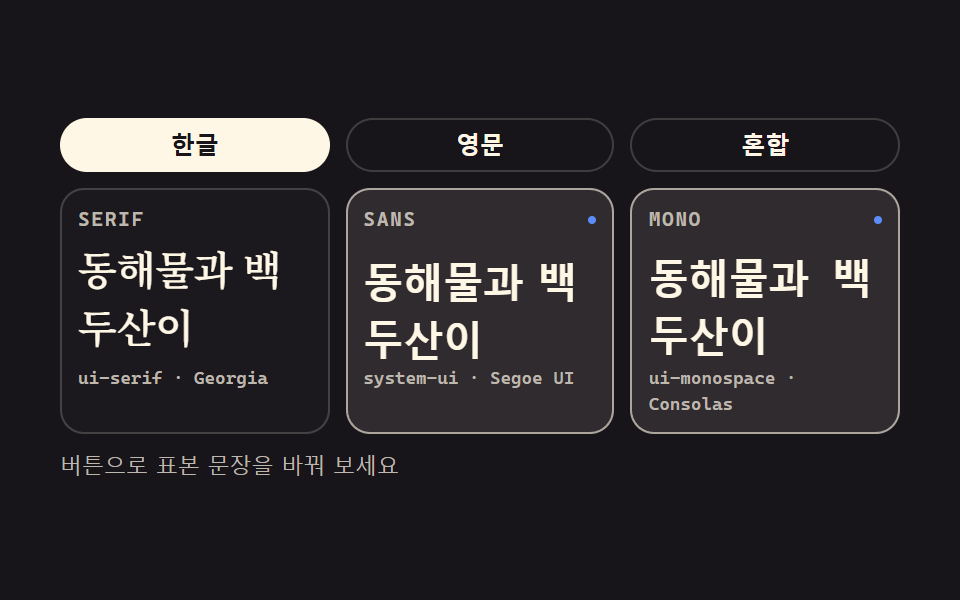 basecss タイポグラフィ プレイグラウンド 9種 — webフォントを読み込まずに
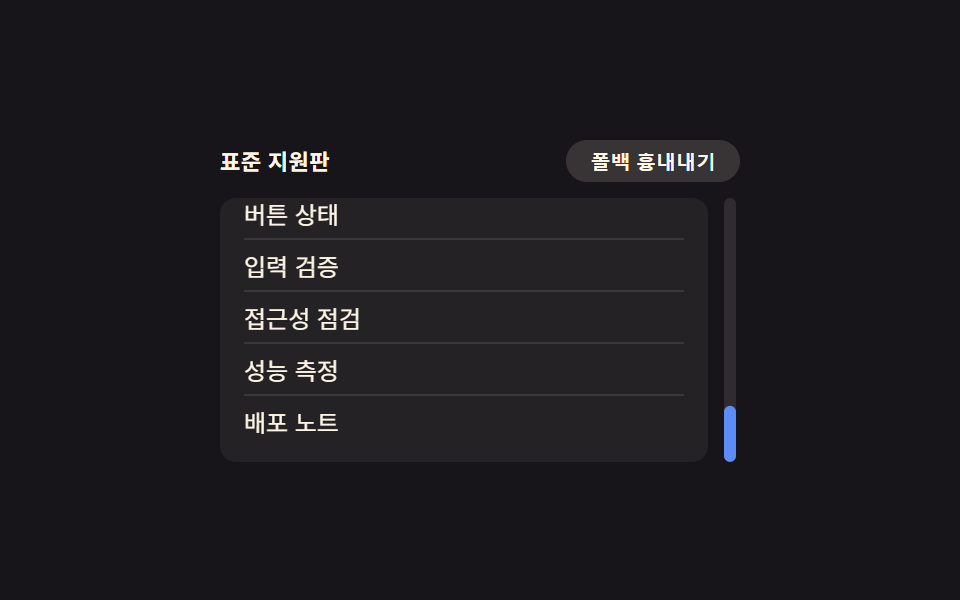 compatcss ブラウザ対応 9選 — 実務で使うフォールバック集
 フィードバックCSS ツールチップ 吹き出しアニメーション9選 一行でコピペOK
 フィードバックCSS 入力フォーム フォーカスアニメーション9選 一行でコピペOK
 ギャラリーポートフォリオ ギャラリー UI 9選 — ドラッグからモーフ切替まで
 LPセクションcss カード デザイン 9種 — 街・チーム・ショートカット
 ダッシュボードUIワードクラウド 作り方 9種 — 渦巻き配置・形の中・3D球・リアルタイム投票
 ダッシュボードUIツリーマップ 9種 — 正方形に近く割る配置から値に合わせて流れる並べ替えまで