css タイポグラフィ プレイグラウンド 9種 — webフォントを読み込まずに
css タイポグラフィとは、フォントのダウンロードを待たずにサイズ・太さ・字間・行間でページの読み心地を決める作業です。この9つのプレイグラウンドは webフォントを読み込まずに、OS がもともと持っているシステムフォントだけで組んであり、下のグリッドは今すぐ動きます。どれもコードをそのままコピペできます。
 01 font-stack-compare
 02 font-weight-slider
 03 font-spacing-tuner
 04 text-rhythm-preview
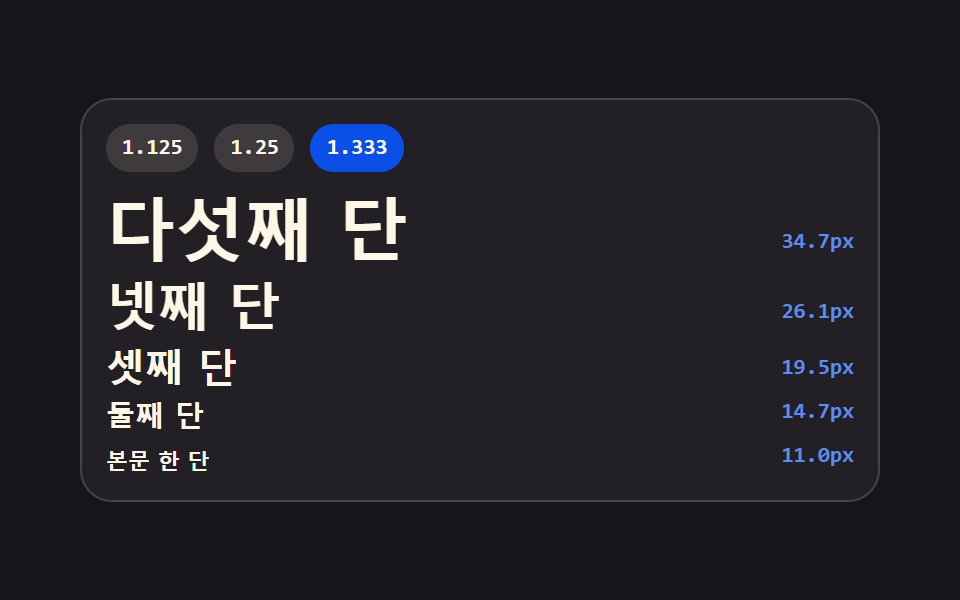 05 type-scale-ladder
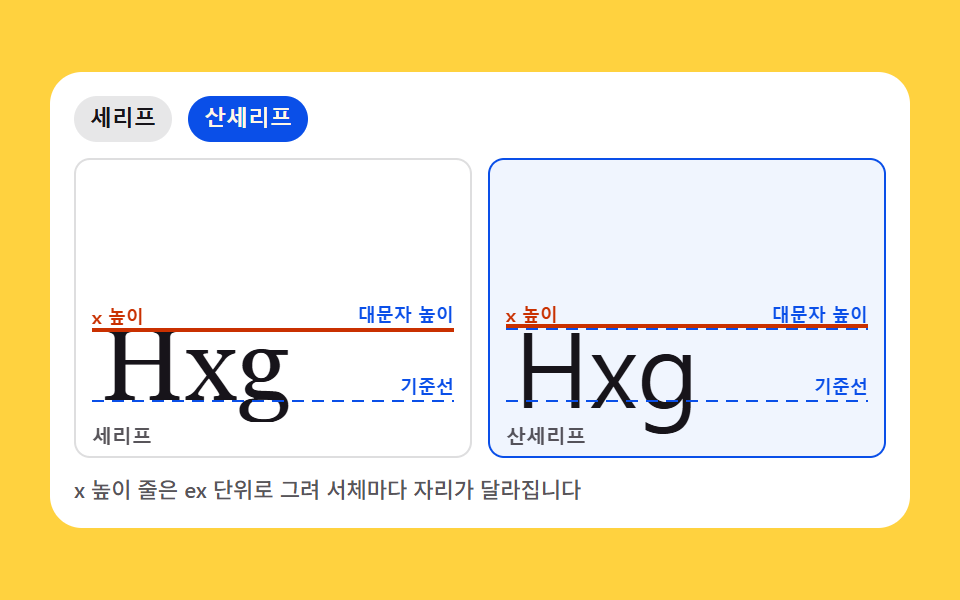 06 font-anatomy-cards
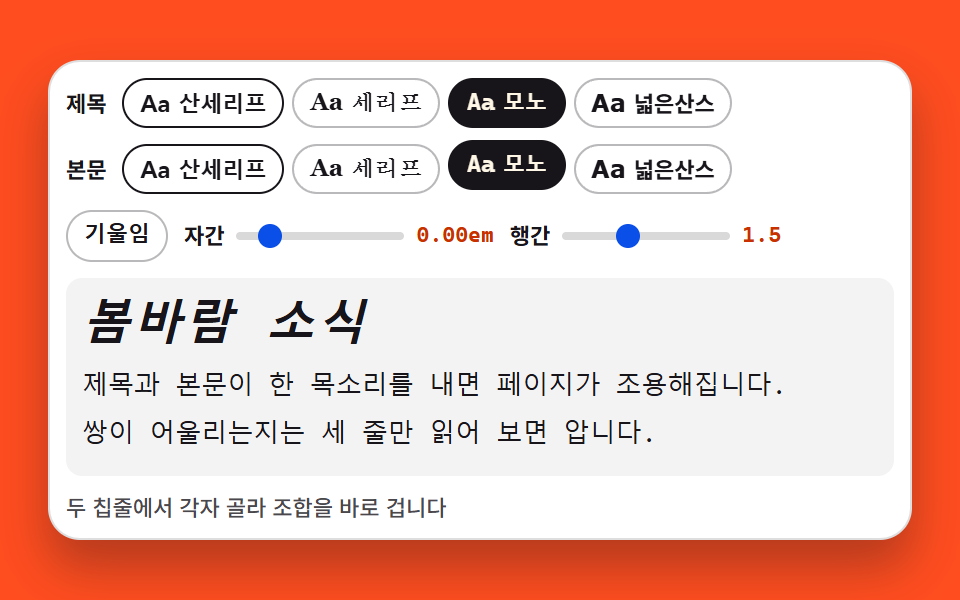 07 font-pairing-preview
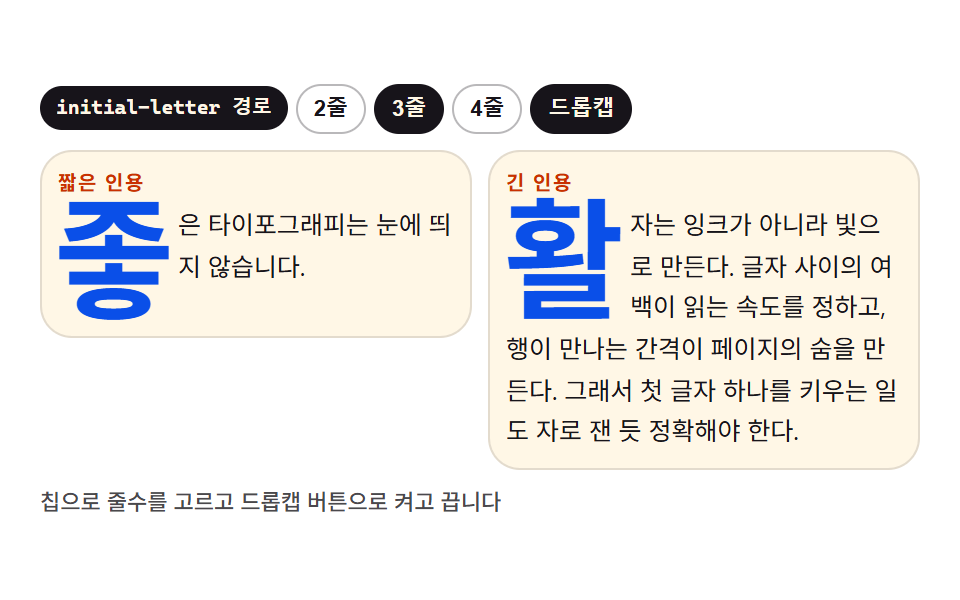 08 dropcap-quote
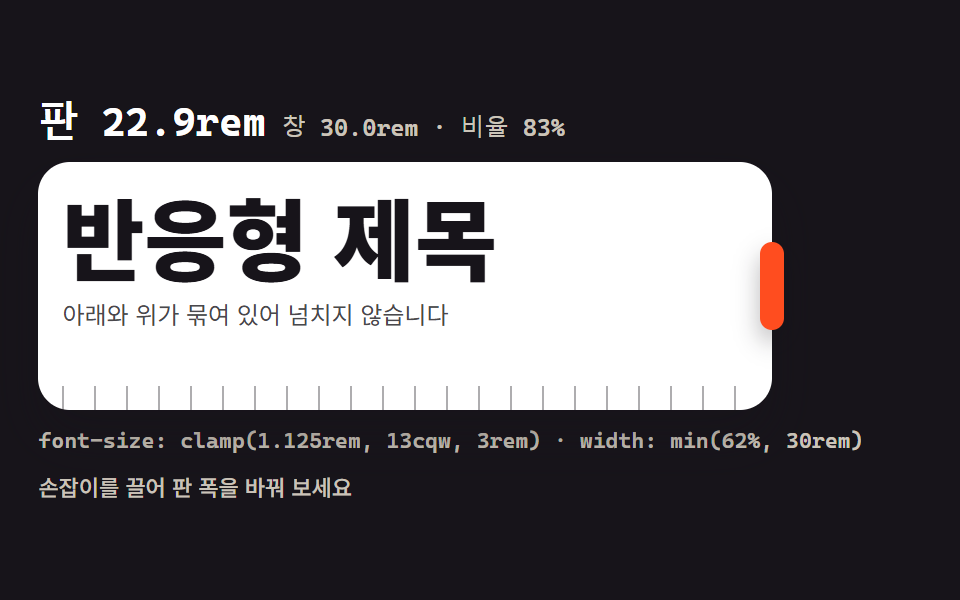 09 clamp-fluid-scale
自動再生 · タイルを押すとその項目へ · すべて1つのzip
- 01 システムフォントスタック比較
- 02 ウェイト軸スライダー(100〜900)
- 03 字間・行間ツマミ
- 04 段落リズムプレビュー
- 05 見出しスケールのはしご
- 06 フォント解剖カード
- 07 見出し・本文ペアプレビュー
- 08 ドロップキャップと引用の飾り
- 09 レスポンシブ clamp() スケール
並びは人気順ではなく、文字の設計を進める順です。まずどの OS にも入っている書体の顔を並べて確かめ(01)、太さの軸を動かし(02)、字間と行間で息を整え(03)、一行の長さと行のリズムを決め(04)、見出しの段階を積み(05)、書体の骨格を見比べ(06)、見出しと本文の組み合わせを試し(07)、最初の一文字を飾り(08)、最後に画面の幅へ追従させます(09)。01〜03 は一文字の見た目、04・05 は文章全体の骨組み、06〜09 は書体同士の関係と場面への当てはめという、3つのまとまりでも読めます。9つとも 480×300px の枠で録画して確かめ、320px の幅でもはみ出しは0か所でした。動く文字をさらに試したい方にはキネティック・タイポグラフィのヒーローが、引用の飾りには引用・プルクオートのデザインが隣にあります。
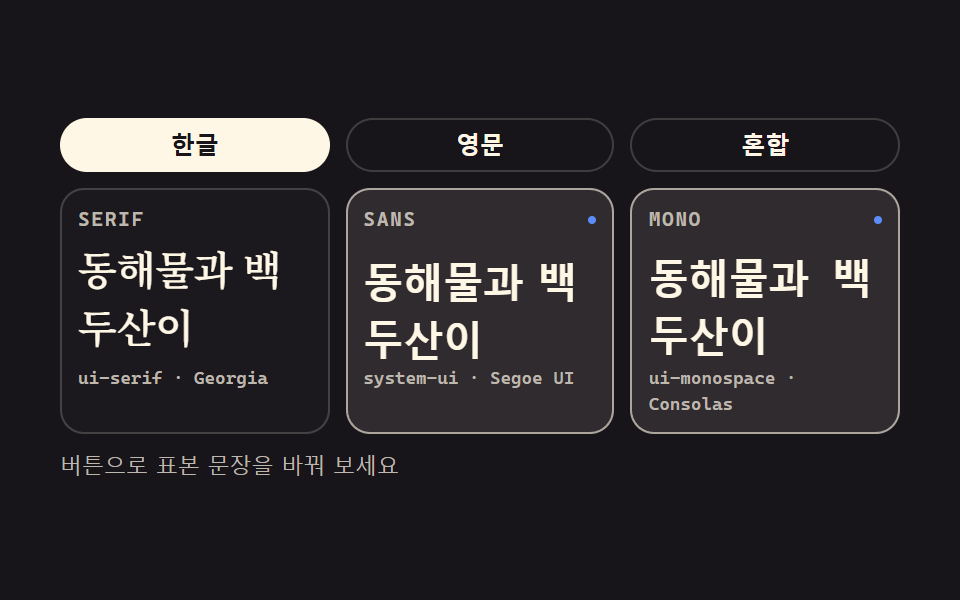
01システムフォントスタック比較
同じ文章を3枚のパネルに並べ、serif・sans・mono のシステムスタックをそれぞれ着せる、デザインシステムのフォント指定ページの部品です。
<main class="stage">
<section class="fs is-demo" id="fs" aria-label="システムフォントスタック比較">
  <div class="fs__tabs">
    <button class="fs__tab" type="button" aria-pressed="true">ハングル</button>
    <button class="fs__tab" type="button" aria-pressed="false">英語</button>
    <button class="fs__tab" type="button" aria-pressed="false">混在</button>
  </div>
  <div class="fs__grid">
    <article class="fs__pane">
      <header class="fs__head">
        <span class="fs__chip">SERIF</span>
        <span class="fs__mark" aria-hidden="true"></span>
      </header>
      <p class="fs__spec fs__spec--serif" id="specSerif">素早い茶色の狐</p>
      <p class="fs__stack">ui-serif · Georgia</p>
    </article>
    <article class="fs__pane">
      <header class="fs__head">
        <span class="fs__chip">SANS</span>
        <span class="fs__mark" aria-hidden="true"></span>
      </header>
      <p class="fs__spec fs__spec--sans" id="specSans">素早い茶色の狐</p>
      <p class="fs__stack">system-ui · Segoe UI</p>
    </article>
    <article class="fs__pane">
      <header class="fs__head">
        <span class="fs__chip">MONO</span>
        <span class="fs__mark" aria-hidden="true"></span>
      </header>
      <p class="fs__spec fs__spec--mono" id="specMono">素早い茶色の狐</p>
      <p class="fs__stack">ui-monospace · Consolas</p>
    </article>
  </div>
  <p class="fs__note">ボタンで見本の文を切り替えてみてください</p>
</section>
</main>@use "../../../../site/static/demo-tokens" as *;
// 시스템 서체 스택 비교 — 같은 문장을 serif·sans·mono 세 판에 나란히 놓는다.
// 스택은 어느 OS 에나 깔려 있는 서체만 담는다: ui-serif·Georgia / system-ui·Segoe UI / ui-monospace·Consolas.
// 웹폰트는 한 줄도 없다 — 이 편의 주제 자체가 그것이다.
// 격자 미리보기(.is-demo)는 세 판을 steps(1, end) 컷으로 돌아가며 강조한다(반투명 유령 프레임 방지).
// 컷만으로는 움직인 프레임이 두세 장에 그치므로(함정표), 활성 판의 표본이 같은 창 안에서
// 살짝 떠오르는 transform 보조를 얹는다. 세 창이 2초를 꽉 채운다.
$duration: $dur-quick;
$easing: $ease-spring;
$color: $subject-blue-light;
$serif: ui-serif, Georgia, "Times New Roman", "Noto Serif KR", serif;
$sans: system-ui, -apple-system, "Segoe UI", "Noto Sans KR", sans-serif;
$mono: ui-monospace, "Cascadia Mono", Consolas, "Liberation Mono", monospace;
$line: rgba($subject-cream, .18);
$dim: #beb7ad;
@include stage($stage-ink);
.fs {
display: flex; flex-direction: column; gap: $sp-2;
box-sizing: border-box; width: min(100%, 420px);
}
// ── 표본 문장 탭 (실사용 경로). 미끄러지는 인디케이터가 없으니 flex 배분은 자유다
.fs__tabs { display: flex; gap: $sp-2; }
.fs__tab {
flex: 1 1 0; appearance: none; cursor: pointer;
padding: $sp-1 $sp-2; border: 1px solid $line; border-radius: $r-pill;
background: transparent; color: $subject-cream;
font-family: $sans; font-weight: 700; font-size: 12px; line-height: 1.4;
transition: background-color $duration $easing, color $duration $easing, border-color $duration $easing;
}
.fs__tab[aria-pressed="true"] {
border-color: $subject-cream; background: $subject-cream; color: $subject-ink;
}
.fs__tab:focus-visible { outline: 2px solid $color; outline-offset: 2px; }
// ── 세 판
.fs__grid { display: grid; grid-template-columns: repeat(3, 1fr); gap: $sp-2; }
.fs__pane {
display: flex; flex-direction: column; gap: $sp-1;
box-sizing: border-box; padding: $sp-2;
border: 1px solid $line; border-radius: $r-control;
background: rgba($subject-cream, .02);
}
.fs__head { display: flex; align-items: center; justify-content: space-between; }
.fs__chip {
font-family: $mono; font-weight: 700; font-size: 10px; line-height: 1.4;
letter-spacing: .08em; color: $dim;
}
// 활성 판 머리의 점 — 미리보기 루프에서만 보인다(정적 경로에서는 숨겨도 화면이 성립한다)
.fs__mark {
width: $sp-1; height: $sp-1; border-radius: 50%; background: $color;
opacity: 0;
}
// 표본. 세 판이 각자의 시스템 스택을 입는다 — 이 세 선언이 이 데모의 본체다
.fs__spec {
margin: 0; color: $subject-cream;
font-size: clamp(13px, 4.6vw, 20px); font-weight: 600; line-height: 1.45;
}
.fs__spec--serif { font-family: $serif; }
.fs__spec--sans { font-family: $sans; }
.fs__spec--mono { font-family: $mono; }
.fs__stack {
margin: 0; color: $dim;
font-family: $mono; font-weight: 500; font-size: 9px; line-height: 1.4;
}
.fs__note {
margin: 0; color: $dim;
font-family: $sans; font-weight: 500; font-size: 11px; line-height: 1.4;
}
// ── 격자 미리보기 루프 (2초). 세 판이 돌아가며 한 칸(약 33%)씩 강조 창을 받는다.
// 강조 교체는 steps(1, end) 컷, 표본의 떠오름은 같은 창 안의 부드러운 transform —
// 컷 + transform 보조 조합(함정표: 컷만 쓰면 움직인 프레임이 2~3장에 그친다).
.fs.is-demo .fs__pane {
animation-name: fsGlow;
animation-duration: $dur-loop;
animation-timing-function: steps(1, end);
animation-iteration-count: infinite;
animation-fill-mode: backwards;
}
.fs.is-demo .fs__pane:nth-child(2) { animation-delay: calc($dur-loop / 3); }
.fs.is-demo .fs__pane:nth-child(3) { animation-delay: calc($dur-loop * 2 / 3); }
.fs.is-demo .fs__spec {
animation-name: fsRise;
animation-duration: $dur-loop;
animation-timing-function: $easing;
animation-iteration-count: infinite;
animation-fill-mode: backwards;
}
.fs.is-demo .fs__pane:nth-child(2) .fs__spec { animation-delay: calc($dur-loop / 3); }
.fs.is-demo .fs__pane:nth-child(3) .fs__spec { animation-delay: calc($dur-loop * 2 / 3); }
.fs.is-demo .fs__mark {
animation-name: fsDot;
animation-duration: $dur-loop;
animation-timing-function: steps(1, end);
animation-iteration-count: infinite;
animation-fill-mode: backwards;
}
.fs.is-demo .fs__pane:nth-child(2) .fs__mark { animation-delay: calc($dur-loop / 3); }
.fs.is-demo .fs__pane:nth-child(3) .fs__mark { animation-delay: calc($dur-loop * 2 / 3); }
// steps(1, end) 는 구간 끝에서만 값이 바뀐다 — 0% 값이 한 창(33%) 내내 보이고 33% 에 내려앉는다.
// 경계 복귀는 루프 시작(0%)에서만 일어나 유령 프레임이 없다.
@keyframes fsGlow {
0% { background: rgba($subject-cream, .10); border-color: rgba($subject-cream, .60); }
33%, 100% { background: rgba($subject-cream, .02); border-color: rgba($subject-cream, .18); }
}
@keyframes fsRise {
0% { transform: translateY(5px); }
33% { transform: translateY(-1px); }
39%, 100% { transform: translateY(5px); }
}
@keyframes fsDot {
0% { opacity: 1; transform: scale(1); }
33%, 100% { opacity: 0; transform: scale(.4); }
}
// ── 좁은 화면: 글자와 여백을 내려 무대 안에 들어오게 한다 (올리지 않는다)
@media (max-width: 340px) {
.fs { gap: $sp-1; }
.fs__tabs { gap: $sp-1; }
.fs__tab { padding: $sp-1; font-size: 11px; }
.fs__pane { gap: 0; }
.fs__spec { font-size: 13px; line-height: 1.4; }
.fs__stack { font-size: 9px; }
.fs__note { font-size: 10px; }
}
@media (prefers-reduced-motion: reduce) {
.fs.is-demo .fs__pane,
.fs.is-demo .fs__spec,
.fs.is-demo .fs__mark {
animation: none !important;
transform: none !important;
opacity: 0 !important;
background: rgba($subject-cream, .02) !important;
border-color: rgba($subject-cream, .18) !important;
}
}html, body {
margin: 0;
overflow: hidden;
}
.stage {
box-sizing: border-box;
min-height: 100vh;
display: grid;
place-items: center;
margin: 0;
background: #17141a;
font-family: -apple-system, "Segoe UI", "Noto Sans KR", sans-serif;
padding: clamp(8px, 4vw, 24px);
}
.fs {
display: flex;
flex-direction: column;
gap: 8px;
box-sizing: border-box;
width: min(100%, 420px);
}
.fs__tabs {
display: flex;
gap: 8px;
}
.fs__tab {
flex: 1 1 0;
appearance: none;
cursor: pointer;
padding: 4px 8px;
border: 1px solid rgba(255, 247, 230, 0.18);
border-radius: 999px;
background: transparent;
color: #fff7e6;
font-family: system-ui, -apple-system, "Segoe UI", "Noto Sans KR", sans-serif;
font-weight: 700;
font-size: 12px;
line-height: 1.4;
transition: background-color 220ms cubic-bezier(0.2, 0.8, 0.2, 1), color 220ms cubic-bezier(0.2, 0.8, 0.2, 1), border-color 220ms cubic-bezier(0.2, 0.8, 0.2, 1);
}
.fs__tab[aria-pressed=true] {
border-color: #fff7e6;
background: #fff7e6;
color: #17141a;
}
.fs__tab:focus-visible {
outline: 2px solid #5b8cf8;
outline-offset: 2px;
}
.fs__grid {
display: grid;
grid-template-columns: repeat(3, 1fr);
gap: 8px;
}
.fs__pane {
display: flex;
flex-direction: column;
gap: 4px;
box-sizing: border-box;
padding: 8px;
border: 1px solid rgba(255, 247, 230, 0.18);
border-radius: 12px;
background: rgba(255, 247, 230, 0.02);
}
.fs__head {
display: flex;
align-items: center;
justify-content: space-between;
}
.fs__chip {
font-family: ui-monospace, "Cascadia Mono", Consolas, "Liberation Mono", monospace;
font-weight: 700;
font-size: 10px;
line-height: 1.4;
letter-spacing: 0.08em;
color: #beb7ad;
}
.fs__mark {
width: 4px;
height: 4px;
border-radius: 50%;
background: #5b8cf8;
opacity: 0;
}
.fs__spec {
margin: 0;
color: #fff7e6;
font-size: clamp(13px, 4.6vw, 20px);
font-weight: 600;
line-height: 1.45;
}
.fs__spec--serif {
font-family: ui-serif, Georgia, "Times New Roman", "Noto Serif KR", serif;
}
.fs__spec--sans {
font-family: system-ui, -apple-system, "Segoe UI", "Noto Sans KR", sans-serif;
}
.fs__spec--mono {
font-family: ui-monospace, "Cascadia Mono", Consolas, "Liberation Mono", monospace;
}
.fs__stack {
margin: 0;
color: #beb7ad;
font-family: ui-monospace, "Cascadia Mono", Consolas, "Liberation Mono", monospace;
font-weight: 500;
font-size: 9px;
line-height: 1.4;
}
.fs__note {
margin: 0;
color: #beb7ad;
font-family: system-ui, -apple-system, "Segoe UI", "Noto Sans KR", sans-serif;
font-weight: 500;
font-size: 11px;
line-height: 1.4;
}
.fs.is-demo .fs__pane {
animation-name: fsGlow;
animation-duration: 2s;
animation-timing-function: steps(1, end);
animation-iteration-count: infinite;
animation-fill-mode: backwards;
}
.fs.is-demo .fs__pane:nth-child(2) {
animation-delay: 0.6666666667s;
}
.fs.is-demo .fs__pane:nth-child(3) {
animation-delay: 1.3333333333s;
}
.fs.is-demo .fs__spec {
animation-name: fsRise;
animation-duration: 2s;
animation-timing-function: cubic-bezier(0.2, 0.8, 0.2, 1);
animation-iteration-count: infinite;
animation-fill-mode: backwards;
}
.fs.is-demo .fs__pane:nth-child(2) .fs__spec {
animation-delay: 0.6666666667s;
}
.fs.is-demo .fs__pane:nth-child(3) .fs__spec {
animation-delay: 1.3333333333s;
}
.fs.is-demo .fs__mark {
animation-name: fsDot;
animation-duration: 2s;
animation-timing-function: steps(1, end);
animation-iteration-count: infinite;
animation-fill-mode: backwards;
}
.fs.is-demo .fs__pane:nth-child(2) .fs__mark {
animation-delay: 0.6666666667s;
}
.fs.is-demo .fs__pane:nth-child(3) .fs__mark {
animation-delay: 1.3333333333s;
}
@keyframes fsGlow {
0% {
background: rgba(255, 247, 230, 0.1);
border-color: rgba(255, 247, 230, 0.6);
}
33%, 100% {
background: rgba(255, 247, 230, 0.02);
border-color: rgba(255, 247, 230, 0.18);
}
}
@keyframes fsRise {
0% {
transform: translateY(5px);
}
33% {
transform: translateY(-1px);
}
39%, 100% {
transform: translateY(5px);
}
}
@keyframes fsDot {
0% {
opacity: 1;
transform: scale(1);
}
33%, 100% {
opacity: 0;
transform: scale(0.4);
}
}
@media (max-width: 340px) {
.fs {
gap: 4px;
}
.fs__tabs {
gap: 4px;
}
.fs__tab {
padding: 4px;
font-size: 11px;
}
.fs__pane {
gap: 0;
}
.fs__spec {
font-size: 13px;
line-height: 1.4;
}
.fs__stack {
font-size: 9px;
}
.fs__note {
font-size: 10px;
}
}
@media (prefers-reduced-motion: reduce) {
.fs.is-demo .fs__pane,
.fs.is-demo .fs__spec,
.fs.is-demo .fs__mark {
animation: none !important;
transform: none !important;
opacity: 0 !important;
background: rgba(255, 247, 230, 0.02) !important;
border-color: rgba(255, 247, 230, 0.18) !important;
}
}var fs = document.getElementById('fs');
var tabs = Array.prototype.slice.call(document.querySelectorAll('.fs__tab'));
var specs = Array.prototype.slice.call(document.querySelectorAll('.fs__spec'));
var SAMPLES = ['素早い茶色の狐', 'Hello Type 0123', 'CSSタイポ 2026'];
// 탭을 누르면 세 판의 표본 문장이 한꺼번에 갈아 입는다 — 미리보기 루프는 여기서 뗀다
tabs.forEach(function (tab, i) {
tab.addEventListener('click', function () {
fs.classList.remove('is-demo');
tabs.forEach(function (t) { t.setAttribute('aria-pressed', String(t === tab)); });
specs.forEach(function (spec) { spec.textContent = SAMPLES[i]; });
});
});
fs.addEventListener('pointerdown', function () { fs.classList.remove('is-demo'); });// FontStackCompare — vanilla 판(run/074/demo/01-font-stack-compare/index.html) 의 React 포트.
// 같은 문장을 serif·sans·mono 세 판에 나란히 놓고 탭으로 표본 문장을 바꾼다.
// 스택 목록과 미리보기 루프의 키프레임은 vanilla 와 같은 글자다 (값을 다시 타이핑하지 않는다).
import { useState } from "react";
import type { CSSProperties } from "react";
import styles from "./FontStackCompare.module.scss";
export type FontStackCompareProps = {
duration?: number;
easing?: string;
color?: string;
samples?: string[];
};
type Vars = CSSProperties & { "--duration"?: string; "--easing"?: string; "--color"?: string };
const TAB_LABELS = ["한글", "영문", "혼합"];
const DEFAULT_SAMPLES = ["동해물과 백두산이", "Hello Type 0123", "CSS 타이포 2026"];
const NOTE = "버튼으로 표본 문장을 바꿔 보세요";
const ARIA_LABEL = "시스템 서체 스택 비교";
const PANES = [
{ chip: "SERIF", stack: "ui-serif · Georgia", spec: "serif" },
{ chip: "SANS", stack: "system-ui · Segoe UI", spec: "sans" },
{ chip: "MONO", stack: "ui-monospace · Consolas", spec: "mono" },
];
export default function FontStackCompare(props: FontStackCompareProps) {
const duration = props.duration ?? 220;
const easing = props.easing ?? "cubic-bezier(.2, .8, .2, 1)";
const color = props.color ?? "#5b8cf8";
const samples = props.samples ?? DEFAULT_SAMPLES;
const [active, setActive] = useState<number>(0);
const [preview, setPreview] = useState<boolean>(true);
const vars: Vars = { "--duration": duration + "ms", "--easing": easing, "--color": color };
return (
<main className={styles.stage}>
<section
className={styles.root + (preview ? " " + styles.isDemo : "")}
style={vars}
aria-label={ARIA_LABEL}
onPointerDown={() => setPreview(false)}
>
<div className={styles.tabs}>
{TAB_LABELS.map((label, i) => (
<button
key={label}
type="button"
className={styles.tab}
aria-pressed={String(i === active)}
onClick={() => {
setPreview(false);
setActive(i);
}}
>
{label}
</button>
))}
</div>
<div className={styles.grid}>
{PANES.map((pane) => (
<article key={pane.chip} className={styles.pane}>
<header className={styles.head}>
<span className={styles.chip}>{pane.chip}</span>
<span className={styles.mark} aria-hidden="true"></span>
</header>
<p className={styles.spec + " " + styles["spec--" + pane.spec]}>{samples[active]}</p>
<p className={styles.stack}>{pane.stack}</p>
</article>
))}
</div>
<p className={styles.note}>{NOTE}</p>
</section>
</main>
);
}01 · システムフォントスタック比較 — 計測 累積面積 23.762% · 動いたフレーム 14/23GODRICH オリジナル · SCSS と React は zip に同梱 · パスワードを見る
3つの宣言がこのデモの本体
// 見本。3枚のパネルがそれぞれのシステムスタックを着る — この3つの宣言がこのデモの本体
.fs__spec {
  margin: 0; color: $subject-cream;
  font-size: clamp(13px, 4.6vw, 20px); font-weight: 600; line-height: 1.45;
}
.fs__spec--serif { font-family: $serif; }
.fs__spec--sans { font-family: $sans; }
.fs__spec--mono { font-family: $mono; }
スタックは ui-serif · Georgia / system-ui · Segoe UI / ui-monospace · Consolas と、どの OS にも入っている顔ばかりで、20px の見本3枚は #1c191e を背景に 16.38:1 でそろいました。
タブで見本がそろって着替える
var SAMPLES = ['素早い茶色の狐', 'Hello Type 0123', 'CSSタイポ 2026'];
// タブを押すと3枚のパネルの見本の文がそろって着替える — プレビューのループはここで外す
tabs.forEach(function (tab, i) {
  tab.addEventListener('click', function () {
    fs.classList.remove('is-demo');
    tabs.forEach(function (t) { t.setAttribute('aria-pressed', String(t === tab)); });
    specs.forEach(function (spec) { spec.textContent = SAMPLES[i]; });
  });
});
タブを切り替えると押した側だけ aria-pressed が true になり、3枚の見本は「素早い茶色の狐」「Hello Type 0123」「CSSタイポ 2026」にそろって着替えます。
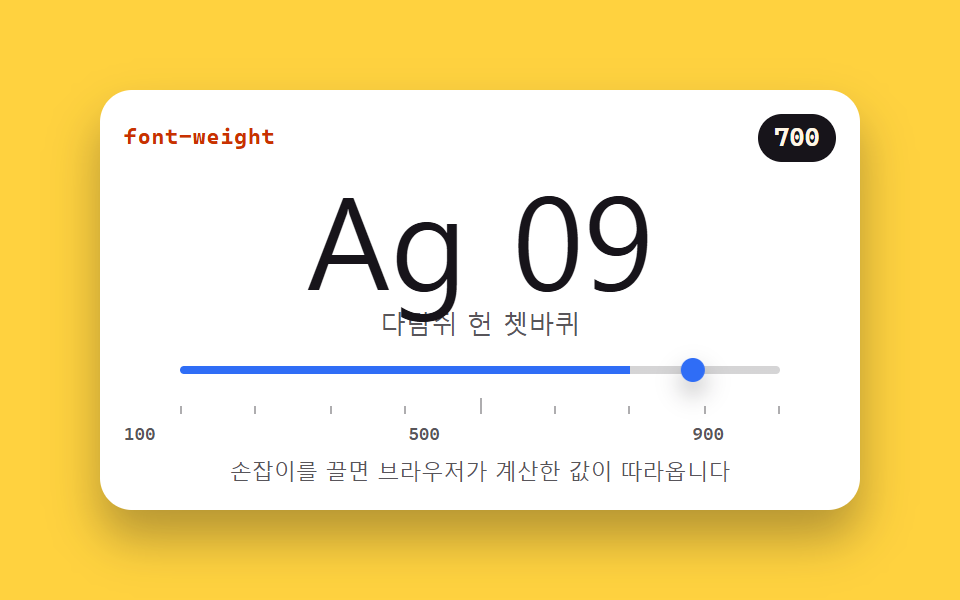
02ウェイト軸スライダー(100〜900)
スライダーで font-weight を 100 から 900 まで動かし、画面にはブラウザが実際に計算した値が追いかけて出る、エディタやツールのフォント設定パネルの部品です。
<main class="stage">
<section class="wt is-demo" id="wt" aria-label="ウェイト軸スライダー">
  <header class="wt__bar">
    <span class="wt__name">font-weight</span>
    <span class="wt__out" id="wtOut">700</span>
  </header>
  <div class="wt__spec">
    <p class="wt__big" id="wtBig">Ag 09</p>
    <p class="wt__hangul" id="wtHangul">いろはにほへと</p>
  </div>
  <input class="wt__range" id="wtRange" type="range" min="100" max="900" step="100" value="700"
         aria-label="ウェイトスライダー" aria-valuemin="100" aria-valuemax="900" aria-valuenow="700">
  <div class="wt__ruler" aria-hidden="true">
    <i></i><i></i><i></i><i></i><i></i><i></i><i></i><i></i><i></i>
  </div>
  <p class="wt__scale"><span>100</span><span>500</span><span>900</span></p>
  <p class="wt__note">ハンドルをドラッグすると、ブラウザが計算した値が追ってきます</p>
</section>
</main>
@use "../../../../site/static/demo-tokens" as *;
// 굵기 축 슬라이더 — font-weight 를 100 에서 900 까지 움직인다.
// 화면 숫자는 브라우저가 실제로 계산한 값(getComputedStyle)을 다시 읽은 것이다.
// 가변 폰트 축은 font-variation-settings 'wght' 를 함께 건다 — 한쪽만 바꾸면
// 가변 서체에서는 다른 쪽 선언이 렌더링을 이긴다. 그래서 미리보기 루프의 키프레임도
// 두 속성을 같이 움직인다. latin(Ag 09)은 가변 축을 따라 부드럽게 움직이고
// 한글은 가변 축이 없는 시스템 서체로 떨어지며 가까운 굵기에 붙는다 — 그 차이가 이 데모의 이야기다.
$duration: $dur-quick;
$easing: $ease-spring;
$color: $subject-blue;
$sans: system-ui, -apple-system, "Segoe UI", "Noto Sans KR", sans-serif;
$mono: ui-monospace, "Cascadia Mono", Consolas, "Liberation Mono", monospace;
@include stage($stage-yellow);
.wt {
display: flex; flex-direction: column; gap: $sp-1;
box-sizing: border-box; width: min(100%, 380px); padding: $sp-3;
border-radius: $r-card; background: $stage-paper;
box-shadow: $shadow-raised;
}
// ── 속성 이름과 계산값 배지
.wt__bar { display: flex; align-items: center; justify-content: space-between; }
.wt__name {
color: $subject-orange-deep;
font-family: $mono; font-weight: 700; font-size: 11px; line-height: 1.4; letter-spacing: .04em;
}
.wt__out {
padding: $sp-1 $sp-2; border-radius: $r-pill;
background: $subject-ink; color: $subject-cream;
font-family: $mono; font-weight: 700; font-size: 13px; line-height: 1.2;
}
// ── 표본. 위 줄은 가변 축을 타는 latin, 아래 줄은 가까운 굵기에 붙는 한글
.wt__spec { margin: 0; display: flex; flex-direction: column; align-items: center; }
.wt__big {
margin: 0; color: $subject-ink;
font-family: $sans; font-weight: 700;
font-size: clamp(38px, 15vw, 64px); line-height: 1.05;
font-variation-settings: 'wght' var(--w, 700);
}
.wt__hangul {
margin: 0; color: rgba($subject-ink, .72);
font-family: $sans; font-weight: 700; font-size: 13px; line-height: 1.5;
font-variation-settings: 'wght' var(--w, 700);
}
// ── 슬라이더. 트랙 채움은 --fill(%) 로, 손잡이 위치는 브라우저가 맡는다
.wt__range {
--fill: 75%;
--travel: 288px;
appearance: none; -webkit-appearance: none;
display: block; width: 300px; max-width: 100%; margin: 0 auto;
height: 20px; background: transparent; cursor: pointer;
}
.wt__range::-webkit-slider-runnable-track {
height: 4px; border-radius: $r-pill;
background: linear-gradient(90deg, $color 0 var(--fill), rgba($subject-ink, .18) var(--fill) 100%);
}
.wt__range::-webkit-slider-thumb {
-webkit-appearance: none; appearance: none;
width: 12px; height: 12px; margin-top: -4px;
border: 0; border-radius: 50%; background: $color;
box-shadow: $shadow-press;
}
.wt__range::-moz-range-track {
height: 4px; border-radius: $r-pill; background: rgba($subject-ink, .18);
}
.wt__range::-moz-range-thumb {
width: 12px; height: 12px; border: 0; border-radius: 50%; background: $color;
}
.wt__range:focus-visible { outline: 2px solid $color; outline-offset: 4px; }
// ── 눈금자 9칸(100 부터 900 까지 100 간격)과 실측 라벨
.wt__ruler {
display: flex; justify-content: space-between; align-items: flex-end;
width: 300px; max-width: 100%; margin: 0 auto; padding: 0 $sp-1;
}
.wt__ruler i { width: 1px; height: 4px; background: rgba($subject-ink, .35); }
.wt__ruler i:nth-child(5) { height: 8px; }
.wt__scale {
display: flex; justify-content: space-between;
width: 300px; max-width: 100%; margin: 0;
color: rgba($subject-ink, .72);
font-family: $mono; font-weight: 500; font-size: 9px; line-height: 1.4;
}
.wt__note {
margin: 0; color: rgba($subject-ink, .72); text-align: center;
font-family: $sans; font-weight: 500; font-size: 11px; line-height: 1.4;
}
// ── 격자 미리보기 루프 (2초). font-weight 는 애니메이션 가능한 속성이다 —
// 100 에서 900 까지 갔다가 되돌아온다. 손잡이도 같은 리듬으로 translateX 하고
// 계산값 배지는 정점에서 한 번 부풀어 "값이 따라온다" 를 알린다(자기 중심).
.wt.is-demo .wt__big,
.wt.is-demo .wt__hangul {
animation-name: wtSweep;
animation-duration: $dur-loop;
animation-timing-function: ease-in-out;
animation-iteration-count: infinite;
}
.wt.is-demo .wt__out {
animation-name: wtPulse;
animation-duration: $dur-loop;
animation-timing-function: $easing;
animation-iteration-count: infinite;
transform-origin: 50% 50%;
}
.wt.is-demo .wt__range::-webkit-slider-thumb {
animation-name: wtThumb;
animation-duration: $dur-loop;
animation-timing-function: ease-in-out;
animation-iteration-count: infinite;
}
@keyframes wtSweep {
0% { font-weight: 100; font-variation-settings: 'wght' 100; }
45% { font-weight: 900; font-variation-settings: 'wght' 900; }
90%, 100% { font-weight: 100; font-variation-settings: 'wght' 100; }
}
@keyframes wtThumb {
0% { transform: translateX(0); }
45% { transform: translateX(var(--travel, 288px)); }
90%, 100% { transform: translateX(0); }
}
@keyframes wtPulse {
0%, 45% { transform: scale(1); }
50% { transform: scale(1.12); }
56%, 100% { transform: scale(1); }
}
// ── 좁은 화면: 표본과 눈금을 내린다 (올리지 않는다)
@media (max-width: 340px) {
.wt { padding: $sp-2; gap: $sp-1; }
.wt__big { font-size: 40px; }
.wt__hangul { font-size: 11px; }
.wt__range, .wt__ruler, .wt__scale { width: 240px; }
.wt__range { --travel: 228px; }
.wt__note { font-size: 10px; }
}
@media (prefers-reduced-motion: reduce) {
.wt.is-demo .wt__big,
.wt.is-demo .wt__hangul,
.wt.is-demo .wt__out,
.wt.is-demo .wt__range::-webkit-slider-thumb {
animation: none !important;
transform: none !important;
}
}html, body {
margin: 0;
overflow: hidden;
}
.stage {
box-sizing: border-box;
min-height: 100vh;
display: grid;
place-items: center;
margin: 0;
background: #ffd23f;
font-family: -apple-system, "Segoe UI", "Noto Sans KR", sans-serif;
padding: clamp(8px, 4vw, 24px);
}
.wt {
display: flex;
flex-direction: column;
gap: 4px;
box-sizing: border-box;
width: min(100%, 380px);
padding: 12px;
border-radius: 16px;
background: #ffffff;
box-shadow: 0 14px 24px rgba(23, 20, 26, 0.32);
}
.wt__bar {
display: flex;
align-items: center;
justify-content: space-between;
}
.wt__name {
color: #c93000;
font-family: ui-monospace, "Cascadia Mono", Consolas, "Liberation Mono", monospace;
font-weight: 700;
font-size: 11px;
line-height: 1.4;
letter-spacing: 0.04em;
}
.wt__out {
padding: 4px 8px;
border-radius: 999px;
background: #17141a;
color: #fff7e6;
font-family: ui-monospace, "Cascadia Mono", Consolas, "Liberation Mono", monospace;
font-weight: 700;
font-size: 13px;
line-height: 1.2;
}
.wt__spec {
margin: 0;
display: flex;
flex-direction: column;
align-items: center;
}
.wt__big {
margin: 0;
color: #17141a;
font-family: system-ui, -apple-system, "Segoe UI", "Noto Sans KR", sans-serif;
font-weight: 700;
font-size: clamp(38px, 15vw, 64px);
line-height: 1.05;
font-variation-settings: "wght" var(--w, 700);
}
.wt__hangul {
margin: 0;
color: rgba(23, 20, 26, 0.72);
font-family: system-ui, -apple-system, "Segoe UI", "Noto Sans KR", sans-serif;
font-weight: 700;
font-size: 13px;
line-height: 1.5;
font-variation-settings: "wght" var(--w, 700);
}
.wt__range {
--fill: 75%;
--travel: 288px;
appearance: none;
-webkit-appearance: none;
display: block;
width: 300px;
max-width: 100%;
margin: 0 auto;
height: 20px;
background: transparent;
cursor: pointer;
}
.wt__range::-webkit-slider-runnable-track {
height: 4px;
border-radius: 999px;
background: linear-gradient(90deg, #2f6df6 0 var(--fill), rgba(23, 20, 26, 0.18) var(--fill) 100%);
}
.wt__range::-webkit-slider-thumb {
-webkit-appearance: none;
appearance: none;
width: 12px;
height: 12px;
margin-top: -4px;
border: 0;
border-radius: 50%;
background: #2f6df6;
box-shadow: 0 6px 12px rgba(23, 20, 26, 0.32);
}
.wt__range::-moz-range-track {
height: 4px;
border-radius: 999px;
background: rgba(23, 20, 26, 0.18);
}
.wt__range::-moz-range-thumb {
width: 12px;
height: 12px;
border: 0;
border-radius: 50%;
background: #2f6df6;
}
.wt__range:focus-visible {
outline: 2px solid #2f6df6;
outline-offset: 4px;
}
.wt__ruler {
display: flex;
justify-content: space-between;
align-items: flex-end;
width: 300px;
max-width: 100%;
margin: 0 auto;
padding: 0 4px;
}
.wt__ruler i {
width: 1px;
height: 4px;
background: rgba(23, 20, 26, 0.35);
}
.wt__ruler i:nth-child(5) {
height: 8px;
}
.wt__scale {
display: flex;
justify-content: space-between;
width: 300px;
max-width: 100%;
margin: 0;
color: rgba(23, 20, 26, 0.72);
font-family: ui-monospace, "Cascadia Mono", Consolas, "Liberation Mono", monospace;
font-weight: 500;
font-size: 9px;
line-height: 1.4;
}
.wt__note {
margin: 0;
color: rgba(23, 20, 26, 0.72);
text-align: center;
font-family: system-ui, -apple-system, "Segoe UI", "Noto Sans KR", sans-serif;
font-weight: 500;
font-size: 11px;
line-height: 1.4;
}
.wt.is-demo .wt__big,
.wt.is-demo .wt__hangul {
animation-name: wtSweep;
animation-duration: 2s;
animation-timing-function: ease-in-out;
animation-iteration-count: infinite;
}
.wt.is-demo .wt__out {
animation-name: wtPulse;
animation-duration: 2s;
animation-timing-function: cubic-bezier(0.2, 0.8, 0.2, 1);
animation-iteration-count: infinite;
transform-origin: 50% 50%;
}
.wt.is-demo .wt__range::-webkit-slider-thumb {
animation-name: wtThumb;
animation-duration: 2s;
animation-timing-function: ease-in-out;
animation-iteration-count: infinite;
}
@keyframes wtSweep {
0% {
font-weight: 100;
font-variation-settings: "wght" 100;
}
45% {
font-weight: 900;
font-variation-settings: "wght" 900;
}
90%, 100% {
font-weight: 100;
font-variation-settings: "wght" 100;
}
}
@keyframes wtThumb {
0% {
transform: translateX(0);
}
45% {
transform: translateX(var(--travel, 288px));
}
90%, 100% {
transform: translateX(0);
}
}
@keyframes wtPulse {
0%, 45% {
transform: scale(1);
}
50% {
transform: scale(1.12);
}
56%, 100% {
transform: scale(1);
}
}
@media (max-width: 340px) {
.wt {
padding: 8px;
gap: 4px;
}
.wt__big {
font-size: 40px;
}
.wt__hangul {
font-size: 11px;
}
.wt__range, .wt__ruler, .wt__scale {
width: 240px;
}
.wt__range {
--travel: 228px;
}
.wt__note {
font-size: 10px;
}
}
@media (prefers-reduced-motion: reduce) {
.wt.is-demo .wt__big,
.wt.is-demo .wt__hangul,
.wt.is-demo .wt__out,
.wt.is-demo .wt__range::-webkit-slider-thumb {
animation: none !important;
transform: none !important;
}
}var wt = document.getElementById('wt');
var big = document.getElementById('wtBig');
var hangul = document.getElementById('wtHangul');
var range = document.getElementById('wtRange');
var out = document.getElementById('wtOut');
// oninput — 손잡이가 붙어 있는 동안 매번 따라온다.
// 화면 숫자는 작성값을 echo 하는 게 아니라 getComputedStyle 로 브라우저가 실제로 계산한
// font-weight 를 다시 읽은 값이다. 가변 축은 font-variation-settings 'wght' 를 함께 건다 —
// 한쪽만 바꾸면 가변 서체에서는 나머지 쪽 선언이 렌더링을 이긴다.
range.oninput = function () {
wt.classList.remove('is-demo');
var v = range.value;
var pct = (v - 100) / 8;
big.style.fontWeight = v;
big.style.setProperty('--w', v);
hangul.style.fontWeight = v;
hangul.style.setProperty('--w', v);
range.style.setProperty('--fill', pct + '%');
range.setAttribute('aria-valuenow', v);
out.textContent = getComputedStyle(big).fontWeight;
};
range.addEventListener('pointerdown', function () { wt.classList.remove('is-demo'); });
// 처음 연 순간의 계산값은 미리보기 루프가 돌던 중이면 보간 중간값(135 같은)을 읽는다 —
// 그때는 HTML 에 적어 둔 초기값(700)이 slider·CSS 와 이미 일치하니 그대로 둔다.
if (!wt.classList.contains('is-demo')) {
out.textContent = getComputedStyle(big).fontWeight;
}// FontWeightSlider — vanilla 판(run/074/demo/02-font-weight-slider/index.html) 의 React 포트.
// 슬라이더가 font-weight 100~900 을 움직이고 화면 숫자는 getComputedStyle 로 브라우저가 실제로
// 계산한 값을 다시 읽어 보여준다(vanilla 의 oninput 경로 대신 React 의 onInput 프롭).
// 가변 축은 font-variation-settings 'wght' 를 함께 건다 — 키프레임은 vanilla 와 같은 글자다.
import { useEffect, useRef, useState } from "react";
import type { CSSProperties } from "react";
import styles from "./FontWeightSlider.module.scss";
export type FontWeightSliderProps = {
duration?: number;
easing?: string;
color?: string;
initialWeight?: number;
};
type Vars = CSSProperties & {
"--duration"?: string;
"--easing"?: string;
"--color"?: string;
"--w"?: string;
};
type Box<T> = { current: T | null };
// 이벤트 핸들러 파라미터는 로컬 타입으로 — ambient 타입이 React 제네릭을 안 준다
type RangeEvt = { target: { value: string } };
const NOTE = "손잡이를 끌면 브라우저가 계산한 값이 따라옵니다";
const ARIA_LABEL = "굵기 슬라이더";
const BIG_TEXT = "Ag 09";
const HANGUL_TEXT = "다람쥐 헌 쳇바퀴";
const SCALE = ["100", "500", "900"];
export default function FontWeightSlider(props: FontWeightSliderProps) {
const duration = props.duration ?? 220;
const easing = props.easing ?? "cubic-bezier(.2, .8, .2, 1)";
const color = props.color ?? "#2f6df6";
const initial = props.initialWeight ?? 700;
const [weight, setWeight] = useState<number>(initial);
const [computed, setComputed] = useState<string>(String(initial));
const [preview, setPreview] = useState<boolean>(true);
const bigRef = useRef<HTMLParagraphElement>(null) as Box<HTMLParagraphElement>;
// 화면 숫자는 작성값이 아니라 브라우저가 계산한 값 — 렌더 뒤에 다시 읽는다.
// 미리보기 루프가 돌던 중이면 계산값이 보간 중간값이니 읽지 않고 초기값(700)을 유지한다.
useEffect(() => {
const big = bigRef.current;
if (big && !preview) setComputed(getComputedStyle(big).fontWeight);
}, [weight, preview]);
const vars: Vars = {
"--duration": duration + "ms",
"--easing": easing,
"--color": color,
"--w": String(weight),
};
const fill = ((weight - 100) / 8).toFixed(1) + "%";
return (
<main className={styles.stage}>
<section className={styles.root + (preview ? " " + styles.isDemo : "")} style={vars} aria-label={ARIA_LABEL}>
<header className={styles.bar}>
<span className={styles.name}>font-weight</span>
<span className={styles.out}>{computed}</span>
</header>
<div className={styles.spec}>
<p className={styles.big} ref={bigRef} style={{ fontWeight: weight }}>{BIG_TEXT}</p>
<p className={styles.hangul} style={{ fontWeight: weight }}>{HANGUL_TEXT}</p>
</div>
<input
className={styles.range}
type="range"
min="100"
max="900"
step="100"
value={weight}
aria-label={ARIA_LABEL}
aria-valuemin="100"
aria-valuemax="900"
aria-valuenow={weight}
style={{ "--fill": fill } as CSSProperties}
onPointerDown={() => setPreview(false)}
onInput={(e: RangeEvt) => {
setPreview(false);
setWeight(Number(e.target.value));
}}
/>
<div className={styles.ruler} aria-hidden="true">
{Array.from({ length: 9 }, (_, i) => (
<i key={i}></i>
))}
</div>
<p className={styles.scale}>
{SCALE.map((s) => (
<span key={s}>{s}</span>
))}
</p>
<p className={styles.note}>{NOTE}</p>
</section>
</main>
);
}02 · ウェイト軸スライダー(100〜900) — 計測 累積面積 5.237% · 動いたフレーム 14/23GODRICH オリジナル · SCSS と React は zip に同梱 · パスワードを見る
画面の数値はブラウザの計算値を読み直す
// oninput — ハンドルを掴んでいる間、毎フレーム追ってくる。
// 画面の数値は指定値をそのまま書き写すのではなく、getComputedStyle でブラウザが
// 実際に計算した font-weight を読み直した値。可変軸には font-variation-settings 'wght' を
// 一緒に渡す — 片方だけ変えると、可変フォントではもう一方の宣言がレンダリングに勝つ。
range.oninput = function () {
  wt.classList.remove('is-demo');
  var v = range.value;
  var pct = (v - 100) / 8;
  big.style.fontWeight = v;
  big.style.setProperty('--w', v);
  hangul.style.fontWeight = v;
  hangul.style.setProperty('--w', v);
  range.style.setProperty('--fill', pct + '%');
  range.setAttribute('aria-valuenow', v);
  out.textContent = getComputedStyle(big).fontWeight;
};
スライダーを 900 へ動かすと計算値も 900、100 へ戻すと 100 と正しく返り、矢印キー1回で 600 まで動きました。
可変軸と近いウェイトの分かれ道
// ── 見本。上の行は可変軸に乗る latin、下の行は近いウェイトへ寄る日本語
.wt__spec { margin: 0; display: flex; flex-direction: column; align-items: center; }
.wt__big {
  margin: 0; color: $subject-ink;
  font-family: $sans; font-weight: 700;
  font-size: clamp(38px, 15vw, 64px); line-height: 1.05;
  font-variation-settings: 'wght' var(--w, 700);
}
.wt__hangul {
  margin: 0; color: rgba($subject-ink, .72);
  font-family: $sans; font-weight: 700; font-size: 13px; line-height: 1.5;
  font-variation-settings: 'wght' var(--w, 700);
}
上の行(latin)は 'wght' の可変軸をなめらかにたどり、下の行は可変軸を持たないシステムフォントが近いウェイトへ寄るという、この差こそがデモの主役です。
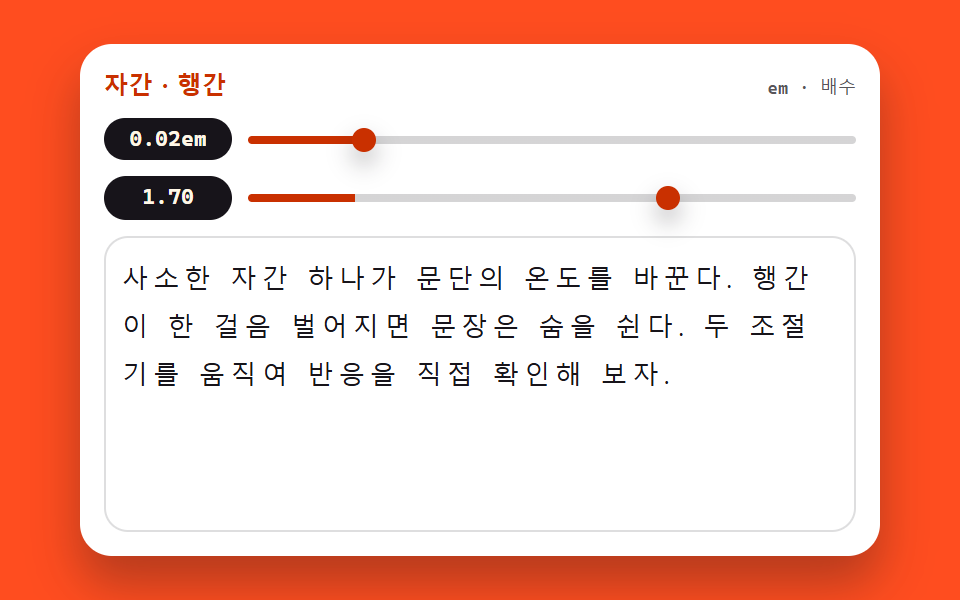
03字間・行間ツマミ
letter-spacing のスライダーは em 単位、line-height のスライダーは単位なしの倍数で動き、値が文字の横にすぐ表示される、ブログ本文の設定パネルの部品です。
<main class="stage">
<section class="st is-demo" id="st" aria-label="字間・行間ツマミ">
  <header class="st__bar">
    <span class="st__name">字間・行間</span>
    <span class="st__hint">em・倍率</span>
  </header>
  <div class="st__ctrl">
    <span class="st__val" id="stTrackVal">0.02em</span>
    <input class="st__range" id="stTrack" type="range" min="-0.04" max="0.3" step="0.01" value="0.02"
           aria-label="字間スライダー">
  </div>
  <div class="st__ctrl">
    <span class="st__val" id="stLeadVal">1.70</span>
    <input class="st__range" id="stLead" type="range" min="1" max="2" step="0.05" value="1.7"
           aria-label="行間スライダー">
  </div>
  <div class="st__body">
    <p class="st__text" id="stText">わずかな字間ひとつで段落の温度が変わる。行間が一歩広がると文は息をする。2つのツマミを動かして反応を確かめてみよう。</p>
  </div>
</section>
</main>
@use "../../../../site/static/demo-tokens" as *;
// 자간·행간 조절기 — letter-spacing(em) 과 line-height(단위 없는 배수) 두 손잡이로
// 본문 표본을 직접 움직인다. 값은 textContent 로 글 옆에 즉시 붙는다.
// 이 데모는 layout 속성 자체가 주제라 다른 편의 "transform·opacity 만 움직인다" 원칙에 대한
// 명시적인 예외다 — 미리보기 루프도 두 속성을 키프레임으로 흔든다. 표본 상자를 높이 고정으로
// 두어 행간이 가장 벌어질 때도 무대를 넘지 않게 한다(넘침은 상자 안에서 잘리게).
$duration: $dur-quick;
$easing: $ease-spring;
$color: $subject-orange-deep;
$sans: system-ui, -apple-system, "Segoe UI", "Noto Sans KR", sans-serif;
$mono: ui-monospace, "Cascadia Mono", Consolas, "Liberation Mono", monospace;
@include stage($stage-orange);
.st {
display: flex; flex-direction: column; gap: $sp-2;
box-sizing: border-box; width: min(100%, 400px); padding: $sp-3;
border-radius: $r-card; background: $stage-paper;
box-shadow: $shadow-raised;
}
// ── 제목 줄
.st__bar { display: flex; align-items: baseline; justify-content: space-between; }
.st__name {
color: $subject-orange-deep;
font-family: $sans; font-weight: 800; font-size: 12px; line-height: 1.4; letter-spacing: .02em;
}
.st__hint {
color: rgba($subject-ink, .72);
font-family: $mono; font-weight: 500; font-size: 9px; line-height: 1.4;
}
// ── 조절기 두 줄. 값 배지가 왼쪽에 폭을 고정해 두 슬라이더의 시작이 반듯이 맞는다
.st__ctrl { display: flex; align-items: center; gap: $sp-2; }
.st__val {
flex: 0 0 64px; box-sizing: border-box; text-align: center;
padding: $sp-1 0; border-radius: $r-pill;
background: $subject-ink; color: $subject-cream;
font-family: $mono; font-weight: 700; font-size: 11px; line-height: 1.2;
}
.st__range {
--fill: 17.6%;
flex: 1 1 auto; appearance: none; -webkit-appearance: none;
display: block; height: 20px; margin: 0; background: transparent; cursor: pointer;
}
.st__range::-webkit-slider-runnable-track {
height: 4px; border-radius: $r-pill;
background: linear-gradient(90deg, $color 0 var(--fill), rgba($subject-ink, .18) var(--fill) 100%);
}
.st__range::-webkit-slider-thumb {
-webkit-appearance: none; appearance: none;
width: 12px; height: 12px; margin-top: -4px;
border: 0; border-radius: 50%; background: $color;
box-shadow: $shadow-press;
}
.st__range::-moz-range-track {
height: 4px; border-radius: $r-pill; background: rgba($subject-ink, .18);
}
.st__range::-moz-range-thumb {
width: 12px; height: 12px; border: 0; border-radius: 50%; background: $color;
}
.st__range:focus-visible { outline: 2px solid $color; outline-offset: 4px; }
// ── 본문 표본. 상자 높이를 고정한다 — 행간이 2.0 까지 벌어져도 무대 밖으로 못 나간다
.st__body {
height: 130px; overflow: hidden;
padding: $sp-2; border: 1px solid rgba($subject-ink, .14); border-radius: $r-control;
}
.st__text {
margin: 0; color: $subject-ink;
font-family: $sans; font-weight: 500;
font-size: clamp(10px, 3.2vw, 13px); line-height: 1.7; letter-spacing: 0.02em;
overflow-wrap: break-word;
}
// ── 격자 미리보기 루프 (2초). 두 속성을 같은 주기로 흔든다 —
// 자간이 벌어지며 행이 다시 짜이고 행간이 벌어지며 문단이 숨 쉬는 장면이 한 화면에서 겹친다.
.st.is-demo .st__text {
animation-name: stTrack, stLead;
animation-duration: $dur-loop, $dur-loop;
animation-timing-function: ease-in-out, ease-in-out;
animation-iteration-count: infinite, infinite;
}
@keyframes stTrack {
0% { letter-spacing: -0.02em; }
45% { letter-spacing: 0.24em; }
90%, 100% { letter-spacing: -0.02em; }
}
@keyframes stLead {
0% { line-height: 1.1; }
45% { line-height: 2.0; }
90%, 100% { line-height: 1.1; }
}
// ── 좁은 화면: 표본 상자와 글자를 내린다(올리지 않는다). 루프 폭도 상자에 맞춰 줄인다
@media (max-width: 340px) {
.st { padding: $sp-2; gap: $sp-1; }
.st__name { font-size: 11px; }
.st__val { flex-basis: 52px; font-size: 10px; }
.st__body { height: 78px; padding: $sp-1; }
.st.is-demo .st__text {
animation-name: stTrackN, stLeadN;
}
}
@keyframes stTrackN {
0% { letter-spacing: -0.02em; }
45% { letter-spacing: 0.18em; }
90%, 100% { letter-spacing: -0.02em; }
}
@keyframes stLeadN {
0% { line-height: 1.1; }
45% { line-height: 1.8; }
90%, 100% { line-height: 1.1; }
}
@media (prefers-reduced-motion: reduce) {
.st.is-demo .st__text {
animation: none !important;
letter-spacing: 0.02em !important;
line-height: 1.7 !important;
}
}html, body {
margin: 0;
overflow: hidden;
}
.stage {
box-sizing: border-box;
min-height: 100vh;
display: grid;
place-items: center;
margin: 0;
background: #ff4d1f;
font-family: -apple-system, "Segoe UI", "Noto Sans KR", sans-serif;
padding: clamp(8px, 4vw, 24px);
}
.st {
display: flex;
flex-direction: column;
gap: 8px;
box-sizing: border-box;
width: min(100%, 400px);
padding: 12px;
border-radius: 16px;
background: #ffffff;
box-shadow: 0 14px 24px rgba(23, 20, 26, 0.32);
}
.st__bar {
display: flex;
align-items: baseline;
justify-content: space-between;
}
.st__name {
color: #c93000;
font-family: system-ui, -apple-system, "Segoe UI", "Noto Sans KR", sans-serif;
font-weight: 800;
font-size: 12px;
line-height: 1.4;
letter-spacing: 0.02em;
}
.st__hint {
color: rgba(23, 20, 26, 0.72);
font-family: ui-monospace, "Cascadia Mono", Consolas, "Liberation Mono", monospace;
font-weight: 500;
font-size: 9px;
line-height: 1.4;
}
.st__ctrl {
display: flex;
align-items: center;
gap: 8px;
}
.st__val {
flex: 0 0 64px;
box-sizing: border-box;
text-align: center;
padding: 4px 0;
border-radius: 999px;
background: #17141a;
color: #fff7e6;
font-family: ui-monospace, "Cascadia Mono", Consolas, "Liberation Mono", monospace;
font-weight: 700;
font-size: 11px;
line-height: 1.2;
}
.st__range {
--fill: 17.6%;
flex: 1 1 auto;
appearance: none;
-webkit-appearance: none;
display: block;
height: 20px;
margin: 0;
background: transparent;
cursor: pointer;
}
.st__range::-webkit-slider-runnable-track {
height: 4px;
border-radius: 999px;
background: linear-gradient(90deg, #c93000 0 var(--fill), rgba(23, 20, 26, 0.18) var(--fill) 100%);
}
.st__range::-webkit-slider-thumb {
-webkit-appearance: none;
appearance: none;
width: 12px;
height: 12px;
margin-top: -4px;
border: 0;
border-radius: 50%;
background: #c93000;
box-shadow: 0 6px 12px rgba(23, 20, 26, 0.32);
}
.st__range::-moz-range-track {
height: 4px;
border-radius: 999px;
background: rgba(23, 20, 26, 0.18);
}
.st__range::-moz-range-thumb {
width: 12px;
height: 12px;
border: 0;
border-radius: 50%;
background: #c93000;
}
.st__range:focus-visible {
outline: 2px solid #c93000;
outline-offset: 4px;
}
.st__body {
height: 130px;
overflow: hidden;
padding: 8px;
border: 1px solid rgba(23, 20, 26, 0.14);
border-radius: 12px;
}
.st__text {
margin: 0;
color: #17141a;
font-family: system-ui, -apple-system, "Segoe UI", "Noto Sans KR", sans-serif;
font-weight: 500;
font-size: clamp(10px, 3.2vw, 13px);
line-height: 1.7;
letter-spacing: 0.02em;
overflow-wrap: break-word;
}
.st.is-demo .st__text {
animation-name: stTrack, stLead;
animation-duration: 2s, 2s;
animation-timing-function: ease-in-out, ease-in-out;
animation-iteration-count: infinite, infinite;
}
@keyframes stTrack {
0% {
letter-spacing: -0.02em;
}
45% {
letter-spacing: 0.24em;
}
90%, 100% {
letter-spacing: -0.02em;
}
}
@keyframes stLead {
0% {
line-height: 1.1;
}
45% {
line-height: 2;
}
90%, 100% {
line-height: 1.1;
}
}
@media (max-width: 340px) {
.st {
padding: 8px;
gap: 4px;
}
.st__name {
font-size: 11px;
}
.st__val {
flex-basis: 52px;
font-size: 10px;
}
.st__body {
height: 78px;
padding: 4px;
}
.st.is-demo .st__text {
animation-name: stTrackN, stLeadN;
}
}
@keyframes stTrackN {
0% {
letter-spacing: -0.02em;
}
45% {
letter-spacing: 0.18em;
}
90%, 100% {
letter-spacing: -0.02em;
}
}
@keyframes stLeadN {
0% {
line-height: 1.1;
}
45% {
line-height: 1.8;
}
90%, 100% {
line-height: 1.1;
}
}
@media (prefers-reduced-motion: reduce) {
.st.is-demo .st__text {
animation: none !important;
letter-spacing: 0.02em !important;
line-height: 1.7 !important;
}
}var st = document.getElementById('st');
var text = document.getElementById('stText');
var track = document.getElementById('stTrack');
var lead = document.getElementById('stLead');
var trackVal = document.getElementById('stTrackVal');
var leadVal = document.getElementById('stLeadVal');
// 값은 textContent 로 글자만 즉시 갈아 끼운다 — innerHTML 이 아니라 위조 여지가 없다.
// letter-spacing 은 em 단위, line-height 는 단위 없는 배수로 본문에 바로 닿는다.
track.oninput = function () {
st.classList.remove('is-demo');
var v = Number(track.value).toFixed(2);
text.style.letterSpacing = v + 'em';
track.style.setProperty('--fill', ((track.value + 0.04) / 0.34 * 100) + '%');
trackVal.textContent = v + 'em';
};
lead.oninput = function () {
st.classList.remove('is-demo');
var m = Number(lead.value).toFixed(2);
text.style.lineHeight = m;
lead.style.setProperty('--fill', ((lead.value - 1) / 1 * 100) + '%');
leadVal.textContent = m;
};
track.addEventListener('pointerdown', function () { st.classList.remove('is-demo'); });
lead.addEventListener('pointerdown', function () { st.classList.remove('is-demo'); });// FontSpacingTuner — vanilla 판(run/074/demo/03-font-spacing-tuner/index.html) 의 React 포트.
// letter-spacing(em)·line-height(배수) 두 슬라이더가 본문 표본을 움직이고 값은 글 옆에 즉시 붙는다
// (vanilla 의 textContent 경로 대신 JSX 텍스트 노드로 — 계산식은 같은 글자).
// 미리보기 중에는 keyframes 가 인라인 스타일보다 우선한다(cascade 규칙) — 손이 닿으면 isDemo 를 뗀다.
import { useState } from "react";
import type { CSSProperties } from "react";
import styles from "./FontSpacingTuner.module.scss";
export type FontSpacingTunerProps = {
duration?: number;
easing?: string;
color?: string;
initialTrack?: number;
initialLead?: number;
};
type Vars = CSSProperties & { "--duration"?: string; "--easing"?: string; "--color"?: string };
// 이벤트 핸들러 파라미터는 로컬 타입으로 — ambient 타입이 React 제네릭을 안 준다
type RangeEvt = { target: { value: string } };
const TITLE = "자간 · 행간";
const HINT = "em · 배수";
const TRACK_ARIA = "자간 슬라이더";
const LEAD_ARIA = "행간 슬라이더";
const BODY_TEXT =
"사소한 자간 하나가 문단의 온도를 바꾼다. 행간이 한 걸음 벌어지면 문장은 숨을 쉰다. 두 조절기를 움직여 반응을 직접 확인해 보자.";
export default function FontSpacingTuner(props: FontSpacingTunerProps) {
const duration = props.duration ?? 220;
const easing = props.easing ?? "cubic-bezier(.2, .8, .2, 1)";
const color = props.color ?? "#c93000";
const [track, setTrack] = useState<number>(props.initialTrack ?? 0.02);
const [lead, setLead] = useState<number>(props.initialLead ?? 1.7);
const [preview, setPreview] = useState<boolean>(true);
const vars: Vars = { "--duration": duration + "ms", "--easing": easing, "--color": color };
const trackFill = (((track + 0.04) / 0.34) * 100).toFixed(1) + "%";
const leadFill = (((lead - 1) / 1) * 100).toFixed(1) + "%";
return (
<main className={styles.stage}>
<section className={styles.root + (preview ? " " + styles.isDemo : "")} style={vars} aria-label="자간·행간 조절기">
<header className={styles.bar}>
<span className={styles.name}>{TITLE}</span>
<span className={styles.hint}>{HINT}</span>
</header>
<div className={styles.ctrl}>
<span className={styles.val}>{track.toFixed(2)}em</span>
<input
className={styles.range}
type="range"
min="-0.04"
max="0.3"
step="0.01"
value={track}
aria-label={TRACK_ARIA}
style={{ "--fill": trackFill } as CSSProperties}
onPointerDown={() => setPreview(false)}
onInput={(e: RangeEvt) => {
setPreview(false);
setTrack(Number(e.target.value));
}}
/>
</div>
<div className={styles.ctrl}>
<span className={styles.val}>{lead.toFixed(2)}</span>
<input
className={styles.range}
type="range"
min="1"
max="2"
step="0.05"
value={lead}
aria-label={LEAD_ARIA}
style={{ "--fill": leadFill } as CSSProperties}
onPointerDown={() => setPreview(false)}
onInput={(e: RangeEvt) => {
setPreview(false);
setLead(Number(e.target.value));
}}
/>
</div>
<div className={styles.body}>
<p className={styles.text} style={{ letterSpacing: track.toFixed(2) + "em", lineHeight: String(lead) }}>
{BODY_TEXT}
</p>
</div>
</section>
</main>
);
}03 · 字間・行間ツマミ — 計測 累積面積 13.345% · 動いたフレーム 22/23GODRICH オリジナル · SCSS と React は zip に同梱 · パスワードを見る
em の字間と単位なしの行間
// 値は textContent で文字だけをその場で差し替える — innerHTML ではないので偽装の余地がない。
// letter-spacing は em 単位、line-height は単位なしの倍数で本文に直接届く。
track.oninput = function () {
  st.classList.remove('is-demo');
  var v = Number(track.value).toFixed(2);
  text.style.letterSpacing = v + 'em';
  track.style.setProperty('--fill', ((track.value + 0.04) / 0.34 * 100) + '%');
  trackVal.textContent = v + 'em';
};
lead.oninput = function () {
  st.classList.remove('is-demo');
  var m = Number(lead.value).toFixed(2);
  text.style.lineHeight = m;
  lead.style.setProperty('--fill', ((lead.value - 1) / 1 * 100) + '%');
  leadVal.textContent = m;
};
実際に動かすと、字間 0.3em では 13px の本文に 3.9px が乗り、-0.04em では -0.52px、行間 2.0 では 26px まで開きます。
箱の高さが舞台を守る
// 本文の見本。箱の高さを固定する — 行間が 2.0 まで開いても舞台の外に出られない
.st__body {
  height: 130px; overflow: hidden;
  padding: $sp-2; border: 1px solid rgba($subject-ink, .14); border-radius: $r-control;
}
.st__text {
  margin: 0; color: $subject-ink;
  font-family: $sans; font-weight: 500;
  font-size: clamp(10px, 3.2vw, 13px); line-height: 1.7; letter-spacing: 0.02em;
  overflow-wrap: break-word;
}
行間をいちばん広げたときも、はみ出した分は箱の中で切れるので、無理に文字を縮めなくてもレイアウトは崩れません。
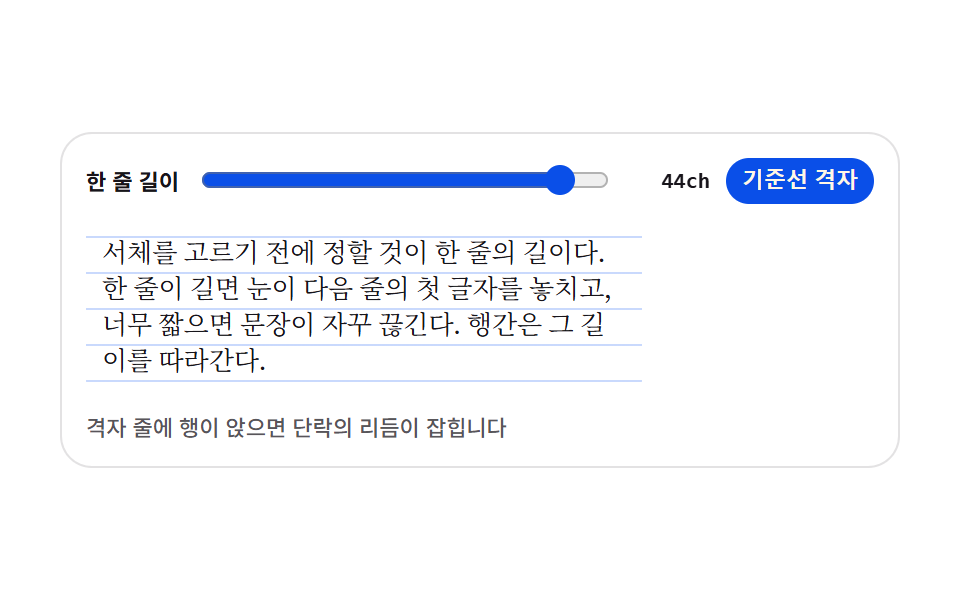
04段落リズムプレビュー
一行の長さを ch のスライダーで決め、ベースライングリッドをオンにして行が罫に乗るか確かめる、ニュース・マガジン本文のプレビュー部品です。
<main class="stage">
<div class="tr is-demo" id="tr">
  <div class="tr__bar">
    <span class="tr__label">一行の長さ</span>
    <input class="tr__range" id="measure" type="range" min="24" max="46" step="1" value="44" aria-label="一行の長さ">
    <span class="tr__val" id="val">44ch</span>
    <button class="tr__toggle" id="grid" type="button" aria-pressed="true">ベースライングリッド</button>
  </div>
  <div class="tr__sheet is-grid" id="sheet">
    <p class="tr__p">書体を選ぶ前に決めるべきは一行の長さです。長すぎると目が次の行の最初の文字を見失い、短すぎると文が何度も途切れます。行間はその長さに従います。</p>
  </div>
  <p class="tr__note">行がグリッドの罫に乗ると段落のリズムが整います</p>
</div>
</main>
@use "../../../../site/static/demo-tokens" as *;
// 단락 리듬 프리뷰 — 한 줄 길이를 ch(그 서체의 0 글자 폭)로 정하고, 바탕에 기준선 격자를 깔아
// 행이 격자 줄에 앉는지 본다. 격자는 이미지가 아니라 repeating-linear-gradient 한 줄이다.
// 행간과 격자 간격은 같은 변수($lh)에서 나온다 — 둘이 어긋나면 격자가 뜻을 잃는다.
// 미리보기(.is-demo)는 한 줄 길이를 44ch ↔ 28ch 로 오가며 글이 다시 흐르는 모습을 보여준다.
$duration: $dur-base;
$easing: $ease-spring;
$color: $subject-blue-deep;
$serif: ui-serif, Georgia, "Times New Roman", "Noto Serif KR", serif;
$ink-soft: rgba($subject-ink, .72);
$lh: 18px;
@include stage($stage-paper);
// 무대의 자동 트랙은 항목의 max-content(표본 문장 44ch)만큼 벌어진다 — 320px 에서 트랙이 화면보다
// 커지며 조용히 넘친다(219 계열). 트랙을 minmax(0,1fr) 로 못박아 항목을 무대 안에 가둔다.
.stage { grid-template-columns: minmax(0, 1fr); }
.tr {
display: flex; flex-direction: column; gap: $sp-2;
box-sizing: border-box; width: 100%; max-width: 420px;
padding: $sp-3; border: 1px solid rgba($subject-ink, .12); border-radius: $r-card;
background: $stage-paper;
}
// ── 손잡이 줄
.tr__bar { display: flex; align-items: center; gap: $sp-2; }
.tr__label {
flex: 0 0 auto; color: $subject-ink;
font-weight: 700; font-size: 11px; line-height: 1.4;
}
.tr__range { flex: 1 1 auto; min-width: 0; accent-color: $color; }
.tr__val {
flex: 0 0 auto; min-width: 40px; color: $subject-ink; text-align: right;
font-family: ui-monospace, Consolas, monospace; font-weight: 700; font-size: 11px; line-height: 1.4;
}
.tr__toggle {
flex: 0 0 auto; padding: $sp-1 $sp-2; border: 0; border-radius: $r-pill;
background: $color; color: $subject-cream; cursor: pointer;
font-weight: 700; font-size: 11px; line-height: 1.4;
}
.tr__toggle[aria-pressed="false"] { background: rgba($subject-ink, .12); color: $subject-ink; }
.tr__toggle:focus-visible { outline: 2px solid $subject-ink; outline-offset: 2px; }
// ── 본문 판. 폭은 ch 배수라 서체가 바뀌면 같은 44ch 도 픽셀 폭이 달라진다
.tr__sheet {
--measure: 44;
box-sizing: border-box; width: calc(var(--measure) * 1ch); max-width: 100%;
padding: $sp-2; border-radius: $r-sm;
}
// 격자 줄은 행간과 같은 $lh 간격으로 반복한다
.tr__sheet.is-grid {
background-image: repeating-linear-gradient(
to bottom,
rgba($subject-blue, .26) 0, rgba($subject-blue, .26) 1px,
transparent 1px, transparent $lh
);
background-position: 0 $sp-2;
}
.tr__p {
margin: 0; color: $subject-ink;
font-family: $serif; font-weight: 400; font-size: 13px; line-height: $lh;
text-wrap: pretty;
}
.tr__note {
margin: 0; color: $ink-soft;
font-weight: 500; font-size: 11px; line-height: 1.4;
}
// ── 격자 미리보기 루프 (2초)
// 폭이 줄었다 늘며 글이 다시 흐른다. 글자가 움직이는 것이라 반투명 유령 프레임이 생기지 않는다
.tr.is-demo .tr__sheet {
animation-name: trMeasure; animation-duration: $dur-loop;
animation-timing-function: $easing; animation-iteration-count: infinite;
animation-fill-mode: both;
}
.tr.is-demo .tr__val {
animation-name: trVal; animation-duration: $dur-loop;
animation-timing-function: steps(1, end); animation-iteration-count: infinite;
animation-fill-mode: both;
}
@keyframes trMeasure {
0%, 8% { width: calc(44 * 1ch); }
46%, 54% { width: calc(28 * 1ch); }
92%, 100% { width: calc(44 * 1ch); }
}
// 숫자가 폭과 따로 놀지 않게 값 칸은 폭이 가장 좁아지는 구간에만 흐려 둔다
@keyframes trVal {
0%, 30% { opacity: 1; }
32%, 68% { opacity: .35; }
70%, 100% { opacity: 1; }
}
// ── 좁은 화면: 글자와 여백을 줄여 무대 안에 들어오게 한다
@media (max-width: 340px) {
.tr { gap: $sp-1; padding: $sp-2; }
.tr__sheet { padding: $sp-1; }
.tr__p { font-size: 12px; line-height: 16px; }
.tr__sheet.is-grid {
background-image: repeating-linear-gradient(
to bottom,
rgba($subject-blue, .26) 0, rgba($subject-blue, .26) 1px,
transparent 1px, transparent 16px
);
background-position: 0 $sp-1;
}
.tr__label, .tr__val, .tr__toggle, .tr__note { font-size: 10px; }
}
@media (prefers-reduced-motion: reduce) {
.tr.is-demo .tr__sheet,
.tr.is-demo .tr__val {
animation: none !important;
width: calc(44 * 1ch) !important;
opacity: 1 !important;
}
}html, body {
margin: 0;
overflow: hidden;
}
.stage {
box-sizing: border-box;
min-height: 100vh;
display: grid;
place-items: center;
margin: 0;
background: #ffffff;
font-family: -apple-system, "Segoe UI", "Noto Sans KR", sans-serif;
padding: clamp(8px, 4vw, 24px);
}
.stage {
grid-template-columns: minmax(0, 1fr);
}
.tr {
display: flex;
flex-direction: column;
gap: 8px;
box-sizing: border-box;
width: 100%;
max-width: 420px;
padding: 12px;
border: 1px solid rgba(23, 20, 26, 0.12);
border-radius: 16px;
background: #ffffff;
}
.tr__bar {
display: flex;
align-items: center;
gap: 8px;
}
.tr__label {
flex: 0 0 auto;
color: #17141a;
font-weight: 700;
font-size: 11px;
line-height: 1.4;
}
.tr__range {
flex: 1 1 auto;
min-width: 0;
accent-color: #0a4fe8;
}
.tr__val {
flex: 0 0 auto;
min-width: 40px;
color: #17141a;
text-align: right;
font-family: ui-monospace, Consolas, monospace;
font-weight: 700;
font-size: 11px;
line-height: 1.4;
}
.tr__toggle {
flex: 0 0 auto;
padding: 4px 8px;
border: 0;
border-radius: 999px;
background: #0a4fe8;
color: #fff7e6;
cursor: pointer;
font-weight: 700;
font-size: 11px;
line-height: 1.4;
}
.tr__toggle[aria-pressed=false] {
background: rgba(23, 20, 26, 0.12);
color: #17141a;
}
.tr__toggle:focus-visible {
outline: 2px solid #17141a;
outline-offset: 2px;
}
.tr__sheet {
--measure: 44;
box-sizing: border-box;
width: calc(var(--measure) * 1ch);
max-width: 100%;
padding: 8px;
border-radius: 8px;
}
.tr__sheet.is-grid {
background-image: repeating-linear-gradient(to bottom, rgba(47, 109, 246, 0.26) 0, rgba(47, 109, 246, 0.26) 1px, transparent 1px, transparent 18px);
background-position: 0 8px;
}
.tr__p {
margin: 0;
color: #17141a;
font-family: ui-serif, Georgia, "Times New Roman", "Noto Serif KR", serif;
font-weight: 400;
font-size: 13px;
line-height: 18px;
text-wrap: pretty;
}
.tr__note {
margin: 0;
color: rgba(23, 20, 26, 0.72);
font-weight: 500;
font-size: 11px;
line-height: 1.4;
}
.tr.is-demo .tr__sheet {
animation-name: trMeasure;
animation-duration: 2s;
animation-timing-function: cubic-bezier(0.2, 0.8, 0.2, 1);
animation-iteration-count: infinite;
animation-fill-mode: both;
}
.tr.is-demo .tr__val {
animation-name: trVal;
animation-duration: 2s;
animation-timing-function: steps(1, end);
animation-iteration-count: infinite;
animation-fill-mode: both;
}
@keyframes trMeasure {
0%, 8% {
width: 44ch;
}
46%, 54% {
width: 28ch;
}
92%, 100% {
width: 44ch;
}
}
@keyframes trVal {
0%, 30% {
opacity: 1;
}
32%, 68% {
opacity: 0.35;
}
70%, 100% {
opacity: 1;
}
}
@media (max-width: 340px) {
.tr {
gap: 4px;
padding: 8px;
}
.tr__sheet {
padding: 4px;
}
.tr__p {
font-size: 12px;
line-height: 16px;
}
.tr__sheet.is-grid {
background-image: repeating-linear-gradient(to bottom, rgba(47, 109, 246, 0.26) 0, rgba(47, 109, 246, 0.26) 1px, transparent 1px, transparent 16px);
background-position: 0 4px;
}
.tr__label, .tr__val, .tr__toggle, .tr__note {
font-size: 10px;
}
}
@media (prefers-reduced-motion: reduce) {
.tr.is-demo .tr__sheet,
.tr.is-demo .tr__val {
animation: none !important;
width: 44ch !important;
opacity: 1 !important;
}
}var tr = document.getElementById('tr');
var range = document.getElementById('measure');
var val = document.getElementById('val');
var sheet = document.getElementById('sheet');
var grid = document.getElementById('grid');
// 실사용 경로 — 슬라이더 값은 ch 배수로 그대로 들어간다. 미리보기 루프는 같은 값을 CSS 키프레임으로 흔든다
function applyMeasure() {
sheet.style.setProperty('--measure', range.value);
val.textContent = range.value + 'ch';
}
function stopLoop() { tr.classList.remove('is-demo'); }
range.addEventListener('input', function () { stopLoop(); applyMeasure(); });
grid.addEventListener('click', function () {
stopLoop();
var on = grid.getAttribute('aria-pressed') === 'true';
grid.setAttribute('aria-pressed', on ? 'false' : 'true');
sheet.classList.toggle('is-grid', !on);
});
applyMeasure();// TextRhythmPreview — vanilla 판(run/074/demo/04-text-rhythm-preview/index.html) 의 React 포트.
// 한 줄 길이를 ch 슬라이더로 정하고 기준선 격자를 토글한다. 슬라이더 값은 상태로, 판 폭은 --measure 로 흀러간다.
import { useState } from "react";
import type { ChangeEvent, FC } from "react";
import styles from "./TextRhythmPreview.module.scss";
export type TextRhythmPreviewProps = {
duration?: number;
easing?: string;
color?: string;
initialMeasure?: number;
initialGrid?: boolean;
};
const NOTE = "격자 줄에 행이 앉으면 단락의 리듬이 잡힙니다";
const SAMPLE =
"서체를 고르기 전에 정할 것이 한 줄의 길이다. 한 줄이 길면 눈이 다음 줄의 첫 글자를 놓치고, 너무 짧으면 문장이 자꾸 끊긴다. 행간은 그 길이를 따라간다.";
const TextRhythmPreview: FC<TextRhythmPreviewProps> = ({
duration,
easing,
color,
initialMeasure = 44,
initialGrid = true,
}) => {
const [measure, setMeasure] = useState(String(initialMeasure));
const [gridOn, setGridOn] = useState(initialGrid);
const [demo, setDemo] = useState(true);
const cls = [styles.tr, demo ? styles["is-demo"] : "", gridOn ? styles["is-grid"] : ""]
.filter(Boolean).join(" ");
const vars = {
"--measure": measure,
"--duration": duration != null ? duration + "ms" : undefined,
"--easing": easing,
"--color": color,
} as never;
return (
<div className={cls} style={vars}>
<div className={styles.tr__bar}>
<span className={styles.tr__label}>한 줄 길이</span>
<input
className={styles.tr__range}
type="range"
min="24"
max="46"
step="1"
value={measure}
aria-label="한 줄 길이"
onInput={() => setDemo(false)}
onChange={(e: ChangeEvent<HTMLInputElement>) => setMeasure(e.currentTarget.value)}
/>
<span className={styles.tr__val}>{measure}ch</span>
<button
type="button"
className={styles.tr__toggle}
aria-pressed={gridOn ? "true" : "false"}
onClick={() => {
setDemo(false);
setGridOn((g) => !g);
}}
>
기준선 격자
</button>
</div>
<div
className={[styles.tr__sheet, gridOn ? styles["is-grid"] : ""].filter(Boolean).join(" ")}
data-sheet
>
<p className={styles.tr__p}>{SAMPLE}</p>
</div>
<p className={styles.tr__note}>{NOTE}</p>
</div>
);
};
export default TextRhythmPreview;04 · 段落リズムプレビュー — 計測 累積面積 17.881% · 動いたフレーム 17/23GODRICH オリジナル · SCSS と React は zip に同梱 · パスワードを見る
ch の幅と同じ間隔のグリッド
.tr__sheet {
  --measure: 44;
  box-sizing: border-box; width: calc(var(--measure) * 1ch); max-width: 100%;
  padding: $sp-2; border-radius: $r-sm;
}
// グリッドの罫は行間と同じ $lh の間隔で繰り返す
.tr__sheet.is-grid {
  background-image: repeating-linear-gradient(
    to bottom,
    rgba($subject-blue, .26) 0, rgba($subject-blue, .26) 1px,
    transparent 1px, transparent $lh
  );
  background-position: 0 $sp-2;
}
.tr__p {
  margin: 0; color: $subject-ink;
  font-family: $serif; font-weight: 400; font-size: 13px; line-height: $lh;
  text-wrap: pretty;
}
スライダーを 44ch に置くと見本の幅は 326.6px、28ch では 241.5px まで縮み、罫は行間 $lh(18px) と同じ間隔で並ぶので、行が乗っているかどうかが一目で分かります。
トグルは背景1行で終わる
// 実際に使う経路 — スライダーの値は ch の倍数としてそのまま入る。プレビューのループは同じ値を CSS キーフレームで揺らす
function applyMeasure() {
  sheet.style.setProperty('--measure', range.value);
  val.textContent = range.value + 'ch';
}
function stopLoop() { tr.classList.remove('is-demo'); }
range.addEventListener('input', function () { stopLoop(); applyMeasure(); });
grid.addEventListener('click', function () {
  stopLoop();
  var on = grid.getAttribute('aria-pressed') === 'true';
  grid.setAttribute('aria-pressed', on ? 'false' : 'true');
  sheet.classList.toggle('is-grid', !on);
});
トグルは aria-pressed の付け替えと is-grid の1クラスだけで、罫の on・off も値の表示も追加の要素なしで済みます。
05見出しスケールのはしご
比率を 1.125・1.25・1.333 から選ぶと、小さい段から大きい段までのサイズが calc() で積み直される、スタイルガイドの見出し体系ページの部品です。
<main class="stage">
<div class="ts is-demo is-b" id="ts">
  <div class="ts__bar" role="group" aria-label="比率を選ぶ">
    <button class="ts__pick" type="button" data-key="a" data-ratio="1.125" aria-pressed="false">1.125</button>
    <button class="ts__pick" type="button" data-key="b" data-ratio="1.25" aria-pressed="true">1.25</button>
    <button class="ts__pick" type="button" data-key="c" data-ratio="1.333" aria-pressed="false">1.333</button>
  </div>
  <ul class="ts__ladder" id="ladder">
    <li class="ts__rung ts__rung--5"><span class="ts__glyph">5段目</span><span class="ts__px" data-step="4"></span></li>
    <li class="ts__rung ts__rung--4"><span class="ts__glyph">4段目</span><span class="ts__px" data-step="3"></span></li>
    <li class="ts__rung ts__rung--3"><span class="ts__glyph">3段目</span><span class="ts__px" data-step="2"></span></li>
    <li class="ts__rung ts__rung--2"><span class="ts__glyph">2段目</span><span class="ts__px" data-step="1"></span></li>
    <li class="ts__rung ts__rung--1"><span class="ts__glyph">本文の1段</span><span class="ts__px" data-step="0"></span></li>
  </ul>
  <span class="ts__beam" aria-hidden="true"></span>
</div>
</main>
@use "../../../../site/static/demo-tokens" as *;
// 제목 스케일 사다리 — 본문 한 단(11px)에서 비율을 거듭 곱해 단을 쌓는다.
// 크기는 CSS 가 calc() 사슬로 계산하고(--ratio 하나만 바꾸면 다섯 단이 함께 움직인다),
// 화면의 px 숫자는 같은 식을 JS 가 toFixed 로 적어 둔 세 벌 중 지금 비율의 것만 보인다.
// 미리보기(.is-demo)는 1.125 → 1.25 → 1.333 을 컷으로 돌고, 빛줄기 하나가 사다리를 훑어 내려간다.
$duration: $dur-base;
$easing: $ease-spring;
$color: $subject-blue-light;
$sans: system-ui, -apple-system, "Segoe UI", "Noto Sans KR", sans-serif;
$mono: ui-monospace, Consolas, "Liberation Mono", monospace;
$cream-soft: rgba($subject-cream, .72);
$base: 11;
// 눌린 칩 면색. 값은 $subject-blue-deep (#7187b9) — 크림 글자와 5.98:1 로 AA 통과.
// 지역 이름으로 받는 이유는 BD25 정적검사가 변수명을 부분문자열로 훑어
// `$subject-blue-deep` 을 금지조합의 `$subject-blue` 로 오탐하기 때문이다.
$pick-on: $subject-blue-deep;
@include stage($stage-ink);
// 비율은 숫자로 등록해야 애니메이션이 보간·컷을 할 수 있다
@property --ratio {
syntax: "<number>";
inherits: true;
initial-value: 1.25;
}
.ts {
position: relative;
display: flex; flex-direction: column; gap: $sp-2;
box-sizing: border-box; width: min(100%, 400px);
padding: $sp-3; border: 1px solid rgba($subject-cream, .16); border-radius: $r-card;
background: rgba($subject-cream, .05); overflow: hidden;
}
// ── 비율 고르기
.ts__bar { display: flex; gap: $sp-2; }
.ts__pick {
flex: 0 0 auto; padding: $sp-1 $sp-2; border: 0; border-radius: $r-pill;
background: rgba($subject-cream, .12); color: $subject-cream; cursor: pointer;
font-family: $mono; font-weight: 700; font-size: 11px; line-height: 1.4;
}
.ts__pick[aria-pressed="true"] { background: $pick-on; color: $subject-cream; } // $pick-on = 눌린 칩 면색 (BD25 정적검사 오탐 회피용 지역이름, 아래 선언 참조)
.ts__pick:focus-visible { outline: 2px solid $stage-yellow; outline-offset: 2px; }
// ── 사다리. 단마다 크기가 비율의 거듭곱이다
.ts__ladder {
--base: #{$base};
--ratio: 1.25;
display: flex; flex-direction: column; gap: $sp-1;
margin: 0; padding: 0; list-style: none;
}
.ts__rung { display: flex; align-items: baseline; gap: $sp-2; }
.ts__glyph {
  flex: 1 1 auto; min-width: 0; color: $subject-cream;
  font-family: $sans; font-weight: 700; line-height: 1.15;
  white-space: nowrap; overflow: hidden; text-overflow: ellipsis;
}
.ts__rung--1 .ts__glyph { font-size: calc(var(--base) * 1px); }
.ts__rung--2 .ts__glyph { font-size: calc(var(--base) * var(--ratio) * 1px); }
.ts__rung--3 .ts__glyph { font-size: calc(var(--base) * var(--ratio) * var(--ratio) * 1px); }
.ts__rung--4 .ts__glyph { font-size: calc(var(--base) * var(--ratio) * var(--ratio) * var(--ratio) * 1px); }
.ts__rung--5 .ts__glyph { font-size: calc(var(--base) * var(--ratio) * var(--ratio) * var(--ratio) * var(--ratio) * 1px); }
// 세 비율의 숫자를 겹쳐 두고 지금 것만 보인다 — 자리는 늘 같은 폭이라 사다리가 흔들리지 않는다
.ts__px {
position: relative; flex: 0 0 auto; width: 48px; height: 15px;
}
.ts__v {
position: absolute; top: 0; right: 0; opacity: 0;
color: $color; font-family: $mono; font-weight: 700; font-size: 11px; line-height: 15px;
}
.ts.is-a .ts__v--a, .ts.is-b .ts__v--b, .ts.is-c .ts__v--c { opacity: 1; }
// 사다리를 훑어 내려가는 빛줄기. 장식이라 정적 경로에서는 보이지 않는다
.ts__beam {
position: absolute; left: 0; right: 0; top: 0; height: 28px;
background: linear-gradient(180deg, rgba($subject-blue-light, 0), rgba($subject-blue-light, .22), rgba($subject-blue-light, 0));
opacity: 0; pointer-events: none;
}
// ── 격자 미리보기 루프 (2초)
// 비율은 세 구간 컷(steps(1, end))이라 중간 프레임에 어정쩡한 크기가 남지 않는다.
// 숫자 세 벌도 같은 시각에 컷으로 바뀌어 크기와 라벨이 늘 같은 비율을 가리킨다.
.ts.is-demo .ts__ladder {
animation-name: tsRatio; animation-duration: $dur-loop;
animation-timing-function: steps(1, end); animation-iteration-count: infinite;
animation-fill-mode: both;
}
.ts.is-demo .ts__v--a { animation-name: tsShowA; }
.ts.is-demo .ts__v--b { animation-name: tsShowB; }
.ts.is-demo .ts__v--c { animation-name: tsShowC; }
.ts.is-demo .ts__v {
animation-duration: $dur-loop; animation-timing-function: steps(1, end);
animation-iteration-count: infinite; animation-fill-mode: both;
}
.ts.is-demo .ts__pick:nth-child(1) { animation-name: tsPickA; }
.ts.is-demo .ts__pick:nth-child(2) { animation-name: tsPickB; }
.ts.is-demo .ts__pick:nth-child(3) { animation-name: tsPickC; }
.ts.is-demo .ts__pick {
animation-duration: $dur-loop; animation-timing-function: steps(1, end);
animation-iteration-count: infinite; animation-fill-mode: both;
}
.ts.is-demo .ts__beam {
animation-name: tsBeam; animation-duration: $dur-loop;
animation-timing-function: linear; animation-iteration-count: infinite;
animation-fill-mode: both;
}
@keyframes tsRatio {
0% { --ratio: 1.125; }
34% { --ratio: 1.25; }
67%, 100% { --ratio: 1.333; }
}
@keyframes tsShowA { 0% { opacity: 1; } 34%, 100% { opacity: 0; } }
@keyframes tsShowB { 0% { opacity: 0; } 34% { opacity: 1; } 67%, 100% { opacity: 0; } }
@keyframes tsShowC { 0% { opacity: 0; } 67%, 100% { opacity: 1; } }
// 눌린 칩은 색으로 표시한다 — 칩을 지우면 무엇을 고를 수 있는지가 사라진다
@keyframes tsPickA {
0% { background-color: $subject-blue-deep; }
34%, 100% { background-color: rgba($subject-cream, .12); }
}
@keyframes tsPickB {
0% { background-color: rgba($subject-cream, .12); }
34% { background-color: $subject-blue-deep; }
67%, 100% { background-color: rgba($subject-cream, .12); }
}
@keyframes tsPickC {
0% { background-color: rgba($subject-cream, .12); }
67%, 100% { background-color: $subject-blue-deep; }
}
@keyframes tsBeam {
0% { opacity: 0; transform: translateY(0); }
6% { opacity: 1; transform: translateY(0); }
86% { opacity: 1; transform: translateY(260px); }
92%, 100% { opacity: 0; transform: translateY(260px); }
}
// ── 좁은 화면: 사다리의 바닥 단과 여백을 줄여 무대 안에 들어오게 한다
@media (max-width: 340px) {
.ts { gap: $sp-1; padding: $sp-2; }
.ts__ladder { --base: 9; }
.ts__pick { font-size: 10px; }
.ts__px { width: 40px; }
.ts__v { font-size: 10px; }
}
@media (prefers-reduced-motion: reduce) {
.ts.is-demo .ts__ladder,
.ts.is-demo .ts__v,
.ts.is-demo .ts__pick,
.ts.is-demo .ts__beam {
animation: none !important;
}
.ts.is-demo .ts__beam { opacity: 0 !important; }
.ts.is-demo.is-b .ts__v--b { opacity: 1 !important; }
}html, body {
margin: 0;
overflow: hidden;
}
.stage {
box-sizing: border-box;
min-height: 100vh;
display: grid;
place-items: center;
margin: 0;
background: #17141a;
font-family: -apple-system, "Segoe UI", "Noto Sans KR", sans-serif;
padding: clamp(8px, 4vw, 24px);
}
@property --ratio {
syntax: "<number>";
inherits: true;
initial-value: 1.25;
}
.ts {
position: relative;
display: flex;
flex-direction: column;
gap: 8px;
box-sizing: border-box;
width: min(100%, 400px);
padding: 12px;
border: 1px solid rgba(255, 247, 230, 0.16);
border-radius: 16px;
background: rgba(255, 247, 230, 0.05);
overflow: hidden;
}
.ts__bar {
display: flex;
gap: 8px;
}
.ts__pick {
flex: 0 0 auto;
padding: 4px 8px;
border: 0;
border-radius: 999px;
background: rgba(255, 247, 230, 0.12);
color: #fff7e6;
cursor: pointer;
font-family: ui-monospace, Consolas, "Liberation Mono", monospace;
font-weight: 700;
font-size: 11px;
line-height: 1.4;
}
.ts__pick[aria-pressed=true] {
background: #0a4fe8;
color: #fff7e6;
}
.ts__pick:focus-visible {
outline: 2px solid #ffd23f;
outline-offset: 2px;
}
.ts__ladder {
--base: 11;
--ratio: 1.25;
display: flex;
flex-direction: column;
gap: 4px;
margin: 0;
padding: 0;
list-style: none;
}
.ts__rung {
display: flex;
align-items: baseline;
gap: 8px;
}
.ts__glyph {
flex: 1 1 auto;
min-width: 0;
color: #fff7e6;
font-family: system-ui, -apple-system, "Segoe UI", "Noto Sans KR", sans-serif;
font-weight: 700;
line-height: 1.15;
white-space: nowrap;
overflow: hidden;
text-overflow: ellipsis;
}
.ts__rung--1 .ts__glyph {
font-size: calc(var(--base) * 1px);
}
.ts__rung--2 .ts__glyph {
font-size: calc(var(--base) * var(--ratio) * 1px);
}
.ts__rung--3 .ts__glyph {
font-size: calc(var(--base) * var(--ratio) * var(--ratio) * 1px);
}
.ts__rung--4 .ts__glyph {
font-size: calc(var(--base) * var(--ratio) * var(--ratio) * var(--ratio) * 1px);
}
.ts__rung--5 .ts__glyph {
font-size: calc(var(--base) * var(--ratio) * var(--ratio) * var(--ratio) * var(--ratio) * 1px);
}
.ts__px {
position: relative;
flex: 0 0 auto;
width: 48px;
height: 15px;
}
.ts__v {
position: absolute;
top: 0;
right: 0;
opacity: 0;
color: #5b8cf8;
font-family: ui-monospace, Consolas, "Liberation Mono", monospace;
font-weight: 700;
font-size: 11px;
line-height: 15px;
}
.ts.is-a .ts__v--a, .ts.is-b .ts__v--b, .ts.is-c .ts__v--c {
opacity: 1;
}
.ts__beam {
position: absolute;
left: 0;
right: 0;
top: 0;
height: 28px;
background: linear-gradient(180deg, rgba(91, 140, 248, 0), rgba(91, 140, 248, 0.22), rgba(91, 140, 248, 0));
opacity: 0;
pointer-events: none;
}
.ts.is-demo .ts__ladder {
animation-name: tsRatio;
animation-duration: 2s;
animation-timing-function: steps(1, end);
animation-iteration-count: infinite;
animation-fill-mode: both;
}
.ts.is-demo .ts__v--a {
animation-name: tsShowA;
}
.ts.is-demo .ts__v--b {
animation-name: tsShowB;
}
.ts.is-demo .ts__v--c {
animation-name: tsShowC;
}
.ts.is-demo .ts__v {
animation-duration: 2s;
animation-timing-function: steps(1, end);
animation-iteration-count: infinite;
animation-fill-mode: both;
}
.ts.is-demo .ts__pick:nth-child(1) {
animation-name: tsPickA;
}
.ts.is-demo .ts__pick:nth-child(2) {
animation-name: tsPickB;
}
.ts.is-demo .ts__pick:nth-child(3) {
animation-name: tsPickC;
}
.ts.is-demo .ts__pick {
animation-duration: 2s;
animation-timing-function: steps(1, end);
animation-iteration-count: infinite;
animation-fill-mode: both;
}
.ts.is-demo .ts__beam {
animation-name: tsBeam;
animation-duration: 2s;
animation-timing-function: linear;
animation-iteration-count: infinite;
animation-fill-mode: both;
}
@keyframes tsRatio {
0% {
--ratio: 1.125;
}
34% {
--ratio: 1.25;
}
67%, 100% {
--ratio: 1.333;
}
}
@keyframes tsShowA {
0% {
opacity: 1;
}
34%, 100% {
opacity: 0;
}
}
@keyframes tsShowB {
0% {
opacity: 0;
}
34% {
opacity: 1;
}
67%, 100% {
opacity: 0;
}
}
@keyframes tsShowC {
0% {
opacity: 0;
}
67%, 100% {
opacity: 1;
}
}
@keyframes tsPickA {
0% {
background-color: #0a4fe8;
}
34%, 100% {
background-color: rgba(255, 247, 230, 0.12);
}
}
@keyframes tsPickB {
0% {
background-color: rgba(255, 247, 230, 0.12);
}
34% {
background-color: #0a4fe8;
}
67%, 100% {
background-color: rgba(255, 247, 230, 0.12);
}
}
@keyframes tsPickC {
0% {
background-color: rgba(255, 247, 230, 0.12);
}
67%, 100% {
background-color: #0a4fe8;
}
}
@keyframes tsBeam {
0% {
opacity: 0;
transform: translateY(0);
}
6% {
opacity: 1;
transform: translateY(0);
}
86% {
opacity: 1;
transform: translateY(260px);
}
92%, 100% {
opacity: 0;
transform: translateY(260px);
}
}
@media (max-width: 340px) {
.ts {
gap: 4px;
padding: 8px;
}
.ts__ladder {
--base: 9;
}
.ts__pick {
font-size: 10px;
}
.ts__px {
width: 40px;
}
.ts__v {
font-size: 10px;
}
}
@media (prefers-reduced-motion: reduce) {
.ts.is-demo .ts__ladder,
.ts.is-demo .ts__v,
.ts.is-demo .ts__pick,
.ts.is-demo .ts__beam {
animation: none !important;
}
.ts.is-demo .ts__beam {
opacity: 0 !important;
}
.ts.is-demo.is-b .ts__v--b {
opacity: 1 !important;
}
}var ts = document.getElementById('ts');
var ladder = document.getElementById('ladder');
var picks = ts.querySelectorAll('.ts__pick');
var boxes = ts.querySelectorAll('.ts__px');
var BASE = 11;
var RATIOS = { a: 1.125, b: 1.25, c: 1.333 };
// 단의 크기는 CSS 가 calc() 사슬로 계산한다. 라벨 숫자는 같은 식을 JS 로 한 번 더 풀어 toFixed 로 적는다.
// 세 비율의 값을 처음에 다 적어 두므로, 미리보기 루프가 비율을 바꿔도 화면 숫자가 따로 놀지 않는다
function buildLabels() {
boxes.forEach(function (box) {
var step = Number(box.getAttribute('data-step'));
Object.keys(RATIOS).forEach(function (key) {
var v = document.createElement('span');
v.className = 'ts__v ts__v--' + key;
v.textContent = (BASE * Math.pow(RATIOS[key], step)).toFixed(1) + 'px';
box.appendChild(v);
});
});
}
function choose(key) {
ladder.style.setProperty('--ratio', String(RATIOS[key]));
ts.classList.remove('is-a', 'is-b', 'is-c');
ts.classList.add('is-' + key);
picks.forEach(function (b) {
b.setAttribute('aria-pressed', b.getAttribute('data-key') === key ? 'true' : 'false');
});
}
picks.forEach(function (b) {
b.addEventListener('click', function () {
ts.classList.remove('is-demo');
choose(b.getAttribute('data-key'));
});
});
buildLabels();
choose('b');// TypeScaleLadder — vanilla 판(run/074/demo/05-type-scale-ladder/index.html) 의 React 포트.
// 비율을 고르면 --ratio 하나가 사다리 다섯 단의 calc() 사슬을 함께 움직이고,
// 화면 px 숫자는 세 비율의 값을 toFixed 로 미리 만들어 둔 것 중 지금 비율의 것만 보인다.
import { useState } from "react";
import type { FC } from "react";
import styles from "./TypeScaleLadder.module.scss";
export type TypeScaleLadderProps = {
duration?: number;
easing?: string;
color?: string;
base?: number;
};
type RatioKey = "a" | "b" | "c";
const RATIOS: Record<RatioKey, number> = { a: 1.125, b: 1.25, c: 1.333 };
const KEYS: RatioKey[] = ["a", "b", "c"];
const RUNGS: { step: number; label: string }[] = [
{ step: 4, label: "다섯째 단" },
{ step: 3, label: "넷째 단" },
{ step: 2, label: "셋째 단" },
{ step: 1, label: "둘째 단" },
{ step: 0, label: "본문 한 단" },
];
const TypeScaleLadder: FC<TypeScaleLadderProps> = ({
duration,
easing,
color,
base = 11,
}) => {
const [key, setKey] = useState<RatioKey>("b");
const [demo, setDemo] = useState(true);
const cls = [styles.ts, demo ? styles["is-demo"] : "", styles["is-" + key]]
.filter(Boolean).join(" ");
const vars = {
"--ratio": String(RATIOS[key]),
"--base": String(base),
"--duration": duration != null ? duration + "ms" : undefined,
"--easing": easing,
"--color": color,
} as never;
return (
<div className={cls} style={vars}>
<div className={styles.ts__bar} role="group" aria-label="비율 고르기">
{KEYS.map((k) => (
<button
key={k}
type="button"
className={styles.ts__pick}
aria-pressed={key === k ? "true" : "false"}
onClick={() => {
setDemo(false);
setKey(k);
}}
>
{RATIOS[k]}
</button>
))}
</div>
<ul className={styles.ts__ladder}>
{RUNGS.map((r) => (
<li
key={r.step}
className={[styles.ts__rung, styles["ts__rung--" + (r.step + 1)]].join(" ")}
>
<span className={styles.ts__glyph}>{r.label}</span>
<span className={styles.ts__px}>
{KEYS.map((k) => (
<span key={k} className={styles["ts__v--" + k]}>
{(base * Math.pow(RATIOS[k], r.step)).toFixed(1)}px
</span>
))}
</span>
</li>
))}
</ul>
<span className={styles.ts__beam} aria-hidden="true" />
</div>
);
};
export default TypeScaleLadder;05 · 見出しスケールのはしご — 計測 累積面積 48.553% · 動いたフレーム 16/23GODRICH オリジナル · SCSS と React は zip に同梱 · パスワードを見る
比率は calc の鎖が計算する
.ts__rung { display: flex; align-items: baseline; gap: $sp-2; }
.ts__glyph {
flex: 1 1 auto; min-width: 0; color: $subject-cream;
font-family: $sans; font-weight: 700; line-height: 1.15;
white-space: nowrap; overflow: hidden; text-overflow: ellipsis;
}
.ts__rung--1 .ts__glyph { font-size: calc(var(--base) * 1px); }
.ts__rung--2 .ts__glyph { font-size: calc(var(--base) * var(--ratio) * 1px); }
.ts__rung--3 .ts__glyph { font-size: calc(var(--base) * var(--ratio) * var(--ratio) * 1px); }
.ts__rung--4 .ts__glyph { font-size: calc(var(--base) * var(--ratio) * var(--ratio) * var(--ratio) * 1px); }
.ts__rung--5 .ts__glyph { font-size: calc(var(--base) * var(--ratio) * var(--ratio) * var(--ratio) * var(--ratio) * 1px); }
比率 1.333 の5段目は 34.73px(ラベルは 34.7px)、1.125 では 17.62px までしか伸びず、同じ本文サイズでもはしごの高さが変わって見えます。
数値3組を重ねて置く理由
// 段の大きさは CSS が calc() の鎖で計算する。ラベルの数値は同じ式を JS でもう一度解き、toFixed で書く。
// 3つの比率の分を最初に全部書いておくので、プレビューのループが比率を変えても画面の数値が置き去りにならない
function buildLabels() {
  boxes.forEach(function (box) {
    var step = Number(box.getAttribute('data-step'));
    Object.keys(RATIOS).forEach(function (key) {
      var v = document.createElement('span');
      v.className = 'ts__v ts__v--' + key;
      v.textContent = (BASE * Math.pow(RATIOS[key], step)).toFixed(1) + 'px';
      box.appendChild(v);
    });
  });
}
数値は3つの比率の分を先に全部描いて opacity で切り替えるので、大きさと数字が違う比率を指す瞬間がありません。
06フォント解剖カード
大きな文字の上にベースライン・x ハイト・大文字の高さの罫を重ね、ex 単位の違いを見せる、タイポグラフィガイドや講習資料の部品です。
<main class="stage">
<div class="fa is-demo is-serif" id="fa">
  <div class="fa__bar" role="group" aria-label="見本を選ぶ">
    <button class="fa__pick" type="button" data-face="serif" aria-pressed="true">セリフ</button>
    <button class="fa__pick" type="button" data-face="sans" aria-pressed="false">サンセリフ</button>
  </div>
  <div class="fa__cards">
    <figure class="fa__card fa__card--serif">
      <span class="fa__sample" aria-hidden="true">Hxg</span>
      <span class="fa__rule fa__rule--cap"><span class="fa__tag">大文字の高さ</span></span>
      <span class="fa__rule fa__rule--x"><span class="fa__tag">x ハイト</span></span>
      <span class="fa__rule fa__rule--base"><span class="fa__tag">ベースライン</span></span>
      <figcaption class="fa__name">セリフ</figcaption>
    </figure>
    <figure class="fa__card fa__card--sans">
      <span class="fa__sample" aria-hidden="true">Hxg</span>
      <span class="fa__rule fa__rule--cap"><span class="fa__tag">大文字の高さ</span></span>
      <span class="fa__rule fa__rule--x"><span class="fa__tag">x ハイト</span></span>
      <span class="fa__rule fa__rule--base"><span class="fa__tag">ベースライン</span></span>
      <figcaption class="fa__name">サンセリフ</figcaption>
    </figure>
  </div>
  <p class="fa__note">x ハイトの罫は ex 単位で引くので、書体ごとに位置が変わります</p>
</div>
</main>@use "../../../../site/static/demo-tokens" as *;
// 폰트 해부 카드 — 같은 글자를 세리프와 산세리프로 나란히 놓고 기준선·x 높이·대문자 높이 줄을 겹쳐 그린다.
// 줄은 요소를 더 만들지 않고 `::before` 한 겹에 linear-gradient 로 그린 파선이다.
// x 높이 줄만 진짜 서체 치수다 — `1ex` 는 그 서체의 소문자 x 높이라 카드마다 자리가 다르게 잡힌다.
// 기준선·대문자 높이 줄은 em 비율로 어림한 자리다(대부분의 라틴 서체에서 내림 .21em · 대문자 .70em).
// 미리보기(.is-demo)는 두 카드의 강조를 컷으로 주고받고, 그 사이를 재는 눈금 하나가 위아래로 움직인다.
$duration: $dur-base;
$easing: $ease-spring;
$color: $subject-blue-deep;
$serif: ui-serif, Georgia, "Times New Roman", "Noto Serif KR", serif;
$sans: system-ui, -apple-system, "Segoe UI", "Noto Sans KR", sans-serif;
$ink-soft: rgba($subject-ink, .72);
$desc: .21em;
$cap: .70em;
@include stage($stage-yellow);
.fa {
display: flex; flex-direction: column; gap: $sp-2;
box-sizing: border-box; width: min(100%, 430px);
padding: $sp-3; border-radius: $r-card;
background: $stage-paper;
}
// ── 표본 고르기
.fa__bar { display: flex; gap: $sp-2; }
.fa__pick {
padding: $sp-1 $sp-2; border: 0; border-radius: $r-pill;
background: rgba($subject-ink, .10); color: $subject-ink; cursor: pointer;
font-weight: 700; font-size: 11px; line-height: 1.4;
}
.fa__pick[aria-pressed="true"] { background: $color; color: $subject-cream; }
.fa__pick:focus-visible { outline: 2px solid $subject-ink; outline-offset: 2px; }
// ── 카드 두 장
.fa__cards { display: grid; grid-template-columns: 1fr 1fr; gap: $sp-2; }
.fa__card {
position: relative; box-sizing: border-box;
height: 150px; margin: 0; padding: $sp-2;
border: 1px solid rgba($subject-ink, .14); border-radius: $r-sm;
background: $stage-paper; overflow: hidden;
}
.fa__card--serif { font-family: $serif; }
.fa__card--sans { font-family: $sans; }
// 글자는 카드 아래쪽에 앉는다. line-height 1 이라 상자 바닥이 곧 내림 끝이다
.fa__sample {
position: absolute; left: $sp-3; bottom: $sp-4;
color: $subject-ink; font-weight: 400; font-size: 52px; line-height: 1;
}
// 줄 세 개. 위치는 글자 상자 바닥에서 올라온 거리로 잡는다
.fa__rule {
position: absolute; left: $sp-2; right: $sp-2;
font-size: 52px; // ex 가 이 크기의 서체 치수로 풀리게 한다
pointer-events: none;
}
.fa__rule::before {
content: ""; display: block; height: 1px;
background: linear-gradient(90deg, $color 0 6px, transparent 6px 10px);
background-size: 10px 1px;
}
.fa__rule--base { bottom: calc(#{$sp-4} + #{$desc}); }
.fa__rule--x { bottom: calc(#{$sp-4} + #{$desc} + 1ex); }
.fa__rule--cap { bottom: calc(#{$sp-4} + #{$desc} + #{$cap}); }
// x 높이 줄만 어림이 아니라 실제 서체 치수(ex)다 — 파선이 아니라 실선 한 줄로 갈라 둔다
.fa__rule--x::before {
height: 2px;
background: linear-gradient(90deg, $subject-orange-deep 0 100%);
}
.fa__tag {
position: absolute; right: 0; bottom: 2px;
color: $color; font-family: system-ui, sans-serif; font-weight: 700; font-size: 9px; line-height: 1.2;
}
// 줄 셋이 11px 안에 모이는 서체가 있어 라벨은 좌우로 갈라 놓는다
.fa__rule--x .fa__tag { right: auto; left: 0; color: $subject-orange-deep; }
.fa__name {
position: absolute; left: $sp-2; bottom: $sp-1;
color: $ink-soft; font-family: system-ui, sans-serif; font-weight: 700; font-size: 10px; line-height: 1.2;
}
// 지금 보고 있는 카드에만 테두리가 선다
.fa.is-serif .fa__card--serif,
.fa.is-sans .fa__card--sans { border-color: $color; background: rgba($subject-blue, .07); }
.fa__note {
margin: 0; color: $ink-soft;
font-weight: 500; font-size: 11px; line-height: 1.4;
}
// ── 격자 미리보기 루프 (2초)
// 강조는 steps(1, end) 컷이라 두 카드가 반투명하게 겹치는 프레임이 없다.
// 눈금 하나가 기준선에서 대문자 높이까지 오르내리며 줄 사이의 거리를 가리킨다.
.fa.is-demo .fa__card--serif { animation-name: faHoldA; }
.fa.is-demo .fa__card--sans { animation-name: faHoldB; }
.fa.is-demo .fa__card {
animation-duration: $dur-loop; animation-timing-function: steps(1, end);
animation-iteration-count: infinite; animation-fill-mode: both;
}
.fa.is-demo .fa__pick:nth-child(1) { animation-name: faPickA; }
.fa.is-demo .fa__pick:nth-child(2) { animation-name: faPickB; }
.fa.is-demo .fa__pick {
animation-duration: $dur-loop; animation-timing-function: steps(1, end);
animation-iteration-count: infinite; animation-fill-mode: both;
}
.fa.is-demo .fa__rule--x {
animation-name: faSlide; animation-duration: $dur-loop;
animation-timing-function: $easing; animation-iteration-count: infinite;
animation-fill-mode: both;
}
.fa.is-demo .fa__sample {
animation-name: faLift; animation-duration: $dur-loop;
animation-timing-function: $easing; animation-iteration-count: infinite;
animation-fill-mode: both;
}
@keyframes faHoldA {
0% { border-color: $color; background-color: rgba($subject-blue, .07); }
50%, 100% { border-color: rgba($subject-ink, .14); background-color: $stage-paper; }
}
@keyframes faHoldB {
0% { border-color: rgba($subject-ink, .14); background-color: $stage-paper; }
50%, 100% { border-color: $color; background-color: rgba($subject-blue, .07); }
}
@keyframes faPickA {
0% { background-color: $color; color: $subject-cream; }
50%, 100% { background-color: rgba($subject-ink, .10); color: $subject-ink; }
}
@keyframes faPickB {
0% { background-color: rgba($subject-ink, .10); color: $subject-ink; }
50%, 100% { background-color: $color; color: $subject-cream; }
}
// x 높이 줄이 한 번 짚었다 제자리로 — 두 서체의 x 높이 차이를 눈으로 견주게 한다
@keyframes faSlide {
0%, 10% { transform: translateY(0); }
40%, 60% { transform: translateY(-10px); }
90%, 100% { transform: translateY(0); }
}
@keyframes faLift {
0%, 10% { transform: translateY(0); }
40%, 60% { transform: translateY(-4px); }
90%, 100% { transform: translateY(0); }
}
// ── 좁은 화면: 글자와 카드 높이를 줄여 무대 안에 들어오게 한다
@media (max-width: 340px) {
.fa { gap: $sp-1; padding: $sp-2; }
.fa__card { height: 106px; padding: $sp-1; }
.fa__sample { font-size: 38px; left: $sp-2; bottom: $sp-3; }
.fa__rule { font-size: 38px; left: $sp-1; right: $sp-1; }
.fa__rule--base { bottom: calc(#{$sp-3} + #{$desc}); }
.fa__rule--x { bottom: calc(#{$sp-3} + #{$desc} + 1ex); }
.fa__rule--cap { bottom: calc(#{$sp-3} + #{$desc} + #{$cap}); }
.fa__pick, .fa__note { font-size: 10px; }
.fa__tag { font-size: 8px; }
}
@media (prefers-reduced-motion: reduce) {
.fa.is-demo .fa__card,
.fa.is-demo .fa__pick,
.fa.is-demo .fa__rule--x,
.fa.is-demo .fa__sample {
animation: none !important;
transform: none !important;
}
}html, body {
margin: 0;
overflow: hidden;
}
.stage {
box-sizing: border-box;
min-height: 100vh;
display: grid;
place-items: center;
margin: 0;
background: #ffd23f;
font-family: -apple-system, "Segoe UI", "Noto Sans KR", sans-serif;
padding: clamp(8px, 4vw, 24px);
}
.fa {
display: flex;
flex-direction: column;
gap: 8px;
box-sizing: border-box;
width: min(100%, 430px);
padding: 12px;
border-radius: 16px;
background: #ffffff;
}
.fa__bar {
display: flex;
gap: 8px;
}
.fa__pick {
padding: 4px 8px;
border: 0;
border-radius: 999px;
background: rgba(23, 20, 26, 0.1);
color: #17141a;
cursor: pointer;
font-weight: 700;
font-size: 11px;
line-height: 1.4;
}
.fa__pick[aria-pressed=true] {
background: #0a4fe8;
color: #fff7e6;
}
.fa__pick:focus-visible {
outline: 2px solid #17141a;
outline-offset: 2px;
}
.fa__cards {
display: grid;
grid-template-columns: 1fr 1fr;
gap: 8px;
}
.fa__card {
position: relative;
box-sizing: border-box;
height: 150px;
margin: 0;
padding: 8px;
border: 1px solid rgba(23, 20, 26, 0.14);
border-radius: 8px;
background: #ffffff;
overflow: hidden;
}
.fa__card--serif {
font-family: ui-serif, Georgia, "Times New Roman", "Noto Serif KR", serif;
}
.fa__card--sans {
font-family: system-ui, -apple-system, "Segoe UI", "Noto Sans KR", sans-serif;
}
.fa__sample {
position: absolute;
left: 12px;
bottom: 16px;
color: #17141a;
font-weight: 400;
font-size: 52px;
line-height: 1;
}
.fa__rule {
position: absolute;
left: 8px;
right: 8px;
font-size: 52px;
pointer-events: none;
}
.fa__rule::before {
content: "";
display: block;
height: 1px;
background: linear-gradient(90deg, #0a4fe8 0 6px, transparent 6px 10px);
background-size: 10px 1px;
}
.fa__rule--base {
bottom: calc(16px + 0.21em);
}
.fa__rule--x {
bottom: calc(16px + 0.21em + 1ex);
}
.fa__rule--cap {
bottom: calc(16px + 0.21em + 0.7em);
}
.fa__rule--x::before {
height: 2px;
background: linear-gradient(90deg, #c93000 0 100%);
}
.fa__tag {
position: absolute;
right: 0;
bottom: 2px;
color: #0a4fe8;
font-family: system-ui, sans-serif;
font-weight: 700;
font-size: 9px;
line-height: 1.2;
}
.fa__rule--x .fa__tag {
right: auto;
left: 0;
color: #c93000;
}
.fa__name {
position: absolute;
left: 8px;
bottom: 4px;
color: rgba(23, 20, 26, 0.72);
font-family: system-ui, sans-serif;
font-weight: 700;
font-size: 10px;
line-height: 1.2;
}
.fa.is-serif .fa__card--serif,
.fa.is-sans .fa__card--sans {
border-color: #0a4fe8;
background: rgba(47, 109, 246, 0.07);
}
.fa__note {
margin: 0;
color: rgba(23, 20, 26, 0.72);
font-weight: 500;
font-size: 11px;
line-height: 1.4;
}
.fa.is-demo .fa__card--serif {
animation-name: faHoldA;
}
.fa.is-demo .fa__card--sans {
animation-name: faHoldB;
}
.fa.is-demo .fa__card {
animation-duration: 2s;
animation-timing-function: steps(1, end);
animation-iteration-count: infinite;
animation-fill-mode: both;
}
.fa.is-demo .fa__pick:nth-child(1) {
animation-name: faPickA;
}
.fa.is-demo .fa__pick:nth-child(2) {
animation-name: faPickB;
}
.fa.is-demo .fa__pick {
animation-duration: 2s;
animation-timing-function: steps(1, end);
animation-iteration-count: infinite;
animation-fill-mode: both;
}
.fa.is-demo .fa__rule--x {
animation-name: faSlide;
animation-duration: 2s;
animation-timing-function: cubic-bezier(0.2, 0.8, 0.2, 1);
animation-iteration-count: infinite;
animation-fill-mode: both;
}
.fa.is-demo .fa__sample {
animation-name: faLift;
animation-duration: 2s;
animation-timing-function: cubic-bezier(0.2, 0.8, 0.2, 1);
animation-iteration-count: infinite;
animation-fill-mode: both;
}
@keyframes faHoldA {
0% {
border-color: #0a4fe8;
background-color: rgba(47, 109, 246, 0.07);
}
50%, 100% {
border-color: rgba(23, 20, 26, 0.14);
background-color: #ffffff;
}
}
@keyframes faHoldB {
0% {
border-color: rgba(23, 20, 26, 0.14);
background-color: #ffffff;
}
50%, 100% {
border-color: #0a4fe8;
background-color: rgba(47, 109, 246, 0.07);
}
}
@keyframes faPickA {
0% {
background-color: #0a4fe8;
color: #fff7e6;
}
50%, 100% {
background-color: rgba(23, 20, 26, 0.1);
color: #17141a;
}
}
@keyframes faPickB {
0% {
background-color: rgba(23, 20, 26, 0.1);
color: #17141a;
}
50%, 100% {
background-color: #0a4fe8;
color: #fff7e6;
}
}
@keyframes faSlide {
0%, 10% {
transform: translateY(0);
}
40%, 60% {
transform: translateY(-10px);
}
90%, 100% {
transform: translateY(0);
}
}
@keyframes faLift {
0%, 10% {
transform: translateY(0);
}
40%, 60% {
transform: translateY(-4px);
}
90%, 100% {
transform: translateY(0);
}
}
@media (max-width: 340px) {
.fa {
gap: 4px;
padding: 8px;
}
.fa__card {
height: 106px;
padding: 4px;
}
.fa__sample {
font-size: 38px;
left: 8px;
bottom: 12px;
}
.fa__rule {
font-size: 38px;
left: 4px;
right: 4px;
}
.fa__rule--base {
bottom: calc(12px + 0.21em);
}
.fa__rule--x {
bottom: calc(12px + 0.21em + 1ex);
}
.fa__rule--cap {
bottom: calc(12px + 0.21em + 0.7em);
}
.fa__pick, .fa__note {
font-size: 10px;
}
.fa__tag {
font-size: 8px;
}
}
@media (prefers-reduced-motion: reduce) {
.fa.is-demo .fa__card,
.fa.is-demo .fa__pick,
.fa.is-demo .fa__rule--x,
.fa.is-demo .fa__sample {
animation: none !important;
transform: none !important;
}
}var fa = document.getElementById('fa');
var picks = fa.querySelectorAll('.fa__pick');
// 실사용 경로 — 고른 표본 카드만 앞으로 나온다. 미리보기 루프는 같은 전환을 CSS 컷으로 돈다
picks.forEach(function (b) {
b.addEventListener('click', function () {
fa.classList.remove('is-demo');
var face = b.getAttribute('data-face');
fa.classList.toggle('is-serif', face === 'serif');
fa.classList.toggle('is-sans', face === 'sans');
picks.forEach(function (x) {
x.setAttribute('aria-pressed', x.getAttribute('data-face') === face ? 'true' : 'false');
});
});
});// FontAnatomyCards — vanilla 판(run/074/demo/06-font-anatomy-cards/index.html) 의 React 포트.
// 세리프와 산세리프 카드에 기준선·x 높이·대문자 높이 줄을 겹쳐 그린다.
// x 높이 줄만 1ex 로 그 실제 서체 치수에서 나온다 — 카드마다 자리가 달라진다.
import { useState } from "react";
import type { FC } from "react";
import styles from "./FontAnatomyCards.module.scss";
export type FontAnatomyCardsProps = {
duration?: number;
easing?: string;
color?: string;
};
type Face = "serif" | "sans";
const FACES: Face[] = ["serif", "sans"];
const FACE_LABEL: Record<Face, string> = { serif: "세리프", sans: "산세리프" };
const NOTE = "x 높이 줄은 ex 단위로 그려 서체마다 자리가 달라집니다";
const TAGS = ["대문자 높이", "x 높이", "기준선"] as const;
const RULE_CLASS: Record<(typeof TAGS)[number], string> = {
"대문자 높이": "fa__rule--cap",
"x 높이": "fa__rule--x",
"기준선": "fa__rule--base",
};
const Card: FC<{ face: Face }> = ({ face }) => (
<figure className={styles["fa__card--" + face]}>
<span className={styles.fa__sample} aria-hidden="true">Hxg</span>
{TAGS.map((t) => (
<span key={t} className={[styles.fa__rule, styles[RULE_CLASS[t]]].join(" ")}>
<span className={styles.fa__tag}>{t}</span>
</span>
))}
<figcaption className={styles.fa__name}>{FACE_LABEL[face]}</figcaption>
</figure>
);
const FontAnatomyCards: FC<FontAnatomyCardsProps> = ({ duration, easing, color }) => {
const [face, setFace] = useState<Face>("serif");
const [demo, setDemo] = useState(true);
const cls = [styles.fa, demo ? styles["is-demo"] : "", styles["is-" + face]]
.filter(Boolean).join(" ");
const vars = {
"--duration": duration != null ? duration + "ms" : undefined,
"--easing": easing,
"--color": color,
} as never;
return (
<div className={cls} style={vars}>
<div className={styles.fa__bar} role="group" aria-label="표본 고르기">
{FACES.map((f) => (
<button
key={f}
type="button"
className={styles.fa__pick}
aria-pressed={face === f ? "true" : "false"}
onClick={() => {
setDemo(false);
setFace(f);
}}
>
{FACE_LABEL[f]}
</button>
))}
</div>
<div className={styles.fa__cards}>
<Card face="serif" />
<Card face="sans" />
</div>
<p className={styles.fa__note}>{NOTE}</p>
</div>
);
};
export default FontAnatomyCards;06 · フォント解剖カード — 計測 累積面積 41.664% · 動いたフレーム 15/23GODRICH オリジナル · SCSS と React は zip に同梱 · パスワードを見る
x ハイトの罫だけが本当の寸法
.fa__rule {
  position: absolute; left: $sp-2; right: $sp-2;
  font-size: 52px;                     // ex がこの大きさの書体寸法に解けるようにする
  pointer-events: none;
}
.fa__rule::before {
  content: ""; display: block; height: 1px;
  background: linear-gradient(90deg, $color 0 6px, transparent 6px 10px);
  background-size: 10px 1px;
}
.fa__rule--base { bottom: calc(#{$sp-4} + #{$desc}); }
.fa__rule--x    { bottom: calc(#{$sp-4} + #{$desc} + 1ex); }
.fa__rule--cap  { bottom: calc(#{$sp-4} + #{$desc} + #{$cap}); }
// x ハイトの罫だけが見積もりではなく実際の書体寸法(ex) — 破線ではなく実線1本で区切る
.fa__rule--x::before {
  height: 2px;
  background: linear-gradient(90deg, $subject-orange-deep 0 100%);
}
x ハイトの罫だけが目分量ではなく実際の書体寸法で、serif のカードでは下から 176.0px、sans では 174.4px の位置に引かれます。
見本カードを選ぶクリックの経路
// 実際に使う経路 — 選んだ見本カードだけ前へ出る。プレビューのループは同じ切り替えを CSS のカットで回す
picks.forEach(function (b) {
  b.addEventListener('click', function () {
    fa.classList.remove('is-demo');
    var face = b.getAttribute('data-face');
    fa.classList.toggle('is-serif', face === 'serif');
    fa.classList.toggle('is-sans', face === 'sans');
    picks.forEach(function (x) {
      x.setAttribute('aria-pressed', x.getAttribute('data-face') === face ? 'true' : 'false');
    });
  });
});
ボタンを押すと is-demo が外れてプレビューのループが止まり、is-serif・is-sans の付け替えで今見ているカードだけに枠の色と薄い青の地が付きます。押された側は aria-pressed が true に変わるので、見た目の強調とスクリーンリーダーへの知らせが一度の操作でそろいます。
07見出し・本文ペアプレビュー
見出し書体と本文書体をそれぞれ選ぶと組み合わせがすぐ描かれ、イタリック・字間・行間のツマミが同じパネルに集まる、ランディングページ制作前の検討部品です。
<main class="stage">
<div class="pp is-demo" id="pp">
  <div class="pp__row">
    <span class="pp__glabel">見出し</span>
    <div class="pp__chips" role="group" aria-label="見出し書体を選ぶ">
      <button class="pp__chip pp__chip--sans is-on" type="button" data-row="head" aria-pressed="true"><span class="pp__spec" aria-hidden="true">Aa</span>サンセリフ</button>
      <button class="pp__chip pp__chip--serif" type="button" data-row="head" aria-pressed="false"><span class="pp__spec" aria-hidden="true">Aa</span>セリフ</button>
      <button class="pp__chip pp__chip--mono" type="button" data-row="head" aria-pressed="false"><span class="pp__spec" aria-hidden="true">Aa</span>モノ</button>
      <button class="pp__chip pp__chip--wide" type="button" data-row="head" aria-pressed="false"><span class="pp__spec" aria-hidden="true">Aa</span>ワイドサンセリフ</button>
    </div>
  </div>
  <div class="pp__row">
    <span class="pp__glabel">本文</span>
    <div class="pp__chips" role="group" aria-label="本文書体を選ぶ">
      <button class="pp__chip pp__chip--sans is-on" type="button" data-row="body" aria-pressed="true"><span class="pp__spec" aria-hidden="true">Aa</span>サンセリフ</button>
      <button class="pp__chip pp__chip--serif" type="button" data-row="body" aria-pressed="false"><span class="pp__spec" aria-hidden="true">Aa</span>セリフ</button>
      <button class="pp__chip pp__chip--mono" type="button" data-row="body" aria-pressed="false"><span class="pp__spec" aria-hidden="true">Aa</span>モノ</button>
      <button class="pp__chip pp__chip--wide" type="button" data-row="body" aria-pressed="false"><span class="pp__spec" aria-hidden="true">Aa</span>ワイドサンセリフ</button>
    </div>
  </div>
  <div class="pp__knobs">
    <button class="pp__ital" id="ital" type="button" aria-pressed="false">イタリック</button>
    <label class="pp__knob">字間
      <input class="pp__range" id="ls" type="range" min="-0.02" max="0.12" step="0.01" value="0" aria-label="見出しの字間">
      <output class="pp__kval" id="lsVal">0.00em</output>
    </label>
    <label class="pp__knob">行間
      <input class="pp__range" id="lh" type="range" min="1.2" max="2" step="0.1" value="1.5" aria-label="本文の行間">
      <output class="pp__kval" id="lhVal">1.5</output>
    </label>
  </div>
  <div class="pp__sample">
    <h2 class="pp__head" id="head">春風の便り</h2>
    <p class="pp__body" id="body"><span class="pp__b1">見出しと本文がひとつの声を出すと、ページは静かになります。</span><br><span class="pp__b2">組み合わせが合うかは3行読めば分かります。</span></p>
  </div>
  <p class="pp__note">2つのチップ行でそれぞれ選ぶと組み合わせがすぐ描画されます</p>
</div>
</main>@use "../../../../site/static/demo-tokens" as *;
// 제목·본문 페어링 프리뷰 — 웹폰트 한 줄 없이 시스템 스택만으로 짝을 견준다.
// 두 칩줄(제목·본문)이 각자 font-family 를 고르고, 기울임·자간·행간 손잡이가 한 패널에 붙는다.
// 서체는 보간되지 않는 값이라 미리보기 루프에서도 steps 컷처럼 딱 바뀐다
// (실측 2026-09-13: Chrome 152 에서 font-family 키프레임은 이산 교체, 경계에 중간 유령이 없다).
// 이 편의 주제 자체가 "웹폰트 없이" 이므로 서체는 OS 가 기본으로 주는 스택만 쓴다.
$duration: $dur-quick;
$easing: $ease-spring;
$color: $subject-ink;
$mono: ui-monospace, "Cascadia Mono", Consolas, "Courier New", monospace;
$chip-line: rgba(23, 20, 26, .30);
$track: rgba(23, 20, 26, .16);
@include stage($stage-orange);
.pp {
--f-sans: system-ui, -apple-system, "Segoe UI", "Noto Sans KR", sans-serif;
--f-serif: Georgia, "Times New Roman", ui-serif, serif;
--f-mono: ui-monospace, "Cascadia Mono", Consolas, "Courier New", monospace;
--f-wide: Verdana, "Segoe UI", "Noto Sans KR", sans-serif;
display: flex; flex-direction: column; gap: $sp-2;
box-sizing: border-box; width: min(100%, 432px);
padding: $sp-2; border: 1px solid rgba(23, 20, 26, .14); border-radius: $r-card;
background: $stage-paper; box-shadow: $shadow-raised;
}
// ── 칩줄 두 개 (제목·본문)
.pp__row { display: flex; align-items: center; gap: $sp-2; }
.pp__glabel { flex: 0 0 auto; color: $subject-ink; font-weight: 700; font-size: 11px; line-height: 1.4; }
.pp__chips { display: flex; flex-wrap: wrap; gap: $sp-1; flex: 1 1 auto; min-width: 0; }
.pp__chip {
flex: 0 0 auto; display: inline-flex; align-items: baseline; gap: $sp-1;
padding: $sp-1 $sp-2; border: 1px solid $chip-line; border-radius: $r-pill;
background: transparent; color: $subject-ink; cursor: pointer;
font-weight: 600; font-size: 11px; line-height: 1.4;
}
// 칩 글자는 그 서체 자체로 찍힌다 — 이름과 견본(Aa)이 함께 그 서체의 얼굴이 된다
.pp__chip--sans { font-family: var(--f-sans); }
.pp__chip--serif { font-family: var(--f-serif); }
.pp__chip--mono { font-family: var(--f-mono); }
.pp__chip--wide { font-family: var(--f-wide); }
.pp__spec { font-weight: 700; font-size: 12px; line-height: 1; }
.pp__chip.is-on { background: $color; border-color: $color; color: $subject-cream; }
.pp__chip:focus-visible, .pp__ital:focus-visible { outline: 2px solid $subject-blue; outline-offset: 2px; }
// ── 손잡이 패널: 기울임 토글 + 자간·행간 슬라이더
.pp__knobs { display: flex; flex-wrap: wrap; align-items: center; gap: $sp-2; }
.pp__ital {
flex: 0 0 auto; padding: $sp-1 $sp-2; border: 1px solid $chip-line; border-radius: $r-pill;
background: transparent; color: $subject-ink; cursor: pointer;
font-weight: 600; font-size: 11px; line-height: 1.4;
}
.pp__ital.is-on { background: $color; border-color: $color; color: $subject-cream; }
.pp__knob { display: inline-flex; align-items: center; gap: $sp-1; color: $subject-ink; font-weight: 600; font-size: 11px; line-height: 1.4; }
.pp__kval { font-family: $mono; color: $subject-orange-deep; font-weight: 700; font-size: 11px; line-height: 1.4; }
.pp__range { appearance: none; -webkit-appearance: none; width: 84px; height: 16px; background: transparent; cursor: pointer; }
.pp__range::-webkit-slider-runnable-track { height: 4px; border-radius: $r-pill; background: $track; }
.pp__range::-webkit-slider-thumb {
-webkit-appearance: none; appearance: none; width: 12px; height: 12px; margin-top: -4px;
border: 0; border-radius: 50%; background: $subject-blue-deep;
}
.pp__range::-moz-range-track { height: 4px; border-radius: $r-pill; background: $track; }
.pp__range::-moz-range-thumb { width: 12px; height: 12px; border: 0; border-radius: 50%; background: $subject-blue-deep; }
// ── 견본 판: 고른 짝이 즉시 렌더된다
.pp__sample { display: flex; flex-direction: column; gap: $sp-1; padding: $sp-2; border-radius: $r-sm; background: rgba(23, 20, 26, .05); }
.pp__head {
margin: 0; color: $subject-ink;
font-family: var(--f-sans); font-weight: 800; font-size: clamp(18px, 5vw, 24px);
line-height: 1.25; letter-spacing: 0;
}
.pp__body {
margin: 0; color: $subject-ink;
font-family: var(--f-sans); font-weight: 400; font-size: 13px; line-height: 1.5;
}
.pp__note { margin: 0; color: rgba(23, 20, 26, .78); font-weight: 500; font-size: 11px; line-height: 1.4; }
// ── 격자 미리보기 루프 (2초)
// 여덟 구간마다 짝이 바뀐다: 산/산 → 세리프/산 → 세리프/넓은 → 모노/세리프(기울임) →
// 모노/모노(기울임·자간) → 산/모노(기울임·자간) → 넓은/산(행간) → 산/산.
// 서체·기울임·자간·행간 모두 경계 양쪽에 같은 값을 두 번 찍어 컷으로 바뀌게 한다(0.001% 차이).
.pp.is-demo .pp__head {
animation-name: ppHead; animation-duration: $dur-loop; animation-timing-function: linear;
animation-iteration-count: infinite;
}
.pp.is-demo .pp__body {
animation-name: ppBody; animation-duration: $dur-loop; animation-timing-function: linear;
animation-iteration-count: infinite;
}
// 칩은 켜질 때 배경 반전 + 위로 2px 살짝 떴다 앉는다 — 유령 없이 선택 이동을 보여 준다
.pp.is-demo .pp__chip { animation-duration: $dur-loop; animation-timing-function: $easing; animation-iteration-count: infinite; }
.pp.is-demo .pp__chip--sans[data-row="head"] { animation-name: ppHcSans; }
.pp.is-demo .pp__chip--serif[data-row="head"] { animation-name: ppHcSerif; }
.pp.is-demo .pp__chip--mono[data-row="head"] { animation-name: ppHcMono; }
.pp.is-demo .pp__chip--wide[data-row="head"] { animation-name: ppHcWide; }
.pp.is-demo .pp__chip--sans[data-row="body"] { animation-name: ppBcSans; }
.pp.is-demo .pp__chip--serif[data-row="body"] { animation-name: ppBcSerif; }
.pp.is-demo .pp__chip--mono[data-row="body"] { animation-name: ppBcMono; }
.pp.is-demo .pp__chip--wide[data-row="body"] { animation-name: ppBcWide; }
@keyframes ppHead {
0%, 12.499% { font-family: var(--f-sans); font-style: normal; letter-spacing: 0; }
12.5%, 24.999% { font-family: var(--f-serif); font-style: normal; letter-spacing: 0; }
25%, 37.499% { font-family: var(--f-serif); font-style: normal; letter-spacing: 0; }
37.5%, 49.999% { font-family: var(--f-mono); font-style: italic; letter-spacing: 0; }
50%, 62.499% { font-family: var(--f-mono); font-style: italic; letter-spacing: .06em; }
62.5%, 74.999% { font-family: var(--f-sans); font-style: italic; letter-spacing: .06em; }
75%, 87.499% { font-family: var(--f-wide); font-style: normal; letter-spacing: 0; }
87.5%, 100% { font-family: var(--f-sans); font-style: normal; letter-spacing: 0; }
}
@keyframes ppBody {
0%, 24.999% { font-family: var(--f-sans); line-height: 1.5; }
25%, 37.499% { font-family: var(--f-wide); line-height: 1.5; }
37.5%, 49.999% { font-family: var(--f-serif); line-height: 1.5; }
50%, 74.999% { font-family: var(--f-mono); line-height: 1.9; }
75%, 87.499% { font-family: var(--f-sans); line-height: 1.7; }
87.5%, 100% { font-family: var(--f-sans); line-height: 1.5; }
}
// 제목 칩 넷: 켜지는 구간이 서로 다르다 (산 0·62.5·87.5 / 세리프 12.5 / 모노 37.5 / 넓은 75)
@keyframes ppHcSans {
0%, 12.499% { background-color: $color; color: $subject-cream; transform: none; }
12.5%, 62.499% { background-color: transparent; color: $subject-ink; transform: none; }
62.5% { background-color: $color; color: $subject-cream; transform: translateY(-2px); }
70%, 74.999% { background-color: $color; color: $subject-cream; transform: none; }
75%, 87.499% { background-color: transparent; color: $subject-ink; transform: none; }
87.5% { background-color: $color; color: $subject-cream; transform: translateY(-2px); }
95%, 100% { background-color: $color; color: $subject-cream; transform: none; }
}
@keyframes ppHcSerif {
0%, 12.499% { background-color: transparent; color: $subject-ink; transform: none; }
12.5% { background-color: $color; color: $subject-cream; transform: translateY(-2px); }
20%, 37.499% { background-color: $color; color: $subject-cream; transform: none; }
37.5%, 100% { background-color: transparent; color: $subject-ink; transform: none; }
}
@keyframes ppHcMono {
0%, 37.499% { background-color: transparent; color: $subject-ink; transform: none; }
37.5% { background-color: $color; color: $subject-cream; transform: translateY(-2px); }
45%, 62.499% { background-color: $color; color: $subject-cream; transform: none; }
62.5%, 100% { background-color: transparent; color: $subject-ink; transform: none; }
}
@keyframes ppHcWide {
0%, 74.999% { background-color: transparent; color: $subject-ink; transform: none; }
75% { background-color: $color; color: $subject-cream; transform: translateY(-2px); }
83%, 100% { background-color: $color; color: $subject-cream; transform: none; }
}
// 본문 칩 넷: 산 0·75 / 넓은 25 / 세리프 37.5 / 모노 50
@keyframes ppBcSans {
0%, 24.999% { background-color: $color; color: $subject-cream; transform: none; }
25%, 74.999% { background-color: transparent; color: $subject-ink; transform: none; }
75% { background-color: $color; color: $subject-cream; transform: translateY(-2px); }
83%, 100% { background-color: $color; color: $subject-cream; transform: none; }
}
@keyframes ppBcSerif {
0%, 37.499% { background-color: transparent; color: $subject-ink; transform: none; }
37.5% { background-color: $color; color: $subject-cream; transform: translateY(-2px); }
45%, 49.999% { background-color: $color; color: $subject-cream; transform: none; }
50%, 100% { background-color: transparent; color: $subject-ink; transform: none; }
}
@keyframes ppBcMono {
0%, 49.999% { background-color: transparent; color: $subject-ink; transform: none; }
50% { background-color: $color; color: $subject-cream; transform: translateY(-2px); }
58%, 74.999% { background-color: $color; color: $subject-cream; transform: none; }
75%, 100% { background-color: transparent; color: $subject-ink; transform: none; }
}
@keyframes ppBcWide {
0%, 24.999% { background-color: transparent; color: $subject-ink; transform: none; }
25% { background-color: $color; color: $subject-cream; transform: translateY(-2px); }
33%, 37.499% { background-color: $color; color: $subject-cream; transform: none; }
37.5%, 100% { background-color: transparent; color: $subject-ink; transform: none; }
}
// ── 좁은 화면: 침 견본(Aa)·둘째 줄·안내문을 치우고 칩과 견본을 줄인다 (값을 올리지 않고 내린다)
@media (max-width: 340px) {
.pp { gap: $sp-1; padding: $sp-2; }
.pp__row { gap: $sp-1; }
.pp__glabel { font-size: 10px; }
.pp__chip { padding: $sp-1; font-size: 10px; }
.pp__spec { display: none; }
.pp__knobs { gap: $sp-1; }
.pp__range { width: 48px; }
.pp__kval { font-size: 10px; }
.pp__sample { padding: $sp-1; }
.pp__head { font-size: 15px; }
.pp__body { font-size: 10px; }
.pp__b2, .pp__body br { display: none; }
.pp__note { display: none; }
}
@media (prefers-reduced-motion: reduce) {
.pp.is-demo .pp__head,
.pp.is-demo .pp__body,
.pp.is-demo .pp__chip {
animation: none !important;
transform: none !important;
font-style: normal !important;
letter-spacing: 0 !important;
}
}html, body {
margin: 0;
overflow: hidden;
}
.stage {
box-sizing: border-box;
min-height: 100vh;
display: grid;
place-items: center;
margin: 0;
background: #ff4d1f;
font-family: -apple-system, "Segoe UI", "Noto Sans KR", sans-serif;
padding: clamp(8px, 4vw, 24px);
}
.pp {
--f-sans: system-ui, -apple-system, "Segoe UI", "Noto Sans KR", sans-serif;
--f-serif: Georgia, "Times New Roman", ui-serif, serif;
--f-mono: ui-monospace, "Cascadia Mono", Consolas, "Courier New", monospace;
--f-wide: Verdana, "Segoe UI", "Noto Sans KR", sans-serif;
display: flex;
flex-direction: column;
gap: 8px;
box-sizing: border-box;
width: min(100%, 432px);
padding: 8px;
border: 1px solid rgba(23, 20, 26, 0.14);
border-radius: 16px;
background: #ffffff;
box-shadow: 0 14px 24px rgba(23, 20, 26, 0.32);
}
.pp__row {
display: flex;
align-items: center;
gap: 8px;
}
.pp__glabel {
flex: 0 0 auto;
color: #17141a;
font-weight: 700;
font-size: 11px;
line-height: 1.4;
}
.pp__chips {
display: flex;
flex-wrap: wrap;
gap: 4px;
flex: 1 1 auto;
min-width: 0;
}
.pp__chip {
flex: 0 0 auto;
display: inline-flex;
align-items: baseline;
gap: 4px;
padding: 4px 8px;
border: 1px solid rgba(23, 20, 26, 0.3);
border-radius: 999px;
background: transparent;
color: #17141a;
cursor: pointer;
font-weight: 600;
font-size: 11px;
line-height: 1.4;
}
.pp__chip--sans {
font-family: var(--f-sans);
}
.pp__chip--serif {
font-family: var(--f-serif);
}
.pp__chip--mono {
font-family: var(--f-mono);
}
.pp__chip--wide {
font-family: var(--f-wide);
}
.pp__spec {
font-weight: 700;
font-size: 12px;
line-height: 1;
}
.pp__chip.is-on {
background: #17141a;
border-color: #17141a;
color: #fff7e6;
}
.pp__chip:focus-visible, .pp__ital:focus-visible {
outline: 2px solid #2f6df6;
outline-offset: 2px;
}
.pp__knobs {
display: flex;
flex-wrap: wrap;
align-items: center;
gap: 8px;
}
.pp__ital {
flex: 0 0 auto;
padding: 4px 8px;
border: 1px solid rgba(23, 20, 26, 0.3);
border-radius: 999px;
background: transparent;
color: #17141a;
cursor: pointer;
font-weight: 600;
font-size: 11px;
line-height: 1.4;
}
.pp__ital.is-on {
background: #17141a;
border-color: #17141a;
color: #fff7e6;
}
.pp__knob {
display: inline-flex;
align-items: center;
gap: 4px;
color: #17141a;
font-weight: 600;
font-size: 11px;
line-height: 1.4;
}
.pp__kval {
font-family: ui-monospace, "Cascadia Mono", Consolas, "Courier New", monospace;
color: #c93000;
font-weight: 700;
font-size: 11px;
line-height: 1.4;
}
.pp__range {
appearance: none;
-webkit-appearance: none;
width: 84px;
height: 16px;
background: transparent;
cursor: pointer;
}
.pp__range::-webkit-slider-runnable-track {
height: 4px;
border-radius: 999px;
background: rgba(23, 20, 26, 0.16);
}
.pp__range::-webkit-slider-thumb {
-webkit-appearance: none;
appearance: none;
width: 12px;
height: 12px;
margin-top: -4px;
border: 0;
border-radius: 50%;
background: #0a4fe8;
}
.pp__range::-moz-range-track {
height: 4px;
border-radius: 999px;
background: rgba(23, 20, 26, 0.16);
}
.pp__range::-moz-range-thumb {
width: 12px;
height: 12px;
border: 0;
border-radius: 50%;
background: #0a4fe8;
}
.pp__sample {
display: flex;
flex-direction: column;
gap: 4px;
padding: 8px;
border-radius: 8px;
background: rgba(23, 20, 26, 0.05);
}
.pp__head {
margin: 0;
color: #17141a;
font-family: var(--f-sans);
font-weight: 800;
font-size: clamp(18px, 5vw, 24px);
line-height: 1.25;
letter-spacing: 0;
}
.pp__body {
margin: 0;
color: #17141a;
font-family: var(--f-sans);
font-weight: 400;
font-size: 13px;
line-height: 1.5;
}
.pp__note {
margin: 0;
color: rgba(23, 20, 26, 0.78);
font-weight: 500;
font-size: 11px;
line-height: 1.4;
}
.pp.is-demo .pp__head {
animation-name: ppHead;
animation-duration: 2s;
animation-timing-function: linear;
animation-iteration-count: infinite;
}
.pp.is-demo .pp__body {
animation-name: ppBody;
animation-duration: 2s;
animation-timing-function: linear;
animation-iteration-count: infinite;
}
.pp.is-demo .pp__chip {
animation-duration: 2s;
animation-timing-function: cubic-bezier(0.2, 0.8, 0.2, 1);
animation-iteration-count: infinite;
}
.pp.is-demo .pp__chip--sans[data-row=head] {
animation-name: ppHcSans;
}
.pp.is-demo .pp__chip--serif[data-row=head] {
animation-name: ppHcSerif;
}
.pp.is-demo .pp__chip--mono[data-row=head] {
animation-name: ppHcMono;
}
.pp.is-demo .pp__chip--wide[data-row=head] {
animation-name: ppHcWide;
}
.pp.is-demo .pp__chip--sans[data-row=body] {
animation-name: ppBcSans;
}
.pp.is-demo .pp__chip--serif[data-row=body] {
animation-name: ppBcSerif;
}
.pp.is-demo .pp__chip--mono[data-row=body] {
animation-name: ppBcMono;
}
.pp.is-demo .pp__chip--wide[data-row=body] {
animation-name: ppBcWide;
}
@keyframes ppHead {
0%, 12.499% {
font-family: var(--f-sans);
font-style: normal;
letter-spacing: 0;
}
12.5%, 24.999% {
font-family: var(--f-serif);
font-style: normal;
letter-spacing: 0;
}
25%, 37.499% {
font-family: var(--f-serif);
font-style: normal;
letter-spacing: 0;
}
37.5%, 49.999% {
font-family: var(--f-mono);
font-style: italic;
letter-spacing: 0;
}
50%, 62.499% {
font-family: var(--f-mono);
font-style: italic;
letter-spacing: 0.06em;
}
62.5%, 74.999% {
font-family: var(--f-sans);
font-style: italic;
letter-spacing: 0.06em;
}
75%, 87.499% {
font-family: var(--f-wide);
font-style: normal;
letter-spacing: 0;
}
87.5%, 100% {
font-family: var(--f-sans);
font-style: normal;
letter-spacing: 0;
}
}
@keyframes ppBody {
0%, 24.999% {
font-family: var(--f-sans);
line-height: 1.5;
}
25%, 37.499% {
font-family: var(--f-wide);
line-height: 1.5;
}
37.5%, 49.999% {
font-family: var(--f-serif);
line-height: 1.5;
}
50%, 74.999% {
font-family: var(--f-mono);
line-height: 1.9;
}
75%, 87.499% {
font-family: var(--f-sans);
line-height: 1.7;
}
87.5%, 100% {
font-family: var(--f-sans);
line-height: 1.5;
}
}
@keyframes ppHcSans {
0%, 12.499% {
background-color: #17141a;
color: #fff7e6;
transform: none;
}
12.5%, 62.499% {
background-color: transparent;
color: #17141a;
transform: none;
}
62.5% {
background-color: #17141a;
color: #fff7e6;
transform: translateY(-2px);
}
70%, 74.999% {
background-color: #17141a;
color: #fff7e6;
transform: none;
}
75%, 87.499% {
background-color: transparent;
color: #17141a;
transform: none;
}
87.5% {
background-color: #17141a;
color: #fff7e6;
transform: translateY(-2px);
}
95%, 100% {
background-color: #17141a;
color: #fff7e6;
transform: none;
}
}
@keyframes ppHcSerif {
0%, 12.499% {
background-color: transparent;
color: #17141a;
transform: none;
}
12.5% {
background-color: #17141a;
color: #fff7e6;
transform: translateY(-2px);
}
20%, 37.499% {
background-color: #17141a;
color: #fff7e6;
transform: none;
}
37.5%, 100% {
background-color: transparent;
color: #17141a;
transform: none;
}
}
@keyframes ppHcMono {
0%, 37.499% {
background-color: transparent;
color: #17141a;
transform: none;
}
37.5% {
background-color: #17141a;
color: #fff7e6;
transform: translateY(-2px);
}
45%, 62.499% {
background-color: #17141a;
color: #fff7e6;
transform: none;
}
62.5%, 100% {
background-color: transparent;
color: #17141a;
transform: none;
}
}
@keyframes ppHcWide {
0%, 74.999% {
background-color: transparent;
color: #17141a;
transform: none;
}
75% {
background-color: #17141a;
color: #fff7e6;
transform: translateY(-2px);
}
83%, 100% {
background-color: #17141a;
color: #fff7e6;
transform: none;
}
}
@keyframes ppBcSans {
0%, 24.999% {
background-color: #17141a;
color: #fff7e6;
transform: none;
}
25%, 74.999% {
background-color: transparent;
color: #17141a;
transform: none;
}
75% {
background-color: #17141a;
color: #fff7e6;
transform: translateY(-2px);
}
83%, 100% {
background-color: #17141a;
color: #fff7e6;
transform: none;
}
}
@keyframes ppBcSerif {
0%, 37.499% {
background-color: transparent;
color: #17141a;
transform: none;
}
37.5% {
background-color: #17141a;
color: #fff7e6;
transform: translateY(-2px);
}
45%, 49.999% {
background-color: #17141a;
color: #fff7e6;
transform: none;
}
50%, 100% {
background-color: transparent;
color: #17141a;
transform: none;
}
}
@keyframes ppBcMono {
0%, 49.999% {
background-color: transparent;
color: #17141a;
transform: none;
}
50% {
background-color: #17141a;
color: #fff7e6;
transform: translateY(-2px);
}
58%, 74.999% {
background-color: #17141a;
color: #fff7e6;
transform: none;
}
75%, 100% {
background-color: transparent;
color: #17141a;
transform: none;
}
}
@keyframes ppBcWide {
0%, 24.999% {
background-color: transparent;
color: #17141a;
transform: none;
}
25% {
background-color: #17141a;
color: #fff7e6;
transform: translateY(-2px);
}
33%, 37.499% {
background-color: #17141a;
color: #fff7e6;
transform: none;
}
37.5%, 100% {
background-color: transparent;
color: #17141a;
transform: none;
}
}
@media (max-width: 340px) {
.pp {
gap: 4px;
padding: 8px;
}
.pp__row {
gap: 4px;
}
.pp__glabel {
font-size: 10px;
}
.pp__chip {
padding: 4px;
font-size: 10px;
}
.pp__spec {
display: none;
}
.pp__knobs {
gap: 4px;
}
.pp__range {
width: 48px;
}
.pp__kval {
font-size: 10px;
}
.pp__sample {
padding: 4px;
}
.pp__head {
font-size: 15px;
}
.pp__body {
font-size: 10px;
}
.pp__b2, .pp__body br {
display: none;
}
.pp__note {
display: none;
}
}
@media (prefers-reduced-motion: reduce) {
.pp.is-demo .pp__head,
.pp.is-demo .pp__body,
.pp.is-demo .pp__chip {
animation: none !important;
transform: none !important;
font-style: normal !important;
letter-spacing: 0 !important;
}
}var pp = document.getElementById('pp');
var head = document.getElementById('head');
var body = document.getElementById('body');
var ital = document.getElementById('ital');
var ls = document.getElementById('ls');
var lh = document.getElementById('lh');
var lsVal = document.getElementById('lsVal');
var lhVal = document.getElementById('lhVal');
// 칩은 제 저마다 해당 서체로 그 이름을 쓰고 있다 — 컴퓨티드 font-family 를 그대로 견본에 옮긴다
function stack(btn) { return getComputedStyle(btn).fontFamily; }
function pick(btn) {
pp.classList.remove('is-demo');
var target = btn.getAttribute('data-row') === 'head' ? head : body;
target.style.fontFamily = stack(btn);
var row = btn.parentNode;
var chips = row.querySelectorAll('.pp__chip');
for (var i = 0; i < chips.length; i++) {
var on = chips[i] === btn;
chips[i].classList.toggle('is-on', on);
chips[i].setAttribute('aria-pressed', on ? 'true' : 'false');
}
}
var allChips = document.querySelectorAll('.pp__chip');
for (var i = 0; i < allChips.length; i++) {
allChips[i].addEventListener('click', function () { pick(this); });
}
ital.addEventListener('click', function () {
pp.classList.remove('is-demo');
var on = ital.getAttribute('aria-pressed') !== 'true';
ital.setAttribute('aria-pressed', on ? 'true' : 'false');
ital.classList.toggle('is-on', on);
head.style.fontStyle = on ? 'italic' : 'normal';
});
ls.addEventListener('input', function () {
pp.classList.remove('is-demo');
head.style.letterSpacing = ls.value + 'em';
lsVal.textContent = Number(ls.value).toFixed(2) + 'em';
});
lh.addEventListener('input', function () {
pp.classList.remove('is-demo');
body.style.lineHeight = lh.value;
lhVal.textContent = lh.value;
});// FontPairingPreview — vanilla 판(run/074/demo/07-font-pairing-preview/index.html) 의 React 포트.
// 두 칩줄(제목·본문)이 각자 font-family 를 고르고 기울임·자간·행간 손잡이가 한 패널에 붙는다.
// 칩의 컴퓨티드 font-family 를 견본에 옮기는 방식도 vanilla 와 같다 — 서체 스택을 두 번 쓰지 않는다.
import { useState } from "react";
import type { CSSProperties } from "react";
import styles from "./FontPairingPreview.module.scss";
export type FontPairingPreviewProps = {
duration?: number;
easing?: string;
color?: string;
};
type Vars = CSSProperties & { "--duration"?: string; "--easing"?: string; "--color"?: string };
type ClickEvt = { currentTarget: HTMLButtonElement };
const FAMILIES = ["sans", "serif", "mono", "wide"] as const;
type Family = (typeof FAMILIES)[number];
const FAMILY_LABEL: Record<Family, string> = { sans: "산세리프", serif: "세리프", mono: "모노", wide: "넓은산스" };
const ROW_LABEL: Record<"head" | "body", string> = { head: "제목", body: "본문" };
const HEAD_SAMPLE = "봄바람 소식";
const BODY_SAMPLE = "제목과 본문이 한 목소리를 내면 페이지가 조용해집니다.";
const BODY_SAMPLE2 = "쌍이 어울리는지는 세 줄만 읽어 보면 압니다.";
const NOTE = "두 칩줄에서 각자 골라 조합을 바로 겁니다";
const ITALIC_LABEL = "기울임";
const TRACKING_LABEL = "자간";
const LEADING_LABEL = "행간";
const HEAD_ARIA = "제목 서체 고르기";
const BODY_ARIA = "본문 서체 고르기";
const TRACKING_ARIA = "제목 자간";
const LEADING_ARIA = "본문 행간";
const SPEC = "Aa";
export default function FontPairingPreview(props: FontPairingPreviewProps) {
const duration = props.duration ?? 220;
const easing = props.easing ?? "cubic-bezier(.2, .8, .2, 1)";
const color = props.color ?? "#17141a";
const [preview, setPreview] = useState<boolean>(true);
const [headFamily, setHeadFamily] = useState<Family>("sans");
const [bodyFamily, setBodyFamily] = useState<Family>("sans");
const [italic, setItalic] = useState<boolean>(false);
const [tracking, setTracking] = useState<number>(0);
const [leading, setLeading] = useState<number>(1.5);
const vars: Vars = { "--duration": duration + "ms", "--easing": easing, "--color": color };
const chip = (row: "head" | "body", f: Family) => {
const on = (row === "head" ? headFamily : bodyFamily) === f;
const cls = [
styles.chip,
styles["chip--" + f],
on ? styles.ison : "",
preview ? "" : "",
].filter(Boolean).join(" ");
return (
<button
key={row + f}
className={cls}
type="button"
data-row={row}
aria-pressed={on ? "true" : "false"}
onClick={(e: ClickEvt) => {
setPreview(false);
if (row === "head") setHeadFamily(f);
else setBodyFamily(f);
}}
>
<span className={styles.spec} aria-hidden="true">{SPEC}</span>
{FAMILY_LABEL[f]}
</button>
);
};
return (
<main className={styles.stage}>
<div className={styles.root + (preview ? " " + styles.isDemo : "")} style={vars}>
<div className={styles.row}>
<span className={styles.glabel}>{ROW_LABEL.head}</span>
<div className={styles.chips} role="group" aria-label={HEAD_ARIA}>
{FAMILIES.map((f) => chip("head", f))}
</div>
</div>
<div className={styles.row}>
<span className={styles.glabel}>{ROW_LABEL.body}</span>
<div className={styles.chips} role="group" aria-label={BODY_ARIA}>
{FAMILIES.map((f) => chip("body", f))}
</div>
</div>
<div className={styles.knobs}>
<button
className={styles.ital + (italic ? " " + styles.ison : "")}
type="button"
aria-pressed={italic ? "true" : "false"}
onClick={() => { setPreview(false); setItalic(!italic); }}
>
{ITALIC_LABEL}
</button>
<label className={styles.knob}>
{TRACKING_LABEL}
<input
className={styles.range}
type="range" min="-0.02" max="0.12" step="0.01" value={tracking}
aria-label={TRACKING_ARIA}
onChange={(e: { target: { value: string } }) => { setPreview(false); setTracking(Number(e.target.value)); }}
/>
<output className={styles.kval}>{tracking.toFixed(2) + "em"}</output>
</label>
<label className={styles.knob}>
{LEADING_LABEL}
<input
className={styles.range}
type="range" min="1.2" max="2" step="0.1" value={leading}
aria-label={LEADING_ARIA}
onChange={(e: { target: { value: string } }) => { setPreview(false); setLeading(Number(e.target.value)); }}
/>
<output className={styles.kval}>{String(leading)}</output>
</label>
</div>
<div className={styles.sample}>
<h2
className={styles.head + " " + styles["f-" + headFamily]}
style={{ fontStyle: italic ? "italic" : "normal", letterSpacing: tracking + "em" }}
>
{HEAD_SAMPLE}
</h2>
<p className={styles.body + " " + styles["f-" + bodyFamily]} style={{ lineHeight: String(leading) }}>
<span className={styles.b1}>{BODY_SAMPLE}</span>
<br />
<span className={styles.b2}>{BODY_SAMPLE2}</span>
</p>
</div>
<p className={styles.note}>{NOTE}</p>
</div>
</main>
);
}07 · 見出し・本文ペアプレビュー — 計測 累積面積 26.822% · 動いたフレーム 21/23GODRICH オリジナル · SCSS と React は zip に同梱 · パスワードを見る
チップの顔を見本に移す
// チップはそれぞれの書体そのもので名前を書いている — computed の font-family をそのまま見本へ移す
function stack(btn) { return getComputedStyle(btn).fontFamily; }

function pick(btn) {
  pp.classList.remove('is-demo');
  var target = btn.getAttribute('data-row') === 'head' ? head : body;
  target.style.fontFamily = stack(btn);
  var row = btn.parentNode;
  var chips = row.querySelectorAll('.pp__chip');
  for (var i = 0; i < chips.length; i++) {
    var on = chips[i] === btn;
    chips[i].classList.toggle('is-on', on);
    chips[i].setAttribute('aria-pressed', on ? 'true' : 'false');
  }
}
見出し側を serif・本文側を sans にすると見出しは Georgia、本文は system-ui で描かれ、7通りの組み合わせを実際に操作して確かめました。
斜体と2つのツマミの値
// チップの文字はその書体そのもので打たれる — 名前と見本(Aa)が一緒にその書体の顔になる
.pp__chip--sans { font-family: var(--f-sans); }
.pp__chip--serif { font-family: var(--f-serif); }
.pp__chip--mono { font-family: var(--f-mono); }
.pp__chip--wide { font-family: var(--f-wide); }
.pp__spec { font-weight: 700; font-size: 12px; line-height: 1; }
イタリックを入れると見出しの font-style が italic になり、字間 0.08em は 1.92px、行間 1.9 は 24.7px と、数値も見本と一緒に動きます。
08ドロップキャップと引用の飾り
::first-letter を float で浮かせて段落の最初の文字を大きくし、initial-letter に対応するブラウザではそちらに任せる、マガジン風ブログ本文の装飾部品です。
<main class="stage">
<div class="dq is-demo is-cap" id="dq">
  <div class="dq__bar">
    <span class="dq__badge" id="badge">float 経路</span>
    <div class="dq__sizes" role="group" aria-label="ドロップキャップの行数">
      <button class="dq__size" type="button" data-lines="2" aria-pressed="false">2行</button>
      <button class="dq__size is-on" type="button" data-lines="3" aria-pressed="true">3行</button>
      <button class="dq__size" type="button" data-lines="4" aria-pressed="false">4行</button>
    </div>
    <button class="dq__cap" id="capBtn" type="button" aria-pressed="true">ドロップキャップ</button>
  </div>
  <div class="dq__board">
    <article class="dq__card dq__card--short">
      <span class="dq__label">短い引用</span>
      <p class="dq__text">良いタイポグラフィは目立ちません。</p>
    </article>
    <article class="dq__card">
      <span class="dq__label">長い引用</span>
      <p class="dq__text">活字はインクではなく光で作られる。文字の間の余白が読む速さを決め、行が合う間隔がページの呼吸を作る。だから最初の一文字を大きくする作業も定規で測ったように正確でなければならない。</p>
    </article>
  </div>
  <p class="dq__note">チップで行数を選び、ドロップキャップボタンでオン・オフします</p>
</div>
</main>
@use "../../../../site/static/demo-tokens" as *;
// 드롭캡과 인용문 꾸미기 — ::first-letter 를 float 으로 띄워 첫 글자를 키우고,
// initial-letter 를 아는 브라우저에서는 @supports 안에서 그 경로로 넘어간다.
// 줄수는 --cap-lines 하나로 양쪽 경로가 같이 받는다: float 길은 calc(1.65em * 줄수),
// initial-letter 길은 initial-letter: 줄수. @property 에 숫자로 등록했으므로
// 미리보기 루프에서 2줄 → 3줄 → 4줄 로 부드럽게 자란다 (이산 컷이 아니다).
// 실측 2026-09-13: Chrome 152 는 initial-letter: var(--cap-lines) 를 그대로 계산한다.
$duration: $dur-base;
$easing: $ease-spring;
$color: $subject-ink;
$mono: ui-monospace, "Cascadia Mono", Consolas, "Courier New", monospace;
$chip-line: rgba(23, 20, 26, .30);
@property --cap-lines {
syntax: "<number>";
inherits: true;
initial-value: 3;
}
@include stage($stage-paper);
.dq {
--cap-lines: 3;
display: flex; flex-direction: column; gap: $sp-2;
box-sizing: border-box; width: min(100%, 440px);
}
// ── 도구 막대: 경로 배지 + 줄수 침 + 드롭캡 토글
.dq__bar { display: flex; flex-wrap: wrap; align-items: center; gap: $sp-1; }
.dq__badge {
padding: $sp-1 $sp-2; border-radius: $r-pill;
background: $color; color: $subject-cream;
font-family: $mono; font-weight: 700; font-size: 10px; line-height: 1.4;
}
.dq__sizes { display: flex; gap: $sp-1; }
.dq__size, .dq__cap {
flex: 0 0 auto; padding: $sp-1 $sp-2; border: 1px solid $chip-line; border-radius: $r-pill;
background: transparent; color: $subject-ink; cursor: pointer;
font-weight: 600; font-size: 11px; line-height: 1.4;
}
.dq__size.is-on, .dq__cap[aria-pressed="true"] {
background: $color; border-color: $color; color: $subject-cream;
}
.dq__size:focus-visible, .dq__cap:focus-visible { outline: 2px solid $subject-blue; outline-offset: 2px; }
// ── 견준 판: 짧은 인용과 긴 인용 두 벌
.dq__board { display: grid; grid-template-columns: 1fr 1fr; gap: $sp-2; align-items: start; }
.dq__card {
padding: $sp-2; border: 1px solid rgba(23, 20, 26, .12); border-radius: $r-card;
background: $subject-cream;
}
.dq__label { display: block; margin-bottom: $sp-1; color: $subject-orange-deep; font-weight: 700; font-size: 10px; line-height: 1.4; letter-spacing: .08em; }
.dq__text { margin: 0; color: $subject-ink; font-weight: 400; font-size: 12.5px; line-height: 1.65; }
// ── 드롭캡 두 경로. 기본은 float 길(모든 브라우저), 아는 브라우저는 initial-letter 길
.dq.is-cap .dq__text::first-letter {
float: left;
padding-right: $sp-1; padding-top: $sp-1;
line-height: .82;
font-weight: 700;
font-size: calc(1.65em * var(--cap-lines));
color: $subject-blue-deep;
}
@supports (initial-letter: 3) {
.dq.is-cap .dq__text::first-letter {
initial-letter: var(--cap-lines);
float: none;
padding-top: 0;
}
}
.dq__note { margin: 0; color: rgba(23, 20, 26, .78); font-weight: 500; font-size: 11px; line-height: 1.4; }
// ── 격자 미리보기 루프 (2초)
// 줄수가 2 → 3(30%) → 4(70%) 로 자랐다가 100% 에서 2 로 되돌아와 루프가 이어진다.
// 등록된 숫자 속성이라 매 프레임 보간된다 — 첫 글자와 그 주위로 다시 앉는 줄이 함께 움직인다.
.dq.is-demo {
animation-name: dqLines; animation-duration: $dur-loop; animation-timing-function: $easing;
animation-iteration-count: infinite;
}
@keyframes dqLines {
0% { --cap-lines: 2; }
30%, 40% { --cap-lines: 3; }
70%, 80% { --cap-lines: 4; }
100% { --cap-lines: 2; }
}
// ── 좁은 화면: 긴 인용 한 벌만 남기고 판을 한 줄로 펴 여백을 줄인다 (값을 올리지 않고 내린다)
@media (max-width: 340px) {
.dq { gap: $sp-1; }
.dq__board { grid-template-columns: 1fr; }
.dq__card--short, .dq__note { display: none; }
.dq__card { padding: $sp-1; }
.dq__text { font-size: 11px; }
}
@media (prefers-reduced-motion: reduce) {
.dq.is-demo {
animation: none !important;
}
}@property --cap-lines {
syntax: "<number>";
inherits: true;
initial-value: 3;
}
html, body {
margin: 0;
overflow: hidden;
}
.stage {
box-sizing: border-box;
min-height: 100vh;
display: grid;
place-items: center;
margin: 0;
background: #ffffff;
font-family: -apple-system, "Segoe UI", "Noto Sans KR", sans-serif;
padding: clamp(8px, 4vw, 24px);
}
.dq {
--cap-lines: 3;
display: flex;
flex-direction: column;
gap: 8px;
box-sizing: border-box;
width: min(100%, 440px);
}
.dq__bar {
display: flex;
flex-wrap: wrap;
align-items: center;
gap: 4px;
}
.dq__badge {
padding: 4px 8px;
border-radius: 999px;
background: #17141a;
color: #fff7e6;
font-family: ui-monospace, "Cascadia Mono", Consolas, "Courier New", monospace;
font-weight: 700;
font-size: 10px;
line-height: 1.4;
}
.dq__sizes {
display: flex;
gap: 4px;
}
.dq__size, .dq__cap {
flex: 0 0 auto;
padding: 4px 8px;
border: 1px solid rgba(23, 20, 26, 0.3);
border-radius: 999px;
background: transparent;
color: #17141a;
cursor: pointer;
font-weight: 600;
font-size: 11px;
line-height: 1.4;
}
.dq__size.is-on, .dq__cap[aria-pressed=true] {
background: #17141a;
border-color: #17141a;
color: #fff7e6;
}
.dq__size:focus-visible, .dq__cap:focus-visible {
outline: 2px solid #2f6df6;
outline-offset: 2px;
}
.dq__board {
display: grid;
grid-template-columns: 1fr 1fr;
gap: 8px;
align-items: start;
}
.dq__card {
padding: 8px;
border: 1px solid rgba(23, 20, 26, 0.12);
border-radius: 16px;
background: #fff7e6;
}
.dq__label {
display: block;
margin-bottom: 4px;
color: #c93000;
font-weight: 700;
font-size: 10px;
line-height: 1.4;
letter-spacing: 0.08em;
}
.dq__text {
margin: 0;
color: #17141a;
font-weight: 400;
font-size: 12.5px;
line-height: 1.65;
}
.dq.is-cap .dq__text::first-letter {
float: left;
padding-right: 4px;
padding-top: 4px;
line-height: 0.82;
font-weight: 700;
font-size: calc(1.65em * var(--cap-lines));
color: #0a4fe8;
}
@supports (initial-letter: 3) {
.dq.is-cap .dq__text::first-letter {
initial-letter: var(--cap-lines);
float: none;
padding-top: 0;
}
}
.dq__note {
margin: 0;
color: rgba(23, 20, 26, 0.78);
font-weight: 500;
font-size: 11px;
line-height: 1.4;
}
.dq.is-demo {
animation-name: dqLines;
animation-duration: 2s;
animation-timing-function: cubic-bezier(0.2, 0.8, 0.2, 1);
animation-iteration-count: infinite;
}
@keyframes dqLines {
0% {
--cap-lines: 2;
}
30%, 40% {
--cap-lines: 3;
}
70%, 80% {
--cap-lines: 4;
}
100% {
--cap-lines: 2;
}
}
@media (max-width: 340px) {
.dq {
gap: 4px;
}
.dq__board {
grid-template-columns: 1fr;
}
.dq__card--short, .dq__note {
display: none;
}
.dq__card {
padding: 4px;
}
.dq__text {
font-size: 11px;
}
}
@media (prefers-reduced-motion: reduce) {
.dq.is-demo {
animation: none !important;
}
}var dq = document.getElementById('dq');
var capBtn = document.getElementById('capBtn');
var badge = document.getElementById('badge');
// initial-letter 를 아는 브라우저는 그 경로로 넘어간다 — 배지가 어느 쪽인지 알려 준다
if (window.CSS && CSS.supports && CSS.supports('(initial-letter: 3)')) {
badge.textContent = 'initial-letter 経路';
}
capBtn.addEventListener('click', function () {
dq.classList.remove('is-demo');
var on = dq.classList.toggle('is-cap');
capBtn.setAttribute('aria-pressed', on ? 'true' : 'false');
});
var sizes = document.querySelectorAll('.dq__size');
for (var i = 0; i < sizes.length; i++) {
sizes[i].addEventListener('click', function () {
dq.classList.remove('is-demo');
dq.style.setProperty('--cap-lines', this.getAttribute('data-lines'));
for (var j = 0; j < sizes.length; j++) {
var on = sizes[j] === this;
sizes[j].classList.toggle('is-on', on);
sizes[j].setAttribute('aria-pressed', on ? 'true' : 'false');
}
});
}// DropcapQuote — vanilla 판(run/074/demo/08-dropcap-quote/index.html) 의 React 포트.
// ::first-letter 를 float 으로 띄우고 initial-letter 를 아는 브라우저에서는 @supports 경로로 넘어간다.
// 줄수는 --cap-lines 하나로 양쪽 경로가 같이 받는다 — @property 등록 덕에 부드럽게 보간된다.
import { useEffect, useState } from "react";
import type { CSSProperties } from "react";
import styles from "./DropcapQuote.module.scss";
export type DropcapQuoteProps = {
duration?: number;
easing?: string;
color?: string;
};
type Vars = CSSProperties & { "--duration"?: string; "--easing"?: string; "--color"?: string; "--cap-lines"?: number };
const BADGE_FALLBACK = "float 경로";
const BADGE_INITIAL = "initial-letter 경로";
const SIZES = [2, 3, 4] as const;
const SHORT_LABEL = "짧은 인용";
const LONG_LABEL = "긴 인용";
const SHORT_TEXT = "좋은 타이포그래피는 눈에 띄지 않습니다.";
const LONG_TEXT = "활자는 잉크가 아니라 빛으로 만든다. 글자 사이의 여백이 읽는 속도를 정하고, 행이 만나는 간격이 페이지의 숨을 만든다. 그래서 첫 글자 하나를 키우는 일도 자로 잰 듯 정확해야 한다.";
const NOTE = "칩으로 줄수를 고르고 드롭캡 버튼으로 켜고 끕니다";
const CAP_LABEL = "드롭캡";
const SIZES_ARIA = "드롭캡 줄수";
export default function DropcapQuote(props: DropcapQuoteProps) {
const duration = props.duration ?? 300;
const easing = props.easing ?? "cubic-bezier(.2, .8, .2, 1)";
const color = props.color ?? "#17141a";
const [preview, setPreview] = useState<boolean>(true);
const [cap, setCap] = useState<boolean>(true);
const [lines, setLines] = useState<number>(3);
const [badge, setBadge] = useState<string>(BADGE_FALLBACK);
useEffect(() => {
// initial-letter 를 아는 브라우저는 그 경로로 넘어간다 — 배지가 어느 쪽인지 알려 준다
if (typeof CSS !== "undefined" && CSS.supports && CSS.supports("(initial-letter: 3)")) {
setBadge(BADGE_INITIAL);
}
}, []);
const vars: Vars = {
"--duration": duration + "ms",
"--easing": easing,
"--color": color,
"--cap-lines": lines,
};
return (
<main className={styles.stage}>
<div
className={[styles.root, preview ? " " + styles.isDemo : "", cap ? " " + styles.isCap : ""].filter(Boolean).join("")}
style={vars}
>
<div className={styles.bar}>
<span className={styles.badge}>{badge}</span>
<div className={styles.sizes} role="group" aria-label={SIZES_ARIA}>
{SIZES.map((n) => (
<button
key={n}
className={styles.size + (lines === n ? " " + styles.ison : "")}
type="button"
data-lines={n}
aria-pressed={lines === n ? "true" : "false"}
onClick={() => { setPreview(false); setLines(n); }}
>
{n + "줄"}
</button>
))}
</div>
<button
className={styles.capBtn}
type="button"
aria-pressed={cap ? "true" : "false"}
onClick={() => { setPreview(false); setCap(!cap); }}
>
{CAP_LABEL}
</button>
</div>
<div className={styles.board}>
<article className={styles.card + " " + styles.cardShort}>
<span className={styles.label}>{SHORT_LABEL}</span>
<p className={styles.text}>{SHORT_TEXT}</p>
</article>
<article className={styles.card}>
<span className={styles.label}>{LONG_LABEL}</span>
<p className={styles.text}>{LONG_TEXT}</p>
</article>
</div>
<p className={styles.note}>{NOTE}</p>
</div>
</main>
);
}08 · ドロップキャップと引用の飾り — 計測 累積面積 48.323% · 動いたフレーム 20/23GODRICH オリジナル · SCSS と React は zip に同梱 · パスワードを見る
2つの経路を分ける supports の分岐
// ドロップキャップの2つの経路。基本は float の道(すべてのブラウザ)、知っているブラウザは initial-letter の道へ任せる
.dq.is-cap .dq__text::first-letter {
  float: left;
  padding-right: $sp-1; padding-top: $sp-1;
  line-height: .82;
  font-weight: 700;
  font-size: calc(1.65em * var(--cap-lines));
  color: $subject-blue-deep;
}
@supports (initial-letter: 3) {
  .dq.is-cap .dq__text::first-letter {
    initial-letter: var(--cap-lines);
    float: none;
    padding-top: 0;
  }
}
Chrome 152 では CSS.supports(initial-letter) が true を返し、そのとき ::first-letter の float は none と計算されて initial-letter の経路が使われます。
行数は登録した数値で育つ
// initial-letter を知っているブラウザはそちらの経路へ渡る — バッジがどちら側かを知らせる
if (window.CSS && CSS.supports && CSS.supports('(initial-letter: 3)')) {
  badge.textContent = 'initial-letter 経路';
}

capBtn.addEventListener('click', function () {
  dq.classList.remove('is-demo');
  var on = dq.classList.toggle('is-cap');
  capBtn.setAttribute('aria-pressed', on ? 'true' : 'false');
});

var sizes = document.querySelectorAll('.dq__size');
for (var i = 0; i < sizes.length; i++) {
  sizes[i].addEventListener('click', function () {
    dq.classList.remove('is-demo');
    dq.style.setProperty('--cap-lines', this.getAttribute('data-lines'));
    for (var j = 0; j < sizes.length; j++) {
      var on = sizes[j] === this;
      sizes[j].classList.toggle('is-on', on);
      sizes[j].setAttribute('aria-pressed', on ? 'true' : 'false');
    }
  });
}
行数3では最初の文字が 61.875px・62×83px の箱に、行数4では 82.5px・86×110px に育ち、本文の行は 20.625px のまま動きません。
09レスポンシブ clamp() スケール
枠の端をドラッグすると枠の幅が rem で表示され、見出しサイズが clamp() の区間の中をなめらかに追う、レスポンシブサイトの見出し設計部品です。
<main class="stage">
<div class="cf is-demo" id="cf">
  <div class="cf__reads">
    <span class="cf__big" id="big">パネル 17.9rem</span>
    <span class="cf__sub" id="sub">ウィンドウ 30rem · 比率 62%</span>
  </div>
  <div class="cf__frame" id="frame">
    <div class="cf__inner">
      <h2 class="cf__title">レスポンシブ見出し</h2>
      <p class="cf__lede">下限と上限で縛られているので、はみ出しません</p>
    </div>
    <span class="cf__ruler" aria-hidden="true"></span>
    <button class="cf__grip" id="grip" type="button" aria-label="パネル幅の調整"></button>
  </div>
  <p class="cf__formula">font-size: clamp(1.125rem, 13cqw, 3rem) · width: min(62%, 30rem)</p>
  <p class="cf__note">ハンドルをドラッグしてパネル幅を変えてみてください</p>
</div>
</main>
@use "../../../../site/static/demo-tokens" as *;
// 반응형 clamp() 스케일 — 무대는 480×300 고정이라 "창" 대신 판 안의 리사이즈 상자로 흉내 낸다.
// 상자에 container-type: inline-size 를 걸어 제목 크기가 clamp(1.125rem, 13cqw, 3rem) 로
// 상자 폭을 따라가게 한다. 창 폭은 window.innerWidth 를 실제로 읽어 rem 로 환산해 함께 찍는다.
// min() 은 판 폭의 윗묶음(62% 와 30rem 중 작은 쪽)으로 함께 쓴다.
// 미리보기 루프는 판 폭을 % 로 부드럽게 늘였다 줄인다 — cqw 로 잰 제목이 구간 안에서 따라온다.
$duration: $dur-base;
$easing: $ease-spring;
$color: $stage-paper;
$mono: ui-monospace, "Cascadia Mono", Consolas, "Courier New", monospace;
$tick: rgba(23, 20, 26, .35);
@include stage($stage-ink);
.cf {
display: flex; flex-direction: column; gap: $sp-2;
box-sizing: border-box; width: min(100%, 448px);
}
// ── 판 숫자: 판 폭(rem) · 창 폭(innerWidth → rem) · 무대 대비 비율
.cf__reads { display: flex; flex-wrap: wrap; align-items: baseline; gap: $sp-2; }
.cf__big { color: $stage-paper; font-family: $mono; font-weight: 700; font-size: 20px; line-height: 1.2; }
.cf__sub { color: rgba(255, 247, 230, .78); font-family: $mono; font-weight: 500; font-size: 12px; line-height: 1.4; }
// ── 판: 이 상자가 곧 좁은 뷰포트 역할. cqw 단위가 이 상자 폭을 본다
.cf__frame {
position: relative;
container-type: inline-size;
width: min(62%, 30rem);
box-sizing: border-box;
padding: $sp-3 $sp-3 0;
border-radius: $r-card;
background: $stage-paper; box-shadow: $shadow-raised;
}
.cf__inner { min-height: 92px; }
.cf__title {
margin: 0; color: $subject-ink;
font-weight: 800; font-size: clamp(1.125rem, 13cqw, 3rem); line-height: 1.15;
}
.cf__lede { margin: 0; margin-top: $sp-1; color: rgba(23, 20, 26, .78); font-weight: 400; font-size: clamp(.75rem, 3.4cqw, .875rem); line-height: 1.5; }
// 눈금자: 한 눈금이 1rem(16px) — 판이 늘면 눈금이 그만큼 더 보인다
.cf__ruler {
display: block; height: 12px; margin-top: $sp-2;
background: repeating-linear-gradient(90deg, $tick 0 1px, transparent 1px 16px);
}
// ── 끌기 손잡이: 판의 오른쪽 변에 붙는다
.cf__grip {
position: absolute; top: 50%; right: -6px;
width: 12px; height: 44px;
border: 0; border-radius: $r-pill;
background: $stage-orange; box-shadow: $shadow-press;
cursor: ew-resize; touch-action: none;
transform: translateY(-50%);
}
.cf__grip:focus-visible { outline: 2px solid $stage-yellow; outline-offset: 2px; }
.cf__formula { margin: 0; color: rgba(255, 247, 230, .78); font-family: $mono; font-weight: 500; font-size: 11px; line-height: 1.4; }
.cf__note { margin: 0; color: rgba(255, 247, 230, .78); font-weight: 500; font-size: 11px; line-height: 1.4; }
// ── 격자 미리보기 루프 (2초)
// 판 폭이 56% → 100% 로 자라 46% 로 줄어 56% 로 돌아온다. 폭은 % 로 — cqw 제목이 구간 안에서 따라온다.
.cf.is-demo .cf__frame {
animation-name: cfFrame; animation-duration: $dur-loop; animation-timing-function: $ease-out;
animation-iteration-count: infinite;
}
// 손잡이는 폭이 멈춰 있는 구간에 한 번씩 부풀어 "여기가 끌린다" 를 알린다 (자기 중심에서)
.cf.is-demo .cf__grip {
animation-name: cfGrip; animation-duration: $dur-loop; animation-timing-function: $easing;
animation-iteration-count: infinite;
}
@keyframes cfFrame {
0%, 6% { width: 56%; }
40%, 46% { width: 100%; }
86%, 92% { width: 46%; }
100% { width: 56%; }
}
@keyframes cfGrip {
0%, 41% { transform: translateY(-50%) scaleX(1); }
43.5% { transform: translateY(-50%) scaleX(1.4); }
46%, 100% { transform: translateY(-50%) scaleX(1); }
}
// ── 좁은 화면: 읽칸과 크기를 줄인다 (값을 올리지 않고 내린다)
@media (max-width: 340px) {
.cf { gap: $sp-1; }
.cf__big { font-size: 16px; }
.cf__sub, .cf__formula { font-size: 10px; }
.cf__note { display: none; }
.cf__frame { padding: $sp-2 $sp-2 0; }
.cf__inner { min-height: 64px; }
.cf__title { font-size: clamp(1rem, 11cqw, 2.25rem); }
.cf__grip { height: 36px; }
}
@media (prefers-reduced-motion: reduce) {
.cf.is-demo .cf__frame { animation: none !important; }
.cf.is-demo .cf__grip { animation: none !important; transform: translateY(-50%) !important; }
}html, body {
margin: 0;
overflow: hidden;
}
.stage {
box-sizing: border-box;
min-height: 100vh;
display: grid;
place-items: center;
margin: 0;
background: #17141a;
font-family: -apple-system, "Segoe UI", "Noto Sans KR", sans-serif;
padding: clamp(8px, 4vw, 24px);
}
.cf {
display: flex;
flex-direction: column;
gap: 8px;
box-sizing: border-box;
width: min(100%, 448px);
}
.cf__reads {
display: flex;
flex-wrap: wrap;
align-items: baseline;
gap: 8px;
}
.cf__big {
color: #ffffff;
font-family: ui-monospace, "Cascadia Mono", Consolas, "Courier New", monospace;
font-weight: 700;
font-size: 20px;
line-height: 1.2;
}
.cf__sub {
color: rgba(255, 247, 230, 0.78);
font-family: ui-monospace, "Cascadia Mono", Consolas, "Courier New", monospace;
font-weight: 500;
font-size: 12px;
line-height: 1.4;
}
.cf__frame {
position: relative;
container-type: inline-size;
width: min(62%, 30rem);
box-sizing: border-box;
padding: 12px 12px 0;
border-radius: 16px;
background: #ffffff;
box-shadow: 0 14px 24px rgba(23, 20, 26, 0.32);
}
.cf__inner {
min-height: 92px;
}
.cf__title {
margin: 0;
color: #17141a;
font-weight: 800;
font-size: clamp(1.125rem, 13cqw, 3rem);
line-height: 1.15;
}
.cf__lede {
margin: 0;
margin-top: 4px;
color: rgba(23, 20, 26, 0.78);
font-weight: 400;
font-size: clamp(0.75rem, 3.4cqw, 0.875rem);
line-height: 1.5;
}
.cf__ruler {
display: block;
height: 12px;
margin-top: 8px;
background: repeating-linear-gradient(90deg, rgba(23, 20, 26, 0.35) 0 1px, transparent 1px 16px);
}
.cf__grip {
position: absolute;
top: 50%;
right: -6px;
width: 12px;
height: 44px;
border: 0;
border-radius: 999px;
background: #ff4d1f;
box-shadow: 0 6px 12px rgba(23, 20, 26, 0.32);
cursor: ew-resize;
touch-action: none;
transform: translateY(-50%);
}
.cf__grip:focus-visible {
outline: 2px solid #ffd23f;
outline-offset: 2px;
}
.cf__formula {
margin: 0;
color: rgba(255, 247, 230, 0.78);
font-family: ui-monospace, "Cascadia Mono", Consolas, "Courier New", monospace;
font-weight: 500;
font-size: 11px;
line-height: 1.4;
}
.cf__note {
margin: 0;
color: rgba(255, 247, 230, 0.78);
font-weight: 500;
font-size: 11px;
line-height: 1.4;
}
.cf.is-demo .cf__frame {
animation-name: cfFrame;
animation-duration: 2s;
animation-timing-function: ease-out;
animation-iteration-count: infinite;
}
.cf.is-demo .cf__grip {
animation-name: cfGrip;
animation-duration: 2s;
animation-timing-function: cubic-bezier(0.2, 0.8, 0.2, 1);
animation-iteration-count: infinite;
}
@keyframes cfFrame {
0%, 6% {
width: 56%;
}
40%, 46% {
width: 100%;
}
86%, 92% {
width: 46%;
}
100% {
width: 56%;
}
}
@keyframes cfGrip {
0%, 41% {
transform: translateY(-50%) scaleX(1);
}
43.5% {
transform: translateY(-50%) scaleX(1.4);
}
46%, 100% {
transform: translateY(-50%) scaleX(1);
}
}
@media (max-width: 340px) {
.cf {
gap: 4px;
}
.cf__big {
font-size: 16px;
}
.cf__sub, .cf__formula {
font-size: 10px;
}
.cf__note {
display: none;
}
.cf__frame {
padding: 8px 8px 0;
}
.cf__inner {
min-height: 64px;
}
.cf__title {
font-size: clamp(1rem, 11cqw, 2.25rem);
}
.cf__grip {
height: 36px;
}
}
@media (prefers-reduced-motion: reduce) {
.cf.is-demo .cf__frame {
animation: none !important;
}
.cf.is-demo .cf__grip {
animation: none !important;
transform: translateY(-50%) !important;
}
}var cf = document.getElementById('cf');
var frame = document.getElementById('frame');
var big = document.getElementById('big');
var sub = document.getElementById('sub');
var grip = document.getElementById('grip');
var lastW = -1;
// パネル 폭(rem)·ウィンドウ 폭(innerWidth 을 rem 으로 환산)·무대 대비 비율을 다시 쓴다.
// 루프가 パネル 폭을 움직일 때도 ResizeObserver 가 잡아 숫자가 따라온다.
function update() {
var w = frame.offsetWidth;
if (w === lastW) return;
lastW = w;
var winRem = window.innerWidth / 16;
var ratio = Math.round(w / cf.clientWidth * 100);
big.textContent = 'パネル ' + (w / 16).toFixed(1) + 'rem';
sub.textContent = 'ウィンドウ ' + winRem.toFixed(1) + 'rem · 比率 ' + ratio + '%';
}
if ('ResizeObserver' in window) {
new ResizeObserver(update).observe(frame);
new ResizeObserver(update).observe(cf);
}
window.addEventListener('resize', update);
(function tick() { update(); requestAnimationFrame(tick); })();
update();
// 손잡이 드래그 — 포인터 캡처로 마우스·터치·펜이 같은 길을 쓴다
var dragging = false;
var startX = 0;
var startW = 0;
grip.addEventListener('pointerdown', function (e) {
dragging = true;
startX = e.clientX;
startW = frame.offsetWidth;
cf.classList.remove('is-demo');
grip.setPointerCapture(e.pointerId);
e.preventDefault();
});
grip.addEventListener('pointermove', function (e) {
if (!dragging) return;
var w = Math.min(Math.max(startW + (e.clientX - startX), 176), cf.clientWidth);
frame.style.width = w + 'px';
});
function endDrag() { dragging = false; }
grip.addEventListener('pointerup', endDrag);
grip.addEventListener('pointercancel', endDrag);
// 키보드는 한 칸에 1rem(16px) 씩
grip.addEventListener('keydown', function (e) {
var step = 0;
if (e.key === 'ArrowLeft' || e.key === 'ArrowDown') step = -16;
if (e.key === 'ArrowRight' || e.key === 'ArrowUp') step = 16;
if (!step) return;
cf.classList.remove('is-demo');
e.preventDefault();
var w = Math.min(Math.max(frame.offsetWidth + step, 176), cf.clientWidth);
frame.style.width = w + 'px';
});// ClampFluidScale — vanilla 판(run/074/demo/09-clamp-fluid-scale/index.html) 의 React 포트.
// 판(리사이즈 상자)에 container-type: inline-size 를 걸어 제목이 clamp(1.125rem, 13cqw, 3rem) 로
// 판 폭을 따라가게 한다. 창 폭은 window.innerWidth 를 실제로 읽어 rem 로 환산해 찍는다.
// 미리보기 루프가 판 폭을 움직일 때는 ResizeObserver 가 잡아 숫자가 따라온다.
import { useEffect, useRef, useState } from "react";
import type { CSSProperties } from "react";
import styles from "./ClampFluidScale.module.scss";
export type ClampFluidScaleProps = {
duration?: number;
easing?: string;
color?: string;
};
type Vars = CSSProperties & { "--duration"?: string; "--easing"?: string; "--color"?: string };
// useRef<T> 는 T | null 을 돌려준다 — ambient 타입에 맞춰 상자 타입을 따로 둔다
type Box<T> = { current: T | null };
type DragState = { on: boolean; x: number; w: number };
type DragBox = { current: DragState };
type PtrEvt = { clientX: number; pointerId: number; preventDefault(): void };
type KeyEvt = { key: string; preventDefault(): void };
type RO = { observe(t: unknown): void };
const BIG_PREFIX = "판 ";
const SUB_WIN = "창 ";
const SUB_RATIO = "rem · 비율 ";
const TITLE = "반응형 제목";
const LEDE = "아래와 위가 묶여 있어 넘치지 않습니다";
const FORMULA = "font-size: clamp(1.125rem, 13cqw, 3rem) · width: min(62%, 30rem)";
const NOTE = "손잡이를 끌어 판 폭을 바꿔 보세요";
const GRIP_ARIA = "판 폭 조절";
const MIN_W = 176;
export default function ClampFluidScale(props: ClampFluidScaleProps) {
const duration = props.duration ?? 300;
const easing = props.easing ?? "cubic-bezier(.2, .8, .2, 1)";
const color = props.color ?? "#ffffff";
const [preview, setPreview] = useState<boolean>(true);
const [reads, setReads] = useState<string>("판 17.9rem");
const [subReads, setSubReads] = useState<string>("창 30rem · 비율 62%");
const rootRef = useRef<HTMLDivElement>(null) as Box<HTMLDivElement>;
const frameRef = useRef<HTMLDivElement>(null) as Box<HTMLDivElement>;
const drag = useRef<DragState>({ on: false, x: 0, w: 0 }) as DragBox;
// 판 폭(rem)·창 폭(innerWidth → rem)·무대 대비 비율을 다시 쓴다
useEffect(() => {
const frame = frameRef.current;
const root = rootRef.current;
if (!frame || !root) return;
let lastW = -1;
const update = () => {
const w = frame.offsetWidth;
if (w === lastW || !root) return;
lastW = w;
const winRem = window.innerWidth / 16;
const ratio = Math.round((w / root.clientWidth) * 100);
setReads(BIG_PREFIX + (w / 16).toFixed(1) + "rem");
setSubReads(SUB_WIN + winRem.toFixed(1) + SUB_RATIO + ratio + "%");
};
update();
if (typeof ResizeObserver !== "undefined") {
const ro: RO = new ResizeObserver(update);
ro.observe(frame);
ro.observe(root);
}
window.addEventListener("resize", update);
let raf = 0;
const tick = () => { update(); raf = requestAnimationFrame(tick); };
raf = requestAnimationFrame(tick);
return () => {
window.removeEventListener("resize", update);
cancelAnimationFrame(raf);
};
}, []);
const setWidth = (w: number) => {
const frame = frameRef.current;
const root = rootRef.current;
if (!frame || !root) return;
frame.style.width = Math.min(Math.max(w, MIN_W), root.clientWidth) + "px";
};
const vars: Vars = { "--duration": duration + "ms", "--easing": easing, "--color": color };
return (
<main className={styles.stage}>
<div
ref={rootRef}
className={styles.root + (preview ? " " + styles.isDemo : "")}
style={vars}
>
<div className={styles.reads}>
<span className={styles.big}>{reads}</span>
<span className={styles.sub}>{subReads}</span>
</div>
<div ref={frameRef} className={styles.frame}>
<div className={styles.inner}>
<h2 className={styles.title}>{TITLE}</h2>
<p className={styles.lede}>{LEDE}</p>
</div>
<span className={styles.ruler} aria-hidden="true" />
<button
className={styles.grip}
type="button"
aria-label={GRIP_ARIA}
onPointerDown={(e: PtrEvt) => {
drag.current = { on: true, x: e.clientX, w: (frameRef.current as HTMLDivElement).offsetWidth };
setPreview(false);
e.preventDefault();
}}
onPointerMove={(e: PtrEvt) => {
if (!drag.current.on) return;
setWidth(drag.current.w + (e.clientX - drag.current.x));
}}
onPointerUp={() => { drag.current.on = false; }}
onPointerCancel={() => { drag.current.on = false; }}
onKeyDown={(e: KeyEvt) => {
let step = 0;
if (e.key === "ArrowLeft" || e.key === "ArrowDown") step = -16;
if (e.key === "ArrowRight" || e.key === "ArrowUp") step = 16;
if (!step) return;
setPreview(false);
e.preventDefault();
setWidth((frameRef.current as HTMLDivElement).offsetWidth + step);
}}
/>
</div>
<p className={styles.formula}>{FORMULA}</p>
<p className={styles.note}>{NOTE}</p>
</div>
</main>
);
}09 · レスポンシブ clamp() スケール — 計測 累積面積 30.844% · 動いたフレーム 21/23GODRICH オリジナル · SCSS と React は zip に同梱 · パスワードを見る
cqw を見る箱ひとつ
// ── パネル: この箱がそのまま狭いビューポートの役。cqw 単位がこの箱の幅を見る
.cf__frame {
  position: relative;
  container-type: inline-size;
  width: min(62%, 30rem);
  box-sizing: border-box;
  padding: $sp-3 $sp-3 0;
  border-radius: $r-card;
  background: $stage-paper; box-shadow: $shadow-raised;
}
.cf__inner { min-height: 92px; }
.cf__title {
  margin: 0; color: $subject-ink;
  font-weight: 800; font-size: clamp(1.125rem, 13cqw, 3rem); line-height: 1.15;
}
箱に container-type: inline-size を置くと cqw はこの箱の幅を見るので、幅 336px では見出しは 40.56px まで育ちます。
ウィンドウ幅まで一緒に書く数値
// パネル幅(rem)・ウィンドウ幅(innerWidth を rem へ換算)・舞台に対する比率を書き直す。
// ループがパネル幅を動かす間も ResizeObserver が捉えて、数値が追ってくる。
function update() {
  var w = frame.offsetWidth;
  if (w === lastW) return;
  lastW = w;
  var winRem = window.innerWidth / 16;
  var ratio = Math.round(w / cf.clientWidth * 100);
  big.textContent = 'パネル ' + (w / 16).toFixed(1) + 'rem';
  sub.textContent = 'ウィンドウ ' + winRem.toFixed(1) + 'rem · 比率 ' + ratio + '%';
}

if ('ResizeObserver' in window) {
  new ResizeObserver(update).observe(frame);
  new ResizeObserver(update).observe(cf);
}
window.addEventListener('resize', update);
(function tick() { update(); requestAnimationFrame(tick); })();
update();
幅 432px ではパネル 27.0rem・比率 98% と表示され、ハンドルは矢印キー1回で 1rem(16px) ずつ動かせます。
フォントの組み合わせはシステムフォントでどこまでできるか?
手元に揃う4つの顔
見出しと本文の選択肢は sans(system-ui)・serif(Georgia)・mono(ui-monospace)・wide(Verdana) の4つで、どれも OS が最初から持っている顔です。「フォント 組み合わせ おすすめ」の記事は一組の紹介で終わりがちですが、このパネルでは 4×4 の 16通りをその場で着せ替えられ、代表的な7通りを実際に操作して Georgia と ui-monospace の濃さの差や Verdana の広がりを目で確かめられます。
選べる範囲と選べない範囲
システムフォントで決まるのは顔の選択・太さ・字間・行間・スケールの組み合わせまでで、ブランドの特定書体を1px も違わず再現する仕事は webフォントの領域です。「フォント 組み合わせ 相性」の判断は画面に並べて読むしかないので、07 のパネルで3行読んで合う・合わないを先に決め、土台が固まってから読み込みの重さと相談する順序が現実的です。書体そのものを扱う部分の仕様は MDN の font-family と font-weight を参照してください。
どこで壊れるか — 落とし穴
グリッドで見える動きは CSS キーフレームで、人が触る瞬間は JS の経路です。両者は別のコードなので、片方だけ生きていても測定は通ります。以下の3つは、実際に動かして初めて見つかった壊れ方です。
ループが計算値を汚す
02 のページを開いた瞬間、プレビューのループが font-weight を 100〜900 へ補間している途中だと、getComputedStyle が返すのは 135.25 のような中間値でした。この値を信じて初期表示に使うと、スライダーの 700 と表示が食い違います。HTML に書いた初期値 700 がスライダーと CSS の両方と一致している間は読み直さないことが、この落とし穴への答えです。実際に触った後は 100 は 100、900 は 900 と正しく返りました。
320px で静かに溢れるトラック
04 の初期値 44ch の見本は実測 326.6px で、stage の自動トラックは項目の max-content まで勝手に広がります。320px の画面ではこの列が画面幅を超え、警告もなく横にあふれます。列を minmax(0, 1fr) で締め直すと 320px でも scrollW は 320 のままで、はみ出しは0か所に戻りました。まとめた zip のパスワードは rdv7unke で、狭い画面での見え方もこの静的な経路で撮り直しています。
天井に届いた見出しは育たない
09 でパネル幅を 336px まで広げると見出しは 40.56px、432px では 48px で止まり、ハンドルをさらに +120px ドラッグして 442px にしても 48px のままです。clamp() の3番目の値(3rem)が天井で、届いた後は何も起きないように見えます。下限も同じで、176px のパネルでは 19.76px まで下がって止まります。天井を上げる前に、その幅で一行に収まるかを先に確かめるのがこの落とし穴の避け方です。
3つのバリエーションとアクセシビリティ
数字を3つ書き換えるだけで、9つの顔が一緒に変わります。
| 名前 | 書き換える値 | 変わる感じ |
|---|---|---|
| base | $base 11 → 12 |
05 のはしご全体が一段大きくなる |
| lh | $lh 18px → 20px |
04 の行間もグリッドの罫も一緒に広がる |
| slope | 13cqw → 16cqw |
09 は同じ幅でも見出しが大きくなり、天井に早く届く |
操作はすべて本物の button と input なので、キーボードとスクリーンリーダーの経路が生きています。02 のスライダーは矢印キーで動き(実測では ArrowRight 一回で 600 へ)、09 のハンドルは矢印キーで 1rem(16px) ずつ動かせ、押されている側は 01・04〜08 の aria-pressed が、今の値は aria-valuenow が伝えます。チップやタブは名前をその書体そのもので書いているので、動きを止めた静止画でも選択肢の顔が分かります。プレビューの動きは .is-demo クラスを外すだけで本物の操作に道を譲る作りなので、動きが止まっても機能は失われません。prefers-reduced-motion: reduce では9つのプレビューのループがすべて止まり、03 は字間 0.02em・行間 1.7 の落ち着いた本文が、05 は選んだ比率 1.25 のはしごが、08 は初期値の3行のドロップキャップが1枚の静止画として残ります。文字 59 か所のコントラストを描画後の色で測って AA 未達は0か所、最小は #f0f5fe を背景にした 4.91:1 でした。
FAQ
「webフォント おすすめ css」の記事を読んでからでないとフォント指定は決められませんか
読み込み方の話は webフォントを足すときに必要で、顔の選択・太さ・字間・行間という土台は先に決まります。9つで土台を固めてから読み込み方を調べる方が、どの書体を足すべきかの判断も早いはずです。
font-weight の細い 100 が日本語の部分だけ太く見えるのはなぜですか
日本語のシステムフォントは可変軸を持たないことが多く、指定に近いウェイトへ寄せて描かれます。02 では数値そのものは 100・900 と正しく返る一方で字形の側は段差で飛ぶので、細すぎないか・太すぎないかは日本語の見本で先に見ておくのが安全です。latin 側の見本は可変軸をなめらかにたどるので、両方の行を並べた 02 の構成が、この差を確かめるいちばん手軽な方法になります。
clamp() の最小値と最大値はどう決めればよいですか
最小は本文が読める下限(このデモでは 1.125rem=18px)、最大はその幅の一行に収まる上限(3rem=48px。パネル 432px で頭打ちになった実測値)です。この2点を決めてから、間の傾き(13cqw)を調整します。詳しくは MDN の clamp() を参照してください。
こんな記事もどうぞ
 埋め込みコードブロック UI 9選 — ハイライターなしで作るコード窓
 埋め込みターミナル風 UI 9選 — コピペで動くCLIパーツ
 basecss corner-shape 9選 — border-radiusで切らない角の処理
 ダッシュボードUIkanban board html css js 9パターン — 掴んだカードが追従し置く場所が開く
 ダッシュボードUIダッシュボード ウィジェット単体UI9選 —そのまま貼れる部品だけ
 ダッシュボードUIダッシュボード コンポーネント9選 — 画面ごとじゃなくこの部品だけ
 埋め込み【コピペOK】シェアボタン デザイン 9選 — 埋め込みウィジェット
 ダッシュボードUI円形プログレスバー css スタットリング9選 — 数値も実際に動く
 ダッシュボードUI検索窓 デザイン css 9選 — Cmd+Kで開くパレット
 LPセクション料金表 デザイン 実装9選 — 切り替えも計算も動く