05フォーム要素のフォント継承 — ボタンと入力欄を周囲の文字と同じ書体に揃えるルール
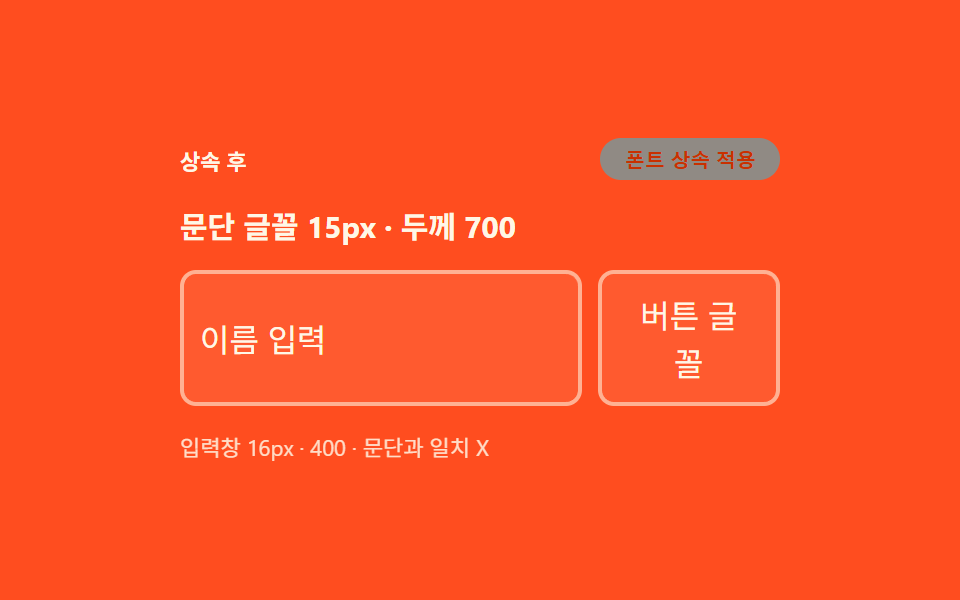
ブラウザがボタンと入力欄に個別に与えていた書体と文字サイズを取り消し、周囲の段落とまったく同じ書体・サイズ・色をそのまま引き継がせます。
使いどころカスタムデザインのフォーム、ダークモード対応の入力欄
font-family: inheritfont-weight: inheritfont-size: inherit
<main class="stage">
<div class="wrap is-demo" id="wrap">
  <div class="head">
    <span class="stateLabel" id="stateLabel">継承前</span>
    <button class="toggleBtn" id="toggleBtn" type="button" aria-pressed="false">フォント継承適用</button>
  </div>
  <p class="sample" id="sample">段落フォント 15px・太さ700</p>
  <div class="fieldRow">
    <input class="field inheritField" id="fieldA" type="text" value="名前を入力" aria-label="入力欄の例">
    <button class="ghostBtn" id="ghostBtn" type="button">ボタンのフォント</button>
  </div>
  <div class="readout" id="readout">入力欄 —px・段落と一致 —</div>
</div>
</main>
@use "../../../../site/static/demo-tokens" as *;
// 계산 겹은 index.html 의 measure() 에 있다 — 문단과 입력창의 실제 렌더 font-size·font-weight
// 를 getComputedStyle 로 다시 잡아 두 값이 같은지를 문구로 판정한다. 여기는 상속 전(브라우저
// 기본 13.33px · 400)과 상속 후(inherit) 두 규칙과 화면 구성만 맡는다.
@include stage($stage-orange);
.wrap {
width: 300px;
display: flex;
flex-direction: column;
gap: $sp-3;
}
.head {
display: flex;
align-items: center;
justify-content: space-between;
gap: $sp-2;
}
.stateLabel {
color: $subject-cream;
font-size: 11px;
font-weight: 700;
}
.toggleBtn {
appearance: none;
border: none;
border-radius: $r-pill;
background: $subject-ink;
color: $subject-cream;
padding: $sp-1 $sp-3;
font-size: 10px;
font-weight: 600;
cursor: pointer;
transition: background $dur-instant $ease-out, transform $dur-instant $ease-out;
&:hover { background: $subject-blue-deep; }
&:active { transform: scale(.96); }
&[aria-pressed="true"] { background: $subject-cream; color: $subject-orange-deep; }
&:focus-visible { outline: 2px solid $subject-cream; outline-offset: 2px; }
}
// 문단 기준 — 이 폰트로 입력창·버튼이 맞춰지는지가 주제다
.sample {
margin: 0;
color: $subject-cream;
font-size: 15px;
font-weight: 700;
}
.fieldRow {
display: flex;
gap: $sp-2;
align-items: stretch;
}
.field {
flex: 1 1 auto;
min-width: 0;
border: 2px solid rgba($subject-cream, .55);
border-radius: $r-sm;
background: rgba($subject-cream, .08);
padding: $sp-2;
color: $subject-cream;
transition: color $dur-base $ease-out, border-color $dur-base $ease-out;
}
.ghostBtn {
appearance: none;
border: 2px solid rgba($subject-cream, .55);
border-radius: $r-sm;
background: rgba($subject-cream, .08);
padding: $sp-2 $sp-3;
color: $subject-cream;
cursor: pointer;
transition: color $dur-base $ease-out;
}
// 리셋의 주인공 — font: inherit 계열을 토글로 비교한다
.wrap.inherited {
.field, .ghostBtn { font-size: inherit; font-weight: inherit; font-family: inherit; color: $subject-cream; }
}
.readout {
color: $subject-cream;
font-size: 11px;
opacity: .85;
}
@media (max-width: 340px) {
.wrap { width: 260px; }
.ghostBtn { padding: $sp-2; }
}
@media (prefers-reduced-motion: reduce) {
// reduce: 전환의 완만함만 지운다 — 상태 자체는 토글로 계속 바뀐다(값 전환이라 유지)
.toggleBtn, .field, .ghostBtn { transition: none; }
}html, body {
margin: 0;
overflow: hidden;
}
.stage {
box-sizing: border-box;
min-height: 100vh;
display: grid;
place-items: center;
margin: 0;
background: #ff4d1f;
font-family: -apple-system, "Segoe UI", "Noto Sans KR", sans-serif;
padding: clamp(8px, 4vw, 24px);
}
.wrap {
width: 300px;
display: flex;
flex-direction: column;
gap: 12px;
}
.head {
display: flex;
align-items: center;
justify-content: space-between;
gap: 8px;
}
.stateLabel {
color: #fff7e6;
font-size: 11px;
font-weight: 700;
}
.toggleBtn {
appearance: none;
border: none;
border-radius: 999px;
background: #17141a;
color: #fff7e6;
padding: 4px 12px;
font-size: 10px;
font-weight: 600;
cursor: pointer;
transition: background 140ms ease-out, transform 140ms ease-out;
}
.toggleBtn:hover {
background: #0a4fe8;
}
.toggleBtn:active {
transform: scale(0.96);
}
.toggleBtn[aria-pressed=true] {
background: #fff7e6;
color: #c93000;
}
.toggleBtn:focus-visible {
outline: 2px solid #fff7e6;
outline-offset: 2px;
}
.sample {
margin: 0;
color: #fff7e6;
font-size: 15px;
font-weight: 700;
}
.fieldRow {
display: flex;
gap: 8px;
align-items: stretch;
}
.field {
flex: 1 1 auto;
min-width: 0;
border: 2px solid rgba(255, 247, 230, 0.55);
border-radius: 8px;
background: rgba(255, 247, 230, 0.08);
padding: 8px;
color: #fff7e6;
transition: color 300ms ease-out, border-color 300ms ease-out;
}
.ghostBtn {
appearance: none;
border: 2px solid rgba(255, 247, 230, 0.55);
border-radius: 8px;
background: rgba(255, 247, 230, 0.08);
padding: 8px 12px;
color: #fff7e6;
cursor: pointer;
transition: color 300ms ease-out;
}
.wrap.inherited .field, .wrap.inherited .ghostBtn {
font-size: inherit;
font-weight: inherit;
font-family: inherit;
color: #fff7e6;
}
.readout {
color: #fff7e6;
font-size: 11px;
opacity: 0.85;
}
@media (max-width: 340px) {
.wrap {
width: 260px;
}
.ghostBtn {
padding: 8px;
}
}
@media (prefers-reduced-motion: reduce) {
.toggleBtn, .field, .ghostBtn {
transition: none;
}
}(function () {
var STEP_MS = 260;
var reduce = window.matchMedia('(prefers-reduced-motion: reduce)').matches;
var wrap = document.getElementById('wrap');
var toggleBtn = document.getElementById('toggleBtn');
var ghostBtn = document.getElementById('ghostBtn');
var stateLabel = document.getElementById('stateLabel');
var sample = document.getElementById('sample');
var fieldA = document.getElementById('fieldA');
var readout = document.getElementById('readout');
var isDemo = true;
var on = false;
function measure() {
// 실측 — 문단과 입력창의 렌더 글꼴 크기를 getComputedStyle 로 매 토글 뒤 다시 잰다
var ps = getComputedStyle(sample).fontSize;
var fs = getComputedStyle(fieldA).fontSize;
var pw = getComputedStyle(sample).fontWeight;
var fw = getComputedStyle(fieldA).fontWeight;
var match = ps === fs && pw === fw;
readout.textContent = '入力欄 ' + fs + ' · ' + fw + ' ・段落と一致 ' + (match ? 'O' : 'X');
}
function apply(next) {
on = next;
wrap.classList.toggle('inherited', on);
stateLabel.textContent = on ? '継承後' : '継承前';
toggleBtn.setAttribute('aria-pressed', String(on));
measure();
}
function human() { if (isDemo) { wrap.classList.remove('is-demo'); isDemo = false; } }
toggleBtn.addEventListener('click', function () { human(); apply(!on); });
ghostBtn.addEventListener('click', human);
fieldA.addEventListener('input', human);
fieldA.addEventListener('focus', human);
var last = 0;
function loop(ts) {
if (!last) last = ts;
if (isDemo && !reduce && ts - last >= STEP_MS) { last = ts; apply(!on); }
requestAnimationFrame(loop);
}
apply(false);
requestAnimationFrame(loop);
})();// FormInherit — vanilla 판(run/376/demo/05-form-inherit/index.html) 의 React 포트.
// 상속 전/후를 토글해 입력창·버튼의 렌더 font-size·font-weight 를 getComputedStyle 로 다시 재
// 문단 값과 일치하는지 판정한다.
import { useEffect, useRef } from "react";
import styles from "./FormInherit.module.scss";
type Box<T> = { current: T };
const STEP_MS = 260;
export default function FormInherit() {
const wrapRef = useRef(null) as unknown as Box<HTMLDivElement>;
const toggleBtnRef = useRef(null) as unknown as Box<HTMLButtonElement>;
const ghostBtnRef = useRef(null) as unknown as Box<HTMLButtonElement>;
const stateLabelRef = useRef(null) as unknown as Box<HTMLSpanElement>;
const sampleRef = useRef(null) as unknown as Box<HTMLParagraphElement>;
const fieldARef = useRef(null) as unknown as Box<HTMLInputElement>;
const readoutRef = useRef(null) as unknown as Box<HTMLDivElement>;
const rafRef = useRef(0) as unknown as Box<number>;
useEffect(() => {
const reduce = window.matchMedia("(prefers-reduced-motion: reduce)").matches;
const wrap = wrapRef.current;
const toggleBtn = toggleBtnRef.current;
const ghostBtn = ghostBtnRef.current;
const stateLabel = stateLabelRef.current;
const sample = sampleRef.current;
const fieldA = fieldARef.current;
const readout = readoutRef.current;
if (!wrap || !toggleBtn || !ghostBtn || !stateLabel || !sample || !fieldA || !readout) return;
let isDemo = true;
let on = false;
function measure() {
const ps = getComputedStyle(sample!).fontSize;
const fs = getComputedStyle(fieldA!).fontSize;
const pw = getComputedStyle(sample!).fontWeight;
const fw = getComputedStyle(fieldA!).fontWeight;
const match = ps === fs && pw === fw;
readout!.textContent = "입력창 " + fs + " · " + fw + " · 문단과 일치 " + (match ? "O" : "X");
}
function apply(next: boolean) {
on = next;
wrap!.classList.toggle(styles.inherited, on);
stateLabel!.textContent = on ? "상속 후" : "상속 전";
toggleBtn!.setAttribute("aria-pressed", String(on));
measure();
}
function human() { if (isDemo) { wrap!.classList.remove(styles.isDemo); isDemo = false; } }
function onToggleClick() { human(); apply(!on); }
function onGhostClick() { human(); }
function onFieldEvent() { human(); }
toggleBtn.addEventListener("click", onToggleClick);
ghostBtn.addEventListener("click", onGhostClick);
fieldA.addEventListener("input", onFieldEvent);
fieldA.addEventListener("focus", onFieldEvent);
let last = 0;
function loop(ts: number) {
if (!last) last = ts;
if (isDemo && !reduce && ts - last >= STEP_MS) { last = ts; apply(!on); }
rafRef.current = requestAnimationFrame(loop);
}
apply(false);
rafRef.current = requestAnimationFrame(loop);
return () => {
toggleBtn!.removeEventListener("click", onToggleClick);
ghostBtn!.removeEventListener("click", onGhostClick);
fieldA!.removeEventListener("input", onFieldEvent);
fieldA!.removeEventListener("focus", onFieldEvent);
cancelAnimationFrame(rafRef.current);
};
}, []);
return (
<main className={styles.stage}>
<div className={styles.wrap + " " + styles.isDemo} ref={wrapRef}>
<div className={styles.head}>
<span className={styles.stateLabel} ref={stateLabelRef}>상속 전</span>
<button className={styles.toggleBtn} ref={toggleBtnRef} type="button" aria-pressed="false">폰트 상속 적용</button>
</div>
<p className={styles.sample} ref={sampleRef}>문단 글꼴 15px · 두께 700</p>
<div className={styles.fieldRow}>
<input className={styles.field + " " + styles.inheritField} ref={fieldARef} type="text" defaultValue="이름 입력" aria-label="입력창 예시" />
<button className={styles.ghostBtn} ref={ghostBtnRef} type="button">버튼 글꼴</button>
</div>
<div className={styles.readout} ref={readoutRef}>입력창 —px · 문단과 일치 —</div>
</div>
</main>
);
}05 フォーム要素のフォント継承 — ボタンと入力欄を周囲の文字と同じ書体に揃えるルール — 計測 累積面積 13.463% · 動いたフレーム 22/23GODRICH オリジナル · SCSS と React は zip に同梱 · css リセット 9選 — 基本からセーフエリアまで一気に整理
このデモが属する記事
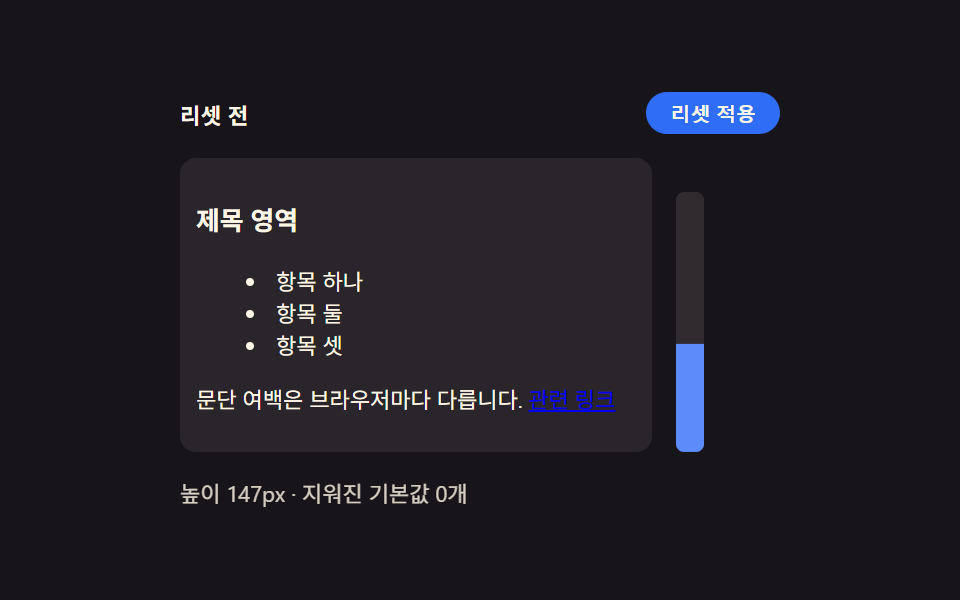 css リセット 9選 — 基本からセーフエリアまで一気に整理9つのcss リセットパターンのうち、1つはノッチのセーフエリアに合わせて余白を再計算し、1つはモーションを減らす環境で遷移時間がほぼ0まで縮み、1つは角ばった初期の角が滑らかな曲線に変わります。 この記事のデモをすべて見る