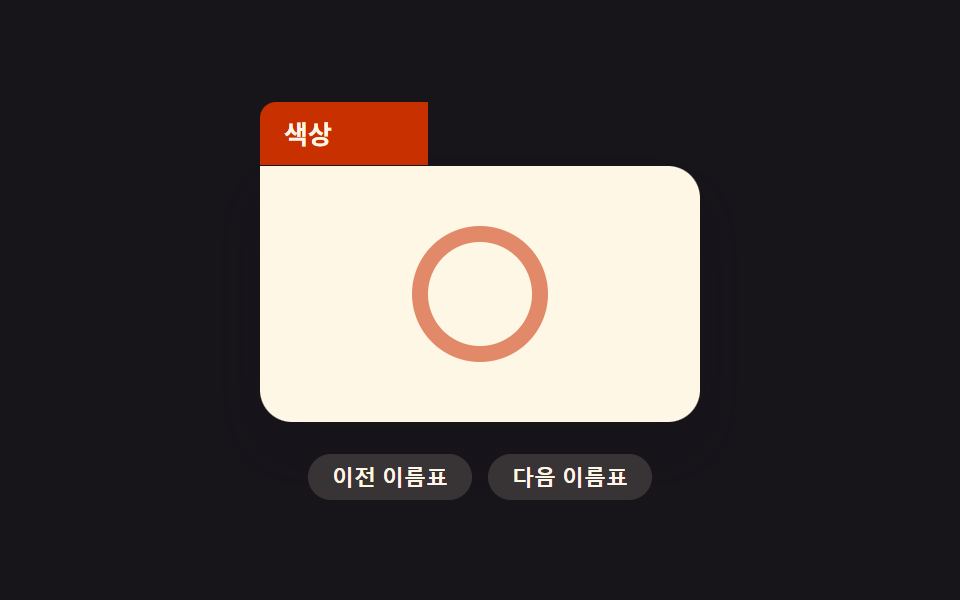
05フォルダタブ型ステッカー
上の角が書類フォルダのタブのように飛び出た形に切り抜かれ、そのタブ部分に名前を書いてカテゴリを分ける。
使いどころカテゴリタグ、ファイル棚UI装飾
clip-pathmeasureText--tab-w
<main class="stage">
<div class="wrap is-demo" id="wrap">
  <div class="folder">
    <div class="tab" id="tab">
      <span class="tabLabel" id="tabLabel">書類</span>
    </div>
    <div class="body"><span class="cardMark" aria-hidden="true"></span></div>
  </div>
  <div class="switchRow">
    <button type="button" id="btnPrev">前のラベル</button>
    <button type="button" id="btnNext">次のラベル</button>
  </div>
</div>
</main>
@use "../../../../site/static/demo-tokens" as *;
// 계산 겹은 index.html 의 measureWidth(text) 에 있다 — 숨은 canvas 로 라벨 글자 폭을 실측해 탭
// 폭(--tab-w)을 정한다. 탭 상자 실제 width 는 최대치(TAB_MAX)로 고정해 두고 clip-path 로만
// 드러내는 폭을 바꿔 레이아웃을 다시 계산시키지 않는다.
@include stage($stage-ink);
.wrap {
display: grid;
place-items: center;
gap: $sp-4;
}
.folder {
width: 220px;
}
.tab {
--tab-w: 88px;
position: relative;
height: 32px;
width: 156px;
clip-path: inset(0 calc(156px - var(--tab-w)) 0 0);
background: $subject-orange-deep;
border-radius: $r-sm $r-sm 0 0;
display: flex;
align-items: center;
padding: 0 $sp-3;
}
.tabLabel {
color: $subject-cream;
font-size: 13px;
font-weight: 600;
white-space: nowrap;
}
.body {
height: 128px;
border-radius: 0 $r-card $r-card $r-card;
background: $subject-cream;
box-shadow: $shadow-raised;
display: grid;
place-items: center;
}
.cardMark {
width: 52px;
height: 52px;
border-radius: 50%;
border: 8px solid rgba($subject-orange-deep, .55);
}
.switchRow {
display: flex;
gap: $sp-2;
}
.switchRow button {
appearance: none;
border: none;
border-radius: $r-pill;
background: rgba($subject-cream, .14);
color: $subject-cream;
padding: $sp-1 $sp-3;
font-size: 11px;
font-weight: 600;
cursor: pointer;
transition: background $dur-instant $ease-out;
&:hover { background: rgba($subject-cream, .24); }
&:focus-visible { outline: 2px solid $subject-blue-light; outline-offset: 2px; }
}
@media (max-width: 340px) {
.folder { width: 180px; }
.tab { width: 128px; clip-path: inset(0 calc(128px - var(--tab-w)) 0 0); height: 28px; }
.body { height: 100px; }
.cardMark { width: 40px; height: 40px; border-width: 6px; }
.switchRow button { font-size: 10px; }
}
@media (prefers-reduced-motion: reduce) {
.switchRow button { transition: none; }
}html, body {
margin: 0;
overflow: hidden;
}
.stage {
box-sizing: border-box;
min-height: 100vh;
display: grid;
place-items: center;
margin: 0;
background: #17141a;
font-family: -apple-system, "Segoe UI", "Noto Sans KR", sans-serif;
padding: clamp(8px, 4vw, 24px);
}
.wrap {
display: grid;
place-items: center;
gap: 16px;
}
.folder {
width: 220px;
}
.tab {
--tab-w: 88px;
position: relative;
height: 32px;
width: 156px;
clip-path: inset(0 calc(156px - var(--tab-w)) 0 0);
background: #c93000;
border-radius: 8px 8px 0 0;
display: flex;
align-items: center;
padding: 0 12px;
}
.tabLabel {
color: #fff7e6;
font-size: 13px;
font-weight: 600;
white-space: nowrap;
}
.body {
height: 128px;
border-radius: 0 16px 16px 16px;
background: #fff7e6;
box-shadow: 0 14px 24px rgba(23, 20, 26, 0.32);
display: grid;
place-items: center;
}
.cardMark {
width: 52px;
height: 52px;
border-radius: 50%;
border: 8px solid rgba(201, 48, 0, 0.55);
}
.switchRow {
display: flex;
gap: 8px;
}
.switchRow button {
appearance: none;
border: none;
border-radius: 999px;
background: rgba(255, 247, 230, 0.14);
color: #fff7e6;
padding: 4px 12px;
font-size: 11px;
font-weight: 600;
cursor: pointer;
transition: background 140ms ease-out;
}
.switchRow button:hover {
background: rgba(255, 247, 230, 0.24);
}
.switchRow button:focus-visible {
outline: 2px solid #5b8cf8;
outline-offset: 2px;
}
@media (max-width: 340px) {
.folder {
width: 180px;
}
.tab {
width: 128px;
clip-path: inset(0 calc(128px - var(--tab-w)) 0 0);
height: 28px;
}
.body {
height: 100px;
}
.cardMark {
width: 40px;
height: 40px;
border-width: 6px;
}
.switchRow button {
font-size: 10px;
}
}
@media (prefers-reduced-motion: reduce) {
.switchRow button {
transition: none;
}
}(function () {
var LABELS = ['書類', '色', '資料保管庫']; // 순서대로만 순환 — 길이가 다 다르다
var TAB_PADDING = 28; // 실측한 글자 폭 양옆에 더하는 여백(px)
var TAB_MIN = 60;
var TAB_MAX = 156;
var LERP_RATE = .15;
var STEP_MS = 500;
var reduce = window.matchMedia('(prefers-reduced-motion: reduce)').matches;
var wrap = document.getElementById('wrap');
var tab = document.getElementById('tab');
var tabLabel = document.getElementById('tabLabel');
var btnPrev = document.getElementById('btnPrev');
var btnNext = document.getElementById('btnNext');
var isDemo = true;
var measureCanvas = document.createElement('canvas');
var ctx = measureCanvas.getContext('2d');
// 라벨 글자 폭을 canvas 로 실측해 탭이 그 글자에 딱 맞는 폭을 갖게 한다 — 폭은 미리 정한 값이
// 아니라 매번 실제로 잰 값이다. 실제 상자 너비(width)는 최대치로 고정해 두고 clip-path 로만
// 드러내는 폭을 바꿔 레이아웃 재계산 없이(transform·opacity 규칙과 같은 취지) 늘고 준다.
function measureWidth(text) {
ctx.font = '600 13px -apple-system, "Segoe UI", "Noto Sans KR", sans-serif';
var w = ctx.measureText(text).width;
return Math.max(TAB_MIN, Math.min(TAB_MAX, w + TAB_PADDING));
}
var index = 0;
var target = measureWidth(LABELS[0]);
var shown = target;
function human() { if (isDemo) { wrap.classList.remove('is-demo'); isDemo = false; } }
function setLabel(i) {
index = (i + LABELS.length) % LABELS.length;
tabLabel.textContent = LABELS[index];
target = measureWidth(LABELS[index]);
}
btnPrev.addEventListener('click', function () { human(); setLabel(index - 1); });
btnNext.addEventListener('click', function () { human(); setLabel(index + 1); });
var last = 0;
function autoAdvance(ts) {
if (ts - last < STEP_MS) return;
last = ts;
setLabel(index + 1);
}
function loop(ts) {
if (!last) last = ts;
if (isDemo && !reduce) autoAdvance(ts);
if (reduce) { shown = target; } else { shown += (target - shown) * LERP_RATE; }
tab.style.setProperty('--tab-w', shown.toFixed(2) + 'px');
requestAnimationFrame(loop);
}
requestAnimationFrame(loop);
})();// FolderTab — vanilla 판(run/378/demo/05-sticker-folder-tab/index.html) 의 React 포트.
// 숨은 canvas 로 라벨 글자 폭을 실측해(measureWidth) 탭 폭(--tab-w)을 정한다 — 실제 상자 width 는
// 최대치로 고정하고 clip-path 로만 드러내는 폭을 바꿔 레이아웃 재계산을 피한다.
import { useEffect, useRef } from "react";
import styles from "./FolderTab.module.scss";
type Box<T> = { current: T };
const LABELS = ["문서", "색상", "자료 보관함"];
const TAB_PADDING = 28;
const TAB_MIN = 60;
const TAB_MAX = 156;
const LERP_RATE = 0.15;
const STEP_MS = 500;
export default function FolderTab() {
const rootRef = useRef(null) as unknown as Box<HTMLDivElement>;
const tabRef = useRef(null) as unknown as Box<HTMLDivElement>;
const labelRef = useRef(null) as unknown as Box<HTMLSpanElement>;
const prevRef = useRef(null) as unknown as Box<HTMLButtonElement>;
const nextRef = useRef(null) as unknown as Box<HTMLButtonElement>;
const rafRef = useRef(0) as unknown as Box<number>;
useEffect(() => {
const reduce = window.matchMedia("(prefers-reduced-motion: reduce)").matches;
const wrap = rootRef.current;
const tab = tabRef.current;
const tabLabel = labelRef.current;
const btnPrev = prevRef.current;
const btnNext = nextRef.current;
if (!wrap || !tab || !tabLabel || !btnPrev || !btnNext) return;
const measureCanvas = document.createElement("canvas");
const ctx = measureCanvas.getContext("2d");
function measureWidth(text: string) {
if (!ctx) return TAB_MIN;
ctx.font = '600 13px -apple-system, "Segoe UI", "Noto Sans KR", sans-serif';
const w = ctx.measureText(text).width;
return Math.max(TAB_MIN, Math.min(TAB_MAX, w + TAB_PADDING));
}
let isDemo = true;
let index = 0;
let target = measureWidth(LABELS[0]);
let shown = target;
function human() { if (isDemo) { wrap!.classList.remove(styles.isDemo); isDemo = false; } }
function setLabel(i: number) {
index = (i + LABELS.length) % LABELS.length;
tabLabel!.textContent = LABELS[index];
target = measureWidth(LABELS[index]);
}
function onPrev() { human(); setLabel(index - 1); }
function onNext() { human(); setLabel(index + 1); }
btnPrev.addEventListener("click", onPrev);
btnNext.addEventListener("click", onNext);
let last = 0;
function autoAdvance(ts: number) {
if (ts - last < STEP_MS) return;
last = ts;
setLabel(index + 1);
}
function loop(ts: number) {
if (!last) last = ts;
if (isDemo && !reduce) autoAdvance(ts);
if (reduce) { shown = target; } else { shown += (target - shown) * LERP_RATE; }
tab!.style.setProperty("--tab-w", shown.toFixed(2) + "px");
rafRef.current = requestAnimationFrame(loop);
}
rafRef.current = requestAnimationFrame(loop);
return () => {
btnPrev!.removeEventListener("click", onPrev);
btnNext!.removeEventListener("click", onNext);
cancelAnimationFrame(rafRef.current);
};
}, []);
return (
<main className={styles.stage}>
<div className={styles.wrap + " " + styles.isDemo} ref={rootRef}>
<div className={styles.folder}>
<div className={styles.tab} ref={tabRef}>
<span className={styles.tabLabel} ref={labelRef}>문서</span>
</div>
<div className={styles.body}><span className={styles.cardMark} aria-hidden="true"></span></div>
</div>
<div className={styles.switchRow}>
<button type="button" ref={prevRef}>이전 이름표</button>
<button type="button" ref={nextRef}>다음 이름표</button>
</div>
</div>
</main>
);
}05 フォルダタブ型ステッカー — 計測 累積面積 1.111% · 動いたフレーム 15/23GODRICH オリジナル · SCSS と React は zip に同梱 · ホログラム シール デザイン 9種 — 白フチから剥がれる角まで
このデモが属する記事
 ホログラム シール デザイン 9種 — 白フチから剥がれる角までこのホログラム シール デザイン 9種のうち、1つは白フチと影だけでダイカットステッカーに見せ、1つはポインタの角度に沿って表面を虹色の光が走り抜け、1つはカーソルに合わせてわずかに傾いて本物のシールに触れる感触を出します。 この記事のデモをすべて見る