07点線が伸びる
repeating-linear-gradient で等間隔の点を描いた細いバーを文字の下に置き、transform: scaleX(0→1)、transform-origin: left で伸ばし、点線が左から一つずつ継ぎ足されるように見せる。
使いどころステップガイドの進行経路、脚注の接続線
repeating-linear-gradienttransform:scaleX700ms
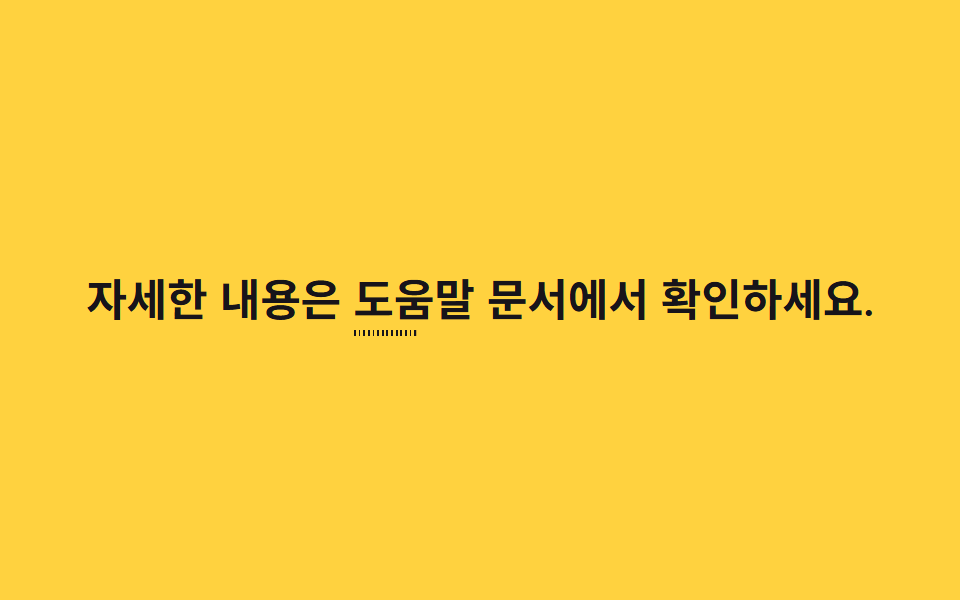
<main class="stage">
  <p class="line">詳しくは <span class="hl">ヘルプドキュメント<span class="hl__dots" aria-hidden="true"></span></span>をご確認ください。</p>
</main>
@use "../../../../site/static/demo-tokens" as *;
// ── 변수 3개 ─────────────────────────────
$duration: 700ms;
$easing: $ease-out;
$color: $stage-ink; // 점선 색
// ── 데모 무대 ───────────────────────────────
@include stage($stage-yellow);
.line {
max-width: 92%;
margin: 0;
color: $stage-ink;
font-weight: 600;
font-size: clamp(16px, 4.6vw, 22px);
line-height: 1.6;
font-family: inherit;
text-align: center;
}
.hl {
position: relative;
font-weight: 700;
}
// 일정 간격의 점을 그린 얇은 막대를 글자 아래 두고 왼쪽부터 늘린다
.hl__dots {
position: absolute;
left: 0;
right: 0;
bottom: -4px;
height: 3px;
background-image: repeating-linear-gradient(90deg, $color 0 3px, transparent 3px 8px);
transform: scaleX(0);
transform-origin: left center; // 규칙8: 점선 왼쪽에서 늘어남
animation: grow $duration $easing infinite, grow-thick $duration $easing infinite;
}
@keyframes grow {
0% { transform: scaleX(0); }
40% { transform: scaleX(1); }
80% { transform: scaleX(1); }
100% { transform: scaleX(0); }
}
// 페인트 물성: 점선 두께(펜 압력)가 늘어나는 주기와 같은 리듬으로 불규칙 진동 — height 는 transform 아님
@keyframes grow-thick {
0% { height: 3px; }
15% { height: 4px; }
30% { height: 2.5px; }
45% { height: 3.5px; }
60% { height: 2.5px; }
75% { height: 4px; }
90% { height: 3px; }
100% { height: 3px; }
}
@media (prefers-reduced-motion: reduce) {
.hl__dots { animation: none; transform: scaleX(1); }
}html, body {
margin: 0;
overflow: hidden;
}
.stage {
box-sizing: border-box;
min-height: 100vh;
display: grid;
place-items: center;
margin: 0;
background: #ffd23f;
font-family: -apple-system, "Segoe UI", "Noto Sans KR", sans-serif;
padding: clamp(8px, 4vw, 24px);
}
.line {
max-width: 92%;
margin: 0;
color: #17141a;
font-weight: 600;
font-size: clamp(16px, 4.6vw, 22px);
line-height: 1.6;
font-family: inherit;
text-align: center;
}
.hl {
position: relative;
font-weight: 700;
}
.hl__dots {
position: absolute;
left: 0;
right: 0;
bottom: -4px;
height: 3px;
background-image: repeating-linear-gradient(90deg, #17141a 0 3px, transparent 3px 8px);
transform: scaleX(0);
transform-origin: left center;
animation: grow 700ms ease-out infinite, grow-thick 700ms ease-out infinite;
}
@keyframes grow {
0% {
transform: scaleX(0);
}
40% {
transform: scaleX(1);
}
80% {
transform: scaleX(1);
}
100% {
transform: scaleX(0);
}
}
@keyframes grow-thick {
0% {
height: 3px;
}
15% {
height: 4px;
}
30% {
height: 2.5px;
}
45% {
height: 3.5px;
}
60% {
height: 2.5px;
}
75% {
height: 4px;
}
90% {
height: 3px;
}
100% {
height: 3px;
}
}
@media (prefers-reduced-motion: reduce) {
.hl__dots {
animation: none;
transform: scaleX(1);
}
}import type { CSSProperties, ReactNode } from "react";
import styles from "./DottedGrow.module.scss";
export type DottedGrowProps = {
before: ReactNode;
keyword: ReactNode;
after?: ReactNode;
/** 점선이 다 자라는 시간 (기본 700ms) */
duration?: number;
easing?: string;
/** 점선 색 */
color?: string;
};
type Vars = CSSProperties & {
"--duration"?: string;
"--easing"?: string;
"--color"?: string;
};
export default function DottedGrow({
before,
keyword,
after,
duration = 700,
easing = "ease-out",
color = "#17141a",
}: DottedGrowProps) {
const vars: Vars = {
"--duration": `${duration}ms`,
"--easing": easing,
"--color": color,
};
return (
<p className={styles.line} style={vars}>
{before} <span className={styles.hl}>{keyword}<span className={styles.dots} aria-hidden="true" /></span>{after}
</p>
);
}07 点線が伸びる — 計測 累積面積 0.312% · 動いたフレーム 23/23GODRICH オリジナル · SCSS と React は zip に同梱 · CSS 下線 アニメーション9選 — 一行でコピペOK
このデモが属する記事
 CSS 下線 アニメーション9選 — 一行でコピペOKcss 下線 アニメーションは、単語や文の下・背後に敷いた線や面を動かして、読む人の視線をその一語に止める技法です。今回はこの技法を9つ選び、それぞれ6〜25行のコードにまとめました。上のグリッドは表示された瞬間から自動で繰り返し動いていて この記事のデモをすべて見る