06スワイプで閉じる
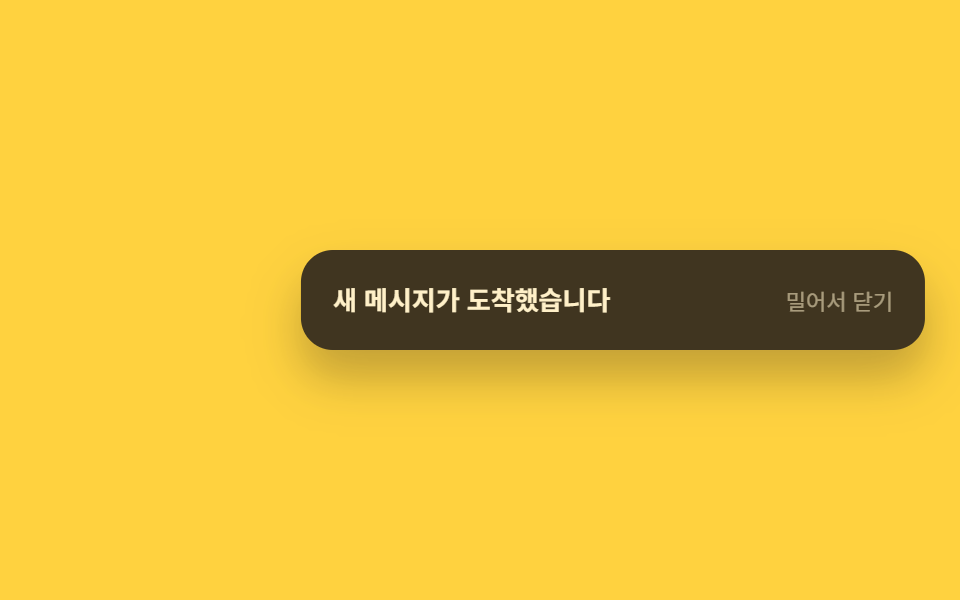
ポインターを押したまま左右に引くとカードが指に追従し、80px 以上動かして離すとその方向へ抜けて閉じる。
使いどころモバイルのチャット・メッセンジャー通知、タッチ中心の通知トレイ
pointermovetranslateX(var(--dx))80px 문턱
<main class="stage">
  <div class="toast is-demo" role="status" aria-live="polite">
    <p class="toast__text">新着メッセージが届きました</p>
    <span class="toast__hint" aria-hidden="true">スワイプして閉じる</span>
  </div>
</main>
@use "../../../../site/static/demo-tokens" as *;
// ── 변수 3개 ──────────────────────────────
$duration: $dur-quick; // 220ms — 놓쳤을 때 닫히는 속도
$easing: $ease-out;
$color: $subject-ink; // 카드 색
// ── 데모 무대 ───────────────────────────────
@include stage($stage-yellow);
.toast {
position: relative;
display: flex; align-items: center; justify-content: space-between; gap: $sp-3;
width: min(280px, 84vw);
padding: $sp-4;
border-radius: $r-card;
background: $color;
color: $subject-cream;
box-shadow: $shadow-raised;
touch-action: pan-y; // 세로 스크롤은 살리고 가로만 드래그로 가져간다
transform: translateX(var(--dx, 0px));
}
.toast__text { margin: 0; font-weight: 600; font-size: 13px; line-height: 1.4; font-family: inherit; }
.toast__hint { flex: none; font-weight: 400; font-size: 11px; line-height: 1; font-family: inherit; opacity: .55; }
.toast.is-swiped-left,
.toast.is-swiped-right {
transition: transform $duration $easing, opacity $duration $easing;
opacity: 0;
}
.toast.is-swiped-left { transform: translateX(-120%); }
.toast.is-swiped-right { transform: translateX(120%); }
// 실측 2026-09-10: 손이 없는 렌더에서도 "밀려서 사라짐"이 보이게 자동 루프를 별도로 둔다
.toast.is-demo { animation: swipe-loop $dur-loop $easing infinite; }
@keyframes swipe-loop {
0% { transform: translateX(0); opacity: 0; }
10% { transform: translateX(0); opacity: 1; }
55% { transform: translateX(0); opacity: 1; }
85% { transform: translateX(120%); opacity: 0; }
86% { transform: translateX(0); opacity: 0; }
100% { transform: translateX(0); opacity: 0; }
}
// ── 접근성: 움직임 줄이기 설정이면 드래그 반응만 남기고 자동 루프는 끈다 ────────
@media (prefers-reduced-motion: reduce) {
.toast.is-demo { animation: none; opacity: 1; transform: translateX(0); }
.toast.is-swiped-left, .toast.is-swiped-right { transition: opacity $duration linear; }
}html, body {
margin: 0;
overflow: hidden;
}
.stage {
box-sizing: border-box;
min-height: 100vh;
display: grid;
place-items: center;
margin: 0;
background: #ffd23f;
font-family: -apple-system, "Segoe UI", "Noto Sans KR", sans-serif;
padding: clamp(8px, 4vw, 24px);
}
.toast {
position: relative;
display: flex;
align-items: center;
justify-content: space-between;
gap: 12px;
width: min(280px, 84vw);
padding: 16px;
border-radius: 16px;
background: #17141a;
color: #fff7e6;
box-shadow: 0 14px 24px rgba(23, 20, 26, 0.32);
touch-action: pan-y;
transform: translateX(var(--dx, 0px));
}
.toast__text {
margin: 0;
font-weight: 600;
font-size: 13px;
line-height: 1.4;
font-family: inherit;
}
.toast__hint {
flex: none;
font-weight: 400;
font-size: 11px;
line-height: 1;
font-family: inherit;
opacity: 0.55;
}
.toast.is-swiped-left,
.toast.is-swiped-right {
transition: transform 220ms ease-out, opacity 220ms ease-out;
opacity: 0;
}
.toast.is-swiped-left {
transform: translateX(-120%);
}
.toast.is-swiped-right {
transform: translateX(120%);
}
.toast.is-demo {
animation: swipe-loop 2s ease-out infinite;
}
@keyframes swipe-loop {
0% {
transform: translateX(0);
opacity: 0;
}
10% {
transform: translateX(0);
opacity: 1;
}
55% {
transform: translateX(0);
opacity: 1;
}
85% {
transform: translateX(120%);
opacity: 0;
}
86% {
transform: translateX(0);
opacity: 0;
}
100% {
transform: translateX(0);
opacity: 0;
}
}
@media (prefers-reduced-motion: reduce) {
.toast.is-demo {
animation: none;
opacity: 1;
transform: translateX(0);
}
.toast.is-swiped-left, .toast.is-swiped-right {
transition: opacity 220ms linear;
}
}// 실제 동작: 손가락(또는 마우스)을 뗀 순간 80px 이상 밀렸으면 그 방향으로 닫힌다. 데모 루프는 놓고 자동 재생
(function () {
var el = document.querySelector('.toast'), x0 = 0, dx = 0, dragging = false;
el.addEventListener('pointerdown', function (e) { x0 = e.clientX; dragging = true; el.setPointerCapture(e.pointerId); el.classList.remove('is-demo'); });
el.addEventListener('pointermove', function (e) { if (!dragging) return; dx = e.clientX - x0; el.style.setProperty('--dx', dx + 'px'); });
el.addEventListener('pointerup', function () {
dragging = false;
if (Math.abs(dx) > 80) el.classList.add(dx > 0 ? 'is-swiped-right' : 'is-swiped-left');
else el.style.setProperty('--dx', '0px');
dx = 0;
});
})();import { useCallback, useRef, useState } from "react";
import type { CSSProperties, PointerEvent } from "react";
import styles from "./SwipeDismissToast.module.scss";
export type SwipeDismissToastProps = {
message: string;
hint?: string;
onDismiss?: (direction: "left" | "right") => void;
/** 이 px 이상 밀면 닫힌다 (기본 80) */
threshold?: number;
duration?: number;
color?: string;
};
type Vars = CSSProperties & { "--dx"?: string; "--color"?: string };
export default function SwipeDismissToast({
message,
hint = "밀어서 닫기",
onDismiss,
threshold = 80,
duration = 220,
color = "#17141a",
}: SwipeDismissToastProps) {
const [dx, setDx] = useState(0);
const [swiped, setSwiped] = useState<"left" | "right" | null>(null);
const x0 = useRef(0);
const dragging = useRef(false);
const onDown = useCallback((e: PointerEvent<HTMLDivElement>) => {
x0.current = e.clientX;
dragging.current = true;
e.currentTarget.setPointerCapture(e.pointerId);
}, []);
const onMove = useCallback((e: PointerEvent<HTMLDivElement>) => {
if (!dragging.current) return;
setDx(e.clientX - (x0.current ?? 0));
}, []);
const onUp = useCallback(() => {
dragging.current = false;
if (Math.abs(dx) > threshold) {
const dir = dx > 0 ? "right" : "left";
setSwiped(dir);
onDismiss?.(dir);
} else {
setDx(0);
}
}, [dx, threshold, onDismiss]);
const vars: Vars = { "--dx": `${swiped ? 0 : dx}px`, "--color": color };
return (
<div
className={`${styles.toast} ${swiped ? styles[swiped === "left" ? "swipedLeft" : "swipedRight"] : ""}`}
style={vars}
role="status"
aria-live="polite"
onPointerDown={onDown}
onPointerMove={onMove}
onPointerUp={onUp}
>
<p className={styles.text}>{message}</p>
<span className={styles.hint} aria-hidden="true">{hint}</span>
</div>
);
}06 スワイプで閉じる — 計測 累積面積 20.664% · 動いたフレーム 9/23GODRICH オリジナル · SCSS と React は zip に同梱 · トースト通知 css アニメーション9選 — JS最小・CSSだけ
このデモが属する記事
 トースト通知 css アニメーション9選 — JS最小・CSSだけトースト通知 css は、画面の隅に短く現れて自分で消えていく通知カードを、JavaScriptをほぼ使わずtransformとopacityだけで動かす手法です。この記事では9種類を実装し、コードは6〜25行の断片として載せています。まず この記事のデモをすべて見る