04アイコン拡大ウェーブ
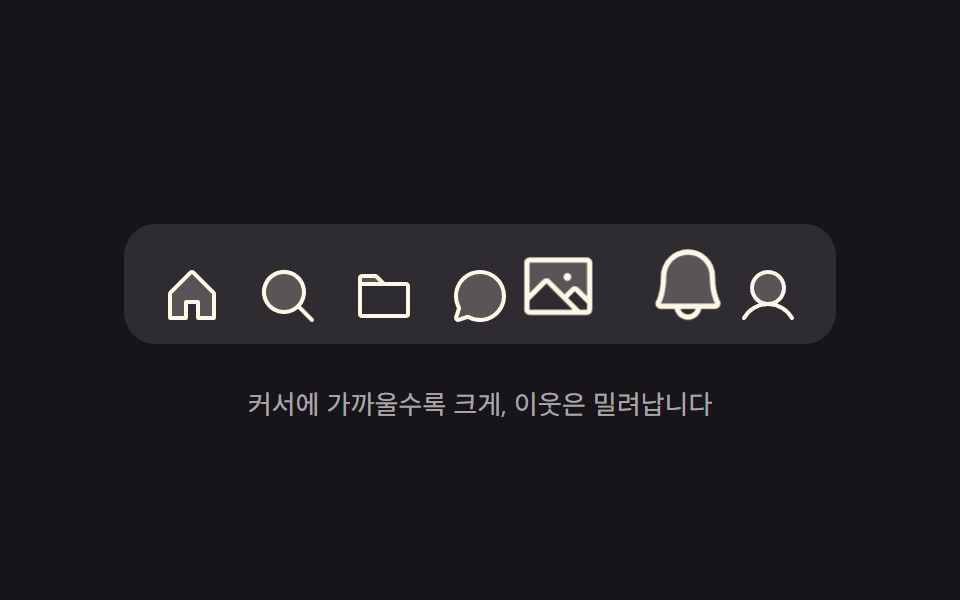
ポインターに最も近いアイコンが最も大きく膨らみ、隣は距離に応じて段階的に小さくなり、膨らんだ分だけ横のアイコンが押し退けられて場所を譲ります。
使いどころツールバーやブックマーク列のようにアイコンが多く、ポインターが不正確でも押しやすいべき場所
@propertyscalepointermove
<main class="stage">
  <div class="mg is-demo" id="mg">
    <nav class="mg__dock" id="mg-dock" aria-label="メインメニュー">
      <button class="mg__btn" type="button" aria-label="ホーム">
        <svg xmlns="http://www.w3.org/2000/svg" viewBox="0 0 256 256" aria-hidden="true"><g fill="currentColor"><path d="M216 120v96h-64v-64h-48v64H40v-96a8 8 0 0 1 2.34-5.66l80-80a8 8 0 0 1 11.32 0l80 80A8 8 0 0 1 216 120" opacity=".2"/><path d="m219.31 108.68l-80-80a16 16 0 0 0-22.62 0l-80 80A15.87 15.87 0 0 0 32 120v96a8 8 0 0 0 8 8h64a8 8 0 0 0 8-8v-56h32v56a8 8 0 0 0 8 8h64a8 8 0 0 0 8-8v-96a15.87 15.87 0 0 0-4.69-11.32M208 208h-48v-56a8 8 0 0 0-8-8h-48a8 8 0 0 0-8 8v56H48v-88l80-80l80 80Z"/></g></svg>
      </button>
      <button class="mg__btn" type="button" aria-label="検索">
        <svg xmlns="http://www.w3.org/2000/svg" viewBox="0 0 256 256" aria-hidden="true"><g fill="currentColor"><path d="M192 112a80 80 0 1 1-80-80a80 80 0 0 1 80 80" opacity=".2"/><path d="m229.66 218.34l-50.06-50.06a88.21 88.21 0 1 0-11.32 11.31l50.06 50.07a8 8 0 0 0 11.32-11.32M40 112a72 72 0 1 1 72 72a72.08 72.08 0 0 1-72-72"/></g></svg>
      </button>
      <button class="mg__btn" type="button" aria-label="フォルダ">
        <svg xmlns="http://www.w3.org/2000/svg" viewBox="0 0 256 256" aria-hidden="true"><g fill="currentColor"><path d="M128 80H32V56a8 8 0 0 1 8-8h52.69a8 8 0 0 1 5.65 2.34Z" opacity=".2"/><path d="M216 72h-84.69L104 44.69A15.86 15.86 0 0 0 92.69 40H40a16 16 0 0 0-16 16v144.62A15.4 15.4 0 0 0 39.38 216h177.51A15.13 15.13 0 0 0 232 200.89V88a16 16 0 0 0-16-16M92.69 56l16 16H40V56ZM216 200H40V88h176Z"/></g></svg>
      </button>
      <button class="mg__btn" type="button" aria-label="チャット">
        <svg xmlns="http://www.w3.org/2000/svg" viewBox="0 0 256 256" aria-hidden="true"><g fill="currentColor"><path d="M224 128a96 96 0 0 1-144.07 83.11l-37.39 12.47a8 8 0 0 1-10.12-10.12l12.47-37.39A96 96 0 1 1 224 128" opacity=".2"/><path d="M128 24a104 104 0 0 0-91.82 152.88l-11.35 34.05a16 16 0 0 0 20.24 20.24l34.05-11.35A104 104 0 1 0 128 24m0 192a87.87 87.87 0 0 1-44.06-11.81a8 8 0 0 0-6.54-.67L40 216l12.47-37.4a8 8 0 0 0-.66-6.54A88 88 0 1 1 128 216"/></g></svg>
      </button>
      <button class="mg__btn" type="button" aria-label="写真">
        <svg xmlns="http://www.w3.org/2000/svg" viewBox="0 0 256 256" aria-hidden="true"><g fill="currentColor"><path d="M224 56v122.06l-39.72-39.72a8 8 0 0 0-11.31 0L147.31 164l-49.65-49.66a8 8 0 0 0-11.32 0L32 168.69V56a8 8 0 0 1 8-8h176a8 8 0 0 1 8 8" opacity=".2"/><path d="M216 40H40a16 16 0 0 0-16 16v144a16 16 0 0 0 16 16h176a16 16 0 0 0 16-16V56a16 16 0 0 0-16-16m0 16v102.75l-26.07-26.06a16 16 0 0 0-22.63 0l-20 20l-44-44a16 16 0 0 0-22.62 0L40 149.37V56ZM40 172l52-52l80 80H40Zm176 28h-21.37l-36-36l20-20L216 181.38zm-72-100a12 12 0 1 1 12 12a12 12 0 0 1-12-12"/></g></svg>
      </button>
      <button class="mg__btn" type="button" aria-label="通知">
        <svg xmlns="http://www.w3.org/2000/svg" viewBox="0 0 256 256" aria-hidden="true"><g fill="currentColor"><path d="M208 192H48a8 8 0 0 1-6.88-12C47.71 168.6 56 139.81 56 104a72 72 0 0 1 144 0c0 35.82 8.3 64.6 14.9 76a8 8 0 0 1-6.9 12" opacity=".2"/><path d="M221.8 175.94c-5.55-9.56-13.8-36.61-13.8-71.94a80 80 0 1 0-160 0c0 35.34-8.26 62.38-13.81 71.94A16 16 0 0 0 48 200h40.81a40 40 0 0 0 78.38 0H208a16 16 0 0 0 13.8-24.06M128 216a24 24 0 0 1-22.62-16h45.24A24 24 0 0 1 128 216m-80-32c7.7-13.24 16-43.92 16-80a64 64 0 1 1 128 0c0 36.05 8.28 66.73 16 80Z"/></g></svg>
      </button>
      <button class="mg__btn" type="button" aria-label="マイページ">
        <svg xmlns="http://www.w3.org/2000/svg" viewBox="0 0 256 256" aria-hidden="true"><g fill="currentColor"><path d="M192 96a64 64 0 1 1-64-64a64 64 0 0 1 64 64" opacity=".2"/><path d="M230.92 212c-15.23-26.33-38.7-45.21-66.09-54.16a72 72 0 1 0-73.66 0c-27.39 8.94-50.86 27.82-66.09 54.16a8 8 0 1 0 13.85 8c18.84-32.56 52.14-52 89.07-52s70.23 19.44 89.07 52a8 8 0 1 0 13.85-8M72 96a56 56 0 1 1 56 56a56.06 56.06 0 0 1-56-56"/></g></svg>
      </button>
    </nav>
    <p class="mg__cap">ポインターに近いほど大きく、隣は押し退けられます</p>
  </div>
</main>@use "../../../../site/static/demo-tokens" as *;
$duration: $dur-instant;
$easing: $ease-spring;
$color: $subject-cream;
@include stage($stage-ink);
// 등록해야 배율·밀림이 수로 보간된다 — 등록 안 하면 문자열이라 중간값이 없다
@property --s {
syntax: "<number>";
inherits: false;
initial-value: 1;
}
@property --x {
syntax: "<length>";
inherits: false;
initial-value: 0px;
}
.mg {
display: flex;
flex-direction: column;
align-items: center;
gap: $sp-5;
// 아이콘이 위로 부풀어 오르는 만큼 위쪽 자리를 비워 둔다
padding-top: $sp-6;
}
.mg__dock {
display: flex;
align-items: flex-end;
gap: $sp-1;
padding: $sp-2 $sp-3;
border-radius: $r-card;
background: rgba(255, 255, 255, .1);
}
.mg__btn {
--s: 1;
--x: 0px;
flex: 0 0 auto;
width: 44px;
height: 44px;
display: grid;
place-items: end center;
padding: 0;
border: 0;
background: none;
color: $color;
cursor: pointer;
transform: translateX(var(--x));
transition: transform $duration linear;
}
.mg__btn:focus-visible { outline: 2px solid $subject-sky; outline-offset: 2px; border-radius: $r-xs; }
.mg__btn svg {
width: 32px;
height: 32px;
display: block;
transform-origin: bottom center; // 규칙8: 독 바닥서 위로 커짐
scale: var(--s);
transition: scale $duration linear;
}
.mg__cap {
margin: 0;
font-size: 13px;
line-height: 1.5;
color: rgba(255, 255, 255, .62);
}
/* 자동 재생 — 물결이 왼쪽에서 오른쪽으로 지나간다. 지연은 개별 속성으로 */
.is-demo .mg__btn {
animation-name: mg-push;
animation-duration: 2s;
animation-timing-function: $ease-spring;
animation-iteration-count: infinite;
}
.is-demo .mg__btn svg {
animation-name: mg-swell;
animation-duration: 2s;
animation-timing-function: $ease-spring;
animation-iteration-count: infinite;
}
.is-demo .mg__btn:nth-child(2),
.is-demo .mg__btn:nth-child(2) svg { animation-delay: .2s; }
.is-demo .mg__btn:nth-child(3),
.is-demo .mg__btn:nth-child(3) svg { animation-delay: .4s; }
.is-demo .mg__btn:nth-child(4),
.is-demo .mg__btn:nth-child(4) svg { animation-delay: .6s; }
.is-demo .mg__btn:nth-child(5),
.is-demo .mg__btn:nth-child(5) svg { animation-delay: .8s; }
.is-demo .mg__btn:nth-child(6),
.is-demo .mg__btn:nth-child(6) svg { animation-delay: 1s; }
.is-demo .mg__btn:nth-child(7),
.is-demo .mg__btn:nth-child(7) svg { animation-delay: 1.2s; }
@keyframes mg-push {
0% { transform: translateX(0); }
4% { transform: translateX(9px); }
10% { transform: translateX(0); }
16% { transform: translateX(-9px); }
24% { transform: translateX(0); }
100% { transform: translateX(0); }
}
@keyframes mg-swell {
0% { scale: 1; }
4% { scale: 1.3; }
10% { scale: 1.8; }
16% { scale: 1.3; }
24% { scale: 1; }
100% { scale: 1; }
}
@media (max-width: 340px) {
.mg__btn { width: 36px; height: 36px; }
.mg__btn svg { width: 26px; height: 26px; }
.mg__dock { padding: $sp-2; }
}
@media (prefers-reduced-motion: reduce) {
.is-demo .mg__btn,
.is-demo .mg__btn svg { animation-name: none; }
.mg__btn,
.mg__btn svg { transition: none; }
}@charset "UTF-8";
html, body {
margin: 0;
overflow: hidden;
}
.stage {
box-sizing: border-box;
min-height: 100vh;
display: grid;
place-items: center;
margin: 0;
background: #17141a;
font-family: -apple-system, "Segoe UI", "Noto Sans KR", sans-serif;
padding: clamp(8px, 4vw, 24px);
}
@property --s {
syntax: "<number>";
inherits: false;
initial-value: 1;
}
@property --x {
syntax: "<length>";
inherits: false;
initial-value: 0px;
}
.mg {
display: flex;
flex-direction: column;
align-items: center;
gap: 20px;
padding-top: 24px;
}
.mg__dock {
display: flex;
align-items: flex-end;
gap: 4px;
padding: 8px 12px;
border-radius: 16px;
background: rgba(255, 255, 255, 0.1);
}
.mg__btn {
--s: 1;
--x: 0px;
flex: 0 0 auto;
width: 44px;
height: 44px;
display: grid;
place-items: end center;
padding: 0;
border: 0;
background: none;
color: #fff7e6;
cursor: pointer;
transform: translateX(var(--x));
transition: transform 140ms linear;
}
.mg__btn:focus-visible {
outline: 2px solid #6ec8ff;
outline-offset: 2px;
border-radius: 4px;
}
.mg__btn svg {
width: 32px;
height: 32px;
display: block;
transform-origin: bottom center;
scale: var(--s);
transition: scale 140ms linear;
}
.mg__cap {
margin: 0;
font-size: 13px;
line-height: 1.5;
color: rgba(255, 255, 255, 0.62);
}
/* 자동 재생 — 물결이 왼쪽에서 오른쪽으로 지나간다. 지연은 개별 속성으로 */
.is-demo .mg__btn {
animation-name: mg-push;
animation-duration: 2s;
animation-timing-function: cubic-bezier(0.2, 0.8, 0.2, 1);
animation-iteration-count: infinite;
}
.is-demo .mg__btn svg {
animation-name: mg-swell;
animation-duration: 2s;
animation-timing-function: cubic-bezier(0.2, 0.8, 0.2, 1);
animation-iteration-count: infinite;
}
.is-demo .mg__btn:nth-child(2),
.is-demo .mg__btn:nth-child(2) svg {
animation-delay: 0.2s;
}
.is-demo .mg__btn:nth-child(3),
.is-demo .mg__btn:nth-child(3) svg {
animation-delay: 0.4s;
}
.is-demo .mg__btn:nth-child(4),
.is-demo .mg__btn:nth-child(4) svg {
animation-delay: 0.6s;
}
.is-demo .mg__btn:nth-child(5),
.is-demo .mg__btn:nth-child(5) svg {
animation-delay: 0.8s;
}
.is-demo .mg__btn:nth-child(6),
.is-demo .mg__btn:nth-child(6) svg {
animation-delay: 1s;
}
.is-demo .mg__btn:nth-child(7),
.is-demo .mg__btn:nth-child(7) svg {
animation-delay: 1.2s;
}
@keyframes mg-push {
0% {
transform: translateX(0);
}
4% {
transform: translateX(9px);
}
10% {
transform: translateX(0);
}
16% {
transform: translateX(-9px);
}
24% {
transform: translateX(0);
}
100% {
transform: translateX(0);
}
}
@keyframes mg-swell {
0% {
scale: 1;
}
4% {
scale: 1.3;
}
10% {
scale: 1.8;
}
16% {
scale: 1.3;
}
24% {
scale: 1;
}
100% {
scale: 1;
}
}
@media (max-width: 340px) {
.mg__btn {
width: 36px;
height: 36px;
}
.mg__btn svg {
width: 26px;
height: 26px;
}
.mg__dock {
padding: 8px;
}
}
@media (prefers-reduced-motion: reduce) {
.is-demo .mg__btn,
.is-demo .mg__btn svg {
animation-name: none;
}
.mg__btn,
.mg__btn svg {
transition: none;
}
}// 실제 동작: 포인터 x → 아이콘마다 중심 거리 d 를 재고, 거리에 따라 배율을 준다.
// 이웃 밀림은 배율이 만든 폭 증가분의 절반씩을 누적해 좌우로 나눠 주는 계산.
var root = document.getElementById('mg');
var dock = document.getElementById('mg-dock');
var btns = Array.prototype.slice.call(dock.querySelectorAll('.mg__btn'));
var W = 44, RANGE = 90, MAX = 0.8;
function wave(x) {
var s = btns.map(function (b) {
var c = b.offsetLeft + W / 2;
var t = Math.max(0, 1 - Math.abs(x - c) / RANGE);
return 1 + MAX * t * t;
});
var grown = s.map(function (v) { return (v - 1) * W; });
var total = grown.reduce(function (a, b) { return a + b; }, 0);
var before = 0;
btns.forEach(function (b, i) {
// 내 앞 아이콘들이 불어난 폭 + 내가 불어난 폭의 절반 − 전체의 절반(줄 중심 유지)
b.style.setProperty('--s', s[i].toFixed(3));
b.style.setProperty('--x', (before + grown[i] / 2 - total / 2).toFixed(1) + 'px');
before += grown[i];
});
}
function rest() { btns.forEach(function (b) { b.style.setProperty('--s', 1); b.style.setProperty('--x', '0px'); }); }
dock.addEventListener('pointermove', function (e) {
root.classList.remove('is-demo');
wave(e.clientX - dock.getBoundingClientRect().left);
});
dock.addEventListener('pointerleave', rest);import { useRef, useState } from "react";
import type { CSSProperties } from "react";
import styles from "./MagnifyWaveDock.module.scss";
export type MagnifyWaveDockProps = {
duration?: number;
easing?: string;
color?: string;
};
type PEvt = { clientX: number };
type Vars = CSSProperties & { "--duration"?: string; "--easing"?: string; "--color"?: string };
type BtnVars = CSSProperties & { "--s"?: string; "--x"?: string };
/** 아이콘 하나의 배율(s)과 좌우 밀림(x, px) */
type Wave = { s: number; x: number };
/** 아이콘 폭 · 물결이 닿는 거리 · 최대 추가 배율 — vanilla 와 같은 값 */
const W = 44;
const RANGE = 90;
const MAX = 0.8;
const ITEMS = [
{
label: "Home",
icon: (
<svg xmlns="http://www.w3.org/2000/svg" viewBox="0 0 256 256" aria-hidden="true"><g fill="currentColor"><path d="M216 120v96h-64v-64h-48v64H40v-96a8 8 0 0 1 2.34-5.66l80-80a8 8 0 0 1 11.32 0l80 80A8 8 0 0 1 216 120" opacity=".2" /><path d="m219.31 108.68l-80-80a16 16 0 0 0-22.62 0l-80 80A15.87 15.87 0 0 0 32 120v96a8 8 0 0 0 8 8h64a8 8 0 0 0 8-8v-56h32v56a8 8 0 0 0 8 8h64a8 8 0 0 0 8-8v-96a15.87 15.87 0 0 0-4.69-11.32M208 208h-48v-56a8 8 0 0 0-8-8h-48a8 8 0 0 0-8 8v56H48v-88l80-80l80 80Z" /></g></svg>
),
},
{
label: "Search",
icon: (
<svg xmlns="http://www.w3.org/2000/svg" viewBox="0 0 256 256" aria-hidden="true"><g fill="currentColor"><path d="M192 112a80 80 0 1 1-80-80a80 80 0 0 1 80 80" opacity=".2" /><path d="m229.66 218.34l-50.06-50.06a88.21 88.21 0 1 0-11.32 11.31l50.06 50.07a8 8 0 0 0 11.32-11.32M40 112a72 72 0 1 1 72 72a72.08 72.08 0 0 1-72-72" /></g></svg>
),
},
{
label: "Files",
icon: (
<svg xmlns="http://www.w3.org/2000/svg" viewBox="0 0 256 256" aria-hidden="true"><g fill="currentColor"><path d="M128 80H32V56a8 8 0 0 1 8-8h52.69a8 8 0 0 1 5.65 2.34Z" opacity=".2" /><path d="M216 72h-84.69L104 44.69A15.86 15.86 0 0 0 92.69 40H40a16 16 0 0 0-16 16v144.62A15.4 15.4 0 0 0 39.38 216h177.51A15.13 15.13 0 0 0 232 200.89V88a16 16 0 0 0-16-16M92.69 56l16 16H40V56ZM216 200H40V88h176Z" /></g></svg>
),
},
{
label: "Chat",
icon: (
<svg xmlns="http://www.w3.org/2000/svg" viewBox="0 0 256 256" aria-hidden="true"><g fill="currentColor"><path d="M224 128a96 96 0 0 1-144.07 83.11l-37.39 12.47a8 8 0 0 1-10.12-10.12l12.47-37.39A96 96 0 1 1 224 128" opacity=".2" /><path d="M128 24a104 104 0 0 0-91.82 152.88l-11.35 34.05a16 16 0 0 0 20.24 20.24l34.05-11.35A104 104 0 1 0 128 24m0 192a87.87 87.87 0 0 1-44.06-11.81a8 8 0 0 0-6.54-.67L40 216l12.47-37.4a8 8 0 0 0-.66-6.54A88 88 0 1 1 128 216" /></g></svg>
),
},
{
label: "Photos",
icon: (
<svg xmlns="http://www.w3.org/2000/svg" viewBox="0 0 256 256" aria-hidden="true"><g fill="currentColor"><path d="M224 56v122.06l-39.72-39.72a8 8 0 0 0-11.31 0L147.31 164l-49.65-49.66a8 8 0 0 0-11.32 0L32 168.69V56a8 8 0 0 1 8-8h176a8 8 0 0 1 8 8" opacity=".2" /><path d="M216 40H40a16 16 0 0 0-16 16v144a16 16 0 0 0 16 16h176a16 16 0 0 0 16-16V56a16 16 0 0 0-16-16m0 16v102.75l-26.07-26.06a16 16 0 0 0-22.63 0l-20 20l-44-44a16 16 0 0 0-22.62 0L40 149.37V56ZM40 172l52-52l80 80H40Zm176 28h-21.37l-36-36l20-20L216 181.38zm-72-100a12 12 0 1 1 12 12a12 12 0 0 1-12-12" /></g></svg>
),
},
{
label: "Alerts",
icon: (
<svg xmlns="http://www.w3.org/2000/svg" viewBox="0 0 256 256" aria-hidden="true"><g fill="currentColor"><path d="M208 192H48a8 8 0 0 1-6.88-12C47.71 168.6 56 139.81 56 104a72 72 0 0 1 144 0c0 35.82 8.3 64.6 14.9 76a8 8 0 0 1-6.9 12" opacity=".2" /><path d="M221.8 175.94c-5.55-9.56-13.8-36.61-13.8-71.94a80 80 0 1 0-160 0c0 35.34-8.26 62.38-13.81 71.94A16 16 0 0 0 48 200h40.81a40 40 0 0 0 78.38 0H208a16 16 0 0 0 13.8-24.06M128 216a24 24 0 0 1-22.62-16h45.24A24 24 0 0 1 128 216m-80-32c7.7-13.24 16-43.92 16-80a64 64 0 1 1 128 0c0 36.05 8.28 66.73 16 80Z" /></g></svg>
),
},
{
label: "Profile",
icon: (
<svg xmlns="http://www.w3.org/2000/svg" viewBox="0 0 256 256" aria-hidden="true"><g fill="currentColor"><path d="M192 96a64 64 0 1 1-64-64a64 64 0 0 1 64 64" opacity=".2" /><path d="M230.92 212c-15.23-26.33-38.7-45.21-66.09-54.16a72 72 0 1 0-73.66 0c-27.39 8.94-50.86 27.82-66.09 54.16a8 8 0 1 0 13.85 8c18.84-32.56 52.14-52 89.07-52s70.23 19.44 89.07 52a8 8 0 1 0 13.85-8M72 96a56 56 0 1 1 56 56a56.06 56.06 0 0 1-56-56" /></g></svg>
),
},
];
const REST: Wave[] = ITEMS.map(function (): Wave { return { s: 1, x: 0 }; });
export default function MagnifyWaveDock({
duration = 140,
easing = "cubic-bezier(.2,.8,.2,1)",
color = "#fff7e6",
}: MagnifyWaveDockProps) {
const dockRef = useRef<HTMLElement>(null);
const [wv, setWv] = useState<Wave[]>(REST);
// 포인터 x → 아이콘마다 중심 거리 d 를 재고, 거리에 따라 배율을 준다.
// 이웃 밀림은 배율이 만든 폭 증가분의 절반씩을 누적해 좌우로 나눠 주는 계산.
function wave(x: number): void {
const dock = dockRef.current;
if (!dock) return;
const btns = Array.from(dock.querySelectorAll("button"));
const s = btns.map(function (b) {
const c = b.offsetLeft + W / 2;
const t = Math.max(0, 1 - Math.abs(x - c) / RANGE);
return 1 + MAX * t * t;
});
const grown = s.map(function (v) { return (v - 1) * W; });
const total = grown.reduce(function (a, b) { return a + b; }, 0);
let before = 0;
const next = s.map(function (v, i): Wave {
// 내 앞 아이콘들이 불어난 폭 + 내가 불어난 폭의 절반 − 전체의 절반(줄 중심 유지)
const w = { s: v, x: before + grown[i] / 2 - total / 2 };
before += grown[i];
return w;
});
setWv(next);
}
function onMove(e: PEvt): void {
const dock = dockRef.current;
if (!dock) return;
wave(e.clientX - dock.getBoundingClientRect().left);
}
function onLeave(): void { setWv(REST); }
const vars: Vars = {
"--duration": `${duration}ms`,
"--easing": easing,
"--color": color,
};
return (
<div className={styles.mg} style={vars}>
<nav
className={styles.dock}
ref={dockRef}
aria-label="Main menu"
onPointerMove={onMove}
onPointerLeave={onLeave}
>
{ITEMS.map(function (it, i) {
const bv: BtnVars = {
"--s": (wv[i] ? wv[i].s : 1).toFixed(3),
"--x": `${(wv[i] ? wv[i].x : 0).toFixed(1)}px`,
};
return (
<button className={styles.btn} type="button" key={it.label} aria-label={it.label} style={bv}>
{it.icon}
</button>
);
})}
</nav>
<p className={styles.cap}>Closer to the pointer means bigger; neighbors get pushed aside</p>
</div>
);
}04 アイコン拡大ウェーブ — 計測 累積面積 9.015% · 動いたフレーム 20/23GODRICH オリジナル · SCSS と React は zip に同梱 · フローティングメニュー デザイン9選 — ホバーで隣まで膨らむ
このデモが属する記事
 フローティングメニュー デザイン9選 — ホバーで隣まで膨らむフローティングメニュー デザインとは、画面の端に浮かせた小さなメニュー帯の作り方のことで、数個のアイコンボタンと、今どの枠にいるかを示す印1つで成り立ちます。9つのうち1つは、ポインターが近づくと隣のアイコンを押し退けながら膨らみます。 この記事のデモをすべて見る