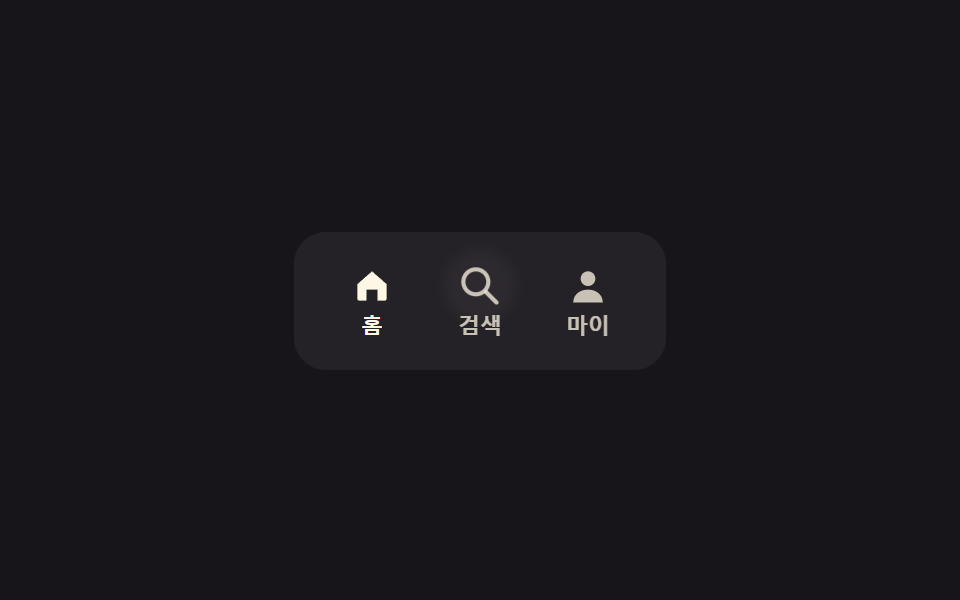
05アイコンタブ
role=tablistの3つのボタンが実際のaria-selectedと矢印キー移動を備え、選んだアイコンだけがscaleでわずかに大きくなりラベルの不透明度が上がる。
使いどころモバイルのボトムナビゲーション、アプリ風タブバー
role=tablistaria-selectedscale
<main class="stage">
  <div class="it is-demo" role="tablist" aria-label="ボトムナビゲーション">
    <button class="it__tab" type="button" role="tab" aria-selected="true" tabindex="0">
      <svg class="it__icon" viewBox="0 0 24 24" width="22" height="22" aria-hidden="true"><path d="M4 11 12 4l8 7v8a1 1 0 0 1-1 1h-4v-6H9v6H5a1 1 0 0 1-1-1z" fill="currentColor"/></svg>
      <span class="it__label">ホーム</span>
    </button>
    <button class="it__tab" type="button" role="tab" aria-selected="false" tabindex="-1">
      <svg class="it__icon" viewBox="0 0 24 24" width="22" height="22" aria-hidden="true"><circle cx="10" cy="10" r="6" fill="none" stroke="currentColor" stroke-width="2"/><line x1="15" y1="15" x2="20" y2="20" stroke="currentColor" stroke-width="2" stroke-linecap="round"/></svg>
      <span class="it__label">検索</span>
    </button>
    <button class="it__tab" type="button" role="tab" aria-selected="false" tabindex="-1">
      <svg class="it__icon" viewBox="0 0 24 24" width="22" height="22" aria-hidden="true"><circle cx="12" cy="8" r="4" fill="currentColor"/><path d="M4 21c0-4.4 3.6-7 8-7s8 2.6 8 7" fill="currentColor"/></svg>
      <span class="it__label">マイページ</span>
    </button>
  </div>
</main>
@use "../../../../site/static/demo-tokens" as *;
// ── 변수 3개 ──────────────────────────────────────────
$duration: $dur-quick; // 아이콘이 커지는 시간
$easing: $ease-pop; // 아이콘 바운스 이징
$color: $subject-cream; // 활성 아이콘·라벨 색
@include stage($stage-ink);
.it {
display: flex;
gap: $sp-6;
padding: $sp-3 $sp-6;
border-radius: $r-card;
background: rgba(255, 255, 255, .06);
}
.it__tab {
position: relative; // 트레일 고리(::before) 의 좌표 기준 (2026-09-15 형태 2차)
display: flex;
flex-direction: column;
align-items: center;
gap: $sp-1;
border: 0;
background: none;
padding: $sp-1;
color: rgba($subject-cream, .75); // 카드 면 위 8.85:1 (.5 였고 라벨 opacity .7 과 곱해 3.06 으로 미달였다)
cursor: pointer;
-webkit-tap-highlight-color: transparent;
}
.it__icon { position: relative; z-index: 1; transform: scale(1); transition: transform $duration $easing; color: inherit; } // z-index 1 — 잔상 고리(::before)를 아이콘 뒤로 깐다
.it__label { font-weight: 600; font-size: clamp(10px, 2.8vw, 11px); line-height: 1; font-family: inherit; opacity: 1; transition: opacity $duration $easing; } // 부모 색 알파(.75)가 이미 흐림을 담당 — opacity 를 곱하면 다시 미달로 떨어진다
.it__tab[aria-selected="true"] { color: $color; }
.it__tab[aria-selected="true"] .it__icon { transform: scale(1.18); }
.it__tab[aria-selected="true"] .it__label { opacity: 1; }
// 한 겹(잔상 트레일) — 아이콘 바운스에 원형 흐림 잔상을 얹는다. .it__icon 은 <svg> 인데
// SVG 요소에는 ::before/::after 가 박스를 만들지 않으므로(브라우저 공통 — SVG 는 가상요소
// 콘텐츠 삽입을 지원하지 않는다) 탭 버튼 위에 ::before 로 두고 아이콘 중심에 맞춘다.
// ::before 는 콘텐츠보다 먼저 칠해져 아이콘 뒤에 깔린다(z-index 낮음 등가). 아이콘 22px +
// inset -4px 등가 = 30px 원. 정적(aria-selected) 상태엔 opacity 0 — .is-demo 에서만 움직인다.
.it__tab::before {
content: "";
position: absolute;
top: calc(#{$sp-1} + 11px); // 아이콘 세로 중심 — 패딩 4px + 22px 아이콘의 절반
left: 50%;
width: 30px; height: 30px;
margin: -15px 0 0 -15px; // 중심 정렬 — transform 은 키프레임 scale 전용
border-radius: 50%;
background: rgba($color, .2);
filter: blur(2px);
opacity: 0;
pointer-events: none;
}
// ── 데모 루프: 클릭 전까지 세 아이콘을 순서대로 튕긴다 ──────────────
.it.is-demo .it__tab:nth-child(1) .it__icon { animation: it-bump $dur-loop $easing infinite; }
.it.is-demo .it__tab:nth-child(2) .it__icon { animation: it-bump $dur-loop $easing infinite; animation-delay: calc($dur-loop / 3 * -2); }
.it.is-demo .it__tab:nth-child(3) .it__icon { animation: it-bump $dur-loop $easing infinite; animation-delay: calc($dur-loop / 3 * -1); }
@keyframes it-bump {
0%, 8%, 100% { transform: scale(1); }
4% { transform: scale(1.18); }
}
// 잔상 고리도 it-bump 와 같은 nth-child 위상 — 각 탭이 튕기는 순간에 scale 오버슛 후 fade
.it.is-demo .it__tab:nth-child(1)::before { animation: it-trail-loop $dur-loop ease-out infinite; }
.it.is-demo .it__tab:nth-child(2)::before { animation: it-trail-loop $dur-loop ease-out infinite; animation-delay: calc($dur-loop / 3 * -2); }
.it.is-demo .it__tab:nth-child(3)::before { animation: it-trail-loop $dur-loop ease-out infinite; animation-delay: calc($dur-loop / 3 * -1); }
@keyframes it-trail-loop {
0% { transform: scale(.6); opacity: 0; }
2% { transform: scale(1.1); opacity: .2; } // 아이콘이 튀는 순간 살짝 지나쳤다가
6% { transform: scale(1.25); opacity: .16; }
12%, 100% { transform: scale(1.6); opacity: 0; } // 펴지며 잔상처럼 사라진다
}
@media (prefers-reduced-motion: reduce) {
.it__icon, .it__label { transition: none; }
.it.is-demo .it__tab .it__icon,
.it.is-demo .it__tab::before { animation: none !important; }
.it__tab::before { opacity: 0; } // 잔상 한 겹은 reduced-motion 에서 완전히 꺼진다
}html, body {
margin: 0;
overflow: hidden;
}
.stage {
box-sizing: border-box;
min-height: 100vh;
display: grid;
place-items: center;
margin: 0;
background: #17141a;
font-family: -apple-system, "Segoe UI", "Noto Sans KR", sans-serif;
padding: clamp(8px, 4vw, 24px);
}
.it {
display: flex;
gap: 24px;
padding: 12px 24px;
border-radius: 16px;
background: rgba(255, 255, 255, 0.06);
}
.it__tab {
position: relative;
display: flex;
flex-direction: column;
align-items: center;
gap: 4px;
border: 0;
background: none;
padding: 4px;
color: rgba(255, 247, 230, 0.75);
cursor: pointer;
-webkit-tap-highlight-color: transparent;
}
.it__icon {
position: relative;
z-index: 1;
transform: scale(1);
transition: transform 220ms cubic-bezier(0.2, 1.4, 0.4, 1);
color: inherit;
}
.it__label {
font-weight: 600;
font-size: clamp(10px, 2.8vw, 11px);
line-height: 1;
font-family: inherit;
opacity: 1;
transition: opacity 220ms cubic-bezier(0.2, 1.4, 0.4, 1);
}
.it__tab[aria-selected=true] {
color: #fff7e6;
}
.it__tab[aria-selected=true] .it__icon {
transform: scale(1.18);
}
.it__tab[aria-selected=true] .it__label {
opacity: 1;
}
.it__tab::before {
content: "";
position: absolute;
top: calc(4px + 11px);
left: 50%;
width: 30px;
height: 30px;
margin: -15px 0 0 -15px;
border-radius: 50%;
background: rgba(255, 247, 230, 0.2);
filter: blur(2px);
opacity: 0;
pointer-events: none;
}
.it.is-demo .it__tab:nth-child(1) .it__icon {
animation: it-bump 2s cubic-bezier(0.2, 1.4, 0.4, 1) infinite;
}
.it.is-demo .it__tab:nth-child(2) .it__icon {
animation: it-bump 2s cubic-bezier(0.2, 1.4, 0.4, 1) infinite;
animation-delay: -1.3333333333s;
}
.it.is-demo .it__tab:nth-child(3) .it__icon {
animation: it-bump 2s cubic-bezier(0.2, 1.4, 0.4, 1) infinite;
animation-delay: -0.6666666667s;
}
@keyframes it-bump {
0%, 8%, 100% {
transform: scale(1);
}
4% {
transform: scale(1.18);
}
}
.it.is-demo .it__tab:nth-child(1)::before {
animation: it-trail-loop 2s ease-out infinite;
}
.it.is-demo .it__tab:nth-child(2)::before {
animation: it-trail-loop 2s ease-out infinite;
animation-delay: -1.3333333333s;
}
.it.is-demo .it__tab:nth-child(3)::before {
animation: it-trail-loop 2s ease-out infinite;
animation-delay: -0.6666666667s;
}
@keyframes it-trail-loop {
0% {
transform: scale(0.6);
opacity: 0;
}
2% {
transform: scale(1.1);
opacity: 0.2;
}
6% {
transform: scale(1.25);
opacity: 0.16;
}
12%, 100% {
transform: scale(1.6);
opacity: 0;
}
}
@media (prefers-reduced-motion: reduce) {
.it__icon, .it__label {
transition: none;
}
.it.is-demo .it__tab .it__icon,
.it.is-demo .it__tab::before {
animation: none !important;
}
.it__tab::before {
opacity: 0;
}
}// role=tablist 의 실제 접근성 패턴: 클릭·좌우 화살표로 aria-selected 와 포커스를 옮긴다 (9줄).
var root = document.querySelector('.it'), tabs = [].slice.call(root.querySelectorAll('[role=tab]'));
function select(i) {
tabs.forEach(function (t, j) { var on = j === i; t.setAttribute('aria-selected', on); t.tabIndex = on ? 0 : -1; });
tabs[i].focus({ preventScroll: true }); root.classList.remove('is-demo');
}
tabs.forEach(function (t, i) {
t.addEventListener('click', function () { select(i); });
t.addEventListener('keydown', function (e) {
if (e.key === 'ArrowRight') select((i + 1) % tabs.length);
else if (e.key === 'ArrowLeft') select((i - 1 + tabs.length) % tabs.length);
});
});import { useState } from "react";
import type { CSSProperties } from "react";
import styles from "./IconTabs.module.scss";
const TABS = [
{ label: "홈", icon: "M4 11 12 4l8 7v8a1 1 0 0 1-1 1h-4v-6H9v6H5a1 1 0 0 1-1-1z" },
{ label: "마이", icon: "M4 21c0-4.4 3.6-7 8-7s8 2.6 8 7" },
];
export type IconTabsProps = {
duration?: number;
easing?: string;
color?: string;
};
type Vars = CSSProperties & { "--duration"?: string; "--easing"?: string; "--color"?: string };
export default function IconTabs({ duration = 220, easing = "cubic-bezier(.2,1.4,.4,1)", color = "#fff7e6" }: IconTabsProps) {
const [active, setActive] = useState(0);
const vars: Vars = { "--duration": `${duration}ms`, "--easing": easing, "--color": color };
const move = (dir: 1 | -1) => setActive((active + dir + TABS.length) % TABS.length);
return (
<div className={styles.it} style={vars} role="tablist">
{TABS.map((t, i) => (
<button key={t.label} type="button" role="tab" aria-selected={i === active} tabIndex={i === active ? 0 : -1}
className={styles.tab} onClick={() => setActive(i)}
onKeyDown={(e: { key: string }) => { if (e.key === "ArrowRight") move(1); if (e.key === "ArrowLeft") move(-1); }}>
<svg className={styles.icon} viewBox="0 0 24 24" width={22} height={22} aria-hidden="true">
<path d={t.icon} fill="currentColor" />
</svg>
<span className={styles.label}>{t.label}</span>
</button>
))}
</div>
);
}05 アイコンタブ — 計測 累積面積 0.301% · 動いたフレーム 6/23GODRICH オリジナル · SCSS と React は zip に同梱 · CSS タブ 切り替え アニメーション9選 — JS最小・CSSだけ
このデモが属する記事
 CSS タブ 切り替え アニメーション9選 — JS最小・CSSだけcss タブ 切り替え アニメーションは、ラジオボタンの:checked状態やrole="tablist"ボタンだけでインジケーターが滑り、パネルの中身が入れ替わる仕組みです。9個のうち7個はCSSだけで動きますが、矢印キー操作が要る2個だ この記事のデモをすべて見る